
Intel Desktop Board DP55WB
|
|
|
- Claire McDonald
- 9 years ago
- Views:
Transcription
1 Intel Desktop Board DP55WB Technical Product Specification September 2009 Order Number: E US The Intel Desktop Board DP55WB may contain design defects or errors known as errata that may cause the product to deviate from published specifications. Current characterized errata are documented in the Intel Desktop Board DP55WB Specification Update.
2 Revision History Revision Revision History Date -001 First release of the Intel Desktop Board DP55WB Technical Product Specification September 2009 This product specification applies to only the standard Intel Desktop Board DP55WB with BIOS identifier WBIBX10J.86A. Changes to this specification will be published in the Intel Desktop Board DP55WB Specification Update before being incorporated into a revision of this document. INFORMATION IN THIS DOCUMENT IS PROVIDED IN CONNECTION WITH INTEL PRODUCTS. NO LICENSE, EXPRESS OR IMPLIED, BY ESTOPPEL OR OTHERWISE, TO ANY INTELLECTUAL PROPERTY RIGHTS IS GRANTED BY THIS DOCUMENT. EXCEPT AS PROVIDED IN INTEL S TERMS AND CONDITIONS OF SALE FOR SUCH PRODUCTS, INTEL ASSUMES NO LIABILITY WHATSOEVER, AND INTEL DISCLAIMS ANY EXPRESS OR IMPLIED WARRANTY, RELATING TO SALE AND/OR USE OF INTEL PRODUCTS INCLUDING LIABILITY OR WARRANTIES RELATING TO FITNESS FOR A PARTICULAR PURPOSE, MERCHANTABILITY, OR INFRINGEMENT OF ANY PATENT, COPYRIGHT OR OTHER INTELLECTUAL PROPERTY RIGHT. UNLESS OTHERWISE AGREED IN WRITING BY INTEL, THE INTEL PRODUCTS ARE NOT DESIGNED NOR INTENDED FOR ANY APPLICATION IN WHICH THE FAILURE OF THE INTEL PRODUCT COULD CREATE A SITUATION WHERE PERSONAL INJURY OR DEATH MAY OCCUR. All Intel desktop boards are evaluated as Information Technology Equipment (I.T.E.) for use in personal computers (PC) for installation in homes, offices, schools, computer rooms, and similar locations. The suitability of this product for other PC or embedded non-pc applications or other environments, such as medical, industrial, alarm systems, test equipment, etc. may not be supported without further evaluation by Intel. Intel Corporation may have patents or pending patent applications, trademarks, copyrights, or other intellectual property rights that relate to the presented subject matter. The furnishing of documents and other materials and information does not provide any license, express or implied, by estoppel or otherwise, to any such patents, trademarks, copyrights, or other intellectual property rights. Intel may make changes to specifications and product descriptions at any time, without notice. Designers must not rely on the absence or characteristics of any features or instructions marked reserved or undefined. Intel reserves these for future definition and shall have no responsibility whatsoever for conflicts or incompatibilities arising from future changes to them. Intel desktop boards may contain design defects or errors known as errata, which may cause the product to deviate from published specifications. Current characterized errata are available on request. Contact your local Intel sales office or your distributor to obtain the latest specifications before placing your product order. Copies of documents which have an ordering number and are referenced in this document, or other Intel literature, may be obtained from: Intel Corporation P.O. Box 5937 Denver, CO or call in North America , Europe , France , Germany , other Countries Intel, Core i7, and Core i5 are registered trademarks of Intel Corporation or its subsidiaries in the United States and other countries. * Other names and brands may be claimed as the property of others. Copyright 2009, Intel Corporation. All rights reserved.

3 Preface This Technical Product Specification (TPS) specifies the board layout, components, connectors, power and environmental requirements, and the BIOS for the Intel Desktop Board DP55WB. Intended Audience The TPS is intended to provide detailed, technical information about the Intel Desktop Board DP55WB and its components to the vendors, system integrators, and other engineers and technicians who need this level of information. It is specifically not intended for general audiences. What This Document Contains Chapter Description 1 A description of the hardware used on the Intel Desktop Board DP55WB 2 A map of the resources of the Intel Desktop Board 3 The features supported by the BIOS Setup program 4 A description of the BIOS error messages, beep codes, and POST codes 5 Regulatory compliance and battery disposal information Typographical Conventions This section contains information about the conventions used in this specification. Not all of these symbols and abbreviations appear in all specifications of this type. Notes, Cautions, and Warnings NOTE Notes call attention to important information. CAUTION Cautions are included to help you avoid damaging hardware or losing data.

4 Intel Desktop Board DP55WB Technical Product Specification Other Common Notation # Used after a signal name to identify an active-low signal (such as USBP0#) GB GB/s Gb/s KB Kbit kbits/s MB MB/s Mbit Mbits/s xxh x.x V Gigabyte (1,073,741,824 bytes) Gigabytes per second Gigabits per second Kilobyte (1024 bytes) Kilobit (1024 bits) 1000 bits per second Megabyte (1,048,576 bytes) Megabytes per second Megabit (1,048,576 bits) Megabits per second An address or data value ending with a lowercase h indicates a hexadecimal value. Volts. Voltages are DC unless otherwise specified. * This symbol is used to indicate third-party brands and names that are the property of their respective owners. iv

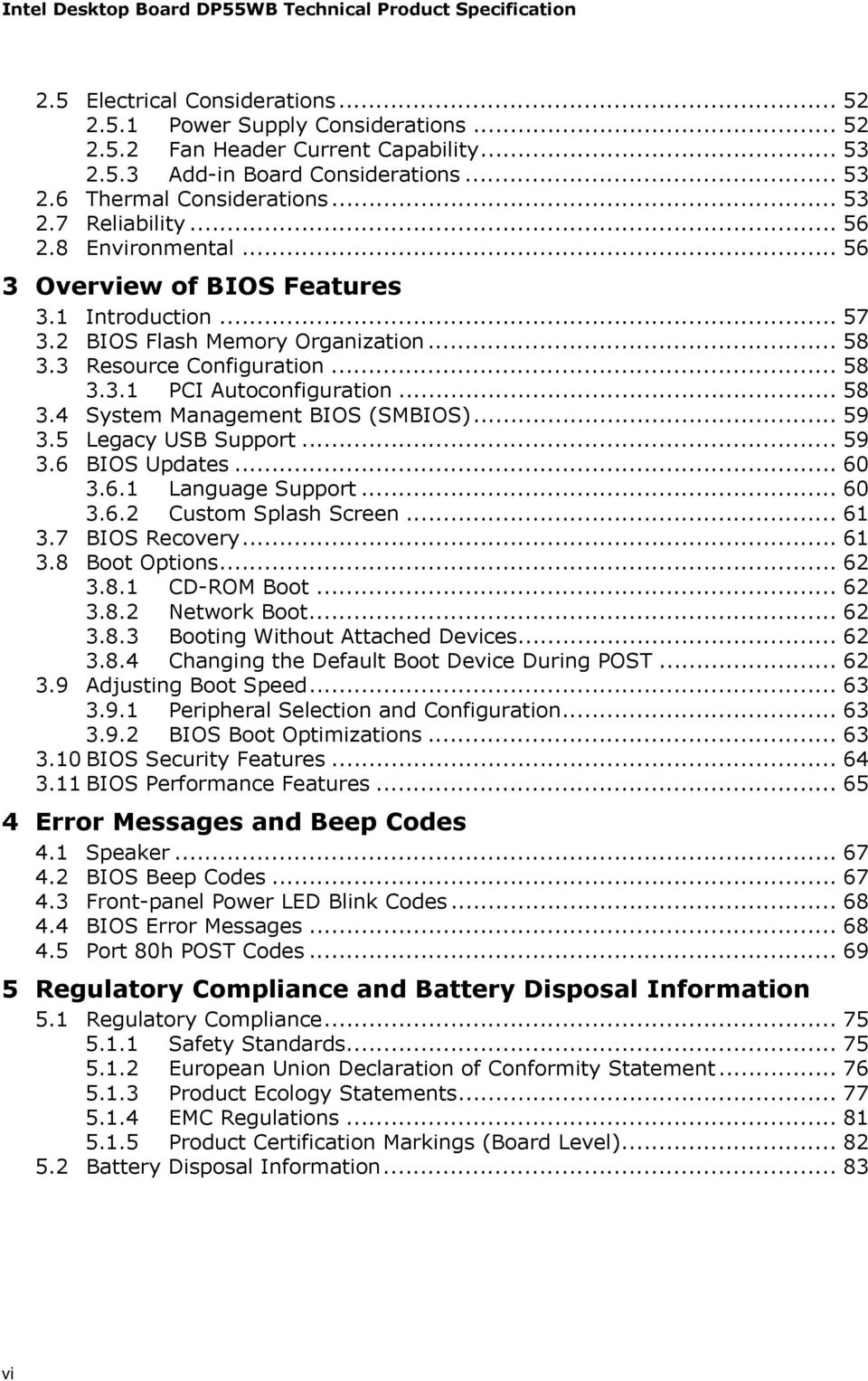
5 Contents 1 Product Description 1.1 Overview Feature Summary Board Layout Block Diagram Legacy Considerations Online Support Processor System Memory Memory Configurations Intel P55 Express Chipset USB SATA Interfaces Real-Time Clock Subsystem Audio Subsystem Audio Subsystem Software Audio Connectors and Headers Channel (5.1) Audio Subsystem LAN Subsystem Intel 82578DC Gigabit Ethernet Controller LAN Subsystem Software RJ-45 LAN Connector with Integrated LEDs Hardware Management Subsystem Hardware Monitoring and Fan Control Fan Monitoring Chassis Intrusion and Detection Thermal Monitoring Power Management ACPI Hardware Support ENERGY STAR*, E-Standby, and ErP Compliance Technical Reference 2.1 Memory Resources Addressable Memory Memory Map Connectors and Headers Back Panel Connectors Component-side Connectors and Headers Jumper Block Mechanical Considerations Form Factor v

6 Intel Desktop Board DP55WB Technical Product Specification 2.5 Electrical Considerations Power Supply Considerations Fan Header Current Capability Add-in Board Considerations Thermal Considerations Reliability Environmental Overview of BIOS Features 3.1 Introduction BIOS Flash Memory Organization Resource Configuration PCI Autoconfiguration System Management BIOS (SMBIOS) Legacy USB Support BIOS Updates Language Support Custom Splash Screen BIOS Recovery Boot Options CD-ROM Boot Network Boot Booting Without Attached Devices Changing the Default Boot Device During POST Adjusting Boot Speed Peripheral Selection and Configuration BIOS Boot Optimizations BIOS Security Features BIOS Performance Features Error Messages and Beep Codes 4.1 Speaker BIOS Beep Codes Front-panel Power LED Blink Codes BIOS Error Messages Port 80h POST Codes Regulatory Compliance and Battery Disposal Information 5.1 Regulatory Compliance Safety Standards European Union Declaration of Conformity Statement Product Ecology Statements EMC Regulations Product Certification Markings (Board Level) Battery Disposal Information vi
7 Contents Figures 1 Major Board Components Block Diagram Memory Channel and DIMM Configuration Back Panel Audio Connectors LAN Connector LED Locations Thermal Sensors and Fan Headers Location of the Standby Power LED Detailed System Memory Address Map Back Panel Connectors Component-side Connectors and Headers Connection Diagram for Front Panel Header Connection Diagram for Front Panel USB Headers Connection Diagram for Front Panel USB Header (with Intel Z-U130 USB Solid-State Drive, or Compatible Device, Support) Connection Diagram for IEEE 1394a Header Location of the Jumper Block Board Dimensions Localized High Temperature Zones Tables 1. Feature Summary Components Shown in Figure Supported Memory Configurations Audio Jack Support LAN Connector LED States Effects of Pressing the Power Switch Power States and Targeted System Power Wake-up Devices and Events System Memory Map Component-side Connectors and Headers Shown in Figure IEEE 1394a Header Front Panel Audio Header for Intel HD Audio Front Panel Audio Header for AC 97 Audio SATA Connectors S/PDIF Header Chassis Intrusion Header Processor, Front, and Rear Chassis (4-Pin) Fan Headers Processor Core Power Connector Main Power Connector Front Panel Header States for a One-Color Power LED States for a Two-Color Power LED BIOS Setup Configuration Jumper Settings Recommended Power Supply Current Values Fan Header Current Capability vii

8 Intel Desktop Board DP55WB Technical Product Specification 26. Thermal Considerations for Components Environmental Specifications BIOS Setup Program Menu Bar BIOS Setup Program Function Keys Acceptable Drives/Media Types for BIOS Recovery Boot Device Menu Options Supervisor and User Password Functions BIOS Beep Codes Front-panel Power LED Blink Codes BIOS Error Messages Port 80h POST Code Ranges Port 80h POST Codes Typical Port 80h POST Sequence Safety Standards Lead-Free Board Markings EMC Regulations Product Certification Markings viii

9 1 Product Description 1.1 Overview Feature Summary Table 1 summarizes the major features of the board. Table 1. Feature Summary Form Factor MicroATX (9.60 inches by 9.60 inches [ millimeters by millimeters]) Processor Memory Chipset Audio Peripheral Interfaces BIOS Instantly Available PC Technology LAN Support Intel Core i7 and Core i5 processors in an LGA1156 socket One PCI Express* 2.0 x16 Graphics interface Integrated memory controller with dual channel DDR3 memory support Four 240-pin DDR3 SDRAM Dual Inline Memory Module (DIMM) sockets Support for DDR MHz and DDR MHz DIMMs Support for 1 Gb and 2 Gb memory technology Support for up to 16 GB of system memory with four DIMMs using 2 Gb memory technology Support for non-ecc memory Support for 1.35 V low voltage JEDEC memory Intel P55 Express Chipset consisting of the Intel P55 Express Platform Controller Hub (PCH) channel audio subsystem using the Realtek* ALC888-VC2-GR audio codec Fourteen USB 2.0 ports: Eight ports are implemented with stacked back panel connectors Six front panel ports implemented through three internal headers; one header supports an Intel Z-U130 USB Solid-State Drive (or compatible device) Six internal Serial ATA (SATA) 3.0 Gb/s interfaces through Intel P55 Express Chipset with Intel Matrix Storage Technology RAID support Two IEEE 1394a ports: One port via a back panel connector One port via an internal header for front panel cabling Intel BIOS resident in the SPI Flash device Support for Advanced Configuration and Power Interface (ACPI), Plug and Play, and SMBIOS Support for PCI* Local Bus Specification Revision 2.2 Support for PCI Express* Revision 2.0 Suspend to RAM support Wake on PCI, PCI Express, LAN, front panel, and USB ports Gigabit (10/100/1000 Mbits/s) LAN subsystem using the Intel 82578DC Gigabit Ethernet Controller continued 9
![84 millimeters]) Processor Memory Chipset Audio Peripheral Interfaces BIOS Instantly Available PC Technology LAN Support Intel Core i7 and Core i5 processors in an LGA1156 socket One PCI Express* 2.](/docs-images/46/21247976/images/page_9.jpg "0 x16 Graphics interface Integrated memory controller with dual channel DDR3 memory support Four 240-pin DDR3 SDRAM Dual Inline Memory Module (DIMM) sockets Support for DDR3 1333 MHz and DDR3 1066")
10 Intel Desktop Board DP55WB Technical Product Specification Table 1. Feature Summary (continued) Expansion Capabilities Hardware Monitor Subsystem One PCI Express 2.0 x16 bus add-in card connector Two PCI Express 2.0 x1 bus add-in card connectors One PCI conventional bus connector Hardware monitoring and fan control ASIC Heceta 6P Voltage sense to detect out of range power supply voltages Thermal sense to detect out of range thermal values Three fan headers using Heceta 6P fan speed control Three fan sense inputs used to monitor fan activity Fan speed control using voltage control (4-pin fan headers front, rear, and processor) with selectable support in BIOS for 3 wire fans Support for Platform Environmental Control Interface (PECI) 10

11 Product Description Board Layout Figure 1 shows the location of the major components on Intel Desktop Board DP55WB. Figure 1. Major Board Components 11
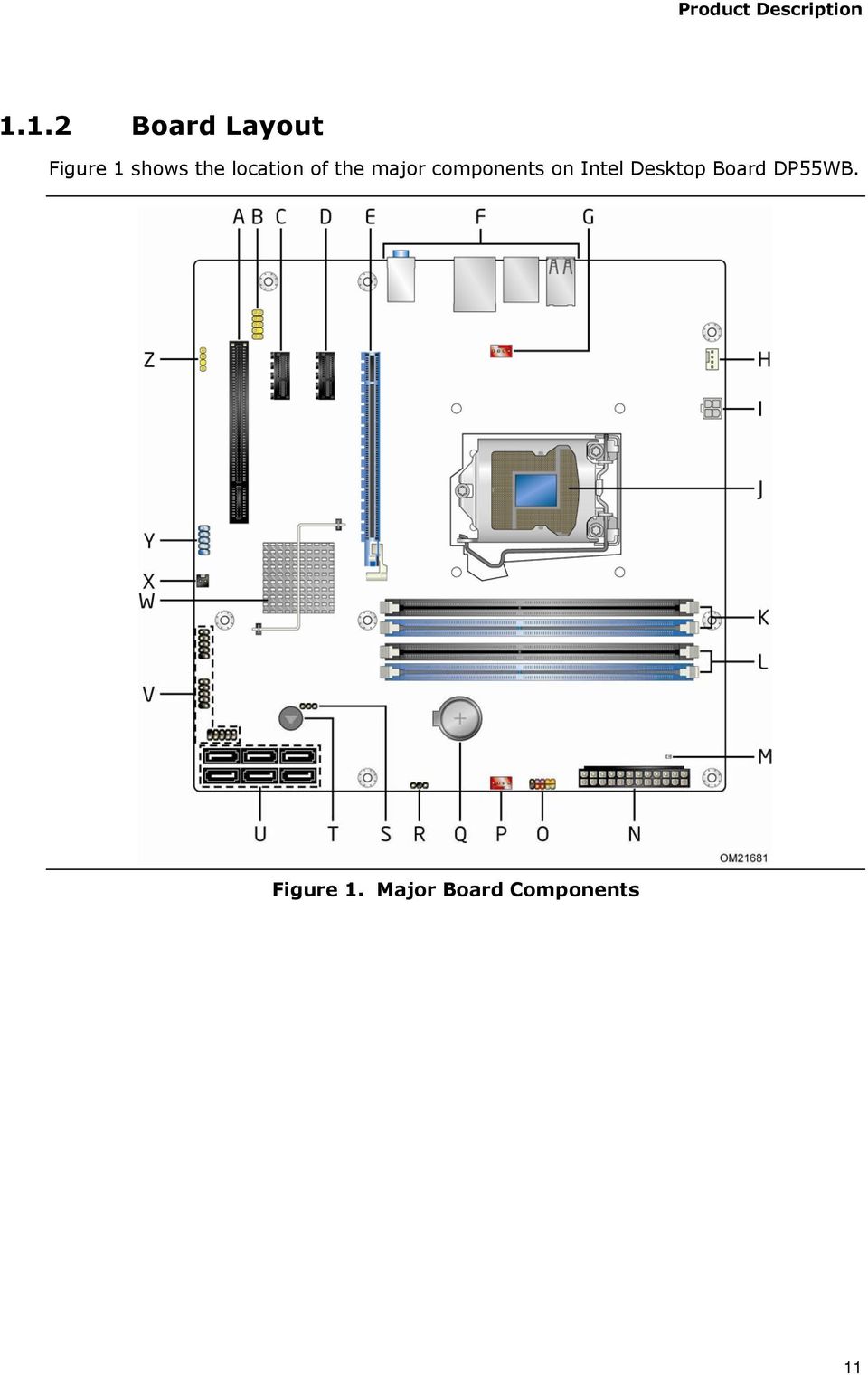
12 Intel Desktop Board DP55WB Technical Product Specification Table 2 lists the components identified in Figure 1. Table 2. Components Shown in Figure 1 Item/callout from Figure 1 Description A PCI Conventional bus add-in card connector B Front panel audio header C PCI Express x1 bus add-in card connector D PCI Express x1 bus add-in card connector E PCI Express x16 bus add-in card connector F Back panel connectors G Rear chassis fan header H Processor fan header I Processor core power connector (2 x 2) J LGA1156 processor socket K DIMM Channel A sockets (2) L DIMM Channel B sockets (2) M +5 V Standby Power Indicator LED N Main power connector (2 x 12) O Front panel header P Front chassis fan header Q Battery R Alternate front panel power LED header S BIOS Setup configuration jumper block T Piezo Speaker U SATA connectors V Front panel USB headers (3) W Intel P55 Express Chipset X Chassis intrusion header Y IEEE 1394a front panel header Z S/PDIF out header 12

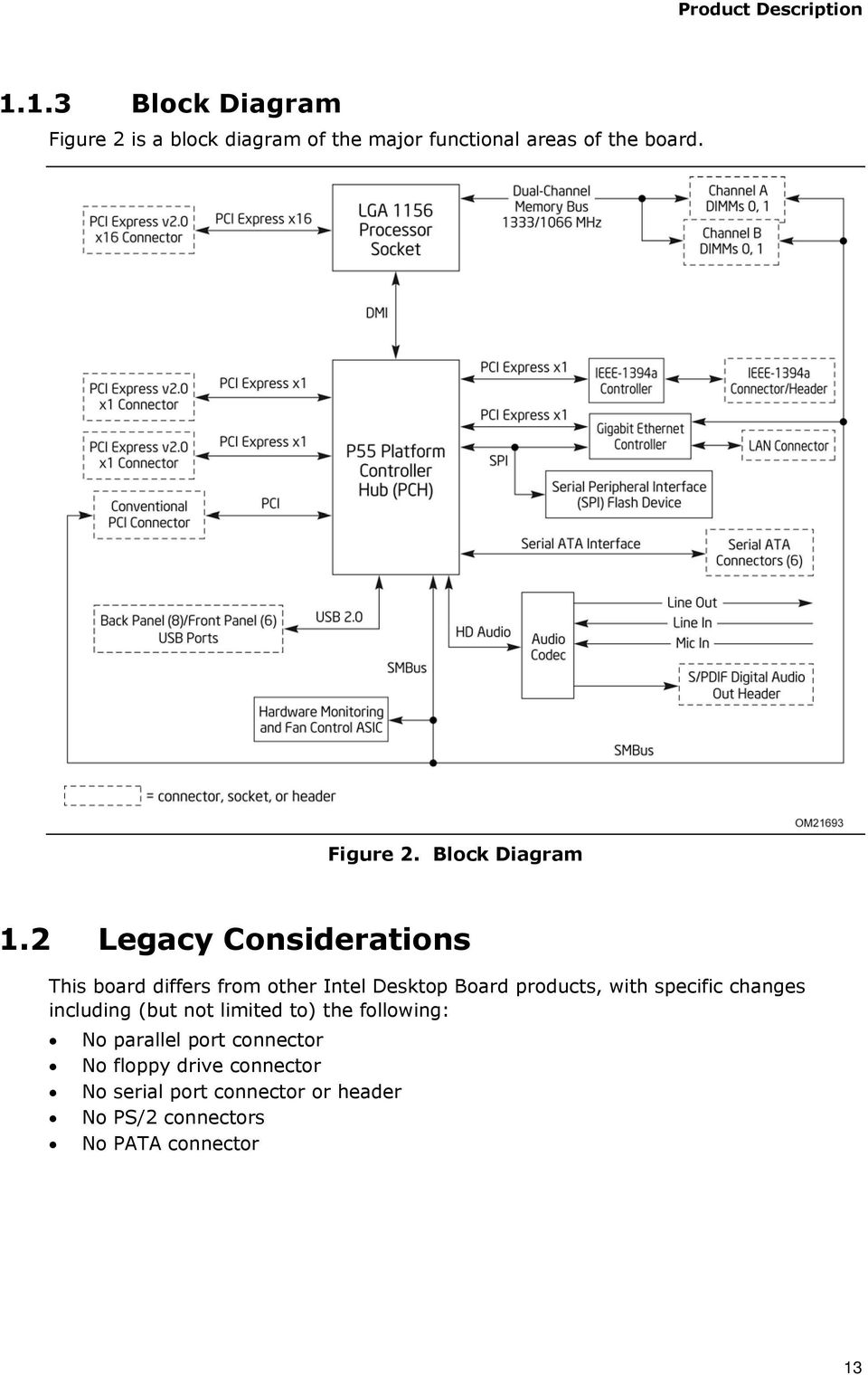
13 Product Description Block Diagram Figure 2 is a block diagram of the major functional areas of the board. Figure 2. Block Diagram 1.2 Legacy Considerations This board differs from other Intel Desktop Board products, with specific changes including (but not limited to) the following: No parallel port connector No floppy drive connector No serial port connector or header No PS/2 connectors No PATA connector 13
14 Intel Desktop Board DP55WB Technical Product Specification 1.3 Online Support To find information about Intel Desktop Board DP55WB Desktop Board Support Available configurations for the Intel Desktop Board DP55WB Supported processors Chipset information BIOS and driver updates Tested memory Integration information 1.4 Processor Visit this World Wide Web site: htm The board is designed to support the Intel Core i7 and Core i5 processors in an LGA1156 socket Other processors may be supported in the future. This board is designed to support processors with a maximum wattage of 95 W Thermal Design Power (TDP). The processors listed above are only supported when falling within the wattage requirements of the Intel Desktop Board DP55WB. See the Intel web site listed below for the most up-to-date list of supported processors. For information about Supported processors Refer to: CAUTION Use only the processors listed on the web site above. Use of unsupported processors can damage the board, the processor, and the power supply. NOTE This board has specific requirements for providing power to the processor. Refer to Section on page 52 for information on power supply requirements for this board. 14

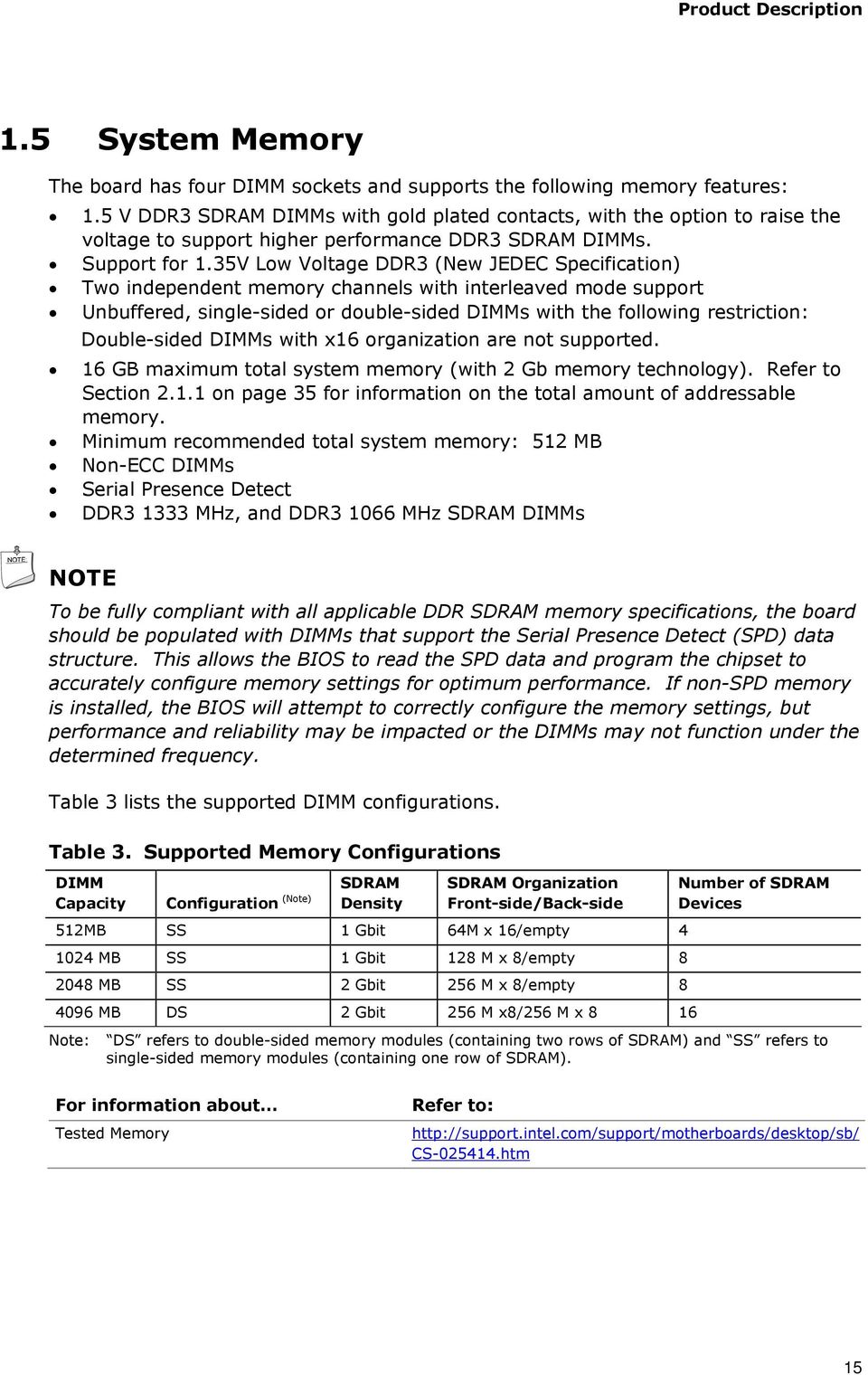
15 Product Description 1.5 System Memory The board has four DIMM sockets and supports the following memory features: 1.5 V DDR3 SDRAM DIMMs with gold plated contacts, with the option to raise the voltage to support higher performance DDR3 SDRAM DIMMs. Support for 1.35V Low Voltage DDR3 (New JEDEC Specification) Two independent memory channels with interleaved mode support Unbuffered, single-sided or double-sided DIMMs with the following restriction: Double-sided DIMMs with x16 organization are not supported. 16 GB maximum total system memory (with 2 Gb memory technology). Refer to Section on page 35 for information on the total amount of addressable memory. Minimum recommended total system memory: 512 MB Non-ECC DIMMs Serial Presence Detect DDR MHz, and DDR MHz SDRAM DIMMs NOTE To be fully compliant with all applicable DDR SDRAM memory specifications, the board should be populated with DIMMs that support the Serial Presence Detect (SPD) data structure. This allows the BIOS to read the SPD data and program the chipset to accurately configure memory settings for optimum performance. If non-spd memory is installed, the BIOS will attempt to correctly configure the memory settings, but performance and reliability may be impacted or the DIMMs may not function under the determined frequency. Table 3 lists the supported DIMM configurations. Table 3. Supported Memory Configurations DIMM SDRAM Capacity Configuration (Note) Density SDRAM Organization Front-side/Back-side 512MB SS 1 Gbit 64M x 16/empty MB SS 1 Gbit 128 M x 8/empty MB SS 2 Gbit 256 M x 8/empty MB DS 2 Gbit 256 M x8/256 M x 8 16 Number of SDRAM Devices Note: DS refers to double-sided memory modules (containing two rows of SDRAM) and SS refers to single-sided memory modules (containing one row of SDRAM). For information about Tested Memory Refer to: CS htm 15
16 Intel Desktop Board DP55WB Technical Product Specification Memory Configurations The Intel Core i7 and Core i5 processors in the LGA1156 socket support the following types of memory organization: Dual channel (Interleaved) mode. This mode offers the highest throughput for real world applications. Dual channel mode is enabled when the installed memory capacities of both DIMM channels are equal. Technology and device width can vary from one channel to the other but the installed memory capacity for each channel must be equal. If different speed DIMMs are used between channels, the slowest memory timing will be used. Single channel (Asymmetric) mode. This mode is equivalent to single channel bandwidth operation for real world applications. This mode is used when only a single DIMM is installed or the memory capacities are unequal. Technology and device width can vary from one channel to the other. If different speed DIMMs are used between channels, the slowest memory timing will be used. For information about Memory Configuration Examples Refer to: htm 16

17 Product Description Figure 3 illustrates the memory channel and DIMM configuration. Figure 3. Memory Channel and DIMM Configuration NOTE The Intel P55 Express Chipset requires memory to be populated in the Channel A, DIMM 0 socket. For best memory performance always install memory into the blue DIMM memory sockets if only installing two DIMMs in your configuration. 17

18 Intel Desktop Board DP55WB Technical Product Specification 1.6 Intel P55 Express Chipset Intel P55 Express Chipset with Direct Media Interface (DMI) interconnect provides interfaces to the processor and the USB, SATA, LPC, LAN, PCI, PCIe interfaces. The Intel P55 Express Chipset is a centralized controller for the board s I/O paths. For information about The Intel P55 chipset Refer to Resources used by the chipset Chapter USB The board supports up to 14 USB 2.0 ports, via two Enhanced Host Controller Interface (EHCI) host controllers that support USB high-speed signaling. High-speed USB 2.0 allows data transfers up to 480 Mb/s which is 40 times faster than full-speed USB. The Intel P55 Express Chipset provides the USB controller for all ports. The port arrangement is as follows: Eight ports are implemented with stacked back panel connectors Six front panel ports implemented through three internal headers All 14 USB ports are high-speed, full-speed, and low-speed capable. NOTES One of the front panel USB headers supports an Intel Z-U130 USB Solid-State Drive (or compatible device). Computer systems that have an unshielded cable attached to a USB port may not meet FCC Class B requirements, even if no device is attached to the cable. Use shielded cable that meets the requirements for full-speed devices. For information about Refer to The location of the USB connectors on the back panel Figure 9, page 38 The location of the front panel USB headers Figure 10, page 39 18

19 Product Description SATA Interfaces The board provides six internal SATA connectors through the Intel P55 Express Chipset, which support one device per connector. The Intel P55 Express Chipset provides independent SATA ports with a theoretical maximum transfer rate of 3 Gb/s per port. One device can be installed on each port for a maximum of six SATA devices. A point-to-point interface is used for host to device connections, unlike Parallel ATA (PATA) IDE which supports a master/slave configuration and two devices per channel. For compatibility, the underlying SATA functionality is transparent to the operating system. The SATA controller can operate in both legacy and native modes. In legacy mode, standard IDE I/O and IRQ resources are assigned (IRQ 14 and 15). In Native mode, standard PCI Conventional bus resource steering is used. Native mode is the preferred mode for configurations using the Windows* XP and Windows Vista* and Windows* 7 operating systems. NOTE Many SATA drives use new low-voltage power connectors and require adapters or power supplies equipped with low-voltage power connectors. For more information, see: For information about Refer to The location of the SATA connectors Figure 10, page SATA RAID The board supports Intel Matrix Storage Technology which provides the following RAID (Redundant Array of Independent Drives) levels via the Intel P55 Express Chipset: RAID 0 - data striping RAID 1 - data mirroring RAID 0+1 (or RAID 10) - data striping and mirroring RAID 5 - distributed parity NOTE In order to use supported RAID features, you must first enable RAID in the BIOS. Also, during Microsoft Windows XP installation, you must press F6 to install the RAID drivers. See your Microsoft Windows XP documentation for more information about installing drivers during installation. Both Microsoft Windows Vista and Microsoft Windows 7 include the necessary RAID drivers for both AHCI and RAID without the need to install separate RAID drivers using the F6 switch in the operating system installation process. 19

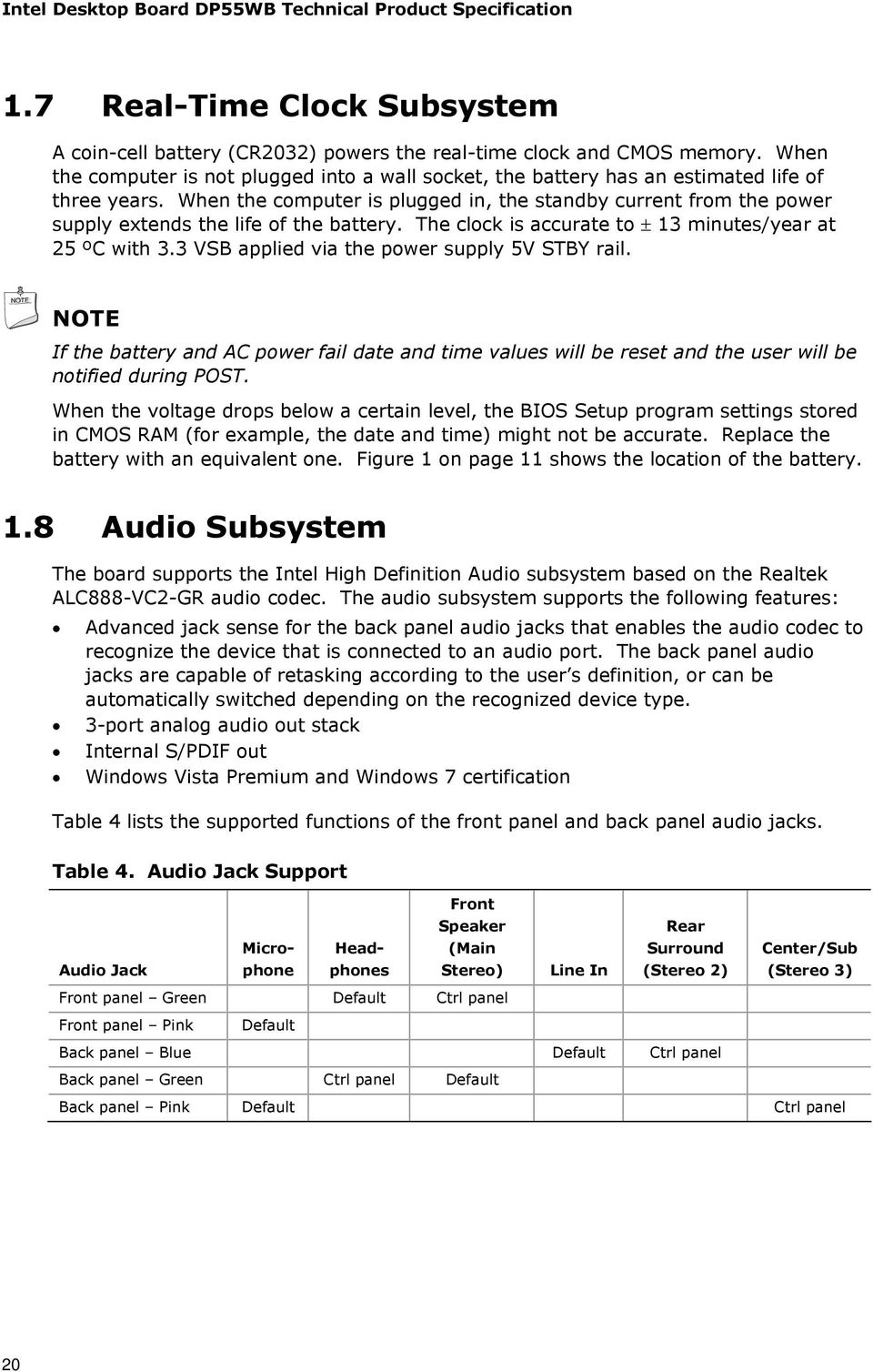
20 Intel Desktop Board DP55WB Technical Product Specification 1.7 Real-Time Clock Subsystem A coin-cell battery (CR2032) powers the real-time clock and CMOS memory. When the computer is not plugged into a wall socket, the battery has an estimated life of three years. When the computer is plugged in, the standby current from the power supply extends the life of the battery. The clock is accurate to ± 13 minutes/year at 25 ºC with 3.3 VSB applied via the power supply 5V STBY rail. NOTE If the battery and AC power fail date and time values will be reset and the user will be notified during POST. When the voltage drops below a certain level, the BIOS Setup program settings stored in CMOS RAM (for example, the date and time) might not be accurate. Replace the battery with an equivalent one. Figure 1 on page 11 shows the location of the battery. 1.8 Audio Subsystem The board supports the Intel High Definition Audio subsystem based on the Realtek ALC888-VC2-GR audio codec. The audio subsystem supports the following features: Advanced jack sense for the back panel audio jacks that enables the audio codec to recognize the device that is connected to an audio port. The back panel audio jacks are capable of retasking according to the user s definition, or can be automatically switched depending on the recognized device type. 3-port analog audio out stack Internal S/PDIF out Windows Vista Premium and Windows 7 certification Table 4 lists the supported functions of the front panel and back panel audio jacks. Table 4. Audio Jack Support Front Audio Jack Microphone Headphones Speaker (Main Stereo) Line In Rear Surround (Stereo 2) Center/Sub (Stereo 3) Front panel Green Default Ctrl panel Front panel Pink Default Back panel Blue Default Ctrl panel Back panel Green Ctrl panel Default Back panel Pink Default Ctrl panel 20
21 Product Description Audio Subsystem Software Audio software and drivers are available from Intel s World Wide Web site. For information about Refer to Obtaining audio software and drivers Section 1.3, page Audio Connectors and Headers The board contains audio connectors and headers on both the back panel and the component side of the board. The component-side audio headers include the following: Front panel audio (a 2 x 5-pin header that provides mic in and line out signals for front panel audio connectors) S/PDIF audio header (1 x 4-pin header) Channel (5.1) Audio Subsystem The 6-channel (5.1) audio subsystem includes the following: Intel P55 Express Chipset Realtek ALC888-VC2-GR audio codec A signal-to-noise (S/N) ratio of 97 db Microphone input that supports a single dynamic, condenser, or electret microphone The back panel audio connectors are configurable through the audio device drivers. The available configurable back panel audio connectors are shown in Figure 4. Item A B C Description Line in Line out Mic in Figure 4. Back Panel Audio Connectors 21
22 Intel Desktop Board DP55WB Technical Product Specification NOTE The back panel audio line out connector is designed to power headphones or amplified speakers only. Poor audio quality occurs if passive (non-amplified) speakers are connected to this output. For information about Refer to The locations of the front panel audio header and S/PDIF audio header Figure 10, page 39 The signal names of the front panel audio header and S/PDIF header Section , page 41 The back panel audio connectors Section 2.2.1, page LAN Subsystem The LAN subsystem consists of the following: Intel 82578DC Gigabit Ethernet Controller (10/100/1000 Mbits/s) Intel P55 Express Chipset RJ-45 LAN connector with integrated status LEDs Additional features of the LAN subsystem include: CSMA/CD protocol engine LAN connect interface between the PCH and the LAN controller PCI Conventional bus power management ACPI technology support LAN wake capabilities LAN subsystem software For information about LAN software and drivers Refer to Intel 82578DC Gigabit Ethernet Controller The Intel 82578DC Gigabit Ethernet Controller supports the following features: 10/100/1000 BASE-T IEEE compliant PCI Express link Compliant to IEEE 802.3x flow control support 802.1p and 802.1q TCP, IP, and UDP checksum offload (for IPv4 and IPv6) Transmit TCP segmentation Full device driver compatibility PCI Express power management support 22
23 Product Description LAN Subsystem Software LAN software and drivers are available from Intel s World Wide Web site. For information about Obtaining LAN software and drivers Refer to RJ-45 LAN Connector with Integrated LEDs Two LEDs are built into the RJ-45 LAN connector (shown in Figure 5 below). Item A B Description Link LED (Green) Data Rate LED (Green/Yellow) Figure 5. LAN Connector LED Locations Table 5 describes the LED states when the board is powered up and the LAN subsystem is operating. Table 5. LAN Connector LED States LED LED Color LED State Condition Link Data Rate Green Green/Yellow Off On Blinking Off Green Yellow LAN link is not established. LAN link is established. LAN activity is occurring. 10 Mbits/s data rate is selected. 100 Mbits/s data rate is selected Mbits/s data rate is selected. 23
24 Intel Desktop Board DP55WB Technical Product Specification 1.10 Hardware Management Subsystem The hardware management features enable the board to be compatible with the Wired for Management (WfM) specification. The board has several hardware management features, including the following: Fan monitoring and control Thermal and voltage monitoring Chassis intrusion detection Hardware Monitoring and Fan Control The features of the hardware monitoring and fan control include: Fan speed control controllers and sensors provided by the Hardware Monitoring and Fan Control ASIC Thermal sensor in the processor, the Hardware Monitoring ASIC and a remote thermal diode Power supply monitoring of five voltages (+5 V, +12 V, +3.3 V, +Vsm, and +VCCP) to detect levels above or below acceptable values Thermally monitored closed-loop fan control, for all three fans, that can adjust the fan speed or switch the fans on or off as needed Fan Monitoring Fan monitoring can be implemented using Intel Desktop Utilities or third-party software. For information about Refer to The functions of the fan headers Section , page Chassis Intrusion and Detection The board supports a chassis security feature that detects if the chassis cover is removed. The security feature uses a mechanical switch on the chassis that attaches to the chassis intrusion header. When the chassis cover is removed, the mechanical switch is in the closed position. For information about Refer to The location of the chassis intrusion header Figure 10, page 39 24
25 Product Description Thermal Monitoring Figure 6 shows the locations of the thermal sensors and fan headers. Item A B C D E F Description Rear chassis fan header Processor fan header Thermal diode, located on the processor die Hardware Monitoring ASIC Front chassis fan header Remote thermal diode Figure 6. Thermal Sensors and Fan Headers 25
26 Intel Desktop Board DP55WB Technical Product Specification 1.11 Power Management Power management is implemented at several levels, including: Software support through Advanced Configuration and Power Interface (ACPI) Hardware support: Power connector Fan headers LAN wake capabilities Instantly Available PC technology Wake from USB Power Management Event signal (PME#) wake-up support PCI Express WAKE# signal support ACPI ACPI gives the operating system direct control over the power management and Plug and Play functions of a computer. The use of ACPI with this board requires an operating system that provides full ACPI support. ACPI features include: Plug and Play (including bus and device enumeration) Power management control of individual devices, add-in boards (some add-in boards may require an ACPI-aware driver), video displays, and hard disk drives Methods for achieving less than 15-watt system operation in the power-on/standby sleeping state A Soft-off feature that enables the operating system to power-off the computer Support for multiple wake-up events (see Table 8 on page 28) Support for a front panel power and sleep mode switch Table 6 lists the system states based on how long the power switch is pressed, depending on how ACPI is configured with an ACPI-aware operating system. Table 6. Effects of Pressing the Power Switch If the system is in this state Off (ACPI G2/G5 Soft off) On (ACPI G0 working state) On (ACPI G0 working state) Sleep (ACPI G1 sleeping state) Sleep (ACPI G1 sleeping state) and the power switch is pressed for Less than four seconds Less than four seconds More than six seconds Less than four seconds More than six seconds the system enters this state Power-on (ACPI G0 working state) Soft-off/Standby (ACPI G1 sleeping state) Fail safe power-off (ACPI G2/G5 Soft off) Wake-up (ACPI G0 working state) Power-off (ACPI G2/G5 Soft off) 26
27 Product Description System States and Power States Under ACPI, the operating system directs all system and device power state transitions. The operating system puts devices in and out of low-power states based on user preferences and knowledge of how devices are being used by applications. Devices that are not being used can be turned off. The operating system uses information from applications and user settings to put the system as a whole into a low-power state. Table 7 lists the power states supported by the board along with the associated system power targets. See the ACPI specification for a complete description of the various system and power states. Table 7. Power States and Targeted System Power Global States G0 working state G1 sleeping state G1 sleeping state G1 sleeping state G2/S5 G3 mechanical off AC power is disconnected from the computer. Sleeping States Processor States Device States S0 working C0 working D0 working state. S1 Processor stopped S3 Suspend to RAM. Context saved to RAM. S4 Suspend to disk. Context saved to disk. S5 Soft off. Context not saved. Cold boot is required. No power to the system. C1 stop grant No power No power No power No power D1, D2, D3 device specification specific. D3 no power except for wake-up logic. D3 no power except for wake-up logic. D3 no power except for wake-up logic. D3 no power for wake-up logic, except when provided by battery or external source. Targeted System Power (Note 1) Full power > 30 W 5 W < power < 52.5 W Power < 5 W Power < 5 W Power < 5 W (Note 2) (Note 2) (Note 2) No power to the system. Service can be performed safely. Notes: 1. Total system power is dependent on the system configuration, including add-in boards and peripherals powered by the system chassis power supply. 2. Dependent on the standby power consumption of wake-up devices used in the system. 27
28 Intel Desktop Board DP55WB Technical Product Specification Wake-up Devices and Events Table 8 lists the devices or specific events that can wake the computer from specific states. Table 8. Wake-up Devices and Events These devices/events can wake up the computer from this state Power switch S1, S3, S4, S5 (Note) RTC alarm S1, S3, S4, S5 (Note) LAN S1, S3, S4, S5 (Note) USB S1, S3 PME# signal S1, S3, S4, S5 (Note) WAKE# S1, S3, S4, S5 (Note) Note: S4 implies operating system support only. Wake from S4 and S5 is recommended by Microsoft. NOTE The use of these wake-up events from an ACPI state requires an operating system that provides full ACPI support. In addition, software, drivers, and peripherals must fully support ACPI wake events Hardware Support CAUTION Ensure that the power supply provides adequate +5 V standby current if LAN wake capabilities and Instantly Available PC technology features are used. Failure to do so can damage the power supply. The total amount of standby current required depends on the wake devices supported and manufacturing options. The board provides several power management hardware features, including: Power connector Fan headers LAN wake capabilities Instantly Available PC technology Wake from USB PME# signal wake-up support WAKE# signal wake-up support +5 V Standby Power Indicator LED LAN wake capabilities and Instantly Available PC technology require power from the +5 V standby line. NOTE The use of Wake from USB from an ACPI state requires an operating system that provides full ACPI support. 28
29 Product Description Power Connector ATX12V-compliant power supplies can turn off the system power through system control. When an ACPI-enabled system receives the correct command, the power supply removes all non-standby voltages. When resuming from an AC power failure, the computer returns to the power state it was in before power was interrupted (on or off). The computer s response can be set using the Last Power State feature in the BIOS Setup program s Boot menu. For information about Refer to The location of the main power connector Figure 10, page 39 The signal names of the main power connector Table 19, page Fan Headers The function/operation of the fan headers is as follows: The fans are on when the board is in the S0 or S1 state The fans are off when the board is off or in the S3, S4, or S5 state Each fan header is wired to a fan tachometer input of the hardware monitoring and fan control ASIC All fan headers support closed-loop fan control that can adjust the fan speed or switch the fan on or off as needed All fan headers have a +12 V DC connection 4-pin fan headers are controlled by Pulse Width Modulation For information about Refer to The location of the fan headers Figure 10, page 39 The location of the fan headers and sensors for thermal monitoring Figure 6, page 25 29
30 Intel Desktop Board DP55WB Technical Product Specification LAN Wake Capabilities CAUTION For LAN wake capabilities, the +5 V standby line for the power supply must be capable of providing adequate +5 V standby current. Failure to provide adequate standby current when implementing LAN wake capabilities can damage the power supply. LAN wake capabilities enable remote wake-up of the computer through a network. The LAN subsystem PCI bus network adapter monitors network traffic at the Media Independent Interface. Upon detecting a Magic Packet* frame, the LAN subsystem asserts a wake-up signal that powers up the computer. Depending on the LAN implementation, the board supports LAN wake capabilities with ACPI in the following ways: The PCI Express WAKE# signal The PCI bus PME# signal for PCI 2.3 compliant LAN designs By Ping Magic Packet The onboard LAN subsystem Instantly Available PC Technology CAUTION For Instantly Available PC technology, the +5 V standby line for the power supply must be capable of providing adequate +5 V standby current. Failure to provide adequate standby current when implementing Instantly Available PC technology can damage the power supply. Instantly Available PC technology enables the board to enter the ACPI S3 (Suspend-to- RAM) sleep-state. While in the S3 sleep-state, the computer will appear to be off (the power supply is off, and the front panel LED is amber if dual colored, or off if single colored.) When signaled by a wake-up device or event, the system quickly returns to its last known wake state. Table 8 on page 28 lists the devices and events that can wake the computer from the S3 state. The board supports the PCI Bus Power Management Interface Specification. Add-in boards that also support this specification can participate in power management and can be used to wake the computer. The use of Instantly Available PC technology requires operating system support and PCI 2.2 compliant add-in cards, PCI Express add-in cards, and drivers. 30
31 Product Description Wake from USB USB bus activity wakes the computer from ACPI S1 or S3 states. NOTE Wake from USB requires the use of a USB peripheral that supports Wake from USB PME# Signal Wake-up Support When the PME# signal on the PCI Conventional bus is asserted, the computer wakes from an ACPI S1, S3, S4, or S5 state (with Wake on PME enabled in the BIOS) WAKE# Signal Wake-up Support When the WAKE# signal on the PCI Express bus is asserted, the computer wakes from an ACPI S1, S3, S4, or S5 state. 31
32 Intel Desktop Board DP55WB Technical Product Specification V Standby Power Indicator LED The +5 V standby power indicator LED shows that power is still present even when the computer appears to be off. Figure 7 shows the location of the standby power LED. CAUTION If AC power has been switched off and the standby power indicator is still lit, disconnect the power cord before installing or removing any devices connected to the board. Failure to do so could damage the board and any attached devices. Figure 7. Location of the Standby Power LED 32
33 Product Description ENERGY STAR*, E-Standby, and ErP Compliance The US Department of Energy and the US Environmental Protection Agency have continually revised the ENERGY STAR requirements. Intel has worked directly with these two governmental agencies in the definition of new requirements. This Desktop Board meets the ENERGY STAR Program for Computers: Version 5.0 Category D requirements. For information about ENERGY STAR requirements and recommended configurations Refer to Intel Desktop Board DP55WB also meets the following international program requirements: Korea E-Standby European Union ErP 33
34 Intel Desktop Board DP55WB Technical Product Specification 34
35 2 Technical Reference 2.1 Memory Resources Addressable Memory The board utilizes 16 GB of addressable system memory. Typically the address space that is allocated for PCI Conventional bus add-in cards, PCI Express configuration space, BIOS (SPI Flash device), and chipset overhead resides above the top of DRAM (total system memory). On a system that has 16 GB of system memory installed, it is not possible to use all of the installed memory due to system address space being allocated for other system critical functions. These functions include the following: BIOS/SPI Flash device (16 Mbit) Local APIC (19 MB) Direct Media Interface (40 MB) Front side bus interrupts (17 MB) PCI Express configuration space (256 MB) PCH base address registers PCI Express ports (up to 256 MB) Memory-mapped I/O that is dynamically allocated for PCI Conventional and PCI Express add-in cards (256 MB) The board provides the capability to reclaim the physical memory overlapped by the memory mapped I/O logical address space. The board remaps physical memory from the top of usable DRAM boundary to the 4 GB boundary to an equivalent sized logical address range located just above the 4 GB boundary. Figure 8 shows a schematic of the system memory map. All installed system memory can be used when there is no overlap of system addresses. 35
36 Intel Desktop Board DP55WB Technical Product Specification Figure 8. Detailed System Memory Address Map 36
37 Technical Reference Memory Map Table 9 lists the system memory map. Table 9. System Memory Map Address Range (decimal) Address Range (hex) Size Description 1024 K K FFFFFFFF MB Extended memory 960 K K F FFFFF 64 KB Runtime BIOS 896 K K E EFFFF 64 KB Reserved 800 K K C DFFFF 96 KB Potential available high DOS memory (open to the PCI Conventional bus). Dependent on video adapter used. 640 K K A C7FFF 160 KB Video memory and BIOS 639 K K 9FC00-9FFFF 1 KB Extended BIOS data (movable by memory manager software) 512 K K FBFF 127 KB Extended conventional memory 0 K K FFFF 512 KB Conventional memory 2.2 Connectors and Headers CAUTION Only the following connectors and headers have overcurrent protection: back panel and front panel USB, as well as IEEE 1394a. The other internal connectors and headers are not overcurrent protected and should connect only to devices inside the computer s chassis, such as fans and internal peripherals. Do not use these connectors or headers to power devices external to the computer s chassis. A fault in the load presented by the external devices could cause damage to the computer, the power cable, and the external devices themselves. Furthermore, improper connection of USB or 1394 header single wire connectors may eventually overload the overcurrent protection and cause damage to the board. This section describes the board s connectors. The connectors can be divided into these groups: Back panel I/O connectors Component-side I/O connectors and headers (see page 39) 37
38 Intel Desktop Board DP55WB Technical Product Specification Back Panel Connectors Figure 9 shows the location of the back panel connectors for the board. Item A B C D E F G H Description USB ports IEEE 1394a connector USB ports LAN USB ports Line in Line out Mic in Figure 9. Back Panel Connectors NOTE The back panel audio line out connector is designed to power headphones or amplified speakers only. Poor audio quality occurs if passive (non-amplified) speakers are connected to this output. 38
39 Technical Reference Component-side Connectors and Headers Figure 10 shows the locations of the component-side connectors and headers. Figure 10. Component-side Connectors and Headers 39
40 Intel Desktop Board DP55WB Technical Product Specification Table 10 lists the component-side connectors and headers identified in Figure 10. Table 10. Component-side Connectors and Headers Shown in Figure 10 Item/callout from Figure 10 A B C D E F G Description PCI Conventional bus add-in card connector Front panel audio header PCI Express x1 bus add-in card connector PCI Express x1 bus add-in card connector PCI Express x16 bus add-in card connector Rear chassis fan header Processor fan header H Processor core power connector (2 X 2) I Main power connector (2 X 12) J K L M N O P Q R S Front panel header Front chassis fan header Alternate front panel power LED header SATA connectors Front panel USB header Front panel USB header Front panel USB header Chassis intrusion header IEEE 1394a front panel header S/PDIF out header 40
41 Technical Reference Signal Tables for the Connectors and Headers Table 11. IEEE 1394a Header Pin Signal Name Pin Signal Name 1 Data A (positive) 2 Data A (negative) 3 Ground 4 Ground 5 Data B (positive) 6 Data B (negative) V DC V DC 9 Key (no pin) 10 Ground Table 12. Front Panel Audio Header for Intel HD Audio Pin Signal Name Pin Signal Name 1 [Port 1] Left channel 2 Ground 3 [Port 1] Right channel 4 PRESENCE# (Dongle present) 5 [Port 2] Right channel 6 [Port 1] SENSE_RETURN 7 SENSE_SEND (Jack detection) 8 Key (no pin) 9 [Port 2] Left channel 10 [Port 2] SENSE_RETURN Table 13. Front Panel Audio Header for AC 97 Audio Pin Signal Name Pin Signal Name 1 MIC 2 AUD_GND 3 MIC_BIAS 4 AUD_GND 5 FP_OUT_R 6 FP_RETURN_R 7 AUD_5V 8 KEY (no pin) 9 FP_OUT_L 10 FP_RETURN_L Table 28. Front Panel USB Header Pin Signal Name Pin Signal Name 1 +5 V DC 2 +5 V DC 3 D- 4 D- 5 D+ 6 D+ 7 Ground 8 Ground 9 KEY (no pin) 10 No Connect 41
42 Intel Desktop Board DP55WB Technical Product Specification Table 29. Front Panel USB Header (with Intel Z-U130 USB Solid-State Drive, or Compatible Device, Support) Pin Signal Name Pin Signal Name 1 +5 V DC 2 +5 V DC 3 D- 4 D- 5 D+ 6 D+ 7 Ground 8 Ground 9 KEY (no pin) 10 LED# Table 14. SATA Connectors Pin Signal Name 1 Ground 2 TXP 3 TXN 4 Ground 5 RXN 6 RXP 7 Ground Table 15. S/PDIF Header Pin Signal Name 1 Ground 2 S/PDIF out 3 Key (no pin) 4 +5 V DC Table 16. Chassis Intrusion Header Pin Signal Name 1 Intruder# 2 Ground Table 17. Processor, Front, and Rear Chassis (4-Pin) Fan Headers Pin Signal Name 1 Ground (Note) V 3 FAN_TACH 4 FAN_CONTROL Note: These fan headers use Pulse Width Modulation control for fan speed. 42
43 Technical Reference Add-in Card Connectors The board has the following add-in card connectors: PCI Express 2.0 x16: one PCI Express 2.0 x16 connector supporting simultaneous transfer speeds up to 8 GB/s of peak bandwidth per direction and up to 16 GB/s concurrent bandwidth. PCI Express 2.0 x1: two PCI Express 2.0 x1 connectors. The x1 interface supports simultaneous transfer speeds up to 2.5 Gb/s of peak bandwidth per direction and up to 5.0 Gb/s concurrent bandwidth. PCI Conventional (rev 2.3 compliant) bus: one PCI Conventional bus add-in card connector. Note the following considerations for the PCI Conventional bus connector: The PCI Conventional bus connector is bus master capable. SMBus signals are routed to the PCI Conventional bus connector. This enables PCI Conventional bus add-in boards with SMBus support to access sensor data on the desktop board. The specific SMBus signals are as follows: The SMBus clock line is connected to pin A40. The SMBus data line is connected to pin A Power Supply Connectors The board has the following power supply connectors: Main power a 2 x 12 connector. This connector is compatible with 2 x 10 connectors previously used on Intel Desktop boards. The board supports the use of ATX12V power supplies with either 2 x 10 or 2 x 12 main power cables. When using a power supply with a 2 x 10 main power cable, attach that cable on the rightmost pins of the main power connector, leaving pins 11, 12, 23, and 24 unconnected. Processor core power a 2 x 2 connector. This connector provides power directly to the processor voltage regulator and must always be used. Failure to do so will prevent the board from booting. Table 18. Processor Core Power Connector Pin Signal Name Pin Signal Name 1 Ground 2 Ground V V 43
44 Intel Desktop Board DP55WB Technical Product Specification Table 19. Main Power Connector Pin Signal Name Pin Signal Name V V V V 3 Ground 15 Ground 4 +5 V 16 PS-ON# (power supply remote on/off) 5 Ground 17 Ground 6 +5 V 18 Ground 7 Ground 19 Ground 8 PWRGD (Power Good) 20 No connect 9 +5 V (Standby) V V V V (Note) V (Note) 12 2 x 12 connector detect (Note) 24 Ground (Note) Note: When using a 2 x 10 power supply cable, this pin will be unconnected. For information about Refer to Power supply considerations Section on page 52 44
45 Technical Reference Front Panel Header This section describes the functions of the front panel header. Table 20 lists the signal names of the front panel header. Figure 11 is a connection diagram for the front panel header. Table 20. Front Panel Header Pin Signal Hard Drive Activity LED In/ Out Description Pin Signal 1 HD_PWR Out Hard disk LED pull-up to +5 V 3 HDA# Out Hard disk active LED Reset Switch Power LED In/ Out Description 2 HDR_BLNK_GRN Out Front panel green LED 4 HDR_BLNK_YEL Out Front panel yellow LED On/Off Switch 5 Ground Ground 6 FPBUT_IN In Power switch 7 FP_RESET# In Reset switch 8 Ground Ground Power Not Connected 9 +5 V Power 10 N/C Not connected Figure 11. Connection Diagram for Front Panel Header Hard Drive Activity LED Header Pins 1 and 3 can be connected to an LED to provide a visual indicator that data is being read from or written to a hard drive. Proper LED function requires a SATA hard drive or optical drive connected to an onboard SATA connector. 45
46 Intel Desktop Board DP55WB Technical Product Specification Reset Switch Header Pins 5 and 7 can be connected to a momentary single pole, single throw (SPST) type switch that is normally open. When the switch is closed, the board resets and runs the POST Power/Sleep LED Header Pins 2 and 4 can be connected to a one- or two-color LED. Table 21 shows the possible states for a one-color LED. Table 22 shows the possible states for a two-color LED. Table 21. States for a One-Color Power LED LED State Off Steady Green Description Power off/sleeping Running Table 22. States for a Two-Color Power LED LED State Off Steady Green Steady Yellow Description Power off Running Sleeping NOTE The colors listed in Table 21 and Table 22 are suggested colors only. Actual LED colors are chassis-specific Power Switch Header Pins 6 and 8 can be connected to a front panel momentary-contact power switch. The switch must pull the SW_ON# pin to ground for at least 50 ms to signal the power supply to switch on or off. (The time requirement is due to internal debounce circuitry on the board.) At least two seconds must pass before the power supply will recognize another on/off signal. 46
47 Technical Reference Front Panel USB Headers Figure 12 is a connection diagram for the front panel USB headers. NOTE The +5 V DC power on the USB headers is fused. Use only a front panel USB connector that conforms to the USB 2.0 specification for high-speed USB devices. Figure 12. Connection Diagram for Front Panel USB Headers Figure 13. Connection Diagram for Front Panel USB Header (with Intel Z-U130 USB Solid-State Drive, or Compatible Device, Support) 47
48 Intel Desktop Board DP55WB Technical Product Specification Front Panel IEEE 1394a Header Figure 14 is a connection diagram for the IEEE 1394a header. NOTE The +12 V DC power on the IEEE 1394a header is fused. The IEEE 1394a header provides one IEEE 1394a port. Figure 14. Connection Diagram for IEEE 1394a Header 48
49 Technical Reference 2.3 Jumper Block CAUTION Do not move the jumper with the power on. Always turn off the power and unplug the power cord from the computer before changing a jumper setting. Otherwise, the board could be damaged. Figure 15 shows the location of the jumper block. The 3-pin jumper block determines the BIOS Setup program s mode. Table 23 describes the jumper settings for the three modes: normal, configure, and recovery. When the jumper is set to configure mode and the computer is powered-up, the BIOS compares the processor version and the microcode version in the BIOS and reports if the two match. Figure 15. Location of the Jumper Block 49
50 Intel Desktop Board DP55WB Technical Product Specification Table 23. BIOS Setup Configuration Jumper Settings Function/Mode Jumper Setting Configuration Normal 1-2 The BIOS uses current configuration information and passwords for booting. Configure 2-3 After the POST runs, Setup runs automatically. The maintenance menu is displayed. Note that this Configure mode is the only way to clear the BIOS/CMOS settings. Press F9 (restore defaults) while in Configure mode to restore the BIOS/CMOS settings to their default values. Recovery None The BIOS attempts to recover the BIOS configuration. A recovery CD or flash drive is required. 50
51 Technical Reference 2.4 Mechanical Considerations Form Factor The board is designed to fit into an ATX-form-factor chassis. Figure 16 illustrates the mechanical form factor for the board. Dimensions are given in inches [millimeters]. The outer dimensions are 9.60 inches by 9.60 inches [ millimeters by millimeters]. Location of the I/O connectors and mounting holes are in compliance with the ATX specification. Figure 16. Board Dimensions 51
52 Intel Desktop Board DP55WB Technical Product Specification 2.5 Electrical Considerations Power Supply Considerations CAUTION The +5 V standby line from the power supply must be capable of providing adequate +5 V standby current. Failure to do so can damage the power supply. The total amount of standby current required depends on the wake devices supported and manufacturing options. Additional power required will depend on configurations chosen by the integrator. The power supply must comply with the indicated parameters of the ATX form factor specification. The potential relation between 3.3 V DC and +5 V DC power rails The current capability of the +5 VSB line All timing parameters All voltage tolerances For example, for a system consisting of a supported 95 W processor (see Section 1.4 on page 14 for a list of supported processors), 1 GB DDR3 RAM, one high end video card, one hard disk drive, one optical drive, and all board peripherals enabled, the minimum recommended power supply is 460 W. Table 24 lists the recommended power supply current values. Table 24. Recommended Power Supply Current Values Output Voltage 3.3 V 5 V 12 V1 12 V2-12 V 5 VSB Current 22 A 20 A 16 A 16 A 0.3 A 1.5 A For information about Selecting an appropriate power supply Refer to CS htm 52
53 Technical Reference Fan Header Current Capability CAUTION The processor fan must be connected to the processor fan header, not to a chassis fan header. Connecting the processor fan to a chassis fan header may result in onboard component damage that will halt fan operation. Table 25 lists the current capability of the fan headers. Table 25. Fan Header Current Capability Fan Header Processor fan Front chassis fan Rear chassis fan Maximum Available Current 2.0 A 2.0 A 2.0 A Add-in Board Considerations The board is designed to provide 2 A (average) of current for each add-in board from the +5 V rail. The total +5 V current draw for add-in boards for a fully loaded board (all three expansion slots filled) must not exceed the system s power supply +5 V maximum current or 14 A in total. 2.6 Thermal Considerations CAUTION A chassis with a maximum internal ambient temperature of 38 o C at the processor fan inlet is a requirement. Use a processor heat sink that provides omni-directional airflow to maintain required airflow across the processor voltage regulator area. CAUTION Failure to ensure appropriate airflow may result in reduced performance of both the processor and/or voltage regulator or, in some instances, damage to the board. For a list of chassis that have been tested with Intel desktop boards please refer to the following website: All responsibility for determining the adequacy of any thermal or system design remains solely with the reader. Intel makes no warranties or representations that merely following the instructions presented in this document will result in a system with adequate thermal performance. 53
54 Intel Desktop Board DP55WB Technical Product Specification CAUTION Ensure that the ambient temperature does not exceed the board s maximum operating temperature. Failure to do so could cause components to exceed their maximum case temperature and malfunction. For information about the maximum operating temperature, see the environmental specifications in Section 2.8. CAUTION Ensure that proper airflow is maintained in the processor voltage regulator circuit. Failure to do so may result in damage to the voltage regulator circuit. The processor voltage regulator area (shown in Figure 17) can reach a temperature of up to 120 o C in an open chassis. Figure 17 shows the locations of the localized high temperature zones. Item A B C Description Processor voltage regulator area Processor Intel P55 Express Chipset Figure 17. Localized High Temperature Zones 54
55 Technical Reference Table 26 provides maximum case temperatures for the components that are sensitive to thermal changes. The operating temperature, current load, or operating frequency could affect case temperatures. Maximum case temperatures are important when considering proper airflow to cool the board. Table 26. Thermal Considerations for Components Component Processor Intel P55 Express Chipset Maximum Case Temperature For processor case temperature, see processor datasheets and processor specification updates 111 o C To ensure functionality and reliability, the component is specified for proper operation when Case Temperature is maintained at or below the maximum temperature listed in Table 26. This is a requirement for sustained power dissipation equal to Thermal Design Power (TDP is specified as the maximum sustainable power to be dissipated by the components). When the component is dissipating less than TDP, the case temperature should be below the Maximum Case Temperature. The surface temperature at the geometric center of the component corresponds to Case Temperature. It is important to note that the temperature measurement in the system BIOS is a value reported by embedded thermal sensors in the components and does not directly correspond to the Maximum Case Temperature. The upper operating limit when monitoring this thermal sensor is Tcontrol. Table 34. Tcontrol Values for Components Component Processor Intel P55 Express Chipset Tcontrol For processor case temperature, see processor datasheets and processor specification updates 107 o C For information about Refer to Processor datasheets and specification updates Section 1.3, page 14 Intel P55 Express Chipset chipsets/ 55
56 Intel Desktop Board DP55WB Technical Product Specification 2.7 Reliability The Mean Time Between Failures (MTBF) prediction is calculated using component and subassembly random failure rates. The calculation is based on the Bellcore Reliability Prediction Procedure, TR-NWT , Issue 4, September The MTBF prediction is used to estimate repair rates and spare parts requirements. The MTBF data is calculated from predicted data at 55 ºC. The MTBF for the board is 119,790 hours. 2.8 Environmental Table 27 lists the environmental specifications for the board. Table 27. Environmental Specifications Parameter Specification Temperature Non-Operating -20 C to +70 C Operating 0 C to +55 C Shock Unpackaged 50 g trapezoidal waveform Velocity change of 170 inches/second² Packaged Half sine 2 millisecond Product Weight (pounds) Free Fall (inches) Velocity Change (inches/sec²) < Vibration Unpackaged 5 Hz to 20 Hz: 0.01 g² Hz sloping up to 0.02 g² Hz 20 Hz to 500 Hz: 0.02 g² Hz (flat) Packaged 5 Hz to 40 Hz: g² Hz (flat) 40 Hz to 500 Hz: g² Hz sloping down to g² Hz 56
57 3 Overview of BIOS Features 3.1 Introduction The board uses an Intel BIOS that is stored in the Serial Peripheral Interface Flash Memory (SPI Flash) and can be updated using a disk-based program. The SPI Flash contains the BIOS Setup program, POST, the PCI auto-configuration utility, LAN EEPROM information, and Plug and Play support. The BIOS displays a message during POST identifying the type of BIOS and a revision code. The initial production BIOSs are identified as WBIBX10J.86A. When the BIOS Setup configuration jumper is set to configure mode and the computer is powered-up, the BIOS compares the CPU version and the microcode version in the BIOS and reports if the two match. The BIOS Setup program can be used to view and change the BIOS settings for the computer. The BIOS Setup program is accessed by pressing the <F2> key after the Power-On Self-Test (POST) memory test begins and before the operating system boot begins. The menu bar is shown below. Maintenance Main Advanced Performance Security Power Boot Exit NOTE The maintenance menu is displayed only when the board is in configure mode. Section 2.3 on page 49 shows how to put the board in configure mode. 57
58 Intel Desktop Board DP55WB Technical Product Specification Table 28 lists the BIOS Setup program menu features. Table 28. BIOS Setup Program Menu Bar Maintenance Main Advanced Performance Security Power Boot Exit Clears passwords and displays processor information Displays processor and memory configuration Configures advanced features available through the chipset Configures Memory, Bus and Processor overrides Sets passwords and security features Configures power management features and power supply controls Selects boot options Saves or discards changes to Setup program options Table 29 lists the function keys available for menu screens. Table 29. BIOS Setup Program Function Keys BIOS Setup Program Function Key < > or < > < > or < > <Tab> <Enter> <F9> <F10> <Esc> Description Selects a different menu screen (Moves the cursor left or right) Selects an item (Moves the cursor up or down) Selects a field (Not implemented) Executes command or selects the submenu Load the default configuration values for the current menu Save the current values and exits the BIOS Setup program Exits the menu 3.2 BIOS Flash Memory Organization The Serial Peripheral Interface Flash Memory (SPI Flash) includes a 16 Mbit (2048 KB) flash memory device. 3.3 Resource Configuration PCI Autoconfiguration The BIOS can automatically configure PCI devices. PCI devices may be onboard or add-in cards. Autoconfiguration lets a user insert or remove PCI cards without having to configure the system. When a user turns on the system after adding a PCI card, the BIOS automatically configures interrupts, the I/O space, and other system resources. Any interrupts set to Available in Setup are considered to be available for use by the add-in card. 58
59 Overview of BIOS Features 3.4 System Management BIOS (SMBIOS) SMBIOS is a Desktop Management Interface (DMI) compliant method for managing computers in a managed network. The main component of SMBIOS is the Management Information Format (MIF) database, which contains information about the computing system and its components. Using SMBIOS, a system administrator can obtain the system types, capabilities, operational status, and installation dates for system components. The MIF database defines the data and provides the method for accessing this information. The BIOS enables applications such as third-party management software to use SMBIOS. The BIOS stores and reports the following SMBIOS information: BIOS data, such as the BIOS revision level Fixed-system data, such as peripherals, serial numbers, and asset tags Resource data, such as memory size, cache size, and processor speed Dynamic data, such as event detection and error logging Non-Plug and Play operating systems require an additional interface for obtaining the SMBIOS information. The BIOS supports an SMBIOS table interface for such operating systems. Using this support, an SMBIOS service-level application running on a non-plug and Play operating system can obtain the SMBIOS information. Additional board information can be found in the BIOS under the Additional Information header under the Main BIOS page. 3.5 Legacy USB Support Legacy USB support enables USB devices to be used even when the operating system s USB drivers are not yet available. Legacy USB support is used to access the BIOS Setup program, and to install an operating system that supports USB. By default, Legacy USB support is set to Enabled. Legacy USB support operates as follows: 1. When you apply power to the computer, legacy support is disabled. 2. POST begins. 3. Legacy USB support is enabled by the BIOS allowing you to use a USB keyboard to enter and configure the BIOS Setup program and the maintenance menu. 4. POST completes. 5. The operating system loads. While the operating system is loading, USB keyboards and mice are recognized and may be used to configure the operating system. (Keyboards and mice are not recognized during this period if Legacy USB support was set to Disabled in the BIOS Setup program.) 6. After the operating system loads the USB drivers, all legacy and non-legacy USB devices are recognized by the operating system, and Legacy USB support from the BIOS is no longer used. 7. Additional USB legacy feature options can be access by using Intel Integrator Toolkit. 59
60 Intel Desktop Board DP55WB Technical Product Specification To install an operating system that supports USB, verify that Legacy USB support in the BIOS Setup program is set to Enabled and follow the operating system s installation instructions. 3.6 BIOS Updates The BIOS can be updated using either of the following utilities, which are available on the Intel World Wide Web site: Intel Express BIOS Update utility, which enables automated updating while in the Windows environment. Using this utility, the BIOS can be updated from a file on a hard disk, a USB drive (a flash drive or a USB hard drive), or a CD-ROM, or from the file location on the Web. Intel Flash Memory Update Utility, which requires booting from DOS. Using this utility, the BIOS can be updated from a file on a hard disk, a USB drive (a flash drive or a USB hard drive), or a CD-ROM. Both utilities verify that the updated BIOS matches the target system to prevent accidentally installing an incompatible BIOS. NOTE Review the instructions distributed with the upgrade utility before attempting a BIOS update. For information about BIOS update utilities Refer to /CS htm Language Support The BIOS Setup program and help messages are supported in US English and French. 60
61 Overview of BIOS Features Custom Splash Screen During POST, an Intel splash screen is displayed by default. This splash screen can be augmented with a custom splash screen. The Intel Integrator s Toolkit that is available from Intel can be used to create a custom splash screen. NOTE If you add a custom splash screen, it will share space with the Intel branded logo. For information about Intel Integrator Toolkit Additional Intel software tools Refer to tools.htm and BIOS Recovery It is unlikely that anything will interrupt a BIOS update; however, if an interruption occurs, the BIOS could be damaged. Table 30 lists the drives and media types that can and cannot be used for BIOS recovery. The BIOS recovery media does not need to be made bootable. Table 30. Acceptable Drives/Media Types for BIOS Recovery Media Type CD-ROM drive connected to the SATA interface USB removable drive (a USB Flash Drive, for example) USB diskette drive (with a 1.44 MB diskette) USB hard disk drive Can be used for BIOS recovery? Yes Yes No No For information about BIOS recovery Refer to cs htm 61
62 Intel Desktop Board DP55WB Technical Product Specification 3.8 Boot Options In the BIOS Setup program, the user can choose to boot from a diskette drive, hard drive, USB drive, USB flash drive, CD-ROM, or the network. The default setting is for the diskette drive to be the first boot device, the hard drive second, and the ATAPI CD-ROM third. If enabled, the last default boot device is the network CD-ROM Boot Booting from CD-ROM is supported in compliance to the El Torito bootable CD-ROM format specification. Under the Boot menu in the BIOS Setup program, ATAPI CD- ROM is listed as a boot device. Boot devices are defined in priority order. Accordingly, if there is not a bootable CD in the CD-ROM drive, the system will attempt to boot from the next defined drive Network Boot The network can be selected as a boot device. This selection allows booting from the onboard LAN or a network add-in card with a remote boot ROM installed. Pressing the <F12> key during POST automatically forces booting from the LAN. To use this key during POST, the User Access Level in the BIOS Setup program's Security menu must be set to Full Booting Without Attached Devices For use in embedded applications, the BIOS has been designed so that after passing the POST, the operating system loader is invoked even if the following devices are not present: Video adapter Keyboard Mouse Changing the Default Boot Device During POST Pressing the <F10> key during POST causes a boot device menu to be displayed. This menu displays the list of available boot devices (as set in the BIOS setup program s Boot Device Priority Submenu). Table 31 lists the boot device menu options. Table 31. Boot Device Menu Options Boot Device Menu Function Keys < > or < > <Enter> <Esc> Description Selects a default boot device Exits the menu, saves changes, and boots from the selected device Exits the menu without saving changes 62
63 Overview of BIOS Features 3.9 Adjusting Boot Speed These factors affect system boot speed: Selecting and configuring peripherals properly Optimized BIOS boot parameters Peripheral Selection and Configuration The following techniques help improve system boot speed: Choose a hard drive with parameters such as power-up to data ready in less than eight seconds that minimizes hard drive startup delays. Select a CD-ROM drive with a fast initialization rate. This rate can influence POST execution time. Eliminate unnecessary add-in adapter features, such as logo displays, screen repaints, or mode changes in POST. These features may add time to the boot process. Try different monitors. Some monitors initialize and communicate with the BIOS more quickly, which enables the system to boot more quickly BIOS Boot Optimizations Use of the following BIOS Setup program settings reduces the POST execution time. In the Boot Menu, set the hard disk drive as the first boot device. As a result, the POST does not first seek a diskette drive, which saves about one second from the POST execution time. In the Peripheral Configuration submenu, disable the LAN device if it will not be used. This can reduce up to four seconds of option ROM boot time. NOTE It is possible to optimize the boot process to the point where the system boots so quickly that the Intel logo screen (or a custom logo splash screen) will not be seen. Monitors and hard disk drives with minimum initialization times can also contribute to a boot time that might be so fast that necessary logo screens and POST messages cannot be seen. This boot time may be so fast that some drives might be not be initialized at all. If this condition should occur, it is possible to introduce a programmable delay ranging from zero to 30 seconds by 5 second increments (using the Hard Disk Pre-Delay feature of the Advanced Menu in the Drive Configuration Submenu of the BIOS Setup program). 63
64 Intel Desktop Board DP55WB Technical Product Specification 3.10 BIOS Security Features The BIOS includes security features that restrict access to the BIOS Setup program and who can boot the computer. A supervisor password and a user password can be set for the BIOS Setup program and for booting the computer, with the following restrictions: The supervisor password gives unrestricted access to view and change all the Setup options in the BIOS Setup program. This is the supervisor mode. The user password gives restricted access to view and change Setup options in the BIOS Setup program. This is the user mode. If only the supervisor password is set, pressing the <Enter> key at the password prompt of the BIOS Setup program allows the user restricted access to Setup. If both the supervisor and user passwords are set, users can enter either the supervisor password or the user password to access Setup. Users have access to Setup respective to which password is entered. Setting the user password restricts who can boot the computer. The password prompt will be displayed before the computer is booted. If only the supervisor password is set, the computer boots without asking for a password. If both passwords are set, the user can enter either password to boot the computer. For enhanced security, use different passwords for the supervisor and user passwords. Valid password characters are A-Z, a-z, and 0-9. Passwords may be up to 16 characters in length. Table 32 shows the effects of setting the supervisor password and user password. This table is for reference only and is not displayed on the screen. Table 32. Supervisor and User Password Functions Password Set Neither Supervisor only Supervisor Mode User Mode Setup Options Can change all options (Note) Can change all options Can change all options (Note) Can change a limited number of options User only N/A Can change all options Supervisor and user set Note: Can change all options Can change a limited number of options Password to Enter Setup None None None Supervisor Password Supervisor None Enter Password Clear User Password Supervisor Password Enter Password If no password is set, any user can change all Setup options. User Supervisor or user Password During Boot User Supervisor or user 64
65 Overview of BIOS Features 3.11 BIOS Performance Features The BIOS includes the following options to provide custom performance enhancements when using Intel Core i7 and Intel Core i5 processors in an LGA1156 socket. Host Clock frequency adjustment Processor multiplier adjustment (processor multiplier can only be adjusted down) Processor voltage adjustment Memory multiplier adjustment Memory voltage adjustment Uncore voltage adjustment 65
66 Intel Desktop Board DP55WB Technical Product Specification 66
67 4 Error Messages and Beep Codes 4.1 Speaker The board-mounted speaker provides audible error code (beep code) information during POST. For information about Refer to The location of the onboard speaker Figure 1, page BIOS Beep Codes Whenever a recoverable error occurs during POST, the BIOS causes the board s speaker to beep an error message describing the problem (see Table 33). Table 33. BIOS Beep Codes Type Pattern Frequency F2 Setup/F10 Boot Menu Prompt BIOS update in progress Video error Memory error Thermal trip warning One 0.5 second beep when BIOS is ready to accept keyboard input None On-off (1.0 second each) two times, then 2.5-second pause (off), entire pattern repeats (beeps and pause) once and the BIOS will continue to boot. On-off (1.0 second each) three times, then 2.5-second pause (off), entire pattern repeats (beeps and pause) until the system is powered off. Alternate high and low beeps (1.0 second each) for 8 beeps, followed by system shut down. 932 Hz 932 Hz When no VGA option ROM is found. 932 Hz High beep 2000 Hz Low beep 1500 Hz 67
68 Intel Desktop Board DP55WB Technical Product Specification 4.3 Front-panel Power LED Blink Codes Whenever a recoverable error occurs during POST, the BIOS causes the board s front panel power LED to blink an error message describing the problem (see Table 34). Table 34. Front-panel Power LED Blink Codes Type Pattern Note F2 Setup/F10 Boot Menu Prompt BIOS update in progress Video error Memory error Thermal trip warning None Off when the update begins, then on for 0.5 seconds, then off for 0.5 seconds. The pattern repeats until the BIOS update is complete. On-off (1.0 second each) two times, then 2.5-second pause (off), entire pattern repeats (blink and pause) until the system is powered off. On-off (1.0 second each) three times, then 2.5-second pause (off), entire pattern repeats (blinks and pause) until the system is powered off. Each beep will be accompanied by the following blink pattern:.25 seconds On,.25 seconds Off,.25 seconds On,.25 seconds Off. This will result in a total of 16 blinks. When no VGA option ROM is found. 4.4 BIOS Error Messages Table 35 lists the error messages and provides a brief description of each. Table 35. BIOS Error Messages Error Message CMOS Battery Low CMOS Checksum Bad Memory Size Decreased No Boot Device Available Explanation The battery may be losing power. Replace the battery soon. The CMOS checksum is incorrect. CMOS memory may have been corrupted. Run Setup to reset values. Memory size has decreased since the last boot. If no memory was removed, then memory may be bad. System did not find a device to boot. 68
69 Error Messages and Beep Codes 4.5 Port 80h POST Codes During the POST, the BIOS generates diagnostic progress codes (POST codes) to I/O port 80h. If the POST fails, execution stops and the last POST code generated is left at port 80h. This code is useful for determining the point where an error occurred. Displaying the POST codes requires a PCI bus add-in card, often called a POST card. The POST card can decode the port and display the contents on a medium such as a seven-segment display. NOTE The POST card must be installed in PCI bus connector 1. The following tables provide information about the POST codes generated by the BIOS: Table 36 lists the Port 80h POST code ranges Table 37 lists the Port 80h POST codes themselves Table 38 lists the Port 80h POST sequence NOTE In the tables listed above, all POST codes and range values are listed in hexadecimal. Table 36. Port 80h POST Code Ranges Range Category/Subsystem 00 0F Debug codes: Can be used by any PEIM/driver for debug. 10 1F Host Processors: 1F is an unrecoverable CPU error. 20 2F Memory/Chipset: 2F is no memory detected or no useful memory detected. 30 3F Recovery: 3F indicated recovery failure. 40 4F Reserved for future use. 50 5F I/O Busses: PCI, USB, ATA, etc. 5F is an unrecoverable error. Start with PCI. 60 6F Reserved for future use (for new busses). 70 7F Output Devices: All output consoles. 7F is an unrecoverable error. 80 8F Reserved for future use (new output console codes). 90 9F Input devices: Keyboard/Mouse. 9F is an unrecoverable error. A0 AF Reserved for future use (new input console codes). B0 BF Boot Devices: Includes fixed media and removable media. BF is an unrecoverable error. C0 CF Reserved for future use. D0 DF Boot device selection. E0 FF E0 EE: Miscellaneous codes. See Table 37. EF: boot/s3 resume failure. F0 FF: FF processor exception. 69
70 Intel Desktop Board DP55WB Technical Product Specification Table 37. Port 80h POST Codes POST Code Description of POST Operation Host Processor 10 Power-on initialization of the host processor (Boot Strap Processor) 11 Host processor cache initialization (including APs) 12 Starting Application processor initialization 13 SMM initialization Chipset 21 Initializing a chipset component Memory 22 Reading SPD from memory DIMMs 23 Detecting presence of memory DIMMs 24 Programming timing parameters in the memory controller and the DIMMs 25 Configuring memory 26 Optimizing memory settings 27 Initializing memory, such as ECC init 29 Memory testing completed PCI Bus 50 Enumerating PCI busses 51 Allocating resources to PCI bus 52 Hot Plug PCI controller initialization Reserved for PCI Bus USB 58 Resetting USB bus 59 Reserved for USB ATA/ATAPI/SATA 5A Resetting PATA/SATA bus and all devices 5B Reserved for ATA SMBus 5C Resetting SMBus 5D Reserved for SMBus Local Console 70 Resetting the VGA controller 71 Disabling the VGA controller 72 Enabling the VGA controller Remote Console 78 Resetting the console controller 79 Disabling the console controller 7A Enabling the console controller continued 70
71 Error Messages and Beep Codes Table 37. Port 80h POST Codes (continued) POST Code Description of POST Operation 90 Resetting keyboard 91 Disabling keyboard 92 Detecting presence of keyboard 93 Enabling the keyboard 94 Clearing keyboard input buffer Keyboard (USB) 95 Instructing keyboard controller to run Self Test (PS/2 only) 98 Resetting mouse 99 Disabling mouse 9A 9B B0 B1 B2 B3 B8 B9 BA BC Detecting presence of mouse Enabling mouse Resetting fixed media Disabling fixed media Mouse (USB) Fixed Media Detecting presence of a fixed media (hard drive detection etc.) Enabling/configuring a fixed media Resetting removable media Disabling removable media Removable Media Detecting presence of a removable media (CD-ROM detection, etc.) Enabling/configuring a removable media Dy Trying boot selection y (y=0 to 15) E0 E2 BDS PEI Core Started dispatching PEIMs (emitted on first report of EFI_SW_PC_INIT_BEGIN EFI_SW_PEI_PC_HANDOFF_TO_NEXT) Permanent memory found E1, E3 Reserved for PEI/PEIMs E4 E5 E6 Entered DXE phase Started dispatching drivers Started connecting drivers DXE Core continued 71
72 Intel Desktop Board DP55WB Technical Product Specification Table 37. Port 80h POST Codes (continued) POST Code Description of POST Operation DXE Drivers E7 Waiting for user input E8 Checking password E9 Entering BIOS setup EB Calling Legacy Option ROMs Runtime Phase/EFI OS Boot F4 Entering Sleep state F5 Exiting Sleep state F8 EFI boot service ExitBootServices ( ) has been called F9 EFI runtime service SetVirtualAddressMap ( ) has been called FA EFI runtime service ResetSystem ( ) has been called PEIMs/Recovery 30 Crisis Recovery has initiated per user request 31 Crisis Recovery has initiated by software (corrupt flash) 34 Loading recovery capsule 35 Handing off control to the recovery capsule 3F Unable to recover 72
73 Error Messages and Beep Codes Table 38. Typical Port 80h POST Sequence POST Code Description 21 Initializing a chipset component 22 Reading SPD from memory DIMMs 23 Detecting presence of memory DIMMs 25 Configuring memory 28 Testing memory 34 Loading recovery capsule E4 Entered DXE phase 12 Starting application processor initialization 13 SMM initialization 50 Enumerating PCI busses 51 Allocating resourced to PCI bus 92 Detecting the presence of the keyboard 90 Resetting keyboard 94 Clearing keyboard input buffer 95 Keyboard Self Test EB Calling Video BIOS 58 Resetting USB bus 5A Resetting PATA/SATA bus and all devices 92 Detecting the presence of the keyboard 90 Resetting keyboard 94 Clearing keyboard input buffer 5A Resetting PATA/SATA bus and all devices 28 Testing memory 90 Resetting keyboard 94 Clearing keyboard input buffer E7 Waiting for user input 01 INT Ready to boot 73
74 Intel Desktop Board DP55WB Technical Product Specification 74
75 5 Regulatory Compliance and Battery Disposal Information 5.1 Regulatory Compliance This section contains the following regulatory compliance information for Intel Desktop Board DP55WB: Safety standards European Union Declaration of Conformity statement Product Ecology statements Electromagnetic Compatibility (EMC) standards Product certification markings Safety Standards Intel Desktop Board DP55WB complies with the safety standards stated in Table 39 when correctly installed in a compatible host system. Table 39. Safety Standards Standard CSA/UL , First Edition EN :2006, Second Edition IEC :2005, Second Edition Title Information Technology Equipment Safety - Part 1: General Requirements (USA and Canada) Information Technology Equipment Safety - Part 1: General Requirements (European Union) Information Technology Equipment Safety - Part 1: General Requirements (International) 75
76 Intel Desktop Board DP55WB Technical Product Specification European Union Declaration of Conformity Statement We, Intel Corporation, declare under our sole responsibility that the product Intel Desktop Board DP55WB is in conformity with all applicable essential requirements necessary for CE marking, following the provisions of the European Council Directive 2004/108/EC (EMC Directive) and 2006/95/EC (Low Voltage Directive). The product is properly CE marked demonstrating this conformity and is for distribution within all member states of the EU with no restrictions. This product follows the provisions of the European Directives 2004/108/EC and 2006/95/EC. Čeština Tento výrobek odpovídá požadavkům evropských směrnic 2004/108/EC a 2006/95/EC. Dansk Dette produkt er i overensstemmelse med det europæiske direktiv 2004/108/EC & 2006/95/EC. Dutch Dit product is in navolging van de bepalingen van Europees Directief 2004/108/EC & 2006/95/EC. Eesti Antud toode vastab Euroopa direktiivides 2004/108/EC ja 2006/95/EC kehtestatud nõuetele. Suomi Tämä tuote noudattaa EU-direktiivin 2004/108/EC & 2006/95/EC määräyksiä. Français Ce produit est conforme aux exigences de la Directive Européenne 2004/108/EC & 2006/95/EC. Deutsch Dieses Produkt entspricht den Bestimmungen der Europäischen Richtlinie 2004/108/EC & 2006/95/EC. Ελληνικά Το παρόν προϊόν ακολουθεί τις διατάξεις των Ευρωπαϊκών Οδηγιών 2004/108/EC και 2006/95/EC. Magyar E termék megfelel a 2004/108/EC és 2006/95/EC Európai Irányelv előírásainak. Icelandic Þessi vara stenst reglugerð Evrópska Efnahags Bandalagsins númer 2004/108/EC & 2006/95/EC. Italiano Questo prodotto è conforme alla Direttiva Europea 2004/108/EC & 2006/95/EC. Latviešu Šis produkts atbilst Eiropas Direktīvu 2004/108/EC un 2006/95/EC noteikumiem. Lietuvių Šis produktas atitinka Europos direktyvų 2004/108/EC ir 2006/95/EC nuostatas. Malti Dan il-prodott hu konformi mal-provvedimenti tad-direttivi Ewropej 2004/108/EC u 2006/95/EC. Norsk Dette produktet er i henhold til bestemmelsene i det europeiske direktivet 2004/108/EC & 2006/95/EC. Polski Niniejszy produkt jest zgodny z postanowieniami Dyrektyw Unii Europejskiej 2004/108/EC i 73/23/EWG. Portuguese Este produto cumpre com as normas da Diretiva Européia 2004/108/EC & 2006/95/EC. 76
77 Regulatory Compliance and Battery Disposal Information Español Este producto cumple con las normas del Directivo Europeo 2004/108/EC & 2006/95/EC. Slovensky Tento produkt je v súlade s ustanoveniami európskych direktív 2004/108/EC a 2006/95/EC. Slovenščina Izdelek je skladen z določbami evropskih direktiv 2004/108/EC in 2006/95/EC. Svenska Denna produkt har tillverkats i enlighet med EG-direktiv 2004/108/EC & 2006/95/EC. Türkçe Bu ürün, Avrupa Birliği nin 2004/108/EC ve 2006/95/EC yönergelerine uyar Product Ecology Statements The following information is provided to address worldwide product ecology concerns and regulations Disposal Considerations This product contains the following materials that may be regulated upon disposal: lead solder on the printed wiring board assembly Recycling Considerations As part of its commitment to environmental responsibility, Intel has implemented the Intel Product Recycling Program to allow retail consumers of Intel s branded products to return used products to selected locations for proper recycling. Please consult the for the details of this program, including the scope of covered products, available locations, shipping instructions, terms and conditions, etc. 中 文 作 为 其 对 环 境 责 任 之 承 诺 的 部 分, 英 特 尔 已 实 施 Intel Product Recycling Program ( 英 特 尔 产 品 回 收 计 划 ), 以 允 许 英 特 尔 品 牌 产 品 的 零 售 消 费 者 将 使 用 过 的 产 品 退 还 至 指 定 地 点 作 恰 当 的 重 复 使 用 处 理 请 参 考 了 解 此 计 划 的 详 情, 包 括 涉 及 产 品 之 范 围 回 收 地 点 运 送 指 导 条 款 和 条 件 等 Deutsch Als Teil von Intels Engagement für den Umweltschutz hat das Unternehmen das Intel Produkt-Recyclingprogramm implementiert, das Einzelhandelskunden von Intel Markenprodukten ermöglicht, gebrauchte Produkte an ausgewählte Standorte für ordnungsgemäßes Recycling zurückzugeben. Details zu diesem Programm, einschließlich der darin eingeschlossenen Produkte, verfügbaren Standorte, Versandanweisungen, Bedingungen usw., finden Sie auf der 77
78 Intel Desktop Board DP55WB Technical Product Specification Español Como parte de su compromiso de responsabilidad medioambiental, Intel ha implantado el programa de reciclaje de productos Intel, que permite que los consumidores al detalle de los productos Intel devuelvan los productos usados en los lugares seleccionados para su correspondiente reciclado. Consulte la para ver los detalles del programa, que incluye los productos que abarca, los lugares disponibles, instrucciones de envío, términos y condiciones, etc. Français Dans le cadre de son engagement pour la protection de l'environnement, Intel a mis en œuvre le programme Intel Product Recycling Program (Programme de recyclage des produits Intel) pour permettre aux consommateurs de produits Intel de recycler les produits usés en les retournant à des adresses spécifiées. Visitez la page Web pour en savoir plus sur ce programme, à savoir les produits concernés, les adresses disponibles, les instructions d'expédition, les conditions générales, etc. 日 本 語 インテルでは 環 境 保 護 活 動 の 一 環 として 使 い 終 えたインテル ブランド 製 品 を 指 定 の 場 所 へ 返 送 していただき リサイクルを 適 切 に 行 えるよう インテル 製 品 リサイクル プログラムを 発 足 させました 対 象 製 品 返 送 先 返 送 方 法 ご 利 用 規 約 など このプログラムの 詳 細 情 報 は tel/other/ehs/product_ecology ( 英 語 )をご 覧 ください Malay Sebagai sebahagian daripada komitmennya terhadap tanggungjawab persekitaran, Intel telah melaksanakan Program Kitar Semula Produk untuk membenarkan pengguna-pengguna runcit produk jenama Intel memulangkan produk terguna ke lokasi-lokasi terpilih untuk dikitarkan semula dengan betul. Sila rujuk untuk mendapatkan butir-butir program ini, termasuklah skop produk yang dirangkumi, lokasi-lokasi tersedia, arahan penghantaran, terma & syarat, dsb. Portuguese Como parte deste compromisso com o respeito ao ambiente, a Intel implementou o Programa de Reciclagem de Produtos para que os consumidores finais possam enviar produtos Intel usados para locais selecionados, onde esses produtos são reciclados de maneira adequada. Consulte o site (em Inglês) para obter os detalhes sobre este programa, inclusive o escopo dos produtos cobertos, os locais disponíveis, as instruções de envio, os termos e condições, etc. 78
79 Regulatory Compliance and Battery Disposal Information Russian В качестве части своих обязательств к окружающей среде, в Intel создана программа утилизации продукции Intel (Product Recycling Program) для предоставления конечным пользователям марок продукции Intel возможности возврата используемой продукции в специализированные пункты для должной утилизации. Пожалуйста, обратитесь на веб-сайт за информацией об этой программе, принимаемых продуктах, местах приема, инструкциях об отправке, положениях и условиях и т.д. Türkçe Intel, çevre sorumluluğuna bağımlılığının bir parçası olarak, perakende tüketicilerin Intel markalı kullanılmış ürünlerini belirlenmiş merkezlere iade edip uygun şekilde geri dönüştürmesini amaçlayan Intel Ürünleri Geri Dönüşüm Programı nı uygulamaya koymuştur. Bu programın ürün kapsamı, ürün iade merkezleri, nakliye talimatları, kayıtlar ve şartlar v.s dahil bütün ayrıntılarını ögrenmek için lütfen Web sayfasına gidin Lead Free Desktop Board This Intel Desktop Board is a European Union Restriction of Hazardous Substances (EU RoHS Directive 2002/95/EC) compliant product. EU RoHS restricts the use of six materials. One of the six restricted materials is lead. This Intel Desktop Board is lead free although certain discrete components used on the board contain a small amount of lead which is necessary for component performance and/or reliability. This Intel Desktop Board is referred to as Lead-free second level interconnect. The board substrate and the solder connections from the board to the components (second-level connections) are all lead free. China bans the same substances and has the same limits as EU RoHS; however it requires different product marking and controlled substance information. The required mark shows the Environmental Friendly Usage Period (EFUP). The EFUP is defined as the number of years for which controlled listed substances will not leak or chemically deteriorate while in the product. Table 40 shows the various forms of the Lead-Free 2 nd Level Interconnect mark as it appears on the board and accompanying collateral. 79
80 Intel Desktop Board DP55WB Technical Product Specification Table 40. Lead-Free Board Markings Description Lead-Free 2 nd Level Interconnect: This symbol is used to identify electrical and electronic assemblies and components in which the lead (Pb) concentration level in the desktop board substrate and the solder connections from the board to the components (second-level interconnect) is not greater than 0.1% by weight (1000 ppm). Mark or or 80
81 Regulatory Compliance and Battery Disposal Information EMC Regulations Intel Desktop Board DP55WB complies with the EMC regulations stated in Table 41 when correctly installed in a compatible host system. Table 41. EMC Regulations Regulation FCC 47 CFR Part 15, Subpart B ICES-003 Issue 4 EN55022:2006 EN55024:1998 EN55022:2006 CISPR 22:2005 +A1:2005 +A2:2006 CISPR 24:1997 +A1:2001 +A2:2002 VCCI V-3/ , V-4/ KN-22, KN-24 CNS 13438:2006 Title Title 47 of the Code of Federal Regulations, Part15, Subpart B, Radio Frequency Devices. (USA) Interference-Causing Equipment Standard, Digital Apparatus. (Canada) Limits and methods of measurement of Radio Interference Characteristics of Information Technology Equipment. (European Union) Information Technology Equipment Immunity Characteristics Limits and methods of measurement. (European Union) Australian Communications Authority, Standard for Electromagnetic Compatibility. (Australia and New Zealand) Limits and methods of measurement of Radio Disturbance Characteristics of Information Technology Equipment. (International) Information Technology Equipment Immunity Characteristics Limits and Methods of Measurement. (International) Voluntary Control for Interference by Information Technology Equipment. (Japan) Korean Communications Commission Framework Act on Telecommunications and Radio Waves Act (South Korea) Bureau of Standards, Metrology and Inspection (Taiwan) Japanese Kanji statement translation: this is a Class B product based on the standard of the Voluntary Control Council for Interference from Information Technology Equipment (VCCI). If this is used near a radio or television receiver in a domestic environment, it may cause radio interference. Install and use the equipment according to the instruction manual. 81
82 Intel Desktop Board DP55WB Technical Product Specification Korean Class B statement translation: this is household equipment that is certified to comply with EMC requirements. You may use this equipment in residential environments and other non-residential environments Product Certification Markings (Board Level) Intel Desktop Board DP55WB has the product certification markings shown in Table 42: Table 42. Product Certification Markings Description UL joint US/Canada Recognized Component mark. Includes adjacent UL file number for Intel desktop boards: E Mark FCC Declaration of Conformity logo mark for Class B equipment. Includes Intel name and DP55WB model designation. CE mark. Declaring compliance to European Union (EU) EMC directive and Low Voltage directive. Australian Communications Authority (ACA) and New Zealand Radio Spectrum Management (NZ RSM) C-tick mark. Includes adjacent Intel supplier code number, N-232. Japan VCCI (Voluntary Control Council for Interference) mark. S. Korea KCC (Korean Communications Commission) mark. Includes adjacent KCC certification number: CPU-DP55WB (B) Taiwan BSMI (Bureau of Standards, Metrology and Inspections) mark. Includes adjacent Intel company number, D Printed wiring board manufacturer s recognition mark. Consists of a unique UL recognized manufacturer s logo, along with a flammability rating (solder side). V-0 China RoHS/Environmentally Friendly Use Period Logo: This is an example of the symbol used on Intel Desktop Boards and associated collateral. The color of the mark may vary depending upon the application. The Environmental Friendly Usage Period (EFUP) for Intel Desktop Boards has been determined to be 10 years. 82
83 Regulatory Compliance and Battery Disposal Information 5.2 Battery Disposal Information CAUTION Risk of explosion if the battery is replaced with an incorrect type. Batteries should be recycled where possible. Disposal of used batteries must be in accordance with local environmental regulations. PRECAUTION Risque d'explosion si la pile usagée est remplacée par une pile de type incorrect. Les piles usagées doivent être recyclées dans la mesure du possible. La mise au rebut des piles usagées doit respecter les réglementations locales en vigueur en matière de protection de l'environnement. FORHOLDSREGEL Eksplosionsfare, hvis batteriet erstattes med et batteri af en forkert type. Batterier bør om muligt genbruges. Bortskaffelse af brugte batterier bør foregå i overensstemmelse med gældende miljølovgivning. OBS! Det kan oppstå eksplosjonsfare hvis batteriet skiftes ut med feil type. Brukte batterier bør kastes i henhold til gjeldende miljølovgivning. VIKTIGT! Risk för explosion om batteriet ersätts med felaktig batterityp. Batterier ska kasseras enligt de lokala miljövårdsbestämmelserna. VARO Räjähdysvaara, jos pariston tyyppi on väärä. Paristot on kierrätettävä, jos se on mahdollista. Käytetyt paristot on hävitettävä paikallisten ympäristömääräysten mukaisesti. VORSICHT Bei falschem Einsetzen einer neuen Batterie besteht Explosionsgefahr. Die Batterie darf nur durch denselben oder einen entsprechenden, vom Hersteller empfohlenen Batterietyp ersetzt werden. Entsorgen Sie verbrauchte Batterien den Anweisungen des Herstellers entsprechend. AVVERTIMENTO Esiste il pericolo di un esplosione se la pila non viene sostituita in modo corretto. Utilizzare solo pile uguali o di tipo equivalente a quelle consigliate dal produttore. Per disfarsi delle pile usate, seguire le istruzioni del produttore. 83
84 Intel Desktop Board DP55WB Technical Product Specification PRECAUCIÓN Existe peligro de explosión si la pila no se cambia de forma adecuada. Utilice solamente pilas iguales o del mismo tipo que las recomendadas por el fabricante del equipo. Para deshacerse de las pilas usadas, siga igualmente las instrucciones del fabricante. WAARSCHUWING Er bestaat ontploffingsgevaar als de batterij wordt vervangen door een onjuist type batterij. Batterijen moeten zoveel mogelijk worden gerecycled. Houd u bij het weggooien van gebruikte batterijen aan de plaatselijke milieuwetgeving. ATENÇÃO Haverá risco de explosão se a bateria for substituída por um tipo de bateria incorreto. As baterias devem ser recicladas nos locais apropriados. A eliminação de baterias usadas deve ser feita de acordo com as regulamentações ambientais da região. AŚCIAROŽZNAŚĆ Існуе рызыка выбуху, калі заменены акумулятар неправільнага тыпу. Акумулятары павінны, па магчымасці, перепрацоўвацца. Пазбаўляцца ад старых акумулятараў патрэбна згодна з мясцовым заканадаўствам па экалогіі. UPOZORNÌNÍ V případě výměny baterie za nesprávný druh může dojít k výbuchu. Je-li to možné, baterie by měly být recyklovány. Baterie je třeba zlikvidovat v souladu s místními předpisy o životním prostředí. Προσοχή Υπάρχει κίνδυνος για έκρηξη σε περίπτωση που η μπαταρία αντικατασταθεί από μία λανθασμένου τύπου. Οι μπαταρίες θα πρέπει να ανακυκλώνονται όταν κάτι τέτοιο είναι δυνατό. Η απόρριψη των χρησιμοποιημένων μπαταριών πρέπει να γίνεται σύμφωνα με τους κατά τόπο περιβαλλοντικούς κανονισμούς. VIGYAZAT Ha a telepet nem a megfelelő típusú telepre cseréli, az felrobbanhat. A telepeket lehetőség szerint újra kell hasznosítani. A használt telepeket a helyi környezetvédelmi előírásoknak megfelelően kell kiselejtezni. 84
85 Regulatory Compliance and Battery Disposal Information AWAS Risiko letupan wujud jika bateri digantikan dengan jenis yang tidak betul. Bateri sepatutnya dikitar semula jika boleh. Pelupusan bateri terpakai mestilah mematuhi peraturan alam sekitar tempatan. OSTRZEŻENIE Istnieje niebezpieczeństwo wybuchu w przypadku zastosowania niewłaściwego typu baterii. Zużyte baterie należy w miarę możliwości utylizować zgodnie z odpowiednimi przepisami ochrony środowiska. PRECAUŢIE Risc de explozie, dacă bateria este înlocuită cu un tip de baterie necorespunzător. Bateriile trebuie reciclate, dacă este posibil. Depozitarea bateriilor uzate trebuie să respecte reglementările locale privind protecţia mediului. ВНИМАНИЕ При использовании батареи несоответствующего типа существует риск ее взрыва. Батареи должны быть утилизированы по возможности. Утилизация батарей должна проводится по правилам, соответствующим местным требованиям. UPOZORNENIE Ak batériu vymeníte za nesprávny typ, hrozí nebezpečenstvo jej výbuchu. Batérie by sa mali podľa možnosti vždy recyklovať. Likvidácia použitých batérií sa musí vykonávať v súlade s miestnymi predpismi na ochranu životného prostredia. POZOR Zamenjava baterije z baterijo drugačnega tipa lahko povzroči eksplozijo. Če je mogoče, baterije reciklirajte. Rabljene baterije zavrzite v skladu z lokalnimi okoljevarstvenimi predpisi. UYARI Yanlış türde pil takıldığında patlama riski vardır. Piller mümkün olduğunda geri dönüştürülmelidir. Kullanılmış piller, yerel çevre yasalarına uygun olarak atılmalıdır. OСТОРОГА Використовуйте батареї правильного типу, інакше існуватиме ризик вибуху. Якщо можливо, використані батареї слід утилізувати. Утилізація використаних батарей має бути виконана згідно місцевих норм, що регулюють охорону довкілля.. 85
86 Intel Desktop Board DP55WB Technical Product Specification 86
Intel Desktop Board DQ45CB
 Intel Desktop Board DQ45CB Specification Update July 2010 Order Number: E53961-007US The Intel Desktop Board DQ45CB may contain design defects or errors known as errata, which may cause the product to
How To Write An Infelt Server Board S1200Kp (I2) (I3) (Ii2) And I3 (I4) (Io2)
 Intel Server Board S1200KP Technical Product Specification April, 2012 Enterprise Platforms and Services Division Marketing Revision History Error! No text of specified style in document. TPS Revision
Intel Desktop Board DG45FC
 Intel Desktop Board DG45FC Specification Update July 2010 Order Number: E46340-007US The Intel Desktop Board DG45FC may contain design defects or errors known as errata, which may cause the product to
Intel Desktop Board D925XECV2 Specification Update
 Intel Desktop Board D925XECV2 Specification Update Release Date: July 2006 Order Number: C94210-005US The Intel Desktop Board D925XECV2 may contain design defects or errors known as errata, which may cause
Intel Desktop Board DP965LT
 Intel Desktop Board DP965LT Technical Product Specification September 2006 Order Number: D56017-002US The Intel Desktop Board DP965LT may contain design defects or errors known as errata that may cause
Intel Desktop Board DG31PR
 Intel Desktop Board DG31PR Technical Product Specification July 2007 Order Number: E14051-001US The Intel Desktop Board DG31PR may contain design defects or errors known as errata that may cause the product
Intel Desktop Board DX79TO
 Intel Desktop Board DX79TO Technical Product Specification November 2013 Order Number: G44010-005 The Intel Desktop Board DX79TO may contain design defects or errors known as errata that may cause the
Intel Desktop Board DH67CF
 Intel Desktop Board DH67CF Technical Product Specification October 2012 Order Number: G15488-003 The Intel Desktop Board DH67CF may contain design defects or errors known as errata that may cause the product
Intel Desktop Board DH55TC
 Intel Desktop Board DH55TC Technical Product Specification January 2010 Order Number: E81940-001US The Intel Desktop Board DH55TC may contain design defects or errors known as errata that may cause the
Intel Desktop Board DZ77SL-50K
 Intel Desktop Board DZ77SL-50K Technical Product Specification October 2012 Part Number: G58188-002 The Intel Desktop Board DZ77SL-50K may contain design defects or errors known as errata that may cause
Intel Desktop Board D945GCPE
 Intel Desktop Board D945GCPE Technical Product Specification July 2007 Order Number: D98324-001US The Intel Desktop Board D945GCPE may contain design defects or errors known as errata that may cause the
Intel Desktop Board DG43NB
 Intel Desktop Board DG43NB Technical Product Specification July 2008 Order Number: E41953-001US The Intel Desktop Board DG43NB may contain design defects or errors known as errata that may cause the product
Intel Desktop Board DP55WB
 Intel Desktop Board DP55WB Specification Update July 2010 Order Number: E80453-004US The Intel Desktop Board DP55WB may contain design defects or errors known as errata, which may cause the product to
Intel Desktop Board D410PT
 Intel Desktop Board D410PT Technical Product Specification October 2011 Order Number: E81941-002 The Intel Desktop Board D410PT may contain design defects or errors known as errata that may cause the product
Intel Desktop Board DH61WW Product Guide. Order Number: G23562-003
 Intel Desktop Board DH61WW Product Guide Order Number: G23562-003 Revision History Revision Revision History Date -001 First release of the Intel Desktop Board DH61WW Product Guide February 2011-002 Second
Intel Desktop Board DP67BA Product Guide. Order Number: G14707-001
 Intel Desktop Board DP67BA Product Guide Order Number: G14707-001 Revision History Revision Revision History Date -001 First release of the Intel Desktop Board DP67BA Product Guide October 2010 Disclaimer
Intel Desktop Board DP67BG Product Guide. Order Number: G13846-001
 Intel Desktop Board DP67BG Product Guide Order Number: G13846-001 Revision History Revision Revision History Date -001 First release of the Intel Desktop Board DP67BG Product Guide November 2010 Disclaimer
Executive Series. Intel Desktop Board DB75EN Executive Series MicroATX Form Factor
 Intel Desktop Board DB75EN MicroATX Form Factor product brief Built for Business: Intel Desktop Board DB75EN maximizes employee productivity, PC performance, and data security with Intel Small Business
Intel Desktop Boards D925XECV2/D925XEBC2 Technical Product Specification
 Intel Desktop Boards D925XECV2/D925XEBC2 Technical Product Specification October 2004 Order Number: C90152-001 The Intel Desktop Boards D925XECV2/D925XEBC2 may contain design defects or errors known as
Intel Desktop Board DZ87KLT-75K
 Intel Desktop Board DZ87KLT-75K Technical Product Specification May 2013 Order Number: G89979-001 The Intel Desktop Board DZ87KLT-75K may contain design defects or errors known as errata that may cause
Intel Desktop Board DG965RY
 Intel Desktop Board DG965RY Technical Product Specification August 2006 Order Number: D56011-001US The Intel Desktop Board DG965RY may contain design defects or errors known as errata that may cause the
Intel Desktop Board DH77KC
 Intel Desktop Board DH77KC Technical Product Specification July 2013 Part Number: G54938-004 The Intel Desktop Board DH77KC may contain design defects or errors known as errata that may cause the product
Intel Desktop Board DH67BL Product Guide. Order Number: G13836-001
 Intel Desktop Board DH67BL Product Guide Order Number: G13836-001 Revision History Revision Revision History Date -001 First release of the Intel Desktop Board DH67BL Product Guide October 2010 Disclaimer
Intel Desktop Board D101GGC Technical Product Specification
 Intel Desktop Board D101GGC Technical Product Specification November 2005 Order Number: D36105-002US The Intel Desktop Board D101GGC may contain design defects or errors known as errata that may cause
Intel Desktop Board D945GCZ
 Intel Desktop Board D945GCZ Specification Update December 2007 Order Number D23991-007US The Intel Desktop Board D945GCZ may contain design defects or errors known as errata, which may cause the product
Intel Desktop Board DQ67OW Product Guide. Order Number: G15481-001
 Intel Desktop Board DQ67OW Product Guide Order Number: G15481-001 Revision History Revision Revision History Date -001 First release of the Intel Desktop Board DQ67OW Product Guide December 2010 Disclaimer
Intel Desktop Board DQ77CP
 Intel Desktop Board DQ77CP Technical Product Specification July 2013 Part Number: G68566-004 The Intel Desktop Board DQ77CP may contain design defects or errors known as errata that may cause the product
Intel Desktop Board D945GSEJT
 Intel Desktop Board D945GSEJT Technical Product Specification April 2009 Order Number: E62862-001US The Intel Desktop Board D945GSEJT may contain design defects or errors known as errata that may cause
Intel Desktop Board DH55TC Product Guide. Order Number: E78882-001
 Intel Desktop Board DH55TC Product Guide Order Number: E78882-001 Revision History Revision Revision History Date -001 First release of the Intel Desktop Board DH55TC Product Guide October 2009 If an FCC
Intel Desktop Board D945GNT
 Intel Desktop Board D945GNT Specification Update Release Date: November 2007 Order Number: D23992-007US The Intel Desktop Board D945GNT may contain design defects or errors known as errata, which may cause
BIOS Update Release Notes
 BIOS Update Release Notes PRODUCTS: DH61BE, DH61CR, DH61DL, DH61WW, DH61SA, DH61ZE (Standard BIOS) BIOS Version 0120 - BEH6110H.86A.0120.2013.1112.1412 Date: November 12, 2013 ME Firmware: Ignition SKU
How To Write A Technical Product Spec For An Ipc 847Ske (Dcd847Skell) Motherboard (Dcr847)
 Intel Next Unit of Computing Board DCP847SKE Technical Product Specification January 2013 Order Number: G81548-002 The Intel Next Unit of Computing Board DCP847SKE may contain design defects or errors
Intel Desktop Board DP35DP Product Guide. Order Number: D87462-003
 Intel Desktop Board DP35DP Product Guide Order Number: D87462-003 Revision History Revision Revision History Date -001 First release of the Intel Desktop Board DP35DP Product Guide April 2007-002 Second
Intel Desktop Board DG31PR Product Guide. Order Number: D99182-001
 Intel Desktop Board DG31PR Product Guide Order Number: D99182-001 Revision History Revision Revision History Date -001 First release of the Intel Desktop Board DG31PR Product Guide June 2007 If an FCC
Intel X58 Express Chipset
 Product Brief Intel X58 Express Chipset Highest performing desktop platform for extreme gamers and demanding enthusiasts Desktop PC platforms based on the Intel X58 Express Chipset and Intel Core i7 processor
Intel Desktop Board DQ67EP Product Guide. Order Number: G15491-001
 Intel Desktop Board DQ67EP Product Guide Order Number: G15491-001 Revision History Revision Revision History Date -001 First release of the Intel Desktop Board DQ67EP Product Guide December 2010 Disclaimer
Intel Compute Stick STK1AW32SC STK1A32SC
 Intel Compute Stick STK1AW32SC STK1A32SC Technical Product Specification February 2016 Order Number: H91231-004 Revision History Revision Revision History Date 001 First release November 2015 002 Changed
Intel Server Board S875WP1-E
 Intel Server Board S875WP1-E Technical Product Specification Intel order number C40538-003 November 2003 Enterprise Platforms and Services Marketing Revision History S875WP1-E TPS Date Revision Number
Intel architecture. Platform Basics. White Paper Todd Langley Systems Engineer/ Architect Intel Corporation. September 2010
 White Paper Todd Langley Systems Engineer/ Architect Intel Corporation Intel architecture Platform Basics September 2010 324377 Executive Summary Creating an Intel architecture design encompasses some
Intel Desktop Board DG43NB
 Intel Desktop Board DG43NB Specification Update August 2010 Order Number: E49122-009US The Intel Desktop Board DG43NB may contain design defects or errors known as errata, which may cause the product to
Intel Desktop Board DG965RY
 Intel Desktop Board DG965RY Specification Update May 2008 Order Number D65907-005US The Intel Desktop Board DG965RY contain design defects or errors known as errata, which may cause the product to deviate
Intel Desktop Board D101GGC Specification Update
 Intel Desktop Board D101GGC Specification Update Release Date: November 2006 Order Number: D38925-003US The Intel Desktop Board D101GGC may contain design defects or errors known as errata, which may cause
IPN73-BA Motherboard layout reference Contents
 IPN73-BA Motherboard layout reference Contents Specifications summary Motherboard layout Rear panel connectors Function selectors Status indicators Internal connectors February 2008 Specifications summary
Intel Desktop Board DQ965GF
 Intel Desktop Board DQ965GF Specification Update October 2008 Order Number: D65914-005US The Intel Desktop Board DQ965GF may contain design defects or errors known as errata, which may cause the product
Intel Desktop Board DQ965GF
 Intel Desktop Board DQ965GF Technical Product Specification September 2006 Order Number: D56021-001US The Intel Desktop Board DQ965GF may contain design defects or errors known as errata that may cause
Technical Information Jumpers, Connectors and Memory JXM7031 (7031-xxx) MicroATX Motherboard Dual Jasper Forest Processors
 Technical Information Jumpers, Connectors and Memory JXM7031 (7031-xxx) MicroATX Motherboard Dual Jasper Forest Processors Dimension Diagram * = Pin 1 = Card Slots are on.800 centers Notes: All dimensions
BIOS Update Release Notes
 BIOS Update Release Notes PRODUCTS: DH55TC, DH55HC, DH55PJ (Standard BIOS) BIOS Version 0040 - TCIBX10H.86A.0040.2010.1018.1100 October 18, 2010 Integrated Graphics Option ROM Revision on HC/TC: 2017 PC
Intel 965 Express Chipset Family Memory Technology and Configuration Guide
 Intel 965 Express Chipset Family Memory Technology and Configuration Guide White Paper - For the Intel 82Q965, 82Q963, 82G965 Graphics and Memory Controller Hub (GMCH) and Intel 82P965 Memory Controller
Motherboard Specifications, A8M2N-LA (Naos)
 HP Customer Care > Compaq Presario SR2010NX Desktop PC Motherboard Specifications, A8M2N-LA (Naos) Support details» Motherboard specifications table» Motherboard layout and photos» Clearing the BIOS settings»
Intel Desktop Board DP43BF
 Intel Desktop Board DP43BF Specification Update September 2010 Order Number: E92423-004US The Intel Desktop Board DP43BF may contain design defects or errors known as errata, which may cause the product
Intel Desktop Board D945GNT/D945GTP Product Guide. Order Number: D10471-003
 Intel Desktop Board D945GNT/D945GTP Product Guide Order Number: D10471-003 Revision History Revision Revision History Date -001 First release of the Intel Desktop Board D945GNT/D945GTP Product Guide March
EVGA Z97 Classified Specs and Initial Installation (Part 1)
 User Guide EVGA Z97 Classified Specs and Initial Installation (Part 1) - 1 - Table of Contents Before you Begin 3 Parts Not in the kit.4 Intentions of the kit 4 Motherboard Specifications 5 Unpacking and
Intel Desktop Board DQ45CB Product Guide. Order Number: E37720-001
 Intel Desktop Board DQ45CB Product Guide Order Number: E37720-001 Revision History Revision Revision History Date -001 First release of the Intel Desktop Board DQ45CB Product Guide June 2008 If an FCC
Getting Started. Chapter 1
 Chapter 1 Getting Started Thank you for choosing the 7728 v2.x Series Micro-ATX mainboard. The 7728 v2.x Series mainboards are based on Intel H61 chipsets for optimal system efficiency. Designed to fit
85MIV2 / 85MIV2-L -- Components Locations
 Chapter Specification 85MIV2 / 85MIV2-L -- Components Locations RJ45 LAN Connector for 85MIV2-L only PS/2 Peripheral Mouse (on top) Power PS/2 K/B(underside) RJ45 (on top) +2V Power USB0 (middle) USB(underside)
Intel X38 Express Chipset Memory Technology and Configuration Guide
 Intel X38 Express Chipset Memory Technology and Configuration Guide White Paper January 2008 Document Number: 318469-002 INFORMATION IN THIS DOCUMENT IS PROVIDED IN CONNECTION WITH INTEL PRODUCTS. NO LICENSE,
A+ Guide to Managing and Maintaining Your PC, 7e. Chapter 1 Introducing Hardware
 A+ Guide to Managing and Maintaining Your PC, 7e Chapter 1 Introducing Hardware Objectives Learn that a computer requires both hardware and software to work Learn about the many different hardware components
Intel RAID Controller Troubleshooting Guide
 Intel RAID Controller Troubleshooting Guide A Guide for Technically Qualified Assemblers of Intel Identified Subassemblies/Products Intel order number C18781-001 September 2, 2002 Revision History Troubleshooting
H97M-E/CSM. Chipset. Memory. Graphic. Expansion Slots. Storage
 H97M-E/CSM Intel Socket 1150 for the 5 th /New 4 th /4 th Generation Core i7/core i5/core i3/pentium /Celeron Processors Supports Intel 22 nm CPU Supports Intel Turbo Boost Technology 2.0 * The Intel Turbo
Getting Started. Chapter 1
 Chapter 1 Getting Started Thank you for choosing the 7667 v2.2 Series (MS-7667) Micro-ATX mainboard. The series mainboards are based on Intel P67 chipsets for optimal system efficiency. Designed to fit
Chapter 5 Cubix XP4 Blade Server
 Chapter 5 Cubix XP4 Blade Server Introduction Cubix designed the XP4 Blade Server to fit inside a BladeStation enclosure. The Blade Server features one or two Intel Pentium 4 Xeon processors, the Intel
IPMIP-GS Series Motherboard layout reference
 IPMIP-GS Series Motherboard layout reference Contents Specifications summary Motherboard layout Rear panel s Internal s This manual is meant as a general reference guide. Refer to the product itself for
WHITE PAPER. LVDS Flat Panel Display Interface on Intel Desktop Boards. July 2009 Order Number: E77911-001
 WHITE PAPER LVDS Flat Panel Display Interface on Intel Desktop Boards July 2009 Order Number: E77911-001 Revision History Revision Revision History Date 1.0 Initial release of the LVDS Flat Panel Interface
Intel Desktop Board D865GBF/D865GLC Product Guide. Order Number: C24485-002
 Intel Desktop Board D865GBF/D865GLC Product Guide Order Number: C24485-002 Revision History Revision Revision History Date -001 First release of the Intel Desktop Board D865GBF/D865GLC Product Guide. March
BIOS Update Release Notes
 BIOS Update Release Notes PRODUCTS: DG31PR, DG31PRBR (Standard BIOS) BIOS Version 0070 About This Release: February 8, 2010 Integrated Graphics Option ROM Revision: PXE LAN Option ROM Revision: Improved
AP480-S Motherboard layout reference Contents
 AP80-S Motherboard layout reference Contents Specifications summary Motherboard layout Rear panel connectors Function selectors Internal connectors JUL 2008 Specifications summary CPU Chipset Front Side
IPAEL-GS. Motherboard layout reference. Contents
 IPAEL-GS Motherboard layout reference Contents Specifications summary Motherboard layout Rear panel connectors Function selectors Internal connectors Oct 2008 Specifications summary CPU Socket: Intel Socket
Intel Desktop Boards DQ67SW, DQ67EP, DQ67OW
 Intel Desktop Boards DQ67SW, DQ67EP, DQ67OW Intel vpro Technology Setup and Configuration Guide September 2011 Part Number: G45734-001 Revision History Revision Revision History Date -001 First release
Intel Desktop Board D915GEV/D915GUX/ D915GAV/D915GAG Product Guide. Order Number: C64136-002
 Intel Desktop Board D915GEV/D915GUX/ D915GAV/D915GAG Product Guide Order Number: C64136-002 Revision History Revision Revision History Date -001 First release of the Intel Desktop Board D915GEV/D915GUX/
Intel 810E2 Chipset Platform for Use with Universal Socket 370
 Intel 810E2 Chipset Platform for Use with Universal Socket 370 Design Guide Update April 2002 Notice: The Intel 810E Chipset family may contain design defects or errors known as errata which may cause
SABERTOOTH Z97 MARK 2
 SABERTOOTH Z97 MARK 2 Intel Socket 1150 for the 5 th /New 4 th /4 th Generation Core i7/core i5/core i3/pentium /Celeron Processors Supports Intel 22 nm CPU Supports Intel Turbo Boost Technology 2.0 *
Z97-PRO GAMER Especificaciones
 Z97-PRO GAMER Especificaciones CPU Intel Socket 1150 for the 5 th /New 4 th /4 th Generation Core i7/core i5/core i3/pentium /Celeron Processors Supports Intel 22 nm CPU Supports Intel Turbo Boost Technology
Intel Q35/Q33, G35/G33/G31, P35/P31 Express Chipset Memory Technology and Configuration Guide
 Intel Q35/Q33, G35/G33/G31, P35/P31 Express Chipset Memory Technology and Configuration Guide White Paper August 2007 Document Number: 316971-002 INFORMATION IN THIS DOCUMENT IS PROVIDED IN CONNECTION
BIOS Update Release Notes
 BIOS Update Release Notes PRODUCTS: DG31PR, DG31PRBR (Standard BIOS) BIOS Version 0059 October 24, 2008 PRG3110H.86A.0059.2008.1024.1834 Added Fixed Disk Boot Sector option under Maintenance Mode. Fixed
EVGA X99 Classified Specs and Initial Installation (Part 1)
 User Guide EVGA X99 Classified Specs and Initial Installation (Part 1) - 1 - Table of Contents Before you Begin 3 Parts Not in the kit.4 Intentions of the kit 4 Motherboard Specifications 5 Unpacking and
Motherboard P4SD-LA. ( Oxford ) User Guide
 ( Oxford ) User Guide Motherboard Checklist Contents specifications summary... iii 1. Motherboard layout... 1 2. Central Processing Unit (CPU)... 2 3. System memory... 3 Memory configurations... 3 Installing
Chapter 6. Inside the System Unit. What You Will Learn... Computers Are Your Future. What You Will Learn... Describing Hardware Performance
 What You Will Learn... Computers Are Your Future Chapter 6 Understand how computers represent data Understand the measurements used to describe data transfer rates and data storage capacity List the components
Intel Matrix Storage Manager 8.x
 Intel Matrix Storage Manager 8.x User's Manual January 2009 Revision 1.0 Document Number: XXXXXX INFORMATION IN THIS DOCUMENT IS PROVIDED IN CONNECTION WITH INTEL PRODUCTS. NO LICENSE, EXPRESS OR IMPLIED,
Recovery BIOS Update Instructions for Intel Desktop Boards
 Recovery BIOS Update Instructions for Intel Desktop Boards All BIOS update files for Intel Desktop Boards are available on Intel's Download Center at http://downloadcenter.intel.com/. Important Notes:
Intel Management Engine BIOS Extension (Intel MEBX) User s Guide
 Intel Management Engine BIOS Extension (Intel MEBX) User s Guide User s Guide For systems based on Intel B75 Chipset August 2012 Revision 1.0 INFORMATION IN THIS DOCUMENT IS PROVIDED IN CONNECTION WITH
BIOS Update Release Notes
 PRODUCTS: DX58SO (Standard BIOS) BIOS Update Release Notes BIOS Version 3435 February 11, 2009 SOX5810J.86A.3435.2009.0210.2311 Intel(R) RAID for SATA - ICH10: Raid Option ROM 8.7.0.1007 Added nvidia*
Getting Started. Chapter 1
 Chapter 1 Getting Started Thank you for choosing the 7681 v3.2 Series (MS7681) ATX mainboard. The series mainboards are based on Intel P67 chipsets for optimal system efficiency. Designed to fit the advanced
Intel Extreme Memory Profile (Intel XMP) DDR3 Technology
 Intel Extreme Memory Profile (Intel XMP) DDR3 Technology White Paper January 2009 Document Number: 319124-002 INFORMATION IN THIS DOCUMENT IS PROVIDED IN CONNECTION WITH INTEL PRODUCTS. NO LICENSE, EXPRESS
Intel Desktop Board D865PERL Product Guide. Order Number: C24490-003
 Intel Desktop Board D865PERL Product Guide Order Number: C24490-003 Revision History Revision Revision History Date -001 First release of the Intel Desktop Board D865PERL Product Guide. March 2003-002
Monthly Specification Update
 Intel Server Board S1200BTLR Intel Server Board S1200BTSR Intel Server Board S1200BTLRM Intel Server System R1304BTLSFANR Intel Server System R1304BTSSFANR Intel Server System R1304BTLSHBNR Intel Server
BIOS Update Release Notes
 PRODUCTS: D975XBX (Standard BIOS) BIOS Update Release Notes BIOS Version 1351 August 21, 2006 BX97510J.86A.1351.2006.0821.1744 Fixed issue where operating system CD installation caused blue screen. Resolved
BIOS Update Release Notes
 PRODUCTS: DN2820FYKH (Standard BIOS) BIOS Update Release Notes BIOS Version 0037 - FYBYT10H.86A.0037.2014.0710.1336 Date: July 10, 2014 TXE Firmware: 1.0.4.1089 Framework BIOS Reference Code: Based on
Mother Board Component
 Mother Board Component Explain Introduction Mother Board Component 1.Clock Generator 2. CPU socket 3. Memory Socket Memory error checking 4. ROM Bios 5. CMOS Ram 6. Battery 7. Chipset 8. Expansion Slot
Configuring Memory on the HP Business Desktop dx5150
 Configuring Memory on the HP Business Desktop dx5150 Abstract... 2 Glossary of Terms... 2 Introduction... 2 Main Memory Configuration... 3 Single-channel vs. Dual-channel... 3 Memory Type and Speed...
P4SD-LA (Yale) User Guide. Motherboard
 (Yale) User Guide Motherboard Checklist Contents specifications summary... iii 1. Motherboard layout... 1 2. Central Processing Unit (CPU)... 2 3. System memory... 3 Memory configurations... 3 Installing
Specifications for the Gateway M1300 Tablet PC
 Specifications for the Gateway M1300 Tablet PC Specifications are subject to change without notice or obligation. Processor and Core Logic Processor options Chipset Processor packaging Level 2 cache Core
Intel N440BX Server System Event Log (SEL) Error Messages
 Intel N440BX Server System Event Log (SEL) Error Messages Revision 1.00 5/11/98 Copyright 1998 Intel Corporation DISCLAIMERS Information in this document is provided in connection with Intel products.
Intel Desktop Board DP35DP. MLP Report. Motherboard Logo Program (MLP) 6/17/2008
 Motherboard Logo Program (MLP) Intel Desktop Board DP35DP MLP Report 6/17/2008 Purpose: This report describes the DP35DP Motherboard Logo Program testing run conducted by Intel Corporation. THIS TEST REPORT
Wake on LAN Hardware Implementation Utilizing the Intel EP80579 Integrated Processor Product Line
 Wake on LAN Hardware Implementation Utilizing the Intel EP80579 Integrated Processor Product Line Application Note September 2008 Order Number: 320300-002US Legal Lines and Disclaimers INFORMATION IN THIS
C440GX+ System Event Log (SEL) Messages
 C440GX+ System Event Log (SEL) Messages Revision 0.40 4/15/99 Revision Information Revision Date Change 0.40 4/15/99 Changed BIOS Events 0C EF E7 20, 0C EF E7 21 to 0C EF E7 40, 0C EF E7 41 Disclaimers
Servers, Clients. Displaying max. 60 cameras at the same time Recording max. 80 cameras Server-side VCA Desktop or rackmount form factor
 Servers, Clients Displaying max. 60 cameras at the same time Recording max. 80 cameras Desktop or rackmount form factor IVR-40/40-DSKT Intellio standard server PC 60 60 Recording 60 cameras Video gateway
nanoetxexpress Specification Revision 1.0 Figure 1 nanoetxexpress board nanoetxexpress 26.02.2009 Specification Rev 1.
 nanoetxexpress Specification Revision 1.0 Figure 1 nanoetxexpress board Specification Rev 1.0 Page 1 of 12 Contents Figure 1 nanoetxexpress board...1 1. Introduction...3 2. Module Configuration...4 3.
AwardBIOS Setup Utility
 AwardBIOS Setup Utility Modifications to the BIOS Setup settings should be performed by advanced users only. Setting items to incorrect values may cause your system to malfunction. Introducing BIOS Setup...2
Revision History. Revision Revision History Date
 G001 Revision History Revision Revision History Date 1.0 First release of the Intel NUC Home Theatre Personal Computer on the Linux* Mint Platform using XBMC May 2013 2.0 Second release of the Intel NUC