
Count the Dots Binary Numbers
|
|
|
- Roxanne Eaton
- 9 years ago
- Views:
Transcription
1 Activity 1 Count the Dots Binary Numbers Summary Data in computers is stored and transmitted as a series of zeros and ones. How can we represent words and numbers using just these two symbols? Curriculum Links Mathematics: Number Level 2 and up. Exploring numbers in other bases. Representing numbers in base two. Mathematics: Algebra Level 2 and up. Continue a sequential pattern, and describe a rule for this pattern. Patterns and relationships in powers of two. Skills Counting Matching Sequencing Ages 7 and up Materials You will need to make a set of five binary cards (see page 6) for the demonstration. A4 cards with smiley face sticker dots work well. Each child will need: A set of five cards. Copy Photocopy Master: Binary numbers (page 6) onto card and cut out. Worksheet Activity: Binary numbers (page 5) There are optional extension activities, for which each child will need: Worksheet Activity: Working with binary (page 7) Worksheet Activity: Sending secret messages (page 8) Worksheet Activity: Fax machines and modems (page 9) Worksheet Activity: Counting higher than 31 (page 10) Worksheet Activity: More on binary numbers (page 11) Photocopiable for classroom use only. 3

2 Binary Numbers Introduction Before giving out the worksheet on page 5, it can be helpful to demonstrate the principles to the whole group. For this activity, you will need a set of five cards, as shown below, with dots on one side and nothing on the other. Choose five children to hold the demonstration cards at the front of the class. The cards should be in the following order: Discussion What do you notice about the number of dots on the cards? (Each card has twice as many as the card to its right.) How many dots would the next card have if we carried on to the left? (32) The next? We can use these cards to make numbers by turning some of them face down and adding up the dots that are showing. Ask the children to make 6 (4-dot and 2-dot cards), then 15 (8-, 4-, 2- and 1-dot cards), then 21 (16, 4 and 1) Now try counting from zero onwards. The rest of the class needs to look closely at how the cards change to see if they can see a pattern in how the cards flip (each card flips half as often as the one to its right). You may like to try this with more than one group. When a binary number card is not showing, it is represented by a zero. When it is showing, it is represented by a one. This is the binary number system. Ask the children to make What number is this in decimal? (9) What would 17 be in binary? (10001) Try a few more until they understand the concept. There are five optional follow-up extension activities, to be used for reinforcement. The children should do as many of them as they can. 4 Photocopiable for classroom use only Computer Science Unplugged (

3 Worksheet Activity: Binary Numbers Learning how to count So, you thought you knew how to count? Well, here is a new way to do it! Did you know that computers use only zero and one? Everything that you see or hear on the computer words, pictures, numbers, movies and even sound is stored using just those two numbers! These activities will teach you how to send secret messages to your friends using exactly the same method as a computer. Instructions Cut out the cards on your sheet and lay them out with the 16-dot card on the left as shown here: Make sure the cards are placed in exactly the same order. Now flip the cards so exactly 5 dots show keep your cards in the same order! Find out how to get 3, 12, 19. Is there more than one way to get any number? What is the biggest number you can make? What is the smallest? Is there any number you can t make between the smallest and biggest numbers? Extra for Experts: Try making the numbers 1, 2, 3, 4 in order. Can you work out a logical and reliable method of flipping the cards to increase any number by one? Photocopiable for classroom use only. 5

4 Photocopy Master: Binary Numbers 6 Photocopiable for classroom use only Computer Science Unplugged (

5 Worksheet Activity: Working With Binary The binary system uses zero and one to represent whether a card is face up or not. 0 shows that a card is hidden, and 1 means that you can see the dots. For example: Can you work out what is? What about 11111? What day of the month were you born? Write it in binary. Find out what your friend s birthdays are in binary. Try to work out these coded numbers: Extra for Experts: Using a set of rods of length 1, 2, 4, 8 and 16 units show how you can make any length up to 31 units. Or you could surprise an adult and show them how they only need a balance scale and a few weights to be able to weigh those heavy things like suitcases or boxes! Photocopiable for classroom use only. 7

6 Worksheet Activity: Sending Secret Messages Tom is trapped on the top floor of a department store. It s just before Christmas and he wants to get home with his presents. What can he do? He has tried calling, even yelling, but there is no one around. Across the street he can see some computer person still working away late into the night. How could he attract her attention? Tom looks around to see what he could use. Then he has a brilliant idea he can use the Christmas tree lights to send her a message! He finds all the lights and plugs them in so he can turn them on and off. He uses a simple binary code, which he knows the woman across the street is sure to understand. Can you work it out? a b c d e f g h i j k l m n o p q r s t u v w x y z 8 Photocopiable for classroom use only Computer Science Unplugged (

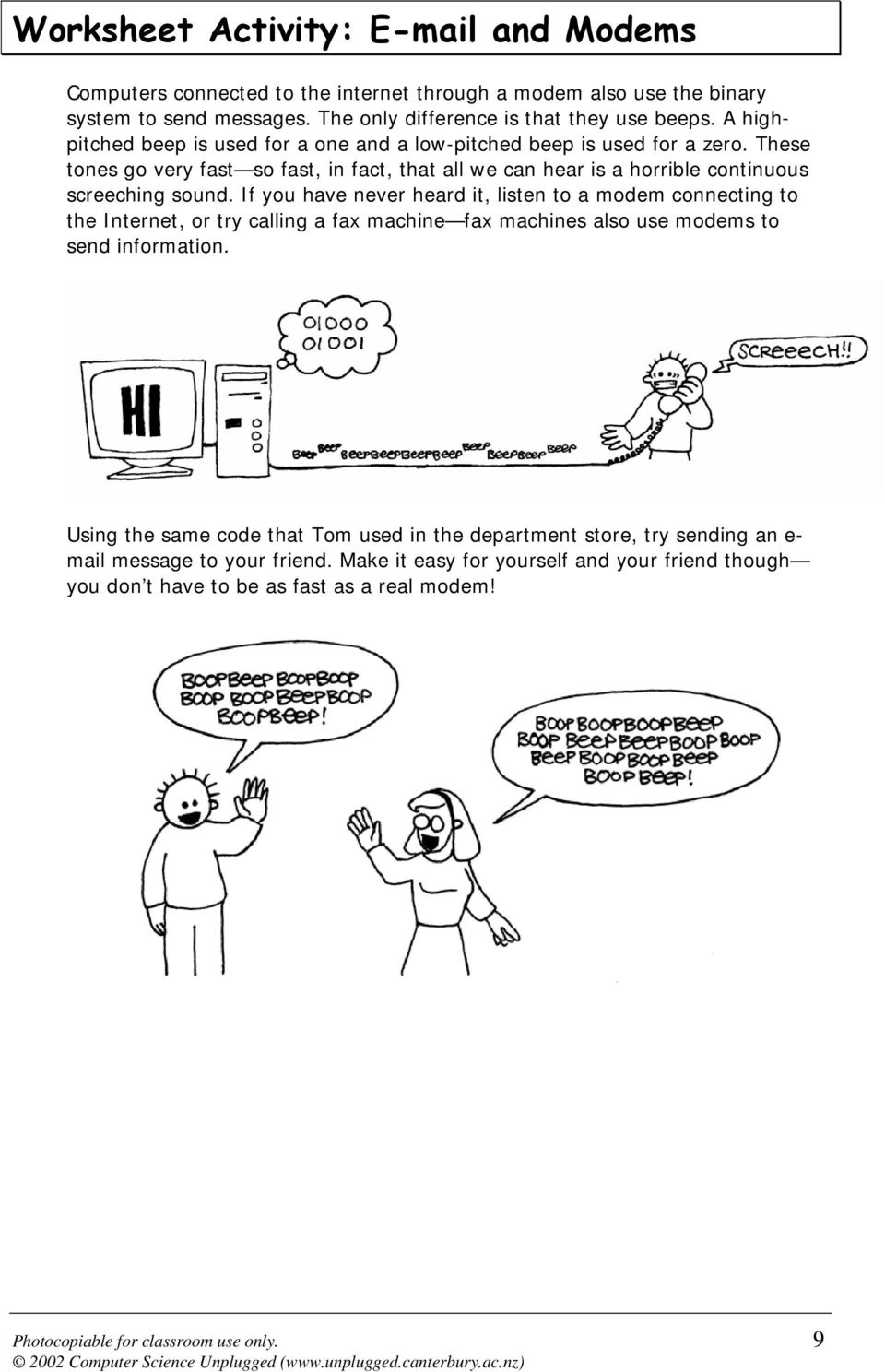
7 Worksheet Activity: and Modems Computers connected to the internet through a modem also use the binary system to send messages. The only difference is that they use beeps. A highpitched beep is used for a one and a low-pitched beep is used for a zero. These tones go very fast so fast, in fact, that all we can hear is a horrible continuous screeching sound. If you have never heard it, listen to a modem connecting to the Internet, or try calling a fax machine fax machines also use modems to send information. Using the same code that Tom used in the department store, try sending an e- mail message to your friend. Make it easy for yourself and your friend though you don t have to be as fast as a real modem! Photocopiable for classroom use only. 9
8 Worksheet Activity: Counting higher than 31 Look at the binary cards again. If you were going to make the next card in the sequence, how many dots would it have? What about the next card after that? What is the rule that you are following to make your new cards? As you can see, only a few cards are needed to count up to very big numbers. If you look at the sequence carefully, you can find a very interesting relationship: 1, 2, 4, 8, 16 Try adding: =? What does it come to? Now try =? What happens if you add all the numbers up from the beginning? Have you ever heard of let your fingers do the walking? Well now you can let your fingers do the counting, but you can get much higher than ten no, you don t have to be an alien! If you use the binary system and let each finger on one hand represent one of the cards with dots you can count from That s 32 numbers. (Don t forget that zero is a number too!) Try counting in order using your fingers. If a finger is up it is a one, and if it is down it is a zero. You can actually get from if you use both hands! That s 1024 numbers! If you had really bendy toes (now you would have to be an alien) you could get even higher. If one hand can be used to count 32 numbers, and two hands can count to = 1024 numbers, what is the biggest number Miss Flexi-Toes can reach? 10 Photocopiable for classroom use only Computer Science Unplugged (

9 Worksheet Activity: More on Binary Numbers 1. Another interesting property of binary numbers is what happens when a zero is put on the right hand side of the number. If we are working in base 10 (decimal), when you put a zero on the right hand side of the number, it is multiplied by 10. For example, 9 becomes 90, 30 becomes 300. But what happens when you put a 0 on the right of a binary number? Try this: (9) (?) Make up some others to test your hypothesis. What is the rule? Why do you think this happens? 2. Each of the cards we have used so far represents a bit on the computer ( bit is short for binary digit ). So our alphabet code we have used so far can be represented using just five cards, or bits. However a computer has to know whether letters are capitals or not, and also recognise digits, punctuation and special symbols such as $ or ~. Go and look at a keyboard and work out how many characters a computer has to represent. So how many bits does a computer need to store all the characters? Most computers today use a representation called ASCII (American Standard Code for Information Interchange), which is based on using this number of bits per character, but some non-english speaking countries have to use longer codes. Photocopiable for classroom use only. 11

10 What s it all about? Computers today use the binary system to represent information. It is called binary because only two different digits are used. It is also known as base two (humans normally use base 10). Each zero or one is called a bit (binary digit). A bit is usually represented in a computer s main memory by a transistor that is switched on or off, or a capacitor that is charged or discharged. When data must be transmitted over a telephone line or radio link, high and low-pitched tones are used for the ones and zeros. On magnetic disks (floppy disks and hard disks) and tapes, bits are represented by the direction of a magnetic field on a coated surface, either North-South or South-North. Audio CDs, CD-ROMs and DVDs store bits optically the part of the surface corresponding to a bit either does or does not reflect light. One bit on its own can t represent much, so they are usually grouped together in groups of eight, which can represent numbers from 0 to 255. A group of eight bits is called a byte. The speed of a computer depends on the number of bits it can process at once. For example, a 32-bit computer can process 32-bit numbers in one operation, while a 16-bit computer must break 32-bit numbers down into smaller pieces, making it slower. Ultimately bits and bytes are all that a computer uses to store and transmit numbers, text, and all other information. In some of the later activities we will see how other kinds of information can be represented on a computer. 12 Photocopiable for classroom use only Computer Science Unplugged (

11 Solutions and hints Binary Numbers (page 5) 3 requires cards 2 and 1 12 requires cards 8 and 4 19 requires cards 16, 2 and 1 There is only one way to make any number. The biggest number you can make is 31. The smallest is 0. You can make every number in between, and each has a unique representation. Experts: To increase any number by one, flip all the cards from right to left until you turn one face up. Working with binary (page 7) = 21, = 31 Sending Secret Messages (page 8) Coded message: HELP IM TRAPPED Counting higher than 31 (page 10) If you add the numbers up from the beginning the sum will always be one less than the next number in the sequence. Miss Flexi-toes can count = 1,048,576 numbers from 0 to 1,048,575! More on Binary Numbers (page 11) When you put a zero on the right hand side of a binary number the number doubles. All of the places containing a one are now worth twice their previous value, and so the total number doubles. (In base 10 adding a zero to the right multiplies it by 10.) A computer needs 7 bits to store all the characters. This allows for up to 128 characters. Usually the 7 bits are stored in an 8-bit byte, with one bit wasted. Photocopiable for classroom use only. 13

Binary Numbers Kristin Labby
 Binary Numbers Kristin Labby 2120 Campus Drive, Evanston IL 60208 Ph: 1-847-467-7655 F: 1-847-491-8999 http://ciera.northwestern.edu/gk12 Adapted from Computer Science Unplugged Activity 1: Count Dots-
Colour by Numbers Image Representation
 Activity 2 Colour by Numbers Image Representation Summary Computers store drawings, photographs and other pictures using only numbers. The following activity demonstrates how they can do this. Curriculum
Digital Versus Analog Lesson 2 of 2
 Digital Versus Analog Lesson 2 of 2 HDTV Grade Level: 9-12 Subject(s): Science, Technology Prep Time: < 10 minutes Activity Duration: 50 minutes Materials Category: General classroom National Education
Machine Architecture and Number Systems. Major Computer Components. Schematic Diagram of a Computer. The CPU. The Bus. Main Memory.
 1 Topics Machine Architecture and Number Systems Major Computer Components Bits, Bytes, and Words The Decimal Number System The Binary Number System Converting from Decimal to Binary Major Computer Components
Parts of a Computer. Preparation. Objectives. Standards. Materials. 1 1999 Micron Technology Foundation, Inc. All Rights Reserved
 Parts of a Computer Preparation Grade Level: 4-9 Group Size: 20-30 Time: 75-90 Minutes Presenters: 1-3 Objectives This lesson will enable students to: Identify parts of a computer Categorize parts of a
Encoding Text with a Small Alphabet
 Chapter 2 Encoding Text with a Small Alphabet Given the nature of the Internet, we can break the process of understanding how information is transmitted into two components. First, we have to figure out
6 3 4 9 = 6 10 + 3 10 + 4 10 + 9 10
 Lesson The Binary Number System. Why Binary? The number system that you are familiar with, that you use every day, is the decimal number system, also commonly referred to as the base- system. When you
Management Challenge. Managing Hardware Assets. Central Processing Unit. What is a Computer System?
 Management Challenge Managing Hardware Assets What computer processing and storage capability does our organization need to handle its information and business transactions? What arrangement of computers
Digital System Design Prof. D Roychoudhry Department of Computer Science and Engineering Indian Institute of Technology, Kharagpur
 Digital System Design Prof. D Roychoudhry Department of Computer Science and Engineering Indian Institute of Technology, Kharagpur Lecture - 04 Digital Logic II May, I before starting the today s lecture
2011, The McGraw-Hill Companies, Inc. Chapter 3
 Chapter 3 3.1 Decimal System The radix or base of a number system determines the total number of different symbols or digits used by that system. The decimal system has a base of 10 with the digits 0 through
Numeration systems. Resources and methods for learning about these subjects (list a few here, in preparation for your research):
 Numeration systems This worksheet and all related files are licensed under the Creative Commons Attribution License, version 1.0. To view a copy of this license, visit http://creativecommons.org/licenses/by/1.0/,
Grade 6 Math Circles. Binary and Beyond
 Faculty of Mathematics Waterloo, Ontario N2L 3G1 The Decimal System Grade 6 Math Circles October 15/16, 2013 Binary and Beyond The cool reality is that we learn to count in only one of many possible number
Block diagram of typical laptop/desktop
 What's in a computer? logical or functional organization: "architecture" what the pieces are, what they do, how they work how they are connected, how they work together what their properties are physical
Computers. Hardware. The Central Processing Unit (CPU) CMPT 125: Lecture 1: Understanding the Computer
 Computers CMPT 125: Lecture 1: Understanding the Computer Tamara Smyth, [email protected] School of Computing Science, Simon Fraser University January 3, 2009 A computer performs 2 basic functions: 1.
Sequences. A sequence is a list of numbers, or a pattern, which obeys a rule.
 Sequences A sequence is a list of numbers, or a pattern, which obeys a rule. Each number in a sequence is called a term. ie the fourth term of the sequence 2, 4, 6, 8, 10, 12... is 8, because it is the
Everything you wanted to know about using Hexadecimal and Octal Numbers in Visual Basic 6
 Everything you wanted to know about using Hexadecimal and Octal Numbers in Visual Basic 6 Number Systems No course on programming would be complete without a discussion of the Hexadecimal (Hex) number
Lesson Plan for Note Taking
 Lesson Plan for Note Taking Goals: To prepare students to take pertinent notes form lecture, books and activities. Expose students to different styles of note-taking. Give students an opportunity to practice
Battleships Searching Algorithms
 Activity 6 Battleships Searching Algorithms Summary Computers are often required to find information in large collections of data. They need to develop quick and efficient ways of doing this. This activity
Base Conversion written by Cathy Saxton
 Base Conversion written by Cathy Saxton 1. Base 10 In base 10, the digits, from right to left, specify the 1 s, 10 s, 100 s, 1000 s, etc. These are powers of 10 (10 x ): 10 0 = 1, 10 1 = 10, 10 2 = 100,
Chapter 8 Memory Units
 Chapter 8 Memory Units Contents: I. Introduction Basic units of Measurement II. RAM,ROM,PROM,EPROM Storage versus Memory III. Auxiliary Storage Devices-Magnetic Tape, Hard Disk, Floppy Disk IV.Optical
Chapter 6. Inside the System Unit. What You Will Learn... Computers Are Your Future. What You Will Learn... Describing Hardware Performance
 What You Will Learn... Computers Are Your Future Chapter 6 Understand how computers represent data Understand the measurements used to describe data transfer rates and data storage capacity List the components
The use of binary codes to represent characters
 The use of binary codes to represent characters Teacher s Notes Lesson Plan x Length 60 mins Specification Link 2.1.4/hi Character Learning objective (a) Explain the use of binary codes to represent characters
Section 1.4 Place Value Systems of Numeration in Other Bases
 Section.4 Place Value Systems of Numeration in Other Bases Other Bases The Hindu-Arabic system that is used in most of the world today is a positional value system with a base of ten. The simplest reason
1 One Dimensional Horizontal Motion Position vs. time Velocity vs. time
 PHY132 Experiment 1 One Dimensional Horizontal Motion Position vs. time Velocity vs. time One of the most effective methods of describing motion is to plot graphs of distance, velocity, and acceleration
Main Memory & Backing Store. Main memory backing storage devices
 Main Memory & Backing Store Main memory backing storage devices 1 Introduction computers store programs & data in two different ways: nmain memory ntemporarily stores programs & data that are being processed
Today s topics. Digital Computers. More on binary. Binary Digits (Bits)
 Today s topics! Binary Numbers! Brookshear.-.! Slides from Prof. Marti Hearst of UC Berkeley SIMS! Upcoming! Networks Interactive Introduction to Graph Theory http://www.utm.edu/cgi-bin/caldwell/tutor/departments/math/graph/intro
What's in a computer?
 What's in a computer? logical or functional organization: "architecture" what the pieces are, what they do, how they work how they are connected, how they work together what their properties are physical
what operations can it perform? how does it perform them? on what kind of data? where are instructions and data stored?
 Inside the CPU how does the CPU work? what operations can it perform? how does it perform them? on what kind of data? where are instructions and data stored? some short, boring programs to illustrate the
Math Games For Skills and Concepts
 Math Games p.1 Math Games For Skills and Concepts Original material 2001-2006, John Golden, GVSU permission granted for educational use Other material copyright: Investigations in Number, Data and Space,
Oct: 50 8 = 6 (r = 2) 6 8 = 0 (r = 6) Writing the remainders in reverse order we get: (50) 10 = (62) 8
 ECE Department Summer LECTURE #5: Number Systems EEL : Digital Logic and Computer Systems Based on lecture notes by Dr. Eric M. Schwartz Decimal Number System: -Our standard number system is base, also
The Hexadecimal Number System and Memory Addressing
 APPENDIX C The Hexadecimal Number System and Memory Addressing U nderstanding the number system and the coding system that computers use to store data and communicate with each other is fundamental to
CSCA0102 IT & Business Applications. Foundation in Business Information Technology School of Engineering & Computing Sciences FTMS College Global
 CSCA0102 IT & Business Applications Foundation in Business Information Technology School of Engineering & Computing Sciences FTMS College Global Chapter 2 Data Storage Concepts System Unit The system unit
Digital codes. Resources and methods for learning about these subjects (list a few here, in preparation for your research):
 Digital codes This worksheet and all related files are licensed under the Creative Commons Attribution License, version 1.0. To view a copy of this license, visit http://creativecommons.org/licenses/by/1.0/,
CAs and Turing Machines. The Basis for Universal Computation
 CAs and Turing Machines The Basis for Universal Computation What We Mean By Universal When we claim universal computation we mean that the CA is capable of calculating anything that could possibly be calculated*.
plc numbers - 13.1 Encoded values; BCD and ASCII Error detection; parity, gray code and checksums
 plc numbers - 3. Topics: Number bases; binary, octal, decimal, hexadecimal Binary calculations; s compliments, addition, subtraction and Boolean operations Encoded values; BCD and ASCII Error detection;
Jesus at the Temple (at age 12)
 Jesus at the Temple (at age 12) Teacher Pep Talk: Twelve sounds so grown up, especially when you are a Little Guy! But to us adults, 12 seems really young to be doing some of the things Jesus was doing
Decomposing Numbers (Operations and Algebraic Thinking)
 Decomposing Numbers (Operations and Algebraic Thinking) Kindergarten Formative Assessment Lesson Designed and revised by Kentucky Department of Education Mathematics Specialists Field-tested by Kentucky
(Refer Slide Time: 00:01:16 min)
 Digital Computer Organization Prof. P. K. Biswas Department of Electronic & Electrical Communication Engineering Indian Institute of Technology, Kharagpur Lecture No. # 04 CPU Design: Tirning & Control
A+ Guide to Managing and Maintaining Your PC, 7e. Chapter 1 Introducing Hardware
 A+ Guide to Managing and Maintaining Your PC, 7e Chapter 1 Introducing Hardware Objectives Learn that a computer requires both hardware and software to work Learn about the many different hardware components
Chapter 3: Computer Hardware Components: CPU, Memory, and I/O
 Chapter 3: Computer Hardware Components: CPU, Memory, and I/O What is the typical configuration of a computer sold today? The Computer Continuum 1-1 Computer Hardware Components In this chapter: How did
Number Representation
 Number Representation CS10001: Programming & Data Structures Pallab Dasgupta Professor, Dept. of Computer Sc. & Engg., Indian Institute of Technology Kharagpur Topics to be Discussed How are numeric data
Greatest Common Factor and Least Common Multiple
 Greatest Common Factor and Least Common Multiple Intro In order to understand the concepts of Greatest Common Factor (GCF) and Least Common Multiple (LCM), we need to define two key terms: Multiple: Multiples
Tech Application Chapter 3 STUDY GUIDE
 Name: Class: Date: Tech Application Chapter 3 STUDY GUIDE Multiple Choice Identify the letter of the choice that best completes the statement or answers the question. 1. This type of device retains data
MATHEMATICS. Y5 Multiplication and Division 5330 Square numbers, prime numbers, factors and multiples. Equipment. MathSphere
 MATHEMATICS Y5 Multiplication and Division 5330 Square numbers, prime numbers, factors and multiples Paper, pencil, ruler. Equipment MathSphere 5330 Square numbers, prime numbers, factors and multiples
Commutative Property Grade One
 Ohio Standards Connection Patterns, Functions and Algebra Benchmark E Solve open sentences and explain strategies. Indicator 4 Solve open sentences by representing an expression in more than one way using
Unit 1 Number Sense. In this unit, students will study repeating decimals, percents, fractions, decimals, and proportions.
 Unit 1 Number Sense In this unit, students will study repeating decimals, percents, fractions, decimals, and proportions. BLM Three Types of Percent Problems (p L-34) is a summary BLM for the material
Primary Memory. Input Units CPU (Central Processing Unit)
 Basic Concepts of Computer Hardware Primary Memory Input Units CPU (Central Processing Unit) Output Units This model of the typical digital computer is often called the von Neuman compute Programs and
Fractions Packet. Contents
 Fractions Packet Contents Intro to Fractions.. page Reducing Fractions.. page Ordering Fractions page Multiplication and Division of Fractions page Addition and Subtraction of Fractions.. page Answer Keys..
Computer Logic (2.2.3)
 Computer Logic (2.2.3) Distinction between analogue and discrete processes and quantities. Conversion of analogue quantities to digital form. Using sampling techniques, use of 2-state electronic devices
Tuning Subwoofers - Calibrating Subwoofers
 Tuning Subwoofers - Calibrating Subwoofers WHY The purpose of a subwoofer is to fill in the bottom octaves below the capabilities of the mains speakers. There are many reasons to use a subwoofer to do
Chapter 2: Basics on computers and digital information coding. A.A. 2012-2013 Information Technology and Arts Organizations
 Chapter 2: Basics on computers and digital information coding Information Technology and Arts Organizations 1 Syllabus (1/3) 1. Introduction on Information Technologies (IT) and Cultural Heritage (CH)
An Introduction to Computer Science and Computer Organization Comp 150 Fall 2008
 An Introduction to Computer Science and Computer Organization Comp 150 Fall 2008 Computer Science the study of algorithms, including Their formal and mathematical properties Their hardware realizations
An enrichment and extension programme for primary-aged children
 An enrichment and extension programme for primary-aged children An enrichment Created and by extension Tim programme Bell, Ian for H. Witten primary-aged and Mike students Fellows Adapted for classroom
Kindergarten Number Sense Lesson Plan
 Amy Roman/EDUC 527 1 Kindergarten Number Sense Lesson Plan Introduction Topic: Counting Backward from 10 Length of Lesson: 30-45 minutes VA Standards of Learning: K.4 The student will a) count forward
BBC LEARNING ENGLISH 6 Minute Grammar Question forms
 BBC LEARNING ENGLISH 6 Minute Grammar Question forms NB: This is not a word-for-word transcript Hello. Welcome to 6 Minute Grammar with me,. And me,. Hello. Today s programme is all about questions. Yes:
ZIMBABWE SCHOOL EXAMINATIONS COUNCIL. COMPUTER STUDIES 7014/01 PAPER 1 Multiple Choice SPECIMEN PAPER
 ZIMBABWE SCHOOL EXAMINATIONS COUNCIL General Certificate of Education Ordinary Level COMPUTER STUDIES 7014/01 PAPER 1 Multiple Choice SPECIMEN PAPER Candidates answer on the question paper Additional materials:
Traveling Circuits Lesson 1 Binary Baubles
 Lesson Binary Baubles a one hour introductory activity adapted for CSED Week 203 Copyright 203 Thinkersmith PO Box 4286, Eugene, OR, 97404 This version of the lesson Binary Baubles is brought to you under
Circuits and Boolean Expressions
 Circuits and Boolean Expressions Provided by TryEngineering - Lesson Focus Boolean logic is essential to understanding computer architecture. It is also useful in program construction and Artificial Intelligence.
Tom wants to find two real numbers, a and b, that have a sum of 10 and have a product of 10. He makes this table.
 Sum and Product This problem gives you the chance to: use arithmetic and algebra to represent and analyze a mathematical situation solve a quadratic equation by trial and improvement Tom wants to find
Building A Computer: A Beginners Guide
 Building A Computer: A Beginners Guide Mr. Marty Brandl The following was written to help an individual setup a Pentium 133 system using an ASUS P/I- P55T2P4 motherboard. The tutorial includes the installation
Prerequisite knowledge Students should have a good understanding of how our decimal number system works as well as understand place value.
 CSP Number Systems Mrs., GA Lesson Overview Learning Objectives and Evidence Statements 2.1.2 Explain how binary sequences are used to represent digital data. [P5] Prerequisite knowledge Students should
Basics of Digital Recording
 Basics of Digital Recording CONVERTING SOUND INTO NUMBERS In a digital recording system, sound is stored and manipulated as a stream of discrete numbers, each number representing the air pressure at a
Seriously Simple Sums! Vedic Maths Free Tutorial. Maths Tips and Tricks to Improve Your Math Abilities
 Copyright Notice This e-book is free! Maths Tips and Tricks to Improve Your Math Abilities This publication is protected by international copyright laws. You have the author s permission to transmit this
Scripts. WARM MARKET (someone you know of ) CALL BACK SCRIPT (POSTCARDS, ProSTEP, COLD CALLS) SCHEDULE THE LIVE PRESENTATION CALL
 Scripts WARM MARKET (someone you know of ) Hi ( ) listen, a group of professionals recently showed me how to cut my taxes by 50%, are you open to that? (If yes schedule the Live Presentation Call.) CALL
Computer Basics: Chapters 1 & 2
 Computer Basics: Chapters 1 & 2 Definition of a Computer What does IPOS stand for? Input Process Output Storage Other types of Computers Name some examples of other types of computers, other than a typical
God is Eternal Lesson 1
 Preschool Curriculum (4K / 5K) August 15 th & 16 th, 2009 God is Eternal Lesson 1 Divine Attribute: Heart Response: God is Eternal Be Amazed Memory Verse: Jesus Christ is the same yesterday, today and
Chapter 4: Computer Codes
 Slide 1/30 Learning Objectives In this chapter you will learn about: Computer data Computer codes: representation of data in binary Most commonly used computer codes Collating sequence 36 Slide 2/30 Data
CHAPTER 2: HARDWARE BASICS: INSIDE THE BOX
 CHAPTER 2: HARDWARE BASICS: INSIDE THE BOX Multiple Choice: 1. Processing information involves: A. accepting information from the outside world. B. communication with another computer. C. performing arithmetic
Programming Tricks For Reducing Storage And Work Space Curtis A. Smith, Defense Contract Audit Agency, La Mirada, CA.
 Paper 23-27 Programming Tricks For Reducing Storage And Work Space Curtis A. Smith, Defense Contract Audit Agency, La Mirada, CA. ABSTRACT Have you ever had trouble getting a SAS job to complete, although
Building Concepts: Dividing a Fraction by a Whole Number
 Lesson Overview This TI-Nspire lesson uses a unit square to explore division of a unit fraction and a fraction in general by a whole number. The concept of dividing a quantity by a whole number, n, can
Learn How to Revise 1
 Learn How to Revise 1 SCHOOL EXAM DATES 2016 END OF YEAR EXAMS FOR YEARS 7-9 BEGIN ON MONDAY 6 TH JUNE THEY WILL TAKE PLACE IN LESSONS DURING THIS WEEK AND IF NECESSARY THE WEEK AFTER. Some subjects are
Intro to the Art of Computer Science
 1 LESSON NAME: Intro to the Art of Computer Science Lesson time: 45 60 Minutes : Prep time: 15 Minutes Main Goal: Give the class a clear understanding of what computer science is and how it could be helpful
BIG MATHS A GUIDE FOR PARENTS AND CARERS
 BIG MATHS A GUIDE FOR PARENTS AND CARERS Big Maths is a teaching programme used at Hazlehurst to help children to become numerate. Problem solving and word problems cannot be solved until children can
WORDS THEIR WAY. Thursday- FREE CHOICE: See the attached page with Free Choice options and assist your child in completing this activity.
 WORDS THEIR WAY Dear Parents, Your child will be bringing home a collection of spelling words weekly that have been introduced in class. Each night of the week, your child is expected to do a different
FRACTIONS COMMON MISTAKES
 FRACTIONS COMMON MISTAKES 0/0/009 Fractions Changing Fractions to Decimals How to Change Fractions to Decimals To change fractions to decimals, you need to divide the numerator (top number) by the denominator
Fractions. If the top and bottom numbers of a fraction are the same then you have a whole one.
 What do fractions mean? Fractions Academic Skills Advice Look at the bottom of the fraction first this tells you how many pieces the shape (or number) has been cut into. Then look at the top of the fraction
Binary Numbers. Binary Octal Hexadecimal
 Binary Numbers Binary Octal Hexadecimal Binary Numbers COUNTING SYSTEMS UNLIMITED... Since you have been using the 10 different digits 0, 1, 2, 3, 4, 5, 6, 7, 8, and 9 all your life, you may wonder how
WASTED TIME SCHOOL WASTE AND RECYCLING AUDIT
 WASTED TIME SCHOOL WASTE AND AUDIT WASTED TIME SCHOOL WASTE AND AUDIT CONGRATULATIONS ON DECIDING TO RUN A SITA SCHOOL WASTE & AUDIT! YOU HAVE JUST MADE A BIG STEP IN HELPING TO MAKE YOUR SCHOOL MORE SUSTAINABLE
Time needed. Before the lesson Assessment task:
 Formative Assessment Lesson Materials Alpha Version Beads Under the Cloud Mathematical goals This lesson unit is intended to help you assess how well students are able to identify patterns (both linear
Chapter 11 Number Theory
 Chapter 11 Number Theory Number theory is one of the oldest branches of mathematics. For many years people who studied number theory delighted in its pure nature because there were few practical applications
Student Exploration: Pulleys
 Name: Date: Student Exploration: Pulleys Vocabulary: effort, load, mechanical advantage, pulley, pulley system Prior Knowledge Questions (Do these BEFORE using the Gizmo.) 1. Suppose you had to haul a
1. True or False? A voltage level in the range 0 to 2 volts is interpreted as a binary 1.
 File: chap04, Chapter 04 1. True or False? A voltage level in the range 0 to 2 volts is interpreted as a binary 1. 2. True or False? A gate is a device that accepts a single input signal and produces one
Factoring Whole Numbers
 2.2 Factoring Whole Numbers 2.2 OBJECTIVES 1. Find the factors of a whole number 2. Find the prime factorization for any number 3. Find the greatest common factor (GCF) of two numbers 4. Find the GCF for
MULTIPLICATION AND DIVISION OF REAL NUMBERS In this section we will complete the study of the four basic operations with real numbers.
 1.4 Multiplication and (1-25) 25 In this section Multiplication of Real Numbers Division by Zero helpful hint The product of two numbers with like signs is positive, but the product of three numbers with
LESSON TITLE: Jesus Visits Mary and Martha THEME: Jesus wants us to spend time with \ Him. SCRIPTURE: Luke 10:38-42
 Devotion NT249 CHILDREN S DEVOTIONS FOR THE WEEK OF: LESSON TITLE: Jesus Visits Mary and Martha THEME: Jesus wants us to spend time with \ Him. SCRIPTURE: Luke 10:38-42 Dear Parents Welcome to Bible Time
The $200 A Day Cash Machine System
 The $200 A Day Cash Machine System Make Big Profits Selling This Opportunity From Home! This is a free ebook from Frank Jones. You should not have paid for it. COPYRIGHT Frank Jones. All Rights Reserved:
Lesson 2 Social Skill: Active Listening
 Lesson 2 Summary and Rationale Listening is a social skill required for almost all interactions. It is also prerequisite to participating in a group process such as the Thinking for a Change Program. It
The string of digits 101101 in the binary number system represents the quantity
 Data Representation Section 3.1 Data Types Registers contain either data or control information Control information is a bit or group of bits used to specify the sequence of command signals needed for
The computer's internal components
 Computer hardware and types of computer A brief introduction to the insides of a computer and its added hardware. This will help explain what a computer is from a hardware point of view, how we control
Getting to Know God: Who God Is Week 7: God Is Unchanging LEADER PREPARATION
 Getting to Know God: Who God Is Week 7: God Is Unchanging This includes: Leader Preparation Lesson Guide LEADER PREPARATION BIBLE BASIS What an amazing thought! While everything else around us is changing,
God Sends the Holy Spirit (Pentecost)
 God Sends the Holy Spirit (Pentecost) Teacher Pep Talk: It had been 10 days since Jesus ascended into Heaven. He had promised to send the Holy Spirit to be with His disciples forever. On Pentecost, when
California Treasures High-Frequency Words Scope and Sequence K-3
 California Treasures High-Frequency Words Scope and Sequence K-3 Words were selected using the following established frequency lists: (1) Dolch 220 (2) Fry 100 (3) American Heritage Top 150 Words in English
Appendix 1: Adaptable Email Templates
 Appendix 1: Adaptable Email Templates The following emails are included for the benefit of anybody running a similar project. They are provided as templates, so that you don t need to start all of your
Animals that move slowly, animals that move quickly
 Unit Three Time 74 Animals that move slowly, animals that move quickly Unit 3: Time Image courtesy of: Microsoft clipart Focus: Animals that move slowly and quickly linked with time Whole class activity
Teaching & Learning Plans. Arithmetic Sequences. Leaving Certificate Syllabus
 Teaching & Learning Plans Arithmetic Sequences Leaving Certificate Syllabus The Teaching & Learning Plans are structured as follows: Aims outline what the lesson, or series of lessons, hopes to achieve.
University of Dublin Trinity College. Storage Hardware. [email protected]
 University of Dublin Trinity College Storage Hardware [email protected] Hardware Issues Hard Disk/SSD CPU Cache Main Memory CD ROM/RW DVD ROM/RW Tapes Primary Storage Floppy Disk/ Memory Stick Secondary
Chapter 1. Binary, octal and hexadecimal numbers
 Chapter 1. Binary, octal and hexadecimal numbers This material is covered in the books: Nelson Magor Cooke et al, Basic mathematics for electronics (7th edition), Glencoe, Lake Forest, Ill., 1992. [Hamilton
Binary, Hexadecimal, Octal, and BCD Numbers
 23CH_PHCalter_TMSETE_949118 23/2/2007 1:37 PM Page 1 Binary, Hexadecimal, Octal, and BCD Numbers OBJECTIVES When you have completed this chapter, you should be able to: Convert between binary and decimal
Binary Representation. Number Systems. Base 10, Base 2, Base 16. Positional Notation. Conversion of Any Base to Decimal.
 Binary Representation The basis of all digital data is binary representation. Binary - means two 1, 0 True, False Hot, Cold On, Off We must be able to handle more than just values for real world problems