
Hardware and Software Requirements for Sage 50 v15 to v22
|
|
|
- Muriel Harvey
- 9 years ago
- Views:
Transcription
1 Hardware and Software Requirements for Sage 50 v15 to v22 Sage 50 Accounts v22 Note: The Sage Data Service has the same system requirements as Sage 50 Accounts v22. Note: For more information on support for Windows 10 and Windows XP, please visit sage.co.uk/operatingsystems Windows 10 Windows 8.1 Windows 8 Windows 7 Windows Server 2012 Windows Server 2012 R2 Windows Server 2008 Windows Server 2008 R2 Note: Due to a small number of customers seeing performance issues we don't recommend the use of Microsoft Small Business Server (SBS) 2011 or 2008 with Sage 50 Accounts v22. The installation of Sage 50 Accounts v22 on SBS is blocked by default but, if required, you can still install the software by following the steps in article For further information on SBS 2011, please refer to article Note: Sage Account v22 requires you to install the Sage Data Service on the machine where your data is held. If this isn't possible, you won't be able to share your data on that machine. Although not supported, previous versions may have worked as they didn't use the Sage Data Service. For more information on storing your data on non-windows operating systems, please refer to article GB RAM (4 GB RAM if running a 64-bit operating system). 2GHz processor or higher. 5GB of free disk space. 1Gbps network (100mbps minimum). Screen resolution of 1024 x 768. Note: Performance is improved with higher specification PCs and networks. A Netbook PC, running an entry level operating system, will require less advanced hardware. Sage 50 Accounts uses the Sage System Checker when you install the software. This checks that your PC meets the recommended requirements for Sage 50 Accounts. For further information, please refer to article Office integration
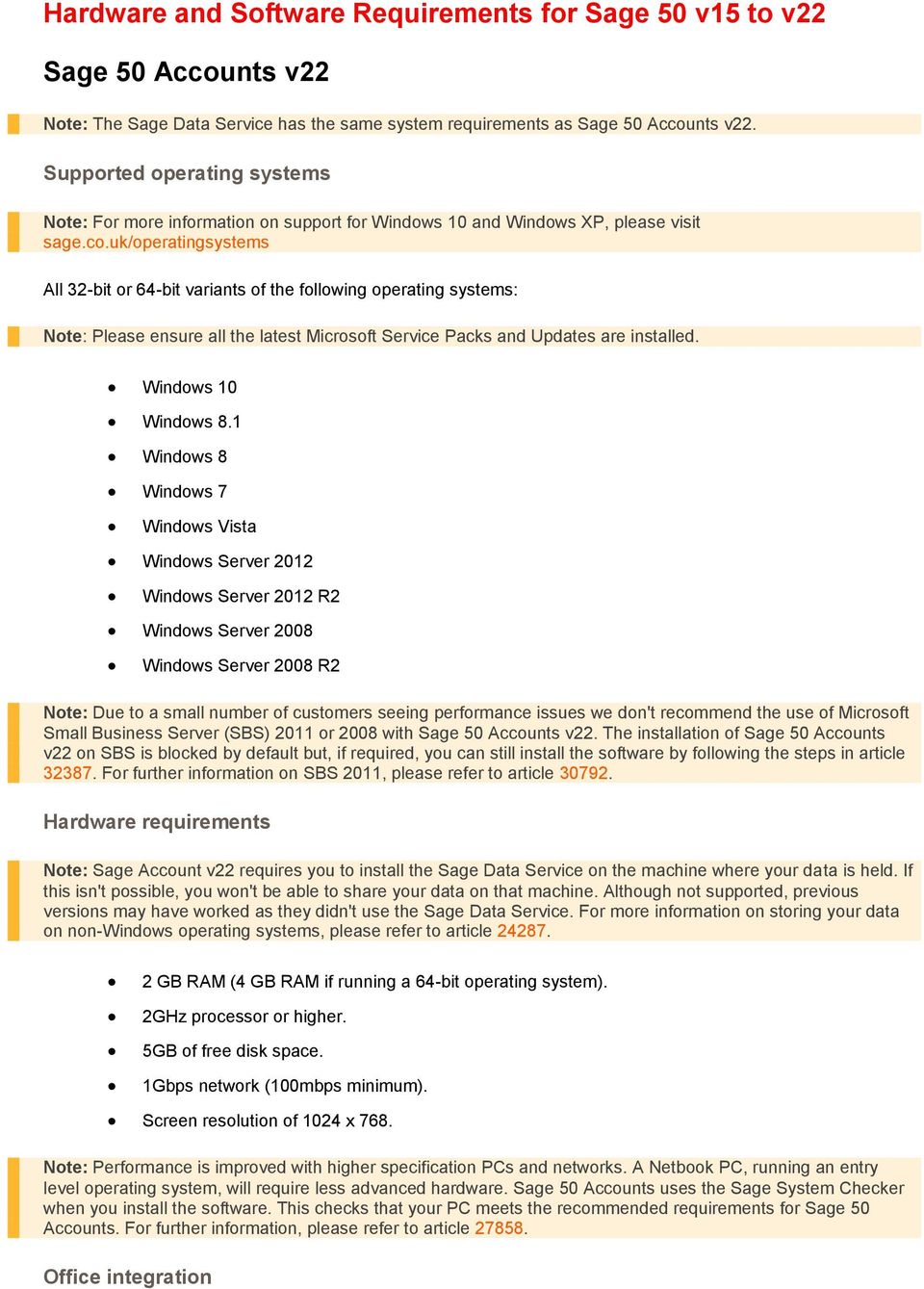
2 Note: You only need to install Microsoft Office to use certain features in Sage Accounts that it integrates with. For example ing invoices and reports, exporting to excel etc. Office bit - desktop version only Note: To check if it's the desktop version, Control Panel > Program > Default Programs > Set your default programs > check if Microsoft Outlook is the desktop version. Office bit edition Office bit edition Office bit edition* Office 2007 Office 2003 * Not compatible with Office bit starter edition. Internet Connection A broadband Internet connection is essential to keep your Sage software up to date, and to take full advantage of features such as Sage Drive: Recommended download speed: 4Mbps or higher Recommended upload speed: 2Mbps or higher Antivirus software To optimise performance your antivirus software should be configured to exclude Sage files from its checking routines. For further information, please refer to article Microsoft.NET Microsoft.NET Framework 4.5 is required. Sage 50 Accounts v21 Note: The Sage Data Service has the same system requirements as Sage 50 Accounts v21. Note: For more information on support for Windows 10 and Windows XP, please visit sage.co.uk/operatingsystems Windows 10 Windows 8.1 Windows 8

3 Windows 7 Windows Server 2012 Windows Server 2012 R2 Windows Server 2008 Windows Server 2008 R2 * Note: Due to a small number of customers seeing performance issues we don't recommend the use of Microsoft Small Business Server (SBS) 2011 or 2008 with Sage 50 Accounts v21. The installation of Sage 50 Accounts v21 on SBS is blocked by default but, if required, you can still install the software by following the steps in article For further information on SBS 2011, please refer to article Note: Sage Account v21 requires you to install the Sage Data Service on the machine where your data is held. If this isn't possible, you won't be able to share your data on that machine. Although not supported, previous versions may have worked as they didn't use the Sage Data Service. For more information on storing your data on non-windows operating systems, please refer to article GB RAM (4 GB RAM if running a 64-bit operating system). 2GHz processor or higher. 5GB of free disk space. 1Gbps network (100mbps minimum). Screen resolution of 1024 x 768. Note: Performance is improved with higher specification PCs and networks. A Netbook PC, running an entry level operating system, will require less advanced hardware. Sage 50 Accounts uses the Sage System Checker when you install the software. This checks that your PC meets the recommended requirements for Sage 50 Accounts. For further information, please refer to article Office integration Note: You only need to install Microsoft Office to use certain features in Sage Accounts that it integrates with. For example ing invoices and reports, exporting to excel etc. Office bit edition Office bit edition* Office 2007 Office 2003 * Not compatible with Office bit starter edition. Internet Connection A broadband Internet connection is essential to keep your Sage software up to date, and to take full advantage of features such as Sage Drive: Recommended download speed: 4Mbps or higher Recommended upload speed: 2Mbps or higher

4 Antivirus software To optimise performance your antivirus software should be configured to exclude Sage files from its checking routines. For further information, please refer to article Internet Explorer version 10 or above. Note: If you're using, Internet Explorer 10 is not supported. Because of this, some features in Sage 50 Accounts that use Internet Explorer may not work correctly. For example, Help > About. Sage 50 Accounts 2014 (v20) Note: For more information on support for Windows 10, please visit sage.co.uk/operatingsystems Windows 10 Windows 8.1 Windows 8 Windows 7 Windows XP Windows Server 2012 Windows Server 2012 R2 Windows Server 2008 Windows Server 2008 R2 Windows Server 2003 Windows Small Business Server 2011 has been removed from the system requirements for Sage 50 Accounts For further information about this, please refer to article GB RAM 4GB RAM - All PCs running a 64-bit operating system. 2GHz processor or higher. 2GB of free disk space. 1Gbps network (100mbps minimum). Screen resolution of 1024 x 768. Note: Performance is improved with higher specification PCs and networks. A Netbook PC, running an entry level operating system, will require less advanced hardware. Sage 50 Accounts 2014 uses the Sage System
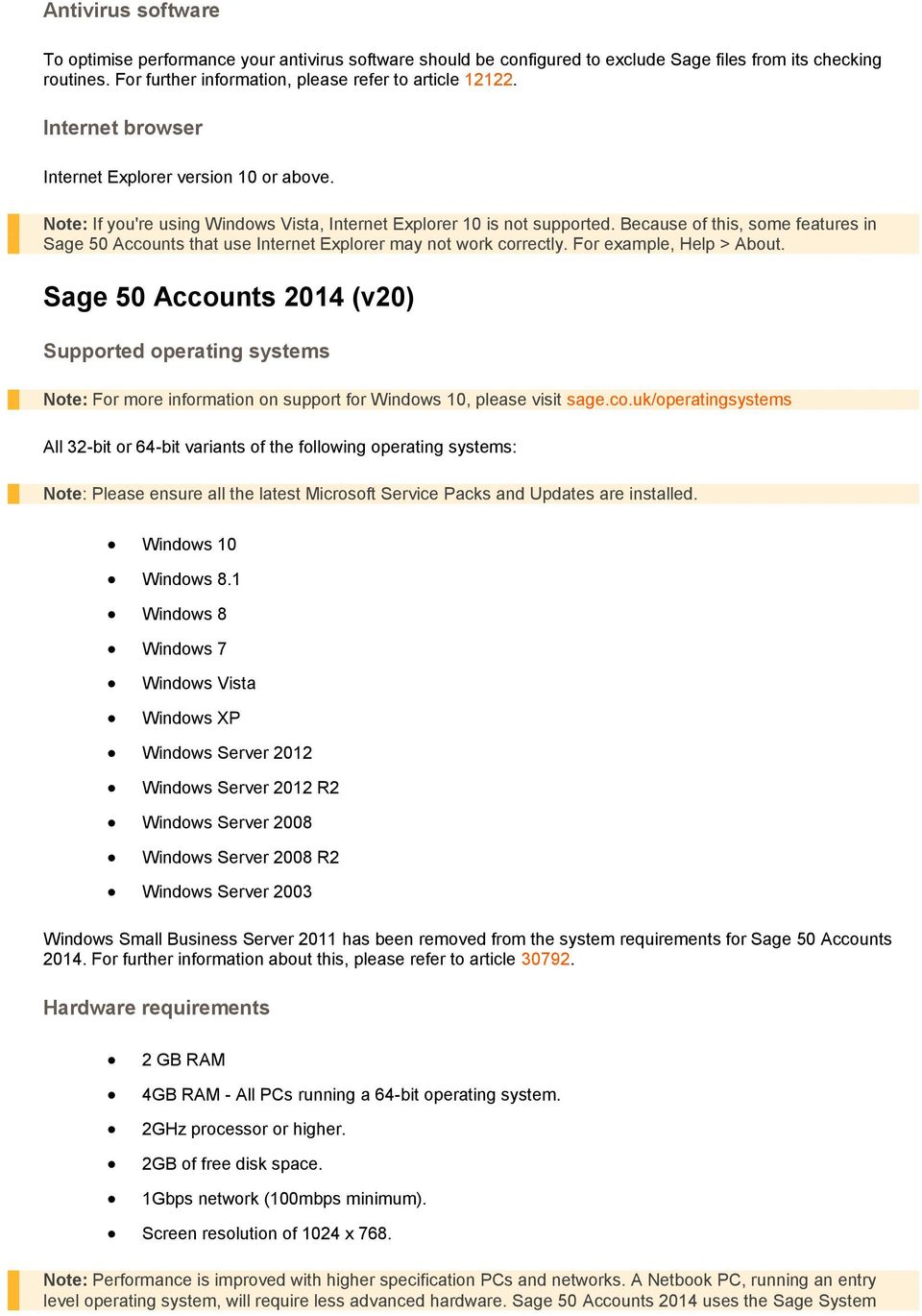
5 Checker when you install the software. This checks that your PC meets the recommended requirements for Sage 50 Accounts For further information, please refer to article Office integration Note: You only need to install Microsoft Office to use certain features in Sage Accounts that it integrates with. For example ing invoices and reports, exporting to excel etc. Office bit edition Office bit edition* Office 2007 Office 2003 * Not compatible with Office bit starter edition. Internet Connection A broadband Internet connection with a minimum download speed of 2mbps is essential to keep your Sage software up to date, and to take full advantage of its features. Antivirus software To optimise performance your antivirus software should be configured to exclude Sage files from its checking routines. For further information, please refer to article Internet Explorer version 7 or above. Sage 50 Accounts 2013 (v19) Note: For more information on support for Windows 10, please visit sage.co.uk/operatingsystems Windows 10 Windows 8.1 Windows 8 Windows 7 Windows XP Windows Server 2012 * Windows Server 2012 R2* Windows Server 2008 *
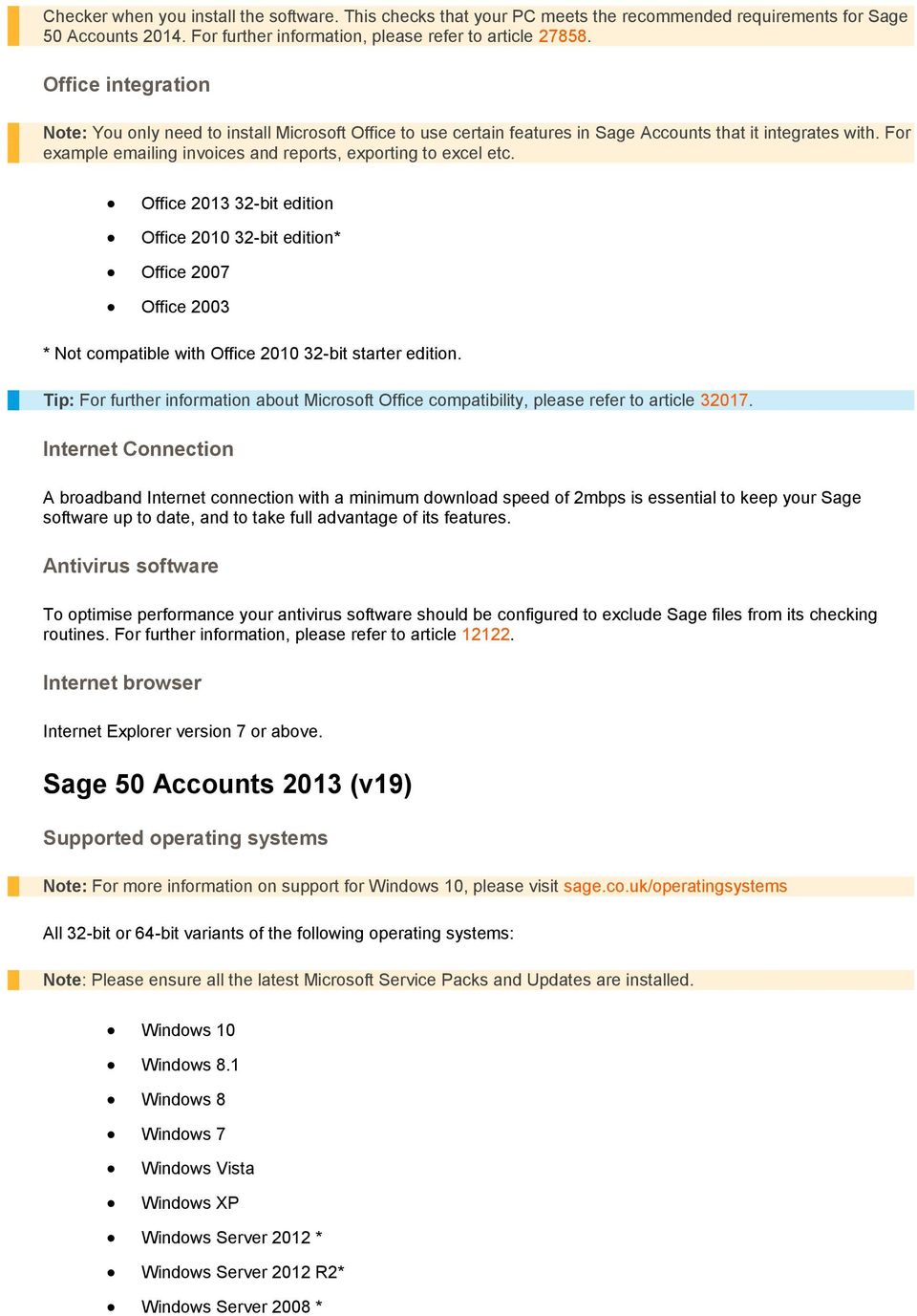
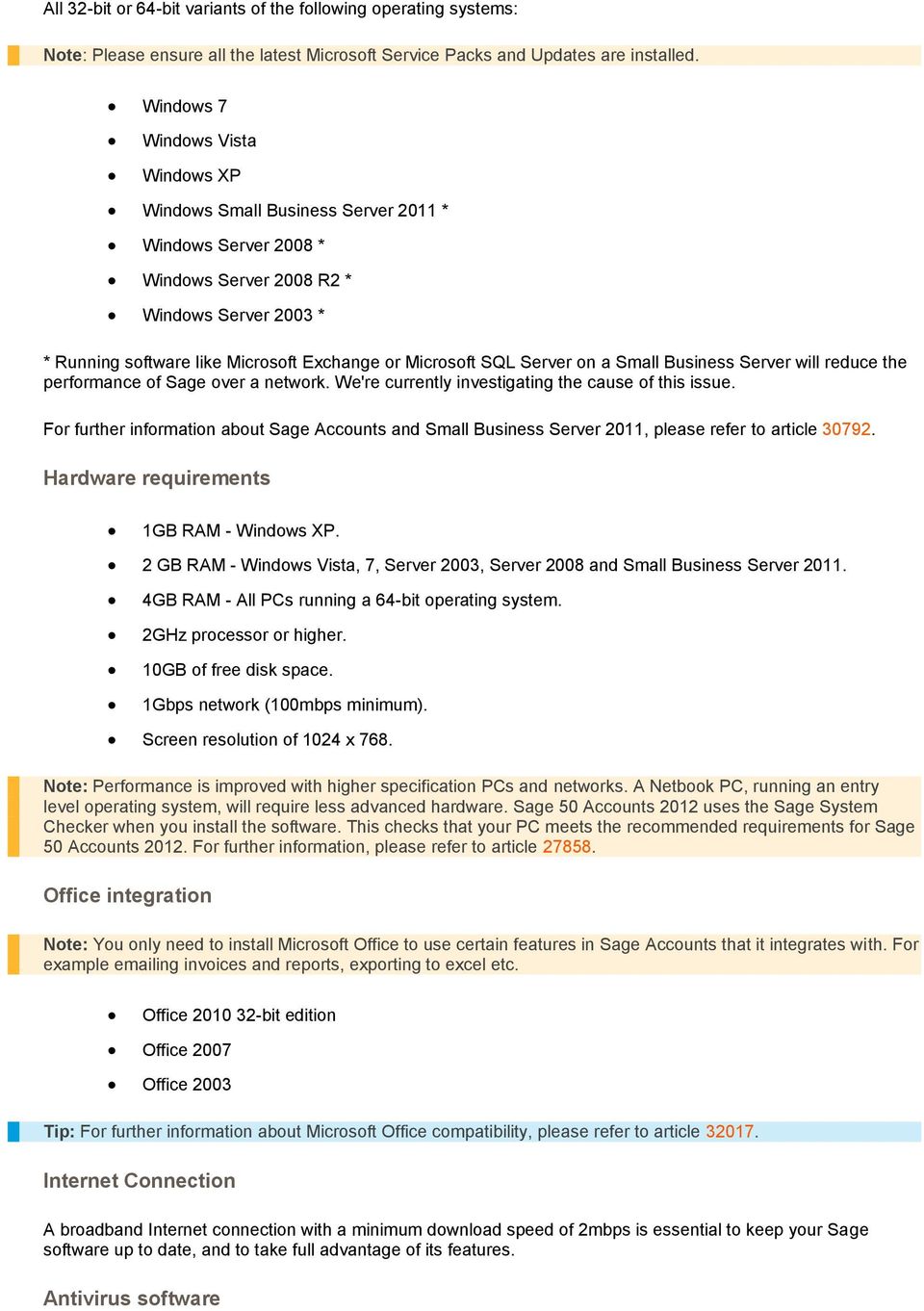
6 Windows Server 2008 R2 * Windows Server 2003 * * Running software like Microsoft Exchange or Microsoft SQL Server on a Small Business Server will reduce the performance of Sage over a network. We're currently investigating the cause of this issue. For further information about Sage Accounts and Small Business Server 2011, please refer to article GB RAM 4GB RAM - All PCs running a 64-bit operating system. 2GHz processor or higher. 2GB of free disk space. 1Gbps network (100mbps minimum). Screen resolution of 1024 x 768. Note: Performance is improved with higher specification PCs and networks. A Netbook PC, running an entry level operating system, will require less advanced hardware. Sage 50 Accounts 2013 uses the Sage System Checker when you install the software. This checks that your PC meets the recommended requirements for Sage 50 Accounts For further information, please refer to article Office integration Note: You only need to install Microsoft Office to use certain features in Sage Accounts that it integrates with. For example ing invoices and reports, exporting to excel etc. Office bit edition* Office 2007 Office 2003 * Not compatible with Office bit starter edition. Internet Connection A broadband Internet connection with a minimum download speed of 2mbps is essential to keep your Sage software up to date, and to take full advantage of its features. Antivirus software To optimise performance your antivirus software should be configured to exclude Sage files from its checking routines. For further information, please refer to article Internet Explorer version 7 or above. Sage 50 Accounts 2012 (v18)

7 Windows 7 Windows XP Windows Small Business Server 2011 * Windows Server 2008 * Windows Server 2008 R2 * Windows Server 2003 * * Running software like Microsoft Exchange or Microsoft SQL Server on a Small Business Server will reduce the performance of Sage over a network. We're currently investigating the cause of this issue. For further information about Sage Accounts and Small Business Server 2011, please refer to article GB RAM - Windows XP. 2 GB RAM -, 7, Server 2003, Server 2008 and Small Business Server GB RAM - All PCs running a 64-bit operating system. 2GHz processor or higher. 10GB of free disk space. 1Gbps network (100mbps minimum). Screen resolution of 1024 x 768. Note: Performance is improved with higher specification PCs and networks. A Netbook PC, running an entry level operating system, will require less advanced hardware. Sage 50 Accounts 2012 uses the Sage System Checker when you install the software. This checks that your PC meets the recommended requirements for Sage 50 Accounts For further information, please refer to article Office integration Note: You only need to install Microsoft Office to use certain features in Sage Accounts that it integrates with. For example ing invoices and reports, exporting to excel etc. Office bit edition Office 2007 Office 2003 Internet Connection A broadband Internet connection with a minimum download speed of 2mbps is essential to keep your Sage software up to date, and to take full advantage of its features. Antivirus software
8 To optimise performance your antivirus software should be configured to exclude Sage files from its checking routines. For further information, please refer to article Internet Explorer version 6 or above. Sage 50 Accounts 2011 (v17) Windows 7 Windows XP - Service Pack 3 Windows Server 2008 Windows Server 2008 R2 Windows Server 2003 Works with all versions of Microsoft Office above The software is compatible with Microsoft Office bit version, but not the 64 bit version. Please ensure that the latest Microsoft updates are installed. Minimum hardware An IBM compatible computer with 1Ghz (or equivalent) processor 512MB RAM 700MB of free disk space after Microsoft Windows has been installed Network users only: 100Mbps network with Microsoft Windows networking Recommended hardware An IBM compatible computer with a 2 GHz (or equivalent) processor 1GB RAM 1GB of free disk space after Windows has been installed Network users only: 1Gbps network with Microsoft Windows networking Performance is improved with higher specification PCs and networks. Internet Explorer version 6 or above.

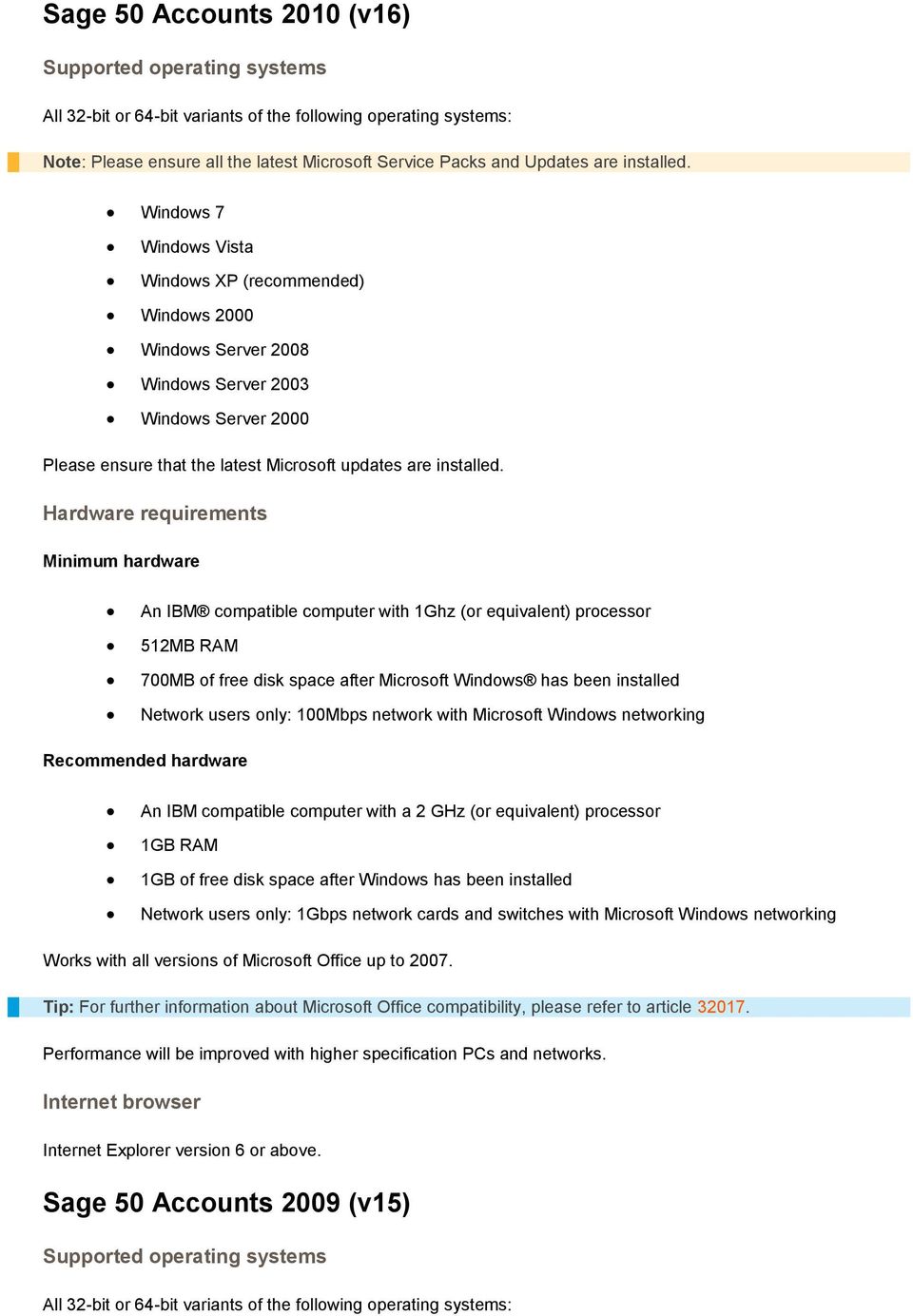
9 Sage 50 Accounts 2010 (v16) Windows 7 Windows XP (recommended) Windows 2000 Windows Server 2008 Windows Server 2003 Windows Server 2000 Please ensure that the latest Microsoft updates are installed. Minimum hardware An IBM compatible computer with 1Ghz (or equivalent) processor 512MB RAM 700MB of free disk space after Microsoft Windows has been installed Network users only: 100Mbps network with Microsoft Windows networking Recommended hardware An IBM compatible computer with a 2 GHz (or equivalent) processor 1GB RAM 1GB of free disk space after Windows has been installed Network users only: 1Gbps network cards and switches with Microsoft Windows networking Works with all versions of Microsoft Office up to Performance will be improved with higher specification PCs and networks. Internet Explorer version 6 or above. Sage 50 Accounts 2009 (v15)
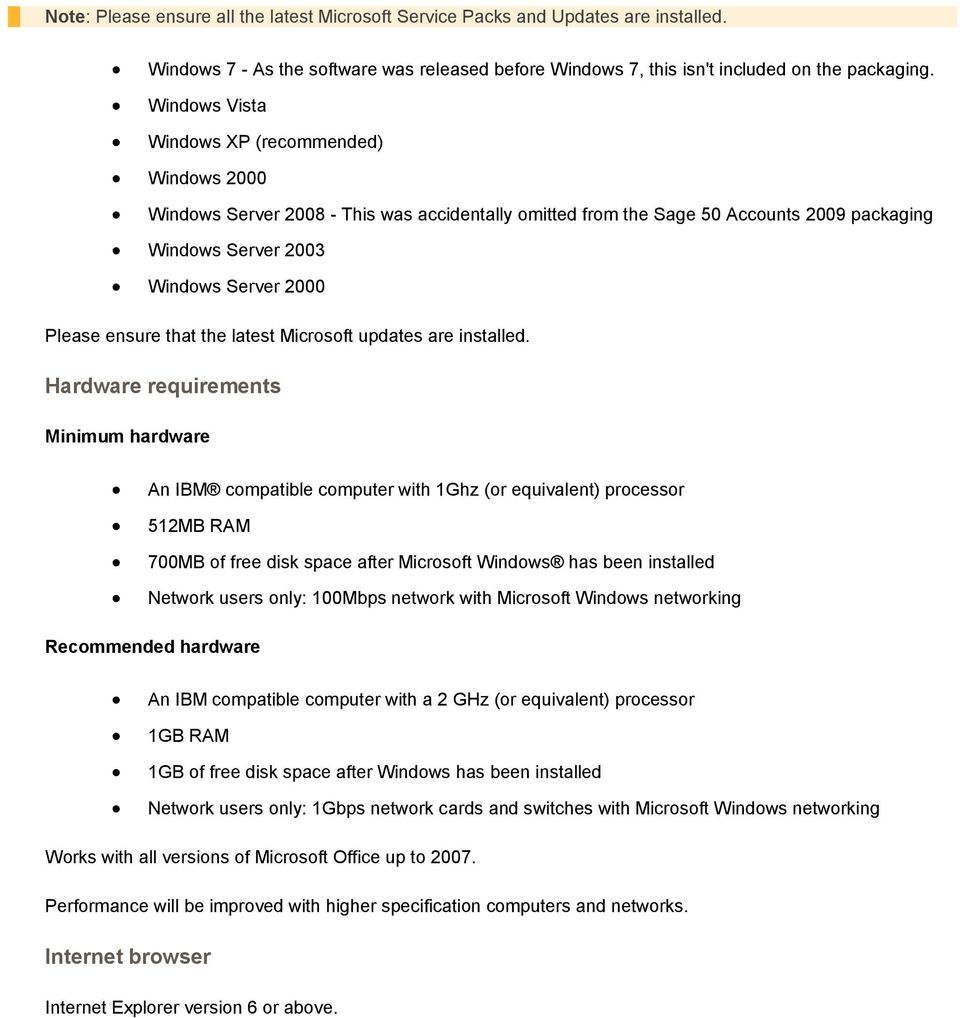
10 Windows 7 - As the software was released before Windows 7, this isn't included on the packaging. Windows XP (recommended) Windows 2000 Windows Server This was accidentally omitted from the Sage 50 Accounts 2009 packaging Windows Server 2003 Windows Server 2000 Please ensure that the latest Microsoft updates are installed. Minimum hardware An IBM compatible computer with 1Ghz (or equivalent) processor 512MB RAM 700MB of free disk space after Microsoft Windows has been installed Network users only: 100Mbps network with Microsoft Windows networking Recommended hardware An IBM compatible computer with a 2 GHz (or equivalent) processor 1GB RAM 1GB of free disk space after Windows has been installed Network users only: 1Gbps network cards and switches with Microsoft Windows networking Works with all versions of Microsoft Office up to Performance will be improved with higher specification computers and networks. Internet Explorer version 6 or above.
Prerequisites Guide. Version 4.0, Rev. 1
 Version 4.0, Rev. 1 Contents Software and Hardware Prerequisites Guide... 2 anterradatacenter Version selection... 2 Required Software Components... 2 Sage 300 Construction and Real Estate ODBC... 2 Pervasive
Sage Grant Management System Requirements
 Sage Grant Management System Requirements You should meet or exceed the following system requirements: One Server - Database/Web Server The following system requirements are for Sage Grant Management to
Verizon Security Scan Powered by McAfee. Installation Guide for Home Users
 Verizon Security Scan Powered by McAfee Installation Guide for Home Users ii Contents Introduction 3 System requirements 5 Installing Security Scan 7 Downloading your software... 7 Download your software...
Microsoft Office 2010 system requirements
 Microsoft Office 2010 system requirements When upgrading from Microsoft Office 2007 to the 2010 release you should not need to upgrade your hardware, although you might need to upgrade to a supported operating
How To Install Help Desk Premier
 Help Desk Premier Installation Guide 2012 BrightBox Solutions All rights reserved. Last Updated October, 2012 Help Desk Premier is a trademark of BrightBox Solutions. Help Desk Premier software and the
Grant Management. System Requirements
 January 26, 2014 This is a publication of Abila, Inc. Version 2014.x 2013 Abila, Inc. and its affiliated entities. All rights reserved. Abila, the Abila logos, and the Abila product and service names mentioned
CONFIGURING MICROSOFT SQL SERVER REPORTING SERVICES
 CONFIGURING MICROSOFT SQL SERVER REPORTING SERVICES TECHNICAL ARTICLE November/2011. Legal Notice The information in this publication is furnished for information use only, and does not constitute a commitment
NEWSTAR ENTERPRISE and NEWSTAR Sales System Requirements
 NEWSTAR ENTERPRISE and NEWSTAR Sales System Requirements July 21 st, 2014 Page 1 of 7 NEWSTAR Enterprise ( NSE ) and NEWSTAR Sales ( NSS ) on SQL Note: To determine the number of users, add the number
Delphi 9.5.3 System Requirements
 Market Intelligence Enterprise Business Management Sales & Catering Distribution & Content Delphi 9.5.3 System Requirements Revision 1.3 November 1, 2011 Delphi 9.5.3 System Requirements Users Server Hardware
Abila Grant Management. System Requirements
 Abila Grant Management This is a publication of Abila, Inc. Version 2015 2014 Abila, Inc. and its affiliated entities. All rights reserved. Abila, the Abila logos, and the Abila product and service names
Minimum Computer System Requirements
 Minimum Computer System Requirements http://ualr.edu/blackboard/welcome/system- requirements/ The following minimum hardware and software requirements are necessary in order to access an online class through
Sage 50 Accounts Professional
 Sage 50 Accounts Professional Manage your day-to-day finances with Sage 50 Accounts Professional. Designed for established small to medium sized businesses, Sage 50 Accounts Professional helps you look
VisionView Maintenance Utility 1.2.0 Release Notes
 VisionView Maintenance Utility 1.2.0 Release Notes Copyright 2008-2009, Cognex Corporation. All rights reserved. Overview This document describes Release 1.2.0 of the Cognex VisionView Maintenance Utility.
Dragon Medical Enterprise Network Edition Technical Note: Requirements for DMENE Networks with virtual servers
 Dragon Medical Enterprise Network Edition Technical Note: Requirements for DMENE Networks with virtual servers This section includes system requirements for DMENE Network configurations that utilize virtual
MYOB EXO System Requirement Guidelines. 30 April 2014 Version 2.7
 MYOB EXO System Requirement Guidelines 30 April 2014 Version 2.7 Contents 1 System Requirements 4 1.1 Overview 4 1.2 Server Requirements 4 1.2.1 Server Requirements (excluding terminal server) 4 1.2.2
R11.2 SecureAssess Local Installation Guide. October 2014
 R11.2 SecureAssess Local Installation Guide October 2014 October 2014 v3.1 This document is subject to changes without notification. Check our web pages for the latest version. Table of contents 1. About
System Requirements for Microsoft Dynamics GP 9.0
 Requirements for Microsoft Dynamics GP 9.0 Last Modified 7/5/2007 Posted 4/7/2007 This document describes client system requirements, server recommendations and Terminal Server system requirements for
Delphi+ System Requirements
 Delphi+ System Requirements Revision 1.1 Newmarket International, Inc. October 24, 2013 Delphi+ System Requirements Users Up to 15 Up to 25 Up to 50 Up to 90 Up to 200 Over 200 Minimum 2008 Server Hardware
Microsoft Office Outlook 2013: Part 1
 Microsoft Office Outlook 2013: Part 1 Course Specifications Course Length: 1 day Overview: Email has become one of the most widely used methods of communication, whether for personal or business communications.
AdminToys Suite. Installation & Setup Guide
 AdminToys Suite Installation & Setup Guide Copyright 2008-2009 Lovelysoft. All Rights Reserved. Information in this document is subject to change without prior notice. Certain names of program products
Microsoft Windows Server Update Services Questions & Answers About The Product
 Microsoft Windows Server Update Services Questions & Answers About The Product General Information Q. What is Windows Server Update Services (WSUS)? A. WSUS (previously called Windows Update Services)
CRM Outlook Plugin Installation
 CRM Outlook Plugin Installation Last Modified on 01/15/2016 4:51 pm EST Hardware Requirements Component Minimum Recommended Processor Intel Pentium III 750-MHz CPU, or comparable Dual-core 1.8-GHz CPU
Major upgrade versions. To see which features each version of Windows 7 has, go to Microsoft's Compare Windows page.
 Windows 7 Upgrading to Windows 7 Introduction Page 1 Now that you have explored what Windows 7 has to offer, we can help you understand what's involved in moving to the new operating system. In this lesson,
Practice Management Installation Guide. Requirements/Prerequisites: Workstation Requirements. Page 1 of 5
 Practice Management Installation Guide Your computers must meet the Workstation, Server and Network Requirements (see below for specifics). These requirements will ensure that Practice Management will
AuditMatic Enterprise Edition Installation Specifications
 Enterprise Edition Installation Specifications Version: 4.0 Copyright 2005 F.A.S., Inc. All rights reserved. Copyright 2008 F.A.S., Inc. All rights reserved. Copyright Notice Information contained in this
INSTALLING MICROSOFT SQL SERVER AND CONFIGURING REPORTING SERVICES
 INSTALLING MICROSOFT SQL SERVER AND CONFIGURING REPORTING SERVICES TECHNICAL ARTICLE November 2012. Legal Notice The information in this publication is furnished for information use only, and does not
Point & PointCentral 9.1
 Point - System Requirements The following system requirements are needed to install Point: Processor speed Memory (RAM) Disk space Printer Other Microsoft Windows 8 : 800 MHz (or higher) Microsoft Windows
Sage CRM Technical Specification
 Sage CRM Technical Specification Client Software This document outlines the recommended minimum software and hardware requirements for running Sage CRM. Please note that while this document refers to Sage
VMWare Workstation 11 Installation MICROSOFT WINDOWS SERVER 2008 R2 STANDARD ENTERPRISE ED.
 VMWare Workstation 11 Installation MICROSOFT WINDOWS SERVER 2008 R2 STANDARD ENTERPRISE ED. Starting Vmware Workstation Go to the start menu and start the VMware Workstation program. *If you are using
Priority Pro v17: Hardware and Supporting Systems
 Introduction Priority Pro v17: Hardware and Supporting Systems The following provides minimal system configuration requirements for Priority with respect to three types of installations: On-premise Priority
Delphi 2015 SP1-AP1 System Requirements
 Delphi 2015 SP1-AP1 System Requirements Revision 1.2 Newmarket International Inc. July 24,2015 newmarketinc.com Copyright 2015 Newmarket International, Inc., an Amadeus company. All rights reserved. This
Change Manager 5.0 Installation Guide
 Change Manager 5.0 Installation Guide Copyright 1994-2008 Embarcadero Technologies, Inc. Embarcadero Technologies, Inc. 100 California Street, 12th Floor San Francisco, CA 94111 U.S.A. All rights reserved.
COMBOGARDPRO. 39E Electronic Combination Lock SOFTWARE INSTALLATION INSTRUCTIONS
 COMBOGARDPRO 39E Electronic Combination Lock SOFTWARE INSTALLATION INSTRUCTIONS IMPLEMENTATION PACKAGE The ComboGard Pro Software implementation package includes: 707012 ComboGard Pro Software Install
Oracle Insurance General Agent Hardware and Software Requirements. Version 8.0
 Oracle Insurance General Agent Hardware and Software Requirements Version 8.0 April 2009 Table of Contents OIGA Hardware and Software Requirements... 3 OIGA Installation Configurations... 3 Oracle Insurance
Minimum Software and Hardware Requirements
 Version 5 Jet and Version 5 SQL Minimum Software and Hardware Requirements Please note that these minimum requirements are designed to give adequate performance when running a simple database on the local
U90Ladder / VisiLogic /UniLogic and software utilities system requirements. Contents
 U90Ladder / VisiLogic /UniLogic and software utilities system requirements Contents Minimum System Requirements... Error! Bookmark not defined. UniLogic Installation... 3 Firmware Update and Management...
CollectMax System Requirements
 CollectMax System Requirements www.collectmax.com Workstation Requirements Listed below are both the minimum and recommended workstation configurations for using CollectMax. CPU Minimum 1.6 GHz Pentium
Project Server 2010 - hardware and software requirements
 Project Server 2010 - hardware and software requirements At a high-level, the key requirements for Project Server 2010 are as follows: The 64-bit version of Windows Server 2008 Service Pack 2 or Windows
Guide to Installing BBL Crystal MIND on Windows 7
 Guide to Installing BBL Crystal MIND on Windows 7 Introduction The BBL Crystal MIND software can not be directly installed on the Microsoft Windows 7 platform, however it can be installed and run via XP
System Requirements. Maximizer CRM Enterprise Edition System Requirements
 System Requirements A typical Maximizer CRM implementation consists of a server and one or more workstations. The hardware and software requirements for each type of Maximizer installation are listed in
PC Business Banking. Technical Requirements
 PC Business Banking Technical Requirements For PC Business Banking Version 7.0 March 2007 Application Overview PC Business Banking (PCBB) is Bank of New Zealand s banking platform for large business/corporate
SOFTWARE INSTALLATION INSTRUCTIONS
 AUDITGARD LGA Electronic Combination Lock SOFTWARE INSTALLATION INSTRUCTIONS Implementation Package The AuditGard Software implementation package includes: 707013 AuditGard Software Install CD 42145 Programming/Audit
Sage BusinessWorks Accounting 2013 System Standards
 Sage BusinessWorks Accounting 2013 System Standards Hardware Standards (all editions): Laser or high-speed ink jet printer Notes: Multi-purpose printers: Sage BusinessWorks functions correctly with most
IBM Unica PredictiveInsight Version 8.5.0 Publication Date: June 7, 2011. Recommended Software Environments and Minimum System Requirements
 IBM Unica PredictiveInsight Version 8.5.0 Publication Date: June 7, 2011 Recommended Software Environments and Minimum System Requirements Copyright Copyright IBM 2011 IBM Corporation Reservoir Place North
Introduction 1-1 Installing FAS 500 Asset Accounting the First Time 2-1 Installing FAS 500 Asset Accounting: Upgrading from a Prior Version 3-1
 Contents 1. Introduction 1-1 Supported Operating Environments................ 1-1 System Requirements............................. 1-2 Security Requirements........................ 1-3 Installing Server
Read Me UNISTREAM AUTOMATION IDE
 Read Me UNILOGIC SOFTWARE UNISTREAM AUTOMATION IDE Unitronics UniLogic software is the programming Integrated Development Environment (IDE) you use to configure hardware, communications, and develop both
WEB COMPAS MINIMUM HOSTING REQUIREMENTS
 WEB COMPAS MINIMUM HOSTING REQUIREMENTS For Additional Support: Northpointe Institute for Public Management T: 231.938.5959 F: 231.938.5995 www.npipm.com [email protected] Adult COMPAS Web Application
Sage 100 Standard ERP Version 2013 Supported Platform Matrix Created as of November 21, 2013
 Sage 100 Standard ERP Version 2013 The information in this document applies to Sage 100 Standard ERP Version 2013 1. Detailed product update information and support policies can be found on the Sage Online
Enterprise Edition. Hardware Requirements
 Enterprise Edition Hardware Requirements For Blackbaud FundWare 6 to 100+ user environments Revised August 6 th, 2008 Table of Contents Supported Platforms... 3 6 to 25 User Environment... 4 26 to 35 User
theguard! ApplicationDashboard Version 1.1
 theguard! ApplicationDashboard Version March 23, 2009 theguard! ApplicationDashboard is a three-tier client-server application for which there are different system requirements. This document provides
 Sage CRM SalesLogix Compatibility Checklist Hardware and software requirements for SalesLogix v5.2, v6.0, v6.1, v6.2, and v7. The hardware requirements for Sage CRM SalesLogix are to be used as a guideline
Maximizer CRM 2015 system requirements
 Maximizer CRM 2015 system requirements Cover introduction Enterprise and Group Editions A typical Maximizer implementation consists of a server and one or more workstations. The hardware and software requirements
Opera 3 & Opera II System Requirements Guide
 Opera 3 & Opera II Opera 3 & Opera II September 2013 Copyright Pegasus Software Limited, 2013 Manual published by: Pegasus Software Limited Orion House Orion Way Kettering Northamptonshire NN15 6PE www.pegasus.co.uk
SYSTEM SETUP FOR SPE PLATFORMS
 BEST PRACTICE SYSTEM SETUP FOR SPE PLATFORMS Product Snow License Manager Version 7.0 Content System requirements SQL Server configuration Maintenance Test environment Document date 2015-10-15 ABOUT THIS
How To Run Eve 5 On A Pc Or Mac Or Ipad (For Pc Or Ipa) On A Network (For Mac) On Your Computer Or Ipro (For Ipro) On An Ipro Or Ipo (For Windows)
 EVE5 Hardware and Software Requirements EVE5 is a Client/Server program. i.e. there are 2 components to the program: 1/ The Server: this controls your database and will be installed on one computer only.
Software and Hardware Requirements
 Software and Hardware Requirements Version: 5 Last Changed: 17/07/2012 Arena Group Limited, a a company registered registered in England in England Wales, and Wales, registered registered no. 02168309.
How to Install and Set Up the FASTER Dashboard
 How to Install and Set Up the FASTER Dashboard for Win & Web Steven Opetaia-Williamson FASTER Dashboard What you will know when you leave this session Understanding of what is the FASTER Dashboard Knowledge
Network device management solution
 iw Management Console Network device management solution iw MANAGEMENT CONSOLE Scalability. Reliability. Real-time communications. Productivity. Network efficiency. You demand it from your ERP systems
Professional and Enterprise Edition. Hardware Requirements
 Professional and Enterprise Edition Hardware Requirements For Blackbaud FundWare 1 to 99 user environments Revised March 1, 2010 Table of Contents Supported Platforms... 3 Single-User Environment (Professional)...
Needles The Customizable Case Management Software for Law Firms
 Needles The Customizable Case Management Software for Law Firms Technical Specifications Server Workstation Operating System 1 RECOMMENDED: Windows Server 2012 R2 Windows Small Business Server 2011 Windows
Upgrading to Windows 8.1 A Guide for Windows 7 Users 2014-05-28 Version 1.2
 Upgrading to Windows 8.1 A Guide for Windows 7 Users 2014-05-28 Version 1.2 TABLE OF CONTENTS Introduction... 1 Before You Upgrade... 1 Windows 8.1 System Requirements... 1 Upgrading to Windows 8.1 from
Needles The Customizable Case Management Software for Law Firms
 Needles The Customizable Case Management Software for Law Firms Technical Specifications Server Workstation Operating System 1 RECOMMENDED: Windows Server 2012 or 2012 R2 Windows Small Business Server
System Requirements March 2015
 ARTA Lending System Requirements March 2015 Use this information as a guide to identify the hardware and software components needed to implement ARTA Lending. All requirements listed in this document apply
formerly Help Desk Authority 9.1.3 Upgrade Guide
 formerly Help Desk Authority 9.1.3 Upgrade Guide 2 Contacting Quest Software Email: Mail: Web site: [email protected] Quest Software, Inc. World Headquarters 5 Polaris Way Aliso Viejo, CA 92656 USA www.quest.com
FedEx Ship Manager Software. Installation Guide
 FedEx Ship Manager Software Installation Guide Before you start Check here to see that your PC has what it needs to run FedEx Ship Manager Software: Minimum System and Hardware Requirements Intel Pentium
acquire GIM Suite System Requirements
 acquire GIM Suite System Requirements Document information Authorised use acquire Software Pty Ltd Document name acquire GIM Suite - System Requirements Date July 2015 Table of contents 1 About this document
Welcome To Paragon 3.0
 Welcome To Paragon 3.0 Paragon MLS is the next generation of web-based services designed by FNIS specifically for agents, brokers, and MLS administrators. Paragon MLS is an amazingly flexible online system
Trax Attendance Manager Full Installation (Windows XP, 32 bit Windows Vista, or 32 bit Windows 7)
 Trax Attendance Manager Full Installation (Windows XP, 32 bit Windows Vista, or 32 bit Windows 7) NOTE: There are separate instructions for 64 bit Windows Vista, 64 bit Windows 7, and clients in Canada.
Adonis Technical Requirements
 Information Sheet Adonis Technical Requirements CONTENTS Contents... 1 Adonis Project Implementation... 1 Host Installation / Onboard Installation Full replication (LARGER Vessels):... 1 Onboard installation
Windows XP is no longer supported by Microsoft, effectively making it noncompliant
 System Requirements This page has been formulated for the sole purpose of general specifications only and is NOT to be used as a final hardware consultation. Please consult with the ChiroTouch sales and/or
Network Installation Guide
 Network Installation Guide 2011-2013 by Xactware. All rights reserved. Xactware, Xactimate, Xactimate Online, XactNet, and/or other Xactware products referenced herein are either trademarks or registered
inforouter V8.0 Server & Client Requirements
 inforouter V8.0 Server & Client Requirements Please review this document thoroughly before proceeding with the installation of inforouter Version 8. This document describes the minimum and recommended
Quick Installation Guide
 avast! Small Office Administration Quick Installation Guide avast! Reseller Technical Support [email protected] Operating Systems Supported System Requirements Windows XP SP3 or higher, Windows
INTRODUCTION TO WINDOWS 7
 INTRODUCTION TO WINDOWS 7 Windows 7 Editions There are six different Windows 7 editions: Starter Home Basic Home Premium Professional Enterprise Ultimate Starter Windows 7 Starter edition does not support
This document is provided to you by ABC E BUSINESS, Microsoft Dynamics Preferred partner. System Requirements NAV 2016
 This document is provided to you by ABC E BUSINESS, Microsoft Dynamics Preferred partner. System Requirements NAV 2016 Page 1 System Requirements NAV 2016 Microsoft Dynamics NAV Windows Client Requirements
Enterprise Site Manager (ESM) & Administrator Console Installation / Uninstall
 Enterprise Site Manager (ESM) & Administrator Console Installation / Uninstall July 2013 For further information visit our support page: www.pearsonwbl.edexcel.com/our-support 1 Contents Please note clicking
3M Occupational Health and Environmental Safety 3M E-A-Rfit Validation System. Version 4.2 Software Installation Guide (Upgrade) 1 P age
 3M Occupational Health and Environmental Safety 3M E-A-Rfit Validation System Version 4.2 Software Installation Guide (Upgrade) 1 P age Contents Important Information Read First... 3 Software Download...
Hardware Requirements
 300-6400 Roberts Street Burnaby BC V5G 4C9 300-6400 Roberts Street Burnaby BC V5G 4C9 Hardware Requirements Version 5.2: Last revised May 5, 2005 Microsoft, Windows and the Windows logo are trademarks,
Configuring a Softphone for Windows for Virtual Contact Center
 Configuring Bria 3 for Virtual Contact Center Configuring a Softphone for Windows for Virtual Contact Center 8x8 issues softphone licenses to Virtual Contact Center customers allowing them to manage all
Proval LS Database & Client Software (Trial or Full) Installation Guide
 Proval LS Database & Client Software (Trial or Full) Installation Guide Prerequisites: Technical Requirements SDS ProVal is an independent application and does not require Microsoft Office to run. It is
CCC Technical Requirements. Updated: June 2016
 Updated: June 2016 2016 All rights reserved. CCC is a registered trademark and the CCC logo is a registered service mark of CCC Information Services Inc. This document supersedes ALL previous Technical
User Installation Guide
 The will provide a step-by-step walkthough of how to download and install the application, activate each feature of the product, install any of the feature's prerequisites, extend the license, and deactivate
Backup Exec System Recovery Management Solution 2010 FAQ
 Backup Exec System Recovery Management Solution 2010 FAQ Contents Overview... 1 Supported Backup Exec System Recovery Versions and Configurations... 6 Backup Exec System Recovery Management Solution Installation
Richmond Systems. SupportDesk Web Interfaces - Quick Start Guide
 Richmond Systems SupportDesk Web Interfaces - Quick Start Guide Contents Introduction... 3 Richmond SupportDesk Web Interface Requirements... 3 Server System Requirements... 3 Specialist Web Interface
System requirements for MuseumPlus and emuseumplus
 System requirements for MuseumPlus and emuseumplus System requirements for MuseumPlus and emuseumplus Valid from July 1 st, 2008 Apart from the listed system requirements, the requirements established
FAS Asset Accounting FAS CIP Accounting FAS Asset Inventory SQL Server Installation & Administration Guide Version 2011.1
 FAS Asset Accounting FAS CIP Accounting FAS Asset Inventory SQL Server Installation & Administration Guide Version 2011.1 2011 Sage Software, Inc. All rights reserved. Published by Sage 2325 Dulles Corner
Web Server (IIS) Requirements
 Web Server (IIS) Requirements Important! The Web Server (IIS) cannot be the primary or backup domain controller. Operating System Windows Server 2012 R2 Windows Server 2008 R2 (64-bit with IIS running
Upgrading from Windows XP to Windows 7
 Upgrading your PC from Windows XP to Windows 7 requires a custom installation which doesn't preserve your programs, files, or settings. It s sometimes called a clean installation for that reason. A custom
Using Virtual PC 7.0 for Mac with GalleryPro
 Using Virtual PC 7.0 for Mac with GalleryPro Installing and Configuring What is Virtual PC for Mac? Virtual PC (VPC) is emulation software that simulates an actual (though virtual) Windows computer running
Contents. Hardware Configuration... 27 Uninstalling Shortcuts Black...29
 Contents Getting Started...1 Check your Computer meets the Minimum Requirements... 1 Ensure your Computer is Running in Normal Sized Fonts... 7 Ensure your Regional Settings are Correct... 9 Reboot your
DOCSVAULT Document Management System for everyone
 Installation Guide DOCSVAULT Document Management System for everyone 9 v Desktop and Web Client v On Premises Solution v Intelligent Data Capture v Email Automation v Workflow & Record Retention Installing
How to Install MS SQL Server Express
 How to Install MS SQL Server Express EventTracker v8.x Publication Date: Jun 8, 2016 EventTracker 8815 Centre Park Drive Columbia MD 21045 www.eventtracker.com Abstract This guide helps users to install
Microsoft Dynamics NAV 2015 Hardware and Server Requirements. Microsoft Dynamics NAV Windows Client Requirements
 Microsoft Dynamics NAV 2015 Hardware and Server Requirements Microsoft Dynamics NAV Windows Client Requirements Windows client. operating systems Hardware resources Reports Windows 8.1 Professional or
Software Installation and Creating a New Company
 Chapter 1 Software Installation and Creating a New Company OBJECTIVES: 1 System Requirements 2 Software Installation 3 Starting QuickBooks and Creating a New Company 4 Backing up Company Data 5 QuickBooks
Table 1. Requirements for Domain Controller. You will need a Microsoft Active Directory domain. Microsoft SQL Server. SQL Server Reporting Services
 The following tables provide the various requirements and recommendations needed to optimize JustWare system performance. Note that the specifications provided in this section are only minimum specifications.
LabTech Installation Prerequisites
 LabTech LabTech Installation Prerequisites LABTECH INSTALLATION PREREQUISITES... 1 Overview... 1 Server Requirements... 1 Software Requirements... 3 Internet Requirements... 4 Port Forwarding... 4 Restricted
Sage CRM Technical Specification
 Sage CRM Technical Specification Client Software This document outlines the recommended minimum software and hardware requirements for running Sage CRM. Please note that while the document refers to Sage
Receptionist-Small Business Administrator guide
 Receptionist-Small Business Administrator guide What is it? Receptionist-Small Business works with your desk phone, soft phone, or mobile device so you can control calls, monitor the lines of employees,