
TTF300 Field-mount temperature transmitter
|
|
|
- Tyrone Lane
- 9 years ago
- Views:
Transcription
1 Operating Instruction OI/TTF300-EN Rev. F TTF300 Field-mount temperature transmitter Measurement made easy

2 Change from one to two columns Short product description Field-mount temperature transmitter for the measurement of the temperature of liquid and gaseous measuring media. Further information Additional documentation on TTF300 is available to download free of charge at Alternatively, scan this code: Manufacturer ABB Automation Products GmbH Process Automation Schillerstr Minden Germany Tel: Fax: Customer service center Tel: Mail: [email protected] 2 OI/TTF300-EN Rev. F TTF300

3 Contents 1 Safety General information and instructions Warnings Intended use Improper use Warranty provisions Use in potentially explosive atmospheres according to ATEX and IECEx Ex-marking Transmitter LCD indicators Temperature data Transmitter LCD indicators Electrical data Transmitter LCD indicators Installation instructions ATEX / IECEx Cable entries Electrical connections Commissioning Operating instructions Protection against electrostatic discharges Use in potentially explosive atmospheres in accordance with FM and CSA Ex-marking Transmitter LCD indicators Installation instructions FM / CSA Electrical connections Commissioning Operating instructions Protection against electrostatic discharges Function and System Design Input functionality Sensor Redundancy Sensor drift monitoring Sensor error adjustment according to Callendar- Van Dusen Product identification Name plate Transport and storage Inspection Transporting the device Storing the device Ambient conditions Returning devices Installation Opening and closing the housing Rotating the LCD indicator Electrical connections Conductor material Cable glands Shielding of the sensor connection cable Examples of shielding / earthing Connection for sensor connecting cable Pin configuration Electrical data for inputs and outputs Power supply Power supply - HART Power supply - PROFIBUS / FOUNDATION Fieldbus Commissioning General remarks Checks prior to commissioning Basic Setup Operation Safety instructions Hardware settings Menu navigation HART menu levels PROFIBUS PA and FOUNDATION Fieldbus H1 menu levels Process display Switching to the information level(profibus PA and FOUNDATION Fieldbus only) Switching to the configuration level (parameterization) Selecting and changing parameters HART parameter overview HART parameter description Menu: Device Info Menu: Display Menu: Process Alarm Menu: Communication Menu: Calibrate Menu: Diagnosis Activating write protection Deactivating write protection PROFIBUS PA and FOUNDATION Fieldbus parameter overview PROFIBUS PA and FOUNDATION Fieldbus parameter description Menu: Device Setup Menu: Device Info Menu: Communication Menu: Service Menu Menu: Display Menu: Calibrate Factory settings TTF300 OI/TTF300-EN Rev. F 3

4 10 Diagnosis / error messages Diagnostic information Monitoring of operating data Operating hours statistics Calling up the error description Possible HART error messages Possible PROFIBUS PA and FOUNDATION Fieldbus error messages Maintenance Cleaning Repair Returning devices Recycling and disposal Disposal Information on ROHS Directive 2011/65/EC Spare parts, consumables and accessories Specifications Declaration of conformity Appendix Return form OI/TTF300-EN Rev. F TTF300
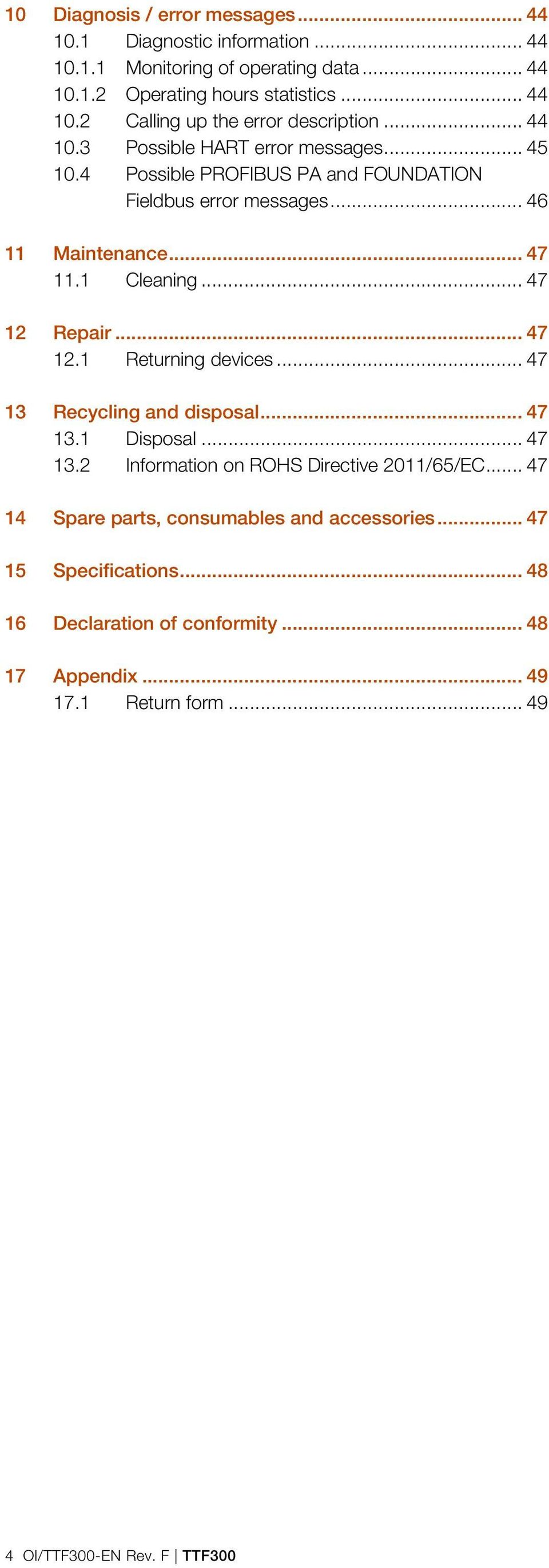
5 1 Safety 1.1 General information and instructions These instructions are an important part of the product and must be retained for future reference. Installation, commissioning, and maintenance of the product may only be performed by trained specialist personnel who have been authorized by the plant operator accordingly. The specialist personnel must have read and understood the manual and must comply with its instructions. For additional information or if specific problems occur that are not discussed in these instructions, contact the manufacturer. The content of these instructions is neither part of nor an amendment to any previous or existing agreement, promise or legal relationship. Modifications and repairs to the product may only be performed if expressly permitted by these instructions. Information and symbols on the product must be observed. These may not be removed and must be fully legible at all times. The operating company must strictly observe the applicable national regulations relating to the installation, function testing, repair and maintenance of electrical products. 1.2 Warnings The warnings in these instructions are structured as follows: DANGER The signal word "DANGER" indicates an imminent danger. Failure to observe this information will result in death or severe injury. 1.3 Intended use This device is intended for the following uses: To measure the temperature of fluid, pulpy or pasty substances and gases or resistance/voltage values. The device has been designed for use exclusively within the values stated on the name plate and within the technical limit values specified on the data sheets. The maximum and minimum operating temperature limits must not be exceeded or undershot. The permissible ambient temperature must not be exceeded. The housing's degree of protection must be observed during operation. 1.4 Improper use The following are considered to be instances of improper use of the device: For use as a climbing aid, e.g. for mounting purposes For use as a support for external loads, e.g. as a support for piping, etc. Material application, e.g. by painting over the name plate or welding/soldering on parts. Material removal, e.g. by spot drilling the housing. 1.5 Warranty provisions Using the device in a manner that does not fall within the scope of its intended use, disregarding this manual, using underqualified personnel, or making unauthorized alterations releases the manufacturer from liability for any resulting damage. This renders the manufacturer's warranty null and void. WARNING The signal word "WARNING" indicates an imminent danger. Failure to observe this information may result in death or severe injury. CAUTION The signal word "CAUTION" indicates an imminent danger. Failure to observe this information may result in minor or moderate injury. NOTE The signal word "NOTE" indicates useful or important information about the product. The signal word "NOTE" is not a signal word indicating a danger to personnel. The signal word "NOTE" can also refer to material damage. TTF300 OI/TTF300-EN Rev. F 5
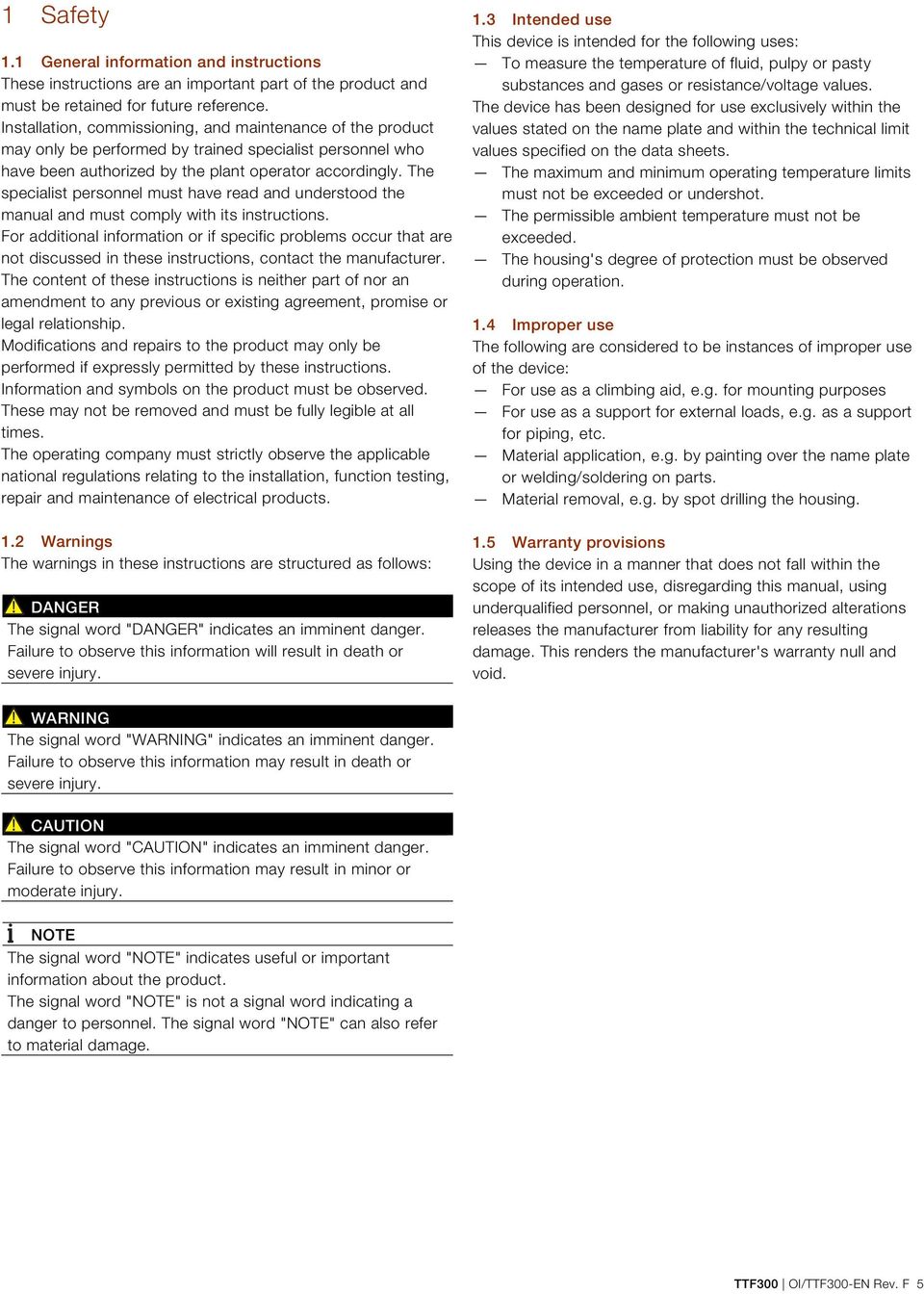
6 2 Use in potentially explosive atmospheres according to ATEX and IECEx NOTICE Further information on the approval of devices for use in potentially explosive atmospheres can be found in the explosion protection test certificates (at Depending on the design, a specific marking in accordance with ATEX or IECEx applies. ATEX dust explosion protection and intrinsic safety Permitted for zone 20, 21, 22 and Zone 0, 1 and 2. Model TTF300-D2X Type Examination Test Certificate: BVS 06 ATEX E 029 PTB 05 ATEX 2017 X PTB 05 ATEX 2016 X II 1D Ex td A20 P66 T135 C II 1G Ex ia IIC T6 Ga ATEX flameproof enclosure Approved for use in Zone 1 and Ex-marking Transmitter ATEX intrinsic safety The device fulfills the requirements of Directive 2014/34/EU in case of corresponding purchase orders and is approved for use in Zone 0, 1 and 2. Model TTF300-E3X Type Examination Test Certificate: PTB 99 ATEX 1144 II 2G Ex d IIC T6 Gb ATEX flameproof enclosure and intrinsic safety Approved for use in Zone 1 and 2. Model TTF300-E1H Type Examination Test Certificate: II 1 G Ex ia IIC T6 Ga II 2 (1) G Ex [ia] ib IIC T6 Gb (Ga) II 2 G (1D) Ex [iad] ib IIC T6 Gb (Da) PTB 05 ATEX 2017 X Model TTF300-E1P and TTF300-E1F Type Examination Test Certificate: PTB 09 ATEX 2016 X II 1G Ex ia IIC T6 II 2(1)G Ex [ia] ib IIC T6 II 2G(1D) Ex [iad] ib IIC T6 ATEX non-sparking and dust explosion protection Approved for use in Zone 2 and 22. Model TTF300-E5X Declaration of conformity II 3 G Ex na IIC T1-T6 Gc II 3 D Ex tc IIIB T135 C Dc ATEX dust explosion protection: Approved for use in Zone 20, 21, and 22. Model TTF300-D1X Type Examination Test Certificate: BVS 06 ATEX E 029 II 1D Ex td A20 IP66 T135 C Model TTF300-E4X Type Examination Test Certificate: PTB 99 ATEX 1144 PTB 05 ATEX 2017 X PTB 05 ATEX 2016 X II 2G Ex d IIC T6 Gb II 1G Ex ia IIC T6 Ga IECEx intrinsic safety Approved for use in Zone 0, 1, and 2. Model TTF300-H1H IECEx certificate of conformity IECEx PTB X Model TTF300-H1P and TTF300-H1F IECEx certificate of conformity IECEx PTB X Ex ia IIC T6...T1 Ga Ex [ia] ib IIC T6...T1 Gb (Ga) Ex [ia IIIC Da] ib IIC T6...T1 Gb IECEx flameproof enclosure Approved for use in Zone 1 and 2. Model TTF300-H5X IECEx certificate of conformity IECEx PTB Ex d IIC T1-T6 Gb 6 OI/TTF300-EN Rev. F TTF300
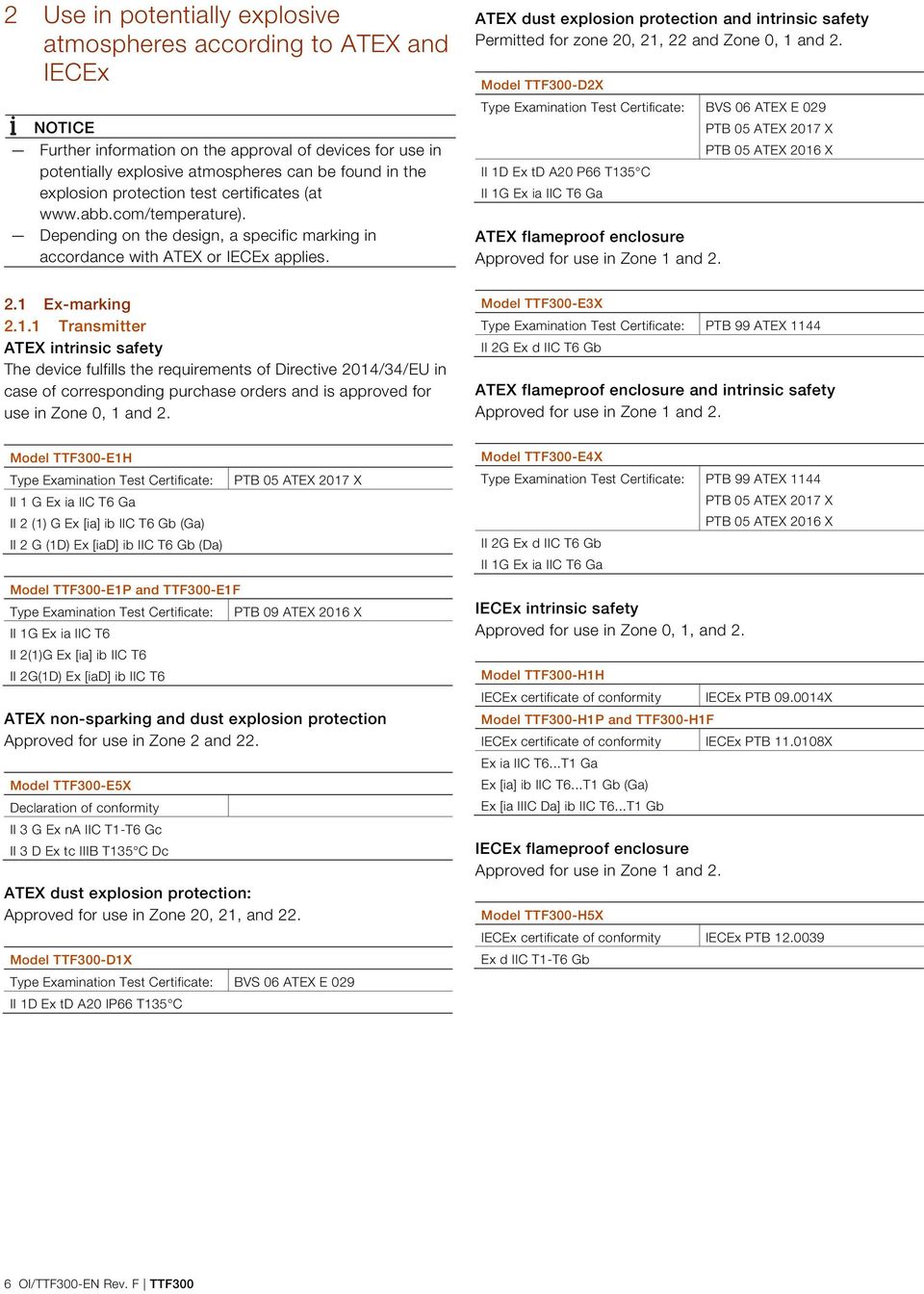
7 2.1.2 LCD indicators ATEX intrinsic safety The device fulfills the requirements of Directive 2014/34/EC in case of corresponding purchase orders and is approved for use in Zone 0, 1 and 2. Type Examination Test Certificate: II 1G Ex ia IIC T6 Ga PTB 05 ATEX 2079 X Non-sparking ATEX The device fulfills the requirements of Directive 2014/34/EU in case of corresponding purchase orders and is approved for use in Zone 2. Declaration of conformity II 3 G Ex na IIC T1-T6 Gc IECEx intrinsic safety Approved for use in Zone 0, 1, and 2. IECEx certificate of conformity IECEx PTB X Ex ia IIC T6 2.2 Temperature data Transmitter ATEX/IECEx intrinsic safety, non-sparking ATEX Temperature class Device category 1 use T C ( F) T C ( F) T4-T C ( F) Permissible ambient temperature range Device category 2 / 3 use C ( F) C ( F) C ( F) LCD indicators ATEX/IECEx intrinsic safety, non-sparking ATEX Temperature class Device category 1 use T C ( F) T C ( F) T4-T C ( F) Permissible ambient temperature range Device category 2 / 3 use C ( F) C ( F) C ( F) 2.3 Electrical data Transmitter Intrinsic safety type of protection Ex ia IIC (part 1) Supply circuit TTF300-E1H TTF300-H1H TTF300-E1P / -H1P TTF300-E1F / -H1F FISCO 1) ENTITY Max. voltage U i = 30 V U i 17,5 V U i 24,0 V Short-circuit current I i = 130 ma I i 183 ma 2) I i 250 ma Max. power P i = 0,8 W P i 2,56 W 2) P i 1,2 W Internal inductance L i = 0,5 mh L i 10 μh L i 10 μh Internal capacitance C i = 0,57 nf 3) C i 5 nf C i 5 nf 1) FISCO in accordance with ) II B FISCO: Ii 380 ma, Pi 5.32 W 3) Only applies to HART variants. From HW rev. 1.07, previously 5 nf Intrinsic safety type of protection Ex ia IIC (part 2) Measurement current circuit Resistance thermometers, Thermocouples, voltages resistors Max. voltage U o = 6,5 V U o = 1,2 V Short-circuit current I o = 25 ma I o = 50 ma Max. power P o = 38 mw P o = 60 mw Internal inductance L i = 0 mh L i = 0 mh Internal capacitance C i = 49 nf C i = 49 nf Maximum permissible external inductance L o = 5 mh L o = 5 mh Maximum permissible external capacitance C o = 1,55 μf C o = 1,05 μf Intrinsic safety type of protection Ex ia IIC (part 3) LCD indicator interface Max. voltage U o = 6,2 V Short-circuit current I o = 65,2 ma Max. power P o = 101 mw Internal inductance L i = 0 mh Internal capacitance C i = 0 nf Maximum permissible L o = 5 mh external inductance Maximum permissible external capacitance C o = 1,4 μf LCD indicators Intrinsic safety type of protection Ex ia IIC Supply circuit Max. voltage Short-circuit current Max. power Internal inductance Internal capacitance U i = 9 V I i = 65,2 ma P i = 101 mw L i = 0 mh C i = 0 nf TTF300 OI/TTF300-EN Rev. F 7
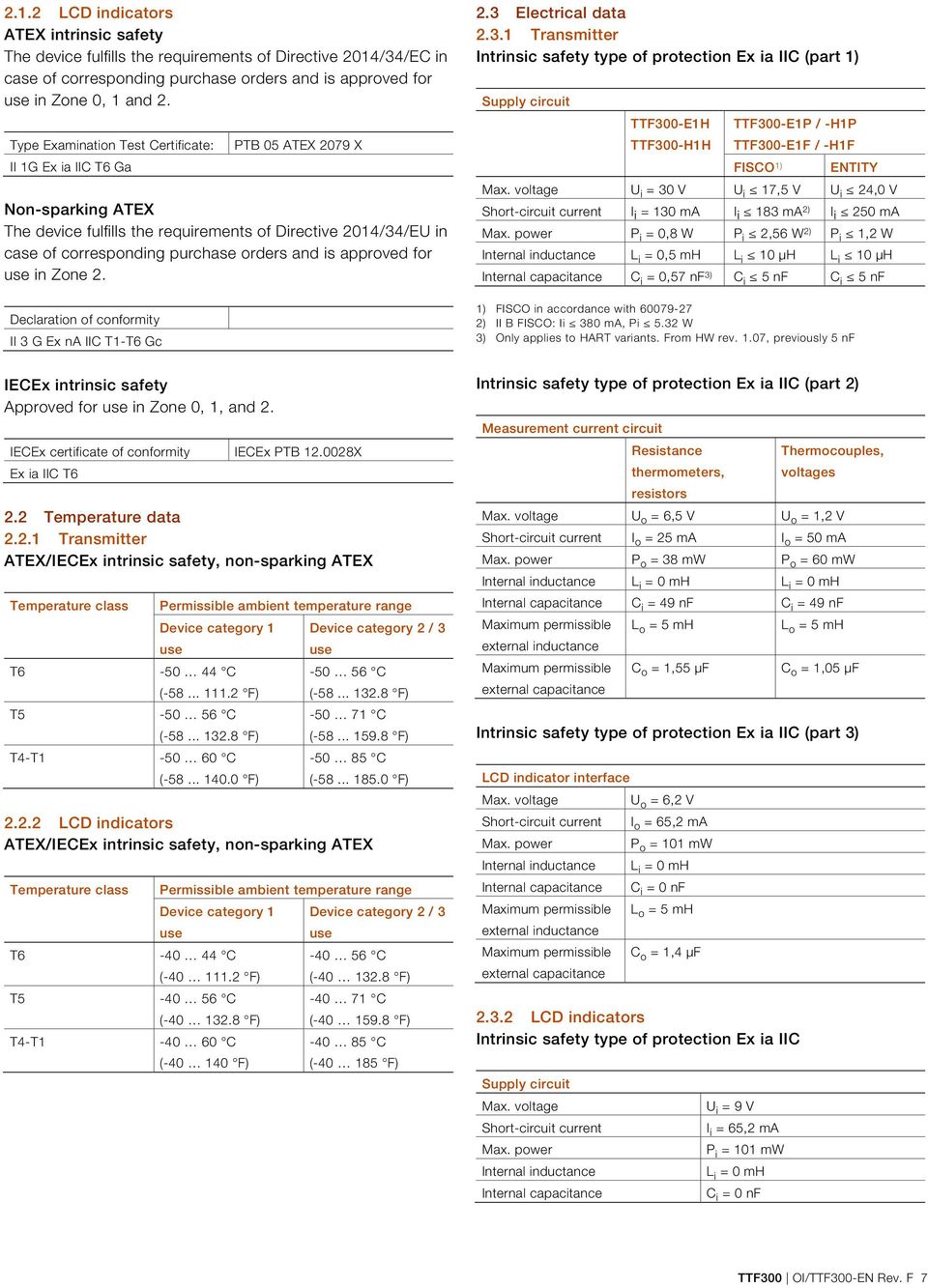
8 2.4 Installation instructions ATEX / IECEx The installation, commissioning, maintenance and repair of devices in potentially explosive atmospheres must only be carried out by appropriately trained personnel. Works may be carried out only by persons, whose training has included instructions on different types of ignition protection types and installation techniques, concerned rules and regulations as well as general principles of zoning. The person must possess the relevant expertise for the type of works to be executed. When operating with combustible dusts, EN must be complied with. The safety instructions for electrical apparatus in potentially explosive areas must be complied with, in accordance with the directive 2014/34/EU (ATEX) and e.g. IEC (Installation of equipment in potentially explosive atmospheres). To ensure safe operation, the respectively applicable requirements must be met for the protection of workers Cable entries Devices with the "Ex d" type of protection supplied without cable glands For devices with the "Ex d - flameproof enclosure" type of protection supplied without cable glands, refer to the information in chapter "Flameproof enclosure - Zone 0 / 1" on page 12 and "Flameproof enclosure - Zone 1" on page 11. For information on the cable gland used, refer to the relevant data sheet and operating instructions. Devices with the "Ex d" type of protection with cable glands For devices with the "Ex d - flameproof enclosure" type of protection, a correspondingly certified cable entry is installed if the relevant selection is made for cable entry into the temperature transmitter TTFx00. This corresponds to the basic requirements of the guideline 2014/34/EU. Installation instructions The sealing rings of the cable glands harden at low temperatures. Before installation, bring the sealing rings to a temperature of at least 20 C for 24 hours. Before inserting the sealing rings and fixing them onto the cable gland, knead the rings to ensure they are soft and flexible. IP rating IP66 / 67 is only achieved by installing the black neoprene sealing ring between the cable gland and the housing and by observing the tightening torque of 3.6 Nm (Fig. 2, item 2). Cables must be protected against extreme mechanical loads (caused by tension, torsion, crushing, etc.). Even under operating conditions, it must be ensured that the cable entry remains hermetically sealed. The customer must provide a strain relief device for the cable. A B Ø C Fig. 1 : Stripping of connection cable A 40 mm B 12 mm C Ø 8.5 / 12 mm 1. Check that cable used is suitable (i.e., check the mechanical resilience, temperature range, creep resistance, resistance to chemicals, outside diameter, etc.). 2. Strip the cable in accordance with Fig Check the outer sleeve for damage and soiling. 4. Insert the cable in the cable gland. 1 2 A10229 Cable gland data 2 x M20 x 1.5 or 2 x 1/2 in. NPT Temperature range: C ( F) Cable outer diameter mm ( inch) Brass, nickel-plated The cable entry is only suitable for fixed installations and nonreinforced cables with round and smooth plastic sleeves and suitable outside diameter. The cables must be attached appropriately in order to prevent them being pulled out or twisted. The operating instructions supplied and approvals of the cable glands as well as all applicable requirements, e.g. in accordance with EN must be taken into account accordingly. Fig. 2 : Tighten the cable glands A Tighten the cable gland until the cable is firmly enclosed by the sealing ring (Fig. 2, item 1). Do not tighten more than 1.5--times of the specified torque on the cases (see assembly instructions)! Maintenance Check the cable glands during each maintenance session. If the cable is slack, retighten the cap(s) of the cable glands. If it is not possible to retighten them, the cable gland will need to be replaced. 8 OI/TTF300-EN Rev. F TTF300

9 M20 x 1.5 plastic cable gland for various types of protection The M20 x 1.5 plastic cable gland (supplied on an optional basis) has a limited temperature range. The permissible ambient temperature range of the cable gland is C ( F). When using the cable gland, make sure that the ambient temperature is within this range. The cable gland must be installed in the housing with a tightening torque of 3.8 Nm. On the cable side, when installing the connection of the cable gland and cable, check for integrity to ensure that the required IP rating is met Electrical connections Earthing If, for functional reasons, the intrinsically safe circuit needs to be earthed by means of a connection to the potential equalization, it may only be earthed at one point. Installation in a potentially explosive atmosphere Transmitters can be installed in all kinds of industrial sectors. Potentially explosive systems are divided into zones, meaning that a wide range of different instruments are also required. For this, pay attention to the country-specific guidelines and certificates! NOTICE Ex relevant specifications must be taken from the EC-type examination certificates and other relevant certificates that apply in each case. With transmitters for PROFIBUS PA and FOUNDATION Fieldbus H1 applications, FISCO interconnection methods can be used. ATEX - Zone 0 Designation: II 1 G Ex ia IIC T6 Ga Intrinsic safety installation check If transmitters are operated in an intrinsically safe circuit, proof that the interconnection is intrinsically safe must be provided in accordance with IEC/EN as well as IEC/EN The supply isolators / DCS inputs must feature intrinsically safe input protection circuits in order to eliminate hazards (spark formation). In order to provide proof of intrinsic safety, the electrical limit value must be used as the basis for the EC-type examination certificates for the equipment (devices); this includes the capacitance and inductance values of the cables. Proof of intrinsic safety is said to have been provided if the following conditions are fulfilled when a comparison is carried out in relation to the limit values of the equipment: Transmitters (intrinsically safe equipment) Supply isolator / DCS input (related equipment) U i U o I i I o P i P o L i + L c (cable) L o C i + C c (cable) C o Field (Ex area) + Control room (safe area) + A Ex area Zone 0 ia D ia B Safe area Fig. 4 A Sensor B Transmitters TTF300 C separators [Ex ia] D interface for LCD display A11227 The input for the supply isolator must have an "Ex ia" design. When using the transmitter in Zone 0, make sure that impermissible electrostatic charging of the transmitter is avoided (observe the warnings on the device). As the user, it is your responsibility to ensure that the sensor instrumentation meets the requirements of applicable explosion protection standards. WARNING Risk of explosion! When using the device in the areas, which need the device safety level EPL "Ga" (Zone 0), the TTF 300 types must be installed with the aluminum housings, protected against strong serves or friction. ia C - - A B A10096 Fig. 3 A Transmitter B Supply isolator / DCS input with supply / Segment coupler TTF300 OI/TTF300-EN Rev. F 9

10 ATEX - Zone 1 (0) Designation: II 2 (1) G Ex [ia] ib IIC T6 Gb (Ga) ATEX - Zone 2 Designation: II 3 G Ex na IIC T1-T6 Gc Zone 0 or 1 Ex area Zone 1 Safe area Ex area Zone 2 D Safe area D ia A ia B Fig. 5 A Sensor B Transmitters TTF300 C separators [Ex ib] D interface for LCD display ib C A10127 A B C A10129 Fig. 7 A Sensor B Transmitters TTF300 C separators D interface for LCD display The input for the supply isolator must have an [Ex ib] design. As the user, it is your responsibility to ensure that the sensor instrumentation meets the requirements of applicable explosion protection standards. The sensor can be installed in Zone 1 or Zone 0. When using the transmitter in Zone 1, you must ensure that impermissible electrostatic charging of the temperature transmitter is prevented (observe the warnings on the device). ATEX - Zone 1 (20) Designation: II 2 G (1D) Ex [iad] ib IIC T6 Gb (Da) When using the transmitter in Zone 2, observe the following: The temperature transmitter must be installed in accordance with IP rating IP 54 (in accordance with EN 60529). Suitable cable glands must be used for this purpose. External measures must be made for the power supply circuit in order to prevent the rated voltage from being exceeded by more than 40% in the event of transient disturbances. The electrical connections may only be opened or closed when there is no hazardous atmosphere. The temperature transmitter must be integrated into the potential equalization of the system. Zone 0, 1 or 20 Ex area Zone 1 Safe area Dust explosion protection - Zone 20 Designation: ATEX II 1D Ex td A20 IP66 T135 C D ia Ex area Zone 20 Safe area ia ib E ib D A B Fig. 6 A Sensor B Transmitters TTF300 C separators [Ex ib] D interface for LCD display A10128 The input for the supply isolator must have an [Ex ib] design. As the user, it is your responsibility to ensure that the sensor instrumentation meets the requirements of applicable explosion protection standards. The sensor can be installed in Zone 0, Zone 1, or Zone 20. When using the transmitter in Zone 1, make sure that impermissible electrostatic charging of the temperature transmitter is avoided (observe the warnings on the device). C A B Fig. 8 A Sensor B Transmitters TTF300 C separators D Fuse, 32 ma E interface for LCD display A10130 The power supply circuit of the transmitter must be limited by an upstream fuse with a fuse current rating of 32 ma. This is not required if the power supply unit is intrinsically safe with an [Ex ia] design. C 10 OI/TTF300-EN Rev. F TTF300
![7 A Sensor B Transmitters TTF300 C separators D interface for LCD display The input for the supply isolator must have an [Ex ib] design.](/docs-images/48/18814555/images/page_10.jpg "As the user, it is your responsibility to ensure that the sensor instrumentation meets the requirements of applicable explosion protection standards. The sensor can be installed in Zone 1 or Zone 0.")
11 Dust explosion protection - Zone 0/20 Housing design: ATEX II 1D Ex td A20 IP66 T135 C Transmitter design: ATEX II 1G Ex ia IIC T6 Ga Flameproof enclosure - Zone 1 Housing design: ATEX II 2G Ex d IIC T6 Gb Transmitter design: without explosion protection Ex-area Zone 0 A ia Ex area Zone 20 D ia Safe area B C A10126 Fig. 9 A Sensor B Transmitters TTF300 C separators D interface for LCD display If the sensor is to be used in Zone 0 and the transmitter in Zone 20, the transmitter must conform to category 1D and the circuit must be of the "ia" design. If the transmitter is designed with intrinsic safety, the power supply unit must feature an intrinsically safe circuit at all times. ia A Ex area Zone 1 E Safe area B C A10130 Fig. 10 A Sensor B Transmitters TTF300 in Ex d-case C separators D Fuse, 32 ma E interface for LCD display The power supply circuit of the transmitter must be limited by an upstream fuse with a fuse current rating of 32 ma. This is not required if the power supply unit is intrinsically safe with an [Ex ia] design. The flameproof enclosure type of protection is only achieved by correctly installing a specially certified cable gland with the Ex d type of protection with the corresponding marking. The transmitter must be connected using suitable cable and cable entries or pipeline systems that satisfy the requirements of EN and for which a separate examination certificate exists. If the transmitter is connected to pipeline systems, the relevant sealing device must be affixed directly to the housing. Cable entries (PG glands) and sealing plugs of simple structure type is prohibited. Close unused openings in accordance with EN The connection must be routed securely and in such a way as to ensure adequate protection against damage. If the temperature on the entry parts is over 70 C, lines with sufficient temperature resistance must be used. The transmitter must be integrated into the local potential equalization of the potentially explosive area. D TTF300 OI/TTF300-EN Rev. F 11
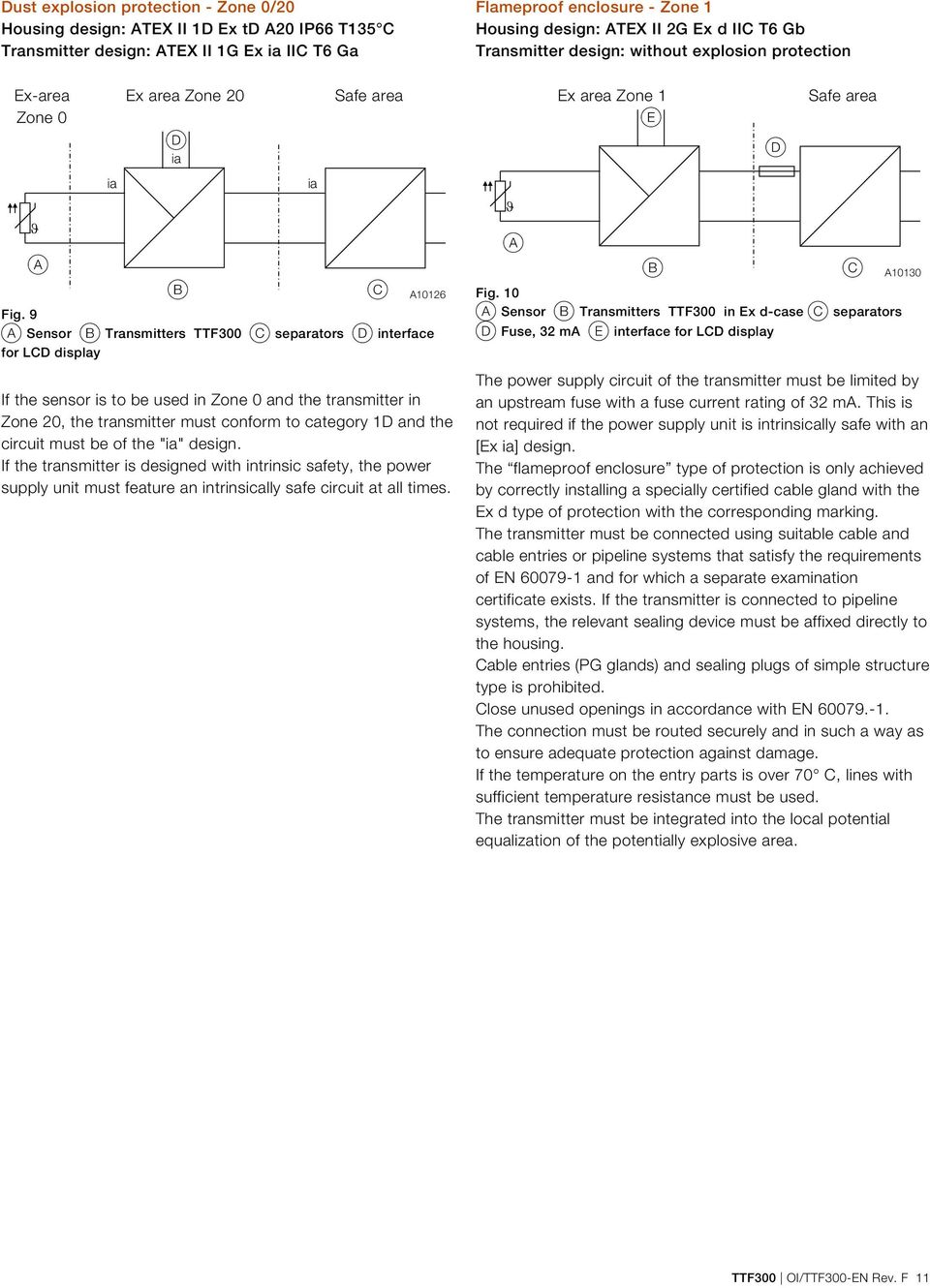
12 Flameproof enclosure - Zone 0 / 1 Housing design: ATEX II 2G Ex d IIC T6 Gb Transmitter design: ATEX II 1G Ex ia IIC T6 Ga Ex-area Zone 0 A ia Ex area Zone 1 D ia B Safe area Fig. 11 A Sensor B Transmitters with Ex d-case C separators D interface for LCD display A10126 The flameproof enclosure type of protection is only achieved by correctly installing a specially certified cable gland with the Ex d type of protection with the corresponding marking. The input for the supply isolator must have an [Ex ia] design. As the user, it is your responsibility to ensure that sensor instrumentation meets the requirements of applicable Ex standards. The sensor can be installed in Zone 1 or Zone 0. For Zone 0, the circuit must be of the [Ex ia] design. The transmitter must be connected using suitable cable and cable entries or pipeline systems that satisfy the requirements of EN and for which a separate examination certificate exists. If the transmitter is connected to pipeline systems, the relevant sealing device must be affixed directly to the housing. Cable entries (PG glands) and sealing plugs of simple structure type is prohibited. Close unused cable entry in accordance with EN The connection must be routed securely and in such a way as to ensure adequate protection against damage. If the temperature on the entry parts is over 70 C, lines with sufficient temperature resistance must be used. The transmitter must be integrated into the local potential equalization of the potentially explosive area. ia C 2.5 Commissioning The commissioning and parameterization of the device may also be carried out in potentially explosive atmospheres using a handheld terminal that has been approved accordingly under consideration of an intrinsic safety installation check. Alternatively, an Ex modem can be connected to the circuit outside the potentially explosive atmosphere. 2.6 Operating instructions Protection against electrostatic discharges The painted surface of the housing and the plastic parts inside the device can store electrostatic charges. WARNING Risk of explosion! The device must not be used in areas in which processrelated electrostatic charging of the housing may occur. The device must be maintained so that any dangerous electrostatic charge is avoided. 12 OI/TTF300-EN Rev. F TTF300
![cable gland with the Ex d type of protection with the corresponding marking. The input for the supply isolator must have an [Ex ia] design.](/docs-images/48/18814555/images/page_12.jpg "As the user, it is your responsibility to ensure that sensor instrumentation meets the requirements of applicable Ex standards. The sensor can be installed in Zone 1 or Zone 0.")
13 3 Use in potentially explosive atmospheres in accordance with FM and CSA NOTICE Further information on the approval of devices for use in potentially explosive atmospheres can be found in the explosion protection test certificates (at Depending on the design, a specific marking in accordance with FM or CSA applies. CSA Intrinsically Safe Model TTF300-R1H Control Drawing SAP_ Model TTF300-R1P Control Drawing TTF300-R1..P (IS) Model TTF300-R1F Control Drawing TTF300-R1..F (IS) Class I, Div , Groups A, B, C, D Class I, Zone 0, Ex ia IIC CSA Non-Incendive 3.1 Ex-marking Transmitter FM Intrinsically Safe Model TTF300-L1H Control Drawing SAP_ Model TTF300-L1P Control Drawing TTF300-L1..P (IS) Model TTF300-L1F Control Drawing TTF300-L1..F (IS) Class I, Div , Groups A, B, C, D Class I, Zone 0, AEx ia IIC Model TTF300-R2H Control Drawing Model TTF300-R2P Control Drawing Model TTF300-R2F Control Drawing Class I, Div. 2, Groups A, B, C, D CSA Explosion proof SAP_ (NI_PS) SAP_ (NI_AA) TTF300-R2..P (NI_PS) TTF300-R2..P (NI_AA) TTF300-R2..F (NI_PS) TTF300-R2..F (NI_AA) FM Non-Incendive Model TTF300-L2H Control Drawing Model TTF300-L2P Control Drawing Model TTF300-L2F Control Drawing Class I, Div. 2, Groups A, B, C, D Class I Zone 2 Group IIC T6 FM Explosion proof SAP_ (NI_PS) SAP_ (NI_AA) TTF300-L2..P (NI_PS) TTF300-L2..P (NI_AA) TTF300-L2..F (NI_PS) TTF300-L2..F (NI_AA) Model TTF300-R3X XP,NI, DIP Class I, II, III, Div , Groups A-G, factory sealed CSA Explosion Proof and Intrinsically Safe Model TTF300-R7H (R1H + R3H) Control Drawing SAP_ Model TTF300-R7P (R1P + R3P) Control Drawing TTF300-R1..P (IS) Model TTF300-R7F (R1F + R3F) Control Drawing TTF300-R1..F (IS) XP,NI, DIP Class I, II, III, Div , Groups A-G, factory sealed Class I, Div , Groups A, B, C, D Class I, Zone 0, Ex ia Group IIC T6 Model TTF300-L3X XP,NI, DIP Class I, II, III, Div , Groups A-G, factory sealed FM Explosion Proof and Intrinsically Safe Model TTF300-L7H (L1H + L3H) Control Drawing SAP_ Model TTF300-L7P (L1P + L3P) Control Drawing TTF300-L1..P (IS) Model TTF300-L7F (L1F + L3F) Control Drawing TTF300-L1..F (IS) XP, NI, DIP Class I, II, III, Div , Groups A-G, factory sealed Class I, Div , Groups A, B, C, D Class I, Zone 0, AEx ia IIC T6 TTF300 OI/TTF300-EN Rev. F 13

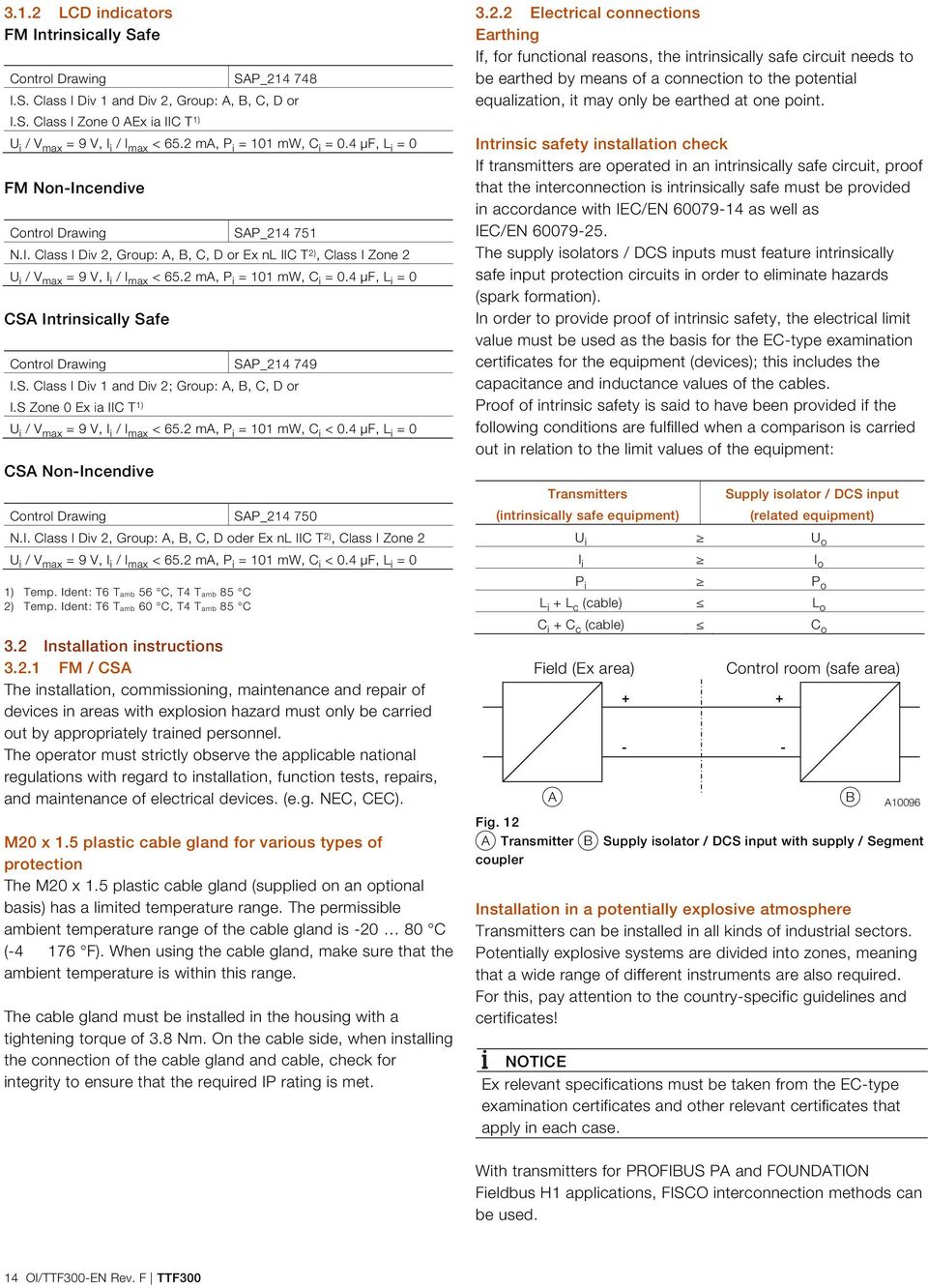
14 3.1.2 LCD indicators FM Intrinsically Safe Control Drawing SAP_ I.S. Class I Div 1 and Div 2, Group: A, B, C, D or I.S. Class I Zone 0 AEx ia IIC T 1) U i / V max = 9 V, I i / I max < 65.2 ma, P i = 101 mw, C i = 0.4 μf, L i = 0 FM Non-Incendive Control Drawing SAP_ N.I. Class I Div 2, Group: A, B, C, D or Ex nl IIC T 2), Class I Zone 2 U i / V max = 9 V, I i / I max < 65.2 ma, P i = 101 mw, C i = 0.4 μf, L i = 0 CSA Intrinsically Safe Control Drawing SAP_ I.S. Class I Div 1 and Div 2; Group: A, B, C, D or I.S Zone 0 Ex ia IIC T 1) U i / V max = 9 V, I i / I max < 65.2 ma, P i = 101 mw, C i < 0.4 μf, L i = 0 CSA Non-Incendive Control Drawing SAP_ N.I. Class I Div 2, Group: A, B, C, D oder Ex nl IIC T 2), Class I Zone 2 U i / V max = 9 V, I i / I max < 65.2 ma, P i = 101 mw, C i < 0.4 μf, L i = 0 1) Temp. Ident: T6 Tamb 56 C, T4 Tamb 85 C 2) Temp. Ident: T6 Tamb 60 C, T4 Tamb 85 C 3.2 Installation instructions FM / CSA The installation, commissioning, maintenance and repair of devices in areas with explosion hazard must only be carried out by appropriately trained personnel. The operator must strictly observe the applicable national regulations with regard to installation, function tests, repairs, and maintenance of electrical devices. (e.g. NEC, CEC). M20 x 1.5 plastic cable gland for various types of protection The M20 x 1.5 plastic cable gland (supplied on an optional basis) has a limited temperature range. The permissible ambient temperature range of the cable gland is C ( F). When using the cable gland, make sure that the ambient temperature is within this range. The cable gland must be installed in the housing with a tightening torque of 3.8 Nm. On the cable side, when installing the connection of the cable gland and cable, check for integrity to ensure that the required IP rating is met Electrical connections Earthing If, for functional reasons, the intrinsically safe circuit needs to be earthed by means of a connection to the potential equalization, it may only be earthed at one point. Intrinsic safety installation check If transmitters are operated in an intrinsically safe circuit, proof that the interconnection is intrinsically safe must be provided in accordance with IEC/EN as well as IEC/EN The supply isolators / DCS inputs must feature intrinsically safe input protection circuits in order to eliminate hazards (spark formation). In order to provide proof of intrinsic safety, the electrical limit value must be used as the basis for the EC-type examination certificates for the equipment (devices); this includes the capacitance and inductance values of the cables. Proof of intrinsic safety is said to have been provided if the following conditions are fulfilled when a comparison is carried out in relation to the limit values of the equipment: Transmitters (intrinsically safe equipment) Supply isolator / DCS input (related equipment) U i U o I i I o P i P o L i + L c (cable) L o C i + C c (cable) C o Field (Ex area) + - Control room (safe area) A B A10096 Fig. 12 A Transmitter B Supply isolator / DCS input with supply / Segment coupler Installation in a potentially explosive atmosphere Transmitters can be installed in all kinds of industrial sectors. Potentially explosive systems are divided into zones, meaning that a wide range of different instruments are also required. For this, pay attention to the country-specific guidelines and certificates! NOTICE Ex relevant specifications must be taken from the EC-type examination certificates and other relevant certificates that apply in each case. + - With transmitters for PROFIBUS PA and FOUNDATION Fieldbus H1 applications, FISCO interconnection methods can be used. 14 OI/TTF300-EN Rev. F TTF300
15 3.3 Commissioning The commissioning and parameterization of the device may also be carried out in potentially explosive atmospheres using a handheld terminal that has been approved accordingly under consideration of an intrinsic safety installation check. Alternatively, an Ex modem can be connected to the circuit outside the potentially explosive atmosphere. 3.4 Operating instructions Protection against electrostatic discharges The painted surface of the housing and the plastic parts inside the device can store electrostatic charges. WARNING Risk of explosion! The device must not be used in areas in which processrelated electrostatic charging of the housing may occur. The device must be maintained so that any dangerous electrostatic charge is avoided. TTF300 OI/TTF300-EN Rev. F 15
16 4 Function and System Design TTF300 digital transmitters are communication-ready devices with microprocessor-controlled electronics. With HART transmitters, an FSK signal is superimposed on the 4 20 ma output signal in accordance with the HART standard to facilitate bidirectional communication. With PROFIBUS PA transmitters, communication takes place in accordance with PROFIBUS MBP (IEC ), PROFIBUS PA profile With FF transmitters, communication takes place in accordance with FOUNDATION Fieldbus H1 (IEC ), ITK Version 5.x. The transmitters can be configured, polled, and tested using a DTM or an EDD A10091 Fig Supply voltage cable 2 Transmitter TTF300 3 Temperature sensor 4 Process pipe 5 Sensor connecting cable 4.1 Input functionality Sensor Redundancy To enhance system availability, the TTF300 has two sensor inputs. The second sensor input can be used redundantly for both resistance thermometers (2 x three-wire circuit or 2 x two-wire circuit) and thermocouples, or for a mixture of the two. Sensor redundancy (or sensor backup) always involves measuring the temperature of the two sensors and calculating the mean value on the basis of this. This value is provided at the output of the transmitter. Should a sensor fail, the temperature measurement for the sensor that remains in operation is provided at the output of the transmitter. A relevant diagnostic message is provided via the EDD or DTM, or shown on the display. The measured value remains available and maintenance measures can be taken at the same time Sensor drift monitoring When two sensors are connected, sensor drift monitoring can be activated via the EDD or DTM. The sensor drift monitoring can be activated for the following sensor types: 2 x resistance thermometer (RTD), two-wire circuit 2 x resistance thermometer (RTD), three-wire circuit 2 x resistor (potentiometer), two-wire circuit 2 x resistor (potentiometer), three-wire circuit 2 x thermocouple 2 x voltage 1 x resistance thermometer (RTD), two-wire circuit, and 1 x thermocouple 1 x resistance thermometer (RTD), three-wire circuit, and 1 x thermocouple 1 x resistance thermometer (RTD), four-wire circuit, and 1 x thermocouple To activate sensor drift monitoring, the transmitter must first be configured for the sensor types referred to above. Following this, the maximum permissible sensor deviation must be configured, e.g., 1 K. Since sensor response times may differ slightly, it is then necessary to configure a limit time period during which the sensor deviation has to constantly exceed the maximum set. If the transmitter records a larger sensor deviation during the defined time period, a HART, EDD, and DTM diagnostic notification - "Maintenance required" - is generated according to NE 107. At the same time, diagnostic information is shown on the LCD display. If drift monitoring is used for the same types of sensor (2 x Pt100 or 2 x thermocouple), the mean value calculated from the two sensors is mapped to the transmitter's output signal as a process variable in redundancy mode. If a thermocouple is used for Pt100 drift monitoring, the Pt100 sensor (see chapter "Electrical connections" on page 9) must be connected to channel 1 and the thermocouple to channel 2. The measured value from channel 1 (Pt100) is mapped to the transmitter output as a process variable. NOTICE Before configuring the maximum permissible sensor deviation for drift monitoring, sensor adjustment with respect to the sensor channel 1 value must be carried out with the help of the TTF300 DTM. 16 OI/TTF300-EN Rev. F TTF300


17 4.1.3 Sensor error adjustment according to Callendar- Van Dusen Under normal circumstances, the standard Pt100 characteristic curve is used for resistance thermometer measurement. However, recent advances in technology now mean that maximum measuring accuracy can be achieved where necessary by carrying out individual sensor error adjustment. Sensor characteristic curves are optimized by using a Pt100 polynomial in accordance with IST-90 / IEC 751, and EN 60150, and by applying A, B, C, or Callendar-Van Dusen coefficients. The DTM or EDD can be used to set and store these sensor coefficients (Callendar-Van Dusen) in the transmitter as a CVD characteristic curve. Up to five different CVD characteristic curves can be stored for HART and PROFIBUS PA, and up to two can be stored for FOUNDATION Fieldbus m l k j A11236 Fig. 14: HART name plate (example) Fig. 15: PROFIBUS PA name plate (example) A Product identification 5.1 Name plate NOTE Products that are marked with this symbol may not be disposed of through municipal garbage collection points. NOTICE The ambient temperature range specified on the name plate refers only to the transmitter itself and not to the measuring element used in the measuring inset. For devices with PROFIBUS PA or FOUNDATION Fieldbus, the device ID is also specified. A11238 Fig. 16:FOUNDATION Fieldbus name plate (example) 1 Please pay attention to the manufacturer, manufacturer address, manufacturing status, production year 2 safety integrity level (optional) 3 Model number 4 CE-symbols (EU conformity), if nothing is mentioned on the additional label 5 Hardware and Software Version 6 Housing safety designation 7 Product documentation 8 Customer configuration 9 Ambient temperature range j Supply voltage range, typical current range, Log k Serial number l Order number m Purchase order number Devices with an explosion-proof design are marked with the following special data plate A11239 Fig. 17: Special data plate for explosion-protected apparatus (example) 1 Model number 2 Temperature class Ex-Execution 3 CE-symbols (EU conformity) and specified designations of the quality assurance 4 Safety class Ex-execution 5 Ex-identification TTF300 OI/TTF300-EN Rev. F 17

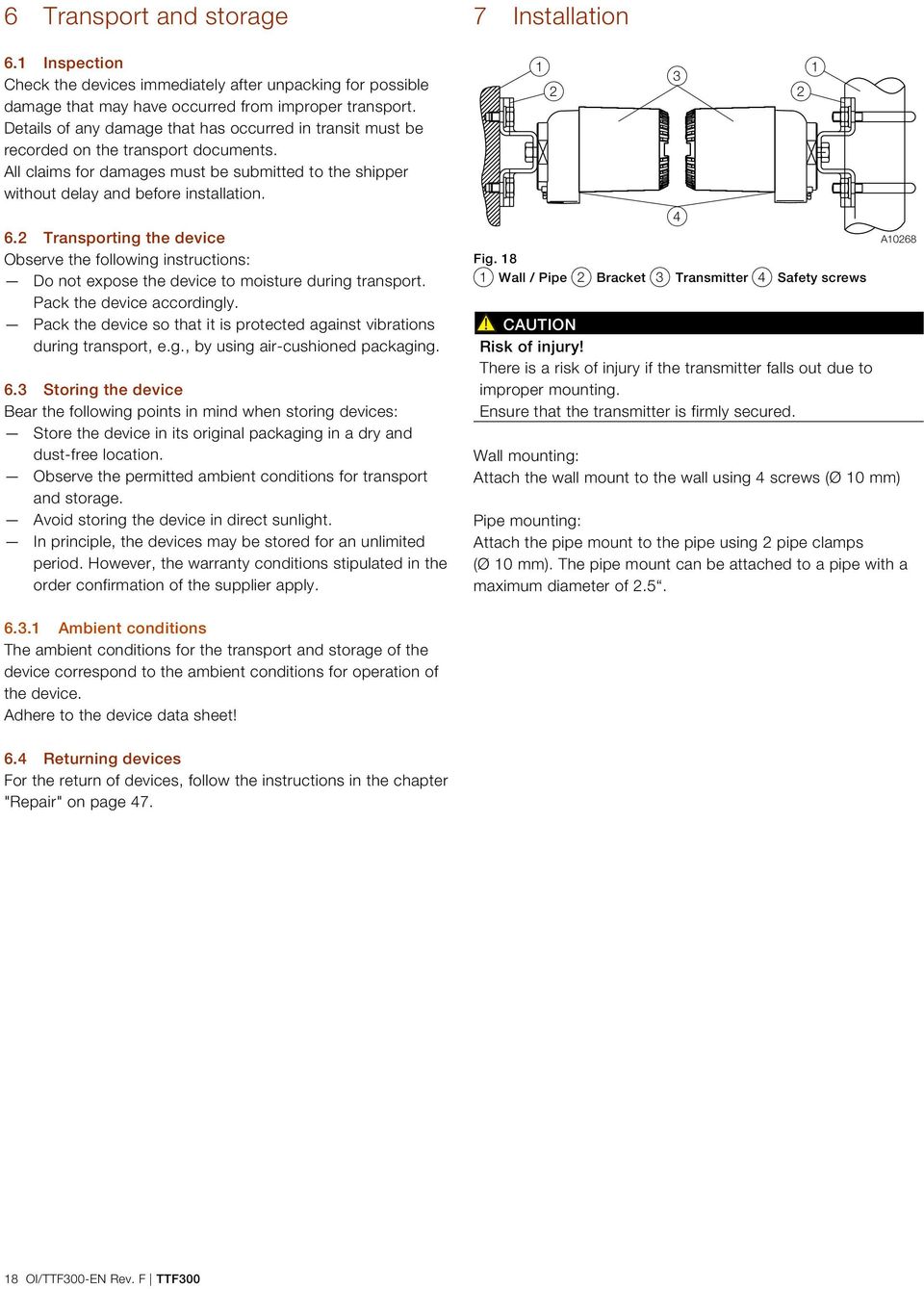
18 6 Transport and storage 6.1 Inspection Check the devices immediately after unpacking for possible damage that may have occurred from improper transport. Details of any damage that has occurred in transit must be recorded on the transport documents. All claims for damages must be submitted to the shipper without delay and before installation. 6.2 Transporting the device Observe the following instructions: Do not expose the device to moisture during transport. Pack the device accordingly. Pack the device so that it is protected against vibrations during transport, e.g., by using air-cushioned packaging. 6.3 Storing the device Bear the following points in mind when storing devices: Store the device in its original packaging in a dry and dust-free location. Observe the permitted ambient conditions for transport and storage. Avoid storing the device in direct sunlight. In principle, the devices may be stored for an unlimited period. However, the warranty conditions stipulated in the order confirmation of the supplier apply. 7 Installation Fig Wall / Pipe 2 Bracket 3 Transmitter 4 Safety screws CAUTION Risk of injury! There is a risk of injury if the transmitter falls out due to improper mounting. Ensure that the transmitter is firmly secured. A10268 Wall mounting: Attach the wall mount to the wall using 4 screws (Ø 10 mm) Pipe mounting: Attach the pipe mount to the pipe using 2 pipe clamps (Ø 10 mm). The pipe mount can be attached to a pipe with a maximum diameter of Ambient conditions The ambient conditions for the transport and storage of the device correspond to the ambient conditions for operation of the device. Adhere to the device data sheet! 6.4 Returning devices For the return of devices, follow the instructions in the chapter "Repair" on page OI/TTF300-EN Rev. F TTF300
19 7.1 Opening and closing the housing DANGER Danger of explosion if the device is operated with the transmitter housing or terminal box open! While using the device in potentially explosive atmospheres before opening the transmitter housing or the terminal box, note the following points: Check that a valid fire permit is available. Ensure that no flammable or potentially explosive atmospheres are available. 7.2 Rotating the LCD indicator 1 2 Fig Front view 2 Rear view of LCD display / plug positions A The position of the LCD display can be adjusted to suit the mounting position of the transmitter, to ensure that the display is as clearly legible as possible. There are 4 positions at increments of Fig. 19: Cover safety device (example) To open the housing, release the cover safety device by screwing in the Allen screw 1. After closing the housing, lock the housing cover by unscrewing the Allen screw 1. A11167 To adjust the position, proceed as follows: 1. Tighten the lock screw under the housing cover. 2. Release the housing cover by turning it counterclockwise. 3. Carefully pull the LCD display to release it from its bracket. 4. Carefully insert the LCD display in the required position. 5. Screw the housing cover back on. 6. Loosen the lock screw until the housing cover is firmly in place. NOTICE Potential adverse effect on the IP rating Check the O-ring gasket for damage and replace it if necessary before closing the housing cover. Check that the O-ring gasket is properly seated when closing the housing cover. TTF300 OI/TTF300-EN Rev. F 19

20 Change from two to one column 7.3 Electrical connections DANGER Improper installation and commissioning of the device carries a risk of explosion. For use in potentially explosive atmospheres, observe the information in chapter "Use in potentially explosive atmospheres according to ATEX and IECEx" on page 6 and "Use in potentially explosive atmospheres in accordance with FM and CSA" on page 13! Observe the following information: The electrical connection may only be made by authorized specialist personnel and in accordance with the electrical circuit diagrams. The relevant regulations must be observed during electrical installation. The electrical connection information in the manual must be observed; otherwise, the type of electrical protection may be adversely affected. Safe isolation of electrical circuits which are dangerous if touched is only guaranteed if the connected devices satisfy the requirements of DIN EN (VDE 0140 Part 1) (basic requirements for safe isolation). To ensure safe isolation, install supply lines so that they are separate from electrical circuits which are dangerous if touched, or implement additional isolation measures for them. Connections must only be established in a dead-voltage state. The transmitter has no switch-off elements. Therefore, overcurrent protective devices, lightning protection, or voltage disconnection options must be provided at the plant. The power supply and signal are routed in the same line and must be implemented as a SELV or PELV circuit in accordance with the relevant standard (standard version). For the Ex version, the guidelines stipulated by the Ex standard must to be adhered to. You must check that the available supply power corresponds to the information on the name plate Cable glands The cable diameter must be appropriate for the cable gland used to ensure compliance with the requirements for IP 66 / IP 67 or NEMA 4X IP rating. This must be checked during installation. For delivery without cable gland (threads M20 x 1.5 or NPT 1/2"), the following points must be observed: Use cable glands acc. to version M20 x 1.5 or NPT 1/2". Observe information in data sheet / operating instructions for cable gland used. Check the working temperature for the cable gland used. Check the IP rating IP 66 / 67 or NEMA 4X of the cable gland used. Check the ex relevant specifications for the cable gland used acc. to manufacturer s data sheet or Ex certificate. The cable gland used must be approved for the cable diameter (IP rating). For tightening torque, observe information in data sheet / operating instructions for cable gland used Shielding of the sensor connection cable To ensure the system benefits from optimum electromagnetic interference immunity, the individual system components, and the connection cables in particular, need to be shielded. The shield must be connected to the ground reference plane. NOTICE National regulations and directives must be observed when grounding system components. NOTICE Damage to components! In systems without equipotential bonding or with potential differences between the individual grounding points, multiple instances of shield grounding can result in transient currents at system frequency. These can damage the shielding, influence the measurements and have a significant impact on signal transmission, of bus signals in particular. NOTE The signal cable wires must be provided with wire end sleeves. The slotted screws of the connection terminals are tightened with a size 1 screwdriver (3.5 or 4 mm) Conductor material Supply voltage Maximum cable outer diameter: 12 mm (0.47 inch) Maximum wire cross-section: 2.5 mm 2 (AWG 16) 20 OI/TTF300-EN Rev. F TTF300
21 7.3.4 Examples of shielding / earthing Insulated sensor measuring inset (thermocouple, mv, RTD, ohms), transmitter housing earthed The shielding of the sensor connection cable is earthed via the earthed transmitter housing. This shielding is insulated from the sensor. The shielding of the power supply cable is earthed at the supply isolator / DCS input directly. This shielding is insulated from the transmitter housing. The shielding of the power supply cable and the shielding of sensor connection cable must not be connected to one another. Make sure that the shielding is not connected to earth anywhere else A10273 Fig. 21: The shielding of the sensor connection cable and the shielding of the power supply cable are separate and each earthed at one end 1 Temperature sensor 2 Shielding to the sensor insulated 3 Sensor connecting cable 4 Shielding over transmitter housing grounded 5 Transmitter housing grounded 6 Shielding of transmitter housing insulated 7 Supply voltage cable 8 Grounding point 9 Separator / Distributed Control System (DCS) DCS-entry Insulated sensor measuring inset (thermocouple, mv, RTD, ohms), transmitter housing earthed The shielding of the sensor connection cable is earthed via the earthed pressure sensor housing. This shielding is insulated from the transmitter housing. The shielding of the power supply cable is earthed at the supply isolator / DCS input directly. This shielding is insulated from the transmitter housing. The shielding of the power supply cable and the shielding of sensor connection cable must not be connected to one another. Make sure that the shielding is not connected to earth anywhere else A10274 Fig. 22: The shielding of the sensor connection cable and the shielding of the power supply cable are separate and each grounded at one end 1 Temperature sensor 2 Shielding over the sensor insulated 3 Sensor connecting cable 4 Shielding of transmitter housing insulated 5 Transmitter housing grounded 6 Shielding of transmitter housing insulated 7 Supply voltage cable 8 Grounding point 9 Separator / DCS-entry TTF300 OI/TTF300-EN Rev. F 21
22 Change from one to two columns Insulated sensor measuring inset (thermocouple, mv, RTD, ohms), transmitter housing not earthed The shielding of the power supply cable and the shielding of the sensor connection cable are connected to one another via the transmitter housing. The shielding is earthed at one end of the power supply cable, directly at the supply isolator / DCS input. Make sure that the shielding is not connected to earth anywhere else A10272 Fig. 23: The shielding of the sensor connection cable and the shielding of the power supply cable are connected electrically via the transmitter housing and earthed at one end 1 Temperature sensor 2 Shielding to the sensor insulated 3 Sensor connecting cable 4 Shielding over transmitter housing electrically connected 5 Transmitter housing not grounded 6 Power supply cable 7 Grounding point 8 Separator / DCS-entry Non-insulated sensor measuring inset (thermocouple), transmitter housing earthed The shielding of the sensor connection cable is earthed via the earthed pressure sensor housing. This shielding is insulated from the transmitter housing. The shielding of the power supply cable is earthed at the supply isolator / DCS input directly. This shielding is insulated from the transmitter housing. The shielding of the power supply cable and the shielding of the sensor connection cable must not be connected to one another. Make sure that the shielding is not connected to earth anywhere else A10274 Fig. 24: The shielding of the sensor connection cable and the shielding of the power supply cable are separate and each grounded at one end 1 Temperature sensor 2 Shielding over the sensor insulated 3 Sensor connection cable 4 Shielding of transmitter housing insulated 5 Transmitter housing grounded 6 Shielding of transmitter housing insulated 7 Supply voltage cable 8 Grounding point 9 Separator / DCS-entry 22 OI/TTF300-EN Rev. F TTF300
23 Change from two to one column Connection for sensor connecting cable DANGER Danger of explosion if the device is operated with the transmitter housing or terminal box open! While using the device in potentially explosive atmospheres before opening the transmitter housing or the terminal box, note the following points: Check that a valid fire permit is available. Ensure that no flammable or potentially explosive atmospheres are available Tighten the lock screw under the housing cover. 2. Unscrew the housing cover. 3. If available, pull out the LCD display carefully 4. Strip the sensor connection cable as shown and attach wire end sleeves. A line length of 190 mm should be ensured between the cable gland entry and the terminals. 140 mm should be stripped from the cable jacket along this length. 5. Guide the sensor connection cable through the cable glands and into the housing. Then tighten the cable glands. 6..Connect the wires as per the connection diagram. 7..If there is one, carefully insert the LCD display in the previous / required position. 8. Screw the housing cover back on. 9. Loosen the lock screw until the housing cover is firmly in place. 3 8 (0.31) 4 max. Ø 12 (0.47) ~140 (5.51) 50 (1.97) A10271 Fig. 25: Connection to the transmitter, dimensions in mm (inch) 1 Screwed terminal compartment 2 Cable entry 3 Cable gland 4 Sensor connection cable TTF300 OI/TTF300-EN Rev. F 23
24 7.3.6 Pin configuration Resistance thermometers (RTD) / resistors (potentiometers) A B C D E F G H I K J 5 5 L 6 Fig. 26 A Potentiometer, Four-wire switch B Potentiometer, Three-wire switch C Potentiometer, Two-wire switch D 2 x RTD, Three--wire switch 1) E 2 x RTD, Two--wire switch 1) F RTD, Four--wire switch G RTD, Three--wire switch H RTD, Two--wire switch I Sensor 1 J Sensor 2 1) K 4 20 ma HART, PROFIBUS PA, FOUNDATION Fieldbus L Interface for LCD-indicator and Service M Grounding brackets for sensor and supply / signal line - shielding 1 6 Sensor connection (of measuring inset) 1) Sensor backup / sensor redundancy, sensor drift monitoring, mean measurement, or differential measurement 6 6 M A Thermocouples / voltages and resistance thermometer (RTD) / thermocouple combinations A B C D E F G H J I Fig. 27 A 2 x Voltage measure 1) B 1 x Voltage measure C 2 x Thermocouples element 1) D 1 x Thermocouples E 1 x RTD, Four-wire switch and thermocouple 1) F 1 x RTD, Three-wire switch and thermocouple 1) G 1 x RTD, Two--wire switch and thermocouple 1) H Sensor 1 I Sensor 2 1) J 4 20 ma HART, PROFIBUS PA, FOUNDATION Fieldbus K Interface for LCD-indicator and service L Grounding brackets for sensor and supply / Signal line - shielding 1 6 Sensor connection (of measuring inset) 1) Sensor backup / sensor redundancy, sensor drift monitoring, mean measurement, or differential measurement Change from one to two columns K 6 L A OI/TTF300-EN Rev. F TTF300
25 7.3.7 Electrical data for inputs and outputs Input - resistance thermometer / resistances Resistance thermometer Pt100 according to IEC 60751, JIS C1604, MIL-T Ni according to DIN Cu according to recommendation OIML R 84 Resistance measurement Ω Ω Sensor connection type Two-, Three-, Four wire-circuits Connection lead Maximum sensor line resistance: of 50 Ω per line in accordance with NE 89 Three-wire circuit: Symmetrical sensor line resistances Two-wire circuit:: Compensation up to 100 Ω total lead resistance Measurement current < 300 μa Sensor short circuit < 5 Ω (for resistance thermometers) Sensor wire break Measuring range: Ω > kω Measuring range kω > kω Corrosion detection in accordance with NE 89 Three-wire resistance measurement > 50 Ω Four-wire resistance measurement > 50 Ω Sensor error signaling Resistance thermometer - Sensor short circuit and sensor wire breakage Linear resistance measurement: Sensor wire break Input - thermocouples / voltages Types B, E, J, K, N, R, S, T in accordance with IEC U, L in accordance with DIN C, D in accordance with ASTM E-988 Voltages mv mv Supply line Maximum sensor line resistance 1.5 kω per wire, 3 kω in total Sensor wire break monitoring in accordance with NE 89 Pulsed with 1 μa outside measurement interval Thermocouple measurement kω Voltage measurement kω Input resistance > 10 MΩ Internal reference junction Pt1000, IEC Cl. B (no additional jumpers necessary) Sensor error signaling Thermocouple: wire break Linear voltage measurement: wire break Functionality input Free style characteristic curve / 32-point -sampling point table Resistance measurement up to max. 5 kω Voltages up to max. 1.1 V Sensor error adjustment Via Callendar-Van Dusen coefficients Via value table of 32 reference points Via single-point adjustment (offset adjustment) Via two-point adjustment Input functionality 1 sensor 2 sensors: mean measurement, differential measurement, sensor redundancy, Sensor drift monitoring TTF300 OI/TTF300-EN Rev. F 25
26 HART output Transmission behavior Temperature linear Resistance linear Voltage linear Output signal Configurable ma (standard) Configurable ma (Dynamic range: ma in accordance with NE 43) Simulation mode ma Induced current consumption < 3.5 ma Maximum output current 23.6 ma Configurable error current signal Overrange 22 ma ( ma) Underrange 3.6 ma ( ma) PROFIBUS PA output Output signal PROFIBUS MBP (IEC ) Baud rate kbit/s PA profile 3.01 FISCO compliant (IEC ) ID number: 0x3470 [0x9700] Error current signal FDE (Fault Disconnection Electronic) Block structure Physical Block Transducer Block 1 temperature Transducer Block 2 HMI (LCD indicator) Transducer Block 3 enhanced diagnosis Analog Input 1 Primary Value (Calculated Value 1) ) Analog Input 2 SECONDARY VALUE_1 (sensor 1) Analog Input 3 SECONDARY VALUE_2 (sensor 2) Analog Input 4 SECONDARY VALUE_3 (reference junction temperature) Analog Output optional HMI display (Transducer Block 2) Discrete Input 1 enhanced diagnosis 1 (Transducer Block 3) Discrete Input 2 enhanced diagnosis 2 (Transducer Block 3) FOUNDATION Fieldbus output Output signal FOUNDATION Fieldbus H1 (IEC ) Baud rate kbit/s, ITK 5.x FISCO compliant (IEC ) Device ID: F... Error current signal FDE (Fault Disconnection Electronic) Block structure 1) Resource Block Transducer Block 1 temperature Transducer Block 2 HMI (LCD indicator) Transducer Block 3 enhanced diagnosis Analog Input 1 PRIMARY_VALUE_1 (sensor 1) Analog Input 2 PRIMARY_VALUE_2 (sensor 2) Analog Input 3 PRIMARY_VALUE_3 (calculated value 2) ) Analog Input 4 SECONDARY_VALUE (reference junction temp.) Analog Output optional HMI display (Transducer Block 2) Discrete Input 1 enhanced diagnosis 1 (Transducer Block 3) Discrete Input 2 enhanced diagnosis 2 (Transducer Block 3) PID PID controller LAS (Link Active Scheduler) link master functionality 1) For the block description, block index, execution times, and block class, refer to the interface description 2) Sensor 1, sensor 2 or difference or mean 1) Sensor 1, sensor 2 or difference or mean 26 OI/TTF300-EN Rev. F TTF300
27 7.4 Power supply Two-wire technology, polarity safe; power supply lines = signal lines NOTICE Following calculations apply for standard applications. This should be taken into consideration when working with the higher maximum current Power supply - HART Input terminal voltage Non-Ex application: U S = V DC Ex applications: U S = V DC Max. permissible residual ripple for input terminal voltage During communication in accordance with HART FSK "Physical Layer" specification. Undervoltage detection on the transmitter If the terminal voltage on the transmitter falls below a value of 10 V, this may lead to an output current of I a 3.6 ma. Maximum load R B = (supply voltage 11 V) / A Voltage drop on the signal line When connecting the devices, note the voltage drop on the signal line. The minimum supply voltage on the transmitter must not be undershot. A + U 1 - R R 250 Fig. 29 A Transmitter B Supply isolator / PCS input with supply / Segment coupler U 1min : Minimum supply voltage on the transmitter U 2min : Minimum supply voltage of the supply isolator / DCS input R: Line resistance between transmitter and supply isolator R 250 : Resistance (250 Ω) for HART functionality Standard application with ma functionality When connecting these components, observe the following condition: U 1min U 2min - 22 ma x R Standard application with HART functionality By adding the resistance R 250, the minimum input terminal voltage U 2min : U 1min U 2min - 22 ma x (R + R 250 ) can be increased. + U 2 - B A11122 Fig. 28: Maximum load depending on input terminal voltage A TTF300 B TTF300 In ia hazardous area design C HART communication resistance For HART functionality, use supply isolators or DCS input cards with a HART mark. If this is not possible, a resistance of 250 Ω (< 1100 Ω) must be added to the interconnection. The signal line can be operated with or without earthing. When establishing a ground connection (minus side), make sure that only one side of the terminal is connected to the equipotential bonding. Unless the profile HART protocol Rev. 7 is exclusively selected during the ordering process, the device normally supports the profile HART HART protocol Rev. 5 in the delivery status. Subsequently user can change over to the profile HART HART protocol Rev. 7 over a miniature switch. See chapter for more details "Hardware settings" on page 29. Maximum power consumption P = U s x A e. g. U s = 24 V P max = W TTF300 OI/TTF300-EN Rev. F 27
28 7.4.2 Power supply - PROFIBUS / FOUNDATION Fieldbus Input terminal voltage Non-Ex application: U S = V DC Ex-applications with: U S = , V DC (FISCO) U S = V DC (Fieldbus Entity model I.S.) Current consumption 12 ma Standard application with PROFIBUS PA and FOUNDATION Fieldbus H1 functionality During the interconnection, following important is to be adhered to: U 1min U 2min - 12 ma x R 8 Commissioning 8.1 General remarks The transmitter is ready for operation after mounting and installation of the connections in case of corresponding order. The parameters are set at the factory. If not exclusively selected while ordering the profile HART 7, the transmitter is delivered present with the profile HART 5. The profile can be always switched to a HART 7 via a miniature switch, see chapter "Hardware settings" on page 29. The connected lines must be checked for firm seating. Only firmly seated lines ensure full functionality. 8.2 Checks prior to commissioning The following points must be checked before commissioning the device: The wiring must have been completed as described in chapter "Electrical connections" on page 20. The ambient conditions must meet the requirements set out on the name plate and in the Datasheet. 8.3 Basic Setup NOTE Transmitter communication and configuration via HART, PROFIBUS PA, and FOUNDATION Fieldbus H1 are described in separate documentation ("Interface description"). The following configuration types are available for the transmitter: With DTM Configuration can be performed within an FDT frame application that is approved for use with the DTM. With EDD Configuration can be performed within an EDD frame application that is approved for use with the EDD. Via LCD display type A with operating buttons The commissioning via the LCD indicator does not require any tools to be connected to the device and is therefore the simplest way of configuring the TTF300. The general operation and menus of the LCD indicator are described in chapter "Menu navigation" on page 29. NOTE Unlike configuration using the DTM or EDD, the functionality of the transmitter can only be changed to a limited extent if the LCD indicator is used. 28 OI/TTF300-EN Rev. F TTF300
29 Change from two to one column 9 Operation 9.1 Safety instructions If there is a chance that safe operation is no longer possible, take the device out of operation and secure it against unintended startup. 9.3 Menu navigation Hardware settings A Menu name 3 On Exit Select 5 Fig LCD-display-interface 2 DIP-switch The transmitter has two DIP switches (2) on its upper side next to the LCD display interface (1). Switch 1 activates the hardware write protection. Switch 2 supports the FOUNDATION Fieldbus requirement for a hardware enable for ITK simulation. For transmitters that support HART 7, switch 2 allows the desired HART version to be set (HART 5 or HART 7). DIP switch Function 1 Local write protection Off: Local write protection deactivated On: Local write protection activated 2 Activates the simulation Off: Simulation deactivated (only FOUNDATION Fieldbus) On: Simulation activated 2 HART version Off: HART 5 On: HART 7 A10270 NOTICE Factory settings: Both switches "OFF". Local write protection deactivated and HART 5, unless explicitly ordered HART 7 (HART version) or simulation locked (FOUNDATION Fieldbus). With PROFIBUS PA devices, switch 2 must always be in the "OFF" position. Fig. 31: LCD Display (example) 1 Operating keys to the menu navigation 2 Display of menu name 3 Display of menu number 4 Marking for displaying the relevant positions within the menu 5 Display of current functions of the operating keys and You can use the or operating buttons to browse through the menu or select a number or character within a parameter value. Different functions can be assigned to the and operating buttons. The function 5 that is currently assigned to them is shown on the LCD display. Control button functions Exit Back Cancel Next Select Edit OK Meaning Exit menu Go back one submenu Cancel a parameter entry Select the next position for entering numerical and alphanumeric values Meaning Select submenu / parameter Edit parameter Save parameter entered TTF300 OI/TTF300-EN Rev. F 29
30 Change from one to two columns 9.4 HART menu levels Process display Configuration level Device Setup Device Info Display Process Alarm Communication Calibrate Diagnosis Process display The process display shows the current process values. Configuration level The configuration level contains all the parameters required for device commissioning and configuration. The device configuration can be changed on this level. 9.5 PROFIBUS PA and FOUNDATION Fieldbus H1 menu levels Process display Information level Configuration level Diagnosis Operator Page 1 Operator Page 2 Autoscroll Signal View Device Setup Device Info Communication Service Display Calibrate Process display The process display shows the current process values. Information level The information level contains the parameters and information that are relevant for the operator. The device configuration cannot be changed on this level. Configuration level The configuration level contains all the parameters required for device commissioning and configuration. The device configuration can be changed on this level. 30 OI/TTF300-EN Rev. F TTF300
31 9.5.1 Process display C PV 100% 2 Error messages on the LCD display HART If the event of an error, a message consisting of a symbol or letter (device status) and a number (DIAG NO.) will appear at the bottom of the process display. Process display A11124 Fig. 32: Process display (example) 1 Measuring point tagging (device TAG) 2 Current process values 3 "Button function" symbol 4 "Parameterization protected" symbol The process display appears on the LCD display when the device is switched on. It shows information about the device and current process values. The way in which the current process values are shown can be adjusted on the configuration level. The symbols at the bottom of the process display are used to indicate the functions of the operating buttons and, in addition to other information. Symbol Description Call up information level. Call up configuration level. The device is protected against changes of the parameter settings. Application F72 The diagnostic messages are divided into the following groups in accordance with the NAMUR classification scheme: Symbol - Description Letter I OK or Information Device is functioning or information is available C Check Function Device is undergoing maintenance (e. g. simulation) S Off Specification Device or measuring point is being operated outside of the specifications M Maintenance Required Request service to prevent the measuring point from failing F Failure Error; measuring point has failed The error can then be read in plain-text format on the "Diagnostics" information level. Additionally, the diagnostic messages are divided into the following areas: Range Electronics Sensor Installation / Configuration Operating conditions Description Diagnosis for device hardware. Diagnosis for sensor elements and connection lines. Diagnosis for communication interface and parameterization / configuration Diagnosis for ambient and process conditions. NOTICE For a detailed description of the errors and information on troubleshooting, see chapter "Possible HART error messages" on page 45. TTF300 OI/TTF300-EN Rev. F 31
32 Error messages in the PROFIBUS PA and FOUNDATION Fieldbus LCD display In the event of an error, a message consisting of a symbol and text appears at the bottom of the process screen (e. g. electronics). The text displayed provides information about the area in which the error has occurred. Process display Switching to the information level(profibus PA and FOUNDATION Fieldbus only) On the information level, the operator menu can be used to display diagnostic information and choose which operator pages to display. Process display Electronics The error messages are divided into four groups in accordance with the NAMUR classification scheme. The group assignment can only be changed using a DTM or EDD: Symbol Description Error / failure Function check Outside of the specification 1. Open the using Operator Menu. Operator Menu Diagnosis Operator Page 1 Operator Page 2 Back Select 2. Select the desired submenu using /. 3. Confirm the selection with. Maintenance required The error can then be read in plain-text format on the "Diagnostics" information level. The error messages are also divided into the following areas: Range Electronics Sensor Installation / Configuration Operating conditions Description Diagnosis for device hardware. Diagnosis for sensor elements and connection lines. Diagnosis for communication interface and parameterization / configuration Diagnosis for ambient and process conditions. NOTICE For a detailed description of the errors and information on troubleshooting, see chapter "Calling up the error description" on page 44. Menu / Operator Menu Diagnosis Operator Page 1 Operator Page 2 Autoscroll Signal View Description Selection of sub-menu " Diagnosis"; see also chapter "Calling up the error description" on page 44. Selection of operator page to be displayed. When Multiplex mode is activated, automatic switching of the operator pages is initiated on the process screen. Selects the "Signal View" submenu, in which all dynamic measured values are displayed Switching to the configuration level (parameterization) The device parameters can be displayed and changed on the configuration level. Process display 1. Use to switch to the configuration level. The LCD display now indicates the first menu item on the configuration level. 2. Use / to select a menu. 3. Use to confirm your selection. 32 OI/TTF300-EN Rev. F TTF300
33 Change from two to one column Selecting and changing parameters Entry from table When an entry is made from a table, a value is selected from a list of parameter values. Next Menu name Parameter name Currently set value Edit 1. Select the parameters you want to set in the menu. 2. Use to call up the list of available parameter values. The parameter value that is currently set is highlighted. Parameter name Parameter 1 Parameter 2 Parameter 3 Cancel OK 3. Select the desired value using /. 4. Confirm the selection with. This concludes the procedure for selecting a parameter value. Numerical entry When a numerical entry is made, a value is set by entering the individual decimal positions. Menu name Parameter name [unit] Parameter name [unit] Next OK 3. Use to select the decimal place to change. 4. Use / to set the desired value. 5. Use to select the next decimal place. 6. If necessary select and set additional decimal places in accordance with steps 3 to Use to confirm your setting. This concludes the procedure for changing a parameter value. Alphanumeric entry When an alphanumeric entry is made, a value is set by entering the individual decimal positions. Next Menu name Parameter name Currently set value Edit 1. Select the parameters you want to set in the menu. 2. Use to call up the parameter for editing. The decimal place that is currently selected is highlighted. Parameter name ABC ABCDEFGHIJKLMOPQ Next Edit Next OK 1. Select the parameters you want to set in the menu. 2. Use to call up the parameter for editing. The decimal place that is currently selected is highlighted. 3. Use to select the decimal place to change. 4. Use / to set the desired value. 5. Use to select the next decimal place. 6. If necessary select and set additional decimal places in accordance with steps 3 to Use to confirm your setting. This concludes the procedure for changing a parameter value. TTF300 OI/TTF300-EN Rev. F 33
34 9.6 HART parameter overview NOTICE This overview of parameters shows all the menus and parameters available on the device. Depending on the version and configuration of the device, not all of the menus and parameters may be visible in it. Device Setup 1 Write protection Input Sensor 1 Input Sensor 2 Input / output assignment Measured range Damping Factory reset Sensor Type R-Connection 2-wire Resistance Thermocouple RJ ext. Thermocouple RJ Engineering Unit Measured Range Begin Measured Range End Device Info 2 Device Type Serial Number Software Version Hardware Version HART TAG HART Burstmode Operation Time Display 3 Display Value Bargraph Bargraph View Language Contrast Process Alarm 4 Fault signaling Communication 5 HART TAG Address (Multidrop) HART Burstmode HART Burstmode Calibrate 6 Measured range Apply Lower Range Apply Upper Range Analog Out Trim 4 ma Trim 20 ma Diagnosis 7 Looptest Device status Temp. of Electronics Sensor 1 process data Sensor 2 process data 34 OI/TTF300-EN Rev. F TTF300
35 9.7 HART parameter description Menu / parameter / Device Setup Write protection Input Sensor 1 Input Sensor 2 Input / output assignment Measured range Damping Factory reset Description Activates write protection for the entire device Yes: locked Password: 0110 No: unlocked Enter password: 0110 Select the "Input Sensor 1" submenu. Select the "Input Sensor 2" submenu. Selects the inputs that are mapped to the current output. Sensor 1 Sensor 2 Difference (S1-S2) Difference (S2-S1) Meanvalue Electr. Meas. S1 Electr. Meas. S2 Redundancy Temp. Electronics Select the "Measured range" submenu. Configurable τ 63% output signal damping value Value range: s Resets configuration data, adjustment data trim high / low and DAC adjustment values to factory settings. Yes / OK / Device Setup / Input Sensor 1 / Device Setup / Input Sensor 2 Sensor Type Selects sensor type: Pt100 (IEC751): Resistance thermometer Pt100 (IEC751) Pt1000 (IEC751): Resistance thermometer Pt1000 (IEC751) TC type K (IEC584): Thermocouple type K (IEC584) TC type B (IEC584): Thermocouple type B (IEC584) TC type C (ASTME988): Thermocouple type C (IEC584) TC type D (ASTME988): Thermocouple type D (ASTME988) TC type E (IEC584): Thermocouple type E (IEC584) TC type J (IEC584): Thermocouple type J (IEC584) TC type N (IEC584): Thermocouple type N (IEC584) TC type R (IEC584): Thermocouple type R (IEC584) TC type S (IEC584): Thermocouple type S (IEC584) TC type T (IEC584): Thermocouple type T (IEC584) TC type L (DIN43710): Thermocouple type L (DIN43710) TC type U (DIN43710): Thermocouple type U (DIN43710) mv: Linear voltage measurement mv mv: Linear voltage measurement mv Ω: Linear resistance measurement Ω Ω: Linear resistance measurement Ω Pt10 (IEC751): Resistance thermometer Pt10 (IEC751) Pt50 (IEC751): Resistance thermometer Pt50 (IEC751) Pt200 (IEC751): Resistance thermometer Pt200 (IEC751) Pt500 (IEC751): Resistance thermometer Pt500 (IEC751) TTF300 OI/TTF300-EN Rev. F 35
36 Menu / parameter Description (continuation) / Device Setup / Input Sensor 1 / Device Setup / Input Sensor 2 Sensor Type Selects sensor type: Pt10 (JIS1604): Resistance thermometer Pt10 (JIS1604) Pt50 (JIS1604): Resistance thermometer Pt50 (JIS1604) Pt100 (JIS1604): Resistance thermometer Pt100 (JIS1604) Pt200 (JIS1604): Resistance thermometer Pt200 (JIS1604) Pt10 (IMIL24388): Resistance thermometer Pt10 (MIL24388) Pt50 (IMIL24388): Resistance thermometer Pt50 (MIL24388) Pt100 (MIL24388): Resistance thermometer Pt100 (MIL24388) Pt200 (MIL24388): Resistance thermometer Pt200 (MIL24388) Pt1000 (MIL24388): Resistance thermometer Pt1000 (MIL24388) Ni50 (DIN43760): Resistance thermometer Ni50 (DIN43716) Ni100 (DIN43760): Resistance thermometer Ni100 (DIN43716) Ni120 (DIN43760): Resistance thermometer Ni120 (DIN43716) Ni1000 (DIN43760): Resistance thermometer Ni1000 (DIN43716) Cu10 a=4270: Resistance thermometer Cu10 a=4270 Cu100 a=4270: Resistance thermometer Cu100 a=4270 Fixpoint table 1: Customer-specific characteristic curve 1 Fixpoint table 2: Customer-specific characteristic curve 2 Fixpoint table 3: Customer-specific characteristic curve 3 Fixpoint table 4: Customer-specific characteristic curve 4 Fixpoint table 5: Customer-specific characteristic curve 5 Cal. Van Dusen 1: Calendar Van Dusen coefficient set 1 Cal. Van Dusen 2: Calendar Van Dusen coefficient set 2 Cal. Van Dusen 3: Calendar Van Dusen coefficient set 3 Cal. Van Dusen 4: Calendar Van Dusen coefficient set 4 Cal. Van Dusen 5: Calendar Van Dusen coefficient set 5 off: Sensor channel deactivated (sensor 2 only) R-Connection Sensor connection type relevant for all Pt, Ni, Cu resistance thermometers two-wire: Sensor connection type in two-wire technology three-wire: Sensor connection type in three-wire technology four-wire: Sensor connection type in four-wire technology 2-wire Resistance Sensor line resistance relevant for all Pt, Ni, Cu resistance thermometers with a two-wire circuit Value range: Ω Thermocouple RJ Internal: Internal reference junction used for transmitter when there is a thermal compensating line. External - fixed: External fixed reference junction used for transmitter when there is a constant thermostat temperature (can be set with ext. Thermocouple RJ). Without: no Thermocouple RJ Sensor 1: Use of sensor 1 as reference junction for sensor 2 ext. Thermocouple RJ Relevant for external reference junction, specification of constant external reference junction temperature Value range: C / Device Setup / Measured range Engineering Unit Selects the physical unit for the sensor measuring signal Units: C, F, R, K, user, mv, Ω, ma Measured Range Begin Defines the value for 4 ma (adjustable) Measured Range End Defines the value for 20 ma (adjustable) 36 OI/TTF300-EN Rev. F TTF300
37 9.7.1 Menu: Device Info Menu / parameter / Device Info Device Type Serial Number Software Version Hardware Version HART TAG HART Burstmode Operation Time Description Displays the Device Type Displays the Serial Number Displays the Software Version Displays the Hardware Version Displays the HART TAG Displays the HART Burstmode Displays the Operation Time Menu: Display Menu / parameter / Display Display Value Bargraph Bargraph View Language Contrast Description Selects the process variable shown in the process display Process Variable: Calculated process variable (PV) Sensor 1: Measured value from sensor 1 Sensor 2: Measured value from sensor 2 Electr. Meas. S1: Measured value from sensor 1 (in Ω or mv) Electr. Meas. S2: Measured value from sensor 2 (in Ω or mv) Temp. Electronics: Temperature of the transmitter Output Current: Output current of the ma signal Output %: Output value as % of measuring range Selects whether or not a Bargraph is shown Output Current: Output current of ma signal Output %: Output value as % of measuring range Selects the menu language German English Sets the display contrast Value range: % Menu: Process Alarm Menu / parameter / Process Alarm Fault signaling Description Underrange: in the event of an error, the current (e.g., 3.6 ma) is output Overrange: in the event of an error, the current (e.g., 22 ma) is output Menu: Communication Menu / parameter / Communication HART TAG Address (Multidrop) HART Burstmode HART Burstmode Description Measuring point tagging 8 characters Address range in multidrop mode Value range: 0 15 (0 means no multidrop mode) Status (on / off): Switches burst operating mode on or off Command # (1, 2, 3, 33): Sets the HART command to be sent cyclically Number of preambles to be used for sending Value range: TTF300 OI/TTF300-EN Rev. F 37
38 Change from two to one column Change from two to one column Menu: Calibrate Menu / parameter / Calibrate Measured range Analog Out Description Select the "Measured range" submenu Select the "Analog Out" submenu / Calibrate / Measured range Apply Lower Range Apply Upper Range The current measured value (PV) is used as the lower range limit (4 ma) The current measured value (PV) is used as the upper range limit (20 ma) / Calibrate / Analog Out Trim 4 ma Trim 20 ma Adjusts the current output with a 4 ma setpoint Value range: ma Adjusts the current output with a 20 ma setpoint Value range: 19, ,500 ma Menu: Diagnosis Menu / parameter Description / Diagnosis Looptest Simulates the current output signal Value range: ,600 ma Device status Diagnosis notice (maintenance required, error, etc.) Temp. of Electronics Drag indicator: maximum or minimum device temperature Sensor 1 process data Drag indicator: maximum or minimum sensor temperature for sensor 1 Reset: Resets the values Sensor 2 process data Drag indicator: maximum or minimum sensor temperature for sensor 2 Reset: Resets the values Change from one to two columns Activating write protection 1. Confirm "Device Setup" with and select the sub item "Write protection". Displays the current write protection setting. 2. Use the "Edit" button to edit the current write protection configuration. 3. Use the or buttons to select at least one alphanumeric character (up to 4 may be selected) and confirm via the button. NOTE Spaces and the number combination 0110 must not be entered Deactivating write protection Access the write protection edit mode according to the example. In write protection edit mode, an alphanumeric string of characters is displayed. 1. Enter the master password "0110". 2. Confirm with the "OK" button. "Write protection NO" is displayed. NOTE Master password "0110", for deactivating write protection, cannot be changed. 4. Write protection "YES" is displayed. Click the button 3 times to exit configuration mode and display "Reading Display Mode". 38 OI/TTF300-EN Rev. F TTF300
39 9.8 PROFIBUS PA and FOUNDATION Fieldbus parameter overview NOTE This overview of parameters shows all the menus and parameters available on the device. Depending on the version and configuration of the device, not all of the menus and parameters may be visible in it. Device Setup 1 Sensor 1 R-Connection 1 two-wire correction 1 Thermocouple RJ 1 ext. CJC Temp 1 Sensor 2 R-Connection 2 two-wire correction 2 Thermocouple RJ 2 ext. CJC Temp 2 Measured Type Device Info 2 Device ID Serial Number Software Version Hardware Version Device Tag Name Description Operation Time 3 Device Tag Name Bus Address Ident Number 1) Ident Number Profile 1) Service 4 Device temperature MIN Value MAX Value Sensor 1 Sensor 2 Op. Time / Temp. Communication Display 5 Language Contrast Operator Page 1 Line 1 Operator Page 2 Line 1 Line 2 Calibrate 6 Reset Device Reset with Defaults 1) PROFIBUS PA only os: /Grid-Layout/ Absatzformer 3 @ 1 TTF300 OI/TTF300-EN Rev. F 39
40 9.9 PROFIBUS PA and FOUNDATION Fieldbus parameter description Menu: Device Setup Menu / parameter / Device Setup Sensor 1 / Sensor 2 Description Selects sensor type: Pt100 (IEC751): Resistance thermometer Pt100 (IEC751) Pt1000 (IEC751): Resistance thermometer Pt1000 (IEC751) TC type K (IEC584): Thermocouple type K (IEC584) TC type B (IEC584): Thermocouple type B (IEC584) TC type C (ASTME988): Thermocouple type C (IEC584) TC type D (ASTME988): Thermocouple type D (ASTME988) TC type E (IEC584): Thermocouple type E (IEC584) TC type J (IEC584): Thermocouple type J (IEC584) TC type N (IEC584): Thermocouple type N (IEC584) TC type R (IEC584): Thermocouple type R (IEC584) TC type S (IEC584): Thermocouple type S (IEC584) TC type T (IEC584): Thermocouple type T (IEC584) TC type L (DIN43710): Thermocouple type L (DIN43710) TC type U (DIN43710): Thermocouple type U (DIN43710) mv: Linear voltage measurement mv mv: Linear voltage measurement mv Ω: Linear resistance measurement Ω Ω: Linear resistance measurement Ω Pt10 (IEC751): Resistance thermometer Pt10 (IEC751) Pt50 (IEC751): Resistance thermometer Pt50 (IEC751) Pt200 (IEC751): Resistance thermometer Pt200 (IEC751) Pt500 (IEC751): Resistance thermometer Pt500 (IEC751) Pt10 (JIS1604): Resistance thermometer Pt10 (JIS1604) Pt50 (JIS1604): Resistance thermometer Pt50 (JIS1604) Pt100 (JIS1604): Resistance thermometer Pt100 (JIS1604) Pt200 (JIS1604): Resistance thermometer Pt200 (JIS1604) Pt10 (IMIL24388): Resistance thermometer Pt10 (MIL24388) Pt50 (IMIL24388): Resistance thermometer Pt50 (MIL24388) Pt100 (MIL24388): Resistance thermometer Pt100 (MIL24388) Pt200 (MIL24388): Resistance thermometer Pt200 (MIL24388) Pt1000 (MIL24388): Resistance thermometer Pt1000 (MIL24388) Ni50 (DIN43760): Resistance thermometer Ni50 (DIN43716) Ni100 (DIN43760): Resistance thermometer Ni100 (DIN43716) Ni120 (DIN43760): Resistance thermometer Ni120 (DIN43716) Ni1000 (DIN43760): Resistance thermometer Ni1000 (DIN43716) Cu10 a=4270: Resistance thermometer Cu10 a=4270 Cu100 a=4270: Resistance thermometer Cu100 a=4270 Fixpoint table 1: Customer-specific characteristic curve 1 Fixpoint table 2: Customer-specific characteristic curve 2 Fixpoint table 3: Customer-specific characteristic curve 3 Fixpoint table 4: Customer-specific characteristic curve 4 Fixpoint table 5: Customer-specific characteristic curve 5 Cal. Van Dusen 1: Calendar Van Dusen coefficient set 1 Cal. Van Dusen 2: Calendar Van Dusen coefficient set 2 Cal. Van Dusen 3: Calendar Van Dusen coefficient set 3 1) Cal. Van Dusen 4: Calendar Van Dusen coefficient set 4 1) Cal. Van Dusen 5: Calendar Van Dusen coefficient set 5 1) off: Sensor channel deactivated (sensor 2 only) 1) only during communication log PROFIBUS PA 40 OI/TTF300-EN Rev. F TTF300
41 Menu / parameter / Device Setup R-Connection 1 / R-Connection 2 two-wire correction 1 / two-wire correction 2 Thermocouple RJ 1 / Thermocouple RJ 2 ext. Thermocouple RJ 1 / ext. Thermocouple RJ 2 Description (continuation) Sensor connection type relevant for all Pt, Ni, Cu resistance thermometers two-wire: Sensor connection type in two-wire technology three-wire: Sensor connection type in three-wire technology four-wire: Sensor connection type in four-wire technology Resistance correction of the allocation for the connection type two-wire Value range: Ω Internal: Internal reference junction used for transmitter when there is a thermal compensating line. External - fixed: External fixed reference junction used for transmitter when there is a constant thermostat temperature (can be set with ext. Thermocouple RJ). Without: no Thermocouple RJ Sensor 1: Use of sensor 1 as reference junction for sensor 2 Relevant for external reference junction, specification of constant external reference junction temperature Value range: C Menu: Device Info Menu / parameter / Device Info Device ID Serial Number Software Version Hardware Version TAG Description Operation Time Description Displays the Device ID Displays the Serial Number Displays the Software Version Displays the Hardware Version Displays measuring point ID Displays a user-defined text Displays the Operation Time Menu: Communication Menu / parameter / Communication TAG Bus Address Ident Number Ident Number Profile Description Measuring point tagging 16 characters Address range during bus operation Value range: PA profile: Selects ID numbers that can be used Manufacturer-specific: (IDENT NUMBER_SELECT) only PA ID number used for PA profile value range 1*AI (0x9700) 2*AI (0x9701) 3*AI (0x9702) 4*AI (0x9703) TTF300 OI/TTF300-EN Rev. F 41
42 9.9.4 Menu: Service Menu Menu / parameter / Service Menu Device temperature Sensor 1 Sensor 2 Op. Time / Temp. Communication Description Select the Device temperature submenu Select the Sensor 1 submenu Select the Sensor 2 submenu Total: Total operating hours < -40 C: Operating hours < -40 C -40 to -20 C: Operating hours 40 C to 20 C -20 to 0 C: Operating hours 20 C to 0 C 0 to 20 C: Operating hours 0 to 20 C 20 to 40 C: Operating hours 20 to 40 C 40 to 60 C: Operating hours 40 to 60 C 60 to 85 C: Operating hours 60 to 85 C > 85 C: Operating hours > 85 C Displays the communication quality Excellent Very good Good Poor None / / Device temperature min max Drag indicator: minimum device temperature Drag indicator: maximum device temperature / / Sensor 1 min Drag indicator: minimum sensor temperature, sensor 1 max Drag indicator: maximum sensor temperature, sensor 1 / / Sensor 2 min Drag indicator: minimum sensor temperature, sensor 2 max Drag indicator: maximum sensor temperature, sensor Menu: Display Menu / parameter / Display Language Contrast Operator Page 1 Operator Page 2 Description Selects the menu language German English Sets the display contrast Value range: % Select the Operator Page 1 submenu Select the Operator Page 2 submenu / / Operator Page 1 Line 1 Selects the value displayed Calculated value Sensor 1 Sensor 2 Device temperature AO Block 42 OI/TTF300-EN Rev. F TTF300
43 Change from one to two columns Menu / parameter Description / / Operator Page 2 Line 1 Selects the value displayed in Line 1 Calculated value Sensor 1 Sensor 2 Device temperature AO Block Line 2 Selects the value displayed in Line 2 Calculated value Sensor 1 Sensor 2 Device temperature AO Block Menu: Calibrate Menu / parameter / Calibrate Reset Device Reset with Defaults Description Device restarts without configuration changes Device restarts with factory settings applied 9.10 Factory settings Firmware settings The transmitter is configured at the factory. The table below contains the relevant parameter values. Menu Description Parameter Factory Setting Device Setup Write protection - No Input Sensor 1 Sensor Type Pt100 (IEC751) R-Connection Measured Range Begin 1) 0 Measured Range End 1) 100 Engineering Unit Damping Three-wire Degrees C Process Alarm Fault signaling 1) Overrange 22 ma 1) Input Sensor 2 Sensor Type Off Input / output assignment Measurement type Sensor 1 TAG - - HART Burstmode 1) - TIXXX- 1) Display Display Value - Process Variable Bargraph 1) - Yes, output % 1) Language - German Contrast - 50 % Communication HART Burstmode 1) Status 1) Off 1) 1) Only applies to HART transmitters 2 Only applies to PROFIBUS PA transmitters 3) Only applies to FOUNDATION Fieldbus transmitters 4) If not exclusively selected while ordering the profile HART 7 Bus Address 2) 3) ) 30 3) Simulation mode 3) - Off 3) HART Protocol - HART 5 4) Off TTF300 OI/TTF300-EN Rev. F 43
44 Change from two to one column Additional details about the error that has occurred can be called up on the information level. 10 Diagnosis / error messages 10.1 Diagnostic information Monitoring of operating data The transmitter saves the highest and lowest values for the electronic unit temperature as well as measured values from sensor 1 and sensor 2 in the non-volatile memory ("Drag Indicator") Calling up the error description For PROFIBUS PA and FOUNDATION Fieldbus transmitters only. Process display Value Supply voltage Max. elec. temp. Min. elec. temp. Max. reading for sensors 1 / 2 Min. reading for sensors 1 / 2 Reset Description Current supply voltage measured at the terminals of the transmitter in volts (± 5 %). Highest internal temperature ever recorded that the transmitter has been exposed to, in C. The value cannot be reset. Lowest internal temperature ever recorded that the transmitter has been exposed to, in C. The value cannot be reset. Highest reading at sensor 1 or 2. When changing the sensor type (e.g., Pt100 to thermocouple type K), the value is reset automatically. Lowest reading at sensor 1 or 2. When changing the sensor type, the value is reset automatically. The drag indicators for the sensor readings are all reset to the current measured value in each case. Electronics 1. Use to switch to the information level (Operator Menu). Operator Menu Diagnosis Back Select 2. Use / to select the submenu "Diagnosis". 3. Confirm the selection with. Back Electronics - F Brief description Information Exit Operating hours statistics Value Description Operation Time Total hours since commissioning that the supply voltage has been switched on for the transmitter. Operation Time (in The operating hours are categorized according accordance with to the measured internal temperature of the electronic unit transmitter. Due to rounding and frequently temperature) switching the device on and off, the total of the individual values may differ slightly from the value displayed by the counter for operating hours. Values in the fields on the far left and right indicate operation of the transmitter outside the specified range. In this event, acknowledged properties of the transmitter might be limited, in particular, with respect to accuracy and service life. The first line shows the area in which the error has occurred. The second line shows the unique error number. The next lines show a brief description of the error and information on how to remedy it. NOTE For a detailed description of the error messages and information on troubleshooting, see the following pages. 44 OI/TTF300-EN Rev. F TTF300
45 10.3 Possible HART error messages Range Displays Displays Cause Remedy the device status the DIAG. NO. Electronics F 1 Device defective Replace the device Electronics S 2 Ambient temperature exceeded / undershot Check environment; reposition measuring point if required Electronics F 3 EEPROM defective Replace the device Electronics M 4 Electronics overload Factory reset Electronics F 5 Memory error Factory reset Electronics I 7 LCD display connected Remove display Installation / Configuration I 8 Device write-protected Remove write protection Electronics I 9 EEPROM busy Wait for status information to finish processing Electronics F 12 Sensor input defective (communication) Replace the device Electronics F 13 Sensor input defective (error) Replace the device Electronics F 14 Sensor input defective (ADC error) Replace the device Installation / Configuration C 32 Simulation mode Exit simulation mode Sensor F 34 Measuring error, sensor 1 Check sensor connection Sensor F 35 Short-circuit, sensor 1 Check sensor connection Sensor F 36 Wire break, sensor 1 Check sensor connection Sensor F 37 Range exceeded, sensor 1 Check measuring limits Sensor F 38 Range undershot, sensor 1 Check measuring limits Installation / Configuration I 41 Single-point adjustment active, sensor 1 Terminate single-point adjustment Installation / Configuration I 42 Two-point adjustment active, sensor 1 Terminate two-point adjustment Sensor F 50 Measuring error, sensor 2 Check sensor connection Sensor F 51 Short-circuit, sensor 2 Check sensor connection Sensor F 52 Wire break, sensor 2 Check sensor connection Sensor F 53 Range exceeded, sensor 2 Check measuring limits Sensor F 54 Range undershot, sensor 2 Check measuring limits Installation / Configuration F 65 Configuration defective Check configuration: A) Wrong device B) Span is too small C) Incorrect configuration data Sensor M 66 No sensor 1 detected during redundancy Check connection configuration Sensor M 67 No sensor 2 detected during redundancy Check connection configuration Sensor M 68 Sensors exceeded specified drift window Calibrate sensors Installation / Configuration C 71 Reconfiguration is running Terminate reconfiguration Operating conditions F 72 Error in the application Check configuration, connections; reset to factory settings Installation / Configuration I 74 Analog output compensation active Terminate compensation Installation / Configuration C 75 Analog output in simulation Terminate simulation Operating conditions S 76 Values exceeded Check parameters: A) Sensor limits exceeded B) Span is too small Operating conditions S 77 Limit HIGH HIGH Upper limit value: alarm Operating conditions S 78 Limit LOW LOW Lower limit value: alarm Operating conditions S 79 Limit HIGH Upper limit value: warning Operating conditions S 80 Limit LOW Lower limit value: warning NOTE If the remedial measures listed for the error message do not improve the status of the device, please consult ABB Service. TTF300 OI/TTF300-EN Rev. F 45
46 Change from one to two columns 10.4 Possible PROFIBUS PA and FOUNDATION Fieldbus error messages Range Device status message Cause Remedy (on the display) Sensor Sensordrift Outside of the specification Sensor adjustment Sensor S1 line resistance too high Maintenance required Sensor 1: Remove corrosion at the connections or reduce line length. Sensor S1 short-circuit Errors Sensor 1: Rectify short-circuit or replace sensor 1 Sensor S1 wire break Errors Sensor 1: Rectify wire break or replace sensor 1 Sensor S2 line resistance too high Maintenance required Sensor 2: Remove corrosion at the connections or reduce line length. Sensor S2 short-circuit Errors Sensor 2: Rectify short-circuit or replace sensor 2 Sensor S2 wire break Errors Sensor 2: Rectify wire break or replace sensor 2 Operating conditions S1 measuring range overflow Outside of the specification Adapt S1 measuring range to suit measuring task Operating conditions S1 measuring range underflow Outside of the specification Adapt S1 measuring range to suit measuring task Operating conditions S2 measuring range overflow Outside of the specification Adapt S2 measuring range to suit measuring task Operating conditions S2 measuring range underflow Outside of the specification Adapt S2 measuring range to suit measuring task Operating conditions Device temperature out of spec. Outside of the specification Check environment; reposition measuring point if required Electronics Device error Errors Replace device Electronics Device not calibrated Outside of the specification Calibrate device Electronics Device being simulated Function check Terminate simulation Electronics Configuration error Errors Validate configuration Sensor Sensor redundancy failure Errors Check sensor / sensor connection Sensor Sensor 1 redundancy: short-circuit Maintenance required Rectify short-circuit at sensor 1 or replace sensor 1 Sensor Sensor 1 redundancy: wire break Maintenance required Rectify break at sensor 1 or replace sensor 1 Sensor Sensor 2 redundancy: short-circuit Maintenance required Rectify short-circuit at sensor 2 or replace sensor 2 Sensor Sensor 2 redundancy, wire break Maintenance required Rectify break at sensor 2 or replace sensor 2 NOTE If the remedial measures listed for the error message do not improve the status of the device, please consult ABB Service. 46 OI/TTF300-EN Rev. F TTF300
47 11 Maintenance WARNING Risk of explosion! Faulty transmitters may not be placed into operation by the user. Repairs must be performed from ABB service. For transmitters that are used as intended under normal operation, no maintenance is required. No on-site repair or replacement of electronic parts is planned Cleaning When cleaning the exterior of meters, make sure that the cleaning agent used does not corrode the housing surface and the gaskets. 12 Repair 12.1 Returning devices Use the original packaging or a secure transport container of an appropriate type if you need to return the device for repair or recalibration purposes. Fill out the return form (see the Appendix) and include this with the device. According to the EU Directive governing hazardous materials, the owner of hazardous waste is responsible for its disposal or must observe the following regulations for shipping purposes: All devices delivered to ABB must be free from any hazardous materials (acids, alkalis, solvents, etc.). Please contact Customer Center Service acc. to page 2 for nearest service location. 13 Recycling and disposal 13.1 Disposal NOTE Products that are marked with this symbol may not be disposed of through municipal garbage collection points. This product and its packaging are manufactured from materials that can be recycled by specialist recycling companies. Bear the following points in mind when disposing of them: This product is not subject to WEEE Directive 2002/96/EC or relevant national laws (e.g. ElektroG in Germany). The product must be surrendered to a specialist recycling company. Do not use municipal garbage collection points. According to WEEE Directive 2002/96/EC, only products used in private applications may be disposed of at municipal garbage collection points. If it is not possible to dispose of old equipment properly, ABB Service can take receipt of and dispose of returns for a fee Information on ROHS Directive 2011/65/EC The products provided by ABB Automation Products GmbH do not fall within the current scope of regulations on hazardous substances with restricted uses or the directive on waste electrical and electronic equipment according to ElektroG. If the necessary components are available on the market at the right time, in the future these substances will no longer be used in new product development. 14 Spare parts, consumables and accessories Repair and maintenance activities may only be performed by authorized customer service personnel. When replacing or repairing individual components, use original spare parts. TTF300 OI/TTF300-EN Rev. F 47
48 Change from two to one column 15 Specifications NOTE The detailed device data sheet is available in the download area at 16 Declaration of conformity NOTICE Declarations of conformity of the device are available in the download center of ABB at They are additionally enclosed with the device for ATEX certified devices. Trademarks HART is a registered trademark of FieldComm Group, Austin, Texas, USA PROFIBUS and PROFIBUS PA are registered trademarks of PROFIBUS & PROFINET International (PI) FOUNDATION Fieldbus is a registered trademark of FieldComm Group, Austin, Texas, USA 48 OI/TTF300-EN Rev. F TTF300
49 17 Appendix 17.1 Return form Statement on the contamination of devices and components Repair and / or maintenance work will only be performed on devices and components if a statement form has been completed and submitted. Otherwise, the device / component returned may be rejected. This statement form may only be completed and signed by authorized specialist personnel employed by the operator. Customer details: Company: Address: Contact person: Fax: Telephone: Device details: Typ: Reason for the return/description of the defect: Serial no.: Was this device used in conjunction with substances which pose a threat or risk to health? Yes No If yes, which type of contamination (please place an X next to the applicable items)? Biological Corrosive / irritating Combustible (highly / extremely combustible) Toxic Explosiv Other toxic substances Radioactive Which substances have come into contact with the device? We hereby state that the devices / components shipped have been cleaned and are free from any dangerous or poisonous substances. Town/city, date Signature and company stamp TTF300 OI/TTF300-EN Rev. F 49
50 Notes Notes 50 OI/TTF300-EN Rev. F TTF300
51 Notes Notes Notes TTF300 OI/TTF300-EN Rev. F 51
52 Notizen Contact us ABB Limited Process Automation Howard Road, St. Neots Cambridgeshire, PE19 8EU UK Tel: +44 (0) Fax: +44 (0) Mail: ABB Inc. Process Automation 125 E. County Line Road Warminster, PA USA Tel: Fax: Note We reserve the right to make technical changes or modify the contents of this document without prior notice. With regard to purchase orders, the agreed particulars shall prevail. ABB does not accept any responsibility whatsoever for potential errors or possible lack of information in this document. We reserve all rights in this document and in the subject matter and illustrations contained therein. Any reproduction, disclosure to third parties or utilization of its contents in whole or in parts is forbidden without prior written consent of ABB. Copyright 2016 ABB All rights reserved 3KXT221001R4201 Original instruction OI/TTF300-EN Rev. F ABB Automation Products GmbH Process Automation Schillerstr Minden Germany Tel: Fax:
TTH300 Head-mount temperature transmitter
 Operating Instruction OI/TTH300-EN Rev. D TTH300 Head-mount temperature transmitter Measurement made easy Change from one to two columns Short product description Head-mount temperature transmitter for
Technical Data. Dimensions
 0102 Model Number Features 15 mm quasi flush Usable up to SIL2 acc. to IEC 61508 Accessories BF 30 Mounting flange, 30 mm V1-G-N-2M-PUR Female cordset, M12, 2-pin, NAMUR, PUR cable V1-W-N-2M-PUR Female
Technical Data. General specifications Switching element function Rated operating distance s n 15 mm
 0102 Model Number Features Comfort series 15 mm flush Accessories MHW 01 Modular mounting bracket MH 04-2057B Mounting aid for VariKont and +U1+ Technical Data General specifications Switching element
Technical Data. General specifications Switching element function Rated operating distance s n 5 mm
 0102 Model Number Features 5 mm flush Usable up to SIL 2 acc. to IEC 61508 Accessories EXG-18 Quick mounting bracket with dead stop BF 18 Mounting flange, 18 mm Technical Data specifications Switching
R4D0-FB-IA* FieldBarrier. Features. Assembly. Function. Connection IN + - S OUT ... ... Spur 2. Spur 1. Zone 1. Zone 0
 FieldBarrier Features Assembly 8... 12 outputs Ex ia IIC, FISCO and Entity Advanced fault isolation and diagnostics at the spur FieldBarrier in Zone 1/Div. 2 Instruments in Zone 0...1/Div. 1 For FOUNDATION
Operating Instructions
 Operating Instructions Cable Glands Ex d and Ex e with Compound > Contents 1 Contents 1 Contents...2 2 General Information...2 3 General Safety Information...3 4 Designated Use...4 5 Technical Data...4
Safety instructions VEGAFLEX FX8*(*).FC/ O****A/H*****
 Safety instructions VEGAFLEX FX8*(*).FC/ O****A/H***** FM 3046039 Class I Div 1, Groups A, B, C and D Class II Div 1, Groups E, F and G; Class III Class I, Zone 0, AEx ia IIC Ga, Ga/Gb, Gb Document ID:
Inductive sensor NI10-M18-Y1X-H1141
 ATEX category II 1 G, Ex zone 0 ATEX category II 1 D, Ex zone 20 SIL2 as per IEC 61508 Threaded barrel, M18 x 1 Chrome-plated brass DC 2-wire, nom. 8.2 VDC Output acc. to DIN EN 60947-5-6 (NA- MUR) M12
Technical Data. General specifications Switching element function Rated operating distance s n 5 mm
 0102 Model Number Features 5 mm non-flush Usable up to SIL 2 acc. to IEC 61508 Technical Data specifications Switching element function NAMUR, NC Rated operating distance s n 5 mm Installation non-flush
EX-TECH SAS CP/PB 150 EXPLOSIONPROOF MANUAL CALL POINT/ PUSH BOTTON TECHNICAL MANUAL
 PRODUCT NAME: CP/PB -150- EXPLOSION-PROOF-MANUAL CALL POINT/ PUSH BOTTON DOC NO.: EX-TECH SAS-12-CP-PB150-TM REV01 EXPLOSION-PROOF MANUAL CALL POINT/ PUSH BOTTON II 2GD EPL Gb, Db Ex d IIC T6, IP66 Ex
Technical Data. General specifications Switching element function Rated operating distance s n 4 mm
 0102 Model Number Features 4 mm non-flush Usable up to SIL 3 acc. to IEC 61508 Application Danger! In safety-related applications the sensor must be operated with a qualified fail safe interface from Pepperl+Fuchs,
Rosemount 5300 and 5400 Series Terminal Compartment Spare Part Instruction
 Manual Supplement Rosemount 5300 and 5400 Series Rosemount 5300 and 5400 Series Terminal Compartment Spare Part Instruction Introduction..................................... page S-1 Safety Messages.................................
Inductive slot sensor
 0102 Model Number Features 3.5 mm slot width Usable up to SIL 3 acc. to IEC 61508 Extended temperature range Application Danger! In safety-related applications the sensor must be operated with a qualified
Instructions for Safe Use
 Instructions for Safe Use (Certification N:o VTT 08 ATEX 029) Thank you for choosing Slam Trans portable transformer for your job site. Purpose of this manual is to provide you all the necessary safety
Safety instructions VEGAPULS PS62/63/66/67/68.GI/RI(*)****** IECEx BVS 05.0008 Ex t IIIC T Da, Da/Db, Db IP 66
 Safety instructions VEGAPULS PS62/63/66/67/68.GI/RI(*)****** IECEx BVS 05.0008 Ex t IIIC T Da, Da/Db, Db IP 66 0044 37321 Contents 1 Area of applicability 4 2 General information 4 2.1 Zone 20 instruments
Technical Data. Dimensions
 0102 Model Number Features Comfort series 5 mm flush Usable up to SIL 2 acc. to IEC 61508 Accessories BF 18 Mounting flange, 18 mm EXG-18 Quick mounting bracket with dead stop Technical Data specifications
Technical Data. General specifications Switching element function PNP NO/NC Rated operating distance s n 8 mm
 Model Number Features Increased operating distance 8 mm flush ATEX-approval for zone and zone Accessories BF 8 Mounting flange, 8 mm EXG-8 Quick mounting bracket with dead stop Technical Data specifications
Safety instructions VEGADIS DIS81.CEIA/V****
 Safety instructions VEGADIS DIS81.CEIA/V**** CSA 14.2662675 Ex d IIC T6 T1 Gb 0044 Document ID: 48926 Contents 1 Area of applicability... 3 2 General information... 3 3 Technical data... 3 4 Application
TEIP11 I/P signal converter for standard signals. Measurement made easy
 Data Sheet 10/18-0.11-EN Rev. B TEIP11 I/P signal converter for standard signals Measurement made easy Current in air pressure Proven and reliable concept Compact design Small dimensions, low weight Sturdy
INSTALLATION OPERATION AND MAINTENANCE INSTRUCTIONS FOR EXHEAT INDUSTRIAL IMMERSION HEATERS (INCLUDING FLAMEPROOF)
 INSTALLATION OPERATION AND MAINTENANCE INSTRUCTIONS FOR EXHEAT INDUSTRIAL IMMERSION HEATERS (INCLUDING FLAMEPROOF) Please read these instructions thoroughly before installation and ensure they are passed
System 6000 Electropneumatic Converter for Direct Current Signals Type 6116 i/p Converter
 System 6000 Electropneumatic Converter for Direct Current Signals Type 6116 i/p Converter Application Used to convert a direct-current input signal into a pneumatic output signal for measuring and control
Ferrostat Speed Sensor Series DSF Explosion Proof Versions EEx
 Ferrostat Speed Sensor Series DSF Explosion Proof Versions EEx DSF..10.**.HV Ex ATEX Operating Instructions 374E-64368 Valid from lot nr. 0103 General Function Use in potentially explosive environment
Explosion proof enclosures
 1 of 7 Explosion proof enclosures DE8 C 2 of 7 The Ex d enclosures are rugged and designed for harsh environment like: Oil and gas industry Chemical industry Pharmaceutical industry Agribusiness Without
Rosemount 752 FOUNDATION fieldbus Remote Indicator
 Product Data Sheet September 2014 00813-0100-4377, Rev DA Rosemount 752 FOUNDATION fieldbus Remote Indicator Two-wire segment powered device Displays up to eight values Link Master Capability Optional
Magnetic field sensor for pneumatic cylinders BIM-INT-Y1X-H1141
 ATEX category II 1 G, Ex zone 0 ATEX category II 1 D, Ex zone 20 SIL2 as per IEC 61508 Rectangular, height 6mm Plastic, PA12 Magnetic-inductive sensor DC 2-wire, nom. 8.2 VDC Output acc. to DIN EN 60947-5-6
Solenoid Valve Island Type 3965
 Solenoid Valve Island Type 365 for the control of pneumatic actuators General The Type 365 Solenoid Valve Island is a compact solution for the centralized control of pneumatic actuators in chemical and
FieldIT Head mounted Temperature Transmitter TF02/TF02-Ex
 Data Sheet 0/-8.5 EN FieldIT Head mounted Temperature Transmitter TF0/TF0-Ex FOUNDATION Fieldbus H, Pt 00 (RTD), thermocouples, or independent channels Input Resistance thermometer (-, -, -wire circuit)
 Attachment to GB/FME/ExTR08.006/05 Electrical Apparatus FEP3** ProcessMaster Electromagnetic Flowmeter FEP5** ProcessMaster Electromagnetic Flowmeter FEH3** HygienicMaster Electromagnetic Flowmeter FEH5**
Operating Instructions
 Operating Instructions Control unit Ex p > Contents 1 Contents 1 Contents...2 2 General Information...2 3 General Safety Instructions...3 4 Designated Use...4 5 Technical Data...4 6 Transport, Storage
Model 3051 Pressure Transmitter with HART Protocol
 Model 3051 Pressure Transmitter with HART Protocol Start Step 1: Mount the Transmitter Step 2: Consider Housing Rotation Step 3: Set the Jumpers Step 4: Connect the Wiring and Power Up Step 5: Configure
Terminal Boxes Series 8146
 Series > Enclosures in shock-resistant glass fibre reinforced polyester resin > basic enclosure sizes various heights > Fitted according to the customer's requirements > For terminals up to max. 00 mm
Plug and Socket Devices CES 63 A Series 8579
 www.stahl.de > Switch socket / plug 63 A > Large switch handle with clear switch position indication padlockable in 0- and I-position > Low insertion and withdrawal forces through individually encapsulated
TEIP11-PS I/P signal converter for standard signals. Measurement made easy
 Change from one to tw o c olumns Data Sheet 10/18-0.10-EN Rev. C TEIP11-PS I/P signal converter for standard signals Measurement made easy Proven and reliable concept Compact design Small dimensions, low
Series 8146/5-V37 and Series 8150/5-V37
 www.stahl.de > Clear assignment safe technology easy installation > Intelligent structure only one rotary actuator for frequency-controlled drives ) 20 ms leading auxiliary contact for safe motor disconnection
Pressure monitoring equipment for oil-sf 6. bushings, type GOEK
 Pressure monitoring equipment for oil-sf 6 bushings, type GOEK Installation and maintenance guide 5693 827-6 en, Rev. 3, 2002-01-30 This document must not be copied without our written permission, and
Operating Instructions Electronics module VEGADIF 65
 Operating Instructions Electronics module VEGADIF 65 Document ID: 36132 Differential pressure Contents Contents 1 About this document 1.1 Function.................................. 3 1.2 Target group..............................
Isolating Barriers for our sensors A5S1 in Ex-areas Series D461
 D46 Isolating Barriers for our sensors A5S1 in Ex-areas Series KEY FEATURES ATEX / IECEx certified, also approval for UL / CSA and EAC (Russia, Kazakhstan and Belarus Customs Union) Protection grade Ex
Technical data sheet TDS0070
 Technical data sheet TDS0070 ATEX Certified II 2 G Ex d IIC T4 Gb IECEx Certified Ex d IIC T4 Gb Ta = -20ºC to +60ºC FEATURES INCLUDE: - ATEX and IECEx Certified explosion proof Exd housing for Premier
A good connection. International approvals.
 E X - P L U G S A N D R E C E P T A C L E S A to A Plastic version for Zone and Zone A good connection Providing electrical energy there, where it is most needed even in hazardous areas for the Zones,,
Floodlight Range Installation Guide
 SPARTAN Floodlight Range Installation Guide CML13ATEX3007 IEC Ex CML14.0001 This installation guide provides instructions for installing the Infra-Red and White-Light SPARTAN SPX series of explosion protected
Compact pressure switch Flameproof enclosure Ex d Model PCA
 Mechatronic pressure measurement Compact pressure switch Flameproof enclosure Ex d Model PCA WIKA data sheet PV 33.31 for further approvals see page 4 Process Compact Series Applications Pressure monitoring
2.12. page 223 2.12. Products for Explosion hazardous Environment
 2.12 page 223 2.12 Products for Explosion hazardous Environment Non-electric valves for explosion 2.12.1 page 224 hazardous environment The following manually and mechanically actuated valves are available
DMP 331. Industrial Pressure Transmitter for Low Pressure. Stainless Steel Sensor
 DMP Industrial Pressure Transmitter for Low Pressure Stainless Steel Sensor accuracy according to IEC 60770: standard: 0.5 % FSO option: 0.5 / 0. % FSO from 0... 00 mbar up to 0... 40 bar Output signals
Mounting instructions. Junction box VKK2R-8 DIGITAL. A1145-1.0 en
 Mounting instructions Junction box VKK2R-8 DIGITAL VKK2R-8 DIGITAL 3 Contents Page Safety instructions... 4 1 Introduction and appropriate use... 7 2 Mechanical construction... 8 2.1 Mounting... 9 3 Electrical
Ammeter / Voltmeter Series 8402, 8403, 8405, 8404
 /, 8403, 8405, 8404 > Fast comparison of measured with set values > s available, 8403 and 8402 www.stahl.de, 8403, 8405, 8404 10073E00 The ammeters and voltmeters from R. STAHL are explosion protected,
Installation and safety instructions for AC/DC built-in devices
 The device type and date of manufacture (week/year) can be found on the device rating plate. In the event of any queries about the device, please quote all the details given on the rating plate. For further
David O Brien, CMP Products ([email protected])
 David O Brien, CMP Products ([email protected]) 1) Main Function of Cable Glands 2) Common Issues with Cable Glands 3) Compliance / Standards, changing times 4) How do we select Cable Glands?
Threaded Resistance Thermometers Model TR10-D, Miniature Design
 Electrical Temperature Measurement Threaded Resistance Thermometers Model TR10-D, Miniature Design WIKA Data Sheet TE 60.04 Applications Machine building, plant and tank construction Power transmission
Linear Luminaire for Fluorescent Lamps Series EXLUX 6001
 > As wall, ceiling and pendant light fitting or side entry lamp > Version with 2 lamps: 18 W, 36 W and 58 W > Central locking > All-pole disconnection by means of an N/C switch when the lamp is opened
Control- and feedback head for integrated mounting on Robolux valves Type 2036
 Control- and feedback head for integrated mounting on Robolux valves Type 203 Type 885 Type 88 can be combined with Compact stainless steel design Contactless valve position registration Coloured illuminated
Plug and Socket Devices SolConeX 16 A Series 8570
 www.stahl.de > Switch socket / plug 16 A > Minimal force required to insert and remove > Can be optionally equipped with an auxiliary contact for control and signalling purposes > arge switching handle
FLUORESCENT UV- RING LIGHT OPERATING INSTRUCTION
 FLUORESCENT UV- RING LIGHT OPERATING INSTRUCTION Caution! UV-radiation of this device is in the range of UV-A (320-400 nm). Direct exposure to eyes shall therefore be avoided. UV protection glasses shall
UM-X Field display for continous level sensors
 Technical Documentation Field display for continous level sensors 10/2007 Edition: 1 Item No.: 207120 FAFNIR GmbH Bahrenfelder Str. 19 D-22765 Hamburg Telephone: +49 (0)40-39 82 07-0 Fax: +49 (0)40-3 90
Automation System TROVIS 6400 TROVIS 6493 Compact Controller
 Automation System TROVIS 6400 TROVIS 6493 Compact Controller For panel mounting (front frame 48 x 96 mm/1.89 x 3.78 inch) Application Digital controller to automate industrial and process plants for general
NI 9423. NI C Series Overview DATASHEET. 8-Channel Sinking Digital Input Module
 DATASHEET NI 9423 8-Channel Sinking Digital Input Module 8-channel, 100 µs digital input 24 V logic, sinking digital input Compatible with NI CompactDAQ counters 250 Vrms, CAT II isolation 10-position
Design of intrinsically safe systems
 AUTOMATION & C O N T R O L S W here intrinsically safe apparatus is interconnected by wiring, the safety of each piece of apparatus is affected by the performance of the other pieces of apparatus in the
Segment Protector for Cabinet Installation R2-SP-IC* Features. Assembly. Function. Connection. Trunk, Ex na non-arcing. Spur.
 egment Protector for Cabinet nstallation Features Assembly 4... 12 outputs Ex ic (FCO or Entity) or non-incendive (Div 2) Advanced fault isolation at the spur egment Protector in Zone 2/Div. 2 nstruments
Technical Information RIA14
 TI00143R/09/EN/04.14 71256618 Products Solutions Services Technical Information RIA14 Loop powered field indicator With explosion proof enclosure (according to Ex d) Application Oil & gas Petrochemical
Operating Instructions
 Important information: These instructions contain safety information, read and follow them carefully. Dialight will not accept any responsibility for injury, damage or loss which may occur due to incorrect
APT3200 SMART PRESSURE TRANSMITTER. Application Areas: For Gauge And Absolute Pressure Measurement
 For Gauge And Absolute Pressure Measurement Application Areas: Nuclear Water & Wastewater Chemicals Petrochemical Oil & Gas Pulp & Paper Food & Beverage, Pharmaceutical Power Renewable Energy Alternate
HP UPS R1500 Generation 3
 HP UPS R1500 Generation 3 Installation Instructions Part Number 650952-001 NOTE: The rating label on the device provides the class (A or B) of the equipment. Class B devices have a Federal Communications
Linear Luminaire with LED Series EXLUX 6402/2
 > Latest LED technology with a high luminous efficacy and a long service life > As pendant light fitting or side entry lamp > Central locking > All-pole disconnection by means of an N/C switch when the
ISpac isolators. the perfect system
 ISpac isolators the perfect system 2 safe isolation Handling flammable and potentially explosive substances is part and parcel of everyday operations in many branches of industry. However, it is not possible
Rosemount DIN-Style Temperature Sensors and Thermowells (Metric)
 Product Data Sheet July 2015 00813-0200-2654, Rev KA Rosemount DIN-Style Temperature Sensors and Thermowells (Metric) RTDs (0065) and thermocouples (0185) available to meet any process requirement DIN-style
BULLET. Description. Features. WirelessHART Adapter for Use with Wired HART Field Devices
 March 0 Description The enables new and existing wired smart HART fi eld devices, non-smart analog fi eld devices and remote HART I/O from any supplier to communicate with host applications using technology.
MINI MCR-SL-R-UI(-SP)
 Resistance/potiposition transducer INTERFACE Data Sheet 0807_en_05 Description PHOENIX CONTACT - 0/008 Features The slim MINI MCR-SL-R-UI... potiposition transducer has a width of only 6. mm and converts
5SV Residual Current Protective Devices
 s Siemens AG 2013 SENTRON 5SV Residual Current Protective Devices New portfolio for reliable personnel, material and fire protection Safe protection against residual currents Residual current protective
Ammeter / Voltmeter Series 8402, 8403, 8405, 8404
 /, 8403, 8405, 8404 > Fast comparison of measured with set values > s available, 8403 and 8402 www.stahl.de, 8403, 8405, 8404 10073E00 The ammeters and voltmeters from R. STAHL are explosion protected,
Terminal Box. Specifications TNCN
 Terminal box The /TNCC range comprises many standard sizes of enclosures manufactured in stainless steel 316L for maximum environmental protection. The main body is manufactured from minimum 1,5 mm sheet
Modular I/O System Analog and Digital Interface Modules
 OPERATING INSTRUCTIONS Modular I/O System Analog and Digital Interface Modules Installation Operation Maintenance Document Information Document ID Title: Operating Instructions Modular I/O System Part
ABB Drives. User s Manual. Pulse Encoder Interface Module RTAC-01
 ABB Drives User s Manual Pulse Encoder Interface Module RTAC-0 Pulse Encoder Interface Module RTAC-0 User s Manual 3AFE 64486853 REV A EN EFFECTIVE:.5.00 00 ABB Oy. All Rights Reserved. Safety instructions
TM7BDM8B expansion block - TM7 - IP67-8 DI/DO - 24V DC - 0.5 A - M8 connector
 Product datasheet Characteristics TM7BDM8B expansion block - TM7 - IP67-8 DI/DO - 24V DC - 0.5 A - M8 connector Main Range of product Product or component type Range compatibility Enclosure material Bus
Addendum to the Operating Instructions
 Drive Technology \ Drive Automation \ System Integration \ Services Addendum to the Operating Instructions MOVIMOT with AS-Interface and AC Motor DT/DV Unit Replacement MOVIMOT MM..C -> MM..D with MLK3A
Outdoor 33.6W Dual Port Passive Power-over-Ethernet Midspan For External Security Cameras and Wireless Access Points
 Outdoor 33.6W Dual Port Passive Power-over-Ethernet Midspan For External Security Cameras and Wireless Access Points Features SELV Compliant No Detection Passive Injector Gigabit Compatible Full Protection
PLUGS & RECEPTACLES. INNOVATIVE EXPLOSION PROTECTION by R. STAHL 1-800-782-4357
 Series Features: Color coding and pin configuration makes it physically impossible to mate plugs and receptacles of different voltages and current ratings (per IEC 60 309-2). Interlocked switch mechanism
IMPORTANT SAFETY NOTICE
 IMPORTANT SAFETY NOTICE To: Our Valued Customers User safety is a major focus in the design of our products. Following the precautions outlined in this manual will minimize your risk of injury. ITT Goulds
RMM2 Heat-Tracing Remote Monitoring Module for the Raychem NGC Control System Installation Instructions
 Heat-Tracing Remote Monitoring Module for the NGC Control System Installation Instructions Tools Required 3 mm slotted screwdriver 3/8 hex key (for -4X only) Approvals Nonhazardous locations Type NM LISTED
33.6W Power over Ethernet Waterproof Adapter PoE Plus Single Port Injector for Outdoor Application
 33.6W Power over Ethernet Waterproof Adapter PoE Plus Single Port Injector for Outdoor Application Features Compliant with the IEEE802.3at Standard -40 to +60 C Temperature Range Diagnostic LEDs Full Protection
EPHY-MESS GmbH phone: +49 6122 9228-0 Berta-Cramer-Ring 1 fax: +49 6122 9228-99 65205 Wiesbaden email: [email protected] Germany
 Temperature sensor PR-SPA-EX-WKF 1. Manufacturer and distributor EPHY-MESS GmbH phone: +49 6122 9228-0 Berta-Cramer-Ring 1 fax: +49 6122 9228-99 65205 Wiesbaden email: [email protected] Germany 2. Applied
FGM 160 ATEX EC type examination certificate
 Document number: 75.120.223 Document title: FGM 160 ATEX EC type examination certificate Scope: EN 60079-0, 1, 7, 11, 26 Additional Information (when applicable) F 2015.06.03 New certificate issue Nemko
TTH300 Head-mount temperature transmitter
 Change from one to two columns Data Sheet DS/TTH300-EN Rev. D TTH300 Head-mount temperature transmitter Temperature transmitter for all communication protocols. ABB common operating concept. Redundancy
MCR1900 Media Converter 19-Slot Chassis
 MCR1900 Media Converter 19-Slot Chassis Installation Guide Part #5500304-11 Copyright Statement This document must not be reproduced in any way whatsoever, either printed or electronically, without the
Precision Miniature Load Cell. Models 8431, 8432 with Overload Protection
 w Technical Product Information Precision Miniature Load Cell with Overload Protection 1. Introduction The load cells in the model 8431 and 8432 series are primarily designed for the measurement of force
Rosemount 248 Temperature Transmitter
 Product Data Sheet February 2014 00813-0100-4825, Rev KB Rosemount 248 Temperature Transmitter Basic temperature transmitter offers a reliable solution for temperature monitoring points transmitter design
Ambient Temperature Sensor TEMPSENSOR-AMBIENT
 Ambient Temperature Sensor TEMPSENSOR-AMBIENT Installation Guide TempsensorAmb-IEN110610 98-0042210 Version 1.0 EN SMA Solar Technology AG Table of Contents Table of Contents 1 Notes on this Guide...............................
Industrial Process Pump Safety Manual IMPORTANT SAFETY NOTICE
 Industrial Process Pump Safety Manual IMPORTANT SAFETY NOTICE To: Our Valued Customers User safety is a major focus in the design of our products. Following the precautions outlined in this manual will
Rosemount 751 Field Signal Indicator
 Rosemount 751 Field Signal Indicator Product Data Sheet August 2014 00813-0100-4378, Rev FA Available with an LCD display or analog meter Compact, rugged, and designed for industrial environments Available
Type testing 07.09.2006
 I G R Interessengemeinschaft Regelwerke Technik Editor: R&M Prozesstechnik GmbH MSR- und Analysentechnik, D 710 M. Dietz 069 / 305-26 63 Kompetenzcenter EMR Test report no. IGR 110615 Type testing 07.09.2006
Digital input modules
 8 172 TX-I/O Digital input modules TXM1.8D TXM1.16D Two fully compatible versions: TXM1.8D: 8 inputs, each with a three-color LED (green, yellow or red) TXM1.16D: As TXM1.8X, but 16 inputs, each with a
RHE12. Hazardous Area Coriolis Mass Flow Transmitter. Features. Applications. Benefits
 RHE12 Hazardous Area Coriolis Mass Flow Transmitter Features Field mounting Compact, pressure safe housing ATEX and CSA approvals for installation in hazardous areas 24 VDC power supply Configurable analog
Plastic tube flowmeters Series PT/PS
 Plastic tube flowmeters Variable area flowmeter for liquids and gases Low cost, excellent readability and light weight Simple installation (flanged, threaded or socket ends for solvent or fusion welding
Advantium 2 Plus Alarm
 ADI 9510-B Advantium 2 Plus Alarm INSTALLATION AND OPERATING INSTRUCTIONS Carefully Read These Instructions Before Operating Carefully Read These Controls Corporation of America 1501 Harpers Road Virginia
Mounting Instructions. Torque Transducer. A0329 3.2 en
 Mounting Instructions Torque Transducer T5 T5 Contents 3 Page Safety instructions.............................................. 4 1 Measuring characteristics..................................... 7 2 Mounting.....................................................
Instruction Manual. T3111 T3111L T3111P T3111Ex
 www.cometsystem.cz Instruction Manual T3111 T3111L T3111P T3111Ex Programmable transmitter of temperature, relative humidity and other calculated humidity values with external probe and 4-20 ma outputs
3DLevelScanner II TECHNICAL DATA SHEET
 TECHNICAL DATA SHEET Changing the market from level to volume APM`s 3DLevelScanner incorporates advanced technology for accurately measuring bulk solids and powder stored in silos and open bins of all
Digital inductive conductivity transmitter
 Digital inductive conductivity transmitter Optimal solution for conductivity measurements in difficult fluids (polluted, dirty,...) PEEK/PPA version for CIP applications Large range of process connections
Air Sensor. SAC Ex. Manual ATEX. AQ Elteknik AB
 Air Sensor SAC Ex Manual AQ Elteknik AB ATEX Air Sensor SAC Ex ATEX Certified model Manual version 2.0 Oct 2010 AQ Elteknik AB 2 Table of contents 1. Manufacturer information... 4 Manufacture Declaration
Micro Motion Model 2200S Transmitters
 Installation Manual P/N MMI-20012740, Rev. BA February 2009 Micro Motion Model 2200S Transmitters Installation Manual 2009, Micro Motion, Inc. All rights reserved. ELITE and ProLink are registered trademarks,
StackFlowMaster FPD580 TORBAR probe Stack gas metering systems. Measurement made easy. Introduction. For more information
 Commissioning instructions CI/FPD580/A EN StackFlowMaster FPD580 TORBAR probe Stack gas metering systems Measurement made easy Introduction This publication provides commissioning instructions for the
ph/redox Measurement MyPro CPM 431
 Technical Information TI 173C/07/en/06.02 50088309 ph/redox Measurement MyPro CPM 431 Two-wire transmitter for ph and redox with Hart and PROFIBUS-PA communication for use in Ex and non-ex areas Application