
Guide to USPS Postal Discounts
|
|
|
- Prosper Dean
- 9 years ago
- Views:
Transcription
1 Guide to USPS Postal Discounts White Paper Discover a New Business Opportunity

2 Contents Introduction... 1 Planning Your Mailing... 2 Standard Mail... 6 First-Class Mail Periodicals Using Bulk Mailer Using Address Correction Automated Mailing Equipment Questions & Answers... 36
3 Guide to USPS Postal Discounts Introduction This Guide to USPS Postal Discounts is designed to help you effectively plan and prepare direct mail using Bulk Mailer from Satori Software and explores current postal rates and regulations. Bulk Mailer is a desktop application that helps you prepare a mailing to USPS requirements for discount postage and includes correcting and verifying addresses and sorting your mailing list. Note that while Bulk Mailer has been used for the purposes of this guide, MailRoom ToolKit Architect offers similar functionality for the development of automated processes, such as web-to-print, variable-data and tranpromo systems. This guide will also cover several mail equipment options that can help you print barcodes and save additional money and time during mail preparation. Finally, this guide discusses labeling and tabbing options that are required to obtain automation discounts on folded pieces of mail. This booklet offers an overview of United States Postal Service guidelines. It is not, however, an official USPS guide. USPS is the ultimate source of rate and mail preparation rules. We recommend the following publications for additional information. The Domestic Mail Manual Our primary source for this guide is the Domestic Mail Manual, which is also known as the DMM. The DMM and Quick Service Guides that we reference are available to view or download on the USPS Postal Explorer website ( You can also purchase a printed copy of the DMM from the U.S. Government Online Bookstore ( To purchase the DMM, along with other postal documents, on CD-ROM, call (800) USPS Business Centers Publications are available from your local USPS Business Center. The USPS Website For the latest postal regulations and other information, visit the USPS website (
4 Satori Software Planning Your Mailing Many factors contribute to an efficiently prepared and cost-effective mailing. To prepare cost-effective mailings, you should know USPS regulations, use CASS and PAVE certified mailing preparation software and employ automated mailing equipment when appropriate. USPS Definitions and Guides Whether you are mailing First-Class Mail, Periodicals or Standard Mail, there are a variety of choices rates, piece types, preparation options, etc. to consider before you begin your mailing. This document covers several terms that will help you understand basic mailing fundamentals. Mailing Classes The first step in planning your mailing is to choose the mailing class that best suits your needs. This document covers three classes: First-Class Mail, Periodicals and Standard Mail. An overview of these options follows, and more detail will be provided throughout this document. First-Class Mail is the most expedient form of mail other than Priority or Express Mail services. The delivery time is 2-5 days, depending on the distance the mail travels. Currently, letters cost $0.45 for the first fraction of an ounce. Each additional ounce, or fraction of an ounce, up to 3.5 ounces, is $0.20. Larger or heavier piece types are priced differently. With as few as 500 pieces of mail, First-Class Mail can qualify for presort and/or automation discounts. For example, if you prepare letters for automation, your per piece rates can be as low as $0.35 for the first ounce and $0.125 for each additional ounce. Periodicals (formerly Second-Class) is a class of mail consisting of magazines, newspapers or other publications formed of printed sheets and issued at least four times per year at regular specified intervals from a known office of publication. Periodicals can qualify for profit or nonprofit rates and must have a legitimate list of subscribers or requesters. Standard Mail (formerly Third-Class Mail and Standard Mail A) is a class of mail that includes circulars, printed matter, pamphlets, catalogs, newsletters, direct mail and merchandise. Standard Mail rates apply when the material sent contains a general message aimed at all that receive it rather than a personal message intended for a particular individual. Standard Mail letters can be sent for as little as $0.185 each (for Carrier Route Saturation rates), weighing up to 3.3 ounces. However, the delivery time for Standard Mail is three to ten days. Letters, Flats or Postcards The type of piece you are submitting will affect the rates and presort options for your mailing. Your mailing piece may be a letter (small envelope or brochure), flat (catalog or larger item) or postcard. Letters can be mailed as First-Class Mail, Periodicals or Standard Mail, and are a common mail piece. Letters can be up to 11.5 by inches and.009 inches thick
5 Guide to USPS Postal Discounts Flats can also be mailed as First-Class Mail, Periodicals or Standard Mail and are distinguished by their larger size and weight. These pieces can be up to 15 by 12 inches and.75 inches thick. Postcards qualify for First-Class Mail rates only, starting as low as $ Postcard-size pieces sent via Standard Mail are classified as letters. Machinable or Nonmachinable First-Class Mail, Standard Mail and Periodical sorts include two different mailing classifications: machinable and nonmachinable. Machinable mail pieces can be sorted by mail processing equipment and can qualify for carrier route, automation or presorted rates. Nonmachinable pieces cannot be mechanically processed due to size, weight or other characteristics and are subject to a surcharge. Nonmachinable pieces can only qualify for nonautomation rates. This guide will cover both machinable and nonmachinable classifications, starting with Standard Mail class rates. Automation or Nonautomation Automation is a mailing option for pieces with valid addresses and Intelligent Mail or POSTNET barcodes. Automation mail requires Address Correction verification* and is prepared according to automation presort guidelines. All addresses used must have been processed by an NCOA Link service or other approved Move Update service within 95 days prior to mailing. * Any mailing using automation or carrier route rates must document that the list was verified with CASS Certified software. All Satori Software mailing preparation solutions, including Bulk Mailer and MailRoom ToolKit products are CASS Certified. Throughout this document, we will use the phrase address corrected to refer to mail processed with CASS Certified software. For more details, see Using Address Correction. Nonautomation mail includes pieces that are either not address corrected, lack barcodes or are not machinable. This mail is only sorted in ZIP Code order as to maximize delivery efficiency. Trays or Sacks Trays come in three different sizes: 1-foot long (actual size is 10-¼ inches) 2-foot long (actual size is 21 inches) Extended Managed Mail (EMM). These trays measure 21-¾ inches long by 11-½ inches wide by 6-1/8 inches high and are designed for taller letters. Trays are used for letters and postcard-sized mail. A full tray is one that is filled with faced, upright pieces to at least 85% of its length. Each tray must be physically filled to capacity before filling the next tray. Flat Trays, also known as Tubs, are special trays used only for First-Class Mail flats. They measure 14-¾ inches long by 10-¾ inches wide. Sacks can weigh up to 70 pounds and are typically used for flat and parcel-sized mail
6 Satori Software Bundling Bundling is the step of packaging your mail using rubber bands and/or shrink wrap. Certain USPS presort options require bundling. Payment Methods Imprint postage prints indicia to show that postage has been paid. Using an imprint requires a special permit fee. You pay the full postage amount at the time you submit the mail. Meter postage is printed directly on the mail piece. The metering device charges you for the postage electronically. As some forms of presorting require differing amounts of postage per piece, you may meter each piece with the minimum amount and pay the difference when you submit the mail. Alternatively, if you know the exact amount of each piece, you can use the meter to apply this amount. Stamps are postage tokens that can be affixed to a mail piece. You purchase stamps from the Post Office in advance to apply to each mailing piece. Each stamp is a set amount, and you pay the difference in required postage, if any, when you submit the mail. Destination Entry Discounts Mailers can earn additional discounts on Periodicals and Standard mailings when their list contains multiple addresses served by a particular delivery unit. Mailers must properly prepare their mailing and take it to the appropriate Network Distribution Center (NDC), Sectional Center Facility (SCF), Destination Delivery Unit (DDU), or Area Distribution Center (ADC). NDC, SCF and DDU discounts are available for Standard Mail, while NDC, SCF, DDU and ADC discounts can be used with Periodicals. Pieces delivered to these facilities, addressed for delivery within that service area and properly sacked or trayed can qualify for these extra discounts. USPS Quick Service Guides USPS publishes illustrated and concise Quick Service Guides for each type of mail preparation. These guides are available online. Throughout this booklet, references will be made to the appropriate guide for the mailing type being discussed. USPS Quick Service Guide # 240c Discount Letters and Cards Standard Mail Automation Letters - 4 -
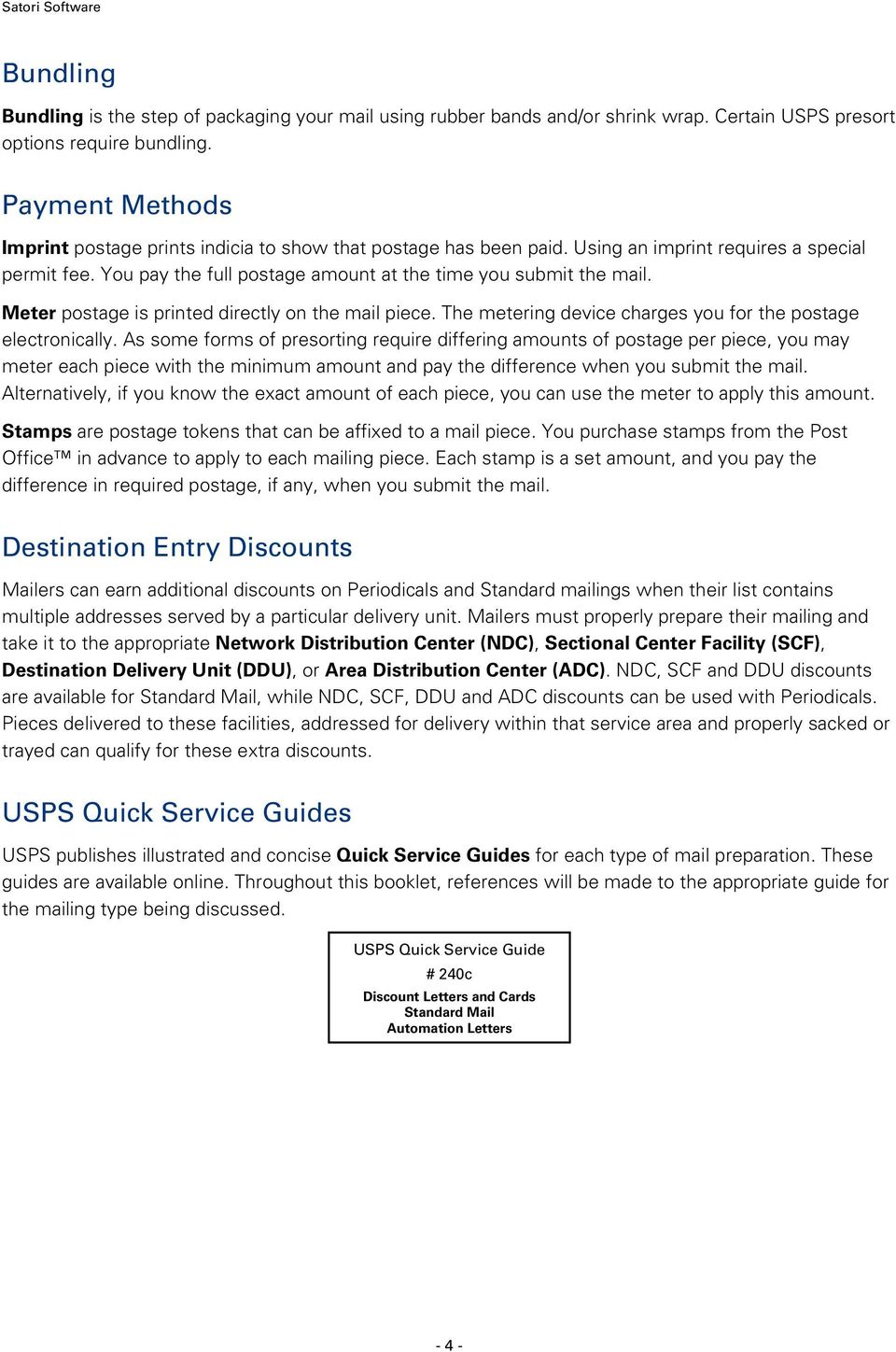
7 Guide to USPS Postal Discounts Using Bulk Mailer as a Planner Bulk Mailer, the Satori Software desktop mailing software package, can help you plan your mailing. The Mail Sort wizard allows you to define and set up the type of mailing you are planning. The Bulk Mailer Sort Class and Piece Type screen By filling in the mail sort options, you can create a Postage Statement Form (3600, 3602 or 3541) that details the postage costs for the mailing. By using several different sets of presort options, you can examine which method of mailing will save you the most money before you begin. Bulk Mailer lets you select mail sort settings for your bulk mailing including class/type, sort levels and other options, such as the preparation settings for payment, piece dimensions, thickness, weight and origin ZIP Code. If applicable, you can select the minimum pieces per tray and any entry point discounts for which your mailing qualifies. After using Bulk Mailer to sorts your mail, you can print all required presort reports. These reports, along with other features such as optional endorsement lines and bundle spacer labels, make the bundling and sacking or traying of your mailing as simple as possible. The section titled Using Bulk Mailer will provide more information about using the software. See Using Bulk Mailer
8 Satori Software Standard Mail Standard Mail is printed material such as circulars, pamphlets, catalogs, newsletters and direct mail weighing less than one pound. The mailing pieces, which may be classified as letters, flats or parcels, contain a general message aimed to all recipients. Standard Mail includes the following presort options: enhanced carrier route (either Walk Sequence or Line-of-Travel) automation and nonautomation. By paying an annual fee for a mailing permit number, you will be authorized to mail at bulk rates. Business Bulk Mailers pay regular discounted rates, while nonprofit mailers, who require a separate authorization, can take advantage of lower nonprofit rates. Bulk Mailer automates the presorting and preparation of your Standard Mail. Addresses will be printed in presorted order, the Qualification Report will detail how the mail must be grouped and bundled, and a USPS approved facsimile of the 3602 Form can be printed to submit with your mailing. Additional features, such as automatically printing the endorsement line and bundle spacer labels, make the complete process easy for anyone to do. General Requirements Standard Mail mailings require the following: A minimum of 200 pieces or 50 lbs. All pieces must belong to the same processing category of letters, flats or parcels. Mail must be deposited at a USPS designated acceptance point. Mail must meet specific bundling and sacking/traying requirements. This requires presorting your mail into various ZIP Code groups, then sorting into mailing sacks/trays, which are labeled to specific postal destinations. Additional discounts are available if you present your mail in an automation format. This involves using CASS Certified address correction software, updating changed addresses, barcoding and appropriate presorting, all of which may be done with Bulk Mailer
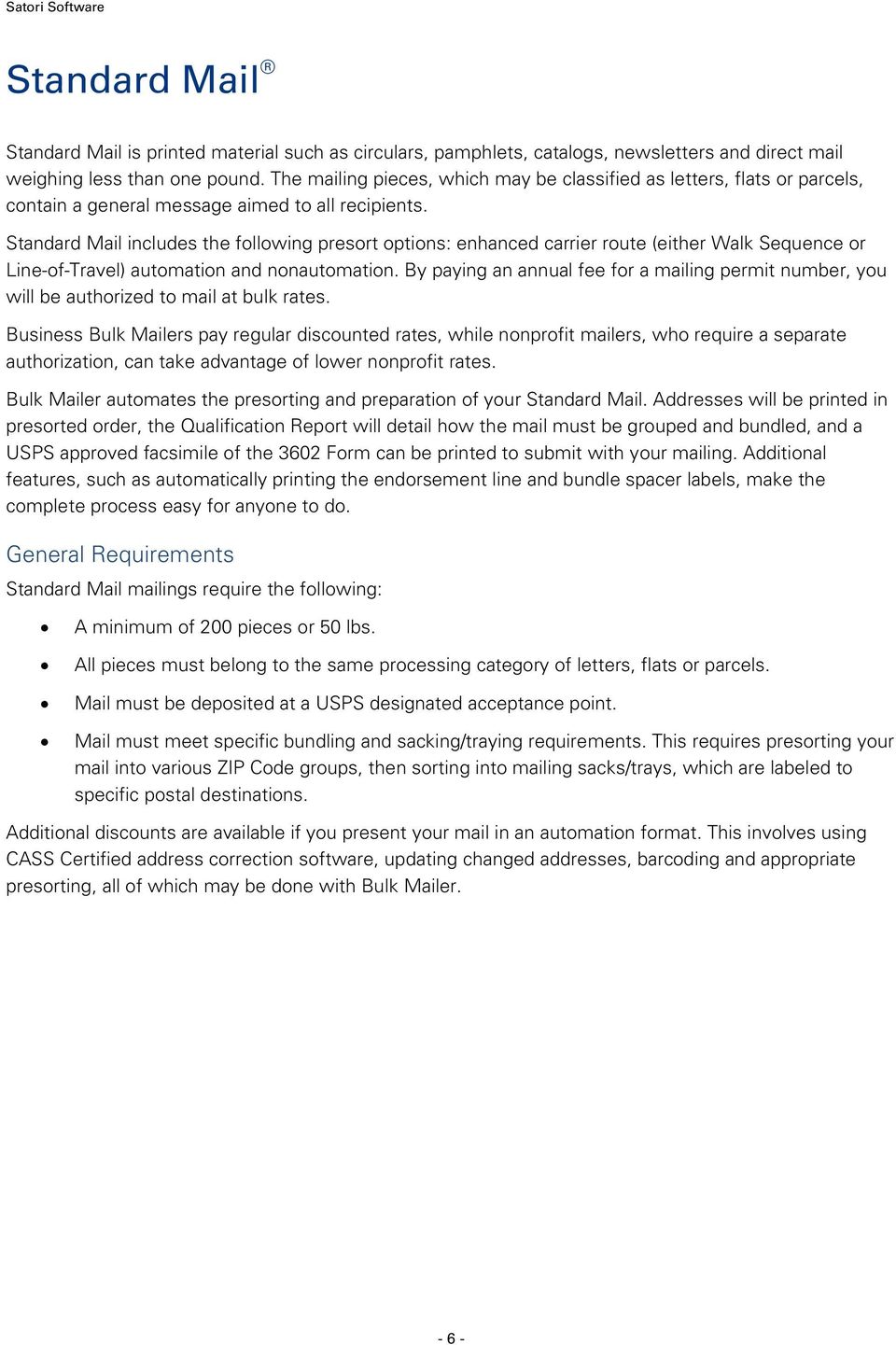
9 Guide to USPS Postal Discounts Rates As of the January 22, 2012 rate change, the current Standard Mail letter rates (letters 3.3 oz. or less, plus eligible entry-point discounts) are as follows and are subject to change. Contact your local Postal Service representative for updated information. For Profit Carrier Route Entry Discount Saturation High Density Basic None $0.185 $0.199 $0.271 DNDC $0.152 $0.166 $0.238 DSCF $0.142 $0.156 $0.228 Automation Entry Discount 5-Digit 3-Digit AADC Mixed AADC None $0.242 $0.260 $0.262 $0.278 DNDC $0.209 $0.227 $0.229 $0.245 DSCF $0.199 $0.217 $ Nonautomation Carrier Route Entry Discount Saturation High Density Basic None $0.197 $0.224 $0.271 DNDC $0.164 $0.191 $0.238 DSCF $0.154 $0.181 $0.228 Nonautomation Machinable Entry Discount AADC Mixed AADC None $0.265 $0.281 DNDC $0.232 $0.248 DSCF $ Nonautomation Nonmachinable Entry Discount 5-Digit 3-Digit ADC Mixed ADC None $0.392 $0.485 $0.524 $0.621 DNDC $0.359 $0.452 $0.491 $0.588 DSCF $0.349 $0.442 $
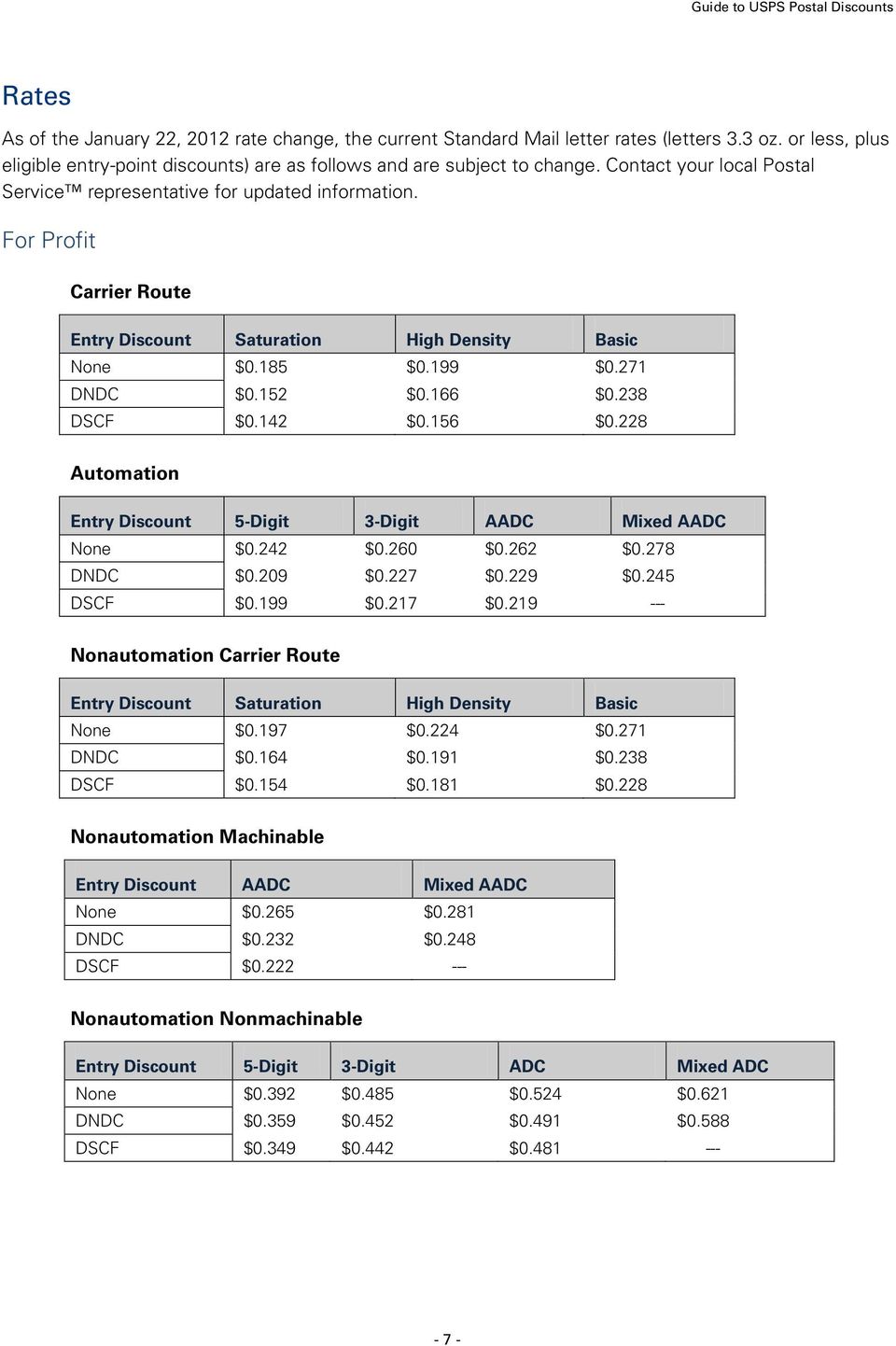
10 Satori Software Nonprofit Carrier Route Entry Discount Saturation High Density Basic None $0.111 $0.125 $0.194 DNDC $0.078 $0.092 $0.161 DSCF $0.068 $0.082 $0.151 Automation Entry Discount 5-Digit 3-Digit AADC Mixed AADC None $0.130 $0.148 $0.150 $0.166 DNDC $0.097 $0.115 $0.117 $0.133 DSCF $0.087 $0.105 $ Nonautomation Carrier Route Entry Discount Saturation High Density Basic None $0.122 $0.149 $0.194 DNDC $0.089 $0.116 $0.161 DSCF $0.079 $0.106 $0.151 Nonautomation Machinable Entry Discount AADC Mixed AADC None $0.156 $0.172 DNDC $0.123 $0.139 DSCF $ Nonautomation Nonmachinable Entry Discount 5-Digit 3-Digit ADC Mixed ADC None $0.280 $0.373 $0.412 $0.509 DNDC $0.247 $0.340 $0.379 $0.476 DSCF $0.237 $0.330 $ Preparing Mail for Automation Mail must have certain physical characteristics to be processed on the USPS automated processing machines. It must meet the height, width, weight and thickness requirements for the specific type of mail piece. Every mail piece must have either a delivery point or Intelligent Mail barcode. Letters must be rectangular, with four square corners, and made of paper. The mail piece must not be polybagged or contain clasps, strings, staples, buttons or other protrusions that might otherwise prevent the mail piece from being processed by the automation machines. Flats must be rectangular and of a uniform thickness; no more than a ¼ inch variance is allowed. Flats must meet flexibility and deflection standards as defined in the DMM. If polywrapped, it must meet - 8 -

11 Guide to USPS Postal Discounts certain standards or be from an approved manufacturer. The polywrap seam must be on the longest side of the mail piece, preferably on the non-addressed side. Enhanced Carrier Route (ECR) Letters For full details on this mailing class, request DMM Quick Service Guide #240d. USPS Quick Service Guide # 240d Discount Letters and Cards Standard Mail Enhanced Carrier Route Letters A carrier route is the street or area to which a particular letter carrier delivers the mail. USPS offers a higher discount rate for pieces that qualify for a carrier route sort because of the greater geographic density of this type of mailing. If a large portion of your mailing is in concentrated areas, you may qualify for the carrier route discounts. You may also qualify for additional SCF or NDC discounts, depending on where the mailing is deposited. To qualify for this mailing class, you must have at least 200 addressed mail pieces. All pieces must be automation compatible and have a delivery point or Intelligent Mail barcode to get the ECR letter rate; otherwise, they post at Flat rates. These mail pieces must be placed into groups of 10 or more delivered to the same carrier route and sorted in either Line-of-Travel or Walk Sequence order within each group. The carrier route information for these addresses must have been updated within 90 days of mailing by a CASS process. Addresses must have been updated by an approved Move Update option within 95 days of mailing. The address quality processes in Bulk Mailer meet these requirements. Exceptions apply to pieces with simplified addresses. Depending on the density of your mailing within a carrier route area, you may qualify for Saturation, High Density or Basic rates. Basic rate ECR mailings can be sorted by either Line-of-Travel or Walk Sequence. Saturation and High Density ECR mailings must be sorted by Walk Sequence. When preparing letters that are three ounces or less, automation compatible and barcoded, you must organize them into three types of trays. Full carrier route trays contain mail for a single carrier route. Overflow trays and bundling are not permitted. 5-digit carrier route trays contain mail for multiple carrier routes within a single 5-digit ZIP Code, grouped by carrier route. Overflow trays and bundling are not permitted. 3-digit trays contain the remaining mail pieces that will be delivered within a single 3-digit ZIP Code area, grouped by carrier route. Overflow trays are permitted, and bundling is required in less than full trays. All trays must have at least 10 pieces per carrier route; no exceptions are permitted. When preparing letters that are either over three ounces, not automation compatible or not barcoded, you must bundle your mail pieces by carrier route within 5-digit and 3-digit trays. Each bundle must have at least 10 pieces to the same carrier route. 5-digit carrier route trays are required with a full tray, but optional with one 10 piece bundle, with no minimum of bundles. 3-digit trays are optional with a minimum of one 10 piece bundle for each of two separate 5-digit areas. In Bulk Mailer, select Standard Mail Machinable Letters as your Sort Class and Piece Type and select Carrier Route (LOT) or Carrier Route (WS) as your first Sort Level in the Mail Sort Wizard. If you deposit your mail at a DNDC, DSCF or DDU, and wish to get the corresponding destination entry discounts, select the entry point in the Mail Sort Discounts screen. If the DNDC or DSCF is not listed on this screen, - 9 -
12 Satori Software select Plant-Verified Drop Shipment and click the Facilities button. To enter DDU ZIP codes, select Destination Delivery Unit (DDU) and click the ZIP Codes button. View the Qualification Report to see which pieces go in which trays. The PS Form 3602 will detail the qualifying pieces and rates. Automation Letters For full details on this mailing class, request DMM Quick Service Guide #240c. To qualify, you must have at least 200 addressed mail pieces. All pieces must be automation compatible and have a delivery point or Intelligent Mail barcode. Addresses must have been matched with a CASS/MASS process within 180 days of mailing and must have correct ZIP or ZIP + 4 codes. Addresses must have been updated by an approved Move Update option within 95 days of mailing. The address quality processes in Bulk Mailer meet these requirements. Mail pieces must be trayed in the following manner: USPS Quick Service Guide # 240c Discount Letters and Cards Standard Mail Automation Letters Optional 5-digit trays with a minimum of 150 pieces delivered to the same 5-digit/scheme destination. One overflow tray is permitted per destination ZIP Code. Required 3-digit/scheme trays with a minimum of 150 pieces delivered to the same 3- digit/scheme destination. One overflow tray is permitted per destination. Required AADC trays with a minimum of 150 pieces destined for the same AADC and grouped by 3-digit ZIP Code. One overflow tray permitted per destination. Remaining pieces must be placed into a Mixed AADC tray, grouped by AADC. One less-than-full tray is permitted per mailing. Bundling is not allowed except for card-sized pieces and for pieces in overflow and less-than-full trays. To receive the best possible discounts, in Bulk Mailer you should select Standard Mail Machinable Letters as your Sort Class and Piece Type and select Automation as your first Sort Level in the Mail Sort Wizard. If you deposit your mail at a DNDC or DSCF and wish to get the corresponding destination entry discounts, select the entry point in the Mail Sort Discounts screen. If the DNDC or DSCF is not listed on this screen, select Plant-Verified Drop Shipment and click the Facilities button. View the Qualification Report to see which pieces go in which trays. The PS Form 3602 will detail the qualifying pieces and rates. Automation Flats For full details on this mailing class, request the DMM Quick Service Guide #340b. USPS Quick Service Guide # 340b Discounts Flats Standard Mail Automation Flats

13 Guide to USPS Postal Discounts To qualify, you must have at least 200 or more flats or 50 pounds of addressed pieces that meet the requirements for Standard Mail and the physical standards for flats. All pieces must be automation compatible and have a delivery point or Intelligent Mail barcode. Rigid, non-rectangular and not uniformly thick pieces must be prepared as parcels or Not Flat-Machinable pieces and pay parcel or Not Flat- Machinable rates. Addresses must have been matched with a CASS/MASS process within 180 days of mailing and must have correct ZIP or ZIP + 4 codes. Addresses must have been updated by an approved Move Update option within 95 days of mailing. Mail pieces must be bundled in the following sequence: 15 pieces in mailings that contain only pieces weighing five ounces or less or 10 pieces in mailings that contain any pieces over five ounces in 5- digit/scheme groups (all pieces within a 5-digit ZIP Code), 10 pieces in 3-digit/scheme groups (all within a group of ZIP Codes with the same 3-digit prefix) and 10 pieces to an ADC. Fewer pieces in these categories are not permitted. Any remaining pieces must be placed in Mixed ADC bundles. All bundles must then be sorted into sacks using the above order. Each sack must contain a minimum of 125 mail pieces or 15 pounds of the same group, except for Mixed ADC sacks, which contain the remainders from the other sacks. In Bulk Mailer, select Standard Mail Machinable Flats as your Sort Class and Piece Type and select Automation as your first Sort Level in the Mail Sort Wizard. If you deposit your mail at a DNDC or DSCF and wish to get the corresponding destination entry discounts, select the entry point in the Mail Sort Discounts screen. If the DNDC or DSCF is not listed on this screen, select Plant-Verified Drop Shipment and click the Facilities button. View the Qualification Report to see which pieces go in which sacks. The PS Form 3602 will detail the qualifying pieces and rates. If you use the optional endorsement line, you will not need to manually apply the pressure sensitive adhesive labels supplied by The Postal Service. Enhanced Carrier Route (ECR) Flats For full details on this mailing class, request DMM Quick Service #340c. USPS Quick Service Guide # 340c Discount Flats Standard Mail Enhanced Carrier Route Flats A carrier route is the street or area to which a particular mail carrier delivers the mail. USPS offers a higher discount rate for pieces that qualify for a carrier route sort because of the greater geographic density of this type of mailing. If a large portion of your mailing is in concentrated areas, you may qualify for the carrier route discounts. You may also qualify for additional DSCF, DNDC or DDU discounts, depending on where the mailing is deposited. To qualify for this mailing class, you must have at least 200 addressed mail pieces or 50 pounds of addressed mail pieces. These mail pieces must be bundled into groups of 10 or more delivered to the same carrier route and sorted in either Line-of-Travel or Walk Sequence within each group. Addresses must have been updated by an approved Move Update option within 95 days of mailing. The carrier route information for these addresses must have been updated within 90 days of mailing by a CASS process. The address quality processes in Bulk Mailer meet these requirements. Exceptions apply to pieces with simplified addresses

14 Satori Software Depending on the density of your mailing within a carrier route area, you may qualify for Saturation, High Density or Basic rates. Basic rate ECR mailings can be sorted by either Line-of-Travel or Walk Sequence. Saturation and High Density ECR mailings must be sorted by Walk Sequence. You must organize bundles into three types of sacks. Carrier route sacks contain at least 125 mail pieces or 15 pounds of mail for a single carrier route. 5-digit carrier route sack contain mail for multiple carrier routes within a single 5-digit ZIP Code. There is no minimum for this type of sack. To receive the best possible discounts, in Bulk Mailer you should select Standard Mail Machinable Flats as your Sort Class and Piece Type and select Carrier Route (LOT) or Carrier Route (WS) as your first Sort Level in the Mail Sort Wizard. If you deposit your mail at a DNDC, DSCF or DDU, and wish to get the corresponding destination entry discounts, select the entry point in the Mail Sort Discounts screen. If the DNDC or DSCF is not listed on this screen, select Plant-Verified Drop Shipment and click the Facilities button. To enter DDU ZIP codes, select Destination Delivery Unit (DDU) and click the ZIP Codes button. View the Qualification Report to see which pieces go in which bundles and sacks. The PS Form 3602-R will detail the qualifying pieces and rates. Machinable Letters For full details on this mailing class, see the DMM Quick Service Guide #240b. USPS Quick Service Guide # 240b Discount Letters and Cards Standard Mail Machinable To qualify, you must have at least 200 or more letters that meet the requirements for both Standard Mail and machinability. Each piece must have a delivery address and correct ZIP Code or ZIP + 4 Code. A CASS process must have been used in the previous 12 months to verify the 5-digit ZIP Code. The address quality processes in Bulk Mailer meet these requirements. Addresses must have been updated by an approved Move Update option within 95 days of mailing. You must have at least 150 pieces going to the same Automated Area Distribution Center (AADC). An AADC is a facility that receives and distributes mail destined for specific ZIP Codes, using multiline optical character readers, barcode sorters and other mail-processing equipment. These trays are eligible for AADC rates. Optionally, you can prepare a tray for each origin 3-digit ZIP Code. These trays are also eligible for AADC rates. Any remaining pieces must be grouped in mixed AADC trays. Bundling is not permitted except for card-sized pieces and pieces in less than full trays. Piece rates are based on the format of the tray in which pieces are placed. To receive the best possible discounts, in Bulk Mailer you should select Standard Mail Machinable Letters as your Sort Class and Piece Type in the Mail Sort Wizard. If you deposit your mail at a DNDC or DSCF and wish to get the corresponding destination entry discounts, select the corresponding entry point in the Mail Sort Discounts screen. If the DNDC or DSCF is not listed on this screen, select Plant- Verified Drop Shipment and click the Facilities button. Use the Qualification Report to see which mail pieces go into which trays. The PS Form 3602 will detail the qualifying pieces and rates

15 Guide to USPS Postal Discounts Nonmachinable Letters For full details on this mailing class, request the DMM Quick Service Guide #240a. USPS Quick Service Guide # 240a Discount Letters and Cards Standard Mail Nonmachinable Letters To qualify, you must have at least 200 or more letters that meet the requirements for Standard Mail and at least one of the criteria for nonmachinability. Each piece must have a delivery address and correct ZIP Code or ZIP + 4 code. A CASS process must have been used in the previous 12 months to verify the 5- digit ZIP Code. The address quality processes in Bulk Mailer meet these requirements. Addresses must have been updated by an approved Move Update option within 95 days of mailing. Mail pieces must be bundled in the following sequence: 10 or more pieces in 5-digit groups (all pieces within a 5-digit ZIP Code), 10 or more in 3-digit groups (all within a group of ZIP Codes with the same 3- digit prefix) and 10 or more pieces to an ADC. Fewer pieces in these categories are not permitted. Any remaining pieces must be placed in Mixed ADC bundles. All bundles must then be sorted into trays using the above order. Each tray must contain a minimum of 150 mail pieces of the same group, except for Mixed ADC trays, which contain the remainders from the other trays. Generally, your mailing will be a combination of these groups. For example, your list may not have enough pieces to qualify for a 5-digit tray. However, if you have enough pieces to qualify for one 3-digit or ADC tray, you should mail it at one of those rates. In Bulk Mailer, select Standard Mail Nonmachinable Letters as your Sort Class and Piece Type in the Mail Sort Wizard. If you deposit your mail at a DNDC or DSCF and wish to get the corresponding destination entry discounts, select the entry point in the Mail Sort Discounts screen. If the DNDC or DSCF is not listed on this screen, select Plant-Verified Drop Shipment and click the Facilities button. Use the Qualification Report to see the traying sequence for your pieces. The PS Form 3602 will detail the qualifying pieces and rates. Nonautomation Flats For full details on this mailing class, request the DMM Quick Service Guide #340a. USPS Quick Service Guide # 340a Discount Flats Standard Mail Nonautomation Flats To qualify, you must have at least 200 or more flats or 50 pounds of addressed pieces that meet the requirements for Standard Mail and the physical standards for flats. Rigid, non-rectangular and not uniformly thick pieces must be prepared as parcels or Not Flat-Machinable pieces and will be posted at parcel or Not Flat-Machinable rates. Each piece must have a delivery address and correct ZIP Code or ZIP + 4 Code. A CASS process must have been used in the previous 12 months to verify the 5-digit ZIP Code. The address quality processes in Bulk Mailer meet these requirements. Addresses must have been updated by an approved Move Update option within 95 days of mailing. Mail pieces must be bundled in the following sequence: 15 pieces in mailings that contain only pieces weighing five ounces or less or 10 pieces in mailings that contain any pieces over five ounces in 5-digit

16 Satori Software groups (all pieces within a 5-digit ZIP Code), 10 pieces in 3-digit groups (all within a group of ZIP Codes with the same 3-digit prefix) and 10 pieces to an ADC. Fewer pieces in these categories are not permitted. Any remaining pieces must be placed in Mixed ADC bundles. All bundles must then be sorted into sacks using the above order. Each sack must contain a minimum of 125 mail pieces or 15 pounds of the same group, except for Mixed ADC sacks, which contain the remainders from the other sacks. Generally, your mailing will be a combination of these groups. For example, your list may not have enough pieces to qualify for a 5-digit sack. However, if you have enough pieces to qualify for one 3-digit or ADC sack, you should mail it at one of those rates. In Bulk Mailer, select Standard Mail Nonmachinable Flats as your Sort Class and Piece Type in the Mail Sort Wizard. If you deposit your mail at a DNDC, DSCF or DDU, and wish to get the corresponding destination entry discounts, select the entry point in the Mail Sort Discounts screen. If the DNDC or DSCF is not listed on this screen, select Plant-Verified Drop Shipment and click the Facilities button. To enter DDU ZIP Codes, select Destination Delivery Unit (DDU) and click the ZIP Codes button. Use the Qualification Report to see which bundles go in which sacks. The PS Form 3602 will detail the qualifying pieces and rates. If you use the optional endorsement line, you will not need to manually apply the pressure sensitive adhesive labels supplied by The Postal Service
17 Guide to USPS Postal Discounts First-Class Mail First-Class Mail is the most expedient form of regular mail. Personal correspondence, bills, statements of account and any handwritten or typewritten material all must be sent as First-Class Mail. First-Class Mail may be used for most mailable materials regardless of whether it is required to be mailed as such. You can receive discounts on First-Class Mail by presorting or preparing your mail pieces for automation. Presorted First-Class Mail permits require an annual fee, which entitles you to lower postage rates. Upon payment of this fee, you are assigned a mailing permit number, which is valid for one year. Bulk Mailer can automate the presorting and preparation of your First-Class Mail. The Qualification Report details how the mail must be grouped and bundled, and Bulk Mailer can print a USPS approved facsimile of the PS Form 3600 for you to submit with your mailing. Additionally, Bulk Mailer will automatically print the barcodes, endorsement line and bundle spacer labels to streamline preparation. General Requirements Each First-Class Mail presorted mailing requires a minimum of 500 pieces. All pieces should be of the same mail piece type, such as letters, flats or parcels (check with the Post Office for machinable dimensions). All the envelopes or cards in a presort mailing must be endorsed First-Class Mail, including both the qualifying mail and the residual mail. Presorted First-Class Mail may not be dropped off at a regular Post Office. Contact your local postal representative to find facilities that accept First-Class Mail. To qualify for presorted rates, your mail must meet specific bundling and traying requirements. This involves presorting your mail into various ZIP Code groups. Then your mail is sorted into mailing trays that are labeled to specific postal destinations. Additional discounts are available if you can present your mail in machinable or automation formats. These discounts have additional requirements, such as corrected addresses or barcodes. Rates The First-Class Mail rates as of the January 22, 2012 rate change are as follows and are subject to change. Contact your local Post Office or visit the USPS website ( for updated information. Letters Weight Not Automation Machinable Over (ounces) 5-Digit 3-Digit AADC Mixed AADC Presorted 1 $0.350 $0.374 $0.374 $0.404 $ $0.350 $0.374 $0.374 $0.404 $ $0.600 $0.624 $0.624 $0.654 $ $0.725 $0.749 $0.749 $0.779 $0.799 Card Rate $0.229 $0.243 $0.244 $0.255 $

18 Satori Software Flats Weight Not Over (ounces) Automation Machinable 5-Digit 3-Digit ADC Mixed ADC Presorted 1 $0.400 $0.574 $0.630 $0.730 $ $0.570 $0.744 $0.800 $0.900 $ $0.740 $0.914 $0.970 $1.070 $ $0.910 $1.084 $1.140 $1.240 $ $1.080 $1.254 $1.310 $1.410 $ $1.250 $1.424 $1.480 $1.580 $ $1.420 $1.594 $1.650 $1.750 $ $1.590 $1.764 $1.820 $1.920 $ $1.760 $1.934 $1.990 $2.090 $ $1.930 $2.104 $2.160 $2.260 $ $2.100 $2.274 $2.330 $2.430 $ $2.270 $2.444 $2.500 $2.600 $ $2.440 $2.614 $2.670 $2.770 $2.802 Any mailing claiming automation rates must document that the mail list was verified using CASS Certified software. Bulk Mailer produces the PS Form 3553 to meet this requirement. All bulk First-Class Mail mailings must have their addresses updated by an approved Move Update option within 95 days of mailing. Automation Letters For full details on this mailing class, request DMM Quick Service Guide #230d. USPS Quick Service Guide # 230d Commercial Letters and Cards First-Class Mail Automation Letters and Cards First-Class Mail automation letters consist of address corrected lists that are 100% delivery point or Intelligent Mail barcoded. This class is placed in trays and requires no bundling. You are eligible for 5- digit, 3-digit, AADC and mixed AADC rates. Bundling in an automation letters mailing is only allowed in mailings that consist entirely of card-sized pieces and in less-than-full Mixed AADC trays. Mail pieces must be bundled and trayed in the following sequence: 150 mail pieces minimum delivered to the same 5-digit/scheme destination. One overflow tray per destination is permitted. 150 mail pieces minimum delivered to the same 3-digit/scheme destination. This tray type is required. One overflow tray per destination is permitted. 150 mail pieces minimum delivered to the same AADC, grouped by 3-digit/scheme destination. This tray type is required. One overflow tray per destination is permitted

19 Guide to USPS Postal Discounts All remaining mail pieces must be placed into Mixed AADC trays, grouped by AADC. One lessthan-full tray per mailing is permitted. To receive the best possible discounts, in Bulk Mailer you should select First-Class Mail Machinable Letters as your Sort Class and Piece Type in the Mail Sort Wizard. There are no entry point discounts for First-Class Mail. Machinable Letters For full details on this presort, request Quick Service Guide #230c. Mail pieces must be trayed in the following sequence: Required 3-digit origin trays with mail to be delivered within an origin 3-digit ZIP Code area. One less-than-full tray allowed per origin ZIP Code. Required full AADC trays with mail to be delivered to a single AADC, grouped by 3-digit ZIP Code. Less-than-full trays are not permitted. Remaining pieces must be placed in Mixed AADC trays. One less-than-full Mixed AADC tray allowed per mailing. Bundling is not permitted except for card sized pieces and in less-than-full trays. To receive the best possible discounts, in Bulk Mailer, you should select First-Class Mail Machinable Letters as your Sort Class and Piece Type in the Mail Sort Wizard. There are no entry point discounts for First-Class Mail. Use the Qualification Report to see which mail pieces go in which trays. The Postage Statement will detail the qualifying pieces and rates. Nonmachinable Letters USPS Quick Service Guide # 230c Commercial Letters and Cards First-Class Mail Machinable Letters and Cards For full details on this mailing class, request DMM Quick Service Guide #230b. USPS Quick Service Guide # 230b Commercial Letters and Cards First Class Mail Nonmachinable Letters Mail pieces must be bundled and trayed in the following sequence: Bundles of 10 or more mail pieces delivered within a single 5-digit ZIP Code area. 5-digit trays are required and must be full. Full 5-digit trays do not require bundling. Bundles of 10 or more mail pieces delivered to the same 3-digit ZIP Code area. 3-digit trays are required and must be full. 3-digit trays can contain both 3-digit and 5-digit bundles. Bundles of 10 or more mail pieces delivered to the same ADC. ADC trays are required and must be full. ADC trays can contain ADC bundles, 3-digit and 5-digit bundles

20 Satori Software All remaining pieces must be bundled in Mixed ADC bundles. One less-than-full tray is allowed per mailing. Mixed ADC trays can contain any type of bundle. In Bulk Mailer, select First-Class Mail Nonmachinable Letters as your Sort Class and Piece Type in the Mail Sort Wizard. There are no entry point discounts for First-Class Mail. View the Qualification Report to see which mail pieces go in which trays. The Postage Statement will detail the qualifying pieces and rates. Automation Flats For full details on this mailing class, request Quick Service Guide #330b. USPS Quick Service Guide # 330b Commercial Flats First Class Mail Automation Flats First-Class Mail automation flats must be address corrected and 100% delivery point or Intelligent Mail barcoded. You are eligible for 5-digit, 3-digit, ADC and mixed ADC rates. This class is placed in trays, not sacks. A full tray contains at least a single stack of pieces lying flat that reaches the bottom of the handholds. Mail pieces must be bundled and trayed in the following sequence: Bundles of 10 or more mail pieces delivered within a single 5-digit ZIP Code area. 5-digit trays are required and must be full. Full 5-digit trays do not require bundling. Bundles of 10 or more mail pieces delivered to the same 3-digit ZIP Code area. 3-digit trays are required and must be full. 3-digit trays can contain both 3-digit and 5-digit bundles. Bundles of 10 or more mail pieces delivered to the same ADC. ADC trays are required and must be full. ADC trays can contain ADC bundles, 3-digit and 5-digit bundles. All remaining pieces must be bundled in Mixed ADC bundles. One less-than-full tray is allowed per mailing. Mixed ADC trays can contain any type of bundle. Alternately, you can forgo bundling and place mail pieces directly into trays. In this case, each tray type except Mixed ADC trays must have at least 90 mail pieces. One overflow tray is permitted per destination for each tray type. In Bulk Mailer, select First-Class Mail Machinable Letters as your Sort Class and Piece Type in the Mail Sort Wizard. On the Sorting Preparation screen, select Automation as your First sort level. There are no entry point discounts for First-Class Mail. View the Qualification Report to see which pieces go in which trays and the PS Form 3600 will detail the qualifying pieces and rates. Nonautomation Flats For full details on this mailing class, request the DMM Quick Service Guide #330a. USPS Quick Service Guide # 330a Discount Flats First-Class Mail Nonautomation Flats

21 Guide to USPS Postal Discounts First-Class flats prepared as presorted mail are unique because they are trayed and not sacked. A full tray contains at least a single stack of pieces lying flat that reaches the bottom of the handholds. Mail pieces must be bundled and trayed in the following sequence: Bundles of 10 or more mail pieces delivered within a single 5-digit ZIP Code area. 5-digit trays are required and must be full. Full 5-digit trays do not require bundling. Bundles of 10 or more mail pieces delivered to the same 3-digit ZIP Code area. 3-digit trays are required and must be full. 3-digit trays can contain both 3-digit and 5-digit bundles. Bundles of 10 or more mail pieces delivered to the same ADC. ADC trays are required and must be full. ADC trays can contain ADC bundles, 3-digit and 5-digit bundles. All remaining pieces must be bundled in Mixed ADC bundles. One less-than-full tray is allowed per mailing. Mixed ADC trays can contain any type of bundle. In Bulk Mailer, select First-Class Mail Nonmachinable Flats as your Sort Class and Piece Type in the Mail Sort Wizard. There are no entry point discounts for First-Class Mail. Use the Qualification Report to see which bundles go in which trays. The PS Form 3600 will detail the qualifying pieces and rates. If you use the optional endorsement line, you will not need to manually apply the pressure sensitive adhesive labels supplied by The Postal Service
22 Satori Software Periodicals Periodicals (formerly Second-Class Mail) are publications (e.g. magazines or newspapers) issued regularly on a stated frequency (at least four times/year). General publications must be issued for the purpose of disseminating information on any topic, consisting of articles, advertising, editorials, photographs and other content. The publication must also meet the circulation standards found in section of the Domestic Mail Manual. There are several different publication categories for Periodicals mailings, including Institutions and Societies, State Departments of Agriculture and News Agent Registry. Mailers must apply for the appropriate mailing privileges and pay the appropriate fees. Those mailers who qualify for News Agent Registry may apply at a discounted price. There are four Periodicals subclasses: General Publications, Nonprofit, Classroom and Science-of- Agriculture. General Publications pay regular rates, while those that are authorized can take advantage of lower rates. General Requirements Periodicals do not have a minimum piece or weight requirement. However, publishers must keep records to show that the publication is distributed to a legitimate list of requesters or subscribers. Periodicals may not be dropped at a regular Post Office. Contact your local USPS specialist to find a location where this type of mail is accepted. To qualify for Periodicals rates, your mail must meet specific bundling and sacking/traying requirements. Finally, additional discounts are available if you present your mail in an automation format. This requires the use of Address Correction software, ZIP + 4 coding and barcoding. See Using Address Correction. Rates Rates are calculated much differently for Periodicals than for other presorted mailings. Periodical mailings are charged per piece and per pound rates, with Outside-County mailings also charged per bundle and per container rates. Pound rates are applied to the entire mailing. For Outside-County mailings, the pound rate is based on the zone they are being sent to and the total percentage of advertising and nonadvertising content. Piece rates are applied to each addressed piece, whether that piece is a single addressed copy, a bundle of unaddressed copies with a single destination address or a firm bundle of unaddressed or addressed copies sent to the same destination address. These rates vary based on the machinability, barcoding and presort level of the pieces. Bundle rates apply to each bundle; container rates apply to the first container level, either tray/sack or pallet. Rates vary based on the lowest presort level of the container and are eligible for destination entry discounts. Publications are also eligible for a number of special rates for authorized publications. Outside-County Outside-County pound rates are assessed on all pieces in a mailing based on the zone to which they are being mailed. Outside-County Periodical rates as of the January 22, 2012 rate changes are below
23 Guide to USPS Postal Discounts Pound Rates for the Advertising Portion Zone Regular Science-of-Agriculture DDU $0.135 $0.101 DSCF $0.206 $0.155 DADC $0.219 $ &2 $0.244 $ $0.267 $ $0.327 $ $0.417 $ $0.512 $ $0.626 $ $0.723 $0.723 Pound Rates for the Nonadvertising Portion Zone Regular Science-of-Agriculture DDU $0.113 $0.113 DSCF $0.171 $0.171 DADC $0.182 $0.182 Other $0.203 $0.203 Piece Rates Bundle Level Letters Machinable Flats Nonmachinable Flats Parcels Barcode No barcode Barcode No barcode Barcode No barcode N/A 5-Digit $0.200 $0.294 $0.285 $0.294 $0.310 $0.311 $ Digit/SCF $0.262 $0.394 $0.372 $0.394 $0.420 $0.431 $0.431 ADC $0.283 $0.411 $0.387 $0.411 $0.482 $0.507 $0.507 Mixed ADC $0.323 $0.446 $0.414 $0.446 $0.580 $0.625 $0.625 All firm bundles are $ Carrier Route rates for all pieces: Saturation $0.136 High Density $0.156 Basic $0.187 The non-advertising discount for each 1% of non-advertising content is $ per piece
24 Satori Software Bundle Rates Bundle Level Container Level CR/5-Digit 3-Digit/SCF ADC Mixed ADC Firm $0.079 $0.142 $0.154 $0.185 Carrier Route $0.152 $0.288 $ Digit $0.145 $0.150 $0.206 $ Digit/SCF -- $0.129 $0.190 $0.276 ADC $0.115 $0.208 Mixed ADC $0.079 Container Rates per pallet, sack or tray Entry Pallet 5-Digit 3- Digit/SCF ADC Mixed ADC Tray/Sack CR/5- Digit 3- Digit/SCF DDU $ $ DSCF $ $ $1.353 $ DADC $ $ $ $1.770 $1.249 $ DNDC $ $ $ $2.082 $1.562 $ ADC Mixed ADC Origin $ $ $ $3.365 $2.810 $2.186 $2.092 $0.437 The Ride-Along Price is $0.165 per piece. Repositionable notes are $0.015 for Outside County, $0.005 for In-County. In-County In-County rates apply to all pieces mailed to the ZIP Codes within the same county as the Post Office of deposit. ZIP Code range information can be obtained from the nearest USPS Business Center. The In- County pound rates are below. Pound Rates Zone Rates DDU $0.145 None $
25 Guide to USPS Postal Discounts Piece Rates Presort Level Carrier Route Automation Nonautomation Letters Flats Letters, Flats & Parcels Saturation $0.031 High Density $0.045 Basic $ Digit $0.048 $0.102 $ Digit $0.050 $0.109 $0.121 Basic $0.060 $0.117 $0.133 The Destination Delivery Unit discount is $0.008 per piece. For each addressed letter or flat that qualifies for Full-Service Intelligent Mail, subtract $ Automation Letters For this presort, request the DMM Quick Service Guide #707f. USPS Quick Service Guide # 707f Special Standards Periodicals Automation Letters Periodicals automation letters must be trayed and palletized or trayed, sleeved and strapped. For the requirements for automation compatibility, see Preparing Mail for Automation. Mail pieces must be trayed in the following sequence: Trays of at least 150 pieces to the same 5-digit ZIP Code or 5-digit scheme. 5-digit/scheme trays are optional, but required to get the 5-digit rate. One overflow tray per destination is permitted. Required trays of at least 150 pieces to the same 3-digit ZIP Code or 3-digit scheme. One overflow tray per destination is permitted. One less-than-full tray must be prepared for any remaining pieces in each 3-digit ZIP Code or 3-digit scheme of origin Post Office. Required trays of at least 150 pieces to the same AADC. One overflow tray per destination is permitted. Pieces must be grouped by 3-digit ZIP Code prefix or 3-digit scheme if applicable. The remaining pieces must be put in Mixed AADC trays and grouped by AADC. One less-thanfull Mixed AADC tray allowed per mailing. Bundling is not permitted in full trays. It is required in mailings that consist entirely of card-sized pieces and in less-than-full 3-digit origin and mixed ADC trays. In Bulk Mailer, select Periodicals Machinable Letters as your Sort Class and Piece Type in the Mail Sort Wizard. On the Sorting Preparation screen, select Automation/Barcoded as your first sort level. If you deposit your mail at a DNDC, ADC or DSCF, select the corresponding entry point in the Mail Sort Discounts screen. View the Qualification Report to see which pieces go in which trays. The Postal Summary Report, also known as PS Form 3541, will detail the qualifying pieces and rates. If you use the optional endorsement line, you do not need to manually apply the pressure sensitive adhesive labels supplied by The Postal Service
26 Satori Software Automation Flats For full details on this presort, request DMM Quick Service Guide #707g. USPS Quick Service Guide # 707g Special Standards Periodicals Automation Flats Periodicals automation flats require bundling, sacking and, optionally, palletizing. For the requirements for automation compatibility, see Preparing Mail for Automation. Mail pieces must be bundled and sacked in the following sequence: Bundles of 6 or more mail pieces delivered within a single 5-digit ZIP Code area. 5-digit sacks are required with 24 pieces, less than 24 pieces not permitted. 5-digit sacks can contain only 5-digit bundles. Bundles of 6 or more mail pieces delivered within a single 3-digit ZIP Code area. 3-digit sacks are required with 24 pieces, less than 24 pieces not permitted. 3-digit sacks can contain 5-digit and 3-digit bundles. Alternatively, you can place 5-digit and 3-digit bundles into SCF or origin SCF sacks. They are required with 24 pieces, less than 24 pieces only permitted for origin SCF sacks. Bundles of 6 or more mail pieces delivered to the same ADC. ADC sacks are required with 24 pieces, less than 24 pieces not permitted. ADC sacks can contain 5-digit, 3-digit and ADC bundles. Mixed Origin ADC bundles of any number of the remaining mail pieces delivered to ZIP Codes listed in DMM appendix L201, column B. Mixed Origin ADC sacks are required and have no minimum. These sacks can contain 5-digit, 3-digit, ADC and mixed Origin ADC bundles. All remaining pieces must be bundled in Mixed ADC bundles. There is no minimum for mixed ADC sacks. Mixed ADC sacks can contain any type of bundle. In Bulk Mailer, select Periodicals Machinable Flats (AFSM 100) as your Sort Class and Piece Type in the Mail Sort Wizard. If you deposit your mail at a DNDC, ADC, DSCF or DDU, select the corresponding entry point in the Mail Sort Discounts screen. View the Qualification Report to see which bundles go in which sacks. The Postal Summary Report, also known as PS Form 3541, will detail the qualifying pieces and rates. If you use the optional endorsement line, you do not need to manually apply the pressure sensitive adhesive labels supplied by The Postal Service. Nonautomation Letters For full details on this presort, request Quick Service Guide #707d. USPS Quick Service Guide # 707d Special Standards Periodicals Nonautomation Letters
27 Guide to USPS Postal Discounts Periodicals nonautomation letters require bundling, traying and, optionally, palletizing. Carrier route preparation is optional. Mail pieces must be bundled and trayed in the following sequence: Optional bundles of six or more mail pieces delivered to the same carrier route. Carrier route bundles can only be placed into carrier route trays. There are three types of carrier route trays: Single carrier route trays are required for 24 pieces, optional with one six-piece bundle; 5-digit carrier route trays are required for full trays, optional with one six-piece bundle, with one lessthan-full tray permitted; 3-digit carrier route trays are optional with one six-piece bundle. Bundles of 6 or more mail pieces delivered within a single 5-digit ZIP Code area. 5-digit trays are required with 24 pieces, optional with one six-piece bundle. Full 5-digit trays do not require bundling. 5-digit trays can contain only 5-digit bundles. Bundles of 6 or more mail pieces delivered within a single 3-digit ZIP Code area. 3-digit trays are required with 24 pieces, optional with one six-piece bundle. One less than full tray must be prepared for any remaining bundles for each 3-digit area. 3-digit trays can contain both 5-digit and 3-digit bundles. Bundles of 6 or more mail pieces delivered to the same ADC. ADC trays are required with 24 pieces, optional with one six-piece bundle. ADC trays can contain 5-digit, 3-digit and ADC bundles. All remaining pieces must be bundled in Mixed ADC bundles. One less-than-full tray is allowed per mailing. Mixed ADC trays can contain any type of bundle. In Bulk Mailer, select Periodicals Nonmachinable Letters as your Sort Class and Piece Type in the Mail Sort wizard. If you deposit your mail at a DNDC, ADC, DSCF or DDU, select the corresponding entry point in the Mail Sort Discounts screen. View the Qualification Report to see which bundles go in which trays. The Postal Summary Report, also known as PS Form 3541, will detail the qualifying pieces and rates. If you use the optional endorsement line, you do not need to manually apply the pressure sensitive adhesive labels supplied by The Postal Service. Nonautomation Flats For full details on this presort, request Quick Service Guide #707e. USPS Quick Service Guide # 707e Special Standards Periodicals Nonautomation Flats Periodicals nonautomation flats require bundling, sacking and, optionally, palletizing. Carrier route preparation is optional. Mail pieces must be bundled and sacked in the following sequence: Optional bundles of six or more mail pieces delivered to the same carrier route. Carrier route bundles are sacked by individual carrier route, 5-digit scheme carrier routes, 5-digit carrier routes and 3-digit carrier routes. All except 3-digit carrier routes sacks are required at 24 pieces, less
28 Satori Software than 24 pieces not permitted. 3-digit carrier routes sacks are required with one six-piece bundle. Carrier route bundles are not permitted outside of the carrier route sacks mentioned here. Bundles of 6 or more mail pieces delivered within a single 5-digit ZIP Code area. 5-digit sacks are required with 24 pieces, less than 24 pieces not permitted. 5-digit sacks can contain only 5-digit bundles. Bundles of 6 or more mail pieces delivered within a single 3-digit ZIP Code area. 3-digit sacks are required with 24 pieces, less than 24 pieces not permitted. 3-digit sacks can contain 5-digit and 3-digit bundles. Alternatively, you can place 5-digit and 3-digit bundles into SCF or origin SCF sacks. They are required with 24 pieces, less than 24 pieces only permitted for origin SCF sacks. Bundles of 6 or more mail pieces delivered to the same ADC. ADC sacks are required with 24 pieces, less than 24 pieces not permitted. ADC sacks can contain 5-digit, 3-digit and ADC bundles. Origin Mixed ADC bundles of any number of the remaining mail pieces delivered to ZIP Codes listed in DMM appendix L201, column B. Origin Mixed ADC sacks are required and have no minimum. These sacks can contain 5-digit, 3-digit, ADC and Origin Mixed ADC bundles. All remaining pieces must be bundled in Mixed ADC bundles. There is no minimum for mixed ADC sacks. Mixed ADC sacks can contain any type of bundle. In Bulk Mailer, select Periodicals Nonmachinable Flats, Machinable Flats (UFSM 1000) or Nonmachinable Flats as your Sort Class and Piece Type in the Mail Sort wizard. If you deposit your mail at a DNDC, ADC, DSCF or DDU, select the corresponding entry point in the Mail Sort Discounts screen. If you plan on using drop shipments, select Plant-Verified Drop Shipment and click the Facilities button. View the Qualification Report to see which bundles go in which sacks. The Postal Summary Report, also known as PS Form 3541, will detail the qualifying pieces and rates. If you use the optional endorsement line, you do not need to manually apply the pressure sensitive adhesive labels supplied by The Postal Service
29 Guide to USPS Postal Discounts Using Bulk Mailer Satori Software provides comprehensive mail preparation through both its Bulk Mailer and MailRoom ToolKit product lines. This guide uses the all-in-one Bulk Mailer desktop application to illustrate the mailing preparation process. Bulk Mailer provides a streamlined interface which simplifies the mailing preparation process. In contrast, MailRoom Toolkit Architect components can be integrated into automated or variable-data systems, while MailRoom ToolKit Office provides mail sorting within Microsoft Office applications. All Satori Software mailing preparation products can be used qualify your mailings for the best rates possible you can validate and sort addresses and generate the necessary postal reports. In many cases, if your addresses have proper ZIP + 4 data, automation mailings will be the least expensive option. The Bulk Mailer Address Correction process which is CASS Certified by USPS adds the correct ZIP + 4 data to your addresses when possible. In addition to this document, Satori Software has a number of Express Demos on its website ( in the Support section. These video demos walk you through a specific feature or function in Bulk Mailer. You can see exactly how to accomplish a task in your web browser. The Mail Sort Wizard The options in the Mail Sort wizard define the specifics of your planned mailing. These include which class of mail you wish to use, the weight of the piece, the presort options, your payment method and whether you will be claiming entry point discounts. Bulk Mailer simplifies the sorting process by streamlining each of these steps within the wizard. Use the Sort Class and Piece Type screen to select which class of mail you are addressing, choosing from the available combinations of class, piece and classifications (machinable or nonmachinable). Next, use the Mail Piece Information screen to enter the dimensions and weight of your mail piece. Ensure that the Weight and Thickness are as accurate as possible, as these will determine how the pieces are trayed/sacked and what postage rates for which your mailing is eligible. To get the most accurate results, we recommend the following method for determining thickness or weight: 1. Stack 10 pieces. 2. Measure the stack. 3. Divide the total by 10. Next, on the Sorting Preparation screen, choose the mailing method that best matches your list and needs. The following list details the possible sorting options in Bulk Mailer, going from generally the least to the most expensive. Enhanced Carrier Route/Walk Sequence Enhanced Carrier Route/LOT Automation Nonautomation
30 Satori Software If your list is not address corrected, select Nonautomation. Additional savings occur when you qualify for Entry Point discounts. If you deposit a Standard Mail mailing at a Destination Network Distribution Center (DNDC), Destination Sectional Center Facility (DSCF), Area Distribution Center (ADC) or Destination Delivery Unit (DDU), and you have enough pieces whose destination is within the delivery area of that facility, then you qualify for Entry Point discounts. In the Mail Sort Discounts screen, select the Mail Drop Post Office to which you will be delivering your mail. If a specific entry point is not listed here, click the Facilities button to select from all available entry points. Once you have finished entering all of your presort information, the Mail Sort Wizard Summary screen appears. Click Next to begin the Mail Sort process. Other Sorting Considerations There are also practical issues you may wish to consider in choosing your presort options. For example, barcoding offers low postal rates, yet they print slowly with standard printers because of amount of information sent with each record. However, Bulk Mailer supports several brands of high-speed address printers, which have internal barcode fonts. These include high-speed dot-matrix printers and directimpression inkjet printers. If you design your mail piece with the Bulk Mailer Label Designer, you can use the SatBar True Type font for barcodes, which will speed up barcode printing. High-speed address printers can print barcoded addresses at speeds of up to 37,500 records per hour. Another consideration for Standard Mail is the carrier route option. These rates are the usually the lowest available, however the address correction requirements are more stringent. Carrier route mailings must be corrected within 90 days of the mailing date, while automation mailings require verification every six months. This rule applies to mailing lists without changes. Any changes or additions made to a mailing list must be corrected before mailing or be sent at the Basic rate. All presorted First-Class Mail and Standard Mail mailings must be processed by an address update service within 95 days of mailing. Bulk Mailer offers their Move Update service on a subscription basis. This service will satisfy the address update service requirement. Once you have determined how to prepare your mailing, enter your choices in each screen of the Mail Sort wizard. When finished, you can print a Postage Statement report. These reports will show you how much the mailing will cost, based upon the mail sort options you have selected. By running these reports using several different settings, you can compare the results to determine the least expensive way to send your mail
31 Guide to USPS Postal Discounts The Postage Statement Here is the PS Form 3602-R, which is printed for Standard machinable profit mailings
32 Satori Software Presorting and Printing Labels Bulk Mailer will sort your addresses according to the selections you make in the Sorting Preparation screen. Once presorted, Bulk Mailer can print your labels in that order. You can print the barcode on the label when the addresses are printed. Bulk Mailer can print both POSTNET and Intelligent Mail barcodes. Barcodes include a combination of data taken from the ZIP + 4 and the address line. Only addresses that include a ZIP + 4 can produce a barcode that USPS will accept. Bulk Mailer extracts the complete barcode information from the address automatically, and prints it using one of the included Satori Software TrueType barcode fonts or a barcode font embedded in your printer. Bulk Mailer can also print the endorsement line, making hand sorting and bundling easier. The optional endorsement line will print the appropriate presort heading (e.g. ******************5- Digit 99999, or CAR-RT SORT 99) above the address. When preparing your mail, this can be an alternative to using the manually applied stickers. Bulk Mailer Label in Design Mode Bulk Mailer Label in Preview Mode The endorsement line can be printed on the first, last or all labels in each bundle. Move Update Satori Software offers the Move Update add-on for Bulk Mailer, which uses the NCOA Link service to update address changes via the Internet for individual, family or business moves. The Move Update addon accesses the USPS National Change of Address data set, which supplies all moves submitted for up to the past 48 months. First-Class Mail and Standard Mail mailings must have their addresses updated by a service like Move Update within 95 days prior to mailing. For more information about updating your address list, please read about Bulk Mailer in Questions & Answers
33 Guide to USPS Postal Discounts The Sack or Tray Labels In addition to the Postage Summary Report, Bulk Mailer will print the appropriate sack or tray labels. These labels display the destination (city, state, ZIP Code or ZIP Code prefix), mailing class, piece type, sort level and origin city and state. The labels also indicate the tray/sack number and number of pieces
34 Satori Software Using Address Correction The Bulk Mailer Address Correction process automatically assigns or corrects the ZIP + 4 data for each record in your mailing list. It corrects or modifies the spellings of cities, states and streets to match USPS preferred designations. It can also add carrier route information, the county name and county FIPS code. In addition, address correction verifies the deliverability of an address using the DPV process. This checks if the specific address is deliverable by USPS. DPV processing can identify both primary (house numbers) and secondary (unit information) address information as known delivery points, though USPS only requires the primary information to pass for an address to receive a ZIP + 4 Code. Address correction is certified by USPS and is updated regularly with the latest postal information. Only by processing your list with the current address correction data can you submit your mail to qualify for automation or carrier route rates. Bulk Mailer makes address correction easy. Open the file and process the list using the Address Correction wizard. Once a list is processed, Bulk Mailer prints the PS Form 3553, which must be kept on file for auditing purposes
35 Guide to USPS Postal Discounts PS Form 3553 via Bulk Mailer Address Correction If you want to receive any of the discounted ZIP + 4 rates, your list must be processed using CASS Certified address correction software, such as Bulk Mailer
36 Satori Software Benefits The benefits of using address correction with your mailing list are enormous. The most obvious benefit is that you can take advantage of the best postal rates and save postage on your mailings. There are other benefits that also translate into additional postal savings. By standardizing your list, you make finding and eliminating duplicates much easier. By verifying that an address is deliverable, you will decrease the amount of postage wasted on undeliverable mail. Combined with the ability to barcode your mail, the speed of mail delivery will be greater. How it Works Address correction incorporates regular ZIP Code updates from The Postal Service. Satori Software makes this address database available in bi-monthly issues. By using Bulk Mailer on your personal computer (or via our Internet Processing option), Address Correction adds the proper ZIP + 4 data to the addresses in your mailing list. Mailers can then submit or maintain on file the PS Form 3553 that Bulk Mailer generates. This form lists the total number of records submitted for processing, the processing date and the software s expiration date. You will need to print this form in order to qualify for automation or carrier route rates. Once you have processed your addresses, you can use the mailing list for up to six months without running Address Correction again (90 days if you are using carrier route sorts). However, an active list will have constant edits, deletions and additions. Therefore, frequent mailers are encouraged to correct their lists before every mailing. It s quick and easy and you will save money on postage
37 Guide to USPS Postal Discounts Automated Mailing Equipment In most cases, to obtain the lowest postage rates, you need to prepare your mail to be automation compatible. Address labels need to be barcoded. Any folded materials must be sealed, or tabbed, so that they can be processed using automated mail-handling machines. Automation mail equipment is an investment that can be easily cost justified. First, barcoded mail lowers your postage costs. Second, less labor is needed to prepare the mail. If you are using an outside mailing service, you can bring the work in-house for added savings. High-Speed Address Printers Most computer printers can print barcodes. However, if you are mailing many pieces, you may wish to consider purchasing a high-speed address printer. These printers are designed to print barcoded addresses extremely fast. They have barcode technology built right into the printer. Dot-matrix type printers are priced beginning around $1,000 and can print barcoded labels at a rate of 5,000 per hour and up. Inkjet printers provide a higher quality, direct-impression barcoded address. These desktop models eliminate the need for labels and can produce 3,000 to 37,500 addresses per hour. Pricing for these printers start at $6,000. Labeler/Tabber A labeling machine will apply address labels at rates from 5,000 to over 20,000 per hour. The same machine can also apply the tabs that folded pieces require in order to qualify for automation discounts. Prices vary, but many models are quite affordable and quickly pay for themselves in labor saved
38 Satori Software Questions & Answers In addition to reduced mailing rates, how else can I save money on my mailings? One of the key ways to save money is to eliminate duplicate addresses from your mailing list. The extra cost of duplicate mail pieces, postage and effort adds up quickly. Another way to save is to keep your address information current. By keeping your addresses up-to-date, you waste less materials, postage, etc and improve your return on investment. Satori Software offers an add-on called Move Update, which updates your mailing lists using the USPS National Change of Address data set. Move Update matches the addresses in your mailing list against the changes of address that are currently on file with USPS. Because Move Update works within Bulk Mailer using the Internet, you do not have to import or export your records to a separate application. Through Bulk Mailer, Move Update securely transmits the file to Satori servers for processing. (Each list must contain at least 100 unique names and addresses.) Any move reported to USPS within the past 48 months is updated and returned to you in a matter of minutes. First-Class Mail and Standard Mail mailings must have their addresses updated within 95 days prior to mailing by an approved service like Move Update. What supplies are needed for bulk mailings, and where do I get them? For Standard Mail, you will need rubber bands and trays or sacks, which are all available at your local Post Office Bulk Mail Entry Unit. First-Class Mail supplies also include trays, pouches and pouch labels. The First-Class Mail supplies are also available from the Business Mail Entry Unit. Which postal forms and reports does Bulk Mailer generate? Mail Sort Summary Report This optional report summarizes the mail sort settings selected in the Mail Sort wizard. PS Forms 3600, 3541 and 3602 (Postage Report) These USPS forms must be submitted with your First-Class Mail, Periodicals or Standard Mail mailings, respectively. Qualification Report This breaks down the mailing details by bundle and tray/sack and is especially useful during mail preparation. You must present this report to USPS to substantiate the qualifying pieces claimed. Drop Shipment Report This report details the entry discounts that you are claiming and the entry point to which you must deliver them. Sack/Tray Labels These labels are also presented to USPS and correlate with the Qualification report, specifying the bundle/group destination ZIP Code and the total pieces per sack/tray. PS Form 3553 This official Postal form verifies that your addresses have been corrected and standardized and processed through CASS Certified software. You must keep this form on file for auditing purposes. ZIP Code Listing Lists the ZIP Codes in your mailing, the number of pieces going to each, and the postage rate received for these pieces. Optional
39 Guide to USPS Postal Discounts Container Listing This optional report lists additional packaging and preparation information not found in the Qualification Report. Can I use Bulk Mailer to just print sack or tray labels? Yes, the option is always available when you print the mail sort reports. Run the Mail Sort wizard and, when finished, select only Sack/Tray Labels from the list of available reports. What is an overflow tray? An overflow tray is used when you have more than enough pieces to fill a specific tray, but not enough to fill two full trays. For example, you may have 475 pieces going to ZIP Code 98101; however, no more than 350 pieces fit in a 5-digit tray. In this case, you do not need to drop the overflow pieces down to the 3-digit sortation rate and pay more postage. If you place them in an overflow tray, they will still qualify for the lower 5-digit rate. These trays are only permitted in certain types of mailings and are documented on your Qualification Report. Should I print on labels or directly on envelopes? Bulk Mailer can print on labels and envelopes or directly on the mail piece. Labels can be a wise choice if you are printing large quantities of addresses. You can print 20 or 30 to a page if you are using a laser printer, and you can print continuous-feed labels if you are using an impact printer. Remember though, that the Delivery Point Barcode will not fit on an Avery 3x10 format, and you must place your labels on the piece with less than 5% angle of tilt. Many times your mailing house will request labels in Cheshire format. This format is 4-across, printed on 15-inch-wide computer paper. If you have a wide carriage printer, Bulk Mailer will support Cheshire label printing. Envelopes are also a good option for barcoding mail because the barcode always fits on the piece. Plus, the angle of placement will likely be within the 5% tolerance allowed by the Post Office. However, with many standard printers, envelopes must to be manually fed. The solution to this problem is a high-speed direct impression address printer. Satori Software supports most of the high-speed direct impression printers produced by various companies. These printers allow you to print addresses on envelopes or printed pieces at speeds of up to 37,500 pieces per hour. How can I contact Satori Software? For more information about high-speed direct impression printers or for inquiries pertaining to Bulk Mailer, please contact Satori Software at option 2 or visit
40 Guide to USPS Postal Discounts February Satori Software Inc. All rights reserved th Ave Ste 2200 Seattle, WA Satori, Satori Software, Bulk Mailer and MailRoom ToolKit are registered trademarks of Satori Software Inc. Satori Software is a nonexclusive NCOA Link Full Service Provider Licensee of the United States Postal Service. Prices for Satori Software products and services are not established, controlled or approved by the United States Postal Service or the United States Government. The following trademarks are owned by the United States Postal Service: CASS, CASS Certified, DPV, First-Class Mail, Intelligent Mail, NCOA Link, PAVE, Post Office, POSTNET, Standard Mail, Postal Explorer, Express Mail, Postal Service, US Postal Service, The Postal Service, USPS, ZIP, ZIP Code, ZIP + 4 and United States Postal Service. This list is not exhaustive of the trademarks belonging to the United States Postal Service. AD#3.12
Dos and Don ts of Direct Mail
 Dos and Don ts of Direct Mail Do Consider Bulk Mailings for the following reasons: Bulk postage rates are much lower than straight 1st class rates; which saves you money. Mailing in bulk requires a permit,
USPS Postal Rates AN EVERYDAY MAILING REFERENCE. Your guide to postage rates and common types of mail. Effective April 10, 2016
 USPS Postal Rates AN EVERYDAY MAILING REFERENCE Your guide to postage rates and common types of mail Includes the April 2016 USPS Rate Decrease Effective April 10, 2016 FP Mailing Solutions FP-USA.COM
333 Prices and Eligibility. 1.0 Prices and Fees for First-Class Mail. 1.0 Prices and Fees for First-Class Mail
 333333.1.6 333 Prices and Eligibility Overview 1.0 Prices and Fees for First-Class Mail 2.0 Content Standards for First-Class Mail Flats 3.0 Eligibility Standards for First-Class Mail Flats 4.0 Additional
Postage Guide. Action, Inc. Effective January 22, 2012. Includes information for: Mailpiece Layout... Page 8. Envelope Sizes...
 Action, Inc. Postage Guide Includes information for: First-Class Mail... Pages 2-3 Standard Mail... Pages 4-5 Nonprofit Mail... Pages 6-7 Mailpiece Layout... Page 8 Move Update... Page 9 Envelope Sizes...
USPS POSTAGE RATES & FEES TABLE OF CONTENTS
 USPS POSTAGE RATES & FEES TABLE OF CONTENTS First Class Mail... Standard Mail Regular... Standard Mail Nonprofit... NOTE: taken from the official USPS web site: pe.usps.com, effective May 4, 007 Rates
Quick Service Guides Effective April 5, 2010
 s Effective April 5, 2010 100 Retail Letters, Flats, and Parcels 110 Express Mail 120 Priority Mail 150 Parcel Post 200 Commercial Letters and Postcards 201 Physical Standards for Commercial Letters and
333 Prices and Eligibility. 2.0 Content Standards for First-Class Mail Flats. 1.0 Prices and Fees for First-Class Mail
 333333.2.1 333 Prices and Eligibility Overview 1.0 Prices and Fees for First-Class Mail 2.0 Content Standards for First-Class Mail Flats 3.0 Eligibility Standards for First-Class Mail Flats 4.0 Additional
of Mailing Agent (If other than permit holder) Mailer's Mailing Date SSF Transaction # Weight of a Single Piece 0. pounds Periodicals Media Mail
 United States Postal Service Statement - Nonprofit Standard Mail Post Office: Note Mail Arrival Date & Time (Do Not Round-Stamp) Mailing Mailer Permit Holder's Name and Address and Email Address, if Any
233 Rates and Eligibility. 1.0 Rates and Fees for First-Class Mail
 233233.1.5 233 Rates and Eligibility Overview 1.0 Rates and Fees for First-Class Mail 2.0 Content Standards for First-Class Mail Letters 3.0 Basic Standards for First-Class Mail Letters 4.0 Additional
of Mailing Agent (If other than permit holder) Mailer's Mailing Date SSF Transaction # Weight of a Single Piece 0. pounds Periodicals Media Mail
 United States Postal Service Statement - Standard Mail Post Office: Note Mail Arrival Date & Time (Do Not Round-Stamp) Mailing Mailer Permit Holder's Name and Address and Email Address, if Any CAPS Cust.
Direct Mail Reference Guide
 Direct Mail Reference Guide Direct Mail touches people every day. Many people look forward to receiving their daily mail. In fact, 98 percent of consumers bring in their mail the day it s delivered, and
Ancillary Service Endorsements
 Ancillary Endorsements 015 Overview (F010.4) General (M012.4) Other Physical Standards (M012.4) OCR Read Area (M012.4) Ancillary service endorsements are used by mailers to request an addressee s new address
How to prepare Saturation Mail with. How to Guide 2011
 How to prepare Saturation Mail with How to Guide 2011 How to Prepare Saturation Mail using MAILERS+4 Table of Contents Welcome to Saturation Mailing with MAILERS+4...1 Step 1 What You Need to Get Started...5
Postalsoft DeskTop Release Notes
 Postalsoft DeskTop Release Notes Because of the USPS rate case, you must install DeskTop 7.80c and use it for any mailings that you ll deposit on or after May 14, 2007. You may need to install 7.80c in
PAVE Certified Software Products List Cycle Q Table Of Contents
 PAVE Certified Software Products List Cycle Q Table Of Contents Introduction 2 Company Name: Cycle: Product Name: Version: Type: ACCUZIP, INC Q ACCUZIP6 BUSINESS 5.09 Gold 6 ACCUZIP, INC Q ACCUZIP6 FULL-SERVICE
OVERVIEW... 1 L000 GENERAL USE...
 TABLE OF CONTENTS OVERVIEW... 1 L000 GENERAL USE... 1 L001: 5-DIGIT SCHEME PERIODICALS, STANDARD MAIL, AND PACKAGE SERVICES FLATS AND IRREGULAR PARCELS... 1 L002: 3-DIGIT ZIP CODE PREFIX MATRIX... 2 L003:
Direct Mail Tips #3 Classes of Mail, Prices & Postage Payment
 Direct Mail Tips #3 Classes of Mail, Prices & Postage Payment First-Class Mail **Delivery time: Guaranteed in 1 3 business days Minimum Weight: None. Maximum Weight: 13 ounces (over 13 ounces, First-Class
Helpful Mailing Tips
 Helpful Mailing Tips Mail Piece Specifications & Characteristics This document is an overview only. For the specific DMM (Domestic Mail Manual) standards, consult the DMM. This is not meant to be used
433 Rates and Eligibility. 2.0 Content Standards for First-Class Mail Parcels 3.0 Eligibility Standards for First-Class Mail Parcels
 433433.1.4 433 Rates and Eligibility Overview 1.0 Rates and Fees for First-Class Mail 2.0 Content Standards for First-Class Mail Parcels 3.0 Eligibility Standards for First-Class Mail Parcels 1.0 Rates
Every Door Direct Mail
 Every Door Direct Mail Simplified Mailing Process USER GUIDE Table of Contents Overview... 1 What is Every Door Direct Mail?... 1 What are my mailing options?... 1 Getting Started... 2 STEP 1 Geographic
Bulk Mail Instructions
 1 Bulk Mail Instructions Presorted Standard Mail Presorted Standard Mail usually consists of sales flyers, form letters, or other printed pieces that are generally identical in content. Each piece must
Mail 101. What s new with the Postal Service? 4/9/12. Department Mail CLASS OBJECTIVES:
 Mail 101 CLASS OBJECTIVES: USPS financial situation and the impact it will have Your departments address and how it impacts your mail delivery USPS Classifications explained A review of your choices regarding
Mailing Made Easy for Small Business
 Mail Entry & Payment Technologies Mailing Made Easy for Small Business Intelligent Mail for Small Business (IMsb) Intelligent Mail for Small Business Tool The IMsb tool is a new, free online tool specifically
USPS Pricing and Extra Services Overview Effective May 31, 2015
 USPS Pricing and Extra Services Overview Effective May 31, 2015 Market Dominant Price Change Competitive Price Change Extra Services Simplification Value Added Services Return Simplification 2 Total average
Proposed 2013 Postal Changes and How They Could Affect Your Organization. Akron/Canton PCC Seminar 11/1/12
 Proposed 2013 Postal Changes and How They Could Affect Your Organization Akron/Canton PCC Seminar 11/1/12 On the Move The National Customer Support Center (NCSC) is moving its office location. Starting
INTELLIGENT MAIL BARCODES FREQUENTLY ASKED QUESTIONS:
 INTELLIGENT MAIL BARCODES FREQUENTLY ASKED QUESTIONS: General What is the Intelligent Mail barcode? The Intelligent Mail barcode, formerly referred to as the 4-State Customer barcode, is a new Postal Service
Mailing Services. Made Easy. Providing the information and tools for your mail pieces from start to finish.
 Mailing Services Made Easy. Guide Book Providing the information and tools for your mail pieces from start to finish. Mailing Services Made Easy. Table of Contents Smart, Dynamic Mailings.... 2 Classes
A Melissa Data White Paper. Saturation Mail: The Perfect Low-Cost Way to Reach More Customers
 A Melissa Data White Paper Saturation Mail: The Perfect Low-Cost Way to Reach More Customers g 2 If you own a local business and are looking for an inexpensive way to increase your sales, or plan to expand
Glossary of Direct Mail Terms
 Glossary of Direct Mail Terms Affixing: The process of attaching a card to a mailer or letter by applying a strip of glue and laying down the card on top of the glue strip. Blind Match/Match Mail: A mailing
Mailpiece Design With Pricing in Mind
 Mailpiece Design With Pricing in Mind Umass Amherst 6/15/11 Presented by: Charles Apicella Manager Mail and Distribution Services University of Massachusetts Amherst 413.577.1149 1 2 Agenda Standardized
Presort Services. Customer Guide Mailpiece Design
 Presort Services Customer Guide Mailpiece Design Table Of Contents 1.0 Automation Compatible Mail 2.0 Mailpiece Design Letters 5 Cards 5 Flats 6 Self-Mailers 8 OCR Read Area 9 Address Format/Address Block
1 Personnel Management... 1
 Contents Contents 1 Personnel Management............................................... 1 11 Overview......................................................................... 1 12 Business Mail Entry Staff
Guide to the Manifest Mailing System
 Guide to the Manifest Mailing System Publication 401 June 2002 Transmittal Letter A. Explanation. This publication describes the requirements for using a Manifest Mailing System. B. Availability. Nonpostal
State Mail Services: An Introduction. 1910 Darbytown Road Richmond VA 23231 Mail Stop Code: 194-16
 State Mail Services: An Introduction 1910 Darbytown Road Richmond VA 23231 Mail Stop Code: 194-16 16 What is SMS State Mail Services (SMS) is a unit of the Department of General Services that provides
Intelligent Mail Barcodes and Placard Solu4ons
 Intelligent Mail Barcodes and Placard Solu4ons Lance Bell USPS 2014 National Postal Forum Washington, DC Welcome to Intelligent Male 2 1 Intelligent Mail Barcodes and Placard Solu;ons This workshop will
Mail Services. Internal Procedure for Bulk Mailings
 Mail Services Internal Procedure for Bulk Mailings PURPOSE Bulk Mailings provide a substantial cost savings for UDM postage; therefore, Mail Services encourages the use of the Bulk Mailing Permit whenever
How To Print Mail From The Post Office
 PRINTING AND MAILING, INC. Understanding Mailing UPDATED January 23, 2014 www.successprint.com www.successprint.com Let s Be Friends! 10 Pearl Street Norwalk, CT 06850 tel 203-847-1112 fax 203-846-2770
Mail Center. User Guide 2012
 Mail Center User Guide 2012 Welcome To the Mail Center Mission The mission of the University of Nevada, Las Vegas Mail Center is to provide is to provide expedient, accurate, cost-effective mail services
ULTIMATE GUIDE TO THE 2012 USPS RATE INCREASE
 ULTIMATE GUIDE TO THE 2012 USPS postage RATE INCREASE Effective January 22, 2012, the U.S. Postal Service will raise postage rates for letter mail classes by an average of 2.1% and shipping services by
UNITED STATES DEPARTMENT OF AGRICULTURE FOOD SAFETY AND INSPECTION SERVICE WASHINGTON, DC MAIL MANAGEMENT PROGRAM
 UNITED STATES DEPARTMENT OF AGRICULTURE FOOD SAFETY AND INSPECTION SERVICE WASHINGTON, DC FSIS DIRECTIVE 2660.1 Revision 4 8/25/14 CHAPTER I GENERAL I. PURPOSE MAIL MANAGEMENT PROGRAM This directive provides
RMS Postal Workout Program
 RMS Postal Workout Program Workout # 5B Barcodes Intelligent Mail Barcode Data Updated - 2013 Response Marketing Services Knowledge That Delivers Postal Workout 1. RMS Introduction & Processes 2. Mail
Product Samples & Picture Permit Promotions
 Product Samples & Picture Permit Promotions 1 2013 Promotions 2 Product Samples Promotion Overview Upfront 5% postage discount on qualifying mail that contain product samples Eligible Mail Classes Standard
Name and Address of Mailing Agent (If other than permit holder) Mailer's Mailing Date. Weight of a Single Piece. . pounds
 United States Postal Service Statement - Package Services (Bound Printed Matter, Library Mail, Media Mail) and Parcel Select Use this form for all Package Services. Only Library Mail and Media Mail may
ailing List A M e l i s s a D a t a W h i t e Pa p e r Saturation Mail: A Best Kept Secret No More
 ailing List A M e l i s s a D a t a W h i t e Pa p e r Saturation Mail: A Best Kept Secret No More Saturation Mail: A Best-Kept Secret No More As postal rates continue to rise every year, mailers must
The UGA Bulk Mailing Services Guide
 The UGA Bulk Mailing Services Guide Table of Contents Introduction Pre-planning 3 Bulk Business Mail 4 Definition Minimum Qualifications Postal Shape Categories Creating a List 5 Acceptable Formats Sending
UF MAIL SERVICES USER'S GUIDE
 UF MAIL SERVICES USER'S GUIDE MAIL CENTER GENERAL INFORMATION A. Introduction B. Locations and Hours of Operation C. Your Mailing Address/PO Box Number U.S. POSTAL SERVICE MAIL A. Nonmachinable Letter
MAIL CENTER INFORMATION GUIDE
 1 MAIL CENTER INFORMATION GUIDE University of Wisconsin-Stout Wisconsin s Polytechnic University 139 University Services Building Menomonie, WI 54751 715-232-1347 2 Table of Contents Letter to our Customers...
Index A B C D E F G H I K L M N O P Q R S T U V W Z
 A B C D E F G H I K L M N O P Q R S T U V W Z A absentee balloting materials, 703.8.0 accelerated reply mail, 508.5.8 additional entry for Periodicals, 707.30.0 authorization, 707.30.2 cancellation, 707.30.2
Official Election Mail Training Webinar
 Official Election Mail Training Webinar Agenda Official Election Mail Preparation procedures for Official Election Mail Steps for Successful Mailing Resources 2 Agenda Official Election Mail Definition
RATE POSTAGE INCREASE 2013 USPS GUIDE
 2013 USPS POSTAGE RATE INCREASE GUIDE On January 27, 2013, the U.S. Postal Service will implement a postage rate increase for all mail classes including First-Class Mail, Priority Mail and Express Mail
Designing Letter and Reply Mail
 Designing Letter and Reply Mail Publication 25 Product Classification November 2013 Business Reply Mail, DMM, FASTforward, IMM, Intelligent Mail, Postal Explorer, RIBBS, United States Postal Service, USPS,
DIRECT MAIL GUIDEBOOK
 DIRECT MAIL GUIDEBOOK Produced by: Dan Boyden Mailing Services of Virginia 1180 Seminole Trail, Suite 195 Charlottesville, VA 22901 434-984-0006 Web site: msvonline.com Third Edition May 2006 Copyright
Full-Service Webinar Frequently Asked Questions. Table of Contents Basic vs. Full Service...2. Full Service related...3. Full Service Discounts...
 Table of Contents Basic vs. Full Service...2 Full Service related...3 Full Service Discounts...4 Full Service Approved Vendors...5 Full Service Permits...5 Full Service Reports...6 Barcodes...9 Mailing
be smart mailing Rev. 04.12
 be smart mailing Rev. 04.12 why isn't booklet maker working???? Summary Direct Mail is a powerful way to increase sales but the key is to use it effectively. Be smart. Use the experts at West Press to
Implementing the Intelligent Mail Barcode An Envelope Makers Guide
 Implementing the Intelligent Mail Barcode An Envelope Makers Guide A Caution The contents of this presentation contain information provided by the United States Postal Service. Our source is www.ribbs.gov.
Electronic Verification System (evs ) Business and Technical Guide
 Electronic Verification System (evs ) Business and Technical Guide January 2016 This page intentionally left blank. Electronic Verification System (evs ) Business and Technical Guide Publication 205 January
Getting Started: Full Service For New Users. National PCC Day September 18, 2013
 Getting Started: Full Service For New Users National PCC Day September 18, 2013 1 XYZ CORPORATION INTERNATIONAL FALLS, MN What is Intelligent Mail Service? Intelligent Mail uses information-rich barcodes
FOR FURTHER INFORMATION CONTACT: Karen Key at 202-268-7492 or Richard Daigle at 202-268-6392.
 POSTAL SERVICE 39 CFR Part 111 Adult Signature Services AGENCY: Postal Service. ACTION: Final rule. SUMMARY: The Postal Service is revising the Mailing Standards of the United States Postal Service, Domestic
Understanding the April 2016 U.S. Postal Service Price Change
 Understanding the April 2016 U.S. Postal Service Price Change Each year at least once per year the U.S. Postal Service (USPS ) changes rates across their various mail classes and extra services. Often
Shipping, Receiving, and Mail Services Procedure
 Shipping, Receiving, and Mail Services Procedure Procedure Number Effective Date 5.1.3P TBD 1.0 PURPOSE The functions of Mail Services include receiving, processing, and delivering incoming, outgoing,
Reaping the Full Benefits from Full-Service IMb. Anchor Software, LLC. Jim Barlow Mail Systems Management Consultants
 Title: Reaping the Full Benefits from Full-Service IMb Scheduled For: Monday, March 17, 2:45-3:45 pm Presented By: Anthony Aruldross Anchor Software, LLC Jim Barlow Mail Systems Management Consultants
MAIL DISTRIBUTION AND MAIL PRODUCTION OPERATIONS GUIDE
 MAIL DISTRIBUTION AND MAIL PRODUCTION OPERATIONS GUIDE November 07 Revised November 07 2 Mail Distribution A. Telephone Information/Questions Mail Distribution...1-6529 Accounting/billing...1-5346 Mail
Mail Management. Handbook. MMS U.S. Department of the Interior Minerals Management Service MMSM 382.2-H
 Mail Management MMSM 382.2-H Handbook MMS FORWARD This handbook supplements the requirements prescribed by MMSM 382.2, the U.S. Postal Service Domestic Mail Manual, and 41 CFR 201-45.107. The handbook
Friday, November 4, 11. Envelopes & Postal Standards
 Envelopes & Postal Standards Envelopes How to Size Up an Envelope For best results envelopes should be at least 1/2 longer than the longest insert. It is recommended that the clearance be no less than
MAIL SERVICES. (Except for the holidays observed by the University of Massachusetts Lowell)
 MAIL SERVICES Mission: The mission of the Mail Services is to offer cost effective mail services to the university community, striving to provide quality and timely service to all academic and administrative
Express Mail Manifesting System Business and Technical Guide
 Express Mail Manifesting System Business and Technical Guide Publication 97 January 2012 Transmittal Letter A. Explanation. This publication contains information for customers who are interested in participating
DEPARTMENTAL DIRECTIVE
 ADMINISTRATIVE COMMUNICATIONS SYSTEM U.S. DEPARTMENT OF EDUCATION DEPARTMENTAL DIRECTIVE OM: 4-115 Page 1 of 14 (08/15/2012) Distribution: Approved by: /s/ All Department of Education Winona H. Varnon
509509.1.5. 509 Other Services. 1.0 Address Information System Services. Other Services: Address Information System Products
 509509.1.5 Other Services: Address Information System Products 509 Other Services Overview 1.0 Address Information System Services 2.0 Nonpostal Services 1.0 Address Information System Services 1.1 General
Understanding the 2014
 Understanding the 2014 U.S. Postal Service Price Change At least once per year, the U.S. Postal Service (USPS ) changes rates across their various mail classes and extra services. This document will help
The information contained herein is the published property of Mail Systems Management Association (MSMA). The MDC Study Guide includes basic
 The information contained herein is the published property of Mail Systems Management Association (MSMA). The MDC Study Guide includes basic information and is to be used as a basic reference tool, only.
Simplified Mail Accountability Reporting Tool (SMART) User Guide
 Simplified Mail Accountability Reporting Tool (SMART) User Guide Office of Asset and Transportation Management Office of Government-wide Policy General Services Administration Revised September 24, 2015
Printing Packaging Mailing MAIL SERVICE Signage Corporate Identity
 MAIL SERVICE GUIDE 17 MAILING GUIDE This guide will help you save money on postage and understand some of the fundamental rules of USPS. TABLE OF CONTENTS Important Tips 2 USPS Postage Rates/Sizes/Delivery
507 Mailer Services. 1.0 Treatment of Mail. Additional Services: Treatment of Mail 507.1.2.1. 1.0 Treatment of Mail. Overview
 Additional Services: Treatment of Mail 507 507.1.2.1 507 Mailer Services Overview 1.0 Treatment of Mail 2.0 Forwarding 3.0 Premium Forwarding Services 4.0 Address Correction Services 5.0 Package Intercept
2015 USPS POSTAGE RATE INCREASE GUIDE
 NEW RATES START: 2015 USPS POSTAGE RATE INCREASE GUIDE SUNDAY MAY 31, 2015 Learn the USPS rate changes for each mail class domestic and international as well as rate changes for special services. 2015
PostalSaver Guide for Australia
 PostalSaver Guide for Australia 022608 2008 Blackbaud, Inc. This publication, or any part thereof, may not be reproduced or transmitted in any form or by any means, electronic, or mechanical, including
Parcel Labeling Guide
 Parcel Labeling Guide New Products and Innovation Version: 2.0 July, 2014 Table of Contents 1. Introduction... 5 1.1. Purpose... 5 1.2. Scope... 5 1.3. Audience... 5 1.4. The Domestic Mail Manual... 5
Designing Letter and Reply Mail
 Designing Letter and Reply Mail Publication 25 November 2008 Transmittal Letter A. Explanation. This publication provides detailed information to help both mailers, and mailpiece design analysts who assist