
Generating a Certified EHR Technology (CEHRT) ID number through the Certified Health IT Product List (CHPL) site
|
|
|
- Kelly Riley
- 9 years ago
- Views:
Transcription

1 Generating a Certified EHR Technology (CEHRT) ID number through the Certified Health IT Product List (CHPL) site There is a new user interface for the CHPL website that features an updated design and streamlined operations. This document will detail the updated workflow Go to the Certified Health IT Product List (CHPL) site: This is the interface of the newly designed site HOW TO OBTAIN CMS EHR CERTIFICATION ID This section will detail how eligible hospitals and providers can obtain a CMS EHR Certification ID number in the new site. There are four steps necessary to obtain a CMS EHR Certification ID once the user has accessed the CHPL website: 1. Product Search 2. Select Products 3. Review Progress 4. Obtain CMS EHR Certification ID


2 STEP 1: PRODUCT SEARCH There are three main search options available on the CHPL. First, you can search by Product Name, Vendor Name, or CHPL Product Number. If you choose not to search, but would rather like to browse all certified products, click the View All Products option underneath the main search area. With any of the search options, the CHPL will display the first 10 products, listed alphabetically by product name. Once the list of products displays in the search results window, the user can sort the list by any of the available column headings. SEARCH RESULTS There are several filters available on the left side navigation on the search results screen. This feature allows the user to filter the search results in real time according to the following filtering criteria: 1. Certification Edition 2. Practice Type 3. Classification 4. Certified Criteria 5. Certified CQMs For demonstration purposes we have typed in a product name and then clicked search

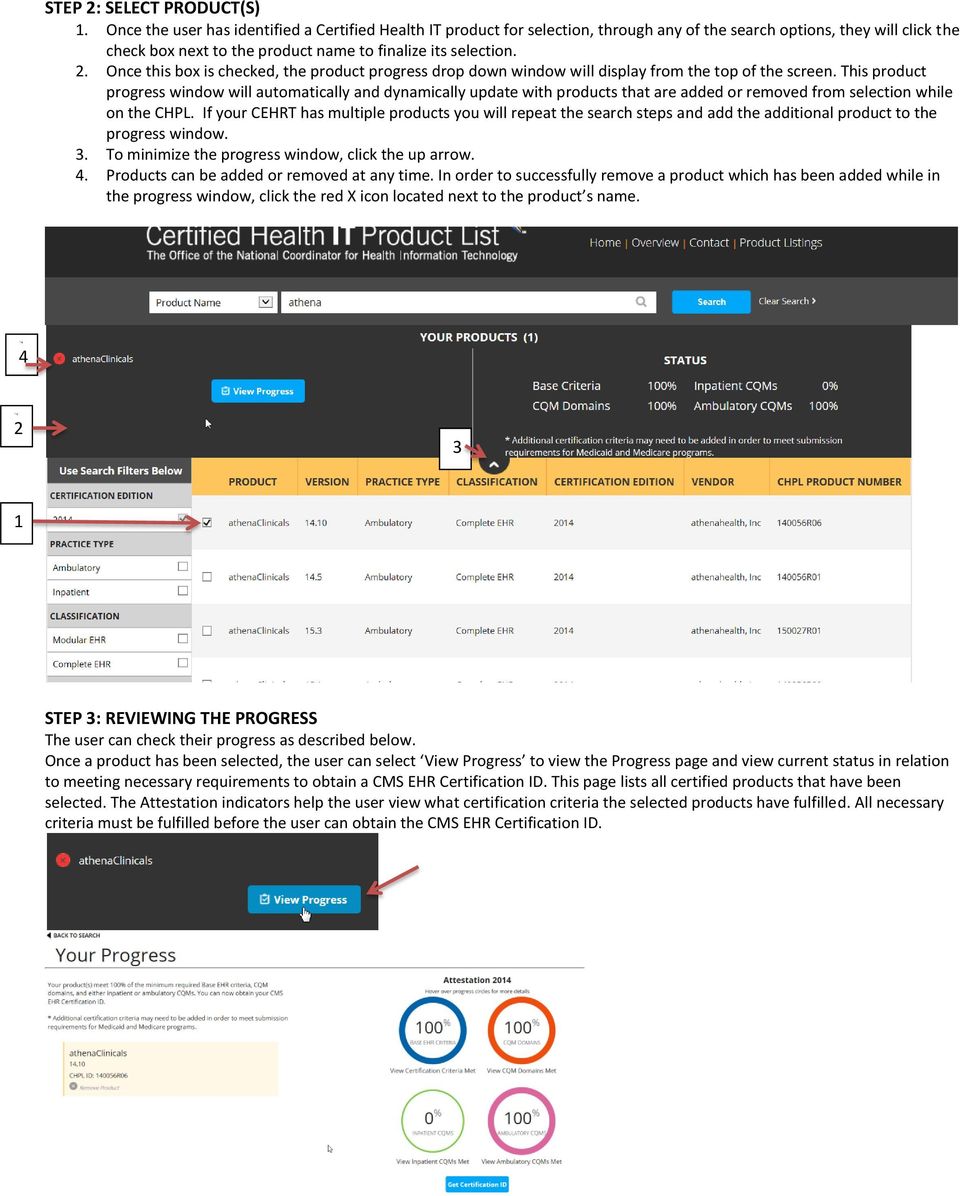
3 STEP 2: SELECT PRODUCT(S) 1. Once the user has identified a Certified Health IT product for selection, through any of the search options, they will click the check box next to the product name to finalize its selection. 2. Once this box is checked, the product progress drop down window will display from the top of the screen. This product progress window will automatically and dynamically update with products that are added or removed from selection while on the CHPL. If your CEHRT has multiple products you will repeat the search steps and add the additional product to the progress window. 3. To minimize the progress window, click the up arrow. 4. Products can be added or removed at any time. In order to successfully remove a product which has been added while in the progress window, click the red X icon located next to the product s name STEP 3: REVIEWING THE PROGRESS The user can check their progress as described below. Once a product has been selected, the user can select View Progress to view the Progress page and view current status in relation to meeting necessary requirements to obtain a CMS EHR Certification ID. This page lists all certified products that have been selected. The Attestation indicators help the user view what certification criteria the selected products have fulfilled. All necessary criteria must be fulfilled before the user can obtain the CMS EHR Certification ID.

4 Hover over the progress circles to see details for each section STEP 4: OBTAIN CMS EHR CERTIFICATION ID Once the user has fulfilled the criteria necessary for attestation, the CHPL website will activate the Get Certification ID button and the CHPL will generate and display a CMS EHR Certification ID which is representative of the combination of products selected (some CEHRT will have only one product). Clicking this button is the only way to receive the CMS EHR Certification ID. If the button can t be clicked, the user should check the Progress Page to check that all requirements have been met.
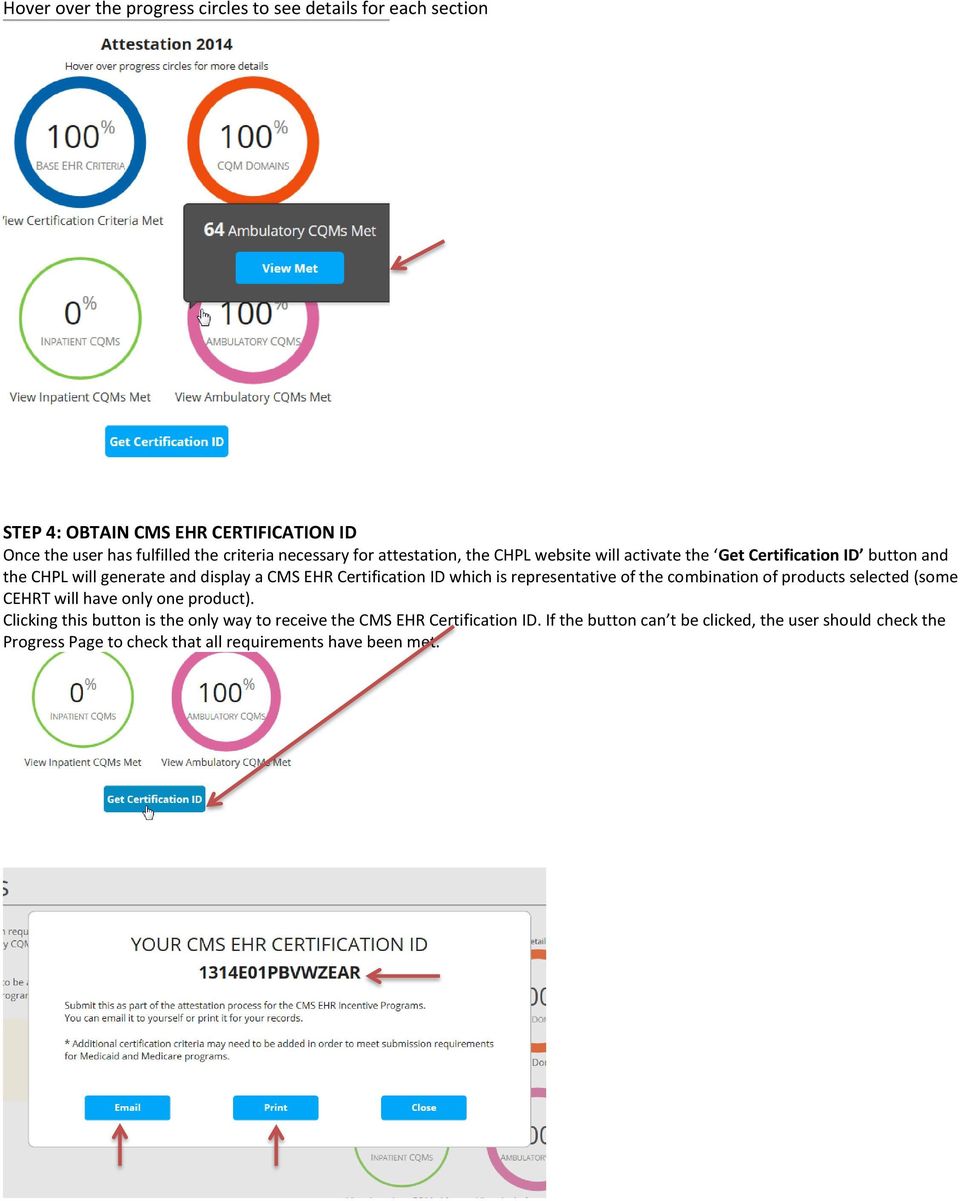
5 Once the ID is generated a user can or print the number for their records and safe keeping. The number is not saved on the CHPL, so if a user needs to re-create the number for any reason all of the previously selected products must be selected again to generate the CMS EHR Certification ID again. What is the difference between a CHPL Product Number and a CMS EHR Certification ID? A CMS EHR Certification Identification Number is a number generated by the CHPL site used for reporting to CMS for Meaningful Use attestation. It represents a product or combination of products in the CHPL. A CHPL Product Number identifies a single certified health IT product listed on the CHPL site. A unique CHPL Product Number is assigned to each certified product by the certifying ONC-ACB. The CHPL Product Number is distinct from (i.e. NOT) the CMS EHR Certification Identification Number used for reporting to CMS. Below is where you can find the CHPL product number once you have selected a product on the CHPL site.

Preview of the Attestation System for the Medicare Electronic Health Record (EHR) Incentive Program
 Preview of the Attestation System for the Medicare Electronic Health Record (EHR) Incentive Program The Medicare EHR Incentive Program provides incentive payments to eligible professionals, eligible hospitals
Wisconsin Medicaid Electronic Health Record Incentive Program for Eligible Hospitals
 P-00358D Wisconsin Medicaid Electronic Health Record Incentive Program for Eligible Hospitals User Guide i Table of Contents 1 Introduction... 1 2 Before You Begin... 2 2.1 Register with Centers for Medicare
Medicare Attestation Guide
 Medicare Attestation Guide Once you start attesting and you hit the Save & Continue button you may log out at any time and continue your attestation later. All of the information that you will be saved
Wisconsin Medicaid Electronic Health Record Incentive Program for Eligible Professionals
 P- Wisconsin Medicaid Electronic Health Record Incentive Program for Eligible Professionals June 15,2015 User Guide i Table of Contents 1 Introduction... 1 2 Before You Begin... 2 2.1 Register
Electronic Health Record Incentive Program Update May 29, 2015. Florida Health Information Exchange Coordinating Committee
 Electronic Health Record Incentive Program Update May 29, 2015 Florida Health Information Exchange Coordinating Committee Topics Payment Data Participation Years and Payments Meaningful Use Progression
How To Get A Meaningful Use Of Your Ehr
 Making the Most of Meaningful Use: Why Choosing the Right EHR Matters Most healthcare professionals understand how electronic health records (EHRs) can drive greater patient engagement and improve the
Adopting, Implementing or Upgrading to Certified Electronic Health Record Technology & Becoming a Vendor with the State of Idaho
 Adopting, Implementing or Upgrading to Certified Electronic Health Record Technology & Becoming a Vendor with the State of Idaho Michele Turbert Program Research and Development Specialist, Division of
CMS EHR Incentive Programs:
 CMS EHR Incentive Programs: An Overview Meaningful Use Stages Vidya Sellappan Centers for Medicare & Medicaid Services Office of E-Health Standards and Services HIT Initiatives Group August 13, 2014 Table
Care360 Guide for CMS Meaningful Use Audit
 Care360 Guide for CMS Meaningful Use Audit The Centers for Medicare and Medicaid Services (CMS) has contracted with third parties to conduct Meaningful Use audits of certified Electronic Health Record
An Open Source Meaningful Use Stage 2 Clinical Quality Measure Testing and Certification Tool
 Prepared for: The Office of the National Coordinator for Health Information Technology An Open Source Meaningful Use Stage 2 Clinical Quality Measure Testing and Certification Tool V2.4 User Guide The
At the top of the page there are links and sub-links which allow you to perform tasks or view information in different display options.
 APPOINTMENTS TAB P r a c t i c e M a t e M a n u a l 38 OVERVIEW The Appointments Tab is used to set up appointments, reschedule or edit existing appointment information, check patients in and out, and
Minnesota EHR Incentive Program (MEIP) 2015 2017 Program Year Timeline for EPs, EHs and CAHs. Updated November 2015
 Minnesota EHR Incentive Program (MEIP) 2015 2017 Program Year Timeline for EPs, EHs and CAHs Updated November 2015 Glossary CAH Critical access hospitals CEHRT Certified electronic health record technology
1. Click the Site Actions dropdown arrow and select Show Page Editing Toolbar. 2. Click Edit Page to begin changing the page layout
 SharePoint Tools Create a Custom List Show Page Editing Tool Bar (If your Editing toolbar is not displaying) 1. Click the Site Actions dropdown arrow and select Show Page Editing Toolbar. 2. Click Edit
Stage 2 Meaningful Use - Core Measure 11 Generate Patient Lists Configuration Guide
 Enterprise EHR Stage 2 Meaningful Use - Core Measure 11 Generate Patient Lists Configuration Guide Last Updated: November 8, 2013 Copyright 2013 Allscripts Healthcare, LLC. www.allscripts.com MU Core 11
Using the BWSD Help Desk Website
 Accessing the Help Desk Website Using the BWSD Help Desk Website Open your web browser and go to http://helpdesk.bwschools.net:8080/ The Help Desk login screen will be displayed. 1. You should not have
Munson Medical Center Exchange Clinical Information Objective General Instructions
 Munson Medical Center Exchange Clinical Information Objective General Instructions It is Munson Medical Center s interpretation that to complete Core Measure Performing at least one test of certified EHR
SES PAS Senior Executive Service (SES) Performance Appraisal System (PAS)
 Job Aid: Create the Executive Development Plan (EDP) Creating the Developmental Plan Step 1: From within your performance plan, navigate to the Developmental Plan tool bar in the left column Step 2: Click
ACCOUNTS PAYABLE SETUP
 ACCOUNTS PAYABLE SETUP Mortgage Computer Ogden, Utah Contents - Updated September 9, 2013 General Ledger Setup... 4 Bank Accounts... 6 ScrolEx Setup... 10 General Ledger 3 General Ledger Setup This selection
Meaningful Use: Registration & Attestation Eligible Professionals
 Meaningful Use: Registration & Attestation Eligible Professionals Meaningful Use Webinar Overview Registration & Attestation: Review Registration Requirements Step by Step Instructional: EHR Incentive
Module 9 Ad Hoc Queries
 Module 9 Ad Hoc Queries Objectives Familiarize the User with basic steps necessary to create ad hoc queries using the Data Browser. Topics Ad Hoc Queries Create a Data Browser query Filter data Save a
Intellect Platform - Tables and Templates Basic Document Management System - A101
 Intellect Platform - Tables and Templates Basic Document Management System - A101 Interneer, Inc. 4/12/2010 Created by Erika Keresztyen 2 Tables and Templates - A101 - Basic Document Management System
Modifications to the Medicare and Medicaid Electronic Health Record (EHR) Incentive Program for 2014 Final Rule Summary
 CY 2014 MPFS Final Rule Summary December 3, 2013 Page 1 Modifications to the Medicare and Medicaid Electronic Health Record (EHR) Incentive Program for 2014 Final Rule Summary SEPTEMBER 2014 Page 2 TABLE
System: Menu option System Files has been renamed
 07/10/2012 MEDGEN EMR Release Notes: Version 6.0 Build 103.6.13 Attached please find recent updates that were made to your Medgen EMR system: Navigation / Display: A significant difference in Version 6
Creating an Expense Report from a Blank Report Form. These instructions are designed for those who do NOT need a Travel Authorization.
 Creating an Expense Report from a Blank Report Form These instructions are designed for those who do NOT need a Travel Authorization. Expense Reports are required for the following reasons: Document all
MEDGEN EHR Release Notes: Version 6.2 Build 106.6.20
 10/18/2013 MEDGEN EHR Release Notes: Version 6.2 Build 106.6.20 Special Note: Comtron is excited to announce that over the next few weeks all of our Medgen products will be going through a rebranding process.
How To Use Syntheticys User Management On A Pc Or Mac Or Macbook Powerbook (For Mac) On A Computer Or Mac (For Pc Or Pc) On Your Computer Or Ipa (For Ipa) On An Pc Or Ipad
 SYNTHESYS MANAGEMENT User Management Synthesys.Net User Management 1 SYNTHESYS.NET USER MANAGEMENT INTRODUCTION...3 STARTING SYNTHESYS USER MANAGEMENT...4 Viewing User Details... 5 Locating individual
The Meaning Behind Meaningful Use Stage 2
 Meaningful Use White Paper The Meaning Behind Meaningful Use Stage 2 What You Need to Know pulseinc.com Meaningful Use Stage 2 Stage 2 of the Meaningful Use (MU) program officially began January 1, 2014.
Clean Up Email Rules Quick Steps Search Tools Change Views Export Data Convert email to tasks Contact Groups. Outlook Functions
 Clean Up Email Rules Quick Steps Search Tools Change Views Export Data Convert email to tasks Contact Groups Outlook Functions Clean Up: New ways to manage conversations and remove redundant emails: Email
2. Upon login, landing page should be Home if not, click Home in Navigation Pane (top right).
 Overview This document outlines general instructions for using Ohio University s (OBI) system for Institutional Research data. OBI is a web-based reporting system used to support the campus community s
Medicare & Medicaid EHR Incentive Programs- Past, Present, & Future. Travis Broome, Centers for Medicare & Medicaid Services 12/18/2012
 Medicare & Medicaid EHR Incentive Programs- Past, Present, & Future Travis Broome, Centers for Medicare & Medicaid Services 12/18/2012 Medicare-only Eligible Professionals Medicaid-only Eligible Professionals
OHIO DEPARTMENT OF EDUCATION Connected Ohio Records for Educators (CORE) My Educator Profile User Manual
 OHIO DEPARTMENT OF EDUCATION Connected Ohio Records for Educators (CORE) My Educator Profile User Manual CON N E C T E D O H I O R E C O R D S F O R E D U C A T O R S My Educator Profile User Manual September
CITY OF NAPLES VENDOR REGISTRATION TUTORIAL VENDOR SELF SERVICE (VSS) VENDOR REGISTATION TUTORIAL
 CITY OF NAPLES VENDOR REGISTRATION TUTORIAL VENDOR SELF SERVICE (VSS) 3/5/2015 VENDOR REGISTATION TUTORIAL Start Vendor Registration Process: Please start by going to the City of Naples website located
TRIM: Web Tool. Web Address The TRIM web tool can be accessed at:
 TRIM: Web Tool Accessing TRIM Records through the Web The TRIM web tool is primarily aimed at providing access to records in the TRIM system. While it is possible to place records into TRIM or amend records
Completing Your MPIP Attestation: Supporting Documentation
 Overview This tip sheet provides examples of the types of supporting documentation that may be requested during a pre-payment review in order to verify an eligible professional's (EP) or eligible hospital's
Customer Transaction FBL5N
 Customer Transaction FBL5N Use this job aid to: Display customer transaction details and determine if a customer was paid BEFORE YOU BEGIN You should make sure that you have access to transaction FBL5N
Scheduling Document Creation
 Scheduling Document Creation What is a Schedule in epm? Schedules The epm Schedule application is an integral part of the Portfolio Management suite of applications. Start and end dates for each summary
Montgomery County Public Schools. MCPS Careers Applicant Tracking System (ATS) Hiring Manager User Guide
 Montgomery County Public Schools MCPS Careers Applicant Tracking System (ATS) Hiring Manager User Guide Version 4.0 Revised February 2012 TABLE OF CONTENTS Logging In... 3 Navigating the Site... 4 Center
The Impact of Proposed Meaningful Use Modifications for 2015-2017 June 23, 2015
 The Impact of Proposed Meaningful Use Modifications for 2015-2017 June 23, 2015 Today s presenters: Al Wroblewski, Client Services Relationship Manager Elisabeth Renczkowski, Content Specialist Disclaimer
Chronicle USER MANUAL
 Chronicle USER MANUAL 1st Edition 2 IN THIS MANUAL Part One The Chronicle Interface The Overview Screen The Bill Detail Screen Part Two Creating, Editing and Viewing Bills Creating Your First Bill Editing
LEARNING RESOURCE CENTRE GUIDE TO OFFICE 365
 LEARNING RESOURCE CENTRE GUIDE TO OFFICE 365 LEARNING RESOURCE CENTRE OCTOBER 2014/2015 Table of Contents Explanation of One Drive and Microsoft Office Online... 3 How to create a document and folder...
Totally Internet Based Software. Getting Started. Strategy Systems, Inc. PO Box 2136 Rogers, AR 72757 (479) 271-7400
 Totally Internet Based Software Getting Started Strategy Systems, Inc. PO Box 2136 Rogers, AR 72757 (479) 271-7400 System Requirements... 1 User Login... 1 Basic Navigation... 2 Hover Menus... 2 Dropdown
TEST INSTRUCTIONS FOR CROSS VENDOR EXCHANGE TABLE OF CONTENTS
 TEST INSTRUCTIONS FOR CROSS VENDOR EXCHANGE TABLE OF CONTENTS Introduction...2 Meaningful Use Objectives and Measures... 3 Eligible Professionals 495.6(j)(14)... 3 Eligible Hospitals and Critical Access
Blackboard Version 9.1 - Grade Center Contents
 Blackboard Version 9.1 - Grade Center Contents Edit mode... 2 Grade Center...... 2 Accessing the Grade Center... 2 Exploring the Grade Center... 2 Icon Legend... 3 Setting Up / Customizing the Grade Center...
NextGen EHR: Clinic Password and User Preferences Setup in PROD
 NextGen EHR: Clinic Password and User Preferences Setup in PROD FALL 2014 1 Click the NextGen icon on your desktop. The NextGen Application Window opens. FALL 2014 2 Click the icon for EHR. The EHR login
Maryland Electronic Health Records (EHR) Incentive Program Registration and Attestation System. Provider User Guide. Version 2
 Maryland Electronic Health Records (EHR) Incentive Program Registration and Attestation System Provider User Guide Version 2 December 2012 Table of Contents Table of Figures... 3 Introduction... 4 Getting
NEW USER REGISTRATION AND EMAIL VERIFICATION
 NEW USER REGISTRATION AND EMAIL VERIFICATION The Children s Treatment (CT) or Residential Treatment (RT) organization must have an assigned Departmental Vendor Number (DVN), a PIN number issued to the
Maryland Electronic Health Records (EHR) Incentive Program Registration and Attestation System. Provider User Guide. Version 3
 Maryland Electronic Health Records (EHR) Incentive Program Registration and Attestation System Provider User Guide Version 3 January 2014 Table of Contents Table of Figures... 3 Introduction... 4 Getting
Accessing The Doctors Clinic Physician Connect
 Accessing The Doctors Clinic Physician Connect The Doctors Clinic s commitment to excellence in patient care presents healthcare providers in our community access to electronic health records. Here s how:
Business Internet Banking ACH USER INTERFACE UPGRADE - CHEAT SHEET. Create Screen
 Create Screen New Navigational Menu Structure t New Function Menus Additional Search Capability Tabs will be replaced with sub-menu hyperlinks for easy navigation to any function a user is validated to
How to check your. exemptions
 How to check your exemptions Please follow our short step-by-step guide to find out how to check what exemptions you may be eligible to claim. Step Searching for the institution where you studied Enter
The PTA s new membership website database and dues reporting system
 M3 The PTA s new membership website database and dues reporting system State Level Actions from Task Menu M3 CAPABILITIES The State must authorize a user to have access to M3. The State s authorized users
Summary of Public Health Related Aspects of Recent ONC and CMS Final Rules Version 1.0
 Summary of Public Health Related Aspects of Recent ONC and CMS Final Rules Compiled by: Sanjeev Tandon and Mark Jensen at CDC/OPHSS/CSELS/OD from the CMS & ONC Stage 2 Electronic Health Records (EHR) Meaningful
Express222 Quick Reference
 Logging in to Express E222 1. In Internet Explorer, visit vwdco.com 2. Click CSOS in the upper right corner Your username is your DEA Number 3. Once logged in, click on Create, Send and Manage e222 Forms
Medicaid Electronic Health Records (EHR) Incentive Program FAQ
 Program Basics 1. What is the Texas Medicaid EHR Incentive Program? As part of the American Recovery and Reinvestment Act of 2009, federal incentive payments will be available to doctors and hospitals
Netmail Search for Outlook 2010
 Netmail Search for Outlook 2010 Quick Reference Guide Netmail Search is an easy-to-use web-based electronic discovery tool that allows you to easily search, sort, retrieve, view, and manage your archived
Adding a File Attachment to a CFS Requisition
 Adding a File Attachment to a CFS Requisition When creating a requisition, there are certain purchases that may require additional documentation. The Attachment feature is used to attach this documentation.
Project Server Plus Risk to Issue Escalator User Guide v1.1
 Project Server Plus Risk to Issue Escalator User Guide v1.1 Overview The Project Server Plus Risk to Issue Escalator app will immediately raise a risk to an issue at the push of a button. Available within
Ofgem Carbon Savings Community Obligation (CSCO) Eligibility System
 Ofgem Carbon Savings Community Obligation (CSCO) Eligibility System User Guide 2015 Page 1 Table of Contents Carbon Savings Community Obligation... 3 Carbon Savings Community Obligation (CSCO) System...
Create a requisition for a job
 Create a requisition for a job This quick guide describes the key steps in creating a requisition for a new job posting and creating teams. Other resources for hiring administrators are available at http://www.uvic.ca/hr/services/home/hiring/index.php