
IoT Management and Control DataModel Service. For UPnP Version 1.0. Status: Standardized DCP (SDCP) Date: October 30, Document Version: 1.
|
|
|
- Nickolas Berry
- 9 years ago
- Views:
Transcription
1 IoT Management and Control DataModel Service For UPnP Version 1.0 Status: Standardized DCP (SDCP) Date: October 30, 2015 Document Version: 1.0 Service Template Version: 2.00 This Standardized DCP has been adopted as a Standardized DCP by the Steering Committee of the UPnP Forum, pursuant to Section 2.1(c)(ii) of the UPnP Forum Membership Agreement. UPnP Forum Members have rights and licenses defined by Section 3 of the UPnP Forum Membership Agreement to use and reproduce the Standardized DCP in UPnP Compliant Devices. All such use is subject to all of the provisions of the UPnP Forum Membership Agreement. THE UPNP FORUM TAKES NO POSITION AS TO WHETHER ANY INTELLECTUAL PROPERTY RIGHTS EXIST IN THE STANDARDIZED DCPS. THE STANDARDIZED DCPS ARE PROVIDED "AS IS" AND "WITH ALL FAULTS". THE UPNP FORUM MAKES NO WARRANTIES, EXPRESS, IMPLIED, STATUTORY, OR OTHERWISE WITH RESPECT TO THE STANDARDIZED DCPS, INCLUDING BUT NOT LIMITED TO ALL IMPLIED WARRANTIES OF MERCHANTABILITY, NON-INFRINGEMENT AND FITNESS FOR A PARTICULAR PURPOSE, OF REASONABLE CARE OR WORKMANLIKE EFFORT, OR RESULTS OR OF LACK OF NEGLIGENCE UPnP Forum. All Rights Reserved. Clarke Stevens Jangwook Park (Vice-Chair) Paul Jeon (Vice-Chair) Russell Berkoff (Chair) Danilo Santos Gerhard Mekenkamp Wouter van der Beek a Authors a Cablelabs LGE LGE Samsung Electronics Signove TPVision Cisco Systems Inc Company The UPnP forum in no way guarantees the accuracy or completeness of this author list and in no way implies any rights for or support from those members listed. This list is not the specifications contributor list that is kept on the UPnP Forum s website.

2 CONTENTS 1 Scope Normative References Terms, Definitions and Abbreviations Notations and conventions... 5 Notation... 5 Data Types... 6 Vendor-defined Extensions Extended Backus-Naur Form IoT Management and Control Configuration Management Service Profile... 7 Service Type... 7 IoT Management and Control Device Architecture Sensor Description Sensor Data Interface Sensor Data Records SensorURNs Sensor Required DataItems Sensor Normative Type Identifiers Event Model... 9 State Variables Actions Introduction GetSupportedDataModels() GetSelectedValues() SetValues() CreateInstance() DeleteInstance() SetAttributes() Annex A IoT Management and Control General Data Model (normative) Annex B Required IoT Management and Control DataItem(s) (normative) Annex C Common Device Identifiers (normative) Annex D IEEE Personal Health Devices Figure A.1 Script status state machine Figure A.2 Sample Collection Figure A.3 Sample of a GroupSet Figure A.4 Sample of receiving the Brightness setting Figure D.1 Blood Pressure Monitor Medical Device System (Informative) Figure D.2 Medical Device System with PM-store Object (informative) Table 4-1 EBNF Operators... 6 Table 5-1 Sensor URN [identifier-type] values... 8

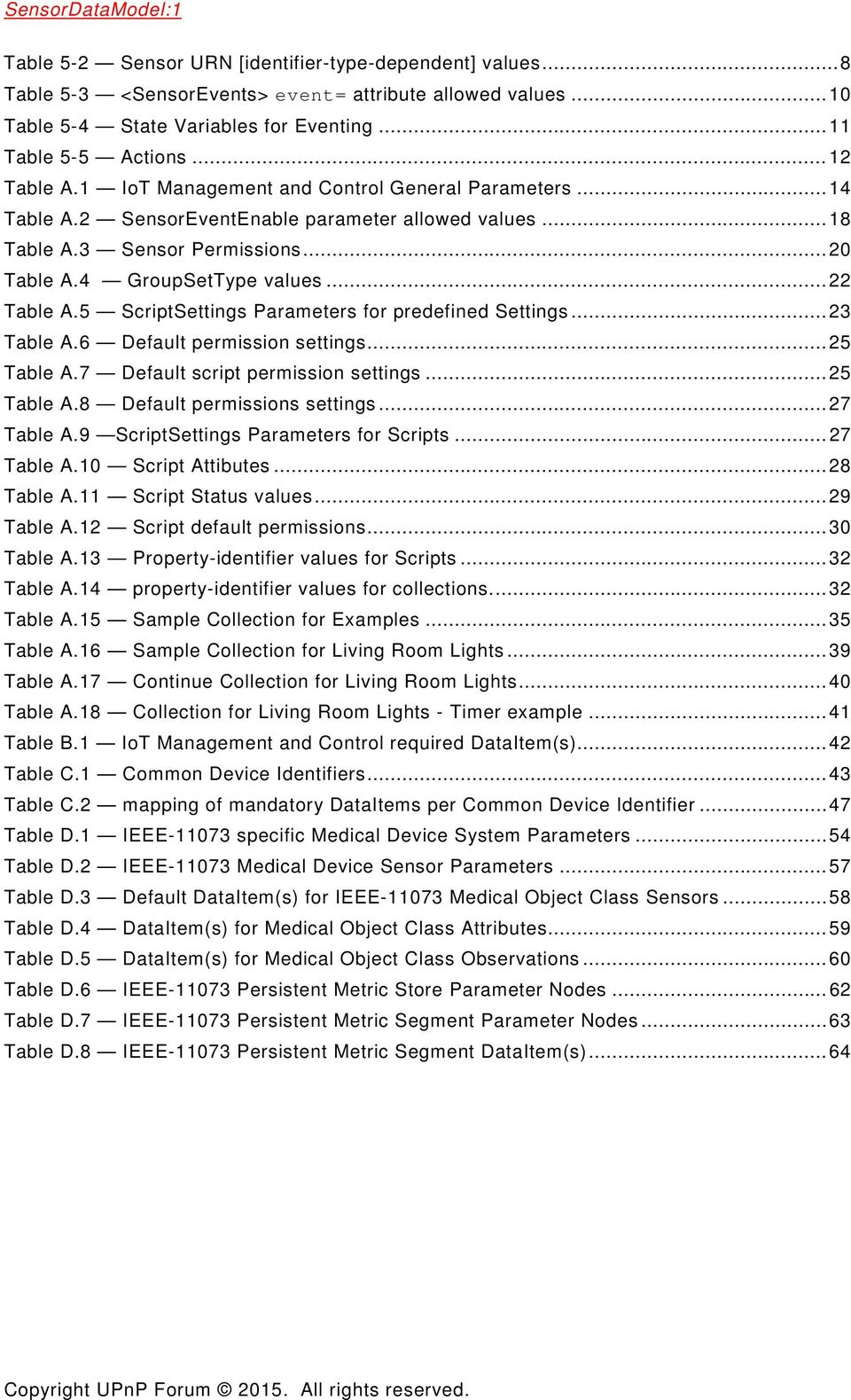
3 Table 5-2 Sensor URN [identifier-type-dependent] values... 8 Table 5-3 <SensorEvents> event= attribute allowed values Table 5-4 State Variables for Eventing Table 5-5 Actions Table A.1 IoT Management and Control General Parameters Table A.2 SensorEventEnable parameter allowed values Table A.3 Sensor Permissions Table A.4 GroupSetType values Table A.5 ScriptSettings Parameters for predefined Settings Table A.6 Default permission settings Table A.7 Default script permission settings Table A.8 Default permissions settings Table A.9 ScriptSettings Parameters for Scripts Table A.10 Script Attibutes Table A.11 Script Status values Table A.12 Script default permissions Table A.13 Property-identifier values for Scripts Table A.14 property-identifier values for collections Table A.15 Sample Collection for Examples Table A.16 Sample Collection for Living Room Lights Table A.17 Continue Collection for Living Room Lights Table A.18 Collection for Living Room Lights - Timer example Table B.1 IoT Management and Control required DataItem(s) Table C.1 Common Device Identifiers Table C.2 mapping of mandatory DataItems per Common Device Identifier Table D.1 IEEE specific Medical Device System Parameters Table D.2 IEEE Medical Device Sensor Parameters Table D.3 Default DataItem(s) for IEEE Medical Object Class Sensors Table D.4 DataItem(s) for Medical Object Class Attributes Table D.5 DataItem(s) for Medical Object Class Observations Table D.6 IEEE Persistent Metric Store Parameter Nodes Table D.7 IEEE Persistent Metric Segment Parameter Nodes Table D.8 IEEE Persistent Metric Segment DataItem(s)... 64
4 1 Scope This part of Publicly Available Specification ISO/IEC specifies Sensor Data Models. It is intended to be an adjunct document to the IoT Management and Control Device [11] and DataStore Service [13] specifications. 2 Normative References The following referenced documents are indispensable for the application of this document. For dated references, only the edition cited applies. For undated references, the latest edition of the referenced document (including any amendments) applies. [1] UPnP Device Architecture, version 1.0, UPnP Forum, June 13, Available at: Latest version available at: [2] ISO 8601 Data elements and interchange formats Information interchange -- Representation of dates and times, International Standards Organization, December 21, Available at: ISO 8601:2000. [3] IETF RFC 2119, Key words for use in RFCs to Indicate Requirement Levels, S. Bradner, Available at: [4] HyperText Transport Protocol HTTP/1.1, R. Fielding, J. Gettys, J. Mogul, H. Frystyk, L. Masinter, P. Leach, T. Berners-Lee, June Available at: [5] IETF RFC 3339, Date and Time on the Internet: Timestamps, G. Klyne, Clearswift Corporation, C. Newman, Sun Microsystems, July Available at: [6] Extensible Markup Language (XML) 1.0 (Third Edition), François Yergeau, Tim Bray, Jean Paoli, C. M. Sperberg-McQueen, Eve Maler, eds., W3C Recommendation, February 4, Available at: [7] XML Schema Part 2: Data Types, Second Edition, Paul V. Biron, Ashok Malhotra, W3C Recommendation, 28 October Available at: [8] ISO/IEEE Health informatics - Personal health device communication - Part 20601: Application Profile - Optimized exchange protocol, Available at: blished=true [9] ISO/IEEE zz Health informatics -- Personal health device communication -- Part 104zz: Device specialization -- <see specific specialization>. Available at: blished=true [10] UPnP IoT Management and Control Architecture Overview, UPnP Forum, July 1, Available at: Architecture-Overview-v pdf. Latest version available at: Overview-v1.pdf. [11] UPnP IoT Management and Control Device, UPnP Forum July 1, Available at: pdf. Latest version available at: IoTManagementAndControl-v1-Device.pdf.
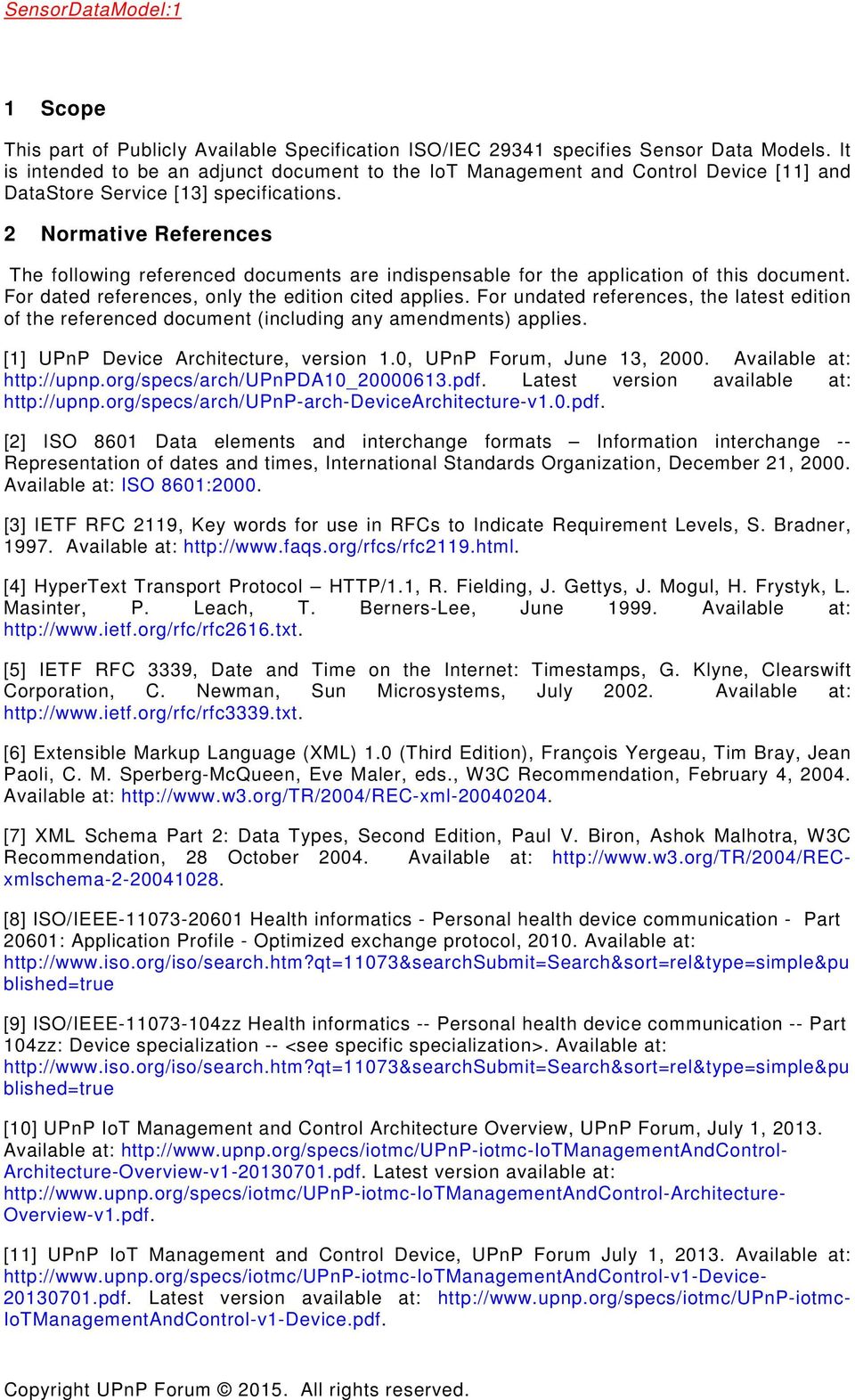
5 [12] UPnP IoT Management and Control Transport Generic:1 Service, UPnP Forum July 1, Available at: TransportGeneric-v1-Service pdf. Latest version available at: [13] UPnP DataStore:1 Service, UPnP Forum, July 1, Available at: Latest version available at: [14] UPnP IoT Management and Control Sensor DataModel Service, UPnP Forum, July 1, Available at: DataModel-v1-Service pdf. Latest version available at: Service.pdf. [15] UPnP DeviceProtection:1 Service, UPnP Forum, February 24, Available at: pdf. Latest version available at: Service.pdf. [16] UPnP ConfigurationManagement:2 Service, UPnP Forum, December 31, Available at: pdf. Latest version available at: ConfigurationManagement-v2-Service.pdf. [17] XML Schema UPnP IoT Management and Control Sensor DataModel Events, UPnP Forum, July 1, Available at: Latest version available at: [18] XML Schema UPnP IoT Management and Control Sensor DataModel DataItem Description, UPnP Forum, July 1, Available at: Latest version available at: [19] XML Schema UPnP IoT Management and Control DataRecord Information, UPnP Forum, July 1, Available at: Latest version available at: [20] ISO/IEC 14977, Information technology - Syntactic metalanguage - Extended BNF, December Terms, Definitions and Abbreviations For the purposes of this document, the terms and definitions given in UPnP Device Architecture, version 1.0 [1] apply. 4 Notations and conventions Notation Strings that are to be taken literally are enclosed in double quotes. Words that are emphasized are printed in italic. Keywords that are defined by the UPnP Working Committee are printed using the forum character style. Keywords that are defined by the UPnP Device Architecture are printed using the arch character style.
![pdf. [13] UPnP DataStore:1 Service, UPnP Forum, July 1, 2013. Available at: http://www.upnp.org/specs/smgt/upnp-ds-datastore-v1-service-20130701.pdf. Latest version available at: http://www.upnp.org/specs/ds/upnp-smgt-datastore-v1-service.](/docs-images/41/16115452/images/page_5.jpg "pdf. [14] UPnP IoT Management and Control Sensor DataModel Service, UPnP Forum, July 1, 2013. Available at: http://www.upnp.")
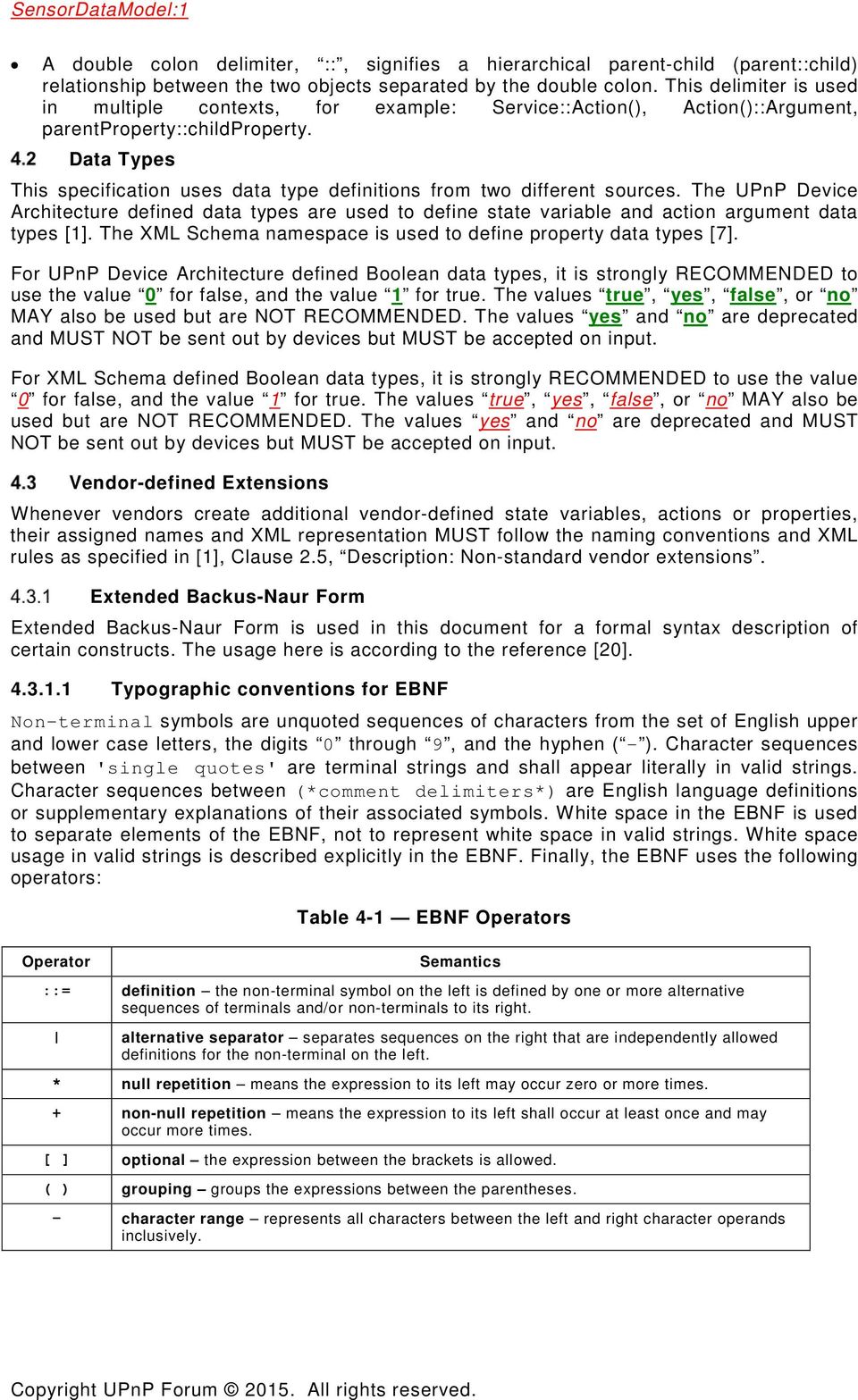
6 A double colon delimiter, ::, signifies a hierarchical parent-child (parent::child) relationship between the two objects separated by the double colon. This delimiter is used in multiple contexts, for example: Service::Action(), Action()::Argument, parentproperty::childproperty. Data Types This specification uses data type definitions from two different sources. The UPnP Device Architecture defined data types are used to define state variable and action argument data types [1]. The XML Schema namespace is used to define property data types [7]. For UPnP Device Architecture defined Boolean data types, it is strongly RECOMMENDED to use the value 0 for false, and the value 1 for true. The values true, yes, false, or no MAY also be used but are NOT RECOMMENDED. The values yes and no are deprecated and MUST NOT be sent out by devices but MUST be accepted on input. For XML Schema defined Boolean data types, it is strongly RECOMMENDED to use the value 0 for false, and the value 1 for true. The values true, yes, false, or no MAY also be used but are NOT RECOMMENDED. The values yes and no are deprecated and MUST NOT be sent out by devices but MUST be accepted on input. Vendor-defined Extensions Whenever vendors create additional vendor-defined state variables, actions or properties, their assigned names and XML representation MUST follow the naming conventions and XML rules as specified in [1], Clause 2.5, Description: Non-standard vendor extensions. Extended Backus-Naur Form Extended Backus-Naur Form is used in this document for a formal syntax description of certain constructs. The usage here is according to the reference [20] Typographic conventions for EBNF Non-terminal symbols are unquoted sequences of characters from the set of English upper and lower case letters, the digits 0 through 9, and the hyphen ( - ). Character sequences between 'single quotes' are terminal strings and shall appear literally in valid strings. Character sequences between (*comment delimiters*) are English language definitions or supplementary explanations of their associated symbols. White space in the EBNF is used to separate elements of the EBNF, not to represent white space in valid strings. White space usage in valid strings is described explicitly in the EBNF. Finally, the EBNF uses the following operators: Operator Table 4-1 EBNF Operators Semantics ::= definition the non-terminal symbol on the left is defined by one or more alternative sequences of terminals and/or non-terminals to its right. alternative separator separates sequences on the right that are independently allowed definitions for the non-terminal on the left. * null repetition means the expression to its left may occur zero or more times. + non-null repetition means the expression to its left shall occur at least once and may occur more times. [ ] optional the expression between the brackets is allowed. ( ) grouping groups the expressions between the parentheses. - character range represents all characters between the left and right character operands inclusively.
7 5 IoT Management and Control Configuration Management Service Profile Service Type This specification reuses the ConfigurationManagement service exactly as specified in ConfigurationManagement service [16]: urn:schemas-upnp-org:service:configurationmanagement:2 IoT Management and Control DataModel service defined in this specification refers to the same service type. IoT Management and Control Device Architecture The UPnP IoT Management and Control device [11] provides UPnP client access to Sensors and Actuators. These devices may be connected directly to the UPnP network or can be connected to non-upnp based networks which are bridged by this device into the UPnP network. The IoT Management and Control device includes a UPnP ConfigurationManagement service [16] which describes Sensors to UPnP based clients. Sensor Description The UPnP IoT Management and Control DataModel service provides a set of uniform Sensor Properties as defined by Annex A, "IoT Management and Control General Data Model". These properties assist UPnP clients to identify sensors they may be capable of supporting. In addition to uniform Sensor properties described by the General Sensor Data Model, this specification also can reference additional sensor properties which are defined by the Sensor s parent ecosystem. Sensor Data Interface The UPnP IoT Management and Control device [11] also includes a UPnP IoT Management and Control TransportGeneric service [12]. This service treats Sensors and Actuators as abstract data sources and sinks. While the IoT Management and Control device performs much of the interfacing tasks for Sensors, the actual data formats delivered by the Sensors are largely determined by the parent ecosystems for each target Sensor or Actuator. UPnP describes Sensor and Actuator data inputs/outputs as named DataItems(s). Sensor DataItem(s) are described by providing a name, format, encoding (see UPnP IoT Management and Control Architecture Overview [10], subclause 4.3, "DataItem Semantics" for additional information). Sensor Data Records A UPnP client may transfer data to/from a Sensor(s) supported by the IoT Management and Control device using actions in the included UPnP IoT Management and Control TransportGeneric service [12]. When requesting data, the UPnP client specifies an XML document conforming to the XML Schema UPnP DataRecord Information [19]. This document identifies a series of one or more DataItem(s) supported by the target Sensor. The UPnP client may either read or write the Sensor directly via SOAP actions or may establish a transport connection allowing the Sensor to deliver DataRecord(s) directly to a transport client. SensorURNs A SensorURN identifies a set of DataItem(s) a Sensor supports. See subclause 5.2.6, "Sensor Normative Type Identifiers" for requirements on construction of SensorURN values. Sensor Required DataItems Implementation of certain DataItem(s) is required by the IoT Management and Control specification. These DataItem(s) shall be available for all Sensor URNs whether or not explicitly defined by the corresponding SensorURN definition. The required DataItem(s) are listed in Annex B "Required Sensor DataItems".
![IoT Management and Control Device Architecture The UPnP IoT Management and Control device [11] provides UPnP client access to Sensors and Actuators.](/docs-images/41/16115452/images/page_7.jpg "These devices may be connected directly to the UPnP network or can be connected to non-upnp based networks which are bridged by this device into the UPnP network.")
8 Sensor Normative Type Identifiers UPnP IoT Management and Control defines a uniform template for generating normative identifiers. These identifiers include SensorCollectionType, SensorType and SensorURNs, The following template is used: SensorIdentifier ::= "urn:" upnp-org ":" [identifier-type] ":" [generic-device-type] ":" [sensorvendor-identifier] ":" [sensor-vendor-spec] ":" [vendor-identifier] : [vendor-model-identifier] ":" [identifier-type-dependent] SensorIdentifier(s) using the [upnp-org] domain shall use the following [identifier-type] values: Table 5-1 Sensor URN [identifier-type] values Sensor Identifier Sensor Collection Type Sensor Type Sensor URN smgt-sct smgt-st smgt-surn [identifier-type] value The [generic-device-identifiers] field is descriptive. UPnP IoT Management and Control defines device-identifiers for various common devices (see Annex C, "Common Device Identifiers"). If one of these values is suitable, then the UPnP defined value should be used. However, if a sensor application is unique, vendor-specific extensions are permitted. The [sensor-vendor-identifier] shall contain the ICANN domain-name of the organization or vendor which defines the sensor specification. This name shall identify the vendor which defines the sensors for the device rather than the final integrator of the device. The [sensor-vendor-spec] shall identify the specification the sensor conforms to. The [vendor-identifier] shall contain the ICAN domain-name of the device vendor. This domain-name shall identify the vendor which the customer would normally identify as the manufacturer of the device. The [vendor-model-identifier] shall provide vendor specific identifying information for the device. The [identifier-type-dependent] field is defined based on the type of SensorIdentifier as follows: Table 5-2 Sensor URN [identifier-type-dependent] values [identifier-typedependent] [identifier-types] Description monitor smgt-st, smgt-surn DataItem(s) or Sensor(s) intended to periodically monitor or record device performance over a period of time. status smgt-st, smgt-surn DataItem(s) or Sensor(s) intended to provide current device status or settings. datafeed smgt-st, smgt-surn DataItem(s) or Sensor(s) which to provide a continuous source of sensor data. telemetry smgt-st, smgt-surn DataItem(s) or Sensor(s) intended to report data obtained by a Sensor. setting smgt-st, smgt-surn DataItem(s) or Sensor(s) intended to modify end-user settable characteristics of a device. control smgt-st, smgt-surn DataItem(s) or Sensor(s) intended to control aspects of a device not typically set by end-users alarms smgt-st, smgt-surn DataItem(s) or Sensor(s) intended to convey abnormal conditions for a device.
![[sensorvendor-identifier] ":" [sensor-vendor-spec] ":" [vendor-identifier] : [vendor-model-identifier] ":" [identifier-type-dependent] SensorIdentifier(s) using the [upnp-org] domain shall use the](/docs-images/41/16115452/images/page_8.jpg "following [identifier-type] values: Table 5-1 Sensor URN [identifier-type] values Sensor Identifier Sensor Collection Type Sensor Type Sensor URN smgt-sct smgt-st smgt-surn [identifier-type] value")
9 Event Model The IoT Management and Control event model generates two categories of events. Sensor Configuration events Configuration events indicate addition or removal of SensorCollection(s) or Sensor(s) within a collection. Reporting of Sensor and SensorCollection configuration events are always enabled. Sensor Specific events Specific events indicate state changes to Sensor(s) such as data availability or transport connection errors. Reporting of Sensor events may be enabled on a per-sensor basis via the SensorEventsEnable parameter. Sensor events are reported via the SensorEvents parameter which provides an XML document conforming to XML Schema UPnP IoT Management and Control DataModel Events [17]. This parameter shall support the EventOnChange attribute value which shall be enabled by default and the AlarmOnChange attribute value which shall also be enabled by default. Changes to the SensorEvents parameter shall be sent to subscribed control points via the ConfigurationManagement service ConfigurationUpdate state variable. The IOT Management and Control ConfigurationManagement service shall implement and set the AlarmsEnabled state variable to ("1") by default. To maintain privacy and security sensor collection(s) and sensor(s) are only identified by their CollectionID and SensorID values. In order to obtain additional information a UPnP control point would need sufficient privileges to read to the corresponding Data Model nodes which describe the sensor collection or sensor. The SensorEvents parameter value shall be set to an XML document conforming to the UPnP IoT Management and Control DataModel Events schema [17] and as described below: <?xml version="1.0" encoding="utf-8"?> <SensorEvents xmlns="urn:schemas-upnp-org:smgt:sdmevent" xsi:schemalocation="urn:schemas-upnp-org:smgt:sdmevent <sensorevent collectionid="sensorcollectionid" sensorid= sensorid event="sensor event or sensor collection event name "/>... </SensorEvents> <?xml> Required. Case Sensitive <SensorEvents> Required. Shall include the namespace declaration for the SensorEvents XML Schema ( urn:schemas-upnporg:smgt:sdmevent ). Shall include the zero or more of the following element and attributes: <sensorevent> Required. Shall occur zero or more times. Indicates that a sensor or sensor collection event has occurred. collectionid Required. Indicates the CollectionID for the reported event. sensorid Required. Indicates the SensorID for the reported event. If there is no corresponding SensorID for a reported event this attribute shall be set to ".
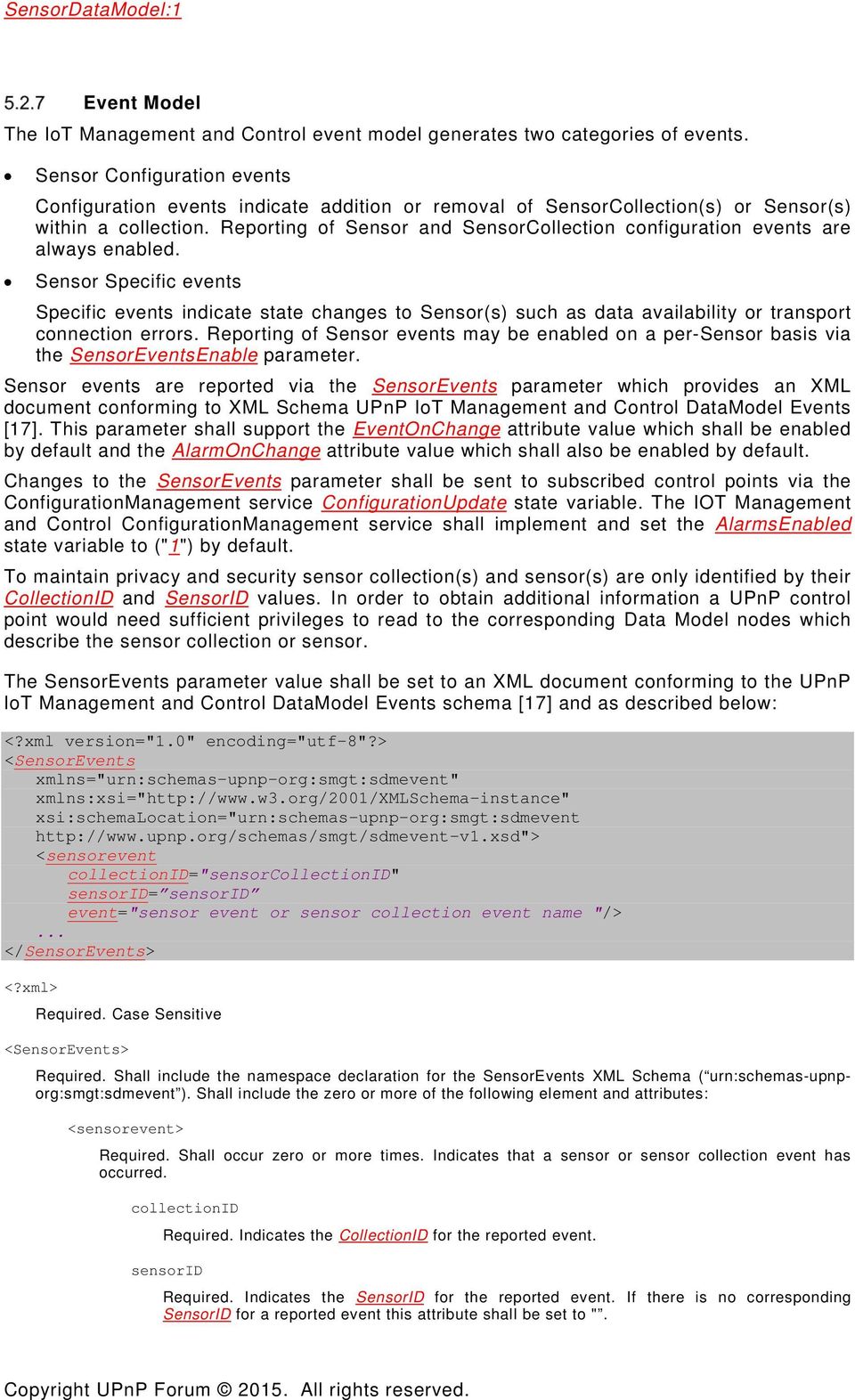
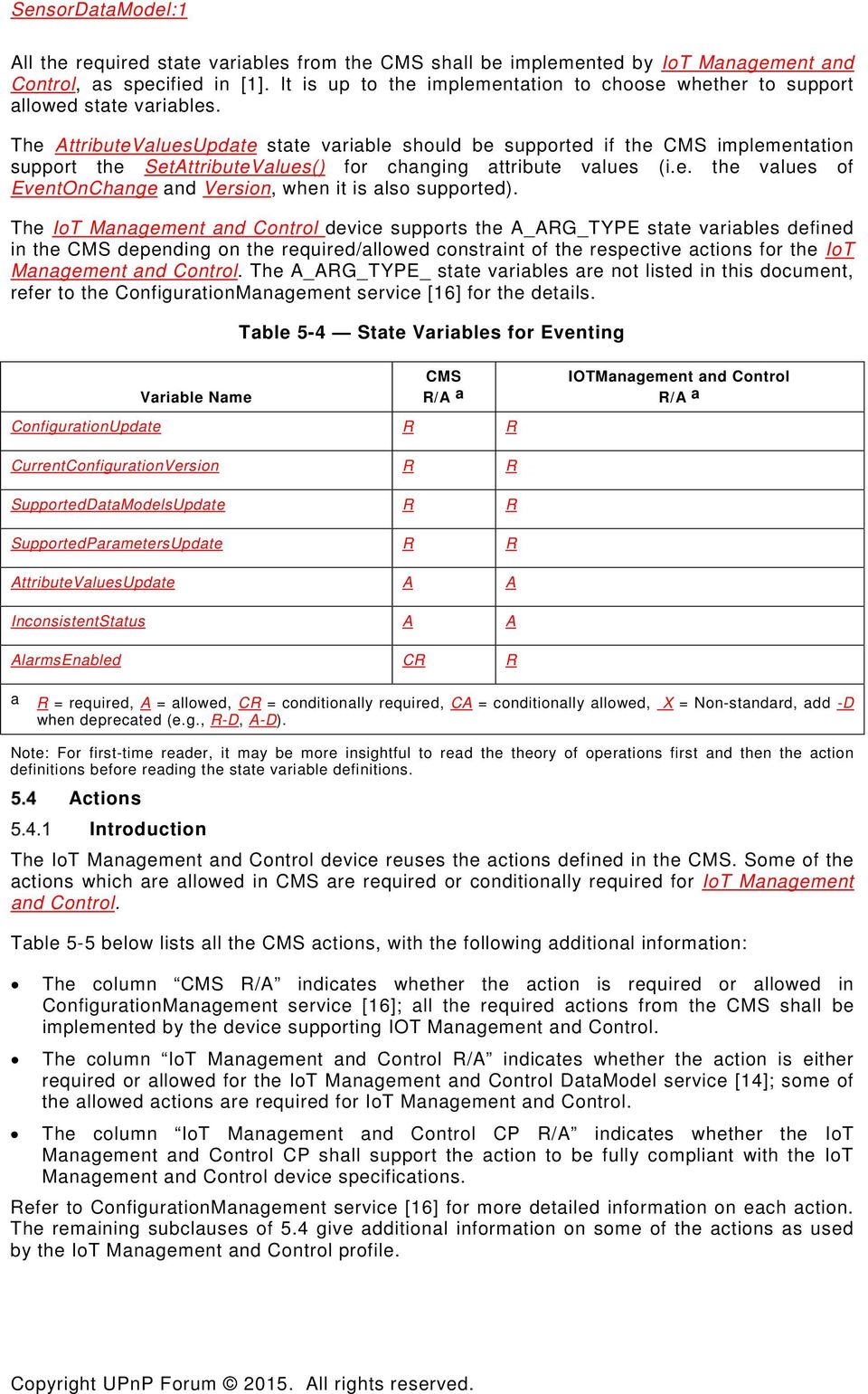
10 event Required. Indicates the type of sensor related event. The event attribute shall use one of the values as detailed in the following table. Table 5-3 <SensorEvents> event= attribute allowed values SensorEvent Name SensorCollectionAdded SensorCollectionRemoved SensorAdded SensorRemoved SOAPDataAvailable SOAPDataOverrun TransportDataAvailable TransportDataOverrun TransportConnectionError SensorAvailable SensorUnavailable Description A new sensor collection has been added. Reporting of this event is enabled by default. A previously reported sensor collection has been removed. Reporting of this event is enabled by default. A new sensor has been added. Reporting of this event is enabled by default. A previously reported sensor has been removed. Reporting of this event is enabled by default. The sensor has data available to be read by the ReadSensor() SOAP action. Reporting of this event is disabled by default. Reporting of this event can be enabled by setting the SensorEventsControl parameter to "SOAPDataAvailableEnable,1". The sensor has discarded data which was not read by any SOAP client. Reporting of this event is disabled by default. Reporting of this event can be enabled by setting the SensorEventControl parameter to "SOAPDataOverrunEnable,1". The sensor has received data available to be sent to one or more transport connection for this senor. Reporting of this event is disabled by default. Reporting of this event can be enabled by setting the SensorEventControl parameter to "TransportDataAvailableEnable,1". The sensor has discarded data which was not read by any active transport connection. Reporting of this event is disabled by default. Reporting of this event can be enabled by setting the SensorEventControl parameter to "TransportDataOverrunEnable,1". An error has occurred on one or more active transport connections for this sensor. Reporting of this event is disabled by default. Reporting of this event can be enabled by setting the SensorEventControl parameter to "TransportConnectionErrorEnable,1". A currently configured sensor has become available. Reporting of this event is disabled by default. Reporting of this event can be enabled by setting the SensorEventControl parameter to "SensorAvailabilityEnable,1". A currently configured sensor has become unavailable, Reporting of this event is disabled by default. Reporting of this event can be enabled by setting the SensorEventControl parameter to "SensorAvailabilityEnable,1". State Variables The IoT Management and Control device [11] reuses some of the state variables defined in the ConfigurationManagement service [16]. The Table 5-4 below lists all the eventable state variables used in the IoT Management and Control device. These state variables are defined in the CMS. The table also indicates the required/allowed constraint for the IoT Management and Control device.

11 All the required state variables from the CMS shall be implemented by IoT Management and Control, as specified in [1]. It is up to the implementation to choose whether to support allowed state variables. The AttributeValuesUpdate state variable should be supported if the CMS implementation support the SetAttributeValues() for changing attribute values (i.e. the values of EventOnChange and Version, when it is also supported). The IoT Management and Control device supports the A_ARG_TYPE state variables defined in the CMS depending on the required/allowed constraint of the respective actions for the IoT Management and Control. The A_ARG_TYPE_ state variables are not listed in this document, refer to the ConfigurationManagement service [16] for the details. Table 5-4 State Variables for Eventing Variable Name CMS R/A a ConfigurationUpdate R R IOTManagement and Control R/A a CurrentConfigurationVersion R R SupportedDataModelsUpdate R R SupportedParametersUpdate R R AttributeValuesUpdate A A InconsistentStatus A A AlarmsEnabled CR R a R = required, A = allowed, CR = conditionally required, CA = conditionally allowed, X = Non-standard, add -D when deprecated Note: For first-time reader, it may be more insightful to read the theory of operations first and then the action definitions before reading the state variable definitions. Actions Introduction The IoT Management and Control device reuses the actions defined in the CMS. Some of the actions which are allowed in CMS are required or conditionally required for IoT Management and Control. Table 5-5 below lists all the CMS actions, with the following additional information: The column CMS R/A indicates whether the action is required or allowed in ConfigurationManagement service [16]; all the required actions from the CMS shall be implemented by the device supporting IOT Management and Control. The column IoT Management and Control R/A indicates whether the action is either required or allowed for the IoT Management and Control DataModel service [14]; some of the allowed actions are required for IoT Management and Control. The column IoT Management and Control CP R/A indicates whether the IoT Management and Control CP shall support the action to be fully compliant with the IoT Management and Control device specifications. Refer to ConfigurationManagement service [16] for more detailed information on each action. The remaining subclauses of 5.4 give additional information on some of the actions as used by the IoT Management and Control profile.
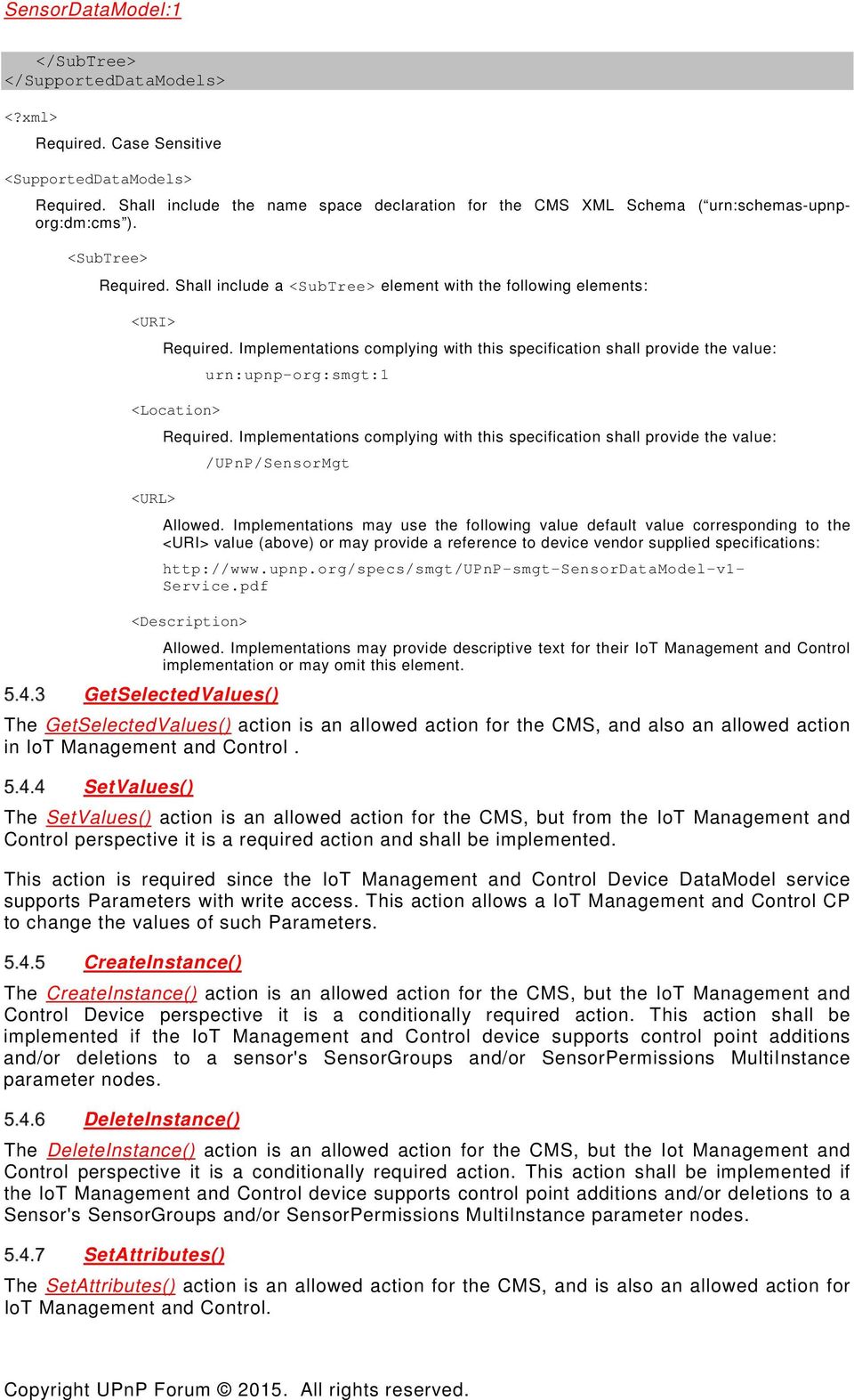
12 Table 5-5 Actions Name CMS R/A a IoT Management and Control R/A b GetSupportedDataModels() R R R IoT Management and Control CP R/A c GetSupportedParameters() R R R GetInstances() R R R GetValues() R R R GetSelectedValues() A A A SetValues() A R A CreateInstance() A CR A DeleteInstance() A CR A GetAttributes() R R A SetAttributes() A A A GetInconsistentStatus() A A A GetConfigurationUpdate() R R A GetCurrentConfigurationVersion() R R A GetSupportedDataModelsUpdate() R R A GetSupportedParametersUpdate() R R A GetAttributeValuesUpdate() A A A b For a device this column indicates whether the action shall be implemented or not, where R = required, A = c For a control point this column indicates whether a control point shall be capable of invoking this action, where R = required, A = allowed, CR = conditionally required, CA = conditionally allowed, X = Non-standard, add -D when deprecated GetSupportedDataModels() The IoT Management and Control implementation shall provide an XML document compliant with the <SupportedDataModels> root element per the CMS namespace (urn:schemasupnp-org:dm:cms). This element shall contain a <SubTree> child element which describing the IoT Management and Control DataModel as follows: <?xml version="1.0" encoding="utf-8"?> <cms:supporteddatamodels xmlns:cms="urn:schemas-upnp-org:dm:cms" xsi:schemalocation="urn: schemas-upnp-org:dm:cms <SubTree> <URI> urn:upnp-org:smgt:1 </URI> <Location> /UPnP/SensorMgt </Location> <URL> </URL> <Description>... device vendor descriptive text... </Description>

13 </SubTree> </SupportedDataModels> <?xml> Required. Case Sensitive <SupportedDataModels> <SubTree> Required. Shall include a <SubTree> element with the following elements: <URI> Required. Implementations complying with this specification shall provide the value: urn:upnp-org:smgt:1 <Location> <URL> Required. Implementations complying with this specification shall provide the value: /UPnP/SensorMgt Required. Shall include the name space declaration for the CMS XML Schema ( urn:schemas-upnporg:dm:cms ). Allowed. Implementations may use the following value default value corresponding to the <URI> value (above) or may provide a reference to device vendor supplied specifications: Service.pdf <Description> Allowed. Implementations may provide descriptive text for their IoT Management and Control implementation or may omit this element. GetSelectedValues() The GetSelectedValues() action is an allowed action for the CMS, and also an allowed action in IoT Management and Control. SetValues() The SetValues() action is an allowed action for the CMS, but from the IoT Management and Control perspective it is a required action and shall be implemented. This action is required since the IoT Management and Control Device DataModel service supports Parameters with write access. This action allows a IoT Management and Control CP to change the values of such Parameters. CreateInstance() The CreateInstance() action is an allowed action for the CMS, but the IoT Management and Control Device perspective it is a conditionally required action. This action shall be implemented if the IoT Management and Control device supports control point additions and/or deletions to a sensor's SensorGroups and/or SensorPermissions MultiInstance parameter nodes. DeleteInstance() The DeleteInstance() action is an allowed action for the CMS, but the Iot Management and Control perspective it is a conditionally required action. This action shall be implemented if the IoT Management and Control device supports control point additions and/or deletions to a Sensor's SensorGroups and/or SensorPermissions MultiInstance parameter nodes. SetAttributes() The SetAttributes() action is an allowed action for the CMS, and is also an allowed action for IoT Management and Control.
14 Annex A IoT Management and Control General Data Model (normative) Table A.1 IoT Management and Control General Parameters Name Type Acc Req Reference EOC Ver /UPnP/SensorMgt/ SingleInstance RO R A SensorEvents string RO R A SensorCollectionsNumberOfEntries int RO R A /UPnP/SensorMgt/SensorCollections/#/ MultiInstance RO R A CollectionID string RO R A CollectionType string RO R A CollectionFriendlyName string RW R A CollectionInformation string RW R A CollectionUniqueIdentifier string RO R A CollectionSpecific/ SingleInstance RO CR A SensorsNumberOfEntries int RO R A /UPnP/SensorMgt/SensorCollections/#/Sen sors/#/ MultiInstance RO R A SensorID string RO R A SensorType string RO R A SensorUniqueIdentifier string RO A A SensorUpdateRequest boolean RW A A SensorPollingInterval Int RW A A SensorReportChangeOnly boolean RW A A SensorEventsEnable string RW A A SensorSpecific/ SingleInstance RO CR A SensorRelatedNumberOfEntries Int RO CA A SensorGroupsNumberOfEntries Int RO CA A SensorDefaultPermissionsNumberOfEntries Int RO CA A SensorURNsNumberOfEntries Int RO R A UPnP/SensorMgt/SensorCollections/#/Sens ors/#/sensorrelated/#/ MultiInstance RO A A SensorPath string RO R A UPnP/SensorMgt/SensorCollections/#/Sens ors/#/sensorgroups/#/ MultiInstance RO CR A SensorGroup string RW R A /UPnP/SensorMgt/SensorCollections/#/Sen sors/#/sensordefaultpermissions/#/ MultiInstance RW CA A SensorDefaultRole string RO R A SensorDefaultPermissions CSV(string) RO R A

15 /UPnP/SensorMgt/SensorCollections/#/Sen sors/#/sensorurns/#/ MultiInstance RO R A SensorURN string RO R A DataItemsNumberOfEntries Int RO R A /UPnP/SensorMgt/SensorCollections/#/Sen sors/#/sensorurns/#/dataitems/#/ MultiInstance RO R A Name string RO R A Type string RO R A Encoding string RO R A Description string RO R A /UPnP/SensorMgt/SensorGroupSets/#/ MultiInstance RW CR A GroupSetID string RW R A GroupSetType string RW R A GroupSetFriendName string RW R A GroupSetSpecific/ SingleInstance RW CR A MembersNumberOfEntries int RW R A /UPnP/SensorMgt/SensorGroupSets/#/Mem bers/#/ MultiInstance RO CR A MemberID (CollectionID or SensorID) string RW R A /UPnP/SensorMgt/SensorCollections/#/ MultiInstance RO R A ParticipatingGroupSetID string RW CR A /UPnP/SensorMgt/SensorCollections/#/Sen sors/#/ MultiInstance RO R A A ParticipatingGroupSetID String RW CR A A.1 Introduction This section describes IoT Management and Control Nodes and Parameters which are common to all sensor collections and sensors supported by the host IoT Management and Control device. Individual sensor collections appear as instances of the /UPnP/SensorMgt/SensorCollections/ MultiInstance node. Nodes which are sensor collection type specific are listed under the /UPnP/SensorMgt/SensorCollections/#/CollectionSpecific/ node. Each SensorCollection node hosts zero or more Sensors nodes which appear as instances of the /UPnP/SensorMgt/SensorCollections/#/Sensors/ MultiInstance node. Nodes which are sensor type specific are listed under the /UPnP/SensorMgt/SensorCollections/#/SensorSpecific/ node for each Sensor instance. Each Sensor supports zero or more Sensor URNs /UPnP/SensorMgt/SensorCollections/#/Sensors/#/SensorURNs/#/SensorURNs which identifies sets required and permitted DataItem(s) generated by each Sensor. A.1.1 A Type: IoT Management and Control General Parameters /UPnP/SensorMgt/ SingleInstance
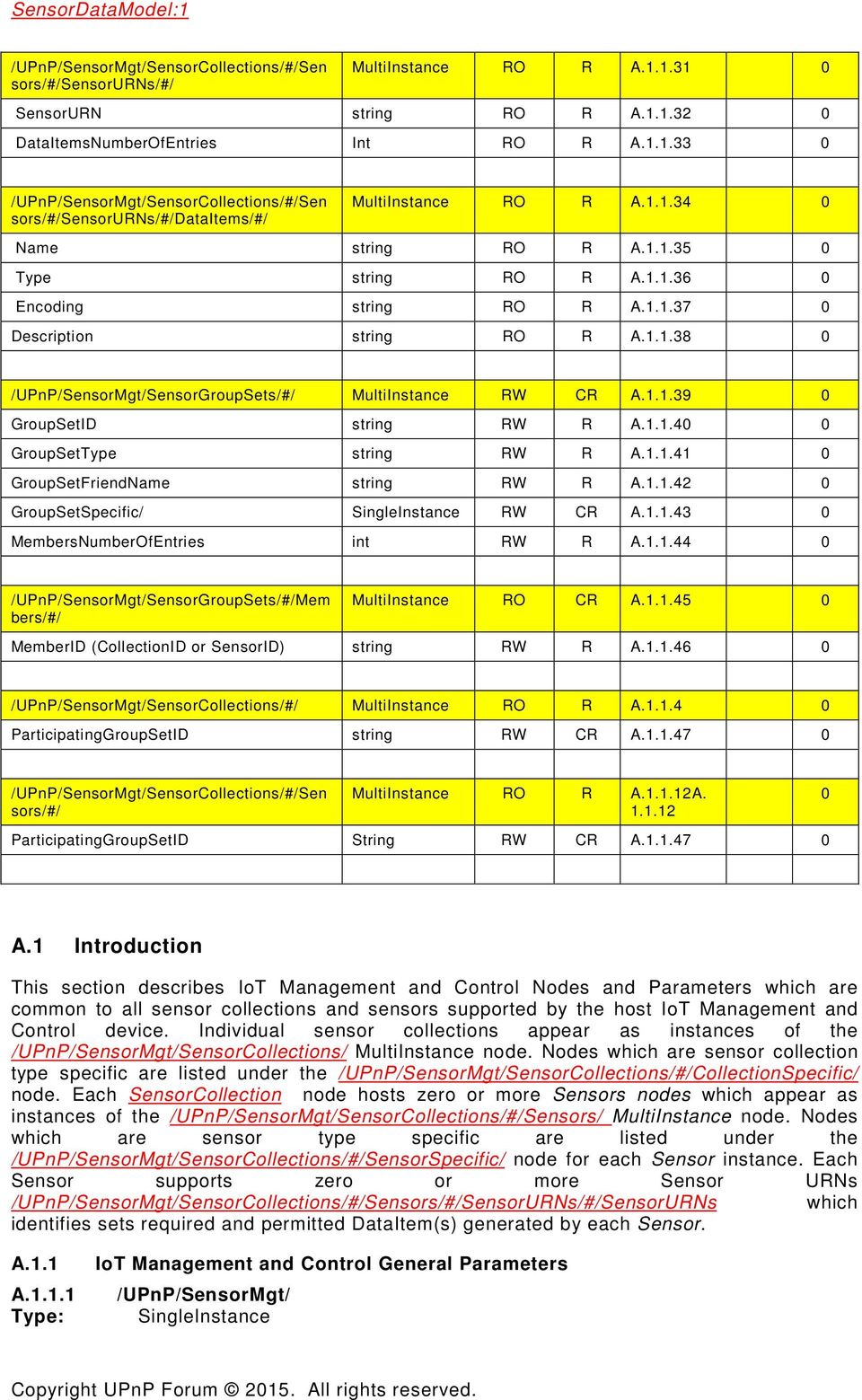
16 Description: The required SensorMgt SingleInstance node identifies the root node of the IoT Management and Control DataModel. A /UPnP/SensorMgt/SensorEvents Type: string Description: The required SensorEvents parameter shall provide an XML document conforming to the XML Schema UPnP IoT Management and Control DataModel Events [17]. This document shall contain zero or more <sensorevent> elements where each element occurrence reports a unique event condition as indicated by the event attribute for the SensorCollectionID and SensorID identified by the collectionid and sensorid attributes. This parameter shall remain unchanged for a minimum event moderation period (200mS). If additional events have accumulated a new SensorEvents XML document shall replace the current document after any active event moderation period has expired. A /UPnP/SensorMgt/SensorCollectionsNumberOfEntries Type: int Description: The required SensorCollectionsNumberOfEntries parameter shall provide the number of SensorCollections MultiInstance node entries. A /UPnP/SensorMgt/SensorCollections/ Type: MultiInstance Description: The required SensorCollections MultiInstance node identifies zero or more collections containing sensors and/or actuators supported by this IoT Management and Control device. A /UPnP/SensorMgt/SensorCollections/#/CollectionID Type: string Description: The required CollectionID parameter provides a unique identifier for the purpose of issuing SOAP actions or identifying the sensor collection associated with events reported by the TransportGeneric service [12]. A /UPnP/SensorMgt/SensorCollections/#/CollectionType Type: string Description: The required CollectionType parameter value describes the type of sensor for this SensorCollections node instance. See the subclause 5.2.5, "Sensor Normative Type Identifiers" for required and allowed values for this parameter. A /UPnP/SensorMgt/SensorCollections/#/CollectionFriendlyName Type: string Description: The required CollectionFriendlyName parameter provides a string identifying the sensor collection suitable for end-user display. The IoT Management and Control service is allowed to preset this parameter. The IoT Management and Control service shall allow this field to be written provided the requesting control point has sufficient privileges. The IoT Management and Control service should retain previously written values between reboots. A /UPnP/SensorMgt/SensorCollections/#/CollectionInformation Type: string Description: The required CollectionInformation parameter provides a string describing the sensor collection suitable for end-user display. The IoT Management and Control service is allowed to preset this parameter. The IoT Management and Control service shall permit this parameter to be written provided the requesting control point has sufficient privileges. The IoT Management and Control service should retain previously written values between reboots. A /UPnP/SensorMgt/SensorCollections/#/CollectionUniqueIdentifier Type: string Description: The required CollectionUniqueIdentifier parameter provides a string which uniquely identifies a sensor collection. For devices discoverable on a UPnP network, this
![Events [17].](/docs-images/41/16115452/images/page_16.jpg "This document shall contain zero or more <sensorevent> elements where each element occurrence reports a unique event condition as indicated by the event attribute for the SensorCollectionID and")
17 value shall match the UDN of the corresponding UPnP Device. See sections describing specific classes of sensor collection(s) for other allowed values. A /UPnP/SensorMgt/SensorCollections/#/CollectionSpecific/ Type: SingleInstance Description: The conditionally required CollectionSpecific SingleInstance node provides ecosystem specific sensor collection information. The child nodes of the CollectionSpecific node depend on the CollectionType parameter value. See the sections describing specific classes of sensor collection(s) for required and allowed nodes for specific sensor collection types. A /UPnP/SensorMgt/SensorCollections/SensorsNumberOfEntries Type: int Description: The required SensorsNumberOfEntries parameter shall provide the number of Sensor MultiInstance node entries. A /UPnP/SensorMgt/SensorCollections/#/Sensors/ Type: MultiInstance Description: The required Sensors MultiInstance node shall describe a zero or more sensor(s) or actuator(s) managed by this service. A /UPnP/SensorMgt/SensorCollections/#/Sensors/#/SensorID Type: string Description: The required SensorID parameter provides a unique identifier for the purpose of issuing SOAP actions to the sensor. See the A_ARG_TYPE_SensorID in the TransportGeneric service specification [12] for further usage information about this parameter. The IoT Management and Control device is permitted to change assigned SensorID values between service restarts. A /UPnP/SensorMgt/SensorCollections/#/Sensors/#/SensorType Type: string Description: The required SensorType parameter value describes the type of sensor for this Sensors node instance. See the subclause 5.2.5, "Sensor Normative Type Identifiers" for required and allowed values for this parameter. A /UPnP/SensorMgt/SensorCollections/#/Sensors/#/SensorUpdateRequest Type: boolean Description: The allowed SensorUpdateRequest parameter when written to ( 1 ) shall cause the IoT Management and Control DataModel service to request an update from the sensor associated with this Sensors instance. When the IoT Management and Control DataModel service completes the update process, it shall reset this parameter to ( 0 ). See the sections describing specific classes of sensor collection(s) to determine if implementation of this parameter is required. A /UPnP/SensorMgt/SensorCollections/#/Sensors/#/SensorPollingInterval Type: int Description: The allowed SensorPollingInterval parameter when written to a non-zero value (milliseconds) shall cause IoT Management and Control service to request periodic updates from the sensor associated with this Sensors instance. A /UPnP/SensorMgt/SensorCollections/#/Sensors/#/SensorReportChangeOnly Type: int Description: This allowed SensorReportChangeOnly parameter when written to a ( 1 ) in addition to a non-zero SensorPollingInterval parameter shall cause the IoT Management and Control service to suppress reporting of identical sensor readings. The setting of this property shall not suppress sensor updates requested by setting the SensorUpdateRequest parameter.
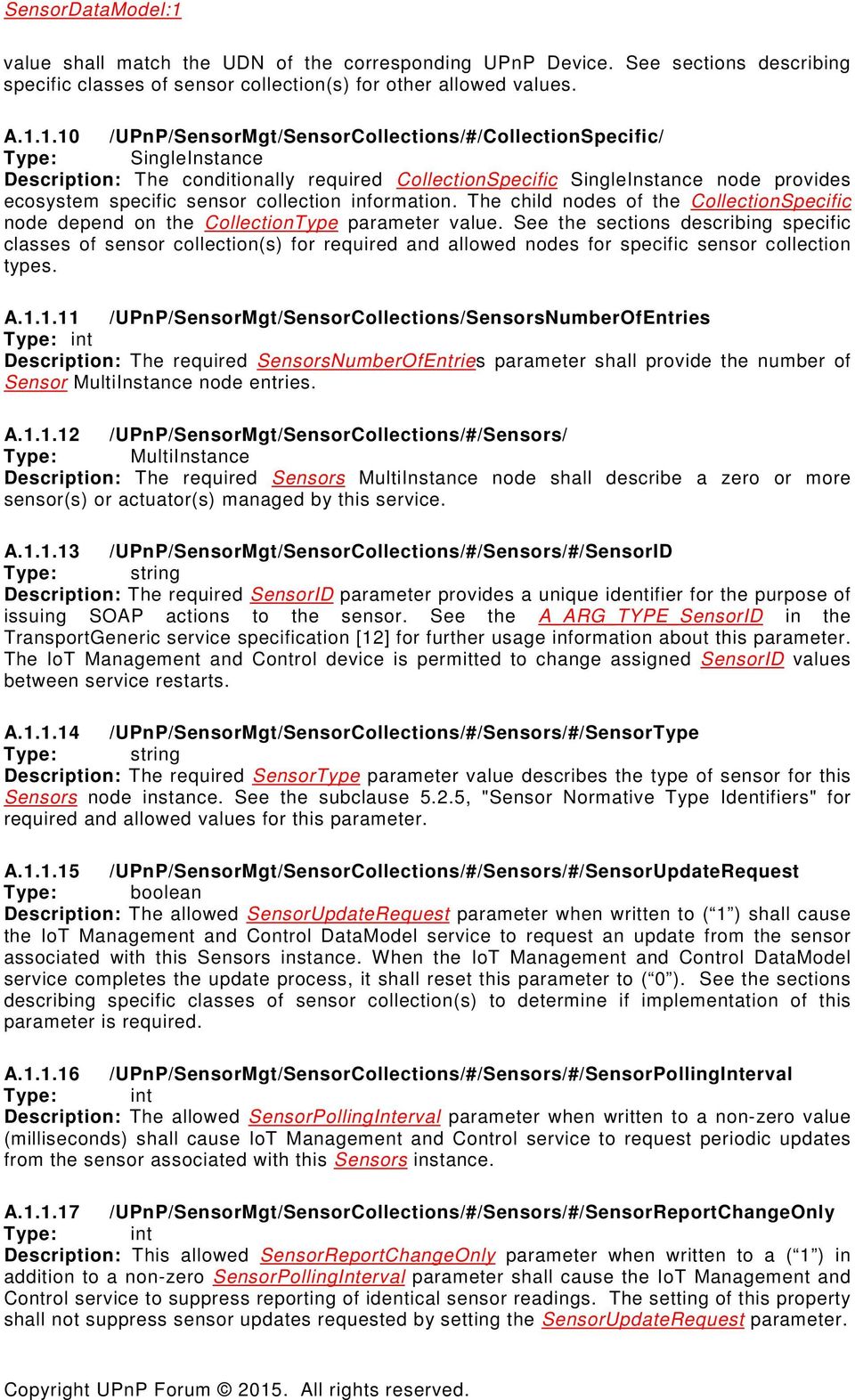
18 A /UPnP/SensorMgt/SensorCollections/#/Sensors/#/SensorEventsEnable Type: string Description: The required SensorsEventsEnable parameter shall enable reporting of events for the indicated sensor. On read of this parameter a CSV of pairs of supported event names and a boolean value with ("1") indicating that the corresponding event is to be reported. On write a CSV of an event name and boolean value indicating the new enable/disable setting for a supported named event shall be accepted. Sensor events are reported by the SensorEvents XML document provided by the /UPnP/SensorMgt/SensorEvents parameter. The following SensorEventsEnable names are defined: Table A.2 SensorEventEnable parameter allowed values SensorEventEnable Name SOAPDataAvailableEnable SOAPDataOverrunEnable TransportDataAvailableEnable TransportDataOverrunEnable TransportConnectionErrorEnable SensorAvailabilityEnable Description Controls reporting of SOAPDataAvailable events indicating sensor data is available for reading by the ReadSensor() action of the SensorTransportGeneric service. Controls reporting of SOAPDataOverrun events indicating the sensor has discarded data which was not read by any SOAP client. Controls reporting of TransportDataAvailable events indicating a sensor with one or more active transport connections has received data. Controls reporting of TransportDataOverrun events indicating a sensor with one or more active transport connections has discarded received data it was unable to forward to transport clients. Controls reporting of TransportConnectionError events indicating a sensor with one or more active transport connections has detected a connection error. Controls reporting of SensorAvailable and SensorUnavailable events indicating a previously reported sensor has become accessible or inaccessible. The following example shows a sample SensorEventsEnable parameter and changing one of the reported event settings: Request: GetValues( "<?xml version="1.0" encoding="utf-8"?> <ContentPathList xmlns="urn:schemas-upnp-org:dm:cms" xmlns:xsi=" xsi:schemalocation="urn:schemas-upnp-org:dm:cms <ContentPath> /UPnP/SensorMgt/SensorCollections/1/Sensors/1/SensorEventsEnable </ContentPath> </ContentPathList>" ) Response: GetValues( "<?xml version="1.0" encoding="utf-8"?> <ParameterValueList xmlns="urn:schemas-upnp-org:dm:cms" xmlns:xsi=" xsi:schemalocation="urn:schemas-upnp-org:dm:cms <Parameter> <ParameterPath> /UPnP/SensorMgt/SensorCollections/1/Sensors/1/SensorEventsEnable </ParameterPath> <Value> SOAPDataAvailableEnable,0,SOAPDataOverrunEnable,0, TransportDataAvailableEnable,0,TransportDataOverrunEnable,0,

19 TransportConnectionErrorEnable,0 </Value> </Parameter> </ParameterValueList>" ) A SOAP client which requests notification of SensorDataAvailable events updates this parameter as follows: Request: SetValues( "<?xml version="1.0" encoding="utf-8"?> <ParameterValueList xmlns="urn:schemas-upnp-org:dm:cms" xmlns:xsi=" xsi:schemalocation="urn:schemas-upnp-org:dm:cms <Parameter> <ParameterPath> /UPnP/SensorMgt/SensorCollections/1/Sensors/1/SensorEventsEnable </ParameterPath> <Value> SOAPDataAvailableEnable,1 </Value> </Parameter> </ParameterValueList>" ) Response: SetValues( "ChangesCommitted") A /UPnP/SensorMgt/SensorCollections/#/Sensors/#/SensorsRelatedNumberOfE ntries Type: int Description: The conditionally required SensorsRelatedNumberOfEntries parameter shall provide the number of SensorsRelated MultiInstance node entries. This parameter shall be implemented if the SensorsRelated MultiInstance node is supported. A /UPnP/SensorMgt/SensorCollections/#/Sensors/#/SensorGroupsNumberOfEn tries Type: int Description: The conditionally required SensorsGroupsOfEntries parameter shall provide the number of SensorGroups MultiInstance node entries. This parameter shall be implemented if the SensorGroups MultiInstance node is supported. A /UPnP/SensorMgt/SensorCollections/#/Sensors/#/SensorDefaultPermissions NumberOfEntries Type: int Description: The conditionally required SensorsPermissionNumberOfEntries parameter shall provide the number of SensorPermissions MultiInstance node entries.. This parameter shall be implemented if the SensorDefaultPermissions MultiInstance node is supported A /UPnP/SensorMgt/SensorCollections/#/Sensors/#/SensorsRelated/ Type: MultiInstance Description: The allowed SensorsRelated MultiInstance node includes zero or more SensorPath parameter nodes identifying other sensors which have an operational relationship to this sensor. Note: This differs from the SensorGroups node where sensors are grouped for classification and device protection. A Type: /UPnP/SensorMgt/SensorCollections/#/Sensors/#/SensorsRelated/#/SensorP ath string
20 Description: The required SensorPath parameter provides a relative path to a sensor operationally related to this sensor. This path shall start at the SensorCollections MultiInstance node and shall end at the Sensors/# instance node identifying the sensor being referenced. A /UPnP/SensorMgt/SensorCollections/#/Sensors/#/SensorGroups/ Type: MultiInstance Description: The conditionally required SensorGroups MultiInstance node includes zero or more SensorGroup parameter nodes identifying SensorGroup(s) this sensor is participating in. The SensorGroups MultiInstance node shall be implemented when the DeviceProtection feature is supported. Note: See IoT Management and Control Architecture Overview [10], subclause "Sensor Protection Model" for further details on usage of SensorGroup(s) for DeviceProtection. A /UPnP/SensorMgt/SensorCollections/#/Sensors/#/SensorGroups/#/SensorGro up Type: string Description: The required SensorGroup parameter identifies an individual SensorGroup the corresponding Sensor is participating in. An instance of the SensorGroup node shall be included for each sensor group the sensor is a member of. A /UPnP/SensorMgt/SensorCollections/#/Sensors/#/SensorDefaultPermissions/ Type: MultiInstance Description: The conditionally allowed SensorPermissions MultiInstance node lists sensor permissions for default DeviceProtection roles. This node may be implemented if the IoT Management and Control device provides DeviceProtection support and is otherwise prohibited. A /UPnP/SensorMgt/SensorCollections/#/Sensors/#/SensorPermissions/#/Sens ordefaultrole Type: string Description: The required SensorDefaultRole parameter identifies a default DeviceProtection role. The allowed values for this parameter are the default DeviceProtection roles: Public or Basic. A /UPnP/SensorMgt/SensorCollections/#/Sensors/#/SensorPermissions/#/Sens ordefaultpermissions Type: CSV(string) Description: The required SensorDefaultPermissions parameter lists SensorPermissions assigned to the corresponding default DeviceProtection role identified by the SensorDefaultRole parameter. This parameter shall be supported if the IoT Management and Control device provides DeviceProtection support. The following allowed values are defined. Table A.3 Sensor Permissions Permission smgt:readsensor smgt:writesensor smgt:connectsensor smgt:commandsensor smgt:viewsensor Description A control point is permitted to issue ReadSensor() actions to the corresponding Sensor. A control point is permitted to issue WriteSensor() actions to the corresponding Sensor. A control point is permitted to issue ConnectSensor() and DisconnectSensor() actions to the corresponding Sensor. A control point is permitted to modify IoT Management and Control properties in the DataModel. A control point is permitted to view IoT Management and Control properties for this Sensor.

21 A /UPnP/SensorMgt/SensorCollections/#/Sensors/#/SensorSpecific/ Type: SingleInstance Description: The required SensorSpecific SingleInstance node provides ecosystem specific Sensor information. The allowed and required children of this node depend on the specific type of sensor as indicated by the SensorType parameter. Values prefixed by smgt: are defined within this specification. See the sections describing specific classes of sensor collection(s) for required and allowed nodes for specific sensor types. A /UPnP/SensorMgt/SensorCollections/#/Sensors/#/SensorsURNsNumberOfEnt ries Type: int Description: The required SensorURNsNumberOfEntries parameter shall provide the number of SensorURNs MultiInstance node entries. A /UPnP/SensorMgt/SensorCollections/#/Sensors/#/SensorURNs/ Type: MultiInstance Description: The required SensorURNs MultiInstance node lists URN values for sets of DataItem(s) this sensor provides (or actuator accepts). A /UPnP/SensorMgt/SensorCollections/#/Sensors/#/SensorURNs/#/SensorURN Type: string Description: The required SensorURN parameter node identifies the URN value for each set of sensor DataItem(s). See the sections describing specific classes of sensor collection(s) for required and allowed URN values for sensor types. A /UPnP/SensorMgt/SensorCollections/#/Sensors/#/SensorURNs/DataItemsNu mberofentries Type: int Description: The required DataItemsNumberOfEntries parameter shall provide the number of DataItems MultiInstance node entries. A /UPnP/SensorMgt/SensorCollections/#/Sensors/#/SensorURNs/#/DataItems/ Type: MultiInstance Description: The required DataItems MultiInstance node identifies sets of DataItem(s) supported for the corresponding SensorURN parameter value. A /UPnP/SensorMgt/SensorCollections/#/Sensors/#/SensorURNs/#/DataItems/#/ Name Type: MultiInstance Description: The required Name parameter identifies the name of an individual DataItem. See IoT Management and Control Architecture Overview [10] subclause 4.3, "DataItem semantics" for further information. A /UPnP/SensorMgt/SensorCollections/#/Sensors/#/SensorURNs/#/DataItems/#/ Type Type: MultiInstance Description: The required Type parameter identifies the type of an individual DataItem described by the corresponding SensorURN parameter value. See IoT Management and Control Architecture Overview [10] subclause 4.3, "DataItem semantics" for further information. A Type: /UPnP/SensorMgt/SensorCollections/#/Sensors/#/SensorURNs/#/DataItems/#/ Encoding MultiInstance
22 Description: The required Encoding parameter identifies the encoding of an individual DataItem described by the corresponding SensorURN parameter value. See IoT Management and Control Architecture Overview [10] subclause 4.3, "DataItem semantics" for further information. A /UPnP/SensorMgt/SensorCollections/#/Sensors/#/SensorURNs/#/DataItems/#/ Description Type: MultiInstance Description: The required Description parameter shall provide a string containing an XML document which describes the named DataItem or an empty string if no DataItem Description document is available. This XML document shall comply with the DataItem Description schema. See IoT Management and Control Architecture Overview [10] subclause 4.3, "DataItem semantics" for further information. A /UPnP/SensorMgt/SensorGroupSets/ Type: MultiInstance Description: The conditionally required SensorGroupSets MultiInstance node identifies zero or more SensorGroupSets definition. As SensorGroupSet can be made by ControlPoint after initial setting, this node and all the parameters under this node are writable. SensorGroupSet can contain any combination of SensorCollections or Sensors. A /UPnP/SensorMgt/SensorGroupSets/#/GroupSetID Type: string Description: The required GroupSetID parameter provides a unique identifier for the purpose of accessing this SensorGroupSet. A /UPnP/SensorMgt/SensorGroupSets/#/GroupSetType Type: string Description: The required GroupSetType parameter value describes the type of SensorGroupSet. GroupSetType identifier is sgmt-gst. Table A.4 GroupSetType values GroupSetType value smgt-gst:access-control smgt-gst:control-group smgt-gst:group-represent Description GroupSet intended to define access control of this group members. The SensorPermissions MultiInstance node (see description in A ) for this group will be placed under GroupSetSpecific Instance node. GroupSet intended to define a control group in which members will be controlled as a single entity. No GroupSetSpecific instance is required if all members have the same control scheme defined in the SensorURNs. If it is desired to limit only a few SensorURNs for control, they will be listed under GroupSetSpecific instance. A SensorURNsNumberOfEntries parameter must be included indicating the number of SensorURNs listed. Then, a MultiInstance node SensorURNs with all SensorURN parameters is included. If no GroupSetSpecific instance is defined, the common set of SensorURNs defined between the members will be used for control. GroupSet intended to define representing sensor that will represent other sensor members where similar sensors are located together. SensorID of that representing sensor will be described under GroupSetSpecific Instance. A /UPnP/SensorMgt/SensorGroupSets/#/GroupSetFriendlyName Type: string
23 Description: The required GroupSetFriendlyName parameter provides a string identifying the SensorGroupSet name suitable for end-user display. A /UPnP/SensorMgt/SensorGroupSets/#/GroupSetSpecific/ Type: SingleInstance Description: The conditionally required GroupSetSpecific SingleInstance node provides ecosystem specific SensorGroupSet information. The child nodes of the GroupSetSpecific node depend on the GroupSetType parameter value. A /UPnP/SensorMgt/SensorGroupSets/#/MembersNumberOfEntries Type: int Description: The required MembersNumberOfEntries parameter shall provide the number of Member MultiInstance node entries. A /UPnP/SensorMgt/SensorGroupSets/#/Members/#/ Type: MultiInstance Description: The required Members MultiInstance node identifies zero or more members of this SensorGroupSet. As SensorGroupSet can contain any combination of SensorCollection or Sensor, member can be SensorCollection or Sensor or both. A /UPnP/SensorMgt/SensorGroupSets/#/MemberID Type: string Description: The required MemberID parameter provides a referencing identifier of this member. CollectionID or SensorID of the member is used here. A UPnP/SensorMgt/SensorCollections/#/ ParticipatingGroupSetID, UPnP/SensorMgt/SensorCollections/#/ Sensors/#ParticipatingGroupSetID Type: string Description: The required ParticipatingGroupSetID parameter under SensorCollection or Sensor provides a referencing identifier to the participating SensorGroupSet. A.2 Script Settings Predefined settings for a group of sensors are allowed by the use of the Data Model tree namely ScriptSettings. Using Settings parameters it is possible to predefine DataRecords to be applied to a group of sensors. For example, it is possible to predefine lighting settings for movies in your livingroom. Table A.5 ScriptSettings Parameters for predefined Settings Name Type Acc Req Reference EOC Ver A /UPnP/ScriptSettings/ SingleInstance RO A 0 SettingsNumberOfEntries int RO R 0 /UPnP/ScriptSettings/Permissions/#/ MultiInstance RO CA DefaultRole string RO R SettingsDefaultPermissions CSV (string) RO R ScriptsDefaultPermissions CSV (string) RO R /UPnP/ScriptSettings/Settings/#/ MultiInstance RW CR 0 SettingID string RW R
24 SettingDescription string RW R ConfigsNumberOfEntries int RW R /UPnP/ ScriptSettings/Settings/#/Configs/#/ MultiInstance RW R 0 DeviceID string RW R SensorURN string RW R 0 DataRecords string RW R 0 SettingPermissionsNumberOfEntries int RW A /UPnP/ScriptSettings/Settings/#/SettingPermission s/#/ MultiInstance RW CA SettingDefaultRole string RW R SettingDefaultPermissions CSV (string) RW R A.2.1 ScriptSettings General Parameters A /UPnP/ScriptSettings/ Type: SingleInstance Description: The conditionally required ScriptSettings SingleInstance node shall be included for predefined Settings support. A /UPnP/ScriptSettings/SettingsNumberOfEntries Type: int Description: The conditionally required SettingsNumberOfEntries indicates the number of Settings available for this SensorManagement device. A /UPnP/ScriptSettings/SettingsScriptsPermissions Type: MultiInstance Description: The conditionally allowed SettingsScriptsPermissions MultiInstance node lists permissions for the addition of Settings and Scripts for default DeviceProtection roles. This node may be implemented if the SensorManagement device provides DeviceProtection support and is otherwise prohibited. A /UPnP/ScriptSettings/SettingsScriptsPermissions/#/DefaultRole Type: string Description: The required DefaultRole parameter identifies a default DeviceProtection role. The allowed values for this parameter are the default DeviceProtection roles: Public or Basic. The default role Admin does not need to be listed and has permission to all operations. A /UPnP/ScriptSettings/SettingsScriptsPermissions/#/SettingsDefaultPermissi ons Type: CSV (string) Description: The required SettingsDefaultPermissions parameter lists SettingsScriptsPermissions assigned to the corresponding default DeviceProtection role identified by the DefaultRole parameter for Settings. This parameter shall be supported if the SensorManagement device provides DeviceProtection support. The allowed values are defined in Table A.6.
25 Table A.6 Default permission settings Permission sset:createsetting sset:changeanysetting sset:deleteanysetting sset:viewanysettings Description A control point is permitted to create a node in the Settings multiinstance node in the DataModel. A control point is permitted to change any parameter values of any node in the Settings multiinstance node in the DataModel. A control point is permitted to remove any node in the Settings multiinstance node in the DataModel. A control point is permitted to view properties and parameter of any node in the Settings multiinstance node in the DataModel. A /UPnP/ScriptSettings/SettingsScriptsPermissions/#/ScriptsDefaultPermissio ns Type: CSV (string) Description: The required ScriptsDefaultPermissions parameter lists SettingsScriptsPermissions assigned to the corresponding default DeviceProtection role identified by the DefaultRole parameter for Scripts. This parameter shall be supported if the SensorManagement device provides DeviceProtection support. The alloed values are defined in Table A.7. Table A.7 Default script permission settings Permission sset:createscript sset:changeanyscript sset:deleteanyscript sset:viewanyscripts Description A control point is permitted to create a node in the Scripts multiinstance node in the DataModel. A control point is permitted to change any parameter values of any node in the Scripts multiinstance node in the DataModel. A control point is permitted to remove any node in the Scripts multiinstance node in the DataModel. A control point is permitted to view any properties and parameter of any node in the Scripts multiinstance node in the DataModel. A /UPnP/ScriptSettings/Settings/ Type: MultiInstance Description: The conditionally required Settings MultiInstance node identifies zero or more pre-defined settings for the IoT Management and Control Device. A /UPnP/ScriptSettings/Settings/#/SettingID Type: string Description: The conditionally required SettingID parameter provides a unique identifier for the purpose of applying this Setting based on a Script. A /UPnP/ScriptSettings/Settings/#/SettingDescription Type: string Description: The conditionally required SettingDescription provides a user-friendly description about this pre-defined Setting. A Type: /UPnP/ScriptSettings/Settings/#/ConfigsNumberOfEntries string
26 Description: The conditionally required ConfigsNumberOfEntries parameter shall provide the number of Configs MultiInstance nodes. A /UPnP/ScriptSettings/Settings/#/Configs/#/ Type: MultiInstance Description: The conditionally required Configs MultiInstance node identifies one or more set of configuration parameters that are used in the Setting. A /UPnP/ScriptSettings/Settings/#/Configs/#/DeviceID Type: string Description: The conditionally required DeviceID parameter identifies which SensorID or GroupSetID the following DataRecords must be applied. A /UPnP/ScriptSettings/Settings/#/Configs/#/SensorURN Type: string Description: The conditionally required SensorURN parameter identifies which SensorURN of the SensorID or GroupSetID the following DataRecords must be applied. A /UPnP/ScriptSettings/Settings/#/Configs/#/DataRecords Type: string Description: The conditionally required DataRecords parameter have the DataRecords XML to be applied on the desired SensorID or GroupSetID (See Section of IoT Management and Control TransportGeneric Service). A /UPnP/ScriptSettings/Settings/#/SettingPermissionsNumberOfEntries Type: int Description: The allowed SettingPermissionsNumberOfEntries indicates the number of SettingPermissions available for this Setting. This parameter shall be implemented if the SettingPermissions MultiInstance node is supported A /UPnP/ScriptSettings/Settings/#/SettingPermissions/#/ Type: MultiInstance Description: The conditionally allowed SettingPermissions MultiInstance node lists permissions for changing the Setting for default DeviceProtection roles. This node may be implemented if the SensorManagement device provides DeviceProtection support and is otherwise prohibited. A /UPnP/ScriptSettings/Settings/#/SettingPermissions/#/SettingDefaultRole Type: string Description: The required SettingDefaultRole parameter identifies a default DeviceProtection role. The allowed values for this parameter are the default DeviceProtection roles: Public or Basic. The default role Admin does not need to be listed and has permission to all operations. A /UPnP/ScriptSettings/Settings/#/SettingPermissions/#/SettingDefaultPermiss ions Type: CSV (string) Description: The required SettingDefaultPermissions parameter lists permissions assigned to the corresponding default DeviceProtection role identified by the SettingDefaultRole
27 parameter for the Setting. This parameter shall be supported if the SensorManagement device provides DeviceProtection support. The allowed values are defined in Table A.8. Table A.8 Default permissions settings Permission sset:changesetting sset:deletesetting sset:viewsetting Description A control point is permitted to change any parameter values of the parent Setting node in the DataModel. A control point is permitted to remove the parent Setting node in the DataModel. A control point is permitted to view properties and parameter of the parent Setting node in the DataModel. If a node is allowed to sset:changesetting and sset:deletesetting it is automatically allowed to sset:viewsetting. A.3 Scripts Scripts are used to apply Settings based on predefined Conditions. For example, it is possible to create a Script that turn off all lights of the living room after a presence Sensor indicates that nobody is there. The parameters to achieve this functionality are defined in Table A.9. Table A.9 ScriptSettings Parameters for Scripts Name Type Acc Req Reference EOC Ver A /UPnP/ScriptSettings/ SingleInstance RO A 0 SettingsNumberOfEntries int RO R 0 ScriptsNumberOfEntries int RO R /UPnP/ScriptSettings/Scripts/#/ MultiInstance RW CR 0 ScriptID string RW R ScriptDescription string RW R ScriptAttributes CSV(string) RW R ScriptStatus string RW R Condition string RW R 0 Then CSV(string) RW CR ScriptPermissionsNumberOfEntries int RW A /UPnP/ScriptSettings/Scripts/#/ScriptPermi ssions/#/ MultiInstance RW CA ScriptDefaultRole string RW R ScriptDefaultPermissions CSV (string) RW R A.3.1 ScriptSettings General Parameters for Scripts A /UPnP/ScriptSettings/ScriptsNumberOfEntries Type: int Description: The conditionally required ScriptsNumberOfEntries indicates the number of Scripts available for this SensorManagement device.
28 A /UPnP/ScriptSettings/Scripts/ Type: MulitInstance Description: The conditionally required Scripts MultiInstance node identifies zero or more set of scripts available for this SensorManagement device. A /UPnP/ScriptSettings/Scripts/#/ScriptID Type: string Description: The conditionally required ScriptID parameter provides a unique identifier for ths SensorManagement device. A /UPnP/ScriptSettings/Scripts/#/ScriptDescription Type: string Description: The conditionally required ScriptDescription parameter provides a user-friendly description of this script. A /UPnP/ScriptSettings/Scripts/#/ScriptAttributes Type: CSV (string) Description: The conditionally required ScriptAttributes parameter provides a list of zero or more attributes that must be applied to the script. If no attribute is necessary for the Script, this parameter must be empty.the attributes that are supported are defined in Table A.10. Table A.10 Script Attibutes Script Attribute delay repeats sched-start date-time-range date-time-expires delay-expires periodic moderation-time Description Indicates that the Then will fire after a specified delay if Condition is still true Indicates the number of times Then must be applied if Condition is still true. The keyword infinite can be used. Indicates that Then can only be activated after sched-start if Condition is still true Indicates that Then can only be activated into this range if Condition is still true Indicates that the Script must be deactivated after date-time-expires Indicates that the Script must be deactivated after delay-expires. Indicates a periodic time to keep executing the Script. Indicates a pause period to execute the Script again. The syntax is formally defined using EBNF. The syntax is described as follow: ::= duration ::= duration ::= duration :: duration ::= date-time ::= date-time day-of-yr-time named-day-time T-labeled- ::= date-time '/' date-time ::= 'P' [n 'D'] time delay delay-expires moderation-time periodic date-time-expires sched-start time 'NOW' date-time-range duration date-time day-of-yr-time ::= yyyy '-' mm '-' dd T-labeled-time ::= mm '-' dd T-labeled-time
29 named-day-time ::= named-day T-labeled-time T-labeled-time ::= 'T' time [zone] time ::= HH ':' MM ':' SS zone ::= 'Z' (('+' '-') HH ':' MM) month-day ::= mm '-' dd named-day ::= 'MON' 'TUE' 'WED' 'THU' 'FRI' 'SAT' 'SUN' 'MON-FRI' 'MON-SAT' n ::= 1*DIGIT (* non-negative integer *) yyyy ::= 4DIGIT (* *) mm ::= 2DIGIT (* *) dd ::= 2DIGIT (* 01-28, 01-29, 01-30, based on month/year *) HH ::= 2DIGIT (* *) MM ::= 2DIGIT (* *) SS ::= 2DIGIT (* *) A /UPnP/ScriptSettings/Scripts/#/ScriptStatus Type: string Description: The conditionally required ScriptStatus parameter provides the current status of the Script. The values that are supported are listed in Table A.11. Table A.11 Script Status values Script Status activated deactivated running error Description Indicates that the Script is activated, which means that Conditions will be evaluated. Indicates that the Script is deactivated, which means that Conditions will NOT be evaluated. Indicates that the Script is activated and is evaluating the conditions OR applying the Settings. This ScriptStatus can NOT be changed by the user (or control point). Indicates that the last time the script was executed an error occurred, and the script must be reviewed. The ScriptStatus activated, deactivated or error are controlled by the user (or control point). The ScriptStatus running are not controlled by the user (or control point), therefore, it is necessary to wait for its conclusion. The behavior of these ScriptStatus are illustrated in the state machine described in Figure A.1. Figure A.1 Script status state machine
30 A /UPnP/ScriptSettings/Scripts/#/Condition Type: string Description: The conditionally required Condition parameter must follow a specific syntax, as described in Section A.1.3, Condition EBNF. A /UPnP/ScriptSettings/Scripts/#/Then Type: CSV (string) Description: The conditionally required Then parameter lists one or more Settings to be applied. Settings must be applied in the order that they are listed. Settings must be referenced by its SettingsID. If the attribute repeats is not defined in the ScriptAttributes parameter, the script must be executed just one (1) time and go back to deactivated status. A /UPnP/ScriptSettings/Scripts/#/ScriptPermissionsNumberOfEntries Type: int Description: The allowed ScriptPermissionsNumberOfEntries indicates the number of ScriptPermissions available for this Script. This parameter shall be implemented if the ScriptPermissions MultiInstance node is supported. A /UPnP/ScriptSettings/Scripts/#/ScriptPermissions Type: MultiInstance Description: The conditionally allowed ScripPermissions MultiInstance node lists permissions for changing the parent Script for default DeviceProtection roles. This node may be implemented if the SensorManagement device provides DeviceProtection support and is otherwise prohibited. A /UPnP/ScriptSettings/Scripts/#/ScriptPermissions/#/ScriptDefaultRole Type: string Description: The required ScriptDefaultRole parameter identifies a default DeviceProtection role. The allowed values for this parameter are the default DeviceProtection roles: Public or Basic. The default role Admin does not need to be listed and has permission to all operations A /UPnP/ScriptSettings/Scripts/#/ScriptPermissions/#/ScriptDefaultPermission s Type: CSV (string) Description: The required ScriptDefaultPermissions parameter lists permissions assigned to the corresponding default DeviceProtection role identified by the ScriptDefaultRole parameter for the Script. This parameter shall be supported if the SensorManagement device provides DeviceProtection support. The allowed values are defined in Table A.12. Table A.12 Script default permissions Permission sset:changescript sset:deletescript sset:viewscript Description A control point is permitted to change any parameter values of the parent Script node in the DataModel. A control point is permitted to remove the parent Script node in the DataModel. A control point is permitted to view properties and parameter of the parent Script node in the DataModel. If a node is allowed to sset:changescript and sset:deletescript it is automatically allowed to sset:viewscript.
31 A.3.2 Condition EBNF The Condition parameter string syntax is described here formally using EBNF as described in Section 4.3.1, "Extended Backus-Naur Form. A SensorManagement Data Model service implementation MUST support the entire syntax as described below condcrit condexp ::= condexp true ::= relexp eventexp condexp wchar+ logop wchar+ condexp '(' wchar* condexp wchar* ')' logop ::= 'and' 'or' eventexp ::= (* event property as defined in Section A.1.5 *) relexp ::= property wchar+ binop wchar+ quotedval property wchar+ existsop wchar+ boolval binop ::= relop stringop relop ::= '=' '!=' '<' '<=' '>' '>=' stringop ::= 'contains' 'doesnotcontain' 'derivedfrom' 'startswith' 'derivedfrom' existsop ::= 'exists' boolval ::= 'true' 'false' quotedval ::= dquote escapedquote dquote wchar ::= space htab linefeed vtab formfeed return property ::= (* script property name as defined in Section A.1.4 *) escapedquote ::= (* double-quote escaped string as defined in Section TBD *) htab ::= (* UTF-8 code 0x09, horizontal tab character *) linefeed ::= (* UTF-8 code 0x0A, line feed character *) vtab ::= (* UTF-8 code 0x0B, vertical tab character *) formfeed ::= (* UTF-8 code 0x0C, form feed character *) return ::= (* UTF-8 code 0x0D, carriage return character *) space ::= ' ' (* UTF-8 code 0x20, space character *) dquote ::= '"' (* UTF-8 code 0x22, double quote character *) asterisk ::= '*' (* UTF-8 code 0x2A, asterisk character *) A Condition Examples 1) The Condition is true if the Sensor with SensorID Sensor01 contains in its type the string refrigerator and if any of its DataItems with the Name Temperature has the value of 30. smgt-st:sensor01@sensortype contains refrigerator and smgtst:sensor01@sensorurns/#/dataitems/#/temperature/value = 30 2) The Condition is true when the event SensorAdded is fired and any Sensor contains in its type the string refrigerator.
32 smgt-evt:sensoradded and contains refrigerator A.3.3 Script Properties A Script property represents a Data Model parameter. These properties are used to check values for Conditions into a Script. A property has the following general template: Property ::= [property-identifier]:[identifier-value]@[datapath-from-basenode] The [property-identifier] shall use the values defined in Table A.13. Table A.13 Property-identifier values for Scripts Property Name [property-identifier] Base Node Sensor Management smgt /UPnP/SensorMgt/ Sensor Collection smgt-sct /UPnP/SensorMgt/SensorCollections/#/ Sensor smgt-st /UPnP/SensorMgt/SensorCollections/#/Sensors/#/ Sensor URN smgt-surn /UPnP/SensorMgt/SensorCollections/#/Sensors/#/SensorURNs/#/ Sensor Script sset-scrt /UPnP/ScriptSettings/Scripts/#/ If the property-identifier is smgt, the following template must be used: Property ::= smgt:[datapath-from-basenode] DataPath is the path from the Base Node to a parameter Node which might include the wild-chars # instead of table Instances numbers, however these can never be mixed within the same path. Examples of DataPaths for smgt are: SensorCollections/#/CollectionID o Can be used to access all values of CollectionID SensorCollections/1/CollectionID o Can be used to access the value of CollectionID of Instance number 1. SensorCollections/2/ o Can be used to check if the Instance number 2 exists. The [identifier-value] is used to simplify the access for a specific parameter Node based on the DataPath and an identification (ID) parameter. For example, a Property can access nodes from a specific Collection based on its CollectionID value, or access a specific Sensor based on its SensorID value. The [identifier-value] for each [property-identifier] shall use the parameter values described in Table A.14. Table A.14 property-identifier values for collections. Property Name [property-identifier] [identifier-value] Sensor Collection smgt-sct CollectionID value Sensor smgt-st SensorID value Sensor URN smgt-surn SensorURN value Sensor Script sset-scrt ScriptID value
33 The [identifier-value] might include the wild-chars *. Therefore, for each propert-identifier the Property template is the following: [DataPath-from-BaseNode] [DataPath-from-BaseNode] [DataPath-from-BaseNode] o The sset-scrt property-identifier must only access the ScriptStatus parameter. The value of a DataItem can be accessed through two methods by the use of a virtual paramenter namely Value. The first method is based on the DataItem Name and wild-chars #, as the following template: smgt-st:[sensorid]@sensorurns/#/dataitems/#/[name]/value smgt-sct: [CollectionID]@Sensors/#/SensorURNs/#/DataItems/#/[Name]/Value smgt:sensorcollections/#/sensors/#/sensorurns/#/dataitems/#/[name]/value Where [Name] is the name of the DataItem Name. DataItem Values can be also accessed based on the DataItem Instance, as the following template: /Value smgt-st:[sensorid]@sensorurns/1 /DataItems/1 /Value smgt-sct: [CollectionID]@Sensors/1 /SensorURNs/1 /DataItems/1 /Value smgt:sensorcollections/1 /Sensors/1 /SensorURNs/1 /DataItems/1 /Value A Property Examples Here are presented a list of property examples: smgt-sct:collection01@collectiontype o Points to the CollectionType of Collection01 smgt-sct:collection01@sensors/#/sensorid o It is the Set of SensorIDs into Collection01 smgt-sct:collection*@sensors/1/sensorid o It is the Set of SensorIDs of first instances of all Collections starting with Collection smgt-sct:collection01@sensors/1/sensorid o Points to the SensorID value of the first instance of Collection01 smgt-st:sensor01@sensortype o Points to the SensorType value of Sensor01 smgt-st:sensor01@sensorgroups/#/sensorgroup o It is the Set of SensorGroups of Sensor01 smgt-st:sensor*@sensorgroups/#/sensorgroup o It is the Set of SensorGroups of all Sensors with SensorID starting with Sensor smgt-st:sensor01@sensorurns/#/dataitems/#/name o It is the Set of Names of all DataItems of Sensor01. smgt-st:sensor01@sensorurns/1/dataitems/1/ Value o It is the Value of the first DataItem Instance of the first SensorURN Instance
34 o It is the Name of all DataItems of SensorURN. smgt-surn:urn:upnp-org:smgt-surn:light-controls:acmesensorscorpcom:acmeintegratedcontroller:lightscorp:rf217acrs:control@dataitems/1/ Value o It is the Set of Values of the first DataItem Instance of all SensorURNs sset-scrt:script01@scriptstatus o Points to the ScriptStatus value of Script01. smgt:sensorcollections/1/sensors/1/sensorid o Points to the SensorID value of the first Sensor Instance of the first SensorCollection Instance. smgt:sensorcollections/#/sensors/#/sensorid o Points to all SensorID values of the SensorManagement Device. A.3.4 Events Properties Events properties checks if an event has happened. The use into the Condition EBNF indicates that the Condition depends of one of Sensor Management Events (see Section of SensorManagement Data Model Service []) to be fired. The Event Property shall use the following template: smgt-evt:[event-name] Where [event-name] is the name of the Event as defined in table 5.3 of SensorManagement Data Model Service. A.3.5 Examples In this section are presented examples of how to use SensorGroupSets, Settings and Scripts. For all examples, the sample SensorCollection presented in the following figure and table is used. This sample SensorCollection has three (3) light Sensors (LightFloor0001, LightFloor0002 and LightCeiling0001) that are placed in the same living room. Two models are presented. Both models have the same SensorURN for the PowerSwitch DataItem. However, they differ in the other SensorURN, where one model sets only the ColorRGB DataItem, and the other the ColorRGB and Brightness DataItems.
35 /UPnP/SensorMgt Parameters SensorCollectionsNumberofEntries 1 SensorCollections/ 1/CollectionID 1/CollectionType 1/CollectionFriendlyName 1/CollectionInformation Figure A.2 Sample Collection Table A.15 Sample Collection for Examples LightsCollection Value "Living Room Lights" 1/CollectionUniqueIdentifier " " 1/CollectionSpecific 1/ParticipatingGroupSetID 1/SensorsNumberofEntries 3 1/SensorID 1/SensorType 1/SensorUpdateRequest 0 1/SensorPollingInterval 0 1/SensorReportChangeOnly 0 1/SensorsRelated/ 1/SensorGroups 1/SensorDefaultPermissions/ 1/SensorSpecific 1/SensorURNsNumberOfEntries 2 1/SensorURNs 1/SensorURN "Lights Controller Model" LivingRoomCentralLight001 LightCeiling0001 urn:upnp-org:smgt-sct:lighting:acmesensorscorpcom:acmeintegratedcontroller:lightsroom:ltroom10 urn:upnp-org:smgt-st:lighting-fixed:acmesensorscorpcom:acmeintegratedlight:lightscorp-com:lt20:setting urn:upnp-org:smgt-surn:light-controls:acmesensorscorp-
36 1/DataItemsNumberOfEntries 1 1/DataItems/ 1/Name 1/Type 1/Encoding 1/Description 2/SensorURN 2/DataItemsNumberOfEntries 1 2/DataItems/ 1/Name 1/Type 1/Encoding 1/Description 2/SensorID 2/SensorType 2/SensorUpdateRequest 0 2/SensorPollingInterval 0 2/SensorReportChangeOnly 0 2/SensorsRelated/ 2/SensorGroups 2/SensorDefaultPermissions/ 2/SensorSpecific 2/ParticipatingGroupSetID 2/SensorURNsNumberOfEntries 2 2/SensorURNs 1/SensorURN 1/DataItemsNumberOfEntries 1 1/DataItems/ 1/Name 1/Type 1/Encoding 1/Description 2/SensorURN 2/DataItemsNumberOfEntries 2 2/DataItems/ 1/Name 1/Type 1/Encoding 1/Description 2/Name com:acmeintegratedlightswitch:lightscorp-com:ltx:status PowerSwitch uda:string ascii See Annex E.3.20 ColorRGB uda:i32 ascii See Annex E.3.5 LightFloor0001 LivingRoomFloorLights PowerSwitch uda:string ascii See Annex E.3.20 urn:upnp-org:smgt-surn:light-controls:acmesensorscorpcom:acmeintegratedlightcolor:lightscorp-com:ltx:setting urn:upnp-org:smgt-st:lighting-fixed:acmesensorscorpcom:acmeintegratedlight:lightscorp-com:lt30:setting urn:upnp-org:smgt-surn:light-controls:acmesensorscorpcom:acmeintegratedlightswitch:lightscorp-com:ltx:status urn:upnp-org:smgt-surn:light-controls:acmesensorscorpcom:acmeintegratedlightcolorbright:lightscorpcom:ltx:setting ColorRGB uda:i32 ascii See Annex E.3.5 Brightness
37 2/Type 2/Encoding 2/Description 3/SensorID 3/SensorType 3/SensorUpdateRequest 0 3/SensorPollingInterval 0 3/SensorReportChangeOnly 0 3/SensorsRelated/ 3/SensorGroups 3/SensorDefaultPermissions/ 3/SensorSpecific 3/ParticipatingGroupSetID 3/SensorURNsNumberOfEntries 2 3/SensorURNs 1/SensorURN 1/DataItemsNumberOfEntries 1 1/DataItems/ 1/Name 1/Type 1/Encoding 1/Description 2/SensorURN 2/DataItemsNumberOfEntries 2 2/DataItems/ 1/Name 1/Type 1/Encoding 1/Description 2/Name 2/Type 2/Encoding 2/Description uda:i32 ascii See Annex E.3.4 LightFloor0002 LivingRoomFloorLights PowerSwitch uda:string ascii See Annex E.3.20 urn:upnp-org:smgt-st:lighting-fixed:acmesensorscorpcom:acmeintegratedlight:lightscorp-com:lt30:setting urn:upnp-org:smgt-surn:light-controls:acmesensorscorpcom:acmeintegratedlightswitch:lightscorp-com:ltx:status urn:upnp-org:smgt-surn:light-controls:acmesensorscorpcom:acmeintegratedlightcolorbright:lightscorpcom:ltx:setting ColorRGB uda:i32 ascii See Annex E.3.5 Brightness uda:i32 ascii See Annex E.3.4 /UPnP/SensorMgt SensorGroupSetsNumberofEntries 2 SensorGroupSets / 1/GroupSetID 1/GroupSetType 1/GroupSetFriendName 1/GroupSetSpecific/ LivingRoomCentralLight001 smgt-gst:group-control Group of Lights in LivingRoom
38 1/MembersNumberOfEntries 1 1/Members/ 1/MemberID 2/GroupSetID 2/GroupSetType 2/GroupSetFriendName LightsCollection LivingRoomFloorLights smgt-gst:group-control Group of Lights in LivingRoom Floor for RGB and Brightness control 2/GroupSetSpecific/ SensorURNsNumberOfEntries/ 1 SensorURNs/ 1/SensorURN urn:upnp-org:smgt-surn:light-controls:acmesensorscorpcom:acmeintegratedlightcolorbright:lightscorpcom:ltx:setting 2/Members/ 1/MemberID 2/MemberID LightFloor0001 LightFloor0002 A Living Room Lights Simple Example In this example, the user wants to control all lights in the living room by the use of a SensorGroupSets. In the IoT Management and Control Device the SensorGroupSet LivingRoomCentralLight001 is defined, where the whole SensorCollection is included, as illustrated in Figure A.3. Figure A.3 Sample of a GroupSet In this usage example, when a ControlPoint writes a value to the PowerSwitch DataItem of LivingRoomCentralLight001 group, all three children Sensors receive the same value. The value is set by the use of IoT Management and Control TransportGeneric Service and WriteSensor action using the common SensorURN urn:upnp-org:smgt-surn:lightcontrols:acmesensorscorp-com:acmeintegratedlightswitch:lightscorpcom:ltx:status. In another usage example, when a ControlPoint writes a value to the Brightness DataItem of LivingRoomFloorLights group, just LightFloor0001 and LightFloor0002 receive this value, as LightCeiling0001 is not included in this group.
39 Figure A.4 Sample of receiving the Brightness setting In the latest usage example, if the ControlPoint tries to write a value to the PowerSwitch DataItem of LivingRoomFloorLights groups, a Sensor URN not found error is raised, as defined by IoT Management and Control TransportGeneric Service. A Living Room Lights Pre-defined Settings Example In this example, it is defined a pre-set of values for each light PowerSwitch DataItem value. In this pre-defined setup, the LightCeiling0001 PowerSwitch DataItem is set to OFF, and LightFloor0001 and LightFloor0002 PowerSwitch DataItem is set to ON. This Setting is represented by the Table A.16 with SettingID Setting001: Table A.16 Sample Collection for Living Room Lights Parameters Value /UPnP/ScriptSettings/ SettingsNumberOfEntries 1 /UPnP/ScriptSettings/Settings/ 1/SettingID 1/SettingDescription Setting001 "Living Room Lights For Movies" 1/ConfigsNumberOfEntries 3 1/Config/ 1/DeviceID 1/SensorURN 1/DataRecords 2/DeviceID 2/SensorURN LightCeiling0001 <?xml version="1.0" encoding="utf-8"?> <DataRecords xmlns="urn:schemas-upnp-org:ds:drecs" xsi:schemalocation="urn:schemas-upnp-org:ds:drecs <datarecord> <field name="powerswitch" type="uda:string" encoding="ascii">off</field> </datarecord> </DataRecords> LightFloor0001 urn:upnp-org:smgt-surn:light-controls:acmesensorscorpcom:acmeintegratedlightswitch:lightscorpcom:ltx:status urn:upnp-org:smgt-surn:light-controls:acmesensorscorpcom:acmeintegratedlightswitch:lightscorp-
40 com:ltx:status 2/DataRecords 3/Device 3/SensorURN 3/DataRecords <?xml version="1.0" encoding="utf-8"?> <DataRecords xmlns="urn:schemas-upnp-org:ds:drecs" xsi:schemalocation="urn:schemas-upnp-org:ds:drecs <datarecord> <field name="powerswitch" type="uda:string" encoding="ascii">on</field> </datarecord> </DataRecords> LightFloor0002 urn:upnp-org:smgt-surn:light-controls:acmesensorscorpcom:acmeintegratedlightswitch:lightscorpcom:ltx:status <?xml version="1.0" encoding="utf-8"?> <DataRecords xmlns="urn:schemas-upnp-org:ds:drecs" xsi:schemalocation="urn:schemas-upnp-org:ds:drecs <datarecord> <field name="powerswitch" type="uda:string" encoding="ascii">on</field> </datarecord> </DataRecords> As an addition, it is necessary to define one simple Script with ScriptID Script001 to activate or deactive Settings Setting001, as represented in the Table A.17 (which is a continuation of Table A.16): Table A.17 Continue Collection for Living Room Lights Parameters Value /UPnP/ScriptSettings/ SettingsNumberOfEntries 1 ScriptsNumberOfEntries 1 /UPnP/ScriptSettings/Scripts/1/ 1/ScriptID 1/ScriptDescription Script001 Script to apply Settings0001 1/ScriptAttributes 1/ScriptStatus 1/Condition 1/Then deactivated true Setting001 To apply the Script001 (and its associated Setting001), the ControlPoint must write in the paramenter /UPnP/ScriptSettings/Scripts/1/ScriptStatus the value of activated, and the Script will be executed based on the Condition, Then and ScriptAttributes parameters. The Condition parameter has the value true, which means that the script will be applied every time the Script is activated. The StriptAttributes parameter is empty, which means that
41 the Script does not have any special attribute (such as a timer or period of execution). In the Then parameter just the Setting001 is listed, meaning that only this Setting will be applied. A Living Room Lights Timer Example In this example it is demonstrated how to apply a Setting after a pre-defined timer delay using the ScriptAttributes parameter. Table A.18 describes a new Script Script002. /UPnP/ScriptSettings/ Table A.18 Collection for Living Room Lights - Timer example Parameters SettingsNumberOfEntries 1 ScriptsNumberOfEntries 2 /UPnP/ScriptSettings/Scripts/1/ /UPnP/ScriptSettings/Scripts/2/ 2/ScriptID 2/ScriptDescription 2/ScriptAttributes 2/ScriptStatus 2/Condition * 2/Then Script002 Value Script to apply Settings0001 after delay delay=00:01:00,delay-expires=00:02:00 deactivated Setting001 In this Script, when its status is changed to activated, the Setting001 is applied after the delay of one (1) minute as described on its ScriptAttributes. After it is activated, its ScriptStatus will be changed to deactivated two (2) minutes later.
42 Annex B Required IoT Management and Control DataItem(s) (normative) B.1 Introduction The following Sensor DataItems shall be supported for all SensorURNs. Table B.1 IoT Management and Control required DataItem(s) Name Type Encoding Description ClientID xsd:string string The required ClientID DataItem shall match the value of the SensorClientID argument of the SensorTransportGeneric service ConnectSensor() or ReadSensor() actions. This DataItem can be used by sensor transport clients to label the transport connection (or SOAP action) which is requesting the sensor data. ReceiveTimestamp xsd:datetime string The required ReceiveTimestamp DataItem shall provide a date-time stamp indicating when the sensor data was received by the IoT Management and Control device For example both of these timestamps represent the same time: T20:00:01Z T12:00:00-08:00
43 C.1 Introduction Annex C Common Device Identifiers (normative) The following table lists common device identifiers. If one of these device identifiers apply to the IoT Management and Control application, then this value should be used in URN [deviceidentifier] fields. Table C.1 Common Device Identifiers id Category and Device Comment subid Subclassifcation (incl. UPnP classification) Space Conditioning (11) 1 Unitary System window and wall units 1S1 Climate without external components; selfcontained 2 Boiler device that heats water 2S1 HotWater_Heater (or other liquid). 3 Furnace device that heats air (or other gas) 4 Pump device that moves water (or other liquid) 5 Fan device that moves air (or other gas) 6 Condensing Unit always includes a compressor 7 Condensor no compressor; just fan 8 Humidifier adds moisture to air 9 Dehumidifier removes moisture from air 10 HVAC - control directs operation of other 10S1 Controller HVAC devices; includes 10S2 HVAC HVAC sensors 10S3 Thermostat 10S4 Damper 11 HVAC - other not readily classified into 11S1 HVAC any of the above 11S2 RoomAirConditioner Lighting (5) 12 Lighting - outdoor 13 Lighting - fixed hardwired 13S1 Light 14 Lighting - portable has normal plug 15 Lighting - controls incl. sensors for lighting 16 Lighting - other not readily classified into any of the above Appliance (10) large devices; small in
44 misc. 17 Clothes dryer 17S1 Dryer 18 Clothes washer incl. combined 18S1 Washing machine washer/dryer 19 Dishwasher 20 Freezer 21 Ice machine 22 Oven incl. warming drawer 23 Range incl. cooktop and combined cooktop/oven 24 Refrigerator including wine coolers, fridge/freezer combo 25 Water heater 26 Appliance - other not readily classified into 26S1 Microwave any of the above 26S2 Coffee Maker Electronics (21) 27 Audio system integrated source and speaker; incl. radio, boombox 28 Audio/video player e.g. CD, DVD, VCR, cassette, turntable 29 Camera 30 Computer, desktop incl. integrated 31 Computer, notebook 32 Computer, server 33 Computer, other 34 Data storage 35 Display incl. monitor, projectors, TVs, digital picture frame 36 Electronics - portable can be operated by battery and not otherwise classified 37 Game console 38 Imaging equipment fax, multi-function device, scanner, printer, label printer 39 Musical instrument also incl. recording devices, mixers, amplifiers 40 Network equipment modems, switches, routers, access points, etc. 41 Phone handset incl. tablet 42 Receiver incl. amplifier, home theatre system 28S1 42S1 42S2 MediaRenderer Audio Amp Tuner
45 43 Set-top box cable, satellite, Internet 44 Telephony base stations, answering machines, corded phones 45 Television 46 Audio/video - other 47 Electronics - other not readily classified into any of the above, incl. clocks 42S3 42S4 47S1 47S2 Audio Equalizer A/V Switch MediaServer Intercom Miscellaneous (29) 48 Agriculture incl. irrigation timers 48S1 LawnSprinkler 49 Air compressors 50 Bathroom device toilets, faucets, hand dryers, etc. 51 Battery charger 52 Business equipment money or office paper related 53 Cleaning equipment incl. vacuum 54 Cooking - portable 55 Decorations/hobby/leisur e fountains, aquaria, kilns, baby rockers, massage chairs 55S1 Fountain 56 Entertainment gambling, arcade, etc. 57 Exercise machine 58 Food service/prep ice cream machine, fryer, steam cooker 59 Household non-food; incld iron, sewing machine, 60 HVAC - portable humidifiers, portable fans, heaters 61 Industrial process equipment and related 62 Kitchen small devices 63 Laboratory equipment 64 Lighting - decorative 64S1 Light 65 Lighting - emergency incl. exit lights 66 Medical equipment for professional settings 67 Microwave oven 68 Outdoor appliance mowers, trimmers, snow melting coils, grill 69 Personal - health hair dryers, curlers, shavers, trimmers, toothbrush
46 70 Pool - spa 71 Sanitation garbage disposal, trash compactor, wastewater pump, water filter 72 Sign not incl. electronic displays 73 Tool - construction 74 Tool - non-construction e.g. auto, beauty 75 Vending machine 76 Water dispenser 71S1 71S2 Disposal TrashCompactor Infrastructure (11) Devices not used directly by people 77 Breakers incl. AFI/GFCI 77S1 Load Center 78 Doors / Windows incl. garage doors, gates, 78S1 Door_Lock window shades 78S2 Door_Sensor 78S3 Window_Sensor 78S4 Keypad 78S5 Keyfob 78S6 GarageDoorOpener 78S7 WindowCovering 78S8 Skylight 79 Fireplace 80 Motor actuators 80S1 Actuator 81 Power - portable power strips, surge protectors, UPS, timer 82 Power - fixed transformers, switchgears, inverters, voltage regulators, power conditioners 83 Pump 83S1 HeatPump 83S2 PoolPump 84 Security security cameras, 84S1 Surveillance systems 84S2 Alarm_Panel 84S3 Panic_Pendant 85 Sensors incl. detectors: fire, 85S1 Sensor smoke, gas, fluids 85S2 Motion_Sensor 85S3 Occupancy_Sensor 85S4 Temperature_Sensor 85S5 Glass_break_Sensor 85S6 CO_Sensor 85S7 Heat_Sensor 85S8 Smoke_Sensor 85S9 Flammable_Gas_Sensor 85S10 Humidity_Sensor
47 85S11 Wind_Speed_Sensor 85S12 Wind_Direction_Sensor 85S13 Rain_Sensor 85S14 Dewpoint_Sensor 85S15 Barometric_Pressure_Sensor 85S16 Stress_Sensor 85S17 Flux_Sensor 85S18 Weight_Sensor 85S19 Light Sensor 86 Signage 87 Meter utility and other 87S1 Power meter Transportation (4) 88 Transport, fixed elevator, escalator, lifts, etc. 89 Vehicle-large 90 Vehicle-small incl. wheelchair, golf cart 91 Transport, other incl. auto engine heater, vehicle charger, parking meter, parking equipment Other (1) 92 Other truly unclassifiable 92S1 Safety Table C.1 was prepared at Lawrence Berkeley National Laboratory under Contract No. DE- AC02-05CH11231 with the U.S. Department of Energy. Table C.2 mapping of mandatory DataItems per Common Device Identifier id Category and Device Related Mandatory DataItem Section (unless specified optional) Space Conditioning (11) 1 Unitary System 1S1 Climate Switch E.3.30 Temperature E Boiler Switch E.3.30 Temperature E S1 HotWater_Heater Switch E.3.30 Temperature E Furnace Switch E.3.30 Temperature E Pump Switch E.3.30 Flow E.3.10
48 5 Fan Switch E.3.30 Direction (optional) E.3.9 RelSpeed (optional) E Condensing Unit Switch E Condensor Switch E Humidifier Switch E.3.30 Humidity E Dehumidifier Switch E.3.30 Humidity E HVAC - control 10S1 Controller 10S2 HVAC 10S3 Thermostat Switch E.3.30 Temperature E.3.31 Humidity (optional) E S4 Damper Switch E HVAC - other 11S1 HVAC 11S2 RoomAirConditioner Switch E.3.30 Temperature E.3.31 Humidity (optional) E.3.14 Lighting (5) 12 Lighting - outdoor Switch E Lighting - fixed Switch E S1 Light Switch E.3.30 Brightness (optional) E.3.4 ColorRGB (optional) E Lighting - portable Switch E Lighting - controls Switch E Lighting - other Switch E.3.30 Appliance (10) 17 Clothes dryer Switch E.3.30 DryingState E S1 Dryer Switch E.3.30 DryingState E Clothes washer Switch E.3.30 WashState E S1 Washing machine Switch E.3.30 WashState E Dishwasher Switch E.3.30 WashState E.3.45 DryingState E Freezer Switch E.3.30
49 Temperature E Ice machine Switch E.3.30 Temperature E Oven Switch E.3.30 Temperature E Range Switch E.3.30 Temperature E Refrigerator Switch E.3.30 Temperature E Water heater Switch E.3.30 Temperature E Appliance - other Switch E S1 Microwave Switch E.3.30 Power E S2 Coffee Maker Switch E.3.30 Electronics (21) 27 Audio system Switch E Audio/video player Switch E S1 MediaRenderer Switch E Camera Switch E Computer, desktop Switch E Computer, notebook Switch E Computer, server Switch E Computer, other Switch E Data storage Switch E Display Switch E Electronics - portable BatteryState E Game console Switch E Imaging equipment Switch E Musical instrument Switch E Network equipment Switch E Phone handset BatteryState E Receiver Switch E S1 Audio Amp Switch E S2 Tuner Switch E S3 Audio Equalizer Switch E S4 A/V Switch Switch E Set-top box Switch E Telephony Switch E Television Switch E Audio/video - other Switch E Electronics - other Switch E S1 MediaServer Switch E S2 Intercom Switch E.3.30
50 Miscellaneous (29) 48 Agriculture 48S1 LawnSprinkler Switch E Air compressors Switch E Bathroom device Switch E Battery charger Switch E.3.30 Batterystate E Business equipment 53 Cleaning equipment Switch E.3.30 CleanerState E Cooking - portable 55 Decorations/hobby/leisur e 55S1 Fountain Switch E Entertainment 57 Exercise machine Switch E Food service/prep Switch E Household Switch E HVAC - portable 61 Industrial 62 Kitchen 63 Laboratory equipment 64 Lighting - decorative Switch E S1 Light Switch E Lighting - emergency Switch E Medical equipment 67 Microwave oven Switch E Outdoor appliance 69 Personal - health 70 Pool - spa 71 Sanitation 71S1 Disposal Switch E S2 TrashCompactor Switch E Sign 73 Tool - construction 74 Tool - non-construction 75 Vending machine Switch E Water dispenser Switch E.3.30 Infrastructure (11) 77 Breakers 77S1 Load Center EnergyOverloadDetector E Doors / Windows Lock E S1 Door_Lock Lock E.3.42
51 78S2 Door_Sensor RelPosition E S3 Window_Sensor RelPosition E S4 Keypad 78S5 Keyfob 78S6 GarageDoorOpener Lock E.3.42 RelPosition E S7 WindowCovering RelPosition E S8 Skylight Lock E.3.42 RelPosition E Fireplace Switch E Motor Switch E.3.30 RelPosition (optional) E S1 Actuator Switch E.3.30 RelPosition (optional) E Power - portable 82 Power - fixed 83 Pump Switch E S1 HeatPump Switch E S2 PoolPump Switch E Security 84S1 Surveillance Switch E S2 Alarm_Panel 84S3 Panic_Pendant 85 Sensors 85S1 Sensor Count E S2 Motion_Sensor MovementDetector E S3 Occupancy_Sensor OccupanyDetector E S4 Temperature_Sensor HeatDetector E.3.47 Temperature E S5 Glass_break_Sensor GlassBreakDetector E S6 CO_Sensor CODetector E S7 Heat_Sensor HeatDetector E S8 Smoke_Sensor SmokeDetector E S9 Flammable_Gas_Sensor GasDetector E S10 Humidity_Sensor Humidity E S11 Wind_Speed_Sensor Speed E S12 Wind_Direction_Sensor WRDirection E S13 Rain_Sensor RainDetector E S14 Dewpoint_Sensor Dewpoint E S15 Barometric_Pressure_Se Pressure E.3.22 nsor 85S16 Stress_Sensor Force E S17 Flux_Sensor Flow E S18 Weight_Sensor Mass E S19 Light Sensor LightDetector E.3.47
52 86 Signage 87 Meter Count E S1 Power meter Power E.3.19 Transportation (4) 88 Transport, fixed 89 Vehicle-large 90 Vehicle-small 91 Transport, other Other (1) 92 Other 92S1 Safety
53 Annex D IEEE Personal Health Devices D.1 IoT Mangement and Control for IEEE Personal Health Medical Device Systems Object 0 Object 1 MDS Attributes Blood Pressure Monitor Metric Attributes Systolic/Diastolic/Mean Arterial Pressure Metric Observations Systolic/Diastolic/Mean Arterial Pressures Object 2 Metric Attributes Pulse Rate Metric Observations Pulse Rate Figure D.1 Blood Pressure Monitor Medical Device System (Informative) This annex describes UPnP IOT Management and Control device requirements for support of IEEE Personal Health Medical Device Systems (agents). A UPnP IoT Management and Control device supporting IEEE Personal Health Devices encapsulates the functionality provided by an IEEE Manager which in turn implements IEEE communication protocols per IEEE Part 20601: Application Profile - Optimized Exchange [8]. IEEE Medical Device Systems are described as a set of objects. At a top level, Object 0 represents the properties of the medical device itself including identifying information for the device. Objects 1-n describe various measurement functions the medical device can perform. IEEE protocols separate data description and data transmission, therefore received measurement data (observations) only contain the minimal data relating to the quantities being measured. The attributes of the corresponding measurement object provide context such as measurement type, units of measure and observation data formats. Depending on the medical device being described measurement data may contain both time information as well as multiple measured quantities. Therefore, it is important that both measurement data and measurement object attributes are provided to UPnP clients processing data from IEEE agent devices. See the IEEE zz Device specialization [9] series for detailed information on specific measurement devices. Attribute information from medical devices is conveyed in a tag-length-value format based on IEEE Medical Device Encoding Rules (MDER) as described in IEEE Part 20601: Application Profile - Optimized Exchange. UPnP IoT Management and Control exposes IEEE Medical Devices to UPnP clients as a sensor collection and sensor. The sensor collection exposes identifying information extracted from the Object 0 of the Medical Device System. The Sensor supports a set of DataItem(s) representing the attributes and observation data for each medical device object reported by the IEEE Manager component. Additional DataItem(s) supply timestamps for the time of observation (if available) as well as the time of reception by the UPnP IoT Management and Control device. UPnP IoT Management and Control support of Persistent Metric Storage objects (PM-store) is described in Annex D.4.
54 D.1.1 IEEE Personal Health Device Parameters This section describes extensions to the IoT Management and Control General Data Model for IEEE Personal Health Devices. Table D.1 IEEE specific Medical Device System Parameters Name Type Acc Req Reference EOC Ver /UPnP/SensorMgt/SensorCollections/#/Coll ectionspecific/ieee-11073/ SingleInstance D SystemType string D SystemModel string D SystemID string D ConfigurationsNumberOfEntries int /UPnP/SensorMgt/SensorCollections/#/Coll ectionspecific/ieee11073/association/ SingleInstance D RequestConfig int D CurrentConfig int D LastConfig int D ConfigurationsNumberOfEntries int /UPnP/SensorMgt/SensorCollections/#/Coll ectionspecific/ieee11073/configurations/#/ ConfigID ConfigData MultiInstance int string D /UPnP/SensorMgt/SensorCollections/#/CollectionType Type: string Description: The following CollectionType value shall be used for IEEE Personal Health Devices. MDS-Collection-Type ::= urn:upnp-org:smgt-sct:ieee-11073_mds:ieee-org:11073_104zzz :<MDS-vendor>:<MDS-model> Where: 11073_104zzz indicates the IEEE document number defining the Medical Device Specialization. D /UPnP/SensorMgt/SensorCollections/#/CollectionSpecific/IEEE-11073/ Type: SingleInstance Description: The conditionally required IEEE SingleInstance node shall be included for IEEE Personal Health Devices. D /UPnP/SensorMgt/SensorCollections/#/CollectionSpecific/IEEE /SystemType Type: CSV(string) Description: The required SystemType parameter indicates the type of IEEE Medical Device System. The contents of the SystemType parameter correspond to the System-Type or System-Type-Spec-List attribute(s) as described in IEEE Part 20601: Application Profile - Optimized Exchange [8] - MDS Class.Values for the SystemType parameter shall be presented in text format as defined by the individual IEEE zz Device specialization [9] documents.
55 For example a IEEE Blood Pressure measurement device is encoded as the CSV(string) value: MDC_DEV_SPEC_PROFILE_BP, 1 For example, a IEEE Blood Pressure measurement device with Device-Vendor: The Company and with Device-Model: TheBPM ABC, is encoded as the CSV(string) value consisting of the Device-Vendor identification followed by the Device-Model identification: TheComany,TheBPM ABC For example a IEEE Blood Pressure measurement device would be encoded as: D /UPnP/SensorMgt/SensorCollections/#/CollectionSpecific/IEEE /SystemModel Type: CSV(string) Description: The required SystemModel parameter indicates the manufacturer and model of a IEEE Medical Device System. The contents of the SystemModel parameter correspond to the System-Model attribute as described in IEEE Part 20601: Application Profile - Optimized Exchange [8] - MDS Class Values for the SystemModel parameter shall be presented in text format as defined by individual IEEE zz Device specialization [9] documents. D /UPnP/SensorMgt/SensorCollections/#/CollectionSpecific/IEEE /SystemID Type: string Description: The required SystemID parameter provides a 64-bit extended unique identifier value for the IEEE Medical Device System. The contents of the SystemID parameter correspond to the System-Id attribute as described in IEEE Part 20601: Application Profile - Optimized Exchange [8] - MDS Class. The values for this parameter shall be presented as a 16-digit character hexadecimal string. D /UPnP/SensorMgt/SensorCollections/#/CollectionSpecific/IEEE /Association Type: SingleInstance Description: The required Association SingleInstance node includes parameters which control the association process for IEEE Medical Device Systems. D /UPnP/SensorMgt/SensorCollections/#/CollectionSpecific/IEEE /Association/RequestConfig Type: int Description: The required RequestConfig parameter shall request the IoT Management and Control device begin a new association process with the corresponding Medical Device System. This value corresponds to the Dev-Config-Id value as described in IEEE Part 20601: Application Profile - Optimized Exchange [8]. If this parameter is written to ("0"), the IoT Management and Control device shall terminate any current association and shall disable further associations with this IoT Management and Control device. If this parameter is set to ("-1"), then the IoT Management and Control device shall automatically associate with any acceptable configuration presented by the corresponding IEEE Medical Device System.
56 D /UPnP/SensorMgt/SensorCollections/#/CollectionSpecific/IEEE /Association/CurrentConfig Type: int Description: The required CurrentConfig parameter shall indicate the current association for the corresponding Medical Device System. If there is no current association, then this parameter shall be ("0"). D /UPnP/SensorMgt/SensorCollections/#/CollectionSpecific/IEEE /Association/LastConfig Type: int Description: The required LastConfig parameter shall indicate the last (or currently active) associated configuration for the corresponding Medical Device System. This parameter shall retain its value regardless of whether or not the Medical Device System is currently associated. If there was no known prior associated configuration this parameter shall be ("0").
57 D.2 IoT Management and Control for IEEE Medical Device Sensors D.3 IoT Management and Control Parameters for IEEE Personal Health Sensors The UPnP IoT Management and Control device represents IEEE Personal Health Devices as a SensorCollection and an included Sensor. The Sensor shall include the following parameters: Table D.2 IEEE Medical Device Sensor Parameters Name Type Acc Req Reference EOC Ver /UPnP/SensorMgt/SensorCollections/#/Sen sors/# MultiInstance SensorType string D /UPnP/SensorMgt/SensorCollections/#/Sen sors/#/sensorurns/# MultiInstance SensorURN string D /UPnP/SensorMgt/SensorCollections/#/Sen sors/#/sensorurns/#/dataitems/# MultiInstance Name string D.3.1.5, D Type string D.3.1.5, D Encoding string D.3.1.5, D D /UPnP/SensorMgt/SensorCollections/#/Sensors/#/SensorType Type: string Description: The following SensorType value shall be used for IEEE Medical Device Systems: MOC-Sensor-Type ::= urn:upnp-org:smgt-st:ieee-11073_mds:ieee-org:11073_104zzz :<MDS-vendor>:<MDS-model>:telemetry Where: 11073_104zzz indicates the IEEE document number defining the Medical Device Specialization. D /UPnP/SensorMgt/SensorCollections/#/Sensors/#/SensorSpecific/ Type: SingleInstance Description: There are no defined child nodes for IEEE Medical Object Class sensors. D /UPnP/SensorMgt/SensorCollections/#/Sensors/#/SensorURNs/#/SensorURN Type: string Description: The SensorURN parameter for IEEE Medical Object Class Sensors shall use the following value: MOC-SensorURN ::= urn:upnp-org:smgt-surn:ieee-11073_mds:ieee-org:11073_104zzz :<MDS-vendor>:<MDS-model>:telemetry Where: 11073_104zzz indicates the IEEE document number defining the Medical Device Specialization.
58 D DataItems for IEEE Medical Object Class Sensors Type: MultiInstance Description: The IEEE SensorURN shall support the following DataItem(s) as listed in the table below. Each DataItem shall be described by a set of three parameter nodes: /UPnP/SensorMgt/SensorCollections/#/Sensors/#/SensorURNs/#/SensorURN/DataItems/#/ Name Type Encoding The following table lists the settings for the three parameters above to generate the named DataItem described. Note: These Sensor parameters do not directly report sensor data, instead they describe named DataItems which are returned by the sensor using either SOAP actions or transport connections to the sensor. Table D.3 Default DataItem(s) for IEEE Medical Object Class Sensors Name Type Encoding Description ClientID xsd:string string ClientID argument value provided from the SensorTransportGeneric ConnectSensor() action. ReceiveTimeStamp xsd:datetime string The required ReceiveTimestamp DataItem for an IEEE Sensor shall provide a date-time stamp indicating when the Medical Device observation was received by the IoT Management and Control device. For example: T20:00:01Z T12:00:00-08:00 ObservationTimeStamp xsd:datetime string The required ObservationTimestamp DataItem for an IEEE Sensor shall provide a date-time stamp indicating when the observation was recorded by the Medical Device. If the Medical Device observation does not provide timestamp information, the value of this DataItem shall be empty. For example: T20:00:01Z T12:00:00-08:00 PersonID int string The allowed PersonID corresponds to the IEEE person-id attribute. D DataItem(s) for IEEE Medical Object Class Sensor Attributes Type: MultiInstance Description: The IEEE SensorURN shall support the following DataItem(s) to report the attributes of each Medical Object Class Handle within a IEEE Medical Device System. Each DataItem shall be described by a set of three parameter nodes: /UPnP/SensorMgt/SensorCollections/#/Sensors/#/SensorURNs/#/SensorURN/DataItems/#/ Name Type Encoding
59 The following table summarizes the settings for the three parameter values listed above which define named DataItem(s) that return attributes for IEEE Medical Objects. Note: These Sensor parameters do not directly report sensor data, instead they describe named DataItem(s) which are returned by the sensor using either SOAP actions or transport connections to the sensor. See Sensor Transport Generic specification [12] for further details. Table D.4 DataItem(s) for Medical Object Class Attributes Name Type Encoding $[MDS-Handle]-Attr mds:mdsattributes Base64 $[MDS-Handle]-Attr mds:mocmetricattributes Base64 Where: [MDS-Handle] is substituted with the Handle value of the corresponding Medical Device System Object. For MDS Object 0, the DataItem Type parameter value IEEE MDSAttributes shall be used. The value of this DataItem shall be MDS Object 0 attributes (MDER ASN.1 AttributeList structure) as defined in IEEE Part 20601: Application Profile - Optimized Exchange [x] - MDS Attributes. This DataItem shall be returned as a Base64 encoded string. For MDS Objects 1-n, the DataItem Type parameter value IEEE MetricAttributes shall be used. The value of this DataItem shall be MDS Object 1-n attributes (MDER ASN.1 AttributeList structure) as defined in IEEE Part 20601: Application Profile - Optimized Exchange [8] - Metric Attribute. This DataItem shall be returned as a Base64 encoded string. For example: The DataItem named $0-Attr provides a Base-64 encoded string containing the MDS Object Attributes (MDER ASN.1 AttributeList structure) for the entire Personal Health Device. The DataItem named $1-Attr provides a Base-64 encoded string containing the Medical Class Object Attributes (MDER ASN.1 AttributeList structure) for Handle 1 within the Medical Device System. D DataItem(s) for IEEE Medical Object Class Sensors Observations Type: MultiInstance Description: IEEE SensorURN shall support the following DataItem(s) to report The observations for each Medical Object Class Handle within a IEEE Medical Device System. The DataItem shall be described by a set of three parameter nodes: /UPnP/SensorMgt/SensorCollections/#/Sensors/#/SensorURNs/#/SensorURN/DataItems/#/ Name Type Encoding The following table summarizes the settings for the three parameter values listed above which define named DataItem(s) that return observations from IEEE Medical Objects.
60 Note: These Sensor parameters do not directly report sensor data, instead they describe named DataItems which are returned by the sensor using either SOAP actions or transport connections to the sensor. Table D.5 DataItem(s) for Medical Object Class Observations Name Type Encoding $[MDS-Handle]-Obs mds:mdsobservation Base64 Where: [MDS-Handle] is substituted with the Handle value of the corresponding Medical Device System Metric Object. The DataItem Type parameter value IEEE MDSObservation shall be used. The value of this DataItem shall be MDS Object 1-n attributes (MDER ASN.1 ObservationScanList structure) as defined in IEEE Part 20601: Application Profile - Optimized Exchange [8]. This DataItem shall be returned as a Base64 encoded string. For example the DataItem named $1-Obs provides a Base-64 encoded string containing the MDS Object observation (MDER ASN.1 ObservationScanList structure) for Handle 1 of the IEEE Personal Health Device.
61 D.4 IoT Management and Control for IEEE Persistent Metric Stores (PM- Store) Get-Segment-Info Method Object 0 PM-segment IDs PM-segment Object x (PM-store) Object y (PM-store) PM-segment ID #1 PM-segment ID #n PM-segment ID #1 Attributes PM-segment ID #1 Entries Trig-Segment-Data-Xfer Method Figure D.2 Medical Device System with PM-store Object (informative) The UPnP IoT Management and Control device supports IEEE Persistent Metric Store (PM-store) objects. Each PM-store object supports zero or more PM-segments. Each PM- Segment contains zero of more Entries with each Entry containing an allowed timestamp header and a series of zero of more Elements. Each Element consists of a defined set of observations from one or more Metric Objects within the medical device. PM-segment s attributes define the data format which applies to all Elements within a given PM-segment. The UPnP IoT Management and Control device allocates a separate Sensor node within the UPnP IoT Management and Control DataModel for each PM-store object with a SensorType parameter value of upnp-org:sensors:ieee-11073_pm-store. This Sensor node supports parameters which control operations for the PM-store object such requesting the transfer the current contents of PM-store segments to the UPnP IoT Management and Control device. In addition, each detected PM-segment is allocated a separate Sensor node with a SensorType parameter value of upnp-org:sensors:ieee-11073_pm-segment. Each Sensor node corresponding PM-segment(s) supports DataItem(s) to read the attributes of the PM-segment and to identify and read the contents (observations) of each Element in the PM-segment. The UPnP IoT Management and Control device treats each element within a PM-segment as a separate occurrence providing DataItems (SegEntryIndex and SegElementIndex) which indicate the position of the Element within the PM-segment. When reading the PM-segment sensor all available entries within the PM-segment are sent to the UPnP Client. D.4.1 IoT Management and Control Parameters for IEEE Persistent Metric Stores (PM-Store) The UPnP IoT Management and Control device represents IEEE Personal Health Devices as a SensorCollection and an included Sensor. The Sensor shall include the following parameters:
62 Table D.6 IEEE Persistent Metric Store Parameter Nodes Name Type Acc Req Reference EOC Ver UPnP/SensorMgt/SensorCollections/#/Sens ors/#/sensorsrelated/#/ MultiInstance SensorPath string D /UPnP/SensorMgt/SensorCollections/#/Sen sors/#/ MultiInstance SensorType string D SensorUpdateRequest D D /UPnP/SensorMgt/SensorCollection/#/Sensors/#/SensorRelated/ Type: MultiInstance Description: The conditionally required SensorRelated MultiInstance node shall be included for IEEE Medical Device Persistent Metric Store sensors. An instance of this node shall be generated for each PM-segment sensor this PM-store sensor currently supports. D /UPnP/SensorMgt/SensorCollection/#/Sensors/#/SensorRelated/#/SensorPath Type: string Description: The required SensorPath parameter shall provide a partial path to a PMsegment sensor supported by this PM-store sensor. D /UPnP/SensorMgt/SensorCollection/#/Sensors/#/SensorType Type: string Description: The following SensorType value shall be used for IEEE Medical Device Persistent Metric Store sensors. PM-store-SensorType ::= urn:upnp-org:smgt-st:ieee-11073_pm-store :ieee-org:11073_104zzz:<mds-vendor>:<mds-model>:telemetry Where: 11073_104zzz indicates the IEEE document number defining the Medical Device Specialization. D /UPnP/SensorMgt/SensorCollection/#/Sensors/#/SensorUpdateRequest Type: boolean Description: The conditionally required SensorUpdateRequest parameter shall be implemented for IEEE PM-store Segment Sensors. When written to ( 1 ) this parameter shall cause IoT Management and Control to perform the following updates: Update the PM-store attributes (as reported by corresponding the $[PM-store-Handle]- Attr DataItem). Create new PM-Segment Sensor instances for any PM-store segments not already instantiated.
63 D.5 IoT Management and Control Parameters for IEEE Persistent Metric Segments (PM-Segment) D.6 IoT Management and Control Parameters for IEEE Persistent Metric Segments (PM-Segment) The UPnP IoT Management and Control device represents IEEE Personal Health Devices as a SensorCollection and an included Sensor. The Sensor shall include the following parameters: Table D.7 IEEE Persistent Metric Segment Parameter Nodes Name Type Acc Req Reference EOC Ver UPnP/SensorMgt/SensorCollections/#/Sens ors/#/sensorsrelated/#/ MultiInstance SensorPath string D /UPnP/SensorMgt/SensorCollections/#/Sen sors/#/ MultiInstance SensorType string D SensorUpdateRequest /UPnP/SensorMgt/SensorCollections/#/Sen sors/#/sensorurns/# MultiInstance SensorURN string D /UPnP/SensorMgt/SensorCollections/#/Sen sors/#/sensorurns/#/dataitems/# MultiInstance Name string D Type string D Encoding string D D /UPnP/SensorMgt/SensorCollections/#/Sensors/#/SensorType Type: string Description: The following SensorType value shall be used for IEEE Medical Device Persistent Metric Segment sensors. PM-segment-SensorType ::= urn:upnp-org:smgt-st:ieee-11073_pm-segment :ieee-org:11073_104zzz :<MDS-vendor>:<MDS-model>:telemetry Where: 11073_104zzz indicates the IEEE document number defining the Medical Device Specialization. D /UPnP/SensorMgt/SensorCollections/#/Sensors/#/SensorRelated/ Type: MultiInstance Description: The conditionally required SensorRelated MultiInstance node shall be included for IEEE PM-segment sensors. An instance of this node shall be generated for the PMstore sensor that manages this PM-segment sensor.
64 D /UPnP/SensorMgt/SensorCollections/#/Sensors/#/SensorRelated/#/SensorPat h Type: string Description: The required SensorPath parameter shall provide a partial path to a PM-store sensor which includes this PM-segment. D /UPnP/SensorMgt/SensorCollections/#/Sensors/#/SensorUpdateRequest Type: boolean Description: The conditionally required SensorUpdateRequest parameter shall be implemented for IEEE PM-store segment sensors. When written to 1 shall cause IoT Management and Control service transfer and retain a copy of the PM-store segment associated with this Sensor. When the transfer is complete this parameter shall be set to 0. D /UPnP/SensorMgt/SensorCollections/#/Sensors/#/SensorURNs/#/SensorURN Type: string Description: The SensorURN parameter for IEEE PM-segment Sensors shall use the following value: PM-segment-SensorURN ::= urn:upnp-org:smgt-surn:ieee-11073_pm-segment :ieee-org:11073_104zzz:<mds-vendor>:<mds-model>:telemetry Where: 11073_104zzz indicates the IEEE document number defining the Medical Device Specialization [9]. D DataItems for IEEE Persistent Metric Segment Objects Type: MultiInstance Description: The IEEE SensorURN shall support the following DataItem(s) as listed in the table below. Each DataItem shall be described by a set of three parameter nodes: /UPnP/SensorMgt/SensorCollections/#/Sensors/#/SensorURNs/#/SensorURN/DataItems/#/ Name Type Encoding The following table lists the settings for the three parameters above to generate the named DataItem described. Note: These Sensor parameters do not directly report sensor data, instead they describe named DataItem(s) which are returned by the sensor using either SOAP actions or transport connections to the sensor. Table D.8 IEEE Persistent Metric Segment DataItem(s) Name Type Encoding Description ReceiveTimeStamp xsd:datetime string See Table D.3 ObservationTimeStamp xsd:datetime string See Table D.3 PersonID Int string See Table D.3 SegInstanceNumber int string The required SegInstanceNumber DataItem returns the instance number of the PM- Store segment. SegEntryIndex int string The required SegEntryIndex DataItem provides a zero-based index corresponding to this entry within the PM- Store segment.. SegElementIndex int string The required SegElementIndex DataItem provides a zero-based index corresponding to this element within the PM-Store
65 segment entry. SegEntryHeader mds:absolutetime mds:relativetime mds:highresrelativet ime Base64 The required SegEntryHeader DataItem provides the segment entry header contents which prefix the corresponding PM-Store segment entry. If no segment entry header is defined for this PM-Store segment this entry shall return an empty string. SegEntryMap mds:pmsegmententry Map Base64 The required SegEntryMap DataItem provides the contents of the PMSegmentEntryMap IEEE data type which describes the PM-Store entry segment header and element(s). SegEntryElement mds:segmentelement Base64 The required SegEntryElement DataItem provides the contents of a single PM-Store segment element. The SegmentEntryIndex and SegmentElementIndex DataItem(s) shall reflect to indices of this element within the PM-store segment.
66 Annex E Common DataItem Names (Normative) E.1 Introduction This annex contains a list of predefined DataItem names. The DataItem naming convention is specified in (see UPnP IoT Management and Control Overview [10], subclause 4.3, "DataItem Semantics" for additional information). The described DataItems are specified in such way that they will have a default unit. The used unit can be made explicit by using the units of measurement xml section in the DataItem description (see UPnP IoT Management and Control Architecture Overview [10], subclause 4.5 for additional information). DataModels can have the vector indication _xyz as suffix. This means that this value is a vector defined for [X,Y,Z]. The contents will then be then formatted as CSV with the values in order of X,Y,Z. DataModel names can have the set point indication _sp or current value indication _cur as suffixes. This is done to when a sensor has latency to achieve a set point value. The value suffixed with _sp is the set point value and the value suffixed with _cur the current value. When the _sp and _cur value have the same value then the set point is achieved. Note that both extensions are possible but should have the order of vector indication followed by setpoint or current value indication. E.2 Alphabetical list of the DataItem Names Table D-9 Alphabetical list of common DataItem names DataItem Name Acceleration Angle Area BatteryState Brightness CleanerState Clock CloseToDevice CODetector CO2Detector Section number E.3.1 E.3.2 E.3.3 E.3.37 E.3.4 E.3.38 E.3.46 E.3.39 E.3.47 E.3.47
67 ColorRGB ControlValve Count Current Detector Dewpoint Direction Doorbell DryingState ElectricalResistance Energy EnergyOverloadDetector Flow FlowDirection Force ForceResistance Frequency GasDetector GlassBreakDetector GPS HeatDetector Humidity LightDetector Location Lock E.3.5 E.3.6 E.3.7 E.3.8 E.3.47 E.3.48 E.3.9 E.3.49 E.3.40 E.3.54 E.3.51 E.3.47 E.3.10 E.3.11 E.3.50 E.3.55 E.3.12 E.3.47 E.3.47 E.3.13 E.3.47 E.3.14 E.3.47 E.3.41 E.3.42
68 MagnetoMeter Mass MassFlow Moisture MotionDetector OccupancyDetector Percentage Position Power PowerSwitch Precipitation Presence Pressure Proximity Radiation RainDetector RelPosition RelProximity RelSpeed Saturation SmokeDetector Speed SpeedDirection Switch Temperature E.3.43 E.3.15 E.3.52 E.3.16 E.3.47 E.3.47 E.3.17 E.3.18 E.3.19 E.3.20 E.3.53 E.3.21 E.3.22 E.3.23 E.3.56 E.3.47 E.3.24 E.3.25 E.3.26 E.3.27 E.3.47 E.3.28 E.3.29 E.3.30 E.3.31
69 Ventilation Vibration Voltage Voltage_dc Volume WashProgram WashState WaterDetector WRDirection E.3.57 E.3.32 E.3.33 E.3.34 E.3.35 E.3.44 E.3.45 E.3.47 E.3.36 E.3 DataItem Definitions E.3.1 DataItem Name Acceleration This Annex describes the dataitem model of the Acceleration actuator/sensor. E DataItem Acceleration definition The DataItem is defined with the fields defined in Table Acceleration_xyz defines the acceleration with a specific direction. Table 5-10 DataItem Acceleration definition Name Acceleration R Type uda:float R access rw R The Acceleration is default expressed in [m/s 2 ]. E DataItem description xml itemname="acceleration"
70 access="rw"> <description>the Acceleration</description> E.3.2 DataItem Name Angle This Annex describes the dataitem model of the Angle actuator/sensor. E DataItem Angle definition The DataItem is defined with the fields defined in Table Table 5-11 DataItem Angle definition Name Angle R Type uda:float R access rw R The Angle is default expressed in degrees between [0,360]. E DataItem description xml itemname="angle" access="rw"> <description>the Angle</description> E.3.3 DataItem Name Area This Annex describes the dataitem model of the Area sensor. E DataItem Area definition The sensor is defined with the fields defined in Table Table 5-12 DataItem Area definition Name Area R Type uda:float R access rw R The Area is default expressed in square meters [m 2 ].
71 E DataItem description xml itemname="area" access="rw"> <description>the Area measurement</description> E.3.4 DataItem Name Brightness This Annex describes the dataitem model of the Brightness actuator/sensor. E DataItem Brightness definition The sensor is defined with the fields defined in Table Table 5-13 DataItem Brightness definition Name Brightness R Type uda:int32 R access rw R The Brightness is used for specifying the brightness of a light/display. This model specifies the intensity on a scale of 0 to 100, with 0 (zero) indicating the minimum intensity. E DataItem description xml itemname="brightness" access="rw"> <description>the Brightness of a light</description> E.3.5 DataItem Name ColorRGB This Annex describes the dataitem model of the ColorRGB actuator/sensor. E DataItem ColorRGB definition The sensor is defined with the fields defined in Table Table 5-14 DataItem ColorRGB definition
72 Name ColorRGB R Type uda:int32 R access rw R The RGBColor model is used for specifying colors. This model specifies the intensity of red, green, and blue on a scale of 0 to 255, with 0 (zero) indicating the minimum intensity. The settings of the three colors are converted to a single integer value by using this formula: RGB value= Red + (Green*256) + (Blue*256*256) E DataItem description xml itemname="colorrgb" access="rw"> <description>rgb value</description> E.3.6 DataItem Name ControlValve This Annex describes the dataitem model of the ControlValve actuator/sensor. E DataItem ControlValve definition The sensor is defined with the fields defined in Table Table 5-15 DataItem ControlValve definition Name ControlValve R Type uda:string R access rw R The ControlValve can be expressed as: open, close and auto. E DataItem description xml itemname="controlvalve" access="rw">
73 <description>the controlvalve value</description> E.3.7 DataItem Name Count This Annex describes the dataitem model of an Count actuator/sensor. This is an abstracted value that can be used count or set occurrences. E DataItem Count definition The sensor is defined with the fields defined in Table Table 5-16 DataItem Count definition Name Count R Type uda:int32 R access rw R E DataItem description xml itemname="count" access="rw"> <description>counted value</description> E.3.8 DataItem Name Current This Annex describes the dataitem model of an Current sensor. E DataItem Current definition The sensor is defined with the fields defined in Table Table 5-17 DataItem Current definition Name Current R Type uda:float R access ro R
74 The Current is default expressed in Ampere [A]. E DataItem description xml itemname="current" access="ro"> <description>current value</description> E.3.9 DataItem Name Direction This Annex describes the dataitem model of an Direction actuator/sensor. E DataItem Direction definition The sensor is defined with the fields defined in Table Table 5-18 DataItem Direction definition Name Direction R Type uda:string R access rw R The Direction is expressed with values: up, down, left, right, forward, reverse and the values specified for WRDirection (see section E.3.36). E DataItem description xml itemname="direction" access="rw"> <description>direction measurement</description> E.3.10 DataItem Name Flow This Annex describes the dataitem model of an Flow actuator/sensor. E DataItem Flow definition The sensor is defined with the fields defined in Table 5-19.
75 Table 5-19 DataItem Flow definition Name Flow R Type uda:float R access rw R The Flow is default expressed in [m 3 /s]. E DataItem description xml itemname="flow" access="rw"> <description>flow sensor</description> E.3.11 DataItem Name FlowDirection This Annex describes the dataitem model of an FlowDirection actuator/sensor. E DataItem FlowDirection definition The sensor is defined with the fields defined in Table Table 5-20 DataItem FlowDirection definition Name FlowDirection R Type uda:string R access rw R The FlowDirection is expressed as: in and out. E DataItem description xml itemname="flowdirection" access="rw">
76 <description>flowdirection sensor</description> E.3.12 DataItem Name Frequency This Annex describes the dataitem model of an (voltage) Frequency sensor/actuator. E DataItem Frequency definition The sensor is defined with the fields defined in Table Table 5-21 DataItem Frequency definition Name Frequency R Type uda:int32 R access ro R The Frequency is default expressed in [Hz]. E DataItem description xml itemname="frequency" access="ro"> <description>frequency</description> E.3.13 DataItem Name GPS This Annex describes the dataitem model of an GPS sensor. E DataItem GPS definition The sensor is defined with the fields defined in Table Table 5-22 DataItem GPS definition Name GPS R Type uda:string R access ro R
77 The GPS coordinate is defined in unit coord-gps or as unit coord-dms section of [10]. E DataItem description xml itemname="gps" access="ro"> <description>gps position</description> E.3.14 DataItem Name Humidity This Annex describes the dataitem model of an Humidity sensor. E DataItem Humidity definition The sensor is defined with the fields defined in Table Table 5-23 DataItem Humidity definition Name Humidity R Type uda:float R access ro R The Humidity is expressed in percentage of water in the atmosphere. E DataItem description xml itemname="humidity" access="ro"> <description>humidity</description> E.3.15 DataItem Name Mass This Annex describes the dataitem model of an Mass sensor. E DataItem Mass definition The sensor is defined with the fields defined in Table 5-24.
78 Table 5-24 DataItem Mass definition Name Mass R Type uda:float R access ro R The Mass is default expressed in [kg]. E DataItem description xml itemname="mass" access="ro"> <description>mass</description> E.3.16 DataItem Name Moisture This Annex describes the dataitem model of an Moisture sensor. E DataItem Moisture definition The sensor is defined with the fields defined in Table Table 5-25 DataItem Moisture definition Name Moisture R Type uda:float R access ro R The Moisture is expressed in percentage of water in the measured substance. E DataItem description xml itemname="moisture" access="ro">
79 <description>moisture</description> E.3.17 DataItem Name Percentage This Annex describes the dataitem model of an Percentage actuator/sensor. E DataItem Percentage definition The sensor is defined with the fields defined in Table Table 5-26 DataItem Percentage definition Name Percentage R Type uda:int16 R access rw R The Percentage is used for specifying an value between [0,100] where 0 is the minimum value and 100 is the maximum value. E DataItem description xml itemname="percentage" access="rw"> <description>percentage</description> E.3.18 DataItem Name Position This Annex describes the dataitem model of an position actuator/sensor. The generic DataItem Name is defined as Position. The current position is defined as Position_cur. The set point (wanted) is defined as Position_sp. E DataItem Position definition The sensor is defined with the fields defined in Table Table 5-27 DataItem Position definition Name Position R Type uda:float R
80 access rw R The Position is default expressed in meters [m]. E DataItem description xml itemname="position" access="rw"> <description>the absolute position</description> E.3.19 DataItem Name Power This Annex describes the dataitem model of the Power actuator/sensor. E DataItem Power definition The sensor is defined with the fields defined in Table Table 5-28 DataItem Power definition Name Power R Type uda:float R access rw R The Power is default expressed in watts [W]. E DataItem description xml itemname="power" access="rw"> <description>the power</description> E.3.20 DataItem Name PowerSwitch This Annex describes the dataitem model of an PowerSwitch actuator/sensor.
81 E DataItem PowerSwitch definition The sensor is defined with the fields defined in Table Table 5-29 DataItem PowerSwitch definition Name PowerSwitch R Type uda:string R access rw R The PowerSwitch is expressed as; on, off or sleep. E DataItem description xml itemname="powerswitch" access="rw"> <description>the power switch</description> E.3.21 DataItem Name Presence This Annex describes the dataitem model of an Presence actuator/sensor. E DataItem Presence definition The sensor is defined with the fields defined in Table Table 5-30 DataItem Presence definition Name Presence R Type uda:string R access rw R The Presence is used for specifying presence, and is expressed as present and notpresent. Note that the value present can also be interpreted as available and the value notpresent as unavailable. E DataItem description xml
82 itemname="presence" access="rw"> <description>the presence indication</description> E.3.22 DataItem Name Pressure This Annex describes the dataitem model of the Presure actuator/sensor. The generic DataItem name is defined as Pressure. The current pressure is defined as Pressure_cur. The set point (wanted) presure is defined as Pressure_sp. E DataItem Pressure definition The sensor is defined with the fields defined in Table Table 5-31 DataItem Pressure definition Name Pressure R Type uda:int32 R access rw R The Pressure is default expressed in pascal [Pa]. E DataItem description xml itemname="pressure" access="rw"> <description>the pressure of a system</description> E.3.23 DataItem Name Proximity This Annex describes the dataitem model of an Proximity actuator/sensor. E DataItem Proximity definition The sensor is defined with the fields defined intable 5-32.
83 Table 5-32 DataItem Proximity definition Name Proximity R Type uda:float R access rw R The Proximity is default expressed in meters [m]. E DataItem description xml itemname="proximity" access="rw"> <description>distance measurement</description> E.3.24 DataItem Name RelPosition This Annex describes the dataitem model of an relative position actuator/sensor. The generic DataItem Name is defined as RelPosition. The current position is defined as RelPosition_cur. The set point (wanted) position is defined as RelPosition_sp. E DataItem RelPosition definition The sensor is defined with the fields defined in Table Table 5-33 DataItem RelPosition definition Name RelPosition R Type uda:float R access rw R The RelPosition is relative and is expressed in a value between [0,100] where 0 means closed and 100 means fully open. E DataItem description xml
84 itemname="relposition" access="rw"> <description>the relative position</description> E.3.25 DataItem Name RelProximity This Annex describes the dataitem model of an RelProximity actuator/sensor. E DataItem RelProximity definition The sensor is defined with the fields defined in Table Table 5-34 DataItem RelProximity definition Name RelProximity R Type uda:float R access rw R The RelProximity (distance) is relative and is expressed in a value between [0,100] where 0 means no distance, and 100 means max distance. E DataItem description xml itemname="relproximity" access="rw"> <description>the Relative Distance</description> E.3.26 DataItem Name RelSpeed This Annex describes the dataitem model of an relative speed actuator/sensor. The generic DataItem name is defined asrelspeed. The current speed is defined as RelSpeed_cur. The set point (wanted) speed is defined as RelSpeed_sp. E DataItem RelSpeed definition The sensor is defined with the fields defined in Table 5-35.
85 Table 5-35 DataItem RelSpeed definition Name RelSpeed R Type uda:float R access rw R The RelSpeed is relative and is expressed in a value between [0,100] where 0 means stationary and 100 means maximum speed. E DataItem description xml itemname="relspeed" access="rw"> <description>the relative speed</description> E.3.27 DataItem Name Saturation This Annex describes the dataitem model of the Saturation actuator/sensor. E DataItem Saturation definition The sensor is defined with the fields defined in Table Table 5-36 DataItem Saturation definition Name Saturation R Type uda:int32 R access rw R The Saturation defines a range from gray (0%) to pure color (100%) at constant lightness level. A pure color is fully saturated. E DataItem description xml itemname="saturation"
86 access="rw"> <description>the color saturation value</description> E.3.28 DataItem Name Speed This Annex describes the dataitem model of the Speed actuator/sensor. E DataItem Speed definition The sensor is defined with the fields defined in Table Table 5-37 DataItem Speed definition Name Speed R Type uda:int32 R Access rw R The Speed is default expressed in meters per second [m/s]. E DataItem description xml itemname="speed" access="rw"> <description>the speed value</description> E.3.29 DataItem Name SpeedDirection This Annex describes the dataitem model of the speed direction actuator/sensor. The Generic DataItem name is defined as SpeedDirection. The current speed direction is defined as SpeedDirection_cur. The set point (wanted) speed direction is defined as SpeedDirection_sp. E DataItem SpeedDirection definition The sensor is defined with the fields defined in Table Table 5-38 DataItem SpeedDirection definition Name SpeedDirection R Type uda:string R Access rw R
87 The SpeedDirection (for revolving speeds) is defined as left and right. E DataItem description xml itemname="speeddirection" access="rw"> <description>the Direction of the speed</description> E.3.30 DataItem Name Switch This Annex describes the dataitem model of the Switch sensor. E DataItem Switch definition The sensor is defined with the fields defined in Table Table 5-39 DataItem Switch definition Name Switch R Type uda:boolean R access rw R The Swich value 1 means that the device is active, value 0 means that the device is inactive. E DataItem description xml itemname="switch" access="rw"> <description>generic on/off switch</description> E.3.31 DataItem Name Temperature This Annex describes the dataitem model of the Temperature sensor.
88 The Temperature sensor definition can occur as Temperature, current Temperature and set point Temperatures The generic DataItem name is defined as Temperature. The current temperature is defined as Temperature_cur. The set point (wanted) temperature is defined as Temperature_sp. E DataItem Temperature definition The sensor is defined with the fields defined in Table Table 5-40 DataItem Temperature definition Name Temperature R Type uda:int32 R access rw R The Temperature is default expressed in Celcius [C]. E DataItem description xml itemname="temperature" access="rw"> <description>the generic, current or set point temperature</description> E.3.32 DataItem Name Vibration This Annex describes the dataitem model of the vibration actuator/sensor. E DataItem Vibration definition The sensor is defined with the fields defined in Table Table 5-41 DataItem Vibration definition Name Vibration R Type uda:float R Access rw R
89 The Vibration is default expressed in [Hz]. E DataItem description xml itemname="vibration" access="rw"> <description>the vibration of a system</description> E.3.33 DataItem Name Voltage This Annex describes the dataitem model of the alternating voltage actuator/sensor. The generic DataItem name is defined as Voltage. The voltage of the different phases are defined as Voltage_phX, where X is defined as 1,2 and 3. E DataItem Voltage definition The sensor is defined with the fields defined in Table Table 5-42 DataItem Voltage definition Name Voltage R Type uda:float R Access rw R The Voltage is default expressed in Volts [v]. E DataItem description xml itemname="voltage" access="rw"> <description>the voltage of a system</description> E.3.34 DataItem Name Voltage_dc This Annex describes the dataitem model of the direct current voltage actuator/sensor.
90 E DataItem Voltage_dc definition The sensor is defined with the fields defined in Table Table 5-43 DataItem Voltage_dc definition Name Voltage_dc R Type uda:float R access rw R The Voltage_dc is default expressed in Volts [v]. E DataItem description xml itemname="voltage_dc" access="rw"> <description>the dc voltage of a system</description> E.3.35 DataItem Name Volume This Annex describes the dataitem model of the volume sensor. E DataItem Volume definition The sensor is defined with the fields defined in Table Table 5-44 DataItem Volume definition Name Volume R Type uda:float R access ro R The Volume is default expressed in [m 3 ]. E DataItem description xml
91 itemname="volume" access="ro"> <description>the volume</description> E.3.36 DataItem Name WRDirection This Annex describes the dataitem model of an Windrose Direction sensor. E DataItem WRDirection definition The sensor is defined with the fields defined in Table Table 5-45 DataItem WRDirection definition Name WRDirection R Type uda:string R access rw R The WRDirection (wind rose direction) is expressed in (starting from North clock wise direction): N NNE NE ENE E ESE SE SSE S SSW SW WSW W WNW NW NNW
92 E DataItem description xml itemname="wrdirection" access="rw"> <description>wind Rose direction</description> E.3.37 DataItem Name BatteryState This Annex describes the dataitem model of the BatteryState sensor. E DataItem BatteryState definition The DataItem is defined with the fields defined in Table Table 5-46 DataItem BatteryState definition Name BatteryState R Type uda:int R access rw R The Batterystate is expressed in percentage, where 0 means empty battery and 100 means full battery. E DataItem description xml itemname="batterystate" access="rw"> <description>the Battery State</description> E.3.38 DataItem Name CleanerState This Annex describes the dataitem model of the Cleaner actuator/sensor. E DataItem CleanerState definition The DataItem is defined with the fields defined in Table 5-47.
93 Table 5-47 DataItem CleanerState definition Name CleanerState R Type uda:string R access rw R The CleanerState is expressed as Start, Homing, Cleaning, Charging, Completed. E DataItem description xml itemname="cleanerstate" access="rw"> <description>the Cleaner State</description> E.3.39 DataItem Name CloseToDevice This Annex describes the dataitem model of the close to another device location indication. This value describes if this device is close to another device. This other device might have a known location. E DataItem CloseToDevice definition The DataItem is defined with the fields defined in Table Table 5-48 DataItem CloseToDevice definition Name CloseToDevice R Type uda:string R access rw R The CloseToDevice indicates another device id. E DataItem description xml
94 itemname="closetodevicee" access="rw"> <description>the ID of another device that is close to this one </description> E.3.40 DataItem Name DryingState This Annex describes the dataitem model of the Lock actuator/sensor. E DataItem DryingState definition The DataItem is defined with the fields defined in Table Table 5-49 DataItem DryingState definition Name DryingState R Type uda:string R access rw R The DryingState is default expressed as Idle, Drying, Completed. E DataItem description xml itemname="dryingstate" access="rw"> <description>the Drying state</description> E.3.41 DataItem Name Location This Annex describes the dataitem model of the Location indication. This value describes the location of an device as dataitem. The syntax is the same as described in Annex F. E DataItem Location definition The DataItem is defined with the fields defined in Table 5-50.
95 Table 5-50 DataItem Location definition Name Location R Type uda:string R access rw R The Location indicates the location of the device. E DataItem description xml itemname="location" access="rw"> <description>the Location of the device</description> E.3.42 DataItem Name Lock This Annex describes the dataitem model of the Lock actuator/sensor. E DataItem Lock definition The DataItem is defined with the fields defined in Table The DataItem name can be prefixed with: Door Window Device types that can be locked, full list is defined in Annex C. Examples: o o o o Dishwasher Washing_machine Dryer Microwave
96 Table 5-51 DataItem Lock definition Name Lock R Type uda:string R access rw R The Lock is default expressed as locked, unlocked. E DataItem description xml itemname="lock" access="rw"> <description>the Lock</description> E.3.43 DataItem Name MagnetoMeter This Annex describes the dataitem model of the Lock actuator/sensor. E DataItem MagnetoMeter definition The DataItem is defined with the fields defined in Table Table 5-52 DataItem MagnetoMeter definition Name MagnetoMeter R Type uda:float R access rw R The MagnetoMeter is default expressed in Tesla. E DataItem description xml
97 itemname="magnetometer" access="rw"> <description>the MagnetoMeter</description> E.3.44 DataItem Name WashProgram This Annex describes the dataitem model of the WashProgram actuator/sensor. E DataItem WashProgram definition The DataItem is defined with the fields defined in Table The WashProgram can be used in a WashingMachine or Dishwasher. Note that not all states are applicable for a Dishwasher. Table 5-53 DataItem WashProgram definition Name WashProgram R Type uda:float R access rw R The WashProgram is expressed as PreWash, FastWash, NormalWash, IntensiveWash, Rinse, Spin, Rinse&Spin, White, Color, Fine, Cotton, Wool, Synthetic PumpOut. The WashProgram definitions can be extended by vendors. The vendor defined states shall start with X_. E DataItem description xml itemname="washprogram" access="rw"> <description>the Wash program</description> E.3.45 DataItem Name WashState This Annex describes the dataitem model of the WashState actuator/sensor. E DataItem WashState definition The DataItem is defined with the fields defined in Table The WashState can be used in a WashingMachine or Dishwasher. Note that the Spinning state in a Dishwasher can be omitted.
98 Table 5-54 DataItem WashState definition Name WashState R Type uda:float R access rw R The WashState is expressed as Idle, Washing, Rinsing, Spinning, Drying, Completed. E DataItem description xml itemname="washstate" access="rw"> <description>the WashState</description> E.3.46 DataItem Name Clock This Annex describes the dataitem model of a Clock sensor. E DataItem Clock definition The DataItem is defined with the fields defined in Table Table 5-55 DataItem Clock definition Name Clock R Type uda:datetime R access rw R The Clock is expressed in uda:daytime. E DataItem description xml
99 itemname="clock" access="rw"> <description>the current date and time</description> E.3.47 DataItem Name Detector This Annex describes the dataitem model of the Detector sensor. Detectors will be prefixed with one of: CO (Carbon monoxide) DataItem name: CODetector CO2 (Carbon dioxide) DataItem name: CO2Detector EnergyOverload (circuit breaker) DataItem name: EnergyOverloadDetector Gas (for usage to detect flammable/explosive gasses) DataItem name: GasDetector GlassBreak (to detect if an fire alarm is activated) DataItem name: GlassBreakDetector Heat (for usage to detect fire) DataItem name: HeatDetector Light (to detect the a threshold for an luminance) DataItem name: LightDetector Motion (to detect if motion is detected in a room/venue) DataItem name: MotionDetector Occupancy (to detect if people are in the room/venue) DataItem name: OccupancyDetector Water DataItem name: WaterDetector Rain DataItem name: RainDetector Smoke
100 DataItem name: SmokeDetector Note that additional detectors may be added in a later version of the specification. E DataItem Detector definition The DataItem is defined with the fields defined in Table Table 5-56 DataItem Detector definition Name Detector R Type uda:boolean R access rw R The Detector is expressed as boolean where true means detected and false means not detected. E DataItem description xml itemname="detector" access="rw"> <description>the Detector</description> E.3.48 DataItem Name Dewpoint This Annex describes the dataitem model of the Dewpoint sensor. The dewpoint is the temperature at which the water vapor in a sample of air at constant barometric pressure condenses into liquid water at the same rate at which it evaporates. At temperatures below the dew point, water will leave the air E DataItem Dewpoint definition The DataItem is defined with the fields defined in Table Table 5-57 DataItem Dewpoint definition Name Dewpoint R Type uda:float R access rw R
101 The Dewpoint is expressed in degrees kelvin. E DataItem description xml itemname="dewpoint" access="rw"> <description>the dewpoint</description> E.3.49 DataItem Name Doorbell This Annex describes the dataitem model of the Doorbell actuator. E DataItem Doorbell definition The DataItem is defined with the fields defined in Table Table 5-58 DataItem Doorbell definition Name Doorbell R Type uda:boolean R access rw R The Doorbell is expressed as boolean where true means producing a sound and false means silence. E DataItem description xml itemname="doorbell" access="rw"> <description>the Doorbell</description> E.3.50 DataItem Name Force This Annex describes the dataitem model of the Force sensor. Force_xyz defines the force with a specific direction.
102 E DataItem Force definition The DataItem is defined with the fields defined in Table Table 5-59 DataItem Force definition Name Force R Type uda:float R access rw R The Force is expressed in [Nm]. E DataItem description xml itemname="force" access="rw"> <description>the Force</description> E.3.51 DataItem Name Energy This Annex describes the dataitem model of the energy sensor. E DataItem Energy definition The DataItem is defined with the fields defined in Table Table 5-60 DataItem Energy definition Name Energy R Type uda:float R access rw R The Energy is expressed in [kwh]. E DataItem description xml
103 itemname="energy" access="rw"> <description>the Energy</description> E.3.52 DataItem Name Massflow This Annex describes the dataitem model of the Massflow sensor. E DataItem Massflow definition The DataItem is defined with the fields defined in Table Table 5-61 DataItem Massflow definition Name Massflow R Type uda:float R access rw R The Massflow is expressed in [kg/s]. E DataItem description xml itemname="massflow" access="rw"> <description>the Massflow</description> E.3.53 DataItem Name Precipitation This Annex describes the dataitem model of the Rain sensor. E DataItem Precipitation definition The DataItem is defined with the fields defined in Table 5-62.
104 Table 5-62 DataItem Precipitation definition Name Precipitation R Type uda:float R access rw R The Precipitation is expressed in [m], note that zero means that is it not precipitation measured. Note that precipitation is expressed in UIs in millimeters or inches (country dependent). E DataItem description xml itemname="precipitation" access="rw"> <description>the precipitation detector including rate</description> E.3.54 DataItem Name ElectricalResistance This Annex describes the dataitem model of the Electrical Resistance sensor. E DataItem ElectricalResistance definition The DataItem is defined with the fields defined in Table Table 5-63 DataItem ElectricalResistance definition Name ElectricalResistance R Type uda:float R access rw R The ElectricalResistance is expressed in [ohm]. E DataItem description xml
105 itemname="electricalresistance" access="rw"> <description>the Electrical Resistance</description> E.3.55 DataItem Name ForceResistance This Annex describes the dataitem model of the Force Resistance sensor. E DataItem ForceResistance definition The DataItem is defined with the fields defined in Table Table 5-64 DataItem ForceResistance definition Name ForceResistance R Type uda:float R access rw R The ForceResistance is expressed in [N]. E DataItem description xml itemname="forceresistance" access="rw"> <description>the Force Resistance</description> E.3.56 DataItem Name Radiation This Annex describes the dataitem model of the Radiation sensor. Radiation can be prefixed with: Alpha (for Alpha radiation) Gamma (for Gamma radiation) InfraRed (for InfraRed radiation) Rontgen (for Rontgen radiation) Solar (for solar radiation) UltraViolet (for UV radiation)
106 E DataItem Radiation definition The DataItem is defined with the fields defined in Table Table 5-65 DataItem Radiation definition Name Radiation R Type uda:float R access rw R The Radiation is expressed in [mrad]. E DataItem description xml itemname="radiation" access="rw"> <description>the Radition</description> E.3.57 DataItem Name Ventilation This Annex describes the dataitem model of the Ventilation sensor/actuator. E DataItem Ventilation definition The DataItem is defined with the fields defined in Table Table 5-66 DataItem Ventilation definition Name Ventilation R Type uda:int R access rw R The Ventilation is expressed in percentage where 0% means no ventilation and 100% means maximum ventilation. E DataItem description xml
107 itemname="ventilation" access="rw"> <description>the ventilation</description>
108 Annex F Location This Annex describes the EBNF of the location. The location can be used to identify where a sensor/actuator is located Currently there are 2 mechanisms defining the location of a Device; the prefix of the DataItem and the Location as a DataItem. The mechanism to prefix the data items is described in [10] section 4.3.2],. The EBNF of the location contains characters to distinguish between free text and the EBNF location. When using the EBNF notation the restricted characters specified in [10] section 4.3.2] are allowed. The EBNF location syntax can also be used in a Location DataItem. This DataItem is specified to indicate the location of a Device by means of the syntax of F.1. F.1 Location syntax Location ::= buildinglocation vehicle gpslocation freetext buildinglocation vehicle gpslocation freetext dmscoord gpscoord relpos ::= '#' [site_][buildinglist '_'] roomlist [('_')absinteger][('_')relpos] ::= '?'vehiclelist ::= '%dms' dmscoord '%gps' gpscoord ::= (a-z,a-z)+ (* anyfree text *) ::= 'lat:'deg','min','sec',lon:'deg','min','sec ::= 'lat:'float', lon:'float[',alt:'float] (* altitude in meters above sealevel*) ::= '{'float','float','float'}' (* relative postion in the room, defined in abstract box of [-1,-1,-1],[1,1,1], [width,length,height] where [0,0,0] is the center of the room, the shortest wall of the room is the width of the room *) deg ::= integer min ::= integer sec ::= integer float ::= [-](1-9)[(0-9)+][.(0-9)+] integer ::= [-](1-9)[(0-9)+] absinteger ::= (1-9)[(0-9)+] site ::= 'campus' 'city' 'technologypark' 'town' buildinglist ::= 'airport' 'arena' 'bar' 'bar' 'barn' 'brewery' 'business' 'busstation'
109 'cafe' 'chalet' 'church' 'club' 'conferencecenter' 'court' 'gasstation' 'gym' 'factory' 'ferryterminal' 'firestation' 'home' 'holidayhome' 'hospital' 'hotel' 'mall' 'monastery' 'mosque' 'motel' 'museum' 'office' 'operahouse' 'parkinggarage' 'policestation' 'port' 'prison' 'railwaystation' 'restaurant' 'school' 'shop' 'stadium' 'supermarket' 'synagogue' 'teahouse' 'temple' 'terminal' 'theater' 'townhall' 'treehouse' 'winery' roomlist ::= 'attic' 'balcony' 'ballroom' 'bathroom' 'bedroom' 'border' 'boxroom' 'cellar' 'cloakroom' 'conservatory' 'corridor' 'deck' 'den' 'diningroom' 'drawingroom' 'driveway' 'dungeon' 'ensuite' 'entrance' 'familyroom' 'garage' 'garden' 'guestroom' 'hall'
110 'kitchen' 'larder' 'lawn' 'library' 'livingroom' 'lounge' 'mancave' 'masterbedroom' 'musicroom' 'office' 'pantry' 'parkinglot' 'parlour' 'patio' 'receiptionroom' 'roof' 'roofterrace' 'sauna' 'shed' 'sittingroom' 'snug' 'spa' 'studio' 'suite' 'swimmingpool' 'toilet' 'utilityroom' 'ward' 'vegitableplot' 'terrace' 'utilityroom' vehiclelist ::= 'airplane' 'bicycle' 'boat' 'bus' 'car' 'cruiseship' 'ferry' 'hoverboard' 'motorcycle' 'motorhome' 'ship' 'spaceship' 'train' 'yacht' F.2 Example of standard names #bathroom #bedroom_2 #livingroom_{0,0.5,1} %gpslat: ,lon: %dmslat:37,15,47,lon:115,47,34
WANIPv6FirewallControl:1 Service
 WANIPv6FirewallControl:1 Service Standardized DCP (SDCP), version 1.00 -December 10, 2010 1 WANIPv6FirewallControl:1 Service For UPnP Version 1.0 Status: Standardized DCP (SDCP), version 1.00 Date: December
DeviceProtection:1 Service
 DeviceProtection:1 Service For UPnP Version 1.0 Status: Standardized DCP (SDCP), Version 1.0 Date: February 24, 2011 Service Template Version: 2.00 This Standardized DCP has been adopted as a Standardized
UPnP Internet of Things Dec 2014
 UPnP Internet of Things Dec 2014 Keith Miller Intel Wouter van der Beek Cisco UPnP Internet of Things Task Force 2014 UPnP Forum Overview Scope Architecture Local components description Sensor Management
HVAC_System:1 Device Template
 HVAC_System:1 Device Template For UPnP Device Architecture V 1.0 Status: Standardized DCP Date: May 13 th, 2003 This Standardized DCP has been adopted as a Standardized DCP by the Steering Committee of
LANDevice:1 Device Template Version 1.01
 LANDevice:1 Device Template Version 1.01 For UPnP Version 1.0 Status: Standardized DCP Date: November 12, 2001 This Standardized DCP has been adopted as a Standardized DCP by the Steering Committee of
UPnP Internet of Things
 UPnP Internet of Things July 2014 Keith Miller Intel Wouter van der Beek Cisco Systems, Inc. UPnP Internet of Things Task Force 2014 UPnP Forum Overview Scope Architecture Local components description
Common definitions and specifications for OMA REST interfaces
 Common definitions and specifications for OMA REST interfaces Candidate Version 1.0 11 Jan 2011 Open Mobile Alliance OMA-TS-REST_Common-V1_0-20110111-C OMA-TS-REST_Common-V1_0-20110111-C Page 2 (20) Use
ETSI TS 124 423 V8.4.0 (2012-01)
 TS 124 423 V8.4.0 (2012-01) Technical Specification Digital cellular telecommunications system (Phase 2+); Universal Mobile Telecommunications System (UMTS); LTE; TISPAN; PSTN/ISDN simulation services;
3GPP TS 24.623 V8.1.0 (2008-09)
 TS 24.623 V8.1.0 (2008-09) Technical Specification 3rd Generation Partnership Project; Technical Specification Group Core Network and Terminals; Extensible Markup Language (XML) Configuration Access Protocol
Simple Identity Management Profile
 1 2 3 4 Document Number: DSP1034 Date: 2009-06-17 Version: 1.0.1 5 6 7 8 Document Type: Specification Document Status: DMTF Standard Document Language: E 9 DSP1034 10 11 Copyright Notice Copyright 2008,
Introduction to UPnP Device Management
 Introduction to UPnP Device Management March 2012 WC co-chair Kiran Vedula (Samsung) Xavier Roubaud (Orange) UPnP DM Working Committee participants Alcatel-Lucent ATT Cisco Deutsche Telekom France Telecom
TR-154 TR-069 Data Model XML User Guide
 TECHNICAL REPORT TR-154 TR-069 Data Model XML User Guide Issue: 1 Issue Date: March 2012 The Broadband Forum. All rights reserved. Notice The Broadband Forum is a non-profit corporation organized to create
ETSI TS 102 778 V1.1.1 (2009-04) Technical Specification
 TS 102 778 V1.1.1 (2009-04) Technical Specification Electronic Signatures and Infrastructures (ESI); PDF Advanced Electronic Signature Profiles; CMS Profile based on ISO 32000-1 2 TS 102 778 V1.1.1 (2009-04)
[MS-SPEMAWS]: SharePoint Email Web Service Protocol. Intellectual Property Rights Notice for Open Specifications Documentation
![[MS-SPEMAWS]: SharePoint Email Web Service Protocol. Intellectual Property Rights Notice for Open Specifications Documentation](/thumbs/31/15175757.jpg "[MS-SPEMAWS]: SharePoint Email Web Service Protocol. Intellectual Property Rights Notice for Open Specifications Documentation") [MS-SPEMAWS]: Intellectual Property Rights Notice for Open Specifications Documentation Technical Documentation. Microsoft publishes Open Specifications documentation for protocols, file formats, languages,
[MS-SPEMAWS]: Intellectual Property Rights Notice for Open Specifications Documentation Technical Documentation. Microsoft publishes Open Specifications documentation for protocols, file formats, languages,
[MS-ASMS]: Exchange ActiveSync: Short Message Service (SMS) Protocol
![[MS-ASMS]: Exchange ActiveSync: Short Message Service (SMS) Protocol](/thumbs/39/18194064.jpg "[MS-ASMS]: Exchange ActiveSync: Short Message Service (SMS) Protocol") [MS-ASMS]: Exchange ActiveSync: Short Message Service (SMS) Protocol Intellectual Property Rights Notice for Open Specifications Documentation Technical Documentation. Microsoft publishes Open Specifications
[MS-ASMS]: Exchange ActiveSync: Short Message Service (SMS) Protocol Intellectual Property Rights Notice for Open Specifications Documentation Technical Documentation. Microsoft publishes Open Specifications
[MS-BDSRR]: Business Document Scanning: Scan Repository Capabilities and Status Retrieval Protocol
![[MS-BDSRR]: Business Document Scanning: Scan Repository Capabilities and Status Retrieval Protocol](/thumbs/33/13114852.jpg "[MS-BDSRR]: Business Document Scanning: Scan Repository Capabilities and Status Retrieval Protocol") [MS-BDSRR]: Business Document Scanning: Scan Repository Capabilities and Status Retrieval Protocol Intellectual Property Rights Notice for Open Specifications Documentation Technical Documentation. Microsoft
[MS-BDSRR]: Business Document Scanning: Scan Repository Capabilities and Status Retrieval Protocol Intellectual Property Rights Notice for Open Specifications Documentation Technical Documentation. Microsoft
Certificate Management Profile
 1 2 3 4 Document Number: DSP1096 Date: 2011-09-16 Version: 1.0.0 5 6 7 8 Document Type: Specification Document Status: DMTF Standard Document Language: en-us 9 DSP1096 10 11 Copyright notice Copyright
INTERNATIONAL TELECOMMUNICATION UNION
 INTERNATIONAL TELECOMMUNICATION UNION ITU-T X.690 TELECOMMUNICATION STANDARDIZATION SECTOR OF ITU (07/2002) SERIES X: DATA NETWORKS AND OPEN SYSTEM COMMUNICATIONS OSI networking and system aspects Abstract
INTERNATIONAL TELECOMMUNICATION UNION
 INTERNATIONAL TELECOMMUNICATION UNION ITU-T X.680 TELECOMMUNICATION STANDARDIZATION SECTOR OF ITU (07/2002) SERIES X: DATA NETWORKS AND OPEN SYSTEM COMMUNICATIONS OSI networking and system aspects Abstract
Server Management Command Line Protocol (SM CLP) Specification
 1 2 3 4 Document Number: DSP0214 Date: 2007-03-07 Version: 1.0.2 5 6 Server Management Command Line Protocol (SM CLP) Specification 7 8 9 Document Type: Specification Document Status: Final Standard Document
Chris Smith, Platform Computing Marvin Theimer, Microsoft Glenn Wasson, UVA July 14, 2006 Updated: October 2, 2006
 GWD-R (draft-ogf-jsdl-hpcp) JSDL-WG Marty Humphrey, UVA Chris Smith, Platform Computing Marvin Theimer, Microsoft Glenn Wasson, UVA July 14, 2006 Updated: October 2, 2006 JSDL HPC Profile Application Extension,
CA Nimsoft Monitor. Probe Guide for NT Event Log Monitor. ntevl v3.8 series
 CA Nimsoft Monitor Probe Guide for NT Event Log Monitor ntevl v3.8 series Legal Notices Copyright 2013, CA. All rights reserved. Warranty The material contained in this document is provided "as is," and
ETSI TS 102 640-4 V2.1.1 (2010-01) Technical Specification
 TS 102 640-4 V2.1.1 (2010-01) Technical Specification Electronic Signatures and Infrastructures (ESI); Registered Electronic Mail (REM) Part 4: REM-MD Conformance Profiles 2 TS 102 640-4 V2.1.1 (2010-01)
DLNA Guidelines March 2014
 DLNA Guidelines March 2014 Part 7: Authentication An Industry Guide for Building Interoperable Platforms, Devices, and Applications Fulfilling the promise of the digital home requires a cross-industry
ETSI TS 102 640-5 V2.1.1 (2010-01) Technical Specification
 TS 102 640-5 V2.1.1 (2010-01) Technical Specification Electronic Signatures and Infrastructures (ESI); Registered Electronic Mail (REM); Part 5: REM-MD Interoperability Profiles 2 TS 102 640-5 V2.1.1 (2010-01)
Introduction to Web Services
 Department of Computer Science Imperial College London CERN School of Computing (icsc), 2005 Geneva, Switzerland 1 Fundamental Concepts Architectures & escience example 2 Distributed Computing Technologies
CIM Operations over HTTP
 1 2 3 4 Document Number: DSP0200 Date: 2009-07-29 Version: 1.3.1 5 6 7 8 Document Type: Specification Document Status: DMTF Standard Document Language: E 9 DSP0200 10 11 Copyright Notice Copyright 2009
HTTP State Management
 HTTP State Management Candidate Version 1.1 27 Feb 2007 Open Mobile Alliance OMA-TS-HTTPSM-V1_1-20070227-C OMA-TS-HTTPSM-V1_1-20070227-C Page 2 (17) Use of this document is subject to all of the terms
ETSI TS 184 009 V2.0.0 (2008-06) Technical Specification
 TS 184 009 V2.0.0 (2008-06) Technical Specification Telecommunications and Internet converged Services and Protocols for Advanced Networking (TISPAN); Rules covering the use of TV URIs for the Identification
[MS-ACCDT]: Access Template File Format. Intellectual Property Rights Notice for Open Specifications Documentation
![[MS-ACCDT]: Access Template File Format. Intellectual Property Rights Notice for Open Specifications Documentation](/thumbs/39/18715078.jpg "[MS-ACCDT]: Access Template File Format. Intellectual Property Rights Notice for Open Specifications Documentation") [MS-ACCDT]: Intellectual Property Rights Notice for Open Specifications Documentation Technical Documentation. Microsoft publishes Open Specifications documentation for protocols, file formats, languages,
[MS-ACCDT]: Intellectual Property Rights Notice for Open Specifications Documentation Technical Documentation. Microsoft publishes Open Specifications documentation for protocols, file formats, languages,
[MS-MDM]: Mobile Device Management Protocol. Intellectual Property Rights Notice for Open Specifications Documentation
![[MS-MDM]: Mobile Device Management Protocol. Intellectual Property Rights Notice for Open Specifications Documentation](/thumbs/24/3221981.jpg "[MS-MDM]: Mobile Device Management Protocol. Intellectual Property Rights Notice for Open Specifications Documentation") [MS-MDM]: Intellectual Property Rights Notice for Open Specifications Documentation Technical Documentation. Microsoft publishes Open Specifications documentation for protocols, file formats, languages,
[MS-MDM]: Intellectual Property Rights Notice for Open Specifications Documentation Technical Documentation. Microsoft publishes Open Specifications documentation for protocols, file formats, languages,
Information and documentation The Dublin Core metadata element set
 ISO TC 46/SC 4 N515 Date: 2003-02-26 ISO 15836:2003(E) ISO TC 46/SC 4 Secretariat: ANSI Information and documentation The Dublin Core metadata element set Information et documentation Éléments fondamentaux
DTD Tutorial. About the tutorial. Tutorial
 About the tutorial Tutorial Simply Easy Learning 2 About the tutorial DTD Tutorial XML Document Type Declaration commonly known as DTD is a way to describe precisely the XML language. DTDs check the validity
[MS-CCEIP]: Corporate Customer Experience Improvement Program Client-to-Server Protocol
![[MS-CCEIP]: Corporate Customer Experience Improvement Program Client-to-Server Protocol](/thumbs/23/1993991.jpg "[MS-CCEIP]: Corporate Customer Experience Improvement Program Client-to-Server Protocol") [MS-CCEIP]: Corporate Customer Experience Improvement Program Client-to-Server Protocol Intellectual Property Rights Notice for Open Specifications Documentation Technical Documentation. Microsoft publishes
[MS-CCEIP]: Corporate Customer Experience Improvement Program Client-to-Server Protocol Intellectual Property Rights Notice for Open Specifications Documentation Technical Documentation. Microsoft publishes
www.novell.com/documentation Jobs Guide Identity Manager 4.0.1 February 10, 2012
 www.novell.com/documentation Jobs Guide Identity Manager 4.0.1 February 10, 2012 Legal Notices Novell, Inc. makes no representations or warranties with respect to the contents or use of this documentation,
NISTIR 7676 Maintaining and Using Key History on Personal Identity Verification (PIV) Cards
 NISTIR 7676 Maintaining and Using Key History on Personal Identity Verification (PIV) Cards David A. Cooper NISTIR 7676 Maintaining and Using Key History on Personal Identity Verification (PIV) Cards David
ECMA-400. Smart Data Centre Resource Monitoring and Control. 1 st Edition / December 2011. Reference number ECMA-123:2009
 ECMA-400 1 st Edition / December 2011 Smart Data Centre Resource Monitoring and Control Reference number ECMA-123:2009 Ecma International 2009 COPYRIGHT PROTECTED DOCUMENT Ecma International 2011 Contents
ETSI TS 102 778-1 V1.1.1 (2009-07) Technical Specification
 TS 102 778-1 V1.1.1 (2009-07) Technical Specification Electronic Signatures and Infrastructures (ESI); PDF Advanced Electronic Signature Profiles; Part 1: PAdES Overview - a framework document for PAdES
XML Document Management (XDM) Specification
 XML Document Management (XDM) Specification Approved Version 1.1 27 Jun 2008 Open Mobile Alliance OMA-TS-XDM_Core-V1_1-20080627-A OMA-TS-XDM_Core-V1_1-20080627-A Page 2 (39) Use of this document is subject
ATSC Standard: ATSC Security and Service Protection Standard
 ATSC Standard: ATSC Security and Service Protection Standard Doc. A/106 28 September 2015 Advanced Television Systems Committee 1776 K Street, N.W. Washington, D.C. 20006 202-872-9160 1 The Advanced Television
Standard Registry Development and Publication Process
 Document number: DSP4006 Date: 2007-12-12 Version: 1.1.0 Standard Registry Development and Publication Process Document type: Specification Document status: Informational Document language: E Copyright
SecurityConsole:1 Service Template
 SecurityConsole:1 Service Template For UPnP Device Architecture 1.0 1 Status: Standardized DCP Date: November 17, 2003 This Standardized DCP has been adopted as a Standardized DCP by the Steering Committee
Information Models, Data Models, and YANG. IETF 86, Orlando, 2013-03-14
 Information Models, Data Models, and YANG Jürgen Schönwälder IETF 86, Orlando, 2013-03-14 1 / 12 Information Models (RFC 3444) Information Models are used to model managed objects at a conceptual level,
BEA WebLogic Server. and BEA WebLogic Express. SNMP Management Guide
 BEA WebLogic Server and BEA WebLogic Express SNMP Management Guide BEA WebLogic Server Version 6.1 Document Date: December 19, 2001 Copyright Copyright 2001 BEA Systems, Inc. All Rights Reserved. Restricted
Adobe XML Architecture
 Adobe XML Architecture XML Data Package Specification Version 2.0 Adobe Systems Incorporated October 2003 2003 Adobe Systems Incorporated. All rights reserved. This publication and the information herein
Ecma/TC39/2013/NN. 4 th Draft ECMA-XXX. 1 st Edition / July 2013. The JSON Data Interchange Format. Reference number ECMA-123:2009
 Ecma/TC39/2013/NN 4 th Draft ECMA-XXX 1 st Edition / July 2013 The JSON Data Interchange Format Reference number ECMA-123:2009 Ecma International 2009 COPYRIGHT PROTECTED DOCUMENT Ecma International 2013
No Trade Secrets. Microsoft does not claim any trade secret rights in this documentation.
 [MS-SPWFCSOM]: Intellectual Property Rights Notice for Open Specifications Documentation Technical Documentation. Microsoft publishes Open Specifications documentation for protocols, file formats, languages,
[MS-DVRD]: Device Registration Discovery Protocol. Intellectual Property Rights Notice for Open Specifications Documentation
![[MS-DVRD]: Device Registration Discovery Protocol. Intellectual Property Rights Notice for Open Specifications Documentation](/thumbs/27/12044814.jpg "[MS-DVRD]: Device Registration Discovery Protocol. Intellectual Property Rights Notice for Open Specifications Documentation") [MS-DVRD]: Intellectual Property Rights Notice for Open Specifications Documentation Technical Documentation. Microsoft publishes Open Specifications documentation for protocols, file formats, languages,
[MS-DVRD]: Intellectual Property Rights Notice for Open Specifications Documentation Technical Documentation. Microsoft publishes Open Specifications documentation for protocols, file formats, languages,
No Trade Secrets. Microsoft does not claim any trade secret rights in this documentation.
 [MS-EDCSOM]: Intellectual Property Rights Notice for Open Specifications Documentation Technical Documentation. Microsoft publishes Open Specifications documentation for protocols, file formats, languages,
Cloud Infrastructure Management Interface - Common Information Model (CIMI-CIM)
 1 2 3 4 5 Document Number: DSP0264 Version: 0.0.09 Date: 2011-09-07 6 7 8 9 10 11 12 13 14 15 16 17 18 19 20 21 22 23 24 Cloud Infrastructure Management Interface - Common Information Model (CIMI-CIM)
This Specification is provided for future development work within onem2m only. The Partners accept no liability for any use of this Specification.
 This Specification is provided for future development work within onem2m only. The Partners accept no liability for any use of this Specification. The present document has not been subject to any approval
[MS-SPACSOM]: Intellectual Property Rights Notice for Open Specifications Documentation
![[MS-SPACSOM]: Intellectual Property Rights Notice for Open Specifications Documentation](/thumbs/27/9549259.jpg "[MS-SPACSOM]: Intellectual Property Rights Notice for Open Specifications Documentation") [MS-SPACSOM]: Intellectual Property Rights Notice for Open Specifications Documentation Technical Documentation. Microsoft publishes Open Specifications documentation for protocols, file formats, languages,
[MS-SPACSOM]: Intellectual Property Rights Notice for Open Specifications Documentation Technical Documentation. Microsoft publishes Open Specifications documentation for protocols, file formats, languages,
Last Week. XML (extensible Markup Language) HTML Deficiencies. XML Advantages. Syntax of XML DHTML. Applets. Modifying DOM Event bubbling
 XML (extensible Markup Language) Nan Niu ([email protected]) CSC309 -- Fall 2008 DHTML Modifying DOM Event bubbling Applets Last Week 2 HTML Deficiencies Fixed set of tags No standard way to create new
ETSI TS 101 903 V1.1.1 (2002-02)
 TS 101 903 V1.1.1 (2002-02) Technical Specification XML Advanced Electronic Signatures (XAdES) 2 TS 101 903 V1.1.1 (2002-02) Reference DTS/SEC-004008 Keywords electronic signature, security 650 Route des
XBRL Processor Interstage XWand and Its Application Programs
 XBRL Processor Interstage XWand and Its Application Programs V Toshimitsu Suzuki (Manuscript received December 1, 2003) Interstage XWand is a middleware for Extensible Business Reporting Language (XBRL)
Core Components Data Type Catalogue Version 3.1 17 October 2011
 Core Components Data Type Catalogue Version 3.1 17 October 2011 Core Components Data Type Catalogue Version 3.1 Page 1 of 121 Abstract CCTS 3.0 defines the rules for developing Core Data Types and Business
Applies to Version 6 Release 5 X12.6 Application Control Structure
 Applies to Version 6 Release 5 X12.6 Application Control Structure ASC X12C/2012-xx Copyright 2012, Data Interchange Standards Association on behalf of ASC X12. Format 2012 Washington Publishing Company.
Standard Recommended Practice extensible Markup Language (XML) for the Interchange of Document Images and Related Metadata
 Standard for Information and Image Management Standard Recommended Practice extensible Markup Language (XML) for the Interchange of Document Images and Related Metadata Association for Information and
BACKGROUND. Namespace Declaration and Qualification
 LOGISTICS MANAGEMENT INSTITUTE Recommended XML Namespace for Government Organizations GS301L1/AUGUST 2003 By Jessica L. Glace and Mark R. Crawford INTRODUCTION The Extensible Markup Language (XML) is rapidly
Digital Signature Web Service Interface
 1 2 Digital Signature Web Service Interface 3 4 5 6 7 8 9 10 11 12 13 14 15 16 17 18 19 20 21 22 23 24 25 26 27 28 29 30 31 32 1 Introduction This document describes an RPC interface for a centralized
EMC Documentum Content Services for SAP iviews for Related Content
 EMC Documentum Content Services for SAP iviews for Related Content Version 6.0 Administration Guide P/N 300 005 446 Rev A01 EMC Corporation Corporate Headquarters: Hopkinton, MA 01748 9103 1 508 435 1000
Presence SIMPLE Architecture
 Presence SIMPLE Architecture Approved Version 1.1 27 Jun 2008 Open Mobile Alliance OMA-AD-Presence_SIMPLE-V1_1-20080627-A OMA-AD-Presence_SIMPLE-V1_1-20080627-A Page 2 (21) Use of this document is subject
3GPP TS 31.220 V8.0.0 (2008-03)
 TS 31.220 V8.0.0 (2008-03) Technical Specification 3rd Generation Partnership Project; Technical Specification Group Core Network and Terminals; Characteristics of the Contact Manager for UICC applications
ETSI EN 301 002-1 V1.3.1 (2001-06)
 EN 301 002-1 V1.3.1 (2001-06) European Standard (Telecommunications series) Integrated Services Digital Network (ISDN); Security tools (SET) procedures; Digital Subscriber Signalling System No. one (DSS1)
[MS-SPASA]: SharePoint Analytics Service Application Protocol. Intellectual Property Rights Notice for Open Specifications Documentation
![[MS-SPASA]: SharePoint Analytics Service Application Protocol. Intellectual Property Rights Notice for Open Specifications Documentation](/thumbs/29/13734554.jpg "[MS-SPASA]: SharePoint Analytics Service Application Protocol. Intellectual Property Rights Notice for Open Specifications Documentation") [MS-SPASA]: Intellectual Property Rights Notice for Open Specifications Documentation Technical Documentation. Microsoft publishes Open Specifications documentation for protocols, file formats, languages,
[MS-SPASA]: Intellectual Property Rights Notice for Open Specifications Documentation Technical Documentation. Microsoft publishes Open Specifications documentation for protocols, file formats, languages,
WebSphere Business Monitor
 WebSphere Business Monitor Monitor models 2010 IBM Corporation This presentation should provide an overview of monitor models in WebSphere Business Monitor. WBPM_Monitor_MonitorModels.ppt Page 1 of 25
UPnP Device Architecture 1.0
 UPnP Device Architecture 1.0 Document Revision Date 15 October 2008 Note: This document consolidates the several separate documents that make up the entirety of UPnP Device Architecture Version 1.0, including
Novell Identity Manager
 Password Management Guide AUTHORIZED DOCUMENTATION Novell Identity Manager 3.6.1 June 05, 2009 www.novell.com Identity Manager 3.6.1 Password Management Guide Legal Notices Novell, Inc. makes no representations
IHE Radiology Technical Framework Supplement. Trial Implementation
 Integrating the Healthcare Enterprise 5 IHE Radiology Technical Framework Supplement 10 Management of Radiology Report Templates (MRRT) 15 Trial Implementation 20 Date: April 21, 2015 Authors: IHE Radiology
ETSI TS 102 778-3 V1.1.2 (2009-12) Technical Specification
 TS 102 778-3 V1.1.2 (2009-12) Technical Specification Electronic Signatures and Infrastructures (ESI); PDF Advanced Electronic Signature Profiles; Part 3: PAdES Enhanced - PAdES-BES and PAdES-EPES Profiles
Web Services Security SOAP Messages with Attachments (SwA) Profile 1.1
 1 2 3 4 Web Services Security SOAP Messages with Attachments (SwA) Profile 1.1 OASIS Standard, 1 February 2006 5 6 7 8 9 10 11 12 13 14 15 16 17 18 19 20 21 22 23 24 25 26 27 28 29 30 31 Document identifier:
Postgres Plus xdb Replication Server with Multi-Master User s Guide
 Postgres Plus xdb Replication Server with Multi-Master User s Guide Postgres Plus xdb Replication Server with Multi-Master build 57 August 22, 2012 , Version 5.0 by EnterpriseDB Corporation Copyright 2012
Mounting Web Distributed Authoring and Versioning (WebDAV) Servers
 Network Working Group J. F. Reschke Request for Comments: 4709 greenbytes Category: Informational October 2006 Mounting Web Distributed Authoring and Versioning (WebDAV) Servers Status of this Memo This
Kofax Export Connector 8.3.0 for Microsoft SharePoint
 Kofax Export Connector 8.3.0 for Microsoft SharePoint Administrator's Guide 2013-02-27 2013 Kofax, Inc., 15211 Laguna Canyon Road, Irvine, California 92618, U.S.A. All rights reserved. Use is subject to
XML: extensible Markup Language. Anabel Fraga
 XML: extensible Markup Language Anabel Fraga Table of Contents Historic Introduction XML vs. HTML XML Characteristics HTML Document XML Document XML General Rules Well Formed and Valid Documents Elements
This document is a preview generated by EVS
 INTERNATIONAL STANDARD ISO 10781 Second edition 2015-08-01 Health Informatics HL7 Electronic Health Records-System Functional Model, Release 2 (EHR FM) Informatique de santé Modèle fonctionnel d un système
Instant YANG. The Basics. Hakan Millroth, Tail- f Systems (email: hakan@tail- f.com)
 Instant YANG Hakan Millroth, Tail- f Systems (email: hakan@tail- f.com) This is a short primer on the NETCONF data modeling language YANG. To learn more about YANG, take a look at the tutorials and examples
Integrating VoltDB with Hadoop
 The NewSQL database you ll never outgrow Integrating with Hadoop Hadoop is an open source framework for managing and manipulating massive volumes of data. is an database for handling high velocity data.
Data Mining Extensions (DMX) Reference
 Data Mining Extensions (DMX) Reference SQL Server 2012 Books Online Summary: Data Mining Extensions (DMX) is a language that you can use to create and work with data mining models in Microsoft SQL Server
hp OpenView TeMIP Event Logging User s Guide Edition: 5.0-2 for the UNIX Operating System March 2003
 hp OpenView TeMIP Event Logging User s Guide Edition: 5.0-2 for the UNIX Operating System March 2003 Copyright 2003 Hewlett-Packard Company Legal Notices Warranty Hewlett-Packard makes no warranty of any
New Tools for Commercial Video over IP
 New Tools for Commercial Video over IP November 2014 Wouter van der Beek Clarke Stevens UPnP Internet of Things Task Force www.upnp.org Wouter van der Beek Clarke Stevens 2014 UPnP Forum UPnP Is Used in
No Trade Secrets. Microsoft does not claim any trade secret rights in this documentation.
 [MC-CSDL]: Intellectual Property Rights Notice for Open Specifications Documentation Technical Documentation. Microsoft publishes Open Specifications documentation for protocols, file formats, languages,
Standards Designation and Organization Manual
 Standards Designation and Organization Manual InfoComm International Performance Standards Program Ver. 2009-1 March 27, 2009 Issued by: Joseph Bocchiaro III, Ph.D., AStd., CTS-D, CTS-I, ISF-C The Director
Data Integrator. Pervasive Software, Inc. 12365-B Riata Trace Parkway Austin, Texas 78727 USA
 Data Integrator Event Management Guide Pervasive Software, Inc. 12365-B Riata Trace Parkway Austin, Texas 78727 USA Telephone: 888.296.5969 or 512.231.6000 Fax: 512.231.6010 Email: [email protected]
Configuration Management Database (CMDB) Federation Specification
 1 2 3 4 Document Number: DSP0252 Date: 2009-06-22 Version: 1.0.0 5 6 Configuration Management Database (CMDB) Federation Specification 7 8 9 Document Type: Specification Document Status: DMTF Standard
DDEX Standard Business Profiles for Common Deal Types
 DDEX Standard Business Profiles for Common Deal Types Status: Committee Draft Version: 1.0 Date of publication: 2012-02-15 Document Number: BP-0690 Evaluation Licence Subject to your compliance with the
Representation of E-documents in AIDA Project
 Representation of E-documents in AIDA Project Diana Berbecaru Marius Marian Dip. di Automatica e Informatica Politecnico di Torino Corso Duca degli Abruzzi 24, 10129 Torino, Italy Abstract Initially developed
Platform Level Data Model (PLDM) for Platform Monitoring and Control Specification
 1 2 3 4 Document Number: DSP0248 Date: 16 March 2009 Version: 1.0.0 5 6 Platform Level Data Model (PLDM) for Platform Monitoring and Control Specification 7 8 9 Document : Specification Document Status:
ETSI TS 102 778-5 V1.1.1 (2009-07) Technical Specification
 TS 102 778-5 V1.1.1 (2009-07) Technical Specification Electronic Signatures and Infrastructures (ESI); PDF Advanced Electronic Signature Profiles; Part 5: PAdES for XML Content - Profiles for XAdES signatures