
Presented by Health Choice Network Marlen Bazan De Leon, Decision Support Manager Michal Krell, Senior Analyst
|
|
|
- Dustin Preston
- 10 years ago
- Views:
Transcription
1 Presented by Health Choice Network Marlen Bazan De Leon, Decision Support Manager Michal Krell, Senior Analyst

2 Scope of Presentation MU Stage 1 vs. Stage 2 comparison, part 2 What to Expect with Intergy v9 UDS Updates: 2014 Approved Changes Greenway Dashboards V9 Changes 2 4/25/2014

3 Table of Contents Topic Page Scope of Presentation 2 Stage 1 vs. Stage 2 Comparison Grid 6 Patient List: Core Objective 11 7 Preventive Care: Core Objective Health Reminders Tab 12 Recalls 14 Patient-Specific Education Resources: Core Objective Medication Reconciliation: Core Objective Clinical Information Reconciliation 22 Summary of Care: Core Objective Clinical and Referral Summary Notes 29 Immunization Registries Data Submission: Core Objective Use Secure Electronic Messaging: Core Objective Version 9.00 Features regarding Exchange Documents /25/2014

4 Table of Contents Topic Page Intergy v9.00 Upgrade 39 Additional Key Features 40 Form Updates 41 Reported Bugs/Enhancements reference Clinical Summary 43 V9.00 Frequently Asked Questions 52 Greenway Dashboards v9 Changes 56 What are the PA dashboards 57 How would I run a V9 report 61 Meaningful Use Audit Report 68 Dashboards Update to the Clinical Quality Measures 71 Dashboards Update to the Operational Measures 75 UDS Updates: 2014 Approved Changes 79 Table 4: Patient Characteristics- Public Housing 80 Where to document inintergy /25/2014

5 Table of Contents Topic Page Table 6A & B: Selected Diagnoses and Services Rendered 84 First time diagnosis of HIV line 1-2(a) of Table 6A 85 Follow-up Care provided by referral by a Ryan White Clinic 86 Table 6B: Age and Trimester of entry into care 88 Table 7: Deliveries and Infant birth weights 89 Table 6B: Tobacco Use Screening and Cessation Intervention 90 Table 6B: Clinical Depression Screening 92 Table 7: Diabetes Control 95 EHR Capabilities and Quality Recognition Form 97 UDS Contacts /25/2014

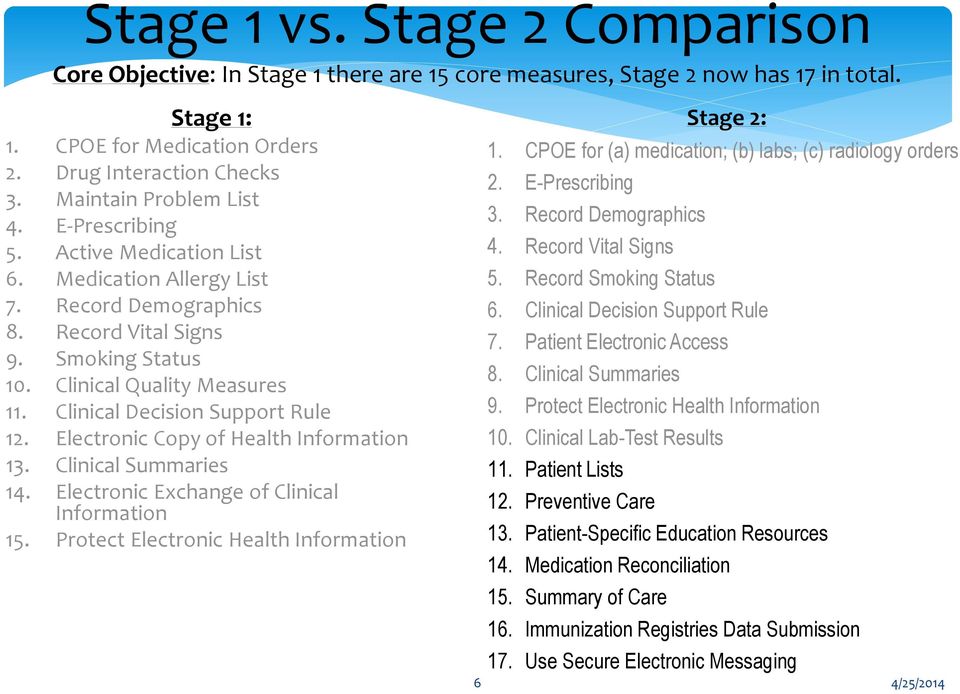
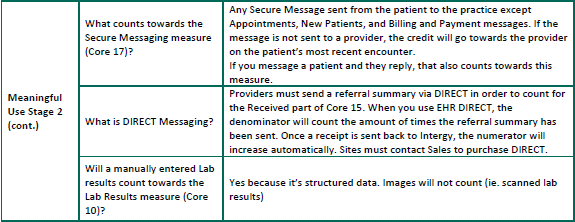
6 Stage 1 vs. Stage 2 Comparison Core Objective: In Stage 1 there are 15 core measures, Stage 2 now has 17 in total. Stage 1: 1. CPOE for Medication Orders 2. Drug Interaction Checks 3. Maintain Problem List 4. E-Prescribing 5. Active Medication List 6. Medication Allergy List 7. Record Demographics 8. Record Vital Signs 9. Smoking Status 10. Clinical Quality Measures 11. Clinical Decision Support Rule 12. Electronic Copy of Health Information 13. Clinical Summaries 14. Electronic Exchange of Clinical Information 15. Protect Electronic Health Information Stage 2: 1. CPOE for (a) medication; (b) labs; (c) radiology orders 2. E-Prescribing 3. Record Demographics 4. Record Vital Signs 5. Record Smoking Status 6. Clinical Decision Support Rule 7. Patient Electronic Access 8. Clinical Summaries 9. Protect Electronic Health Information 10. Clinical Lab-Test Results 11. Patient Lists 12. Preventive Care 13. Patient-Specific Education Resources 14. Medication Reconciliation 15. Summary of Care 16. Immunization Registries Data Submission 17. Use Secure Electronic Messaging 6 4/25/2014

7 Patient List: Core Objective 11 Stage 1 vs. Stage 2 Comparison New Core measure, formally a menu objective Using the Practice Analytics Patient Care Conditions list will satisfy this requirement. BONUS! This list can be exported to post recalls. 7 4/25/2014
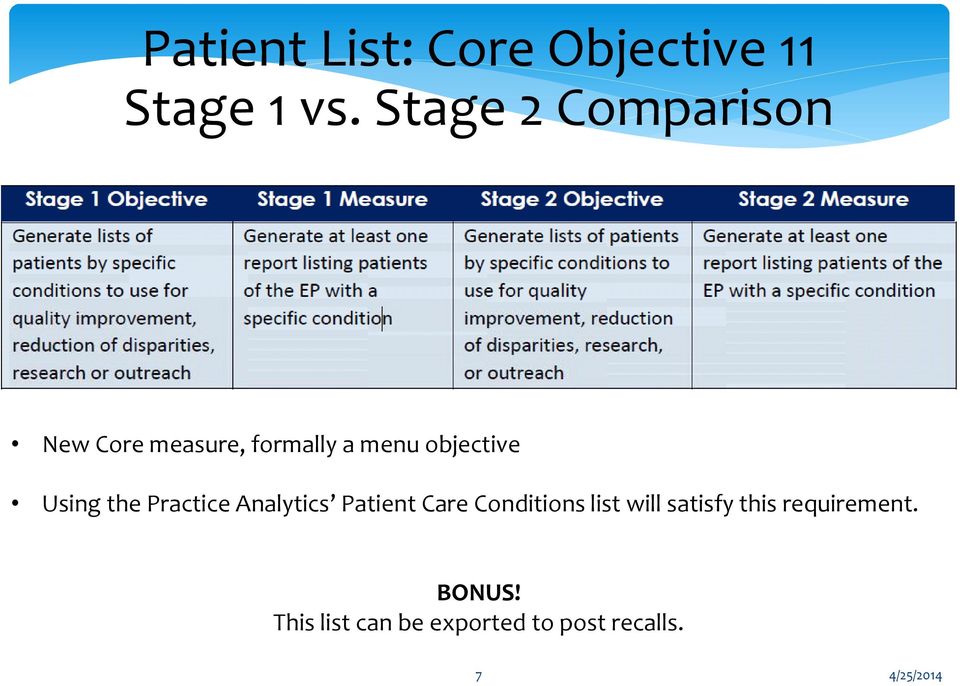
8 Stage 2: Patient Lists Objective: Generate lists of patients by specific conditions to use for quality improvement, reduction of disparities, research, or outreach. Measure: Generate at least one report listing patients of the EP with a specific condition. Exclusion: No exclusion. 8 4/25/2014


9 PAs Patient Care Conditions list 9 4/25/2014


10 Preventive Care: Core Objective 12 Stage 1 vs. Stage 2 Comparison New Core measure, formally a menu objective Combining the functionality of the Health reminders with the Practice Analytics Patient Care Conditions list to post recalls will satisfy this requirement. 10 4/25/2014

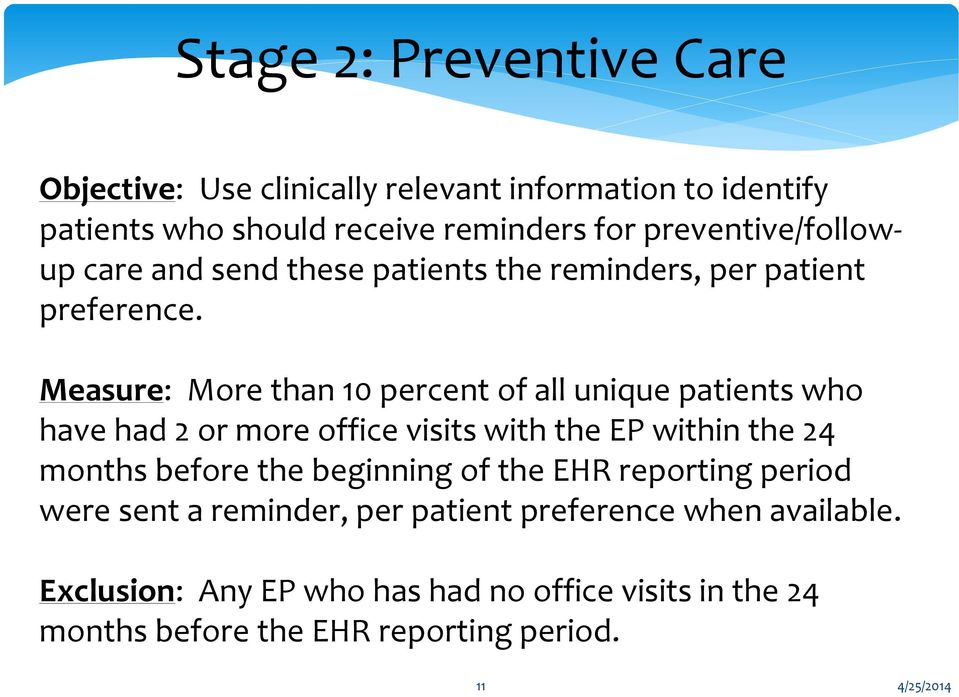
11 Stage 2: Preventive Care Objective: Use clinically relevant information to identify patients who should receive reminders for preventive/followup care and send these patients the reminders, per patient preference. Measure: More than 10 percent of all unique patients who have had 2 or more office visits with the EP within the 24 months before the beginning of the EHR reporting period were sent a reminder, per patient preference when available. Exclusion: Any EP who has had no office visits in the 24 months before the EHR reporting period. 11 4/25/2014

12 Health Reminders Tab 12 4/25/2014

13 Example of Reminder Details 13 4/25/2014

14 Recalls Generating Recalls utilizing the Practice Analytics Patient Care Conditions list Once you ve generated the Patient Care Conditions list for the condition(s) desired, export to Excel (the XL button) From Excel, save the file as a CSV file Open the Batch Post Clinical Recalls window: From the Intergy Desktop menu bar, select the Scheduling menu, select Recalls, and then select Batch Post Clinical Recalls Within the Batch Post Clinical Recalls window, select the From File radio button Search and Import the CSV file Complete the Recall Through Date, For Patients Seen Since field, and then select the Reason code from the drop down menu Proceed with additional filters and then Run the batch 14 4/25/2014


15 15 4/25/2014

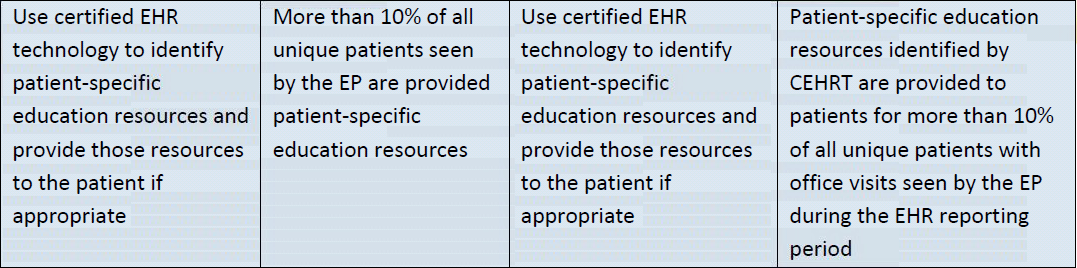
16 Patient-Specific Education Resources: Core Objective 13 Stage 1 vs. Stage 2 Comparison New Core measure, formally a menu objective. 16 4/25/2014

17 Stage 2: Patient-Specific Education Resources Objective: Use clinically relevant information from Certified EHR Technology to identify patient-specific education resources and provide those resources to the patient. Measure: Patient-specific education resources identified by CEHRT are provided to patients for more than 10 percent of all unique patients with office visits seen by the EP during the EHR reporting period. Exclusion: Any EP who has no office visits during the EHR reporting period. 17 4/25/2014

18 Patient-Specific Education NEW functionality to right click on patient s problems, medications, and labs to generate patient specific education material Uses National Institutes of Health s (NIH) Medline Plus as default website Automatically captures in MU numerator when using this option NOTE: You can additionally continue to use Forms 18 to access and indicate education was 4/25/2014 given.


19 Medication Reconciliation: Core Objective 14 Stage 1 vs. Stage 2 Comparison New Core measure, formally a menu objective. 19 4/25/2014

20 Stage 2: Medication Reconciliation Objective: The EP who receives a patient from another setting of care or provider of care or believes an encounter is relevant should perform medication reconciliation. Measure: The EP who performs medication reconciliation for more than 50 percent of transitions of care in which the patient is transitioned into the care of the EP. Exclusion: Any EP who was not the recipient of any transitions of care during the EHR reporting period. 20 4/25/2014

21 Medication Reconciliation New option on the Meds List for Mark as Reconciled added. TIP: Adding a reported med while on an encounter will auto-set the reconciled flag for that encounter. 21 4/25/2014
22 NEW! Clinical Information Reconciliation Side-by-side comparison with CCD and patient chart Consolidated view for importing medications, problems and allergies Data import based on industry standard coding systems (SNOMED, RxNorm), giving the ability to import a CCDA from any other practice 22 4/25/2014
23 Importing Clinical Information for Reconciliation Step 1: Step 2: Step 3: Step 4: Step 5: Patient provides staff with a CD or USB containing the patient s health information. From the patient s chart, select Exchange Document Click Retrieve Browse the location, select the file containing the CD or USB, select Open Select Save to Chart Once you have completed these steps, the window shown in the previous slide will appear at which time you would select the items from the CCD that you want to import into the chart. The next couple of slides have screen shots of these steps. 23 4/25/2014

24 Step 1 Patient provides staff with a CD or USB containing the patient s health information. Step 2 From the patient s chart, select Exchange Document Step 3 Click Retrieve 24 4/25/2014

25 Step 4 Browse the location, select the file containing the CD or USB, select Open Step 5 Select Save to Chart 25 4/25/2014

26 Final Step Select the items from the CCD that you want to import into the chart and select Import 26 4/25/2014
27 Summary of Care: Core Objective 15 Stage 1 vs. Stage 2 Comparison 27 4/25/2014
28 Stage 2: Summary of Care Objective: The EP who transitions their patient to another setting of care or provider of care or refers their patient to another provider of care should provide summary care record for each transition of care or referral. Measure: EPs must satisfy both of the following measures in order to meet the objective (1) The EP who transitions or refers their patient to another setting of care or provider of care provides a summary of care record for more than 50 percent of transitions of care and referrals. (2) The EP who transitions or refers their patient to another setting of care or provider of care provides a summary of care record for more than 10 percent of such transitions and referrals either (a) electronically transmitted using CEHRT to a recipient or (b) where the recipient receives the summary of care record via exchange facilitated by an organization that is a NwHIN Exchange participant or in a manner that is consistent with the governance mechanism ONC establishes for the NwHIN. (3) An EP must satisfy one of the following criteria (a) Conducts one or more successful electronic exchanges of a summary of care document, as part of which is counted in "measure 2" or (b) Conducts one or more successful tests with the CMS designated test EHR during the EHR reporting period. Exclusion: Any EP who transfers a patient to another 28 setting or refers a patient to another provider less than 100 times during the EHR reporting period is excluded from all three measures. 4/25/2014
29 Clinical and Referral Summaries NEW CCDA format based on requirements Notes: Clinical and Referral (Summary of Care) Summaries now require Consolidated Clinical Document Architecture (CCDA) standard. Correspondence letters will no longer meet the minimum requirement. Intergy workflow for Referral Summaries is similar to that for Clinical Summaries. Clinical and Referral (Summary of Care) Summaries can now be printed from the patient s summary page as well as from the encounter note during the signing of the note. For patient s registered for secure messaging, a SEND option will also appear. Once the summary has been generated, the Print Summary will change to indicate the function has been completed and the patient will be marked compliant for this measure. Generating the Summary documents in this format automatically captures in MU numerator. 29 4/25/2014

30 Generating Summary from the Patient Summary Page Box changes green once the Clinical Summary has been generated for that visit 30 4/25/2014

31 Patient s chart with access to Patient Portal will have the option to Send activated 31 4/25/2014

32 Immunization Registries Data Submission: Core Objective 16 Stage 1 vs. Stage 2 Comparison New Core measure, formally a menu objective. Successful submission required, not just a test. Exclusions exist based on Registry availability. Greenway will offer submission to State 32 Registries through their Clinical Exchange. 4/25/2014
33 Stage 2: Immunization Registries Data Submission Objective: Capability to submit electronic data to immunization registries or immunization information systems except where prohibited, and in accordance with applicable law and practice. Measure: Successful ongoing submission of electronic immunization data from CEHRT to an immunization registry or immunization information system for the entire EHR reporting period. Exclusion: Any EP that meets one or more of the following criteria may be excluded from this objective: (1) the EP does not administer any of the immunizations to any of the populations for which data is collected by their jurisdiction's immunization registry or immunization information system during the EHR reporting period; (2) the EP operates in a jurisdiction for which no immunization registry or immunization information system is capable of accepting the specific standards required for CEHRT at the start of their EHR reporting period; (3) the EP operates in a jurisdiction where no immunization registry or immunization information system provides information timely on capability to receive immunization data; or (4) the EP operates in a jurisdiction for which no immunization registry or immunization information system that is capable of accepting the specific standards required by CEHRT at 33 4/25/2014 the start of their EHR reporting period can enroll additional EPs.

34 Use Secure Electronic Messaging: Core Objective 17 Stage 1 vs. Stage 2 Comparison New Core measure NOTE: Most Secure messages sent by the patient are counted towards this measure. The following are NOT counted: Appointment Requests New Patient Request 34 Billing and Payment messages 4/25/2014
35 Stage 2: Use Secure Electronic Messaging Objective: Use secure electronic messaging to communicate with patients on relevant health information. Measure: A secure message was sent using the electronic messaging function of CEHRT by more than 5 percent of unique patients (or their authorized representatives) seen by the EP during the EHR reporting period. Exclusion: Any EP who has no office visits during the EHR reporting period, or any EP who conducts 50 percent or more of his or her patient encounters in a county that does not have 50 percent or more of its housing units with 3Mbps broadband availability according to the latest information available from the FCC on the first day of the EHR reporting period. 35 4/25/2014
36 Version 9 Features Regarding Exchange Documents When generating an Exchange document, you can send a secure message with a copy of the Exchange document attached. In previous versions of Intergy EHR, the Secure Messaging option was selected from the Via field on the Generate Document dialog box. Now, you use the Send button on the Generate Exchange Document dialog box. When you generate an Exchange document, the system determines whether the selected patient has a Practice Portal account. If the patient is a Practice Portal user, the Send button will be available on the Generate Exchange Document dialog box. 36 4/25/2014
37 Generating and Sending an Exchange Document as a Secure Message Attachment 1. Within the patient s chart, select the Exchange button to display the Exchange tab. 2. Click Generate to open the Generate Exchange Document dialog box containing options for specifying what patient clinical data should be included in the Exchange document. 3. Complete the TO, WHAT, and INCLUDE sections as needed. 4. Click Send to open the Secure Messaging dialog box with the Exchange document automatically selected as an attachment. Note: The Send button is only available if secure messaging is available for the patient. 5. Complete the To field with the address to which you want to send the secure message and in the text box, enter a message to the patient or authorized recipient. Select additional options on the Secure Message dialog box, as needed. Note: If you want to save the secure message, attachments, or both to the patient s chart, check the CC Chart box. Before sending the secure message, the system will display a dialog box in which you can specify options for saving the secure message and attachments to the patient s chart. 6. Click Send. 37 4/25/2014


38 38 4/25/2014
39
40 Intergy version 9 Upgrade Additional key features Form Updates o Additional Smoking Statuses added o Capturing First-Degree Family History A view of the new Clinical and Referral Summaries o Bugs and enhancements pending Greenway s review 40 4/25/2014
41 Form Updates: Smoking Status Additional options added to capture more smoking statuses 41 4/25/2014
42 FORM Updates: Family History Record Family Hx for first degree relatives Adding one of the following prefixes to your finding (diagnosis) will aid you in meeting this measure: Maternal History of Paternal History of Sororal History of Fraternal history of Daughter s history of Son s history of 42 4/25/2014
43 Reported Bugs/Enhancements reference to Clinical Summary - Header Includes: patient data, emergency contact, guardian, next of kin, insurance/payer indo, And encounter data (date, location, provider, care team) Pending Greenway Review: Care Team is generating 43 a list of ALL providers that have 4/25/2014 ever treated the patient (even if they no longer worked at the clinic.
44 Reported Bugs/Enhancements reference to Clinical Summary Medications Administered Includes medication administered during the encounter visit. Pending Greenway 44 Review: Is pulling in voided medications also. 4/25/2014

45 Reported Bugs/Enhancements reference to Clinical Summary Social History Will contain active (positive or negative) findings that belong to the signed encounter. 2 Items Pending Greenway Review: Meaningful Use only requires patient s smoking status, not entire Social History. Summary was pulling ALL social history from patient s chart. 45 4/25/2014

46 Reported Bugs/Enhancements reference to Clinical Summary - Immunizations Includes ALL patient Immunizations including any refused or reported. Pending Greenway Review: Meaningful Use only requires immunizations administered or reported on the day of service. 46 4/25/2014

47 Reported Bugs/Enhancements reference to Clinical Summary - Instructions The data for Instructions comes from two places: 1. Patient Education- If you right click on patient s problems, medications, or labs to generate patient specific education material, it will note the material was provided in the Summary 2. Instructions or Education Findings- If either of the following findings or their child findings (encounter note/forms) is selected, they will be included in this section of the summary: Instructions for Patient Medcin ID Education and Counseling Medcin ID Pending Greenway Review: The data was not always pulling into the Clinical Summary 47 4/25/2014

48 Reported Bugs/Enhancements reference to Clinical Summary - Medications Pending Greenway Review (reported as a patient safety issue): The same medication is showing under different categories. 48 4/25/2014

49 Reported Bugs/Enhancements reference to Clinical Summary Problems Pending Greenway Review: This section is intended to show active problems and problems related to the encounter note for that visit. It is showing inactive problems as well. 49 4/25/2014
50 Other Sections in a Clinical Summary Current Advance Directives Active allergies Family History (positive or negative) documented during the encounter visit Patient s Functional and Cognitive Status Lab Results for current encounter (including results cited into the note regardless of their status) Physical Exam Plan of Care (pending tests, referrals, care plan, future appointments, pending tests) Procedures and Surgical/Medical History Reason for Referral Reason for Visit and Chief Complaint Review of System Vital Signs 50 4/25/2014
51 Reported Bugs/Enhancements reference to Clinical Summary - General Ability to remove a specific item that the EP believes may be harmful Ability to document and be counted compliant if a patient declines the summary An indication that information is not available under sections that are not pertinent to the visit (example: no future appointments pending, no labs reviewed, no medication, etc.) Follow-ups/Updates: Please remember we are available for 2 hours each month for office hours at which time we can provide you with updates to the statuses of the issues brought up with Greenway regarding the Clinical Summary. 51 4/25/2014
52 Frequently Asked Questions A compilation of the v9.00 frequently asked questions organized by category. 52 4/25/2014

53 53 4/25/2014
54 54 4/25/2014
55
56 Greenway Dashboards V.9 Changes

57 What are the PA dashboards? The PA Dashboards include 12 sets of the following 12 dashboards:
58 What are the PA dashboards? We will concentrate on the MU Operational and Clinical Quality Dashboards. These dashboards allow practices that participate in the E.H.R incentive program to calculate their compliance percentage for Operational and Clinical Quality measures.
59 What are the PA dashboards? The Operational Quality Measures dashboard provides a comprehensive review of how well your practice is meeting the operational functionality standards for incorporating electronic health records (EHRs) into daily work processes. The Clinical Quality Measures dashboard provides a comprehensive review of the quality of clinical care in your practice.
60 What are the PA dashboards? The Criteria tab is used to select measures and high-level report criteria. The Summary, Measure Details, and Scorecard tabs each offer a different analysis of important summaries or details about the data in your Intergy EHR system. The values you select for dimensions on one tab remain constant as you navigate to other tabs in the dashboard.

61 How would I run a V.9 report? Choose the type of report you want to run: Operational or Clinical:

62 How would I run a V.9 report? For the Operational reports, choose Stage 1 or Stage 2, then choose the requested report:
63 How would I run a V.9 report? You may click the Help button: The additional Help includes details about the criteria used for the denominator, numerator and exclusions.

64 How would I run a V.9 report? Under the Criteria Tab, use the Measure criteria box to define the reporting period, patient age, gender, inclusion of exempt patients and other criteria specific to the report you chose. For the CPOE report, you can include all patients or just the ones who have prescriptions documented in their chart.

65 How would I run a V.9 report? Use the Summary tab to fine tune your report by Employer, Measure provider, Carrier Code, Plan Class and Service Center.

66 How would I run a V.9 report? The measure Details Tab, provides you with the number of patients in the Numerator, Denominator and compliance percentage. A list of patients is displayed, showing name, age and prescriptions.
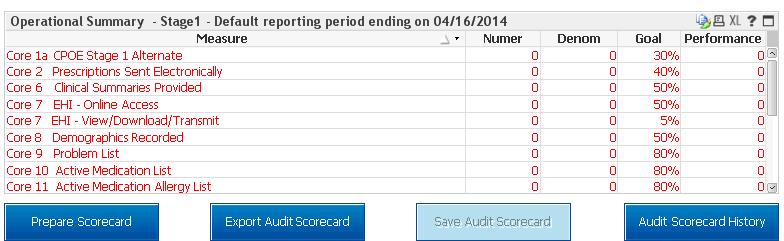
67 How would I run a V.9 report? Click the Score card Tab to display the score card:
68 Meaningful Use Audit Report Meaningful Use Audit Report is now available The operational and the Clinical Quality Measures dashboards now feature the ability to archive the onscreen scorecard charts used for attesting to your practice's compliance with Meaningful Use measures. Archiving a scorecard should be done for each attestation, since it may be requested by the CMS in case of an audit.
69 Meaningful Use Audit Report Saving an Audit Scorecard After preparing the Scorecard, you need to export the scorecard results before saving them. Click the Export Audit Scorecard button. You will not notice any on-screen activity, but the export process take place behind the scenes.
70 Meaningful Use Audit Report When the export is complete, the Save Audit Scorecard button becomes available. Click the Save Audit Score card button. A window will display in your default Internet browser confirming that the save is complete. You may close that browser window when it displays.
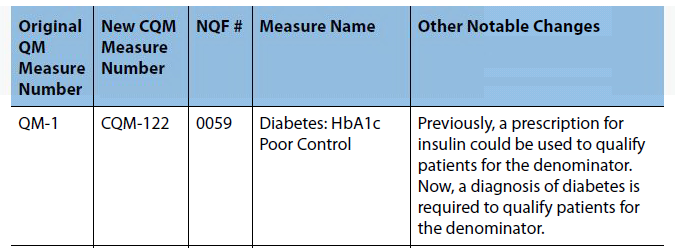
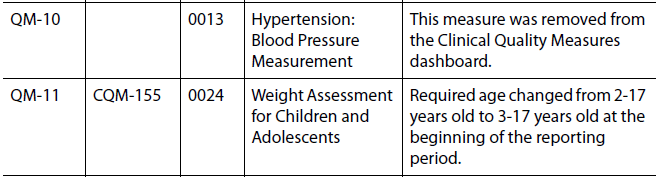
71 Dashboards Update to the Clinical Quality Measures The Clinical Quality Measures dashboards has been updated to ensure compliance with revised governmental specifications. Updates include: A revision to the logic: Patients criteria for the denominator such as age, time periods for visits, exclusions etc. (Cervical Cancer). A complete renumbering
72 Dashboards Update to the Clinical Quality Measures

73 Dashboards Update to the Clinical Quality Measures
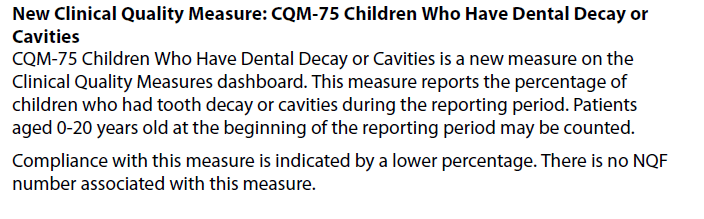
74 Dashboards Update to the Clinical Quality Measures
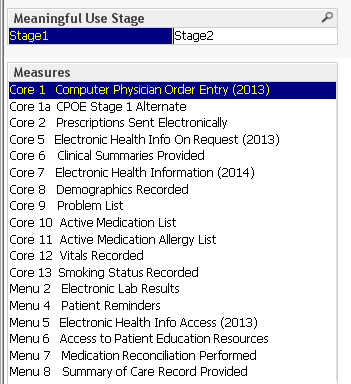
75 Dashboards Update to the Operational Measures New Tab for Stage 2 Measures
76 Dashboard Update to the Operational Measures The Stage 1 measures on the Operational Measures Dashboard have been updated to meet revised governmental specifications. (Example: Vital Signs) There has been a complete renumbering of all measures on the Dashboard. (MU-1 to Core 1) New measure was added. (Patient Access)
77 Dashboards Update to the Operational Measures
78
79 UDS UPDATES: 2014 APPROVED CHANGES
80 APPROVED UDS CHANGES FOR 2014 Table 4 Patient Characteristics: NEW - For the first time, residents of public housing will be reported on Table 4, Line 26, Selected Patient Characteristics.
81 APPROVED UDS CHANGES FOR 2014 While the Public Housing Primary Care program (Section 330(i)) has been a part of the 330 program for many years, the number of patients have not been tracked in the same way as homeless or agricultural worker patients have been in the UDS Defined as residents in publicly supported multiple unit projects either high-rise or low-rise Explicitly excludes scattered site Section 8 housing Most can be identified from a set of known addresses Or may be a characteristic added to registration form
82 APPROVED UDS CHANGES FOR 2014 UDS Form:

83 Where to document in Intergy:
84 APPROVED UDS CHANGES FOR 2014 Table 6A Selected Diagnoses and Services Rendered: NEW - The number of patients with a first time diagnosis of HIV (Not just first time at your center first time ever ) will be reported on line 1-2(a) of Table 6A Selected Diagnoses and Services Rendered. Note that there are no ICD-9 /ICD-10 codes for this
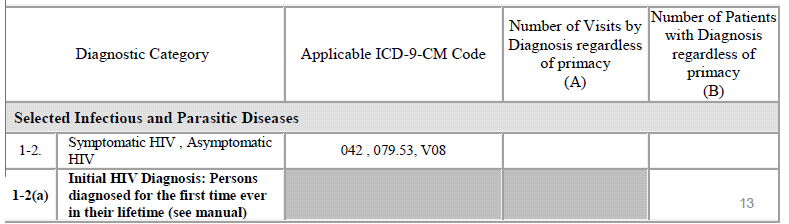
85 APPROVED UDS CHANGES FOR 2014 UDS Form:
86 APPROVED UDS CHANGES FOR 2014 NEW Patients first ever diagnosed with HIV (reported on Table 6A, line 1-2a) who receive follow-up care within 90 days of the diagnosis If follow-up care is provided by referral by a Ryan White clinic or another provider, follow-up must be completed within 90 days of diagnosis, not within 90 days of referral.
87 APPROVED UDS CHANGES FOR 2014 UDS Form:
88 APPROVED UDS CHANGES FOR 2014 Reportable Services: NEW All health centers will now report on prenatal and perinatal services whether they are provided directly at the health center, by formal referral to another provider, or by a combination of the two. This will include: Age and trimester of entry into care on Table 6B Deliveries and infant birth weights on Table 7
89 APPROVED UDS CHANGES FOR 2014 Health centers which diagnose a woman s pregnancy but do not directly provide prenatal care must refer for this care. If they do, they must: Track the referral to establish and record the date of her first comprehensive obstetrical visit. Track her delivery and record the weight of the infant(s) at birth.
90 APPROVED UDS CHANGES FOR 2014 Table 6B Quality of Care Measures: Tobacco use screening and cessation intervention, formerly two separate measures (lines 14 and 15), are now combined into one measure (line 14a) Count as compliant (1) patients who were screened for tobacco use who were not tobacco users AS WELL AS (2) those identified as tobacco users who received cessation intervention.
91 APPROVED UDS CHANGES FOR 2014 UDS Form:
92 NEW: Clinical Depression Screening (6B) Clinical depression screening of (medical) patients age 12 and older during the reporting period using a standardized instrument and if screened positive, had a follow-up plan documented
93 APPROVED UDS CHANGES FOR 2014 UDS Form:
94 APPROVED UDS CHANGES FOR 2014 Medcin # Description Mental health inventory test (MHI-5) PHQ Psychological testing with interpretation and report Psychometric California psychiatric inventory (CPI) Psychometric depression scale Psychometric depression scale (Beck) Psychometric Hamilton depression rating scale Administration of psychological test Neuropsychological testing battery administered by physician DSM-IV criteria for major depressive disorder documented PHQ-9 Depression Scale Standardized depression screening : mild to moderate symptoms Standardized depression screening : clinically significant symptoms
95 APPROVED UDS CHANGES FOR 2014 Table 7 Health Outcomes and Disparities: Diabetes control measure will continue to be all patients whose last HbA1c in the measurement year is equal to or less than 9% Instead of four categories, reporting will divide compliant patients into those with HbA1c levels less than 8%, between 8% and 9% and those with HbA1c over 9% or missing during the reporting year. Health centers will no longer be required to report on HbA1c less than 7%.

96 APPROVED UDS CHANGES FOR 2014 UDS Form:
97 APPROVED UDS CHANGES FOR 2014 EHR Capabilities and Quality Recognition Form BPHC (Bureau of Primary Health Care) will continue to collect information on the implementation of electronic health records (EHRs) Revised questions are found at: HRSA will continue to collect information on patient-centered medical home recognition/certification and accreditation.
98 APPROVED UDS CHANGES FOR 2014 Does your center currently have an Electronic Health Record (EHR) system installed and in use? a) Yes, at all sites and for all providers b) Yes, but only at some sites or for some providers c) No
99 APPROVED UDS CHANGES FOR 2014 Does your center send prescriptions to the pharmacy electronically? (Do not include faxing.) a) Yes b) No c) Not sure
100 APPROVED UDS CHANGES FOR 2014 Does your center use computerized, clinical decision support such as alerts for drug allergies, checks for drug-drug interactions, reminders for preventive screening tests, or other similar functions? a) Yes b) No c) Not sure
101 APPROVED UDS CHANGES FOR 2014 CONTACTS Telephone and support line for UDS reporting questions and use of UDS data: 866-UDS-HELP or Technical Assistance materials:
102
EHR Incentive Program Stage 2 Objectives Summary CORE OBJECTIVES (You must meet all objectives unless exclusion applies.)
 EHR Incentive Program Stage 2 Objectives Summary CORE OBJECTIVES (You must meet all objectives unless exclusion applies.) TARGETING CANCER CARE Objective Objective Description Measure/Attestation Requirement
STAGE 2 MEANINGFUL USE CORE AND MENU MEASURES FOR ELIGIBLE PROFESSIONALS
 STAGE 2 MEANINGFUL USE CORE AND MENU MEASURES FOR ELIGIBLE PROFESSIONALS CORE MEASURES must meet all CPOE for Medication, Laboratory and Radiology Orders Objective: Use computerized provider order entry
Stage 1 vs. Stage 2 Comparison for Eligible Professionals
 Stage 1 vs. Comparison for Eligible Professionals CORE OBJECTIVES (17 Total) Stage 1 Objective Stage 1 Measure Objective Measure Use CPOE for Medication orders directly entered by any licensed healthcare
Attesting for Meaningful Use Stage 2 in 2014 Customer Help Guide
 Attesting for Meaningful Use Stage 2 in 2014 Customer Help Guide Table of Contents PURPOSE OF THIS DOCUMENT 4 MEANINGFUL USE STAGE 2 OVERVIEW 4 ATTESTING FOR CORE OBJECTIVES 5 CORE OBJECTIVE #1: CPOE 7
Stage 1 Meaningful Use - Attestation Worksheet: Core Measures
 Stage 1 Meaningful Use - Attestation Worksheet: Core Measures Core Measures Objective # Objective Title / Explanation Goal Attestation Response - Values below reflect reponses of most radiologists Explanation
Stage 1 vs. Stage 2 Comparison Table for Eligible Professionals Last Updated: August, 2012
 Stage 1 vs. Stage 2 Comparison Table for Eligible Professionals Last Updated: August, 2012 CORE OBJECTIVES (17 total) Stage 1 Objective Stage 1 Measure Stage 2 Objective Stage 2 Measure Use CPOE for medication
Medicaid EHR Incentive Program. Focus on Stage 2. Kim Davis-Allen, Outreach Coordinator [email protected]
 Medicaid EHR Incentive Program Focus on Stage 2 Kim Davis-Allen, Outreach Coordinator [email protected] Understanding Participation Program Year Program Year January 1 st - December 31st. Year
STAGES 1 AND 2 REQUIREMENTS FOR MEETING MEANINGFUL USE OF EHRs 1
 STAGES 1 AND 2 REQUIREMENTS FOR MEETING MEANINGFUL USE OF EHRs 1 Requirement CPOE Use CPOE for medication orders directly entered by any licensed health care professional who can enter orders into the
Agenda. What is Meaningful Use? Stage 2 - Meaningful Use Core Set. Stage 2 - Menu Set. Clinical Quality Measures (CQM) Clinical Considerations
 AQAF Health Information Technology Forum Meaningful Use Stage 2 Clinical Considerations Marla Clinkscales & Mike Bice Alabama Regional Extension Center (ALREC) August 13, 2013 0 Agenda What is Meaningful
STAGE 2 of the EHR Incentive Programs
 EHR Incentive Programs A program administered by the Centers for Medicare & Medicaid Services (CMS) Eligible Professional s Guide to STAGE 2 of the EHR Incentive Programs September 2013 TABLE OF CONTENTS...
EHR Meaningful Use Guide
 EHR Meaningful Use Guide for Stage I (2011) HITECH Attestation Version 2.0 Updated May/June 2014 in partnership with 1-866-866-6778 [email protected] www.medicfusion.com/platinum Medicfusion EMR
Reporting Period: For Stage 2, the reporting period must be the entire Federal Fiscal Year.
 Eligible Hospital and Critical Access Hospital (CAH) Attestation Worksheet for Stage 2 of the Medicare Electronic Health Record (EHR) Incentive Program The Eligible Hospital and CAH Attestation Worksheet
Meaningful Use Cheat Sheet CORE MEASURES: ALL REQUIRED # Measure Exclusions How to Meet in WEBeDoctor
 Meaningful Use Cheat Sheet CORE MEASURES: ALL REQUIRED # Measure Exclusions How to Meet in WEBeDoctor 1 CPOE (Computerized Physician Order Entry) More than 30 percent of all unique patients with at least
Meaningful Use Qualification Plan
 Meaningful Use Qualification Plan Overview Certified EHR technology used in a meaningful way is one piece of a broader Health Information Technology infrastructure intended to reform the health care system
MICROMD EMR VERSION 9.0 2014 OBJECTIVE MEASURE CALCULATIONS
 MICROMD EMR VERSION 9.0 2014 OBJECTIVE MEASURE CALCULATIONS TABLE OF CONTENTS PREFACE Welcome to MicroMD EMR... i How This Guide is Organized... i Understanding Typographical Conventions... i Cross-References...
Webinar #1 Meaningful Use: Stage 1 & 2 Comparison CPS 12 & UDS 2013
 New York State-Health Centered Controlled Network (NYS HCCN) Webinar #1 Meaningful Use: Stage 1 & 2 Comparison CPS 12 & UDS 2013 January 31, 2014 Ekem Merchant-Bleiberg, Director of Implementation Services
Guide To Meaningful Use
 Guide To Meaningful Use Volume 1 Collecting the Data Contents INTRODUCTION... 3 CORE SET... 4 1. DEMOGRAPHICS... 5 2. VITAL SIGNS... 6 3. PROBLEM LIST... 8 4. MAINTAIN ACTIVE MEDICATIONS LIST... 9 5. MEDICATION
Stage 1 vs. Stage 2 Comparison Table for Eligible Hospitals and CAHs Last Updated: August, 2012
 CORE OBJECTIVES (16 total) Stage 1 vs. Stage 2 Comparison Table for Eligible Hospitals and CAHs Last Updated: August, 2012 Stage 1 Objective Use CPOE for medication orders directly entered by any licensed
Meaningful Use of Certified EHR Technology with My Vision Express*
 Insight Software, LLC 3050 Universal Blvd Ste 120 Weston FL 33331-3528 Tel. 877-882-7456 www.myvisionexpress.com Meaningful Use of Certified EHR Technology with My Vision Express* Eligible Professional
MEETING MEANINGFUL USE IN MICROMD -STAGE TWO- Presented by: Anna Mrvelj EMR Training Specialist
 MEETING MEANINGFUL USE IN MICROMD -STAGE TWO- Presented by: Anna Mrvelj EMR Training Specialist 1 Proposed Rule On April 15, 2015 CMS Issued a new proposal rule for the Medicare and Medicaid EHR Incentive
Meaningful Use. Medicare and Medicaid EHR Incentive Programs
 Meaningful Use Medicare and Medicaid Table of Contents What is Meaningful Use?... 1 Table 1: Patient Benefits... 2 What is an EP?... 4 How are Registration and Attestation Being Handled?... 5 What are
Meaningful Use - The Basics
 Meaningful Use - The Basics Presented by PaperFree Florida 1 Topics Meaningful Use Stage 1 Meaningful Use Barriers: Observations from the field Help and Questions 2 What is Meaningful Use Meaningful Use
Meaningful Use Stage 2
 Meaningful Use Stage 2 Presented by: Sarah Leake, HTS Consultant HTS, a division of Mountain Pacific Quality Health Foundation 1 HTS Who We Are Stage 2 MU Overview Learning Objectives 2014 CEHRT Certification
2013 Meaningful Use Dashboard Calculation Guide
 2013 Meaningful Use Dashboard Calculation Guide Learn how to use Practice Fusion s Meaningful Use Dashboard to help you achieve Meaningful Use. For more information, visit the Meaningful Use Center. General
Core Set of Objectives and Measures Must Meet All 15 Measures Stage 1 Objectives Stage 1 Measures Reporting Method
 Core Set of Objectives and Measures Must Meet All 15 Measures Stage 1 Objectives Stage 1 Measures Reporting Method Use Computerized Provider Order Entry (CPOE) for medication orders directly entered by
Meaningful Use Updates Stage 2 and 3. Julia Moore, Business Analyst SMC Partners, LLC July 8, 2015
 Meaningful Use Updates Stage 2 and 3 Julia Moore, Business Analyst SMC Partners, LLC July 8, 2015 Stage 2 Requirements 2015 EPs beyond 1st year of MU must report on a full year of data EPs in 1 st year
MEANINGFUL USE STAGE 2 2015 FOR ELIGIBLE PROVIDERS USING CERTIFIED EMR TECHNOLOGY
 MEANINGFUL USE STAGE 2 2015 FOR ELIGIBLE PROVIDERS USING CERTIFIED EMR TECHNOLOGY STAGE 2 REQUIREMENTS EPs must meet or qualify for an exclusion to 17 core objectives EPs must meet 3 of the 6 menu measures.
Achieving Meaningful Use Training Manual
 Achieving Meaningful Use Training Manual Terms EP Eligible Professional Medicare Eligible Professional o Doctor of Medicine or Osteopathy o Doctor of Dental Surgery or Dental Medicine o Doctor of Podiatric
Meaningful Use Stage 2 Implementation Guide
 Meaningful Use Stage 2 Implementation Guide Copyright 2014 Kareo, Inc. All rights reserved. Updated October 2014 Table of Contents Get Ready... 1 Task List: Meaningful Use Stage 2... 2 Basic Training...
Meaningful Use 2015: Modified Stage 2 Objectives and Measures
 Meaningful Use 2015: Modified Stage 2 Objectives and Measures Table of Contents Meaningful Use 2015:... 1 Modified Stage 2 Objectives and Measures... 1 Introduction to Stage 2 in 2015 CEHRT... 3 Stage
Meaningful Use 2015 and beyond. Presented by: Anna Mrvelj EMR Training Specialist
 Meaningful Use 2015 and beyond Presented by: Anna Mrvelj EMR Training Specialist 1 Agenda A look at the CMS Website Finding your EMR version Certification Number Proposed Rule by the Centers for Medicare
Meaningful Use Criteria for Eligible Hospitals and Eligible Professionals (EPs)
 Meaningful Use Criteria for Eligible and Eligible Professionals (EPs) Under the Electronic Health Record (EHR) meaningful use final rules established by the Centers for Medicare and Medicaid Services (CMS),
Meaningful Use Objectives
 Meaningful Use Objectives The purpose of the electronic health records (EHR) incentive program is not so much the adoption of health information technology (HIT), but rather how HIT can further the goals
MEDICFUSION / HERFERT. MEANINGFUL USE STAGE 1 and 2 ATTESTATION GUIDE 2015
 MEDICFUSION / HERFERT MEANINGFUL USE STAGE 1 and 2 ATTESTATION GUIDE 2015 The following document is intended to aid in preparation for gathering necessary information to attest in early 2016. All Medicfusion
Stage 2 of Meaningful Use Summary of Proposed Rule
 Stage 2 of Meaningful Use Summary of Proposed Rule Background In order to receive incentives for the adoption of electronic health records (EHRs) under either the Medicare or Medicaid (Medi-Cal) incentive
MEANINGFUL USE. Community Center Readiness Guide Additional Resource #13 Meaningful Use Implementation Tracking Tool (Template) CONTENTS:
 Community Center Readiness Guide Additional Resource #13 Meaningful Use Implementation Tracking Tool (Template) MEANINGFUL USE HITECH s goal is not adoption alone but meaningful use of EHRs that is, their
Understanding Meaningful Use Stage 2
 Understanding Meaningful Use Stage 2 Miranda Ladue, Manager, Product Management Adam Plotts, Manager, Product Management Copyright 2011 Allscripts Healthcare Solutions, Inc. Agenda Review MU Timeline MU
Achieving Meaningful Use with Centricity EMR
 GE Healthcare Achieving Meaningful Use with Centricity EMR Are you Ready to Report? GE Healthcare EMR Consulting CHUG Fall Conference October 2010 Achieving Meaningful Use with Centricity EMR The EMR Consulting
MEANINGFUL USE STAGE 2 REQUIREMENTS FOR ELIGIBLE PROVIDERS USING CERTIFIED EMR TECHNOLOGY
 MEANINGFUL USE STAGE 2 REQUIREMENTS FOR ELIGIBLE PROVIDERS USING CERTIFIED EMR TECHNOLOGY On August 24, the Centers for Medicare & Medicaid Services (CMS) posted the much anticipated final rule for Stage
Qualifying for Medicare Incentive Payments with Crystal Practice Management. Version 4.1.25
 Qualifying for Medicare Incentive Payments with Crystal Practice Management Version 4.1.25 01/01/ Table of Contents Qualifying for Medicare Incentive Payments with... 1 General Information... 3 Links to
Appendix 2. PCMH 2014 and CMS Stage 2 Meaningful Use Requirements
 Appendix 2 PCMH 2014 and CMS Stage 2 Meaningful Use Requirements Appendix 2 PCMH 2014 and CMS Stage 2 Meaningful Use Requirements 2-1 APPENDIX 2 PCMH 2014 AND CMS STAGE 2 MEANINGFUL USE REQUIREMENTS Medicare
Presented by. Terri Gonzalez Director of Practice Improvement North Carolina Medical Society
 Presented by Terri Gonzalez Director of Practice Improvement North Carolina Medical Society Meaningful Use is using certified EHR technology to: Improve quality, safety, efficiency, and reduce errors Engage
MEANINGFUL USE STAGE 2 USERS GUIDE
 MEANINGFUL USE STAGE 2 USERS GUIDE V10 - August 2014 eclinicalworks, 2014. All rights reserved CONTENTS CONTENTS MEANINGFUL USE STAGE 2 INTRODUCTION 4 Excluding Visit Types from Meaningful Use Calculations
Ophthalmology Meaningful Use Attestation Guide Stage 2 2014 Edition
 Ophthalmology Meaningful Use Attestation Guide Stage 2 2014 Edition Physicians who first participated in meaningful use in 2011 or 2012 must move on to Stage 2 in 2014. For 2014 only, physicians will attest
IMS Meaningful Use Webinar
 IMS Meaningful Use Webinar Presented on: May 9 11:00am 12:00pm (PDT) May 13 12:00pm 1:00pm (EST) This Webinar Will Be Recorded! Please send questions that you may have after the session to: [email protected]
Quest to Attest 2014 Stage 1 Meaningful Use. Brett M. Paepke, OD Advisor, Stage 1 Meaningful Use
 Quest to Attest 2014 Stage 1 Meaningful Use Brett M. Paepke, OD Advisor, Stage 1 Meaningful Use Goals Discussion of MU and the Incentive Program Analysis of Stage 1 Objectives Summary of RevolutionEHR
DEMONSTRATING MEANINGFUL USE STAGE 1 REQUIREMENTS FOR ELIGIBLE PROVIDERS USING CERTIFIED EHR TECHNOLOGY IN 2015
 DEMONSTRATING MEANINGFUL USE STAGE 1 REQUIREMENTS FOR ELIGIBLE PROVIDERS USING CERTIFIED EHR TECHNOLOGY IN 2015 The chart below lists the measures (and specialty exclusions) that eligible providers must
TABLE B5: STAGE 2 OBJECTIVES AND MEASURES
 294 TABLE B5: STAGE 2 OBJECTIVES AND MEASURES CORE SET Improving quality, safety, efficiency, and reducing health disparities Use computerized provider order entry (CPOE) for medication, laboratory and
0 What is Meaningful Use and where are we? 0 What is the Physician Quality Reporting System and where stage are we on?
 Outline 0 What is Meaningful Use and where are we? 0 What is the Physician Quality Reporting System and where stage are we on? 0 How can we leverage the EMR to demonstrate the quality of our care? Meaningful
Meaningful Use Stage 1:
 Whitepaper Meaningful Use Stage 1: EHR Incentive Program Information -------------------------------------------------------------- Daw Systems, Inc. UPDATED: November 2012 This document is designed to
Contact Information: West Texas Health Information Technology Regional Extension Center 3601 4 th Street MS 6232 Lubbock, Texas 79424 806-743-1338
 Contact Information: West Texas Health Information Technology Regional Extension Center 3601 4 th Street MS 6232 Lubbock, Texas 79424 806-743-1338 http://www.wtxhitrec.org/ Grant award - $6.6m Total number
Medisoft Clinical and Lytec MD EHR Meaningful Use Stage 2 Guide Configuration and End User Training 2014 and Beyond
 Title page Medisoft Clinical and Lytec MD Configuration and End User Training Business Performance Services August 2014 Produced in Cork, Ireland Copyright notice Copyright notice Copyright 2014 McKesson
NYS-HCCN TECHNICAL ASSISTANCE FOR USERS OF VITERA INTERGY
 NYS-HCCN TECHNICAL ASSISTANCE FOR USERS OF VITERA INTERGY WEBINAR #3 DATA CAPTURE FOR MENU OBJECTIVES 1-5 Presented by: Marlen Bazan-DeLeon Clinical Data Supervisor Health Choice Network, Inc [email protected]
TABLE 4: STAGE 2 MEANINGFUL USE OBJECTIVES AND ASSOCIATED MEASURES SORTED BY CORE AND MENU SET
 CMS-0044-P 156 TABLE 4: STAGE 2 MEANINGFUL USE OBJECTIVES AND ASSOCIATED MEASURES SORTED BY CORE AND MENU SET Improving quality, safety, efficiency, and reducing health disparities Use computerized provider
EHR Incentive Programs for Eligible Professionals: What You Need to Know for 2015 Tipsheet
 EHR Incentive Programs for Eligible Professionals: What You Need to Know for 2015 Tipsheet CMS recently published a final rule that specifies criteria that eligible professionals (EPs), eligible hospitals,
CMS EHR Incentive Programs:
 CMS EHR Incentive Programs: An Overview Meaningful Use Stages Vidya Sellappan Centers for Medicare & Medicaid Services Office of E-Health Standards and Services HIT Initiatives Group August 13, 2014 Table
EHR Incentive Program Updates. Jason Felts, MS HIT Practice Advisor
 EHR Incentive Program Updates Jason Felts, MS HIT Practice Advisor An Important Reminder For audio, you must use your phone: Step 1: Call (866) 906-0123. Step 2: Enter code 2071585#. Step 3: Mute your
Program Year 2014 Stage 2 Meaningful Use for EPs
 Program Year 2014 Stage 2 Meaningful Use for EPs Valorie A. Vigil, Staff Manager Idalia Lechuga-Tena, Communications Manager New Mexico Human Services Department Medical Assistance Division Systems Bureau
VIII. Dentist Crosswalk
 Page 27 VIII. Dentist Crosswalk Overview The final rule on meaningful use requires that an Eligible Professional (EP) report on both clinical quality measures and functional objectives and measures. While
RPMS DIRECT Secure Messaging
 RPMS DIRECT Secure Messaging Meet the Measure November 13, 2014 Glenn Janzen, Chief Enterprise Architect-IHS Meghna Patel, Business Analyst- DNC Duane Rozsnyai, Project Manager- DNC Agenda Meaningful Use
EMR Name/ Model. Cerner PowerChart Ambulatory (PowerWorks ASP)
 EMR Name/ Model EMR Vendor Cerner PowerChart Ambulatory (PowerWorks ASP) Cerner Corporation Core Set of Measures 1 Use CPOE for medication orders directly entered by any licensed healthcare professional
A Guide to Understanding and Qualifying for Meaningful Use Incentives
 A Guide to Understanding and Qualifying for Meaningful Use Incentives A White Paper by DrFirst Copyright 2000-2012 DrFirst All Rights Reserved. 1 Table of Contents Understanding and Qualifying for Meaningful
Stage 2 Meaningful Use What the Future Holds. Lindsey Wiley, MHA HIT Manager Oklahoma Foundation for Medical Quality
 Stage 2 Meaningful Use What the Future Holds Lindsey Wiley, MHA HIT Manager Oklahoma Foundation for Medical Quality An Important Reminder For audio, you must use your phone: Step 1: Call (866) 906-0123.
Eligible Professionals please see the document: MEDITECH Prepares You for Stage 2 of Meaningful Use: Eligible Professionals.
 s Preparing for Meaningful Use in 2014 MEDITECH (Updated December 2013) Professionals please see the document: MEDITECH Prepares You for Stage 2 of Meaningful Use: Professionals. Congratulations to our
An Introduction to the Medicaid EHR Incentive Program for Eligible Professionals
 EHR Incentive Programs A program administered by the Centers for Medicare & Medicaid Services (CMS) An Introduction to the Medicaid EHR Incentive Program for Eligible Professionals cms.gov/ehrincentiveprograms
Meaningful Use. NextGen Ambulatory EHR Path to. At NextGen Healthcare, we are ready to help. you demonstrate Meaningful Use.
 NextGen Ambulatory EHR Path to Meaningful Use At NextGen Healthcare, we are ready to help you demonstrate Meaningful Use. With our award-winning, certified EHR, our commitment to client partnerships, and
Meaningful Use Stage 2 MU Audits
 Meaningful Use Stage 2 MU Audits Presented by: Deb Anderson, CPHIMS HTS Consultant HTS, a division of Mountain Pacific Quality Health Foundation 1 CEHRT Certified Electronic Health Record Technology (EHR)
Stage 1 Meaningful Use for Specialists. NYC REACH Primary Care Information Project NYC Department of Health & Mental Hygiene
 Stage 1 Meaningful Use for Specialists NYC REACH Primary Care Information Project NYC Department of Health & Mental Hygiene 1 Today s Agenda Meaningful Use Overview Meaningful Use Measures Resources Primary
Electronic Health Record (EHR) Incentive Program. Stage 2 Final Rule Update Part 2
 Office of Medical Assistance Programs Electronic Health Record (EHR) Incentive Program Stage 2 Final Rule Update Part 2 November 7, 2012 Medical Assistance HIT Initiative 1 Office of Medical Assistance
Ophthalmology Meaningful Use Attestation Guide Stage 1 2013 Edition
 Ophthalmology Meaningful Use Attestation Guide Stage 1 2013 Edition Ophthalmologists can register for the Medicare electronic health record (EHR) incentive program on the CMS website: https://ehrincentives.cms.gov
DEMONSTRATING MEANINGFUL USE STAGE 1 REQUIREMENTS FOR ELIGIBLE PROVIDERS USING CERTIFIED EHR TECHNOLOGY IN 2014
 DEMONSTRATING MEANINGFUL USE STAGE 1 REQUIREMENTS FOR ELIGIBLE PROVIDERS USING CERTIFIED EHR TECHNOLOGY IN 2014 The chart below lists the measures (and specialty exclusions) that eligible providers must
E Z BIS ELECTRONIC HEALTH RECORDS
 E Z BIS ELECTRONIC HEALTH RECORDS CERTIFICATION AND THE HITECH INCENTIVE PROGRAM The Incentives On July 13, 2010, the U.S. Department of Health and Human Services finalized the Electronic Health Record
Meaningful Use and Lab Related Requirements
 Meaningful Use and Lab Related Requirements ONC State HIE / NILA Workgroup August 20, 2013 What is an EHR? Electronic Health Record Information system used by healthcare providers to store and manage patient
EMR Name/ Model. meridianemr 4.2 CCHIT 2011 certified
 EMR Name/ Model EMR Vendor meridianemr 4.2 CCHIT 2011 certified meridianemr, Inc Core Set of Measures Objective Stage 1 Objectives Stage 1 Measures EMR Module/ Feature 1 Use CPOE for medication orders
MDeverywhere, Inc. Presents 2014 CMS EHR Incentive Program Requirements: What Providers Need To Know
 MDeverywhere, Inc. Presents 2014 CMS EHR Incentive Program Requirements: What Providers Need To Know Presented by: Kristen Heffernan Director Product Management & Marketing, Henry Schein MicroMD Agenda
APPENDIX A: OBJECTIVES AND MEASURES FOR 2015 THROUGH 2017 (MODIFIED STAGE 2) EP Objectives and Measures
 APPENDIX A: OBJECTIVES AND MEASURES FOR 2015 THROUGH (MODIFIED STAGE 2) Objectives for Measures for Providers in EP Objectives and Measures Objective 1: Protect Patient Health Information Objective 2:
Meaningful Use: Stage 1 and 2 Hospitals (EH) and Providers (EP) Lindsey Mongold, MHA HIT Practice Advisor Oklahoma Foundation for Medical Quality
 Meaningful Use: Stage 1 and 2 Hospitals (EH) and Providers (EP) Lindsey Mongold, MHA HIT Practice Advisor Oklahoma Foundation for Medical Quality Meaningful Use Stage 1 Focuses on Functional & Interoperability
Changes with MU Stage 2. Presenter: Jennifer Oelenberger, Director and Acct Management
 Changes with MU Stage 2 Presenter: Jennifer Oelenberger, Director and Acct Management We give back EHR Concepts takes pride in giving our clients resourceful information to prepare you for the next steps
CROSSWALK NCQA 2014 PCMH HRSA 19 Requirements Meaningful Use
 P a g e 1 CROSSWALK NCQA 2014 PCMH HRSA 19 Requirements Meaningful Use PCMH 1 PATIENT-CENTERED ACCESS 1A Patient-Centered Appointment Access (Must Pass) No.4 Accessible Hours of Operation / Locations 1B
Stage 2 Overview Tipsheet Last Updated: August, 2012
 Stage 2 Overview Tipsheet Last Updated: August, 2012 Overview CMS recently published a final rule that specifies the Stage 2 criteria that eligible professionals (EPs), eligible hospitals, and critical
Eligible Professional s Checklist 2015 Modified Stage 2 Meaningful Use
 This checklist provides a look into Ohio s Medicaid Provider Incentive Program (MPIP) system for eligible professionals and may be used as a guide to help eligible professionals gather information that
Meaningful Use - Stage 1. And. Practice Maximus
 Meaningful Use - Stage 1 And Practice Maximus The following explains how Practice Maximus certified EHR module allows user to achieve meaningful use objectives for Stage 1. Eligible Professionals (EP)