
Enhanced Protection and Manageability of Virtual Servers Scalable Options for VMware Server and ESX Server
|
|
|
- Clementine Mosley
- 10 years ago
- Views:
Transcription
1 PARTNER SOLUTION BRIEF Enhanced Protection and Manageability of Virtual Servers Scalable Options for VMware Server and ESX Server Companies relying on the benefits of virtualized environments to reduce cost and maximize operational efficiencies are often challenged by limited manageability, data protection and disaster recovery options. Key Benefits Enables Consolidated Backup of Virtual Servers Enables hot backups of Virtual Machines Simplifies and expands data protection and recovery options Improves backup efficiency and reliability Facilitates implementation of tiered storage Increases application and data availability Many organizations rely on VMware Server and ESX Server to extend their datacenter beyond the limitations of a physical infrastructure to a virtual environment. Virtualized environments help centralize systems, improve hardware utilization and maximize available resources. However, they also disrupt data management and limit options for data protection. While VMware enables the use of traditional backup and recovery methods to protect VMware Server and ESX Server, CommVault helps consolidate virtual servers for improved data protection, increased availability and reliable disaster recovery. The CommVault Solution CommVault Unified Data Management Enables Consolidation with Virtualized Servers CommVault helps deploy virtual servers by enabling the replication of data and applications from physical to virtual servers. CommVault provides a single console from which to easily manage all aspects of data protection, archive management, recovery management and replication of physical and virtual servers. It also facilitates the implementation of tiered storage allowing administrators to easily migrate data to less expensive storage. CommVault s Unified Data Management enables the ability to browse a virtual machine s backup sets and restore them to the source virtual machines as if the backups were created locally. This eliminates the administrator s burden of manually tracking the location of backup sets as they relate to specific virtual machines, and eases the transition from physical to virtual systems. Extend data protection options beyond traditional methods Recover to dissimilar hardware Easily move data from a virtual server into a backup server environment Leverage file level granularity across all platforms Assist in the transition to a new storage infrastructure Reliable Disaster Recovery for VMware CommVault enhances and extends VMware s disaster recovery benefits with unique capabilities that enable organizations to: Quickly recover data and applications Accelerate the process of rebuilding a backup environment CommVault Galaxy software simplifies and accelerates the process of rebuilding the backup environment and re-establishing the index database, so that actual data recovery can begin much quicker. With the backup environment re-established, CommVault s granular recovery capabilities allow restores of single objects, instead of entire application databases or volumes. The same granular recovery benefits apply to VMware virtual machine file system environments, and applications including Microsoft Exchange and SQL Server, Oracle, Lotus Notes, GroupWise and SharePoint Portal Server.
2 Replication of Virtual Data for Simplified Migration and Management CommVault Continuous Data Replicator delivers data replication into Virtual Machine environments. CDR provides continuous, real time capture and wide area replication of data written to disk. CDR operates on multi-platform host-based environments and is fully supported on virtual machines hosted on ESX Server or VMware Server systems. When deploying a virtual environment, CDR helps migrate and centralize Windows, Linux and UNIX data from physical to virtual machines. CDR offers the ability to continuously replicate data from physical to virtual (P:V), virtual to virtual (V:V), or virtual to physical (V:P) for centralized protection and disaster recovery preparedness. Backup Methods and Options for Protecting VMware Virtual Servers CommVault supports VMware virtual machines and enables several backup methods for protecting file system, data and applications within VMware virtual environments. Backup from a VCB Proxy Server on a SAN Using VMware Consolidated Backup and CommVault s VMware Integration Module Extend data protection and enhance disaster recovery Eliminate LAN traffic VMotion aware backups to ensure seamless data protection VMware Consolidated Backup (VCB) provides a set of drivers and scripts that enable LAN-free backup of Virtual Machines. These backups are performed from a VCB Proxy Server running Microsoft Windows This method is ideal for companies looking to eliminate LAN traffic through the use distributed SAN environments. File Level Backup of Windows Guest Machines Preserve scheduling, storage reporting and compliance per virtual machine view Backup only relevant data Restore directly to the guest system in a single step regardless of the location of the virtual machine Restore specific versions of individual file(s) Leverage Single Instance Store to reduce disk storage required for backup Full Image Backup of Virtual Machines Protect full virtual machines running for complete Disaster Recovery Recover entire virtual machines to the same or a different ESX server Backup from a Virtual Machine Leverage application awareness Preserve scheduling, storage reporting and compliance per original client view Does not require scripting Easily manage and share dissimilar hardware CommVault can treat virtual machines as real machines. This method is best suited for protecting and recovering an entire virtual machine, including its configuration, operating system and application data. Galaxy idataagent(s) installed on virtual machines enable data to be backed up directly from virtual machines just as if they were separate physical servers. By combining real system support with virtual disk file support, Galaxy makes it easy to recover on dissimilar hardware. CommVault s VMware Integration Module leverages Virtual Machine snapshots to provide two recovery options using VCB directly on the SAN. 2
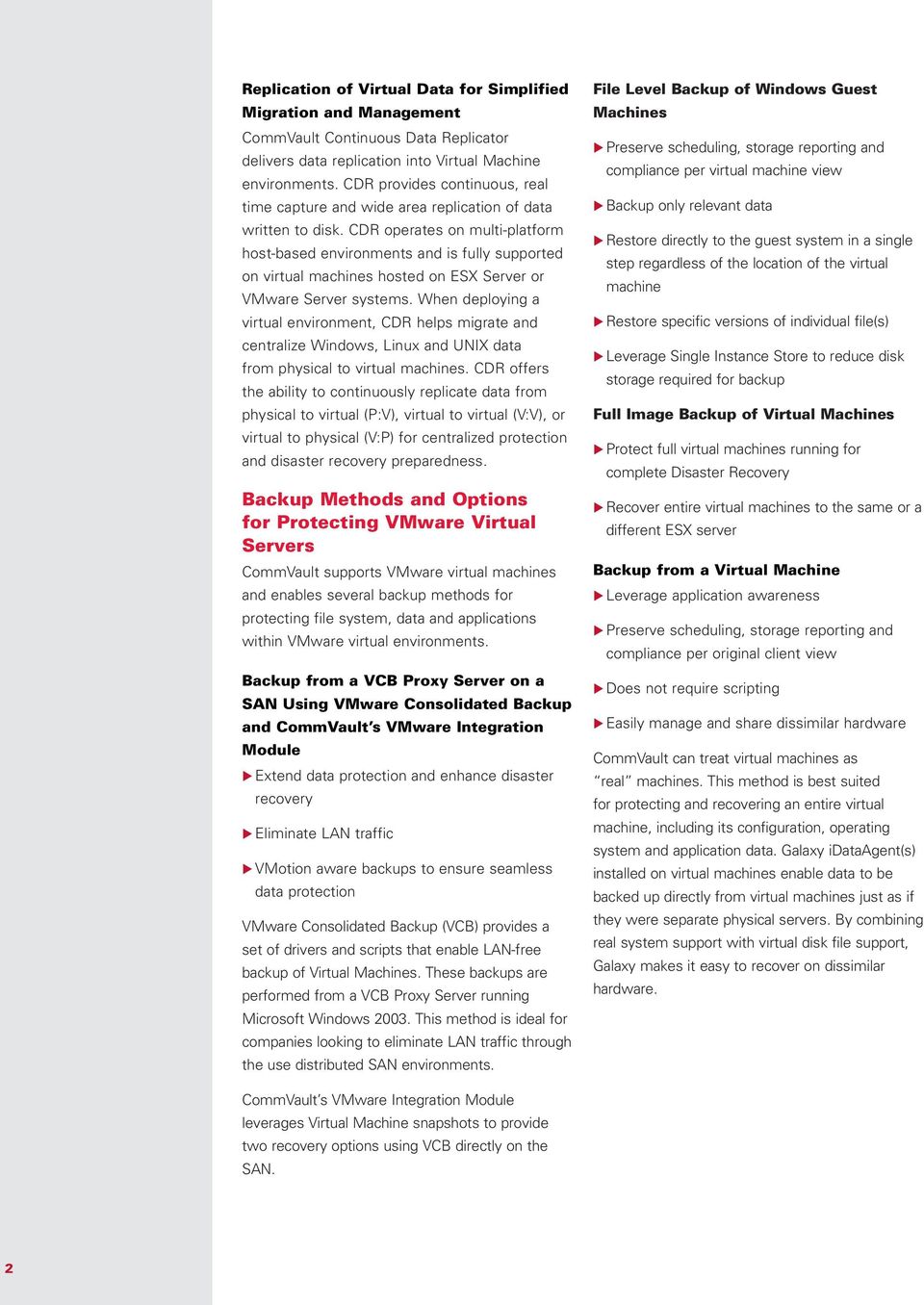
3 Leverage VCB snapshots to perform off-host backup of virtual machines Perform file level, single step restore back to the source Galaxy Client App OS Virtual Machines Galaxy Client App OS Galaxy Client App OS Single Step Restore Backup Disk and Tape Manage data protection, archiving, recovery and replication of physical and virtual from one console ESX Server Off-host Backup Server VCB API Galaxy FS ida MOUNT SNAPSHOT SNAPSHOT SNAPSHOT Physical Server SAN Storage 3
4 Key Features and Benefits Features VMware Consolidated Backup framework Unified Architecture Benefits Easily offload backup from production or critical ESX servers while maintaining integration with existing backup schemes. Enables file backups for fast and easy single step recovery of individual files. Enables full image backups for disaster recovery purposes. Provides additional granularity that can be used to enhance protection and simplify management. It also reduces learning curve and increases reliability. Full, incremental, differential and synthetic full backup operations Enables most efficient data protection possible, and with appropriate use of storage media to ensure just as rapid recovery from synthetics as from full. Object-level recovery Easy, fast recovery of file system, database and application data using a single data object. Easy right-click selection among multiple file versions Single Instance Store See multiple versions of the same file and easily select all, some, or one to recover the exact version that your business user requires. This can enable recovery of multiple versions of the same VMware virtual disk files for selection from multiple point-in-time copies. Store only one instance of an object to reduce disk storge requirements without any impact on the recovery speeds. End user and compliance search Allow end users to search and restore data they have access to. Allow designated complaince users to perform e-discovery search across backup, archive and online data. Granular backup job control and management Fine tune operation. Control all jobs by queue, pre-emption, priority, on demand restart, and update interval. Suspend, resume or kill any job using the Job Controller Window at will. Configurable Auxiliary copies Configure Auxiliary copies from inline, selective, synchronous, or cascading. This enables compliance with data protection and retention policies and ensures recovery due to data availability. Multi-streaming and multiplexing Improves backup performance and helps meet shorter backup windows. 4

5 Key Features and Benefits (continued) Features Distributed index Configurable firewall support Benefits Eliminates issues typically associated with managing backup catalogs. Relational structure ensures high-speed performance. Built in redundancies ensure recoverability and eliminate the need for administrative management of the index. Depending on your needs and configuration, as few as two ports are required to backup through a firewall saving money and resources. Dynamic and static disk sharing Increases ROI from expensive disk storage by sharing access to disk with static and dynamic configurations. Data aging Saves disk space and reduces backup failures by removing data that has aged past your immediate-term retention requirement. This can also be overridden for specific backup jobs that you need to retain. Span disk mount points Configurable to spill and fill or fill and spill. This reduces problems with disk management by enabling Galaxy backup to work across multiple mount points and treat them as a single backup to disk device. Disk space monitoring with configurable watermarks Saves disk space and reduces backup failures by monitoring available disk space, tracking disk usage for trend analysis and capacity planning and by triggering automatic alerts and pruning of data when watermarks are reached. Mixed drive support in the same library Avoid the need for expensive add-on or third party software to manage different types of tape drives in the same library. Shared library management Increase ROI by providing shared access to libraries from multiple backup servers, making it easier to deploy, manage, and maintain than other backup offerings. Shared drive management Append data to removable media to fully utilize capacity, rather than wasting space and increasing costs. 5
6 Unique Benefits of CommVault Software The CommVault suite of software includes data archiving, data protection, replication & snapshot management, and data resource management. When used in combination, these capabilities provide unique and compelling benefits for managing data all from a single console. As additional CommVault capabilities are added, they are managed from the same console to reduce administrative time. They also leverage the same data management infrastructure including servers and storage devices, to reduce costs. One console from which to easily browse and share resources and perform disaster recovery One software solution, schedule of data movement and application index to maintain One admin team to manage [email protected] CommVault Worldwide Headquarters 2 Crescent Place Oceanport, NJ Fax: Regional Offices: United States Europe Middle East & Africa Asia-Pacific Mexico & Latin America Canada India Oceania 2008 CommVault Systems, Inc. All rights reserved. CommVault, CommVault and logo, the CV logo, CommVault Systems, Solving Forward, SIM, Singular Information Management, CommVault Galaxy, Unified Data Management, QiNetix, Quick Recovery, QR, CommNet, GridStor, Vault Tracker, Quick Snap, QSnap, Recovery Director, CommServe, CommCell, InnerVault, and ROMS are trademarks or registered trademarks of CommVault Systems, Inc. All other third party brands, products, service names, trademarks, or registered service marks are the property of and used to identify the products or services of their respective owners. All specifications are subject to change without notice.

Enhanced Data Protection and Manageability of Virtual Servers Using CommVault Simpana Solutions
 BACKUP & RECOVERY ARCHIVE REPLICATION RESOURCE NAGEMENT SEARCH Enhanced Data Protection and Manageability of Virtual Servers Using CommVault Simpana Solutions Key Benefits Offload backup operations from
Management with Simpana
 Efficient, Affordable Data Management with Simpana Software and Microsoft Windows Azure Protect, Manage and Access Your Data Securely and Efficiently: On Premises, In the Cloud, From Anywhere, At Any Time,
Enhancing Application Protection and Recovery with a Modern Approach to Snapshot Management
 Enhancing Application Protection and Recovery with a Modern Approach to Snapshot Management A CommVault Business Value and Technology White Paper which covers leveraging a modern approach to managing snapshots
SharePoint Archive Rules Options
 Key Capabilities u Control data growth Address common capacity management problems such as database growth. Reduce the time required to make backup copies by archiving old documents out of the primary
Continuous Data Replicator 7.0
 DATA PROTECTION ARCHIVE REPLICATION RESOURCE MANAGEMENT SEARCH Continuous Data Replicator 7.0 Continuous Data Protection (CDP) and Centralized Management of Remote Office Data Key Benefits Reduces management
The Five Fundamentals of Virtual Server Data Protection. February, 2013
 The Five Fundamentals of Virtual Server Data Protection February, 2013 Contents The Drive to Virtualize... 3 The Five Fundamentals... 3 Virtual Server Data Protection Solved... 4 Data Protection and the
Archive 8.0 for File Systems and NAS Optimize Storage Resources, Reduce Risk and Improve Operational Efficiencies
 BACKUP & RECOVERY ARCHIVE REPLICATION RESOURCE MANAGEMENT SEARCH Key Benefits Optimize capacity in primary storage with tiered storage architecture, providing cost and resource benefits Retain transparent
A CommVault Business Value & Technology White Paper. Snapshot Management & Source-side Deduplication are Vital to Modern Data Protection
 A CommVault Business Value & Technology White Paper Snapshot Management & Source-side Deduplication are Vital to Modern Data Protection Contents Executive Summary 3 New Approaches Needed to Tackle Data
CommVault Simpana Replication Software Optimized Data Protection and Recovery for Datacenter or Remote/Branch Office Environments
 BACKUP & RECOVERY ARCHIVE REPLICATION RESOURCE MANAGEMENT SEARCH Key Benefits Consolidates data over thin WAN connections and expedites local recovery Eliminates tape management at multiple locations by
CommVault Simpana Remote and Branch Office Protection
 BACKUP & RECOVERY ARCHIVE REPLICATION RESOURCE MANAGEMENT SEARCH Key Benefits Consolidate data over thin WAN connections and expedite local recovery with multiple backup and recovery options. Save time
Using Live Sync to Support Disaster Recovery
 Using Live Sync to Support Disaster Recovery SIMPANA VIRTUAL SERVER AGENT FOR VMWARE Live Sync uses backup data to create and maintain a warm disaster recovery site. With backup and replication from a
A CommVault Business-Value White Paper Unlocking the Value of Global Deduplication for Enterprise Data Management
 Unlocking the Value of Global Deduplication for Enterprise Data Management Reduce Costs, Reduce Complexity, Reduce Recovery Times Contents Executive Summary 3 Redundant Data Reduces Storage Efficiency
How To Use Simpana Archive For Microsoft Sharepoint Software
 BACKUP & RECOVERY ARCHIVE REPLICATION RESOURCE NAGEMENT SEARCH Key Benefits Saves disk capacity by moving unused data to secondary, less expensive storage, establishing proactive control over skyrocketing
Combining the Manageability and Efficiency of CommVault Simpana Software With the Speed of Native Snapshots
 Combining the Manageability and Efficiency of CommVault Simpana Software With the Speed of Native Snapshots Leverage Snapshot Integration to Protect Data, Meet SLAs, and Improve RPOs and RTOs Contents
A CommVault Business-Value White Paper Archiving Strategies for Successful ediscovery
 A CommVault Business-Value White Paper Archiving Strategies for Successful ediscovery Gary Cooke Archiving Technical Specialist, CommVault Contents Why Archive When You Have Backups? 3 Archiving Advancements
A CommVault White Paper: Business Continuity: Commserve Licensing & Recovery Procedure
 A CommVault White Paper: Business Continuity: Commserve Licensing & Recovery Procedure CommVault Corporate Headquarters 2 Crescent Place Oceanport, New Jersey 07757-0900 USA Telephone: 888.746.3849 or
CommVault Search Web Interface 7.0 for Users
 DATA PROTECTION ARCHIVE REPLICATION RESOURCE MANAGEMENT SEARCH CommVault Search Web Interface 7.0 for Users Singular Search of Files and e-mail Managed by CommVault Unified Data Management Software Key
COMMVAULT SIMPANA 10 SOFTWARE MULTI-TENANCY FEATURES FOR SERVICE PROVIDERS
 COMMVAULT SIMPANA 10 SOFTWARE MULTI-TENANCY FEATURES FOR SERVICE PROVIDERS As cloud adoption continues to rise, so has the demand from Service Providers for software products that support their multi-tenant
Simpana Archive for File Systems and NAS
 BACKUP & RECOVERY ARCHIVE REPLICATION RESOURCE NAGEMENT SEARCH Simpana Archive for File Systems and NAS Key Benefits Optimize Storage Resources, Reduce Risk and Improve Operational Efficiencies Optimize
CommVault Simpana Software with SnapBackup
 BACKUP & RECOVERY ARCHIVE REPLICATION RESOURCE NAGEMENT SEARCH Key Benefits Provides better RPO/RTOs for critical data, even for the largest datasets and databases. CommVault Simpana Software with SnapBackup
COMMVAULT SIMPANA SOFTWARE SOLUTION SETS FOR MODERN INFORMATION INFRASTRUCTURE AND CLOUD ENVIRONMENTS
 FACT SHEET: COMMVAULT SIMPANA SOFTWARE SOLUTION SETS FOR MODERN INFORMATION INFRASTRUCTURE AND CLOUD ENVIRONMENTS CommVault has introduced new Simpana software solution sets that are purpose-built to modernize
Simpana Archive for IBM Lotus Domino Server Mailboxes
 BACKUP & RECOVERY ARCHIVE REPLICATION RESOURCE NAGEMENT SEARCH Simpana Archive for IBM Lotus Domino Server Mailboxes Key Benefits Saves disk capacity by moving unused data to secondary, less expensive
BACKUP & RECOVERY ARCHIVE REPLICATION RESOURCE MANAGEMENT SEARCH
 BACKUP & RECOVERY ARCHIVE REPLICATION RESOURCE MANAGEMENT SEARCH Simpana Search Key Benefits Legal Discovery, Business and Compliance Benefits Simplify, speed and reduce the cost of enterprise-wide ediscovery
SOLUTION OVERVIEW COMMVAULT SIMPANA INTELLISNAP SNAPSHOT MANAGEMENT TECHNOLOGY:
 COMMVAULT SIMPANA INTELLISNAP SNAPSHOT MANAGEMENT TECHNOLOGY: SOLUTION OVERVIEW Enterprises today increasingly turn to arraybased snapshots and replication to augment or replace legacy data protection
A CommVault White Paper: Quick Recovery
 A CommVault White Paper: Quick Recovery Increased Application Availability for Multi-Platform SAN Environments CommVault Corporate Headquarters 2 Crescent Place Oceanport, New Jersey 07757-0900 USA Telephone:
StoreWay. Calypso. Backup & Recovery. www.bull.com
 StoreWay Calypso Backup & Recovery www.bull.com StoreWay Calypso Simplified, Enterprise-class Protection for File Systems, Applications and Database Managing data is usually about managing costs: the cost
A CommVault Business-Value White Paper Understanding and Mitigating the Legal Risks of Cloud Computing
 A CommVault Business-Value White Paper Understanding and Mitigating the Legal Risks of Cloud Computing Shannon Smith, Esq., ediscovery and Archiving Specialist for CommVault Systems Bennett B. Borden,
Scheduling Tansaction Log Restores on a Standby SQL Server
 Scheduling Tansaction Log Restores on a Standby SQL Server CONTENTS Introduction... 3 Audience... 3 Restore Environment... 3 Goal... 3 Solution... 3 2 INTRODUCTION You can schedule to restore the latest
VMware Backup and Recovery: What They Don t Tell You
 : What They Don t Tell You VMware Backup and Recovery: What They Don t Tell You Table of Contents Introduction 3 ESX Server and Virtual Machine Backup Basics 4 VM Backup Methodology Alternatives 5 1. Backup
EMAIL ARCHIVING: A BUYER S CHECKLIST
 EMAIL ARCHIVING: A BUYER S CHECKLIST Email is the backbone of today s corporate business processes. It lives as the primary communication vehicle internally between employees and externally with customers,
A CommVault White Paper Traditional Backup is Dead Are You Prepared?
 Traditional Backup is Dead Are You Prepared? Conventional backup and recovery approaches clearly can t keep up with ever-growing storage rates. It s time to take on a new strategy. Contents Executive Summary
Symantec NetBackup 7.1 What s New and Version Comparison Matrix
 Symantec 7.1 What s New and Version Comparison Matrix Symantec 7 allows customers to standardize backup and recovery operations across physical and virtual environments with fewer resources and less risk
Hidden Costs of Virtualization Backup Solutions, Revealed
 Hidden Costs of Virtualization Backup Solutions, Revealed 5 WAYS VIRTUAL BACKUP PRODUCTS CAN SURPRISE YOU LATER Today, nearly every datacenter has become heavily virtualized. In fact, according to Gartner
Smarter Deduplication with CommVault Simpana Software
 BACKUP & RECOVERY ARCHIVE REPLICATION RESOURCE NAGEMENT SEARCH Smarter Deduplication with CommVault Simpana Software Key Benefits Global deduplication across all data, regardless of data type, source or
Simpana Education Services
 Simpana Education Services COURSE CATALOG Outside S I M P A N North A v10 America April June 2013 What s Inside: Article on CommVault Simpana OnePass Agent for Exchange NEW! Courses NEW! Certification
How To Know If Your Email Archive Is Ready To Be Used For Business
 7 REASONS TO WORRY ABOUT YOUR CURRENT EMAIL ARCHIVING STRATEGY The data growth explosion facing most organizations today is coinciding with the mounting demands of stagnant IT budgets and an increased
IBM Tivoli Storage Manager
 Help maintain business continuity through efficient and effective storage management IBM Tivoli Storage Manager Highlights Increase business continuity by shortening backup and recovery times and maximizing
Symantec Backup Exec 2014 Agents and Options
 Symantec Backup Exec 2014 Agents and Options Data Sheet: Data Protection Overview enhance and extend Backup Exec features, capabilities, and platform support. Whether you need to protect VMware vsphere,
Data Sheet: Backup & Recovery Symantec Backup Exec 12.5 for Windows Servers The gold standard in Windows data protection
 The gold standard in Windows data protection Overview Symantec Backup Exec 12.5 delivers market-leading backup and recovery protection from server to desktop, providing complete data protection for the
SEP sesam Backup & Disaster Recovery Overview
 SEP sesam Backup & Disaster Recovery Overview Lanai Bayne VP of Business Development SEP Software Corp. [email protected] Christian Ruoff Sr. Technical Support Manager SEP Software Corp. [email protected] Why SEP
Acronis Backup Product Line
 New Generation Data Protection Powered by Acronis AnyData Technology Acronis Backup Product Line Speaker name Introducing Acronis Backup Acronis Backup Target: Smaller environments, home office, remote
Dell PowerVault DL Backup to Disk Appliance Powered by CommVault. Centralized data management for remote and branch office (Robo) environments
 Dell PowerVault DL Backup to Disk Appliance Powered by CommVault Centralized data management for remote and branch office (Robo) environments Contents Executive summary Return on investment of centralizing
Symantec NetBackup 7 Clients and Agents
 Complete protection for your information-driven enterprise Overview Symantec NetBackup provides a simple yet comprehensive selection of innovative clients and agents to optimize the performance and efficiency
VERITAS NetBackup 6.0 Enterprise Server INNOVATIVE DATA PROTECTION DATASHEET. Product Highlights
 VERITAS NetBackup 6.0 Enterprise Server INNOVATIVE DATA PROTECTION As the recognized leader for enterprise-class backup and recovery, VERITAS NetBackup Enterprise Server software is designed to help provide
W H I T E P A P E R. Optimized Backup and Recovery for VMware Infrastructure with EMC Avamar
 W H I T E P A P E R Optimized Backup and Recovery for VMware Infrastructure with EMC Avamar Contents Introduction...1 VMware Infrastructure Overview...1 VMware Consolidated Backup...2 EMC Avamar Overview...3
Backup Exec 15 Agents and Options
 DATA PROTECTION Backup Exec 15 Agents and Options Enhance and extend Backup Exec features, capabilities, and platform support Overview enhance and extend Backup Exec features, capabilities, and platform
Simpana Archive for Microsoft Exchange Systems
 BACKUP & RECOVERY ARCHIVE REPLICATION RESOURCE NAGEMENT SEARCH Key Reduce TCO and maintain availability as data ages with tiered storage polices. Simpana Archive for Microsoft Exchange Systems Centralized
VMware Virtual Machine Protection
 VMware Virtual Machine Protection PowerVault DL Backup to Disk Appliance Dell Symantec Symantec DL Appliance Team VMware Virtual Machine Protection The PowerVault DL Backup-to-Disk Appliance Powered by
CommVault Simpana 10 Best Practices
 CommVault Simpana 10 Best Practices for the Dell Compellent Storage Center Andrew Smith, Data Protection Product Specialist Kris Piepho, Microsoft Product Specialist July, 2013 Revisions Date Description
ediscovery AND COMPLIANCE STRATEGY
 ONE EASILY AVOIDABLE PITFALL IN YOUR ediscovery AND COMPLIANCE STRATEGY As the mobile workforce continues to grow and more data gets generated outside of the datacenter, bringing that endpoint data into
Using VM Archiving to Solve VM Sprawl
 Using VM Archiving to Solve VM Sprawl Today s VMware environments are plagued by out-of-control growth of virtual machines, increasing costs and wasting valuable resources. This whitepaper discusses how
Optimized data protection through one console for physical and virtual systems, including VMware and Hyper-V virtual systems
 Symantec Backup Exec 12.5 for Windows Small Business Server Premium and Standard Editions Comprehensive data protection and system recovery for Microsoft Windows Small Business Server Overview Symantec
More enhanced features.
 More enhanced features. Saves time and lowers cost. Upgrade today for complete data and system protection across your virtual and physical server environments. Symantec Backup Exec 12.5 NEW agents for
IBM Tivoli Storage Manager for Virtual Environments
 IBM Storage Manager for Virtual Environments Non-disruptive backup and instant recovery: Simplified and streamlined Highlights Simplify management of the backup and restore process for virtual machines
Introduction. Setup of Exchange in a VM. VMware Infrastructure
 Introduction VMware Infrastructure is deployed in data centers for deploying mission critical applications. Deployment of Microsoft Exchange is a very important task for the IT staff. Email system is an
Name Description Included in
 1 s and s Table s and s Table Agents s Backup Exec agents and options enhance and extend platform and feature support for Backup Exec environments. Whether you need to protect critical Microsoft applications
Hybrid Cloud Backup and Recovery Software. Virtualization Support Real Backups of Virtual Environments
 Hybrid Cloud Backup and Recovery Software Virtualization Support Asigra Inc. 1120 Finch Avenue West, Suite 400 Toronto, ON Canada M3J 3H7 tel: 416-736-8111 fax: 416-736-7120 email: [email protected] www.recoveryourcool.com
Commvault Licensing Information
 Commvault Licensing Information This document includes a series of short, one-page (front and back) licensing summaries that are designed to help you better understand Commvault licensing. It covers: Data
OPTIONS / AGENTS DESCRIPTION BENEFITS
 All Backup Exec 12 Agents and Options Backup Exec 12 Agents and Option enhance and extend platform and feature support for Backup Exec Environments. Whether you need to protect critical Microsoft applications
BALANCING COST, RISK AND COMPLEXITY IN YOUR DR STRATEGY
 BALANCING COST, RISK AND COMPLEXITY IN YOUR DR STRATEGY James Brissenden: CommVault Services Development Manager Jeff Dorr: CommVault Marketing Manager Abstract: In the face of more frequent disaster situations
Confidence in a connected world. Veritas NetBackup 6.5 for VMware 3.x Best Practices
 WHITE PAPER: Best Practices Confidence in a connected world. Veritas NetBackup 6.5 for VMware 3.x Best Practices White Paper: Best Practices Veritas NetBackup 6.5 for VMware 3.x Best Practices November
WHITE PAPER. Solving the Challenges of Virtual Machine Backups with Acronis Backup & Recovery 10
 Solving the Challenges of Virtual Machine Backups with Acronis Backup & Recovery 10 Copyright Acronis, Inc., 2000 2009 Table of contents Introduction... 3 Backup Approaches for Virtual Machines (VMs)...
W H I T E P A P E R. Understanding VMware Consolidated Backup
 W H I T E P A P E R Contents Introduction...1 What is VMware Consolidated Backup?...1 Detailed Architecture...3 VMware Consolidated Backup Operation...6 Configuring VMware Consolidated Backup...6 Backing
EMC Backup Solutions for Virtualized Environments
 EMC Solutions for Virtualized Environments Dumitru Taraianu Presales, EMC 1 VMWare Present & Future Present Agent installed in each host ESX Console-level backup VCB Future vstorage API for Data Protection
Windows Server 2008 Hyper-V Backup and Replication on EMC CLARiiON Storage. Applied Technology
 Windows Server 2008 Hyper-V Backup and Replication on EMC CLARiiON Storage Applied Technology Abstract This white paper provides an overview of the technologies that are used to perform backup and replication
Backup and Recovery for VMware Using EMC Next-Generation Backup Solutions
 White Paper Abstract VMware virtualization provides the power to consolidate servers and automate processes, enabling IT-as-a-service, but it can come at the cost of extra storage, backup resources and
JANUARY 2015 EDUCATION PROGRAM GUIDE PARTNER PARTN ADVANTAGE
 JANUARY 2015 PARTN ADVANT EDUCATION PROGRAM GUIDE R S Table of Contents Introduction Sales Tracks Accreditation CommVault Sales Professional Accreditation...4 Knowledge Transfer Simpana Sales Enablement
Backup and Recovery Best Practices With CommVault Simpana Software
 TECHNICAL WHITE PAPER Backup and Recovery Best Practices With CommVault Simpana Software www.tintri.com Contents Intended Audience....1 Introduction....1 Consolidated list of practices...............................
NETAPP SYNCSORT INTEGRATED BACKUP
 NETAPP SYNCSORT INTEGRATED BACKUP Introducing NetApp Syncsort Integrated Backup Peter Eicher, Syncsort Senior Product Marketing Manager Matt Welby, Syncsort Systems Engineer Agenda The Data Protection
Veritas NetBackup 6.0 Server Now from Symantec
 Veritas NetBackup 6.0 Server Now from Symantec Innovative data protection As the recognized leader for enterprise-class backup and recovery, Veritas NetBackup Server software is designed to help provide
VERITAS Backup Exec 10 for Windows Servers AGENTS & OPTIONS MEDIA SERVER OPTIONS KEY BENEFITS AGENT AND OPTION GROUPS
 DATASHEET VERITAS Backup Exec 10 for Windows Servers AGENTS & OPTIONS VERITAS Backup Exec for Windows Servers is the Gold Standard in Windows data protection providing comprehensive, cost effective, certified
Enabling comprehensive data protection for VMware environments using FalconStor Software solutions
 Industry Trends and Technology Perspective White Paper Enabling comprehensive data protection for VMware environments using FalconStor Software solutions Issues and solutions to enable complete data protection
CommVault Extends Its Data Protection and Information Management Strategy with Simpana 9
 INSIGHT CommVault Extends Its Data Protection and Information Management Strategy with Simpana 9 Robert Amatruda IDC OPINION Global Headquarters: 5 Speen Street Framingham, MA 01701 USA P.508.872.8200
CA ARCserve Family r15
 CA ARCserve Family r15 Rami Nasser EMEA Principal Consultant, Technical Sales [email protected] The ARCserve Family More than Backup The only solution that: Gives customers control over their changing
5 Benefits of Disaster Recovery in the Cloud.
 5 Benefits of Disaster Recovery in the Cloud. One of the biggest use cases for the cloud in fact, the biggest, in the case of hosted private cloud is for backup and disaster recovery. It adds up to one
Veritas Storage Foundation High Availability for Windows by Symantec
 Veritas Storage Foundation High Availability for Windows by Symantec Simple-to-use solution for high availability and disaster recovery of businesscritical Windows applications Data Sheet: High Availability
Protecting enterprise servers with StoreOnce and CommVault Simpana
 Technical white paper Protecting enterprise servers with StoreOnce and CommVault Simpana HP StoreOnce Backup systems Table of contents Introduction 2 Technology overview 2 HP StoreOnce Backup systems key
IBM Tivoli Storage Manager 6
 Leverage next-generation data storage and recovery management capabilities IBM Tivoli Storage Manager 6 IBM Tivoli Storage Manager is the core component of an enterprise-wide data protection and recovery
Dell Backup & Disaster Recovery Suite. Resiliency without compromise.
 Dell Backup & Disaster Recovery Suite Resiliency without compromise. Resiliency without compromise Dell Backup & Disaster Recovery Suite 1 suite, 3 types of data protection: AppAssure, NetVault Backup,
Data Sheet: Data Protection Veritas NetBackup 6.5 NetBackup Enterprise Server- Next Generation Data Protection
 NetBackup Enterprise Server- Next Generation Data Protection Overview As an established market leader in enterprise backup and recovery, Veritas NetBackup provides unparalleled data protection for enterprise
White Paper FUJITSU Storage ETERNUS Snapshot Manager (ESM)
 White Paper FUJITSU Storage ETERNUS Snapshot Manager (ESM) Efficient Snapshot Management for Fujitsu s ETERNUS DX disk storage systems Content Introduction 2 Definition of snapshots and clones 2 The benefits
Mayur Dewaikar Sr. Product Manager Information Management Group Symantec Corporation
 Next Generation Data Protection with Symantec NetBackup 7 Mayur Dewaikar Sr. Product Manager Information Management Group Symantec Corporation White Paper: Next Generation Data Protection with NetBackup
Virtualization Support - Real Backups of Virtual Environments
 Virtualization Support Real Backups of Virtual Environments Contents Virtualization Challenges 3 The Benefits of Agentless Backup 4 Backup and Recovery Built for Virtualized Environments 4 Agentless in
CA ARCserve Backup Agents and Options
 PRODUCT SUMMARY: CA ARCSERVE BACKUP R12.5 AGENTS AND OPTIONS CA ARCserve Backup r12.5 Agents and Options خدةش شدزذ ءشءء خءحزدءز ذ باةب سسءج -ءجزدط سز ءءد ١٢.٥ ز ذصث ء ظ ضز س زء ء زصدس ز اءزدشس جصءز طدذ
NETAPP SYNCSORT INTEGRATED BACKUP. Technical Overview. Peter Eicher Syncsort Product Management
 NETAPP SYNCSORT INTEGRATED BACKUP Technical Overview Peter Eicher Syncsort Product Management Current State of Data Protection Production Data Protection Storage Physical & VM App Servers Backup Servers