
Advanced Integration Method (AIM) Developer Guide
|
|
|
- Alberta Moore
- 10 years ago
- Views:
Transcription
1 Advanced Integration Method (AIM) Developer Guide Card Not Present Transactions February 2014 Authorize.Net Developer Support Authorize.Net LLC Ver.2.0
2 Authorize.Net LLC ( Authorize.Net ) has made efforts to ensure the accuracy and completeness of the information in this document. However, Authorize.Net disclaims all representations, warranties and conditions, whether express or implied, arising by statute, operation of law, usage of trade, course of dealing or otherwise, with respect to the information contained herein. Authorize.Net assumes no liability to any party for any loss or damage, whether direct, indirect, incidental, consequential, special or exemplary, with respect to (a) the information; and/or (b) the evaluation, application or use of any product or service described herein. Authorize.Net disclaims any and all representation that its products or services infringe upon any existing or future intellectual property rights. Authorize.Net owns and retains all right, title and interest in and to the Authorize.Net intellectual property, including without limitation, its patents, marks, copyrights and technology associated with the Authorize.Net services. No title or ownership of any of the foregoing is granted or otherwise transferred hereunder. Authorize.Net reserves the right to make changes to any information herein without further notice. Authorize.Net Trademarks: Advanced Fraud Detection Suite Authorize.Net Authorize.Net Your Gateway to IP Transactions Authorize.Net Verified Merchant Seal Authorize.Net Where the World Transacts Automated Recurring Billing echeck.net FraudScreen.Net 2

3 Contents CONTENTS Recent Revisions to This Document 5 Chapter 1 Introduction 6 AIM Minimum Requirements 6 Payment Card Industry (PCI) Data Security Standard 7 Managing Integration Settings 7 Features of AIM 8 echeck.net 9 PayPal Express Checkout 9 Payment Processors 10 North American Payment Processors 10 Accepted Card Types 10 Accepted Currencies 10 European Payment Processors 10 Asia-Pacific Processor 11 Developer Support 12 Software Development Kits 12 Chapter 2 Submitting Transactions 13 Minimum Requirements 14 Credit Card Transaction Types 16 Authorization and Capture 17 Authorization Only 17 Prior Authorization and Capture 17 Capture Only 18 Credit (Refund) 18 Unlinked Credit 19 Void 19 Visa Verification Transactions 20 Partial Authorization Transactions 20 Using the Merchant Interface 22 AIM Developer Guide February
4 Contents Chapter 3 Transaction Data Requirements 23 Transaction Post Location 23 AIM Transaction Submission API 23 Merchant Information 24 Transaction Information 25 Order Information 28 Itemized Order Information 29 Customer Information 30 Shipping Information 32 Additional Shipping Information (Level 2 Data) 33 x_tax 33 x_freight 34 x_duty 34 x_tax_exempt 34 x_po_num 35 Cardholder Authentication 35 Merchant-defined fields 37 Chapter 4 Transaction Response 39 Fields in the Payment Gateway Response 41 Response for Duplicate Transactions 46 AIM Transaction Response Types 47 Version Version Setting the Transaction Version 48 Response Code Details 48 Receipt 62 Chapter 5 Test Transactions 64 Testing to Generate Specific Transaction Results 65 Appendix A Fields by Transaction Type 67 Minimum Required Fields 67 Required Fields for Additional AIM Features 68 Best Practice Fields 69 Appendix B Alphabetized List of API Fields 70 AIM Developer Guide February

5 Recent Revisions to This Document REVISIONS Date Revision February 2014 Added x_market_type API field. See "Transaction Information," page 25. October 2013 May 2013 April 2013 February 2013 October 2012 Added a note recommending POST instead of GET. See "Transaction Post Location," page 23. Updated Developer Support section. See "Developer Support," page 12. Added a section on PayPal Express Checkout through AIM. See "PayPal Express Checkout," page 9. Added AUD and NZD to the, "x_currency_code" field. Updated the table of "Payment Processors." Added EUR to the, "x_currency_code" field. Updated the table of "Payment Processors." Updated the table of "Payment Processors." Updated the table of "Payment Processors." Added list of "Payment Processors." and currencies, along with associated required fields. Added the, "x_currency_code" field. AIM Developer Guide February

6 Introduction CHAPTER 1 This guide describes the Web development required to connect an e-commerce website or other application to the Authorize.Net Payment Gateway in order to submit credit card transactions for authorization and settlement using the Advanced Integration Method (AIM). AIM is a customizable payment processing solution that gives the merchant control over all of the steps in processing a transaction, including: Collecting customer payment information through a custom application Generating a receipt to the customer Secure transmission of data to the payment gateway for transaction processing Securely storing cardholder information And more, depending on the merchant s business requirements The security of an AIM transaction is ensured through a 128-bit Secure Sockets Layer (SSL) connection between the merchant s Web server and the Authorize.Net Payment Gateway. AIM allows merchants the highest degree of customization and control over their customer checkout experience. Note For merchants who prefer a payment solution that collects, transmits, and stores cardholder data, Authorize.Net recommends the Server Integration Method (SIM). See the SIM Developer Guide at: SIM does not require merchants to purchase and install an SSL digital certificate, which reduces the complexity of securely handling and storing cardholder information, simplifying compliance with the Payment Card Industry (PCI) Data Security Standard. AIM Minimum Requirements Before you begin, check with the merchant to make sure that the following AIM requirements have been met. It is strongly recommended that you work closely with the merchant to ensure that any other business and Web site requirements (for example, AIM Developer Guide February

7 Chapter 1 Introduction bank or processor requirements, Web site design preferences) are included in their AIM integration. The merchant must have a merchant bank account that allows Internet transactions. The merchant must have an e-commerce (Card Not Present) Authorize.Net Payment Gateway account. The merchant must have a valid Secure Sockets Layer (SSL) certificate and their Web site must be capable of initiating both client- and server-side SSL connections. The merchant s website must have server-side scripting or CGI capabilities such as ASP Classic, C#, Cold Fusion, Java, Perl, PHP or VB.Net. The merchant must be able to store payment gateway account data securely (for example, API Login ID, or Transaction Key). Payment Card Industry (PCI) Data Security Standard Important AIM involves transmitting sensitive cardholder data using the merchant s Web server. Therefore, if the merchant stores cardholder information, it must be stored securely and in accordance with the Payment Card Industry (PCI) Data Security Standard. For more information about PCI and other industry standard processing practices, see the Developer Security Best Practices White Paper. If merchants need a solution that collects, transmits, and stores cardholder data, they should use the Server Implementation Method (SIM). For more information about SIM, see the SIM Developer Guide. Managing Integration Settings When integrating to the payment gateway, you should be aware that most settings for a merchant s integration can be configured and managed in one of two ways: Included in the transaction request on a per-transaction basis using the application programming interface (API), as described in this guide. AIM Developer Guide February
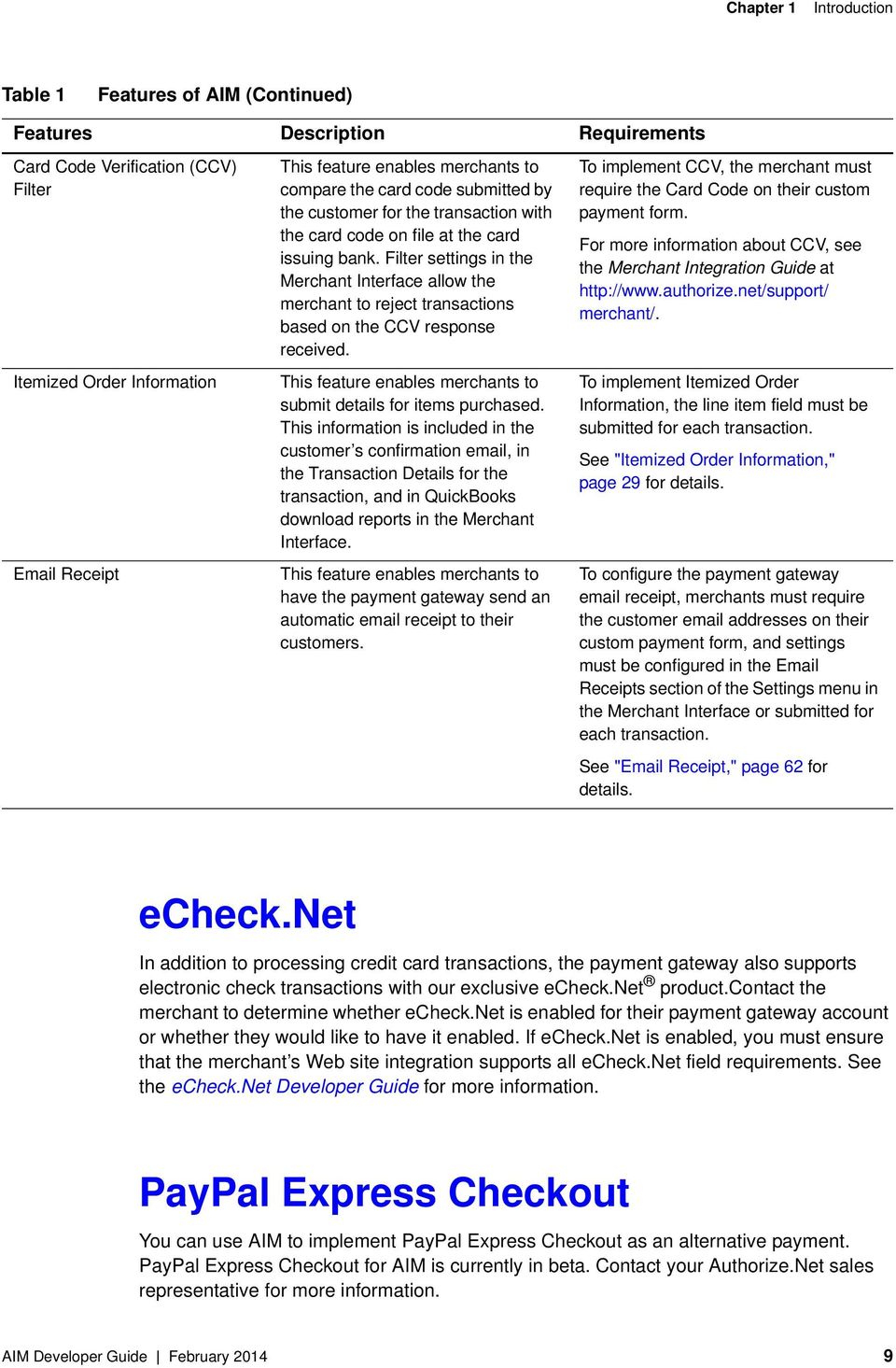
8 Chapter 1 Introduction Configured in the Merchant Interface and applied to all transactions. Important The Merchant Interface at is a secure website on which merchants can manage their payment gateway account settings, including their Web site integration settings. Review the Merchant Integration Guide at for information on managing the merchant s payment gateway integration using the Merchant Interface. Transaction settings submitted in the transaction request will override transaction settings configured in the Merchant Interface. However, be aware that some integration settings must be configured in the Merchant Interface. To help the merchant maintain a robust integration, review with the merchant the integration settings that can be configured in the Merchant Interface and determine which settings can be posted on a per-transaction basis and which should be configured in the Merchant Interface. See Appendix A, "Fields by Transaction Type," on page 67 for a list of fields that can be submitted on a pertransaction basis. Features of AIM In addition to basic transaction processing, AIM provides merchants with several features for configuring transaction security options and further customizing their customers checkout experience. These features are listed in the AIM feature selection table below. Take a few moments to discuss these features with your merchant and select the appropriate features for their integration. Table 1 Features of AIM Features Description Requirements Address Verification Service (AVS) Filter This feature enables merchants to compare the billing address submitted by the customer for the transaction with the address on file at the card issuing bank. Filter settings in the Merchant Interface allow the merchant to reject transactions based on the AVS response received. To implement AVS, the merchant must require the Address and ZIP Code fields on their custom payment form. For more information about AVS, see the Merchant Integration Guide at merchant/. AIM Developer Guide February

9 Chapter 1 Introduction Table 1 Features of AIM (Continued) Features Description Requirements Card Code Verification (CCV) Filter Itemized Order Information Receipt This feature enables merchants to compare the card code submitted by the customer for the transaction with the card code on file at the card issuing bank. Filter settings in the Merchant Interface allow the merchant to reject transactions based on the CCV response received. This feature enables merchants to submit details for items purchased. This information is included in the customer s confirmation , in the Transaction Details for the transaction, and in QuickBooks download reports in the Merchant Interface. This feature enables merchants to have the payment gateway send an automatic receipt to their customers. To implement CCV, the merchant must require the Card Code on their custom payment form. For more information about CCV, see the Merchant Integration Guide at merchant/. To implement Itemized Order Information, the line item field must be submitted for each transaction. See "Itemized Order Information," page 29 for details. To configure the payment gateway receipt, merchants must require the customer addresses on their custom payment form, and settings must be configured in the Receipts section of the Settings menu in the Merchant Interface or submitted for each transaction. See " Receipt," page 62 for details. echeck.net In addition to processing credit card transactions, the payment gateway also supports electronic check transactions with our exclusive echeck.net product.contact the merchant to determine whether echeck.net is enabled for their payment gateway account or whether they would like to have it enabled. If echeck.net is enabled, you must ensure that the merchant s Web site integration supports all echeck.net field requirements. See the echeck.net Developer Guide for more information. PayPal Express Checkout You can use AIM to implement PayPal Express Checkout as an alternative payment. PayPal Express Checkout for AIM is currently in beta. Contact your Authorize.Net sales representative for more information. AIM Developer Guide February
10 Chapter 1 Introduction Payment Processors The currencies that a merchant can accept through Authorize.Net are determined by their payment processor. North American Payment Processors Accepted Card Types All North American payment processors supported by Authorize.Net accept the following card types: American Express Diners Club Discover JCB Mastercard Visa Accepted Currencies Table 2 North American Payment Processors and Accepted Currencies Payment Processor Chase Paymentech Tampa Processing Platform Elavon First Data Merchant Services (FDMS) Omaha, Nashville, and EFSNet Processing Platforms Global Payments Heartland Payment Systems TSYS Acquiring Solutions WorldPay Atlanta Processing Platform Accepted Currencies United States Dollar (USD) Canadian Dollar (CAD) United States Dollar (USD) Canadian Dollar (CAD) United States Dollar (USD) United States Dollar (USD) Canadian Dollar (CAD) United States Dollar (USD) United States Dollar (USD) United States Dollar (USD) European Payment Processors The following European payment processors are supported by Authorize.Net for Card Not AIM Developer Guide February

11 Chapter 1 Introduction Present (CNP) transactions. Table 3 European Payment Processors, Accepted Card Types, and Accepted Currencies Payment Processor Accepted Card Types Accepted Currencies AIB Merchant Services Mastercard Visa Barclaycard JCB Mastercard Visa First Data Merchant Solutions (MSIP platform) Mastercard Visa HSBC Merchant Services Mastercard Visa Lloyds Bank Cardnet Mastercard Visa Streamline JCB Mastercard Visa British Pounds (GBP) Euro (EUR) United States Dollar (USD) British Pounds (GBP) Euro (EUR) British Pounds (GBP) British Pounds (GBP) Euro (EUR) British Pounds (GBP) British Pounds (GBP) Euro (EUR) United States Dollar (USD) Asia-Pacific Processor The following Asia-Pacific payment processor is supported by Authorize.Net for Card Not Present (CNP) transactions. Table 4 Asia-Pacific Payment Processor, Accepted Card Types, and Accepted Currencies Payment Processor Accepted Card Types Accepted Currencies FDI Australia Mastercard Visa Westpac Mastercard Visa Australian Dollar (AUD) New Zealand Dollar (NZD) United States Dollar (USD) Australian Dollar (AUD) For information on setting the currency using the AIM API, see "x_currency_code". AIM Developer Guide February

12 Chapter 1 Introduction Developer Support Several resources are available to help you successfully integrate a merchant Web site or other application to the Authorize.Net payment gateway. The Developer Center at provides sandbox accounts, sample code, FAQs, and troubleshooting tools. Developer Training Videos are available at The Developer Community at provides answers to questions from other Authorize.Net developers. Developer Support is available at If you have suggestions for improving or correcting this guide, send to [email protected]. Software Development Kits Authorize.Net offers software development kits (SDKs) that present an alternate objectoriented model, in several popular languages. To use these SDKs, the merchant s transaction version must be set to 3.1. The SDK performs the core payment activities (such as error handling and parsing, network communication, and data encoding) behind the scenes. The SDK provides utilities to help developers build payment flows for each of the integration methods. You can download the SDKs at downloads/. AIM Developer Guide February
13 Submitting Transactions CHAPTER 2 The payment gateway supports several credit card transaction types for transactions submitted by AIM. To implement AIM for a merchant s Web site or proprietary business application, you will need to develop an application that: Securely obtains all of the information required to process a transaction (including data requirements specified by the merchant). Initiates an SSL connection from the merchant s Web server to the payment gateway transaction post location to pass transaction data in name/value pairs. Receives and parses the transaction response from the payment gateway and displays the results to the customer. You can develop the application in one of two ways: by yourself using the information provided in this document use Authorize.Net sample code available for free from our Developer Center. If you choose to use sample code, be aware that to achieve a successful implementation, the code must be modified with the merchant s specific payment gateway account information. Be sure to carefully review the readme.txt files and comments included in each file of sample code in order to achieve a faster, successful integration. Developer test accounts with API Login IDs and Transaction Keys are also available to test your integration methods to the Authorize.Net Payment Gateway at AIM Developer Guide February

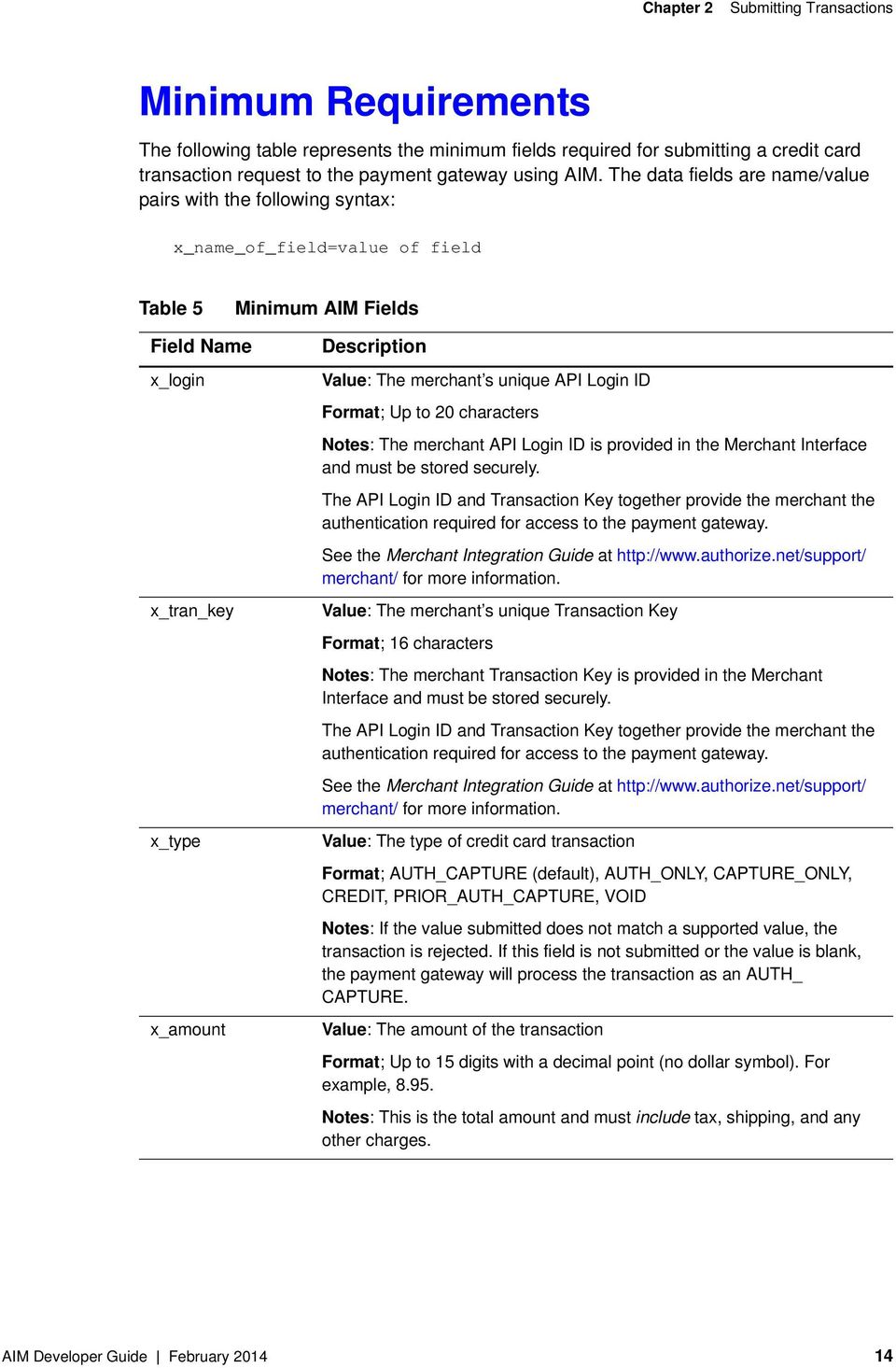
14 Chapter 2 Submitting Transactions Minimum Requirements The following table represents the minimum fields required for submitting a credit card transaction request to the payment gateway using AIM. The data fields are name/value pairs with the following syntax: x_name_of_field=value of field Table 5 Minimum AIM Fields Field Name x_login x_tran_key x_type x_amount Description Value: The merchant s unique API Login ID Format; Up to 20 characters Notes: The merchant API Login ID is provided in the Merchant Interface and must be stored securely. The API Login ID and Transaction Key together provide the merchant the authentication required for access to the payment gateway. See the Merchant Integration Guide at merchant/ for more information. Value: The merchant s unique Transaction Key Format; 16 characters Notes: The merchant Transaction Key is provided in the Merchant Interface and must be stored securely. The API Login ID and Transaction Key together provide the merchant the authentication required for access to the payment gateway. See the Merchant Integration Guide at merchant/ for more information. Value: The type of credit card transaction Format; AUTH_CAPTURE (default), AUTH_ONLY, CAPTURE_ONLY, CREDIT, PRIOR_AUTH_CAPTURE, VOID Notes: If the value submitted does not match a supported value, the transaction is rejected. If this field is not submitted or the value is blank, the payment gateway will process the transaction as an AUTH_ CAPTURE. Value: The amount of the transaction Format; Up to 15 digits with a decimal point (no dollar symbol). For example, Notes: This is the total amount and must include tax, shipping, and any other charges. AIM Developer Guide February
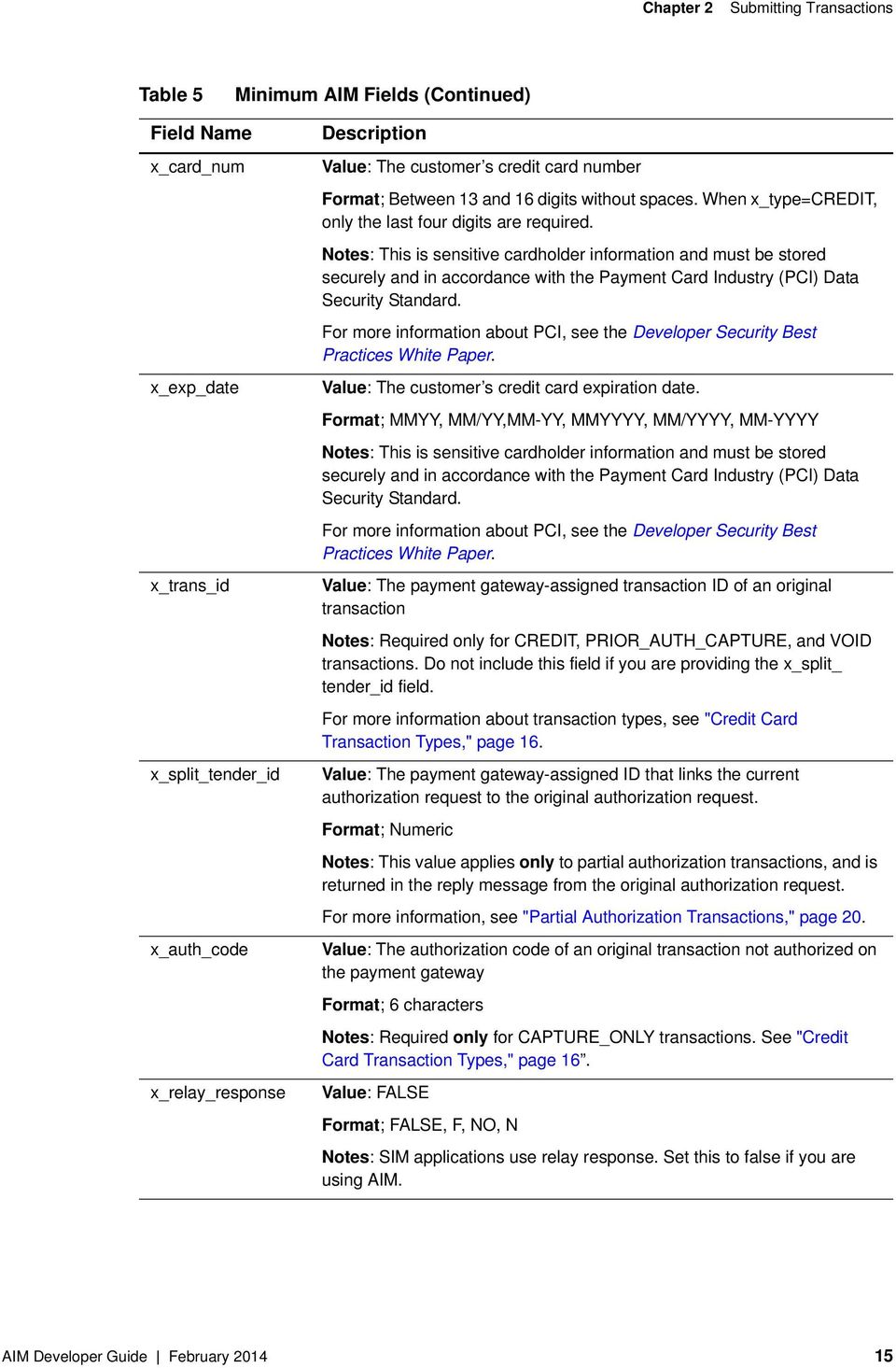
15 Chapter 2 Submitting Transactions Table 5 Minimum AIM Fields (Continued) Field Name x_card_num x_exp_date x_trans_id x_split_tender_id x_auth_code x_relay_response Description Value: The customer s credit card number Format; Between 13 and 16 digits without spaces. When x_type=credit, only the last four digits are required. Notes: This is sensitive cardholder information and must be stored securely and in accordance with the Payment Card Industry (PCI) Data Security Standard. For more information about PCI, see the Developer Security Best Practices White Paper. Value: The customer s credit card expiration date. Format; MMYY, MM/YY,MM-YY, MMYYYY, MM/YYYY, MM-YYYY Notes: This is sensitive cardholder information and must be stored securely and in accordance with the Payment Card Industry (PCI) Data Security Standard. For more information about PCI, see the Developer Security Best Practices White Paper. Value: The payment gateway-assigned transaction ID of an original transaction Notes: Required only for CREDIT, PRIOR_AUTH_CAPTURE, and VOID transactions. Do not include this field if you are providing the x_split_ tender_id field. For more information about transaction types, see "Credit Card Transaction Types," page 16. Value: The payment gateway-assigned ID that links the current authorization request to the original authorization request. Format; Numeric Notes: This value applies only to partial authorization transactions, and is returned in the reply message from the original authorization request. For more information, see "Partial Authorization Transactions," page 20. Value: The authorization code of an original transaction not authorized on the payment gateway Format; 6 characters Notes: Required only for CAPTURE_ONLY transactions. See "Credit Card Transaction Types," page 16. Value: FALSE Format; FALSE, F, NO, N Notes: SIM applications use relay response. Set this to false if you are using AIM. AIM Developer Guide February
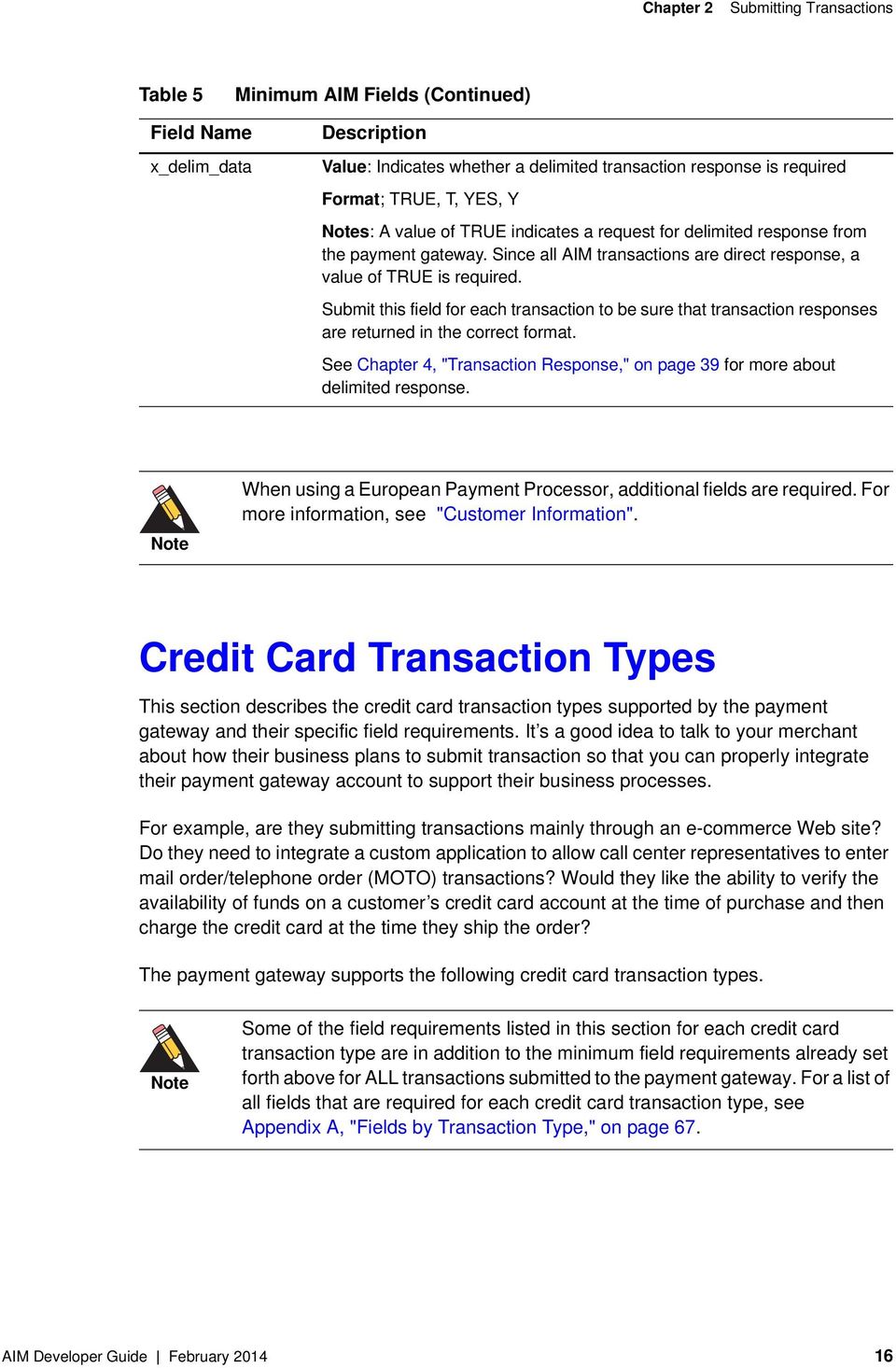
16 Chapter 2 Submitting Transactions Table 5 Minimum AIM Fields (Continued) Field Name x_delim_data Description Value: Indicates whether a delimited transaction response is required Format; TRUE, T, YES, Y Notes: A value of TRUE indicates a request for delimited response from the payment gateway. Since all AIM transactions are direct response, a value of TRUE is required. Submit this field for each transaction to be sure that transaction responses are returned in the correct format. See Chapter 4, "Transaction Response," on page 39 for more about delimited response. Note When using a European Payment Processor, additional fields are required. For more information, see "Customer Information". Credit Card Transaction Types This section describes the credit card transaction types supported by the payment gateway and their specific field requirements. It s a good idea to talk to your merchant about how their business plans to submit transaction so that you can properly integrate their payment gateway account to support their business processes. For example, are they submitting transactions mainly through an e-commerce Web site? Do they need to integrate a custom application to allow call center representatives to enter mail order/telephone order (MOTO) transactions? Would they like the ability to verify the availability of funds on a customer s credit card account at the time of purchase and then charge the credit card at the time they ship the order? The payment gateway supports the following credit card transaction types. Note Some of the field requirements listed in this section for each credit card transaction type are in addition to the minimum field requirements already set forth above for ALL transactions submitted to the payment gateway. For a list of all fields that are required for each credit card transaction type, see Appendix A, "Fields by Transaction Type," on page 67. AIM Developer Guide February
17 Chapter 2 Submitting Transactions Authorization and Capture This is the most common type of credit card transaction and is the default payment gateway transaction type. The amount is sent for authorization, and if approved, is automatically submitted for settlement. The unique field requirement for an Authorization and Capture transaction is: x_type=auth_capture Authorization Only This transaction type is sent for authorization only. The transaction will not be sent for settlement until the credit card transaction type Prior Authorization and Capture (see definition below) is submitted, or the transaction is submitted for capture manually in the Merchant Interface. For more information about capturing Authorization Only transactions in the Merchant Interface, see the Merchant Integration Guide at support/merchant/. If action for the Authorization Only transaction is not taken on the payment gateway within 30 days, the authorization expires and is no longer available for capture. A new Authorization Only transaction would then have to be submitted to obtain a new authorization code. The unique field requirement for an Authorization Only transaction is: x_type=auth_only Merchants can submit Authorization Only transactions if they want to verify the availability of funds on the customer s credit card before finalizing the transaction. This transaction type can also be submitted if the merchant does not currently have an item in stock or wants to review orders before shipping goods. Prior Authorization and Capture This transaction type is used to complete an Authorization Only transaction that was successfully authorized through the payment gateway. Note An Authorization Only and a Prior Authorization and Capture together are considered one complete transaction. After the Prior Authorization and Capture is submitted, the transaction will be sent for settlement. AIM Developer Guide February
18 Chapter 2 Submitting Transactions The payment gateway accepts this transaction type and initiates settlement if the following conditions are met: The original Authorization Only transaction was submitted within the previous 30 days (Authorization Only transactions expire on the payment gateway after 30 days). The transaction is submitted with the valid transaction ID (x_trans_id) of an original, successfully authorized, Authorization Only transaction. The original transaction is not yet captured, expired or generated an error. The amount being requested for capture is less than or equal to the original authorized amount. Only a single Prior Authorization and Capture transaction can be submitted against an Authorization Only. The unique field requirements for a Prior Authorization and Capture are: x_type=prior_auth_capture x_trans_id=transaction ID here For this transaction type, the amount field (x_amount) is required only if a Prior Authorization and Capture is submitted for an amount that is less than the amount of the original Authorization Only transaction. If no amount is submitted, the payment gateway will initiate settlement for the amount of the original authorized transaction. Capture Only This transaction type is used to complete a previously authorized transaction that was not originally submitted through the payment gateway or that requires voice authorization. The payment gateway accepts this transaction type and initiates settlement if the following conditions are met: The transaction is submitted with the valid authorization code issued to the merchant to complete the transaction. The unique field requirements for a Capture Only transaction are: x_type=capture_only x_auth_code=authorization Code here For instructions on how to perform a Capture Only transaction in the Merchant Interface, see the Merchant Integration Guide at Credit (Refund) This transaction type is used to refund a customer for a transaction that was originally processed and successfully settled through the payment gateway. AIM Developer Guide February

19 Chapter 2 Submitting Transactions The payment gateway accepts Credits if the following conditions are met: The transaction is submitted with the valid transaction ID (x_trans_id) of an original, successfully settled transaction. The amount being requested for refund is less than or equal to the original settled amount. The sum of multiple Credit transactions submitted against the original transaction is less than or equal to the original settled amount. At least the last four digits of the credit card number (x_card_num) used for the original, successfully settled transaction are submitted. An expiration date is not required. The transaction is submitted within 120 days of the settlement date of the original transaction. The unique field requirements for a Credit transaction are: x_type=credit x_trans_id=transaction ID here x_card_num=full credit card number or last four digits only here Unlinked Credit This transaction type is used to issue a refund for a transaction that was not originally submitted through the payment gateway. It also enables the merchant to override restrictions for submitting refunds for payment gateway transactions, for example, if the merchant is beyond the 120-day period for submitting a refund or would like to refund an amount that is greater than the original transaction amount. The ability to submit unlinked credits is not a standard feature of a merchant s payment gateway account. To be enabled for expanded credits capability (ECC), the merchant must submit an application, which can be found at Important A transaction ID must not be submitted with an Unlinked Credit. If ECC is enabled for the merchant s account, and a transaction ID is submitted with the Unlinked Credit transaction, then the payment gateway will attempt to apply the credit to an original transaction with the transaction ID submitted. The unique field requirement for an Unlinked Credit is: x_type=credit Void This transaction type can be used to cancel either an original transaction that is not yet settled, or an entire order composed of more than one transactions. A Void prevents the AIM Developer Guide February

20 Chapter 2 Submitting Transactions transaction or the order from being sent for settlement. A Void can be submitted against any other transaction type. Note If you are not sure whether a transaction is settled, you can attempt to submit a Void first. If the Void transaction results in an error, the original transaction is likely settled and you can submit a Credit for the transaction. The payment gateway accepts Voids if the following conditions are met: The transaction is submitted with the valid transaction ID (x_trans_id) of an original, successfully authorized transaction. To void an entire order, submit the split tender ID (x_split_tender_id). The original transaction is not already settled, expired or generated an error. The unique field requirements for a Void transaction are: x_type=void x_trans_id=transaction ID, or x_split_tender_id=split Tender ID. Note Typically, Authorization Only or Authorization and Capture are the primary transaction types submitted by an e-commerce Web site or other application. Although they most likely will not be used for the merchant s website integration, all other transaction types listed above can be integrated for automatic submission into an internal or enterprise application, like those used in a call center, or they can also be submitted by the merchant manually using the Virtual Terminal in the Merchant Interface. Visa Verification Transactions The following are required for $0 Visa verification calls: The transaction type must be AUTH_ONLY. All other transaction types will be rejected. Bill To address (x_address) and zip code (x_zip) are required in order to perform the AVS check. Not all processors accept zero dollar amount. Partial Authorization Transactions A split tender order is an order in which two or more transactions are used to cover the total amount of the order. AIM Developer Guide February

21 Chapter 2 Submitting Transactions Merchants must indicate that they are able to handle the extra processing either by selecting the Partial Authorization option in the Account settings of the Merchant Interface, or by sending x_allow_partial_auth=true with an individual transaction. Without this flag, the transaction would be handled as any other, and would be either fully authorized or declined due to lack of funds on the card. When the first transaction is successfully approved for a partial amount of the total order, a split tender ID is generated and returned to the merchant in the response. This ID must be passed back with each of the remaining transactions of the group, using x_split_ tender_id=<value>. If you include both a split tender ID and a transaction ID on the same request, an error results. If successfully authorized, all transactions in the group are held until the final transaction of the group is successfully authorized. If the merchant needs to release the group of transactions before the final one is approved (if the balance is paid by cash, for example), send a prior auth capture request and include the split tender ID instead of a transaction ID. If the merchant needs to void the group before completion, send a void request, using the split tender ID instead of a transaction ID. This action will void all the transactions in the group. The following rules apply to partial authorization transactions: The merchant can choose to accept partial authorization transactions by selecting an option in the Merchant Interface. Alternatively, partial authorization transactions can be submitted by including a new API field (x_allow_partial_auth) in the initial request that enables partial authorization for that specific request. When an authorization is granted for an amount less than the purchase amount, a split tender ID is provided, in addition to the Transaction ID. The split tender ID is used on subsequent payments for that purchase. The transaction is not submitted for settlement until either the merchant submits payments adding up to the full requested amount, or until the merchant indicates that the transaction has been completed (when all or part of the remaining balance is paid in cash). You can void all transactions in an order using a split tender ID, or you can void individual transactions using a transaction ID. The split tender ID cannot be submitted together with a transaction ID; only one or the other can be submitted. Unique field requirements for Partial Authorization Transactions are: x_allow_partial_auth=true (input, optional) The default value is set in the Merchant Interface; you can use this parameter to authorize individual transactions if the option is set to False in the Merchant Interface. Including this field in the transaction request overrides the merchant s account configuration. AIM Developer Guide February
22 Chapter 2 Submitting Transactions x_prepaid_balance_on_card (output) this is the authorized amount remaining on the card. x_prepaid_requested_amount (output) this is the amount requested. x_split_tender_id (output) this is the split tender ID provided when the first partial authorization transaction was issued. Use this ID when submitting subsequent transactions related to the same group order. x_split_tender_status (output) indicates whether or not the transaction is complete. This parameter is sent to the merchant during relay response processing. It is not included in the delimited response. x_card_type (output) the card type. Using the Merchant Interface The Merchant Interface enables merchants to manage transactions, capture Authorization Only transactions, void transactions, and issue refunds. These transaction types can also be managed automatically using the API if you are integrating a custom application to the payment gateway. However, for most integrations, these transaction types can be more conveniently and easily managed in the Merchant Interface. For more information on submitting transactions in the Merchant Interface, see the Merchant Integration Guide at or click Help in the top right corner of the Merchant Interface. AIM Developer Guide February
23 Transaction Data Requirements CHAPTER 3 The standard payment gateway Application Programming Interface (API) consists of required information fields (introduced in the previous section) and additional optional fields that can be submitted to the payment gateway for real-time transaction processing. Transaction Post Location The merchant s Web site should POST transaction requests to the following payment gateway URL: Note If you are using an Authorize.Net developer test account, test transactions are posted to a staging environment at transact.dll. If you do not have a developer test account, you can sign up for one at Note Transactions should be sent using HTTP POST, not HTTP GET. HTTP GET sends information in clear text and is therefore not secure. For more information, see RFC 2616, section AIM Transaction Submission API The following tables list the transaction data fields that can be submitted using the transaction request string. Some of these fields can also be configured in the Merchant Interface. For more information about configuring these settings in the Merchant Interface, see the Merchant Integration Guide at Fields are name/value pairs with the syntax: x_name_of_field = value of the field AIM Developer Guide February
24 Chapter 3 Transaction Data Requirements Merchant Information Table 6 Merchant Information Field Name x_login x_tran_key x_allow_partial_auth Description Required Value: The merchant s unique API Login ID Format: Up to 20 characters Notes: The merchant API Login ID is provided in the Merchant Interface and must be stored securely. The API Login ID and Transaction Key together provide the merchant authentication required for access to the payment gateway. See the Merchant Integration Guide at merchant/ for more information. Required Value: The merchant s unique Transaction Key Format: 16 characters Notes: The merchant Transaction Key is provided in the Merchant Interface and must be stored securely. The API Login ID and Transaction Key together provide the merchant authentication required for access to the payment gateway. See the Merchant Integration Guide at merchant/ for more information. Value: True, False Notes: Indicates if the transaction is enabled for partial authorization. Including this field in the transaction request overrides your account configuration. For more information, see "Partial Authorization Transactions," page 20. AIM Developer Guide February
25 Chapter 3 Transaction Data Requirements Transaction Information Table 7 Transaction Information Field Name x_version x_type x_method x_market_type Description Required Value: The merchant s transaction version Format: 3.0, 3.1 Notes: Indicates to the system the set of fields that will be included in the response: 3.0 is the default version. 3.1 allows the merchant to utilize the Card Code feature and the Partial Authorization feature, and is the current standard version. It is highly recommended that you submit this field on a pertransaction basis to be sure that the formats of transaction requests and the responses you receive are consistent. For more information, see Appendix A, "Fields by Transaction Type," on page 67 of this document. Value: The type of credit card transaction Format: AUTH_CAPTURE (default), AUTH_ONLY, CAPTURE_ ONLY, CREDIT, PRIOR_AUTH_CAPTURE, VOID Notes: If the value submitted does not match a supported value, the transaction is rejected. If this field is not submitted or the value is blank, the payment gateway will process the transaction as an AUTH_CAPTURE. Value: The payment method Format: CC or ECHECK Notes: The method of payment for the transaction, CC (credit card) or ECHECK (electronic check). If this field is not submitted or is blank, the value will default to CC. For more information about echeck.net transaction requirements, see the echeck.net Developer Guide. Value: One of the following. 0 for e-commerce 1 for moto 2 for retail. Notes: If your account type is Card Present, the default is 2 and only 2 can be used. If your account type is blended, the default is 0, but x_market_type can be overridden. AIM Developer Guide February
26 Chapter 3 Transaction Data Requirements Table 7 Transaction Information (Continued) Field Name x_recurring_billing x_amount x_currency_code x_card_num x_exp_date Description Value: The recurring billing status Format: TRUE, FALSE,T, F, YES, NO,Y, N,1, 0 Notes: Indicating marker used by merchant account providers to identify transactions which originate from merchant hosted recurring billing applications. This value is not affiliated with Automated Recurring Billing. Required Value: The amount of the transaction Format: Up to 15 digits with a decimal point (no dollar symbol). For example, 8.95 Notes: This is the total amount and must include tax, shipping, and any other charges. The amount can either be hard coded or posted to a script. Value: AUD, USD, CAD, EUR, GBP, or NZD. Format: 3 character string. Notes: If this field is not submitted, the default is the currency selected by the merchant s payment processor. Setting this field to a currency that is not supported by the payment processor will result in an error. Required Value: The customer s credit card number Format: Between 13 and 16 digits without spaces. When x_ type=credit, only the last four digits are required. Notes: This is sensitive cardholder information and must be stored securely and in accordance with the Payment Card Industry (PCI) Data Security Standard. For more information about PCI, see the Developer Security Best Practices White Paper. Required Value: The customer s credit card expiration date Format: MMYY, MM/YY, MM-YY, MMYYYY, MM/YYYY, MM- YYYY Notes: This is sensitive cardholder information and must be stored securely and in accordance with the Payment Card Industry (PCI) Data Security Standard. For more information about PCI, see the Developer Security Best Practices White Paper. AIM Developer Guide February
27 Chapter 3 Transaction Data Requirements Table 7 Transaction Information (Continued) Field Name x_card_code x_trans_id x_split_tender_id x_auth_code Description Value: The three- or four-digit number on the back of a credit card (on the front for American Express). Format: Numeric Notes: This field is required if the merchant would like to use the Card Code Verification (CCV) security feature. For more information, see the Merchant Integration Guide at Cardholder information must be stored securely and in accordance with the Payment Card Industry (PCI) Data Security Standard. See the Developer Security Best Practices White Paper for more information. Conditional Required only for CREDIT, PRIOR_ AUTH_ CAPTURE, and VOID transactions Value: The payment gateway assigned transaction ID of an original transaction For more information about transaction types, see the "Credit Card Transaction Types," page 16 section of this document. Conditional Value: The payment gateway-assisted ID assigned when the original transaction includes two or more partial payments. This is the identifier that is used to group transactions that are part of a split tender order. Notes: If the first transaction results in a partial authorization, the payment gateway returns this ID to the merchant. The merchant must pass this ID back with each subsequent transaction that will be part of the group of transactions sent to obtain the entire amount of the order. The payment gateway does not calculate new amounts, that is up to the merchant s software. For more information about partial authorization transactions, see the "Partial Authorization Transactions," page 20 topic. Conditional Required only for CAPTURE_ ONLY transactions Value: The authorization code of an original transaction not authorized on the payment gateway Format: 6 characters Notes: See the "Credit Card Transaction Types," page 16 section of this document. AIM Developer Guide February
28 Chapter 3 Transaction Data Requirements Table 7 Transaction Information (Continued) Field Name x_test_request x_duplicate_window Description Value: The request to process test transactions Format: TRUE, FALSE, T, F, YES, NO, Y, N, 1, 0 Notes: Indicates if the transaction should be processed as a test transaction. See Chapter 5, "Test Transactions," on page 64 of this guide for more information. Value: The window of time after the submission of a transaction that a duplicate transaction can not be submitted Format: Any value between 0 and (no comma) Notes: Indicates in seconds the window of time after a transaction is submitted during which the payment gateway will check for a duplicate transaction. The maximum time allowed is 8 hours (28800 seconds). If a value less than 0 is sent, the payment gateway will default to 0 seconds. If a value greater than is sent, the payment gateway will default to If no value is sent, the payment gateway will default to 2 minutes (120 seconds). If this field is present in the request with or without a value, an enhanced duplicate transaction response is sent. See the "Response for Duplicate Transactions," page 46 section of this guide for more information. Order Information Table 8 Order Information Field Name x_invoice_num Description Value: The merchant-assigned invoice number for the transaction Format: Up to 20 characters (no symbols) Notes: The invoice number must be created dynamically on the merchant server or provided on a per-transaction basis. The payment gateway does not perform this function. AIM Developer Guide February
29 Chapter 3 Transaction Data Requirements Table 8 Order Information (Continued) Field Name x_description Description Value: The transaction description Format: Up to 255 characters (no symbols) Notes: The description must be created dynamically on the merchant server or provided on a per-transaction basis. The payment gateway does not perform this function. Itemized Order Information Based on their business requirements, merchants can choose to submit itemized order information with a transaction, using the optional x_line_item field. Itemized order information is not submitted to the processor and is not currently returned with the transaction response. This information is displayed on the Transaction Detail page and in QuickBooks download file reports in the Merchant Interface. The value for the x_line_item field is capable of including delimited item information. Item Information must be delimited by a bracketed pipe< >. Line item values must be included in the order listed below. The following table describes the Item Information elements of the x_line_item field. A code example is presented after the table. Table 9 Delimited x_line_item Information Item Information Elements Item ID< > Item Name< > Item Description< > Item Quantity< > Description Required Value: The ID assigned to an item. Format: Up to 31 characters Required Value: The name of an item. Format: Up to 31 characters Value: A detailed description of an item. Format: Up to 255 characters Required Value: The quantity of the item on this order. Format: Up to two decimal places. Must be a positive number AIM Developer Guide February
30 Chapter 3 Transaction Data Requirements Table 9 Delimited x_line_item Information (Continued) Item Information Elements Item Price (unit cost)< > Item Taxable Description Required Value: Cost of an item per unit, excluding tax, freight, and duty. Format: Up to two decimal places. Must be a positive number. The dollar sign ($) is not allowed when submitting delimited information. (FALSE by default) Value: Indicates whether the item is subject to tax. Format: TRUE, FALSE, T, F, YES, NO, Y, N, 1, 0 The merchant can submit up to 30 distinct line items containing itemized order information per transaction. All field separators are required whether there the field has a value a value. In the example below, the Item Description field after golf balls< > has no value, yet the bracketed pipe remains. Example Submitting itemized order information x_line_item=item1< >golf balls< >< >2< >18.95< >Y x_line_item=item2< >golf bag< >Wilson golf carry bag, red< >1< >39.99< >Y x_line_item=item3< >book< >Golf for Dummies< >1< >21.99< >Y Note For Prior Authorization and Capture transactions, if line item information was submitted with the original transaction, adjusted information can be submitted if the transaction changed. If no adjusted line item information is submitted, the information submitted with the original transaction applies. Customer Information Table 10 Customer Information Field Name x_first_name x_last_name Description Required only when using a European Payment Processor. Value: The first name associated with the customer s billing address Format: Up to 50 characters (no symbols) Required only when using a European Payment Processor. Value: The last name associated with the customer s billing address Format: Up to 50 characters (no symbols) AIM Developer Guide February
31 Chapter 3 Transaction Data Requirements Table 10 Customer Information (Continued) Field Name x_company x_address x_city x_state x_zip x_country x_phone x_fax Description Value: The company associated with the customer s billing address Format: Up to 50 characters (no symbols) Required only when using a European Payment Processor. Value: The customer s billing address Format: Up to 60 characters (no symbols) Required if the merchant would like to use the Address Verification Service security feature. For more information on AVS, see the Merchant Integration Guide at Required only when using a European Payment Processor. Value: The city of the customer s billing address Format: Up to 40 characters (no symbols) Required only when using a European Payment Processor. Value: The state of the customer s billing address Format: Up to 40 characters (no symbols) or a valid two-character state code Required only when using a European Payment Processor. Value: The ZIP code of the customer s billing address Format: Up to 20 characters (no symbols) Required if the merchant would like to use the Address Verification Service security feature. For more information on AVS, see the Merchant Integration Guide at Required only when using a European Payment Processor. Value: The country of the customer s billing address Format: Up to 60 characters (no symbols) Value: The phone number associated with the customer s billing address Format: Up to 25 digits (no letters). For example, (123) Value: The fax number associated with the customer s billing address Format: Up to 25 digits (no letters). For example, (123) AIM Developer Guide February
32 Chapter 3 Transaction Data Requirements Table 10 Customer Information (Continued) Field Name x_ x_cust_id x_customer_ip Description Required only when using a European Payment Processor. Value: The customer s valid address Format: Up to 255 characters. For example, [email protected] Notes: The address to which the customer s copy of the receipt is sent when Receipts is configured in the Merchant Interface. The is sent to the customer only if the address format is valid. For more information about Receipts, see the Merchant Integration Guide at Value: The merchant assigned customer ID Format: Up to 20 characters (no symbols) Notes: The unique identifier to represent the customer associated with the transaction. The customer ID must be created dynamically on the merchant server or provided on a per-transaction basis. The payment gateway does not perform this function. Value: The customer s IP address Format: Up to 15 characters (no letters). For example, Notes: IP address of the customer initiating the transaction. If this value is not passed, it will default to This field is required when using customer-ip based Advanced Fraud Detection Suite (AFDS) filters. For more information about AFDS, see the Merchant Integration Guide at Shipping Information Table 11 Shipping Information Field Name x_ship_to_first_name Description Value: The first name associated with the customer s shipping address Format: Up to 50 characters (no symbols) AIM Developer Guide February
33 Chapter 3 Transaction Data Requirements Table 11 Shipping Information (Continued) Field Name x_ship_to_last_name x_ship_to_company x_ship_to_address x_ship_to_city x_ship_to_state x_ship_to_zip x_ship_to_country Description Value: The last name associated with the customer s shipping address Format: Up to 50 characters (no symbols) Value: The company associated with the customer s shipping address Format: Up to 50 characters (no symbols) Value: The customer s shipping address Format: Up to 60 characters (no symbols) Value: The city of the customer s shipping address Format: Up to 40 characters (no symbols) Value: The state of the customer s shipping address Format: Up to 40 characters (no symbols) or a valid two-character state code Value: The ZIP code of the customer s shipping address Format: Up to 20 characters (no symbols) Value: The country of the customer s shipping address Format: Up to 60 characters (no symbols) Additional Shipping Information (Level 2 Data) The following sections describe shipping information field names and their child elements. Delimited tax, freight, and duty information are not returned in the transaction response or in the merchant confirmation . This information is displayed only on the Transaction Detail page in the Merchant Interface. x_tax This optional field can contain either the valid tax amount or the delimited tax information. When submitting delimited tax information, values must be delimited by a bracketed pipe < > in the order shown below. The total amount of the transaction in x_amount must include this amount. AIM Developer Guide February
34 Chapter 3 Transaction Data Requirements The delimited tax information elements are: tax item name< > tax description< > tax amount: The dollar sign ($) is not allowed when submitting delimited information. The total amount of the transaction in x_amount must include this amount. Example: x_tax=tax1< >state tax< >0.09 x_freight This optional field can contain either the valid freight amount, or delimited freight information. When submitting delimited freight information, values must be delimited by a bracketed pipe < >, as shown in the example below. The total amount of the transaction in x_amount must include this amount. The delimited freight information elements are: tax item name< > tax description< > tax amount: The dollar sign ($) is not allowed when submitting delimited information. The total amount of the transaction in x_amount must include this amount. Example: x_freight=freight< >ground overnight< >12.95 x_duty This optional field can contain either the valid duty amount or delimited duty information. When submitting delimited duty information, values must be delimited by a pipe < >, as shown in the example below. The total amount of the transaction in x_amount must include this amount. The delimited duty information elements are: duty item name< > freight description< > freight amount: The dollar sign ($) is not allowed when submitting delimited information. The total amount of the transaction in x_amount must include this amount. Example: x_duty=duty1< >export< >15.00 x_tax_exempt This optional field can contain the tax exempt status of the order. The values of this field can include: TRUE, FALSE, T, F, YES, NO, Y, N, 1, 0 AIM Developer Guide February
35 Chapter 3 Transaction Data Requirements x_po_num This optional field can contain the merchant-assigned purchase order number, up to 25 characters, no symbols. The purchase order number must be created dynamically on the merchant server or provided on a per-transaction basis. The payment gateway does not perform this function. Cardholder Authentication The payment gateway supports the transmission of authentication fields for the following cardholder authentication programs: Verified by Visa MasterCard SecureCode Merchants using a third-party cardholder authentication solution can submit the following authentication values with Visa and/or MasterCard transactions. Note The cardholder authentication fields are currently supported only through the Chase Paymentech, FDMS Nashville, Global Payments and TSYS processors for Visa and MasterCard transactions. If cardholder authentication information is submitted for transactions processed through any other processor, it will be ignored. Table 12 Cardholder Authentication Fields Field Name x_authentication_indicator Description Value: The electronic commerce indicator (ECI) value for a Visa transaction; or the universal cardholder authentication field indicator (UCAF) for a MasterCard transaction obtained by the merchant after the authentication process. Format: Special characters included in this value must be URL encoded. Notes: Required only for AUTH_ONLY and AUTH_ CAPTURE transactions processed through cardholder authentication programs. When submitted with other transaction types, this value is ignored. This field is currently supported through Chase Paymentech, FDMS Nashville, Global Payments and TSYS. AIM Developer Guide February
36 Chapter 3 Transaction Data Requirements Table 12 Cardholder Authentication Fields (Continued) Field Name x_cardholder_authentication_value Description Value: The cardholder authentication verification value (CAVV) for a Visa transaction; or accountholder authentication value (AVV)/ universal cardholder authentication field (UCAF) for a MasterCard transaction obtained by the merchant after the authentication process. Format: Special characters included in this value must be URL encoded. Notes: Required only for AUTH_ONLY and AUTH_ CAPTURE transactions processed through cardholder authentication programs. When submitted with other transaction types, this value is ignored. This field is currently supported through Chase Paymentech, FDMS Nashville, Global Payments and TSYS. Invalid combinations of the x_authentication_indicator and x_cardholder_authentication_ value fields will cause the transaction to generate an error. AIM Developer Guide February
37 Chapter 3 Transaction Data Requirements Valid value combinations for these fields are as follows: Visa Table 13 Valid Value Combinations For Verified By Visa Fields Authentication Indicator Cardholder Authentication Value 5 Not null 6 Not null 6 Null/Blank 7 Null/Blank 7 Not null (some international issuers can provide a CAVV value when ECI is 7) Null/Blank Null/Blank MasterCard Table 14 Valid Value Combinations For MasterCard SecureCode Fields Authentication Indicator Cardholder Authentication Value 0 Blank /Null 2 Not null 1 Null Null Null For example, when the MasterCard value for x_authentication_indicator is 1, the value for x_cardholder_authentication_value must be null. In this scenario, if a value is submitted for x_cardholder_authentication_value, the transaction fails validation and is rejected. The authentication verification value returned by Visa or MasterCard is included in the transaction response from the payment gateway and is also included on the Transaction Detail page for the transaction in the Merchant Interface. Merchant-defined fields Merchants can also choose to include merchant-defined fields to further customize the information included with a transaction. Merchant-defined fields are any fields that are not recognized by the payment gateway as standard application programming interface (API) fields. AIM Developer Guide February
38 Chapter 3 Transaction Data Requirements For example, the merchant might want to provide a field in which customers provide specific shipping instructions and product color information. All you need to do is submit a custom field name and any accompanying text with the transaction request string for example, shipping_instructions and product_color. Note Standard payment gateway fields that are misspelled are treated as merchantdefined fields. Warning Merchant-defined data fields are not intended to and must not be used to capture personally identifying information. Accordingly, the merchant is prohibited from capturing, obtaining, and/or transmitting any personally identifying information in or by means of the merchant-defined data fields. Personally identifying information includes, but is not limited to, name, address, credit card number, social security number, driver's license number, stateissued identification number, passport number, and card verification numbers (CVV, CVC2, CVV2, CID, CVN). If Authorize.Net discovers that the merchant is capturing and/or transmitting personally identifying information by means of the merchant-defined data fields, whether or not intentionally, CyberSource will immediately suspend the merchant's account, which will result in a rejection of any and all transaction requests submitted by the merchant after the point of suspension. AIM Developer Guide February
39 Transaction Response CHAPTER 4 The transaction response from the payment gateway is returned as a delimited string and provides information about the status of a transaction whether it was accepted or declined as well as information included in the transaction request. Fields in the response are delimited by a character that is specified in the transaction request string (x_delim_char) or configured in the Merchant Interface. The merchant server can parse this data to customize receipt messages that can be displayed or to the customer. Transaction results are also provided in the payment gateway merchant confirmation and on the Transaction Detail page for the transaction in the Merchant Interface. You can use the following fields to customize the format of the payment gateway transaction response. You can also configure these settings in the Merchant Interface. For more information about configuring these settings in the Merchant Interface, see the Merchant Integration Guide at Fields are name/value pairs with the syntax: x_name_of_field=value of the field&. Table 15 Response Request Fields Field Name x_delim_data Description Value: The request to receive a delimited transaction response format: TRUE Notes: In order to receive a delimited response from the payment gateway, submit this field with a value of TRUE, or the merchant has to configure a delimited response through the Merchant Interface. Submit this field for each transaction basis to be sure that transaction responses are returned in the correct format. AIM Developer Guide February
40 Chapter 4 Transaction Response Table 15 Response Request Fields (Continued) Field Name x_delim_char x_encap_char Description Value: The delimiting character Format: A single symbol. For example:, (comma) (pipe) (double quotes) (single quote) : (colon) ; (semicolon) / (forward slash) \ (back slash) - (dash) * (star) Notes: The character used to separate fields in the transaction response. The payment gateway uses the character passed in this field or, if no value is passed, the value stored in the Merchant Interface. If this field is passed, and the value is null, it overrides the value stored in the Merchant Interface and there is no delimiting character in the transaction response. Submit this field for each transaction to be sure that transaction responses are returned in the correct format. Value: The encapsulating character Format: A single symbol. For example: (pipe) (double quotes) (single quote) : (colon) ; (semicolon) / (forward slash) \ (back slash) - (dash) * (star) Notes: The character used to encapsulate the fields in the transaction response. This is necessary only if your delimiting character could possibly be included in any field values. The payment gateway uses the character passed in this field or, If no value is passed, the value stored in the Merchant Interface. AIM Developer Guide February
41 Chapter 4 Transaction Response Fields in the Payment Gateway Response The following table lists the fields returned in the response from the payment gateway, in the order that they are listed in the response. Table 16 Payment Gateway Response Fields Order Field Name Description 1 Response Code Value: The overall status of the transaction Format: 1 = Approved 2 = Declined 3 = Error 4 = Held for Review 2 Response Subcode 3 Response Reason Code 4 Response Reason Text 5 Authorization Code Value: A code used by the payment gateway for internal transaction tracking Value: A code that represents more details about the result of the transaction Format: Numeric Notes: See the "Response Code Details," page 48 section of this document for a listing of response reason codes. Value: A brief description of the result, which corresponds with the response reason code Format: Text Notes: You can generally use this text to display a transaction result or error to the customer. However, review the"response Code Details," page 48 section of this document to identify any specific texts you do not want to pass to the customer. Value: The authorization or approval code Format: 6 characters AIM Developer Guide February
42 Chapter 4 Transaction Response Table 16 Payment Gateway Response Fields (Continued) Order Field Name Description 6 AVS Response Value: The Address Verification Service (AVS) response code Format: A = Address (Street) matches, ZIP does not B = Address information not provided for AVS check E = AVS error G = Non-U.S. Card Issuing Bank N = No Match on Address (Street) or ZIP P = AVS not applicable for this transaction R = Retry System unavailable or timed out S = Service not supported by issuer U = Address information is unavailable W = Nine digit ZIP matches, Address (Street) does not X = Address (Street) and nine digit ZIP match Y = Address (Street) and five digit ZIP match Z = Five digit ZIP matches, Address (Street) does not Notes: Indicates the result of the AVS filter. For more information about AVS, see the Merchant Integration Guide at 7 Transaction ID Value: The payment gateway-assigned identification number for the transaction Format: When x_test_request is set to a positive response, or when Test Mode is enabled on the payment gateway, this value will be 0. Notes: This value must be used for any follow on transactions such as a CREDIT, PRIOR_AUTH_CAPTURE or VOID. 8 Invoice Number Value: The merchant-assigned invoice number for the transaction Format: Up to 20 characters (no symbols) 9 Description Value: The transaction description Format: Up to 255 characters (no symbols) 10 Amount Value: The amount of the transaction Format: Up to 15 digits 11 Method Value: The payment method CC or ECHECK 12 Transaction Type Value: The type of credit card transaction Format: AUTH_CAPTURE, AUTH_ONLY, CAPTURE_ONLY, CREDIT, PRIOR_AUTH_CAPTUREVOID AIM Developer Guide February
43 Chapter 4 Transaction Response Table 16 Payment Gateway Response Fields (Continued) Order Field Name Description 13 Customer ID Value: The merchant-assigned customer ID Format: Up to 20 characters (no symbols) 14 First Name Value: The first name associated with the customer s billing address Format: Up to 50 characters (no symbols) 15 Last Name Value: The last name associated with the customer s billing address Format: Up to 50 characters (no symbols) 16 Company Value: The company associated with the customer s billing address Format: Up to 50 characters (no symbols) 17 Address Value: The customer s billing address Format: Up to 60 characters (no symbols) 18 City Value: The city of the customer s billing address Format: Up to 40 characters (no symbols) 19 State Value: The state of the customer s billing address Format: Up to 40 characters (no symbols) or a valid two-character state code 20 ZIP Code Value: The ZIP code of the customer s billing address Format: Up to 20 characters (no symbols) 21 Country Value: The country of the customer s billing address Format: Up to 60 characters (no symbols) 22 Phone Value: The phone number associated with the customer s billing address Format: Up to 25 digits (no letters). For example, (123) Fax Value: The fax number associated with the customer s billing address Format: Up to 25 digits (no letters). For example, (123) Address Value: The customer s valid address Format: Up to 255 characters 25 Ship To First Name 26 Ship To Last Name Value: The first name associated with the customer s shipping address Format: Up to 50 characters (no symbols) Value: The last name associated with the customer s shipping address Format: Up to 50 characters (no symbols) AIM Developer Guide February
44 Chapter 4 Transaction Response Table 16 Payment Gateway Response Fields (Continued) Order Field Name Description 27 Ship To Company Value: The company associated with the customer s shipping address Format: Up to 50 characters (no symbols) 28 Ship To Address Value: The customer s shipping address Format: Up to 60 characters (no symbols) 29 Ship To City Value: The city of the customer s shipping address Format: Up to 40 characters (no symbols) 30 Ship To State Value: The state of the customer s shipping address 31 Ship To ZIP Code Format: Up to 40 characters (no symbols) or a valid twocharacter state code Value: The ZIP code of the customer s shipping address Format: Up to 20 characters (no symbols) 32 Ship To Country Value: The country of the customer s shipping address Format: Up to 60 characters (no symbols) 33 Tax Value: The tax amount charged Format: Numeric Notes: Delimited tax information is not included in the transaction response. 34 Duty Value: The duty amount charged Format: Numeric Notes: Delimited duty information is not included in the transaction response. 35 Freight Value: The freight amount charged Format: Numeric Notes: Delimited freight information is not included in the transaction response. 36 Tax Exempt Value: The tax exempt status 37 Purchase Order Number Format: TRUE, FALSE, T, F, YES, NO, Y, N, 1, 0 Value: The merchant assigned purchase order number Format: Up to 25 characters (no symbols) 38 MD5 Hash Value: The payment gateway-generated MD5 hash value that can be used to authenticate the transaction response. Notes:. Transaction responses are returned using SSL/ TLS, so this field is useful mainly as a redundant security check. AIM Developer Guide February
45 Chapter 4 Transaction Response Table 16 Payment Gateway Response Fields (Continued) Order Field Name Description 39 Card Code Response Value: The card code verification (CCV) response code Format: M = Match N = No Match P = Not Processed S = Should have been present U = Issuer unable to process request Notes: Indicates the result of the CCV filter. For more information about CCV, see the Merchant Integration Guide at 40 Cardholder Authentication Verification Response Value: The cardholder authentication verification response code Format: Blank or not present = CAVV not validated 0 = CAVV not validated because erroneous data was submitted 1 = CAVV failed validation 2 = CAVV passed validation 3 = CAVV validation could not be performed; issuer attempt incomplete 4 = CAVV validation could not be performed; issuer system error 5 = Reserved for future use 6 = Reserved for future use 7 = CAVV attempt failed validation issuer available (U.S.- issued card/non-u.s acquirer) 8 = CAVV attempt passed validation issuer available (U.S.-issued card/non-u.s. acquirer) 9 = CAVV attempt failed validation issuer unavailable (U.S.-issued card/non-u.s. acquirer) A = CAVV attempt passed validation issuer unavailable (U.S.-issued card/non-u.s. acquirer) B = CAVV passed validation, information only, no liability shift 51 Account Number Value: Last 4 digits of the card provided Format: Alphanumeric (XXXX6835) Notes: This field is returned with all transactions. 52 Card Type Value: Visa, MasterCard, American Express, Discover, Diners Club, JCB Format: Text AIM Developer Guide February
46 Chapter 4 Transaction Response Table 16 Payment Gateway Response Fields (Continued) Order Field Name Description 53 Split Tender ID Value: The value that links the current authorization request to the original authorization request. This value is returned in the reply message from the original authorization request 54 Requested Amount Format: Alphanumeric Notes: This is only returned in the reply message for the first transaction that receives a partial authorization. Value: Amount requested in the original authorization Format: Numeric Notes: This is present if the current transaction is for a prepaid card or if a splittenderid was sent in. 55 Balance On Card Value: Balance on the debit card or prepaid card Format: Numeric Notes: Can be a positive or negative number. This has a value only if the current transaction is for a prepaid card Response for Duplicate Transactions You can specify the window of time after a transaction is submitted during which the payment gateway checks for a duplicate transaction (based on credit card number, invoice number, amount, billing address information, transaction type, etc.) using the duplicate window field (x_duplicate_window). The value for this field can range from 0 to seconds (maximum of 8 hours). If the transaction request does not include the duplicate window field, and the payment gateway detects a duplicate transaction within the default window of 2 minutes, the payment gateway response will contain the response code of 3 (processing error) with a response reason code of 11 (duplicate transaction) with no additional details. If the transaction request does include the duplicate window field and value, and the payment gateway detects a duplicate transaction within the window of time specified, the payment gateway response for the duplicate transaction will include the response code and response reason code listed above, as well as information about the original transaction (as outlined below). If the original transaction was declined, and a value was passed in the duplicate window field, the payment gateway response for the duplicate transaction will include the following information for the original transaction: AVS result CCV result Transaction ID AIM Developer Guide February
47 Chapter 4 Transaction Response If the original transaction was approved, and a value was passed in the duplicate window field, the payment gateway response will also include the authorization code for the original transaction. All duplicate transactions submitted after the duplicate window are processed normally, whether specified in the transaction request or after the payment gateway s default 2 minute duplicate window. AIM Transaction Response Types There are two versions of the AIM response string, version 3.0 and version 3.1. Version 3.0 The version 3.0 response contains system fields from position 1 to 38 and echoes merchant defined fields from 39 on, in the order received by the system. Example The following is a sample transaction query string: login=yourapilogin&x_tran_key=yourtransactionkey&x_delim_data=true&x_ relay_response=false&x_card_num= &x_exp_date=1010&x_ amount=1.00&merchant_defined_field1=merchant-defined-field_1&merchant_ defined_field2=merchant_defined_field_2 The response would be: 1,1,1,This transaction has been approved.,ikuuam,y, ,,,1.00,cc,auth_ capture,,,,,,,,,,,,,,,,,,,,,,,,,,433af62576bfc33d0b7b8a75fb229220,merc hant defined field 1,merchant defined field 2 Version 3.1 The version 3.1 response string contains 68 system fields with field number 39 representing the Card Code (CVV2/CVC2/CID) response code. Merchant-defined fields are echoed from field 69 on. Merchants wishing to use the Card Code feature and merchants who accept partial authorization transactions must use transaction version 3.1. Example The following is a sample transaction query string: login=99w58l5veksj&x_tran_key=2jl4g9447pqjd3uf&x_delim_data=true&x_ relay_response=false&x_card_num= &x_exp_date=1010&x_ AIM Developer Guide February
48 Chapter 4 Transaction Response amount=1.00&merchant_defined_field1=merchant defined field 1&merchant_ defined_field2=merchant defined field 2 The response would be: 1,1,1,This transaction has been approved.,tt9ief,y, ,,,1.00,cc,auth_ capture,,,,,,,,,,,,,,,,,,,,,,,,,,de9f3fad313d32144fa7edf4b27cce02,,2,,,,,,,,,,,,,,,,,,,,,,,,,,,,,merchant defined field 1,merchant defined field 2 Setting the Transaction Version To set the transaction version, do the following: Step 1 Step 2 Step 3 Step 4 Step 5 Log on to the Merchant Interface Select Settings from the Main Menu Click Transaction Version in the Transaction Response section Change the Transaction Version by using the drop-down box Click Submit to save changes You can also set the Transaction version on a per-transaction basis by using x_version. Note You can only upgrade to a higher transaction version. You cannot set your transaction version to a previous version. Response Code Details The following tables list the response codes and response reason texts that are returned for each transaction. In addition to the information in this document, the Authorize.Net Integration Center at provides a valuable tool for troubleshooting errors. Response Code indicates the overall status of the transaction with possible values of approved, declined, errored, or held for review. Response Reason Code is a numeric representation of a more specific reason for the transaction status. AIM Developer Guide February
49 Chapter 4 Transaction Response Response Reason Text details the specific reason for the transaction status. This information can be returned to the merchant and/or customer to provide more information about the status of the transaction. Table 17 Response Code Response Codes Description 1 This transaction has been approved. 2 This transaction has been declined. 3 There has been an error processing this transaction. 4 This transaction is being held for review. Table 18 Response Reason Code Text Response Code Response Reason Code Response Reason Text 1 1 This transaction has been approved. 2 2 This transaction has been declined. 2 3 This transaction has been declined. Notes 2 4 This transaction has been declined. The code returned from the processor indicating that the card used needs to be picked up. 3 5 A valid amount is required. The value submitted in the amount field did not pass validation for a number. 3 6 The credit card number is invalid. 3 7 The credit card expiration date is invalid. 3 8 The credit card has expired. The format of the date submitted was incorrect. 3 9 The ABA code is invalid. The value submitted in the x_bank_ aba_code field did not pass validation or was not for a valid financial institution The account number is invalid. The value submitted in the x_bank_ acct_num field did not pass validation A duplicate transaction has been submitted An authorization code is required but not present. A transaction with identical amount and credit card information was submitted two minutes prior. A transaction that required x_auth_ code to be present was submitted without a value. AIM Developer Guide February
50 Chapter 4 Transaction Response Table 18 Response Reason Code Text (Continued) Response Code Response Reason Code Response Reason Text 3 13 The merchant API Login ID is invalid or the account is inactive The Referrer or Relay Response URL is invalid. The Relay Response or Referrer URL does not match the merchant s configured value(s) or is absent. Applicable only to SIM and WebLink APIs The transaction ID is invalid. The transaction ID value is nonnumeric or was not present for a transaction that requires it (i.e., VOID, PRIOR_AUTH_CAPTURE, and CREDIT) The transaction was not found. The transaction ID sent in was properly formatted but the gateway had no record of the transaction The merchant does not accept this type of credit card ACH transactions are not accepted by this merchant An error occurred during processing. Please try again in 5 minutes The Nova Bank Number or Terminal ID is incorrect. Call Merchant Service Provider An error occurred during processing. Please try again in 5 minutes The transaction resulted in an AVS mismatch. The address provided does not match billing address of cardholder The merchant does not accept this type of credit card The Paymentech identification numbers are incorrect. Call Merchant Service Provider The configuration with the processor is invalid. Call Merchant Service Provider The FDC Merchant ID or Terminal ID is incorrect. Call Merchant Service Provider This reason code is reserved or not applicable to this API. Notes The merchant was not configured to accept the credit card submitted in the transaction. The merchant does not accept electronic checks. The Merchant ID at the processor was not configured to accept this card type. The merchant was incorrectly set up at the processor. AIM Developer Guide February
51 Chapter 4 Transaction Response Table 18 Response Reason Code Text (Continued) Response Code Response Reason Code Response Reason Text 3 33 FIELD cannot be left blank. The word FIELD will be replaced by an actual field name. This error indicates that a field the merchant specified as required was not filled in. See the Form Fields section of the Merchant Integration Guide for details The VITAL identification numbers are incorrect. Call Merchant Service Provider An error occurred during processing. Call Merchant Service Provider The authorization was approved, but settlement failed The credit card number is invalid The Global Payment System identification numbers are incorrect. Call Merchant Service Provider This transaction must be encrypted. The merchant was incorrectly set up at the processor. The merchant was incorrectly set up at the processor. The merchant was incorrectly set up at the processor This transaction has been declined. Only merchants set up for the FraudScreen.Net service would receive this decline. This code will be returned if a given transaction s fraud score is higher than the threshold set by the merchant The merchant was incorrectly set up at the processor. Call your Merchant Service Provider. The merchant was incorrectly set up at the processor This transaction has been declined. The card code submitted with the transaction did not match the card code on file at the card issuing bank and the transaction was declined This transaction has been declined. This error would be returned if the transaction received a code from the processor that matched the rejection criteria set by the merchant for both the AVS and Card Code filters Your session has expired or does not exist. You must log in to continue working The amount requested for settlement may not be greater than the original amount authorized. Notes This occurs if the merchant tries to capture funds greater than the amount of the original authorization-only transaction. AIM Developer Guide February
52 Chapter 4 Transaction Response Table 18 Response Reason Code Text (Continued) Response Code Response Reason Code Response Reason Text 3 48 This processor does not accept partial reversals A transaction amount greater than $[amount] will not be accepted This transaction is awaiting settlement and cannot be refunded The sum of all credits against this transaction is greater than the original transaction amount The transaction was authorized, but the client could not be notified; the transaction will not be settled The transaction type was invalid for ACH transactions The referenced transaction does not meet the criteria for issuing a credit The sum of credits against the referenced transaction would exceed the original debit amount This merchant accepts ACH transactions only; no credit card transactions are accepted An error occurred in processing. Please try again in 5 minutes. The merchant attempted to settle for less than the originally authorized amount. The transaction amount submitted was greater than the maximum amount allowed. Credits or refunds can only be performed against settled transactions. The transaction against which the credit/refund was submitted has not been settled, so a credit cannot be issued. If x_method = ECHECK, x_type cannot be set to CAPTURE_ONLY. The transaction is rejected if the sum of this credit and prior credits exceeds the original debit amount The merchant processes echeck.net transactions only and does not accept credit cards This transaction has been declined. The transaction was declined because the merchant configured their account through the Merchant Interface to reject transactions with certain values for a Card Code mismatch This transaction cannot be accepted for processing. Notes The transaction did not meet gateway security guidelines The version parameter is invalid. The value submitted in x_version was invalid The transaction type is invalid. The value submitted in x_type was invalid. AIM Developer Guide February
53 Chapter 4 Transaction Response Table 18 Response Reason Code Text (Continued) Response Code Response Reason Code Response Reason Text 3 70 The transaction method is invalid. The value submitted in x_method was invalid The bank account type is invalid. The value submitted in x_bank_acct_ type was invalid The authorization code is invalid. The value submitted in x_auth_code was more than six characters in length The driver s license date of birth is invalid. The format of the value submitted in x_ drivers_license_dob was invalid The duty amount is invalid. The value submitted in x_duty failed format validation The freight amount is invalid. The value submitted in x_freight failed format validation The tax amount is invalid. The value submitted in x_tax failed format validation The SSN or tax ID is invalid. The value submitted in x_customer_ tax_id failed validation The Card Code (CVV2/CVC2/CID) is invalid. The value submitted in x_card_code failed format validation The driver s license number is invalid. The value submitted in x_drivers_ license_num failed format validation The driver s license state is invalid. The value submitted in x_drivers_ license_state failed format validation The requested form type is invalid. The merchant requested an integration method not compatible with the AIM API Scripts are only supported in version The requested script is either invalid or no longer supported This reason code is reserved or not applicable to this API This reason code is reserved or not applicable to this API This reason code is reserved or not applicable to this API This reason code is reserved or not applicable to this API. Notes The system no longer supports version 2.5; requests cannot be posted to scripts. The system no longer supports version 2.5; requests cannot be posted to scripts. AIM Developer Guide February
54 Chapter 4 Transaction Response Table 18 Response Reason Code Text (Continued) Response Code Response Reason Code Response Reason Text 3 88 This reason code is reserved or not applicable to this API This reason code is reserved or not applicable to this API This reason code is reserved or not applicable to this API Version 2.5 is no longer supported The gateway no longer supports the requested method of integration This transaction cannot be accepted. Applicable only to SIM API. Fingerprints are valid only for a short period of time. If the fingerprint is more than one hour old or more than 15 minutes into the future, it will be rejected. This code indicates that the transaction fingerprint has expired This transaction cannot be accepted. Applicable only to SIM API. The transaction fingerprint has already been used This transaction cannot be accepted. Applicable only to SIM API. The servergenerated fingerprint does not match the merchant-specified fingerprint in the x_fp_hash field The echeck.net type is invalid. Applicable only to echeck.net. The value specified in the x_echeck_type field is invalid The given name on the account and/or the account type does not match the actual account. Applicable only to echeck.net. The specified name on the account and/or the account type do not match the NOC record for this account This request cannot be accepted. A password or Transaction Key was submitted with this WebLink request. This is a high security risk This transaction cannot be accepted. A valid fingerprint, Transaction Key, or password is required for this transaction This transaction is currently under review This transaction is currently under review. Notes Applicable only to echeck.net. The value submitted for country failed validation. Applicable only to echeck.net. The values submitted for city and country failed validation. AIM Developer Guide February
55 Chapter 4 Transaction Response Table 18 Response Reason Code Text (Continued) Response Code Response Reason Code Response Reason Text This transaction is currently under review This transaction is currently under review This transaction is currently under review This transaction is currently under review This transaction is currently under review. Applicable only to echeck.net. The value submitted for company failed validation. Applicable only to echeck.net. The value submitted for bank account name failed validation. Applicable only to echeck.net. The values submitted for first name and last name failed validation. Applicable only to echeck.net. The values submitted for first name and last name failed validation. Applicable only to echeck.net. The value submitted for bank account name does not contain valid characters The authentication indicator is invalid. This error applies only to Verified by Visa and MasterCard SecureCode transactions. The ECI value for a Visa transaction; or the UCAF indicator for a MasterCard transaction submitted in the x_authentication_indicator field is invalid The cardholder authentication value is invalid The combination of authentication indicator and cardholder authentication value is invalid Transactions having cardholder authentication values cannot be marked as recurring. Notes This error applies only to Verified by Visa and MasterCard SecureCode transactions. The CAVV for a Visa transaction; or the AVV/UCAF for a MasterCard transaction is invalid. This error applies only to Verified by Visa and MasterCard SecureCode transactions. The combination of authentication indicator and cardholder authentication value for a Visa or MasterCard transaction is invalid. For more information, see the "Cardholder Authentication," page 35 section of this document. This error applies only to Verified by Visa and MasterCard SecureCode transactions. Transactions submitted with a value in x_authentication_ indicator and x_recurring_billing=yes will be rejected. AIM Developer Guide February
56 Chapter 4 Transaction Response Table 18 Response Reason Code Text (Continued) Response Code Response Reason Code Response Reason Text An error occurred during processing. Please try again An error occurred during processing. Please try again An error occurred during processing. Please try again This account has not been given the permission(s) required for this request The transaction resulted in an AVS mismatch. The address provided does not match billing address of cardholder. The system-generated void for the original timed-out transaction failed. (The original transaction timed out while waiting for a response from the authorizer.) The system-generated void for the original errored transaction failed. (The original transaction experienced a database error.) The system-generated void for the original errored transaction failed. (The original transaction experienced a processing error.) The transaction request must include the API Login ID associated with the payment gateway account. The system-generated void for the original AVS-rejected transaction failed This transaction cannot be processed. The customer s financial institution does not currently allow transactions for this account This payment gateway account has been closed This transaction cannot be accepted at this time This transaction cannot be accepted at this time. IFT: The payment gateway account status is Blacklisted. IFT: The payment gateway account status is Suspended-STA. IFT: The payment gateway account status is Suspended-Blacklist This transaction has been declined. The system-generated void for the original FraudScreen-rejected transaction failed This transaction has been declined. The system-generated void for the original card code-rejected and AVSrejected transaction failed The transaction was authorized, but the client could not be notified; the transaction will not be settled. Notes The system-generated void for the original transaction failed. The response for the original transaction could not be communicated to the client This transaction has been declined. The system-generated void for the original card code-rejected transaction failed. AIM Developer Guide February
57 Chapter 4 Transaction Response Table 18 Response Reason Code Text (Continued) Response Code Response Reason Code Response Reason Text An error occurred during processing. Please contact the merchant An error occurred during processing. Please contact the merchant An error occurred during processing. Please contact the merchant An error occurred during processing. Please contact the merchant The transaction type is invalid. Please contact the merchant The processor does not allow voiding of credits An error occurred during processing. Please try again An error occurred during processing. Please try again This reason code is reserved or not applicable to this API The transaction is currently under review. Notes Concord EFS Provisioning at the processor has not been completed. Concord EFS This request is invalid. Concord EFS The store ID is invalid. Concord EFS The store key is invalid. Concord EFS This transaction type is not accepted by the processor. Concord EFS This transaction is not allowed. The Concord EFS processing platform does not support voiding credit transactions. Debit the credit card instead of voiding the credit. The processor response format is invalid. The system-generated void for the original invalid transaction failed. (The original transaction included an invalid processor response format.) The transaction was placed under review by the risk management system This transaction has been declined. This error code applies only to merchants on FDC Omaha. The credit card number is invalid This transaction has been declined. This error code applies only to merchants on FDC Omaha. The expiration date is invalid This transaction has been declined. This error code applies only to merchants on FDC Omaha. The transaction type is invalid This transaction has been declined. This error code applies only to merchants on FDC Omaha. The value submitted in the amount field is invalid This transaction has been declined. This error code applies only to merchants on FDC Omaha. The department code is invalid. AIM Developer Guide February
58 Chapter 4 Transaction Response Table 18 Response Reason Code Text (Continued) Response Code Response Reason Code Response Reason Text Notes This transaction has been declined. This error code applies only to merchants on FDC Omaha. The value submitted in the merchant number field is invalid This transaction has been declined. This error code applies only to merchants on FDC Omaha. The merchant is not on file This transaction has been declined. This error code applies only to merchants on FDC Omaha. The merchant account is closed This transaction has been declined. This error code applies only to merchants on FDC Omaha. The merchant is not on file This transaction has been declined. This error code applies only to merchants on FDC Omaha. Communication with the processor could not be established This transaction has been declined. This error code applies only to merchants on FDC Omaha. The merchant type is incorrect This transaction has been declined. This error code applies only to merchants on FDC Omaha. The cardholder is not on file This transaction has been declined. This error code applies only to merchants on FDC Omaha. The bank configuration is not on file This transaction has been declined. This error code applies only to merchants on FDC Omaha. The merchant assessment code is incorrect This transaction has been declined. This error code applies only to merchants on FDC Omaha. This function is currently unavailable This transaction has been declined. This error code applies only to merchants on FDC Omaha. The encrypted PIN field format is invalid This transaction has been declined. This error code applies only to merchants on FDC Omaha. The ATM term ID is invalid This transaction has been declined. This error code applies only to merchants on FDC Omaha. This transaction experienced a general message format problem. AIM Developer Guide February
59 Chapter 4 Transaction Response Table 18 Response Reason Code Text (Continued) Response Code Response Reason Code Response Reason Text This transaction has been declined. This error code applies only to merchants on FDC Omaha. The PIN block format or PIN availability value is invalid This transaction has been declined. This error code applies only to merchants on FDC Omaha. The ETC void is unmatched This transaction has been declined. This error code applies only to merchants on FDC Omaha. The primary CPU is not available This transaction has been declined. This error code applies only to merchants on FDC Omaha. The SE number is invalid This transaction has been declined. This error code applies only to merchants on FDC Omaha. Duplicate auth request (from INAS) This transaction has been declined. This error code applies only to merchants on FDC Omaha. This transaction experienced an unspecified error This transaction has been declined. This error code applies only to merchants on FDC Omaha. Re-enter the transaction Recurring billing is not allowed for this echeck.net type This echeck.net type is not allowed for this Bank Account Type This echeck.net type is not allowed when using the payment gateway hosted payment form. Notes The combination of values submitted for x_recurring_billing and x_echeck_ type is not allowed. The combination of values submitted for x_bank_acct_type and x_echeck_ type is not allowed. The value submitted for x_echeck_type is not allowed when using the payment gateway hosted payment form This echeck.net type is not allowed. The merchant s payment gateway account is not enabled to submit the echeck.net type This echeck.net type is not allowed. The combination of values submitted for x_type and x_echeck_type is not allowed The check number is invalid. Invalid check number. Check number is limited to15 alphanumeric characters. AIM Developer Guide February
60 Chapter 4 Transaction Response Table 18 Response Reason Code Text (Continued) Response Code Response Reason Code Response Reason Text This transaction has been declined. This transaction was submitted from a blocked IP address This transaction has been declined. The transaction was declined as a result of triggering a Fraud Detection Suite filter Your order has been received. Thank you for your business! Your order has been received. Thank you for your business! The transaction was accepted, but is being held for merchant review. The merchant can customize the customer response in the Merchant Interface. The transaction was accepted and was authorized, but is being held for merchant review. The merchant can customize the customer response in the Merchant Interface Your transaction has been declined. The transaction was declined after manual review An error occurred during processing. Please try again. The transaction experienced an error during sensitive data encryption and was not processed. Try again The line item [item number] is invalid. A value submitted in x_line_item for the item referenced is invalid The number of line items submitted is not allowed. A maximum of 30 line items can be submitted Merchant is not registered as a Cardholder Authentication participant. This transaction cannot be accepted This processor does not accept zero dollar authorization for this card type One or more required AVS values for zero dollar authorization were not submitted The amount of this request was only partially approved on the given prepaid card. Additional payments are required to complete the balance of this transaction The specified SplitTenderId is not valid. Notes The number of line items submitted exceeds the allowed maximum of 30. The merchant has not indicated participation in any Cardholder Authentication Programs in the Merchant Interface. Your credit card processing service does not yet accept zero dollar authorizations for Visa credit cards. You can find your credit card processor listed on your merchant profile. When submitting authorization requests for Visa, you must enter the address and zip code fields. The merchant must have partial authorization enabled in the Merchant Interface in order to receive this error. AIM Developer Guide February
61 Chapter 4 Transaction Response Table 18 Response Reason Code Text (Continued) Response Code Response Reason Code Response Reason Text A Transaction ID and a Split Tender ID cannot both be used in a single transaction request The device ID is invalid. The value submitted for x_device_id is invalid The device batch ID is invalid. The value submitted for x_device_ batch_id is invalid The reversal flag is invalid. The value submitted for x_reversal is invalid The device batch is full. Please close the batch The original transaction is in a closed batch The merchant is configured for autoclose. The current device batch must be closed manually from the POS device. The original transaction has been settled and cannot be reversed. This merchant is configured for autoclose and cannot manually close batches The batch is already closed. The batch is already closed The reversal was processed successfully Original transaction for reversal not found. The reversal was processed successfully. The transaction submitted for reversal was not found The device has been disabled. The device has been disabled This transaction has already been voided This transaction has already been captured This transaction has already been voided. This transaction has already been captured The credit card number is invalid. This is a processor-issued decline The credit card expiration date is invalid. This is a processor-issued decline The credit card has expired. This is a processor-issued decline A duplicate transaction has been submitted. Notes This is a processor-issued decline The transaction cannot be found. This is a processor-issued decline. Note A very helpful tool for troubleshooting Reason Response Codes is available in our Integration Center at responsereasoncode. AIM Developer Guide February
62 Chapter 4 Transaction Response Receipt Merchants can choose to send a payment gateway-generated receipt to customers who provide an address with their transaction. The receipt includes a summary and results of the transaction. To the customer, this appears to be sent from the merchant contact that is configured as the Sender in the Merchant Interface. To send the payment gateway-generated customer receipt, submit the API fields in the following table, with the transaction request string. These settings can also be configured in the Merchant Interface. For more information about configuring these settings, see the Merchant Integration Guide at Fields are name/value pairs with the syntax of: x_name_of_field=value of the field Table 19 Receipt Fields Field Name x_ x_ _customer x_header_ _ receipt Description Value: The customer s valid address Format: Up to 255 characters. For example, [email protected] Notes: The address to which the customer s copy of the receipt is sent when Receipts is configured in the Merchant Interface. The is sent to the customer only if the address format is valid. For more information about Receipts, see the Merchant Integration Guide at Value: The customer receipt status Format: TRUE, FALSE, T, F, YES, NO, Y, N, 1, 0 Notes: Indicates whether an receipt should be sent to the customer. If set to TRUE, the payment gateway will send an to the customer after the transaction is processed using the customer address submitted with the transaction. If FALSE, no is sent to the customer. If no value is submitted, the payment gateway will look up the configuration in the Merchant Interface and send an only if the merchant has enabled the setting. If this field is not submitted and the setting is disabled in the Merchant Interface, no is sent. For more information about configuring Receipts in the Merchant Interface, see the Merchant Integration Guide at Value: The receipt header Format: Plain text Notes: This text will appear as the header of the receipt sent to the customer. AIM Developer Guide February
63 Chapter 4 Transaction Response Table 19 Receipt Fields (Continued) Field Name x_footer_ _receipt x_merchant_ Description Value: The receipt footer Format: Plain text Notes: This text will appear as the footer on the receipt sent to the customer. Value: Any valid address Format: Up to 255 characters Only one address per variable is allowed Notes: address to which the merchant s copy of the customer confirmation should be sent. If a value is submitted, an will be sent to this address as well as the address(es) configured in the Merchant Interface. Warning If it is included, it can subject the merchant to spam on their business address, because it announces where the receipt gets returned to, and gives a hint where relay response or silent post information may be sent. In addition, the merchant can receive a transaction confirmation from the payment gateway at the completion of each transaction, which includes order information and the results of the transaction. Merchants can sign up for confirmation s in the Merchant Interface. For more information, see the Merchant Integration Guide at AIM Developer Guide February
64 Test Transactions CHAPTER 5 You should test the payment gateway integration carefully before going live to ensure successful and smooth transaction processing. Ideally, you should test your integration in the following phases: Phase 1: Testing in the test environment In this environment, test transactions are posted to transact.dll. Although this is a staging environment, its behavior mimics the live payment gateway. Transactions submitted to the test environment using a developer test account are not submitted to financial institutions for authorization and are not stored in the Merchant Interface. In order to use this environment, you must have an Authorize.Net developer test account with an associated API Login ID and Transaction Key. Test transactions to this environment are accepted with these credentials only. If you do not have a developer test account, you can sign up for one at Note You do not need to use Test Mode when testing with a developer test account. For more information about Test Mode, see the Merchant Integration Guide at Phase 2: Testing in the live environment After you successfully test the integration in the developer test environment, you can plug the merchant s Authorize.Net Payment Gateway API Login ID and Transaction Key into the integration for testing against the live environment. Developer test account credentials are not accepted by the live payment gateway. In this phase, you can test the integration in one of two ways: a By including the x_test_request field with a value of TRUE in the transaction request string to See the sample below. AIM Developer Guide February
65 Chapter 5 Test Transactions Example Submitting the test request field <INPUT TYPE="HIDDEN" NAME="x_test_request" VALUE="TRUE"> b By placing the merchant s payment gateway account in Test Mode in the Merchant Interface. New payment gateway accounts are placed in Test Mode by default. For more information about Test Mode, see the Merchant Integration Guide at When processing test transactions in Test Mode, the payment gateway will return a transaction ID of 0. This means you cannot test follow-on transactions such as credits, voids, etc., while in Test Mode. To test follow-on transactions, you can either submit x_test_request=true as indicated above, or process a test transaction with any valid credit card number in live mode, as explained below. Note Transactions posted against live merchant accounts using either of the above testing methods are not submitted to financial institutions for authorization and are not stored in the Merchant Interface. Phase 3 If testing in the live environment is successful, you are ready to submit live transactions and verify that they are being submitted successfully. Either remove the x_test_request field from the transaction request string, or set it to FALSE; or, if you are using Test Mode, turn it off in the Merchant Interface. To receive a true response, you must submit a transaction using a real credit card number. You can use any valid credit card number to submit a test transaction. You can void successful transactions immediately to prevent live test transactions from being processed. This can be done quickly on the Unsettled Transactions page of the Merchant Interface. It is recommended that when testing using a live credit card, you use a nominal value, such as $0.01. That way, if you forget to void the transaction, the impact will be minimal. For VISA verification transactions, submit a $0.00 value instead, if the processor accepts it. Note VISA verification transactions are being switched from $0.01 to $0.00 for all processors. For Visa transactions using $0.00, the Bill To address (x_address) and zip code (x_zip) fields are required. Testing to Generate Specific Transaction Results When testing transaction results in the developer test environment as well as the production environment, you can produce a specific response reason code by submitting a test transaction that uses a test credit card number designed to generate specific transaction results: this is Visa test credit card number This card number is intended for testing and should only be used for that purpose. Submit the test transaction either by placing the account in Test Mode, or submitting x_test_ AIM Developer Guide February
66 Chapter 5 Test Transactions request=true, with a dollar amount equal to the response reason code you would like to produce. For example, to test the AVS response reason code number 27, submit the test transaction with the credit card number and the amount To test the AVS or CCV responses in the live environment, submit live transactions with the correct street address, ZIP Code and Card Code information to generate successful responses, and incorrect street address, ZIP Code and Card Code information to generate other responses. You can void successful transactions immediately to prevent live test transactions from being processed. You can do it quickly on the Unsettled Transactions page of the Merchant Interface. It is not possible to test the AVS or CCV responses in the developer test environment. For more information about AVS, see the Merchant Integration Guide at For more information about response reason codes, see Chapter 4, "Transaction Response," on page 39 of this guide. AIM Developer Guide February
67 Fields by Transaction Type APPENDIX A This appendix provides a complete listing of all API fields that should be submitted for each transaction type supported for AIM. It is divided into the following sections: The minimum fields required to submit a transaction Additional fields that are required in order to configure advanced features of AIM Best practice fields, or fields that the payment gateway recommends should be submitted on a per-transaction basis in order to maintain a strong connection to the payment gateway for example, to prevent possible conflicts if integration settings in the Merchant Interface are inadvertently changed. Minimum Required Fields The following table provides a quick reference of all API fields that are required for each transaction type supported for AIM. Table 20 Minimum Required Fields Authorization and Capture Authorization Prior Authorization and Capture Capture Only Credit Void Merchant x_login x_login x_login x_login x_login x_login Information x_tran_key x_tran_key x_tran_key x_tran_key x_tran_key x_tran_key Transaction Information x_type = AUTH_ CAPTURE x_type = AUTH_ONLY x_type = PRIOR_AUTH_ CAPTURE x_type = CAPTURE_ ONLY x_type = CREDIT x_trans_id x_type = VOID x_trans_id or x_trans_id or x_ split_tender_id x_auth_code x_split_ tender_id Payment Information x_amount x_card_num x_exp_date x_amount x_card_num x_exp_date x_amount (required only when less than the original authorization amount) x_amount x_card_num x_exp_date x_amount x_card_num x_exp_date** N/A * For merchants registered for expanded credit capabilities (ECC), a Transaction ID should NOT be submitted for Unlinked Credits. For more information, see the "Credit Card Transaction Types," page 16 section of this document. ** The expiration date is only required for Unlinked Credits. AIM Developer Guide February
68 Appendix A Fields by Transaction Type Required Fields for Additional AIM Features The following table provides a quick reference of additional fields that are required for advanced features of AIM and that cannot be configured in the Merchant Interface. For example, if the merchant wants to submit itemized order information, you must submit fields in addition to the minimum required fields. Table 21 Required Fields for Additional AIM Features Authorization and Capture Authorization Only Prior Authorization and Capture Capture Only Credit Void Itemized Order Information x_line_item x_tax x_line_item x_tax x_line_item x_tax x_line_item x_tax x_line_item x_tax N/A x_freight x_freight x_freight x_freight x_freight x_duty x_duty x_duty x_duty x_duty Cardholder Authentication x_ authentication_ indicator x_ authentication_ indicator N/A N/A N/A N/A x_cardholder_ authentication_ value x_cardholder_ authentication_ value Advanced Fraud Detection Suite (AFDS) x_customer_ip (required only when the merchant is using customer- IP based AFDS filters) x_customer_ip (required only when the merchant is using customer- IP based AFDS filters) N/A N/A N/A N/A echeck.net x_delim_data = TRUE x_relay_ response= FALSE x_delim_data = TRUE x_relay_ response= FALSE x_delim_data = TRUE x_relay_ response= FALSE x_delim_data = TRUE x_relay_ response= FALSE x_delim_data = TRUE x_relay_ response= FALSE x_delim_ data = TRUE x_relay_ response= FALSE These fields can support either a straight numeric value, or line item details similar to x_line_item. Note For Prior Authorization and Capture transactions, if line item information was submitted with the original transaction, adjusted information can be submitted if the transaction changed. If no adjusted line item information is submitted, the information submitted with the original transaction applies. AIM Developer Guide February
69 Appendix A Fields by Transaction Type Best Practice Fields The following table provides a quick reference of additional API fields that the payment gateway highly recommends should be submitted on a per-transaction basis in order to maintain a strong connection. Table 22 Best Practice Fields Authorization and Capture Authorization Only Prior Authorization and Capture Capture Only Credit Void Transaction Information x_version = 3.1 x_version = 3.1 x_version = 3.1 x_version = 3.1 x_version = 3.1 x_version = 3.1 Transaction Response x_delim_data = TRUE x_delim_char x_delim_data = TRUE x_delim_char x_delim_data = TRUE x_delim_char x_delim_ data = TRUE x_delim_ char x_delim_ data = TRUE x_delim_char x_delim_ data = TRUE x_delim_ char x_encap_char x_relay_ response = FALSE* x_encap_char x_relay_ response = FALSE* x_encap_char x_relay_ response = FALSE* x_encap_ char x_relay_ response = FALSE* x_encap_char x_relay_ esponse = FALSE* x_encap_ char x_relay_ response = FALSE* * The x_relay_response field is not technically an AIM feature; however, it is recommended that you submit this field on a pertransaction basis with the value of FALSE as a best practice to further define the AIM transaction format. AIM Developer Guide February
70 Alphabetized List of API Fields APPENDIX B Table 23 Alphabetized List of API Fields Field Name x_address x_allow_partial_auth x_amount x_auth_code Description Required only when using a European Payment Processor. Value: The customer s billing address Format: Up to 60 characters (no symbols) Notes: Required if the merchant would like to use the Address Verification Service security feature. For more information on AVS, see the Merchant Integration Guide at Required for Zero Dollar Authorizations for Visa verification transactions. Value: True, False Format: True, False, T, F Notes: Set this value if the merchant would like to override a setting in the Merchant Interface. Required if x_type = AUTH_ CAPTURE, AUTH_ONLY, CAPTURE_ONLY, CREDIT Value: The amount of the transaction Format: Up to 15 digits with a decimal point (no dollar symbol). for example, 8.95 Notes: The total amount to be charged or credited including tax, shipping and any other charges. The amount can either be hard coded or posted to a script. Required if x_type = CAPTURE_ONLY Value: The authorization code for an original transaction not authorized on the payment gateway Format: 6 characters Notes: Required only for CAPTURE_ONLY transactions. See the "Credit Card Transaction Types," page 16 section of this document. AIM Developer Guide February
71 Appendix B Alphabetized List of API Fields Table 23 Alphabetized List of API Fields (Continued) x_authentication_ indicator x_card_code x_card_num x_cardholder_ authentication_value x_city Value: The electronic commerce indicator (ECI) value for a Visa transaction; or the universal cardholder authentication field indicator (UCAF) for a MasterCard transaction obtained by the merchant after the authentication process. Format: Special characters included in this value must be URL encoded. Notes: Required only for AUTH_ONLY and AUTH_CAPTURE transactions processed through cardholder authentication programs. When submitted with other transaction types, this value is ignored. This field is currently supported through Chase Paymentech, FDMS Nashville, Global Payments and TSYS. Value: The customer s card code Format: Must be a valid CVV2, CVC2 or CID value. Notes: The three- or four-digit number on the back of a credit card (on the front for American Express). This field is required if the merchant would like to use the Card Code Verification (CCV) security feature. For more information, see the Merchant Integration Guide at Required if x_type = AUTH_CAPTURE, AUTH_ONLY, CAPTURE_ONLY, CREDIT Value: The customer s credit card number When x_type=credit, only the last four digits are required. Format: Between 13 and 16 digits without spaces Notes: This is sensitive cardholder information and must be stored securely and in accordance with the Payment Card Industry (PCI) Data Security Standard. For more information about PCI, see the Value: The cardholder authentication verification value (CAVV) for a Visa transaction; or accountholder authentication value (AVV)/ universal cardholder authentication field (UCAF) for a MasterCard transaction obtained by the merchant after the authentication process. Format: Special characters included in this value must be URL encoded Notes: Required only for AUTH_ONLY and AUTH_CAPTURE transactions processed through cardholder authentication programs. When submitted with other transaction types, this value is ignored. This field is currently supported through Chase Paymentech, FDMS Nashville, Global Payments and TSYS. Required only when using a European Payment Processor. Value: The city of the customer s billing address Format: Up to 40 characters (no symbols) AIM Developer Guide February
72 Appendix B Alphabetized List of API Fields Table 23 Alphabetized List of API Fields (Continued) x_company x_country x_currency_code x_cust_id x_customer_ip Value: The company associated with the customer s billing address Format: Up to 50 characters (no symbols) Required only when using a European Payment Processor. Value: The country of the customer s billing address Format: Up to 60 characters (no symbols) Value: USD, CAD, or GBP. Format: 3 character string. Notes: If this field is not submitted, the default is the currency selected by the merchant s payment processor. Setting this field to a currency that is not supported by the payment processor will result in an error. Value: The merchant-assigned customer ID Format: Up to 20 characters (no symbols) Notes: The unique identifier to represent the customer associated with the transaction. The customer ID must be created dynamically on the merchant server or provided on a per-transaction basis. The payment gateway does not perform this function. Value: The customer s IP address Format: Up to 15 characters (no letters). For example, Notes: The IP address of the customer initiating the transaction. If this value is not passed, it will default to This field is required when using customer-ip based Advanced Fraud Detection Suite (AFDS) filters. For more information about AFDS, see the Merchant Integration Guide at AIM Developer Guide February
73 Appendix B Alphabetized List of API Fields Table 23 Alphabetized List of API Fields (Continued) x_delim_char x_delim_data x_description Value: The delimiting character; for example:, (comma) (pipe) (double quotes) (single quote) : (colon) ; (semicolon) / (forward slash) \ (back slash) - (dash) * (star) Notes: The character that is used to separate fields in the transaction response. The payment gateway will use the character passed in this field or the value stored in the Merchant Interface if no value is passed. If this field is passed and the value is null, it overrides the value stored in the Merchant Interface and the transaction response contains no delimiting character. It is recommended that you submit this field on a per-transaction basis to be sure that transaction responses are returned in the correct format. Required for AIM transactions Value: The request to receive a delimited transaction response Format: TRUE, FALSE, T, F, YES, NO, Y, N, 1, 0 Notes: In order to receive a delimited response from the payment gateway, this field must be submitted with a value of TRUE or the merchant has to configure a delimited response through the Merchant Interface. It is recommended that you submit this field on a per-transaction basis to be sure that transaction responses are returned in the correct format. This field is paired with x_relay_response. If one is set to True, the other must be set to False. Value: The transaction description Format: Up to 255 (no symbols) Notes: The description must be created dynamically on the merchant server or provided on a per-transaction basis. The payment gateway does not perform this function. AIM Developer Guide February
74 Appendix B Alphabetized List of API Fields Table 23 Alphabetized List of API Fields (Continued) x_duplicate_window x_duty Value: The window of time after the submission of a transaction that a duplicate transaction can not be submitted Format: Any value between 0 and (no commas) Notes: Indicates in seconds the window of time after a transaction is submitted during which the payment gateway will check for a duplicate transaction. The maximum time allowed is 8 hours (28800 seconds). If a value less than 0 is sent, the payment gateway will default to 0 seconds. If a value greater than is sent, the payment gateway will default to If no value is sent, the payment gateway will default to 2 minutes (120 seconds). If this field is present in the request with or without a value, an enhanced duplicate transaction response is sent. See the "Response for Duplicate Transactions," page 46 section of this guide for more information. Value: The valid duty amount OR delimited duty information Format: When submitting delimited duty information, values must be delimited by a bracketed pipe < > Notes: The duty amount charged OR when submitting this information using the transaction request, delimited duty information including the duty name, description, and amount is also allowed. The total amount of the transaction in x_amount must include this amount. Delimited duty information elements include: Duty item name< > Duty description< > Duty amount: The dollar sign ($) is not allowed when submitting delimited information. The total amount of the transaction in x_amount must include this amount. x_ Example: x_duty=duty1< >export< >15.00& Required only when using a European Payment Processor. Value: The customer s valid address Format: Up to 255 characters. For example, [email protected] Notes: The address to which the customer s copy of the receipt is sent when Receipts is configured in the Merchant Interface. The is sent to the customer only if the address format is valid. For more information about Receipts, see the Merchant Integration Guide at AIM Developer Guide February
75 Appendix B Alphabetized List of API Fields Table 23 Alphabetized List of API Fields (Continued) x_ _customer x_encap_char x_exp_date x_fax x_first_name Value: The customer receipt status Format: TRUE, FALSE, T, F, YES, NO, Y, N, 1, 0 Notes: Indicates whether an receipt should be sent to the customer. If set to TRUE, the payment gateway will send an to the customer after the transaction is processed using the customer address submitted with the transaction. If FALSE, no is sent to the customer. If no value is submitted, the payment gateway will look up the configuration in the Merchant Interface and send an only if the merchant has enabled the setting. If this field is not submitted and the setting is disabled in the Merchant Interface, no is sent. For more information about configuring Receipts in the Merchant Interface, see the Merchant Integration Guide at Value: The encapsulating character (pipe) (double quotes) (single quote) : (colon) ; (semicolon) / (forward slash) \ (back slash) - (dash) * (star) Notes: The character that is used to encapsulate the fields in the transaction response. This is only necessary if it is possible that your delimiting character could be included in any field values. The payment gateway will use the character passed in this field or the value stored in the Merchant Interface if no value is passed. Required Value: The customer s credit card expiration date Format: MMYY, MM/YY, MM-YY, MMYYYY, MM/YYYY, MM-YYYY Notes: This is sensitive cardholder information and must be stored securely and in accordance with the Payment Card Industry (PCI) Data Security Standard. For more information about PCI, see the Developer Security Best Practices White Paper at Value: The fax number associated with the customer s billing address Format: Up to 25 digits (no letters). For example, (123) Required only when using a European Payment Processor. Value: The first name associated with the customer s billing address Format: Up to 50 characters (no symbols) AIM Developer Guide February
76 Appendix B Alphabetized List of API Fields Table 23 Alphabetized List of API Fields (Continued) x_footer_ _ receipt x_freight Value: The receipt footer Format: Plain text Notes: This text will appear as the footer on the receipt sent to the customer. Value: The valid freight amount OR delimited freight information Format: When submitting delimited freight information, values must be delimited by a bracketed pipe < > Notes: The freight amount charged OR when submitting this information using the transaction request string, delimited freight information including the freight name, description, and amount is also allowed. The total amount of the transaction in x_amount must include this amount. Delimited freight information elements include: Freight item name< > Freight description< > Freight amount: The freight item amount. The dollar sign ($) is not allowed when submitting delimited information. The total amount of the transaction in x_amount must include this amount. x_header_ _ receipt x_invoice_num x_last_name Example: x_freight=freight< >ground overnight< >12.95& Value: The receipt header Format: Plain text Notes: This text will appear as the header of the receipt sent to the customer. Value: The merchant assigned invoice number for the transaction Format: Up to 20 characters (no symbols) Notes: The invoice number must be created dynamically on the merchant server or provided on a per-transaction basis. The payment gateway does not perform this function. Required only when using a European Payment Processor. Value: The last name associated with the customer s billing address Format: Up to 50 characters (no symbols) AIM Developer Guide February
77 Appendix B Alphabetized List of API Fields Table 23 x_line_item Alphabetized List of API Fields (Continued) All line item elements are required when this field is submitted. Up to 30 may be submitted. Value: Any string Format: Line item values must be delimited by a bracketed pipe < >, and must be listed in the order shown below. Notes: Itemized order information. Delimited item information elements include: Item ID< >: Up to 31 characters Item name< >: Up to 31 characters Item description< >: Up to 255 characters Item quantity< >: Up to two decimal places. Item price (per unit)< >: Up to two decimal places. Must be a positive number. The dollar sign ($) is not allowed when submitting delimited information. Excludes tax, freight, and duty. Item taxable: Values can be TRUE, FALSE, T, F, YES, NO, Y, N, 1, 0 Example: x_line_item=item1< >golf balls< >< >2< >18.95< >Y x_login x_market_type Required Value: The merchant s unique API Login ID Format: Up to 20 characters Notes: The merchant API Login ID is provided in the Merchant Interface. The API Login ID and Transaction Key together provide the merchant authentication required for access to the payment gateway. See the Merchant Integration Guide at for more information. Value: One of the following. 0 for e-commerce 1 for moto 2 for retail. Notes: If your account type is Card Present, the default is 2 and only 2 can be used. If your account type is blended, the default is 0, but x_market_type can be overridden. AIM Developer Guide February
78 Appendix B Alphabetized List of API Fields Table 23 Alphabetized List of API Fields (Continued) x_merchant_ x_method x_phone x_po_num x_recurring_billing x_relay_response Value: Any valid address Format: Up to 255 characters Only one address per variable is allowed Notes: address to which the merchant s copy of the customer confirmation should be sent. If a value is submitted, an will be sent to this address as well as the address(es) configured in the Merchant Interface. If included, it can subject the merchant to spam on their business address, because it announces where the receipt gets returned to, and gives a hint where relay response or silent post information may be sent. Value: The payment method Format: CC or ECHECK Notes: The method of payment for the transaction, CC (credit card) or ECHECK (electronic check). If left blank, this value will default to CC. For more information about echeck.net transaction requirements, see the echeck.net Developer Guide. Value: The phone number associated with the customer s billing address Format: Up to 25 digits (no letters). For example, (123) Value: The merchant-assigned purchase order number Format: Up to 25 characters (no symbols) Notes: The purchase order number must be created dynamically on the merchant server or provided on a per-transaction basis. The payment gateway does not perform this function. Value: The recurring billing status Format: TRUE, FALSE, T, F, YES, NO, Y, N, 1, 0 Notes: Indicating marker used by merchant account providers to identify transactions which originate from merchant hosted recurring billing applications. This value is not affiliated with Automated Recurring Billing. Value: The request for a relay response Format: TRUE, FALSE, T, F, YES, NO, Y, N, 1, 0 Notes: This field, when set to TRUE, instructs the payment gateway to return transaction results to the merchant by means of an HTML form POST to the merchant s Web server for a relay response. Relay response is used for SIM applications. Set this to false if you are using AIM. AIM Developer Guide February
79 Appendix B Alphabetized List of API Fields Table 23 Alphabetized List of API Fields (Continued) x_ship_to_address x_ship_to_company x_ship_to_country x_ship_to_city x_ship_to_first_name x_ship_to_last_name x_ship_to_state x_ship_to_zip x_split_tender_id x_state Value: The customer s shipping address Format: Up to 60 characters (no symbols) Value: The company associated with the customer s shipping address Format: Up to 50 characters (no symbols) Value: The country of the customer s shipping address Format: Up to 60 characters (no symbols) Value: The city of the customer s shipping address Format: Up to 40 characters (no symbols) Value: The first name associated with the customer s shipping address Format: Up to 50 characters (no symbols) Value: The last name associated with the customer s shipping address Format: Up to 50 characters (no symbols) Value: The state of the customer s shipping address Format: Up to 40 characters (no symbols) or a valid two-character state code Value: The ZIP code of the customer s shipping address Format: Up to 20 characters (no symbols) Value: The payment gateway-assigned ID that links the current authorization request to the original authorization request. Format: Numeric Notes: This value is returned in the reply message from the original authorization request. Transmit this value in subsequent transactions that are related to the same order. Required only when using a European Payment Processor. Value: The state of the customer s billing address Format: Up to 40 characters (no symbols) or a valid two-character state code AIM Developer Guide February
80 Appendix B Alphabetized List of API Fields Table 23 Alphabetized List of API Fields (Continued) x_tax x_tax_exempt x_test_request x_tran_key x_trans_id Value: The valid tax amount OR the delimited tax information Format: When submitting delimited tax information, values must be delimited by a bracketed pipe < > Notes: The tax amount charged OR when submitting this information using the transaction request string, delimited tax information including the sales tax name, description, and amount is also allowed. The total amount of the transaction in x_amount must include this amount. Delimited tax information elements include: Tax item name< > Tax description< > Tax amount: The dollar sign ($) is not allowed when submitting delimited information. The total amount of the transaction in x_amount must include this amount. Example: x_tax=tax1< >state tax< >0.09 Value: The tax exempt status Format: TRUE, FALSE, T, F, YES, NO, Y, N, 1, 0 Notes: Indicates whether the transaction is tax exempt. Value: The request to process test transactions Format: TRUE, FALSE, T, F, YES, NO, Y, N, 1, 0 Notes: Indicates if the transaction should be processed as a test transaction. See Chapter 5, "Test Transactions," on page 64 of this guide for more information. Required for merchant authentication Value: The merchant s unique Transaction Key Format: 16 characters Notes: The merchant Transaction Key is provided in the Merchant Interface and must be stored securely. The API Login ID and Transaction Key together provide the merchant authentication required for access to the payment gateway. See the Merchant Integration Guide at Required when x_type = CREDIT, PRIOR_AUTH_CAPTURE, VOID Value: The payment gateway assigned transaction ID of the original transaction Format: Numeric Notes: Required only for CREDIT, PRIOR_AUTH_CAPTURE, and VOID transactions. For more information about transaction types, see the "Credit Card Transaction Types," page 16 section of this guide. Do not include this field if you include the x_split_tender_id field. AIM Developer Guide February
81 Appendix B Alphabetized List of API Fields Table 23 x_type x_version x_zip Alphabetized List of API Fields (Continued) Value: The type of credit card transaction Format: AUTH_CAPTURE (default), AUTH_ONLY, CAPTURE_ ONLY, CREDIT, PRIOR_AUTH_ CAPTURE, VOID. Notes: If the value submitted does not match a supported value, the transaction is rejected. If this field is not submitted or the value is blank, the payment gateway will process the transaction as an AUTH_CAPTURE., but highly recommended Value: The merchant s transaction version Format: 3.0, 3.1 Notes: Indicates to the system the set of fields that will be included in the response: 3.0 is the default version. 3.1 allows the merchant to utilize partial authorizations and the Card Code feature, and is the current standard version. It is highly recommended that you submit this field on a per-transaction basis to be sure that the formats of transaction requests and the responses you receive are consistent. Required only when using a European Payment Processor. Value: The ZIP code of the customer s billing address Format: Up to 20 characters (no symbols) Notes: Required if the merchant would like to use the Address Verification Service security feature. For more information on AVS, see the Merchant Integration Guide at Required for Zero Dollar Authorizations for Visa verification transactions. AIM Developer Guide February
Advanced Integration Method (AIM) Developer Guide
 Advanced Integration Method (AIM) Developer Guide Card Not Present Transactions Authorize.Net Developer Support http://developer.authorize.net Authorize.Net LLC 082007 Ver.2.0 Authorize.Net LLC ( Authorize.Net
Advanced Integration Method (AIM) Developer Guide
 Advanced Integration Method (AIM) Developer Guide Card Not Present Transactions Authorize.Net Developer Support http://developer.authorize.net Authorize.Net LLC 082007 Ver.2.0 Authorize.Net LLC ( Authorize.Net
Advanced Integration Method (AIM) Developer Guide
 Advanced Integration Method (AIM) Developer Guide Card Not Present Transactions Authorize.Net Developer Support http://developer.authorize.net Authorize.Net LLC 082007 Ver.2.0 Authorize.Net LLC ( Authorize.Net
Advanced Integration Method (AIM) Card-Not-Present Transactions
 Title Page Advanced Integration Method (AIM) Card-Not-Present Transactions Developer Guide April 2015 Authorize.Net Developer Support http://developer.authorize.net Authorize.Net LLC 082007 Ver.2.0 Authorize.Net
Merchant Web Services API
 Merchant Web Services API Advanced Integration Method (AIM) XML Guide February 2013 Authorize.Net Developer Support http://developer.authorize.net Authorize.Net LLC 082007 Ver.2.0 Authorize.Net LLC ( Authorize.Net
Card-Present Transactions
 Card-Present Transactions Implementation Guide September 2012 Authorize.Net Developer Support http://developer.authorize.net Authorize.Net LLC 082007 Ver.2.0 Authorize.Net LLC ( Authorize.Net ) has made
Merchant Web Services API Advanced Integration Method (AIM)
 Title Merchant Web Services API Advanced Integration Method (AIM) XML Guide October 2015 Authorize.Net Developer Support http://developer.authorize.net Authorize.Net LLC 082007 Ver.2.0 Authorize.Net LLC
Server Integration Method (SIM) Card-Not-Present Transactions
 Title Page Server Integration Method (SIM) Card-Not-Present Transactions Developer Guide January 2016 Authorize.Net Developer Support http://developer.authorize.net Authorize.Net LLC 082007 Ver.2.0 Authorize.Net
Merchant Integration Guide
 Merchant Integration Guide Card Not Present Transactions January 2012 Authorize.Net Developer Support http://developer.authorize.net Authorize.Net LLC 082007 Ver.2.0 Authorize.Net LLC ( Authorize.Net )
Merchant Integration Guide
 Merchant Integration Guide Card Not Present Transactions Authorize.Net Customer Support [email protected] Authorize.Net LLC 071708 Authorize.Net LLC ( Authorize.Net ) has made efforts to ensure the
Card-Present Transactions Implementation Guide Version 1.0
 Card-Present Transactions Implementation Guide Version 1.0 Page 2 of 41 Table of Contents INTRODUCTION...4 ADVANCED INTEGRATION METHOD (AIM)...5 What is the Advanced Integration Method (AIM)?...5 How Does
CFX_AIM_JAVA. A payment card gateway solutions for ColdFusion users of Authorize.Net s Advanced Integration Method (AIM)
 CFX_AIM_JAVA A payment card gateway solutions for ColdFusion users of Authorize.Net s Advanced Integration Method (AIM) Installation & User Guide Software Information Software Version: 1.0 Published: 01/25/2012
Authorize.Net. Reference Guide
 Authorize.Net Reference Guide 2005, Jenzabar, Inc. 5 Cambridge Center Cambridge, MA 02142 1.877.535.0222 www.jenzabar.net This document is confidential and contains proprietary information. The use of
echeck.net Developer Guide
 echeck.net Developer Guide Advanced Integration Method (AIM) Transactions March 2014 Authorize.Net Developer Support http://developer.authorize.net Authorize.Net LLC 082007 Ver.2.0 Authorize.Net LLC (
Merchant Web Services API
 Merchant Web Services API Automated Recurring Billing (ARB) XML Guide June 2014 Authorize.Net Developer Support http://developer.authorize.net Authorize.Net LLC 082007 Ver.2.0 Authorize.Net LLC ("Authorize.Net")
Merchant Web Services API
 Merchant Web Services API Automated Recurring Billing (ARB) XML Guide April 2013 Authorize.Net Developer Support http://developer.authorize.net Authorize.Net LLC 082007 Ver.2.0 Authorize.Net LLC ("Authorize.Net")
Response Code Details
 Section 4 Transaction Response If the original transaction was approved, and a value was passed in the duplicate window field, the payment gateway response will also include the authorization code for
echeck.net Developer Guide
 echeck.net Developer Guide Advanced Integration Method (AIM) Transactions Authorize.Net Developer Support http://developer.authorize.net Authorize.Net LLC 082007 Ver.1.0 Authorize.Net LLC ( Authorize.Net
Authorize.Net. Reference Guide
 Authorize.Net Reference Guide Copyright 2001 Jenzabar, Inc. All rights reserved. You may print any part or the whole of this documentation to support installations of Jenzabar software. Where the documentation
Transaction Details Guide
 Title Page Transaction Details Guide Merchant Web Services API XML April 2014 Authorize.Net Developer Support http://developer.authorize.net Authorize.Net LLC 082007 Ver.2.0 Authorize.Net LLC ("Authorize.Net")
Authorize.Net Mobile Application
 Authorize.Net Mobile Application Android User Guide October 2015 Authorize.Net Developer Support http://developer.authorize.net Authorize.Net LLC 082007 Ver.2.0 Authorize.Net LLC ( Authorize.Net ) has
Authorize.Net Mobile Application
 Authorize.Net Mobile Application ios User Guide October 2015 Authorize.Net Developer Support http://developer.authorize.net Authorize.Net LLC 082007 Ver.2.0 Authorize.Net LLC ( Authorize.Net ) has made
Merchant Web Services API
 Title Page Merchant Web Services API Automated Recurring Billing (ARB) SOAP Guide December 2015 Authorize.Net Developer Support http://developer.authorize.net Authorize.Net LLC 082007 Ver.2.0 Authorize.Net
Merchant Web Services API
 Merchant Web Services API Automated Recurring Billing (ARB) XML Guide Authorize.Net Developer Support http://developer.authorize.net Authorize.Net LLC 042007 Ver.1.0 Authorize.Net LLC ( Authorize.Net )
Merchant Web Services API
 Merchant Web Services API Automated Recurring Billing (ARB) SOAP Guide Authorize.Net Developer Support http://developer.authorize.net Authorize.Net LLC 042007 Ver.1.0 Authorize.Net LLC ( Authorize.Net
Getting Started with Apple Pay on the Authorize.Net Platform
 Title Page Getting Started with Apple Pay on the Authorize.Net Platform September 2014 Authorize.Net Developer Support http://developer.authorize.net Authorize.Net LLC 082007 Ver.2.0 Authorize.Net LLC
Server Integration Method (SIM) Developer Guide
 Server Integration Method (SIM) Developer Guide Card Not Present Transactions Authorize.Net Developer Support http://developer.authorize.net Authorize.Net LLC 082007 Ver.2.0 Authorize.Net LLC ( Authorize.Net
Volume PLANETAUTHORIZE PAYMENT GATEWAY. vtiger CRM Payment Module. User Guide
 Volume 2 PLANETAUTHORIZE PAYMENT GATEWAY vtiger CRM Payment Module User Guide S A L E M A N A G E R M E R C H A N T S E R V I C E S User Guide and Installation Procedures Information in this document,
SIMPLIFY SALEFORCE AND QUICKBOOKS INTEGRATION: Integrating ReceivePayment from QuickBooks to Salesforce.com
 SIMPLIFY SALEFORCE AND QUICKBOOKS INTEGRATION: Integrating ReceivePayment from QuickBooks to Salesforce.com Requirements: Salesforce Adapter QuickBooks Adapter Provider: DBSync for QuickBooks Integrating
Merchant Web Services API
 Title Page Merchant Web Services API Merchant Boarding XML Guide November 2015 Authorize.Net Developer Support http://developer.authorize.net Authorize.Net LLC 082007 Ver.2.0 Authorize.Net LLC ( Authorize.Net
Merchant Web Services API
 Merchant Web Services API Customer Information Manager (CIM) XML Guide Authorize.Net Developer Developer Support Support http://developer.authorize.net eloper.a Authorize.Net LLC 082007 Ver.2.0 Authorize.Net
Fax Cover Sheet and Application Checklist Attention: Craig Storms Company: Authorize.Net
 Fax Cover Sheet and Application Checklist Attention: Craig Storms From: Company: Authorize.Net Date: Fax Number: (801) 492-6546 Total No. of Pages (including cover): Reseller Reseller ID: 11296 Checklist
United Payment Services My Merchant Console Connect Virtual Terminal User Guide
 United Payment Services My Merchant Console Connect Virtual Terminal User Guide. 1 United Payment Services, Inc ( United Payment Services ) has made efforts to ensure the accuracy and completeness of the
Table of Contents. Revision 2.0-2 -
 Table of Contents Introduction...3 Payment Processing: How it Works...4 Immediate Transaction Processing...5 Delayed Transaction Processing...7 Delayed Transaction Processing: Phase 1 - Authorization...7
Fax Cover Sheet and Application Checklist Attention: Sarah Oldham Company: Authorize.Net
 AR ID:10739 Fax Cover Sheet and Application Checklist Attention: Sarah Oldham From: Company: Authorize.Net Date: Fax Number: (801) 492-6546 Total No. of Pages (including cover): Reseller Reseller ID: 10739
Merchant Interface Online Help Files
 Merchant Interface Online Help Files REGAL t e c h n o l o g i e s t h e f u t u r e o f p a y m e n t s Table of Contents Merchant Interface Online Help Files... 1 Tools... 2 Virtual Terminal... 7 Submit
Your gateway to card acceptance.
 MERCHANT SERVICES Authorize.Net Solutions Your gateway to card acceptance. Processing transactions reliably and securely is essential to your business. That s why BBVA Compass and Authorize.Net, a leading
CyberSource Business Center Simple Order API
 CyberSource Business Center Simple Order API User s Guide Simple Order API June 2006 CyberSource Contact Information For technical support questions, go to the Home page in the Business Center to see the
User s Guide Simple Order API Version 1.14 May 2005
 CyberSource Business Center Simple Order API User s Guide Simple Order API Version 1.14 May 2005 CyberSource Contact Information For technical support questions, go to the Home page in the Business Center
Merchant Administration
 Merchant Administration User Guide Version 4.2.0 For TNSPay 4.2 Disclaimer Copyright 2010 TNS Payment Technologies Pty Ltd ("TNS"). All rights reserved. This document is provided by TNS on the basis that
Title Page. Credit Card Services. User Guide. August 2015. CyberSource Corporation HQ P.O. Box 8999 San Francisco, CA 94128-8999 Phone: 800-530-9095
 Title Page Credit Card Services User Guide August 2015 CyberSource Corporation HQ P.O. Box 8999 San Francisco, CA 94128-8999 Phone: 800-530-9095 CyberSource Contact Information For technical support questions,
Merchant e-solutions Payment Gateway Back Office User Guide. Merchant e-solutions January 2011 Version 2.5
 Merchant e-solutions Payment Gateway Back Office User Guide Merchant e-solutions January 2011 Version 2.5 This publication is for information purposes only and its content does not represent a contract
Electronic Check Services
 Title Page Electronic Check Services Using the Simple Order API October 2015 CyberSource Corporation HQ P.O. Box 8999 San Francisco, CA 94128-8999 Phone: 800-530-9095 CyberSource Contact Information For
PAYMENT GATEWAY AND OPTIONAL MERCHANT ACCOUNT SETUP FORM
 AR ID: 102291 Name: IRIS Sytems PAYMENT GATEWAY AND OPTIONAL MERCHANT ACCOUNT SETUP FORM ATTENTION: David Glass Phone Number: 801-492-6509, Fax Number: 801-492-6546, E-mail Address: [email protected]
Processor Setup Guide
 Processor Setup Guide For Professional Use Only Currently only available in English. A usage Professional Uniquement Disponible en Anglais uniquement pour l instant. Last updated: June 2009 Processor Setup
Getting Started with CyberSource Advanced
 Getting Started with CyberSource Advanced for the Simple Order API July 2013 CyberSource Corporation HQ P.O. Box 8999 San Francisco, CA 94128-8999 Phone: 800-530-9095 CyberSource Contact Information For
Recurring Billing. Using the Simple Order API. October 2015. CyberSource Corporation HQ P.O. Box 8999 San Francisco, CA 94128-8999 Phone: 800-530-9095
 Title Page Recurring Billing Using the Simple Order API October 2015 CyberSource Corporation HQ P.O. Box 8999 San Francisco, CA 94128-8999 Phone: 800-530-9095 CyberSource Contact Information For general
Merchant Interface Online Help Files
 Merchant Interface Online Help Files Table of Contents Merchant Interface Online Help Files... 5 Tools... 6 Virtual Terminal... 7 Submit a Credit Card Charge... 7 Submit a Credit Card Refund... 9 Submit
Merchant Payment Solutions
 Merchant Payment Solutions What We Do Connecting your Web site to the payment processing networks is typically beyond the technical resources of most merchants. Instead, you can easily connect to the Authorize.Net
Direct Post Method (DPM) Developer Guide
 (DPM) Developer Guide Card Not Present Transactions Authorize.Net Developer Support http://developer.authorize.net Authorize.Net LLC 2/22/11 Ver. Ver 1.1 (DPM) Developer Guide Authorize.Net LLC ( Authorize.Net
MKT Accounting Credit Card Processing For AccountMate SQL
 MKT Accounting Credit Card Processing For AccountMate SQL MKT Credit Card Processing provides Internet Protocol (IP) payment functionality that enables your company to authorize, settle and manage credit
Processor Setup Guide
 Processor Setup Guide Last updated: January 2014 Processor Setup Guide Document Number: 100003.en_US-201401 2014 PayPal, Inc. All rights reserved. PayPal is a registered trademark of PayPal, Inc. The PayPal
Process Transaction API
 Process Transaction API Document Version 5.9 March 2011 For further information please contact Beanstream customer support at (250) 472-2326 or [email protected]. BEAN # Page 2 of 90 Date Overview...
Virtual Terminal User s Guide
 Virtual Terminal User s Guide For Professional Use Only Currently only available in English. A usage Professional Uniquement Disponible en Anglais uniquement pour l instant. Last updated: June 2008 PayPal
Merchant Payment Solutions
 Merchant Payment Solutions Credit Card Processing Diagram CUSTOMER S CREDIT CARD ISSUING BANK CUSTOMER 4 5 $ MERCHANT S BUSINESS MERCHANT S BANK ACCOUNT MERCHANT S BANK 9 CREDIT CARD NETWORK 8 INTERNET
MiGS Merchant Administration Guide. July 2013 Software version: MR 29
 MiGS Merchant Administration Guide July 2013 Software version: MR 29 Copyright MasterCard and its vendors own the intellectual property in this Manual exclusively. You acknowledge that you must not perform
Virtual Terminal User s Guide
 Virtual Terminal User s Guide For Professional Use Only Currently only available in English. A usage Professional Uniquement Disponible en Anglais uniquement pour l instant. Last updated: August 2009 PayPal
Testing Transactions
 Before you activate your website or application for use by buyers, test your integration. A simulated payment network handles transactions, enabling you to verify the configuration and operation of your
OnSite 7.0 Setting Up A Merchant Account
 OnSite 7.0 Setting Up A Merchant Account ShopWorks 1655 Palm Beach Lakes Blvd. Ste 640 West Palm Beach, FL 33401 Ph: 561-491-6000 Fx: 561-491-6001 Rev. 01 Last Updated: 3/12/09 Table of Contents Introduction...
Global Transport Secure ecommerce Decision Tree
 Global Transport Secure ecommerce Decision Tree Development work* or software configuration** is required. Please be prepared to engage a webmaster/developer for assistance Are you looking for a hosted
Credomatic Integration Resources. Browser Redirect API Documentation June 2007
 Credomatic Integration Resources Browser Redirect API Documentation June 2007 Table of Contents Methodology... 2 Browser Redirect Method (Browser to Server) FIG. 1... 2 API Authentication Parameters...
a CyberSource solution Merchant Payment Solutions
 a CyberSource solution Merchant Payment Solutions 1 Simplifying Payments 2 Safe and reliable payment processing is essential to your business. Authorize.Net, a leading payment gateway since 1996, provides
a CyberSource solution Merchant Payment Solutions
 a CyberSource solution Merchant Payment Solutions 1 Simplifying Payments Safe and reliable payment processing is essential to your business. Authorize.Net, a leading payment gateway since 1996, provides
Direct Post. Integration Guide
 Direct Post Integration Guide Updated September 2013 Table of Contents 1 Introduction... 4 1.1 What is Direct Post?... 4 1.2 About this Guide... 4 1.3 Features and Benefits... 4 1.4 Card Types Accepted...
Payflow Link User s Guide
 Payflow Link User s Guide For Professional Use Only Currently only available in English. A usage Professional Uniquement Disponible en Anglais uniquement pour l instant. Last updated: June 2008 Payflow
MasterCard In tern et Gateway Service (MIGS)
 MasterCard Internet Gateway Service Master Card Inter nati onal MasterCard In tern et Gateway Service (MIGS) Virtual Payment Client Integration Guide Prepared By: Patrick Hayes Department: Principal Consultant,
Getting Started Guide
 Page 2 of 9 Introduction This guide is designed to provide you with the information you need to complete your Payment Gateway account set up and begin processing live payment transactions. As a quick overview,
Virtual Terminal User Guide
 Virtual Terminal User Guide For Professional Use Only Currently only available in English. A usage Professional Uniquement Disponible en Anglais uniquement pour l'instant. Last Updated: 2005 PayPal Virtual
Electronic Check Services
 Title Page Electronic Check Services User Guide July 2015 CyberSource Corporation HQ P.O. Box 8999 San Francisco, CA 94128-8999 Phone: 800-530-9095 CyberSource Contact Information For technical support
United Payment Services My Merchant Console Connect SecurePAY User Guide
 United Payment Services My Merchant Console Connect SecurePAY User Guide. 1 United Payment Services, Inc ( United Payment Services ) has made efforts to ensure the accuracy and completeness of the information
Credit Card Processing
 Microsoft Dynamics AX 2009 Credit Card Processing Technical White Paper This white paper is intended for professionals who are involved in the implementation and support of the Credit Card Processing functionality
AliPay International Services
 Title Page AliPay International Services Using the Simple Order API September 2015 CyberSource Corporation HQ P.O. Box 8999 San Francisco, CA 94128-8999 Phone: 800-530-9095 CyberSource Contact Information
Network Merchants Inc (NMI) Integration Resources. Direct Post API Documentation April 2010
 Network Merchants Inc (NMI) Integration Resources Direct Post API Documentation April 2010 Table of Contents Methodology... 2 Direct Post Method (Server to Server) FIG. 1... 2 Transaction Types... 3 Sale
Merchant One Payment Systems Integration Resources. Direct Post API Documentation June 2007
 Merchant One Payment Systems Integration Resources Direct Post API Documentation June 2007 Table of Contents Methodology... 2 Direct Post Method (Server to Server) FIG. 1... 2 Transaction Types... 3 Sale
VeriSign Payment Services
 USER S GUIDE VeriSign Payment Services User s Guide for Payflow Link VeriSign, Inc. DOC-AFF-PMT-GID-0002/Rev. 10 VeriSign Payment Services User s Guide for Payflow Link Copyright 2003-2005 VeriSign, Inc.
United Payment Services United Connect Invoices
 United Payment Services United Connect Invoices An Automated Invoice Payment Processing Solution Secure Payment Solutions for all businesses 2010 United Payment Services. All Rights Reserved. All trademarks,
Recurring Billing. Using the SCMP API. October 2015. CyberSource Corporation HQ P.O. Box 8999 San Francisco, CA 94128-8999 Phone: 800-530-9095
 Title Page Recurring Billing Using the SCMP API October 2015 CyberSource Corporation HQ P.O. Box 8999 San Francisco, CA 94128-8999 Phone: 800-530-9095 CyberSource Contact Information For general information
My Sage Pay User Manual
 My Sage Pay User Manual Page 1 of 32 Contents 01. About this guide..4 02. Getting started.4 Online help Accessing My Sage Pay Test Servers Live Servers The Administrator account Creating user accounts
Order Processing Guide
 Yahoo! Merchant Solutions Order Processing Guide Version 1.0 PROCESSING CREDIT CARD ORDERS 1 PROCESSING CREDIT CARD ORDERS Contents Note: If your store already has online credit card processing set up,
DalPay Internet Billing. Technical Integration Overview
 DalPay Internet Billing Technical Integration Overview Version 1.3 Last revision: 01/07/2011 Page 1 of 10 Version 1.3 Last revision: 01/07/2011 Page 2 of 10 REVISION HISTORY... 4 INTRODUCTION... 5 DALPAY
Security Best Practices
 White Paper Security Best Practices Maintaining tight security, including using both standard and advanced fraud detection and prevention tools, is crucial to maintaining a successful business. No merchant
Using Your Terminal for UnionPay Cards (05/15)
 Using Your Terminal for UnionPay Cards (05/15) Contents IMPORTANT: READ FIRST... 2 UnionPay overview... 3 How to identify UnionPay cards... 4 Card entry and card verification methods... 5 Processing UnionPay
PROCESS TRANSACTION API
 PROCESS TRANSACTION API Document Version 8.7 May 2015 For further information please contact Digital River customer support at (888) 472-0811 or [email protected]. 1 TABLE OF CONTENTS 2 Lists of tables
Getting Started with Visa Checkout
 Title Page Getting Started with Visa Checkout on the CyberSource Platform September 2015 CyberSource Corporation HQ P.O. Box 8999 San Francisco, CA 94128-8999 Phone: 800-530-9095 CyberSource Contact Information
ANZ egate Virtual Payment Client
 ANZ egate Virtual Payment Client Integration Notes Contents Purpose of notes 3 For enquiries and support 3 Contents of ANZ egate kit 3 Sample Codes 3 Bank Hosted, Merchant Hosted and Merchant Hosted with
Recurring Billing. Using the Business Center. May 2015. CyberSource Corporation HQ P.O. Box 8999 San Francisco, CA 94128-8999 Phone: 800-530-9095
 Title Page Recurring Billing Using the Business Center May 2015 CyberSource Corporation HQ P.O. Box 8999 San Francisco, CA 94128-8999 Phone: 800-530-9095 CyberSource Contact Information For general information
Merchant Account Service
 QuickBooks Online Edition Feature Guide Merchant Account Service C o n t e n t s Introduction............................. 2 What is a merchant account?.................. 2 What types of credit cards can
Gateway Direct Post API
 Gateway Direct Post API http://merchantguy.com @MerchantGuy Questions? [email protected] Contents Methodology....3! Direct Post Method (Server to Server FIG. 1...3 Transaction Types.....4! Sale (sale)..4!
PAYMENT GATEWAY ACCOUNT AND MERCHANT ACCOUNT SETUP FORMS
 PAYMENT GATEWAY ACCOUNT AND MERCHANT ACCOUNT SETUP FORMS Welcome to Authorize.Net, and thank you for choosing us for your e-commerce transaction needs. To complete the setup of your Authorize.Net account,
Gateway Developer Guide and Reference
 Gateway Developer Guide and Reference PayPal Payments Advanced PayPal Payments Pro Payflow Pro Payflow Link The PDF version of this guide is no longer maintained. For the latest updates, please refer to
Three Step Redirect API V2.0 Patent Pending
 Three Step Redirect API V2.0 Patent Pending Contents Three Step Redirect Overview... 4 Three Step Redirect API... 4 Detailed Explanation... 4 Three Step Transaction Actions... 7 Step 1... 7 Sale/Auth/Credit/Validate/Offline
Credit Card Overview & Processing Guide entrée Version 3
 Credit Card Overview & Processing Guide entrée Version 3 2000-2016 NECS, Inc. All Rights Reserved. I entrée V3 Credit Card Processing Guide Table of Contents Chapter I V3 Credit Card Overview 1 1 Obtain...
MiGS Virtual Payment Client Integration Guide. July 2011 Software version: MR 27
 MiGS Virtual Payment Client Integration Guide July 2011 Software version: MR 27 Copyright MasterCard and its vendors own the intellectual property in this Manual exclusively. You acknowledge that you must
Credit Card Processing
 Microsoft Dynamics AX 2009 Credit Card Processing Technical White Paper This white paper is intended for professionals who are involved in the implementation and support of the Credit Card Processing functionality
Realex Payments Integration Guide - Ecommerce Remote Integration. Version: v1.1
 Realex Payments Integration Guide - Ecommerce Remote Integration Version: v1.1 Document Information Document Name: Realex Payments Integration Guide Ecommerce Remote Integration Document Version: 1.1 Release
ANZ Secure Gateway Virtual Terminal QUICK REFERENCE GUIDE NOVEMBER 2015
 ANZ Secure Gateway Virtual Terminal QUICK REFERENCE GUIDE NOVEMBER 2015 2 Contents Welcome 3 1. Getting Started 4 1.1 Virtual Terminal Activation 4 2. Configuring the Virtual Terminal 7 2.1 General Settings
DalPay Internet Billing. Checkout Integration Guide Recurring Billing
 DalPay Internet Billing Checkout Integration Guide Recurring Billing Version 1.3 Last revision: 01/07/2011 Page 1 of 16 Version 1.3 Last revision: 01/07/2011 Page 2 of 16 REVISION HISTORY 4 INTRODUCTION