
MDG. MULTOS Developer's Guide. MAO-DOC-TEC-005 v MAOSCO Limited. MULTOS is a registered trademark of MULTOS Limited.
|
|
|
- Shannon Thomas
- 10 years ago
- Views:
Transcription
1 MDG MULTOS Developer's Guide MAO-DOC-TEC-005 v MAOSCO Limited. MULTOS is a registered trademark of MULTOS Limited.
2 MULTOS Developer s Guide Copyright Copyright MAOSCO Limited. This document contains confidential and proprietary information. No part of this document may be reproduced, published or disclosed in whole or part, by any means: mechanical, electronic, photocopying, recording or otherwise without the prior written permission of MAOSCO Limited. Trademarks MULTOS is a registered trademark of MULTOS Limited. All other trademarks, trade names or company names referenced herein are used for identification only and are the property of their respective owners Published by MAOSCO Limited 1 st Floor, GPS House, 215 Great Portland Street, W1W 5PN, London, United Kingdom. General Enquiries [email protected] Web: ii MAO-DOC-TEC-005 v MAOSCO Limited. MULTOS is a registered trademark of MULTOS Limited.

3 MDG Document References All references to other available documentation is followed by the document acronym in square [ ] brackets. The 7816 documents are from the ISO / IEC and are available from local standards agencies. [FIPS186] is available from the NIST web site. The latest versions of MULTOS documents are always available from the MULTOS web site [7816-2] Information Technology Identification cards Integrated circuit(s) cards and contacts Part 2: Dimensions and location of the contacts [7816-3] Information Technology Identification cards Integrated circuit(s) cards with contacts Part 3: Electronic signals and transmission protocols [7816-4] Information Technology Identification cards Integrated circuit(s) cards with contacts Part 4: Interindustry commands for interchange [7816-6] Information Technology Identification cards Integrated circuit(s) cards with contacts Part 6: Interindustry data elements [FIPS186] [GALU] [GLDA] [MDRM] [MIR] FIPS PUB Digital Signature Standard (DSS) mao-doc-ref-009 Guide to Generating Application Load Units Available under the MULTOS Application Developer Licence. To download visit mao-doc-ref-008 Guide to Loading and Deleting Applications Available under the MULTOS Application Developer Licence. To download visit mao-doc-ref-006 MULTOS Developer s Reference Manual Available under the MULTOS Application Developer Licence. To download visit mao-doc-ref-010 MULTOS Implementation Reports Available under the MULTOS Application Developer Licence. To download visit Data References Any references to MULTOS data can be cross-referenced to the MULTOS Data Dictionary available in the back of the MULTOS Developer s Reference Manual [MDRM] MAOSCO Limited. MAO-DOC-TEC-005 v1.40 MULTOS is a registered trademark of MULTOS Limited. iii
4 MULTOS Developer s Guide 1 INTRODUCTION Assumptions and Clarifications SMART CARD CONCEPTS Anatomy of a Smart Card Single Application Smart Cards Multi-Application Smart Cards General Operating Environment Card Applications Interface Devices SMART CARD COMMUNICATIONS Answer-To-Reset MULTOS and ATR Application Protocol Data Unit and ISO Cases Logical Channels Secure Messaging Data Structures Elementary File Types Transparent Linear Variable Cyclic Elementary Files as Logical Constructs MULTOS File Structure The Master File The Directory File The Answer-To-Reset File Data Referencing Data Unit Data Objects and Tag Length Value Data Object Templates WORKING WITH MULTOS CARDS Working with Applications MULTOS Applications as Dedicated Files Application Selection and Application ID MULTOS and Application Selection File Control Information Application Space in MULTOS Chip Architecture Modes of Operation: Standard, Shell and Default Command Handling Application Abstract Machine Memory Layout Tagged Addressing Code Space Data Space Static Memory Public Memory Dynamic Memory Condition Code Register iv MAO-DOC-TEC-005 v MAOSCO Limited. MULTOS is a registered trademark of MULTOS Limited.

5 MDG MULTOS Executable Language Silent Mode Process Events Overview Primitives SELECT Processing Event Processing Event Rejection Card Unblock Primitive MULTOS APPLICATIONS Language Definition Application Session Application Execution Application State Prior to First Command Handling Checking CLA and INS Exiting an Application MULTOS and GET RESPONSE Basic Programming Techniques Declaring Memory Usage Reading and Writing Data Reading from Transparent Files Reading from Fixed Length Files Writing Data to a Linear Fixed File Reading from a Linear Variable File Writing to a Linear Variable File Reading from and Writing to Cyclic Fixed Files Functions Function Stack Usage Variable Scope PIN management CODING EXAMPLES Secure Messaging Introduction Approach and Code Structures and Memory Usage Checking Data and MAC Tag-Length Building DES CBC Input DES CBC Value Calculation and Verification Checking Static Data Integrity Introduction Off Card Checksum Generator Approach and Code Memory and Constant Declaration Checking Existing Checksum Values Checksum and Transaction Protection Delegation Introduction How Delegation Works Approach and Code PIN Check Application MAOSCO Limited. MAO-DOC-TEC-005 v1.40 MULTOS is a registered trademark of MULTOS Limited. v
6 MULTOS Developer s Guide Delegating Application Mutual Authentication Introduction Approach and Code Memory Usage Response to First Command Response to Second Command Digital Signature Generation Introduction Approach and Code Memory Usage Generating the Digital Signature Verifying a Digital Signature Simplified Miller-Rabin Probalistic Primality Test Introduction Approach and Code Calculating w = a m Generate Random b: 1 < b < w Testing z = b m mod w A Note on Combining Techniques Standard ASM Header File vi MAO-DOC-TEC-005 v MAOSCO Limited. MULTOS is a registered trademark of MULTOS Limited.

7 MDG 1 Introduction Developing applications for smart cards is a very different challenge to application development on a traditional computing platform such as the PC or Server. This document provides an introduction to the typical capabilities offered by smart cards, and then introduces the environment provided by the MULTOS multi-application smart card operating system platform. An introduction to MULTOS application development through illustrated examples should assist any experienced developer, regardless of their platform experience, to make the transition to MULTOS. This guide introduces general smart card concepts such as how smart cards communicate with their environment and the way they store data. The architecture of a MULTOS smart card is then introduced along with specific aspects of how MULTOS smart cards and applications behave. The virtual machine s assembly language structure and syntax, MULTOS Executable Language (MEL), is explained and both MEL and higher level C language examples of MULTOS applications are presented. Finally, typical real-world smart card problems, such as calculating a digital signature, are presented. These examples have worked code examples which demonstrate the use of MEL, C and the MULTOS API. This document is aimed that experienced application developers with experience of basic Assembly Language and C experience. It does not attempt to teach application development from first principles and does not explain concepts and terminology of these languages. 1.1 Assumptions and Clarifications Throughout this document there are assumptions in force. They are: The cards in use are contact cards; i.e., contactless card issues are not addressed APDU command CLA, INS, P1, P2, Lc, Le and La all single byte values; i.e., extended messaging not covered. The applications described are not shell applications The transport protocols T = 0 and T = 1 as defined in [7816-3] are not covered in any detail because there is little impact on how an application is developed. The MULTOS Application Abstract Machine is big-endian. That is, multi-byte blocks are interpreted as having their most significant byte held in the lowest segment address. For example, the value 0x1234 would be held in the following manner: Address: Byte Value: Figure 1: Big-Endian Data Addressing No formal explanations of the instructions and primitives are provided. Such information is available in the MULTOS Developer s Reference Manual [MDRM] MAOSCO Limited. MAO-DOC-TEC-005 v1.40 MULTOS is a registered trademark of MULTOS Limited. 1

8 MULTOS Developer s Guide 2 Smart Card Concepts Cards have been used for over a century as a way to permit people to use and pay for services, for example as membership cards or transport tickets. However, it was not until the 1970s that the now familiar ISO-standard format plastic card became widely used, primarily for use in credit card payments. The over 30 years the plastic card has been enhanced by adding additional features to provide ease of use and additional security mechanisms. Examples are the account and cardholder information embossed into the plastic, the electronic information encoded on the magnetic stripe, the special printing only visible under ultra-voilet light. Most of these enhancements are aimed at ensuring that the card and the data it contains is genuine and can be trusted, however these physical elements are easily overcome and increasingly counterfeit cards allow unauthorised access to services. The combination of a plastic card and a silicon chip was introduced in the 1980s, and since then has become the de-facto standard way of enhancing the plastic card in terms of ease of use or security, being widely deployed in banking, mobile phones, identity and transport. These cards are known as Integrated Circuit Cards (ICC or IC Card), Chip Cards or Smart Cards. This document will use the term Smart Card. Most of these smart cards are single function cards, issued by a single organisation, such as a bank or a mobile network operator. However, when multiple parties require access to the single chip embedded into the plastic card, this so-called multiple application smart card becomes more complex. Issues such as data security become much more important when these multiple organisations have to share the chip s capabilities. The MULTOS multi-application operating system was designed to simplify some of these complexities and is implemented on many state-of-the-art smart cards. 2.1 Anatomy of a Smart Card Smart cards contain an embedded integrated circuit chip. The chip itself is not directly visible or accessible on the card but is built into a micro-module consisting of a metal contact plate with thin bonding-wires connecting the contact pads to the chip. The chip, contact plate and bonding wires are mounted on a miniature circuit board giving a robust package that is subsequently glued into a milled recess within the plastic card. The micro-modules are usually pre-manufactured and supplied on a tape or film for subsequent embedding into the plastic card at a different facility. Some card manufacturers take complete or sawn silicon wafers and construct the micro-module directly into the milled recess of the plastic card, in a single manufacturing step. The chip is a complete microprocessor computer in its own right. It has ROM containing the operating system and also applications. It also has non-volatile memory for both application and data storage. The non-volatile memory is usually EEPROM (or sometimes FRAM or Flash memory). There is also dynamic RAM for data storage whilst the chip is powered on. The chip is supplied with low-voltage power via the contact plate, which also provides the physical link to the serial communications between the chip and the smart card reader or Interface Device (IFD). For more information see [7816-2] and [7816-3]. MAO-DOC-TEC-005 v MAOSCO Limited. 2 MULTOS is a registered trademark of MULTOS Limited.

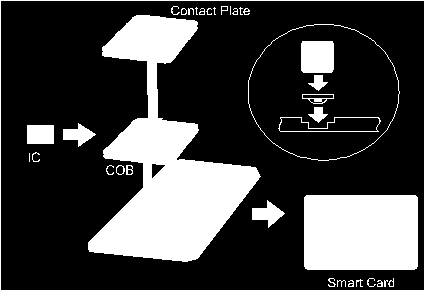
9 MDG The following diagram shows a schematic for a typical smart card. Figure 2: Smart Card Manufacture IC: Integrated Circuit COB: Chip on Board 2.2 Single Application Smart Cards There are smart cards that are designed to carry only a single application and these cards display various levels of sophistication. The simplest can be considered memory cards. The more sophisticated can perform the same sort of processing that a multi-application smart card can do. A memory card is one where a limited instruction set allows static memory access. In most cases the instructions set consists of read and write commands and may also include some security features such a symmetric encryption. The instruction set, however, is not combined on the chip to create an executable program, but rather each instruction has an external command that must be sent to the chip. For example, the command READ BINARY simply instructs the chip to read a certain memory area and return the results. Further such examples are found in [7816-4]. More complex single application cards do permit executable programs to reside on the chip, which permits more data processing and more data security. So, these cards allow a series of instructions to be combined into a function. In other words, the cards are programmable. Single application cards successfully fulfil many smart card business cases. There are still some drawbacks. Once a card is manufactured it is difficult, if not impossible, to change the application on the chip. If a card issuer wished to offer several different applications to their cardholders, then a cardholder could have to be issued with two or more cards. The resulting cost to issuers may prove to be too high. 2.3 Multi-Application Smart Cards Multi-application smart cards are programmable chip cards that allow multiple applications to be loaded onto the chip. Each application can run independently on the chip. So, a single chip card can be used to perform multiple and very different functions. It would be possible, for example, to have a single smart card that could serve as ID, a payment card and a holder of health records. Each of the application will have access to the necessary tools to cater for its own data security MAOSCO Limited. MAO-DOC-TEC-005 v1.40 MULTOS is a registered trademark of MULTOS Limited. 3

10 MULTOS Developer s Guide Applications can be loaded and deleted from multi-application cards. This greater freedom allows cardholders and issuers to change the application mix on the chip during the normal lifetime of the card. It can also extend the useful life of a card. Finally, these cards have an operating system. An OS helps to create a known environment within which applications operate. It also facilitates loading and deleting as well as other common operations. Multi-application cards are not without their weak points. The cost of multi-application chip cards is higher than other types. More flexibility brings complexity, which means that there is an initial learning phase that may be longer than anticipated. 2.4 General Operating Environment Smart cards are not stand-alone modules. A card on its own is simply a piece of plastic with a silicon chip embedded in it. In order for the chip to function it needs a power source. Furthermore, an application on a chip does not run on its own. It waits for data to be sent to it so that it can then carry out its function Card Applications In general, a smart card application is one that is able to receive and process commands. The command processing can be simple or complex. The application should also be able to return data in response to a command Interface Devices In order to use a chip card some sort of reader is required. Readers can come in many shapes and sizes from hand held devices to stand alone kiosks. The term used to indicate any of those is interface device, also known as an IFD. An IFD is more than a chip card reader. It must also be able to supply power the chip, transmit commands and handle the chip application s responses. It is the IFD initiates and directs the terminal application interaction. This is referred to as the command response dialogue and is illustrated in Figure 3: Command-Response Dialogue. Figure 3: Command-Response Dialogue The concept of command-response dialogue is very important. It is the basis of application development. MAO-DOC-TEC-005 v MAOSCO Limited. 4 MULTOS is a registered trademark of MULTOS Limited.

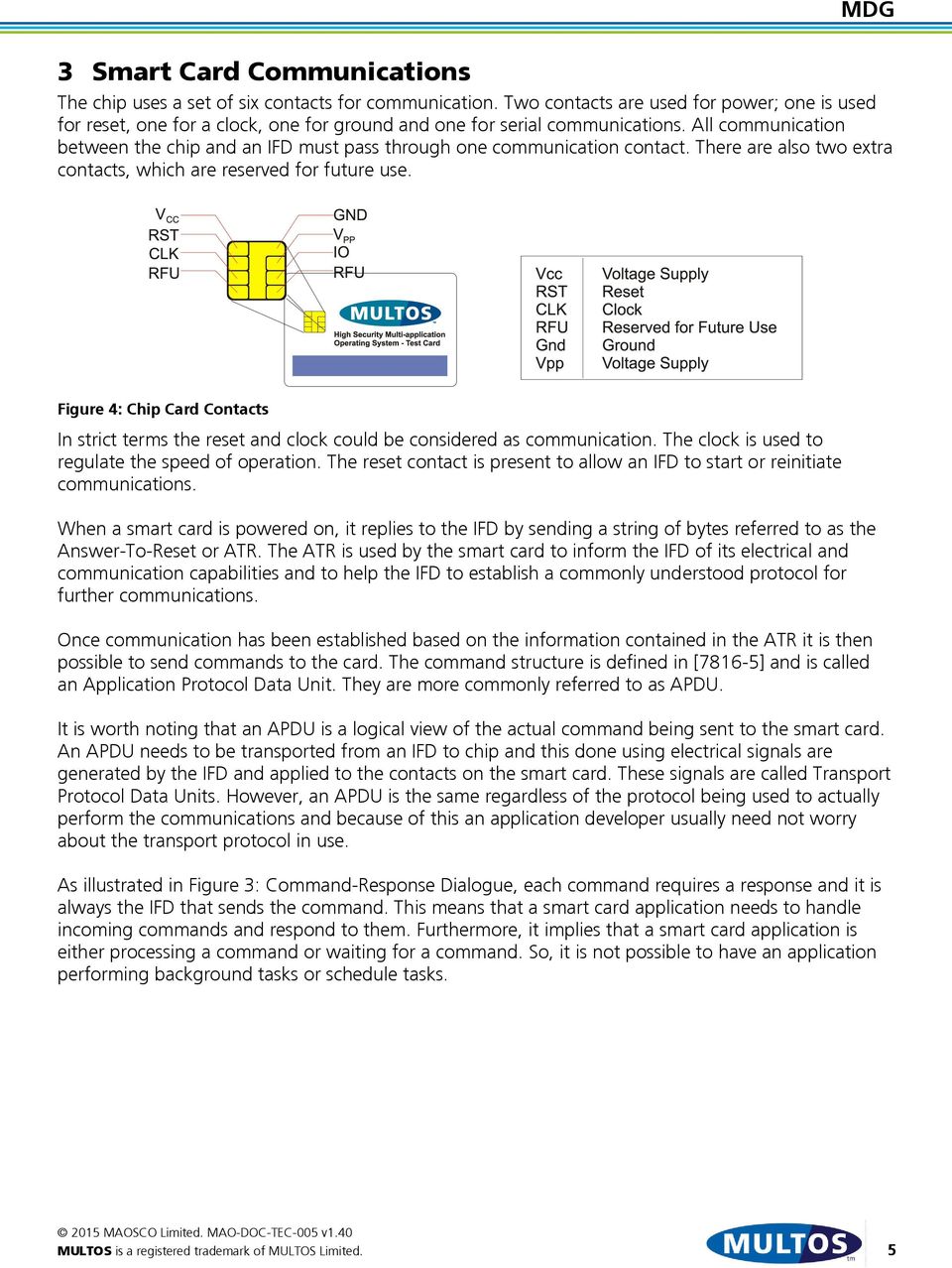
11 MDG 3 Smart Card Communications The chip uses a set of six contacts for communication. Two contacts are used for power; one is used for reset, one for a clock, one for ground and one for serial communications. All communication between the chip and an IFD must pass through one communication contact. There are also two extra contacts, which are reserved for future use. Figure 4: Chip Card Contacts In strict terms the reset and clock could be considered as communication. The clock is used to regulate the speed of operation. The reset contact is present to allow an IFD to start or reinitiate communications. When a smart card is powered on, it replies to the IFD by sending a string of bytes referred to as the Answer-To-Reset or ATR. The ATR is used by the smart card to inform the IFD of its electrical and communication capabilities and to help the IFD to establish a commonly understood protocol for further communications. Once communication has been established based on the information contained in the ATR it is then possible to send commands to the card. The command structure is defined in [7816-5] and is called an Application Protocol Data Unit. They are more commonly referred to as APDU. It is worth noting that an APDU is a logical view of the actual command being sent to the smart card. An APDU needs to be transported from an IFD to chip and this done using electrical signals are generated by the IFD and applied to the contacts on the smart card. These signals are called Transport Protocol Data Units. However, an APDU is the same regardless of the protocol being used to actually perform the communications and because of this an application developer usually need not worry about the transport protocol in use. As illustrated in Figure 3: Command-Response Dialogue, each command requires a response and it is always the IFD that sends the command. This means that a smart card application needs to handle incoming commands and respond to them. Furthermore, it implies that a smart card application is either processing a command or waiting for a command. So, it is not possible to have an application performing background tasks or schedule tasks MAOSCO Limited. MAO-DOC-TEC-005 v1.40 MULTOS is a registered trademark of MULTOS Limited. 5
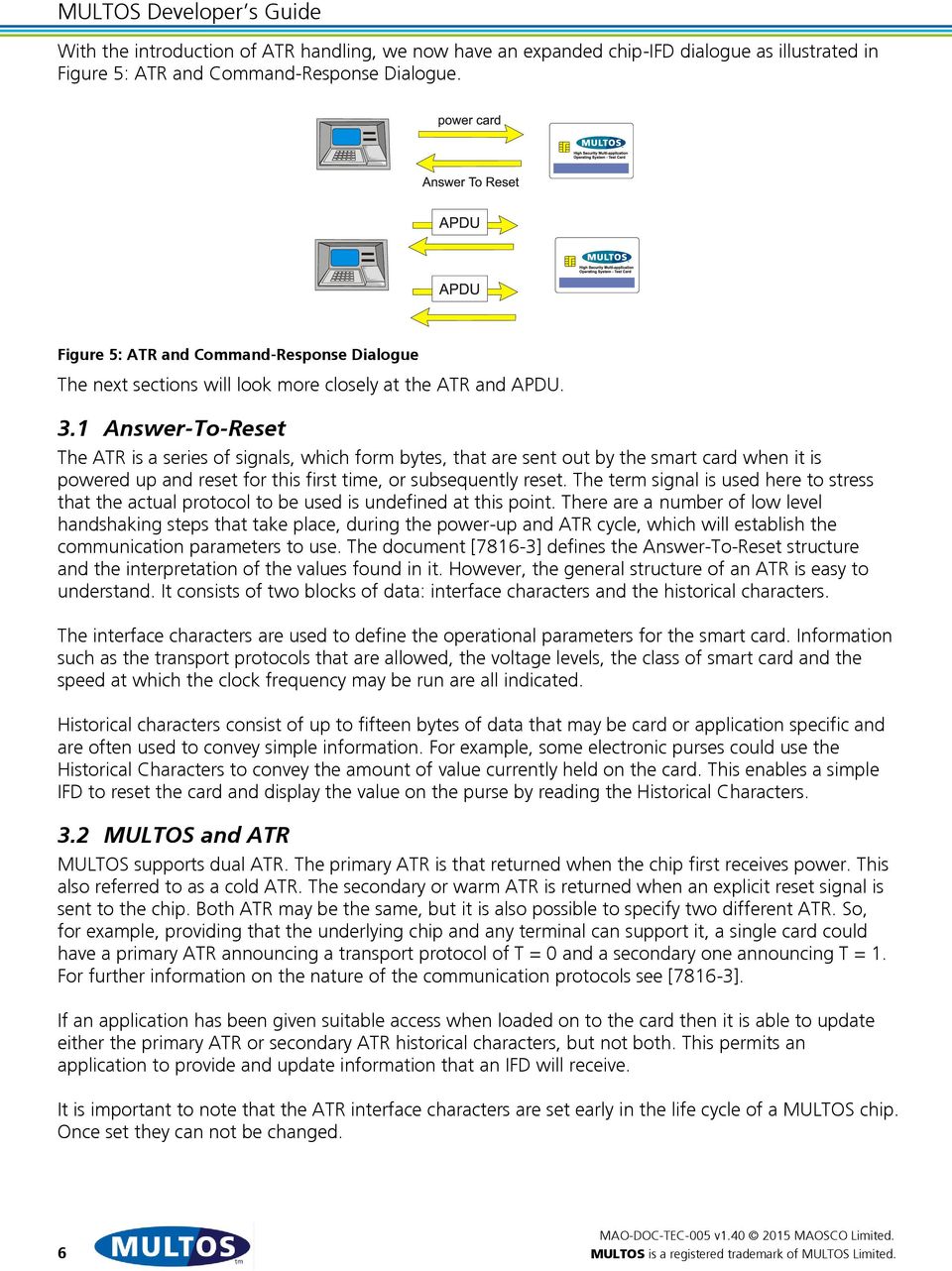
12 MULTOS Developer s Guide With the introduction of ATR handling, we now have an expanded chip-ifd dialogue as illustrated in Figure 5: ATR and Command-Response Dialogue. Figure 5: ATR and Command-Response Dialogue The next sections will look more closely at the ATR and APDU. 3.1 Answer-To-Reset The ATR is a series of signals, which form bytes, that are sent out by the smart card when it is powered up and reset for this first time, or subsequently reset. The term signal is used here to stress that the actual protocol to be used is undefined at this point. There are a number of low level handshaking steps that take place, during the power-up and ATR cycle, which will establish the communication parameters to use. The document [7816-3] defines the Answer-To-Reset structure and the interpretation of the values found in it. However, the general structure of an ATR is easy to understand. It consists of two blocks of data: interface characters and the historical characters. The interface characters are used to define the operational parameters for the smart card. Information such as the transport protocols that are allowed, the voltage levels, the class of smart card and the speed at which the clock frequency may be run are all indicated. Historical characters consist of up to fifteen bytes of data that may be card or application specific and are often used to convey simple information. For example, some electronic purses could use the Historical Characters to convey the amount of value currently held on the card. This enables a simple IFD to reset the card and display the value on the purse by reading the Historical Characters. 3.2 MULTOS and ATR MULTOS supports dual ATR. The primary ATR is that returned when the chip first receives power. This also referred to as a cold ATR. The secondary or warm ATR is returned when an explicit reset signal is sent to the chip. Both ATR may be the same, but it is also possible to specify two different ATR. So, for example, providing that the underlying chip and any terminal can support it, a single card could have a primary ATR announcing a transport protocol of T = 0 and a secondary one announcing T = 1. For further information on the nature of the communication protocols see [7816-3]. If an application has been given suitable access when loaded on to the card then it is able to update either the primary ATR or secondary ATR historical characters, but not both. This permits an application to provide and update information that an IFD will receive. It is important to note that the ATR interface characters are set early in the life cycle of a MULTOS chip. Once set they can not be changed. MAO-DOC-TEC-005 v MAOSCO Limited. 6 MULTOS is a registered trademark of MULTOS Limited.
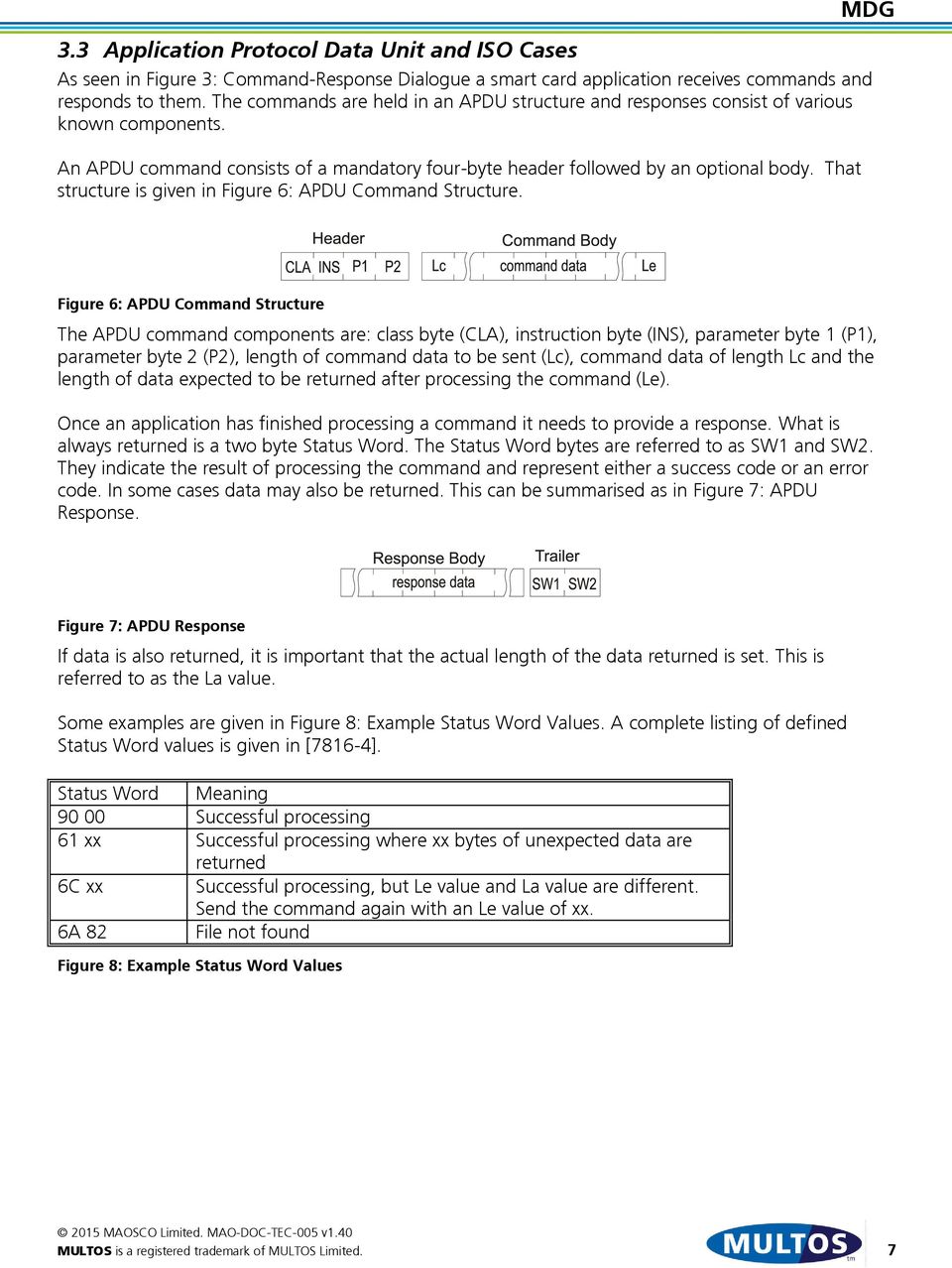
13 3.3 Application Protocol Data Unit and ISO Cases As seen in Figure 3: Command-Response Dialogue a smart card application receives commands and responds to them. The commands are held in an APDU structure and responses consist of various known components. An APDU command consists of a mandatory four-byte header followed by an optional body. That structure is given in Figure 6: APDU Command Structure. MDG Figure 6: APDU Command Structure The APDU command components are: class byte (CLA), instruction byte (INS), parameter byte 1 (P1), parameter byte 2 (P2), length of command data to be sent (Lc), command data of length Lc and the length of data expected to be returned after processing the command (Le). Once an application has finished processing a command it needs to provide a response. What is always returned is a two byte Status Word. The Status Word bytes are referred to as SW1 and SW2. They indicate the result of processing the command and represent either a success code or an error code. In some cases data may also be returned. This can be summarised as in Figure 7: APDU Response. Figure 7: APDU Response If data is also returned, it is important that the actual length of the data returned is set. This is referred to as the La value. Some examples are given in Figure 8: Example Status Word Values. A complete listing of defined Status Word values is given in [7816-4]. Status Word Meaning Successful processing 61 xx Successful processing where xx bytes of unexpected data are returned 6C xx Successful processing, but Le value and La value are different. Send the command again with an Le value of xx. 6A 82 File not found Figure 8: Example Status Word Values 2015 MAOSCO Limited. MAO-DOC-TEC-005 v1.40 MULTOS is a registered trademark of MULTOS Limited. 7
14 MULTOS Developer s Guide There are four possible ISO cases. They are summarised in Figure 9: ISO Cases. Case APDU Command Response 1 CLA INS P1 P2 Status Word 2 CLA INS P1 P2 Le Status Word and data. La value set. 3 CLA INS P1 P2 Lc [data] Status Word 4 CLA INS P1 P2 Lc [data] Le Status Word and data. La value set. Figure 9: ISO Cases A Case 1 command could be one that resets an application counter. A Case 2 command might be one that reads data from the card. A Case 3 command could be one that only writes data to the chip. Finally, a Case 4 command might decrypt the incoming command data and return the value in plain text. 3.4 Logical Channels A logical channel is a link to a Dedicated File. A logical channel to one Dedicated File is independent of a logical channel to another Dedicated File. In other words, using logical channels it is possible to have multiple applications open on the smart card at any one point in time and for these applications to run independently of each other. Within ISO 7816 the class byte of the command APDU is used to specify the logical channel to send the command to. When the highest nibble of the class byte is equal to 0,8,9 or A then the least significant nibble of the class byte represents the secure messaging format and logical channel number. 3.5 Secure Messaging Secure Messaging is specified in [7816-4]. What it is intended to do is to afford data authentication and data confidentiality to smart card applications. Authentication is guaranteed by using a checksum or hash digest value calculated over the data. Confidentiality is guaranteed by using a suitable cryptographic method to encrypt the data and / or digitally sign the authentication value. MULTOS applications can fully support secure messaging by implementing data authentication or data confidentiality on the command body of the message. The operating system provides security functions that allow encryption and decryption of data using either symmetric or asymmetric methods. Inter-Industry Smart Card Commands The inter-industry commands given in [7816-4] are supported by MULTOS. They and other MULTOS specific commands are explained in the [MDRM]. 3.6 Data Structures The following discussion is based on [7816-4]. It has been included to introduce data structures. File Structure Undifferentiated blocks of data can be useful. It is, however, even more useful when it has some sort of structure. Now, the manner in which the files are organised is dependent upon the standard that the smart card uses. The single most important standard for smart cards is [7816-4]. This document addresses the logical organisation of the smart card. In particular it defines several different file types. Memory is viewed as a file structure. Figure 10: ISO File Structure illustrates that view. MAO-DOC-TEC-005 v MAOSCO Limited. 8 MULTOS is a registered trademark of MULTOS Limited.

15 MDG Figure 10: ISO File Structure The Master File, represented by MF, is the root file on the smart card. This is the highest level file within which all other files are deemed to reside. Elementary Files, represented by EF, are data files. These files come in a number of different varieties and are discussed later in this section. Elementary Files serve one purpose and that is to hold data. The Elementary Files cannot have child files within them. Dedicated Files, represented by DF, serve as both executable applications and as directories. Within [7816-4] there is little differentiation between a DF as a directory and as an application. Logically there may be files held within the Dedicated File, but these files are considered to be embedded within the Dedicated File rather than just belonging in the directory. Dedicated File may hold other Dedicated Files as well as Elementary Files. ISO 7816 does not specifically state that Dedicated Files contain executable code. In reality there does not have to be a command that executes a Dedicated File. Instead, [7816-4] defines a number of commands. The details of the implementation of them on the card are not specified Elementary File Types An Elementary File is one that contains data. There are several different ways that data could be held and so [7816-4] defines several different varieties of Elementary File. The different types are shown in Figure 11: ISO Elementary File Types. Figure 11: ISO Elementary File Types Transparent A transparent file is a block of continuous bytes of data. Elementary Files with a transparent file structure may be accessed using the Read Binary command as defined by [7816-4]. Fixed Length A fixed length file structure is one where the file is divided into a number of records with each record having a fixed length. To access data a record needs to be located and either the whole record or a subset of it is extracted MAOSCO Limited. MAO-DOC-TEC-005 v1.40 MULTOS is a registered trademark of MULTOS Limited. 9

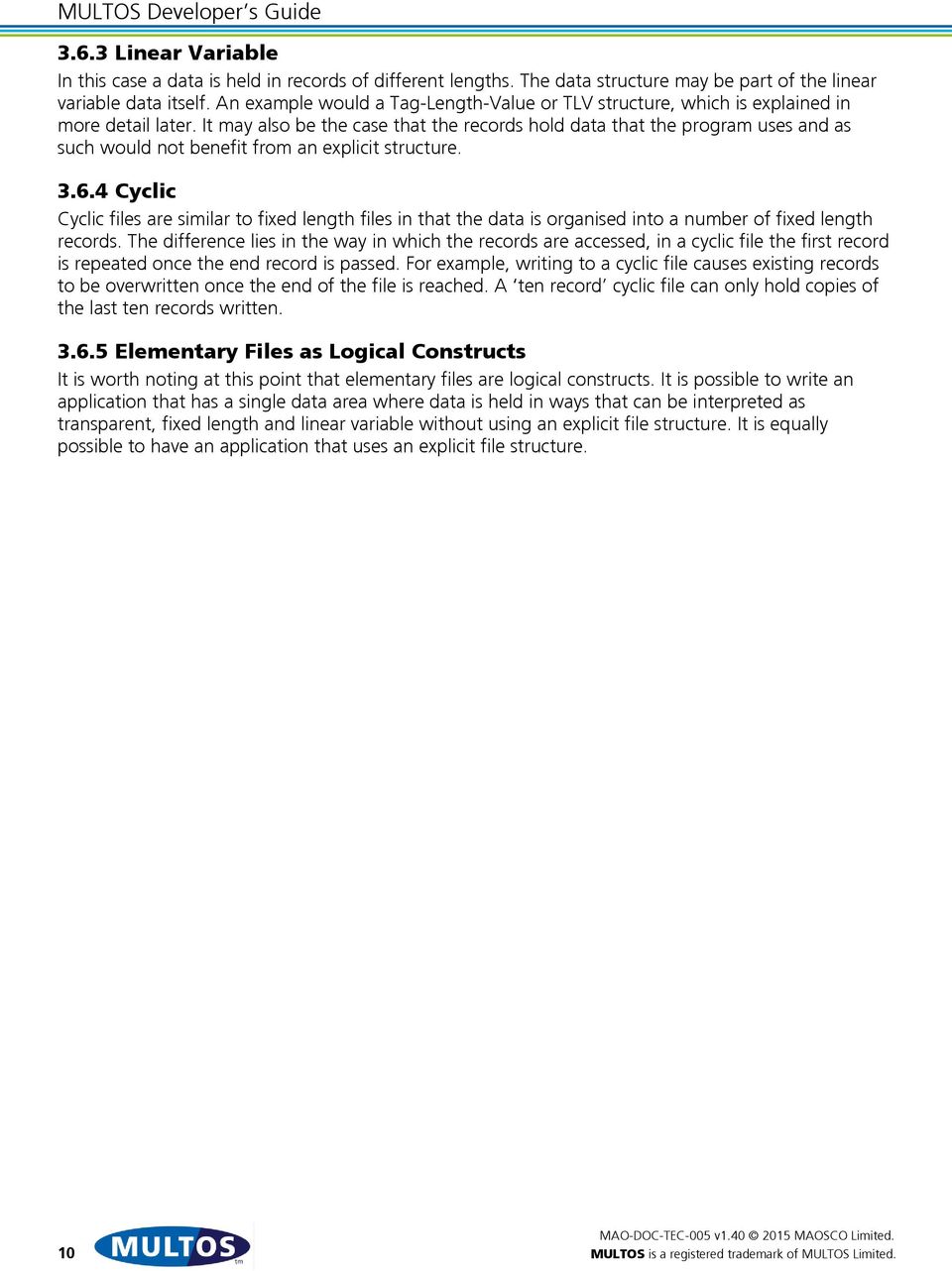
16 MULTOS Developer s Guide Linear Variable In this case a data is held in records of different lengths. The data structure may be part of the linear variable data itself. An example would a Tag-Length-Value or TLV structure, which is explained in more detail later. It may also be the case that the records hold data that the program uses and as such would not benefit from an explicit structure Cyclic Cyclic files are similar to fixed length files in that the data is organised into a number of fixed length records. The difference lies in the way in which the records are accessed, in a cyclic file the first record is repeated once the end record is passed. For example, writing to a cyclic file causes existing records to be overwritten once the end of the file is reached. A ten record cyclic file can only hold copies of the last ten records written Elementary Files as Logical Constructs It is worth noting at this point that elementary files are logical constructs. It is possible to write an application that has a single data area where data is held in ways that can be interpreted as transparent, fixed length and linear variable without using an explicit file structure. It is equally possible to have an application that uses an explicit file structure. MAO-DOC-TEC-005 v MAOSCO Limited. 10 MULTOS is a registered trademark of MULTOS Limited.
17 3.7 MULTOS File Structure The MULTOS file structure is a subset of the file structure defined by ISO The key difference is that MULTOS does not provide a full hierarchical file structure on the card. An application can, however, implement its own file structure. Figure 12: MULTOS File Structure shows how a MULTOS Card's file structure appears. MDG Figure 12: MULTOS File Structure The other files found are the Master File, the Directory File and the Answer-to-Reset File, which are covered in the following subsection The Master File The Master File is the root directory The Directory File The Directory File, as called the DIR, is an Elementary File defined in [7816-4] and maintained by MULTOS. It is a variable length EF that can hold information on the applications that have been loaded onto the MULTOS Card. Each application loaded onto the MULTOS card may have an entry in the DIR file. The entry is created by the application provider and is usually stored in an [7816-4] defined TLV structure. These records are ordered in the same sequence as the applications are loaded. The fact that DIR records have a defined structure permits IFD and other applications to read and to parse them. So, for example, an IFD can verify that a particular application is available by reading the DIR records assuming that the application does have a DIR record. If the required records are found, then the IFD could display application names for cardholder selection The Answer-To-Reset File The Answer-To-Reset File, also called the ATR File, is maintained by MULTOS and each application may place an entry in the file. It is a variable length EF that can hold information related to the chip Answer-To-Reset. Contrary to the name, the ATR File is not used directly to generate the Answer-To-Reset. An Answer- To-Reset has historical bytes, but there are only 15 bytes available for use. If more than 15 were required, they would be placed in the ATR File MAOSCO Limited. MAO-DOC-TEC-005 v1.40 MULTOS is a registered trademark of MULTOS Limited. 11

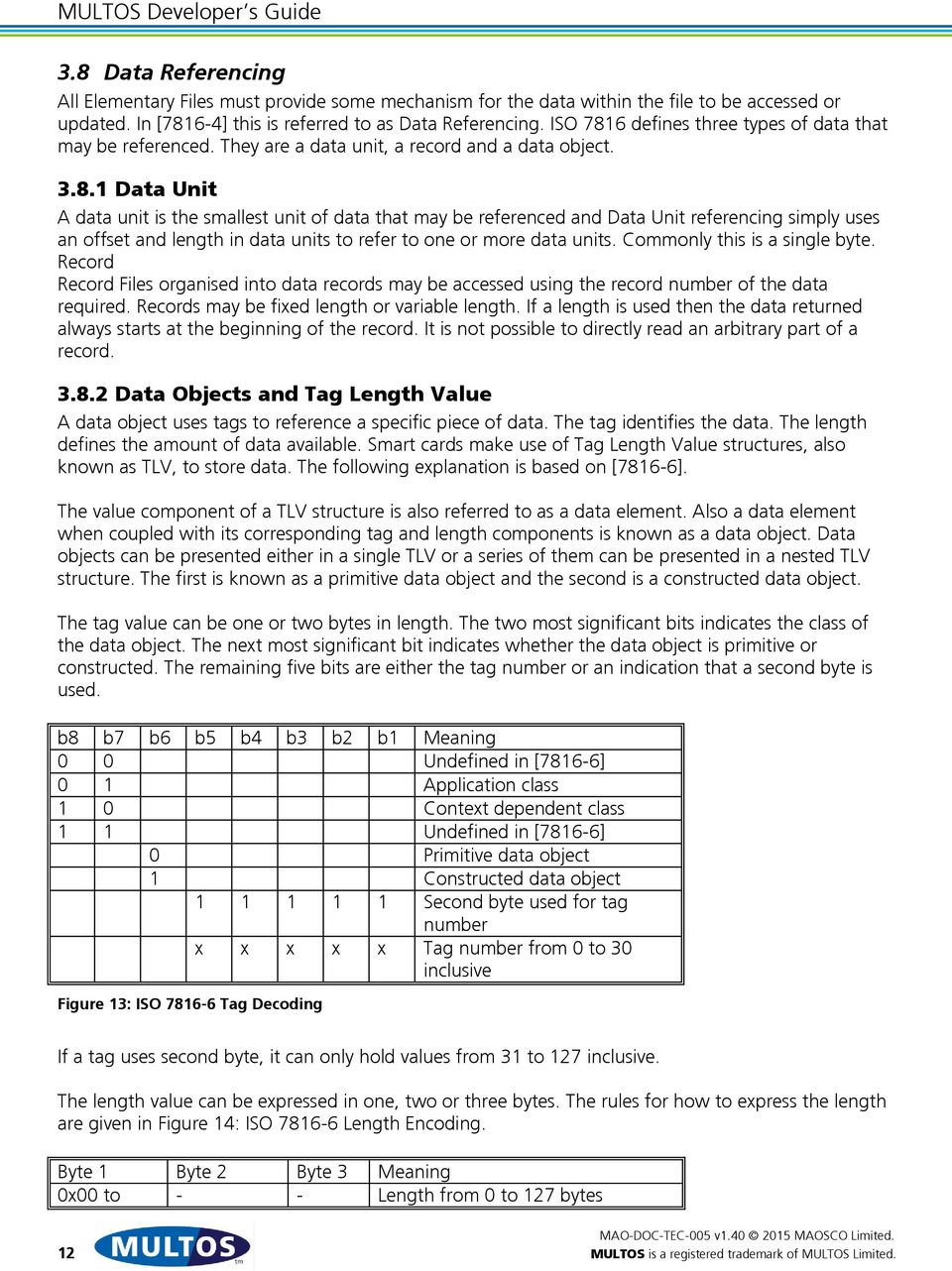
18 MULTOS Developer s Guide 3.8 Data Referencing All Elementary Files must provide some mechanism for the data within the file to be accessed or updated. In [7816-4] this is referred to as Data Referencing. ISO 7816 defines three types of data that may be referenced. They are a data unit, a record and a data object Data Unit A data unit is the smallest unit of data that may be referenced and Data Unit referencing simply uses an offset and length in data units to refer to one or more data units. Commonly this is a single byte. Record Record Files organised into data records may be accessed using the record number of the data required. Records may be fixed length or variable length. If a length is used then the data returned always starts at the beginning of the record. It is not possible to directly read an arbitrary part of a record Data Objects and Tag Length Value A data object uses tags to reference a specific piece of data. The tag identifies the data. The length defines the amount of data available. Smart cards make use of Tag Length Value structures, also known as TLV, to store data. The following explanation is based on [7816-6]. The value component of a TLV structure is also referred to as a data element. Also a data element when coupled with its corresponding tag and length components is known as a data object. Data objects can be presented either in a single TLV or a series of them can be presented in a nested TLV structure. The first is known as a primitive data object and the second is a constructed data object. The tag value can be one or two bytes in length. The two most significant bits indicates the class of the data object. The next most significant bit indicates whether the data object is primitive or constructed. The remaining five bits are either the tag number or an indication that a second byte is used. b8 b7 b6 b5 b4 b3 b2 b1 Meaning 0 0 Undefined in [7816-6] 0 1 Application class 1 0 Context dependent class 1 1 Undefined in [7816-6] 0 Primitive data object 1 Constructed data object Second byte used for tag number x x x x x Tag number from 0 to 30 inclusive Figure 13: ISO Tag Decoding If a tag uses second byte, it can only hold values from 31 to 127 inclusive. The length value can be expressed in one, two or three bytes. The rules for how to express the length are given in Figure 14: ISO Length Encoding. Byte 1 Byte 2 Byte 3 Meaning 0x00 to - - Length from 0 to 127 bytes MAO-DOC-TEC-005 v MAOSCO Limited. 12 MULTOS is a registered trademark of MULTOS Limited.
19 MDG 0x7F 0x81 0x80 to - Length from 128 to 255 bytes 0xFE 0x82 MS byte LS byte Length from 256 to bytes Figure 14: ISO Length Encoding So, if a value had a length of 10 bytes, the length would be expressed in a single byte of 0x0A. If the length were 145 bytes, it would be expressed in two bytes of 0x8191. Finally, if the length were bytes, it would be expressed in three bytes as 0x82F385. To continue with a data object example, the data object given by the hexadecimal string 50 0A 4D 55 4C 54 4F is interpreted as a primitive data object that holds an application label with a length of 10 bytes and that reads MULTOS App. More specifically, the tag 0x50 is for an application label as per [7816-6]. The length of the data element is 0x0A or 10 decimal bytes. The value is hexadecimal encoded ASCII. So, 0x4D, which is 77 decimal, is the ASCII code for the character M. As another example, the data object given by the hexadecimal string 5F is interpreted as an expiration date of 31 March Here the tag 0x5F24 is for the expiration date of an application. Note that the binary representation of the first byte is , which means, as per Figure 13: ISO Tag Decoding, that it is a primitive data object of the application specific class and that the tag number is 0x24 or Data Object Templates A primitive data object conveys a single piece of information. This may be all that is required in some cases, but oftentimes several pieces of related information are required. In order to provide this type of information templates, also referred to as constructed data objects, are available. These consist of a series of embedded primitive data objects wrapped in a constructed data object tag. A single example will serve as clarification. The first example template will be that of the Directory File. This template is defined in [7816-5]. In this example the DIR has the hexadecimal string F 05 F A 4D 55 4C 54 4F The break down of this is given in Figure 15: DIR Entry Example Decoded. Hexadecimal String Meaning 61 Application template: constructed data object of the application specific class 13 Total length of all following data (19 bytes) 4F Primitive data object tag for the Application ID. Note that it is only byte in length because b5 is not set. 05 Length of Application ID F Application ID data element 50 Primitive data object tag for application label 0A Length of application label (10 bytes) 4D 55 4C 54 4F Application label that reads MULTOS App Figure 15: DIR Entry Example Decoded 2015 MAOSCO Limited. MAO-DOC-TEC-005 v1.40 MULTOS is a registered trademark of MULTOS Limited. 13

20 MULTOS Developer s Guide 4 Working with MULTOS Cards The chapter Smart Card provided a general introduction to smart cards and also afforded some MULTOS specific information. The objective of this chapter is to present enough information about MULTOS chips so that a developer will have good understanding of them. This is important because it gives a developer a better understanding of how programming instructions are implemented as well as providing some insight into how to make the best use of MULTOS smart card features. 4.1 Working with Applications This section addresses some topics concerning applications. Two of the topics, application selection and file control information, are general. The rest provide MULTOS specific information. 4.2 MULTOS Applications as Dedicated Files Figure 10: ISO File Structure shows that a smart card can be considered to consist of a series of files. Now, the definition of an Elementary File (EF) clearly states that it is meant to hold data. Dedicated Files (DF), on the other hand, can hold other DF and / or EF. This structure provides a good conceptual model of smart card static memory. It does not, however, give a clear indication of where application executable code is to be stored. As shown in Figure 12: MULTOS File Structure the operating system considers top level dedicated files as applications. What this means is that MULTOS treats the loading of an application as the creation of a new dedicated file. So, an application can be selected as described in the section MULTOS and Application Selection and application specific commands can then be sent to it. For a general view of a MULTOS application see Figure 17: Application Space in MULTOS Application Selection and Application ID A multi-application card will have more than one application per card. So, a method was required to indicate to which application a command is sent. The method is application selection, which is done by transmitting a SELECT FILE command as defined in [7816-4]. The key bit of information sent as command data in the SELECT FILE command is the Application ID, also known as the AID. This ID with a length between 1 and 16 bytes inclusive is unique on the card and may be proprietary or ISO registered as per [7816-5]. Please note that both parameter bytes are used to indicate if FCI should be returned. MAO-DOC-TEC-005 v MAOSCO Limited. 14 MULTOS is a registered trademark of MULTOS Limited.

21 MDG MULTOS and Application Selection MULTOS Supports the P1 P2 values given in Figure 16: MULTOS File Selection P1 P2 Values. In all the cases below the CLA byte has a value of 0x00 and the INS bye one of 0xA4. P1 P2 Lc Cmd DAta Selects If file exists, returns None none Master File Success: F 00 Master File Success: F 00 Directory File Success: F 01 ATR File Success: C 02 2F 00 Directory File Success: C 02 2F 01 ATR File Success: [01,10] AID Application (DF) Application Success and FCI [01,10] AID Application (DF) Application Success and FCI 04 0C [01,10] AID Application (DF) Application Success F 00 Master File Success: F 00 Directory File Success: C 02 3F 00 Master File Success: C 02 2F 00 Directory File Success: Figure 16: MULTOS File Selection P1 P2 Values In order to understand fully the P1 P2 table, it is useful to take into account the following points: All values for P1, P2, Lc and command data are hexadecimal When a file does not exist the error returned is File not found (6A 82). However the application selection process will operate over all of the loaded applications and not just the first application that has an AID that (partially) matches the AID in the SELECT command. The command will reply with file not found only if there are no loaded applications that have an AID that (partially) matches and which are permitted over the selected interface. Any other combination of P1 P2 and Lc may be used. However, the operating system will attempt to route this to an application. If an application was not successfully selected beforehand, an ISO defined error will be returned. If the application has the Process Events permission, MULTOS does not test the most significant 6 bits of P2. The processing of the least significant 2 bits of P2 remain unchanged. For more information see 4.8 The Lc when selecting a file using the AID can be between 1 and 16 bytes inclusive MULTOS supports application selection by partial AID. So, where the Lc value is indicated as AID it is possible to use only part of the full AID value. The term Application Success is used to indicate that it is possible for applications to set the status word returned upon successful selection. If, as is usually the case, the application has not set a different status word, the success value is Only applications can have FCI An application does not have to have FCI File Control Information As seen in Figure 16: MULTOS File Selection P1 P2 Values File Control Information or FCI can be returned in response to a SELECT FILE command. FCI can consist of a number of data objects and is intended to allow an IFD to examine the characteristics of the selected file. So, an FCI entry could consist of a tag header list as defined in [7816-6], which communicates what tags are used by the application. This would allow an IFD to process tho4.8se values and determine, for example, if the 2015 MAOSCO Limited. MAO-DOC-TEC-005 v1.40 MULTOS is a registered trademark of MULTOS Limited. 15
22 MULTOS Developer s Guide application indicates a preferred language. If so, the IFD could request the language preference value and display its messages in that language Dual FCI As of MULTOS 4.3, an application may return a different FCI value depending on whether it is selected via the contact or contactless interface. In order to do this, the FCI data should be formatted as contact_fci contactless_fci. For example: #pragma attribute("fci", "0B6F f4e F6F0D500B434f4e c455353") The fact that an application has dual FCI values is indicated in file_mode_type byte of the ALC (see [GLDA] Acquire Application Load Certificate). b7 b6 b5 b4 b3 b2 b1 b0 file_mode_type Dual FCI bit 0 Single FCI application 1 Dual FCI application MAO-DOC-TEC-005 v MAOSCO Limited. 16 MULTOS is a registered trademark of MULTOS Limited.
23 4.3 Application Space in MULTOS Before embarking on discussions about MULTOS chip architecture and the Application Abstract Machine, it is worthwhile to clarify what is meant be the term MULTOS application. Figure 17: Application Space in MULTOS gives a schematic view of a loaded MULTOS application. MDG Firewall Application EEPROM RAM Session Data Code Figure 17: Application Space in MULTOS An application has its own application space, which consists of: Code: resides in the static memory area and is the executable code. The code area can not be read nor written to. Data: resides in the static memory area and is the local data that the application requires to carry out its function. Data can be read and written, but not executed. Session Data: permanently occupies space in the RAM based stack. An example of the use of session data would be PIN check flag. Session data can be read and written. All of these components exist within an OS enforced firewall. More details of these areas will be discussed later in the document MAOSCO Limited. MAO-DOC-TEC-005 v1.40 MULTOS is a registered trademark of MULTOS Limited. 17
24 MULTOS Developer s Guide 4.4 Chip Architecture A schematic representation of a MULTOS chip is given in Figure 18: MULTOS Chip Architecture. MEL Application Application Load Certificates AAM MULTOS Operating System Firewalls MEL API Application Abstract Machine Operating System Silicon (Hardware) Silicon Hardware Figure 18: MULTOS Chip Architecture The components are: Silicon Hardware: The underlying hardware is the physical platform that supports the OS functions. Those functions are written in native code, but are accessed via a fully specified virtual machine, which is the same no matter the hardware used. Operating System: The operating system provides the underlying communications, memory management and virtual machine. It also handles the loading and deleting of Applications, application selection and the handling of APDU commands and responses. Application Abstract Machine: The AAM provides a standard API consisting of a set of instructions and in built functions, called primitives. MEL API: this provides support for MULTOS Assembly Language code. There will be some examples of this in the document. It is also possible to use C or Java to write MULTOS applications. Application Load Certificates: this has been included to indicate that a digitally signed certificate is required to load an application on to a MULTOS card. The certificate once used is discarded. For more information on loading and deleting information see [GLDA]. Applications and Firewalls: see Figure 17: Application Space in MULTOS for a description. MAO-DOC-TEC-005 v MAOSCO Limited. 18 MULTOS is a registered trademark of MULTOS Limited.
25 MDG 4.5 Modes of Operation: Standard, Shell and Default Applications on MULTOS cards need to be able to work in a variety of environments. There are different operational modes intended to facilitate this. The standard mode corresponds to the general concept of multi-application smart cards. There are applications on the card and in order to use one it must be selected. Once that application is no longer required, another application can be selected and commands sent to it. The assumption made when using standard mode is that the existing external infrastructure is able to work with multi-application smart cards. In some cases this assumption does not hold. In order to permit MULTOS applications to work in this type of environment it is possible to use shell mode. The shell application, then, serves as the sole interface between any IFD and any other applications on the card. This means that there is no need to select the shell application for it to be ready to process commands and also that it is not possible to directly select any other application. So, the shell application must be able not only to process commands destined for it, but also must be able to route commands to the relevant applications that are also on the chip. Default mode is similar to shell mode in that the default application is immediately available to receive commands. However, it is still possible to use SELECT FILE as in standard mode. For example, a SIM phone application could be on chip along with, say, a payment application. In this case it would make sense for the phone application to be a default application because in that way it would be able to process incoming phone calls immediately. If, however, the payment application was required, a SELECT FILE command could be used and MULTOS, not the phone application, would handle it normally MAOSCO Limited. MAO-DOC-TEC-005 v1.40 MULTOS is a registered trademark of MULTOS Limited. 19
26 MULTOS Developer s Guide Command Handling One of the key functions of the OS is to APDU command routing. Without this function an application could not be selected nor commands sent to it. Figure 19: Command Routing The different modes of operation have been explained in Section 4.5. There are still some points to clarify with respect to Figure 19: Command Routing. They are: Only the OS can process an MSM command. These commands include all of the commands used for loading an application, deleting an application or enabling a card. The third step Can OS process the command? is best illustrated by the SELECT FILE command. So, if a select command is sent the OS will check to see if there is an existing application with the ID given and, if so, will select the file indicated. The implication of the previous point is that a shell application will have to handle all command routing because it receives all incoming commands. 4.6 Application Abstract Machine Applications on MULTOS cards are executed using a virtual machine and this is referred to as the Application Abstract Machine (AAM). The AAM is a zero-address stack machine that implements an instruction set known as MULTOS Executable Language (MEL). MAO-DOC-TEC-005 v MAOSCO Limited. 20 MULTOS is a registered trademark of MULTOS Limited.
27 MDG Memory Layout The MULTOS Application Abstract Machine (AAM) provides each application with its own memory space. So, the memory map for one application is organised in the same manner as any other. Figure 20: MULTOS Memory Layout shows the relationship between the physical memory present on a MULTOS Card and the memory seen by an application. Figure 20: MULTOS Memory Layout The application space is protected by a very strong firewall. This means that one application can not access the space of any other application nor have its space accessed. Please note that within an application the code space and data space are handled independently of each other. Code is executed while data is manipulated. It is worth noting that MULTOS Registers are not used in the same way as those in many machine languages. MULTOS registers are not used to point to specific memory locations, but rather they point to areas within the memory space and tagged addressing is then used to access a specific location Tagged Addressing Memory spaces are always relative to the running application. This means that the location of data can not be fixed by an absolute address. As applications need a method to refer to data within these areas MULTOS provides tagged addressing. Tagged Addressing consists of a register and offset. Figure 20: MULTOS Memory Layout introduces the memory area offset registers. The registers are maintained by MULTOS and each is fixed to point to the bottom or top byte of each memory area. An offset is provided by the application developer and refers to a relative address within the memory area. For example, to refer to a byte that is 12 bytes from the top of the Public memory area the expression PT[-12] is used. So, as another example, the first byte of data starting at the bottom of the static data area is referred to as SB[0]. The location of data is sometimes referred to as its segment address. The OS derives a segment address from a tagged address. This is because a tagged address can be mapped to a sixteen-bit virtual address, which is referred to as a segment address MAOSCO Limited. MAO-DOC-TEC-005 v1.40 MULTOS is a registered trademark of MULTOS Limited. 21
28 MULTOS Developer s Guide Here it is worth noting that the actual type, location and size of the different memory segments will vary from one chip type to another. Also, the segment address of each area within the data space may vary between applications and successive sessions. However, data within each area are contiguous, which means that successive segment addresses represent adjacent bytes. Tagged addressing allows the OS to dynamically map to the correct segment address at run time. This ensures that any application written is not specific to a particular chip Code Space Figure 21: Application Code Space Code Space refers to the memory space occupied by the application s code, which can not be accessed to read or write, but rather can only be interpreted by the AAM. Physically the code space is a block of memory that consists of up to 64K bytes of contiguous, non-volatile memory. Segment addresses within the code space are always relative to the application. So, the starting offset is always zero and, furthermore, application execution always starts from the first byte. Now, when an instruction is being executed the Code Pointer register contains the code address of the next instruction to be executed. The value that is held in this register is affected when using program flow instructions such as Jump, Branch, Call and Return instructions. However, the code pointer value is not available for manipulation by an application. MAO-DOC-TEC-005 v MAOSCO Limited. 22 MULTOS is a registered trademark of MULTOS Limited.
29 MDG Data Space Figure 22: Application Data Space Data Space contains all of the data that is addressable by the application and consists of three distinct memory areas. Those areas are non-volatile Static memory, RAM based Public memory and RAM based Dynamic data. The latter can be composed of application specific session data and the stack. Data Space can be no more than 64K in size and is addressed from 0 using tagged addresses. Details of the memory areas and the registers used are found in the next sections Static Memory Static data is the non-volatile memory of the MULTOS Card. Static memory is private to the application and cannot be accessed by the terminal or other applications. The registers used to address data within the static memory area are Static Top, ST, and Static Bottom, SB. The first takes as its starting point the last byte held in static memory and refers to it as ST[-1]. The next to last byte of static memory would be ST[-2]. On the other hand, Static Bottom begins with the first byte of static data and refers to it as SB[0]. The second byte would, of course, by referred to as SB[1]. This way of addressing bytes is the same for all applications, which means that all applications have a starting static memory address of SB[0]. It is important to avoid corrupting static memory. There is a limited amount of space for applications and corrupted memory can render an application useless. There are two OS supplied mechanisms that eliminate this problem: data item protection and transaction protection. Data Item Protection is always used. MULTOS guarantees that in executing an instruction that writes data to static memory it will either be completely updated or not updated at all. More specifically, this means that static memory will not be corrupted because no incomplete write will take place. In the case of existing, page based EEPROM memory this guarantee holds even if a data item spans page boundaries and, moreover, other items on the same page will not be corrupted. Transaction Protection is controlled using the Set Transaction Protection primitive and specific information on the primitive can be found in the [MDRM]. This is an OS supplied mechanism for caching a number of writes to memory. They can then be committed or discarded. MULTOS guarantees that once a commit has started then all affected writes are all made. This behaviour holds even if there is a loss of power during the writing of the data MAOSCO Limited. MAO-DOC-TEC-005 v1.40 MULTOS is a registered trademark of MULTOS Limited. 23
30 MULTOS Developer s Guide Transaction Protection does raise the issue of data visibility. In some cases, the data in static is not updated until the entire transaction is completed. For example, the pseudo-code in Figure 23: Transaction Protection Data Visibility may result in the value held at SB[0] being 4 or 5. SB[0] = 3 Transaction Protection ON ADDB 1 to SB[0] ADDB 1 to SB[0] Transaction Protection OFF and COMMIT Figure 23: Transaction Protection Data Visibility The resulting value held at SB[0] depends on how Transaction Protection is implemented by the hardware. It is, therefore, best practice to avoid accessing data that is to be updated using Transaction Protection. There is one exception to the data visibility example discussed. If the MULTOS primitive Checksum is used on static memory area, it always includes any updates, committed or not, as input. So, in the case where transaction protection and checksum are used in conjunction it is important to keep this in mind Additional Static Memory Assuming sufficient EEPROM is available, the amount of static memory available to an application is limited by the maximum value of ST for an implementation, STmax (usually 32K bytes). In some applications it may be necessary to have more static memory than that. There are two ways of achieving this: Specify more data in the Open MEL Application command than is in the ALU. This is usually done by increasing the static data size field in the ALC. After loading the data from the ALU, spare static data space is available at the end of the static memory area within the ALU. Using this method, the additional static data has to be personalised after application loading. MUtil and SmartDeck (hdb/hsim) support the creation of additional static for test cards and debugging. With live cards, you must add the extra size to the application registration details in StepXpress. Manually modify an ALU after compilation to increase the data size. In a hex editor, update the data size field and insert extra bytes at the end of the existing data. This is the way you would do this if you wanted to create an application template and be able to personalise the additional static data BEFORE loading. Note that if the total data size exceeds bytes you need to specify the size in 255 byte blocks and set the appropriate bit in the ALC. In both cases, to address the static memory above STmax from an application you must use the primitives Memory Copy Additional Static and Memory Fill Additional Static. The total amount of static memory available can be obtained by using the Get Static Size primitive. Note that if you declare more than STmax number of static bytes in your application you have no way of knowing which variables will be allocated below STmax, above STmax or indeed straggling STmax. To warn of this situation, the SmartDeck linker outputs a warning if the static data size exceeds 32K. MAO-DOC-TEC-005 v MAOSCO Limited. 24 MULTOS is a registered trademark of MULTOS Limited.
31 MDG Public Memory The Public memory area is the RAM resident input / output buffer for applications. Incoming APDU are held in Public and any outgoing status word, La and data are placed here. This buffer is also used to pass information from one application to another when delegation is used. As an I/O buffer it is visible to IFD. The registers used to address this area are Public Top, PT, and Public Bottom, PB. The byte at the top of the public area is referred to as PT[-1] and each preceding byte has a sequential negative offset. When starting from the bottom of the memory area, the first byte is referred to as PB[0] and each successive byte has a positive sequential offset. During the command-response dialogue MULTOS passes an APDU to an application the APDU is written into Public memory. The APDU Header appears at the top of Public, and command data appears at the bottom of public. When a MULTOS Application wishes to pass a response back to the terminal then the response APDU is written into Public and MULTOS sends the response to the terminal. Note that from MULTOS onwards it is possible to return data that is larger than the size of Public by using the Flush Public primitive (if supported). MULTOS guarantees that data in Public remains private to the application until it exits or delegates to another application. So, public may be used as temporary workspace. MULTOS will automatically clean up the public area if the application terminates abnormally, but will not do so otherwise. This means that any data held in Public that an application does not wish to reveal after exiting should be explicitly erased. When an application stops processing normally Public is made available as follows: If an application exits and has not been delegated to, then the Status Word, La value and La number of bytes of response data becomes available to the terminal. If an application exits and has been delegated to, the whole of public becomes available to the application that performed the delegation operation. If an application delegates to another, then the whole of public becomes available to the application that has been delegated to. This allows data or commands to be passed to a delegate application. In order to carry out the functions given above, the AAM has a map of the Public memory area. It is given in Figure 24: MULTOS Public Memory Data Map MAOSCO Limited. MAO-DOC-TEC-005 v1.40 MULTOS is a registered trademark of MULTOS Limited. 25
32 MULTOS Developer s Guide Address Name Description PT[-1] SW2 Byte 2 of the Status Word PT[-2] SW1 Byte 1 of the Status Word PT[-4] La Actual length of response data PT[-6] Le APDU expected length of response data PT[-8] Lc APDU length of command data sent PT[-9] P3 If required, temporary buffer for 5th byte, if any, of APDU header PT[-10] P2 APDU Parameter byte 2 PT[-11] P1 APDU Parameter byte 1 PT[-12] INS APDU Instruction byte PT[-13] CLA APDU Class byte PT[-14] GetResponseSW1 Byte 1 of Status Word to be used in Get Response command PT[-15] GetResponseCLA CLA to be used by Get Response command PT[-16] Protocol Type Transport protocol type PT[-17] Protocol Flags Bit flags indicating status of protocol values PB[0] Start of Data Area Command data and response data start Figure 24: MULTOS Public Memory Data Map There are still some points of clarification required as to the nature of Public memory. The first thing to note is that command data is always placed at PB[0] and any response data is sent starting from PB[0]. The latter part of the first point is particularly important because an application could, for example, write response data starting at PB[10] as this is a valid tagged address. To continue the example, if the response data was 8 bytes, then MULTOS will transmit the 8 bytes starting at PB[0] and no part of the data placed in Public by the application will be transmitted. MAO-DOC-TEC-005 v MAOSCO Limited. 26 MULTOS is a registered trademark of MULTOS Limited.
33 MDG The second point of note is that GetResponseSW1, GetResponseCLA, Protocol Type and Protocol Flags are all set by the operating system as it handles the low-level chip IFD communication. They can be viewed and manipulated by an application, but there is little call to do so. In those cases where it is necessary Figure 25: Transport Protocol Type Bitmap and Figure 26: Protocol Boolean Flags Bitmap explain the bit maps used for the protocol bytes. B8 B7 B6 B5 B4 B3 B2 B1 Name description x x x RFU Undefined x Others Other protocol used x TCL Contactless transport x T14 T = 14 protocol used x T1 T = 1 protocol used x T0 T = 0 protocol used Figure 25: Transport Protocol Type Bitmap B8 B7 B6 B5 B4 B3 B2 B1 Name description if set x Restarted Application restarted following Exit To MULTOS & Restart primitive x RFU Undefined x Disable GR Disables Get Response x Expecting GR Expecting Get Response x Cmd Data Rxed Data received x Le valid Value is valid x Lc valid Value is valid x P3 valid Value is valid Figure 26: Protocol Boolean Flags Bitmap For more information about transport protocols see [7816-3] Dynamic Memory Dynamic data is volatile and held in the RAM memory of the MULTOS Card. Like the other areas Dynamic memory is behind a firewall and private to the application. Unlike the other areas this memory can consist of two parts: session data and the stack. Session Data is RAM based application variables, which are available to any function used in the application. The size of the session data area is fixed when an application is loaded onto a MULTOS Card and will always appear at the bottom of the dynamic area. Session Data, however, is not mandatory and if none is used, then none will be present. The stack is an application s work area. A MULTOS chip is a stack machine, which means that this memory area is used to perform many functions. For example, most primitives and many instructions use stack-based values as input MAOSCO Limited. MAO-DOC-TEC-005 v1.40 MULTOS is a registered trademark of MULTOS Limited. 27
34 MULTOS Developer s Guide The offset register used for Dynamic memory is slightly more complicated that for Public and Static because of the two-part structure and use of the stack. An example of the registers is given in Figure 27: Dynamic Memory Offset Registers. Figure 27: Dynamic Memory Offset Registers The concept of Dynamic Top, DT, and Dynamic Bottom, DB, is exactly the same as for the equivalent references in Static and Public memory. That is, the top byte of the stack can be referenced as DT[-1] and the preceding byte as DT[-2], while addresses from the bottom begin with DB[0] followed by DB[1] and so on. Local Base, LB, however, is particular to Dynamic. Local Base defines the bottom of the stack for the function that is currently executing. Figure 27: Dynamic Memory Offset Registers illustrates the registers when main() is executing. If a function were to be called from within main(), the stack would be similar to that given in Figure 28: Dynamic Memory during Function Call. Figure 28: Dynamic Memory during Function Call Note that DB[0] remains the same and that DT[-1] still point to Dynamic Top even though the stack has grown in size. The four control bytes illustrated are handled by MULTOS. LB now points to the bottom of the stack relative to the function. At the start session data, if present, is initialised to zero and the stack is empty. During application execution the different values held in session data can be read from and written to. The stack will change sizes dynamically depending on the amount of space needed to perform the operations as programmed. The maximum size of the stack is fixed by the amount of physical memory available. This means that applications will need to ensure that their use of dynamic memory does not exceed the limit imposed by the chip on which the application will reside. The maximum dynamic size may be obtained using the Get MULTOS Data command or from the [MIR]. It is also available to any application by using the primitive Get MULTOS Data Condition Code Register The Condition Code Register (CCR) is a single byte that holds bit flags, which are set according to the outcome of arithmetical operations. Figure 29: CCR Flags Bitmap shows the structure of the CCR. MAO-DOC-TEC-005 v MAOSCO Limited. 28 MULTOS is a registered trademark of MULTOS Limited.
35 MDG B8 B7 B6 B5 B4 B3 B2 B1 Name Description x x x x RFU Undefined x C Carry Flag x V Overflow Flag x N Negative Flag x Z Zero Flag Figure 29: CCR Flags Bitmap The flags used have the following meanings: Zero Flag: set if the result is 0, cleared otherwise Negative Flag: can be set, if the result should have its most significant bit, the sign bit set; i.e., if the result is negative. Overflow Flag: can be set when a signed result exceeds it limits. Carry Flag: set if an unsigned result exceeds its limits. For example, adding the integers and 2 gives a sum of In the case where integers are represented as 2-byte hexadecimal values, the operands are 0xFFFF and 0X0002. For MULTOS, which has 2.-byte integers, the addition would be represented as 0xFFFF + 0x0002 = 0x0001 with the CCR C Flag being set. As can be seen from the brief definitions the Negative and Overflow flags, these are used when signed arithmetic is used. MULTOS does not interrogate these bit flags. So, even if the underlying hardware did set them, and some do not, the operating system does not use them. This means it is not advisable to write applications that rely on signed arithmetic as they will not be portable. The operating system does use the C and Z flags and interrogates the CCR when the application uses conditional jump, call and branch instructions. The only flags the OS uses for decision making are the C and Z flags. The arithmetical comparison result and the corresponding flag settings the OS checks are shown in Figure 30: CCR Result Flag Check. Arithmetical Comparison Result Equal to Less than Less than or equal to Greater than Greater than or equal to Not equal to Flag Settings Z is set, C is cleared Z is cleared, C is set Either Z or C are set Neither Z nor C is set C is not set Z is not set Figure 30: CCR Result Flag Check Knowing which flags are set is valuable. The [MDRM] provides details on how each instruction and primitive affects the CCR and this can effect what comparisons are used in a program. Please note that the Z and C flags may be set to indicate the result of a primitive and that the primitive may not involve an explicit arithmetic operation. For example, the primitive Get MULTOS Data takes the length of data to be read as an argument. If less data was read than was requested, the CCR C flag will be set MAOSCO Limited. MAO-DOC-TEC-005 v1.40 MULTOS is a registered trademark of MULTOS Limited. 29
36 MULTOS Developer s Guide The CCR can be examined and manipulated by an application. The primitive Load CCR places the byte value on the stack, while Store CCR moves the top stack byte to the CCR MULTOS Executable Language Applications can be written in Java, C or the MULTOS Assembly Language. Once the code is written it is then assembled into the byte code that is loaded onto a chip. That byte code is the MULTOS Executable Language or MEL and is the same for all MULTOS chip types. MEL is an interpreted language. So, when an application is executing the AAM is interpreting each line as it executes. Part of the interpretation is a series of checks that occur every time the code is run. The checks are: Ensuring that the instruction stays within the space of the executing application, where the application space is that found in Figure 17: Application Space in MULTOS Ensuring that the byte code interpreted is valid If the code line uses a primitive, the check ensures that the primitive is available. If the code line uses a cryptographic primitive, the AAM ensures that the executing application was loaded with the required permission to access these primitives. If the code line calls a codelet, the check ensures that it is present. If any of these checks fail, the AAM will abnormally end, or abend, the application. An abend simply returns control to the OS. From an IFD perspective, the command would time out and the communication with then application could be restarted. The MULTOS AAM is included as part the OS specification. That is the AAM is functionally defined and this means that all MULTOS implementations will perform as expected. In this way MULTOS applications are independent of the underlying hardware and, therefore, are portable. An application developer need not be overly concerned with the target card type. 4.7 Silent Mode For some applications, such as passports and ID, it may be a requirement that the MULTOS chip does not provide any information, via its card edge commands, that could aid someone trying to compromise the security of the device. The primitive Set Silent Mode can be used by an application to control the behaviour of the GET CONFIGURATION DATA, GET MANUFACTURER DATA, GET MULTOS DATA and OPEN MEL card edge commands (note it does not affect the information returned by MULTOS to applications using primitives). When in Silent Mode, the device public key certificate is not returned and the MCD_ID and INIT_DATE values are set to be all equal to 0x00. Silent Mode was introduced in MULTOS where it was possible using the primitive to turn it on or off. In MULTOS 4.3.2, the ability turn Silent Mode on but then temporarily suspend it until the next reset was added. MAO-DOC-TEC-005 v MAOSCO Limited. 30 MULTOS is a registered trademark of MULTOS Limited.
37 MDG 4.8 Process Events Overview This functionality allows applications to execute and process more events than just the application APDUs. For example, following a SELECT APDU the application can be made to execute immediately to process the select event, giving the application the opportunity to test the P2 value and to return the required response data (e.g. the FCI and the SW). To enhance applications further other process events are supported: automatic application selection, application reselection, application deselection, application creation and application deletion. The application is able to reject the event that it is processing. For example, when processing a SELECT APDU it can reject the select, making the application not selected when the SELECT APDU processing has completed. Applications are able to process these events if bit 10 (numbered from 0) of the application s access list is set in the application load certificate Primitives There are two primitives that an application can call to get the process event and to reject the current process event. The Get Process Event primitive can be called by any application to get the number of the application process event that caused the application to be executed by MULTOS. The Reject Process Event primitive can be called by any application to request that the current application process event is rejected by MULTOS. The application continues to execute normally, with MULTOS processing the request when the application exits. The effect of calling this primitive depends upon the event that is being rejected (see below) SELECT Processing The functionality of the SELECT command changes if it is used to select an application that has bit 10 of its access list set. In this case MULTOS does not test the most significant 6 bits of P2. The processing of the least significant 2 bits of P2 remain unchanged i.e. they are used to control whether the first (00b) or next (10b) application is to be selected Event Processing When bit 10 of the application s access list is set then the application will be executed by MULTOS for each of the following process events. Number Process Event 0 An APDU has been received and is to be executed by the application. Note that this is the only possible process event for applications that do not have bit 10 of the application s access list set. 1 The application has been selected by a SELECT APDU. It is the responsibility of the application to call Check Case (case 3 or 4) as required and to return the SELECT response data (e.g. FCI) and SW. 2 The application has been automatically selected by MULTOS (e.g. following a reset because it is a shell application or default application). 3 The application has been reselected by a SELECT APDU. It is the responsibility of the application to call Check Case (case 3 or 4) as required and to return the SELECT response data (e.g. FCI) and SW MAOSCO Limited. MAO-DOC-TEC-005 v1.40 MULTOS is a registered trademark of MULTOS Limited. 31
38 MULTOS Developer s Guide 4 The application has been deselected by a SELECT APDU (e.g. because another application has been selected). 5 The application has just been created. Note that this will result in the MF being selected if there is no shell application loaded. If there is a shell application loaded then it is automatically reselected. 6 The application is about to be deleted. Note that this will result in the MF being selected if there is no shell application loaded. If there is a shell application loaded then it is automatically reselected Event Rejection An application can call the Reject Process Event primitive to request that the current application process event is rejected by MULTOS. The effect of this primitive depends upon the event that is being rejected as below. Number Process Event Effect of Event Rejection Request 0 An APDU has been received and is to MULTOS returns 6D00. be executed by the application. 1 The application has been selected by The MF is selected. a SELECT APDU. 2 The application has been automatically selected by MULTOS No effect (i.e. it is not possible to prevent an automatic select). (e.g. following a reset because it is a shell application). 3 The application has been reselected The MF is selected. by a SELECT APDU. 4 The application has been deselected. No effect (i.e. it is not possible to prevent an automatic deselect). 5 The application has just been created. The application is automatically deleted and an SW of 9D1C (application conditions not satisfied) 6 The application is about to be deleted. is returned. The application is not deleted and an SW of 9D1C (application conditions not satisfied) is returned Card Unblock Primitive The Card Unblock primitive can only perform a card unblock if the process event number is 0 (i.e. the application is processing an application APDU). MAO-DOC-TEC-005 v MAOSCO Limited. 32 MULTOS is a registered trademark of MULTOS Limited.
39 MDG 5 MULTOS Applications This chapter is intended to provide an understanding of MULTOS application basics. These consist of application session, application execution and examples of how to read and write data. 5.1 Language Definition The [MDRM] provides details of the MULTOS Assembly Language instructions and primitives. All the examples here that use the assembly language will do so in accordance with that document. Any further explanations given here will be for clarification only. To make the assembler code easier to read, the header file standard.asm as given in the section Standard ASM Header File may be used. A program written in assembly language has a certain structure as seen in Figure 31: MEL Code Line Structure. label Mnemonic cmdgetmemory POPW //Clean up the stack comment // // CheckCase ISO Case 2 // PUSHB 0x02 //ISO Case 2 PRIM prmcheckcase //CheckCase Prim operand(s) statement Figure 31: MEL Code Line Structure The elements are: Labels: These are used to make the assembly code easier to read by allowing names to be used instead of addresses. Labels can refer to either addresses in code, or to data locations. When the code is assembled they are replaced by the corresponding address. Mnemonics: These are the assembly language version of a MEL instruction. Operand: An operand is a parameter used with an instruction. Statements: A statement is a complete line of code, it consists of a Mnemonic and any operands required. Comments: These enable a programmer to place explanatory notes into the assembly source code. All comments are treated as single line comments set off by //. The examples using C rely on the libraries provided with SmartDeck. Explanations will be provided when required, but the contents of the header files will not be published MAOSCO Limited. MAO-DOC-TEC-005 v1.40 MULTOS is a registered trademark of MULTOS Limited. 33
40 MULTOS Developer s Guide 5.2 Application Session In short, an application session lasts from when an application is selected until either another application is selected or power is removed from the card. There are, however, several steps that can play a part in this process. They are: Card Reset: as discussed in the section MULTOS and ATR the chip will return an ATR in response to a reset signal. In the case of a warm reset, any open application session will be closed. Application Selection: as discussed in Application Selection and Application ID the dedicated file needs to be selected in order for commands to be sent to the application. Command-Response Dialogue: APDU commands and responses can now be sent to and from the selected application. See Figure 3: Command-Response Dialogue and its accompanying text for more information. Session Termination: an application session can be terminated by selecting another application or by removing the card from the IFD, thereby removing power from the chip. Shell applications are an exception. Card reset works as expected. It is not necessary to select a shell application, as it is always ready to receive commands. A shell application session is terminated only when power is removed from the card. It is possible to have other applications on a card where a shell is present. It is the responsibility of the shell application to allow those applications to be selected, commands sent to them and response sent to the IFD. Using Delegation also introduces an exception. When an application delegates to another the session data of the application delegated to will be retained until the end of the session of the delegating application. So, the session data of the application delegated to will persist and if an application wishes to use the functions of another where there may be several APDU required to complete the processing, there is no need for either application to save explicitly the delegated to application s stack data. MAO-DOC-TEC-005 v MAOSCO Limited. 34 MULTOS is a registered trademark of MULTOS Limited.
41 MDG 5.3 Application Execution Once an application is successfully selected, it can begin to execute. This section will describe the state of the various memory areas immediately after application selection. It will then discuss the steps in processing a command. There will also be code examples, in C and in the assembly language, with comments illustrating how to handle the various routines Application State Prior to First Command Handling Once an application is successfully selected, it is ready to process commands. An application always starts in the following state: The code pointer is set zero, which means that application code always executes from the beginning of its code space Static Bottom, Public Bottom and Dynamic Bottom are set to SB[0], PB[0] and DB[0] respectively. Session data space is reserved for the application. So, for example, if 16 bytes were declared when the application was loaded, 16 bytes beginning at the start of Dynamic Bottom, DB[0], are blocked out and all are set to 0. The stack is empty, which means that the value of Local Base is the same as that of Dynamic Top; i.e., LB = DT Static data is as it was left by any previous application session Checking CLA and INS As mentioned previously, a chip card application is one that waits for and processes incoming APDU commands. So, an IFD has to be programmed to send APDU in the correct order and to handle the responses returned by the chip-based application. This implies that an application specific commandresponse dialogue need be specified. This specification takes the form of agreeing how the required functions can be expressed as APDU commands, possible application responses and expected IFD behaviour. Here the assumption is that this work has been done. Now, when a command APDU is sent the header bytes are allocated to the corresponding location in Public memory. See Figure 24: MULTOS Public Memory Data Map for details. Any command data will be placed starting at PB[0]. So, an executing application will first have to ascertain if the command APDU embodies a meaningful command. The way to do this would be check to see if the Class byte and Instruction byte correspond to expected values MAOSCO Limited. MAO-DOC-TEC-005 v1.40 MULTOS is a registered trademark of MULTOS Limited. 35
42 MULTOS Developer s Guide In the following example, the value of the Class byte, CLA, is checked against an expected value and then the Instruction byte, INS, is then checked to see if it matches. The class comparison is a straightforward if x is not equal to y comparison. Testing the instruction is done using a switch structure. #include <multoscomms.h> //*********************************** // Expected APDU Definitions //*********************************** #define APP_CLA 0x90 #define INS_READ 0x10 #define INS_WRITE 0x20 void main(void) if (APP_CLA!= CLA) // Exit with Error Code switch(ins) case INS_READ: // processing here // Exit as appropriate break; case INS_WRITE: // processing here // exit as appropriate break; default: // Exit with Error Code Figure 32: CLA and INS Checking in C Note that if a command is sent using an unrecognised CLA or INS an error will be issued. This is important because an IFD has to be informed of the result of processing status. Furthermore, if the application were not to cater for unrecognised values, the command would simply not start any processing code and no Status Word would be returned. The resulting timeout would not provide any insight into why the command failed. MAO-DOC-TEC-005 v MAOSCO Limited. 36 MULTOS is a registered trademark of MULTOS Limited.
43 MDG Checking the CLA and INS values in MEL uses the same logic. However, as it is an assembler language, the program flow is controlled using jumps based on the results of explicit comparisons. For example, Figure 33: CLA Checking in MEL shows how the logic of the C class comparison statement is translated. As an aside, the mnemonic EQU is a compiler directive that sees the name replaced by the indicated equivalent value when the code is assembled. INCLUDE <standard.asm> //*********************************** // Expected APDU Definitions //*********************************** APP_CLA EQU 0x90 _main:: // Compare CLA value with the expected value CMPB pcla, APP_CLA // If they are not equal, jump to error handling code JNE err_cla // more code here err_cla // Exit with error code Figure 33: CLA Checking in MEL 2015 MAOSCO Limited. MAO-DOC-TEC-005 v1.40 MULTOS is a registered trademark of MULTOS Limited. 37
44 MULTOS Developer s Guide In order to check if the Class byte is relevant to the application, the value of that byte needs to be compared with the expected value. That comparison uses the compare byte instruction, which sets the CCR Z flag if the values are the same. The mnemonic JNE is read as jump if not equal to and, if that condition is met, will jump to the label given. A similar syntax is used to check the Instruction byte. INS_READ EQU 0x10 INS_WRITE EQU 0x20 _main:: // Class checking here // put INS on stack LOAD pins, 1 CMPB, INS_READ JEQ cmd_read CMPB, INS_WRITE JEQ cmd_write JMP err_ins cmd_read // remove INS byte POPB // read code here cmd_write // remove INS byte POPB // write code here err_ins // Exit with error code Figure 34: INS Checking in MEL In the examples what is being done is sieving the information in order to identify what application function is to be executed. Further refinement could be added by using the P1 and P2 as function parameters. The comparison logic used would be the same. MAO-DOC-TEC-005 v MAOSCO Limited. 38 MULTOS is a registered trademark of MULTOS Limited.
45 MDG Exiting an Application As seen in Figure 7: APDU Response an application is expected to respond with a Status Word. Data may also be returned and if it is the length of the data returned, La, needs to be indicated. So, an application needs to cater for all of these possibilities. However, in the case of successful processing an application can simply exit as MULTOS provides a default SW of and a default La of 0. Condition SW Data and La Success, no data Data not sent and La not set Success, with data Data sent and La set Error or Warning, no data As per application Data not sent and La not set Error or Warning, with data As per application Data sent and La set Figure 35: Application Exit Conditions Examples used later in this document will show how to use the various exit possibilities MULTOS and GET RESPONSE The listing given in Figure 35: Application Exit Conditions is given from the point of view of the application. That is, an application attends to setting the SW, data and La and exits. After the application exits, the operating system assumes control and oversees the low-level communication. Now, it is possible that the La value that is to be communicated may indicate that the return data is larger than Public can hold or it may not be equal to the Le. The different cases and the OS handling are summarised in Figure 36: La Handling. High Security Multi-application Operating System - Test Card La = 0 no yes Returns SW1, SW2 from Public SW1 SW2 La > MaxPublic no yes Returns SW1, SW2 = 6F00 SW1 SW2 Le = NULL Le < La no yes Returns SW1 = 61 SW2=La SW1 SW2 Le >= La yes Returns SW1, SW2 from Public plus Le Data response data SW1 SW2 Figure 36: La Handling 2015 MAOSCO Limited. MAO-DOC-TEC-005 v1.40 MULTOS is a registered trademark of MULTOS Limited. 39
46 MULTOS Developer s Guide To clarify the figure, there are some points worth noting with respect to La handling: If the La = 0, only a SW will be returned. So, it is important to ensure that an application sets the La value if it wishes to return data. A SW of 6F 00 indicates that Public memory can not hold all the data that is to be returned. The maximum Public size is found in the response to the command or primitive Get MULTOS Data. If the La > Le, MULTOS will issue a SW of 61 xx, where xx is the hexadecimal representation of the La value If La <= Le, the OS will send the SW along with Le bytes of data taken from the Public memory buffer starting at PB[0]. So, when La < Le, the response of length La will be padded with the following (Le La) number of bytes. The last point may be somewhat unclear. So, by way of an example, let Le = 16 and as the result of successful processing La = 10. The OS will return a SW of and 16 bytes of data. The first 10 bytes, starting at PB[0] and ending at PB[9], will be the data returned by the application and the following 6 bytes will those found in the range PB[10] to PB[15]. This means that the last 6 bytes could have any value because the OS does not erase values in Public during an application session. There are ways to avoid the possible complications arising from the case where La < Le. One is to have Le = 0 and rely on GET RESPONSE to fetch the required data. Another is to have the application return an SW requesting that the command be sent again with an Le that will be equal to the La. An application that uses the latter approach will first process an incoming command and, thereby, know what the La will be. The application, then, ascertains that La is not equal to the Le. It uses a SW of 6C xx, where xx is the hexadecimal representation of the value of La, to request that the command be sent again and that the xx value should be used as the Le. The second transmission of the command then has La = Le and the data is returned normally by the OS. In the case where the SW is 61 xx., it indicates that processing was successful and that data of length La is available for transmission to the IFD. The IFD would then need to issue a GET RESPONSE command as given in [7816-4]. The OS would handle this command and send xx bytes of data. The points addressed in this section are intended to provide enough understanding of the OS handling of responses so that developers will know what to expect when working with a MULTOS card. Please note that the GET RESPONSE handling is done completely by the OS and an application does not need to concern itself with this. 5.4 Basic Programming Techniques This chapter is intended to provide information and code samples to demonstrate how the basic functions of a MULTOS application could be written. The first section discusses the importance of the CheckCase primitive. This is followed by how to declare MULTOS memory usage. There are then sections dedicated to how to read and write data to the different ISO file types, which makes use of the memory declarations. The penultimate section highlights the memory implications when using functions. The final section provides the code for a complete application that simply reads and writes data in a linear fixed manner. The sample code is written in both C and the assembly language for the reading functions. The writing functions are very similar and rather than duplicate two sets of code, they are given in C only. Check Case MAO-DOC-TEC-005 v MAOSCO Limited. 40 MULTOS is a registered trademark of MULTOS Limited.
47 MDG In the section MULTOS and GET RESPONSE it was stated that the OS handled the low-level communications. This is true; however, an application must explicitly inform the OS of what to expect. This is done using the primitive CheckCase. CheckCase is used to tell MULTOS what data to expect and how to interpret bytes received from the IFD. When the application is activated only the APDU header is available. An application calls CheckCase indicating the ISO case of the command. Once this is done MULTOS can then interpret the bytes received, get the command data from the terminal if applicable and once the application has terminated MULTOS uses the case to decide whether to send response data. When the APDU is an ISO Case 2 or an ISO Case 4 command, the operating system returns response data as per Figure 36: La Handling. Using CheckCase in code is easy. In C, the function CheckCase is invoked with the expected ISO case. If it is not true, an error SW can be returned. In the assembly language, the ISO case number is placed on the stack and then the primitive is called. A conditional jump line allows an application to respond. // ISO Case Definitions #define NODATAIN_NODATAOUT 1 #define NODATAIN_DATAOUT 2 #define DATAIN_NODATAOUT 3 #define DATAIN_DATAOUT 4 // > command not allowed, conditions of use not met // here that means that APDU sent is not of the case expected #define ERR_ISOCASE 0x6985 // CheckCase If statement for ISO Case 2 if (!CheckCase(NODATAIN_DATAOUT)) // Exit setting error SW ExitSW(ERR_ISOCLASS); Figure 37: ISO Command Case Checking in C // ISO Case Definitions NODATAIN_NODATAOUT EQU 1 NODATAIN_DATAOUT EQU 2 DATAIN_NODATAOUT EQU 3 DATAIN_DATAOUT EQU 4 ERR_ISOCASE EQU 0x6985 // Put Expected ISO Case on stack PUSHB DATAIN_NODATAOUT // Call Primitive PRIM 0x01 // Primitive will remove case byte from stack // If case isn t what expected jump to error handling JNE err_isocase err_isocase EXITSW ERR_ISOCASE Figure 38: ISO Command Case Checking in MEL Checking the ISO Command Case should be done before starting any data processing MAOSCO Limited. MAO-DOC-TEC-005 v1.40 MULTOS is a registered trademark of MULTOS Limited. 41
48 MULTOS Developer s Guide Declaring Memory Usage An application must declare its memory usage. In particular, Session Data and Static memory can not be created on the fly. Whatever values are given when an application is loaded are all that will be available. Aside from this fact, declarations allow sensible names to be given to memory areas. Structures and unions can also be used. Declaring memory usage in C is dependent on the development tool in use. For the examples a precompiler pragma directive is used. The memory declarations are standard C. #define RECSZ 32 // Declare memory in Public #pragma melpublic union unsigned int precordnumber; unsigned char precord[recsz]; pub_mem; // Declare Session Data #pragma melsession unsigned int dpinflag; // Declare Static memory // here an array of 12 records unsigned char srecarray[12 * RECSZ]; Figure 39: Memory Declaration in C MAO-DOC-TEC-005 v MAOSCO Limited. 42 MULTOS is a registered trademark of MULTOS Limited.
49 MDG To declare memory usage in the assembly language state the area name, its memory location and size in bytes. RECSZ EQU 32 // Declare memory in Public // an integer is a machine word, which is 2 bytes precordnumber PUBLIC BYTE 2 // Declare Session Data dpinflag DYNAMIC BYTE 2 // Declare Static memory // an array of 12 records srecarray STATIC BYTE (12 * RECSZ) Figure 40: Memory Declaration in MEL There is an intentional difference in the Public memory examples given in Figure 39: Memory Declaration in C and Figure 40: Memory Declaration in MEL. When working in the assembly language it is easy to refer directly to tagged addresses. So, for example, it is possible to do a memory copy to PB[0]. However, in the lever level language C the tagged address PB[0] is not a valid memory location identifier. It is, therefore, necessary to declare explicitly the memory that is used. The union ensures that memory use is efficient. 5.5 Reading and Writing Data As seen in the section Elementary File Types the different ISO file types are discussed. This section will look at how data can be read from them. Before presenting code examples there are some basic assumptions to clarify. They are: The data to be accessed is immediately available after an application is selected; i.e., there is no application file structure in place. The CLA and INS bytes have been successfully checked. CheckCase has been done Reading from Transparent Files Transparent files are those where data is held as a sequence of data units, in the case of MULTOS this means bytes. This implies that the data structure is already known; i.e. that any data returned is sensible to the receiver. In any case, to access information a starting offset within the memory block will need to be given as will a read length. So, the parameter bytes P1 and P2 will be used to specify the staring offset and Le will be used to indicate the read length. Checking will need to be done to verify that offset plus length does not pass the boundary of the data array. #define TFDSZ 32 #define ERR_P1P2 0x6A84 // not enough memory space in file, //here that means P1P2 offset is outside data array #define ERR_P1P2LC 0x6A87 // Lc inconsistent with P1P2, // here P1P2 < TFDSZ and P1P2 + Lc > array size // P1P2 = starting offset in TransparentFileData // Le = read length // need to check that offset + length < array size (TFDSZ) // P1P2 and Lc treated as integers in multoscomms.h if ((P1P2 + Le) > TFDSZ) 2015 MAOSCO Limited. MAO-DOC-TEC-005 v1.40 MULTOS is a registered trademark of MULTOS Limited. 43
50 MULTOS Developer s Guide // need to check to see if P1P2 are valid // allows better error SW if (P1P2 > TFDSZ) ExitSW(ERR_P1P2); ExitSW(ERR_P1P2LC); // if all is OK do memory copy from <string.h> // memcpy(to, from, size) memcpy(pubmem.tfd_io, &TransparentFileData[P1P2], Le); ExitLa(Le); Figure 41: Reading from Transparent File in C When working in the assembly language, the overall logic is the same. The comparisons are used in the same way as in the section Checking CLA and INS. However, in order to check if the P1 P2 offset is greater than the maximum size, it is necessary to create an integer. An integer is a machine word and, in the case of MULTOS, this is 2 bytes. Figure 42: Transparent File Handling in MEL: Offset Checking shows how this is done. TFDSZ EQU 32 INT EQU 2 ERR_P1P2 EQU 0x6A84 // Check that P1P2 <= TFDSZ // Create integer by loading P1 then P2 to stack LOAD pp1, 1 LOAD pp2, 1 PUSHW TFDSZ CMPN, INT // remove TFDSZ integer value POPN INT JGT err_p1p2 err_p1p2 EXITSW ERR_P1P2 Figure 42: Transparent File Handling in MEL: Offset Checking Continuing from where the previous example left off, checking that the offset and length are within the memory area is easier to do as the OS holds the Le as a two-byte value. ERR_P1P2LC EQU 0x6A87 // check that P1P2 + Le < TFDSZ LOAD ple, INT // use ADDN to get size ADDN, 2 // compare result, on bottom of stack, with maximum CMPW LB[0], TFDSZ JGT err_p1p2lc err_p1p2lc EXITSW ERR_P1P2LC Figure 43: Transparent File Handling in MEL: Read Length Checking MAO-DOC-TEC-005 v MAOSCO Limited. 44 MULTOS is a registered trademark of MULTOS Limited.
51 MDG This procedure will be returning data, but the length is dependent on the value of the Le in the APDU command. The starting offset is not fixed either. This means that neither the length of data to return nor the staring offset can be hard coded into the program. They can, however, be calculated. The calculation of the offset is possible because in MULTOS memory is contiguous. So, adding the integer represented by P1 P2 to the starting address of the memory block gives the starting offset within the memory area. In the case of the La value, the Le is simply copied over so that the La is always equal to the Le. stransparentfiledata STATIC BYTE TFDSZ = 0x00, 0x01, 0x02, 0x03, 0x04, 0x05, 0x06, 0x07, 0x08, 0x09, 0x0A, 0x0B, 0x0C, 0x0D, 0x0E, 0x0F, 0x10, 0x11, 0x12, 0x13, 0x14, 0x15, 0x16, 0x17,0x18, 0x19, 0x1A, 0x1B, 0x1C, 0x1D, 0x1E, 0x1F // need to SET La value // store moves bytes to a location STORE pla, INT // remove result of ADDN POPW // stack: length, destination address, source address LOAD ple, INT LOADA PB[0] // calculate source address LOADA stransparentfiledata[0] LOAD pp1, 1 LOAD pp2, 1 ADDN, INT // remove P1 P2 bytes from stack, not needed by primitive POPW PRIM 0x0C // Using a plain EXIT here as La has been set previously EXIT Figure 44: Transparent File Handling in MEL: Setting La and Reading Writing Data to a Transparent File To write data to a transparent file a starting offset, length of data to write and the data are needed. Memory boundary checking needs to be done; i.e., are the offset and the offset plus the write length within the memory area. // P1P2 = starting offset in TransparentFileData // Lc = write length // need to check that offset + length < array size (TFDSZ) // P1P2 and Lc treated as integers in multoscomms.h if ((P1P2 + Lc) > TFDSZ) // need to check to see if P1P2 are valid // allows better error SW if (P1P2 > TFDSZ) ExitSW(ERR_P1P2); ExitSW(ERR_P1P2LC); // if all is OK do memory copy from <string.h> // memcpy(to, from, size) memcpy(&transparentfiledata[p1p2], pubmem.tfd_io, Lc); Exit(); Figure 45: Writing to a Transparent File 2015 MAOSCO Limited. MAO-DOC-TEC-005 v1.40 MULTOS is a registered trademark of MULTOS Limited. 45
52 MULTOS Developer s Guide Reading from Fixed Length Files Fixed length files are those that hold records. So, a record has a fixed length and, assuming that a command similar to READ RECORD is required, is returned in its entirety. In the following examples P2 only will be used as the record index, where the first record is indicated by 0. The program will not interrogate the Le value because the use of the primitive CheckCase permits the OS to handle communications even when La and Le are not equal. The last point assumes that issuing a 61 xx under the appropriate circumstances as discussed in section MULTOS and GET RESPONSE is the desired behaviour. It is simple enough to put in a check to issue a 6C xx Status Word. This is illustrated in Figure 46: Returning 6C xx. // C handling #define RECSZ 16 #define SW6C 0x6C00 if (Le!= RECSZ) ExitSW(SW6C + RECSZ); // Normal processing here // MEL Handling RECSZ EQU 16 LOAD ple, INT CMPW, RECSZ JEQ _ContProc EXIT SW6C + RECSZ _ContProc // continue normal processing here Figure 46: Returning 6C xx The code for reading a record is straightforward. A check needs to be made to ensure that the record being requested exists. If not, a file not found error Status Word can be issued. Otherwise a memory copy of record size can be done. Because we are using a 0 based counting system the starting offset of the record can be calculated by multiplying the record number by the record size. MAO-DOC-TEC-005 v MAOSCO Limited. 46 MULTOS is a registered trademark of MULTOS Limited.
53 MDG #define RECSZ 16 #define RECNO 3 #define ERR_RECNOTFOUND 0x6A83 #pragma melpublic union unsigned char TFD_IO[TFDSZ]; unsigned char FFD_IO[RECSZ]; pubmem; #pragma melstatic unsigned char FixedFileData[(RECNO * RECSZ)] = 0x5B, 0x0F, 0x4A, 0x75, 0x61, 0x6E, 0x20, 0x42, 0x61, 0x75, 0x74, 0x6A, 0x73, 0x74, 0x61, 0x20, 0x5B, 0x0F, 0x4A, 0x65, 0x61, 0x6E, 0x20, 0x42, 0x61, 0x70, 0x74, 0x6A, 0x73, 0x74, 0x65, 0x20, 0x5B, 0x0F, 0x4A, 0x6F, 0x68, 0x6E, 0x20, 0x42, 0x61, 0x70, 0x74, 0x69, 0x73, 0x74, 0x20, 0x20 ; // P1P2 = record number, 0 based counting // Le handled by check case. // check that record number exists if (P1P2 >= RECNO) ExitSW(ERR_RECNOTFOUND); // if so, get it and calculate starting offset memcpy(pubmem.ffd_io, &FixedFileData[(P1P2 * RECSZ)], RECSZ); ExitLa(RECSZ); Figure 47: Fixed File Read in C The approach to this procedure in MEL is quite similar. The biggest difference is that P1 and P2 are not treated as an integer, but rather are checked individually. In our example the number of records can be held in a single byte value so that P1 should always be 0 and P2 should be the zero based record number. The fact that the number of records can be held in a single byte is quite useful. This allows the use of the MEL instruction INDEX, which calculates the address of a record in a fixed length structure. This does add a slight complication in that after using INDEX the 1-byte record number is on the stack along with the calculated 2-byte address. However, by using Public as temporary storage the stack can be adjusted so that the Memory Copy primitive can be used MAOSCO Limited. MAO-DOC-TEC-005 v1.40 MULTOS is a registered trademark of MULTOS Limited. 47
54 MULTOS Developer s Guide // P1 P2 = record number // here only 3 records so P1 = 0 and P2 < 3 CMPB pp1, 0 JNE err_recordnotfound CMPB pp2, RECNO JGE err_recordnotfound // if record number is OK, do copy // stack holds length, destination address, source address PUSHW RECSZ LOADA PB[0] // using Index instruction to calculate source address // index instruction uses top stack byte as record number LOAD pp2, 1 // uses array name and length to calculate address // the two byte address is then left on stack INDEX sfixedfiledata, RECSZ // stack is now: // 2-byte length, 2-byte addr, 1-byte recno, 2-byte rec addr // need to remove the 1-byte recno before using primitive // use store to move top two bytes in public temp storage // remove the 1-byte value and move back the value STORE PB[0], INT POPB LOAD PB[0], INT // can now use memory copy primitive PRIM 0x0C // LA set here as value is always the same EXITLA RECSZ Figure 48: Fixed File Read in MEL MAO-DOC-TEC-005 v MAOSCO Limited. 48 MULTOS is a registered trademark of MULTOS Limited.
55 MDG Writing Data to a Linear Fixed File Once again, the write procedure is very similar to reading data. In the reading of data the handling of the Le was left to the OS. For writing a check can be introduced to ensure that a full record is written. // P1P2 = record number, 0 based counting // check that record number exists if (P1P2 >= RECNO) ExitSW(ERR_RECNOTFOUND); // ensure that a full is to be written if (Lc!= RECSZ) ExitSW(ERR_P1P2LC); // if so, write to it memcpy(&fixedfiledata[(p1p2 * RECSZ)], pubmem.ffd_io, RECSZ); Exit(); Figure 49: Linear Fixed File Write Reading from a Linear Variable File Linear Variable Files hold records. However, the length of these records is not fixed. This presents the problem of how to locate a record. The transparent file byte offset is inadequate, as are some of the techniques used for linear fixed files. One approach would be to have individual commands to read each record. In application where the data structure is known and more or less fixed, this may be a good way to proceed. The code used to implement this would be the same as that used for fixed linear files because, effectively, what is being done is the creation of n number of fixed length records, where n is the total number of variable length records. Another approach would be to have an index array that contains the addresses of the records and another array that has the lengths of the various records. The command APDU will use P1 and P2 to indicate the record number required. The application will then need to use the arrays to copy the memory to Public and set the La MAOSCO Limited. MAO-DOC-TEC-005 v1.40 MULTOS is a registered trademark of MULTOS Limited. 49
56 MULTOS Developer s Guide #define MAXRECLEN 15 #pragma melpublic union unsigned char TFD_IO[TFDSZ]; unsigned char FFD_IO[RECSZ]; unsigned char VFD_IO[MAXRECLEN]; pubmem; // VARIABLE FILE STATIC MEMORY unsigned char VarRecordA [] = 0x4F, 0x06, 0xA0, 0x00, 0x00, 0x00, 0x05, 0x3C ; unsigned char VarRecordB[] = 0xFF, 0xAA, 0xBB ; unsigned char VarRecordC[] = 0x5B, 0x0D, 0x4A, 0x65, 0x61, 0x6E, 0x20, 0x42, 0x61, 0x70, 0x74, 0x6A, 0x73, 0x74, 0x65 ; unsigned char* VarRecordAddr[RECNO] = VarRecordA, VarRecordB, VarRecordC ; unsigned int VarRecordLen[RECNO] = 8, 3, 15 ; // P1P2 used to indicate Record Number // make sure record exists if (P1P2 >= RECNO) ExitSW(ERR_RECNOTFOUND); // set La using length given in length array La = VarRecordLen[P1P2]; // use record number as locator within address array // using La as length because the value has already been set memcpy(pubmem.vfd_io, VarRecordAddr[P1P2], La); // Plain Exit as La already set Exit(); Figure 50: Reading from Linear Variable File in C Once again the approach is very similar in the assembly language. In Figure 51: Reading from Linear Variable File in MEL the checking of P1 and P2 is omitted because it is the same as that found in Figure 48: Fixed File Read in MEL. The memory declarations are very similar. The biggest difference is that the derivation of the source and length address must be explicitly. This done making use of the INDEX instruction and means that the stack needs to be closely attended to prior to using the primitive and before exiting. // STATIC MEMORY FOR VARIABLE LENGTH FILES svarrecorda STATIC BYTE 8 = 0x4F, 0x06, 0xA0, 0x00, 0x00, 0x00, 0x05, 0x3C svarrecordb STATIC BYTE 3 = 0xFF, 0xAA, 0xBB MAO-DOC-TEC-005 v MAOSCO Limited. 50 MULTOS is a registered trademark of MULTOS Limited.
57 MDG svarrecordc STATIC BYTE 15 = 0x5B, 0x0D, 0x4A, 0x65, 0x61, 0x6E, 0x20, 0x42, 0x61, 0x70, 0x74, 0x6A, 0x73, 0x74, 0x65 svarrecordaddr STATIC WORD RECNO = svarrecorda, svarrecordb, svarrecordc svarrecordlength STATIC WORD RECNO = 8, 3, 15 // CODE // calculate La, record number on stack LOAD pp2, 1 // use index to calculate address INDEX svarrecordlength, INT // use the calculated address to load 2 byte value LOADI, INT // La = 0 so ADDN should result in storing La // while keeping the La length value on the stack ADDN pla, INT // destination address LOADA PB[0] // calculate source address LOAD pp2, 1 INDEX svarrecordaddr, INT // use the address now on the stack to indirectly load // the address of the appropriate record LOADI, INT // stack now is: //..., 2-byte length, 2-byte dest addr, 1-byte indirect addr, // 2-byte indirect addr, 2-byte source addr // need to remove indirect addrs STORE PB[0], INT POPN 3 LOAD PB[0], INT // now do copy PRIM 0x0C // remove previous stack bytes: pp2 and 2-byte addr value POPN 3 // Plain Exit as LA already calculated EXIT Figure 51: Reading from Linear Variable File in MEL Writing to a Linear Variable File The assumption here is that the write will replace a data item with another of the same size. So, aside from the locating a record and ascertaining its size another check can be added to ensure that the full record is replaced. If not, a Status Word of 6C xx will be returned. if (P1P2 >= RECNO) ExitSW(ERR_RECNOTFOUND); // check that write Lc = record size if (Lc!= VarRecordLen[P1P2]) ExitSW(SW6C + VarRecordLen[P1P2]); // if ok, do write memcpy(varrecordaddr[p1p2], pubmem.vfd_io, Lc); Exit(); Figure 52: Writing to Linear Variable File 2015 MAOSCO Limited. MAO-DOC-TEC-005 v1.40 MULTOS is a registered trademark of MULTOS Limited. 51
58 MULTOS Developer s Guide Reading from and Writing to Cyclic Fixed Files Reading from cyclic fixed files is little different than reading from a fixed length file. A record of fixed length needs to be located and memory copy done. The biggest difference is in how reading a series of records is handled. Let s assume that a series of read commands were issued with the goal of reading all records present. In the case of linear fixed length records, if an attempt is made to access a record after the last, a response of record not found is acceptable. On the other hand, a cyclic file structure is such that if an attempt is made to read a record after the last, then, under certain circumstances, it may appropriate to return the data from the first record. There is no need to review fixed length record reading and writing as this is already covered in a previous section. //*********************************** // ISO Cases //*********************************** #define NODATAIN_NODATAOUT 1 #define NODATAIN_DATAOUT 2 #define DATAIN_NODATAOUT 3 #define DATAIN_DATAOUT 4 MAO-DOC-TEC-005 v MAOSCO Limited. 52 MULTOS is a registered trademark of MULTOS Limited.
59 MDG //*********************************** // Expected APDU Definitions //*********************************** #define APP_CLA 0x90 #define INS_READ_FIXED #define INS_WRITE_FIXED 0x16 0x26 //*********************************** // SW //*********************************** #define ERR_APDUCLA 0x6800 #define ERR_APDUINS 0x6D00 #define ERR_ISOCASE 0x6985 #define ERR_RECNOTFOUND 0x6A83 #define SW6C 0x6C00 void CheckP1P2(unsigned int, unsigned int); //*********************************** // MEMORY DECLARATIONS //*********************************** #pragma melpublic unsigned char FFD_IO[RECSZ]; #pragma melstatic unsigned char FixedFileData[(RECNO * RECSZ)] = 0x5B, 0x0E, 0x4A, 0x75, 0x61, 0x6E, 0x20, 0x42, 0x61, 0x75, 0x74, 0x6A, 0x73, 0x74, 0x61, 0x20, 0x5B, 0x0E, 0x4A, 0x65, 0x61, 0x6E, 0x20, 0x42, 0x61, 0x70, 0x74, 0x6A, 0x73, 0x74, 0x65, 0x20, 0x5B, 0x0E, 0x4A, 0x6F, 0x68, 0x6E, 0x20, 0x42, 0x61, 0x70, 0x74, 0x69, 0x73, 0x74, 0x20, 0x20 ; //************************************************** // MAIN //************************************************** void main(void) if (APP_CLA!= CLA) // Exit with Error Code ExitSW(ERR_APDUCLA); 2015 MAOSCO Limited. MAO-DOC-TEC-005 v1.40 MULTOS is a registered trademark of MULTOS Limited. 53
60 MULTOS Developer s Guide switch(ins) case INS_WRITE_FIXED: if (!CheckCase(DATAIN_NODATAOUT)) ExitSW(ERR_ISOCASE); CheckP1P2(P1P2, Lc); // if ok, write memcpy(&fixedfiledata[(p1p2 * RECSZ)], FFD_IO, RECSZ); Exit(); break; case INS_READ_FIXED: if (!CheckCase(NODATAIN_DATAOUT)) ExitSW(ERR_ISOCASE); CheckP1P2(P1P2, Le); // if ok, read memcpy(ffd_io, &FixedFileData[(P1P2 * RECSZ)], RECSZ); ExitLa(RECSZ); break; default: // Exit with Error Code ExitSW(ERR_APDUINS); void CheckP1P2(unsigned int Rec, unsigned int Length) if (Rec >= RECNO) ExitSW(ERR_RECNOTFOUND); if (Length!= RECSZ) ExitSW(SW6C + RECSZ); return; Figure 53: Read and Write Fixed Record Application Code 5.6 Functions All of the examples in the previous sections had all the required code associated with a particular instruction. This does lead to repeated lines of code. The way to reuse code is to write functions. To continue from the examples, where the P1 and P2 parameters are used frequently, a function will be written to check them. In the case of transparent files, the P1 and P2 parameters represent a starting offset whereas for fixed and variable files they represent record numbers. So, the function should be able to do both. The Le or Lc values are also checked to ensure a valid read or write is done. It would be useful if the function could do both. So, a function declaration for this would be MAO-DOC-TEC-005 v MAOSCO Limited. 54 MULTOS is a registered trademark of MULTOS Limited.
61 MDG void CheckParam(unsigned int Type, unsigned int Start, unsigned int Len, unsigned int Max, unsigned int RecSize); The argument Type will indicate of a record or an offset check needs be made. The second argument, Start, will be the P1P2 starting offset or the record to read. Len is either the Le or Lc and Max will indicate either how many records are available or the maximum read or write allowed. Finally, the argument RecSize is needed to indicate the how much data should be read or written from a record. That the function does not return anything is due to the fact that any failures will result in an Exit with an error SW being set. So, if the function finds no errors it returns to the calling code and, then, the next line after the function call will be executed. #define ERR_P1P2 0x6A84 // not enough memory space in file, //here that means P1P2 offset is outside data array #define ERR_P1P2LC 0x6A87 // Lc inconsistent with P1P2, // here P1P2 < TFDSZ and (P1P2 + Lc) > array size #define ERR_RECNOTFOUND 0x6A83 #define SW6C 0x6C00 #define OFFSET 1 #define RECORD 2 if (Type == OFFSET) if ((Start + Len) > Max) if (Start > Max) ExitSW(ERR_P1P2); ExitSW(ERR_P1P2LC); if (Type == RECORD) if (Start >= Max) ExitSW(ERR_RECNOTFOUND); if (Len!= RecSize) ExitSW(SW6C + RecSize); return; Figure 54: Check Parameter Function Code To use the function an application can supply values for the arguments it requires. So, for example, the procedure that reads data from a transparent file does not check to see if the read length equals the record size. So, in that context the code would be CheckParam(OFFSET, P1P2, Le, TFDSZ, 0); 2015 MAOSCO Limited. MAO-DOC-TEC-005 v1.40 MULTOS is a registered trademark of MULTOS Limited. 55
62 MULTOS Developer s Guide The write data to linear variable file record would use CheckParam(RECORD, P1P2, Lc, RECNO, VarRecordLen[P1P2]); As a final example, if the read fixed length record procedure did not wish to return a SW of 6C xx, then it could call the function using CheckParam(RECORD, P1P2, 0, RECNO, 0); In all of the examples above, the function call would replace the in line check. So, rewriting Figure 52: Writing to Linear Variable File using the function call would result in the code shown in Figure 55: Using Function Call in Code. CheckParam(RECORD, P1P2, Lc, RECNO, VarRecordLen[P1P2]); // if ok, do write memcpy(varrecordaddr[p1p2], pubmem.vfd_io, Lc); Exit(); Figure 55: Using Function Call in Code Function Stack Usage The use of functions as shown in the example may not be surprising. It is important, however, to understand how the chip implements a function call. Stack usage is important to understand because there is limited stack space and function calls within function calls may use more stack space than anticipated. A simple procedure written in the assembly will be used to illustrate these points. There are some assumptions made in the examples below: CLA and INS have already been properly handled CheckCase has already been done The stack is not empty The application has session data The function that will be used is one that takes as input two integers, each a 2-byte machine word, and returns the one with the greatest value. If the values are equal, a value of 0 is returned. The code is given in its entirety in Figure 56: Example Function Call in MEL. The figures that follow illustrate the state of the stack as the lines of code are executed. INT EQU 2 // Function Example PUSHW 0x0100 PUSHW 0x1000 CALL fngreatestvalue // further processing here EXIT //**** FUNCTION START **** fngreatestvalue // need to define input value locations InputWordA EQU LB[-8] InputWordB EQU LB[-6] MAO-DOC-TEC-005 v MAOSCO Limited. 56 MULTOS is a registered trademark of MULTOS Limited.
63 MDG // Put values on stack LOAD InputWordA, INT LOAD InputWordB, INT // Do comparison and return CMPN, INT BEQ fngreatestvalue_equal // if WordB > WordA, return WordB BLT fngreatestvalue_exit // otherwise remove WordB from stack // and return WordA POPW fngreatestvalue_exit // discard 4-byte input and return 2-byte greatest value RET 4, 2 FnGreatestValue_Equal // remove function stack bytes POPN 4 // set result to 0x0000 PUSHZ INT // discard 4-byte input and return 2-byte 0 RET 4, 2 //**** FUNCTION END **** Figure 56: Example Function Call in MEL To begin the analysis of stack usage it is best to start with the state of the stack before the code above starts executing. Figure 57: Stack prior to Code Example Start The dynamic registers, as discussed in the section Dynamic Memory, are set as expected. The first thing the code does is to place the values to be compared on the stack using the PUSHW instruction. The stack size increases by four bytes. Figure 58: Stack after Input Bytes are placed Once again, the dynamic registers are set as expected. In the next line of code the procedure uses the CALL instruction to invoke the function. In this case, CALL will always invoke the function. It is possible, however, to have conditional CALL instructions that use the same comparisons and CCR settings as JUMP and BRANCH MAOSCO Limited. MAO-DOC-TEC-005 v1.40 MULTOS is a registered trademark of MULTOS Limited. 57
64 MULTOS Developer s Guide Figure 59: Stack upon Function Call Execution The stack undergoes noteworthy changes when the function call is executed. The first is that 4 control bytes are placed on the stack by MULTOS. These bytes hold the value of the code pointer within the body of the calling code and the previous value of LB. The second is that LB is redefined to be equal to DT; i.e., the stack is empty. Here it is important to note that the stack LB and DT are now relative to the called function or, in other words, a function is allocated its own stack space. The rest of the stack is still addressable and, in fact, the function uses this fact when defining the addresses of the input bytes. The function will use CMPN to determine which value is greater and return it. One way to do this is to load the values onto the function stack. The two LOAD instructions do this. Figure 60: Stack after Loading Values to Function Stack After the comparison and ensuring that either the greatest value or zero are the top two bytes the stack can be in one of two states. In Figure 61: Stack prior to Return from Function the top illustration shows the stack when Word B is greater than Word A. The bottom image shows how the stack would look if either: Word A is greater than Word B because Word A is removed by a POPW instruction, or the values are equal because both Word A and Word B were removed using the POPN instruction for 4 bytes and replaced by 2 bytes of 0 placed using the PUSHZ instruction Figure 61: Stack prior to Return from Function The last line of code that the function executes is RET, return from function. This instruction is very important because it indicates to the OS how to leave the stack after the function returns. Here the code line MAO-DOC-TEC-005 v MAOSCO Limited. 58 MULTOS is a registered trademark of MULTOS Limited.
65 MDG RET 4, 2 Can be read as: when the function returns, remove 4 bytes of input data and replace them with the top two bytes of the function stack. The operating system will also use the control bytes to set both the code pointer register and LB to their values prior to the function call. Figure 62: Stack after Return from Function Each time a function is called the operating system caches the control bytes and allocates function stack space. So, if a function were to call a function that calls another function, the stack space used can expand quickly Variable Scope Any variables held in Static or in Public or as Session Data are available to any function in the application. It is also possible to use variables that are local to a particular function. Declaring the variables at the start of the function does this. They will be allocated stack space during the life of the calling function PIN management Applications on a MULTOS device may be protected by a Personal Identification Number (PIN). As of MULTOS version and step/one version 1.4, it is possible for applications to share a single global PIN such that updating it in one application updates it for all applications. The PIN can be up to 8 bytes long and the format is not fixed. A new set of PIN management primitives have been introduced. These primitives can manage an application specific PIN or the global PIN. See the [MDRM] for details of each primitive. Initialise PIN Read PIN Verify PIN Set PIN Data Get PIN Data 2015 MAOSCO Limited. MAO-DOC-TEC-005 v1.40 MULTOS is a registered trademark of MULTOS Limited. 59
66 MULTOS Developer s Guide An application s access to these primitives is controlled through two bits of the access_list field of the Application Load Certificate (see [GLDA]) and it can have one of the following permissions:- Application: The PIN is not shared and only the application has control of the PIN. Global PIN / Basic: The application uses the global PIN but only has basic access rights. Global PIN / Write: The application uses the global PIN and has full access other than to read the clear PIN. Global PIN / Full: The application uses the global PIN and has full access to it. The following table shows how this maps to the primitives that are allowed for each permission. Primitive Initialise PIN Read PIN Verify PIN Set PIN Data Get PIN Data ALC Permission Application Global / Basic Global / Write Global / Full If not already initialised Final note: The primitives do NOT manage the value of PIN Try Counter or PIN Try Limit. This is left to how individual applications wish to manipulate these values. MAO-DOC-TEC-005 v MAOSCO Limited. 60 MULTOS is a registered trademark of MULTOS Limited.
67 6 Coding Examples This chapter is intended to give practical examples of how to use MULTOS to perform different functions. The examples are written in C for MULTOS and have been compiled and tested using the SmartDeck development kit. 6.1 Secure Messaging All of the examples in the previous chapters have been based on the assumption that is always received exactly as it was transmitted. No checking is done on the content of the data. It is simply accepted as is. MDG Introduction Secure Messaging is a mechanism that provides a way to ensure that the data received is the same as that which is transmitted. There are two variants of Secure Messaging. One guarantees authenticity and the other guarantees authenticity and confidentiality. Authenticity is guaranteed by using checksum values over the data. Confidentiality is given by further encrypting the data and checksum values Approach and Code The approach is similar to that of [7816-4]. There are some assumptions made about how secure messaging will be implemented in the code example. They are: Secure messaging is expected so there is no need to inspect the CLA byte to see if it conforms to the rules in [7816-4] The command header, CLA INS P1 and P2 bytes, will be included when calculating the secure messaging MAC Both the key and initial value (IV) are known and agreed beforehand The DES CBC signature authentication value is 8 bytes in length The maximum length of application data is 64 bytes The CLA and INS bytes have been handled as appropriate CheckCase has already been done Confidentiality is not treated here Structures and Memory Usage The command used consists of two primitive data objects. The first with a tag of 0x80 holds the data meant for the application and the second, with a tag of 0x8E, holds the 8-byte DES CBC authentication value. typedef struct unsigned int DataTagLen; // data = command data + SM data object ("8E 08...") unsigned char DataIn[74]; msg_in; Figure 63: Secure Messaging Command Data Structure For example, an application is to be sent an 8-byte block of 0x55. To do so using secure messaging the data must part of a data object. In this case, the tag for the data is 0x80. As the length of data is 8, we have a TLV structure of 0x MAOSCO Limited. MAO-DOC-TEC-005 v1.40 MULTOS is a registered trademark of MULTOS Limited. 61
68 MULTOS Developer s Guide So, the expected command data will: 0x E 08 xx xx xx xx xx xx xx xx where the xx represent the DES CBC Signature value. Please note that this means that the APDU Lc should be 0x14. There are two points to clarify with respect to Figure 63: Secure Messaging Command Data Structure. They are: The first two bytes of the command data, which correspond to the tag and length of the application data, are treated as an integer to allow easier manipulation in the program code The DataIn array has a size of 74, which permits the maximum application data size of 64 bytes and the ten bytes of authentication value The DES CBC signature calculation may use padding on the input values. We have seen this in the example above. Here the input value is created in static memory and that area also has a structure. typedef struct unsigned char bcla; unsigned char bins; unsigned char bp1; unsigned char bp2; unsigned char HdrPad[4]; // data = command data + up to 8 bytes of padding unsigned char DataVer[72]; msg_to_verify; Figure 64: Secure Messaging DES CBC Input Structure The code examples make use of a session data variable. This has been done because the value is used both before and after a function call. If it had been treated as a variable within main, then it would have gone out of scope when the function was called. MAO-DOC-TEC-005 v MAOSCO Limited. 62 MULTOS is a registered trademark of MULTOS Limited.
69 MDG The only other memory used is in Static. There is space to hold the key, initial vector and result of the DES CBC signature operation. The data does not make use of any special integrity or validation procedures. #define BLOCKSZ 8 #define h8000 0x8000 #define CSSTAGLEN 0x8E08 #define QUOT 1 #define REM 2 #define ERR_DIVBYZERO 0x6500 #pragma melpublic msg_in pmsg; #pragma melsession // need session variable as it is used before & after a function call // and if only declared within main would go out of scope unsigned int DataLen; #pragma melstatic msg_to_verify smsg; unsigned char skey[blocksz] = 0x08, 0x07, 0x06, 0x05, 0x04, 0x03, 0x02, 0x01; unsigned char siv[blocksz] = 0x0A, 0x0B,0x0C, 0x0D, 0x0E, 0x0F, 0x10, 0x11; unsigned char sdescbcsig[blocksz]; Figure 65: Secure Messaging Memory and Constant Declaration Checking Data and MAC Tag-Length The first step is to check that the incoming command data has the correct structure. To do this the code first checks the tag length value of the application data component. The expected value is 0x80 xx, where xx is the length of the application data, which will not exceed 0xFF bytes. The test is to subtract 0x8000 from the value in public and then check to see if the resulting value is greater than 0x0100. This test relies on the fact that if the value submitted is less that 0x8000, the result of the subtraction will be greater than 0x8000 with the CCR C flag set. So, for example, if the value is 0x79FF, the result of subtracting 0x8000 is 0xF9FF. Once the tag length of the application data is verified the next step is check that the authentication value data object is in the proper location and has the proper value. If the data tag length check was passed, then the result will give the offset within the DataIn array of the msg_in structure. The value found at that location is compared to the expected value of 0x8E MAOSCO Limited. MAO-DOC-TEC-005 v1.40 MULTOS is a registered trademark of MULTOS Limited. 63
70 MULTOS Developer s Guide #define ERR_SMDOMISSING 0x6987 // variable with scope in main() unsigned int res; // set incoming data length DataLen = pmsg.datataglen - h8000; // need to ensure that the Tag for the data = 0x8000 if (DataLen >= 0x0100) // SM Data Object Missing ExitSW(ERR_SMDOMISSING); // check that tag - length for CSS is 0x8E08 // will use memcmp, use res for value res = CSSTAGLEN; if (memcmp(&res, &pmsg.datain[datalen], INT)!= 0) // SM Data Object Missing ExitSW(ERR_SMDOMISSING); Figure 66: Secure Message Data Structure Check Building DES CBC Input The value in the authentication data object is a calculated one. The chip can also calculate a DES CBC value. However, it needs to have the same input otherwise it can not match the supplied one. The code builds the input data in Static memory using the following [7816-4] rules: Because the header is included the input value will start CLA INS P1 P The data component requires from 1 to 8 bytes of padding, where the first is always 0x80 followed by 0 to 7 bytes of 0x00. The size of padding is dependent on the data size, but the aim is to ensure that the input data size is always a multiple of 8. In the case where the data size is already divisible by 8 an additional block of 8-byte padding is added. For example, the authentication value is calculated over the APDU header, here that is 0x and the data along with padding as specified in [7816-4]. So, assuming application data of 8 bytes of 0x55, the hexadecimal input to the DES CBC signature algorithm would be 0x The data padding the code in Figure 67: Secure Message DES CBC Input Building continues from the previous figure and uses a function to calculate the remainder when the data size is divided by 8. This remainder is used to calculate the padding needed. If the remainder is 0, the remainder value is redefined to be equal to 8. This has been done to allow the code in Figure 68: Secure Messaging MAC Verification to calculate correctly the input size. // if ok, populate static with message smsg.bcla = CLA; smsg.bins = INS; smsg.bp1 = P1; smsg.bp2 = P2; smsg.hdrpad[0] = 0x80; memset(&smsg.hdrpad[1], 0x00, 3); MAO-DOC-TEC-005 v MAOSCO Limited. 64 MULTOS is a registered trademark of MULTOS Limited.
71 MDG // first block set, now copy in data // data from data component of public to data component of static memcpy(smsg.dataver, pmsg.datain, DataLen); // need to calculate padding size res = Divisible(REM, DataLen, BLOCKSZ); smsg.dataver[datalen] = 0x80; // do padding in static if (res!= 1) if (res == 0) memset(&smsg.dataver[datalen + 1], 0x00, (BLOCKSZ - 1)); // refine res for DES CBC function res = 8; else memset(&smsg.dataver[datalen + 1], 0x00, (res - 1)); //FUNCTION TO DETERMINE REMAINDER int Divisible(unsigned int Type, unsigned int Size, unsigned int Divisor) div_t result; // checks if (Divisor == 0) ExitSW(ERR_DIVBYZERO); if (Size < Divisor) result.rem = (Divisor - Size); result.quot = 0; else result = div(size, Divisor); if (Type == REM) return result.rem; else return result.quot; Figure 67: Secure Message DES CBC Input Building DES CBC Value Calculation and Verification Once the input is built, the next step is to have the application calculate the DES CBC signature. MULTOS has a primitive, Generate DES CBC Signature, which returns the appropriate 8-byte value. The last step is to compare the supplied 8-byte value to the one calculated by the application. If it fails, an error message will be given. #define ERR_SMDOWRONG 0x6988 // Do MAC Calculation // INPUT: 2015 MAOSCO Limited. MAO-DOC-TEC-005 v1.40 MULTOS is a registered trademark of MULTOS Limited. 65
72 MULTOS Developer s Guide // message length: header + padding data + padding, // IV: use agreed value // key: skey, // address where to place output // address of plain text GenerateDESCBCSignature((BLOCKSZ + DataLen + res), siv, skey, sdescbcsig, &smsg.bcla); // the 8-byte MAC will be the last enciphered block of plaintext // will need to verify against input in 8E08... if (memcmp(sdescbcsig, &pmsg.datain[(datalen + INT)], BLOCKSZ)!= 0) ExitSW(ERR_SMDOWRONG); Figure 68: Secure Messaging MAC Verification To finish with the example data given previously, Using the DES key and IV as given in Figure 65: Secure Messaging Memory and Constant Declaration, the authentication value when the application data is 8 bytes of 0x55 is 0xA F6 EB 11 4A A1. MAO-DOC-TEC-005 v MAOSCO Limited. 66 MULTOS is a registered trademark of MULTOS Limited.
73 6.2 Checking Static Data Integrity Most, if not all, of the examples given in this document make no special provision for Static Data integrity. That is, the data is assumed to be good. This may be enough in some cases, but in cases where it is not a mechanism for checking integrity. MDG Introduction MULTOS guarantees that Static memory will not be corrupted by application activity. The OS, however, does not concern itself with the application s data content. It is quite possible for an application to write nonsensical values to its data area provided that the application code permits a write to the particular memory area. Secure messaging provides a method for checking the integrity of command data. Similar methods could be used to verify the data already resident in Static memory. In this section the emphasis will be on using the MULTOS primitive Checksum to assess the data held in static Off Card Checksum Generator One very easy way to get a checksum value is to write a MULTOS card application that can do the calculation. The sample code in this section should provide a good basis for doing that. In some cases this is not possible. The code given in Figure 69: Off Card Checksum Program has been compiled using DJGPP gcc version 3.1 and tested on a Windows NT4 SP6 platform. It is for a command line utility that accepts a binary file as input and displays the 4-byte checksum. The code can be modified as required. // ************************************* // C Checksum Generator // ************************************* #include <stdio.h> #include <string.h> #define EXPECTED_ARGS 2 // -> EXE name and binary file path #define CSSZ 4 #define MAXMSGSZ 1024 unsigned char checksum[cssz]; unsigned char Msg[MAXMSGSZ]; FILE *fhandle_src; int i, j; // will take binary file as input // read that into Msg buffer // and then perform calculations 2015 MAOSCO Limited. MAO-DOC-TEC-005 v1.40 MULTOS is a registered trademark of MULTOS Limited. 67
74 MULTOS Developer s Guide int main(argc, argv) int argc; char *argv[]; // Checking arguments if (argc!= EXPECTED_ARGS) puts("command line should read >chksum <input file path>\n"); return 1; // Opening file puts("opening source file...\n"); if ((fhandle_src = fopen(argv[1], "rb")) == NULL) printf("unable to open source file \"%s\"\n", argv[1]); return 1; // READ IN INPUT i = 0; do fread(&msg[i], 1, 1, fhandle_src); i++; while ((feof(fhandle_src) == 0) && (i < MAXMSGSZ)); if (i >= MAXMSGSZ) printf("binary file input greater than maximum allowed: %d bytes", MAXMSGSZ); return 1; puts("starting checksum calculation...\n"); // DO CHECKSUM CALCULATION // intialise values checksum[0] = checksum[2] = 0x5a; checksum[1] = checksum[3] = 0xa5; // cycle through input // use (i 1) because i is incremented before EOF check for (j = 0; j < (i - 1); j++) checksum[0] += Msg[j]; checksum[1] += checksum[0]; checksum[2] += checksum[1]; checksum[3] += checksum[2]; MAO-DOC-TEC-005 v MAOSCO Limited. 68 MULTOS is a registered trademark of MULTOS Limited.
75 MDG puts("checksum is: "); for(i = 0; i < CSSZ; i++) printf("%02x ", checksum[i]); putchar('\n'); return 0; Figure 69: Off Card Checksum Program Approach and Code There are two types of checks done in the following code excerpts. In Checking Existing Checksum Values a checksum is used to verify that values held in static have not been incorrectly changed. This can be used to verify that a write took place as expected. In all cases the checksum primitive produces a 4-byte value. In this example P1 and P2 are used to indicate the record number to update so a function CheckP1P2 checks their validity. The full code for this can be seen in Figure 53: Read and Write Fixed Record Application Code. Another function, CheckCS, is used to verify that the application computed checksum value matches what is expected Memory and Constant Declaration #define ERR_SECURITY 0x6982 #define ERR_MEMCHGINC 0x6500 #define ERR_FUNCNOTSUPP 0x6A81 #define INT 2 #define RECSZ 8 #define CHKSUMSZ 4 #define RECNO 3 // CheckCS type values #define SECURECHK 1 #define WRITECHK 2 // define structure of fixed static data typedef struct unsigned char DataBlockA[(RECNO * RECSZ)]; unsigned long DataBlockAChksum; fixed_data; // define structure of static that can be updated typedef struct unsigned char DataBlockX[(RECNO * RECSZ)]; unsigned long DataBlockXChksum; update_data; 2015 MAOSCO Limited. MAO-DOC-TEC-005 v1.40 MULTOS is a registered trademark of MULTOS Limited. 69
76 MULTOS Developer s Guide // FORWARD DECLARATIONS void CheckP1P2(unsigned int, unsigned int); void CheckCS(unsigned int, unsigned long, unsigned long); #pragma melpublic unsigned char DataIn[RECSZ]; #pragma melstatic fixed_data sfixed = 0x11, 0x11, 0x11, 0x11, 0x11, 0x11, 0x11, 0x11, 0x22, 0x22, 0x22, 0x22, 0x22, 0x22, 0x22, 0x22, 0x33, 0x33, 0x33, 0x33, 0x33, 0x33, 0x33, 0x33, 0x8a6d1a3d ; update_data supdate = 0xaa, 0xaa, 0xaa, 0xaa, 0xaa, 0xaa, 0xaa, 0xaa, 0xbb, 0xbb, 0xbb, 0xbb, 0xbb, 0xbb, 0xbb, 0xbb, 0xcc, 0xcc, 0xcc, 0xcc, 0xcc, 0xcc, 0xcc, 0xcc, 0xe2b9021b ; Figure 70: Data Integrity Declarations and Constants Checking Existing Checksum Values The sample code does checksum calculations over two linear fixed record areas: one where the data is fixed and the other where the data can be updated. After the usual CLA, INS and Checkcase work, the application verifies that the data contained in the application corresponds to the checksum value held as part of the data structure. // Known function CheckP1P2(P1P2, Lc); // Check the integrity of the fixed data first // arguments are: size of area, start address, where to write result CHECKSUM((3 * RECSZ), sfixed.datablocka, &TempChksum); CheckCS(SECURECHK, TempChksum, sfixed.datablockachksum); // Check integrity of update data CHECKSUM((3 * RECSZ), supdate.datablockx, &TempChksum); CheckCS(SECURECHK, TempChksum, supdate.datablockxchksum); MAO-DOC-TEC-005 v MAOSCO Limited. 70 MULTOS is a registered trademark of MULTOS Limited.
77 // CheckCS void CheckCS(unsigned int Type, unsigned long Calculated, unsigned long Expected) // check result against expected value if (Expected!= Calculated) switch (Type) case SECURECHK: // Pre-write check failed ExitSW(ERR_SECURITY); case WRITECHK: // Post-write check failed ExitSW(ERR_MEMCHGINC); default: // Type unrecognised: defensive coding ExitSW(ERR_FUNCNOTSUPP); return; Figure 71: Data Integrity Verifying Existing Checksums MDG There is a key point of clarification with respect to Figure 71: Data Integrity Verifying Existing Checksums: checksum values are treated as unsigned longs, or double length machine words, which are 4 bytes. The OS simply treats them as 4-byte blocks. So, the line if (Expected!= Calculated) is actually assembled as LOAD SB[_Expected] CMPN SB[_Calculated], 4 JNE err_handling It is important to understand that higher level language source code is compiled and then assembled into MEL byte code. The behaviour of the C if not equal statement and the assembly compare is the same MAOSCO Limited. MAO-DOC-TEC-005 v1.40 MULTOS is a registered trademark of MULTOS Limited. 71
78 MULTOS Developer s Guide Checksum and Transaction Protection Continuing from Figure 71: Data Integrity Verifying Existing Checksums the sample, then, goes on to use transaction protection so that a write can be cached while a new checksum value is calculated. After the writes are committed a check is done to the update memory area to ensure that the write was successful // TRANSACTION PROTECTION ON SetTransactionProtection(TPOn); // do memory copy (write to static); uncommitted memcpy(&supdate.datablockx[(p1p2 * RECSZ)], DataIn, RECSZ); // calculate new checksum and prepare to write that to static // N.B. checksum ALWAYS includes uncommitted writes CHECKSUM((3 * RECSZ), supdate.datablockx, &supdate.datablockxchksum); // TRANSACTION PROTECTION OFF & COMMIT SetTransactionProtection(TPOff TPCommit); // Check write CHECKSUM((3 * RECSZ), supdate.datablockx, &TempChksum); CheckCS(WRITECHK, TempChksum, supdate.datablockxchksum); Figure 72: Data Integrity Checksum and Transaction Protection The application does not stop a write from happening, but does indicate if Static memory has been changed incorrectly. 6.3 Delegation Without delegation two applications could work together, but this can only be done via the IFD. In some cases this may be appropriate, but there will also be cases where it is not possible to modify an IFD. However, with delegation two applications can work together without involving the IFD Introduction Different applications on a multi-application smart card may contain code to implement a certain function. An issuer may also wish augment the overall card functionality. For example, the applications may all contain PIN check code or an issuer may want to ensure that all other applications can invoke a payment application to facilitate transactions. Delegation could be used to implement either example How Delegation Works One of the key security principles of MULTOS is that any other application or any OS function can not affect an application. This is enforced stringently by firewalls. So, there is no direct access to an application s space by any other. However, the Public memory area is available to all applications and it is used to pass commands from one application to another. The process is: Application receives a command, which will involve delegation Application creates a command in Public Application delegates to another OS activates receiving application Receiving application starts executing normally; i.e., looks to Public for a command Receiving application process command and exits normally MAO-DOC-TEC-005 v MAOSCO Limited. 72 MULTOS is a registered trademark of MULTOS Limited.
79 MDG OS activates original application, which executes the code line after delegation One application delegates to another by AID. If the delegation request fails, the OS sets the SW to 0x6A Approach and Code The example here has the application delegating one that handles PIN checking. The AID of the secure message checking application will be 0xF and it is expecting a CLA byte of 0x94 and an INS byte of 0x10. The calling application will need to ensure that all of these conditions are met. The original application will encrypt the expected PIN with a single DES key, add this to the PIN input and then delegate to the PIN check application. The receiving application will then decrypt the incoming value and compare it to the one supplied. The assumptions used when writing this example are: CLA, INS different between the two apps encrypted PIN with known single DES key value passed using different known DES key plaintext PIN format is 4-byte PIN + 4-byte pad 0x55 DES used in ECB mode delegating application has an AID of 0xF PIN check only works as delegate PIN check no check case AID lengths are agreed values The two applications must have some data and structures in common. This means that both applications will both have to have the data given in Figure 73: Delegation Data in Common. #define PINLEN 8 // PUBLIC STRUCTURE typedef struct // incoming encrypted PIN unsigned char PIN_In[PINLEN]; // outgoing encrypted PIN unsigned char PIN_Chk[PINLEN]; pubmem; #pragma melpublic pubmem PIN_Data #pragma melstatic unsigned char skeyapplication[pinlen] = 0x11, 0x12, 0x13, 0x14, 0x15, 0x16, 0x17, 0x18 ; Figure 73: Delegation Data in Common In addition the applications will need to know the AID of the other. In the case of the original application it is required to delegate. The receiving application uses the AID of the other in order to use the primitive Get Delegator AID, which allows an application to tailor its actions based on the calling application. In the example here the PIN check application will only process the command if the original application has an AID of 0xF MAOSCO Limited. MAO-DOC-TEC-005 v1.40 MULTOS is a registered trademark of MULTOS Limited. 73
80 MULTOS Developer s Guide PIN Check Application Aside from the common data the PIN Check Application also holds the DES key used by the IFD to encrypt the PIN submitted by the cardholder. It also uses stack based variables, specific to the function main(), to hold the decrypted PIN and AID checking values. #define AIDLEN 5 #define ERR_SECURITY 0x6982 #define ERR_FUNCNOTSUPP 0x6A81 #pragma melstatic unsigned char skeyifd[pinlen] = 0xA1, 0xB2, 0xC3, 0xD4, 0xE5, 0xF6, 0x07, 0x18; // AID entry = length byte + AID value unsigned char sdelegatefromaid[aidlen] = 0x04, 0xF0, 0x00, 0x00, 0x02; void main(void) unsigned char DelegateActualAID[AIDLEN]; unsigned char PIN_In_Dec[PINLEN]; unsigned char PIN_Chk_Dec[PINLEN]; unsigned char NotDelegate[AIDLEN]; // CLA, INS checking and CheckCase here // check to see if delegated to GetDelegatorAID(AIDLEN, DelegateActualAID, NotDelegate); if (memcmp(delegateactualaid, sdelegatefromaid, AIDLEN)!= 0) ExitSW(ERR_FUNCNOTSUPP); // if ok, do decryption and compare PIN sent from IFD DESECBDecipherMessageNoPad(PINLEN, PIN_Data.PIN_In, skeyifd, PIN_In_Dec); // PIN from Application DESECBDecipherMessageNoPad(PINLEN, PIN_Data.PIN_Chk, skeyapplication, PIN_Chk_Dec); if (memcmp(pin_in_dec, PIN_Chk_Dec, AIDLEN)!= 0) ExitSW(ERR_SECURITY); Exit(); Figure 74: Delegation PIN Check Application Delegating Application The delegating application creates a valid APDU for the PIN check application. The CLA and INS are set as expected. The expected PIN is enciphered and is placed in the PIN_Chk memory area of the PIN_Data pubmem structure. The values PINCLA and PININS are defined such that they match the requirements of the receiving application. unsigned char spin[pinlen] = 0x04, 0x03, 0x02, 0x01, 0x55, 0x55, 0x55, 0x55 ; unsigned char skey[pinlen] = 0x11, 0x12, 0x13, 0x14, 0x15, 0x16, 0x17, 0x18 MAO-DOC-TEC-005 v MAOSCO Limited. 74 MULTOS is a registered trademark of MULTOS Limited.
81 MDG ; // AID entry = length byte + AID value unsigned char sdelegatetoaid[aidlen] = 0x04, 0xF0, 0x00, 0x00, 0x01 void main (void) // CLA, INS checking and Checkcase here // CREATE COMMAND FOR PIN Checking CLA = PINCLA; INS = PININS; // Add DES EBC enciphered PIN // len, addr of plaintext, key, addr of ciphertext DESECBEncipherMessageNoPad(PINLEN, spin, skey, PIN_Data.PIN_Chk); // Now, delegate Delegate(sDelegateToAID); // check on SW returned by PIN Check Application // SW12 treated as an int if (SW12!= 0x9000) // Returns SW as set by PIN Check Exit(); // More processing Exit(); Figure 75: Delegation and SW Checking After the delegation request is executed the application checks the value of Status Word. If it is not the default 0x90 00, the application returns the PIN Check SW. 6.4 Mutual Authentication The examples given have all assumed that the IFD and chip are valid. However, it is possible for an IFD and an ICC to verify the validity of the other. This is known as mutual authentication Introduction A chip card will respond to commands sent by any type of device, which can be a simple as a card reader attached to a PC or as complex as a stand alone kiosks. In short, they can be any kind of IFD. Similarly, an IFD will attempt to send commands to any inserted card.. In this environment, it can be important to be able to verify that each component is an authentic one. The usual method for doing this is to have both parties generate a cryptogram. These are then swapped. The verification process consists of decrypting the value and then re-encrypting it. The reencrypted values are swapped, decrypted and finally compared to the original plain text value. This is based on having two shared symmetric keys MAOSCO Limited. MAO-DOC-TEC-005 v1.40 MULTOS is a registered trademark of MULTOS Limited. 75
82 MULTOS Developer s Guide Approach and Code The application code given will decrypt the incoming DES ECB IFD cryptogram, generate a random number and encrypt it and the decrypted value under another key in DES CBC mode. The CBC IV will be a random number and will be returned as part of the data. The data will also have 8 bytes of random value appended to hide the size of the useful information returned. The final step of the process is to have the IFD return the application random number under the initial DES key in ECB mode. If it matches the value the application has generated, then the authentication is complete. There are some assumptions used. They are: Keys known Incoming data DES ECB Outgoing data DES CBC CBC IV random number IFD aware of all keys and encryption modes Memory Usage The application response to the first command will be structured so that the IFD can quickly parse and verify the response. The response structure will share the public memory area with the incoming IFD enciphered 8-byte data block. The application generated random number is held as a session data variable to ensure that it is available over the full command-response dialogue needed to complete the mutual authentication process. Static memory will hold only the symmetric keys in use. // PUBLIC STRUCTURE typedef struct // outgoing encrypted random unsigned char RandomApp[BLOCK]; // outgoing re-encrypted IFD random unsigned char RandomIFD[BLOCK]; // outgoing DES CBC IV unsigned char InitValue[BLOCK]; // outgoing random padding unsigned char Pad[BLOCK]; auth_response; #pragma melpublic union // incoming IFD value unsigned char EncryptIFD[BLOCK]; // authentication response auth_response Authenticate; io; #pragma melsession // application generated random value unsigned char drandomapp[block]; #pragma melstatic unsigned char skeyifd[block] = 0x7d, 0xd7, 0x7d, 0xd7, 0x7d, 0xd7, 0x7d, 0xd7 ; unsigned char skeyapp[block] = 0x8f, 0xf8, 0x8f, 0xf8, 0x8f, 0xf8, 0x8f, 0xf8 ; Figure 76: Mutual Authentication Memory Use MAO-DOC-TEC-005 v MAOSCO Limited. 76 MULTOS is a registered trademark of MULTOS Limited.
83 MDG Response to First Command Processing the IFD supplied enciphered 8-byte value is the first step. This is followed by the creation of the structured response. #define BLOCK 8 void main (void) // build structure on stack and then copy auth_response TempBlock; // CLA and INS checking here // Check case, ISO Case 4, here // Decipher incoming data DESECBDecipherMessageNoPad(BLOCK, io.encryptifd, skeyifd, TempBlock.RandomIFD); // generate random numbers for: // application random value GetRandomNumber(TempBlock.RandomApp); // and copy this to session data variable memcpy(&drandomapp, &TempBlock.RandomApp, BLOCK); // IV GetRandomNumber(TempBlock.InitValue); // random padding GetRandomNumber(TempBlock.Pad); // Do DES CBC Encipherment overwriting plaintext // args: length, plain text, IV, key, ciphertext DESCBCEncipherMessageNoPad((2 * BLOCK), TempBlock.RandomApp, TempBlock.InitValue, skeyapp, TempBlock.RandomApp); // Copy temp to public memcpy(io.authenticate.randomapp, TempBlock.RandomApp, (4 * BLOCK)); ExitLa((4 * BLOCK)); Figure 77: Mutual Authentication First Response The code in Figure 77: Mutual Authentication First Response begins with another memory declaration. This variable TempBock is used to construct the response structure and encipher it before placing it in public. Note that TempBlock is allocated stack space only when the function main() is executing; i.e., its scope is limited to main() MAOSCO Limited. MAO-DOC-TEC-005 v1.40 MULTOS is a registered trademark of MULTOS Limited. 77
84 MULTOS Developer s Guide Response to Second Command The second command is much simpler than the first in that the application only needs to decipher an 8-byte value and compare it to the expected value. The sample code follows on from Figure 77: Mutual Authentication First Response. case INS_VERIFY: // Checkcase here // arg: size, cipher text, key, plaintext (use temp stack) DESECBDecipherMessageNoPad(BLOCK, io.encryptifd, skeyifd, TempBlock.RandomIFD); // check that value matches original if(memcmp(tempblock.randomifd, drandomapp, BLOCK)!= 0) ExitSW(ERR_SECURITY); Exit(); Figure 78: Mutual Authentication Final Verification MAO-DOC-TEC-005 v MAOSCO Limited. 78 MULTOS is a registered trademark of MULTOS Limited.
85 MDG 6.5 Digital Signature Generation Digital signatures are the basis of Public Key Infrastructure or PKI. They make use of hash digests and RSA Introduction A digital signature is used to guarantee both the integrity of the message content as well as its origin. The integrity is guaranteed by using the message content as input to a one way hashing algorithm. This value is the signed producing the digital signature. The signing procedure is done using a cryptographic key. The signing key is one of a unique pair and only the corresponding signature verification key will be able to reveal the underlying plain text. This one-to-one correspondence of signing and verifying keys is what guarantees the origin of the message. If someone attempted to use a non-matching key, the verification would fail. Therefore, if the verification succeeds, then you can conclude that the sender is in possession of the corresponding key. In the case of the private key, this means that the holder sent the message. In the case of the public key, this means that the message is intended for the party holding the private key Approach and Code The code takes a 72-byte input message, calculates a SHA-1 digest of it and signs the digest. The input size has been set so that the sample code can highlight the creation of the message digest as well as signature generation or verification. The key pair used has a 576-bit, or 72-byte, modulus size. The concepts illustrated in the code can be modified to work with longer key lengths. The signature will be calculated over a structure that has the same length as the modulus. There are two reasons for this. The first is that the underlying MULTOS primitive, Modular Exponentiation accepts the modulus length as an argument and expects the modulus, input message and out message as having the same length. The second is that it is significantly easier to check a structure with know values and offsets. The original message plus the signature will be returned in a certificate structure Memory Usage More memory is required for generating a digital signature because of the need to hold the private and public keys. It is also necessary to handle messages input as well. // PUBLIC / PRIVATE KEY PAIR #include "ma_pubkey.h" #undef MODLEN // required by compiler #undef EXPLEN // required by compiler #include "ma_privkey.h" #define BLOCK 72 #define HASHSZ 20 #define PADSZ 8 // PUBLIC STRUCTURE typedef struct // plaintext data unsigned char Data[BLOCK]; // plaintext data signature unsigned char Signature[BLOCK]; certificate; typedef struct unsigned char MSByte[1]; 2015 MAOSCO Limited. MAO-DOC-TEC-005 v1.40 MULTOS is a registered trademark of MULTOS Limited. 79
86 MULTOS Developer s Guide unsigned char HashDigest[HASHSZ]; unsigned char Padding[(BLOCK - ((2 * PADSZ) + HASHSZ + 1))]; unsigned char RandomPad[PADSZ]; unsigned char FixedPad[PADSZ]; unencrypted_signature; #pragma melpublic certificate pdata; #pragma melstatic void main (void) // build structure on stack unencrypted_signature Sign; // stack space needed to hold verify digest unsigned char CalculatedDigest[HASHSZ]; // more main() Figure 79: Digital Signature Memory Declarations As can be seen from the memory declarations a certificate structure is the original input message plus the message signature. The stack is used to construct the value to be signed as well as to hold any incoming signature for verification. There is also space to hold an application calculated hash digest over the plain text message so that it can be compared to the value held as part of the application signature Generating the Digital Signature Generating the digital signature consists of the following steps: Generate a 20-byte SHA-1 hash digest of the input message Set the most significant byte to 0x55 Generating fixed and random padding elements Signs the completed unencrypted_signature structure using modular exponentiation Copies the resulting signature to Public Exits // arguments: size, output, input SHA1(BLOCK, Sign.HashDigest, pdata.data); // set MS Byte Sign.MSByte[0] = 0x55; // build fixed padding memset(sign.fixedpad, 0x55, PADSZ); // build random padding GetRandomNumber(Sign.RandomPad); // do rest of padding memset(sign.padding, 0x55, (BLOCK - ((2 * PADSZ) + HASHSZ))); // encrypt signature data overwriting input // Modular Exponentiation using Chinese Remainder Theorem // arguments: modulus length, dpdq, pqu, base, result ModularExponentiationCRT(MODLEN,privateKey.dp, privatekey.p, Sign.MSByte, Sign.MSByte); MAO-DOC-TEC-005 v MAOSCO Limited. 80 MULTOS is a registered trademark of MULTOS Limited.
87 MDG // copy result to public memcpy(&pdata.signature, &Sign.MSByte, BLOCK); ExitLa((2 * BLOCK)); Figure 80: Digital Signature Generation Current MULTOS implementations require that the most significant bit of the most significant byte of the modulus be set. That is, the smallest value of that byte must be 0x80. For modular exponentiation to work as intended the input message, treated as a very large integer, must be smaller than the very large integer value of the modulus. The sample code ensures that this is the case by setting the unencrypted_signature structure most significant byte value to 0x55. Modular exponentiation is done using Chinese Remainder Theorem. It is generally faster than not using CRT because the key components used contain partially calculated values Verifying a Digital Signature The verification process is done using the following steps: Copies the message signature to the stack Reverses the private key encryption using modular exponentiation with the public key Calculates a 20-byte SHA-1 hash digest of the input message in public Compares the calculated value to the one held in the unencrypted_signature structure // copy signature to stack memcpy(&sign.msbyte, &pdata.signature, BLOCK); // decrypt signature block using modular cube // arguments: exponent length, modulus length, exponent address, // modulus address, base address, address of result ModularExponentiation(EXPLEN, MODLEN, publickey.e, publickey.m, Sign.MSByte, Sign.MSByte); // calculate AHASH digest of input data // arguments: size, output, input SHA1(BLOCK, CalculatedDigest, pdata.data); // do memory compare if (memcmp(&calculateddigest, &Sign.HashDigest, HASHSZ)!= 0) ExitSW(ERR_SECURITY); Exit(); Figure 81: Digital Signature Verification 6.6 Simplified Miller-Rabin Probalistic Primality Test When working with asymmetric cryptography prime numbers are required to generate the key pair. The strength of the keys is based on the fact that they are generated from prime numbers Introduction Now, a prime number is one that only has itself and one as factors. So, one way to see if a number, x, is prime is to see if any number greater than one and less than x divides it. So, for example, the 2015 MAOSCO Limited. MAO-DOC-TEC-005 v1.40 MULTOS is a registered trademark of MULTOS Limited. 81
88 MULTOS Developer s Guide number 6 is not prime because it is divisible by both 2 and 3. On the other hand, the number 7 is prime because it is not divisible by any number less than itself. In simple cases it is easy to factor the numbers. Furthermore, modern personal computers can be programmed to factor large numbers. This means that for the cryptographic keys based on primes to be secure they must be very large numbers and they are. In most cases the numbers are represented as hexadecimal integers with a length between 72 and 128 bytes; i.e., with a value between and Attempting to factor these numbers, even using sophisticated algorithms, is a very difficult and time-consuming process. There are, however, algorithms that do not attempt to factor these numbers, but rather submits them to a series of mathematical tests. If these tests are passed, then there is a high degree of confidence that the number is prime. One such algorithm is the Miller-Rabin Approach and Code For this example the algorithm was already specified in [FIPS186]. So, the main questions concerned implementation. The application has been written to test candidate primes of any size up to 128 bytes. For this reason the different static memory areas were set to that size. Also, when using macros that take as their argument a size, the size must be constant and have the same value for both operands. So, a lot of the code handles data blocks of 128 bytes even when a smaller length might be more appropriate. In MULTOS the most significant byte is the one at the lowest byte address, so in order to represent large numbers properly and to handle correctly operations where the operands may not be of the same size offsets within the memory blocks need to be calculated. To do this a piece of session data, doffset, is used. This value is the length of the candidate prime subtracted from the total block size. For example, if we wished to hold and to represent properly a 72-byte number in a 128-byte block, the first 56 bytes would be 0x00 and the remaining bytes would hold the number. That is, the starting offset for the number would be 56 because bytes 0 to 55 are Calculating w = a m One of the first steps in the algorithm is to treat the candidate prime, w, such that w = a m, where m is odd and 2 a is the largest power of 2 dividing w 1. So, for example, if w = 7, then a = 1, because 2 divides 6 and if w = 25, then a = 3 because 8 divides 24. In order to implement this it is required to: Copy the candidate prime to work buffer Decrease that value by one Calculate the a and m values The first two steps are easy as can be seen in Figure 82: Miller-Rabin 2^a Calculation. There are some points to make about the memory copy. The first is that sprime is the static memory location of the candidate prime and sw is the static buffer used to allow data manipulation without changing the value of the number. When the candidate prime is submitted for checking its length is given in the APDU Lc value. So, the memory copy uses that value for the copy. At first glance the last step would seem to involve repeated use of division; however, if the number is considered in its binary representation it can be calculated without using division. This is because division by 2 is simply a right shift operation and each shift represents a power of two. Now, since the number under investigation, w 1, is even a can be calculated by right shifting the binary representation until the least significant bit is set; i.e., until the remaining value is odd. So, in order to MAO-DOC-TEC-005 v MAOSCO Limited. 82 MULTOS is a registered trademark of MULTOS Limited.
89 arrive at a it is enough to count the number of right shift operations done until an odd value is the result. This odd value is also of use as it the m value. MDG Take as an example w = 25. Clearly, w 1 = 24, or when expressed as a byte is 0x18, which in binary notation, most significant bit is the leftmost, is One right shift gives, , another gives and a third gives So, here a = 3 and m = 3. To check the values are substituted into the original equation, which gives 25 = 1 + (3 * (2 3 )). In the application code, the candidate prime value is passed through a do while loop structure and a check is made to see if the result of the right shift is odd. In that loop the value of a is incremented in each pass. The variable used is another piece of session data, an unsigned integer da. An integer is used because the a value is used as a test in a for loop later in the program. There is also a test to check if the result is odd. In binary representation a number is odd if the least significant bit is set. The code in Figure 82: Miller- Rabin 2^a Calculation does the following: Copies the last byte of the result to a stack based variable dcmp Does an OR operation with a mask of 0xFE Compares the result of the OR to 0xFF If the memory compare returns true, then the number is odd. Otherwise, another pass through the do while loop is required. For example, if the last byte had a value of 0x01, then 0xFE OR 0x01 gives 0xFF and the number is odd. On the other hand if the last byte were 0x02 the OR operation would result in 0xFE. #define MAXPRIMESZ 128 // STATIC MEMORY AREAS unsigned char sprime[maxprimesz]; unsigned char sw[maxprimesz]; // FUNCTION SPECIFIC STACK BASED VALUES unsigned char compare = 0xFF, ormask = 0xFE; // FUNCTION CODE EXCERPT // w = 1 + (2^a)m, m is odd, (2^a) largest value dividing w - 1 memcpy(&sw[doffset], &sprime[doffset], Lc); // to get w - 1 we decrement the value of w DECN(MAXPRIMESZ, &sw); do // clear dcmp don't want the value from previous iteration dcmp = 0; // do right shift by 1 bit ASSIGN_SHRN(MAXPRIMESZ, sw, 1); // increment counter da++; // do odd test by testing LS bit of LS byte // copy last byte COPYN(1, &dcmp, &sw[(maxprimesz 1)]); ORN(1, &dcmp, &ormask, &dcmp); while (memcmp(&dcmp, &compare, 1)!= 0); Figure 82: Miller-Rabin 2^a Calculation 2015 MAOSCO Limited. MAO-DOC-TEC-005 v1.40 MULTOS is a registered trademark of MULTOS Limited. 83
90 MULTOS Developer s Guide Generate Random b: 1 < b < w The generation of a random number is simple because MULTOS provides a primitive to do so. The code excerpt in Figure 83: Miller-Rabin Random Number Generation does the following: Increments a try counter. This allows the program to exit the do while loop and give an error message. Checks the size of the prime to be generated. If the candidate prime is less than 8 bytes, a random number is generated of the same length. If the number is greater than or equal to 8 bytes in length, the generated random number is at most the same size as the number. The primitive writes the random value to a temporary buffer and this value is copied to the static memory area sb using a calculated offset. Checks that the random value is less than the candidate prime. #define TRYMAX 6 #define err_smrb 0x6555 // couldn't generate a value b within try max // STATIC MEMORY unsigned char sb[maxprimesz]; // random number for SMR // now we need a number, b, such that 1 < b < w // FUNCTION SPECIFIC VARIABLES int n; unsigned char temp[8]; do dctr++; if(dctr > TRYMAX) ExitSW(err_SMRB); // should work for primes of any size if (Lc < 8) GetRandomNumber(temp); memcpy(&sb[doffset], &temp[(8 - Lc)], Lc); else for (n = 0; ((n + 1) * 8) <= Lc; n++) GetRandomNumber(temp); memcpy(&sb[((maxprimesz - 8) - (8*n))], temp, 8); while (memcmp(&sw, &sb, MAXPRIMESZ) < 0); Figure 83: Miller-Rabin Random Number Generation Testing z = b m mod w After calculating a and m, and generating b the primality test can be done. The first step is to see if z = b m mod w = w 1 or if z = b m mod w = 1. If so, then a for loop, which stops after a iterations, carries out further tests on the value z = z 2 mod w. If during the execution of the loop z = 1, the number is not prime. If a candidate number fails at any point during the loop processing it is rejected. The code excerpt that follows is the last stage of a Simplified Miller-Rabin function that was called by main. The return values given are integers that are treated as boolean. The test function also calls MAO-DOC-TEC-005 v MAOSCO Limited. 84 MULTOS is a registered trademark of MULTOS Limited.
91 MDG another function, ModCheck, which compares the result in sz to a stack based 128-byte representation of 1. If z = 1, ModCheck returns true. #define TRUE 1 #define FALSE 0 // SESSION DATA unsigned int da; // STATIC MEMORY unsigned char sw[maxprimesz]; // to hold sprime for computations unsigned char sm[maxprimesz]; // will be exponent for SMR test unsigned char sb[maxprimesz]; // random number for SMR unsigned char sz[maxprimesz]; // to hold test value // Do modular exponentiation test // z = b^m mod prime, need to decrement w to allow z = w - 1 test DECN(MAXPRIMESZ, &sw); // do first test before looping // modexp(size of exponent, size of modulus, address of exp, address of mod, address of b, address of result ModularExponentiation(MAXPRIMESZ, Lc, &sm[0], &sprime[doffset], &sb[doffset], &sz[doffset]); // if z = w -1 if (memcmp(&sz, &sw, MAXPRIMESZ) == 0) return TRUE; // if z = 1 // if ModCheck = True then whole z = w - 1 if (ModCheck() == TRUE) return TRUE; // once m is used in first test it isn't needed again // so reuse that memory space for the modular exponentiation exponent CLEARN(MAXPRIMESZ, &sm); sm[0] = 0x02; // reuse n as counter variable for (n = 1; n < da; n++) // z = z^2 mod prime // do mod exp test overwriting Z with result ModularExponentiation(1, Lc, sm, &sprime[doffset], &sz[doffset], &sz[doffset]); // if z = 1, then not prime if(modcheck() == TRUE) return FALSE; // if z = w - 1 then prime if (memcmp(&sz, &sw, MAXPRIMESZ) == 0) return TRUE; // unreachable return with default value of false return FALSE; 2015 MAOSCO Limited. MAO-DOC-TEC-005 v1.40 MULTOS is a registered trademark of MULTOS Limited. 85
92 MULTOS Developer s Guide // checking to see if z = 1 int ModCheck(void) // will be intialised to all 0 unsigned char one[maxprimesz]; INCN(MAXPRIMESZ, &one); if (memcmp(&one, &sz, MAXPRIMESZ) == 0) return TRUE; else return FALSE; Figure 84: Miller-Rabin Modular Exponentiation Tests MAO-DOC-TEC-005 v MAOSCO Limited. 86 MULTOS is a registered trademark of MULTOS Limited.
93 MDG 6.7 A Note on Combining Techniques Each of the previous sections has looked at particular techniques. However, there may be a need to combine the different techniques. This would most likely result in more complex data structures, but the code examples given should be easily adaptable. A sample command-response dialogue could consist of the following steps: Mutual authentication of terminal and ICC PIN check using secure messaging Check integrity of static memory area using secure messaging Write data using secure messaging A complex interaction between a chip card application and an IFD can be constructed using the different components explained here. The MULTOS tool set as embodied in the instructions and primitives found in the [MDRM] provides a good basis for building an application that can process data in almost any way desired MAOSCO Limited. MAO-DOC-TEC-005 v1.40 MULTOS is a registered trademark of MULTOS Limited. 87
94 MULTOS Developer s Guide 6.8 Standard ASM Header File The following is the contents of the file standard.asm and is used for all of the assembly language examples in this document. It can be used freely. //======================================================= // MULTOS AAM Standard Declarations // // (c) , MAOSCO Ltd. //======================================================= //======================================================= // PUBLIC area references //======================================================= pprotocolflags pprotocoltype pgetresponsecla pgetresponsesw1 pcla pins pp1 pp2 pp3 plc ple pla psw1 psw2 ccmddatarxd cvalidle cvalidlc cvalidp3 EQU PT[-0017] EQU PT[-16] EQU PT[-15] EQU PT[-14] EQU PT[-13] EQU PT[-12] EQU PT[-11] EQU PT[-10] EQU PT[-9] EQU PT[-8] EQU PT[-6] EQU PT[-4] EQU PT[-2] EQU PT[-1] EQU 0x08 EQU 0x04 EQU 0x02 EQU 0x01 //======================================================= // Status Word responses //======================================================= cwrn_memoryunhanged cwrn_memorychanged cerr_memoryunhanged cerr_memorychanged cerr_wronglength cerr_clafnnotsupported cerr_commandnotallowed cerr_wrongparamsp1p2a cerr_wrongparamsp1p2b cerr_invalidinscodec cerr_invalidinscoded cerr_classnotsupported EQU 0x62 EQU 0x63 EQU 0x64 EQU 0x65 EQU 0x67 EQU 0x68 EQU 0x69 EQU 0x6A EQU 0x6B EQU 0x6C EQU 0x6D EQU 0x6E cnoadditional EQU 0x00 cmemoryfailure EQU 0x81 cincompatiblefilestruct EQU 0x81 cfunctionnotsupported EQU 0x81 cfilenotfound EQU 0x82 crecordnotfound EQU 0x83 //======================================================= // Primitive Number Declarations //======================================================= MAO-DOC-TEC-005 v MAOSCO Limited. 88 MULTOS is a registered trademark of MULTOS Limited.
95 MDG prmbitmanipulatebyte EQU 0x01 prmbitmanipulateword EQU 0x01 prmcheckcase EQU 0x01 prmdividen EQU 0x08 prmgetdirfilerecord EQU 0x09 prmgetfilecontrolinformation EQU 0x0A prmgetmanufacturerdata EQU 0x0B prmgetmultosdata EQU 0x0C prmhetmemoryreliable EQU 0x09 prmgetpursetype EQU 0x02 prmloadccr EQU 0x05 prmlookup EQU 0x0A prmmemorycompare EQU 0x0B prmmemorycomparefixedlength EQU 0x0F prmmemorycopy EQU 0x0C prmmemorycopyfixedlength EQU 0x0E prmmultiplyn EQU 0x10 prmquery0 EQU 0x00 prmquery1 EQU 0x01 prmquery2 EQU 0x02 prmquery3 EQU 0x03 prmresetwwt EQU 0x02 prmsetatrfilerecord EQU 0x07 prmsetatrhistoricalcharacters EQU 0x08 prmshiftleft EQU 0x02 prmshiftright EQU 0x02 prmstoreccr EQU 0x06 prmdesecbdecipher EQU 0xC5 prmdesecbencipher EQU 0xC1 prmgenerateasymmetrichash EQU 0xC4 prmusedefaultiv EQU 0 prmusegiveniv EQU 1 prmdelegate EQU 0x80 prmxor EQU 0x00 prmequ EQU 0x80 prmor EQU 0x40 prmand EQU 0xC0 prmcmp EQU 0x00 prmmodify EQU 0x01 BitManipulateByte MACRO Option;Mask PRIM 0x01,Option,Mask ENDMACRO CheckCase MACRO ISOCase PUSHB ISOCase PRIM prmcheckcase ENDMACRO Delegate MACRO AID LOADA AID PRIM prmdelegate ENDMACRO LoadCCR MACRO PRIM prmloadccr ENDMACRO End of Document MAOSCO Limited. MAO-DOC-TEC-005 v1.40 MULTOS is a registered trademark of MULTOS Limited. 89
Measurement and Analysis Introduction of ISO7816 (Smart Card)
 Measurement and Analysis Introduction of ISO7816 (Smart Card) ISO 7816 is an international standard related to electronic identification cards with contacts, especially smart cards, managed jointly by
Smart Card Application Standard Draft
 Smart Card Application Standard Draft Contents 1 SCOPE... 6 1.1 DEFINITIONS / DOCUMENT CONVENTIONS... 6 2 KEY DATA ELEMENTS AND CONCEPTS... 7 2.1 STATIC CARD INFORMATION... 7 2.1.1 Card ID (CdID)... 7
Functional Specification of the OpenPGP application on ISO Smart Card Operating Systems
 Functional Specification of the OpenPGP application on ISO Smart Card Operating Systems Version 2.0.1 Author: Achim Pietig 2009 April 22 Author: Achim Pietig Lippstädter Weg 14 32756 Detmold Germany Email:
Smart Card Technology Capabilities
 Smart Card Technology Capabilities Won J. Jun Giesecke & Devrient (G&D) July 8, 2003 Smart Card Technology Capabilities 1 Table of Contents Smart Card Basics Current Technology Requirements and Standards
ETSI TS 102 176-2 V1.2.1 (2005-07)
 TS 102 176-2 V1.2.1 (2005-07) Technical Specification Electronic Signatures and Infrastructures (ESI); Algorithms and Parameters for Secure Electronic Signatures; Part 2: Secure channel protocols and algorithms
GlobalPlatform. Card Specification. Version 2.2
 GlobalPlatform Card Specification Version 2.2 March 2006 Recipients of this document are invited to submit, with their comments, notification of any relevant patent rights or other intellectual property
JCB Terminal Requirements
 Version 1.0 April, 2008 2008 JCB International Co., Ltd. All rights reserved. All rights regarding this documentation are reserved by JCB Co., Ltd. ( JCB ). This documentation contains confidential and
Smart Cards for Payment Systems
 White Paper Smart Cards for Payment Systems An Introductory Paper describing how Thales e-security can help banks migrate to Smart Card Technology Background In this paper: Background 1 The Solution 2
Mifare DESFire Specification
 Mifare DESFire Specification Version 1.0 29 th September 2009 Revision History Version Date Author Description of Changes 1.0 29/09/09 O McLaughlin Ratified by LASSeO 0.2 28/07/09 O McLaughlin Minor changes
EMV (Chip and PIN) Project. EMV card
 EMV (Chip and PIN) Project Student: Khuong An Nguyen Supervisor: Professor Chris Mitchell Year: 2009-2010 Full Unit Project EMV card 1 Contents Figures... 6 Tables... 7 1. Introduction... 8 1.1 Electronic
Java Card. Smartcards. Demos. . p.1/30
 . p.1/30 Java Card Smartcards Java Card Demos Smart Cards. p.2/30 . p.3/30 Smartcards Credit-card size piece of plastic with embedded chip, for storing & processing data Standard applications bank cards
TS 101 206-4 V1.3.1 (1998-12)
 Technical Specification Identification card systems; Telecommunications IC cards and terminals; Part 4: Application independent card related terminal requirements 2 Reference RTS/PTS-00014 (b6100j0r.pdf)
Key Management Interoperability Protocol (KMIP)
 (KMIP) Addressing the Need for Standardization in Enterprise Key Management Version 1.0, May 20, 2009 Copyright 2009 by the Organization for the Advancement of Structured Information Standards (OASIS).
Security & Chip Card ICs SLE 44R35S / Mifare
 Security & Chip Card ICs SLE 44R35S / Mifare Intelligent 1 Kbyte EEPROM with Interface for Contactless Transmission, Security Logic and Anticollision according to the MIFARE -System Short Product Info
EMV 96 Integrated Circuit Card Terminal Specification for Payment Systems
 EMV 96 Integrated Circuit Card Terminal Specification for Payment Systems Version 3.0 June 30, 1996 1996 Europay International S.A., MasterCard International Incorporated, and Visa International Service
Secure Network Communications FIPS 140 2 Non Proprietary Security Policy
 Secure Network Communications FIPS 140 2 Non Proprietary Security Policy 21 June 2010 Table of Contents Introduction Module Specification Ports and Interfaces Approved Algorithms Test Environment Roles
CHAPTER 5 SMART CARD TECHNOLOGY
 56 CHAPTER 5 SMART CARD TECHNOLOGY 5.1 INTRODUCTION Today's society is often illustrated as an information society. Technological developments, particularly in the areas of computers and telecommunications
Smart Cards and their Operating Systems
 Smart Cards and their Operating Systems Heng Guo HUT, Telecommunications Software and Multimedia Laboratory [email protected] ABSTRACT This paper presents smart cards and their operating systems. First smart
Smart Card- An Alternative to Password Authentication By Ahmad Ismadi Yazid B. Sukaimi
 Smart Card- An Alternative to Password Authentication By Ahmad Ismadi Yazid B. Sukaimi Purpose This paper is intended to describe the benefits of smart card implementation and it combination with Public
RVS Seminar Deployment and Performance Analysis of JavaCards in a Heterogenous Environment. Carolin Latze University of Berne
 RVS Seminar Deployment and Performance Analysis of JavaCards in a Heterogenous Environment Carolin Latze University of Berne Table of contents > Introduction Smartcards > Deployment Overview Linux Windows
PUF Physical Unclonable Functions
 Physical Unclonable Functions Protecting next-generation Smart Card ICs with SRAM-based s The use of Smart Card ICs has become more widespread, having expanded from historical banking and telecommunication
Government Smart Card Interoperability Specification
 Interagency Report 6887-2003 Edition Government Smart Card Interoperability Specification Version 2.1 Teresa Schwarzhoff Jim Dray John Wack Eric Dalci Alan Goldfine Michaela Iorga July 16, 2003 NIST Interagency
Chapter 15 User Authentication
 Chapter 15 User Authentication 2015. 04. 06 Jae Woong Joo SeoulTech ([email protected]) Table of Contents 15.1 Remote User-Authentication Principles 15.2 Remote User-Authentication Using Symmetric
Secure My-d TM and Mifare TM RFID reader system by using a security access module Erich Englbrecht ([email protected]) V0.1draft
 Application Report Secure My-d TM and Mifare TM RFID reader system by using a security access module Erich Englbrecht ([email protected]) V0.1draft Embedded RF ABSTRACT This application report describes
SIM CARD PROTOCOLS. This paper attempts in broad strokes to outline the construction of these protocols and how they are used.
 SIM CARD PROTOCOLS Though rarely thought about by most users their mobile phone contains a remarkable computing device that enables them to go about their business of making calls, text messaging or playing
EMV (Chip-and-PIN) Protocol
 EMV (Chip-and-PIN) Protocol Märt Bakhoff December 15, 2014 Abstract The objective of this report is to observe and describe a real world online transaction made between a debit card issued by an Estonian
A Guide to EMV. Version 1.0 May 2011. Copyright 2011 EMVCo, LLC. All rights reserved.
 A Guide to EMV Version 1.0 May 2011 Objective Provide an overview of the EMV specifications and processes What is EMV? Why EMV? Position EMV in the context of the wider payments industry Define the role
PayPass M/Chip Requirements. 10 April 2014
 PayPass M/Chip Requirements 10 April 2014 Notices Following are policies pertaining to proprietary rights, trademarks, translations, and details about the availability of additional information online.
AN1304. NFC Type MIFARE Classic Tag Operation. Application note PUBLIC. Rev. 1.3 2 October 2012 130413. Document information
 NFC Type MIFARE Classic Tag Operation Document information Info Content Keywords NDEF, NDEF data mapping, NDEF Data Exchange Format MIFARE Classic 1K, MIFARE Classic 4K, MIFARE Classic 1K/4K, MIFARE Plus
NEMA Standards Publication PS 3 Supplement 41. Digital Imaging and Communications in Medicine (DICOM) Digital Signatures
 NEMA Standards Publication PS 3 Supplement 1 Digital Imaging and Communications in Medicine (DICOM) Digital Signatures Status: Final Text Sep 001 Prepared by DICOM Standards Committee, Working Group 1
AN2598 Application note
 AN2598 Application note Smartcard interface with the STM32F101xx and STM32F103xx Introduction This document describes a firmware and hardware Smartcard interface solution based on the STM32F10xxx USART
SecureDoc Disk Encryption Cryptographic Engine
 SecureDoc Disk Encryption Cryptographic Engine FIPS 140-2 Non-Proprietary Security Policy Abstract: This document specifies Security Policy enforced by SecureDoc Cryptographic Engine compliant with the
Payment Card Industry (PCI) Policy Manual. Network and Computer Services
 Payment Card Industry (PCI) Policy Manual Network and Computer Services Forward This policy manual outlines acceptable use Black Hills State University (BHSU) or University herein, Information Technology
Introducing etoken. What is etoken?
 Introducing etoken Nirit Bear September 2002 What is etoken? Small & portable reader-less Smartcard Standard USB connectivity Logical and physical protection Tamper evident (vs. tamper proof) Water resistant
Mobile MasterCard PayPass Testing and Approval Guide. December 2009 - Version 2.0
 Mobile MasterCard PayPass Testing and Approval Guide December 2009 - Version 2.0 Proprietary Rights Trademarks The information contained in this document is proprietary and confidential to MasterCard International
Smart Cards and Biometrics in Physical Access Control Systems
 Smart Cards and Biometrics in Physical Access Control Systems Robert J. Merkert, Sr. Vice President of Sales Americas Biometric Consortium 2005 Conference September 21, 2005 All Company and/or product
NISTIR 7676 Maintaining and Using Key History on Personal Identity Verification (PIV) Cards
 NISTIR 7676 Maintaining and Using Key History on Personal Identity Verification (PIV) Cards David A. Cooper NISTIR 7676 Maintaining and Using Key History on Personal Identity Verification (PIV) Cards David
3GPP 21.11 V1.1.0 (1999-01) Third Generation Partnership Project (3GPP); USIM and IC Card Requirements TSGT3#1(99)032
 TSG-Terminals Working Group 3 (USIM) meeting #1 Nice 25 th - 27 th January, 1999 TSGT3#1(99)032 Technical Report Third Generation Partnership Project (); USIM and IC Card Requirements 2 Reference
What is a Smart Card?
 An Introduction to Smart Cards and RFIDs Prof. Keith E. Mayes [email protected] Director of the ISG - Smart Card Centre www.scc.rhul.ac.uk Learning Objectives (MSc MSc) Identify the various types
Guide to Data Field Encryption
 Guide to Data Field Encryption Contents Introduction 2 Common Concepts and Glossary 3 Encryption 3 Data Field Encryption 3 Cryptography 3 Keys and Key Management 5 Secure Cryptographic Device 7 Considerations
Single channel data transceiver module WIZ2-434
 Single channel data transceiver module WIZ2-434 Available models: WIZ2-434-RS: data input by RS232 (±12V) logic, 9-15V supply WIZ2-434-RSB: same as above, but in a plastic shell. The WIZ2-434-x modules
Gemalto Mifare 1K Datasheet
 Gemalto Mifare 1K Datasheet Contents 1. Overview...3 1.1 User convenience and speed...3 1.2 Security...3 1.3 Anticollision...3 2. Gemalto Mifare Features...4 2.1 Compatibility with norms...4 2.2 Electrical...4
Chip Card & Security ICs Mifare NRG SLE 66R35
 Chip Card & Security ICs Mifare NRG Intelligent 1 Kbyte Memory Chip with Interface for Contactless Transmission according to the Mifare -System Short Product Information April 2007 Short Product Information
Smart Cards a(s) Safety Critical Systems
 Smart Cards a(s) Safety Critical Systems Gemplus Labs Pierre.Paradinas [email protected] Agenda Smart Card Technologies Java Card TM Smart Card a specific domain Card Life cycle Our Technical and Business
SkyRecon Cryptographic Module (SCM)
 SkyRecon Cryptographic Module (SCM) FIPS 140-2 Documentation: Security Policy Abstract This document specifies the security policy for the SkyRecon Cryptographic Module (SCM) as described in FIPS PUB 140-2.
VASCO Data Security International, Inc. DIGIPASS GO-7. FIPS 140-2 Non-Proprietary Cryptographic Module Security Policy
 VASCO Data Security International, Inc. DIGIPASS GO-7 FIPS 140-2 Non-Proprietary Cryptographic Module Security Policy Security Level: 2 Version: 1.7 Date: August 12, 2015 Copyright VASCO Data Security
INTEGRATED CIRCUITS I CODE SLI. Smart Label IC SL2 ICS20. Functional Specification. Product Specification Revision 3.1 Public. Philips Semiconductors
 INTEGRATED CIRCUITS I CODE SLI Smart Label IC SL2 ICS20 Product Specification Revision 3.1 February July 2005 2001 Public Philips Semiconductors CONTENTS 1 FEATURES...4 1.1 I CODE SLI RF Interface (ISO/IEC
CCNA 2 Chapter 5. Managing Cisco IOS Software
 1 CCNA 2 Chapter 5 Managing Cisco IOS Software The default source for Cisco IOS Software depends on the hardware platform; most commonly, though, the router looks to the configuration commands that are
Smart Card. Smart Card applications
 Smart Card Chip Plastic card A very secure way of storing a small amount of sensitive data 1 Smart Card applications Retail Sale of goods using Electronic Purses, Credit / Debit Vending machines Loyalty
MOBILE CHIP ELECTRONIC COMMERCE: ENABLING CREDIT CARD PAYMENT FOR MOBILE DEVICES
 MOBILE CHIP ELECTRONIC COMMERCE: ENABLING CREDIT CARD PAYMENT FOR MOBILE DEVICES Marko Schuba and Konrad Wrona Ericsson Research, Germany ABSTRACT This paper describes the Mobile Chip Electronic Commerce
Aculab digital network access cards
 Aculab digital network access cards Adding and Using IPv6 Capabilities Guide Revision 1.0.2 PROPRIETARY INFORMATION Aculab Plc makes every effort to ensure that the information in this document is correct
Adapting the PowerPC 403 ROM Monitor Software for a 512Kb Flash Device
 Adapting the PowerPC 403 ROM Monitor Software for a 512Kb Flash Device IBM Microelectronics Dept D95/Bldg 060 3039 Cornwallis Road Research Triangle Park, NC 27709 Version: 1 December 15, 1997 Abstract
Aloaha Sign! (English Version)
 Aloaha Sign! (English Version) Aloaha Sign! (English Version) All rights reserved. No parts of this work may be reproduced in any form or by any means - graphic, electronic, or mechanical, including photocopying,
Mobile and Contactless Payment Security
 Mobile and Contactless Payment Security v20111118 1/842 High Street East Kew 3102 Melbourne Australia Ph: +61 3 9846 2751 Fax: +61 3 9857 0350 Rambla de Catalunya 38, 8 planta 08007 Barcelona Spain Ph.
Smartcard Web Server Enabler Architecture
 Smartcard Web Server Enabler Architecture Candidate Version 1.0 09 Feb 2007 Open Mobile Alliance OMA-AD-Smartcard_Web_Server-V1_0-20070209-C OMA-AD-Smartcard_Web_Server-V1_0-20070209-C Page 2 (17) Use
CS 356 Lecture 27 Internet Security Protocols. Spring 2013
 CS 356 Lecture 27 Internet Security Protocols Spring 2013 Review Chapter 1: Basic Concepts and Terminology Chapter 2: Basic Cryptographic Tools Chapter 3 User Authentication Chapter 4 Access Control Lists
Chapter 17. Transport-Level Security
 Chapter 17 Transport-Level Security Web Security Considerations The World Wide Web is fundamentally a client/server application running over the Internet and TCP/IP intranets The following characteristics
Memory Systems. Static Random Access Memory (SRAM) Cell
 Memory Systems This chapter begins the discussion of memory systems from the implementation of a single bit. The architecture of memory chips is then constructed using arrays of bit implementations coupled
Specifications for the Smart-Card Operating System for Transport Applications (SCOSTA)
 Specifications for the Smart-Card Operating System for Transport Applications (SCOSTA) Addendum to Version 1.2b dated March 15, 2002 Dated: January 23, 2003 National Informatics Centre Ministry of Communication
EUROPEAN CARD FOR e-services
 Ce document est la propriété des sociétés membres de la section carte à puce du GIXEL qui acceptent son libre usage mais se dégagent de toute responsabilité quant à son EUROPEAN CARD FOR e-services AND
MF1 IC S50. 1. General description. Functional specification. 1.1 Contactless Energy and Data Transfer. 1.2 Anticollision. Energy
 Rev. 5.2 15 January 2007 Product data sheet 001052 PUBLIC 1. General description NXP has developed the Mifare to be used in contactess smart cards according to ISO/IEC 14443A. The communication layer (
Production Flash Programming Best Practices for Kinetis K- and L-series MCUs
 Freescale Semiconductor Document Number:AN4835 Application Note Rev 1, 05/2014 Production Flash Programming Best Practices for Kinetis K- and L-series MCUs by: Melissa Hunter 1 Introduction This application
ETSI TS 102 226 V9.2.0 (2010-04) Technical Specification. Smart Cards; Remote APDU structure for UICC based applications (Release 9)
 TS 102 226 V9.2.0 (2010-04) Technical Specification Smart Cards; Remote APDU structure for UICC based applications (Release 9) 2 TS 102 226 V9.2.0 (2010-04) Reference RTS/SCP-T02850v920 Keywords protocol,
SLE66CX322P or SLE66CX642P / CardOS V4.2B FIPS with Application for Digital Signature
 Security Confirmation and Report T-Systems.02192.TE.08.2007 SLE66CX322P or SLE66CX642P / CardOS V4.2B FIPS with Application for Digital Signature Siemens AG Confirmation concerning Products for Qualified
EMV : Frequently Asked Questions for Merchants
 EMV : Frequently Asked Questions for Merchants The information in this document is offered on an as is basis, without warranty of any kind, either expressed, implied or statutory, including but not limited
Advanced Authentication
 White Paper Advanced Authentication Introduction In this paper: Introduction 1 User Authentication 2 Device Authentication 3 Message Authentication 4 Advanced Authentication 5 Advanced Authentication is
RF-Enabled Applications and Technology: Comparing and Contrasting RFID and RF-Enabled Smart Cards
 RF-Enabled Applications and Technology: Comparing and Contrasting RFID and RF-Enabled Smart Cards January 2007 Developed by: Smart Card Alliance Identity Council RF-Enabled Applications and Technology:
EMV Frequently Asked Questions for Merchants May, 2014
 EMV Frequently Asked Questions for Merchants May, 2014 Copyright 2014 Vantiv All rights reserved. Disclaimer The information in this document is offered on an as is basis, without warranty of any kind,
Overview of CSS SSL. SSL Cryptography Overview CHAPTER
 CHAPTER 1 Secure Sockets Layer (SSL) is an application-level protocol that provides encryption technology for the Internet, ensuring secure transactions such as the transmission of credit card numbers
MUSCLE Cryptographic Card Edge Definition for Java 1 Enabled Smartcards
 MUSCLE Cryptographic Card Edge Definition for Java 1 Enabled Smartcards David Corcoran Tommaso Cucinotta This document is provided on an as-is basis. Neither the authors nor the MUSCLE project are responsible
How To Protect A Smart Card From Being Hacked
 Chip Terms Explained A Guide to Smart Card Terminology Contents 1 AAC Application Authentication Cryptogram AID Application Identifier Applet ARQC Authorization Request Cryptogram ARPC Authorization Response
W.A.R.N. Passive Biometric ID Card Solution
 W.A.R.N. Passive Biometric ID Card Solution Updated November, 2007 Biometric technology has advanced so quickly in the last decade that questions and facts about its cost, use, and accuracy are often confused
Software License Registration Guide
 Software License Registration Guide When you have purchased new software Chapter 2 Authenticating a License When you would like to use the software on a different PC Chapter 3 Transferring a License to
AQA GCSE in Computer Science Computer Science Microsoft IT Academy Mapping
 AQA GCSE in Computer Science Computer Science Microsoft IT Academy Mapping 3.1.1 Constants, variables and data types Understand what is mean by terms data and information Be able to describe the difference
BLUETOOTH SERIAL PORT PROFILE. iwrap APPLICATION NOTE
 BLUETOOTH SERIAL PORT PROFILE iwrap APPLICATION NOTE Thursday, 19 April 2012 Version 1.2 Copyright 2000-2012 Bluegiga Technologies All rights reserved. Bluegiga Technologies assumes no responsibility for
Reverse engineering smart cards
 Reverse engineering smart cards Christian M. Amsüss [email protected] http://christian.amsuess.com/ 2010-05-06 Overview objective understand smart card communication based on sniffable
MIFARE CONTACTLESS CARD TECHNOLOLGY AN HID WHITE PAPER
 MIFARE CONTACTLESS CARD TECHNOLOLGY AN HID WHITE PAPER GENERAL The MIFARE contactless smart card and MIFARE card reader/writer were developed to handle payment transactions for public transportation systems.
Secure Shell SSH provides support for secure remote login, secure file transfer, and secure TCP/IP and X11 forwarding. It can automatically encrypt,
 Secure Shell SSH provides support for secure remote login, secure file transfer, and secure TCP/IP and X11 forwarding. It can automatically encrypt, authenticate, and compress transmitted data. The main
Open Mobile API Test Specification for Transport API
 Open Mobile Test Specification for Transport V1 Copyright 2014 SIMalliance ltd. The information contained in this document may be used, disclosed and reproduced without the prior written authorization
Overview of Contactless Payment Cards. Peter Fillmore. July 20, 2015
 Overview of Contactless Payment Cards Peter Fillmore July 20, 2015 Blackhat USA 2015 Introduction Contactless payments have exploded in popularity over the last 10 years with various schemes being popular
ODEX Enterprise. Introduction to ODEX Enterprise 3 for users of ODEX Enterprise 2
 ODEX Enterprise Introduction to ODEX Enterprise 3 for users of ODEX Enterprise 2 Copyright Data Interchange Plc Peterborough, England, 2013. All rights reserved. No part of this document may be disclosed
Smart Card Application Development Using the Java Card Technology
 Smart Card Application Development Using the Java Card Technology Milan Fort RWTH Aachen Abstract Through their combination of portability and security, smart cards are playing an increasingly important
Self Testing and Product Qualification Processes
 GlobalPlatform Self Testing and Product Qualification Processes Version 1.2.1 Public Release May 2013 Document Reference: GPC_PRO_042 Recipients of this document are invited to submit, with their comments,
CHAPTER THREE, Network Services Management Framework
 CHAPTER THREE, Acronyms and Terms 3-3 List of Figures 3-4 1 Introduction 3-5 2 Architecture 3-6 2.1 Entity Identification & Addressing 3-7 2.2 Management Domain Registration and Information Service 3-7
Lesson-3 CASE STUDY OF AN EMBEDDED SYSTEM FOR SMART CARD
 Design Examples and Case Studies of Program Modeling and Programming with RTOS-2: Lesson-3 CASE STUDY OF AN EMBEDDED SYSTEM FOR SMART CARD 1 1. Smart Card System Requirements 2 Purpose Enabling authentication
PrivyLink Cryptographic Key Server *
 WHITE PAPER PrivyLink Cryptographic Key * Tamper Resistant Protection of Key Information Assets for Preserving and Delivering End-to-End Trust and Values in e-businesses September 2003 E-commerce technology
Fighting product clones through digital signatures
 Paul Curtis, Katrin Berkenkopf Embedded Experts Team, SEGGER Microcontroller Fighting product clones through digital signatures Product piracy and forgery are growing problems that not only decrease turnover
Design Notes for an Efficient Password-Authenticated Key Exchange Implementation Using Human-Memorable Passwords
 Design Notes for an Efficient Password-Authenticated Key Exchange Implementation Using Human-Memorable Passwords Author: Paul Seymer CMSC498a Contents 1 Background... 2 1.1 HTTP 1.0/1.1... 2 1.2 Password
PRT-CTRL-SE. Protege System Controller Reference Manual
 PRT-CTRL-SE Protege System Controller Reference Manual The specifications and descriptions of products and services contained in this document were correct at the time of printing. Integrated Control Technology
PayPass - M/Chip Requirements. 5 December 2011
 PayPass - M/Chip Requirements 5 December 2011 Notices Proprietary Rights The information contained in this document is proprietary and confidential to MasterCard International Incorporated, one or more
Secure Automatic Ticketing System
 Secure Automatic Ticketing System MARIUS POPA, CRISTIAN TOMA Department of Computer Science in Economics Academy of Economic Studies Bucharest Romana Square, No. 6, Bucharest ROMANIA [email protected]
Fundamentals of EMV. Guy Berg Senior Managing Consultant MasterCard Advisors [email protected] 914.325.8111
 Fundamentals of EMV Guy Berg Senior Managing Consultant MasterCard Advisors [email protected] 914.325.8111 EMV Fundamentals Transaction Processing Comparison Magnetic Stripe vs. EMV Transaction Security
Chapter 6 CDMA/802.11i
 Chapter 6 CDMA/802.11i IC322 Fall 2014 Computer Networking: A Top Down Approach 6 th edition Jim Kurose, Keith Ross Addison-Wesley March 2012 Some material copyright 1996-2012 J.F Kurose and K.W. Ross,
Development of a wireless home anti theft asset management system. Project Proposal. P.D. Ehlers 21017914. Study leader: Mr. D.V.
 EVALUATION PAGE Format/10 Afrikaans group Revision no: 0 Content/10 Computer Engineering Must revise: Yes No Final mark/20 Must proofread: Yes No Development of a wireless home anti theft asset management
etrust Audit Using the Recorder for Check Point FireWall-1 1.5
 etrust Audit Using the Recorder for Check Point FireWall-1 1.5 This documentation and related computer software program (hereinafter referred to as the Documentation ) is for the end user s informational
Description of the Technical Component:
 Confirmation concerning Products for Qualified Electronic Signatures according to 15 Sec. 7 S. 1, 17 Sec. 4 German Electronic Signature Act 1 and 11 Sec. 2 and 15 German Electronic Signature Ordinance