
National Cybersecurity Awareness Campaign Families Presentation
|
|
|
- Edward Reed
- 10 years ago
- Views:
Transcription

1 National Cybersecurity Awareness Campaign Families Presentation
2 About Stop.Think.Connect. In 2009, President Obama issued the Cyberspace Policy Review, which tasked the Department of Homeland Security with creating an ongoing cybersecurity awareness campaign Stop.Think.Connect. to help Americans understand the risks that come with being online The Stop.Think.Connect. Campaign launched on October 4, 2010, in conjunction with National Cyber Security Awareness Month Stop.Think.Connect. challenges the American public to be more vigilant about practicing safe online habits and persuades Americans to view Internet safety as a shared responsibility home, in the workplace, and in our communities

3 Campaign s Goal and Objectives Raise awareness among Americans about cybersecurity, empower them to be safe online, and educate and raise the next generation of the cyber workforce O B J E C T I V E S 1. Increase and reinforce awareness of cybersecurity 2. Work with national organizations in educating the public about cybersecurity 3. Engage the American public to acknowledge and commit to the shared responsibility of securing cyberspace 4. Promote science, technology, engineering, and math (STEM) education to build the cyber workforce
4 Poll the Audience: Do your children know more about the Internet and technology than you do? What is cybersecurity? Do your kids have their own computers? Do they have their own cell phones? Do you set rules for Internet use? If so, what are they? What are your main concerns about kids using the Internet?
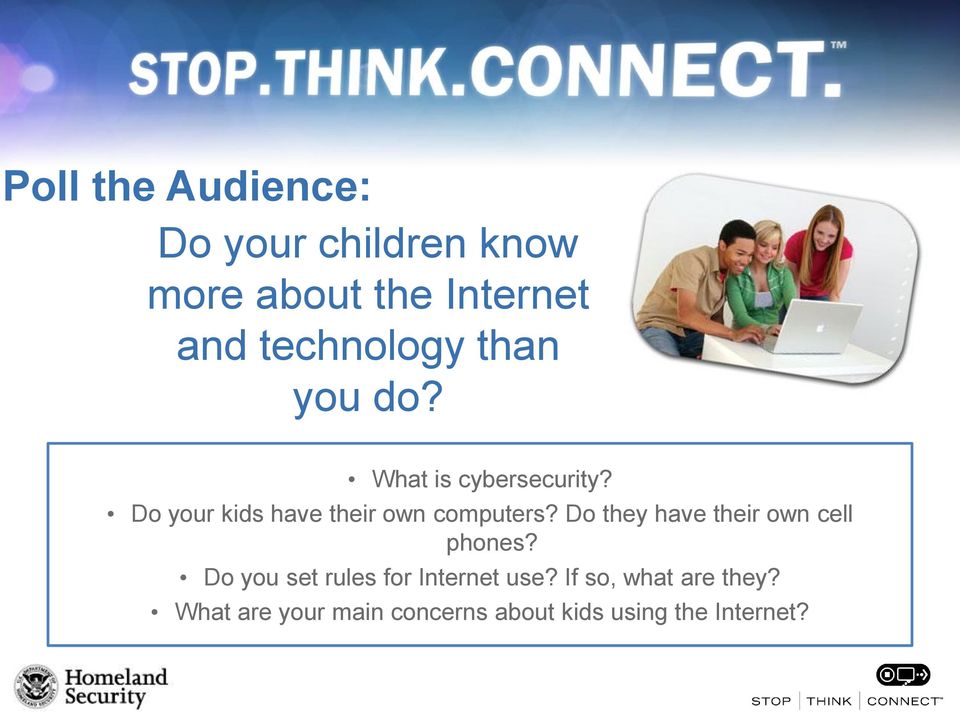
5 Kids Lead Digital Lives 33% Online 33% Offline (awake) 33% Asleep Kids ages 8-18 spend 7 hours and 38 minutes per day online If a child sleeps 8 hours per night, that means ONE HALF the time he or she is awake is spent online Source: National Cyber Security Alliance
6 Chatting with Kids 95% of parents think it is necessary to talk about online security risks and behaviors with their children, but only 65% have had the Internet talk 1 Create an open and honest environment with kids Start conversations regularly about practicing online safety Emphasize the concept of credibility: not everything they see on the Internet is true and people on the Internet may not be who they appear to be Watch for changes in behavior- if your child or student suddenly avoids the computer- it may be a sign they are being bullied online Review security settings and privacy policies for the websites kids frequent Review your children s school acceptable use policy with them before they sign it 1. Comcast
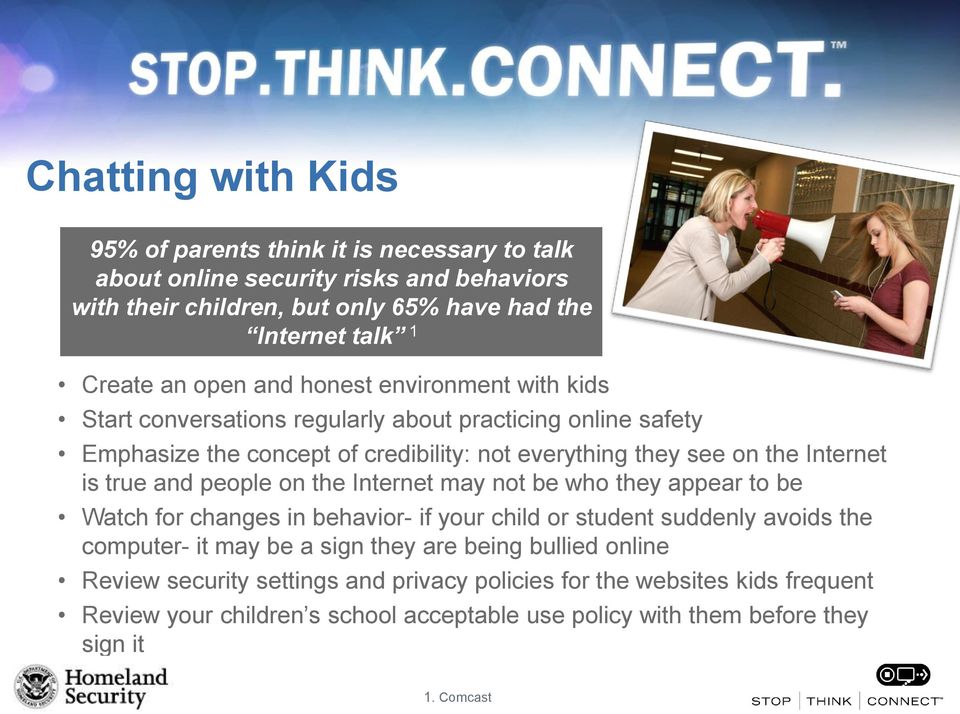
7 Cyber Ethics Predators & Bullies Cyber ethics help Internet users understand what type of online behavior is right and wrong. Cyber predators are people who search online for other people in order to use, control, or harm them in some way. Cyberbullying is the electronic posting of mean-spirited messages about a person, often done anonymously Did You Know? One in five U.S. teenagers who regularly log on to the Internet say they have received an unwanted sexual solicitation via the Web, and only about 25% tell a parent or adult about it 1 20% of kids will have been a victim of cyberbullying by the time they graduate from high school 2 Tips Keep personal information about yourself private, including your family members, your school, your telephone number, or your address Think twice before you post or say anything online; once it is in cyberspace, it is out there forever Stop any questionable online behavior; only do and say things online that you would do in real life Speak up. If you see something inappropriate, let the website know and tell an adult you trust. Don t stand for bullying online or off 1. Crimes Against Children Research Center 2. Cyberbullying Research Center
8 Identity Theft Did You Know? Every year, 500,000 kids have their identity stolen 1 75% of children are willing to share personal information online about themselves and their family in exchange for goods and services 2 Identity theft is the illegal use of someone else's personal information in order to obtain money or credit Tips Don t use the same password twice Choose a password that means someone to you and you only Lock your computer and cell phone Don t share personal information without knowing exactly who is on the receiving end. Use strong passwords that are hard to guess and don t share them with anyone other than your parents Don t open s from strangers and don t click on links for unfamiliar sites; if you think an offer is too good to be true, then it probably is 1. Identity Theft Resource Center emarketer
9 Fraud & Phishing Fraud is the intentional perversion of truth in order to induce another to part with something of value or to surrender a legal right. Phishing is a scam by which an user is duped into revealing personal or confidential information that the scammer can use illicitly or fraudulently Did You Know? 68% of teens surveyed say that they have downloaded a program or software without their parent's permission 1 79% of online teens agree that teens aren t careful enough when sharing personal information online 2 Tips 1. Ibid 2. Pew Internet and American Life Project Most organizations banks, universities, companies, etc. - don t ask for your personal information over . Beware of requests to update or confirm your personal information Don t open s from strangers and don t click on unfamiliar sites; if you think an offer is too good to be true, then it probably is Make sure you change your passwords often and avoid using the same password on multiple sites Always enter a URL by hand instead of following links
10 Resources Available to Your Family OnguardOnline.gov This website, run by the Federal Trade Commission, is a one-stop shop for online safety resources available to parents, educators, and kids Cybertipline.com The Congressionally-mandated CyberTipline, which is part of the National Center for Missing and Exploited Children (NCMEC), receives online child solicitation reports 24-hours a day, seven days a week. Submit an online report or call Staysafeonline.org The National Cyber Security Alliance offers instruction on security updates, free antivirus software, malware software removal, and other services

11 Call to Action Cybersecurity is a shared responsibility that all Americans must adopt in their communities in order to keep the nation secure in the 21st Century. Become an advocate in your community to help us educate and empower the American public to take steps to protect themselves and their families online How to get involved: Become a Friend of the Campaign by visiting Download and distribute Stop.Think.Connect. materials, such as the brochure, bookmark, and poster, in your neighborhoods and communities Lead or host a cyber awareness activity in your places of work, school, recreation, or worship Discuss the importance of cybersecurity with your friends and family Inform your community about the Stop.Think.Connect. Campaign and the resources available Blog or post about the issue of cybersecurity and the Stop.Think.Connect. Campaign Get schools and community organizations involved and informed on cybersecurity

12 Securing cyberspace starts with YOU

STOP.THINK.CONNECT NATIONAL CYBERSECURITY AWARENESS CAMPAIGN UNDERGRADUATE STUDENT PRESENTATION
 STOP.THINK.CONNECT NATIONAL CYBERSECURITY AWARENESS CAMPAIGN UNDERGRADUATE STUDENT PRESENTATION ABOUT STOP.THINK.CONNECT. In 2009, President Obama issued the Cyberspace Policy Review, which tasked the
National Cybersecurity Awareness Campaign. Kids Presentation
 National Cybersecurity Awareness Campaign Kids Presentation About Stop.Think.Connect. In 2009, President Obama asked the Department of Homeland Security to create the Stop.Think.Connect. Campaign to help
SMALL BUSINESS PRESENTATION
 STOP.THINK.CONNECT NATIONAL CYBERSECURITY AWARENESS CAMPAIGN SMALL BUSINESS PRESENTATION ABOUT STOP.THINK.CONNECT. In 2009, President Obama issued the Cyberspace Policy Review, which tasked the Department
SMALL BUSINESS PRESENTATION
 STOP.THINK.CONNECT NATIONAL CYBERSECURITY AWARENESS CAMPAIGN SMALL BUSINESS PRESENTATION ABOUT STOP.THINK.CONNECT. In 2009, President Obama issued the Cyberspace Policy Review, which tasked the Department
Online Safety for Middle and High School
 Online Safety for Middle and High School Presented by Warren County Schools Technology Department 2010-2011 Internet & Technology Safety The purpose of this presentation is to TEACH YOU about INTERNET
Digital Citizenship Lesson Plan
 Digital Citizenship Lesson Plan This course is to help people to understand how to use the Internet in a safe, productive way. Additional resources and links are available on the TechTECS website. http://techtecs.com/digital-citizenship
Cyber Security Awareness. Internet Safety Intro. www.staysafeonline.org
 Cyber Security Awareness Internet Safety Intro www.staysafeonline.org 1 What is Cyber Security? Cyber Security is the body of technologies, processes and practices designed to protect from attack, damage
HEADS up. stop think connect
 HEADS up stop think connect Stop.Think.Connect. TM is a national public awareness campaign aimed at increasing the understanding of cyber threats and empowering the American public to be safer and more
Internet Safety/CIPA Lesson Plan
 Internet Safety/CIPA Lesson Plan Social Networking Overview Students need to safely use the Internet for learning, socializing, and for preparing for college and work. While firewalls, antivirus software,
Internet Safety Guidelines
 Internet Safety Guidelines Clear, simple, easy-to-read house rules should be posted on or near the monitor. Create your own computer rules or search for an Internet safety pledge you like. The pledge can
National Cyber Security Month 2015: Daily Security Awareness Tips
 National Cyber Security Month 2015: Daily Security Awareness Tips October 1 New Threats Are Constantly Being Developed. Protect Your Home Computer and Personal Devices by Automatically Installing OS Updates.
E-Safety Issues and Online Safety
 E-Safety Issues and Online Safety Parents Evening Aims of This Presentation To look at how your children use the internet To raise your awareness of online safety To provide guidance on online safety and
NET CETERA Chatting with Kids About Being Online
 NET CETERA Chatting with Kids About Being Online People of all ages are: connecting with friends and family online Communicating online is a way of life, yet it comes with certain risks: Inappropriate
E-Safety Issues and Online Safety. Parents Evening
 E-Safety Issues and Online Safety Parents Evening To look at how your children use the internet To raise your awareness of online safety To provide guidance on online safety and privacy for your children
Scams and Schemes. objectives. Essential Question: What is identity theft, and how can you protect yourself from it? Learning Overview and Objectives
 Estimated time: 45 minutes Essential Question: What is identity theft, and how can you protect yourself from it? Learning Overview and Objectives Overview: Students learn strategies for guarding against
Protect yourself online
 Protect yourself online Advice from Nottinghamshire Police s Pre Crime Unit Get daily updates: www.nottinghamshire.police.uk www.twitter.com/nottspolice www.facebook.com/nottspolice www.youtube.com/nottinghampolice
Protect Yourself. Who is asking? What information are they asking for? Why do they need it?
 Protect Yourself Your home computer serves many purposes: email, shopping, social networking and more. As you surf the Internet, you should be aware of the various ways to protect yourself. Of primary
E-Safety Issues and Online Safety
 E-Safety Issues and Online Safety Parents Evening Aims of This Presentation To look at how your children use the internet To raise your awareness of online safety To provide guidance on online safety and
Guideline on Windows 7 Parental Controls
 CMSGu2012-01 Mauritian Computer Emergency Response Team CERT-MU SECURITY GUIDELINE 2011-02 Enhancing Cyber Security in Mauritius Guideline on Windows 7 Parental Controls National Computer Board Mauritius
Cyberbullying: What Parents Can Do to Protect Their Children
 Cyberbullying: What Parents Can Do to Protect Their Children Sponsored by: 2013, PACER Center, Inc. As Technology Evolves, So Do the Ways to Bully Imagine the note, a piece of paper ripped from a notebook,
E-MAIL & INTERNET FRAUD
 FRAUD ALERT! FRAUD ALERT! Guarding Against E-MAIL & INTERNET FRAUD What credit union members should know to counter Phishing Pharming Spyware Online fraud On-Line Fraud Is Growing E-Mail and Internet Fraud
C-SAVE. Scenario #1 Jake and the Bad Virus. The two major C3 concepts this scenario illustrates are:
 Scenario #1 Jake and the Bad Virus The two major C3 concepts this scenario illustrates are: Cyber Security: Jake compromised his computer s security by providing personal information to an unknown online
Cyber-Safe Kids Cyber-Savvy Teens
 Cyber-Safe Kids Cyber-Savvy Teens Helping Young People Learn to Make Safe and Responsible Choices Online By Nancy E. Willard Author of: Cyber-Safe Kids, Cyber-Savvy Teens: Helping Young People Learn to
Identity Theft Protection
 Identity Theft Protection Email Home EDUCATION on DANGER ZONES Internet Payments Telephone ID theft occurs when someone uses your personal information with out your knowledge to commit fraud. Some terms
Many of these tips are just common sense and others are tips to keep in mind when doing a transaction, at ATMs, restaurants and merchants.
 Credit and Debit Card Security Tips Many of these tips are just common sense and others are tips to keep in mind when doing a transaction, at ATMs, restaurants and merchants. Be careful with your PIN Always
YOUR PRESENTERS TODAY S WORLD. Maryly Skallos Technology Coordinator St. Thomas the Apostle School [email protected]
 CYBER SAFETY, CYBER ETHICS, CYBER SECURITY How to teach the kids about these concepts (a primer from staysafeonline.org program that is available free from the website) YOUR PRESENTERS Maryly Skallos Technology
This document has been produced following a request from the Hft National Speak Out Group for help with staying safe when using the internet.
 This document has been produced following a request from the Hft National Speak Out Group for help with staying safe when using the internet. Hft Safeguarding Group commissioned a member of Hft National
Sarah Smythe Youth Community Developer Western Ottawa Community Resource Centre. Genevieve Hupe School Resource Officer Ottawa Police Service
 Sarah Smythe Youth Community Developer Western Ottawa Community Resource Centre Genevieve Hupe School Resource Officer Ottawa Police Service From the choices below, which screen name is the worst for
STOP. THINK. CONNECT. Online Safety Quiz
 STOP. THINK. CONNECT. Online Safety Quiz Round 1: Safety and Security Kristina is on Facebook and receives a friend request from a boy she doesn t know. What should she do? A. Accept the friend request.
Cyber Security. Securing Your Mobile and Online Banking Transactions
 Cyber Security Securing Your Mobile and Online Banking Transactions For additional copies or to download this document, please visit: http://msisac.cisecurity.org/resources/guides 2014 Center for Internet
Protect Your Privacy Online
 Protect Your Privacy Online By Kathiann M. Kowalski Keep personal information private for your own good! High school sophomore Karra H. never expected to see herself on a Web site featuring scantily clad
Learn to protect yourself from Identity Theft. First National Bank can help.
 Learn to protect yourself from Identity Theft. First National Bank can help. Your identity is one of the most valuable things you own. It s important to keep your identity from being stolen by someone
Affirmative Action Presentation
 Affirmative Action Presentation Woodbridge Township School District A Guide to Social Media, Schools, and the Law. Woodbridge Township School District Staff Development 2012-2013 To provide school personnel,
The State of K-12 Cyberethics, Cybersafety and Cybersecurity Curriculum in the United States
 The State of K-12 Cyberethics, Cybersafety and Cybersecurity Curriculum in the United States National Cyber Security Alliance Microsoft Corporation Zogby/463 May 2011 Methodology Zogby/463 surveyed a statistically
Social Networking Sites A Predator s Playground?
 Social Networking Sites A Predator s Playground? Posting too much information on social networking sites may be dangerous. A new craze is spreading among teens across the nation and it s growing with every
Staying Safe Online. A Practical Guide for Parents and Children.
 Staying Safe Online A Practical Guide for Parents and Children. Introduction Young people are growing up in a technology rich world. They are surrounded by various forms of technology and they use it extensively
EADS up. stop think connect
 EADS up stop think connect table of contents 2 4 8 12 Share with Care Interact with Tact The Protection Connection Word Search You text, you play games, you share photos and video. You update your status,
 Only talk with people online that you know in person Time does not equal trust It doesn t mean you really know the person Be suspicious; ANY person worth having as a friend wouldn t ask you to put yourself
FAMILY GUIDE TO. Mobile Safety. How to keep your children safe and connected in today s mobile world SPONSORED BY:
 FAMILY GUIDE TO Mobile Safety How to keep your children safe and connected in today s mobile world SPONSORED BY: Is Your Child Ready for a Mobile Phone? MOBILE PHONES ARE PART OF OUR LIVES. They re powerful
Safety Tips for Social Networking
 Internet Safety for Kids & Families Safety Tips for Social Networking As a social medium, the Internet enables young people to stay in touch with friends when they are physically separated from them and
2012 NCSA / McAfee Online Safety Survey
 2012 NCSA / McAfee Online Safety Survey National Cyber Security Alliance McAfee JZ Analytics October 2012 Methodology and Sample Characteristics JZ Analytics was commissioned by the National Cyber Security
Internet Safety Fact Sheet Facts about Social Networking:
 Internet Safety Fact Sheet Facts about Social Networking: 96% of students ages 9 to 17 who have access to the Internet have used social networking technologies (Grunwald Associates, "Creating & Connecting
Youth Online Behavior
 Youth Online Behavior Created by: Andrea Pieters, Project Researcher, Youth and Education Christine Krupin, Project Researcher, Youth and Education June 1, 2010 Harris Interactive 6/21/2010 1 Methodology
Hint: Best actions: Find out more in videos and FAQ: Hint: Best actions: Find out more in videos and FAQ:
 Game Cheatsheet This is a spam email, an unsolicited and unwanted email from an unknown sender. Hint: Does this offer seem too good to be true? Perhaps you need to know more? Best actions: Delete, Check
Cyber Safety for Parent Involvement Council. Sandi Paul Director of Technology Edward Aguiles Director of Curriculum and Instruction
 Cyber Safety for Parent Involvement Council Sandi Paul Director of Technology Edward Aguiles Director of Curriculum and Instruction Topics for Presentation Parent Habits Poll Everywhere quiz Stats on actual
Current Internet Facts
 Current Internet Facts Facts about Online Predators and Strangers online: Twenty-eight percent of tweens (ages 8 to 12) have been contacted over the Internet by someone they don t know (COX Tween Internet
Scams and Schemes LESSON PLAN UNIT 1. Essential Question What is identity theft, and how can you protect yourself from it?
 LESSON PLAN Scams and Schemes Essential Question What is identity theft, and how can you protect yourself from it? Lesson Overview Students learn strategies for guarding against identity theft and scams
Comprehensive i-safe Curriculum International Scope of Lessons and Language Availability
 Comprehensive i-safe Curriculum International Scope of Lessons and Language Availability The i-safe comprehensive curriculum provides a unique approach to Internet safety education, by meaningfully integrating
I dentity theft occurs
 1.3.1.F1 Identity Family Economics and Financial Education W h at i s I d e n t i t y T h e f t? I dentity theft occurs when someone wrongfully acquires and uses a consumer s personal identification, credit,
Social Media Curriculum Overview
 Lessons in K 2 Social Media Curriculum Overview 1. Going Places Safely ( KINDERGARTEN) https://www.commonsensemedia.org/educators/lesson/going places safely k 2 How do I go places safely on the computer?
Safe Practices for Online Banking
 November 2012 Follow these guidelines to help protect your information while banking online. At First Entertainment Credit Union, our goal is to provide you with the best all around banking experience.
think before you send! Using Digital Communication Responsibly Developed by Jonathan W. Blodgett Essex District Attorney
 think before you send! Using Digital Communication Responsibly Developed by Jonathan W. Blodgett Essex District Attorney think before you send! A Message from the District Attorney The use and capabilities
Fraud Protection module
 Fraud Protection module Trainer s Introduction While the vast majority of financial transactions are legitimate and honest, the few fraudulent ones can be costly and damaging. By recognizing the warning
HOW TO STAY SAFE. Smartphones
 HOW TO STAY SAFE Smartphones Smartphones provide a variety of interesting activities and ways for young people to engage with their friends and families. However, it is important to be aware of what these
DIGITAL CITIZENSHIP MODULE 1
 Digital Etiquette DIGITAL CITIZENSHIP MODULE 1 Email, Texting, Cell Phone Usage, Ringtones, Social Networks, YouTube, Web Browsing, Shared Storage/Usage Space Define and apply the standards of use to daily
Cybersecurity Protecting Yourself, Your Business, Your Clients
 Cybersecurity Protecting Yourself, Your Business, Your Clients Global Summit of Women June 7, 2014 Celina B. Realuyo Professor of Practice of National Security Affairs William J. Perry Center for Hemispheric
Information carelessly discarded into the trash can be stolen when a thief digs through the garbage.
 Identity theft occurs when someone wrongfully acquires and uses a consumer s personal identification, credit, or account information. Identity theft can wreak havoc on an individual s credit report, cause
Today s teens use technology more than ever. Most have
 Today s teens use technology more than ever. Most have high-speed Internet access, which they use to send instant messages to their friends, create blogs and online videos, keep personal profiles on social
i-safe K 12 CURRICULUM SCOPE 06-07
 i-safe K 12 CURRICULUM SCOPE 06-07 GRADES K 4 Scope and sequence i-safe materials are available in topic modules to provide the teacher with flexibility in creating a program of instruction that best suits
Dallas Police Department Computer Crimes Unit Cyber-Bullying Sexting And Criminal Consequences
 Dallas Police Department Computer Crimes Unit Cyber-Bullying Sexting And Criminal Consequences Prepared by Detective Russell Stephens Computer Crimes Unit Dallas Police Department 214-671-3545 Cyber-bullying
A Parents' Guide to Cybersecurity
 A Parents' Guide to Cybersecurity In partnership with Top 5 Questions Parents Have About Cybersecurity 1.What are the biggest security threats to kids? Children and teens can be caught by the same kinds
Internet Safety Guide for Parents
 Internet Safety Guide for Parents How to Talk to Your Kids about Staying Safe Online Presented by Keith Dunn http://www.kdcop.com Page 1 Now I know each and every single one of you is extremely busy. Both
S.A.F.E. Recognize a scam before you become a victim of fraud Division of Consumer Protection
 S.A.F.E. Senior Anti-Fraud Education Recognize a scam before you become a victim of fraud New York StaTe Department of State Division of Consumer Protection Advocating for and empowering New York consumers
AVOIDING ONLINE THREATS CYBER SECURITY MYTHS, FACTS, TIPS. ftrsecure.com
 AVOIDING ONLINE THREATS CYBER SECURITY MYTHS, FACTS, TIPS ftrsecure.com Can You Separate Myths From Facts? Many Internet myths still persist that could leave you vulnerable to internet crimes. Check out
PROTECT YOUR COMPUTER AND YOUR PRIVACY!
 PROTECT YOUR COMPUTER AND YOUR PRIVACY! Fraud comes in many shapes simple: the loss of both money protecting your computer and Take action and get peace of and sizes, but the outcome is and time. That
Bo Holland is the Founder & CEO of AllClear ID with deep expertise in Identity theft prevention, security, and technology
 AllClear ID (www.allclearid.com) is an identity protection company based in Austin, Texas, and is powered by Debix, a leader in identity protection technology. Our leading technology and customer service
SCRIPT FOR OUTREACH. Disconnected and Cyber Predators. Introduction. How many of you have your own cell phones or smart phone?
 SCRIPT FOR OUTREACH Disconnected and Cyber Predators Introduction Hello! How is everyone doing today? My name is and I am here with some friends of mine from the American Bar Association Young Lawyers
Protection from Fraud and Identity Theft
 Table of Contents Protection from Fraud & Identity Theft... 1 Simple Steps to Secure Your Devices... 1 Setting Up Your Computer and/or Mobile Device... 2 Adding Security Software... 2 Internet Safety Tips...
Scams and Schemes LESSON PLAN UNIT 1. Essential Question What is identity theft, and how can you protect yourself from it?
 LESSON PLAN Scams and Schemes Essential Question What is identity theft, and how can you protect yourself from it? Lesson Overview Students learn strategies for guarding against identity theft and scams
Online Safety How to Protect Yourself and Your Family
 Online Safety How to Protect Yourself and Your Family Introduction Surfing the internet can be a very positive experience, it opens up a world of possibilities for everyone, expanding our horizons by exposing
3 day Workshop on Cyber Security & Ethical Hacking
 3 day Workshop on Cyber Security & Ethical Hacking 1 st day-highlights-hands On Phishing Attack Hammad Mashkoor Lari Freelancer What is Cyber Security? What is Ethical hacking? What is Computer Science?
Cyber safety Parent Easy Guide 63
 Cyber safety Parent Easy Guide 63 The online world is part of everyday life for many children and young people. It is a huge virtual playground where they can play, learn and socialise. It can be accessed
1. Any email requesting personal information, or asking you to verify an account, is usually a scam... even if it looks authentic.
 Your identity is one of the most valuable things you own. It s important to keep your identity from being stolen by someone who can potentially harm your good name and financial well-being. Identity theft