
Critical Capabilities for Mobile Device Management Software
|
|
|
- Antonia Dayna Reed
- 10 years ago
- Views:
Transcription
1 G Critical Capabilities for Mobile Device Management Software Published: 23 May 2013 Analyst(s): Phillip Redman The critical capabilities for MDM take a deep look at the top technologies in MDM for policy compliance, mobile security management, mobile software management, mobile content management, analytics and delivery styles. This is pertinent data for telecom, network and client computing managers. Key Findings Mobile device management (MDM) providers continue to partner, develop and acquire mobile technologies to support a broader enterprise strategy, including the areas of security, enterprise file synchronization and sharing (EFSS), and application management. The basic technology components of MDM are similar among MDM vendors, but the user experience, analytics and broader offerings are differentiated. The mobile-specific MDM companies are still providing leading vision and technology in MDM software, but the bigger software and security companies are catching up. Recommendations Use MDM technologies, including containers, for securing enterprise data and enabling support for mobile content and users. Evaluate providers on technical critical capabilities and business factors, such as geographic reach, customer support and financial viability. Get details on mobile platform support, because MDM technologies still do not offer the same feature sets across mobile device platforms. Define and create mobile policies, continue to segment mobile users, and add support based on security, data, app, location and cost requirements.

2 What You Need to Know Although the advanced mobile technologies for hardware, software and network services are drivers for increased enterprise mobility and adoption, they're also inhibitors because of the large number of choices in each technology area and the fact that there is still not one mobile standard. Companies not only have to address the use of consumer-based, untrusted devices, but also must better secure and manage the corporate-specific data found on these devices. This complexity has kept horizontal mobile adoption fairly basic. Support for mobile is universal today, but little else in MDM is widely adopted. Companies would like to offer more access to their applications and data, but are challenged on how to safely support and secure the data on mobile devices. There has been no one vendor to provide and support all these technologies and to create a simple offthe-shelf mobile enterprise solution. MDM is heading to become the major enterprise mobile platform that extends to securely supporting mobile hardware and software (apps and OSs). Gartner recommends the following policies for applying MDM: Use mobile app containers Most companies, even those that have MDM, have supported basic applications. Many have brought in MDM to limit the number and kinds of devices a user has, enforce a password and make sure local data at rest is encrypted. Gartner estimates only 20% of companies using MDM support containerization, which limits what users can do on in terms of opening and storing attachments, cut/copy/paste data, etc. Recommendations: Companies supporting enterprise mobile data on nonenterprise devices or enterprise devices permitting personal software should rethink their policies on how to support, secure and containerize their data. Companies supporting enterprise data on mobile devices should use MDM software to enforce policies and protect data, and use application or workspace containers to protect any kind of enterprise data and limit risk exposure. This applies to enterprise-owned devices and bring your own devices (BYODs). Segment enterprise mobile users Another benefit of using MDM is that policies can be customized and designed for specific user profiles. One size does not fit all. Continue to analyze, identify and segment users based upon mobility patterns (degree of travel) and data security needs. This is important to do before MDM is implemented. MDM tools can enact policies across user segments differently based on those segment requirements. Define and create mobile policies across IT MDM tools are only as good as the policies that are developed and implemented. Make sure that your company has already defined policies and user segments to achieve the desired results of an MDM implementation. IT can develop policies across the listed MDM critical capabilities as a guideline. With MDM, there are many technology providers coming from many different areas to support the critical capabilities. Some vendors specialize in security, others come from the mobile application development space. Many of the providers in "Magic Quadrant for Mobile Application Development Platforms" also offer mobile app management, but often don't have a complete offering across the full MDM spectrum. It makes sense to have a single administrative tool. Many of these capabilities listed in this research are best offered in a bundle from MDM specialists. Page 2 of 42 Gartner, Inc. G

3 MDM continues to be a competitive market. We assess the technologies of the top leaders as determined by our 2013 "Magic Quadrant for Mobile Device Management Software." Analysis Introduction Mobility is a priority at most enterprises. During the past two years, it has been ranked second in the list of CIO priorities (see "Hunting and Harvesting in a Digital World: The 2013 CIO Agenda"). Enterprises continue to see value in supporting access to their data for mobile users as a way to increase productivity and become more responsive in a faster business world. Access to faster speed, wireless networks and more powerful devices is driving the opportunity to support morecomplex data on devices. Two major trends continue to challenge that type of support: (1) IT no longer can pick the mobile platform that is the most secure, manageable and lowest cost. (2) Devices in the enterprise are diverse. There is no one standard; these devices were designed with consumer needs first. That means that enterprises will continue to struggle to meet a lot of basic security and support needs. Diversity is an opportunity and a challenge to enterprise IT. Consequently, many companies have been adopting mobile device management to enforce enterprise policy (mostly around data security) and to help enable enterprise content on MDM devices. In the past three years, the adoption of MDM has grown rapidly: 30% of midsize and large companies use some type of MDM software, and 80% at least use Microsoft Exchange ActiveSync (EAS) to enforce policies on enterprise devices. Although the basic capabilities of MDM (hardware, software, security and network management) remain the same, MDM providers have broadened their offerings to go deeper into security, application and content management. Enterprises are looking for a single solution to help them secure their data, as well as enable their data on these devices. The MDM market is also diverse, with a large number of competitors. It is beginning to show signs of consolidation and moving to the next phase of maturity, deepening functionality and the breadth of offerings. MDM will continue to be important to enterprises, and careful due diligence on the technical and business factors will help companies make the right decisions. Product Class Definition Gartner defines MDM as a range of products and services that enables organizations to deploy and support corporate applications to mobile devices, such as smartphones and tablets, enforcing policies and maintaining the desired level of IT control across multiple platforms. Mobile devices may be corporate and personal assets, as in BYOD programs. Areas of functionality include provisioning and decommissioning, inventory management, application management and security. The primary delivery model is on-premises, but MDM can also be offered as software as a service (SaaS) or through the cloud. See "Magic Quadrant for Mobile Device Management Software" for a complete description of the market, and the vendors delivering such products or services. This research focuses on a subset of commercial offerings, encompassing the products and services that get the most attention and requests for advice from Gartner's client base. Gartner, Inc. G Page 3 of 42

4 Critical Capabilities Definition The growing demand for MDM by IT organizations has motivated a large number of technology providers to enter the market with MDM offerings. These products and services enable IT organizations to maintain control, automate management and minimize risks, while delivering consumer mobility to the workforce. Regarding basic management functions (e.g., provisioning and inventory management), most policy-based management offerings are progressively becoming similar, with little differentiation among competing vendors. They differentiate, instead, on enhanced capabilities, such as containerization, application management, document sharing and the cloud delivery model. This research examines seven critical capabilities that differentiate competing MDM products in different use cases: Policy enforcement and compliance Mobile security management Mobile software management Mobile content management Scalability Delivery Analytics Although Gartner has created a list of capabilities, some of the policies and functions may be found across multiple capabilities and are not necessarily exclusive to one domain. Often in mobile, capabilities need to work together and can be interchangeable. For example, app management can include whitelisting or blacklisting, which is also a security feature. Detailed information about each critical capability follows: Policy enforcement and compliance: This varies in capability by mobile OS, but includes: Detect and enforce OS platforms and versions, installed applications and manipulated data Detect jailbroken ios devices and rooted Android devices Filter (restrict) access from noncompliant devices to corporate servers (e.g., ) Restrict the number of devices per user Restrict downloadable applications through whitelists and blacklists Monitor access to app stores and application downloads, put prohibited applications on quarantine, and/or send alerts to IT, managers and users about policy violations Monitor access to Web services, social networks and app stores; send alerts to IT, managers and users about policy violations, and/or cut off access Page 4 of 42 Gartner, Inc. G
5 Enforce mobile communication expense policies in real time Detect policy violations (e.g., international roaming), and take action if needed (e.g., disable access to servers, and/or send alerts to IT, managers and users about policy violations) Enforce separation of personal versus corporate content Manage corporate applications on personal devices, and manage personal applications on corporate devices Tag content as personal or corporate through flags Detect separation violations, and send alerts to IT, managers and users, if needed Prohibit exporting data outside the container (e.g., when opening an attachment) if a container is in use, and regulate interactions among different enterprise containers Restrict or prohibit access to corporate servers (e.g., to servers and accounts) in case of policy violations Mobile Security Management: This is a set of mechanisms to protect corporate data on a device and corporate back-end systems, and to preserve compliance with regulations. It may include: Password enforcement (complexity and rotation) Device lock (after a given time of inactivity) Remote wipe, selective remote wipe (e.g., only corporate content) and total remote wipe (e.g., a hard wipe, with data not recoverable after deletion) Local data encryption (phone memory and external memory cards) Certificate-based authentication (includes device ID, OS version and phone number) and certificate distribution Monitoring devices, and data manipulation on devices Rogue application protection (e.g., application quarantine) Certifications (e.g., Federal Information Processing Standard [FIPS] 140-2) Firewalls Antivirus software Device mobile VPN and app-based VPN Message archiving (SMS, IM, , etc.) and retrieval, and recording of historical events for audit trails and reporting Containerization (for a definition of containerization, see "Technology Overview of Mobile Application Containers for Enterprise Data Management and Security") Gartner, Inc. G Page 5 of 42
6 Mobile Software Management: A set of mechanisms for over the air (OTA) software upgrades, application inventory and distribution, such as: App store capability OS support and updates Enterprise app procurement and provisioning Apple Volume Purchase Program or other enterprise volume purchasing program integration Software updates for applications or OSs Patches/fixes Backup/restore Background synchronization Mobile Content Management: A set of mechanisms to support file synchronization and sharing, file distribution, and secure and manageable folders on mobile devices with policy enforcement. It may include: File synchronization and backup, transparent to the user File sharing with other employees or among applications File distribution to a group of users, security and management policy enforcement Scalability: This refers to MDM deployments in mass volume: Platform scalability for over 20,000 devices supported High availability and disaster recovery techniques Delivery: On-premises appliance, virtual appliance SaaS hosted, cloud Ease of implementation, timing Pricing policies per user, per device, perpetual licensing Analytics: Approaches used to support enterprise data needs include: Dashboarding Reporting Analysis Software/network usage Page 6 of 42 Gartner, Inc. G
7 Use Cases This research identifies the four typical use cases discussed in Gartner client inquiries. These cases highlight the differences among selected products/services, and rate them differently under specific conditions. Case 1 Regulated Deployments: These organizations operate in heavily regulated sectors such as financial services, healthcare, military and defense, and government that must be compliant with sectorspecific regulations, such as the U.S. Health Insurance Portability and Accountability Act (HIPAA), and must pass periodical audits or fall under organized union rules. These organizations have a strong focus on security and control (e.g., for culture or market competition). These organizations often aim to support BYOD programs with personal and corporate devices, but are limited because of security needs. In all cases, strong IT security and control requirements include local data encryption for corporate information, certificate-based authentication, and isolation of corporate from personal content. Case 2 Flexible Deployments: These organizations operate in nonregulated sectors (e.g., retail and delivery services) that do not require a complete corporate lockdown on devices, and can live with basic security and management support. BYOD programs often are required, in addition to supporting corporate devices. Employees are required to work with native applications, such as a native client and browser. Provisioning, inventory and policy enforcement extended to the entire device is a management priority. There is little or no demand for containerization. Case 3 Agile Deployments: These organizations operate in nonregulated sectors, planning to manage mobility through third-party service providers with the balance of the market demand toward on-premises versus SaaS and cloud offerings. Vendors with the highest agility are able to meet that market demand for preferred delivery methods. Organizations aim to contain or optimize mobility costs, or to avoid big upfront costs. Organizations plan to support a small number of mobile users initially, and to grow incrementally over time to midsize and large deployments. Gartner, Inc. G Page 7 of 42

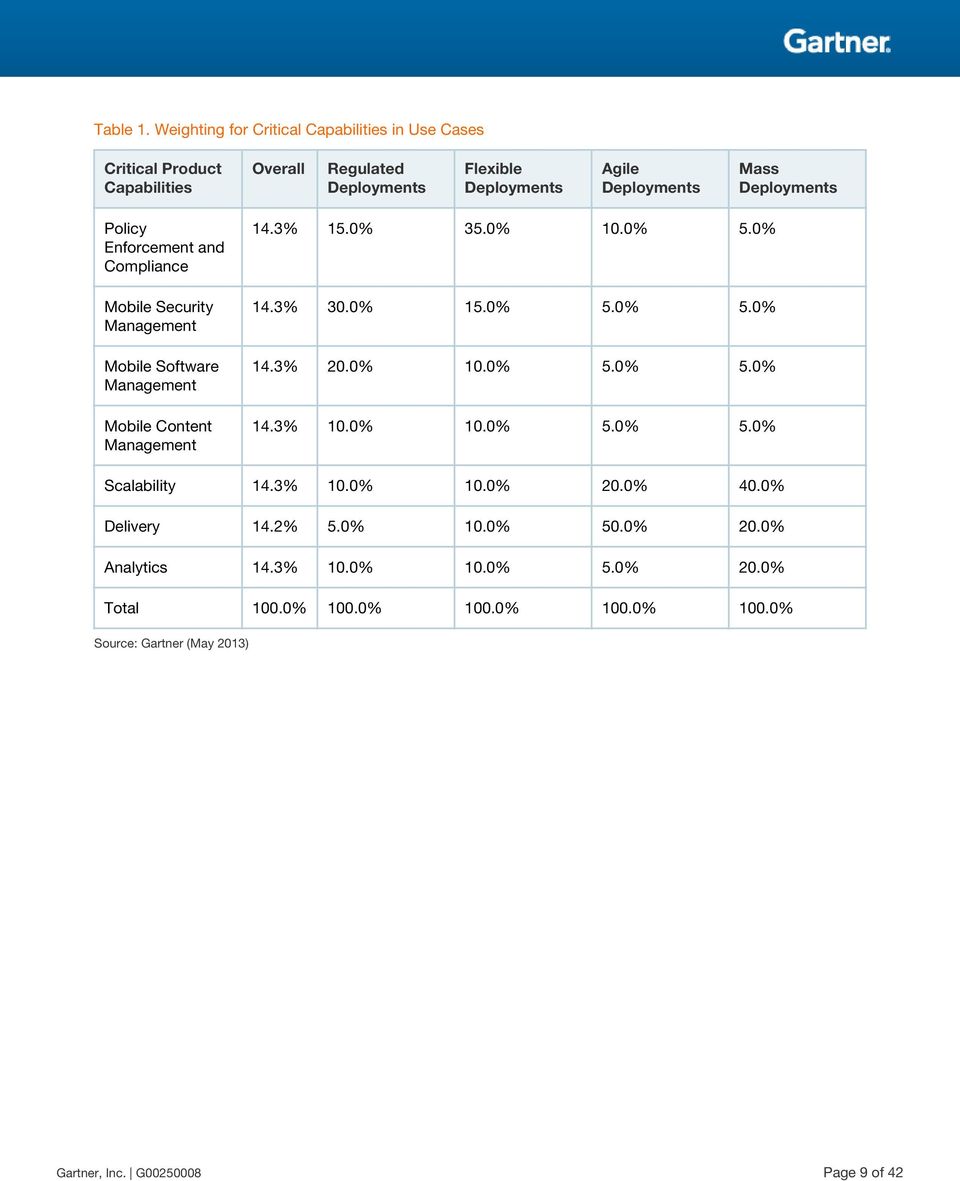
8 BYOD programs often are required, in addition to supporting corporate devices. Case 4 Mass Deployments: These are large-scale deployments, from more than 20,000 up to hundreds of thousands, with related requirements for high availability, disaster recovery, quality of service, etc. There is a need to monitor and control end-to-end mobile deployments. Like our report last year, the third and fourth use cases are not necessarily mutually exclusive of the first and second use cases. A regulated organization may also look for agile or mass deployments. In this research, we capture the scenarios requiring MDM investment decisions to highlight the product capabilities. Clients that are comfortable with the security/compliance/containerization capabilities of vendors on their shortlists, but have doubts about scalability, should focus on Case 4 to assess their mass deployment capabilities. Case 3 is a likely fit for organizations that have initial experience with mobility, and Case 4 will work for organizations that already have mobility experience, and are about to scale up to big deployment volumes. Case 1 and Case 2 focus on the level of control and lockdown needed, and are mutually exclusive. Table 1 shows the weighting for all use cases in this research. Each use case weighs the capabilities individually based on the needs of that case, which impacts the score. Each vendor may have a different position based on its capability and the weighting for each. The overall use case is the general scoring for the vendor's product, with all weights being equal (see Figure 1). Page 8 of 42 Gartner, Inc. G

9 Table 1. Weighting for Critical Capabilities in Use Cases Critical Product Capabilities Overall Regulated Deployments Flexible Deployments Agile Deployments Mass Deployments Policy Enforcement and Compliance Mobile Security Management Mobile Software Management Mobile Content Management 14.3% 15.0% 35.0% 10.0% 5.0% 14.3% 30.0% 15.0% 5.0% 5.0% 14.3% 20.0% 10.0% 5.0% 5.0% 14.3% 10.0% 10.0% 5.0% 5.0% Scalability 14.3% 10.0% 10.0% 20.0% 40.0% Delivery 14.2% 5.0% 10.0% 50.0% 20.0% Analytics 14.3% 10.0% 10.0% 5.0% 20.0% Total 100.0% 100.0% 100.0% 100.0% 100.0% Source: Gartner (May 2013) Gartner, Inc. G Page 9 of 42
10 Figure 1. Overall Score for Each Vendor's Product Based on the Nonweighted Score for Each Critical Capability Source: Gartner (May 2013) Inclusion Criteria This research considers the selection of MDM products and services offered by vendors included in "Magic Quadrant for Mobile Device Management Software." Although there was a large vetting process starting with over 120 vendors, there were 18 vendors eventually included in the "Magic Quadrant for Mobile Device Management Software." There were two main requirements for inclusion in the 2013 MDM Critical Capabilities research: 1. Inclusion in the Magic Quadrant for MDM 2. Placement in the Leaders Quadrant Page 10 of 42 Gartner, Inc. G

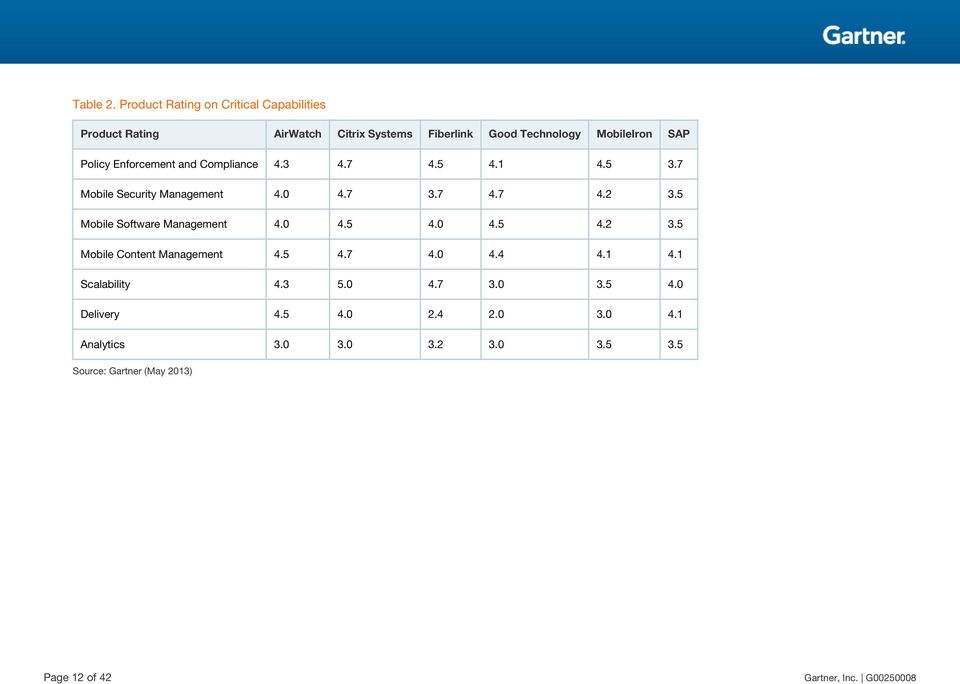
11 Critical Capabilities Rating Each product that meets our inclusion criteria has been evaluated on several critical capabilities, on a scale from 1.0 (lowest ranking) to 5.0 (highest ranking). To determine an overall score for each product in the use cases, the ratings in Table 2 are affected by the weightings shown in Table 1. Gartner, Inc. G Page 11 of 42

12 Table 2. Product Rating on Critical Capabilities Product Rating AirWatch Citrix Systems Fiberlink Good Technology MobileIron SAP Policy Enforcement and Compliance Mobile Security Management Mobile Software Management Mobile Content Management Scalability Delivery Analytics Source: Gartner (May 2013) Page 12 of 42 Gartner, Inc. G
13 Product viability is distinct from the critical capability scores for each product. Product viability is our assessment of the vendor's strategy and its ability to enhance and support a product throughout its expected life cycle. It is not an evaluation of the vendor as a whole. Four major areas are considered: Strategy includes how a vendor's strategy for a particular product fits in relation to the vendor's other product lines, its market direction and its business overall. Support includes the quality of technical and account support, as well as customer experiences with that product. Execution considers a vendor's structure and processes for sales, marketing, pricing and deal management. Investment considers the vendor's financial health and the likelihood of the individual business unit responsible for a product to continue investing in it. Each product is rated on a five-point scale from poor to outstanding for each of these four areas, and is then assigned an overall product viability rating (see Figure 2). Gartner, Inc. G Page 13 of 42
14 Figure 2. Overall Score for Each Vendor's Product Based on the Nonweighted Score for Each Critical Capability Source: Gartner (May 2013) Product Viability MDM is a much more competitive market than almost any other market that Gartner covers. Many vendors offer some type of MDM software or service. These include Amtel, Apperian, AppSense, Aruba Networks, AT&T (Toggle), Bitzer Mobile, Capricode, Centrify, Cortado, Dell Kace, Excitor, Fixmo, ForeScout Technologies, Globo Mobile, Ibelem, Juniper Networks, Kony, Cicso-Meraki, Microsoft, Mobile Active Defense, MobileFrame, MobileSpaces, Mobiquant, Notify Technology, Novell, OpenPeak, Portsys, Samsung SDS, Seven Principles, SilverbackMDM, Smith Micro Software, The Institution and VMware. Our research has shown over 125 companies have at least one core MDM capability as an MDM product. MDM core product offerings and the critical capabilities associated with those offerings Page 14 of 42 Gartner, Inc. G

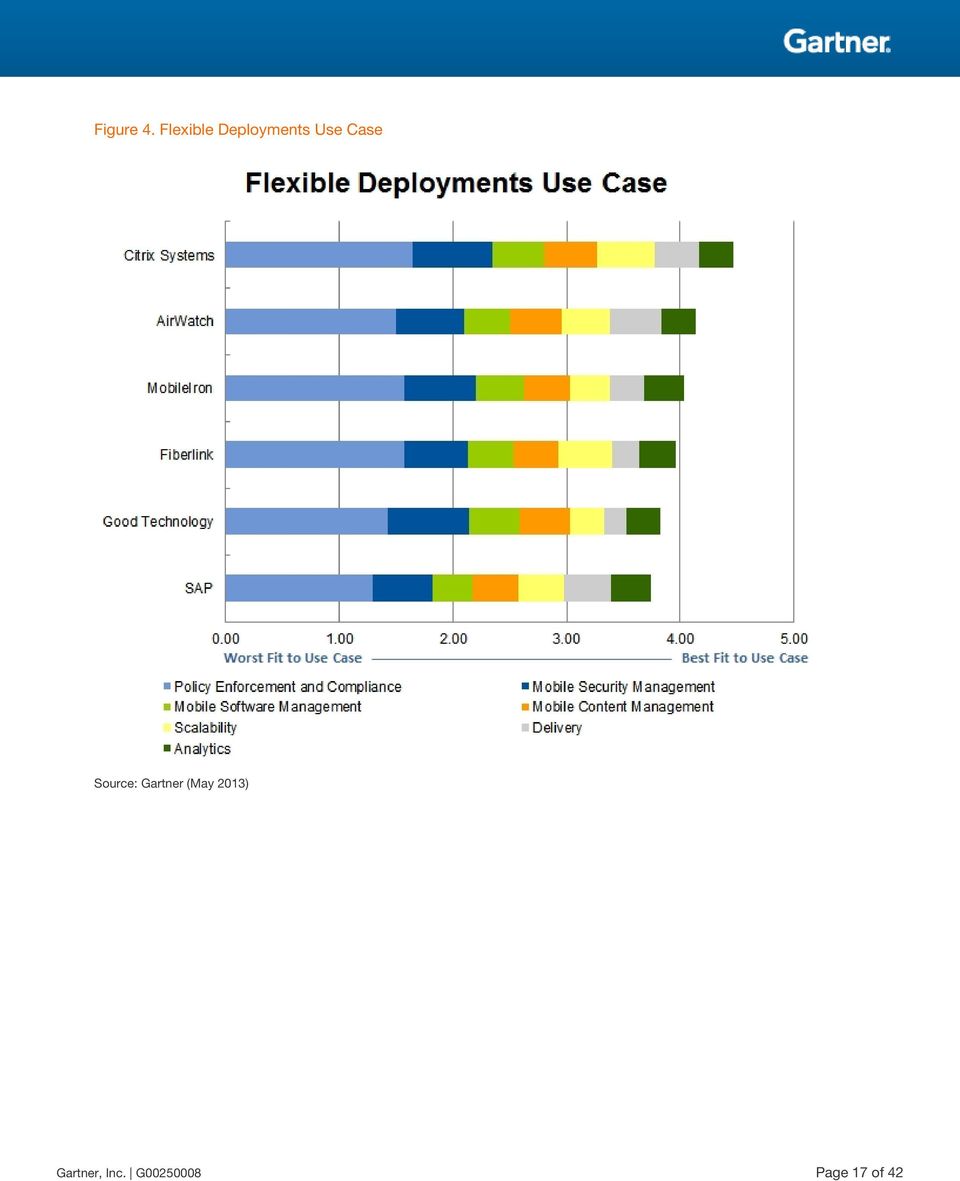
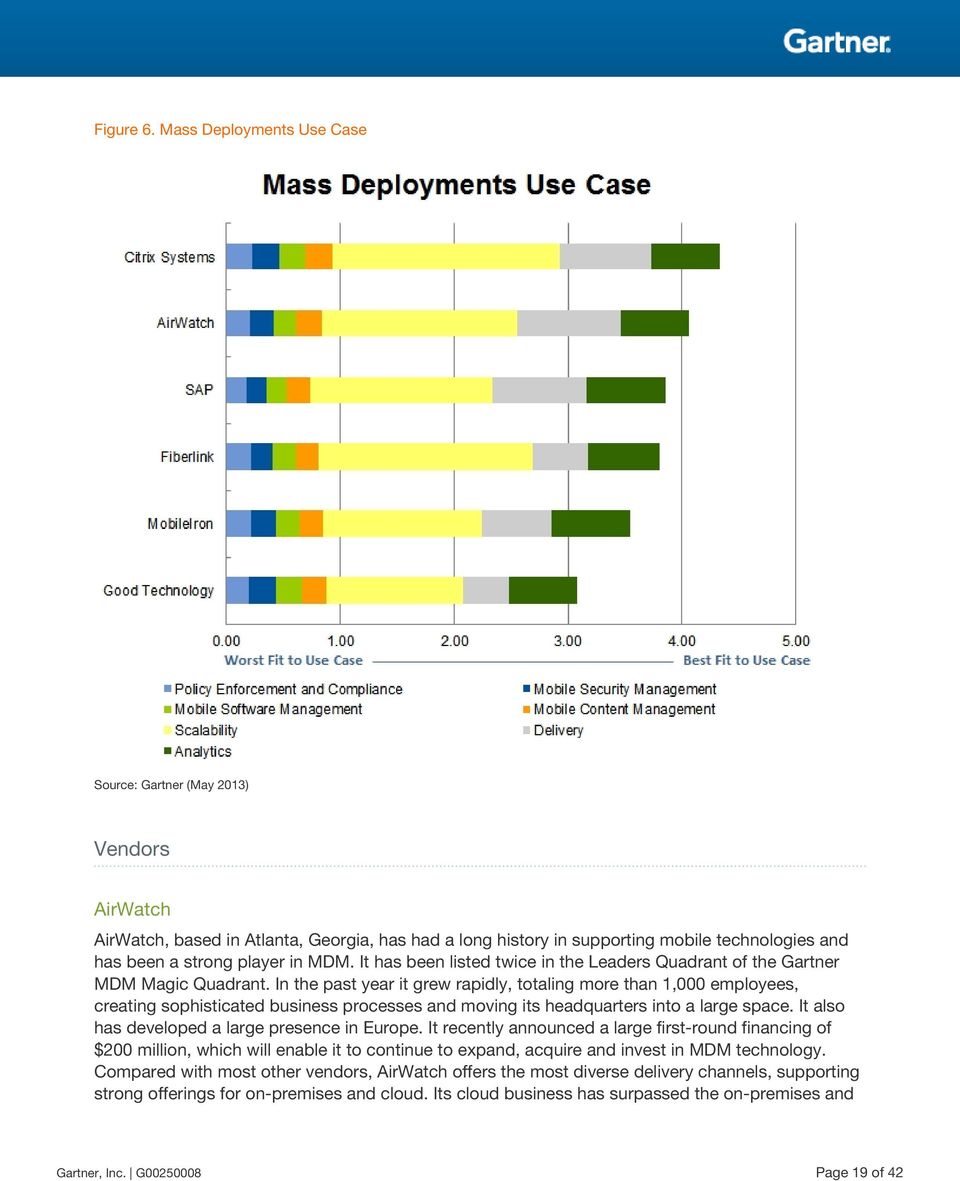
15 rapidly evolve from year to year. It is a challenge for all vendors, even the strongest ones, to keep pace. This Critical Capabilities research rates the product offerings of only the top six vendors in the MDM market. Although there are some differences to the products and approaches of these vendors, each vendor listed here will have a strong product viability and a strong competitive offering for MDM (see Table 3). Table 3. Product Viability Assessment Vendor/Product Name AirWatch Citrix Systems Fiberlink Good Technology MobileIron SAP Product Viability Outstanding Outstanding Excellent Excellent Excellent Good Source: Gartner (May 2013) The weighted capabilities scores for all use cases are displayed as components of the overall score. We show comparisons for deployment for four types of use cases: regulated (see Figure 3), flexible (see Figure 4), agile (see Figure 5) and mass (see Figure 6). Gartner, Inc. G Page 15 of 42

16 Figure 3. Regulated Deployments Use Case Source: Gartner (May 2013) Page 16 of 42 Gartner, Inc. G

17 Figure 4. Flexible Deployments Use Case Source: Gartner (May 2013) Gartner, Inc. G Page 17 of 42
18 Figure 5. Agile Deployments Use Case Source: Gartner (May 2013) Page 18 of 42 Gartner, Inc. G

19 Figure 6. Mass Deployments Use Case Source: Gartner (May 2013) Vendors AirWatch AirWatch, based in Atlanta, Georgia, has had a long history in supporting mobile technologies and has been a strong player in MDM. It has been listed twice in the Leaders Quadrant of the Gartner MDM Magic Quadrant. In the past year it grew rapidly, totaling more than 1,000 employees, creating sophisticated business processes and moving its headquarters into a large space. It also has developed a large presence in Europe. It recently announced a large first-round financing of $200 million, which will enable it to continue to expand, acquire and invest in MDM technology. Compared with most other vendors, AirWatch offers the most diverse delivery channels, supporting strong offerings for on-premises and cloud. Its cloud business has surpassed the on-premises and Gartner, Inc. G Page 19 of 42
20 is its primary go-to-market delivery. This has been adopted by small companies that do not want to invest in on-premises equipment, and large companies that are looking to reduce their footprints globally. AirWatch has some of the largest MDM implementations to date. AirWatch continues to add capabilities to its main MDM tool, specifically around security and network management. It has been a bit slower than main competitors to add deeper mobile application management (MAM), especially for app catalogs and containerization, which were only launched in the latest versions in 1Q13. It has had a basic mobile content management system Content Locker that was recently expanded to offer an attachment solution and the ability to share content among users in v.6.4, which has just become generally available in the market. Although AirWatch has strong execution in its plans, its vision does not go as deep into enterprise mobility, compared with other vendors (see Table 4). Page 20 of 42 Gartner, Inc. G

21 Table 4. Critical Capabilities Rating for AirWatch v.6.3 Critical Capabilities Policy Enforcement and Compliance Mobile Security Management Mobile Software Management Mobile Content Management Brief Description AirWatch differentiates itself by providing a management interface that integrates content, applications, , device security, containerization and telecom management under a single IT management tool. AirWatch's application management module provides IT with a workflow process to automate development, testing/reviewing, approval and assignment of applications out to mobile users. AirWatch also offers stand-alone mobile application, software and content management offerings for organizations or groups of users that only need applications or content deployed, rather than complete enterprise mobility management. AirWatch's multitenant architecture allows seamless integration into various back-end infrastructure components with exception policy configurations and delegated administration from a single software instance. The software platform is multilingual and translated to 18 languages, and supports custom branding, custom terms of use of the selfservice portal, administrator console and native applications. AirWatch's architecture allows secure deployments, and scales to keep sensitive content and data protected on the intranet network. It provides proxy device connections securely through the demilitarized zone (DMZ). AirWatch provides a built-in certificate authority (CA) and registration authority (RA) to integrate with an organization's back-end CA for life cycle certificate monitoring and management. AirWatch's certificate module manages certificates at the device-application level, not just the device level, to allow certificates to be issued to devices for native features like , Secure Multipurpose Internet Messaging Extensions (S/MIME), Wi-Fi, browsing and VPN. AirWatch's certificate module contains an application framework to distribute application certificates for single sign-on (SSO) authentication and encryption of app communications. AirWatch's MAM module provides an app software development kit (SDK) to easily integrate and build enterprise applications with security and secure back-end connectivity. MAM APIs are also available to allow custom application storefronts or integration with an organization's existing application store. AirWatch's Secure Content Locker synchronizes content. AirWatch can share content between devices and applications, and between selective enterprise applications. Content and documents can be shared from multiple geographically separated repositories out to the device. Policies are granular to manage content, data loss prevention (DLP) and security restrictions by user group or individual user. AirWatch partners with Microsoft for SharePoint, Web Distributed Authoring and Versioning (WebDAV), Network File System (NFS), Office 365, Windows Shares, Documentum, Box and Amazon. AirWatch's mobile content management integrates with to encrypt and protect content delivered through to the mobile device. AirWatch restricts opening into approved corporate applications. AirWatch Secure Content Locker provides full containerization and policy enforcement of content on the mobile device and only allows sharing and use of content to specific enterprise Rating Gartner, Inc. G Page 21 of 42
22 Critical Capabilities Scalability Analytics Brief Description applications. AirWatch integrates with Microsoft Office 365 and any cloud provider using WebDAV and NFS protocols. Content policies can be dynamic based on the state of the device or type of content to determine if the content can be printed, ed, shared with other applications or even stored on the device versus viewed only from the remote server. AirWatch considers scale in terms of practical use of the system conveying that scale is much more than the number of devices per server and more about onboarding 100,000 or more users into the enterprise. AirWatch reduces manual configuration and compliance policies through its compliance engine, inactivating and retiring old/expired devices, and revoking access to systems and services on the enterprise back end. AirWatch's scale and architecture provide easy change-control management to upgrade servers without directly impacting system downtime. It has tested up to 150,000 devices per server, up to 2,000 concurrent users, 10,000 policy updates and 1,000 apps installed. Standard reporting capabilities: Alerting: Yes Rating Usage: Yes Compliance: Yes, large number of standard reports Costs: Yes, network-focused Delivery AirWatch supports: On-premises server: Yes 4.5 On-premises virtual server/appliance: Yes Appliance: Yes SaaS and cloud: Yes Source: Gartner (May 2013) Citrix Systems Citrix Systems, based in Santa Clara, California, is an independent software vendor (ISV) that delivers cloud computing platforms and has increased its focus on mobile work styles. Citrix has a two-part strategy: Provide software and infrastructure that help enterprise IT organizations and cloud service providers deliver public and private cloud services. This includes virtualization software, cloud management platform software and networking infrastructure. Offer mobile solutions, which enable mobile work styles (i.e., the way people use mobility for work). Citrix is one of the few ISVs that offers competitive products in cloud computing, mobility, virtualization, networking and collaboration. Page 22 of 42 Gartner, Inc. G
23 Citrix's mobile solution revolves around XenMobile, which includes its MDM, MAM and secure products. Two products are Cloud Gateway and XenMobile MDM. XenMobile MDM edition is based on Citrix's recent acquisition of Zenprise, which has been quickly integrated into the Citrix family of products in branding and overall on-premises, and the cloud solutions infrastructure. Citrix offers a bundle to XenMobile Enterprise, supports mobile app management as part of its MDX offering, and ShareFile for mobile content management, which has ranked high as an EFSS product in Gartner evaluations. While Citrix's strength lies in its breadth of products, its customer support and strong channel, it also is newer to mobile. Although the main MDM components can be purchased separately for on-premises use, the broader capabilities require a large investment, especially when bundled with its data sharing and virtualization products, which are only available in the cloud (see Table 5). Gartner, Inc. G Page 23 of 42
24 Table 5. Critical Capabilities Rating for Citrix XenMobile Critical Capabilities Policy Enforcement and Compliance Mobile Security Management Mobile Software Management Mobile Content Management Scalability Brief Description Supports the standard policies plus Samsung Safe. These include geo-tracking (track and audit device location for asset verification and compliance), automated compliance the ability to automatically initiate compliance actions through event-based triggers, always-on device compliance (before provisioning, enforce at gateway), set dynamic policies based on location or time of day, automatic profile expiration and removal. Combines MDM, MAM secure data control and management (Citrix ShareFile, Microsoft SharePoint integration and DLP integrations), mobile network control (NetScaler Access Gateway), desktop and app virtualization for mobile (XenDesktop and XenApp), federated identity and SSO, as well as mobile collaboration and productivity capabilities (Citrix GoToMeeting, Citrix GoToAssist and Citrix Podio). Citrix offers a highly secure and scalable architecture with no personally identifiable information (PII) data stored (from LDAP) in the DMZ, real-time integration with Active Directory, continuous compliance and enforcement, jailbreak/rooting checks prior to device enrollment, nearly 60 policy options for app security using Citrix MDX technology, a micro VPN to provide a direct app tunnel from a mobile app to the data center with no need to open a full VPN connection, secure sandboxed client for ios and Android. Citrix has extensive policies and rules that support most device capabilities, including app updates, verification, OS version detection, enterprise app store (mobile and PC), app and OS updates and patches. Citrix offers secure mobile content management with the ShareFile EFSS solution (see "MarketScope for Enterprise File Synchronization and Sharing") and Microsoft SharePoint integration capabilities for content sharing, distribution and collaboration. ShareFile offers an enterprise-grade file sync and sharing solution with follow-me data capabilities across any device, including smartphones, tablets, PCs and Macs. It offers integration with Microsoft Outlook with the ability to convert attachments into links to simplify sharing of large files inside and outside the enterprise securely. ShareFile offers out-of-the-box support for managing compliance through audit trails, tracking, nonrepudiation and expiration policies. It can also deliver documents through virtual desktops and integrate with Citrix Receiver. ShareFile makes mobile data access truly seamless. Zenprise was the first to introduce secure Microsoft SharePoint integration for content sharing and collaboration with the ability to annotate documents, time-expire content and apply DLP controls to secure documents. Citrix is known for scalable deployments supporting several thousand devices and endpoints in redundant, highly available deployments. Its scale-out architecture is built from the ground up with Active-Active clustering at all nodes. Its cloud-based MDM solution uses technology to load balance, utilize computing and storage resources, replicate data and create a globally redundant, highly available system housed in SSAE 16/SOC 1 and Federal Information Security Management Act (FISMA) Moderate compliant and Rating Page 24 of 42 Gartner, Inc. G
25 Critical Capabilities Brief Description Federal Cloud Certified facilities offering the highest level of physical security and power redundancy: Number of devices per server (tested): 150,000 Maximum Number of devices on a server actual: 65,000 Number of concurrent users tested: 100,000 Number of concurrent installs tested: 150,000 Rating Secure browser: 2.7 million HTTP requests per second Secure 50,000 Mbps (useful data for s with attachments), 8 million concurrent connections per second Micro-VPN: 380,000 SSL transactions per second Application SSO: 380,000 transactions/per second Analytics The solution includes configurable reports (aggregated and drill-down) within product and via security information and event management (SIEM) integration. Custom reporting is also available through integration with Crystal Reports, Splunk and data exporting capabilities: Alerting: Yes 3.0 Usage: Yes Compliance: Yes Costs: No Delivery Citrix support includes: XenMobile MDM only 4.0 On-premises server On-premises virtual server/appliance SaaS/Cloud XenMobile Enterprise On-premises server On-premises virtual server Source: Gartner (May 2013) Gartner, Inc. G Page 25 of 42
26 Fiberlink Fiberlink is located in Blue Bell, Pennsylvania, and is the only provider in this research that only offers a multitenant SaaS solution. Although Gartner sees a growing interest in cloud MDM, fewer than 20% of MDM lines were managed in the cloud in 2012, which has restricted the growth and adoption of Fiberlink in the past. However, Fiberlink grew last year with its ease and speed of installation, leading policy management functions, user experience and appeal to the small or midsize business (SMB) market. Its unique MaaS360 Cloud Extender technology enables enterprises to integrate into Fiberlink's corporate systems, such as Active Directory, Exchange and Certificate Authority, with the MaaS360 cloud securely without making any configuration changes to corporate firewalls and network configurations. Although its average seat sales may be lower than main competitors, it has been able to compete with top quarterly sales, due mostly to its inside sales force and its simple and consistent pricing model. Fiberlink has had strong basic MDM components, but has lagged somewhat behind competitors in advanced mobile application and content management. Recent releases to support increased capability for EFSS, secure , browser and containerization solutions have brought it back to level. It does not have the application partnerships that its competitors have lined up and lags behind on mobile application support for third-party apps and app catalogs (see Table 6). Page 26 of 42 Gartner, Inc. G
27 Table 6. Critical Capabilities Rating for MaaS360 Critical Capabilities Policy Enforcement and Compliance Brief Description In general, MaaS360 policy capabilities fit into the following categories: Enforce passcode and security settings Detect ios jailbroken and Android rooted, and enforce compliance Rating 4.5 Enforce certain OSs or minimum versions Enforce whitelisting, blacklisting and mandatory apps Control availability of device features Profile configuration for various corporate services to device Exchange, VPN, Wi-Fi, etc. Third-party Enterprise Application policies Data protection settings on corporate and documents Out-of-compliance alerts (to IT and users) plus automated actions (selective/full wipe, device/app/content quarantine, dynamic policy change) Mobile Security Management Mobile Software Management MaaS360 implements a number of features to protect data on the device and in transit that helps customers meet data security goals and guidelines, as well as provide the assurances required to meet regulatory requirements and provide core mobile device best practice capabilities in clear, concise and easy-to-use workflows. This was a major investment area for MaaS360 in MaaS360 offers passcode protection to with configurable timeouts, offline compliance checks before allowing access, MaaS360 managed FIPS compliant AES-256 encryption for secure and corporate docs that protect against device passcode attacks on compromised devices, and consistent support across ios and Android (avoiding stripping limitations on Android due to fragmentation). MaaS360 can containerize enterprise apps (via wrapping) with FIPS compliant AES-256 encryption of an enterprise app with app-level policy enforcement to protect against data leaks, require authentication, restrict cut/ copy/paste, prevent data backup to itunes, policy violation alerts, remove app as part of device/corporate wipe, plus requiring full compliance prior to app execution. MaaS360: Supports app provisioning using public and private applications to users, groups of users and specific device types Offers active application push or catalog-based distribution. Selectively removes managed apps. Separates business apps from personal apps, administratively removes business app and associated data individually or with corporate wipe. Gartner, Inc. G Page 27 of 42
28 Critical Capabilities Brief Description Rating Supports app updates that can be actively pushed or published to the application catalog. Mobile Content Management Scalability As part of the application distribution workflow, MaaS360 has implemented verification steps to validate the origin of the application and ensure that the application is from a trusted source. Enterprise applications are verified to show they have been signed by a valid enterprise certificate. MaaS360 can also detect and enforce minimum OS version requirements for overall device and enterprise applications. Enforcement is through compliance rules and actions, including alerts, quarantine and selective/full wipe. Public and enterprise apps are installed via the Enterprise Application catalog or instantly distributed OTA to all users, groups of users and individual devices. Users can discover, view and install available apps, and be alerted when apps are updated or added. Users can include Web clips/bookmarks for Web-based applications. MaaS360 can containerize corporate mail, calendar and contacts, and provide policy control of attachments, including retaining the ability to wipe them outside the application. MaaS360 does this without requiring new in-line infrastructure and provides end-to-end control, including secure edit for all Office type document formats and file types supported by that particular OS. For file sync, it uses cross-platform, user- and device-based content sync of files via MaaS360 cloud. Server testing: Fiberlink performs constant load and performance testing of its cloud application to increase overall capacity and performance of the MaaS360 cloud. Types of concurrent instances: Number of concurrent users tested: MaaS360 has approximately 2,000 concurrent administrator users on a typical day, and this has been tested to 20,000. MaaS360 has nearly 10 million concurrent user accounts (local users, Active Directory [AD]/LDAP) and this has been tested to 25 million. MaaS360 is tested for up 2,000 concurrent new device enrollments every five minutes Number of concurrent installs tested: 25,000 customer accounts Number of concurrent apps updated/installed: 200,000 apps Analytics Delivery MaaS360's analytics and business intelligence products are built on MaaS360 technology, have filtering and search capabilities, and offer export and scheduled delivery, and support WebKit browser environments on mobile platforms (e.g., ipad, Galaxy Tab). Alerting: Yes Usage: Yes Compliance: Yes Costs: Yes MaaS360's TruSaaS platform is based on a large-scale, multitenant application architecture that provides on-demand product provisioning, elastic scaling and Page 28 of 42 Gartner, Inc. G
29 Critical Capabilities Brief Description instant/global product updates. MaaS360 has an Authorization to Operate from the U.S. government in accordance with FISMA. MaaS360 has cloud connectors for AD/LDAP, Exchange, Lotus, Gmail, Office 365, and CA integration, management, and F500 scale and performance from its MDM cloud. On-premises server: No On-premises virtual server/appliance: No Appliance: No SaaS and cloud offering: Yes Rating Source: Gartner (May 2013) Good Technology Based in Sunnyvale, California, Good Technology provides multiplatform enterprise mobility, security and management software, and has had the most successful implementation of enterprise mobile to date. Its product offerings include Good for Enterprise (GFE), Good Dynamics, Good Connect and Good Share, although mainly GFE is covered here. Good acquired two companies in the past year to expand its offering on mobile software management to support appneutral (wrapping) containerization and cloud-based app management (Good AppCentral) and EFSS (Good Share). It is working on integrating these solutions into a single administrative system and to offer a full enterprise mobility management option. Good's strengths have historically not been in analytics; therefore, last year, it entered into a partnership with BoxTone to bundle in its capabilities in this area. Good's primary MAM product, Good Dynamics, shows strong application integration and workflow. To date, it has over 25 third-party apps available, and the number is increasing. Good's delivery is mainly on-premises servers. Although it has partners for application hosting, that is not its primary strength (see Table 7). Gartner, Inc. G Page 29 of 42
30 Table 7. Critical Capabilities Rating for GFE v Critical Capabilities Policy Enforcement and Compliance Brief Description Good offers a comprehensive compliance enforcement and risk management solution that addresses policies for users, devices and apps. Enterprises have control and visibility into devices in compliance and out of compliance. Enterprises can set compliance rules for several scenarios, including, but not limited to: Enforce supported OS platforms and versions. Rating 4.1 Device wipe, mail wipe and selective application wipe. Detect jailbroken and rooted devices. Enforce supported device model and hardware. Restrict access to corporate data, including , calendar, contacts, intranet, secure websites, document repositories and enterprise applications. Remove corporate data from the device to prevent data leakage. Lock out user from accessing corporate data until remediation steps are taken to bring user/device back into compliance. Restrict number of devices per user. Specify application blacklists or whitelists by platform. Monitor installed applications and report noncompliance devices. Several application-level policies like prevent copy/paste, open in, limit content sharing and/or forward only to secure applications, control access to device photo stream from container, etc. Mobile Security Management Good offers GFE and the Good Dynamics platform to enable containerization with FIPS certified encryption, network access controls, and security and policy management for custom internal or ISV apps. Good Dynamics supports AppKinetics, which allows containerized apps to expose services and enable interoperability and secure document/data communication with Good apps and all other trusted Good Dynamics applications. Security management capabilities and policies supported by Good include: Password enforcement at device and app levels (including complexity, rotation, etc.) 4.7 Lock of device or app (after inactivity or failed logins) Remote wipe of entire device App-specific wipe for GFE, native via Exchange Active Synch (EAS) or any SDK integrated app container: Encryption/containerization of local data at rest via FIPS certified encryption Page 30 of 42 Gartner, Inc. G
31 Critical Capabilities Brief Description Rating Encryption of data in motion Encryption in between apps (securing native OS communication of data between apps [i.e., open in] via Good Dynamics AppKinetics) Certificate-based authentication and certificate distribution S/MIME encryption and digital signature Blacklist/whitelist of apps Restriction of what apps may share data from their container to other apps (e.g., open in, open with), cut/copy/paste/share controls App firewall via containerization Configuration of VPN, Wi-Fi, EAS, GFE, secure IM, secure SharePoint and file server access Mobile Software Management Mobile Content Management Good recently launched Good Vault, which provides an additional layer of app security for GFE and any Good Dynamics apps by using the secure element on smart cards or secure microsd cards to support multifactor authentication to any Good Dynamics or GFE application, and protects keys for the signing and decryption of S/MIME messages. Good Vault is the first solution under the Good Trust framework that extends application controls by providing two-factor authentication that can trigger app access/authorization and authorize specific application features and configurations. Good offers GFE, Good Connect and Good Share with MDM/MAM and "MDM/MAM only" if customers want to manage particular users and/or devices where Good's other applications are not deployed. Good provides an app catalog within a client, and has an optional app store that enables full consumer app store capabilities and can serve users outside company AD, such as partners, resellers and customers for ios. Good's mobile software management can be used to deploy and manage any application, including enterprise and third-party apps whether or not they are built on Good Dynamics. Good Share allows accessing, synchronizing and sharing corporate files behind the firewall on mobile devices without requiring a VPN. It does not sync files across desktops and laptops. It supports SharePoint and file shares based on network-attached storage (NAS). Good Share allows in-place access to files from mobile devices without moving them, and respects existing roles from AD or content management sites. Access these files on mobile devices, favor them for offline viewing within the secure container, and distribute files from their mobile device using . Integration with other apps within the Good Dynamics ecosystem enables secure workflows, such as edit/save-back, print and IM files. Since the content is in a central repository, internal distribution is via normal means, and existing e-discovery tools are supported. External distribution requires providing Gartner, Inc. G Page 31 of 42
32 Critical Capabilities Brief Description SharePoint access to partners/customers. End-to-end workflows on mobile devices are secure. GFE provides calendar, contacts, tasks, files, notifications, etc., all integrated with mail. All of the personal information manager (PIM) data is similarly encrypted in the GFE container and protected from data leakage (e.g., restricted from icloud sync, commercial apps cannot access the data). Rating Scalability Good scales well, with the number of devices per server (tested) at 30,000 devices per instance of the management console. In practice, the largest deployments typically run at 20,000 devices per instance of management console. Good's server testing is based on testing number of devices managed based on a defined server reference implementation. 3.0 Analytics Delivery Good supports alerting for compliance-related events and extends alerting to end-to-end service monitoring of devices, carrier networks and back-end infrastructure via its BoxTone relationship. For usages, it assesses mail/pim, applications usage analytics via co-development between BoxTone and Good Dynamics (provisioned, installed, foreground, transactions, data). It does not do cost management. On-premises server: Yes On-premises virtual server: Yes Appliance: No SaaS and cloud: No, only via partners Source: Gartner (May 2013) MobileIron Located in Mountain View, California, MobileIron has grown fast since its initial launch just about three years ago. One of the latest mobile startups listed here, it has been a leader in the MDM Magic Quadrant for the past two years based on its strong vision of enterprise mobility and execution in developing a global MDM organization. Its focus on customer support has done a good job of scaling as its business has grown, although it often had challenges as most of its products are delivered through value-added reseller (VAR) partners and supported by in-house sales. In the past year, MobileIron brought global Level 1 support back in-house, which has greatly improved responsiveness and those capabilities. Its primary delivery is through an on-premises appliance, but it launched its cloud capability, Connected Cloud, in 2011, with improved scaling and an SMBfocused version in It has done extensive resiliency testing with its cloud products. It greatly improved its security offerings in the past year, supporting security tunneling, containerization with its newer AppConnect product and the first to launch a managed enterprise solution using the native ios application and DLP for secure attachment management. In mobile software management, MobileIron focused on its app-specific technology and limited the number of app partners for AppConnect, but has seen recent numbers of partner increase to about 30, with more in the pipeline. It has had strong execution for enterprise MDM and has one of the strongest visions for enterprise mobile technology of the vendors on the Gartner MDM Magic Quadrant (see Table 8). Page 32 of 42 Gartner, Inc. G
33 Table 8. Critical Capabilities Rating for MobileIron 5.5 Critical Capabilities Policy Enforcement and Compliance Brief Description Existing policies and policy frameworks can easily be extended to any new data objects. This makes policy management scalable for IT. MobileIron has several classes of policies, including: Data security: password, encryption, OS integrity (jailbreak, root) Rating 4.5 App and document container security: authentication, authorization, encryption, DLP controls, tunneling Apps blacklist/whitelist: policies for allowed, disallowed and required apps Access control: for , apps, documents, Web traffic Privacy: enable/disable monitoring of usage, apps, location, etc. Lockdown: for many functions Sync: controls for managing data traffic, especially when roaming configuration and security policies Mobile Security Management The security framework is consistent across all mobile user apps , apps, documents and Web. MobileIron supports: Secure tunneling (data-in-motion security) Provides app-specific, certificate-based session security and tunneling for enterprise , apps, documents and Web traffic. 4.2 Containerization (data-at-rest security) AppConnect containerizes apps to protect data at rest without touching personal data. Each app becomes a secure container whose data is encrypted, protected from unauthorized access and removable. Enterprise persona. DLP for native attachments Docs@Work encrypts an attachment as it passes through MobileIron Sentry so that from within the native ios client, only Docs@Work can open, decrypt and save in a secure container. Docs@Work is available on Android and ios. Certificate-based identity Establishes identity with certificates and manages them across their life cycles, through an embedded CA and integration with third-party CAs. Secure multiuser profiles Provides multiuser workflow while maintaining continuous device security. Closed-loop automation Automates compliance, notifications, quarantine, access control actions, etc. that are performed automatically when compliance triggers are tripped. Gartner, Inc. G Page 33 of 42
34 Critical Capabilities Brief Description Rating Self-service provisioning and remediation. Mobile Software Management Mobile Content Management Scalability Analytics MobileIron supports most software management policies, including containerization, app tunneling, provisioning, updates and version detection. MobileIron provides a consistent, policy-based security framework for content on a mobile device, regardless of where that content came from or which apps are using it. This framework extends across on-premises and cloud-based collaboration tools and data repositories. MobileIron Docs@Work is a secure content hub where enterprise content lives on the mobile device. It has DLP for secure , file sync and distribution and support for third-party and various enterprise file management systems. Most content-based ecosystem apps also have on-device storage, and so MobileIron AppConnect containerizes third-party content and collaboration apps directly for Accellion, Averail, Box, mobilecho by GroupLogic, and Office2 by Byte2. MobileIron has done a lot in the past year to increase its scalability and server support. It has tested up to 100,000 devices on a single server, with the largest deployment of 25,000 on a single server. It has partners for app delivery for better app support and provisioning. MobileIron has four reporting/analytic methods: MobileIron Atlas: Widget-based Web reporting tool with the following report types: App usage to track app adoption Disallowed apps by usage to track rogue app Devices by OS version to track end-user OS upgrade patterns ActiveSync devices by status to monitor for unauthorized devices and OS Devices currently roaming to proactively monitor for bill shock Devices by ownership to track BYOD deployments Devices by security policy violation to identify noncompliant devices Virtual Smartphone Platform (VSP) status to track system health for MobileIron server Sentry status to track system health for intelligent gateway BYOD Portal: Self-service reporting and management interface for the end user MobileIron Event Center: Simple real-time response and logging for predefined events: Page 34 of 42 Gartner, Inc. G
35 Critical Capabilities Brief Description Rating Events (device starts roaming internationally, device usage hits a predefined threshold, SIM is replaced, memory use on a device exceeds predefined threshold, policy violation occurs (out of contact, out of policy, noncompliant passcode, app blacklist/whitelist violation, encryption disabled, disallowed OS or device version, jailbreak/root detected) MobileIron Assemble: A more detailed tool that integrates with company workflow and reports on more than 400 device-side details, including: Applications (type of app, version of app, managed versus unmanaged, installed versus not installed) Location (country, latitude/longitude, distance, roaming) Device status (battery, SIM change) Time (day, time) Delivery MobileIron has four deployment methods: On-premises server: Yes 3.0 On-premises virtual server/appliance: Yes Appliance: Yes SaaS and cloud: Yes Source: Gartner (May 2013) SAP SAP, with global headquarters in Walldorf, Germany, and U.S. headquarters in Newtown Square, Pennsylvania, has come a long way in the past year with its MDM product, Afaria, and related Enterprise Mobility Management (EMM) suite. It has made significant investments in increasing the utility and navigation of the tool, as well as reducing complexity without foregoing any functionality. Since the last report, SAP launched enterprise app store and storefront capabilities, as well as a mobile content management offering called SAP Mobile Documents. SAP has lagged leading competitors by four to six months in some MDM features. SAP has an extensive and growing array of business partners in its mobile ecosystem, including carriers, VARs, system integrators and a strong direct sales group. The company's strategy has been to bundle together its mobile management and app development products, and it has increased its market presence significantly in the past year. However, SAP has a significant channel in white-label and OEM agreements. SAP is expanding into additional reseller agreements with leading IT organizations (ITOs), VARs and telco partners that SAP expects to have a large impact on sales. Gartner, Inc. G Page 35 of 42
36 Another big change for SAP is its support for cloud-based offerings. In September 2012, it announced a partnership with Amazon Web Services to host and deliver Afaria. This has greatly increased SAP's ability to support proofs of concept and testing, as well as a reduction in licensing prices. Marketing this option has been limited; therefore, awareness is not high, and SAP needs to market this more aggressively to expand service to enterprises that prefer cloud-based approaches to MDM. SAP has become more aggressive in partnering where it doesn't have its own technology. For secure , it has a partnership with NitroDesk for TouchDown, and another for containerization. These products have limited integration with the main Afaria product, but change is expected sometime this year. Partnering has inherent trade-offs as the flexibility in allowing enterprises to choose sometimes makes a less-cohesive option compared with competitors that have their own capabilities and are able to offer an integrated, end-to-end solution. Although later to the market than its competitors in mobile content and software management, SAP's native capabilities for analytics are strong, supporting SAP BusinessObjects for reporting and customized reports through SAP BusinessObjects Mobile Business Intelligence (see Table 9). Page 36 of 42 Gartner, Inc. G
37 Table 9. Critical Capabilities Rating for Afaria v.7 SP2 Critical Capabilities Policy Enforcement and Compliance Mobile Security Management Brief Description Afaria ensures devices are in policy compliance, which is automated through security policies set within Afaria or through custom definitions. If a device is not compliant, then enterprise data can be removed or the device can be wiped, depending on system configuration. Out-of-compliance actions include sending a message to the user via or appropriate notification service, wiping corporate (including NitroDesk ), locking the device, removing enterprise data/policies and wiping the device. Remediation is based on device conditions, such as if the device is jailbroken, not connecting in over a period of time, or a customized conditional criteria of hardware/software inventory, etc. Utilizing Afaria's custom-signed client that is not distributed through the app store, it supports ios jailbreak detection. For the Android platform, Afaria's root detection is built into the main line Google Play client. SAP has developed encryption technology for Windows Mobile and CE devices that allow IT to enforce file-level encryption, including wild card support. SAP does not have native enhanced app encryption for ios and Android, and will be partnering to deliver FIPS app wrapping. Afaria provides the ability to quarantine noncompliant devices by automatically moving them to a noncompliant group, allowing the device to remain under management while removing access to corporate assets. Once the device comes back into compliance, it can be automatically rejoined to the appropriate groups and regain access to corporate resources. SAP Afaria utilizes certificates for: General distribution when a single certificate needs to be utilized for all devices. Rating Individual certificates when required and/or associated with Wi-Fi, VPN, etc. These are generated at the time of delivery to the device. Client authentication so that each client is validated when communicating with the Afaria server. For use with individual applications for SSO capabilities. SAP provides several checks to validate the mobile certificates. This includes utilizing shared secrets during generation, tracking expiration dates and ensuring they are compliant with standards. SAP works with third-party VPN solution providers and provides integration with companies like Cisco, Juniper, F5 Networks and custom VPN solutions. Afaria provides network access control through Afaria Access Control, which controls access to on-premises and cloud-based systems by doing a check in the DMZ to determine if the device meets the requirements necessary to access corporate resources. Additionally, Afaria offers integration with Cisco Identity Services Engine, enforcing compliance and infrastructure security. It does not currently offer its own tool for containerizing enterprise and third-party apps, and is partnering with Mocana to use its tool. Gartner, Inc. G Page 37 of 42
38 Critical Capabilities Mobile Software Management Mobile Content Management Brief Description Mobile software application management is a key area of focus for Afaria, with strengths on app discovery, delivery, updates, configuration, security, authentication and analytics. It has strong capability for app management with a dynamic approach to app provisioning and loading through Afaria, which can provision internal and third-party applications. Afaria can automatically install, update and remove applications through dozens of policies or permissions to ensure the device is always up to date with the right applications. The whitelabel enterprise application store interface on the mobile device enables users to self-select applications to be provisioned to their devices. Updates can be pushed automatically or by allowing users to update at their convenience OTA or when connected to a specified network, or when connected to itunes in the case of ios. Afaria provides a mobile client SDK that allows enterprises to configure mobile applications with zero touch from the user. This is accomplished by embedding the Afaria client libraries and adding security by doing jailbreak and rooting tests. This allows the Afaria Administrator to send down application configuration data such as server information and usernames, passwords and remove permission based upon policy violations. Finally, Afaria provides an on-device app portal experience. It focuses on discovery by elevating apps to the forefront based on the groups a user belongs to. Through the portal, users can download enterprise and public app stores, such as the Apple App Store or Google Play. SAP offers several products for mobile content management, including SAP Mobile Documents and SAP Talaria. SAP Mobile Documents for businesses supports multidevice access to content through a single entry point. SAP addresses enterprise-grade mobile content management and security in four critical areas, including authentication, encryption, compliance and sharing. Key features of SAP Mobile Documents include: Provides the enterprise a single entry point into the organization for access to personal business content and enterprise content from existing enterprise content management (ECM) solutions. Rating Provides simplified interoperability with ECM platforms, such as SharePoint and SAP Portal, through the open Content Management Interoperability Services (CMIS) without requiring changes to the back end. Authentication controls for AD/LDAP/Certificate-based authentication. Broad range of client access methods (mobile, desktop and Web clients). An SDK for easily embedding powerful, secure file distribution capabilities into SAP and non-sap applications. SAP Talaria enables organizations to deploy and manage RSS and Web pages to employees, partners and consumers. Talaria targets corporate communication departments. For EFSS, SAP Mobile Documents administrators control the app if sync is available; users then determine whether they would like to access their content online and/or offline. For personal business content, Page 38 of 42 Gartner, Inc. G
39 Critical Capabilities Brief Description SAP Mobile Documents provides Windows and Mac clients, which allow users to define the location of the content that they would like to access and synchronize. For corporate content coming from SharePoint or SAP Portal, the administrator can define whether or not the content is autosynchronized. SAP Mobile Documents provides: Users with the ability to make personal business documents and corporate shared content available online and offline, and has built-in presentation viewing capabilities that allow the content to be shared from the device. The product comes in the cloud and on-premises, and enables users to sync documents and share them via or URLs with colleagues and people external to the organization. Rating Users and administrators with an easy way to distribute files to people inside and outside their organizations. Administrative and user controls are available to provide a choice of whether the file is automatically pushed or available for offline access. An administrative control to allow or disallow management of personal business content on a per-user/group basis. For personal business content access, Windows and Mac clients, which allow users to define which content and the location of the content they would like to make available and keep in sync. SAP partners with NitroDesk and its TouchDown product for centrally managed, secure and encrypted and PIM containers on ios and Android. Scalability Analytics SAP's multitenant architecture is designed so that all components can live on a single server for SMBs. For high scale and availability, components can be replicated across many physical or virtual servers. Components like the app provisioning server, which often take the greatest load, can be spread across many servers, while the policy server can be loaded on fewer servers. It has tested up to 25,000 devices per server and support for up to 50,000 concurrent users. Afaria works with standard load balancers. They are typically placed in front of Afaria's secure gateway server. SAP provides analytics in a few ways. Afaria includes a package of analytical reports that are integrated with SAP BusinessObjects. These reports can be consumed from a desktop application, full-function Web console, or through the most popular tool, ios and Android applications. Afaria Alerting functionality includes the ability for administrators to define, view and acknowledge alerts to meet their business and compliance requirements. Afaria usage reports include number of devices by OS, number of devices by carrier, number of devices by manufacturer, number of new devices added each month by OS, ownership of devices (corporate/personal). Activity reports include roaming activity of devices (data/messaging/voice), international, roaming activity of devices in time, number of devices that exceed the defined activity threshold and data, voice and messaging usage by carrier Gartner, Inc. G Page 39 of 42
40 Critical Capabilities Delivery Brief Description Afaria compliance reports include devices that are compromised (ios and Android), number of devices that have not connected within a specified time limit, number of ios devices without a password policy, number of devices that are out of compliance (by platform), number of devices that have access violations (by platform). Afaria collects network usage data (voice, data, texting) in near real time to monitor usage and collect geographical location data. Additionally, Afaria provides Web services APIs to allow telecom expense management (TEM) providers to access Afaria collected data to import into their systems. The data is stored in a SQL database, which can be used as a data integration source as well. Activity, threshold and customized reports are available to the users of the administrative console. On-premises server: Yes On-premises virtual server: Yes, VMware ESX Appliance: Virtual SaaS and cloud: Through Amazon Web Services Rating 4.1 Source: Gartner (May 2013) Additional research contribution and review: Van Baker, Ken Dulaney, Leif-Olof Wallin and Monica Basso Recommended Reading "Magic Quadrant for Mobile Device Management Software" "Toolkit: Mobile Device Management RFI and RFP Template" "MarketScope for Enterprise File Synchronization and Sharing" "Technology Overview of Mobile Application Containers for Enterprise Data Management and Security" "There's an App for That: The Growth of Enterprise Application Stores" "Three Crucial Security Hurdles to Overcome When Shifting From Enterprise-Owned Devices to BYOD" Critical Capabilities Methodology "Critical capabilities" are attributes that differentiate products in a class in terms of their quality and performance. Gartner recommends that users consider the set of critical capabilities as some of the most important criteria for acquisition decisions. Page 40 of 42 Gartner, Inc. G
41 This methodology requires analysts to identify the critical capabilities for a class of products. Each capability is then weighted in terms of its relative importance overall, as well as for specific product use cases. Next, products are rated in terms of how well they achieve each of the critical capabilities. A score that summarizes how well they meet the critical capabilities overall, and for each use case, is then calculated for each product. Ratings and summary scores range from 1.0 to 5.0: 1 = Poor: most or all defined requirements not achieved 2 = Fair: some requirements not achieved 3 = Good: meets requirements 4 = Excellent: meets or exceeds some requirements 5 = Outstanding: significantly exceeds requirements Product viability is distinct from the critical capability scores for each product. It is our assessment of the vendor's strategy and its ability to enhance and support a product over its expected life cycle; it is not an evaluation of the vendor as a whole. Four major areas are considered: strategy, support, execution and investment. Strategy includes how a vendor's strategy for a particular product fits in relation to its other product lines, its market direction and its business overall. Support includes the quality of technical and account support as well as customer experiences for that product. Execution considers a vendor's structure and processes for sales, marketing, pricing and deal management. Investment considers the vendor's financial health and the likelihood of the individual business unit responsible for a product to continue investing in it. Each product is rated on a five-point scale from poor to outstanding for each of these four areas, and it is then assigned an overall product viability rating. The critical capabilities Gartner has selected do not represent all capabilities for any product and, therefore, may not represent those most important for a specific use situation or business objective. Clients should use a critical capabilities analysis as one of several sources of input about a product before making an acquisition decision. Gartner, Inc. G Page 41 of 42
42 GARTNER HEADQUARTERS Corporate Headquarters 56 Top Gallant Road Stamford, CT USA Regional Headquarters AUSTRALIA BRAZIL JAPAN UNITED KINGDOM For a complete list of worldwide locations, visit Gartner, Inc. and/or its affiliates. All rights reserved. Gartner is a registered trademark of Gartner, Inc. or its affiliates. This publication may not be reproduced or distributed in any form without Gartner s prior written permission. If you are authorized to access this publication, your use of it is subject to the Usage Guidelines for Gartner Services posted on gartner.com. The information contained in this publication has been obtained from sources believed to be reliable. Gartner disclaims all warranties as to the accuracy, completeness or adequacy of such information and shall have no liability for errors, omissions or inadequacies in such information. This publication consists of the opinions of Gartner s research organization and should not be construed as statements of fact. The opinions expressed herein are subject to change without notice. Although Gartner research may include a discussion of related legal issues, Gartner does not provide legal advice or services and its research should not be construed or used as such. Gartner is a public company, and its shareholders may include firms and funds that have financial interests in entities covered in Gartner research. Gartner s Board of Directors may include senior managers of these firms or funds. Gartner research is produced independently by its research organization without input or influence from these firms, funds or their managers. For further information on the independence and integrity of Gartner research, see Guiding Principles on Independence and Objectivity. Page 42 of 42 Gartner, Inc. G
What We Do: Simplify Enterprise Mobility
 What We Do: Simplify Enterprise Mobility AirWatch by VMware is the global leader in enterprise-grade mobility solutions across every device, every operating system and every mobile deployment. Our scalable
Implement Mobile Device Management to Deploy HCSS Mobile Apps
 Implement Mobile Device Management to Deploy HCSS Mobile Apps A guide to MDM & EMM product selection Femi Ariyo [email protected] Our Goal Understand mobile device management and its benefits Examine different
AirWatch Solution Overview
 AirWatch Solution Overview Marenza Altieri-Douglas - AirWatch Massimiliano Moschini Brand Specialist Itway 2014 VMware Inc. All rights reserved. Cloud Computing 2 BYOD 3 Device aziendali? 4 From Client/Server
ForeScout MDM Enterprise
 Highlights Features Automated real-time detection of mobile Seamless enrollment & installation of MDM agents on unmanaged Policy-based blocking of unauthorized Identify corporate vs. personal Identify
The ForeScout Difference
 The ForeScout Difference Mobile Device Management (MDM) can help IT security managers secure mobile and the sensitive corporate data that is frequently stored on such. However, ForeScout delivers a complete
RFI Template for Enterprise MDM Solutions
 RFI Template for Enterprise MDM Solutions 2012 Zenprise, Inc. 1 About This RFI Template A secure mobile device management solution is an integral part of any effective enterprise mobility program. Mobile
Embracing Complete BYOD Security with MDM and NAC
 Embracing Complete BYOD Security with MDM and NAC Clint Adams, CISSP, Director, Mobility Solutions Keith Glynn, CISSP, Sr. Technical Solutions Engineer August 22, 2013 Today s Speakers Clint Adams, CISSP
Mobile First Government
 Mobile First Government An analysis of NIST and DISA requirements for the adoption of commercially available mobility platforms by government agencies August 2013 415 East Middlefield Road Mountain View,
Critical Capabilities for Mobile Device Management
 G00230106 Critical Capabilities for Mobile Device Management Published: 8 August 2012 Analyst(s): Monica Basso, Phillip Redman Mobile device management offerings are expanding from traditional configurations,
 Page 1 of 16 for Mobile Device 8 August 2012 ID:G00230106 Analyst(s): Monica Basso, Phillip Redman VIEW SUMMARY Mobile device management offerings are expanding from traditional configurations, policy
MobileIron. Hendrik Van De Velde Exclusive Mobile Eco-system
 MobileIron Hendrik Van De Velde Exclusive Mobile Eco-system Agenda MobileIron Company and Vision Mobile First and Mobile IT The MobileIron Solution Mobile Device Management Mobile Application Management
White Paper. Protecting Mobile Apps with Citrix XenMobile and MDX. citrix.com
 Protecting Mobile Apps with Citrix XenMobile and MDX citrix.com Mobility is a top priority for organizations as more employees demand access to the apps and data that will make them productive. Employees
1. What are the System Requirements for using the MaaS360 for Exchange ActiveSync solution?
 MaaS360 FAQs This guide is meant to help answer some of the initial frequently asked questions businesses ask as they try to figure out the who, what, when, why and how of managing their smartphone devices,
Securing Office 365 with MobileIron
 Securing Office 365 with MobileIron Introduction Office 365 is Microsoft s cloud-based productivity suite. It includes online versions of Microsoft s most popular solutions, like Exchange and SharePoint,
Critical Capabilities for Mobile Device Management
 Critical Capabilities for Mobile Device 8 August 2012 ID:G00230106 Analyst(s): Monica Basso, Phillip Redman VIEW SUMMARY Mobile device management offerings are expanding from traditional configurations,
Security Guide. BlackBerry Enterprise Service 12. for ios, Android, and Windows Phone. Version 12.0
 Security Guide BlackBerry Enterprise Service 12 for ios, Android, and Windows Phone Version 12.0 Published: 2015-02-06 SWD-20150206130210406 Contents About this guide... 6 What is BES12?... 7 Key features
MaaSter Microsoft Ecosystem Management with MaaS360. Chuck Brown Jimmy Tsang www.maas360.com
 MaaSter Microsoft Ecosystem Management with MaaS360 Chuck Brown Jimmy Tsang www.maas360.com Introductions Chuck Brown Product Management IBM MaaS360 Jimmy Tsang Director of Product Marketing IBM MaaS360
Welcome! Thank you! mobco about mobile samsung about devices mobileiron about mobile IT accellion on mobile documents hands-on devices and race karts
 Welcome! Thank you! mobco about mobile samsung about devices mobileiron about mobile IT accellion on mobile documents hands-on devices and race karts 2013 mobco MobileIron Hendrik Van De Velde Your regional
IBM United States Software Announcement 215-078, dated February 3, 2015
 IBM United States Software Announcement 215-078, dated February 3, 2015 solutions provide a comprehensive, secure, and cloud-based enterprise mobility management platform to protect your devices, apps,
How To Manage A Corporate Device Ownership (Byod) On A Corporate Network (For Employees) On An Iphone Or Ipad Or Ipa (For Non-Usenet) On Your Personal Device
 Empowering BYOD and Mobile Security in the Enterprise Jeff Baum, APAC Managing Director Growth of Mobile Mobile worker population will reach 1.3 Billion in 2015 Source: IDC Worldwide Mobile Worker Population
Total Enterprise Mobility
 Total Enterprise Mobility Presented by Wlodek Dymaczewski, IBM Wlodek Dymaczewski [email protected] www.maas360.com Top Enterprise Mobility Initiatives Embrace Bring Your Own Device (BYOD) Migrate
MobileIron for ios. Our Mobile IT Platform: Purpose-Built for Next Gen Mobility. MobileIron Platform: Accelerating ios Adoption in the Enterprise
 MobileIron for ios Mobile technology is driving a massive shift in the ability of IT to support the way people want to work. The adoption of smartphones and tablets has transformed the way users interact
Advanced Configuration Steps
 Advanced Configuration Steps After you have downloaded a trial, you can perform the following from the Setup menu in the MaaS360 portal: Configure additional services Configure device enrollment settings
Symantec App Center. Mobile Application Management and Protection. Data Sheet: Mobile Security and Management
 Mobile Application Management and Protection Data Sheet: Mobile Security and Management Overview provides integrated mobile application and device management capabilities for enterprise IT to ensure data
Comprehensive Enterprise Mobile Management for ios 8
 Comprehensive Enterprise Mobile Management for ios 8 Citrix XenMobile enhances the new iphone and ipad operating system to give mobile users increased functionality and enterprises greater management and
Company Facts. 1,800 employees. 150 countries. 12,000 customers and growing. 17 languages. 11 global offices
 Disclaimer This presentation may contain product features that are currently under development. This overview of new technology represents no commitment from VMware to deliver these features in any generally
Good for Enterprise Good Dynamics
 Good for Enterprise Good Dynamics What are Good for Enterprise and Good Dynamics? 2012 Good Technology, Inc. All Rights Reserved. 2 Good is far more than just MDM Good delivers greater value and productivity
Total Enterprise Mobility. Norbert Elek [email protected] www.maas360.com
 Total Enterprise Mobility Norbert Elek [email protected] www.maas360.com We Understand Your Mobility Challenges Bring your own device Support multiple platforms Increase productivity Reduce security
Symantec Mobile Management 7.2
 Scalable, secure, and integrated device management Data Sheet: Endpoint Management and Mobility Overview The rapid proliferation of mobile devices in the workplace is outpacing that of any previous technology
t I. Mobile Device Management: 2014 Vendors and Comparison Guide 1. MDM Considerations By Kasia Lorenc, Fritz Nelson, JUNE 10, 2014 10:30 AM
 t I. Mobile Device Management: 2014 Vendors and Comparison Guide By Kasia Lorenc, Fritz Nelson, JUNE 10, 2014 10:30 AM 1. MDM Considerations Making sense of the different mobile device management solutions
BlackBerry Enterprise Service 10. Secure Work Space for ios and Android Version: 10.1.1. Security Note
 BlackBerry Enterprise Service 10 Secure Work Space for ios and Android Version: 10.1.1 Security Note Published: 2013-06-21 SWD-20130621110651069 Contents 1 About this guide...4 2 What is BlackBerry Enterprise
Citrix Enterprise Mobility more than just device management (MDM)
 Citrix Enterprise Mobility more than just device management (MDM) [email protected] Manager, Channel Readiness Central Europe The only reason why IT exists: APPLICATIONS! 3 The reality: Customer
Citrix ShareFile Enterprise technical overview
 Citrix ShareFile Enterprise technical overview 2 The role of IT organizations is changing rapidly as the forces of consumerization pose new challenges. IT is transitioning from the sole provider of user
CHOOSING AN MDM PLATFORM
 CHOOSING AN MDM PLATFORM Where to Start the Conversation Whitepaper 2 Choosing an MDM Platform: Where to Start the Conversation There are dozens of MDM options on the market, each claiming to do more than
Symantec Mobile Management for Configuration Manager 7.2
 Symantec Mobile Management for Configuration Manager 7.2 Scalable, Secure, and Integrated Device Management Data Sheet: Endpoint Management and Mobility Overview The rapid proliferation of mobile devices
MobileIron Product Packaging
 MobileIron Product Packaging The MobileIron Enterprise Mobility Management [EMM] Solution is a purpose-built mobile IT platform. It provides users with seamless access to the business processes and content
Top. Reasons Federal Government Agencies Select kiteworks by Accellion
 Top 10 Reasons Federal Government Agencies Select kiteworks by Accellion Accellion Government Customers Include: Top 10 Reasons Federal Government Agencies Select kiteworks Accellion provides government
Enterprise- Grade MDM
 Enterprise- Grade MDM This brief describes a foundational strategic feature of the Citrix enterprise mobility offering, enterprise-grade MDM. 2 While the transition of mobile phones into computers has
McAfee Enterprise Mobility Management Versus Microsoft Exchange ActiveSync
 McAfee Enterprise Mobility Management Versus Microsoft Secure, easy, and scalable mobile device management Table of Contents What Can Do? 3 The smartphone revolution is sweeping the enterprise 3 Can enterprises
MobileIron Product Packaging
 MobileIron Product Packaging The MobileIron Enterprise Mobility Management [EMM] Solution is a purpose-built mobile IT platform. It provides users with seamless access to the business processes and content
Security Overview Enterprise-Class Secure Mobile File Sharing
 Security Overview Enterprise-Class Secure Mobile File Sharing Accellion, Inc. 1 Overview 3 End to End Security 4 File Sharing Security Features 5 Storage 7 Encryption 8 Audit Trail 9 Accellion Public Cloud
Unified Windows Device Management in the Enterprise
 Unified Windows Device Management in the Enterprise Chuck Brown Product Management Jimmy Tsang Product Marketing Lenovo ThinkPad 8 Giveaway Tweet @MaaS360 with event hashtag #MaaS360Win Winner will be
activecho Driving Secure Enterprise File Sharing and Syncing
 activecho Driving Secure Enterprise File Sharing and Syncing activecho Overview In today s enterprise workplace, employees are increasingly demanding mobile and collaborative solutions in order to get
Systems Manager Cloud-Based Enterprise Mobility Management
 Datasheet Systems Manager Systems Manager Cloud-Based Enterprise Mobility Management Overview Meraki Systems Manager provides cloud-based over-the-air centralized management, diagnostics, monitoring, and
Systems Manager Cloud Based Mobile Device Management
 Datasheet Systems Manager Systems Manager Cloud Based Mobile Device Management Overview Meraki Systems Manager provides cloud-based over-the-air centralized management, diagnostics, and monitoring of the
I D C V E N D O R S P O T L I G H T. T a m i n g t h e C onsumerization of IT w ith C l o u d - B a s e d M obile De vi c e M a n a g e ment
 I D C V E N D O R S P O T L I G H T T a m i n g t h e C onsumerization of IT w ith C l o u d - B a s e d M obile De vi c e M a n a g e ment July 2011 Adapted from Worldwide Mobile Device Management Enterprise
Secure, Centralized, Simple
 Whitepaper Secure, Centralized, Simple Multi-platform Enterprise Mobility Management 2 Controlling it all from one place BlackBerry Enterprise Service 10 (BES10) is a unified, multi-platform, device, application,
ShareFile Enterprise technical overview
 Overview Guide ShareFile Enterprise technical overview Secure data sync and sharing services ShareFile empowers users to securely share files with anyone and to sync files across all of their devices The
MobileIron Cloud Pricing Packaging
 MobileIron Cloud Pricing Packaging MobileIron Cloud delivers our Enterprise Mobility Management () Solution through a purpose-built cloud platform. It provides users with seamless access to the business
Enabling mobile workstyles with an end-to-end enterprise mobility management solution.
 Mobile workstyles White Paper Enabling mobile workstyles with an end-to-end enterprise mobility management solution. 2 The evolution of mobile workstyles has made it increasingly important for professionals
Cisco Mobile Collaboration Management Service
 Cisco Mobile Collaboration Management Service Cisco Collaboration Services Business is increasingly taking place on both personal and company-provided smartphones and tablets. As a result, IT leaders are
Symantec Mobile Management Suite
 Symantec Mobile Management Suite One Solution For All Enterprise Mobility Needs Data Sheet: Mobile Security and Management Introduction Most enterprises have multiple mobile initiatives spread across the
When enterprise mobility strategies are discussed, security is usually one of the first topics
 Acronis 2002-2014 Introduction When enterprise mobility strategies are discussed, security is usually one of the first topics on the table. So it should come as no surprise that Acronis Access Advanced
MobileIron and Samsung Value Proposition
 MobileIron and Samsung Value Proposition Focused on customer success 4000+ 24x7 200+ 97% customers globally Operating globally of Fortune 500 / Global 2000 customer support satisfaction 8 of top 10 global
BYOD How-To Guide. How do I securely deliver my company s applications and data to BYOD?
 BYOD How-To Guide How do I securely deliver my company s applications and data to BYOD? Table of Contents Harness the power of BYOD with Mobile Workspaces Why BYOD? Enterprise Mobile Requirements Mobile
Protecting Criminal Justice Information: Achieving CJIS Compliance on Mobile Devices
 Protecting Criminal Justice Information: Achieving CJIS Compliance on Mobile Devices Protecting Criminal Justice Information: Achieving CJIS Compliance on Mobile Devices It s common today for law enforcement
Direct Control for Mobile & Supporting Mac OS X in Windows Environments
 Direct Control for Mobile & Supporting Mac OS X in Windows Environments Leveraging Existing IT Staff Knowledge, Processes and Infrastructure to Support Mac OS X Systems and Their Users Ed Frola Senior
Mobile Security: Threats and Countermeasures
 Mobile Security: Threats and Countermeasures Introduction Mobile devices are rapidly becoming the primary end-user computing platform in enterprises. The intuitive user-experience, robust computing capabilities,
Chris Boykin VP of Professional Services
 5/30/12 Chris Boykin VP of Professional Services Future Com! 20 years! Trusted Advisors! Best of brand partners! Brand name customers! 1000 s of solutions delivered!! 1 5/30/12 insight to the future, bringing
TCS Hy5 Presidio Your Mobile Environment, Your Way Configure, Secure, Deploy. Mobility Solutions
 TCS Hy5 Presidio Your Mobile Environment, Your Way Configure, Secure, Deploy Mobility Solutions The growth of in-house and third-party enterprise mobile applications; device diversity across ios, Android,
Choosing an MDM Platform
 Whitepaper Choosing an MDM Platform Where to Start the Conversation 2 Choosing an MDM Platform: Where to Start the Conversation There are dozens of MDM options on the market, each claiming to do more than
Securely. Mobilize Any Business Application. Rapidly. The Challenge KEY BENEFITS
 Mobilize Any Business Application. Rapidly. Securely. The Challenge Today's enterprises are increasingly leveraging mobility solutions to improve productivity, decrease response times and streamline operational
Mobile Device Management for CFAES
 Mobile Device Management for CFAES What is Mobile Device Management? As smartphones and other mobile computing devices grow in popularity, management challenges related to device and data security are
Symantec Mobile Management 7.1
 Scalable, secure, and integrated device management Data Sheet: Endpoint Management and Mobility Overview The rapid proliferation of mobile devices in the workplace is outpacing that of any previous technology,
Technical Note. ForeScout MDM Data Security
 Contents Introduction........................................................................................................................................... 3 Data Security Requirements for BYOD..................................................................................................................
Mobile App Containers: Product Or Feature?
 ANALYST BRIEF Mobile App Containers: Product Or Feature? APPLE AND SAMSUNG HAVE TAKEN BIG STEPS WITH CONTAINERIZATION Author Andrew Braunberg Overview Secure workspaces, or containers, used for isolating
Dell World Software User Forum 2013
 Dell World Software User Forum 2013 December 9-12 Austin, TX SaaS Mobile Management Overview of Cloud Client Manager and integration with KACE K1000 Introducing Dell Enterprise Mobility Management Your
MDM and beyond: Rethinking mobile security in a BYOD world
 MDM and beyond: Rethinking mobile security in a BYOD world 2013 Citrix and TechTarget Table of Contents Summary.... 3 Introduction... 3 Current business challenges with BYOD... 4 Securing mobile devices
AirWatch Enterprise Mobility Management. AirWatch Enterprise Mobility Management
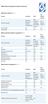 Device Vendor Comparisons Deployment options ( + / -) Vendor for On premises Cloud/SaaS and other platforms supported (+ / -) Vendor for ios Android Extended Android APIs Knox, Safe Safe BlackBerry Windows
6 Things To Think About Before Implementing BYOD
 6 Things To Think About Before Implementing BYOD Kimber Spradlin, CISA, CISSP 2012 IBM Corporation Mobile Devices: Unique Management & Security Challenges Mobile devices are shared more often Mobile devices
The fastest, most secure path to mobile employee productivity
 The fastest, most secure path to mobile employee productivity 2 If your organization lacks a bring-your-own-device (BYOD) strategy, you may be in danger of losing employees who are unhappy because they
An Overview of Samsung KNOX Active Directory and Group Policy Features
 C E N T R I F Y W H I T E P A P E R. N O V E M B E R 2013 An Overview of Samsung KNOX Active Directory and Group Policy Features Abstract Samsung KNOX is a set of business-focused enhancements to the Android
Symantec Mobile Management 7.1
 Scalable, secure, and integrated device management for healthcare Data Sheet: Industry Perspectives Healthcare Overview The rapid proliferation of mobile devices in the workplace is outpacing that of any
Agenda. Enterprise challenges. Hybrid identity. Mobile device management. Data protection. Offering details
 Agenda Enterprise challenges Hybrid identity Mobile device management Data protection Offering details 2 The time to address enterprise mobility is now 29% of today s global workforce use 3+ devices, work
Introduction to the Mobile Access Gateway
 Introduction to the Mobile Access Gateway This document provides an overview of the AirWatch Mobile Access Gateway (MAG) architecture and security and explains how to enable MAG functionality in the AirWatch
Mobile Device Management in the Systems Management Ecosystem. Katie Wiederholt, Dell Software
 Mobile Device Management in the Systems Management Ecosystem Katie Wiederholt, The forces driving change in mobility Agenda The journey to MDM Where do we want to be and mobile security technologies 2
Enterprise Mobility as a Service
 Service Description: Insert Title Enterprise Mobility as a Service Multi-Service User Management for Mobility 1. Executive Summary... 2 2. Enterprise Mobility as a Service Overview... 3 3. Pricing Structure...
Ensuring the security of your mobile business intelligence
 IBM Software Business Analytics Cognos Business Intelligence Ensuring the security of your mobile business intelligence 2 Ensuring the security of your mobile business intelligence Contents 2 Executive
ENTERPRISE MOBILITY MANAGEMENT & REMOTE ACCESS SOLUTIONS
 ENTERPRISE MOBILITY MANAGEMENT & REMOTE ACCESS SOLUTIONS Secure Remote Desktop & Application Access Mobile Device Management Mobile Content Management Mobile Email & PIM Secure Mobile Containerization
Kony Mobile Application Management (MAM)
 Kony Mobile Application Management (MAM) Kony s Secure Mobile Application Management Feature Brief Contents What is Mobile Application Management? 3 Kony Mobile Application Management Solution Overview
The Challenge. The Solution. Achieve Greater Employee Productivity & Collaboration...while Protecting Critical Business Data
 The Challenge The Solution Today's employees demand mobile access to office information in order to maximize their productivity and they expect that enterprise collaboration and communication tools should
Real-World Scale for Mobile IT: Nine Core Performance Requirements
 White Paper Real-World Scale for Mobile IT: Nine Core Performance Requirements Mobile IT Scale As the leader in Mobile IT, MobileIron has worked with hundreds of Global 2000 companies to scale their mobile
Mobile device and application management. Speaker Name Date
 Mobile device and application management Speaker Name Date 52% 90% >80% 52% of information workers across 17 countries report using three or more devices for work* 90% of enterprises will have two or more
Egnyte Cloud File Server. White Paper
 Egnyte Cloud File Server White Paper Revised July, 2013 Egnyte Cloud File Server Introduction Egnyte Cloud File Server (CFS) is the software as a service layer that powers online file sharing and storage
White Paper. Secure Mobile Collaboration with Citrix XenMobile and ShareFile. citrix.com
 White Paper Secure Mobile Collaboration with Citrix XenMobile and ShareFile Mobile devices and BYOD have brought unprecedented agility to the enterprise, allowing users to collaborate, access information
Document Sharing on Mobile Devices. Securing Productivity on the Go! www.maas360.com
 Document Sharing on Mobile Devices Securing Productivity on the Go! www.maas360.com Copyright 2014 Fiberlink Communications Corporation. All rights reserved. This document contains proprietary and confidential