
Redpaper Axel Buecker Kenny Chow Jenny Wong
|
|
|
- Barbra Hardy
- 10 years ago
- Views:
Transcription
1 Redpaper Axel Buecker Kenny Chow Jenny Wong A Guide to Authentication Services in IBM Security Access Manager for Enterprise Single Sign-On Introduction IBM Security Access Manager for Enterprise Single Sign-On introduces a new level of security, authentication, and automation experience to business enterprise users on their desktop applications. On a day-to-day basis, the number of resources or applications that a business user accesses varies and is inevitably increasing. Applications that a user employs during normal daily activities might require a range of elements to authenticate or verify the user s identity before granting access to corporate information. The classic authentication approach is the unique user name and password combination. Each desktop application might require its own unique set of user name and password credentials. The challenge that users are faced with is the need to remember each and every set of unique credentials for different applications. Access Manager for Enterprise Single Sign-On offers users an experience that eliminates the need to remember and manage multiple sets of user names and passwords. Through the ease of AccessProfiles, this solution is able to capture and manage credential information for a range of supported application types. Not only does this increase user efficiency by making daily activities more convenient, but, very importantly, it efficiently decreases costs for business organizations to address password management issues, supports the need to manage business risks, and ensures that sufficient security and regulatory compliance are in place. Access Manager for Enterprise Single Sign-On offers efficient sign-on solutions and automation of workflow for existing applications as they are. No modifications are required to the existing targeted systems, platforms, or applications where the product is deployed. Consequently, the format of user name and password logon information can differ between applications. Access Manager for Enterprise Single Sign-On uses the concept of authentication services to represent and map to the different formats used. In some cases, AccessProfiles require specific engineering to accommodate complex application credential structures and authentication logic. Copyright IBM Corp All rights reserved. ibm.com/redbooks 1

2 This IBM Redpaper publication explains the fundamentals of authentication services; how they can be deployed and associated with desktop applications; and highlights best practices regarding how authentication services should be utilized to achieve successful automation workflow and single sign-on. In this Redpaper we assume the reader has: Foundational knowledge of Access Manager for Enterprise Single Sign-On. Knowledge and understanding of the product components that constitute Access Manager for Enterprise Single Sign-On: AccessAgent and AccessStudio, AccessAdmin, AccessAssistant, IMS (Integration Management Server), IMS Bridge, IMS Connector, IMS Service Module, and Web Workplace. Fundamental understanding of AccessProfile construction. Knowledge about deploying and configuring basic and advanced AccessProfiles. Understanding of development concepts in AccessProfile, such as triggers, states, and actions. Understanding and recognition of AccessProfile signatures and XML Paths. Background Access Manager for Enterprise Single Sign-On authentication, workflow automation, and capturing can work differently for different applications. The way the application functions, behaves, or reacts during a logon or change password scenario can affect how an AccessProfile can be constructed to capture and achieve accurate automation workflow. The developer needs to know about the three core entities in Access Manager for Enterprise Single Sign-On profiling. These entities are the AccessProfiles, associated application, and authentication service. Figure 1 illustrates the relationships between these entities. Figure 1 Relationships between an AccessProfile, authentication service, and application An AccessProfile is constructed with a set of instructions that handles workflow automation for supported desktop applications in a Windows Operating System. It is constructed as a state engine, consisting of states, triggers, and actions. It can contain instructions for performing automatic operations for user logon, user logoff, user change or reset password, and other customized activities the application might present. The associated AccessProfile for an application might consist of any combination of these activities and more depending on business requirements and users needs. An AccessProfile is associated with and uniquely mapped to one business application only. An application can be an executable file (.EXE) or a 2 A Guide to Authentication Services in IBM Security Access Manager for Enterprise Single Sign-On

3 web page, each of which is a unique process on the client machine. The AccessProfile gets loaded in runtime and begins its automation workflow when it detects that the relative executable file or web page is initiated on the client machine. Authentication services concepts In this section we take a closer look at the authentication services in Access Manager for Enterprise Single Sign-On. Authentication services Business applications require validation of logon credential information to be achieved by a verification entity. Access Manager for Enterprise Single Sign-On introduces a concept of authentication services, which can be defined as a reference to such entities for verifying user logon information. Authentication services provide a logical representation of the entity that an application is verifying against in an AccessProfile. All constructed AccessProfiles must be associated with an authentication service. The associated authentication service represents the back-end server entity that the desktop business application authenticates to. As such, the authentication service must be defined with the same credential format or structure that is accepted by the business application. In other words, an authentication service is constructed in a way that it provides the required logon information when verifying a user against an application. It maps to an account data template (ADT) that defines the number of items and their form. For example, the auth_xyz authentication service uses the adt_ciuser_cspwd ADT. Adt_cisuer_cspwd is the account data template ID for the auth_xyz authentication service. This template is divided into three parts: adt Account data template ciuser Case-insensitive user name cspwd Case-sensitive password This means that the authentication service is comprised of two account data items: A case-insensitive user name (ciuser) A case-sensitive password (cspwd) for the application There are many different user credential structures or data formats that applications might require. Access Manager for Enterprise Single Sign-On provides an extensive list of account data items and pre-defined template definitions that can be used to construct the appropriate authentication service referencing an application verification entity. These are listed in Table 1 and Table 2. Table 1 lists the account data items that an authentication service can use. Table 1 Account data items available within a template Description Case-insensitive user Case-sensitive user Case-insensitive password Case-sensitive password Common use User name or logon name; this is the most common user name type. Case-sensitive logon names. For example, demouser is considered different from DemoUser. Certain applications, typically mainframes, accept case-insensitive passwords. For example, password is the same as PassWord. The most common password type. A Guide to Authentication Services in IBM Security Access Manager for Enterprise Single Sign-On 3

4 Description Case-insensitive second password Case-sensitive user second password Case-insensitive second key Case-sensitive second key Common use Used when an additional password is required, for example, Personal Identification Number. Used when an additional secret is required, for example, self-service secrets. Can be used for host names, domain, groups, roles, and so on. Case-sensitive second key such as hash checksums, public certificates, and so on. Table 2 lists the account data templates that define the format of account data to be stored for user logon information to be captured by an AccessProfile for a specific application. Table 2 Account data templates for authentication services Account data template adt_csuser adt_ciuser adt_csuser_cspwd adt_ciuser_cspwd adt_ciuser_cipwd adt_cspwd adt_cipwd adt_csuser_cspwd_cspwd2 adt_ciuser_cspwd_cspwd2 adt_ciuser_cspwd_cipwd2 adt_ciuser_cipwd_cipwd2 adt_csuser_cssecondarykey _cspwd adt_csuser_cisecondarykey_ cspwd adt_ciuser_cisecondarykey_ cspwd Description Case-sensitive user name required only. Case-insensitive user name required only. Case-sensitive user name and case-sensitive password required. Case-insensitive user name and case-sensitive password required. This is the default assigned account data template when creating an authentication because it is the one most commonly used across desktop applications. Case-insensitive user name and case-insensitive password. A case-sensitive password only. A case-insensitive password only. Case-sensitive user name with two passwords that are case-sensitive. Case-insensitive user name with two passwords that are case-sensitive. This template is commonly used for change password scenarios, for example. Case-insensitive user name with two passwords - one case-sensitive and one not. Case-insensitive user name with two passwords that are case-insensitive. Case-sensitive user name with one case sensitive password entry and a case-sensitive secondary key. A common scenario where a secondary key is used is to capture the domain, for example. Case-sensitive user name with one case-sensitive password entry and a case-insensitive secondary key. A common scenario where a secondary key is used is to capture the domain, for example. Case-insensitive user name with one case-sensitive password entry and a case-insensitive secondary key. A common scenario where a secondary key is used is to capture the domain, for example. 4 A Guide to Authentication Services in IBM Security Access Manager for Enterprise Single Sign-On

5 Account data template adt_ciuser_cisecondarykey_ cipwd adt_ciuser_cisecondarykey_ cspwd_cspwd2 Description Case-insensitive user name with one case-insensitive password entry and a case-insensitive secondary key. A common scenario where a secondary key is used is to capture the domain, for example. Case-insensitive user name with one case-insensitive secondary key, and two case-sensitive password entries. In most cases, these predefined account data items and templates are more than sufficient to capture and support the user logon structures required for business applications. It is highly unlikely to find an inappropriate data item or a template to be unsuitable. For further information and background about account data templates and formats, see IBM Security Access Manager for Enterprise Single Sign-On, Version 8.2, AccessStudio Guide, SC Interestingly, authentication services can be employed or re-used with more than one AccessProfile. Because an authentication service represents the verification entity for an application, there might be cases where different applications verify against the same back-end server. Effectively, the same user credentials are used for authentication to multiple applications or websites. These more complex deployment scenarios with authentication services are explained in further detail later in this paper. Building blocks of an AccessProfile Each application has its own AccessProfile that is used to capture various workflows such as User Logon, User Logoff, Change or Reset Password, and much more. An AccessProfile is created and mapped to only one application because it represents the unique process for which the application gets invoked on the user s workstation. An AccessProfile will consist of states, triggers, and actions. Access Manager for Enterprise Single Sign-On supplies a variety of triggers and actions that can be included in a profile and configured to capture the workflows of desktops. There are no supplied state types mapped to a profile. There is no direct association between an application and an authentication service. An AccessProfile will map to a single application and a single authentication service. The data model in Figure 2 on page 6 illustrates this concept. A Guide to Authentication Services in IBM Security Access Manager for Enterprise Single Sign-On 5

6 Figure 2 Data model of an AccessProfile Application ID Each AccessProfile is associated with one application. In the world of Access Manager for Enterprise Single Sign-On, application refers to a system that provides a user interface for reading or entering the authentication credential. There are many different types of applications that an organization employs in their IT infrastructure. The following types of applications are supported by Access Manager for Enterprise Single Sign-On: 16-bits, 32-bits and 64-bits Windows executable Web pages loaded in any supported web browsers Screens and text displays in supported TTY terminal emulators Mainframe screens and texts in supported mainframe access applications Java applications and applets Each application is assigned an Application ID, which an AccessProfile will refer to. A collection of attributes and policies help govern the access privileges to applications. Application policies, such as Default automatic sign-on, can be set in AccessStudio. This is found under View Applications. If the AccessProfile has been uploaded to the Access Manager for Enterprise Single Sign-On IMS Server, you can edit the application policies in the IMS Server AccessAdmin Administrative Interface. When a user logs on as an administrative user, these policies can be accessed by selecting Systems Application Policies. 6 A Guide to Authentication Services in IBM Security Access Manager for Enterprise Single Sign-On

7 States An AccessProfile is represented as a state engine in AccessStudio. Each single sign-on task (for example, logon, logoff, or change password) is developed as a sequence of determinate states. Figure 3 is an example of a simple state engine that is used to capture the workflow of a user logon scenario. Figure 3 State machine diagram in AccessStudio Triggers Triggers are events that cause transitions between states in the state engine. A state transition happens when a trigger is fired (that is, an event matched the trigger). AccessStudio provides many built-in triggers for an AccessProfile developer to use in an application profile. Figure 4 shows the two triggers, Window is activated and Button is clicked. Figure 4 State machine diagram with two triggers in AccessStudio Actions Actions can be added to any triggers. An action is performed in response to a trigger being fired. Some of the commonly used actions are Inject credentials, Capture credentials and Save credentials. AccessStudio provides many predefined actions to execute in an AccessProfile. In addition, a powerful Plugins API action (Run a VBScript or JScript) can augment the profile with any complex automation tasks needed. A Guide to Authentication Services in IBM Security Access Manager for Enterprise Single Sign-On 7

8 Figure 5 shows two actions under each trigger. Figure 5 State machine diagram with actions and triggers in AccessStudio Each action has additional properties to be configured, like signature, authentication service, and advanced options. Actions that deal with credentials usually have an Auth Info section that allows an AccessProfile developer to specify the authentication service to use. Signatures A signature is unique identification information for any application, window, field, or attribute in the application. Signatures are constructed using the XPath syntax. In most cases, a signature can be easily obtained using the AccessStudio Signature Generator Tool. Example 1 shows a signature for the username field in Microsoft Remote Desktop Connection as generated by the Signature Generator Tool. Example 1 Signature for the username field /child::wnd[@title="remote Desktop Connection" An AccessProfile developer can manually create or edit the signature to fine tune the accuracy or generalize it to cover more platforms for the same application. Authentication service Authentication service refers to the back-end entity that verifies the validity of an account for an application. Each AccessProfile can be associated with a mixture of any number of direct and indirect authentication services, depending on what the AccessProfile developer sets within the actions in the profile. Direct authentication services are identified by a predefined ID. An authentication service is also associated with an account data template and a set of policies. 8 A Guide to Authentication Services in IBM Security Access Manager for Enterprise Single Sign-On

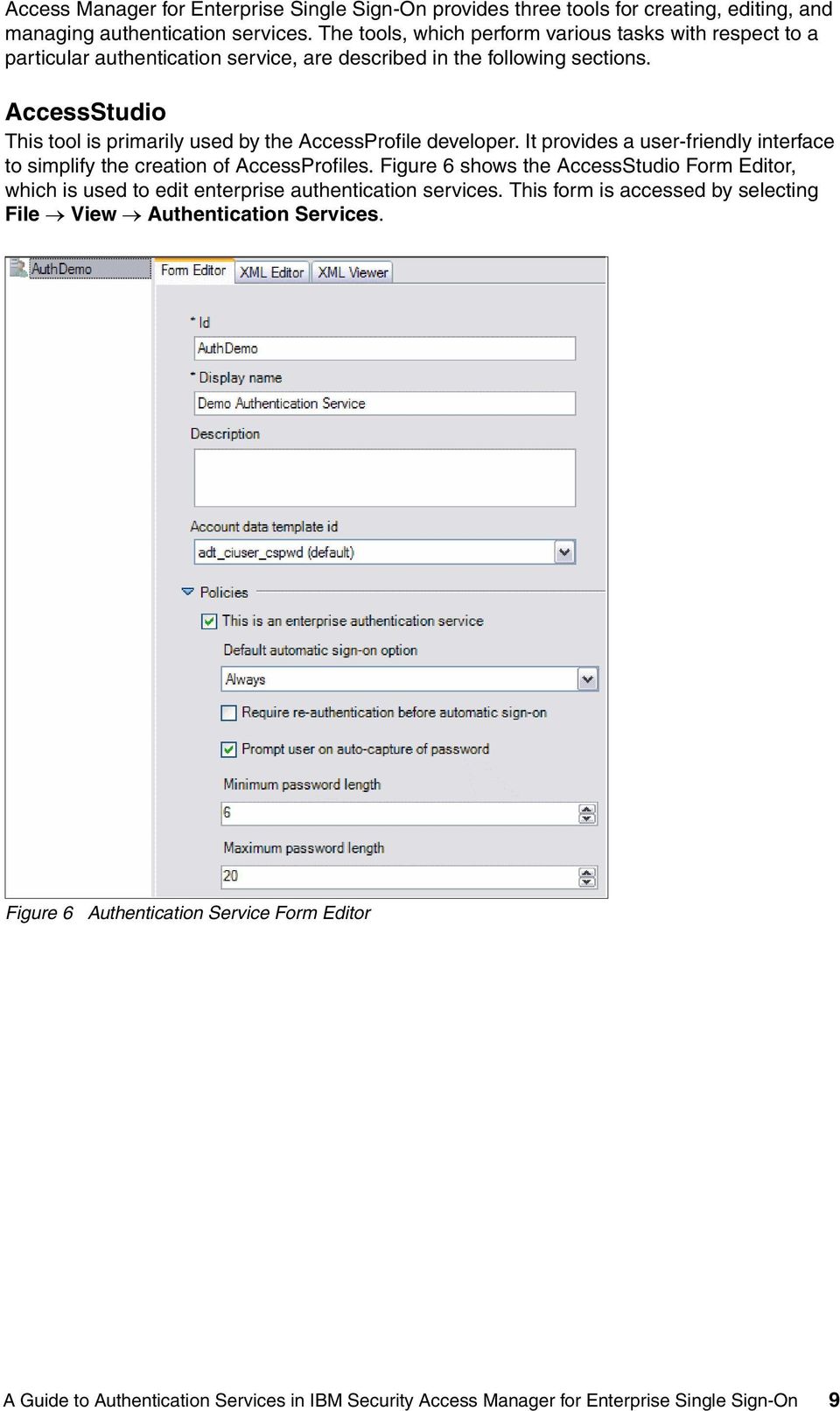
9 Access Manager for Enterprise Single Sign-On provides three tools for creating, editing, and managing authentication services. The tools, which perform various tasks with respect to a particular authentication service, are described in the following sections. AccessStudio This tool is primarily used by the AccessProfile developer. It provides a user-friendly interface to simplify the creation of AccessProfiles. Figure 6 shows the AccessStudio Form Editor, which is used to edit enterprise authentication services. This form is accessed by selecting File View Authentication Services. Figure 6 Authentication Service Form Editor A Guide to Authentication Services in IBM Security Access Manager for Enterprise Single Sign-On 9
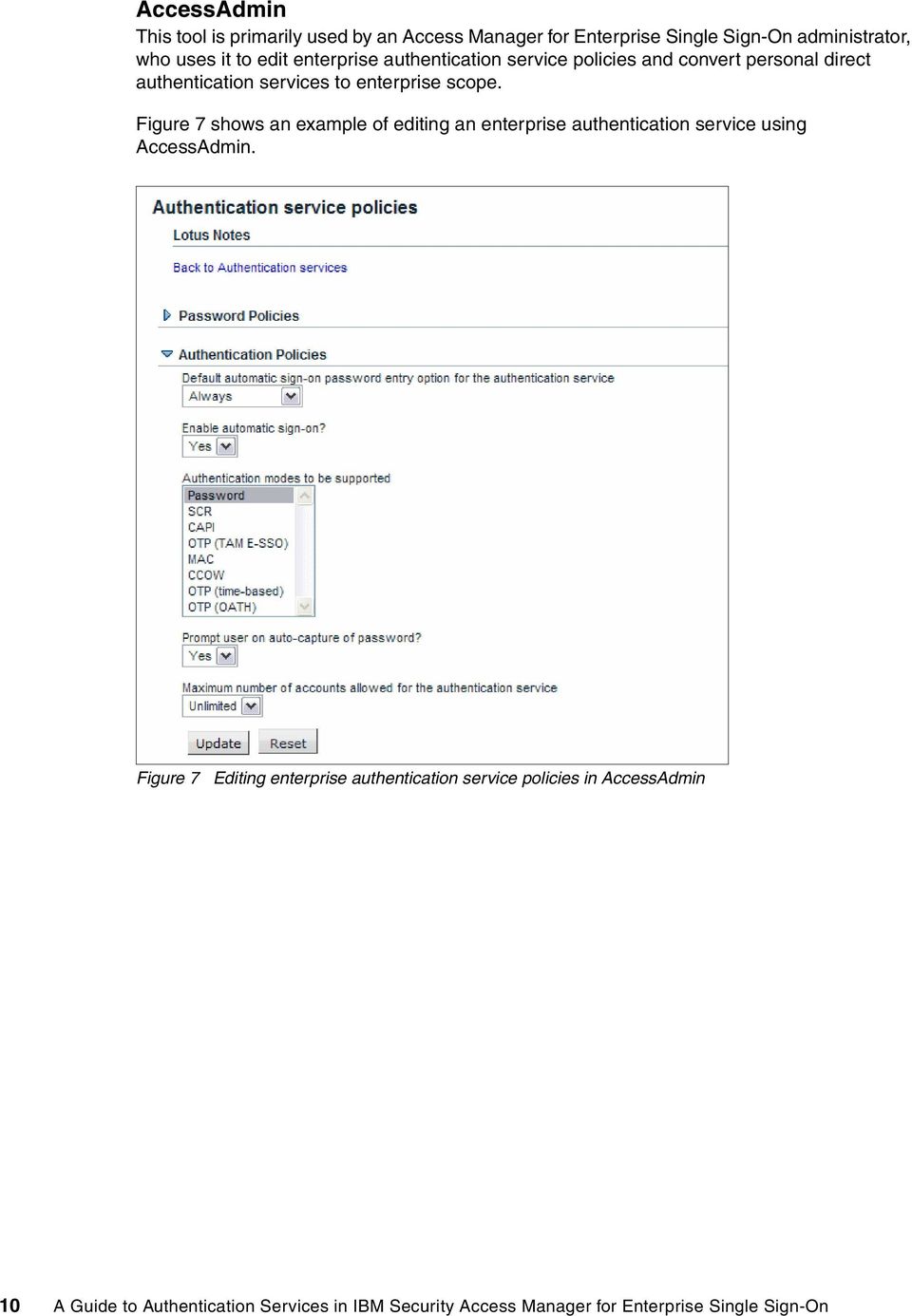
10 AccessAdmin This tool is primarily used by an Access Manager for Enterprise Single Sign-On administrator, who uses it to edit enterprise authentication service policies and convert personal direct authentication services to enterprise scope. Figure 7 shows an example of editing an enterprise authentication service using AccessAdmin. Figure 7 Editing enterprise authentication service policies in AccessAdmin 10 A Guide to Authentication Services in IBM Security Access Manager for Enterprise Single Sign-On
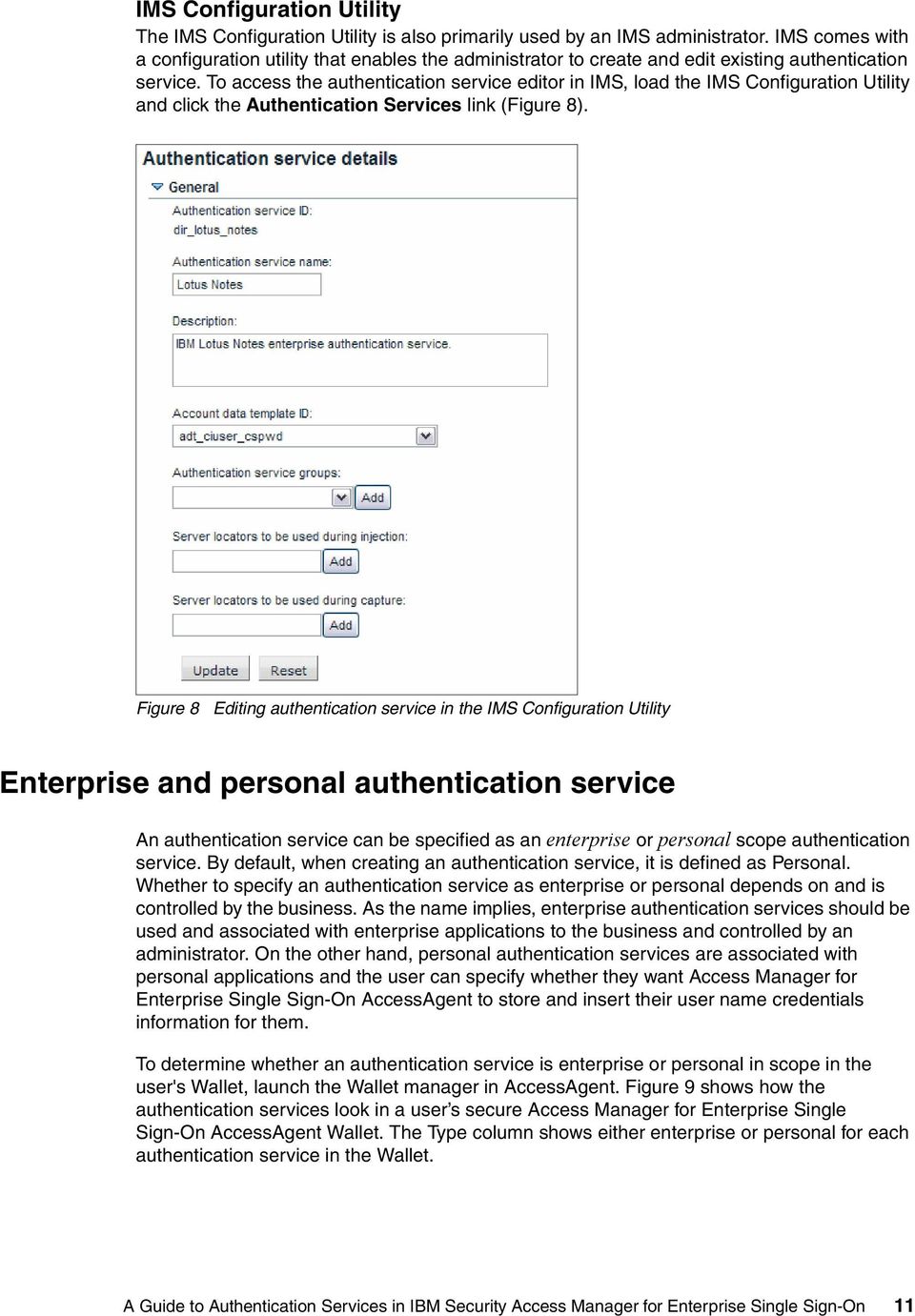
11 IMS Configuration Utility The IMS Configuration Utility is also primarily used by an IMS administrator. IMS comes with a configuration utility that enables the administrator to create and edit existing authentication service. To access the authentication service editor in IMS, load the IMS Configuration Utility and click the Authentication Services link (Figure 8). Figure 8 Editing authentication service in the IMS Configuration Utility Enterprise and personal authentication service An authentication service can be specified as an enterprise or personal scope authentication service. By default, when creating an authentication service, it is defined as Personal. Whether to specify an authentication service as enterprise or personal depends on and is controlled by the business. As the name implies, enterprise authentication services should be used and associated with enterprise applications to the business and controlled by an administrator. On the other hand, personal authentication services are associated with personal applications and the user can specify whether they want Access Manager for Enterprise Single Sign-On AccessAgent to store and insert their user name credentials information for them. To determine whether an authentication service is enterprise or personal in scope in the user's Wallet, launch the Wallet manager in AccessAgent. Figure 9 shows how the authentication services look in a user s secure Access Manager for Enterprise Single Sign-On AccessAgent Wallet. The Type column shows either enterprise or personal for each authentication service in the Wallet. A Guide to Authentication Services in IBM Security Access Manager for Enterprise Single Sign-On 11
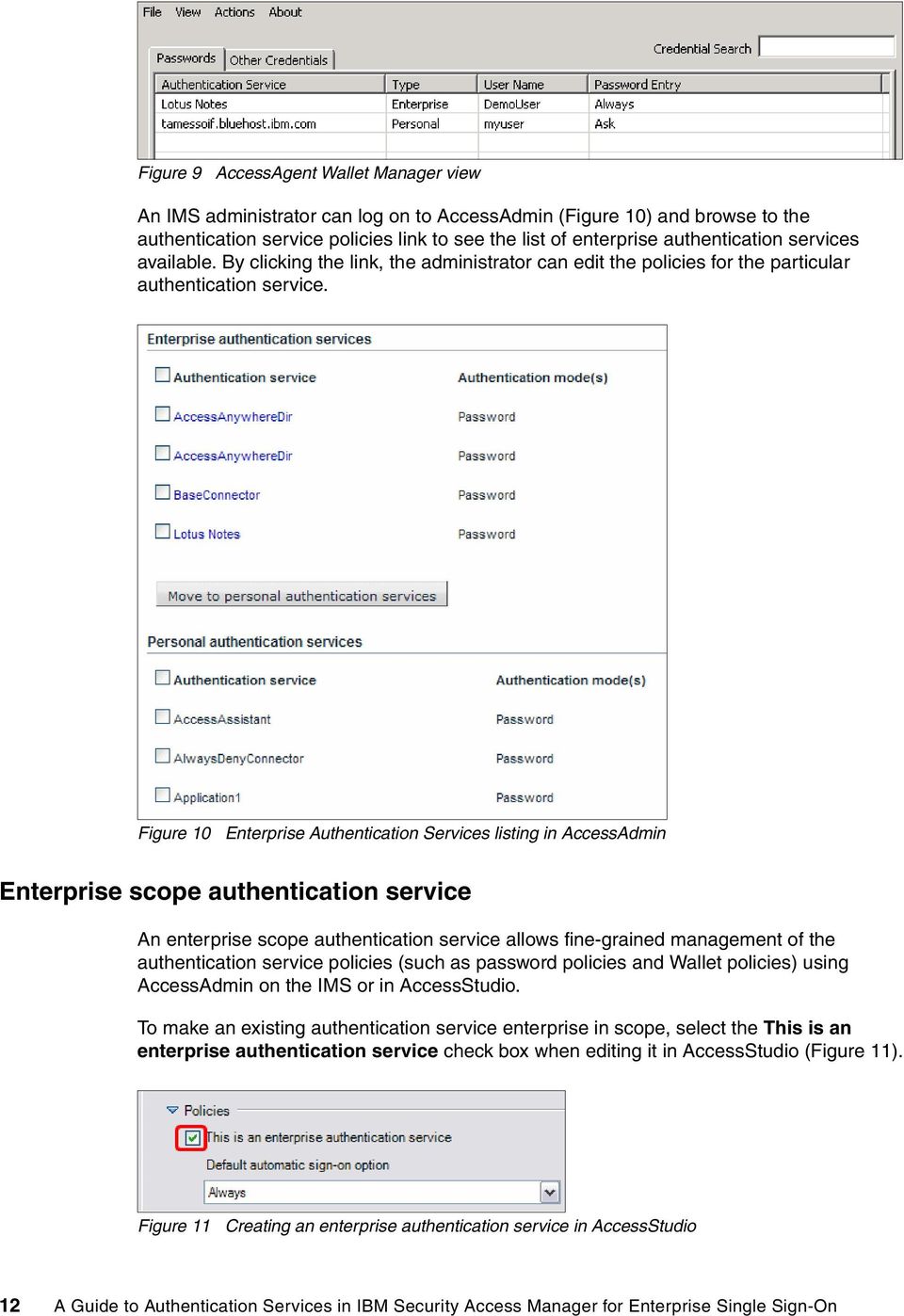
12 Figure 9 AccessAgent Wallet Manager view An IMS administrator can log on to AccessAdmin (Figure 10) and browse to the authentication service policies link to see the list of enterprise authentication services available. By clicking the link, the administrator can edit the policies for the particular authentication service. Figure 10 Enterprise Authentication Services listing in AccessAdmin Enterprise scope authentication service An enterprise scope authentication service allows fine-grained management of the authentication service policies (such as password policies and Wallet policies) using AccessAdmin on the IMS or in AccessStudio. To make an existing authentication service enterprise in scope, select the This is an enterprise authentication service check box when editing it in AccessStudio (Figure 11). Figure 11 Creating an enterprise authentication service in AccessStudio 12 A Guide to Authentication Services in IBM Security Access Manager for Enterprise Single Sign-On
13 After an authentication service is set as enterprise type, the password and authentication policies are enabled for editing. An administrative user can predefine the policies through AccessStudio in the Form Editor or set them on the IMS Server using AccessAdmin. Among the policies that can be set are the following: Minimum or maximum password length Number of alphanumeric characters Minimum or maximum number of special characters Allow or enforce use of both upper and lower case characters It is also possible to customize dialog labels (in cases where the AccessProfile shows a dialog to the user). If this authentication service is created for indirect type, Server Locators for the AccessProfile can also be defined here. Personal scope authentication service A personal scope authentication service can be created in AccessStudio (that is, direct authentication service) or dynamically during AccessProfile runtime (that is, indirect authentication service). Authentication services created in the personal scope are private to the user's Wallet and do not inherit any authentication service policies from the Access Manager for Enterprise Single Sign-On IMS Server. However, an administrator can enable or disable the ability for a user to use AccessAgent for single sign-on into personal scope applications by setting a policy in the IMS Server. For more information about this policy, see the IBM Security Access Manager for Enterprise Single Sign-On, Version 8.2, Policies Definition Guide, SC When creating an authentication service in AccessStudio, it is by default personal scope. In addition, all indirect authentication services that are created during run time (meaning, there were no existing server locators found) are also stored as personal authentication service in the user's Wallet. Converting a authentication service from personal to enterprise Since a personal scope authentication service exists only in the user's Wallet, an Access Manager for Enterprise Single Sign-On IMS administrator would not be able to set specific password and authentication policies via AccessAdmin unless that service is converted to enterprise scope first. A personal scope authentication service can be converted to enterprise scope using either AccessStudio or AccessAdmin. Procedure using AccessStudio To convert an authentication service from personal to enterprise using AccessStudio: 1. Launch AccessStudio. 2. Load the AccessProfile that contains the authentication service in AccessStudio. If the authentication service exists in IMS, you can download it into AccessStudio by clicking File Import Data From IMS. 3. Click View Authentication Services (Figure 12) and select the authentication service you want to convert from the list of services. A Guide to Authentication Services in IBM Security Access Manager for Enterprise Single Sign-On 13
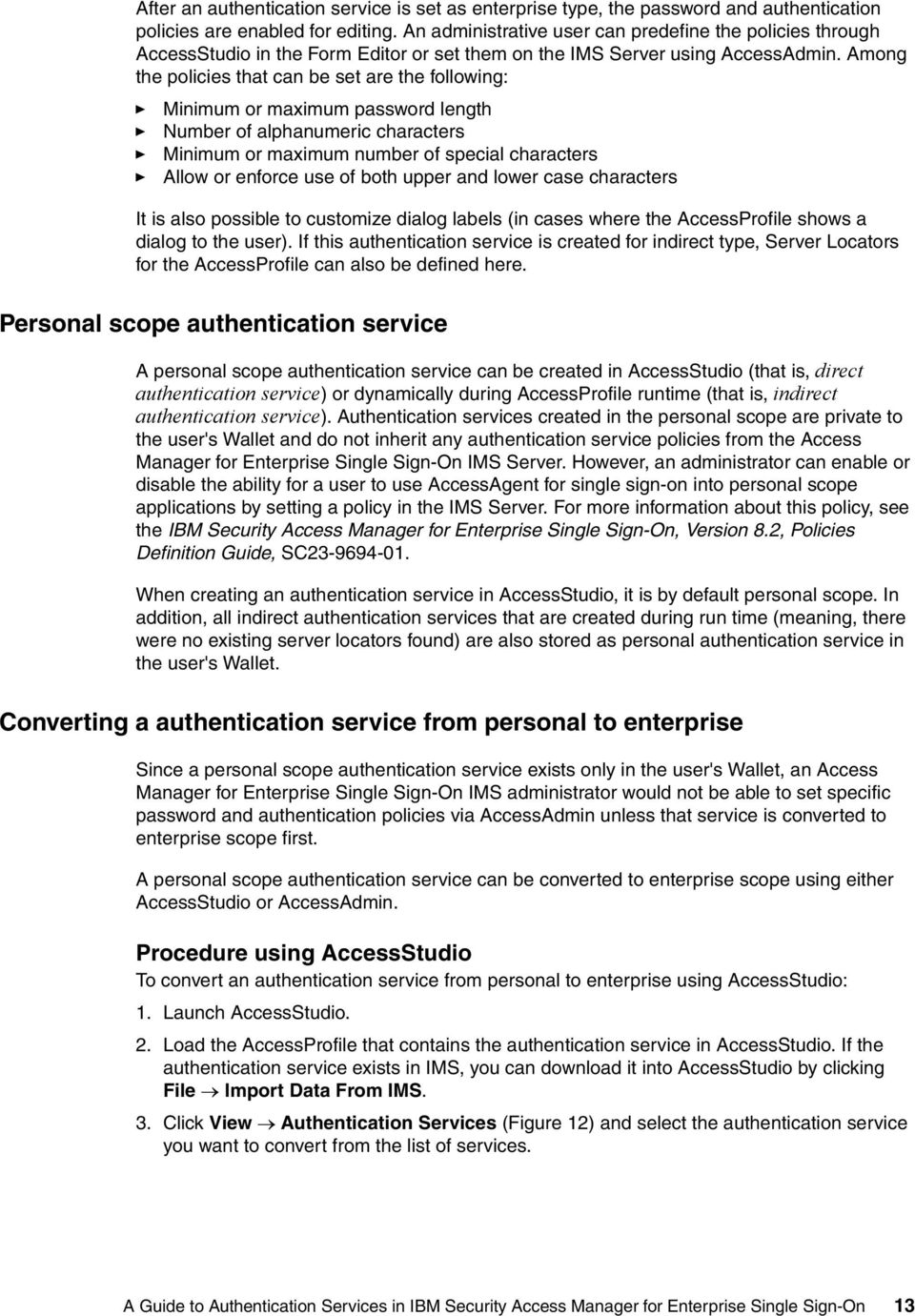
14 Figure 12 Selecting an authentication service from the list of services 4. Expand the Policies section and select the This is an enterprise authentication service check box (Figure 13). Figure 13 Expanded Policies with enterprise authentication service selected 5. When you are ready to upload the changes to the IMS, right-click the selected authentication service in the list of services and select Upload to IMS Server. 6. You will be prompted to confirm your action and then you will be notified whether the upload was successful or failed. Procedure using AccessAdmin To convert an authentication service from personal to enterprise using AccessAdmin: 1. Log in to AccessAdmin as an administrator using your web browser. 2. Select the Authentication Service Policies link from the navigation bar. All existing known personal scope authentication services are shown under the Personal authentication services section. 3. Locate the authentication service you want to convert and select the check box next to it. You can repeat this step multiple times to select multiple authentication services to convert. 4. Click the Move to enterprise authentication services button to convert them to enterprise scope authentication service. Direct and indirect authentication services Authentication services can be associated with AccessProfiles in two ways: directly and indirectly. Direct authentication refers to a direct reference of an existing authentication service. It is used in the case where the exact authentication service can be determined and created when writing the AccessProfile. For example, for an organization mail account, you can use the direct-auto options as the authentication service because it is static and does not change. Indirect authentication is employed when you do not know which authentication service to select at the time of creating the AccessProfile or if, for example, the user might authenticate to different servers for the same application. By default, indirect authentication services are captured as a personal authentication service for a user. An indirect authentication service is captured at run time when the application is launched. Indirect authentication services offers 14 A Guide to Authentication Services in IBM Security Access Manager for Enterprise Single Sign-On

15 the mechanism to detect and extract the server locator to distinguish which server the user is authenticating to, and retrieve or store the credentials for that service in the user s Wallet. Figure 14 shows a Java application example in which server1.demo.ibm is the indirect authentication service for its AccessProfile. Figure 14 Extracting server locator from an application A well-known example that most would be familiar with is the Windows Logon application (Figure 15). The user can select any domain in the drop-down box at the time, meaning that the domain name is not (or cannot be) hardcoded. The domain name is the authentication service for the Windows Logon. Figure 15 Indirect authentication service for Windows Logon These are examples for applying an indirect authentication service. Alternatively, when a user is authenticating to their Google account, Google becomes the authentication service. There are no different Google domains to be considered, and the same set of credentials is used to authenticate the user. Therefore, a direct authentication service is most appropriate in this scenario. When to use indirect authentication services It can be difficult and confusing, at times, to determine which type of authentication service for an application is most appropriate. It all comes down to how well the administrator understands the applications. To determine whether indirect or direct authentication service is best in a particular situation, the typical question to ask is: Does the application resolve to the same back end (constant) or can it change on the application interface (variable)? A Guide to Authentication Services in IBM Security Access Manager for Enterprise Single Sign-On 15

16 Consider the following scenarios: The simple way. You already know while creating the AccessProfile what authentication service is going to be used; it is constant, and does not change under any circumstances, so you just hard-code its ID. That is what is called a direct-auth-info. Basically, the information is embedded in the profile itself. The complicated way. At times one does not know what the authentication service is going to be while writing the profile because the application (or user) can decide to use different ones. In this case, because it is not possible to know or determine the authentication service directly, the indirect methods should be used to obtain it; thus the name indirect-auth-info. Consider the example shown in Figure 16. Figure 16 Examples of applications that use direct and indirect authentication service The authentication service to be used for the IBM Lotus Notes application should be the direct authentication service because there is no variable entity or property (such as a domain or reference of the back-end server) that can be or needs to be defined in the application logon interface. Alternatively, for the Windows Explorer application, a user can use the same application to log in to multiple different servers and websites, which is reflected in the title of the application, as shown in Figure 16. The title only changes during runtime when the user should choose to authenticate to that back end, and it might change if the user should choose to authenticate to a different back end. Therefore, with applications that deploy this nature of dynamic back-end verification entities, indirect authentication service is the better choice. As far as the Access Manager for Enterprise Single Sign-On Wallet goes, it would identify that each set of credentials stored for different servers when authenticating via Windows Explorer are separate Wallet entries. Here are some examples of when to use an indirect authentication service in the AccessProfile: 16 A Guide to Authentication Services in IBM Security Access Manager for Enterprise Single Sign-On

17 An application, such as Microsoft Internet Explorer, can connect to various websites and these websites cannot be determined ahead of time. There is a possibility of a few authentication services or back-end server endpoints to choose from even if they are known ahead of time. For example, a domain name is the authentication service in a Windows logon dialog. The user can select any domain in the drop-down box during logon and the credential for each domain is different. For one or more applications, you can connect using different servers, but using the same set of credentials. For example, shared folders in a corporate intranet may sit on different servers. However, the credential of the user most likely remains the same (that is, the domain credentials). Generally, if an application only has one set of credentials per user, then it can use a direct authentication service. For example, an instant messenger like IBM Lotus Sametime usually connects to a corporate server and requires only one credential per user. Thus, it would make sense to create an AccessProfile with a direct authentication service. Indirect authentication services types When using the AccessStudio AccessProfile Wizard Generator, users are able to create or select the appropriate authentication service for their application; however, this is limited to direct authentication services only. If an indirect service is needed, choosing and configuring the appropriate indirect authentication service for an application can only be done during the creation of an advanced AccessProfile. Access Manager for Enterprise Single Sign-On provides a number of indirect authentication service types that can be used to capture the appropriate authentication service for common desktop applications. Figure 17 shows a list of indirect authentication services types that AccessStudio allows configurations for. Figure 17 Option for selecting various authentication service types in AccessStudio If the AccessProfile uses an indirect authentication service, you should choose how to obtain the server locator information and apply the appropriate indirect authentication service type. The following sections describe user interface elements supported in AccessProfile for extracting server locator information. A Guide to Authentication Services in IBM Security Access Manager for Enterprise Single Sign-On 17
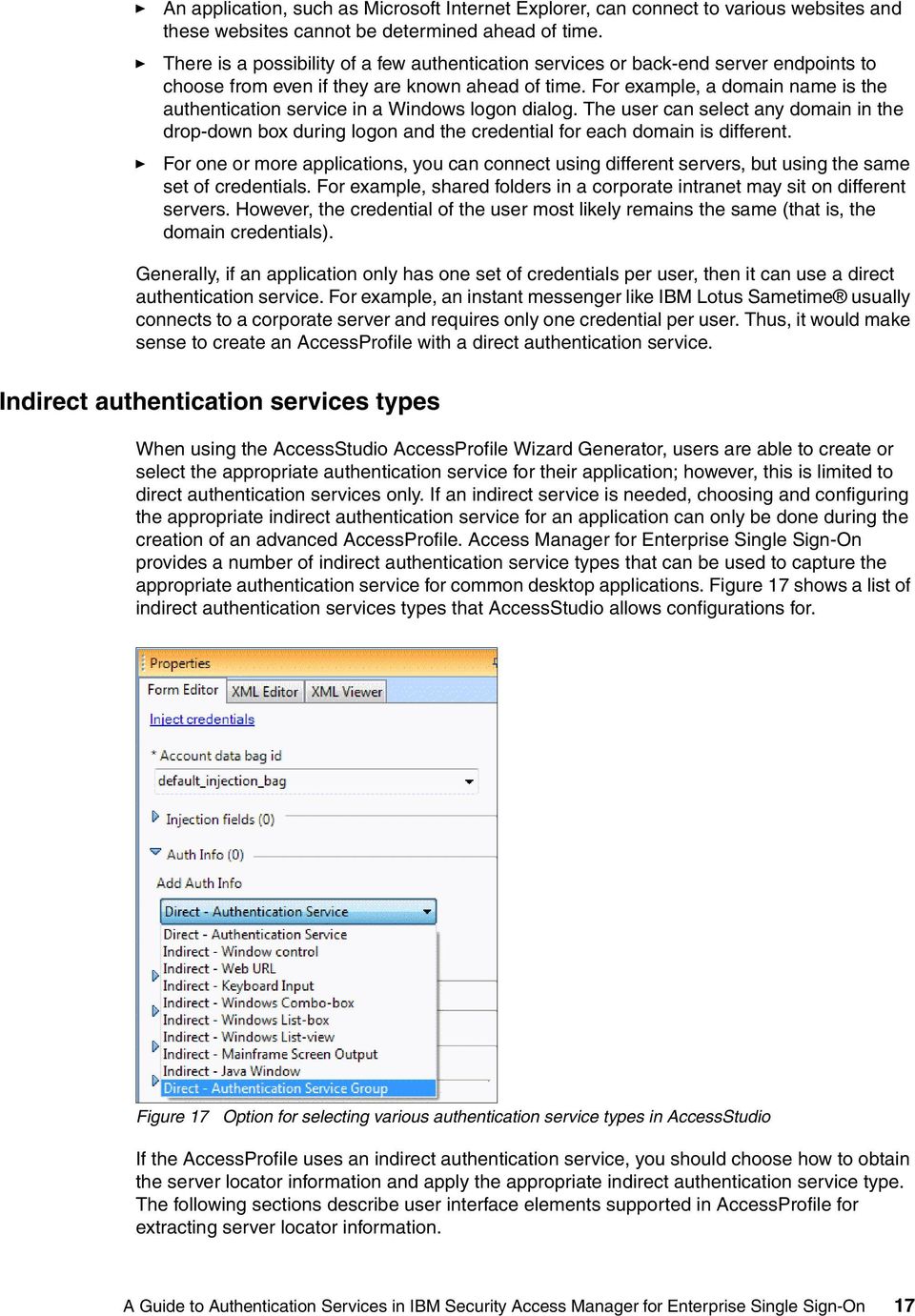
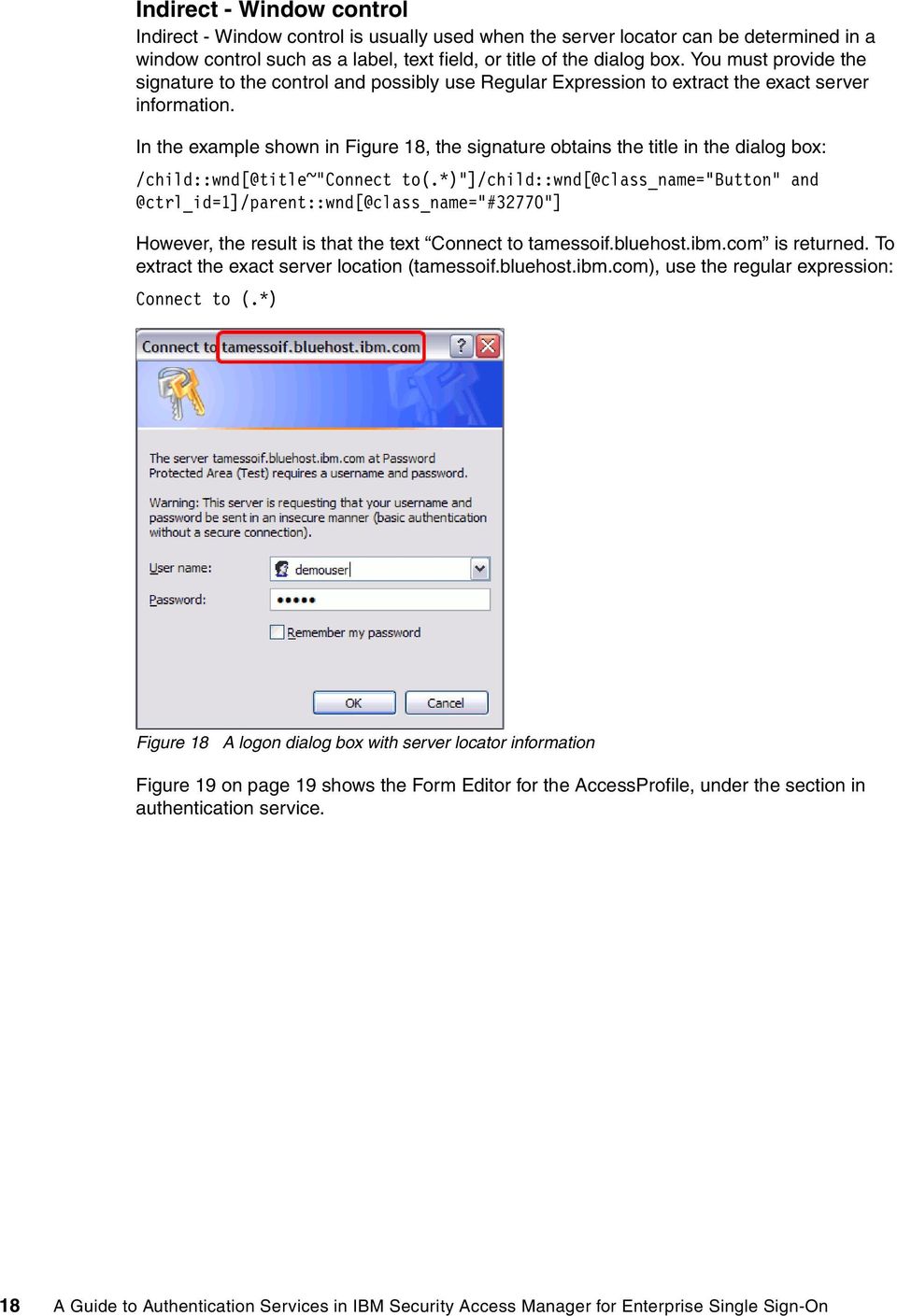
18 Indirect - Window control Indirect - Window control is usually used when the server locator can be determined in a window control such as a label, text field, or title of the dialog box. You must provide the signature to the control and possibly use Regular Expression to extract the exact server information. In the example shown in Figure 18, the signature obtains the title in the dialog box: /child::wnd[@title~"connect to(.*)"]/child::wnd[@class_name="button" However, the result is that the text Connect to tamessoif.bluehost.ibm.com is returned. To extract the exact server location (tamessoif.bluehost.ibm.com), use the regular expression: Connect to (.*) Figure 18 A logon dialog box with server locator information Figure 19 on page 19 shows the Form Editor for the AccessProfile, under the section in authentication service. 18 A Guide to Authentication Services in IBM Security Access Manager for Enterprise Single Sign-On
19 Figure 19 Form Editor of an indirect authentication service extracting the server locator from dialog title Indirect - Web URL Select the Indirect - Web URL option when the AccessProfile uses a web signature to instantiate (that is, in Internet browsers). It returns the server URL of the current web page loaded (Figure 20). Figure 20 A web page requiring login credentials to proceed This example has the following URL: A Guide to Authentication Services in IBM Security Access Manager for Enterprise Single Sign-On 19

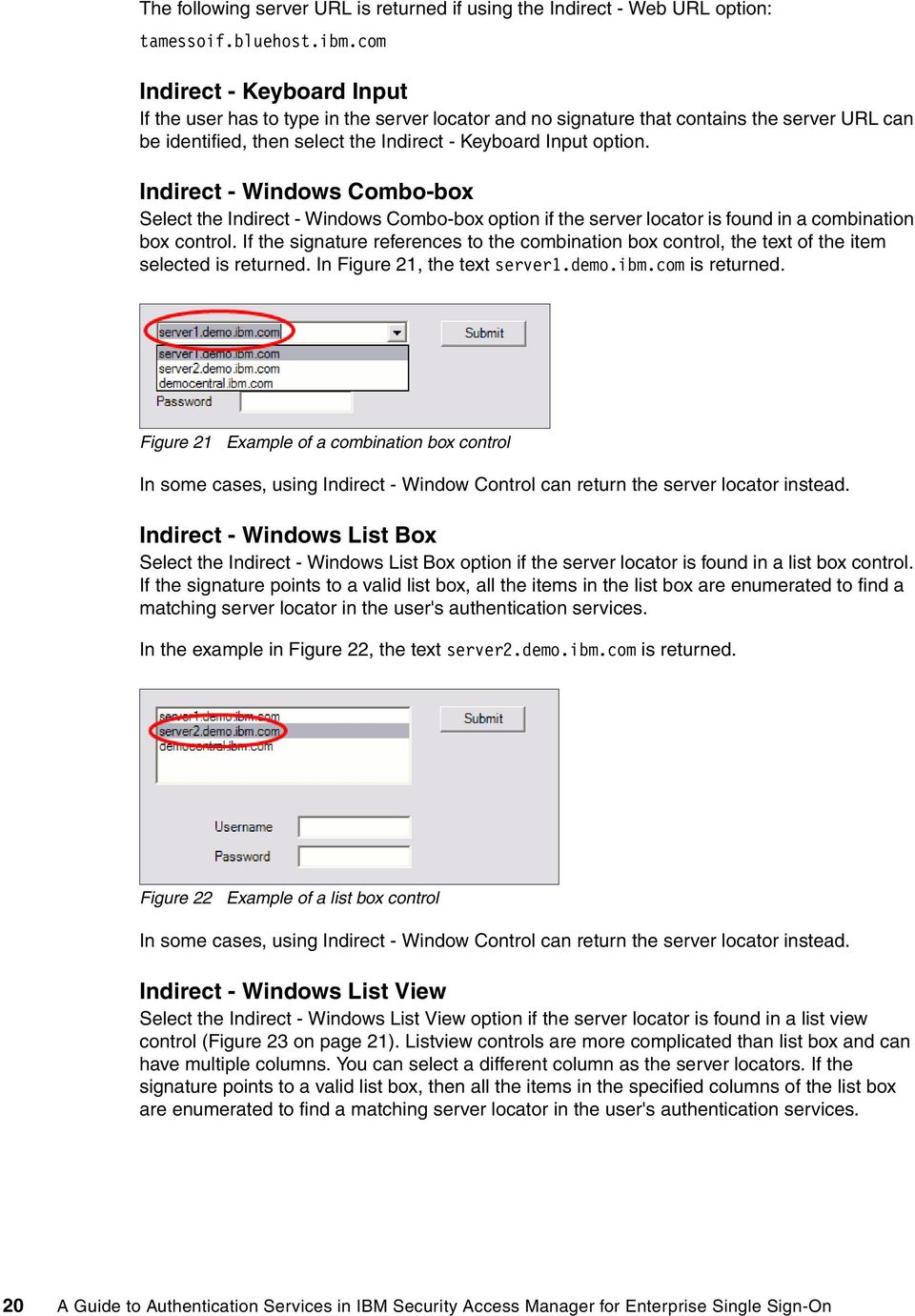
20 The following server URL is returned if using the Indirect - Web URL option: tamessoif.bluehost.ibm.com Indirect - Keyboard Input If the user has to type in the server locator and no signature that contains the server URL can be identified, then select the Indirect - Keyboard Input option. Indirect - Windows Combo-box Select the Indirect - Windows Combo-box option if the server locator is found in a combination box control. If the signature references to the combination box control, the text of the item selected is returned. In Figure 21, the text server1.demo.ibm.com is returned. Figure 21 Example of a combination box control In some cases, using Indirect - Window Control can return the server locator instead. Indirect - Windows List Box Select the Indirect - Windows List Box option if the server locator is found in a list box control. If the signature points to a valid list box, all the items in the list box are enumerated to find a matching server locator in the user's authentication services. In the example in Figure 22, the text server2.demo.ibm.com is returned. Figure 22 Example of a list box control In some cases, using Indirect - Window Control can return the server locator instead. Indirect - Windows List View Select the Indirect - Windows List View option if the server locator is found in a list view control (Figure 23 on page 21). Listview controls are more complicated than list box and can have multiple columns. You can select a different column as the server locators. If the signature points to a valid list box, then all the items in the specified columns of the list box are enumerated to find a matching server locator in the user's authentication services. 20 A Guide to Authentication Services in IBM Security Access Manager for Enterprise Single Sign-On
21 Figure 23 Example of a list view control In some cases, using Indirect - Window Control can return the server locator instead. Indirect - Mainframe Screen Output Select the Indirect - Mainframe Screen Output option if the AccessProfile is a mainframe type profile and the server locator is found as text displayed in the mainframe application. Figure 24 shows an example of output in a mainframe. Figure 24 Example of a mainframe login panel In this example, the following regular expression matches the server name DEMOSERVER:.*System..... : (.*) Indirect - Java Window The Indirect - Java Window option is used for applications executed in the Java Virtual Machine. The server locator can be in a Java Window control of any UI element with a title (Figure 25). Figure 25 Example of Java application Authentication service group and links Authentication service groups act as containers of authentication services. If a group is specified in the Capture credentials action, the authentication service is added to the group during Save credentials action. A Guide to Authentication Services in IBM Security Access Manager for Enterprise Single Sign-On 21
22 During injection, it is possible to specify just the authentication service group to use instead of individual authentication services. In this case, all the authentication services previously added to the group would be shown to the user. When to use authentication service group In most cases, the association of an AccessProfile with its own independent service is sufficient. Nonetheless, there are cases where it is not possible for the user interface of an application to deduce the authentication service either during development or at run time. This usually happens when the application refers to multiple authentication services and there is no indication during injection regarding what these authentication services are. In situations like this it is best to use an approach that groups or associates multiple authentication services together, which can be achieved using an authentication service group. A prime example of a situation requiring an authentication service group is when using Access Manager for Enterprise Single Sign-On to log on to one of multiple server domains for an application. Figure 26 illustrates an example where a VMware Server console application interface allows its users to authenticate to different servers to access each department s VMware systems. This example presents a fictional organization called Demo Corp. Within the enterprise, Demo Corp employs the VMware Server console application, which provides an interface to the VMware system for two departments: DeptA and DeptB. Each department acts as the domain for the application and is a separate authentication service for validating the user credentials against the VMware system for the department. As a business policy, users can access the VMware systems within either department. Figure 26 Representation of authentication service group When attempting to log on, a user is required to manually edit the VMware server field because the application does not programmatically store them in the interface. Of course, the user will know which department server or domain they want to authentication to. However, from the Access Manager for Single Sign-On perspective, the user can log on to any domain. There are no methods to determine programmatically at injection time which authentication service to use. It is up to the user to decide instead. Because the user can chose any server to authenticate against, we must ask the user which authentication service and corresponding user credentials to use; thus, authentication service groups are better to support such scenarios. To configure this, one authentication service group called Domain_Authenticator is created for this example, with individual links created between the 22 A Guide to Authentication Services in IBM Security Access Manager for Enterprise Single Sign-On
23 group and two authentication services instances referring to DeptA and DeptB respectively. In the AccessProfile, simply associate it with a Domain Authentication Group and select the appropriate name of the group. If a new authentication service for a new domain is captured indirectly, it must be grouped along with the other existing domain authentication services. Server locators A server locator is useful to associate a server URL, domain, or other identifying information with one particular authentication service. An authentication service can contain any number of server locators. When to use server locators If a user is able to authenticate to the same verification entity from multiple entry points (for example, webmail.ibm.com and app.demo.com), depending on the business requirements and IT infrastructure policies, a server locator might be an appropriate and useful option to help manage and associate the many entry points with a single authentication service. Some organizations might have multiple web applications accessible for a single user. The user logs on to these applications using the same user name and password. Figure 27 shows a scenario where a user logs on to two web applications: webmail.ibm.com and app.demo.com using the same credentials jdoe and pwd1. When an authentication service is set up with the specific server locators that match the two web applications, then AccessAgent can determine that the web applications are referring to the same set of credentials and only stores a single entry in the Wallet. Thus, any injection or capture activity will make use of the same credentials (in this case, jdoe or pwd1). Figure 27 A logon scenario requiring server locators A Guide to Authentication Services in IBM Security Access Manager for Enterprise Single Sign-On 23
24 To configure different websites for the same server locator in an AccessProfile you need to use the Form Editor. The server locators are used to identify and extract from the user interface to match an authentication service for an indirect-auth-info. Figure 28 shows where to define the various websites for a single authentication service under the Server locators to be used during injection and capture attribute. This is similar to the server locator used for the indirect authentication service types that Access Manager for Enterprise Single Sign-On supports for Indirect-Web URL and Indirect-Windows Control, except for the service types options. These are used at the per-state-engine action level and can only define one string to match the appropriate authentication service. With the server locators option at the individual authentication service level shown in Figure 28, it is possible to define a set of strings that can pick up from the user interface to match the authentication service. Figure 28 Configuring server locators in AccessStudio Best practices and use-case scenarios Authentication services can also be associated with more than one AccessProfile. One authentication service can be reused or represent the same verification entity for different applications. If the same user account is used by multiple applications or websites, the same authentication service can be used. Consider an example where employee Michelle is a receptionist for fictional Company A. During her day-to-day job role, she would access the company software, expense tool, and intranet website. Each of these is a separate application that is represented by a different AccessProfile; however, the same user logon credentials (her company account and password) are used to access all three accounts. In this case, only one authentication service is needed to represent all applications, and is deployed to all separate AccessProfiles. After successfully logging into her account, this is captured by Access Manager for Enterprise Single Sign-On. When Michelle then accesses the expense tool and the intranet, she does not need to manually enter the logon credentials again because Access Manager for Enterprise Single Sign-On has captured them and provides her access credentials to the expense tool and intranet. Although there are different AccessProfiles for each application, if Michelle were to change the password for one of her applications, this would also be reflected for all the other company applications because they all are associated with the same authentication service. 24 A Guide to Authentication Services in IBM Security Access Manager for Enterprise Single Sign-On
25 The concept of an authentication service is to provide a logical representation of user logon information that an application accepts in order to grant the applicable access rights. An authentication service should not be misunderstood as the application that a user is authenticating to, but rather, a service that a business application can use to authenticate its users. Consider an example for user Michelle. She uses three separate business applications. These applications have been set up in such a way that the same back-end server is used to authenticate the user. In this case, the same authentication service applies to all three applications. For beginners, start by asking simple questions at setup time. Configure the profile for capturing and managing credential information for the respective application, tackle those, and then move on to more difficult tasks. When building an AccessProfile, consider the following questions: What type of application is it, for example: Windows, Java, web, mainframe, or some other type? In terms of workflow, how does the user interact with the application? What are the scenarios that are involved with the application, for example: logon, change password, and reset password? What are the workflows the users go through? Who are the parties, stakeholders, or audience for this application? How is the application invoked or kicked off? What are the identified and agreed upon user requirements? What are the user credential s attributes? Consider the following examples: User name only; user name and password; user name, password, and domain? User logon, first time user logon, or subsequent user logon? User change password? User change username? What are identified and documented logon or change password requirements? Consider the following examples: Enter as Auto-logon? Auto-submit? Ask user? Do nothing? Do not save credentials? What are the expected behaviors when the application times out? What are borderline or error-handling cases? How does the application respond in different scenarios? What is the back-end entity that the user account gets authenticated to? Are there applications that used the same user logon credentials? Does the application handle more than one type of back-end entity that the user can authentication to? Does the single sign-on workflow need to be managed from the IMS Server? Are there password strength policies that must be met? If yes, consider setting up an enterprise-scope authentication service. Is it possible to resolve to a single end-point verification entity injection time? Can it be programmatically determined which back-end server the application is verifying against for a user logon? If yes, consider using authentication service group to link the different authentication services together. A Guide to Authentication Services in IBM Security Access Manager for Enterprise Single Sign-On 25
26 Are there multiple entry points to the same service? Is there a central verification entity for multiple related applications? If yes, consider using server locators in the authentication service. These are only some of the basic questions to ask when an AccessProfile is required for an application. This list is provided to assist those who are constructing or developing AccessProfiles to identify the appropriate mechanisms and Authentications Services to achieve successful automation workflow through Access Manager for Enterprise Single Sign-On. Access Manager for Enterprise Single Sign-On offers simple mechanisms to define a set of authentication services to reference the relative verification entities within an organization. Identifying these entities is most likely done in the design or planning stage of the AccessProfile. You will find that many different applications can be associated with their individual verification entity, while others validate against the same verification entity. The following sections describe a number of scenarios to illustrate some of the common issues and complex situations where authentication services may be confusing and how to best address these issues. Scenario 1: Different accounts authenticating to the same back-end server In some cases, a user may have more than one account for an application due to their role responsibilities. An example of such a role is the system administrator, where they have access to a mainframe terminal, and they have two accounts, one as the super administrator user, such as root, and one as a normal user such as johndoe. Separate accounts would have their own privileges and role restriction polices in place. From the Access Manager for Enterprise Single Sign-On perspective, you can make these into separate Wallet entries. What one needs to be careful of is how to manage the AccessProfiles so it does not get confused with the two different credential sets. Ensuring that the right accounts are identified and the correct number of accounts are saved in the user s AccessAgent secure Wallet depends on the password entry policy that is used. This password entry policy is relative during the time of injection for user credentials. It is at that point when AccessAgent will search and fetch in the user s Wallet the associated user credentials for an authentication service that the AccessProfile refers to (note, it is not the application directly). Use the Ask option to allow AccessAgent to verify with the user which set of credentials to inject into the application to achieve successful logon. The Ask option will present the different sets of credentials and allow the user to choose which set to use. The levels for which the password entry can be configured are: Per authentication service scope This is the highest scope level. It is configured in the AccessAdmin interface, under System Authentication service policies name of authentication service Authentication Policies. Per AccessProfile scope This scope, when configured, will override any policies defined at the authentication service scope. Because this is a Password Entry policy, effectively, the only place to configure it is under the Inject Credential action, under Advanced option Overridden injection policy. Per user scope This is at the user s AccessAgent scope, where the user knows if they have multiple logons for the same application and chooses the appropriate password entry policy to execute and inject their password for an application. In most cases, the organization will 26 A Guide to Authentication Services in IBM Security Access Manager for Enterprise Single Sign-On
27 have a common understanding of how many accounts a user will have for an application and apply a default policy across the enterprise, but leave it as an option for the user to specify how they would like the AccessAgent Wallet to manage and react when they have different accounts for the same application. Scenario 2: Different applications but the same account authenticating to the same back-end server The ultimate question is what back-end server does the application verify its user logon credentials against? Authentication services can be employed and mapped in verification relationships such that it allows one to create authentication services that can be used for only one AccessProfile or shared across multiple AccessProfiles. Consider the scenario where users have a Windows Active Directory account. Once successfully logged in to that account they can access a number of other server or database resources that are part of that AD realm. In this case a single authentication service is used towards Active Directory. Additional individual websites and applications might present different logon screens, which require different authentication services altogether. Access Manager for Enterprise Single Sign-On allows you to associate an AccessProfile with authentication services that belong to the same or different authentication realms. For the simple case, where there is only one authentication service, any changes or updates made to the credentials in the application only affect the one set of credentials saved in the Wallet. More complex cases, as identified earlier in this paper, involve more than one AccessProfile associated with the same authentication entity. Changes made to the logon information for one AccessProfile will result to logon information changes across all other AccessProfiles associated to the authentication service. It is crucial to ensure that AccessProfiles are referencing the correct authentication service. If applications with different credentials or references to a different back-end verification entity are grouped with the same authentication service, the result is credential mismatch in the Wallet, which can cause major confusion and disruption to the user. Scenario 3: Related accounts authenticating to their respective back-end servers Continuing with the Windows Active Directory example described previously, assume that there are multiple domains for the user to log onto. The user must select a domain and provide the correct credentials for that domain. In this case, Indirect Authentication services are the answer because it is not possible to determine which entity or domain the logon application is verifying against. Thus, it will be desirable to capture each domain credential as a separate entry in the AccessAgent Wallet, but at the same time allow the user to choose one of those credentials to inject when logging on to Windows. By assigning those Authentication Services to an Authentication Services group, the AccessAgent can capture and inject credentials based on the group. To do this, you would employ a direct-authentication-group option as the auth-info in the inject actions of your AccessProfile. During capture, you can use indirect-auth-info and use the same authentication service group name as was used for the direct-authentication-group. When a user logs on, the AccessProfile would obtain the value of the verification entity picked from the domain name drop-down control and match it against all the authentication services in the group. A Guide to Authentication Services in IBM Security Access Manager for Enterprise Single Sign-On 27
28 Scenario 4: Multiple entry points with the same account authenticating to the same back-end server When you associate an authentication service with an AccessProfile you need to understand whether users have credentials in their Wallet that must not be changed at an application level. In other words, if a credential gets updated at the application level, will it affect only that one application or will it affect other applications as well? This is important to distinguish because it affects how AccessProfiles should be associated with an authentication service, and how the authentication service should be constructed. If the credentials that are updated via one application affect others as well, you can group them as a direct authentication service, but list the different servers using server locators. To best describe this concept, we consider again the example in the previous section about multiple web applications accessible for a single user. Server locators are appropriate for this approach because although the user is authenticating to different websites, they are typically using the same set of user credentials and verifying against the same back-end server. To use indirect-auth-info, AccessStudio offers the mechanism to configure an authentication to be used as an indirect reference. Apart from the unique ID and display name specific for the authentication service, it is possible to provide information in the server location to help identify the entity that verifies the user's logon information. In our scenario, we have a number of different web pages that the user can authenticate to with their credentials. These web pages have separate domains and each distinct domain should be specified in the server locator of the authentication service. With the information specified for the server locator, when an AccessProfile is fired up, an indirect reference is extracted from some control/element/attribute of a windows application or web page, and gets matched up with the information specified for a server locator. The authentication services in the system checks whether the extracted indirect-auth-info from the application or web page matches the string in Server locators to be used during injection and capture under each authentication service. If a match is found, that authentication service is used to save those credentials in the user s secure Wallet. This will result in only one entry in the Wallet, and that is what is of interest here. Effectively, if no match is found, AccessAgent automatically uses the domain of the web pages that did not match to any defined server locators as its own authentication service, giving it its own individual entry in the Wallet. This is something that needs to be avoided because it will result to inconsistent entries in the Wallet even though logically it is the same set of user credentials. In a real world example, it might be the case that not only web application share the same set of credentials, but also other application types such as Windows and Java. For applications such as these, in order to associate them with the same authentication service as the websites, you could use a direct authentication service reference. Web pages or on-line tools must be classified as one application (Internet Explorer) and referenced to an indirect auth-info because at any given time a user can type in the URL for any web page. For the applications using direct-auth-info, this requires references to the same authentication service in the AccessProfile. Code snippets for common tasks At times, the value of the authentication service must be manipulated to be captured or injected. In AccessProfile, you can choose to execute VBScript or JScript so that you can edit the details of an authentication service. 28 A Guide to Authentication Services in IBM Security Access Manager for Enterprise Single Sign-On
29 The examples in this section assume knowledge of the AccessProfile Plugins API. For further information about Plugins API, see IBM Security Access Manager for Enterprise Single Sign-On Version 8.2, AccessStudio Guide, SC Manipulating an authentication service ID Consider an application that shows the full domain name of the back-end server during logon. However, an AccessProfile has already previously created an enterprise-scope authentication service with just the subdomain of the server. Figure 29 illustrates this scenario. Figure 29 Logon dialog with domain name mapping to a predefined authentication service To refer to the same authentication service without modifying the server locator, you can use the VB Script shown in Example 2. It modifies and sets a custom authentication service ID into a capture bag that can be referred to by a subsequent Inject Credentials action in the AccessProfile. Example 2 Manipulating an authentication service ID in VBScript set opc = runtime.getpropertiescontainer() 'Specify the Account Data Template string stradtid = "adt_ciuser_cisecondkey_cspwd_cspwd2" 'Specify the Account Data Bag's name strbagtouse = "demo_capture_bag" 'Specify the Server Locator. 'Here it is hardcoded, but it may be obtained via other means. 'For example, using a Transfers Data action to store into a property strurl = "server1.demo.ibm.com" 'Set the Account Data Template into the bag bretval = opc.setaccdatabagadt(strbagtouse, stradtid) 'Remove demo.ibm.com from the URL and add the string "auth" in front 'This will result in the Authentication Service ID as "auth_server1" strauthid = Replace(strURL, ".demo.ibm.com", "") strauthid = "auth_" & strauthid 'Set the Authentication Service ID into the bag bretval = opc.setaccdatabagauthid(strbagtouse, strauthid) A Guide to Authentication Services in IBM Security Access Manager for Enterprise Single Sign-On 29
30 Extracting a server locator using Microsoft Active Accessibility technology When logging on to secured websites in Internet Explorer, you may get an authentication dialog similar to Figure 30. Figure 30 Internet Explorer authentication dialog box In this case, the text of the server can only be obtained by using Microsoft Active Accessibility technology to obtain the server locator URL (tamessoif.bluehost.ibm.com). You can use the VB script shown in Example 3 to get the server locator URL and then perform a lookup for the corresponding authentication service in the Wallet. Example 3 Obtaining the Server Locator URL from Internet Explorer Authentication Dialog using VBScript 'Set the signature of the parent panel. The following string should be 'copied as a single line. sig="/child::wnd[@class_name=""#32770""]/child::wnd[@class_name=""directuihwnd""]/ child::wnd[@class_name=""ctrlnotifysink"" 'Get the parent panel's Window handle identifier set owindowcontroller=runtime.getwindowcontroller() hwnd=owindowcontroller.gethwndfromxpath(sig) 'Get the Microsoft Active Accessibility object from the Window hanle set iaccessibleobj=owindowcontroller.getiaccessiblefromwindow(hwnd) 'Declare the Accessibility Navigation Constants NAVDIR_DOWN = 2 NAVDIR_FIRSTCHILD = 7 NAVDIR_LASTCHILD = 8 NAVDIR_LEFT = 3 NAVDIR_NEXT = 5 NAVDIR_PREVIOUS = 6 NAVDIR_RIGHT = 4 NAVDIR_UP = 1 'Navigate to the first child set owindowcontroller=iaccessibleobj.accnavigate (NAVDIR_FIRSTCHILD, CLng(0)) 'Get the string from the window panel 30 A Guide to Authentication Services in IBM Security Access Manager for Enterprise Single Sign-On
31 strpanel = owindowcontroller.accname(clng(0)) 'Set a regular expression pattern to match the URL in the panel string re.pattern="the server (.*) at.*" set matches = re.execute(strpanel) 'Get the matched string from the regular expression search. This should 'contain the server URL, which would be used as a Server Locator. strsrvlctr = matches(0).submatches(0) 'Resolve the matched string to the list of Auth. Services in the Wallet 'A new Authentication Service is created if none is found. set udp=runtime.getuserdataprovider() strauthsvcid = udp.resolveauthindirect(0, strsrvlctr, "adt_ciuser_cspwd") 'Set the Authentication Service into a data bag (ie8_capture_bag) for use 'in capturing credentials. set pm = runtime.getpropertiescontainer() bretval = pm.setaccdatabagauthid("ie8_capture_bag",strauthsvcid) Conclusion In this paper we have attempted to explain in depth the concept of IBM Security Access Manager for Enterprise Single Sign-On authentication services. Through the use of examples and use case scenarios, we have highlighted the fundamentals regarding when and how to best utilize authentication services when deployed during AccessProfiling to achieve successful workflow automation and efficient single sign-on. Access Manager for Enterprise Single Sign-On uses authentication services to represent the back-end verification entity of business applications that verify user logon information. It is very easy to get confused and mistake the authentication service as a reference to the enterprise application itself, as in the user interface that the business enterprise user is authenticating to. It is in fact the logical representation of the back-end server entity which the application is verifying against. Depending on the business application, the authentication service that is to be associated can be a direct or indirect authentication service type. Access Manager for Enterprise Single Sign-On offers a variety of authentication service types that can be applied in AccessProfiling for desktop applications used in the organization. When associating authentication services to AccessProfile, it might not necessarily be a direct one-to-one mapping. In more complex use case scenarios, one authentication service might also apply to more than one AccessProfile, or represent the same verification entity for different applications. We have discussed a series of best practices and described a number of examples and use case scenarios in this paper to highlight some of the common issues and complex situations where Authentication services might be confusing, and how to best address these with authentication service configurations and policies. We have also discussed the option of using scripting with the Plugin API to manipulate authentication services and how it can be captured in the user s secure Wallet. Through this article, the reader should gain better understanding about the concept of authentication services. With this knowledge, the reader can make better decisions in deploying IBM Security Access Manager for Single Sign-On for the associated business applications to achieve successful automation workflow and single sign-on. A Guide to Authentication Services in IBM Security Access Manager for Enterprise Single Sign-On 31
32 References This section provides references to public forums, communities, and technical papers, including IBM Redpapers and IBM Redbooks publications, about topics related to Security Access Manager for Enterprise Single-Sign On and written by IBM technical members. The following materials are intended to complement the IBM product documentation for Access Manager for Enterprise Single Sign-On, thus they should be read in conjunction with the product documentation. Product Central wiki and communities This section includes references to online resources and user communities that work on authentication topics and with the products discussed in this paper: Tivoli Access Manager for Enterprise Single-Sign On developerworks Wiki Education materials, example AccessProfiles, and other documents to enable and support IBM sales, Business Partners, practitioners and customers developing AccessProfiles, deploying the product, and learning about the many capabilities of this solution. voli%20access%20manager%20for%20enterprise%20single%20sign%20on/page/home Tivoli Access Manager for Enterprise Single-Sign On Documentation Central Includes links to product documentation, communities, tutorials, and demos, as well as a point of contact for support for the product. +Manager+for+Enterprise+Single+Sign-On Tivoli Access Manager for Enterprise Single-Sign On Technical Discussion Forum An open product forum where any interested parties can register, interact, and initiate discussions regarding Access Manager for Enterprise Single Sign-On. This forum hosts discussions regarding customizing or developing AccessProfiles, Product Proof of Concept strategies, Product Deployment and configuration implementation guidance or suggestions, and much more. It is actively moderated by the product support team to provide their best guidance and support to any discussions posted. Technical papers This section presents a collection of technical papers and educational materials written by various IBM Subject Matter Experts in this field. AccessProfiling education material and cookbooks AccessProfiles - Beyond the wizard - A three-part enablement course that runs you through the basics and into the most advanced concepts of AccessProfiling. cess%20manager%20for%20enterprise%20single%20sign%20on/page/accessprofiles%20-% 20Beyond%20the%20wizard 32 A Guide to Authentication Services in IBM Security Access Manager for Enterprise Single Sign-On
33 AccessProfiling for HLLAPI Applications - This article highlights the way to create an AccessProfile for HLLAPI (High Level Language Application Programming Interface) Windows Terminal applications. tyview?communityuuid=f2b0a06d b2e-a380-64c07e473c53#fullpagewidgetid=wa d1b36_4ff3_9285_132e64e6487e&file=7d05faf4-fa1c e-4198f20183b2 AccessProfiling for Web Applications - Basic foundational concepts and tricks when creating an AccessProfile for Web applications. tyview?communityuuid=f2b0a06d b2e-a380-64c07e473c53#fullpagewidgetid=wa d1b36_4ff3_9285_132e64e6487e&file= b fb df0 A Guide to Writing Advanced Access Profiles for IBM Tivoli Access Manager for Enterprise Single Sign-On, REDP-4767 A Redpaper publication about how to integrate web-based applications into Access Manager for Enterprise Single Sign-On using its AccessProfile technology. Profile Creation Cookbook - Aimed to those who are creating profiles within the product and to share lessons learned from deployment adventures with a wider audience. tyview?communityuuid=f2b0a06d b2e-a380-64c07e473c53#fullpagewidgetid=wa d1b36_4ff3_9285_132e64e6487e&file=3d323cd4-5b74-455b c663b97c5a Access Manager for Enterprise Single Sign-On Advanced Profile Scripts - Covers the concept of using scripting to customize triggers and action for advanced profiling. It also provides practical examples that demonstrate how to utilize scripting in profiling. cess%20manager%20for%20enterprise%20single%20sign%20on/page/tam%20esso%20advanc ed%20profile%20scripts Using Tivoli Access Manager for Enterprise Single Sign-on for multi-lingual language desktop applications - This paper discusses how AccessProfiles can be used to capture automation workflow for desktop applications in languages other than English. cess%20manager%20for%20enterprise%20single%20sign%20on/page/using%20tivoli%20ac cess%20manager%20for%20enterprise%20single%20sign-on%20for%20multi-lingual%20la nguage%20desktop%20applications Deployment and configuration guides Centrally Managing and Auditing Privileged User Identities by Using the IBM Integration Services for Privileged Identity Management - Understand privileged identities, why they can be a problem for an organization, and learn how the Tivoli Identity and Access Management product can address and improve security, compliance, and costs, and meeting regulations in IT infrastructure for managing and auditing privileged users. Setup and Configuration for IBM Tivoli Access Manager for Enterprise Single Sign-On 8.1 for Single-Server and Cluster Environments, REDP-4700 This Redpaper publication provides step-by-step instructions for installing Access Manager for Enterprise Single Sign-On 8.1 onto a single-server and a clustered environment. Access Manager for Enterprise Single Sign-On Authentication Factor Cookbook - This book shows how Access Manager for Enterprise Single Sign-On can be configured to use A Guide to Authentication Services in IBM Security Access Manager for Enterprise Single Sign-On 33
34 additional or alternative methods of authentication when users log on, in order to provide a greater degree of security (that is, stronger authentication). tyview?communityuuid=f2b0a06d b2e-a380-64c07e473c53#fullpagewidgetid=wa d1b36_4ff3_9285_132e64e6487e&file=080d9b55-4f26-45fc-a496-b3172dcf2e7b Utilizing Group Sharing Account User Management using the IBM Tivoli Identity Manager Adapter for Tivoli Access Manager for Enterprise Single Sign-On Discussion about the release of the group sharing account management feature added to the IBM Tivoli Identity Manager Adapter for Access Manager for Enterprise Single Sign-On. AccessProfile Plugin API specification The publication Access Manager for Enterprise Single Sign-On Observer Plug-in API specifications describes the AccessStudio Plug-in API offering and how it can be used to extend the functionality of the Security Access Manager for Single Sign-On Observer component. iew?communityuuid=f2b0a06d b2e-a380-64c07e473c53#fullpagewidgetid=wa478500d1 b36_4ff3_9285_132e64e6487e&file=0c93827c-87ac-40a8-a795-66bf73dfc870 The team who wrote this paper This paper was produced by a team of specialists from around the world working at the International Technical Support Organization, Austin Center. Axel Buecker is a Certified Consulting Software IT Specialist at the ITSO, Austin Center. He writes extensively and teaches IBM classes worldwide on areas of software security architecture and network computing technologies. He holds a degree in Computer Science from the University of Bremen, Germany. He has 25 years of experience in a variety of areas related to workstation and systems management, network computing, and e-business solutions. Before joining the ITSO in March 2000, Axel worked for IBM in Germany as a Senior IT Specialist in Software Security Architecture. Kenny Chow is a Software Engineer at the IBM Singapore Software Lab. He has over seven years of software development experience with a focus on systems integration and communication protocols. Since he joined IBM, he has been working on integrations for IBM Security Access Manager for Enterprise Single Sign-On and Identity Manager. He holds a degree in Computer Science and Engineering from the State University of New York at Buffalo. Jenny Wong is a Software Engineer for the Security Solutions Team at the IBM ADL Gold Coast site in Australia. She holds dual bachelor s degrees in Applied Mathematics and Information Technology. Since joining IBM in 2009, she has worked on various Tivoli Security products. She started to work on the Access Manager for Enterprise Single Sign-On product in the Tivoli Security Integration Factory during her first year rotation in the company, where she was involved in the development and testing of various profiles that are shipped in the product to date. Prior to joining IBM, Jenny was an intern at the Gold Coast lab and received a scholarship to undertake a full-year industry project at the lab as part of her final studies at the university. 34 A Guide to Authentication Services in IBM Security Access Manager for Enterprise Single Sign-On
35 Now you can become a published author, too! Here's an opportunity to spotlight your skills, grow your career, and become a published author all at the same time! Join an ITSO residency project and help write a book in your area of expertise, while honing your experience using leading-edge technologies. Your efforts will help to increase product acceptance and customer satisfaction, as you expand your network of technical contacts and relationships. Residencies run from two to six weeks in length, and you can participate either in person or as a remote resident working from your home base. Find out more about the residency program, browse the residency index, and apply online at: ibm.com/redbooks/residencies.html Stay connected to IBM Redbooks Find us on Facebook: Follow us on Twitter: Look for us on LinkedIn: Explore new Redbooks publications, residencies, and workshops with the IBM Redbooks weekly newsletter: Stay current on recent Redbooks publications with RSS Feeds: A Guide to Authentication Services in IBM Security Access Manager for Enterprise Single Sign-On 35
36 36 A Guide to Authentication Services in IBM Security Access Manager for Enterprise Single Sign-On
37 Notices This information was developed for products and services offered in the U.S.A. IBM may not offer the products, services, or features discussed in this document in other countries. Consult your local IBM representative for information on the products and services currently available in your area. Any reference to an IBM product, program, or service is not intended to state or imply that only that IBM product, program, or service may be used. Any functionally equivalent product, program, or service that does not infringe any IBM intellectual property right may be used instead. However, it is the user's responsibility to evaluate and verify the operation of any non-ibm product, program, or service. IBM may have patents or pending patent applications covering subject matter described in this document. The furnishing of this document does not give you any license to these patents. You can send license inquiries, in writing, to: IBM Director of Licensing, IBM Corporation, North Castle Drive, Armonk, NY U.S.A. The following paragraph does not apply to the United Kingdom or any other country where such provisions are inconsistent with local law: INTERNATIONAL BUSINESS MACHINES CORPORATION PROVIDES THIS PUBLICATION "AS IS" WITHOUT WARRANTY OF ANY KIND, EITHER EXPRESS OR IMPLIED, INCLUDING, BUT NOT LIMITED TO, THE IMPLIED WARRANTIES OF NON-INFRINGEMENT, MERCHANTABILITY OR FITNESS FOR A PARTICULAR PURPOSE. Some states do not allow disclaimer of express or implied warranties in certain transactions, therefore, this statement may not apply to you. This information could include technical inaccuracies or typographical errors. Changes are periodically made to the information herein; these changes will be incorporated in new editions of the publication. IBM may make improvements and/or changes in the product(s) and/or the program(s) described in this publication at any time without notice. Any references in this information to non-ibm websites are provided for convenience only and do not in any manner serve as an endorsement of those websites. The materials at those websites are not part of the materials for this IBM product and use of those websites is at your own risk. IBM may use or distribute any of the information you supply in any way it believes appropriate without incurring any obligation to you. Information concerning non-ibm products was obtained from the suppliers of those products, their published announcements or other publicly available sources. IBM has not tested those products and cannot confirm the accuracy of performance, compatibility or any other claims related to non-ibm products. Questions on the capabilities of non-ibm products should be addressed to the suppliers of those products. This information contains examples of data and reports used in daily business operations. To illustrate them as completely as possible, the examples include the names of individuals, companies, brands, and products. All of these names are fictitious and any similarity to the names and addresses used by an actual business enterprise is entirely coincidental. COPYRIGHT LICENSE: This information contains sample application programs in source language, which illustrate programming techniques on various operating platforms. You may copy, modify, and distribute these sample programs in any form without payment to IBM, for the purposes of developing, using, marketing or distributing application programs conforming to the application programming interface for the operating platform for which the sample programs are written. These examples have not been thoroughly tested under all conditions. IBM, therefore, cannot guarantee or imply reliability, serviceability, or function of these programs. Copyright International Business Machines Corporation All rights reserved. Note to U.S. Government Users Restricted Rights -- Use, duplication or disclosure restricted by GSA ADP Schedule Contract with IBM Corp. 37
38 This document REDP was created or updated on February 16, Send us your comments in one of the following ways: Use the online Contact us review Redbooks form found at: ibm.com/redbooks Send your comments in an to: Mail your comments to: IBM Corporation, International Technical Support Organization Dept. HYTD Mail Station P South Road Poughkeepsie, NY U.S.A. Redpaper Trademarks IBM, the IBM logo, and ibm.com are trademarks or registered trademarks of International Business Machines Corporation in the United States, other countries, or both. These and other IBM trademarked terms are marked on their first occurrence in this information with the appropriate symbol ( or ), indicating US registered or common law trademarks owned by IBM at the time this information was published. Such trademarks may also be registered or common law trademarks in other countries. A current list of IBM trademarks is available on the Web at The following terms are trademarks of the International Business Machines Corporation in the United States, other countries, or both: developerworks IBM Lotus Notes Lotus Notes Redbooks Redpaper Redpapers Redbooks (logo) Sametime Tivoli The following terms are trademarks of other companies: Microsoft, Windows, and the Windows logo are trademarks of Microsoft Corporation in the United States, other countries, or both. Java, and all Java-based trademarks and logos are trademarks or registered trademarks of Oracle and/or its affiliates. Java, and all Java-based trademarks are trademarks of Sun Microsystems, Inc. in the United States, other countries, or both. Intel, Intel logo, Intel Inside, Intel Inside logo, Intel Centrino, Intel Centrino logo, Celeron, Intel Xeon, Intel SpeedStep, Itanium, and Pentium are trademarks or registered trademarks of Intel Corporation or its subsidiaries in the United States and other countries. Other company, product, or service names may be trademarks or service marks of others. 38 A Guide to Authentication Services in IBM Security Access Manager for Enterprise Single Sign-On
IBM Security Access Manager for Enterprise Single Sign-On Version 8.2.1. User Guide IBM SC23-9950-05
 IBM Security Access Manager for Enterprise Single Sign-On Version 8.2.1 User Guide IBM SC23-9950-05 IBM Security Access Manager for Enterprise Single Sign-On Version 8.2.1 User Guide IBM SC23-9950-05
Host Access Management and Security Server
 Host Access Management and Security Server Evaluation Guide Host Access Management and Security Server Evaluation Guide 12.2 Copyrights and Notices Copyright 2015 Attachmate Corporation. All rights reserved.
Citrix Systems, Inc.
 Citrix Password Manager Quick Deployment Guide Install and Use Password Manager on Presentation Server in Under Two Hours Citrix Systems, Inc. Notice The information in this publication is subject to change
White paper December 2008. IBM Tivoli Access Manager for Enterprise Single Sign-On: An overview
 White paper December 2008 IBM Tivoli Access Manager for Enterprise Single Sign-On: An overview Page 2 Contents 2 Executive summary 2 The enterprise access challenge 3 Seamless access to applications 4
CA Nimsoft Service Desk
 CA Nimsoft Service Desk Single Sign-On Configuration Guide 6.2.6 This Documentation, which includes embedded help systems and electronically distributed materials, (hereinafter referred to as the Documentation
Sage 200 Web Time & Expenses Guide
 Sage 200 Web Time & Expenses Guide Sage (UK) Limited Copyright Statement Sage (UK) Limited, 2006. All rights reserved If this documentation includes advice or information relating to any matter other than
How To Integrate An Ipm With Airwatch With Big Ip On A Server With A Network (F5) On A Network With A Pb (Fiv) On An Ip Server On A Cloud (Fv) On Your Computer Or Ip
 F5 Networks, Inc. F5 Recommended Practices for BIG-IP and AirWatch MDM Integration Contents Introduction 4 Purpose 5 Requirements 6 Prerequisites 6 AirWatch 6 F5 BIG-IP 6 Network Topology 7 Big-IP Configuration
Enabling Kerberos SSO in IBM Cognos Express on Windows Server 2008
 Enabling Kerberos SSO in IBM Cognos Express on Windows Server 2008 Nature of Document: Guideline Product(s): IBM Cognos Express Area of Interest: Infrastructure 2 Copyright and Trademarks Licensed Materials
Note: With v3.2, the DocuSign Fetch application was renamed DocuSign Retrieve.
 Quick Start Guide DocuSign Retrieve 3.2.2 Published April 2015 Overview DocuSign Retrieve is a windows-based tool that "retrieves" envelopes, documents, and data from DocuSign for use in external systems.
2X Cloud Portal v10.5
 2X Cloud Portal v10.5 URL: www.2x.com E-mail: [email protected] Information in this document is subject to change without notice. Companies, names, and data used in examples herein are fictitious unless otherwise
Dell One Identity Cloud Access Manager 8.0.1 - How to Configure Microsoft Office 365
 Dell One Identity Cloud Access Manager 8.0.1 - How to Configure Microsoft Office 365 May 2015 This guide describes how to configure Microsoft Office 365 for use with Dell One Identity Cloud Access Manager
SAS Task Manager 2.2. User s Guide. SAS Documentation
 SAS Task Manager 2.2 User s Guide SAS Documentation The correct bibliographic citation for this manual is as follows: SAS Institute Inc. 2015. SAS Task Manager 2.2: User's Guide. Cary, NC: SAS Institute
Dynamic Decision-Making Web Services Using SAS Stored Processes and SAS Business Rules Manager
 Paper SAS1787-2015 Dynamic Decision-Making Web Services Using SAS Stored Processes and SAS Business Rules Manager Chris Upton and Lori Small, SAS Institute Inc. ABSTRACT With the latest release of SAS
IIS, FTP Server and Windows
 IIS, FTP Server and Windows The Objective: To setup, configure and test FTP server. Requirement: Any version of the Windows 2000 Server. FTP Windows s component. Internet Information Services, IIS. Steps:
SharePoint Integration Framework Developers Cookbook
 Sitecore CMS 6.3 to 6.6 and SIP 3.2 SharePoint Integration Framework Developers Cookbook Rev: 2013-11-28 Sitecore CMS 6.3 to 6.6 and SIP 3.2 SharePoint Integration Framework Developers Cookbook A Guide
Vector HelpDesk - Administrator s Guide
 Vector HelpDesk - Administrator s Guide Vector HelpDesk - Administrator s Guide Configuring and Maintaining Vector HelpDesk version 5.6 Vector HelpDesk - Administrator s Guide Copyright Vector Networks
Event Manager. LANDesk Service Desk
 Event Manager LANDesk Service Desk LANDESK SERVICE DESK EVENT MANAGER GUIDE This document contains information that is the proprietary and confidential property of LANDesk Software, Inc. and/or its affiliated
Table of Contents. Welcome... 2. Login... 3. Password Assistance... 4. Self Registration... 5. Secure Mail... 7. Compose... 8. Drafts...
 Table of Contents Welcome... 2 Login... 3 Password Assistance... 4 Self Registration... 5 Secure Mail... 7 Compose... 8 Drafts... 10 Outbox... 11 Sent Items... 12 View Package Details... 12 File Manager...
000-596. IBM Security Access Manager for Enterprise Single Sign-On V8.2 Implementation Exam. http://www.examskey.com/000-596.html
 IBM 000-596 IBM Security Access Manager for Enterprise Single Sign-On V8.2 Implementation Exam TYPE: DEMO http://www.examskey.com/000-596.html Examskey IBM 000-596 exam demo product is here for you to
Sage 300 ERP 2012. Sage CRM 7.1 Integration Guide
 Sage 300 ERP 2012 Sage CRM 7.1 Integration Guide This is a publication of Sage Software, Inc. Version 2012 Copyright 2012. Sage Software, Inc. All rights reserved. Sage, the Sage logos, and the Sage product
NETWRIX EVENT LOG MANAGER
 NETWRIX EVENT LOG MANAGER ADMINISTRATOR S GUIDE Product Version: 4.0 July/2012. Legal Notice The information in this publication is furnished for information use only, and does not constitute a commitment
EVALUATION ONLY. WA2088 WebSphere Application Server 8.5 Administration on Windows. Student Labs. Web Age Solutions Inc.
 WA2088 WebSphere Application Server 8.5 Administration on Windows Student Labs Web Age Solutions Inc. Copyright 2013 Web Age Solutions Inc. 1 Table of Contents Directory Paths Used in Labs...3 Lab Notes...4
Configuring SonicWALL TSA on Citrix and Terminal Services Servers
 Configuring on Citrix and Terminal Services Servers Document Scope This solutions document describes how to install, configure, and use the SonicWALL Terminal Services Agent (TSA) on a multi-user server,
IBM Operational Decision Manager Version 8 Release 5. Getting Started with Business Rules
 IBM Operational Decision Manager Version 8 Release 5 Getting Started with Business Rules Note Before using this information and the product it supports, read the information in Notices on page 43. This
System Administration Training Guide. S100 Installation and Site Management
 System Administration Training Guide S100 Installation and Site Management Table of contents System Requirements for Acumatica ERP 4.2... 5 Learning Objects:... 5 Web Browser... 5 Server Software... 5
SETTING UP ACTIVE DIRECTORY (AD) ON WINDOWS 2008 FOR DOCUMENTUM @ EROOM
 SETTING UP ACTIVE DIRECTORY (AD) ON WINDOWS 2008 FOR DOCUMENTUM @ EROOM Abstract This paper explains how to setup Active directory service on windows server 2008.This guide also explains about how to install
User Guide. Version R91. English
 AuthAnvil User Guide Version R91 English August 25, 2015 Agreement The purchase and use of all Software and Services is subject to the Agreement as defined in Kaseya s Click-Accept EULATOS as updated from
Thinspace deskcloud. Quick Start Guide
 Thinspace deskcloud Quick Start Guide Version 1.2 Published: SEP-2014 Updated: 16-SEP-2014 2014 Thinspace Technology Ltd. All rights reserved. The information contained in this document represents the
Coveo Platform 7.0. Microsoft Dynamics CRM Connector Guide
 Coveo Platform 7.0 Microsoft Dynamics CRM Connector Guide Notice The content in this document represents the current view of Coveo as of the date of publication. Because Coveo continually responds to changing
Administering Jive for Outlook
 Administering Jive for Outlook TOC 2 Contents Administering Jive for Outlook...3 System Requirements...3 Installing the Plugin... 3 Installing the Plugin... 3 Client Installation... 4 Resetting the Binaries...4
How To Test Your Web Site On Wapt On A Pc Or Mac Or Mac (Or Mac) On A Mac Or Ipad Or Ipa (Or Ipa) On Pc Or Ipam (Or Pc Or Pc) On An Ip
 Load testing with WAPT: Quick Start Guide This document describes step by step how to create a simple typical test for a web application, execute it and interpret the results. A brief insight is provided
VERALAB LDAP Configuration Guide
 VERALAB LDAP Configuration Guide VeraLab Suite is a client-server application and has two main components: a web-based application and a client software agent. Web-based application provides access to
AVG Business SSO Connecting to Active Directory
 AVG Business SSO Connecting to Active Directory Contents AVG Business SSO Connecting to Active Directory... 1 Selecting an identity repository and using Active Directory... 3 Installing Business SSO cloud
DigitalPersona Pro. Password Manager. Version 5.x. Application Guide
 DigitalPersona Pro Password Manager Version 5.x Application Guide 1996-2012 DigitalPersona, Inc. All Rights Reserved. All intellectual property rights in the DigitalPersona software, firmware, hardware
Colligo Engage Windows App 7.0. Administrator s Guide
 Colligo Engage Windows App 7.0 Administrator s Guide Contents Introduction... 3 Target Audience... 3 Overview... 3 Localization... 3 SharePoint Security & Privileges... 3 System Requirements... 4 Software
IBM Connections Plug-In for Microsoft Outlook Installation Help
 IBM Connections Version 5 IBM Connections Plug-In for Microsoft Outlook Installation Help Edition Notice Note: Before using this information and the product it supports, read the information in "Notices."
Managing users. Account sources. Chapter 1
 Chapter 1 Managing users The Users page in Cloud Manager lists all of the user accounts in the Centrify identity platform. This includes all of the users you create in the Centrify for Mobile user service
HOTPin Integration Guide: DirectAccess
 1 HOTPin Integration Guide: DirectAccess Disclaimer Disclaimer of Warranties and Limitation of Liabilities All information contained in this document is provided 'as is'; Celestix assumes no responsibility
WebSpy Vantage Ultimate 2.2 Web Module Administrators Guide
 WebSpy Vantage Ultimate 2.2 Web Module Administrators Guide This document is intended to help you get started using WebSpy Vantage Ultimate and the Web Module. For more detailed information, please see
Advanced Service Design
 vcloud Automation Center 6.0 This document supports the version of each product listed and supports all subsequent versions until the document is replaced by a new edition. To check for more recent editions
Remote Desktop Services User's Guide
 Contents Remote Desktop Services Document Revision Control Revision Description Author DATE 1.0 Initial Release Karen M. Hess 3/24/2015 1.1 Added section for viewing mapped drives Karen M. Hess 4/15/2015
Basic Setup Guide. Remote Administrator 4 NOD32 Antivirus 4 Business Edition Smart Security 4 Business Edition
 Basic Setup Guide Remote Administrator 4 NOD32 Antivirus 4 Business Edition Smart Security 4 Business Edition Contents Getting started...1 Software components...1 Section 1: Purchasing and downloading
NetWrix SQL Server Change Reporter
 NetWrix SQL Server Change Reporter Version 2.2 Administrator Guide Contents NetWrix SQL Server Change Reporter Administrator Guide 1. INTRODUCTION... 3 1.1 KEY FEATURES... 3 1.2 LICENSING... 4 1.3 HOW
Business Process Management IBM Business Process Manager V7.5
 Business Process Management IBM Business Process Manager V7.5 Federated task management for BPEL processes and human tasks This presentation introduces the federated task management feature for BPEL processes
NS DISCOVER 4.0 ADMINISTRATOR S GUIDE. July, 2015. Version 4.0
 NS DISCOVER 4.0 ADMINISTRATOR S GUIDE July, 2015 Version 4.0 TABLE OF CONTENTS 1 General Information... 4 1.1 Objective... 4 1.2 New 4.0 Features Improvements... 4 1.3 Migrating from 3.x to 4.x... 5 2
Managed Services PKI 60-day Trial Quick Start Guide
 Entrust Managed Services PKI Managed Services PKI 60-day Trial Quick Start Guide Document issue: 3.0 Date of issue: Nov 2011 Copyright 2011 Entrust. All rights reserved. Entrust is a trademark or a registered
User guide. Business Email
 User guide Business Email June 2013 Contents Introduction 3 Logging on to the UC Management Centre User Interface 3 Exchange User Summary 4 Downloading Outlook 5 Outlook Configuration 6 Configuring Outlook
Password Manager Windows Desktop Client
 Password Manager Windows Desktop Client EmpowerID provides an extension that allows organizations to plug into Password Manager to customize the Windows logon experience beyond that supplied by the standard
WatchDox Administrator's Guide. Application Version 3.7.5
 Application Version 3.7.5 Confidentiality This document contains confidential material that is proprietary WatchDox. The information and ideas herein may not be disclosed to any unauthorized individuals
Installing the Virtual Desktop Application (MAC)
 Installing the Virtual Desktop Application (MAC) The folowing instructions will guide you through the process of installing the components necessary to connect in to the NEL B Virtual Desktop environment
Egnyte Single Sign-On (SSO) Installation for OneLogin
 Egnyte Single Sign-On (SSO) Installation for OneLogin To set up Egnyte so employees can log in using SSO, follow the steps below to configure OneLogin and Egnyte to work with each other. 1. Set up OneLogin
Batch Scanning. 70 Royal Little Drive. Providence, RI 02904. Copyright 2002-2011 Ingenix. All rights reserved.
 70 Royal Little Drive Providence, RI 02904 Copyright 2002-2011 Ingenix. All rights reserved. Updated: December 13, 2011 Table of Contents 1 Batch Scanning... 1 1.1 Installing the CareTracker Client...
SOA Software API Gateway Appliance 7.1.x Administration Guide
 SOA Software API Gateway Appliance 7.1.x Administration Guide Trademarks SOA Software and the SOA Software logo are either trademarks or registered trademarks of SOA Software, Inc. Other product names,
SC-T35/SC-T45/SC-T46/SC-T47 ViewSonic Device Manager User Guide
 SC-T35/SC-T45/SC-T46/SC-T47 ViewSonic Device Manager User Guide Copyright and Trademark Statements 2014 ViewSonic Computer Corp. All rights reserved. This document contains proprietary information that
Table of Contents INTRODUCTION... 2 HOME PAGE... 3. Announcements... 7 Personalize & Change Password... 8 Reminders... 9 SERVICE CATALOG...
 Table of Contents INTRODUCTION... 2 HOME PAGE... 3 Announcements... 7 Personalize & Change Password... 8 Reminders... 9 SERVICE CATALOG... 11 Raising a Service Request... 12 Edit the Service Request...
CA Spectrum and CA Service Desk
 CA Spectrum and CA Service Desk Integration Guide CA Spectrum 9.4 / CA Service Desk r12 and later This Documentation, which includes embedded help systems and electronically distributed materials, (hereinafter
NETWRIX ACCOUNT LOCKOUT EXAMINER
 NETWRIX ACCOUNT LOCKOUT EXAMINER ADMINISTRATOR S GUIDE Product Version: 4.1 July 2014. Legal Notice The information in this publication is furnished for information use only, and does not constitute a
Sage 300 ERP 2014. Sage CRM 7.2 Integration Guide
 Sage 300 ERP 2014 Sage CRM 7.2 Integration Guide This is a publication of Sage Software, Inc. Version 2014 Copyright 2013. Sage Software, Inc. All rights reserved. Sage, the Sage logos, and the Sage product
ControlPoint. Advanced Installation Guide. Publication Date: January 12, 2016. Metalogix International GmbH., 2008-2016 All Rights Reserved.
 ControlPoint Publication Date: January 12, 2016 All Rights Reserved. This software is protected by copyright law and international treaties. Unauthorized reproduction or distribution of this software,
Zanibal Plug-in For Microsoft Outlook Installation & User Guide Version 1.1
 Zanibal Plug-in For Microsoft Outlook Installation & User Guide Version 1.1 Zanibal LLC Phone: +1-408-887-0480, +234-1-813-1744 Email: [email protected] www.zanibal.com Copyright 2012, Zanibal LLC. All
DocuSign Connect for Salesforce Guide
 Information Guide 1 DocuSign Connect for Salesforce Guide 1 Copyright 2003-2013 DocuSign, Inc. All rights reserved. For information about DocuSign trademarks, copyrights and patents refer to the DocuSign
Entrust Managed Services PKI
 Entrust Managed Services PKI Entrust Managed Services PKI Windows Smart Card Logon Configuration Guide Using Web-based applications Document issue: 1.0 Date of Issue: June 2009 Copyright 2009 Entrust.
Aspera Connect User Guide
 Aspera Connect User Guide Windows XP/2003/Vista/2008/7 Browser: Firefox 2+, IE 6+ Version 2.3.1 Chapter 1 Chapter 2 Introduction Setting Up 2.1 Installation 2.2 Configure the Network Environment 2.3 Connect
NSi Mobile Installation Guide. Version 6.2
 NSi Mobile Installation Guide Version 6.2 Revision History Version Date 1.0 October 2, 2012 2.0 September 18, 2013 2 CONTENTS TABLE OF CONTENTS PREFACE... 5 Purpose of this Document... 5 Version Compatibility...
Virtual Data Centre. User Guide
 Virtual Data Centre User Guide 2 P age Table of Contents Getting Started with vcloud Director... 8 1. Understanding vcloud Director... 8 2. Log In to the Web Console... 9 3. Using vcloud Director... 10
IBM Campaign and IBM Silverpop Engage Version 1 Release 2 August 31, 2015. Integration Guide IBM
 IBM Campaign and IBM Silverpop Engage Version 1 Release 2 August 31, 2015 Integration Guide IBM Note Before using this information and the product it supports, read the information in Notices on page 93.
https://weboffice.edu.pe.ca/
 NETSTORAGE MANUAL INTRODUCTION Virtual Office will provide you with access to NetStorage, a simple and convenient way to access your network drives through a Web browser. You can access the files on your
NetWrix Password Manager. Quick Start Guide
 NetWrix Password Manager Quick Start Guide Contents Overview... 3 Setup... 3 Deploying the Core Components... 3 System Requirements... 3 Installation... 4 Windows Server 2008 Notes... 4 Upgrade Path...
Table of Contents. CHAPTER 1 About This Guide... 9. CHAPTER 2 Introduction... 11. CHAPTER 3 Database Backup and Restoration... 15
 Table of Contents CHAPTER 1 About This Guide......................... 9 The Installation Guides....................................... 10 CHAPTER 2 Introduction............................ 11 Required
Cloud Authentication. Getting Started Guide. Version 2.1.0.06
 Cloud Authentication Getting Started Guide Version 2.1.0.06 ii Copyright 2011 SafeNet, Inc. All rights reserved. All attempts have been made to make the information in this document complete and accurate.
Bitrix Site Manager ASP.NET. Installation Guide
 Bitrix Site Manager ASP.NET Installation Guide Contents Introduction... 4 Chapter 1. Checking for IIS Installation... 5 Chapter 2. Using An Archive File to Install Bitrix Site Manager ASP.NET... 7 Preliminary
Citrix Virtual Classroom. Deliver file sharing and synchronization services using Citrix ShareFile. Self-paced exercise guide
 Deliver file sharing and synchronization services using Citrix ShareFile Self-paced exercise guide Table of Contents Table of Contents... 2 Overview... 3 Exercise 1: Setting up a ShareFile Account... 6
Marcum LLP MFT Guide
 MFT Guide Contents 1. Logging In...3 2. Installing the Upload Wizard...4 3. Uploading Files Using the Upload Wizard...5 4. Downloading Files Using the Upload Wizard...8 5. Frequently Asked Questions...9
SafeGuard Enterprise Web Helpdesk. Product version: 6.1
 SafeGuard Enterprise Web Helpdesk Product version: 6.1 Document date: February 2014 Contents 1 SafeGuard web-based Challenge/Response...3 2 Scope of Web Helpdesk...4 3 Installation...5 4 Allow Web Helpdesk
UP L18 Enhanced MDM and Updated Email Protection Hands-On Lab
 UP L18 Enhanced MDM and Updated Email Protection Hands-On Lab Description The Symantec App Center platform continues to expand it s offering with new enhanced support for native agent based device management
Installing CaseMap Server User Guide
 Installing CaseMap Server User Guide CaseMap Server, Version 1.8 System Requirements Installing CaseMap Server Installing the CaseMap Admin Console Installing the CaseMap SQL Import Utility Testing Installation
Fax User Guide 07/31/2014 USER GUIDE
 Fax User Guide 07/31/2014 USER GUIDE Contents: Access Fusion Fax Service 3 Search Tab 3 View Tab 5 To E-mail From View Page 5 Send Tab 7 Recipient Info Section 7 Attachments Section 7 Preview Fax Section
SAP NetWeaver AS Java
 Chapter 75 Configuring SAP NetWeaver AS Java SAP NetWeaver Application Server ("AS") Java (Stack) is one of the two installation options of SAP NetWeaver AS. The other option is the ABAP Stack, which is
OneLogin Integration User Guide
 OneLogin Integration User Guide Table of Contents OneLogin Account Setup... 2 Create Account with OneLogin... 2 Setup Application with OneLogin... 2 Setup Required in OneLogin: SSO and AD Connector...
FileMaker Server 15. Getting Started Guide
 FileMaker Server 15 Getting Started Guide 2007 2016 FileMaker, Inc. All Rights Reserved. FileMaker, Inc. 5201 Patrick Henry Drive Santa Clara, California 95054 FileMaker and FileMaker Go are trademarks
Installation and Configuration Guide
 Installation and Configuration Guide BlackBerry Resource Kit for BlackBerry Enterprise Service 10 Version 10.2 Published: 2015-11-12 SWD-20151112124827386 Contents Overview: BlackBerry Enterprise Service
Administration Quick Start
 www.novell.com/documentation Administration Quick Start ZENworks 11 Support Pack 3 February 2014 Legal Notices Novell, Inc., makes no representations or warranties with respect to the contents or use of
Installation and Configuration Manual
 Beacon Office Installation and Configuration Manual Version - 2.5(1) Radianta Inc. September 2008 Radianta, Inc. Beacon Office Page 2 Table of Contents Introduction... 4 What is Beacon Office... 4 How
High Availability Setup Guide
 High Availability Setup Guide Version: 9.0 Released: March 2015 Companion Guides: The UniPrint Infinity Administrator s Guide, Cluster Guide and Mobile Setup Guide can be found online for your convenience
Copyright 2012 Trend Micro Incorporated. All rights reserved.
 Trend Micro Incorporated reserves the right to make changes to this document and to the products described herein without notice. Before installing and using the software, please review the readme files,
Connected Data. Connected Data requirements for SSO
 Chapter 40 Configuring Connected Data The following is an overview of the steps required to configure the Connected Data Web application for single sign-on (SSO) via SAML. Connected Data offers both IdP-initiated
IBM Campaign Version-independent Integration with IBM Engage Version 1 Release 3 April 8, 2016. Integration Guide IBM
 IBM Campaign Version-independent Integration with IBM Engage Version 1 Release 3 April 8, 2016 Integration Guide IBM Note Before using this information and the product it supports, read the information
How To Create An Easybelle History Database On A Microsoft Powerbook 2.5.2 (Windows)
 Introduction EASYLABEL 6 has several new features for saving the history of label formats. This history can include information about when label formats were edited and printed. In order to save this history,
POINT OF SALES SYSTEM (POSS) USER MANUAL
 Page 1 of 24 POINT OF SALES SYSTEM (POSS) USER MANUAL System Name : POSI-RAD System Release Version No. : V4.0 Total pages including this covering : 23 Page 2 of 24 Table of Contents 1 INTRODUCTION...
Parallels Panel. Parallels Small Business Panel 10.2: User's Guide. Revision 1.0
 Parallels Panel Parallels Small Business Panel 10.2: User's Guide Revision 1.0 Copyright Notice ISBN: N/A Parallels 660 SW 39 th Street Suite 205 Renton, Washington 98057 USA Phone: +1 (425) 282 6400 Fax:
User's Guide. Product Version: 2.5.0 Publication Date: 7/25/2011
 User's Guide Product Version: 2.5.0 Publication Date: 7/25/2011 Copyright 2009-2011, LINOMA SOFTWARE LINOMA SOFTWARE is a division of LINOMA GROUP, Inc. Contents GoAnywhere Services Welcome 6 Getting Started
Quickstart Guide. First Edition, Published September 2009. Remote Administrator / NOD32 Antivirus 4 Business Edition
 Quickstart Guide First Edition, Published September 2009 Remote Administrator / NOD32 Antivirus 4 Business Edition Contents Getting started...1 Software components...1 Section 1: Purchasing and downloading
3 Setting up Databases on a Microsoft SQL 7.0 Server
 3 Setting up Databases on a Microsoft SQL 7.0 Server Overview of the Installation Process To set up GoldMine properly, you must follow a sequence of steps to install GoldMine s program files, and the other
Installing and Configuring vcloud Connector
 Installing and Configuring vcloud Connector vcloud Connector 2.7.0 This document supports the version of each product listed and supports all subsequent versions until the document is replaced by a new
Critical Issues with Lotus Notes and Domino 8.5 Password Authentication, Security and Management
 Security Comparison Critical Issues with Lotus Notes and Domino 8.5 Password Authentication, Security and Management PistolStar, Inc. PO Box 1226 Amherst, NH 03031 USA Phone: 603.547.1200 Fax: 603.546.2309
Application Note. ShoreTel 9: Active Directory Integration. Integration checklist. AN-10233 June 2009
 Application Note AN-10233 June 2009 ShoreTel 9: Active Directory Integration This application note outlines the configuration required to prepare a customer s Microsoft Active Directory environment for
Coveo Platform 7.0. Oracle Knowledge Connector Guide
 Coveo Platform 7.0 Oracle Knowledge Connector Guide Notice The content in this document represents the current view of Coveo as of the date of publication. Because Coveo continually responds to changing
CA DLP. Stored Data Integration Guide. Release 14.0. 3rd Edition
 CA DLP Stored Data Integration Guide Release 14.0 3rd Edition This Documentation, which includes embedded help systems and electronically distributed materials, (hereinafter referred to as the Documentation
Veritas Cluster Server Database Agent for Microsoft SQL Configuration Guide
 Veritas Cluster Server Database Agent for Microsoft SQL Configuration Guide Windows 2000, Windows Server 2003 5.0 11293743 Veritas Cluster Server Database Agent for Microsoft SQL Configuration Guide Copyright