
7750 SR-OS RADIUS Attributes Reference Guide
|
|
|
- Allen McCoy
- 10 years ago
- Views:
Transcription
1 7750 SR-OS RADIUS Attributes Reference Guide Software Version: SR OS R11.0 R1 February 2013 Document Part Number: * *

2 This document is protected by copyright. Except as specifically permitted herein, no portion of the provided information can be reproduced in any form, or by any means, without prior written permission from Alcatel-Lucent. Alcatel, Lucent, Alcatel-Lucent and the Alcatel-Lucent logo are trademarks of Alcatel-Lucent. All other trademarks are the property of their respective owners. The information presented is subject to change without notice. Alcatel-Lucent assumes no responsibility for inaccuracies contained herein. Copyright 2013 Alcatel-Lucent. All rights reserved.

3 Table of Contents Preface RADIUS Attributes Reference RADIUS Authentication Attributes Subscriber Host Identification Wholesale-Retail Local Access Mode Wholesale-Retail L2TP Tunneled Access Mode Business Service Access Accounting On-Line Charging IP and IPv6 Filters Subscriber Host Creation Subscriber Services WLAN Gateway Dynamic Data Services Lawful Intercept IPSEC Application Assurance CLI User Authentication and Authorization AAA Route Downloader RADIUS Accounting Attributes Enhanced Subscriber Management (ESM) Accounting Subscriber Service Accounting Large Scale NAT (LSN) Accounting L2TP Tunnel Accounting Application Assurance (AA) Accounting Dynamic Data Service accounting CLI User Access Accounting Accounting Terminate Causes RADIUS CoA Message Attributes Subscriber Host Identification Attributes Overview of CoA Attributes SR-OS RADIUS Attributes Reference Guide Page 3

4 Table of Contents Page 4 SR-OS RADIUS Attributes Reference Guide

5 Table of Contents RADIUS Attributes Reference 11 RADIUS Authentication Attributes Table 1: Subscriber Host Identification (description) Table 2: Subscriber Host Identification (limits) Table 3: Subscriber Host Identification (applicability) Table 4: Wholesale-Retail: Local Access Mode (description) Table 5: Wholesale-Retail: local access mode (limits) Table 6: Wholesale-Retail: Local Access Mode (applicability) Table 7: Wholesale-Retail: L2TP Tunneled Access Mode (description) Table 8: Wholesale-Retail: L2TP Tunneled Access Mode (limits) Table 9: Wholesale-Retail: L2TP Tunneled Access Mode (applicability) Table 10: Business Access (description) Table 11: Business Access (limits) Table 12: Business Access (applicability) Table 13: Accounting: On-Line Charging (description) Table 14: Accounting: On-line Charging (limits) Table 15: Accounting: On-Line Charging (applicability) Table 16: IP and IPv6 filters (description) Table 17: IP and IPv6 Filters (limits) Table 18: IP and IPv6 Filters (applicability) Table 19: [92] Nas-Filter-Rule Attribute Format Table 20: [242] Ascend-Data-Filter Attribute Format Table 21: Subscriber Host Creation (description) Table 22: Subscriber Host Creation (limits) Table 23: Subscriber host creation (applicability) Table 24: Subscriber Services (description) Table 25: Subscriber Services (limits) Table 26: Subscriber Services (applicability) Table 27: WLAN Gateway (description) Table 28: WLAN Gateway (limits) Table 29: WLAN Gateway (applicability) Table 30: Dynamic Data Services (description) Table 31: Dynamic Data Services (limits) Table 32: Dynamic Data Services (applicability) Table 33: Dynamic Data Services Control Channel CoA Attributes Table 34: Lawful Intercept (description) Table 35: Lawful Intercept (limits) Table 36: Lawful Intercept (applicability) Table 37: IPSEC (description) Table 38: IPSEC (limits) Table 39: IPSEC (applicability) Table 40: Application Assurance (description) Table 41: Application Assurance (limits) Table 42: Application Assurance (applicability) SR-OS RADIUS Attributes Reference Guide Page 5

6 Table of Contents Table 43: CLI User Authentication and Authorization (description) Table 44: CLI User Authentication and Authorization (limits) Table 45: CLI User Authentication and Authorization (applicability) Table 46: AAA Route Downloader (description) Table 47: AAA Route Downloader (limits) Table 48: AAA Route Downloader (applicability) RADIUS Accounting Attributes Table 49: Enhanced Subscriber Management Accounting [50] Acct-Multi-Session-Id values Table 50: Enhanced Subscriber Management Accounting (description) Table 51: Enhanced Subscriber Management Accounting (limits) Table 52: Enhanced Subscriber Management Accounting (applicability) Table 53: Subscriber Service Accounting (description) Table 54: Subscriber Service Accounting (limits) Table 55: Subscriber Service Accounting (applicability) Table 56: LSN Accounting (description) Table 57: LNS Accounting (limits) Table 58: LSN Accounting (applicability) Table 59: L2TP Tunnel Accounting (description) Table 60: L2TP Tunnel Accounting (limits) Table 61: L2TP Tunnel Accounting (applicability) Table 62: Application Assurance Accounting (description) Table 63: Application Assurance Accounting (limits) Table 64: Application Assurance Accounting (applicability) Table 65: Dynamic Data Service Accounting (description) Table 66: Dynamic Data Service Accounting (limits) Table 67: Dynamic Data Service Accounting (applicability) Table 68: CLI User Access Accounting (description) Table 69: CLI User Access Accounting (limits) Table 70: CLI User Access Accounting (applicability) Table 71: Accounting Terminate Causes RADIUS CoA Message Attributes Table 72: CoA and Disconnect Message: Subscriber Host Identification Attributes Table 73: RADIUS CoA Message Supported Attributes Table 74: RADIUS CoA message [101] Error-Cause values Page SR-OS RADIUS Attributes Reference Guide

7 Preface About This Guide This document provides an overview of all supported RADIUS Authentication, Authorization and Accounting attributes in 7750 SR-OS for SR-OS Release The authentication attributes are organized per application. The accounting attributes are organized per accounting application. For each application, three tables provide the attribute details: Description A detailed description per attribute Limits Value limits and format description per attribute. Note that the SR-OS RADIUS Python interface enables flexible formatting of the attributes received from and send to the RADIUS AAA servers. Applicability: RADIUS messages where the attribute can be present. The following displays conventions used in this RADIUS attribute document. Attribute Description 0 This attribute MUST NOT be present in packet. 0+ Zero or more instances of this attribute MAY be present in packet. 0-1 Zero or one instance of this attribute MAY be present in packet. 1 Exactly one instance of this attribute MUST be present in packet. Notes: Unless explicitly stated differently, the term PPPoE is used in this document to indicate PPPoE, PPPoEoA or PPPoA. An unsupported attribute that is present in a CoA message is silently ignored, unless explicitly stated differently in the attribute description SR-OS RADIUS Attributes Reference Guide Page 7

8 Preface All Alcatel-Lucent Vendor Specific Attributes (VSAs) are available in a freeradius dictionary format. The dictionary is delivered together with the software package: <cflash>\support\dictionary-freeradius.txt Audience This manual is intended for network administrators who are responsible for configuring and operating the 7750-SR routers using RADIUS AAA. It is assumed that the network administrators have an understanding of networking principles and configurations, routing processes, protocols and standards. Page SR-OS RADIUS Attributes Reference Guide

9 Preface List of Technical Publications The documentation set is composed of the following books: SR OS Basic System Configuration Guide This guide describes basic system configurations and operations. SR OS System Management Guide This guide describes system security and access configurations as well as event logging and accounting logs. SR OS Interface Configuration Guide This guide describes card, Media Dependent Adapter (MDA), and port provisioning. SR OS Router Configuration Guide This guide describes logical IP routing interfaces and associated attributes such as an IP address, port, link aggregation group (LAG) as well as IP and MAC-based filtering. SR OS Routing Protocols Guide This guide provides an overview of routing concepts and provides configuration examples for RIP, OSPF, IS-IS, BGP, and route policies. SR OS MPLS Guide This guide describes how to configure Multiprotocol Label Switching (MPLS) and Label Distribution Protocol (LDP). SR OS Services Guide This guide describes how to configure service parameters such as service distribution points (SDPs), customer information, and user services. SR OS OAM and Diagnostic Guide This guide describes how to configure features such as service mirroring and Operations, Administration and Management (OAM) tools. SR OS Quality of Service Guide This guide describes how to configure Quality of Service (QoS) policy management. SR OS Triple Play Guide This guide describes Triple Play services and support provided by the 7750 SR and presents examples to configure and implement various protocols and services. OS Multi-Service ISA Guide This guide describes services provided by integrated service adapters such as Application Assurance, IPSec, ad insertion (ADI) and Network Address Translation (NAT) SR-OS RADIUS Attributes Reference Guide This guide describes all supported RADIUS Authentication, Authorization and Accounting attributes SR-OS RADIUS Attributes Reference Guide Page 9

10 Preface Feedback Send your comments and feedback on the content of this document to: Include the document name, version and page number. Page SR-OS RADIUS Attributes Reference Guide

11 RADIUS Attributes Reference In This Section This document provides an overview of all supported RADIUS Authentication, Authorization and Accounting attributes in Alcatel-Lucent s 7750 SR-OS R11.0. Topics include: RADIUS Authentication Attributes on page 12 RADIUS Accounting Attributes on page 110 RADIUS CoA Message Attributes on page SR-OS RADIUS Attributes Reference Guide Page 11

12 Subscriber Host Identification RADIUS Authentication Attributes Subscriber Host Identification Attributes related to subscriber-host configuration included in RADIUS authentication request and response. Table 1: Subscriber Host Identification (description) Attribute ID Attribute Name Description 1 User-Name Refers to the user to be authenticated in the Access-Request. The format for IPoE/PPPoE hosts depends on configuration parameters pppoe-access-method, ppp-user-name or user-name-format in the CLI context configure subscribermgmt authentication-policy <name>. The format for ARP-hosts is not configurable and always the host IPv4-address.The RADIUS User-Name specified in an Access-Accept or CoA is reflected in the corresponding accounting messages. The attribute is omitted in authentication/accounting via configure subscriber-mgmt authentication-policy/radius-accounting-policy <name> include-radius-attribute no user-name. 2 User-Password The password of the user to be authenticated, or the user's input following an Access-Challenge. For PPPoE users it indirectly maps to the password provided by a PPPoE PAP user in response to the PAP Authenticate-Request. For IPoE/ ARP hosts it indirectly maps to a pre-configured password (configure subscriber-mgmt authentication-policy <name> password <password> or configure aaa isa-radius-policy <name> password <password>). 3 CHAP-Password Provided by a PPPoE CHAP user in response to the CHAP challenge. The CHAP challenge sent by the NAS to a PPPoE CHAP user is part of the CHAP authentication sequence RFC 1994, PPP Challenge Handshake Authentication Protocol (CHAP), (Challenge, Response, Success, Failure). The user generated CHAP password length is equal to the defined Limits and contains a one byte CHAP-Identifier from the user's CHAP Response followed by the CHAP Response from the user. 4 NAS-IP-Address The identifying IP Address of the NAS requesting the Authentication or Accounting and maps to the ipv4 address from the system interface (configure router interface system address <ip-address>). Page SR-OS RADIUS Attributes Reference Guide

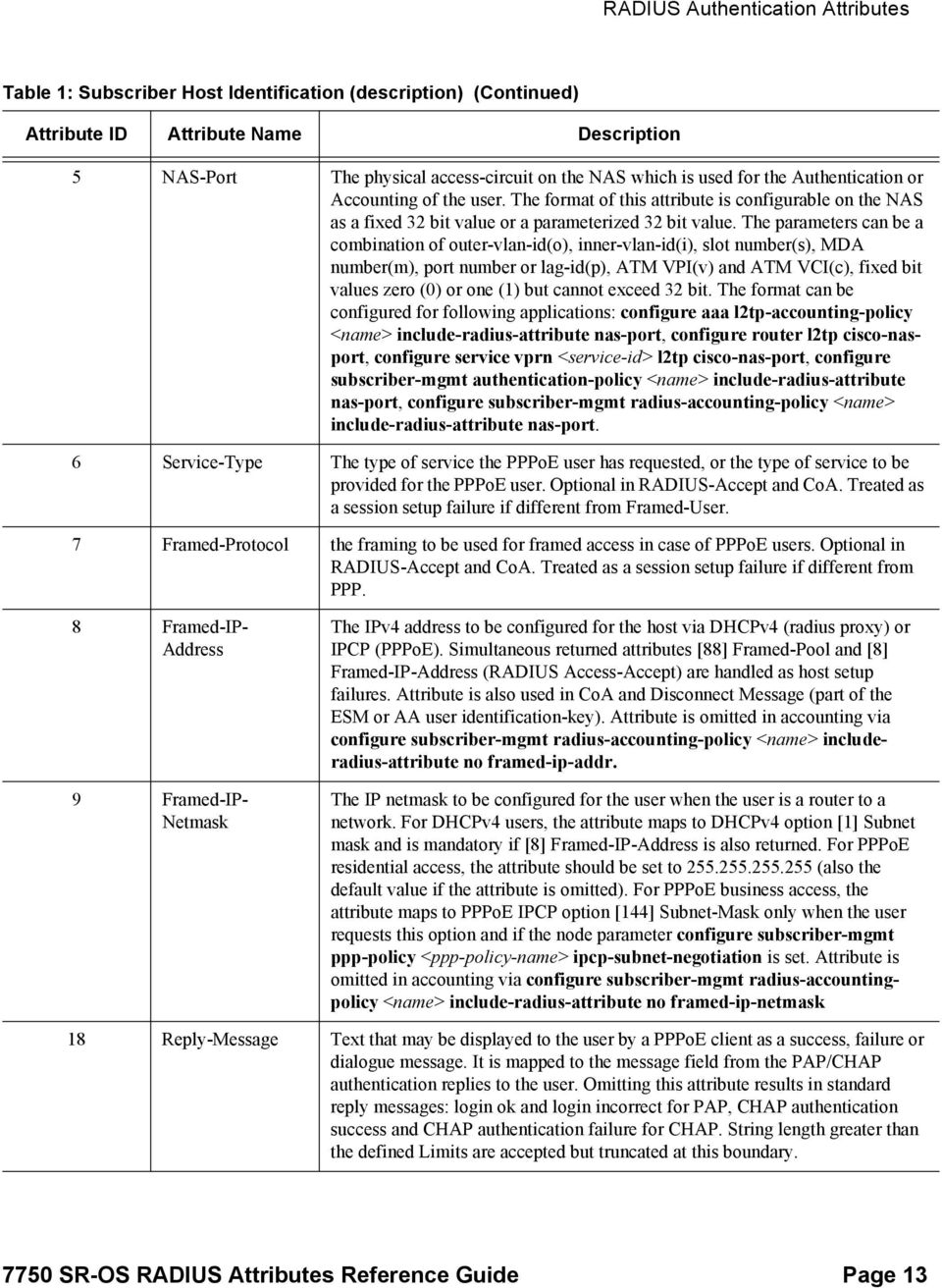
13 RADIUS Authentication Attributes Table 1: Subscriber Host Identification (description) (Continued) Attribute ID Attribute Name Description 5 NAS-Port The physical access-circuit on the NAS which is used for the Authentication or Accounting of the user. The format of this attribute is configurable on the NAS as a fixed 32 bit value or a parameterized 32 bit value. The parameters can be a combination of outer-vlan-id(o), inner-vlan-id(i), slot number(s), MDA number(m), port number or lag-id(p), ATM VPI(v) and ATM VCI(c), fixed bit values zero (0) or one (1) but cannot exceed 32 bit. The format can be configured for following applications: configure aaa l2tp-accounting-policy <name> include-radius-attribute nas-port, configure router l2tp cisco-nasport, configure service vprn <service-id> l2tp cisco-nas-port, configure subscriber-mgmt authentication-policy <name> include-radius-attribute nas-port, configure subscriber-mgmt radius-accounting-policy <name> include-radius-attribute nas-port. 6 Service-Type The type of service the PPPoE user has requested, or the type of service to be provided for the PPPoE user. Optional in RADIUS-Accept and CoA. Treated as a session setup failure if different from Framed-User. 7 Framed-Protocol the framing to be used for framed access in case of PPPoE users. Optional in RADIUS-Accept and CoA. Treated as a session setup failure if different from PPP. 8 Framed-IP- Address 9 Framed-IP- Netmask The IPv4 address to be configured for the host via DHCPv4 (radius proxy) or IPCP (PPPoE). Simultaneous returned attributes [88] Framed-Pool and [8] Framed-IP-Address (RADIUS Access-Accept) are handled as host setup failures. Attribute is also used in CoA and Disconnect Message (part of the ESM or AA user identification-key). Attribute is omitted in accounting via configure subscriber-mgmt radius-accounting-policy <name> includeradius-attribute no framed-ip-addr. The IP netmask to be configured for the user when the user is a router to a network. For DHCPv4 users, the attribute maps to DHCPv4 option [1] Subnet mask and is mandatory if [8] Framed-IP-Address is also returned. For PPPoE residential access, the attribute should be set to (also the default value if the attribute is omitted). For PPPoE business access, the attribute maps to PPPoE IPCP option [144] Subnet-Mask only when the user requests this option and if the node parameter configure subscriber-mgmt ppp-policy <ppp-policy-name> ipcp-subnet-negotiation is set. Attribute is omitted in accounting via configure subscriber-mgmt radius-accountingpolicy <name> include-radius-attribute no framed-ip-netmask 18 Reply-Message Text that may be displayed to the user by a PPPoE client as a success, failure or dialogue message. It is mapped to the message field from the PAP/CHAP authentication replies to the user. Omitting this attribute results in standard reply messages: login ok and login incorrect for PAP, CHAP authentication success and CHAP authentication failure for CHAP. String length greater than the defined Limits are accepted but truncated at this boundary SR-OS RADIUS Attributes Reference Guide Page 13
14 Subscriber Host Identification Table 1: Subscriber Host Identification (description) (Continued) Attribute ID Attribute Name Description 22 Framed-Route Routing information (IPv4 managed route) to be configured on the NAS for a host (dhcp, pppoe, arp) that operates as a router without NAT (so called Routed subscriber host). The route included in the Framed-Route attribute is accepted as a managed route only if it's next-hop points to the hosts ip-address or if the next-hop address equals and if the included route is a valid classful network in case the subnet-mask is omitted. If neither is applicable, this specific framed-route attribute is ignored and the host is instantiated without this specific managed route installed. Metrics contained in the Framed-Route attribute are silently ignored. A Framed-Route attribute is also ignored if the SAP does not have anti-spoof configured to nh-mac (the host will be installed as a standalone host without managed route). Number of routes above Limits are silently ignored and when different hosts own identical managed routes, both hosts are setup but only the managed route with the smallest ip next-hop will be installed in the RTM. The other managed routes will have the status shadowed (not installed in the RTM). Hosts are installed as standalone hosts if the attribute is omitted. An alternative to RADIUS managed routes are managed routes via host dynamic BGP peering. Attribute is omitted in accounting via configure subscriber-mgmt radius-accounting-policy <name> include-radiusattribute no framed-route. 25 Class Attribute sent by the RADIUS server to the NAS in an Access-Accept or CoA and is sent unmodified by the NAS to the Accounting server as part of the Accounting-Request packet. Strings with a length longer than the defined Limits are accepted but truncated to this boundary. Only first 64B are stored in the CF persistency file. 27 Session-Timeout Sets the maximum number of seconds of service to be provided to the user (IPoEv4/PPPoE) before termination of the session. Attribute equals to [ ] Alc-Relative-Session-Timeout when received in Access-Accept since current session time portion is than zero. Value zero sets the sessiontimeout to infinite (no session-timeout). The attribute is CoA Nack'd if its value is smaller than the current-session time. Simultaneous received [27] Session- Timeout and [ ] Alc-Relative-Session-Timeout are treated as a error condition (setup failure if received via Access-Accept and Nack'd if received via CoA). For IPoEv4 radius proxy and CoA create-host scenarios, [27] Session-Timeout is interpreted as lease-time in stead of session-time if [ ] Alc-Lease-Time is omitted. 28 Idle-Timeout Sets the maximum number of consecutive seconds of idle connection allowed to the user before termination of the session (IPoE/PPPoE) or a connectivity check is triggered (IPoE). Values outside the allowed Limits are accepted but rounded to these boundaries. A value of zero is treated as an infinite idle-timeout. The idle-timeout handling on the node is implemented via category-maps (configure subscriber-mgmt category-map <category-map-name> and configure subscriber-mgmt sla-profile <sla-profile-name> category-map <category-map-name>). Page SR-OS RADIUS Attributes Reference Guide

15 RADIUS Authentication Attributes Table 1: Subscriber Host Identification (description) (Continued) Attribute ID Attribute Name Description 30 Called-Station-Id Allows the NAS to send in the Access-Request information with respect to the user called. For LNS (L2TP ICRQ message), the content is the string passed in the [21] Called Number AVP. Attribute is omitted in authentication/accounting via configure subscriber-mgmt authentication-policy/radius-accountingpolicy <name> include-radius-attribute no called-station-id. The attribute is only supported on LNS. 31 Calling-Station-Id Allows the NAS to send unique information identifying the user who requested the service. This format is driven by configuration (configure subscribermgmt authentication-policy/radius-accounting-policy <name> includeradius-attribute calling-station-id <llid mac remote-id sap-id sap-string>). The LLID (logical link identifier) is the mapping from a physical to logical identification of a subscriber line and supplied by a RADIUS llid-server. The sap-string maps to configure service <service-id> subscriber-interface <ipint-name> group-interface <ip-int-name> sap <sap-id> calling-station-id <sap-string>. A [31] Calling-Station-Id attribute value longer than the allowed maximum is treated as a setup failure. The attribute is omitted in authentication/ accounting via configure subscriber-mgmt authentication-policy/radiusaccounting-policy <name> include-radius-attribute no calling-station-id. 32 NAS-Identifier A string (configure system name <system-name>) identifying the NAS originating the Authentication or Accounting requests and sent when nasidentifier is included for the corresponding application: configure subscribermgmt authentication-policy (ESM authentication), configure subscribermgmt radius-accounting-policy (ESM accounting), configure aaa isa-radiuspolicy (LSN accounting, WLAN-GW soft-gre) and configure aaa l2tpaccounting-policy (L2TP accounting). 44 Acct-Session-Id A unique identifier that represents the subscriber host or session that is authenticated. This attribute can be used as CoA or Disconnect Message key to target the host or session and is reflected in the accounting messages for this host or session.the attribute is included/excluded based on configure subscriber-mgmt authentication-policy <name> include-radius-attribute acct-session-id [host session]. For PPPoE, either the host acct-session-id (default) or the session acct-session-id is included. 55 Event-Timestamp Record the time that this event occurred on the NAS, in seconds since January 1, :00 UTC 7750 SR-OS RADIUS Attributes Reference Guide Page 15

16 Subscriber Host Identification Table 1: Subscriber Host Identification (description) (Continued) Attribute ID Attribute Name Description 60 CHAP-Challenge The CHAP challenge sent by the NAS to a PPPoE CHAP user as part of the chap authentication sequence RFC 1994 (Challenge, Response, Success, Failure). The generated challenge length for each new pppoe session is by default a random value between [32..64] bytes unless configured different under configure subscriber-mgmt ppp-policy <ppp-policy-name> ppp-chapchallenge-length [8..64] or configure router l2tp group <tunnel-group-name> ppp chap-challenge-length [8..64] for LNS. The CHAP challenge value is copied into the request-authenticator field of the RADIUS Access-Request message if the minimum and maximum value is configured at exact 16 (RFC 2865, Remote Authentication Dial In User Service (RADIUS), section 2.2, Interoperation with PAP and CHAP). Attribute CHAP-Password is provided by a PPPoE CHAP user in response to the [60] CHAP-challenge. 61 NAS-Port-Type The type of the physical port of the NAS which is authenticating the user and value automatically determined from subscriber SAP encapsulation. It can be overruled by configuration. Included only if include-radius-attribute nas-porttype is added per application: configure subscriber-mgmt authenticationpolicy (ESM authentication), configure subscriber-mgmt radius-accountingpolicy (ESM accounting), configure aaa isa-radius-policy (LSN accounting, WLAN-GW soft-gre) and configure aaa l2tp-accounting-policy (L2TP accounting). Checked for correctness if returned in CoA. 85 Acct-Interim- Interval Indicates the number of seconds between each interim update for this specific session. Attribute values outside the allowed Limits are accepted but are rounded to the minimum or maximum Limit. 87 NAS-Port-Id A text string which identifies the physical/logical port of the NAS which is authenticating the user and/or reported for accounting. Attribute is also used in CoA and Disconnect Message (part of the user identification-key). The nasport-id for physical ports usually contains <slot>/<mda>/<port>/ <vlan vpi>.<vlan vci>. The physical port can have an optional prefix-string (max 8 chars) and suffix-string (max 64 chars) added for Authorization and Accounting (configure subscriber-mgmt radius-accounting-policy authentication-policy <name> include-radius-attribute nas-port-id [prefixstring <string>] [suffix <circuit-id remote-id>]). For logical access circuits (LNS) the nas-port-id is a fixed concatenation (delimiter #) of routing instance, tunnel-server-endpoint, tunnel-client-endpoint, local-tunnel-id, remote-tunnelid, local-session-id, remote-session-id and call sequence number. Page SR-OS RADIUS Attributes Reference Guide

17 RADIUS Authentication Attributes Table 1: Subscriber Host Identification (description) (Continued) Attribute ID Attribute Name Description 88 Framed-Pool The name of one address pool or the name of a primary and secondary address pool separated with a 1 character configurable delimiter (configure router/ service vprn <service-id> dhcp local-dhcp-server <server-name> use-poolfrom-client delimiter <delimiter>) that should be used to assign an address for the user and maps to either 1) dhcpv4 option [82] vendor-specific-option [9] sub-option [13] dhcppool if option is enabled on the node (configure service ies/vprn <service-id> subscriber-interface <ip-int-name> group-interface <ip-int-name> dhcp option vendor-specific-option pool-name) or 2) used directly as pool-name in the local configured dhcp server when local-addressassignment is used and client-application is ppp-v4 (configure service ies/vprn <service-id> subscriber-interface ip-int-name group-interface ip-int-name local-address-assignment). Alternative to [ ] Ip-Address-Pool- Name and [ ] ERX-Address-Pool-Name. Framed-Pool names longer than the allowed maximum are treated as host setup failures. Simultaneous returned attributes [88] Framed-Pool and [8] Framed-IP-Address are also handled as host setup failures. 97 Framed-IPv6- Prefix 99 Framed-IPv6- Route ipv6-prefix/prefix-length to be configured via SLAAC (Router Advertisement) to the WAN side of the user. Any non /64 prefix-length for SLAAC host creation is treated as a session setup failure for this host. This attribute is an alternative to [100] Framed-IPv6-Pool and [ ] Alc-IPv6-Address, which assigns IPv6 addressing to the wan-side of a host via DHCPv6 IA-NA. Attribute is also used in CoA and Disconnect Message (part of the ESM or AA user identification-key). Attribute is omitted in accounting via configure subscriber-mgmt radius-accounting-policy <name> include-radiusattribute no framed-ipv6-prefix Routing information (ipv6 managed route) to be configured on the NAS for a v6 host (IPoE or PPPoE) that operates as a router. The functionality is comparable with offering multiple PD prefixes for a single host. The route included in the Framed-IPv6-Route attribute is accepted as a managed route only if the nexthop is a wan-host or if the next-hop address equals::. As a consequence, Framed-IPv6-Routes with explicit configured gateway prefix of a pd-host will not be installed. Metrics contained in the Framed-IPv6-Route attribute are silently ignored. A Framed-IPv6-Route attribute is also ignored if the SAP does not have anti-spoof configured to nh-mac (the host will be installed as a standalone host without managed route). Number of Routes above Limits are silently ignored and when different hosts own identical managed routes, both hosts are setup but only the managed route with the smallest ip next-hop will be installed in the RTM. The other managed routes will have the status shadowed (and are not installed in the RTM). Hosts are installed as standalone hosts if attribute is omitted. Attribute is omitted in accounting via configure subscriber-mgmt radius-accounting-policy <name> include-radius-attribute no framed-ipv6-route SR-OS RADIUS Attributes Reference Guide Page 17
![<delimiter>) that should be used to assign an address for the user and maps to either 1) dhcpv4 option [82] vendor-specific-option [9] sub-option [13] dhcppool if option is enabled on the node](/docs-images/54/10777870/images/page_17.jpg "(configure service ies/vprn <service-id> subscriber-interface <ip-int-name> group-interface <ip-int-name> dhcp option vendor-specific-option pool-name) or 2) used directly as pool-name in the local")
18 Subscriber Host Identification Table 1: Subscriber Host Identification (description) (Continued) Attribute ID Attribute Name Description 100 Framed-IPv6-Pool The name of an assigned pool that should be used to assign an IPv6 address via DHCPv6 (IA-NA) to the WAN side of the user (IPoE, PPPoE). Maps to DHCPv6 vendor-option [17], sub-option [1] wan-pool. Framed-IPv6-Pool names longer than the allowed maximum are treated as host setup failures. This attribute is an alternative to [97] Framed-IPv6-Prefix and [ ] Alc- IPv6-Address, that also assign IPv6 addressing to the wan-side of a host via SLAAC or DHCPv6 IA-NA. 101 Error-Cause The Error-Cause Attribute provides more detail on the cause of the problem if the NAS cannot honor Disconnect-Request or CoA-Request messages for some reason. It may be included within Disconnect-ACK, Disconnect-NAK and CoA-NAK messages. The Error-Causes are divided in 5 blocks. Range [ ] is used for fatal errors committed by the RADIUS server. Range [ ] is used for fatal errors occurring on a NAS or RADIUS proxy. Ranges [ reserved], [ reserved] and [ used for successful completion in disconnect-ack/coa-ack] are not implemented. 123 Delegated-IPv6- Prefix Attribute that carries the Prefix (ipv6-prefix/prefix-length) to be delegated via DHCPv6 (IA-PD) for the LAN side of the user (IPoE, PPPoE). Maps to DHCPv6 option IA-PD [25] sub-option IA-Prefix [26] Prefix. An exact Delegated-prefix-Length [DPL] match with configure service <service-id> subscriber-interface <ip-int-name> ipv6 delegated-prefix-length [48..64] is required with the received attribute prefix-length unless a variable DPL is configured (configure service <service-id> subscriber-interface <ip-intname> ipv6 delegated-prefix-length variable). In the latter case multiple hosts for the same group-interface having different prefix-length [48..64] per host are supported. Simultaneous returned attributes [123] Delegated-IPv6-Prefix and [ ] Alc-Delegated-IPv6-Pool are handled as host setup failures. Attribute is also used in CoA and Disconnect Message (part of the ESM or AA user identification-key). Attribute is omitted in accounting via configure subscriber-mgmt radius-accounting-policy <name> include-radiusattribute no delegated-ipv6-prefix Client-DNS-Pri The IPv4 address of the primary DNS server for this subscribers connection and maps to PPPoE IPCP option 129 Primary DNS Server address or DHCPv4 option 6 Domain Server. Is an alternative for ERX-Primary-Dns or Alc-Primary-Dns Client-DNS-Sec A IPv4 address of the secondary DNS server for this subscribers connection and maps to 'PPPoE IPCP option 131 Secondary DNS Server address or DHCPv4 option 6 Domain Server. Is an alternative for ERX-Secondary-Dns or Alc-Secondary-Dns. Page SR-OS RADIUS Attributes Reference Guide

19 RADIUS Authentication Attributes Table 1: Subscriber Host Identification (description) (Continued) Attribute ID Attribute Name Description Ip-Address-Pool- Name RB-Client-NBNS- Pri RB-Client-NBNS- Sec The name of an assigned address pool that should be used to assign an address for the user and maps to dhcpv4 option[82] vendor-specific-option [9] suboption [13] dhcppool if option is enabled on the node (configure service <service-id> subscriber-interface <ip-int-name> group-interface <ip-intname> dhcp option vendor-specific-option pool-name). Alternative to [88] Pool-Name and [ ] ERX-Address-Pool-Name. Framed-Pool names longer than the allowed maximum are treated as host setup failures. Simultaneous returned attributes Pool-Names [8] and Framed-IP-Address are also handled as host setup failures. The IPv4 address of the primary NetBios Name Server (NBNS) for this subscribers connection and maps to 'PPPoE IPCP option 130 Primary DNS Server address or DHCPv4 option44 NETBIOS name server. Is an alternative for ERX-Primary-Wins or Alc-Primary-Nbns The IPv4 address of the secondary NetBios Name Server (NBNS) for this subscribers connection and maps to 'PPPoE IPCP option 132 Primary DNS Server address or DHCPv4 option44 NETBIOS name server. Is an alternative for ERX-Secondary-Wins or Alc-Secondary-Nbns Agent-Circuit-Id Information describing the subscriber agent circuit identifier corresponding to the logical access loop port of the Access Node/DSLAM from which a subscriber's requests are initiated. Attribute is included/excluded based on configure subscriber-mgmt authentication-policy/radius-accounting-policy <name> include-radius-attribute circuit-id Agent-Remote-Id An operator-specific, statically configured string that uniquely identifies the subscriber on the associated access loop of the Access Node/DSLAM. Attribute is included/excluded based on configure subscriber-mgmt authenticationpolicy/radius-accounting-policy <name> include-radius-attribute remoteid Actual-Data-Rate- Upstream Actual-Data-Rate- Downstream The actual upstream train rate (coded in bits per second) of a subscriber's synchronized DSL link and maps to values received during PPPoE discovery (tag 0x0105) or DHCP (opt-82). Attribute is included/excluded based on configure subscriber-mgmt authentication-policy/radius-accounting-policy <name> include-radius-attribute access-loop-options. Actual downstream train rate (coded in bits per second) of a subscriber's synchronized DSL link and maps to values received during PPPoE discovery (tag 0x0105) or DHCP (opt-82). Attribute is included/excluded based on configure subscriber-mgmt authentication-policy/radius-accounting-policy <name> include-radius-attribute access-loop-options SR-OS RADIUS Attributes Reference Guide Page 19

20 Subscriber Host Identification Table 1: Subscriber Host Identification (description) (Continued) Attribute ID Attribute Name Description Minimum-Data- Rate-Upstream Minimum-Data- Rate-Downstream Attainable-Data- Rate-Upstream Attainable-Data- Rate-Downstream Maximum-Data- Rate-Upstream Maximum-Data- Rate-Downstream Minimum-Data- Rate-Upstream- Low-Power The subscriber's operator-configured minimum upstream data rate (coded in bits per second) and maps to values received during PPPoE discovery (tag 0x0105) or DHCP (opt-82). Attribute is included/excluded based on configure subscriber-mgmt authentication-policy/radius-accounting-policy 7x50_PRD_Multicast_MVPN_sender_receiver_only_v0.2.doc include-radiusattribute access-loop-options. The subscriber's operator-configured minimum downstream data rate (coded in bits per second) and maps to values received during PPPoE discovery (tag 0x0105) or DHCP (opt-82). Attribute is included/excluded based on configure subscriber-mgmt authentication-policy/radius-accounting-policy <name> include-radius-attribute access-loop-options. The subscriber's attainable upstream data rate (coded in bits per second) and maps to values received during PPPoE discovery (tag 0x0105) or DHCP (opt- 82). Attribute is included/excluded based on configure subscriber-mgmt authentication-policy/radius-accounting-policy <name> include-radiusattribute access-loop-options. The subscriber's attainable downstream data rate (coded in bits per second) and maps to values received during PPPoE discovery (tag 0x0105) or DHCP (opt- 82). Attribute is included/excluded based on configure subscriber-mgmt authentication-policy/radius-accounting-policy <name> include-radiusattribute access-loop-options. The subscriber's maximum upstream data rate (coded in bits per second), as configured by the operator and maps to values received during PPPoE discovery (tag 0x0105) or DHCP (opt-82). Attribute is included/excluded based on configure subscriber-mgmt authentication-policy/radius-accounting-policy <name> include-radius-attribute access-loop-options. The subscriber's maximum downstream data rate (coded in bits per second), as configured by the operator and maps to values received during PPPoE discovery (tag 0x0105) or DHCP (opt-82). Attribute is included/excluded based on configure subscriber-mgmt authentication-policy/radius-accounting-policy <name> include-radius-attribute access-loop-options. The subscriber's minimum upstream data rate (coded in bits per second) in low power state, as configured by the operator and maps to values received during PPPoE discovery (tag 0x0105) or DHCP (opt-82). Attribute is included/ excluded based on configure subscriber-mgmt authentication-policy/radiusaccounting-policy <name> include-radius-attribute access-loop-options. Page SR-OS RADIUS Attributes Reference Guide

21 RADIUS Authentication Attributes Table 1: Subscriber Host Identification (description) (Continued) Attribute ID Attribute Name Description Minimum-Data- Rate-Downstream- Low-Power Maximum- Interleaving- Delay-Upstream Actual- Interleaving- Delay-Upstream Maximum- Interleaving- Delay- Downstream Actual- Interleaving- Delay- Downstream Access-Loop- Encapsulation The subscriber's minimum downstream data rate (coded in bits per second) in low power state, as configured by the operator and maps to values received during PPPoE discovery (tag 0x0105) or DHCP (opt-82). Attribute is included/ excluded based on configure subscriber-mgmt authentication-policy/radiusaccounting-policy <name> include-radius-attribute access-loop-options. The subscriber's maximum one-way upstream interleaving delay in milliseconds, as configured by the operator and maps to values received during PPPoE discovery (tag 0x0105) or DHCP (opt-82). Attribute is included/ excluded based on configure subscriber-mgmt authentication-policy/radiusaccounting-policy <name> include-radius-attribute access-loop-options. The subscriber's actual one-way upstream interleaving delay in milliseconds and maps to values received during PPPoE discovery (tag 0x0105) or DHCP (opt-82). Attribute is included/excluded based on configure subscriber-mgmt authentication-policy/radius-accounting-policy <name> include-radiusattribute access-loop-options. The subscriber s maximum one-way downstream interleaving delay in milliseconds, as configured by the operator and maps to values received during PPPoE discovery (tag 0x0105) or DHCP (opt-82). Attribute is included/ excluded based on configure subscriber-mgmt authentication-policy/radiusaccounting-policy <name> include-radius-attribute access-loop-options. The subscriber's actual one-way downstream interleaving delay in milliseconds and maps to values received during PPPoE discovery (tag 0x0105) or DHCP (opt-82). Attribute is included/excluded based on configure subscriber-mgmt authentication-policy/radius-accounting-policy <name> include-radiusattribute access-loop-options. The last mile encapsulation used by the subscriber on the DSL access loop and maps to values received during PPPoE discovery Tags (tag 0x0105) or DHCP Tags (opt-82). Attribute is included/excluded in RADIUS/Accounting-Request based on configure subscriber-mgmt authentication-policy/radiusaccounting-policy <name> include-radius-attribute access-loop-options. Last mile encapsulation information can be used to adjust automatically the egress aggregate rate for this subscriber. Pre-configured encapsulation types are used if PPP/IPoE access loop information (tags) is not available (configure subscriber-mgmt sub-profile <subscriber-profile-name> egress encap-offset <type> or configure subscriber-mgmt local-user-db <local-user-db-name> ppp host access-loop encap-offset <type>). [ ] Alc-Access-Loop- Encap-Offset when returned in Access-Accept is taken into account (overrules received tags and pre-configured encapsulation types) for ALE adjust (last mile aware shaping) but is not reflected in access-loop-options send to RADIUS. Alc-Access-Loop-Encap from ANCP are currently not taken into account for ALE adjust SR-OS RADIUS Attributes Reference Guide Page 21
22 Subscriber Host Identification Table 1: Subscriber Host Identification (description) (Continued) Attribute ID Attribute Name Description IWF-Session The presence of this Attribute indicates that the IWF has been performed with respect to the subscriber's session. IWF is utilized to enable the carriage of PPP over ATM (PPPoA) traffic over PPPoE. The Access Node inserts the PPPoE Tag 0x0105, vendor-id 0x0de9 with sub-option code 0xFE, length field is set to 0x00 into the PPPoE Discovery packets when it is performing an IWF functionality. Attribute is included/excluded based on configure subscribermgmt authentication-policy/radius-accounting-policy <name> includeradius-attribute access-loop-options ERX-Address- Pool-Name The name of an assigned address pool that should be used to assign an address for the user and maps to dhcpv4 option[82] vendor-specific-option [9] suboption [13] dhcppool if option is enabled on the node (configure service <service-id> subscriber-interface <ip-int-name> group-interface <ip-intname> dhcp option vendor-specific-option pool-name). Alternative to [88] Pool-Name and [ ] Ip-Address-Pool-Name. Framed-Pool names longer than the allowed maximum are treated as host setup failures. Simultaneous returned attributes Pool-Names [8] and Framed-IP-Address are also handled as host setup failures ERX-Primary-Dns The IPv4 address of the primary DNS server for this subscribers connection and maps to PPPoE IPCP option 129 Primary DNS Server address or DHCPv4 option 6 Domain Server. Is an alternative for Client-DNS-Pri or Alc-Primary-Dns ERX-Secondary- Dns ERX-Primary- Wins ERX-Secondary- Wins ERX-Ipv6- Primary-Dns ERX-Ipv6- Secondary-Dns The IPv4 address of the secondary DNS server for this subscribers connection and maps to PPPoE IPCP option 131 Secondary DNS Server address or DHCPv4 option 6 Domain Server. Is an alternative for Client-DNS- Sec or Alc-Secondary-Dns The IPv4 address of the primary NetBios Name Server (NBNS) for this subscribers connection and maps to PPPoE IPCP option 130 Primary DNS Server address or DHCPv4 option44 NETBIOS name server. Is an alternative for RB-Client-NBNS-Pri or Alc-Primary-Nbns The IPv4 address of the secondary NetBios Name Server (NBNS) for this subscribers connection and maps to PPPoE IPCP option 132 Primary DNS Server address or DHCPv4 option44 NETBIOS name server. Is an alternative for RB-Client-NBNS-Sec or Alc-Secondary-Nbns The IPv6 address of the primary DNSv6 server for this subscribers connection and maps to DNS Recursive Name Server option 23 (RFC 3646) in DHCPv6.Is an alternative for Alc-Ipv6-Primary-Dns The IPv6 address of the secondary DNSv6 server for this subscribers connection and maps to DNS Recursive Name Server option 23 (RFC 3646) in DHCPv6.Is an alternative for Alc-Ipv6-Secondary-Dns Page SR-OS RADIUS Attributes Reference Guide
23 RADIUS Authentication Attributes Table 1: Subscriber Host Identification (description) (Continued) Attribute ID Attribute Name Description Alc-Primary-Dns The IPv4 address of the primary DNS server for this subscribers connection and maps to PPPoE IPCP option 129 Primary DNS Server address or DHCPv4 option 6 Domain Server. Is an alternative for Client-DNS-Pri or ERX-Primary-Dns Alc-Secondary- Dns The IPv4 address of the secondary DNS server for this subscribers connection and maps to PPPoE IPCP option 131 Secondary DNS Server address or DHCPv4 option 6 Domain Server. Is an alternative for Client-DNS- Sec or ERX-Secondary-Dns Alc-Subsc-ID-Str A subscriber is a collection of subscriber-hosts (typically represented by IP- MAC combination) and is uniquely identified by a subscriber string. Subscriber-hosts queues/policers belonging to the same subscriber (residing on the same forwarding complex) can be treated under one aggregate scheduling QoS mechanism. Fallback to pre-configured values if attribute is omitted. Attribute values longer than the allowed string value are treated as setup failures. Can be used as key in CoA and Disconnect Message. Attribute is omitted in accounting via configure subscriber-mgmt radius-accountingpolicy <name> include-radius-attribute no subscriber-id Alc-Subsc-Prof-Str The subscriber profile is a template which contains settings (accounting, igmp, HQoS,...) which are applicable to all hosts belonging to the same subscriber were [ ] Alc-Subsc-Prof-Str is the string that maps (configure subscriber-mgmt sub-ident-policy sub-profile-map) to such an subscriber profile (configure subscriber-mgmt sub-profile <subscriber-profile-name>). Strings longer than the allowed maximum are treated as setup failures. Unreferenced strings (string does not map to a policy) are silently ignored and a fallback to pre-configured defaults is done. Attribute is omitted in accounting via configure subscriber-mgmt radius-accounting-policy <name> includeradius-attribute no sub-profile Alc-SLA-Prof-Str The SLA profile is a template which contains settings (filter, QoS, host-limit...) which are applicable to individual hosts were [ ] Alc-SLA-Prof-Str is the string that maps (configure subscriber-mgmt sub-ident-policy <sub-identpolicy-name> sla-profile-map) to such a sla profile (configure subscribermgmt sla-profile <sla-profile-name>). Strings longer than the allowed maximum are treated as setup failures. Unreferenced strings (string does not map to a policy) are silently ignored and a fallback to pre-configured defaults is done. Attribute is omitted in accounting via configure subscriber-mgmt radius-accounting-policy <name> include-radius-attribute no sla-profile SR-OS RADIUS Attributes Reference Guide Page 23
24 Subscriber Host Identification Table 1: Subscriber Host Identification (description) (Continued) Attribute ID Attribute Name Description Alc-ANCP-Str Information describing the subscriber agent circuit identifier corresponding to the logical access loop port of the Access Node/DSLAM from which a subscriber's requests are initiated and used to associate the ANCP Circuit-Id (info received via ANCP Port Up and Port Down) with the PPPoE/IPoE Circuit- Id (info received via [ ] Alc-ANCP-Str and [ ] Agent- Circuit-Id). An subscriber is ANCP associated when both strings are equal and for associated subscribers the ingress/egress ANCP QoS rules apply (configure subscriber-mgmt ancp ancp-policy <policy-name> and configure subscriber-mgmt sub-profile ancp ancp-policy <policy-name> Alc-Default- Router Alc-Client- Hardware-Addr Maps to dhcp offer/ack message option [3] default-router for a dhcpv4 radius proxy scenario and defines the default gateway for the user. This attribute is silently ignored if the NAS is doing dhcpv4 relay. In the latter case the defaultrouter is part of the dhcpv4 server configuration. MAC address from a user that requests a service and included in CoA, Authentication or Accounting (configure subscriber-mgmt authenticationpolicy/radius-accounting-policy include-radius-attribute mac-address) Alc-Int-Dest-Id-Str A string representing an aggregation point (for example, Access Node) and interpreted as the intermediate destination id. Subscribers connected to the same aggregation point should get the same int-dest-id string assigned. The int-destid is used in mc-ring access redundancy to identify subscribers behind a ring node (configure redundancy multi-chassis peer <ip-address> mc-ring ring/ l3-ring <name> ring-node <ring-node-name>). The int-dest-id can be used in QoS to shape the egress traffic of a group of subscribers to an aggregate rate using vports (configure port <port-id> ethernet access egress vport <name> host-match dest <destination-string>) or secondary shapers on HS-MDAv2 (configure port <port-id> ethernet egress exp-secondary-shaper <secondaryshaper-name>). For egress policed subscriber traffic, the inter-dest-id can be used to select the egress queue-group for forwarding (configure port <port-id> ethernet access egress queue-group <name> host-match dest <destinationstring>). Strings longer than the allowed maximum are treated as setup failures Alc-Primary-Nbns The IPv4 address of the primary NetBios Name Server (NBNS) for this subscribers connection and maps to PPPoE IPCP option 130 Primary DNS Server address or DHCPv4 option44 NETBIOS name server. Is an alternative for RB-Client-NBNS-Pri or ERX-Primary-Wins Alc-Secondary- Nbns The IPv4 address of the secondary NetBios Name Server (NBNS) for this subscribers connection and maps to PPPoE IPCP option 132 Primary DNS Server address or DHCPv4 option44 NETBIOS name server. Is an alternative for RB-Client-NBNS-Sec or ERX-Secondary-Wins. Page SR-OS RADIUS Attributes Reference Guide
25 RADIUS Authentication Attributes Table 1: Subscriber Host Identification (description) (Continued) Attribute ID Attribute Name Description Alc-PPPoE- PADO-Delay Alc-PPPoE- Service-Name Alc-DHCP- Vendor-Class-Id Specifies the number in deci-seconds that the PPPoE protocol stack on the NAS waits before sending a PADO packet in response to a PADI request. In dual homed topologies, you may want to designate a primary NAS and a backup NAS for handling a particular service request. In such a scenario, you can configure a delay for the backup NAS to allow sufficient time for the primary NAS to respond to the client with a PADO packet. If the primary NAS does not send the PADO packet within this delay period, then the backup NAS sends the PADO packet after the delay period expires. This attribute is only applicable if RADIUS PADI authentication is used (configure subscriber-mgmt authentication-policy <ppp-policy-name> pppoe-access-method padi). Values above the allowed Limits are truncated at the Limits boundary. There is no PADO delay if the attribute is omitted or if the attribute is received with a value of zero. Maps to PADI field PPPoE tags [0x0101] service-name and is sent in the Access-Request if enabled under configure subscriber-mgmt authenticationpolicy <name> include-radius-attribute pppoe-service-name. A PPPoE- Service-Name above the allowed maximum length is handled as a pppoe session setup failure. Initiated by DHCP clients via option 60 [Class-id] and reflected in Authentication/Accounting. (configure subscriber-mgmt authenticationpolicy/radius-accounting-policy <name> include-radius-attribute dhcpvendor-class-id configure aaa isa-radius-policy <name> auth-includeattributes dhcp-vendor-class-id). DHCP option [60] Class-id can also be used as User-name in RADIUS requests. (configure subscriber-mgmt authentication-policy <name> user-name-format dhcp-client-vendor-opts) Alc-App-Prof-Str Application Assurance for residential, business or transit-aa subscribers is enabled through the assignment of an application profile as part of either enhanced subscriber management or static configuration. [ ] Alc- App-Prof-is is a string that maps (configure subscriber-mgmt sub-identpolicy <sub-ident-policy-name> app-profile-map) to such an application profile (configure application-assurance group <aa-group-id:partition-id> policy app-profile <app-profile-name>). This attribute is used in access-accept (to assign an application profile during esm host creation) and CoA (to change the application profile of a AA-subscriber or to create transit AA-subscriber). Strings longer than the allowed maximum are treated as setup failures. Unreferenced strings (strings not mapping to an application profile) will silently trigger a fallback to pre-configured default values if allowed. If no default value is pre-configured, the subscriber's application profile is silently disabled for esm AA-subscriber; in case of a transit AA-subscriber creation the CoA will be rejected. The change of an application profile to one configured under a different group/partition or the modification of the application profile of a static AA-subscriber is not allowed and will be treated as setup failures SR-OS RADIUS Attributes Reference Guide Page 25
26 Subscriber Host Identification Table 1: Subscriber Host Identification (description) (Continued) Attribute ID Attribute Name Description Alc-Ipv6-Address The ipv6 address to be configured to the WAN side of the user (IPoE,PPPoE) via DHCPv6 (IA-NA). Maps to DHCPv6 option IA-NA[3] sub-option IA- Address[5] address. This attribute is an alternative to [97] Framed-IPv6-Prefix and [100] Framed-IPv6-Pool, which also assigns IPv6 addressing to the wanside of a host via SLAAC or DHCPv6 IA-NA. Attribute is also used in CoA and Disconnect Message (part of the ESM or AA user identification-key). Attribute is omitted in accounting via configure subscriber-mgmt radius-accountingpolicy <name> include-radius-attribute no ipv6-address Alc-ToServer- Dhcp-Options Alc-ToClient- Dhcp-Options Alc-Ipv6-Primary- Dns Alc-Ipv6- Secondary-Dns Alc-Subscriber- QoS-Override Send to RADIUS all dhcpv4 options received in a DHCPv4 message triggering authentication. The dhcpv4 options are concatenated in the attribute up to maximum length per attribute (see limits). If more space is needed, an additional attribute is included. If the total dhcp options space requires more than the total maximum length (see limits), then no attributes are included. (configure subscriber-mgmt authentication-policy <name> include-radiusattribute dhcp-options, configure aaa isa-radius-policy <name> authinclude-attributes dhcp-options). Copy the content of the attribute value in dhcpv4 options for dhcpv4 messages towards the client. It is not required to send each option in a different VSA; concatenation is allowed. Only the attributes within the defined limits (see limits) are parsed and stored; the remaining attributes are silently ignored. The IPv6 address of the primary DNSv6 server for this subscribers connection and maps to DNS Recursive Name Server option 23 (RFC 3646) in DHCPv6. This attribute is an alternative for [ ] ERX-Ipv6-Primary-Dns The IPv6 address of the secondary DNSv6 server for this subscribers connection and maps to DNS Recursive Name Server option 23' (RFC 3646) in DHCPv6. This attribute is an alternative for [ ] ERX-Ipv6- Secondary-Dns Used to override queue/policer parameters (CIR, PIR, CBS, MBS) and HQoS parameters (aggregate rate or root arbiter rate) configured at sla-profile and subprofile level. Enables per subscriber/host customization. Each set of Alc- Subscriber-QoS-Override attributes in a RADIUS message replaces the set of Alc-Subscriber-QoS-Override attributes from a previous message. Hence the sla-profile and sub-profile QoS configuration is always used as the base config. To undo a previously enabled RADIUS QoS-override and return to the base config, send a CoA with at least one Alc-Subscriber-QoS-Override attribute. The value part of each Alc-Subscriber-QoS-Override attribute must be empty (For example, Alc-Subscriber-QoS-Override += i:q:2:). Wrong formatted attributes or too many attributes (see limits) are treated as a setup failure or result in a CoA NAK. Page SR-OS RADIUS Attributes Reference Guide
27 RADIUS Authentication Attributes Table 1: Subscriber Host Identification (description) (Continued) Attribute ID Attribute Name Description Alc-ATM-Ingress- TD-Profile Alc-ATM-Egress- TD-Profile Alc-Delegated- IPv6-Pool The ATM Traffic Descriptor override for a PPPoA or PPPoEoA host and refers to the pre-configured traffic description QoS profile applied on the ingress ATM Virtual Circuit (configure qos atm-td-profile <traffic-desc-profile-id>). All subscriber hosts on a given ATM VC must have same ATM traffic descriptors and this attribute is ignored if it specifies an ATM Traffic Descriptor override while it has already specified another one for another host on the same ATM Virtual Circuit. A pre-configured description profile per ATM Virtual Circuit is used when this attribute is omitted. (configure subscriber-mgmt msap-policy <msap-policy-name> atm egress/ingress traffic-desc or configure service vprn <service-id> subscriber-interface <ip-int-name> group-interface <ip-int-name> sap <sap-id> atm egress/ingress traffic-desc). A Traffic Descriptor profile above the Limit is treated as a setup failure. Unreferenced Traffic Descriptor profiles within the Limit, or a Traffic Descriptor profile for a non ATM host are silently ignored. The ATM Traffic Descriptor override for a PPPoA or PPPoEoA host and refers to the pre-configured traffic description QoS profile applied on the egress ATM Virtual Circuit (configure qos atm-td-profile <traffic-desc-profile-id>). All subscriber hosts on a given ATM VC must have same ATM traffic descriptors and this attribute is ignored if it specifies an ATM Traffic Descriptor override while it has already specified another one for another host on the same ATM Virtual Circuit. A pre-configured description profile per ATM Virtual Circuit is used when this attribute is omitted (configure subscriber-mgmt msap-policy atm egress/ingress traffic-desc or configure service vprn <service-id> subscriber-interface <ip-int-name> group-interface <ip-int-name> sap <sapid> atm egress/ingress traffic-desc). A Traffic Descriptor profile above the Limits is treated as a setup failure. Unreferenced Traffic Descriptor profiles within the Limits, or a Traffic Descriptor profile for a non ATM host are silently ignored. The name of an assigned pool that should be used to assign an IPv6 prefix via DHCPv6(IA-PD) to the LAN side of the user (IPoE, PPPoE). Maps to DHCPv6 vendor-option[17],sub-option[2] pfx-pool. Alc-Delegated-ipv6-pool names longer than the allowed maximum are treated as host setup failures. Alternative method for [123] Delegated-IPv6-Prefix so simultaneous returned attributes [123] Delegated-IPv6-Prefix and [ ] Alc-Delegated-IPv6-Pool are handled as host setup failures. The length information [DPL] can be supplied via [ ] Alc-Delegated-IPv6-Prefix-Length along with the pool name. The [ ] Alc-Delegated-IPv6-Prefix-Length has priority over other possible sources of DPL. (As a fixed or variable DPL under configure service ies/vprn subscriber-interface ipv6 delegated-prefix-length or on the dhcpv6 server configure router dhcp6 local-dhcp-server <server-name> pool <pool-name> delegated-prefix-length) SR-OS RADIUS Attributes Reference Guide Page 27
28 Subscriber Host Identification Table 1: Subscriber Host Identification (description) (Continued) Attribute ID Attribute Name Description Alc-Access-Loop- Rate-Down Alc-Access-Loop- Encap-Offset Alc-PPP-Force- IPv6CP Alc-Onetime-Http- Redirection-Filter- Id Alc-Relative- Session-Timeout Alc-Delegated- IPv6-Prefix- Length The actual downstream rate (coded in kbits per second) of a PPPoE subscriber's synchronized DSL link and competes with the value received from alternative sources (dsl-forum tags, ludb, ancp). Values outside the Limits are treated as setup failures. Attribute is silently ignored for None-MLPPP sessions or IPoE sessions. The last mile encapsulation representing the subscribers DSL access loop encapsulation and when returned in RADIUS-Accept (PTA or LAC) is taken into account for ALE adjust (last mile aware shaping) but not reflected in [ ] Access-Loop-Encapsulation (access-loop-options) send to Accounting. For LAC this attributes maps to LTP AVP [ ] Access- Loop-Encapsulation. Forces IPv6CP negotiation in conditions were the Access-Accept does not return any ipv6 related attributes (v6 pool, v6 prefix, v6 address, dnsv6).without these ipv6 related attributes the NAS has no way to detect that this is a dual-stack pppoe user and therefore it will not start IPv6CP unless this attribute is returned in the Access-Accept. Values 1 triggers ipv6cp and value 0 is treated the same as not sending the attribute. Values different than the Limits are treated as setup failures. The pre-configured ipv4/v6 filter with http-redirection rules. Via this host specific filter only the first HTTP request from the host will be redirected to a configured URL with specified parameters. There is no HTTP redirection for subsequent HTTP requests. Useful in cases where service providers need to push a web page of advertisement/announcements to broadband users. Sets or resets the IPoE/PPPoE session timeout to a relative value (current session time + newly received Alc-Relative-Session-Timeout). Attribute equals to [27] Session-Timeout if received in Access-Accept since current session time portion is than zero. Value zero sets/resets the session-timeout to infinite (no session-timeout). Simultaneous received [27] Session-Timeout and [ ] Alc-Relative-Session-Timeout are treated as a setup failure (setup failure if received in Access-Accept and ignored if received in CoA). Defines the IA-PD length information [DPL] and only applicable together with [ ] Alc-Delegated-IPv6-Pool (silently ignored if received in RADIUS Accept without Alc-Delegated-IPv6-Pool). Maps to DHCPv6 vendoroption[17],sub-option[3] pfx-len. The [ ] Alc-Delegated-IPv6- Prefix-Length has priority over other possible sources of DPL. (As a fixed or variable DPL under configure service ies/vprn <service-id> subscriberinterface <ip-int-name> ipv6 delegated-prefix-length or on the dhcpv6 server configure router dhcp6 local-dhcp-server <server-name pool <pool-name> delegated-prefix-length). DPL values outside the limits are treated as setup failures. Page SR-OS RADIUS Attributes Reference Guide
29 RADIUS Authentication Attributes Table 1: Subscriber Host Identification (description) (Continued) Attribute ID Attribute Name Description Alc-Lease-Time Defines the lease-time in seconds for RADIUS proxy and create-host-coa scenarios only. The [27] Session-Timeout is interpreted and used as IPoE leasetime if [ ] Alc-lease-Time is omitted. The maximum value corresponds with a lease-time > 9999 days (24855d 03h). Value zero triggers to fallback to the default lease-time of 7 days. Returning attribute [ ] Alc-Lease-Time in other scenarios then radius-proxy and createhost-coa are treated as setup failures Alc-DSL-Line- State Status of the DSL line obtained via ANCP can be one of three value: SHOWTIME (the modem is ready to transfer data), IDLE (line is idle) or SILENT (line is silent). Attribute is included/excluded based on configure subscriber-mgmt authentication-policy/radius-accounting-policy <name> include-radius-attribute access-loop-options Alc-DSL-Type Type of the DSL line (ADSL1, ADSL2, ADSL2PLUS, VDSL1, VDSL2, SDSL, other) obtained via ANCP. Attribute is included/excluded based on configure subscriber-mgmt authentication-policy/radius-accounting-policy <name> include-radiusattribute access-loop-options SR-OS RADIUS Attributes Reference Guide Page 29
30 Subscriber Host Identification Table 2: Subscriber Host Identification (limits) Attribute ID Attribute Name Type Limits SR-OS Format 1 User-Name string 253 chars Form depends on authentication method and configuration. For example: User-Name [email protected] 2 User- Password 3 CHAP- Password 4 NAS-IP- Address string 64 Bytes Encrypted password For example: User-Password 4ec1b7bea6f2892fa466b461c6accc00 octets 16+1 Bytes Users CHAP identifier 1 followed by the Encrypted password For example: CHAP-Password 01ef8ddc7237f4adcd991ac4c277d312e9 ipaddr 4 Bytes For example: # ip-address NAS-IP-Address 0a NAS-Port integer 4 Bytes nas-port <binary-spec> <binary-spec> = <bit-specification> <binary-spec> <bit-specification> = 0 1 <bit-origin> <bit-origin> = *<number-of-bits><origin> <number-of-bits> = [1..32] <origin> = o (outer VLAN ID), i (inner VLAN ID), s (slot number), m (MDA number), p (port number or lagid), v (ATM VPI), c (ATM VCI) For example: # configured nas-port *12o*10i*3s*2m*5p for SAP 2/2/4:221.7 corresponds to NAS-Port = Service-Type integer 2 (mandatory value) PPPoE and PPPoL2TP hosts only For example: Service-Type = Framed-User 7 Framed- Protocol 8 Framed-IP- Address 9 Framed-IP- Netmask 18 Reply- Message integer 1 (fixed value) PPPoE and PPPoL2TP hosts only For example: Service-Type = PPP ipaddr 4 Bytes For example: # ip-address Framed-IP-Address 0a0b0c0d ipaddr 4 Bytes For example: Framed-IP-Netmask = #PPPoE residential Framed-IP-Netmask = #PPPoE Business with IPCP option 144 support Framed-IP-Netmask = # IPoE string 253 chars For example: Reply-Message MyCustomizedReplyMessage Page SR-OS RADIUS Attributes Reference Guide
31 RADIUS Authentication Attributes Table 2: Subscriber Host Identification (limits) (Continued) Attribute ID Attribute Name Type Limits SR-OS Format 22 Framed-Route string 16 Framed- Routes 4 Bytes <ip-prefix/prefix-length><space><gatewayaddress><space>>metric> <metric> is ignored For example: Framed-Route = / were is replaced by host address Framed-Route= were is a class-c network /24 and is replaced host address Framed-Route = / were is the host address. 25 Class octets 253 chars For example: Class = My Class 27 Session- Timeout integer [ ] seconds # 0 = infinite (no session-timeout) # [ ] in seconds For example: Session-Timeout = Idle-Timeout integer [ ] seconds # 0 = infinite (no idle-timeout) # [ ] in seconds For example: Idle-Timeout = Called- Station-Id 31 Calling- Station-Id 32 NAS- Identifier 44 Acct-Session- Id 55 Event- Timestamp 60 CHAP- Challenge string 64 chars # LNS: L2TP Called Number AVP21 from LAC For example: Called-Station-Id = string 64 chars # llid mac remote-id sap-id sap-string (64 char. string configured at sap-level) For example: include-radius-attribute calling-station-id sap-id Calling-Station-Id = 1/1/2:1.1 string 32 chars For example: NAS-Identifier = PE1-Antwerp string 22 bytes No useful information can be extracted from the string. For example: # internal generated asid 22 Bytes/chars: 0x Acct-Session-Id = 241AFF B5F750 date 4 Bytes For example: # Jul :28:23 CEST is reported as 4FF70417 Event-Timestamp = 4FF70417 octets [8..64] Bytes random length For example: 20 bytes CHAP-Challenge 0xa9710d2386c3e1771b8a3ea3d4e53f2a1c7024fb 7750 SR-OS RADIUS Attributes Reference Guide Page 31
32 Subscriber Host Identification Table 2: Subscriber Host Identification (limits) (Continued) Attribute ID Attribute Name Type Limits SR-OS Format 61 NAS-Port- Type integer 4 Bytes Values [0..255] Values as defined in rfc-2865 and rfc-4603 For LNS, the value is set to virtual (5) For example: NAS-Port-Type = PPPoEoQinQ (34) 85 Acct-Interim- Interval integer 4 Bytes [ ] seconds For example: # 1 hour interval for interim updates Acct-Interim-Interval = NAS-Port-Id string 253 Bytes in Access-Request and Accounting Request messages. 128 Bytes in CoA 88 Framed-Pool string 32 chars. per pool name. 65 chars. in total (primary pool, delimiter, secondary pool) <prefix> : optional string 8 chars max <suffix> : optional string remote-id (max 64 chars) circuit-id (max 64 chars) # NON-ATM and NON-LNS : <prefix><space><slot>/ <mda>/<port>/<vlan>.<vlan><space><suffix> # ATM : <prefix><space><slot>/<mda>/<port>/ <vpi>.<vci><space><suffix> # LNS : LNS rt-<routing instance>#lip-<tunnel-serverendpoint>#rip-<tunnel-client-endpoint>#ltid-<localtunnel-id>#rtid-<remote-tunnel-id>#lsid-<localsession-id>#rsid-<remote-session-id>#<call sequence number> For example: NAS-Port-Id = 1/1/4: NAS-Port-Id = LNS rtr-2#lip #rip #ltid #rtid-1285#lsid-30067#rsid-19151#347 For example: Framed-Pool = MyPoolname 97 Framed-IPv6- Prefix ipv6prefix max. 16 Bytes for prefix + 1 byte for length PPPoE SLAAC wan-host <ipv6-prefix/prefix-length> with prefix-length 64 For example: Framed-IPv6-Prefix 2021:1:FFF3:1::/64 Page SR-OS RADIUS Attributes Reference Guide
33 RADIUS Authentication Attributes Table 2: Subscriber Host Identification (limits) (Continued) Attribute ID Attribute Name Type Limits SR-OS Format 99 Framed-IPv6- Route string max. 16 Framed-IPv6- Route attributes <ipv6-prefix/prefix-length><space><gatewayaddress><space>>metric> <metric> is ignored For example: Framed-IPv6-Route 5000:0:1::/48 :: where :: resolves in the wan-host Framed-IPv6-Route5000:0:2::/48 0:0:0:0:0:0:0:0 where 0:0:0:0:0:0:0:0 resolves in the wan-host Framed-IPv6-Route5000:0:3::/48 0::0 where 0::0 resolves in the wan-host Framed-IPv6-Route5000:0:3::/ :1::1 where 2021:1::1 is the wan-host 100 Framed-IPv6- Pool string 32 chars For example: Framed-IPv6-Pool MyWanPoolnameIANA 101 Error-Cause octets 4 Bytes Current supported causes are: Missing Attribute[402], NAS Identification Mismatch[403], Invalid Request[404], Unsupported Service[405], Invalid Attribute Value[407], Administratively Prohibited [501], Session Context Not Found [503], Resources Unavailable[506] For example: Error-Cause = Invalid Request 123 Delegated- IPv6-Prefix ipv6prefix max. 16 Framed-IPv6- Route attributes <ipv6-prefix/prefix-length> with prefix-length [48..64] For example: Delegated-IPv6-Prefix 2001:DB8:173A:100::/ Client-DNS- Pri Client-DNS- Sec ipaddr 4 Bytes For example: Client-DNS-Pri = ipaddr 4 Bytes For example: Client-DNS-Sec = Ip-Address- Pool-Name RB-Client- NBNS-Pri RB-Client- NBNS-Sec string 65 chars For example: Ip-Address-Pool-Name = Address_Pool_1 ipaddr 4 Bytes For example: RB-Client-NBNS-Pri = ipaddr 4 Bytes For example: RB-Client-NBNS-Sec = SR-OS RADIUS Attributes Reference Guide Page 33
34 Subscriber Host Identification Table 2: Subscriber Host Identification (limits) (Continued) Attribute ID Attribute Name Type Limits SR-OS Format Agent-Circuit- Id Agent- Remote-Id string 247 chars format see also RFC4679 # ATM/DSL <Access-Node-Identifier><atm slot/ port:vpi.vci> # Ethernet/DSL <Access-Node-Identifier><eth slot/ port[:vlan-id]> For example: ethernet dslam1 slot 2 port 1 vlan 100 Agent-Circuit-Id = dslam1 eth 2/1:100 string 247 chars Format see also RFC4679 For example: Agent-Remote-Id = MyRemoteId Actual-Data- Rate- Upstream Actual-Data- Rate- Downstream Minimum- Data-Rate- Upstream Minimum- Data-Rate- Downstream Attainable- Data-Rate- Upstream Attainable- Data-Rate- Downstream Maximum- Data-Rate- Upstream Maximum- Data-Rate- Downstream Minimum- Data-Rate- Upstream- Low-Power integer bps For example: # 1Mbps Actual-Data-Rate-Upstream = integer bps For example: # 5Mbps Actual-Data-Rate-Downstream = integer bps For example: Minimum-Data-Rate-Upstream = 1000 integer bps For example: Minimum-Data-Rate-Downstream = 1000 integer bps For example: Attainable-Data-Rate-Downstream = 1000 integer bps For example: Minimum-Data-Rate-Upstream = 1000 integer bps For example: Maximum-Data-Rate-Upstream = 1000 integer bps For example: Maximum-Data-Rate-Downstream = 1000 integer bps For example: Minimum-Data-Rate-Upstream-Low- Power = 1000 Page SR-OS RADIUS Attributes Reference Guide
35 RADIUS Authentication Attributes Table 2: Subscriber Host Identification (limits) (Continued) Attribute ID Attribute Name Minimum- Data-Rate- Downstream- Low-Power Type Limits SR-OS Format integer bps For example: Minimum-Data-Rate-Downstream-Low- Power = Maximum- Interleaving- Delay- Upstream integer milliseconds For example: Maximum-Interleaving-Delay-Upstream = Actual- Interleaving- Delay- Upstream integer milliseconds For example: Actual-Interleaving-Delay-Upstream = Maximum- Interleaving- Delay- Downstream integer milliseconds For example: Maximum-Interleaving-Delay- Downstream = Actual- Interleaving- Delay- Downstream integer milliseconds For example: Actual-Interleaving-Delay-Downstream = Access-Loop- Encapsulation octets 3 Bytes <Data Link><Encaps-1><Encaps-2> <Data Link>: AAL5(1), Ethernet(2) <Encaps 1>: NotAvailable(0), Untagged Ethernet(1), Single-Tagged Ethernet(2) <Encaps 2>: Not Available(0), PPPoA LLC(1), PPPoA Null(2), IPoA LLC(3), IPoA Null(4), Ethernet over AAL5 LLC w FCS(5), Ethernet over AAL5 LLC w/o FCS(6), Ethernet over AAL5 Null w FCS(7), Ethernet over AAL5 Null w/o FCS(8) For example: Ethernet, Single-Tagged Ethernet, Ethernet over AAL5 LLC w FCS Access-Loop-Encapsulation = IWF-Session octets len 0 For example: IWF-Session ERX-Address- Pool-Name ERX-Primary- Dns string 65 chars For example: ERX-Address-Pool-Name = MyPoolname ipadress 4 Bytes For example: ERX-Primary-Dns = SR-OS RADIUS Attributes Reference Guide Page 35
36 Subscriber Host Identification Table 2: Subscriber Host Identification (limits) (Continued) Attribute ID Attribute Name Type Limits SR-OS Format ERX- Secondary- Dns ERX-Primary- Wins ERX- Secondary- Wins ipadress 4 Bytes For example: ERX-Secondary-Dns = ipadress 4 Bytes For example: ERX-Primary-Wins = ipadress 4 Bytes For example: ERX-Ipv6-Primary-Dns = ERX-Ipv6- Primary-Dns ERX-Ipv6- Secondary- Dns ipv6addr 16 Bytes For example: ERX-Secondary-Wins = 4000::1:1:1:1 ipv6addr 16 Bytes For example: ERX-Ipv6-Secondary-Dns = 4000::1:1:1: Alc-Primary- Dns ipaddr 4 Bytes For example: Alc-Primary-Dns = Alc- Secondary- Dns Alc-Subsc-ID- Str Alc-Subsc- Prof-Str Alc-SLA- Prof-Str ipaddr 4 Bytes For example: Alc-Secondary-Dns = string 32 chars For example: Alc-Subsc-ID-Str = MySubscriberId string 16 chars For example: Alc-Subsc-Prof-Str = MySubProfile string 16 chars For example: Alc-SLA-Prof-Str = MySlaProfile A l c -A N CP- St r s tr ing 6 3 c h a r s f o rm a t s e e a l so R FC # ATM/DSL <Access-Node-Identifier><atm slot/ port:vpi.vci> # Ethernet/DSL <Access-Node-Identifier><eth slot/ port[:vlan-id]> For example: If [ ] Agent-Circuit-Id = dslam1 eth 2/1:100 then put Alc-ANCP-Str = dslam1 eth 2/ 1: Alc-Default- Router ipaddr 4 Bytes For example: Alc-Default-Router = Page SR-OS RADIUS Attributes Reference Guide
37 RADIUS Authentication Attributes Table 2: Subscriber Host Identification (limits) (Continued) Attribute ID Attribute Name Alc-Client- Hardware- Addr Alc-Int-Dest- Id-Str Alc-Primary- Nbns Alc- Secondary- Nbns Type Limits SR-OS Format string 6 Bytes For example: Alc-Client-Hardware-Addr = 00:00:00:00:00:01 string 32 chars For example: Alc-Int-Dest-Id-Str= AccessNode1 ipaddr 4 Bytes For example: Alc-Primary-Nbns = ipaddr 4 Bytes For example: Alc-Secondary-Nbns = Alc-PPPoE- PADO-Delay integer [0..30] deciseconds For example: 3 seconds pado-delay Alc-PPPoE-PADO-Delay = Alc-PPPoE- Service-Name Alc-DHCP- Vendor-Class- Id Alc-App-Prof- Str Alc-Ipv6- Address string 247 chars For example: Alc-PPPoE-Service-Name = MyServiceName string no limits For example: Alc-DHCP-Vendor-Class-Id = My- DHCP-VendorClassId string 16 bytes # For example: Alc-App-Prof-Str = MyAppProfile ipv6addr 16 Bytes For example: Alc-Ipv6-Address 2021:1:FFF5:: Alc-ToServer- Dhcp-Options octets 2 attributes 247 Bytes/ attribute 494 Bytes total For example: DHCPv4 Discover, option-60 [Classidentifier-option] = DHCP-VendorClassId ; Agent- Circuit-Id = circuit10;agent-remote-id = remote10 Alc-ToServer-Dhcp-Options = c d56656e646f72436c d6f Alc-ToClient- Dhcp-Options octets 8 attributes 247 Bytes/ attribute 494 Bytes total For example: Insert DHCP Option 121, length=7, # Classless Static Route: / Alc-ToClient-Dhcp-Options = 0x790710C0A80A01FFFE Alc-Ipv6- Primary-Dns ipv6addr 16 Bytes For example: Alc-Ipv6-Primary-Dns = 4000::1:1:1: SR-OS RADIUS Attributes Reference Guide Page 37
38 Subscriber Host Identification Table 2: Subscriber Host Identification (limits) (Continued) Attribute ID Attribute Name Alc-Ipv6- Secondary- Dns Alc- Subscriber- QoS-Override Alc-ATM- Ingress-TD- Profile Alc-ATM- Egress-TD- Profile Alc- Delegated- IPv6-Pool Type Limits SR-OS Format ipv6addr 16 Bytes For example: Alc-Ipv6-Secondary-Dns = 4000::1:1:1:2 string 18 attributes ingress(i I) ; egress(e E) [iiee]:[qq]:queue-id:(pir cir mbs cbs wrr_weight) [iiee]:[pp]:policer-id:(pir cir mbs cbs) [iiee]:[rr]:rate [iiee]:[aa]:root:rate Remark: wrr_weight is egress queues [1..4] hsmdsv2 only For example: ingress queue 1 pir,cir,mbs,cbs and egress aggregate rate Alc-Subscriber-QoS-Override +=i:q:1:pir=40000,cir=20000,mbs=32000,cbs=16000 Alc-Subscriber-QoS-Override +=e:r:rate=800000, integer [ ] id For example: Alc-ATM-Ingress-TD-Profile = 10 integer [ ] id For example: Alc-ATM-Egress-TD-Profile = 10 string 32 chars For example: Alc-Delegated-IPv6-Pool = MyLanPoolnameIAPD Alc-Access- Loop-Rate- Down integer [ ] kbps For example: rate 4Mbps Alc-Access-Loop-Rate-Down = 4000 Page SR-OS RADIUS Attributes Reference Guide
39 RADIUS Authentication Attributes Table 2: Subscriber Host Identification (limits) (Continued) Attribute ID Attribute Name Alc-Access- Loop-Encap- Offset Alc-PPP- Force-IPv6CP Alc-Onetime- Http- Redirection- Filter-Id Type Limits SR-OS Format octets 3 bytes <Data Link><Encaps-1><Encaps-2> <Data Link>: AAL5(0), Ethernet(1) <Encaps 1>: NotAvailable(0), Untagged Ethernet(1), Single-Tagged Ethernet(2) <Encaps 2>: Not Available(0), PPPoA LLC(1), PPPoA Null(2), IPoA LLC(3), IPoA Null(4), Ethernet over AAL5 LLC w FCS(5), Ethernet over AAL5 LLC w/o FCS(6), Ethernet over AAL5 Null w FCS(7), Ethernet over AAL5 Null w/o FCS(8) For example: # pppoe-tagged -> 01,02,00 Alc-Access-Loop-Encap-Offset = 0x # pppoeoa-llc -> 00,01,06 Alc-Access-Loop-Encap-Offset = 0x # pppoa-llc -> Alc-Access-Loop-Encap-Offset = 0x integer [0..1] false true For example: Alc-PPP-Force-IPv6CP = 1 string 249 Bytes Ingr-v4:<number> Ingr-v6:<number> [ ] = apply this filter-id as one-time-httpredirect-filter 0 = Remove the current redirection filter and replace it with sla-profile ingress filter For example: Alc-Onetime-Http-Redirection-Filter-Id = Ingr-v4: Alc-Relative- Session- Timeout integer [ ] seconds 0 = infinite (no session-timeout) [ ] in seconds For example: Alc-Relative-Session-Timeout = Alc- Delegated- IPv6-Prefix- Length integer [48..64] DPL length For example: Alc-Delegated-IPv6-Prefix-Length = Alc-Lease- Time integer [ ] seconds 0 : fallback to radius-proxy lease-time [ ] lease-time is seconds For example: Alc-Lease-Time = Alc-DSL- Line-State integer 4 Bytes 1=showtime, 2-idle, 3=silent For example: Alc-DSL-Line-State = SHOWTIME 7750 SR-OS RADIUS Attributes Reference Guide Page 39
40 Subscriber Host Identification Table 2: Subscriber Host Identification (limits) (Continued) Attribute ID Attribute Name Alc-DSL- Type Type Limits SR-OS Format integer 4 Bytes 0=other, 1=ADSL1, 2=ADSL2, 3=ADSL2PLUS, 4=VDSL1, 5=VDSL2, 6=SDSL For example: Alc-DSL-Type = VDSL2 Page SR-OS RADIUS Attributes Reference Guide
41 RADIUS Authentication Attributes Table 3: Subscriber Host Identification (applicability) Attribute ID Attribute Name Access Request Access Accept CoA Request 1 User-Name User-Password CHAP-Password NAS-IP-Address NAS-Port Service-Type Framed-Protocol Framed-IP-Address Framed-IP-Netmask Reply-Message Framed-Route Class Session-Timeout Idle-Timeout Called-Station-Id Calling-Station-Id NAS-Identifier Acct-Session-Id Event-Timestamp CHAP-Challenge NAS-Port-Type Acct-Interim-Interval NAS-Port-Id Framed-Pool Framed-IPv6-Prefix Framed-IPv6-Route SR-OS RADIUS Attributes Reference Guide Page 41
42 Subscriber Host Identification Table 3: Subscriber Host Identification (applicability) (Continued) Attribute ID Attribute Name Access Request Access Accept CoA Request 100 Framed-IPv6-Pool Error-Cause Delegated-IPv6-Prefix Client-DNS-Pri Client-DNS-Sec Ip-Address-Pool-Name RB-Client-NBNS-Pri RB-Client-NBNS-Sec Agent-Circuit-Id Agent-Remote-Id Actual-Data-Rate-Upstream Actual-Data-Rate-Downstream Minimum-Data-Rate-Upstream Minimum-Data-Rate-Downstream Attainable-Data-Rate-Upstream Attainable-Data-Rate-Downstream Maximum-Data-Rate-Upstream Maximum-Data-Rate-Downstream Minimum-Data-Rate-Upstream-Low- Power Minimum-Data-Rate-Downstream-Low- Power Maximum-Interleaving-Delay-Upstream Actual-Interleaving-Delay-Upstream Maximum-Interleaving-Delay- Downstream Actual-Interleaving-Delay-Downstream Access-Loop-Encapsulation Page SR-OS RADIUS Attributes Reference Guide
43 RADIUS Authentication Attributes Table 3: Subscriber Host Identification (applicability) (Continued) Attribute ID Attribute Name Access Request Access Accept CoA Request IWF-Session ERX-Address-Pool-Name ERX-Primary-Dns ERX-Secondary-Dns ERX-Primary-Wins ERX-Secondary-Wins ERX-Ipv6-Primary-Dns ERX-Ipv6-Secondary-Dns Alc-Primary-Dns Alc-Secondary-Dns Alc-Subsc-ID-Str Alc-Subsc-Prof-Str Alc-SLA-Prof-Str Alc-ANCP-Str Alc-Default-Router Alc-Client-Hardware-Addr Alc-Int-Dest-Id-Str Alc-Primary-Nbns Alc-Secondary-Nbns Alc-PPPoE-PADO-Delay Alc-PPPoE-Service-Name Alc-DHCP-Vendor-Class-Id Alc-App-Prof-Str Alc-Ipv6-Address Alc-ToServer-Dhcp-Options Alc-ToClient-Dhcp-Options Alc-Ipv6-Primary-Dns SR-OS RADIUS Attributes Reference Guide Page 43
44 Subscriber Host Identification Table 3: Subscriber Host Identification (applicability) (Continued) Attribute ID Attribute Name Access Request Access Accept CoA Request Alc-Ipv6-Secondary-Dns Alc-Subscriber-QoS-Override Alc-ATM-Ingress-TD-Profile Alc-ATM-Egress-TD-Profile Alc-Delegated-IPv6-Pool Alc-Access-Loop-Rate-Down Alc-Access-Loop-Encap-Offset Alc-PPP-Force-IPv6CP Alc-Onetime-Http-Redirection-Filter-Id Alc-Relative-Session-Timeout Alc-Delegated-IPv6-Prefix-Length Alc-Lease-Time Alc-DSL-Line-State Alc-DSL-Type Page SR-OS RADIUS Attributes Reference Guide
45 RADIUS Authentication Attributes Wholesale-Retail Local Access Mode Table 4: Wholesale-Retail: Local Access Mode (description) Attribute ID Attribute Name Description Alc-Retail-Serv-Id The service-id of the retailer to which this subscriber host belongs. Both ies/ vprn are supported for ppp hosts and VPRN for dhcpv4 hosts. (configure service ies/vprn <retail-service-id> subscriber-interface retail-interface-id fwd-service <wholesale-service-id> fwd-subscriber-interface wholesaleinterface-name>). Returning an ies service-id for a dhcpv4 host is treated as a session setup failure.not supported for dhcpv6 hosts Alc-MSAP-Serv-Id The service-id (IES/VPRN) where Managed SAP's are created.(configure service ies/vprn <service-id>). If this attribute is omitted, use msap defaults created under ludb or capture VPLS.(configure subscriber-mgmt local-userdb <local-user-db-name> ppp/dhcp host msap-defaults service <serviceid> or configure service vpls <service-id sap <sap-id> msap-defaults service <service-id>). This omitted attribute without explicit created msapdefaults is treated as a setup failure Alc-MSAP-Policy Managed sap policy-name used to create Managed SAPs and refers to the CLI context configure subscriber-mgmt msap-policy <msap-policy-name>). The policy contains similar parameters that you would configure for a regular subscriber SAP. If this attribute is omitted we have to option to will fall back to msap defaults created under ludb or capture VPLS. (configure subscribermgmt local-user-db ppp/dhcp host msap-defaults policy <msap-policyname> or configure service vpls sap msap-defaults policy <msap-policyname>).this omitted attribute without explicit created msap-defaults is treated as a setup failure Alc-MSAP-Interface The group-interface-name where Managed SAPs are created and refers to CLI context configure service ies/vprn subscriber-interface <ip-int-name> group-interface <ip-int-name> policy <msap-policy-name>. If this attribute is omitted we have to option to will fall back to msap defaults created under ludb or capture VPLS. (configure subscriber-mgmt local-user-db <localuser-db-name> ppp/dhcp host msap-defaults group-interface <ip-intname> or configure service <service-id> vpls sap <sap-id> msap-defaults group-interface <ip-int-name>). Strings above the Limits and an omitted attribute without explicit created msap-defaults are treated as setup failures SR-OS RADIUS Attributes Reference Guide Page 45
46 Wholesale-Retail Local Access Mode Table 5: Wholesale-Retail: local access mode (limits) Attribute ID Attribute Name Type Limits SR-OS Format Alc-Retail- Serv-Id Alc-MSAP- Serv-Id Alc-MSAP- Policy Alc-MSAP- Interface integer id For example: Alc-Retail-Serv-Id = 10 integer id For example: Alc-MSAP-Serv-Id = 20 string 32 chars Policy may start with a letter or number For example: Alc-MSAP-Policy = 1-Policybusiness string 32 chars Interface-name must start with a letter For example: Alc-MSAP-Interface = group-1 Table 6: Wholesale-Retail: Local Access Mode (applicability) Attribute ID Attribute Name Access Request Access Accept CoA Request Alc-Retail-Serv-Id Alc-MSAP-Serv-Id Alc-MSAP-Policy Alc-MSAP-Interface Page SR-OS RADIUS Attributes Reference Guide
47 RADIUS Authentication Attributes Wholesale-Retail L2TP Tunneled Access Mode Table 7: Wholesale-Retail: L2TP Tunneled Access Mode (description) Attribute ID Attribute Name Description 64 Tunnel-Type The tunneling protocol(s) to be used (in the case of a tunnel initiator) or the tunneling protocol in use (in the case of a tunnel terminator). This attribute is mandatory on LAC Access-Accept and needs to be L2TP. The same attribute is included on LNS in the Access-Request and Acct-Request if the CLI RADIUS policy include-radius-attribute tunnel-server-attrs is enabled on 7x50 LNS. For L2TP Tunnel/Link Accounting this attribute is always included on LAC and LNS. 65 Tunnel-Medium-Type The transport medium to use when creating a tunnel for those protocols (such as L2TP) that can operate over multiple transports. This attribute is mandatory on LAC Access-Accept and needs to be IP or 'IPv4.The same attribute is included on LNS in the Access- Request and Acct-Request if the CLI RADIUS policy includeradius-attribute tunnel-server-attrs is enabled on 7x50 LNS. For L2TP Tunnel/Link Accounting this attribute is always included on LAC and LNS. 66 Tunnel-Client-Endpoint The dotted-decimal IP address of the initiator end of the tunnel. Preconfigured values are used when attribute is omitted (configure router/service vprn <service-id> l2tp local-address). If omitted in Access Accept on LAC and no local-address configured, then the address is taken from the interface with name system. This attribute is included on LNS in the Access-Request and Acct-Request only if the CLI RADIUS policy include-radius-attribute tunnel-server-attrs is enabled on 7x50 LNS. For L2TP Tunnel/Link Accounting this attribute is always included on LAC and LNS as untagged. 67 Tunnel-Server-Endpoint The dotted-decimal IP address of the server end of the tunnel and is on the LAC the dest-ip for all L2TP packets for that tunnel. 69 Tunnel-Password A shared, salt encrypted, secret used for tunnel authentication and AVP-hiding. The usage of tunnel-authentication is indicated by attribute [ ] Alc-Tunnel-Challenge and the usage of AVPhiding is indicated by attribute [ ] Alc-Tunnel-AVP- Hiding. The value with tag 0 is used as default for the tunnels where the value is not specified. Pre-configured values are used when attribute is omitted (configure router/service vprn <service-id> l2tp password). There is no default password. Received passwords longer than the maximum chars limit are truncated at maximum chars limit SR-OS RADIUS Attributes Reference Guide Page 47
48 Wholesale-Retail L2TP Tunneled Access Mode Table 7: Wholesale-Retail: L2TP Tunneled Access Mode (description) (Continued) Attribute ID Attribute Name Description 81 Tunnel-Private-Group-ID The group ID for a particular tunnelled session. This RADIUS attribute is copied by a 7750 LAC in AVP 37 - Private Group ID (ICCN) and is used by the LAC to indicate that this call is to be associated with a particular customer group. The 7750 LNS ignores AVP 37 when received from LAC. The value with tag 0 is used as default for the tunnels where the value is not specified. String lengths above the maximum value are treated as setup failures. 82 Tunnel-Assignment-ID Indicates to the tunnel initiator the particular tunnel to which a session is to be assigned. Some tunnelling protocols, such as PPTP and L2TP, allow for sessions between the same two tunnel endpoints to be multiplexed over the same tunnel and also for a given session to utilize its own dedicated tunnel. Tag-0 Tunnel-Assignment-ID:0 string, has a special meaning and the string becomes the Tunnelgroup name that can hold up to maximum 31 tunnels with the name Tunnel-Assignment-ID-[1..31] string. A Tunnel-group with the name default_radius_group is created on the LAC when this attribute with tag-0 is omitted. This attribute is not the same as attribute ERX-Tunnel-Group or Alc-Tunnel-Group since these attributes both refer to a tunnel-group name created in CLI context. When not specified, the default value for Tunnel-Assignment-ID- [1..31] string is unnamed. String lengths above the limits are treated as a setup failure. 83 Tunnel-Preference Indicates the relative preference assigned to each tunnel if more than one set of tunnelling attributes is returned by the RADIUS server to the tunnel initiator. 0x0 (zero) being the lowest and 0x0FFFFFF( ) being the highest numerical value. The tunnel having the numerically lowest value in the Value field of this Attribute is given the highest preference. Other tunnel selection criteria are used if preference values from different tunnels are equal. Preference 50 is used when attribute is omitted. Values above the Limits wrap around by Freeradius before send to the NAS (start again from zero until the Limits). 90 Tunnel-Client-Auth-ID Used during the authentication phase of tunnel establishment and copied by the LAC in L2TP SCCRQ AVP 7 Host Name. Reported in L2TP Tunnel/Link accounting when length is different from zero. The value with tag 0 is used as default for the tunnels where the value is not specified. Pre-configured values are used when the attribute is omitted (configure router/service vprn <service-id> l2tp localname). The Node system-name is copied in AVP Host Name if this attribute is omitted and no local-name is configured. Page SR-OS RADIUS Attributes Reference Guide
49 RADIUS Authentication Attributes Table 7: Wholesale-Retail: L2TP Tunneled Access Mode (description) (Continued) Attribute ID Attribute Name Description 91 Tunnel-Server-Auth-ID Used during the authentication phase of tunnel establishment and reported in L2TP Tunnel/Link accounting when length is different from zero. For authentication the value of this attribute is compared with the value of AVP 7 Host Name from the received LNS SCCRP. Authentication from LAC point of view passes if both attributes are the same. This authentication check is not performed if the RADIUS attribute is omitted Tunnel-Max-sessions The maximum number of sessions allowed per Tunnel-Group (untagged attribute only). This attribute has the same function as attribute Alc-Tunnel-Max-Sessions:0. No sessions are setup above the Limits. Pre-configured values (configure router/ service vprn <service-id> l2tp session-limit) are used when attribute is omitted ERX-Tunnel-Maximum- Sessions The maximum number of sessions allowed per Tunnel-Group (untagged attribute only).this attribute has the same meaning as attribute Alc-Tunnel-Max-Sessions:0. No sessions are setup above the Limits. Pre-configured values (configure router/ service vprn <service-id> l2tp session-limit) are used when attribute is omitted ERX-Tunnel-Group The name of the tunnel group that refers to the CLI created tunnelgroup-name context.(configure router <router-name> l2tp group <tunnel-group-name>. Any other RADIUS returned L2TP parameter is ignored and other required info to setup the tunnel will have to come from the CLI created context. Strings above the Limits are treated as a setup failure Alc-Tunnel-Group The tunnel-group-name that refers to the CLI created tunnel-groupname context.(configure router <router-name> l2tp group <tunnelgroup-name>. Any other RADIUS returned L2TP parameter is ignored and other required info to setup the tunnel will have to come from the CLI created context. Strings above the Limits are treated as a setup failure SR-OS RADIUS Attributes Reference Guide Page 49
50 Wholesale-Retail L2TP Tunneled Access Mode Table 7: Wholesale-Retail: L2TP Tunneled Access Mode (description) (Continued) Attribute ID Attribute Name Description Alc-Tunnel-Algorithm Describes how new sessions are assigned (weighted-access or existing-first) to one of the set of suitable tunnels that are available or could be made available. A pre-configured algorithm (configure router/service vprn <service-id> l2tp session-assign-method) is used when this attribute is omitted. The value existing-first specifies that the first suitable tunnel is used or set up for the first session and re-used for all subsequent sessions. The value weighted-access specifies that the sessions are shared between the available tunnels; if necessary, new tunnels are set up until the maximum number is reached; the distribution aims at an equal ratio of the actual number of sessions to the maximum number of sessions. The maximum number of sessions per tunnel is retrieved via attribute Alc-Tunnel-Max-Sessions or set to a pre-configured value if Alc- Tunnel-Max-Sessions is omitted. Values outside the Limits are treated as a setup failure Alc-Tunnel-Max-Sessions The maximum number of sessions allowed per Tunnel (if tag is 1..31) or per Tunnel-Group (if tag is 0).This attribute has the same meaning as attribute Tunnel-Max-sessions and ERX-Tunnel-Maximum-Sessions with the only difference that these latter attributes refers to the Tunnel-Group only (untagged attributed). No sessions are setup above the Limits. Pre-configured values (configure router/service vprn <service-id> l2tp sessionlimit) are used when attribute is omitted Alc-Tunnel-Idle-Timeout The period of time in seconds, that an established tunnel with no active sessions (Established-Idle) persists before being disconnected. The value with tag 0 is used as default for the tunnels where the value is not specified. Pre-configured values are used when attribute is omitted (configure router/service vprn <service-id> l2tp idletimeout). The tunnel is not disconnected (infinite) without local configured idle-timeout or if the attribute has value -1 ( ). Values above Limits are treated as setup failures Alc-Tunnel-Hello-Interval The time interval in seconds between two consecutive tunnel Hello messages. A value of '-1' specifies that the keepalive function is disabled. The value with tag 0 is used as default for the tunnels where the value is not specified. Pre-configured values are used when attribute is omitted (configure router/service vprn <service-id> l2tp hello-interval). Values outside Limits are treated as a setup failure. Page SR-OS RADIUS Attributes Reference Guide
51 RADIUS Authentication Attributes Table 7: Wholesale-Retail: L2TP Tunneled Access Mode (description) (Continued) Attribute ID Attribute Name Description Alc-Tunnel-Destruct-Timeout The time in seconds that operational data of a disconnected tunnel will persist on the node before being removed. Availability of the data after tunnel disconnection allows better troubleshooting. The value with tag 0 is used as default for the tunnels where the value is not specified. Pre-configured values are used when attribute is omitted (configure router/service vprn <service-id> l2tp destructtimeout). Values outside Limits are treated as a setup failure Alc-Tunnel-Max-Retries-Estab The number of retries allowed for established tunnels before their control connection goes down. An exponential backoff mechanism is used for the retransmission interval: the first retransmission occurs after 1 second, the next after 2 seconds, then 4 seconds up to a maximum interval of 8 seconds (1,2,4,8,8,8,8). The value with tag 0 is used as default for the tunnels where the value is not specified. Preconfigured values are used when attribute is omitted (configure router/service vprn <service-id> l2tp max-retries-estab). Values outside Limits are treated as a setup failure Alc-Tunnel-Max-Retries-Not- Estab The number of retries allowed for unestablished tunnels before their control connection goes down. An exponential backoff mechanism is used for the retransmission interval: the first retransmission occurs after 1 second, the next after 2 seconds, then 4 seconds up to a maximum interval of 8 seconds (1,2,4,8,8,8,8). The value with tag 0 is used as default for the tunnels where the value is not specified. Preconfigured values are used when attribute is omitted (configure router/service vprn <service-id> l2tp max-retries-not-estab). Values outside Limits are treated as a setup failure Alc-Tunnel-AVP-Hiding Identifies the hiding of data in the Attribute Value field of an L2TP AVP. The H bit in the header of each L2TP AVP provides a mechanism to indicate to the receiving peer whether the contents of the AVP are hidden or present in cleartext. This feature can be used to hide sensitive control message data such as user passwords or user IDs. All L2TP AVP's will be passed in cleartext if attribute is omitted and corresponds with the value 'nothing'. The value 'sensitive-only' specifies that the H bit is only set for AVP's containing sensitive information. The value 'all' specifies that the H bit is set for all AVP's where it is allowed. The value with tag 0 is used as default for the tunnels where the value is not specified. Pre-configured values are used when attribute is omitted (configure router/service vprn <service-id> l2tp avp-hiding). AVP hiding uses the shared LAC- LNS secret defined in attribute Tunnel-Password or in configuration. If no password is specified, the tunnel setup will fail for values 'sensitive-only' and 'all'. Values outside the Limits are treated as a setup failure SR-OS RADIUS Attributes Reference Guide Page 51
52 Wholesale-Retail L2TP Tunneled Access Mode Table 7: Wholesale-Retail: L2TP Tunneled Access Mode (description) (Continued) Attribute ID Attribute Name Description Alc-Tunnel-Challenge Defines if tunnel authentication (challenge-response) is to be used or not. L2TP tunnel-authentication is based on RFC1994 CHAP authentication and requires the shared-secret defined in attribute [69] Tunnel-Password. The value with tag 0 is used as default for the tunnels where the value is not specified. When the attribute is omitted and no [69] Tunnel-Password attribute is specified, a preconfigured value is used (configure router/service vprn <serviceid> l2tp challenge). When the attribute is omitted and a [69] Tunnel- Password attribute is specified, then the value 'always' is used. When the attribute has the value 'always', no [69] Tunnel-Password attribute is specified and no pre-configured value exists for the password, then the tunnel setup fails. Values outside the Limits are treated as a setup failure Alc-Serv-Id The ies/vprn <service-id> on LNS node where the PPP sessions are established (configure service ies/vprn <service-id> subscriberinterface <name> group-interface <name>. Pre-configured values are used if attribute is omitted (configure subscriber-mgmt localuser-db ppp host interface <ip-int-name> service-id <service-id> or configure router/service vprn <service-id> l2tp group ppp default-group-interface <ip-int-name> service-id <service-id>). Values above the Limits or unreferenced are treated as a setup failure Alc-Interface Refers to the group interface <name> on LNS node only where the PPP sessions are established (configure service ies/vprn <serviceid> subscriber-interface <ip-int-name> group-interface <ip-intname>). Pre-configured values are used if the attribute is omitted (configure subscriber-mgmt local-user-db <local-user-db-name> ppp host interface <ip-int-name> service-id <service-id> or configure router/service vprn <service-id> l2tp group ppp default-group-interface <ip-int-name> service-id <service-id>). Alc-interface names longer than the maximum allowed value are treated as session setup failures Alc-Tunnel-Serv-Id The service-id from which the tunnel should be established, enables the tunnel origin to be in a VPRN (VRF). The default value = Base. Values above the Limits or unreferenced are treated as a setup failure. Page SR-OS RADIUS Attributes Reference Guide
53 RADIUS Authentication Attributes Table 7: Wholesale-Retail: L2TP Tunneled Access Mode (description) (Continued) Attribute ID Attribute Name Description Alc-Tunnel-Rx-Window-Size Initial receive window size being offered to the remote peer. This attribute is copied in AVP 10 L2TP Receive Window Size. The remote peer may send the specified number of control messages before it must wait for an acknowledgment. The value with tag 0 is used as default for the tunnels where the value is not specified. A preconfigured value is used when attribute is omitted (configure router/service vprn <service-id> l2tp receive-window-size). Values outside the allowed Limits are treated as a setup failure Alc-Tunnel-Acct-Policy Refers to a pre-configured L2TP tunnel accounting policy-name (configure aaa l2tp-accounting-policy <policy-name>). L2TP tunnel accounting (RFC 2867) can collect usage data based either on L2TP tunnel and/or L2TP session and send these accounting data to a RADIUS server. Different RADIUS attributes like [66] Tunnel- Client-Endpoint, [67] Tunnel-Server-Endpoint, [68] Acct-Tunnel- Connection, [82] Tunnel-Assignment-ID could be used to identify the tunnel or session. The value with tag 0 is used as default for the tunnels where the value is not specified. Pre-configured values are used when attribute is omitted (configure router/service vprn <service-id> l2tp radius-accounting-policy). Unreferenced policynames or policy-names longer than the allowed maximum are treated as host setup failures SR-OS RADIUS Attributes Reference Guide Page 53
54 Wholesale-Retail L2TP Tunneled Access Mode Table 8: Wholesale-Retail: L2TP Tunneled Access Mode (limits) Attribute ID Attribute Name Type Limits SR-OS Format 64 Tunnel-Type integer 3 (mandatory value) Mandatory 3=L2TP For example: Tunnel-Type = L2TP 65 Tunnel- Medium-Type integer 1 (mandatory value) Mandatory 1=IP or IPv4 For example: Tunnel-Medium-Type = IP 66 Tunnel-Client- Endpoint string 19 or 20 bytes (untagged/ tagged) <Tag field><dotted-decimal IP address used on LAC as L2TP src-ip> If Tag field is greater than 0x1F, it is interpreted as the first byte of the following string field For example: # untagged Tunnel-Client-Endpoint = 312e312e312e31 Tunnel-Client-Endpoint = # tagged 0 Tunnel-Client-Endpoint = 00312e312e312e31 Tunnel-Client-Endpoint:0 = # tagged 1 Tunnel-Client-Endpoint = 01312e312e312e31 Tunnel-Client-Endpoint:1 = Tunnel- Server- Endpoint string 19 or 20 bytes (untagged/ tagged) <Tag field><dotted-decimal IP address used on LAC as L2TP dst-ip> If Tag field is greater than 0x1F, it is interpreted as the first byte of the following string field For example: # tagged 1 Tunnel-Server-Endpoint = 01332e332e332e31 Tunnel-Server-Endpoint:1 = Tunnel- Password 81 Tunnel- Private- Group-ID 82 Tunnel- Assignment- ID string 64 chars For example: Tunnel-Password:1 = password string 32 chars For example: Tunnel-Private-Group-ID:1 = MyPrivateTunnelGroup string 32 chars Tag 0x00 tunnel-group Tag 0x01-0x01f individual tunnels within this tunnel-group For example: Tunnel-Assignment-ID:0 += LNS-ALU Tunnel-Assignment-ID:1 += Tunnel-1 Tunnel-Assignment-ID:2 += Tunnel-2 Page SR-OS RADIUS Attributes Reference Guide
55 RADIUS Authentication Attributes Table 8: Wholesale-Retail: L2TP Tunneled Access Mode (limits) (Continued) Attribute ID Attribute Name Type Limits SR-OS Format 83 Tunnel- Preference 90 Tunnel-Client- Auth-ID 91 Tunnel- Server-Auth- ID Tunnel-Maxsessions ERX-Tunnel- Maximum- Sessions ERX-Tunnel- Group Alc-Tunnel- Group Alc-Tunnel- Algorithm Alc-Tunnel- Max-Sessions integer Default preference 50 For example: Tunnel 1 and 2 same preference and first selected Tunnel-Preference:1 += 10 Tunnel-Preference:2 += 10 Tunnel-Preference:3 += 20 string 64 chars. For example: Tunnel-Client-Auth-Id:0 = LAC- Antwerp-1 string 64 chars. For example: Tunnel-Server-Auth-ID:0 = LNS- Antwerp-1 integer max sessions per group with default= default= For example: Tunnel-Max-sessions:0 = 1000 integer max sessions per group with default= For example: ERX-Tunnel-Maximum-Sessions:0 = 1000 string 32 chars node pre-configured tunnel-group For example: ERX-Tunnel-Group:0 = MyCliTunnelGroupName string 32 chars node pre-configured tunnel-group For example: Alc-Tunnel-Group = MyCliTunnelGroupName integer [1..2] 1=weighted-access,2=existing-first default=existing-first For example: Alc-Tunnel-Algorithm:0 = weightedaccess integer max sessions per group and/or tunnel with default= For example: # for the group and individual settings per tunnel Alc-Tunnel-Max-Sessions:0 += Alc-Tunnel-Max-Sessions:1 += 2000 Alc-Tunnel-Max-Sessions:2 += SR-OS RADIUS Attributes Reference Guide Page 55
56 Wholesale-Retail L2TP Tunneled Access Mode Table 8: Wholesale-Retail: L2TP Tunneled Access Mode (limits) (Continued) Attribute ID Attribute Name Type Limits SR-OS Format Alc-Tunnel- Idle-Timeout integer 3600 seconds infinite = -1 or [ ] seconds with default= infinite For example: # don't disconnect tunnel1 Alc-Tunnel-Idle-Timeout :1 += # disconnect tunnel2 after 1 minute Alc-Tunnel-Idle-Timeout :2 += 60 # disconnect tunnel3 immediately Alc-Tunnel-Idle-Timeout :3 += Alc-Tunnel- Hello-Interval Alc-Tunnel- Destruct- Timeout integer [ ] seconds integer [ ] seconds no keepalive = -1 or [ ] seconds with default= 300 seconds For example: # tunnel 1 keepalive 120 seconds Alc-Tunnel-Hello-Interval:1 += 120 [ ] seconds with default= 60 seconds For example: # tunnel 1 tunnel destruct timer 120 seconds Alc-Tunnel-Destruct-Timeout:1 += Alc-Tunnel- Max-Retries- Estab Alc-Tunnel- Max-Retries- Not-Estab Alc-Tunnel- AVP-Hiding integer [2..7] default 5 For example: # retry 2 times for all tunnels in tunnel group Alc-Tunnel-Max-Retries-Estab:0 = 2 integer [2..7] default 5 For example: # retry 2 times for all tunnels in tunnel group Alc-Tunnel-Max-Retries-Not-Estab:0 = 2 integer [1..3] 1=nothing,2=sensitive-only,3=all; default nothing 1=nothing: All L2TP AVP's in clear text 2=sensitive-only: AVP 11-Challenge, 13- Response,14-Assigned Session ID,21-Callednumber,22-Calling-number,26-Initial Received LCP Confreq,27-Last Sent LCP Confreq,28-Last Received LCP Confreq,29-Proxy Authen Type,30- Proxy Authen Name,31-Proxy Authen Challenge,32-Proxy Authen ID,33-Proxy Authen Response 3=all: All AVPs that, according RFC 2661 can be hidden, are hidden. For example: # Best common practices Alc-Tunnel-AVP-Hiding:0 = sensitive-only Page SR-OS RADIUS Attributes Reference Guide
57 RADIUS Authentication Attributes Table 8: Wholesale-Retail: L2TP Tunneled Access Mode (limits) (Continued) Attribute ID Attribute Name Type Limits SR-OS Format Alc-Tunnel- Challenge integer [1..2] 1=never, 2=always; default never For example: Alc-Tunnel-Max-Retries-Estab:0 = always Alc-Serv-Id integer id For example: Alc-Serv-Id = Alc-Interface string 32 chars For example: Alc-Interface = MyGroupInterface Alc-Tunnel- Serv-Id Alc-Tunnel- Rx-Window- Size Alc-Tunnel- Acct-Policy integer id default = 'Base' router For example: # vprn service 100 Alc-Tunnel-Serv-Id = 100 integer [ ] default 64 For example: Alc-Tunnel-Rx-Window-Size = 1000 string 32 chars For example: Alc-Tunnel-Acct-Policy = MyL2TPTunnelPolicy 7750 SR-OS RADIUS Attributes Reference Guide Page 57
58 Wholesale-Retail L2TP Tunneled Access Mode Table 9: Wholesale-Retail: L2TP Tunneled Access Mode (applicability) Attribute ID Attribute Name Access Request Access Accept CoA Request Encrypted Tag Max. Tag 64 Tunnel-Type N Y Tunnel-Medium-Type N Y Tunnel-Client-Endpoint N Y Tunnel-Server-Endpoint N Y Tunnel-Password Y Y Tunnel-Private-Group-ID N Y Tunnel-Assignment-ID N Y Tunnel-Preference N Y Tunnel-Client-Auth-ID N Y Tunnel-Server-Auth-ID N Y Tunnel-Max-sessions N N N/A ERX-Tunnel-Maximum- Sessions N N N/A ERX-Tunnel-Group N N N/A Alc-Tunnel-Group N N N/A Alc-Tunnel-Algorithm N N N/A Alc-Tunnel-Max-Sessions N Y Alc-Tunnel-Idle-Timeout N Y Alc-Tunnel-Hello-Interval N Y Alc-Tunnel-Destruct-Timeout N Y Alc-Tunnel-Max-Retries-Estab N Y Alc-Tunnel-Max-Retries-Not- Estab N Y Alc-Tunnel-AVP-Hiding N Y 31 Page SR-OS RADIUS Attributes Reference Guide
59 RADIUS Authentication Attributes Table 9: Wholesale-Retail: L2TP Tunneled Access Mode (applicability) (Continued) Attribute ID Attribute Name Access Request Access Accept CoA Request Encrypted Tag Max. Tag Alc-Tunnel-Challenge N Y Alc-Serv-Id N N N/A Alc-Interface N N N/A Alc-Tunnel-Serv-Id N N N/A Alc-Tunnel-Rx-Window-Size N Y Alc-Tunnel-Acct-Policy N Y 31 (untagged) 7750 SR-OS RADIUS Attributes Reference Guide Page 59
60 Business Service Access Business Service Access Table 10: Business Access (description) Attribute ID Attribute Name Description 22 Framed-Route Routing information (IPv4 managed route) to be configured on the NAS for a host (dhcp, pppoe, arp) that operates as a router without NAT (so called Routed subscriber host). The route included in the Framed-Route attribute is accepted as a managed route only if it's next-hop points to the hosts ip-address or if the next-hop address equals and if the included route is a valid classful network in case the subnet-mask is omitted. If neither is applicable, this specific framed-route attribute is ignored and the host is instantiated without this specific managed route installed. Metrics contained in the Framed-Route attribute are silently ignored. A Framed-Route attribute is also ignored if the SAP does not have anti-spoof configured to nh-mac (the host will be installed as a standalone host without managed route). Number of routes above Limits are silently ignored and when different hosts own identical managed routes, both hosts are setup but only the managed route with the smallest ip next-hop will be installed in the RTM. The other managed routes will have the status shadowed (not installed in the RTM). Hosts are installed as standalone hosts if the attribute is omitted. An alternative to RADIUS managed routes are managed routes via host dynamic BGP peering. Attribute is omitted in accounting via configure subscriber-mgmt radiusaccounting-policy <name> include-radius-attribute no framed-route. 99 Framed-IPv6-Route Routing information (ipv6 managed route) to be configured on the NAS for a v6 host (IPoE or PPPoE) that operates as a router. The functionality is comparable with offering multiple PD prefixes for a single host. The route included in the Framed-IPv6-Route attribute is accepted as a managed route only if it's next-hop is a wan-host or if the next-hop address equals::. As a consequence, Framed-IPv6-Routes with explicit configured gateway prefix of a pd-host will not be installed. Metrics contained in the Framed-IPv6-Route attribute are silently ignored. A Framed-Route attribute is also ignored if the SAP does not have anti-spoof configured to nh-mac (the host will be installed as a standalone host without managed route). Number of Routes above Limits are silently ignored and when different hosts own identical managed routes, both hosts are setup but only the managed route with the smallest ip next-hop will be installed in the RTM. The other managed routes will have the status shadowed (and are not installed in the RTM). Hosts are installed as standalone hosts if attribute is omitted. Attribute is omitted in accounting via configure subscriber-mgmt radius-accounting-policy <name> include-radiusattribute no framed-ipv6-route. Page SR-OS RADIUS Attributes Reference Guide
61 RADIUS Authentication Attributes Table 10: Business Access (description) (Continued) Attribute ID Attribute Name Description Alc-BGP-Policy Refers to the pre-configured policy under configure subscriber-mgmt bgppeering-policy <policy-name>. Mandatory attribute if dynamic bgp peering is used. The referenced policy can hold all parameters to setup the dynamic BGP session or policy parameters Peer-AS, MD5 key, Authentication- Keychain and import/export policies can be overruled by optional RADIUS attributes. Dynamic BGP peering related attributes are ignored if session does not terminate in a VPRN. Host setup is successful, but without BGP peering if an unreferenced policy-name is received or if anti-spoof is different from nhmac. Policy-names above the maximum length are treated as setup failures Alc-BGP-Auth- Keychain References to the keychain parameters (configure system security keychain) used to sign and/or authenticate the BGP protocol stream via the TCP enhanced authentication option (draft-bonica-tcp-auth). Session setup is successful (without BGP peering) if an unreferenced auth-keychain is received. Received keychain names above the maximum length are treated as setup failures. Alternative for [ ] Alc-BGP-Auth-Key Alc-BGP-Auth-Key Indicates the authentication key used between BGP peers before establishing sessions. Authentication is done using the MD5 message based digest protocol. Authentication keys are truncated at 247 Bytes and are not encrypted Alc-BGP-Export- Policy Alc-BGP-Import- Policy Refers to the pre-configured BGP export policy (configure router policyoptions policy-statement <name>). RADIUS Policy is appended to the peer (if pre-configured policies for peer are smaller than 5) or replaces the fifth policy (if pre-configured policies for peer are exact 5). Session setup is successful (without export policy applied) if an unreferenced policy-name is received. Policy-names above the maximum length are treated as setup failures. Refers to the pre-configured BGP import policy (configure router policyoptions policy-statement <name>). RADIUS Policy is appended to the peer (if pre-configured policies for peer are smaller than 5) or replaces the fifth policy (if pre-configured policies for peer are exact 5). Session setup is successful (without import policy applied) if an unreferenced policy-name is received. Policy-names above the maximum length are treated as setup failures Alc-BGP-PeerAS indicates the Autonomous System number for the remote peer 7750 SR-OS RADIUS Attributes Reference Guide Page 61
62 Business Service Access Table 11: Business Access (limits) Attribute ID Attribute Name Type Limits SR-OS Format 22 Framed-Route string 16 Framed- Routes 4 Bytes <ip-prefix/prefix-length><space><gatewayaddress><space>>metric> <metric> is ignored For example: Framed-Route = / were is replaced by host address Framed-Route= were is a class-c network /24 and is replaced host address Framed-Route = / were is the host address. 99 Framed-IPv6- Route string max. 16 Framed-IPv6- Route attributes <ipv6-prefix/prefix-length><space><gatewayaddress><space>>metric> <metric> is ignored For example: Framed-IPv6-Route 5000:0:1::/48 :: where :: resolves in the wan-host Framed-IPv6-Route5000:0:2::/48 0:0:0:0:0:0:0:0 where 0:0:0:0:0:0:0:0 resolves in the wan host Framed-IPv6-Route5000:0:3::/48 0::0 where 0::0 resolves in the wan-host Framed-IPv6-Route5000:0:3::/ :1::1 where 2021:1::1 is the wan-host Alc-BGP- Policy Alc-BGP- Auth- Keychain Alc-BGP- Auth-Key Alc-BGP- Export-Policy Alc-BGP- Import-Policy string 32 chars For example: Alc-BGP-Policy = MyBGPPolicy string 32 chars For example: Alc-BGP-Auth-Keychain = MyKeychainPolicy octets 247 Bytes For example: ecuredbgp string 32 chars For example: Alc-BGP-Export-Policy = to_dynamic_bgp_peer string 32 chars For example: Alc-BGP-Import-Policy = from_dynamic_bgp_peer Alc-BGP- PeerAS integer [ ] For example: Alc-BGP-PeerAS = Page SR-OS RADIUS Attributes Reference Guide
63 RADIUS Authentication Attributes Table 12: Business Access (applicability) Attribute ID Attribute Name Access Request Access Accept CoA Request 22 Framed-Route Framed-IPv6-Route Alc-BGP-Policy Alc-BGP-Auth-Keychain Alc-BGP-Auth-Key Alc-BGP-Export-Policy Alc-BGP-Import-Policy Alc-BGP-PeerAS SR-OS RADIUS Attributes Reference Guide Page 63
64 Accounting On-Line Charging Accounting On-Line Charging Table 13: Accounting: On-Line Charging (description) Attribute ID Attribute Name Description Alc-Credit-Control- CategoryMap Alc-Credit-Control- Quota Refers to a pre-configured category-map (configure subscriber-mgmt category-map <category-map-name>) that holds the credit-type (volume or time) and information for maximum three pre-defined categories (for example: category-names data in and out, video+data, etc.), their mappings to individual forwarding queues/policers, out-of-credit-actions and alike. The category-map-name can also be assigned via the ludb, or credit-control-policy if the attribute is omitted. This attribute is ignored if the host has no creditcontrol-policy defined in its sla-profile instance. Strings with length above the Limits are treated as a setup failure. Defines a volume and time quota per category in a pre-defined format. Either volume OR time monitoring is supported and the operational credit-type (volume or time) is taken from the category map if both volume and timequota in this attribute are non-zero. The operational credit-type becomes time if the volume-quota is zero and volume if the time-quota is zero. The Credit Expired becomes true and the corresponding Out Of Credit Action is triggered if both time and volume-quota are zero in the initial Authentication-Accept or CoA. Value zero for both time and volume-quota in additional Authentication Accepts (triggered by credit refresh or re-authentication) are interpreted as no extra credit granted and does not influence the current available credit, were non-zero values reset the current available credit. For CoA requests both Alc- Credit-Control-CategoryMap and Alc-Credit-Control-Quota attributes needs to be included. For RADIUS-Access Accepts this is not mandatory and either both or one of the two attributes can come from pre-defined values from the node. Volume quota values outside the defined limits are treated as an error condition. Time quota values above the defined limits are accepted and capped at maximum value. If more attributes are present than allowed by the limits, it is treated as a setup failure. Page SR-OS RADIUS Attributes Reference Guide
65 RADIUS Authentication Attributes Table 14: Accounting: On-line Charging (limits) Attribute ID Attribute Name Type Limits SR-OS Format Alc-Credit-Control- CategoryMap string 32 chars For example: Alc-Credit-Control- CategoryMap = MyCatMap Alc-Credit-Control- Quota string (2^64-1) volume value (2^32-1) time value 3 attributes volume-value volume-units time-value timeunits category-name <volume-value>: converted in bytes and stored in 64 bit counter - value '0' = no volume credit - value between 100 Megabyte minimum and maximum (2^64-1 / ) Bytes <volume-time>: converted in seconds and stored in 32 bit counter - value '0' = no time credit - value between 15 minutes minimum and (2^32-1 / ) seconds <volume-units>: - in byte (B or units omitted), kilobyte (K or KB), megabyte (M or MB), gigabyte (G or GB) - a combination (10GB200MB20KB ) of different volume units is not allowed. <time-units>: - in seconds (s or units omitted), in minutes (m), in hours (h), in days (d) - a combination (with some restrictions) of different time units is allowed. (15m30s allowed but 15m60s is not allowed) For example: # For category cat1 offer a volume of 500 Mbyte and a time volume of 1day, 2hours, 3minutes, 4seconds Alc-Credit-Control-Quota += 500MB 1d2h3m4s cat SR-OS RADIUS Attributes Reference Guide Page 65
66 Accounting On-Line Charging Table 15: Accounting: On-Line Charging (applicability) Attribute ID Attribute Name Access Request Access Accept CoA Request Alc-Credit-Control- CategoryMap Alc-Credit-Control- Quota Page SR-OS RADIUS Attributes Reference Guide
67 RADIUS Authentication Attributes IP and IPv6 Filters Table 16: IP and IPv6 filters (description) Attribute ID Attribute Name Description 92 NAS-Filter-Rule242 Ascend-Data-Filter Subscriber host specific filter entry. The match criteria are automatically extended with the subscriber host ip- or ipv6-address as source (ingress) or destination (egress) ip. They represent a per host customization of a generic filter policy: only traffic to/from the subscriber host will match against these entries. A range of entries must be reserved for subscriber host specific entries in a filter policy: config>filter>ip-filter# sub-insert-radius Subscriber host specific filter entries are moved if the subscriber host filter policy is changed (new SLA profile or ip filter policy override) and if the new filter policy contains enough free reserved entries. When the subscriber host session terminates or is disconnected, then the corresponding subscriber host specific filter entries are also deleted. The function of the attribute is identical to [ ] Alc-Ascend-Data- Filter-Host-Spec but it has a different format. The format used to specify host specific filter entries (NAS-Filter-Rule format or Alc-Ascend-Data-Filter- Host-Spec format) cannot change during the lifetime of the subscriber host. Mixing formats in a single RADIUS message results in a failure. 242 Ascend-Data-Filter A local configured filter policy can be extended with shared dynamic filter entries. A dynamic copy of the base filter (filter associated to the host via slaprofile or host filter override) is made and extended with the set of filter rules per type (ipv4/ipv6) and direction (ingress/egress) in the RADIUS message. If a dynamic copy with the same set of rules already exists, no new copy is made but the existing copy is associated with the host/session. If after host/session disconnection, no hosts/sessions are associated with the dynamic filter copy, then the dynamic copy is removed. Shared filter entries are moved if the subscriber host filter policy is changed (new SLA profile or ip filter policy override) and if the new filter policy contains enough free reserved entries. A range of entries must be reserved for shared entries in a filter policy: configure filter ip-filter <filter-id> sub-insert-shared-radius The function of the attribute is identical to [ ] Alc-Nas-Filter- Rule-Shared but it has a different format. The format used to specify shared filter entries (Alc-Nas-Filter-Rule-Shared format or Ascend-Data-Filter format) cannot change during the lifetime of the subscriber host. Mixing formats in a single RADIUS message results in a failure. Important note: Shared filter entries should only be used if many hosts share the same set of filter rules that need to be controlled from RADIUS SR-OS RADIUS Attributes Reference Guide Page 67
68 IP and IPv6 Filters Table 16: IP and IPv6 filters (description) (Continued) Attribute ID Attribute Name Description Alc-Subscriber-Filter Subscriber host preconfigured ip/ipv6 ingress and egress filters to be used instead of the filters defined in the sla-profile. Not relevant fields will be ignored (for example, IPv4 filters for an IPv6 host). Note that the scope of the local preconfigured filter should be set to template for correct operation. This is not enforced. For a RADIUS CoA message, if the ingress or egress field is missing in the VSA, there will be no change for that direction. For a RADIUS Access-Accept message, if the ingress or egress field is missing in the VSA, then the IP-filters as specified in the sla-profile will be active for that direction Applicable to all dynamic host types, including L2TP LNS but excluding L2TP LAC Alc-Nas-Filter-Rule- Shared Alc-Ascend-Data- Filter-Host-Spec A local configured filter policy can be extended with shared dynamic filter entries. A dynamic copy of the base filter (filter associated to the host via slaprofile or host filter override) is made and extended with the set of filter rules per type (ipv4/ipv6) and direction (ingress/egress) in the RADIUS message. If a dynamic copy with the same set of rules already exists, no new copy is made but the existing copy is associated with the host/session. If after host/session disconnection, no hosts/sessions are associated with the dynamic filter copy, then the dynamic copy is removed. Shared filter entries are moved if the subscriber host filter policy is changed (new SLA profile or ip filter policy override) and if the new filter policy contains enough free reserved entries. A range of entries must be reserved for shared entries in a filter policy: config filter ip-filter <filter-id> sub-insert-shared-radius The function of the attribute is identical to [242] Ascend-Data-Filter but it has a different format. The format used to specify shared filter entries (Alc-Nas-Filter-Rule-Shared format or Ascend-Data-Filter format) cannot change during the lifetime of the subscriber host. Mixing formats in a single RADIUS message results in a failure. Important note: shared filter entries should only be used if many hosts share the same set of filter rules that need to be controlled from RADIUS. Subscriber host specific filter entry. The match criteria is automatically extended with the subscriber host ip- or ipv6-address as source (ingress) or destination (egress) ip. They represent a per host customization of a generic filter policy: only traffic to/from the subscriber host will match against these entries. A range of entries must be reserved for subscriber host specific entries in a filter policy: config>filter>ip-filter# sub-insert-radius. Subscriber host specific filter entries are moved if the subscriber host filter policy is changed (new SLA profile or ip filter policy override) and if the new filter policy contains enough free reserved entries. When the subscriber host session terminates or is disconnected, then the corresponding subscriber host specific filter entries are also deleted. The function of the attribute is identical to [92] Nas-Filter-Rule but it has a different format. The format used to specify hostspecific filter entries (NAS-Filer-Rule format or Alc-Ascend-Data-Filter- Host-Spec format) cannot change during the lifetime of the subscriber host. Mixing formats in a single RADIUS message results in a failure. Page SR-OS RADIUS Attributes Reference Guide
69 RADIUS Authentication Attributes Table 17: IP and IPv6 Filters (limits) Attribute ID Attribute Name Type Limits SR-OS Format 92 NAS-Filter-Rule string max. 10 attributes per message or max. 10 filter entries per message 242 Ascend-Data-Filter Octets multiple attributes per RADIUS message allowed. min. length 22 bytes (IPv4), 46 bytes (IPv6) max. length: 110 bytes (IPv4), 140 bytes (IPv6) The format of a NAS-Filter-Rule is defined in RFC 3588, Diameter Base Protocol, section-4.3, Derived AVP Data Formats. A single filter rule is a string of format <action> <direction> <protocol> from <source> to <destination> <options> Multiple rules should be separated by a NUL (0x00). A NAS-Filter-Rule attribute may contain a partial rule, one rule, or more than one rule. Filter rules may be continued across attribute boundaries. A RADIUS message with NAS-Filter- Rule attribute value equal to 0x00 or (a space) removes all host specific filter entries for that host. See also IP Filter Attribute Details on page 72 For example: Nas-Filter-Rule = permit in ip from any to /32 A string of octets with fixed field length (type (ipv4/ipv6), direction (ingress/egress), src-ip, dst-ip,...). Each attribute represents a single filter entry. See IP Filter Attribute Details on page 72 for a description of the format. For example:# permit in ip from any to /32 Ascend-Data-Filter = 0x a SR-OS RADIUS Attributes Reference Guide Page 69
70 IP and IPv6 Filters Table 17: IP and IPv6 Filters (limits) (Continued) Attribute ID Attribute Name Type Limits SR-OS Format Alc-Subscriber- Filter string Max. 1 VSA. Comma separated list of strings: Ingr-v4:<number>, Ingrv6:<number>,Egr-v4:<number>,Egrv6:<number> where <number> can be one of: [ ] = ignore sla-profile filter; apply this filter-id 0 = ignore sla-profile filter; do not assign a new filter (only allowed if no dynamic subscriber host specific rules are present) -1 = No change in filter configuration -2 = Restore sla-profile filter For example:alc-subscriber-filter = Ingr-v4:20,Egr-v4: Alc-Nas-Filter- Rule-Shared string Multiple attributes per Radius message allowed. The format is identical to [92] NAS- Filter-Rule and is defined in RFC 3588 section-4.3. A single filter rule is a string of format <action> <direction> <protocol> from <source> to <destination> <options> Multiple rules should be separated by a NUL (0x00). An Alc-Nas-Filter- Rule-Shared attribute may contain a partial rule, one rule, or more than one rule. Filter rules may be continued across attribute boundaries. A RADIUS message with Alc-Nas- Filter-Rule-Shared attribute value equal to 0x00 or (a space) removes the shared filter entries for that host. See also IP Filter Attribute Details on page 72 For example:alc-nas-filter-rule- Shared = permit in ip from any to /32 Page SR-OS RADIUS Attributes Reference Guide
71 RADIUS Authentication Attributes Table 17: IP and IPv6 Filters (limits) (Continued) Attribute ID Attribute Name Type Limits SR-OS Format Alc-Ascend-Data- Filter-Host-Spec octets max. 10 attributes per message or max. 10 filter entries per message. min. length 22 bytes (IPv4), 46 bytes (IPv6) max. length: 110 bytes (IPv4), 140 bytes (IPv6) A string of octets with fixed field length (type (ipv4/ipv6), direction (ingress/egress), src-ip, dst-ip,...). Each attribute represents a single filter entry. See IP Filter Attribute Details on page 72 for a description of the format. For example:# permit in ip from any to /32 Alc-Ascend-Data-Filter-Host-Spec = 0x a Table 18: IP and IPv6 Filters (applicability) Attribute ID Attribute Name Access Request Access Accept CoA Request 92 NAS-Filter-Rule Ascend-Data-Filter Alc-Subscriber-Filter Alc-Nas-Filter-Rule-Shared Alc-Ascend-Data-Filter-Host-Spec SR-OS RADIUS Attributes Reference Guide Page 71
72 IP and IPv6 Filters IP Filter Attribute Details [92] Nas-Filter-Rule and [ ] Alc-Nas-Filter-Rule-Shared The format for [92] Nas-Filter-Rule and [ ] Alc-Nas-Filter-Rule-Shared is a string formatted as: <action> <direction> <protocol> from <source> to <destination> <options>. Table 19 displays details on the respective fields. Table 19: [92] Nas-Filter-Rule Attribute Format Action or Classifier Value Corresponding SR-OS Filter Function <action> deny action drop permit action forward <direction> in ingress out egress <protocol> ip protocol none any number [0..255] protocol [0..255] ip next-header none any number [1..42] next-header [1..42] any number [45..49] next-header [45..49] any number [52..59] next-header [52..59] any number [ ] next-header [ ] any number not supported from <source> any 100 ingress: src-ip = host-ip-address; src-port eq 100 egress: src-ip = /0 ::/0; src-port eq ingress: src-ip = host-ip-address; src-port range egress: src-ip = /0 ::/0; src-port range ip-prefix/length 100 ingress: src-ip = host-ip-address; src-port eq 100 egress: src-ip = ip-prefix/length; src-port eq ingress: src-ip = host-ip-address; src-port range egress: src-ip = ip-prefix/length; src-port range Page SR-OS RADIUS Attributes Reference Guide
73 RADIUS Authentication Attributes Table 19: [92] Nas-Filter-Rule Attribute Format (Continued) Action or Classifier Value Corresponding SR-OS Filter Function to <destination> any 100 ingress: dst-ip = /0 ::/0; dst-port eq 100 egress: dst-ip = host-ip-address; dst-port eq ingress: dst-ip = /0 ::/0; dst-port range egress: dst-ip = host-ip-address; dst-port range ip-prefix/length 100 ingress: dst-ip = ip-prefix/length; dst-port eq 100 egress: dst-ip = host-ip-address; dst-port eq ingress: dst-ip = ip-prefix/length; dst-port range egress: dst-ip = host-ip-address; dst-port range <options: frag> frag fragment true (ipv4 only) <options: ipoptions> ssrr ip-option 9 / ip-mask 255 lsrr ip-option 3/ ip-mask 255 rr ip-option 7/ ip-mask 255 ts ip-option 4/ ip-mask 255!ssrr!lsrr!rr!ts ssrr,lsrr,rr,ts not supported not supported not supported not supported not supported <options: tcpoptions> mss not supported window sack ts!mss!window!sack!ts mss,window,sack,ts not supported not supported not supported not supported not supported not supported not supported not supported 7750 SR-OS RADIUS Attributes Reference Guide Page 73
74 IP and IPv6 Filters Table 19: [92] Nas-Filter-Rule Attribute Format (Continued) Action or Classifier Value Corresponding SR-OS Filter Function <options: established> established not supported not supported not supported <options: setup> setup tcp-syn true tcp-ack false protocol tcp <options: tcpflags> syn tcp-syn true!syn ack!ack fin rst psh urg tcp-syn false tcp-ack true tcp-ack false not supported not supported not supported not supported Page SR-OS RADIUS Attributes Reference Guide
75 RADIUS Authentication Attributes Table 19: [92] Nas-Filter-Rule Attribute Format (Continued) Action or Classifier Value Corresponding SR-OS Filter Function <options: icmptypesv4> echo reply protocol 1 / icmp-type 0 destination unreachable protocol 1 / icmp-type 3 source quench protocol 1 / icmp-type 4 redirect protocol 1 / icmp-type 5 echo request protocol 1 / icmp-type 8 router advertisement protocol 1 / icmp-type 9 router solicitation protocol 1 / icmp-type 10 time-to-live exceeded protocol 1 / icmp-type 11 IP header bad protocol 1 / icmp-type 12 timestamp request protocol 1 / icmp-type 13 timestamp reply protocol 1 / icmp-type 14 information request protocol 1 / icmp-type 15 information reply protocol 1 / icmp-type 16 address mask request protocol 1 / icmp-type 17 address mask reply protocol 1 / icmp-type 18 - protocol 1 / icmp-type [0..255] 3-9 ( range) not supported 3,5,8,9 (comma separated) not supported <options: icmptypesv6> destination unreachable icmp-type 1 time-to-live exceeded icmp-type 3 IP header bad icmp-type 4 echo request icmp-type 128 echo reply icmp-type129 router solicitation icmp-type 133 router advertisement icmp-type 134 redirect icmp-type SR-OS RADIUS Attributes Reference Guide Page 75
76 IP and IPv6 Filters [242] Ascend-Data-Filter and [ ] Alc-Ascend-Data-Filter-Host-Spec The format for [242] Ascend-Data-Filter and [ ] Alc-Ascend-Data-Filter-Host-Spec is an octet string with fixed length fields. Table 20 displays details on the respective fields. Table 20: [242] Ascend-Data-Filter Attribute Format Field Length Value Type 1 byte 1 = IPv4 3 = IPv6 Filter or forward 1 byte 0 = drop 1 = accept Indirection 1 byte 0 = egress 1 = ingress Spare 1 byte ignored Source IP address IPv4 = 4 bytes IP address of the source interface IPv6 = 16 bytes Destination IP address IPv4 = 4 bytes IP address of the destination interface IPv6 = 16 bytes Source IP prefix 1 byte Number of bits in the network portion Destination IP prefix 1 byte Number of bits in the network portion Protocol 1 byte Protocol number. Note: match the inner most header only for IPv6 Established 1 byte ignored (not implemented) Source port 2 bytes Port number of the source port Destination port 2 bytes Port number of the destination port Source port qualifier 1 byte 0 = no compare 1 = less than 2 = equal to 3 = greater than 4 = not equal to (not supported) Page SR-OS RADIUS Attributes Reference Guide
77 RADIUS Authentication Attributes Table 20: [242] Ascend-Data-Filter Attribute Format (Continued) Field Length Value Destination port qualifier 1 byte 0 = no compare 1 = less than 2 = equal to 3 = greater than 4 = not equal to (not supported) Reserved 2 bytes ignored 7750 SR-OS RADIUS Attributes Reference Guide Page 77
78 Subscriber Host Creation Subscriber Host Creation Table 21: Subscriber Host Creation (description) Attribute ID Attribute Name Description 8 Framed-IP-Address The IPv4 address to be configured for the host via DHCPv4 (radius proxy) or IPCP (PPPoE). Simultaneous returned attributes [88] Framed-Pool and [8] Framed-IP-Address (RADIUS Access-Accept) are handled as host setup failures. Attribute is also used in CoA and Disconnect Message (part of the ESM or AA user identification-key). Attribute is omitted in accounting via configure subscriber-mgmt radius-accounting-policy <name> includeradius-attribute no framed-ip-addr. 87 NAS-Port-Id A text string which identifies the physical/logical port of the NAS which is authenticating the user and/or reported for accounting. Attribute is also used in CoA and Disconnect Message (part of the user identification-key). The nasport-id for physical ports usually contains <slot>/<mda>/<port>/ <vlan vpi>.<vlan vci>. The physical port can have an optional prefixstring(max 8 chars) and suffix-string (max 64 chars) added for Accounting (configure subscriber-mgmt radius-accounting-policy <name> includeradius-attribute nas-port-id [prefix-string <string>] [suffix <circuitid remote-id>]). For logical access circuits (LNS) the nas-port-id is a fixed concatenation (delimiter #) of routing instance, tunnel-server-endpoint, tunnel-client-endpoint, local-tunnel-id, remote-tunnel-id, local-session-id, remote-session-id and call sequence number Alc-Force-Renew An individual DHCPv4 session is renewed with a CoA with attribute [ ] Alc-Force-Renew. The NAS initiates the ForceRenew procedure with re-authentication (triggers dhcp Force Renew to client and start reauthentication on dhcp Request received) Alc-Create-Host Used to create an IPv4 host via CoA. Additional mandatory attributes to create such a host are [8] Framed-IP-Address, [87] NAS-Port-Id and [ ] Alc-Client-Hardware-Addr Alc-Client-Hardware- Addr MAC address from a user that requests a service and included in CoA, Authentication or Accounting (configure subscriber-mgmt authenticationpolicy/radius-accounting-policy include-radius-attribute mac-address) Alc-Force-Nak An individual DHCPv4 session is terminated with a CoA with attribute [ ] Alc-Force-Nak. The NAS initiates the ForceRenew procedure which will be blocked (reply on client DHCP Request with DHCP Nak and send DHCP Release to DHCP server). Page SR-OS RADIUS Attributes Reference Guide
79 RADIUS Authentication Attributes Table 22: Subscriber Host Creation (limits) Attribute ID Attribute Name Type Limits SR-OS format 8 Framed-IP-Address ipaddr 4 Bytes For example: # ip-address Framed-IP-Address 0a0b0c0d 87 NAS-Port-Id string 253 Bytes <prefix> : optional string 8 chars max <suffix> : optional string remote-id (max 64 chars) circuit-id (max 64 chars) # NON-ATM and NON-LNS: <prefix><space><slot>/<mda>/<port>/ <vlan>.<vlan><space><suffix> # ATM: <prefix><space><slot>/<mda>/<port>/ <vpi>.<vci><space><suffix> # LNS: LNS rt-<routing instance>#lip-<tunnelserver-endpoint>#rip-<tunnel-clientendpoint>#ltid-<local-tunnel-id>#rtid-<remotetunnel-id>#lsid-<local-session-id>#rsid-<remotesession-id>#<call sequence number> For example: NAS-Port-Id = 1/1/4: NAS-Port-Id = LNS rtr-2#lip #rip #ltid-11381#rtid-1285#lsid-30067#rsid # Alc-Force-Renew string no limits The attribute value is ignored For example: Alc-Force-Renew = anything Alc-Force-Renew = Alc-Create-Host string no limits The attribute value is ignored For example: Alc-Create-Host = anything Alc-Create-Host = Alc-Client-Hardware- Addr string 6 Bytes For example: Alc-Client-Hardware-Addr = 00:00:00:00:00: Alc-Force-Nak string no limits The attribute value is ignored For example: Alc-Force-Nak = anything Alc-Force-Nak = SR-OS RADIUS Attributes Reference Guide Page 79
80 Subscriber Host Creation Table 23: Subscriber host creation (applicability) Attribute ID Attribute Name Access Request Access Accept CoA Request 8 Framed-IP-Address NAS-Port-Id Alc-Force-Renew Alc-Create-Host Alc-Client-Hardware-Addr Alc-Force-Nak Page SR-OS RADIUS Attributes Reference Guide
81 RADIUS Authentication Attributes Subscriber Services Table 24: Subscriber Services (description) Attribute ID Attribute Name Description Alc-Sub-Serv-Activate Activate a subscriber service. The attribute typically contains parameters as input for the Python script that populates the subscriber service data structure (sub_svc). The attribute is ignored if not used in Python. The parameters can cross an attribute boundary. The concatenation of all Alc- Sub-Serv-Activate attributes with the same tag in a single message is typically used as a unique subscriber service instance identifier (key). In subscriber service RADIUS accounting messages, the attribute is sent untagged and contains the subscriber service data structure sub_svc.name value used at service activation. Multiple attributes may be present if the total length does not fit a single attribute Alc-Sub-Serv- Deactivate Alc-Sub-Serv-Acct- Stats-Type Alc-Sub-Serv-Acct- Interim-Ivl Deactivate a subscriber service. The attribute typically contains parameters as input for the Python script that populates the subscriber service data structure (sub_svc). The attribute is ignored if not used in Python. The parameters can cross an attribute boundary. The concatenation of all Alc- Sub-Serv-Deactivate attributes with the same tag in a single message is typically used as the unique subscriber service instance identifier (key). Enable or disable subscriber service accounting and specify the stats type: volume and time or time only. The attribute is used as input for the Python script that populates the subscriber service data structure (sub_svc.acct_stats_type). The attribute is ignored if not used in Python. The subscriber service accounting statistics type cannot be changed for an active subscriber service. The interim accounting interval in seconds at which Acct-Interim-Update messages should be generated for subscriber service accounting. The attribute is used as input for the Python script that populates the subscriber service data structure (sub_svc.acct_interval). The attribute is ignored if not used in Python. sub_svc.acct_interval overrides the local configured update-interval value in the subscriber profile policy. With value = 0, the interim accounting is switched off. The subscriber service accounting interim interval cannot be changed for an active subscriber service Alc-Sub-Serv-Internal For internal use only 7750 SR-OS RADIUS Attributes Reference Guide Page 81
82 Subscriber Services Table 25: Subscriber Services (limits) Attribute ID Attribute Name Type Limits SR-OS format Alc-Sub-Serv-Activate string multiple VSA's per tag per message For example: Alc-Sub-Serv-Activate:1 = ratelimit;1000; Alc-Sub-Serv- Deactivate string multiple VSA's per tag per message For example: Alc-Sub-Serv-Deactivate:1 = rate-limit;1000; Alc-Sub-Serv-Acct- Stats-Type integer 1 VSA per tag per message 1=off, 2=volume-time, 3=time For example: Alc-Sub-Serv-Acct-Stats- Type:1 = Alc-Sub-Serv-Acct- Interim-Ivl integer 1 VSA per tag per message [ ] A value of 0 (zero) corresponds with no interim update messages. A value [1..299] seconds is rounded to 300s (min. CLI value) and a value > seconds (max. CLI value) is rounded to the max. CLI value. [ ] = override local configured update-interval for this subscriber service For example: Alc-Sub-Serv-Acct-Interim- Ivl:1 = 3600 Table 26: Subscriber Services (applicability) Attribute ID Attribute Name Access Request Access Accept CoA Request Tag Max. Tag Alc-Sub-Serv-Activate Y 0-31 (untagged) Alc-Sub-Serv-Deactivate Y Alc-Sub-Serv-Acct-Stats-Type Y Alc-Sub-Serv-Acct-Interim-Ivl Y 0-31 Page SR-OS RADIUS Attributes Reference Guide
83 RADIUS Authentication Attributes WLAN Gateway Table 27: WLAN Gateway (description) Attribute ID Attribute Name Description Alc-MGW-Interface- Type This contains the interface type that will be used to determine the type of GTP-C connection, overrides local configuration Alc-Wlan-APN-Name Specifies the Access Point Name (APN) for which a GTP-C session will be set up. This will be signaled in the GTP-C setup and may be used to determine the IP address of the GGSN/P-GW by performing a DNS query if the [ ] 3GPP-GGSN-Address attribute is not present. This overrides a locally configured APN Alc-MsIsdn Contains the MSISDN (telephone number) of the UE, and will be included in GTP-C signaling. When not present the corresponding GTP-C Information Element will not be sent Alc-RSSI Received Signal Strength Indication. Used in conjunction with the radiusproxy track-accounting feature. When the radius-proxy receives this attribute in an accounting message, it will be copied into the DHCP lease state and echoed by the SROS accounting Alc-Num-Attached- Ues Alc-Wlan-Portal- Redirect Number of attached WIFI UEs. The attribute is forwarded by the RADIUS proxy when received in an Access-Request from the AP. Used when authenticating migrant hosts. When an access-accept contains this attribute, the host will stay in migrant phase, but will have limited forwarding capabilities. All filtered (not allowed) http-traffic will be redirected to a specified portal URL. This attribute must contain the name of a redirect policy configured under subscriber-mgmt http-redirect-policy <policy-name> which will specify a set of forwarding filters. It is also allowed to just send an empty Alc- Wlan-Portal-Redirect VSA to force a redirect with the configured policy and url Alc-Wlan-Portal-Url If a migrant host is redirected, specifies the URL it has to be redirected to, takes precedence over the URL configured in the redirect policy under subscriber-mgmt http-redirect-policy <policy-name> Ruckus-Sta-RSSI Received Signal Strength Indication. Used in conjunction with the radiusproxy track-accounting feature. When the radius-proxy receives this attribute in an accounting message, it will be copied into the DHCP lease state and echoed by the SROS accounting GPP-IMSI This is used to identify the host in a GTP-C connection. If not present and a gtp-c connection is requested, the subscriber-id or username in the EAP-SIM message will be parsed as an IMSI. This should be provided for any GTP-C user SR-OS RADIUS Attributes Reference Guide Page 83
84 WLAN Gateway Table 27: WLAN Gateway (description) (Continued) Attribute ID Attribute Name Description GPP-GGSN-Address For 3G, it represents the GGSN IPv4 address that is used by the GTP control plane for the context establishment on the Gn interface. For 4G, it represents the P-GW IPv4 address that is used on the S2a or S2b interface for the GTP session establishment. If not present, the WLAN-GW will send a DNS query based on the APN name derived from [ ] Alc-Wlan-APN-Name or local configuration GPP-IMEISV International Mobile Equipment Id and its Software Version, this will be echoed in the GTP-C setup messages. Page SR-OS RADIUS Attributes Reference Guide
85 RADIUS Authentication Attributes Table 28: WLAN Gateway (limits) Attribute ID Attribute Name Alc-MGW- Interface-Type Type Limits SR-OS format integer values 1..3 Gn(GTPv1)=1; S2a(GTPv2)=2; S2b(GTPv2)=3 default = s2a For example: Alc-MGW-Interface-Type = Alc-Wlan- APN-Name string 100 chars. if both <NI> and <OI> parts are present. 63 chars. if only the <NI> part is present. The APN Name attribute must be formatted as <NI>[.mnc<MNC>.mcc<MCC>.gprs]. The Operator-ID (OI) part is optional and is automatically derived from the IMSI if it is not present. The APN FQDN generated for DNS resolution is composed of the Network-ID (<NI>) portion and the Operator-ID (OI) portion (<MCC> and <MNC>) as per 3GPP TS and is reformatted as <NI>.apn.epc.mnc<MNC>.mcc<MCC>.3gppnetwork.org For example: Alc-Wlan-APN-Name = wlangw.mnc004.mcc204.gprs Alc-MsIsdn string digits For example: Alc-MsIsdn = Alc-RSSI integer 32 bit value For example: Alc-RSSI = Alc-Num- Attached-Ues Alc-Wlan- Portal- Redirect Alc-Wlan- Portal-Url Ruckus-Sta- RSSI integer 32 bit value For example: Alc-Num-Attached-Ues = 3 string 32 chars. For example: Alc-Wlan-Portal-Redirect = Redirect-policy-1 string 253 chars. For example: Alc-Wlan-Portal-Url = welcome.portal.com integer 32 bit value For example: Ruckus-Sta-RSSI = GPP-IMSI string digits 3GPP vendor specific attribute as defined in 3GPP TS For example: 3GPP-IMSI = GPP-GGSN- Address 3GPP- IMEISV ipaddr 4 bytes 3GPP vendor specific attribute as defined in TS For example: 3GPP-GGSN-Address = string digits 3GPP vendor specific attribute as defined in TS SR-OS RADIUS Attributes Reference Guide Page 85
86 WLAN Gateway Table 29: WLAN Gateway (applicability) Attribute ID Attribute Name Access Request Access Accept CoA Request Acct. Messages Alc-MGW-Interface-Type Alc-Wlan-APN-Name Alc-MsIsdn Alc-RSSI Alc-Num-Attached-Ues Alc-Wlan-Portal-Redirect Alc-Wlan-Portal-Url Ruckus-Sta-RSSI GPP-IMSI GPP-GGSN-Address GPP-IMEISV Page SR-OS RADIUS Attributes Reference Guide
87 RADIUS Authentication Attributes Dynamic Data Services Table 30: Dynamic Data Services (description) Attribute ID Attribute Name Description Alc-Dyn-Serv-SAP-Id Identifies the dynamic data service SAP. Only Ethernet ports and LAGs are valid. The Dynamic Service SAP-ID uniquely identifies a Dynamic Data Service instance. It can be specified explicitly or relative to the control channel SAP-ID using wildcards. If explicitly specified, the Dynamic Data Service SAP-ID and Control Channel SAP-ID do not have to be on the same port. The setup of the Dynamic Data Service fails if the SAP specified in Alc-Dyn- Serv-SAP-Id is not created. The Dynamic Data Service SAP becomes orphaned if the SAP is not deleted with a teardown action Alc-Dyn-Serv-Script- Params Alc-Dyn-Serv-Script- Action Parameters as input to the Dynamic Data Service Python script. The parameters can cross an attribute boundary. The concatenation of all Alc-Dyn- Serv-Script-Params attributes with the same tag in a single message must be formatted as function-key <dictionary> where function-key specifies which Python functions will be called and <dictionary> contains the actual parameters in a Python dictionary structure format. In dynamic service RADIUS accounting messages, the attribute is sent untagged and contains the last received Alc-Dyn-Serv-Script-Params value in an Access-Accept or CoA message for this dynamic service. Multiple attributes may be present if the total length does not fit a single attribute. The action specifies if a dynamic data service should be created (setup), changed (modify) or deleted (teardown). Together with the <function-key> in the Alc-Dyn-Serv-Script-Params, this attribute determines which Python function will be called.the attribute is mandatory in a CoA message. The attribute is optional in an Access-Accept message. If included in an Access- Accept and the specified action is different from setup, the dynamic data service action fails Alc-Dyn-Serv-Policy Specifies the local configured Dynamic Data Service Policy to use for provisioning of this dynamic service. If the attribute is not present, the dynamic services policy with the name default is used. If the default policy does not exist, then the dynamic data service action fails.the Alc-Dyn-Serv- Policy attribute is optional in case of modify or teardown actions; the policy specified for the dynamic data service setup is automatically used. If the Alc- Dyn-Serv-Policy is specified for modify or teardown actions, it must point to the same dynamic services policy as used during the dynamic data service setup. If a different policy is specified, the action fails SR-OS RADIUS Attributes Reference Guide Page 87
88 Dynamic Data Services Table 30: Dynamic Data Services (description) (Continued) Attribute ID Attribute Name Description Alc-Dyn-Serv-Acct- Interim-Ivl Alc-Dyn-Serv-Acct- Interim-Ivl Alc-Dyn-Serv-Acct- Stats-Type Alc-Dyn-Serv-Acct- Stats-Type-2 The number of seconds between each dynamic data service accounting interim update for the primary accounting server. Overrides local configured value in the Dynamic Services policy. With value = 0, the interim accounting to the primary accounting server is switched off.the dynamic data service accounting interim interval cannot be changed for an active service. The attribute is rejected if the script action is different from setup The number of seconds between each dynamic data service accounting interim update for the duplicate accounting server. Overrides local configured value in the Dynamic Services policy. With value = 0, the interim accounting to the duplicate accounting server is switched off.the dynamic data service accounting interim interval cannot be changed for an active service. The attribute is rejected if the script action is different from setup Enable or disable dynamic data service accounting to the primary accounting server and specify the stats type: volume and time or time only. Overrides the local configured value in the Dynamic Services Policy.The dynamic data service accounting statistics type cannot be changed for an active service. The attribute is rejected if the script action is different from setup Enable or disable dynamic data service accounting to the secondary accounting server and specify the stats type: volume and time or time only. Overrides the local configured value in the Dynamic Services Policy.The dynamic data service accounting statistics type cannot be changed for an active service. The attribute is rejected if the script action is different from setup Page SR-OS RADIUS Attributes Reference Guide
89 RADIUS Authentication Attributes Table 31: Dynamic Data Services (limits) Attribute ID Attribute Name Type Limits SR-OS Format Alc-Dyn-Serv-SAP-Id string 1 VSA per tag per message Any valid Ethernet SAP format (null, dot1q or qinq encaps), including LAGs. A wildcard (#) can be specified for the port field and optionally for one of the tag fields of a qinq encap. To find the dynamic data service SAP-ID, the wildcard fields are replaced with the corresponding field from the Control Channel SAP-ID. For example: Alc-Dyn-Serv-SAP-Id:1 = 1/2/7: Alc-Dyn-Serv-SAP-Id:2 = #:# Alc-Dyn-Serv-Script- Params string multiple VSA's per tag per message. Max length of concatenated strings per tag = 1000 bytes The script parameters may be continued across attribute boundaries. The concatenated string must have following format: function-key <dictionary> where function-key specifies which Python functions will be used and <dictionary> contains the actual parameters in a Python dictionary structure format. For example: Alc-Dyn-Serv-Script- Params:1 = data_svc_1 = { 'as_id' : '100', 'comm_id' : '200', 'if_name' : 'itf1', 'ipv4_address': ' ', 'egr_ip_filter' : '100', 'routes' : [{'to' : ' /24', 'next-hop' : ' '}, {'to' : ' / 24', 'next-hop' : ' '}]} Alc-Dyn-Serv-Script- Action integer 1 VSA per tag per message 1=setup, 2=modify, 3=teardown For example: Alc-Dyn-Serv-Script- Action:1 = Alc-Dyn-Serv-Policy string 1 VSA per tag per message; max. length: 32 chars. The name of the local configured Dynamic Service Policy For example: Alc-Dyn-Serv-Policy:1 = dynsvc-policy SR-OS RADIUS Attributes Reference Guide Page 89
90 Dynamic Data Services Table 31: Dynamic Data Services (limits) (Continued) Attribute ID Attribute Name Type Limits SR-OS Format Alc-Dyn-Serv-Acct- Interim-Ivl-1 integer 1 VSA per tag per message [ ] A value of 0 (zero) corresponds with no interim update messages. A value [1..299] seconds is rounded to 300s (min. CLI value) and a value > seconds (max. CLI value) is rounded to the max. CLI value. Range = 0 [ ] For example: Alc-Dyn-Serv-Acct- Interim-Ivl-1:1 = Alc-Dyn-Serv-Acct- Interim-Ivl-2 integer 1 VSA per tag per message [ ] A value of 0 (zero) corresponds with no interim update messages. A value [1..299] seconds is rounded to 300s (min. CLI value) and a value > seconds (max. CLI value) is rounded to the max. CLI value. Range = 0 [ ] For example: Alc-Dyn-Serv-Acct- Interim-Ivl-2:1 = Alc-Dyn-Serv-Acct- Stats-Type-1 integer 1 VSA per tag per message 1=off, 2=volume-time, 3=time For example: Alc-Dyn-Serv-Acct-Stats- Type-1:1 = Alc-Dyn-Serv-Acct- Stats-Type-2 integer 1 VSA per tag per message 1=off, 2=volume-time, 3=time For example: Alc-Dyn-Serv-Acct-Stats- Type-2:1 = 2 Page SR-OS RADIUS Attributes Reference Guide
91 RADIUS Authentication Attributes Table 32: Dynamic Data Services (applicability) Attribute ID Attribute Name Access Request Access Accept CoA Request Tag Max. Tag Alc-Dyn-Serv-SAP-Id Y Alc-Dyn-Serv-Script-Params Y 0-31 (untagged) Alc-Dyn-Serv-Script-Action Y Alc-Dyn-Serv-Policy Y Alc-Dyn-Serv-Acct-Interim-Ivl Y Alc-Dyn-Serv-Acct-Interim-Ivl Y Alc-Dyn-Serv-Acct-Stats-Type Y Alc-Dyn-Serv-Acct-Stats-Type Y SR-OS RADIUS Attributes Reference Guide Page 91
92 Dynamic Data Services Table 33 lists the mandatory/optional attributes in CoA messages to the control channel. Table 33: Dynamic Data Services Control Channel CoA Attributes Attribute name Setup Modify Tear Down Comment Acct-Session-Id M M M Acct-Session-Id of the Control Channel (or any other valid CoA key for ESM hosts/sessions) Alc-Dyn-Serv-SAP-Id M(*) M(*) M(*) Identifies the dynamic data service Alc-Dyn-Serv-Script- Params Alc-Dyn-Serv-Script- Action M(*) M(*) N/A For a Modify, the Script Parameters represent the new parameters required for the change. M(*) M(*) M(*) Alc-Dyn-Serv-Policy O O O Default policy used when not specified for create Must be same as used for setup if specified for Modify or Teardown. Alc-Dyn-Serv-Acct- Interim-Ivl-1 Alc-Dyn-Serv-Acct- Interim-Ivl-2 Alc-Dyn-Serv-Acct- Stats-Type-1 Alc-Dyn-Serv-Acct- Stats-Type-2 O X (**) X (**) Ignored in Modify O X (**) X (**) Ignored in Modify O X (**) X (**) Ignored in Modify O X (**) X (**) Ignored in Modify M = Mandatory, O = Optional, X = May Not, N/A = Not Applicable (ignored) (*) = CoA Nackd if not specified (Error Cause: 402 Missing Attribute) (**) = CoA Nackd if specified (Error Cause: 405 Unsupported Service) Page SR-OS RADIUS Attributes Reference Guide
93 RADIUS Authentication Attributes Lawful Intercept Table 34: Lawful Intercept (description) Attribute ID Attribute Name Description Alc-LI-Action Defines the traffic mirroring action start-mirroring 'enable' or stop-mirroring 'disable'. The Alc-LI-Action 'no-action' specifies that the router does not perform any traffic mirroring-related action. This setting can provide additional security by confusing unauthorized users who attempt to access traffic mirroring communication between the router and the RADIUS server. The CoA-only 'clear-dest-service' Alc-LI-Action creates the ability to delete all li-source entries from the mirror service defined via the Alc-LI-Destination service-id. A 'clear-dest-service' action requires an additional [ ] Alc-Authentication-Policy-Name if the CoA server is configured in the authentication policy. Values outside the Limits are treated as a setup failure Alc-LI-Destination Specifies the <service-id> that holds the mirror details (configure mirror mirror-dest <service-id>). Values above the Limits or unreferenced are treated as a setup failure Alc-LI-FC Defines which Forwarding Class(es) (FC's) have to be mirrored (example: Alc-LI-FC=ef). Attribute needs to be repeated for each FC's that needs to be mirrored. Values above the Limits are treated as a setup failure and all FC's will be mirrored if attribute is omitted. Additional Attributes above the Limits are silently ignored Alc-LI-Direction Defines if ingress, egress or both traffic directions needs to be mirrored. Both directions are mirrored if Attribute is omitted. Values above the Limits are treated as a setup failure Alc-Authentication- Policy-Name Used when clearing all radius li triggered sources from a mirror destination via CoA ([ Alc-LI-Action = 'clear-dest-service'). The policy defined in this attribute is used to authenticate the CoA and refers to configure subscriber-mgmt authentication-policy <name>. The attribute is mandatory if the RADIUS CoA server is configured in the authentication policy (config>subscr-mgmt>auth-plcy>radius-auth-server). The attribute is ignored if the RADIUS CoA server is configured in the radius-server context of the routing instance (config>router>radius-server or config>service>vprn>radius-server). Values above the Limits or unreferenced policies are treated as a setup failure Alc-LI-Intercept-Id Specifies the intercept-id to be placed in the LI-Shim header and only applicable if the mirror-dest (as specified by the Alc-LI-Destination) is configured with routable encap that contains the LI-Shim. A zero can be returned in CoA or RADIUS Accept or the value of 0 is used if this VSA is not present at all. The length of the attribute changes if the CLI parameter direction-bit (dir-bit) under the mirror-dest layer-3-encap is enabled or not (see limits) SR-OS RADIUS Attributes Reference Guide Page 93
94 Lawful Intercept Table 34: Lawful Intercept (description) (Continued) Attribute ID Attribute Name Description Alc-LI-Session-Id Specifies the session-id to placed in the LI-Shim header and only applicable if the mirror-dest (as specified by the Alc-LI-Destination) is configured with routable encap that contains the LI-Shim. A zero can be returned in CoA or RADIUS Accept or the value of 0 is used if this VSA is not present at all. Table 35: Lawful Intercept (limits) Attribute ID Attribute Name Type Limits SR-OS Format Alc-LI-Action integer [1..4] 1=no-action, 2=enable, 3=disable, 4=clear-destservice Note: Alc-LI-Action=clear-dest-service together with Alc-Authentication-Policy-Name attribute are only applicable in CoA For example: Alc-LI-Action = enable Alc-LI- Destination string id For example: Alc-LI-Destination = Alc-LI-FC integer [0..7] values 8 attributes 0=be, 1=l2, 2=af, 3=l1, 4=h2, 5=ef, 6=h1, 7=nc For example: # mirror forwarding class be, af and ef Alc-LI-FC += be Alc-LI-FC += af Alc-LI-FC += ef Alc-LI-Direction integer [1..2] 1=ingress, 2=egress For example: Alc-LI-Direction = ingress Alc- Authentication- Policy-Name string 32 chars For example: Alc-Authentication-Policy-Name = MyAuthenticationPolicy Alc-LI-Intercept- Id integer 29b w dir-bit 30b w/o dir-bit 29b = [ ] 30b = [ ] For example: Alc-LI-Intercept-Id = Alc-LI-Session-Id integer [ ] id For example: Alc-LI-Session-Id = 8888 Page SR-OS RADIUS Attributes Reference Guide
95 RADIUS Authentication Attributes Table 36: Lawful Intercept (applicability) Attribute ID Attribute Name Access Request Access Accept CoA Request Encrypted Alc-LI-Action Y Alc-LI-Destination Y Alc-LI-FC Y Alc-LI-Direction Y Alc-Authentication-Policy- Name N Alc-LI-Intercept-Id Y Alc-LI-Session-Id Y 7750 SR-OS RADIUS Attributes Reference Guide Page 95
96 IPSEC IPSEC Table 37: IPSEC (description) Attribute ID Attribute Name Description Alc-IPsec-Serv-Id IPSec private service id, used by IKEv1 xauth tunnel, referring to the preconfigured VPRN where the IPSec tunnel terminates (configure service vprn <service-id>). A default private service is used when this attribute is omitted (configure service vprn interface sap ipsec-gw default-secureservice). If the returned service id doesn't exist/out-of limits or exists but not a VPRN service, the tunnel setup will fail Alc-IPsec-Interface Private IPSec interface name, used by IKEv1 xauth tunnel, refers to a preconfigured private ipsec interface the IPSec tunnel terminates (config>service>vprn>interface <int-name> tunnel). A default private interface is used when this attribute is omitted (config>service>ies>if>sap>ipsec-gw>default-secure-service <service-id> interface <ip-int-name>); the maximum length is 32 bytes; if the returned interface doesn't exist/exceed the maximum length or exists but is not a private ipsec interface, the tunnel setup will fail Alc-IPsec-Tunnel- Template-Id IPSec tunnel-template id, used by IKEv1 xauth tunnel, refers to a preconfigured ipsec tunnel-template (configure ipsec tunnel-template <ipsec template identifier>). A default tunnel-template is used when this attribute is omitted (configure service vprn interface sap ipsec-gw default-tunneltemplate <template-id>). If the returned template does not exist or exceeds the limits, the tunnel setup will fail Alc-IPsec-SA-Lifetime IPSec phase2 SA lifetime in seconds, used by IKEv1 xauth tunnel. A preconfigured value is used when this attribute is omitted (configure ipsec ikepolicy ipsec-lifetime <ipsec-lifetime>). Values outside the Limits are treated as a tunnel setup failure Alc-IPsec-SA-PFS- Group Alc-IPsec-SA-Encr- Algorithm IPSec PFS group id, used by IKEv1 xauth tunnel. The PFS group in ike-policy is used when this attribute is omitted (configure ipsec ike-policy 1 pfs dhgroup <grp-id>); if the returned value is not one of the allowed value, the tunnel setup will fail. IPSec phase2 SA Encryption Algorithm, used by IKEv1 xauth tunnel. The esp-encryption-algorithm in ipsec-transform is used when this attribute is omitted (configure ipsec ipsec-transform esp-encryption-algorithm <algo>). This attribute must be used along with Alc-IPsec-SA-Auth- Algorithm, otherwise tunnel setup will fail. Values different then the Limits are treated as a setup failure. Page SR-OS RADIUS Attributes Reference Guide
97 RADIUS Authentication Attributes Table 37: IPSEC (description) (Continued) Attribute ID Attribute Name Description Alc-IPsec-SA-Auth- Algorithm Alc-IPsec-SA-Replay- Window IPSec phase2 SA Authentication Algorithm, used by IKEv1 xauth tunnel. The esp-auth-algorithm in ipsec-transform is used when this attribute is omitted (configure ipsec ipsec-transform esp-auth-algorithm <algo>). Values different than the Limits are treated as a tunnel setup failure. This attribute must be used along with Alc-IPsec-SA-Encr-Algorithm, otherwise tunnel setup will fail. IPSec anti-replay window size, used by IKEv1 xauth tunnel. The replaywindow size in tunnel-template is used when this attribute is omitted (configure ipsec tunnel-template replay-window <size>). Values different than the Limits are treated as a tunnel setup failure Table 38: IPSEC (limits) Attribute ID Attribute Name Type Limits SR-OS format Alc-IPsec-Serv-Id integer id For example: Alc-IPsec-Serv-Id = Alc-IPsec-Interface string 32 chars For example: Alc-IPsec-Interface = IPsec-Priv Alc-IPsec-Tunnel- Template-Id integer 2048 id For example: Alc-IPsec-Tunnel- Template-Id = Alc-IPsec-SA-Lifetime integer [ ] seconds For example: Alc-IPsec-SA-Lifetime = Alc-IPsec-SA-PFS-Group integer [1 2 5] 1=group1, 2=group2, 5=group5 For example: Alc-IPsec-SA-PFS-Group = Alc-IPsec-SA-Encr- Algorithm Alc-IPsec-SA-Auth- Algorithm integer [1..6] 1=null, 2=des, 3=des3, 4=aes128, 5=aes192, 6=aes256 For example: Alc-IPsec-SA-Encr- Algorithm = 3 integer [1..3] 1=null, 2=md5, 3=sha1 For example: Alc-IPsec-SA-Auth- Algorithm = Alc-IPsec-SA-Replay- Window integer For example: Alc-IPsec-SA-Replay- Window = SR-OS RADIUS Attributes Reference Guide Page 97
98 IPSEC Table 39: IPSEC (applicability) Attribute ID Attribute Name Access Request Access Accept CoA Request Alc-IPsec-Serv-Id Alc-IPsec-Interface Alc-IPsec-Tunnel-Template-Id Alc-IPsec-SA-Lifetime Alc-IPsec-SA-PFS-Group Alc-IPsec-SA-Encr-Algorithm Alc-IPsec-SA-Auth-Algorithm Alc-IPsec-SA-Replay-Window Page SR-OS RADIUS Attributes Reference Guide
99 RADIUS Authentication Attributes Application Assurance Table 40: Application Assurance (description) Attribute ID Attribute Name Description 8 Framed-IP-Address Mandatory ipv4 address attribute to create (CoA), delete (Delete) or audit (CoA) an ipv4 AA-transit subscriber. In case of a ipv4 host creation (CoA), if the host is already configured for another AA-transit subscriber with the same parent SAP, it will be removed for this AA-subscriber and added to AAsubscriber, referred by the [ ] Alc-Subsc-ID-Str, in the CoA message. If the parent SAP, referred by the [87] NAS-Port-Id), is different, the host creation will fail. An AA-transit subscriber can have up to 32 hosts (ipv4 or ipv6). A host cannot be added to a AA-transit subscriber if it is already configured for a static AA-transit subscriber with a different subscriber-id. A Disconnect message sent with the last host of an AA-transit subscriber will delete the AA-transit subscriber. 87 NAS-Port-Id A text string identifying the physical SAP or SDP serving the AA-transit subscriber (parent SAP or SDP). Mandatory attribute to create (CoA), delete (Disconnect) or audit (CoA) a transit-aa subscriber. 97 Framed-IPv6-Prefix The ipv6 address for AA-Transit subscriber creation/removal (same use as [8] Framed-Ip-Address) Alc-Subsc-ID-Str A mandatory attribute used in Access-Accept for AA subscriber creation (as in ESM host creation) or application-profile change (CoA) and for AA-transit subscriber creation (CoA), removal (Disconnect) or audit (CoA). Attribute values longer than the allowed string value are treated as setup failures Alc-App-Prof-Str Application Assurance for residential, business or transit-aa subscribers is enabled through the assignment of an application profile as part of either enhanced subscriber management or static configuration. [ ] Alc- App-Prof-is is a string that maps (configure subscriber-mgmt sub-identpolicy <sub-ident-policy-name> app-profile-map) to such an application profile (configure application-assurance group <aa-group-id:partition-id> policy app-profile <app-profile-name>). This attribute is used in accessaccept (to assign an application profile during esm host creation) and CoA (to change the application profile of a AA-subscriber or to create transit AAsubscriber). Strings longer than the allowed maximum are treated as setup failures. Unreferenced strings (strings not mapping to an application profile) will silently trigger a fallback to pre-configured default values if allowed. If no default value is pre-configured, the subscriber's application profile is silently disabled for esm AA-subscriber; in case of a transit AA-subscriber creation the CoA will be rejected. The change of an application profile to one configured under a different group/partition or the modification of the application profile of a static AA-subscriber is not allowed and will be treated as setup failures SR-OS RADIUS Attributes Reference Guide Page 99
100 Application Assurance Table 40: Application Assurance (description) (Continued) Attribute ID Attribute Name Description Alc-AA-Transit-IP Used to create (CoA), modify (CoA), delete (disconnect) or audit (CoA) an Application Assurance transit-ipv4/v6-subscriber for business AA deployments and allows reporting and policy enforcement at IP address or prefix level within the parent SAP or spoke-sdp. Mandatory attributes to create(c), modify(m), delete(d) or audit(a) an AA-transit-ip-subscriber are: [8] Framed-IP-Address (c/m/d/a) or [97] Framed-IPv6-Prefix(c/m/d/a), [87] NAS-Port-Id(c/m/d/a), [ ] Alc-Subsc-ID-Str(c/m/d/a), [ ] Alc-App-Prof-Str(c/m/a) and [ ] Alc-AA-Transit-IP(c/m/d/a). The value of [ ] Alc-AA-Transit-IP must be an Integer, the value 1 (host) is used for host creation, 2 (audit-start) and 3 (audit-end) are used for the audit. Table 41: Application Assurance (limits) Attribute ID Attribute Name Type Limits SR-OS Format 8 Framed-IP-Address ipaddr 4 Bytes For example: # ipv4 transit-aa-subscriber framed-ip-address = NAS-Port-Id string 253 bytes # Depends on the parent port type # For example for sap NAS-Port-Id = 1/1/4: # For example for spoke-sdp NAS-Port-Id = 4: Framed-IPv6-Prefix ipv6prefix max. 16 Bytes for prefix + 1 byte for length # For example: Framed-IPv6-Prefix = 2001:cafe:cefe:1::/ Alc-Subsc-ID-Str string 32 chars # For example: Alc-Subsc-ID-Str = transitsub-radius Alc-App-Prof-Str string 16 bytes # For example: Alc-App-Prof-Str = MyAppProfile Alc-AA-Transit-IP integer 4 Bytes 1=host, 2=audit-start, 3=audit-end For example: # CoA create AA transit subscriber on SAP 4/1/1, IP address Alc-AA-Transit-IP = host NAS-Port-ID = 4/1/1 framed-ip-address = Alc-Subsc-ID-Str = transit-sub-radius1 Alc-App-Prof-Str = MyAppProfile Page SR-OS RADIUS Attributes Reference Guide
101 RADIUS Authentication Attributes Table 42: Application Assurance (applicability) Attribute ID Attribute Name Access Request Access Accept CoA Request 8 Framed-IP-Address NAS-Port-Id Framed-IPv6-Prefix Alc-Subsc-ID-Str Alc-App-Prof-Str Alc-AA-Transit-IP SR-OS RADIUS Attributes Reference Guide Page 101
102 CLI User Authentication and Authorization CLI User Authentication and Authorization Table 43: CLI User Authentication and Authorization (description) Attribute ID Attribute Name Description 1 User-Name The name of user requesting user-authentication, Authorization, Accounting. User-names longer the allowed maximum Limit are treated as an authentication failure. 2 User-Password The password of user requesting user-authentication, Authorization, Accounting and always encrypted in a fixed length 4 NAS-IP-Address The identifying IP Address of the NAS requesting the Authentication or Accounting and maps to the ipv4 address from the system interface (configure router interface system address <ip-address>). 31 Calling-Station-Id The IP address (coded in hex) from the user that requests Authentication, Authorization, Accounting. 44 Acct-Session-Id A unique, without meaning, generated number per authenticated user and reported in all accounting messages and used to correlate users CLI commands (accounting data) from the same user. 61 NAS-Port-Type Mandatory included as type virtual Timetra-Access Specifies the type of access (FTP, console access or both) the user is permitted Timetra-Home- Directory Timetra-Restrict-To- Home Specifies the local home directory for the user for console and FTP access and is enforced with attribute [ ]Timetra-Restrict-To-Home. The home directory is not enforced if [ ]Timetra-Restrict-To-Home is omitted. The local home directory is entered from the moment when the authenticated user enters the file CLI command. When the value is true the user is not allowed to navigate to directories above his home directory for file access. The home-directory is specified in [ ] Timetra-Home-Directory and is root if [ ] Timetra-Home- Directory is omitted. Page SR-OS RADIUS Attributes Reference Guide
103 RADIUS Authentication Attributes Table 43: CLI User Authentication and Authorization (description) (Continued) Attribute ID Attribute Name Description Timetra-Profile The user profile(s) that the user has access to and refers to pre-configured user-profile-name's (configure system security profile <user-profilename>). These pre-configured profiles hold a default-action, a match command-string and a command-action. Unreferenced profiles names are silently ignored. If the maximum number of profile strings is violated, or if a string is too long, processing the input is stopped but authorization continues and too long profile string (and all strings followed by that) are ignored. Each user can have multiple profiles and the order is important. The first user profile has highest precedence, followed by the second and so on. Note: For each authenticated RADIUS user a temporary profile with name [1]User- Name is always created (show system security profile) and executed as last profile. This temporary profile is build from the mandatory attribute [ ]Timetra-Default-Action and optional attributes [ ] Timetra- Cmd, [ ] Timetra-Action Timetra-Default-Action Specifies the default action (permit-all, deny-all or none) when the user has entered a command and none of the commands-strings in [ ]Timetra-Cmd resulted in a match condition. The attribute is mandatory and required even if the [ ] Timetra-Cmd's are not used Timetra-Cmd Command string, subtree command-string or a list of command-strings as scope for the match condition for user authorization. Multiple commandstrings in the same attribute are delimited with the; character. Additional command-strings are encoded in multiple attributes. If the maximum number of command strings is violated, or if a string is too long, processing the input is stopped but authorization continues, so if the radius server is configured to have 5 command strings of which the 3rd is too long, only the first 2 entries will be used and the rest will be ignored. Each [ ] Timetra-Cmd attribute is followed in sequence by a [ ] Timetra-Action. (A missing Timetra-Action results in a deny). Note: For each authenticated RADIUS user a temporary profile with name [1]User-Name is always created (show system security profile) and executed as last profile. This temporary profile is build from the mandatory attribute [ ]Timetra-Default-Action and optional attributes [ ] Timetra-Cmd, [ ] Timetra-Action Timetra-Action Action to be used in case a user's command matches the commands specified in [ ] Timetra-Cmd attribute. Action deny is used if attribute is omitted and the [ ] Timetra-Default-Action is used when no match is found. Note: [ ]Timetra-Cmd, [ ]Timetra-Cmd and [ ]Timetra-Cmd are an alternative for [ ]Timetra-Profile. Note: For each authenticated RADIUS user a temporary profile with name [1]User- Name is always created (show system security profile) and executed as last profile. This temporary profile is build from the mandatory attribute [ ]Timetra-Default-Action and optional attributes [ ] Timetra- Cmd, [ ] Timetra-Action SR-OS RADIUS Attributes Reference Guide Page 103
104 CLI User Authentication and Authorization Table 43: CLI User Authentication and Authorization (description) (Continued) Attribute ID Attribute Name Description Timetra-Exec-File Specifies the file that is executed whenever the user is successfully authenticated. Table 44: CLI User Authentication and Authorization (limits) Attribute ID Attribute Name Type Limits SR-OS Format 1 User-Name string 16 chars For example: # User-name admin User-Name 61646d696e 2 User- Password string 16 chars fixed Encrypted password For example: User-Password 4ec1b7bea6f2892fa466b461c6accc00 4 NAS-IP- Address 31 Calling- Station-Id 44 Acct-Session- Id ipaddr 4 Bytes For example: # ip-address NAS-IP-Address 0a string 64 Bytes # users ip address For example: Calling-Station-Id e e e string 22 Bytes For example: # Acct-Session-Id = Acct-Session-Id 0x NAS-Port- Type integer 4 Bytes value 5 fixed Fixed set to value virtual (5) For example NAS-Port-Type Timetra- Access Timetra- Home- Directory integer 1,2,3 1=ftp, 2=console (serial port, Telnet and SSH(SCP)), 3=both For example: Timetra-Access = console string 190 chars For example: Timetra-Home-Directory = cf3:/7750/configs/ Timetra- Restrict-To- Home integer 1,2 (false, true) 1=true, 2=false For example: Timetra-Restrict-To-Home = true Page SR-OS RADIUS Attributes Reference Guide
105 RADIUS Authentication Attributes Table 44: CLI User Authentication and Authorization (limits) (Continued) Attribute ID Attribute Name Type Limits SR-OS Format Timetra- Profile string 16 attributes 32 chars/ attribute For example: Timetra-Profile += administrative1 Timetra-Profile += administrative Timetra- Default- Action integer 1,2,3 1=permit-all, 2=deny-all, 3=none For example: Timetra-Default-Action = none Timetra-Cmd string 25 attributes 247 chars/ attribute For example: Timetra-Cmd += configure router isis;show subscriber-mgmt sub-profile Timetra-Cmd += show router Timetra- Action integer 25 attributes # 1=permit, 2=deny For example: Timetra-Cmd = permit Timetra-Exec- File string 200 chars Timetra-Exec-File = <local-url> <remote-url> # local-url : <cflash-id>/][<file-path> # remote-url : {ftp:// tftp://}<login>:<pswd>@<remotelocn>/<file-path> For example: Timetra-Exec-File = cf3:/myscript Timetra-Exec-File = ftp://root:root@ /home/ configs/myscript.cfg Table 45: CLI User Authentication and Authorization (applicability) Attribute ID Attribute Name Access Request Access Accept Encrypted 1 User-Name User-Password NAS-IP-Address Calling-Station-Id Acct-Session-Id NAS-Port-Type Timetra-Access Timetra-Home-Directory SR-OS RADIUS Attributes Reference Guide Page 105
106 CLI User Authentication and Authorization Table 45: CLI User Authentication and Authorization (applicability) (Continued) Attribute ID Attribute Name Access Request Access Accept Encrypted Timetra-Restrict-To-Home Timetra-Profile Timetra-Default-Action Timetra-Cmd Timetra-Action Timetra-Exec-File Page SR-OS RADIUS Attributes Reference Guide
107 RADIUS Authentication Attributes AAA Route Downloader Table 46: AAA Route Downloader (description) Attribute ID Attribute Name Description 1 User-Name Maps to configure aaa route-downloader <name> base-user-name <username> were the base-user-name sets the prefix for the username that shall be used in access requests. The actual name used will be a concatenation of this string, a - (hyphen) character and a monotonically increasing integer. Consecutive Access-Requests with incrementing User-Name are repeated until the aaa route download application receives an Access-Reject. Default is system-name. 2 User-Password Maps to configure aaa route-downloader <name> password <password> in the RADIUS-Access request. Default is empty string. 22 Framed-Route The RADIUS route-download application periodically sends a RADIUS Access-Request message to the RADIUS server to request that ipv4/ipv6 routes be downloaded. The RADIUS server responds with an Access-Accept message and downloads the configured ipv4/ipv6 routes. When the download operation is complete, the route-download application installs the ipv4/ipv6 routes in the routing table as black-hole routes with protocol Periodic and with fixed preference 255. A default metric (configure aaa route-downloader <name> default-metric [0..254]) is installed when the metric value is omitted in the formatted attribute. A default tag (configure aaa route-downloader <name> default-tag [ ]) is installed when the tag value is omitted in the formatted attribute. The complete RADIUS Access Accept is ignored (failed to parse route) if at least one route has the wrong format. Only the individual route is silently ignored (not seen as a process download failure) if the formatted vprn service or service-name is invalid. Routes no longer present in the download will be removed from the routing table and new routes are added, same routes are not replaced. Routes with different tags or metrics are seen as new routes. If the AAA server responds with an Access- Reject for the first username, then all routes will be removed from the routing table (implicit empty route-download table). The route-download application accepts downloaded ipv4 routes in either [22] Framed-Route or [26-1] Cisco- AVpair attribute format. 99 Framed-IPv6-Route See description [22] Framed-Route \The route-download application accepts downloaded ipv6 routes only in [99] Framed-IPv6-Route format cisco-av-pair See description [22] Framed-Route 7750 SR-OS RADIUS Attributes Reference Guide Page 107
108 AAA Route Downloader Table 47: AAA Route Downloader (limits) Attribute ID Attribute Name Type Limits SR-OS format 1 User-Name string 32 chars baseuser-name For example: # base-user-name download-pool USER NAME [1] 16 download-pool-1 2 User-Password string max. 32 chars. Encrypted password For example: User-Password 4ec1b7bea6f2892fa466b461c6accc00 22 Framed-Route string 253 bytes attributes 99 Framed-IPv6-Route string 253 bytes attributes Format [vrf {vpn-name vpn-serviceid}] {IP} prefix-mask {null0 null 0 black-hole} [metric] [tag tag-value] #The prefix-mask could be in any form as: prefix/length, prefix mask or prefix (the mask is derived from the IP class of the prefix). For example: # A base route /24 with different formats, metric and tags Framed-Route = /24 black-hole tag 1, Framed-Route = null 0 20 tag 1, Framed-Route = null tag 33, For example: # A vrf route /24 with different formats, metric and tags Framed-Route = vrf null0 254 tag 4, Framed-Route = vrf ws/rt-custmomerx null0 254 tag 5, Format [vrf {vpn-name vpn-serviceid}] {IP} prefix-mask {null0 null 0 black-hole} [metric] [tag tag-value] #The prefix-mask could be in any form as: prefix/length, prefix mask or prefix (the mask is derived from the IP class of the prefix). For example: Framed-IPv6-Route += 4001:0:0:1::/ 64 null0, Framed-IPv6-Route += vrf ws/rt-custmomerx 4002:0:0:0:1::/96 null 0 10 tag , Framed-IPv6-Route += vrf :0:1::/48 black-hole 0 tag ,t Page SR-OS RADIUS Attributes Reference Guide
109 RADIUS Authentication Attributes Table 47: AAA Route Downloader (limits) (Continued) Attribute ID Attribute Name Type Limits SR-OS format cisco-av-pair string 253 bytes attributes Format [vrf {vpn-name vpn-serviceid}] {IP} prefix-mask {null0 null 0 black-hole} [metric] [tag tag-value] #The prefix-mask could be in any form as: prefix/length, prefix mask or prefix (the mask is derived from the IP class of the prefix). For example: # A base route /24 without metric and tags (use defaults) cisco-avpair += ip:route= null0, For example: # A vrf route /24 with different formats, metric and tags cisco-avpair += ip:route=vrf /24 null 0 0 tag 62, cisco-avpair += ip:route=vrf ws/rt-custmomerx /24 null tag 63 Table 48: AAA Route Downloader (applicability) Attribute ID Attribute Name Access Request Access Accept 1 User-Name User-Password Framed-Route Framed-IPv6-Route cisco-av-pair SR-OS RADIUS Attributes Reference Guide Page 109
110 Enhanced Subscriber Management (ESM) Accounting RADIUS Accounting Attributes Enhanced Subscriber Management (ESM) Accounting There are currently three accounting modes in Enhanced Subscriber Management accounting: Host accounting (H) PPPoE Session accounting (S) Queue instance accounting (Q) A single host can have up to two simultaneously active accounting modes. The Acct Reporting Level column in Table 52 shows in which accounting mode messages the attribute is reported: HSQ means the attribute is present in the accounting messages of all accounting modes H->S->Q means the attribute is present in the accounting messages of a single accounting mode: If Host accounting is enabled, then the attribute is present in the accounting messages that belong to this mode. Else if session accounting is enabled, then the attribute is present in the accounting messages that belong to this mode. Else if Queue instance accounting is enabled, then the attribute is present in the accounting messages that belong to this mode. Each accounting mode has a dedicated accounting session id. The accounting session id (number format) has a fixed length format of 22 bytes and is unique. Host accounting (per subscriber host): show service id <svc-id> ppp session detail Acct-Session-Id : 241AFF FE9D801 Session accounting (per PPPoE session): show service id <svc-id> subscriber-hosts detail Acct-Session-Id : 241AFF FE9D801 Queue instance accounting (per queue instance): show service id <svc-id> subscriber-hosts detail Page SR-OS RADIUS Attributes Reference Guide
111 RADIUS Accounting Attributes Acct-Q-Inst-Session-Id: 241AFF FE9D801 The Host or Session accounting session id can be included in a RADIUS Access Request: configure subscriber-mgmt authentication-policy <policy-name> include-radius-attribute acct-session-id [host session] The accounting session ID format that appears in RADIUS accounting messages can be configured to a fixed 22 byte hexadecimal number format or a variable length description format: configure subscriber-mgmt radius-accounting-policy <policy-name> session-id-format {description number} An Acct-Multi-Session-Id is included in all RADIUS accounting messages (start/stop/interim): Table 49: Enhanced Subscriber Management Accounting [50] Acct-Multi-Session-Id values host-accounting queue-instanceaccounting sessionaccounting [50] Acct-Multi-Session-Id x x Not present x x Queue Instance Acct-Session-Id x x Queue Instance Acct-Session-Id x Queue Instance Acct-Session-Id x Queue Instance Acct-Session-Id x Session Acct-Session-Id 7750 SR-OS RADIUS Attributes Reference Guide Page 111
112 Enhanced Subscriber Management (ESM) Accounting Table 50: Enhanced Subscriber Management Accounting (description) Attribute ID Attribute Name Description 1 User-Name Refers to the user to be authenticated in the Access-Request. The format for IPoE/PPPoE hosts depends on configuration parameters pppoe-accessmethod, ppp-user-name or user-name-format in the CLI context configure subscriber-mgmt authentication-policy <name>. The format for ARP-hosts is not configurable and always the host IPv4-address. The RADIUS User- Name specified in an Access-Accept or CoA is reflected in the corresponding accounting messages. The attribute is omitted in authentication/accounting via configure subscriber-mgmt authentication-policy/radius-accountingpolicy <name> include-radius-attribute no user-name. 4 NAS-IP-Address The identifying IP Address of the NAS requesting the Authentication or Accounting and maps to the ipv4 address from the system interface (configure router interface system address <ip-address>). 5 NAS-Port The physical access-circuit on the NAS which is used for the Authentication or Accounting of the user. The format of this attribute is configurable on the NAS as a fixed 32 bit value or a parameterized 32 bit value. The parameters can be a combination of outer-vlan-id(o), inner-vlan-id(i), slot number(s), MDA number(m), port number or lag-id(p), ATM VPI(v) and ATM VCI(c), fixed bit values zero (0) or one (1) but cannot exceed 32 bit. The format can be configured for following applications: configure aaa l2tp-accounting-policy <name> include-radius-attribute nas-port, configure router l2tp cisconas-port, configure service vprn <service-id> l2tp cisco-nas-port, configure subscriber-mgmt authentication-policy <name> include-radiusattribute nas-port, configure subscriber-mgmt radius-accounting-policy <name> include-radius-attribute nas-port. 6 Service-Type The type of service the PPPoE user has requested, or the type of service to be provided for the PPPoE user. Optional in RADIUS-Accept and CoA. Treated as a session setup failure if different from Framed-User. 7 Framed-Protocol The framing to be used for framed access in case of PPPoE users. Optional in RADIUS-Accept and CoA. Treated as a session setup failure if different from PPP. 8 Framed-IP-Address The IPv4 address to be configured for the host via DHCPv4 (radius proxy) or IPCP (PPPoE). Simultaneous returned attributes [88] Framed-Pool and [8] Framed-IP-Address (RADIUS Access-Accept) are handled as host setup failures. Attribute is also used in CoA and Disconnect Message (part of the ESM or AA user identification-key). Attribute is omitted in accounting via configure subscriber-mgmt radius-accounting-policy <name> includeradius-attribute no framed-ip-addr. Page SR-OS RADIUS Attributes Reference Guide
113 RADIUS Accounting Attributes Table 50: Enhanced Subscriber Management Accounting (description) (Continued) Attribute ID Attribute Name Description 9 Framed-IP-Netmask The IP netmask to be configured for the user when the user is a router to a network. For DHCPv4 users, the attribute maps to DHCPv4 option [1] Subnet mask and is mandatory if [8] Framed-IP-Address is also returned. For PPPoE residential access, the attribute should be set to (also the default value if the attribute is omitted). For PPPoE business access, the attribute maps to PPPoE IPCP option [144] Subnet-Mask only when the user requests this option and if the node parameter configure subscriber-mgmt ppp-policy <ppp-policy-name> ipcp-subnet-negotiation is set. Attribute is omitted in accounting via configure subscriber-mgmt radius-accountingpolicy <name> include-radius-attribute no framed-ip-netmask. 22 Framed-Route The routing information (IPv4 managed route) to be configured on the NAS for a host (dhcp, pppoe, arp) that operates as a router without NAT (so called Routed subscriber host). The route included in the Framed-Route attribute is accepted as a managed route only if it's next-hop points to the hosts ip-address or if the next-hop address equals and if the included route is a valid classful network in case the subnet-mask is omitted. If neither is applicable, this specific framed-route attribute is ignored and the host is instantiated without this specific managed route installed. Metrics contained in the Framed-Route attribute are silently ignored. A Framed-Route attribute is also ignored if the SAP does not have anti-spoof configured to nh-mac (the host will be installed as a standalone host without managed route). Number of routes above Limits are silently ignored and when different hosts own identical managed routes, both hosts are setup but only the managed route with the smallest ip next-hop will be installed in the RTM. The other managed routes will have the status shadowed (not installed in the RTM). Hosts are installed as standalone hosts if the attribute is omitted. An alternative to RADIUS managed routes are managed routes via host dynamic BGP peering. Attribute is omitted in accounting via configure subscriber-mgmt radiusaccounting-policy <name> include-radius-attribute no framed-route. 25 Class The attribute sent by the RADIUS server to the NAS in an Access-Accept or CoA and is sent unmodified by the NAS to the Accounting server as part of the Accounting-Request packet. Strings with a length longer than the defined Limits are accepted but truncated to this boundary. Only first 64B are stored in the CF persistency file. 30 Called-Station-Id Allows the NAS to send in the Access-Request information with respect to the user called. For LNS (L2TP ICRQ message), the content is the string passed in the [21] Called Number AVP. Attribute is omitted in authentication/ accounting via configure subscriber-mgmt authentication-policy/radiusaccounting-policy <name> include-radius-attribute no called-station-id. The attribute is only supported on LNS SR-OS RADIUS Attributes Reference Guide Page 113
114 Enhanced Subscriber Management (ESM) Accounting Table 50: Enhanced Subscriber Management Accounting (description) (Continued) Attribute ID Attribute Name Description 31 Calling-Station-Id Allows the NAS to send unique information identifying the user who requested the service. This format is driven by configuration (configure subscriber-mgmt authentication-policy/radius-accounting-policy <name> include-radius-attribute calling-station-id <llid mac remote-id sap-id sapstring>). The LLID (logical link identifier) is the mapping from a physical to logical identification of a subscriber line and supplied by a RADIUS llidserver. The sap-string maps to configure service <service-id> subscriberinterface <ip-int-name> group-interface <ip-int-name> sap <sap-id> calling-station-id <sap-string>. A [31] Calling-Station-Id attribute value longer than the allowed maximum is treated as a setup failure. The attribute is omitted in authentication/accounting via configure subscriber-mgmt authentication-policy/radius-accounting-policy <name> include-radiusattribute no calling-station-id. 32 NAS-Identifier A string (configure system name <system-name>) identifying the NAS originating the Authentication or Accounting requests and sent when nasidentifier is included for the corresponding application: configure subscriber-mgmt authentication-policy (ESM authentication), configure subscriber-mgmt radius-accounting-policy (ESM accounting), configure aaa isa-radius-policy (LSN accounting, WLAN-GW soft-gre) and configure aaa l2tp-accounting-policy (L2TP accounting). 40 Acct-Status-Type Indicates whether this Accounting-Request marks the beginning of the user service (Start) or the end (Stop) or reports interim updates. 41 Acct-Delay-Time Indicates how many seconds the client has been trying to send this accounting record for. This attribute is included with value 0 in all initial accounting messages. Attribute is omitted in accounting via configure subscriber-mgmt radius-accounting-policy <name> include-radius-attribute no acct-delaytime. 42 Acct-Input-Octets Indicates how many octets have been received from the user over the course of this service being provided and included when standard accounting attributes are configured. (configure subscriber-mgmt radius-accountingpolicy <name> use-std-acct-attributes). [52] Acct-Input-Gigawords indicates how many times (if greater than zero) the [42] Acct-Input-Octets counter has wrapped around 2^ Acct-Output-Octets Indicates how many octets have been send from the user over the course of this service being provided and included when standard accounting attributes are configured. (configure subscriber-mgmt radius-accounting-policy <name> use-std-acct-attributes). [53] Acct-Output-Gigawords indicates how many times (if greater than zero) the [43] Acct-Output-Octets counter has wrapped around 2^32. Page SR-OS RADIUS Attributes Reference Guide
115 RADIUS Accounting Attributes Table 50: Enhanced Subscriber Management Accounting (description) (Continued) Attribute ID Attribute Name Description 44 Acct-Session-Id A unique identifier that represents a subscriber host, a set of subscriber hosts that belong to the same queue-instance or a set of hosts that belong to a PPPoE session. The attribute can have a fixed 22 byte hexadecimal number format or a variable length description format (configure subscriber-mgmt radiusaccounting-policy <policy-name> session-id-format {number description}). This attribute (in number format) can be used as CoA or Disconnect Message key to target the hosts or session. 45 Acct-Authentic Indicates how the user was authenticated. Attribute is omitted in accounting via configure subscriber-mgmt radius-accounting-policy <name> includeradius-attribute no acct-authentic. 46 Acct-Session-Time Reports the elapsed time in seconds over the course of this service being provided. 47 Acct-Input-Packets Indicates how many packets have been received from the user over the course of this service being provided and included when standard accounting attributes are configured. (configure subscriber-mgmt radius-accountingpolicy <name> use-std-acct-attributes). There is no overflow attribute when attribute wrapped around 2^ Acct-Output-Packets Indicates how many packets have been send to the user over the course of this service being provided and included when standard accounting attributes are configured. (configure subscriber-mgmt radius-accounting-policy <name> use-std-acct-attributes). There is no overflow attribute when attribute wrapped around 2^ Acct-Terminate-Cause Indicates how the subscriber host or queue-instance or PPPoE session was terminated 50 Acct-Multi-Session-Id A unique Accounting ID that links together multiple related accounting sessions. Each linked accounting session has a unique [44] Acct-Session-Id and the same [50] Acct-Multi-Session-Id. This attribute is not sent if only queue-instance accounting mode is enabled. The attribute can have a fixed 22 byte hexadecimal number format or a variable length description format (configure subscriber-mgmt radiusaccounting-policy <policy-name> session-id-format {number description}). 52 Acct-Input-Gigawords Indicates how many times (one or more) the [42] Acct-Input-Octets counter has wrapped around 2^32 in the course of delivering this service and send together with [42] Acct-Input-Octets, [43] Acct-Output-Octets and [53] Acct- Output-Gigawords when standard accounting attributes are configured. (configure subscriber-mgmt radius-accounting-policy <name> use-stdacct-attributes). The attribute is not sent when its value= SR-OS RADIUS Attributes Reference Guide Page 115
116 Enhanced Subscriber Management (ESM) Accounting Table 50: Enhanced Subscriber Management Accounting (description) (Continued) Attribute ID Attribute Name Description 53 Acct-Output- Gigawords Indicates how many times (one or more) the [43] Acct-Output-Octets counter has wrapped around 2^32 in the course of delivering this service and send together with [42] Acct-Input-Octets, [43] Acct-Output-Octets and [52] Acct- Input-Gigawords when standard accounting attributes are configured (configure subscriber-mgmt radius-accounting-policy <name> use-stdacct-attributes). The attribute is not sent when its value=0. 55 Event-Timestamp Record the time that this event occurred on the NAS, in seconds since January 1, :00 UTC 61 NAS-Port-Type The type of the physical port of the NAS which is authenticating the user and value automatically determined from subscriber SAP encapsulation. It can be overruled by configuration. Included only if include-radius-attribute nas-porttype is added per application: configure subscriber-mgmt authenticationpolicy (ESM authentication), configure subscriber-mgmt radiusaccounting-policy (ESM accounting), configure aaa isa-radius-policy (LSN accounting, WLAN-GW soft-gre) and configure aaa l2tp-accounting-policy (L2TP accounting). Checked for correctness if returned in CoA. 87 NAS-Port-Id A text string which identifies the physical/logical port of the NAS which is authenticating the user and/or reported for accounting. Attribute is also used in CoA and Disconnect Message (part of the user identification-key). The nasport-id for physical ports usually contains <slot>/<mda>/<port>/ <vlan vpi>.<vlan vci>. The physical port can have an optional prefix-string (max 8 chars) and suffix-string (max 64 chars) added for Accounting (configure subscriber-mgmt radius-accounting-policy <name> includeradius-attribute nas-port-id [prefix-string <string>] [suffix <circuitid remote-id>]). For logical access circuits (LNS) the nas-port-id is a fixed concatenation (delimiter #) of routing instance, tunnel-server-endpoint, tunnel-client-endpoint, local-tunnel-id, remote-tunnel-id, local-session-id, remote-session-id and call sequence number. 96 Framed-Interface-Id Contains the IPv6 interface ID from the user. The attribute can optionally be included in Accounting messages (configure subscriber-mgmt radiusaccounting-policy include-radius-attribute framed-interface-id). The Framed-Interface-Id attribute is not sent in RADIUS Authentication and silently ignored in RADIUS Accept. 97 Framed-IPv6-Prefix ipv6-prefix/prefix-length to be configured via SLAAC (Router Advertisement) to the WAN side of the user. Any non /64 prefix-length for SLAAC host creation is treated as a session setup failure for this host. This attribute is an alternative to [100] Framed-IPv6-Pool and [ ] Alc- IPv6-Address, which assigns IPv6 addressing to the wan-side of a host via DHCPv6 IA-NA. Attribute is also used in CoA and Disconnect Message (part of the ESM or AA user identification-key). Attribute is omitted in accounting via configure subscriber-mgmt radius-accounting-policy <name> includeradius-attribute no framed-ipv6-prefix. Page SR-OS RADIUS Attributes Reference Guide
117 RADIUS Accounting Attributes Table 50: Enhanced Subscriber Management Accounting (description) (Continued) Attribute ID Attribute Name Description 99 Framed-IPv6-Route Routing information (ipv6 managed route) to be configured on the NAS for a v6 host (IPoE or PPPoE) that operates as a router. The functionality is comparable with offering multiple PD prefixes for a single host. The route included in the Framed-IPv6-Route attribute is accepted as a managed route only if it's next-hop is a wan-host or if the next-hop address equals::. As a consequence, Framed-IPv6-Routes with explicit configured gateway prefix of a pd-host will not be installed. Metrics contained in the Framed-IPv6-Route attribute are silently ignored. A Framed-Route attribute is also ignored if the SAP does not have anti-spoof configured to nh-mac (the host will be installed as a standalone host without managed route). Number of Routes above Limits are silently ignored and when different hosts own identical managed routes, both hosts are setup but only the managed route with the smallest ip next-hop will be installed in the RTM. The other managed routes will have the status shadowed (and are not installed in the RTM). Hosts are installed as standalone hosts if attribute is omitted. Attribute is omitted in accounting via configure subscriber-mgmt radius-accountingpolicy <name> include-radius-attribute no framed-ipv6-route. 123 Delegated-IPv6-Prefix Attribute that carries the Prefix (ipv6-prefix/prefix-length) to be delegated via DHCPv6 (IA-PD) for the LAN side of the user (IPoE, PPPoE). Maps to DHCPv6 option IA-PD [25] sub-option IA-Prefix [26] Prefix. An exact Delegated-prefix-Length [DPL] match with configure service <service-id> subscriber-interface <ip-int-name> ipv6 delegated-prefix-length [48..64] is required with the received attribute prefix-length unless a variable DPL is configured (configure service <service-id> subscriber-interface <ip-intname> ipv6 delegated-prefix-length variable).in the latter case we support multiple hosts for the same group-interface having different prefix-length [48..64] per host. Simultaneous returned attributes [123] Delegated-IPv6- Prefix and [ ] Alc-Delegated-IPv6-Pool are handled as host setup failures. Attribute is also used in CoA and Disconnect Message (part of the ESM or AA user identification-key). Attribute is omitted in accounting via configure subscriber-mgmt radius-accounting-policy <name> includeradius-attribute no delegated-ipv6-prefix Agent-Circuit-Id Information describing the subscriber agent circuit identifier corresponding to the logical access loop port of the Access Node/DSLAM from which a subscriber's requests are initiated. Attribute is included/excluded based on configure subscriber-mgmt authentication-policy/radius-accountingpolicy <name> include-radius-attribute circuit-id Agent-Remote-Id An operator-specific, statically configured string that uniquely identifies the subscriber on the associated access loop of the Access Node/DSLAM. Attribute is included/excluded based on configure subscriber-mgmt authentication-policy/radius-accounting-policy <name> include-radiusattribute remote-id SR-OS RADIUS Attributes Reference Guide Page 117
118 Enhanced Subscriber Management (ESM) Accounting Table 50: Enhanced Subscriber Management Accounting (description) (Continued) Attribute ID Attribute Name Description Actual-Data-Rate- Upstream Actual-Data-Rate- Downstream Minimum-Data-Rate- Upstream Minimum-Data-Rate- Downstream Attainable-Data-Rate- Upstream Attainable-Data-Rate- Downstream Maximum-Data-Rate- Upstream Maximum-Data-Rate- Downstream Actual upstream train rate rate (coded in bits per second) of a subscriber's synchronized DSL link and maps to values received during PPPoE discovery (tag 0x0105) or DHCP (opt-82). Attribute is included/excluded based on configure subscriber-mgmt authentication-policy/radius-accountingpolicy <name> include-radius-attribute access-loop-options. Actual downstream train rate (coded in bits per second) of a subscriber's synchronized DSL link and maps to values received during PPPoE discovery (tag 0x0105) or DHCP (opt-82). Attribute is included/excluded based on configure subscriber-mgmt authentication-policy/radius-accountingpolicy <name> include-radius-attribute access-loop-options. The subscriber's operator-configured minimum upstream data rate (coded in bits per second) and maps to values received during PPPoE discovery (tag 0x0105) or DHCP (opt-82). Attribute is included/excluded based on configure subscriber-mgmt authentication-policy/radius-accountingpolicy <name> include-radius-attribute access-loop-options. The subscriber's operator-configured minimum downstream data rate (coded in bits per second) and maps to values received during PPPoE discovery (tag 0x0105) or DHCP (opt-82). Attribute is included/excluded based on configure subscriber-mgmt authentication-policy/radius-accountingpolicy <name> include-radius-attribute access-loop-options. The subscriber's attainable upstream data rate (coded in bits per second) and maps to values received during PPPoE discovery (tag 0x0105) or DHCP (opt- 82). Attribute is included/excluded based on configure subscriber-mgmt authentication-policy/radius-accounting-policy <name> include-radiusattribute access-loop-options. The subscriber's attainable downstream data rate (coded in bits per second) and maps to values received during PPPoE discovery (tag 0x0105) or DHCP (opt-82). Attribute is included/excluded based on configure subscribermgmt authentication-policy/radius-accounting-policy <name> includeradius-attribute access-loop-options. The subscriber's maximum upstream data rate (coded in bits per second), as configured by the operator and maps to values received during PPPoE discovery (tag 0x0105) or DHCP (opt-82). Attribute is included/excluded based on configure subscriber-mgmt authentication-policy/radiusaccounting-policy <name> include-radius-attribute access-loop-options. The subscriber's maximum downstream data rate (coded in bits per second), as configured by the operator and maps to values received during PPPoE discovery (tag 0x0105) or DHCP (opt-82). Attribute is included/excluded based on configure subscriber-mgmt authentication-policy/radiusaccounting-policy <name> include-radius-attribute access-loop-options. Page SR-OS RADIUS Attributes Reference Guide
119 RADIUS Accounting Attributes Table 50: Enhanced Subscriber Management Accounting (description) (Continued) Attribute ID Attribute Name Description Minimum-Data-Rate- Upstream-Low-Power Minimum-Data-Rate- Downstream-Low- Power Maximum- Interleaving-Delay- Upstream Actual-Interleaving- Delay-Upstream Maximum- Interleaving-Delay- Downstream Actual-Interleaving- Delay-Downstream The subscriber's minimum upstream data rate (coded in bits per second) in low power state, as configured by the operator and maps to values received during PPPoE discovery (tag 0x0105) or DHCP (opt-82). Attribute is included/excluded based on configure subscriber-mgmt authenticationpolicy/radius-accounting-policy <name> include-radius-attribute accessloop-options. The subscriber's minimum downstream data rate (coded in bits per second) in low power state, as configured by the operator and maps to values received during PPPoE discovery (tag 0x0105) or DHCP (opt-82). Attribute is included/excluded based on configure subscriber-mgmt authenticationpolicy/radius-accounting-policy <name> include-radius-attribute accessloop-options. The subscriber's maximum one-way upstream interleaving delay in milliseconds, as configured by the operator and maps to values received during PPPoE discovery (tag 0x0105) or DHCP (opt-82). Attribute is included/excluded based on configure subscriber-mgmt authenticationpolicy/radius-accounting-policy <name> include-radius-attribute accessloop-options. The subscriber's actual one-way upstream interleaving delay in milliseconds and maps to values received during PPPoE discovery (tag 0x0105) or DHCP (opt-82). Attribute is included/excluded based on configure subscribermgmt authentication-policy/radius-accounting-policy <name> includeradius-attribute access-loop-options. The subscriber's maximum one-way downstream interleaving delay in milliseconds, as configured by the operator and maps to values received during PPPoE discovery (tag 0x0105) or DHCP (opt-82). Attribute is included/excluded based on configure subscriber-mgmt authenticationpolicy/radius-accounting-policy <name> include-radius-attribute accessloop-options. The subscriber's actual one-way downstream interleaving delay in milliseconds and maps to values received during PPPoE discovery (tag 0x0105) or DHCP (opt-82). Attribute is included/excluded based on configure subscriber-mgmt authentication-policy/radius-accountingpolicy <name> include-radius-attribute access-loop-options SR-OS RADIUS Attributes Reference Guide Page 119
120 Enhanced Subscriber Management (ESM) Accounting Table 50: Enhanced Subscriber Management Accounting (description) (Continued) Attribute ID Attribute Name Description Access-Loop- Encapsulation The last mile encapsulation used by the subscriber on the DSL access loop and maps to values received during PPPoE discovery Tags (tag 0x0105) or DHCP Tags (opt-82). Attribute is included/excluded in RADIUS/Accounting- Request based on configure subscriber-mgmt authentication-policy/ radius-accounting-policy <name> include-radius-attribute access-loopoptions. Last mile encapsulation information can be used to adjust automatically the egress aggregate rate for this subscriber. Pre-configured encapsulation types are used if PPP/IPoE access loop information (tags) is not available (configure subscriber-mgmt sub-profile <subscriber-profilename> egress encap-offset <type> or configure subscriber-mgmt localuser-db <local-user-db-name> ppp host access-loop encap-offset <type>). [ ] Alc-Access-Loop-Encap-Offset when returned in Access- Accept is taken into account (overrules received tags and pre-configured encapsulation types) for ALE adjust (last mile aware shaping) but is not reflected in access-loop-options send to RADIUS. Alc-Access-Loop-Encap from ANCP are currently not taken into account for ALE adjust IWF-Session The presence of this Attribute indicates that the IWF has been performed with respect to the subscriber's session. IWF is utilized to enable the carriage of PPP over ATM (PPPoA) traffic over PPPoE. The Access Node inserts the PPPoE Tag 0x0105, vendor-id 0x0de9 with sub-option code 0xFE, length field is set to 0x00 into the PPPoE Discovery packets when it is performing an IWF functionality. Attribute is included/excluded based on configure subscriber-mgmt authentication-policy/radius-accounting-policy <name> include-radius-attribute access-loop-options Alc-Subsc-ID-Str A subscriber is a collection of subscriber-hosts (typically represented by IP- MAC combination) and is uniquely identified by a subscriber string. Subscriber-hosts queues/policers belonging to the same subscriber (residing on the same forwarding complex) can be treated under one aggregate scheduling QoS mechanism. Fallback to pre-configured values if attribute is omitted. Attribute values longer than the allowed string value are treated as setup failures. Can be used as key in CoA and Disconnect Message. Attribute is omitted in accounting via configure subscriber-mgmt radius-accountingpolicy <name> include-radius-attribute no subscriber-id Alc-Subsc-Prof-Str The subscriber profile is a template which contains settings (accounting, igmp, HQoS, etc.) which are applicable to all hosts belonging to the same subscriber were [ ] Alc-Subsc-Prof-Str is the string that maps (configure subscriber-mgmt sub-ident-policy sub-profile-map) to such an subscriber profile (configure subscriber-mgmt sub-profile <subscriberprofile-name>). Strings longer than the allowed maximum are treated as setup failures. Unreferenced strings (string does not map to a policy) are silently ignored and a fallback to pre-configured defaults is done. Attribute is omitted in accounting via configure subscriber-mgmt radius-accounting-policy <name> include-radius-attribute no sub-profile. Page SR-OS RADIUS Attributes Reference Guide
121 RADIUS Accounting Attributes Table 50: Enhanced Subscriber Management Accounting (description) (Continued) Attribute ID Attribute Name Description Alc-SLA-Prof-Str The SLA profile is a template which contains settings (filter, QoS, hostlimit...) which are applicable to individual hosts were [ ] Alc-SLA- Prof-Str is the string that maps (configure subscriber-mgmt sub-identpolicy <sub-ident-policy-name> sla-profile-map) to such a sla profile (configure subscriber-mgmt sla-profile <sla-profile-name>). Strings longer than the allowed maximum are treated as setup failures. Unreferenced strings (string does not map to a policy) are silently ignored and a fallback to preconfigured defaults is done. Attribute is omitted in accounting via configure subscriber-mgmt radius-accounting-policy <name> include-radiusattribute no sla-profile Alc-Acct-I-Inprof- Octets Alc-Acct-I-Outprof- Octets Alc-Acct-O-Inprof- Octets Alc-Acct-O-Outprof- Octets Alc-Acct-I-Inprof-Pkts Alc-Acct-I-Outprof- Pkts-64 Indicates how many queue policer ingress-in-profile-forwarded-bytes have been handled for this user over the course of this service being provided and included when no standard accounting attributes are configured. (configure subscriber-mgmt radius-accounting-policy <name> no use-std-acctattributes). Indicates how many queue policer ingress-out-of-profile-forwarded-bytes have been handled for this user over the course of this service being provided and included when no standard accounting attributes are configured. (configure subscriber-mgmt radius-accounting-policy <name> no use-stdacct-attributes). Indicates how many queue policer egress-in-profile-forwarded-bytes have been handled for this user over the course of this service being provided and included when no standard accounting attributes are configured. (configure subscriber-mgmt radius-accounting-policy <name> no use-std-acctattributes). Indicates how many queue policer egress-out-of-profile-forwarded-bytes have been handled for this user over the course of this service being provided and included when no standard accounting attributes are configured. (configure subscriber-mgmt radius-accounting-policy <name> no use-std-acctattributes). Indicates how many queue policer ingress-in-profile-forwarded-packets have been handled for this user over the course of this service being provided and included when no standard accounting attributes are configured. (configure subscriber-mgmt radius-accounting-policy <name> no use-std-acctattributes). Indicates how many queue policer ingress-out-of-profile-forwarded-packets have been handled for this user over the course of this service being provided and included when no standard accounting attributes are configured. (configure subscriber-mgmt radius-accounting-policy <name> no use-stdacct-attributes) SR-OS RADIUS Attributes Reference Guide Page 121
122 Enhanced Subscriber Management (ESM) Accounting Table 50: Enhanced Subscriber Management Accounting (description) (Continued) Attribute ID Attribute Name Description Alc-Acct-O-Inprof- Pkts Alc-Acct-O-Outprof- Pkts Alc-Client-Hardware- Addr Alc-Acct-OC-O- Inprof-Octets Alc-Acct-OC-O- Outprof-Octets Alc-Acct-OC-O- Inprof-Pkts Alc-Acct-OC-O- Outprof-Pkts Alc-Acct-I-High- Octets-Drop_ Alc-Acct-I-Low- Octets-Drop_64 Indicates how many queue policer egress-in-profile-forwarded-packets have been handled for this user over the course of this service being provided and included when no standard accounting attributes are configured. (configure subscriber-mgmt radius-accounting-policy <name> no use-std-acctattributes). Indicates how many queue policer egress-out-of-profile-forwarded-packets have been handled for this user over the course of this service being provided and included when no standard accounting attributes are configured. (configure subscriber-mgmt radius-accounting-policy <name> no use-stdacct-attributes). The MAC address from a user that requests a service and included in CoA, Authentication or Accounting (configure subscriber-mgmt authenticationpolicy/radius-accounting-policy <name> include-radius-attribute macaddress). HSMDAv2 override counter: Egress in-profile octets. Up to eight hsmdacounter-override counters can be specified in CLI (configure qos sap-egress <policy-id> prec dscp ip-criteria ipv6-criteria). HSMDAv2 override counter: Egress out-of-profile octets. Up to eight hsmdacounter-override counters can be specified in CLI (configure qos sap-egress <policy-id> prec dscp ip-criteria ipv6-criteria). HSMDAv2 override counter: Egress in-profile packets. Up to eight hsmdacounter-override counters can be specified in CLI (configure qos sap-egress <policy-id> prec dscp ip-criteria ipv6-criteria). HSMDAv2 override counter: Egress out-of-profile packets. Up to eight hsmda-counter-override counters can be specified in CLI (configure qos sapegress <policy-id> prec dscp ip-criteria ipv6-criteria). A customized record and provides the flexibility to reduce the volume of data generated, network operators can define the record that needs to be collected. This attribute is generated when configure subscriber-mgmt radiusaccounting-policy <name> custom-record queue <queue-id> i-counters high-octets-discarded-count is enabled. Customized records are available for queues, not for policers. A customized record and provides the flexibility to reduce the volume of data generated, network operators can define the record that needs to be collected. This attribute is generated when configure subscriber-mgmt radiusaccounting-policy <name> custom-record queue <queue-id> i-counters low-octets-discarded-count is enabled. Customized records are available for queues, not for policers. Page SR-OS RADIUS Attributes Reference Guide
123 RADIUS Accounting Attributes Table 50: Enhanced Subscriber Management Accounting (description) (Continued) Attribute ID Attribute Name Description Alc-Acct-I-High-Pack- Drop_ Alc-Acct-I-Low-Pack- Drop_ Alc-Acct-I-High- Octets-Offer_ Alc-Acct-I-Low- Octets-Offer_ Alc-Acct-I-High-Pack- Offer_ Alc-Acct-I-Low-Pack- Offer_64 A customized record and provides the flexibility to reduce the volume of data generated, network operators can define the record that needs to be collected. This attribute is generated when configure subscriber-mgmt radiusaccounting-policy <name> custom-record queue <queue-id> i-counters high-packets-discarded-count is enabled. Customized records are available for queues, not for policers. A customized record and provides the flexibility to reduce the volume of data generated, network operators can define the record that needs to be collected. This attribute is generated when configure subscriber-mgmt radiusaccounting-policy <name> custom-record queue <queue-id> i-counters low-packets-discarded-count is enabled. Customized records are available for queues, not for policers. A customized record and provides the flexibility to reduce the volume of data generated, network operators can define the record that needs to be collected. This attribute is generated when configure subscriber-mgmt radiusaccounting-policy <name> custom-record queue <queue-id> i-counters high-octets-offered-count is enabled. Customized records are available for queues, not for policers. A customized record and provides the flexibility to reduce the volume of data generated, network operators can define the record that needs to be collected. This attribute is generated when configure subscriber-mgmt radiusaccounting-policy <name> custom-record queue <queue-id> i-counters low-octets-offered-count is enabled. Customized records are available for queues, not for policers. A customized record and provides the flexibility to reduce the volume of data generated, network operators can define the record that needs to be collected. This attribute is generated when configure subscriber-mgmt radiusaccounting-policy <name> custom-record queue <queue-id> i-counters high-packets-offered-count is enabled. Customized records are available for queues, not for policers. A customized record and provides the flexibility to reduce the volume of data generated, network operators can define the record that needs to be collected. This attribute is generated when configure subscriber-mgmt radiusaccounting-policy <name> custom-record queue <queue-id> i-counters low-packets-offered-count is enabled. Customized records are available for queues, not for policers SR-OS RADIUS Attributes Reference Guide Page 123
124 Enhanced Subscriber Management (ESM) Accounting Table 50: Enhanced Subscriber Management Accounting (description) (Continued) Attribute ID Attribute Name Description Alc-Acct-I-Unc-Octets- Offer_ Alc-Acct-I-Unc-Pack- Offer_ Alc-Acct-O-Inprof- Pack-Drop_ Alc-Acct-O-Outprof- Pack-Drop_ Alc-Acct-O-Inprof- Octs-Drop_ Alc-Acct-O-Outprof- Octs-Drop_ Alc-Acct-OC-O-Inpr- Pack-Drop_64 A customized record and provides the flexibility to reduce the volume of data generated, network operators can define the record that needs to be collected. This attribute is generated when configure subscriber-mgmt radiusaccounting-policy <name> custom-record queue <queue-id> i-counters uncolored-octets-offered-count is enabled.customized records are available for queues, not for policers. A customized record and provides the flexibility to reduce the volume of data generated, network operators can define the record that needs to be collected. This attribute is generated when configure subscriber-mgmt radiusaccounting-policy <name> custom-record queue <queue-id> i-counters uncolored-packets-offered-count is enabled. Customized records are available for queues, not for policers. A customized record and provides the flexibility to reduce the volume of data generated, network operators can define the record that needs to be collected. This attribute is generated when configure subscriber-mgmt radiusaccounting-policy <name> custom-record queue <queue-id> e-counters inprofile-packets-discarded-count is enabled. Customized records are available for queues, not for policers. A customized record and provides the flexibility to reduce the volume of data generated, network operators can define the record that needs to be collected. This attribute is generated when configure subscriber-mgmt radiusaccounting-policy <name> custom-record queue <queue-id> e-counters outprofile-packets-discarded-count is enabled. Customized records are available for queues, not for policers. A customized record and provides the flexibility to reduce the volume of data generated, network operators can define the record that needs to be collected. This attribute is generated when configure subscriber-mgmt radiusaccounting-policy <name> custom-record queue <queue-id> e-counters inprofile-octets-forwarded-count is enabled. Customized records are available for queues, not for policers. A customized record and provides the flexibility to reduce the volume of data generated, network operators can define the record that needs to be collected. This attribute is generated when configure subscriber-mgmt radiusaccounting-policy <name> custom-record queue <queue-id> e-counters out-profile-octets-discarded-count is enabled. Customized records are available for queues, not for policers. HSMDAv2 override counter: Egress in-profile dropped packets. Up to eight hsmda-counter-override counters can be specified in CLI (configure qos sapegress <policy-id> prec dscp ip-criteria ipv6-criteria). Page SR-OS RADIUS Attributes Reference Guide
125 RADIUS Accounting Attributes Table 50: Enhanced Subscriber Management Accounting (description) (Continued) Attribute ID Attribute Name Description Alc-Acct-OC-O-Outpr- Pack-Drop_ Alc-Acct-OC-O-Inpr- Octs-Drop_ Alc-Acct-OC-O-Outpr- Octs-Drop_64 HSMDAv2 override counter: Egress out-of-profile dropped packets. Up to eight hsmda-counter-override counters can be specified in CLI (configure qos sap-egress <policy-id> prec dscp ip-criteria ipv6-criteria). HSMDAv2 override counter: Egress in-profile dropped octets. Up to eight hsmda-counter-override counters can be specified in CLI (configure qos sapegress <policy-id> prec dscp ip-criteria ipv6-criteria). HSMDAv2 override counter: Egress out-of-profile dropped octets. Up to eight hsmda-counter-override counters can be specified in CLI (configure qos sapegress <policy-id> prec dscp ip-criteria ipv6-criteria) Alc-Ipv6-Address The ipv6 address to be configured to the WAN side of the user (IPoE,PPPoE) via DHCPv6 (IA-NA). Maps to DHCPv6 option IA-NA[3] sub-option IA- Address[5] address. This attribute is an alternative to [97] Framed-IPv6-Prefix and [100] Framed-IPv6-Pool, which also assigns IPv6 addressing to the wanside of a host via SLAAC or DHCPv6 IA-NA. Attribute is omitted in accounting via configure subscriber-mgmt radius-accounting-policy <name> include-radius-attribute no ipv6-address Alc-Acct-I-statmode Identifies what ingress counters the operator wishes to maintain for the policer and defined by configure qos sap-ingress <policy-id> policer <policer-id> stat-mode <stat-mode>. The Default stat-mode is minimal and the current stats-modes are no-stats, minimal, offered-profile-no-cir, offered-priority-nocir, offered-profile-cir, offered-priority-cir, offered-total-cir, offered-limitedprofile-cir, offered-profile-capped-cir and offered-limited-capped-cir Alc-Acct-I-Hiprio- Octets_ Alc-Acct-I-Lowprio- Octets_ Alc-Acct-O-Hiprio- Octets_ Alc-Acct-O-Lowprio- Octets_ Alc-Acct-I-Hiprio- Packets_ Alc-Acct-I-Lowprio- Packets_ Alc-Acct-O-Hiprio- Packets_64 Policer specific counter. Ingress high-priority octets. Policer specific counter. Ingress low-priority octets. Policer specific counter. Egress high-priority octets. Policer specific counter. Egress low-priority octets Policer specific counter. Ingress hi priority packets. Policer specific counter. Ingress low-priority packets. Policer specific counter. Egress high-priority packets SR-OS RADIUS Attributes Reference Guide Page 125
126 Enhanced Subscriber Management (ESM) Accounting Table 50: Enhanced Subscriber Management Accounting (description) (Continued) Attribute ID Attribute Name Description Alc-Acct-O-Lowprio- Packets_ Alc-Acct-I-All- Octets_ Alc-Acct-O-All- Octets_ Alc-Acct-I-All- Packets_ Alc-Acct-O-All- Packets_64 Policer specific counter. Egress low-priority packets. Policer specific counter. Ingress all octets. Policer specific counter. Egress all octets. Policer specific counter. Ingress all packets. Policer specific counter. Egress all packets Alc-Nat-Port-Range Holds for the NAT user his public outside ipv4 address, his assigned outside public port range and the outside routing instance. For LSN accounting, the attribute is sent when port-range-block is included under configure aaa isaradius-policy. The attribute is also sent for ESM subscriber accounting if NAT is enabled and if configured in configure subscriber-mgmt radius-accounting-policy <name> include-radius-attribute nat-port-range Alc-Acct-O-statmode Identifies what egress counters the operator wishes to maintain for the policer and defined by configure qos sap-egress <policy-id> policer <policer-id> stat-mode <stat-mode>. The Default stat-mode is minimal and the current stats-modes are no-stats, minimal, offered-profile-no-cir, offered-profile-cir, offered-total-cir, offered-limited-capped-cir and offered-profile-capped-cir Alc-RSSI Received Signal Strength Indication. Used in conjunction with the radiusproxy track-accounting feature. When the radius-proxy receives this attribute in an accounting message, it will be copied into the DHCP lease state and echoed by the SROS accounting Alc-Acct-Triggered- Reason A reason attribute included in Acct-Interim messages to specify the reason for the interim update. Attribute is omitted in accounting via configure subscriber-mgmt radius-accounting-policy <name> include-radiusattribute no alc-acct-triggered-reason Alc-DSL-Line-State Status of the DSL line obtained via ANCP can be one of three value: SHOWTIME (the modem is ready to transfer data), IDLE (line is idle) or SILENT (line is silent). Attribute is included/excluded based on "configure subscriber-mgmt authentication-policy/radius-accounting-policy <name> include-radius-attribute access-loop-options". Page SR-OS RADIUS Attributes Reference Guide
127 RADIUS Accounting Attributes Table 50: Enhanced Subscriber Management Accounting (description) (Continued) Attribute ID Attribute Name Description Alc-DSL-Type Type of the DSL line (ADSL1, ADSL2, ADSL2PLUS, VDSL1, VDSL2, SDSL, other) obtained via ANCP. Attribute is included/excluded based on configure subscriber-mgmt authentication-policy/radius-accounting-policy <name> include-radiusattribute access-loop-options Ruckus-Sta-RSSI Received Signal Strength Indication. Used in conjunction with the radiusproxy track-accounting feature. When the radius-proxy receives this attribute in an accounting message, it will be copied into the DHCP lease state and echoed by the SROS accounting SR-OS RADIUS Attributes Reference Guide Page 127
128 Enhanced Subscriber Management (ESM) Accounting Table 51: Enhanced Subscriber Management Accounting (limits) Attribute ID Attribute Name Type Limits SR-OS Format 1 User-Name string 253 chars The format depends on authentication method and configuration For example: User-Name [email protected] 4 NAS-IP-Address ipaddr 4 Bytes For example: # ip-address NAS-IP- Address 0a NAS-Port integer 4 Bytes nas-port <binary-spec> <binary-spec> = <bitspecification> <binary-spec> <bitspecification> = 0 1 <bit-origin> <bitorigin> = *<number-of-bits><origin> <number-of-bits> = [1..32] <origin> = o (outer VLAN ID), i (inner VLAN ID), s (slot number), m (MDA number), p (port number or lag-id), v (ATM VPI), c (ATM VCI) For example: # configured nas-port *12o*10i*3s*2m*5p for SAP 2/2/4:221.7 corresponds to NAS-Port = Service-Type integer 2 (mandatory value) PPPoE and PPPoL2TP hosts only For example: Service-Type = Framed-User 7 Framed-Protocol integer 1 (fixed value) PPPoE and PPPoL2TP hosts only For example: Service-Type = PPP 8 Framed-IP-Address ipaddr 4 Bytes For example: # ip-address Framed-IP-Address 0a0b0c0d 9 Framed-IP-Netmask ipaddr 4 Bytes For example: Framed-IP-Netmask = #PPPoE residential Framed- IP-Netmask = #PPPoE Business with IPCP option 144 support Framed-IP-Netmask = # IPoE 22 Framed-Route string max. 16 Framed- Routes <ip-prefix/prefix-length><space><gatewayaddress><space>>metric> <metric> is ignored. For example: Framed-Route = / were is replaced by host address Framed-Route= were is a class-c network /24 and is replaced host address Framed-Route = / were is the host address. Page SR-OS RADIUS Attributes Reference Guide
129 RADIUS Accounting Attributes Table 51: Enhanced Subscriber Management Accounting (limits) (Continued) Attribute ID Attribute Name Type Limits SR-OS Format 25 Class octets 253 chars For example: Class = My Class 30 Called-Station-Id string 64 chars # LNS: L2TP Called Number AVP21 from LAC For example: Called-Station-Id = Calling-Station-Id string 64 chars # llid mac remote-id sap-id sap-string (64 char. string configured at sap-level) For example: include-radius-attribute callingstation-id sap-id Calling-Station-Id = 1/1/2: NAS-Identifier string 32 chars For example: NAS-Identifier = PE1-Antwerp 40 Acct-Status-Type integer 4 1=Start, 2=Stop, 3=Interim Update, 7=Accounting-On, 8=Accounting-Off, 9=Tunnel-Start, 10=Tunnel-Stop, 11=Tunnel- Reject, 12=Tunnel-Link-Start, 13=Tunnel- Link-Stop, 14=Tunnel-Link-Reject, 15=Failed 41 Acct-Delay-Time integer seconds For example: # initial accounting start Acct- Delay-Time = 0 # no ack and retry after 5 seconds Acct-Delay-Time = 5 42 Acct-Input-Octets integer 32 bit counter For example: Acct-Input-Octets = Acct-Output-Octets integer 32 bit counter For example: Acct-Output-Octets = Acct-Session-Id string 22 bytes (number format) max. 253 bytes (description format) No useful information can be extracted from the string. For example: # internal generated asid 22 Bytes/chars: 0x Acct-Session-Id = 241AFF B5F Acct-Authentic integer 4 # value = 2 (local) for local user database authentication 1=Radius, 2=Local For Example: AUTHENTIC [45] 4 Radius(1) 46 Acct-Session-Time integer 4 Bytes seconds 47 Acct-Input-Packets integer 32 bit counter packets For example: Acct-Session-Time = 870 For example: Acct-Input-Packets = SR-OS RADIUS Attributes Reference Guide Page 129
130 Enhanced Subscriber Management (ESM) Accounting Table 51: Enhanced Subscriber Management Accounting (limits) (Continued) Attribute ID Attribute Name Type Limits SR-OS Format 48 Acct-Output-Packets integer 32 bit counter packets For example: Acct-Output-Packets = Acct-Terminate-Cause integer 4 Bytes Supported causes: 1=User-Request, 2=Lost- Carrier, 3=Lost-Service, 4=Idle-Timeout, 5=Session-Timeout, 6=Admin-Reset, 8=Port- Error, 10=NAS-Request, 15=Service- Unavailable See also table Acct Terminate Cause for complete overview For example: Acct-Terminate-Cause = User- Request 50 Acct-Multi-Session-Id string 22 bytes (number format) max. 253 bytes (description format) No useful information can be extracted from the string. For example: # internal generated asid 22 Bytes/chars: 0x Acct-Session-Id = 241AFF B5F Acct-Input-Gigawords integer 32 bit counter For example: # no overflow Acct-Input- Gigawords = 0 53 Acct-Output- Gigawords integer 32 bit counter For example: # no overflow Acct-Output- Gigawords = 3 55 Event-Timestamp date 4 Bytes For example: # Jul :28:23 CEST is reported as 4FF70417 Event-Timestamp = 4FF NAS-Port-Type integer 4 Bytes Values [0..255] Values as defined in rfc-2865 and rfc-4603 For LNS, the value is set to virtual (5) For example: NAS-Port-Type = PPPoEoQinQ (34) Page SR-OS RADIUS Attributes Reference Guide
131 RADIUS Accounting Attributes Table 51: Enhanced Subscriber Management Accounting (limits) (Continued) Attribute ID Attribute Name Type Limits SR-OS Format 87 NAS-Port-Id string 253 Bytes <prefix> : optional string 8 chars max <suffix> : optional string remote-id ( max 64 chars) circuit-id ( max 64 chars) # NON- ATM and NON-LNS : <prefix><space><slot>/<mda>/<port>/ <vlan>.<vlan><space><suffix> # ATM : <prefix><space><slot>/<mda>/<port>/ <vpi>.<vci><space><suffix> # LNS : LNS rt-<routing instance>#lip-<tunnel-server- endpoint>#rip-<tunnel-client-endpoint>#ltid- <local-tunnel-id>#rtid-<remote-tunnelid>#lsid-<local-session-id>#rsid-<remotesession-id>#<call sequence number> For example: NAS-Port-Id = 1/1/4: NAS-Port-Id = LNS rtr-2#lip #rip #ltid-11381#rtid-1285#lsid #rsid-19151# Framed-Interface-Id ifid 8 Bytes For example: Framed-Interface-Id 02:00:00:ff:fe:00:00:01 97 Framed-IPv6-Prefix ipv6prefix max. 16 Bytes for prefix + 1 byte for length 99 Framed-IPv6-Route string max. 16 Framed-IPv6- Route attributes 123 Delegated-IPv6-Prefix ipv6prefix max. 16 Framed-IPv6- Route attributes PPPoE SLAAC wan-host <ipv6-prefix/ prefix-length> with prefix-length 64 For example: Framed-IPv6-Prefix 2021:1:FFF3:1::/64 <ipv6-prefix/prefixlength><space><gatewayaddress><space>>metric> <metric> is ignored For example: Framed-IPv6-Route 5000:0:1::/ 48 :: where :: resolves in the wan-host Framed-IPv6-Route5000:0:2::/48 0:0:0:0:0:0:0:0 where 0:0:0:0:0:0:0:0 resolves in the wan-host Framed-IPv6- Route5000:0:3::/48 0::0 where 0::0 resolves in the wan-host Framed-IPv6-Route5000:0:3::/ :1::1 where 2021:1::1 is the wan-host <ipv6-prefix/prefix-length> with prefix-length [48..64] For example: Delegated-IPv6-Prefix 2001:DB8:173A:100::/ SR-OS RADIUS Attributes Reference Guide Page 131
132 Enhanced Subscriber Management (ESM) Accounting Table 51: Enhanced Subscriber Management Accounting (limits) (Continued) Attribute ID Attribute Name Type Limits SR-OS Format Agent-Circuit-Id string 247 chars format see also RFC4679 # ATM/DSL <Access-Node-Identifier><atm slot/ port:vpi.vci> # Ethernet/DSL <Access-Node- Identifier><eth slot/port[:vlan-id]> For example: ethernet dslam1 slot 2 port 1 vlan 100 Agent-Circuit-Id = dslam1 eth 2/ 1: Agent-Remote-Id string 247 chars format see also RFC4679 For example: Agent-Remote-Id = MyRemoteId Actual-Data-Rate- Upstream Actual-Data-Rate- Downstream Minimum-Data-Rate- Upstream Minimum-Data-Rate- Downstream Attainable-Data-Rate- Upstream Attainable-Data-Rate- Downstream Maximum-Data-Rate- Upstream Maximum-Data-Rate- Downstream Minimum-Data-Rate- Upstream-Low-Power Minimum-Data-Rate- Downstream-Low- Power Maximum- Interleaving-Delay- Upstream Actual-Interleaving- Delay-Upstream integer bps integer bps integer bps integer bps integer bps integer bps integer bps integer bps integer bps integer bps integer milliseconds integer milliseconds For example: # 1Mbps Actual-Data-Rate- Upstream = For example: # 5Mbps Actual-Data-Rate- Downstream = For example: Minimum-Data-Rate-Upstream = 1000 For example: Minimum-Data-Rate- Downstream = 1000 For example: Attainable-Data-Rate- Downstream = 1000 For example: Minimum-Data-Rate-Upstream = 1000 For example: Maximum-Data-Rate-Upstream = 1000 For example: Maximum-Data-Rate- Downstream = 1000 For example: Minimum-Data-Rate-Upstream- Low-Power = 1000 For example: Minimum-Data-Rate- Downstream-Low-Power = 1000 For example: Maximum-Interleaving-Delay- Upstream = 10 For example: Actual-Interleaving-Delay- Upstream = 10 Page SR-OS RADIUS Attributes Reference Guide
133 RADIUS Accounting Attributes Table 51: Enhanced Subscriber Management Accounting (limits) (Continued) Attribute ID Attribute Name Type Limits SR-OS Format Maximum- Interleaving-Delay- Downstream Actual-Interleaving- Delay-Downstream integer milliseconds integer milliseconds For example: Maximum-Interleaving-Delay- Downstream = 10 For example: Actual-Interleaving-Delay- Downstream = Access-Loop- Encapsulation octets 3 Bytes <Data Link><Encaps-1><Encaps-2> <Data Link>: AAL5(1), Ethernet(2) <Encaps 1>: NotAvailable(0), Untagged Ethernet(1), Single-Tagged Ethernet(2) <Encaps 2>: Not Available(0), PPPoA LLC(1), PPPoA Null(2), IPoA LLC(3), IPoA Null(4), Ethernet over AAL5 LLC w FCS(5), Ethernet over AAL5 LLC w/o FCS(6), Ethernet over AAL5 Null w FCS(7), Ethernet over AAL5 Null w/o FCS(8) For example: Ethernet, Single-Tagged Ethernet, Ethernet over AAL5 LLC w FCS Access-Loop-Encapsulation = IWF-Session octets len 0 For example: IWF-Session Alc-Subsc-ID-Str string 32 chars For example: Alc-Subsc-ID-Str = MySubscriberId Alc-Subsc-Prof-Str string 16 chars For example: Alc-Subsc-Prof-Str = MySubProfile Alc-SLA-Prof-Str string 16 chars For example: Alc-SLA-Prof-Str = MySlaProfile Alc-Acct-I-Inprof- Octets-64 octets 10 bytes/ attribute w/ max 31 attributes <Q/P-selection 1 Bytes><Queue-id Polcer-id 1 Bytes><8 Bytes value> where Q/P-selection : 00 = Queue counters, 80= Policer counters where Queue-id Polcer-id range <1..32> For example: # 500 bytes in profile traffic for ingress queue 2 Alc-Acct-I-Inprof-Octets-64 = 0x f4 # 1000 bytes in profile traffic for ingress policer 3 Alc-Acct-I- Inprof-Octets-64 = 0x e SR-OS RADIUS Attributes Reference Guide Page 133
134 Enhanced Subscriber Management (ESM) Accounting Table 51: Enhanced Subscriber Management Accounting (limits) (Continued) Attribute ID Attribute Name Type Limits SR-OS Format Alc-Acct-I-Outprof- Octets-64 octets 10 bytes/ attribute w/ max 31 attributes <Q/P-selection 1 Bytes><Queue-id Polcer-id 1 Bytes><8 Bytes value> where Q/P-selection : 00 = Queue counters, 80= Policer counters where Queue-id Polcer-id range <1..32> For example: # 500 bytes out of profile traffic for ingress queue 2 Alc-Acct-I-Outprof- Octets-64 = 0x f4 # 1000 bytes out of profile traffic for ingress policer 3 Alc-Acct-I-Outprof-Octets-64 = 0x e Alc-Acct-O-Inprof- Octets-64 octets 10 bytes/ attribute w/ max 8 attributes <Q/P-selection 1 Bytes><Queue-id Polcer-id 1 Bytes><8 Bytes value> where Q/P-selection : 00 = Queue counters, 80= Policer counters where Queue-id Polcer-id range <1..8> For example: # 500 bytes in profile traffic for egress queue 2 Alc-Acct-O-Inprof-Octets-64 = 0x f4 # 1000 bytes in profile traffic for egress policer 3 Alc-Acct-O- Inprof-Octets-64 = 0x e Alc-Acct-O-Outprof- Octets-64 octets 10 bytes/ attribute w/ max 8 attributes <Q/P-selection 1 Bytes><Queue-id Polcer-id 1 Bytes><8 Bytes value> where Q/P-selection : 00 = Queue counters, 80= Policer counters where Queue-id Polcer-id range <1..8> For example: # 500 bytes out of profile traffic for egress queue 2 Alc-Acct-O-Inprof-Octets- 64 = 0x f4 # 1000 bytes out of profile traffic for egress policer 3 Alc- Acct-O-Inprof-Octets-64 = 0x e Alc-Acct-I-Inprof-Pkts- 64 octets 10 bytes/ attribute w/ max 31 attributes <Q/P-selection 1 Bytes><Queue-id Polcer-id 1 Bytes><8 Bytes value> where Q/P-selection : 00 = Queue counters, 80= Policer counters where Queue-id Polcer-id range <1..32> For example: # 500 packets in profile traffic for ingress queue 2 Alc-Acct-I-Inprof-Pkts-64 = 0x f4 # 1000 packets in profile traffic for ingress policer 3 Alc- Acct-I-Inprof-Pkts-64 = 0x e8 Page SR-OS RADIUS Attributes Reference Guide
135 RADIUS Accounting Attributes Table 51: Enhanced Subscriber Management Accounting (limits) (Continued) Attribute ID Attribute Name Type Limits SR-OS Format Alc-Acct-I-Outprof- Pkts-64 octets 10 bytes/ attribute w/ max 31 attributes <Q/P-selection 1 Bytes><Queue-id Polcer-id 1 Bytes><8 Bytes value> where Q/P-selection : 00 = Queue counters, 80= Policer counters where Queue-id Polcer-id range <1..32> For example: # 500 packets out profile traffic for ingress queue 2 Alc-Acct-I-Outprof-Pkts- 64 = 0x f4 # 1000 packets out profile traffic for ingress policer 3 Alc-Acct-I-Outprof-Pkts-64 = 0x e Alc-Acct-O-Inprof- Pkts-64 octets 10 bytes/ attribute w/ max 8 attributes <Q/P-selection 1 Bytes><Queue-id Polcer-id 1 Bytes><8 Bytes value> where Q/P-selection : 00 = Queue counters, 80= Policer counters where Queue-id Policer-id range <1..8> For example: # 500 packets in profile traffic for egress queue 2 Alc-Acct-O-Inprof-Pkts-64 = 0x f4 # 1000 packets in profile traffic for egress policer 3 Alc-Acct- O-Inprof-Pkts-64 = 0x e Alc-Acct-O-Outprof- Pkts-64 octets 10 bytes/ attribute w/ max 8 attributes <Q/P-selection 1 Bytes><Queue-id Polcer-id 1 Bytes><8 Bytes value> where Q/P-selection : 00 = Queue counters, 80= Policer counters where Queue-id Polcer-id range <1..8> For example: # 500 packets out profile traffic for egress queue 2 Alc-Acct-O-Outprof-Pkts- 64 = 0x f4 # 1000 packets out profile traffic for egress policer 3 Alc-Acct-O-Outprof-Pkts-64 = 0x e Alc-Client-Hardware- Addr Alc-Acct-OC-O- Inprof-Octets Alc-Acct-OC-O- Outprof-Octets Alc-Acct-OC-O- Inprof-Pkts-64 string 6 Bytes For example: Alc-Client-Hardware-Addr = 00:00:00:00:00:01 octets 10 bytes <Counter-id> <8 Bytes value> For example: Alc-Acct-OC-O-Inprof-Octets- 64 = 0x f4 octets 10 bytes <Counter-id> <8 Bytes value> For example: Alc-Acct-OC-O-Outprof- Octets-64 = 0x d3 octets 10 bytes <Counter-id> <8 Bytes value> For example: Alc-Acct-OC-O-Inprof-Pkts-64 = 0x fda SR-OS RADIUS Attributes Reference Guide Page 135
136 Enhanced Subscriber Management (ESM) Accounting Table 51: Enhanced Subscriber Management Accounting (limits) (Continued) Attribute ID Attribute Name Type Limits SR-OS Format Alc-Acct-OC-O- Outprof-Pkts Alc-Acct-I-High- Octets-Drop_ Alc-Acct-I-Low- Octets-Drop_ Alc-Acct-I-High-Pack- Drop_ Alc-Acct-I-Low-Pack- Drop_ Alc-Acct-I-High- Octets-Offer_ Alc-Acct-I-Low- Octets-Offer_ Alc-Acct-I-High-Pack- Offer_64 octets 10 bytes <Counter-id> <8 Bytes value> For example: Alc-Acct-OC-O-Outprof-Pkts- 64 = 0x aea octets 10 bytes <Queue-id 2Bytes><8 Bytes value> where Queue-id range <1..32> For example: INPUT_HIGH_OCTETS_DROP_64 [69] 10 0x octets 10 bytes <Queue-id 2Bytes><8 Bytes value> where Queue-id range <1..32> For example: INPUT_LOW_OCTETS_DROP_64 [70] 10 0x octets 10 bytes <Queue-id 2Bytes><8 Bytes value> where Queue-id range <1..32> For example: INPUT_HIGH_PACK_DROP_64 [71] 10 0x octets 10 bytes <Queue-id 2Bytes><8 Bytes value> where Queue-id range <1..32> For example: INPUT_LOW_PACK_DROP_64 [72] 10 0x octets 10 bytes <Queue-id 2Bytes><8 Bytes value> where Queue-id range <1..32> For example: INPUT_HIGH_OCTETS_OFFER_64 [73] 10 0x octets 10 bytes <Queue-id 2Bytes><8 Bytes value> where Queue-id range <1..32> For example: INPUT_LOW_OCTETS_OFFER_64 [74] 10 0x octets 10 bytes <Queue-id 2Bytes><8 Bytes value> where Queue-id range <1..32> For example: INPUT_HIGH_PACK_OFFER_64 [75] 10 0x Page SR-OS RADIUS Attributes Reference Guide
137 RADIUS Accounting Attributes Table 51: Enhanced Subscriber Management Accounting (limits) (Continued) Attribute ID Attribute Name Type Limits SR-OS Format Alc-Acct-I-Low-Pack- Offer_ Alc-Acct-I-Unc-Octets- Offer_ Alc-Acct-I-Unc-Pack- Offer_ Alc-Acct-O-Inprof- Pack-Drop_ Alc-Acct-O-Outprof- Pack-Drop_ Alc-Acct-O-Inprof- Octs-Drop_ Alc-Acct-O-Outprof- Octs-Drop_ Alc-Acct-OC-O-Inpr- Pack-Drop_64 octets 10 bytes <Queue-id 2Bytes><8 Bytes value> where Queue-id range <1..32> For example: INPUT_LOW_PACK_OFFER_64 [76] 10 0x octets 10 bytes <Queue-id 2Bytes><8 Bytes value> where Queue-id range <1..32> For example: INPUT_UNC_OCTETS_OFFER_64 [77] 10 0x octets 10 bytes <Queue-id 2Bytes><8 Bytes value> where Queue-id range <1..32> For example: INPUT_UNC_PACK_OFFER_64 [78] 10 0x octets 10 bytes <Queue-id 2Bytes><8 Bytes value> where Queue-id range <1..8> For example: OUTPUT_INPROF_PACK_DROP_64 [81] 10 0x octets 10 bytes <Queue-id 2Bytes><8 Bytes value> where Queue-id range <1..8> For example: OUTPUT_OUTPROF_PACK_DROP_64 [82] 10 0x octets 10 bytes <Queue-id 2Bytes><8 Bytes value> where Queue-id range <1..8> For example: OUTPUT_INPROF_OCTS_DROP_64 [83] 10 0x octets 10 bytes <Queue-id 2Bytes><8 Bytes value> where Queue-id range <1..8> For example: OUTPUT_OUTPROF_OCTS_DROP_64 [84] 10 0x octets 10 bytes <Counter-id> <8 Bytes value> For example: Alc-Acct-OC-O-Inpr-Pack- Drop_64 = 0x b SR-OS RADIUS Attributes Reference Guide Page 137
138 Enhanced Subscriber Management (ESM) Accounting Table 51: Enhanced Subscriber Management Accounting (limits) (Continued) Attribute ID Attribute Name Type Limits SR-OS Format Alc-Acct-OC-O-Outpr- Pack-Drop_ Alc-Acct-OC-O-Inpr- Octs-Drop_ Alc-Acct-OC-O-Outpr- Octs-Drop_64 octets 10 bytes <Counter-id> <8 Bytes value> For example: Alc-Acct-OC-O-Outpr-Pack- Drop_64 = 0x b4 octets 10 bytes <Counter-id> <8 Bytes value> For example: Alc-Acct-OC-O-Inpr-Octs- Drop_64 = 0x fa octets 10 bytes <Counter-id> <8 Bytes value> For example: Alc-Acct-OC-O-Outpr-Octs- Drop_64 = 0x ab Alc-Ipv6-Address ipv6addr 16 Bytes For example: Alc-Ipv6-Address 2021:1:FFF5:: Alc-Acct-I-statmode string 253 chars <0x80><policer-id><space><statmodestring> where policer-id <1..32> For example: # configured ingress policer 5 stat-mode offered-priority-no-cir # INPUT_STATMODE 0x6b f d f d6e6f2d INPUT_STATMODE [107] 30 0x8005 offered-priority-no-cir Alc-Acct-I-Hiprio- Octets_ Alc-Acct-I-Lowprio- Octets_ Alc-Acct-O-Hiprio- Octets_ Alc-Acct-O-Lowprio- Octets_64 octets 10 bytes <0x80><policer-id><8 byte value> where policer-id <1..32> For example: # ingress policer 5 INPUT_HIPRIO_OCTETS_64 [108] 10 0x octets 10 bytes <0x80><policer-id><8 byte value> where policer-id <1..32> For example: # ingress policer 5 INPUT_LOWPRIO_OCTETS_64 [109] 10 0x octets 10 bytes <0x80><policer-id><8 byte value> where policer-id <1..32> For example: # ingress policer 5 OUTPUT_HIPRIO_OCTETS_64 [110] 10 0x octets 10 bytes <0x80><policer-id><8 byte value> where policer-id <1..32> For example: # ingress policer 5 OUTPUT_LOWPRIO_OCTETS_64 [111] 10 0x Page SR-OS RADIUS Attributes Reference Guide
139 RADIUS Accounting Attributes Table 51: Enhanced Subscriber Management Accounting (limits) (Continued) Attribute ID Attribute Name Type Limits SR-OS Format Alc-Acct-I-Hiprio- Packets_ Alc-Acct-I-Lowprio- Packets_ Alc-Acct-O-Hiprio- Packets_ Alc-Acct-O-Lowprio- Packets_ Alc-Acct-I-All- Octets_ Alc-Acct-O-All- Octets_ Alc-Acct-I-All- Packets_ Alc-Acct-O-All- Packets_64 octets 10 bytes <0x80><policer-id><8 byte value> where policer-id <1..32> For example: # ingress policer 5 INPUT_HIPRIO_PACKETS_64 [112] 10 0x octets 10 bytes <0x80><policer-id><8 byte value> where policer-id <1..32> For example: # ingress policer 5 INPUT_LOWPRIO_PACKETS_64 [113] 10 0x octets 10 bytes <0x80><policer-id><8 byte value> where policer-id <1..8> For example: # egress policer 1 OUTPUT_HIPRIO_PACKETS_64 [114] 10 0x octets 10 bytes <0x80><policer-id><8 byte value> where policer-id <1..8> For example: # egress policer 1 OUTPUT_LOWPRIO_PACKETS_64 [115] 10 0x octets 10 bytes <0x80><policer-id><8 byte value> where policer-id <1..8> For example: # egress policer 1 INPUT_ALL_OCTETS_64 [116] 10 0x octets 10 bytes <0x80><policer-id><8 byte value> where policer-id <1..8> For example: # egress policer 1 OUTPUT_ALL_OCTETS_64 [117] 10 0x octets 10 bytes <0x80><policer-id><8 byte value> where policer-id <1..32> For example: # ingress policer 3 INPUT_ALL_PACKETS_64 [118] 10 0x octets 10 bytes <0x80><policer-id><8 byte value> where policer-id <1..8> For example: # egress policer 1 OUTPUT_ALL_PACKETS_64 [119] 10 0x SR-OS RADIUS Attributes Reference Guide Page 139
140 Enhanced Subscriber Management (ESM) Accounting Table 51: Enhanced Subscriber Management Accounting (limits) (Continued) Attribute ID Attribute Name Type Limits SR-OS Format Alc-Nat-Port-Range string no limits <public-ip><space><portrange><space><outside-routing-instance> For example: # public pool address ; port-range [ ] in Base Alc-Nat-Port-Range = router base Alc-Acct-O-statmode string 253 chars <0x80><policer-id><space><statmodestring> where policer-id <1..8> For example: # configured egress policer 5 stat-mode offered-priority-no-cir # INPUT_STATMODE 0x7f f d6c 696d d d OUTPUT_STATMODE [127] 33 0x8001 offered-limited-capped-cir Alc-RSSI integer 32 bit value For example: Alc-RSSI = Alc-Acct-Triggered- Reason integer 4 bytes 1=regular, 2=sla-start, 3=sla-stop, 4=Framed- IP-Address-up, 5=Framed-IP-Address-down, 6=Alc-IPv6-Address-up, 7=Alc-IPv6- Address-down, 8=Delegated-IPv6-Prefix-up, 9=Delegated-IPv6-Prefix-down, 10=Framed- IPv6-Prefix-up, 11=Framed-IPv6-Prefixdown For Example: ACCT TRIGGERED INTERIM REASON [163] 4 regular(1) Alc-DSL-Line-State integer 4 bytes 1=showtime, 2-idle, 3=silent For example: Alc-DSL-Line-State = SHOWTIME Alc-DSL-Type integer 4 bytes 0=other, 1=ADSL1, 2=ADSL2, 3=ADSL2PLUS, 4=VDSL1, 5=VDSL2, 6=SDSL For example: Alc-DSL-Type = VDSL Ruckus-Sta-RSSI integer 32 bits value For example: Ruckus-Sta-RSSI = 28 Page SR-OS RADIUS Attributes Reference Guide
141 RADIUS Accounting Attributes Table 52: Enhanced Subscriber Management Accounting (applicability) Attribute ID Attribute Name Acct Start Acct Stop Acct Interim-Update Acct On (*) Acct Off (*) Acct Reporting Level 1 User-Name H->S->Q 4 NAS-IP-Address HSQ 5 NAS-Port H->S->Q 6 Service-Type H->S->Q 7 Framed-Protocol H->S->Q 8 Framed-IP-Address H->S->Q 9 Framed-IP-Netmask H->S->Q 22 Framed-Route H->S->Q 25 Class H->S->Q 30 Called-Station-Id H->S->Q 31 Calling-Station-Id H->S->Q 32 NAS-Identifier HSQ 40 Acct-Status-Type HSQ 41 Acct-Delay-Time HSQ 42 Acct-Input-Octets HSQ 43 Acct-Output-Octets HSQ 44 Acct-Session-Id HSQ 45 Acct-Authentic H->S->Q 46 Acct-Session-Time HSQ 47 Acct-Input-Packets HSQ 48 Acct-Output-Packets HSQ 49 Acct-Terminate-Cause HSQ 50 Acct-Multi-Session-Id HSQ 7750 SR-OS RADIUS Attributes Reference Guide Page 141
142 Enhanced Subscriber Management (ESM) Accounting Table 52: Enhanced Subscriber Management Accounting (applicability) (Continued) Attribute ID Attribute Name Acct Start Acct Stop Acct Interim-Update Acct On (*) Acct Off (*) Acct Reporting Level 52 Acct-Input-Gigawords HSQ 53 Acct-Output-Gigawords HSQ 55 Event-Timestamp HSQ 61 NAS-Port-Type H->S->Q 87 NAS-Port-Id H->S->Q 96 Framed-Interface-Id H->S->Q 97 Framed-IPv6-Prefix H->S->Q 99 Framed-IPv6-Route H->S->Q 123 Delegated-IPv6-Prefix H->S->Q Agent-Circuit-Id H->S->Q Agent-Remote-Id H->S->Q Actual-Data-Rate-Upstream H->S->Q Actual-Data-Rate-Downstream H->S->Q Minimum-Data-Rate-Upstream H->S->Q Minimum-Data-Rate-Downstream H->S->Q Attainable-Data-Rate-Upstream H->S->Q Attainable-Data-Rate-Downstream H->S->Q Maximum-Data-Rate-Upstream H->S->Q Maximum-Data-Rate-Downstream H->S->Q Minimum-Data-Rate-Upstream-Low- Power Minimum-Data-Rate-Downstream-Low- Power H->S->Q H->S->Q Maximum-Interleaving-Delay-Upstream H->S->Q Page SR-OS RADIUS Attributes Reference Guide
143 RADIUS Accounting Attributes Table 52: Enhanced Subscriber Management Accounting (applicability) (Continued) Attribute ID Attribute Name Acct Start Acct Stop Acct Interim-Update Acct On (*) Acct Off (*) Acct Reporting Level Actual-Interleaving-Delay-Upstream H->S->Q Maximum-Interleaving-Delay- Downstream H->S->Q Actual-Interleaving-Delay-Downstream H->S->Q Access-Loop-Encapsulation H->S->Q IWF-Session H->S->Q Alc-Subsc-ID-Str HSQ Alc-Subsc-Prof-Str HSQ Alc-SLA-Prof-Str HSQ Alc-Acct-I-Inprof-Octets HSQ Alc-Acct-I-Outprof-Octets HSQ Alc-Acct-O-Inprof-Octets HSQ Alc-Acct-O-Outprof-Octets HSQ Alc-Acct-I-Inprof-Pkts HSQ Alc-Acct-I-Outprof-Pkts HSQ Alc-Acct-O-Inprof-Pkts HSQ Alc-Acct-O-Outprof-Pkts HSQ Alc-Client-Hardware-Addr H->S->Q Alc-Acct-OC-O-Inprof-Octets HSQ Alc-Acct-OC-O-Outprof-Octets HSQ Alc-Acct-OC-O-Inprof-Pkts HSQ Alc-Acct-OC-O-Outprof-Pkts HSQ Alc-Acct-I-High-Octets-Drop_ HSQ 7750 SR-OS RADIUS Attributes Reference Guide Page 143
144 Enhanced Subscriber Management (ESM) Accounting Table 52: Enhanced Subscriber Management Accounting (applicability) (Continued) Attribute ID Attribute Name Acct Start Acct Stop Acct Interim-Update Acct On (*) Acct Off (*) Acct Reporting Level Alc-Acct-I-Low-Octets-Drop_ HSQ Alc-Acct-I-High-Pack-Drop_ HSQ Alc-Acct-I-Low-Pack-Drop_ HSQ Alc-Acct-I-High-Octets-Offer_ HSQ Alc-Acct-I-Low-Octets-Offer_ HSQ Alc-Acct-I-High-Pack-Offer_ HSQ Alc-Acct-I-Low-Pack-Offer_ HSQ Alc-Acct-I-Unc-Octets-Offer_ HSQ Alc-Acct-I-Unc-Pack-Offer_ HSQ Alc-Acct-O-Inprof-Pack-Drop_ HSQ Alc-Acct-O-Outprof-Pack-Drop_ HSQ Alc-Acct-O-Inprof-Octs-Drop_ HSQ Alc-Acct-O-Outprof-Octs-Drop_ HSQ Alc-Acct-OC-O-Inpr-Pack-Drop_ HSQ Alc-Acct-OC-O-Outpr-Pack-Drop_ HSQ Alc-Acct-OC-O-Inpr-Octs-Drop_ HSQ Alc-Acct-OC-O-Outpr-Octs-Drop_ HSQ Alc-Ipv6-Address H->S->Q Alc-Acct-I-statmode HSQ Alc-Acct-I-Hiprio-Octets_ HSQ Alc-Acct-I-Lowprio-Octets_ HSQ Alc-Acct-O-Hiprio-Octets_ HSQ Alc-Acct-O-Lowprio-Octets_ HSQ Page SR-OS RADIUS Attributes Reference Guide
145 RADIUS Accounting Attributes Table 52: Enhanced Subscriber Management Accounting (applicability) (Continued) Attribute ID Attribute Name Acct Start Acct Stop Acct Interim-Update Acct On (*) Acct Off (*) Acct Reporting Level Alc-Acct-I-Hiprio-Packets_ HSQ Alc-Acct-I-Lowprio-Packets_ HSQ Alc-Acct-O-Hiprio-Packets_ HSQ Alc-Acct-O-Lowprio-Packets_ HSQ Alc-Acct-I-All-Octets_ HSQ Alc-Acct-O-All-Octets_ HSQ Alc-Acct-I-All-Packets_ HSQ Alc-Acct-O-All-Packets_ HSQ Alc-Nat-Port-Range HSQ Alc-Acct-O-statmode HSQ Alc-RSSI HSQ Alc-Acct-Triggered-Reason HSQ Alc-DSL-Line-State H->S->Q Alc-DSL-Type H->S->Q Ruckus-Sta-RSSI HSQ (*) Note on acct-on/off: The table represents the acct-on-off attributes for an accounting server configured via a radius-server-policy (configure subscriber-mgmt radius-accounting-policy <name> radius-server-policy <radius-server-policy-name> and with acct-on-off enabled. If the accounting server is configured direct under the radius-accounting-server (configure subscribermgmt radius-accounting-policy <name> radius-accounting-server server <server-index>, then the following attributes are not sent in acct-on/off messages: [44] Acct-Session-Id, [45] Acct- Authentic and [49] Acct-Terminate-Cause; and attribute [ ] Alc-Subsc-Prof-Str is sent SR-OS RADIUS Attributes Reference Guide Page 145
146 Subscriber Service Accounting Subscriber Service Accounting This section specifies the attributes for RADIUS accounting on subscriber service instances. The attributes included in the subscriber service accounting messages are identical to the attributes that are included in the associated parent subscriber host accounting session (Host accounting mode for IPoE and Session accounting mode for PPPoE). Volume counters are always reported in standard attributes. Differences for attribute content and additional attributes are detailed in the tables below. Table 53: Subscriber Service Accounting (description) Attribute ID Attribute Name Description 42 Acct-Input-Octets octets received for this subscriber service instance. Only included if stats-type is set to volume and time. 43 Acct-Output-Octets octets send for this subscriber service instance. Only included if stats-type is set to volume and time. 44 Acct-Session-Id Unique generated hexadecimal number that represents the accounting session for this Subscriber Service instance. 47 Acct-Input-Packets packets received for this subscriber service instance. Only included if statstype is set to volume and time. 48 Acct-Output-Packets packets send for this subscriber service instance. Only included if stats-type is set to volume and time. 50 Acct-Multi-Session-Id Accounting session id of the parent PPPoE session session acct-session-id or IPoE host (host acct-session-id). The format (variable length description or fixed 22B hexadecimal number) is identical to the parent PPPoE session or IPoE host and determined by session-id-format in the radius-accountingpolicy (configure subscriber-mgmt radius-accounting-policy <policyname> session-id-format {number description}). 52 Acct-Input-Gigawords indicates how many times (one or more) the [42] Acct-Input-Octets counter has wrapped around 2^32 in the course of delivering this service. Only included if its value is different from zero and stats-type is set to volume and time. 53 Acct-Output- Gigawords indicates how many times (one or more) the [42] Acct-Input-Octets counter has wrapped around 2^32 in the course of delivering this service. Only included if its value is different from zero and stats-type is set to volume and time. Page SR-OS RADIUS Attributes Reference Guide
147 RADIUS Accounting Attributes Table 53: Subscriber Service Accounting (description) (Continued) Attribute ID Attribute Name Description Alc-Sub-Serv-Activate Activate a subscriber service. The attribute typically contains parameters as input for the Python script that populates the subscriber service data structure (sub_svc). The attribute is ignored if not used in Python. The parameters can cross an attribute boundary. The concatenation of all Alc-Sub-Serv-Activate attributes with the same tag in a single message is typically used as a unique subscriber service instance identifier (key). In subscriber service RADIUS accounting messages, the attribute is sent untagged and contains the subscriber service data structure sub_svc.name value used at service activation. Multiple attributes may be present if the total length does not fit a single attribute. Table 54: Subscriber Service Accounting (limits) Attribute ID Attribute Name Type Limits SR-OS Format 42 Acct-Input-Octets integer 4 Bytes For example: Acct-Input-Octets = Acct-Output-Octets integer 4 Bytes For example: Acct-Output-Octets = Acct-Session-Id string 22 Bytes For example: # Acct-Session-Id = 24ADFF C5F138 Acct-Session-Id 0x Acct-Input-Packets integer 4 Bytes packets 48 Acct-Output-Packets integer 4 Bytes packets 50 Acct-Multi-Session-Id string 22 bytes (number format) max. 253 bytes (description format) For example: Acct-Input-Packets = For example: Acct-Output-Packets = For example: Acct-Multi-Session-Id = 24ADFF C8EB26 52 Acct-Input-Gigawords integer 4 Bytes For example: Acct-Input-Gigawords = 7 53 Acct-Output- Gigawords integer 4 Bytes For example: Acct-Output-Gigawords = SR-OS RADIUS Attributes Reference Guide Page 147
148 Subscriber Service Accounting Table 54: Subscriber Service Accounting (limits) (Continued) For example: Alc-Sub-Serv-Activate;1 = ratelimit;1000;8000 Attribute ID Attribute Name Type Limits SR-OS Format Alc-Sub-Serv-Activate string multiple VSA's per tag per message Table 55: Subscriber Service Accounting (applicability) Attribute ID Attribute Name Acct Start Acct Stop Acct Interim-Update 42 Acct-Input-Octets Acct-Output-Octets Acct-Session-Id Acct-Input-Packets Acct-Output-Packets Acct-Multi-Session-Id Acct-Input-Gigawords Acct-Output-Gigawords Alc-Sub-Serv-Activate Page SR-OS RADIUS Attributes Reference Guide
149 RADIUS Accounting Attributes Large Scale NAT (LSN) Accounting Table 56: LSN Accounting (description) Attribute ID Attribute Name Description 1 User-Name Refers to the user-name reported in Accounting for subscriber-aware or subscriber-unaware Large Scale NAT users. The reported format for subscriber-unaware users is LSN44@, DS-lite@ or NAT64@ followed by the users inside ipv4 or ipv6 address. The reported format and length for subscriber-aware users is configured and driven by configure router nat inside subscriber-identification and send when user-name is included under configure aaa isa-radius-policy <name>. This attribute has the same content as [ ] Alc-Subsc-ID-Str for subscriber-unaware Large Scale NAT users. 4 NAS-IP-Address The identifying IP Address of the NAS requesting the Authentication or Accounting and maps to the ipv4 address from the system interface (configure router interface system address <ip-address>). 5 NAS-Port Unique 32 bit encoded number [31..0] that holds the MS-ISA MDA used for LSN accounting. The following formatting is used [3 bits value 000], [4 bits value slot-ms-isa], [4 bits value mda-nbr-ms-isa], [6 bits ], [15 bits ]. 8 Framed-IP-Address Refers to the inside private IP address of the user (LSN44) and send when framed-ip-addr is included in configure aaa isa-radius-policy <name>. 30 Called-Station-Id Holds information to which nat-group and nat-member the NAT user belongs. The format of this attribute is a string <NatGroup>- <NatMember>. The command show isa nat-group holds the link between ms-isa mda, NatGroup and NatMember. Optionally sent when called-stationid is included under configure aaa isa-radius-policy <name>. 32 NAS-Identifier A string (configure system name <system-name>) identifying the NAS originating the Authentication or Accounting requests and sent when nasidentifier is included for the corresponding application: configure subscribermgmt authentication-policy (ESM authentication), configure subscribermgmt radius-accounting-policy (ESM accounting), configure aaa isaradius-policy (LSN accounting, WLAN-GW soft-gre) and configure aaa l2tp-accounting-policy (L2TP accounting). 42 Acct-Input-Octets Indicates how many Layer 3 octets have been sent to this nat user over the course of this service being provided and send together with [43] Acct- Output-Octets, [52] Acct-Input-Gigawords and [53] Acct-Output-Gigawords when octet-counters is included under configure aaa isa-radius-policy <name> SR-OS RADIUS Attributes Reference Guide Page 149
150 Large Scale NAT (LSN) Accounting Table 56: LSN Accounting (description) (Continued) Attribute ID Attribute Name Description 43 Acct-Output-Octets Indicates how many L3 octets have been received from this nat user over the course of this service being provided and send together with [42] Acct-Input- Octets, [52] Acct-Input-Gigawords and [53] Acct-Output-Gigawords when octet-counters is included under configure aaa isa-radius-policy <name>. 44 Acct-Session-Id This unique 16 bytes attribute has two different behaviors. If multi-session-id is not included under configure aaa isa-radius-policy <name> then multiple port-ranges for the same user are all reported with a common 16 bytes [44] Acct-Session-id for the different port-ranges and reported via start, interim and stop accounting messages and without attribute [50] Acct-Multi-Session- Id. If multi-session-id is configured under configure aaa isa-radius-policy <name> then multiple port-ranges for the same user are reported with different 16 bytes [44] Acct-Session-id via start and stop accounting messages with an additional common 16 bytes attribute [50] Acct-Multi-Session-Id. For an accounting-on and accounting-off the first 8 bytes from the 16 bytes are put to zero. 46 Acct-Session-Time Reports the elapsed time in seconds the user has allocated an unique portrange in accounting start, interim or stop. For accounting-off it reports the elapsed time in second since the last accounting-on. 47 Acct-Input-Packets Indicates how many packets have been send for this nat user over the course of this service being provided and send together with [48] Acct-Output- Packets when frame-counters is included under configure aaa isa-radiuspolicy <name>. 48 Acct-Output-Packets Indicates how many packets have been received for this nat user over the course of this service being provided and send together with [47] Acct-Input- Packets when frame-counters is included under configure aaa isa-radiuspolicy <name>. 49 Acct-Terminate-Cause Indicates why a specific NAT port-range is released in Acct-Stop messages. Cause host-request is used If the last port-range for this NAT user is freed and cause port-unneeded is used when we release a port-range which is not the last one (multiple port-ranges) for this NAT user. Cause [10]Nas-request is reported in Accounting-Off and cause [11]Nas-reboot is reported in Accounting-on. This attribute is only send when release-reason is included under configure aaa isa-radius-policy <name>. Page SR-OS RADIUS Attributes Reference Guide
151 RADIUS Accounting Attributes Table 56: LSN Accounting (description) (Continued) Attribute ID Attribute Name Description 50 Acct-Multi-Session-Id This unique 16 bytes attribute has two different behaviors. If multi-session-id is not included under configure aaa isa-radius-policy <name> then multiple port-ranges for the same user are all reported with a common 16 bytes [44] Acct-Session-id for the different port-ranges and reported via start, interim and stop accounting messages and without attribute [50] Acct-Multi-Session- Id. If multi-session-id is yes included under configure aaa isa-radius-policy <name> then multiple port-ranges for the same user are reported with different 16 bytes [44] Acct-Session-id via start and stop accounting messages with an additional common 16 bytes attribute [50] Acct-Multi-Session-Id. 52 Acct-Input-Gigawords Indicates how many times (zero or more) the [42] Acct-Input-Octets counter has wrapped around 2^32 in the course of delivering this service and send together with [42] Acct-Input-Octets, [43] Acct-Output-Octets and [53] Acct- Output-Gigawords when octet-counters is included under configure aaa isaradius-policy <name. 53 Acct-Output- Gigawords Indicates how many times (zero or more) the [43] Acct-Output-Octets counter has wrapped around 2^32 in the course of delivering this service and send together with [42] Acct-Input-Octets, [43] Acct-Output-Octets and [52] Acct- Input-Gigawords when octet-counters is included under configure aaa isaradius-policy <name>. 55 Event-Timestamp Record the time that this event occurred on the NAS, in seconds since January 1, :00 UTC and send when hardware-timestamp is included under configure aaa isa-radius-policy <name>. 97 Framed-IPv6-Prefix Inside private ipv6address of the user (NAT64,DSLITE) and send when framed-ip-addr is included under configure aaa isa-radius-policy <name> Alc-Subsc-ID-Str The reported format is LSN44@, DS-lite@ and NAT64@ followed by the users inside ipv4 or ipv6 address and send when nat-subscriber-string is included under configure aaa isa-radius-policy <name>. This attribute has the same content as [1]User-Name for subscriber-unaware Large Scale NAT users Alc-Serv-Id Refers in the Accounting-Request to the inside VRF used for LSN subscribers using RADIUS LSN accounting (configure aaa isa-radius-policy nat acctinclude-attributes inside-service-id). The outside VRF is reported via [ ] Alc-Nat-Outside-Serv-Id and both attributes are not included if instance's are Base SR-OS RADIUS Attributes Reference Guide Page 151
152 Large Scale NAT (LSN) Accounting Table 56: LSN Accounting (description) (Continued) Attribute ID Attribute Name Description Alc-Nat-Port-Range Holds for the NAT user his public outside ipv4 address, his assigned outside public port range and the outside routing instance. For LSN accounting, the attribute is sent when port-range-block is included under configure aaa isaradius-policy. The attribute is also sent for ESM subscriber accounting if NAT is enabled and if configured in configure subscriber-mgmt radius-accounting-policy <name> include-radius-attribute nat-port-range Alc-Nat-Outside-Serv- Id Alc-Nat-Outside-Ip- Addr Refers to the public outside service-id and send when outside-service-id is included under configure aaa isa-radius-policy and the service-id is different than the base instance. Holds for the NAT user his public outside ipv4 address and send when outside-ip is included under configure aaa isa-radius-policy <name>. The content of this attribute is identical to the outside ipv4 address in [ ] Alc-Nat-Port-Range. Page SR-OS RADIUS Attributes Reference Guide
153 RADIUS Accounting Attributes Table 57: LNS Accounting (limits) Attribute ID Attribute Name Type Limits SR-OS Format 1 User-Name string [32 64] chars Subscriber unaware: LSN44@<ipaddr>, DSlite@<ipv6addr> and NAT64@<ipv6addr>Subscriber aware: format and length depends on the subscriber-identification attribute configuration- attribute-type alc-substring max 32 chars- attribute-type user-name, class and station-id max 64 chars- attribute-type imsi and imei max 32 chars For example:# subscriber unaware: NAT64 host ipv6 address 2001::0001User-Name = NAT64@2001:0000:0000:0000:0000:0000:0000: 0001# subscriber aware: NAS subscriber-id = private-user1 and subscriber-identification alc-substringuser-name = private-user1 4 NAS-IP-Address ipaddr 4 Bytes For example:# ip-address NAS-IP- Address 0a NAS-Port integer 4 Bytes For example:# MS-ISA MDA 1/2 # 1/2/nat-out-ip corresponds to [000] [slot 0001] [mda 0010] [natoutip 00010] [ ] : value # note : nat-out-ip is translated value 2 (00010) and it represents the logical port on the ms-isa (show port 1/2 returns all virtual ports)nas-port = Framed-IP- Address ipaddr 4 Bytes For example:# private inside ipv4address LSN44 user framed-ip-address = Called-Station-Id string 17 Bytes <natgroup>-<natmember> For example:# nat group 1 and nat member 1# Called-Station-Id = 30302d30302d30302d30302d30312d30312dCalle d-station-id = NAS-Identifier string 32 chars For example:nas-identifier = PE1-Antwerp 42 Acct-Input-Octets integer 4 Bytes For example:acct-input-octets = Acct-Output- Octets integer 4 Bytes For example:acct-output-octets = SR-OS RADIUS Attributes Reference Guide Page 153
154 Large Scale NAT (LSN) Accounting Table 57: LNS Accounting (limits) (Continued) Attribute ID Attribute Name Type Limits SR-OS Format 44 Acct-Session-Id string 32 bytes No useful information can be extracted from the string. For example:# internal generated asid 32 Bytes/16 chars: 0x Acct-Session-Id = 4ffd48320b bb2392dbcb2 46 Acct-Session-Time integer 4 Bytes seconds 47 Acct-Input-Packets integer 4 Bytes packets For example:acct-session-time = 870 For example:acct-input-packets = Acct-Output- Packets integer 4 Bytes packets For example:acct-output-packets = Acct-Terminate- Cause 50 Acct-Multi- Session-Id 52 Acct-Input- Gigawords 53 Acct-Output- Gigawords integer 4 Bytes See also table Acct Terminate Cause 10=Nas- Request, 11=Nas-Reboot, 14=Port-Suspended, 18=Host-Request For example:acct-terminate-cause = Portunneeded string 32 bytes No useful information can be extracted from the string. For example:# internal generated asid 32 Bytes/16 chars: 0x Acct-Multi- Session-Id = 5ffd48320b bb2392dbcb2 integer 4 Bytes For example:# no overflowacct-input-gigawords = 0 integer 4 Bytes For example:# no overflowacct-output- Gigawords = 0 55 Event-Timestamp date 4 Bytes For example:# Jul :28:23 CEST is reported as 4FF70417Event-Timestamp = 4FF Framed-IPv6- Prefix ipv6prefix max. 16 Bytes for prefix + 1 byte for length private inside ipv6address of nat64 or DSlite user For example: Framed-IPv6-Prefix = 2001::1/128 Page SR-OS RADIUS Attributes Reference Guide
155 RADIUS Accounting Attributes Table 57: LNS Accounting (limits) (Continued) Attribute ID Attribute Name Type Limits SR-OS Format Alc-Subsc-ID-Str string 32 chars and For example:alc-subsc-id-str = LSN44@ Alc-Subsc-ID-Str = DS- Lite@2001:0000:0000:0000:0000:0000:0000:000 1Alc-Subsc-ID-Str = NAT64@2002:0000:0000:0000:0000:0000:0000: Alc-Serv-Id integer id For example:# inside vprn-id 100Alc-Serv-Id = Alc-Nat-Port- Range Alc-Nat-Outside- Serv-Id Alc-Nat-Outside- Ip-Addr string no limits <public-ip><space><portrange><space><outside-routing-instance> For example:# public pool address ; port-range [ ] in BaseAlc-Nat-Port- Range = router base integer id For example:# outside vpn-id 200Alc-Nat- Outside-Serv-Id = 200 ipaddr 4 bytes For example:alc-nat-outside-ip-addr = Table 58: LSN Accounting (applicability) Attribute ID Attribute Name Acct Start Acct Stop Acct Interim-Update Acct On Acct Off 1 User-Name NAS-IP-Address NAS-Port Framed-IP-Address Called-Station-Id NAS-Identifier SR-OS RADIUS Attributes Reference Guide Page 155
156 Large Scale NAT (LSN) Accounting Table 58: LSN Accounting (applicability) (Continued) Attribute ID Attribute Name Acct Start Acct Stop Acct Interim-Update Acct On Acct Off 42 Acct-Input-Octets Acct-Output-Octets Acct-Session-Id Acct-Session-Time Acct-Input-Packets Acct-Output-Packets Acct-Terminate-Cause Acct-Multi-Session-Id Acct-Input-Gigawords Acct-Output-Gigawords Event-Timestamp Framed-IPv6-Prefix Alc-Subsc-ID-Str Alc-Serv-Id Alc-Nat-Port-Range Alc-Nat-Outside-Serv-Id Alc-Nat-Outside-Ip-Addr Page SR-OS RADIUS Attributes Reference Guide
157 RADIUS Accounting Attributes L2TP Tunnel Accounting Table 59: L2TP Tunnel Accounting (description) Attribute ID Attribute Name Description 1 User-Name refers to the PPPoE user-name 4 NAS-IP-Address the identifying IP Address of the NAS requesting the Authentication or Accounting and maps to the ipv4 address from the system interface (configure router interface system address <ip-address>). 5 NAS-Port the physical access-circuit on the NAS which is used for the Authentication or Accounting of the user. The format of this attribute is configurable on the NAS as a fixed 32 bit value or a parameterized 32 bit value. The parameters can be a combination of outer-vlan-id(o), inner-vlan-id(i), slot number(s), MDA number(m), port number or lag-id(p), ATM VPI(v) and ATM VCI(c), fixed bit values zero (0) or one (1) but cannot exceed 32 bit. The format can be configured for following applications: configure aaa l2tp-accounting-policy <name> include-radius-attribute nas-port, configure router l2tp cisconas-port, configure service vprn <service-id> l2tp cisco-nas-port, configure subscriber-mgmt authentication-policy <name> include-radiusattribute nas-port, configure subscriber-mgmt radius-accounting-policy <name> include-radius-attribute nas-port. 6 Service-Type the type of service the PPPoE user has requested, or the type of service to be provided for the PPPoE user. Optional in Radius-Accept and CoA. Treated as a session setup failure if different from Framed-User. 32 NAS-Identifier a string (configure system name <system-name>) identifying the NAS originating the Authentication or Accounting requests and sent when nasidentifier is included for the corresponding application: configure subscriber-mgmt authentication-policy (ESM authentication), configure subscriber-mgmt radius-accounting-policy (ESM accounting), configure aaa isa-radius-policy (LSN accounting, WLAN-GW soft-gre) and configure aaa l2tp-accounting-policy (L2TP accounting). 41 Acct-Delay-Time indicates how many seconds the client has been trying to send this accounting record for. This attribute is included with value 0 in all initial accounting messages. Attribute is omitted in accounting via configure subscriber-mgmt radius-accounting-policy <name> include-radius-attribute no acct-delaytime SR-OS RADIUS Attributes Reference Guide Page 157
158 L2TP Tunnel Accounting Table 59: L2TP Tunnel Accounting (description) (Continued) Attribute ID Attribute Name Description 42 Acct-Input-Octets Tunnel-link and Tunnel level accounting uses the ESM accounting statistics. For Tunnel Link Stop it reports the input bytes for this user over the course of this service being provided. For Tunnel Stop this attribute represent an aggregate of input bytes of all sessions that belong(ed) to this tunnel over the course of this service being provided. Attribute [52] Acct-Output-Gigawords indicates how many times (if greater than zero) the [42] Acct-Input-Octets counter has wrapped around 2^32 in the course of delivering this service. 43 Acct-Output-Octets Tunnel-link and Tunnel level accounting uses the ESM accounting statistics. For Tunnel Link Stop it reports the output bytes for this user over the course of this service being provided. For Tunnel Stop this attribute represent an aggregate of output bytes of all sessions that belong(ed) to this tunnel over the course of this service being provided. Attribute [53] Acct-Output-Gigawords indicates how many times (if bigger than zero) the [43] Acct-Output-Octets counter has wrapped around 2^32 in the course of delivering this service. 44 Acct-Session-Id Is a unique generated number and maps for the Tunnel-link stop to the accounting-session-id from the PPPoE session (show service id ppp session detail). For Tunnel-stop accounting it is longer and a concatenation of starttime and connection-id with delimiter.. The start-time equals to the node uptime reported in Timeticks (nd:hh:mm:ss:ts) and value/6000 gives the uptime in minutes. The connection-id equals {tunnel-id * 65536} and the tunnel-id maps to L2TP AVP 9 Assigned Tunnel Id 46 Acct-Session-Time reports the elapsed time in seconds over the course of this service (L2TP session or L2TP tunnel) being provided. 47 Acct-Input-Packets Tunnel-link and Tunnel level accounting uses the ESM accounting statistics. For Tunnel Link Stop it reports the input packets for this user over the course of this service being provided. For Tunnel Stop this attribute represent an aggregate of input packets of all sessions that belong/belonged to this tunnel over the course of this service being provided. 48 Acct-Output-Packets Tunnel-link and Tunnel level accounting uses the ESM accounting statistics. For Tunnel Link Stop it reports the output packets for this user over the course of this service being provided. For Tunnel Stop this attribute represent an aggregate of output packets of all sessions that belong/belonged to this tunnel over the course of this service being provided. 49 Acct-Terminate-Cause indicates how the L2TP session or L2TP tunnel was terminated 52 Acct-Input-Gigawords indicates how many times (zero or more) the [42] Acct-Input-Octets counter has wrapped around 2^32 in the course of delivering this service. 53 Acct-Output- Gigawords indicates how many times (zero or more) the [43] Acct-Output-Octets counter has wrapped around 2^32 in the course of delivering this service. Page SR-OS RADIUS Attributes Reference Guide
159 RADIUS Accounting Attributes Table 59: L2TP Tunnel Accounting (description) (Continued) Attribute ID Attribute Name Description 55 Event-Timestamp Record the time that this event occurred on the NAS, in seconds since January 1, :00 UTC 61 NAS-Port-Type The type of the physical port of the NAS which is authenticating the user and value automatically determined from subscriber SAP encapsulation. It can be overruled by configuration. Included only if include-radius-attribute nas-porttype is added per application: configure subscriber-mgmt authenticationpolicy (ESM authentication), configure subscriber-mgmt radiusaccounting-policy (ESM accounting), configure aaa isa-radius-policy (LSN accounting, WLAN-GW soft-gre) and configure aaa l2tp-accounting-policy (L2TP accounting). Checked for correctness if returned in CoA. 64 Tunnel-Type The tunneling protocol(s) to be used (in the case of a tunnel initiator) or the tunneling protocol in use (in the case of a tunnel terminator). This attribute is mandatory on LAC Access-Accept and needs to be L2TP. The same attribute is included on LNS in the Access-Request and Acct-Request if the CLI RADIUS policy include-radius-attribute tunnel-server-attrs is enabled on 7x50 LNS. For L2TP Tunnel/Link Accounting this attribute is always included on LAC and LNS. 65 Tunnel-Medium-Type Which transport medium to use when creating a tunnel for those protocols (such as L2TP) that can operate over multiple transports. This attribute is mandatory on LAC Access-Accept and needs to be IP or 'IPv4.The same attribute is included on LNS in the Access-Request and Acct-Request if the CLI RADIUS policy include-radius-attribute tunnel-server-attrs is enabled on 7x50 LNS. For L2TP Tunnel/Link Accounting this attribute is always included on LAC and LNS. 66 Tunnel-Client- Endpoint 67 Tunnel-Server- Endpoint The dotted-decimal IP address of the initiator end of the tunnel. Preconfigured values are used when attribute is omitted (configure router/ service vprn <service-id> l2tp local-address). If omitted in Access Accept on LAC and no local-address configured, then the address is taken from the interface with name system. This attribute is included on LNS in the Access- Request and Acct-Request only if the CLI RADIUS policy include-radiusattribute tunnel-server-attrs is enabled on 7x50 LNS. For L2TP Tunnel/Link Accounting this attribute is always included on LAC and LNS as untagged. The dotted-decimal IP address of the server end of the tunnel and is on the LAC the dest-ip for all L2TP packets for that tunnel SR-OS RADIUS Attributes Reference Guide Page 159
160 L2TP Tunnel Accounting Table 59: L2TP Tunnel Accounting (description) (Continued) Attribute ID Attribute Name Description 68 Acct-Tunnel- Connection Indicates the identifier assigned to the tunnel session. For Tunnel start/stop it is a concatenation, without delimiter, of LAC-tunnel-id (4bytes) and LNStunnel-id (4 bytes) were the LAC-tunnel-id maps to the hex value of L2TP AVP 9 AssignedTunnelId from SCCRQ and LNS-tunnel-id maps to the hex value L2TP AVP 9 AssignedTunnelId in SCCRP. Unknown tunnel-id's (Tunnel Reject and Tunnel Link Reject) are reported as 0000 or ffff. For Tunnel Link Start/Stop it maps to the integer Call Serial Number from ICRQ L2TP AVP 15 Call Serial Number 82 Tunnel-Assignment-ID Indicates to the tunnel initiator the particular tunnel to which a session is to be assigned. Some tunnelling protocols, such as PPTP and L2TP, allow for sessions between the same two tunnel endpoints to be multiplexed over the same tunnel and also for a given session to utilize its own dedicated tunnel. 86 Acct-Tunnel-Packets- Lost Indicates the number of packets dropped and uses the ESM accounting statistics for this. For Tunnel Link Stop it reports an aggregate of the dropped input and output packets for this user over the course of this service being provided. For Tunnel Stop this attribute represent an aggregate of input and output dropped packets of all sessions that belong/belonged to this tunnel over the course of this service being provided. 87 NAS-Port-Id LAC : a text string identifying the physical access circuit (slot/mda/port/outervlan.inner-vlan) of the user that requested the Authentication and/or Accounting. The physical port on LAC can have an optional prefix-string (max 8 chars) and suffix-string (max 64 chars) added (configure aaa l2tpaccounting-policy <policy-name> include-radius-attribute nas-port-id prefix-string <string> suffix(circuit-id remote-id )). LNS: a text string identifying the logical access circuit of the user that requested the Authentication and/or Accounting. This logical access circuit is a fixed concatenation (delimiter #) of routing instance, tunnel-server-endpoint, tunnel-client-endpoint, local-tunnel-id, remote-tunnel-id, local-session-id, remote-session-id and call sequence number. 90 Tunnel-Client-Auth-ID Used during the authentication phase of tunnel establishment and copied by the LAC in L2TP SCCRQ AVP 7 Host Name. Reported in L2TP Tunnel/Link accounting when length is different from zero. The value with tag 0 is used as default for the tunnels where the value is not specified. Pre-configured values are used when the attribute is omitted (configure router/service vprn <service-id> l2tp local-name). The Node system-name is copied in AVP Host Name if this attribute is omitted and no local-name is configured. 91 Tunnel-Server-Auth-ID Used during the authentication phase of tunnel establishment and reported in L2TP Tunnel/Link accounting when length is different from zero. For authentication the value of this attribute is compared with the value of AVP 7 Host Name from the received LNS SCCRP. Authentication from LAC point of view passes if both attributes are the same. This authentication check is not performed if the RADIUS attribute is omitted. Page SR-OS RADIUS Attributes Reference Guide
161 RADIUS Accounting Attributes Table 60: L2TP Tunnel Accounting (limits) Attribute ID Attribute Name Type Limits SR-OS Format 1 User-Name string 253 Bytes format depends on authentication method and configuration For example: User-Name [email protected] 4 NAS-IP-Address ipaddr 4 Bytes For example:# ip-address NAS-IP- Address 0a NAS-Port integer 4 Bytes nas-port <binary-spec> <binary-spec> = <bitspecification> <binary-spec> <bit-specification> = 0 1 <bit-origin> <bit-origin> = *<number-ofbits><origin> <number-of-bits> = [1..32] <origin> = o (outer VLAN ID), i (inner VLAN ID), s (slot number), m (MDA number), p (port number or lagid), v (ATM VPI), c (ATM VCI) For example : # configured nas-port *12o*10i*3s*2m*5p for SAP 2/2/4:221.7 corresponds to NAS-Port = Service-Type integer 2 (mandatory value) PPPoE and PPPoL2TP hosts only For example:service-type = Framed-User 32 NAS-Identifier string 32 chars For example:nas-identifier = PE1-Antwerp 41 Acct-Delay-Time integer seconds For example:# initial accounting start Acct-Delay- Time = 0# no ack and retry after 5 secondsacct- Delay-Time = 5 42 Acct-Input-Octets integer 4 Bytes For example:acct-input-octets = Acct-Output- Octets integer 4 Bytes For example:acct-output-octets = Acct-Session-Id string [17 22] Bytes Tunnel number format : <uptime><.><connectionid>tunnel-link number format : Corresponds to PPPoE session ASID (No useful information can be extracted from the string). For example:# for tunnel accountingacct-session- Id = # for tunnel-link accountingacct-session-id = 241AFF B4FD5C03E 46 Acct-Session-Time integer 4 Bytes seconds For example:acct-session-time = SR-OS RADIUS Attributes Reference Guide Page 161
162 L2TP Tunnel Accounting Table 60: L2TP Tunnel Accounting (limits) Attribute ID Attribute Name Type Limits SR-OS Format 47 Acct-Input-Packets integer 4 Bytes packets For example:acct-input-packets = Acct-Output- Packets integer 4 Bytes packets For example:acct-output-packets = Acct-Terminate- Cause 52 Acct-Input- Gigawords 53 Acct-Output- Gigawords integer 4 Bytes See also table Acct Terminate Cause 1=User- Request, 2=Lost-Carrier, 9=NAS-Error, 10=NAS-Request, 11=NAS-Reboot, 15=Service- Unavailable For example:acct-terminate-cause = NAS- Request integer 4 Bytes For example:# no overflowacct-input-gigawords = 0 integer 4 Bytes For example:# no overflowacct-output- Gigawords = 0 55 Event-Timestamp date 4 Bytes For example:# Jul :28:23 CEST is reported as 4FF70417Event-Timestamp = 4FF NAS-Port-Type integer 4 Bytes Values [0..255] 64 Tunnel-Type integer 3 (mandatory value) Values as defined in rfc-2865 and rfc-4603for LNS, the value is set to virtual (5) For example: NAS-Port-Type = PPPoEoQinQ (34) Mandatory 3=L2TP For example:tunnel-type = L2TP 65 Tunnel-Medium- Type integer 1 (mandatory value) Mandatory 1=IP or IPv4 For example:tunnel-medium-type = IP 66 Tunnel-Client- Endpoint string 19 or 20 bytes (untagged/ tagged) <Tag field><dotted-decimal IP address used on LAC as L2TP src-ip>if Tag field is greater than 0x1F, it is interpreted as the first byte of the following string field For example: # untagged Tunnel-Client-Endpoint = 312e312e312e31Tunnel-Client-Endpoint = # tagged 0 Tunnel-Client-Endpoint = 00312e312e312e31Tunnel-Client-Endpoint:0 = # tagged 1 Tunnel-Client-Endpoint = 01312e312e312e31Tunnel-Client-Endpoint:1 = Page SR-OS RADIUS Attributes Reference Guide
163 RADIUS Accounting Attributes Table 60: L2TP Tunnel Accounting (limits) Attribute ID Attribute Name Type Limits SR-OS Format 67 Tunnel-Server- Endpoint string 19 or 20 bytes (untagged/ tagged) <Tag field><dotted-decimal IP address used on LAC as L2TP dst-ip>if Tag field is greater than 0x1F, it is interpreted as the first byte of the following string field For example: # tagged 1 Tunnel-Server-Endpoint = 01332e332e332e31Tunnel-Server-Endpoint:1 = Acct-Tunnel- Connection 82 Tunnel- Assignment-ID 86 Acct-Tunnel- Packets-Lost string [4 8] bytes tunnel-start/stop : 8 bytes value representing the lac + lns tunnel-id converted in hexadecimallinkstart/stop : maps to the AVP 15 call Serial Number from ICRQ (32 bit) string 32 chars For example:tunnel-assignment-id = Tunnel-1 integer 4 Bytes Sum of all dropped packets on ingress and egress For example:acct-tunnel-packets-lost = NAS-Port-Id string no limits LAC : <prefix><space><slot/mda/ port:vlan vpi.vlan vci><space> <suffix> - prefix : configurable string 8 chars max - suffix : remote-id ( max 64 chars) circuit-id ( max 64 chars)lns : pre-defined format - LNS rtr-2#lip #rip #ltid-11381#rtid-1285#lsid-30067#rsid # Tunnel-Client- Auth-ID 91 Tunnel-Server- Auth-ID string 64 chars. For example: Tunnel-Client-Auth-Id:0 = LAC- Antwerp-1 string 64 chars. For example: Tunnel-Server-Auth-ID:0 = LNS- Antwerp SR-OS RADIUS Attributes Reference Guide Page 163
164 L2TP Tunnel Accounting Table 61: L2TP Tunnel Accounting (applicability) Attibute ID Attribute Name Acct Tunnel-Start Acct Tunnel-Stop Acct Tunnel-Reject Acct Tunnel-Link-Start Acct Tunnel-Link-Stop Acct Tunnel-Link-Reject 1 User-Name NAS-IP-Address NAS-Port Service-Type NAS-Identifier Acct-Delay-Time Acct-Input-Octets Acct-Output-Octets Acct-Session-Id Acct-Session-Time Acct-Input-Packets Acct-Output-Packets Acct-Terminate-Cause Acct-Input-Gigawords Acct-Output-Gigawords Event-Timestamp NAS-Port-Type Tunnel-Type Tunnel-Medium-Type Tunnel-Client-Endpoint Tunnel-Server-Endpoint Acct-Tunnel-Connection Page SR-OS RADIUS Attributes Reference Guide
165 RADIUS Accounting Attributes Table 61: L2TP Tunnel Accounting (applicability) (Continued) Attibute ID Attribute Name Acct Tunnel-Start Acct Tunnel-Stop Acct Tunnel-Reject Acct Tunnel-Link-Start Acct Tunnel-Link-Stop Acct Tunnel-Link-Reject 82 Tunnel-Assignment-ID Acct-Tunnel-Packets-Lost NAS-Port-Id Tunnel-Client-Auth-ID Tunnel-Server-Auth-ID SR-OS RADIUS Attributes Reference Guide Page 165
166 Application Assurance (AA) Accounting Application Assurance (AA) Accounting Table 62: Application Assurance Accounting (description) Attribute ID Attribute Name Description 1 User-Name The AA-subscriber reported in AA Accounting statistics and included in Start, Interim and Stop Accounting messages. This attribute has the same content as [ ] Alc-Subsc-ID-Str for AA RADIUS Accounting. 4 NAS-IP-Address The identifying IP Address of the NAS requesting the Accounting and maps to the ipv4 address from the system interface (configure router interface system address <ip-address>). Allows to monitor node redundancy activity switch. 32 NAS-Identifier A string (configure system name <system-name>) identifying the NAS originating the AA Accounting requests. It is sent in all accounting messages. Allows to monitor node redundancy activity switch. 40 Acct-Status-Type Indicates AA Acct request type. Acct On is sent each time a RADIUS accounting policy (configure application-assurance radius-accountingpolicy <rad-acct-plcy-name>) is enabled under a partition (configure application-assurance group <aa-group-id:partition-id> statistics aa-sub radius-accounting-policy <rad-acct-plcy-name>) or after a node reboot. An Acct Start is sent for each new AA-subscriber created under a partition were radius accounting is enabled. An Acct Interim will be sent every configured interval time (configure application-assurance radius-accounting-policy <rad-acct-plcy-name> interim-update-interval <minutes>) for each AAsubscriber under a partition with the radius-accounting policy applied. An Acct Stop is sent at AA-subscriber removal. An application-profile change or an Application-Service-Options [ASO] override against a subscriber will not trigger Acct Start/Stop messages and do not affect the AA RADIUS Acct session. 44 Acct-Session-Id Unique value per node used to identify the AA subscriber accounting session. Reported in accounting Start, Stop and Interim Updates messages. Its value is automatically derived from the subscriber ID string ([ ] Alc-Subsc- ID-Str) and the AA subscriber type, that guarantees to preserve the subscriber session ID after ISA card redundancy activity switch or after a node redundancy activity switch(in AARP context). An activity switch will not modify the session id, but can be detected if needed thanks to the [ ] Alc-AA-Group-Partition-Isa-Id or the [32] NAS-Identifier. The AA RADIUS Acct session is independent from the ESM RADIUS Acct session. An AA Acct Off is sent when accounting stats is disabled (removing of radius-acct policy) 49 Acct-Terminate-Cause Indicates how the session was terminated. Page SR-OS RADIUS Attributes Reference Guide
167 RADIUS Accounting Attributes Table 62: Application Assurance Accounting (description) (Continued) Attribute ID Attribute Name Description 55 Event-Timestamp Record the time that this event occurred on the NAS, in seconds since January 1, :00 UTC Alc-Subsc-ID-Str AA-subscriber string name, used together with the AA-subscriber type to construct the [44] Acct-Session-Id. Sent in all Acct Start, Interim Updates and Stop messages. This attribute has the same content as [1] User-Name for AA RADIUS Accounting Alc-Acct-I-Inprof- Octets Alc-Acct-O-Inprof- Octets Alc-Acct-I-Inprof-Pkts Alc-Acct-O-Inprof- Pkts-64 Identify a charging group and his corresponding total ingress in-profile bytes. Report cumulative volume of pre-configured AA-subscriber charging groups since start of the session (as described in RFC2689) in Acct Interim Update or Stop messages. Identify a charging group and his corresponding total egress in-profile bytes. Report cumulative volume of pre-configured aa-subscriber charging groups since start of the session (as described in RFC2689) in Acct Interim Update or Acct Stop. Identify a charging group and his corresponding total ingress in-profile packets. Report cumulative volume of pre-configured aa-subscriber charging groups since start of the session (as described in RFC2689) in Acct Interim Update or Acct Stop. Identify a charging group and his corresponding total egress in-profile packets. Report cumulative volume of pre-configured aa-subscriber charging groups since start of the session (as described in RFC2689) in Acct Interim Update or Acct Stop Alc-App-Prof-Str Designate the AA-subscriber current application profile. Sent in all Acct Start, Interim Update and Stop messages Alc-AA-Group- Partition-Isa-Id Designate the AA Group/partition and the ISA card assigned to the AAsubscriber reported in the Accounting Statistics. Sent in all Acct requests. The ISA id allows to monitor ISA card switch over Alc-AA-Peer-Identifier Specifies Application-Assurance RADIUS Peer Information and used by the PCRF(DSC) to autodiscover redundant AA nodes.when AA Seen IP (Seen-IP transit subscriber notification provides RADIUS Accounting Start notification of the IP addresses and location of active subscribers within a parent AA service) is used together with AARP (asymmetry removal that is required to remove routing asymmetry when using redundant transit-aa-nodes), meaning you have 2 redundant transit 7750 node, we expect PCRF(DSC) to push a CoA create to both 7x50 nodes. This is achieved by adding the peer-identifier information in the original Accounting-start sent by the primary 7x SR-OS RADIUS Attributes Reference Guide Page 167
168 Application Assurance (AA) Accounting Table 63: Application Assurance Accounting (limits) Attribute ID Attribute Name Type Limits SR-OS Format 1 User-Name string 32 chars # format varies with the aa-sub type For example:# sap formataa-sub : 1/1/6:61.2# spokesdp formataa-sub : 4:100# esm or transit formataa-sub : [email protected] 4 NAS-IP-Address ipaddr 4 Bytes For example:# ip-address NAS-IP-Address 0a NAS-Identifier string 32 chars For example:nas-identifier = PE1-Antwerp 40 Acct-Status-Type integer 4 1=Start, 2=Stop, 3=Interim Update, 7=Accounting- On, 8=Accounting-Off 44 Acct-Session-Id string 22 Bytes <subscriber-type> <Alc-Subsc-ID-str>where <subscriber-type> = esm or transit For example: Acct-Session-Id = esm ipoe_sub_08 49 Acct-Terminate-Cause integer 4 Bytes # Supported causes: 1=User-Request, 2=Lost-Carrier, 3=Lost-Service, 4=Idle-Timeout, 5=Session-Timeout, 6=Admin-Reset, 8=Port-Error, 10=NAS-Request, 15=Service-Unavailable# See table Acct Terminate Cause for complete overview For example:acct-terminate-cause = User-Request 55 Event-Timestamp date 4 Bytes For example:# Jul :28:23 CEST is reported as 4FF70417Event-Timestamp = 4FF Alc-Subsc-ID-Str string 16 char <aa-subscriber text name> For example:alc-subsc-id-str = ipoe_sub_ Alc-Acct-I-Inprof- Octets Alc-Acct-O-Inprof- Octets-64 octets 10 Bytes octets 10 Bytes <Type of second byte 1 Byte ><Charging-Group export-id 1 Byte><10 Bytes value>where <Type of second byte > = 40 indicates byte 2 is AA charginggroup export-idwhere <Charging-Group export-id> = <1 31> For example:# 500 bytes reported in CG id 2Alc-Acct- I-Inprof-Octets-64 = 0x f4 <Type of second byte 1 Byte ><Charging-Group export-id 1 Byte><10 Bytes value>where <Type of second byte > = 40 indicates byte 2 is AA charginggroup export-id where <Charging-Group export-id> = <1 31> For example:alc-acct-o-inprof-octets-64 = 0x d26 Page SR-OS RADIUS Attributes Reference Guide
169 RADIUS Accounting Attributes Table 63: Application Assurance Accounting (limits) (Continued) Attribute ID Attribute Name Type Limits SR-OS Format Alc-Acct-I-Inprof-Pkts Alc-Acct-O-Inprof- Pkts-64 octets 10 Bytes octets 10 Bytes <Type of second byte 1 Byte ><Charging-Group export-id 1 Byte><10 Bytes value> where <Type of second byte > = 40 indicates byte 2 is AA charginggroup export-idwhere <Charging-Group export-id> = <1 31> For example:alc-acct-i-inprof-pkts-64 = 0x acae3e7 <Type of second byte 1 Byte ><Charging-Group export-id 1 Byte><10 Bytes value> where <Type of second byte > = 40 indicates byte 2 is AA charginggroup export-id where <Charging-Group export-id> = <1 31> For example:alc-acct-o-inprof-pkts-64 = 0x c Alc-App-Prof-Str string 16 char For example:alc-app-prof-str = MyAppProfile Alc-AA-Group- Partition-Isa-Id string no limits <Group ID>:<Partition ID>:<ISA slot>/<isa MDA> For example:alc-aa-group-partition-isa-id = 2:4:3/ Alc-AA-Peer-Identifier string no limits <AARP ID>@<Peer IP address>@<peer Port-id> For example:# system-ip remote redundant transit-aa-node Alc-AA-Peer-Identifier = 200@ @1/1/1/4: SR-OS RADIUS Attributes Reference Guide Page 169
170 Application Assurance (AA) Accounting Table 64: Application Assurance Accounting (applicability) Attribute ID Attribute Name Acct Start Acct Stop Acct Interim-Update Acct On Acct Off 1 User-Name NAS-IP-Address NAS-Identifier Acct-Status-Type Acct-Session-Id Acct-Terminate-Cause Event-Timestamp Alc-Subsc-ID-Str Alc-Acct-I-Inprof-Octets Alc-Acct-O-Inprof-Octets Alc-Acct-I-Inprof-Pkts Alc-Acct-O-Inprof-Pkts Alc-App-Prof-Str Alc-AA-Group-Partition-Isa-Id Alc-AA-Peer-Identifier Page SR-OS RADIUS Attributes Reference Guide
171 RADIUS Accounting Attributes Dynamic Data Service accounting This section specifies the attributes for RADIUS accounting on dynamic data service SAPs. The attributes for RADIUS accounting of the associated control channel is identical as the ESM accounting case (see section Enhanced Subscriber Management (ESM) accounting. Table 65: Dynamic Data Service Accounting (description) Attribute ID Attribute Name Description 1 User-Name The RADIUS user-name from the Dynamic Data Service Control Channel associated with this Dynamic Data Service SAP accounting session 4 NAS-IP-Address The identifying IP Address of the NAS requesting the Authentication or Accounting and maps to the ipv4 address from the system interface (configure router interface system address <ip-address>). 25 Class The Class attribute from the Dynamic Data Service Control Channel associated with this Dynamic Data Service SAP accounting session 32 NAS-Identifier A string (configure system name <system-name>) identifying the NAS originating the Accounting requests. 40 Acct-Status-Type Indicates whether this Accounting-Request marks the beginning of the user service (Start) or the end (Stop) or reports interim updates. 41 Acct-Delay-Time Indicates how many seconds the client has been trying to send this accounting record for. This attribute is included with value 0 in all initial accounting messages. Attribute is omitted in accounting via configure subscriber-mgmt radius-accounting-policy <name> include-radius-attribute no acct-delaytime. 44 Acct-Session-Id Unique generated hexadecimal number that represents the accounting session for this Dynamic Data Service SAP. 46 Acct-Session-Time The acct session time is started when the corresponding dynamic data service sap is created. The acct session time is stopped when the corresponding dynamic data service sap is deleted. When the SAP is orphaned (not deleted in the teardown function call), the session time stops after the teardown script is executed. In case an accounting stop is sent as a result of a failure scenario, the acct-session-time will be zero. 49 Acct-Terminate-Cause Indicates how the accounting session was terminated 50 Acct-Multi-Session-Id Accounting session id from the associated Control Channel (session acctsession-id for PPPoE sessions and cost acct-session-id for IPoE hosts) 55 Event-Timestamp Record the time that this event occurred on the NAS, in seconds since January 1, :00 UTC 7750 SR-OS RADIUS Attributes Reference Guide Page 171
172 Dynamic Data Service accounting Table 65: Dynamic Data Service Accounting (description) (Continued) Attribute ID Attribute Name Description 87 NAS-Port-Id The Dynamic Data Service SAP where this accounting session is started for Agent-Circuit-Id The Agent-Circuit-Id attribute from the Dynamic Data Service Control Channel associated with this Dynamic Data Service SAP accounting session Agent-Remote-Id The Agent-Remote-Id attribute from the Dynamic Data Service Control Channel associated with this Dynamic Data Service SAP accounting session Alc-Dyn-Serv-Script- Params Parameters as input to the Dynamic Data Service Python script. The parameters can cross an attribute boundary. The concatenation of all Alc-Dyn- Serv-Script-Params attributes with the same tag in a single message must be formatted as function-key <dictionary> where function-key specifies which Python functions will be called and <dictionary> contains the actual parameters in a Python dictionary structure format. In dynamic service RADIUS accounting messages, the attribute is sent untagged and contains the last received Alc-Dyn-Serv-Script-Params value in an Access-Accept or CoA message for this dynamic service. Multiple attributes may be present if the total length does not fit a single attribute. Page SR-OS RADIUS Attributes Reference Guide
173 RADIUS Accounting Attributes Table 66: Dynamic Data Service Accounting (limits) Attribute ID Attribute Name Type Limits SR-OS Format 1 User-Name string 253 chars format depends on authentication method and configuration For example: User-Name [email protected] 4 NAS-IP-Address ipaddr 4 Bytes For example:# ip-address NAS-IP- Address 0a Class octets 253 chars64 chars persistency For example:class = This is a Classs attribute 32 NAS-Identifier string 32 chars For example:nas-identifier = PE1-Antwerp 40 Acct-Status-Type integer 4 1=Start, 2=Stop, 3=Interim Update, 7=Accounting-On, 8=Accounting-Off, 9=Tunnel- Start, 10=Tunnel-Stop, 11=Tunnel-Reject, 12=Tunnel-Link-Start, 13=Tunnel-Link-Stop, 14=Tunnel-Link-Reject, 15=Failed 41 Acct-Delay-Time integer seconds For example:# initial accounting start Acct-Delay- Time = 0# no ack and retry after 5 secondsacct- Delay-Time = 5 44 Acct-Session-Id string 22 Bytes For example: # Acct-Session-Id = 24ADFF C5F138 Acct-Session-Id 0x Acct-Session-Time integer 4 Bytes seconds For example:acct-session-time = Acct-Terminate- Cause 50 Acct-Multi- Session-Id integer 4 Bytes Supported causes: 1=User-Request, 2=Lost- Carrier, 3=Lost-Service, 4=Idle-Timeout, 5=Session-Timeout, 6=Admin-Reset, 8=Port- Error, 10=NAS-Request, 15=Service-Unavailable See also table Acct Terminate Cause for complete overview For example:acct-terminate-cause = User- Request string 22 bytes For example:acct-multi-session-id = 24ADFF C8EA5E 55 Event-Timestamp date 4 Bytes For example:# Jul :28:23 CEST is reported as 4FF70417Event-Timestamp = 4FF SR-OS RADIUS Attributes Reference Guide Page 173
174 Dynamic Data Service accounting Table 66: Dynamic Data Service Accounting (limits) (Continued) Attribute ID Attribute Name Type Limits SR-OS Format 87 NAS-Port-Id string 253 Bytes Ethernet SAPs:<slot>/<mda>/ <port>:<vlan>.<vlan> For example:nas-port-id = 1/1/4:50: Agent-Circuit-Id string 247 chars format see also RFC4679# ATM/DSL <Access- Node-Identifier><atm slot/port:vpi.vci># Ethernet/ DSL <Access-Node-Identifier><eth slot/ port[:vlan-id]> For example: ethernet dslam1 slot 2 port 1 vlan 100Agent-Circuit-Id = dslam1 eth 2/1: Agent-Remote-Id string 247 chars format see also RFC 4679 For example: Agent- Remote-Id = MyRemoteId Alc-Dyn-Serv- Script-Params string multiple VSA's per tag per message. Max length of concatenated strings per tag = 1000 bytes The script parameters may be continued across attribute boundaries. The concatenated string must have following format: functionkey =<dictionary> where function-key specifies which Python functions will be used and <dictionary> contains the actual parameters in a Python dictionary structure format. For example: Alc-Dyn-Serv-Script-Params:1 = data_svc_1 = { 'as_id' : '100', 'comm_id' : '200', 'if_name' : 'itf1', 'ipv4_address' : ' ', 'egr_ip_filter' : '100', 'routes' : [{'to' : ' / 24', 'next-hop' : ' '}, {'to' : ' /24', 'next-hop' : ' '}]} Page SR-OS RADIUS Attributes Reference Guide
175 RADIUS Accounting Attributes Table 67: Dynamic Data Service Accounting (applicability) Attribute ID Attribute Name Acct Start Acct Stop Acct Interim-Update 1 User-Name NAS-IP-Address Class NAS-Identifier Acct-Status-Type Acct-Delay-Time Acct-Session-Id Acct-Session-Time Acct-Terminate-Cause Acct-Multi-Session-Id Event-Timestamp NAS-Port-Id Agent-Circuit-Id Agent-Remote-Id Alc-Dyn-Serv-Script-Params SR-OS RADIUS Attributes Reference Guide Page 175
176 CLI User Access Accounting CLI User Access Accounting Table 68: CLI User Access Accounting (description) Attribute ID Attribute Name Description 1 User-Name The name of user requesting user-authentication, Authorization, Accounting. User-names longer the allowed maximum Limit are treated as an authentication failure. 4 NAS-IP-Address The identifying IP Address of the NAS requesting the Authentication or Accounting and maps to the ipv4 address from the system interface (configure router interface system address <ip-address>). 31 Calling-Station-Id The IP address (coded in hex) from the user that requests Authentication, Authorization, Accounting. 44 Acct-Session-Id A unique, without meaning, generated number per authenticated user and reported in all accounting messages and used to correlate users CLI commands (accounting data) from the same user. 61 NAS-Port-Type Mandatory included as type virtual Timetra-Cmd A command-string, subtree command-string or a list of command-strings as scope for the match condition for user authorization. Multiple commandstrings in the same attribute are delimited with the; character. Additional command-strings are encoded in multiple attributes. If the maximum number of command strings is violated, or if a string is too long, processing the input is stopped but authorization continues, so if the radius server is configured to have 5 command strings of which the 3rd is too long, only the first 2 entries will be used and the rest will be ignored. Each [ ] Timetra-Cmd attribute is followed in sequence by a [ ] Timetra-Action. (A missing Timetra-Action results in a deny). Note: For each authenticated RADIUS user a temporary profile with name [1]User-Name is always created (show system security profile) and executed as last profile. This temporary profile is build from the mandatory attribute [ ]Timetra-Default-Action and optional attributes [ ] Timetra-Cmd, [ ] Timetra-Action. Page SR-OS RADIUS Attributes Reference Guide
177 RADIUS Accounting Attributes Table 69: CLI User Access Accounting (limits) Attribute ID Attribute Name Type Limits SR-OS Format 1 User-Name string 16 chars For example: # User-name admin User-Name 61646d696e 4 NAS-IP-Address ipaddr 4 Bytes For example: # ip-address NAS-IP-Address 0a Calling-Station-Id string 64 Bytes # users ip address For example: Calling-Station-Id e e e Acct-Session-Id string 22 Bytes For example: # Acct-Session-Id = Acct-Session-Id 0x NAS-Port-Type integer 4 Bytes value 5 fixed Timetra-Cmd string 25 attributes 247 chars/ attribute Fixed set to value virtual (5) For example NAS-Port-Type For example: Timetra-Cmd += configure router isis;show subscriber-mgmt sub-profile Timetra-Cmd += show router Table 70: CLI User Access Accounting (applicability) Attribute ID Attribute Name Acct Start Acct Stop 1 User-Name NAS-IP-Address Calling-Station-Id Acct-Session-Id NAS-Port-Type Timetra-Cmd SR-OS RADIUS Attributes Reference Guide Page 177
178 Accounting Terminate Causes Accounting Terminate Causes Table 71 specifies the different Terminate Causes generated by SR-OS in [49] Acct-Terminate- Cause attribute. Table 71: Accounting Terminate Causes Code Acct Terminate Cause Description SR-OS 1 User-Request User requested termination of service, for example, with LCP Terminate or by logging out. yes 2 Lost-Carrier Data Carrier Detect (DCD) was dropped on the port yes 3 Lost-Service Service can no longer be provided; for example, user's connection to a host was interrupted. yes 4 Idle-Timeout Idle timer expired yes 5 Session-Timeout Maximum session length timer expired yes 6 Admin-Reset Administrator reset the port or session yes 7 Admin-Reboot Administrator is ending service on the NAS, for example, prior to rebooting the NAS. no 8 Port-Error NAS detected an error on the port which required ending the session yes 9 NAS-Error NAS detected some error (other than on the port) which required ending the session yes 10 NAS-Request NAS ended session for a non-error reason not otherwise listed here. yes 11 NAS-Reboot The NAS ended the session in order to reboot non-administratively (crash). 12 Port-Unneeded NAS ended session because resource usage fell below low-water mark (for example, if a bandwidth-on-demand algorithm decided that the port was no longer needed). 13 Port-Preempted NAS ended session in order to allocate the port to a higher priority use yes no no 14 Port-Suspended NAS ended session to suspend a virtual session yes 15 Service- Unavailable NAS was unable to provide requested service yes 16 Callback NAS is terminating current session in order to perform callback for a new session no 17 User-Error Input from user is in error, causing termination of session. no Page SR-OS RADIUS Attributes Reference Guide
179 RADIUS Accounting Attributes Table 71: Accounting Terminate Causes (Continued) Code Acct Terminate Cause Description SR-OS 18 Host-Request Login Host terminated session normally yes 19 Supplicant Restart Indicates re-initialization of the Supplicant state machines (dot1x) no 20 Reauthentication Failure Indicates that a previously authenticated Supplicant has failed to reauthenticate successfully following expiry of the re-authentication timer or explicit re-authentication request by management action. (dot1x) no 21 Port Reinitialized Termination cause indicates that the Port's MAC has been reinitialized (dot1x) no 22 Port Administratively Disabled Indicates that the Port has been administratively disabled (dot1x) no 23 Lost Power no 7750 SR-OS RADIUS Attributes Reference Guide Page 179
180 Accounting Terminate Causes Page SR-OS RADIUS Attributes Reference Guide
181 RADIUS CoA Message Attributes RADIUS CoA Message Attributes Subscriber Host Identification Attributes Table 72 details the different attributes that can be used in a CoA and Disconnect Message to identify one or multiple subscriber host(s). Table 72: CoA and Disconnect Message: Subscriber Host Identification Attributes # (priority) Attribute ID Attribute Name Identifies 1. NAS-Port-Id + single address/prefix attribute 87 NAS-Port-Id + IP address/prefix Single host (*) 8 Framed-IP-Address + [87] NAS-Port-Id Single IPv4 host (*) Alc-Ipv6-Address + [87] NAS-Port-Id Single IPv6 host (IA_NA) (*) 97 Framed-Ipv6-Prefix + [87] NAS-Port-Id Single IPv6 host (SLAAC) (*) 123 Delegated-Ipv6- Prefix Acct-Session-Id (number format) + [87] NAS-Port-Id Single IPv6 host (IA_PD) (*) Host acct-session-id Single host (*) Queue instance acctsession-id All hosts attached to this sla-profile instance (**) HSMDAv2: all hosts of the corresponding subscriber (**) Session acct-sessionid All hosts of the dual stack PPPoE session Alc-Subsc-ID-Str All hosts of the corresponding subscriber (**) Notes: (*) Although a single host is identified, the CoA or Disconnect Message will apply to all hosts of a dual stack PPPoE session. (**) Maximum 32 hosts can be targeted in a single CoA or Disconnect Message. When more than 32 hosts are identified, the CoA and Disconnect Message is rejected with error cause 501 (Administratively Prohibited) 7750 SR-OS RADIUS Attributes Reference Guide Page 181
182 Subscriber Host Identification Attributes Typically only a single (set of) attribute(s) is used to target a host or a number of hosts: NAS- Port-Id + IP or Acct-Session-Id or Alc-Subsc-ID-Str. In case that multiple attributes are specified to identify subscriber hosts, the priority as listed in Table 72 is respected: only the hosts identified by the highest priority attributes will be targeted. If the host(s) identified by the highest priority attributes is (are) not a subset of the hosts identified by the lower priority attributes, then the CoA will be NACKed with [101] Error-Cause attribute value 503 Session Context Not Found. For example: Change of Authorization(43) id 224 len 81 from :32772 vrid 1 SESSION ID [44] 22 24ADFF D5107AB80 # priority 2 NAS PORT ID [87] 12 lag-1: # priority 1 FRAMED IP ADDRESS [8] # priority 1 VSA [26] 15 Alcatel(6527) SLA PROF STR [13] 13 sla-profile-1 The CoA targets the host identified with the combination of [87] NAS-Port-Id and [8] Framed-IP- Address (prio 1) only if the host is also identified by [44] Acct-Session-Id (prio 2), else the CoA is NACKed. Page SR-OS RADIUS Attributes Reference Guide
183 RADIUS CoA Message Attributes Overview of CoA Attributes Table 73 provides an overview of all attributes that are supported in a RADIUS Change of Authorization (CoA) message. For attribute details, refer to the other sections in this document. Table 73: RADIUS CoA Message Supported Attributes Attribute ID Attribute Name 1 User-Name 6 Service-Type 7 Framed-Protocol 8 Framed-IP-Address 25 Class 27 Session-Timeout 28 Idle-Timeout 30 Called-Station-Id 31 Calling-Station-Id 44 Acct-Session-Id 61 NAS-Port-Type 85 Acct-Interim-Interval 87 NAS-Port-Id 92 NAS-Filter-Rule 97 Framed-IPv6-Prefix 101 Error-Cause 123 Delegated-IPv6-Prefix 144 DS-Lite-Tunnel-Name 242 Ascend-Data-Filter Alc-Subsc-ID-Str Alc-Subsc-Prof-Str Alc-SLA-Prof-Str Alc-Force-Renew 7750 SR-OS RADIUS Attributes Reference Guide Page 183
184 Overview of CoA Attributes Table 73: RADIUS CoA Message Supported Attributes (Continued) Attribute ID Attribute Name Alc-Create-Host Alc-ANCP-Str Alc-Int-Dest-Id-Str Alc-App-Prof-Str Alc-Credit-Control-CategoryMap Alc-Credit-Control-Quota Alc-Force-Nak Alc-Ipv6-Address Alc-LI-Action Alc-LI-Destination Alc-LI-FC Alc-LI-Direction Alc-Subscriber-QoS-Override Alc-AA-Transit-IP Alc-Access-Loop-Rate-Down Alc-Subscriber-Filter Alc-Onetime-Http-Redirection-Filter-Id Alc-Authentication-Policy-Name Alc-LI-Intercept-Id Alc-LI-Session-Id Alc-Sub-Serv-Activate Alc-Sub-Serv-Deactivate Alc-Sub-Serv-Acct-Stats-Type Alc-Sub-Serv-Acct-Interim-Ivl Alc-Nas-Filter-Rule-Shared Alc-Ascend-Data-Filter-Host-Spec Alc-Relative-Session-Timeout Page SR-OS RADIUS Attributes Reference Guide
185 RADIUS CoA Message Attributes Table 73: RADIUS CoA Message Supported Attributes (Continued) Attribute ID Attribute Name Alc-Dyn-Serv-SAP-Id Alc-Dyn-Serv-Script-Params Alc-Dyn-Serv-Script-Action Alc-Dyn-Serv-Policy Alc-Dyn-Serv-Acct-Interim-Ivl Alc-Dyn-Serv-Acct-Interim-Ivl Alc-Dyn-Serv-Acct-Stats-Type Alc-Dyn-Serv-Acct-Stats-Type SR-OS RADIUS Attributes Reference Guide Page 185
186 Overview of CoA Attributes Table 74: RADIUS CoA message [101] Error-Cause values Code CoA Error Cause Description SR-OS 201 Residual Session Context Removed 202 Invalid EAP Packet (Ignored) Residual Session Context Removed is sent in response to a Disconnect-Request if one or more user sessions are no longer active, but residual session context was found and successfully removed. This value is only sent within a Disconnect-ACK and MUST NOT be sent within a CoA-ACK, Disconnect-NAK, or CoA-NAK. Invalid EAP Packet (Ignored) is a non-fatal error that MUST NOT be sent by implementations of this specification. No No 401 Unsupported Attribute Unsupported Attribute is a fatal error sent if a Request contains an attribute (such as a Vendor-Specific or EAP-Message Attribute) that is not supported. 402 Missing Attribute Missing Attribute is a fatal error sent if critical attributes (such as NAS or session identification attributes) are missing from a Request. No Yes 403 NAS Identification Mismatch NAS Identification Mismatch is a fatal error sent if one or more NAS identification attributes (see Section 3) do not match the identity of the NAS receiving the Request. Yes 404 Invalid Request Invalid Request is a fatal error sent if some other aspect of the Request is invalid, such as if one or more attributes (such as EAP- Message Attribute(s)) are not formatted properly. 405 Unsupported Service Unsupported Service is a fatal error sent if a Service-Type Attribute included with the Request is sent with an invalid or unsupported value. This error cannot be sent in response to a Disconnect-Request. 406 Unsupported Extension Unsupported Extension is a fatal error sent due to lack of support for an extension such as Disconnect and/or CoA packets. This will typically be sent by a proxy receiving an ICMP port unreachable message after attempting to forward a CoA-Request or Disconnect-Request to the NAS. 407 Invalid Attribute Value Invalid Attribute Value is a fatal error sent if a CoA-Request or Disconnect-Request contains an attribute with an unsupported value. Yes Yes No Yes 501 Administratively Prohibited 502 Request Not Routable (Proxy) Administratively Prohibited is a fatal error sent if the NAS is configured to prohibit honoring of CoA-Request or Disconnect- Request packets for the specified session. Request Not Routable is a fatal error that MAY be sent by a proxy and MUST NOT be sent by a NAS. It indicates that the proxy was unable to determine how to route a CoA-Request or Disconnect- Request to the NAS. For example, this can occur if the required entries are not present in the proxy's realm routing table. Yes No Page SR-OS RADIUS Attributes Reference Guide
187 RADIUS CoA Message Attributes Table 74: RADIUS CoA message [101] Error-Cause values (Continued) Code CoA Error Cause Description SR-OS 503 Session Context Not Found 504 Session Context Not Removable 505 Other Proxy Processing Error Session Context Not Found is a fatal error sent if the session context identified in the CoA-Request or Disconnect-Request does not exist on the NAS. Session Context Not Removable is a fatal error sent in response to a Disconnect-Request if the NAS was able to locate the session context, but could not remove it for some reason. It MUST NOT be sent within a CoA-ACK, CoA-NAK, or Disconnect-ACK, only within a Disconnect-NAK. Other Proxy Processing Error is a fatal error sent in response to a CoA or Disconnect-Request that could not be processed by a proxy, for reasons other than routing. Yes No No 506 Resources Unavailable Resources Unavailable is a fatal error sent when a CoA or Disconnect-Request could not be honored due to lack of available NAS resources (memory, non-volatile storage, etc.). 507 Request Initiated Request Initiated is a fatal error sent by a NAS in response to a CoA- Request including a Service-Type Attribute with a value of Authorize Only. It indicates that the CoA-Request has not been honored, but that the NAS is sending one or more RADIUS Access- Requests including a Service-Type Attribute with value Authorize Only to the RADIUS server. Yes No 508 Multiple Session Selection Unsupported Multiple Session Selection Unsupported is a fatal error sent by a NAS in response to a CoA-Request or Disconnect-Request whose session identification attributes match multiple sessions, where the NAS does not support Requests applying to multiple sessions. No 7750 SR-OS RADIUS Attributes Reference Guide Page 187
188 Overview of CoA Attributes Page SR-OS RADIUS Attributes Reference Guide
7750 SR OS System Management Guide
 7750 SR OS System Management Guide Software Version: 7750 SR OS 10.0 R4 July 2012 Document Part Number: 93-0071-09-02 *93-0071-09-02* This document is protected by copyright. Except as specifically permitted
7450 ESS OS System Management Guide. Software Version: 7450 ESS OS 10.0 R1 February 2012 Document Part Number: 93-0101-09-01 *93-0101-09-01*
 7450 ESS OS System Management Guide Software Version: 7450 ESS OS 10.0 R1 February 2012 Document Part Number: 93-0101-09-01 *93-0101-09-01* This document is protected by copyright. Except as specifically
Internet Access Setup
 Internet Access Setup Introduction In the Quick Setup group, you can configure the router to access the Internet with differnet modes (e.g. PPPoE, PPTP or Dynamic/Static IP). For most users, Internet access
WiNG 4.X / WiNG 5.X RADIUS Attributes
 Configuration Guide for RFMS 3.0 Initial Configuration XXX-XXXXXX-XX WiNG 4.X / WiNG 5.X RADIUS Attributes Part No. TME-08-2011-01 Rev. C MOTOROLA and the Stylized M Logo are registered in the US Patent
co Sample Configurations for Cisco 7200 Broadband Aggreg
 co Sample Configurations for Cisco 7200 Broadband Aggreg Table of Contents Sample Configurations for Cisco 7200 Broadband Aggregation...1 Introduction...1 Configurations...1 PPPoA Session Termination:
Internet Access Setup
 CHAPTER 3 Internet Access Setup 3.1 Introduction In the Quick Setup group, you can configure the router to access the Internet with different modes (e.g. PPPoE, PPTP or Dynamic/Static IP). For most users,
bintec Workshop WAN Partner Configuration Copyright November 8, 2005 Funkwerk Enterprise Communications GmbH Version 0.9
 bintec Workshop WAN Partner Configuration Copyright November 8, 2005 Funkwerk Enterprise Communications GmbH Version 0.9 Purpose Liability Trademarks Copyright Guidelines and standards How to reach Funkwerk
TR-187 IPv6 for PPP Broadband Access
 TECHNICAL REPORT TR-187 IPv6 for PPP Broadband Access Issue: 2 Issue Date: February 2013 The Broadband Forum. All rights reserved. Notice The Broadband Forum is a non-profit corporation organized to create
IPv6 and xdsl. Speaker name email address
 IPv6 and xdsl Speaker name email address Copy... Rights This slide set is the ownership of the 6DEPLOY project via its partners The Powerpoint version of this material may be reused and modified only with
Card Commands on page 795 MDA Commands on page 796 Threat Management Service Interface Commands on page 797 Policy Commands on page 801
 Threat Management Service Commands Threat Management Service Commands Card Commands on page 795 MDA Commands on page 796 Threat Management Service Interface Commands on page 797 Policy Commands on page
Cisco Which VPN Solution is Right for You?
 Table of Contents Which VPN Solution is Right for You?...1 Introduction...1 Before You Begin...1 Conventions...1 Prerequisites...1 Components Used...1 NAT...2 Generic Routing Encapsulation Tunneling...2
Multi-Homing Security Gateway
 Multi-Homing Security Gateway MH-5000 Quick Installation Guide 1 Before You Begin It s best to use a computer with an Ethernet adapter for configuring the MH-5000. The default IP address for the MH-5000
UIP1868P User Interface Guide
 UIP1868P User Interface Guide (Firmware version 0.13.4 and later) V1.1 Monday, July 8, 2005 Table of Contents Opening the UIP1868P's Configuration Utility... 3 Connecting to Your Broadband Modem... 4 Setting
7750 SR OS OAM and Diagnostics Guide. Software Version: 7750 SR OS 9.0 r1 March 2011 Document Part Number: 93-0181-05-01 *93-0181-05-01 *
 7750 SR OS OAM and Diagnostics Guide Software Version: 7750 SR OS 9.0 r1 March 2011 Document Part Number: 93-0181-05-01 *93-0181-05-01 * This document is protected by copyright. Except as specifically
Supporting Document PPP
 Supporting Document PPP Content 1 Starter Kit... 3 2 Technical Specification Access... 3 2.1 Overview... 3 2.2 Upstream Policing for PPP@ISP... 3 2.3 Supported Protocols... 3 2.4 PPPoA... 3 2.5 PPPoE...
This page displays the device information, such as Product type, Device ID, Hardware version, and Software version.
 Huawei HG622 -- HUAWEI Home Gateway STATUS Device Device xtm WAN LAN WLAN This page displays the device information, such as Product type, Device ID, Hardware version, and Software version. XTM This page
LAN TCP/IP and DHCP Setup
 CHAPTER 2 LAN TCP/IP and DHCP Setup 2.1 Introduction In this chapter, we will explain in more detail the LAN TCP/IP and DHCP Setup. 2.2 LAN IP Network Configuration In the Vigor 2900 router, there are
Virtual Private Network and Remote Access
 Virtual Private Network and Remote Access Introduction A virtual private network (VPN) is the extension of a private network that encompasses links across shared or public networks like the Internet. A
Chapter 3 Connecting the Router to the Internet
 Chapter 3 Connecting the Router to the Internet This chapter describes how to set up the router on your Local Area Network (LAN) and connect to the Internet. It describes how to configure your DG834GT
Configuring Remote Access to MPLS VPN
 CHAPTER 3 TheCisco 10000 series router supports the IP virtual private network (VPN) feature for Multiprotocol Label Switching (MPLS). MPLS-based VPNs allow service providers to deploy a scalable and cost-effective
Chapter 1 Connecting Your Router to the Internet
 Chapter 1 Connecting Your Router to the Internet This chapter describes how to configure your DG834N RangeMax TM NEXT Wireless ADSL2+ Modem Router Internet connection.when you perform the initial configuration
Router configuration manual for I3 Micro Vood 322
 Router configuration manual for I3 Micro Vood 322 v1.0 1 (25) Table of contents 1 LED BEHAVIOUR... 4 1.1 POWER... 4 1.2 STATUS... 4 1.3 WAN... 4 1.4 LAN... 4 1.5 PHONE 1 VOIP... 4 1.6 PHONE 1 HOOK... 4
ADMINISTRATION GUIDE Cisco Small Business
 ADMINISTRATION GUIDE Cisco Small Business RV215W Wireless-N VPN Firewall Contents Chapter 1: Introduction 7 Verifying the Hardware Installation 7 Using the Setup Wizard 8 Configuration Next Steps 9 Using
Innominate mguard Version 6
 Innominate mguard Version 6 Configuration Examples mguard smart mguard PCI mguard blade mguard industrial RS EAGLE mguard mguard delta Innominate Security Technologies AG Albert-Einstein-Str. 14 12489
DSL-2600U. User Manual V 1.0
 DSL-2600U User Manual V 1.0 CONTENTS 1. OVERVIEW...3 1.1 ABOUT ADSL...3 1.2 ABOUT ADSL2/2+...3 1.3 FEATURES...3 2 SPECIFICATION...4 2.1 INDICATOR AND INTERFACE...4 2.2 HARDWARE CONNECTION...4 2.3 LED STATUS
 Setup The Setup screen is the first screen you will see when accessing the Gateway. Most users will be able to configure the Gateway and get it working properly using only the settings on this screen.
Prestige 623R-T. Quick Start Guide. ADSL Dual-link Router. Version 3.40
 Prestige 623R-T ADSL Dual-link Router Quick Start Guide Version 3.40 February 2004 Introducing the Prestige The Prestige 623R-T ADSL Dual-link Router is the ideal all-in-one device for small networks connecting
Configuring Dial Backup and Remote Management
 13 CHAPTER Configuring Dial Backup and Remote Management The Cisco 800 series access routers support dial-in (for remote management) and dial-out (for dial backup) capabilities. By allowing you to configure
Chapter 3 LAN Configuration
 Chapter 3 LAN Configuration This chapter describes how to configure the advanced LAN features of your ProSafe Dual WAN Gigabit Firewall with SSL & IPsec VPN. This chapter contains the following sections
Overview. Introduction
 Table of Contents Manual... 1 Overview... 3 Introduction... 3 Package Contents... 4 System Requirements... 4 Hardware Overview... 5 Rear Panel... 5 Front Pannel... 6 Features... 7 Configuration... 8 Log
Management Software. Web Browser User s Guide AT-S106. For the AT-GS950/48 Gigabit Ethernet Smart Switch. Version 1.0.0. 613-001339 Rev.
 Management Software AT-S106 Web Browser User s Guide For the AT-GS950/48 Gigabit Ethernet Smart Switch Version 1.0.0 613-001339 Rev. A Copyright 2010 Allied Telesis, Inc. All rights reserved. No part of
Vigor 2700 Series Firewall Router User s Guide
 Vigor 2700 Series Firewall Router User s Guide Version: 2.5 Date: 2007/03/19 Copyright 2006 All rights reserved. This publication contains information that is protected by copyright. No part may be reproduced,
Interconnecting Cisco Networking Devices Part 2
 Interconnecting Cisco Networking Devices Part 2 Course Number: ICND2 Length: 5 Day(s) Certification Exam This course will help you prepare for the following exam: 640 816: ICND2 Course Overview This course
GB-OS Version 6.2. Configuring IPv6. Tel: +1.407.380.0220 Fax. +1.407.380.6080 Email: [email protected] Web: www.gta.com
 GB-OS Version 6.2 Configuring IPv6 IPv6201411-01 Global Technology Associates 3505 Lake Lynda Drive Suite 115 Orlando, FL 32817 Tel: +1.407.380.0220 Fax. +1.407.380.6080 Email: [email protected] Web: www.gta.com
- 1 - Wireless Modem Router User Guide
 - 1 - Wireless Modem Router User Guide Copyright Statement is the registered trademark of Shenzhen Tenda Technology Co., Ltd. All the products and product names mentioned herein are the trademarks or registered
3GPP TS 29.161 V6.3.0 (2007-12)
 TS 29.161 V6.3.0 (2007-12) Technical Specification 3rd Generation Partnership Project; Technical Specification Group Core Network and Terminals; Interworking between the Public Land Mobile Network (PLMN)
Introduction to centralized Authentication, Authorization and Accounting (AAA) management for distributed IP networks
 Introduction to centralized Authentication, Authorization and Accounting (AAA) management for distributed IP networks IETF 89 - Tutorials London, England March 2-7, 2014 Presented by: Lionel Morand Co-authored
Configuring Triple Play Security with CLI
 Triple Play Service Delivery Architecture Configuring Triple Play Security with CLI xvpls This section provides information to configure Residential Broadband Aggregation services using the command line
Virtual Private Network and Remote Access Setup
 CHAPTER 10 Virtual Private Network and Remote Access Setup 10.1 Introduction A Virtual Private Network (VPN) is the extension of a private network that encompasses links across shared or public networks
Authenticating a Lucent Portmaster 3 with Microsoft IAS and Active Directory
 Authenticating a Lucent Portmaster 3 with Microsoft IAS and Active Directory The following tutorial will help you to setup a Portmaster 3 to authenticate your dial in users to Active Directory using IAS
Basic IPv6 WAN and LAN Configuration
 Basic IPv6 WAN and LAN Configuration This quick start guide provides basic IPv6 WAN and LAN configuration information for the ProSafe Wireless-N 8-Port Gigabit VPN Firewall FVS318N. For complete IPv6 configuration
ADMINISTRATION GUIDE Cisco Small Business
 ADMINISTRATION GUIDE Cisco Small Business RV220W Wireless-N Network Security Firewall Cisco and the Cisco logo are trademarks or registered trademarks of Cisco and/or its affiliates in the U.S. and other
Lesson Plans Managing a Windows 2003 Network Infrastructure
 Lesson Plans Managing a Windows 2003 Network Infrastructure (Exam 70-291) Table of Contents Course Overview... 2 Section 0.1: Introduction... 3 Section 1.1: Client Configuration... 4 Section 1.2: IP Addressing...
Linksys Gateway SPA2100-SU Manual
 Linksys Gateway SPA2100-SU Manual Manuel de l'utilisateur Table of Contents Looking for Basic Setup Instructions?... 3 Most Recent Version of this Manual... 3 Advanced Setup Instructions... 4 Wiring Your
LifeSize Networker Installation Guide
 LifeSize Networker Installation Guide November 2008 Copyright Notice 2006-2008 LifeSize Communications Inc, and its licensors. All rights reserved. LifeSize Communications has made every effort to ensure
Configuring RADIUS Servers
 CHAPTER 13 This chapter describes how to enable and configure the Remote Authentication Dial-In User Service (RADIUS), that provides detailed accounting information and flexible administrative control
How To Configure A Kiwi Ip Address On A Gbk (Networking) To Be A Static Ip Address (Network) On A Ip Address From A Ipad (Netware) On An Ipad Or Ipad 2 (
 UAG715 Support Note Revision 1.00 August, 2012 Written by CSO Scenario 1 - Trunk Interface (Dual WAN) Application Scenario The Internet has become an integral part of our lives; therefore, a smooth Internet
What is VLAN Routing?
 Application Note #38 February 2004 What is VLAN Routing? This Application Notes relates to the following Dell product(s): 6024 and 6024F 33xx Abstract Virtual LANs (VLANs) offer a method of dividing one
PPTP Server Access Through The
 PPTP Server Access Through The Firewall On The SureConnect 9003 DSLAM ATM Network ISP Internet PPTP Server Private IP: 192.168.1.3 Mask: 255.255.255.0 Default Gateway: 192.168.1.1 SureConnect 9003 Ethernet
P-660R-TxC Series. ADSL2+ Access Router. Quick Start Guide
 P-660R-TxC Series ADSL2+ Access Router Quick Start Guide Version 3.40 Edition 1 2/2006 Overview The P-660R-TxC ADSL2+ access router is the ideal device for small networks connecting to the Internet via
Firmware Release Notes
 NF4V VDSL/ADSL WiFi Gigabit Modem Router Firmware Release Notes Copyright Copyright 2015 NetComm Wireless Limited. All rights reserved. The information contained herein is proprietary to NetComm Wireless.
Viewing VPN Status, page 335. Configuring a Site-to-Site VPN, page 340. Configuring IPsec Remote Access, page 355
 VPN This chapter describes how to configure Virtual Private Networks (VPNs) that allow other sites and remote workers to access your network resources. It includes the following sections: About VPNs, page
ADSL MODEM. User Manual V1.0
 ADSL MODEM User Manual V1.0 CONTENTS 1.OVERVIEW... 3 1.1 ABOUT ADSL... 3 1.2 ABOUT ADSL2/2+... 3 1.3 FEATURES... 3 2 SPECIFICATION... 4 2.1 INTERFACE INTRODUCTION... 4 2.1.1 INDICATOR AND INTERFACE...
Configuring SSL VPN on the Cisco ISA500 Security Appliance
 Application Note Configuring SSL VPN on the Cisco ISA500 Security Appliance This application note describes how to configure SSL VPN on the Cisco ISA500 security appliance. This document includes these
Teldat Router. RADIUS Protocol
 Teldat Router RADIUS Protocol Doc. DM733-I Rev. 10.70 June, 2007 INDEX Chapter 1 Introduction...1 1. Introduction to Radius Protocol... 2 1.1. Authentication and configuration for PPP connections... 2
What information will you find in this document?
 AlliedWare TM OS How To Configure Some Basic Firewall and VPN Scenarios Introduction This document provides examples that illustrate common configurations for security routers. You may want to make changes
For instance ->: Addition "RFC1483 routed" : a.) Go to configuration\wan connections\ Create a new service b.) ATM \ select "RFC1483 routed".
 To create a new service for WAN port building ADSL connection with ISP: There are seven PVCs this ADSL Router has supported. User can ask or get what kind of PVCs your ISP provides. You might need to add
Implementing Secured Converged Wide Area Networks (ISCW) Version 1.0
 COURSE OVERVIEW Implementing Secure Converged Wide Area Networks (ISCW) v1.0 is an advanced instructor-led course that introduces techniques and features that enable or enhance WAN and remote access solutions.
Glossary. 7750 SR Advanced Configuration Guide Page 2785
 Glossary 6PE IPv6 Provider Edge router. An MPLS IPv4 core network that supports IPv6 domains which communicate over an IES service. 6VPE IPv6 Provider Edge router with IP-VPN Services. An MPLS IPv4 core
9236245 Issue 2EN. Nokia and Nokia Connecting People are registered trademarks of Nokia Corporation
 9236245 Issue 2EN Nokia and Nokia Connecting People are registered trademarks of Nokia Corporation Nokia 9300 Configuring connection settings Legal Notice Copyright Nokia 2005. All rights reserved. Reproduction,
The Use of Mikrotik Router Boards With Radius Server for ISPs.
 The Use of Mikrotik Router Boards With Radius Server for ISPs. By Zaza Zviadadze, Irakli Nozadze. Intellcom Group, Georgia. RouterOS features for ISP s RouterOS reach features gives possibilities to ISP
Chapter 1 Configuring Basic Connectivity
 Chapter 1 Configuring Basic Connectivity This chapter describes the settings for your Internet connection and your wireless local area network (LAN) connection. When you perform the initial configuration
Guideline for setting up a functional VPN
 Guideline for setting up a functional VPN Why do I want a VPN? VPN by definition creates a private, trusted network across an untrusted medium. It allows you to connect offices and people from around the
Configuring PPP And SIP
 Copyright Copyright 2005. All rights reserved. The content of this manual is subject to change without notice. The information and messages contained herein are proprietary to. No part of this manual may
VXLAN: Scaling Data Center Capacity. White Paper
 VXLAN: Scaling Data Center Capacity White Paper Virtual Extensible LAN (VXLAN) Overview This document provides an overview of how VXLAN works. It also provides criteria to help determine when and where
Using PIX Firewall in SOHO Networks
 CHAPTER 4 This chapter describes features provided by the PIX Firewall that are used in the small office, home office (SOHO) environment. It includes the following sections: Using PIX Firewall as an Easy
IPv6 for AT&T Broadband
 IPv6 for AT&T Broadband Chris Chase, AT&T Labs Sept 15, 2011 AT&T Broadband ~15 million subscribers Legacy DSL, PPP subscribers, ATM aggregation Not many CPE IPv6 capable Customer owned, unmanaged CPE
Magnum Network Software DX
 Magnum Network Software DX Software Release Notes Software Revision 3.0.1 RC5, Inc. www..com www..com/techsupport email: [email protected] This document contains Confidential information or Trade Secrets, or
Prestige 310. Cable/xDSL Modem Sharing Router. User's Guide Supplement
 Prestige 310 Cable/xDSL Modem Sharing Router User's Guide Supplement Domain Name Support Enhanced WAN Setup Remote Node Support PPPoE Support Enhanced Unix Syslog Setup Firmware and Configuration Files
VPN Configuration Guide DrayTek Vigor / VigorPro
 VPN Configuration Guide DrayTek Vigor / VigorPro Remote Dial-In User Profile equinux AG and equinux USA, Inc. 2009 equinux USA, Inc. All rights reserved. Apple, the Apple logo, ibook, Mac, Mac OS, MacBook,
Broadband Router ESG-103. User s Guide
 Broadband Router ESG-103 User s Guide FCC Warning This equipment has been tested and found to comply with the limits for Class A & Class B digital device, pursuant to Part 15 of the FCC rules. These limits
If you have questions or find errors in the guide, please, contact us under the following e-mail address:
 1. Introduction... 2 2. Remote Access via PPTP... 2 2.1. Configuration of the Astaro Security Gateway... 3 2.2. Configuration of the Remote Client...10 2.2.1. Astaro User Portal: Getting Configuration
ZXDSL 931WII. Maintenance Management Manual. VDSL2 Modem. Version: 3.1
 ZXDSL 931WII VDSL2 Modem Maintenance Management Manual Version: 3.1 ZTE CORPORATION NO. 55, Hi-tech Road South, ShenZhen, P.R.China Postcode: 518057 Tel: +86-755-26771900 Fax: +86-755-26770801 URL: http://ensupport.zte.com.cn
Networking 4 Voice and Video over IP (VVoIP)
 Networking 4 Voice and Video over IP (VVoIP) Course Objectives This course will give delegates a good understanding of LANs, WANs and VVoIP (Voice and Video over IP). It is aimed at those who want to move
Configure ISDN Backup and VPN Connection
 Case Study 2 Configure ISDN Backup and VPN Connection Cisco Networking Academy Program CCNP 2: Remote Access v3.1 Objectives In this case study, the following concepts are covered: AAA authentication Multipoint
RADIUS Authentication and Accounting
 5 RADIUS Authentication and Accounting Contents Overview...................................................... 5-2 Terminology................................................... 5-3 Switch Operating Rules
Chapter 4 Customizing Your Network Settings
 . Chapter 4 Customizing Your Network Settings This chapter describes how to configure advanced networking features of the Wireless-G Router Model WGR614v9, including LAN, WAN, and routing settings. It
ADMINISTRATION GUIDE Cisco Small Business
 ADMINISTRATION GUIDE Cisco Small Business RV110W Wireless-N VPN Firewall Revised March 2012 Cisco and the Cisco logo are trademarks or registered trademarks of Cisco and/or its affiliates in the U.S. and
OSBRiDGE 5XLi. Configuration Manual. Firmware 3.10R
 OSBRiDGE 5XLi Configuration Manual Firmware 3.10R 1. Initial setup and configuration. OSBRiDGE 5XLi devices are configurable via WWW interface. Each device uses following default settings: IP Address:
Sophos UTM. Remote Access via PPTP. Configuring UTM and Client
 Sophos UTM Remote Access via PPTP Configuring UTM and Client Product version: 9.000 Document date: Friday, January 11, 2013 The specifications and information in this document are subject to change without
7.1. Remote Access Connection
 7.1. Remote Access Connection When a client uses a dial up connection, it connects to the remote access server across the telephone system. Windows client and server operating systems use the Point to
640-816: Interconnecting Cisco Networking Devices Part 2 v1.1
 640-816: Interconnecting Cisco Networking Devices Part 2 v1.1 Course Introduction Course Introduction Chapter 01 - Small Network Implementation Introducing the Review Lab Cisco IOS User Interface Functions
Internet Enhanced Service
 Internet Enhanced Service In This Chapter This chapter provides information about Internet Enhanced Service (IES), process overview, and implementation notes. Topics in this chapter include: IES Service
SSVVP SIP School VVoIP Professional Certification
 SSVVP SIP School VVoIP Professional Certification Exam Objectives The SSVVP exam is designed to test your skills and knowledge on the basics of Networking, Voice over IP and Video over IP. Everything that
Configuring the Transparent or Routed Firewall
 5 CHAPTER This chapter describes how to set the firewall mode to routed or transparent, as well as how the firewall works in each firewall mode. This chapter also includes information about customizing
Initial Access and Basic IPv4 Internet Configuration
 Initial Access and Basic IPv4 Internet Configuration This quick start guide provides initial and basic Internet (WAN) configuration information for the ProSafe Wireless-N 8-Port Gigabit VPN Firewall FVS318N
The Product Description of SmartAX. MT882 ADSL2+ Router
 The Product Description of SmartAX MT882 ADSL2+ Router HUAWEI Huawei Technologies Co., Ltd Table of Contents Product Description...1 1. Preface...1 2. Highlights...1 3. Features and Benefits...2 4. Technical
VOIP-211RS/210RS/220RS/440S. SIP VoIP Router. User s Guide
 VOIP-211RS/210RS/220RS/440S SIP VoIP Router User s Guide Trademarks Contents are subject to revise without prior notice. All trademarks belong to their respective owners. FCC Warning This equipment has
Using RADIUS Agent for Transparent User Identification
 Using RADIUS Agent for Transparent User Identification Using RADIUS Agent Web Security Solutions Version 7.7, 7.8 Websense RADIUS Agent works together with the RADIUS server and RADIUS clients in your
Step-by-Step Guide for Setting Up IPv6 in a Test Lab
 Step-by-Step Guide for Setting Up IPv6 in a Test Lab Microsoft Corporation Published: July, 2006 Author: Microsoft Corporation Abstract This guide describes how to configure Internet Protocol version 6
Chapter 4 Customizing Your Network Settings
 Chapter 4 Customizing Your Network Settings This chapter describes how to configure advanced networking features of the RangeMax Dual Band Wireless-N Router WNDR3300, including LAN, WAN, and routing settings.
Provisioning Dial Access to MPLS VPN Integration
 CHAPTER 3 Provisioning Dial Access to MPLS VPN Integration This chapter describes how to provision each of the methods of dial access to MPLS (Multiprotocol Label Switching) VPN (virtual private network)
GLBP - Gateway Load Balancing Protocol
 GLBP - Gateway Load Balancing Protocol Gateway Load Balancing Protocol (GLBP) protects data traffic from a failed router or circuit, like Hot Standby Router Protocol (HSRP) and Virtual Router Redundancy
CS419: Computer Networks. Lecture 9: Mar 30, 2005 VPNs
 : Computer Networks Lecture 9: Mar 30, 2005 VPNs VPN Taxonomy VPN Client Network Provider-based Customer-based Provider-based Customer-based Compulsory Voluntary L2 L3 Secure Non-secure ATM Frame Relay
Astaro Security Gateway V8. Remote Access via L2TP over IPSec Configuring ASG and Client
 Astaro Security Gateway V8 Remote Access via L2TP over IPSec Configuring ASG and Client 1. Introduction This guide contains complementary information on the Administration Guide and the Online Help. If
Fireware How To VPN. Introduction. Is there anything I need to know before I start? Configuring a BOVPN Gateway
 Fireware How To VPN How do I set up a manual branch office VPN tunnel? Introduction You use Branch Office VPN (BOVPN) with manual IPSec to make encrypted tunnels between a Firebox and a second IPSec-compliant
VPN Configuration Guide. ZyWALL USG Series / ZyWALL 1050
 VPN Configuration Guide ZyWALL USG Series / ZyWALL 1050 2011 equinux AG and equinux USA, Inc. All rights reserved. Under copyright law, this configuration guide may not be copied, in whole or in part,
Lecture 4b AAA protocols (Authentication Authorization Accounting)
 Lecture 4b AAA protocols (Authentication Authorization Accounting) Network security (19265400 / 201000086) Lecturers: Aiko Pras Pieter-Tjerk de Boer Anna Sperotto Ramin Sadre Georgios Karagiannis Lecture
V310 Support Note Version 1.0 November, 2011
 1 V310 Support Note Version 1.0 November, 2011 2 Index How to Register V310 to Your SIP server... 3 Register Your V310 through Auto-Provision... 4 Phone Book and Firmware Upgrade... 5 Auto Upgrade... 6