
R-325 AUDIO/VIDEO RECEIVER AUDIO/VIDEO RECEIVER R-325 MASTER VOLUME 45 POWERT SLEEP PHONES INPUT SELECTOR DOLBY DOLBY OFF PRO-LOGIC 3 STEREO
|
|
|
- Ethel Moore
- 10 years ago
- Views:
Transcription
1 O P E R A T I N G I N S T R U C T I O N S AUDIO/VIDEO RECEIVER R-325 INPUT SELECTOR MASTER VOLUME POWERT STANDBY MULTI ROOM REMOTE SENSOR ST TUNED AUTO VCR12 TAPE M PRESET MEM db khz MHz ms Pro Logic 3 Stereo THEATER HALL SLEEP FM MODE BAND SLEEP MEMORY TUNING DIRECT REAR LEVEL + - CENTER LEVEL + CENTER MODE TAPE MONI DOLBY DOLBY OFF PRO-LOGIC 3 STEREO THEATER HALL SIMULATED PHONES SPEAKERS A B BASS TREBLE BALANCE VCR 2 / CAMCORDER INPUT LEFT RIGHT VIDEO L _ AUDIO _ R R-325 AUDIO/VIDEO RECEIVER

2 INTRODUCTION UNPACKING AND INSTALLATION Congratulations on Your Purchase! Your new high fidelity Receiver is designed to deliver maximum enjoyment and years of trouble free service. Please take a few moments to read this manual thoroughly. It will explain the features and operation of your unit and help ensure a trouble free installation. Please unpack your unit carefully. We recommend that you save the carton and packing material. They will be helpful if you ever need to move your unit and may be required if you ever need to return it for service. Your unit is designed to be placed in a horizontal position and it is important to allow at least two inches of space behind your unit for adequate ventilation and cabling convenience. To avoid a damage, never place the unit near radiators, in front of heating vents, in direct sunlight, or in excessively humid or dusty locations. Connect your complementary components as illustrated in the following section. 2 CAUTION : TO REDUCE THE RISK OF ELECTRIC SHOCK, DO NOT REMOVE COVER (OR BACK). NO USER-SERVICEABLE PARTS INSIDE. REFER SERVICING TO QUALIFIED SERVICE PERSONNEL. WARNING CAUTION RISK OF ELECTRIC SHOCK DO NOT OPEN This symbol is intended to alert the user to the presence of uninsulated "dangerous voltage" within the product's enclosure that may be of sufficient magnitude to constitute a risk of electric shock to persons. This symbol is intended to alert the user to the presence of important operating and maintenance (servicing) instructions in the literature accompanying the appliance. To reduce the risk of fire or electric shock, do not expose this appliance to rain or moisture. Caution : Do not block ventilation openings or stack other equipment on the top. FOR U.S.A. Note to CATV System Installer: This reminder is provided to call the CATV system installer's attention to Article of the NEC that provides guidelines for proper grounding and, in particular, specifies that the cable ground shall be connected to the grounding system of the building, as close to the point of cable entry as practical. FCC INFORMATION This equipment has been tested and found to comply with the limits for a Class B digital device, pursuant to Part 15 of the FCC Rules. These limits are designed to provide reasonable protection against harmful interference in a residential installation. This equipment generates, uses and can radiate radio frequency energy and, if not installed and used in accordance with the instructions, may cause harmful interference to radio communications. However, there is no guarantee that interference will not occur in a particular installation. If this equipment does cause harmful interference to radio or television reception, which can be determined by turning the equipment off and on, the user is encouraged to try to correct the interference by one or more of the following measures: Reorient or relocate the receiving antenna. Increase the separation between the equipment and receiver. Connect the equipment into an outlet on a circuit different from that to which the receiver is connected. Consult the dealer or an experienced radio TV technician for help. CAUTION: Any changes or modifications in construction of this device which are not expressly approved by the party responsible for compliance could void the user's authority to operate the equipment. READ THIS BEFORE OPERATING YOUR UNIT FOR U.S.A. AND CANADA V FOR YOUR SAFETY Units shipped to the U.S.A. and Canada are designed for operation on 120 V AC only. Safety precaution with use of a polarized AC plug. However, some products may be supplied with a nonpolarized plug. CAUTION : To prevent electric shock, match wide blade of plug to wide slot, fully insert. ATTENTION : Pour eviter les choc electriques, introduire la lame la plug large de la borne correspondante de la prise et poussre jusqu'au fond. FOR AUSTRALIA AND EUROPE V/230 V/240 V FOR YOUR SAFETY Units shipped to Australia are designed for operation on 240 V AC only. To ensure safe operation the three-pin plug supplied must be inserted only into a standard three-pin power point which is effectively earthed through the normal household wiring. Extension cords used with the equipment must be three-core and be correctly wired to provide connection to earth. Improper extension cords are a major cause of fatalities. The fact that the equipment operates satisfactorily does not imply that the power point is earthed and that the installation is completely safe. For your safety, if in any doubt about the effective earthing of the power point, consult a qualified electrician. PAN-EUROPEAN UNIFIED VOLTAGE All units are suitable for use on supplies V AC. FOR OTHER COUNTRIES V/220 V FOR YOUR SAFETY Units shipped to countries other than the above countries are equipped with an AC voltage selector switch on the rear panel. Refer to the following paragraph for the proper setting of this switch. AC VOLTAGE SELECTION This unit operates on V AC. The AC voltage selector switches Type A on the rear panel are set to the voltage that prevails in the area to which the unit is shipped. Before connecting the power cord to your AC outlet, make sure that the setting position of these switches match your line voltage. If not, They must be set to your voltage in accordance with the following direction. AC voltage selector switches VOLTAGE SELECTOR AC INPUT ~110/200V 50/60Hz 110V 220V 110V 220V STANDBY MAIN Move switch levers to match your line voltage with a small screwdriver or other pointed tool.

3 INSTALLATION Please make the following connections (where applicable). Notes! SWITCH OFF THE RECEIVER BEFORE MAKING ANY CONNECTIONS. Do not connect the receiver to the AC outlet when making connections. Be sure to connect the white plugs to the L (left) and the red plugs to the R (right) jacks when making connections. Important note for connecting equipment that does not have IN/OUT markings on the input and output jacks: R-325 Device to be connected e.g. cassette deck. PLAY REC PLAY or OUT REC or IN FM (OUTDOOR ANTENNA) FM (INDOOR ANTENNA) AM ohm feeder AM LOOP GND PHONO CD AUX/TV MULTI ROOM + - REAR SPEAKERS(4Ω) R L + - CENTER SPEAKER(8Ω) + - AC INPUT ~120V /60Hz 2.3A SER. NO SUPPLIED ADAPTOR FM 75Ω ANTENNA VIDEO MON. OUT PLAY PLAY TAPE MON. REC L DIGI-LINK R FRONT SPEAKERS(8~16Ω) L A AC OUTLET SWITCHED -120V/60Hz 1A MAX 100W MODEL NO. R-325 AUDIO/VIDEO RECEIVER VCR1 B REC R L R SUB FRONT WOOFER PRE-OUT PRE-OUT FRONT CENTER MAIN-IN PRE-OUT REAR PRE-OUT CONNECTIONS 1.FM INDOOR ANTENNA Connect the supplied antenna to the FM antenna terminals, as shown. Change the position of the antenna until you get the best reception of your favorite FM stations. FM OUTDOOR ANTENNA A 75Ω outdoor FM antenna may be used to further improve the reception. Disconnect the indoor antenna before replacing it with the outdoor one. 2.AM LOOP ANTENNA Tune in your favorite AM station and position the loop antenna for best reception. Try other stations and find the position that gives best overall reception. When this unit is mounted in a rack or placed on a shelf with insufficient space behind, hang the antenna on a wall in the direction which gives best reception. 3.SYSTEM GROUND TERMINAL When using a turntable, connect the ground lead from your TURNTABLE to this terminal. 4.AUDIO IN/OUT PHONO IN input jacks for connecting a turntable. Connect these jacks to the output jacks of a turntable with MM (Moving Magnet) type cartridge. CD IN input jacks for connecting a Compact Disc player. Connect these jacks to the OUTPUT jacks of the CD player. CONNECTIONS AUX/TV IN input jacks for connecting the fixed audio output jacks of a TV set or any other source you want to hear; an additional CD player or a cassette deck. TAPE MON PLAY/REC play and rec jacks for connecting a cassette deck, a Digital Compact Cassette deck or another digital recording device. PLAY jacks to the PLAY or LINE OUTPUT jacks of the deck. These jacks may also be connected to the LINE OUTPUT jacks of an audio processor such as an optional graphic equalizer or a Digital Signal Processor.?V4@@0Y?heConnect the?v4@@0y?heconnect the REC jacks to the REC or LINE INPUT jacks of the deck. These jacks may also be connected to the LINE INPUT jacks of an audio processor such as an optional graphic equalizer or a Digital Signal Processor. VCR 1 PLAY/REC play(input) and rec(output) jacks for connecting the audio OUTPUT and INPUT jacks of a Hi-Fi stereo VCR. Connect the PLAY jacks to the AUDIO PLAY or OUTPUT jacks of the VCR. Connect the REC jacks to the AUDIO REC or INPUT jacks of the VCR. Note : The audio and video inputs and outputs of the VCR must be connected to allow the VCR 2/CAMCORDER inputs on the front of the receiver to be used for recording input. 3

4 INSTALLATION SPEAKER POSITIONING 5.VIDEO IN/OUT MONITOR OUT output jack for connecting to the video input of a TV set. The TV set must then be switched to that input. VCR 1 PLAY/REC play(input) and rec(output) jacks for connecting the video output and input of a VCR. 6.LOW LEVEL PRE-OUT SUBWOOFER OUT output jacks for driving SUBWOOFER. Connect these jacks to SUBWOOFER input jacks of separate amplifier or a powered SUBWOOFER. CENTER PRE-OUT output jacks for connecting a separate amplifier to drive the center speaker. Connect these jacks to the input jacks of a separate amplifier for center channel speaker only. REAR PRE-OUT output jacks for connecting a separate amplifier to drive the rear speakers. Connect these jacks to the input jacks of a separate amplifier for rear channel speakers only. 7.FRONT PRE-OUT/MAIN-IN PRE OUT When a separate power amplifier is used to drive the front speakers. Connect these jacks to inputs of a separate power amplifier. MAIN IN When a separate pre-amplifier is used for front channel. Connect these jacks to outputs of a separate preamplifier. Note : When you do not use the PRE OUT or MAIN IN, always connect the PRE OUT and MAIN IN jacks with jumper plugs. 8. REAR SPEAKERS Terminals for connecting a pair of rear speakers, impedance of 4 Ω each, to obtain a surround sound effect. Note : Always connect two speakers to these terminals. 9. CENTER SPEAKER Terminals for connecting a center speaker, impedance of 8Ω. 10.FRONT SPEAKERS Terminals for connecting two pairs of speakers, impedance of 8 16Ω (L = left, R = right). One of the wires of a speaker cable is marked with a color or rib. Connect the marked wire to the red terminal, the non-marked wire to the black one. POWER 13.POWER CORD Connecting the receiver to the wall socket. 14.OUTLETS Switched output for connecting AC power plugs from various units such as cassette deck, CD player, etc. (Maximum capacity is 100 W). Stand by mode - Switched AC outlet off Power on mode - Switched AC outlet on CONNECTING HEADPHONES Connect a headphones with a 1/4" plug to the PHONES jack. Inserting the plug will not disconnect the speakers. Turn the speakers off by pressing the SPEAKER switches once, press again to turn speakers on. Also ensure receiver is not in surround modes Only in Surround off mode you can enjoy private listening with a headphone. SPEAKER POSITIONING To obtain the best surround sound effect in your home, place the speakers as shown below. The left and right speakers should be placed about 1 m (40") from the TV set. The center speaker should be above or below the TV set. The rear speakers should be placed 2~3 feet above the ear level of a seated listener on the direct left and right of them. Refer to the fold-out for additional information. LEFT TV CENTER SPEAKER RIGHT PHONES 11.DIGI LINK III SYSTEM CONTROL (colored green) remote control jacks for connection to the corresponding DIGI LINK II or III jacks of a Sherwood CD (Compact Disc) or tape player. Connect this jack to the DIGI LINK III jack of the external Sherwood equipment that uses the DIGI LINK II or III remote control system. These jacks have been added to maintain compatibility with other Sherwood products. SURROUND LEFT SURROUND RIGHT 12.MULTI-ROOM IN Jack for connecting the multi room adaptor. Connect this jack to the output of the multi room adaptor. For information on the multi-room adaptor, contact the xantec Corporation at Note : to avoid interference with the TV picture, use only magnetically shielded front speaker systems. After making all necessary connections (some may not apply to your system set-up), your system is ready for use. In the next chapter, we will describe how to operate your R-325 receiver.

5 FUNCTION OVERVIEW AUDIO/VIDEO RECEIVER R-325 AUDIO/VIDEO RECEIVER R-325 INPUT SELECTOR MASTER VOLUME POWERT STANDBY MULTI ROOM REMOTE SENSOR ST TUNED AUTO VCR12 TAPE M PRESET MEM db khz MHz ms Pro Logic 3 Stereo THEATER HALL SLEEP FM MODE BAND SLEEP MEMORY TUNING DIRECT REAR LEVEL + - CENTER LEVEL + CENTER MODE TAPE MONI DOLBY DOLBY OFF PRO-LOGIC 3 STEREO THEATER HALL SIMULATED PHONES SPEAKERS A B BASS TREBLE BALANCE VCR 2 / CAMCORDER INPUT LEFT RIGHT VIDEO L _ AUDIO _ R FRONT PANEL 11.POWER BUTTON For switching power on and switching on to STANDBY. 12.SLEEP BUTTON For setting a time period after which the system will automatically be switched to standby. 13.PHONES For connecting headphones. Turn A and B SPEAKER switches off for private listening. 14.SPEAKERS A, B SELECTOR SWITCHES Press A or B switche to turn on either pair of speakers. Press A or B switches to turn on both pairs of speakers. Note : If the A and B switches are both on, a reduction of the main volume may be experienced and if only one pair of speakers is connected, no sound will be heard. 15.REMOTE SENSOR Infrared remote control sensor for receiving signals from the remote control DIGIT BUTTONS For selecting stations in frequency direct mode and for preset tuning in tuner mode. 17.SURROUND MODE BUTTONS For selecting the surround mode. OFF, DOLBY PRO LOGIC, DOLBY 3 STEREO, THEATER, HALL, SIMULATED 18.FLUORESCENT DISPLAY Informs you about the function of the receiver. 19.TUNING / BUTTONS For adjusting the station frequency. 10.DIRECT BUTTON Allows you to find the satation freguency you want directly. FRONT 11.MEMORY BUTTON For storing preset stations. 12.FM MODE BUTTON For selecting STEREO or MONO operation in FM mode. 13.BAND BUTTON For selecting FM or AM. 14.INPUT SELECTOR For selecting the desired audio or video source. 15.REAR LEVEL /+ BUTTONS For adjusting the rear speaker volume in relationship to the MASTER VOLUME in DOLBY PRO LOGIC, THEATER, HALL and SIMULATED modes. 16.CENTER LEVEL /+ BUTTONS For adjusting the center speaker volume in relationship to the MASTER VOLUME only in DOLBY PRO LOGIC and DOLBY 3 STEREO modes. 17.CENTER MODE BUTTON For selecting the desired center mode (NORMAL, WIDE or PHATOM). 18.BASS CONTROL For adjusting the bass tones. 19.TREBLE CONTROL For adjusting the high tones. 20.BALANCE CONTROL For adjusting the balance of the volume between the left and right channel. 21.TAPE MONITOR BUTTON For monitoring the sound of recording or playback of a cassette deck as a listening source. 22.MASTER VOLUME CONTROL For adjusting the main volume. 23.VCR 2/CAMCORDER AUDIO/VIDEO INPUT Connections for an extra VCR, camcorder, video game player or DSS system. The audio jacks may also be used for an extra audio source like a CD player or cassette deck. 5

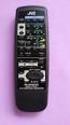
6 FUNCTION OVERVIEW DISPLAY ST TUNED AUTO VCR12 TAPE M PRESET ST Lights up when a FM stereo transmission is received. TUNED Lights up when a FM or AM transmission is received. AUTO Lights up when operating auto tuning. db MEM khz MHz ms Pro Logic 3 Stereo THEATER HALL SLEEP VCR 12, TAPE M Lights up when the corresponding source is selected. 2 X 1.5V R6 / UM-3 / AA SCAN POWER SYS SLEEP P. DISPLAY DISC CD CD TAPE1 MON. AUX VCR1 PRESET S.MODE TUNER PHONO VCR2 USER C.MODE REAR LEVEL FILE REPEAT A< >B DISPLAY D.TIME INTRO SCAN DECK SEL A B T.MON T.TONE CENTER LEVEL MASTER VOLUME PRESET Lights up when in preset mode. MUTE 35 REMOTE CONTROL UNIT R-325 Indicates the selected waveband FM, AM. The frequency of the tuned station is indicated in MHz (for FM) or in khz (for AM) and also indicates the trim volume level of the center and rear channel. Indicates the selected PRESET number, SLEEP time (in minutes), DELAY TIME. MEM Flashes when the memory has been opened to store a preferred station. PRO LOGIC, 3 STEREO, THEATER, HALL Indicates the selected surround mode. SLEEP Lights up when the sleep timer is active. REMOTE CONTROL The remote control (supplied) can be used to operate functions of the receiver. In addition, it can be used to operate any other Sherwood equipment that uses the DIGI LINK II or III remote control system. BATTERIES Open the battery compartment and insert two batteries as indicated, type R6, UM3 or AA cells. Remove the batteries when they have run down or if the remote control will not be used again for a long period. Note : Do not use rechargeable batteries. USING THE REMOTE CONTROL First select the source you wish to control by pressing one of the seven source select buttons on the remote control (e.g.tape M, CD, etc.). Then, select the desired function. 6

7 REMOTE FUNCTION OVERVIEW AMPLIFIER 11.POWER for power control of this receiver or system. (as described in amplifier chapter titled "POWER ON/STANDBY") 12.SLEEP for setting a time period after which the system will automatically be switched to standby. 14.SYSTEM DISPLAY for dimming displays of Sherwood components connected by DIGI LINK II or III. 12.INPUT SELECTORS 35.MUTE for decreasing the volume. SURROUND PROCESSOR 28.SURROUND MODE DOLBY PRO LOGIC, DOLBY 3 STEREO, THEATER, HALL, SIMULATED, OFF For selecting the different surround modes. 29.CENTER MODE for selecting the desired center mode when in Dolby Pro Logic or Dolby 3 Stereo mode. 30.TEST TONE for checking the output level of the front, center and rear speakers. 31.DELAY TIME for adjusting the delay time of the rear channel. 32.REAR LEVEL / for adjusting the rear level (in Dolby Pro Logic, Theater, Hall, Simulated mode) 33.CENTER LEVEL / for adjusting the center level (only in normal mode or wide mode). 34.MASTER VOLUME / for adjusting the volume. COMPACT DISC PLAYER DIGITS for track selection, press desired button among 10 buttons on the remote control and for disk selection, select disc No.(1~5) within 2 sec. after pressing the DISC button. 16.DISC (CD changer only) for disc selection. 17. to begin play. 18. to stop play/clearing a program. 19. for pausing play. 10. for skipping backward and forward. 11. for searching backward and forward. 13.INTRO to preview each track only for 10 seconds. 14.REPEAT A <> B to play a specific passage repeatedly. EQUALIZER 23.PRESET for selecting equalizer pattern. 24.USER for adjusting equalizer pattern as desired. 25.FILE for selecting desired equalizer pattern in the preset or user mode. 26.TAPE M for monitoring the sound of recording or playback of cassette desk. 27.DISPLAY for selecting equalizer display. TUNER 13.PRESET SCAN for scanning the stations memorized in memory DIGITS for selecting stations in frequency direct mode and for preset tuning in tuner mode. CASSETTE DECK 15. for stopping recording/play. 16. for interrupting recording/play. 17.DECK SELECTOR A, B for selecting deck A or B. 18. for recording. 19. for starting forward side play. 20. for starting reverse side play. 21. for winding the tape forward. 22. for winding the tape reverse. In the DIGI LINK III remote control system, lf pressing PLAY on CD or TAPE monitor is selected antomatically without selecting the input and PLAY, etc. starts. 7

8 AMPLIFIER POWER ON/STANDBY press the POWER button on the receiver or the remote control to turn the power on. The receiver enters the operating mode, the respective indicators light up and the standby indicator lights off. To switch the receiver off, press the POWER button again. The receiver enters the standby mode and the standby indicator lights up. in the standby mode, the receiver is not disconnected form the AC mains and a small amount of current is retained to support the memorized contents and operation readiness. If the electricity fails or the AC cord is leaved unplugged for more then 2 weeks, the memorized contents are all cleared System power on/off using the remote control. If the power switch of the component connected by the DIGI LINK II or III is kept pushed and Its AC cord is plugged in the SWITCHED OUTLETS, each time the POWER button on the remote.control is pressed, Its power is turned on or off Under the same conditions, if Its AC cord is not plugged only in the SWITCHED OUTLET, when the receiver becomes the standby mode, only its display is off. SOUND CONTROL Volume Adjust the overall volume with the MASTER VOLUME control. Balance Adjust the stereo balance between the left and the right channels with the BALANCE control. Treble Adjust the high tones with the TREBLE control. Bass Adjust the bass tones with the BASS control. WARNING : Extreme settings at high volume may damage your speakers! Use the SURROUND MODE button to select the desired sound effect: DOLBY PRO LOGIC, DOLBY 3 STEREO, THEATER, HALL or SIMULATED Press MUTE on the remote control if you want to silence the speakers temporarily. The volume indicator blinks. Press again to restore the same listening level as before. INPUT SELECTION Selected the desired on the receiver or the remote control. The selected input will appear on the display. Each time INPUT SELECTOR is rotated, the input is selected as follow; TUNER CD AUX VCR1 VCR2 PHONO When the TAPE MONITOR button is set to on so that "TAPE M"indicator lights up, other inputs can not be heard from the speakers. To listen to a input other than TAPE MONITOR, be sure to set the TAPE MONITOR button to off. TAPE 2 MONITOR function you can connect either a cassette deck or a graphic equalizer to the receiver's TAPE MONITOR jacks. Only when you listen to the component to there jack, set the TAPE MONITOR button to on. If you connect a 3-head cassette deck, you can listen to the sound being recorded during recording not the source sound. For further details, refer to the operating instructions of the component connected. SURROUND MODE With the SURROUND MODE button you can select 5 different surround modes: DOLBY PRO LOGIC, DOLBY 3 STEREO, THEATER, HALL, SIMULATED or OFF. DOLBY PRO LOGIC : choose this setting to play back movies and music (especially Laser Discs, video cassettes and TV broadcasts with DOLBY SURROUND sound). Not only does Dolby Pro Logic surround provide you with sound, it also gives you a clear perception of the position and direction of the sound. Make sure your 'Speaker Positioning' is correct. (see 'INSTALLATION') With a great number of recently made movies, the sound track is specially encoded with the Dolby Surround mode carrying the DOLBY STEREO or DOLBY SURROUND trademark. The front speakers provide the dialogue and the normal stereo effect, while the rear speakers reproduce the surround signals. This position provides excellent results when watching television programs, video software, video discs or video tapes of stereo television broadcasts encoded with Dolby Surround. Note : In DOLBY PRO LOGIC mode, the rear speakers are used as "EFFECT SPEAKERS" and may not produce sound at all times. 8

9 AMPLIFIER DOLBY 3 STEREO : Choose this setting to play back movies and music (especially Laser discs, video cassettes and TV broadcasts with DOLBY SURROUND sound )when not using the rear speakers. You get a clear perception of the positionand direction of the sound DOLBY 3 STEREO combines the front and rear signals so that you can enjoy a regenerated sound field which has comparatively more lively presence and a more expansive feeling from the three front channels (front left, front right and center speakers) than that of ordinary stereo regeneration. THEATER : Use this when watching movie sources that have a stereo soundtrack to enjoy the effect of being in a movie theater. HALL : Hall mode works best for recorded concerts and other music programs. In this mode, the front speakers provide a normal stereo effect while the rear speakers provide a reverberated sound. This reverberation helps to simulate the sound you might hear at a live concert. SIMULATED : The "SIMULATED" creates effects of reverberated and reflected sound from the walls and ceiling similar to a concert hall. These sound effects added to the actual sound from the source make you feel as if you are in a more expanded space. Choose the SIMULATED mode if the source sound signal is mono. OFF : Turns off the center and rear speakers for normal stereo operation. Note : Dolby Pro Logic, Dolby 3 Stereo, Theater, Hall and Simulated will not work properly if the signal passes through a graphic equalizer. Please refer to your equalizer operating instructions for guidance on switching off (or defeating) the equation. SURROUND MODE CONTROL Each surround mode has programmed values for centermode, center and rear levels and/or for rear channel time delay (as appropriate). These values will then be kept in the memory until they are changed again. The various values that can be adapted in the different surround modes are described next: DOLBY PRO LOGIC : Press DOLBY PRO LOGIC or use the SURROUND MODE button on the remote control. Press the CENTER MODE button to select the required center channel mode : NORMAL If the center speaker is smaller model, which means it will not reproduce bass as deep or as loud as the left and right speakers. WIDE If all three front speakers are identical and capable of reproducing low bass information, and if equal power is available in the left, center and right amplifiers. PHANTOM If no center speaker is installed. Use the REAR LEVEL buttons to adjust the rear level (related to the front level). REAR 0 db lights up on the display. The level will be indicated on the display : MIN, 19, 0, +9, MAX. the DELAY TIME button on the remote control to adjust the delay time of the rear channel. The delay time is changed as below, when it is pressed in succession. 15 ms 20 ms 25 ms 30 ms Use the CENTER LEVEL buttons to adjust the center level. CENTER 0 db lights up on the display. The level will be indicated on the display : MIN, 19, 0, +9, MAX. DOLBY 3 STEREO Press the DOLBY 3 STEREO or use the SURROUND MODE button on the remote control. CENTER MODE : In Dolby 3 Stereo mode, you can only select NORMAL and WIDE. REAR LEVEL : Adjusting the rear level is not available in Dolby 3 Stereo mode. CENTER LEVEL : Use the CENTER LEVEL buttons to adjust the center level as described above. DELAY TIME : adjusting the delay time of the rear channel is not available in Dolby 3 stereo mode. THEATER, HALL, SIMULATED Press the THEATER, HALL or SIMULATED respectively or use the SURROUND MODE button on the remote control. CENTER MODE and CENTER LEVEL are not available in these modes. Use the REAR LEVEL buttons to adjust the rear level (equal to the front level) REAR 0 db lights up on the display. The level will be indicated on the display : MIN, 19, 0, +9, MAX. Use the DELAY TIME button on the remote control to adjust the delay time of the rear channel as described above. The delay time is changed as below, when it is pressed in succession. 5 ms 10 ms 15 ms 20 ms 30 ms 25 ms TEST TONE Use the TEST TONE function on the remote control to obtain the correct balance between the levels of the left, right, center and rear speakers in the DOLBY PRO LOGIC and DOLBY 3 STEREO mode. DOLBY PRO LOGIC Press the TEST TONE button on your remote control. You will hear a test tone from the left (FL), center (C), right (FR) and rear (R) speakers in turn, in repeating a cycle. While sitting in the usual listening position, adjust the level of the center and the surround channels to get the same sound level with the front channel. The levels will be indicated on the display. When you are satisfied with the levels, press the TEST TONE button on your remote control again to turn off the test tone. DOLBY 3 STEREO In the Dolby 3 Stereo mode you can adjust only the levels of the left, right and center speakers. Manufactured under license from Dolby Laboratories Licensing Corporation. "Dolby", and "PRO LOGIC" are trademarks of Dolby Laboratories Licensing Corporation. 9

10 TUNER GENERAL Select the waveband by pressing the BAND button. Tune to a radio station or select a preset number. The correct procedure is described in the following chapters. While tuning, the audio signal will be muted to eliminate interfering background noises. Once a station is found, the audio signal will be set to normal volume again. When ST appears on the display, you are receiving an FM stereo transmission. A disturbing noise, due to a weak FM stereo signal, can be suppressed by pressing FM MODE. ST will disappear on the display and you will hear the FM program in mono. TUNING AUTOMATIC TUNING Press TUNING ( / for more than 1 second. AUTO appears on the display. The tuner will now search until a station of sufficient strength has been found. The display shows the tuned frequency. If the station found is not the desired one, simply repeat this operation. Weak stations are skipped during automatic tuning. They can be tuned manually. MANUAL TUNING Manual tuning is useful when you already know the frequency of the desired transmitter (e.g. from your program guide). Briefly press TUNING ( / until the right frequency has been reached Tuning intervals ; BAND USA/CANADA EUROPE/AUSTRALIA FM 200 KHz 50 KHz AM 10 KHz 9 KHz FREQUENCY DIRECT INPUT Select the desired band(fm or AM). Press DIRECT button. Press the corresponding digit buttons within 5 seconds for each step. Refer to wave range and step for each band. Example) FM MHz Select FM. Press DIRECT button. Press button "8" within 5 seconds. Press button "9" within 5 seconds. Press button "1" within 5 seconds. Press button "5" within 5 seconds. PRESET STATIONS You can store 30 preferred stations in the memory of the tuner. This enables you to find your favorite stations quickly and easily. Programming of preset stations Tune to the frequency to be stored(as described under TUNING) If the display shows no preset number, the frequency shown has not yet been stored in the memory. Press MEMORY to enter the frequency in memory. MEM starts flashing for about 5 seconds and PRESET lights up. Press the desired number from 1 to 30 while MEM is flashing. The preset station has now been stored in the memory. A stored frequency is erased from the memory by storing another frequency in its place. TUNING TO PRESET STATIONS Select the desired preset number by pressing digit buttons. The selected station will be tuned in and it will display the preset number and the tuned frequency. 10

11 ADDITIONAL INFORMATION SLEEP The sleep mode allows the system to continue to operate for a specified period of time before automatically shutting off. Press the SLEEP button. The display shows the indication SLEEP 10. This means that the system will be switched to standby after 10 minutes. Each time the button is pressed, the setting is changed as below. 10 min 20 min 30 min 60 min OFF 90 min Notes: During an active sleep timer period, you can reset the SLEEP time again by pressing the SLEEP button. A sleep timer period will be cancelled when you switch your system to standby (using the POWER button on your remote control). RECORDING WITH A CASSETTE DECK Select the desired input to be recorded. Start recording on the cassette deck connected to TAPE MONITOR. Start play on the desired input. For tape monitor function, refer to amplifier titled "TAPE MONITOR function". DUBBING FROM VCR2 TO VCR1 Select VCR2 as program source to be recorded. Start recording on the VCR connected to VCR1. Start playback on the VCR connected to VCR2. For tape monitor function, refer to amplifier titled "TAPE MONITOR function". When dubbing from VCR2 to VCR1, you can replace the audio signal from VCR2 with the signal from an audio source, e.g. a CD player. First select VCR2 as program source to be recorded. Then select the required audio source. Start recording on the VCR connected to VCR1. Start playing back on the selected audio source and on the VCR connected to VCR2. You can now watch the picture from VCR2 on your TV and listen to the sound from the audio source while recording. MODEL POWER AMPLIFIER SECTION POWER OUTPUT (8 Ohms) STEREO MODE (20Hz-20kHz) THD IM DISTORTION POWER OUTPUT (8 Ohms) SURROUND MODE (LEFT, CENTER, RIGHT) REAR PREAMPLIFIER SECTION INPUT SENSITIVITY/IMPADANCE PHONO (47K Ohms) LINE (CD, TAPE, 47K Ohms)) SIGNAL TO NOISE RATIO PHONO LINE (CD,TAPE,VIDEO) TONE CONTROLS BASS (100Hz) TREBLE (10kHz) CINEMA BASS 80Hz LEFT /RIGHT, CENTER FREQUENCY RESPONSE PHONO (20Hz-20kHz,RIAA) LINE (CD, TAPE, VIDEO, 10Hz-100Hz) FM TUNER SECTION USABLE SENSITIVITY (MONO) 50dB QUIETING SENSITIVITY MONO STEREO SIGNAL TO NOISE RATIO 65dBf,MONO/STEREO 65dBf, 1kHz, MONO/STEREO FREQUENCY RESPONSE (30Hz-15Hz) STEREO SEPARATION (1kHz) CAPTURE RATIO ALTERNATE CHANNEL SENSITIVITY 98MHZ, +/-400Hz) IMAGE REJECTION RATIO IF REJECTIOR RATIO SPURIOUS REJECTION RATIO AM TUNER SECTION USABLE SENSITIVITY (400u V/m) SIGNAL TO NOISE RATIO SELECTIVITY DIMENSIONS and WEIGHTS (Unit) HEIGHT (INCHES) WIDTH (INCHES) DEPTH (INCHES) WEIGHT (LBS) R W x % 0.05% 80W x 3 80W 2.5mV 150mV 77dB 100dB +,-10dB +,-10dB +,-0.5dB +0,-1.5dB 10.5dBf 15dBf 36.2dBf 80dB/73dB 0.15%/0.25% +,-1dB 50dB 1.25dB 70dB 80dB 120dB 70dB 12.5uV 50dB 30dB 5 5/8 17 3/8 11 7/8 Notes: Design and specifications subject to change without notice for improvement. MAINTENANCE Do not leave the unit in direct sunlight or other places where high temperatures can occur for any length of time, such as in the vicinity of a heating source. Do not expose the equipment to humidity or rain. A chamois leather cloth, slightly moistened with water is sufficient for cleaning the cabinet. Do not use cleaning agents containing alcohol, spirits, ammonia or abrasive. 11

12 TROUBLESHOOTING If a fault occurs, run through the points listed below before taking your receiver for repair. If the fault persists, attempt to solve it by switching the receiver off and on again. If this fails to resolve the situation, consult your dealer. Under no circumstances should you repair the receiver yourself as this will invalidate the guarantee! PROBLEM POSSIBLE CAUSE REMEDY NO POWER The AC power cord is disconnected. Connect the cord securely. Poor connection at the wall socket or the wall socket is inactive. Check the wall socket using a lamp or another appliance. NO SOUND FROM THE FRONT SPEAKERS Speaker cables are disconnected. Check the speaker connections. Volume is too low. Adjust the volume. Front speakers are not switched on. Press the SPEAKER switch(es) to switch on the front speakers. NO SOUND FROM THE REAR SPEAKERS Surround mode is switched off. Select a surround mode. Volume and rear level are too low. Adjust the volume. A monaural source is used. Select a stereo, surround source or select the simulated surround mode. Dolby 3 Stereo mode is selected. Switch off Dolby 3 Stereo mode. Dolby Pro Logic source is not present. Make sure that your video device is in the stereo mode. NO SOUND FROM THE CENTER SPEAKER Dolby Pro Logic or Dolby 3 Stereo mode is not selected. Select Dolby Pro Logic or Dolby 3 Stereo mode. Volume and center level are too low. Adjust the volume and center level. The center mode is set to phantom mode. Set the center mode to normal or wide. NO SOUND IS HEARD, EVEN WHEN A INPUT SELECTOR IS MADE The MUTE button is pressed. Press MUTE again to cancel the MUTE function. Volume is too low. Adjust the volume. Connections between the components are incorrect. Make connections correctly. STATIONS CANNOT BE RECEIVED No antenna connected. Connect an antenna. The desired station frequency is not tuned in. Tune in the desired station frequency. Antenna in wrong position. Move antenna and retry turning. Surrounding area causing interference. Lengthen or elevate antenna PRESET STATIONS CANNOT BE RECEIVED An incorrect station frequency has been memorized. Memorize the correct station frequency. The memorized stations are cleared. Memorize the stations again. POOR FM RECEPTION No antenna connected. Connect an antenna. The antenna is not positioned for the best reception. Change the position of the antenna. CONTINUOUS HISSING NOISE DURING FM RECEPTION, ESPECIALLY WHEN A STEREO BROADCAST IS RECEIVED Weak signal. Change the position of the antenna. Install an outdoor antenna. Use an antenna with 3, 4 or 5 elements if the broadcast station is far away. CONTINUOUS OR INTERMITTENT HISSING NOISE DURING AM RECEPTION, ESPECIALLY AT NIGHT Noise is caused by motors, fluorescent lamps or lightning, etc. Keep the receiver away from noise sources. Install an outdoor AM antenna. HUM CAN BE HEARD DURING AM RECEPTION The AC power cord may be too close to the AM loop antenna or the antenna wire. Position the AC power cord away from the antenna wire and the AM loop antenna. Adjust the position of the AM loop antenna. OTHER SYSTEM COMPONENTS DO NOT REACT TO REMOTE CONTROL COMMANDS DIGI LINK III connections are not made properly. Make proper DIGI LINK III connections. THE REMOTE CONTROL UNIT DOES NOT OPERATE No batteries loaded or dead batteries. Replace the batteries. The IR sensor is obstructed. Remove the obstacle. 12

13 O P E R A T I N G I N S T R U C T I O N S R-325 AUDIO/VIDEO RECEIVER

IMPORTANT SAFETY INSTRUCTIONS
 IMPORTANT SAFETY INSTRUCTIONS Before you install or use the apparatus, you must read and understand these Important Safety Instructions. At all times when using the apparatus you must follow these Important
CINEMATE 1 SR DIGITAL HOME THEATER SPEAKER SYSTEM. Operating Guide Guía del usuario Guide d utilisation
 CINEMATE 1 SR DIGITAL HOME THEATER SPEAKER SYSTEM Operating Guide Guía del usuario Guide d utilisation Notice This equipment has been tested and found to comply with the limits for a Class B digital device,
Operation Manual for Users
 Operation Manual for Users Model No.: FLTAMFMRCD!!!!!!!!!! ATTENTION!!!!!!!!!! THE RESET BUTTON MUST BE PRESSED TO ENSURE PROPER OPERATION. SEE INSTRUCTION MANUAL Table of Contents Table of Contents ---------------------------------------------------------------------------------------------
AVR 158. Audio/video receiver. Quick-Start Guide ENGLISH
 158 Audio/video receiver ENGLISH Quick-Start Guide 158 Introduction, Speaker Placement and Connection Introduction Thank you for choosing a harman kardon product! This quick-start guide contains all the
PORTABLE ALARM CLOCK. Dual Alarm. FM Radio. Wake-up Sounds. USB Phone Charger G-1CR
 G-BUZZ PORTABLE ALARM CLOCK Dual Alarm FM Radio Wake-up Sounds USB Phone Charger G-1CR Welcome Alarm clocks can be boring. Get ready to shake things up with your new G-BUZZ. Slap the snooze for more ZZZ
MPA-101. WARNING: Improper installation could result in damage to the amplifier and/or speakers. Read all instructions before installation.
 MPA-101 WARNING: Improper installation could result in damage to the amplifier and/or speakers. Read all instructions before installation. The lightning flash with arrowhead, within an equilateral triangle,
THE NEW GENERATION IN TECHNOLOGY. NI-3103A Alarm Clock w/fm Radio ipod & iphone Docking. Operating Instructions
 THE NEW GENERATION IN TECHNOLOGY NI-3103A Alarm Clock w/fm Radio ipod & iphone Docking Operating Instructions Table of Contents Important Safeguards... 3 Parts... 6 Controls... 6 To Set Up... 7 ipod/iphone
Single Day Alarm Clock with. Bluetooth and USB Play-through
 Single Day Alarm Clock with Bluetooth and USB Play-through MODEL : BSC 200 READ THIS INSTRUCTION MANUAL BEFORE OPERATING THE APPLIANCE. SAVE THIS MANUAL FOR FUTURE REFERENCE. TABLE OF CONTENTS IMPORTANT
SP1790JK 900MHz Wireless Indoor/Outdoor Speakers. User Manual INTRODUCTION FEATURES IMPORTANT SAFETY INFORMATION
 SP1790JK 900MHz Wireless Indoor/Outdoor Speakers INTRODUCTION This 900 MHz digital hybrid wireless speaker system uses the latest wireless technology that enables you to enjoy music and TV sound anywhere
AUDIO/VIDEO MULTI-CHANNEL RECEIVER VSX-D411 VSX-D511
 AUDIO/VIDEO MULTI-CHANNEL RECEIVER VSX-D411 VSX-D511 Operating Instructions Thank you for buying this Pioneer product. Please read through these operating instructions so you will know how to operate your
Evolution Digital HD Set-Top Box Important Safety Instructions
 Evolution Digital HD Set-Top Box Important Safety Instructions 1. Read these instructions. 2. Keep these instructions. 3. Heed all warnings. 4. Follow all instructions. 5. Do not use this apparatus near
CAUTION RISK OF ELECTRIC SHOCK NO NOT OPEN
 Evolution Digital HD Set-Top Box Important Safety Instructions 1. Read these instructions. 2. Keep these instructions. 3. Heed all warnings. 4. Follow all instructions. 5. Do not use this apparatus near
OPERATING MANUAL PUBLIC ADDRESS POWER AMPLIFIER PA-9336
 OPERATING MANUAL PUBLIC ADDRESS POWER AMPLIFIER PA-9336 1 UNPACKING AND INSTALLATION Although it is neither complicated to install nor difficult to operate your PA amplifier, a few minutes of your time
RX-6010RBK / RX-6012RSL
 SLEEP TEST SUBWOOFER + MODE EFFECT CENTER + SOUND TV/VIDEO CD-DISC DVD CD TV VOL TV CH TV VCR AUDIO VCR CH + TV SOUND TAPE/CDR VOLUME REMOTE REAR L + MENU REAR R + ENTER VCR /DIGITAL FM/AM MUTING STANDBY
FM Stereo FM-AM Receiver
 Getting Started 3-866-247-12 (1) FM Stereo FM-AM Receiver Operating Instructions STR-DE535 STR-DE435 STR-SE491 1999 by Sony Corporation 1 Getting Started 2 WARNING To prevent fire or shock hazard, do not
PR-D9W. GB Version 1
 PR-D9W Version 1 Table of contents Important safety instructions... 2-3 Introduction... 4 Controls... 5-8 Using your weather alert radio for the first time... 9 Operating your radio Search tuning AM/FM...
Video Cassette Player
 3-862-516-11 (1) Video Cassette Player Operating Instructions Owner s record The model and serial numbers are located at the rear of the unit. Record these numbers in the spaces provided below. Refer to
STEREO PREAMPLIFIER INSTRUCTIONS FOR USE
 XX STEREO PREAMPLIFIER INSTRUCTIONS FOR USE Thank you for purchasing the Musical Fidelity A5 CR Preamplifier. Used properly and carefully, it should give many years of outstanding musical reproduction.
Owner s Manual AWM910 JENSEN AWM910 COMPACT DISC PLAYER RADIO CD COMPACT MUSIC SYSTEM MUTE AUX BAND AUX IN PUSH PUSH PWR VOL ALARM T/F AUD SPK A SPK B
 AWM910 Owner s Manual COMPACT DISC PLAYER PUSH 1 2 3 4 5 6 RPT SCAN RDM H M PUSH PWR VOL ALARM SET ON/OFF EQ T/F AUD RADIO CD COMPACT MUSIC SYSTEM MUTE AUX BAND CD AUX IN A B A+B JENSEN AWM910 Thank You!
AM / FM Tuner + RDS. Model: TU-101. www.pulse-audio.co.uk
 AM / FM Tuner + RDS Model: TU-101 www.pulse-audio.co.uk 1 Safety Information The lightning bolt within a triangle is intended to alert the user to the presence of dangerous voltage levels within the product
Business Audio System: Music & Messaging MP3 Player. by Grace Digital Audio. User Guide. Model No. GDI-USBM10
 Business Audio System: Music & Messaging MP3 Player by Grace Digital Audio User Guide Model No. GDI-USBM10 User Guide Contents Introduction 2 Safety & General Use Information 2 Features 3 Set Up & Operation
User Guide. CR-111IP Clock radio with dock for ipod
 User Guide CR-111IP Clock radio with dock for ipod IMPORTANT SAFETY INFORMATION CAUTION! RISK OF ELECTRIC SHOCK DO NOT OPEN TO REDUCE THE RISK OF ELECTRIC SHOCK DO NOT REMOVE COVER (OR BACK) This symbol
LOXONE 12 Channel Amplifier
 LOXONE 12 Channel Amplifier Item no.: 200110 Thank you for purchasing the Loxone Twelve Channel Amplifier. The versatility of the Amplifier makes it the perfect choice for almost every type of custom multi-room
DAB+ / FM Tuner Model: TU-201
 DAB+ / FM Tuner Model: TU-201 Instruction Manual www.pulse-audio.co.uk 1 Safety Information The lightning bolt within a triangle is intended to alert the user to the presence of dangerous voltage levels
DAB2+ Dear Customer, Congratulations with your new Argon DAB2+
 Dear Customer, Quality has always been our driving force and founding Argon Audio is a natural extension of this philosophy. We have 20 years' experience in creating and specifying high quality products,
Conference Phone UserÕs Manual. Part No. 54-2070-01R1 Printed in Korea. 2002 Bogen Communications, Inc.
 Part No. 54-2070-01R1 Printed in Korea. 2002 Bogen Communications, Inc. UserÕs Manual Notice Every effort was made to ensure that the information in this guide was complete and accurate at the time of
AM/FM ALARM CLOCK RADIO
 AM/FM ALARM CLOCK RADIO Instruction Manual JL-206 Please read this manual carefully before operating and save it for future reference. Have a question? Please visit http:// INTRODUCTION Thank you for purchasing
Important Safety Instructions
 PR-D7 GB Revision 1 Important Safety Instructions 1. Read these instructions. 2. Keep these instructions. 3. Heed all warnings. 4. Follow all instructions. 5. Do not use this apparatus near water. 6. Clean
User Manual DIGITAL MONITOR SPEAKERS MS /MS. 24-Bit/192 khz Digital 40/20-Watt Stereo Near Field Monitors
 User Manual DIGITAL MONITOR SPEAKERS MS /MS 24-Bit/192 khz Digital 40/20-Watt Stereo Near Field Monitors 2 DIGITAL MONITOR SPEAKERS /MS20 User Manual User Manual Table of Contents Thank you... 2 Important
Owner s Manual Please read before using this equipment. 4-Channel Stereo Mixer
 Owner s Manual Please read before using this equipment. 4-Channel Stereo Mixer ˆ Features Your RadioShack 4-Channel Stereo Mixer is a sophisticated desktop control center, perfect for mixing sound on four
JBL CINEMA BASE. Home Cinema 2.2 all-in-one soundbase for television OWNER S MANUAL
 JBL CINEMA BASE Home Cinema 2.2 all-in-one soundbase for television OWNER S MANUAL JBL CINEMA BASE TABLE OF CONTENTS INTRODUCTION 1 DESCRIPTION AND FEATURES 1 JBL CINEMA BASE TOP PANEL CONTROLS 2 JBL CINEMA
Prescott. CD Alarm Clock Radio INSTRUCTION MANUAL
 1215205 Prescott CD Alarm Clock Radio INSTRUCTION MANUAL Important Safety Instructions CAUTION RISK OF ELECTRIC SHOCK DO NOT OPEN The lightning flash with arrowhead symbol, within an equilateral triangle
RCR-22 AM/MW 2 bands Digital Clock Radio instruction manual
 RCR-22 AM/MW 2 bands Digital Clock Radio instruction manual Important safety instructions 1. Read and understand all safety and operating instructions before the radio is operated. 2. Retain instruction:
CR9986 ROBERTS. Dual Alarm CD Clock Radio. Sound for Generations. Please read this manual before use
 ROBERTS Sound for Generations CR9986 Dual Alarm CD Clock Radio Please read this manual before use Contents Contents... Controls... - Switching on and setting the time... 4 Listening to the radio... 5 Compact
CR9971 2 Band Auto Set Dual Alarm Clock Radio ROBERTS. Sound for Generations. Please read this manual before use
 ROBERTS Sound for Generations CR9971 2 Band Auto Set Dual Alarm Clock Radio Please read this manual before use Contents Contents... 1 Controls...2-5 Switching on... 6 Setting the time manually... 6 Setting
focus TOuCh P10 FOR DISPLAYS: 55, 70 AND 82 ENgliSh V01.3-2014-7
 focus TOuCh P10 FOR DISPLAYS: 55, 70 AND 82 ENgliSh V01.3-2014-7 Thank you for purchasing our product. Please read this manual carefully before operation your set and retain it for future reference. FT55-P10
PORTABLE STEREO FM RADIO WITH CD/MP3/USB-PLAYER AND CASSETTE SCR-97 USB INSTRUCTION MANUAL
 PORTABLE STEREO FM RADIO WITH CD/MP3/USB-PLAYER AND CASSETTE SCR-97 USB INSTRUCTION MANUAL For information and support, www.lenco.eu WARNING CLASS 1 LASER PRODUCT CLASS 1 LASER PRODUCT APPAREIL Á LASER
CAUTION RISK OF ELECTRIC SHOCK DO NOT OPEN
 BeoLab 4 Guide CAUTION RISK OF ELECTRIC SHOCK DO NOT OPEN CAUTION: To reduce the risk of electric shock, do not remove cover (or back). No User-serviceable parts inside. Refer servicing to qualified service
INSTRUCTION MANUAL RM-5750. AM/FM Digital Alarm Clock Radio
 INSTRUCTION MANUAL RM-5750 AM/FM Digital Alarm Clock Radio Fig. 1 CAUTION: THE APPARATUS SHALL NOT BE EX- POSED TO DRIPPING OR SPLASHING. NO OBJECTS FILLED WITH LIQUIDS, SUCH AS VASES, SHALL BE PLACED
EC4.8. BalancedReferencePreamplifier. Owner smanual ENG
 EC4.8 BalancedReferencePreamplifier Owner smanual ENG Unpacking the EC 4.8 Immediately upon receipt of the EC 4.8, inspect the carton for possible damage during shipment. The carton and packaging have
IMPORTANT SAFETY INSTRUCTIONS
 IMPORTANT SAFETY INSTRUCTIONS When using this electronic device, basic precautions should always be taken, including the following: 1. Read all instructions before using the product. 2. Do not use this
HOME THEATER SYSTEM. Instruction Manual. Model ASR150. Please read the instruction manual carefully before using your unit.
 SURROUND SOUND HOME THEATER SYSTEM Instruction Manual Model ASR150 Please read the instruction manual carefully before using your unit. For support visit : www.1800customersupport.com GENERAL TABLE OF
BeoLab 1. User s guide
 BeoLab 1 User s guide Legal notice: CAUTION RISK OF ELECTRIC SHOCK DO NOT OPEN CAUTION: To reduce the risk of electric shock, do not remove cover (or back). No User-serviceable parts inside. Refer servicing
Panasonic. Proprietary Telephone for Electronic Modular Switching System MODEL NO. KX-17030. Illustrated Model: White 1
 Panasonic Proprietary Telephone for Electronic Modular Switching System MODEL NO. KX-17030 Illustrated Model: White 1 KX-T7030 is compatible with all of the Panasonic Electronic Modular Switching Systems
Instruction Manual. 5.1 Power Amplified Home Theatre Speaker System w/ Remote Control DSS-200
 R Instruction Manual DSS-200 R 5.1 Power Amplified Home Theatre Speaker System w/ Remote Control Read this manual carefully to get the excellent acoustics from this unit. SPECIFICATIONS SAFETY INFORMATION
BOSE. Link AL8 HOMEWIDE WIRELESS AUDIO LINK
 BOSE Link AL8 HOMEWIDE WIRELESS AUDIO LINK Français English SAFETY INFORMATION Please read this owner s guide Please take the time to follow the instructions in this owner s guide carefully. It will help
Controls. LCD Display. Tuning Up Time Set and Station Scan
 PR-D8 GB Revision 3 1 1 2 4 5 7 9 10 12 14 16 18 20 22 24 25 26 27 29 31 33 35 36 37 38 Controls Stereo Built-in Microphone (Left Channel) LCD Display Stereo Built-in Microphone (Right channel) Power/Auto
Movie Cube N150H. User s Manual
 Movie Cube N150H User s Manual (v1.0) TABLE OF CONTENTS 1. Main Features... 4 1.1 Front panel... 4 1.2 Back panel... 4 2. Remote Control... 5 3. Welcome Page... 6 4. Installation Guide... 6 5. Program...
When you switch off your system, or mute the sound, the red indicator light appears immediately, indicating that the subwoofer is not in use.
 BeoLab 11 Guide WARNING: To reduce the risk of fire or electric shock, do not expose this appliance to rain or moisture. Do not expose this equip ment to dripping or splashing and ensure that no objects
Digital Satellite Receiver
 USER GUIDE Digital Satellite Receiver Models DSR207, DSR317, DSR505, and DSR530 CONTENTS IMPORTANT SAFETY INSTRUCTIONS...1 DSR BASICS SYMBOLS/ICONS...6 Front Panel...6 Back Panel...7 CONNECTING YOUR DSR...10
Radio BMR100 INSTRUCTION MANUAL. ENGLISH (Original instructions)
 ENGLISH (Original instructions) INSTRUCTION MANUAL Radio BMR00 WARNING: For your personal safety, READ and UNDERSTAND before using. SAVE THESE INSTRUCTIONS FOR FUTURE REFERENCE. Symbols The following show
CINEMA SB100 powered soundbar speaker
 CINEMA SB100 powered soundbar speaker quick-start guide Thank You For Choosing This JBL Product The JBL Cinema SB100 powered soundbar speaker is a complete, integrated sound system that will dramatically
LF-IRX. Limited Warranty LF-IRX. Remote Control Extender OWNER S MANUAL
 Limited Warranty OWNER S MANUAL Audiovox Corporation (Audiovox) warrants this product against defects in materials or workmanship for one (1) year from the date of purchase. During this period, this product
The Bouncer Bluetooth Stereo Speaker
 The Bouncer Bluetooth Stereo Speaker 1 Welcome to JLab! Thank you for purchasing The Bouncer Bluetooth Speaker! Enjoy your music wirelessly from any smartphone, tablet, laptop, or other Bluetooth enabled
CMP30. User Manual. www.audac.eu
 CMP30 User Manual www.audac.eu 2 Index Introduction 4 Precautions 5 Safety requirements 5 Caution servicing 5 EC Declaration of Conformity 5 Waste of Electrical and Electronic Equipment (WEEE) 6 Caution
USER GUIDE MANUAL DCT700. One-way Application
 USER GUIDE MANUAL DCT700 One-way Application CAUTION: CAUTION RISK OF ELECTRIC SHOCK TO REDUCE THE RISK OF ELECTRIC SHOCK, DO NOT REMOVE COVER (OR BACK). NO USER-SERVICEABLE PARTS INSIDE. REFER SERVICING
MANUAL PC1000R [email protected]
 MANUAL PC1000R [email protected] Features The APart PC1000R is a professional multisource CD/USB/SD card music player, equipped with balanced and unbalanced analog outputs, coaxial and optical digital
MODEL NPB-252 PORTABLE CD MP3 RADIO PLAYER
 MODEL NPB-252 PORTABLE CD MP3 RADIO PLAYER PLEASE READ THIS USER MANUAL COMPLETELY BEFORE OPERATING THIS UNIT AND RETAIN THIS BOOKLET FOR FUTURE REFERENCE. WARNING TO PREVENT FIRE OR SHOCK HAZARD, DO NOT
Tone Hammer 500. Owners Manual. Manual Version 1.0
 Tone Hammer 500 Owners Manual Manual Version 1.0 1. Incorporating the preamp from the popular Tone Hammer preamp/di pedal this superlight bass head combines three bands of flexible EQ, a colorful "Drive"
DSB-100 Portable Premium Bluetooth Speaker Owner s Manual
 . DSB-100 Portable Premium Bluetooth Speaker Owner s Manual You can print more than one page of a PDF onto a single sheet of paper. 1 Index Preparation Unpacking 3 Overview 4 Sound Quality 4 Design 4 Operation
Alarm Clock USER GUIDE
 Alarm Clock USER GUIDE Jazwares, Inc. 2012 CONTENTS Please read the instructions along with the Alarm Clock carefully before you use it, so that you can operate it conveniently. WELCOME & Warnings Page
BIG GAMES HOME VIDEO ARCADE ASSEMBLY INSTRUCTIONS
 TM BIG GAMES HOME VIDEO ARCADE ASSEMBLY INSTRUCTIONS IN-HOME ASSEMBLY OF YOUR BIGGAMES HOME VIDEO ARCADE MAY BE AVAILABLE IN YOUR AREA FOR AN ADDITIONAL CHARGE. FOR INFORMATION, PLEASE CALL (800) 749-4345.
ATS-505. GB Version 1
 ATS-505 GB Version 1 Control Locations Power/Sleep Power On/off/Alarm off/sleep function Display Switch between radio frequency and time while radio is power on Mode Mode set up (please see below mode
Daily use. Never use alcohol or other solvents to clean any part of the loudspeakers!
 BeoLab 6002 Guide WARNING: To reduce the risk of fire or electric shock, do not expose this appliance to rain or moisture. Do not expose this equip ment to dripping or splashing and ensure that no objects
Indoor Remote Controlled Power Points
 Indoor Remote Controlled Power Points Model Number: HE214039 INSTRUCTION MANUAL Description goes here Indoor Remote Controlled Power Points Warranty Details The product is guaranteed to be free from defects
VoiceTone T1 USER S MANUAL
 VoiceTone T1 USER S MANUAL Important Safety Instructions 1 Read these instructions. 2 Keep these instructions. 3 Heed all warnings. 4 Follow all instructions. 5 Do not use this apparatus near water. 6
2013 VTech Printed in China 91-009656-000 US
 Rechargeable Power Pack User s Manual 2013 VTech Printed in China 91-009656-000 US INTRODUCTION The Rechargeable Power Pack makes it easier than ever to keep the InnoTab 3 or InnoTab 3S charged and ready
Home Theater System HT-DDW650. Operating Instructions. Owner s Record 4-244-183-71(1) 2003 Sony Corporation
 4-244-183-71(1) Home Theater System Operating Instructions Owner s Record The model and serial numbers are located at the rear of the unit. Record the serial number in the space provided below. Refer to
High Power Receiver CR-W400U Operating Instructions
 High Power Receiver CR-W400U Operating Instructions Please read these instructions carefully before using this product and save this manual for future use. Panasonic welcomes you to our ever growing family
Spider IV 15. Pilot s Handbook Manuel de pilotage Pilotenhandbuch Pilotenhandboek Manual del Piloto 取 扱 説 明 書
 Spider IV 15 Pilot s Handbook Manuel de pilotage Pilotenhandbuch Pilotenhandboek Manual del Piloto 取 扱 説 明 書 40-00-0187 Pilot s Handbook available @ www.line6.com/manuals Rev D Important Safety Instructions
Controls (front) 1. Loudspeaker 2. Light button 3. Band button 4. Auto tune button 5. Alarm button 6. LCD display
 GB Contents Controls... 2-4 Mains operation... 5 Operating your radio... 6 Selecting a station DAB... 7 Display modes DAB... 8 Finding new stations - DAB... 9 Secondary services DAB... 9 Manual tuning
Retro Style Turntable With CD/Radio/USB/SD/MP3/WMA and Vinyl-to-MP3 Encoding
 Retro Style Turntable With CD/Radio/USB/SD/MP3/WMA and Vinyl-to-MP3 Encoding PTCD8U INSTRUCTION MANUAL LOCATION OF CONTROLS 1) DUST COVER 2) DIAL POINTER 3) LEFT SPEAKER 4) LCD DISPLAY 5) FM STEREO LED
Mini Hi-Fi Component System
 3-860-707-14(1) Mini Hi-Fi Component System Operating Instructions Owner s Record The model and serial numbers are located on the rear panel. Record the serial number in the space provided below. Refer
PEBBLE USER MANUAL. MODEL: GMR1888DAB DAB Digital & FM Radio. Hyper-link ALL text to corresponding sections
 PEBBLE Hyper-link ALL text to corresponding sections MODEL: GMR1888DAB DAB Digital & FM Radio USER MANUAL 1 2 Welcome Your DAB Digital&FM Radio 2.1 In The box 2.2 Front View 2.3 Top View 2.4 Rear View
INSTRUCTION MANUAL PLEASE READ ALL THE INSTRUCTIONS COMPLETELY BEFORE USE AND SAVE THIS MANUAL FOR FUTURE REFERENCE
 INSTRUCTION MANUAL PLEASE READ ALL THE INSTRUCTIONS COMPLETELY BEFORE USE AND SAVE THIS MANUAL FOR FUTURE REFERENCE m Before Use Please read IMPORTANT SAFETY INSTRUCTIONS on page 10 before use. It is important
Mini Hi-Fi Component System
 3-867-107-14(1) Mini Hi-Fi Component System Operating Instructions Owner s Record The model and serial numbers are located on the rear panel. Record the serial number in the space provided below. Refer
HD udta Quick-Start Guide
 HD udta Quick-Start Guide Vyve Broadband HD Set-Top Box Important Safety Instructions 1. Read these instructions. 2. Keep these instructions. 3. Heed all warnings. 4. Follow all instructions. 5. Do not
Weather Radio Alarm Clock
 1200093 User s Guide Weather Radio Alarm Clock Thank you for purchasing your Weather Radio Alarm Clock from RadioShack. Please read this user s guide before installing, setting up, and using your new weather
Model 70A00-1. GSM Cellular Communications Center
 Home Automation, Inc. Model 70A00-1 GSM Cellular Communications Center Operation Manual Document Number 70I00-1 Rev A August, 2009 Contents Description... 1 Use with security systems...1 Everyday use...2
Congratulations! Thank you!
 TM-47 ORDERCODE D1370 Congratulations! You have bought a great, innovative product from DAP Audio. The DAP Audio Microphone range brings excitement to any venue. Whether you want simple plug-&-play action
Altec Lansing Computer Speaker System
 Altec Lansing Computer Speaker System User Guide ACS45.1 IMPORTANT If you experience any difficulties with your computer speaker system, please call us. It may be a simple problem that we can help you
FVS 1000_Englisch 2 16.05.2001 8:34 Uhr Seite 1 TABLE OF CONTENTS
 FVS 1000_Englisch 2 16.05.2001 8:34 Uhr Seite 1 TABLE OF CONTENTS 1 INTRODUCTION Dear Customer... 2 Caution... 2 Features... 2 MBO FVS 1000... 3 Important Safety Precautions... 4 Caution... 4 Note... 4
900 MHz Lightweight Wireless Stereo Headphones
 33-1165.fm Page 1 Tuesday, August 10, 1999 10:50 AM Cat. No. 33-1165 OWNER S MANUAL Please read before using this equipment. 900 MHz Lightweight Wireless Stereo Headphones 33-1165.fm Page 2 Tuesday, August
Kinivo 301BN HDMI Switch
 Kinivo 301BN HDMI Switch User Manual 2012 Kinivo LLC. All rights reserved. Kinivo is a trademark of Kinivo LLC. Bluetooth word mark and the Bluetooth logo are registered trademarks of Bluetooth SIG. All
Register your product and get support at. www.philips.com/welcome AS111. User manual
 Register your product and get support at www.philips.com/welcome AS111 User manual Contents 1 Important 4 Safety 4 English 2 Your docking speaker for AndroidTM 5 Introduction 5 What's in the box 5 Overview
9A10505400 AG-D8850. AV Digital Home Theater Receiver OWNER S MANUAL
 Z 9A10505400 AG-D8850 AV Digital Home Theater Receiver OWNER S MANUAL CAUTION: TO REDUCE THE RISK OF ELECTRIC SHOCK, DO NOT REMOVE COVER (OR BACK). NO USER- SERVICEABLE PARTS INSIDE. REFER SERVICING TO
ES-CAM2AU IP Camera. www.etiger.com
 ES-CAM2AU IP Camera www.etiger.com EN Box content Connect your smartphone to the camera - ES-CAM2AU x1 - Mounting bracket x1 - AC Adaptor x1 - User Manual x1 and apps Before using the ES-CAM2AU, download
WIRELESS EARPHONES with ACTIVE NOISE CANCELLING Thank you for purchasing PHIATON BT 100 NC
 WIRELESS EARPHONES with ACTIVE NOISE CANCELLING Thank you for purchasing PHIATON BT 100 NC - Please follow the directions, and read the guidelines carefully before use. Please keep the owner s guide for
JBL CINEMA SB350. Home Cinema 2.1 soundbar with wireless subwoofer
 JBL CINEMA SB350 Home Cinema 2.1 soundbar with wireless subwoofer Owner s Manual BASS English JBL CINEMA SB350 JBL CINEMA SB350 Optical cable Table of Contents INTRODUCTION 5 ITEMS INCLUDED 5 JBL CINEMA
CAUTION RISK OF ELECTRIC SHOCK DO NOT OPEN
 BeoLab 7-6 Guide CAUTION RISK OF ELECTRIC SHOCK DO NOT OPEN CAUTION: To reduce the risk of electric shock, do not remove cover (or back). No User-serviceable parts inside. Refer servicing to qualified
For the US-market only! CAUTION: To reduce the risk of electric shock, do not remove cover (or back). No User-serviceable parts
 BeoLab 6000 Guide CAUTION: To reduce the risk of electric shock, do not remove cover (or back). No User-serviceable parts inside. Refer servicing to qualified service personnel. WARNING: To prevent fire
A3 Tuner INTRODUCTION. FM TUNER with Remote Control and RDS INSTRUCTIONS FOR USE
 INTRODUCTION A3 Tuner FM TUNER with Remote Control and RDS INSTRUCTIONS FOR USE Thank you for purchasing the Musical Fidelity A3 Tuner FM tuner with remote control and RDS. Used properly and carefully,
DAR-101. GB Version 1
 DAR-101 Version 1 Table of contents Important security notice... 2-3 Introduction... 4 Controls and connections... 5-9 Battery operation... 10 Using the AC adaptor / Charging the batteries... 11 Setting
Brio-Rmanual:Cursamanual.qxd 08/04/2011 09:25 Page1
 - Brio-Rmanual:Cursamanual.qxd 08/04/2011 09:25 Page1 Brio-Rmanual:Cursamanual.qxd 08/04/2011 09:25 Page2 CONTENTS INTRODUCTION, FEATURES AND TECHNOLOGY 1-3 INSTALLATION 3 CONNECTIVITY 4-6 LOUDSPEAKER
Home Gateway. User s Installation Guide. In This Guide
 Explorer 4250 Home Gateway User s Installation Guide In This Guide Safety Information... 2 Safety First... 6 Explorer eclub... 6 Explorer 4250 Home Gateway Serial Number... 6 What s On the Front Panel?...
DAB Radio. Instruction Manual L55DAB10
 DAB Radio Instruction Manual L55DAB10 L55DAB10_IB_110810_Zell.indd 1 L55DAB10_IB_110810_Zell.indd 2 Contents Unpacking...5 Product Overview...6 Top View... 6 Rear View... 6 Power Source...7 Battery Power...
MODEL: MEMPHIS FM STEREO RADIO OPERATING INSTRUCTIONS
 MODEL: MEMPHIS CD/USB/SD PLAYER WITH TURNTABLE. ENCODING TO USB AND SD CARD. FM STEREO RADIO OPERATING INSTRUCTIONS PLEASE READ THIS USER MANUAL COMPLETELY BEFORE OPERATING THIS UNIT AND RETAIN THIS BOOKLET
15-INCH TFT-LCD MONITOR
 15-INCH TFT-LCD MONITOR 15RTV INSTRUCTION MANUAL Please read this manual thoroughly before use, and keep it handy for future reference. SAFETY INSTRUCTION.2-3 CAUTIONS....4 FCC RF INTERFERENCE STATEMENT.5
Model: 308-1412 Manual DC: 080215 WIRELESS COLOR FORECAST STATION
 Model: 308-1412 Manual DC: 080215 WIRELESS COLOR FORECAST STATION FRONT VIEW SENSOR TX141TH-Bv2 LED TX Sensor Battery Cover Sensor Battery Compartment 2 AA Buttons Battery Compartment 3 AAA BACK VIEW Battery