
Exchange 2013 deployment guide
|
|
|
- Stanley Hampton
- 10 years ago
- Views:
Transcription
1 ALOHA Load-Balancer - Application Note Document version: v1.2 Last update: 2nd June 2014 EMEA Headquarters 3, rue du petit robinson ZAC des Metz Jouy-en-Josas France

2 Purpose ALOHA Load-Balancer deployment guide for Microsoft Exchange Complexity Versions concerned Aloha 5.5 and above This guide focuses on latest ALOHA firmware 6.0. To get configuration templates for older firmware version (4.2 and 5.5), please contact the support. Microsoft Exchange 2013 versions concerned Microsoft Exchange 2013 SP1 Microsoft Exchange 2013 RTM Changelog Version Description 1.2 Update followup Exchange 2013 SP1 Update followup ALOHA 6.0 new MAPI HTTP service new architecture: SSL offloading 1.1 HAProxy Tech. theme update minor changes 1.0 Initial release Page 2 of 49
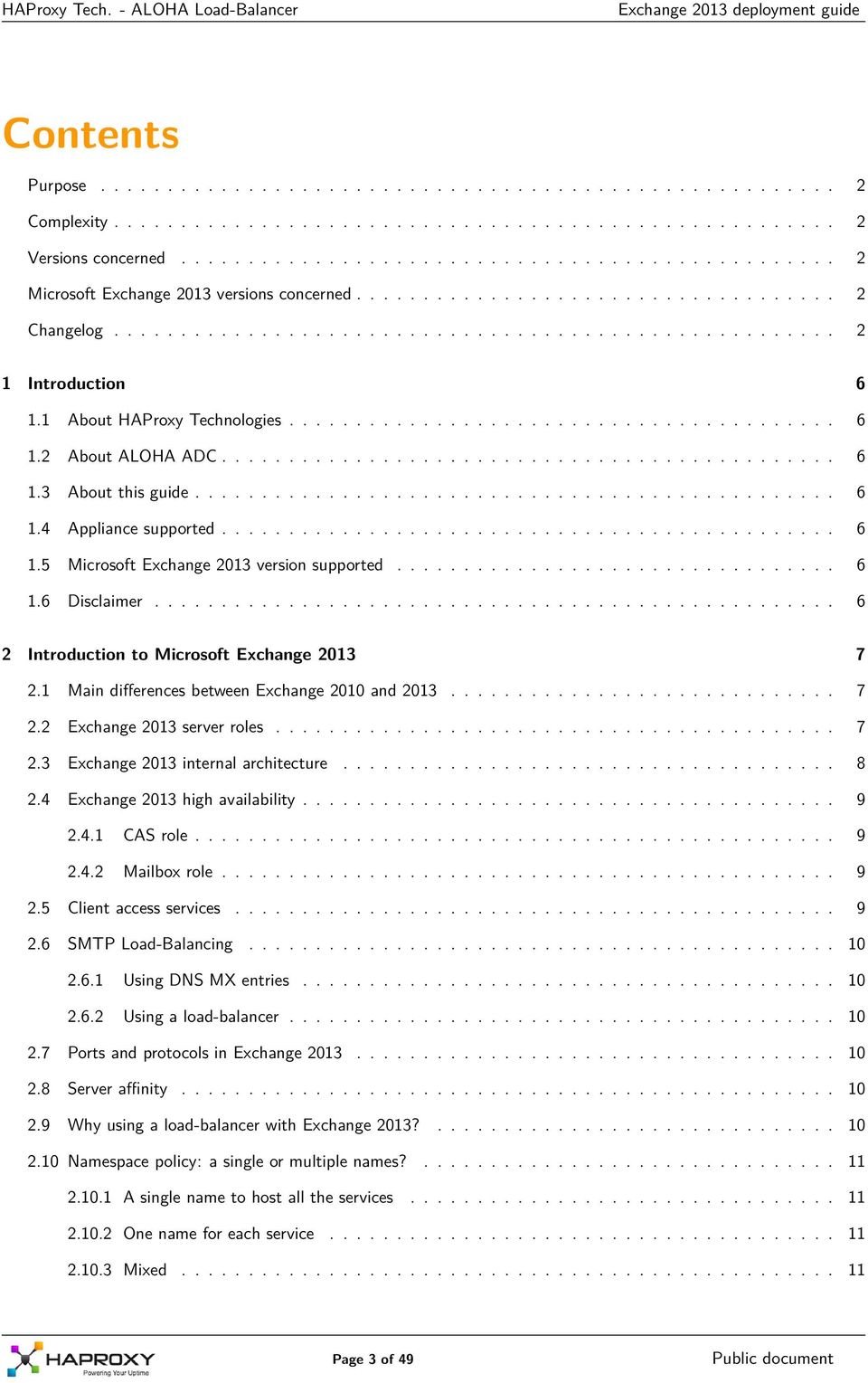
3 Contents Purpose Complexity Versions concerned Microsoft Exchange 2013 versions concerned Changelog Introduction About HAProxy Technologies About ALOHA ADC About this guide Appliance supported Microsoft Exchange 2013 version supported Disclaimer Introduction to Microsoft Exchange Main differences between Exchange 2010 and Exchange 2013 server roles Exchange 2013 internal architecture Exchange 2013 high availability CAS role Mailbox role Client access services SMTP Load-Balancing Using DNS MX entries Using a load-balancer Ports and protocols in Exchange Server affinity Why using a load-balancer with Exchange 2013? Namespace policy: a single or multiple names? A single name to host all the services One name for each service Mixed Page 3 of 49
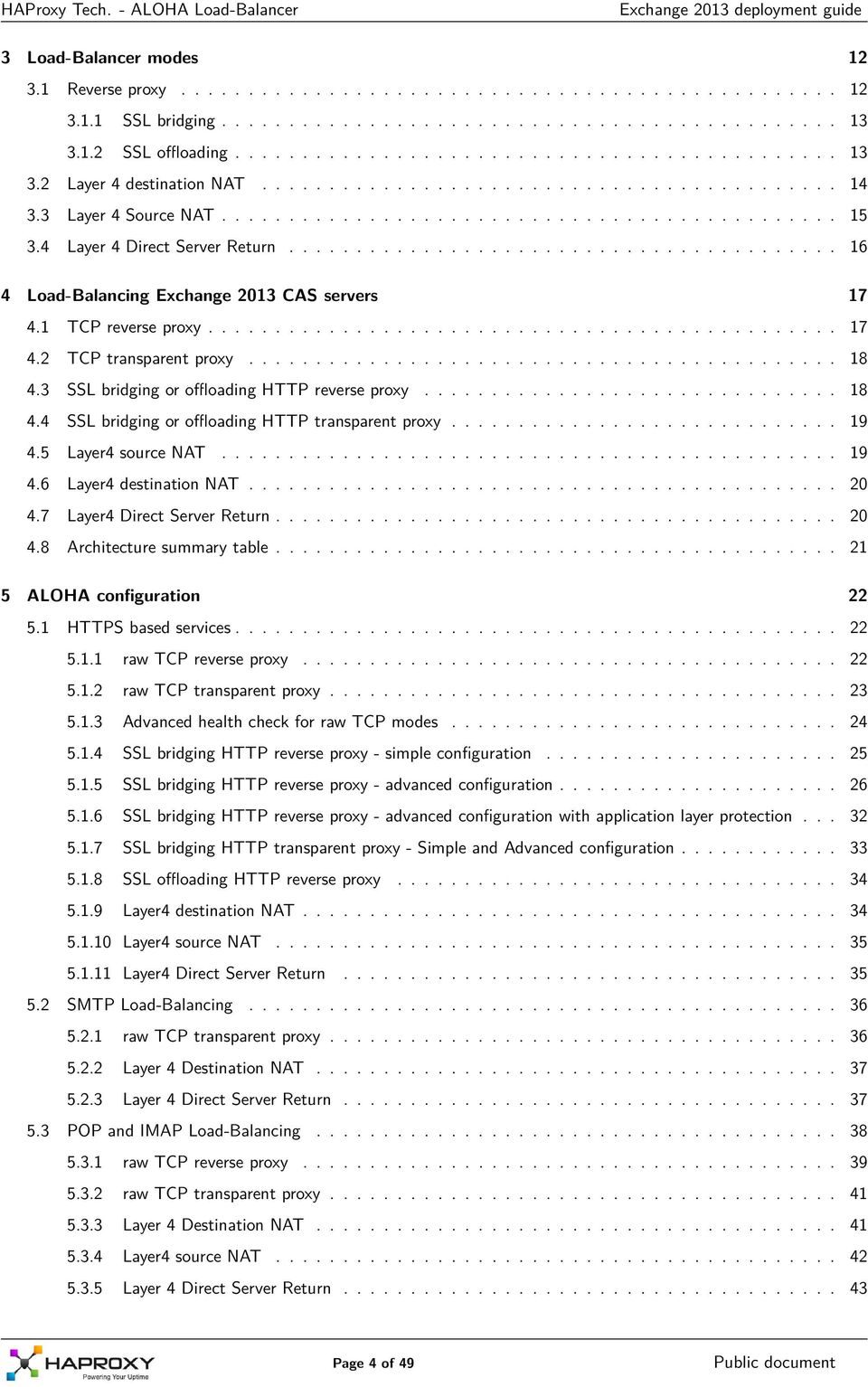
4 3 Load-Balancer modes Reverse proxy SSL bridging SSL offloading Layer 4 destination NAT Layer 4 Source NAT Layer 4 Direct Server Return Load-Balancing Exchange 2013 CAS servers TCP reverse proxy TCP transparent proxy SSL bridging or offloading HTTP reverse proxy SSL bridging or offloading HTTP transparent proxy Layer4 source NAT Layer4 destination NAT Layer4 Direct Server Return Architecture summary table ALOHA configuration HTTPS based services raw TCP reverse proxy raw TCP transparent proxy Advanced health check for raw TCP modes SSL bridging HTTP reverse proxy - simple configuration SSL bridging HTTP reverse proxy - advanced configuration SSL bridging HTTP reverse proxy - advanced configuration with application layer protection SSL bridging HTTP transparent proxy - Simple and Advanced configuration SSL offloading HTTP reverse proxy Layer4 destination NAT Layer4 source NAT Layer4 Direct Server Return SMTP Load-Balancing raw TCP transparent proxy Layer 4 Destination NAT Layer 4 Direct Server Return POP and IMAP Load-Balancing raw TCP reverse proxy raw TCP transparent proxy Layer 4 Destination NAT Layer4 source NAT Layer 4 Direct Server Return Page 4 of 49
5 6 Recommended deployment Architecture Security point of view No DMZ and/or no external users? Namespaces External services Internal services Why this configuration? ALOHA Configuration Network configuration Internal and external services Outlook Anywhere for LAN users Apendix 1: Exchange 2013 configuration summary Publications for internal users Publications for external users Page 5 of 49

6 1. Introduction 1.1 About HAProxy Technologies HAProxy Technologies is a software company, editing the Application Delivery Controller named ALOHA Load- Balancer. Headquartered in Jouy-en-Josas (Yvelines, France), HAProxy Tech. teams (including R&D and technical support) are based in France. HAProxy Tech. has currently around 100 customers in the banking, retail groups, energy and e-commerce industries and the public sector. HAProxy Tech. solutions are also used by many hosting providers. The ALOHA Load-balancer is designed to improve performance, guarantee quality of service and ensure the availability of critical business applications, by dynamically balancing flows and queries on the company s various servers. 1.2 About ALOHA ADC The ALOHA Load-Balancer is designed to load-balance at layer 4 and control application delivery at layer 7 if the OSI model. It is designed to integrate simply and quickly into any environment or architecture. The main ALOHA benefits: 1. Guarantee high availability of your applications and services as well as improve web application performance 2. Makes infrastructures scalable and reliable 3. Simplifies architecture: IPv6 frontend, SSL offloading, layer 7 routing Developed using HAProxy open source load balancing software, HAProxy Tech. solutions are known for their processing performance, reliability and wealth of features. Offered at more affordable price than other commercial solutions, they are easy to deploy and administer. ALOHA Load-balancer is available either as a physical appliance or as a Virtual Appliance. The Virtual appliance can run on top of the most popular hypervisors available on the market. 1.3 About this guide This guide first explains in the main lines how Exchange 2013 is designed and what benefits an ADC can bring. The guide also provides with configuration templates to setup the ALOHA Load-Balancer for Microsoft Exchange 2013 for the two most common architectures. The lastest version of this guide can be downloaded from HAProxy Tech. website: Appliance supported All ALOHA Load-Balancers appliances, both physical and virtual, can be used with Microsoft Exchange Microsoft Exchange 2013 version supported ALOHA load-balancer can be used with the following versions of Microsoft Exchange 2013: Microsoft exchange 2013 SP1 Microsoft exchange 2013 RTM 1.6 Disclaimer The Exchange 2013 configuration tips provided in this guide are purely informational. For more information about Microsoft Exchange 2013 tools and how to use them, please refer to Microsoft web site which is fully and properly documented. This guide does not provide information on how to install and setup an Exchange cluster. Page 6 of 49
7 2. Introduction to Microsoft Exchange 2013 Exchange 2013 is Microsoft solution to provide businesses with , calendar and contacts on the PC, phone and web browsers. 2.1 Main differences between Exchange 2010 and 2013 Exchange 2013 brings the following improvements: 1. Client Access servers are now session less 2. CAS Array has disappeared 3. Raw TCP MAPI protocol is not available anymore: Outlook clients have to use Outlook Anywhere (RPC over HTTPs) 2.2 Exchange 2013 server roles In Exchange 2013, servers are organised by roles, as described below: Name Client Access Mailbox Description Frontend servers on which client gets connected to access their s, contacts and agenda. Despite managing client connection, the client access server is sessionless. Often shortened as CAS. Servers hosting mails (in mailboxes), public folders and user session information. Often shortened as MBX. Page 7 of 49
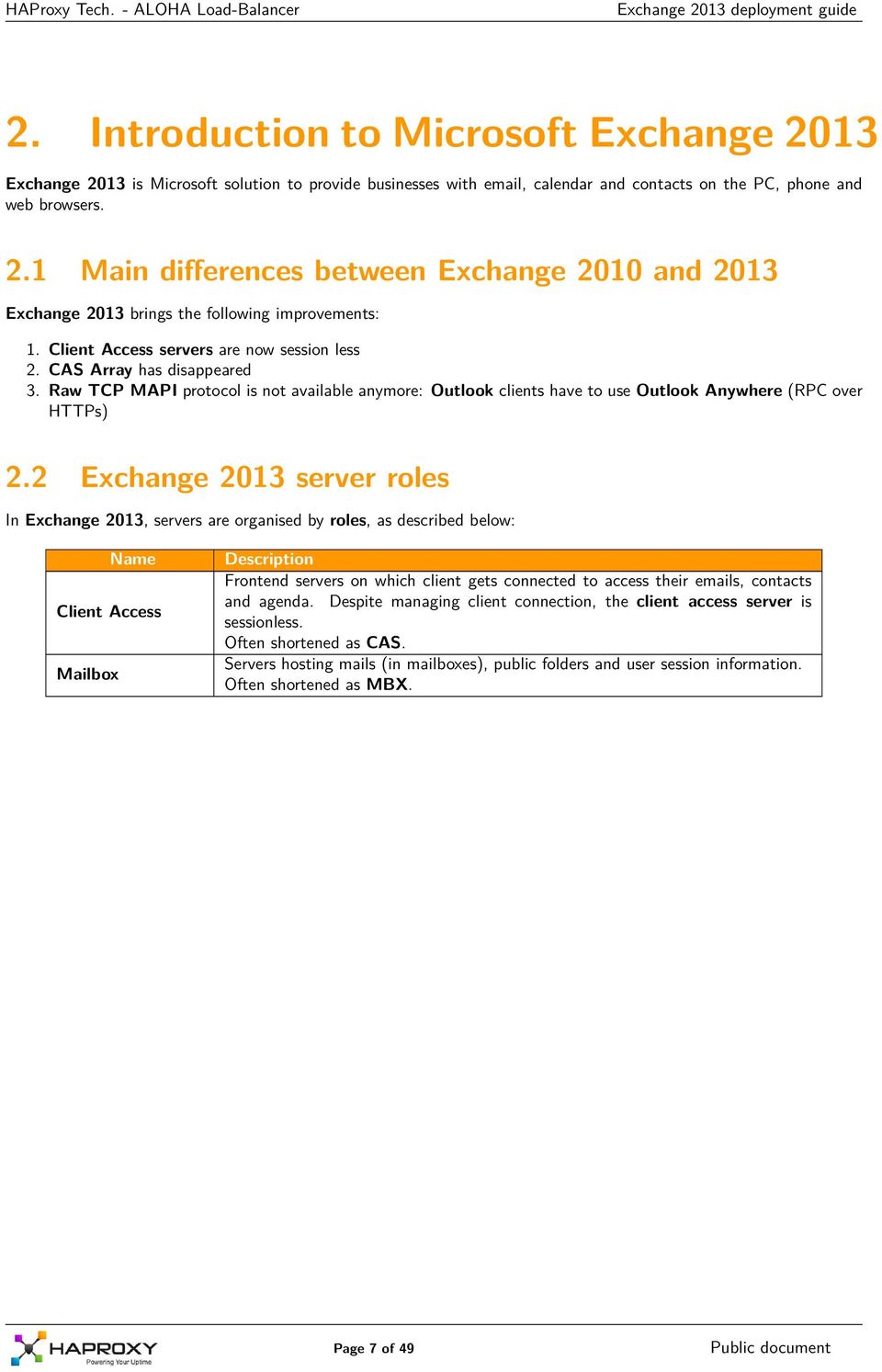

8 2.3 Exchange 2013 internal architecture Since there are only 2 roles in Exchange 2013, the architecture is quite simple, as shown on the diagram below: In Exchange 2013, CAS servers are pure proxies. They just forward connections from a client to the MBX server hosting the session. To know which MBX servers hosts a user s session, the CAS uses the Active Directory. Page 8 of 49
9 2.4 Exchange 2013 high availability CAS role In order to ensure high-availability of the CAS layer, you have to use a Load-Balancer. As explained in introduction, there is no CAS array anymore in Exchange 2013, this is one of the positive consequence of the session-less way of working. An other positive advantage is that Load-Balancing CAS servers will be very simple and straight forward Mailbox role Mailbox servers can be configured in a DAG (Database Availability Group). Once in a DAG, the mailboxes will be highly available for the CAS servers, as a consequence for the end users as well. Configuration of the DAG is outside the scope of this document. DAG relies on Microsoft Clustering Services which cannot be enabled on the same server as Microsoft Network Load Balancing (NLB). CAS servers use the Active Directory to know on which Mailbox server the user session and data are currently available. 2.5 Client access services The table below summarizes the services hosted by CAS servers and the type of clients accessing them: Service Protocol Clients Autodiscover (AS) HTTPs Outlook, mobile devices, web browsers Exchange ActiveSync (EAS) HTTPs Mobile devices Exchange Web Services (EWS) HTTPs third party applications Offline Address Book (OAB) HTTPs Outlook Outlook Anywhere (OA) HTTPs Outlook Messaging Application Programming Interface (MAPI) HTTPs Outlook (2013 SP1 and above) Outlook Web App (OWA) HTTPs any web browser Exchange Control Panel (ECP) HTTPs any web browser POP TCP any mail user agent IMAP TCP any mail user agent SMTP TCP any host on the network Page 9 of 49

10 2.6 SMTP Load-Balancing Using DNS MX entries SMTP load-balancing can be achieved by setting up two or more DNS MX (Mail exchanger) entries, each one pointing to an Exchange HUB server. A SMTP client would use first the MX record with the lowest preference, then try the next higher preference Using a load-balancer A load-balancer can be used to load-balance SMTP. You need a single MX entry, pointing to the loadbalancer. The load-balancer would balance requests among SMTP servers configured behind it. The current document provides different ways to load-balance SMTP using the ALOHA Load-Balancer. Of course, you we can combine both solutions 2.7 Ports and protocols in Exchange 2013 The table below lists the services and associated ports and protocols being used in Exchange 2013: TCP Port Protocol CAS Services 25 SMTP SMTP 443 HTTPs 1. Autodiscover (AS) 2. Exchange ActiveSync (EAS) 3. Exchange Control Panel (ECP) 4. Exchange Web Services (EWS) 5. Offline Address Book (OAB) 6. Outlook Anywhere (OA) 7. Mapi over HTTP (MAPI) 8. Outlook Web App (OWA) 110 and 995 POP3 POP3 143 and 993 IMAP4 IMAP4 2.8 Server affinity No CAS services require server affinity! 2.9 Why using a load-balancer with Exchange 2013? First of all, even if Exchange 2013 provides services arrays, to ensure high-availability, it does not provide any load balancing mechanism. This means a third party appliance is required to balance traffic amongst CAS Servers and services. The services that can be load-balanced are the ones hosted by the CAS servers as well as SMTP. A hardware load-balancer brings the following benefits to Microsoft Exchange 2013 platforms: Fast and Transparent failover Nobody will notice a server has failed since the Load-Balancer is able to quickly and transparently redirect users to a healthy server. Page 10 of 49

11 Application aware health checking A load-balancer provides application layer health check which provides the status of the service itself and are more efficient than a simple ping. SSL bridging or offloading A load-balancer can inspect ciphered traffic between a client and a CAS server to improve protection, reporting servers and URLs response time, etc... No downtime during maintenance The load-balancer can prevent traffic to reach a server during a maintenance window. And maintenance can now occur during business hours without generating any outage for the users. Scale up Building an architecture with a load-balancer allows scale up: adding new servers can be done easily with no production outage. Scale out Splitting services on the load-balancer side brings the ability to scale out the CAS services, dedicating servers to services Namespace policy: a single or multiple names? A Namespace is a DNS host name which hosts one or many Exchange 2013 services. From a namespace point of view, Exchange 2013 can be deployed in three modes: 1. A single name used to host all the services, IE: mail.domain.com. 2. one name for each service. IE: owa.domain.com, autodiscover.domain.com, etc A mix between the above: one name for many services, and one name for a single service Depending on the way you configure your Load-Balancer, the namespace policy can have an impact A single name to host all the services A single name means a single IP address is necessary. If the Load-Balancer can t read the content of the traffic (no SSL offloading neither bridging is in use), then ALL services must follow the same configuration parameters. So only a couple of health check policy is available: 1. a basic health check is configured and the Load-Balancer is not able to check each service individually. So users could be forwarded to a server with a broken service 2. an advanced check is configured to ensure each service works properly. If one service fails, the server will be unavailable for all the other services as well No problem at all if the Load-Balancer is configured in SSL offloading or bridging, since we can split the traffic per content and apply the right health check method for each service One name for each service If the Load-Balancer can t read the content of the traffic (no SSL offloading neither bridging is in use), then it is recommended to use one IP address per service. That way, the Load-Balancer can probe each service individually. No problem at all if the Load-Balancer is configured in SSL offloading or bridging, since we can split the traffic per content and apply the right health check method for each service Mixed In this policy mode, then you can group services with the same type of configuration together and apply common configuration to them. You can also isolate one service on which you want to perform a specific configuration. This mode is the most efficient since it allows mixing any type of configuration without consuming too much resources or IP addresses. Page 11 of 49

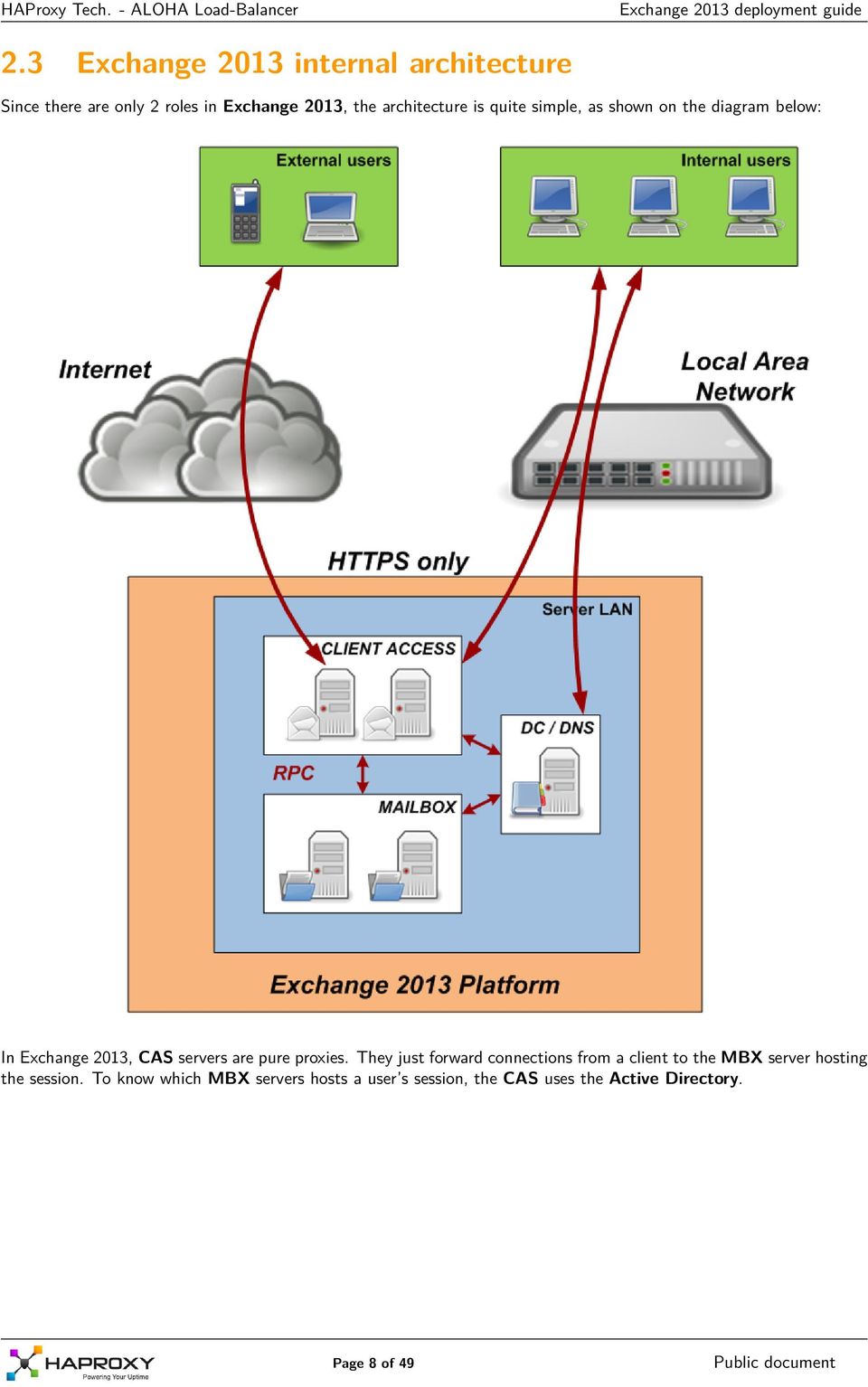
12 3. Load-Balancer modes This chapter introduces the different modes a Load-Balancer can support, to properly spread the traffic load amongst servers. This knowledge will be helpful when introducing CAS servers load-balancing, later in this document. The ALOHA Load-Balancer can be used in all modes in the mean time, depending on how you want to load-balance each service individually: HTTPs based services, SMTP, POP and IMAP 3.1 Reverse proxy The diagram below shows how things work when a Load-balancer is configured in Reverse-proxy mode: 1. The client establishes a connection to the Load-Balancer 2. The Load-Balancer chooses a Client Access server and establishes a new connection with it 3. client and dedicated CAS server discuss together through the Load-Balancer Basically, the Load-Balancer breaks the TCP connection between the client and the CAS server: there are 2 TCP connections established: one between the Load-Balancer and the client and an other one between the Load-Balancer and the server. In this mode, the Load-Balancer uses one of its IP address to get connected on the servers. In case of the server must know the client IP address, then this mode can be turn in transparent: it spoof the client IP when establishing the connection on the server. This mode can be deployed in a few ways: 1. raw tcp reverse proxy 2. raw tcp transparent proxy 3. HTTP reverse proxy or transparent proxy in SSL bridging mode 4. HTTP reverse proxy or transparent proxy in SSL offloading mode (Exchange 2013 SP1 and above) Page 12 of 49

13 3.1.1 SSL bridging SSL bridging means a device (here the ALOHA Load-Balancer) located in the middle of a ciphered stream can access the content exchanged between a client and a server by deciphering then ciphering traffic. To achieve this, we setup the ALOHA to decipher the traffic from the client and to cipher the traffic to the server. That way, the ALOHA itself can access to the content in clear while the traffic on the network is ciphered. The diagram below shows this type of architecture: SSL offloading SSL offloading means a device in front of application servers processes SSL traffic and gets connected in clear to the server. The diagram below shows this type of architecture: Microsoft supports SSL offloading since Exchange 2013 SP1 For this mode, some modification of the CAS server configuration must be performed. Page 13 of 49
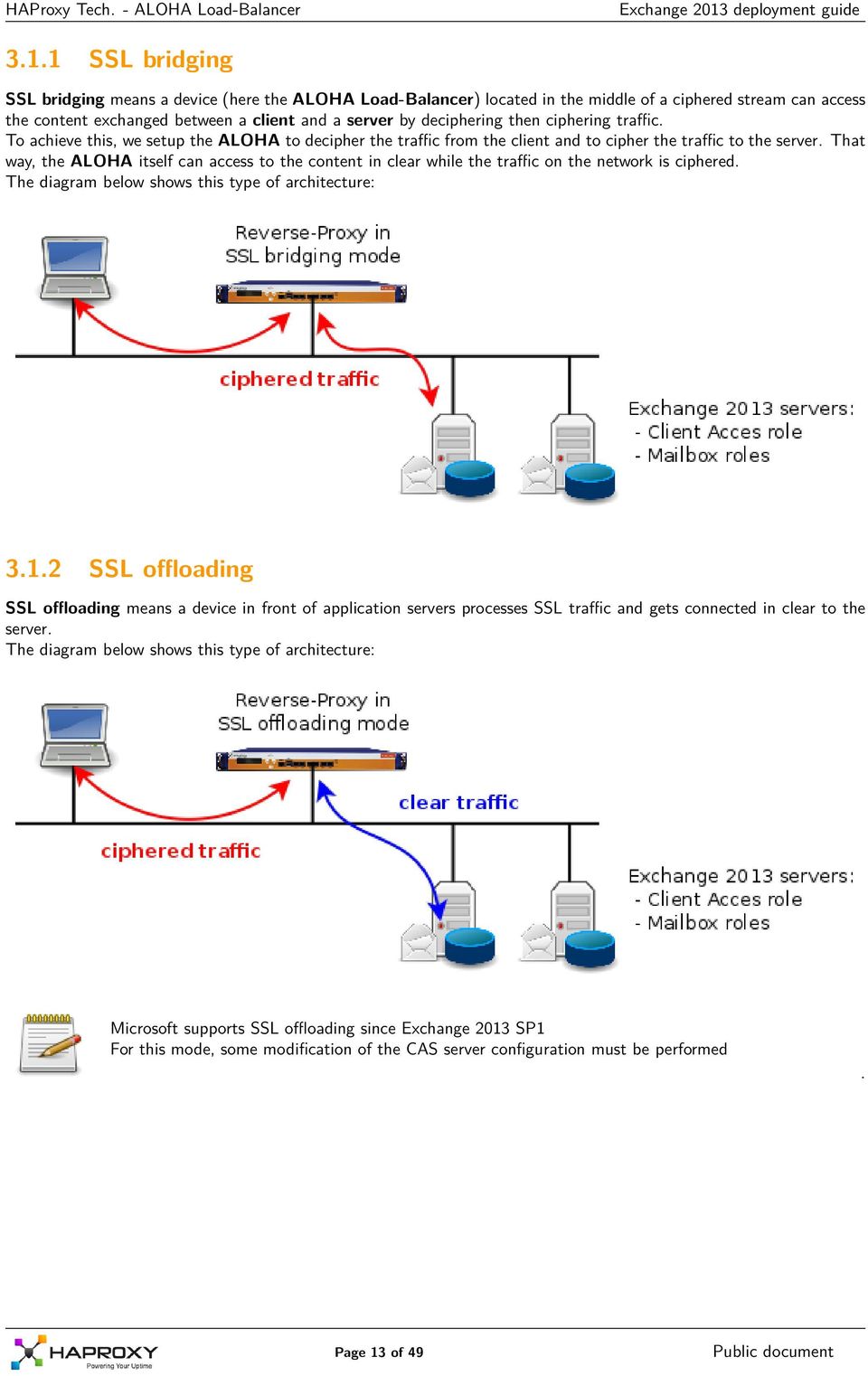
14 3.2 Layer 4 destination NAT The diagram below shows how things work when a Load-balancer is configured in Layer 4 destination NAT mode: 1. The client establishes a connection to the Client Access server through the Load-Balancer 2. Client and CAS server discuss through the Load-Balancer Basically, the Load-Balancer acts as a packet forwarder between the client and the server: a single TCP connection is established directly between the client and the CAS server, and the Load-Balancer just forward packets between both of them. There a couple of drawbacks about this mode, due to the destination NAT: the client and the server can t be in the same subnet (otherwise the server will answer directly to the client, bypassing the Load-Balancer and the reverse NAT won t occur. the server must use the Load-Balancer as its default gateway Page 14 of 49
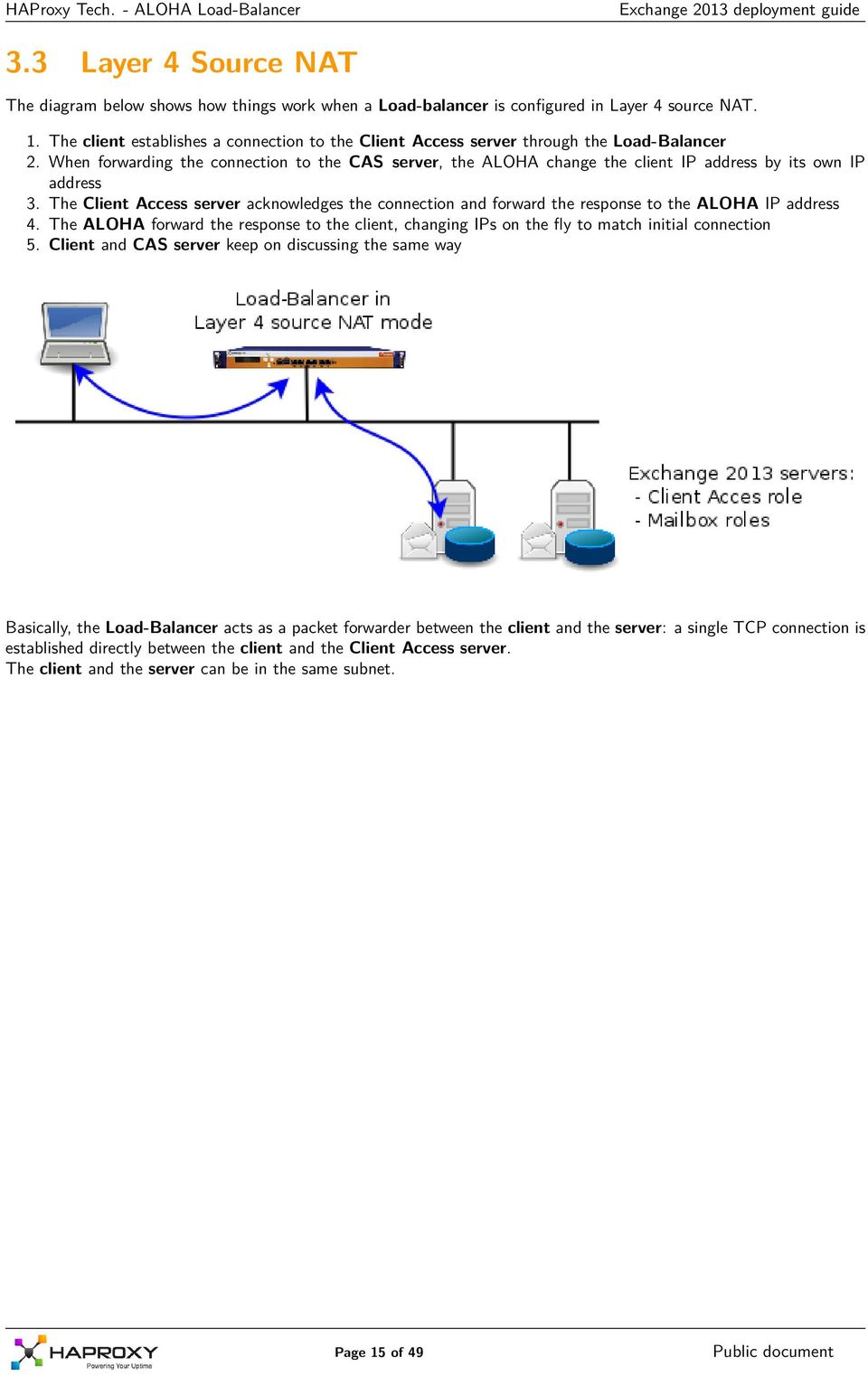
15 3.3 Layer 4 Source NAT The diagram below shows how things work when a Load-balancer is configured in Layer 4 source NAT. 1. The client establishes a connection to the Client Access server through the Load-Balancer 2. When forwarding the connection to the CAS server, the ALOHA change the client IP address by its own IP address 3. The Client Access server acknowledges the connection and forward the response to the ALOHA IP address 4. The ALOHA forward the response to the client, changing IPs on the fly to match initial connection 5. Client and CAS server keep on discussing the same way Basically, the Load-Balancer acts as a packet forwarder between the client and the server: a single TCP connection is established directly between the client and the Client Access server. The client and the server can be in the same subnet. Page 15 of 49
16 3.4 Layer 4 Direct Server Return The diagram below shows how things work when a Load-balancer is configured in Layer 4 DSR mode. 1. The client establishes a connection to the Client Access server through the Load-Balancer 2. The Client Access server acknowledges the connection directly to the client, bypassing the Load-Balancer on the way back. The Client Access server must have the Load-Balancer Virtual IP configured on a loopback interface. 3. Client and CAS server keep on discussing the same way: request through the load-balancer and answers directly from server to client. Basically, the Load-Balancer acts as a packet forwarder between the client and the server: a single TCP connection is established directly between the client and the Client Access server. The Client and the server can be in the same subnet, like in the diagram, or can be in two different subnet. In the second case, the server would use its default gateway (no need to forward the traffic back through the load-balancer). Page 16 of 49

17 4. Load-Balancing Exchange 2013 CAS servers In this chapter, we ll explain the different ways of Load-Balancing the CAS servers, with pro and cons for each type of architecture. When reading, keep in mind the points below: 1. CAS servers don t need persistence 2. All the services are delivered over HTTPS 3. SSL Offloading on the CAS servers is supported by Microsoft since Exchange 2013 SP1 4. POP and IMAP load-balancing will be described later in this document 5. SMTP load-balancing will be described later in this document There is only one good architecture: the one which fits your requirements! 4.1 TCP reverse proxy Load-Balancer implementation deployed in Reverse-Proxy mode, listening on TCP port 443. Pros TCP connection is split in 2 parts, improving network protection: one from client to Load-Balancer one from Load-Balancer to server Non intrusive implementation: the Load-Balancer uses its own IP address to get connected on the server. No route to add, no default gateway to change on servers. The Load-Balancer can be anywhere in the infrastructure Clients and servers can be in the same subnet Cons the CAS servers don t know theclient IP address, since it is hidden by theload-balancer one the Load-Balancer can t access to HTTP content since its cyphered between the client and the server All CAS services must follow the same load-balancing rules, unless you dedicate one IP address per service In case of multiple namespaces, then one IP address per namespace is recommended Page 17 of 49
18 4.2 TCP transparent proxy Load-Balancer implementation deployed in Reverse-Proxy mode on TCP port 443, the Load-Balancer spoofs the client IP address when establishing the connection on the CAS server Pros TCP connection is split in 2 parts, improving network protection: one from client to Load-Balancer one from Load-Balancer to server the Load-Balancer can be anywhere in the infrastructure the CAS servers know the client IP address Cons intrusive implementation: the traffic from the server to the client MUST pass through the Load-Balancer Clients and servers can t be in the same subnet the Load-Balancer can t access to HTTP content since it remains cyphered between the client and the server All CAS services must follow the same load-balancing rules, unless you dedicated on IP address per service In case of multiple namespaces, then one IP address per namespace is recommended 4.3 SSL bridging or offloading HTTP reverse proxy Load-Balancer implementation deployed in SSL bridging Reverse-Proxy mode on TCP port 443, the Load-Balancer will act as a man-inthe-middle: traffic from client is decyphered, traffic to server is cyphered deployed in SSL offloading Reverse-Proxy mode on TCP port 443, the Load-Balancer deciphers the traffic from clients, traffic to servers is sent in clear Pros TCP connection is split in 2 parts, improving network protection: one from client to Load-Balancer one from Load-Balancer to server the Load-Balancer can access to HTTP content and improve application protection (brute force, CSRF, etc...) Each CAS service can have its own load-balancing rule, using a single IP address non intrusive implementation: the Load-Balancer uses its own IP address to get connected on the server the Load-Balancer can be anywhere in the infrastructure Clients and servers can be in the same subnet In case of multiple namespaces, then a single IP address is necessary Cons the CAS servers don t know the client IP address, since its hidden by the Load-Balancer one require Load-Balancers with a huge SSL capacity (furthermore in bridging mode) Page 18 of 49

19 4.4 SSL bridging or offloading HTTP transparent proxy Load-Balancer implementation deployed in SSL bridging Reverse-Proxy mode on TCP port 443, the Load-Balancer will act as a man-inthe-middle: traffic from client is decyphered, traffic to server is cyphered deployed in SSL offloading Reverse-Proxy mode on TCP port 443, the Load-Balancer deciphers the traffic from clients, traffic to servers is sent in clear In both cases, when establishing the connection on the CAS server, the Load-Balancer spoofs the client IP address. Pros TCP connection is split in 2 parts, improving network protection: one from client to Load-Balancer one from Load-Balancer to server the Load-Balancer can access to HTTP content and improve application protection (brute force, CSRF, etc...) the CAS servers know the client IP address Each CAS service can have its own load-balancing rule, using a single IP address the Load-Balancer can be anywhere in the infrastructure In case of multiple namespaces, then a single IP address is necessary Cons intrusive implementation: the traffic from the server to the client MUST pass through the Load-Balancer Clients and servers can t be in the same subnet require Load-Balancers with a huge SSL processing capacity (furthermore in bridging mode) 4.5 Layer4 source NAT Load-Balancer implementation deployed in packet forwarder mode on TCP port 443, the Load-Balancer will just forward IP packets between clients and CAS servers. When forwarding the packets to the CAS servers, the Load-Balancer will spoof the client IP address. Pros the Load-Balancer can be anywhere in the infrastructure Clients and servers can be in the same subnet Low capacity Load-Balancers can load-balance thousands of users non-intrusive implementation Cons the Load-Balancer can t access to HTTP content the CAS servers don t know the client IP address All CAS services must follow the same load-balancing rules unless you dedicate one IP per service TCP connection is established between the client and the server directly, it means the CAS server IP stack is exposed to clients In case of multiple namespaces, then one IP address per namespace is recommended This mode is only available in ALOHA v6.0 and above. Page 19 of 49

20 4.6 Layer4 destination NAT Load-Balancer implementation deployed in Forwarder mode on TCP port 443, the Load-Balancer will just forward IP packets between clients and CAS servers. When forwarding the packets to the CAS servers, the Load-Balancer will change the destination IP address from the Service IP to the chosen server IP. Pros the Load-Balancer can be anywhere in the infrastructure Low capacity Load-Balancers can load-balance thousands of users CAS servers know the client IP address Cons Clients and servers can t be in the same subnet the Load-Balancer can t access to HTTP content All CAS services must follow the same load-balancing rules TCP connection is established between the client and the server directly, it means the CAS server IP stack is exposed to clients intrusive implementation: the traffic from the server to the client MUST pass through the Load-Balancer In case of multiple namespaces, then one IP address per namespace is recommended 4.7 Layer4 Direct Server Return Load-Balancer implementation deployed in packet forwarder mode on TCP port 443, the Load-Balancer will just turn the destination MAC address of packets to the chosen CAS servers MAC address. Pros CAS servers know the client IP address Clients and servers can be in the same subnet Low capacity Load-Balancers can load-balance thousands of users Cons the Load-Balancer and the CAS servers MUST be in the same vlan the Load-Balancer can t access to HTTP content All CAS services must follow the same load-balancing rules, unless you dedicate one IP address per service TCP connection is established between the client and the server directly, it means the CAS server IP stack is exposed to clients intrusive implementation: the service IP must be configured on a Loopback on the CAS server In case of multiple namespaces, then one IP address per namespace is recommended Page 20 of 49

21 4.8 Architecture summary table The table below summarizes the different type of architectures with their pros and cons: Architecture SSL bridging HTTP reverse proxy SSL bridging HTTP transparent proxy SSL offloading HTTP reverse proxy SSL offloading HTTP transparent proxy Intrusive mode * Source IP on CAS servers no Load-Balancer IP 3K yes Client IP 3K no Load-Balancer IP 10K yes Client IP 10K MAX number of users ** Protection Network and Application Network and Application Network and Application Network and Application raw TCP reverse proxy no Load-Balancer IP 20K Network raw TCP transparent proxy yes client IP 20K Network Layer 4 source NAT no Load-Balancer IP 200K no Layer 4 destination NAT yes Client IP 500K no Layer 4 Direct Server Return yes Client IP 1M no Namespace no limitation no limitation no limitation no limitation multiple namespace and IPs recommended multiple namespace and IPs recommended multiple namespace and IPs recommended multiple namespace and IPs recommended multiple namespace and IPs recommended * Will there by any changes to perform in an existing platform ** with the biggest ALOHA Page 21 of 49
22 5. ALOHA configuration In this chapter, we provide ALOHA configuration templates for each type of architecture. We consider you re already connected on the GUI and the service VRRP address for Exchange 2013 is already setup. To configure a new VRRP service IP, please refer to HAProxy Tech. documentation: AN-0002-EN - Implementing High Availability via VRRP. 5.1 HTTPS based services raw TCP reverse proxy Go on the LB Layer 7 tab, then add the configuration below: frontend ft_exchange_2013 mode tcp bind :443 name https log global option tcplog option dontlognull option contstats timeout client 300s maxconn default_backend bk_exchange_2013 backend bk_exchange_2013 mode tcp balance leastconn option tcplog log global option redispatch retries 3 timeout server 300s timeout connect 5s default-server inter 3s rise 2 fall 3 server 2013exchange :443 check server 2013exchange :443 check bind s IP address servers IP addresses maxconn from the frontend section This configuration does a basic TCP check. For an advanced TCP check read the section "Advanced check for raw TCP modes" Page 22 of 49
23 5.1.2 raw TCP transparent proxy Go on the LB Layer 7 tab, then add the same configuration as raw TCP reverse proxy and add the line below in your backend description: source usesrc clientip bind s IP address servers IP addresses maxconn from the frontend section This configuration does a basic TCP check. For an advanced TCP check read the section "Advanced check for raw TCP modes" Page 23 of 49
24 5.1.3 Advanced health check for raw TCP modes As explained before in this document, the issue of TCP mode is that you can t split traffic by content, so you must forward all traffic to a single farm. This mode has a couple of drawbacks: you don t know if a service is down because your health check is not application aware you must use one IP per service, hence one farm per service where you perform the relative application check There is a third way: a single farm where you perform all the required checks to consider a server up and ready for production. The configuration below explain the tcp-check sequence for this purpose. It checks all the HTTPs based services and if any of them fails, then the server will be considered as nonoperational. Just copy the content below in your backend section and remove the checks you don t need, if any: option tcp-check tcp-check connect port 443 ssl # activesync tcp-check send GET\ /Microsoft-Server-ActiveSync/HealthCheck.htm\ HTTP/1.1\r\n tcp-check send Host:\ mail.2013.haproxylab.net\r\n tcp-check send \r\n tcp-check expect string 200\ OK # autodiscover tcp-check send GET\ /Autodiscover/HealthCheck.htm\ HTTP/1.1\r\n tcp-check send Host:\ mail.2013.haproxylab.net\r\n tcp-check send \r\n tcp-check expect string 200\ OK # exchange control panel tcp-check send GET\ /ECP/HealthCheck.htm\ HTTP/1.1\r\n tcp-check send Host:\ mail.2013.haproxylab.net\r\n tcp-check send \r\n tcp-check expect string 200\ OK # exchange web services tcp-check send GET\ /EWS/HealthCheck.htm\ HTTP/1.1\r\n tcp-check send Host:\ mail.2013.haproxylab.net\r\n tcp-check send \r\n tcp-check expect string 200\ OK # mapi tcp-check send GET\ /mapi/healthcheck.htm\ HTTP/1.1\r\n tcp-check send Host:\ mail.2013.haproxylab.net\r\n tcp-check send \r\n tcp-check expect string 200\ OK # offline address book tcp-check send GET\ /OAB/HealthCheck.htm\ HTTP/1.1\r\n tcp-check send Host:\ mail.2013.haproxylab.net\r\n tcp-check send \r\n tcp-check expect string 200\ OK # rpc over http tcp-check send GET\ /RPC/HealthCheck.htm\ HTTP/1.1\r\n tcp-check send Host:\ mail.2013.haproxylab.net\r\n tcp-check send \r\n tcp-check expect string 200\ OK # outlook web app tcp-check send GET\ /owa/healthcheck.htm\ HTTP/1.1\r\n tcp-check send Host:\ mail.2013.haproxylab.net\r\n tcp-check send \r\n tcp-check expect string 200\ OK Page 24 of 49
25 5.1.4 SSL bridging HTTP reverse proxy - simple configuration Go on the LB Layer 7 tab, then add the configuration below: frontend ft_exchange_2013 bind :80 name http bind :443 name https ssl crt my_certificate_name mode http option http-keep-alive no option httpclose no option http-server-close no option forceclose option contstats option dontlognull log global option httplog timeout client 25s timeout http-keep-alive 1s timeout http-request 15s maxconn 1000 acl ssl_connection ssl_fc acl host_mail hdr(host) -i mail.mydomain.com acl path_slash path / http-request redirect scheme https code 302 unless ssl_connection http-request redirect location /owa/ code 302 if path_slash host_mail default_backend bk_exchange_2013 backend bk_exchange_2013 balance roundrobin mode http option http-keep-alive option prefer-last-server no option httpclose no option http-server-close no option forceclose log global option httplog option forwardfor option redispatch retries 3 timeout server 25s timeout connect 5s timeout queue 30s default-server inter 3s rise 2 fall 3 server 2013xchange :443 maxconn 1000 weight 10 ssl check server 2013xchange :443 maxconn 1000 weight 10 ssl check bind s IP address and SSL certificate name acl host_mail s domain name list servers IP addresses and maxconn parameter maxconn from the frontend section You can use the Advanced health check for raw TCP modes to improve this configuration Page 25 of 49
26 5.1.5 SSL bridging HTTP reverse proxy - advanced configuration Thanks to ALOHA powerful Layer 7 features, we can split the traffic per Exchange service and dedicate one backend per service. Go on the LB Layer 7 tab, then add the configuration below: Frontend configuration: This frontend configuration is the entry point which will dispatch traffic to different backends, one per Exchange 2013 service, based on URL path: frontend ft_xchange2013_https bind :80 name INT_http bind :443 name INT_https ssl crt 2013.haproxylab.net mode http option http-keep-alive option prefer-last-server no option httpclose no option http-server-close no option forceclose no option http-tunnel timeout client 600s log global capture request header Host len 32 capture request header User-Agent len 64 capture response header Content-Length len 10 # log-format directive must br written on a single line # it is splitted for documentation convnience log-format %ci:%cp\ [%t]\ %ft\ %b/%s\ %Tq/%Tw/%Tc/%Tr/%Tt\ %ST\ %B\ %CC\ %CS\ %tsc\ %ac/%fc/%bc/%sc/%rc \ %sq/%bq\ %hr\ %hs\ {%sslv/%sslc/%[ssl_fc_sni]/%[ssl_fc_session_id]}\ "%[capture.req.method]\ %[capture.req.hdr(0)]%[capture.req.uri]\ HTTP/1.1" maxconn 1000 acl ssl_connection ssl_fc acl host_mail hdr(host) -i mail.2013.haproxylab.net acl path_slash path / acl path_autodiscover path_beg -i /Autodiscover/Autodiscover.xml acl path_activesync path_beg -i /Microsoft-Server-ActiveSync acl path_ews path_beg -i /ews/ acl path_owa path_beg -i /owa/ acl path_oa path_beg -i /rpc/rpcproxy.dll acl path_ecp path_beg -i /ecp/ acl path_oab path_beg -i /oab/ acl path_mapi path_beg -i /mapi/ acl path_check path_end -i HealthCheck.htm # HTTP deny rules http-request deny if path_check # HTTP redirect rules http-request redirect scheme https code 302 unless ssl_connection http-request redirect location /owa/ code 302 if path_slash host_mail # HTTP routing rules use_backend bk_xchange2013_https_autodiscover if path_autodiscover use_backend bk_xchange2013_https_activesync if path_activesync use_backend bk_xchange2013_https_ews if path_ews use_backend bk_xchange2013_https_owa if path_owa use_backend bk_xchange2013_https_oa if path_oa use_backend bk_xchange2013_https_ecp if path_ecp use_backend bk_xchange2013_https_oab if path_oab use_backend bk_xchange2013_https_mapi if path_mapi # other services go here default_backend bk_xchange2013_https_default Page 26 of 49
27 bind s IP address and SSL certificate name acl host_mail s domain name list maxconn from the frontend section Autodiscover configuration: backend bk_xchange2013_https_autodiscover balance roundrobin option http-keep-alive option prefer-last-server no option httpclose no option http-server-close no option forceclose no option http-tunnel mode http log global option httplog option forwardfor option httpchk GET /Autodiscover/HealthCheck.htm http-check expect string 200\ OK default-server inter 3s rise 2 fall 3 timeout server 60s server 2013xchange :443 ssl maxconn 1000 weight 10 check server 2013xchange :443 ssl maxconn 1000 weight 10 check servers IP addresses Activesync configuration: backend bk_xchange2013_https_activesync balance roundrobin mode http option http-keep-alive option prefer-last-server no option httpclose no option http-server-close no option forceclose no option http-tunnel log global option httplog option forwardfor option httpchk GET /Microsoft-Server-ActiveSync/HealthCheck.htm http-check expect string 200\ OK default-server inter 3s rise 2 fall 3 timeout server 60s server 2013xchange :443 ssl maxconn 1000 weight 10 check server 2013xchange :443 ssl maxconn 1000 weight 10 check servers IP addresses and maxconn parameter Page 27 of 49
28 Exchange Control Panel (ECP) configuration: backend bk_xchange2013_https_ecp balance roundrobin mode http option http-keep-alive option prefer-last-server no option httpclose no option http-server-close no option forceclose no option http-tunnel log global option httplog option forwardfor option httpchk GET /ECP/HealthCheck.htm http-check expect string 200\ OK default-server inter 3s rise 2 fall 3 timeout server 60s server 2013xchange :443 ssl maxconn 1000 weight 10 check server 2013xchange :443 ssl maxconn 1000 weight 10 check servers IP addresses Exchange Web Services (EWS) configuration: backend bk_xchange2013_https_ews balance roundrobin mode http option http-keep-alive option prefer-last-server no option httpclose no option http-server-close no option forceclose no option http-tunnel log global option httplog option forwardfor option httpchk GET /EWS/HealthCheck.htm http-check expect string 200\ OK default-server inter 3s rise 2 fall 3 timeout server 60s server 2013xchange :443 ssl maxconn 1000 weight 10 check server 2013xchange :443 ssl maxconn 1000 weight 10 check servers IP addresses Page 28 of 49
29 MAPI configuration: backend bk_xchange2013_https_mapi balance roundrobin mode http option http-keep-alive option prefer-last-server no option httpclose no option http-server-close no option forceclose no option http-tunnel log global option httplog option forwardfor option httpchk GET /mapi/healthcheck.htm http-check expect string 200\ OK default-server inter 3s rise 2 fall 3 timeout server 600s server 2013xchange :443 ssl maxconn 1000 weight 10 check server 2013xchange :443 ssl maxconn 1000 weight 10 check servers IP addresses and maxconn parameter Offline Address Book (OAB) configuration: backend bk_xchange2013_https_oab balance roundrobin mode http option http-keep-alive option prefer-last-server no option httpclose no option http-server-close no option forceclose no option http-tunnel log global option httplog option forwardfor option httpchk GET /OAB/HealthCheck.htm http-check expect string 200\ OK default-server inter 3s rise 2 fall 3 timeout server 60s server 2013xchange :443 ssl maxconn 1000 weight 10 check server 2013xchange :443 ssl maxconn 1000 weight 10 check servers IP addresses Page 29 of 49
30 Outlook Anywhere configuration: backend bk_xchange2013_https_oa balance roundrobin mode http option http-keep-alive option prefer-last-server no option httpclose no option http-server-close no option forceclose no option http-tunnel log global option httplog option forwardfor option httpchk GET /RPC/HealthCheck.htm http-check expect string 200\ OK default-server inter 3s rise 2 fall 3 timeout server 600s server 2013xchange :443 ssl maxconn 1000 weight 10 check server 2013xchange :443 ssl maxconn 1000 weight 10 check servers IP addresses and maxconn parameter OWA (Outlook Web App) configuration: backend bk_xchange2013_https_owa balance roundrobin mode http option http-keep-alive option prefer-last-server no option httpclose no option http-server-close no option forceclose no option http-tunnel log global option httplog option forwardfor option httpchk GET /owa/healthcheck.htm http-check expect string 200\ OK default-server inter 3s rise 2 fall 3 timeout server 60s server 2013xchange :443 ssl maxconn 1000 weight 10 check server 2013xchange :443 ssl maxconn 1000 weight 10 check servers IP addresses Page 30 of 49
31 Other services configuration: backend bk_xchange2013_https_default balance roundrobin mode http option http-keep-alive option prefer-last-server no option httpclose no option http-server-close no option forceclose no option http-tunnel log global option httplog option forwardfor default-server inter 3s rise 2 fall 3 timeout server 60s server 2013xchange :443 ssl maxconn 1000 weight 10 check server 2013xchange :443 ssl maxconn 1000 weight 10 check servers IP addresses Page 31 of 49
32 5.1.6 SSL bridging HTTP reverse proxy - advanced configuration with application layer protection Advanced application layer protection is outside the scope of this configuration. Don t hesitate to contact HAProxy Tech. teams for such configuration. Page 32 of 49
33 5.1.7 SSL bridging HTTP transparent proxy - Simple and Advanced configuration The configuration is exactly the same as in the previous section, just add the line below to each backend description to turn on transparent proxy mode: source usesrc clientip bind s IP address and SSL certificate name acl host_mail s domain name list servers IP addresses Page 33 of 49
34 5.1.8 SSL offloading HTTP reverse proxy SSL offloading configuration is exactly the same as SSL bridging. The only thing which changes is the way the ALOHA gets connected to the servers. To configure the ALOHA in SSL offloading, just replace the server port and remove the ssl keyword from the server line description in the template provided in the SSL bridging sections. In example: server 2013xchange :80 maxconn 1000 weight 10 check server 2013xchange :80 maxconn 1000 weight 10 check Layer4 destination NAT Go on the LB Layer 4 tab, then add the configuration below: director exchange :443 TCP balance leastconn mode nat check interval 10 timeout 2 option tcpcheck server 2013exchange :443 weight 10 check server 2013exchange :443 weight 10 check director s IP address servers IP addresses Page 34 of 49
35 Layer4 source NAT Go on the LB Layer 4 tab, then add the configuration below: director exchange :443 TCP balance leastconn mode nat check interval 10 timeout 2 option tcpcheck server 2013exchange :443 weight 10 check server 2013exchange :443 weight 10 check director s IP address servers IP addresses Then, go on the NAT tab, and create a new rule with: Protocol: TCP Source / After / IP: the Virtual IP to NAT to (in the server LAN) Destination / Before / IP: the Virtual IP exposed to users Destination / Before / port: the port of the service exposed to users let the other options to default value (any) In example, clients browse Exchange 2013 services on :443, and we want to re-use this IP address to get connected on the server. We have to create the following rule: Apply this confirguration, then click on the Apply button Layer4 Direct Server Return Go on the LB Layer 4 tab, then add the configuration below: director exchange :443 TCP balance leastconn mode gateway check interval 10 timeout 2 option tcpcheck server 2013exchange :443 weight 10 check server 2013exchange :443 weight 10 check director s IP address servers IP addresses Page 35 of 49
36 5.2 SMTP Load-Balancing When Load-Balancing SMTP services, it is important to know the client IP address to limit access to SMTP relays and to improve SPAM protection. The table below lists the different Load-Balancer deployment modes recommended for SMTP: Architecture Intrusive Source IP on mode SMTP servers Protection raw TCP transparent proxy yes client IP Network Layer 4 destination NAT yes Client IP no Layer 4 Direct Server Return yes Client IP no Other deployment modes can be configured but will hide the client IP address to the SMTP server raw TCP transparent proxy Go on the LB Layer 7 tab, then add the configuration below: frontend ft_exchange_2013_smtp mode tcp bind :25 name smtp log global option tcplog option dontlognull option contstats timeout client 300s maxconn default_backend bk_exchange_2013_smtp backend bk_exchange_2013_smtp mode tcp balance leastconn option tcplog log global option redispatch retries 3 timeout server 300s timeout connect 5s source usesrc clientip option tcp-check tcp-check expect string 220\ default-server inter 3s rise 2 fall 3 server 2013exchange :25 check server 2013exchange :25 check bind s IP address servers IP addresses Page 36 of 49
37 5.2.2 Layer 4 Destination NAT Go on the LB Layer 4 tab, then add the configuration below: director exchange :25 TCP balance leastconn mode nat check interval 10 timeout 2 option tcpcheck server 2013exchange :25 weight 10 check server 2013exchange :25 weight 10 check director s IP address servers IP addresses Layer 4 Direct Server Return Go on the LB Layer 4 tab, then add the configuration below: director exchange :25 TCP balance leastconn mode gateway check interval 10 timeout 2 option tcpcheck server 2013exchange :25 weight 10 check server 2013exchange :25 weight 10 check director s IP address servers IP addresses Page 37 of 49
38 5.3 POP and IMAP Load-Balancing In some deployment cases, it could be required to load-balance POP and IMAP services. The table below summarizes the recommended load-balancing modes for POP and IMAP: Architecture Intrusive Source IP on CAS mode servers Protection raw TCP reverse proxy no Load-Balancer IP Network raw TCP transparent proxy yes client IP Network Layer 4 full NAT no Load-Balancer IP no Layer 4 destination NAT yes Client IP no Layer 4 Direct Server Return yes Client IP no Page 38 of 49
39 5.3.1 raw TCP reverse proxy Go on the LB Layer 7 tab, then add the configuration below: frontend ft_exchange_2013_pop mode tcp bind :110 name pop bind :995 name pops log global option tcplog option dontlognull option contstats timeout client 300s maxconn default_backend bk_exchange_2013_pop backend bk_exchange_2013_pop mode tcp balance leastconn option tcplog log global option redispatch retries 3 timeout server 300s timeout connect 5s option tcp-check tcp-check connect port 110 tcp-check expect string +OK tcp-check connect port 995 ssl tcp-check expect string +OK default-server inter 3s rise 2 fall 3 server 2013exchange check server 2013exchange check frontend ft_exchange_2013_imap mode tcp bind :143 name imap bind :993 name imaps log global option tcplog option dontlognull option contstats timeout client 300s maxconn default_backend bk_exchange_2013_imap backend bk_exchange_2013_imap mode tcp balance leastconn option tcplog log global option redispatch retries 3 timeout server 300s timeout connect 5s option tcp-check tcp-check connect port 143 tcp-check expect string *\ OK tcp-check connect port 993 ssl tcp-check expect string *\ OK default-server inter 3s rise 2 fall 3 server 2013exchange check server 2013exchange check Page 39 of 49
40 bind s IP address servers IP addresses Page 40 of 49
41 5.3.2 raw TCP transparent proxy Go on the LB Layer 7 tab, use the configuration from the section above "raw TCP reverse proxy" and add the following line in the backend section: source usesrc clientip bind s IP address servers IP addresses Layer 4 Destination NAT Go on the LB Layer 4 tab, then add the configuration below: director exchange_2013_pop :110 TCP balance leastconn mode nat check interval 10 timeout 2 option tcpcheck server 2013exchange :110 weight 10 check server 2013exchange :110 weight 10 check director exchange_2013_pops :995 TCP balance leastconn mode nat check interval 10 timeout 2 option tcpcheck server 2013exchange :995 weight 10 check server 2013exchange :995 weight 10 check director exchange_2013_imap :143 TCP balance leastconn mode nat check interval 10 timeout 2 option tcpcheck server 2013exchange :143 weight 10 check server 2013exchange :143 weight 10 check director exchange_2013_imaps :993 TCP balance leastconn mode nat check interval 10 timeout 2 option tcpcheck server 2013exchange :993 weight 10 check server 2013exchange :993 weight 10 check director s IP address servers IP addresses Page 41 of 49
42 5.3.4 Layer4 source NAT Go on the LB Layer 4 tab, then add the configuration below: director exchange_2013_pop :110 TCP balance leastconn mode nat check interval 10 timeout 2 option tcpcheck server 2013exchange :110 weight 10 check server 2013exchange :110 weight 10 check director exchange_2013_pops :995 TCP balance leastconn mode nat check interval 10 timeout 2 option tcpcheck server 2013exchange :995 weight 10 check server 2013exchange :995 weight 10 check director exchange_2013_imap :143 TCP balance leastconn mode nat check interval 10 timeout 2 option tcpcheck server 2013exchange :143 weight 10 check server 2013exchange :143 weight 10 check director exchange_2013_imaps :993 TCP balance leastconn mode nat check interval 10 timeout 2 option tcpcheck server 2013exchange :993 weight 10 check server 2013exchange :993 weight 10 check director s IP address servers IP addresses Then, go on the NAT tab, and create a new rule with: Protocol: TCP Source / After / IP: the Virtual IP to NAT to (in the server LAN) Destination / Before / IP: the Virtual IP exposed to users Destination / Before / port: the port of the service exposed to users let the other options to default value (any) In example, clients needs to access POP3 services on Exchange 2013 on :110, and we want to re-use this IP address to get connected on the server. We have to create the following rule: Apply this confirguration, then click on the Apply button. Add as many rules as you need. Page 42 of 49
43 5.3.5 Layer 4 Direct Server Return Go on the LB Layer 4 tab, then add the configuration below: director exchange_2013_pop :110 TCP balance leastconn mode gateway check interval 10 timeout 2 option tcpcheck server 2013exchange :110 weight 10 check server 2013exchange :110 weight 10 check director exchange_2013_pops :995 TCP balance leastconn mode gateway check interval 10 timeout 2 option tcpcheck server 2013exchange :995 weight 10 check server 2013exchange :995 weight 10 check director exchange_2013_imap :143 TCP balance leastconn mode gateway check interval 10 timeout 2 option tcpcheck server 2013exchange :143 weight 10 check server 2013exchange :143 weight 10 check director exchange_2013_imaps :993 TCP balance leastconn mode gateway check interval 10 timeout 2 option tcpcheck server 2013exchange :993 weight 10 check server 2013exchange :993 weight 10 check director s IP address servers IP addresses Page 43 of 49
44 6. Recommended deployment HAProxy Technologies benefits from a huge experience in Microsoft Exchange deployments. That s why we propose the following deployment scenario as a standard. This recommended scenario is defined with cost saving and security in mind. 6.1 Architecture A couple (or more) of Exchange 2013 servers in the LAN. A couple of ALOHA Load-Balancers are deployed with 2 interfaces at least: one in the DMZ and one in the LAN. Purpose is be able to load-balance both external and internal services using a single cluster of ALOHA. In order to improve security, it is possible to deploy 2 clusters of ALOHA, one per zone: DMZ and LAN The picture below shows the architecture: 6.2 Security point of view The ALOHA is waterproof: no traffic won t be routed from one zone to the other one by the load-balancer. We can disable traffic routing between interface. There won t be any asymetric routing thanks to the default gateway configured in each zone. All the traffic from the DMZ remains in the DMZ and all the traffic from the LAN remains in the LAN. Since the ALOHA is a Reverse-Proxy, it can terminate connections in a zone and open new ones in an other zone. It is true the ALOHA will bypass the Firewall for external users. But it s not a problem at all, since your Firewall already allows traffic the to ALOHA DMZ VIP and also allows traffic from the ALOHA IPs to the Exchange servers. Actually, you re going to save resources on your firewall, thanks to this deployment. That said, if security is your main focus, then it is better to setup one cluster per zone, but this is more expensive. Page 44 of 49
45 6.3 No DMZ and/or no external users? Not a big deal, this setup still applies to you. Simply don t configure the binds into this zone. 6.4 Namespaces External services A single namespace, with SSL offloading configured on the ALOHA to allow traffic inspection and improve protection Internal services A couple of namespaces: 1. one name dedicated to outlook anywhere or MAPI over HTTP service, where the ALOHA is configured in SSL forward mode. 2. one name for all other services where the ALOHA is configured in SSL offloading mode Why this configuration? 1. Outlook clients (whatever the version) are not SSL friendly... They can t resume SSL connections... It is better to smartly load-balance those connections to the servers without concentrating SSL processing in a single point. 2. The ALOHA could process SSL offloading on Outlook Anywhere service, but you would have to order a much bigger appliance and/or licence to do it 3. We don t need traffic inspection on Outlook Anywhere on the internal network, since it s a trusted zone with trusted clients 6.5 ALOHA Configuration Network configuration You have to configure two network interfaces, with a default gateway on each of them. Required information can be found on HAProxy Technologies website. In this chapter, we ll consider the DMZ interface is eth0 and the LAN interface is eth Internal and external services First, we setup a defaults section in which we ll configure most defaults parameters for the frontend and backends dedicated to the Exchange 2013 configuration. defaults XCHANGE2013 mode http option http-keep-alive option prefer-last-server no option httpclose no option http-server-close no option forceclose no option http-tunnel log global option httplog option forwardfor balance leastconn default-server inter 3s rise 2 fall 3 timeout client 600s timeout http-request 10s timeout connect 4s timeout server 60s Page 45 of 49
46 Then the frontend section which listens into both DMZ and LAN zones. The ALOHA will automatically use the default gateway associated to the network interface associated to the incoming traffic. frontend ft_xchange2013_https bind :80 name PUB_http interface eth0 bind :443 name PUB_https ssl crt 2013.haproxylab.net interface eth0 bind :80 name LAN_http interface eth1 bind :443 name LAN_https ssl crt 2013.haproxylab.net interface eth1 capture request header Host len 32 capture request header User-Agent len 64 capture response header Content-Length len 10 # log-format directive must br written on a single line # it is splitted for documentation convnience log-format %ci:%cp\ [%t]\ %ft\ %b/%s\ %Tq/%Tw/%Tc/%Tr/%Tt\ %ST\ %B\ %CC\ %CS\ %tsc\ %ac/%fc/%bc/%sc/%rc \ %sq/%bq\ %hr\ %hs\ {%sslv/%sslc/%[ssl_fc_sni]/%[ssl_fc_session_id]}\ "%[capture.req.method]\ %[capture.req.hdr(0)]%[capture.req.uri]\ HTTP/1.1" maxconn 1000 acl ssl_connection ssl_fc acl host_mail hdr(host) -i mail.2013.haproxylab.net acl path_slash path / acl path_autodiscover path_beg -i /Autodiscover/Autodiscover.xml acl path_activesync path_beg -i /Microsoft-Server-ActiveSync acl path_ews path_beg -i /ews/ acl path_owa path_beg -i /owa/ acl path_oa path_beg -i /rpc/rpcproxy.dll acl path_ecp path_beg -i /ecp/ acl path_oab path_beg -i /oab/ acl path_mapi path_beg -i /mapi/ acl path_check path_end -i HealthCheck.htm # HTTP deny rules http-request deny if path_check # HTTP redirect rules http-request redirect scheme https code 302 unless ssl_connection http-request redirect location /owa/ code 302 if path_slash host_mail # HTTP routing rules use_backend bk_xchange2013_https_autodiscover if path_autodiscover use_backend bk_xchange2013_https_activesync if path_activesync use_backend bk_xchange2013_https_ews if path_ews use_backend bk_xchange2013_https_owa if path_owa use_backend bk_xchange2013_https_oa if path_oa use_backend bk_xchange2013_https_ecp if path_ecp use_backend bk_xchange2013_https_oab if path_oab use_backend bk_xchange2013_https_mapi if path_mapi # other services go here default_backend bk_xchange2013_https_default ActiveSync configuration: backend bk_xchange2013_https_activesync option httpchk GET /Microsoft-Server-ActiveSync/HealthCheck.htm http-check expect string 200\ OK server 2013xchange :80 maxconn 1000 weight 10 check server 2013xchange :80 maxconn 1000 weight 10 check Autodiscover configuration: backend bk_xchange2013_https_autodiscover option httpchk GET /Autodiscover/HealthCheck.htm http-check expect string 200\ OK server 2013xchange :80 maxconn 1000 weight 10 check server 2013xchange :80 maxconn 1000 weight 10 check Page 46 of 49
47 Exchange Control Panel (ECP) configuration: backend bk_xchange2013_https_ecp option httpchk GET /ECP/HealthCheck.htm http-check expect string 200\ OK server 2013xchange :80 maxconn 1000 weight 10 check server 2013xchange :80 maxconn 1000 weight 10 check Exchange Web Services (EWS) configuration: backend bk_xchange2013_https_ews option httpchk GET /EWS/HealthCheck.htm http-check expect string 200\ OK server 2013xchange :80 maxconn 1000 weight 10 check server 2013xchange :80 maxconn 1000 weight 10 check MAPI configuration: backend bk_xchange2013_https_mapi option httpchk GET /mapi/healthcheck.htm http-check expect string 200\ OK timeout server 600s server 2013xchange :80 maxconn 1000 weight 10 check server 2013xchange :80 maxconn 1000 weight 10 check Offline Address book (OAB) configuration: backend bk_xchange2013_https_oab option httpchk GET /OAB/HealthCheck.htm http-check expect string 200\ OK server 2013xchange :80 maxconn 1000 weight 10 check server 2013xchange :80 maxconn 1000 weight 10 check Outlook Anywhere (OA) configuration: backend bk_xchange2013_https_oa option httpchk GET /RPC/HealthCheck.htm http-check expect string 200\ OK timeout server 600s server 2013xchange :80 maxconn 1000 weight 10 check server 2013xchange :80 maxconn 1000 weight 10 check Outlook Web Application (OWA) configuration: backend bk_xchange2013_https_owa option httpchk GET /owa/healthcheck.htm http-check expect string 200\ OK server 2013xchange :80 maxconn 1000 weight 10 check server 2013xchange :80 maxconn 1000 weight 10 check Other requests configuration: backend bk_xchange2013_https_default timeout server 60s server 2013xchange :80 maxconn 1000 weight 10 check server 2013xchange :80 maxconn 1000 weight 10 check Page 47 of 49
48 6.5.3 Outlook Anywhere for LAN users And finally, the Outlook Anywhere configuration for internal users, in raw TCP mode: defaults XCHANGE2013_internal_oa mode tcp log global option tcplog option dontlognull option contstats timeout client 600s timeout server 600s timeout connect 5s frontend ft_xchange2013_internal_oa bind :443 name LAN_https interface eth1 maxconn default_backend bk_xchange2013_internal_oa backend bk_xchange2013_internal_oa balance leastconn option redispatch retries 3 option httpchk GET /RPC/HealthCheck.htm http-check expect string 200\ OK default-server inter 3s rise 2 fall 3 server 2013xchange :443 weight 10 check check-ssl server 2013xchange :443 weight 10 check check-ssl Page 48 of 49
49 7. Apendix 1: Exchange 2013 configuration summary Print and fill this table. It can be used as a basis for your configuration. 7.1 Publications for internal users Service number of users Configuration type * Exchange ActiveSync (EAS) Outlook Anywhere (OA) or Mapi over HTTP (MAPI) Outlook Web App (OWA) POP3 IMAP4 * configuration type: Layer 4, Reverse-Proxy raw TCP, SSL offloadin, SSL bridging 7.2 Publications for external users Service number of users Configuration type * Exchange ActiveSync (EAS) Outlook Anywhere (OA) or Mapi over HTTP (MAPI) Outlook Web App (OWA) POP3 IMAP4 * configuration type: Layer 4, Reverse-Proxy raw TCP, SSL offloadin, SSL bridging Page 49 of 49
ALOHA Load-Balancer. Microsoft Exchange 2010 deployment guide. Document version: v1.4. ALOHA version concerned: v4.2 and above
 ALOHA Load-Balancer Microsoft Exchange 2010 deployment guide Document version: v1.4 ALOHA version concerned: Microsoft Exchange Server: v4.2 and above 2010 RTM, SP1, SP2, SP3 Last update date: November
Application Note. Active Directory Federation Services deployment guide
 Application Note Active Directory Federation Services deployment guide Document version: v1.1 Last update: 20th January 2014 Purpose ALOHA Load-Balancer deployment guide for Microsoft ADFS and ADFS proxy
Application Note. Lync 2010 deployment guide. Document version: v1.2 Last update: 12th December 2013 Lync server: 2010 ALOHA version: 5.
 Application Note Document version: v1.2 Last update: 12th December 2013 Lync server: 2010 ALOHA version: 5.5 and above Contents 1 Introduction 4 1.1 About Exceliance.....................................
Resonate Central Dispatch
 Resonate Central Dispatch Microsoft Exchange 2010 Resonate, Inc. Tel. + 1.408.545.5535 Fax + 1.408.545.5502 www.resonate.com Copyright 2013 Resonate, Inc. All rights reserved. Resonate Incorporated and
Deploying the Barracuda Load Balancer with Microsoft Exchange Server 2010 Version 2.6. Introduction. Table of Contents
 Deploying the Barracuda Load Balancer with Microsoft Exchange Server 2010 Version 2.6 Introduction Organizations use the Barracuda Load Balancer to distribute the load and increase the availability of
AX Series with Microsoft Exchange Server 2010
 Deployment Guide AX Series with Microsoft Exchange Server 2010 v.1.2 DG_0512.1 DEPLOYMENT GUIDE AX Series with Microsoft Exchange Server 2010 Table of Contents 1. Introduction... 4 1.1 Prerequisites and
Load Balancing Microsoft Exchange 2013 with FortiADC
 Load Balancing Microsoft Exchange 2013 with FortiADC Highly Available, High Performing, and Scalable Deployment with FortiADC D-Series Appliances Exchange 2013 and Application Delivery Microsoft Exchange
HAProxy. Ryan O'Hara Principal Software Engineer, Red Hat September 17, 2014. 1 HAProxy
 HAProxy Ryan O'Hara Principal Software Engineer, Red Hat September 17, 2014 1 HAProxy HAProxy Overview Capabilities Configuration OpenStack HA Neutron LBaaS Resources Questions 2 HAProxy Overview Load
AX Series with Microsoft Exchange Server 2010
 Deployment Guide AX Series with Microsoft Exchange Server 2010 v.1.1 DEPLOYMENT GUIDE AX Series with Microsoft Exchange Server 2010 Table of Contents 1. Introduction... 4 1.1 Prerequisites and Assumptions...4
LoadBalancer and Exchange 2013
 Lasse Pettersson LoadBalancer and Exchange 2013 Lasse Pettersson Load Balancing Load Balancing basics Load balance previous version of Exchange Load Balance Exchange 2013 introduction What is LoadBalancing?
Load Balancing Microsoft Exchange 2016. Deployment Guide
 Load Balancing Microsoft Exchange 2016 Deployment Guide rev. 1.0.1 Copyright 2002 2016 Loadbalancer.org, Inc. Table of Contents About this Guide... 4 Loadbalancer.org Appliances Supported... 4 Loadbalancer.org
Load Balancing Microsoft Exchange 2013 with FortiADC
 Load Balancing Microsoft Exchange 2013 with FortiADC Highly Available, High Performing, and Scalable Deployment with FortiADC D-Series Appliances Exchange 2013 and Application Delivery Microsoft Exchange
Server configuration for layer 4 DSR mode
 ALOHA Load-Balancer - Application Note Document version: v1.1 Last update: 4th March 2014 EMEA Headquarters 3, rue du petit robinson ZAC des Metz 78350 Jouy-en-Josas France http://www.haproxy.com/ Purpose
ALOHA LOAD BALANCER MANAGING SSL ON THE BACKEND & FRONTEND
 ALOHA LOAD BALANCER MANAGING SSL ON THE BACKEND & FRONTEND APPNOTE #0023 MANAGING SSL ON THE BACKEND & FRONTEND This application note is intended to help you implement SSL management on both the backend
Microsoft Exchange Server
 Deployment Guide Document Version: 4.9.2 Deploying the BIG-IP System v10 with Microsoft Welcome to the F5 and Microsoft Exchange 2010 deployment guide. This document contains guidance on configuring the
Microsoft Exchange Server 2010: Highly Available, High Performing And Scalable Deployment With Coyote Point Equalizer
 The recognized leader in proven and affordable load balancing and application delivery solutions Deployment Guide Microsoft Exchange Server 2010: Highly Available, High Performing And Scalable Deployment
Microsoft Exchange Client Access Servers
 F5 Deployment Guide Microsoft Exchange Client Access Servers Welcome to the F5 and Microsoft Exchange 2010 and 2013 Client Access Server deployment guide. Use this document for guidance on configuring
Deploying the BIG-IP System v11 with Microsoft Exchange 2010 and 2013 Client Access Servers
 Deployment Guide Deploying the BIG-IP System v11 with Microsoft Exchange 2010 and 2013 Client Access Servers Welcome to the F5 and Microsoft Exchange 2010 and 2013 Client Access Server deployment guide.
Load Balancing Microsoft Exchange 2013 with FortiADC
 Load Balancing Microsoft Exchange 2013 with FortiADC Highly Available, High Performing, and Scalable Deployment with FortiADC E-Series Appliances Exchange 2013 and Application Delivery Microsoft Exchange
Load Balancing Exchange 2007 Client Access Servers using Windows Network Load- Balancing Technology
 Load Balancing Exchange 2007 Client Access Servers using Windows Network Load- Balancing Technology In this article I will show you how you can load-balance Exchange 2007 Client Access Servers (CAS) using
DEPLOYMENT GUIDE Version 1.2. Deploying F5 with Microsoft Exchange Server 2007
 DEPLOYMENT GUIDE Version 1.2 Deploying F5 with Microsoft Exchange Server 2007 Table of Contents Table of Contents Deploying F5 devices with Microsoft Exchange Server 2007 Client Access Servers Prerequisites
Load Balancing Microsoft Exchange 2013. Deployment Guide
 Load Balancing Microsoft Exchange 2013 Deployment Guide rev. 1.1.5 Copyright 2015 Loadbalancer.org, Inc. 1 Table of Contents About this Guide... 4 Appliances Supported... 4 Microsoft Exchange Software
Deployment Guide Microsoft Exchange 2013
 Deployment Guide Microsoft Exchange 2013 DG_MIS_072013.1 TABLE OF CONTENTS 1 Introduction... 4 2 Deployment Guide Prerequisites... 4 3 Exchange Server 2010 Roles... 5 4 Accessing the ACOS Device... 5 5
Sophos UTM Web Application Firewall for Microsoft Exchange connectivity
 How to configure Sophos UTM Web Application Firewall for Microsoft Exchange connectivity This article explains how to configure your Sophos UTM 9.2 to allow access to the relevant Microsoft Exchange services
CS312 Solutions #6. March 13, 2015
 CS312 Solutions #6 March 13, 2015 Solutions 1. (1pt) Define in detail what a load balancer is and what problem it s trying to solve. Give at least two examples of where using a load balancer might be useful,
Load Balancing Microsoft Sharepoint 2010 Load Balancing Microsoft Sharepoint 2013. Deployment Guide
 Load Balancing Microsoft Sharepoint 2010 Load Balancing Microsoft Sharepoint 2013 Deployment Guide rev. 1.4.2 Copyright 2015 Loadbalancer.org, Inc. 1 Table of Contents About this Guide... 3 Appliances
Deploying the Barracuda Load Balancer with Office Communications Server 2007 R2. Office Communications Server Overview.
 Deploying the Barracuda Load Balancer with Office Communications Server 2007 R2 Organizations can use the Barracuda Load Balancer to enhance the scalability and availability of their Microsoft Office Communications
Load Balancing VMware Horizon View. Deployment Guide
 Load Balancing VMware Horizon View Deployment Guide v1.1.0 Copyright 2014 Loadbalancer.org, Inc. 1 Table of Contents About this Guide... 4 Appliances Supported... 4 VMware Horizon View Versions Supported...4
Score your ACE in Business and IT Efficiency
 Score your ACE in Business and IT Efficiency Optimize your Data Center capabilities with Cisco s Application Control Engine (ACE) Agenda In this webinar, you will be given an insight into the following:
Load Balancing Microsoft Terminal Services. Deployment Guide
 Load Balancing Microsoft Terminal Services Deployment Guide rev. 1.5.7 Copyright 2002 2016 Loadbalancer.org, Inc. 1 Table of Contents About this Guide... 4 Loadbalancer.org Appliances Supported... 4 Loadbalancer.org
LoadMaster Deployment Guide
 LoadMaster Deployment Guide For Microsoft Exchange 2010 Updated: November 2011 2002-2011 KEMP Technologies, Inc. All rights reserved. KEMP Technologies and the KEMP Technologies logo are registered trademarks
Guide to Deploying Microsoft Exchange 2013 with Citrix NetScaler
 Deployment Guide Guide to Deploying Microsoft Exchange 2013 with Citrix NetScaler Extensive guide covering details of NetScaler ADC deployment with Microsoft Exchange 2013. Table of Contents Introduction
Microsoft Office Communications Server 2007 & Coyote Point Equalizer Deployment Guide DEPLOYMENT GUIDE
 Microsoft Office Communications Server 2007 & Coyote Point Equalizer DEPLOYMENT GUIDE Table of Contents Unified Communications Application Delivery...2 General Requirements...6 Equalizer Configuration...7
Load Balancing Web Proxies Load Balancing Web Filters Load Balancing Web Gateways. Deployment Guide
 Load Balancing Web Proxies Load Balancing Web Filters Load Balancing Web Gateways Deployment Guide rev. 1.4.9 Copyright 2015 Loadbalancer.org, Inc. 1 Table of Contents About this Guide... 3 Appliances
Web Load Balancing on a Budget
 Web Load Balancing on a Budget Pain Hosting 60+ websites Single web server Redundant subsystems (disk, power) SPOF Inconvenient maintenance windows Clients MY TEAM! Scope Simple. Availability. Minimize/mitigate
Discuss the new server architecture in Exchange 2013. Discuss the Client Access server role. Discuss the Mailbox server role
 Discuss the new server architecture in Exchange 2013 Discuss the Client Access server role Discuss the Mailbox server role 5 major roles Tightly coupled Forefront Online Protection for Exchange Edge Transport
Owner of the content within this article is www.isaserver.org Written by Marc Grote www.it-training-grote.de
 Owner of the content within this article is www.isaserver.org Written by Marc Grote www.it-training-grote.de Microsoft Forefront TMG Webserver Load Balancing Abstract In this article I will show you how
Load Balancing. Outlook Web Access. Web Mail Using Equalizer
 Load Balancing Outlook Web Access Web Mail Using Equalizer Copyright 2009 Coyote Point Systems, Inc. Printed in the USA. Publication Date: January 2009 Equalizer is a trademark of Coyote Point Systems
Load Balancing Exchange 2010 Client Access Servers using an Hardware Load Balancer Solution
 Load Balancing Exchange 2010 Client Access Servers using an Hardware Load Balancer Solution Introduction With Exchange 2010, Outlook MAPI clients use the Client Access Server (CAS) role in the middle tier
Load Balancing Microsoft Exchange 2010 with FortiADC
 Load Balancing Microsoft Exchange 2010 with FortiADC Highly Available, High Performing, and Scalable Deployment with FortiADC D-Series Appliances Exchange 2010 and Application Delivery Microsoft Exchange
ClusterLoad ESX Virtual Appliance quick start guide v6.3
 ClusterLoad ESX Virtual Appliance quick start guide v6.3 ClusterLoad terminology...2 What are your objectives?...3 What is the difference between a one-arm and a two-arm configuration?...3 What are the
Load Balancing Microsoft Exchange 2010. Deployment Guide
 Load Balancing Microsoft Exchange 2010 Deployment Guide rev. 1.7.9 Copyright 2002 2015 Loadbalancer.org, Inc. Table of Contents About this Guide...4 Loadbalancer.org Appliances Supported...4 Loadbalancer.org
Deploying Array Networks APV Application Delivery Controllers with Microsoft Exchange Server 2010
 Deployment Guide May-2012 rev. III Deploying Array Networks APV Application Delivery Controllers with Microsoft Exchange Server 2010 DG-Exchange 2010 rev. III Page 1 Table of Contents 1 Introduction...
Load Balancing Microsoft Exchange 2010 with FortiADC
 Load Balancing Microsoft Exchange 2010 with FortiADC Highly Available, High Performing, and Scalable Deployment with FortiADC E-Series Appliances Exchange 2010 and Application Delivery Microsoft Exchange
Alteon Application Switch. And. Microsoft Exchange 2010. Integration Guide
 Alteon Application Switch And Microsoft Exchange 2010 Integration Guide Version - 1.05 Products: Alteon Application Switch Software: Alteon v.27.0-1 - Microsoft Exchange 2010 Contents Microsoft Exchange
Load Balancing Barracuda Web Filter. Deployment Guide
 Load Balancing Barracuda Web Filter Deployment Guide rev. 1.1.4 Copyright 2015 Loadbalancer.org, Inc. 1 Table of Contents About this Guide... 3 Loadbalancer.org Appliances Supported...3 Loadbalancer.org
Deploying NetScaler with Microsoft Exchange 2016
 Deployment Guide Deploying NetScaler with Microsoft Exchange 2016 Deployment Guide Load balancing Microsoft Exchange 2016 with NetScaler Table of Contents Introduction 3 Configuration 5 NetScaler features
Improving Microsoft Exchange 2013 performance with NetScaler Hands-on Lab Exercise Guide. Johnathan Campos
 Improving Microsoft Exchange 2013 performance with NetScaler Hands-on Lab Exercise Guide Johnathan Campos Contents Contents... 1 Overview... 2 Scenario... 6 Exercise 1 - Initial Configuration... 7 Exercise
Load Balancing VMware Horizon View. Deployment Guide
 Load Balancing VMware Horizon View Deployment Guide rev. 1.2.6 Copyright 2002 2015 Loadbalancer.org, Inc. 1 Table of Contents About this Guide...4 Loadbalancer.org Appliances Supported...4 Loadbalancer.org
Radware s AppDirector. And. Microsoft Exchange 2010. Integration Guide
 Radware s AppDirector And Microsoft Exchange 2010 Integration Guide Products: Radware AppDirector Software: AppDirector version 2.14.00 Version 2.07-1 - Contents Joint Solution Overview... 3 Microsoft
DEPLOYMENT GUIDE Version 1.0. Deploying the BIG-IP LTM with Microsoft Windows Server 2008 R2 Remote Desktop Services
 DEPLOYMENT GUIDE Version 1.0 Deploying the BIG-IP LTM with Microsoft Windows Server 2008 R2 Remote Desktop Services Deploying the BIG-IP LTM with Microsoft Windows Server 2008 R2 Remote Desktop Services
Barracuda Load Balancer Online Demo Guide
 Barracuda Load Balancer Online Demo Guide Rev 1.3 October 04, 2012 Product Introduction The Barracuda Networks Load Balancer provides comprehensive IP load balancing capabilities to any IP-based application,
Deploying F5 with Microsoft Active Directory Federation Services
 F5 Deployment Guide Deploying F5 with Microsoft Active Directory Federation Services This F5 deployment guide provides detailed information on how to deploy Microsoft Active Directory Federation Services
LoadMaster Deployment Guide
 LoadMaster Deployment Guide For Microsoft Exchange 2010 Updated: April 2012 Version: 1.6 Copyright Notices Copyright 2002-2012 KEMP Technologies, Inc. All rights reserved. KEMP Technologies and the KEMP
Copyright Exceliance 2007-2010 - - www.exceliance.fr
 EXCELIANCE ZAC des Metz 3 Rue du petit robinson 78350 Jouy en Josas Tél: 01.30.67.60.74 Fax: 01.75.43.40.70 email: [email protected] www.exceliance.fr 1 Technical training Administration ALOHA Load Balancer
TESTING & INTEGRATION GROUP SOLUTION GUIDE
 TESTING & INTEGRATION GROUP SOLUTION GUIDE AppDirecor optimizing the delivery of VMware View 4.5 Contents INTRODUCTION... 2 RADWARE APPDIRECTOR... 2 VMWARE VIEW... 2 RADWARE APPDIRECTOR AND VMWARE VIEW
Load Balancing Trend Micro InterScan Web Gateway
 Load Balancing Trend Micro InterScan Web Gateway Deployment Guide rev. 1.1.7 Copyright 2002 2015 Loadbalancer.org, Inc. 1 Table of Contents About this Guide... 3 Loadbalancer.org Appliances Supported...
Barracuda Load Balancer Administrator s Guide
 Barracuda Load Balancer Administrator s Guide Version 3.x Barracuda Networks Inc. 3175 S. Winchester Blvd. Campbell, CA 95008 http://www.barracuda.com Copyright Notice Copyright 2004-2010, Barracuda Networks
Exchange 2013 Server Architecture: Part 1. Jeff Mealiffe Senior Program Manager Exchange Product Group
 Exchange 2013 Server Architecture: Part 1 Jeff Mealiffe Senior Program Manager Exchange Product Group Agenda Part 1 Overview of the new Architecture The Client Access server role Part 2 The Mailbox server
MS Exchange Server 2010: Highly Available, High Performing And Scalable Deployment With Coyote Point Equalizer
 MS Exchange Server 2010: Highly Available, High Performing And Scalable Deployment With Coyote Point Equalizer Deployment Guide Prepared By: Mark Hoffmann Coyote Point Systems Inc. Copyright 2011 Coyote
Microsoft. Exchange 2013. Referent: Daniel Glomb System Architect
 Microsoft Exchange 2013 Referent: Daniel Glomb System Architect Agenda What s new Architecture Client Access Server Mailbox Server Migration Outlook 2013 / OWA What s new in Exchange 2013 Exchange Administration
Load Balancing Exchange 2007 SP1 Hub Transport Servers using Windows Network Load Balancing Technology
 Load Balancing Exchange 2007 SP1 Hub Transport Servers using Windows Network Load Balancing Technology Introduction Exchange Server 2007 (RTM and SP1) Hub Transport servers are resilient by default. This
Load Balancing McAfee Web Gateway. Deployment Guide
 Load Balancing McAfee Web Gateway Deployment Guide rev. 1.1.4 Copyright 2015 Loadbalancer.org, Inc. 1 Table of Contents About this Guide... 3 Loadbalancer.org Appliances Supported...3 Loadbalancer.org
Load Balancing Bloxx Web Filter. Deployment Guide
 Load Balancing Bloxx Web Filter Deployment Guide rev. 1.1.8 Copyright 2002 2016 Loadbalancer.org, Inc. 1 Table of Contents About this Guide...4 Loadbalancer.org Appliances Supported...4 Loadbalancer.org
Deploying F5 with Microsoft Forefront Threat Management Gateway 2010
 Deployment Guide Document Version 1.4 What s inside: 2 Prerequisites and configuration notes 3 Configuring two-way firewall load balancing to Microsoft OWA 11 Configuring firewall load balancing with a
Microsoft Exchange 2013 DEPLOYMENT GUIDE
 Microsoft Exchange 2013 DEPLOYMENT GUIDE Table of Contents Introduction... 2 Deployment Guide Prerequisites... 2 Deployment Notes and Updates... 2 Exchange Server Roles... 2 Accessing the Thunder ADC Device...
Load Balancing for Microsoft Office Communication Server 2007 Release 2
 Load Balancing for Microsoft Office Communication Server 2007 Release 2 A Dell and F5 Networks Technical White Paper End-to-End Solutions Team Dell Product Group Enterprise Dell/F5 Partner Team F5 Networks
Radware s AppDirector. And. Microsoft Exchange 2010. Integration Guide
 Radware s AppDirector And Microsoft Exchange 2010 Integration Guide Products: Radware AppDirector Software: AppDirector version 2.14.00 Platform: On-Demand Switch II Version 2.07-1 - Contents Joint Solution
Alteon Application Switch. And. Microsoft Exchange 2010. Integration Guide
 Alteon Application Switch And Microsoft Exchange 2010 Integration Guide Version - 1.04 Products: Alteon Application Switch Software: Alteon v.27.0-1 - Microsoft Exchange 2010 Contents Microsoft Exchange
Secure Web Appliance. Reverse Proxy
 Secure Web Appliance Reverse Proxy Table of Contents 1. Introduction... 1 1.1. About CYAN Secure Web Appliance... 1 1.2. About Reverse Proxy... 1 1.3. About this Manual... 1 1.3.1. Document Conventions...
Load Balancing Microsoft Remote Desktop Services. Deployment Guide
 Load Balancing Microsoft Remote Desktop Services Deployment Guide rev. 1.0.5 Copyright 2015 Loadbalancer.org, Inc. 1 Table of Contents About this Guide... 4 Appliances Supported... 4 Microsoft Windows
Deployment Guide for Microsoft Exchange 2010
 Deployment Guide for Microsoft Exchange 2010 Securing and Accelerating Microsoft Exchange with Palo Alto Networks Next-Generation Firewall and Citrix NetScaler Joint Solution Table of Contents 1. Overview...
Building a Systems Infrastructure to Support e- Business
 Building a Systems Infrastructure to Support e- Business NO WARRANTIES OF ANY NATURE ARE EXTENDED BY THE DOCUMENT. Any product and related material disclosed herein are only furnished pursuant and subject
Load Balancing Sophos Web Gateway. Deployment Guide
 Load Balancing Sophos Web Gateway Deployment Guide rev. 1.0.9 Copyright 2002 2015 Loadbalancer.org, Inc. 1 Table of Contents About this Guide...3 Loadbalancer.org Appliances Supported...3 Loadbalancer.org
NEFSIS DEDICATED SERVER
 NEFSIS TRAINING SERIES Nefsis Dedicated Server version 5.2.0.XXX (DRAFT Document) Requirements and Implementation Guide (Rev5-113009) REQUIREMENTS AND INSTALLATION OF THE NEFSIS DEDICATED SERVER Nefsis
Load Balancing Microsoft Lync 2010 Load Balancing Microsoft Lync 2013. Deployment Guide
 Load Balancing Microsoft Lync 2010 Load Balancing Microsoft Lync 2013 Deployment Guide rev. 1.6.1 Copyright 2002 2015 Loadbalancer.org, Inc. 1 Table of Contents About this Guide...4 Loadbalancer.org Appliances
Exchange mailbox users can access their email from anywhere using the Outlook Web Access
 EXCHANGE EMAIL CONFIGURATION Outlook Web Access and Outlook Anywhere Outlook Web Access Exchange mailbox users can access their email from anywhere using the Outlook Web Access (OWA) facility. This may
www.mvatcybernet.com PRODUCT VERSION: LYNC SERVER 2010, LYNC SERVER 2013, WINDOWS SERVER 2008
 PRODUCT VERSION: LYNC SERVER 2010, LYNC SERVER 2013, WINDOWS SERVER 2008 With Forefront Threat Management Gateway 2010 now discontinued, we sought a suitable reverse proxy solution that works with Lync
Load Balancing Microsoft 2012 DirectAccess. Deployment Guide
 Load Balancing Microsoft 2012 DirectAccess Deployment Guide rev. 1.0.5 Copyright 2002 2015 Loadbalancer.org, Inc. Table of Contents About this Guide...4 Appliances Supported...4 Microsoft Windows Versions
Configuring HAproxy as a SwiftStack Load Balancer
 Configuring HAproxy as a SwiftStack Load Balancer To illustrate how a SwiftStack cluster can be configured with an external load balancer, such as HAProxy, let s walk through a step-by-step example of
Appliance Quick Start Guide. v7.6
 Appliance Quick Start Guide v7.6 rev. 1.0.7 Copyright 2002 2015 Loadbalancer.org, Inc. Table of Contents Loadbalancer.org Terminology... 4 What is a Virtual IP Address?... 5 What is a Floating IP Address?...
Load balancing Microsoft IAG
 Load balancing Microsoft IAG Using ZXTM with Microsoft IAG (Intelligent Application Gateway) Server Zeus Technology Limited Zeus Technology UK: +44 (0)1223 525000 The Jeffreys Building 1955 Landings Drive
Microsoft Office Web Apps Server 2013 Integration with SharePoint 2013 Setting up Load Balanced Office Web Apps Farm with SSL (HTTPS)
 Microsoft Office Web Apps Server 2013 Integration with SharePoint 2013 Setting up Load Balanced Office Web Apps Farm with SSL (HTTPS) December 25 th, 2015 V.1.0 Prepared by: Manoj Karunarathne MCT, MCSA,
Microsoft Lync Server Overview
 Organizations can use the to enhance the scalability and availability of their Microsoft Lync Server 2010 deployments (formerly known as Microsoft Office Communications Server). Barracuda Networks has
Deploying the Brocade ServerIron ADX with Microsoft Exchange Server 2010
 Deploying the Brocade ServerIron ADX with Microsoft Exchange Server 2010 Provides reference architecture and procedures for deploying the Brocade ServerIron ADX Series switches with Microsoft Exchange
Brocade Virtual Traffic Manager and Microsoft Exchange 2013 Deployment Guide
 September 2015 Brocade Virtual Traffic Manager and Microsoft Exchange 2013 Deployment Guide 2015 Brocade Communications Systems, Inc. All Rights Reserved. ADX, Brocade, Brocade Assurance, the B-wing symbol,
SonicOS Enhanced 4.0: NAT Load Balancing
 SonicOS Enhanced 4.0: NAT Load Balancing This document describes how to configure the Network Address Translation (NAT) & Load Balancing (LB) features in SonicOS Enhanced 4.0. Feature Overview, page 1
Deployment Guide May-2015 rev. A. Deploying Array Networks APV Series Application Delivery Controllers with Microsoft Exchange 2013
 Deployment Guide May-2015 rev. A Deploying Array Networks APV Series Application Delivery Controllers with Microsoft Exchange 2013 1 Introduction... 2 1.1 Microsoft Exchange 2013... 2 1.2 Deployment Overview
FortiBalancer Exchange 2010 Deployment Guide
 FortiBalancer Exchange 2010 Deployment Guide for FortiBalancer 8.0 MR2 and higher Carl Windsor Revision History Date Revision Number Change Description 2012-03-28 Revision 1 Initial revision. 2012-04-03
DEPLOYMENT GUIDE Version 1.2. Deploying the BIG-IP system v10 with Microsoft Exchange Outlook Web Access 2007
 DEPLOYMENT GUIDE Version 1.2 Deploying the BIG-IP system v10 with Microsoft Exchange Outlook Web Access 2007 Table of Contents Table of Contents Deploying the BIG-IP system v10 with Microsoft Outlook Web
REQUIREMENTS AND INSTALLATION OF THE NEFSIS DEDICATED SERVER
 NEFSIS TRAINING SERIES Nefsis Dedicated Server version 5.1.0.XXX Requirements and Implementation Guide (Rev 4-10209) REQUIREMENTS AND INSTALLATION OF THE NEFSIS DEDICATED SERVER Nefsis Training Series
5/20/2013. The primary design goal was for simplicity of scale, hardware utilization, and failure isolation. Microsoft Exchange Team
 Additions and Subtractions The primary design goal was for simplicity of scale, hardware utilization, and failure isolation. Microsoft Exchange Team Exchange Version Exchange Server 2003 and earlier versions
Deploying F5 to Replace Microsoft TMG or ISA Server
 Deploying F5 to Replace Microsoft TMG or ISA Server Welcome to the F5 deployment guide for configuring the BIG-IP system as a forward and reverse proxy, enabling you to remove or relocate gateway security
F-Secure Messaging Security Gateway. Deployment Guide
 F-Secure Messaging Security Gateway Deployment Guide TOC F-Secure Messaging Security Gateway Contents Chapter 1: Deploying F-Secure Messaging Security Gateway...3 1.1 The typical product deployment model...4
Microsoft Lync 2010 Deployment Guide
 Microsoft Lync 2010 Deployment Guide v1.3.7 Copyright 2013 Loadbalancer.org, Inc. 1 Table of Contents About this Guide... 4 Appliances Supported... 4 Microsoft Lync 2010 Software Versions Supported...4
SonicWALL NAT Load Balancing
 SonicWALL NAT Load Balancing Overview This feature module will detail how to configure the Network Address Translation (NAT) & Load Balancing (LB) features in SonicOS Enhanced 4.0 and newer, to balance
DEPLOYMENT GUIDE Version 2.1. Deploying F5 with Microsoft SharePoint 2010
 DEPLOYMENT GUIDE Version 2.1 Deploying F5 with Microsoft SharePoint 2010 Table of Contents Table of Contents Introducing the F5 Deployment Guide for Microsoft SharePoint 2010 Prerequisites and configuration
Microsoft SharePoint 2010 Deployment with Coyote Point Equalizer
 The recognized leader in proven and affordable load balancing and application delivery solutions Deployment Guide Microsoft SharePoint 2010 Deployment with Coyote Point Equalizer Coyote Point Systems,
Alteon Application Switch. And. Microsoft Exchange 2010. Integration Guide
 Alteon Application Switch And Microsoft Exchange 2010 Integration Guide Products: Alteon Application Switch Software: Alteon v.27.0-1 - Microsoft Exchange 2010 Table of Contents Joint Solution Overview...