
Site Master Cable and Antenna Analyzer with Spectrum Analyzer
|
|
|
- Denis Townsend
- 10 years ago
- Views:
Transcription
1 Maintenance Manual Site Master Cable and Antenna Analyzer with Spectrum Analyzer S331E, 2 MHz to 4 GHz S332E, 2 MHz to 4 GHz, Spectrum Analyzer, 100 khz to 4 GHz S361E, 2 MHz to 6 GHz S362E, 2 MHz to 6 GHz, Spectrum Analyzer, 100 khz to 6 GHz Anritsu Company 490 Jarvis Drive Morgan Hill, CA USA Part Number: Revision: E Published: September 2012 Copyright Anritsu Company

2

3 TRADEMARK ACKNOWLEDGMENTS Windows, Windows XP, and Windows Vista are all registered trademarks of Microsoft Corporation. Acrobat Reader is a registered trademark of Adobe Corporation. Site Master is a trademark of Anritsu Company. NOTICE Anritsu Company has prepared this manual for use by Anritsu Company personnel and customers as a guide for the proper installation, operation and maintenance of Anritsu Company equipment and computer programs. The drawings, specifications, and information contained herein are the property of Anritsu Company, and any unauthorized use or disclosure of these drawings, specifications, and information is prohibited; they shall not be reproduced, copied, or used in whole or in part as the basis for manufacture or sale of the equipment or software programs without the prior written consent of Anritsu Company. UPDATES Updates, if any, can be downloaded from the Documents area of the Anritsu Website at: For the latest service and sales contact information in your area, please visit:

4

5

6

7 Safety Symbols To prevent the risk of personal injury or loss related to equipment malfunction, Anritsu Company uses the following symbols to indicate safety-related information. For your own safety, please read the information carefully before operating the equipment. Symbols Used in Manuals Danger This indicates a risk from a very dangerous condition or procedure that could result in serious injury or death and possible loss related to equipment malfunction. Follow all precautions and procedures to minimize this risk. Warning This indicates a risk from a hazardous condition or procedure that could result in light-to-severe injury or loss related to equipment malfunction. Follow all precautions and procedures to minimize this risk. Caution This indicates a risk from a hazardous procedure that could result in loss related to equipment malfunction. Follow all precautions and procedures to minimize this risk. Safety Symbols Used on Equipment and in Manuals The following safety symbols are used inside or on the equipment near operation locations to provide information about safety items and operation precautions. Ensure that you clearly understand the meanings of the symbols and take the necessary precautions before operating the equipment. Some or all of the following five symbols may or may not be used on all Anritsu equipment. In addition, there may be other labels attached to products that are not shown in the diagrams in this manual. This indicates a prohibited operation. The prohibited operation is indicated symbolically in or near the barred circle. This indicates a compulsory safety precaution. The required operation is indicated symbolically in or near the circle. This indicates a warning or caution. The contents are indicated symbolically in or near the triangle. This indicates a note. The contents are described in the box. These indicate that the marked part should be recycled. S3xxE MM PN: Rev. E Safety-1

8 For Safety Warning Always refer to the operation manual when working near locations at which the alert mark, shown on the left, is attached. If the operation, etc., is performed without heeding the advice in the operation manual, there is a risk of personal injury. In addition, the equipment performance may be reduced. Moreover, this alert mark is sometimes used with other marks and descriptions indicating other dangers. Warning When supplying power to this equipment, connect the accessory 3-pin power cord to a 3-pin grounded power outlet. If a grounded 3-pin outlet is not available, use a conversion adapter and ground the green wire, or connect the frame ground on the rear panel of the equipment to ground. If power is supplied without grounding the equipment, there is a risk of receiving a severe or fatal electric shock. Warning This equipment can not be repaired by the operator. Do not attempt to remove the equipment covers or to disassemble internal components. Only qualified service technicians with a knowledge of electrical fire and shock hazards should service this equipment. There are high-voltage parts in this equipment presenting a risk of severe injury or fatal electric shock to untrained personnel. In addition, there is a risk of damage to precision components. Warning Use two or more people to lift and move this equipment, or use an equipment cart. There is a risk of back injury if this equipment is lifted by one person. Caution Electrostatic Discharge (ESD) can damage the highly sensitive circuits in the instrument. ESD is most likely to occur as test devices are being connected to, or disconnected from, the instrument s front and rear panel ports and connectors. You can protect the instrument and test devices by wearing a static-discharge wristband. Alternatively, you can ground yourself to discharge any static charge by touching the outer chassis of the grounded instrument before touching the instrument s front and rear panel ports and connectors. Avoid touching the test port center conductors unless you are properly grounded and have eliminated the possibility of static discharge. Repair of damage that is found to be caused by electrostatic discharge is not covered under warranty. Safety-2 PN: Rev. E S3xxE MM

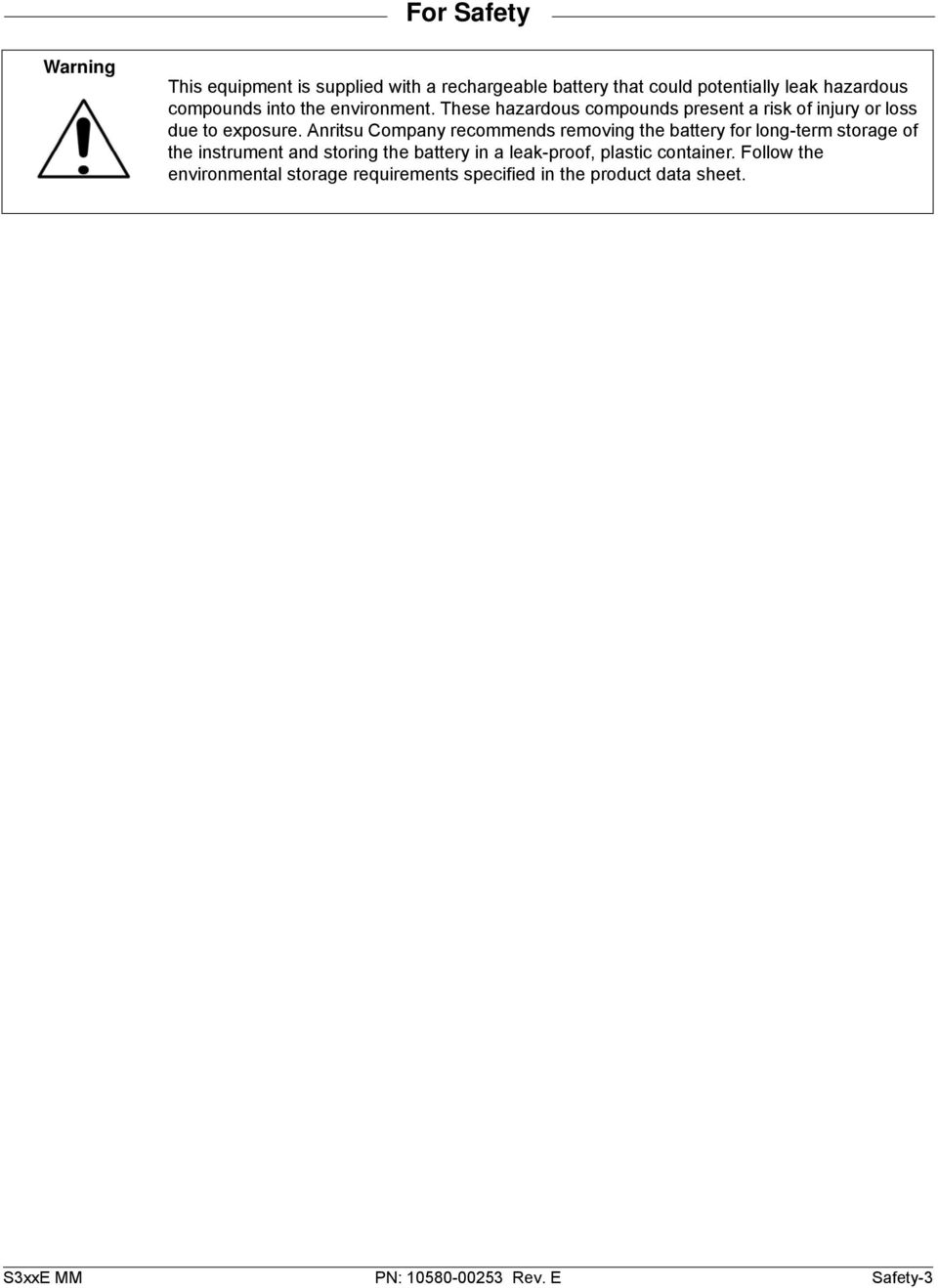
9 For Safety Warning This equipment is supplied with a rechargeable battery that could potentially leak hazardous compounds into the environment. These hazardous compounds present a risk of injury or loss due to exposure. Anritsu Company recommends removing the battery for long-term storage of the instrument and storing the battery in a leak-proof, plastic container. Follow the environmental storage requirements specified in the product data sheet. S3xxE MM PN: Rev. E Safety-3
10 Safety-4 PN: Rev. E S3xxE MM

11 Table of Contents Chapter 1 General Information 1-1 Introduction Anritsu Customer Service Centers Recommended Test Equipment Replaceable Parts Chapter 2 Spectrum Analyzer Verification 2-1 Frequency Accuracy Verification Single Side Band (SSB) Phase Noise Verification Spurious Response (Second Harmonic Distortion) Verification Resolution Bandwidth Accuracy Verification RBW Test Spectrum Analyzer Absolute Amplitude Accuracy Verification MHz Amplitude Accuracy Verification Amplitude Accuracy Across Frequency Verification Residual Spurious Response Verification Residual Spurious Response Test with Preamp Off Residual Spurious Response Test with Preamp On Displayed Average Noise Level (DANL) Third Order Intercept (TOI) Verification Chapter 3 Cable and Antenna Analyzer Verification 3-1 Frequency Accuracy Verification Return Loss Accuracy Verification Chapter 4 Option Verification 4-1 Introduction Option 10, Bias Tee Verification Low Current Test Verification High Current Test Verification Fault Verification Option 21, Transmission Measurement, System Dynamic Range Option 29, Power Meter Level Accuracy Option 31, GPS Verification Frequency Accuracy Verification (Only for models S332E and S362E) GPS Antenna Bias-Tee Verification Chapter 5 Battery Information 5-1 General Information Battery Pack Removal and Replacement Chapter 6 Assembly Replacement S3xxE MM PN: Rev. E Contents-1

12 Table of Contents (Continued) 6-1 Opening the Site Master Case PCB Assembly Replacement SPA Assembly Replacement SPA and MB/VNA N Connector Replacement GPS (Option 31) Replacement Motherboard/VNA PCB Assembly Replacement Fan Assembly Replacement LCD Assembly Replacement LCD Backlight PCB Removal and Replacement Keypad and Keypad PCB Replacement Touch Screen Replacement Chapter 7 Troubleshooting 7-1 Introduction Turn-on Problems Other Problems Appendix A Test Records A-1 Test Records for Spectrum Analyzer Verification A-2 A-2 Test Records for Cable and Antenna Analyzer Verification A-9 A-3 Test Records for Options Verification A-10 Contents-2 PN: Rev. E S3xxE MM

13 Chapter 1 General Information 1-1 Introduction This manual provides maintenance instructions for Anritsu Site Master Models S331E, S332E, S361E and S362E. The manual includes: General information in this chapter, including: Lists of necessary test equipment to perform verification testing (Table 1-1, Table 1-2, and Table 1-3) Replaceable parts list (Table 1-4) Performance verification procedures: Chapter 2, Spectrum Analyzer Verification Chapter 3, Cable and Antenna Analyzer Verification Chapter 4, Option Verification Battery pack information (Chapter 5, Battery Information ) Parts replacement procedures (Chapter 6, Assembly Replacement ) Blank test records are included in Appendix A. Copy the blank test records from Appendix A and use them to record measured values. These test records form a record of the performance of your instrument. Anritsu recommends that you make a copy of the blank test records to document the measurements each time a Performance Verification is performed. Continuing to document this process each time it is performed provides a detailed history of instrument performance, which can allow you to observe trends. Familiarity with the basic operation of the front panel keys (for example, how to change measurement mode, preset the unit, or the meaning of soft key or submenu) is assumed. Caution Before making any measurement, verify that all equipment has warmed up for at least 30 minutes. 1-2 Anritsu Customer Service Centers For the latest service and sales information in your area, please visit the following URL: Choose a country for regional contact information. S3xxE MM PN: Rev. E 1-1

14 1-3 Recommended Test Equipment General Information 1-3 Recommended Test Equipment The following test equipment is recommended for use in testing and maintaining Anritsu Site Master Model S3xxE. Table 1-1 is a list of test equipment that is required for verifying the Spectrum Analyzer functions. Table 1-2 is a list of test equipment that is required for verifying the Cable and Antenna Analyzer. Table 1-3 is a list of test equipment that is required for verifying the functions of installed options. Table 1-1. Test Equipment Required for Verifying Spectrum Analyzer Functions Instrument Critical Specification Recommended Manufacturer/Model Synthesized Signal Generator Frequency: 0.1 Hz to 20 GHz, Power Output: +16 dbm, Anritsu Model MG3692A/B/C with Options 2A, 3, 4, 22, 15x a Step attenuator installed Power Meter Power Range: 70 dbm to +20 dbm Anritsu Model ML2438A Power Sensor Frequency: 100 khz to 18 GHz Power Range: 30 db to +20 db Anritsu Model MA2421D (Qty 2) or SC7816 (Qty 2) Power Sensor Frequency: 10 MHz to 18 GHz Anritsu Model MA2442D (Qty 2) Power Range: 67 db to +20 db Frequency Reference Frequency: 10 MHz Symmetricom RubiSource T&M Vector Network Analyzer 10 MHz to 9 GHz Anritsu Model MS4624A, B, or D Calibration Kit for VNA 10 MHz to 9 GHz Anritsu Model 3753A Fixed Attenuator 10 db Attenuation Aeroflex/Weinschel Model (Qty 2) Power Splitter Frequency: DC to 18 GHz Aeroflex/Weinschel Model 1870A Adapter Frequency: DC to 20 GHz Anritsu Model 34NN50A N(m) to N(m), 50 ohm Adapter Frequency: DC to 20 GHz Anritsu Model 34RKNF50 N(m) to N(m), 50 ohm 50 Ohm Termination Frequency: DC to 18 GHz Anritsu Model 28N50-2 RF Coaxial Cable Frequency: DC to 18 GHz Anritsu Model 15NN50-0.6B N(m) to N(m), 50 ohm Coaxial Cable BNC(m) to BNC(m), 50 ohm Anritsu Model R a. MG3692A models require Option 15 to achieve power of +16 dbm at 3.5 GHz. MG3692B models do not require Option 15 to achieve power of +16 dbm at 3.5 GHz. 1-2 PN: Rev. E S3xxE MM

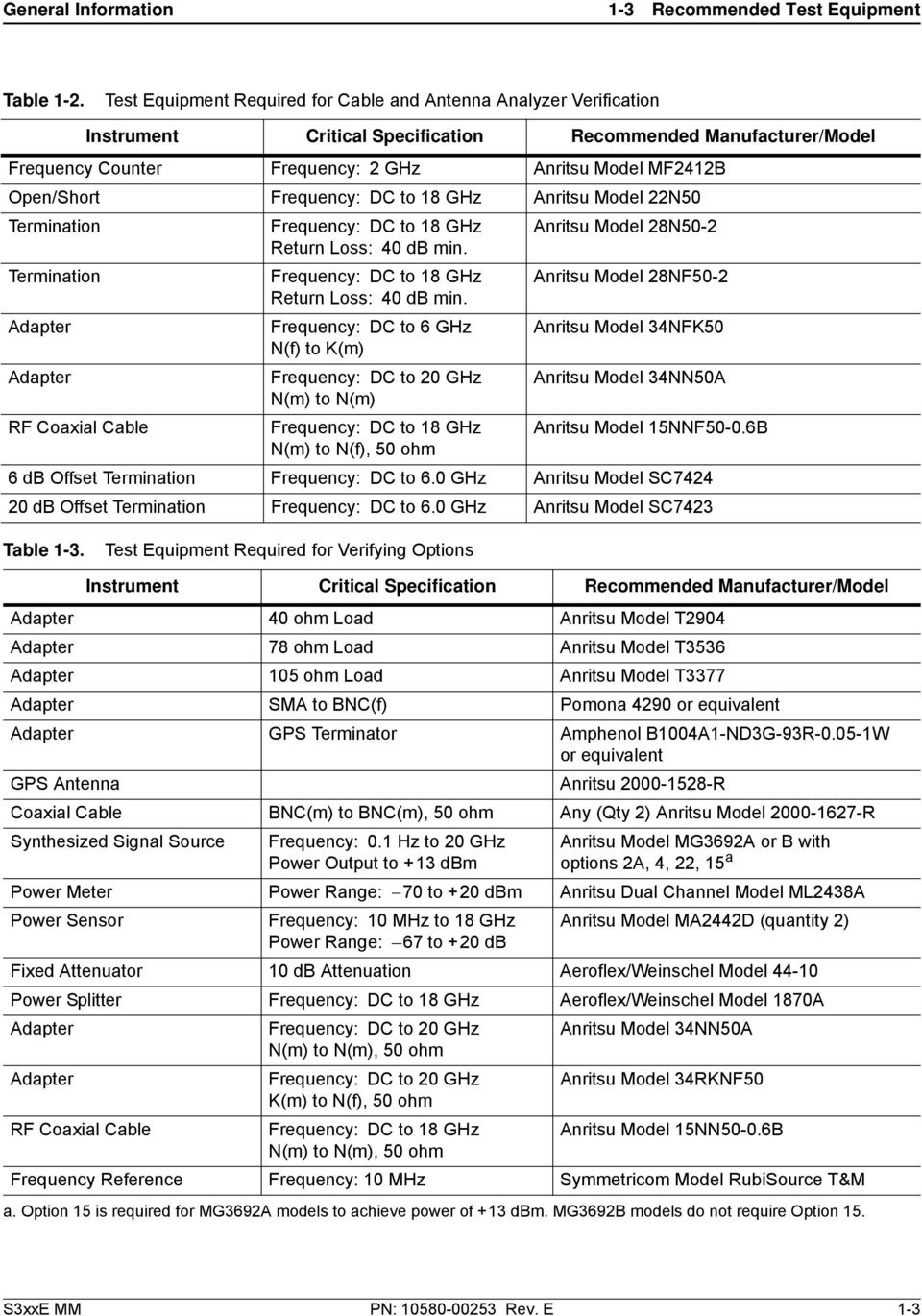
15 General Information 1-3 Recommended Test Equipment Table 1-2. Test Equipment Required for Cable and Antenna Analyzer Verification Instrument Critical Specification Recommended Manufacturer/Model Frequency Counter Frequency: 2 GHz Anritsu Model MF2412B Open/Short Frequency: DC to 18 GHz Anritsu Model 22N50 Termination Frequency: DC to 18 GHz Anritsu Model 28N50-2 Return Loss: 40 db min. Termination Frequency: DC to 18 GHz Anritsu Model 28NF50-2 Return Loss: 40 db min. Adapter Frequency: DC to 6 GHz Anritsu Model 34NFK50 N(f) to K(m) Adapter Frequency: DC to 20 GHz Anritsu Model 34NN50A N(m) to N(m) RF Coaxial Cable Frequency: DC to 18 GHz Anritsu Model 15NNF50-0.6B N(m) to N(f), 50 ohm 6 db Offset Termination Frequency: DC to 6.0 GHz Anritsu Model SC db Offset Termination Frequency: DC to 6.0 GHz Anritsu Model SC7423 Table 1-3. Test Equipment Required for Verifying Options Instrument Critical Specification Recommended Manufacturer/Model Adapter 40 ohm Load Anritsu Model T2904 Adapter 78 ohm Load Anritsu Model T3536 Adapter 105 ohm Load Anritsu Model T3377 Adapter SMA to BNC(f) Pomona 4290 or equivalent Adapter GPS Terminator Amphenol B1004A1-ND3G-93R W or equivalent GPS Antenna Anritsu R Coaxial Cable BNC(m) to BNC(m), 50 ohm Any (Qty 2) Anritsu Model R Synthesized Signal Source Frequency: 0.1 Hz to 20 GHz Power Output to +13 dbm Anritsu Model MG3692A or B with options 2A, 4, 22, 15 a Power Meter Power Range: 70 to +20 dbm Anritsu Dual Channel Model ML2438A Power Sensor Frequency: 10 MHz to 18 GHz Anritsu Model MA2442D (quantity 2) Power Range: 67 to +20 db Fixed Attenuator 10 db Attenuation Aeroflex/Weinschel Model Power Splitter Frequency: DC to 18 GHz Aeroflex/Weinschel Model 1870A Adapter Frequency: DC to 20 GHz Anritsu Model 34NN50A N(m) to N(m), 50 ohm Adapter Frequency: DC to 20 GHz Anritsu Model 34RKNF50 K(m) to N(f), 50 ohm RF Coaxial Cable Frequency: DC to 18 GHz Anritsu Model 15NN50-0.6B N(m) to N(m), 50 ohm Frequency Reference Frequency: 10 MHz Symmetricom Model RubiSource T&M a. Option 15 is required for MG3692A models to achieve power of +13 dbm. MG3692B models do not require Option 15. S3xxE MM PN: Rev. E 1-3
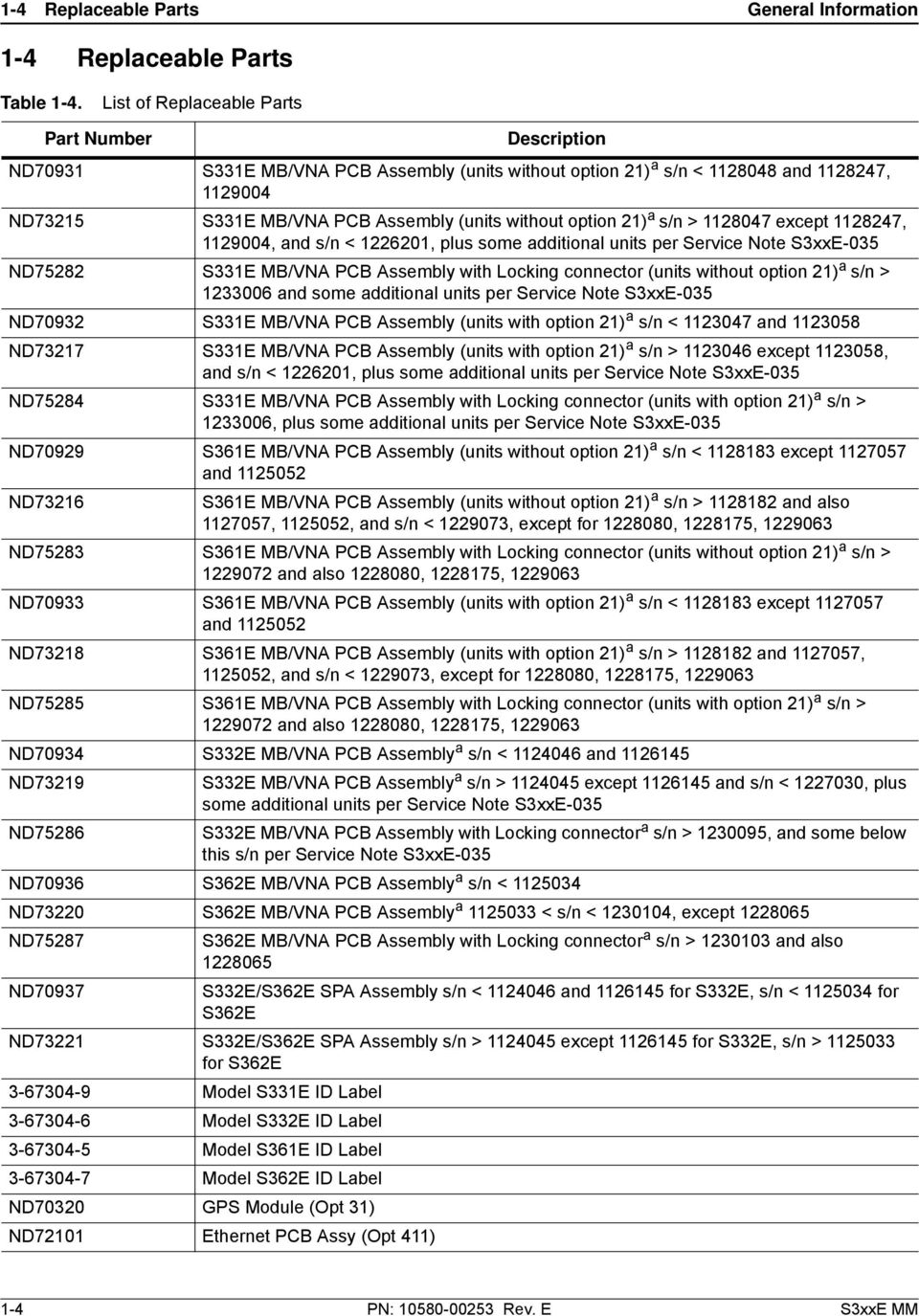
16 1-4 Replaceable Parts General Information 1-4 Replaceable Parts Table 1-4. List of Replaceable Parts Part Number Description ND70931 S331E MB/VNA PCB Assembly (units without option 21) a s/n < and , ND73215 S331E MB/VNA PCB Assembly (units without option 21) a s/n > except , , and s/n < , plus some additional units per Service Note S3xxE-035 ND75282 S331E MB/VNA PCB Assembly with Locking connector (units without option 21) a s/n > and some additional units per Service Note S3xxE-035 ND70932 S331E MB/VNA PCB Assembly (units with option 21) a s/n < and ND73217 S331E MB/VNA PCB Assembly (units with option 21) a s/n > except , and s/n < , plus some additional units per Service Note S3xxE-035 ND75284 S331E MB/VNA PCB Assembly with Locking connector (units with option 21) a s/n > , plus some additional units per Service Note S3xxE-035 ND70929 S361E MB/VNA PCB Assembly (units without option 21) a s/n < except and ND73216 S361E MB/VNA PCB Assembly (units without option 21) a s/n > and also , , and s/n < , except for , , ND75283 S361E MB/VNA PCB Assembly with Locking connector (units without option 21) a s/n > and also , , ND70933 S361E MB/VNA PCB Assembly (units with option 21) a s/n < except and ND73218 S361E MB/VNA PCB Assembly (units with option 21) a s/n > and , , and s/n < , except for , , ND75285 S361E MB/VNA PCB Assembly with Locking connector (units with option 21) a s/n > and also , , ND70934 S332E MB/VNA PCB Assembly a s/n < and ND73219 S332E MB/VNA PCB Assembly a s/n > except and s/n < , plus some additional units per Service Note S3xxE-035 ND75286 S332E MB/VNA PCB Assembly with Locking connector a s/n > , and some below this s/n per Service Note S3xxE-035 ND70936 S362E MB/VNA PCB Assembly a s/n < ND73220 S362E MB/VNA PCB Assembly a < s/n < , except ND75287 S362E MB/VNA PCB Assembly with Locking connector a s/n > and also ND70937 S332E/S362E SPA Assembly s/n < and for S332E, s/n < for S362E ND73221 S332E/S362E SPA Assembly s/n > except for S332E, s/n > for S362E Model S331E ID Label Model S332E ID Label Model S361E ID Label Model S362E ID Label ND70320 GPS Module (Opt 31) ND72101 Ethernet PCB Assy (Opt 411) 1-4 PN: Rev. E S3xxE MM
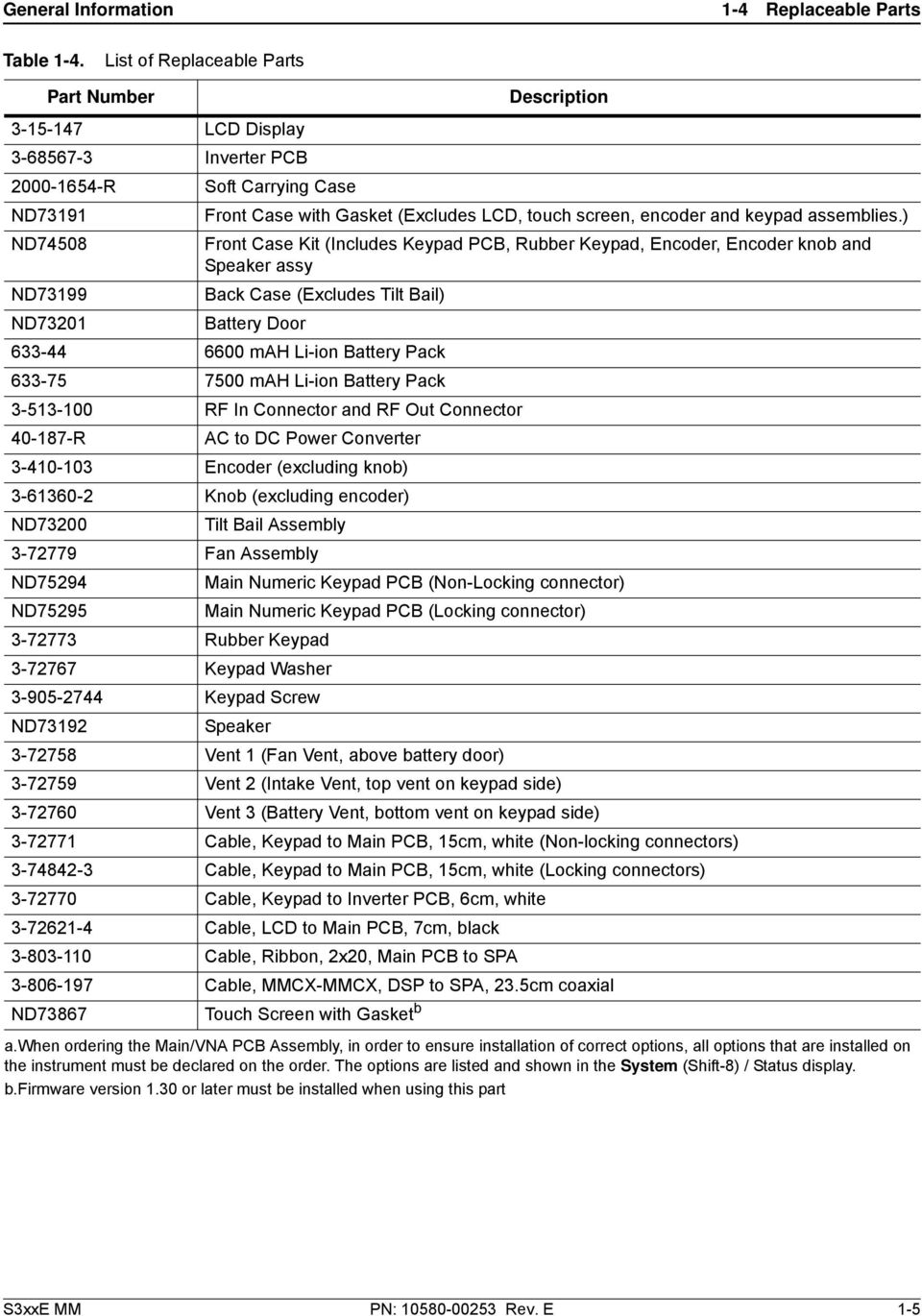
17 General Information 1-4 Replaceable Parts Table 1-4. List of Replaceable Parts Part Number Description LCD Display Inverter PCB R Soft Carrying Case ND73191 Front Case with Gasket (Excludes LCD, touch screen, encoder and keypad assemblies.) ND74508 Front Case Kit (Includes Keypad PCB, Rubber Keypad, Encoder, Encoder knob and Speaker assy ND73199 Back Case (Excludes Tilt Bail) ND73201 Battery Door mah Li-ion Battery Pack mah Li-ion Battery Pack RF In Connector and RF Out Connector R AC to DC Power Converter Encoder (excluding knob) Knob (excluding encoder) ND73200 Tilt Bail Assembly Fan Assembly ND75294 Main Numeric Keypad PCB (Non-Locking connector) ND75295 Main Numeric Keypad PCB (Locking connector) Rubber Keypad Keypad Washer Keypad Screw ND73192 Speaker Vent 1 (Fan Vent, above battery door) Vent 2 (Intake Vent, top vent on keypad side) Vent 3 (Battery Vent, bottom vent on keypad side) Cable, Keypad to Main PCB, 15cm, white (Non-locking connectors) Cable, Keypad to Main PCB, 15cm, white (Locking connectors) Cable, Keypad to Inverter PCB, 6cm, white Cable, LCD to Main PCB, 7cm, black Cable, Ribbon, 2x20, Main PCB to SPA Cable, MMCX-MMCX, DSP to SPA, 23.5cm coaxial ND73867 Touch Screen with Gasket b a.when ordering the Main/VNA PCB Assembly, in order to ensure installation of correct options, all options that are installed on the instrument must be declared on the order. The options are listed and shown in the System (Shift-8) / Status display. b.firmware version 1.30 or later must be installed when using this part S3xxE MM PN: Rev. E 1-5
18 1-6 PN: Rev. E S3xxE MM

19 Chapter 2 Spectrum Analyzer Verification 2-1 Frequency Accuracy Verification The following test is used to verify the CW frequency accuracy of the Spectrum Analyzer in the S332E and S362E Site Master. Equipment Required Anritsu MG3692X Synthesized Signal Source 10 MHz Reference Standard Anritsu 34RKNF50 50 ohm Adapter Anritsu 15NN50-1.5C RF Coaxial Cable BNC male to BNC male Coaxial Cable Procedure 1. Connect the 10 MHz Reference source to the Anritsu MG3692X Synthesized Signal Source. Note Do not connect the external 10 MHz Reference to the Site Master. 2. Turn on the 10 MHz Reference Standard and the Anritsu MG3692X Synthesized Signal Source. 3. Set the MG3692X output to 1 GHz CW, with an RF Output Level of 30 dbm. 4. Connect the output of the source to the RF In of the Site Master. 5. Turn on the Site Master. 6. Press the Shift key and then the Mode (9) key. Rotate the knob to highlight Spectrum Analyzer and then press the Enter key to switch to Spectrum Analyzer mode. 7. Press the Shift key, the Preset (1) key, and then the Preset soft key to reset the instrument to the default starting conditions. 8. Press the Shift key, the Sweep (3) key, then the Sweep Mode soft key, and select the Performance soft key. 9. Press the Amplitude soft key and then press the Reference Level soft key. 10. Use the keypad to enter 10 and select the dbm soft key. 11. Press the Span soft key, use the keypad to enter 10, and select the khz soft key. 12. Press the BW soft key and select the RBW soft key. 13. Use the keypad to enter 100 and select the Hz soft key. 14. Press the VBW soft key, use the keypad to enter 30 and then select the Hz soft key. 15. Press the Freq soft key and select the Center Freq soft key. 16. Use the keypad to enter 1 and select the GHz soft key. 17. Press the Marker soft key, then the More soft key, set Counter Marker to On, select the Back soft key, and then press the Peak Search soft key. Note Without the Counter Marker On the frequency resolution will not allow looking at the khz accuracy. S3xxE MM PN: Rev. E 2-1

20 2-1 Frequency Accuracy Verification Spectrum Analyzer Verification 18. Verify that the marker frequency is 1 GHz ± 1.5 khz (± 1.5 ppm) and record in Table A-1, Spectrum Analyzer Frequency Accuracy. 19. Set the MG3692X frequency to 3.9 GHz and then 5.9 GHz (for S362E only). 20. Set the S332E or S362E center freq to 3.9 GHz and then 5.9 GHz (for S362E only). 21. Press the Marker soft key, then the More soft key, set Counter Marker to On, select the Back soft key, and then press the Peak Search soft key. 22. Verify that the marker frequency is 3.9 GHz ± 5.85 khz (± 1.5 ppm) and then 5.9 GHz ± 8.85 khz (± 1.5 ppm) for the S362E only and record in Table A-1. Note If the unit fails the Section 2-1 Frequency Accuracy Verification test contact your local Anritsu Service Center ( 2-2 PN: Rev. E S3xxE MM

21 Spectrum Analyzer Verification 2-2 Single Side Band (SSB) Phase Noise Verification 2-2 Single Side Band (SSB) Phase Noise Verification This test is used to verify the single side band (SSB) phase noise of the spectrum analyzer in the S332E and S362E Site Master. Equipment Required Anritsu MG3692X Synthesized Signal Source 10 MHz Reference Standard Anritsu 34RKNF50 50 Ohm Adapter Anritsu 15NN50-1.5C RF Coaxial Cable Procedure 1. Connect the 10 MHz reference source to the Anritsu MG3692X Synthesized Signal Source. 2. Turn on the 10 MHz reference source and the Anritsu MG3692X Synthesized Signal Source. 3. Set the MG3692X output to 1.00 GHz CW, with an RF output level of +0 dbm. 4. Connect the output of the MG3692X Synthesized Signal Source to the RF In connector of the Site Master. 5. Turn on the Site Master. 6. Press the Shift key and then the Mode (9) key. Rotate the knob to highlight Spectrum Analyzer and then press the Enter key to switch to Spectrum Analyzer mode. 7. Press the Shift key, the Preset (1) key, and then the Preset soft key to reset to the default starting conditions. 8. Press the Shift key, the Sweep (3) key, then the Sweep Mode soft key, and select the Performance soft key. 9. Press the Amplitude soft key, then press the Reference Level soft key. 10. Use the keypad to enter 0 and select the dbm soft key. 11. Press the Atten Lvl soft key, use the keypad to enter 15 and press the db soft key. 12. Press the Freq soft key and select the Center Freq soft key. 13. Use the keypad to enter 1.00 and press the GHz soft key. 14. Press the Span soft key, use the keypad to enter 110, and select the khz soft key. 15. Press the BW soft key and select the RBW soft key. 16. Use the keypad to enter 1 and select the khz soft key. 17. Press the VBW soft key and use the keypad to enter 3, then select the Hz soft key. 18. Press the Shift key and then press the Trace (5) key, then select the Trace A Operations soft key. 19. Press the # of Average soft key, use the keypad to enter 7, then press the Enter key. 20. Wait until the Trace Count displays 7/ Press the Marker key and select the Peak Search soft key. 22. Press the Delta On/Off soft key to turn Delta On. 23. Use the keypad to enter 10 and press the khz soft key. 24. Enter the measured value into Table A-2, Spectrum Analyzer SSB Phase Noise Verification. 25. Subtract 30 db from the average value and verify that the result is less than 100 dbc/hz (for 10 khz offset) or 105 dbc/hz (for 100 khz offset) or 115 dbc/hz (for 1 MHz offset) and record the Calculated Value results in the test records. Use Table A-2. For example: 70 dbc measured 30 db = 100 dbc/hz 26. Repeat Step 16 through Step 25 for 100 khz (set Span to 220 khz) and 1 MHz offset (set Span to 2.04 MHz. Enter the test results and calculations in the appropriate rows of Table A-2. S3xxE MM PN: Rev. E 2-3
22 2-3 Spurious Response (Second Harmonic Distortion) Verification Spectrum Analyzer Verification 2-3 Spurious Response (Second Harmonic Distortion) Verification The following test is used to verify the input related spurious response of the spectrum analyzer in the S332E and S362E Site Master. Equipment Required Anritsu MG3692X Synthesized Signal Source 10 MHz Reference Standard Anritsu 34RKNF50 50 Ohm Adapter or equivalent Anritsu 15NN50-1.5C RF Coaxial Cable Anritsu MHz Low Pass Filter BNC male to BNC male Coaxial Cable Procedure 1. Connect the 10 MHz reference source to the Anritsu MG3692X Synthesized Signal Source. 2. Turn on the 10 MHz reference source and the Anritsu MG3692X Synthesized Signal Source. 3. Set the MG3692X output to 50.1 MHz CW, with an RF Output Level of 30 dbm. 4. Connect one end of the 50 MHz Low Pass Filter to the output of the source and the other end to the Site Master RF In with the coaxial cable. 5. Turn on the Site Master. 6. Press the Shift key and then the Mode (9) key. Rotate the knob to highlight Spectrum Analyzer and then press the Enter key to switch to Spectrum Analyzer mode. 7. Press the Shift key, the Preset (1) key, and then the Preset soft key to reset to the default starting conditions. 8. Press the Shift key, the Sweep (3) key, then the Sweep Mode soft key, and select the Performance soft key. 9. Press the Amplitude soft key and then press the Reference Level soft key. 10. Use the keypad to enter 27 and press the dbm soft key. 11. Press the Atten Lvl soft key and enter 0, then press the db soft key. 12. Press the Freq soft key and select the Center Freq soft key. 13. Use the keypad to enter 50.1 and press the MHz soft key. 14. Press the Span soft key, use the keypad to enter 100, and select the khz soft key. 15. Press the BW soft key and select the RBW soft key. 16. Use the keypad to enter 1 and select the khz soft key. 17. Press the VBW soft key. Use the keypad to enter 10 and then select the Hz soft key. 18. Press the Amplitude soft key. 19. Press the Detection soft key, and then the Peak soft key. 20. Press the Shift key and then press the Trace (5) key, then select the Trace A Operations soft key. 21. Press the # of Average soft key, use the keypad to enter 5 and then press the Enter key. 22. Wait until the Trace Count displays 5/ Press the Marker key and select the Peak Search soft key. 24. Record the amplitude for 50.1 MHz. Use Table A-3, Spectrum Analyzer Spurious Response (Second Harmonic Distortion). 2-4 PN: Rev. E S3xxE MM
23 Spectrum Analyzer Verification 2-3 Spurious Response (Second Harmonic Distortion) Verification 25. Press the Freq soft key and select the Center Freq soft key. 26. Use the keypad to enter and press the MHz soft key. 27. Press the Shift key and then press the Trace (5) key, then select the Trace A Operations soft key. 28. Press the # of Average soft key, use the keypad to enter 5 and then press the Enter key. 29. Wait until the Trace Count displays 5/ Press the Marker key and select the Peak Search soft key. 31. Record the amplitude for MHz in the test records. Use Table A Calculate the 2nd Harmonic level in dbc by subtracting the 50.1 MHz amplitude from the MHz amplitude using this formula: Second Harmonic Level MHz = MHz amplitude 50.1 MHz amplitude = dbc 33. Verify that the calculated Second Harmonic Level is 56 dbc and record in the test records. Use Table A-3. S3xxE MM PN: Rev. E 2-5
24 2-4 Resolution Bandwidth Accuracy Verification Spectrum Analyzer Verification 2-4 Resolution Bandwidth Accuracy Verification The following test is used to verify the resolution bandwidth accuracy of the spectrum analyzer in the S332E and S362E Site Master. Equipment Required Anritsu MG3692X Synthesized Signal Source 10 MHz Reference Standard Anritsu 34RKNF50 50 Ohm Adapter Anritsu 15NN50-1.5C RF Coaxial Cable BNC male to BNC male Coaxial Cable Procedure 1. Connect the 10 MHz reference source to the Anritsu MG3692X Synthesized Signal Source and the S332E or S362E Site Master. 2. Turn on the MG3692X, set the frequency to 1 GHz CW and Level to 30 dbm. 3. Connect the output of the Anritsu MG3692X Synthesized Signal Source to the S332E or S362E Spectrum Analyzer RF In. 4. Turn on the S332E or S362E Site Master. 5. Press the Shift key and then the Mode (9) key. Rotate the knob to highlight Spectrum Analyzer and then press the Enter key to switch to Spectrum Analyzer mode. 6. Press the Shift key, the Preset (1) key, and then the Preset soft key to reset to the default starting conditions. 7. Press the Shift key, the Sweep (3) key, then the Sweep Mode soft key, and select the Performance soft key. 8. Press the Amplitude soft key and then press the Reference Level soft key. 9. Use the keypad to enter 10 and press the dbm soft key. 10. Press the Atten Lvl soft key and enter 0, then press the db soft key. 11. Press the Scale soft key and enter 10, then press db/div soft key. 12. Press the Freq soft key and select the Center Freq soft key. 13. Use the keypad to enter 1 and select the GHz soft key. RBW Test 14. Press the Span soft key, use the keypad to enter the span listed in the test records. Refer to the Span column of Table A-4, Spectrum Analyzer Resolution Bandwidth Accuracy. 15. Press the BW soft key and select the RBW soft key. 16. Use the keypad to enter 3 and select the MHz soft key. 17. Set the VBW from the value listed in the test records. Refer to the VBW column of Table A Press the Shift key, press the Measure (4) key, press the Power and Bandwidth soft key and then press the OCC BW soft key. 19. Press the dbc soft key and enter 3, then press the Enter key. 20. Press the OCC BW On/Off soft key to turn on occupied bandwidth. 21. Record the OCC BW reading in the test records. Use the Measured Value column of Table A Verify that the OCC BW reading frequency is within 10% of the RBW. 23. Repeat Step 14 through Step 22 for the other settings and record in Table A PN: Rev. E S3xxE MM
25 Spectrum Analyzer Verification 2-5 Spectrum Analyzer Absolute Amplitude Accuracy Verification 2-5 Spectrum Analyzer Absolute Amplitude Accuracy Verification The tests in the following two sections verify the absolute amplitude accuracy of the Spectrum Analyzer in the S332E and S362E Site Master. The two parts of this test are 50 MHz Amplitude Accuracy Verification immediately below and Amplitude Accuracy Across Frequency Verification on page MHz Amplitude Accuracy Verification Equipment Required Anritsu MG3692X Synthesized Signal Source Anritsu ML2438A Dual Channel Power Meter Anritsu MA2442D High Accuracy Power Sensors (2) Anritsu 34NN50A 50 Ohm Adapter Anritsu 34RKNF50 50 Ohm Adapter Anritsu 15NN50-1.5C RF Coaxial Cable Aeroflex/Weinschel 1870A Power Splitter Aeroflex/Weinschel db Fixed Attenuator Setup 10 MHz Reference Adapter MG3692x Synthesized Signal Generator 10 db Fixed Attenuator MA2442D Sensor A MA2442D Sensor B 1870A Power Splitter A B ML2438A Power Meter Figure 2-1. Absolute Amplitude Accuracy Verification Pretest Setup S3xxE MM PN: Rev. E 2-7
26 2-5 Spectrum Analyzer Absolute Amplitude Accuracy Verification Spectrum Analyzer Verification Test Setup Components Characterization 1. Turn on the ML2438A Power Meter, the MG3692X Signal Source, and the S332E or S362E Site Master. 2. On the power meter, press the Channel soft key, the Setup soft key and then the Channel soft key to display Channel 2 Setup menu. a. Press the Input key twice to set the Input Configuration to B. b. Press the Sensor key to display both Sensor A and Sensor B readings. c. Connect the power sensors to the power meter and calibrate the sensors. d. Connect the Power Splitter to the MG3692X Output and Sensor B to one of the Power Splitter Outputs. 3. Install the 10 db Fixed Attenuator to the other Power Splitter Output and then connect Sensor A to the end of the attenuator as shown in Figure 2-1, Absolute Amplitude Accuracy Verification Pretest Setup. 4. Set the MG3692X to a frequency of 50 MHz. 5. On the Power Meter, press the Sensor key, the Cal Factor soft key, and then the Freq soft key. a. Use the keypad to enter 50 MHz as the input signal frequency, do this for both sensor A and sensor B, which sets the power meter to the proper power sensor cal factor. b. Press the Sensor key on the power meter to display the power reading. 6. Starting with 0 dbm, adjust the power level of the MG3692x to get a reading on Sensor A that matches the power level in the Test Power 50 MHz column of Table A-5, Spectrum Analyzer 50 MHz Absolute Amplitude Accuracy Setup Table. 7. Record the Sensor B reading in the Required Sensor B Reading column of Table A Repeat Step 6 and Step 7 for the other input levels from 4 dbm to 50 dbm. Note Note Before continuing, allow a 30 minute warm up period for the internal circuitry to stabilize. 2-8 PN: Rev. E S3xxE MM
27 Power ESC Shift File Measure Preset Enter System Trace Calibrate Back Mode Limit Sweep Charge Spectrum Analyzer Verification 2-5 Spectrum Analyzer Absolute Amplitude Accuracy Verification Measuring the Unit for 50 MHz Amplitude Accuracy 1. Remove Sensor A, add the adapter and connect it to the Spectrum Analyzer RF In connector of the S332E or S362E Site Master as shown in Figure 2-2. ML2438A Power Meter 10 MHz Reference Adapter MA2442D Sensor B MG3692x Synthesized Signal Generator 1870A Power Splitter 10 db Attenuator N(m) to N(m) Adaptor S332E SiteMaster /- S3xxE Site Master Figure 2-2. Absolute Amplitude Accuracy Verification Test Setup 2. On the S332E or S362E, press the Shift key and then the Mode (9) key. Rotate the knob to highlight Spectrum Analyzer and then press the Enter key to switch to Spectrum Analyzer mode. 3. Press the Shift key, the Preset (1) key, and then the Preset soft key to reset to the default starting conditions. 4. Press the Shift key, the Sweep (3) key, then the Sweep Mode soft key, and select the Performance soft key. 5. Press the Freq soft key and select the Center Freq soft key. 6. Use the keypad to enter 50 and select the MHz soft key. 7. Press the BW soft key and the RBW soft key. 8. Use the keypad to enter 1 and select the khz soft key. 9. Press the VBW soft key and use the keypad to enter 10, then select the Hz soft key. 10. Press the Span soft key, use the keypad to enter 10, and select the khz soft key. S3xxE MM PN: Rev. E 2-9
28 2-5 Spectrum Analyzer Absolute Amplitude Accuracy Verification Spectrum Analyzer Verification 11. Press the Amplitude soft key and then press the Reference Level soft key. 12. Use the keypad to enter 10 and press the dbm soft key. 13. Press the Atten Lvl soft key and enter 30, then press the db soft key. 14. Adjust the source power so that the power meter displays the corresponding desired Sensor B reading as recorded for 0 dbm in the Required Sensor B Reading column of Table A Press the Marker soft key and select the Peak Search soft key. 16. Record the Marker 1 amplitude reading in the 0 dbm row of Table A-6, Spectrum Analyzer 50 MHz Absolute Amplitude Accuracy. 17. Verify that the Marker 1 amplitude reading is within the specification. 18. Repeat Step 14 through Step 17 for the other power level settings. Refer to Table A-5 for Required Sensor B Readings. Use Table A-6 to record test results. Amplitude Accuracy Across Frequency Verification This procedure is the second test used to verify the absolute amplitude accuracy of the Spectrum Analyzer in the S332E or S362E Site Master. The first procedure test was described above in 50 MHz Amplitude Accuracy Verification on page 2-7. Equipment Required Anritsu MG3692X Synthesized Signal Source Anritsu ML2438A Dual Channel Power Meter Anritsu MA2442D High Accuracy Power Sensors (2) Anritsu 34NN50A 50 Ohm Adapter Anritsu 34RKNF50 50 Ohm Adapter Anritsu 15NN50-1.5C RF Coaxial Cable Aeroflex/Weinschel 1870A Power Splitter Aeroflex/Weinschel db Fixed Attenuator 2-10 PN: Rev. E S3xxE MM
29 Spectrum Analyzer Verification 2-5 Spectrum Analyzer Absolute Amplitude Accuracy Verification Test Setup Component Characterization 1. Connect both MA2442D power sensors to the power meter and calibrate the sensors. 2. Connect the equipment as shown in Figure MHz Reference Adapter MG3692x Synthesized Signal Generator 10 db Fixed Attenuator MA2442D Sensor A MA2442D Sensor B 1870A Power Splitter A B ML2438A Power Meter Figure 2-3. Fixed Level with Varying Frequency Setup 3. Set the MG3692x frequency to 10.1 MHz. 4. Set the power meter to display both Channel A and B. Press the Sensor key, the Cal Factor soft key, and then the Freq soft key. Use the keypad to enter the value matching the frequency of MG3692x as the input signal frequency, which sets the power meter to the proper power sensor cal factor. Repeat for Channel B. Press the System key to display the power reading. 5. Adjust the MG3692x output level so that Sensor A reading is 2 dbm ± 0.1 db. 6. Record the Sensor B reading to the 2 dbm column of Table A-7, Spectrum Analyzer Absolute Amplitude Accuracy Across Frequency Setup Table. 7. Adjust the MG3692x output level so that Sensor A reading is 30 dbm ± 0.1 db. 8. Record the Sensor B reading to the 30 dbm column of Table A Repeat Steps 3 through 8 for all the frequencies listed in Table A-7. Note Before continuing, allow a 30 minute warm up for the internal circuitry to stabilize. S3xxE MM PN: Rev. E 2-11
30 Power ESC Shift File Measure Preset Enter System Trace Calibrate Back Mode Limit Sweep Charge 2-5 Spectrum Analyzer Absolute Amplitude Accuracy Verification Spectrum Analyzer Verification Setup ML2438A Power Meter 10 MHz Reference Adapter MA2442D Sensor B MG3692x Synthesized Signal Generator 1870A Power Splitter 10 db Attenuator N(m) to N(m) Adaptor S332E SiteMaster /- S3xxE Site Master Figure 2-4. Absolute Amplitude Accuracy Across Frequency Verification Test Setup Measuring Amplitude Accuracy Across Frequency 1. Connect the equipment as shown in Figure 2-4. Note To maintain test setup integrity, do not disconnect sensor B, the power splitter or the fixed attenuator. 2. Set the S332E or S362E to Spectrum Analyzer mode and then preset the unit. 3. Press the Shift key, the Sweep (3) key, then the Sweep Mode soft key, and select the Performance soft key. 4. Press the BW soft key. Then set the RBW to 1 khz and the VBW to 10 Hz. 5. Press the Span soft key, set span to 10 khz. 6. Set the MG3692x frequency to 10.1 MHz CW. 7. Set the MG3692x Output to 20 dbm PN: Rev. E S3xxE MM
31 Spectrum Analyzer Verification 2-5 Spectrum Analyzer Absolute Amplitude Accuracy Verification 8. Set the power meter to display Channel B. Press the Sensor key, the Cal Factor soft key, and then the Freq soft key. Use the keypad to enter the value matching the frequency of MG3692x as the input signal frequency, which sets the power meter to the proper power sensor cal factor. Press the System key to display the power reading. 9. Adjust the MG3692x output power so that the power meter displays a reading which matches the Sensor B reading for 30 dbm in Table A On the S332E or S362E, press the Amplitude soft key, then set the Reference Level to 20 dbm. 11. Press the Freq soft key and select the Center Freq soft key. 12. Enter 10.1 MHz (or the next frequency). 13. Press the Amplitude soft key, then set the Atten Lvl to 0 db. 14. Press the Marker key and select the Peak Search soft key. 15. Record the Marker 1 amplitude reading in Table A-8, Spectrum Analyzer Absolute Amplitude Accuracy Across Frequency. 16. Verify that the Marker 1 amplitude reading is within the specification. 17. Repeat Step 13 to Step 16 for Atten Lvl of 5 db, 10 db and 20 db. 18. Adjust the MG3692x output power so that the power meter displays a reading which matches the Sensor B reading on the characterization chart for 2 dbm. 19. On the S332E or S362E, press the Amplitude soft key, then set the Reference Level to 10 dbm. 20. Repeat Steps 13 to Step 16 for Atten Lvl of 30 db, 40 db, 50 db and 55 db. 21. Repeat Steps 6 to Step 20 for all frequencies that are applicable for the unit under test. Record the results in Table A-8. S3xxE MM PN: Rev. E 2-13
32 2-6 Residual Spurious Response Verification Spectrum Analyzer Verification 2-6 Residual Spurious Response Verification The following two tests are used to verify the residual spurious response of the Spectrum Analyzer of the S332E and S362E Site Master and is performed using the positive peak detection mode. The two parts to this test are the Residual Spurious Response Test with Preamp Off immediately below and Residual Spurious Response Test with Preamp On on page Residual Spurious Response Test with Preamp Off Equipment Required Anritsu 28N Ohm Termination Procedure 1. Connect the 50 ohm Termination to the S332E or S362E Spectrum Analyzer RF In connector. 2. Press the On/Off key to turn on the S332E or S362E Site Master. 3. On the S332E or S362E: a. Press the Shift key and then the Mode (9) key. b. Rotate the knob to highlight Spectrum Analyzer and then press the Enter key to switch to Spectrum Analyzer mode. 4. Press the Shift key, the Preset (1) key, and then the Preset soft key to reset the instrument to the default starting conditions. 5. Press the Shift key, the Sweep (3) key, then the Sweep Mode soft key, and select the Performance soft key. 6. Press the Amplitude soft key, then press the Reference Level soft key. 7. Use the keypad to enter 40 and press the dbm soft key. 8. Press the Atten Lvl soft key and enter 0, then press the db soft key. 9. Make sure that the Pre Amp On/Off soft key is in the Off position. If the preamp is on, press the Pre Amp On/Off soft key to turn it off. 10. Press the Amplitude soft key, then select the Detection soft key and then the Peak soft key. 11. Press the Freq soft key and select the Start Freq soft key. 12. Use the keypad to enter 10 and select the MHz soft key. 13. Press the Stop Freq soft key, enter 50 and press the MHz soft key. 14. Press the BW soft key and select the RBW soft key. 15. Use the keypad to enter 1 and select the khz soft key. 16. Press the VBW soft key, use the keypad to enter 300 and then select the Hz soft key. 17. Wait until one sweep is completed. 18. Press the Marker soft key and select the Peak Search soft key. 19. Verify that the Marker 1 amplitude reading is less than 90 dbm. Note If a spur larger than 90 dbm appears, wait another full sweep and observe whether the spur re-appears at the same point on the second sweep. If the spur does not appear at the same point on the second sweep, then the spur on the first sweep was not real. 20. Record the Marker 1 amplitude reading to Table A-9, Spectrum Analyzer Residual Spurious with Preamp Off. 21. Repeat Step 11 through Step 20 for the other frequency band settings in Table A-9 as applicable to the unit under test PN: Rev. E S3xxE MM
33 Spectrum Analyzer Verification 2-6 Residual Spurious Response Verification Residual Spurious Response Test with Preamp On Equipment Required Anritsu 28N Ohm Termination Procedure 1. Connect the 50 Ohm Termination to the S332E or S362E Spectrum Analyzer RF In connector. 2. Press the On/Off key to turn on the S332E or S362E Site Master. 3. On the S332E or S362E, press the Shift key and then the Mode (9) key. Rotate the knob to highlight Spectrum Analyzer and then press the Enter key to switch to Spectrum Analyzer mode. 4. Press the Shift key, the Preset (1) key, and then the Preset soft key to reset the instrument to the default starting conditions. Note Before continuing, allow a 30 minute warm up period for the internal circuitry to stabilize. 5. Press the Shift key, the Sweep (3) key, then the Sweep Mode soft key, and select the Performance soft key. 6. Press the Amplitude soft key, then press the Reference Level soft key. 7. Use the keypad to enter 50 and press the dbm soft key. 8. Press the Atten Lvl soft key and enter 0, then press the db soft key. 9. Make sure that the Pre Amp On/Off soft key is in the On position. If the preamp is off, press the Pre Amp On/Off soft key to turn it On. 10. Press the Amplitude soft key, then select the Detection soft key and then the Peak soft key. 11. Press the BW soft key and select the RBW soft key. 12. Use the keypad to enter 10 and select the khz soft key. 13. Press the VBW soft key and use the keypad to enter 1, then select the khz soft key. 14. Press the Freq soft key and select the Start Freq soft key. 15. Use the keypad to enter 10 and select the MHz soft key. 16. Press the Stop Freq soft key, enter 1 and press the GHz soft key. 17. Wait until one sweep is completed. 18. Press the Marker soft key and select the Peak Search soft key. 19. Record the Marker 1 amplitude reading in the test records and verify that it is less than 90 dbm. Use Table A-10, Spectrum Analyzer Residual Spurious with Preamp On. 20. Repeat Step 14 through Step 19 for the other Start and Stop frequencies as applicable for the unit under test and record in Table A-10. Note If a spur larger than 90 dbm appears, wait another full sweep and observe whether the spur re-appears at the same point on the second sweep. If the spur does not appear at the same point on the second sweep, then the spur on the first sweep was not real. S3xxE MM PN: Rev. E 2-15
34 2-7 Displayed Average Noise Level (DANL) Spectrum Analyzer Verification 2-7 Displayed Average Noise Level (DANL) The following test is used to verify the Displayed Average Noise Level (DANL) of the spectrum analyzer systems in the S332E and S362E Site Master. This test is performed using the RMS detection mode. Equipment Required Anritsu 28N Ohm Termination Procedure 1. Connect the 50 Ohm Termination to the S332E or S362E Spectrum Analyzer RF In connector. 2. Press the On/Off key to turn on the S332E or S362E Site Master. 3. On the S332E or S362E, press the Shift key and then the Mode (9) key. Rotate the knob to highlight Spectrum Analyzer and then press the Enter key to switch to Spectrum Analyzer mode. 4. Press the Shift key, the Preset (1) key, and then the Preset soft key to reset the instrument to the default starting conditions. Note Before continuing, allow a 30 minute warm up period for the internal circuitry to stabilize. 5. Press the Shift key, the Sweep (3) key, then the Sweep Mode soft key, and select the Performance soft key. 6. Press the Amplitude soft key, then press the Reference Level soft key. 7. Use the keypad to enter 20 and press the dbm soft key. 8. Press the Atten Lvl soft key and enter 0, then press the db soft key. 9. Make sure that the Preamp is Off. 10. Press the Amplitude soft key, then select the Detection soft key and then the RMS/AVG soft key. 11. Press the BW soft key and select the RBW soft key. 12. Use the keypad to enter 100 and select the khz soft key. 13. Select the VBW soft key. 14. Use the keypad to enter 1 and select the khz soft key. 15. Press the Freq soft key and select the Start Freq soft key. 16. Use the keypad to enter 10 and select the MHz soft key. 17. Press the Stop Freq soft key, enter 2.4 and press the GHz soft key. 18. Wait until one sweep is completed. 19. Press the Marker soft key and then select Peak Search soft key. 20. Record the Marker reading to the test records. Use the Measured 100 khz RBW column of Table A-11, Spectrum Analyzer DANL with Pre Amp Off. Note The noise floor consists of totally random signals where a spur is a fixed spike of varying amplitude that is always visible. 21. Repeat Step 15 through Step 20 for the other frequency settings in Table A-11 that are applicable for the unit under test. Change the VBW setting as indicated in the VBW column of Table A For each measured 100 khz RBW value in the test record, convert it to 10 Hz RBW value by subtracting 40 db. 100 dbm 40 db = 140 dbm 2-16 PN: Rev. E S3xxE MM
35 Spectrum Analyzer Verification 2-7 Displayed Average Noise Level (DANL) For example, if the marker shows a value of 100 dbm at 100 khz RBW, the calculated value at 10 Hz RBW is 140 dbm. 23. Enter the calculated values in the test records. Use the Calculated for 10 Hz RBW column of Table A Verify that the calculated value is less than or equal to the value in the Specification column of Table A Press the Amplitude soft key, then press the Reference Level soft key. 26. Use the keypad to enter 50 and press the dbm soft key. 27. Press the Preamp On/Off soft key to turn the preamp On. 28. Repeat Step 11 through Step Record the Marker reading and calculated value in the test record using Table A-12, Spectrum Analyzer DANL with Pre Amp On. S3xxE MM PN: Rev. E 2-17
36 2-8 Third Order Intercept (TOI) Verification Spectrum Analyzer Verification 2-8 Third Order Intercept (TOI) Verification The following test verifies the Third Order Intercept point (also known as TOI or IP3) of the Spectrum Analyzer in the S332E and S362. Equipment Required Anritsu MG3692x Synthesizer (Qty 2) Anritsu ML2438A Power Meter Anritsu MA2442D Power Sensor Fixed Attenuator, Aeroflex/Weinschel Model 44-2 (Qty 2) Fixed Attenuator, Aeroflex/Weinschel Model 44-6 (Qty 2) Fixed Attenuator, Aeroflex/Weinschel Model (Qty 2) Power Splitter, Aeroflex/Weinschel Model 1870A Adapter, Anritsu Model 34NN50A Frequency Reference Symmetricom Rubisource T&M Procedure for 800 MHz TOI 1. Connect the 10 MHz Reference from the frequency reference to the 10 MHz Reference Inputs of the two MG3692x synthesizers and the S3x2E. 2. Zero/Cal the MA2442D Power Sensor, and set the calibration factor of the sensor to 800 MHz. 3. Connect the MA2442D Power Sensor to the input of the 1870A splitter. 4. Connect the 28 db of Attenuation to each output side of the 1870A splitter. 5. Connect one MG3692x to one 28 db attenuator and connect the other MG3692x to the other 28 db attenuator. (The normal RF output connections will become input connections, and the normal input connection will become the RF output connection. 6. Set one MG3692x to MHz and set the other to MHz. 7. Turn the RF Output of one MG3692x Off and turn On the other RF Output. Set the level of the MG3692x that is On so that the MA2442D sensor reads 20 dbm. 8. Turn Off the MG3692x that is On, and turn On the one that is Off. Set the level so that the MA2442D reads 20 dbm. 9. Disconnect the MA2442D from the splitter, and connect the splitter to the S3x2E RF In port using the 34NN50A adapter. 10. Turn On the RF Output of the Synthesizer that is off, so that both MG3692x Synthesizers are On. 11. Press the On/Off key to turn On the S3x2E Site Master. Caution Before continuing, allow a 30 minute warm up period for the internal circuitry to stabilize. 12. Put S3x2E into SPA Mode and Preset the instrument. 13. Using the Frequency menu, set the Center Frequency to MHz and the Span to 100 Hz. 14. Using the BW menu, set the RBW to 10 Hz and VBW to 1Hz. 15. Using the Amplitude menu set the Reference Level to 15 dbm, ensure that Pre-Amp is Off, set Attenuation Level to 10 db, and choose the Detection sub-menu and press RMS/Avg. 16. Using the Marker menu, press Peak Search and write down the level value. 17. Using the Frequency menu, set the Center Frequency to MHz. 18. Using the Marker menu, press Peak Search and write down the level value PN: Rev. E S3xxE MM
37 Spectrum Analyzer Verification 2-8 Third Order Intercept (TOI) Verification 19. Choose the larger of the two values from Step 16 and Step 18, and put this value into the following equation as the max variable. TOI = 20 + [( 20 max) / 2] dbm 20. Record the maximum value and the calculated TOI value in the test record using Table A-13, Third Order Intercept (TOI) Verification on page A-8. Procedure for 2400 MHz TOI 1. Connect the 10 MHz Reference from the frequency reference to the 10 MHz Reference Inputs of the two MG3692x synthesizers and the S3x2E. 2. Zero/Cal the MA2442D Power Sensor, and set the calibration factor of the sensor to 2400 MHz. 3. Connect the MA2442D Power Sensor to the input of the 1870A splitter. 4. Connect the 28 db of Attenuation to each output side of the 1870A splitter. 5. Connect one MG3692x to one 28 db attenuator and connect the other MG3692x to the other 28 db attenuator. (The normal RF output connections will become input connections, and the normal input connection will become the RF output connection. 6. Set one MG3692x to MHz, and set the other to MHz. 7. Turn Off the RF Output of one MG3692x, and turn On the other RF Output. Set the level of the MG3692x that is On so that the MA2442D sensor reads 20 dbm. 8. Turn Off the MG3692x that is on, and turn On the one that is off, and set the level so that the MA2442D reads 20 dbm. 9. Disconnect the MA2442D from the splitter, and connect the splitter to the S3x2E s RF In port using the 34NN50A adapter. 10. Turn On the RF Output of the Synthesizer that is off, so that both MG3692x Synthesizers are On. 11. Press the On/Off key to turn on the S3x2E Site Master. Caution Before continuing, allow a 30 minute warm up period for the internal circuitry to stabilize. 12. Put S3x2E into SPA Mode and Preset the instrument. 13. Using the Frequency menu, set the Center Frequency to MHz and the Span to 100 Hz. 14. Using the BW menu, set the RBW to 10 Hz and VBW to 1Hz. 15. Using the Amplitude menu, set the Reference Level to 15 dbm, ensure that the Pre-Amp is Off, set Attenuation Level to 10 db, and then choose the Detection sub-menu and press RMS/Avg. 16. Using the Marker menu, press Peak Search and write down the level value. 17. Using the Frequency menu, set the Center Frequency to MHz. 18. Using the Marker menu, press Peak Search, and write down the level value. 19. Choose the larger of the two values from Step 16 and Step 18 and put this value into the following equation as the max variable. TOI = 20 + [( 20 max) / 2] dbm 20. Record the maximum value and calculated TOI value in the test record using Table A-13. S3xxE MM PN: Rev. E 2-19
38 2-8 Third Order Intercept (TOI) Verification Spectrum Analyzer Verification 2-20 PN: Rev. E S3xxE MM
39 Chapter 3 Cable and Antenna Analyzer Verification 3-1 Frequency Accuracy Verification The following test is used to verify the CW frequency accuracy of the RF source on the S3xxE in Cable and Antenna Analyzer mode. Equipment Required Frequency Counter Frequency: 2 GHz Anritsu Model MF2412B RF Coaxial Cable Freq: DC to 18 GHz, N(m) to N(f), 50 Ohm, Anritsu Model 15NNF50-0.6B Procedure 1. Verify that the S3xxE is in Cable and Antenna Analyzer mode and preset the unit. 2. Verify that no external 10 MHz reference is connected to the S3xxE. 3. Press Shift then the Sweep key. 4. Verify that the RF Immunity is set to High. 5. Press the Freq/Dist key and set both the Start Freq and Stop Freq to 2 GHz. 6. Connect the RF cable from the S3xxE VNA Reflection RF Out to the Frequency Counter. 7. Turn on the Frequency Counter and press the Preset key. 8. Record the frequency data in Table A-14, VNA Frequency Accuracy. S3xxE MM PN: Rev. E 3-1
40 3-2 Return Loss Accuracy Verification Cable and Antenna Analyzer Verification 3-2 Return Loss Accuracy Verification The following test is used to verify the accuracy of return loss measurements on the S3xxE in Cable and Antenna Analyzer mode. Equipment Required Open/Short Frequency: DC to 18 GHz Anritsu Model 22N50 Termination Frequency: DC to 18 GHz, Return Loss: 40 db min. Anritsu Model 28N db Offset Termination Frequency: DC to 6.0 GHz Anritsu Model SC db Offset Termination Frequency: DC to 6.0 GHz Anritsu Model SC7423 Procedure 1. Verify that the S3xxE is in Cable and Antenna Analyzer mode and preset the unit. 2. Press the Measurement key, then press the Return Loss soft key. 3. Press the Shift key, then press the Calibrate (2) key. 4. Press the Start Cal soft key. Follow the instructions on the screen to perform a calibration. 5. After the calibration is complete, install the 20 db offset termination. 6. Press the Amplitude key, set Top to 17 db, and Bottom to 23 db. 7. Verify that the data display falls between 18.3 db and 21.7 db. 8. Press the Marker key and select the Marker to Peak soft key. Record the marker value, then select the Marker to Valley soft key and record the marker value. Record the worst case of the two values in Table A-15, VNA Return Loss Accuracy Verification. 9. Remove the 20 db offset and install the 6 db offset. 10. Press the Amplitude key, set Top to 4.0 db, and set Bottom to 8.0 db. 11. Verify that the data display falls between 4.8 db and 7.2 db. 12. Press the Marker key and select the Marker to Peak soft key. Record the marker value, then select the Marker to Valley soft key and record the marker value. Record the worst case of the two values in Table A PN: Rev. E S3xxE MM
41 Chapter 4 Option Verification 4-1 Introduction This chapter describes the verification process for options available on the S3xxE Site Master. 4-2 Option 10, Bias Tee Verification This test verifies that the optional Bias Tee in the Cable and Antenna Analyzer of the Model S3xxE Site Master is functional. These tests include: Low Current Test Verification High Current Test Verification on page 4-2 Fault Verification on page 4-3 Low Current Test Verification The tests in this section verify the Bias-Tee, Option 10, low current operation of the S3xxE in Cable and Antenna Analyzer mode. Equipment Required Anritsu R External Power Supply Anritsu T Ohm Load Procedure 1. Connect the external power supply to the S3xxE Site Master. 2. Press the On/Off key to turn on the S3xxE. 3. Set the S3xxE to Cable and Antenna Analyzer mode and preset the unit. 4. Press the Shift key, and then the System (8) key, press the Applications Options soft key. Low Current Test 1. Press the Bias Tee Voltage soft key and change voltage from 15 V to 12 V and confirm that the Current soft key is set to Low. 2. Connect the Anritsu T Ohm load to the RF In test port. 3. Press the Bias Tee On/Off soft key to turn the Bias Tee On. 4. Record the Voltage and Current readings displayed on the left side of the screen in the 105 Ohm Load Low Current section of Table A-16, Option 10, Bias-Tee. Verify the voltage and current readings are within the specifications. 5. Press the Bias Tee On/Off soft key to turn the Bias Tee Off. 6. Repeat Steps 3 through Step 5, entering each of the voltage settings listed in the 105 Ohm Load Low Current section of Table A-16. S3xxE MM PN: Rev. E 4-1
42 4-2 Option 10, Bias Tee Verification Option Verification High Current Test Verification The tests in this section verify the Bias-Tee, Option 10, high current operation of the S3xxE in Cable and Antenna Analyzer mode. Equipment Required Anritsu R External Power Supply Anritsu T Ohm Load Anritsu T Ohm Load Procedure 1. Connect the external power supply to the S3xxE Site Master. 2. Press the On/Off key to turn on the S3xxE. 3. Set the S3xxE to Cable and Antenna Analyzer mode and preset the unit. 4. Press the Shift key, and then the System (8) key, press the Applications Options soft key. High Current Test 1. Press the Bias Tee Voltage soft key and confirm the voltage is set to 15 V. Confirm the soft key is set to High. 2. Connect the Anritsu T Ohm load to the RF In test port. 3. Press the Bias Tee On/Off soft key to turn the Bias Tee On. 4. Record the Voltage and Current readings displayed on the left side of the screen in the 40 Ohm Load High Current section of Table A-16. Verify the voltage and current readings are within the specifications. 5. Press the Bias Tee On/Off soft key to turn the Bias Tee Off. Disconnect the Anritsu T Ohm load and connect the Anritsu T Ohm load to the RF In port. 6. Select the Bias Tee Voltage soft key and enter 32 V. 7. Press the Bias Tee On/Off soft key to turn the Bias Tee On. 8. Record the Voltage and Current readings displayed on the left side of the screen in the 78 Ohm Load High Current section of Table A-16. Verify the voltage and current readings are within the specifications. 9. Press the Bias Tee On/Off soft key to turn the Bias Tee Off. 4-2 PN: Rev. E S3xxE MM
43 Option Verification 4-2 Option 10, Bias Tee Verification Fault Verification The tests in this section verify the Bias-Tee, Option 10, fault condition of the S3xxE in Cable and Antenna Analyzer mode. Equipment Required Anritsu R External Power Supply Anritsu T Ohm Load Procedure 1. Connect the external power supply to the S3xxE Site Master. 2. Press the On/Off key to turn on the S3xxE. 3. Set the S3xxE to Cable and Antenna Analyzer mode and preset the unit. 4. Press the Shift key, and then the System (8) key, press the Applications Options soft key. Fault Test 5. Press the Bias Tee soft key and confirm that the Current soft key is set to Low. 6. Select the Bias Tee Voltage soft key and enter 32 V. 7. Connect the Anritsu T Ohm load to the RF In port. 8. Press the Bias Tee On/Off soft key to turn the Bias Tee On. 9. Verify that the instrument makes a clicking sound and the Bias Tee current reading displayed on the left side of the screen is 0 ma. 10. Press the Bias Tee On/Off soft key to turn the Bias Tee Off. S3xxE MM PN: Rev. E 4-3
44 4-3 Option 21, Transmission Measurement, System Dynamic Range Option Verification 4-3 Option 21, Transmission Measurement, System Dynamic Range The following test is used to verify the system dynamic range for Site Masters with Option 21, 2-Port Transmission Measurement, installed. Equipment Required Termination Frequency: DC to 18 GHz Return Loss: 40 db min. Anritsu Model 28N50-2 Termination Frequency: DC to 18 GHz Return Loss: 40 db min. Anritsu Model 28NF50-2 Adapter Frequency: DC to 20 GHz N(m) to N(m) Anritsu Model 34NN50A RF Coaxial Cable Freq: DC to 18 GHz N(m) to N(f), 50 Ohm Anritsu Model 15NNF50-0.6B Procedure 1. Verify that the S3xxE is in Transmission Measurement mode and preset the unit. 2. Press the Shift key, then press the Sweep (3) key. 3. Verify that High Dynamic Range is set to On 4. Verify that the Output Power is set to High. 5. Press the Measure soft key. 6. Press the Start Cal soft key and follow the on screen instructions to perform calibration. 7. After the calibration is complete, disconnect one end of the cable and connect loads so that both the RF Out (Reflection In) and RF In ports are terminated. 8. Press the Sweep soft key, and select Averaging. Confirm that Averaging Off is selected indicated by the red dot in the top right hand corner. 9. Press the Amplitude soft key and set the Top to 50 db and Scale to 10 db/div. 10. Press Shift, Limit (6), and set the Limit to On. 11. Press the Multi-Segment Edit soft key and verify that the Point Frequency is set to 2 MHz. 12. Select Amplitude vertical soft key and set the limit to 80 db. 13. Select Add Point, select Point Frequency, and enter 4.0 GHz. 14. Select Amplitude vertical soft key and enter 80 db. Perform steps 15 through 18 for S36xE units only, 15. Select Add Point, select Point Frequency, and enter 4.01 GHz. 16. Select Amplitude vertical soft key and enter 70 db. 17. Select Add Point and select Point Frequency, and enter 6.00 GHz. 18. Select Amplitude vertical soft key and enter 70 db. 19. Verify the display of the system dynamic range is below the limit lines (the data will be unstable, but should remain below the limit lines.) 20. Use a marker to find the maximum peak of each frequency band and enter the value in db in Table A-17, Option 21, VNA System Dynamic Range Verification. 4-4 PN: Rev. E S3xxE MM
45 Option Verification 4-4 Option 29, Power Meter Level Accuracy 4-4 Option 29, Power Meter Level Accuracy The following test verifies the level accuracy of the S332E or S362E Power Meter for Site Masters with option 29 installed. Equipment Required Anritsu MG3692X Synthesized Signal Source Anritsu ML2438A Dual Channel Power Meter Anritsu MA2442D High Accuracy Power Sensors (2) Anritsu 34NN50A 50 Ohm Adapter Anritsu 34RKNF50 50 Ohm Adapter Anritsu 15NN50-1.5C RF Coaxial Cable Aeroflex/Weinschel 1870A Power Splitter Aeroflex/Weinschel db Fixed Attenuator Setup 10 MHz Reference Adapter MG3692x Synthesized Signal Generator 10 db Fixed Attenuator MA2442D Sensor A MA2442D Sensor B 1870A Power Splitter A B ML2438A Power Meter Figure 4-1. Power Meter Measurement Accuracy S3xxE MM PN: Rev. E 4-5
46 Power ESC Shift File Measure Preset Enter System Trace Calibrate Back Mode Limit Sweep Charge 4-4 Option 29, Power Meter Level Accuracy Option Verification Procedure Component Characterization: 1. Connect both MA2442D power sensors to the power meter and calibrate the sensors. 2. Connect the model 1870A power splitter to the MG3692A/B output and sensor B to one of the power splitter outputs as shown on the previous page. (Figure 4-1 on page 4-5). 3. Install the 10 db Fixed Attenuator to the other power splitter output and then connect sensor A to the end of the Attenuator. 4. Set the power meter to display both Channels A and B. Press the Sensor key, the Cal Factor soft key, and then the Freq soft key. Use the keypad to enter the value matching the frequency of MG3692A/B as the input signal frequency, which sets the power meter to the proper power sensor cal factor. Repeat for Channel B. Press the System key to display the power reading. 5. Adjust the power level of the MG3692A/B to get a reading on sensor A that matches the power level (within ± 0.1 db) in the first column of Table A-18, Option 29, Characterization Chart for Power Meter Verification on page A Record the sensor B reading in the Required Sensor B Reading column of Table A Repeat Steps 5 and 6 for the other power level in the first column of Table A-18, recording the Sensor B reading in the second column. 8. Repeat the above steps for the next input frequency. Power Meter Measurement Accuracy Procedure 1. Connect the equipment as shown in Figure MHz Reference ML2438A Power Meter Adapter MA2442D Sensor B MG3692x Synthesized Signal Generator 1870A Power Splitter 10 db Attenuator N(m) to N(m) Adaptor S332E SiteMaster /- S3xxE Site Master Figure 4-2. Power Meter Measurement Accuracy 4-6 PN: Rev. E S3xxE MM
47 Option Verification 4-4 Option 29, Power Meter Level Accuracy 2. Verify that the S3xxE is in the Power Meter mode and preset the unit. 3. Set the S3xxE span to 3 MHz. 4. Set the S3xxE center frequency to 50 MHz. 5. Adjust the MG3692A/B power so that the power meter sensor B matches the sensor B value shown in the Table A Record the reading on the S3xxE display in Table A-19, Option 29, Internal Power Meter Accuracy Verification on page A Repeat steps 4 to 6 for the next test power level in Table A Repeat steps 4 to 6 for the next test frequency in Table A-19. S3xxE MM PN: Rev. E 4-7
48 4-5 Option 31, GPS Verification Option Verification 4-5 Option 31, GPS Verification This test verifies the GPS option on the S3xxE Site Master is functional. Frequency Accuracy Verification (Only for models S332E and S362E) The test in this section verifies the Spectrum Analyzer Frequency Accuracy with GPS, Option 31, of the S332E and S362E in Spectrum Analyzer mode. Equipment Required Anritsu MG3692X Synthesized Signal Source 10 MHz Reference Standard Anritsu 34RKNF50 50 Ohm Adapter Anritsu 15NN50-1.5C RF Coaxial Cable Anritsu R GPS Antenna Procedure 1. Connect the GPS antenna to the GPS Antenna connector on the S332E or S362E. On the S332E or S362E, change the mode to Spectrum Analyzer and preset the unit. Note If a fixed GPS antenna is not available, the Anritsu R GPS antenna can be used for this test. Confirm that the Anritsu R GPS antenna is in direct line-of-sight relationship to the satellites or place the antenna outside without any obstructions. 2. Press the Shift key and then the System key. 3. Press the GPS soft key, then press the GPS On/Off soft key to turn the GPS On. 4. When the GPS fix is acquired, the GPS indicator at the top of the LCD display will turn green. 5. The latitude and the longitude will also be displayed next to the GPS indicator. 6. Wait for about three minutes after the Reference Source indicator in the lower left hand corner of the LCD display has changed to GPS High Accuracy. Note If GPS fix is acquired using the Anritsu R GPS antenna placed outside, bringing the instrument inside will lose satellite tracking. A red cross will appear on the green GPS indicator and the Reference Source indicator will change to Int Hi Accy. The following test will verify frequency accuracy to a lesser specification. 7. Connect the external 10 MHz Reference to the Anritsu MG3692x Synthesized Signal Generator. Note Do not connect the external 10 MHz Reference to the S3xxE Site Master. 8. Connect the output of the synthesized Signal Generator to the Spectrum Analyzer RF In of the S332E or S362E. 9. Set the MG3692x output to 4 GHz CW, with an RF output level of 30 dbm. 10. On the S332E or S362E, press the Amplitude key, and set the reference level to 10 dbm. 11. Press the Freq soft key and set the center frequency to 4.0 GHz. 12. Press the Span soft key and set the span to 10 khz. 13. Press the BW soft key and set RBW to 100 Hz. 4-8 PN: Rev. E S3xxE MM
49 Option Verification 4-5 Option 31, GPS Verification 14. Press the VBW soft key and set to 30 Hz. 15. Press the Marker key, and select the Peak Search soft key. 16. Note the Reference Source value and use the appropriate row to record the data in the following steps. 17. Record the marker frequency in the Measured Value column of Table A-20, Option 31, GPS Receiver Frequency Accuracy Verification. 18. Subtract the marker value from 4 GHz and record the result in the Error column of Table A-20. Verify that it is within specification. 19. If the value of Reference Source indicates GPS High Accuracy, then remove the GPS antenna and wait until the Reference Source indicates Int Hi Accy and repeat steps 16 through 18. GPS Antenna Bias-Tee Verification The tests in this section verify the GPS Antenna Bias-Tee Voltages of Option 31 on the S3xxE Site Master. Equipment Required Adapter SMA to BNC(f), Pomona 4290 or equivalent Adapter GPS Terminator, Amphenol B1004A1-ND3G-93R W or equivalent Procedure 1. Connect the external power supply to the S3xxE Site Master. 2. Press the On/Off key to turn on the S3xxE. 3. Set the S3xxE to Spectrum Analyzer mode and preset the unit. 4. Press the Shift key, and then the System (3) key. 3.3 V Test 5. Connect the 4290 Adapter to the GPS Antenna SMA connector. 6. Connect the GPS Terminator to the 4290 Adapter. 7. Confirm the 3.3 V setting on the GPS Voltage soft key is selected (underlined) 8. Turn GPS On by toggling the GPS soft key so that the On text is underlined. 9. Select the GPS Info soft key. Record the GPS Antenna Current reading in the Measured Value column of Table A-21, Option 31, GPS Receiver Bias-Tee Verification. Verify that it is within specification. 5 V Test 10. Press the Escape key to dismiss the GPS Info dialog. 11. Press the GPS Voltage soft key and select 5 V. 12. Select the GPS Info soft key. Record the GPS Antenna Current reading in the Measured Value column of Table A-21. Verify that it is within specification. S3xxE MM PN: Rev. E 4-9
50 4-5 Option 31, GPS Verification Option Verification 4-10 PN: Rev. E S3xxE MM
51 Chapter 5 Battery Information 5-1 General Information The following information relates to the care and handling of the Anritsu battery pack and Lithium-Ion batteries. The battery supplied with the Site Master may need charging before use. Before using the Site Master, the internal battery may be charged either in the unit using the AC-DC Adapter ( R) or the 12-Volt DC adapter ( R), or separately in the optional Dual Battery Charger ( ). Use only Anritsu approved battery packs. Recharge the battery only in the Site Master or in an Anritsu approved charger. When the Site Master or the charger is not in use, disconnect it from the power source. Do not charge batteries for longer than 24 hours; overcharging may shorten battery life. If left unused a fully charged battery will discharge itself over time. Temperature extremes affect the ability of the battery to charge: allow the battery to cool down or warm up as necessary before use or charging. Discharge the battery from time to time to improve battery performance and battery life. The battery can be charged and discharged hundreds of times, but it will eventually wear out. The battery may need to be replaced when the operating time between charging becomes noticeably shorter than normal. Never use a damaged or worn out charger or battery. Storing the battery in extreme hot or cold places will reduce the capacity and lifetime of the battery. Never short-circuit the battery terminals. Do not drop, mutilate or attempt to disassemble the battery. Do not dispose of batteries in a fire! Batteries must be recycled or disposed of properly. Do not place batteries in household garbage. Always use the battery for its intended purpose only. S3xxE MM PN: Rev. E 5-1
52 5-2 Battery Pack Removal and Replacement Battery Information 5-2 Battery Pack Removal and Replacement This section provides instructions for the removal and replacement of the Site Master battery pack. Note Many of the procedures in this section are generic, and apply to many similar instruments. Photos and illustrations used are representative and may show instruments other than the Site Master. 1. Locate the battery access door illustrated in Figure 5-1. Battery Door Location and Finger Notch Figure 5-1. Battery Access Door Location and Finger Notch 2. Place a finger in the battery access door notch and push the door latch down towards the bottom of the instrument, as illustrated in Figure 5-2. Figure 5-2. Opening the Battery Access Door 3. Remove the battery access door, the top will pop out a bit and then pull it up out of the access enclosure. 5-2 PN: Rev. E S3xxE MM
53 Battery Information 5-2 Battery Pack Removal and Replacement 4. With the battery access door completely removed, grasp the battery lanyard and pull the battery straight out of the unit, as illustrated in Figure 5-3. Figure 5-3. Removing the Battery 5. Replacement is the opposite of removal. Note the orientation of the battery contacts, and be sure to insert the battery with the contacts facing the front of the unit, refer to Figure 5-3 and Figure 5-4. Battery Lanyard Battery Contacts Insert battery with this side facing the front of the unit. Figure 5-4. Battery Contacts and Orientation S3xxE MM PN: Rev. E 5-3
54 5-2 Battery Pack Removal and Replacement Battery Information 5-4 PN: Rev. E S3xxE MM
55 Chapter 6 Assembly Replacement 6-1 Opening the Site Master Case Note Many of the procedures in this section are generic, and apply to many similar instruments. Photos and illustrations used are representative and may not match your instrument. Caution Only qualified personnel should open the case and replace internal assemblies. Assemblies shown in Table 1-4 are typically the only items that may be replaced. Because they are highly fragile, items that must be soldered may not be replaced without specialized training. Removing RF shields from PC boards or adjustment of screws on or near the shields may detune sensitive RF circuits and will result in degraded instrument performance. All work should be performed in a static-safe work area. Caution Electrostatic Discharge (ESD) can damage the highly sensitive circuits in the instrument. Repair of damage that is found to be caused by electrostatic discharge is not covered under warranty. The Site Master contains components that can be easily damaged by electrostatic discharge (ESD). An ESD safe work area and proper ESD handling procedures that conform to ANSI/ESD S or ANSI/ESD S is mandatory to avoid ESD damage when handling subassemblies or components found in the instrument. This procedure provides instructions for opening the Site Master case. With the case opened, the internal assemblies can be removed and replaced, as detailed in the following sections. 1. Remove the battery door and battery as shown in Section 5-2 Battery Pack Removal and Replacement on page Remove the top and bottom bumpers (Figure 6-1) to expose the screw holes on the back of the unit.. Top Bumper GPS Connnector for Option 31 Figure 6-1. Top Bumper and Option Place the Site Master face down on a stable work surface that will not scratch the display. S3xxE MM PN: Rev. E 6-1
56 6-1 Opening the Site Master Case Assembly Replacement 4. Use a Phillips screwdriver to remove the six screws securing the two halves of the Site Master case together (Figure 6-2). Carefully lift this side first Location of the 6 screws to remove. Figure 6-2. Remove the Four Screws 5. Carefully lift up on the side of the case indicated above and begin to separate the two halves. 6. Lay the Site Master flat and remove the battery connector cable between the two halves (Figure 6-3). Disconnect battery cable to separate the case halves. RTC Battery Figure 6-3. Site Master Opened 180 Degrees 7. Closing the case is the reverse of opening. Ensure all cables are properly seated and none are pinched before closing the case. 6-2 PN: Rev. E S3xxE MM
57 Assembly Replacement 6-2 PCB Assembly Replacement 6-2 PCB Assembly Replacement Note Procedures in this section are generic, and apply to many similar instruments. Photos and illustrations used are representative and may not match your instrument. This section describes the removal and replacement of the SPA and MB/VNA boards which are attached to each other and attached to the Site Master Case. 1. Open the case as described in Section 6-1 Opening the Site Master Case. 2. Disconnect the Keypad PCB connector, the Fan Assembly connector, and the LCD connector. 3. Use a Phillips screwdriver to remove the 8 screws securing the Assemblies to the Case (Figure 6-4). Remove 2 screws on side Remove 2 screws on side Disconnect Fan Cable Disconnect Keypad PCB Cable Disconnect LCD Cable Remove 4 screws on the Motherboard Figure 6-4. Removing the PCB Assemblies out of the Case 4. After the screws are removed the entire Assembly including the top connector panel will slide out of the case. The inverter to keypad cable can be disconnected after carefully separating the PCB Assembly from the front case. 5. Installation is the reverse of removal. Take care to properly fit the connector panel into the grooves in the top of the case and confirm that none of the cables will be pinched when the back case is replaced. S3xxE MM PN: Rev. E 6-3
58 6-3 SPA Assembly Replacement Assembly Replacement 6-3 SPA Assembly Replacement This section describes the removal of the SPA Assembly board. 1. Open the case as described in Section 6-1 Opening the Site Master Case. 2. Remove the PCB Assembly from the front panel as described in Section 6-2 PCB Assembly Replacement. 3. Remove the castle nuts from the External Reference connector and the External Trigger connector (Figure 6-5). 4. Remove the motherboard ribbon connector. 5. Remove the 2 MCX connectors between the SPA board and the DSP board. 6. Remove the 6 screws retaining the SPA board. 7. Slide the SPA board out of the top panel. 8. Installation is the reverse of removal. Remove Castle Nuts Disconnect MCX Cables Remove 3 screws SPA Board Disconnect Ribbon Cable Remove 3 Screws DSP Board Figure 6-5. Removing the SPA Assemblies 6-4 PN: Rev. E S3xxE MM
59 Assembly Replacement 6-4 SPA and MB/VNA N Connector Replacement 6-4 SPA and MB/VNA N Connector Replacement This procedure provides instructions for replacing the N connector attached to the SPA assembly or MB/VNA assembly. 1. Open the case as described in Section 6-1 Opening the Site Master Case. 2. Remove the PCB Assembly from the front panel as described in Section 6-2 PCB Assembly Replacement. 3. Remove the SPA assembly as described in Section 6-3 SPA Assembly Replacement. 4. If removing the MB/VNA N connector, remove the top plate from the MB/VNA. 5. Remove the four screws attaching the N connector to the shield (Figure 6-6). Remove 4 Screws Figure 6-6. Remove 4 Screws 6. Disconnect the N connector from the SPA or MB/VNA by gently pulling the N connector away from the SPA or MB/VNA (Figure 6-7). Figure 6-7. Remove N Connector from SPA or MB/VNA 7. Installation is the reverse of removal. S3xxE MM PN: Rev. E 6-5
60 6-5 GPS (Option 31) Replacement Assembly Replacement 6-5 GPS (Option 31) Replacement This procedures provides instructions for removing and replacing the GPS Module. 1. Open the case as described in Section 6-1 Opening the Site Master Case. 2. Remove the PCB Assembly from the front panel as described in Section 6-2 PCB Assembly Replacement. 3. Remove the SPA board as described in Section 6-3 SPA Assembly Replacement. Note The SPA board cables, connector and the DSP board do not need to be removed when replacing the GPS Module. Remove the screws and move the SPA board to the side. 4. Use a 5/16 inch wrench to remove the nut and waster from the GPS SMA connector. Push the connector through the top panel. 5. Remove the 2 screws retaining the GPS module to the Motherboard. 6. Carefully lift straight up on the GPS module to remove. The back of the GPS module board is directly connected to the Motherboard. 7. Installation is the reverse of removal. Remove nut and waster from GPS SMA connector Remove 2 screws Figure 6-8. Removing the GPS Module from the Motherboard (SPA board set to the side) 6-6 PN: Rev. E S3xxE MM
61 Assembly Replacement 6-6 Motherboard/VNA PCB Assembly Replacement 6-6 Motherboard/VNA PCB Assembly Replacement The procedures provides instructions for removing and replacing the GPS Module. 1. Open the case as described in Section 6-1 Opening the Site Master Case. 2. Remove the PCB Assembly from the front panel as described in Section 6-2 PCB Assembly Replacement. 3. Remove the SPA board as described in Section 6-3 SPA Assembly Replacement. 4. Remove the GPS board as described in Section 6-5 GPS (Option 31) Replacement. Note When ordering the Main/VNA PCB Assembly all options that are installed on the instrument must be stated on the order. 5. Installation is the reverse of removal. 6-7 Fan Assembly Replacement This procedure provides instructions for removing and replacing the Fan Assembly. 1. Open the case as described in Section 6-1 Opening the Site Master Case. 2. Remove the Main VNA/PCB assembly from the front panel as described in Section 6-2 PCB Assembly Replacement. 3. Remove the 3 screws and nuts holding the Fan Assembly to the LCD Assembly housing. Refer to (Figure 6-9). Note The fan connector cable is routed through the LCD Assembly housing Fan Assembly Fan Connector cables go though the LCD Assembly housing Figure 6-9. Front Panel Keypad Bezel 4. Reverse the above steps to install the replacement Fan Assembly. S3xxE MM PN: Rev. E 6-7
62 6-8 LCD Assembly Replacement Assembly Replacement 6-8 LCD Assembly Replacement This procedure provides instructions for removing and replacing the Liquid Crystal Display (LCD) once the Main PCB assembly has been separated from the BTS Master. 1. Open the case as described in Section 6-1 Opening the Site Master Case. 2. Remove the Main PCB assembly as described in Section 6-2 PCB Assembly Replacement. 3. Remove the 9 screws connecting the LCD Assembly to the front half of the case (Figure 6-10). Remove the 9 screws holding the LCD Assembly to the case. Figure Removing the LCD Assembly 6-8 PN: Rev. E S3xxE MM
63 Assembly Replacement 6-8 LCD Assembly Replacement 4. Turn the LCD assembly over and disconnect the front half of the case from the LCD Assembly (Figure 6-11). Disconnect Cable Figure Replacing the LCD Assembly 5. Use a Phillips screw driver to remove the four screws securing the LCD to the housing (Figure 6-12). LCD Backlight Cable LCD Cable to Motherboard LCD Backlight PCB Remove 4 screws to replace LCD Figure Replacing the LCD S3xxE MM PN: Rev. E 6-9
64 6-9 LCD Backlight PCB Removal and Replacement Assembly Replacement 6. Disconnect the LCD backlight cable from the LCD backlight PCB. 7. Disconnect the LCD cable from the side of the LCD. 8. Carefully remove the LCD. 9. Reverse the above steps to install the replacement LCD. Note Pay attention to the routing of the LCD Backlight Cable. The cable must be positioned so it is not pinched when the unit is reassembled. 6-9 LCD Backlight PCB Removal and Replacement This procedure provides instructions for removing and replacing the BTS Master LCD backlight PCB. 1. Open the case as described in Section 6-1 Opening the Site Master Case. 2. Remove the Main PCB assembly from the front panel as described in Section 6-2 PCB Assembly Replacement. 3. Perform Step 1 through Step 4 of Section 6-8 LCD Assembly Replacement. 4. Disconnect the LCD backlight cable from the LCD backlight PCB. 5. Use a Phillips screw driver to remove the two screws securing the LCD backlight PCB to the Main PCB assembly (Figure 6-13). LCD Backlight Cable Ribbon Cable Connects to Keypad PCB Remove 2 screws to replace LCD PCB Figure Replacing the LCD PCB 6. Carefully remove the LCD Backlight PCB. 7. Reverse the above steps to install the replacement LCD backlight PCB. Note Pay attention to the routing of the LCD Backlight Cable. The cable must be positioned so it is not pinched when the unit is reassembled PN: Rev. E S3xxE MM
65 Assembly Replacement 6-10 Keypad and Keypad PCB Replacement 6-10 Keypad and Keypad PCB Replacement This procedure provides instructions for removing and replacing the keypad and the keypad PCB. 1. Open the case as described in Section 6-1 Opening the Site Master Case. 2. Remove the Main VNA/PCB assembly from the front panel as described in Section 6-2 PCB Assembly Replacement. 3. Remove the 8 screws and the cable connectors to remove the Keypad PCB (Figure 6-14). The Rubber Keypad is located under the Keypad PCB. Speaker Rotary Knob Encoder Touch Screen Touch Screen Connector Keypad Switch Connector Backlight PCB Connector Keypad PCB (Remove 8 Screws) Figure Front Panel Keypad Bezel 4. Reverse the above steps to install the replacement Keypad and/or Keypad PCB. 5. The Keypad PCB stores the touch screen calibration data. If the Keypad PCB is replaced, then a touch screen calibration must be performed. If no touch screen calibration data is stored in the new Keypad PCB when powering on a unit, it will stay at the boot up screen with the Anritsu logo shown and a message at the bottom of the screen stating: Failed to load touch screen calibration data. Please reboot the instrument. If this message is displayed, power off the unit and power the unit up in bootstrap mode by pressing and holding down the Shift keys while pressing the power on button. Now the unit will boot up in bootstrap mode and prompt you to perform a touch-screen calibration. After following the on-screen calibration directions, power the unit off and it will boot up correctly on the next power cycle. 6. If the Keypad PCB was replaced with a PCB that has touch screen calibration data, the unit will boot up properly, but the touch-screen calibration data will be invalid. Perform a touch-screen calibration by pressing the Shift key and then the 0 key, and follow the on-screen calibration directions. S3xxE MM PN: Rev. E 6-11
66 6-11 Touch Screen Replacement Assembly Replacement 6-11 Touch Screen Replacement This procedure provides instructions for removing and replacing the touch screen. 1. Open the case as described in Section 6-1 Opening the Site Master Case. 2. Remove the Main VNA/PCB assembly from the front panel as described in Section 6-2 PCB Assembly Replacement. 3. Perform Step 1 through Step 4 of Section 6-8 LCD Assembly Replacement 4. Remove the touch screen flex circuit connector from the Keypad PCB by pulling the tabs on each side of the connector away from the connector and in the direction of the flex circuit. Refer to Figure Pull the Touch Screen cable out of the connector housing. 6. Remove the Touch Screen from the Bezel by pulling it straight up. Touch Screen Connector. Pull down on the Tabs at the Sides of the Connector to Remove. Touch Screen Figure Replacing the Touch Screen 7. Reverse the above steps to install the replacement Touch Screen. Note Firmware version 1.30 and greater was modified to accept touch screen calibration data needed for touch screen part number ND Ensure that firmware version 1.30 or greater is installed. If not, install the latest firmware. 8. Perform a touch screen calibration by pressing the Shift key and then the 0 key, and follow the on-screen calibration directions PN: Rev. E S3xxE MM
67 Chapter 7 Troubleshooting 7-1 Introduction This chapter describes the primary troubleshooting operations that can be performed by all Anritsu Service Centers. Perform the troubleshooting suggestions in the order they are listed. Operators of the MP1026B should refer to the User Guide for troubleshooting help. Only qualified Anritsu personnel should replace internal assemblies. Major subassemblies shown in Table 1-4, List of Replaceable Parts on page 1-4 are typically the items that may be replaced. Because they are highly fragile, items that must be soldered may not be replaced without special training. Removal of RF shields from PC boards or adjustment of screws on or near the shields will detune sensitive RF circuits and will result in degraded instrument performance. 7-2 Turn-on Problems Unit cannot boot-up, no activity occurs when the On/Off key is pressed: 1. Battery may be fully discharged. Confirm the battery is installed into the unit and connect the AC to DC converter (Anritsu part number R) to the unit allowing the battery to charge. 2. Battery may be the wrong type. Use only Anritsu approved battery packs. Some non-approved battery packs will fit into the MP1026B, but are electrically incompatible and will not charge correctly. 3. External power supply may have failed or be the wrong type. Replace the external power supply. 4. The On/Off switch is damaged. Replace the keypad PCB or rubber keypad. 5. The Main PCB has failed. Replace the Main PCB/Spectrum Analyzer assembly. Unit begins the boot process, but does not complete boot-up: 1. Using Master Software Tools, perform the Emergency Repair procedure, then update the system software (via the Tools menu). 2. During the boot-up process, the unit stops with the message: Failed to load touch screen calibration data. Please reboot the instrument. a. Power the unit off and boot up in boot strap mode (hold down the Shift keys while pressing the power on button). b. In boot strap mode, the unit prompts you to perform a touch screen calibration. Follow the on-screen directions until the touch screen calibration is complete, and then power cycle the unit. c. Once the unit boots up, ensure the firmware version is 1.30 or greater. If not, load the latest firmware and perform a touch screen calibration. 3. The Main PCB has failed. Replace the Main PCB/Spectrum Analyzer assembly. Unit makes normal boot-up sounds, but the display has a problem: 1. If the display is dim, check the brightness setting under the System Menu / System Options. 2. Replace the Backlight Driver PCB. 3. Replace the LCD assembly. 4. The Main PCB has failed. Replace the Main PCB/Spectrum Analyzer assembly. Boot-up Self Test fails: 1. Perform a Master Reset. If the message relates to the RTC battery, replace the RTC battery on the Main PCB. 2. The Main PCB has failed. Replace the Main PCB/Spectrum Analyzer assembly S3xxE MM PN: Rev. E 7-1
68 7-3 Other Problems Troubleshooting 7-3 Other Problems Touch Screen Problems: Unit boots correctly, but the touch screen is unresponsive. 1. The touch screen may have lost its calibration data. Press Shift then 0 to enter the touch screen calibration procedure. Follow the on-screen directions. 2. Check the firmware version installed on the unit and ensure it is version 1.30 or greater. If not, install the latest firmware version and redo the touch screen calibration as described in Step Replace the touch screen. Battery Pack Charging Problems: Refer to Chapter 5, Battery Information. Lock Error messages: 1. This message normally appears for 2 to 3 seconds when an external 10 MHz Reference is applied. 2. Spectrum Analyzer PCB has failed. Replace the Main/Spectrum Analyzer assembly. Option 5, Power Monitor Problems: 1. Verify correct operation of RF detector (see User s Guide for a list of suitable detectors). 2. Replace the Option 5 PCB. No recalibration is required. Spectrum Analyzer Problems: 1. Inspect the Spectrum Analyzer RF In connector for damage. 2. Refer to the User Guide. 3. Update system software using Master Software Tools (via Tools menu). 4. Spectrum Analyzer PCB has failed. Replace the Main/Spectrum Analyzer assembly. Cable and Antenna Analyzer Problems: 1. Inspect the VNA RF In and VNA Reflection connectors for damage. 2. Inspect the Open, Short, Load and cable(s) for damage. Verify their operation on a suitable measurement instrument. 3. Refer to the User Guide. 4. Update system software using Master Software Tools (via Tools menu). 5. VNA module has failed. Replace the VNA module. No recalibration is required. Option 50 Problems: 1. Replace the VNA Module with Option 50 assembly. This assembly has been calibrated at the factory. Option 51, 52 or 53 Problems: 1. Replace the Option 51, 52, or 53 PCB (see Table 1-4, List of Replaceable Parts on page 1-4). No recalibration is required. Other Issues: 1. Perform a Master Reset. 2. Refer to the User Guide. 3. Update system software using Master Software Tools (via Tools menu). 4. Replace the Main PCB/Spectrum Analyzer assembly. 7-2 PN: Rev. E S3xxE MM
69 Appendix A Test Records This appendix provides test records that can be used to record the performance of the S3xxE. Anritsu recommends that you make a copy of the following test record pages and document the measurements each time a Performance Verification is performed. Continuing to document this process each time it is performed provides a detailed history of instrument performance, which can allow you to observe trends. S3xxE MM PN: Rev. E A-1
70 A-1 Test Records for Spectrum Analyzer Verification S3 E Firmware Rev: Operator: Date: Serial Number: Options: A-1 Test Records for Spectrum Analyzer Verification Table A-1. Spectrum Analyzer Frequency Accuracy Frequency Measured Value Deviation Specification 1 GHz GHz khz ± 1.5 khz (± 1.5 ppm) 3.9 GHz GHz khz ± 5.85 khz (± 1.5 ppm) 5.9 GHz (S362E only) GHz khz ± 8.85 khz (± 1.5 ppm) Table A-2. Spectrum Analyzer SSB Phase Noise Verification Frequency Measured Value Calculated Value Specification 10 khz dbc/hz dbc/hz 100 dbc/hz 100 khz dbc/hz dbc/hz 105 dbc/hz 1 MHz dbc/hz dbc/hz 115 dbc/hz Table A-3. Spectrum Analyzer Spurious Response (Second Harmonic Distortion) Frequency Measured Value 2nd Harmonic Distortion Specification 50.1 MHz MHz dbc 56 dbc A-2 PN: Rev. E S3xxE MM
71 A-1 Test Records for Spectrum Analyzer Verification S3 E Firmware Rev: Operator: Date: Serial Number: Options: Table A-4. Spectrum Analyzer Resolution Bandwidth Accuracy BW Setting Span VBW Lower Limit Measured Values Upper Limit 3 MHz 4.5 MHz Auto 2.7 MHz Hz 3.3 MHz 1 MHz 1.5 MHz Auto 900 khz Hz 1.1 MHz 300 khz 450 khz Auto 270 khz Hz 330 khz 100 khz 150 khz Auto 90 khz Hz 110 khz 30 khz 45 khz Auto 27 khz Hz 33 khz 10 khz 15 khz Auto 9 khz Hz 11 khz 3 khz 4.5 khz Auto 2.7 khz Hz 3.0 khz 1 khz 2 khz Auto 900 Hz Hz 1.1 khz 300 Hz 450 Hz Auto 270 Hz Hz 330 Hz 100 Hz 150 Hz Auto 90 Hz Hz 110 Hz 30 Hz 50 Hz 3 Hz 27 Hz Hz 33 Hz 10 Hz 30 Hz 3 Hz 9 Hz Hz 11 Hz Table A-5. Spectrum Analyzer 50 MHz Absolute Amplitude Accuracy Setup Table Test Power 50 MHz Required Sensor B Reading 0 dbm dbm -4 dbm dbm -10 dbm dbm -14 dbm dbm -20 dbm dbm -24 dbm dbm -30 dbm dbm -34 dbm dbm -40 dbm dbm -44 dbm dbm -50 dbm dbm S3xxE MM PN: Rev. E A-3
72 A-1 Test Records for Spectrum Analyzer Verification S3 E Firmware Rev: Operator: Date: Serial Number: Options: Table A-6. Spectrum Analyzer 50 MHz Absolute Amplitude Accuracy Input Power Level Reference Level Input Atten. Level Measured Reading Specification 0 dbm 10 dbm 30 db dbm ± 1.25 db -4 dbm 10 dbm 30 db dbm ± 1.25 db -10 dbm 0 dbm 20 db dbm ± 1.25 db -14 dbm 0 dbm 20 db dbm ± 1.25 db -20 dbm -10 dbm 10 db dbm ± 1.25 db -24 dbm -10 dbm 10 db dbm ± 1.25 db -30 dbm -20 dbm 0 db dbm ± 1.25 db -34 dbm -20 dbm 0 db dbm ± 1.25 db -40 dbm -30 dbm 0 db dbm ± 1.25 db -44 dbm -30 dbm 0 db dbm ± 1.25 db -50 dbm -40 dbm 0 db dbm ± 1.25 db Table A-7. Spectrum Analyzer Absolute Amplitude Accuracy Across Frequency Setup Table Frequency Required Sensor B reading for 2 Attenuator output Required Sensor B reading for 30 Attenuator output 10.1 MHz dbm dbm 50 MHz dbm dbm 100 MHz dbm dbm 500 MHz dbm dbm 1000 MHz dbm dbm 2000 MHz dbm dbm 3000 MHz dbm dbm 4000 MHz dbm dbm 5000 MHz (S362E only) dbm dbm 6000 MHz (S362E only) dbm dbm A-4 PN: Rev. E S3xxE MM
73 A-1 Test Records for Spectrum Analyzer Verification S3 E Firmware Rev: Operator: Date: Serial Number: Options: Table A-8. Spectrum Analyzer Absolute Amplitude Accuracy Across Frequency (1 of 2) Freq (MHZ) Input Power (dbm) Atten. Level Marker 1 Reading (db) Spec (db) Freq (MHZ) Input Power (dbm) Attn. Level Marker 1 Reading (db) Spec (db) ± ± ± ± ± ± ± ± ± ± ± ± ± ± ± ± ± ± ± ± ± ± ± ± ± ± ± ± ± ± ± ± ± ± ± ± ± ± ± ± ± ± ± ± ± ± ± ±1.25 S3xxE MM PN: Rev. E A-5
74 A-1 Test Records for Spectrum Analyzer Verification S3 E Firmware Rev: Operator: Date: Serial Number: Options: Table A-8. Spectrum Analyzer Absolute Amplitude Accuracy Across Frequency (2 of 2) Freq (MHZ) Input Power (dbm) Atten. Level Marker 1 Reading (db) Spec (db) Freq (MHZ) Input Power (dbm) Attn. Level Marker 1 Reading (db) Spec (db) ± ± ± ± ± ± ± ± ± ± ± ± ± ± ± ± (S362E only) ± ± ±1.50 (S362E ±1.50 only) ± ± ± ± ± ± ± ± ± ± ± ±1.50 A-6 PN: Rev. E S3xxE MM
75 A-1 Test Records for Spectrum Analyzer Verification S3 E Firmware Rev: Operator: Date: Serial Number: Options: Table A-9. Spectrum Analyzer Residual Spurious with Preamp Off Start Freq. Stop Freq. RBW VBW Measured Values Specification 10 MHz 50 MHz 1 khz 300 Hz dbm 90 dbm 50 MHz 2.0 GHz 3 khz 10 khz dbm 90 dbm 2.0 GHz 4.0 GHz 1 khz 1 khz dbm 90 dbm 4.0 GHz (S362E only) 5.0 GHz (S362E only) 5.2 GHz (S362E only) 5.7 GHz (S362E only) 5.9 GHz (S362E only) 5.0 GHz 1 khz 3 khz dbm 90 dbm 5.2 GHz 1 khz 1 khz dbm 90 dbm 5.7 GHz 300 Hz 3 khz dbm 90 dbm 5.9 GHz 300 Hz 3 khz dbm 90 dbm 6.0 GHz 1 khz 100 Hz dbm 90 dbm Table A-10. Spectrum Analyzer Residual Spurious with Preamp On Start Freq. Stop Freq. Measured Values Specification 10 MHz 1.0 GHz dbm 90 dbm 1.0 GHz 4.0 GHz dbm 90 dbm 4.0 GHz (S362E only) 6.0 GHz dbm 90dBm S3xxE MM PN: Rev. E A-7
76 A-1 Test Records for Spectrum Analyzer Verification S3 E Firmware Rev: Operator: Date: Serial Number: Options: Table A-11. Spectrum Analyzer DANL with Pre Amp Off Start Freq Stop Freq RBW VBW Measured Value at 100 khz RBW Calculated for 10 Hz RBW Specification 10 MHz 2.4 GHz 100 khz 1 khz dbm dbm 131 dbm 2.4 GHz 4.0 GHz 100 khz 1 khz dbm dbm 127 dbm 4.0 GHz (S362E) 5.0 GHz (S362E) 5.0 GHz 100 khz 1 khz dbm dbm 124 dbm 6.0 GHz 100 khz 1 khz dbm dbm 116 dbm Table A-12. Spectrum Analyzer DANL with Pre Amp On Start Freq Stop Freq RBW VBW Measured Value at 100 khz RBW Calculated for 10 Hz RBW Specification 10 MHz 2.4 GHz 100 khz 1 khz dbm dbm 147 dbm 2.4 GHz 4.0 GHz 100 khz 1 khz dbm dbm 144 dbm 4.0 GHz (S362E) 5.0 GHz (S362E) 5.0 GHz 100 khz 1 khz dbm dbm 140 dbm 6.0 GHz 100 khz 1 khz dbm dbm 133 dbm Table A-13. Third Order Intercept (TOI) Verification Frequency Measured Max Value Calculated TOI TOI = 20 + [( 20 max) / 2] Specification 800 MHz dbm dbm 16 dbm 2400 MHz dbm dbm 20 dbm A-8 PN: Rev. E S3xxE MM
77 A-2 Test Records for Cable and Antenna Analyzer Verification S3 E Firmware Rev: Operator: Date: Serial Number: Options: A-2 Test Records for Cable and Antenna Analyzer Verification Table A-14. VNA Frequency Accuracy Frequency Measured Value Specification 2 GHz (2000 MHz) MHz ± 5.0 khz (± 2.5 ppm) Table A-15. VNA Return Loss Accuracy Verification Return Loss Measured Value Specification Start Frequency = 2 MHz, Stop Frequency = 4 GHz (S33xE) or 6 GHz (S36xE) 6 db db -4.8 db x -7.2 db 20 db db db x 21.7 db S3xxE MM PN: Rev. E A-9
78 A-3 Test Records for Options Verification S3 E Firmware Rev: Operator: Date: Serial Number: Options: A-3 Test Records for Options Verification Table A-16. Option 10, Bias-Tee Voltage Setting Measured Values Voltage Specification Current Specification 105 Ohm Load, Low Current 12 V V ma 12 ± 1.2 V 85 ma to 145 ma 18 V V ma 18 ± 1.8 V 142 ma to 202 ma 24 V V ma 24 ± 2.4 V 199 ma to 259 ma 40 Ohm Load, High Current 15 V V ma 15 ± 1.5 V 325 ma to 425 ma 78 Ohm Load, High Current 32 V V ma 32 ± 3.2 V 370 ma to 450 ma Table A-17. Option 21, VNA System Dynamic Range Verification Frequency Measured Value Specification 2 MHz to 4 GHz db 80 db > 4 GHz to 6 GHz (S36xE) db 70 db A-10 PN: Rev. E S3xxE MM
79 A-3 Test Records for Options Verification S3 E Firmware Rev: Operator: Date: Serial Number: Options: Table A-18. Option 29, Characterization Chart for Power Meter Verification Test Power 50 MHz Required Sensor B Reading 0 dbm dbm 50 dbm dbm Test Power 6000 MHz Required Sensor B Reading 0 dbm dbm 50 dbm dbm Table A-19. Option 29, Internal Power Meter Accuracy Verification Frequency Input Power Measured Values Specification 50 MHz 4.0 GHz 6.0 GHz 0 dbm dbm ± 1.25 db 50 dbm dbm ± 1.25 db 0 dbm dbm ± 1.25 db 50 dbm dbm ± 1.25 db 0 dbm dbm ± 1.50 db 50 dbm dbm ± 1.50 db Table A-20. Option 31, GPS Receiver Frequency Accuracy Verification Frequency Measured Value Error Specification Spectrum Analyzer Frequency Accuracy with GPS High Frequency Accuracy (S332E or S362E only) 4.0 GHz GHz Hz ± 350 Hz (± 50 ppb) Spectrum Analyzer Frequency Accuracy with Internal High Frequency Accuracy (S332E or S362E only) 4.0 GHz GHz Hz ± 1.2 khz (± 0.3 ppm) Table A-21. Option 31, GPS Receiver Bias-Tee Verification Voltage Setting Measured Value Specification 3.3 V ma 32 ma ± 15 % (27.2 ma to 36.8 ma) 5.0 V ma 55.6 ma ± 15 % (47.3 ma to 63.9 ma) S3xxE MM PN: Rev. E A-11
80 A-3 Test Records for Options Verification A-12 PN: Rev. E S3xxE MM
81
82 Anritsu prints on recycled paper with vegetable soybean oil ink. Anritsu Company 490 Jarvis Drive Morgan Hill, CA USA
Spectrum Analyzer for Anritsu RF and Microwave Handheld Instruments
 Measurement Guide Spectrum Analyzer for Anritsu RF and Microwave Handheld Instruments BTS Master, Site Master, Spectrum Master, Cell Master, LMR Master, VNA Master Spectrum Analyzer Included Preamplifier
Technical Datasheet Scalar Network Analyzer Model 8003-10 MHz to 40 GHz
 Technical Datasheet Scalar Network Analyzer Model 8003-10 MHz to 40 GHz The Giga-tronics Model 8003 Precision Scalar Network Analyzer combines a 90 db wide dynamic range with the accuracy and linearity
Spectrum Analyzer for Anritsu RF and Microwave Handheld Instruments
 Measurement Guide Spectrum Analyzer for Anritsu RF and Microwave Handheld Instruments BTS Master Site Master Spectrum Master Cell Master LMR Master Spectrum Analyzer S412E CW Generator Included Included
COMMUNICATIONS TEST & MEASUREMENT SOLUTIONS. JD746A RF Analyzer
 COMMUNICATIONS TEST & MEASUREMENT SOLUTIONS JD746A RF Analyzer Introduction The RF Analyzer JD746A is an ideal tool for installation and maintenance of cellular base stations. The JD746A combines the functionality
Agilent N2717A Service Software Performance Verification and Adjustment Software for the Agilent ESA Spectrum Analyzers Product Overview
 Agilent N2717A Service Software Performance Verification and Adjustment Software for the Agilent ESA Spectrum Analyzers Product Overview Reduce your cost of ownership by minimizing time to calibrate and
Impedance 50 (75 connectors via adapters)
 VECTOR NETWORK ANALYZER PLANAR TR1300/1 DATA SHEET Frequency range: 300 khz to 1.3 GHz Measured parameters: S11, S21 Dynamic range of transmission measurement magnitude: 130 db Measurement time per point:
2398 9 khz to 2.7 GHz Spectrum Analyzer
 Spectrum Analyzers 2398 9 khz to 2.7 GHz Spectrum Analyzer A breakthrough in high performance spectrum analysis, combining cost effectiveness and portability in a new lightweight instrument 9 khz to 2.7
Current Probes. User Manual
 Current Probes User Manual ETS-Lindgren L.P. reserves the right to make changes to any product described herein in order to improve function, design, or for any other reason. Nothing contained herein shall
Handheld Spectrum Analyzers, 3.3 GHz & 8.5 GHz Models 2650A, 2652A, 2658A
 Data sheet Handheld Spectrum Analyzers, 3.3 GHz & 8.5 GHz Models 2650A, 2652A, 2658A Truely portable solution for quick and precise spectrum analysis B&K Precision s 2650A series handheld spectrum analyzers
A Guide to Calibrating Your Spectrum Analyzer
 A Guide to Calibrating Your Application Note Introduction As a technician or engineer who works with electronics, you rely on your spectrum analyzer to verify that the devices you design, manufacture,
How To Use A Sound Card With A Subsonic Sound Card
 !"## $#!%!"# &"#' ( "#' )*! #+ #,# "##!$ -+./0 1" 1! 2"# # -&1!"#" (2345-&1 #$6.7 -&89$## ' 6! #* #!"#" +" 1##6$ "#+# #-& :1# # $ #$#;1)+#1#+
Agilent PN 8753-1 RF Component Measurements: Amplifier Measurements Using the Agilent 8753 Network Analyzer. Product Note
 Agilent PN 8753-1 RF Component Measurements: Amplifier Measurements Using the Agilent 8753 Network Analyzer Product Note 2 3 4 4 4 4 6 7 8 8 10 10 11 12 12 12 13 15 15 Introduction Table of contents Introduction
Signal and Tracking Generator
 Signal and Tracking Generator USG Series USER MANUAL REVISION 1.1 January 2014 ISO-9001 CERTIFIED MANUFACTURER This manual contains proprietary information, which is protected by copyright. All rights
Agilent AN 1316 Optimizing Spectrum Analyzer Amplitude Accuracy
 Agilent AN 1316 Optimizing Spectrum Analyzer Amplitude Accuracy Application Note RF & Microwave Spectrum Analyzers Table of Contents 3 3 4 4 5 7 8 8 13 13 14 16 16 Introduction Absolute versus relative
Performing Amplifier Measurements with the Vector Network Analyzer ZVB
 Product: Vector Network Analyzer R&S ZVB Performing Amplifier Measurements with the Vector Network Analyzer ZVB Application Note This document describes typical measurements that are required to be made
1975-2004 GOOD WILL Instrument Co., Ltd. All rights reserved.
 Introduction to 3GHz Spectrum Analyzer of Instek Front side Features Rear side 1Frequency Adjustment 2Ref. Input 3Ref. Out 4Ext. Trigger 5GPIB 6RS232 11 12 13 7USB 8VGA Output 9Ear Phone DC Input 11 Battery
Jeff Thomas Tom Holmes Terri Hightower. Learn RF Spectrum Analysis Basics
 Jeff Thomas Tom Holmes Terri Hightower Learn RF Spectrum Analysis Basics Learning Objectives Name the major measurement strengths of a swept-tuned spectrum analyzer Explain the importance of frequency
Complimentary Reference Material
 Complimentary Reference Material This PDF has been made available as a complimentary service for you to assist in evaluating this model for your testing requirements. TMG offers a wide range of test equipment
Jeff Thomas Tom Holmes Terri Hightower. Learn RF Spectrum Analysis Basics
 Jeff Thomas Tom Holmes Terri Hightower Learn RF Spectrum Analysis Basics Agenda Overview: Spectrum analysis and its measurements Theory of Operation: Spectrum analyzer hardware Frequency Specifications
HANDHELD MEASURING INSTRUMENTS. S100C/S200C/S300C/S800C Series 2 MHz to 20 GHz SITE MASTER GPIB. For Analyzing Cable and Antenna Problems
 SITE MASTER S100C/S200C/S300C/S800C Series 2 MHz to 20 GHz GPIB For Analyzing Cable and Antenna Problems NEW S331C S332C S21C S113C S114C S820C Site Master is the instrument of choice for transmission
ZTE V790 WCDMA Mobile Phone After-sales Service Manual (Level 1) Version 1.0
 ZTE V790 WCDMA Mobile Phone After-sales Service Manual (Level 1) Version 1.0 dfdgfdsgs LEGAL INFORMATION Copyright 2009 ZTE CORPORATION. The contents of this document are protected by copyright laws and
Agilent 8753ET/8753ES Network Analyzers
 Agilent 8753ET/8753ES Network Analyzers 8753ET, 300 khz to 3 or 6 GHz 8753ES, 30 khz to 3 or 6 GHz Configuration Guide System configuration summary The following summary lists the main components required
PERF10 Rubidium Atomic Clock
 Owner s Manual Audio Stanford Research Systems Revision 1.0 February, 2011 2 Certification Stanford Research Systems certifies that this product met its published specifications at the time of shipment.
Agilent E4401B, E4402B, E4404B, E4405B, and E4407B ESA-E Series Spectrum Analyzers
 Agilent, E4402B, E4404B, E4405B, and E4407B ESA-E Series Spectrum Analyzers Technical Specifications All specifications apply over 0 C to + 55 C unless otherwise noted. The analyzer will meet its specifications
EE 186 LAB 2 FALL 2004. Network Analyzer Fundamentals and Two Tone Linearity
 Network Analyzer Fundamentals and Two Tone Linearity Name: Name: Name: Objective: To become familiar with the basic operation of a network analyzer To use the network analyzer to characterize the in-band
CellAdvisor. JD725A Dual-Port Cable and Antenna Analyzer
 CellAdvisor JD725A Dual-Port Cable and Antenna Analyzer Many modern wireless base stations are a complex system of multiple RF components, such as low-noise amplifiers (LNA), duplexers, and tower-mounted
APSYN420A/B Specification 1.24. 0.65-20.0 GHz Low Phase Noise Synthesizer
 APSYN420A/B Specification 1.24 0.65-20.0 GHz Low Phase Noise Synthesizer 1 Introduction The APSYN420 is a wideband low phase-noise synthesizer operating from 0.65 to 20 GHz. The nominal output power is
ELECRAFT KX3 EXTENDED VFO TEMPERATURE COMPENSATION PROCEDURE Copyright 2012 Elecraft LLC Rev. A8, October 27, 2012
 ELECRAFT KX3 EXTENDED VFO TEMPERATURE COMPENSATION PROCEDURE Copyright 2012 Elecraft LLC Rev. A8, October 27, 2012 Introduction The KX3 standard VFO temperature compensation is entirely adequate for most
Agilent FieldFox RF Vector Network Analyzer N9923A Quick Reference Guide
 Contents Agilent FieldFox RF Vector Network Analyzer N9923A Quick Reference Guide Do You Have Everything?... 2 The Power Button and LED... 2 Battery Usage... 3 Measure S-Parameters... 4 Multi-Trace Configurations...
HP 8970B Option 020. Service Manual Supplement
 HP 8970B Option 020 Service Manual Supplement Service Manual Supplement HP 8970B Option 020 HP Part no. 08970-90115 Edition 1 May 1998 UNIX is a registered trademark of AT&T in the USA and other countries.
MATRIX TECHNICAL NOTES
 200 WOOD AVENUE, MIDDLESEX, NJ 08846 PHONE (732) 469-9510 FAX (732) 469-0418 MATRIX TECHNICAL NOTES MTN-107 TEST SETUP FOR THE MEASUREMENT OF X-MOD, CTB, AND CSO USING A MEAN SQUARE CIRCUIT AS A DETECTOR
Mercury Helios 2 ASSEMBLY MANUAL & USER GUIDE
 Mercury Helios 2 ASSEMBLY MANUAL & USER GUIDE TABLE OF CONTENTS INTRODUCTION...1 1.1 MINIMUM SYSTEM REQUIREMENTS 1.1.1 Apple Mac Requirements 1.1.2 PC Requirements 1.1.3 Supported PCIe Cards 1.2 PACKAGE
DRM compatible RF Tuner Unit DRT1
 FEATURES DRM compatible RF Tuner Unit DRT1 High- Performance RF Tuner Frequency Range: 10 KHz to 30 MHz Input ICP3: +13,5dBm, typ. Noise Figure @ full gain: 14dB, typ. Receiver Factor: -0,5dB, typ. Input
R&S ZVA-Z75, -Z110, -Z140, -Z170, -Z220, -Z325, -Z500 Converters Quick Start Guide
 R&S ZVA-Z75, -Z110, -Z140, -Z170, -Z220, -Z325, -Z500 Converters Quick Start Guide (=7ÔWÌ) 1307.7039.62 06 Test & Measurement Quick Start Guide This Quick Start Guide describes the following converter
Hard Disk Drive (HDD)
 Installation Instructions Hard Disk Drive (HDD) Catalog Number 6189V-35HDDST80, 6189V-35HDDST160 Topic Page About This Publication 1 Important User Information 2 Electrostatic Discharge (ESD) Precautions
Field Calibration Software
 SIGNAL HOUND Field Calibration Software User s Manual Version 1.1.0 7/8/2016 This information is being released into the public domain in accordance with the Export Administration Regulations 15 CFR 734
Revision 1.10 April 7, 2015 Method of Implementation (MOI) for 100BASE-TX Ethernet Cable Tests Using Keysight E5071C ENA Option TDR
 Revision 1.10 April 7, 2015 Method of Implementation (MOI) for 100BASE-TX Ethernet Cable Tests Using Keysight E5071C ENA Option TDR 1 Table of Contents 1. Revision History... 3 2. Purpose... 3 3. References...
HTT 101. HDMI/YPbPr/S-Video/AV to DVB-T. HDMI/YPbPr/S Encoder Modulator
 HTT 101 HDMI/YPbPr/S-Video/AV to DVB-T HDMI/YPbPr/S DVB Encoder Modulator TABLE OF CONTENTS 1. SPECIFICATIONS... 3 1.1 Product Overview... 3 1.2 Appearance and Description... 3 1.3 System Diagram... 4
Conquering Noise for Accurate RF and Microwave Signal Measurements. Presented by: Ernie Jackson
 Conquering Noise for Accurate RF and Microwave Signal Measurements Presented by: Ernie Jackson The Noise Presentation Review of Basics, Some Advanced & Newer Approaches Noise in Signal Measurements-Summary
MISE - STEREO ENCODER
 MISE - STEREO ENCODER 1. FRONT PANEL CONTROLS and INDICATORS AUDIO LEVEL F1 F2 F3 F4 OVER- MOD F5 F1:AUDIO LEVEL Control The setting of this screwdriver adjustment determines the audio input signal level.
Daker DK 1, 2, 3 kva. Manuel d installation Installation manual. Part. LE05334AC-07/13-01 GF
 Daker DK 1, 2, 3 kva Manuel d installation Installation manual Part. LE05334AC-07/13-01 GF Daker DK 1, 2, 3 kva Index 1 Introduction 24 2 Conditions of use 24 3 LCD Panel 25 4 Installation 28 5 UPS communicator
Power Amplifier Gain Compression Measurements
 Technical Brief Power Amplifier Gain Compression Measurements GPIB Private Bus Sweep Out Sweep In Pulse In AC Mod Out Blank/Marker Out Blanking In Overview The 1 db gain compression of an amplifier describes
DAS202Tools v1.0.0 for DAS202 Operating Manual
 DAS202Tools v1.0.0 for DAS202 Operating Manual DAT102Tools 1.0.0 Manual Table of context 2 Table of Contents 1 General Information... 3 2 PC... Configuration Requirements 3 3 Software Installation... 3
Release Notes. R&S ZVH4/ZVH8 Cable and Antenna Analyzer
 Release Notes Revision: 01 R&S ZVH4/ZVH8 Cable and Antenna Analyzer Firmware Release V1.50 These Release Notes describe the following models and options of the R&S Cable and Antenna Analyzer: R&S Cable
Single Day Alarm Clock with. Bluetooth and USB Play-through
 Single Day Alarm Clock with Bluetooth and USB Play-through MODEL : BSC 200 READ THIS INSTRUCTION MANUAL BEFORE OPERATING THE APPLIANCE. SAVE THIS MANUAL FOR FUTURE REFERENCE. TABLE OF CONTENTS IMPORTANT
GRF-3300 RF Training Kits
 RF Training Kits Presenter : Cooper Liu, Engineer Department : Marketing & Service Division Date : Aug. 20, 2008 Educational challenges coped in RF circuits training Short of proper training tools The
HP UPS R1500 Generation 3
 HP UPS R1500 Generation 3 Installation Instructions Part Number 650952-001 NOTE: The rating label on the device provides the class (A or B) of the equipment. Class B devices have a Federal Communications
HP 8590 E-Series Portable Spectrum Analyzers Technical Specifications
 HP 8590 E-Series Portable Spectrum Analyzers Technical Specifications Product Specifications and data These specifications apply to the, 8593E, 8594E, 8595E, and 8596E spectrum analyzers. Specifications
HP ProLiant DL380 G6 Carrier-Grade Server Read Before Install
 HP ProLiant DL380 G6 Carrier-Grade Server Read Before Install Carrier-Grade Instructions HP Part Number: AM275-9001A Published: July 2012 Edition: 3 Copyright 2009, 2012 Hewlett-Packard Development Company,
Agilent 8757D Scalar Network Analyzer 10 MHz to 110 GHz
 Agilent 8757D Scalar Network Analyzer 10 MHz to 110 GHz Data Sheet Accurate measurement of transmission and reflection characteristics is a key requirement in your selection of a scalar network analyzer.
Tower Mounted Amplifiers, Diagnostics and Isolation Measurements
 APPLICATI NOTE Tower Mounted Amplifiers, Diagnostics and Isolation Measurements Site Master Introduction The use of Tower Mounted Amplifiers (s) in cellular, PCS, GSM and G Base Stations has offered significant
AN1200.04. Application Note: FCC Regulations for ISM Band Devices: 902-928 MHz. FCC Regulations for ISM Band Devices: 902-928 MHz
 AN1200.04 Application Note: FCC Regulations for ISM Band Devices: Copyright Semtech 2006 1 of 15 www.semtech.com 1 Table of Contents 1 Table of Contents...2 1.1 Index of Figures...2 1.2 Index of Tables...2
Spectrum Analyzer Two models available: OGR-24 (24 GHz) and OGR-8 (8 GHz)
 TM Spectrum Analyzer Two models available: OGR-24 (24 GHz) and OGR-8 (8 GHz) U.S. PATENTS: 6,397,154; 7,058,530 Additional Patents Pending Whip antenna extension connector Auto Switching Antenna Panel
Spectrum and Power Measurements Using the E6474A Wireless Network Optimization Platform
 Application Note Spectrum and Power Measurements Using the E6474A Wireless Network Optimization Platform By: Richard Komar Introduction With the rapid development of wireless technologies, it has become
Remarkable achievements
 Remarkable achievements 149.2 km link over water providing 8E1 throughput with 99,99% annual availability Radio link transmitting data from 25km height in Stratosphere to 149km ground station Largest MW
SKY16406-381LF: 2.2-2.8 GHz Two-Way, 0 Degrees Power Divider
 DATA SHEET SKY16406-381LF: 2.2-2.8 GHz Two-Way, 0 Degrees Power Divider Applications TD-LTE systems Satellite communications 2.4 GHz ISM band Features Low insertion loss: 0.3 db @ 2.5 GHz High isolation:
Keysight Technologies N9320B RF Spectrum Analyzer
 Keysight Technologies N9320B RF Spectrum Analyzer 9 khz to 3.0 GHz Data Sheet Definitions and Conditions The spectrum analyzer will meet its specifications when: It is within its calibration cycle It has
Avionics. IFR 4000 Nav/Comm Test Set
 Avionics IFR 4000 Nav/Comm Test Set The IFR 4000 is a compact, lightweight and weatherproof unit designed for testing ILS, VOR, Marker Beacon and VHF/UHF Communications avionics systems. Accurate measurement
INTELLIGENT INTERACTIVE SYNTHESIZER SURFACE MOUNT MODEL: MFSH615712-100
 SURFACE MOUNT MODEL: MFSH6572 65-72 MHz FEATURES: Small Size, Surface Mount (.6" x.6") Low Phase Noise Standard Programming Interface Ultra Wide Tuning Range Lead Free - RoHS Compliant Patented REL-PRO
Keysight N9320B RF Spectrum Analyzer
 Keysight N9320B RF Spectrum Analyzer 9 khz to 3.0 GHz Data Sheet 02 Keysight N9320B RF Spectrum Analyzer - Data Sheet Definitions and Conditions Specifications describe the performance of parameters covered
How To Set Up An Inverter
 MAKING MODERN LIVING POSSIBLE SOLAR INVERTERS Installation Guide GSM Option Kit FLX series www.danfoss.com/solar Safety Safety Safety Message Types WARNING Safety information important for human safety.
R&S ZNC Vector Network Analyzer Specifications
 ZNC3_dat-sw_en_5214-5610-22_v0300_cover.indd 1 Data Sheet 03.00 Test & Measurement R&S ZNC Vector Network Analyzer Specifications 04.09.2012 13:39:47 CONTENTS Definitions... 3 Measurement range... 4 Measurement
iva Cable & Antenna Analyzer
 iva Cable & Antenna Analyzer VSWR, Return Loss Measurement & Distance to Fault The iva Series Cable & Antenna Analyzer is an exciting new product from Kaelus that enables users to accurately measure VSWR/return
R8000A Communications System Analyzer
 R8000A Communications System Analyzer The world s first portable, full-featured communications analyzer General Dynamics is pleased to introduce a revolutionary product: The R8000 communications system
Agilent E5100A Network Analyzer
 Agilent E5100A Network Analyzer Data Sheet These specifications are the performance standards or limits against which the instrument is tested. When shipped from the factory, the E5100A meets the specifications
R&S ZNBT8 Vector Network Analyzer Specifications
 ZNBT8_dat-sw_en_3606-9727-22_v0200_cover.indd 1 Data Sheet 02.00 Test & Measurement R&S ZNBT8 Vector Network Analyzer Specifications 20.05.2014 08:39:42 CONTENTS Definitions... 3 Measurement range... 4
F = S i /N i S o /N o
 Noise figure Many receiver manufacturers specify the performance of their receivers in terms of noise figure, rather than sensitivity. As we shall see, the two can be equated. A spectrum analyzer is a
SPECTRUM MONITOR MC-277B
 SPECTRUM MONITOR 1 GENERAL INFORMATION 1.1 Description The field level meter is designed to take the required measurements in a collective antenna and/or satellite system. It covers the television, hyperband
User's Guide. Integrating Sound Level Datalogger. Model 407780. Introduction
 User's Guide 99 Washington Street Melrose, MA 02176 Phone 781-665-1400 Toll Free 1-800-517-8431 Visit us at www.testequipmentdepot.com Back to the Extech 407780 Product Page Integrating Sound Level Datalogger
SIGNAL GENERATORS and OSCILLOSCOPE CALIBRATION
 1 SIGNAL GENERATORS and OSCILLOSCOPE CALIBRATION By Lannes S. Purnell FLUKE CORPORATION 2 This paper shows how standard signal generators can be used as leveled sine wave sources for calibrating oscilloscopes.
User Manual. CFG253 3 MHz Function Generator 070-8362-04
 User Manual CFG253 3 MHz Function Generator 070-8362-04 Copyright Tektronix, Inc. 1993. All rights reserved. Tektronix products are covered by U.S. and foreign patents, issued and pending. Information
MCR1900 Media Converter 19-Slot Chassis
 MCR1900 Media Converter 19-Slot Chassis Installation Guide Part #5500304-11 Copyright Statement This document must not be reproduced in any way whatsoever, either printed or electronically, without the
FREQUENCY RESPONSE ANALYZERS
 FREQUENCY RESPONSE ANALYZERS Dynamic Response Analyzers Servo analyzers When you need to stabilize feedback loops to measure hardware characteristics to measure system response BAFCO, INC. 717 Mearns Road
One Port Network Analyzer
 99 Washington Street Melrose, MA 02176 Phone 781-665-1400 Toll Free 1-800-517-8431 Visit us at www.testequipmentdepot.com One Port Network Analyzer 5.4GHz Impendance : 50Ω(75Ωconnectors via adapters) Test
Agilent AN 1315 Optimizing RF and Microwave Spectrum Analyzer Dynamic Range. Application Note
 Agilent AN 1315 Optimizing RF and Microwave Spectrum Analyzer Dynamic Range Application Note Table of Contents 3 3 3 4 4 4 5 6 7 7 7 7 9 10 10 11 11 12 12 13 13 14 15 1. Introduction What is dynamic range?
Raptor RXi Ultra-fast scanning Countersurveillance Receiver
 data sheet RAPTOR RXi DATA SHEET A MATTER A MATTER OF OF NATIONAL SECURITY Raptor RXi Ultra-fast scanning Countersurveillance Receiver Features + Scans 26GHz in less than 4 seconds at 3kHz resolution (approx.
Safety Warnings and Guidelines
 Safety Warnings and Guidelines Thank you for purchasing this Wireless Speaker Amplifier! For best results, please thoroughly read this manual and carefully follow the instructions. Please pay extra attention
Spectrum Analyzer Two models available: OGR-24 (24 GHz) and OGR-8 (8 GHz)
 Whip antenna extension connector Auto Switching (utilizes 5 independent antennas) Green ADVANTAGES OSCOR FAST SWEEP TIME Headphone Jack 24 GHz IN LESS THAN 1 SECOND (depending on model) COMPLETE PACKAGE
5 in 1 DVB-T Transmitter & Dual Cast Agile Digital Transposer TV EQUIPMENT
 The VHF/UHF Dual cast Digital Transposers/ Digital Transmitters set new standards for ATV and DVB-T transposer and transmitter technology by combining top performance with an extensive number of features
DSA800 Series Spectrum Analyzer
 DSA800 Series Spectrum Analyzer Configuration Guide This guide is used to help users to configure DSA800 series spectrum analyzer according to their requirements. You can get an overall understanding of
RF Power Amplifier PA10W Owner s Manual SpinCore Technologies, Inc. http://www.spincore.com
 RF Power Amplifier PA10W Owner s Manual SpinCore Technologies, Inc. http://www.spincore.com Congratulations and thank you for choosing a design from SpinCore Technologies, Inc. We appreciate your business!
Keysight N4877A Clock Data Recovery and Demultiplexer 1:2
 Keysight N4877A Clock Data Recovery and Demultiplexer 1:2 Getting Started Getting Started with the Keysight N4877A Clock Data Recovery and Demultiplexer 1:2 You only need a few minutes to get started
Fast and Accurate Test of Mobile Phone Boards
 Products: R&S FSP Fast and Accurate Test of Mobile Phone Boards Short test times in conjunction with accurate and repeatable measurement results are essential when testing and calibrating mobile phones
ECE 435 INTRODUCTION TO THE MICROWAVE NETWORK ANALYZER
 ECE 435 INTRODUCTION TO THE MICROWAVE NETWORK ANALYZER Latest revision: October 1999 Introduction A vector network analyzer (VNA) is a device capable of measuring both the magnitude and phase of a sinusoidal
THE R551N RECEIVER FAQ FAULT FINDING THE REDIFON COMMUNICATIONS RECEIVER R551N. Date: October 10th 1995 by: Jan Verduyn G5BBL
 THE R551N RECEIVER FAQ FAULT FINDING THE REDIFON COMMUNICATIONS RECEIVER R551N Introduction: Date: October 10th 1995 by: Jan Verduyn G5BBL Recently a number of Redifon R551N receivers have appeared on
Instruction Manual. 2in1 LAN Tester & Multimeter. Model: LA-1011
 Instruction Manual 2in1 LAN Tester & Multimeter Model: LA-1011 1 Contents Introduction... Features... Safety Precautions.. Meter Description... Electrical Specification... Operation.. AutoRanging Multimeter.
The table below lists the symbols used on the Clamp and/or in this manual. Important Information. See manual.
 i800 AC Current Clamp Instruction Sheet Introduction The i800 AC Current Clamp, the Clamp, has been designed for use with multimeters, recorders, power analyzers, safety testers, etc., for accurate non-intrusive
HP ProDisplay P17A LED Backlit Monitor. User Guide
 HP ProDisplay P17A LED Backlit Monitor User Guide 2013 Hewlett-Packard Development Company, L.P. Microsoft, Windows, and Windows Vista are either trademarks or registered trademarks of Microsoft Corporation
Model 1756 Test Lead Kit
 Keithley Instruments 28775 Aurora Road Cleveland, Ohio 44139 1-888-KEITHLEY http://www.keithley.com Model 1756 Test Lead Kit Gerneral Purpose Test Lead Information Description These test leads allow you
Basics of RF Amplifier Measurements with the E5072A ENA Series Network Analyzer
 Basics of RF Amplifier Measurements with the E5072A ENA Series Network Analyzer Application Note Introduction The RF power amplifier is a key component used in a wide variety of industries such as wireless
Network analyzer and spectrum analyzer two in one
 R&S ZVL Vector Network Analyzer Network analyzer and spectrum analyzer two in one The R&S ZVL is the lightest and smallest vector network analyzer in its class. On top of this, it can be used as a full-featured
PowerFlex 700H and 700S AC Drives Frame 11 Main Fan Capacitor Replacement Kit
 Installation Instructions PowerFlex 700H and 700S AC Drives Frame 11 Main Fan Capacitor Replacement Kit ATTENTION: The sheet metal cover and mounting screws on the ASIC Board located on the power structure
Analog Devices Welcomes Hittite Microwave Corporation NO CONTENT ON THE ATTACHED DOCUMENT HAS CHANGED
 Analog Devices Welcomes Hittite Microwave Corporation NO CONTENT ON THE ATTACHED DOCUMENT HAS CHANGED www.analog.com www.hittite.com THIS PAGE INTENTIONALLY LEFT BLANK PLL & PLL with Integrated VCO Evaluation
How To Sell A Talan
 The TALAN represents state-of-the-art capability to rapidly and reliably detect and locate illicit tampering and security vulnerabilities on both digital and analog telephone systems. Marketing Characteristics
INSTRUCTION MANUAL PLEASE READ ALL THE INSTRUCTIONS COMPLETELY BEFORE USE AND SAVE THIS MANUAL FOR FUTURE REFERENCE
 INSTRUCTION MANUAL PLEASE READ ALL THE INSTRUCTIONS COMPLETELY BEFORE USE AND SAVE THIS MANUAL FOR FUTURE REFERENCE m Before Use Please read IMPORTANT SAFETY INSTRUCTIONS on page 10 before use. It is important
R&S ZVL Vector Network Analyzer Specifications
 R&S ZVL Vector Network Analyzer Specifications Test & Measurement Data Sheet 08.02 CONTENTS Specifications... 3 Measurement range... 3 Measurement speed... 3 Measurement accuracy... 4 Effective system
Measurement, analysis, and monitoring of RF signals
 NRA-2500, NRA-3000 and NRA-6000 Narda Remote Spectrum Analyzer Measurement, analysis, and monitoring of RF signals 19" rack mountable Spectrum Analyzer for remote controlled measurements and analysis of
Dolphin 6500 Mobile Computer. with Windows CE 5.0. Quick Start Guide
 Dolphin 6500 Mobile Computer with Windows CE 5.0 Quick Start Guide Dolphin 6500 Mobile Computer Out of the Box Verify that your carton contains the following items: Dolphin 6500 mobile computer (the terminal)
Agilent PN 89400-13 Extending Vector Signal Analysis to 26.5 GHz with 20 MHz Information Bandwidth
 Agilent PN 89400-13 Extending Vector Signal Analysis to 26.5 GHz with 20 MHz Information Bandwidth Product Note The Agilent Technologies 89400 series vector signal analyzers provide unmatched signal analysis
Handheld Spectrum Analyzer
 9101 Handheld Spectrum Analyzer The 9101 Handheld Spectrum Analyzer provides RF engineers with the excellent performance of a workbench analyzer in a handheld form, at a competitive price. Highlights Covering