
Premium Filtering MX Verify, Redundancy, Virus & Spam. Why Sorting Solutions? Why Vircom?
|
|
|
- Ralf Jackson
- 10 years ago
- Views:
Transcription
1 Premium Filtering MX Verify, Redundancy, Virus & Spam Why Sorting Solutions? Why Vircom?

2 Why? Focused on Managed Messaging SaaS Security Systems Own Superior-Architected Infrastructure DATACENTERS: Carrier-class hosting facilities with power and back-up power supplies, Generator, temperature, humidity control and fire suppression systems 12 hours of battery life and 24 hours of generator fuel with contracts for 4 hour diesel fuel delivery Onsite technician SERVER FARM Server Clusters for Web services, filtering services and Backend SQL databases System is based on Cisco, Dell and EMC hardware Access to server Web and clusters is controlled by Load-Balancers to distribute IP connection across hardware and allow for easy addition of new hardware and autodetection/removal of down equipment without interruption. System is monitored and automatic alerts sent out when failures or heavy loads are detected. Stats stored for future growth projections. Dual redundant/load-balanced fiber optic IP internet connections to Tier 1 internet back-bone providers. Our clusters of servers are directly connected to the internet via Gigabit Fiber and OC-12 internet feeds from two distinct tier-1 service providers. SUPPORTED BY CERTIFIED ENGINEERS Linux, MCSE, CCNA, CCNP, CCDA certified engineers maintain our own infrastructure and provision our equipment and software as a service

3 Focused on Security Software since 1995 Own Well-Architected Software Technology Not open to hackers and spammers Promptly adapts to new threats or regulations Flexible to incorporate specific customer requirements Mature Technology Industry-acclaimed > 10 years, >100 countries and >1,300 clients Millions of protected mailboxes Multiple awards for performance and value Why?

4 Together Focused on Complete PERIMETER Security Strong Perimeter Defence Protects AASP mail servers against: Dictionary Harvesting attacks (DHA), DoS attacks, Open Relay attacks. Reputation Filters Other controls This represents approximately 70+% of Spam! As AASP servers are protected, our channel partners and their clients servers are never threatened! Perimeter Defense: 1. Protocol filter 2. Reputation Filters: - Reverse DNS lookup - SPF mechanism - Accreditation DB s 3. Block DHA attack 4. Connection limits 5. Block connections 6. Mail Relay Control 7. SMTP security - SMTP Authentication bit TLS Encryption
5 Why? Focused on our Managed Messaging Clients Since 2003 Over the years, we ve answered the requests of our end user focus groups and our channel partners by PROVIDING: No risk, guaranteed service, cancelable at will. No set up fees, maintenance fees or upgrade fees. No hardware or software purchases or licenses needed, no changes to legacy systems. No-long term contracts, just month to month actual billing. Private Labeling Create market confidence with your own brand name premium filtering services, instill assurances backing your service with the Vircom software name, offer seamless and quickly noticed upgrades whether converting from current filtering services or in-house solutions. The ability to create your own channel partners and re-label again to as many selling partners as the market will bear with street pricing limits. Virtual ownership of our World-class infrastructure, use our redundant data centers to guarantee uptime, speed, and ironclad reliability to process huge volumes of in milliseconds. Volume license sharing in the World-renowned, award winning VIRCOM filtering software through us, with out of the box performance: 98.6%+ spam catching, very low 0.01% false positive rate, and corporate antivirus with multiple daily definition updates. Real time monthly billing safeguarding against turnover, with accurate user verification and unlimited aliases, meaning fair and exact billing for only the accounts benefiting from the filtering service. As the number of filtered boxes fluctuates, so do the amounts charged to our channel partners and their customers. Standard inbound, disaster recovery and optional outbound capabilities outbound corporate acceptable use configurations, greater control for monitoring policy. Web based management center for Administrators and for the end user. Free 30-day trial period, irrespective of mailbox deployment size

6 Why? Focused on Security Technology within our own Technology Since 2006 How Does Premium Filtering Work? By redirecting your traffic through AASP data filtering centers (MX Record Change), the world remains unaware that anything on your end has changed, even the speed is the same as is processed in milliseconds. How we make it work We enable our own virus/spam engine scans and filter after authenticated passing through our system is identified as belonging to a known user, on your domain. We work with you to set up an authentication method. When our system and your system can match inbound with actual users, all un-named inbound is bounced without notification. Known is cleaned and quarantined. All addresses have a send to formula that directs sent to the proper server, for delivering on to the receiver's inbox that formula is the MX Record. Since the MX Record is pointing to us, we now verify the has a valid user address and forward the (Spam excluded) to the intended server which forwards on to the users inbox. Provisioning: 1. Create an Account by adding domain name(s), mail server IP, DNS name, aliases, and named administrator(s) 2. Secure Traffic -Block all receiving that is not from ESS 3. Select User Verify Option by best method that fits your security 4. Redirect Traffic by changing MX Record to point to our data centers, server clusters
7 Focused on Security Technology since 1995 Why? MESSAGE FILTERING TECHNOLOGY Engine/Methodology: The spam engine is centrally managed. That means that our Vircom software analyzes everything in its operations center so that no input to engine behavior is required by the end client. We have our own honey pot network that monitors more than 2.5 million messages per day, a great proportion of which are new types of threats. The system is designed so that all these new types of messages, whether the changes range from a completely new type of spam to just a few modified pixels in an image spam message, are fed automatically into our self learning engine. Our Vircom engine is patented, the artificial intelligence of our engine is patented, and adjusts its own behavior based on the new data that it sees from these millions of messages. This goes beyond simple Bayesian filtering our Vircom engine has many different layers that combine into a patented product that doesn t rely on any one particular type of technology to perform filtering. Many of these layers are trade secrets and are responsible for the high accuracy and low false positives within the product, and are also responsible for the end result that no single type of methodology is required to guarantee catch rates we don t need to use lexicology, dictionaries, or even have to have seen the same patterns and images before the engine is proactive and predictive, as opposed to reactive. Furthermore, the proactively is performed centrally. As an example, our Vircom engine uses modified Bayesian filtering as just one of many different components so that the end result, The SCA engine, is completely unique and original in the market. Furthermore, human eyes provide a second layer of protection within the overall framework Vircom s team that works 24/7 to monitor the activity of the engine. Any drastically new types of spam, such as the paradigm shift to using PDF as spam, or for example the way Image spam first appeared suddenly on the market in 2006, is monitored by this team of individuals who can write custom code to completely modify and bolster filtering technology within our engine extremely quickly. The self learning engine is then able to appropriate this new technology to all the variants of the new type of spam that it encounters. The result is a system that is unparalleled in responding extremely quickly to the new types of threats while everyone else is seeing the newest threats in their inbox and playing catch up, we already have a system in place to filter it reliably.

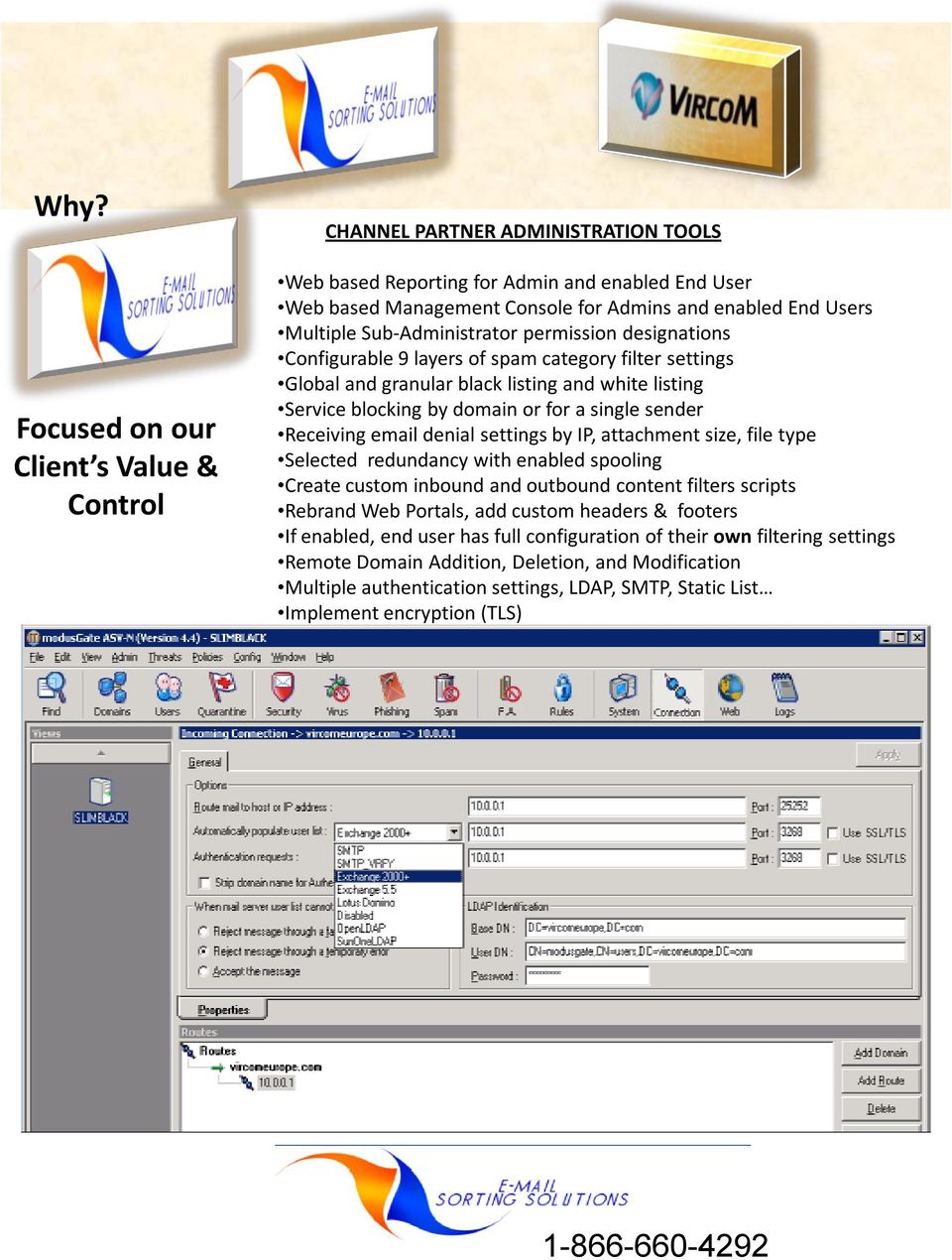
8 Why? Focused on our Client s Value & Control CHANNEL PARTNER ADMINISTRATION TOOLS Web based Reporting for Admin and enabled End User Web based Management Console for Admins and enabled End Users Multiple Sub-Administrator permission designations Configurable 9 layers of spam category filter settings Global and granular black listing and white listing Service blocking by domain or for a single sender Receiving denial settings by IP, attachment size, file type Selected redundancy with enabled spooling Create custom inbound and outbound content filters scripts Rebrand Web Portals, add custom headers & footers If enabled, end user has full configuration of their own filtering settings Remote Domain Addition, Deletion, and Modification Multiple authentication settings, LDAP, SMTP, Static List Implement encryption (TLS)
9 Focused on Effortless Administration Why? Automation Automated User/Account Management Automatic Population of User DB (SMTP, LDAP ) Authentication Proxy (WebQuarantine Access) 24/7 Automated Anti-Spam & anti-phishing Updates Up to every 5 minutes. Matchless self-learning mechanism Honeypots/Spamtraps User feedback: ISP partners, Corporate users Supported by Human Analysis Vircom s SpamBuster Team Minimal False Positives Every input benefits to All Personalization Give Enabled Users Complete Control Over their own Settings Ultimate granularity Change Category Sensitivity Authority Delegation (Cfr. User Interfaces)

10 Why? Focus on Ease of Administration (Lost ) Quarantine Management from Web & ! Custom Web Quarantine Reports (all users) Private Label Log on Portal, Reports, and Settings Pages Ability to View, Delete and Release false-positives Report false positives and White list senders in 2 clicks Users can customize their Report: Possibility to define schedule Possibility to select only desired items for report Custom ed Quarantine Reports (all users) Ability to View, Delete and Release false-positives Report false positives and White list senders in 2 clicks Interactivity allowing for full quarantine functionality
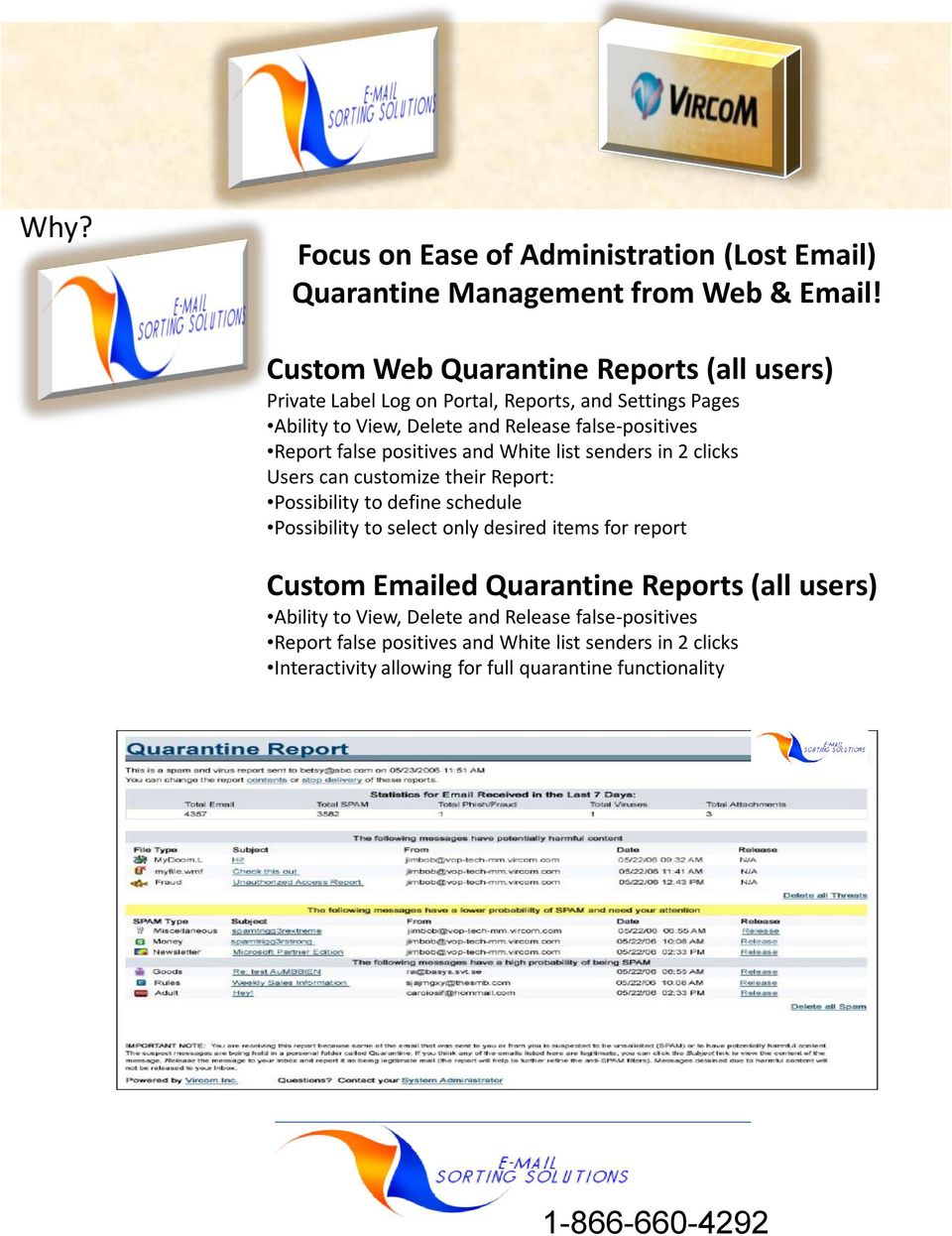
11 Focus on Scope of Administration with Quarantine Report Why?

12 Focus on Scope of Administration with Web Quarantine Report Why?

13 Why? & Feature Summary Premium Filtering August, Protection Feature Status Description Spam Filtering Yes 98.6% out of the box Virus Blocking Yes Commercial Updates Connection Defense Yes Block/Allow by IP etc Delivery Configuration Yes Load Balance, Fail Over Reports Yes Web Based & ed Message Center Yes Web User Interface Quarantine Summary Yes & Web Based Spam Blocking Configurable Verify User or Bounce Directory Harvest Attack Configurable AASP Servers Attacked, Client Perimeter Defended Spam Bomb and Virus Attack protection Configurable AASP Servers Attacked, Client Perimeter Defended Spooling Yes Up to 3 Days w/notification Attachment Control Yes Size and File Type Inbound Content Manager Yes Standard/Custom Scripting Transport-Layer Security (TLS) Yes Encryption Industry Heuristics Yes Standard/Custom Scripting User Directory Management (LDAP-SMTP) Yes Auto-User Authentication Outbound Services Attachment Manager Content Manager/Corporate Secrets Quarantine Virus Filtering/Downside Liability Compliance Footer Yes Enterprise Rich control for (AUP) Acceptable Use Policy Instant Messaging Yes Managed Addition Archiving Yes Managed Addition Private Labeling Yes Client Identity on Services Aggregate Pricing for Core Services/Reselling Yes Channel Ready Cancellation/Performance Clause Yes % Uptime Guarantee Monthly Churn Protection Yes Auto-User Verify, Aliases waived, Actual Billing Migration Consulting Yes Black/White List Import Call AASP at

Basic Email Funneling MX Verify and Redundancy. Why E-Mail Sorting Solutions? Why Vircom?
 Basic Email Funneling MX Verify and Redundancy Why E-Mail Sorting Solutions? Why Vircom? Why? Focused on Managed Messaging SaaS Security Systems Own Superior-Architected Infrastructure DATACENTERS: Carrier-class
Total Message Care. Why E-mail Sorting Solutions?
 Total Message Care Hosted Email- POP3, IMAP, MAPI, & Web Mail IM Filtering Email Filtering Web Filtering Archiving Shared Calendar, Tasks Mobile Device Synchronization Outlook Compatibility Why E-mail
Web Content Filtering. Why E-mail Sorting Solutions? Why ST BERNARD?
 Web Content Filtering Why E-mail Sorting Solutions? Why ST BERNARD? Focused on Managed Messaging SaaS Security Since 2003 Superior-Architected Infrastructure DATACENTERS: Carrier-class hosting facilities
eprism Email Security Appliance 6.0 Release Notes What's New in 6.0
 eprism Email Security Appliance 6.0 Release Notes St. Bernard is pleased to announce the release of version 6.0 of the eprism Email Security Appliance. This release adds several new features while considerably
Eiteasy s Enterprise Email Filter
 Eiteasy s Enterprise Email Filter Eiteasy s Enterprise Email Filter acts as a shield for companies, small and large, who are being inundated with Spam, viruses and other malevolent outside threats. Spammer
Managed Intrusion, Detection, & Prevention Services (MIDPS) Why E-mail Sorting Solutions? Why ProtectPoint?
 Managed Intrusion, Detection, & Prevention Services (MIDPS) Why E-mail Sorting Solutions? Why ProtectPoint? Why? Focused on Managed Intrusion Security Superior-Architected Hardened Technology Security
WHITE PAPER. Safeguarding your Email Infrastructure INSIDE MODUS TECHNOLOGY
 WHITE PAPER Safeguarding your Email Infrastructure INSIDE MODUS TECHNOLOGY Table of Contents Executive Summary............................................................. 3 Vircom s modus Technology....................................................
V1.4. Spambrella Email Continuity SaaS. August 2
 V1.4 August 2 Spambrella Email Continuity SaaS Easy to implement, manage and use, Message Continuity is a scalable, reliable and secure service with no set-up fees. Built on a highly reliable and scalable
SESA Securing Email with Cisco Email Security Appliance Parts 1 and 2
 Course Overview Securing Email with Cisco Email Security Appliance (SESA) combines Parts 1 and 2 (SESA1, SESA2) into a single three day course. Students learn to use Cisco Email Security Appliances (ESA's)
Top 10 Features: Clearswift SECURE Email Gateway
 Top 10 Features: Clearswift SECURE Email Gateway Top 10 Features: Clearswift SECURE Email Gateway Modern business simply couldn t function without email. However, both incoming and outgoing messages can
FortiMail Email Filtering Course 221-v2.2 Course Overview
 FortiMail Email Filtering Course 221-v2.2 Course Overview FortiMail Email Filtering is a 2-day instructor-led course with comprehensive hands-on labs to provide you with the skills needed to design, configure,
eprism Email Security Appliance 6.0 Intercept Anti-Spam Quick Start Guide
 eprism Email Security Appliance 6.0 Intercept Anti-Spam Quick Start Guide This guide is designed to help the administrator configure the eprism Intercept Anti-Spam engine to provide a strong spam protection
Reliable & Secure Email. Professional, Dependable, Complete Easy to Learn, Use and Grow
 Reliable & Secure Email Professional, Dependable, Complete Easy to Learn, Use and Grow About this Presentation Summarizes primary purposes of email, plus the needs of email providers and users. Introduces
Cisco IronPort C370 for Medium-Sized Enterprises and Satellite Offices
 Data Sheet Cisco IronPort C370 for Medium-Sized Enterprises and Satellite Offices Medium-sized enterprises face the same daunting challenges as the Fortune 500 and Global 2000 - higher mail volumes and
Mailwall Remote Features Tour Datasheet
 Management Portal & Dashboard Mailwall Remote Features Tour Datasheet Feature Benefit Learn More Screenshot Cloud based portal Securely manage your web filtering policy wherever you are without need for
Copyright 2011 Sophos Ltd. Copyright strictly reserved. These materials are not to be reproduced, either in whole or in part, without permissions.
 PureMessage for Microsoft Exchange protects Microsoft Exchange servers and Windows gateways against email borne threats such as from spam, phishing, viruses, spyware. In addition, it controls information
Security Policy JUNE 1, 2012. SalesNOW. Security Policy v.1.4 2012-06-01. v.1.4 2012-06-01 1
 JUNE 1, 2012 SalesNOW Security Policy v.1.4 2012-06-01 v.1.4 2012-06-01 1 Overview Interchange Solutions Inc. (Interchange) is the proud maker of SalesNOW. Interchange understands that your trust in us
GWAVA 5. Migration Guide for Netware GWAVA 4 to Linux GWAVA 5
 GWAVA 5 Migration Guide for Netware GWAVA 4 to Linux GWAVA 5 Copyright 2010 GWAVA, Inc. All rights reserved. Content may not be reproduced without permission. http://www.gwava.com Overview While GWAVA
FortiMail Email Filtering Course 221-v2.0. Course Overview. Course Objectives
 FortiMail Email Filtering Course 221-v2.0 Course Overview FortiMail Email Filtering is a 2-day instructor-led course with comprehensive hands-on labs to provide you with the skills needed to configure,
Access Webmail, Collaboration Tools, and Sync Mobile Devices from Anywhere
 P a g e 1 Steadfast email Steadfast email delivers Exchange-level mail server features at a lower cost. With lower end user requirements, superior stability, and reduced maintenance costs Steadfast email
MDaemon Vs. Microsoft Exchange Server 2013 Standard
 Comparison Guide Vs. The following chart is a side-by-side feature comparison of and. Flex Licensing Maximum Accounts Unlimited Unlimited SMTP, POP3, DomainPOP, and MultiPOP POP3 & SMTP Only SSL / TLS
Mod 08: Exchange Online FOPE
 Office 365 for SMB Jump Start Mod 08: Exchange Online FOPE Chris Oakman Managing Partner Infrastructure Team Eastridge Technology Stephen Hall Owner & IT Consultant District Computers 1 Jump Start Schedule
Core Filtering Admin Guide
 Core Filtering Admin Guide 3193 Red Hill Avenue Costa Mesa, CA 92626 United States p.866.spam.out f.949.203.6425 e. [email protected] www.spamsoap.com Table of Contents Login... 3 Overview... 3 Quarantine...
Websense Email Security Transition Guide
 Websense Email Security Transition Guide Websense Email Security Gateway v7.6 2011, Websense Inc. All rights reserved. 10240 Sorrento Valley Rd., San Diego, CA 92121, USA R140611760 Published August 2011
Cloud Services. Email Anti-Spam. Admin Guide
 Cloud Services Email Anti-Spam Admin Guide 10/23/2014 CONTENTS Introduction to Anti- Spam... 4 About Anti- Spam... 4 Locating the Anti- Spam Pages in the Portal... 5 Anti- Spam Best Practice Settings...
Email Migration Project Plan for Cisco Cloud Email Security
 Sales Tool Email Migration Project Plan for Cisco Cloud Email Security 2014 Cisco and/or its affiliates. All rights reserv ed. This document is Cisco Conf idential. For Channel Partner use only. Not f
INLINE INGUARD E-MAIL GUARDIAN
 INLINE INGUARD E-MAIL GUARDIAN Activation Guide December 8, 2008 600 Lakeshore Parkway, AL 35209 888.3InLine [email protected] 1 InLine InGuard E-Mail Guardian Activation Guide The InLine InGuard E-Mail
Load Balancing & High Availability
 Load Balancing & High Availability 0 Optimizing System Resources through Effective Load Balancing An IceWarp White Paper October 2008 www.icewarp.com 1 Background Every server is finite. Regardless of
GFI Product Manual. Getting Started Guide
 GFI Product Manual Getting Started Guide http://www.gfi.com [email protected] The information and content in this document is provided for informational purposes only and is provided "as is" with no warranty
Barracuda Email Security Service
 Barracuda Networks Technical Documentation Barracuda Email Security Service Administrator s Guide Version 1.0 RECLAIM YOUR NETWORK Copyright Notice Copyright (c) 2004-2011, Barracuda Networks, Inc., 3175
Core Protection Suite
 Core Protection Suite Admin Guide Spam Soap, Inc. 3193 Red Hill Avenue Costa Mesa, CA 92626 United States p.866.spam.out f.949.203.6425 e. [email protected] www.spamsoap.com Contents EMAIL PROTECTION OVERVIEW...3
Deployment Guide. For the latest version of this document please go to: http://www.exchangedefender.com/documentation.php
 Deployment Guide For the latest version of this document please go to: http://www.exchangedefender.com/documentation.php ExchangeDefender Introduction The purpose of this guide is to familiarize you with
Features and benefits guide for partners and their customers
 and benefits guide for partners and their customers Version 3.0 and Guide for Partners and their customers Security Anti Virus Proofpoint s own threat detection technology enables our email Anti-Virus
The versatile solution of anti-spam, personal email backup and recovery, easy email security policy management and enforcement.
 Anti-Spam Expert The versatile solution of anti-spam, personal email backup and recovery, easy email security policy management and enforcement. Effectively filter spam mails by cocktailed N-Tier filter
Intercept Anti-Spam Quick Start Guide
 Intercept Anti-Spam Quick Start Guide Software Version: 6.5.2 Date: 5/24/07 PREFACE...3 PRODUCT DOCUMENTATION...3 CONVENTIONS...3 CONTACTING TECHNICAL SUPPORT...4 COPYRIGHT INFORMATION...4 OVERVIEW...5
Securing enterprise collaboration through email and file sharing on a unified platform
 Axway MailGate SC Securing enterprise collaboration through email and file sharing on a unified platform Email is the primary collaboration tool employees use to share information and send large files.
Setting up Microsoft Office 365
 Setup Guide Revision F Using McAfee SaaS Email Protection to Secure Exchange Online in Microsoft Office 365 Setting up Microsoft Office 365 Use this guide to configure Microsoft Office 365 and Microsoft
Feature Comparison Guide
 Feature Comparison Guide Stay Secure Portal Autumn 2015 Contents Introduction... 3 Description on some of the new features... 5 Customer overview from partner portal... 5 Partner & customer portal linkage...
Setting up Microsoft Office 365
 Integration Guide Revision G McAfee SaaS Email Protection Securing Exchange Online in Microsoft Office 365 Setting up Microsoft Office 365 Use this guide to configure Microsoft Office 365 and Microsoft
BUILT FOR YOU. Contents. Cloudmore Exchange
 BUILT FOR YOU Introduction is designed so it is as cost effective as possible for you to configure, provision and manage to a specification to suit your organisation. With a proven history of delivering
IronPort X1000 Email Security System
 I r o n P o r t A p p l i a n c e s T H E U LT I M AT E E M A I L S E C U R I T Y S Y S T E M F O R T H E W O R L D S M O S T D E M A N D I N G N E T W O R K S. IronPort X1000 Email Security System O v
Securing enterprise collaboration through email and file sharing on a unified platform
 Axway MailGate SC Securing enterprise collaboration through email and file sharing on a unified platform Email is the primary collaboration tool employees use to share information and send large files.
MDaemon configuration recommendations for dealing with spam related issues
 Web: Introduction MDaemon configuration recommendations for dealing with spam related issues Without a doubt, our most common support queries these days fall into one of the following groups:- 1. Why did
Service Launch Guide (US Customer) SEG Filtering
 Secure Network Gateway / Secure E-Mail Gateway (SEG) Service Service Launch Guide Service Launch Guide (US Customer) SEG Filtering Overview The following information will guide you through the steps required
Cisco IronPort X1070 Email Security System
 Data Sheet Cisco IronPort X1070 Email Security System As the battle to protect the email perimeter continues, two predominant trends emerge: higher mail volumes and more resource-intensive scanning. The
Comprehensive Anti-Spam Service
 Comprehensive Anti-Spam Service Chapter 1: Document Scope This document describes how to implement and manage the Comprehensive Anti-Spam Service. This document contains the following sections: Comprehensive
Microsoft Exchange 2003
 Microsoft Exchange 2003 Configuration Guide Microsoft Exchange 2003 Configuration Guide Page 1 Table of Contents Introduction... 2 Document and naming conventions... 2 Outbound email protection... 3 SMTP
Government of Canada Managed Security Service (GCMSS) Annex A-5: Statement of Work - Antispam
 Government of Canada Managed Security Service (GCMSS) Date: June 8, 2012 TABLE OF CONTENTS 1 ANTISPAM... 1 1.1 QUALITY OF SERVICE...1 1.2 DETECTION AND RESPONSE...1 1.3 MESSAGE HANDLING...2 1.4 CONFIGURATION...2
GFI Product Comparison. GFI MailEssentials vs Barracuda Spam Firewall
 GFI Product Comparison GFI MailEssentials vs Barracuda Spam Firewall GFI MailEssentials Barracuda Spam Firewall Integrates closely with Microsoft Exchange Server 2003/2007/2010 Integrates closely with
SonicWALL Email Security Quick Start Guide. Version 4.6
 SonicWALL Email Security Quick Start Guide Version 4.6 Quick Start Guide - Introduction This document guides you through the most basic steps to set up and administer SonicWALL Email Security. For more
Preface... 4. Introduction to Proofpoint Essentials... 5
 July 2014 Preface... 4 About this Guide... 4 Intended Audience and Prerequisite Knowledge... 4 Other Sources of Information... 4 Contacting Proofpoint Essentials Support... 4 Knowledge Base... 5 Support
itg CloudBase is a suite of fully managed Hybrid & Private Cloud Services ready to support your business onwards and upwards into the future.
 Web Filtering Email Filtering Mail Archiving Cloud Backup Disaster Recovery Virtual Machines Private Cloud itg CloudBase is a suite of fully managed Hybrid & Private Cloud Services ready to support your
Frequently Asked Questions
 Questions and Answers Questions About Platform, Requirements, and Capabilities What is the difference between a SonicWALL Appliance and Software SonicWALL Email Security? The hardware version is a Linux
MailFoundry Users Manual. MailFoundry User Manual Revision: MF2005071100 Copyright 2005, Solinus Inc. All Rights Reserved
 MailFoundry User Manual Revision: MF2005071100 Copyright 2005, Solinus Inc. All Rights Reserved Page 1 of 91 Chapter 1: Introduction... 4 What are Spam Profiles?... 4 Models Covered In This Manual... 4
How To Get The Most Out Of Your Email From Your Mail Server (For A Small Business)
 Hosted Exchange +SharePoint: Communication and Collaboration This is the next generation of affordable, reliable messaging and portal solutions with Microsoft Exchange 2010 and Microsoft SharePoint 2010.
Solutions IT Ltd Virus and Antispam filtering solutions 01324 877183 [email protected]
 Contents Reduce Spam & Viruses... 2 Start a free 14 day free trial to separate the wheat from the chaff... 2 Emails with Viruses... 2 Spam Bourne Emails... 3 Legitimate Emails... 3 Filtering Options...
Anti-SPAM Solutions as a Component of Digital Communications Management
 Anti-SPAM Solutions as a Component of Digital Communications Management Ron Shuck CISSP, GCIA, CCSE Agenda What is Spam & what can you do? What is the cost of Spam E-mail E to organizations? How do we
anomaly, thus reported to our central servers.
 Cloud Email Firewall Maximum email availability and protection against phishing and advanced threats. If the company email is not protected then the information is not safe Cloud Email Firewall is a solution
Spam DNA Filtering System
 The Excedent Spam DNA Filtering System provides webmail.us customers with premium and effective junk email protection. Threats to email services are rising rapidly. A Growing Problem As of November 2002,
Symantec Messaging Gateway 10.5
 Powerful email gateway protection Data Sheet: Messaging Security Overview Symantec Messaging Gateway enables organizations to secure their email and productivity infrastructure with effective and accurate
1 Introduction 11 1.1 About this manual 11 1.2 Terms and conventions used in this manual 12
 Administrator Guide The information and content in this document is provided for informational purposes only and is provided "as is" with no warranty of any kind, either express or implied, including but
Implementing MDaemon as an Email Security Gateway to Exchange Server
 Implementing MDaemon as an Email Security Gateway to Exchange Server Introduction MDaemon is widely deployed as a very effective antispam/antivirus gateway to Exchange. For optimum performance, we recommend
Installing GFI MailSecurity
 Installing GFI MailSecurity Introduction This chapter explains how to install and configure GFI MailSecurity. You can install GFI MailSecurity directly on your mail server or you can choose to install
Deploying Layered Email Security. What is Layered Email Security?
 Deploying Layered Email Security This paper is intended for users of Websense Email Security who want to add Websense Hosted Email Security to deploy a layered email security solution. In this paper: Review
Outlook. Sharepoint. Lync. BlackBerry. McAfee. Microsoft Hosted Exchange
 Outlook Sharepoint Lync BlackBerry McAfee Microsoft Hosted Exchange Microsoft Hosted Exchange Webhosting.net provides a comprehensive Hosted Exchange solution that combines the comprehensive features of
Proactively protecting your messaging infrastructure with the IBM Lotus Protector for Mail Security solution.
 Security capabilities To support your business objectives Proactively protecting your messaging infrastructure with the IBM Lotus Protector for Mail Security solution. Preemptive protection and spam control
Installing GFI MailEssentials
 Installing GFI MailEssentials Introduction to installing GFI MailEssentials This chapter shows you how to install and configure GFI MailEssentials. GFI MailEssentials can be installed in two ways: Installation
Evaluation Guide. eprism Messaging Security Suite. 800-782-3762 www.edgewave.com V8.200
 800-782-3762 www.edgewave.com Welcome to EdgeWave Messaging Security! This short guide is intended to help administrators setup and test the EdgeWave Messaging Security Suite for evaluation purposes. A
FortiMail Email Filtering. Course 221 (for FortiMail v5.0) Course Overview
 FortiMail Email Filtering Course 221 (for FortiMail v5.0) Course Overview FortiMail Email Filtering is a 2-day instructor-led course with comprehensive hands-on labs to provide you with the skills needed
Barracuda Spam Firewall Administrator s Guide
 Barracuda Spam Firewall Administrator s Guide 1 Copyright Copyright 2005, Barracuda Networks www.barracudanetworks.com v3.2.22 All rights reserved. Use of this product and this manual is subject to license.
Load-Balanced Merak Mail Server
 Load-Balanced Merak Mail Server The most powerful solution for high traffic performance is to deploy Merak Mail Server in a load-balanced environment. This solution is shown in the demonstration below:
How To Configure Forefront Threat Management Gateway (Forefront) For An Email Server
 Owner of the content within this article is www.isaserver.org Written by Marc Grote www.it-training-grote.de Configuring and using the E-Mail protection feature in Microsoft Forefront Threat Management
How To Ensure Your Email Is Delivered
 Everything You Need to Know About Delivering Email through Your Web Application SECTION 1 The Most Important Fact about Email: Delivery is Never Guaranteed Email is the backbone of the social web, making
CALNET 3 Category 7 Network Based Management Security. Table of Contents
 State of California IFB STPD 12-001-B CALNET 3 Category 7 Network Based Security Table of Contents 7.2.1.4.a DDoS Detection and Mitigation Features... 1 7.2.2.3 Email Monitoring Service Features... 2 7.2.3.2
Symantec Hosted Mail Security Getting Started Guide
 Symantec Hosted Mail Security Getting Started Guide Redirecting Your MX Record You have successfully activated your domain within the Symantec Hosted Mail Security Console. In order to begin the filtration
IronPort C350 for Medium-Sized Enterprises and Satellite Offices
 I r o n P o r t E M A I L S E C U R I T Y A P P L I A N C E S H I G H - P E R F O R M A N C E E M A I L S E C U R I T Y. C A R R I E R - P R O V E N T E C H N O L O G Y. E N T E R P R I S E - C L A S S
provides several new features and enhancements, and resolves several issues reported by WatchGuard customers.
 WatchGuard XCS v10.0 Update 1 Release Notes WatchGuard XCS Build 140312 Revision Date 11 November, 2014 Introduction WatchGuard is pleased to announce the release of WatchGuard XCS v10.0 Update 1. This
System Compatibility. Enhancements. Operating Systems. Hardware Requirements. Email Security
 Email Security SonicWALL Email Security 7.0 for Microsoft Small Business Server System Compatibility SonicWALL Email Security 7.0 Software is supported on systems with the following: Operating Systems
Configuration Information
 This chapter describes some basic Email Security Gateway configuration settings, some of which can be set in the first-time Configuration Wizard. Other topics covered include Email Security interface navigation,
Installing GFI MailEssentials
 Installing GFI MailEssentials Introduction to installing GFI MailEssentials This chapter explains the procedure on how to install and configure GFI MailEssentials. GFI MailEssentials can be installed in
XGENPLUS SECURITY FEATURES...
 Security Features Table of Contents TABLE OF CONTENTS... 2 1. INTRODUCTION... 3 2. XGENPLUS SECURITY FEATURES... 3 3. SERVER LEVEL FEATURES... 5 4. DOMAIN LEVEL FEATURES... 8 5. USER LEVEL FEATURES...
Security. Help Documentation
 Help Documentation This document was auto-created from web content and is subject to change at any time. Copyright (c) 2016 SmarterTools Inc. Security Antivirus Administration SmarterMail is equipped with