
A Comparison of the Linux and Windows Device Driver Architectures
|
|
|
- Leon Wheeler
- 10 years ago
- Views:
Transcription
1 A Comparison of the Linux and Windows Device Driver Architectures Melekam Tsegaye Rhodes University, South Africa Richard Foss Rhodes University, South Africa Abstract: In this paper the device driver architectures currently used by two of the most popular operating systems, Linux and Microsoft s Windows, are examined. Driver components required when implementing device drivers for each operating system are presented and compared. The process of implementing a driver, for each operating system, that performs I/O to a kernel buffer is also presented. The paper concludes by examining the device driver development environments and facilities provided to developers by each operating system. 1. Introduction Modern operating system kernels consist of a number of components such as a memory manager, process scheduler, hardware abstraction layer (HAL) and security manager. For a detailed look at the Windows kernel refer to [Russinovich, 98] and for the Linux kernel [Rusling, 99], [Beck et al, 98]. The kernel can be viewed as a black box that should know how to interact with the many different types of hardware devices that exist and the many more devices that do not yet exist. Creating a kernel that has inbuilt functionality for interacting with all known hardware devices may be possible but is not practical. It would consume too many system resources, needlessly Kernel Modularity A kernel is not expected to know how to interact with new types of devices that do not yet exist at the time of its creation. Instead modern operating system kernels allow their functionality to be extended by the addition of device driver modules at runtime. A module implements functionality that will allow the kernel to interact with a particular new device. Each module implements a routine that the kernel will call at module load time and a routine that gets called at module removal time. Modules also implement various routines that will implement I/O functionality for transferring data to and from a device as well as a routine for issuing device I/O control instructions to a device. The above applies to both the Linux and Windows driver architectures Organisation of this paper The material in this paper is divided into the following sections: General driver architecture of the two operating systems (section 2) Driver architecture components of each operating system (sections 3) Implementation of a driver that performs I/O to a kernel buffer (section 4) Driver development environments and facilities offered by the two operating systems to developers (section 5) 1.3. Related Work The Windows device driver architecture is documented by documentation that accompanies the Windows Device Driver Development kit [Microsoft DDK, 02]. Further, the works produced by Walter Oney [Oney, 99] and Chris Cant [Cant, 99] present a detailed account of the Windows Driver Architecture. The Linux device driver architecture is documented well by the freely available publication authored by Rubini et al [Rubini et al, 01].

2 2. Device Driver Architectures A device driver enables the operation of a piece of hardware by exposing a programming interface that allows a device to be controlled externally by applications and parts of an operating system. This section presents the driver architectures currently in use by two of the most commonly used operating systems, Microsoft s Windows and Linux, and the origin of their architecture Origin of the Linux Driver Architecture Linux is a clone of the UNIX operating system first created by Linux Travolds [Linus FAQ, 02], [LinuxHQ, 02]. It follows that the Linux operating system utilises a similar architecture to UNIX systems. UNIX operating systems view devices as file system nodes. Devices appear as special file nodes in a directory designated by convention to contain device file system node entries [Deitel, 90]. The aim of representing devices as file system nodes is so that applications can access devices in a device independent manner [Massie, 86],[Flynn et al, 97]. Applications can still perform device dependent operations with a device I/O control operation. Devices are identified by major and minor numbers. A major number serves as an index to an array of drivers and a minor number is used to group similar physical devices [Deitel, 90]. Two types of UNIX devices exist, char and block. Char device drivers manage devices that are accessed sequentially with no buffering, and Block device drivers manage devices where random access is possible, and data is accessed in blocks. Buffering is also utilised in block device drivers. A block device must be mounted as a file system node for it to be accessible [Beck et al, 98]. Linux retains much of the UNIX architecture, the difference being that char device nodes corresponding to block devices have to be created in UNIX systems, whereas in Linux, the Virtual File System (VFS) interface blurs the distinction between char and block devices [Beck et al, 98]. Linux also introduces a third type of device called a network device. Network device drivers are accessed in a different way to char and block drivers. A set of APIs different from the file system I/O APIs are used e.g. the socket API, which is used for accessing network devices Origin of the Windows Driver Architecture In 1980, Microsoft licensed the UNIX operating system from Bell labs, later releasing it as the XENIX operating system. With the first IBM PC, MS DOS version 1 was released in MS DOS version 1 had a similar driver architecture to UNIX systems based on XENIX [Deitel, 90]. The difference to UNIX systems was that the operating system came with built in drivers for common devices. Device entries did not appear as file system nodes. Instead reserved names were assigned to devices. E.g. CON was the keyboard or screen, PRN the printer and AUX the serial ports. Applications could open these devices and obtain a handle to associated drivers as they would with file system nodes, and perform I/O to them. The operating system, transparent to applications, translated reserved device names to devices that its drivers managed. MS DOS version 2 introduced the concept of loadable drivers. Since Microsoft had made the interface to its driver architecture open, this encouraged third party device manufacturers to produce new devices [Davis, 83]. Drivers for these new devices could then be supplied by hardware manufacturers and be loaded/unloaded at runtime into the kernel, manually. Later on, Windows 3.1 was released by Microsoft. It had support for many more devices and utilised an architecture based on MS DOS. With its later operating systems, Windows 95, 98 and NT, Microsoft introduced the Windows Driver Mode (WDM). The WDM came about because Microsoft wanted to make device drivers source code compatible with all of its new operating systems [Microsoft WDM, 02]. Thus, the advantage of making drivers WDM compliant is that once created, a driver need only be recompiled before it is usable on any of Microsoft s later operating systems The Windows Driver Architecture There are two types of Windows drivers, legacy and Plug and Play (PnP) drivers. The focus here is only on PnP drivers, as all drivers should be PnP drivers where the possible. PnP drivers are user friendly since very little effort is required from users to install them. Another benefit of making drivers PnP is that they get loaded by the operating system only when needed, thus they do not use up system resources needlessly. Legacy drivers were implemented for Microsoft s earlier operating systems and their architecture is outdated. The Windows Driver Model (WDM) is a standard model specified by Microsoft [Microsoft DDK, 02]. WDM drivers are usable on all of Microsoft s recent operating systems (Windows 95 and later).

3 The WDM driver architecture There are three classes of WDM drivers: filter, functional and bus drivers [Oney, 01]. They form the stack illustrated in figure 2.3. In addition, WDM drivers must be PnP aware, support power management and Windows Management Instrumentation. Figure 2.3 shows how data and messages are exchanged between the various driver layers. A standard structure called an I/O Request Packet (IRP) is used for communication. Whenever a request is made from an application to a driver, the I/O manager builds an IRP and passes it down to the driver, which processes it, and when done, completes the IRP [Cant, 99]. Not every IRP filters down to a bus driver. Some IRPs get handled by the layers above and are returned to the I/O manager from there. Hardware access to a device is done through a hardware abstraction layer (HAL). Applications Win32 API User space Kernel space PnP Manager I/O Manager Power Manager IRP IRP IRP Upper Filter IRP IRP IRP Functional Lower Filter Bus IRP IRP IRP I/O Request Packet HAL Hardware bus Figure 2.3 The WDM Driver Architecture 2.4. The Linux Driver Architecture Drivers in Linux are represented as modules, which are pieces of code that extend the functionality of the Linux kernel [Rubini et al, 01]. Modules can be layered as shown in figure 2.4. Communication between modules is achieved using function calls. At load time a module exports all functions it wants to make public to a symbol table that the Linux kernel maintains. These functions are then visible to all modules. Access to devices is done through a hardware abstraction layer (HAL) whose implementation depends on the hardware platform that the kernel is compiled for, e.g. x86 or SPARC.
![Whenever a request is made from an application to a driver, the I/O manager builds an IRP and passes it down to the driver, which processes it, and when done, completes the IRP [Cant, 99].](/docs-images/55/8733727/images/page_3.jpg "Not every IRP filters down to a bus driver. Some IRPs get handled by the layers above and are returned to the I/O manager from there.")
4 Applications System Call Interface User space Kernel space Module X Module Y Module Z Function call with custom data HAL Hardware bus Figure 2.4 The Linux Driver Architecture 2.5. The Linux and Windows Driver Architectures Compared As can be seen in figures 2.3 and 2.4, a number of similarities exist between the two operating systems. On both systems, drivers are modular components that extend the functionality of the kernel. Communication between driver layers in Windows is through the use of I/O Request Packets (IRPs) supplied as arguments to standard system and driver defined functions, whereas in Linux function calls with parameters customized to a particular driver are used. Windows has separate kernel components that manage PnP, I/O and Power. These components send messages to drivers using IRPs at appropriate times. In Linux, there is no clear distinction between layered modules, i.e. modules are not categorised as bus, functional or filter drivers. There is no clearly defined PnP or Power manager in the kernel that sends standardised messages to modules at appropriate times. The kernel may have modules loaded that implement Power Management or PnP functionality, but the interface of these modules to drivers is not clearly specified. This functionality is likely to be incorporated in later Linux kernels as the Linux kernel is always in development. Once data is passed to a driver that is part of a stack of modules by the kernel, the data may be shared with other drivers in the stack through an interface specific to that set of drivers. In both environments, hardware access through a HAL interface is implemented for the specific platform the kernel is compiled for, i.e. x86, SPARC etc. A common feature of both architectures is that drivers are modules that can be loaded into a kernel at runtime. Each module contains an entry point that the kernel knows to start code execution from. A module will also contain routines that the kernel knows to call when an I/O operation is requested to a device managed by that module. This enables the kernel to provide a device independent interface to the application layer. A more in-depth comparison of driver components from the two architectures is presented later in Section Drivers Components The process of creating a device driver requires knowledge of how the associated hardware device is expected to operate. For example, just about every device will allow its clients to read data from and write data to it. In this section driver components that must be implemented by all drivers are presented, as well as a comparison of the two operating systems driver components. The implementation of a driver that performs I/O to a kernel buffer is also presented. The section concludes with a look at the driver development environments and facilities offered by each operating system.

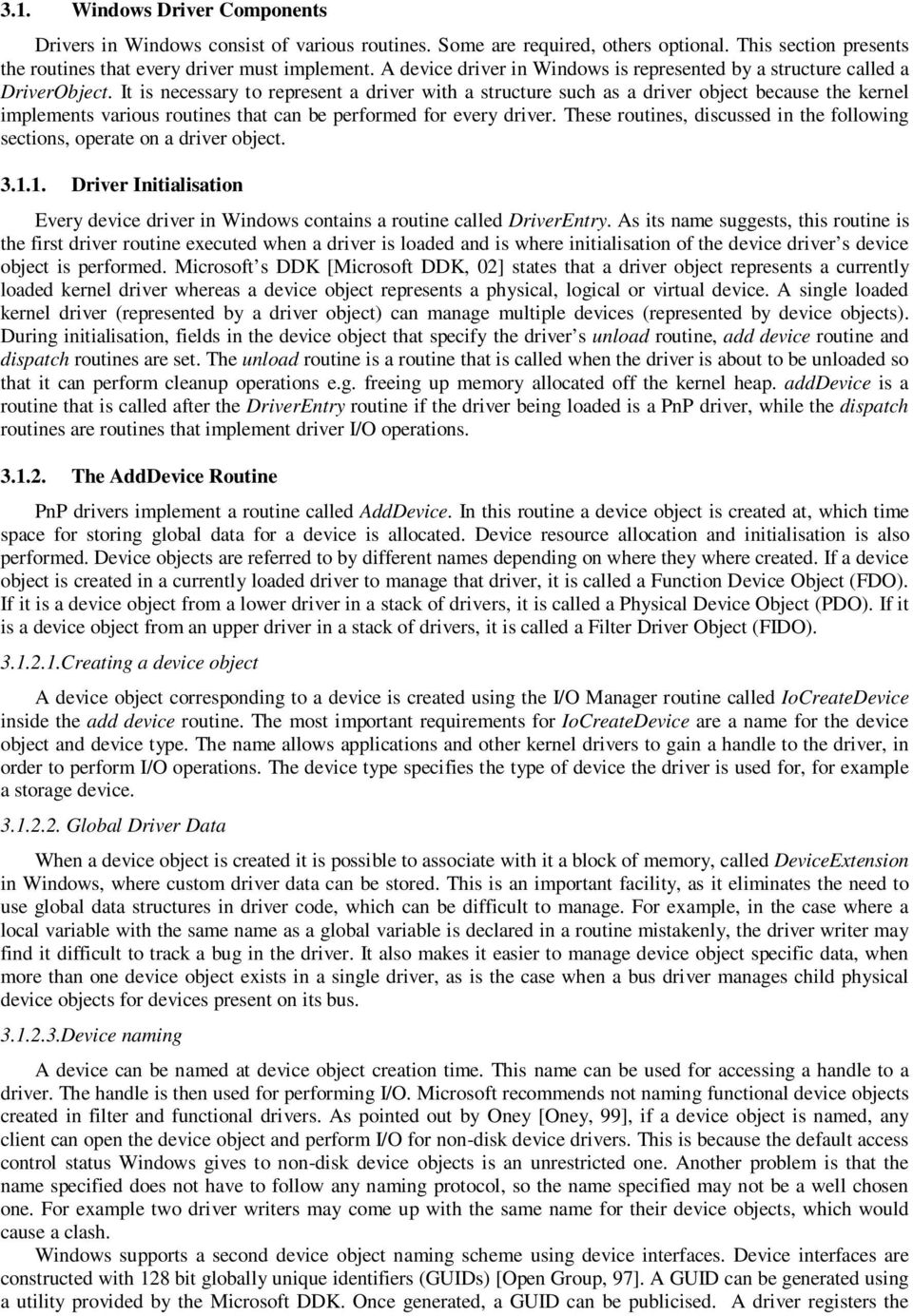
5 3.1. Windows Driver Components Drivers in Windows consist of various routines. Some are required, others optional. This section presents the routines that every driver must implement. A device driver in Windows is represented by a structure called a DriverObject. It is necessary to represent a driver with a structure such as a driver object because the kernel implements various routines that can be performed for every driver. These routines, discussed in the following sections, operate on a driver object Driver Initialisation Every device driver in Windows contains a routine called DriverEntry. As its name suggests, this routine is the first driver routine executed when a driver is loaded and is where initialisation of the device driver s device object is performed. Microsoft s DDK [Microsoft DDK, 02] states that a driver object represents a currently loaded kernel driver whereas a device object represents a physical, logical or virtual device. A single loaded kernel driver (represented by a driver object) can manage multiple devices (represented by device objects). During initialisation, fields in the device object that specify the driver s unload routine, add device routine and dispatch routines are set. The unload routine is a routine that is called when the driver is about to be unloaded so that it can perform cleanup operations e.g. freeing up memory allocated off the kernel heap. adddevice is a routine that is called after the DriverEntry routine if the driver being loaded is a PnP driver, while the dispatch routines are routines that implement driver I/O operations The AddDevice Routine PnP drivers implement a routine called AddDevice. In this routine a device object is created at, which time space for storing global data for a device is allocated. Device resource allocation and initialisation is also performed. Device objects are referred to by different names depending on where they where created. If a device object is created in a currently loaded driver to manage that driver, it is called a Function Device Object (FDO). If it is a device object from a lower driver in a stack of drivers, it is called a Physical Device Object (PDO). If it is a device object from an upper driver in a stack of drivers, it is called a Filter Driver Object (FIDO) Creating a device object A device object corresponding to a device is created using the I/O Manager routine called IoCreateDevice inside the add device routine. The most important requirements for IoCreateDevice are a name for the device object and device type. The name allows applications and other kernel drivers to gain a handle to the driver, in order to perform I/O operations. The device type specifies the type of device the driver is used for, for example a storage device Global Driver Data When a device object is created it is possible to associate with it a block of memory, called DeviceExtension in Windows, where custom driver data can be stored. This is an important facility, as it eliminates the need to use global data structures in driver code, which can be difficult to manage. For example, in the case where a local variable with the same name as a global variable is declared in a routine mistakenly, the driver writer may find it difficult to track a bug in the driver. It also makes it easier to manage device object specific data, when more than one device object exists in a single driver, as is the case when a bus driver manages child physical device objects for devices present on its bus Device naming A device can be named at device object creation time. This name can be used for accessing a handle to a driver. The handle is then used for performing I/O. Microsoft recommends not naming functional device objects created in filter and functional drivers. As pointed out by Oney [Oney, 99], if a device object is named, any client can open the device object and perform I/O for non-disk device drivers. This is because the default access control status Windows gives to non-disk device objects is an unrestricted one. Another problem is that the name specified does not have to follow any naming protocol, so the name specified may not be a well chosen one. For example two driver writers may come up with the same name for their device objects, which would cause a clash. Windows supports a second device object naming scheme using device interfaces. Device interfaces are constructed with 128 bit globally unique identifiers (GUIDs) [Open Group, 97]. A GUID can be generated using a utility provided by the Microsoft DDK. Once generated, a GUID can be publicised. A driver registers the
6 GUID for a device interface in its add device routine through a call to the I/O manager routine IoRegisterDeviceInterface. Once registered, the driver must enable the device interface through a call to the I/O manager routine IoSetDeviceInterfaceState. The registration process will add an interface data entry to the Windows registry file, which can be accessed by applications Driver Access from an Application An application that wants to perform I/O operations with a device driver must obtain a handle to a device driver through the CreateFile Win32 API call. It requires a path to a device such as \\device\devicex. Named devices will have their names appear in the name space called \\device, thus the previous path is for a device named devicex. CreateFile also requires access mode flags such as read, write and file sharing flags for the device. Accesses to unnamed devices that have registered a device interface are performed differently as shown in figure This requires obtaining a handle to a device information structure using the driver s GUID, and calling the SetupDiGetClassDevs Win32 API routine. This is only possible if the driver registered a device interface, through which applications can access the device (called a device interface class). Each time a driver calls the I/O manager routine IoRegisterDeviceInterface, a new instance of the device interface class is created. Once a device information handle is obtained by an application, multiple calls to the Win32 API routine SetupDiEnumDeviceInterfaces will return device interface data for each instance of the device interface class. Lastly, a device path for each of the driver instances can be retrieved from the interface data obtained from the previous call with another Win32 API routine, SetupGetDeviceInterfaceDetail. CreateFile can then be called with the device path for the device instance of interest, to obtain a handle for performing I/O. GUID { } SetupDiGetClass Devs Device Interface Handle SetupDiEnumDeviceInterfaces Device Name Space Interface Data \\Device SetupDiGetDeviceInterfaceDetail devicea deviceb Device Path devicex CreateFile API call Handle for I/O Figure Obtaining a handle an application can use for I/O from a device GUID Device Object Stacking When the add device routine is called by the PnP manager, one of the parameters passed to it is a device object (PDO) for a driver below the current one. Device object stacking is performed in the add device routine so that IRPs sent by drivers in the layer below the driver being loaded can be received by it. Device object

7 stacking is achieved by a call to the I/O Manager routine IoAttachDeviceToDeviceStack as shown in figure A physical device object (PDO) is required, which is lower in the stack than the new device object when calling IoAttachDeviceToDeviceStack. The routine attaches the specified device object to the top of the driver stack and returns a device object that is one below the new one e.g. in the example shown on figure this would be lower device object X. The lower physical device object (PDO) can be any number of layers below the new device object but IoAttachDeviceToStack returns the device object one below the current one. Device object (FDO) Lower Device object X Lower Device object Y Lower Device object Z IoAttachDeviceToDeviceStack Device object (FDO) Lower Device object X Lower Device object Y Lower Device object Z Figure Attaching a device object to the top of a device object stack User to Kernel and Kernel to User Data Transfer Modes in Windows The mode used to transfer data from kernel space to user space and vice versa is specified in the flags field of a device object. There are three modes: buffered I/O, direct I/O and I/O that does not use any of the latter methods termed method neither I/O. Figure illustrates the three modes. In buffered I/O mode the operating system allocates a kernel buffer that can handle a request. In the case of a write operation, the operating system validates the supplied user space buffer and copies data from the user space buffer to the newly allocated kernel buffer and passes the kernel buffer to the driver. In the case of reads, the operating system validates the user space buffer and copies data from the newly allocated kernel buffer to the user space buffer. The kernel buffer is accessible to drivers as the AssociatedIrp.SystemBuffer field of an IRP. Drivers read from or write to this buffer to communicate with applications when buffered I/O is in use. Direct I/O is the second I/O method that can be used for data exchanges between applications and a driver. An application-supplied buffer is locked into memory by the operating system, so that it will not be swapped out, and a memory descriptor list (MDL) for the locked memory is passed to a driver. An MDL is an opaque structure. Its implementation details are not visible to drivers. The driver then performs DMA to the user space buffer through the MDL. The MDL is accessible to drivers through the MdlAddress field of an IRP. The advantage of using direct I/O is that it is faster than buffered I/O since no copying of data to and from user and kernel space is necessary and I/O is performed directly into a user space buffer.
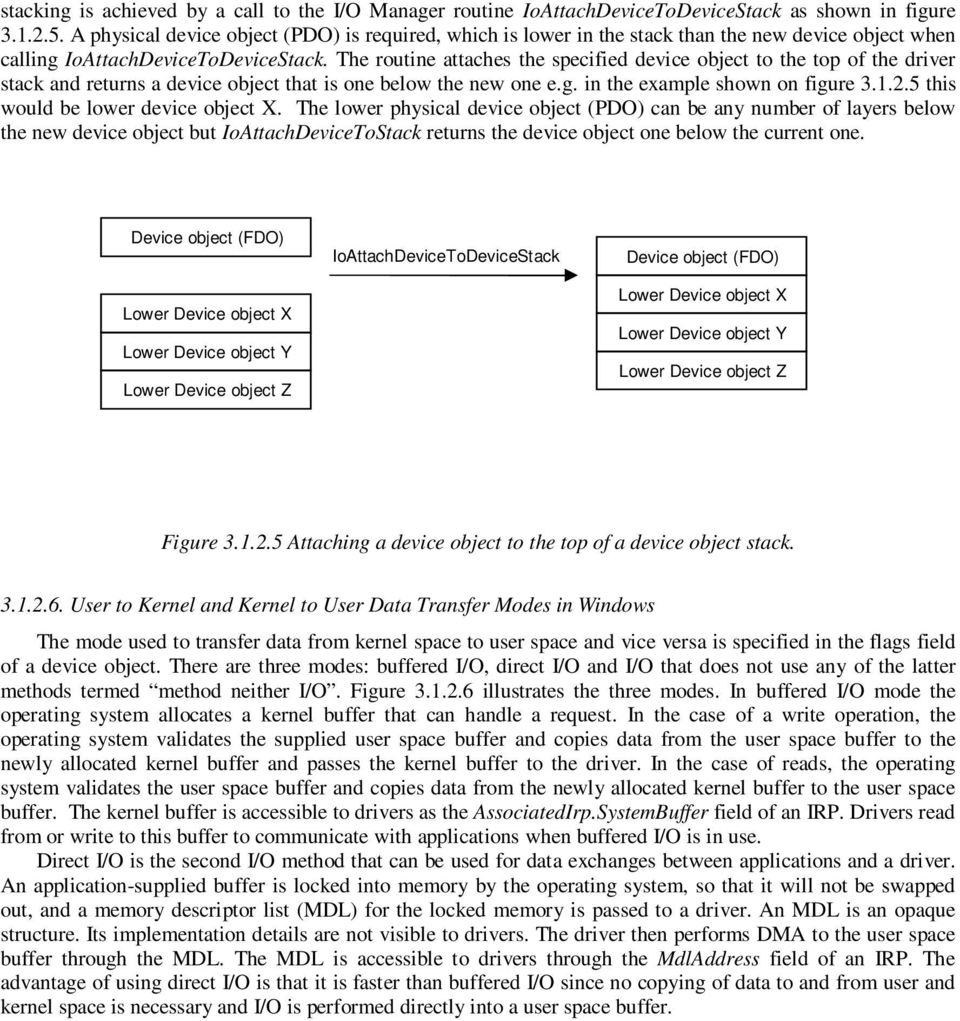
8 1. Buffered I/O 2. Direct I/O with 3. Direct I/O MDLs User Space Buffer User Space Buffer User Space Buffer User space Kernel space For reads, the kernel validates the user space buffer, creates a copy of it and passes the new buffer to the driver. For writes, when I/O is done the kernel copies the contents of the kernel space buffer to the user space buffer. The kernel creates an MDL to the user space buffer and passes it to the device driver MDL to user buffer Device driver performs direct I/O to the user space buffer using the buffer s virtual address Kernel Space Buffer Device driver performs I/O to a kernel space buffer. Device Driver Device driver performs DMA using the MDL Device Driver Device Driver Figure The three ways in which data from kernel to user and user to kernel space is exchanged. The third method for I/O is neither buffered nor uses MDLs. Instead the operating system passes the virtual address for a user space buffer to the driver. The driver is then responsible for checking the validity of the buffer before it makes use of it. In addition, the user space buffer is only accessible if the current thread context is the same as the application s, otherwise a page fault will occur since the virtual address is valid only while that application s process is active Dispatch Routines Dispatch routines are routines that handle incoming I/O requests packaged as IRPs (I/O request packets). When an IRP arrives (e.g. when an application initiates I/O), an appropriate dispatch routine is selected from the array of routines specified in the MajorFunction field of a driver object as shown in figure These dispatch routines are initialised in the driver s entry routine. Every IRP is associated with an I/O stack location structure (used for storing an IRP s parameters) when created. This structure contains a field, which specifies the dispatch routine the IRP is meant for and the relevant parameters for that dispatch routine. The I/O manager determines from an IRP which dispatch routine it will send IRPs to.

9 IRP I/O Manager The I/O Manger selects a dispatch routine to send the IRP to. The IRP s I/O Stack location contains a field called MajorFunction which identifies the target dispatch routine. Driver Object The dispatch routine identified by the major function number will be called from the driver object s MajorFunction field member, which is an array of routines. Figure dispatching IRP s to dispatch routines. Thus IRPs are routed to an appropriate driver supplied routine so that they can be handled there. Required dispatch routine IDs are shown in table They are indexes for the array of routines specified by the MajorFunction field of a device object. The dispatch routines have custom driver supplied names that are implemented by the driver. They all accept an IRP and a device object to which the IRP is being sent. IRP_MJ_PNP Handles PnP messages IRP_MJ_CREATE Handles the opening of device to gain a handle IRP_MJ_CLEANUP Handles the closing of the device handle gained above IRP_MJ_CLOSE Same as clean up, called after cleanup IRP_MJ_READ Handles a read request to a device IRP_MJ_WRITE Handles a write request to a device IRP_MJ_DEVICE_CONTROL Handles a I/O control request to a device IRP_MJ_INTERNAL_DEVICE_CONTROL Handles driver specific I/O control requests IRP_MJ_SYSTEM_CONTROL Handles WMI requests IRP_MJ_POWER Handles power management messages Table Required Windows driver dispatch routines Windows Driver Installation Windows uses installation information contained in a text file called an INF file to install drivers. The creator of a driver is responsible for providing an INF file for the driver. A GUI application that is provided with the Windows DDK called GenInf allows the generation of an INF file for a driver. It requires a company name and a Windows Device class under which the driver will be installed. Windows has various pre-defined device classes for installed drivers. The Windows device manager applet, accessible through the system control panel applet, shows all installed drivers categorised using these device classes. Examples of existing classes are the 1394 and PCMCIA device classes. A custom device class can be added by adding a ClassInstall32 section in the INF file. The hardware ID for a PnP-aware device must also be specified in the INF file since it will be used by the system to identify the device when the device is inserted into the system. A hardware ID is an identification string used by the PnP manager to identify devices that are inserted into the system. Microsoft publishes PnP hardware IDs for the various devices that are usable with the Windows operating system. This hardware ID is stored on the hardware device and read off the device by the system when that device is inserted into the system. Once an INF file for a new device is successfully installed into the system, the driver for that device (which has a specific hardware ID) will be loaded each time the device is inserted into the system and unloaded when the device is removed from the system.

10 Obtaining Driver Usage Information in Windows The device manager found in the control panel system applet provides driver information for users. It lists all currently loaded drivers and information on the providers of each driver and their resource usage. It also displays drivers that failed to load and their error codes Linux Driver Architecture Components Device drivers in Linux are similar to those in Windows in that they too are made up of various routines that perform I/O and device control operations. There is no driver object visible to a driver, instead drivers are internally managed by the kernel Driver Initialisation Every driver in Linux contains a register driver routine and a deregister driver routine. The register driver routine is the counterpart to the Windows driver entry routine. Driver writers use the module_init and module_exit kernel defined macros to specify custom routines that will be designated as the register and deregister routines Driver Registration and Deregistration The routine designated by the module_init macro as the registration routine is the first routine executed when a driver is loaded. The driver is registered here by using a kernel character device registration routine called register_chrdev. The important requirements for this routine are a name for the driver, a driver major number (discussed later in section 3.2.2) and a set of routines for performing file operations. Other driverspecific initialisation should take place in this routine. The deregistration routine gets executed when the driver is being unloaded. Its function is to perform cleanup operations before a driver is unloaded. A call to the kernel routine unregister_chrdev with a device name and major number is necessary when deregistering a driver that was previously registered with a register_chrdev call Device Naming In Linux, devices are named using numbers in the range 0 to 255, called device major numbers. This implies that there can be a maximum of 256 usable devices i.e. devices that an application can gain a handle to, but each driver for such a major device can manage as many as 256 additional devices. These driver-managed devices are numbered using numbers in the range 0 to 255, called device minor numbers. It is therefore possible for applications to gain access up to (256x256) devices. Major numbers are assigned to well known devices for example major number 171 is assigned to IEEE1394 devices. The file Documentation/devices.txt in the Linux kernel source tree contains all major number assignments and a contact address for the device number registration authority. Currently, major numbers are available for experimental use. A driver can specify a major number of 0 to request automatic assignment of a major number for a device, if one is available. The use of major number 0 for this purpose does not cause problems, as it is reserved for the null device and no new driver should register itself as a the null device driver Driver Access from an Application Drivers are accessed by applications through file system entries (nodes). By convention, the drivers directory is /dev on a particular system. Applications that want to perform I/O with a driver use the open system call to obtain a handle to a particular driver. The open system call requires a device node name such as /dev/tty and access flags. After obtaining a handle, the application can use the handle in calls to other system I/O calls such as read, write and IOCTL File operations In Windows, dispatch routines were set up in the driver entry routine of a driver. In Linux, these dispatch routines are known as file operations and are represented by a structure called file_operations. A typical driver would implement the file operations listed in table Open Release Handles the opening of device to gain a handle Handles the closing of device handled gained above

11 Read Write Llseek IoCtl Handles a read request to a device Handles a write request to a device Handles a seek operation on a device Handles a device control request for a device Table Most commonly defined driver file operations in Linux These file operations are specified during driver registration. A structure called file is created by the kernel whenever an application requests a handle to a device and is supplied to the driver whenever one of the file operation routines is called. The file operation routines serve many clients, each represented by the file structure. The structure has a field named f_op. This field is a pointer to the original set of file operations that were specified at registration time of a major driver. It is therefore possible to change the original file operations during a call to any of the file operation routines by changing the value of the field named f_op to point to a new set of file operations Global Driver Data Whenever an application issues the system open call on a device file node in /dev, the application, gets back a handle to a device from the operating system. At this time the driver s open function is called with a file structure created for that open call. This file structure is passed by the kernel to the driver whenever any of the file operations routines are executed. The private_data field of the file structure can be any driver-supplied custom data structure. Driver private data is usually set up in the open file operations function by allocating memory, and freed in the release file operations function. The private data field of the file structure can be used to point to data that is global to a driver instead of using global variables How Driver Major and Minor Numbers Work The Problem In Linux only one driver can register itself to manage a device with a particular major number i.e. driver registration uses only a major number. If for example, two device nodes /dev/device1 (major no 4 minor 1) and /dev/device2 (major number 4 minor number 2) exit, only one driver can handle requests, from applications, to these two device nodes. This restriction exists because no driver registration facility exists whereby a driver can register itself to manage a device with major number x and minor number y The Workaround A driver is loaded to manage devices with major number 4. This driver registers itself with the kernel (see section for how this is done). Two separate drivers are loaded. One manages a device with major number 4 minor 1 and the other a device with major number 4 minor 2. These drivers do not register themselves with the kernel, but with the driver that manages devices with major number 4. This driver responsible for implementing the registration facility and keeping track of drivers that register with it. When an application opens any one of the two device nodes (/dev/device1 or /dev/device2), the open routine of the driver registered to manage devices with major number 4 is called by the kernel. A file structure that represents the opened device is passed to this open routine. At this point, the driver that manages devices with major number 4 alters the file operation function pointers (f_op member of the file structure) to point to I/O routines implemented by the driver that manages the opened device. Opens of minor devices by applications are identified by the driver that manages devices with major number 4 in the following manner: o A structure called inode is also passed to the open routine. This structure contains a field named i_rdev, which specifies the major and minor numbers for the device the open operation was targeted at. The kernel macros MINOR and MAJOR can be used to extract these values from the i_rdev field. In this example the MAJOR number would be 4 and the minor number either 1 or 2. The driver that manages devices with major number 4 can then locate a minor device driver from its registration database using this information.

12 User to Kernel and Kernel to User Data Transfer Modes in Linux In Linux, three ways exist for drivers and applications to exchange data to and from kernel and user space. These are buffered I/O, direct I/O and mmap. In buffered I/O mode, data is copied by the kernel from user space to a kernel space buffer before it is used inside a driver. Unlike Windows the Linux kernel does not perform buffering for I/O automatically. Instead, kernel user space access routines are made available that allow copying of data to and from user space by drivers. In direct I/O mode, drivers can read and write data to and from user space buffers directly. This is achieved through the kiobuf interface, which involves mapping a user space buffer to a kiobuf defined structure through a kiobuf kernel call. The operation locks a user space buffer so that it does not get swapped out and is always available for device I/O. The third method, called mmap, involves the driver mapping a chunk of kernel memory to user space using mmap kernel calls, so that applications can perform I/O to the mapped kernel memory. [Rubini et al, 01] Linux Driver Installation Drivers are installed in Linux by transferring the driver files into a system specific directory. In the RedHat distribution [Redhat, 02], modules are located in the directory /lib/modules/kernel_version where kernel_version specifies the version of the kernel currently loaded e.g A configuration file called modules.conf located in the system s configuration file directory e.g. /etc, is used by the kernel while loading modules. It can be used to override the location for a particular driver. It is also used for defining other module loading options, such as defining parameters to be passed to a driver when loading it. Module loading and unloading is performed using programs that come with the kernel module utilities package called insmod, modprobe and rmmod. Insmod and modprobe load the binary image of a driver into the kernel and rmmod removes it. Another program called lsmod lists all currently loaded modules. Insmod will attempt to load a module and return an error if the module being loaded depends on other modules. modprobe will try to satisfy module dependencies by attempting to load any modules the current module may depend on before loading it. The module dependency information is obtained from a file called modules.dep located in the system s modules directory. Before a driver can be accessible to applications, a device node (see sections 2.1 and for how Linux represents devices in the system) for that driver, with the devices major and minor numbers, must be created in the devices directory /dev. A system program called mknod is used for this purpose. When creating a device node, it is necessary to specify whether the node is for a character device or a block device Obtaining Driver Usage Information in Linux It is often necessary to check the status of loaded drivers in a system. In Linux, the proc file system is used to publish kernel information for application usage. The proc file system is just like any other file system. It contains directories and file nodes that applications can access and perform I/O operations with. The difference between files on the proc file system and ordinary files is that data from I/O operations on a proc file entry gets passed to and from kernel memory instead of disk storage. The proc file system is a communication medium for applications and kernel components. For example, reading data from the file /proc/modules will return currently loaded modules and their dependencies. The proc file system is very useful for obtaining driver status information and publishing driver specific data for application use The Windows and Linux Driver Architecture Components Compared Drivers in both Windows and Linux are dynamically loadable modules that consist of various routines that perform I/O. When loading a module, the kernel will locate a the routine designated by the particular operating system as the driver entry routine and It will start driver code execution from there Driver Routines Drivers in both systems have initialisaton and de-initialisation routines. In Linux, both these routines can have custom names. In Windows, the initialisation routine name is fixed (called DriverEntry) but the deinitialisation routine can be a custom one. Windows manages a driver object structure for each loaded driver. Multiple instances of a driver are each represented by a device object. In Linux, the Kernel maintains information for each driver registered to manage a device major number. i.e. for each driver that acts as a major device driver.

13 Both operating systems require drivers to implement standard I/O routines, which are called dispatch routines in Windows and file operations in Linux. In Linux, a different set of file operations can be provided for each device handle returned to an application. In Windows, dispatch routines are defined once in the DriverEntry routine inside a driver object. Since there is one driver object for each loaded driver, it is not advisable to modify the dispatch routines assigned to it when an application requests a handle through an open call. Windows drivers have an add device routine that gets called by the PnP manager for PnP aware devices. There is no PnP manager in Linux and such a routine does not exist in Linux. Dispatch routines in Windows operate on device objects and IRPs. In Linux, file operations operate on a file structure. Custom global driver data is stored in device objects in Windows and in the file structure in Linux. A device object is created at load time in Windows whereas in Linux a file structure is created when an application requests a handle to a driver with a system open call. An important implication of this is that in Linux global data per application can be kept in the file operations structure. In Windows, global data can only be present in the FDO that the driver manages. Global data per application in Windows has to be kept in a list structure contained within the FDO s custom data structure Device Naming Drivers in Windows are named using driver-defined strings and are found in the \\device namespace. In Linux, drivers are given textual names but applications are not required to know these. Driver identification is performed through the use of a major-minor number pair. Major and minor numbers are in the range 0-255, since a 16 bit number is used to represent the major-minor pair thus allowing a maximum of devices to be installed in a system. Devices in Linux are accessible to applications through file system nodes. In most Linux distributions the directory /dev contains device file system nodes. Each node is created with a driver s major and minor number. Applications obtain a handle to a driver, for performing I/O, through the open system call targeted at a device file system node. In Windows, another driver naming method exists, whereby a 128 bit GUID is registered by each driver. Applications access the Windows registry to obtain a textual name in the \\device namespace using the GUID. This textual name is used to obtain a handle for performing I/O with a driver through the CreateFile Win32 API call User-Kernel Space Data Exchanges Data exchanges to and from user space are performed similarly by both operating systems, enabling buffered data transfer, performed by the I/O Manager in Windows and by the driver in Linux. Direct I/O to a user space buffer is achieved in both operating systems by locking the user space buffer so that it stays in physical memory. This arises from the fact that drivers cannot always access user space buffers directly, since they will not always be executing in the same process context as the application that owns the user space buffers. The application has its own virtual address space, which is only valid in its own process context. Thus when the driver accesses a virtual address from some application outside of that application s process context, it will be accessing an invalid address Driver Installation and Management Driver installation is through a text file called an INF file in Windows. Once installed, the driver for a device will be automatically loaded by the PnP manager when the device is present in the system. In a Linux system, programs are used to load driver binary images into the kernel. Entries need to be inserted manually into system start up files, so that driver loading programs like modprobe are executed with a driver image path or an alias to the driver as a parameter. Driver aliases are defined in the file /etc/modules.conf, which programs like modprobe inspect before loading a driver. An example of an alias entry in modules.conf would be alias sounddriver testdriver, which aliases the name sounddriver to the driver binary image testdriver. Executing modprobe with sounddriver as a parameter would make modprobe load testdriver. In this way, users can use a standard and simpler name such as sounddriver to load a sound driver without having to know what the name of a specific driver for a sound card is. Driver status information is available in Windows through the device manager applet, or directly reading the data from the system registry. In Linux, driver information is available through entries in the proc file system. The file /proc/module for example contains a list of loaded modules.

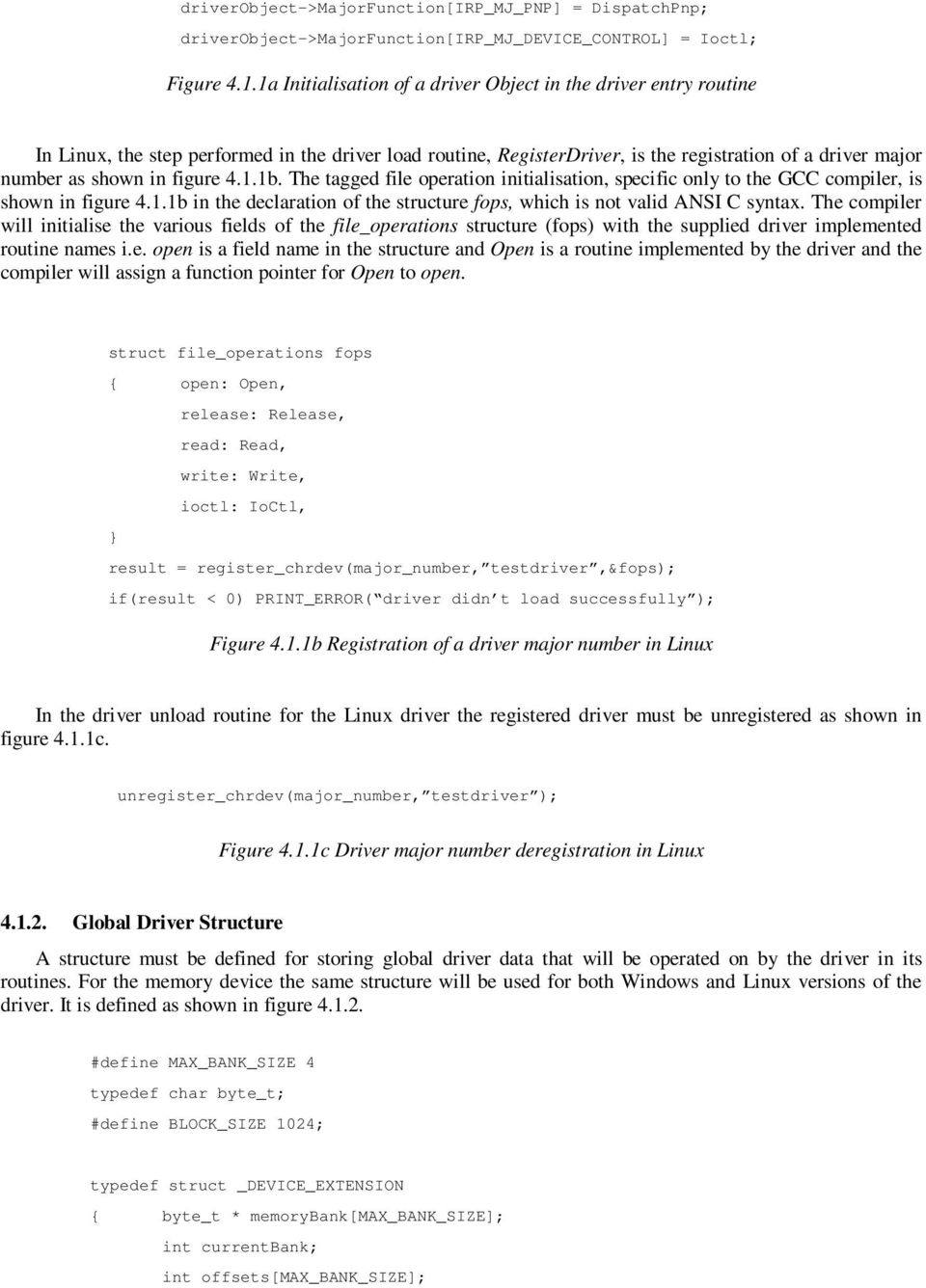
14 4. A Kernel Buffer Driver This section presents the implementation of a simple driver that performs I/O to blocks of kernel memory, a hypothetical virtual device. Discussion of the various components needed to make the driver work on both Windows and Linux is presented, so that the similarities and differences in the driver components of each operating system can be highlighted. The virtual device, managed by the driver, is shown in figure 4.0. It consists of a number of blocks of kernel memory. Applications can perform I/O operations on the virtual device. The driver will be able to select the memory bank it wants to access and the offset within a memory bank s block. Bank 1 Block 1 Bank 2 Block 2 Bank n Block n Figure 4.0 A simple virtual device 4.1. Required Driver Components. Both the Windows and Linux drivers will implement the read, write and IOCTL driver routines. Required driver routines for each operating system are shown in figure 4.1. Naming of the driver routines is flexible. In figure 4.1 the routines for the different operating systems could have been given the same names, instead the conventional platform names have been utilised. Required Windows Driver Routines DriverEntry DriverUnload AddDevice Create Close Read Write IOCtl DispatchPnp Required Linux Driver Routines RegisterDriver UnRegisterDriver Open Release Read Write IoCtl Figure 4.1 The Windows and Linux basic driver routines Driver Load and Unload Routines In Windows, the step performed in the driver load routine, DriverEntry, is the setting up of I/O dispatch routines as shown in figure 4.1.1a. driverobject->driverunload = DriverUnload; driverobject->driverextension->adddevice = AddDevice; driverobject->majorfunction[irp_mj_read] = Read; driverobject->majorfunction[irp_mj_write] = Write; driverobject->majorfunction[irp_mj_create] = Create; driverobject->majorfunction[irp_mj_close] = Close;
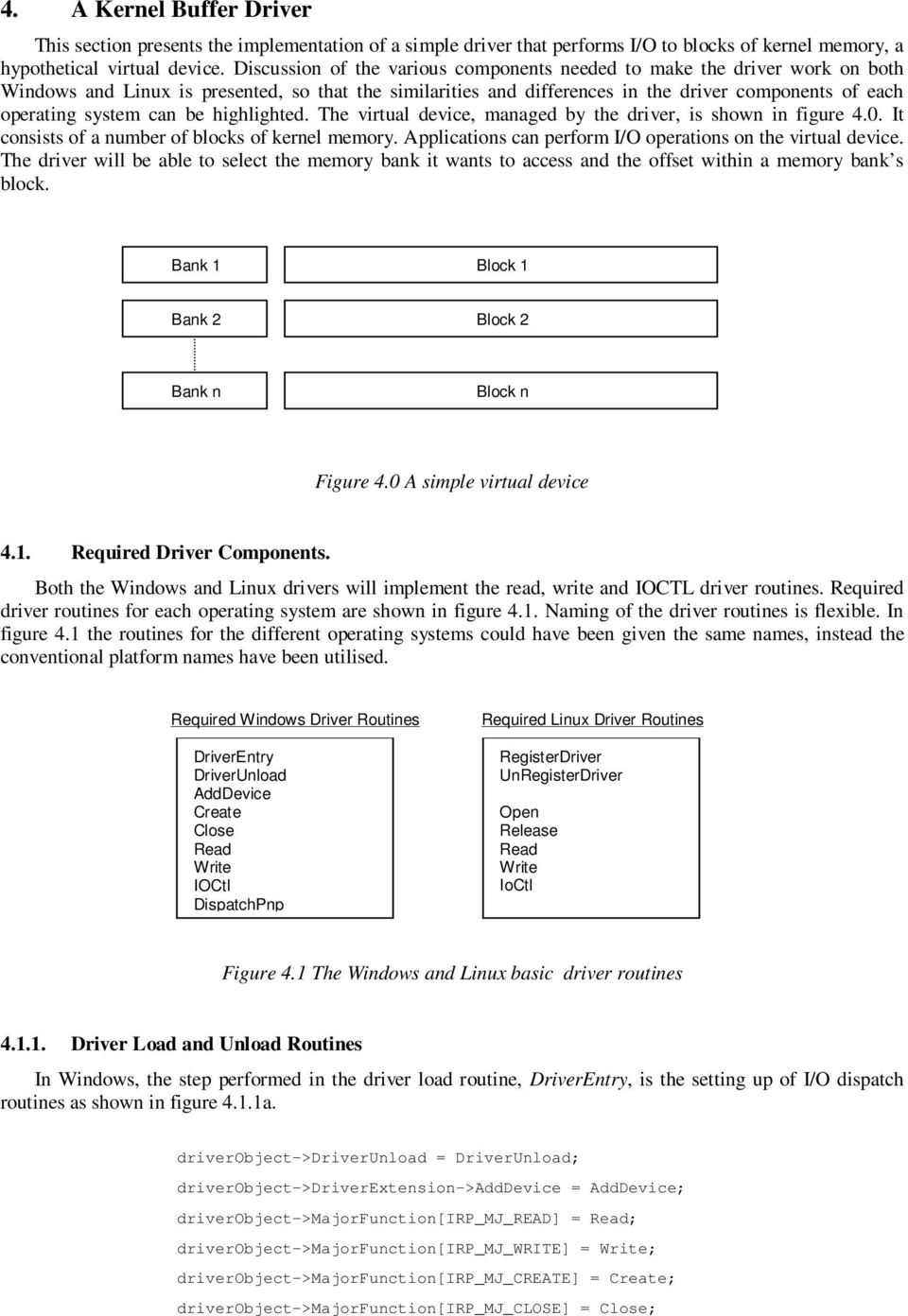
15 driverobject->majorfunction[irp_mj_pnp] = DispatchPnp; driverobject->majorfunction[irp_mj_device_control] = Ioctl; Figure 4.1.1a Initialisation of a driver Object in the driver entry routine In Linux, the step performed in the driver load routine, RegisterDriver, is the registration of a driver major number as shown in figure 4.1.1b. The tagged file operation initialisation, specific only to the GCC compiler, is shown in figure 4.1.1b in the declaration of the structure fops, which is not valid ANSI C syntax. The compiler will initialise the various fields of the file_operations structure (fops) with the supplied driver implemented routine names i.e. open is a field name in the structure and Open is a routine implemented by the driver and the compiler will assign a function pointer for Open to open. struct file_operations fops { open: Open, release: Release, read: Read, write: Write, ioctl: IoCtl, } result = register_chrdev(major_number, testdriver,&fops); if(result < 0) PRINT_ERROR( driver didn t load successfully ); Figure 4.1.1b Registration of a driver major number in Linux In the driver unload routine for the Linux driver the registered driver must be unregistered as shown in figure 4.1.1c. unregister_chrdev(major_number, testdriver ); Figure 4.1.1c Driver major number deregistration in Linux Global Driver Structure A structure must be defined for storing global driver data that will be operated on by the driver in its routines. For the memory device the same structure will be used for both Windows and Linux versions of the driver. It is defined as shown in figure #define MAX_BANK_SIZE 4 typedef char byte_t; #define BLOCK_SIZE 1024; typedef struct _DEVICE_EXTENSION { byte_t * memorybank[max_bank_size]; int currentbank; int offsets[max_bank_size];
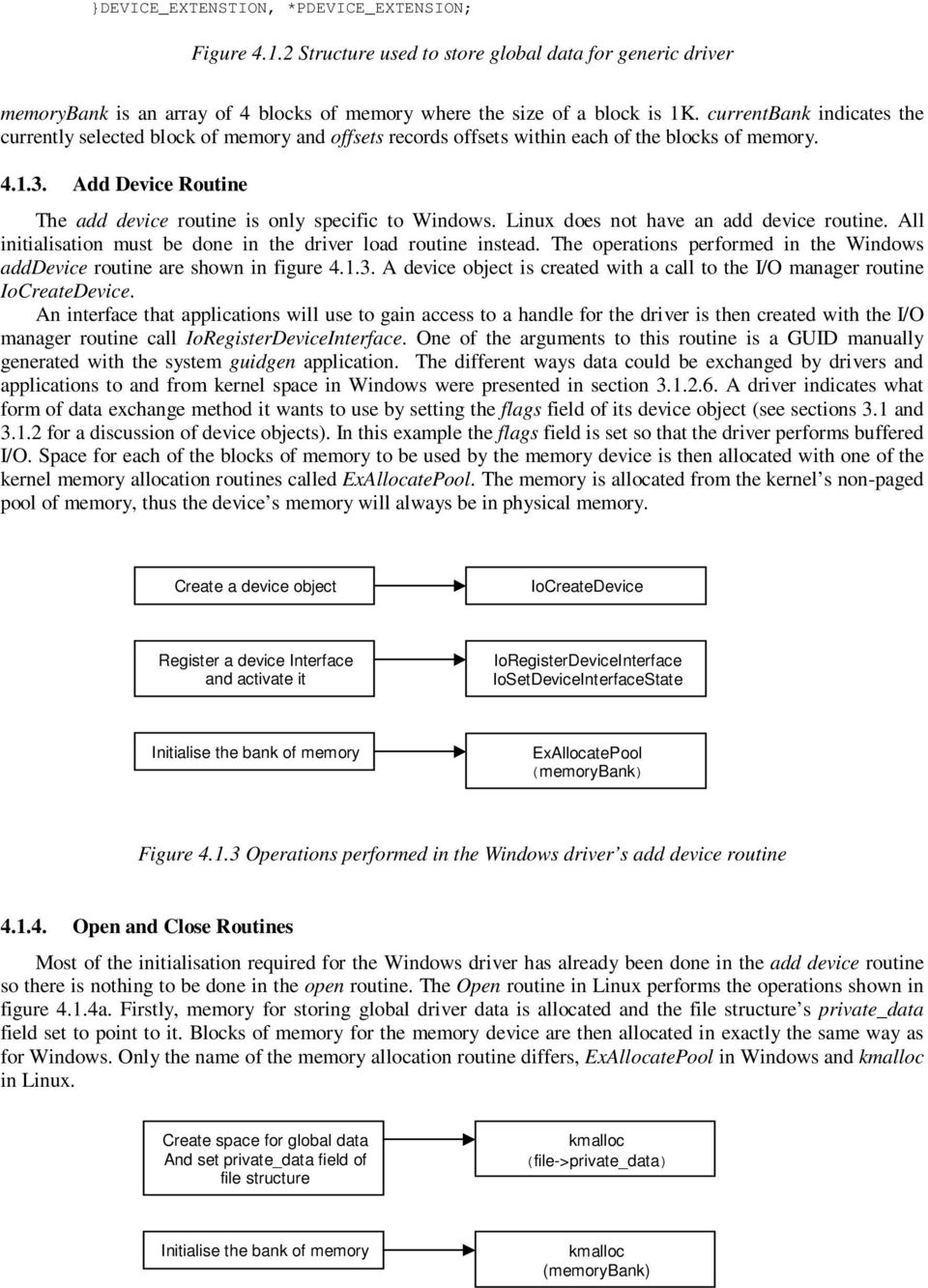
16 }DEVICE_EXTENSTION, *PDEVICE_EXTENSION; Figure Structure used to store global data for generic driver memorybank is an array of 4 blocks of memory where the size of a block is 1K. currentbank indicates the currently selected block of memory and offsets records offsets within each of the blocks of memory Add Device Routine The add device routine is only specific to Windows. Linux does not have an add device routine. All initialisation must be done in the driver load routine instead. The operations performed in the Windows adddevice routine are shown in figure A device object is created with a call to the I/O manager routine IoCreateDevice. An interface that applications will use to gain access to a handle for the driver is then created with the I/O manager routine call IoRegisterDeviceInterface. One of the arguments to this routine is a GUID manually generated with the system guidgen application. The different ways data could be exchanged by drivers and applications to and from kernel space in Windows were presented in section A driver indicates what form of data exchange method it wants to use by setting the flags field of its device object (see sections 3.1 and for a discussion of device objects). In this example the flags field is set so that the driver performs buffered I/O. Space for each of the blocks of memory to be used by the memory device is then allocated with one of the kernel memory allocation routines called ExAllocatePool. The memory is allocated from the kernel s non-paged pool of memory, thus the device s memory will always be in physical memory. Create a device object IoCreateDevice Register a device Interface and activate it IoRegisterDeviceInterface IoSetDeviceInterfaceState Initialise the bank of memory ExAllocatePool (memorybank) Figure Operations performed in the Windows driver s add device routine Open and Close Routines Most of the initialisation required for the Windows driver has already been done in the add device routine so there is nothing to be done in the open routine. The Open routine in Linux performs the operations shown in figure 4.1.4a. Firstly, memory for storing global driver data is allocated and the file structure s private_data field set to point to it. Blocks of memory for the memory device are then allocated in exactly the same way as for Windows. Only the name of the memory allocation routine differs, ExAllocatePool in Windows and kmalloc in Linux. Create space for global data And set private_data field of file structure kmalloc (file->private_data) Initialise the bank of memory kmalloc (memorybank)
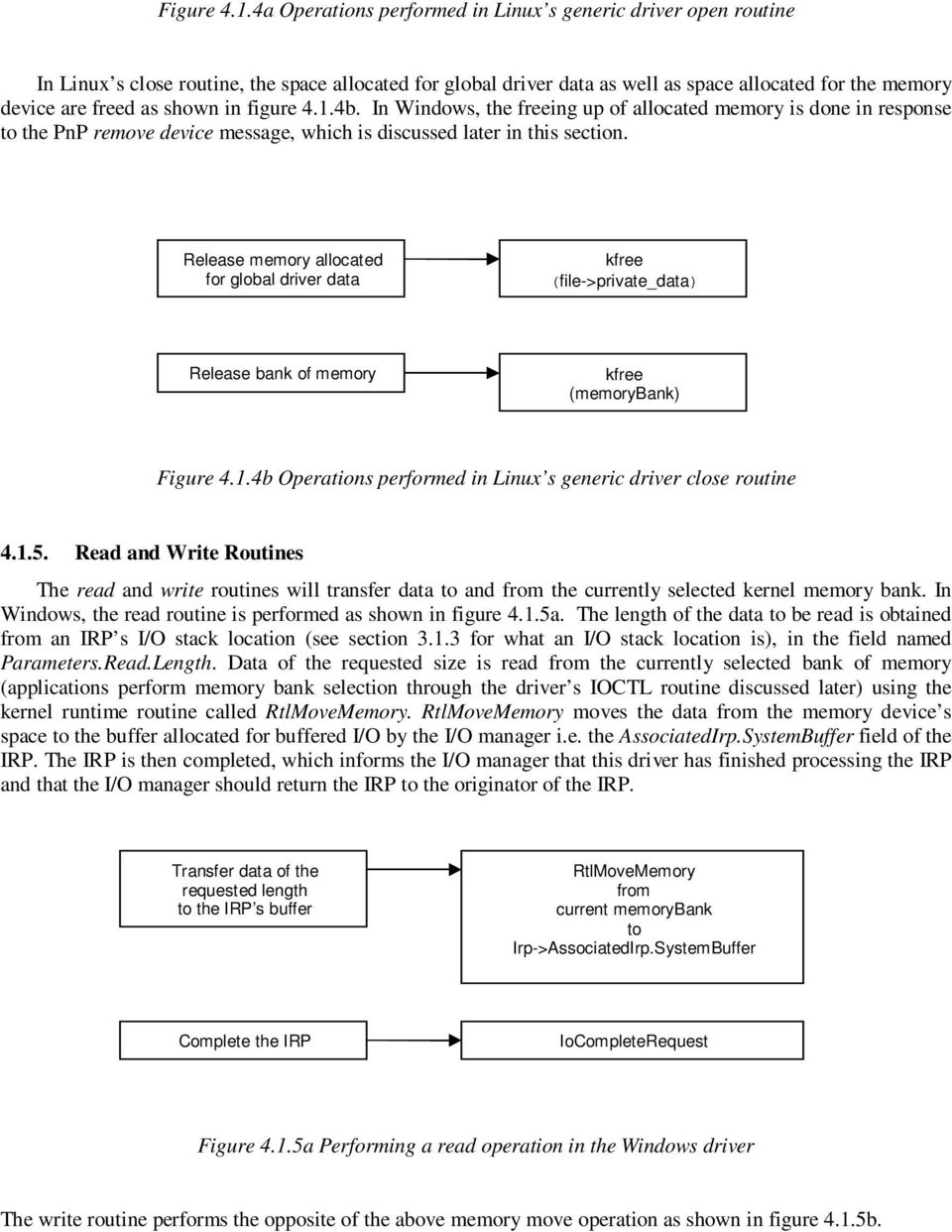
17 Figure 4.1.4a Operations performed in Linux s generic driver open routine In Linux s close routine, the space allocated for global driver data as well as space allocated for the memory device are freed as shown in figure 4.1.4b. In Windows, the freeing up of allocated memory is done in response to the PnP remove device message, which is discussed later in this section. Release memory allocated for global driver data kfree (file->private_data) Release bank of memory kfree (memorybank) Figure 4.1.4b Operations performed in Linux s generic driver close routine Read and Write Routines The read and write routines will transfer data to and from the currently selected kernel memory bank. In Windows, the read routine is performed as shown in figure 4.1.5a. The length of the data to be read is obtained from an IRP s I/O stack location (see section for what an I/O stack location is), in the field named Parameters.Read.Length. Data of the requested size is read from the currently selected bank of memory (applications perform memory bank selection through the driver s IOCTL routine discussed later) using the kernel runtime routine called RtlMoveMemory. RtlMoveMemory moves the data from the memory device s space to the buffer allocated for buffered I/O by the I/O manager i.e. the AssociatedIrp.SystemBuffer field of the IRP. The IRP is then completed, which informs the I/O manager that this driver has finished processing the IRP and that the I/O manager should return the IRP to the originator of the IRP. Transfer data of the requested length to the IRP s buffer RtlMoveMemory from current memorybank to Irp->AssociatedIrp.SystemBuffer Complete the IRP IoCompleteRequest Figure 4.1.5a Performing a read operation in the Windows driver The write routine performs the opposite of the above memory move operation as shown in figure 4.1.5b.
18 Transfer data of the requested length from the IRP s buffer RtlMoveMemory from Irp->AssociatedIrp.SystemBuffer to current memorybank Complete the IRP IoCompleteRequest Figure 4.1.5b Performing a write operation in the Windows driver In Linux, the read routine appears as shown in figure 4.1.5c. A reference to the global driver data is obtained from the private_data member of the file structure. From the global data, a reference to the memorybank is obtained. Data is then transferred from this memory bank to user space using the user space access kernel routine called copy_to_user. Transfer data of the requested length to a user space buffer copy_to_user from current memorybank to userbuffer Figure 4.1.5c Performing a read operation in the Linux driver The write routine performs the same operations as above, except this time data is transferred from user to kernel space as shown in figure 4.1.5d. Transfer requested length of data to memorybank copy_from_user from userbuffer to current memorybank Figure 4.1.5d Performing a write operation in the Linux driver Device Control Routines Device control routines are used to set various states of a device. Applications make IOCTL calls to drivers by using the win32 routine DeviceIoControl. This routine requires an IOCTL code defined by a driver. An IOCTL code tell a driver what control operation an application is wanting to perform. In this example, the driver implemented IOCTL routine is used to select the current bank number. Driver-specific IOCTL codes must be defined prior to use. IOCTL codes in Windows are defined as shown in figure 4.1.6a. The macro CTL_CODE is used to define a particular device IOCTL code [Oney, 99]. The first argument to the CTL_CODE macro indicates the device ID. Device ID numbers are in the range Codes are reserved for the operating system. Codes are available for custom use. The code chosen should be the same as the

19 device code specified during the IoCreateDevice call in the driver s adddevice routine (see section for what happens in the adddevice routine). The second argument indicates the function code and is 12 bits long. Codes 0 to 2047 are reserved by Microsoft so a function code greater than 2047 and less than 2^12 is used. It use used to define what control code is being defined. I.e. it distinguishes the two IOCTL codes shown in figure 4.1.6a. The third argument specifies the method used to pass parameters from user space to kernel space, and the fourth argument indicates the access rights that applications have to the device. #define MEMORY_DEVICE #define IOCTL_SELECT_BANK \ CTL_CODE(MEMORY_DEVICE, 3000, METHOD_BUFFERED, FILE_ANY_ACCESS) #define IOCTL_GET_VERSION_STRING \ CTL_CODE(MEMORY_DEVICE, 3001, METHOD_BUFFERED, FILE_ANY_ACCESS) Figure 4.1.6a IOCTL code definition in Windows In Linux, applications make IOCTL calls to drivers by using the system routine ioctl. IOCTL codes are specified in the file Documentation/ioctl-numbers.txt, which can be found in the Linux kernel source tree. Experimental drivers select an unused code, currently 0xFF and above. The IOCTL codes for this driver are defined as shown in figure 4.1.6b. Macro _IOWR indicates that data will be transferred to and from kernel space. Other macros available are _IO which indicates no parameters, _IOW which indicates that data will be passed from user space to kernel space only and lastly _IOR which indicates that data will be passed from kernel space to user space only. The above macros require the size of the IOCTL parameter that will be exchanged between kernel and user space. Rubini et al [Rubini et al, 01] suggest that for the driver to be portable, this size should be set to 255 (8bits) although current architecture dependent data ranges from 8-14 bits. The second argument is similar to the Windows function number. It is eight bits wide, i.e. ranges from #define IOCTL_PARAM_SIZE 255 #define MEMORY_DEVICE 0xFF #define IOCTL_SELECT_BANK \ _IOWR(MEMORY_DEVICE, 1, IOCTL_PARAM_SIZE) #define IOCTL_GET_VERSION_STRING \ _IOWR(MEMORY_DEVICE, 2, IOCTL_PARAM_SIZE) Figure 4.1.6b IOCTL code definition in Windows Once the IOCTL codes have been selected, the IOCTL routines can be defined. In Windows, the IOCTL routine is defined as shown in figure 4.1.6c. Two IOCTL codes are handled. The first, IOCTL_SELECT_BANK, sets the current bank number. The second, IOCTL_GET_VERSION_STRING, returns a driver version string. Data returned to callers of the IOCTL routine is handled in the same way as for the read and write requests.
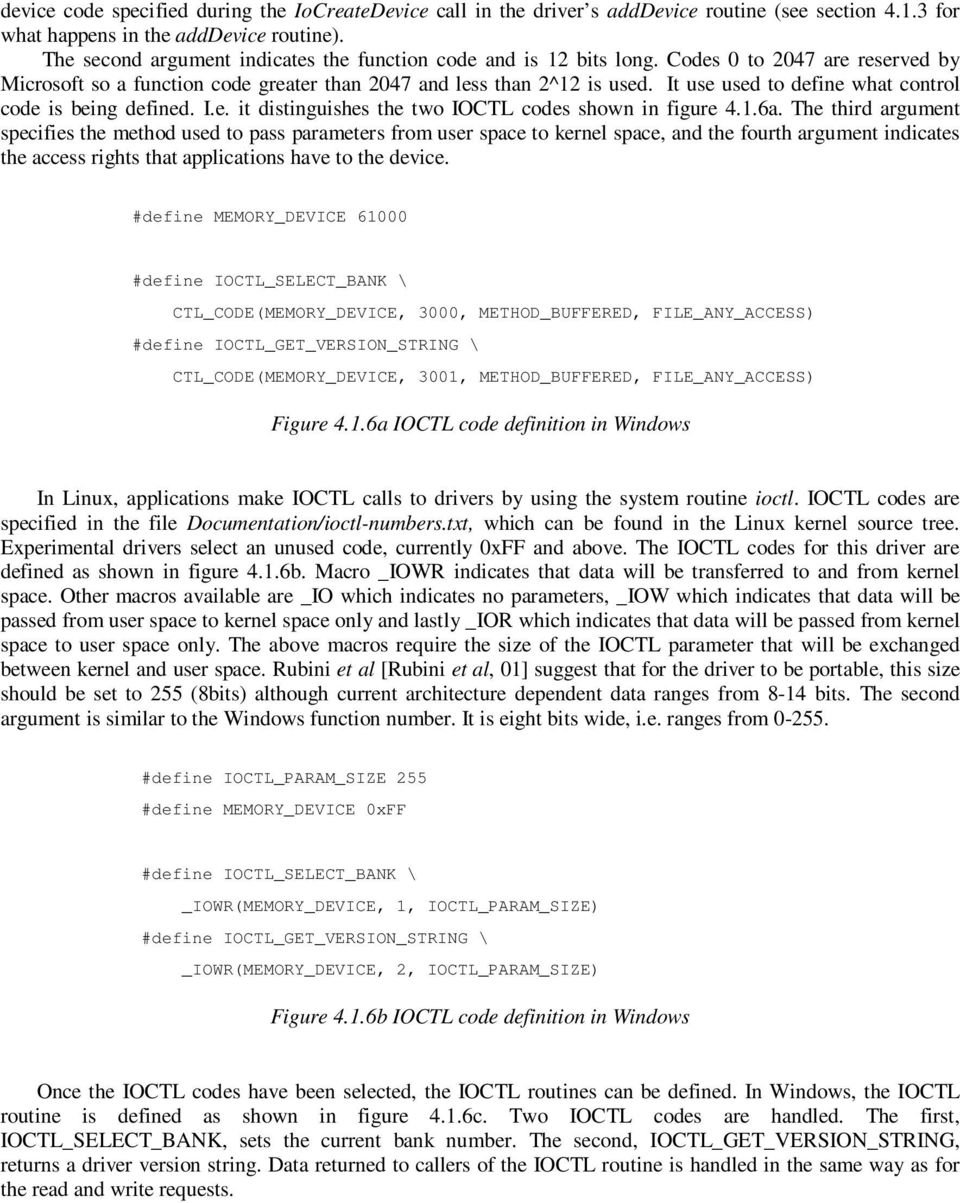
20 Application DeviceIoControl call Examine IOCTL code irpstack s Parameters.DeviceIoControl.IoControlCode field IOCTL_SELECT_BANK IOCTL_GET_VERSION_STRING change value of currentbank RtlMoveMemory from Irp- >AssociatedIrp.SystemBuffe r Return version string RtlMoveMemory from Version String Buffer to Irp->AssociatedIrp.SystemBuffer Complete the IRP IoCompleteRequest Figure 4.1.6c IOCTL routine definition in Windows The Linux IOCTL routine definition is shown in figure 4.1.6d. The IOCTL codes handled are the same as for Windows. The only difference is that of syntax specific to each kernel. Data handling is performed in the same way as for reads and writes.
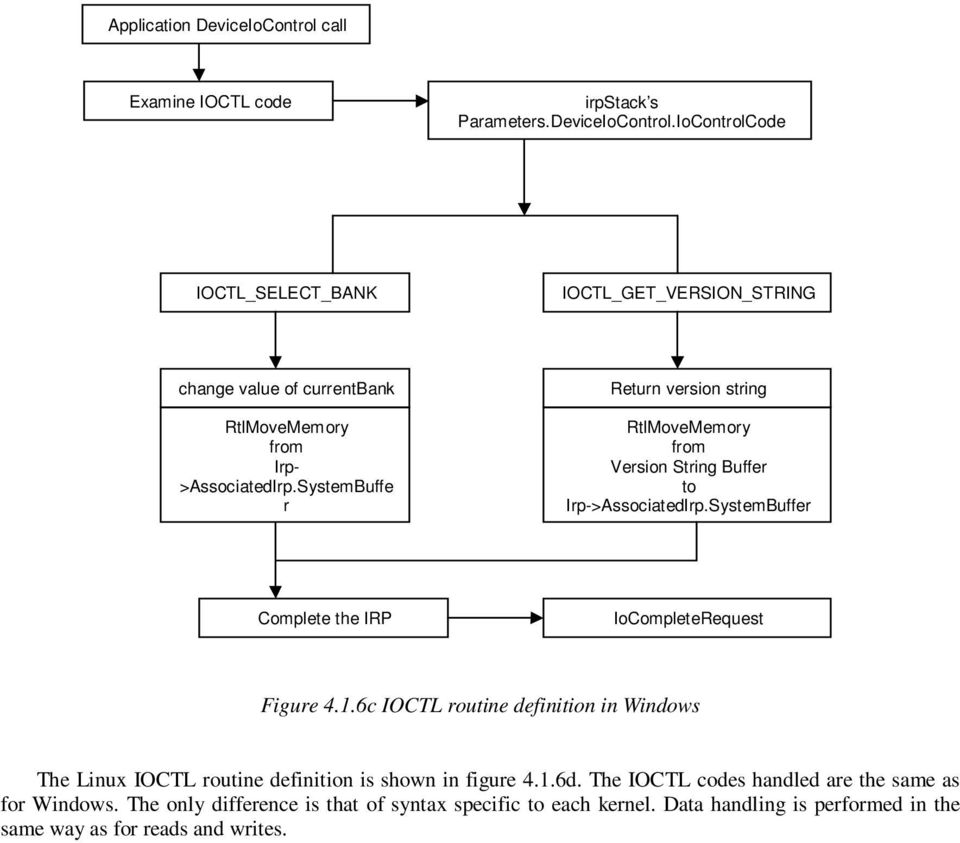
21 Application ioctl call Examine IOCTL code cmd parameter of IOCTL routine IOCTL_SELECT_BANK IOCTL_GET_VERSION_STRING change value of currentbank copy_from_user from user variable To currentbank Return version string copy_to_user from Version String Buffer to user buffer Figure 4.1.6d IOCTL routine definition in Linux PnP Message Handling Routines In Windows, PnP messages are dispatched to the driver at appropriate times. E.g. when a device in inserted into the system or removed from the system. These messages are handled by a driver that implements a PnP dispatch routine. In Linux, the kernel does not send PnP messages to the driver thus a PnP routine does not exist in the Linux driver. The Windows PnP message handler is shown in figure Only one of the PnP messages is handled for by the memory device driver in this example. The remove device message is sent when the driver is unloaded from the system. At this time, the driver s interface is disabled with a call to the I/O manager routine IoSetDeviceInterface and the driver s functional device object is deleted as well as the generic driver s blocks of memory. IRP_MN_REMOVE_DEVICE PnP messge Disable device interface IoSetDeviceInterfaceState Delete device object IoDeleteDevice Release memory bank ExFreePool (memorybank) Figure PnP Message handler routine
22 5. Driver Development Environments Developing drivers for the two operating systems discussed so far, namely Microsoft s Windows and Linux, requires the use of software development tools specific to each platform. The operating system kernel on both Windows and Linux is constructed using the C Programming Language. It follows that drivers for both operating systems are created using the C programming language. Windows supports driver construction using the object oriented programming language C++, whereas Linux does not The Windows Driver Development Environment Microsoft Windows is a proprietary, commercial operating system i.e. it must be purchased for a fee. A number of commercially available driver development environments aimed at Windows exist. One such example is the NuMega DriverStudio Suit [Compuware, 01] which comes with class libraries and driver construction wizards that aid in the development of drivers, as well as an integrated debugger that allows debugging of driver code The Windows Device Driver Development Kit The standard route for driver development on Windows is to obtain a Device Driver Kit (DDK) from Microsoft and use its facilities to build drivers. The latest version of the DDK is available to Microsoft Software Development Network (MSDN) subscribers. The DDK contains programs required to build drivers. The DDK installation program will install batch files that set up a shell window to enable building of drivers for each of Microsoft s operating systems. The DDK release used in this investigation of the Windows driver architecture, Windows DDK 3590, has build environments for Windows ME, 2000, XP and.net drivers. There are two build environments for each platform. The first is called a checked build environment i.e. debugging symbols are added to the driver code. The second is called a free build environment i.e. drivers built in this environment are not built with debugging symbols. The latter environment is where production drivers are built Windows Driver Makefiles Once a DDK shell window is active the simple command build will build a driver. A Makefile is used to define driver source files from which a driver is to be built. The entries for the Makefile are specified in a file called sources which resides in the directory where the build command is issued. Figure shows the format of a Makefile used to build a simple driver. The environment variable TARGETNAME specifies the driver output filename. For this example the final driver will be called mydriver.sys as drivers in Windows are assigned a.sys extension. TARGETPATH specifies where the object code for the driver will be produced. There is a file called _objects.mac in the directory called obj where additional paths for object file dump directories are defined. On Windows 2000, the default object file dump directories are objchk_w2k for checked builds and objfre_w2k for free builds. INCLUDES specifies the path for include files necessary to build drivers and finally SOURCES specifies the driver source file from which the driver will be built. TARGETNAME=mydriver TARGETPATH=obj TARGETTYPE=DRIVER DRIVERTYPE=WDM INCLUDES=$(BASEDIR)\inc; SOURCES= mydriver.c Figure A Makefile used for building a WDM driver with the Windows DDK Windows DDK Documentation and Tools The Windows DDK contains well organised API documentation as well as example driver source files from which newcomers to driver writing can learn to create drivers. The DDK also contains utility programs that aid in the driver development process. One of the utility programs is the device tree application that lists all
23 currently loaded drivers listed in the \\device name space (see section which discusses device name spaces) in a hierarchical manner, showing any existing driver stacks as well as driver implemented routines and driver object memory addresses. Other programs that are provided with the Windows DDK are an INF file generation application called geninf used to generate INF files for driver installation and a PnP driver test application used to test if drivers are PnP compliant The Linux Driver Development Environment The driver development environment on Linux is different from that on Windows. There is no counterpart to the Windows DDK on Linux i.e. there is no such thing as a Linux Device Driver Kit supplied by the kernel s creators. Instead the kernel s creators make all the kernel source code available to everyone. The kernel header files are all that are required for creating drivers. Drivers are built using the GNU C compiler, GCC, which is also used to build applications. Similarly to Windows, a Makefile is used to specify how a driver is to be built Linux Driver Makefiles Once a Makefile is defined, the simple command make is used to build the driver. Figure shows an example Makefile for building a driver, called mydriver, in Linux with a source file name mydriver.c. The first entry, KERNELDIR, defines an environment variable that specifies where the kernel header files are located. The next line includes the current kernel configuration. Before a kernel and its drivers are built, externally definable kernel variables are specified in a file called.config which is stored in the kernel source tree s root directory. These are included so that the kernel s header files can make use of them. CFLAGS is used to set additional flags to the compiler (GCC). -O turns on code optimisation, -Wall prints out all code warnings. The all section is the default section examined when the make command is executed. It provides a target called mydriver, which depends on the object file called mydriver.o, which is built by using GCC. The environment variable LD specifies the GNU linker to be used to build the final driver module. The option -r specifies that output should be relocatable i.e. memory locations within it will be offsets to some base address not known at compile time. $^ is an alias for mydriver.o and $@ is an alias for mydriver i.e. it requests the linker to produce relocatable code from the object file mydriver.o and produce an output called mydriver. KERNELDIR=/usr/src/linux include $(KERNELDIR)/.config CFLAGS=-D KERNEL -DMODULE I $(KERNELDIR)/include O Wall all: mydriver mydriver: mydriver.o $(LD) r $^ -o $@ Figure Makefile used to build a driver in Linux Kernel module management programs such as insmod and lsmod can then be used to load the driver into the kernel and to observe currently loaded modules, respectively Linux Driver Development Documentation There is some documentation on the various parts of the Linux kernel in the directory called Documentation found under the kernel source tree, but is not as complete and descriptive as the Windows DDK documentation. The Linux driver book written by Rubini et al [Rubini et al, 01] is a better source of information for device driver writers. There are no example drivers that come with the Linux kernel, but code for existing production drivers is available, which can be used as a basis for starting a new device driver. However, this does not provide a good introduction for novice device driver developers.
24 5.3. Debugging drivers The creation of just about every piece of software requires it to be debugged sometime during the time of its development as there are always obscure bugs that are not discovered by examining source code manually. This is especially true for device drivers. At worst, bugs in applications might cause the application s process to become unstable. Serious bugs in drivers will cause the entire system to become unstable. Debugging applications is a straightforward process. A break statement is set at a place of interest in source code using a debugger s debugging facilities. This is usually debugger specific. In Windows, using Microsoft s Visual Studio debugger, setting break points is as simple as clicking a line in the source code editor. The same applies to DDD (a GUI debugger found on Linux that uses the popular command line debugger GDB). When a program is executed in debug mode and a break point is reached, the execution of that program is paused and the program can be single stepped i.e. instructions from it executed one at a time and their effects observed. A debugger will usually allow the values of variables and variable memory addresses in a running program to be observed. The debugging facilities discussed thus far are also available for debugging device drivers, to a certain extent, on each operating system Debugging Drivers on Windows Debugging drivers under Windows can be performed using a number of different methods. The simplest of these is to use the DbgPrint debugging routine which allows printing of messages to the Windows debugger buffer. If a Windows debugger such as WinDbg is running, then the messages can be observed from there, otherwise a special application that can retrieve messages from the debugger s buffer has to be used. One such application is DebugView, a free application provided by the SysInternals Corporation [Russinovich, 01]. The DbgBreakPoint routine sets a break point in a program. When executed, the system pauses and driver code execution is passed to the system debugger. The Assert macro transfers driver execution to the system debugger based on the value of a test condition. The Microsoft kernel debugger, WinDbg, requires two PCs for operation. The first PC is where the driver code is developed and tested. The second PC is connected to the driver development PC via a serial port. A developer can interact with the debugger running on the first PC through a serial console from the second PC. The NuMega DriverStudio [Compuware, 01] provides a debugger that allows drivers to be debugged from a single PC, which can be the driver development machine, and acts like an application debugger. It provides a console Window from which command line instructions can be issued to control it Debugging Drivers on Linux In the same way as Windows, debugging of drivers in Linux can be performed by using debug routines provided by the kernel such as printk, which is the equivalent of the Windows DbgPrint routine. It behaves in the same way as the C standard I/O routine printf except that it takes an additional argument that specifies where the message will be printed to. A kernel debugger is also available as a patch that can be applied to the kernel sources. The patch for the built-in Linux kernel debugger (kdb) can be obtained from the KDB project page [KDB, 02]. It allows the same operations as a standard debugger i.e. setting break points, single stepping driver code, and examining driver memory. 6. Conclusion Windows and Linux are two of the most popular operating systems in use today. Windows has the biggest market share, and Linux is gaining in popularity. Every new device that gets released to the public by a hardware manufacturer will almost certainly come equipped with a device driver that will make it operate on the Windows operating system. The two operating systems driver architectures are different in many ways but have some similarities Device Driver Architectures Comparison of the driver architectures used by the two operating systems has shown that the Windows operating system has a more developed architecture than Linux. This does not mean that the Windows architecture offers better functionality than that of Linux, rather it has a more formally defined driver model, which driver developers are encouraged to follow. Although driver writers can ignore the Windows driver model and construct their own monolithic drivers, it was found that most driver writers did not take this route. No formally defined driver model exists for the Linux operating system. Linux driver writers produce drivers
25 based on their own personal designs. Unless two groups of driver developers cooperate and produce drivers that work together, drivers from different developers cannot operate together under the Linux operating system. Under Windows, drivers from two or more sets of developers can be made to work together, provided the developers have followed the Windows Driver Model (WDM) to construct their drivers. The Windows driver architecture supports PnP (Plug and Play) and Power management, by dispatching messages at appropriate times to device drivers which have been implemented to handle these messages. No such facility is offered by the current Linux driver architecture Designing device drivers When designing device drivers the facilities offered by an operating system should be evaluated. The Windows and Linux operating systems are both modern operating systems. They make available implementations for data structures such as stacks, queues and spin locks, as well as HAL (Hardware Abstraction Layer) routines for performing hardware independent operations. This enables device drivers to operate on different architectures such as IA64 (Intel s 64 bit platform) and SPARC. Driver functionality on both operating systems can be broken up into modules, which can be stacked together and that communicate using a standardised data structure. Under Windows this standardised data structure is the IRP (I/O Request Packet) and under Linux it can be any driver-defined structure, since no standardised structure exists on that operating system Implementing Device Drivers Device drivers on both operating systems are made up of a set of routines that each operating system expects all drivers to implement. They include routines for standard I/O such as reading from and writing to a device, and for sending device I/O control commands to a device. Every driver for each operating system implements a routine that will be executed when the driver is loaded for the first time, and a routine that gets executed when a driver is unloaded. It is possible to construct a driver for each operating system that uses identical naming for the various driver routines, although the usual approach is to use conventional names for each operating system. The device driver naming scheme on Windows (using device interfaces) is a lot more flexible than the current device driver naming scheme used by Linux. Driver naming clashes are more likely to occur in Linux as compared to Windows, which uses a GUID (Globally Unique Identifier) for each device Driver Development Environments The Windows operating system provides a DDK (Device Driver Developer s Kit), which contains relevant documentation and development tools that help decrease the time required for learning to create new drivers. The Linux operating system does not provide a DDK, therefore initially some time will have to be spent by device driver developers to gather other sources to aid in the driver development process. Once time has been spent in getting familiar with the two driver development environments, developers will find it easier to create Linux drivers than Windows drivers, because all of the Linux kernel source code is available to them. This enables driver developers to trace problems in their drivers by having a closer look at the kernel code that their drivers rely on. Under Windows, only binary debug builds of the operating system s components are available. These contain debug symbols such as function names and variable names and are not as useful as having the operating system s source code Concluding Remarks Drivers should be designed so that use of them requires very little interaction from end users, and all of a driver s functionality is made available to applications. The former is one of the strong points of Windows, which fully supports PnP. Linux is an open source project, which is still actively being improved. It is expected that in the future Linux s driver architecture will become as formalised as Windows, which for example has a driver model such as the WDM. Growth of hardware vendor support for Linux is also expected as more and more individuals and organisations adopt it. Acknowledgements This research was made possible through the Andrew Mellon Foundation scholarship at Rhodes University, Grahamstown, South Africa.
26 References [Beck et al, 98] Beck, Bohme, Dziadzka, Kunitz, Magnus, Verworner, Linux Kernel Internals, Addison Wesley, [Cant C, 99] Cant C, Writing Windows WDM Device Drivers, CMP Books, [Compuware, 01] Compuware, NuMega DriverStudio Version 2.5, [Compuware, 01] Compuware, Using Driver Works, Version 2.5, Compuware, [Deitel, 90] Deitel HM, Operating Systems, 2nd Edition, Addison Wesley, [Davis, 83] Davis W, Operating Systems, 2nd Edition, Addison Wesley, [Flynn et al, 91] Flynn IM, McHoes AM, Understanding Operating Systems, Brooks/Cole, [Katzan, 73] Katzan H, Operating Systems: A Pragmatic Approach, Reinhold, [KDB, 02] KDB, The Linux Built in Kernel Debugger, [Laywer, 01] [Linus FAQ, 02] Lawyer D S, Plug and Play HOWTO/Plug-and-Play-HOWTO-1.html, The Rampantly Unofficial Linus Torvalds FAQ, [Linux HQ, 02] The Linux Headquarters, [Lorin et al, 81] Lorin H, Deitel HM, Operating systems, Addison Wesley, [Microsoft DDK, 02] Microsoft,DDK- Kernel Mode Driver Architecture, Microsoft, [Microsoft WDM, 02] Microsoft, Introduction to the Windows Driver Model, [Oney, 99] Oney W, Programming the Microsoft Windows Driver Model, Microsoft, [Open Group, 97] [Redhat,02] Open Group, Universal Unique Identifier, Redhat, [Rubini et al, 01] Rubini A, Corbet J, Linux Device Drivers, 2nd Edition, Oreilly, [Russinovich, 98] Russinovich M, Windows NT Architecture, [Russinovich, 01] Russinovich M, SysInternals, [Rusling, 99] Rusling D A, The Linux Kernel,
Linux Driver Devices. Why, When, Which, How?
 Bertrand Mermet Sylvain Ract Linux Driver Devices. Why, When, Which, How? Since its creation in the early 1990 s Linux has been installed on millions of computers or embedded systems. These systems may
Plug and Play for Windows 2000
 Operating System Plug and Play for Windows 2000 White Paper Abstract This paper describes the Microsoft Windows 2000 operating system implementation of Plug and Play. Plug and Play is one of a number of
REAL TIME OPERATING SYSTEM PROGRAMMING-II: II: Windows CE, OSEK and Real time Linux. Lesson-12: Real Time Linux
 REAL TIME OPERATING SYSTEM PROGRAMMING-II: II: Windows CE, OSEK and Real time Linux Lesson-12: Real Time Linux 1 1. Real Time Linux 2 Linux 2.6.x Linux is after Linus Torvalds, father of the Linux operating
CS 377: Operating Systems. Outline. A review of what you ve learned, and how it applies to a real operating system. Lecture 25 - Linux Case Study
 CS 377: Operating Systems Lecture 25 - Linux Case Study Guest Lecturer: Tim Wood Outline Linux History Design Principles System Overview Process Scheduling Memory Management File Systems A review of what
The Native AFS Client on Windows The Road to a Functional Design. Jeffrey Altman, President Your File System Inc.
 The Native AFS Client on Windows The Road to a Functional Design Jeffrey Altman, President Your File System Inc. 14 September 2010 The Team Peter Scott Principal Consultant and founding partner at Kernel
Operating System Structures
 Operating System Structures Meelis ROOS [email protected] Institute of Computer Science Tartu University fall 2009 Literature A. S. Tanenbaum. Modern Operating Systems. 2nd ed. Prentice Hall. 2001. G. Nutt.
Red Hat Linux Internals
 Red Hat Linux Internals Learn how the Linux kernel functions and start developing modules. Red Hat Linux internals teaches you all the fundamental requirements necessary to understand and start developing
Chapter 11 I/O Management and Disk Scheduling
 Operating Systems: Internals and Design Principles, 6/E William Stallings Chapter 11 I/O Management and Disk Scheduling Dave Bremer Otago Polytechnic, NZ 2008, Prentice Hall I/O Devices Roadmap Organization
Chapter 15 Windows Operating Systems
 Understanding Operating Systems, Fifth Edition 15-1 Chapter 15 Windows Operating Systems At a Glance Instructor s Manual Table of Contents Overview Objectives s Quick Quizzes Class Discussion Topics Additional
EMC RepliStor for Microsoft Windows ERROR MESSAGE AND CODE GUIDE P/N 300-002-826 REV A02
 EMC RepliStor for Microsoft Windows ERROR MESSAGE AND CODE GUIDE P/N 300-002-826 REV A02 EMC Corporation Corporate Headquarters: Hopkinton, MA 01748-9103 1-508-435-1000 www.emc.com Copyright 2003-2005
Linux Kernel Architecture
 Linux Kernel Architecture Amir Hossein Payberah [email protected] Contents What is Kernel? Kernel Architecture Overview User Space Kernel Space Kernel Functional Overview File System Process Management
Chapter 6, The Operating System Machine Level
 Chapter 6, The Operating System Machine Level 6.1 Virtual Memory 6.2 Virtual I/O Instructions 6.3 Virtual Instructions For Parallel Processing 6.4 Example Operating Systems 6.5 Summary Virtual Memory General
WinDriver 5.22 User s Guide. Jungo Ltd
 WinDriver 5.22 User s Guide Jungo Ltd 27th November 2002 COPYRIGHT Copyright c 1997-2002 Jungo Ltd. All Rights Reserved Information in this document is subject to change without notice. The software described
Example of Standard API
 16 Example of Standard API System Call Implementation Typically, a number associated with each system call System call interface maintains a table indexed according to these numbers The system call interface
LSKA 2010 Survey Report I Device Drivers & Cloud Computing
 LSKA 2010 Survey Report I Device Drivers & Cloud Computing Yu Huang and Hao-Chung Yang {r98922015, r98944016}@csie.ntu.edu.tw Department of Computer Science and Information Engineering March 31, 2010 Abstract
Introduction to Embedded Systems. Software Update Problem
 Introduction to Embedded Systems CS/ECE 6780/5780 Al Davis logistics minor Today s topics: more software development issues 1 CS 5780 Software Update Problem Lab machines work let us know if they don t
Virtual Private Systems for FreeBSD
 Virtual Private Systems for FreeBSD Klaus P. Ohrhallinger 06. June 2010 Abstract Virtual Private Systems for FreeBSD (VPS) is a novel virtualization implementation which is based on the operating system
Windows NT. Chapter 11 Case Study 2: Windows 2000. Windows 2000 (2) Windows 2000 (1) Different versions of Windows 2000
 Chapter 11 Case Study 2: Windows 2000 11.1 History of windows 2000 11.2 Programming windows 2000 11.3 System structure 11.4 Processes and threads in windows 2000 11.5 Memory management 11.6 Input/output
Last Class: OS and Computer Architecture. Last Class: OS and Computer Architecture
 Last Class: OS and Computer Architecture System bus Network card CPU, memory, I/O devices, network card, system bus Lecture 3, page 1 Last Class: OS and Computer Architecture OS Service Protection Interrupts
Chapter 11: File System Implementation. Operating System Concepts with Java 8 th Edition
 Chapter 11: File System Implementation 11.1 Silberschatz, Galvin and Gagne 2009 Chapter 11: File System Implementation File-System Structure File-System Implementation Directory Implementation Allocation
Toasterkit - A NetBSD Rootkit. Anthony Martinez Thomas Bowen http://mrtheplague.net/toasterkit/
 Toasterkit - A NetBSD Rootkit Anthony Martinez Thomas Bowen http://mrtheplague.net/toasterkit/ Toasterkit - A NetBSD Rootkit 1. Who we are 2. What is NetBSD? Why NetBSD? 3. Rootkits on NetBSD 4. Architectural
Wave Relay System and General Project Details
 Wave Relay System and General Project Details Wave Relay System Provides seamless multi-hop connectivity Operates at layer 2 of networking stack Seamless bridging Emulates a wired switch over the wireless
Fall 2009. Lecture 1. Operating Systems: Configuration & Use CIS345. Introduction to Operating Systems. Mostafa Z. Ali. [email protected].
 Fall 2009 Lecture 1 Operating Systems: Configuration & Use CIS345 Introduction to Operating Systems Mostafa Z. Ali [email protected] 1-1 Chapter 1 Introduction to Operating Systems An Overview of Microcomputers
Network Attached Storage. Jinfeng Yang Oct/19/2015
 Network Attached Storage Jinfeng Yang Oct/19/2015 Outline Part A 1. What is the Network Attached Storage (NAS)? 2. What are the applications of NAS? 3. The benefits of NAS. 4. NAS s performance (Reliability
The Implementation of Hard-Disk Protection Method Based on Disk Filter Driver
 www.ijcsi.org 650 The Implementation of Hard-Disk Protection Method Based on Disk Filter Driver Yangwu Liu 1, Xisan Wei 1 1 School of Mathematics and Computer Science, Hubei University of Arts and Science
An Implementation Of Multiprocessor Linux
 An Implementation Of Multiprocessor Linux This document describes the implementation of a simple SMP Linux kernel extension and how to use this to develop SMP Linux kernels for architectures other than
tmpfs: A Virtual Memory File System
 tmpfs: A Virtual Memory File System Peter Snyder Sun Microsystems Inc. 2550 Garcia Avenue Mountain View, CA 94043 ABSTRACT This paper describes tmpfs, a memory-based file system that uses resources and
Open Source Software
 Open Source Software Title Experiences and considerations about open source software for standard software components in automotive environments 2 Overview Experiences Project Findings Considerations X-by-wire
Illustration 1: Diagram of program function and data flow
 The contract called for creation of a random access database of plumbing shops within the near perimeter of FIU Engineering school. The database features a rating number from 1-10 to offer a guideline
Microsoft Windows Internals, Fourth Edition: Microsoft Windows Server 2003, Windows XR and Windows 2000
 Microsoft* Microsoft Windows Internals, Fourth Edition: Microsoft Windows Server 2003, Windows XR and Windows 2000 Mark E. Russinovich David A. Solomon Historical Perspective Foreword Acknowledgments Introduction
Analysis of Open Source Drivers for IEEE 802.11 WLANs
 Preprint of an article that appeared in IEEE conference proceeding of ICWCSC 2010 Analysis of Open Source Drivers for IEEE 802.11 WLANs Vipin M AU-KBC Research Centre MIT campus of Anna University Chennai,
File Management. Chapter 12
 Chapter 12 File Management File is the basic element of most of the applications, since the input to an application, as well as its output, is usually a file. They also typically outlive the execution
Chapter 12 File Management
 Operating Systems: Internals and Design Principles, 6/E William Stallings Chapter 12 File Management Dave Bremer Otago Polytechnic, N.Z. 2008, Prentice Hall Roadmap Overview File organisation and Access
Chapter 12 File Management. Roadmap
 Operating Systems: Internals and Design Principles, 6/E William Stallings Chapter 12 File Management Dave Bremer Otago Polytechnic, N.Z. 2008, Prentice Hall Overview Roadmap File organisation and Access
Windows8 Internals, Sixth Edition, Part 1
 Microsoft Windows8 Internals, Sixth Edition, Part 1 Mark Russinovich David A. Solomon Alex lonescu Windows Internals, Sixth Edition, Part i Introduction xvii Chapter 1 Concepts and Tools 1 Windows Operating
Chapter 5: Operating Systems Part 1
 Name Period Chapter 5: Operating Systems Part 1 1. What controls almost all functions on a computer? 2. What operating systems will be discussed in this chapter? 3. What is meant by multi-user? 4. Explain
Analysis to develop an ISCSI Layer inside Microsoft Windows NT/2K/XP
 Analysis to develop an ISCSI Layer inside Microsoft Windows NT/2K/XP Ing. Franco Ometti While1 S.r.l. Description The activity is related to develop a special device driver that implements a SCSI miniport
CS222: Systems Programming
 CS222: Systems Programming The Basics January 24, 2008 A Designated Center of Academic Excellence in Information Assurance Education by the National Security Agency Agenda Operating System Essentials Windows
Remote Access Server - Dial-Out User s Guide
 Remote Access Server - Dial-Out User s Guide 95-2345-05 Copyrights IBM is the registered trademark of International Business Machines Corporation. Microsoft, MS-DOS and Windows are registered trademarks
Review from last time. CS 537 Lecture 3 OS Structure. OS structure. What you should learn from this lecture
 Review from last time CS 537 Lecture 3 OS Structure What HW structures are used by the OS? What is a system call? Michael Swift Remzi Arpaci-Dussea, Michael Swift 1 Remzi Arpaci-Dussea, Michael Swift 2
SAN Conceptual and Design Basics
 TECHNICAL NOTE VMware Infrastructure 3 SAN Conceptual and Design Basics VMware ESX Server can be used in conjunction with a SAN (storage area network), a specialized high speed network that connects computer
ELEC 377. Operating Systems. Week 1 Class 3
 Operating Systems Week 1 Class 3 Last Class! Computer System Structure, Controllers! Interrupts & Traps! I/O structure and device queues.! Storage Structure & Caching! Hardware Protection! Dual Mode Operation
Chapter 3 Operating-System Structures
 Contents 1. Introduction 2. Computer-System Structures 3. Operating-System Structures 4. Processes 5. Threads 6. CPU Scheduling 7. Process Synchronization 8. Deadlocks 9. Memory Management 10. Virtual
Supplementing Windows 95 and Windows 98 Performance Data for Remote Measurement and Capacity Planning
 Supplementing 95 and 98 Performance Data for Remote Measurement and Capacity Planning BonAmi Software Corporation Abstract Microsoft NT provides a full featured Performance Monitor program that is widely
SMTP-32 Library. Simple Mail Transfer Protocol Dynamic Link Library for Microsoft Windows. Version 5.2
 SMTP-32 Library Simple Mail Transfer Protocol Dynamic Link Library for Microsoft Windows Version 5.2 Copyright 1994-2003 by Distinct Corporation All rights reserved Table of Contents 1 Overview... 5 1.1
Audit Trail Administration
 Audit Trail Administration 0890431-030 August 2003 Copyright 2003 by Concurrent Computer Corporation. All rights reserved. This publication or any part thereof is intended for use with Concurrent Computer
IBM SDK, Java Technology Edition Version 1. IBM JVM messages IBM
 IBM SDK, Java Technology Edition Version 1 IBM JVM messages IBM IBM SDK, Java Technology Edition Version 1 IBM JVM messages IBM Note Before you use this information and the product it supports, read the
How to Configure Informix Connect and ODBC
 Informix User Forum 2005 Moving Forward With Informix How to Configure Informix Connect and ODBC James Edmiston Informix DBA Consultant Quest Information Systems, Inc. Atlanta, Georgia December 8-9, 2005
How To Write A Windows Operating System (Windows) (For Linux) (Windows 2) (Programming) (Operating System) (Permanent) (Powerbook) (Unix) (Amd64) (Win2) (X
 (Advanced Topics in) Operating Systems Winter Term 2009 / 2010 Jun.-Prof. Dr.-Ing. André Brinkmann [email protected] Universität Paderborn PC 1 Overview Overview of chapter 3: Case Studies 3.1 Windows Architecture.....3
Chapter 3: Operating-System Structures. System Components Operating System Services System Calls System Programs System Structure Virtual Machines
 Chapter 3: Operating-System Structures System Components Operating System Services System Calls System Programs System Structure Virtual Machines Operating System Concepts 3.1 Common System Components
Objectives. Chapter 2: Operating-System Structures. Operating System Services (Cont.) Operating System Services. Operating System Services (Cont.
 Objectives To describe the services an operating system provides to users, processes, and other systems To discuss the various ways of structuring an operating system Chapter 2: Operating-System Structures
The Win32 Network Management APIs
 The Win32 Network Management APIs What do we have in this session? Intro Run-Time Requirements What's New in Network Management? Windows 7 Windows Server 2003 Windows XP Network Management Function Groups
The BSN Hardware and Software Platform: Enabling Easy Development of Body Sensor Network Applications
 The BSN Hardware and Software Platform: Enabling Easy Development of Body Sensor Network Applications Joshua Ellul [email protected] Overview Brief introduction to Body Sensor Networks BSN Hardware
How do Users and Processes interact with the Operating System? Services for Processes. OS Structure with Services. Services for the OS Itself
 How do Users and Processes interact with the Operating System? Users interact indirectly through a collection of system programs that make up the operating system interface. The interface could be: A GUI,
Chapter 10 Case Study 1: LINUX
 MODERN OPERATING SYSTEMS Third Edition ANDREW S. TANENBAUM Chapter 10 Case Study 1: LINUX History of UNIX and Linux UNICS PDP-11 UNIX Portable UNIX Berkeley UNIX Standard UNIX MINIX Linux UNIX/Linux Goals
DIABLO VALLEY COLLEGE CATALOG 2014-2015
 COMPUTER SCIENCE COMSC The computer science department offers courses in three general areas, each targeted to serve students with specific needs: 1. General education students seeking a computer literacy
The Windows NT Device Driver Book: A Guide for Programmers
 - The Windows NT Device Driver Book: A Guide for Programmers Art Baker Cydonix Corporation To join a Prentice Hall PTR Internet mailing list, point to: http://www.prenhall.com/register Prentice Hall PTR
Chapter 3: Operating-System Structures. Common System Components
 Chapter 3: Operating-System Structures System Components Operating System Services System Calls System Programs System Structure Virtual Machines System Design and Implementation System Generation 3.1
A COMPARISON BETWEEN THE SAMBA3 AND LIKEWISE LWIOD FILE SERVERS
 A COMPARISON BETWEEN THE SAMBA3 AND LIKEWISE LWIOD FILE SERVERS May 7, 2010 Outline Overview Architecture Feature Set Administrator Perspective Developer Perspective Overview 18 years development GPLv3
CSE 120 Principles of Operating Systems. Modules, Interfaces, Structure
 CSE 120 Principles of Operating Systems Fall 2000 Lecture 3: Operating System Modules, Interfaces, and Structure Geoffrey M. Voelker Modules, Interfaces, Structure We roughly defined an OS as the layer
Operating System Structure
 Operating System Structure Lecture 3 Disclaimer: some slides are adopted from the book authors slides with permission Recap Computer architecture CPU, memory, disk, I/O devices Memory hierarchy Architectural
1 File Management. 1.1 Naming. COMP 242 Class Notes Section 6: File Management
 COMP 242 Class Notes Section 6: File Management 1 File Management We shall now examine how an operating system provides file management. We shall define a file to be a collection of permanent data with
Embedded Programming in C/C++: Lesson-1: Programming Elements and Programming in C
 Embedded Programming in C/C++: Lesson-1: Programming Elements and Programming in C 1 An essential part of any embedded system design Programming 2 Programming in Assembly or HLL Processor and memory-sensitive
CHAPTER 17: File Management
 CHAPTER 17: File Management The Architecture of Computer Hardware, Systems Software & Networking: An Information Technology Approach 4th Edition, Irv Englander John Wiley and Sons 2010 PowerPoint slides
File Management. COMP3231 Operating Systems. Kevin Elphinstone. Tanenbaum, Chapter 4
 File Management Tanenbaum, Chapter 4 COMP3231 Operating Systems Kevin Elphinstone 1 Outline Files and directories from the programmer (and user) perspective Files and directories internals the operating
Building Applications Using Micro Focus COBOL
 Building Applications Using Micro Focus COBOL Abstract If you look through the Micro Focus COBOL documentation, you will see many different executable file types referenced: int, gnt, exe, dll and others.
Web Services for Management Perl Library VMware ESX Server 3.5, VMware ESX Server 3i version 3.5, and VMware VirtualCenter 2.5
 Technical Note Web Services for Management Perl Library VMware ESX Server 3.5, VMware ESX Server 3i version 3.5, and VMware VirtualCenter 2.5 In the VMware Infrastructure (VI) Perl Toolkit 1.5, VMware
Lab 2 : Basic File Server. Introduction
 Lab 2 : Basic File Server Introduction In this lab, you will start your file system implementation by getting the following FUSE operations to work: CREATE/MKNOD, LOOKUP, and READDIR SETATTR, WRITE and
Agent Languages. Overview. Requirements. Java. Tcl/Tk. Telescript. Evaluation. Artificial Intelligence Intelligent Agents
 Agent Languages Requirements Overview Java Tcl/Tk Telescript Evaluation Franz J. Kurfess, Cal Poly SLO 211 Requirements for agent Languages distributed programming large-scale (tens of thousands of computers)
Chapter 14 Virtual Machines
 Operating Systems: Internals and Design Principles Chapter 14 Virtual Machines Eighth Edition By William Stallings Virtual Machines (VM) Virtualization technology enables a single PC or server to simultaneously
Raima Database Manager Version 14.0 In-memory Database Engine
 + Raima Database Manager Version 14.0 In-memory Database Engine By Jeffrey R. Parsons, Senior Engineer January 2016 Abstract Raima Database Manager (RDM) v14.0 contains an all new data storage engine optimized
Controlling EIB/KNX devices from Linux using USB
 Controlling EIB/KNX devices from Linux using USB Heinz W. Werntges 1 Fachbereich Informatik, Univ. of Applied Sciences Wiesbaden Jens Neumann and Vladimir Vinarski Loewe Opta GmbH, Kompetenzzentrum Hannover
The Microsoft Windows Hypervisor High Level Architecture
 The Microsoft Windows Hypervisor High Level Architecture September 21, 2007 Abstract The Microsoft Windows hypervisor brings new virtualization capabilities to the Windows Server operating system. Its
Hierarchy storage in Tachyon. [email protected], [email protected], [email protected]
 Hierarchy storage in Tachyon [email protected], [email protected], [email protected] Hierarchy storage in Tachyon... 1 Introduction... 1 Design consideration... 2 Feature overview... 2 Usage design...
RTI Monitoring Library Getting Started Guide
 RTI Monitoring Library Getting Started Guide Version 5.1.0 2011-2013 Real-Time Innovations, Inc. All rights reserved. Printed in U.S.A. First printing. December 2013. Trademarks Real-Time Innovations,
Chapter 2 System Structures
 Chapter 2 System Structures Operating-System Structures Goals: Provide a way to understand an operating systems Services Interface System Components The type of system desired is the basis for choices
Research and Design of Universal and Open Software Development Platform for Digital Home
 Research and Design of Universal and Open Software Development Platform for Digital Home CaiFeng Cao School of Computer Wuyi University, Jiangmen 529020, China [email protected] Abstract. With the development
Implementing McAfee Device Control Security
 Implementing McAfee Device Control Security COPYRIGHT Copyright 2009 McAfee, Inc. All Rights Reserved. No part of this publication may be reproduced, transmitted, transcribed, stored in a retrieval system,
Objectives of Lecture. Network Architecture. Protocols. Contents
 Objectives of Lecture Network Architecture Show how network architecture can be understood using a layered approach. Introduce the OSI seven layer reference model. Introduce the concepts of internetworking
Future Technology Devices International Ltd. Mac OS X Installation Guide
 Future Technology Devices International Ltd. Mac OS X Installation Guide I Mac OS X Installation Guide Table of Contents Part I Welcome to the Mac OS X Installation Guide 2 Part II VCP Drivers 3 1 Installing
Linux Firewall Lab. 1 Overview. 2 Lab Tasks. 2.1 Task 1: Firewall Policies. Laboratory for Computer Security Education 1
 Laboratory for Computer Security Education 1 Linux Firewall Lab Copyright c 2006-2011 Wenliang Du, Syracuse University. The development of this document is funded by the National Science Foundation s Course,
4.1 Introduction 4.2 Explain the purpose of an operating system 4.2.1 Describe characteristics of modern operating systems Control Hardware Access
 4.1 Introduction The operating system (OS) controls almost all functions on a computer. In this lecture, you will learn about the components, functions, and terminology related to the Windows 2000, Windows
Useful USB Gadgets on Linux
 Useful USB Gadgets on Linux February, 2012 Gary Bisson Adeneo Embedded Embedded Linux Conference 2012 1 Agenda Introduction to USB USB Gadget API Existing Gadgets Design your own Gadget Demo Conclusion
Learning USB by Doing. [email protected]
 Learning USB by Doing. [email protected] The question that I am asked most often is how do I start a USB project? There are many alternate starting points for the design of a USB I/O device and this
Operating System Structures
 COP 4610: Introduction to Operating Systems (Spring 2015) Operating System Structures Zhi Wang Florida State University Content Operating system services User interface System calls System programs Operating
Chapter 11 I/O Management and Disk Scheduling
 Operatin g Systems: Internals and Design Principle s Chapter 11 I/O Management and Disk Scheduling Seventh Edition By William Stallings Operating Systems: Internals and Design Principles An artifact can
System Structures. Services Interface Structure
 System Structures Services Interface Structure Operating system services (1) Operating system services (2) Functions that are helpful to the user User interface Command line interpreter Batch interface
etpu Host Interface by:
 Freescale Semiconductor Application Note AN2821 Rev. 2, 08/2007 etpu Host Interface by: David Paterson Ming Li MCD Applications 1 Introduction This application note discusses the enhanced Time Processing
Freescale Semiconductor, I
 nc. Application Note 6/2002 8-Bit Software Development Kit By Jiri Ryba Introduction 8-Bit SDK Overview This application note describes the features and advantages of the 8-bit SDK (software development
Compute Cluster Server Lab 3: Debugging the parallel MPI programs in Microsoft Visual Studio 2005
 Compute Cluster Server Lab 3: Debugging the parallel MPI programs in Microsoft Visual Studio 2005 Compute Cluster Server Lab 3: Debugging the parallel MPI programs in Microsoft Visual Studio 2005... 1
How To Install The Safenet-Inc.Com Software On A Pc Or Mac Or Macintosh (For A Powerpoint) With A Powerline (For Windows) Or Ipad (For Mac) With The Safetime (For Pc
 End-User troubleshooting guide For Sentinel SuperPro/UltraPro and Sentinel Hardware Keys 1 Preface Welcome to Safenet End User Troubleshooting guide! This guide is intended to assist our Distributors,
Sage 100 ERP. Installation and System Administrator s Guide
 Sage 100 ERP Installation and System Administrator s Guide This is a publication of Sage Software, Inc. Version 2014 Copyright 2013 Sage Software, Inc. All rights reserved. Sage, the Sage logos, and the
Linux Distributed Security Module 1
 Linux Distributed Security Module 1 By Miroslaw Zakrzewski and Ibrahim Haddad This article describes the implementation of Mandatory Access Control through a Linux kernel module that is targeted for Linux
Danware introduces NetOp Remote Control in version 7.01 replacing version 7.0 as the shipping version.
 Release notes version 7.01 Danware introduces NetOp Remote Control in version 7.01 replacing version 7.0 as the shipping version. It s available as a free downloadable upgrade to existing version 7.0 customers
Operating Systems. 12. Devices. Paul Krzyzanowski. Rutgers University. Spring 2015. 3/9/2015 2014-2015 Paul Krzyzanowski
 Operating Systems 12. Devices Paul Krzyzanowski Rutgers University Spring 2015 3/9/2015 2014-2015 Paul Krzyzanowski 1 Devices Block devices: disk drives, flash memory Addressable blocks (suitable for caching)
System Calls Related to File Manipulation
 KING FAHD UNIVERSITY OF PETROLEUM AND MINERALS Information and Computer Science Department ICS 431 Operating Systems Lab # 12 System Calls Related to File Manipulation Objective: In this lab we will be
Operating System Components
 Lecture Overview Operating system software introduction OS components OS services OS structure Operating Systems - April 24, 2001 Operating System Components Process management Memory management Secondary
Process Control and Automation using Modbus Protocol
 Process Control and Automation using Modbus Protocol Modbus is the fundamental network protocol used in most industrial applications today. It is universal, open and an easy to use protocol. Modbus has