
HIM Frequently Asked Questions
|
|
|
- Cameron Tucker
- 10 years ago
- Views:
Transcription
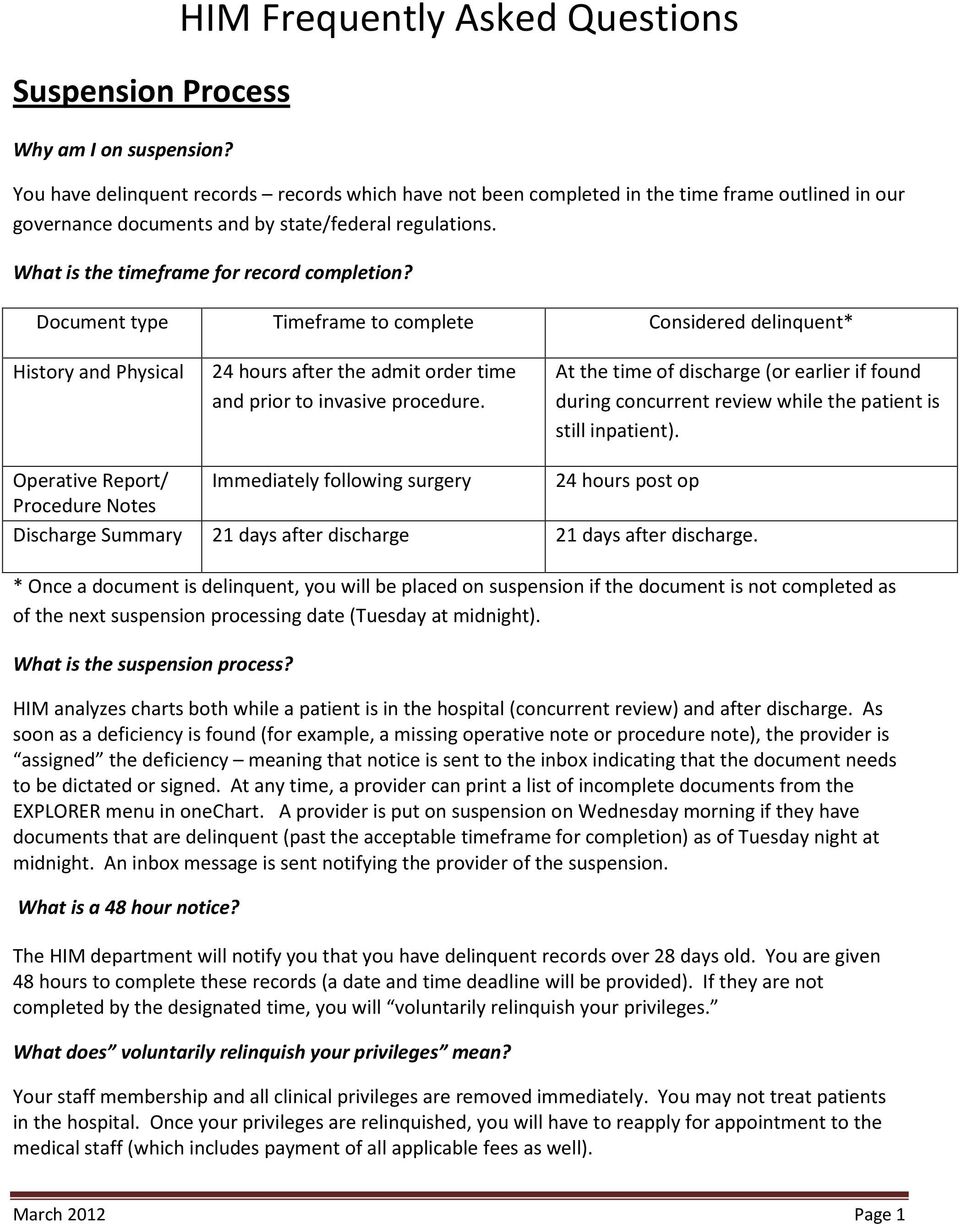
1 Suspension Process Why am I on suspension? HIM Frequently Asked Questions You have delinquent records records which have not been completed in the time frame outlined in our governance documents and by state/federal regulations. What is the timeframe for record completion? Document type Timeframe to complete Considered delinquent* History and Physical 24 hours after the admit order time and prior to invasive procedure. At the time of discharge (or earlier if found during concurrent review while the patient is still inpatient). Operative Report/ Immediately following surgery 24 hours post op Procedure Notes Discharge Summary 21 days after discharge 21 days after discharge. * Once a document is delinquent, you will be placed on suspension if the document is not completed as of the next suspension processing date (Tuesday at midnight). What is the suspension process? HIM analyzes charts both while a patient is in the hospital (concurrent review) and after discharge. As soon as a deficiency is found (for example, a missing operative note or procedure note), the provider is assigned the deficiency meaning that notice is sent to the inbox indicating that the document needs to be dictated or signed. At any time, a provider can print a list of incomplete documents from the EXPLORER menu in onechart. A provider is put on suspension on Wednesday morning if they have documents that are delinquent (past the acceptable timeframe for completion) as of Tuesday night at midnight. An inbox message is sent notifying the provider of the suspension. What is a 48 hour notice? The HIM department will notify you that you have delinquent records over 28 days old. You are given 48 hours to complete these records (a date and time deadline will be provided). If they are not completed by the designated time, you will voluntarily relinquish your privileges. What does voluntarily relinquish your privileges mean? Your staff membership and all clinical privileges are removed immediately. You may not treat patients in the hospital. Once your privileges are relinquished, you will have to reapply for appointment to the medical staff (which includes payment of all applicable fees as well). March 2012 Page 1
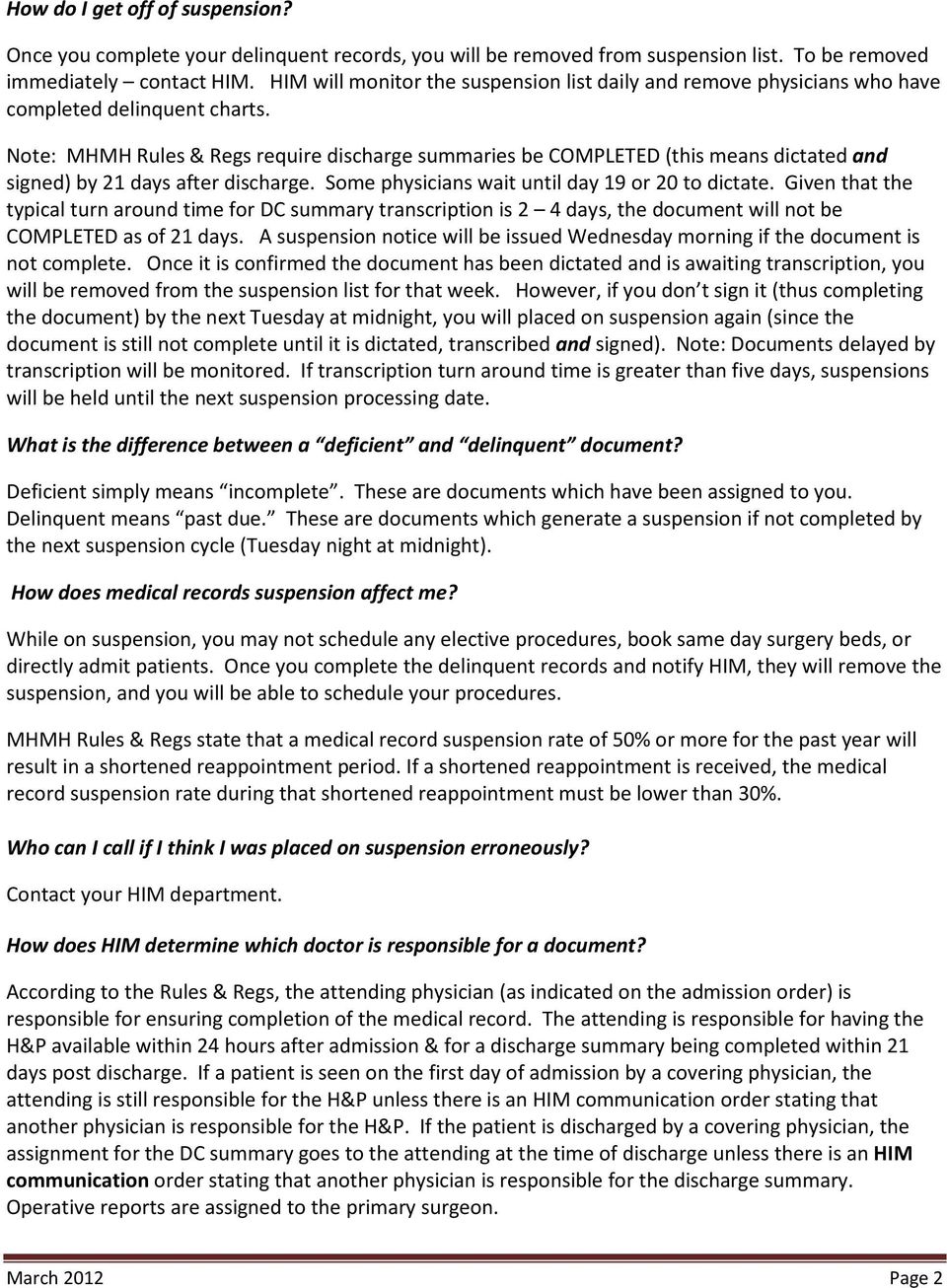
2 How do I get off of suspension? Once you complete your delinquent records, you will be removed from suspension list. To be removed immediately contact HIM. HIM will monitor the suspension list daily and remove physicians who have completed delinquent charts. Note: MHMH Rules & Regs require discharge summaries be COMPLETED (this means dictated and signed) by 21 days after discharge. Some physicians wait until day 19 or 20 to dictate. Given that the typical turn around time for DC summary transcription is 2 4 days, the document will not be COMPLETED as of 21 days. A suspension notice will be issued Wednesday morning if the document is not complete. Once it is confirmed the document has been dictated and is awaiting transcription, you will be removed from the suspension list for that week. However, if you don t sign it (thus completing the document) by the next Tuesday at midnight, you will placed on suspension again (since the document is still not complete until it is dictated, transcribed and signed). Note: Documents delayed by transcription will be monitored. If transcription turn around time is greater than five days, suspensions will be held until the next suspension processing date. What is the difference between a deficient and delinquent document? Deficient simply means incomplete. These are documents which have been assigned to you. Delinquent means past due. These are documents which generate a suspension if not completed by the next suspension cycle (Tuesday night at midnight). How does medical records suspension affect me? While on suspension, you may not schedule any elective procedures, book same day surgery beds, or directly admit patients. Once you complete the delinquent records and notify HIM, they will remove the suspension, and you will be able to schedule your procedures. MHMH Rules & Regs state that a medical record suspension rate of 50% or more for the past year will result in a shortened reappointment period. If a shortened reappointment is received, the medical record suspension rate during that shortened reappointment must be lower than 30%. Who can I call if I think I was placed on suspension erroneously? Contact your HIM department. How does HIM determine which doctor is responsible for a document? According to the Rules & Regs, the attending physician (as indicated on the admission order) is responsible for ensuring completion of the medical record. The attending is responsible for having the H&P available within 24 hours after admission & for a discharge summary being completed within 21 days post discharge. If a patient is seen on the first day of admission by a covering physician, the attending is still responsible for the H&P unless there is an HIM communication order stating that another physician is responsible for the H&P. If the patient is discharged by a covering physician, the assignment for the DC summary goes to the attending at the time of discharge unless there is an HIM communication order stating that another physician is responsible for the discharge summary. Operative reports are assigned to the primary surgeon. March 2012 Page 2
3 Can I appeal my suspension? Yes. Requests for review can be submitted to the Corporate Director of HIM, Meg McGill. Information will be gathered from the various HIM departments for consideration. How is my suspension percentage calculated? Your suspension rate is calculated by the number of times you are suspended on Wednesday morning, not by the number of days you are on suspension or the number of charts for which you are suspended. How can I tell what deficient ( incomplete) documents have been assigned to me? The onechart Message Center Inbox shows incomplete charts. You can also view and print the incomplete document list at anytime using the EXPLORER menu. The report can be found in the Physician folder and is called Deficiency by Physician Detail. Click in the Physician box and it will pull up a window where you can enter the physician s name. Type the name of the physician in the Accept box and hit Query. The physicians name will appear in the From Available box. Click the arrow to move it to the To Selected box, then click ok. Now, the physician name should appear in the Physician window. Click Execute. This is the same report HIM uses to determine which providers are placed on suspension each Wednesday morning. Please review this list weekly and notify HIM if you disagree with the assignments. I ve already dictated/signed a document, but it is showing in my inbox as incomplete. Why? Our system is designed to automatically remove a deficiency once a document is completed. The deficiency will remain in the inbox while it is being transcribed. This usually takes several days. Once transcribed, the assignment moves from dictate status to sign status. The most common reason a deficiency isn t removed from dictate status is that it was performed under the wrong FIN. The system will not know that a discharge summary performed using an outpatient FIN belongs to an inpatient stay. Occasionally there are glitches in the system and the deficiency remains despite the document being present under the correct FIN and signed by you. Notify HIM by calling or by refusing the deficiency in your inbox and choosing Already dictated/signed as the refusal reason. This alerts HIM there is a problem. HIM monitors a report of all refused documents daily. They may contact you if they have questions about the refusal. How can I tell what actions have been done to a document? Hovering the mouse over the bottom frame of the document will change the arrow to a double set of horizontal lines. Holding down the left mouse button, drag the bottom edge of the frame up to show a new window frame. This frame contains information about all actions preformed on that document, including anyone who has modified or forwarded it. History and Physicals Why can t I handwrite my H&P? March 2012 Page 3

4 MHMH Rules & Regs have required all inpatient H&Ps to be created in electronic format since H&Ps can be 1) dictated using our transcription service, or 2) typed into onechart using ClinicNote, or 3) uploaded from your office into the system using the portal. How long will it take to get my H&P transcribed? Our goal is to have 95% of H&Ps and consults transcribed within 2 hours. If the dictated H&P is not available after several hours, call transcription before re-dictating it. The document may have been sent to QA due to difficulty understanding you, interference on the line, Dictaphone malfunction, or use of incorrect FIN. There are times at nights and on weekends when transcription gets behind as well. Do not re-dictate an H&P until you have confirmed with transcription that the dictation is truly not present. What do I with the H&P once it s transcribed? Transcribed documents will be in the Preliminary status. Review the document either in the patient s electronic chart or in your inbox. To make changes or additions, right click and choose modify. Once you are satisfied with the document, sign it. If you are an attending, the document is now final and no more changes can be made to the body of the document. Addenda can be made by right clicking and choosing modify. Addenda to a final document will appear at the top of the report. If you are a resident, you cannot finalize the document. You will need to forward it to your attending for signature (not just for review). Residents should review, correct, sign and forward their documents within 48 hours. What elements are required in an H&P? History Chief complaint/reason for admission History of present Illness Relevant past medical history* Relevant family history* Relevant social history* Relevant review of systems* Physical (to include relevant findings and at a minimum the following): Heart Lungs Examination of the affected body system Impression and/or documentation of medical decision-making Plan of care * If not present/documented, the physician has determined this element is not relevant or non-contributory. Who can perform the H&P? Physicians, Nurse Practitioners, and Physician Assistants credentialed as LIPs (licensed independent practitioners) can perform H&Ps for their supervising physicians. Physician-employed RNs who are authorized to render services may only perform histories for the supervising physician. March 2012 Page 4

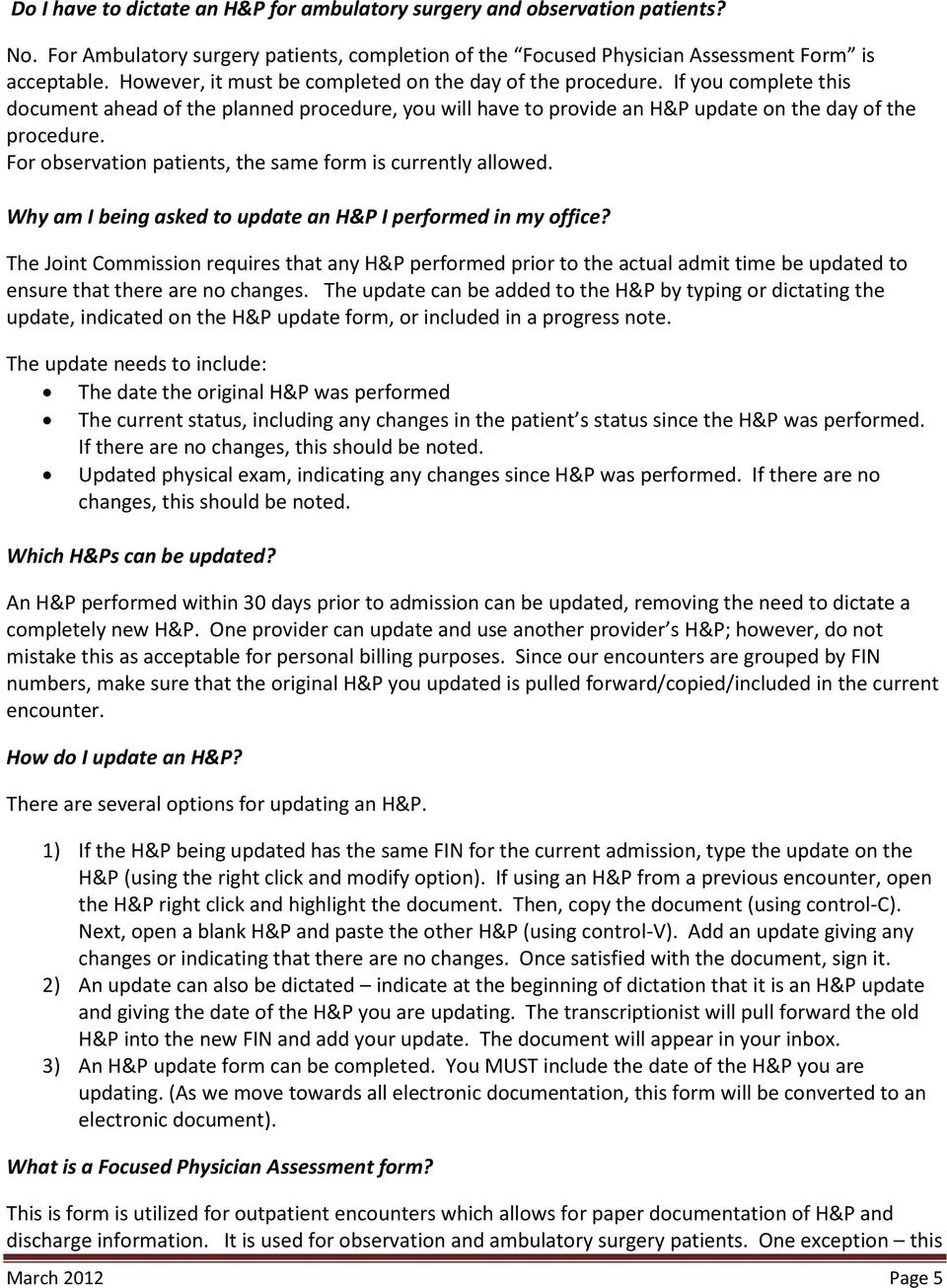
5 Do I have to dictate an H&P for ambulatory surgery and observation patients? No. For Ambulatory surgery patients, completion of the Focused Physician Assessment Form is acceptable. However, it must be completed on the day of the procedure. If you complete this document ahead of the planned procedure, you will have to provide an H&P update on the day of the procedure. For observation patients, the same form is currently allowed. Why am I being asked to update an H&P I performed in my office? The Joint Commission requires that any H&P performed prior to the actual admit time be updated to ensure that there are no changes. The update can be added to the H&P by typing or dictating the update, indicated on the H&P update form, or included in a progress note. The update needs to include: The date the original H&P was performed The current status, including any changes in the patient s status since the H&P was performed. If there are no changes, this should be noted. Updated physical exam, indicating any changes since H&P was performed. If there are no changes, this should be noted. Which H&Ps can be updated? An H&P performed within 30 days prior to admission can be updated, removing the need to dictate a completely new H&P. One provider can update and use another provider s H&P; however, do not mistake this as acceptable for personal billing purposes. Since our encounters are grouped by FIN numbers, make sure that the original H&P you updated is pulled forward/copied/included in the current encounter. How do I update an H&P? There are several options for updating an H&P. 1) If the H&P being updated has the same FIN for the current admission, type the update on the H&P (using the right click and modify option). If using an H&P from a previous encounter, open the H&P right click and highlight the document. Then, copy the document (using control-c). Next, open a blank H&P and paste the other H&P (using control-v). Add an update giving any changes or indicating that there are no changes. Once satisfied with the document, sign it. 2) An update can also be dictated indicate at the beginning of dictation that it is an H&P update and giving the date of the H&P you are updating. The transcriptionist will pull forward the old H&P into the new FIN and add your update. The document will appear in your inbox. 3) An H&P update form can be completed. You MUST include the date of the H&P you are updating. (As we move towards all electronic documentation, this form will be converted to an electronic document). What is a Focused Physician Assessment form? This is form is utilized for outpatient encounters which allows for paper documentation of H&P and discharge information. It is used for observation and ambulatory surgery patients. One exception this March 2012 Page 5
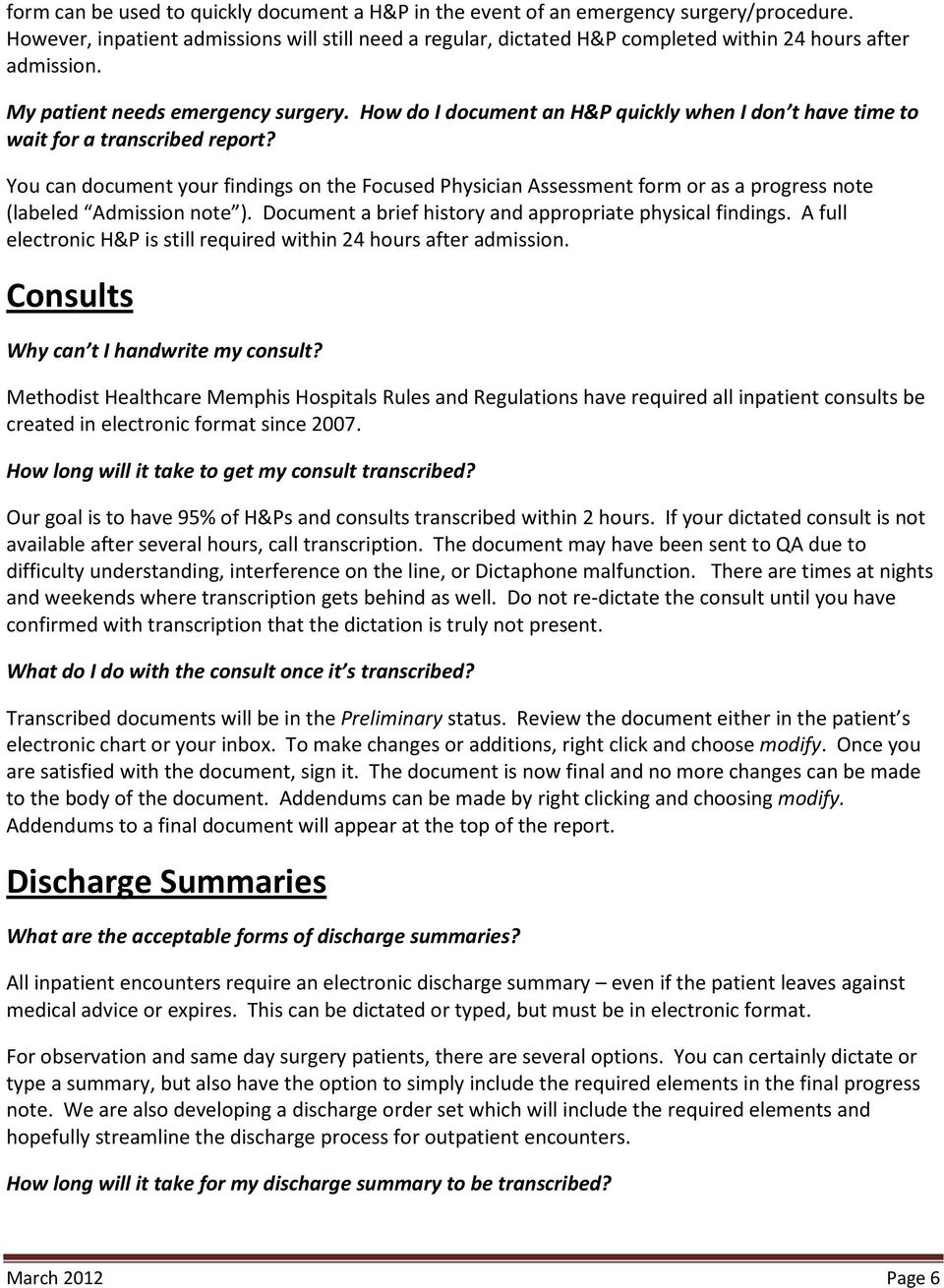
6 form can be used to quickly document a H&P in the event of an emergency surgery/procedure. However, inpatient admissions will still need a regular, dictated H&P completed within 24 hours after admission. My patient needs emergency surgery. How do I document an H&P quickly when I don t have time to wait for a transcribed report? You can document your findings on the Focused Physician Assessment form or as a progress note (labeled Admission note ). Document a brief history and appropriate physical findings. A full electronic H&P is still required within 24 hours after admission. Consults Why can t I handwrite my consult? Methodist Healthcare Memphis Hospitals Rules and Regulations have required all inpatient consults be created in electronic format since How long will it take to get my consult transcribed? Our goal is to have 95% of H&Ps and consults transcribed within 2 hours. If your dictated consult is not available after several hours, call transcription. The document may have been sent to QA due to difficulty understanding, interference on the line, or Dictaphone malfunction. There are times at nights and weekends where transcription gets behind as well. Do not re-dictate the consult until you have confirmed with transcription that the dictation is truly not present. What do I do with the consult once it s transcribed? Transcribed documents will be in the Preliminary status. Review the document either in the patient s electronic chart or your inbox. To make changes or additions, right click and choose modify. Once you are satisfied with the document, sign it. The document is now final and no more changes can be made to the body of the document. Addendums can be made by right clicking and choosing modify. Addendums to a final document will appear at the top of the report. Discharge Summaries What are the acceptable forms of discharge summaries? All inpatient encounters require an electronic discharge summary even if the patient leaves against medical advice or expires. This can be dictated or typed, but must be in electronic format. For observation and same day surgery patients, there are several options. You can certainly dictate or type a summary, but also have the option to simply include the required elements in the final progress note. We are also developing a discharge order set which will include the required elements and hopefully streamline the discharge process for outpatient encounters. How long will it take for my discharge summary to be transcribed? March 2012 Page 6
7 It is our goal to have 75% of discharge summaries transcribed within 48 hours. If a discharge summary is needed stat for a patient transfer, use work type 44, instead of 4. What do I do once the discharge summary is transcribed? Review the document in your inbox or in the patient s electronic chart. Changes/corrections/additions can be made by right-clicking and choosing modify. Once satisfied with the document, sign it. This finalizes the document and no further changes can be made. If any additions are made after it is final, they will be added as addenda. What elements are required in a discharge summary? 1. Reason for admission 2. Significant findings 3. Procedures performed, care/treatment/services provided. 4. Final Diagnosis 5. Condition on discharge 6. Information provided to the patient and family 7. Disposition, follow-up care provision Who can perform the discharge summary? A physician, Nurse Practitioner, Physician Assistant, resident or an RN credentialed to dictate discharge summaries can perform discharge summaries. I performed the discharge summary, but it is still showing as incomplete. Why? Our system is designed to automatically remove a deficiency (incomplete chart assignment) once a document is completed. While being transcribed, a dictated document will still show as needing to be dictated in the inbox. Once transcribed, the deficiency should automatically be removed from the dictate inbox. The most common reason a deficiency isn t removed from the dictation folder is that the document was performed under the wrong FIN. The system will not know that a discharge summary performed using the outpatient FIN belongs to an inpatient stay. Occasionally there are glitches in the system and the deficiency remains despite the document being present under the correct FIN. Notify HIM by calling or by refusing the deficiency in your inbox and choosing Already dictated/signed as the refusal reason. HIM reviews all of the refused documents and dictation assignments daily and may contact you if they have questions. I forgot to include the required elements of the discharge summary in my final progress note for my observation/sds patient (or to complete the discharge section of the OB form). Now I am being asked to dictate a discharge summary. Why? Late entries into the medical record (entries made post-discharge) must be provided in electronic format. Our system does not support adding paper documents to our completed electronic record. However, we are working on a discharge order set which will prompt the physician to enter the required elements and hopefully streamline this process. Operative Reports March 2012 Page 7
8 When are operative reports due? Operative reports should be dictated or created online in the electronic medical record within 24 hours of the procedure or they will be considered delinquent. If still lacking, a suspension will be issued after post discharge chart analysis. How does HIM monitor for completion of these operative reports? Concurrent analysis will be conducted at each facility in the MLH system utilizing the daily surgery schedule to review encounters types that fit the operative report/procedure report criteria. The following encounter types will be reviewed for deficiency: o In-patient surgeries o Ambulatory surgeries o Cardiac catheterization laboratory procedures o Interventional radiology procedures o Gastroenterology laboratory procedures If the documentation is not completed in the allotted time, a deficiency will be assigned. Below are the deficiency assignments: o Dictate Operative Report o Dictate Procedure Report The deficiency assignment will serve as notice to the physician that the documentation was not completed within required twenty-four (24) hours post surgery/procedure. During the next suspension cycle, the Suspension Coordinator will review the assigned deficiency. Upon review, it will be determined if the deficiency has been cleared or if the physician shall be suspended. Documents which are still pending transcription will not generate a suspension. I did surgery Monday morning and discharged the patient Monday afternoon without dictating the operative report. I was assigned a delinquency on Tuesday morning. If I don t dictate this document by Tuesday night at midnight, will I be placed on suspension as of Wednesday morning? Yes. March 2012 Page 8
Regulatory Compliance Policy No. COMP-RCC 4.03 Title:
 I. SCOPE: Regulatory Compliance Policy No. COMP-RCC 4.03 Page: 1 of 10 This policy applies to (1) Tenet Healthcare Corporation and its wholly-owned subsidiaries and affiliates (each, an Affiliate ); (2)
POLICY and PROCEDURE. TITLE: Documentation Requirements for the Medical Record. TITLE: Documentation Requirements for the Medical Record
 POLICY and PROCEDURE TITLE: Documentation Requirements for the Medical Record Number: 13289 Version: 13289.1 Type: Administrative - Medical Staff Author: Joan Siler Effective Date: 8/16/2011 Original Date:
POLICY and PROCEDURE. TITLE: Documentation Requirements for the Medical Record
 POLICY and PROCEDURE TITLE: Documentation Requirements for the Medical Record Number: 13424 Version: 13424.5 Type: Administrative - Medical Staff Author: Martha Hoover Effective Date: 9/24/2014 Original
MEDICAL STAFF RULES & REGULATIONS. St. Ann's Medical Staff
 SUBJECT: RESPONSIBLE PERSONS: Medical Records St. Ann's Medical Staff POLICY: It is the policy of the medical staff to ensure timely completion of medical records in accordance with regulations and quality-of-care.
MEDICAL CENTER POLICY NO. 0094. A. SUBJECT: Documentation of Patient Care (Electronic Medical Record)
 Clinical Staff Executive Committee MEDICAL CENTER POLICY NO. 0094 A. SUBJECT: Documentation of Patient Care (Electronic Medical Record) B. EFFECTIVE DATE: April 1, 2012 (R) C. POLICY: The University of
2 nd Floor CS&E Building A current UMHS identification badge is required to obtain medical records
 Location Hours 2 nd Floor CS&E Building A current UMHS identification badge is required to obtain medical records The Health Information Services Department is open to the public Monday through Friday,
ARTICLE 4. MEDICAL RECORD POLICIES
 A. General Rules ARTICLE 4. MEDICAL RECORD POLICIES 4.1 General - A Medical Record is established and maintained for each patient who has been treated or evaluated at the Medical Center. The Medical Record,
Meditech EMR Introduction and Physician Training Tool James W Langley MD MS Director of MHS Medical Informatics October 2006
 Meditech EMR Introduction and Physician Training Tool James W Langley MD MS Director of MHS Medical Informatics October 2006 October 2006 1 Methodist Dallas Medical Center Methodist Charlton Medical Center
PHYSICIAN USER EMR QUICK REFERENCE MANUAL
 PHYSICIAN USER EMR QUICK REFERENCE MANUAL Epower 4/30/2012 Table of Contents Accessing the system. 3 User Identification Area.. 3 Viewing ED Activity. 4 Accessing patient charts. 4 Documentation Processes.
Medical Records Training Manual for EMR
 Medical Records Training Manual for EMR ENTERPRISE MEDICAL RECORD (EMR) The MEDITECH Enterprise Medical Record (EMR) collects, stores, and displays clinical data such as lab results, transcribed reports,
MEDICAL STAFF RULES & REGULATIONS
 MEDICAL STAFF RULES & REGULATIONS PURPOSE: Rules and Regulations shall set standards of practice that are to be required of each individual exercising clinical privileges in the hospital, and shall act
To Access Signature Manager/ScanDocs from Patient Screen
 1. Highlight a patient's name to activate both icons 2. The "Signature Manager" icon is on the tool bar This is where you sign your Documents and Orders 3. The "ScanDocs" tab is where you sign scanned
Question and Answer Submissions
 AACE Endocrine Coding Webinar Welcome to the Brave New World: Billing for Endocrine E & M Services in 2010 Question and Answer Submissions Q: If a patient returns after a year or so and takes excessive
Provider Quick Reference EMR Guide
 Provider Quick Reference EMR Guide 1 Table of Contents PowerChart Navigation... 8 Accessing the Electronic Medical Record (EMR)... 8 Patient Privacy... 8 Citrix Icon and Access... 9 Log into the Citrix
MCCG PowerChart. Message Center Complete Manual. Hold the Ctrl key down & then left click on a link below to navigate to it:
 Hold the Ctrl key down & then left click on a link below to navigate to it: Table of Contents Overview of the Message Center Message Center Basics Working with the Message Journal Working with Documents
LOUISIANA STATE UNIVERSITY HEALTH SCIENCES CENTER - SHREVEPORT MEDICAL RECORDS CONTENT/DOCUMENTATION
 LOUISIANA STATE UNIVERSITY HEALTH SCIENCES CENTER - SHREVEPORT MEDICAL RECORDS CONTENT/DOCUMENTATION Hospital Policy Manual Purpose: To define the components of the paper and electronic medical record
WHAT IS MEDICAL MANAGEMENT? WHAT IS THE PURPOSE OF MEDICAL MANAGEMENT?
 WHAT IS MEDICAL MANAGEMENT? How health plans make decisions to approve payment for medical treatment is a poorly understood part of the healthcare system. One part of the process, known as medical management,
Edmonton Zone. 780-407-2800 or 780-407-2850 TO ACCESS THE EDMONTON DICTATION SYSTEM DIAL: Health Information Management Transcription Services
 Edmonton Zone Health Information Management Priority dictations, obtaining a dictation User ID #, or any other inquiries during regular business hours: Grey Nuns: 780-490-5903 (0700 to 1500 hours) Misericordia:
TITLE: Processing Provider Orders: Inpatient and Outpatient
 POLICY and PROCEDURE TITLE: Processing Provider Orders: Inpatient and Outpatient Number: 13211 Version: 13211.3 Type: Patient Care Author: Janice Dinner; Provider Order Policy Committee Effective Date:
Electronic Signature Authentication (ESA)
 Electronic Signature Authentication (ESA) Resident/Fellow User Documentation For ESA Assistance, please contact Darlene Warwick at 40202 or Nancy Collier at 724-2365 or pager 762-0607 or Paula Dixon at
IPPS Observation vs. Inpatient Admissions Training Questions and Answers
 IPPS Observation vs. Inpatient Admissions Training Questions and Answers The following questions and answers are from the Part A IPPS Observation vs. Inpatient Admissions web-based trainings conducted
Transcribing Dictated Letters into Logician
 Transcribing Dictated Letters into Logician Target User... 1 Purpose... 1 Summary of Steps... 1 Detailed Workflow... 1 1. Retrieve Patient Chart... 1 2. Begin with the Print Command... 3 3. Expand the
Healthcare Documentation Fundamental and Practice Transcription Exercise Students Module Users Guide
 Healthcare Documentation Fundamental and Practice Transcription Exercise Students Module Users Guide Contents Introduction... 1 Overview... 1 Key Terms... 2 Installation... 4 Updates... 4 Getting Started...
EDM Training Manual. EDM Tracker/Worklist/Documentation 2. Temporary Status 14. Reception/Triage 15. Departing/Discharging 24.
 EDM Training Manual EDM Tracker/Worklist/Documentation 2 Temporary Status 14 Reception/Triage 15 Ordering Medications 18 Medication Reconciliation 22 Departing/Discharging 24 Admit Request 27 On Call List
Correctional Treatment CenterF
 0BCHAPTER 15 F 1BI. POLICY The California Department of Corrections and Rehabilitation (CDCR) shall maintain s (CTC) to house inmate-patients who do not require general acute care level of services but
Using the Medical Language Specialist Client Application
 Page 1 Using the MLSClient Application April 20, 2008 Using the Medical Language Specialist Client Application April 20, 2008 Prepared by: WebChartMD P.O. Box 6154 Johnson City, TN 37602 877-302-9263 Page
Clinical Information System Downtime (Cerner PowerChart, FirstNet, SurgiNet)
 Clinical Information System Downtime (Cerner PowerChart, FirstNet, SurgiNet) Preparing for Downtime A. 60 Minutes prior 1. No additional electronic orders are entered. 2. For any new lab orders, begin
The Medical Center of Central Georgia. Nursing Student Documentation Education Module
 The Medical Center of Central Georgia Nursing Student Documentation Education Module Important Policy Information for Students Nursing Students when working directly with a Licensed Nurse have special
SAINT FRANCIS HOSPITAL AND MEDICAL CENTER MEDICAL STAFF RULES AND REGULATIONS
 SAINT FRANCIS HOSPITAL AND MEDICAL CENTER MEDICAL STAFF RULES AND REGULATIONS TABLE OF CONTENTS: ARTICLE I INTRODUCTION 1.1 Definitions 1.2 Applicability 1.3 Conflict with Hospital Policies 1.4 Departmental
Medical Necessity & Charting Guidelines
 Medical Necessity & Charting Guidelines 1 In most cases we are told the rules up front - or will be told if we ask Like most games, the one who knows the rules the best WINS 4 2 Nationally Recognized Industry
SECTION 5 1 REFERRAL AND AUTHORIZATION PROCESS
 SECTION 5 1 REFERRAL AND AUTHORIZATION PROCESS Primary Care Physician Referral Process 1 Referral from PCP to Participating Specialists 1 Referral from Participating Specialist to Participating Specialists
Health Information Technology & Management Chapter 2 HEALTH INFORMATION SYSTEMS
 Health Information Technology & Management Chapter 2 HEALTH INFORMATION SYSTEMS INFORMATION SYSTEM *Use of computer hardware and software to process data into information. *Healthcare information system
CareAware Capacity Management - Patient Flow Patient List Gadget
 CareAware Capacity Management - Patient Flow Patient List Gadget When using the Patient List gadget in CareAware Patient Flow, the following tasks can be completed: Launch PowerChart Modify Patient Attributes
Regulatory Compliance Policy No. COMP-RCC 4.25 Title:
 I. SCOPE: Regulatory Compliance Policy No. COMP-RCC 4.25 Title: HOSPITAL COVERAGE NOTICES FOR MEDICARE INPATIENTS (INCLUDING IMPORTANT MESSAGE FROM MEDICARE) Page: 1 of 16 Effective Date: 03-19-15 Retires
Credentials Policy Manual. Reviewed & Approved by MEC 8/13/2012 Reviewed & Approved by Board of Commissioners 9/11/12
 Credentials Policy Manual Reviewed & Approved by MEC 8/13/2012 Reviewed & Approved by Board of Commissioners 9/11/12 Credentialing Policy Manual Table of Contents I. Application for Appointment to Staff...1
Policy & Procedure Manual Administration - Role and Expectations of the Most Responsible Physician (MRP)
 The Scarborough Hospital Policy & Procedure Manual Administration - Role and Expectations of the Most Responsible Purpose To clarify and standardize the role of the Most Responsible at The Scarborough
Health Information Technology & Management Chapter 4 ORGANIZATION, STORAGE, AND MANAGEMENT OF HEALTH RECORDS BY : NOHA ALAGGAD
 Health Information Technology & Management Chapter 4 ORGANIZATION, STORAGE, AND MANAGEMENT OF HEALTH RECORDS BY : NOHA ALAGGAD PAPER CHARTS Consist of one or more file folders containing handwritten notes,
EMR DOCUMENTATION LYNX. Instructor Script
 EMR DOCUMENTATION LYNX Instructor Script Table of Contents TABLE OF CONTENTS INFORMATION SECURITY AND CONFIDENTIALITY... 4 OVERVIEW... 5 LEARNING OBJECTIVES... 5 TIPS AND TRICKS... 5 SOLUTION ICONS...
Unit 1 Core Care Management Activities
 Unit 1 Core Care Management Activities Healthcare Management Services Healthcare Management Services (HMS) is responsible for all the medical management services provided to Highmark Blue Shield members,
Frequently Asked Questions (FAQs) from December 2013 Behavioral Health Utilization Management Webinars
 Frequently Asked Questions (FAQs) from December 2013 Behavioral Health Utilization Management Webinars 1. In the past we did precertifications for Residential Treatment Centers (RTC). Will this change
DEPARTMENT OF HEALTH AND HUMAN SERVICES Centers for Medicare & Medicaid Services. Discharge Planning
 DEPARTMENT OF HEALTH AND HUMAN SERVICES Centers for Medicare & Medicaid Services ICN 908184 October 2014 This booklet was current at the time it was published or uploaded onto the web. Medicare policy
Information Technology Report to Medical Executive Committee
 July 9, 2013 z Information Technology Report to Medical Executive Committee Contents 1 Physician Optimization Update 2 Direct Email Protocol Project 2 Patient Portal 2 Cerner PowerChart Ambulatory EHR/PM
EMR DOCUMENTATION LYNX. Instructor Script
 EMR DOCUMENTATION LYNX Instructor Script 1 Table of Contents Table of Contents INFORMATION SECURITY AND CONFIDENTIALITY... 4 OVERVIEW... 5 LEARNING OBJECTIVES... 5 AUDIENCE... 5 SIGNING ON... 6 KH ED
Soarian Enterprise Document Management (EDM) Physician Training Document for Scanned Documents and Dictated Deficiencies
 Soarian Enterprise Document Management (EDM) Physician Training Document for Scanned Documents and Dictated Deficiencies January/2014 Completing Physician Deficiencies Sign on to Soarian Clinicals and
Chapter 7: Inpatient & Outpatient Hospital Care
 7 Inpatient & Outpatient Hospital Care ACUTE INPATIENT ADMISSIONS All elective and emergent admissions require prior authorization and/or notification for all Health Choice Generations Members admissions.
Transactions Module. 70 Royal Little Drive. Providence, RI 02904. Copyright 2002-2014 Optum. All rights reserved. Updated: 3/1/14
 70 Royal Little Drive Providence, RI 02904 Copyright 2002-2014 Optum. All rights reserved. Updated: 3/1/14 Table of Contents 1 Transactions Module...1 2 Charge Overview...3 2.1.1 Explosion Codes...3 2.1.2
Physician Office EMR Training
 Physician Office EMR Training HERO = Health Electronic Record Online 1 LOGGING IN 1) Log into HERO by accessing one of the following: a. From the DrWeb page drweb.excelahealth.org HERO b. myapps.exceleahealth.org
HIPAA Notice of Privacy Practices
 HIPAA Notice of Privacy Practices THIS NOTICE DESCRIBES HOW MEDICAL INFORMATION ABOUT YOU MAY BE USED AND DISCLOSED AND HOW YOU CAN GET ACCESS TO THIS INFORMATION. PLEASE REVIEW IT CAREFULLY. This Notice
Instructor Guide: CPOE (Order Entry) for the Nurse. Trainer Notes. Objective Learn about PowerPlans. Benefits of CPOE. Learn about Nurse Review
 Instructor Guide: CPOE (Order Entry) for the Nurse Trainer Notes Section Name Duration Order Entry 45 minutes Objective Learn about PowerPlans Benefits of CPOE Learn about Nurse Review You ll Need Parking
TAB 32. Electronic Medical Record
 TAB 32 Electronic Medical Record EHR Training for LSU Rotations All LSU house officers are required to fulfill EHR training for each rotation site at which they will practice. It is the primary responsibility
1. Clarification regarding whether an admission order must be completed before any therapy evaluations are initiated.
 Follow-up information from the November 12 provider training call I. Admission Orders 1. Clarification regarding whether an admission order must be completed before any therapy evaluations are initiated.
Outlook Managing Your Items
 Course Description Managing your items is essential if you want Outlook to run as efficiently and effectively as possible. As with any filing system the longer you put off doing anything the larger the
User Guide for Evolve Simulation Learning System: Electronic Medical Record (Fundamentals)
 User Guide for Evolve Simulation Learning System: Electronic Medical Record (Fundamentals) Introduction The Simulation Learning System s Electronic Medical Record (EMR) allows you to document the treatment
Care Management Can We Do It Better?
 Care Management Can We Do It Better? Wilma Acosta, Associate Director Protiviti, Inc. Alex Robison, Managing Director Protiviti, Inc. Agenda I. Care Management Challenges II. Compliance Case Studies Intermittently
Information Technology Report to Medical Executive Committee
 May 13, 2014 z Information Technology Report to Medical Executive Committee Contents 1 McKesson Cardiology PACS 1 Mammography Reporting System (MRS) 1 Ambulatory Project Update 2 Cerner Patient Portal
Ontario Hospital Association/Ontario Medical Association Hospital Prototype Board-Appointed Professional Staff By-law
 Ontario Hospital Association/Ontario Medical Association Hospital Prototype Board-Appointed Professional Staff By-law 2011 ONTARIO HOSPITAL ASSOCIATION/ ONTARIO MEDICAL ASSOCIATION HOSPITAL PROTOTYPE BOARD-APPOINTED
Accessing Outpatient, Inpatient and Day Case Services in Acute Hospitals in Ireland
 Accessing Outpatient, Inpatient and Day Case Services in Acute Hospitals in Ireland January 2014 an ciste náisiúnta um cheannach cóireála the national treatment purchase fund Contents Introduction 2 Accessing
Care360 EHR Frequently Asked Questions
 Care360 EHR Frequently Asked Questions Table of Contents Care360 EHR... 4 What is Care360 EHR?... 4 What are the current capabilities of Care 360 EHR?... 4 Is Care 360 EHR an EMR?... 5 Can I have Care360
The Patient-Centered Medical Home & You: Frequently Asked Questions (FAQ) for Patients and
 The Patient-Centered Medical Home & You: Frequently Asked Questions (FAQ) for Patients and Families What is a Patient-Centered Medical Home? A Medical Home is all about you. Caring about you is the most
Utilization Review and Denial Management
 September 2014 Clinical Resource Management Series Part 3 of 10 Utilization Review and Denial Management Part 3 in our Clinical Resource Management (CRM) series is focused on utilization review and denial
ClinicalConnect EMR Download Training Guide
 ClinicalConnect EMR Download Training Guide The information contained in this reference guide reflects upgrades in functionality as of February 17th, 2011 P a g e 2 Table of Contents About the EMR Download:...
Inpatient EHR Implementation and Lessons Learned
 Inpatient EHR Implementation and Lessons Learned LCDR Robin Bartlett, PharmD, NCPS Clinical Applications Coordinator Cherokee Indian Hospital April 2008 Objectives Provide overview of relationship between
DOCUMENT TITLE: Clarification of Bureau of Primary Health Care Credentialing and Privileging Policy Outlined in Policy Information Notice 2001-16
 2002-22 DATE: July 10, 2002 DOCUMENT TITLE: Clarification of Bureau of Primary Health Care Credentialing and Privileging Policy Outlined in Policy Information Notice 2001-16 Revision (October 30, 2014):
Exhibit 2.9 Utilization Management Program
 Exhibit 2.9 Utilization Management Program Access HealthSource, Inc. Utilization Management Company is licensed as a Utilization Review Agent with the Texas Department of Insurance. The Access HealthSource,
Licensed Counselors (LPCC)
 CREDENTIALING Molina Healthcare of Ohio s credentialing process is designed to meet the standards of the National Committee for Quality Assurance (NCQA). In accordance with those standards, Molina Healthcare
USING DOCUWARE TO MANAGE WORKFORCE SOLUTIONS FILES CAREER OFFICE
 USING DOCUWARE TO MANAGE WORKFORCE SOLUTIONS FILES CAREER OFFICE Using DocuWare to Manage Workforce Solutions Files Workforce Solutions 2015 Version 1.1, 3/17/15 Workforce Solutions is an equal opportunity
Creditor Disability Claim Application Kit
 Life and Health Claims Dept. Creditor Disability Claim Application Kit The Application Kit contains: an instruction sheet plus forms that need to be completed in order to apply for disability benefits;
PowerChart Cerner Millennium System
 PowerChart Cerner Millennium System Non-Physician Training Manual Clinical Information System Team MCG Health, Inc. 1120 15 th Street Augusta, Georgia 30912 Version 3 Table of Contents 1. About the PowerChart
EMAIL QUICK START GUIDE
 IT Services Microsoft Outlook 2010 EMAIL QUICK START GUIDE Contents What is Outlook?...2 Quick Guide to Email...2 Create a new e-mail message...2 Forward or reply to an e-mail message...2 Creating new
SCM Training For Nursing Staff
 SCM Training For Nursing Staff UK Hosp, Staff Education August 06 1 Resources and Help Support Center: 323-8586 Useful Web Sites Learning Center Web page http://www.mc.uky.edu/learningcenter ICIS Web page
Soarian Clinicals Training Manual. For Current Nursing Staff Migrating From Siemens NetAccess to Soarian Clinicals
 Soarian Clinicals Training Manual For Current Nursing Staff Migrating From Siemens NetAccess to Soarian Clinicals Prepared By: Amelia Griggs Information Management Siemens Health Services at Holy Redeemer
Going to a Mental Health Tribunal hearing
 June 2015 Going to a Mental Health Tribunal hearing Includes: information about compulsory treatment and treatment orders information about Mental Health Tribunal hearings worksheets to help you represent
Virtual Heart User Manual Username Password
 Virtual Heart User Manual Username Password These instructions are meant to help you use the Virtual Heart website. Please write down your username and password and store them in a safe place in case you
PowerChart Doctor Office Staff Participant Guide
 PowerChart Doctor Office Staff Participant Guide Universal Health Services 367 South Gulph Road King of Prussia, PA 19406-0958 2010 All Rights Reserved Revision History Date Version Description Author
Heath Shield Heath Care Management System
 Heath Shield Heath Care Management System Introduction Heath Shield will be an integrated, modular client server based system which can be extended to a web based solution also. The programs will have
Medical and Rx Claims Procedures
 This section of the Stryker Benefits Summary describes the procedures for filing a claim for medical and prescription drug benefits and how to appeal denied claims. Medical and Rx Benefits In-Network Providers
Section 6. Medical Management Program
 Section 6. Medical Management Program Introduction Molina Healthcare maintains a medical management program to ensure patient safety as well as detect and prevent fraud, waste and abuse in its programs.
OSCAR OLIS (Ontario Laboratory Information System)
 12/4/2013 OSCAR OLIS (Ontario Laboratory Information System) User Training Guide This guide provides an overview of how laboratory test order and results are searched, retrieved and uploaded from the Ontario
Helen M. Simpson Rehabilitation Hospital Leveraging IT to Coordinate Care Transitions
 Helen M. Simpson Rehabilitation Hospital Leveraging IT to Coordinate Care Transitions All speakers have completed commercial bias disclosure forms and do not have any conflicts of interest Disclosures
V. Utilization Management (UM) Program
 V. Utilization Management (UM) Program Overview Better Health Network s Utilization Management (UM) Program is designed to provide quality, cost-effective and medically necessary services while meeting
Tips and Strategies on Handoffs
 Tips and Strategies on Handoffs In 2007, the Handoffs & Transitions Learning Network (H&T) was established to support the mid-atlantic healthcare community in tackling the complex problem of handoffs and
Nursing Home Facility Implementation Overview
 DrConnect Improved Communication; Improved Care Nursing Home Facility Implementation Overview clevelandclinic.org/drconnect Cleveland Clinic 1995-2013. All Rights Reserved. Table of Contents Table of Contents...2
Short-Term Disability Program
 Short-Term Disability Program April 1, 2015 THE CBS SHORT-TERM DISABILITY (STD) PROGRAM The CBS Short -Term Disability (STD) Program is a salary continuance program designed to provide eligible employees
Riverside Physician Network Utilization Management
 Subject: Program Riverside Physician Network Author: Candis Kliewer, RN Department: Product: Commercial, Senior Revised by: Linda McKevitt, RN Approved by: Effective Date January 1997 Revision Date 1/21/15
Fair Registration Practices Report
 Fair Registration Practices Report Nurses (2013) The answers that you submitted to OFC can be seen below. This Fair Registration Practices Report was produced as required by: the Fair Access to Regulated
(HEALTH INFORMATION MANAGEMENT SERVICES (HIMS)) MEDICAL RECORDS POLICY AND PROCEDURE
 (HEALTH INFORMATION MANAGEMENT SERVICES (HIMS)) MEDICAL RECORDS POLICY AND PROCEDURE Adopted by the Medical Staff: July 27, 2009 Adopted by the Board of Directors: July 31, 2009 Amended by the Medical
Horizon Patient Folder User s Guide
 Horizon Patient Folder User s Guide - 1 - Overview St. Mary's Medical Center is embarking on a new way to view the medical record for patients on-line. This information will guide you through the Horizon
ARTICLE X: RULES AND REGULATIONS
 ARTICLE X: RULES AND REGULATIONS The Medical Staff shall adopt such rules and regulations as necessary for the proper conduct of its work. Such rules and regulations may be a part of these bylaws except
EMS Portal How to Apply to Become an EMS Education Coordinator
 EMS Portal How to Apply to Become an EMS Education Coordinator Introduction: Quick Guide The EMS Portal is an all encompassing online service for EMS Providers across the Commonwealth. In an effort to
If you have not applied to the college yet, please pay particular attention to the section on applying to Austin Community College.
 Welcome to the online information session for the Medical Coding Certificate Program. You may also be listening to this information session because you intend to register for Health Information Technology
Outlook 2010 and 2013
 Outlook 2010 and 2013 Email Setup Account Types 2 Exchange account 3 POP account 5 Maintenance Setting up an Email signature 7 Checking Email Storage 8 Archiving Emails 9 Sharing Calendars Giving Access