
Modbus Protocol. PDF format version of the MODBUS Protocol. The original was found at:
|
|
|
- Pierce Hensley
- 10 years ago
- Views:
Transcription
1 Modbus Protocol PDF format version of the MODBUS Protocol The original was found at: (In case of any discrepancies, that version should be considered accurate.) Hope you find this useful! Spehro Pefhany, January The Queensway Suite 1298 Toronto ON Canada M9C 4H5 (905) fax: (905)

2 Modbus Protocol Chapter 1 Modbus Protocol Chapter 2 Data and Control Functions Chapter 3 Diagnostic Subfunctions Chapter 4 Exception Responses Chapter 5 Application Notes Chapter 6 LRC / CRC Generation [1/11/ :32:59 PM]

3 Modbus Protocol Chapter 1 Modbus Protocol Introducing Modbus Protocol Two Serial Transmission Modes Modbus Message Framing Error Checking Methods 1.1 Introducing Modbus Protocol Modicon programmable controllers can communicate with each other and with other devices over a variety of networks. Supported networks include the Modicon Modbus and Modbus Plus industrial networks, and standard networks such as MAP and Ethernet. Networks are accessed by built-in ports in the controllers or by network adapters, option modules, and gateways that are available from Modicon. For original equipment manufacturers, Modicon ModConnect partner programs are available for closely integrating networks like Modbus Plus into proprietary product designs. The common language used by all Modicon controllers is the Modbus protocol. This protocol defines a message structure that controllers will recognize and use, regardless of the type of networks over which they communicate. It describes the process a controller uses to request access to another device, how it will respond to requests from the other devices, and how errors will be detected and reported. It establishes a common format for the layout and contents of message fields. The Modbus protocol provides the internal standard that the Modicon controllers use for parsing messages. During communications on a Modbus network, the protocol determines how each controller will know its device address, recognize a message addressed to it, determine the kind of action to be taken, and extract any data or other information contained in the message. If a reply is required, the controller will construct the reply message and send it using Modbus protocol. On other networks, messages containing Modbus protocol are imbedded into the frame or packet structure that is used on the network. For example, Modicon network controllers for Modbus Plus or MAP, with associated application software libraries and drivers, provide conversion between the imbedded Modbus message protocol and the specific framing protocols those networks use to communicate between their node devices. This conversion also extends to resolving node addresses, routing paths, and error-checking methods specific to each kind of network. For example, Modbus device addresses contained in the Modbus protocol will be converted into node addresses prior to transmission of the messages. Error-checking fields will also be applied to message packets, consistent with each (1 of 5) [1/11/ :36:08 PM]

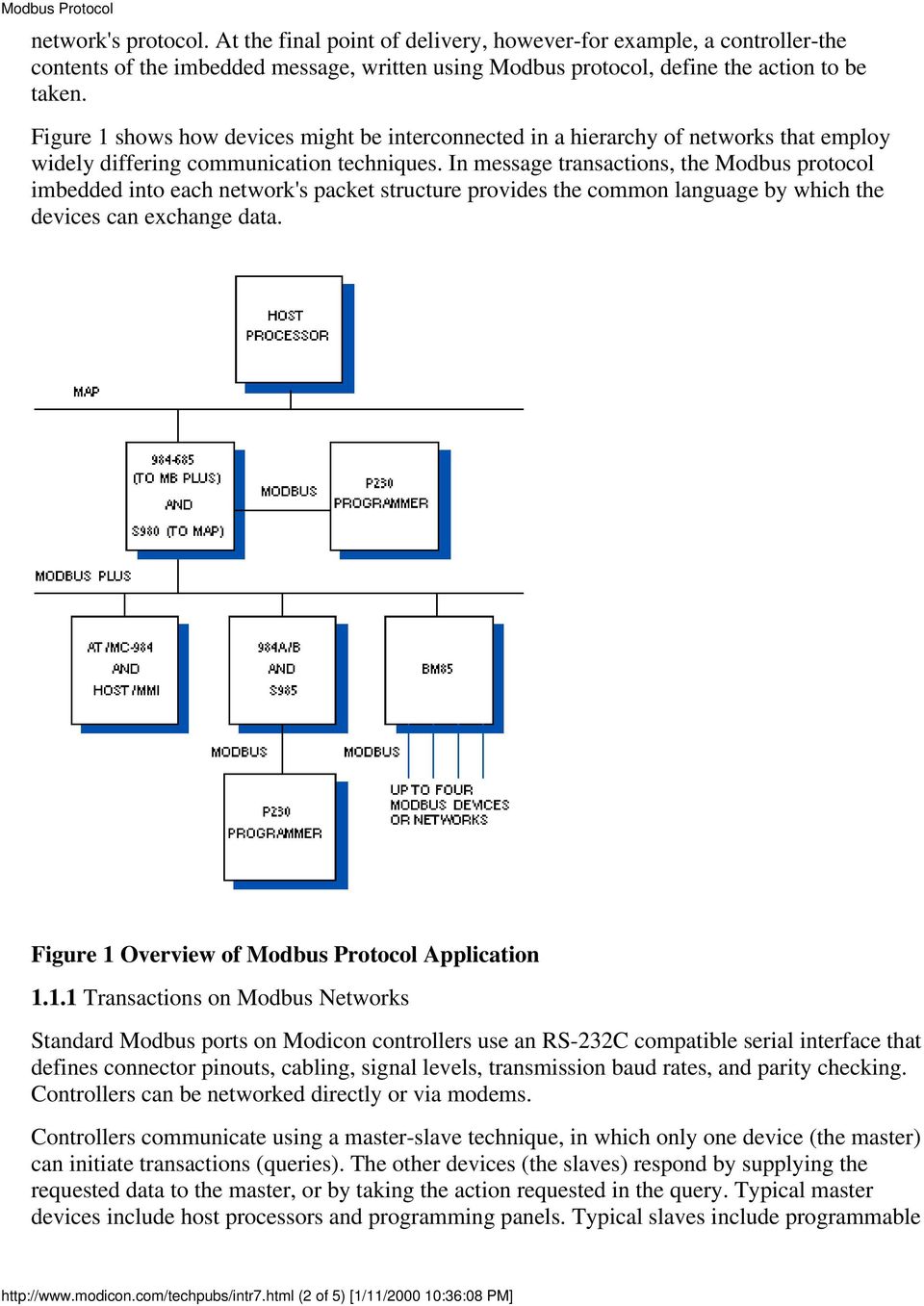
4 Modbus Protocol network's protocol. At the final point of delivery, however-for example, a controller-the contents of the imbedded message, written using Modbus protocol, define the action to be taken. Figure 1 shows how devices might be interconnected in a hierarchy of networks that employ widely differing communication techniques. In message transactions, the Modbus protocol imbedded into each network's packet structure provides the common language by which the devices can exchange data. Figure 1 Overview of Modbus Protocol Application Transactions on Modbus Networks Standard Modbus ports on Modicon controllers use an RS-232C compatible serial interface that defines connector pinouts, cabling, signal levels, transmission baud rates, and parity checking. Controllers can be networked directly or via modems. Controllers communicate using a master-slave technique, in which only one device (the master) can initiate transactions (queries). The other devices (the slaves) respond by supplying the requested data to the master, or by taking the action requested in the query. Typical master devices include host processors and programming panels. Typical slaves include programmable (2 of 5) [1/11/ :36:08 PM]
5 Modbus Protocol controllers. The master can address individual slaves, or can initiate a broadcast message to all slaves. Slaves return a message (response) to queries that are addressed to them individually. Responses are not returned to broadcast queries from the master. The Modbus protocol establishes the format for the master's query by placing into it the device (or broadcast) address, a function code defining the requested action, any data to be sent, and an error-checking field. The slave's response message is also constructed using Modbus protocol. It contains fields confirming the action taken, any data to be returned, and an error-checking field. If an error occurred in receipt of the message, or if the slave is unable to perform the requested action, the slave will construct an error message and send it as its response Transactions on Other Kinds of Networks In addition to their standard Modbus capabilities, some Modicon controller models can communicate over Modbus Plus using built-in ports or network adapters, and over MAP, using network adapters. On these networks, the controllers communicate using a peer-to-peer technique, in which any controller can initiate transactions with the other controllers. Thus a controller may operate either as a slave or as a master in separate transactions. Multiple internal paths are frequently provided to allow concurrent processing of master and slave transactions. At the message level, the Modbus protocol still applies the master-slave principle even though the network communication method is peer-to-peer. If a controller originates a message, it does so as a master device, and expects a response from a slave device. Similarly, when a controller receives a message it constructs a slave response and returns it to the originating controller The Query-Response Cycle Figure 2 Master-Slave Query-Response Cycle The Query The function code in the query tells the addressed slave device what kind of action to perform. The data bytes contain any additional information that the slave will need to perform the function. For example, function code 03 will query the slave to read holding registers and respond with their contents. The data field must contain the information telling the slave which (3 of 5) [1/11/ :36:08 PM]

6 Modbus Protocol register to start at and how many registers to read. The error check field provides a method for the slave to validate the integrity of the message contents. The Response If the slave makes a normal response, the function code in the response is an echo of the function code in the query. The data bytes contain the data collected by the slave, such as register values or status. If an error occurs, the function code is modified to indicate that the response is an error response, and the data bytes contain a code that describes the error. The error check field allows the master to confirm that the message contents are valid. 1.2 Two Serial Transmission Modes Controllers can be setup to communicate on standard Modbus networks using either of two transmission modes: ASCII or RTU. Users select the desired mode, along with the serial port communication parameters (baud rate, parity mode, etc), during configuration of each controller. The mode and serial parameters must be the same for all devices on a Modbus network. The selection of ASCII or RTU mode pertains only to standard Modbus networks. It defines the bit contents of message fields transmitted serially on those networks. It determines how information will be packed into the message fields and decoded. On other networks like MAP and Modbus Plus, Modbus messages are placed into frames that are not related to serial tranasmission. For example, a request to read holding registers can be handled between two controllers on Modbus Plus without regard to the current setup of either controller's serial Modbus port ASCII Mode When controllers are setup to communicate on a Modbus network using ASCII (American Standard Code for Information Interchange) mode, each eight-bit byte in a message is sent as two ASCII characters. The main advantage of this mode is that it allows time intervals of up to one second to occur between characters without causing an error. Coding System Hexadecimal, ASCII characters , A... F One hexadecimal character contained in each ASCII character of the message Bits per Byte 1 start bit 7 data bits, least significant bit sent first 1 bit for even / odd parity-no bit for no parity 1 stop bit if parity is used-2 bits if no parity Error Check Field (4 of 5) [1/11/ :36:08 PM]
7 Modbus Protocol Longitudinal Redundancy Check (LRC) RTU Mode When controllers are setup to communicate on a Modbus network using RTU (Remote Terminal Unit) mode, each eight-bit byte in a message contains two four-bit hexadecimal characters. The main advantage of this mode is that its greater character density allows better data throughput than ASCII for the same baud rate. Each message must be transmitted in a continuous stream. Coding System Eight-bit binary, hexadecimal , A... F Two hexadecimal characters contained in each eight-bit field of the message Bits per Byte 1 start bit 8 data bits, least significant bit sent first 1 bit for even / odd parity-no bit for no parity 1 stop bit if parity is used-2 bits if no parity Error Check Field Cyclical Redundancy Check (CRC) 1.3 Modbus Message Framing In either of the two serial transmission modes (ASCII or RTU), a Modbus message is placed by the transmitting device into a frame that has a known beginning and ending point. This allows receiving devices to begin at the start of the message, read the address portion and determine which device is addressed (or all devices, if the message is broadcast), and to know when the message is completed. Partial messages can be detected and errors can be set as a result. On networks like MAP or Modbus Plus, the network protocol handles the framing of messages with beginning and end delimiters that are specific to the network. Those protocols also handle delivery to the destination device, making the Modbus address field imbedded in the message unnecessary for the actual transmission. (The Modbus address is converted to a network node address and routing path by the originating controller or its network adapter.) ASCII Framing In ASCII mode, messages start with a colon ( : ) character (ASCII 3A hex), and end with a carriage return-line feed (CRLF) pair (ASCII 0D and 0A hex). The allowable characters transmitted for all other fields are hexadecimal , A... F. Networked devices monitor the network bus continuously for the colon character. Wh (5 of 5) [1/11/ :36:08 PM]
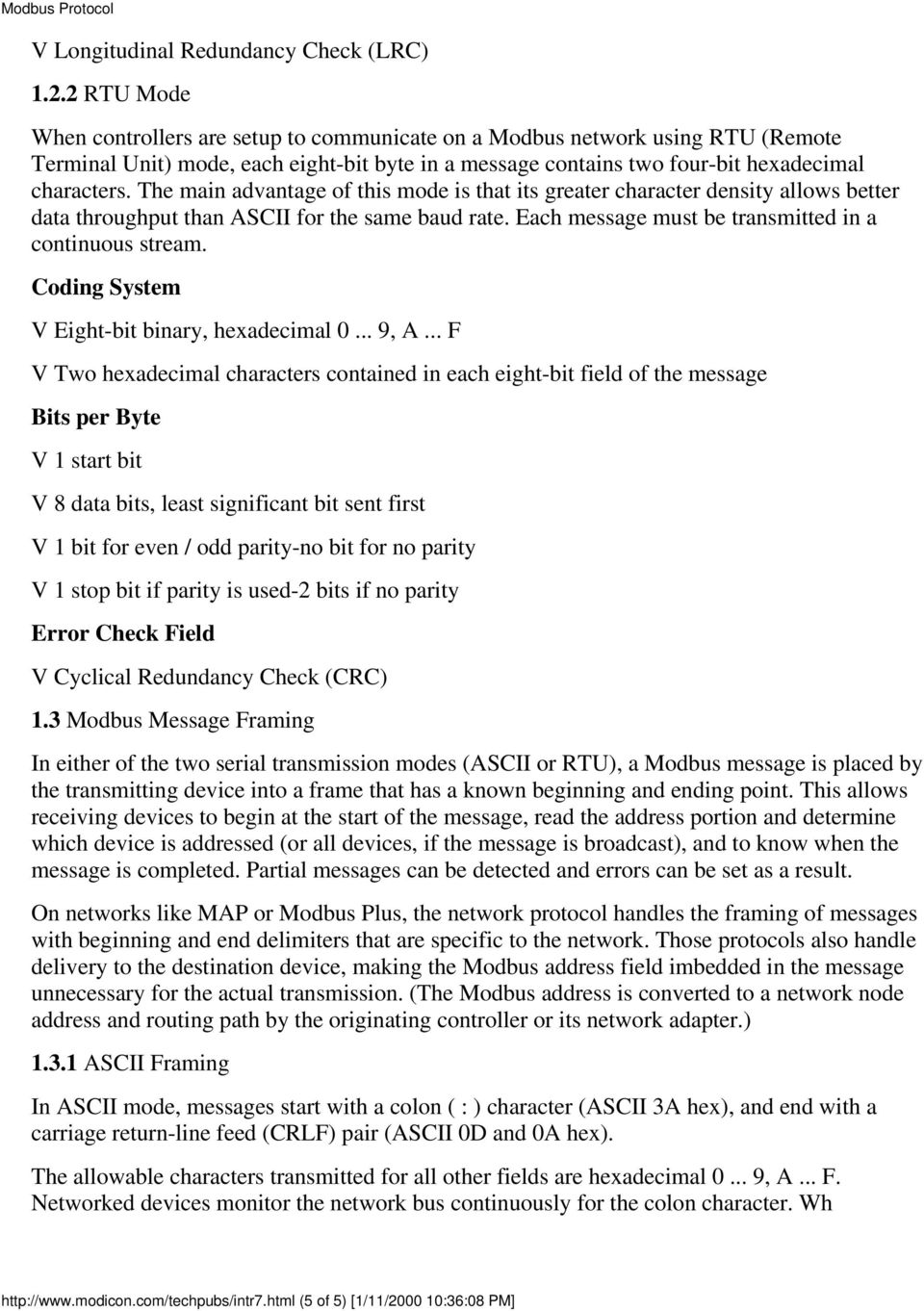
8 Chapter 2 Data and Control Functions Modbus Function Formats Function Codes Read Coil Status Read Input Status Read Holding Registers Read Input Registers Force Single Coil Preset Single Register Read Exception Status Fetch Comm Event Counter Fetch Comm Event Log Force Multiple Coils Preset Multiple Registers Report Slave ID Read General Reference Write General Reference Mask Write 4x Register Read / Write 4x Registers (1 of 36) [1/11/ :41:03 PM]
9 Read FIFO Queue 2.1 Modbus Function Formats Note: Unless specified otherwise, numerical values (such as addresses, codes, or data) are expressed as decimal values in the text of this section. They are expressed as hexadecimal values in the message fields of the figures Data Addresses in Modbus Messages All data addresses in Modbus messages are referenced to zero. The first occurrence of a data item is addressed as item number zero. For example: Coil 1 in a programmable controller is addressed as coil 0000 in the data address field of a Modbus message Coil 127 decimal is addressed as coil 007E hex (126 decimal) Holding register is addressed as register 0000 in the data address field of the message. The function code field already specifies a holding register operation. Therefore the 4x reference is implicit. Holding register is addressed as register 006B hex (107 decimal) Field Contents in Modbus Messages The following tables show examples of a Modbus query and normal response. Both examples show the field contents in hexadecimal, and also show how a message could be framed in ASCII or in RTU mode. Query Response (2 of 36) [1/11/ :41:03 PM]

10 The master query is a Read Holding Registers request to slave device address 06. The message requests data from three holding registers, Note: The message specifies the starting register address as 0107 (006B hex). The slave response echoes the function code, indicating this is a normal response. The Byte Count field specifies how many eight-bit data items are being returned. It shows the count of eight-bit bytes to follow in the data, for either ASCII or RTU. With ASCII, this value is half the actual count of ASCII characters in the data. In ASCII, each four-bit hexadecimal value requires one ASCII character, therefore two ASCII characters must follow in the message to contain each eight-bit data item. For example, the value 63 hex is sent as one eight-bit byte in RTU mode ( ). The same value sent in ASCII mode requires two bytes, for ASCII 6 ( ) and 3 ( ). The Byte Count field counts this data as one eight-bit item, regardless of the character framing method (ASCII or RTU). How to Use the Byte Count Field When you construct responses in buffers, use a Byte Count value that equals the count of eight-bit bytes in your message data. The value is exclusive of all other field contents, including the Byte Count field Field Contents on Modbus Plus Modbus messages sent on Modbus Plus networks are imbedded into the Logical Link Control (LLC) level frame. Modbus message fields consist of eight-bit bytes, similar to those used with RTU framing. (3 of 36) [1/11/ :41:04 PM]
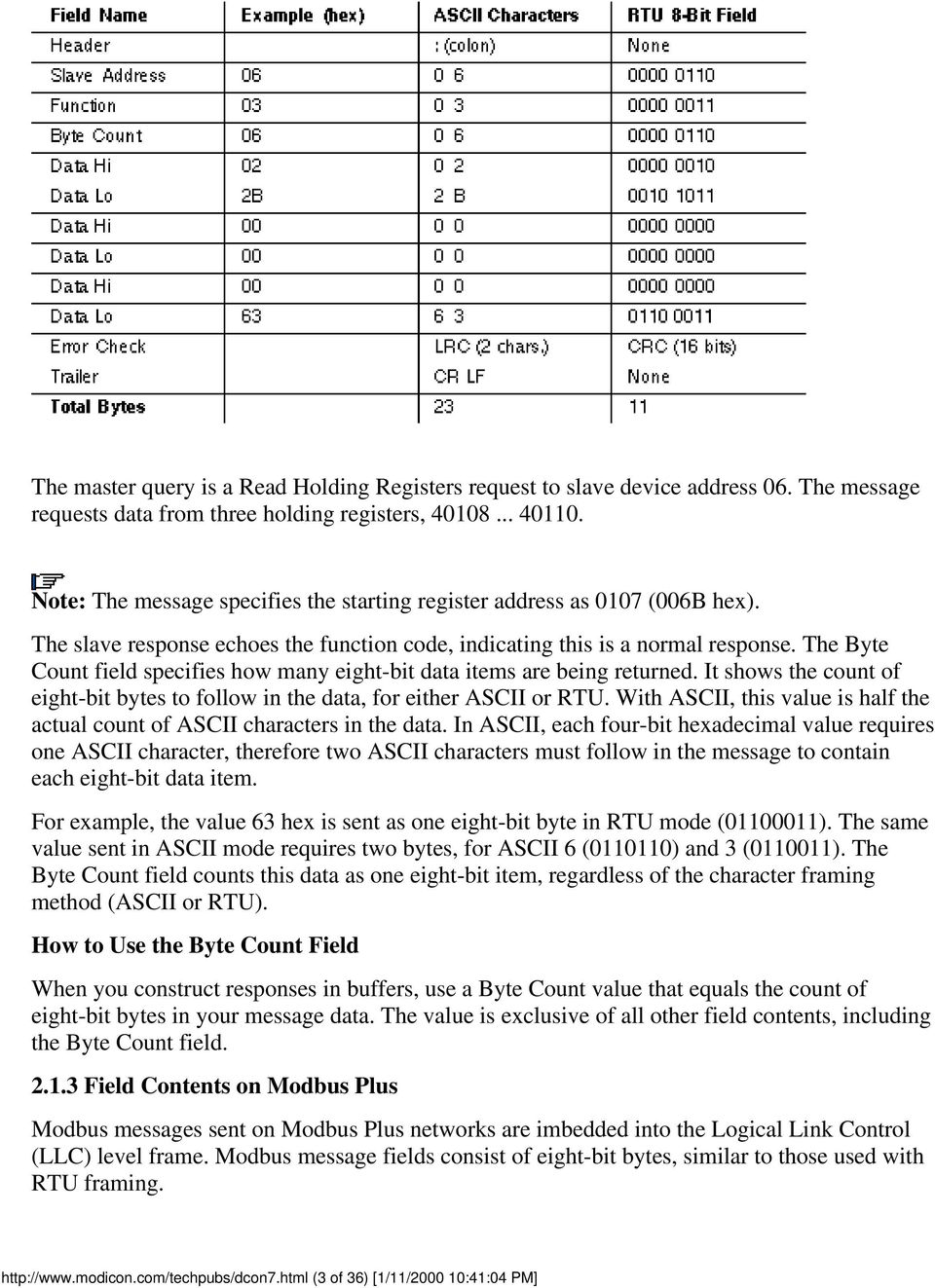
11 The Slave Address field is converted to a Modbus Plus routing path by the sending device. The CRC field is not sent in the Modbus message, because it would be redundant to the CRC check performed at the High-level Data Link Control (HDLC) level. The rest of the message remains as in the standard serial format. The application software (e.g., MSTR blocks in controllers, or Modcom III in hosts) handles the framing of the message into a network packet. Figure 7 shows how a Read Holding Registers query would be imbedded into a frame for Modbus Plus transmission. Figure 7 Field Contents on Modbus Plus 2.2 Function Codes The listing below shows the function codes supported by Modicon controllers. Codes are listed in decimal; Y indicates that the function is supported, and N indicates that it is not supported. (4 of 36) [1/11/ :41:04 PM]
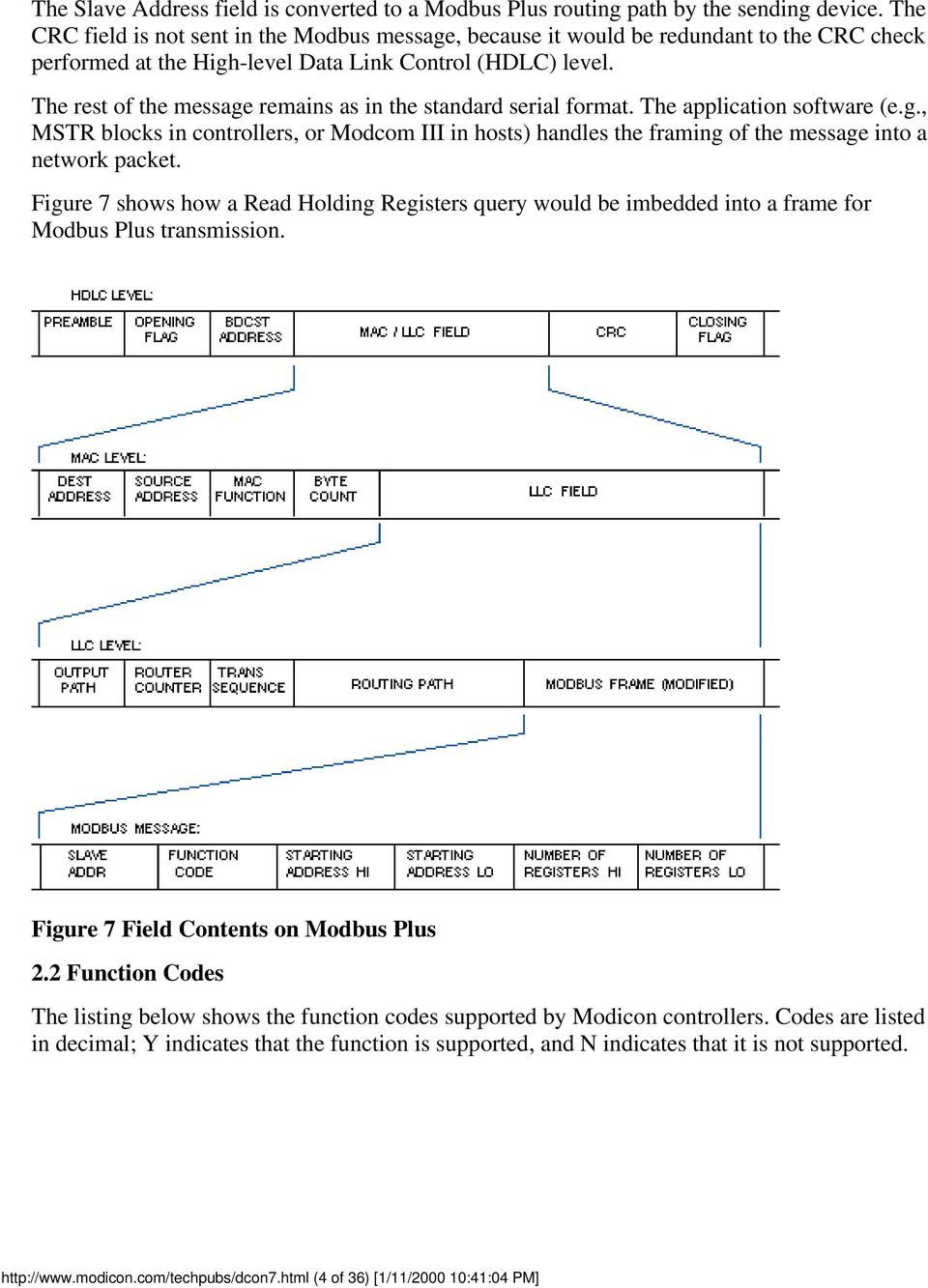
12 Read Coil Status Reads the ON / OFF status of discrete outputs (0x references, coils) in the slave. Broadcast is not supported. The maximum parameters supported by various controller models are listed on page. Query The query message specifies the starting coil and quantity of coils to be read. Coils are addressed starting at zero-coils are addressed as Here is an example of a query to read coils from slave device 17: (5 of 36) [1/11/ :41:04 PM]
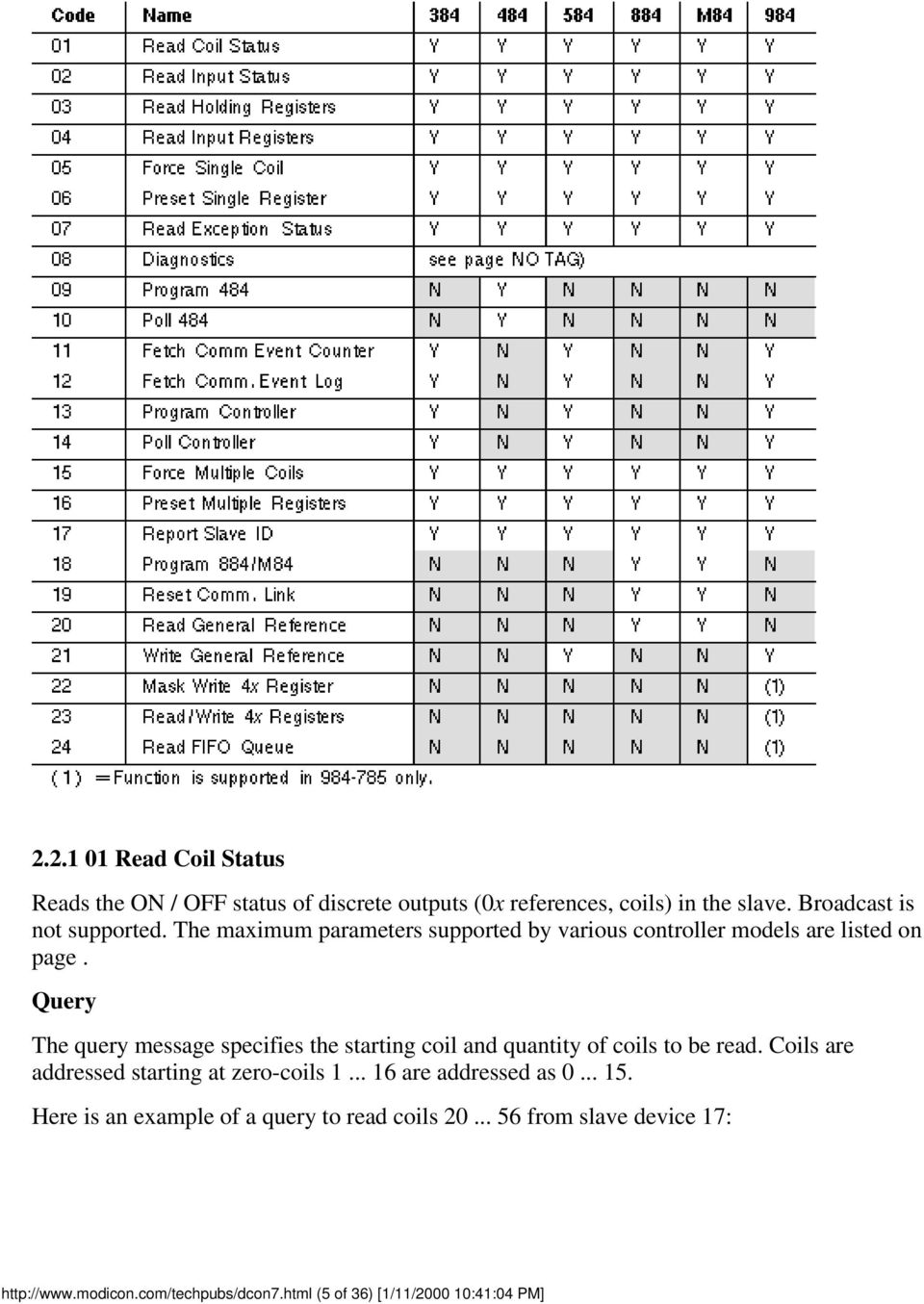
13 Response The coil status in the response message is packed as one coil per bit of the data field. Status is indicated as: 1 = ON; 0 = OFF. The LSB of the first data byte contains the coil addressed in the query. The other coils follow toward the high order end of this byte, and from low order to high order in subsequent bytes. If the returned coil quantity is not a multiple of eight, the remaining bits in the final data byte will be padded with zeros (toward the high order end of the byte). The Byte Count field specifies the quantity of complete bytes of data. Here is an example of a response to the query: The status of coils is shown as the byte value CD hex, or binary Coil 27 is the MSB of this byte, and coil 20 is the LSB. Left to right, the status of coils is ON-ON-OFF-OFF-ON-ON-OFF-ON. By convention, bits within a byte are shown with the MSB to the left, and the LSB to the right. Thus the coils in the first byte are , from left to right. The next byte has coils , left to right. As the bits are transmitted serially, they flow from LSB to MSB: , , and so on. In the last data byte, the status of coils is shown as the byte value 1B hex, or binary Coil 56 is in the fourth bit position from the left, and coil 52 is the LSB of this byte. (6 of 36) [1/11/ :41:04 PM]

14 The status of coils is: ON-ON-OFF-ON-ON. Note: The three remaining bits (toward the high-order end) are zero-filled Read Input Status Reads the ON / OFF status of discrete inputs (1x references) in the slave. Broadcast is not supported. The maximum parameters supported by various controller models are listed on page. Query The query message specifies the starting input and quantity of inputs to be read. Inputs are addressed starting at zero-inputs are addressed as Here is an example of a request to read inputs from slave device 17: Response The input status in the response message is packed as one input per bit of the data field. Status is indicated as: 1 = ON; 0 = OFF. The LSB of the first data byte contains the input addressed in the query. The other inputs follow toward the high order end of this byte, and from low order to high order in subsequent bytes. If the returned input quantity is not a multiple of eight, the remaining bits in the final data byte will be padded with zeros (toward the high order end of the byte). The Byte Count field specifies the quantity of complete bytes of data. Here is an example of a response to the query: (7 of 36) [1/11/ :41:04 PM]
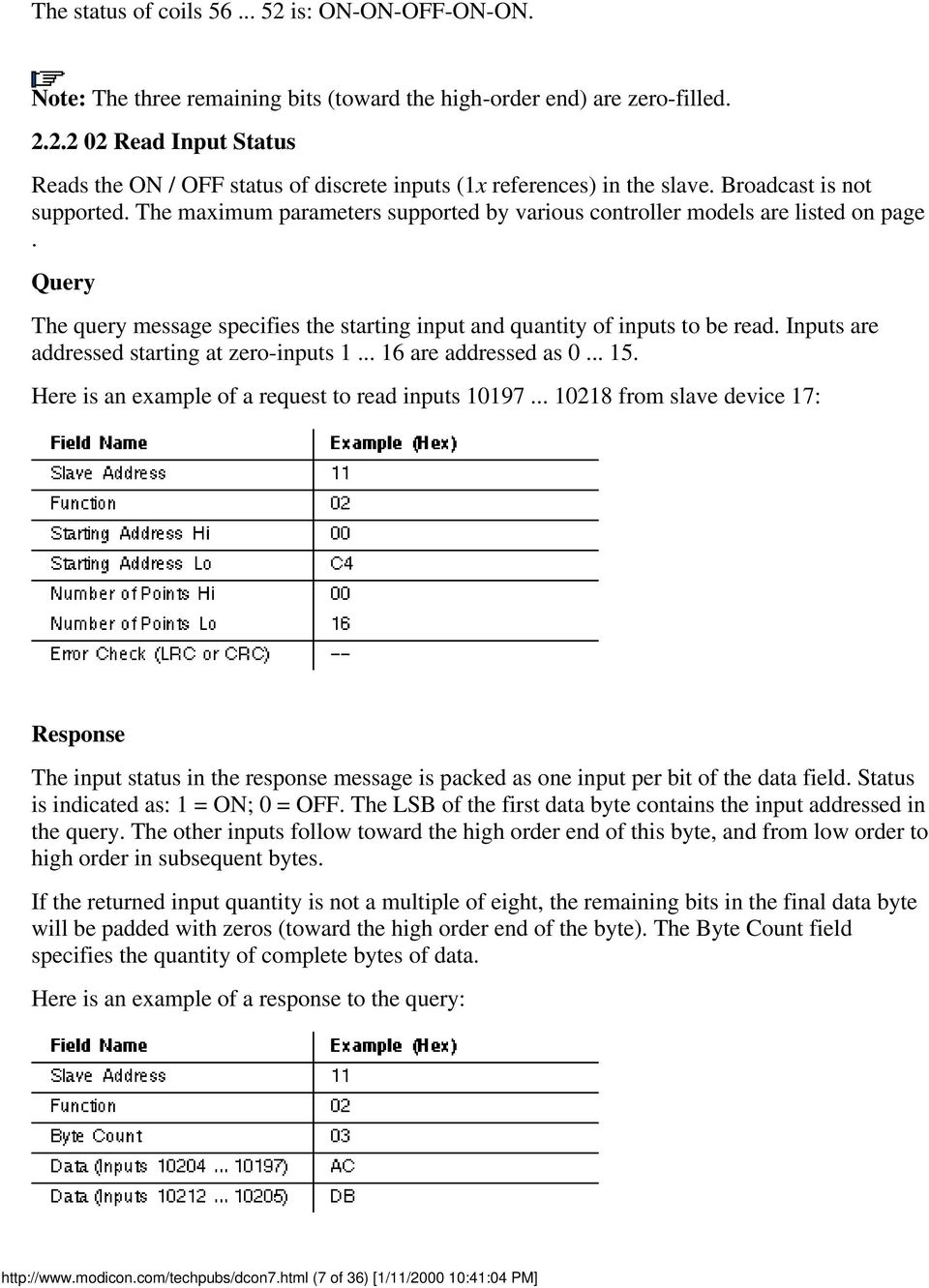
15 The status of inputs is shown as the byte value AC hex, or binary Input is the MSB of this byte, and input is the LSB. Left to right, the status of inputs is ON-OFF-ON-OFF-ON-ON-OFF-OFF. The status of inputs is shown as the byte value 35 hex, or binary Input is in the third bit position from the left, and input is the LSB. The status of inputs is: ON-ON-OFF-ON-OFF-ON. Note: The two remaining bits (toward the high order end) are zero-filled Read Holding Registers Reads the binary contents of holding registers (4x references) in the slave. Broadcast is not supported. The maximum parameters supported by various controller models are listed on page. Query The query message specifies the starting register and quantity of registers to be read. Registers are addressed starting at zero- registers are addressed as Here is an example of a request to read registers from slave device 17: Response The register data in the response message are packed as two bytes per register, with the binary contents right justified within each byte. For each register, the first byte contains the high order bits and the second contains the low order bits. Data is scanned in the slave at the rate of 125 registers per scan for 984-X8X controllers ( , etc), and at the rate of 32 registers per scan for all other controllers. The response is returned when the data is completely assembled. (8 of 36) [1/11/ :41:04 PM]

16 Here is an example of a response to the query: The contents of register are shown as the two byte values of 02 2B hex, or 555 decimal. The contents of registers are and hex, or 0 and 100 decimal Read Input Registers Reads the binary contents of input registers (3X references) in the slave. Broadcast is not supported. The maximum parameters supported by various controller models are listed on page. Query The query message specifies the starting register and quantity of registers to be read. Registers are addressed starting at zero- registers are addressed as Here is an example of a request to read register from slave device 17: Response The register data in the response message are packed as two bytes per register, with the binary contents right justified within each byte. For each register, the first byte contains the high-order bits and the second contains the low-order bits. (9 of 36) [1/11/ :41:04 PM]

17 Data is scanned in the slave at the rate of 125 registers per scan for 984-X8X controllers ( , etc), and at the rate of 32 registers per scan for all other controllers. The response is returned when the data is completely assembled. Here is an example of a response to the query on the opposite page: The contents of register are shown as the two byte values of 00 0A hex, or 10 decimal Force Single Coil Forces a single coil (0x reference) to either ON or OFF. When broadcast, the function forces the same coil reference in all attached slaves. The maximum parameters supported by various controller models are listed on page. Note: The function will override the controller's memory protect state and the coil's disable state. The forced state will remain valid until the controller's logic next solves the coil. The coil will remain forced if it is not programmed in the controller's logic. Query The query message specifies the coil reference to be forced. Coils are addressed starting at zero-coil 1 is addressed as 0. The reguested ON / OFF state is specified by a constant in the query data field. A value of FF 00 hex requests the coil to be ON. A value of requests it to be OFF. All other values are illegal and will not affect the coil. Here is an example of a request to force coil 173 ON in slave device 17: (10 of 36) [1/11/ :41:04 PM]

18 Response The normal response is an echo of the query, returned after the coil state has been forced. Here is an example of a response to the query: Preset Single Register Presets a value into a single holding register (4x reference). When broadcast, the function presets the same register reference in all attached slaves. The maximum parameters supported by various controller models are listed on page. Note: The function will override the controller's memory protect state. The preset value will remain valid in the register until the controller's logic next solves the register contents. The register's value will remain if it is not programmed in the controller's logic. Query The query message specifies the register reference to be preset. Registers are addressed starting at zero-register 1 is addressed as 0. The reguested preset value is specified in the query data field. M84 and 484 controllers use a 10-bit binary value, with the six high order bits set to zeros. All other controllers use 16-bit values. Here is an example of a request to preset register to hex in slave device 17: (11 of 36) [1/11/ :41:04 PM]
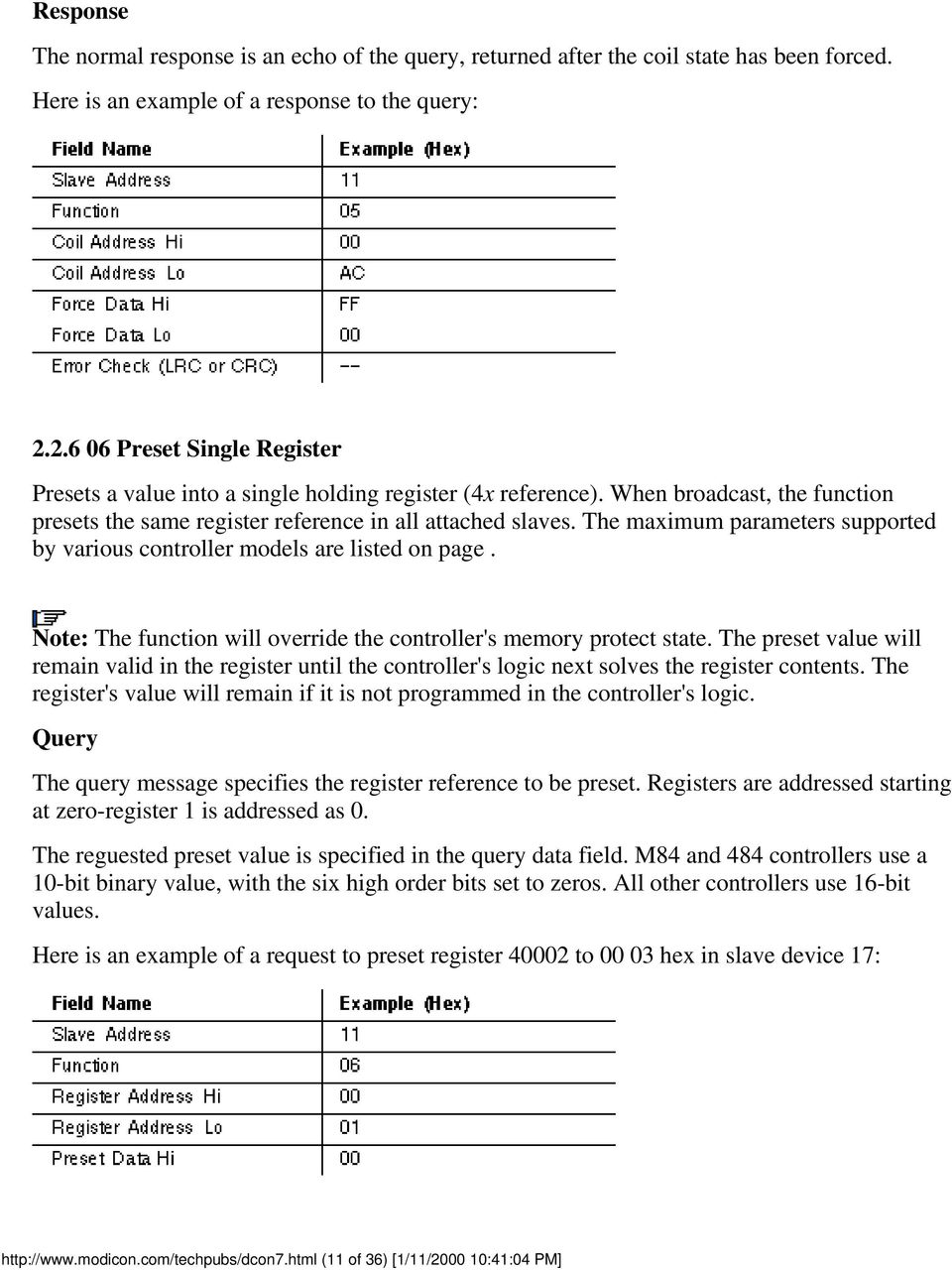
19 Response The normal response is an echo of the query, returned after the register contents have been preset. Here is an example of a response to the query: Read Exception Status Reads the contents of eight Exception Status coils within the slave controller. Certain coils have predefined assignments in the various controllers. Other coils can be programmed by the user to hold information about the contoller's status-e.g., machine ON/OFF, heads retracted, safeties satisfied, error conditions exist, or other user-defined flags. Broadcast is not supported. The function provides a simple method for accessing this information, because the Exception Coil references are known (no coil reference is needed in the function). The predefined Exception Coil assignments are: Query Here is an example of a request to read the exception status in slave device 17: (12 of 36) [1/11/ :41:04 PM]
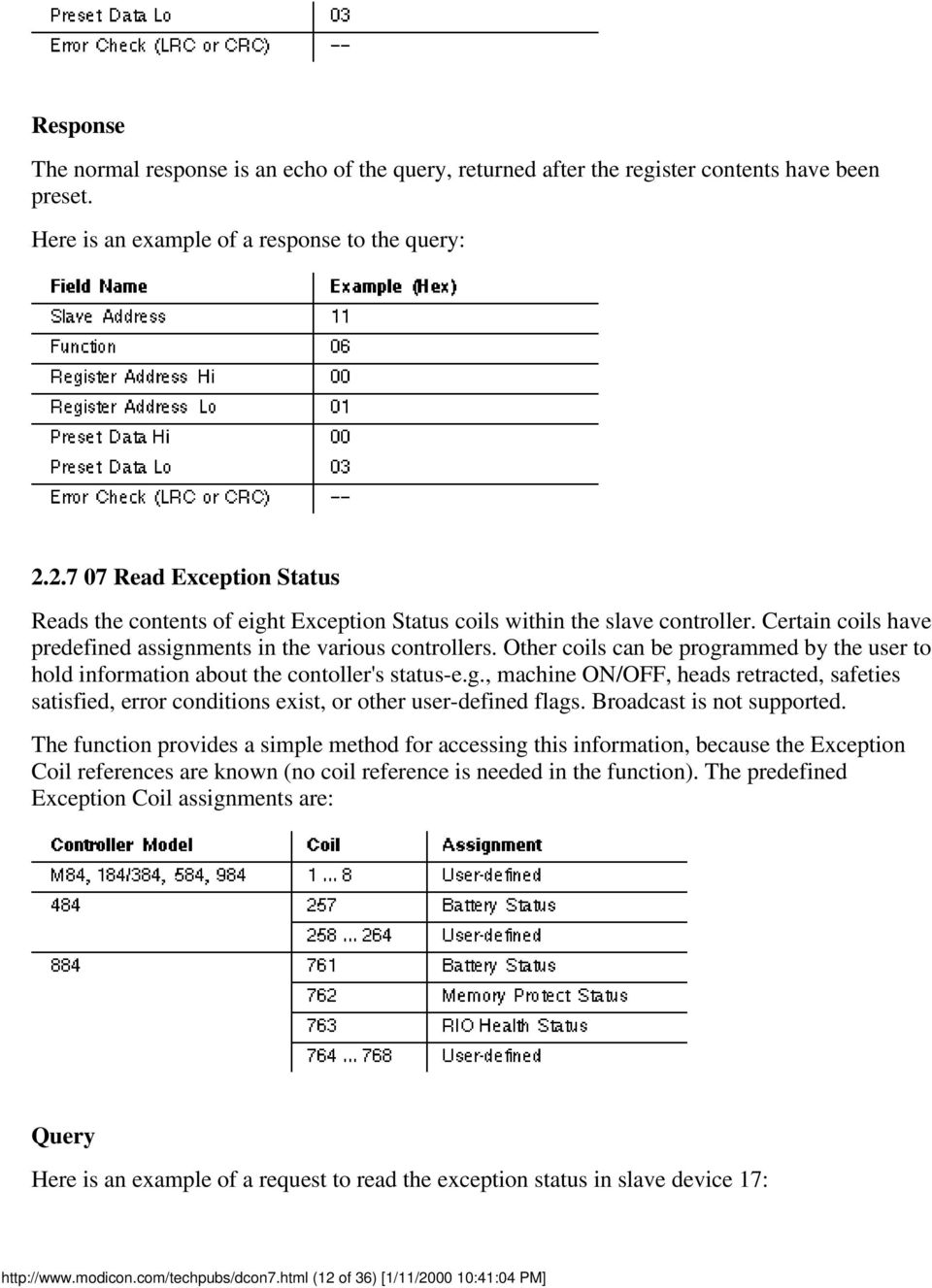
20 Response The normal response contains the status of the eight Exception Status coils. The coils are packed into one data byte, with one bit per coil. The status of the lowest coil reference is contained in the least significant bit of the byte. Here is an example of a response to the query: In this example, the coil data is 6D hex ( binary). Left to right, the coils are OFF-ON-ON-OFF-ON-ON-OFF-ON. The status is shown from the highest to the lowest addressed coil. If the controller is a 984, these bits are the status of coils If the controller is a 484, these bits are the status of coils In this example, coil 257 is ON, indicating that the controller's batteries are OK (0B Hex) Fetch Comm Event Counter Returns a status word and an event count from the slave's communications event counter. By fetching the current count before and after a series of messages, a master can determine whether the messages were handled normally by the slave. Broadcast is not supported. The controller's event counter is incremented once for each successful message completion. It is not incremented for exception responses, poll commands, or fetch event counter commands. The event counter can be reset by means of the Diagnostics function (code 08), with a subfunction of Restart Communications Option (code 00 01) or Clear Counters and Diagnostic Register (code 00 0A). Query Here is an example of a request to fetch the communications event counter in slave device 17: (13 of 36) [1/11/ :41:04 PM]

21 Response The normal response contains a two-byte status word, and a two-byte event count. The status word will be all ones (FF FF hex) if a previously issued program command is still being processed by the slave (a busy condition exists). Otherwise, the status word will be all zeros. Here is an example of a response to the query: In this example, the status word is FF FF hex, indicating that a program function is still in progress in the slave. The event count shows that 264 (01 08 hex) events have been counted by the controller (0C Hex) Fetch Comm Event Log Returns a status word, event count, message count, and a field of event bytes from the slave. Broadcast is not supported. The status word and event count are identical to that returned by the Fetch Communications Event Counter function (11, 0B hex). The message counter contains the quantity of messages processed by the slave since its last restart, clear counters operation, or power-up. This count is identical to that returned by the Diagnostic function (code 08), subfunction Return Bus Message Count (code 11, 0B hex). The event bytes field contains bytes, with each byte corresponding to the status of one Modbus send or receive operation for the slave. The events are entered by the slave into the field in chronological order. Byte 0 is the most recent event. Each new byte flushes the oldest byte from the field. Query Here is an example of a request to fetch the communications event log in slave device 17: (14 of 36) [1/11/ :41:04 PM]
22 Response The normal response contains a two-byte status word field, a two-byte event count field, a two-byte message count field, and a field containing bytes of events. A byte-count field defines the total length of the data in these four fields. Here is an example of a response to the query: In this example, the status word is hex, indicating that the slave is not processing a program function. The event count shows that 264 (01 08 hex) events have been counted by the slave. The message count shows that 289 (01 21 hex) messages have been processed. The most recent communications event is shown in the Event 0 byte. Its contents (20 hex) show that the slave has most recently entered the Listen Only Mode. The previous event is shown in the Event 1 byte. Its contents (00 hex) show that the slave received a Communications Restart. What the Event Bytes Contain An event byte returned by the Fetch Communications Event Log function can be any one of four types. The type is defined by bit 7 (the high-order bit) in each byte. It may be further defined by bit 6. Slave Modbus Receive Event (15 of 36) [1/11/ :41:04 PM]
23 This type of event byte is stored by the slave when a query message is received. It is stored before the slave processes the message. This event is defined by bit 7 set to a logic 1. The other bits will be set to a logic 1 if the corresponding condition is TRUE. The bit layout is: Slave Modbus Send Event This type of event byte is stored by the slave when it finishes processing a query message. It is stored if the slave returned a normal or exception response, or no response. This event is defined by bit 7 set to a logic 0, with bit 6 set to a 1. The other bits will be set to a logic 1 if the corresponding condition is TRUE. The bit layout is: Slave Entered Listen Only Mode This type of event byte is stored by the slave when it enters the Listen Only Mode. The event is defined by a contents of 04 hex. The bit layout is: (16 of 36) [1/11/ :41:04 PM]
24 Slave Initiated Communication Restart This type of event byte is stored by the slave when its communications port is restarted. The slave can be restarted by the Diagnostics function (code 08), with subfunction Restart Communications Option (code 00 01). That function also places the slave into a Continue on Error or Stop on Error mode. If the slave is placed into Continue on Error mode, the event byte is added to the existing event log. If the slave is placed into Stop on Error mode, the byte is added to the log and the rest of the log is cleared to zeros. The event is defined by a contents of zero. The bit layout is: (0F Hex) Force Multiple Coils Forces each coil (0x reference) in a sequence of coils to either ON or OFF. When broadcast, the function forces the same coil references in all attached slaves. The maximum parameters supported by various controller models are listed on page. Note: The function will override the controller's memory protect state and a coil's disable state. The forced state will remain valid until the controller's logic next solves each coil. Coils will remain forced if they are not programmed in the controller's logic. Query The query message specifies the coil references to be forced. Coils are addressed starting at zero-coil 1 is addressed as 0. The reguested ON / OFF states are specified by contents of the query data field. A logical 1 in a bit position of the field requests the corresponding coil to be ON. A logical 0 requests it to be OFF. (17 of 36) [1/11/ :41:04 PM]
25 The following page shows an example of a request to force a series of ten coils starting at coil 20 (addressed as 19, or 13 hex) in slave device 17. The query data contents are two bytes: CD 01 hex ( binary). The binary bits correspond to the coils in the following way: Bit: Coil: The first byte transmitted (CD hex) addresses coils , with the least significant bit addressing the lowest coil (20) in this set. The next byte transmitted (01 hex) addresses coils 29 and 28, with the least significant bit addressing the lowest coil (28) in this set. Unused bits in the last data byte should be zero-filled. Response The normal response returns the slave address, function code, starting address, and quantity of coils forced. Here is an example of a response to the query shown above: (10 Hex) Preset Multiple Registers Presets values into a sequence of holding registers (4x references). When broadcast, the (18 of 36) [1/11/ :41:04 PM]
26 function presets the same register references in all attached slaves. The maximum parameters supported by various controller models are listed on page. Note: The function will override the controller's memory protect state. The preset values will remain valid in the registers until the controller's logic next solves the register contents. The register values will remain if they are not programmed in the controller's logic. Query The query message specifies the register references to be preset. Registers are addressed starting at zero-register 1 is addressed as 0. The requested preset values are specified in the query data field. M84 and 484 controllers use a 10-bit binary value, with the six high order bits set to zeros. All other controllers use 16-bit values. Data is packed as two bytes per register. Here is an example of a request to preset two registers starting at to 00 0A and hex, in slave device 17: Response The normal response returns the slave address, function code, starting address, and quantity of registers preset. Here is an example of a response to the query shown above. (19 of 36) [1/11/ :41:04 PM]
27 (11 Hex) Report Slave ID Returns a description of the type of controller present at the slave address, the current status of the slave Run indicator, and other information specific to the slave device. Broadcast is not supported. Query Here is an example of a request to report the ID and status of slave device 17: Response The format of a normal response is shown below. The data contents are specific to each controller type. Summary of Slave IDs These are the Slave ID codes returned by Modicon controllers in the first byte of the data field: (20 of 36) [1/11/ :41:04 PM]
28 184 / 384 The 184 or 384 controller returns a byte count of either 4 or 74 (4A hexadecimal). If the controller's J347 Modbus Slave Interface is setup properly, and its internal PIB table is normal, the byte count will be 74. Otherwise the byte count will be 4. The four bytes that are always returned are: Bytes , returned for a correct J347 setup and normal PIB, are: Bytes contain the PIB table. This data is valid only if the controller is running (as shown in Byte 2). The table is as follows: (21 of 36) [1/11/ :41:04 PM]
29 584 The 584 controller returns a byte count of 9, as follows: (22 of 36) [1/11/ :41:04 PM]
30 (23 of 36) [1/11/ :41:04 PM]
31 984 The 984 controller returns a byte count of 9, as follows: (24 of 36) [1/11/ :41:04 PM]
32 Note: Bit 0 of the Machine State word defines the use of the memory downsize values in words 99, 100, and 175 (63, 64, and AF hexadecimal) of the configuration table. If bit 0 = logic 1, downsizing is calculated as follows: Page 0 size (16-bit words) = (Word 99 * 4096) - (Word 175 lo byte * 16) State table size (16-bit words) = (Word 100 * 1024) - (Word 175 hi byte * 16) Micro 84 The Micro 84 controller returns a byte count of 8, as follows: (25 of 36) [1/11/ :41:04 PM]
33 484 The 484 controller returns a byte count of 5, as follows: 884 The 884 controller returns a byte count of 8, as follows: (26 of 36) [1/11/ :41:04 PM]
34 (14 Hex) Read General Reference Returns the contents of registers in Extended Memory file (6x) references. Broadcast is not supported. The function can read multiple groups of references. The groups can be separate (noncontiguous), but the references within each group must be sequential. Query The query contains the standard Modbus slave address, function code, byte count, and error check fields. The rest of the query specifies the group or groups of references to be read. Each group is defined in a separate sub-request field which contains seven bytes: The reference type-one byte (must be specified as 6) The Extended Memory file number-two bytes ( , A hex) The starting register address within the file-two bytes The quantity of registers to be read-two bytes The quantity of registers to be read, combined with all other fields in the expected response, must not exceed the allowable length of Modbus messages-256 bytes. The available quantity of Extended Memory files depends upon the installed size of Extended Memory in the slave controller. Each file except the last one contains 10,000 registers, addressed as F hexadecimal ( decimal). For controllers other than the with Extended Registers, the last (highest) register in the last file is: For the with Extended Registers, the last (highest) register in the last file is shown in the two tables below. (27 of 36) [1/11/ :41:04 PM]
35 Examples of a query and response follow. An example of a request to read two groups of references from slave device 17 is shown. Group 1 consists of two registers from file 4, starting at register 2 (address 0001). Group 2 consists of two registers from file 3, starting at register 10 (address 0009). Response The normal response is a series of sub-responses, one for each sub-request. The byte count field is the total combined count of bytes in all sub-responses. In addition, each sub-response contains a field that shows its own byte count. (28 of 36) [1/11/ :41:04 PM]
36 (15 Hex) Write General Reference Writes the contents of registers in Extended Memory file (6x) references. Broadcast is not supported. The function can write multiple groups of references. The groups can be separate (noncontiguous), but the references within each group must be sequential. Query The query contains the standard Modbus slave address, function code, byte count, and error check fields. The rest of the query specifies the group or groups of references to be written, and the data to be written into them. Each group is defined in a separate sub-request field which contains seven bytes plus the data: The reference type-one byte (must be specified as 6) The Extended Memory file number-two bytes ( , A hex) The starting register address within the file-two bytes The quantity of registers to be written-two bytes The data to be written-two bytes/register The quantity of registers to be written, combined with all other fields in the query, must not exceed the allowable length of Modbus messages-256 bytes. The available quantity of Extended Memory files depends upon the installed size of Extended Memory in the slave controller. Each file except the last one contains 10,000 registers, addressed as F hexadecimal ( decimal). For controllers other than the with Extended Registers, the last (highest) register in the last file is: (29 of 36) [1/11/ :41:04 PM]
37 For the with Extended Registers, the last (highest) register in the last file is shown in the two tables below. Examples of a query and response follow. An example of a request to write one group of references into slave device 17 is shown. The group consists of three registers in file 4, starting at register 8 (address 0007). Response (30 of 36) [1/11/ :41:04 PM]
38 The normal response is an echo of the query (16 Hex) Mask Write 4x Register Modifies the contents of a specified 4x register using a combination of an AND mask, an OR mask, and the register's current contents. The function can be used to set or clear individual bits in the register. Broadcast is not supported. Note: This function is supported in the controller only. Query The query specifies the 4x reference to be written, the data to be used as the AND mask, and the data to be used as the OR mask. The function's algorithm is: Result = (Current Contents AND And_Mask) OR (Or_Mask AND And_Mask ) For example, (31 of 36) [1/11/ :41:04 PM]
39 Note: If the Or_Mask value is zero, the result is simply the logical ANDing of the current contents and And_Mask. If the And_Mask value is zero, the result is equal to the Or_Mask value. Note: The contents of the register can be read with the Read Holding Registers function (function code 03). They could, however, be changed subsequently as the controller scans its user logic program. Here is an example of a Mask Write to register 5 in slave device 17, using the above mask values: Response The normal response is an echo of the query. The response is returned after the register has been written. (32 of 36) [1/11/ :41:04 PM]
40 (17 Hex) Read / Write 4x Registers Performs a combination of one read and one write operation in a single Modbus transaction. The function can write new contents to a group of 4x registers, and then return the contents of another group of 4x registers. Broadcast is not supported. Note: This function is supported in the controller only. Query The query specifies the starting address and quantity of registers of the group to be read. It also specifies the starting address, quantity of registers, and data for the group to be written. The byte count field specifies the quantity of bytes to follow in the write data field. Here is an example of a query to read six registers starting at register 5, and to write three registers starting at register 16, in slave device 17: (33 of 36) [1/11/ :41:04 PM]
41 Response The normal response contains the data from the group of registers that were read. The byte count field specifies the quantity of bytes to follow in the read data field. Here is an example of a response to the query: (18 Hex) Read FIFO Queue Reads the contents of a first-in first-out (FIFO) queue of 4x registers. The function returns a count of the registers in the queue, followed by the queued data. Up to 32 registers can be read-the count, plus up to 31 queued data registers. The queue count register is returned first, followed by the queued data registers. The function reads the queue contents, but does not clear them. Broadcast is not supported. (34 of 36) [1/11/ :41:04 PM]
42 Note: This function is supported in the controller only. Query The query specifies the starting 4x reference to be read from the FIFO queue. This is the address of the pointer register used with the controller's FIN and FOUT function blocks. It contains the count of registers currently contained in the queue. The FIFO data registers follow this address sequentially. An example of a Read FIFO Queue query to slave device 17 is shown below. The query is to read the queue starting at the pointer register (04DE hex). Response In a normal response, the byte count shows the quantity of bytes to follow, including the queue count bytes and data register bytes (but not including the error check field). The queue count is the quantity of data registers in the queue (not including the count register). If the queue count exceeds 31, an exception response is returned with an error code of 03 (Illegal Data alue). Here is an example of a normal response to the previous query: (35 of 36) [1/11/ :41:04 PM]
43 In this example, the FIFO pointer register (41247 in the query) is returned with a queue count of 3. The three data registers follow the queue count. These are: (contents 440 decimal, 01B8 hex) (contents 4740, 1284 hex) (contents 4898, 1322 hex) (36 of 36) [1/11/ :41:04 PM]
44 Chapter 3 Diagnostic Subfunctions Modbus Function 08-Diagnostics Diagnostic Codes Supported by Controllers Return Query Data Restart Communications Option Return Diagnostic Register Change ASCII Input Delimiter Force Listen Only Mode Clear Counters and Diagnostic Register Return Bus Message Count Return Bus Communication Error Count Return Bus Exception Error Count Return Slave Message Count Return Slave No Response Count Return Slave NAK Count Return Slave Busy Count Return Bus Character Overrun Count Return IOP Overrun Count (884) Clear Overrun Counter and Flag (884) (1 of 16) [1/11/ :43:10 PM]
45 Get / Clear Modbus Plus Statistics Modbus Plus Network Statistics 3.1 Function 08-Diagnostics Modbus function 08 provides a series of tests for checking the communication system between the master and slave, or for checking various internal error conditions within the slave. Broadcast is not supported. The function uses a two-byte subfunction code field in the query to define the type of test to be performed. The slave echoes both the function code and subfunction code in a normal response. Most of the diagnostic queries use a two-byte data field to send diagnostic data or control information to the slave. Some of the diagnostics cause data to be returned from the slave in the data field of a normal response. Diagnostic Effects on the Slave In general, issuing a diagnostic function to a slave device does not affect the running of the user program in the slave. User logic, like discretes and registers, is not accessed by the diagnostics. Certain functions can optionally reset error counters in the slave. A slave device can, however, be forced into `Listen Only Mode' in which it will monitor the messages on the communications system but not respond to them. This can affect the outcome of your application program it it depends upon any further exchange of data with the slave device. Generally, the mode is forced to remove a malfunctioning slave device from the communications system. How This Information is Organized in Your Guide An example diagnostics query and response are shown on the opposite page. These show the location of the function code, subfunction code, and data field within the messages. A list of subfunction codes supported by the controllers is shown on the pages after the example response. Each subfunction code is then listed with an example of the data field contents that would apply for that diagnostic. Query Here is an example of a request to slave device 17 to Return Query Data. This uses a subfunction code of zero (00 00 hex in the two-byte field). The data to be returned is sent in the two-byte data field (A5 37 hex). (2 of 16) [1/11/ :43:10 PM]
46 Response The normal response to the Return Query Data request is to loopback the same data. The function code and subfunction code are also echoed. The data fields in responses to other kinds of queries could contain error counts or other information requested by the subfunction code. 3.2 Diagnostic Codes Supported by Controllers Subfunction codes are listed in decimal; Y indicates that the subfunction is supported, and N indicates that it is not supported. (3 of 16) [1/11/ :43:10 PM]
47 Return Query Data The data passed in the query data field is to be returned (looped back) in the response. The entire response message should be identical to the query Restart Communications Option The slave's peripheral port is to be initialized and restarted, and all of its communications event counters are to be cleared. If the port is currently in Listen Only Mode, no response is returned. This function is the only one that brings the port out of Listen Only Mode. If the port is not currently in Listen Only Mode, a normal response is returned. This occurs before the restart is executed. When the slave receives the query, it attempts a restart and executes its power-up confidence tests. Successful completion of the tests will bring the port online. (4 of 16) [1/11/ :43:10 PM]
48 A query data field contents of FF 00 hex causes the port's Communications Event Log to be cleared also. Contents of leave the log as it was prior to the restart Return Diagnostic Register The contents of the slave's 16-bit diagnostic register are returned in the response How the Register Data is Organized The assignment of diagnostic register bits for Modicon controllers is listed below. In each register, bit 15 is the high-order bit. The description is TRUE when the corresponding bit is set to logic 1. (5 of 16) [1/11/ :43:10 PM]
49 (6 of 16) [1/11/ :43:10 PM]
50 Change ASCII Input Delimiter The character CHAR passed in the query data field becomes the end of message delimiter for future messages (replacing the default LF character). This function is useful in cases where a Line Feed is not wanted at the end of ASCII messages Force Listen Only Mode Forces the addressed slave to its Listen Only Mode for Modbus communications. This isolates it from the other devices on the network, allowing them to continue communicating without interruption from the addressed slave. No response is returned. When the slave enters its Listen Only Mode, all active communication controls are turned off. The Ready watchdog timer is allowed to expire, locking the controls off. While in this mode, any Modbus messages addressed to the slave or broadcast are monitored, but no actions will be taken and no responses will be sent. The only function that will be processed after the mode is entered will be the Restart Communications Option function (function code 8, subfunction 1) (0A Hex) Clear Counters and Diagnostic Register For controllers other than the 584 or 984, clears all counters and the diagnostic register. For the 584 or 984, clears the counters only. Counters are also cleared upon power-up. (7 of 16) [1/11/ :43:10 PM]
51 (0B Hex) Return Bus Message Count The response data field returns the quantity of messages that the slave has detected on the communications system since its last restart, clear counters operation, or power-up (0C Hex) Return Bus Communication Error Count The response data field returns the quantity of CRC errors encountered by the slave since its last restart, clear counters operation, or power-up (0D Hex) Return Bus Exception Error Count The response data field returns the quantity of Modbus exception responses returned by the slave since its last restart, clear counters operation, or power-up. For a description of exception responses, see page (0E Hex) Return Slave Message Count The response data field returns the quantity of messages addressed to the slave, or broadcast, that the slave has processed since its last restart, clear counters operation, or power-up (0F Hex) Return Slave No Response Count The response data field returns the quantity of messages addressed to the slave for which it returned no response (neither a normal response nor an exception response), since its last restart, clear counters operation, or power-up. (8 of 16) [1/11/ :43:10 PM]
52 (10 Hex) Return Slave NAK Count The response data field returns the quantity of messages addressed to the slave for which it returned a Negative Acknowledge (NAK) exception response, since its last restart, clear counters operation, or power-up. For a description of exception responses, see page (11 Hex) Return Slave Busy Count The response data field returns the quantity of messages addressed to the slave for which it returned a Slave Device Busy exception response, since its last restart, clear counters operation, or power-up. For a description of exception responses, see page (12 Hex) Return Bus Character Overrun Count The response data field returns the quantity of messages addressed to the slave that it could not handle due to a character overrun condition, since its last restart, clear counters operation, or power-up. A character overrun is caused by data characters arriving at the port faster than they can be stored, or by the loss of a character due to a hardware malfunction (13 Hex) Return IOP Overrun Count (884) The response data field returns the quantity of messages addressed to the slave that it could not handle due to an 884 IOP overrun condition, since its last restart, clear counters operation, or power-up. An IOP overrun is caused by data characters arriving at the port faster than they can be stored, or by the loss of a character due to a hardware malfunction. (9 of 16) [1/11/ :43:10 PM]
53 Note: This function is specific to the (14 Hex) Clear Overrun Counter and Flag (884) Clears the 884 overrun error counter and resets the error flag. The current state of the flag is found in bit 0 of the 884 diagnostic register (see subfunction 02). Note: This function is specific to the (15 Hex) Get / Clear Modbus Plus Statistics Returns a series of bit words (108 bytes) in the data field of the response (this function differs from the usual two-byte length of the data field). The data contains the statistics for the Modbus Plus peer processor in the slave device. In addition to the Function code (08) and Subfunction code (00 15 hex) in the query, a two-byte Operation field is used to specify either a Get Statistics or a Clear Statistics operation. The two operations are exclusive-the Get operation cannot clear the statistics, and the Clear operation cannot return statistics prior to clearing them. Statistics are also cleared on power-up of the slave device. The operation field immediately follows the subfunction field in the query: -- A value of specifies the Get Statistics operation. -- A value of specifies the Clear Statistics operation. Query This is the field sequence in the query: Get Statistics Response This is the field sequence in the normal response to a Get Statistics query: (10 of 16) [1/11/ :43:10 PM]
54 Clear Statistics Response The normal response to a Clear Statistics query is an echo of the query: Modbus Plus Network Statistics (11 of 16) [1/11/ :43:10 PM]
55 Note: Word 07 bitmaps are used internally by the peer processor to determine which paths have already had a command sent to them during the current token ownership. This limits the number of commands per path to one during a single token ownership. Note: Words are token owner work tables. They are bitmaps representing work that needs to be done by the node the next time it gets the token. Each byte is a bitmap corresponding to work requested of each of the eight paths of the indicated type. (12 of 16) [1/11/ :43:10 PM]
56 Note: Words contain pairs of 8-bit counters that pertain to certain types of error conditions as well as to successful transactions. Under normal operating conditions, the only bytes that change are word 20 LO and HI. Word 14 HI could also increment because of an MSTR or similar programming error in the application. If any other bytes increments, a possible problem exists on the network-e.g., in a single station or wiring connection. (13 of 16) [1/11/ :43:11 PM]
57 Note: Words contain the active station bitmaps. An active station is any one that has sent packets of data over the network. Note: Words contain the token station table bitmaps. A token station is any one that has token-passing capabilities. (14 of 16) [1/11/ :43:11 PM]
58 Note: Words contain the global data present table bitmaps. Each time a station passes a token, it also passes the global data, even if there are zero bytes of global data. When one station sees another pass the token with global data, it sets its bit in its table for that other station. The bit remains set until the station reads the global data from that other station, after which the bit is cleared. A second read of global data indicates that no global data is present. Note: In screen 2 of the MBPSTAT program, the number of global data words present is indicated under the station number. If this field is filled with spaces, then MBPSTAT has requested the global data from a second time before the other station passed the token. Note: The LO bytes of words indicate the use of the internal receive buffers within the peer processor. (15 of 16) [1/11/ :43:11 PM]
59 (16 of 16) [1/11/ :43:11 PM]
60 Chapter 4 Exception Responses Exception Responses Exception Codes 4.1 Exception Responses Except for broadcast messages, when a master device sends a query to a slave device it expects a normal response. One of four possible events can occur from the master's query: If the slave device receives the query without a communication error, and can handle the query normally, it returns a normal response. If the slave does not receive the query due to a communication error, no response is returned. The master program will eventually process a timeout condition for the query. If the slave receives the query, but detects a communication error (parity, LRC, or CRC), no response is returned. The master program will eventually process a timeout condition for the query. If the slave receives the query without a communication error, but cannot handle it (for example, if the request is to read a nonexistent coil or register), the slave will return an exception response informing the master of the nature of the error. The exception response message has two fields that differentiate it from a normal response: Function Code Field In a normal response, the slave echoes the function code of the original query in the function code field of the response. All function codes have a most significant bit (MSB) of 0 (their values are all below 80 hexadecimal). In an exception response, the slave sets the MSB of the function code to 1. This makes the function code value in an exception response exactly 80 hexadecimal higher than the value would be for a normal response. With the function code's MSB set, the master's application program can recognize the exception response and can examine the data field for the exception code. Data Field In a normal response, the slave may return data or statistics in the data field (any information that was requested in the query). In an exception response, the slave returns an exception code in the data field. This defines the slave condition that caused the exception. Here is an example of a master query and slave exception response. The field examples are shown in hexadecimal. (1 of 3) [1/11/ :43:26 PM]
61 In this example, the master addresses a query to slave device 10 (0A hex). The function code (01) is for a Read Coil Status operation. It requests the status of the coil at address 1245 (04A1 hex). Note: Only one coil is to be read, as specified by the number of coils field (0001). If the coil address is nonexistent in the slave device, the slave will return the exception response with the exception code shown (02). This specifies an illegal data address for the slave. For example, if the slave is a with 512 coils, this code would be returned. 4.2 Exception Codes (2 of 3) [1/11/ :43:26 PM]
62 (3 of 3) [1/11/ :43:26 PM]
63 Chapter 5 Application Notes Maximum Query / Response Parameters Estimating Serial Transaction Timing Application Notes for the 584 and 984A / B / X 5.1 Maximum Query / Response Parameters The listings show the maximum amount of data that each controller can request or send in a master query, or return in a slave response. All function codes and quantities are in decimal. 184/ (1 of 7) [1/11/ :44:32 PM]
64 These values are for an 8K controller. See the 484 User's Guide for limits of smaller controllers (2 of 7) [1/11/ :44:32 PM]
65 884 M84 (3 of 7) [1/11/ :44:32 PM]
66 984 (4 of 7) [1/11/ :44:32 PM]
67 5.2 Estimating Serial Transaction Timing The following sequence of events occurs during a Modbus serial transaction. Letters in parentheses ( ) refer to the timing notes at the end of the listing. 1 The Modbus master composes the message. 2 The master device modem RTS and CTS status are checked. ( A) 3 The query message is transmitted to the slave. ( B) 4 The slave processes the query message. ( C, D) 5 The slave calculates an error check field. ( E) 6 The slave device modem RTS and CTS status are checked. ( A) 7 The response message is transmitted to the master. ( B) 8 The master application acts upon the response and its data. Timing Notes A If the RTS and CTS pins are jumpered together, this time is negligible. For J478 modems, the time is about 5 ms. B Use the following formula to estimate the transmission time: Time (ms) = 1000 * (character count) * (bits/character) Baud Rate C The Modbus message is processed at the end of the controller scan. The worst-case delay is one scan time, which occurs if the controller has just begun a new scan. The average delay is (5 of 7) [1/11/ :44:32 PM]
68 half the scan time. The time allotted for servicing Modbus ports at the end of the controller scan (before beginning a new scan) depends upon the controller model. Timing for each model is described on the next page. For 484 controllers the time is approximately 1.5 ms. The Modbus port is available on a contention basis with any J470 / J474 / J475 that is present. For 584 and 984 controllers the time is approximately 1.5 ms for each Modbus port. The ports are serviced sequentially, starting with port 1. For 184 / 384 controllers the time varies according to the amount of data being handled. It ranges from a minimum of 0.5 ms to a maximum of about 6.0 ms (for 100 registers), or 7.0 ms (for 800 coils). If a programming panel is currently being used with the controller, the Modbus port is locked out. D Modbus functions 1 through 4, 15, and 16 permit the master to request more data than can be processed during the time alloted for servicing the slave's Modbus port. If the slave cannot process all of the data, it will buffer the data and process it at the end of subsequent scans. The amount of data that can be processed during one service period at the Modbus port is as follows: Note: 984-X8X refers to 984 slot mount models ( , -685, etc). For the 884, the processing time for multiple data is as follows: E LRC calculation time is less than 1 ms. CRC calculation time is about 0.3 ms for each eight bits of data to be returned in the response. (6 of 7) [1/11/ :44:32 PM]
69 5.3 Notes for the 584 and 984A / B / X Baud Rates When using both Modbus ports 1 and 2, the maximum allowable combined baud rate is 19,200 baud. Port Lockups When using ASCII, avoid sending zero-data-length messages or messages with no device address. For example, this is an illegal message: : CR LF (colon, CR, LF) Random port lockups can occur this kind of message is used. Terminating ASCII Messages ASCII messages should normally terminate with a CRLF pair. With the 584 and 984A/B/X controllers, an ASCII message can terminate after the LRC field (without the CRLF characters being sent), if an interval of at least 1 s is allowed to occur after the LRC field. If this happens, the controller will assume that the message has terminated normally. (7 of 7) [1/11/ :44:32 PM]
70 Chapter 6 LRC / CRC Generation LRC Generation CRC Generation 6.1 LRC Generation The Longitudinal Redundancy Check (LRC) field is one byte, containing an eight-bit binary value. The LRC value is calculated by the transmitting device, which appends the LRC to the message. The receiving device recalculates an LRC during receipt of the message, and compares the calculated value to the actual value it received in the LRC field. If the two values are not equal, an error results. The LRC is calculated by adding together successive eight-bit bytes in the message, discarding any carries, then two's complementing the result. The LRC is an eight-bit field, therefore each new addition of a character that would result in a value higher than 255 decimal simply rolls over the field's value through zero. Because there is no ninth bit, the carry is discarded automatically. Generating an LRC Step 1 Add all bytes in the message, excluding the starting colon and ending CRLF. Add them into an eight-bit field, so that carries will be discarded. Step 2 Subtract the final field value from FF hex (all 1's), to produce the ones-complement. Step 3 Add 1 to produce the two's-complement. Placing the LRC into the Message When the the eight-bit LRC (two ASCII characters) is transmitted in the message, the high order character will be transmitted first, followed by the low order character-e.g., if the LRC value is 61 hex ( ): Figure 8 LRC Character Sequence Example An example of a C language function performing LRC generation is shown below. The function takes two arguments: A pointer to the message buffer unsigned char *auchmsg ; con- binary data to be used for the LRC taining generating unsigned short usdatalen ; buffer. The function returns the LRC as a type unsigned char. LRC Generation Function The quantity of bytes in the message static unsigned char LRC(auchMsg, usdatalen) (1 of 5) [1/11/ :44:55 PM]
71 unsigned char *auchmsg ; /* message to calculate */ unsigned short usdatalen ; /* LRC upon quantity of */ bytes in message */ /* { unsigned char uchlrc = 0 ; /* LRC char initialized */ while (usdatalen--) /* pass through message */ uchlrc += *auchmsg++ ; /* buffer add buffer byte*/ without carry */ /* return ((unsigned char)(-((char_uchlrc))) ; return twos complemen */ } 6.2 CRC Generation The Cyclical Redundancy Check (CRC) field is two bytes, containing a 16-bit binary value. The CRC value is calculated by the transmitting device, which appends the CRC to the message. The receiving device recalculates a CRC during receipt of the message, and compares the calculated value to the actual value it received in the CRC field. If the two values are not equal, an error results. The CRC is started by first preloading a 16-bit register to all 1's. Then a process begins of applying successive eight-bit bytes of the message to the current contents of the register. Only the eight bits of data in each character are used for generating the CRC. Start and stop bits, and the parity bit, do not apply to the CRC. During generation of the CRC, each eight-bit character is exclusive ORed with the register contents. The result is shifted in the direction of the least significant bit (LSB), with a zero filled into the most significant bit (MSB) position. The LSB is extracted and examined. If the LSB was a 1, the register is then exclusive ORed with a preset, fixed value. If the LSB was a 0, no exclusive OR takes place. This process is repeated until eight shifts have been performed. After the last (eighth) shift, the next eight-bit character is exclusive ORed with the register's current value, and the process repeats for eight more shifts as described above. The final contents of the register, after all the characters of the message have been applied, is the CRC value. Generating a CRC Step 1 Load a 16-bit register with FFFF hex (all 1's). Call this the CRC register. Step 2 Exclusive OR the first eight-bit byte of the message with the low order byte of the 16-bit CRC register, putting the result in the CRC register. Step 3 Shift the CRC register one bit to the right (toward the LSB), zerofilling the MSB. Extract and examine the LSB. Step 4 If the LSB is 0, repeat Step 3 (another shift). If the LSB is 1, Exclusive OR the CRC register with the polynomial value A001 hex ( ). Step 5 Repeat Steps 3 and 4 until eight shifts have been performed. When this is done, a complete eight-bit byte will have been processed. Step 6 Repeat Steps for the next eight-bit byte of the message. Continue doing this until all bytes have been processed. Result The final contents of the CRC register is the CRC value. Step 7 When the CRC is placed into the message, its upper and lower bytes must be swapped as described below. Placing the CRC into the Message When the 16-bit CRC (two eight-bit bytes) is transmitted in the message, the low order byte will be transmitted first, followed by the high order byte-e.g., if the CRC value is 1241 hex ( ): /* (2 of 5) [1/11/ :44:55 PM]
72 Figure 9 CRC Byte Sequence Example An example of a C language function performing CRC generation is shown on the following pages. All of the possible CRC values are preloaded into two arrays, which are simply indexed as the function increments through the message buffer. One array contains all of the 256 possible CRC values for the high byte of the 16-bit CRC field, and the other array contains all of the values for the low byte. Indexing the CRC in this way provides faster execution than would be achieved by calculating a new CRC value with each new character from the message buffer. Note: This function performs the swapping of the high/low CRC bytes internally. The bytes are already swapped in the CRC value that is returned from the function. Therefore the CRC value returned from the function can be directly placed into the message for transmission. The function takes two arguments: unsigned char *puchmsg ; binary data to be used generating the CRC A pointer to the message buffer containing for unsigned short usdatalen ; buffer. The function returns the CRC as a type unsigned short. CRC Generation Function The quantity of bytes in the message unsigned short CRC16(puchMsg, usdatalen) unsigned char *puchmsg ; upon */ unsigned short usdatalen ; */ /* message to calculate CRC /* quantity of bytes in message { unsigned char uchcrchi = 0xFF ; /* high CRC byte initialized */ unsigned char uchcrclo = 0xFF ; /* low CRC byte initialized */ unsigned uindex ; /* will index into CRC lookup*/ /* table */ */ */ while (usdatalen--) { uindex = uchcrchi ^ *puchmsgg++ ; /* pass through message buffer /* calculate the CRC (3 of 5) [1/11/ :44:55 PM]
73 uchcrchi = uchcrclo ^ auchcrchi[uindex} ; uchcrclo = auchcrclo[uindex] ; } return (uchcrchi << 8 uchcrclo) ; } High Order Byte Table /* Table of CRC values for high-order byte */ static unsigned char auchcrchi[] = { 0x00, 0xC1, 0x81, 0x40, 0x01, 0xC0, 0x80, 0x41, 0x01, 0xC0, 0x80, 0x41, 0x00, 0xC1, 0x81, 0x40, 0x01, 0xC0, 0x80, 0x41, 0x00, 0xC1, 0x81, 0x40, 0x00, 0xC1, 0x81, 0x40, 0x01, 0xC0, 0x80, 0x41, 0x01, 0xC0, 0x80, 0x41, 0x00, 0xC1, 0x81, 0x40, 0x00, 0xC1, 0x81, 0x40, 0x01, 0xC0, 0x80, 0x41, 0x00, 0xC1, 0x81, 0x40, 0x01, 0xC0, 0x80, 0x41, 0x01, 0xC0, 0x80, 0x41, 0x00, 0xC1, 0x81, 0x40, 0x01, 0xC0, 0x80, 0x41, 0x00, 0xC1, 0x81, 0x40, 0x00, 0xC1, 0x81, 0x40, 0x01, 0xC0, 0x80, 0x41, 0x00, 0xC1, 0x81, 0x40, 0x01, 0xC0, 0x80, 0x41, 0x01, 0xC0, 0x80, 0x41, 0x00, 0xC1, 0x81, 0x40, 0x00, 0xC1, 0x81, 0x40, 0x01, 0xC0, 0x80, 0x41, 0x01, 0xC0, 0x80, 0x41, 0x00, 0xC1, 0x81, 0x40, 0x01, 0xC0, 0x80, 0x41, 0x00, 0xC1, 0x81, 0x40, 0x00, 0xC1, 0x81, 0x40, 0x01, 0xC0, 0x80, 0x41, 0x01, 0xC0, 0x80, 0x41, 0x00, 0xC1, 0x81, 0x40, 0x00, 0xC1, 0x81, 0x40, 0x01, 0xC0, 0x80, 0x41, 0x00, 0xC1, 0x81, 0x40, 0x01, 0xC0, 0x80, 0x41, 0x01, 0xC0, 0x80, 0x41, 0x00, 0xC1, 0x81, 0x40, 0x00, 0xC1, 0x81, 0x40, 0x01, 0xC0, 0x80, 0x41, 0x01, 0xC0, 0x80, 0x41, 0x00, 0xC1, 0x81, 0x40, 0x01, 0xC0, 0x80, 0x41, 0x00, 0xC1, 0x81, 0x40, 0x00, 0xC1, 0x81, 0x40, 0x01, 0xC0, 0x80, 0x41, 0x00, 0xC1, 0x81, 0x40, 0x01, 0xC0, 0x80, 0x41, 0x01, 0xC0, 0x80, 0x41, 0x00, 0xC1, 0x81, 0x40, 0x01, 0xC0, 0x80, 0x41, 0x00, 0xC1, 0x81, 0x40, 0x00, 0xC1, 0x81, 0x40, 0x01, 0xC0, 0x80, 0x41, 0x01, 0xC0, 0x80, 0x41, 0x00, 0xC1, 0x81, 0x40, 0x00, 0xC1, 0x81, 0x40, 0x01, 0xC0, 0x80, 0x41, 0x00, 0xC1, 0x81, 0x40, 0x01, 0xC0, 0x80, 0x41, 0x01, 0xC0, 0x80, 0x41, 0x00, 0xC1, 0x81, 0x40 } ; Low Order Byte Table /* Table of CRC values for low-order byte */ static char auchcrclo[] = { 0x00, 0xC0, 0xC1, 0x01, 0xC3, 0x03, 0x02, 0xC2, 0xC6, 0x06, 0x07, 0xC7, 0x05, 0xC5, 0xC4, 0x04, 0xCC, 0x0C, 0x0D, 0xCD, 0x0F, 0xCF, 0xCE, 0x0E, 0x0A, 0xCA, 0xCB, 0x0B, 0xC9, 0x09, 0x08, 0xC8, 0xD8, 0x18, 0x19, 0xD9, 0x1B, 0xDB, 0xDA, 0x1A, 0x1E, 0xDE, 0xDF, 0x1F, 0xDD, 0x1D, 0x1C, 0xDC, 0x14, 0xD4, 0xD5, 0x15, 0xD7, 0x17, 0x16, 0xD6, 0xD2, 0x12, 0x13, 0xD3, 0x11, 0xD1, 0xD0, 0x10, 0xF0, 0x30, 0x31, 0xF1, 0x33, 0xF3, 0xF2, 0x32, 0x36, 0xF6, 0xF7, 0x37, 0xF5, 0x35, 0x34, 0xF4, 0x3C, 0xFC, 0xFD, 0x3D, 0xFF, 0x3F, 0x3E, 0xFE, 0xFA, 0x3A, 0x3B, 0xFB, 0x39, 0xF9, 0xF8, 0x38, 0x28, 0xE8, 0xE9, 0x29, 0xEB, 0x2B, 0x2A, 0xEA, 0xEE, 0x2E, 0x2F, 0xEF, 0x2D, 0xED, 0xEC, 0x2C, 0xE4, 0x24, 0x25, 0xE5, 0x27, 0xE7, 0xE6, 0x26, 0x22, 0xE2, 0xE3, 0x23, 0xE1, 0x21, 0x20, 0xE0, 0xA0, 0x60, (4 of 5) [1/11/ :44:55 PM]
74 0x61, 0xA1, 0x63, 0xA3, 0xA2, 0x62, 0x66, 0xA6, 0xA7, 0x67, 0xA5, 0x65, 0x64, 0xA4, 0x6C, 0xAC, 0xAD, 0x6D, 0xAF, 0x6F, 0x6E, 0xAE, 0xAA, 0x6A, 0x6B, 0xAB, 0x69, 0xA9, 0xA8, 0x68, 0x78, 0xB8, 0xB9, 0x79, 0xBB, 0x7B, 0x7A, 0xBA, 0xBE, 0x7E, 0x7F, 0xBF, 0x7D, 0xBD, 0xBC, 0x7C, 0xB4, 0x74, 0x75, 0xB5, 0x77, 0xB7, 0xB6, 0x76, 0x72, 0xB2, 0xB3, 0x73, 0xB1, 0x71, 0x70, 0xB0, 0x50, 0x90, 0x91, 0x51, 0x93, 0x53, 0x52, 0x92, 0x96, 0x56, 0x57, 0x97, 0x55, 0x95, 0x94, 0x54, 0x9C, 0x5C, 0x5D, 0x9D, 0x5F, 0x9F, 0x9E, 0x5E, 0x5A, 0x9A, 0x9B, 0x5B, 0x99, 0x59, 0x58, 0x98, 0x88, 0x48, 0x49, 0x89, 0x4B, 0x8B, 0x8A, 0x4A, 0x4E, 0x8E, 0x8F, 0x4F, 0x8D, 0x4D, 0x4C, 0x8C, 0x44, 0x84, 0x85, 0x45, 0x87, 0x47, 0x46, 0x86, 0x82, 0x42, 0x43, 0x83, 0x41, 0x81, 0x80, 0x40 } ; (5 of 5) [1/11/ :44:55 PM]
Modicon Modbus Protocol Reference Guide. PI MBUS 300 Rev. J
 Modicon Modbus Protocol Reference Guide PI MBUS 300 Rev. J 1 Modicon Modbus Protocol Reference Guide PI MBUS 300 Rev. J June 1996 MODICON, Inc., Industrial Automation Systems One High Street North Andover,
MODBUS APPLICATION PROTOCOL SPECIFICATION V1.1b CONTENTS
 MODBUS APPLICATION PROTOCOL SPECIFICATION V1.1b CONTENTS 1 Introduction... 2 1.1 Scope of this document... 2 2 Abbreviations... 2 3 Context... 3 4 General description... 3 4.1 Protocol description... 3
Process Control and Automation using Modbus Protocol
 Process Control and Automation using Modbus Protocol Modbus is the fundamental network protocol used in most industrial applications today. It is universal, open and an easy to use protocol. Modbus has
MODBUS APPLICATION PROTOCOL SPECIFICATION V1.1b3 CONTENTS
 MODBUS APPLICATION PROTOCOL SPECIFICATION V1.1b3 CONTENTS 1 Introduction... 2 1.1 Scope of this document... 2 2 Abbreviations... 2 3 Context... 3 4 General description... 3 4.1 Protocol description...
Industrial Networks & Databases
 Industrial Networks & Databases - Device Bus - - Field Bus - - Data Bus - Recall An Industrial Communication Network (control network) - any group of devices (computers, controllers, meters etc.) working
Industrial Networks & Databases. Protocols and Networks - Device Bus - - Field Bus -
 Industrial Networks & Databases - Device Bus - - Field Bus - - Data Bus - Recall An Industrial Communication Network (control network) - any group of devices (computers, controllers, meters etc.) working
Modbus Communications for PanelView Terminals
 User Guide Modbus Communications for PanelView Terminals Introduction This document describes how to connect and configure communications for the Modbus versions of the PanelView terminals. This document
1.Eastron SDM220Modbus Smart Meter Modbus Protocol Implementation V1.0
 1.Eastron SDM220Modbus Smart Meter Modbus Protocol Implementation V1.0 1.1 Modbus Protocol Overview This section provides basic information for interfacing the Eastron Smart meter to a Modbus Protocol
ATC-300+ Modbus Communications Guide
 ATC-300+ Modbus Communications Guide 66A7787 rev 1 ATC-300+ Modbus Communications Guide 66A7787 rev 1 This page is intentionally left blank. Eaton Corp. 1000 Cherrington Parkway Moon Township, PA 15108
The Answer to the 14 Most Frequently Asked Modbus Questions
 Modbus Frequently Asked Questions WP-34-REV0-0609-1/7 The Answer to the 14 Most Frequently Asked Modbus Questions Exactly what is Modbus? Modbus is an open serial communications protocol widely used in
WinTECH Software Industrial Automation Suite of Applications for the Windows O.S.
 WinTECH Software Industrial Automation Suite of Applications for the Windows O.S. I. Introduction A. Purpose of this manual B. Software Distribution Method C. Basic Software License D. How to contact WinTECH
Technical Support Bulletin Nr.18 Modbus Tips
 Technical Support Bulletin Nr.18 Modbus Tips Contents! Definitions! Implemented commands! Examples of commands or frames! Calculating the logical area! Reading a signed variable! Example of commands supported
4511 MODBUS RTU. Configuration Manual. HART transparent driver. No. 9107MCM100(1328)
 4511 MODBUS RTU Configuration Manual HART transparent driver No. 9107MCM100(1328) 9107 CONTENTS Introduction... 3 Modbus basics... 3 Modbus RTU... 3 Supported Function Codes... 3 Modbus Parameters and
MBP_MSTR: Modbus Plus Master 12
 Unity Pro MBP_MSTR 33002527 07/2011 MBP_MSTR: Modbus Plus Master 12 Introduction This chapter describes the MBP_MSTR block. What s in this Chapter? This chapter contains the following topics: Topic Page
MODBUS over Serial Line. Specification & Implementation guide V1.0
 MODBUS over Serial Line Specification & Implementation guide V1.0 Modbus.org http://www.modbus.org/ 1/44 Contents 1 Introduction...4 1.1 Scope of this document... 4 1.2 Protocol overview... 5 1.3 Conventions...
eztcp Technical Document Modbus/TCP of eztcp Caution: Specifications of this document may be changed without prior notice for improvement.
 eztcp Technical Document Modbus/TCP of eztcp Version 1.3 Caution: Specifications of this document may be changed without prior notice for improvement. Sollae Systems Co., Ltd. http://www.sollae.co.kr Contents
ModScan A SCADA MODBUS Network Scanner. Mark Bristow [email protected]
 ModScan A SCADA MODBUS Network Scanner Mark Bristow [email protected] Agenda Brief introduction to SCADA Systems The MODBUS Protocol MODBUS TCP ModScan Demonstration ModScan Project Information Q&A
Using MODBUS for Process Control and Automation
 MODBUS is the most popular industrial protocol being used today, for good reasons. It is simple, inexpensive, universal and easy to use. Even though MODBUS has been around since the past century nearly
MODBUS over Serial Line. Specification and Implementation Guide V1.02
 MODBUS over Serial Line Specification and Implementation Guide V1.02 Modbus.org http://www.modbus.org/ 1/44 Contents 1 Introduction...4 1.1 Scope of this document... 4 1.2 Protocol overview... 5 1.3 Conventions...
2. Terminal arrangement. Default (PV display) (SV display) Communication protocol selection Selects the Communication protocol. Modbus ASCII mode:
 COMMUNICATION INSTRUCTION MANUAL TEMPERATURE CONTROLLER KT4, KT8 and KT9 No.KTC1E6 2009.05 To prevent accidents arising from the misuse of this controller, please ensure the operator receives this manual.
DDC-100 Direct-to-Host Programming Guide
 DDC-100 Direct-to-Host Programming Guide FCD LMAIM4019-00 (Replaces 435-23009) Network Control Systems Contents 1 Introduction 1 1.1 Premise 1 1.2 Emphasis 1 1.3 Audience 2 2 Direct-to-Host Valve Control
NETWORK ADMINISTRATION
 NETWORK ADMINISTRATION INTRODUCTION The PressureMAP software provides users who have access to an Ethernet network supporting TCP/IP with the ability to remotely log into the MAP System via a network connection,
Modbus and ION Technology
 70072-0104-14 TECHNICAL 06/2009 Modbus and ION Technology Modicon Modbus is a communications protocol widely used in process control industries such as manufacturing. PowerLogic ION meters are compatible
RS485 & Modbus Protocol Guide
 RS485 & Modbus Protocol Guide Products Covered Quadratic Integra 1000 Switchboard Integra 1000 Integra 1540 Integra 1560 Integra 1580 Quadratic Integra 2000 System Protection Relay (SPR) Tyco Electronics
Modbus RTU Master Communications
 Modbus RTU Master Communications This document describes the operation of Modbus RTU Master from the user interface point of view. Use this information as a supplement to the Serial Communications User
Modbus and ION Technology
 Modbus and ION Technology Modicon Modbus is a communications protocol widely used in process control industries such as manufacturing. ACCESS meters are compatible with Modbus networks as both slaves and
Implementing MOD bus and CAN bus Protocol Conversion Interface
 Implementing MOD bus and CAN bus Protocol Conversion Interface Umesh Goyal, Gaurav Khurana M.E., Electronics & Electrical Communications Department, PEC University of Technology, India M.E., Electronics
Micro Motion Modbus Interface Tool
 Instruction Manual P/N MMI-211275, Rev. AB August 21 Micro Motion Modbus Interface Tool Getting Started Manual 21 Micro Motion, Inc. All rights reserved. The Micro Motion and Emerson logos are trademarks
8 data bits, least significant bit sent first 1 bit for even/odd parity (or no parity) 1 stop bit if parity is used; 1 or 2 bits if no parity
 1.Eastron SDM630 Smart Meter Modbus Protocol Implementation 1.1 Modbus Protocol Overview This section provides basic information for interfacing the Eastron Smart meter to a Modbus Protocol network. If
ACCESS 9340 and 9360 Meter Ethernet Communications Card 9340-60-ETHER
 User s Guide PMCM-ETHCC-0208 2/2008 ACCESS 9340 and 9360 Meter Ethernet Communications Card 9340-60-ETHER TABLE OF CONTENTS INTRODUCTION... 2 Supported Ethernet Protocols... 2 Hardware... 2 Meter Firmware...
Modbus RTU Communications RX/WX and MRX/MWX
 15 Modbus RTU Communications RX/WX and MRX/MWX In This Chapter.... Network Slave Operation Network Master Operation: RX / WX Network Master Operation: DL06 MRX / MWX 5 2 D0 Modbus Network Slave Operation
Appendix B RCS11 Remote Communications
 Appendix B RCS11 Remote Communications B.1 Host Computer Remote Communications Control and status messages are conveyed between the RCS11 and the host computer using packetized message blocks in accordance
Introduction: Implementation of the MVI56-MCM module for modbus communications:
 Introduction: Implementation of the MVI56-MCM module for modbus communications: Initial configuration of the module should be done using the sample ladder file for the mvi56mcm module. This can be obtained
INTRODUCTION TO MODBUS TCP/IP
 BusWorks 900EN Series 10/100M Industrial Ethernet I/O Modules w/ Modbus Technical Reference Modbus TCP/IP INTRODUCTION TO MODBUS TCP/IP ACROMAG INCORPORATED Tel: (248) 624-1541 30765 South Wixom Road Fax:
LIN (Local Interconnect Network):
 LIN (Local Interconnect Network): History: LIN (Local Interconnect Network) was developed as cost-effective alternate to CAN protocol. In 1998 a group of companies including Volvo, Motorola, Audi, BMW,
Concept XXMIT / RTXMIT Transmit (Receive) Function Block
 Concept XXMIT / RTXMIT Transmit (Receive) Function Block 840 USE 499 00 eng 2002 Schneider Electric All Rights Reserved 33002196.01 2 Table of Contents About the Book.......................................5
LTM-1338B. Plus Communications Manual
 LTM-1338B Plus Communications Manual 2000. Best Power, Necedah, Wisconsin All rights reserved. Best Power The System Setup option from the Main Menu on the front panel is passwordprotected. The default
White Paper. Technical Capabilities of the DF1 Half-Duplex Protocol
 White Paper Technical Capabilities of the DF1 Half-Duplex Protocol Introduction DF1 Protocol To meet the challenges of today s global marketplace communication and network, systems must offer customers
Software User Guide UG-461
 Software User Guide UG-461 One Technology Way P.O. Box 9106 Norwood, MA 02062-9106, U.S.A. Tel: 781.329.4700 Fax: 781.461.3113 www.analog.com ezlinx icoupler Isolated Interface Development Environment
Implementation Guide. SAS Serial Protocol. for. Montana Department of Justice Gambling Control Division. October 22, 2012. Version 1.4.
 Implementation Guide for SAS Serial Protocol Montana Department of Justice Gambling Control Division October 22, 2012 Version 1.4.1 Montana SAS Implementation Guide Page 2 Table of Contents 1 Introduction...
SCADA System. Application Guide
 SCADA System Application Guide Important User Information Solid state equipment has operational characteristics differing from those of electromechanical equipment. Safety Guidelines for the Application,
Library ModbusRTUlib Modbus RTU master communication. TXV 003 52.02 3 rd Issue February 2010 All rights reserved
 R Library ModbusRTUlib Modbus RTU master communication TXV 003 52.02 3 rd Issue February 2010 All rights reserved History of changes Date Issue Description of changes April 2009 1 First issue of ModbusRTULib_V10
Using Logix5000 Controllers as Masters or Slaves on Modbus
 Application Solution Using Logix5000 Controllers as Masters or Slaves on Modbus Purpose of the Document This application solution, and the associated RSLogix 5000 project files, help you use Logix5000
MODBUS. Table Of Contents
 Table Of Contents MODBUS MODBUS... 1 MODBUS Version 2.02... 1 Using MODBUS: Unitronics' PLCs, Master - Slave... 1 Using MODBUS: Accessing PLC data via SCADA/OPC server... 2 MODBUS: Configuration... 5 MODBUS:
Single channel data transceiver module WIZ2-434
 Single channel data transceiver module WIZ2-434 Available models: WIZ2-434-RS: data input by RS232 (±12V) logic, 9-15V supply WIZ2-434-RSB: same as above, but in a plastic shell. The WIZ2-434-x modules
RS-485 Protocol Manual
 RS-485 Protocol Manual Revision: 1.0 January 11, 2000 RS-485 Protocol Guidelines and Description Page i Table of Contents 1.0 COMMUNICATIONS BUS OVERVIEW... 1 2.0 DESIGN GUIDELINES... 1 2.1 Hardware Design
Relion Protection and Control. 611 series Modbus Communication Protocol Manual
 Relion Protection and Control 611 series Modbus Document ID: 1MRS757461 Issued: 2011-11-18 Revision: A Product version: 1.0 Copyright 2011 ABB. All rights reserved Copyright This document and parts thereof
MODBUS TCP to RTU/ASCII Gateway. User s Manual
 MODBUS TCP to RTU/ASCII Gateway User s Manual 1 INTRODUCTION... 1 1.1 FEATURES... 2 1.2 PRODUCT SPECIFICATIONS... 3 1.3 DEFAULT SETTINGS... 4 2 MAKING THE HARDWARE CONNECTIONS... 5 2.1 POWER CONNECTION...
PROPERTY MANAGEMENT SYSTEM
 PROPERTY MANAGEMENT SYSTEM COMMUNICATION INTERFACE SPECIFICATION NEC America, Inc. NDA-305-00 Revision.0 June, 998 Stock # 24727 LIABILITY DISCLAIMER NEC America reserves the right to change the specifications,
ENET-710. ENET-710 - Ethernet Module ENET-710 JAN / 06 FOUNDATION
 ENET-710 ENET-710 - Ethernet Module JAN / 06 ENET-710 FOUNDATION E N E T 7 1 0 ME smar www.smar.com Specifications and information are subject to change without notice. Up-to-date address information is
ROC Protocol Specifications Manual
 Part Number D301053X012 June 2015 ROC Protocol Specifications Manual Remote Automation Solutions ROC Protocol Specifications Manual Revision Tracking Sheet June 2015 This manual may be revised periodically
Temp. & humidity Transmitter Instructions
 Temp. & humidity Transmitter Instructions AQ3485/AQ3485Y www.aosong.com 1 Product Overview AQ3485/ AQ3485Y outdoor network temperature and humidity transmitter is accurate measurement of relative humidity
DeviceNet Communication Manual
 DeviceNet Communication Manual Soft-Starter Series: SSW-07/SSW-08 Language: English Document: 10000046963 / 00 03/2008 Summary ABOUT THIS MANUAL... 5 ABBREVIATIONS AND DEFINITIONS... 5 NUMERICAL REPRESENTATION...
OPEN MODBUS/TCP SPECIFICATION
 OPEN MODBUS/TCP SPECIFICATION Release 1.0, 29 March 1999 Andy Swales Schneider Electric [email protected] Open_ModbusTCP_Standard.doc 1 3/29/99 Contents Contents...2 1. Status of this specification...3
Virtual Integrated Design Getting started with RS232 Hex Com Tool v6.0
 Virtual Integrated Design Getting started with RS232 Hex Com Tool v6.0 Copyright, 1999-2007 Virtual Integrated Design, All rights reserved. 1 Contents: 1. The Main Window. 2. The Port Setup Window. 3.
HOMEWORKS. RS-232 Protocol. Data Protocol for Communicating with Lutron's HOMEWORKS System
 HOMEWORKS TM HOMEWORKS TM RS-3 Protocol Data Protocol for Communicating with Lutron's HOMEWORKS System HomeWorks RS-3 Protocol Overview HARDWARE OVERVIEW 3 wire RS-3C protocol 9 pin female D type connector
SPA-Bus Communication Protocol V2.5. Technical description
 EN Issued 96-01-23 Modified 2001.07.31 Version C Checked MP Approved TK SPA-bus Communication Protocol V2.5 Data subject to change without notice Contents 1.0 Introduction... 4 2.0 General description...
MODBUS for ECH 200 Serial Communication Protocol <IMG INFO>
 MODBUS for ECH 200 Serial Communication Protocol 1 CONTENTS 1 Contents...2 2 How to use this manual...3 3 Functions and Implemented Areas...4 3.1 Transmission Format...4 3.1.1 Configuration
TSX ETY 110 Module 8
 Module 8 Introduction Subject of this chapter What s in this Chapter? This chapter describes the implementation of a TSX ETY 110 module. This chapter contains the following sections: Section Topic Page
Modbus RTU Master Communications
 Modbus RTU Master Communications This document describes the operation of Modbus RTU Master from the user interface point of view. Use this information as a supplement to the Serial Communications User
Kepware Technologies Optimizing KEPServerEX V5 Projects
 Kepware Technologies Optimizing KEPServerEX V5 Projects September, 2010 Ref. 50.16 Kepware Technologies Table of Contents 1. Overview... 1 2. Factors that Affect Communication Speed... 1 2.1 Defining Bandwidth...
Remote Access Server - Dial-Out User s Guide
 Remote Access Server - Dial-Out User s Guide 95-2345-05 Copyrights IBM is the registered trademark of International Business Machines Corporation. Microsoft, MS-DOS and Windows are registered trademarks
SUDT AccessPort TM Advanced Terminal / Monitor / Debugger Version 1.37 User Manual
 SUDT AccessPort TM Advanced Terminal / Monitor / Debugger Version 1.37 User Manual Version 1.0 - January 20, 2015 CHANGE HISTORY Version Date Description of Changes 1.0 January 20, 2015 Initial Publication
MTS Master Custom Communications Protocol APPLICATION NOTES
 MTS Master Custom Communications Protocol APPLICATION NOTES Rev. 0 12/6/94 Contents INTRODUCTION... 1 ACCOL TERMINAL ASSIGNMENTS... 1 MTS PROTOCOL SIGNAL LIST... 2 COMMUNICATIONS INTERFACE... 3 Line Parameter
EMG Ethernet Modbus Gateway User Manual
 EMG Ethernet Modbus Gateway User Manual Rev 2.2 07/2010 CONTENTS 1. Introduction 1.1. General Features 1.2 Installing the Drivers 2. Configuration 2.1 Main Device Parameters 2.1.1 RS485 Serial Communication
PNSPO! Modbus Solution CP1H / CP1L / CJ1 / CJ2 / CS1. Version 2.05 6/18/2009
 PNSPO!! Modbus Solution CP1H / CP1L / CJ1 / CJ2 / CS1 Version 2.05 6/18/2009 Section 1. Overview The Omron CP1H and CP1L PLCs offer a built in function called Easy Modbus, that performs a Modbus RTU Master
An Interpretation of MIL-STD-1553B
 Overview 1 An Interpretation of MIL-STD-1553B Overview 0. Introduction This document provides an explanation of each part of MIL-STD-1553 on clause-byclause basis. Each clause of the Standard is presented
Master-Touch and ValuMass. Modbus Communications. INSTRUCTION MANUAL 80202201 (Rev. 2.1)
 Master-Touch and ValuMass Modbus Communications INSTRUCTION MANUAL 80202201 (Rev. 2.1) Eldridge Products, Inc. 2700 Garden Road, Building A Monterey, CA 93940 Tel: 800/321-3569 or 831/648-7777 Fax: 831/648-7780
Different Ways of Connecting to. 3DLevelScanner II. A.P.M Automation Solutions LTD. www.apm-solutions.com Version 3.0
 3DLevelScanner II Different Ways of Connecting to 3DLevelScanner II A.P.M Automation Solutions LTD. www.apm-solutions.com Version 3.0 2 Different Ways of Connecting to 3DLevelScanner II Version 3.0 Table
Chapter 11 I/O Management and Disk Scheduling
 Operating Systems: Internals and Design Principles, 6/E William Stallings Chapter 11 I/O Management and Disk Scheduling Dave Bremer Otago Polytechnic, NZ 2008, Prentice Hall I/O Devices Roadmap Organization
Connecting UniOP to Telemecanique PLC s
 Connecting UniOP to Telemecanique PLC s Contents 1. Introduction... 2 2. Uni-Telway Driver... 2 2.1 Uni-Telway Addresses... 2 2.2 Designer Controller Setup... 4 2.3 Point To Point Connection Addressing...
SYMETRIX SOLUTIONS: TECH TIP August 2015
 String Output Modules The purpose of this document is to provide an understanding of operation and configuration of the two different String Output modules available within SymNet Composer. The two different
MODBUS MASTER/SLAVE Serial and Ethernet Communication Server
 MODBUS MASTER/SLAVE Serial and Ethernet Communication Server for Microsoft Windows and InTouch Applications User Manual Ver 1.x Rev 2.2 DR 380 10 DR 380 11 KLINKMANN AUTOMATION P.O. Box 38 FIN-00371 Helsinki
Programming Flash Microcontrollers through the Controller Area Network (CAN) Interface
 Programming Flash Microcontrollers through the Controller Area Network (CAN) Interface Application te Programming Flash Microcontrollers through the Controller Area Network (CAN) Interface Abstract This
CX-Supervisor CX-MODBUS TCP
 CX-Supervisor CX-MODBUS TCP Getting Started Guide!! PNSPO! . Specifications.. Introduction is an activex intended to work with Cx-Supervisor to enable communication with Modbus TCP server..2. Supported
Keep it Simple Timing
 Keep it Simple Timing Support... 1 Introduction... 2 Turn On and Go... 3 Start Clock for Orienteering... 3 Pre Start Clock for Orienteering... 3 Real Time / Finish Clock... 3 Timer Clock... 4 Configuring
But for compatibility reasons the basic structure of the data area or the addressing mechanism of the protocol retained.
 Introduction The Modbus protocol was originally developed by Modicon (nowadays Schneider Electric) for the data transfer with their controllers. Data transfer was organized in terms of 16-Bit registers
DCP COMMAND. bringing two-way communications to your DCPs
 DCP COMMAND bringing two-way communications to your DCPs DCP COMMAND Project Goals Bring affordable, reliable two way communications to DCPs Facilitate remote management of the DCP including setup and
MICROPROCESSOR. Exclusive for IACE Students www.iace.co.in iacehyd.blogspot.in Ph: 9700077455/422 Page 1
 MICROPROCESSOR A microprocessor incorporates the functions of a computer s central processing unit (CPU) on a single Integrated (IC), or at most a few integrated circuit. It is a multipurpose, programmable
ESPA 4.4.4 Nov 1984 PROPOSAL FOR SERIAL DATA INTERFACE FOR PAGING EQUIPMENT CONTENTS 1. INTRODUCTION 2. CHARACTER DESCRIPTION
 PROPOSAL FOR SERIAL DATA INTERFACE FOR PAGING EQUIPMENT CONTENTS 1. INTRODUCTION 2. CHARACTER DESCRIPTION 2.1 CHARACTER STRUCTURE 2.2 THE CHARACTER SET 2.3 CONTROL CHARACTERS 2.3.1 Transmission control
TruePort Windows 2000/Server 2003/XP User Guide Chapter
 TruePort Windows 2000/Server 2003/XP User Guide Chapter 0 This document provides the procedure for installing and using TruePort on Windows 2000/Server 2003/XP. Table of Contents What is TruePort?...3
CONTROL MICROSYSTEMS DNP3. User and Reference Manual
 DNP3 User and Reference Manual CONTROL MICROSYSTEMS SCADA products... for the distance 48 Steacie Drive Telephone: 613-591-1943 Kanata, Ontario Facsimile: 613-591-1022 K2K 2A9 Technical Support: 888-226-6876
7.7 Ethernet Communication (AFPX-COM5)
 7.7 Ethernet Communication (AFPX-COM5) 7.7.1 AFPX-COM5 Overview The communication cassette AFPX-COM5 has an Ethernet interface at the COM1 port and a 3-wire RS232C interface at the COM2 port. The Ethernet
Computer Gateway Specification and Technical Data
 L Computer Gateway Specification and Technical Data CG03-400 9/92 detergant coffee chocolate Page 2 TDC 3000 Computer Gateway Specification and Technical Data Introduction This publication defines the
H0/H2/H4 -ECOM100 DHCP & HTML Configuration. H0/H2/H4--ECOM100 DHCP Disabling DHCP and Assigning a Static IP Address Using HTML Configuration
 H0/H2/H4 -ECOM100 DHCP & HTML 6 H0/H2/H4--ECOM100 DHCP Disabling DHCP and Assigning a Static IP Address Using HTML 6-2 H0/H2/H4 -ECOM100 DHCP DHCP Issues The H0/H2/H4--ECOM100 is configured at the factory
Multi-Master DF1 Protocol User Guide
 Multi-Master DF1 Protocol User Guide Part Number 900-282 Revision B August 2004 Copyright & Trademark Contacts 2002, Lantronix. All rights reserved. No part of the contents of this book may be transmitted
Enron (AGA7) Modbus Protocol
 REV ACTION DRAWN CHECKED APPROVED DATE AA L4563 HEFTON HEFTON HOLLAND 97/7/24 AB D6838 SHORT SHORT HOLLAND 99/03/10 AC D20073 KASTNER KASTNER BUSHNELL 06/11/29 Enron (AGA7) Modbus Protocol for 6400 (5333)
52-20-15 RMON, the New SNMP Remote Monitoring Standard Nathan J. Muller
 52-20-15 RMON, the New SNMP Remote Monitoring Standard Nathan J. Muller Payoff The Remote Monitoring (RMON) Management Information Base (MIB) is a set of object definitions that extend the capabilities
Modbus RTU Serial Communications User Manual
 Modbus RTU Serial Communications User Manual 51-52-25-66 Revision T February 2013 Honeywell Process Solutions Copyright, Notices, and Trademarks Printed in U.S.A. Copyright 2010 by Honeywell Revision T
CCNA R&S: Introduction to Networks. Chapter 5: Ethernet
 CCNA R&S: Introduction to Networks Chapter 5: Ethernet 5.0.1.1 Introduction The OSI physical layer provides the means to transport the bits that make up a data link layer frame across the network media.
Serial Communications / Protocol in AirTest Products
 Serial Communications / Protocol in AirTest Products General The standard sensor has two different ways of serial communication with sensor s peripherals and the outside world. One is through the UART
APPENDIX B. Routers route based on the network number. The router that delivers the data packet to the correct destination host uses the host ID.
 APPENDIX B IP Subnetting IP Addressing Routers route based on the network number. The router that delivers the data packet to the correct destination host uses the host ID. IP Classes An IP address is
User Guide. Babel Buster 2. Model BB2-7030 BACnet Gateway and Router
 User Guide Babel Buster 2 Model BB2-7030 BACnet Gateway and Router Rev. 1.0 September 2010 User Guide Babel Buster 2 Model BB2-7030 BACnet Gateway and Router Rev. 1.0 September 2010 IMPORTANT SAFETY CONSIDERATIONS:
BLUETOOTH SERIAL PORT PROFILE. iwrap APPLICATION NOTE
 BLUETOOTH SERIAL PORT PROFILE iwrap APPLICATION NOTE Thursday, 19 April 2012 Version 1.2 Copyright 2000-2012 Bluegiga Technologies All rights reserved. Bluegiga Technologies assumes no responsibility for
SureServo Communication Parameters...6 2 SureServo Parameter Memory Addresses...6 3 Connecting to DirectLogic PLCs...6 8
 CHAPTER MODBUS COMMUNICATIONS In This Chapter... SureServo Communication Parameters........ 2 SureServo Parameter Memory Addresses...... 3 Connecting to DirectLogic PLCs............... 8 Step 1: Modbus
1 Serial RS232 to Ethernet Adapter Installation Guide
 Installation Guide 10/100 Mbps LED (amber color ) Link/Activity LED (green color ) 1. Introduction Thank you for purchasing this 1-port RS232 to Ethernet Adapter (hereinafter referred to as Adapter ).
Modbus ASCII Driver. 2016 Kepware, Inc.
 2016 Kepware, Inc. 2 Table of Contents Table of Contents 2 4 Overview 4 Channel Setup 5 Device Setup 6 Cable Diagram 7 Modem Setup 7 Settings 7 Block Sizes 10 Variable Import Settings 10 Error Handling
COMPUTER HARDWARE. Input- Output and Communication Memory Systems
 COMPUTER HARDWARE Input- Output and Communication Memory Systems Computer I/O I/O devices commonly found in Computer systems Keyboards Displays Printers Magnetic Drives Compact disk read only memory (CD-ROM)
2011, The McGraw-Hill Companies, Inc. Chapter 3
 Chapter 3 3.1 Decimal System The radix or base of a number system determines the total number of different symbols or digits used by that system. The decimal system has a base of 10 with the digits 0 through
MEMOBUS/Modbus Communications
 2 2.1 MEMOBUS/MODBUS CONFIGURATION............260 2.2 COMMUNICATION SPECIFICATIONS..............261 2.3 COMMUNICATION TERMINAL RESISTANCE........262 2.4 CONNECTING A PLC...........................263 2.5