
Credit Cards: Configuration Guide
|
|
|
- Roger McLaughlin
- 10 years ago
- Views:
Transcription
1 Credit Cards: Configuration Guide Setting Up Your Online Credit Card Program in CU*BASE INTRODUCTION CU*BASE online credit card servicing is a set of integrated tools designed to extend your line-of-credit programs in the same way that the debit card has given new life to your checking account offerings. More than the basics, this package embeds credit card servicing and income features into the teller line, phone centers, home banking, and all member contact points. Features like 999 balance buckets per card, rate management, and promotional offerings will give credit unions the variable they are missing in creating credit card products close to home. CU*BASE offers flexible configuration options for designing credit card products tailored to your member base. Your credit union can offer one credit card program or several, based on unique processing features you choose. Most importantly, it is not a module, and therefore has no large up-front module pricing - the tools are included in our standard package. This means all inquiry and transaction functions are available from one source. Servicing of the credit card is handled by your own credit union staff. Design your program, set up the parameters on CU*BASE, and flip the switch to extend credit union loans via credit card authorizations. The CU*BASE Online Credit Cards system is an investment by our CUSO so that more credit unions can afford to offer this valuable member service. ABOUT THIS GUIDE This Configuration Guide describes how to design and configure online credit card loan programs. Refer to the separate Online Credit Cards: User Guide for information about creating loan accounts, ordering cards, and day-to-day servicing of these accounts. Revision date: July 30, 2015 For an updated copy of this booklet, check out the Reference Materials page of our website: CU*BASE is a registered trademark of CU*Answers, Inc.
2 A WORD ABOUT ONLINE VS. OTB CREDIT CARDS Remember that CU*BASE has two ways for your credit union to offer credit cards to your members: Off Trial Balance (OTB) Credit Cards - Your card program is handled entirely by a third-party vendor, with daily transmissions to download card status information and upload maintenance and payment information to a special OTB file in CU*BASE. Loans are not tracked on your CU*BASE G/L. For details, refer to the booklet, Tracking Off Trial Balance (OTB) Products with CU*BASE. Online Credit Cards - Credit card loans are part of CU*BASE lending processes a line of credit that happens to have a card attached. A third-party vendor interface handles merchant transactions as well as card creation services. This is the method covered by this Guide. CONTENTS BEING AN INTERNET RETAILER 4 GETTING STARTED 6 IMPLEMENTING YOUR CREDIT CARD PROGRAM 6 TERMINOLOGY USED IN THIS GUIDE 8 UNDERSTANDING THE AVERAGE DAILY BALANCE CALCULATION 12 CONFIGURING THE CREDIT CARD LOAN CATEGORY 14 UNDERSTANDING CHARGE TYPES 14 CONFIGURING THE CREDIT CARD LOAN CATEGORY 15 UNDERSTANDING CHARGE TYPES 15 CONFIGURING A CREDIT CARD LOAN CATEGORY 16 CREDIT CARD CONFIGURATION CONFIGURING RATES CHARGED TO A MEMBER (INCLUDING PROMOTIONAL RATES) 25 OPTIONS FOR CHANGING THE RATE CHARGED TO A MEMBER 30 VIEWING A HISTORY OF RATE CHANGE ACTIVITY 37 CONFIGURING THE LOAN PRODUCT 40 OFFERING CREDIT CARDS ONLINE 44 CONFIGURING THE CREDIT CARDS 45 CONFIGURING CARD STOCK OPTIONS 48 CARD IMAGES ON CARD STOCK 50 MULTIPLE CARD NUMBERS PER CREDIT CARD LOAN MULTI-PANS PER CREDIT CARD LOAN SUPPORTED 51 BLOCKING RESTRICTED CREDIT CARD NUMBERS 51 OFFERING SKIP-A-PAY FOR YOUR ONLINE CREDIT CARDS 53 EXAMPLE OF AND NOTE ON STATEMENT TEXT 55 OFFERING CONVENIENCE CHECKS 56 CREDIT CARD STATEMENTS 57 PRINTED STATEMENTS 57 2 Online Credit Cards: Configuration Guide
3 CONFIGURING STATEMENT MESSAGES 57 E-STATEMENTS 59 Q&A 60 CREDIT CARD SETUP QUESTIONNAIRE 64 Online Credit Cards: Configuration Guide 3

4 BEING AN INTERNET RETAILER Internet retailers utilize all online banking tools at their disposal to maximize the targeted exposure of their products. This section covers the credit card promotion feature built right into CU*BASE and It s Me 247 your credit unions can use to be more effective in selling products online. Use them as part of your arsenal to provide special pricing and discounts, and to create meaningful differentials between what is offered via other channels and what is offered via online banking. How can I use promotional rates in online banking to sell more credit card products? Advertising your credit card promotions online is a great way to get the word out about them. Going the step further to allow members to open credit card loans online gives your member one more reason to shop your rate board for their next credit card. What is the member experience online? If you are offering a 3.99 introductory rate or a 5 percent Back to School Special, the member can easily learn more about the deals while reading the marketing text which advertises these promotions. How does the member see the DIFFERENCE in participating with you online? This one is really a no brainer. The member sees the lower promotional rate while shopping online and can immediately apply for the new credit card right from your rate board. Who can I turn to for more assistance? Don't have time to set it up? Engage the SettleMINT team to support you with this initiative. What is a breakdown of the steps for my credit union? Create a promotional rate for your credit card product. Refer to page 25 for more details. Configure the loan product so it is available on It s Me 247 by using an online banking display sequence number and application defaults. Enter the member instructions/sales information that will appear when the member clicks on the product name. See the loan section of the Selling Products Online booklet for more details. 4 Online Credit Cards: Configuration Guide

5 o IMPORTANT NOTE: Need to provide access to your credit card disclosures process? Use the URL field on the Sales Text screen to provide access to a website with these forms and add text in the Sales text message area that says that accepting this page in the application indicates that they have read and accepted these forms. Online Credit Cards: Configuration Guide 5
6 GETTING STARTED IMPLEMENTING YOUR CREDIT CARD PROGRAM The timeline from concept to completion will vary with each credit union. A CU*Answers representative will help you plan a date to implement the new credit card program, and then work with you throughout the entire process to ensure your credit card program is built accurately and with the flexibility that meets your needs and goals. As you will see in the following pages, there are a few features shown on credit card configuration screens that are slated for future development and have not been implemented at any credit union. Therefore, you must work with a CU*Answers representative to make sure the options you wish to use have been set up properly and that appropriate testing has been performed to enable your credit card program to work exactly as you wish. Implementing credit cards is a collaborative process and should not be activated without assistance from a CU*Answers representative. Following are a few tips to help you start thinking about what you will need. A questionnaire to assist you in creating your loan product is included with this configuration guide. See Page 64. Before You Begin Your vendor will supply codes for the following, which will need to be entered into various configuration screens to identify the credit card program to your credit union (see Page 45): BIN number Security Code Institution ID Card Stock ID CU*Answers works with your credit union staff to prepare for processing online credit card financial transactions: Set up G/L Account numbers Member G/L Account Configuration Account Number Configuration 6 Online Credit Cards: Configuration Guide
7 Developing Credit Card Programs A credit union may have multiple plans, such as Visa Classic, Visa Platinum, Visa Gold. Each program must have its own loan category code in CU*BASE. The loan category is configured in CU*BASE like other types of loans, but with the unique parameters specific to online credit card processing. Loan Category Definition (see Page 16) Credit Card Configuration (see Page 45) Third-Party Interfaces/Contracts The vendor provides the base identification data such as the Institution ID, Security Code, credit card BIN number and card stock used in the emboss process. They are responsible for processing merchant transactions, maintenance transactions, managing the lost and stolen card hot line, and transaction-based reporting. CU*BASE and the vendor exchange data transmissions throughout the day with a final end of day maintenance transmission. Month end and year end reports are also provided. Statements Statements are generated once each month by Sage Direct, Inc., CU*Answers statement provider. Sage works with CU*Answers and the credit union to format, print, and mail paper statements. Credit card statements are mailed in the same envelope as normal member account statements. IMPORTANT: Because of the intensive programming effort and special equipment required to combine member and credit card statements, your credit union MUST use Sage Direct to process statements if you wish to produce combined member and credit card statements. If you wish to continue using a different statement processor, you will need to work with them to establish an equivalent printing solution. Any custom programming needed to provide statement data to your processor will be subject to normal programming fees and timelines, to be quoted separately. Remember that in addition to this innovative combined statement process, Sage Direct also provides statistical statement handling information such as the date when a member s statement dropped at the post office and the number of inserts that member received! right from CU*BASE. The systems used by Sage include state-of-theart features to increase reliability and security, including two-dimensional bar coding. And remember that only Sage allows you to do targeted marketing through your monthly statements using CU*BASE Selective Statement Inserts features. Contact Gary Sage (mailto:[email protected]) or talk with a CU*BASE sales representative today for more information about making the switch to Sage! Credit card statements will also be available as e-statements, using the same CU*SPY channel used for regular e-statements. Online Credit Cards: Configuration Guide 7

8 Training Training has always been the hallmark of CU*Answers service to our clients. Credit Card development, configuration, maintenance, and processing are integrated into training supported by our online documentation, Answer Book, and, as always, classroom training customized for your specific credit card installation. TERMINOLOGY USED IN THIS GUIDE Term Annual Percentage Rate (APR) Auth Days Available Balance Available Balance Calculation Average Daily Balance Balance Transfers Billing Cycle Billing Period General Description The finance charge percentage charged on an annual basis for use of credit. Credit card transactions are authorized before actually posting the member s credit card account. The Auth Days field refers to the number of days you will hold a transaction amount against the credit card loan before releasing it. The authorized amount is released when the transaction is posted. The amount of available credit against which a member can borrow on a credit card loan. Takes into account outstanding balance owed and other factors (see Available Balance Calculation below for details on the calculation parameters). The interface with your vendor is online realtime, so the available balance used by your vendor for authorizations is updated each time a transaction is processed. Outstanding authorizations (transactions authorized but not yet posted to the member s account) are stored as Misc. Secured Funds records in CU*BASE and therefore WILL affect available balance everywhere a member can access his credit card funds (such as online banking or audio response, etc.). These records are purged automatically when the actual transaction is posted or after two business days, whichever comes first. If the card has a block code which is configured (by your vendor) to return a balance, or if there is no block code, then the available balance is determined using the following equation: Credit Limit + Amount Overpaid - Current Balance Owed Available Balance If the card has a block code which is configured (by your vendor) to return a zero balance OR the block code is invalid, or if the loan is frozen from withdrawals, then the available balance is $0.00. CU*BASE uses a method referred to as Average Daily Balance including new purchases. Average Daily Balance is calculated at the end of the monthly billing cycle and is the basis for computing the minimum monthly payment. Refers to a type of transaction whereby funds are advanced from the credit card loan to pay off another credit card or other loan type. The billing cycle refers to the activities and transactions that occur between one statement date and the next (monthly). The billing period is the interval of time from the start of the billing cycle to the last day when statements are generated. 8 Online Credit Cards: Configuration Guide
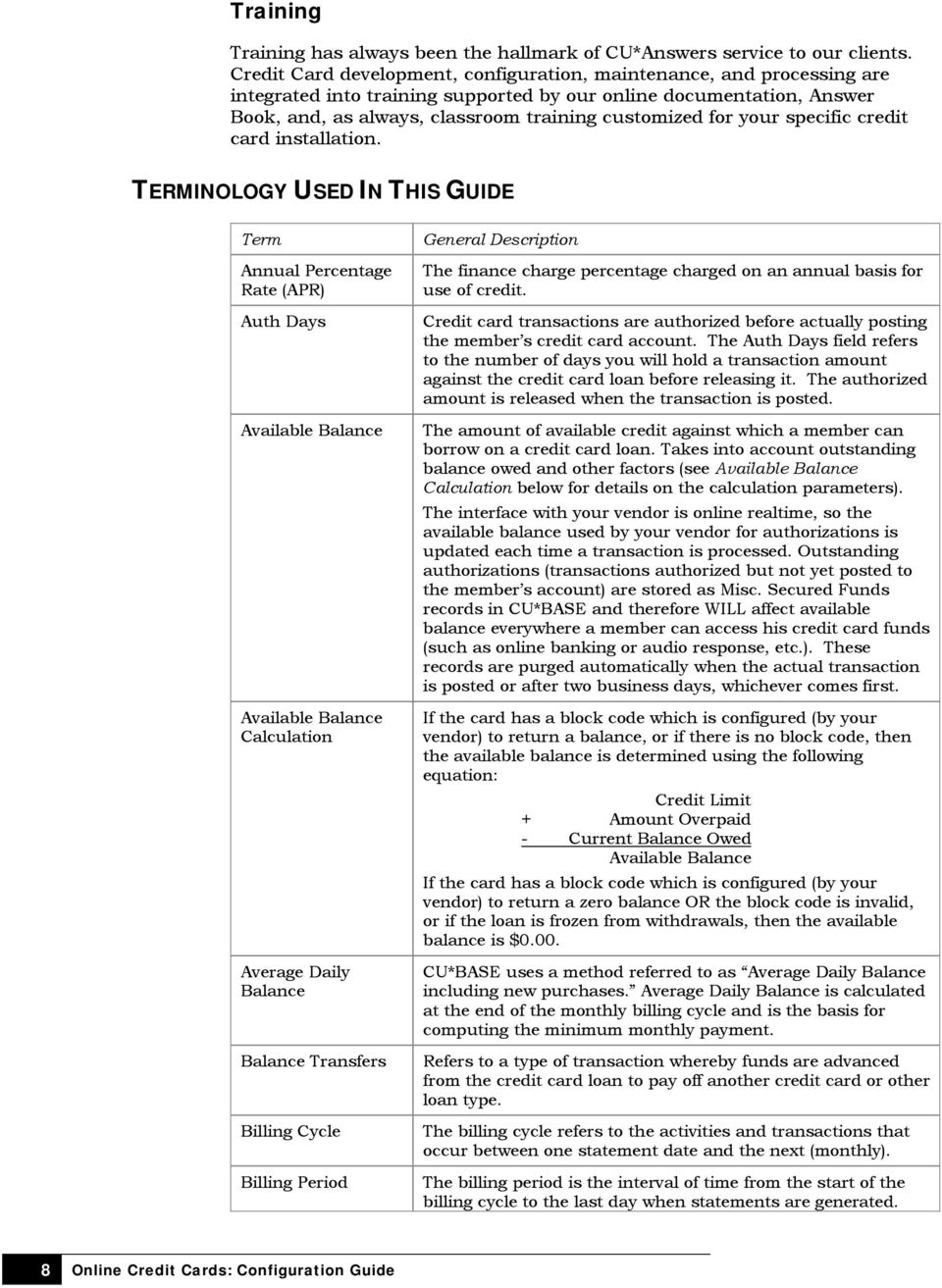
9 Term Billing Statement Cash Advances Charge Type Credit Limit Credits Daily Periodic Rate Due Date Fee Finance Charge General Description Currently the billing period starts on the first day of the month and ends on the last day of the month. Billing statements are generated at the end of each month. They can be printed and mailed to the credit cardholder, produced electronically, or both. In either case, the billing statement is a snapshot of the credit card account showing beginning balance, all activity transacted during the past month, with an ending balance and payment due. Refers to a transaction type whereby funds are advanced from the credit card loan for any purpose other than to purchase goods or services. Funds are usually received in the form of cash, checks, or direct account transfers. Sub-principal buckets that track different types of transactions. Charge types are Purchases (PU), Cash Advances (CA), and Balance Transfers (BT). Each charge type can have its own rate, grace period control, and other settings. Temporary promotional rates can also be set up for each charge type. The maximum amount a cardholder can borrow against the credit card loan. Credits appear on your billing statement designated with a CR following the amount on the member s statement. These are usually transactions such as returned merchandise and erroneous charges on your account that have been credited back. The annual percentage rate divided by 365 is the daily periodic rate (DPR). The DPR is multiplied by the average daily balance to calculate the finance charges for one day. The date printed on the billing statement indicating when a member s payment is due. A fee is an amount added to the principal balance of the loan as though it were a purchase transaction. Fees, unlike transactional finance charges, cannot be reported on 1098 forms at year end. Fees are not subject to a grace period and the amount is not added to annual interest paid. The amount charged to a member for using the credit card. Finance charges are governed by the charge type (purchase, cash advance, or balance transfer) in loan category configuration. Finance charges are calculated on the billing date and include that date as well. If the member s balance was zero at the end of the prior cycle and the account is paid in full by the due date of the current cycle and the credit union does allow for a grace period no finance charges will be assessed. (Refer to notes on Grace Period on page 10.) When finance charges are calculated, the system: 1. Calculates the average daily balance (ADB) for each charge type bucket, then 2. Multiples the monthly rate by the ADB of each bucket, then 3. Totals all the finance charges of all the buckets and adds this amount to the principal balance. The finance charge is recorded separately for each individual bucket (each charge will be listed separately on the member s statement). Online Credit Cards: Configuration Guide 9
10 Term Grace Period General Description A configurable period during which finance charges are not assessed, assuming the full previous balance is paid by the due date. If a grace period is used, periodic finance charges will not be assessed for new purchases if the full amount of the New Balance is posted by the payment due date and the Previous Balance on the credit card account was zero or was a credit balance. Although many credit card programs do not offer a grace period for cash advances or balance transfers, CU*BASE lets you specify which charge types use a grace period and which do not. Members qualify for a grace period for purchases made in a selected month if they have paid in full the purchase balance of purchases made for the previous payment cycle. Otherwise, they do not qualify. For example, if a member does not pay the purchase balance for the May billing cycle in full by June 25 th, the member is not eligible for the grace period with respect to purchases made during the June billing cycle, regardless of whether the consumer pays the purchase balance of the June billing cycle in full by July 25 th. Late Fee Maintenance Transactions Minimum Monthly Payment Month-end Next Payment Date Payment Due Date A configurable penalty charged if payment is received after the due date on the statement. Also referred to as a delinquency fine. These are handled the same way as all other CU*BASE loans and are controlled by Loan Fines Configuration on the Loan Products (MNCNFB) menu. A late payment fee cannot be larger than the member s scheduled minimum payment. If the fine is greater than the minimum payment, CU*BASE will assess the amount of the minimum payment as the fee amount. For example, if the configured late payment fee is $35 and the member s minimum payment is $20.00, the member will be assessed a $20.00 late payment fee. If, however, the member s minimum payment is $22.00, then the member s late payment fee will be $ Maintenance activities for credit cards include changes in cardholder or additional holder information, embossing cards, placing block codes, and similar actions that are considered non-financial. The smallest amount required as payment to keep the account current. The actual payment due is determined by the amount of the Average Daily Balance, multiplied by the factor defined in the loan category configuration. The loan category also contains a configured Minimum payment (see Page 20). The payment printed on the billing statement is the greater of either the calculated amount or the stated Minimum payment amount from the loan category. Currently, month-end occurs on the final day of the month which is also the final day of the billing period. Month-end processes generate month-end transactions and reports. A date stored on the MEMBER6 record that is advanced each time a full minimum payment is made. Used to track delinquency; as payments are made and the loan is caught up, this date is automatically advanced. See Due Date. 10 Online Credit Cards: Configuration Guide

11 Term Payment Matrix Payments Periodic Finance Charge Positive Balance File (PBF) Posting Date Purchases Statement Date Transactional Finance Charge Transaction Date Transactions Variable rate code General Description The Payment Matrix controls the method by which any incoming funds are applied to the loan balance. The matrix for credit cards is different from regular loans and relates to the order in which balances under each charge type and rate are paid down. Payments are the total of all amounts paid on your account during a billing period. Some credits, such as returned merchandise, may be applied to the account as a payment. The rate charged each billing period. For credit card plans, the periodic rate is the annual rate divided by 365 days resulting in a daily periodic rate. For example, a credit card with an 18% APR has a daily periodic rate of.0493%. See also Page 12. A file containing available balance amounts and other information that is transmitted to your vendor for use when authorizing transactions. The date on which a transaction is posted to the credit card account. May be different from the Transaction date, if the transaction is not immediately posted to the member s account. Sometimes referred to as the Process Date. Refers to a transaction type whereby funds are advanced from the credit card loan to procure goods or services at a merchant or other third party. All purchase transactions are handled through the interface to your vendor, although the credit union can use the Member Account Adjustment feature to manually post a purchase or to make adjustments to purchase transaction information. The date on which a statement is generated. This is the amount added to the principal balance in the month end billing cycle. A transactional finance charge can be included in 1098 reporting at year end and is subject to a grace period. Amounts are also added to annual interest paid. Refer to Grace Period on page 10.) The date on which a purchase, cash advance, credit or payment is made by the cardholder. For transactions handled through your vendor, this may be different from the date on which the transaction is actually posted to the account. Transactions include any financial change to the credit card in the form of payments, purchases, cash advances, fees, credits, and account adjustments. Non-financial card changes are considered maintenance transactions. Variable rate activity (changing the rate according to schedule) is determined by the code used. Only group type codes are allowed for Credit cards loans. Indexes must be defined first, then the variable rate code, and finally the indexes are tied to the variable rate codes. For more information about using Variable Rates, please see the Variable Rate Loan Products found on our CU*Answers website under Reference Material. Online Credit Cards: Configuration Guide 11

12 UNDERSTANDING THE AVERAGE DAILY BALANCE CALCULATION Similar to the way CU*BASE calculates the average daily balance on a savings account, the credit card Average Daily Balance calculation uses a cumulative balance field to which the member s account balance for every day of the month is added. At the end of the month, the system divides the total accumulated balance by the number of days in the month to calculate the average daily balance for that period. That balance is then used when calculating finance charges. The following illustration shows this cumulative balance on a credit card that had one payment and one purchase during the month of December: Purchase Transactions Posted Payments/ Credits Posted Day Date Balance Cumulative Balance 1 12/ / / / / / / / / / / / / / / / / / / / / / / / / / / / / / / Online Credit Cards: Configuration Guide

13 As of the end of the month when statements are generated, the following figures are calculated for use on the statement: APR 12.96% Monthly Rate % Daily Rate* % (12.96/365 = %) Average Daily Balance ( = 20.79) Days in Cycle 31 Finance Charge (Daily) 0.23 *Daily rate is based on 365 days (no adjustment for leap year). NOTE: When a credit card account balance is a negative amount (meaning it has been overpaid), the system treats the daily balance as zero for the purposes of calculating finance charges. Online Credit Cards: Configuration Guide 13

14 CONFIGURING THE CREDIT CARD LOAN CATEGORY Although online credit card loans are actually just a special type of open-end loan, they do have some configuration requirements that are unique to credit cards. Each credit card program (i.e., Visa Classic vs. Visa Platinum vs. MasterCard) is identified by a separate Loan Category code, using the following set of screens. UNDERSTANDING CHARGE TYPES Credit card loans differ from other loan products that generally have just one principal balance and use the CU*BASE payment matrix settings in the loan category or on the loan account itself (see Page 19) to apply payments. Instead, credit card programs have flexible finance charge rates made possible through three transaction categories which we refer to as charge types or sub-principal buckets. The following charge types are available: Purchases (PU) Cash Advances (CA) Balance Transfers (BT) If you intend to offer transactions other than Purchases which use the PU charge type, you should create the appropriate charge types. Cash Advances and Balance Transfers will process as Purchases using the PU charge type bucket if the CA and BT charge types are not set up. Within each charge type there are 999 possible sub-categories to allow rate changes within a specified date range. Sub-categories facilitate promotional rates for existing cardholders. Credit card rates set up in loan category configuration will apply to all cards within this credit card program. Variable rates can be used to provide intro rates or special rates to a group of cardholders. Only variable rate codes that are group type are valid. Rates can also be adjusted on individual cards, at the charge type level. To perform rate adjustments on individual credit card accounts, use loan maintenance. 14 Online Credit Cards: Configuration Guide
15 CONFIGURING THE CREDIT CARD LOAN CATEGORY Although online credit card loans are actually just a special type of open-end loan, they do have some configuration requirements that are unique to credit cards. Each credit card program (i.e., Visa Classic vs. Visa Platinum vs. MasterCard) is identified by a separate Loan Category code, using the following set of screens. UNDERSTANDING CHARGE TYPES Credit card loans differ from other loan products that generally have just one principal balance and use the CU*BASE payment matrix settings in the loan category or on the loan account itself (see Page 19) to apply payments. Instead, credit card programs have flexible finance charge rates made possible through three transaction categories which we refer to as charge types or sub-principal buckets. The following charge types are available: Purchases (PU) Cash Advances (CA) Balance Transfers (BT) If you intend to offer transactions other than Purchases which use the PU charge type, you should create the appropriate charge types. Cash Advances and Balance Transfers will process as Purchases using the PU charge type bucket if the CA and BT charge types are not set up. Within each charge type there are 999 possible sub-categories to allow rate changes within a specified date range. Sub-categories facilitate promotional rates for existing cardholders. See Page 30 for information on handling rate changes and promotional rates, as well as rate changes at the member level, such as penalty rates, introductory rates, and rates for military personnel. Credit card rates set up in loan category configuration will apply to all cards within this credit card program. Variable rates can be used to provide intro rates or special rates to a group of cardholders. Only variable rate codes that are group type are valid. Rates can also be adjusted on individual cards, at the charge type level. To perform rate adjustments on individual credit card accounts, use loan maintenance. Online Credit Cards: Configuration Guide 15

16 CONFIGURING A CREDIT CARD LOAN CATEGORY Loan Category Configuration on the Loan Products (MNCNFB) menu Screen 1 See Page 18 for hints on setting up payment controls for credit card loan products. See Page 18 for tips on setting audio and online banking controls for credit card loan products. This is the first screen used to define a loan category. Most of these settings are similar to those used by other types of loans in CU*BASE. Following is a description of those fields that are unique to setting up a credit card loan. Use Enter to proceed to the screen 2. For information about completing other configuration settings, refer to CU*BASE GOLD Online Help. Click while working on this screen. 16 Online Credit Cards: Configuration Guide

17 Field Descriptions Field Name Process type Interest rates Interest calculation type Payment calculation type Next payment date/ delinq control Use review date for disbursement Description This code indicates how the loan behaves, including how data will be entered and calculations performed. Choose V for credit cards. Set both the Low rate to so that the Product Code can be properly configured (see Page 41). The High rate should be set to the highest rate that will be used for any of the individual charge types that will be configured for this card program. Actual rates used for transactions on these credit card accounts are defined on a later screen (see Page 27), and must fall within this range. The interest calculation type code determines the method used to calculate interest. For credit card loan products, choose ADB (5) (Average Daily Balance). This calc type drives the process for applying finance charges. Finance charges are calculated on the billing cycle end date and added to the principal balance. (See Page 12 for an illustration of this calculation.) This flag controls the calculation used to determine the payment amount on the loan. Always select Principle only (P) for Credit Card loan products. Credit card payments are calculated each month based on a percentage of the Average Daily Balance, using a factor in the loan category (see Page 20). This field controls how the next payment date is advanced on a loan. Always select P for Credit Card loan products. This flag controls whether CU*BASE will allow disbursements from the account after the Review date on the loan account record has passed. Actual card expirations are recorded and handled by your vendor. When a member makes a purchase with his card, your vendor checks their expiration records to determine whether or not the card is active before the authorization is ever transmitted to CU*BASE. Once the authorization comes to CU*BASE, the system checks to see if the loan category has this flag activated. If so, CU*BASE will then check the Review Date on the loan account record and if that date is in the past, the authorization will be denied. If this flag is not checked, the Review date on the loan is informational only and is not used for authorizing transactions. IMPORTANT: Activating this flag means that your credit union will have to be VERY diligent in checking review dates on credit card loan accounts and making sure they match the expiration dates on file at your vendor. See the User Guide for more information. Online Credit Cards: Configuration Guide 17

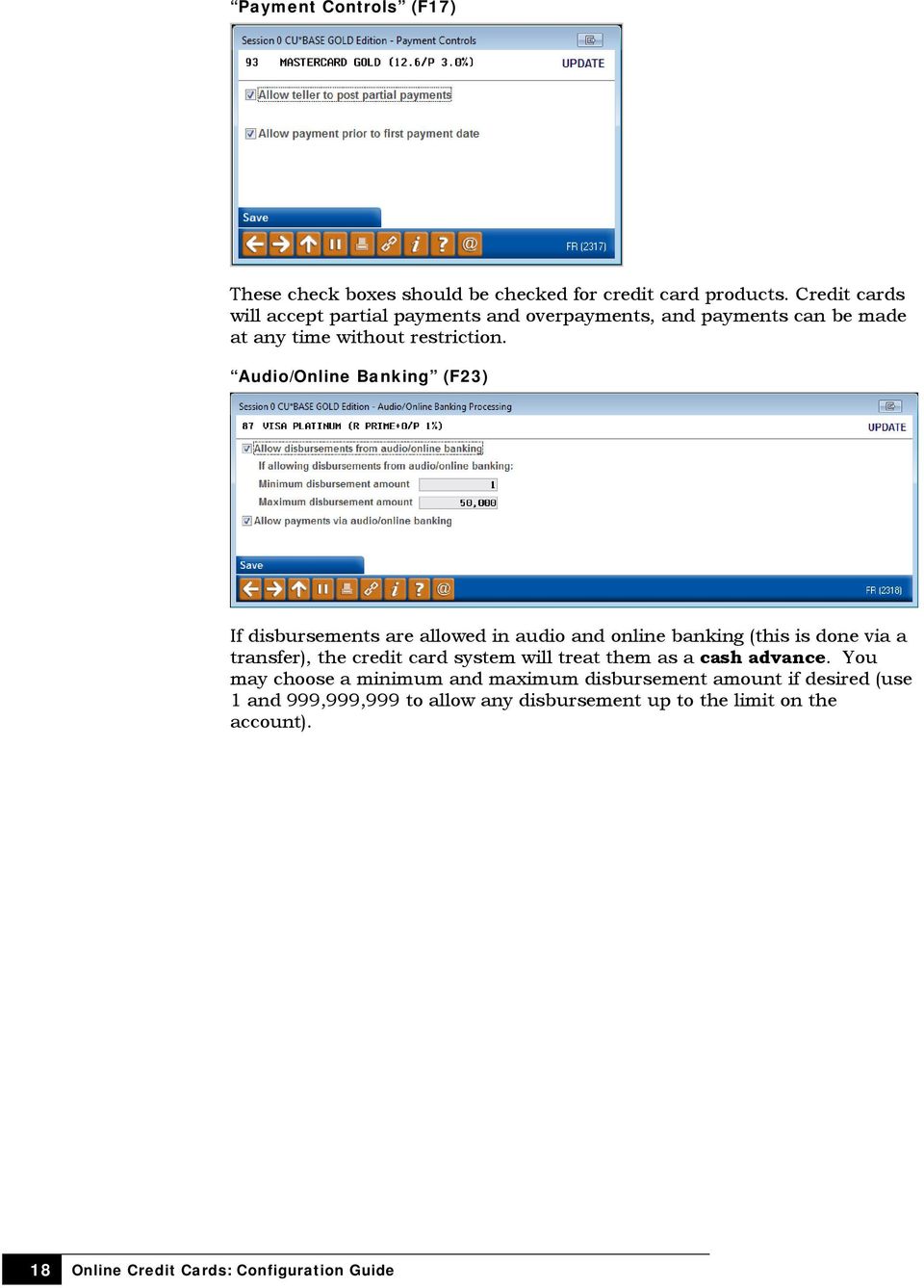
18 Payment Controls (F17) These check boxes should be checked for credit card products. Credit cards will accept partial payments and overpayments, and payments can be made at any time without restriction. Audio/Online Banking (F23) If disbursements are allowed in audio and online banking (this is done via a transfer), the credit card system will treat them as a cash advance. You may choose a minimum and maximum disbursement amount if desired (use 1 and 999,999,999 to allow any disbursement up to the limit on the account). 18 Online Credit Cards: Configuration Guide
19 Screen 2 Set the Over payment indicator to PRN and leave all remaining fields in this section blank. The settings that control how payments will be applied across various charge types (purchases, cash advances, etc.) are shown on Page 22. This second screen has just a few settings that are used for credit card loans. Fill in the G/L accounts that will be used for the loan principal balances as well as finance charges. Use Enter when done to proceed to screen 3. Field Descriptions Field Name Send 1098 tax form Maximum loan disbursement Add overline to payment Description This flag controls whether or not a 1098 form is produced for loans of this category at year end. If this credit card program allows a link to home equity, place a checkmark here. The amount in this field is the maximum that can be disbursed for this loan category. This is also the maximum credit limit allowed for any loan under this category. When this flag is checked, the balance on the card is compared to the credit limit. If the limit has been exceeded, at statement generation that amount is added to the regular payment due to calculate the total payment due. Online Credit Cards: Configuration Guide 19

20 Screen 3 See Page 22 for hints on using Format CC# to control which portion of the member s credit card number will print on statements and receipts and appear on various CU*BASE inquiry screens. This screen is unique to credit cards and will appear only for loan categories configured with Process Type V. Complete all fields as described below and use Enter to proceed to screen 4. Field Descriptions Field Name Description Credit Card Cycle Control Approximate monthly billing day Scorecard Billing date must fall on a previous business day Billing days Last statement date Last statement payment due date The day of the month on which the billing cycle ends. Currently must be set to 31 for credit card loans, meaning the billing cycle ends on the last day of the month. Leave unchecked unless scorecard rewards transmissions are used. Contact a CU*Answers representative for assistance with this feature. For future use; this flag is currently ignored. This field represents the number of days a member has to pay the previous statement balance before finance charges will be assessed. Sometimes referred to as a grace period. (Refer to notes on Grace Period on page 10.) BE CAREFUL: In order to avoid problems once your credit card program is underway, this value can be set only when you originally create the loan category; it cannot be changed after you have used Enter to proceed to the next screen. The date on which the last statement was generated. The due date that was printed on the last statement. 20 Online Credit Cards: Configuration Guide
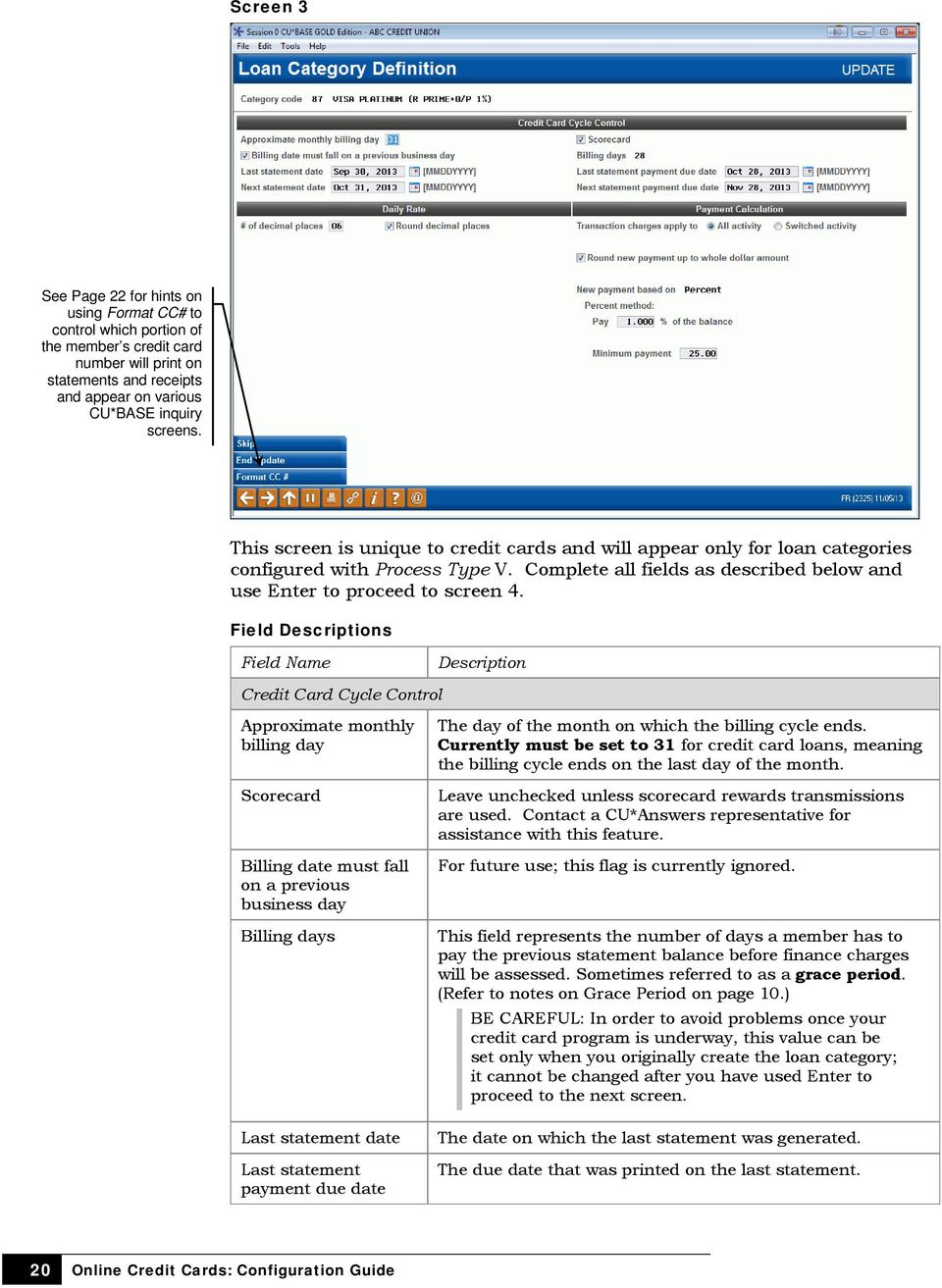
21 Field Name Next statement date Next statement payment due date Description The next date on which statements will be generated (should correspond to the day in the Approximate monthly billing date field above). The due date that will be printed on the next statement (Next statement date + Billing Days). Daily Rate # of decimal places Use this to define to how many decimal digits the daily rate should be calculated and displayed on the statement. The number of decimal places is also called the precision factor. Be sure to verify that the number entered in this field complies with your disclosure. Round decimal places Check this flag to round the daily rate up to the specified number of decimal places. For example, if the # of decimal places field was set to 5 and this flag was checked, the number would be when rounded up. Payment Calculation Transaction charges apply to Round new payment up to whole dollar amount New payment based on Percent method Minimum payment Choose which type of credit card transaction activity should be subject to transaction charges: All Activity (A) - Refers to transactions that originate from the credit union channel as well as transactions that originate through your vendor. Includes transactions from the following sources: Your vendor Teller Home Banking Phone Operator ARU/Home Banking Transfers (Member Transfers on the Member Service (MNSERV) menu Switched Activity (S) - Refers to transactions that originate through the vendor switch only, such as point of sale purchases. Transactions originating through ATM machines are not subject to transaction charges. Check this checkbox if you want the payment amount always to be calculated as a whole dollar amount. (For example, if the payment was calculated as $35.83, the system would record a payment amount of $36.00 instead.) If left unchecked, the payment will be based on the calculated amount to the nearest penny. Credit Card loan products default to Percent (P) method. The system calculates a payment amount based on the average daily balance on the loan, using the percentage entered into the Percent method field below. Enter the percentage to be used when calculating the payment amount. Remember that this is used by all cards under this credit card program. Use this field to set the lowest minimum payment amount that should be printed on a member s statement (assuming there is a balance on the account). Online Credit Cards: Configuration Guide 21
22 Field Name Description When statements are generated, the system will use the greater of either the system-calculated minimum payment or this amount as the new required minimum payment. If the loan balance is less than this amount, the payment will be the actual balance on the credit card loan. Format CC # (F12) In the first field, enter the number of digits to be displayed when viewing credit card information online in CU*BASE. In the second field, enter the number of digits to be printed on billing statements and member receipts. See Page 57. A maximum of 4 digits is recommended to protect your member s privacy. Remember that the idea is to give enough characters so that the member can easily identify one card from another, but not so many that a full card number could be guessed by an unauthorized person. Screen 4 22 Online Credit Cards: Configuration Guide
23 This screen controls how payments will be applied across the various charge types, including Purchases, Cash Advances, and Balance Transfers. These are also referred to as buckets or sub-principal balance categories, and are used to track a member s credit card transaction activity. IMPORTANT: Be sure to review the Credit CARD Act and other applicable regulations before activating features such as Payment Priority, Penalty rates and Overlimit Fees! Each charge type or bucket can have its own rate, and this screen lets you decide which charges will be paid first by charge type and rate. In addition, this screen lets you set up parameters for various fees that can be charged to member credit card accounts. NOTE: The CU*BASE mechanism for handling balance transfers is through a Loan Distribution via Disburse Member Loan Funds on the Lending Functions (MNLOAN) menu. Another method is an Account Adjustment to post funds directly to a Balance Transfer charge type code. Field Descriptions Field Name Payment priority Rate priority Penalty rate If xx days past due or over limit xx days Resume base rate after xx cycles of good standing. Description Enter 1, 2, or 3 to indicate the order in which payments are applied to the various charge type buckets: first, second, or third. For example, a common method is to set cash advances to pay off first, then purchases, then balance transfers. This works in conjunction with the Rate priority setting. Choose either Highest or Lowest to indicate how payments should be applied when there are multiple rate buckets under a charge type. For example, you may have a purchase promotion set up to assess a different rate for purchases made during a promotional period. This works in conjunction with the Payment priority setting. For example, say your configuration is set up to pay cash advances first, then purchases, and both are set to pay lowest rate items before higher rate items. If a member has made both cash advances and purchases, and some of the purchases were under a lower promotional rate, payments will be applied first to pay off any cash advances, then purchases made under the promotion, then purchases made under the higher default rate. The monthly interest rate charged on a card when they have exceeded the threshold of past due or overlimit. Use these fields to define the number of days the account can be past due and the number of days the account can be overlimit before the Penalty rate is assessed. These are used in conjunction with the Non-fee tolerance field. The amount in Non-fee tolerance allows the account to be overlimit up to that amount without changing the rate on the card to the penalty rate. This field is used to automatically return a credit card account to its former rate when payments have brought the account current and back within its credit limit. Online Credit Cards: Configuration Guide 23
24 Field Name Description Enter the number of consecutive billing cycles required to remove the penalty rate once it is assessed. Use 99 if the penalty rate should remain in place permanently once it is assessed. Fee Configuration Annual fee (Whole $) G/L account Transaction description Type Month Over limit: Fee amount G/L account Transaction description Type Non-fee tolerance If you wish to charge an annual fee to all cardholders, enter the fee amount, in whole dollars, here. For example, if your annual fee is $15.00, enter 15 here. The G/L account number where income from the annual fee should be posted. (A fee amount must be entered in order for this field to be used.) The description that will print on the billing statement when the annual fee is assessed. This flag determines whether or not the fee assessed will be subject to the normal grace period. Fee (F) - Treat as a normal purchase transaction on the account; not subject to grace period. Transaction finance charge (T) - Treat as a transactional finance charge subject to the grace period. (Refer to notes on Grace Period on page 10.) Enter the number of the month when the annual fee should be charged. For example, to charge annual fees in March, enter 03 here. Fees are posted at the end of the month during normal statement processing. All cardholders will be charged the fee during the same billing cycle. CU*BASE does not support annual fees by anniversary or open date. If you wish to pro-rate a current-year fee for members just opening a new account, use Account Adjustment to post the fee amount manually. Enter the amount to be assessed if the card limit is exceeded. This field is used in conjunction with the Non-fee tolerance field. The G/L account number where income from the Overlimit charge should be posted. (A fee amount must be entered in order for this field to be used.) The description that will print on the billing statement when the over limit charge is assessed. This flag determines whether or not the over limit charge amount assessed will be subject to the normal grace period. Fee (F) - Treat as a normal purchase transaction on the account; not subject to grace period. Transaction Finance Charge (T) - Treat as a transactional finance charge subject to the grace period. (Refer to notes on Grace Period on page 10.) Enter the amount to be used as the threshold when determining whether to assess a charge for the balance exceeding the card limit. Used in conjunction with the Over limit fee. If the amount over limit is less than this amount, no fee will be charged. 24 Online Credit Cards: Configuration Guide
25 Field Name Delinquency fine Description If a delinquency code is attached to the loan (can be pulled in from the Loan Product Config in this loan category, or attached manually to the loan when it is created), this flag determines when the fee amount will be subject to finance charges: Fee (F) - Treat as a normal purchase transaction on the account; not subject to grace period. Transaction Finance Charge (T) - Treat as a transactional finance charge subject to the grace period. (Refer to notes on Grace Period on page 10.) CREDIT CARD CONFIGURATION CONFIGURING RATES CHARGED TO A MEMBER (INCLUDING PROMOTIONAL RATES) The following screens in the credit card configuration are used to configure the rate charged to a member. See Page 30 for information on handling rate changes and promotional rates, as well as how to make rate changes at the member level, such as penalty rates, introductory rates, and rates for military personnel. Screen 5 Rate Listing Sort by any of these columns by clicking the header line. Select a record and use History to see a history of rate changes previously made on the charge type. See Page 37 for details. CU*BASE must have at one default code for each charge type you intend to use. At the very least, create charge types for purchases (PU) and one for Cash Advances (CA). If you will allow Balance Transfer transactions, you will also create a BT charge type. CU*BASE automatically assigns a 999 sequence number to the first charge type bucket created for that type. The 999 default bucket in each category is created with no start or end date so they never expire. Online Credit Cards: Configuration Guide 25
26 Subsequent charge type buckets are considered special rates which require start and end dates for the promotional period. As special rate buckets are created, CU*BASE assigns sequential sequence numbers to the buckets starting with 001, then 002, through 998. This is covered in more detail in the discussion of changing rates, promotional rates and introductory rates discussed on starting on Page 30. To modify an existing sequence, select the item in the list and use Change or press Enter. The screen shown on Page 27 will appear. To add a sequence, such as adding a promotional rate, refer to Page 34. To delete a sequence that was created in error, select the item in the list and click Delete. When buckets are deleted, those numbers are not re-used. CU*BASE will generate the next sequential number based on the last number used for that transaction charge type. There will be one confirmation message: CU*BASE will not allow you to delete a sequence that has been attached to any loan account. Charge type buckets can be deleted only if no transactions have been processed against them. Field Descriptions Field Name Typ/Seq Start End Rate Rate Code Description This identifies the transaction category PU, BT, CA and the system assigned sequence number. Each transaction category has a 999 default sequence number that cannot be deleted. As rate promotions are created within categories, the system assigns a sequence number. Up to 998 other sequences can be added for each of the three transaction categories. This is the date on which the promotional rate starts. Transactions posted on or after this date will receive this rate. This is the date on which the promotional rate ends. Transactions posted on or before this date will receive this rate. The finance charge rate for transactions within this category and time period. 000 indicates no variable rate code was used for that entry. If a variable rate was in effect, the associated code would be displayed. 26 Online Credit Cards: Configuration Guide
27 Field Name Description Description The description displayed here was entered at the time the rate promotion was created. This description identifies the promotional rate. This field is not printed on the billing statement. The description printed on the billing statement comes from the short description field. Screen 6 Use this screen to define the rate, grace period, and transaction charges that will apply to all transactions posted under this code. Cash Advances and Balance Transfers will process as Purchases using the PU charge type bucket if the CA and BT charge types are not set up. (Refer to notes on Grace Period on page 10.) Use Comments (F14) to explain why this charge type was set up and any special instructions on how it works. (See Page 29 for a sample of the screen that will appear.) Remember that if credit cards have already been created and any transactions posted to this code, changes to the rate or other configuration settings will affect the accounts immediately. Field Descriptions Field Name Type Description Enter one of the following to indicate the charge type: PU Purchases CA Cash Advances BT Balance Transfers Online Credit Cards: Configuration Guide 27
28 Field Name Sequence Start date End date Rate Daily rate Description Statement description Description The system assigns a sequence number. Initially shown as 000, the number is assigned when the screen is saved and you return to the previous screen. The date on which this special rate will start. The start date can be less than today s date. Transactions will receive the promotional rate during billing cycle processing. The date on which this special rate will end. The date range cannot overlap with another promotion for this transaction type. The finance charge rate for this promotion. This field is output only and matches the billing statement. The rate will fall within the range established for this loan category. This shows the calculated daily rate. (Press Enter to recalculate this after changing the Rate.) This is calculated and rounded according to the settings on the loan category configuration screen 3 (see Page 20). Identifies this rate promotion on various CU*BASE screens and reports (use up to 30 characters). This 15-character description identifies the promotion and will print on the billing statement. Variable Rate Information Variable rate code The variable rate code that drives the rate change according to scheduled date. Only group type codes are valid for Credit cards loans. Click the lookup button to see a list of your credit union s configured variable rate group codes. General Rate Information Use grace period Forgive finance charges for zero balance loans Transaction charge as a % of transaction amount Check this checkbox if transactions under this code should immediately be subject to finance charges, or whether they should be subject to the grace period before finance charges are calculated. (This period is defined by the number of billing days in the billing cycle. See Page 20.) Typically this is checked for purchases but left unchecked for cash advances, in order to begin calculating finance charges immediately for cash advance transactions. (Refer to notes on Grace Period on page 10.) If checked, no finance charges for the charge type will be assessed if the current loan balance is zero. The Use grace period flag is ignored when this field is checked. The % rate is multiplied by the amount of the transaction to assess a transaction fee. Typically used for cash advance (CA) charge types in order to charge a cash advance fee. Also referred to as a transactional finance charge. The Transaction charges apply to flag described on Page 21 determines which incoming transactions are subject to the rate defined here (either all or only transaction that come in via the switch). Cash advance fees are not assessed in the following situations: When the credit card loan is used to cover an overdraft of a checking or savings account. 28 Online Credit Cards: Configuration Guide
29 Field Name Minimum Maximum Transaction finance charge G/L Account Transaction description Description When using the Loan Disbursement feature to disburse funds from a credit card loan (Disburse Member Loan Funds on the Lending Functions (MNLOAN) menu. When the cash advance is obtained at an ATM machine using the member s ATM card. However, if the physical credit card is used at an ATM to obtain the cash advance, the transaction processes through your vendor and the cash advance fee may be assessed. (The ability to use a credit card at an ATM depends on whether or not a PIN is attached to the card as well as on the capabilities of your ATM interface. Not currently used by any ATM vendor.) The dollar amount range used to determine the assessed transaction charge after it s been calculated. The transaction charge cannot be lower than the minimum nor higher than the maximum. Enter the G/L income account where transaction charges should be posted. Enter the transaction description to be used on member statements when this transaction charge is assessed (such as Cash Advance Fee ). Comments (F14) This screen can be used to record any miscellaneous information about this credit card program, for internal use by credit union staff. When done, press Enter to save and return to the previous screen. HINT: The lines in this screen are individual lines without text wrapping capabilities. For reading ease, end each line with a complete word and begin each new line with a complete word. Online Credit Cards: Configuration Guide 29
30 OPTIONS FOR CHANGING THE RATE CHARGED TO A MEMBER When changing rates, there are basically three situations that might occur after the initial setup of a rate: 1. Scenario 1: You want to change the default rate of a charge type (bucket). Refer to Page 31 for information on handling this type of situation. 2. Scenario 2: You want to offer a promotional rate during a set time period. For example, you want to offer a lower rate during the summer month and then return to the regular rate in September. Refer to Page 34 for information on handling this type of situation. 3. Scenario 3: You want to offer an introductory rate to new cardholders. For example, you might want to offer a lower rate to members for the first six month after they open the card, and then return to the base rate for the credit card. Refer to Page 37 (or refer to the Adjusting Rates at the Card Level section of the Credit Card User Guide) for information on handling this type of situation. NOTE: If an introductory and promotional rate are both offered, the new purchases will go to the charge type (bucket) with the lowest rate. What rate is charged to a member? How does the timing of posting affect the rate that is charged? (Moved to this section) Transactions are processed against the default charge type bucket (999) within the appropriate transaction category if there are no promotional buckets active at that time. CU*BASE uses the transaction post date to determine the finance charge rate for transactions within a category and sequence. Remember that transactions are not usually posted to the credit card on the same day as the actual purchase or other activity. In a rate promotion event, the transaction must be posted to the credit card account on or before the date on which the promotion ends. For example, say you have a promotional rate that ends on November 30. On November 29 a cardholder makes a purchase. The transaction is posted on December 1. The promotional rate has expired which means the finance charges will be based on the rate (either default or another promotion) in effect on December 1. The same principal applies to Cash Advance and Balance Transfer transactions. The card rate in effect at the time the transaction is posted determines the finance charges. 30 Online Credit Cards: Configuration Guide
31 BE CAREFUL: If credit cards have already been created and any transactions posted to this code, changes to the configuration will affect the accounts immediately. Also remember that finance charges are calculated only once a month using the rate from the code at the time statements are generated. Rate changes made in the middle of the month will actually affect all transactions of that type posted during the month (for all cards in this program). Scenario 1: You want to change the default rate but want to leave members prior purchases at the current rate In a nutshell, CU*BASE allows credit unions to create new default charge rates for all activity types (purchases, balance transfers, cash advances), replacing the 999 charge rate as of a specified date. The old default record then has an end date and the new default will have no end date. Since the sequence number for the charge types (buckets) is already assigned automatically by the system, the flow will automatically assign descending sequence numbers starting with 999 (998, 997, etc.) for any new default buckets that are created. This is not to be confused with a Promotional Rate, which is used when the credit union wants to introduce a different rate for a short period of time (a promotion). For example, the credit union might offer a lower promotional rate during the month of January. To change the default rate navigate the loan category configuration screen listing the charge rates. Use Loan Category Configuration on the Loan Products (MCNFB) menu, select a credit card category, and press Enter several times to move to the screen below. Select the default charge rate (999 or most recent default rate) and select Update default rate. Online Credit Cards: Configuration Guide 31
32 Enter a roll start date and rate, as well as a description of the rate and a statement description. You may wish to fill in additional fields as well. Here you can see the rate change configured This section should be filled out per your credit union policy. For an explanation of the fields on this screen, refer to page 27. Press Enter so that the buttons change and Update (F10) appears as an option. Use Update (F10) to advance to the first confirmation screen. 32 Online Credit Cards: Configuration Guide
33 Confirm the change and use Add/Update (F5) to move to the final update screen. After Enter, you will return to the original screen with the new default charge type listed. Online Credit Cards: Configuration Guide 33
34 Here you can see the rate that was just configured. Scenario 2: You want to offer a promotional rate during a set time period NOTE: If an introductory and promotional rate are both offered, the new purchases will go to the charge type (bucket) with the lowest rate. There may be times where you want to offer a promotional rate, for example, you want to offer a lower rate during the month of January. Use Add New (F6) on the rate listing screen (shown previously) to create a new rate that will be in effect for a set time period. This will be applied to all transactions that fall within a certain date range for the configured charge type (bucket) - (PU, BT, or CA). Please note that this rate change will only apply to the charge type you place it on, so if this rate change is for the whole card, be sure to place a rate change on all charge types. The following screen will appear. 34 Online Credit Cards: Configuration Guide
35 Fill in the charge type this rate change will apply to here. Fill in the charge type (bucket) that this promotion will apply to. Then complete filling in the other needed information, such as the rate, when it will occur, description, and statement description. For an explanation of the fields on this screen, refer to page 27. Press Enter and new buttons will appear, including the Update (F10) button. Online Credit Cards: Configuration Guide 35
36 36 Online Credit Cards: Configuration Guide Use Update (F10) to save the promotion, which appears on the screen below.
37 Scenario 3: You want to offer a rate override for a single member (for example, introductory rates, penalty rate, rate for military personal, etc.) NOTE: If an introductory and promotional rate are both offered, the new purchases will go to the charge type (bucket) with the lowest rate. There may be times when you want to offer a member a rate override. For example, you might want to offer a lower introductory rate to members for the first six month after they open the card, and then return to the base rate for the credit card. This feature can also be used to set a special rate for military personnel or to set a penalty rate for a specific member. All of these rate changes are configured at the member level. Refer to the Adjusting Rates at the Card Level section of the Credit Card User Guide for information on handling these types of situation. NOTE: If you are setting an introductory rate, be sure to configure not only a special rate that will change the rate, but also a resume rate that will revert the rate back to the default rate. Please note that this rate change will only apply to the charge type (bucket) you place it on, so if this rate change is for the whole card, be sure to place a rate change on all charge types (buckets). VIEWING A HISTORY OF RATE CHANGE ACTIVITY History of activity on any rate change record is available from loan configuration by using the History option on the charge type summary screen (shown on Page 25), or while within a credit card loan (refer to the User Guide for information about Rate Maintenance at the card level). Online Credit Cards: Configuration Guide 37
38 Rate History Summary To view history records of a sequence, highlight the sequence, then click Select to display the screen shown on the next page. 38 Online Credit Cards: Configuration Guide
39 Rate History Detail Record Changes are recorded with date, user ID, employee ID, and the action. The information on the previous screen parallels the configuration screen shown on Page 27, with an added segment showing when the rate was updated and by whom. Online Credit Cards: Configuration Guide 39
40 CONFIGURING THE LOAN PRODUCT Once your credit card loan category has been set up, the next step is to create a corresponding loan product code, which is used to set up the loan request on CU*BASE, and to display your credit card in the It s Me 247 loan rate board. Members can apply for credit card loans from online banking, just like any other line of credit loan, and the product code lets you define exactly how the loan requests will be set up for your staff to work in CU*BASE. Following are special instructions for setting up a credit card loan product. Refer to online help for additional information on using these screens. Click on these screens. while working Loan Product Configuration on the Loan Products (MCNFNB) menu Screen 1 The Product code allows you to set defaults common to the loan category which will be auto-filled when the credit card loan requests are created, such as purpose and security codes, delinquency fine level, etc., similar to other types of loans. A product code is also used to quote rates to staff and help sell your credit card products to your members. IMPORTANT: If you want to be able to display a generic rate in Rate Inquiry or for use in online banking, you may need to set up a separate product code used only for quoting rates, but not used when setting up loan requests. Contact a Client Service Representative for assistance. 40 Online Credit Cards: Configuration Guide
41 On this first screen, use Add Product (F6) to create a new product (or select an existing item in the list and use the Change option to modify it). The screen shown below will appear. Screen 2 Options for Loan Quoter and Extended Loan Delivery Channels are not available for credit cards (Process type V) loans. On this screen, configure the basic parameters that are used to set up new credit card loans in CU*BASE. CU*TIP: To speed up the process of creating these loans on CU*BASE, it is recommended that a default value be set up wherever appropriate (see below) so that the loan officer needs only to fill in the loan amount (credit limit) to create the loan request. The fields on these screens are common to the product category configuration screens, but due to the nature of credit card loans some of them have unique behavior, as described below: Field Descriptions Field Name Display In Product code base rate Miscellaneous coverage on loan Description Display in Loan processing should be checked. Neither Loan Quoter nor Extended Loan Delivery Channels are currently available for credit card loan products. Enter in all cases. The actual rate to be used is based on the finance charge rates from charge type configuration. (See Page 30.) Check this checkbox if Miscellaneous coverage is offered for members with credit card loans. If this is checked, a screen will appear allowing you to select a Miscellaneous coverage (not shown in this booklet) Quote Choose here whether to add D= Debt Protection or I = Insurance to this product. The following screen will allow Online Credit Cards: Configuration Guide 41
42 Field Name Description you to select the specific coverage options for this loan. Premiums are handled the same as with other loans and will be posted against your default purchase charge type (PU999). IMPORTANT: If you are offering payment protection for credit cards, you must set up separate insurance/debt protection code(s), even if the program is similar to what you offer for other loans. Amortization/External Loan Delivery Channel Defaults Variant -OR- Rate Use risk-based pricing Frequency code Purpose Delinquency code Enter as the rate. (Actual rates are controlled by the configuration for each charge type.) Risk Based Pricing is not valid for credit card products. Always set this default to M (Monthly) for credit card loan products. Although the field can be left blank, this should be filled in with a default purpose code in order to make it faster for the loan officer to create a new loan request. Although the field can be left blank, this should be filled in with a default delinquency fine code in order to make it faster for the loan officer to create a new loan request. # of payments Enter the number of months to control the Review date that appears on the loan account record. This date is simply for information only and is required in order to process the loan request. It has no affect on the credit card renewal process, which is currently handled by your vendor. Security code Collateral type Variable rate code Although the field can be left blank, this should be filled in with a default security code in order to make it faster for the loan officer to create a new loan request. Leave this field blank so that collateral is not required on new credit card loan requests. Credit card loans will use group type variable rate codes only. Codes are 3 digits and drive the rate change according to a scheduled date. ECOA code Use this to designate an ECOA code (default is 0 = Undesignated). 42 Online Credit Cards: Configuration Guide
43 Screen 3 Use this screen to add any insurance or debt protection to the loan. This screen may be preceded by a screen for the addition of Miscellaneous Coverage, if that option is selected. (All of these options are selected on the configuration screen shown on page 41.) The insurance, debt protection or miscellaneous coverage that is configured will then will be available for selection at the time the loan is created. IMPORTANT: If you are offering payment protection for credit cards, you must set up separate insurance/debt protection code(s), even if the program is similar to what you offer for other loans. Online Credit Cards: Configuration Guide 43
44 Screen 4 This screen allows you to configure your loan products so that they can be offered online through It s Me 247. OFFERING CREDIT CARDS ONLINE The Product Configuration for credit cards allows entry for the fields required to post a credit card online (information for the rate board). The rate that appears on the board comes from the configured Variant (from center of the screen shown previously) and it is also recommended that the credit union only enter one term (also configured in the Product configuration). Credit unions will still need to provide their standard credit card disclosure(s) to the applicants when completing their application online. 44 Online Credit Cards: Configuration Guide
45 Configuring the Credit Cards The data entered on the following screens will be supplied from multiple sources. Your vendor supplies the BIN number, Institution ID, Security code, and the Card stock, all of which help to uniquely identify the credit card program. This screen displays the BIN number and description of the credit card programs already defined. Online Credit Card Config on the ATM/Debit/Credit Card Configurations (MNCNFG) menu Screen 1 See Page 48 for information about using Cardstock option here. To add a new credit card plan click, use Add (F6). The screen shown below will display. Screen 2 See Page 48 for information about using Add Admin Card (F6) feature to set up a special card for testing purposes. Use this option to reveal a screen where you can enter as many loan categories as you would like to tie to this card type. Online Credit Cards: Configuration Guide 45
46 Field Descriptions Field Name BIN Next Vendor Card verification Card stock Stock Type Institution ID Security code Description Authorization days ISA G/L Description The 10-character BIN number identifies the credit card plan. The BIN supplies the first 10 digits of the credit card number. This data is also part of the header record in the Positive Balance File (PBF) transmission to your vendor. This 5 character numeric field is used to generate the next card number. The BIN, combined with this five digit number, forms the first 15 digits of the card number. A check digit is then calculated and placed in position 16 to complete the credit card account number. Enter the 7 character vendor name of the credit card processing service. The 1 character alpha code indicates data the member must provide to activate this card. The credit union determines which code they will use and your vendor uses that code to configure their card activation process. Valid codes: Account base (M) SSN (Social Security number) (S) The physical card is labeled with a sticker on the front that provides instructions for activating the card. If the member calls from their home phone number, the card is activated automatically and no other action by the member is required. Otherwise, if the activation process begins from a phone other than what is stored on the credit card record, the member must enter their Social Security number or their member base account number, depending on the choice entered here. The 5 character stock code provided by your vendor. Indicates which credit card stock will be used when embossing this card. Once an initial card stock is configured, use the lookup to select a different card stock. For information on how to configure these card stock options, see page 48. This allows the selection of a configured card stock. Refer to Page 48 for more information about configuring card stock. The 6 character numeric Credit Union ID supplied by your vendor. This code is part of the header record in the Positive Balance File (PBF) transmitted to your vendor. The 8 character numeric code supplied by your vendor that identifies the credit union. This code is part of the header record in the Positive Balance File (PBF) transmitted to your vendor. The 20 character field that identifies the credit card plan (e.g. Visa Classic, Visa Platinum, Visa Gold, etc.). Enter the number of days funds will be held on credit card transactions when an authorization is received. Enter the G/L account number for foreign transaction fees, if you pass them directly on to the member. If you do not wish to pass these fees to members, enter here. 46 Online Credit Cards: Configuration Guide
47 Field Name Expiration month Card Rewards Clearing G/L Suspense G/L Multiple PANs per credit card supported Description This 2 character numeric field indicates the number of months credit cards of this plan will be in effect. At the end of this term, the credit card will need to be reissued. Your credit union may elect to have your vendor automatically reissue cards that are due to expire. This process is referred to by your vendor as auto-reissue. Auto-reissue means that your vendor initiates the reissue of credit cards. If your credit union chooses to track reissues internally, you will be responsible for sending embossing requests to your vendor at the appropriate time. Leave unchecked unless scorecard rewards transmissions are used. Contact a CU*Answers representative for assistance with this feature The General Ledger Clearing Account number. This is an asset account. We recommend that be created for your clearing G/L. The amount stored in this account represents all monetary transactions for this loan category. Posting programs clear this account as each credit card account is updated with the transaction. The clearing account will always be at zero. The General Ledger Suspense Account number. This is normally in the 870 number range. We recommend that be created for your suspense G/L. This account stores the dollar amount of transactions that were processed but not posted. The items that comprise this account are generally exceptions and must be reconciled and posted manually. The suspense account should always be brought to zero. Checking this box activates a feature that allows you to create cards with different card numbers for the same credit card loan. For example, a member may have a business with more than one employee and may want a different card number for each employee. Refer to Page 51 for more information. Refer to the Credit Card User Guide for information about crediting cards in this manner. This feature is only available for certified vendors. Contact SettleMINT EFT for more information and to activate this feature. New Card Defaults These codes will be entered automatically whenever a card order is created for a new loan account (where no cards have been ordered previously). The user can adjust these codes on a case-by-case basis at the time the order is placed, however. Card activation code Issue action The 1 character alpha code used by your vendor to indicate the type of issue and if card activation is to be used. Do not use card activation Issue with activation (I) (member will be required to call the card activation line before the card can be used) No activation (N) The Issue Action code indicates to your vendor if a PIN mailer, card, or both should be generated. Produce both card & PIN (B) Generate PIN only (P) Generate card only (Y) Online Credit Cards: Configuration Guide 47
48 Field Name Description Additional/Replacement Card Defaults These codes will be entered automatically whenever a card order is created for an existing account (where at least one card has been ordered previously). The user can adjust these codes on a case-by-case basis at the time the order is placed, however. Card activation code Issue action The 1 character alpha code supplied and used by your vendor to indicate the type of issue and if card activation is to be used. Do not use card activation Additional card, no activation (A) Duplicate card, no activation (D) No activation (N) The Issue Action code indicates to your vendor if a PIN mailer, card, or both is to be generated. Pull offsets from your vendor master file; produce both card & PIN (E) Pull offsets from your vendor master file; produce PIN only (F) Pull offsets from your vendor master file; produce Card only (G) Add Admin Card (F6) Enter the 16-digit card number your credit union uses for administrative and testing purposes. Then enter the account base and suffix (type) for your administrative account. Use Enter to save and return to the previous screen. CONFIGURING CARD STOCK OPTIONS CU*BASE allows you to configure multiple card stock (plastic) options for each individual BIN. For example, you might want to offer your Platinum members a Classic card as well (as extra perk) a card with palm trees on it (a vacation view ) card. Or perhaps you are a multi-corp credit union with two or more credit unions using a single BIN but you want each credit union have its own credit union specific card. Configuring multiple card stocks allow you to handle both these situations. If you are considering offering multiple card stocks, contact a CU*Answers EFT Product Specialist for assistance. 48 Online Credit Cards: Configuration Guide
49 Online Credit Card Config on the ATM/Debit/Credit Card Configurations (MNCNFG) menu Screen 1 See Page 48 for information about using Cardstock option here. Select the BIN and then Card Stock to view a listing of all card stocks that have been configured for this particular BIN. Selecting Card Stock To add an additional card stock option for the selected BIN, use Add (F6). Add (F6) Online Credit Cards: Configuration Guide 49
50 On this screen, enter your Stock Code identifier (the plastic card stock code used with the plastics vendor the physical plastic), a Description to help you identify the card stock, and the Stock Type. Options for stock type include the options shown below. Unknown is used for conversion purposes. This Stock Type selection will be shown as a number on all of the other screens. This Stock Type selection will be shown as a number on all of the other screens. Selections will show as follows: Unknown (0), Pre-printed on custom stock (2), Pre-printed on generic stock (1), or Pre-printed on white stock (3). Pre-printed on white stock must be used to select to print an image on the card stock. Refer to the following section for more details on printing images on card stock. Press Enter to save this card stock. Once configured, card stock can be selected during three activities: when the credit card loan is initially created, when a new card is ordered, and during loan account maintenance. At these times, the credit union employee will see the numbers (1-4) and not the descriptions. CARD IMAGES ON CARD STOCK Card images are also available for certain certified vendors. Contact SettleMINT EFT to determine if your vendor is supported and to activate this feature. This feature allows a card image to be printed on non-embossed (flat) white card stock. To select for an image to be printed on a card, the credit union employee selects card stock configured to print the image, as is discussed in this section. IMPORTANT: In order for this feature to be available, the BIN must be configured to allow for the selection of un-embossed (flat) card stock. This setting is configured in the BIN configuration. Contact SettleMINT EFT to determine if your vendor supports this feature and for more information. To select a card image to be used with a card stock, the image must first be configured using Configure Card Images on the ATM/Debit/Credit Card Configuration (MNCNFG) menu. 50 Online Credit Cards: Configuration Guide
51 Once the card image is configured, it can be selected when the card is ordered, as long as the BIN and card stock are configured to support card images. MULTIPLE CARD NUMBERS PER CREDIT CARD LOAN MULTI-PANS PER CREDIT CARD LOAN SUPPORTED This feature is only available for certified vendors. Contact SettleMINT EFT for more information and to activate this feature. This feature allows you to create cards with different card numbers for the same credit card loan. For example, a member may have a business with more than one employee and may want a different card number for each employee. Refer to the Credit Card User Guide for information about ordering a card using this feature. BLOCKING RESTRICTED CREDIT CARD NUMBERS There is sometimes a need to restrict the use of certain credit card numbers. To prevent CU*BASE from generating a credit card with those numbers, enter the number or number range as specified below. Online Credit Cards: Configuration Guide 51
52 Update Restricted Credit Card #s on the Online ATM/Debit/Credit Card Processing (MNATMD) menu Screen 1 On the first screen, key the beginning card number and press Enter. Screen 2 On the second screen key in the ending card number and a comment. Press Enter to save. To delete the restricted card numbers entry, use Delete (F16). One confirmation message will appear. Field Descriptions Field Name Unusable card # from Unusable card # to Comment Description A 16-digit credit card number to be restricted from use. If you are entering a range of numbers, enter the lowest number. A 16-digit credit card number to be restricted from use. If you are entering only one number, this will be the same as the from card #. It is the highest number of the range. Enter a 30 character description. 52 Online Credit Cards: Configuration Guide
53 OFFERING SKIP-A-PAY FOR YOUR ONLINE CREDIT CARDS You can set up a batch skip-a-pay program for your online credit cards any time you wish and run it in an automated fashion, at no charge and with no intervention needed by our staff. Using the configuration you can define multiple programs (such as a Holiday Visa Platinum Skip-Pay or MasterCard Summer Break ) according to loan category and statement period. Set up eligibility rules such as delinquency status, how long the account has been opened, presence of a block code, etc. Simulation reports help you to tweak the settings as needed ahead of time. This all can be accessed via Credit Card Skip-a-Pay on the Online ATM/Debit/Credit Card Processing (MNATMD) menu. The program is automatic for all eligible members (no opt-in is necessary), so for the designated statement period the minimum amount due for the account will be set to $0.00 for one month only. The following month the normal payment will resume automatically. You can define a marketing message that includes the required finance charges will continue to accrue language and it will appear in the transaction detail area of the credit card statement. Members can still make their regular payment if they wish, and automated payment features such as ACH distributions or AFT will continue to work as before. (HINT: If you ve set up any AFTs to automatically pay the minimum payment amount, since the minimum will be $0, those members won t have a transfer that month.) Following is a brief introduction to setting up a Skip-a-Pay to show you affected screens as well as the general process. For more detailed information on offering a Skip-a-Pay offering to you online credit card holders, check out the booklet Skip-a-Pay for Online Credit Cards, located under S on the CU*Answers reference page: Online Credit Cards: Configuration Guide 53
54 Credit Card Skip-a-Pay Config on the ATM/Debit/Credit Card Configurations (MNCNFG) menu Use the previous screen to begin configuring your programs. The screen lists previously scheduled programs, with their scheduled run dates (if any exist). To configure new program, use Add (F6) (or use Copy to create a program based on one that is already created. Select the online loan category and indicated the month the offer will be processed here Add (F6) See the following note on this statement message as well as an example of what it looks like on a member s credit card statement. For information about completing other configuration settings, refer to CU*BASE GOLD Online Help. Click while working on this screen. 54 Online Credit Cards: Configuration Guide
55 EXAMPLE OF AND NOTE ON STATEMENT TEXT Below is an example of the marketing text that a member will see on his or her credit card statement. This message will appear below the transaction records, as a zero dollar transaction message. It will not appear at the top of the statement, since not all members will receive this Skip-a-Pay message. NOTE: Regulations require that you alert members that finance charges will continue to accrue during this month. Example of Statement Once the program is configured, press Enter to move to a simulation of the project which will identify how many members are affected. This screen generates two reports, one of members who qualify for the Skip-a-Pay and one of members who do not qualify. These reports are also archived in CU*SPY in the Miscellaneous category. Skip-a-Pay Batch Confirmation Adjustments to the program can then be made to the program. On the last day of the month, CU*BASE creates a payment change record for members included in the program. This can be adjusted by the credit union on the last day of the month. At EOD on the last day of the month, these payment changes are processed and the message and minimum balance of $0.00 is printed on the included members statements. Online Credit Cards: Configuration Guide 55
56 OFFERING CONVENIENCE CHECKS If your credit card vendor offers convenience checks, CU*BASE makes it easy to download the file your vendor will need. Use this screen to gather a list of eligible credit card loan accounts with specific exclusions, such as account open date, available credit amount, delinquency status, and more. CU*BASE generates a file formatted for Equifax (LetterChecks) that is placed in your QUERYxx library, ready for your secured delivery. The system will automatically check the card status and exclude cards with any block codes that stop incoming transactions from being authorized, so that hot cards are not included in the file you will send to the vendor. Credit Card Letter Checks on the File Transfer/Audit Functions (MNFILE) menu Enter up to twenty credit card categories to be included in the file, as well as optional restrictions and exclusions. The File destination field defaults to Equifax, since it is the current provider. Enter your Equifax Institution number in the Reporting Institution ID. NOTE: These checks are charged the rate of the current default cash advance (CA) charge type. For information about completing other configuration settings, refer to CU*BASE GOLD Online Help. Click while working on this screen. 56 Online Credit Cards: Configuration Guide
57 CREDIT CARD STATEMENTS The billing statement is produced on the last day of each month, at the end of the Billing Cycle. Your current statement configuration may need to be altered to assure that every credit card holder receives a monthly statement. Some member statements are produced on a quarterly rather than monthly basis. IMPORTANT: The following information assumes your credit union uses Sage Direct to process member statements. See Page 7 for more information if you have a different statement processor. PRINTED STATEMENTS The Credit Card Statement is printed with your credit union logo, address, and phone number. In some cases, the address and phone number for multiple branches can be accommodated. The remittance coupon is perforated to allow easy detachment when payments are made. The back of the coupon is printed with the remittance address and change of address information. The member name and address is printed on the coupon front which also contains the account number, credit card number (last few digits, according to your configured setting), payment and due date information. Credit card statements are inserted with your regular member statements, as they are produced at the same time by the same vendor. Both will be printed on white paper, and the credit card statement will be inserted behind the regular member statement in the envelope. Your members will receive a statement for any month in which activity occurs or a balance is carried. When the credit card loan has a zero balance and there has been no activity, no statement will be printed for that month. A sample of the printed credit card statement is shown on the following page. CONFIGURING STATEMENT MESSAGES Just like with your regular member statements, each month you will need to update the message that appears at the top of the credit card statement. Refer to the separate Online Credit Cards: User Guide for instructions on the monthly task of setting up statement messages and insert instructions. Online Credit Cards: Configuration Guide 57
58 Sample Credit Card Statement This number for credit union counseling services is a national one and is paid for by CU*Answers to cover the network. 58 Online Credit Cards: Configuration Guide
59 E-STATEMENTS Credit card statements will also be produced as e-statements using CU*SPY, with features similar to the existing e-statements for regular member statements. When a member uses the e-statement link in It s Me 247, the member will see the following page. The user simply clicks either Statements or Credit Card Accounts to proceed to the desired statement archives. Both use the standard retention period of 12 months. When a credit union staff member uses Statements (F20) in Inquiry or Phone Operator, the employee goes directly to the e-statement page and can select the Credit Card tab members are also given this option to select any statement from this screen as well they just see the above screen first. Online Credit Cards: Configuration Guide 59
60 Q&A Can a member have multiple credit card accounts? Yes, just like with your other line-of-credit products you can define a range of account suffixes that can be used by each credit card loan category. So a member could have more than one Visa Classic, for example, both under the same credit card program. In addition, you can define as many different credit card programs as you wish by creating additional loan categories, and then members could have one or more accounts under each of your programs. Can a credit card account be used for overdraft protection? Yes, and it will work exactly the same as any other line-of-credit used for overdraft protection on a checking account. Setup is the same; simply select the credit card loan as one of the accounts in the ODP configuration. When funds need to be pulled from the credit card, the system will first check to see if funds are available (will not take the account overline), then will apply the withdrawal to the Cash Advance (CA) charge type bucket currently in effect. When reporting is necessary with Visa or MasterCard International, who will be responsible for this task? For any affiliate members of Visa/MasterCard, your vendor will complete the quarterly reporting. Any principal members are required to complete their own reporting. When compliance issues come up, who will be responsible for translating, addressing, implementing and meeting these deadlines? All regulatory and compliance changes required by the associations will be completed and implemented by your vendor. Regulatory and compliance issues related to servicing credit card loans (statements, interest calculations, payments, etc.) is a partnership between CU*Answers and its processing credit unions consistent with any other CU*BASE serviced loan. Will our BIN numbers change, requiring our members to get new account numbers? This depends on several factors, such as who owns the BIN, keys, etc. In many cases the change only requires a BIN change with Visa. How do you plan to stay informed and keep us updated with the industry standards and new products and features? Through our clients, and through the work we do in the industry either through sales efforts or educational/partnering projects like Member Value 60 Online Credit Cards: Configuration Guide
61 Network or Callahan & Associates. It is important that credit unions focus on what works for them based on their scale, ability to reach members, and controlling costs. CU*Answers will be hesitant to spend funds to chase MBNA and others who rely on a completely different set of market conditions to make a dollar. Credit unions must use the advantages we have as cooperative organizations to tailor products, control costs, and evolve value. Will our credit union be responsible for the purchase of features a la carte through our vendor or will CU*Answers be able to offer and implement the same products? Once again, a combination of both. We have begun the process of understanding your vendor s offerings and co-marketing their products to CU*Answers clients. We do believe this will be successful, and efforts to combine education events and to program collateral pieces should improve even more how CU*Answers clients understand their possibilities and potential. However, you will still need to work with your vendor, keeping yourselves and CU*Answers in the loop as to changes, their evolution and the possibilities based on your vendor s development. Add to that the fact that we will also work with other providers down the road (such as PSCU), and we should have a stronger partnership for tracking products. If our vendor processes our authorizations will we still autosettle our cash advances? How you settle network cash advances (posted using your vendor s authorization channels) will be dictated by your vendor. CU*BASE cash advances are instantly settled against your balance sheet, and income is 100% owned by the credit union, much like advances on other LOC accounts (although most CUs do not typically charge a fee for those types of advances). Is activity between CU*Answers and our vendor real time? Yes, current functionality is an online interface for real time authorizations. Will each credit union have a client relations representative with our vendor or will we contact them through CU*Answers? The current plan is that you will have both. Remember that the process is split, just like debit cards: your vendor is your window to Visa and plays a key role. CU*Answers is your servicing partner, and also plays a key role. But you still need to manage both relationships, educate yourself on both, and drive both. Will we still get the same E-reports we get now from our vendor? Yes, the reports will work the same as they do now. Some changes to the report formats may be necessary, but you will still get a full array of daily and monthly reports via E-reports. Online Credit Cards: Configuration Guide 61
62 Who does the card disclosures? Once the credit card moves in-house, the credit union is responsible for disclosures. This is typically done as part of the card issuance process. How are renewals handled? Your credit union may elect to have your vendor automatically reissue cards that are due to expire. This process is referred to vendor as auto-reissue. Auto-reissue means that your vendor initiates the reissue of credit cards. If your credit union chooses to track reissues internally, you will be responsible for sending embossing requests to your vendor at the appropriate time. CU*BASE includes tools to communicate card ordering, maintenance files, and renewal information. Now we use a web application to view things like account balances, available limits, statements, etc. How does this information get to CU*BASE? It is all generated by CU*BASE, just like any other loan. Think about a car loan or a simple line of credit. It s all the same, but with an additional disbursement channel attached to the loan (Visa authorizations/ disbursements). The process is designed to parallel a debit card and how it has changed the credit union-owned checking account. For example: where do car loan statements come from? How many ways can you view them? The answers are the same for credit cards. Do I have to attach a card to these types of loan, or could I use the product for other offerings to my members? Servicing credit cards is just a set of tools and rules that can be combined like Lego building blocks in many different ways. We already have been talking to a credit union who is going to use credit card servicing rules for an internal loan without attaching the plastic or using Visa/MasterCard to authorize. Imagine in the future, a car loan with multiple buckets for annual insurance borrowings, maintenance, etc. It is just accounting and creative servicing concepts. We ll work with you to make your dreams a reality! How do we handle share-secured cards? Exactly the same as currently-serviced CU*BASE lines of credit that are secured with share accounts. We want to offer cards tied to home equity loans. Can these be reported to the credit bureau as real estate and not revolving credit? As with other types of loans, this will be based on the loan Purpose Code and its credit bureau type. Can we temporarily increase a member s credit limit? Your credit union can manage credit disbursement limits the same as you can with other line of credit loans now. Maintenance of these limits will be 62 Online Credit Cards: Configuration Guide
63 real time, either up or down. Tracking will be part of the File Maintenance programs, and reminders for employees can be tracked through the Tickler follow-ups system. Is there an option for a lock box to receive payments? Although your vendor can do lock box payments, the process of receiving a file and posting payments will need to be developed. CU*Answers does plan to tackle this as soon as a client requests the option. However, we do believe that it will not be as important as it might be currently, since repayment options will be available in every servicing channel you currently have for other loans. With online credit card loans there are a lot more ways to pay, and a lot more people involved: AFT, ACH, payroll deductions, teller line, mail, shared branching, online banking, audio response, etc. Can members get money from their credit card at an ATM machine? What about making payments from an ATM? This will depend on the ATM switch and the way in which cards are configured with your vendor (i.e., PIN or not). Not currently available but will be revisited in future phases as needed. Can members overpay their credit cards in order to extend their credit line, such as for a vacation? Yes, CU*BASE has been adjusted to allow for negative balances on credit card loans. A negative balance indicates the amount overpaid on the loan, and will automatically be added in to the available balance to increase the credit limit accordingly for all authorizations for purchases and cash advances. Reports will be available for credit unions to monitor and disburse these funds as needed. Can our Credit Union League still provide services for our credit card product once we bring it in house? Yes. Your relationship with the Credit Union League need not change. The back office services they provide today can continue. Among those tasks are resolving or handling credit card related transactions such as disputed items and charge backs. Online Credit Cards: Configuration Guide 63
64 CREDIT CARD SETUP QUESTIONNAIRE Credit Union Information CU Name: Date scheduled for conversion: (As assigned by CC Vendor) CU Contact Person: CU Phone Number Extension: CU Contact Credit Card Processor Information Credit Card Processor: CC Contact Person: CC Contact s Phone & Extension: CC Contact CC Address: Do you handle your own CC back office processes, i.e. charge backs, disputes? Yes No If No, provide name of Servicer: Service Provider Contact: Service Provider Contact s Phone & Extension: Service Provider Contact Service Provider Address: 64 Online Credit Cards: Configuration Guide
65 Linked to Loan Category What programs do you currently run with this product: Cash back (rebate program) Rewards program Convenience Checks Introductory Rates Risk Based Rates Credit Card definition: Number of Products: Do you purchase your PLASTIC from this provider? Yes No (If Yes, provide Card Stock Number) Card Stock Number: Institution ID: Security Code: Score Card: Yes No Card Verification based on: Account Base (B) SSN (S) Number of months before card expires: Authorization days (Auth days): How many days will you hold funds on authorized transactions? New Card Defaults: Card Activation Code: Issue Action Code: Additional/Replacement Card Defaults: Card Activation Code: Issue Action Code: Online Credit Cards: Configuration Guide 65
66 Linked to Loan Category CU Product Offerings Information (Please provide copies of current disclosures and sample statements for all products listed below) Product Name: Card Type(check all that apply): VISA MASTERCARD Business Individual BIN Number: Do you own this BIN? Yes No Card Starting #: Loan Category definition: Loan Category to be attached to: Loan Suffix Range: to Interest Rate Range: to Use review date for disbursements? Allow Teller Disbursements? Warn Teller if different Payment Amount? Include Delinquent Fine in Partial Payment? Allow Payment Protection (Insurance)? Yes No Yes No Yes No Yes No Yes No Payment Controls: Allow to post partial payments Allow payment prior to first payment date Allow payment prior to 20th if current (360 calc type only) Online/Audio Banking: Allow disbursements from audio/online banking Yes No If yes, minimum disbursement amount [ ] Maximum disbursement amount [ ] Allow payments via audio/online banking Yes No 66 Online Credit Cards: Configuration Guide
67 Linked to Loan Category Is Card Tied to Home Equity Product: Yes No Is 1098 Form Needed: Yes No Add Overline to Payment amount due? Yes No Maximum Loan amount allowed: At Category Level: If using Transaction charges, apply to: All Activity Switched Activity Only Should new payment amount be rounded up to whole dollar? Yes No New payment calculated on % Minimum Payment Format CC#: Portion of Credit Card account number to DISPLAY [ ] Portion of Credit Card account number to PRINT [ ] Charge types and rates: What charge types do you plan to use with this product: (System will automatically require a PU charge type ) Purchases (PU) Cash Advances (CA) Balance Transfers (BT) Payment Priority (Rank 1-3): Rate Priority (Pay first): CA (Cash Advance) (H)ighest/(L)owest BT (Balance Transfer) (H)ighest/(L)owest PU (Purchase) (H)ighest/(L)owest Rates: Penalty Rate if Past due or Overlimit: % Activate after consecutive days delinquent Or after consecutive days overlimit Allow auto rate change back to base rate (999 chg type) Yes No Online Credit Cards: Configuration Guide 67
68 Linked to Loan Category If Yes, number of cycles in good standing before resuming the base rate ( 99 = NEVER RESUME) Do you plan to charge an annual fee? Yes No If Yes, when should it be applied to card? Amount or % to be charged: Type: Fee Transactional Finance Charge Do you plan to charge an overlimit fee? Yes No Amount or % to be charged: Type: Fee Transactional Finance Charge Will Non-Tolerance limit be in effect for overlimit fee? Yes No If Yes, what amount: Delinquency Fine: Fee Transactional Finance Charge Charge Type definitions: PU Purchase: Fixed Rate: Variable Rate Code: If using Variable Rates, only group codes are valid. Introductory Rate: Term: Use Grace Period on this charge type? Yes No Forgive Finance charges for zero balance loans? Yes No Will Transactional Finance Charge apply to transactions? Yes No If Yes, % of transaction amount: Minimum: Maximum: Transaction Description: (Limited to 20 Characters) CA Cash Advance Fixed Rate: Variable Rate Code: If using Variable Rates, only group codes are valid. Introductory Rate: Term: Use Grace Period on this charge type? Yes No 68 Online Credit Cards: Configuration Guide
69 Linked to Loan Category Forgive Finance charges for zero balance loans? Yes No Will Transactional Finance Charge apply to transactions? Yes No If Yes, % of transaction amount: Minimum: Maximum: Transaction Description: (Limited to 20 Characters) BT Balance Transfer Fixed Rate: Variable Rate Code: If using Variable Rates, only group codes are valid. Introductory Rate: Term: Use Grace Period on this charge type? Yes No Forgive Finance charges for zero balance loans? Yes No Will Transactional Finance Charge apply to transactions? Yes No If Yes, % of transaction amount: Minimum: Maximum: Transaction Description: (Limited to 20 Characters) Online Credit Cards: Configuration Guide 69
70 Linked to Loan Category G/L Accounts: Loan Category Finance Charges Earned Clearing /Settlement (For Posting) Suspense (For Posting) Delinquent Fine Annual Fee Overlimit Fee Transactional Finance Charge G/L s: (i.e. Cash Advance fee, Balance Transfer fee) CA Charge Type PU Charge Type BT Charge Type ***Copy these pages for each additional product type you will be using making sure to indicate at the top of each page the loan category/card to which the information applies. *** 70 Online Credit Cards: Configuration Guide
Credit Cards: User Guide
 Credit Cards: User Guide Day-to-Day Servicing of Online Credit Card Loans INTRODUCTION Your online credit card program is set up, and now you are running it day in and day out. This booklet contains information
Tracking Off Trial Balance (OTB) Products with CU*BASE
 Tracking Off Trial Balance (OTB) Products with CU*BASE INTRODUCTION Critical to relationship management is a complete picture of the credit union member relationship. Some products, such as credit cards,
PLATINUM VISA, VISA GOLD REWARDS, SCHOOL REWARDS VISA AND/OR SECURED PLATINUM VISA AGREEMENT AND FEDERAL TRUTH-IN-LENDING DISCLOSURE STATEMENT
 AUG2014 PLATINUM VISA, VISA GOLD REWARDS, SCHOOL REWARDS VISA AND/OR SECURED PLATINUM VISA AGREEMENT AND FEDERAL TRUTH-IN-LENDING DISCLOSURE STATEMENT Purchase Annual Percentage Rate (APR) Balance Transfer
Telemarketing Leads and Follow-ups
 Telemarketing Leads and Follow-ups INTRODUCTION A dynamic companion to the CU*BASE Cross Sales Tracking system, the Telemarketing Leads & Follow-ups system creates a powerful tool for following up on member
Credit Card Agreement for Consumer Cards in Capital One Bank (USA), N.A.
 Credit Card Agreement for Consumer Cards in Capital One Bank (USA), N.A. There are two parts to this Credit Card Agreement: Capital One Pricing Information and the Capital One Customer Agreement. The Pricing
Credit Card Solicitations. Can I reduce the number of credit card solicitations I receive?
 Credit Card Solicitations Before applying for a credit card it is wise to shop around for the card that best suits your needs. Interest rates, annual fees and grace periods are some of the features that
Credit Card Agreement for VISA Signature and World MasterCard in Capital One Bank (USA), N.A.
 Credit Card Agreement for VISA Signature and World MasterCard in Capital One Bank (USA), N.A. There are two parts to this Credit Card Agreement: Capital One Pricing Information and the Capital One Customer
Lesson 13 Take Control of Debt: Become a Savvy Borrower
 Lesson 13 Take Control of Debt: Become a Savvy Borrower Lesson Description After reviewing the difference between term loans and revolving credit, students analyze a fictitious character s use of credit
LANGLEY SELECT - VISA PLATINUM LANGLEY REWARDS VISA SIGNATURE LANGLEY CASH BACK VISA SIGNATURE CONSUMER CREDIT CARD AGREEMENT
 LANGLEY SELECT - VISA PLATINUM LANGLEY REWARDS VISA SIGNATURE LANGLEY CASH BACK VISA SIGNATURE CONSUMER CREDIT CARD AGREEMENT Interest Rates and Interest Charges Variable Annual Percentage Rate (APR) Rates
VISA CONSUMER CREDIT CARD AGREEMENT
 VISA CONSUMER CREDIT CARD AGREEMENT In this Agreement, Agreement means this Consumer Credit Card Agreement. Disclosure means the Credit Card Account Opening Disclosure. The Account Opening Disclosure is
VISA CARDHOLDER AGREEMENT
 VISA CARDHOLDER AGREEMENT In this agreement, the words you and your mean the cardholder or holders and anyone else you authorize to use the credit card account. The words we, us or our mean Eastman Credit
$1.00 1.00% of each multiple currency transaction in U.S. dollars 0.80% of each single currency transaction in U.S. dollars
 FULDA AREA CREDIT UNION 205 N. St. Paul Ave. PO Box 329 Fulda, MN 56131 (507) 425-2544 Fax: (507) 425-2546 www.fuldaareacreditunion.com This Addendum is incorporated into and becomes part of your LOANLINER
None None 1.00% of each multiple currency transaction in U.S. dollars 0.80% of each single currency transaction in U.S.
 1802 Normal Park Dr. Huntsville,Texas 77340 This Disclosure is incorporated into and becomes part of your LOANLINER Consumer Credit Card Agreement. Please keep this attached to your LOANLINER Consumer
ATM/Debit Processing. User Guide INTRODUCTION CONTENTS FREQUENTLY ASKED QUESTIONS 3 INTRODUCTION TO THE ENTRY SCREENS 4
 ATM/Debit Processing User Guide INTRODUCTION This booklet introduces users to the screens used in the daily maintenance of ATM and Debit cards. The manual provides answers to several frequently asked questions
VISA PLATINUM/VISA PLATINUM REWARDS/ VISA GOLD/VISA CLASSIC CONSUMER CREDIT CARD AGREEMENT
 VISA PLATINUM/VISA PLATINUM REWARDS/ VISA GOLD/VISA CLASSIC CONSUMER CREDIT CARD AGREEMENT In this Agreement, Agreement means this Consumer Credit Card Agreement. Disclosure means the Credit Card Account
This APR may be applied to your Credit Card account if you make a late payment. If you are charged interest, the charge will be no less than $1.00.
 SHELL VACATIONS CLUB VISA CREDIT CARD AGREEMENT (Personal Accounts) Interest Rates and Interest Charges Annual Percentage Rate (APR) for Purchases APR for Cash Advances Penalty APR and When it Applies
Bank Secrecy Act Monitoring Tools
 Bank Secrecy Act Monitoring Tools Using CU*BASE Tools to Comply with BSA Requirements also includes Printing Currency Transaction Report (CTR) Forms via CU*BASE INTRODUCTION This book describes the CU*BASE
In July 2010, credit card rules will change. In the meantime, here is a guide to current rules, with information about the changes to come, to help
 2 In July 2010, credit card rules will change. In the meantime, here is a guide to current rules, with information about the changes to come, to help you when you consider which credit card offer you might
VISA PLATINUM/VISA GOLD/VISA CLASSIC CONSUMER CREDIT CARD AGREEMENT
 VISA PLATINUM/VISA GOLD/VISA CLASSIC CONSUMER CREDIT CARD AGREEMENT In this Agreement, Agreement means this Consumer Credit Card Agreement. Disclosure means the Credit Card Account Opening Disclosure.
VISA PLATINUM/VISA SECURED CONSUMER CREDIT CARD AGREEMENT
 VISA PLATINUM/VISA SECURED CONSUMER CREDIT CARD AGREEMENT In this Agreement, Agreement means this Consumer Credit Card Agreement. Disclosure means the Credit Card Account Opening Disclosure. The Account
3.99% Introductory APR for a period of 12 billing cycles.
 This Addendum is incorporated into and becomes part of your LOANLINER Consumer Credit Card Agreement. Please keep this attached to your LOANLINER Consumer Credit Card Agreement. Interest Rates and Interest
VISA PLATINUM CONSUMER CREDIT CARD AGREEMENT
 In this Agreement, Agreement means this Consumer Credit Card Agreement. Disclosure means the Visa Credit Card Rates and Terms disclosure. The Fee Schedule means the Consumer Services Fee Schedule. The
VISA. Classic. Credit Card. Agreement and Disclosure Statement. Classic. Federally insured by NCUA
 Classic The Partnership FCU MAILING ADDRESS For ALL correspondence, deposits & loan payments PO Box 18539 Washington DC 20036-8539 VISA Classic Credit Card Member Services & Loans Audio Response ADVANTAGE
Important Disclosure Information Travis Credit Union Credit Cards MasterCard or VISA Credit Card R. Interest Rates and Interest Chargestext
 Annual Percentage Rate (APR) for purchases* Platinum Rewards VISA 8.99% to 15.99% Important Disclosure Information Travis Credit Union Credit Cards R MasterCard or VISA Credit Card R MasterCard Gold 10.99%
VISA REWARDS CONSUMER CREDIT CARD AGREEMENT
 VISA REWARDS CONSUMER CREDIT CARD AGREEMENT In this Agreement, Agreement means this Consumer Credit Card Agreement. Disclosure means the Credit Card Account Opening Disclosure. The Account Opening Disclosure
MasterCard Credit Card Disclosures
 MasterCard Credit Card Disclosures Annual Percentage Rate (APR) for Purchases 12.99% Fixed APR for Balance Transfers 19.99% Fixed APR for Cash Advances 19.99% Fixed Penalty APR and When it Applies: None
10.9% Platinum 13.9% Gold 16.9% Classic
 Last Revision 10.14.2014 Reference #472176 OCS #28244 Interest Rates and Interest Charges Annual Percentage Rate (APR) for Purchases VISA ACCOUNT DISCLOSURE 10.9% Platinum 13.9% Gold 16.9% Classic APR
Visa Account Rates, Fees and Terms
 Visa Account Rates, Fees and Terms INTEREST RATES AND INTEREST CHARGES Annual Percentage Rate (APR) for Purchases, Cash Advances, and Balance Transfers Visa Classic 8.9% to 17..9% Visa Platinum 8.4% to
VISA SCORECARD/VISA DOUG MILLER CONSUMER CREDIT CARD AGREEMENT
 VISA SCORECARD/VISA DOUG MILLER CONSUMER CREDIT CARD AGREEMENT In this Agreement, Agreement means this Consumer Credit Card Agreement. Disclosure means the Credit Card Account Opening Disclosure. The Account
RBC BANK CREDIT CARD DISCLOSURES AND CARDHOLDER AGREEMENT
 RBC BANK CREDIT CARD DISCLOSURES AND CARDHOLDER AGREEMENT INTEREST RATES AND INTEREST CHARGES Summary of Credit Terms Visa Signature Rewards Visa Platinum Rewards Visa Signature Rewards Plus Visa Platinum
VISA CLASSIC/VISA SECURED/VISA PLATINUM CONSUMER CREDIT CARD AGREEMENT
 VISA CLASSIC/VISA SECURED/VISA PLATINUM CONSUMER CREDIT CARD AGREEMENT In this Agreement, Agreement means this Consumer Credit Card Agreement. Disclosure means the Credit Card Account Opening Disclosure.
6.49% to 14.49% based on your creditworthiness. 8.90% to 9.90% based on your creditworthiness.
 Interest Rates and Interest Charges Security Service Power MasterCard Annual Percentage Rate (APR) for Purchases 6.49% to 14.49% based on your creditworthiness. These APRs will vary with the market based
0.80% of each single currency transaction in U.S. dollars. $25.00 or the amount of the required minimum payment, whichever is less.
 EAST HARTFORD FEDERAL CREDIT UNION (860) 291-2995 Fax: (860) 282-5819 www.easthartfordfcu.org This Addendum is incorporated into and becomes part of your LOANLINER Consumer Credit Card Agreement. Please
VISA PLATINUM/VISA SECURED CONSUMER CREDIT CARD AGREEMENT
 VISA PLATINUM/VISA SECURED CONSUMER CREDIT CARD AGREEMENT In this Agreement, Agreement means this Consumer Credit Card Agreement. Disclosure means the Credit Card Account Opening Disclosure. The Account
$25.00 or the amount of the required minimum payment, whichever is less, if you are ten (10) or more days late in making a payment.
 This Addendum is incorporated into and becomes part of your LOANLINER Consumer Credit Card Agreement. Please keep this attached to your LOANLINER Consumer Credit Card Agreement. Interest Rates and Interest
Importing Transaction Files and Posting Them via Direct Mail Post
 Importing Transaction Files and Posting Them via Direct Mail Post INTRODUCTION Does your credit union have a vendor file of, for example ATM Surcharge postings, and want to upload it to CU*BASE and post
INTEREST RATE AND INTEREST CHARGES
 Annual Percentage Rate(APR) for Purchases 11.99% INTEREST RATE AND INTEREST CHARGES The APR is determined by adding a margin of 8.74% to the Prime Rate published in The Wall Street Journal in effect on
$25.00 or the amount of the required minimum payment, whichever is less, if you are ten (10) or more days late in making a payment.
 This Addendum is incorporated into and becomes part of your LOANLINER Consumer Credit Card Agreement. Please keep this attached to your LOANLINER Consumer Credit Card Agreement. Interest Rates and Interest
VISA PLATINUM AND VISA PLATINUM REWARDS Fax: 610-326-7197
 1550 Medical Dr. 610-326-3705 VISA PLATINUM AND VISA PLATINUM REWARDS Fax: 610-326-7197 CONSUMER CREDIT CARD AGREEMENT In this Agreement, Agreement means this Consumer Credit Card Agreement. Disclosure
9.18% $0 $0 Up to 1% of each transaction in U.S. dollars.
 Account Opening Disclosures Premium Rate Interest Rates and Interest Charges Annual Percentage Rate (APR) for Purchases, Balance Transfers, and Cash Advances Paying Interest For Credit Card Tips from the
Store Use Only: Identification requires a valid driver s license and/or government issued photo ID
 NTB Credit Card APPLICATION INFORMATION ABOUT YOURSELF First Name Middle Initial Last Name Street Address (No P.O. Boxes) City State Zip Code Home Phone Social Security Number Date of Birth Employer Employer
VISA CLASSIC CONSUMER CREDIT CARD AGREEMENT
 VISA CLASSIC CONSUMER CREDIT CARD AGREEMENT In this Agreement, Agreement means this Consumer Credit Card Agreement. Disclosure means the Credit Card Account Opening Disclosure. The Account Opening Disclosure
CONSUMER CREDIT CARD AGREEMENT
 CONSUMER CREDIT CARD AGREEMENT In this Agreement, Agreement means this Consumer Credit Card Agreement. Disclosure means the Credit Card Account Opening Disclosure. The Account Opening Disclosure is incorporated
Prospera Credit Union 4830 N Ballard Rd. Appleton, WI 54913 CREDIT CARD AGREEMENT FOR WISCONSIN
 Prospera Credit Union 4830 N Ballard Rd. Appleton, WI 54913 CREDIT CARD AGREEMENT FOR WISCONSIN In this Agreement, Agreement means this Consumer Credit Card Agreement. Disclosure means the Credit Card
Using Credit to Your Advantage Credit Cards and Loans Participant Guide
 Hands on Banking Using Credit to Your Advantage The Hands on Banking program is a free public service provided by Wells Fargo. You may also access the program anytime at www.handsonbanking.org & www.elfuturoentusmanos.org
USAA CREDIT CARD AGREEMENT USAA SAVINGS BANK
 USAA CREDIT CARD AGREEMENT USAA SAVINGS BANK PART A: Important Information about this Agreement 1. The Parties to this Agreement.................. p.4 2. The Documents that Make Up this Agreement.... p.4
Municipal Credit Union MCU² VISA CARDHOLDER AGREEMENT AND DISCLOSURE STATEMENT RETAIL INSTALLMENT CREDIT AGREEMENT
 Municipal Credit Union MCU² VISA CARDHOLDER AGREEMENT AND DISCLOSURE STATEMENT RETAIL INSTALLMENT CREDIT AGREEMENT 1. Definitions: In this Agreement the words we, us and our mean Municipal Credit Union,
VISA PLATINUM/VISA PLATINUM REWARDS CONSUMER CREDIT CARD AGREEMENT
 VISA PLATINUM/VISA PLATINUM REWARDS CONSUMER CREDIT CARD AGREEMENT In this Agreement, Agreement means this Consumer Credit Card Agreement. Disclosure means the Credit Card Account Opening Disclosure. The
CREDIT CARD AGREEMENT AND DISCLOSURE STATEMENT
 CREDIT CARD AGREEMENT AND DISCLOSURE STATEMENT THIS IS YOUR CREDIT CARD AGREEMENT AND IT INCLUDES NECESSARY FEDERAL TRUTH-IN- LENDING DISCLOSURE STATEMENTS, WORLD MASTERCARD, MASTERCARD PLATINUM, MASTERCARD
13.75% VISA CLASSIC 12.75% VISA GOLD
 Account Opening Disclosure Notice regarding the terms of your West Suburban Bank Visa Credit Card account. Interest Rates and Interest Charges Annual Percentage Rate (APR) for Purchases 13.75% VISA CLASSIC
Program Terms Effective Until October 18, 2013
 Program Terms Effective Until October 18, 2013 THIS PROGRAM HAS BEEN DISCONTINUED. FOR EXISTING MEMBERS, PLEASE CONSULT THE DOCUMENTATION YOU RECEIVED OR CONTACT CUSTOMER SERVICE AT 808-627-6900 FOR REDEMPTON
SEARS CARD DISCLOSURES. This APR will vary with the market based on the Prime Rate. Terms and Conditions of Offer
 Interest Rates and Interest Charges SEARS CARD DISCLOSURES Annual Percentage Rate (APR) for Purchases 25.24%. APR for Balance Transfers 25.24%. APR for Cash Advances 27.15%. Paying Interest Your due date
0.00% introductory APR for the first 6 Monthly Billing Cycles.
 VISA BUSINESS REWARDS Important Terms and Conditions You must be a First Security Bank deposit or loan account customer to obtain this card. Interest Rates and Interest Charges Annual Percentage Rate 0.00%
VISA PLATINUM WITH REWARDS/VISA PLATINUM/VISA PLATINUM SECURED WITH REWARDS/VISA PLATINUM SECURED CONSUMER CREDIT CARD AGREEMENT
 VISA PLATINUM WITH REWARDS/VISA PLATINUM/VISA PLATINUM SECURED WITH REWARDS/VISA PLATINUM SECURED CONSUMER CREDIT CARD AGREEMENT In this Agreement, Agreement means this Consumer Credit Card Agreement.
VISA CONSUMER CREDIT CARD AGREEMENT
 VISA CONSUMER CREDIT CARD AGREEMENT In this Agreement, Agreement means this Consumer Credit Card Agreement. Disclosure means the Credit Card Account Opening Disclosure. The Account Opening Disclosure is
Sage e-businessvision and Sage Exchange
 Sage e-businessvision and Sage Exchange 2010 Sage Software, Inc. All rights reserved. Sage Software, Sage Software logos, and the Sage Software product and service names mentioned herein are registered
Example of Credit Card Agreement for Bank of America Visa Signature and World MasterCard accounts
 Example of Credit Card Agreement for Bank of America Visa Signature and World MasterCard accounts This information is accurate as of March 31, 2016. This credit card program is issued and administered
ALEC SELECT ALEC SELECT REWARDS ALEC SIGNATURE REWARDS CONSUMER CREDIT CARD AGREEMENT
 ABBOTT LABORATORIES EMPLOYEES CREDIT UNION 401 N Riverside Dr Ste 1A Gurnee, IL 60031 800.762.9988 alecu.org ALEC SELECT ALEC SELECT REWARDS ALEC SIGNATURE REWARDS CONSUMER CREDIT CARD AGREEMENT In this
I WANT MORE LOANS OPPORTUNITIES! GENERATE REFINANCE. Find out how to. Simple DIY Instructions Inside! can do it for you!
 Volume 1: Where Your Members Borrow I WANT MORE LOANS Find out how to GENERATE REFINANCE OPPORTUNITIES! 2014 CU*Answers Web Services ~collat/managment_services/building_the_factory_covers DON T HAVE THE
0.00% Introductory APR for seven cycles
 Account Opening Disclosures Interest Rates and Interest Charges St. Mary s Bank Visa Platinum Business Annual Percentage Rate (APR) for Purchases APR for Balance Transfers APR for Cash or ATM Advances
Details of Rate, Fee, and Other Cost Information
 BankAmericard Cash Rewards Visa Signature Card Earn 3% cash back on gas, grocery and drugstore purchases for the first 6 months Introductory 0% APR only for Purchases for your first 12 billing cycles.
EFT Processing. (Automatic Electronic Payment Processing) Section Contents
 EFT Processing Accounts Receivable (Automatic Electronic Payment Processing) Section Contents EFT Processing Concepts & Terminology Related Setup Tables User Group Security Options How To Setup customer
VISA PLATINUM/VISA PLATINUM REWARDS/VISA PLATINUM SECURED CONSUMER CREDIT CARD AGREEMENT
 VISA PLATINUM/VISA PLATINUM REWARDS/VISA PLATINUM SECURED CONSUMER CREDIT CARD AGREEMENT In this Agreement, Agreement means this Consumer Credit Card Agreement. Disclosure means the Credit Card Account
VISA CONSUMER CREDIT CARD AGREEMENT
 VISA CONSUMER CREDIT CARD AGREEMENT In this Agreement, Agreement means this Consumer Credit Card Agreement. Disclosure means the Credit Card Account Opening Disclosure. The Account Opening Disclosure is
VISA CARDHOLDER AGREEMENT AND DISCLOSURE STATEMENT
 VISA CARDHOLDER AGREEMENT AND DISCLOSURE STATEMENT This Credit Card Disclosure and Agreement (the Agreement ) is your contract regarding the issuance of one or more credit cards and sets forth the terms
INVENTORY MANAGEMENT. TechStorm. http://www.gotechstorm.com/howto/inventorymanagement.pdf
 INVENTORY MANAGEMENT TechStorm http://www.gotechstorm.com/howto/inventorymanagement.pdf Inventory Management Table Of Contents Add Inventory Items In Tablet... 3 Transaction Flow for Adding Inventory in
Inventory Management Overview Document. for Sage 100 ERP
 Document for Sage 100 ERP 2012 Sage Software, Inc. All rights reserved. Sage Software, Sage Software logos, and the Sage Software product and service names mentioned herein are registered trademarks or
Dollar Bank Secured Credit Card - Variable Rate Line of Credit Agreement - Pricing Information
 Dollar Bank Secured Credit Card - Variable Rate Line of Credit Agreement - Pricing Information There are two parts to this Credit Card Agreement: Dollar Bank Pricing Information and the Dollar Bank Customer
VISA PLATINUM/VISA GOLD/VISA CLASSIC CONSUMER CREDIT CARD AGREEMENT
 VISA PLATINUM/VISA GOLD/VISA CLASSIC CONSUMER CREDIT CARD AGREEMENT In this Agreement, Agreement means this Consumer Credit Card Agreement. Disclosure means the Credit Card Account Opening Disclosure.
VERITY CREDIT UNION VISA CREDIT CARD AGREEMENT
 VERITY CREDIT UNION VISA CREDIT CARD AGREEMENT This Agreement covers the use of each credit card (VISA Classic, VISA Journey ScoreCard, and VISA Platinum Passport) issued by Verity Credit Union ( Credit
Current Credit Card Agreements for New Personal Accounts
 Current Credit Card Agreements for New Personal Accounts NOTE: To obtain a copy of the Credit Card Agreement for your existing account call us at (800) 996-2638 or send us a secured message through Online
Online Banking User Guide
 TABLE OF CONTENTS TABLE OF CONTENTS... 1 INTRODUCTION... 4 QUICK REFERENCE... 4 LOG ON... 4 SECURITY PROFILE... 4 ENTITLEMENTS... 4 LOG ON... 5 ENTER YOUR USERNAME... 5 REVIEW SECURE IMAGE AND PHRASE,
VISA Variable Credit Card Agreement, Overdraft Protection Agreement, and Truth In Lending Disclosure Statement
 VISA Variable Credit Card Agreement, Overdraft Protection Agreement, and Truth In Lending Disclosure Statement This is your Cardholder Agreement with Provident Credit Union which outlines the terms to
VISA CREDIT CARD AGREEMENT AND TRUTH IN LENDING DISCLOSURE
 Annual Percentage Rates (APRs) for purchases APR for Balance Transfers APR for Cash Advances Penalty APR and When It Applies Paying Interest For Credit Card Tips from the Federal Reserve Board VISA CREDIT
PLUS. CASH BACK Accepted At Over 4 Million Locations Where You See. Apply Today! MEMBERS. One Card Convenience Serves As Your Membership Card
 SAM S CLUB DISCOVER BUSINESS PLUS MEMBERS Earn Up To 2 % CASH BACK Accepted At Over 4 Million Locations Where You See One Card Convenience Serves As Your Membership Card AND Earn Cash Back On Up To $1
Credit Cards and You. Spring 2003. This guide is for you if you would like to know more about:
 Credit Cards and You This guide is for you if you would like to know more about: Interest Rates Service Fees How to choose a credit card How interest is calculated on credit cards What to watch out for
KEMBA FINANCIAL CREDIT UNION MASTERCARD/VISA PLATINUM ACCOUNT DETAILS. Either $5 or 3% of the amount of each transfer, whichever is greater
 KEMBA FINANCIAL CREDIT UNION MASTERCARD/VISA PLATINUM ACCOUNT DETAILS Interest Rates and Interest Charges Annual Percentage Rate (APR) for Purchases VISA Platinum Rewards Variable 7.99% to 13.99% when
CONSUMER CREDIT CARD AGREEMENT
 CONSUMER CREDIT CARD AGREEMENT In this Agreement, Agreement means this Consumer Credit Card Agreement. Disclosure means the Credit Card Account Opening Disclosure. The Account Opening Disclosure is incorporated
0% Introductory APR for 6 billing cycles from the date of the first purchase performed within 6 months from the date of account opening.
 (for new SSFCU credit card applications) Interest Rates and Interest Charges Annual Percentage Rate (APR) for Purchases APR for Balance Transfers After that, your APR will be 7.90% for balance transfers.
USAA CREDIT CARD AGREEMENT USAA SAVINGS BANK
 USAA CREDIT CARD AGREEMENT USAA SAVINGS BANK PART A: Important Information about this Agreement 1. The Parties to this Agreement.................. p.4 2. The Documents that Make Up this Agreement.... p.4
Collateral. Tools for Tracking Property Securing Loans INTRODUCTION CONTENTS COLLATERAL CONFIGURATION 2 ADDING COLLATERAL RECORDS 3
 Collateral Tools for Tracking Property Securing Loans INTRODUCTION This booklet documents how you can configure and track collateral that secures member loans. Included is also a discussion of the Medallion
TheFinancialEdge. Configuration Guide for Accounts Payable
 TheFinancialEdge Configuration Guide for Accounts Payable 102312 2012 Blackbaud, Inc. This publication, or any part thereof, may not be reproduced or transmitted in any form or by any means, electronic,
Redstone Federal Credit Union Visa Classic Account Opening Summary
 Redstone Federal Credit Union Visa Classic Account Opening Summary All of the below information is accurate as of 09/01/2015, but may be subject to change after this date. For information regarding any