
NETWORK MANAGEMENT FOR PICTURE ARCHIVING AND COMMUNICATION SYSTEMS
|
|
|
- Agatha Barnett
- 10 years ago
- Views:
Transcription
1 NETWORK MANAGEMENT FOR PICTURE ARCHIVING AND COMMUNICATION SYSTEMS by Edlic Nga-Lik Yiu B.A.Sc., Simon Fraser University, 2000 Edwood Nga-Wood Yiu B.A.Sc., Simon Fraser University, 2000 PROJECT SUBMITTED IN PARTIAL FULFILLMENT OF THE REQUIREMENTS FOR THE DEGREE OF MASTER OF ENGINEERING In the School of Engineering Science Edlic Yiu & Edwood Yiu 2007 SIMON FRASER UNIVERSITY Spring 2007 All rights reserved. This work may not be reproduced in whole or in part, by photocopy or other means, without permission of the author.

2 Approval Name: Degree: Title of report: Edlic Nga-Lik Yiu Edwood Nga-Wood Yiu Master of Engineering Network Management for Picture Archiving and Communication Systems Examining Committee: Chair: Dr. Daniel Lee Associate Professor of Engineering Science Dr. Ljiljana Trajković Senior Supervisor Professor of Engineering Science Dr. Stephen Hardy Supervisor Professor of Engineering Science Date Approved: ii

3 Abstract Picture Archiving and Communication Systems (PACS) have been rapidly deployed to hospitals around the world over the past five years. Although these systems significantly improve the efficiency of the hospital workload, their connectivity with other diagnostic imaging devices is a challenging task. Thus, we have developed the PACS Monitor system based on the Simple Network Management Protocol (SNMP). PACS Monitor system can be used to efficiently identify and resolve connectivity issues. This project provides a framework development of the PACS Monitor system. Although we have defined and developed only a subset of the PACS management data, the design may be scaled to support the entire management data used for PACS administration. iii

4 Acknowledgments In preparing this project, we have been fortunate to receive valuable support from numerous professors and friends. These include Dr. Ljiljana Trajković, Dr. Stephen Hardy, Fiona Chan, and Ada Pang. We would also like to express our appreciation to McKesson Medical Imaging Group for providing the medical imaging software. iv

5 Table of Contents Approval... ii Abstract...iii Acknowledgments... iv Table of Contents... v List of Figures... vii List of Tables... ix Glossary... x 1 Introduction Hospital History of Hospitals Hospital IT Systems Hospital Information System (HIS) Automation Systems Radiology Information System (RIS) Picture Archiving and Communications System (PACS) Modalities Communication Protocols and Integration Framework Digital Imaging and Communications in Medicine (DICOM) Health Level Seven (HL7) Integrating the Healthcare Enterprise (IHE) Hospital Workflow Digital Imaging and Communications in Medicine DICOM Upper Layer Service A-ASSOCIATE A-RELEASE A-ABORT and A-P-ABORT P-DATA DICOM Upper Layer Protocol DICOM Application Message Exchange DICOM Message Service Element DICOM Command Set Encoding Message Fields in the DIMSE Services Storage Service Class Query Service Class Retrieve Service Class DICOM Files Simple Network Management Protocol History of SNMP SNMP Features SNMP Architecture Management Information Base and Object Identifiers SNMP Operations Get Operation Get-Next Operation v

6 4.4.3 Set Operation Trap Operation SNMP Message Format SNMPv SNMPv2 Operations Get-bulk Operation Inform Operation SNMPv2 Message Format SNMPv Authentication Privacy Access Control Motivation for Applying SNMP to Medical Systems Design and Implementation of PACS Monitor System Hardware Platform Software Architecture PACS Monitor GUI PACS SNMP Manager SNMP Extension Agent for PACS PACS PACS SNMP Manger: System Testing and Validation Module Test Message Test System Test Conclusion Appendices Appendix A Message Test Network Capture Appendix B System Test Log Capture Appendix C Project Contribution Reference List vi
7 List of Figures Figure 1. Figure 2. Figure 3. Figure 4. Figure 5. Interactions among hospital IT systems including modalities, picture archiving and communications system (PACS), radiology information system (RIS), hospital information system (HIS), and automation systems....4 Illustration of a typical hospital workflow: process and information flow of patient care within a hospital....9 DICOM network protocol stack on top of the TCP/IP network...10 Association establishment of two AEs via A-ASSOCIATE service...11 Association release of two AEs via A-RELEASE service...12 Figure 6. User association abortion of two AEs via A-ABORT service Figure 7. UL service provider association abortion via A-P-ABORT service Figure 8. Data transfer between two AEs via P-DATA service Figure 9. A-ASSOCIATE-RQ/A-ASSOCIATE-AC PDU encoding structure used during association establishment...15 Figure 10. A-ASSOCIATE-RJ/A-RELEASE-RQ/A-RELEASE-RP/A-ABORT PDU encoding structure used during association release...16 Figure 11. P-DATA-TF PDU encoding structure used during data transfer Figure 12. Request and response primitives found in all DIMSE operations...18 Figure 13. DICOM message structure used in the DIMSE services...18 Figure 14. Storage transaction between a CT imaging device and PACS: CT sends two images to PACS...23 Figure 15. Query transaction between a review workstation and PACS: PACS returns three matching results to the review workstation...24 Figure 16. Retrieve transaction between a review workstation and PACS: review workstation retrieves two matching images from PACS...26 Figure 17. SNMP architecture: a SNMP manager manages several SNMP agents...31 Figure 18. Example of an MIB structure for a Cisco router Figure 19. Example of the SNMP get request Figure 20. Example of the SNMP get-next request Figure 21. Example of the SNMP set request...37 Figure 22. Example of the SNMP trap request...38 Figure 23. SNMPv1 get/set message format...38 Figure 24. SNMPv1 trap message format vii
8 Figure 25. SNMPv2 get-bulk request example...42 Figure 26. SNMPv2 inform example Figure 27. SNMP message authentication: (a) send authentication process (b) receiver authentication process...45 Figure 28. SNMP message encryption: (a) sender encryption process (b) receiver decryption process Figure 29. Hardware development platform...51 Figure 30. Software architecture diagram...52 Figure 31. A snapshot of the PACS monitor GUI Figure 32. PACS monitor GUI class containment...53 Figure 33. The main control loop in the PACS SNMP manager...54 Figure 34. The trap thread flowchart in the PACS SNMP manager...55 Figure 35. The PACS extension software design Figure 36. SNMP transaction test setup: a PACS SNMP manager connects to a PACS SNMP extension agent Figure 37. System test setup: PACS monitor system manages the connectivity between PACS system and three modality simulators...60 Figure 38. Individual contribution to this project viii

9 List of Tables Table 1. Descriptions of the DIMSE services including C-ECHO, C-STORE, C-FIND, C-MOVE, C-GET, N-EVENT-REPORT, N-GET, N-SET, N-ACTION, N-CREATE, and N-DELETE...17 Table 2. Key message fields in the C-STORE service request Table 3. Key message fields in the C-STORE service response Table 4. Key message fields in the C-FIND service request...20 Table 5. Key message fields in the C-FIND service response Table 6. Key message fields in the C-MOVE service request Table 7. Key message fields in the C-MOVE service response...22 Table 8. Abstract data models used in the CT image IOD Table 9. Attributes used in the frame of reference module Table 10. SNMP error messages Table 11. SNMP trap identifier Table 12. SNMPv2 error messages Table 13. OIDs used in the storage service of the PACS system...56 ix

10 Glossary AE CCITT CMOT CR CT DES DICOM DIMSE DLL HEMS HIS HL7 ICMP IAB IHE IOD ISO IT MAC MIB MPPS MRI NEMA NM OID PACS PDU PDV PET PING RFC RIS SCP SCU SGMP SNMP SOP TCP/IP UID Application Entity Consultative Committee for International Telegraph and Telephone Common Management Information Protocol over TCP/IP Computed Radiography Computed Tomography Data Encryption Standard Digital Imaging and Communications in Medicine DICOM Message Service Element Dynamic Link Library High-Level Entity Management System Hospital Information System Health Level Seven Internet Control Message Protocol Internet Activities Board Integrating the Healthcare Enterprise Information Object Definition International Organization for Standardization Information Technology Message Authentication Code Management Information Base Modality Performed Procedure Step Magnetic Resonance Imaging National Electrical Manufacturers Association Nuclear Medicine Object Identifier Picture Archiving and Communications System Protocol Data Units Presentation Data Values Positron Emission Tomography Packet Internet Groper Program Request for Comment Radiology Information System Service Class Provider Service Class User Simple Gateway Monitoring Protocol Simple Network Management Protocol Service-Object Pair Transmission Control Protocol/Internet Protocol Unique Identifier x
11 UL US VACM VR Upper Layers Ultrasound View-Based Access Control Model Value Representation xi

12 1 Introduction With advancements of telecommunication technologies, data networking has become an integral part of our lives. Organizations rely on networks to share information, while general public depends on them to communicate. Today, most companies are connected to the Internet via an Internet Service Provider. Large corporations may even have their own network for exchanging information. With the technological advancement, networks may be interconnected via routers and bridges from various types of local area networks, such as Ethernet and Token Ring. Over the last decade, efforts have been made to standardize networking protocols so that network equipment may be deployed in a multivendor environment. Growing demands for network communication are no longer restricted to the business world. Since the mid 1990s, hospitals have begun to interconnect diagnostic imaging devices. With the advancement of network technologies, these devices are connected to a central archiving system (PACS). PACS provides storage and management services for diagnostic images and reports. This system helps improve hospitals workflow by reducing the diagnostic time from hours to minutes. Furthermore, the central archiving capability significantly reduces the administration cost. As the scientific research continues, many types of diagnostic imaging devices are being developed and deployed in hospitals to address various needs. Due to the increased number of diagnostic imaging devices, connectivity to PACS can no longer be manually monitored and maintained. In response to this need, we have developed the PACS Monitor system to provide statistic collection, configuration management, and fault management for the PACS administrator. With the PACS Monitor system, connectivity problems can be efficiently identified and resolved. In our design of the PACS Monitor system, we employed Simple Network Management Protocol (SNMP) for monitoring medical systems. In this project, our focus on the PACS management data is limited only to the storage service, even though PACS provides numerous service operations for diagnostic imaging devices, such as storage, query, and retrieve services. However, this design can be scaled to support management data for other services. 1

13 An overview of the hospital environment is provided in Section 2. Section 3 discusses the communication protocol used between PACS and diagnostic imaging devices. An overview of the SNMP protocol is presented in Section 4. Motivation for applying SNMP to medical systems is given in Section 5. Section 6 focuses on the design and implementation of the proposed PACS Monitor system. Finally, we review the result of our development in Section 7. 2

14 2 Hospital 2.1 History of Hospitals Hospitals were established by the Romans prior to the 3 rd century to treat sick and injured soldiers. In those days, types of treatments were limited and isolations of patients with uncured diseases from the community were frequently seen. Towards the Middle Ages, the number of hospitals built by religious groups grew. Few of those hospitals were large enough to house more than 2,000 patients. During that period, medicinal plants were the primary sources of treatments since the advancement of medicine was still very slow. Towards the beginning of the 18 th century, secular authorities started to provide healthcare service, with many voluntary hospitals established to serve the sick. Countless scientific and medical breakthroughs initiated in the mid-19 th century allow physicians to better understand both the human body and diseases. For example, Wilhelm Conrad Röntgen discovered x-rays in 1895, which can be used to develop film for displaying interiors of the human body. Other scientific advances in the 1900s also led to the development of numerous non-invasive diagnosis devices, such as Magnetic Resonance Imaging (MRI), Computed Tomography (CT), Computed Radiography (CR), Ultrasound (US), Positron Emission Tomography (PET), and Nuclear Medicine (NM). These significant scientific advancements allowed physicians to make accurate diagnosis and to perform clinical researches. Physicians learned specialized knowledge and developed new medical techniques to treat patients. Specialization in various areas of medicine ultimately led to various departments in hospitals. Nowadays, a general hospital consists of numerous departments, such as cardiology, neurology, oncology, and radiology. They work together to provide medical care to patients. As hospital structure became more complex, new IT technologies were introduced into medical institutions to help administration and to provide better healthcare services to the public [20]. 3
15 2.2 Hospital IT Systems Medical-trained staffs in modern hospitals use diagnosis devices and IT systems on a daily basis. These systems reside in various parts of hospital buildings. Nevertheless, they work together to provide numerous functionalities, such as billing, imaging, medication management, and diagnosis reporting. Figure 1 illustrates the interaction among these systems. Figure 1. Interactions among hospital IT systems including modalities, picture archiving and communications system (PACS), radiology information system (RIS), hospital information system (HIS), and automation systems. 4
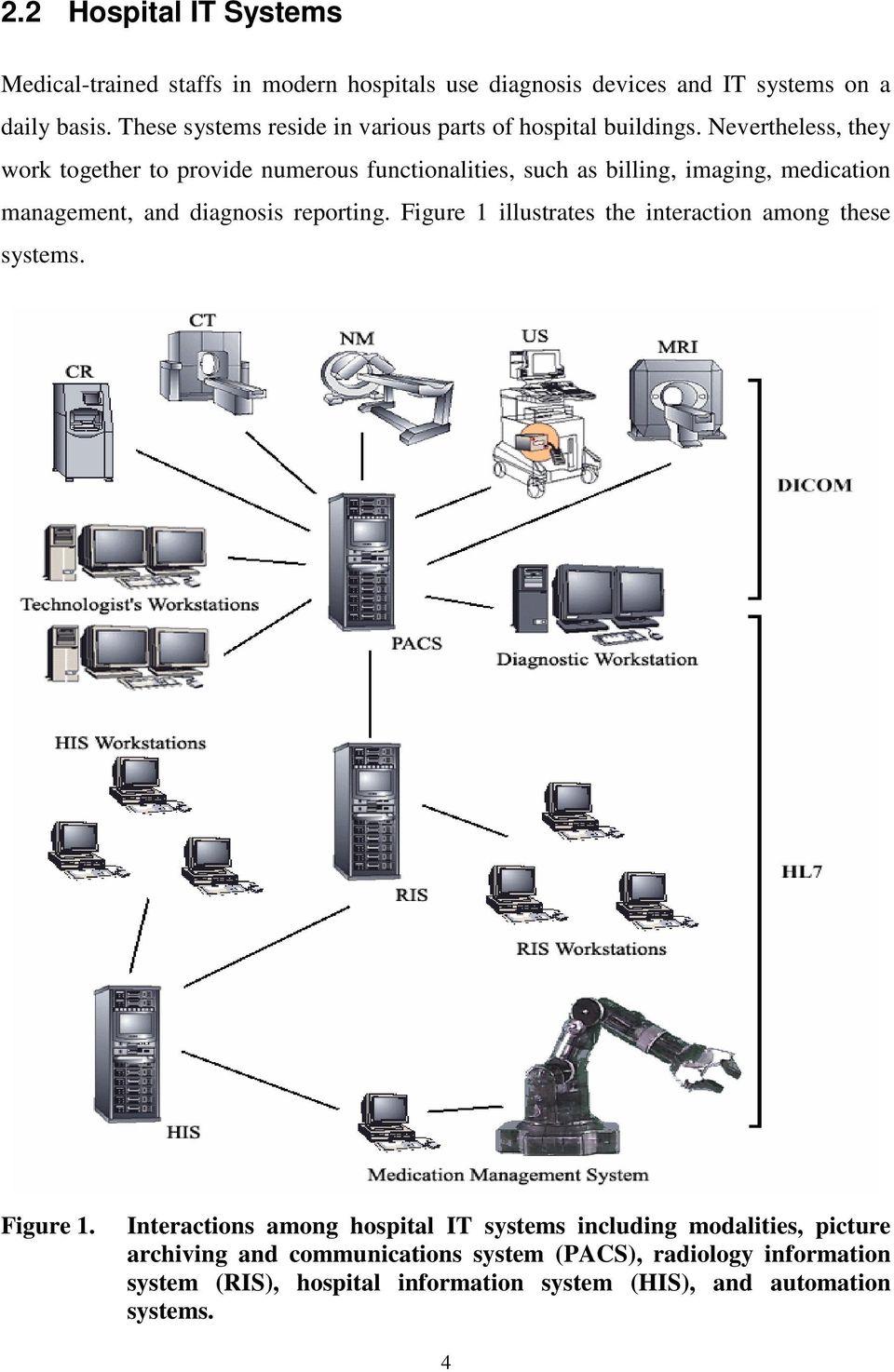
16 2.2.1 Hospital Information System (HIS) HIS is used for administrating hospital and managing clinical processes. It is also called ADT because the Admission, Discharge, and Transfer of patients information are recorded via the HIS interface. When a patient is admitted to a hospital, demographic information concerning the patient is entered into HIS. This information is sent automatically and electronically to RIS, PACS, and modalities. As a result, typing errors of patient demographic information at numerous IT systems and diagnostic devices are minimized. Another benefit of HIS is its billing capability to automatically record charges to various services including bed, lab tests conducted, medicine used, consultation fee, food, and beverages [19]. In some hospitals, HIS may also connect to numerous automation systems to improve productivity and patient safety Automation Systems Automation technologies employed in hospitals are typically used for medication management processes and patient administration. These technologies are usually based on bar code scanning to reduce medication errors and increase patient safety. For example, some hospitals automate the entire medication management processes that include prescribing, packaging, and dispensing medication without human intervention. Caregivers may then utilize a wireless device with a bar code scanner to verify the correct dosage of medication for a patient [17]. Hospitals can guarantee to provide high quality patient care with these automation systems Radiology Information System (RIS) RIS is used in the radiology department for tracking and managing patients, films, and supplies. When a physician requests the technologist to perform a scan on a patient, the scheduled procedures will be ordered through RIS. The procedures and the patient demographic information are immediately sent to PACS in electronic form. This information is also sent to the modality upon the request from the scanner. Through RIS, patient demographic information can be reconciled and updates are automatically 5

17 propagated to PACS and modalities. RIS enables the administration and clinical workflow in the radiology department to be performed in a more efficient manner Picture Archiving and Communications System (PACS) PACS is used to help hospitals to capture, manage, store, and view diagnostic images. The diagnostic images are generated from modalities and are sent to PACS in electronic form after the scan. Upon receiving the diagnostic images via PACS, technologists may review and validate the images with the performed procedures. After the review and validation, radiologists may start reading the images and performing the diagnosis. This scanning-reviewing-reporting process used to take more than an hour with traditional films. PACS shortens this process to less than five minutes, thereby enabling patients to promptly receive proper treatments. Another benefit of using PACS is time saving, since radiologists no longer need to sort and handle films. Instead, they can now fully devote their times to read images and report the diagnosis using PACS [2] Modalities Modality is another name for diagnostic imaging device, which allows physicians to make accurate diagnosis by revealing interiors of the human body without anatomical procedures. Various types of modalities can easily be found in modern hospitals, such as MRI, CT, CR, US, PET, and NM. The diagnostic images generated from these modalities have distinctive characteristics. For example, CR focuses the x-rays on the patient plane while CT aims the x-rays on the cross-section plane of the patient. Furthermore, MRI images provide the best contrast between normal and damaged tissues [22] while NM images are ideal for showing the presence and size of abnormalities in the body organ [23]. With the availability of these medical imaging technologies, a physician can request different kinds of scans to obtain anatomic views of the patient in order to make the most accurate diagnosis. Fifteen years ago, radiologists would only receive x-ray films a few hours after the scan was performed. With the introduction of PACS, radiologists and physicians can immediately access these images at a workstation. 6
18 2.3 Communication Protocols and Integration Framework Within a hospital, IT systems and diagnostic devices convey information with each other through multiple communication protocols. In the radiology department, Digital Imaging and Communications in Medicine (DICOM) and Health Level Seven (HL7) are used for communication among RIS, PACS, and modalities. Nevertheless, these protocols are not sufficient for successful integration among hospital systems built from different vendors. Consequently, Integrating the Healthcare Enterprise (IHE) started in 1998 to address the integration issue commonly seen in hospital workflow Digital Imaging and Communications in Medicine (DICOM) DICOM is a network protocol used in hospitals. The emergence of this protocol marks the beginning of digital evolution of medical imaging industry. The DICOM standard facilitates interoperability among medical imaging devices from different vendors. This standard defines the network communication layer for message exchange, the syntax and semantics of commands and associated information, and the file storage format. This protocol is widely used by diagnostic devices and PACS for exchanging images and associated patient information Health Level Seven (HL7) HL7 is another important communication protocol used in hospitals. This standard provides the groundwork for encoding and exchanging health care information of a patient among different hospital systems using the TCP/IP network. With this standard, patient record, order entry, and financial information can be passed to HIS, RIS, and PACS without human intervention. However, HL7 do not provide any support of imaging data Integrating the Healthcare Enterprise (IHE) IHE is an initiative started by healthcare professionals and medical vendors to improve integrations among diagnostic devices and hospital IT systems. The DICOM and HL7 standards are already used by hospital equipment for communications. Nevertheless, the 7

19 interpretations of these standards vary somewhat from vendor to vendor. Consequently, integration of hospital equipments made by multiple vendors may pose some challenges. IHE resolves these conflicting interpretations by first identifying common integration problems in administration, clinical workflow, information access, and underlying infrastructure. IHE then selects standards to address integration needs and the implementation details of using these standards are subsequently documented in the IHE Technical Framework. When medical vendors develop their products according to this framework, integration in hospitals with these medical systems will be simpler [15]. 2.4 Hospital Workflow Hospital workflow is defined as the process and information flow of patient care within a hospital. A typical hospital workflow is presented in Figure 2, where the communication protocol used for each transaction is also identified. The demographic information of a patient is entered into HIS by the admission department as soon as the patient arrives, and the information is subsequently forwarded to RIS. Should the patient require a scan, procedures are scheduled through RIS and forwarded to PACS. Prior to the scan, the modality performs a query with RIS to obtain the worklist, which contains patient demographic and scheduled procedure information. After the scan, the modality sends the diagnostic images to PACS for storage. The modality also sends a scan-completed message, known as Modality Performed Procedure Step (MPPS), to PACS. In order for RIS to realize the status of the scheduled procedures, PACS redirects the MPPS message to RIS. The modality then sends the storage commitment message to PACS to verify that the entire set of images was properly saved in PACS. RIS also queries PACS to confirm the existence of these images. After the confirmation, RIS sends the order update message to HIS so that the imaging charge is posted to the patient s account. 8
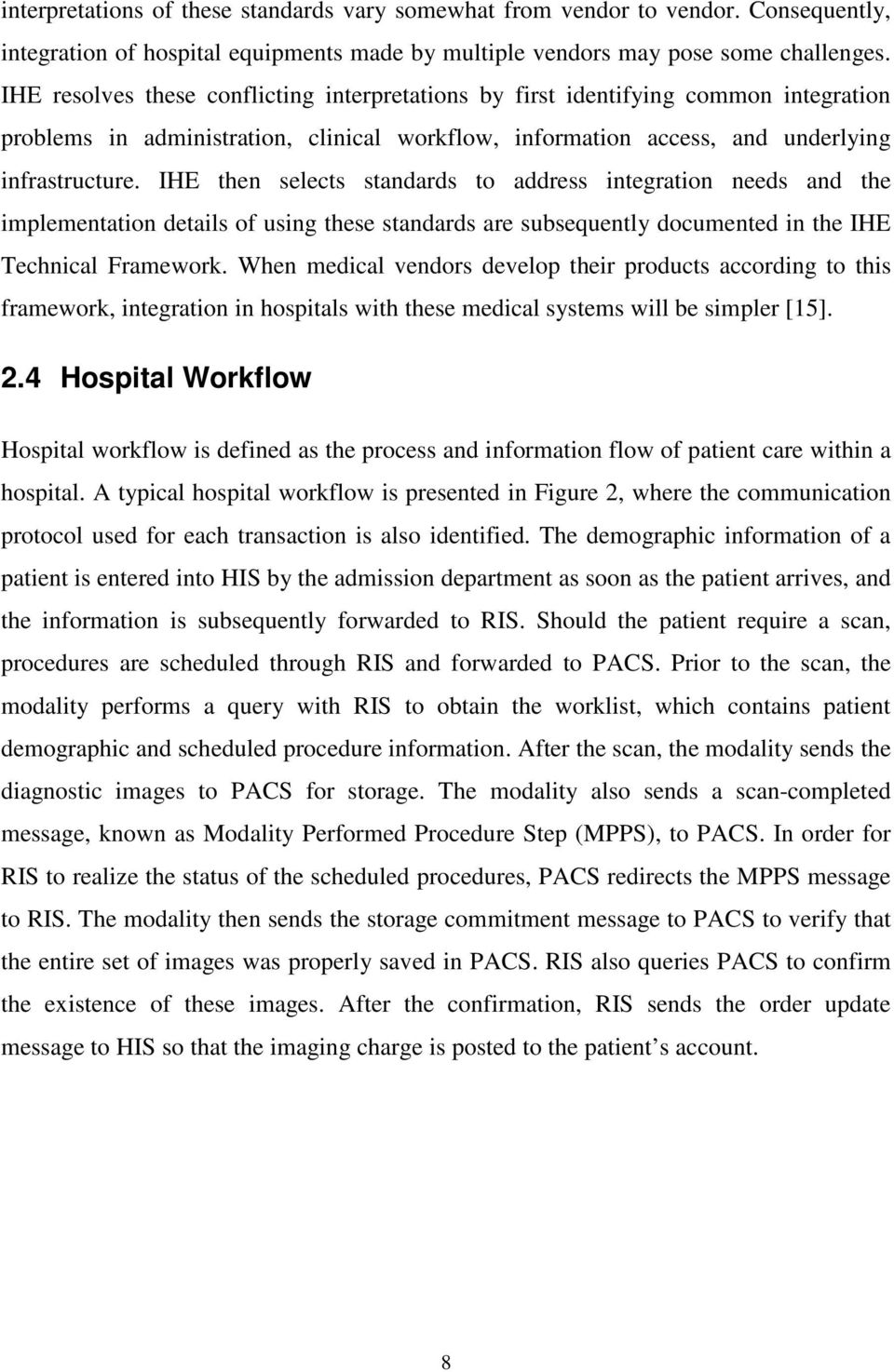
20 HIS RIS PACS Acquisition Modality Patient 1) Admit to hospital and register to HIS 2) Forward patient demographic information to RIS (HL7) 3) Schedule procedure 4) Forward scheduled procedure (HL7) 5) Query for the modality worklist / scheduled procedures (DICOM) 6) Images Acquired 7) Modality Images Stored (DICOM) 8) Modality Procedure Step Completed (DICOM) 9) Forward Modality Procedure Step Completed (DICOM) 10) Storage Commitment (DICOM) 12) Cost information updated (HL7) 11) Images Availability Query (DICOM) Figure 2. Illustration of a typical hospital workflow: process and information flow of patient care within a hospital. 9

21 3 Digital Imaging and Communications in Medicine DICOM is the foundation of PACS because every transaction between a modality and PACS uses DICOM. Without DICOM, modalities do not have a common interface to communicate with PACS, and integration of PACS into a hospital s network becomes impossible. Since this project involves development to PACS, DICOM is examined in detail here. DICOM is built on top of the TCP/IP protocol stack to facilitate communications, as shown in Figure 3. Above the TCP/IP layer, DICOM Upper Layer Protocol and DICOM Application Message Exchange can be found. Furthermore, the DICOM Upper Layer Service is defined between these two layers to act as a bridge. Medical Imaging Application Medical Imaging Application DICOM Applicaton Message Exchange DICOM Applicaton Message Exchange Upper Layer Service Boundary DICOM Upper Layer Protocol for TCP/IP TCP/IP DICOM Upper Layer Protocol for TCP/IP TCP/IP Network Network Figure 3. DICOM network protocol stack on top of the TCP/IP network [12]. 3.1 DICOM Upper Layer Service The DICOM Upper Layer (UL) Service provides generic network interfaces that can be employed by the application entities (AEs) for exchanging DICOM messages. AEs are medical imaging applications that are capable of performing DICOM communications. 10
22 These UL Services include A-ASSOCIATE, A-RELEASE, A-ABORT, A-P-ABORT, and P-DATA A-ASSOCIATE The A-ASSOCIATE service is used to establish an association between two AEs. This service is a confirmed type, where the acceptor will reply with the A-ASSOCIATE response after receiving the A-ASSOCIATE indication from the initiator of the service, as shown in Figure 4. A-ASSOCIATE Request Requestor DICOM UL Service Provider Acceptor A-ASSOCIATE Indication A-ASSOCIATE Confirmation A-ASSOCIATE Response Service Access Point Service Access Point Figure 4. Association establishment of two AEs via A-ASSOCIATE service [12]. Several parameters are negotiated between AEs at association establishment. The key parameters include calling/called AE titles, calling/called presentation addresses, and presentation context list. Calling/called AE titles are employed to identify application entities of the requestor and acceptor while calling/called presentation addresses are used to specify the IP addresses of the requestor and acceptor. Presentation context list item consists of the identification, abstract syntax name, and a list of transfer syntaxes. Abstract syntax governs what Service-Object Pair (SOP) instances may be exchanged between AEs while the transfer syntax defines what compression formats may be applied on the instances. The definition of SOP contains the rules, semantics, and services for the instance. Two types of SOP class are defined in DICOM: Composite SOP Class and Normalized SOP Class. Composite SOP Class allows multiple information models embedded within the instance. Normalized SOP Class only allows one information 11
23 model. For example, a diagnostic image file (e.g., CT image) belongs to the Composite SOP Class, which usually contains patient information, study information, and the pixel data. Print queue belongs to the Normalized SOP Class, which only contains print job related information A-RELEASE The A-RELEASE service is used by the AEs to gracefully release the DICOM association. This service is a confirmed type, as illustrated in Figure 5. Either one of the AEs may initiate this service. Parameters for this service include reason and result, with respective fixed values of normal and affirmative. A-RELEASE Request Requestor DICOM UL Service Provider Acceptor A-RELEASE Indication A-RELEASE Confirmation A-RELEASE Response Service Access Point Service Access Point Figure 5. Association release of two AEs via A-RELEASE service [12] A-ABORT and A-P-ABORT The DICOM UL Service contains two interfaces, A-ABORT and A-P-ABORT, for aborting the association. The A-ABORT service should be used by either one of the AEs to signal abnormal termination of an association. The A-P-ABORT service should be employed by the DICOM UL service provider to terminate associations due to errors detected below the DICOM Upper Layer Service Boundary. Both services are nonconfirmed type, as shown in Figure 6 and Figure 7. 12
24 A-ABORT Request DICOM UL Service Provider A-ABORT Indication Service Access Point Service Access Point Figure 6. User association abortion of two AEs via A-ABORT service [12]. A-P-ABORT Indication DICOM UL Service Provider A-P-ABORT Indication Service Access Point Service Access Point Figure 7. UL service provider association abortion via A-P-ABORT service [12] P-DATA The P-DATA service is used to exchange DICOM messages between two AEs. This service is a non-confirmed type, as illustrated in Figure 8. P-DATA Request DICOM UL Service Provider P-DATA Indication Service Access Point Service Access Point Figure 8. Data transfer between two AEs via P-DATA service [12]. Both AEs may employ this service to initiate bi-directional communications. The presentation data value list, which contains multiple presentation data values (PDV), is a key parameter in this service. Each PDV contains the presentation context ID and user 13
25 data value fields. The presentation context ID specifies the abstract syntax and transfer syntax applied on the DICOM message. This message is sent to the destination AE via the user data value field. The DICOM message is discussed in Section DICOM Upper Layer Protocol Every successful DICOM connection consists of three stages: association establishment, data transfer, and association release. The A-ASSOCIATE service is used during the association establishment stage. The data transfer stage employs the P-DATA service. The association release stage utilizes one of the A-RELEASE, A-ABORT, and A-P- ABORT services. All of these DICOM UL services are supported by the DICOM upper layer protocol, which consists of seven Protocol Data Units (PDUs). These PDUs include A-ASSOCIATE-RQ PDU, A-ASSOCIATE-AC PDU, A-ASSOCIATE-RJ PDU, P- DATA-TF PDU, A-RELEASE-RQ PDU, A-RELEASE-RP PDU, and A-ABORT PDU. These PDUs are encoded using Big Endian byte ordering, and the structures of these PDUs are shown in Figure 9, Figure 10 and Figure 11. Note that all field sizes are measured in bytes. PDU Type is set to 01H for the A-ASSOCIATE-RQ PDU, 02H for the A-ASSOCIATE- AC PDU, and 03H for the A-ASSOCIATE-RJ PDU. These three PDUs are used by the A-ASSOCIATE service to facilitate association establishment. PDU Type is set to 05H for A-RELEASE-RQ PDU and 06H for A-RELEASE-RP PDU. The A-RELEASE service employs these two PDUs to gracefully release the association. The A-ABORT and A-P-ABORT services utilize the A-ABORT PDU for aborting the association, and PDU Type for the A-ABORT PDU is set to 07H. P-DATA PDU is used for data transfer, and PDU Type for this PDU is set to 04H. DICOM messages are encapsulated and exchanged between AEs using the P-DATA PDU. When a DICOM message is larger than the negotiated PDU size, the message is split into multiple Command or Data fragment. Each fragment and the message control header are placed into a PDV. A series of PDVs embedded into the PDUs are sent sequentially to preserve the fragment orders in the message. The destination AE recognizes the end of the PDV stream by examining the second least significant bit of the 14
26 message control header. The bit is set to 1 to indicate the last fragment of the DICOM message, and the bit is set to 0 to indicate other fragments. When the destination AE receives the last PDV, all fragments are assembled back to form the DICOM message. The detailed description of each field as shown in Figure 9, Figure 10, and Figure 11 is given in DICOM Part 8: Network Communication Support for Message Exchange standard [12]. PDU Type PDU Length Protocol Version Called Entity Title Calling Entity Title (Variable Field) One or more items shown below Application Context Item Item Type Item Length Application Context (Only One) Presentation Context Item <= 64 Item Type Item Length Pres. Context ID Result/ Reason (AC Only) (One or more) (Variable Field) One or more items shown below Abstract Syntax Item Transfer Syntax Item Item Type Item Length Abstract Syntax <= 64 Item Type Item Length Transfer Syntax <= 64 (Only one in RQ) (Not present in AC) (One or more in RQ) (Only one in AC) User Info Item Item Type Item Length (Variable field) One or more items shown below (Only one) Maximum Length Item Item Type Item Length Maximum Length Received (Only one) Figure 9. A-ASSOCIATE-RQ/A-ASSOCIATE-AC PDU encoding structure used during association establishment [12]. 15
27 These fields may not be used depending on the specific PDU PDU Type PDU Length Result Source Reason /Diag Figure 10. A-ASSOCIATE-RJ/A-RELEASE-RQ/A-RELEASE-RP/A-ABORT PDU encoding structure used during association release [12]. PDU Type PDU Length (Variable Field) One or More Presentation Data Value Items shown below Item Length Pres. Context ID Presentation Data Value DICOM Message Command or Data Set Information 4 1 Message Control Header 1st byte Command or Data Fragment Last/Not Last Data/Command Figure 11. P-DATA-TF PDU encoding structure used during data transfer [12]. 3.2 DICOM Application Message Exchange DICOM Message Service Element DICOM AEs employ the services provided by the DICOM Message Service Element (DIMSE) for communication. The part of DICOM AE that uses DIMSE is called DIMSE-service-user. The DICOM AE can generate different DICOM application messages using various DIMSE services to convey application-specific information to the peer DIMSE-service-user. The DICOM messages are sent to the destination AE via the P-DATA PDU, as discussed in Section The DIMSE services include C-STORE, C- 16
28 FIND, C-MOVE, C-GET, C-ECHO, N-EVENT-REPORT, N-GET, N-SET, N-ACTION, N-CREATE, and N-DELETE. The descriptions of these DIMSE services are summarized in Table 1. Table 1. DIMSE Service Name C-STORE C-FIND C-MOVE C-GET Descriptions of the DIMSE services including C-ECHO, C-STORE, C-FIND, C-MOVE, C-GET, N-EVENT-REPORT, N-GET, N-SET, N-ACTION, N-CREATE, and N-DELETE. Description This service allows a DIMSE-service-user to request the storage of the Composite SOP instances to the peer DIMSEservice-user. Using this service, a DIMSE-service-user can request to match a series of attributes against the attributes in the set of the DICOM SOP instances managed by the peer DIMSE-serviceuser. The response of this service returns a list of matches containing the requested attributes and the respective values. This service allows a DIMSE-service-user to request moving the Composite SOP instances stored in the peer DIMSEservice-user to a third-party DIMSE-service-user. DIMSE-service-user can employ this service to retrieve the Composite SOP instances from the peer-dimse-service-user. Using this service, DIMSE-service-user can verify the end-to- C-ECHO end communication with the peer DIMSE-service-user. N-EVENT-REPORT This service allows the DIMSE-service-user to report an event relating to the SOP instance to the peer DIMSE-service-user. N-GET Using this service, DIMSE-service-user can retrieve information from the peer DIMSE-service-user. N-SET DIMSE-service-user can use this service to request the modification of information performed by the peer DIMSEservice-user. N-ACTION N-CREATE N-DELETE With this service, DIMSE-service-user can request the peer DIMSE-service-user to perform an action. DIMSE-service-user can request the peer DIMSE-service-user to create the SOP instance using this service. DIMSE-service-user can request the peer DIMSE-service-user to delete the SOP instance using this service. All of these DIMSE operations are confirmed services. When the invoking DIMSEservice-user sends a DIMSE service request to the performing DIMSE-service-user, a DIMSE service response should be returned, as shown in Figure
29 Invoking DIMSE- Service-User DIMSE-Service-Provider Performing DIMSE- Service-User Request Primitive Message (Command Request and the Associated Data) Indication Primitive Confirm Primitive Message (Command Response and the Associated Data) Response Primitive Figure 12. Request and response primitives found in all DIMSE operations [11] DICOM Command Set Encoding Each DICOM message must contain the Command Set followed by the conditional Data Set. Within the Command Set, various Command Elements may be found for different DIMSE services. In each Command Element, three fields can be identified: an explicit Tag, a Value Length, and a Value Field. Figure 13 illustrates the encoding of the DICOM Command Set. Detailed discussion regarding the encoding of the DICOM Data Set is provided in the DICOM Part 5: Data Structures and Encoding standard [10]. DICOM Message Command Set Data Set Command Element Tag Length Value One or more elements 4 bytes 4 bytes Variable Length Figure 13. DICOM message structure used in the DIMSE services [11]. 18
30 3.2.3 Message Fields in the DIMSE Services Value Representation (VR) specifies the data type for the Value field in the Command Element. Some common VRs include Application Entity (AE), Unique Identifier (UI), Unsigned Long (UL), and Unsigned Short (US). The maximum byte sizes for AE is 16, and while the maximum byte size for UI is 64. The UL value length must be 4 bytes, and the US value length must be 2 bytes. The most frequently used DIMSE services are C- STORE, C-FIND, and C-MOVE. The key message fields of these DIMSE services are discussed in this Section. Detailed discussions about other message fields in the DIMSE services are given in the DICOM Part 7: Message Exchange standard [11]. The message fields in the C-STORE service request include Group Length, Affected SOP Class UID, Command Field, Message ID, Priority, Data Set Type, Affected SOP Instance UID, Move Originator Application Entity Title, Move Originator Message ID, and Data Set. The key message fields are summarized in Table 2. Table 2. Key message fields in the C-STORE service request [11]. Message Field Tag VR Description of Field Command Field (0000,0100) US This field should be set to 0001H for the C-STORE-RQ message. Message ID (0000,0110) US This field contains implementationspecific value. It distinguishes this message from other messages. Priority (0000,0700) US The priority shall be set to one of the following values: LOW = 0002H MEDIUM = 0000H HIGH = 0001H Data Set Type (0000,0800) US This field indicates that the Data Set field exists in the message, and the value should be set to anything other than 0101H. Move Originator Application Entity Title (0000,1030) AE Contain the DICOM AE Title of the C- MOVE requestor Move Originator Message ID (0000,1031) US Contains the Message ID (0000,0110) of the C-MOVE-RQ Message fro which this C-STORE sub-operations is being performed. Data Set (No tag) - Application-specific Data Set 19
31 The message fields in the C-STORE service response include Group Length, Affected SOP Class UID, Affected SOP Instance UID, Command Field, Message ID Being Responded To, Data Set Type, and Status. The key message fields are summarized in Table 3. Table 3. Key message fields in the C-STORE service response [11]. Message Field Tag VR Description of Field Command Field (0000,0100) US This field should be set to 8001H for the C-STORE-RSP message. Message ID Being Responded To (0000,0120) US Shall be set to the value of the Message ID (0000,0110) field used in associated C-STORE-RQ Message. Data Set Type (0000,0800) US This field indicates that the Data Set fields is not present in the message, and the value should be set to 0101H. Status (0000,0900) US This field provides the status of the C-STORE service. For example, A7xx implies that the performing DIMSEservice-user refuses the operation due to out-of-resources. The message fields in the C-FIND service request include Group Length, Affected SOP Class UID, Command Field, Message ID, Priority, Data Set Type, and Identifier. The key message fields are shown in Table 4. Table 4. Key message fields in the C-FIND service request [11]. Message Field Tag VR Description of Field Command Field (0000,0100) US This field should be set to 0020H for the C-FIND-RQ message. Message ID (0000,0110) US This field contains implementationspecific value. It distinguishes this message from other messages. Priority (0000,0700) US The priority shall be set to one of the following values: LOW = 0002H MEDIUM = 0000H HIGH = 0001H Data Set Type (0000,0800) US This field indicates that the Data Set field exists in the message, and the value should be set to anything other than 0101H. Identifier (No tag) - A Data Set that encodes the identifier for matching. 20
32 The message fields in the C-FIND service response include Group Length, Affected SOP Class UID, Command Field, Message ID Being Responded To, Data Set Type, Status, and Identifier. The key message fields are shown in Table 5. Table 5. Key message fields in the C-FIND service response [11]. Message Field Tag VR Description of Field Command Field (0000,0100) US This field should be set to 8020H for the C- FIND-RSP message. Message ID Being Responded To (0000,0120) US Shall be set to the value of the Message ID (0000,0110) field used in associated C-FIND-RQ Message. Data Set Type (0000,0800) US This field indicates that the existence of the Data Set fields in the message. If the Data Set field is present, the value should be set anything other than 0101H. Otherwise, the value should be set to 0101H. Status (0000,0900) US This field provides the status of the C- FIND service. For example, FF00 implies that the performing DIMSE-service-user is still continuing on matching. Hence, additional C-FIND-RSP messages will arrive. Identifier (No tag) - A Data Set that encodes the identifier for each matching item. The message fields in the C-MOVE service request include Group Length, Affected SOP Class UID, Command Field, Message ID, Priority, Data Set Type, Move Destination, and Data Set. The key message fields are summarized in Table 6. Table 6. Key message fields in the C-MOVE service request [11]. Message Field Tag VR Description of Field Command Field (0000,0100) US This field should be set to 0021H for the C-MOVE-RQ message. Message ID (0000,0110) US This field contains implementationspecific value. It distinguishes this message from other messages. Priority (0000,0700) US The priority shall be set to one of the following values: LOW = 0002H MEDIUM = 0000H HIGH = 0001H 21
33 Message Field Tag VR Description of Field Data Set Type (0000,0800) US This field indicates that the Data Set field exists in the message, and the value should be set to anything other than 0101H. Move Destination (0000,0600) AE This field should be set to the DICOM AE Title of the storage destination for which the C-STORE sub-operations are being performed. Identifier (No tag) - A Data Set that encodes the identifier for matching. The message fields in the C-MOVE service response include Group Length, Affected SOP Class UID, Command Field, Message ID Being Responded To, Data Set Type, Status, Number of Remaining Sub-operations, Number of Complete Sub-operations, Number of Failed Sub-operations, Number of Warning Sub-operations, and Identifier. The key message fields are summarized in Table 7. Table 7. Key message fields in the C-MOVE service response [11]. Message Field Tag VR Description of Field Command Field (0000,0100) US This field should be set to 8021H for the C-MOVE-RSP message. Message ID Being Responded To (0000,0120) US Shall be set to the value of the Message ID (0000,0110) field used in associated C-MOVE-RQ Message. Data Set Type (0000,0800) US This field indicates that the existence of the Data Set fields in the message. If the Data Set field is present, the value should be set anything other than 0101H. Otherwise, the value should be set to 0101H. Status (0000,0900) US This field provides the status of the C- MOVE service. For example, FF00 implies that the performing DIMSEservice-user is still continuing to move images to destination storage. Hence, additional C-MOVE-RSP messages will arrive. Identifier (No tag) - A Data Set that encodes the status information of the C-MOVE operation. 22
34 Section 3.2.4, Section 0, and Section discuss the frequently used application-level services available to the DICOM AEs, and these services include storage, query, and retrieve services Storage Service Class Storage service class is used to send Composite SOP instances from one DICOM AE to another. During the transfer, one AE takes on the Service Class User (SCU) role, which is responsible for sending. The peer AE performs as the Service Class Provider (SCP) role, which is responsible for receiving. The implementation of this storage service class employs the C-STORE DIMSE service. Figure 14 displays the message exchanges and PDU transactions between a modality and PACS for the storage service. CT PACS A-ASSOCIATE-RQ A-ASSOCIATE-AC Sending first image P-DATA (C-STORE-RQ) P-DATA (C-STORE-RSP) Sending second image P-DATA (C-STORE-RQ) P-DATA (C-STORE-RSP) A-RELEASE-RQ A-RELEASE-RP Figure 14. Storage transaction between a CT imaging device and PACS: CT sends two images to PACS. CT performs the SCU role while PACS takes on the SCP role in the storage transaction example. The association is negotiated via the A-ASSOCIATE service before CT sends 23
35 the diagnostic images to PACS. After the association is established, each image is transferred from CT to PACS using C-STORE-RQ and C-STORE-RSP messages embedded in the P-DATA PDU. When the modality has no more images to send, the A- RELEASE service is employed to terminate the storage transaction Query Service Class DICOM defines the query service class for one DICOM AE to perform Composite SOP instance information queries against another. The DICOM AE that sends the query requests takes on the SCU role while the peer AE that replies with the matching results performs the SCP role. The C-FIND DIMSE service is employed in the implementation of this query service class. Figure 15 shows the message exchanges and PDU transactions between a review workstation and PACS for the query service. Review Workstation PACS A-ASSOCIATE-RQ A-ASSOCIATE-AC P-DATA (C-FIND-RQ) P-DATA (C-FIND-RSP) P-DATA (C-FIND-RSP) P-DATA (C-FIND-RSP) P-DATA (C-FIND-RSP) Returning First match Returning Second match Returning Third match End of query matches A-RELEASE-RQ A-RELEASE-RP Figure 15. Query transaction between a review workstation and PACS: PACS returns three matching results to the review workstation. 24
36 The review workstation acts as the SCU while PACS operates as the SCP in the query transaction example. The A-ASSOCIATE service is employed to establish the association, and the A-RELEASE service is utilized to tear down the connection. The query request is sent from the review workstation to PACS using the C-FIND-RQ message embedded in the P-DATA PDU. After PACS executes the search, each matching result is returned back to the review workstation through one C-FIND-RSP message with the status value of FF00H. When PACS does not have any more matching result, the final C-FIND-RSP message with status value of 0000H is returned Retrieve Service Class DICOM defines the retrieve service class for one DICOM AE to instruct the peer AE for transferring Composite SOP instances to another AE. This retrieve service class employs both C-MOVE DIMSE and C-STORE DIMSE services. In the retrieve transaction example shown in Figure 16, the review workstation takes on both the SCU role of the C- MOVE DIMSE service and the SCP role of the C-STORE DIMSE service. PACS performs the SCP role of the C-MOVE DIMSE service and the SCU role of the C- STORE DIMSE service. Before the review workstation sends the retrieve request to PACS, the association is negotiated via the A-ASSOCIATE service. After the association is established, the review workstation may request to retrieve a list of images from PACS using the C-MOVE-RQ message. Soon after receiving the request, PACS identifies the instances, and prepares to transfer those instances to the review workstation by creating an additional association through the A-ASSOCIATE service. With this new association, PACS sends each image to the review workstation using the C-STORE-RQ and C- STORE-RSP messages embedded in the P-DATA PDU. After each image transfer, the C- MOVE-RSP message with the status value of FF00H is returned to the review workstation via the original association. When PACS does not have any more images to send, the final C-MOVE-RSP message with status value of 0000H is also returned. To finish off the retrieve transaction, the two associations are torn down using the A- RELEASE service. 25
37 Storage AE Review Workstation Query/Retrieve AE PACS A-ASSOCIATE-RQ A-ASSOCIATE-AC P-DATA (C-MOVE-RQ) A-ASSOCIATE-RQ A-ASSOCIATE-AC P-DATA (C-STORE-RQ) Sending First Image P-DATA (C-STORE-RSP) P-DATA (C-MOVE-RSP) P-DATA (C-STORE-RQ) Returning First Response Sending Second Image P-DATA (C-STORE-RSP) P-DATA (C-MOVE-RSP) P-DATA (C-MOVE-RSP) Returning Second Response End of Retrieve Response A-RELEASE-RQ A-RELEASE-RP A-RELEASE-RQ A-RELEASE-RP Figure 16. Retrieve transaction between a review workstation and PACS: review workstation retrieves two matching images from PACS. 26
38 3.3 DICOM Files DICOM files are Composite SOP instances stored on the media, such as hard drive. The Composite SOP instance is an instance of the Composite Information Object Definition (IOD), where Composite IOD is made up of many related object-oriented abstract data models used to specify the information of the real-world objects. Examples of these object-oriented abstract data models are the Patient, General Study, General Series, General Image, Overlay Plane, MR Image, and CT Image module. Each Composite IOD has different usage requirements on the abstract data models, and these usage requirements include mandatory, conditional, and user option. When a DICOM file is declared to conform to the Composite IOD, all mandatory abstract data models must be present. Furthermore, the conditional abstract data models should exist if the specific condition is met. Abstract data models defined for the CT images are shown in Table 8. Table 8. Abstract data models used in the CT image IOD [9]. Information Entity Module Usage Patient Patient Mandatory Clinical Trail Subject User Option Study General Study Mandatory Patient Study User Option Clinical Trail Study User Option Series General Series Mandatory Clinical Trail Series User Option Frame of Reference Frame of Reference Mandatory Equipment General Equipment Mandatory Image General Image Mandatory Image Plane Mandatory Image Pixel Mandatory Contrast/Bolus Conditional: required if contrast media was used in this image CT Image Mandatory Overlay Plane User Option VOI LUT User Option SOP Common Mandatory 27
39 Various attributes are defined for conveying the instance value within each objectoriented abstract data model. These attributes may or may not be required in the Data Set depending on the attribute type: Type 1: this attribute must exist with valid and non-zero length data. Type 1C: when the specified conditions are met, this attribute must exist with valid and non-zero length data. Type 2: this attribute must exist, but the value can be zero length when unknown. Type 2C: when the specified conditions are met, this attribute must exist. However, the value can be zero length when unknown. Type 3: this attribute is optional, and the value can be zero length. Frame of Reference module attributes are shown in Table 9. Table 9. Attributes used in the frame of reference module [9]. Attribute Name Tag Type Attribute Description Frame of Reference UID (0020,0052) 1 Uniquely identifies the frame of reference for a Series. Position Reference Indicator (0020,1040) 2 Part of the patient's anatomy used as a reference, such as the iliac crest, orbitalmedial, sternal notch, symphysis pubis, xiphoid, lower coastal margin, external auditory meatus. Information about other IODs and module attributes are provided in the DICOM Part 3: Information Object Definitions standard [9]. 28
40 4 Simple Network Management Protocol Network management plays a crucial role in sustaining the health of a network. By monitoring and controlling devices within a network, problems can be efficiently resolved and in some cases completely avoided. As a network expands to account for more users and applications, information gathered via network management facilitates the plan for network growth. In the early days of network management where networks were typically small, retrieving network information was not difficult with the use of low-level link layer protocols. As new link-layer technologies were introduced and networks grew in sizes, this traditional method of network management was not possible. To support for growing heterogeneous networks, SNMP was introduced. SNMP is a simple application-layer protocol designed for the exchange of information between network devices. 4.1 History of SNMP Throughout the 1970s when the Transmission Control Protocol/Internet Protocol (TCP/IP) was being developed, network management was not a big concern because networks were typically small and were situated in a centralized location. The one network management tool that was effectively used was the Internet Control Message Protocol (ICMP). The echo/echo-reply capability of ICMP allowed for simple communications between network devices. One notable example of this application was the Packet Internet Groper Program (PING), which is a useful tool to monitor the operational status of network devices. However, as networks expand in sizes and become geographically diverse, the primitive capabilities offered by ICMP were not sufficient to monitor every device on a network. The first set of standardized protocol designed specifically for network management was the Simple Gateway Monitoring Protocol (SGMP). Issued in 1987, SGMP outlined the network management framework and provided a simple means to monitor gateways. This protocol served as an interim response to address network monitoring while more 29
41 advanced protocols were being developed. In particular, three general-purpose network management concepts were being proposed: High-Level Entity Management System (HEMS): o Focused on extensive definition of network management information Simple Network Management Protocol (SNMP): o Extended SGMP to include management capabilities Common Management Information Protocol over TCP/IP (CMOT): o Concentrated on network management compliancy to the International Organization for Standardization (ISO) Three proposals were carefully analyzed by the Internet Activities Board (IAB) and the results were presented in the Request for Comment (RFC) The HEMS proposal was withdrawn because too much effort would be required for the implementation. The IAB favored CMOT over SNMP due to its conformity with ISO. However, because CMOT specifications have not yet been finalized, SNMP was selected as the short-term solution before the long-term solution (CMOT) becomes available. Due to the simplicity nature of the protocol, SNMP was rapidly adapted. By the time CMOT was finalized, SNMP has been widely deployed within the Internet. Hence, in May 1990, the IAB promoted SNMP as the standard for network management [1]. 4.2 SNMP Features The success of SNMP can be attributed by the feature sets offered by this simple protocol. The following list presents the benefits of SNMP: lightweight portable extensible standardized SNMP is a simple lightweight protocol designed to minimize the performance impact on the operating device. It requires very little system and network resources, resulting in minimal implementation costs. SNMP was developed independent of the operating system and the programming language, and hence, it is portable across various platforms. 30
42 The core set of SNMP operations is not dependent on the operating devices. The protocol can be easily extended to support new devices and new management information. SNMP is a non-proprietary protocol, clearly defined and actively maintained by the IAB. 4.3 SNMP Architecture The main components of the SNMP architecture consist of the SNMP agent and the SNMP manager. Figure 17 illustrates a typical arrangement of these components. Bridge (SNMP Agent) IP Network Router (SNMP Agent) SNMP Manager PACS (SNMP Agent) Figure 17. SNMP architecture: a SNMP manager manages several SNMP agents. SNMP agents are programs residing in devices that require network management. For instance, network devices such as routers, bridges, and hubs are often equipped with SNMP agents. These SNMP agents offer the capability to retrieve and modify management information from network devices. Furthermore, these SNMP agents can be programmed to transmit unsolicited information when something noteworthy occurs. The SNMP manger controls the type of information that is retrieved and modified at the SNMP agent. Typically residing in a computer, the SNMP manager provides a user 31
43 interface to control and monitor the network management process. Since communications between the SNMP manager and the SNMP agents are asynchronous, the SNMP manager can send multiple requests without receiving a response Management Information Base and Object Identifiers To group and uniquely identify the vast amount of information that is maintained via SNMP, Object Identifier (OID) was introduced. OIDs are numerical strings that are analogous to telephone numbers where digits are hierarchically organized. Each number of an OID represents a specific branch of the management structure. For example, the first number of an OID is used to identify the standards organization. Currently, there are three main branches dealing with standards: Consultative Committee for International Telegraph and Telephone (CCITT), International Organization for Standardization (ISO) and joint ISO/CCITT. Most current network management activities occur in the ISO branch, with the OID dedicated for the Internet community. OIDs are used to represent two types of managed objects: scalar and tabular. Scalar objects represent single object instances whereas tabular objects combine multiple related managed objects into a single table. The last number of an OID can distinguish two different kinds of objects. A value of 0 designates a scalar object whereas a non-zero value denotes an index into a table. During the network setup stage, OIDs are known to both the SNMP manager and the SNMP agents. When the SNMP manager wishes to query the network device for specific information, it includes the corresponding OID in the management request. Upon receiving the request, the SNMP agent interprets the OID and responds with the value of the requested parameter. For example, to query the available processor memory on a Cisco switch, the SNMP manager initiates an SNMP request containing the OID [16]. Upon receiving the request, the Cisco switch examines its internal memory pool and generates the corresponding response. Although OIDs are useful for accessing managed objects, the numerical nature of these identifiers makes it difficult for humans to interpret. Thus, group of OIDs are combined 32
44 to form a Management Information Base (MIB). MIB is a flat text file containing translations of OIDs to a human-readable format. Typically represented by an abstract tree with an unnamed root, each managed object is represented by the leaves of the tree. Figure 18 provides an example of a MIB tree. All SNMP parameters that are accessible in Cisco products are derived from the root of the Cisco node with an OID of C C IT T 0 IS O 1 C C IT T /IS O 2 O R G 3 D O D 6 In te rn e t 1 P rivate 4 E n te rp rise 1 C is co 9 Figure 18. Example of an MIB structure for a Cisco router [8]. 33
45 To access a MIB tree, it must be installed by both the SNMP manager and the SNMP agent. Installing a MIB involves placing the MIB in a location accessible by the SNMP module for OID translation. Due to the extra overhead involved in installing a MIB, many network applications work strictly with OIDs. 4.4 SNMP Operations The basic SNMP operations follow a simple request/response procedure. The request is typically initiated by the SNMP manager, followed by a response from the SNMP agent. The initial version of the SNMP protocol, SNMPv1 as described in RFC 1157, introduces four basic SNMP operations: get, get-next, set, and trap. As illustrated in Section 4.6 and Section 4.7, newer versions of the protocol add new SNMP operations to enhance the network management process. In this Section, the four basic SNMP operations are presented Get Operation The most common application of SNMP is to retrieve information from the SNMP agent. Initiated by the SNMP manager, a get-request is sent to the SNMP agent to retrieve the current values of the managed objects. Upon receiving the request, the SNMP agent attempts to retrieve the requested value(s) from the underlying device. If the information is successfully retrieved, a get-response message is replied to the SNMP manager containing the requested information. If, however, the SNMP agent is under heavy load, the request is ignored. Processing a get request between the SNMP manager and the SNMP agent is illustrated in Figure 19. The sequence of events is: 1. The SNMP manager wishes to query the remaining processor memory on a router. It examines its internal SNMP database and determines the OID for this object. A SNMP get-request is sent to the SNMP agent with this OID. 2. Upon receiving the request, the SNMP agent retrieves the requested information from the router database. 34
46 3. The SNMP agent replies with a get-response indicating the remaining processor memory. SNMP Manager SNMP Agent 1. Get-Request 2. Retrieve Info 3. Get-Response Figure 19. Example of the SNMP get request. Although the get-request example contains only one OID, additional OIDs can be included in the request to retrieve more values. However, because the size of the getresponse message is constrained by the agent s capability, where the maximum supported message size is expected to be 484 bytes [13], a get-request with multiple OIDs may not always be processed. In these situations, the SNMP agent returns an error with no data. Details of the error codes are presented in Section Get-Next Operation The get operation presented in Section is useful for retrieving scalar objects. The get-next-request operation is designed specifically for tabular objects. The SNMP manager can use this operation to transverse through the table in a sequential order. Figure 20 illustrates one application of the get-next-request operation. The sequence of events is: 1. The SNMP manager wishes to query the routing table containing the next hop addresses in a router. It determines the OID for the first row of the routing table and generates a get-request to the SNMP agent. 2. Upon receiving the request, the SNMP agent queries the routing table and retrieves the initial next hop address. 35
47 3. The SNMP agent replies with a get-response containing the retrieved information. 4. Instead of determining the next OID to access into the routing table, the SNMP manager initiates a get-next-request using the same OID provided in Step Since the get-next-request is used to retrieve the next instance that follows the current OID, the SNMP agent, upon receiving this request, retrieves the second hop address from the routing table. 6. Similar to the response for a get operation, the SNMP agent replies with a getresponse containing the retrieved information. However, included in this response is also the OID for the second hop address of the routing table. 7. The SNMP manager extracts the OID returned in the get-response to access into the next row of the routing table. SNMP Manager SNMP Agent 1. Get-Request (first OID) 3. Get-Response (first OID) 2. Retrieve Info 4. Get-Next-Request (first OID) 6. Get-Response (second OID) 5. Retrieve Info 7. Extract second OID Figure 20. Example of the SNMP get-next request. Multiple get-next-request operations can be issued by the SNMP manager until an error is returned from the SNMP agent indicating the last entry of the table has been reached. The get-next-request operation is useful to dynamically transverse a table when the table size is unknown in advance Set Operation Apart from retrieving information on the managed objects, SNMP also provides an interface to modify values of the managed objects and to create a new row in a table. 36
48 Since different objects have different access control, not all managed objects are configurable. Figure 21 illustrates the usage of a set operation. The sequence of events is: 1. The SNMP manager wishes to modify the port speed of a router. It examines its internal SNMP database and determines the OID for this object. An SNMP setrequest is sent to the SNMP agent with this OID. 2. Upon receiving the request, the SNMP agent first verifies if the object is configurable. If write-access is available, the new setting is applied at the router. If, however, the object is read-only, an error is returned. 3. The SNMP agent replies with a get-response reflecting the modified configuration. SNMP Manager SNMP Agent 1. Set-Request 3. Get-Response 2. Configure new settings Trap Operation Figure 21. Example of the SNMP set request. While the SNMP operations discussed so far are initiated by the SNMP manager, the SNMP agent can be configured to initiate SNMP messages. The trap operation is used by the SNMP agent to asynchronously send SNMP messages to a per-defined location which is typically the SNMP manager address. The conditions that trigger trap messages are implementation-specific. Examples of the triggering events are: a network interface of the router has failed a specific port on the router has been impaired the fan on a router has failed 37
49 In contrast to other SNMP operations that employ a request/response handshaking, no acknowledgment is sent from the SNMP manager upon receiving a trap message. Hence, the trap message is especially prone to being lost when network problems arise. Figure 22 illustrates processing a trap operation. SNMP Manager SNMP Agent 1. Trap condition detected 2. Trap 4.5 SNMP Message Format Figure 22. Example of the SNMP trap request. SNMP messages are divided into two parts. The first part of the message contains the header information which varies depending on the SNMP version. The second part is the payload component which is consistent across all SNMP versions. Figure 23 illustrates the SNMPv1 message format for the get and set operations. Header Payload SNMP Version Community PDU Type Request ID Error Status Error Index Variable Bindings Figure 23. SNMPv1 get/set message format. The header component of an SNMPv1 message is composed of the version and the community field. The version field is used to ensure that both the SNMP manager and the SNMP agents are using the same SNMP version. The community field offers a weak form of authentication between the SNMP manager and the SNMP agents. Pre-defined during the setup stage, the correct community value must be provided in the SNNP request for 38
50 successful access to the managed objects. The reason why this is considered a weak form of authentication is because SNMPv1 does not support privacy. SNMP messages can be captured in the network and the community value can be easily extracted for unauthorized access. The payload component of an SNMPv1 message contains the actual SNMP protocol data unit (PDU). This second part outlines the actual SNMP operation. The PDU Type field specifies the PDU types: get-request, get-next-request, get-response, and set-request. The Request Identifier (ID) field correlates the request with the response so that multiple requests and responses can be accommodated. The Error-status field is used in conjunction with the Error-index field to relay error information. Used exclusively by the SNMP agent in a get-response PDU, these two fields identify the status of the get/set operation. Error status interpretation in SNMPv1 is described in Table 10. Table 10. SNMP error messages. Error-status Description noerror (0) No problem is encountered. Error-index is set to 0. toobig (1) Response to the request is too big to fit in a reply message. Errorindex is 0. nosuchname (2) Information for the requested OID, repeated in Error-index, cannot be found. badvalue (3) Used only in response to a set-request, this value is returned if the set operation attempted to modify an inconsistent value. Error-index specifies the OID with the conflicting format. readonly (4) Write-access to a read-only object is denied. Error-index is not defined in this scenario. generr (5) Generic error code to identify errors that can not be categorized into the above error categories. Error-index specifies the OID that triggers the error. Finally, the Variable-bindings field defines the data component of the SNMP PDU. For a get-request and a get-next-request operation, this field specifies the OID(s) of the requested information. For the set operation, this field is interpreted as an <OID=value> pair, where value identifies the new value to set for the object specified in OID. The same <OID=value> format is used in a get-response operation, except that value identifies the value of the retrieved object. 39
51 The message format for SNMPv1 trap operation is presented in Figure 24. The header component of the trap message is identical to Figure 23, with the payload re-defined for trap notifications. Header Payload SNMP Version Community PDU Type Enterprise Agent Address Generic Trap Specific Trap Time stamp Variable Bindings Figure 24. SNMPv1 trap message format. The enterprise field of a trap message identifies the type of network entity generating the trap. Typically, this field has the same value as the System Object ID (sysobjectid), which is a unique value identifying the implementer of the SNMP agent. The agentaddress field contains the IP address of the SNMP agent that triggers the trap. The generic-trap field denotes the trap category. Used in conjunction with the specific-trap and variable-bindings field, the generic-trap field defines seven traps as presented in Table 11. Generic-trap coldstart (0) warmstart (1) linkdown (2) linkup (3) authenticationfailure (4) egpneighborloss (5) enterprisespecific (6) Table 11. SNMP trap identifier. Description The SNMP agent has rebooted and all the management variables accessible via the SNMP interface may have changed. The agent has reinitialized but all the management variables accessible via the SNMP interface have been maintained. One of the communication interfaces has been disabled. The identifier of the affected interface is provided in the variablebindings field. One of the communication interfaces has been enabled. The identifier of the affected interface is provided in the variablebindings field. Received an SNMP message with an incorrect community field. An unauthorized access to the SNMP agent has been attempted. The SNMP agent has lost an Exterior Gateway Protocol (EGP) neighbor. The identifier of the peer is provided in the variable-bindings field. An enterprise-specific event has occurred. The specific-trap field can be used in conjunction with the variable-bindings field to relay enterprise-specific trap information. 40
52 4.6 SNMPv2 The rapid adaptation of SNMPv1 led to an increasing exposure of the protocol deficiencies. Some of the shortcomings include the inability to retrieve bulk data from the managed objects as well as the negligence to authentication and privacy. Thus, the second version of SNMP, namely SNMPv2, was introduced. Defined in RFC 1901 to RFC 1908, the main focus of SNMPv2 is to address the functional deficiencies of its previous version. Different variants of SNMPv2 have attempted to address the security deficiencies. However, due to the lack of consensus in the proposals, security enhancements are deferred to the next version of SNMP. In this Section, the major functional changes introduced in SNMPv2 are presented SNMPv2 Operations SNMPv1 introduces four operations for network management. While these four operations are sufficient to provide basic configuration control, they are not designed to support large-scale networked systems. Thus, two new operations are introduced in SNMPv2: get-bulk and inform Get-bulk Operation Although the get operation introduced in Section is capable of retrieving multiple values from the managed object, the SNMP agent may not be able to return the requested values due to message size constraints at the SNMP agent. In these situations, the SNMP agent simply responds with an error of toobig in the get-request message and none of the requested information is returned. Consequently, the SNMP manager must separate the requested information into different get operations to retrieve all the desired data. This process becomes very inefficient when large amounts of data are required from different managed objects. The get-bulk operation is designed specifically to address this inefficiency. Initiated by the SNMP manager, this operation informs the SNMP agent to include as much data as possible in the get-response message. This approach eliminates the need for repetitive get 41
53 or get-next operations from the SNMP manager. Figure 25 illustrates the usage of a getbulk operation. The sequence of events is: 1. The SNMP manager wishes to query the routing table containing the next hop addresses in a router. It determines the OID for the first row of the routing table and generates a get-bulk request to the agent. Detailed contents of the request is given in RFC Upon receiving the request, the SNMP agent queries the routing table and retrieves the complete list of next hop addresses. 3. The SNMP agent replies with a get-response containing the list of addresses. SNMP Manager SNMP Agent 1. Get-Bulk-Request 2. Retrieve Info 3. Get-Response (maybe incomplete responses) Inform Operation Figure 25. SNMPv2 get-bulk request example. In large-scale networked systems, multiple SNMP managers are typically used to maintain the complete infrastructure. Thus, SNMPv2 introduces the inform operation to account for the manager hierarchy. This new operation facilitates network management by allowing manager-to-manager communications. Figure 26 illustrates the usage of the inform operation. The sequence of events is: 1. A SNMP manager responsible for the backup network wishes to inform the root SNMP manager of network problems on one of its nodes. An inform message is initiated to the root SNMP manger describing the problem. 2. The root SNMP manager replies with an identical inform message indicating the successful receipt of the original message. 42
54 SNMP Manager SNMP Manager 1. Inform Message 2. Inform Message SNMPv2 Message Format Figure 26. SNMPv2 inform example. The basic message format for SNMPv2 is identical to that defined in SNMPv1. However, error handling has been expanded in SNMPv2 to account for additional error scenarios. New values, as described in Table 12, have been defined for the error-status field in SNMPv2. Table 12. SNMPv2 error messages. Error-status Description noaccess (6) Attempt to set an inaccessible variable. wrongtype (7) Wrong variable type is included in the set attempt. wronglength (8) Specified value in the set attempt exceeds the allowable size. wrongencoding (9) Wrong encoding is used in the set attempt. wrongvalue (10) Attempt to set to a value that cannot be understood. nocreation (11) Attempt to create a nonexistent variable. inconsistentvalue (12) Failed to set a variable under current circumstances (even though it can be changed under other circumstances). resourceunavailable (13) System resources are not available to process the set operation. commitfailed (14) Generic error code to catch all set errors. undofailed (15) Failed to undo all the sets operation prior to the point of failure. authorizationerror (16) Unauthorized access to the agent has been attempted. notwriteable (17) Failed to accept a set operation even though the variable is writeable. inconsistentname (18) Failed to create a new variable under current circumstances (even though it could be created under other circumstances). 43
55 Additional modifications to SNMPv2 message format were made for trap processing. To simplify traps in SNMPv2, the trap message format outlined in Figure 24 has been removed. All traps messages use identical format as the get and set PDUs. Access into tabular objects has also been enhanced in SNMPv2. A new column called RowStatus must be added to any tables that are configurable via SNMPv2. The purpose of this column is to prevent simultaneous edits by multiple managers. The value in this column reflects the accessibility of each row in a table. Due to the additional complexity in SNMPv2, implementations for SNMPv2 are typically much larger and more complicated than its SNMPv1 counterparts. Regardless, both versions of SNMP have been commonly used. However, due to the lack of security features in both protocols, its applications are typically intended for read-only access. To provide for secured and authenticated read-write access, SNMPv3 is introduced. 4.7 SNMPv3 SNMPv3 is introduced specifically to address the insecurity inherent in the previous two versions. This new version is built upon the first two SNMP versions, so it is not a standalone replacement. SNMPv3 adds authentication and privacy for network management Authentication Authentication is the process used to confirm the identity of the originating party. To incorporate authentication protocols within the SNMP infrastructure, both the SNMP manager and the SNMP agent share a secret authentication key that is typically derived using a secure hash function. Two authentication protocols have been defined for SNMPv3: the mandatory authentication protocol is HMAC-MD5-96 using the MD5 secure hash function, while the optional authentication protocol is HMAC-SHA-96 using the SHA-1 hashing algorithm. Details of these two authentication protocols are beyond the scope of this project. However, an overview of the authentication application in SNMP is provided in Figure
56 Sent Message Authentication Key Received Message Authentication Key HMAC MD5/SDA-1 HMAC MD5/SDA-1 MAC MAC Add to the message (a) Compare (b) Figure 27. SNMP message authentication: (a) send authentication process (b) receiver authentication process. Based on a shared authentication key, the originator calculates the Message Authentication Code (MAC) and adds it to the message. Upon successful authentication at the terminating party, the originator authenticity and the message integrity can be assured. Apart from providing authentication of the originator and message integrity, SNMPv3 also incorporates a timeliness functionality to prevent message tampering. A complex synchronization mechanism is used to determine the communication time with a remote engine. If a response to a message is received outside the estimated time window, the message is ignored. Typically, this acceptable time window is set to 150 seconds Privacy To provide privacy in SNMPv3, encryption protocols must be used. However, since restrictions on cryptographic technology vary between countries, privacy is optional in SNMPv3. If an SNMPv3 implementation chooses to employ encryption, the Data Encryption Standard (DES) encryption algorithm must be used. Similar to authentication processing, a privacy key must be created between the SNMP manager and the SNMP agent for encryption. This key is used to encrypt only parts of the 45
57 SNMP message. Details concerning the actual encryption process are beyond the scope of this project. However, an overview of the encryption application is presented in Figure 28. Plain Text Encryption Key Cipher Text Decryption Key DES DES Cipher Text (a) Plain Text (b) Figure 28. SNMP message encryption: (a) sender encryption process (b) receiver decryption process. Three security levels have been introduced in SNMPv3. The lowest level provides no authentication or privacy, which is equivalent to what SNMPv1 and SNMPv2 offer. The second level uses authentication but no privacy. Finally, the highest security level is imposed when both authentication and privacy is in used Access Control Both the authentication and the privacy protocols provide security functionalities at the manager and agent levels. Access control protocols, however, provide security functionalities at the PDU level. Access control protocols are used within SNMP to determine whether the managed objects can be modified by a remote entity. In SNMPv3, the access control mechanism is called View-Based Access Control Model (VACM). Introduced in RFC 2575, VACM defines access rights on a per-group basis. Different SNMP managers can be assigned with different groups, with each group being used to represent a specific security level. For example, the root SNMP manager can be granted full access rights so that all managed objects can be modified. Similarly, a different SNMP manager could be assigned to a different group so that only read 46
58 permissions are allowed. By implementing access control within the SNMP infrastructure, a more secured network management process can be created. 47
59 5 Motivation for Applying SNMP to Medical Systems Currently available PACS in the market provides very limited user interfaces. A majority of the services used in PACS are implemented as background tasks and, hence, users are not prompted upon error occurrences within PACS. Therefore, detecting and resolving errors found in PACS can be time consuming. Furthermore, since diagnostic imaging devices are typically operated by different technologists, they may not possess the necessary computing expertise to resolve issues within modalities. Thus, the time required to resolve errors found in diagnostic imaging devices can also be long. Finally, communication channels between PACS and diagnostic imaging devices may also be impaired. Since no tool is available to detect network connectivity problems between the two entities, communication impairments can be difficult to investigate. Due to high number of errors that can occur within PACS and between PACS and diagnostic imaging devices, most hospitals hire PACS administrators to manage and maintain these systems. However, because most hospitals only employ at most two PACS administrators to manage an average of 100 medical systems, bottlenecks are created if multiple systems report problems and PACS administrators are not readily available. Consequently, services from diagnostics devices may be interrupted and the patients diagnosis may ultimately be delayed. The preceding deficiencies can be overcome by integrating SNMP support within every medical system and adding a centralized management tool to monitor and control the systems. In doing so, features such as statistics collection, device configurations, and error detections can be easily added to medical devices. Consequently, these features may reduce the total cost of PACS ownership [14]. The following scenarios describe in details how the introduction of SNMP support can help to avoid or efficiently resolve the inherent problems found within medical systems. Case 1: PACS Storage Failures Diagnostic images generated by DICOM modalities are typically stored in PACS. Once the number of images in storage reaches a pre-defined maximum storage capacity, PACS 48
60 automatically moves older images to the archive system to free up storage capacity. However, if this auto-archive capability is impaired, the number of images stored within PACS will grow until the system becomes completely full and no additional images can be stored. At this time, none of the modalities can perform scans because no space is available to store new images. Consequently, patients' treatments are delayed since radiologists and physicians rely on the technology of modalities to diagnose patients. This problem can be addressed by adding SNMP support within PACS. When an archiving problem is detected, an SNMP trap message can be sent to the central management tool. By detecting the problem earlier on, the time spent on moving the backlogged images to the archive system can be avoided. Furthermore, by adding a notification trigger when an archive error is detected, the source of the problem can be identified more easily. This way, failure to send images from modalities to PACS will not be interrupted as an archiving problem by mistake. Case 2: Unacknowledged PACS Updates When sending over a large number of images such as a study comprising of over 100 images to PACS, technologists may not notice the transmission errors of a few images. If this oversight is not detected by the radiologist undergoing the diagnosis, and if the missing images actually indicate signs of abnormalities, the patient may be misdiagnosed. Then, not only is the patient s health in jeopardy, the hospital may also face lawsuits. If a centralized management tool is introduced to detect the missing images, SNMP trap messages can then be sent to the PACS administrator. The PACS administrator can subsequently notify the technologist and quickly resolve the mistake. Case 3: PACS Network Impairments During heavy network traffic, network connections between modalities and PACS may be dropped. Software applications such as Ethereal packet sniffer are used for troubleshooting network connectivity issues. However, since these tools are typically third party software applications, PACS administrators may not have the knowledge to operate them. If a centralized management tool based on SNMP is available, PACS administrators can query the network interfaces cards, routers, PACS, and modalities for 49
61 network statistics, system status, and device configurations. By doing so, network issues can be identified more quickly and problems can be resolved more efficiently. 50
62 6 Design and Implementation of PACS Monitor System Section 5 discusses the motivation of our project. This Section provides an overview of our design and implementation. The objective of this project is to develop the PACS Monitor system that performs the PACS management via the SNMP protocol. 6.1 Hardware Platform To demonstrate our development, two computers are connected via a router. One end is the PACS system from McKesson Medical Imaging Group. The other end is the developed PACS Monitor system. Figure 29 illustrates the hardware development platform. PACS System Router PACS Monitor System Figure 29. Hardware development platform. 6.2 Software Architecture Our software architecture is organized into several layers of PACS and the PACS Monitor system. In PACS, these layers include the PACS services, PACS SNMP extension agent, Microsoft SNMP service and Microsoft TCP/IP stack. In the PACS Monitor system, these layers are the PACS Monitor GUI, PACS SNMP manager, Microsoft SNMP library, Microsoft SNMP service and Microsoft TCP/IP stack. Our implementation involves the upper two layers in the PACS system and the PACS Monitor system. Only SNMPv1 is implemented since we wish to have a simple design to prove this medical device management concept. Figure 30 illustrates the software architecture. 51
63 PACS Monitor GUI PACS PACS SNMP Manager PACS SNMP Extension Agent Microsoft SNMP Library Microsoft SNMP Service Microsoft SNMP Service Microsoft TCP/IP Stack Microsoft TCP/IP Stack PACS System PACS Monitor System Our development PACS Monitor GUI Figure 30. Software architecture diagram. The PACS Monitor GUI is an executable file developed using MFC in Visual C++. As shown in Figure 31, this layer provides the graphical user interface for the PACS administrator to manage PACS. The left (system) window shows all modalities connecting to PACS. Information regarding a modality is displayed on the main screen. The bottom (trap) window notifies the PACS administrator of errors. The PACS Monitor GUI does not perform any major tasks other than calling functions that are within the underlying layer. The PACS Monitor GUI is developed using the object-oriented paradigm. The main screen is implemented using the CMainFrame class, which contains two CControlBar objects for the system window and the trap window. The object containment allows the system window and the trap window to dock on any edge of the main screen. The system 52
64 window displays the modalities using the CTreeCtrl class, while the trap window shows the error message via the CListCtrl class. Figure 32 illustrates the class containment of the PACS Monitor GUI. Figure 31. A snapshot of the PACS monitor GUI. CWinApp CMainFrame CControlBar CControlBar CTreeCtrl CListCtrl Figure 32. PACS monitor GUI class containment. 53
65 6.2.2 PACS SNMP Manager The PACS SNMP manager is a 32-bit Dynamic Link Library (DLL) developed using Visual C++. This layer is responsible for transmitting SNMP requests from the PACS Monitor system to PACS. Furthermore, the PACS SNMP manager handles the SNMP trap upon receiving a notification. To avoid possible race conditions, the DLL is implemented to allow the attachment of a single process. If a second attachment is initiated, an error dialog box will be generated. In other words, the PACS administrator cannot simultaneously open two PACS Monitor GUIs. This constraint is implemented inside the DllMain function, where the check is performed during the attachment of the PACS Monitor GUI. Upon the attachment, the PACS Monitor GUI can configure PACS and retrieve statistics via the main control loop in the PACS SNMP manager. The PACS SNMP manager hides SNMP details (such as OID) from the PACS Monitor GUI, simplifying the design of the graphical user interface. Figure 33 shows the flowchart of the main control loop in the PACS SNMP manager. First attachment? N Y Create trap thread Process request Receive close command? N Y Close trap thread Figure 33. The main control loop in the PACS SNMP manager. 54
66 During the startup process, the DLL also spawns a thread to handle SNMP traps. A new thread is necessary due to the asynchronous nature of SNMP traps. Once a SNMP trap is received, the thread notifies the PACS Monitor GUI via the registered callback function. However, the thread is terminated upon receiving a close event. Figure 34 illustrates the flowchart of the trap thread in the PACS SNMP manager. Create listen socket Wait for event Y Close event? N Process trap Figure 34. The trap thread flowchart in the PACS SNMP manager SNMP Extension Agent for PACS SNMP Extension Agent for PACS, named ADSCP_SNMP, is a DLL that works in conjunction with the SNMP Windows service. Four public functions as required by the SNMP Windows service were developed: SnmpExtensionInit(), SnmpExtensionClose(), SnmpExtensionTrap(), and SnmpExtensionQuery(). When the SNMP Windows service starts up, SnmpExtensionInit() is called to initialize the resources in ADSCP_SNMP. Similarly, SnmpExtensionClose() is invoked to release resources when the SNMP Windows service terminates. SnmpExtensionTrap() is called by the SNMP Windows service to generate a trap message to the PACS SNMP Manager upon error detection in PACS. In order for the PACS Monitor GUI to set configurations or collect statistics from 55
67 PACS, the SNMP Windows service calls SnmpExtensionQuery(). This function encapsulates the MIB tree used in the PACS system. When SnmpExtensionQuery() is called, the OID is resolved to the managed object via the MIB tree and the corresponding operation is performed on the managed object. Table 13 provides all the OIDs and their descriptions defined in this project. Table 13. OIDs used in the storage service of the PACS system. OID Type Access Description INTEGER Read-only Interval between successive updates of the PACS statistic table x INTEGER Read-only Row index of the PACS statistic table x OCTET Read-only Host name for row x STRING x OCTET Read-only Modality for row x STRING x INTEGER Read-only Number of studies received in the past hour for row x x INTEGER Read-only Number of series received in the past hour for row x x INTEGER Read-only Number of images received in the past hour for row x x INTEGER Read-only Number of bytes received in the past hour for row x x TimeTicks Read-only Average time spent for receiving studies in the past hour for row x x TimeTicks Read-only Average time spent for receiving a series in the past hour for row x x TimeTicks Read-only Average time spent for receiving images in the past hour for row x OCTET STRING Read-write AE Title of this storage service INTEGER Read-write Port number of this storage service 56
68 OID Type Access Description INTEGER Read-write PDU size of this storage service INTEGER Read-write Timeout value of this storage service OCTET Read-write Implementation Class of STRING OCTET Read-write STRING N/A N/A y INTEGER Read-write y OCTET STRING Read-write N/A N/A y INTEGER Read-write y OCTET STRING Read-write this storage service Implementation Version of this storage service Row index of the supported SOP class of this storage service Supported SOP class of this storage service for row y Row index of the supported Transfer Syntax of this storage service Supported Transfer Syntax of this storage service for row y The statistic information for the same imaging device, such as the host name, modality, and number of studies received in the past hour, uses the same value for the last index of the OID. Given these OID definitions, the MIB tree can be easily expanded to account for additional imaging devices in the future PACS The source codes for PACS used in this project are courtesy of McKesson Medical Imaging Group. In our project, we have extended PACS from supporting the storage service to providing statistic collection and error reporting. Furthermore, the introduction of the PACS Monitor GUI allows for the modification of AE settings to be saved in the configuration file. In doing so, the new settings will be readily available upon the next association request. Figure 35 illustrates the software design of the PACS extension. 57
69 Create in-memory managed object storage Create a thread to maintain the managed object instances Create a thread to monitor any configuration change Update managed object as images arrive PACS Notify PACS SNMP extension agent when an error occurs Reload with new configuration GET, GET-NEXT TRAP SET Figure 35. The PACS extension software design. 58
70 7 PACS SNMP Manger: System Testing and Validation To confirm the functionality of the PACS Monitor system, three tests have been performed. We present here a summary of the verification and validation processes. 7.1 Module Test The initial phase of our verification process is to compile all modules in debug mode. By inserting breakpoints at appropriate sections of the source code, the operation of each functional block can be validated. Furthermore, by inserting breakpoints at the interfaces between functional blocks, the interaction between different modules can be confirmed. 7.2 Message Test The next phase of our verification process is to confirm SNMP transactions between the PACS SNMP manager and the PACS SNMP extension agent. By installing Ethereal packet sniffers at both entities, SNMP messages sent to the network can be captured and analyzed for packet contents and protocol compliancy. The setup presented in Figure 36 is configured to validate the SNMP transactions PACS SNMP Manager (with Ethereal) Router PACS SNMP Extension Agent (with Ethereal) Figure 36. SNMP transaction test setup: a PACS SNMP manager connects to a PACS SNMP extension agent. During the test process, all SNMPv1 commands have been used and the result has been verified. A set of action sequences is: 1. [Frame 1 2] SNMP Get: get the Application Entity Configuration of PACS. 2. [Frame 3 4] SNMP Set: set the Application Entity Configuration of PACS. 3. [Frame 5 10] SNMP Get-Next: get hostnames of medical imaging devices. 4. [Frame 11] SNMP Trap: notify of an error occurrence during the storage transaction between a medical imaging device and PACS. The raw network captures of the corresponding frames are given in Appendix A. 59
71 7.3 System Test The final phase of our verification process is to confirm the overall functionality of the PACS Monitor system. Using the test program from McKesson Medical Imaging Group, a generic computer can be used to simulate a modality. Figure 37 illustrates the system test environment, where multiple modality simulators are connected to PACS. PACS Monitor System PACS System Router PII-333 [ ] (Modality Simulator) Wood [ ] (Modality Simulator) GRACE [ ] (Modality Simulator) Figure 37. System test setup: PACS monitor system manages the connectivity between PACS system and three modality simulators. During the system test process, the modality simulators generate storage service requests to PACS. The PACS Monitor system connects to PACS for statistic collection. A set of action sequences is: 1. Initialization: PACS starts. 2. Query for hostnames: PACS Monitor system retrieves hostnames. 3. Query for host s statistics: PACS Monitor system retrieves the statistics for the host with host index = Error Notification: PACS sends error notification to the PACS Monitor system. The corresponding PACS logging is given in Appendix B. 60
72 8 Conclusion The objective of our project is to develop the PACS Monitor system that provides statistics collection, configuration management and fault management for the PACS administrator. This paper provides an overview of a hospital environment, the DICOM communication, and the SNMP management protocols. Furthermore, we explored the utilization of the SNMP as the communication protocol between PACS and the PACS Monitor system. Finally, we present our design and implementation of the PACS Monitor system. We have successfully implemented the project where the management data of the storage service request is defined and developed. The PACS Monitor system can retrieve statistics from registered modalities, configure AEs, and receive error notifications from PACS. Through a series of testing, we have verified the implementation of the proposed PACS Monitor system. Future enhancements of this project may include definitions of the remaining PACS services and provision of the SNMPv3 support. 61
73 Appendices Appendix A Message Test Network Capture Frame No. Time Source Destination Protocol SNMP Frame 1 (170 bytes on wire, 170 bytes captured) Ethernet II, Src: 00:a0:cc:e8:45:0d, Dst: 00:a0:cc:e7:95:3d Internet Protocol, Src Addr: , Dst Addr: User Datagram Protocol, Src Port: 1166, Dst Port: snmp (161) Version: 1 (0) Community: public PDU type: GET (0) Request Id: 0x Error Status: NO ERROR (0) Error Index: 0 Object identifier 1: Value: NULL Object identifier 2: Value: NULL Object identifier 3: Value: NULL Object identifier 4: Value: NULL Object identifier 5: Value: NULL Object identifier 6: Value: NULL 62
74 Frame No. Time Source Destination Protocol SNMP Frame 2 (191 bytes on wire, 191 bytes captured) Ethernet II, Src: 00:a0:cc:e7:95:3d, Dst: 00:a0:cc:e8:45:0d Internet Protocol, Src Addr: , Dst Addr: User Datagram Protocol, Src Port: snmp (161), Dst Port: 1166 Version: 1 (0) Community: public PDU type: RESPONSE (2) Request Id: 0x Error Status: NO ERROR (0) Error Index: 0 Object identifier 1: Value: STRING: "ALI" Object identifier 2: Value: INTEGER: 104 Object identifier 3: Value: INTEGER: Object identifier 4: Value: INTEGER: 300 Object identifier 5: Value: STRING: "Class1" Object identifier 6: Value: STRING: "1" Frame No. Time Source Destination Protocol SNMP Frame 3 (191 bytes on wire, 191 bytes captured) Ethernet II, Src: 00:a0:cc:e8:45:0d, Dst: 00:a0:cc:e7:95:3d Internet Protocol, Src Addr: , Dst Addr: User Datagram Protocol, Src Port: 1166, Dst Port: snmp (161) Version: 1 (0) Community: public PDU type: SET (3) Request Id: 0x Error Status: NO ERROR (0) Error Index: 0 Object identifier 1: Value: STRING: "McKesson" Object identifier 2: Value: INTEGER: 104 Object identifier 3: Value: INTEGER: Object identifier 4: Value: INTEGER: 300 Object identifier 5: Value: STRING: "Test" Object identifier 6: Value: STRING: "1" 63
75 Frame No. Time Source Destination Protocol SNMP Frame 4 (191 bytes on wire, 191 bytes captured) Ethernet II, Src: 00:a0:cc:e7:95:3d, Dst: 00:a0:cc:e8:45:0d Internet Protocol, Src Addr: , Dst Addr: User Datagram Protocol, Src Port: snmp (161), Dst Port: 1166 Version: 1 (0) Community: public PDU type: RESPONSE (2) Request Id: 0x Error Status: NO ERROR (0) Error Index: 0 Object identifier 1: Value: STRING: "McKesson" Object identifier 2: Value: INTEGER: 104 Object identifier 3: Value: INTEGER: Object identifier 4: Value: INTEGER: 300 Object identifier 5: Value: STRING: "Test" Object identifier 6: Value: STRING: "1" Frame No. Time Source Destination Protocol SNMP Frame 5 (84 bytes on wire, 84 bytes captured) Ethernet II, Src: 00:a0:cc:e8:45:0d, Dst: 00:a0:cc:e7:95:3d Internet Protocol, Src Addr: , Dst Addr: User Datagram Protocol, Src Port: 1166, Dst Port: snmp (161) Version: 1 (0) Community: public PDU type: GET-NEXT (1) Request Id: 0x Error Status: NO ERROR (0) Error Index: 0 Object identifier 1: Value: NULL 64
76 Frame No. Time Source Destination Protocol SNMP Frame 6 (92 bytes on wire, 92 bytes captured) Ethernet II, Src: 00:a0:cc:e7:95:3d, Dst: 00:a0:cc:e8:45:0d Internet Protocol, Src Addr: , Dst Addr: User Datagram Protocol, Src Port: snmp (161), Dst Port: 1166 Version: 1 (0) Community: public PDU type: RESPONSE (2) Request Id: 0x Error Status: NO ERROR (0) Error Index: 0 Object identifier 1: Value: STRING: "PII-333" Frame No. Time Source Destination Protocol SNMP Frame 7 (85 bytes on wire, 85 bytes captured) Ethernet II, Src: 00:a0:cc:e8:45:0d, Dst: 00:a0:cc:e7:95:3d Internet Protocol, Src Addr: , Dst Addr: User Datagram Protocol, Src Port: 1166, Dst Port: snmp (161) Version: 1 (0) Community: public PDU type: GET-NEXT (1) Request Id: 0x Error Status: NO ERROR (0) Error Index: 0 Object identifier 1: Value: NULL Frame No. Time Source Destination Protocol SNMP Frame 8 (89 bytes on wire, 89 bytes captured) Ethernet II, Src: 00:a0:cc:e7:95:3d, Dst: 00:a0:cc:e8:45:0d Internet Protocol, Src Addr: , Dst Addr: User Datagram Protocol, Src Port: snmp (161), Dst Port: 1166 Version: 1 (0) Community: public PDU type: RESPONSE (2) Request Id: 0x Error Status: NO ERROR (0) Error Index: 0 Object identifier 1: Value: STRING: "WOOD" 65
77 Frame No. Time Source Destination Protocol SNMP Frame 9 (85 bytes on wire, 85 bytes captured) Ethernet II, Src: 00:a0:cc:e8:45:0d, Dst: 00:a0:cc:e7:95:3d Internet Protocol, Src Addr: , Dst Addr: User Datagram Protocol, Src Port: 1166, Dst Port: snmp (161) Version: 1 (0) Community: public PDU type: GET-NEXT (1) Request Id: 0x Error Status: NO ERROR (0) Error Index: 0 Object identifier 1: Value: NULL Frame No. Time Source Destination Protocol SNMP Frame 10 (87 bytes on wire, 87 bytes captured) Ethernet II, Src: 00:a0:cc:e7:95:3d, Dst: 00:a0:cc:e8:45:0d Internet Protocol, Src Addr: , Dst Addr: User Datagram Protocol, Src Port: snmp (161), Dst Port: 1166 Version: 1 (0) Community: public PDU type: RESPONSE (2) Request Id: 0x Error Status: NO ERROR (0) Error Index: 0 Object identifier 1: Value: STRING: "MR" Frame No. Time Source Destination Protocol SNMP Frame 11 (87 bytes on wire, 87 bytes captured) Ethernet II, Src: 00:a0:cc:e7:95:3d, Dst: 00:a0:cc:e8:45:0d Internet Protocol, Src Addr: , Dst Addr: User Datagram Protocol, Src Port: 1026, Dst Port: snmp-trap (162) Version: 1 (0) Community: public PDU type: TRAP-V1 (4) Enterprise: Agent address: ( ) Trap type: ENTERPRISE SPECIFIC (6) Specific trap type: 4 Timestamp:
78 Appendix B System Test Log Capture Trace log opened at 07/17/06 22:04: [1] Initialization Trace thread <0xf1> has been named "C:\adscp_snmp.error". [tracer.cpp:028] Trace log max size set to characters. [tracer.cpp:034] Trace thread "C:\adscp_snmp.error" has been renamed "C:\adscp_snmp.error". [tracer.cpp:139] Trace category "error" has been enabled. [tracer.cpp:148] Trace category "warning" has been enabled. [tracer.cpp:157] Trace category "Service" has been enabled. [tracer.cpp:166] Trace category "Entry" has been enabled. [tracer.cpp:175] Trace category "Verbose" has been enabled. [adscp_snmp.c:137] Entering SnmpExtensionInit()... [adscp_snmp.c:762] Successfully allocated the shared memory object. [adscp_snmp.c:765] Successfully mapped the shared memory data. [adscp_snmp.c:249] Exiting SnmpExtensionInit()... [adscp_snmp.c:439] Trace time of the following message is 07/17/06 22:14: [2] Query for hostnames [adscp_snmp.c:439] In SnmpExtensionQuery() with GetNext. [adscp_mib.c:918] No existing entry in ProcessReadOnly(), so search now for index 0. [adscp_mib.c:275] Smallest Index=1 and Largest Index=3 in the Read- Only table in GetReadOnlySnmpData(). [adscp_mib.c:281] Requested index is NOT within index range of the Read-Only table in GetReadOnlySnmpData(). [adscp_mib.c:933] New small entry index in ProcessReadOnly() is 3. [adscp_mib.c:944] New large entry index in ProcessReadOnly() is 1. [adscp_mib.c:1092] Correct the OID for the GET-NEXT request from to [adscp_mib.c:2219] In CopyReadOnlyData(), OID= returns WOOD. [adscp_snmp.c:504] Exiting SnmpExtensionQuery()... [adscp_snmp.c:439] In SnmpExtensionQuery() with GetNext. [adscp_mib.c:918] No existing entry in ProcessReadOnly(), so search now for index 1. [adscp_mib.c:275] Smallest Index=1 and Largest Index=3 in the Read Only table in GetReadOnlySnmpData(). [adscp_mib.c:322] Closest to the requested index in the Read-Only table in GetReadOnlySnmpData() is 1 and 2. [adscp_mib.c:933] New small entry index in ProcessReadOnly() is 1. [adscp_mib.c:944] New large entry index in ProcessReadOnly() is 2. [adscp_mib.c:1092] Correct the OID for the GET-NEXT request from to
79 [adscp_mib.c:2219] In CopyReadOnlyData(), OID= returns GRACE. [adscp_snmp.c:504] Exiting SnmpExtensionQuery()... [adscp_snmp.c:439] In SnmpExtensionQuery() with GetNext. [adscp_mib.c:918] No existing entry in ProcessReadOnly(), so search now for index 2. [adscp_mib.c:275] Smallest Index=1 and Largest Index=3 in the Read- Only table in GetReadOnlySnmpData(). [adscp_mib.c:322] Closest to the requested index in the Read-Only table in GetReadOnlySnmpData() is 2 and 3. [adscp_mib.c:933] New small entry index in ProcessReadOnly() is 2. [adscp_mib.c:944] New large entry index in ProcessReadOnly() is 3. [adscp_mib.c:1092] Correct the OID for the GET-NEXT request from to [adscp_mib.c:2219] In CopyReadOnlyData(), OID= returns PII-333. [adscp_snmp.c:504] Exiting SnmpExtensionQuery()... [adscp_snmp.c:439] In SnmpExtensionQuery() with GetNext. [adscp_mib.c:918] No existing entry in ProcessReadOnly(), so search now for index 3. [adscp_mib.c:275] Smallest Index=1 and Largest Index=3 in the Read- Only table in GetReadOnlySnmpData(). [adscp_mib.c:281] Requested index is NOT within index range of the Read-Only table in GetReadOnlySnmpData(). [adscp_mib.c:933] New small entry index in ProcessReadOnly() is 3. [adscp_mib.c:944] New large entry index in ProcessReadOnly() is 1. [adscp_mib.c:1092] Correct the OID for the GET-NEXT request from to [adscp_mib.c:2219] In CopyReadOnlyData(), OID= returns CR,CT,MR,US. [adscp_snmp.c:504] Exiting SnmpExtensionQuery() [3] Query for host s statistics [adscp_snmp.c:431] In SnmpExtensionQuery() with Get. [adscp_mib.c:764] GET the read-only interval in ProcessReadOnly() with the requested OID ( ). [adscp_snmp.c:504] Exiting SnmpExtensionQuery()... [adscp_snmp.c:431] In SnmpExtensionQuery() with Get. [adscp_mib.c:793] No existing data or no matching in ProcessReadOnly(), so get data again. [adscp_mib.c:275] Smallest Index=1 and Largest Index=3 in the Read- Only table in GetReadOnlySnmpData(). [adscp_mib.c:322] Closest to the requested index in the Read-Only table in GetReadOnlySnmpData() is 1 and 2. [adscp_mib.c:815] Successfully obtain an entry (Index=1) from the read-only table in ProcessReadOnly(). [adscp_mib.c:2219] In CopyReadOnlyData(), OID= returns CR,CT,MR,US. [adscp_mib.c:815] Successfully obtain an entry (Index=1) from the read-only table in ProcessReadOnly(). [adscp_mib.c:2206] In CopyReadOnlyData(), OID= returns 4. 68
80 [adscp_mib.c:815] Successfully obtain an entry (Index=1) from the read-only table in ProcessReadOnly(). [adscp_mib.c:2206] In CopyReadOnlyData(), OID= returns 165. [adscp_mib.c:815] Successfully obtain an entry (Index=1) from the read-only table in ProcessReadOnly(). [adscp_mib.c:2206] In CopyReadOnlyData(), OID= returns 447. [adscp_mib.c:815] Successfully obtain an entry (Index=1) from the read-only table in ProcessReadOnly(). [adscp_mib.c:2206] In CopyReadOnlyData(), OID= returns [adscp_mib.c:815] Successfully obtain an entry (Index=1) from the read-only table in ProcessReadOnly(). [adscp_mib.c:2211] In CopyReadOnlyData(), OID= returns 421. [adscp_mib.c:815] Successfully obtain an entry (Index=1) from the read-only table in ProcessReadOnly(). [adscp_mib.c:2211] In CopyReadOnlyData(), OID= returns 11. [adscp_mib.c:815] Successfully obtain an entry (Index=1) from the read-only table in ProcessReadOnly(). [adscp_mib.c:2211] In CopyReadOnlyData(), OID= returns 4. [adscp_snmp.c:504] Exiting SnmpExtensionQuery() [4] Error Notification [adscp_snmp.c:348] SnmpExtensionTrap() detects the trap value 4. [adscp_snmp.c:357] SnmpExtensionTrap() found no more trap Trace log closed at 07/17/06 22:17:
81 Appendix C Project Contribution This project is a joint development effort of Edlic Yiu and Edwood Yiu. The individual contributions to this project are outlined in Figure 38. Edlic Yiu Edwood Yiu SNMP Research PACS Research PACS Monitor System Design PACS SNMP Manager Implementation PACS SNMP Extension Agent Implementation PACS Monitor GUI Implementation PACS Modification System Testing Documentation Shared work Individual work Figure 38. Individual contribution to this project. In this project, Edlic Yiu focused on the SNMP research. During the development phase, he was responsible for the design and implementation of the PACS monitor system that consists of the PACS Monitor GUI and the PACS SNMP manager. 70
82 Edwood Yiu added SNMP support to the PACS system. He modified the PACS system to maintain our newly defined management data. He also implemented the PACS SNMP extension agent for the communication between the Windows operating system and the PACS system. 71
83 Reference List [1] AdventNet [Online]. Available: help/quick_tour/ snmp_and_mib/snmpmib_snmpoverview.html. [2] F. H. B. Binkhuysen, Impact of PACS on radiologists' daily work in western countries, IEEE J. Select. Areas Commun., vol. 10, no. 7, pp , Sept [3] J. D. Case, M. Fedor, M. L. Schoffstall, and J. Davin, Simple network management protocol (SNMP), IETF RFC 1157, May [4] J. D. Case, K. McCloghrie, M. Rose, and S. Waldbusser, Introduction to community-based SNMPv2, IETF RFC 1901, Jan [5] J. D. Case, K. McCloghrie, M. Rose, and S. Waldbusser, Protocol operations for version 2 of the simple network management protocol (SNMPv2), IETF RFC 1905, Jan [6] J. D. Case, K. McCloghrie, M. Rose, and S. Waldbusser, Coexistence between version 1 and version 2 of the Internet-standard network management framework, IETF RFC 1908, Jan [7] V. Cerf, IAB recommendations for the development of Internet network management standards, IETF RFC 1052, Apr [8] Cisco System [Online]. Available: cisco-intro.html. [9] DICOM Standard Committee, DICOM Part 3: Information Object Definitions, NEMA/The DICOM Standard, [10] DICOM Standard Committee, DICOM Part 5: Data Structures and Encoding, NEMA/The DICOM Standard, [11] DICOM Standard Committee, DICOM Part 7: Message Exchange, NEMA/The DICOM Standard, [12] DICOM Standard Committee, DICOM Part 8: Network Communication Support for Message Exchange, NEMA/The DICOM Standard, [13] Electronic and Telecommunication Institute [Online]. Available: [14] J. Feng, R. Han, C. Wang, M. Wang, D. Wu, G. Zhang, J. Zhang, X. Zhang, and J. Zhuang, Managed PACS operation with an automatic monitoring tool, in Proc. SPIE, vol. 4685, pp , May
84 [15] IHE [Online]. Available: [16] IP Monitor Support Portal [Online]. Available: tutorials/ 684f20eeb613444dae5518d6bdf6c766.aspx. [17] K. McCloghrie, R. Presuhn, and B. Wijnen, View-based access control model (VACM) for the simple network management protocol (SNMP), IETF RFC 2575, Apr [18] McKesson [Online]. Available: nurse_index. [19] Medinous [Online]. Available: [20] R. McHenry, Diagnostic Imaging, Encyclopedia Britannica, Chicago, USA, 1992, vol. 4, pp [21] R. McHenry, Medicine, Encyclopedia Britannica, Chicago, USA, 1992, vol. 24, pp [22] R. McHenry, Nuclear Magnetic Resonance, Encyclopedia Britannica, Chicago, USA, 1992, vol. 8, p [23] R. McHenry, Nuclear Medicine, Encyclopedia Britannica, Chicago, USA, 1992, vol. 8, p [24] W. Stallings, SNMP, SNMPv2, and RMON: Practical Network Management. New York: Addison Wesley, [25] D. Zeltserman, A Practical Guide to SNMPv3 and Network Management. New Jersey: Prentice-Hall,
Network Management for Picture Archiving and Communication Systems (PACS)
 Network Management for Picture Archiving and Communication Systems (PACS) Edwood Yiu M.Eng. project presentation November 21, 2006 School of Engineering Science Simon Fraser University Road map Purpose
Version 8 DICOM Conformance Statement. Version 3.04, September 2014
 Version 8 DICOM Conformance Statement Version 3.04, September 2014 1 Conformance Statement Overview The application described in this Conformance Statement VEPRO EMR Manager PACS is a collection of processes
DICOM Conformance Statement. Version: 1.0
 DICOM Conformance Statement Version: 1.0 Table of Contents 1 Preface...4 2 Overview...5 3 Introduction...5 3.1 Revision History...5 3.2 Audience...5 3.3 Remarks...6 3.4 Definitions, Terms and Abbreviations...6
GE PACS Conformance Statement for DICOM v3.0
 g GE Medical Systems Technical Publications IIS P/N 4361668 Revision 01 GE PACS Conformance Statement for DICOM v3.0 Copyright 1998 By General Electric Company g GE Medical Systems GE Medical Systems,
DOLPHIN DICOM IMAGING DICOM CONFORMANCE STATEMENT
 DOLPHIN DICOM IMAGING DICOM CONFORMANCE STATEMENT NOTICE The software described in this document has been validated in accordance with the governing DICOM standard at the time of this document's release.
DICOM Conformance Statement For Diagnostic Review Workstation Software Version 5-x MAN-00546
 DICOM Conformance Statement For Diagnostic Review Workstation Software Version 5-x MAN-00546 SecurView DX DICOM Conformance Statement Part Number MAN-00546 Revision 001 For Software version 5-X Service
MiPACS Storage Server Conformance Statement Version 1.02.0.000
 MiPACS Storage Server Conformance Statement Version 1.02.0.000 December 2009 Version 1.00.4.001 Conformance Statement Document Information Issued by: Medicor Imaging 1927 S. Tryon St., Suite 200 Charlotte,
Dx MM DICOM 3.0 Conformance Statement
 Dx MM DICOM 3.0 Conformance Statement NAME FONCTION VISA AUTHOR Alain Battistini Senior Engineer CONFORM TO ORIGINAL REVIEW Jean-François Hoh Senior Engineer CONFORM TO ORIGINAL APPROVAL Pascal Gilbert-Jeantet
ONIS 2.0 DICOM CLIENT. DICOM 3 Conformance statement
 ONIS 2.0 DICOM CLIENT DICOM 3 Conformance statement Table of Contents 0 Introduction...4 0.1 Scope...4 0.2 Standards...4 0.3 Intended Audience...4 0.4 Important Remarks...4 0.5 Definitions...4 1 Implementation
Technical Publications
 g GE Healthcare Technical Publications Direction DOC1486636 Revision 2 Optima CT Dicom Conformance Statement for DICOM * Refer to section 1 for a list of products in the Optima CT families to which this
DICOM CONFORMANCE STATEMENT STORAGE SCU, Q/R SCP, PRINT SCU & STORAGE COMMITMENT SCU FOR TOSHIBA SUPERCONDUCTING MRI SYSTEMS (MIIMR0001EAB)
 DICOM CONFORMANCE STATEMENT STORAGE SCU, Q/R SCP, PRINT SCU & STORAGE COMMITMENT SCU FOR TOSHIBA SUPERCONDUCTING MRI SYSTEMS FLEXART-series/VISART-series/ EXCELART-series/SECOND CONSOLE (MIIMR0001EAB)
MammoView 1.5. DICOM Conformance Statement 1.0. medigration GmbH All rights reserved
 All rights reserved medigration GmbH, Schuhstr. 30, 91052 Erlangen Tel: +49 (0) 9131/69087-40, Fax: +49 (0) 9131/69087-50 www.medigration.de Copyright. All rights reserved. Table of Contens 1 Introduction...
DICOM Conformance Statement Merge Eye Care PACS v. 4.0
 DICOM Conformance Statement Merge Eye Care PACS v. 4.0 Merge Healthcare 900 Walnut Ridge Drive Hartland, WI 53029 USA 877.44.MERGE 2012 Merge Healthcare. The information contained herein is confidential
DICOM Conformance Statement
 Inter Medical Medizintechnik GmbH Daimlerstr. 34-36 D-32312 Lübbecke Tel. (0 57 41) 23 59-0 Fax (0 57 41) 23 59-10 E-Mail Contact @Intmed.de www.intmed.de Doc. Rev. 1 GammaXP DICOM Conformance Statement
HP Medical Archive Solutions DICOM Conformance Statement. January 2007 (Third Edition) Part Number T4434-96003
 HP Medical Archive Solutions DICOM Conformance Statement January 2007 (Third Edition) Part Number Copyright 2007, 2007 Hewlett-Packard Development Company, L.P. Confidential computer software. Valid license
Digital Imaging and Communications in Medicine (DICOM) Part 4: Service Class Specifications
 Digital Imaging and Communications in Medicine (DICOM) Part 4: Service Class Specifications Published by National Electrical Manufacturers Association 1300 N. 17th Street Rosslyn, Virginia 22209 USA Copyright
DICOM Conformance Statement FORUM
 DICOM Conformance Statement FORUM Version 3.1 Carl Zeiss Meditec AG Goeschwitzerstraße 51-52 07745 Jena Germany www.meditec.zeiss.com Document: DICOM Conformance Statement_FORUM_3.1.doc Page 1 of 25 1
Varian System Server. DICOM Conformance Statement
 Varian System Server DICOM Conformance Statement P/N VA8005D3CS July 2007 General Information Abstract This document provides information about the DICOM Conformance of the Varian System Server product
DICOM 3.0 Conformance Statement
 Version 2.7 DICOM 3.0 Conformance Statement 1 1. Conformance Statement Overview SOP Classes Query and Retrieve Study Root Query/Retrieve Information Model Find Study Root Query/Retrieve Information Model
DICOM 3.0 CONFORMANCE STATEMENT
 DICOM 3.0 CONFORMANCE STATEMENT JETStream Workspace Version 1.0 9705-0067, Rev A October, 004 Copyright Statement Philips Medical Systems has taken care to ensure the accuracy of this document. However,
DICOM Conformance Statement
 DICOM Conformance Statement Page 1 of 14 1 Introduction... 3 2 Quick Summary... 4 3 Storing Studies... 6 3.1 Ideal Store scenario...6 3.2 Non-ideal scenarios...6 3.2.1 Accession number...7 3.2.2 No indication
Technical Publications
 Technical Publications Direction DOC0708777 Revision 3 Centricity Enterprise Archive V4.0 DICOM CONFORMANCE STATEMENT Copyright 2011 by General Electric Company 1 CONFORMANCE STATEMENT OVERVIEW The Enterprise
Implementation of DICOM Modality Worklist at Patient Registration Systems in Radiology Unit
 EPJ Web of Conferences 68, 000028 (2014) DOI: 10.1051/ epjconf/ 20146800028 C Owned by the authors, published by EDP Sciences, 2014 Implementation of DICOM Modality Worklist at Patient Registration Systems
Technical Publications
 g GE Healthcare Technical Publications Direction 5357330-1EN (DOC1498472) Revision 3 Xeleris 3.0 and Xeleris 3.1 DICOM CONFORMANCE STATEMENT Copyright 2014 by General Electric Co. Do not duplicate g GE
g GE Medical Systems Advantage Cluster Storage / Archive System Release 1 v1.1.5.2 Conformance Statement Direction number: 2160628 Revision: 2
 g GE Medical Systems Advantage Cluster Storage / Archive System Release 1 v1.1.5.2 Conformance Direction number: 2160628 Revision: 2 Date: September 20, 1996 Revision History Revision Date Author Reason
DICOM 3.0 Conformance Statement
 Picture Archiving and Communication System DICOM 3.0 Conformance Statement CODE NO.1245 Manufacturer: 1 Sakura-machi, Hino-shi Tokyo 191-8511, Japan Important Notes Konica Minolta Medical & Graphic, Inc.
Infinity Medical Image Server
 Infinity Medical Image Server DICOM Server Conformance Statement Part Number: 900-420-002 Rev. 02 Document/Software Version: v1.3.0 Date: May 12, 2009 Copyright 2008-2009 Codonics, Inc. All Rights Reserved.
Digital Imaging and Communications in Medicine (DICOM) Supplement 119: Frame Level Retrieve SOP Classes
 Page i 5 Digital Imaging and Communications in Medicine (DICOM) Supplement 119: Frame Level Retrieve SOP Classes 10 15 20 Prepared by: Working Group 6 DICOM Standards Committee, Working Group 6 1300 N.
PS3.8. DICOM PS3.8 2015c - Network Communication Support for Message Exchange
 PS3.8 DICOM PS3.8 2015c - Network Communication Support for Message Exchange Page 2 PS3.8: DICOM PS3.8 2015c - Network Communication Support for Message Exchange Copyright 2015 NEMA DICOM PS3.8 2015c -
DICOM Conformance Statement
 Date: 2010-10-7 DICOM Conformance Statement Stratus OCT Instrument and Review Software Version 7.0 Carl Zeiss Meditec, Inc. 5160 Hacienda Drive Dublin, CA 94568 USA www.meditec.zeiss.com Document: DICOM_Conformance_Statement_Stratus_7.0.doc
Medflow Imaging DICOM Server
 DICOM Server version 7.6.2 Revision 2.0 Copyright 2011 Medflow, Inc. Revision History Date June 14, 2011 August 30, 2011 Rev Description 7.6.1 First version. 7.6.2 Revised to reflect version 7.6.2 changes
Technical Publication. DICOM Conformance Statement. DICOM Proxy 2.0. Document Revision 3. October 20, 2010. 2010 Copyright Brainlab AG
 Technical Publication DICOM Conformance Statement Document Revision 3 October 20, 2010 2010 Copyright Brainlab AG 1 Conformance Statement Overview This is a conformance statement for the Brainlab software
HDI 4000 Ultrasound System
 HDI 4000 Ultrasound System DICOM Conformance Statement Rev 1.0 Philips Medical Systems HDI 4000 DICOM Conformance Rev. 1.0 12/17/2001 Philips Medical Systems Table of Contents 0. Introduction...3 0.1 DICOM
CARESTREAM PACS Suite (Client, Server, and CD Direct) Version 11.0. DICOM Conformance Statement
 CARESTREAM PACS Suite (Client, Server, and CD Direct) Version 11.0 DICOM Conformance Statement Publication # 8G8913 22 April 2009 Table of Contents Table of Contents...2 1 Introduction...5 1.1 Abbreviations
AquariusNET DICOM Conformance Statement. DICOM Conformance Statement. AquariusNET 4.4. Rev. 12.03.2015 B
 DICOM Conformance AquariusNET 4.4 Rev. 12.03.2015 B 1 1 Conformance Overview The AquariusNET server is a 2D/ 3D enterprise thin client-server solution. This central 3D processing server streams real-time
DICOM Conformance Statement
 Date: 2014-12-18 DICOM Conformance Statement CIRRUS TM HD-OCT 5000 and 500 Instrument Version 7.5/8.0 Carl Zeiss Meditec, Inc. 5160 Hacienda Drive Dublin, CA 94568 USA www.meditec.zeiss.com Document: DICOM_Conformance_Statement_CIRRUS_7.5_8.0.Docx
Philips Medical Systems DICOM Conformance Statement
 Philips Medical Systems DICOM Conformance Statement DSI Pro 1.0 Document Number 4522 164 07221 20 February 2001 Copyright Philips Medical Systems Nederland B.V. 2001 Page ii DICOM Conformance Statement
AGFA MEDICAL IMAGING DICOM Conformance Statement
 MED/HB/000405 Page 1 of 19 AGFA MEDICAL IMAGING DICOM Conformance Statement ADC PRID - Software Version 1.1.09 SCU Worklist Management Page 2 of 19 MED/HB/000405 18 September, 2001 Agfa Medical Imaging
DICOM Conformance Statement CBS Images and Worklist Version 2.01
 DICOM Conformance Statement CBS Images and Worklist Version 2.01 Compulink Inc. 1100 Business Center Circle Thousand Oaks, CA 91320 Internal document number: 4226-000-000-001 rev 1 Creation Date: 20131101
Xeleris 2.0 Conformance Statement for DICOM V3.0
 g GE Healthcare Technical Publications DIRECTION 5168972-100 Revision 2 Xeleris 2.0 Conformance Statement for DICOM V3.0 Document Structure Information: The DICOM Print Services for Xeleris are defined
DigitizingStation. DICOM V3.0 Conformance Statement
 DigitizingStation DICOM V3.0 Conformance Statement Copyright 2004 by image diagnost GmbH Page 1 of 17 Image Diagnost International GmbH Reproduction of this document without prior written approval is prohibited.
DICOM Conformance Statement
 DICOM Conformance Statement CARESTREAM Vue PACS v11.3.2.4 Lesion Management and Bookmark Applications Part # 6K4188 2012-07-02 PAGE 1 of 142 Table of Contents 1 INTRODUCTION... 4 1.1 ABBREVIATIONS AND
DICOM CONFORMANCE STATEMENT FOR ZIOSTATION 2.0
 DICOM CONFORMANCE STATEMENT FOR ZIOSTATION 2.0 DICOM Conformance Statement, Ziostation 2.0 1 Copyright 2006-2011, Ziosoft, Inc. 0 DICOM CONFORMANCE STATEMENT OVERVIEW 4 0.1 APPLICATION DATA FLOW... 5 0.2
Candelis, Inc. DICOM Conformance Statement. ImageGrid Storage Server
 18821 Bardeen Ave. Irvine, CA 92612 Phone: 800.800.8600 Fax: 949.752.7317 Candelis, Inc. DICOM Conformance Statement ImageGrid Storage Server 0 INTRODUCTION ImageGrid Storage Server is a complete hardware/software,
DICOM Conformance Statement
 This printed copy is not subject to any change control XXXXXXXXXXXXxxXXXXXXXXXXXXXXXXXXX MR 2013-03-14 Siemens AG 2013 All rights reserved Siemens AG Healthcare Sector, Henkestr. 127, D-91050 Erlangen,
GENIE Acquisition R3.1 Conformance Statement for DICOM v3.0
 Technical Publications Direction 2358711-100 Revision 0 GENIE Acquisition R3.1 Conformance Statement for DICOM v3.0 This document applies to the following systems: Millennium MPR/MPS, MG and MC Optima
DICOM Correction Proposal
 DICOM Correction Proposal STATUS Assigned Date of Last Update 20165/01/08 Person Assigned Submitter Name Harry Solomon Harry Solomon Submission Date 2015/09/21 Correction Number CP-1550 Log Summary: Refactor
Hologic Physician s Viewer 7.0 DICOM Conformance Statement
 Hologic Physician s Viewer 7.0 DICOM Conformance Statement MAN-02386 REV 001 Page 1 of 32 1. Conformance Statement Overview This document is the DICOM Conformance Statement for Hologic Physician s Viewer,
Technical Publications
 g GE Healthcare Technical Publications Direction DOC0855383 Revision 2 Centricity TM RIS-i MedoraCom 4.2 Plus Copyright 2011 by General Electric Co. Do not duplicate REVISION HISTORY REV DATE REASON FOR
Technical Publications
 GE Healthcare Technical Publications Direction 5720690-1EN Revision 1 AW Server 3.2 CONFORMANCE STATEMENT for DICOM do not duplicate Copyright 2015 By General Electric Co. THIS PAGE LEFT INTENTIONALLY
Printlink5-ID_IV. DICOM 3.0 Conformance Statement PRINT MANAGEMENT SYSTEM CODE NO. 1118. Manufacturer:
 PRINT MANAGEMENT SYSTEM Printlink5-ID_IV DICOM 3.0 Conformance Statement CODE NO. 1118 Manufacturer: 2970 Ishikawa-machi, Hachioji-shi Tokyo 192-8505 Japan DICOM Conformance Statement Important Notes Konica
PARCA Certified PACS Interface Analyst (CPIA) Requirements
 PARCA Certified PACS Interface Analyst (CPIA) Requirements Copyright notice: Copyright 2005 PACS Administrators in Radiology Certification Association (PARCA). All rights reserved. All rights reserved.
DICOM. Conformance Statement. Envisor Software Version C.0
 DICOM Conformance Statement Envisor Software Version C.0 COPYRIGHT KONINKLIJKE PHILIPS ELECTRONICS N.V. 2005. ALL RIGHTS RESERVED. NO PART OF THIS PUBLICATION MAY BE REPRODUCED OR TRANSMITTED IN ANY FORM
AGFA HEALTHCARE DICOM Conformance Statement
 Page 1 of 79 AGFA HEALTHCARE DICOM Conformance Statement IMPAX 6.5 Solution Document No. 001310 Revision: 1.1 When printed, this is NOT a controlled document. Page 2 of 79 Document Information Service-related
DICOM CONFORMANCE STATEMENT FOR ZIOCUBE 1.0
 DICOM CONFORMANCE STATEMENT FOR ZIOCUBE 1.0 DICOM Conformance Statement, ZioCube 1.0 1 Ziosoft, Inc. 0 DICOM CONFORMANCE STATEMENT OVERVIEW 4 0.1 APPLICATION DATA FLOW...5 0.2 FUNCTIONAL DEFINITION OF
Technical Publications
 g GE Healthcare Technical Publications Direction 1007228 Revision 0 Navigation Plus System Version 5.2 For DICOM Copyright 2004 by General Electric Co. Do not duplicate THIS PAGE LEFT INTENTIONALLY BLANK
Digital Imaging and Communications in Medicine (DICOM) Part 1: Introduction and Overview
 Digital Imaging and Communications in Medicine (DICOM) Part 1: Introduction and Overview Published by National Electrical Manufacturers Association 1300 N. 17th Street Rosslyn, Virginia 22209 USA Copyright
NEMA Standards Publication PS 3 Supplement 41. Digital Imaging and Communications in Medicine (DICOM) Digital Signatures
 NEMA Standards Publication PS 3 Supplement 1 Digital Imaging and Communications in Medicine (DICOM) Digital Signatures Status: Final Text Sep 001 Prepared by DICOM Standards Committee, Working Group 1
ClearCanvas ImageServer DICOM Conformance Statement
 ClearCanvas ImageServer DICOM Conformance Statement Document Version: 2.2 Product Name(s): ClearCanvas ImageServer Release: 11.0 Date: January 12, 2014 ClearCanvas Inc. 1920 439 University Ave. Toronto,
Comparison of SNMP. Versions 1, 2 and 3
 Comparison of SNMP 1 Comparison of SNMP Versions 1, 2 and 3 Eddie Bibbs Brandon Matt ICTN 4600-001 Xin Tang April 17, 2006 Comparison of SNMP 2 During its development history, the communities of researchers,
DICOM Conformance Statement. DICOMscope 3.5. Software developed by: M. Eichelberg 1, K. Kleber 2, J. Riesmeier 1, A. Schröter 2, A.
 DICOM Conformance Statement DICOMscope 3.5 Software developed by: M. Eichelberg 1, K. Kleber 2, J. Riesmeier 1, A. Schröter 2, A. Thiel 1 Organizational support: J. Holstein 2, H. Oosterwijk 3 1) Kuratorium
Digital Imaging and Communications in Medicine (DICOM) Supplement 44: Clarification of network addressing
 1 2 3 4 5 Digital Imaging and Communications in Medicine (DICOM) 6 7 8 Supplement 44: Clarification of network addressing and the retirement of non-tcp/ip communication. 9 10 11 12 13 14 15 16 17 18 VERSION:
DICOM Conformance Statement
 Philips Medical Systems DICOM Conformance Statement Integris Systems with High Speed DICOM Image Interface MCV 2974 MCV 3621 Cardiac DICOM XA MCV 3761 Vascular DICOM XA MCV 3031 DICOM RIS Interface and
How To Connect Ifa Dicom To An Ophthalmology System
 High Level Health IT (HIT) Standards for Ophthalmologists worldwide DICOM : the comprehensive ifa Solutions (Digital Imaging and Communication in Medicine) 1 1 2 3 4 5 6 7 8 Overview Introduction and DICOM
SNMP Network Management Concepts
 SNMP Network Management Concepts Chu-Sing Yang Department of Electrical Engineering National Cheng Kung University Outline Background Basic Concepts Summary The Origins of TCP/IP Starts at 1969, and founded
Tools for DICOM Implementation
 DICOM INTERNATIONAL CONFERENCE & SEMINAR Oct 9-11, 2010 Rio de Janeiro, Brazil Tools for DICOM Implementation David Clunie CoreLab Partners, Inc. Outline Tools for DICOM implementation Toolkits and sample/reference
Centricity TM RISi DICOM Conformance Statement
 Technical Publications Direction No 2118780 Release 3.12 and 4.2 - General Electric Company - All rights reserved. Table of Contents 1 Introduction 4 1.1 Overview 4 1.2 OVERALL DICOM CONFORMANCE STATEMENT
How To Write A Dicom Dicoma Dicomm Test Article
 Technical Publications Direction 2183325 100 Revision 0, March 27, 1997 GENIE Processing & Review System, R1.7 DICOM 3.0 Conformance Statement Document Structure Information: The DICOM Print Services for
DICOM Conformance Statement
 DICOM Conformance Statement IntelliSpace Breast R3.1 Multi-modality features powered by IntelliSpace Clinical Applications R9.1V7 Koninklijke Philips Electronics N.V. 2013 All rights are reserved. Issued
Simple Network Management Protocol
 56 CHAPTER Chapter Goals Discuss the SNMP Management Information Base. Describe SNMP version 1. Describe SNMP version 2. Background The (SNMP) is an application layer protocol that facilitates the exchange
Digital Imaging and Communications in Medicine (DICOM) Part 8: Network Communication Support for Message Exchange
 Digital Imaging and Communications in Medicine (DICOM) Part 8: Network Communication Support for Message Exchange Published by National Electrical Manufacturers Association 1300 N. 17th Street Rosslyn,
DICOM Conformance Statement Print Management Service Class FUJI NETWORK PRINT SERVER FN-PS551
 DICOM Conformance Statement Print Management Service Class FUJI NETWORK PRINT SERVER FN-PS55 October 006 5th Edition Copyright FUJIFILM Corporation, Japan 897N00094A (006-03-40) 006.0 Revision History
Workstation, Server Hosted
 Workstation, Server Hosted With so many PACS out there, Why just make another? So, we didn't. Distribute, Burn, Print, Import, Archive The Internet DICOM Eye Web Web Viewer PACStoGo DICOM Distribution
Simple Network Management Protocol
 CHAPTER 32 Simple Network Management Protocol Background Simple Network Management Protocol (SNMP) is an application-layer protocol designed to facilitate the exchange of management information between
CT RADIATION DOSE REPORT FROM DICOM. Frank Dong, PhD, DABR Diagnostic Physicist Imaging Institute Cleveland Clinic Foundation Cleveland, OH
 CT RADIATION DOSE REPORT FROM DICOM Frank Dong, PhD, DABR Diagnostic Physicist Imaging Institute Cleveland Clinic Foundation Cleveland, OH CT Patient comes out... Patient goes in... Big Black Box Radiology
DICOM: Definitions and Testing
 DICOM: Definitions and Testing Bruce Curran University of Michigan (AAPM Representative, DICOM WG-7 Walter R. Bosch Advanced Technology Consortium Washington University of St. Louis Acknowledgements Sam
OpenEMR: Achieving DICOM Interoperability using Mirth
 OpenEMR: Achieving DICOM Interoperability using Mirth A ViSolve, Inc. Technical Guide TABLE OF CONTENTS Table of Contents 1. Objective... 3 2. DICOM Images... 3 3. DICOM Image Viewers... 4 4. Sending and
SNMP -overview. Based on: W.Stallings Data and Computer Communications
 SNMP -overview Based on: W.Stallings Data and Computer Communications Network Management -SNMP Simple Network Management Protocol (not so simple ) Dominant standardized network management scheme in use
DICOM Conformance Statement
 Document Number: 67923 Revision: B Date: 2009-01-15 Author: Sonia Yu DICOM Conformance Statement Cirrus HD-OCT Instrument and Review Software Version 4.0 Carl Zeiss Meditec, Inc. 5160 Hacienda Drive Dublin,
Extracting, Storing And Viewing The Data From Dicom Files
 Extracting, Storing And Viewing The Data From Dicom Files L. Stanescu, D.D Burdescu, A. Ion, A. Caldare, E. Georgescu University of Kraiova, Romania Faculty of Control Computers and Electronics www.software.ucv.ro/en.
DICOM Conformance Statement
 DICO Conformance Statement IDS5 11.4; IDS7, Sectra Healthcare Server, WISE, ImageServer/s, ImageServer/xd Version 12.2.3, June 2010 About this document Sectra Imtec AB, Sweden, 2010 Disclaimer Sectra Imtec
DICOM Digital Imaging and Communications in Medicine
 DICOM Digital Imaging and Communications in Medicine INF5081 / Vårsemester 2007 Wolfgang Leister Reidar Øksnevad Pedro Cruz G. April 2007 PACS PACS = Picture Archive and Communication System Archive for
PARCA Certified PACS System Analyst (CPSA) Requirements
 PARCA Certified PACS System Analyst (CPSA) Requirements Copyright notice: Copyright 2005 PACS Administrators in Radiology Certification Association (PARCA). All rights reserved. All rights reserved. This
DICOM Conformance Statement. CT Tomoscan M/EG/EG Compact Release 4.0. Document Number 4522 220 59691 30 March 2000
 Philips Medical Systems DICOM Conformance Statement CT Tomoscan M/EG/EG Compact Release 4.0 Document Number 4522 220 59691 30 March 2000 Copyright Philips Medical Systems Nederland B.V. 2000 Philips Medical
Available online at www.sciencedirect.com. ScienceDirect. Procedia Computer Science 37 (2014 ) 16 23
 Available online at www.sciencedirect.com ScienceDirect Procedia Computer Science 37 (2014 ) 16 23 The 5th International Conference on Emerging Ubiquitous Systems and Pervasive Networks (EUSPN-2014) HIS
Design and implementation of PAC system
 Charles University, Prague Faculty of Mathematics and Physics Master Thesis Petr Kalina Design and implementation of PAC system Department of Software Engineering Advisor: RNDr. Ing. Jiří Peterka Study
The Evolution of PACS Data Migration
 Clinical Content Interoperability White Paper The Evolution of PACS Data Migration A Discussion of Current Migration Strategies Shannon Werb Chief Strategy Officer Chief Operating Officer Contents Introduction...
Kingston University London
 Kingston University London «INFORMATION TECHNOLOGY IN MEDICINE. A STRUCTURE ANALYSIS OF A PICTURE ARCHIVE COMMUNICATION SYSTEM (P.A.C.S) AND A TOP DOWN DESCRIPTION OF SUCH A SYSTEM IN A HELLENIC UNIVERSITY
Digital Imaging and Communications in Medicine (DICOM) Part 10: Media Storage and File Format for Media Interchange
 Digital Imaging and Communications in Medicine (DICOM) Part 10: Media Storage and File Format for Media Interchange Published by National Electrical Manufacturers Association 1300 N. 17th Street Rosslyn,
The Ongoing Relationship of PACS with the RIS, the HIS, and Other TLAs. Richard L. Morin, Ph.D., FAAPM
 The Ongoing Relationship of PACS with the RIS, the HIS, and Other TLAs Richard L. Morin, Ph.D., FAAPM Dept. of Radiology Mayo Clinic Jacksonville 4500 San Pablo Road Jacksonville FL (904) 953-8752 (V)
A new innovation to protect, share, and distribute healthcare data
 A new innovation to protect, share, and distribute healthcare data ehealth Managed Services ehealth Managed Services from Carestream Health CARESTREAM ehealth Managed Services (ems) is a specialized healthcare
Table of Contents. Version History
 Table of Contents 1. Introduction... 1 2. Implementation Model... 1 2.1 Application Data Flow Diagram... 1 2.2 Functional Definition of AE s... 2 2.3 Sequencing of Real World Activities... 2 3. AE Specifications...
Presentation Objective: Benefits to New Employee. Goal for Participants. Benefits to the Administration
 Imaging Department Quick Step How to Create and Implement a Rapid Integration Orientation New Employee Orientation builds a bridge between the old job and the new job for better quality in health care
Digital Imaging and Communications in Medicine (DICOM) Part 10: Media Storage and File Format for Media Interchange
 Digital Imaging and Communications in Medicine (DICOM) Part 10: Media Storage and File Format for Media Interchange Published by National Electrical Manufacturers Association 1300 N. 17th Street Rosslyn,
PARCA Certified PACS System Analyst (CPSA2014) Requirements
 PARCA Certified PACS System Analyst (CPSA2014) Requirements Copy right notice: Copyright 2014 PACS Administrators in Radiology Certification Association (PARCA). All rights reserved. All rights reserved.
QueryRetrieveSCU Queries image archives and controls remote retrieve of images to specified destination. (= SCU of Query/Retrieve SOP classes).
 8VLQJ-',&20,QWURGXFWLRQ JDICOM is a summary of DICOM applications which are very useful for troubleshooting. Our best appreciation to Mr. Gunter Zeilinger which created this great tool. If you have any