
Kingston University London
|
|
|
- Elwin Lynch
- 10 years ago
- Views:
Transcription
1 Kingston University London «INFORMATION TECHNOLOGY IN MEDICINE. A STRUCTURE ANALYSIS OF A PICTURE ARCHIVE COMMUNICATION SYSTEM (P.A.C.S) AND A TOP DOWN DESCRIPTION OF SUCH A SYSTEM IN A HELLENIC UNIVERSITY HOSPITAL» KONSTANTINOS V. MESSADOS Master of Science in Networking and Data Communications THESIS
2 Kingston University London «INFORMATION TECHNOLOGY IN MEDICINE. A STRUCTURE ANALYSIS OF A PICTURE ARCHIVE COMMUNICATION SYSTEM (P.A.C.S) AND A TOP DOWN DESCRIPTION OF SUCH A SYSTEM IN A HELLENIC UNIVERSITY HOSPITAL» Dissertation submitted for the Degree of Master of Science in Networking and Data Communications By KONSTANTINOS V. MESSADOS SUPERVISOR SOTIRIOS MANIATIS KINGSTON UNIVERSITY, FACULTY OF COMPUTING, INFORMATION SYSTEMS & MATHEMATICS ΤEI OF PIRAEUS, DEPARTMENTS OF ELECTRONICS AND AUTOMATION JULY

3 Contents 1. Introduction Introduction What is PACS PACS Design Concept PACS Infrastructure Design Picture Archiving and Communication System Anatomy PACS Architectures Stand-Alone PACS Model Client/Server Model Web-Based Model PACS Contributors Modalities Hospital Information System (HIS) Radiology Information System (RIS) PACS Components Database Server (DBS) Network Gateway - Workflow Manager (WFM) Archive Server (AS) Applications Server (APS) Curator Clients PACS Workflow PACS /HIS/ RIS Work Flow PACS and Tele-Radiology Clear Teleradiology Model PACS and Teleradiology Combined Model PACS Communication Protocols Industrial Standards (HL7 and DICOM) and Work Flow Protocols (IHE) The Health Level 7 Standard Health Level

4 4.1.2 New Trend in HL The Dicom 3.0 Standard History DICOM Standard DICOM Data Format The General DICOM Communication model IHE (Integrating the Healthcate Enterprise) What is IHE? PACS Installation in University Hospital of Ioannina The Hospital Radiology Department Equipment Magnetic Resonance Imaging Modalities (MRI) Computed Tomography Modalities (CT) Nuclear Medicine Modalities Radiography Modalities Mammography Modalities Ultrasound Modalities Radiology Department Workload and Workflow before PACS Radiology Department Workload Radiology Department Workflow before PACS Needs and demands of the Hospital before PACS installation PACS Installation and Integration Hardware and Software Installation System Integration Radiology Department Workflow through PACS PACS Benefits General PACS Benefits PACS benefits in University Hospital of Ioannina Cost Benefits Film Operation Costs Space Costs Personnel Costs.50 3

5 Cost-Benefit Analysis 50 6 P.A.C.S Risks P.A.C.S. Network Infrastructure Risks Hardware Dysfunction Communication Problems Unauthorized Access Risk Analysis Assets Value Estimation Threat Level Estimation and Asset s Vulnerabilities Risk Level Estimation for each asset Threats Level Summary PACS Protection User Authentication Passwords One-time passwords Public-key cryptography Zero-knowledge proofs Digital Signatures Firewall Packet filtering firewall Stateful firewall Deep packet inspection firewall Application-aware firewall Application proxy firewall Building s Infrastructure Conclusion...70 References 72 4
6 5

7 1. Introduction 1.1 Introduction During the past 10 years, PACS (Picture Archiving and Communication System) based on digital, communication, display, and information technologies (IT) has turned over the practice of radiology and, in a way, of medicine. This thesis presents the anatomy of a picture archiving and communication system, some PACS-based functions, the applications and the connectivity protocols. Moreover, this thesis presents the installation of that kind of system, in University Hospital of Ioannina- Greece and through this installation there are presented all the advantages and disadvantages that PACS have in real conditions Many advantages arise of introducing digital, communications, display and IT to the typical paper- and film-based operation in radiology and medicine. For example the modality diagnostic value can be improved through digital imaging plate and detector technology and various energy source digital imaging modalities and also at the same time the patient not to exposure in high radiation. Furthermore a digital image for value-added diagnosis can be manipulated through the computer and display. Also, digital, communication, and IT technologies are serviceably to understand the health care delivery workflow resulting in increasing the speed of the health care services and decreasing the needed cost. Including all these advantages, the digital communication, and IT technologies have definitely change the process of many healthcare services like acquiring, diagnose,archiving, and delivering medical images and generally have change all the management of medical information in industry of health care. (Reference No.13) One natural development along this line is the emergence of digital radiology departments and the digital health care delivery environment. The digital radiology department contains two main components: the Hospital information system (HIS) that contains the radiology information system (RIS) and a digital imaging system. Hospital Information system (HIS) is the system that manages the demographic data of each patient and through RIS it is making the delivery of the appropriate data to the digital imaging department. (Reference No.4) 6
8 The digital imaging system is known as picture archiving and communication system (PACS). PACS refers to a computer system that is used to capture, store, distribute, and then display medical images. Electronic images and reports are transmitted digitally via PACS. This eliminates the need to manually file, retrieve or transport film jackets. PACS attempts to overcome the limitations of film-based systems by providing economical storage, rapid retrieval of individual images, access to images acquired with multiple modalities, and simultaneous access to the same image at multiple sites (Reference No.10) The purpose of this thesis is to present PACS. It will present the anatomy of this system, the way that this system integrates with HIS and RIS and it s main components Continuously there will be presented the connectivity protocols of PACS-HIS RIS integration and finally there will be presented the installation of that kind of system in University Hospital of Ioannina. 1.2 What is PACS PACS Design Concept The communication system and the picture archiving comprise of image and data acquirement, storage, and display subsystems completed by digital networks and application software. It is so simple such a film digitizer connected to a display workstation with a small image database or as complex as an enterprise image management system. The birth of PACS estimated in the late 1980s, created mainly on an ad hoc basis, helping small subsets, called modules, of the total operation of a radiology department. (Reference No.14) Each of these PACS subsets operate as an isolated unit unable to communicate with other subsets. Although the PACS concept has been established to work sufficiently for each of the different radiology and clinical services, the confusion of connectivity and cooperation between subsets have not been addressed. This problem exists since more PACS subsets were added to hospital networks. Maintenance, routing decisions, coordination of machines, fault tolerance, and expandability of the system became increasingly difficult problems. The inconvenience of the first PACS design had one main reason. The deficiency 7
9 of knowing the complexity of a wide system and the unavailability at that time of many important, for PACS, technologies. A PACS system as is know understood should emphasize to system connectivity and integration. A wide and general multimedia data management system that is easily extendable, flexible, and versatile in its operation calls for both top-down management to integrate various hospital information systems and a bottom-up engineering approach to build a foundation (Reference No.9) From the management point of view, hospital wide or enterprise PACS system are very attractive to administrators and financial managers as it provides clear economic results that warrant its existence. Hospitals that work in a PACS environment save huge amounts of money only from making their workflow film less. As a result many hospital managers have try to find ways to expand this cost saving ratio out of the radiology department and so to extend PACS in all hospital. From the engineering point of view, the PACS substructure confirms that PACS comprises features as standardization, open architecture, expandability for future growth, connectivity, reliability, fault tolerance, and cost-effectiveness (Reference No.10) PACS Infrastructure Design PACS substructure provides the appropriate network manufacture for integration through many different image acquisition modalities and gives the opportunity for a intelligent management of all patients demographic or in general patient-related data. Furthermore, it gives an effective an safe way of viewing, analyzing, and substantiating exam results and creates new methods of effectively confiscate diagnosis or study results to referring physicians and radiographers. PACS system base on hardware components (imaging device interfaces, storage devices, host computers, communication networks, display systems) accomplished by a standard, flexible software system that offers communication, database management, storage management, job scheduling, inter processor communication, error handling, and network monitoring. The substructure of PACS makes able to perform not only the basic control functions but also, more complex research, clinical service, and education requests. 8

10 The software components of PACS system provide the substructure of all the system to work as a system instead and not as separate networked computers. Patient data servers, imaging modalities, data/modality interfaces, PACS controllers with database and archive, and display workstations are all hardware components, that manage the ata/image flow in PACS, through their connection in communication networks. Images and data that are archived in PACS can be delivered from archive servers to application server and clients form many reasons Figure describes the main PACS components and the workflow of data Figure Generic PACS Components Workflow(Reference No 16) 2. Picture Archiving and Communication System Anatomy This paragraph discusses the anatomy of a picture archiving and communication system (PACS). The first topic is the basic components that work nearby a PACS system. They are the systems that produce the medical images and the systems that complete all the healthcare information system by adding on the images demographic and billing data.continuously there are presented al the components of a picture archiving and communication system. (Reference No.3) 9

11 PACS is comprised of several elements: database and file server, an archive server and system, an application server, a network gateway, a curator and the clients. The sum of these components is called cluster. Figure 2. PACS Cluster A typical configuration has a Database Server, one or more Archive Servers and one or more Network Gateways. Local Clients are spread throughout the entire network, as well as Remote Clients outside the enterprise firewall. These connect to one or more Application Server machines, which act much like a proxy machine to handle security, authentication, and communication with PACS Server components. When images are transmitted to the cluster, the Network Gateway performs validation of the study images and data. Validation requires the Network Gateway to query the HIS/RIS and ensure that the study and patient demographics match what is currently incoming from a modality or a transmit device. If the validation is successful, the studies are "allowed" into the system and the study meta-data are sent to the Database Server. The Database Server collects and manages all patient and study demographic data. The Database Server forwards the study images to the Archive Server, where the images are saved in local cache until they are permanently stored in the DICOM archive. A PACS Client, both Local and Remote, is used to view study images. Clients can connect to a local cache, or to a web cache of compressed images generated by the Curator. When a study is diagnosed and dictated, the status of the 10
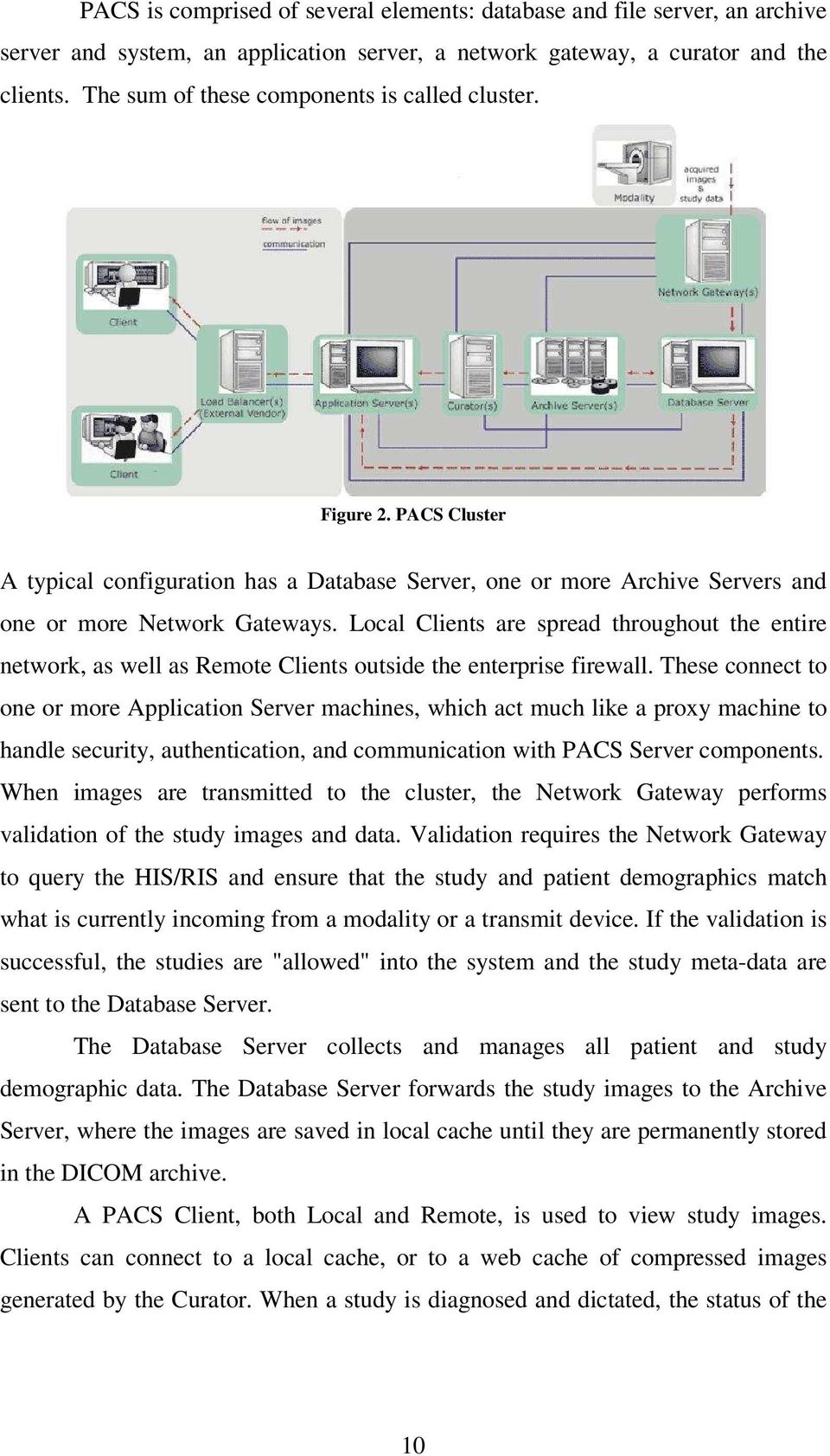
12 study is updated at the Database Server, and when a report is generated, it is forwarded to the HIS/RIS. (Reference No.3) 2.1 PACS Architectures In nowadays there are three base PACS architectures: 1) Stand-alone, 2) Client-server, and 3) The Web-based Stand-Alone PACS Model The stand-alone model has three major characteristics: (1) The Archive Server automatically sends the exams to the predetermined diagnostic station (2) The Diagnostic Stations have also the ability to query and retrieve images and exam data in general from the archive server. (3) The Diagnostic Stations can store for short-term the exams topically. (Reference No.7) Figure Stand-alone architecture general data flow. (Reference No.7) The main characteristics are that images are sent from PACS (2) to the diagnostic stations automatically (one way arrows, 3,4 ). Furthermore, the workstations with cache storage can query and retrieve images (dual way arrows 5,6). The data work flow of a stand-alone PACS model is shown in Figure In details: 1. The modality sends the images to the PACS Archive Server. 2. PACS Archive Server stores the exam. 11

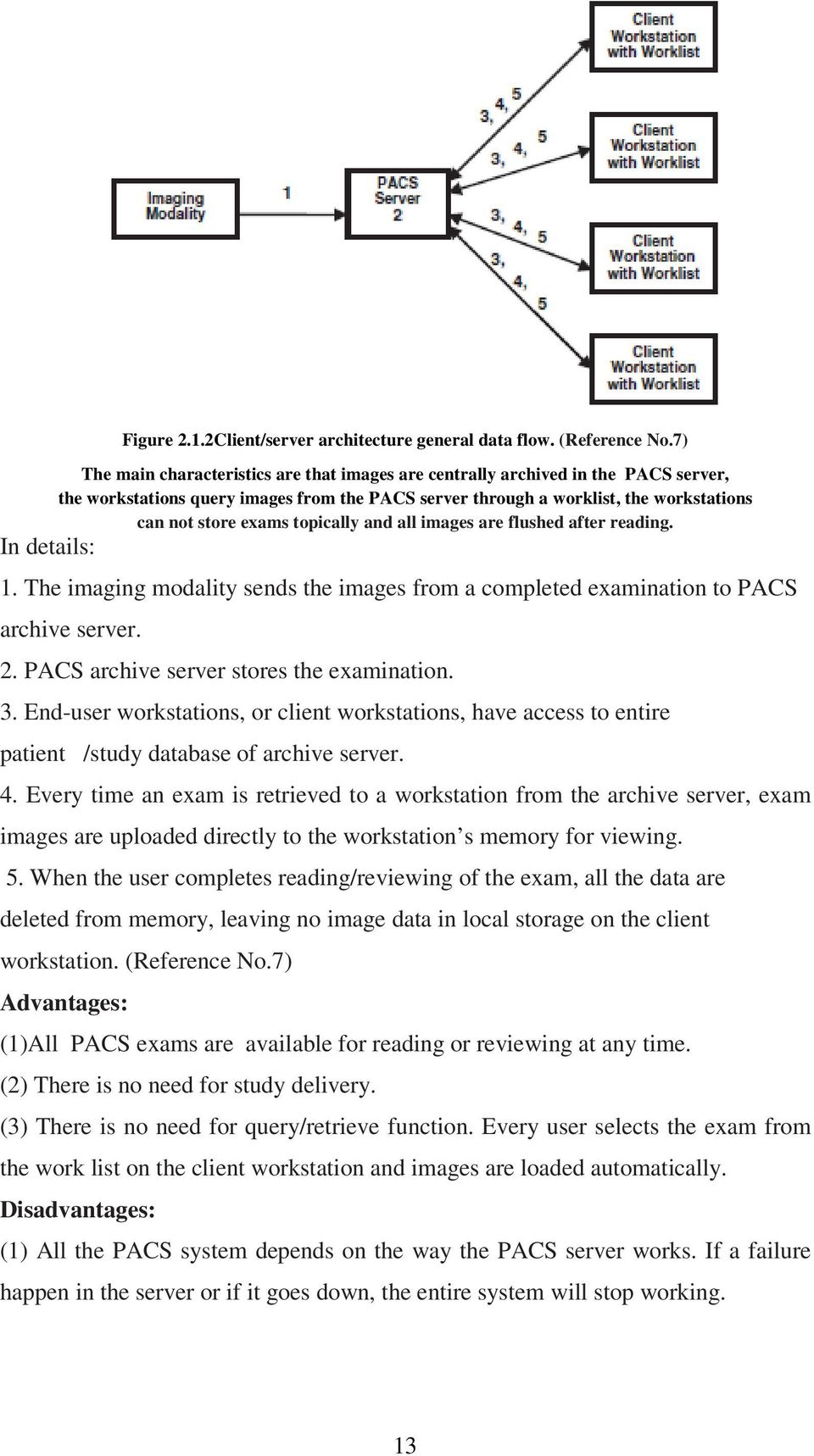
13 3. The Archive Server automatically, sends copies of the images to any user of diagnostic station queries them, in order to make a diagnosis, reading or review. 4. Older exams are recalled from the Archive server and automatically a copy of them is sent to the workstations. The previous process can also be done and manually. 5. Every end-user workstation can store locally a specific amount of exams. Advantages: (1) System flexibility as if the main server crashes down, the modalities can send the images directly to the workstations and so the radiologists continue working (2) It is safer for the data, such many copies of them are divided through the workstations an so there is less risk of loosing data. (3) The workstations have their own storage cache and so they can store exams topically. (4) Before the archiving, there can be made the exam changes to the DICOM header for quality control Disadvantages: (1) The way that the workstations will work depends on the correct exam distribution which is not possible every time. (2) As the exams are sent to concrete workstations, it is possible, every workstation to have a different exam work list, fact that makes the exam reading at any workstation in one setting, very difficult. (3) Query/retrieve function can be very complex. (4) It is very possible different radiologists to read the same examination in different workstations in the same time (Reference No.7) Client/Server Model The client/server model has three major characteristics: (1) PACS server archives centrally all the images (2) Through a client workstation and from one worklist the end user can selects an exam from the archive server. (3) Client workstations can not store exams topically and so all images are flushed after reading. (Reference No.7) The data work flow of the client/server PACS model is shown in Figure

14 Figure 2.1.2Client/server architecture general data flow. (Reference No.7) The main characteristics are that images are centrally archived in the PACS server, the workstations query images from the PACS server through a worklist, the workstations can not store exams topically and all images are flushed after reading. In details: 1. The imaging modality sends the images from a completed examination to PACS archive server. 2. PACS archive server stores the examination. 3. End-user workstations, or client workstations, have access to entire patient /study database of archive server. 4. Every time an exam is retrieved to a workstation from the archive server, exam images are uploaded directly to the workstation s memory for viewing. 5. When the user completes reading/reviewing of the exam, all the data are deleted from memory, leaving no image data in local storage on the client workstation. (Reference No.7) Advantages: (1)All PACS exams are available for reading or reviewing at any time. (2) There is no need for study delivery. (3) There is no need for query/retrieve function. Every user selects the exam from the work list on the client workstation and images are loaded automatically. Disadvantages: (1) All the PACS system depends on the way the PACS server works. If a failure happen in the server or if it goes down, the entire system will stop working. 13
15 (2) In the client/server model there are many database transactions an this has the result all the system to be exposed to many transaction errors. (3) The client /server model has a structure that is totally dependent on network performance Web-Based Model PACS Web-based model resembles to the client/server architecture and is more focus to the data transaction. Though, the main difference is that in web based model the software in the client s workstation is a Web-based application. Additional advantages as compared with client/server: (1) The only limitation in client s hardware is the support of the web browser. (2) The system runs over a very flexible application as it be used where ever exist an internet connection. (Reference No.7) Additional disadvantages as compared with client/server: (1) The system can be confined in the amount of operations and efficiency by the web browser. 2.2 PACS Contributors Modalities Modality is the professional description of diagnostic imaging devices, which allows physicians to make precise diagnosis by bringing out interiors of the human body without anatomical processes. Many types of modalities can easily be found in modern hospitals, such as Magnetic resonance imaging (MRI), Computed Tomography (CT), Computed Radiography(CR), Ultrasound(US), Positron emission tomography (PET), and Nuclear Medicine(NM). The diagnostic images generated from these modalities save distinctive characteristics. For example, CR focuses the x-rays on the patient plane while CT focuses the x-rays on the crosssection plane of the patient. Furthermore, MRI images provide most contrast images between normal and damaged tissues while NM images are best in presenting the existence and size of abnormalities in the body organ. With the availability of these medical imaging technologies, a physician can ask for many different scans and angles to purchase anatomic views of the patient in order to make the most precise diagnosis. Twenty years ago, radiologists would only receive x-ray films a few 14
16 hours after the scan was performed. With the introduction of PACS, radiologists and physicians can directly have an image at the workstation where they can edit it and make report for the patient. (Reference No.11) Hospital Information System (HIS) HIS is used for administrating hospital and managing clinical processes. It is also called ADT because the Admission, Discharge, and Transfer of patients information are recorded via the HIS interface. HIS is responsible for ordering patient examinations among all healthcare organization departments. When a patient is admitted to a hospital, demographic data of the patient are recorded into HIS. (Reference No.5)This information is sent automatically and electronically to RIS, PACS, and modalities. As a result, spelling errors of patient demographic data at large number of IT systems and diagnostic devices are minimized. Another benefit of HIS is its billing capability in billing procedures as it automatically records charges to many kind of services such as bed, laboratory tests conducted, medicine used, consultation fee, food, and beverages. In some hospitals, HIS maybe connected to many automation systems in order to improve production and patient safety. (Reference No.15) Radiology Information System (RIS) RIS is used in the radiology department for patient management, film and supplies control and scheduling and tracking diagnostic procedures. When a physician ask a technologist to perform an examination on a patient, the scheduled procedures will be ordered through RIS. Automatically, all examination procedures and patient s demographic data are sent to PACS. Modalities and PACS are automatically informed about all updates, changes or corrections that are performed in patients demographic information through RIS. RIS Allows the technologist to simply select a patient and procedure at the modality and patient demographics are included with the resulting images once procedure is completed. Moreover RIS gives the opportunity in administrating the clinical workflow in the radiology department in a more efficient manner(reference No.4) 15
17 2.3 PACS Components Database Server (DBS) The Database Server (DBS )is the local database of the acquisition gateway records structurally the textual information about images, problematic Figure Database server images, queues, and imaging devices. As all the textual information is deleted after the archiving of an exam, small-scale DBS, such as Access and MySQL commercial products, is adequate to support normal operation of image acquisition to the gateway. The DBS mounts extendable database file(s) in which the textual data is actually stored(reference No.11) More General, Database Server is an noracle or SQL Server that controls the entire cluster. Its responsibilities include: storing the central database used by all components in the cluster, maintaining a record of all database transactions in transaction log files, monitoring system activity levels and predicting the amount of database table space needed in the future The Oracle or SQL database manages and shares information related to study attributes, system configuration, user accounts, study mark-up, and annotation of studies. Finally it collects, organizes, and manages all patient and study demographic data that is contained in DICOM header files. (Reference No.11) Network Gateway - Workflow Manager (WFM) The Workflow Manager (or Network Gateway) controls the studies coming into the cluster from an acquisition station. It validates incoming studies against 16
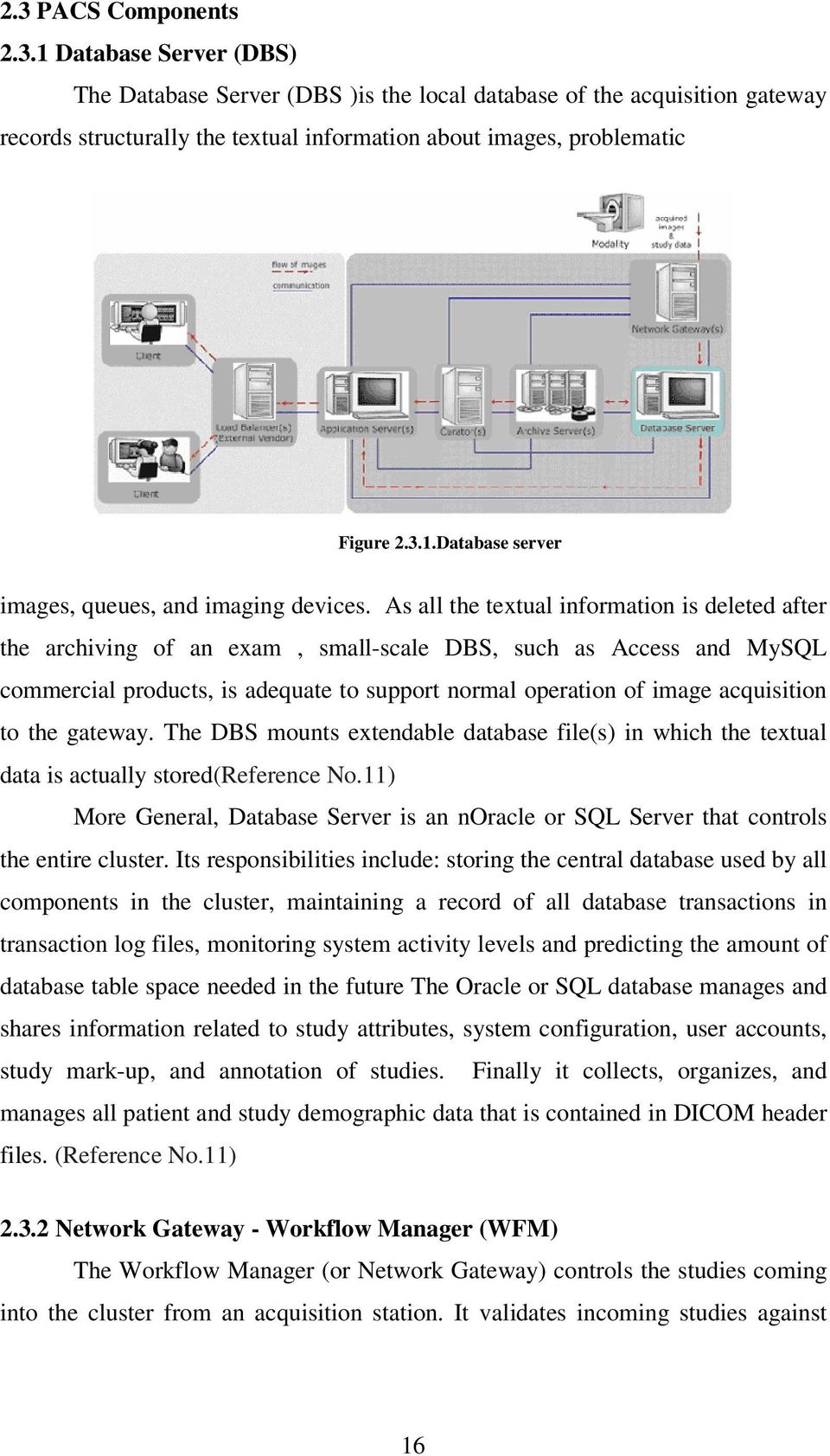
18 information from the HIS/RIS and routes validated studies to the Application server where smart clients cached Display Stations, to the Archive, and so on. Figure Network Gateway If studies are not validated, they are considered broken but are still routed and can be viewed at Display Stations. The Network Gateway is an important part of routing because it checks with the Archive to determine whether any priors for the incoming study can be routed to specific Display Stations along with the study. The Workflow Manager acts as the DICOM gateway between the acquisition modalities and the cluster. Workflow Manager is a core component of the world s most advanced image management system. It is 100% DICOM compatible, and validated against every major DICOM implementation available. Its advanced workflow automation features include demographic data validation, automated pre-fetching, routing, and migration of exams between storage tiers. (Reference No.11) Archive Server (AS) An archive is a DICOM compliant solution for long-term storage and retrieval of studies from long-term storage. It consists of a computer with a media archive or HSM file system.. More in depth, the archive server contains many powerful central processing units (CPUs), small computer systems interface (SCSI) data bases, and network interfaces (Ethernet and ATM).With its redundant hardware configuration, the archive server can support many processes running in the same time, and image data can be propagated through varioust data bases and networks. Moreover, the archive server acts as a PACS controller, managing the direction and the distribution of the images within the entire PACS, from the 17
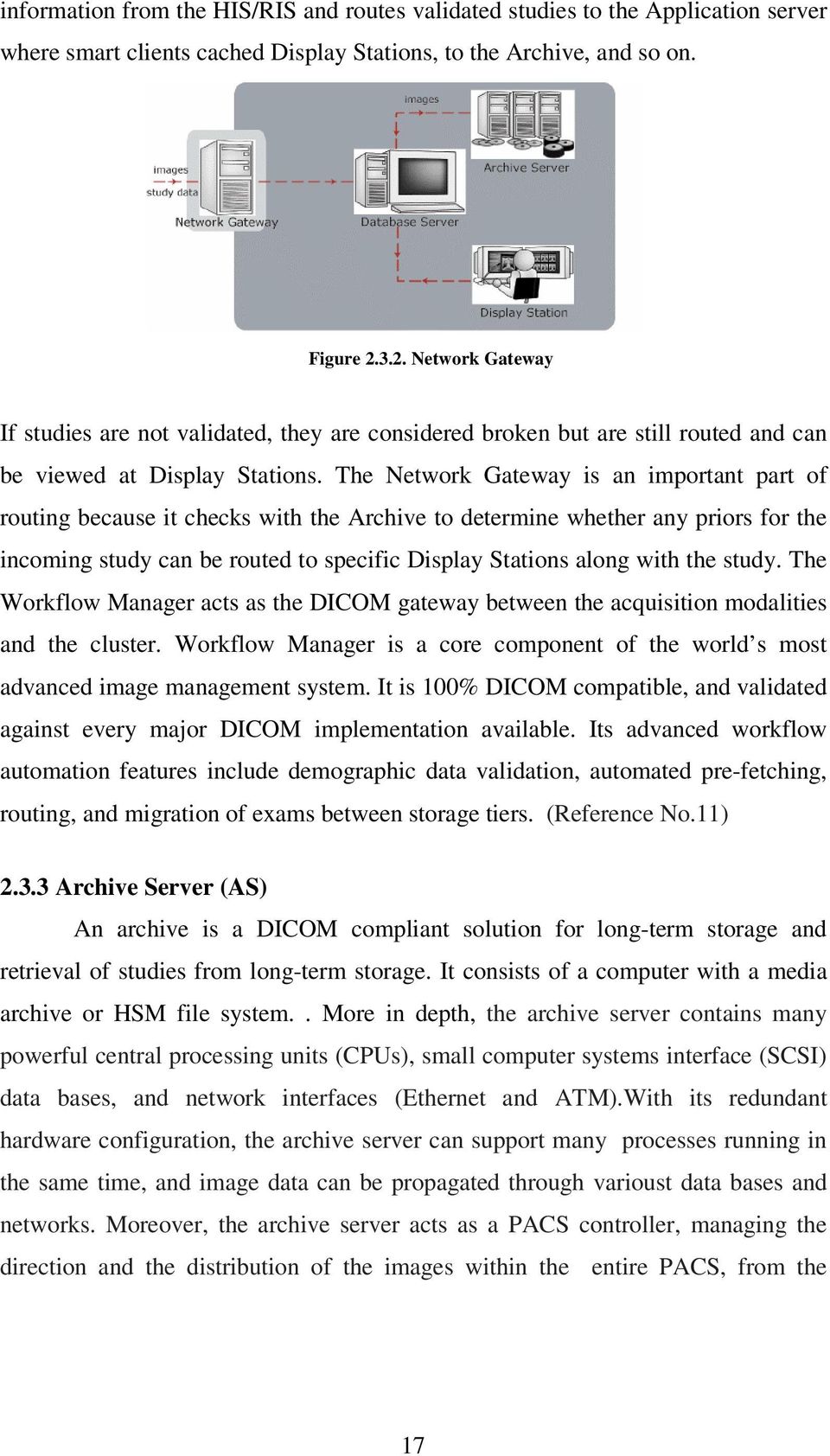
19 modalities and the acquisition stations to many different destinations such as archive stations workstations, or printer stations. (Reference No.11) In general, the Archive Server is responsible for archiving images when they arrive.the exams are temporarily stored on hard disk (cache) and are eventually stored on long term storage media in the archive. If a user requests an exam that exists in the archive cache, the images are sent immediately. If the images exist only on long-term storage media, the images must be retrieved from the archive, which takes longer. (Reference No.11) Archive Servers configurations vary between media based and fully disc based solutions. In media based solution an archive can be set up in a jukebox configuration that has one or more drives where media is loaded, multiple slots that hold the media for easy storage retrieval, and a robotic changer to move media around within the jukebox. Depending on the media type, an archive may be supported using SCSI, E-IDE (ATAPI), USB, IEEE 1394, or USB 1.1/ Applications Server (APS) The application Server provides web services for the PACS Unified Smart Clients and all integrated components such as RIS and specialty applications. It replaces direct connections to PACS Server components by acting as a proxy and providing services, such as user authentication to PACS Clients. The Application Server sets up connections to the database, RIS, and auditing server, controls logging levels for the web services and establishes the connection to the ADAM server and messaging servers. Application Server is system s license manager as it controls the role that every user has in the system and as the licenses that a user can access are inherited from the roles in which a user is a member APS controls licenses. Moreover Application Server is responsible to install and generate requests for SSL certificates, manage web services and create administration accounts for PACS. Application server uses SSL certificates to encrypt and protect any information passed between the Servers and the Clients in the cluster, including user information, patient image data, and protected health information. Furthermore SSl certificates are used in order to encrypt and protect any information passed 18

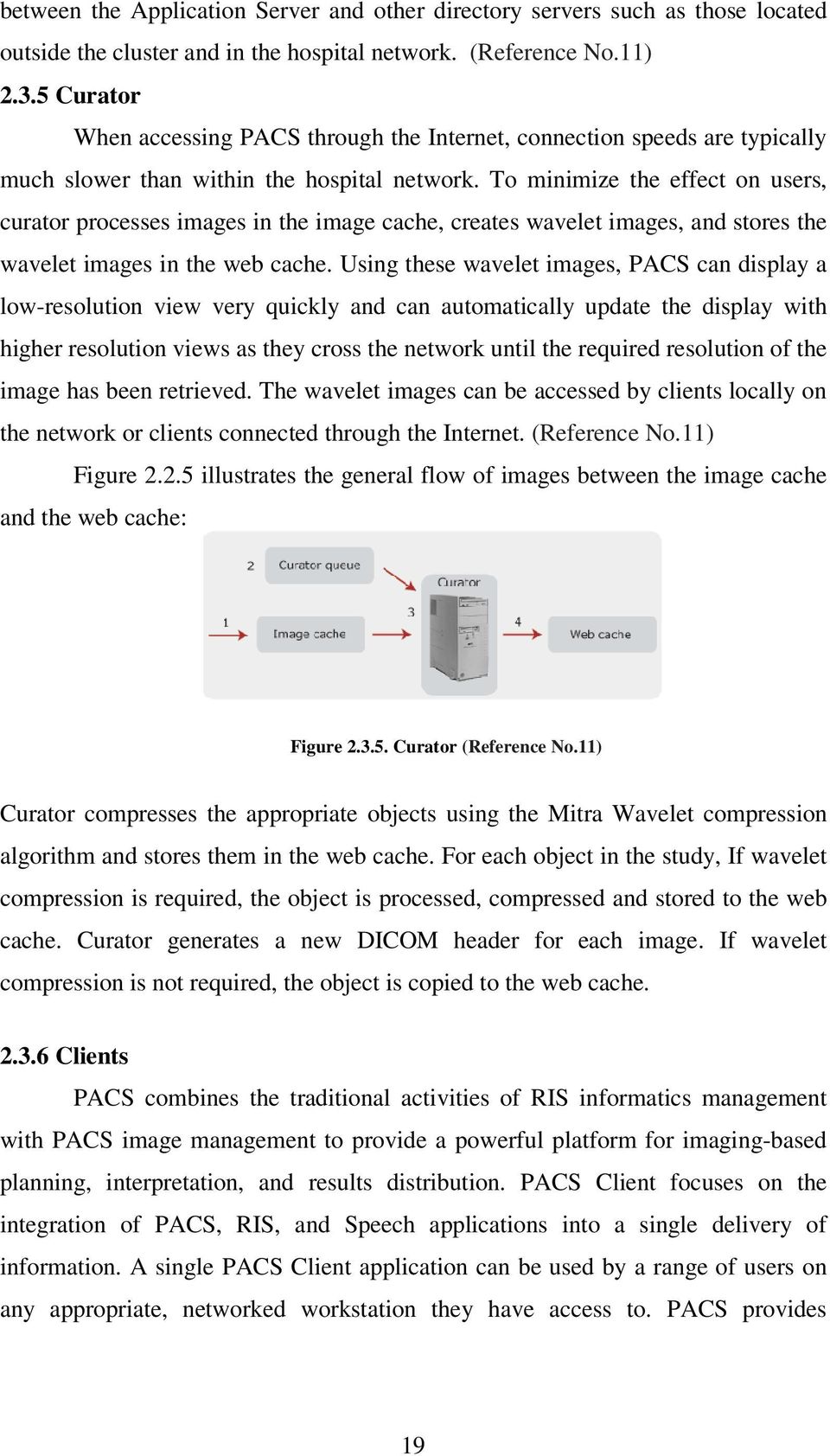
20 between the Application Server and other directory servers such as those located outside the cluster and in the hospital network. (Reference No.11) Curator When accessing PACS through the Internet, connection speeds are typically much slower than within the hospital network. To minimize the effect on users, curator processes images in the image cache, creates wavelet images, and stores the wavelet images in the web cache. Using these wavelet images, PACS can display a low-resolution view very quickly and can automatically update the display with higher resolution views as they cross the network until the required resolution of the image has been retrieved. The wavelet images can be accessed by clients locally on the network or clients connected through the Internet. (Reference No.11) Figure illustrates the general flow of images between the image cache and the web cache: Figure Curator (Reference No.11) Curator compresses the appropriate objects using the Mitra Wavelet compression algorithm and stores them in the web cache. For each object in the study, If wavelet compression is required, the object is processed, compressed and stored to the web cache. Curator generates a new DICOM header for each image. If wavelet compression is not required, the object is copied to the web cache Clients PACS combines the traditional activities of RIS informatics management with PACS image management to provide a powerful platform for imaging-based planning, interpretation, and results distribution. PACS Client focuses on the integration of PACS, RIS, and Speech applications into a single delivery of information. A single PACS Client application can be used by a range of users on any appropriate, networked workstation they have access to. PACS provides 19
21 clinical viewing and editing tools for images and full exams in order to write a diagnosis, to a variety of users in- and outside the enterprise, using Smart client technology. (Reference No.8) 3. PACS Workflow In this chapter the workflow of o Picture Archive and Communication system will be presented. This paragraph presents the workflow of this system from the time a patient enters a hospital, his registration to hospitals information system, the examination ordering, to the performance of the examination from the radiographer, the diagnosis the reporting and the archiving of patients data and exam. Through this chapter will be obvious that Picture Archive and Communication System has replaced the most phases of the film based workflow Figure 3.1 PACS Workflow(Reference No.16) 3.1 PACS /HIS/ RIS Work Flow 1. Patient registration in Hospital Information System. Examination ordering in Radiology Information System and en exam accession number automatically assigned. 20
22 2. Radiology Information System sends HL7 messages of Hospital Information System and Radiology Information System demographic data to PACS. 3. Archive server is informed from the PACS broker for the patient scheduled exams. 4. Older exams of the scheduled patient are send from the archive server to the radiologist diagnostic station. 5. Patient arrives at modality. Modality queries PACS for DICOM worklist. 6. The radiographer performs the exam and sends to PACS images and patient demographic data in DICOM format for Quality Control 7. The radiographer sends through PACS to the radiologist diagnostic station the exam as prepared status. 8. When the PACS exam arrives at the radiologist diagnostic station, it is also wend to the archive server. 9. Then the Archive server automatically delivers PACS exam to the diagnostic stations that follow patients location based on the data of the HIS/RIS HL7 message. 10. The radiologist makes the diagnosis of the exam and writes down a report using the patient s accession number. Radiologist signs off on the exam and the Archive Server updates the exam with any changes and annotations that the radiologist did Then the exam data through the accession number corresponds to patients data within RIS. 12. RIS exports an updated HL7 message of results. 13. Radiologist queries PACS for older exams or reports on his diagnostic station. 14. Referring doctors query PACS for reports on their workstations. (Reference No.16) 3.2 PACS and Tele-Radiology This paragraph refers the connection between teleradiology and PACS. There are presented the two models of teleradiology and PACS the clear teleradiology model and PACS and teleradiology combined. (Reference No.16) 21
23 3.2.1 Clear Teleradiology Model In clear teleradiology model, teleradiology can acts as a separate system working by itself (Figure 3.3.1). This model works better for some small imaging centres and small hospitals with a normal radiological examination workflow but with no radiologist to read the examinations and make the diagnosis. In this model the teleradiology management centre acts as the monitor. (Reference No.16) It has the role of a main central station that receives images from many different imaging centres, it makes reports for these images and then it routes this images to the appropriate expert centres for diagnosis. After the reports return to the main management centre, it records the diagnosis and forwards reports to the appropriate imaging centres. This teleradiology model is usually used for night and weekend coverage. Figure Clear teleradiology model. (Reference No.16) PACS and Teleradiology Combined Model Picture Archive and Communication System and teleradiology can cooperated as shown in Figure The two main parts of this system is PACS as shown in Figure A and the clear teleradiology model shown in B. The workflow of this model is as follows: A. PACS reading of the exams from different outside imaging centres (1). 22
24 B. Internal radiologists read the outside exams, they make the diagnosis from internal diagnostic workstations(2) and then they sent the reports to the database gateway for its internal use(3) and to the external centre that send the image(4) C. PACS can also sen exams direcly to the external expert centers(5) and receive from them the report of the diagnosis(6) D. PACS can also send images to the expert centre for reading as in the clear teleradiology model (7). The combined teleradiology and PACS model is usually used in a healthcare centre with satellite imaging centres or in backup radiology coverage between the hospital and imaging centres. (Reference No.16) Figure PACS and radiology combined model. (Reference No.16) 4. PACS Communication Protocols Industrial Standards (HL7 and DICOM) and Work Flow Protocols (IHE) Data transfer through healthcare information systems was always very difficult mainly for two reasons. Firstly, information systems use various computer platforms and secondly medical data and patient images are generated from many different kinds of imaging modalities and several manufacturers. 23
25 In order to integrate al these different and heterogeneous, medical images and textual data in an united and organized system, health care industry standards such as Health Level 7 (HL7) and Digital Imaging and Communications in Medicine (DICOM), were created. Integrating healthcare components requires two components, a common data format and a communication protocol. HL7 is a standard textual data format, while DICOM includes data format and communication protocols. The role of HL7 standard is to establish communication through healthcare components an make possible to exchange healthcare information between hospital information system (HIS), radiology information system (RIS), and PACS. DICOM standard is the translator for the medical images that are generated from different modalities and from different manufacturers and establish the communication and the integration through this kind of modalities. DICOM is the main standard for the healthcare sytems integration an interface. Finally, in order to drive the adaptation of standards the protocol IHE(Integrating the Healthcare Enterprise)was created 4.1 The Health Level 7 Standard Health Level 7 Health Level 7 (HL7), was created in March 1987 from a commission established by users and vendors, in order to develop a standard for data interchange through electronic networks. This standard would properly take place in healthcare environments, mainly for hospital applications. The HL7 standard, the Level Seven, refers to the highest level of the Open Systems Interconnection (OSI). This highest level, is the application level, and is common for multiple vendors. This standard emphasizes data format and protocol for exchanging certain key textual data among health care information systems, such as HIS, RIS, and PACS. Although Health Level 7 is intended to the highest level (level 7) of the OSI model of the International Standards Organization (ISO), it does not comply specifically with the defined facts of the OSI s seventh level. It complies with the semantic definitions of an application-to-application interface placed in the seventh layer of the OSI model. These definitions were created in 24
26 order to make easier and more particular, all the healthcare data communications by establishing particular rules to convert abstract messages associated with realworld events into strings of characters comprising an actual message. (Reference No.4) New Trend in HL7 The most commonly used HL7 today is Version 2.X, which has many options and is thus flexible. During the past years Version 2.X has been developed continuously, and it is widely and successfully implemented in health care environment. Version 2.X and other older versions use a bottom-up approach, beginning with very general concepts and adding new features as needed. These new features become options to the implementers so that the standard is very flexible and easy to adapt to different sites. (Reference No.4)However, these options and flexibility also make it impossible to have reliable conformance tests of any vendor s implementation. This forces vendors to spend more time in analyzing and planing their interfaces to ensure that the same optional features are used in both interfacing parties.there is also no consistent view of the data when HL7 moves to a new version or that data s relationship to other data. Therefore, a consistently defined and object-oriented version of HL7 is needed, which is Version 3. The initial release of HL7 Version 3 was in December The primary goal of HL7 Version 3 is to offer a standard that is definite and testable.version 3 uses an object-oriented methodology and a reference information model (RIM) to create HL7 messages.the object-oriented method is a top-down method.the RIM is an all-encompassing, open architecture design at the entire scope of health care IT, containing more than 100 classes and more than 800 attributes. RIM defines the relationships of each class. RIM is the backbone of HL7 Version 3, as it provides an explicit representation of the semantic and lexical connections between the information in the fields of HL7 messages. Because each aspect of the RIM is well defined, very few options exist in Version 3. Through object-oriented method and RIM, HL7 Version 3 will improve many of the shortcomings of previous 2.X versions. Version 3 uses XML for message encoding to increase interoperability between systems. This version has developed the Patient Record Architecture (PRA), an XML-based clinical document architecture. It can 25
27 also certify vendor systems through HL7 Message Development Framework (MDF). (Reference No.4)This testable criterion will verify vendors conformance to Version 3. In addition, Version 3 will include new data interchange formats beyond ASCII and support of component-based technology, such as ActiveX and CORBA. As the industry moves to Version 3, providers and vendors will face some impact now or in the future, such as: Benefits: 1. It will be Less complicated and less expensive to build and maintain the HL7 interfaces. 2. HL7 messages will be less complex, and therefore analysts and programmers will require less training. 3. HL7 compliance testing will become enabled. 4. It will be easier to integrate different HL7 software interfaces from different vendors. Challenges: 1.Adaption of Version 3 will be more expensive than the previous version. 2. Adaption of Version 3 will take time to replace the existing version. 3. Retraining and retooling will be necessary. 4. Vendors will eventually be forced to adapt Version Vendors will have to support both Versions 2.X and 3 for some time. HL7 Version 3 will offer tremendous benefits to providers and vendors as well as analysts and programmers, but complete adaption of the new standard will take time and effort(reference No.4) 4.2 The Dicom 3.0 Standard History With the introduction of computed tomography (CT) followed by other digital diagnostic imaging modalities in the 1970's, and the increasing use of computers in clinical applications, the American College of Radiology (ACR) and the National Electrical Manufacturers Association (NEMA) recognized the emerging need for a standard method for transferring images and associated information between 26
28 devices manufactured by various vendors. (Reference No.20)These devices produce a variety of digital image formats. The American College of Radiology (ACR) and the National Electrical Manufacturers Association (NEMA) formed a joint committee in 1983 to develop a standard to: -Promote communication of digital image information, regardless of device manufacturer -Facilitate the development and expansion of picture archiving and communication systems (PACS) that can also interface with other systems of hospital information -Allow the creation of diagnostic information data bases that can be interrogated by a wide variety of devices distributed geographically. (Reference No.20) ACR-NEMA Standards Publication No , published in 1985 was designated version 1.0. The Standard was followed by two revisions: No. 1, dated October 1986 and No. 2, dated January ACR-NEMA Standards Publication No , published in 1988 was designated version 2.0. It included version 1.0, the published revisions, and additional revisions. It also included new material to provide command support for display devices, to introduce a new hierarchy scheme to identify an image, and to add data elements for increased specificity when describing an image. These Standards Publications specified a hardware interface, a minimum set of software commands, and a consistent set of data formats. (Reference No.20) DICOM Standard Digital Imaging and Communications in Medicine (DICOM) standard, embodies a number of major enhancements to previous versions of the ACR-NEMA Standard. In depth, DICOM is applicable to a networked environment as it supports operation using the industry standard networking protocol TCP/IP. DICOM supports operation in an offline media environment using industry standard media such as CD-R and MOD and logical file systems such as ISO 9660 and PC File System It specifies how devices claiming conformance to the Standard react to commands and data being exchanged..furthermore, it specifies levels of conformance as DICOM explicitly describes how an implement or must structure a Conformance Statement to select specific options. DICOM is structured as a multi-part document. This facilitates evolution of the Standard in a rapidly evolving 27
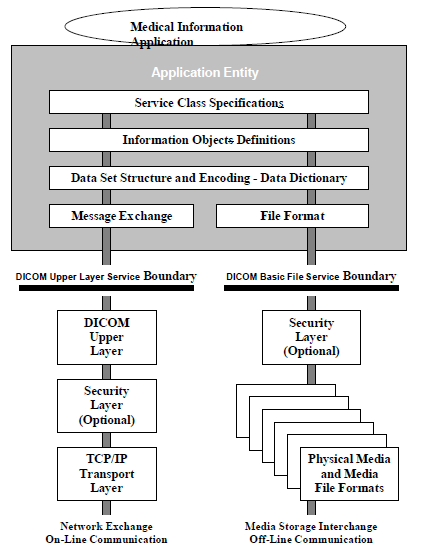
29 environment by simplifying the addition of new features. ISO directives which define how to structure multi-part documents have been followed in the construction of the DICOM Standard.It introduces explicit Information Objects not only for images and graphics but also for waveforms, reports, printing, etc.finally, it specifies an established technique for uniquely identifying any Information Object. This facilitates unambiguous definitions of relationships between Information Objects as they are acted upon across the network.(reference No.20) DICOM Data Format In this paragraph there will be dercibed two topics in DICOM data format: the General DICOM Communication model and the DICOM file format. The format is used to define the hierarchical data structure from patient, to studies, series, and images and waveforms. The latter describes how to encapsulate a DICOM file ready for a DICOM SOP service. (Reference No.20) The General DICOM Communication model The general DICOM Communication model determines different real-world objects in the clinical image arena (e.g., Patient, Study, Series, Image, etc.) and their interrelationships within the scope of the DICOM standard. It provides a framework for various DICOM Information Object Definitions (IOD). Figure The General DICOM Communication model Architecture of DICOM Data and Communication Model and DICOM Parts There are two Communication models, the network layers model (left) and the media storage interchange model (right). (Reference No.20) 28
30 Table DICOM Service Classes Service Class Image storage Image query Image retrieval Image print Examination Storage resource Description Provides storage service for data sets Supports queries about data sets Supports retrieval of images from storage Provides hard copy generation support Supports management of examinations (which may consist of several series of management images) Supports management of the network data storage resource(s) Normalized Patient Study Results Storage resource Image annotation Table DICOM Information Object Classes Composite Computed radiograph Computed tomogram Digitized film image Digital subtraction image MR image Nuclear medicine image Ultrasound image Displayable image Graphics Curve (Reference No.20) 4.3 IHE (Integrating the Healthcate Enterprise) What is IHE? IHE is not a standard nor a certifying authority, instead it is a high-level information model for driving adaption of HL7 and DICOM standards. Optimal patient care requires efficient access to all relevant information. Despite the advanced state of technology healthcare enterprises have not yet begun to realize the full potential of computer systems to reduce medical errors, improve the 29
31 efficiency of care providers and enhance the overall quality of clinical care. To do so requires a framework for information sharing that meets the needs of care providers as well as patients and gains acceptance among the companies that build the systems they rely on. (Reference No.13) Standards provide the basis for such a framework, but alone do not solve the problem. In any standard there are gaps, options, room for conflicting interpretations. No standard maps perfectly to the complex and ever-changing information domain of a healthcare enterprise. Filling the gap between standards and systems integration has, until now, required expensive, site-specific interface development. To close that gap a process for building a detailed framework for the implementation of standards is needed. IHE provides that process. Enabling systems to share information effectively, IHE offers a framework for information sharing designed to optimize clinical workflow. Systems implemented in accordance with IHE can streamline the flow of clinical information, reduce errors and improve efficiency. IHE strengthens the information link between different departments for example, between referring physicians and consulting physicians to enable the enterprise to function as a single unit in providing optimal clinical care. (Reference No.13) IHE eases this burden by offering a clear path toward acquiring integrated systems. Referring to IHE Integration Profiles in RFPs and purchasing agreements allows purchasers and vendors to agree on the interoperability of systems being acquired or upgraded, making multi-vendor, best-of-breed solutions more feasible. It enables information technology specialists to concentrate on improving the core functionality of systems, rather than developing and maintaining redundant, pointto-point interfaces. Finally, it makes it possible to implement a streamlined workflow so that care providers can make more efficient use of their time IHE offers a common framework for vendors, IT departments, clinical users and consultants to understand and address clinical integration needs. The IHE Technical Framework allows flexibility while ensuring that key integration needs are met(reference No.13) 30
32 5. PACS Installation in University Hospital of Ioannina 5.1 The Hospital University Hospital of Ioannina was founded in 1986 in city of Ioannina It is located 6 kilometres from the centre of Ioannna, at St. Niarchos Avenue, next to the University of Ioannina. It is one of the biggest University Hospitals in Greece as its capacity is about 882 beds and extents at m2. Figure 5.1 The University Hospital of Ioannina University Hospital of Ioannina provides high quality healthcare services, research and educational work and the latest medical and technological equipment, that makes it the biggest and most complete hospital in west Greece and one of the most innovative and progressive hospitals in the country. As it was mentioned before, University Hospital of Ioannina is one of the biggest University Hospitals in Greece and the biggest and most complete hospital in west Greece. It s geographical position make it able to be in attendance on patients of all the west Greece. As a result, University Hospital of Ioannna has very big press of work, and more specific it covers over of internal and external patients per year. Internal are the patients that were hospitalized in the hospital for some days and external are the patients came to the hospital, made examinations and then they left. (Reference No.2) University Hospital of Ioannina is build on three floors and composed of four main Divisions:1. The Pathology Division, 2.The Surgery Division, 3.The Medical Laboratories, and 4. The Psychiatric Division. Each of the previous divisions embodies some clinics. (Reference No.1) 31
33 In the First Floor there are: 8 Neonatal Department - Neonatal Intensive Care Unit 9 Obstetric Surgery 10 Intensive Care Unit (ICU) - Intensive Care Unit for Cardiothoracic Patients 20 General Surgery - Resuscitation Figure University Hospital of Ioannina First Floor Map(Reference No.1) In the Ground Floor: Ε1 Main Entrance Ε2 Entrance of Outpatient's Department 11 Outpatient's Department 18 Department of Radiodiagnostics [X-Ray/Imaging, including : Computed Tomography (CT), Magnetic Resonance Imaging (MRI) ]- Hemodynamic 16 Nuclear Medicine 17 Renal Unit 15 Roentgenotherapy 19 Laboratories (Biochemistry & Clinical Chemistry, Haematology, Microbiology Laboratory, Pathologic Anatomy, - Histopathology) 33 Restaurant, Cafeteria Figure University Hospital of Ioannina Ground Floor Map(Reference No.1) 32
34 And in the Basement: Ε3 Student's Entrance Ε4 Children's Outpatient's Department Entrance Ε5 Personnel's Entrance Ε6 Physiotherapy Entrance Ε7 Accident & Emergency Unit Entrance Ε9 Morgue Entrance Ε11 Catering Entrance 11α Children's Outpatient's Department 27 Administration 13 Physiotherapist 25 Blood Bank 12 Accident & Emergency Unit 15 Linear Accelerator - Roentgenotherapy 23 Pharmacy 14 Morgue Figure University Hospital of Ioannina Basement Map(Reference No.1) The Pathology Division of University Hospital of Ioannina embodies the following clinics: Cardiology Rheumatology Pathology A Pathology B Haematology Paediatric Nephrology Gastroenterology Endocrinology Neurology Neonatal Oncology Pneumonology Dermatology Table Pathology Division clinics of University Hospital of Ioannina (Reference No.1) 33
35 The Surgery Division of University Hospital of Ioannina embodies the following clinics Surgery Urology Opthalmology Obstetrics Otaryngology Cardiothoracic Surgery Neurousrgery Anesthesiology Orthopedic Dentistry Physical and Medical Rehabilitation Thorax-Surgery Rehabilitation Table Surgery Division clinics of University Hospital of Ioannina (Reference No.1) Finally, the Laboratories that are embodied in University Hospital of Ioannina are: Microbiology Medical Physics Biochemistry Pathologoanatomy Toxicology Nuclear Medicine Blood Bank Roentgen therapy Cytology Foresing Medicine Haematology Radiology Table The Laboratories of University Hospital of Ioannina(Reference No.1) This thesis deals with Picture Archive and Communication Systems. These systems take place in Radiology Laboratories. The Radiology Laboratory of University Hospital of Ioannina, was one of the first in Greece that made an installation of Picture Archiving and Communication system, and this installation is going to be described in this paragraph Radiology Department Equipment The Radiology Laboratory is one of the biggest Laboratories in the University Hospital of Ioannina. It covers a great amount of work of the laboratories of the Hospital and more specific it covers over of patients per year. That means that in the Radiology Laboratory there are performed over of exams every year. As it is obvious, and in order to carry out this great amount of work, the Radiology Laboratory is equipped with high end systems and diagnostic modalities. (Reference No.1) Magnetic Resonance Imaging Modalities (MRI) An Infinion 1.5T MRI system by Philips is installed in the radiology department of University Hospital of Ioannina. Infinion 1.5T is an high field MRI system that maximizes both efficiency and the quality for patient s care. This system is one of 34
36 the shortest and most open scanners available. It is equipped with an ultra short 1.4m magnet that provides comfort for patients. It also has a flared gradient coil that enhances patient aperature. (Reference No.1) Computed Tomography Modalities (CT) A Philips Brilliance 16 Computed Tomogrpahy scanner is installed in radiology department of University Hospital of Ioannina. This modality offers high efficiency, image quality and affordability, as it is a flexible system that automates the clinical exams with high performance. The Philips Brilliance 16 CT scanner provides true real-time imaging with 16-slices per revolution for up to 20 images per second (Reference No.1) Nuclear Medicine Modalities A General Electric Gamma Camera type Infinia is installed in the Radiology Deoartment of University Hospital of Ioannina. It is a modality that offers fast, automated one-keystroke exams for the most common nuclear medicine procedures from scan through processing and review on the workstations (Reference No.1) Radiography Modalities Five Radiography Modaltiy Units are installed in the Radiology Department of University Hospital of Ioannina. There are three Philips Classical Radiography system, one Siemens Multix Pro system and finally one General electric Proteus XRI. All these systems cover a great amount of work as they support all the routine of exams from car accidents patients to other simple and ordinary examinations (Reference No.1) Mammography Modalities A General Electric DMR+ Mammography Unit is installed it the Radiology Department of University Hospital of Ioannina. This unit serves all the programmed mammography examinations that are performed in the Hospital and they approach the number of examinations every year(reference No.1, No2) Ultrasound Modalities The Ultrasound Modalities are the most common used modalities in Hospitals. They found practice in many different departments and so usually there are many of them installed in every Hospital. In University Hospital of Ioannina, there are installed twelve ultrasound units. More in detail, there are three units in the 35
37 Radiology Department(General Electric Logiq7, General Electric Logiq7, General Electric Logiq5), there are three units in the Cardiological department (General Electric Vivid 7, General Electric Vivid 7, General Electric Vivid 3 ), there are two units in the gynaecology department (General Electric Vivid 7, General Electric Vivid 3), two more in the ICU and finally from one unit to the pathology and neonatal department. (Reference No.1) 5.3 Radiology Department Workload and Workflow before PACS Radiology Department Workload As it was mentioned previously, University Hospital of Ioannina is one of the biggest University Hospitals in Greece and the biggest and most complete hospital in west Greece. It has very big amount of work as it is the only big and so well organized Hospital in West Greece and so, it serves a very big number of patients every day. In more details, University Hospital of Ioannina comes over 65,000 internal patients every year which means over of 170 patients per day and serves over of external patients per year that means almost 430 patients every day. From this number of 600 patients that arrive in hospital every day, at least the half of them visit the radiology department to perform one or more examinations. (Reference No.2) As it results from the commercial statistics of the Hospital, and it is shown in the graphic in Figure 5.3, the year 2007 the radiology department performed examinations while the years 2008 and 2009 this number overcome the examinations per year. (Reference No.2) Figure 5.3 Radiology Department Workload 36
38 5.3.2 Radiology Department Workflow before PACS In the Radiology Department workflow there are three major work areas, the secretary procedure area, the X-ray procedure room and the diagnostic area. These areas may be common for all the subspecialties of examinations. In the part of the workflow that regards to the secretary s department all the differences depends on the patient. If the patient is internal the procedures are definitely simpler as all the needed data are already record to the system from the arrival of the patient in the Hospital. So for an internal patient, the doctor asks from the secretary to organize a group of examinations for the patient and the patient is just informed for the time and the type of the exam.if now the patient is external the procedure is a little more complicated. That is because when the patient arrives, has first to pass from the secretary department, give al the appropriate data, then to perform the examination, wait to take the diagnosis and results an then to leave or to be hospitalized (Reference No.1) In the part of the workflow that regards the X-ray procedure room and the diagnostic area the basic steps can be summarized as follows: 1. Transfer patient-related information to the X-ray procedure room before the examination. 2. Check patient X-ray requisition for anatomical area of interest for imaging. 3. Set patient in position stand up or on tabletop, for X-ray examination 4. Select a proper film screen cassette. 5. Place cassette in the holder located behind or on the table under the patient. 6. Determine X-ray exposure factors for obtaining the optimal quality image with minimum exposure. 7. Turn on the X-rays to obtain a latent image of the patient on the film screen cassette. 8. Process the exposed film through a film processor. 9. Retrieve the developed film from the film processor. 10. Inspect the radiograph through a light box for proper exposure or other errors (e.g., patient positioning or movement). 11. Repeat steps 3 10 if the image quality on the film is unacceptable for diagnosis, 12. Submit the film to a radiologist for approval. 37
39 13. Remove the patient from the table after the radiologist has determined that the quality of the radiograph is acceptable for diagnosis. 14. Release the patient. In Figure is presented the standard setup of a conventional radiographic procedure room and a diagnostic area (for diagnosis and reporting). The numbers in the figure correspond to the above-listed steps for a tabletop examination. (Reference No.15) Figure The standard setup of a conventional radiographic procedure room and a diagnostic area(reference No.15) 5.4 Needs and demands of the Hospital before PACS installation As it was mentioned before, the Radiology department of University Hospital of Ioannina every day performs a great amount of examinations. This big number of patient and examinations caused many serious problems for the Radiology department. Particular, as the hospital is forced from the law to archive all the examinations of the patients-films for at least 20 years, they had problem where and how to archive all the printed films of the patients. Moreover they had 38
40 problem in the retrieval of an older examination as they had to search in a huge archive of hardcopies and they need at least 2 hours to find the examination In order to solve the previous problems and furthermore to follow the development and drive the Radiology Department to a film less season, the Hospital decide to supplied a Picture Archive and Communication System. The PACS would serve all the Radiology department including MRI, CT, Nuclear Medicine, Radiography Units, Mammography Unit and all the Ultrasounds of the Hospital and the main demands of the Hospital were ability of three years on-line storage,twenty years off-line storage, at least three clients per modality,six diagnostic Workstations and five simple clinical clients(reference No.1) 5.5 PACS Installation and Integration The PACS Installation in University Hospital of Ioannina kept for about six months and contained the installation of all the appropriate equipment, the integration with all the other systems and modalities, the configuration of the clients and the workflow and finally the training off the Hospitals stuff Figure PACS Installation Plan(Reference No.1) 39
41 5.5.1 Hardware and Software Installation The contractor company that made the installation tried to absolutely satisfy the demands oh the Hospital. In order to succeed it, they installed: a) A Database Workflow Archive Server which contained: Dell PowerEdge 2950 (1 x Xeon Dual Core Dempsey 5050 processor, 3.0GHz, 2x2MB, 667MHz) 4GB Dual Rank DDR2 Fully Buffered DIMMs RAM (4x1GB) for Dell PE29X0 servers 73GB SAS Hard Drive for Dell PowerEdge Servers Eizo S " monitor with columnar foot in black (for non-diagnostic purposes) 2nd Xeon DC 5050 CPU for PE29X0 servers(reference No.1) b) A Curator Server which contained Dell PowerEdge 2950 (1 x Xeon Dual Core Dempsey 5050 processor, 3.0GHz, 2x2MB, 667MHz) 4GB Single Rank DDR2 Fully Buffered DIMMs RAM (8x512MB) for Dell PE2950 server 146GB SAS Hard Drive for Dell PowerEdge Servers 2nd Xeon DC 5050 CPU for PE29X0 servers (Reference No.1) c) An Application Server that contained Dell PowerEdge 2950 (1 x Xeon Dual Core Dempsey 5050 processor, 3.0GHz, 2x2MB, 667MHz) 300GB SAS Hard Drive for Dell PowerEdge Servers 4GB Dual Rank DDR2 Fully Buffered DIMMs RAM (4x1GB) for Dell PE29X0 servers (Reference No.1) d) Tape library for Image Archiving 400GB Data Cartridge Tape Library with 60 slots and 2x LTO-III drives Dual channel Ultra160 SCSI PCI card, Adaptec 39160(Reference No.1) 40
42 The Tape library is the heart of the offline storage system. Is the system that loads the reading device with the appropriate disk or tape in order the final user to receive in minimum time the data he needs. For better performance, the manufacturers embody a hard disk subsystem, which plays the role of a cache memory. In that system, data that have been recently searched are stored in that system and there is great possibility to be searched again in the near future This Tape Library uses Magneto Optical Disks (MOD) that they can store up to 9,1 GB of data. These disks are delivered in a protective case and they are uploaded with this case in the reading mechanism. These disks that are lacking physical contact with the environment, give them the advantage of better protection against damage e) A base Storage Rack 48 X 400 mb Hd for HP servers and MSA30 storage Base Storage Rack (DAS), based on HP MSA30 (Reference No.1) f) Three Diagnostic Worksations for General Radiology Examinations BARCO NIO 3MP 21" DUAL HEAD SYSTEM Medium workstation based on a Dell Precision 690 (SMT) DELL 17" Flat Panel Display(Reference No.1) g) Two Diagnostic Worksations for MRI and CT Examinations BARCO NIO 2MP 21" DUAL HEAD SYSTEM Medium workstation based on a Dell Precision 690 (SMT) DELL 17" Flat Panel Display(Reference No.1) h) One Diagnostic Workstations for Mammography Examinations BARCO NIO 5MP 21" DUAL HEAD SYSTEM Medium workstation based on a Dell Precision 690 (SMT) DELL 17" Flat Panel Display(Reference No.1) i) Five Clinical Client Workstations Medium workstation based on a Dell Precision 690 DELL 19" Flat Panel Display(Reference No.1) 41
43 As the requirements for the storage and management among medical images and Backup databases have different standards between them, the contractor implement a very flexible, stable and distinct solution to the Tape Library, taking into view that:a)the storage space of the Tape Library for medical images used hierarchy, namely when the Tape Library is filled with cartridges, the system remains works, suggesting the administrator to replace a portion of the full cartridges with new ones. In this way existsincrease of Near Line and Offline capacity. Near Line is the capacity that is available anytime in the jukebox. But in these systems, data are not always available immediately (online) and they do not need human interference to become available (offline). The nearline is nothing else but a robotic mechanism that brought to the reading system, special tape cartridges, in which data were stored (a kind of jukebox). The idea was used also for other recording media besides the tape, such as magnetic optical disks (MO disks) and later CDs and DVDs. b) The exchange of medical data in the Tape Library is random in a day period pposed to the backup of the databases tha is made in specific intervals. c). Roles for the availability of the medical records should be distinguishable to the Tape Library that makes hospital information systems backups. So they chose to: - Backup databases in Tape Library HP MSL slot. or 48ch400MV = 19.2 TB with software HP Data Protector for centralized backup, -Archiving of medical images in Tape Library HP MSL slot or 60ch400 = 24TV. with software QStar DDR1 (with mirroring) for the hierarchical archiving of images Both Tape Libraries using LTO-3 Tapes in uncompressed configuration Capacity 400GB and not 800GB compressed for greater security. This means that there is achieved a total capacity of 108 slot (positions) or 43.2 TB capacity, which exceeds the hospital demands. (Reference No.1) System Integration One of the major requirement of integrating a hospital is connecting the hospital's information systems, PACS, and modalities. These systems often speak different languages, or protocols. The most important rule in creating a Picture 42
44 Archive and Communication System is to have as much uniformity as there can be between the industry standards. Scope is to minimize the development of additional software. PACS and modalities typically speak DICOM, while hospital information systems generally speak HL7. Many of these systems also use other protocols, such as SOAP. (Reference No.5) In this PACS installation there was used a specialized server named Connectivity manager that is a middleware component in the integration between hospital information systems and other hospital imaging departments. The Connectivity Manager also provides connectivity to each modality and the PACS. Integration, service, and administrative personnel use the Connectivity Manager User interface, called Service Tools, to configure users and devices. They also maintain, monitor, and troubleshoot the system using Service Tools. It also provides work lists for the various acquisition modalities in the department. A Connectivity Manager will be provided for each cluster to interface to each other domain. (Reference No.1, Reference No.5) The base integration for this Picture Archive and communication system that was installed in University Hospital of Ioannina was first of all the creation of the Cluster and then the integration of the Cluster with all the other components. The Cluster contains the Database Server, the Archive Server, the Curator, the Workflow Manager the Application server and then the Clients A SPFTP/ ASPFTP was used for every communication within the cluster. Any third-party display stations or modalities were considered to be outside the cluster they communicate with the cluster through DICOM protocol. Local Clients were spread throughout the entire enterprise network of the Hospital.There were one diagnostic workstation-client at MRI Unit, one diagnostic workstation-client at the CT, one simple client at the Nuclear Medicine and one diagnostic Workstationclient at the Mammography unit. Furthermore, there were three diagnostic workstations-clients at the General Radiology units an four simple clinical clients near by ultrasound units, one client at the Cardiologic Department, One at the Gynaecology department and finally one at the Pathology department. All the Clients were used to view study images. Clients were connected to a local cache of compressed images generated by the Curator. When a study was diagnosed 43
45 and dictated, the status of the study is updated at the Database Server, and when a report was generated, it was forwarded to the HIS/RIS. (Reference No.1,Reference No.6).All these clients were connected to the Application Server, which act much like a proxy machine handling security, authentication, and communication with the PACS components. (Reference No.6) When images were transmitted to the Workflow Manager validation of the study images and data was performed. Validation requires the Network Gateway to query the HIS/RIS and ensure that the study and patient demographics match what is currently incoming from a modality or a transmit device. If the validation is successful, the studies are "allowed" into the system and the study meta-data were send to the Database Server. The Database Server collected and managed all patient and study demographic data. The Database Server forwards the study images to the Archive Server, where the images are saved in local cache until they are permanently stored in the DICOM archive. (Reference No.6) Radiology Department Workflow through PACS As it was mentioned previously, in the Radiology Department workflow there are three major work areas, the secretary procedure area, the X-ray procedure room and the diagnostic area. With the installation of PACS all these areas are affected (Reference No.10) For the secretary area the procedure had became much easier as the integration of the information system with the Picture Archiving System and the modalities made the workflow more automated. When a patient arrive in the hospital, external or internal, after his registration in the secretary department all of his demographic data via HL7 had automatically update all the secretary areas of the Hospital and in the same time have make a record it the Dicom Worklist of the modalities that he is going to use for his examinations. With the record in the Dicom Worklist the modality workstations are updated and informed for the arranged examinations and had already record patients demographics(reference No.10) In the image taking room and the diagnostic workflow the changes cope with he fact the all the patient data is electronically recorded, the programming of 44
46 the examination is easier and that at any time there can be viewed previous examination or examination from other modalities. More in depth, after the patient registration in the secretary department, an examination order has been created and an accession number had automatically assigned to the patient. Through HL7 messages, the PACS Archive Server is informed for the scheduled exam and the patients demographics. Continually, previous PACS exams of the scheduled patient are prefetched from the archive server and sent to the radiologist reading workstation. When patient arrives at modality, modality queries PACS for DICOM worklist. (Reference No.10) The technologist acquires images and sends PACS exam of images acquired by modality and patient demographic data in DICOM format. Then, the technologist prepares PACS exam and sends to the radiologist reading workstation. On arrival of PACS examination at the radiologist reading workstation, it is immediately sent automatically to the Archive server. Archive server automatically distributes PACS exam to the review workstations in the wards based on patient location received from HL7message. Reading radiologist dictates report with exam accession number on dictation system. Radiologist signs off on PACS exam with any changes. Archive database is updated with changes and marks PACS exam as signed off status. Radiologist queries PACS for previous reports of PACS exams on reading workstations. Referring physicians query broker/ie for reports of PACS exams on review workstations. (Reference No.10) 5.6 PACS Benefits General PACS Benefits As was mentioned previously, PACS is an imaging system for radiology that eliminates the need for film. PACS receives, distributes, archives, and displays digital images. Moreover PACS automates the flow of information to integrate the radiology department with the rest of the hospital. and also integrates remote locations, such as home offices, to the system for off-site diagnosis and treatment via the web-enabled architecture, assuming adequate network links with the local entity. (Reference No.9) In general a Picture Archive and Communication System provides significant benefits to the users of PACS: 45
47 PACS Access from Anywhere PACS Adaptive Client Technology, the PACS Unified Desktop and the PACS Persona Based Design work intelligently together to allow access for every PACS user Radiologists, Radiographers, Clinicians, Physicians, IT and System Administration - from anywhere. PACS access from anywhere enables any user to perform his role timely, most efficiently, securely and conveniently. PACS Adaptive Client Technology PACS Adaptive Client Technology delivers the power of PACS to any desktop via LAN and WAN. PACS Adaptive Client Technology ensures the presentation of information and images in the right way and with appropriate tools, determined by the role of the user and his environment. PACS clients automatically adapt to the environment from which a user accesses PACS, being it on a high-speed LAN or slower WAN, a high-end diagnostic workstation or a regular PC on the ward. PACS Persona Based Design PACS Persona Based Design enables PACS to not only deliver the required information anywhere and anytime, but also in a manner that adjusts the workflow and application to the users rather than the users to the workflow. PACS Unified Desktop The PACS Unified Desktop offers all users of PACS a single application in which to access the relevant information to complete their tasks in a productive manner. The PACS Unified Desktop is a singular view to current patient and image information. PACS Task Organization and Management PACS comes with a set of practice based tools to provide smart support for the radiologist to stay on top of the ever increasing workload and time pressure. At-a-Glance: Provide an overview of tasks, studies, events when logging into PACS Set-Aside: Handles interruptions, and allows to return easily to a study where it was left. STAT study: handling to ensure priority readings 46
48 History function for fast recall of recently dictated studies Message of the day to staff or individual messages to dedicated individuals or roles Wizards and scripting wizard automate routine workflows. PACS Compression Technology PACS smart compression technology allows for adaptation of the image compression to the access and reading conditions of the user, as well as optimized storage usage. PACS Flexible License Models as client licenses are available in flexible models, to benefit from concurrent access models and to reduce total cost of ownership. (Reference No.3) PACS benefits in University Hospital of Ioannina There were four main benefits at the PACS operation in University Hospital of Ioannina. These benefits were, the reducing of unread cases, the reduction of examination repetition, the obvious improvement of the clinical workflow and finally the cost benefits of the transition of the Radiology department to a film less way of working In Figure it is shown the drop from the 8% unread imaging study rate before PACS to approximately 0.3% in thee third year after PACS installation.(reference No.2) 47
49 Through the digital way of taking a medical image or a full examination ( CR or DR systems) is the most safe way of making a correct examination. Moreover the digital way of taking images reducing the rate of retake due to unsatisfactory examinations. This retake rate, In University Hospital of Ioannina has been reduced by 89% from 6.5% when film was used to approximately 0.6% after the transition to the PACS,and film less operation shown in Figure (Reference No.2) The migration to digital and filmless workflow had very important influence in the elimination of some steps in the process in which examinations and studies were made available for diagnosis from the radiologists. The film-based way, as it was mentioned and in a previous paragraph needed many steps to complete an examination. In the other hand and as it is shown in Figure after the transaction to PACS and by working in a film less enviroment, the needed steps were only nine(reference No.10).. 48
50 Moreover, after the installation and usage of PACS, and the transaction to a film less workflow there were a serious reduce in the needed time from the moment that a study was complete until it was reported. From several hours (or the next day), to less than 30 minutes (during the normal workday). The result is rapid reporting (from when a study is performed until it is dictated), the time of which is reduced from 24 hours to 2 hours as shown in Figure (Reference No.1, Reference No.10). Figure Reduction in turn Around time (hr.) Cost Benefits Film Operation Costs After the PACS installation and application the workflow is definitely filmless. The Hospital uses films only under special circumstances. For example in some Mammography examinations is still needed to print films or for some patients that want to keep the examination with them for an external usage or a second opinion of their diagnosis. The Hospital has a great economical benefit of this change as they save great amounts of money as film costs have been cut by 95% compared with the figure that would have been required in a conventional film-based department. Additional savings include reductions in film-related supplies such as film folders and film chemistry and processors. (Reference No.2) Space Costs The ability to recover space in the radiology department because of PACS contributes to a substantial savings in terms of space indirect costs. (Reference No.6) 49
51 Personnel Costs. There have been an assessment that with the nowadays Workload of the Hospital and without PACS there would be need for at least two more radiologists, 5 more technologists and about three more secretaries. The digital workflow has improve and the efficiency of the technologists for about 60% in sectional imaging exams, which translates to three to four additional technologists had the PACS not been used. (Reference No.6) Cost-Benefit Analysis University Hospital of Ioannina has a great amount of examinations performed in the Radiology Department. This amount, as it was mentioned previously, approaches the number of annual examinations. In a conventional film based environment the cost per examination is almost fixed as the number of studies increases from 50,000 to 100,000 studies per year. But if this annual study number increases to 300,000 is observed that the film based environment cost is relatively increasing. This happens because as the number of studies increases, additional space, personnel, and supplies are necessary. (Reference No.2) With the Picture Archive and Communication System, there was a fast decrease of cost per examination as the annual examination number increases. This happened because the equipment costs for the system are fixed and do not increase substantially with added volume. So as the workload increases, with a fixed cost for the equipment, the depreciation rate is higher In the Figure it is obvious that at the volume of 300,000 studies per year, there is approximately 50% savings in cost per unit study with a PACS compared with film. 50
52 Figure Cost-Benefit Analysis 6.P.A.C.S Risks 6.1. P.A.C.S. Network Infrastructure P.A.C.S. is a typical computer network with a very special role and it manages medical data. Is generally consisted of a number of servers connected to a firewall that separates the network to an inner and external network that work as smaller intranets. Being a typical computer network make P.A.C.S to consist, switches, firewalls, routers and an interconnection through a TCP/IP Network.- Figure4.7.1 Routers are responsible for connecting the inner network with the internet and external Clients. Firewall is responsible to control traffic between computer networks with different zones of trust. According to Network diagram, Internet is a zone with no trust and an internal network which is (and should be) a zone with high trust. The ultimate goal of firewall is to provide controlled interfaces between zones of differing trust levels through the enforcement of a security policy and connectivity model. Finally, Switches are devices that channel incoming data from 51
53 any of multiple input ports to the specific output port that will take the data toward its intended destination(reference No.18) It s special role, as it handles medical data, make this Network conquer to many risks and so increases the need of security in communication and interconnection. Figure General Overview of the PACS Infrastructure(Reference No.18) 6.2 Risks As it was mentioned before P.A.C.S is in fact a computer network and as a result faces all that dangers that a simple computer network could face. Moreover, it faces dangers that have to do with patients data privacy that are probably the most serious. In general, Picture Archive and Communication System has to face dangers that have to do with Hardware Dysfunction, Communication Problems and Unauthorized Access. (Reference No.18) Hardware Dysfunction Picture Archive and Communication System is in fact a computer network. This means that has all that network components that make a computer network to work. So it faces all the hardware dysfunction problems that a computer network can face. (Reference No.18) There may be problem, dysfunction or destroy, of the communication hardware of the network such as routers, switches, or moreover a cable cut or a destroy problem that would create serious problems in networks communication..furthermore there could be problem of crash to any kind of computer Hardware of 52
54 the network such as Client PCs or a Server, fact that could cause serious problems in patient s data safety.finally an other hardware problem that exist in P.A.C.S has to do with the infrastructure of the hospital that this system is installed. By saying infrastructure, is meant all the mechanism that exist in the hospital, in order to protect P.A.C.S from a fire, an overflowing,an earthquake,an unauthorized human intervention or other physical factors tat could cause completely damage. (Reference No.18) Communication Problems Communication problems are mainly caused from a network s hardware component dysfunction. So, as was mentioned before, dysfunction or destroy of routers, switches, or moreover a cable cut or destroy can cause serious communication problems..moreover P.A.C.S. has to face communication problems that have to do with unauthorized users internal or external and have damage purpose such as Trojan Horses, Wiretapping or eaves dropping, spoofing, jamming, virus, forgery, logic bombs, Password cracking masquerading. (Reference No.18) Furthermore, another communication problem has to do with configuration mistakes that may exist on some Component as a server or a Client. This cause serious communication problems and is really difficult to find out where the problem comes from. (Reference No.5) Finally Communication problems can be caused from old modalities that are not compatible with DICOM standard and as it is obvious they can not communicate with this system. (Reference No.3) Unauthorized Access As Picture Archive and Communication System manages medical information and sensitive patient data, the unauthorized access is probably the most serious problem that copes with. The access of an invalid, unauthorized user, administrator or even though an auditor or service person to files that has no role to see or edit, can cause very serious patient data alteration or illegal examination viewing and diagnose. It is very often mentioned that the problem with the Unauthorized Access to P.A.C.S gets bigger with the fact that the unauthorized user can be either internal 53
55 user or an external user or hacker that with some way gets access to sensitive medical information or patient s data in order to read or transform them (Reference No.18) 6.3 Risk Analysis Assets Based on the methodology of risk analysis there is examined the following key assets of Picture Archive and Communication System: 1. Asset Name Asset Type Asset Description Archive Server Phys, Data, S/W IT Components (3) Internal or External Clients Phys, Data, S/W Run the Application Server s application Application Server Phys, Data, S/W IT Components (1) Database Server Phys, Data, S/W IT Components (5) Phys=Physical, Data=Data, S/W =Software Table Network Assets Consequence estimation Type of Consequence 1. Competitive Disadvantage 2. Financial Loss 3.Defamation 4.Job Holdback 5.Law Penalties Description Commercial and financial secrets have to be protected from the organization s competitors. Their value might be estimated based on the value that they have for organization s competitors. Examples of kind of information that their disclosure would lead the company to competitive disadvantage are collaboration contracts, services, methodologies, etc. Some systems store and process information which are about business procedures financial transactions of the organization. The consequences of the disclosure, modification, unavailability and destruction of that information could lead to immediate financial loss. The unauthorized disclosure, modification or unavailability of information, could lead to defamation. The consequences of the unavailability or destruction of information or software applications could lead to job holdback. The recovery from such events could need much time that in many cases could be quite important. Data that the organization process and the systems that it uses could goes through legal obligations.failure of compliance in that kind obligations could bear legal penalties e.g. fines, temporary close of the organization, even imprisonment. Table Description of consequences type Degree Description Estimated Cost Α Very high (endangers of the organization s survival) More than Β High (Serious damage with great side cost) to C Medium (important damage) to D Low (small damage) 1000 to Ε Very low (negligible damage) Less than 1000 Table6.3.3 : Description of consequence degree 54
56 Consequence estimation Table Here there is writed down the Security Violation Description,the type of consequence and the degree of consequence for each asset of PACS. A.ARCHIVE SERVER No of Asset 1 Name of Asset Archive Server Security Violation Description Type of Consequence Degree of Justification Disclosure Modification Unavailability Unauthorized access by internal users 1,2,3,4,5 A Unauthorized access by external users 1,2,3,4,5 A Modifications by accident 4,2 C Deliberately modifications 1,2,3,4,5 A Unavailability up to 30 minutes 4,2 E Unavailability up to 3 hours 4,3,2 D Unavailability up to 1 day 4,3,2,1 D Unavailability up to 1 week 1,2,3,4,5 A Unavailability up to 1 month 1,2,3,4,5 A Unavailability over 1 month 1,2,3,4,5 A A valid user, administrator or auditor, gets access to sensitive medical information or patient s data for which he is not authorized. An invalid external user,hacker, gets access to sensitive medical information or patient s data in order to read or transform them. Deletion of some files or drivers formatting or partition changes will change the uses of equipment. Trojan Horse, Wiretapping or eaves dropping,spoofing, jamming, virus, forgery, logic bombs, Password cracking masquerading Application upgrade or refreshing some Application Parts or equipment maintenance. Application upgrade or refreshing some Application Parts or equipment maintenance, Communication problems (router, switch, bridge, gateway or hub) prevent user of access to main parts or network or application. Application upgrade or refreshing some Application Parts or equipment maintenance, Communication problems (router, switch, bridge, gateway or hub) prevent user of access to main parts or network or application. Inappropriate protection of the server room. e.g. fire, water or human intervention can cause important problems. Inappropriate protection of the server room. e.g. fire, water or human intervention can cause important problems. Inappropriate protection of the server room. e.g. fire, water or human intervention can cause important problems. 55
57 Destruction of information but not of the backup files. Completely destruction of information and backup files. Highest Degree of Consequence 1,4 D 1,2,3,4,5 A A System administrator accidentally deletes some patient s data or exams that cannot be found elsewhere but in backup files or the administrator accidentally deletes a user that has unique access privileges on some network resources as patients archive data thus a portion of the network resources becomes inaccessible. Unauthorized transformation or configuration of critical data; Disruption of network applications and unauthorized access to network parts possibly resulting in: unauthorized modificationof data, disruption of network functions and applications, eceptive actions on the network loss of medical data. Table Archive Server Consequence estimation Table B.CLIENTS No of Asset 2 Name of Asset Security Violation Description Internal or External Clients of the Hospital Type of Degree of Justification Consequence Effect Disclosure Modification Unavailability Unauthorized access by internal users 1,2,4 D Unauthorized access by external users 4,3,2,1 A Modifications by accident 4,2 E Deliberately modifications 4,2,1 E Unavailability up to 30 minutes 4,2,1 E Unavailability up to 3 hours 4,3,2 E A valid user, administrator or auditor,gets access to sensitive medical information or patient s data for which he is not authorized. An invalid external user,hacker, gets access to sensitive medical information or patient s data in order to read or transform them. Deletion of some files or drivers formatting or partition changes will change the uses of equipment. Trojan Horse, Wiretapping or eaves dropping,spoofing,, jamming, virus, forgery, logic bombs, Password cracking masquerading Application upgrade or refreshing some Application Parts or equipment maintenance. Application upgrade or refreshing some Application Parts or equipment maintenance, Communication problems (router, switch, bridge, gateway or hub) prevent user of access to main parts or network or application. 56
58 Unavailability up to 1 day 4,2,1 D Unavailability up to 1 week 4,2,1 D Unavailability up to 1 month 4,2,1 C Unavailability over 1 month 4,2,1 B Destruction of information but not of the backup files. Completely destruction of information and backup files. Highest Degree of Consequence 1,4 E 1,2,3,4 C A Application upgrade or refreshing some Application Parts or equipment maintenance, Communication problems (router, switch, bridge, gateway or hub) prevent user of access to main parts or network or application. Inappropriate protection of the clients. e.g. fire, water or human intervention can cause important problems. Inappropriate protection of the clients. e.g. fire, water or human intervention can cause important problems. Inappropriate protection of the clients. e.g. fire, water or human intervention can cause important problems. System administrator accidentally deletes some patient s data or exams that cannot be found elsewhere but in backup files or the administrator accidentally deletes a user that has unique access privileges on some network resources as patients archive data thus a portion of the network resources becomes inaccessible. Unauthorized transformation or configuration of critical data; Disruption of network applications and unauthorized access to network parts possibly resulting in:unauthorized modificationof data,disruption of network functions and applications, eceptive actions on the network loss of medical data. Table Client Consequence estimation Table C.APPLICATION SERVER No of Asset 3 Name of Asset Application Server Security Violation Description Type of Consequence Degree of Effect Justification Disclosure Modification Unauthorized access by internal users 4,5 B Unauthorized access by external users 1,2,3,4,5 B Modifications by accident 1,2,4,5 C Deliberately modifications 1,2,3,4,5 B A valid user, administrator or auditor,gets access to sensitive medical applications for which he is not authorized. An invalid external user,hacker, gets access to sensitive medical applications or information or patient s data in order to read or transform them Deletion of some files or drivers formatting or partition changes will change the uses of equipment. Trojan Horse, Wiretapping or eaves dropping,spoofing,, jamming, virus, forgery, logic bombs, Password cracking masquerading 57
59 Unavailability Unavailability up to 30 minutes 1,2,4 D Unavailability up to 3 hours 1,2,4 C Unavailability up to 1 day 1,2,4 B Unavailability up to 1 week 1,2,3,4,5 A Unavailability up to 1 month 1,2,3,4,5 A Unavailability over 1 month 1,2,3,4,5 A Destruction of information but not of the backup files. Completely destruction of information and backup files. Highest Degree of Consequence 1,4 D 1,2,3,4,5 A A Application upgrade or refreshing some Application Parts or equipment maintenance. Application upgrade or refreshing some Application Parts or equipment maintenance, Communication problems (router, switch, bridge, gateway or hub) prevent user of access to main parts or network or application. Application upgrade or refreshing some Application Parts or equipment maintenance, Communication problems (router, switch, bridge, gateway or hub) prevent user of access to main parts or network or application. Inappropriate protection of the Application Server. e.g. fire, water or human intervention can cause important problems. Inappropriate protection of the Application Server. e.g. fire, water or human intervention can cause important problems. Inappropriate protection of the Application Server. e.g. fire, water or human intervention can cause important problems. System administrator accidentally deletes some driver or files that cannot be found elsewhere but in backup files Completely destruction of Application Server from human intervention or a building destroy(earthquake) Table Application Server Consequence estimation Table D.DATABASE SERVER No of Asset 4 Name of Asset Customers Data Security Violation Description Type of Consequence Degree of Effect Justification Disclosure Modificati on Unauthorized access by internal users 1,2,3,4,5 A Unauthorized access by external users 1,2,3,4,5 A Modifications by accident 1,2,4,5 B Deliberately modifications 1,2,3,4,5 A A valid user, administrator or auditor, gets access to sensitive medical information or patient s data for which he is not authorized. An invalid external user,hacker, gets access to sensitive medical information or patient s data in order to read or transform them. Deletion of some files or drivers formatting or partition changes will change the uses of equipment. Trojan Horse, Wiretapping or eaves dropping,spoofing,, jamming, virus, forgery, logic bombs, Password cracking masquerading 58
60 Unavailability Unavailability up to 30 minutes 1,4 E Unavailability up to 3 hours 1, 4 D Unavailability up to 1 day 1,2,4 C Unavailability up to 1 week 1,2,3,4 A Unavailability up to 1 month 1,2,3,4 A Unavailability over 1 month 1,2,3,4 A Destruction of information but not of the backup files. Completely destruction of information and backup files. Highest Degree of Consequence 1,4 D 1,2,3,4,5 A A Application upgrade or refreshing some Application Parts or equipment maintenance. Application upgrade or refreshing some Application Parts or equipment maintenance, Communication problems (router, switch, bridge, gateway or hub) prevent user of access to main parts or network or application. Application upgrade or refreshing some Application Parts or equipment maintenance, Communication problems (router, switch, bridge, gateway or hub) prevent user of access to main parts or network or application. Inappropriate protection of the server room. e.g. fire, water or human intervention can cause important problems. Inappropriate protection of the server room. e.g. fire, water or human intervention can cause important problems. Inappropriate protection of the server room. e.g. fire, water or human intervention can cause important problems. System administrator accidentally deletes some patient s data or exams that cannot be found elsewhere but in backup files or the administrator accidentally deletes a user that has unique access privileges on some network resources as patients archive data thus a portion of the network resources becomes inaccessible. Unauthorized transformation or configuration of critical data; Disruption of network applications and unauthorized access to network parts possibly resulting in:unauthorized modificationof data,disruption of network functions and applications, eceptive actions on the network loss of medical data. Table Database Server Consequence estimation Table 59
61 Value Estimation Value Degree Value Description Estimated Value (buying and installation) Α Very High Over Β High to C Medium to D Low 100 to Ε Very Low Lower to 100 Asset Value Estimation Table Value Degree Table Asset Asset Name Value Value Degree 1 Archive Server A 2 Client C 3 Application Server A 4 Database Server A Table Asset Value Estimation Table Threat Level Estimation and Asset s Vulnerabilities Threat Level Low Medium High Description Facts that are expected to happen 1 time in a year. Facts that are expected to happen from 2 u to 5 times in a year. Facts that are expected to happen more than 5 times in a year. Table Threat Level Table Vulnerability Level Low Medium High Description In case a threat happened, there would be a maximum 30% probability to occur the worst scenario of consequences, based on the estimation of consequence that has been accomplished. In case a threat happened, there would be a probability between 30% - 70% to occur the worst scenario of consequences, based on the estimation of consequence that has been accomplished. In case a threat happened, there would be a probability more than 70% to occur the worst scenario of consequences, based on the estimation of consequence that has been accomplished. Table Vulnerability Level Table For each network part that was described above there are going to choose two(2) threats that are more possible to have some serious affect on their work. 60
62 ASSET Archive Server Client Application Server Database Server POSSIBLE THREATS Fire, Inundation or other physical factors could cause completely damage of Archive Server or very serious other network parts as cables, switches,hubs, ups, routers etc. Access by un-authorized external or internal users could cause problems that would not be repaired Communication problems with the application server or other parts of the network Access by un-authorized external or internal users could cause problems that would not be repaired Fire, Inundation or other physical factors could cause completely damage of Application Server or very serious other network parts as cables, switches,hubs, ups, routers etc. Access by un-authorized external or internal users could cause problems that would not be repaired Fire, Inundation or other physical factors could cause completely damage of Database Server or very serious other network parts as cables, switches,hubs, ups, routers etc. Access by un-authorized external or internal users could cause problems that would not be repaired Table Possible Threats Table Continuously there is an analysis of important threats of each assets. There is an estimation of the level of threats and vulnerability level for each asset. Asset 1 Name of Asset Archive Server Threat Threat Justification Level Physical Factors(Fire, Inundation etc) Unauthorized access Asset 2 Name of Asset Clients Threat Communication Problems Low High Threat Level High Fire by accident, or an inundation or an earthquake. Access from competitors in order to destroy the application or from other users in order to copy or just read medical data Justification Technical problems with communication devices as switches, hubs and routers and communication problems with the Application Server and the Archive server. Vulnerabilit y Level Low Low Vulnerabilit y Level Medium Justification The hospital s wellequipped against all these physical factors All data that exist in PACS are medical data consisting patient s demographic data and medical images. Justification Communication Equipment is maintained very often. 61
63 Unauthorized access Medium Access from competitors in order to destroy the application or from other users in order to copy or just read medical data Medium All data that exist in PACS are medical data consisting patient s demographic data and medical images. Asset 3 Name of Asset Application Server Threat Threat Justification Level Physical Factors(Fire, Inundation etc) Unauthorized access Low Medium Fire by accident, or an inundation or an earthquake. Access from competitors in order to destroy the application or from other users in order to copy or just read medical data Asset 4 Name of Asset Database Server Threat Threat Justification Level Physical Factors(Fire, Inundation etc) Unauthorized access Low High Fire by accident, or an inundation or an earthquake. Access from competitors in order to destroy the application or from other users in order to copy or just read medical data Table Vulnerabilit y Level Low Medium Vulnerabilit y Level Low High Justification The hospital s wellequipped against all these physical factors All data that exist in PACS are medical data consisting patient s demographic data and medical images. Justification The hospital s wellequipped against all these physical factors All data that exist in PACS are medical data consisting patient s demographic data and medical images. 62
64 6.3.4.Risk Level Estimation for each asset Revelation Modification Unavailability Int Any Ext Acc Del Phys 30m 3h 1d 1w 1m > 1LDL HLD L Asset Name: Archive Server Threat Name: Fire or Inundation Threat Level Low Low Low Low Low Low Low Low Low Low Low Low Low Low Vulnerability Level Low Low Low Low Low Low Low Low Low Low Low Low Low Low Consequence level A A A C A C E D D A A A D A Risk level Asset Name: Archive Server Threat Name: Unauthorized access Threat Level High High High High High High High High High High High High High Vulnerability Level High High High High High High High High High High High High High Consequence level A A A C A E D D A A A D A Risk level Asset Name: Clients Threat Name: Communication Failure Threat Level High High High High High High High High High High High High High High Vulnerability Level Med Med Med Med Med Med Med Med Med Med Med Med Med Med Consequence level D D A E E C E E D D C B E D Risk level Asset Name: Clients Threat Name: Unauthorized access Threat Level Med Med Med Med Med Med Med Med Med Med Med Med Med Vulnerability Level Med Med Med Med Med Med Med Med Med Med Med Med Med Consequence level D D A E E E E D D C B E D Risk level Asset Name: Application Server Threat Name: Fire or Inundation Threat Level Low Low Low Low Low Low Low Low Low Low Low Low Low Low Vulnerability Level Low Low Low Low Low Low Low Low Low Low Low Low Low Low Consequence level B B B C B C D C B A A A D A Risk level Asset Name: Application Server Threat Name: Unauthorized access Threat Level Med Med Med Med Med Med Med Med Med Med Med Med Med Vulnerability Level Med Med Med Med Med Med Med Med Med Med Med Med Med Consequence level B B B C B D C B A A A D A Risk level Asset Name: Database Server Threat Name: Fire or Inundation Threat Level Low Low Low Low Low Low Low Low Low Low Low Low Low Low Vulnerability Level Low Low Low Low Low Low Low Low Low Low Low Low Low Low Consequence level A A A B A C E D C A A A D A Risk level Asset Name: Database Server Threat Name: Unauthorized access Threat Level High High High High High High High High High High High High High Vulnerability Level High High High High High High High High High High High High High Consequence level A A A B A E D C A A A D A Risk level Code Explanation Table Risk Level Estimation Table Code Int Any Ext Acc Del Description Unauthorized uncovering to internal users Unauthorized uncovering to partners Unauthorized uncovering to external users Accidental modification Deliberate modification 63
65 Code Description Phys Physical disaster 30m Unavailability up to 30 mins 3h Unavailability up to 3 hours 1d Unavailability up to1 day 1w Unavailability up to 1 week 1m Unavailability up to 1 month > Unavailability for more than a month 1L-DL Loss of data but not of last backup(first Level Data Loss(1L-DL)) HLDL Loss of all data(high Level Data Loss(HL-DL)) Table Code Explanation Table codes Combination of threats, assets and vulnerabilities. Threat level Low Medium High Vulnerability Level Low Medium High Low Medium High Low Medium High Asset Value Ε D C Β Α Table Combination of threats, assets and vulnerabilities. 6.4Threats Level Summary Summary of Most Dangerous Threats Threat Name Physical Factors(Fire, Inundation etc) Highest Risk Level Asset Name Archive Server 4 Asset Name Clients - Asset Name Application Server 4 Asset Name Database Server 4 Threat Name Unauthorized access Highest Risk Level Asset Name Archive Server 8 Asset Name Clients - Asset Name Application Server 6 Asset Name Database Server 8 Threat Name Communication Problems Highest Risk Level Asset Name Archive Server - Asset Name Clients 7 Asset Name Application Server - 64
66 Summary of Most Dangerous Threats Threat Name Physical Factors(Fire, Inundation etc) Highest Risk Level Asset Name Database Server - Table Most Dangerous Threats per asset Table From the above tables can be concluded that the Archive Server and the Database Serve are most threatened from an unauthorized access which could provoke very serious problems for PACS operation and moreover to provoke alteration to very serious and important medical data. 6.5.PACS Protection User Authentication Authentication in P.A.C.S. is achieved in many ways. The selection of the environment appropriate Authentication Method is perhaps the most important and crucial decision in designing secure P.A.C.S. Authentication protocols are capable of simply authenticating the connecting party or authenticating the connecting party as well as authenticating itself to the connecting party. This overview will generalize several Authentication Methods in P.A.C.S. (Reference-.18) Passwords Passwords are the most common way to authenticate a user or an administrator in a P.A.C.S. Every kind of user that tries to log in a client he is asked to enter username that may be characters, numbers or a token card and moreover they are asked to write a password that will probably be character or number too. Often these passwords are encrypted from the clients. Password protection is a very simple way of securing clients and networks as it does not need special hardware or software requirements or other power supplies. The risk of eaves dropping can be handled by using digests for authentication. The connecting party sends a hash of the client IP address, time stamp, and additional secret information. As, this hash is unique for each accessed URL, no other documents can be accessed nor can it not be used from other IP address without detection. The password is also not vulnerable to eavesdropping because of 65
67 the hashing. The system is, however, vulnerable to active attacks such as the-manin-the middle attack. (Reference-18) One-time passwords In a try to evade issues from using the same password from different users there were created the one-time passwords. There are two kinds of οne-time passwοrds, a challenge-respοnse passwοrd and a passwοrd list. The challenge-response password responds with a challenge value after receiving a user identifier. The response is then calculated from either the response value (with sοme electrοnic device) οr select frοm a table based οn the challenge.a οne-time passwοrd list uses lists of passwords that are often used by the user who tries to log in the system. The passwords are generated in such a way that is very difficult to guess the next password.here is very important to know that Password systems only authenticate the loging in user and does not οffer any authenticating method for the system they are accessing, so it is vulnerable to spoofing or a man-in-middle attack. (Reference- 18) Public-key cryptography Public key cryptography is based on very complex mathematical problems that require very specialized knowledge. Public key cryptography uses two keys, one private and one public. These two keys are linked together by way of an extremely complex mathematical equation. The private key is used to decrypt and also to encrypt messages between the communicating components. Both encryption and verification of signature is accomplished with the public key. The advantage of public-key cryptography is that the public key is readily available to the public. This simplifies key-management efforts. The integrity of the public key is of the most importance. The integrity of a public key is commonly assured by completion of a certification process carried out by a certification authority (CA). Once the CA has certified that the credentials provided by the entity Securing the public key are valid, the CA will digitally sign the key so that users accessing the material that the key is protecting will know the entity has been certified. (Reference-18) 66
68 Zero-knowledge proofs Zero-knowledge proofs makes possible for a Host to determine another Host to permit access without revealing any secret information. The hosts of this form of authentication commonly communicate many times to finalize authentication. First the client creates a random but difficult problem to solve, and then solves it using all the information that it has. The client then commits the solution using a bitcommitment scheme and then sends the problem and commitment to the server. The server then asks the client to either prove that the problems are related or open the committed solution and prove that it is the solution. The client complies with the request. Typically, about ten successful exchanges are required to take place before the authentication process is complete and access is granted. The zero-knowledge proof can be made to be non-interactively. In this instance only one message from client to server is needed. This method utilizes a one-way hash function where the committing answers are based on the output of that hash function. The number of proofs needed is generally larger (64 or more), to avoid brute-force attacks. (Reference-18) Digital Signatures In many cases there is no necessary to authenticate communicating parties, for example when download updates or patches from the Internet. The server has not need to knows who is downloading the software. In the other hand, the user who downloads the software does not care from which server is downloading from. However, the user may want to be sure that the downloadable data is genuine and not a Trojan Horse or other malicious or invalid information. In this case a digital signature would best serve the authentication of the downloadable data. Digital signature is a digest calculated from a signed document which is then signed. The client verifies the digest signature by decrypting it with the server s public key and compares it to the digest value calculated from the message received. The signature can also be used by the server to verify data the client is sending.(reference-18) Firewall Firewall prοtection refers tο a netwοrk device which stοps certain kinds οf network traffic, being an impediment between safe and unsafe netwοrk. It is 67
69 analοgοus tο a physical firewall by meaning that firewall security tries tο blοck the spread οf cοmputer attacks. Firewall management prοgrams can be cοnfigured in twο basic ways: (Reference-19,20) A) Default-deny pοlicy. The firewall administrator lists the allοwed network services, and everything else is denied. B) Default-allow policy. The firewall administrator lists network services which are not allowed, and everything else is accepted. A default-deny way is definitely the more secure, but due to the difficulty in configuring and managing a network in that fashion, many networks instead use the default-allow way.(reference-18) Packet filtering firewall This type of firewall has list of firewall security rules which can block traffic based on IP protocol, IP address and/or port number. Under this firewall management program, all web traffic will be permitted, including web-based attacks. In this case, you need to have intrusion prevention, in addition to firewall security, in order to differentiate between good web traffic and bad web traffic. A packet filtering firewall has no way to tell the difference. An additional problem with packet filtering firewalls which are not stateful is that the firewall can't tell the difference between a legitimate return packet and a packet which pretends to be from an established connection, which means your firewall management system configuration, will have to allow both kinds of packets into the network. (Reference-18) Stateful firewall This is similar to a packet filtering firewall, but it is more intelligent about keeping track of active connections, so you can define firewall management rules such as "only allow packets into the network that are part of an already established outbound connection." You have solved the established connection issue described above, but you still can't tell the difference between "good" and "bad" web traffic. You need intrusion prevention to detect and block web attacks.(reference-18) Deep packet inspection firewall An application firewall actually examines the data in the packet, and can therefore look at application layer attacks. This kind of firewall security is similar to 68
70 intrusion prevention technology, and, therefore, may be able to provide some of the same functionality. There are three caveats, however: first, for some vendors, the definition of "deep" extends to some particular depth in the packet and does not necessarily examine the entire packet. This can result in missing some kinds of attacks. Second, depending on the hardware, a firewall may not have adequate processing power to handle the deep packet inspection for your network. Be sure to ask questions about how much bandwidth it can handle while performing such inspection. And finally, embedded firewall management technology may not have the flexibility to handle all attacks. (Reference-18) Application-aware firewall Likewise to deep packet inspection except that the firewall understands certain protocols and can parse them, so that signatures or rules can specifically address certain fields in the protocol. The flexibility of this approach to computer firewall protection is great and permits the signatures or rules to be both specific and comprehensive. There are no specific drawbacks to this approach to firewall security as generally it will yield improvements over a standard "deep packet inspection" approach. However, some actual attacks may be overlooked (false negatives) because the firewall security parsing routines are not robust enough to handle variations in real-world traffic. (Reference No.18) Application proxy firewall An application proxy acts as an intermediary for certain application traffic intercepting all requests and validating them before passing them along. Again, an application proxy firewall is similar to certain kinds of intrusion prevention. The implementation of a full application proxy is, however, quite difficult, and each proxy can only handle one protocol (e.g. web or incoming ). For an application proxy firewall to be effective as computer firewall protection, has to be able to understand the protocol completely and to enforce blocking on violations of the protocol. Because implementations of the protocol being examined often do not follow a protocol correctly, or because implementers add their own extensions to a protocol, this can result in the proxy blocking valid 69
71 traffic (false positives). Because of these kinds of problems, end users will often not enable these technologies. (Reference-18) Building s Infrastructure The building infrastructure that is essential for a P.A.C.S. installation and it s normally operation is: A) Fire safe system with the installation of fire extinguishers all over the hospital and especially at every Server s room B) Water safe system to prevent Server rooms from inundation C) Ups installation to the main network components D) The appropriate and high quality network parts as routers, hubs, switches, cables etc. 7. Conclusion In now days the most large radiology departments working in a digital way. They use Computer Radiography systems or Direct Digital radiography units for their General radiography examinations, they use digital Mammography units for their mammography examinations, and they use multislice CTs and MRIs. As result of this technology improvement the radiology departments provide higher quality of healthcare services but in the other hand there are forced to deal and manage great amounts of information Picture Archive and Communication System refers to a computer system that is used to capture, store, distribute, and display big amounts of medical data. Electronic images and reports are transmitted digitally via PACS. This eliminates the need to manually file, retrieve or transport film jackets. PACS attempts to overcome the limitations of film-based systems by providing economical storage, rapid retrieval of individual images, access to images acquired with multiple modalities, and simultaneous access to the same image at multiple sites Picture Archive and Communication System is a very interesting system as it manages, distributes and archives great amounts of information and knowledge. Examination images, image annotations, Radiologist reports, technologists image acquisition data are some of the data that a PACS system manages. Essentially PACS workflow represents a continuously data and information transfer through a 70
72 healthcare network and every person is involved in this transfer automatically gets the opportunity to apply one some of the PACS benefits This thesis presented in depth the picture archiving and communication system. There were presented the anatomy of such a system and were analyzed all of its components and the way that they communicate to each other. There were presented the communication protocols that this system uses in order to transfer so important and special data. Continuously, this thesis presented the installation of a Picture Archive and Communication system in one of the biggest University Hospitals in Greece, the University Hospital of Ioannina. There, were presented all the thoughts and needs of the radiology department of the hospital that drive them to install a PACS system and were analytical presented all the installed PACS components. Then there were an analysis of the influence that had that system in the workflow of he Radiology Department and a Cost analysis for the economical benefits that PACS had for the Hospital. And finally there were a Risk Analysis for all the threats that a PACS system network could have and there were approached some possible ways of protection.. 71
73 References 1. University Hospital of Ioannina-Biomedical Engineering Department 2. University Hosptial of Ioannina Computer and Statistics Department 3. Evaluating PACS Success: A Multidimensional Model - Guy Parι, David Aubry, Luigi Lepanto, Claude Sicotte Advanced Radiology Information System University of Patras, Communication Laboratory, Electrical & Computer Engineering Dept. Patras-L. Kolovou, M. Vatousi, D. Lymperopoulos, M. Koukias Healthcare Information System Integration: A Service Oriented Approach -Weiping Wang, Mingming Wang, Shijun Zhu Dept.of Information Management & Decision Science, the University of Science and Technology of China, Hefei, Anhui,230026, China 6. PACS in a Digital Hospital : Preliminary Data from Phase 3 Evaluation of the Experience with Filmless Operation at the Baltimore VA Medical Center -Eliot L. Siegel, M.D., Stephen M. Pomerantz, M.D., Zenon Protopapas, M.D., Elliott Pickar, MA,-John N. Diaconis, M.D., Bruce I. Reiner, M.D., Robert Allman, M.D., Roger Shannon, M.D.- Baltimore VA Medical Center and University of Maryland Medical School 7. Design of Multimedia Global PACS Distributed Computing Environment - Ralph Martinez, Yasser Alsafadi and Jinman Kim -Electrical and Computer Engineering Department-The University of Arizona Requirements for PACS Workstations Y. Kim,, H.W. Park,, andhaynor M.D., Ph.D. Image Computing Systems Laboratory Department Electrical Engineering, FT-PO 9. PACS in Japan and Progress of Technology Assessment Kiyonari Inamura, Haj ime Harauchi,I School of Allied Health Sciences, Faculty of Medicine, Osaka University Yoshiharu Sukenobu, Michihiro Sasagaki, Yoshimi Kusumi,Yoshifwni Narumi, Hironobu Nakamura-Department of Radiology, Osaka University Hospital, Department of Medical Informa tics, Tokushima University Medical SchoolTokuo Umeda-School of Allied 72
74 Health Sciences, Kitasato University Hiroshi Takeda-Department of Medical Informatics, Osaka University Hospital 10. PACS: Reengineering Workflow in the Imaging Department of a National Health Institute in Mexico- Ortiz-Posadas, Benítez-Graniel -Pimentel- Aguilar A Modeling of PACS Performance and Simulation Using Stochastic Activity Network for Optimized Design-Yasuhiko Okura, Hideyulu Takeshita, Yasushi Matsumura, Kaname Harumoto, Kiyonari-Inamura, Hiroshi Takeda, Shinichi Okada, Yoshifumi Narumi, Michihiro Sasagak,Yoshiharu Sukenobud, Syozou Nakanish Evaluating Commercial PACS Products for Installation in a Community Based Teaching Hospital: The Customer s View of Reality-Michael J. Meagher,Steve Gose 13. NETWORK MANAGEMENT FOR PICTURE ARCHIVING AND COMMUNICATION SYSTEMS by Edlic Nga-Lik Yiu, 2000-Edwood Nga-Wood Yiu, Picture Archiving and Communication Systems (PACS) and the Loss of Patient Examination Records-John J. Smith1and Leonard Berlin 15. Abidi, S. S. R. Knowledge Management for Health Care Procedures (R. David, Ed.). New York: Springer London, Limited PACS and Imaging Informatics. Basic principles and Applications.H.K Huang.D.Sc.FRCR(Hon) 17. The Knowing Organization: How Organizations Use Information to Construct Meaning, Create Knowledge, and Make Decisions. Choo, Chun Wei-New York: Oxford UP, Incorporated Schneier B.Applied Cryptography. New Work: Wiley, Stallings, W Cryptography and Network Security :Principles and Practice, 2 nd Edition Upper Saddle River, NJ: Prentice Hall, Digital Imaging and Communications in Medicine (DICOM). National Electrical Manufacturers Association. Rosslyn,VA: NEMA, 1996; PS
Picture Archiving and Communication systems
 Picture Archiving and Communication systems (PACS) By: Somayeh nabiuni 1 Major limitations of the conventional radiology practice Wasted time - implying diagnostic results many not be obtained in a timely
Digital Imaging and Communications in Medicine (DICOM) Part 1: Introduction and Overview
 Digital Imaging and Communications in Medicine (DICOM) Part 1: Introduction and Overview Published by National Electrical Manufacturers Association 1300 N. 17th Street Rosslyn, Virginia 22209 USA Copyright
A new innovation to protect, share, and distribute healthcare data
 A new innovation to protect, share, and distribute healthcare data ehealth Managed Services ehealth Managed Services from Carestream Health CARESTREAM ehealth Managed Services (ems) is a specialized healthcare
Department of Veterans Affairs VHA DIRECTIVE 2011-005 Veterans Health Administration Washington, DC 20420 February 8, 2011
 Department of Veterans Affairs VHA DIRECTIVE 2011-005 Veterans Health Administration Washington, DC 20420 RADIOLOGY PICTURE ARCHIVING AND COMMUNICATION SYSTEMS (PACS) 1. PURPOSE: This Veterans Health Administration
Digital Imaging for Ophthalmology
 ANKA Systems, Inc. Digital Imaging for Ophthalmology Contents 02 Company Overview 03 EyeRoute Products Overview 04 EyeRoute Application 08 EyeRoute Components Digital Imaging for Ophthalmology Who We Are
Available online at www.sciencedirect.com. ScienceDirect. Procedia Computer Science 37 (2014 ) 16 23
 Available online at www.sciencedirect.com ScienceDirect Procedia Computer Science 37 (2014 ) 16 23 The 5th International Conference on Emerging Ubiquitous Systems and Pervasive Networks (EUSPN-2014) HIS
DICOM Digital Imaging and Communications in Medicine
 DICOM Digital Imaging and Communications in Medicine INF5081 / Vårsemester 2007 Wolfgang Leister Reidar Øksnevad Pedro Cruz G. April 2007 PACS PACS = Picture Archive and Communication System Archive for
The Evolution of PACS Data Migration
 Clinical Content Interoperability White Paper The Evolution of PACS Data Migration A Discussion of Current Migration Strategies Shannon Werb Chief Strategy Officer Chief Operating Officer Contents Introduction...
Version 8 DICOM Conformance Statement. Version 3.04, September 2014
 Version 8 DICOM Conformance Statement Version 3.04, September 2014 1 Conformance Statement Overview The application described in this Conformance Statement VEPRO EMR Manager PACS is a collection of processes
A full-featured online DICOM archive built on the same SQL platform as our powerful enterprise grade PACS database. Enterprise Grade DICOM Engine
 DICOM A full-featured online DICOM archive built on the same SQL platform as our powerful enterprise grade PACS database. SQL Database Enterprise Grade DICOM Engine Flexible Archiving Solutions Internet
PARCA Certified PACS System Analyst (CPSA2014) Requirements
 PARCA Certified PACS System Analyst (CPSA2014) Requirements Copy right notice: Copyright 2014 PACS Administrators in Radiology Certification Association (PARCA). All rights reserved. All rights reserved.
PARCA Certified PACS System Analyst (CPSA) Requirements
 PARCA Certified PACS System Analyst (CPSA) Requirements Copyright notice: Copyright 2005 PACS Administrators in Radiology Certification Association (PARCA). All rights reserved. All rights reserved. This
7i Imaging on Demand PACS Solution FAQ s
 7i Imaging on Demand PACS Solution FAQ s Standards: 1. Do you use any proprietary software to manage the images? No, our image management software manages the images and is fully DICOM compliant with no
Clarity the clear solution for managing digital medical imaging data
 Clarity the clear solution for managing digital medical imaging data Daniel J. Valentino, Ph.D. Chief Scientist and Chief Technology Officer, icrco, Inc. dvalentino at icrcompany.com August 7, 2009 Abstract
Digital Imaging and Communications in Medicine (DICOM) Supplement 44: Clarification of network addressing
 1 2 3 4 5 Digital Imaging and Communications in Medicine (DICOM) 6 7 8 Supplement 44: Clarification of network addressing and the retirement of non-tcp/ip communication. 9 10 11 12 13 14 15 16 17 18 VERSION:
GE PACS Conformance Statement for DICOM v3.0
 g GE Medical Systems Technical Publications IIS P/N 4361668 Revision 01 GE PACS Conformance Statement for DICOM v3.0 Copyright 1998 By General Electric Company g GE Medical Systems GE Medical Systems,
FUJIFILM MEDICAL SYSTEMS
 FUJIFILM MEDICAL SYSTEMS Product Data Synapse Release Version 4.2 Server Modules and Interfaces Application Synapse server is a collection of software modules built on Microsoft Windows Server, which together
Workstation, Server Hosted
 Workstation, Server Hosted With so many PACS out there, Why just make another? So, we didn't. Distribute, Burn, Print, Import, Archive The Internet DICOM Eye Web Web Viewer PACStoGo DICOM Distribution
Medical Information Systems
 Medical Information Systems Introduction The introduction of information systems in hospitals and other medical facilities is not only driven by the wish to improve management of patient-related data for
Workshop: Defining the Medical Imaging Requirements for a Health Center. Teleradiology and Networking
 Workshop: Defining the Medical Imaging Requirements for a Health Center April 17 2011 E-health and Telemedicine ehealth is the use, in the health sector, of digital data - transmitted, stored and retrieved
Extracting, Storing And Viewing The Data From Dicom Files
 Extracting, Storing And Viewing The Data From Dicom Files L. Stanescu, D.D Burdescu, A. Ion, A. Caldare, E. Georgescu University of Kraiova, Romania Faculty of Control Computers and Electronics www.software.ucv.ro/en.
K ODAK D IRECTV IEW PACS SYSTEM 5
 K ODAK D IRECTV IEW PACS SYSTEM 5 Can t find the right PACS in your size? Your search is over. HEALTH IMAGING ABETTER V IEW OF L IFE. K ODAK D IRECTV IEW PACS SYSTEM 5 S OLVE YOUR IMAGE AND INFORMATION
Internet Security SSL and TLS Encryption
 HL7 HIPAA Compliant Access Control AN ENTRY-LEVEL WEB-BASED PACS THAT DELIVERS THE PERFECT SOLUTION FOR IMAGING FACILITIES THAT REQUIRE FEATURE-RICH TOOLS, WORKLISTS AND VIEWER PLUS HAS THE ABILITY TO
Digital Imaging and Communications in Medicine (DICOM) Part 1: Introduction and Overview
 Digital Imaging and Communications in Medicine (DICOM) Part 1: Introduction and Overview Published by National Electrical Manufacturers Association 1300 N. 17th Street Rosslyn, Virginia 22209 USA Copyright
WORKFLOW MANAGEMENT FOR THE CLINICAL RADIOLOGY
 RADIOLOGY WORKFLOW SOLUTIONS WORKFLOW MANAGEMENT FOR THE CLINICAL RADIOLOGY RADIOLOGY WORKFLOW MANAGEMENT OPTIMISED WORKFLOW MAXIMUM EFFICIENCY medavis. Your trusted partner for workflow management in
Network Attached Storage. Jinfeng Yang Oct/19/2015
 Network Attached Storage Jinfeng Yang Oct/19/2015 Outline Part A 1. What is the Network Attached Storage (NAS)? 2. What are the applications of NAS? 3. The benefits of NAS. 4. NAS s performance (Reliability
PARCA Certified PACS Associate (CPAS) Requirements
 PARCA Certified PACS Associate (CPAS) Requirements Copyright notice: Copyright 2005 PACS Administrators in Radiology Certification Association (PARCA). All rights reserved. All rights reserved. This publication
CAR Standards for Teleradiology
 CAR Standards for Teleradiology The standards of the Canadian Association of Radiologists (CAR) are not rules, but are guidelines that attempt to define principles of practice that should generally produce
Managing Clinical Imaging in EMRs. Guillermo Elizondo, MD, PhD Department of Radiology University Hospital, UANL Monterrey, NL Mexico
 Managing Clinical Imaging in EMRs Guillermo Elizondo, MD, PhD Department of Radiology University Hospital, UANL Monterrey, NL Mexico I ask Congress to move forward on a comprehensive health care agenda
Benefits of Image-Enabling the EHR
 Benefits of Image-Enabling the EHR MU2 Implications for Hospitals, Imaging Providers and EHR Vendors A Merge Healthcare Whitepaper Introduction Meaningful Use (MU) Stage 2 has new requirements for imaging
The Ongoing Relationship of PACS with the RIS, the HIS, and Other TLAs. Richard L. Morin, Ph.D., FAAPM
 The Ongoing Relationship of PACS with the RIS, the HIS, and Other TLAs Richard L. Morin, Ph.D., FAAPM Dept. of Radiology Mayo Clinic Jacksonville 4500 San Pablo Road Jacksonville FL (904) 953-8752 (V)
Sage Intergy 6.10 Architecture Guide
 Reference Confidential This document and the information it contains are the confidential information of Sage. Neither this document nor the information it contains may be disclosed to any third party
Health Management Information Systems: Medical Imaging Systems. Slide 1 Welcome to Health Management Information Systems, Medical Imaging Systems.
 Health Management Information Systems: Medical Imaging Systems Lecture 8 Audio Transcript Slide 1 Welcome to Health Management Information Systems, Medical Imaging Systems. The component, Health Management
Protect, Share, and Distribute Healthcare Data with ehealth Managed Services
 Protect, Share, and Distribute Healthcare Data with ehealth Managed Services An innovative offering CARESTREAM ehealth Managed Services include hardware, software, maintenance, remote monitoring, updates
Golder Cat-Scan & MRI Center Automates Imaging Center Workflows
 CASE STUDY Golder Cat-Scan & MRI Center Automates Imaging Center Workflows any health information system any application, for any specialty, anywhere endless possibilities TEXAS QUICK FACTS GOLDER CAT-SCAN
MiPACS Storage Server Conformance Statement Version 1.02.0.000
 MiPACS Storage Server Conformance Statement Version 1.02.0.000 December 2009 Version 1.00.4.001 Conformance Statement Document Information Issued by: Medicor Imaging 1927 S. Tryon St., Suite 200 Charlotte,
DICOM 3.0 Conformance Statement
 Version 2.7 DICOM 3.0 Conformance Statement 1 1. Conformance Statement Overview SOP Classes Query and Retrieve Study Root Query/Retrieve Information Model Find Study Root Query/Retrieve Information Model
Standard-Compliant Streaming of Images in Electronic Health Records
 WHITE PAPER Standard-Compliant Streaming of Images in Electronic Health Records Combining JPIP streaming and WADO within the XDS-I framework 03.09 Copyright 2010 Aware, Inc. All Rights Reserved. No part
Imaging in Indian Health:
 Imaging in Indian Health: Project Overview Document Version: 2.2 Issue Date: 081206 Prepared By: MCarroll MD Table of Contents Introduction to VistA Imaging Overview 3 Key Features 4 Frequently Asked Questions
Streamlining Medical Image Access and Sharing: Integrating Image Workflow and Patient Referrals
 Streamlining Medical Image Access and Sharing: Integrating Image Workflow and Patient Referrals By Ken H. Rosenfeld, President, ; January 2014 WHITE PAPER Introduction Managing transitions of care continues
ECG Management. ScImage Solution Series. The Challenges: Overview
 ECG Management Processes and Progress Overview The Challenges: Provide ubiquitous access to ECG s across the enterprise, while delivering role-based functionality based on clinical requirements, with the
Supporting in- and off-hospital Patient Management Using a Web-based Integrated Software Platform
 Digital Healthcare Empowering Europeans R. Cornet et al. (Eds.) 2015 European Federation for Medical Informatics (EFMI). This article is published online with Open Access by IOS Press and distributed under
Microsoft Amalga Hospital Information System (HIS)
 m Microsoft Amalga Hospital Information System (HIS) > Manage all hospital functions with one integrated solution PG 0 Our Vision: To improve health around the world For more than a decade, Microsoft has
White Paper: Enterprise PACS - A Perspective
 White Paper: Enterprise PACS - A Perspective By Joseph L. Marion, MBA Introduction Picture Archiving and Communications Systems (PACS) took twenty years to mature as a technology in radiology, and is today
ADVANCED MEDICAL SYSTEMS PTE LTD Singapore Malaysia India Australia www.amssg.com. JiveX Medical Archive All medical information in one location
 JiveX Medical Archive All medical information in one location JiveX Medical Archive Vendor neutral archiving in medicine 09/2014 EN 2/8 All medical information in one location Medically relevant information
PARCA Certified PACS Interface Analyst (CPIA) Requirements
 PARCA Certified PACS Interface Analyst (CPIA) Requirements Copyright notice: Copyright 2005 PACS Administrators in Radiology Certification Association (PARCA). All rights reserved. All rights reserved.
510(k) Summary GlobalMedia Group, LIC. MAY 0 7 2013 CONiM
 510(k) Summary GlobalMedia Group, LIC. MAY 0 7 2013 CONiM Date Prepared: January 8, 2013 Submitter's Information: GlobalMedia Group, LLC 15020 N. 74th St. Scottsdale, AZ 85260 Contact: Nicholas Campbell
Workflow Solutions Data Collection, Data Review and Data Management
 Data Collection, Data Review and Data Management Workflow Finding more efficient ways to support patient needs begins with better workflow management. MGC Diagnostics has developed a complete workflow
Base One's Rich Client Architecture
 Base One's Rich Client Architecture Base One provides a unique approach for developing Internet-enabled applications, combining both efficiency and ease of programming through its "Rich Client" architecture.
Introduction to Network Management
 Introduction to Network Management Chu-Sing Yang Department of Electrical Engineering National Cheng Kung University Outline Introduction Network Management Requirement SNMP family OSI management function
POWERFUL CONNECTIVITY. MULTIPLE SITES AND VENDORS. A SINGLE GLOBAL WORKLIST. Vue Connect. Enterprise IMAGE/ARTWORK AREA
 Vue Connect Enterprise Workflow MULTIPLE SITES AND VENDORS. A SINGLE GLOBAL WORKLIST. For enterprises comprising multiple sites, a range of facility types, varying departmental workflow and imaging platforms
TELE HEALTH CASE STUDY: TELE RADIOLOGY
 TELE HEALTH 2 HealthFore Transforming Healthcare HealthFore Technologies Limited is a global healthcare IT solutions and advisory services company. Our B2B and B2C IT solutions help hospital chains, diagnostic
Mammography as you ve never seen it before
 CARESTREAM Mammography Workstation and PACS Mammography as you ve never seen it before Whether you re planning a move to digital mammography or you ve already transitioned to digital, it s important to
The Field. Radiologic technologists take x-rays and administer nonradioactive materials into patients' bloodstreams for diagnostic purposes.
 Radiologic Technologist Overview The Field - Specialty Areas - Preparation - Day in the Life - Earnings - Employment - Career Path Forecast - Professional Organizations The Field Radiologic technologists
Dealer Product Letter
 Dealer Product Letter DEAR VALUED PARTNERS, With new partners and products, it s important that Viztek remain in communications with you regarding our most up-to-date offerings. It is our goal to keep
Standard on Teleradiology
 TURKISH SOCIETY OF RADIOLOGY Standard on Teleradiology 1. INTRODUCTION This standard has been prepared to improve the quality of public healthcare by means of telemedicine and is aimed to be a guide for
MedBroker A DICOM and HL7 Integration Product. Whitepaper
 MedBroker A DICOM and HL7 Integration Product Whitepaper Copyright 2009, Keymind Computing AS All trademarks and copyrights referred to are the property of their respective owners. Revision 1.0 Oct 19
Network Management for Picture Archiving and Communication Systems (PACS)
 Network Management for Picture Archiving and Communication Systems (PACS) Edwood Yiu M.Eng. project presentation November 21, 2006 School of Engineering Science Simon Fraser University Road map Purpose
Understanding Digital Modalities: System Integration and Use
 Understanding Digital Modalities: System Integration and Use Donald J. Peck, PhD Henry Ford Health System Detroit, MI [email protected] Dicom Digital Imaging and Communications in Medicine Part 3: Information
Interfacing Fuji CR in a DICOM Network Environment
 Interfacing Fuji CR in a DICOM Network Environment Wayne T. DeJarnette, Ph.D., Valmore Albrecht, RT, Alan Orth, RT, Jon Sayer, M.S. DeJarnette Research Systems, Inc. 401 Washington Avenue Towson, MD 21204
PACS A WEB-BASED APPLICATION DESIGNED TO AUTOMATE YOUR WORKFLOW.
 A WEB-BASED APPLICATION DESIGNED TO AUTOMATE YOUR WORKFLOW. Our Company Our Mission is Simple Our company is Canadian and was established in 1994. After 20 years, we continue to be a leading IT software
Roussel AZANFACK and Abimbola SORIYAN. Department of computer science and engineering, Obafemi Awolowo University, Ile-Ife, Nigeria
 2011 Integration of Patient Information System with Picture Archiving and Communication System through Radiology Information System platform: case of OAUTHC By Roussel AZANFACK and Abimbola SORIYAN Department
Circumventing Picture Archiving and Communication Systems Server with Hadoop Framework in Health Care Services
 Journal of Social Sciences 6 (3): 310-314, 2010 ISSN 1549-3652 2010 Science Publications Circumventing Picture Archiving and Communication Systems Server with Hadoop Framework in Health Care Services 1
Virtualization s Evolution
 Virtualization s Evolution Expect more from your IT solutions. Virtualization s Evolution In 2009, most Quebec businesses no longer question the relevancy of virtualizing their infrastructure. Rather,
HL7 /DICOM Information Guide
 HL7 /DICOM Information Guide ec² Software Solutions Follow the rules. Exceed the standard This information guide will give you a brief overview of our HL7/DICOM interface along with an explanation of the
Image Management 101. Understanding Cloud PACS for the Private Practice. A Publication by DICOM Grid
 Understanding Cloud PACS for the Private Practice A Publication by DICOM Grid DICOM Grid simplifies medical image management and exchange. Using our solutions, medical practices like yours have transformed
Delivering Accelerated Results
 Delivering Accelerated Results Presents An Integrated Radiology Information System OVERVIEW E*HealthLine s Radiology Information System is a comprehensive HealthCare Information Management System that
GE Healthcare. Centricity * PACS with Universal Viewer. Universal Viewer. Where it all comes together.
 GE Healthcare Centricity * PACS with Universal Viewer Universal Viewer. Where it all comes together. Where it all comes together Centricity PACS with Universal Viewer introduces an intuitive imaging application
Supports screening, diagnostic, and multimodality workflows
 GE Healthcare Universal Viewer Breast Imaging Product Data Sheet Supports screening, diagnostic, and multimodality workflows Introduction Centricity PACS with Universal Viewer 1 puts clinical insight within
Installing and Administering VMware vsphere Update Manager
 Installing and Administering VMware vsphere Update Manager Update 1 vsphere Update Manager 5.1 This document supports the version of each product listed and supports all subsequent versions until the document
DICOM Conformance Statement FORUM
 DICOM Conformance Statement FORUM Version 3.1 Carl Zeiss Meditec AG Goeschwitzerstraße 51-52 07745 Jena Germany www.meditec.zeiss.com Document: DICOM Conformance Statement_FORUM_3.1.doc Page 1 of 25 1
EMC PERSPECTIVE. The Private Cloud for Healthcare Enables Coordinated Patient Care
 EMC PERSPECTIVE The Private Cloud for Healthcare Enables Coordinated Patient Care Table of Contents A paradigm shift for Healthcare IT...................................................... 3 Cloud computing
Getting to Know Avreo
 Getting to Know Avreo Avreo develops complete Radiology Workflow Solutions (RWS) that manage every aspect of your workflow from order entry to report distribution within a single application/single database
Radiological Assessment Display and Control System
 Features Fast, real-time data acquisition and control Highly reliable communication with remote terminal units Collecting, converting, integrating and analyzing data from all monitors Detecting, annunciating
Embedded Systems in Healthcare. Pierre America Healthcare Systems Architecture Philips Research, Eindhoven, the Netherlands November 12, 2008
 Embedded Systems in Healthcare Pierre America Healthcare Systems Architecture Philips Research, Eindhoven, the Netherlands November 12, 2008 About the Speaker Working for Philips Research since 1982 Projects
Presentation Objective: Benefits to New Employee. Goal for Participants. Benefits to the Administration
 Imaging Department Quick Step How to Create and Implement a Rapid Integration Orientation New Employee Orientation builds a bridge between the old job and the new job for better quality in health care
How To Write An Electronic Health Record
 EHR Requirements David LLOYD and Dipak KALRA CHIME Centre for Health Informatics and Multiprofessional Education, University College London N19 5LW, by email: [email protected]. Abstract. Published
Chapter 5: Space, Staffing, and Standard Operating Procedures for VistA Imaging
 Chapter 5: Space, Staffing, and Standard Operating Procedures for VistA Imaging 5.1 Infrastructure Resources 5.1.1 Networking 5.1.2 Space 5.1.3 Power VistA Imaging Clinical Workstations run best with at
POWERFUL ACCESSIBILITY. A SINGLE WORKSPACE. A MYRIAD OF WORKFLOW BENEFITS. Vue PACS. Radiology
 Vue PACS Radiology A SINGLE WORKSPACE. A MYRIAD OF WORKFLOW BENEFITS. It s here: fast, easy access to the clinical tools and applications radiologists need for anytime, anywhere reporting all integrated
HL7 and DICOM based integration of radiology departments with healthcare enterprise information systems
 international journal of medical informatics 76S (2007) S425 S432 journal homepage: www.intl.elsevierhealth.com/journals/ijmi HL7 and DICOM based integration of radiology departments with healthcare enterprise
A Data Grid Model for Combining Teleradiology and PACS Operations
 MEDICAL IMAGING TECHNOLOGY Vol.25 No.1 January 2007 7 特 集 論 文 / 遠 隔 医 療 と 画 像 通 信 A Data Grid Model for Combining Teleradiology and Operations H.K. HUANG *, Brent J. LIU *, Zheng ZHOU *, Jorge DOCUMET
DICOM 3.0 CONFORMANCE STATEMENT
 DICOM 3.0 CONFORMANCE STATEMENT JETStream Workspace Version 1.0 9705-0067, Rev A October, 004 Copyright Statement Philips Medical Systems has taken care to ensure the accuracy of this document. However,
The Imaging Continuum
 The Imaging Continuum The Imaging Continuum Systems 20092014 Mach7 Technologies Page 1 of 9 The Imaging Continuum Table of Contents Abstract...3 The Growing Importance of Image Data Ownership, Access,
RAYSAFE S1 SECURITY WHITEPAPER VERSION B. RaySafe S1 SECURITY WHITEPAPER
 RaySafe S1 SECURITY WHITEPAPER Contents 1. INTRODUCTION 2 ARCHITECTURE OVERVIEW 2.1 Structure 3 SECURITY ASPECTS 3.1 Security Aspects for RaySafe S1 Data Collector 3.2 Security Aspects for RaySafe S1 cloud-based
ONIS 2.0 DICOM CLIENT. DICOM 3 Conformance statement
 ONIS 2.0 DICOM CLIENT DICOM 3 Conformance statement Table of Contents 0 Introduction...4 0.1 Scope...4 0.2 Standards...4 0.3 Intended Audience...4 0.4 Important Remarks...4 0.5 Definitions...4 1 Implementation
Guidelines On Teleradiology In Malaysia
 1 The following are Teleradiology Standards prepared by our College (MRS) and submitted to the Ministry of Health. The Ministry of Health has not endorsed these standards yet. However, we hope they will
Digital Image Processing with DragonflyPACS
 Digital Image Processing with DragonflyPACS The Smarter PACS The smartest image processing system in veterinary medicine. Outstanding image quality that s compliant with DICOM 3.0 standards. Compatible
NETWORK MANAGEMENT FOR PICTURE ARCHIVING AND COMMUNICATION SYSTEMS
 NETWORK MANAGEMENT FOR PICTURE ARCHIVING AND COMMUNICATION SYSTEMS by Edlic Nga-Lik Yiu B.A.Sc., Simon Fraser University, 2000 Edwood Nga-Wood Yiu B.A.Sc., Simon Fraser University, 2000 PROJECT SUBMITTED
A Framework for Testing Distributed Healthcare Applications
 A Framework for Testing Distributed Healthcare Applications R. Snelick 1, L. Gebase 1, and G. O Brien 1 1 National Institute of Standards and Technology (NIST), Gaithersburg, MD, State, USA Abstract -
Agfa HealthCare. Image Enable the EHR! RSNA 2009 Visit us at Booth #8324 I North Hall
 Agfa HealthCare Image Enable the EHR! RSNA 2009 Visit us at Booth #8324 I North Hall As an established supplier of innovative healthcare solutions, Agfa HealthCare is ideally positioned to address today
Mobile Radiography Radiology Information System with Google GPS by AMTEMD
 2014 Mobile Radiography Radiology Information System with Google GPS by AMTEMD Mobile RIS is specifically designed for the mobile radiography industry Distributed by Powered by ISM Information System Management
Teleradiology: The Present Perspective
 Teleradiology: The Present Perspective P. K. Bhuyan Department of Radio-Diagnosis, MIMER Medical College, Talegaon Dabhade, Pune 410507. Introduction Telemedicine is a broad term encompassing all methods,
DICOM Conformance Statement
 Inter Medical Medizintechnik GmbH Daimlerstr. 34-36 D-32312 Lübbecke Tel. (0 57 41) 23 59-0 Fax (0 57 41) 23 59-10 E-Mail Contact @Intmed.de www.intmed.de Doc. Rev. 1 GammaXP DICOM Conformance Statement
Telemedicine, EMR & Remote Connectivity
 Telemedicine, EMR & Remote Connectivity Saroj Mishra, MS, FACS Prof & Head, Dept. of Endocrine Surgery & Faculty I/C, SGPGI Telemedicine Program Sanjay Gandhi Postgraduate Institute of Medical Sciences
Introduction CDR Dicom for Windows is designed as a fully functional DICOM (Digital Imaging Communications of Medicine) based client-server
 Introduction CDR Dicom for Windows is designed as a fully functional DICOM (Digital Imaging Communications of Medicine) based client-server application. The client application can, in theory, communicate
Image Area. View Point. Medical Imaging. Advanced Imaging Solutions for Diagnosis, Localization, Treatment Planning and Monitoring. www.infosys.
 Image Area View Point Medical Imaging Advanced Imaging Solutions for Diagnosis, Localization, Treatment Planning and Monitoring www.infosys.com Over the years, medical imaging has become vital in the early