
HP Server Management Packs for Microsoft System Center Essentials User Guide
|
|
|
- Roderick Harris
- 10 years ago
- Views:
Transcription
1 HP Server Management Packs for Microsoft System Center Essentials User Guide Part Number September 2007 (First Edition)

2 Copyright 2007 Hewlett-Packard Development Company, L.P. The information contained herein is subject to change without notice. The only warranties for HP products and services are set forth in the express warranty statements accompanying such products and services. Nothing herein should be construed as constituting an additional warranty. HP shall not be liable for technical or editorial errors or omissions contained herein. Confidential computer software. Valid license from HP required for possession, use or copying. Consistent with FAR and , Commercial Computer Software, Computer Software Documentation, and Technical Data for Commercial Items are licensed to the U.S. Government under vendor s standard commercial license. Microsoft, Windows, and Windows NT are U.S. registered trademarks of Microsoft Corporation.

3 Contents Overview... 5 Getting started... 5 About this guide... 5 Introduction... 5 Features... 6 Benefits... 6 Product architecture... 7 How HP Server Management Packs operate... 7 Installation... 9 Installation overview... 9 Installing the Management Pack for System Center Essentials (x86 or x64 editions) After the installation of the Management Pack for System Center Essentials Uninstalling the Management Pack for System Center Essentials Using the software Using the HP Server Management Packs for System Center Essentials Classes HP Servers Core Library classes Servers Base classes Servers SNMP classes Views Active Alerts view Computers view Group State view Health Collection State view HP Management Servers view Server Diagram view Server State view Task Status view Discovering HP servers HP core management pack discovery rule base management pack discovery rules SNMP management pack discovery rules servers discoveries Event processing rules Tasks for HP servers HP Custom Data Manager HP Systems Insight Manager task Custom HP Systems Insight Manager task Remote Desktop and Computer Management tasks Integrated Management Log task HP Integrated Lights-Out task Monitors Overriding individual monitors Security for HP tasks Contents 3

4 Event rules for servers ProLiant base hardware events ProLiant environmental hardware events ProLiant remote management processor events ProLiant cluster hardware events ProLiant network interface events ProLiant server storage events Technical support Additional references Before contacting HP support Technical support contact information for the HP Server Management Packs for System Center Essentials HP contact information Acronyms and abbreviations Index Contents 4

5 Overview Getting started The following identifies key steps, terms and documents to consider when using the Management Packs for the first time: Custom Data Manager (CDM) is a new tool included in the HP Server Management Packs. You must install the CDM on remote consoles using the custom installation option. For more information, see "Installation (on page 9)". Security settings are required to run HP Tasks properly. For more information, see "Security for HP Tasks (on page 73)". New object types are defined for HP servers including Others and Log Classes. For definitions of these objects, see "Discovering HP Servers (on page 39)". A new HP Server Configuration Guide for System Center Integrations is provided with the HP Management Pack Kits. This guide details the supported versions and configurations. A Troubleshooting Assistant is provided within the HP Management Pack Kits to help you diagnose and resolve issues before contacting HP. About this guide This guide is designed for system administrators who use the HP Server Management Packs for Microsoft System Center Essentials, Insight Management Agents, and other HP applications and tools to manage the operations of within a System Center Essentials environment. You should be familiar with the configuration and operation of Microsoft Windows, Microsoft System Center Essentials, and the Insight Management Agents. Because of the potential risk of data loss, only individuals who are experienced with using this software should implement the procedures described in this guide. HP assumes that this level of expertise is available to customers using the HP Server Management Pack for Microsoft System Center Essentials User Guide. HP recommends reviewing your Microsoft product documentation for assistance in understanding this guide. Introduction HP delivers new management packs that complement and extend System Center Essentials, integrate alert processing, state monitoring, and hardware resource lifecycle management for servers. Designed specifically for System Center Essentials, the HP Server Management Packs provide predefined discoveries, views, monitors, event processing rules, and tasks. These enable administrators to proactively streamline IT operations and ensure increased systems availability by monitoring Microsoft Windows environments and HP server hardware platforms through a common System Center Essentials console. Overview 5

6 Features Benefits The HP Server Management Packs for System Center Essentials discover and group servers by hardware platform type. Default discoveries and monitors highlight the state of HP hardware and management software components and present a consolidated view of system status. Predefined event processing rules build on the functionality of the HP Insight Management Agents to display Windows Event Log entries for HP server hardware as alerts in the System Center Essentials Console, including realtime and prefailure event definitions. For advanced hardware lifecycle management and remote administration of servers, the HP Server Management Packs for System Center Essentials include tasks that launch HP Systems Insight Manager for group systems administration, the HP System Management Homepage for single system health and configuration monitoring, and advanced remote server administration through the HP Integrated Lights-Out Management Processor when installed. The HP Server Management Packs for System Center Essentials support the following new features: Integration with Microsoft System Center Essentials New capability for User Defined Custom Data New Icons for System Center Essentials Diagram View Streamlined procedure for HP Server Management Packs for System Center Essentials installation Improved management of events by eliminating multiple alerts in Rules Fully scripted installation that imports management pack data into the System Center Essentials database automatically Automatic discovery and grouping of servers by server family and platform type State monitoring for HP hardware subsystems and management software components Predefined rules to process and display Windows Event Log entries for HP server hardware alerts in the System Center Essentials Console Policies to present consolidated views of key HP server attributes for rapid system analysis, which include CPU type, total memory, available hard drive storage, firmware revisions, and the version of installed Insight Management Agents HP servers represented in the Diagram View Console Tasks to launch HP SIM, the HP System Management Homepage and HP Integrated Lights- Out Management Processors from the System Center Essentials Console Access to HP BladeSystem and other Essentials value-added software for hardware performance management, vulnerability assessment, and advanced lifecycle administration of blade servers and virtual systems through HP SIM The HP Server Management Packs for System Center Essentials provide the following benefits: Hardware resource management for servers with augmented System Center Essentials Simplified and proactive monitoring of the Microsoft Windows and HP hardware resources using a common System Center Essentials console Overview 6

7 Streamlined IT administration and increased systems availability Product architecture The HP Server Management Packs for System Center Essentials integration is designed to perform the following major functions: Automatically identify, group, and display servers within the System Center Essentials Console Populate System Center Essentials with server attributes and configuration data for HP hardware and software components Monitor and display the state of HP server hardware and the associated management services Proactively identify, translate, and display HP hardware events written to the Windows Event Log as System Center Essentials alerts Provide browser-based links to HP management tools for hardware resource management and advanced remote administration from within System Center Essentials All elements of the HP Server Management Packs are copied to the System Center Essentials database. The following elements are included: Classes and Attributes Discoveries Monitors Rules Tasks Views HP Management Packs are a set of unrelated management packs. After the installation of HP Server Management Packs, System Center Essentials transfers the primary HP management packs to each computer system under the System Center Essentials Agent. HP Management Packs perform an initial discovery to verify that the system is supported by a server with the HP management software. If the discovery succeeds, the appropriate additional management packs are transferred to the HP servers. These management packs then run a detailed discovery process that enables state monitoring and event processing. After the server is properly discovered, HP server information can be seen on the System Center Essentials console. HP server grouping is performed on the System Center Essentials Server. The discovered inventory data and monitored state are reflected on the state and diagram views. This process does not take place for agentless servers under System Center Essentials. Agentless servers are monitored by a System Center Essentials Agent run on the System Center Essentials Server. This agent performs management pack operation on the target server remotely, which causes higher network traffic and process power consumption on the System Center Essentials Server. HP recommends keeping the number of agentless servers in your System Center Essentials environment to a minimum. How HP Server Management Packs operate Some of the major elements of the HP Server Management Packs for System Center Essentials and the underlying elements collect data and process hardware events and state changes. These elements include: Overview 7

8 The HP server discovery rules and scripts use Insight Management Agents, system BIOS data, and information from WMI to identify servers and collate individual system configuration attributes. HP state monitoring rules use data from Insight Management Agents MIB files to monitor the condition of server hardware and to populate the State views in the System Center Essentials Console. HP state monitoring rules also monitor the availability of key HP management software and services such as Insight Management Agents. The HP event processing rules rely on Insight Management Agents and data written to the Windows Event Log to identify and process HP hardware events. When an HP Insight Management Agent generates an event, a corresponding entry is written to the Windows Event log, which is the primary event data source used by System Center Essentials. If the HP event in the Windows Event Log has an associated event processing rule defined by an HP Management Pack, a System Center Essentials alert is generated and written to the appropriate view in the System Center Essentials Console. HP alerts in System Center Essentials include clear event details and knowledge base data designed to enable rapid analysis of real-time and prefailure conditions. Certain hardware events reported to the Windows Event Log can also generate additional events that indicate a change in hardware state. For information on the components provided with the HP Server Management Packs for System Center Essentials, see "Using the software (on page 20)". Overview 8

9 Installation Installation overview To install the HP Server Management Packs for System Center Essentials: 1. Download the appropriate management pack from the HP website ( and unzip the file. The following zip file is available for download: HPProLiantMgmtPackForSCE1_0.exe 2. Select the appropriate management pack to install. NOTE: The appropriate versions of HP Insight Management Agents are installed and running on all managed servers. For further information, see the HP Server Management Pack Configuration Guide. The following table shows the kits available for selection. Kit name File name Description Server Management Pack 1.0 for System Center Essentials (x86) Server Management Pack 1.0 for System Center Essentials (x64) Mgmt Pack for SCE_x86.msi Mgmt Pack for SCE_x64.msi Used to install Server management capability where System Center Essentials is operating in an x86 environment. This kit supports both x86 and x64 ProLiant Server managed nodes. Used to install Server management capability where System Center Essentials is operating in an x64 environment. This kit supports both x86 and x64 ProLiant Server managed nodes. 3. Install the HP Server Management Packs for System Center Essentials into the System Center Essentials environment. The kits support a custom setup option. Select any or all of the following to be installed: o o o Release Notes and Documents (always installed) Console Task Tools Management Packs The custom setup option is used to install HP console task tools to each remote System Center Essentials Console. NOTE: There are dependencies between management packs and console task tools, therefore both components must be installed to ensure full functionality. The management packs must always be installed on the System Center Essentials server. The console task tools can be installed on the System Center Essentials server and on a remote operator console system. The custom setup option is used to select components to install. Installation 9

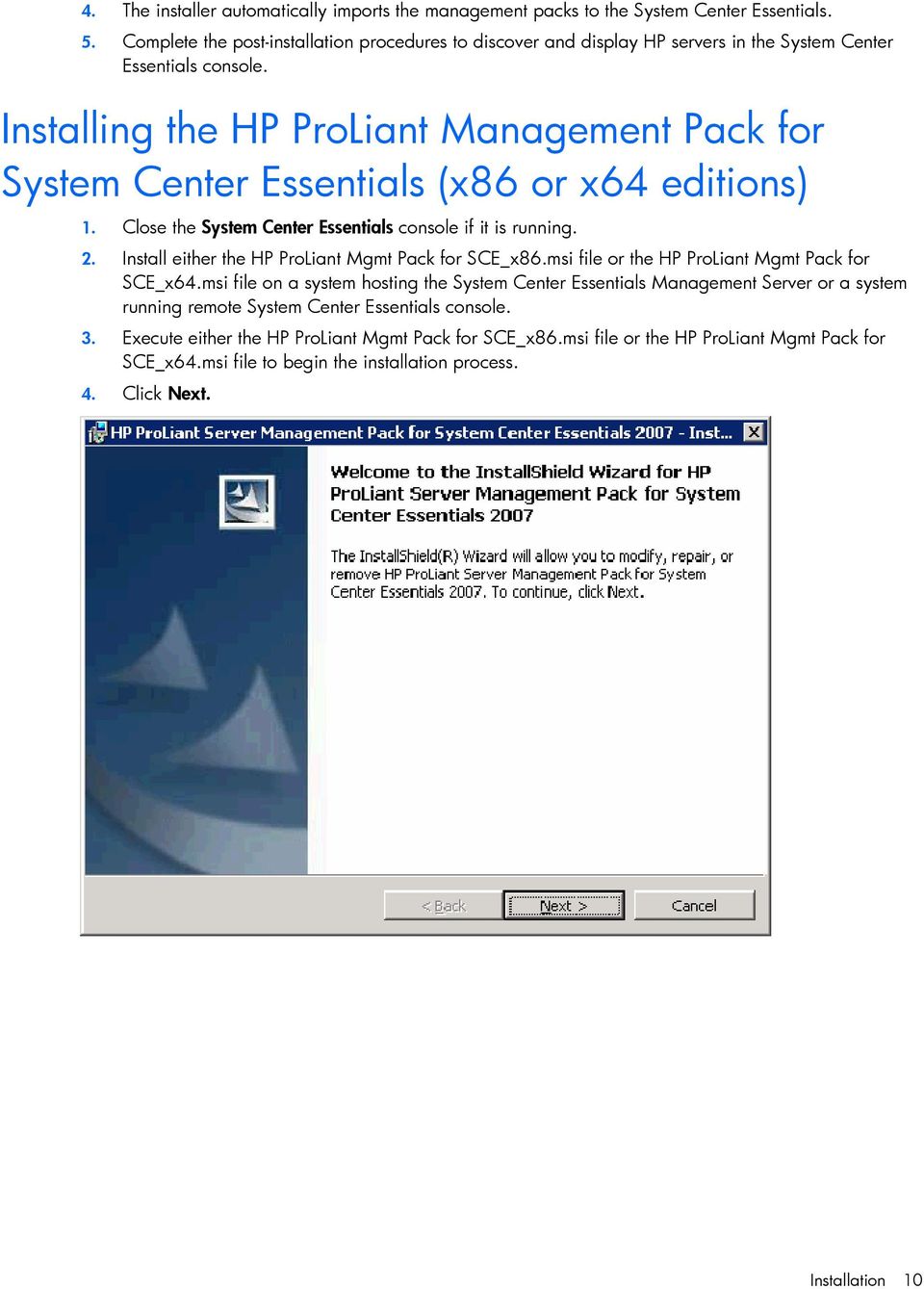
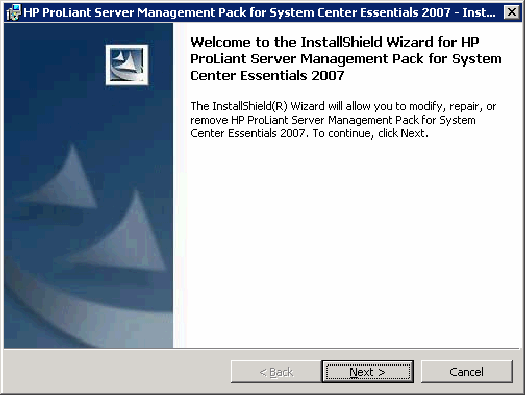
10 4. The installer automatically imports the management packs to the System Center Essentials. 5. Complete the post-installation procedures to discover and display HP servers in the System Center Essentials console. Installing the Management Pack for System Center Essentials (x86 or x64 editions) 1. Close the System Center Essentials console if it is running. 2. Install either the Mgmt Pack for SCE_x86.msi file or the Mgmt Pack for SCE_x64.msi file on a system hosting the System Center Essentials Management Server or a system running remote System Center Essentials console. 3. Execute either the Mgmt Pack for SCE_x86.msi file or the Mgmt Pack for SCE_x64.msi file to begin the installation process. 4. Click Next. Installation 10
11 5. Select I accept the terms in the license agreement, and click Next. 6. To change the destination folder, click Change. If no folder change is required, click Next, and go to step 8. Installation 11

12 7. Select the destination folder by using the folder navigation button to browse to the folder location or by entering the folder name in the textbox. Click OK. 8. Select the setup type from the following options: o o Complete Select this setup type to install all necessary features onto the System Center Essentials environment (Continue to step 10.). Custom Select this setup type to select the features to install the System Center Essentials in a console-only environment (Remote System Center Essentials console). The Custom Data Manager must be installed on all remote consoles. Installation 12

13 Click Next. 9. Select the required features to install from the menu. Click Next. Installation 13

14 10. Click Install. The installation automatically imports the management packs. The installation progress screen appears. 11. Click Finish. Installation 14

15 After the installation of the Management Pack for System Center Essentials The installation updates the system with components in the following table. By default, all files are installed in the %Program Files%\HP Server Management Packs for System Center Essentials directory. If you selected a different destination folder during the installation, these files are installed in the selected folder. Name Type Component Description HPServerManagementPacksForSCEDir Management Packs \HewlettPackard.Servers.Library.mp Management Packs\ProLiant HewlettPackard.Servers.ProLiant.mp Management Packs\ProLiant \HP.Servers.ProLiant.SNMP.mp Release Notes and Documents \HPManagementPacks 1_0 TroubleshootingAssistant.chm Release Notes and Documents \HP ManagementPacks 1_0 UserGuide.chm Release Notes and Documents \ProLiant\LicenseForProLiantMPs.rtf Release Notes and Documents \ProLiant \ReleaseNotesForProLiantMPs.rtf Tools \hpcdm.exe Environment variable Management Pack Management Pack Management Pack Document Document Document Document Tool Default Management Packs Management Packs Management Packs Release Notes and Documents Release Notes and Documents Release Notes and Documents Release Notes and Documents Console Task Tools ProLiantImportMPs.log Log Management Packs Store the destination folder HP Servers Core Library Servers Base Servers SNMP Management Pack Troubleshooting Assistant document User Guide License document Release Notes HP Custom Data Manager Logging text data of imported result Installation 15

16 The installation results can be viewed using the Management Packs view in the System Center Essentials console. Import logging data is also available in the ProLiantImportMPs.log file. The ProLiant Management Pack kit imports the following three management packs into the System Center Essentials server: Hewlett-Packard Servers Core Library Defines the basic HP Server Class structure to support ProLiant Servers Management Hewlett-Packard ProLiant Servers Base Defines the Server Class structure to process primary monitoring to ProLiant Servers Hewlett-Packard ProLiant Servers SNMP Management Pack Defines the HP Insight Management Agents-based management for states and events These management packs are deployed automatically, and you can view state and event information after the installation. This installation also adds entries in the programs menu on the Windows Start menu. Uninstalling the Management Pack for System Center Essentials NOTE: Uninstalling the kits will not delete the imported Management Packs from the System Center Essentials servers. Before attempting to remove the kits from the Add/Remove Programs menu, you must manually delete all dependent management pack data from the System Center Essentials console and the management packs. Installation 16

17 You can check current dependency in the Administration screen. Right-click the Servers Management Pack you want to check, and select Properties. Select the Dependencies tab. If the Management Pack that depends on this Management Pack list does not show any dependency, then the selected management pack can be deleted. If there are dependencies present, then you must verify that it is appropriate to delete them. After the Management Packs are deleted from the System Center Essentials server, perform the following procedure to uninstall all kit contents. 1. Locate the Management Packs for System Center Essentials in the Windows Add/Remove programs menu. To begin the removal process, click Change. 2. Click Next. Installation 17

18 3. Select Remove, and click Next. 4. Click Remove. The uninstallation progress screen appears. Installation 18

19 5. Click Finish. Installation 19

20 Using the software Using the HP Server Management Packs for System Center Essentials The HP Server Management Packs for System Center Essentials include the following major elements: Classes Views Discoveries Monitors Rules Tasks Before using the HP Server Management Packs for System Center Essentials, be sure that the following conditions exist: The HP Server Management Packs for System Center Essentials have been installed according to the installation procedures ("Installation" on page 9) defined in this guide. SNMP services are installed, properly configured, and running on all managed servers. NOTE: The appropriate versions of HP Insight Management Agents are installed and running on all managed servers. For further information, see the HP Server Management Pack Configuration Guide. Classes The structure of the HP Server Classes is defined to provide the following features: Classes to abstract servers. Classes to abstract SNMP and future WMI based management. Classes organized into multiple management packs. Using the software 20

21 The following figure illustrates the HP Logical Hardware class inheritance hierarchy for SNMPbased managements. Using the software 21
22 The following figure illustrates the Group and Management Software class inheritance hierarchy. HP Servers Core Library classes The Core Library defines the primary abstract classes and group classes: HP Logical Hardware (ID=HewlettPackard.Servers.HPLogicalHardware) Using the software 22
23 HP Management Software (ID=HewlettPackard.Servers.HPManagementSoftware) o Version Version information of HP management software HP Management Client Software (ID=HewlettPackard.Servers.HPManagementClientSoftware) HP Management Server Software (ID=HewlettPackard.Servers.HPManagementServerSoftware) o Server Name (key) Network name of HP server or computer HP Group (ID=HewlettPackard.Servers.HPGroup) HP Server (ID=HewlettPackard.Servers.HPServer) o Network Name (key) Network name of HP server or computer o Manufacturer Server manufacturer name o Model Model name of server o Serial Number Server serial number o System Firmware System firmware version o System Type Server system type o Physical Memory (MB) Physical memory size in megabytes o Total Disk (GB) Total disk size in gigabytes o HP Management Version HP management agents and provider versions o Monitoring Source Monitoring instrumentation name o Custom Data 1 Title: User Custom Data field o Custom Data 1 Value: User Custom Data field o Custom Data 2 Title: User Custom Data field o Custom Data 2 Value: User Custom Data field o Custom Data 3 Title: User Custom Data field o Custom Data 3 Value: User Custom Data field o Custom Data 4 Title: User Custom Data field o Custom Data 4 Value: User Custom Data field o Custom Data 5 Title: User Custom Data field o Custom Data 5 Value: User Custom Data field HP Servers Group (ID=HewlettPackard.ServersHPServersGroup) HP Health Collection (ID=HewlettPackard.Servers.HPHealthConnection) o Server Name Network name of HP server or computer HP Computers Group (ID=HewlettPackard.Servers.HPComputersGroup) HP All Instance Group (ID=HewlettPackard.Servers.HPAllInstanceGroup) Using the software 23
24 Servers Base classes The HP Servers Base implements the Server Class with Model Membership Groups. Servers Group (ID=HewlettPackard.Servers.ProLiant.HPProLiantServersGroup) ML Servers Group (ID=HewlettPackard.Servers.ProLiant.HPProLiantMLServersGroup) DL Servers Group (ID=HewlettPackard.Servers.ProLiant.HPProLiantDLServersGroup) BL Servers Group (ID=HewlettPackard.Servers.ProLiant.HPProLiantBLServersGroup) Server (ID=HewlettPackard.Servers.ProLiant.HPProLiantServer) o Integrated Lights-Out IP Address IP Address of Integrated Lights-Out Management Processor ML Server (ID=HewlettPackard.Servers.ProLiant.HPProLiantMLServer) DL Server (ID=HewlettPackard.Servers.ProLiant.HPProLiantDLServer) BL Server (ID=HewlettPackard.Servers.ProLiant.HPProLiantBLServer) Other Model Server (ID=HewlettPackard.Servers.ProLiant.HPProLiantXXServer) Using the software 24
25 Health Collection (ID=HewlettPackard.Servers.ProLiant.HPProLiantHealthCollection) Processors (ID=HewlettPackard.Servers.ProLiant.HPProLiantProcessors) Memory (ID=HewlettPackard.Servers.ProLiant.HPProLiantMemory) Cooling (ID=HewlettPackard.Servers.ProLiant.HPProLiantCooling) Realtime Monitors (ID=HewlettPackard.Servers.ProLiant.HPProLiantRealtimeMonitors) Temp Sensors (ID=HewlettPackard.Servers.ProLiant.HPProLiantTemperatureSensors) Power Supplies (ID=HewlettPackard.Servers.ProLiant.HPProLiantPowerSupplies) Storage (ID=HewlettPackard.Servers.ProLiant.HPProLiantServerStorage) Networks (ID=HewlettPackard.Servers.ProLiant.HPProLiantServerNetworks) Management Processors (ID=HewlettPackard.Servers.ProLiant.HPProLiantManagementProcessors) Logs (ID=HewlettPackard.Servers.ProLiant.HPProLiantLogs) UPS (ID=HewlettPackard.Servers.ProLiant.HPProLiantUPS) Others (ID=HewlettPackard.Servers.ProLiant.HPProLiantServerOthers) SNMP Management (ID=HewlettPackard.Servers.ProLiant.HPProLiantSNMPManagement WMI Management (ID=HewlettPackard.Servers.ProLiant.HPProLiantWMIManagement) HP System Insight Manager (ID=HewlettPackard.Servers.ProLiant.HPProLiantSystemsInsightManager) The Servers Base also defines the following Relationship classes. Using the software 25
26 HP Servers Group Contains Servers Group Relationship (ID=HewlettPackard.Servers.ProLiant.HPServersGroupContainsHPProLiantServersGroup) Servers Group Contains ML Servers Group Relationship (ID=HewlettPackard.Servers.ProLiant.HPProLiantServersGroupContainsHPProLiantMLServersGroup) Servers Group Contains DL Servers Group Relationship (ID=HewlettPackard.Servers.ProLiant.HPProLiantServersGroupContainsHPProLiantDLServersGroup) Servers Group Contains BL Servers Group Relationship (ID=HewlettPackard.Servers.ProLiant.HPProLiantServersGroupContainsHPProLiantBLServersGroup) Servers Group Contains Other Model Server Group Relationship (ID=HewlettPackard.Servers.ProLiant.HPProLiantServersGroupContainsHPProLiantXXServer) ML Servers Group Contains ML Server Relationship (ID=HewlettPackard.Servers.ProLiant.HPProLiantMLServersGroupContainsHPProLiantMLServer) ML Servers Group Contains DL Server Relationship (ID=HewlettPackard.Servers.ProLiant.HPProLiantDLServersGroupContainsHPProLiantDLServer) ML Servers Group Contains BL Server Relationship (ID=HewlettPackard.Servers.ProLiant.HPProLiantBLServersGroupContainsHPProLiantBLServer) Windows Computer Hosting Server Relationship (ID=HewlettPackard.Servers.ProLiant.WindowsComputerHostsHPProLiantServer) Server Hosting Processors Collection Relationship (ID=HewlettPackard.Servers.ProLiant.HPProLiantServerHostsHPProLiantProcessors) Server Hosting Memory Collection Relationship (ID=HewlettPackard.Servers.ProLiant.HPProLiantServerhostsHPProLiantMemory) Server Hosting Cooling Collection Relationship (ID=HewlettPackard.Servers.ProLiant.HPProLiantServerHostsHPProLiantCooling) Server Hosting Realtime Monitors Collection Relationship (ID=HewlettPackard.Servers.ProLiant.HPProLiantServerHostsHPProLiantRealtimeMonitors) Server Hosting Temperature Sensors Collection Relationship (ID=HewlettPackard.Servers.ProLiant.HPProLiantServerHostsHPProLiantTemperatureSensors) Server Hosting Power Supplies Collection Relationship (ID=HewlettPackard.Servers.ProLiant.HPProLiantServerHostsHPProLiantPowerSupplies) Server Hosting Server Storage Collection Relationship (ID=HewlettPackard.Servers.ProLiant.HPProLiantServerHostsHPProLiantServerStorage) Server Hosting Server Networks Collection Relationship (ID=HewlettPackard.Servers.ProLiant.HPProLiantServerHostsHPProLiantServerNetworks) Server Hosting Management Processors Collection Relationship (ID=HewlettPackard.Servers.ProLiant.HPProLiantServerHostsHPProLiantManagementProcessors) Server Hosting Logs Collection Relationship (ID=HewlettPackard.Servers.ProLiant.HPProLiantServerHostsHPProLiantHPProLiantLogs) Server Hosting UPS Collection Relationship (ID=HewlettPackard.Servers.ProLiant.HPProLiantServerHostsHPProLiantUPS) Server Hosting Server Others Collection Relationship (ID=HewlettPackard.Servers.ProLiant.HPProLiantServerHostsHPProLiantOthers) Using the software 26
27 Server Hosting SNMP Management Relationship (ID=HewlettPackard.Servers.ProLiant.HPProLiantServerHostsHPProLiantSNMPManagement) Server Hosting WMI Management Relationship (ID=HewlettPackard.Servers.ProLiant.HPProLiantServerHostsHPProLiantWMIManagement) Server Hosting Systems Insight Manager Relationship (ID=HewlettPackard.Servers.ProLiant.HPProLiantServerHostsHPProLiantSystemsInsightManager) Servers SNMP classes The Servers SNMP Management Pack defines the following classes. Processors (ProLiant SNMP) (ID=HewlettPackard.Servers.ProLiant.SNMP.HPProLiantSNMPProcessors) Memory (ProLiant SNMP) (ID=HewlettPackard.Servers.ProLiant.SNMP.HPProLiantSNMPMemory) Cooling (ProLiant SNMP) (ID=HewlettPackard.Servers.ProLiant.SNMP.HPProLiantSNMPCooling) Realtime Monitors (ProLiant SNMP) (ID=HewlettPackard.Servers.ProLiant.SNMP.HPProLiantSNMPRealtimeMonitors) Temp Sensors (ProLiant SNMP) (ID=HewlettPackard.Servers.ProLiant.SNMP.HPProLiantSNMPTemperatureSensors) Power Supplies (ProLiant SNMP) (ID=HewlettPackard.Servers.ProLiant.SNMP.HPProLiantSNMPPowerSupplies) Storage (ProLiant SNMP) (ID=HewlettPackard.Servers.ProLiant.SNMP.HPProLiantSNMPServerStorage) Networks (ProLiant SNMP) (ID=HewlettPackard.Servers.ProLiant.SNMP.HPProLiantSNMPServerNetworks) Management Processors (ProLiant SNMP) (ID=HewlettPackard.Servers.ProLiant.SNMP.HPProLiantSNMPManagementProcessors) Logs (ProLiant SNMP) (ID=HewlettPackard.Servers.ProLiant.SNMP.HPProLiantSNMPLogs) UPS (ProLiant SNMP) (ID=HewlettPackard.Servers.ProLiant.SNMP.HPProLiantSNMPUPS) Using the software 27
28 Views Others (ProLiant SNMP) (ID=HewlettPackard.Servers.ProLiant.SNMP.HPProLiantSNMPServerOthers) The System Center Essentials Console provides a collection of folders and windows for viewing information stored in the System Center Essentials database. The HP Server Management Packs for System Center Essentials include predefined HP server views that present information about each HP server and associated alerts. The following views are added on the System Center Essentials Console after successful installation of the Management Pack for System Center Essentials: HP Servers This is the root folder that includes all HP server-related views. HP Servers/Active Alerts This view displays all active alerts generated by Collection classes. HP Servers/Computers This view displays all HP computers. HP Servers/Group State This view displays the state view by Groups. HP Servers/Health Collection State This view displays the state view by Collection classes. HP Servers/HP Management Servers This view displays the state view of HP management server software such as the HP Systems Insight Manager. HP Servers/Server Diagram This view displays the diagram view starting with the HP Servers Group. HP Servers/Server State This view displays the state view for HP servers. HP Servers/Task Status This view displays the task results. Only remote tasks will appear here. Active Alerts view The Active Alerts view displays all active alerts associated with HP health collection classes. To display details for an individual alert, select the alert from the Active Alerts pane. The Alert Details pane displays HP Knowledge base text with the originated NT Event message in the Alert Description. The predefined event processing rules included with the HP Server Management Packs for System Center Essentials are designed to automatically identify and display HP server events received in the Windows Event Log as System Center Essentials alerts. The following information appears in the alert details: Alert Name Source of Alert Path Alert Rule Name Created Time Alert Description Knowledge o Resolution with embedded Console tasks o Causes Using the software 28
29 o Summary o Related Links The Resolution section contains the following tasks to assist in tool access: For servers: HP System Management Homepage HP Integrated Lights-Out Analyzing HP alerts The HP alerts contain server hardware and services information that enable you to identify the cause of an issue and implement a timely and effective response. Using the software 29
30 The Product Knowledge tab displays suggested resolutions to the alert. To view full knowledge information, click View additional knowledge from the Alert Details pane. If necessary, launch the Console Tasks listed in the Product Knowledge. Use the information in the alert to implement a rapid response and maintain system availability. For additional system data, view the HP System Management Homepage on the individual server or use HP SIM to manage multiple systems. Use the tasks provided with the Product Knowledge. Using the software 30
31 Computers view The Computers view displays all HP computers managed by HP Insight Management Agents and the hosted Microsoft applications. This view displays the health state of each computer and you can use Microsoft tasks as defined in the Microsoft Computer class. Using the software 31
32 To view associated HP information, right-click the server entry, and then select Open>Diagram View. This view displays the relationship between HP Server and Windows Computer classes along with other managed classes under the Windows Computer class instance. The state of the HP Server class instance is propagated to the Windows Computer class instance. Group State view The Group State view displays each Server Model Group State propagating from underlying Server Models. To view members of HP Server Group, right-click the group entry, and then select Open>Diagram View. Using the software 32
33 Health Collection State view The Health Collection State view displays the state of all collections of HP servers. You can view all failed collections simultaneously by sorting the State column. HP Management Servers view The HP Management Servers view lists all computers that host the HP SIM application for cross-platform hardware resource lifecycle management. The HP Server Management Packs for System Center Essentials include a task that enables HP SIM to be launched within System Center Essentials. Using the software 33
34 Server Diagram view The Server Diagram view provides a graphical display of groups and associated HP servers and subsystems (collections). servers appear in the Server Diagram display. Expand each icon node to drill down to the next level of information. Using the software 34
35 Using the software 35
36 Server State view The Server State view displays the overall status of HP hardware associated with the listed computers. To view detailed state information for HP health collections for a computer, select the computer, and then launch Health Explorer from the Context menu or from the link in the Actions panel. Using the software 36
37 Health Explorer The Health Explorer can be launched from the State view and the Diagram view. It displays the result of state propagation in folder style. The Health Explorer automatically expands those folders in which red or yellow states are observed. Select the last node in the folder to get knowledge information, and then select the State Change Event tab to view state change history. Using the software 37
38 The following figure is an example of Health State Change history and state property bag data. The property bag data contains a list of properties with Health State Update and Failed Component information. The Failed Component information is available by collection monitors: Processor Health Collection: Processor Name Memory Health Collection: Memory Module or Memory Board Name Cooling Health Collection: Fan Type Power Supplies Health Collection: Power Supply Name Realtime Monitoring Collection: Auto Server Recovery Server Others Health Collection: Component Name such as Base System, Threshold Management, Operating System, Non HP Devices, Windows, Appliance, Enclosure, and Other System Health (UID and POST) Other Health Collections that were not described previously, display N/A to indicate there is no further information available for the failed component. For detailed diagnostic information, launch the HP System Management Homepage. Using the software 38
39 Task Status view The Task Status view displays task results. Server Management Packs have Integrated Management Log tasks that display the task results on this view. Discovering HP servers The HP Server Management Packs for System Center Essentials include many discovery rules in different management packs. HP core management pack discovery rule The HP Servers core library management pack (ID=HewlettPackard.Servers.Library) in Management Pack for System Center Essentials contains the following discovery rule: HP Computer Discovery (ID=HewlettPackard.Servers.HPComputerGroupDiscovery) This rule discovers HP servers and classifies them under the HP servers group. base management pack discovery rules The Servers base management pack (ID=HewlettPackard.Servers.ProLiant) in the Management Pack for System Center Essentials contains the following discovery rules: Using the software 39
40 Server Discovery Rule (ID=HewlettPackard.Servers.ProLiant.HPProLiantServerDiscoveryRule) Discovers an server with these properties: o o o o o o o o o o Network Name Manufacturer Model Serial Number System Firmware System Type Physical Memory Total Disk HP Management Version Monitoring Source o Insight Lights-Out IP address (The IP address is not visible in the Server Detail View. It appears in the Diagram View and after the task is launched.) Systems Insight Manager Discovery Rule (ID=HewlettPackard.Servers.ProLiant.HPProLiantSystemsInsightManagerDiscoveryRule) Discovers HP Systems Insight Manager on an server HP Servers Group to ProLiant Servers Group Membership Rule (ID=HewlettPackard.Servers.ProLiant.HPServersGroupProLiantServersGroupMembershipRule) Instantiates Servers group under HP Servers group Server Group to ML Servers Group Membership Rule (ID=HewlettPackard.Servers.ProLiant.HPProLiantServersGroupMLServersGroupMembershipRule) Instantiates ML Servers group under Servers group Servers Group to DL Servers Group Membership Rule (ID=HewlettPackard.Servers.ProLiant.HPProLiantServersGroupDLServersGroupMembershipRule) Instantiates DL Servers group under Servers group Servers Group to BL Servers Group Membership Rule (ID=HewlettPackard.Servers.ProLiant.HPProLiantServersGroupBLServersGroupMembershipRule) Instantiates BL Servers group under Servers group Servers Group to Other Model Servers Group Membership Rule (ID=HewlettPackard.Servers.ProLiant.HPProLiantServersGroupHPProLiantXXMembershipRule) Discovers and classifies an server (except BL, ML, and DL models) under Servers group ML Servers Group to ML Membership Rule (ID=HewlettPackard.Servers.ProLiant.HPProLiantMLServersGroupHPProLiantMLMembershipRule) Discovers and classifies an ML server under ML Servers group DL Servers Group to DL Membership Rule (ID=HewlettPackard.Servers.ProLiant.HPProLiantDLServersGroupHPProLiantDLMembershipRule) Discovers and classifies an DL server under DL Servers group BL Servers Group to BL Membership Rule (ID=HewlettPackard.Servers.ProLiant.HPProLiantBLServersGroupHPProLiantBLMembershipRule) Discovers and classifies an BL server under BL Servers group Using the software 40
41 The Server Discovery Rule and the Systems Insight Manager Discovery Rule run every 60 minutes by default. To change the discovery frequency, perform the following procedure: 1. Open the Authoring panel. 2. Select Management Pack Objects>Object Discoveries. A list of Object Discoveries appears. 3. Select HP Proliant Server Discovery Rule. 4. In the Actions panel, select Overrides>Override the Object Discovery>For all objects of type: Windows Computer. The override properties window appears. Using the software 41
42 5. Modify the IntervalSeconds parameter to adjust the discovery frequency (in seconds). To disable discovery, perform the same steps. However, at the object discovery, select Disable Object Discovery. SNMP management pack discovery rules The Servers SNMP management pack (ID=HewlettPackard.Servers.Proliant.SNMP) in the HP ProLiant Management Pack for System Center Essentials contain the following discovery rule: SNMP Collection Health Condition Discovery Rule (ID=HewlettPackard.Servers.ProLiant.SNMP.ProLiantSNMPHealthDiscoveryRule) Instantiates Health Collection classes associated with servers (This discovery rule runs every 60 minutes by default). Using the software 42
43 servers discoveries The discovery rules in the Management Pack for System Center Essentials help to discover and automatically classify servers into their appropriate groups and Health Collection classes. Event processing rules The HP Server Management Packs for System Center Essentials creates event processing rules for targeting Health Collection classes. These rules identify HP events written to the Windows Event Log by HP Insight Management Agents and display them as System Center Essentials alerts. The HP Server Management Packs for System Center Essentials provides knowledge base data within the event processing rules. This data can be used to identify the cause of an event and assist in reducing the time to resolution. Knowledge base data can be annotated to include environment or customer specific information. HP Server ProLiant SNMP Management Pack defines processing rules for these Health Collections: Processors Processor error monitoring Memory Memory error monitoring Temp Sensors Temperature sensor error monitoring Cooling Fan error monitoring Power Supplies Power supply error monitoring Management Processors Integrated Lights-Out error monitoring Networks NIC and teaming network error monitoring Storage Storage system error monitoring Others Rack, Blade Enclosures, additional error monitoring Using the software 43
44 Realtime Monitors Auto Server Recovery monitoring The Event rules for servers section contains all error processing rules. These rules can be edited from the Active Alerts or the Rule Authoring panes. The Active Alerts pane displays current Active Alerts. To access the Properties or Overrides menu, rightclick an Active Alert, and then select Properties or Overrides. Using the software 44
45 The Authoring Rules pane displays all rules. To search for a rule, enter the search text in the Look For text box, and then click Find Now. To access the Properties or Overrides menu, right-click an Active Alert, and then select Properties or Overrides. Tasks for HP servers The HP Server Management Packs for System Center Essentials include predefined tasks that can be used to access in-depth server information, carry out advanced remote server administration, and perform lifecycle management on multiple servers, clients, printers, and other networked devices. HP tasks appear in the Actions window. Not all tasks appear in every view because tasks are associated with specific classes. The Management Pack for System Center Essentials includes the following tasks: HP Custom Data Manager HP Integrated Lights-Out HP System Management Homepage HP Systems Insight Manager Integrated Management Log Export Integrated Management Log Clear Using the software 45
46 Remote Desktop and Computer Management HP Custom Data Manager The HP Custom Data Manager (CDM) maintains user-specified text information on a per server basis. It can store text information such as warranty expiration, server memo, and server location description. The text information format is open to users, and the HP CDM enables users to view and input the information. CDM is a console task on System Center Essentials, and launches from HP Servers Groups and subgroups. NOTE: CDM must be installed on each remote System Center Essentials Console. For further information, see Installing the Management Pack for System Center Essentials (x86 or x64 editions) (on page 10). CDM automatically locates the System Center Essentials host name from the System Center Essentials registry with user credentials. Users must have the proper access credentials to use this tool. CDM communicates with the SDK interface of System Center Essentials and enumerates all HP Server systems in the System Center Essentials domain. CDM does not enumerate non-hp servers. The following command buttons are included with the Custom Data Manager: Open File enables users to load a previously-saved XML file to update the Custom Data section. Save File enables users to save enumerated HP Server data to an XML file. Microsoft Excel can be used to edit the saved XML file to be loaded back to the CDM tool to update the Custom Data section. NOTE: The saved file must be saved as XML data, not an XML spreadsheet. Using the software 46
47 ReConnect enables users to reconnect to a System Center Essentials server with current user credentials to retrieve current HP Server information. Update enables users to sync with a System Center Essentials server for Custom Data update. Exit and Remove Connecter enables users to close CDM and remove the Connector interface specifically for CDM from System Center Essentials. Edit Names Properties enables users to set the CustomDataTitle properties to the desired string. There are five CustomDataTitle properties, which users can set for all HP Servers. The checkbox in the HP Recommended Set provides the HP recommended default set of names. To launch the HP CDM: 1. Select an HP Server group or an HP Server subgroup. 2. Click HP Custom Data Manager. The Custom Data Manager screen appears. This screen displays the Server Properties and the default Custom Data fields. 3. Select one of the command buttons described previously to perform the desired operation. For example, to change or set the strings in the Custom Data section, click Edit, and select Name Properties. Using the software 47
48 4. Enter the strings for the five common names, or click Click to set HP recommended set of names. 5. Enter the strings for the CustomDataValue fields, click File, and then click Save to save the custom data to an XML file. 6. To save the custom data to the System Center Essentials database, click Update. 7. To load a previously-saved XML file, click File>Open. Using the software 48

49 8. To list a specific server, select the Display Name option, and then enter the server name in the Look For textbox. Using the software 49
50 9. To list all servers of the same model, select the Model Name option, and then enter the server model name in the Look For textbox. 10. To exit the CDM, close the Custom Data Manager window. To edit the saved XML file in Microsoft Excel: 1. To load a previously saved XML file, click File, and then select Open. Select XML Files (*.xml) in the Files of type list, and then select the previously saved file. Click Open. Using the software 50


51 2. Select how you would like to open the XML file. 3. Select As an XML list. 4. To view a standard Microsoft Excel spreadsheet, click OK. Only columns CustomData1Title to CustomData5Title, and CustomData1Value to CustomData5Value are customizable. You cannot edit other properties. 5. After editing, click File, and then select Save menu. Select XML Data from the File Type menu. 6. To ignore the warning, click Continue. Microsoft Excel saves the result to a XML file that can be loaded to CDM. Using the software 51
52 HP Systems Insight Manager task HP Systems Insight Manager (HP SIM) is discovered by Management Packs. The discovered HP SIM is displayed in the HP Management Servers view. Select HP SIM in the main pane, and the HP SIM task is available in the Actions pane. Custom HP Systems Insight Manager task Universal HP Systems Insight Manager task is a custom console task from the Authoring tab view. Custom HP SIM console tasks can enable the easy launch of HP SIM from any view. To create custom HP SIM console task, perform the following procedure. Using the software 52
53 1. Select Authoring view tab, expand the Management Pack Objects folder, and then right-click the Tasks folder. Select Create a new task. Using the software 53
54 2. In the Console Tasks folder, select Command line, and then select a Management Pack to store the custom task information. Click Next. Using the software 54
55 3. Enter HP Systems Insight Manager (Custom) in the Task name textbox. Select Task target to HP Logical Hardware. Click Next. Using the software 55
56 4. Enter Clear the Display output when this task is run checkbox. Click Create. 5. HP Systems Insight Manager (Custom) console task is now available in the Server State and Active Alerts views. Using the software 56
57 Remote Desktop and Computer Management tasks Three Microsoft Windows tools are available from the Server State view and the Diagram view when an HP Server is focused on the view. These console tools launch Windows native tools on the local system to remotely connect to the selected HP Server. Computer Management Launches Windows Computer Management MMC tool Remote Desktop (Console) Launches Remote Desktop with console mode Remote Desktop Launches Remote Desktop Integrated Management Log task Servers can have an Integrated Management Log to keep a record of historical hardware events. Some historical hardware events cannot be reflected to other health collection. Health Collection logs present the state of Integrated Management Log that might have error or warning states. These states only appear when any other health collections cannot report the specific hardware issue situation. Two tasks are provided to eliminate visiting each machine to view and clear records of Integrated Management Log. These tasks are the following: Integrated Management Log Export Exports log records Integrated Management Log Clear Exports, and then clears log records Both tasks run remotely on the target system with the results seen on task screen on the System Center Essentials Console. Both tasks are associated with Logs Collection so these can be accessed from Health Collection State view or Server Diagram view. The task results include a record table with Excel CSV format, so it can import to Excel after manual editing for easy viewing. 1. Select Health Collection State View. Locate the target Logs collection from the list on the main pane. Using the software 57

58 2. Click one of the tasks such as Integrated Management Log Export, or click Clear from action pane. Using the software 58

59 3. The confirmation screen appears. Click Run. Using the software 59
60 4. To retrieve latest results of tasks at anytime, click Task State View. HP Integrated Lights-Out task servers can include an Integrated Lights-Out management processor, which enables you to perform advanced, secure, and operating system-independent remote server management using a standard browser interface. The Management Pack for System Center Essentials include a task that collects HP Integrated Lights-Out management processor data and creates an associated browser link to remotely access the selected server. To launch the HP Integrated Lights-Out task to display information: 1. Select an server. 2. Click HP Integrated Lights-Out. Using the software 60
61 3. Log in to HP Integrated Lights-Out. Monitors HP Server Management Packs include a set of monitors to update the health states from HP management software. Monitors are presented in the following categories: Health Collection State monitoring These monitors update the health states to each Health Collection class instance. State Propagation monitoring These monitors update the health states to propagate from a lower associated class instance to a higher class instance Management Software monitoring These monitors update the health states of HP Insight Management Agents. The following table displays each set of monitors defined in the HP Server Management Packs. Using the software 61
62 The following are monitors for Base Management Packs. ID: Name Type Target class HewlettPackard.Servers.ProLiant.HPProLiantS NMPManagementHealthMonitor: Insight Management Agents Health Monitor HewlettPackard.Servers.ProLiant.HPProLiantSy stemsinsightmanagerhealthmonitor : HP ProLiant Systems Insight Manager Health Monitor HewlettPackard.Servers.ProLiant.HPServersGr oupproliantserversgrouphealthrollupmonitor : Servers Group to HP Servers Group Health Rollup Monitor HewlettPackard.Servers.ProLiant.HPProLiantS erversgroupmlserversgrouphealthrollupmo nitor : ML Servers Group to HP ProLiant Servers Group Health Rollup Monitor HewlettPackard.Servers.ProLiant.HPProLiantS erversgroupdlserversgrouphealthrollupmon itor : DL Servers Group to HP ProLiant Servers Group Health Rollup Monitor HewlettPackard.Servers.ProLiant.HPProLiantS erversgroupblserversgrouphealthrollupmon itor : BL Servers Group to HP ProLiant Servers Group Health Rollup Monitor HewlettPackard.Servers.ProLiant.HPProLiantS erversgroupproliantxxserverhealthrollupmo nitor : Other Model Server to HP ProLiant Servers Group Health Rollup Monitor Unit Monitor Unit Monitor Dependency Monitor Dependency Monitor Dependency Monitor Dependency Monitor Dependency Monitor SNMP Manageme nt HP Systems Insight Manager HP Servers Group Servers Group Servers Group Servers Group Servers Group Description Monitors the health of HP Server Agents Monitors the health of HP Systems Insight Manager This Health Rollup Monitor rolls up from the ProLiant Servers Group to the HP Servers Group This Health Rollup Monitor rolls up from the ML Servers Group to the HP ProLiant Servers Group This Health Rollup Monitor rolls up from the DL Servers Group to the HP ProLiant Servers Group This Health Rollup Monitor rolls up from the BL Servers Group to the HP ProLiant Servers Group This Health Rollup Monitor rolls up from the Other Model Server to the HP ProLiant Servers Group Using the software 62
63 ID: Name Type Target class HewlettPackard.Servers.ProLiant.HPProLiantM LServersGroupProLiantMLServerHealthRollup Monitor : ML Server to HP ProLiant ML Servers Group Health Rollup Monitor HewlettPackard.Servers.ProLiant.HPProLiantDL ServersGroupProLiantDLServerHealthRollupM onitor : DL Server to DL Servers Group Health Rollup Monitor HewlettPackard.Servers.ProLiant.HPProLiantBL ServersGroupProLiantBLServerHealthRollupM onitor : BL Server to BL Servers Group Health Rollup Monitor Dependency Monitor Dependency Monitor Dependency Monitor ML Servers Group DL Servers Group BL Servers Group Description This Health Rollup Monitor rolls up from the ML Server to the HP ProLiant ML Servers Group This Health Rollup Monitor rolls up from the DL Server to the HP ProLiant DL Servers Group This Health Rollup Monitor rolls up from the BL Server to the HP ProLiant BL Servers Group HewlettPackard.Servers.ProLiant.WindowsCo mputerhpproliantserverhealthrollupmonitor : Server to Windows Computer Health Rollup Monitor HewlettPackard.Servers.ProLiant.HPProLiantPr ocessorshealthrollupmonitor : Processors to Server Health Rollup Monitor HewlettPackard.Servers.ProLiant.HPProLiantM emoryhealthrollupmonitor : Memory to Server Health Rollup Monitor HewlettPackard.Servers.ProLiant.HPProLiantC oolinghealthrollupmonitor : Cooling to Server Health Rollup Monitor Dependency Monitor Dependency Monitor Dependency Monitor Dependency Monitor Windows Computer Server Server Server This Health Rollup Monitor rolls up from the Server to the Windows Computer This Health Rollup Monitor rolls up from HP ProLiant Processors to HP ProLiant Server This Health Rollup Monitor rolls up from HP ProLiant Memory to Server This Health Rollup Monitor rolls up from HP ProLiant Cooling to Server Using the software 63
64 ID: Name Type Target class HewlettPackard.Servers.ProLiant.HPProLiantRe altimemonitorshealthrollupmonitor : HP ProLiant Realtime Monitors to Server Health Rollup Monitor HewlettPackard.Servers.ProLiant.HPProLiantTe mperaturesensorshealthrollupmonitor : HP ProLiant Temperature Sensors to Server Health Rollup Monitor HewlettPackard.Servers.ProLiant.HPProLiantP owersupplieshealthrollupmonitor : HP ProLiant Power Supplies to Server Health Rollup Monitor HewlettPackard.Servers.ProLiant.HPProLiantS erverstoragehealthrollupmonitor : HP ProLiant Server Storage to Server Health Rollup Monitor HewlettPackard.Servers.ProLiant.HPProLiantS ervernetworkshealthrollupmonitor : HP ProLiant Server Networks to Server Health Rollup Monitor HewlettPackard.Servers.ProLiant.HPProLiantM anagementprocessorshealthrollupmonitor : Management Processors to HP ProLiant Server Health Rollup Monitor HewlettPackard.Servers.ProLiant.HPProLiantLo gshealthrollupmonitor : Hardware Logs to Server Health Rollup Monitor HewlettPackard.Servers.ProLiant.HPProLiantU PSHealthRollupMonitor : UPS to Server Health Rollup Monitor Dependency Monitor Dependency Monitor Dependency Monitor Dependency Monitor Dependency Monitor Dependency Monitor Dependency Monitor Dependency Monitor Server Server Server Server Server Server Server Server Description This Health Rollup Monitor rolls up from HP ProLiant Realtime Monitors to HP ProLiant Server This Health Rollup Monitor rolls up from Temperature Sensors to HP ProLiant Server This Health Rollup Monitor rolls up from Power Supplies to Server This Health Rollup Monitor rolls up from Server Storage to Server This Health Rollup Monitor rolls up from Server Networks to Server This Health Rollup Monitor rolls up from Management Processors to HP ProLiant Server This Health Rollup Monitor rolls up from Hardware Logs to Server This Health Rollup Monitor rolls up from UPS to HP ProLiant Server Using the software 64
65 ID: Name Type Target class HewlettPackard.Servers.ProLiant.HPProLiantS erverothershealthrollupmonitor : Server Others to Server Health Rollup Monitor Dependency Monitor Server Description This Health Rollup Monitor rolls up from Server Others to Server The following are monitors for SNMP Management Packs. ID: Name Type Target Class HewlettPackard.Servers.ProLiant.SNMP.HPPr oliantsnmpprocessorshealthmonitor : HP ProLiant SNMP Processors Collection Health Monitor HewlettPackard.Servers.ProLiant.SNMP.HPPr oliantsnmpmemoryhealthmonitor : HP ProLiant SNMP Memory Collection Health Monitor HewlettPackard.Servers.ProLiant.SNMP.HPPr oliantsnmpcoolinghealthmonitor : HP ProLiant SNMP Cooling Collection Health Monitor HewlettPackard.Servers.ProLiant.SNMP.HPPr oliantsnmprealtimemonitorshealthmonitor : SNMP Realtime Monitors Collection Health Monitor HewlettPackard.Servers.ProLiant.SNMP.HPPr oliantsnmptemperaturesensorshealthmonit or : SNMP Temperature Sensors Collection Health Monitor HewlettPackard.Servers.ProLiant.SNMP.HPPr oliantsnmppowersupplieshealthmonitor : SNMP Power Supplies Collection Health Monitor Unit Monitor Unit Monitor Unit Monitor Unit Monitor Unit Monitor Unit Monitor SNMP Processors SNMP Memory Collection SNMP Cooling Collection SNMP Realtime Monitors SNMP Temperatur e Sensors Collection SNMP Power Supplies Collection Description An Unit Monitor runs a script to get SNMP Processors Collection Health Runs a script to get SNMP Memory Collection Health Runs a script to get SNMP Cooling Collection Health Runs a script to get SNMP Realtime Monitors Collection Health Runs a script to get SNMP Temperature Sensors Collection Health Runs a script to get SNMP Power Supplies Collection Health Using the software 65
66 ID: Name Type Target Class HewlettPackard.Servers.ProLiant.SNMP.HPPr oliantsnmpserverstoragehealthmonitor : HP ProLiant SNMP Server Storage Collection Health Monitor HewlettPackard.Servers.ProLiant.SNMP.HPPr oliantsnmpservernetworkshealthmonitor : SNMP Server Networks Collection Health Monitor HewlettPackard.Servers.ProLiant.SNMP.HPPr oliantsnmpmanagementprocessorshealthmo nitor : SNMP Management Processors Collection Health Monitor HewlettPackard.Servers.ProLiant.SNMP.HPPr oliantsnmplogshealthmonitor : SNMP Hardware Logs Collection Health Monitor HewlettPackard.Servers.ProLiant.SNMP.HPPr oliantsnmpupshealthmonitor : SNMP UPS Collection Health Monitor HewlettPackard.Servers.ProLiant.SNMP.HPPr oliantsnmpserverothershealthmonitor : HP ProLiant SNMP Server Others Collection Health Monitor HewlettPackard.Servers.ProLiant.HPProLiantS NMPManagement.SysMgmtHp.HealthMonito r: Insight Management Agents Health Monitor HewlettPackard.Servers.ProLiant.HPProLiantS NMPManagement.CqMgHost.HealthMonitor: Insight Management Agents Health Monitor HewlettPackard.Servers.ProLiant.HPProLiantS NMPManagement.CqMgServ.HealthMonitor: Insight Management Agents Health Monitor Unit Monitor Unit Monitor Unit Monitor Unit Monitor Unit Monitor Unit Monitor Unit Monitor Unit Monitor Unit Monitor SNMP Server Storage Collection SNMP Server Networks Collection SNMP Manageme nt Processors Collection SNMP Logs Collection SNMP UPS Collection SNMP Server Others Collection SNMP Manageme nt SNMP Manageme nt SNMP Manageme nt Description Runs a script to get SNMP Server Storage Collection Health Runs a script to get SNMP Server Networks Collection Health Runs a script to get SNMP Management Processors Collection Health Runs a script to get SNMP Hardware Logs Collection Health Runs a script to get SNMP UPS Collection Health Runs a script to get SNMP Server Others Collection Health Monitors the health of HP System Management Homepage Monitors the health of HP Insight Foundation Agents Monitors the health of HP Insight Server Agents Using the software 66
67 ID: Name Type Target Class HewlettPackard.Servers.ProLiant.HPProLiantS NMPManagement.CqMgStor.HealthMonitor: Insight Management Agents Health Monitor HewlettPackard.Servers.ProLiant.HPProLiantS NMPManagement.CpqNicMgmt.HealthMonit or: Insight Management Agents Health Monitor HewlettPackard.Servers.ProLiant.HPProLiantS NMPManagement.cpqvcagent.HealthMonitor : Insight Management Agents Health Monitor HewlettPackard.Servers.ProLiant.HPProLiantS NMPManagement.CpqRcmc.HealthMonitor: Insight Management Agents Health Monitor HewlettPackard.Servers.ProLiant.HPProLiantS NMPManagement.CpqRIIS.HealthMonitor: Insight Management Agents Health Monitor HewlettPackard.Servers.ProLiant.HPProLiantS NMPManagement.sysdown.HealthMonitor: Insight Management Agents Health Monitor HewlettPackard.Servers.ProLiant.HPProLiantS NMPManagement.CIMnotify.HealthMonitor: Insight Management Agents Health Monitor HewlettPackard.Servers.ProLiant.HPProLiantS NMPManagement.hplopts.HealthMonitor: HP ProLiant Insight Management Agents Health Monitor Unit Monitor Unit Monitor Unit Monitor Unit Monitor Unit Monitor Unit Monitor Unit Monitor Unit Monitor SNMP Manageme nt SNMP Manageme nt SNMP Manageme nt SNMP Manageme nt SNMP Manageme nt SNMP Manageme nt SNMP Manageme nt SNMP Manageme nt Description Monitors the health of HP Insight Storage Agents Monitors the health of HP Insight NIC Agents Monitors the health of HP Version Control Agents Monitors the health of HP ProLiant Remote Monitor Service Monitors the health of HP ProLiant Rack Infrastructure Interface Service Monitors the health of HP ProLiant System Shutdown Service</Descri ption> Monitors the health of HP Insight Event Notifier Monitors the health of HP ilo Passthrough Service Overriding individual monitors Use the following procedure to override individual monitor properties. Using the software 67
68 1. Select the Authoring tab, and select Monitors. 2. Enter the monitor rule name in the Look for textbox. Using the software 68
69 3. Select the monitor rule from the Search results screen. The information appears in the Monitor Details pane. Using the software 69
70 4. To access the definition of the monitor, click View Knowledge. The Properties dialog window appears. 5. Click Close. Using the software 70
71 6. To override the settings of this monitor, click Overrides>Override the Monitor. Using the software 71
72 7. Select the Override checkbox next to the appropriate Parameter Name from the menu. The Override Properties dialog window appears. Using the software 72
73 8. All available overriding parameters display in the dialog window. Select the entry to override, and enter the Override Setting numerical value. Security for HP tasks Security settings are required to run HP tasks properly. HP tasks are categorized into three types: Console Tasks that launch an external tool, which does not communicate to the System Center Essentials interface. (Type A) o o o o o HP System Management Homepage HP Integrated Lights-Out HP Systems Insight Manager Remote Desktop Remote Desktop (Console) Using the software 73
74 o Computer Management Console Tasks that launch an external tool, which directly communicate to the System Center Essentials interface. (Type B) o HP Custom Data Manager Tasks that run on a managed node under System Center Essentials Health Service. (Type C) o o Integrated Management Log Export Integrated Management Log Clear To use these tasks properly, the following user role profile and credentials are required: Type A These tools are launched locally on the current user s credentials. These include the password validation process, which asks for the login information individually. They are dependant on the current user s credentials and the security management of the tool. Type B HP Custom Data Manager accesses the SDK interface and the Connector interface of System Center Essentials. The SDK Interface provides the capability to read the HP Server custom data, and the Connector interface provides the capability to write HP Server custom data. Reading permission is assigned to members of the following Operator roles: o o o o o Advanced Operator Author Operator Read-Only Operator Administrator of System Center Essentials Writing permission is assigned to the Administrator role. Type C These log tasks require proper System Center Essentials role settings. Tasks can be executed with Operator, Advanced Operator, Author and Administrator profiles. The operator profile can select each task individually to allow access to members. For more information, see the System Center Essentials User Guide for Security and User Role settings. Using the software 74
75 Event rules for servers ProLiant base hardware events Windows Event ID Base hardware event description Target class 1025 Memory degraded Memory (ProLiant SNMP) 1026 Memory degraded Memory (ProLiant SNMP) 1027 Memory degraded Memory (ProLiant SNMP) 1028 Memory degraded Memory (ProLiant SNMP) 1031 Memory degraded Memory (ProLiant SNMP) 1071 Memory degraded Memory (ProLiant SNMP) 1072 Memory error tracking disabled Memory (ProLiant SNMP) 1092 Power on self test degraded Others (ProLiant SNMP) 1103 Power subsystem degraded or failed Power Supplies (ProLiant SNMP) 1114 Processor degraded Processors (ProLiant SNMP) 1115 Base system degraded Others (ProLiant SNMP) 1124 Power subsystem degraded or failed Power Supplies (ProLiant SNMP) 1125 Power subsystem degraded or failed Power Supplies (ProLiant SNMP) 1126 Power subsystem degraded or failed Power Supplies (ProLiant SNMP) 1128 Power subsystem degraded or failed Power Supplies (ProLiant SNMP) 1137 DC-DC power converter degraded or failed 1138 DC-DC power converter degrader or failed 1139 DC-DC power converter degraded or failed Power Supplies (ProLiant SNMP) Power Supplies (ProLiant SNMP) Power Supplies (ProLiant SNMP) 1142 PCI adapter failed Others (ProLiant SNMP) 1155 Rack power supply failed Others (ProLiant SNMP) 1156 Rack power supply degraded Others (ProLiant SNMP) 1160 Rack power subsystem not redundant Others (ProLiant SNMP) 1161 Rack power subsystem degraded Others (ProLiant SNMP) 1162 Rack power subsystem degraded Others (ProLiant SNMP) 1163 Rack server power subsystem degraded Others (ProLiant SNMP) 1164 Rack server power subsystem degraded Others (ProLiant SNMP) 1165 Rack server power subsystem degraded Others (ProLiant SNMP) 1166 Rack enclosure power subsystem degraded Others (ProLiant SNMP) Event rules for servers 75
76 Windows Event ID Base hardware event description Target class 1167 Rack enclosure power subsystem degraded 1169 Rack enclosure power subsystem degraded 1172 Rack enclosure power subsystem degraded 1173 Rack enclosure power subsystem degraded 1174 Rack enclosure power subsystem degraded 1175 Rack enclosure power subsystem degraded Others (ProLiant SNMP) Others (ProLiant SNMP) Others (ProLiant SNMP) Others (ProLiant SNMP) Others (ProLiant SNMP) Others (ProLiant SNMP) 1176 Rack power subsystem degraded Others (ProLiant SNMP) 1177 Rack enclosure power subsystem degraded 1178 Rack enclosure power subsystem degraded Others (ProLiant SNMP) Others (ProLiant SNMP) ProLiant environmental hardware events Windows Event ID Environmental hardware event description Target class 1082 Temperature failed and system shutdown Temp Sensors (ProLiant SNMP) 1083 Temperature degraded Temp Sensors (ProLiant SNMP) 1085 Fan failed Cooling (ProLiant SNMP) 1086 Fan degraded Cooling (ProLiant SNMP) 1088 Fan failed Cooling (ProLiant SNMP) 1129 Fan degraded Cooling (ProLiant SNMP) 1130 Fan failed Cooling (ProLiant SNMP) 1131 Fan degraded Cooling (ProLiant SNMP) 1134 Temperature failed and system shutdown Temp Sensors (ProLiant SNMP) 1135 Temperature degraded Temp Sensors (ProLiant SNMP) 1147 Rack enclosure temperature degraded or failed 1148 Rack enclosure temperature degraded or failed Others (ProLiant SNMP) Others (ProLiant SNMP) 1150 Rack fans failed Others (ProLiant SNMP) 1151 Rack fans degraded Others (ProLiant SNMP) Event rules for servers 76
77 ProLiant remote management processor events Windows Event ID Remote management processor event description 1109 Remote Management Processor battery failed Target class Management Processors (ProLiant SNMP) 1110 Remote Management Processor failed Management Processors (ProLiant SNMP) 1111 Remote Management Processor degraded 1112 Remote Management Processor battery connector degraded 1113 Remote Management Processor keyboard connector degraded 1116 Remote Management Processor mouse connector degraded 1117 Remote Management Processor power connector degraded 1181 Remove Management Processor failed reset Management Processors (ProLiant SNMP) Management Processors (ProLiant SNMP) Management Processors (ProLiant SNMP) Management Processors (ProLiant SNMP) Management Processors (ProLiant SNMP) Management Processors (ProLiant SNMP) ProLiant cluster hardware events Windows Event ID Cluster hardware event description Target class 1167 Cluster resource degraded Others (ProLiant SNMP) 1168 Cluster resource failed Others (ProLiant SNMP) 1169 Cluster network degraded Others (ProLiant SNMP) 1170 Cluster network failed Others (ProLiant SNMP) 1171 Cluster service degraded Others (ProLiant SNMP) 1172 Cluster service failed Others (ProLiant SNMP) ProLiant network interface events Windows Event ID Network interface event description Target class 1281 Network interface failed Networks (ProLiant SNMP) 1283 NIC teaming failed Networks (ProLiant SNMP) 1285 Network interface failed Networks (ProLiant SNMP) 1287 NIC teaming failed Networks (ProLiant SNMP) Event rules for servers 77
78 ProLiant server storage events Windows Event ID Storage server event description Target class 1061 Drive array physical drive failed Storage (ProLiant SNMP) 1063 Drive array spare drive failed Storage (ProLiant SNMP) 1064 Drive array physical drive failed Storage (ProLiant SNMP) 1065 Drive array accelerator degraded or failed or battery failed 1066 Drive array accelerator degraded or data degraded or failed 1067 Drive array accelerator degraded or failed or battery failed Storage (ProLiant SNMP) Storage (ProLiant SNMP) Storage (ProLiant SNMP) 1075 Storage system fan degraded Storage (ProLiant SNMP) 1076 Storage system temperature failed Storage (ProLiant SNMP) 1077 Storage system temperature degraded Storage (ProLiant SNMP) 1101 Storage system side panel degraded Storage (ProLiant SNMP) 1104 Storage system fault-tolerant power supply degraded Storage (ProLiant SNMP) 1107 SCSI tape drive failed Storage (ProLiant SNMP) 1119 SCSI tape drive degraded Storage (ProLiant SNMP) 1120 SCSI tape drive degraded Storage (ProLiant SNMP) 1121 IDE drive degraded Storage (ProLiant SNMP) 1145 External array logical drive failed Storage (ProLiant SNMP) 1146 External array physical drive failed Storage (ProLiant SNMP) 1147 External array spare drive failed Storage (ProLiant SNMP) 1148 External array accelerator failed or data failed or battery failed 1149 External array accelerator failed or data failed or battery failed 1150 External array accelerator failed or data failed or battery failed 1151 External array controller degraded or failed Storage (ProLiant SNMP) Storage (ProLiant SNMP) Storage (ProLiant SNMP) Storage (ProLiant SNMP) 1152 Storage system fan degraded Storage (ProLiant SNMP) 1153 Storage system power supply degraded Storage (ProLiant SNMP) 1154 Storage system power supply UPS degraded Storage (ProLiant SNMP) 1155 Storage system temperature degraded Storage (ProLiant SNMP) 1156 SCSI tape library failed Storage (ProLiant SNMP) 1158 SCSI tape library degraded Storage (ProLiant SNMP) 1159 SCSI tape library door degraded (disabled at default) Storage (ProLiant SNMP) 1161 SCSI CD library degraded Storage (ProLiant SNMP) Event rules for servers 78
79 Windows Event ID Storage server event description Target class 1164 Drive array controller degraded Storage (ProLiant SNMP) 1165 Drive array controller degraded Storage (ProLiant SNMP) 1173 Fibre Channel tape controller degraded Storage (ProLiant SNMP) 1174 Fibre Channel tape library degraded Storage (ProLiant SNMP) 1175 Fibre Channel tape library door degraded Storage (ProLiant SNMP) 1176 Fibre Channel tape drive degraded Storage (ProLiant SNMP) 1177 Fibre Channel tape drive degraded Storage (ProLiant SNMP) 1178 Fibre Channel tape drive degraded Storage (ProLiant SNMP) 1179 External array controller degraded or failed Storage (ProLiant SNMP) 1180 Drive array tape library degraded Storage (ProLiant SNMP) 1181 Drive array tape library door degraded Storage (ProLiant SNMP) 1182 Drive array tape drive degraded Storage (ProLiant SNMP) 1183 Drive array tape drive degraded Storage (ProLiant SNMP) 1184 Drive array tape drive degraded Storage (ProLiant SNMP) 1185 Fibre Channel controller degraded Storage (ProLiant SNMP) 1186 IDE ATA disk degraded Storage (ProLiant SNMP) 1187 ATA RAID logical drive degraded Storage (ProLiant SNMP) 1188 Storage system fan degraded Storage (ProLiant SNMP) 1189 Storage system temperature degraded Storage (ProLiant SNMP) 1190 Storage system power supply degraded Storage (ProLiant SNMP) 1192 SCSI tape drive failed Storage (ProLiant SNMP) 1193 External tape drive degraded Storage (ProLiant SNMP) 1194 External tape drive degraded Storage (ProLiant SNMP) 1195 External tape drive degraded Storage (ProLiant SNMP) 1196 Storage system recovery server degraded Storage (ProLiant SNMP) 1197 External tape library degraded Storage (ProLiant SNMP) 1198 External tape library door degraded Storage (ProLiant SNMP) 1199 Drive array controller degraded Storage (ProLiant SNMP) 1201 Drive array spare drive degraded Storage (ProLiant SNMP) 1202 Drive array physical drive degraded Storage (ProLiant SNMP) 1203 Drive array physical drive degraded Storage (ProLiant SNMP) 1204 Drive array accelerator degraded or failed or battery failed 1205 Drive array accelerator data degraded or failed 1206 Drive array accelerator degraded or failed or battery degraded Storage (ProLiant SNMP) Storage (ProLiant SNMP) Storage (ProLiant SNMP) 1207 Drive array tape library degraded Storage (ProLiant SNMP) Event rules for servers 79
80 Windows Event ID Storage server event description Target class 1208 Drive array tape library door degraded Storage (ProLiant SNMP) 1209 Drive array tape drive degraded Storage (ProLiant SNMP) 1210 Drive array tape drive degraded Storage (ProLiant SNMP) 1211 Drive array tape drive degraded Storage (ProLiant SNMP) 1212 Storage system fan degraded Storage (ProLiant SNMP) 1213 Storage system temperature degraded Storage (ProLiant SNMP) 1214 Storage system fault-tolerant power supply degraded Storage (ProLiant SNMP) 1215 Fibre Channel controller degraded Storage (ProLiant SNMP) 1216 Drive array physical drive degraded Storage (ProLiant SNMP) 1217 Drive array spare drive degraded Storage (ProLiant SNMP) 1218 Storage system fan degraded Storage (ProLiant SNMP) 1219 Storage system temperature degraded Storage (ProLiant SNMP) 1220 Storage system fault-tolerant power supply degraded Storage (ProLiant SNMP) 1221 SAS/SATA physical drive degraded Storage (ProLiant SNMP) 1222 SAS/SATA logical drive degraded Storage (ProLiant SNMP) 1223 SAS tape drive degraded Storage (ProLiant SNMP) Event rules for servers 80
81 Technical support Additional references The following additional information sources are available: Web pages related to the HP Server Management Packs for System Center Essentials ( HP Server Management Pack for Microsoft System Center Essentials Troubleshooting Assistant Before contacting HP support Before contacting HP for support, review the following steps and collect the necessary system information to help expedite a resolution: 1. Review the troubleshooting information found in this guide. IMPORTANT: Before proceeding, access the HP website ( to verify you are using the current version of the HP Server Management Pack for Microsoft System Center Essentials User Guide. Use the part number and the date on the title page to determine which version you are using. The contents of this guide are updated frequently and newer versions are placed on the HP website. Download and open the updated file to use the current HP Server Management Pack for Microsoft System Center Essentials User Guide. 2. See the HP website ( for product updates. 3. If you cannot resolve the problem with the information contained in this guide, then have the following information about your System Center Essentials environment available: o Microsoft Windows operating system version and patch levels o o o o o o The HP Server Management Pack for Microsoft System Center Essentials version installed The versions of Insight Management Agents as associated plug-in tools (such as Version Control Agents and Insight Diagnostics) HP server type and models HP server serial number Screen prints of any error messages received Detailed description of the problem Technical support 81
82 Technical support contact information for the HP Server Management Packs for System Center Essentials For technical support for System Center Essentials, contact Microsoft support. For technical support for the HP Server Management Packs for System Center Essentials, HP support See "Before contacting HP support (on page 81)" for a list of information to include in your . Be sure to include a contact name and address. For technical support for HP products, excluding the HP Server Management Packs for System Center Essentials, see "HP contact information (on page 82)." HP contact information For the name of the nearest HP authorized reseller: In the United States, see the HP US service locator webpage ( In other locations, see the Contact HP worldwide (in English) webpage ( For HP technical support: In the United States, for contact options see the Contact HP United States webpage ( To contact HP by phone: o Call HP-INVENT ( ). This service is available 24 hours a day, 7 days a week. For continuous quality improvement, calls may be recorded or monitored. o If you have purchased a Care Pack (service upgrade), call For more information about Care Packs, refer to the HP website ( In other locations, see the Contact HP worldwide (in English) webpage ( Technical support 82
83 Acronyms and abbreviations ATA Advanced Technology Attachment BIOS Basic Input/Output System CPU central processing unit DLL dynamic link library FAQ frequently asked questions HTTP hypertext transfer protocol I/O input/output IDE integrated device electronics IMP Insight Management Pack IP Internet Protocol IRQ interrupt request MIB management information base Acronyms and abbreviations 83
84 MP Management Pack NIC network interface controller PCI peripheral component interface RAID redundant array of inexpensive (or independent) disks SAS serial attached SCSI SATA serial ATA SCSI small computer system interface SIM Systems Insight Manager SMH System Management Homepage SNMP Simple Network Management Protocol SP1 Service Pack 1 SQL structured query language UPS uninterruptible power system WMI Windows Management Instrumentation Acronyms and abbreviations 84
85 Index A Active Alerts view 28 Administrator Console 20 alerts 5, 6, 28, 29 Alerts view 28 alerts, HP 28 alerts, viewing 28 architecture 7 authorized reseller 81, 82 B base hardware events, ProLiant 75 benefits 6 C cluster hardware events, ProLiant 77 computer attributes 20 computer groups 6, 20 Computer Management 57 Computers view 31 console interface 7 Custom HP Systems Insight Manager task 52 D discovering servers 39 E environmental hardware events, ProLiant 76 event log 29 F features 6 G Group State view 32 H hardware support notification group 6 Health Collection State monitoring 61 Health Collection State view 33 Health Explorer 37 HP alerts 28 HP alerts, analyzing 29 HP core management pack discovery rule 39 HP Custom Data Manager 46 HP Integrated Lights-Out task 60 HP Management Servers view 33 base management pack discovery rules 39 event rules 43 Integrated Management Log task 57 Management Pack for Operations Manager, uninstalling 16 Servers Base classes 24 Servers SNMP classes 27 SNMP management pack discovery rules 42 HP Remote Insight web interface 5, 6 HP server classes 20 HP Server Group 32 HP server tasks 20, 45, 52 HP Servers Core Library classes 22 HP System Management Homepage 5, 6, 7 HP Systems Insight Manager 33, 52 HP Systems Insight Manager task 52 HP Systems Insight Manager, launching 5, 6 HP website 9 I ilo (Integrated Lights-Out) 60 Insight Management Agents 5, 6 Insight Management Diagnostics 5 installation instructions 9 installation overview 9 Integrated Lights-Out (ilo) 60 K knowledge base data 6 M management packs 5, 15, 61 management packs, first time using 5 Index 85
86 Management Software monitoring 61 monitor 61 monitoring servers 20 monitoring, Health Collection State 61 monitoring, Management Software 61 monitoring, State Propagation 61 N network interface events, ProLiant 77 O overriding individual monitors 67 P product architecture 7 product overview 5 ProLiant base hardware events 75 ProLiant cluster hardware events 77 ProLiant environmental hardware events 76 ProLiant network interface events 77 ProLiant Remote Management Processor events 77 ProLiant server storage events 78 public views 6, 31 public views, Computer 31 public views, Task Status 39 T Task Status view 39 tasks 20, 45, 52 tasks, Integrated Management Log 57 tasks, HP Systems Insight Manager 52 technical support 81, 82 telephone numbers 81, 82 V viewing HP alerts 28 W website, HP 82 Windows Event Log 6, 29 Windows Management Instrumentation (WMI) 7 WMI (Windows Management Instrumentation) 7 R Remote Desktop 57 remote management processor events, ProLiant 77 rule groups 5, 6, 20 S security settings 73 server discovery 39 Server Group Diagram view 6, 34, 37, 57 Server State view 36, 57 server storage events, ProLiant 78 server tasks 20, 45 servers, discovering 39 servers, monitoring 20 software procedures 20 State Change Event tab 37 state monitoring 20, 39 State Propagation monitoring 61 State view 37 support 81 Index 86
HP BladeSystem Management Pack version 1.0 for Microsoft System Center Essentials Troubleshooting Assistant
 HP BladeSystem Management Pack version 1.0 for Microsoft System Center Essentials Troubleshooting Assistant Part Number 465399-001 November 2007 (First Edition) Copyright 2007 Hewlett-Packard Development
HP Insight Control for Microsoft System Center integration overview
 HP Insight Control for Microsoft System Center integration overview Integration note, 2 nd edition Introduction... 3 Integrating Insight Control with System Center... 3 Licensing... 5 Complementary functionality
Integrating HP Insight Management WBEM (WMI) Providers for Windows with HP System Insight Manager
 Integrating HP Insight Management WBEM (WMI) Providers for Windows with HP System Insight Manager Integration note, 4 th edition Introduction... 2 Utilizing HP WBEM Providers for Windows... 2 Security...
HP SCOM Management Packs User Guide
 HP SCOM Management Packs User Guide Abstract This guide describes the HP extensions for Microsoft System Center Operations Manager that are provided as part of HP Insight Control for Microsoft System Center.
HP SCOM Management Packs User Guide
 HP SCOM Management Packs User Guide Abstract This guide describes the HP extensions for Microsoft System Center Operations Manager that are provided as part of HP Insight Control for Microsoft System Center.
HP ProLiant PRO Management Pack (v 2.0) for Microsoft System Center User Guide
 HP ProLiant PRO Management Pack (v 2.0) for Microsoft System Center User Guide Abstract This guide provides information on using the HP ProLiant PRO Management Pack for Microsoft System Center version
SMS Inventory Tool for HP ProLiant and Integrity Update User Guide
 SMS Inventory Tool for HP ProLiant and Integrity Update User Guide Part Number 391346-003 December 2007 (Third Edition) Copyright 2006, 2007 Hewlett-Packard Development Company, L.P. The information contained
HP VMware ESXi 5.0 and Updates Getting Started Guide
 HP VMware ESXi 5.0 and Updates Getting Started Guide Abstract This guide is intended to provide setup information for HP VMware ESXi. HP Part Number: 616896-002 Published: August 2011 Edition: 1 Copyright
HP Device Monitor for Microsoft System Center User Guide
 HP Device Monitor for Microsoft System Center User Guide Abstract This guide provides information on using the HP Device Monitor to monitor hardware components in an HP Insight Control for Microsoft System
Using HP Systems Insight Manager to achieve high availability for Microsoft Team Foundation Server
 Using HP Systems Insight Manager to achieve high availability for Microsoft Team Foundation Server Executive summary... 2 Audience... 2 Architecture... 3 Prerequisite... 4 Deploying AT servers... 5 Configuring
HP Device Monitor (v 1.2) for Microsoft System Center User Guide
 HP Device Monitor (v 1.2) for Microsoft System Center User Guide Abstract This guide provides information on using the HP Device Monitor version 1.2 to monitor hardware components in an HP Insight Control
HP Client Manager 6.2
 HP Client Manager 6.2 Introduction... 2 New Features in HPCM 6.2... 4 Understanding how HPCM works... 5 Extensive reporting capability... 5 HPCM in operation... 6 Client inventory... 6 Health monitoring...
How to manage non-hp x86 Windows servers with HP SIM
 How to manage non-hp x86 Windows servers with HP SIM Introduction... 3 HP SIM inventory for non-hp x86 Windows servers... 3 Discovery and Identification... 3 Events... 4 System properties and reports...
HP Device Monitor (v 1.1) for Microsoft System Center User Guide
 HP Device Monitor (v 1.1) for Microsoft System Center User Guide Abstract This guide provides information on using the HP Device Monitor version 1.1 to monitor hardware components in an HP Insight Control
HP Client Manager 6.1
 HP Client Manager 6.1 Introduction... 2 New Features in HPCM 6.1... 4 Understanding how HPCM works... 6 Extensive reporting capability... 7 HPCM in operation... 7 Client inventory... 7 Health monitoring...
HP Systems Insight Manager 7.0 and HP Agentless Management overview
 HP Systems Insight Manager 7.0 and HP Agentless Management overview Technology brief Introduction... 2 Overview of HP Agentless Management... 2 Using traditional OS-based management software... 4 Using
HP Intelligent Management Center v7.1 Virtualization Monitor Administrator Guide
 HP Intelligent Management Center v7.1 Virtualization Monitor Administrator Guide Abstract This guide describes the Virtualization Monitor (vmon), an add-on service module of the HP Intelligent Management
HP Factory-Installed Operating System Software for Microsoft Windows Small Business Server 2003 R2 User Guide
 HP Factory-Installed Operating System Software for Microsoft Windows Small Business Server 2003 R2 User Guide Part Number 371502-004 October 2007 (Fourth Edition) Copyright 2004, 2007 Hewlett-Packard Development
HP CloudSystem Enterprise
 HP CloudSystem Enterprise F5 BIG-IP and Apache Load Balancing Reference Implementation Technical white paper Table of contents Introduction... 2 Background assumptions... 2 Overview... 2 Process steps...
Administration Guide. . All right reserved. For more information about Specops Deploy and other Specops products, visit www.specopssoft.
 . All right reserved. For more information about Specops Deploy and other Specops products, visit www.specopssoft.com Copyright and Trademarks Specops Deploy is a trademark owned by Specops Software. All
Lenovo Partner Pack for System Center Operations Manager
 Lenovo Partner Pack for System Center Operations Manager Lenovo Enterprise Product Group Version 1.0 December 2013 2013 Lenovo. All rights reserved. Legal Disclaimers: First paragraph is required. Trademark
HP ProLiant DL380 G5 High Availability Storage Server
 HP ProLiant DL380 G5 High Availability Storage Server installation instructions *5697-7748* Part number: 5697 7748 First edition: November 2008 Legal and notice information Copyright 1999, 2008 Hewlett-Packard
HP LeftHand SAN Solutions
 HP LeftHand SAN Solutions Support Document Application Notes Backup Exec 11D VSS Snapshots and Transportable Offhost Backup Legal Notices Warranty The only warranties for HP products and services are set
Using Integrated Lights-Out in a VMware ESX environment
 Using Integrated Lights-Out in a VMware ESX environment 2 nd Edition Technology Brief Abstract... 2 ilo architecture in a virtualized environment... 2 The benefits of ilo in a virtualized environment...
PRIMEQUEST Integration
 C122-E062-01EN PRIMEQUEST Integration for Microsoft Operations Manager FUJITSU LIMITED Preface Purpose This manual explains the MOM management pack (PRIMEQUEST Server Agent MOM Connector), a function
HP Insight Management Agents architecture for Windows servers
 HP Insight Management Agents architecture for Windows servers Technology brief, 2 nd edition Introduction... 3 A first look at the Insight Management Agents architecture... 3 HP Insight Management agents...
Dell Server Management Pack Suite Version 6.0 for Microsoft System Center Operations Manager User's Guide
 Dell Server Management Pack Suite Version 6.0 for Microsoft System Center Operations Manager User's Guide Notes, Cautions, and Warnings NOTE: A NOTE indicates important information that helps you make
How to configure Failover Clustering for Hyper-V hosts on HP ProLiant c-class server blades with All-in-One SB600c storage blade
 How to configure Failover Clustering for Hyper-V hosts on HP ProLiant c-class server blades with All-in-One SB600c storage blade Executive summary... 2 System requirements... 2 Hardware requirements...
HP ProLiant Essentials Vulnerability and Patch Management Pack Planning Guide
 HP ProLiant Essentials Vulnerability and Patch Management Pack Planning Guide Product overview... 3 Vulnerability scanning components... 3 Vulnerability fix and patch components... 3 Checklist... 4 Pre-installation
HP Device Manager 4.6
 Technical white paper HP Device Manager 4.6 Disaster Recovery Guide Table of contents Overview... 2 General recovery process... 2 Recovering the HPDM Server... 5 Backing up the data... 5 Installing the
FTP Server Configuration
 FTP Server Configuration For HP customers who need to configure an IIS or FileZilla FTP server before using HP Device Manager Technical white paper 2 Copyright 2012 Hewlett-Packard Development Company,
HP Education Services Course Overview
 HP Education Services Course Overview Introduction to HP ProLiant Servers (HE643S) This two-day course provides essential HP ProLiant training to system administrators who are responsible for ProLiant
HP LeftHand SAN Solutions
 HP LeftHand SAN Solutions Support Document Installation Manuals Installation and Setup Guide Health Check Legal Notices Warranty The only warranties for HP products and services are set forth in the express
Deploying and updating VMware vsphere 5.0 on HP ProLiant Servers
 Deploying and updating VMware vsphere 5.0 on HP ProLiant Servers Integration Note Introduction... 2 Deployment... 2 ESXi 5.0 deployment location options... 2 ESXi 5.0 image options... 2 VMware ESXi Image
HP Device Manager 4.6
 Technical white paper HP Device Manager 4.6 FTP Server Configuration Table of contents Overview... 2 IIS FTP server configuration... 2 Installing FTP v7.5 for IIS... 2 Creating an FTP site with basic authentication...
HP Insight Diagnostics Online Edition. Featuring Survey Utility and IML Viewer
 Survey Utility HP Industry Standard Servers June 2004 HP Insight Diagnostics Online Edition Technical White Paper Featuring Survey Utility and IML Viewer Table of Contents Abstract Executive Summary 3
HP ilo mobile app for Android
 HP ilo mobile app for Android User Guide Abstract The HP ilo mobile app provides access to the remote console and scripting features of HP ProLiant servers. HP Part Number: 690350-003 Published: March
Legal Notes. Regarding Trademarks. 2012 KYOCERA Document Solutions Inc.
 Legal Notes Unauthorized reproduction of all or part of this guide is prohibited. The information in this guide is subject to change without notice. We cannot be held liable for any problems arising from
Dell SupportAssist Version 2.0 for Dell OpenManage Essentials Quick Start Guide
 Dell SupportAssist Version 2.0 for Dell OpenManage Essentials Quick Start Guide Notes, Cautions, and Warnings NOTE: A NOTE indicates important information that helps you make better use of your computer.
HP Server Integrations with Microsoft System Center Products Support Matrix
 HP Server Integrations with Microsoft System Center Products Support Matrix Part Number 467676-006 June 2010 (Sixth Edition) Copyright, 2010 Hewlett-Packard Development Company, L.P. The information contained
Silect Software s MP Author
 Silect MP Author for Microsoft System Center Operations Manager Silect Software s MP Author User Guide September 2, 2015 Disclaimer The information in this document is furnished for informational use only,
Administering Windows-based HP Thin Clients with System Center 2012 R2 Configuration Manager SP1
 Technical white paper Administering Windows-based HP Thin Clients with System Center 2012 R2 Configuration Manager SP1 Table of contents Executive summary... 3 Configuration Manager features... 3 Asset
Implementing the HP Cloud Map for SAS Enterprise BI on Linux
 Technical white paper Implementing the HP Cloud Map for SAS Enterprise BI on Linux Table of contents Executive summary... 2 How to utilize this HP CloudSystem Matrix template... 2 Download the template...
HP LaserJet MFP Analog Fax Accessory 300 Send Fax Driver Guide
 HP LaserJet MFP Analog Fax Accessory 300 Send Fax Driver Guide Copyright and License 2008 Copyright Hewlett-Packard Development Company, L.P. Reproduction, adaptation, or translation without prior written
HP Application Lifecycle Management
 HP Application Lifecycle Management Software Version: 11.00 Microsoft Word Add-in Guide Document Release Date: November 2010 Software Release Date: October 2010 Legal Notices Warranty The only warranties
Dell PowerVault MD Storage Array Management Pack Suite Version 6.0 for Microsoft System Center Operations Manager Installation Guide
 Dell PowerVault MD Storage Array Management Pack Suite Version 6.0 for Microsoft System Center Operations Manager Installation Guide Notes, Cautions, and Warnings NOTE: A NOTE indicates important information
HP ProLiant Lights-Out 100c Remote Management Cards Overview
 Overview LO100c are Remote Management cards for HP ProLiant 100 series servers which allow customers or their service providers to remotely manage ProLiant ML100 series servers as well as the HP ProLiant
Instructions for installing Microsoft Windows Small Business Server 2003 R2 on HP ProLiant servers
 Instructions for installing Microsoft Windows Small Business Server 2003 R2 on HP ProLiant servers integration note Abstract... 2 Installation requirements checklists... 3 HP ProLiant server checklist...
HP Enterprise Integration module for SAP applications
 HP Enterprise Integration module for SAP applications Software Version: 2.50 User Guide Document Release Date: May 2009 Software Release Date: May 2009 Legal Notices Warranty The only warranties for HP
Table of Contents. Introduction...9. Installation...17. Program Tour...31. The Program Components...10 Main Program Features...11
 2011 AdRem Software, Inc. This document is written by AdRem Software and represents the views and opinions of AdRem Software regarding its content, as of the date the document was issued. The information
HP ThinShell. Administrator Guide
 HP ThinShell Administrator Guide Copyright 2014 Hewlett-Packard Development Company, L.P. Microsoft and Windows are U.S. registered trademarks of the Microsoft group of companies. Confidential computer
HP Systems Insight Manager and HP OpenView
 HP Systems Insight Manager and HP OpenView Working Better Together to Deliver End-to-End Management, from Hardware Infrastructure to Business Service Availability Executive Summary... 2 Challenges of Managing
HP AppPulse Active. Software Version: 2.2. Real Device Monitoring For AppPulse Active
 HP AppPulse Active Software Version: 2.2 For AppPulse Active Document Release Date: February 2015 Software Release Date: November 2014 Legal Notices Warranty The only warranties for HP products and services
HP Quality Center. Software Version: 10.00. Microsoft Word Add-in Guide
 HP Quality Center Software Version: 10.00 Microsoft Word Add-in Guide Document Release Date: February 2012 Software Release Date: January 2009 Legal Notices Warranty The only warranties for HP products
HP External Hard Disk Drive Backup Solution by Seagate User Guide. November 2004 (First Edition) Part Number 373652-001
 HP External Hard Disk Drive Backup Solution by Seagate User Guide November 2004 (First Edition) Part Number 373652-001 Copyright 2004 Hewlett-Packard Development Company, L.P. The information contained
QuickSpecs. Models. HP ProLiant Lights-Out 100c Remote Management Cards Overview
 Overview The LO100c is a Remote Management card for HP ProLiant 100 series servers which allow customers or their service providers to remotely manage ProLiant 100 series servers regardless of the state
NETWORK PRINT MONITOR User Guide
 NETWORK PRINT MONITOR User Guide Legal Notes Unauthorized reproduction of all or part of this guide is prohibited. The information in this guide is subject to change without notice. We cannot be held liable
Archive Attender Version 3.5
 Archive Attender Version 3.5 Getting Started Guide Sherpa Software (800) 255-5155 www.sherpasoftware.com Page 1 Under the copyright laws, neither the documentation nor the software can be copied, photocopied,
SC-T35/SC-T45/SC-T46/SC-T47 ViewSonic Device Manager User Guide
 SC-T35/SC-T45/SC-T46/SC-T47 ViewSonic Device Manager User Guide Copyright and Trademark Statements 2014 ViewSonic Computer Corp. All rights reserved. This document contains proprietary information that
HP Operations Smart Plug-in for Virtualization Infrastructure
 HP Operations Smart Plug-in for Virtualization Infrastructure for HP Operations Manager for Windows Software Version: 1.00 Deployment and Reference Guide Document Release Date: October 2008 Software Release
capacity management for StorageWorks NAS servers
 application notes hp OpenView capacity management for StorageWorks NAS servers First Edition (February 2004) Part Number: AA-RV1BA-TE This document describes how to use HP OpenView Storage Area Manager
Backing up and restoring HP Systems Insight Manager 6.0 or greater data files in a Windows environment
 Technical white paper Backing up and restoring HP Systems Insight Manager 6.0 or greater data files in a Windows environment Table of contents Abstract 2 Introduction 2 Saving and restoring data files
HP Web Jetadmin Database Connector Plug-in reference manual
 HP Web Jetadmin Database Connector Plug-in reference manual Copyright notice 2004 Copyright Hewlett-Packard Development Company, L.P. Reproduction, adaptation or translation without prior written permission
HP ProtectTools Embedded Security Guide
 HP ProtectTools Embedded Security Guide Document Part Number: 364876-001 May 2004 This guide provides instructions for using the software that allows you to configure settings for the HP ProtectTools Embedded
Managing Microsoft Hyper-V Server 2008 R2 with HP Insight Management
 Managing Microsoft Hyper-V Server 2008 R2 with HP Insight Management Integration note, 4th Edition Introduction... 2 Overview... 2 Comparing Insight Management software Hyper-V R2 and VMware ESX management...
VERITAS Backup Exec 9.1 for Windows Servers Quick Installation Guide
 VERITAS Backup Exec 9.1 for Windows Servers Quick Installation Guide N109548 Disclaimer The information contained in this publication is subject to change without notice. VERITAS Software Corporation makes
Novell ZENworks Asset Management 7.5
 Novell ZENworks Asset Management 7.5 w w w. n o v e l l. c o m October 2006 USING THE WEB CONSOLE Table Of Contents Getting Started with ZENworks Asset Management Web Console... 1 How to Get Started...
integrated lights-out in the ProLiant BL p-class system
 hp industry standard servers august 2002 integrated lights-out in the ProLiant BL p-class system technology brief table of contents executive summary 2 introduction 2 management processor architectures
WhatsUp Gold v16.2 Installation and Configuration Guide
 WhatsUp Gold v16.2 Installation and Configuration Guide Contents Installing and Configuring Ipswitch WhatsUp Gold v16.2 using WhatsUp Setup Installing WhatsUp Gold using WhatsUp Setup... 1 Security guidelines
Implementing Red Hat Enterprise Linux 6 on HP ProLiant servers
 Technical white paper Implementing Red Hat Enterprise Linux 6 on HP ProLiant servers Table of contents Abstract... 2 Introduction to Red Hat Enterprise Linux 6... 2 New features... 2 Recommended ProLiant
By the Citrix Publications Department. Citrix Systems, Inc.
 Licensing: The License Management Console By the Citrix Publications Department Citrix Systems, Inc. Notice The information in this publication is subject to change without notice. THIS PUBLICATION IS
LifeSize Control Installation Guide
 LifeSize Control Installation Guide April 2005 Part Number 132-00001-001, Version 1.0 Copyright Notice Copyright 2005 LifeSize Communications. All rights reserved. LifeSize Communications has made every
HP LeftHand SAN Solutions
 HP LeftHand SAN Solutions Support Document Applications Notes Best Practices for Using SolarWinds' ORION to Monitor SANiQ Performance Legal Notices Warranty The only warranties for HP products and services
Management of VMware ESXi. on HP ProLiant Servers
 Management of VMware ESXi on W H I T E P A P E R Table of Contents Introduction................................................................ 3 HP Systems Insight Manager.................................................
HP ProLiant Essentials Vulnerability and Patch Management Pack Release Notes
 HP ProLiant Essentials Vulnerability and Patch Management Pack Release Notes Supported platforms... 2 What s new in version 2.1... 2 What s new in version 2.0.3... 2 What s new in version 2.0.2... 2 What
Microsoft Windows Compute Cluster Server 2003 Getting Started Guide
 Microsoft Windows Compute Cluster Server 2003 Getting Started Guide Part Number 434709-003 March 2007 (Third Edition) Copyright 2006, 2007 Hewlett-Packard Development Company, L.P. The information contained
Core Protection for Virtual Machines 1
 Core Protection for Virtual Machines 1 Comprehensive Threat Protection for Virtual Environments. Installation Guide e Endpoint Security Trend Micro Incorporated reserves the right to make changes to this
End-to-end management
 Brochure End-to-end management HP ProLiant servers with Insight Control Make the most of your investments in servers, staff, and facilities The server management challenge Let s face it. Managing servers
Pearl Echo Installation Checklist
 Pearl Echo Installation Checklist Use this checklist to enter critical installation and setup information that will be required to install Pearl Echo in your network. For detailed deployment instructions
HP Cloud Map for TIBCO ActiveMatrix BusinessWorks: Importing the template
 HP Cloud Map for TIBCO ActiveMatrix BusinessWorks: Importing the template An HP Reference Architecture for TIBCO Technical white paper Table of contents Executive summary... 2 Solution environment... 2
Deploying System Center 2012 R2 Configuration Manager
 Deploying System Center 2012 R2 Configuration Manager This document is for informational purposes only. MICROSOFT MAKES NO WARRANTIES, EXPRESS, IMPLIED, OR STATUTORY, AS TO THE INFORMATION IN THIS DOCUMENT.
Monitor the Cisco Unified Computing System
 Monitor the Cisco Unified Computing System Using Sentry Software Monitoring for BMC ProactiveNet Performance Management White Paper September 2010 August 2010 Contents What You Will Learn... 3 Overview...
Getting Started with HP Systems Insight Manager 7.2 in a Smaller Windows Environment
 White paper Getting Started with HP Systems Insight Manager 7.2 in a Smaller Windows Environment HP Systems Insight Manager 7.2 Table of contents Introduction... 4 Example 1... 6 Example 2... 6 Systems
How to Configure Microsoft System Operation Manager to Monitor Active Directory, Group Policy and Exchange Changes Using NetWrix Active Directory
 How to Configure Microsoft System Operation Manager to Monitor Active Directory, Group Policy and Exchange Changes Using NetWrix Active Directory Change Reporter Table of Contents General Information...
NSi Mobile Installation Guide. Version 6.2
 NSi Mobile Installation Guide Version 6.2 Revision History Version Date 1.0 October 2, 2012 2.0 September 18, 2013 2 CONTENTS TABLE OF CONTENTS PREFACE... 5 Purpose of this Document... 5 Version Compatibility...
Smart Cloud Integration Pack. For System Center Operation Manager. v1.1.0. User's Guide
 Smart Cloud Integration Pack For System Center Operation Manager v1.1.0 User's Guide Table of Contents 1. INTRODUCTION... 6 1.1. Overview... 6 1.2. Feature summary... 7 1.3. Supported Microsoft System
Also on the Performance tab, you will find a button labeled Resource Monitor. You can invoke Resource Monitor for additional analysis of the system.
 1348 CHAPTER 33 Logging and Debugging Monitoring Performance The Performance tab enables you to view the CPU and physical memory usage in graphical form. This information is especially useful when you
4cast Client Specification and Installation
 4cast Client Specification and Installation Version 2015.00 10 November 2014 Innovative Solutions for Education Management www.drakelane.co.uk System requirements The client requires Administrative rights
EMC CLARiiON PRO Storage System Performance Management Pack Guide for Operations Manager 2007. Published: 04/14/2011
 EMC CLARiiON PRO Storage System Performance Management Pack Guide for Operations Manager 2007 Published: 04/14/2011 Copyright EMC2, EMC, and where information lives are registered trademarks or trademarks
CentreWare for Microsoft Operations Manager. User Guide
 CentreWare for Microsoft Operations Manager User Guide Copyright 2006 by Xerox Corporation. All rights reserved. Copyright protection claimed includes all forms and matters of copyright material and information
Server & Application Monitor
 Server & Application Monitor agentless application & server monitoring SolarWinds Server & Application Monitor provides predictive insight to pinpoint app performance issues. This product contains a rich
Live Maps. for System Center Operations Manager 2007 R2 v6.2.1. Installation Guide
 Live Maps for System Center Operations Manager 2007 R2 v6.2.1 Installation Guide CONTENTS Contents... 2 Introduction... 4 About This Guide... 4 Supported Products... 4 Understanding Live Maps... 4 Live
HP Device Manager 4.6
 Technical white paper HP Device Manager 4.6 Installation and Update Guide Table of contents Overview... 3 HPDM Server preparation... 3 FTP server configuration... 3 Windows Firewall settings... 3 Firewall
McAfee Asset Manager Console
 Installation Guide McAfee Asset Manager Console Version 6.5 COPYRIGHT Copyright 2012 McAfee, Inc. Do not copy without permission. TRADEMARK ATTRIBUTIONS McAfee, the McAfee logo, McAfee Active Protection,
Dell Server Management Pack Suite Version 5.0.1 For Microsoft System Center Operations Manager And System Center Essentials User s Guide
 Dell Server Management Pack Suite Version 5.0.1 For Microsoft System Center Operations Manager And System Center Essentials User s Guide Notes, Cautions, and Warnings NOTE: A NOTE indicates important information
LT Auditor+ 2013. Windows Assessment SP1 Installation & Configuration Guide
 LT Auditor+ 2013 Windows Assessment SP1 Installation & Configuration Guide Table of Contents CHAPTER 1- OVERVIEW... 3 CHAPTER 2 - INSTALL LT AUDITOR+ WINDOWS ASSESSMENT SP1 COMPONENTS... 4 System Requirements...
About This Guide... 4. Signature Manager Outlook Edition Overview... 5
 Contents About This Guide... 4 Signature Manager Outlook Edition Overview... 5 How does it work?... 5 But That's Not All...... 6 And There's More...... 6 Licensing... 7 Licensing Information... 7 System
HP Insight Remote Support
 HP Insight Remote Support Monitored Devices Configuration Guide Software Version: 7.4 Document Release Date: August 2015 Software Release Date: August 2015 Legal Notices Warranty The only warranties for
VERITAS Backup Exec TM 10.0 for Windows Servers
 VERITAS Backup Exec TM 10.0 for Windows Servers Quick Installation Guide N134418 July 2004 Disclaimer The information contained in this publication is subject to change without notice. VERITAS Software