
System Center Mobile Device Manager 2008 Service Pack 1 Security Target
|
|
|
- Shanon Allison
- 10 years ago
- Views:
Transcription
1 System Center Mobile Device Manager 2008 Service Pack 1 EAL4 augmented with ALC_FLR.3 Version 1.1 July 2009
2 The information contained in this document represents the current view of Microsoft Corporation on the issues discussed as of the date of publication. Because Microsoft must respond to changing market conditions, it should not be interpreted to be a commitment on the part of Microsoft, and Microsoft cannot guarantee the accuracy of any information presented after the date of publication. This document is for informational purposes only. MICROSOFT MAKES NO WARRANTIES, EXPRESS, IMPLIED OR STATUTORY, AS TO THE INFORMATION IN THIS DOCUMENT. Complying with all applicable copyright laws is the responsibility of the user. Without limiting the rights under copyright, no part of this document may be reproduced, stored in or introduced into a retrieval system, or transmitted in any form or by any means (electronic, mechanical, photocopying, recording, or otherwise), or for any purpose, without the express written permission of Microsoft Corporation. Microsoft may have patents, patent applications, trademarks, copyrights, or other intellectual property rights covering subject matter in this document. Except as expressly provided in any written license agreement from Microsoft, the furnishing of this document does not give you any license to these patents, trademarks, copyrights, or other intellectual property Microsoft Corporation. All rights reserved. Microsoft, Active Directory, ActiveSync, Outlook, SharePoint, Windows, Windows Mobile are either registered trademarks or trademarks of Microsoft Corporation in the United States and/or other countries. The names of actual companies and products mentioned herein may be the trademarks of their respective owners. 31-JUL-09 Page 2 of 61

3 Document History Version Date Author Description Jul-09 Doug Stuart (stratsec) Released Jul-09 Doug Stuart (stratsec) Certifier comments 31-JUL-09 Page 3 of 61

4 Table of Contents 1 ST introduction (ASE_INT) References TOE overview TOE description Conformance claim (ASE_CCL) CC conformance claims Security problem definition (ASE_SPD) Overview Threats Organization Security Policies Assumptions Security objectives (ASE_OBJ) Overview Security objectives for the TOE Security objectives for the operational environment Security objectives rationale Security requirements Overview Security functional requirements Security assurance requirements Security requirements rationale TOE summary specification (ASE_TSS) Overview Device security management Device configuration management Mobile VPN capability SCMDM_SP1 Management SFR Implementation List of Tables Table 1 ST and TOE reference information... 6 Table 2 TOE security functions and features... 8 Table 3 Threats Table 4 Organization Security Policies Table 5 Assumptions Table 6 Security objectives for the TOE Table 7 Security objectives for the operational environment Table 8 Mapping of TOE security objectives to threats and OSPs Table 9 Mapping of security objectives for the operational environment Table 10 Operations on security requirements Table 11 Summary of TOE Security Functional Requirements Table 12 Summary of security assurance requirements Table 13 Dependency demonstration Table 14 Mapping TOE SFRs to objectives Table 15 TOE Function Mapping to SFRs JUL-09 Page 4 of 61

5 List of Figures Figure 1 - TOE Boundary Figure 2 - Device Connectivity Figure 3 Multiple instances of MDM Figure 4 Components of the MDM Gateway Server Figure 5 Components of the MDM Enrollment Server Figure 6 Components of the MDM Device Management Server Figure 7 Components of the MDM Self Service Portal JUL-09 Page 5 of 61
6 1 ST introduction (ASE_INT) 1.1 References Table 1 ST and TOE reference information ST Title ST Version TOE Reference Assurance Level CC Identification System Center Mobile Device Manager 2008 Service Pack 1 1.1, 31-JUL-09 System Center Mobile Device Manager 2008 Service Pack 1, which includes the following: MDM Enrollment Server (Version ) MDM Device Management Server (Version ) MDM Gateway Server (Version ) MDM Self Service Portal (Version ) EAL4 augmented with ALC_FLR.3 Common Criteria for Information Technology (IT) Security Evaluation, Version 3.1 (Revision 2), September International Standard International Organization for Standardization (ISO)/International Electrotechnical Commission (IEC) 15408: JUL-09 Page 6 of 61

7 1.2 TOE overview TOE type and usage 1 The Target of Evaluation (TOE), Microsoft s System Center Mobile Device Manager (SCMDM_SP1, also referred to as MDM) 2008 with Service Pack 1, is an enterprise server solution designed to provide a secure management and monitoring solution for Windows Mobile-powered devices. SCMDM_SP1 empowers Administrators to provide a secure data and network access for their mobile workforce, while retaining a high degree of control over their mobile device usage. 2 SCMDM_SP1 provides a security management platform for Windows Mobile phones with over 130 policies and settings and built-in mechanisms that help prevent the misuse of corporate data. Administrators can lock down many areas of the Windows Mobile Smartphones and Pocket PCs, including certain communications and device functionality, application installation and execution settings and more. SCMDM_SP1 can be used to manage security on all Windows Mobile devices across the enterprise network, from an enterprise wide perspective down to individual Windows Mobile devices and users. 3 SCMDM_SP1 is a simple and comprehensive solution for distributing software to Windows Mobile devices and maintaining an inventory of devices in a complex organizational environment. SCMDM_SP1 enables cost-effective device enrollment through over-the-air (OTA) provisioning and bootstrapping and helps Administrators streamline device management through role based administration, MMC snap-ins, and Microsoft Windows PowerShell cmdlets. Comprehensive reporting tools within Mobile Device Manager provide IT professionals with improved visibility of devices and helps reduce the cost and complexity of managing devices within a corporate network. 4 SCMDM_SP1 is designed to facilitate a seamless user experience across cellular or Wi- Fi data connections. The solution provides a single point for security enhanced, behindthe-firewall access to corporate data and line of business (LOB) applications. With SCMDM_SP1, Administrators can facilitate security over public wireless networks through a Mobile virtual private network (VPN) link. The VPN link secures wireless communications between a Windows Mobile device and corporate servers through an SSL encrypted tunnel, underpinned by an IPsec encrypted tunnel between the Windows Mobile device and MDM gateway. This double-barreled combination of IPsec and SSL encryption, both implementing mutual certificate based authentication lends a definite edge over other systems that generally use a single security barrier. With features such as fast reconnect and session persistence, Mobile VPN also helps maintain connectivity whilst reducing bandwidth overheads. 5 The introduction of Service Pack 1 extends the functionality of SCMDM_SP to include the following: a) Multiple Instances. Supports deployments where multiple points of control are required within a single forest. b) PIN Reset. Allows users to request a PIN reset on their device. c) Enrollment Auto Discovery. Facilitates easier self-service enrollments. d) Virtualization. Provides Hyper-V testing support using Windows Server 2003 as a guest OS. 31-JUL-09 Page 7 of 61

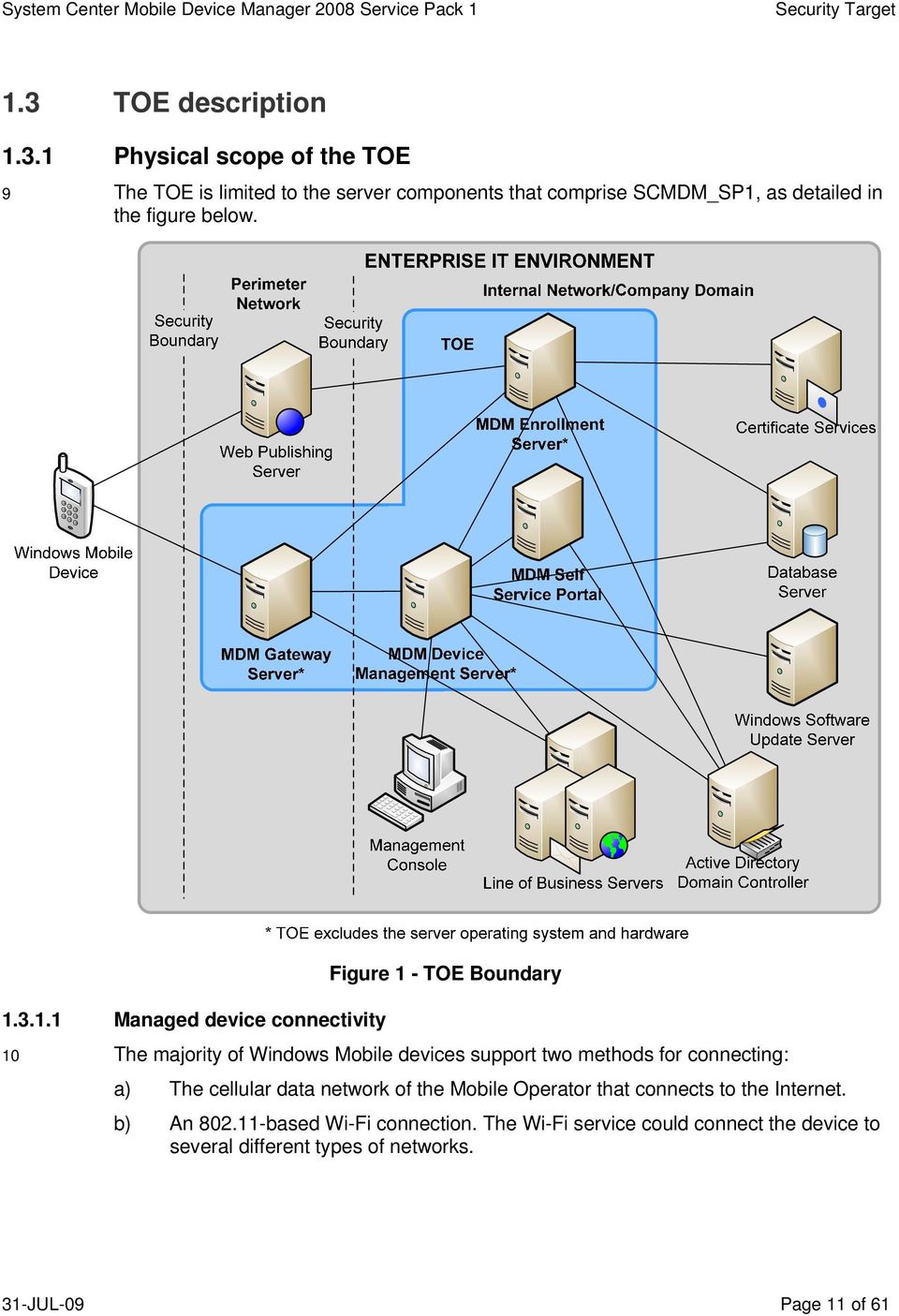
8 6 The TOE comprises the following server components: a) MDM Enrollment Server. This server manages the requests for and retrieving of certificates for devices and for creating the Active Directory Domain Service objects that will represent these devices. b) MDM Device Management Server. MDM Device Management Server is the primary administration and management service for all managed devices. MDM Device Management Server is the functional hub for device Group Policy application, device software packages, and device data wipes. This server communicates with existing infrastructure servers, and manages the translation of information and commands between SCMDM_SP1 and managed Windows Mobile devices. c) MDM Gateway Server. The MDM Gateway Server is located in the perimeter network, also known as the DMZ or screened subnet. This server provides the ingress for managed device sessions, and forwards network and device management communications between the company network and the device. d) MDM Self-Service Portal. Provides an interface for users who have forgotten the password on their Windows Mobile devices to request a one-time recovery password to access the device and reset the password. If the recovery password feature in MDM Self Service Portal is enabled then users can retrieve the recovery password themselves by using the portal Major TOE security functions and features 7 Table 2 highlights the range of TOE security features and the functions that are included within the scope of the evaluation. Table 2 TOE security functions and features TOE security function Device security management. The TOE provides Administrators with the capability to enroll and manage Windows Mobile devices. TOE security feature Device enrollment. The TOE provides the capability to securely enroll a Windows Mobile device to build a trust relationship. Managing security policies. The TOE provides the capability to configure and enforce security policy settings on managed Windows Mobile devices. Managing device block. The TOE provides the capability to block a managed Windows Mobile device from establishing a VPN and accessing the enterprise network. Performing remote device wipe. An Administrator can issue a command to wipe a managed Windows Mobile device in the event that the device may have been compromised. PIN reset. The TOE provides the capability for a Windows Mobile user on a managed device to request an authentication reset. 31-JUL-09 Page 8 of 61

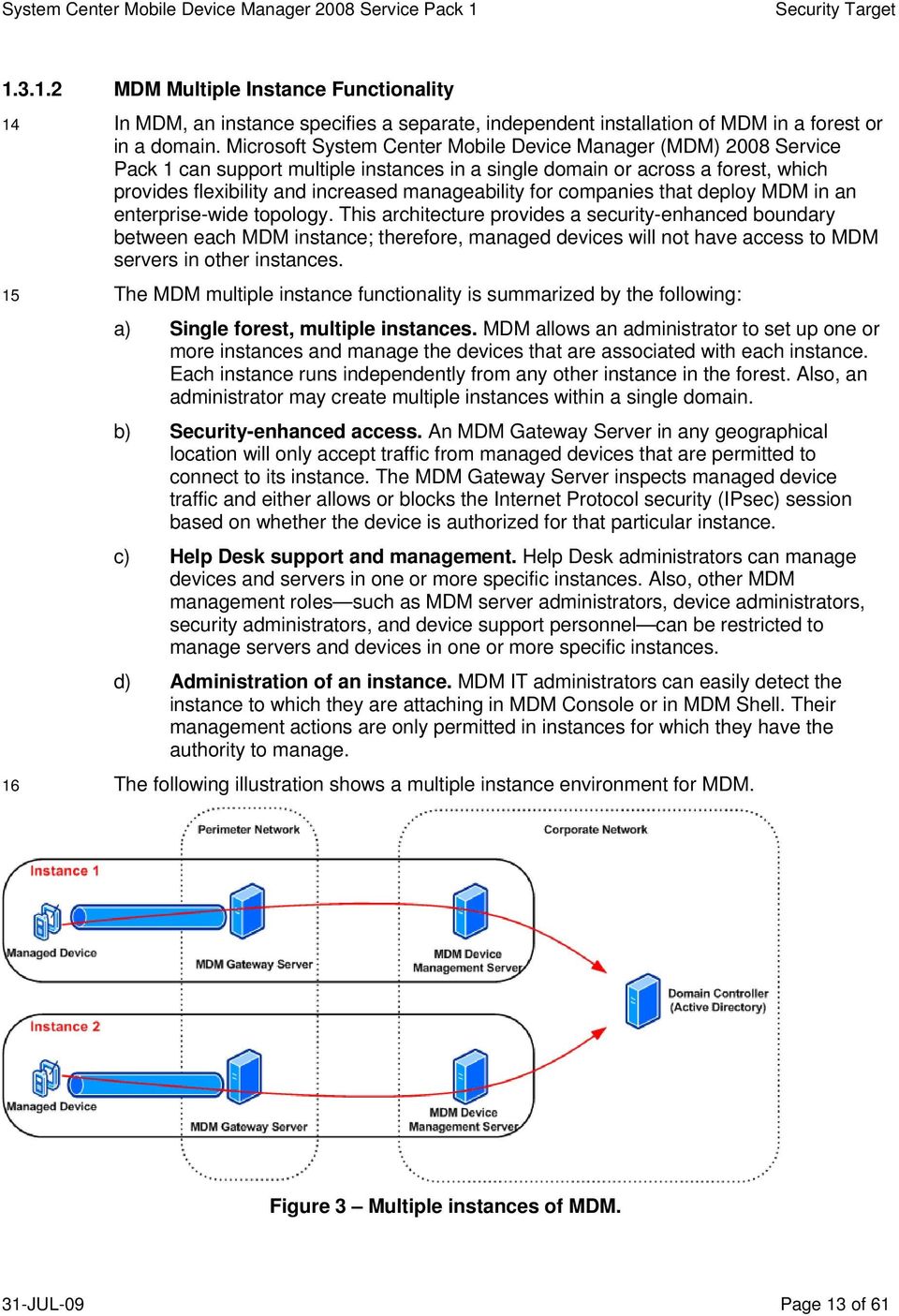
9 TOE security function Device configuration management. The TOE provides Administrators with the capability to review the configuration of Windows Mobile devices and distribute software to the devices. Mobile VPN capability. The TOE implements standards-based communications so that Mobile Users can securely access the enterprise environment. TOE security feature Software Distribution. The TOE has the ability to distribute software packages and updates to Windows Mobile devices. Managing device inventory. The TOE provides the capability to view different types of current information on managed Windows Mobile devices. Implementing IPsec capability. The TOE implements standard IPsec ESP to provide encryption communications between itself and a managed Windows Mobile device. Facilitating secure enterprise access. The TOE supports mutual certificate authenticated, SSL encrypted communications between Windows Mobile devices and enterprise services and MDM administration servers. Line of business access control. The TOE provides Administrators with the capability to define the enterprise LOB servers that Windows Mobile devices can connect to. SCMDM_SP1 Management. The TOE controls access so that only authorized Administrators can perform device management functions and ensures that all communication between MDM components is secure. Implementing role-based access control. The TOE applies roles to authorized Administrators to control access to the range of device management functions. Transferring data internally securely. The TOE implements a trusted communications path between the physically separate components of the TOE Supporting non-toe components 8 The following components are required in the normal operational environment for the TOE, however, they are considered to be non-toe components: a) Server operating systems and hardware. All three SCMDM_SP1 server types require 64-bit editions of Windows Server 2003 with Service Pack 2. b) Windows Mobile devices and MDM client software. The TOE manages Windows Mobile devices, however, these devices and the MDM client software are not considered to be components of the TOE. c) Database server. The services on MDM Device Management Server and MDM Enrollment Server require a backend database to manage device configuration, tasks, and status settings. These SQL databases are pivotal to configure and update managed devices, however, they are not considered to be within the scope of the TOE. d) Windows Software Update Server (WSUS). MDM software distribution uses WSUS to allow for the distribution of applications to managed devices. The administrator uses MDM software distribution to create, monitor, and push application packages to managed devices. 31-JUL-09 Page 9 of 61

10 e) Certificate services. The MDM client and server security model requires X.509 certificates. MDM works directly with existing Public Key Infrastructure (PKI) for client and server certificate signing. f) Active Directory Domain Service: SCMDM_SP1 uses the Windows directory service to store details for Windows Mobile devices managed by SCMDM_SP1, as well as managing Group Policy settings that are applied to each managed device. g) LOB application servers: Windows Mobile devices managed by SCMDM_SP1 can gain secure access to enterprise LOB application servers. This includes Exchange and custom application servers. h) Web publishing server: The MDM Enrollment server is required to be visible to the Internet to allow for mobile clients to contact it to perform enrollment. The use of an intermediate web publishing server to act as a proxy between the MDM Enrollment server and the Internet is required to mitigate potential risks arising from an internal service directly exposed to the Internet. i) Management console: A management console permits Administrators to interact with the TOE. SCMDM_SP1 provides a set of administration tools that when installed on a client within the company domain provides the Management console. The management console provides a graphical user interface (GUI) in addition to a command-line based Powershell interface. j) Internet Information Services (IIS): SCMDM_SP1 uses IIS hosted web sites to provide interconnectivity between SCMDM_SP1 components, between managed Windows Mobile devices and SCMDM_SP1, and also between Administrators and SCMDM_SP1. SCMDM_SP1 requires IIS to be installed on each of the SCMDM_SP1 servers. k) Group Policy Management Console (GPMC) and Group Policy Extensions: Group Policy extensions allows Administrators to manage Windows Mobile device and Mobile User settings through the GPMC. 31-JUL-09 Page 10 of 61

11 1.3 TOE description Physical scope of the TOE 9 The TOE is limited to the server components that comprise SCMDM_SP1, as detailed in the figure below. Figure 1 - TOE Boundary Managed device connectivity 10 The majority of Windows Mobile devices support two methods for connecting: a) The cellular data network of the Mobile Operator that connects to the Internet. b) An based Wi-Fi connection. The Wi-Fi service could connect the device to several different types of networks. 31-JUL-09 Page 11 of 61
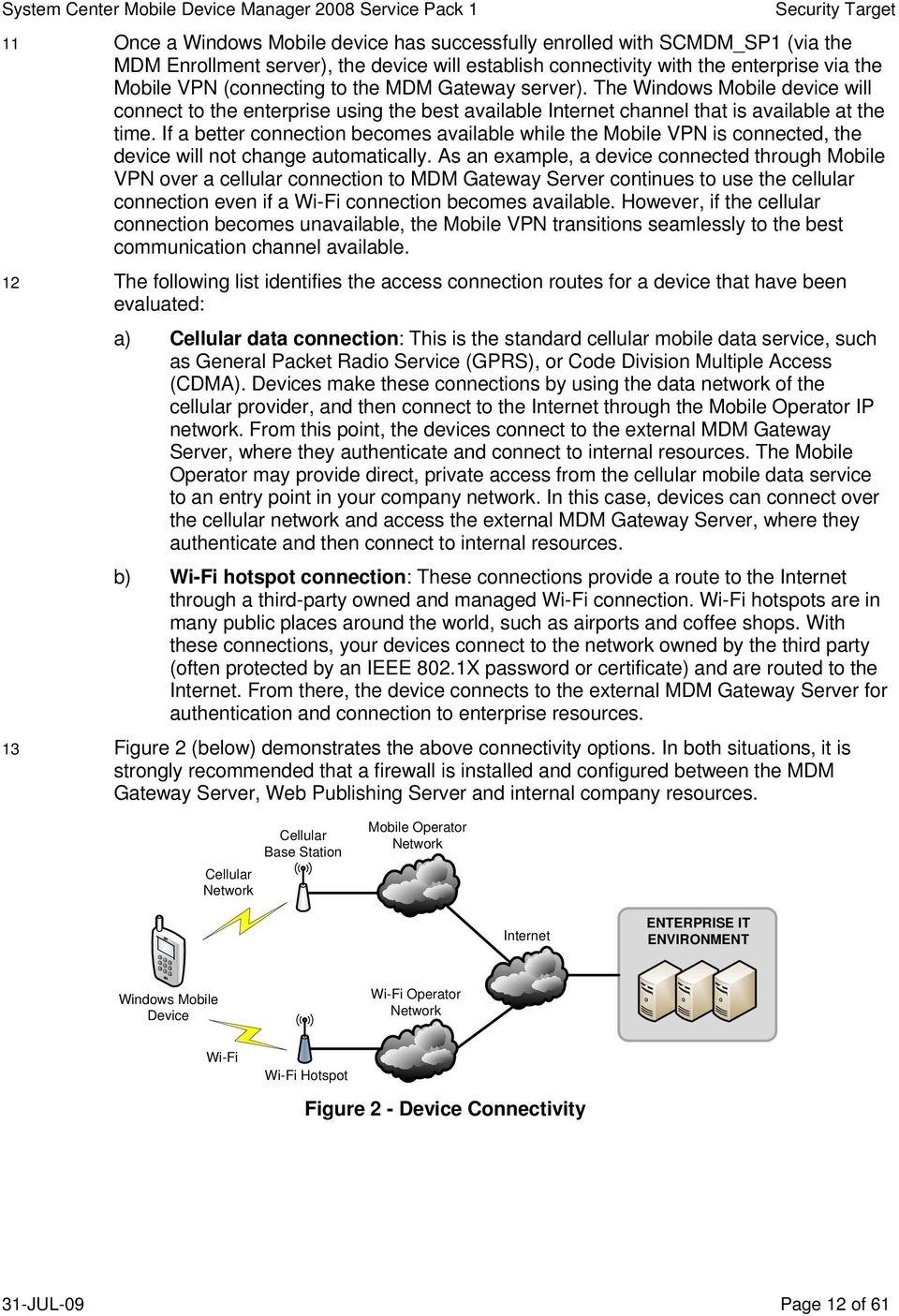
12 11 Once a Windows Mobile device has successfully enrolled with SCMDM_SP1 (via the MDM Enrollment server), the device will establish connectivity with the enterprise via the Mobile VPN (connecting to the MDM Gateway server). The Windows Mobile device will connect to the enterprise using the best available Internet channel that is available at the time. If a better connection becomes available while the Mobile VPN is connected, the device will not change automatically. As an example, a device connected through Mobile VPN over a cellular connection to MDM Gateway Server continues to use the cellular connection even if a Wi-Fi connection becomes available. However, if the cellular connection becomes unavailable, the Mobile VPN transitions seamlessly to the best communication channel available. 12 The following list identifies the access connection routes for a device that have been evaluated: a) Cellular data connection: This is the standard cellular mobile data service, such as General Packet Radio Service (GPRS), or Code Division Multiple Access (CDMA). Devices make these connections by using the data network of the cellular provider, and then connect to the Internet through the Mobile Operator IP network. From this point, the devices connect to the external MDM Gateway Server, where they authenticate and connect to internal resources. The Mobile Operator may provide direct, private access from the cellular mobile data service to an entry point in your company network. In this case, devices can connect over the cellular network and access the external MDM Gateway Server, where they authenticate and then connect to internal resources. b) Wi-Fi hotspot connection: These connections provide a route to the Internet through a third-party owned and managed Wi-Fi connection. Wi-Fi hotspots are in many public places around the world, such as airports and coffee shops. With these connections, your devices connect to the network owned by the third party (often protected by an IEEE 802.1X password or certificate) and are routed to the Internet. From there, the device connects to the external MDM Gateway Server for authentication and connection to enterprise resources. 13 Figure 2 (below) demonstrates the above connectivity options. In both situations, it is strongly recommended that a firewall is installed and configured between the MDM Gateway Server, Web Publishing Server and internal company resources. Cellular Base Station Cellular Network Mobile Operator Network Internet ENTERPRISE IT ENVIRONMENT Windows Mobile Device Wi-Fi Operator Network Wi-Fi Wi-Fi Hotspot Figure 2 - Device Connectivity 31-JUL-09 Page 12 of 61
13 MDM Multiple Instance Functionality 14 In MDM, an instance specifies a separate, independent installation of MDM in a forest or in a domain. Microsoft System Center Mobile Device Manager (MDM) 2008 Service Pack 1 can support multiple instances in a single domain or across a forest, which provides flexibility and increased manageability for companies that deploy MDM in an enterprise-wide topology. This architecture provides a security-enhanced boundary between each MDM instance; therefore, managed devices will not have access to MDM servers in other instances. 15 The MDM multiple instance functionality is summarized by the following: a) Single forest, multiple instances. MDM allows an administrator to set up one or more instances and manage the devices that are associated with each instance. Each instance runs independently from any other instance in the forest. Also, an administrator may create multiple instances within a single domain. b) Security-enhanced access. An MDM Gateway Server in any geographical location will only accept traffic from managed devices that are permitted to connect to its instance. The MDM Gateway Server inspects managed device traffic and either allows or blocks the Internet Protocol security (IPsec) session based on whether the device is authorized for that particular instance. c) Help Desk support and management. Help Desk administrators can manage devices and servers in one or more specific instances. Also, other MDM management roles such as MDM server administrators, device administrators, security administrators, and device support personnel can be restricted to manage servers and devices in one or more specific instances. d) Administration of an instance. MDM IT administrators can easily detect the instance to which they are attaching in MDM Console or in MDM Shell. Their management actions are only permitted in instances for which they have the authority to manage. 16 The following illustration shows a multiple instance environment for MDM. Figure 3 Multiple instances of MDM. 31-JUL-09 Page 13 of 61
14 MDM Enrollment Server 17 MDM Enrollment Server provides a protected over the air (OTA) process to for devices to be enrolled with SCMDM_SP1 and the enterprise domain. Using the Enrollment Server, Windows Mobile devices are able to have a device account created in Active Directory, as well as request and receive a device certificate that is then used to authenticate the device and protect communications with the enterprise. To help protect against malicious attacks, MDM Enrollment Server uses shared-secret encryption to perform protected enrollment (an enrollment password provided to the Mobile User via an out-of-band channel). This lets users enroll their device without having to cradle it and without having physical access to the company network. 18 Regardless of the size of an organization, the enterprise requires only one MDM Enrollment Server, however can be scaled out if required. For example, if an organization has to support the concurrent enrollment of thousands of Windows Mobile devices, consider MDM Enrollment Server similar to a server that is running IIS. In this scenario, you should follow the best practices for any IIS instance, and scale MDM Enrollment Server according to the expected traffic load. 19 It is strongly recommended that a web publishing server (such as Internet Security and Acceleration Server (ISA) 2004, or any other suitable evaluated product) is used to proxy all communications between Windows Mobile devices and the MDM Enrollment server MDM Gateway Server 20 The MDM Gateway Server is the pivotal access point for managed devices. Typically, this server is installed in the perimeter network of the enterprise. MDM Gateway Server is a stand-alone gateway that faces the Internet from inside the perimeter network. Typically, it is not domain-joined and shares no accounts or passwords with the internal company domain. It does not directly use Active Directory Domain Service, NTLM, or Kerberos access to authenticate devices because these would require MDM Gateway Server to be domain-joined or to store domain credentials. 21 MDM Gateway Server authenticates incoming connection requests by using an offline certificate evaluation process that queries the device machine certificate. 22 The MDM Gateway Server provides a network access point for managed Windows Mobile devices through the implementation of the Mobile VPN. Mobile VPN implements double envelope security by allowing SSL secured communications between the Windows Mobile device and enterprise server underpinned by an IPsec encrypted tunnel between the Windows Mobile device and MDM Gateway Server. The IPsec secured tunnel operates in ESP mode, authenticated (using mutual certificate authentication) and encrypted traffic between the device and gateway. 23 MDM Gateway Server has the following characteristics: a) It stands alone, facing the Internet from inside the perimeter network and outside the company network firewall. b) It cannot initiate connections into the company network; instead it can only receive connections from inside the company network. Specifically, MDM Gateway Server can only receive connections from the GCM service on MDM Device Management Server. c) It authenticates incoming connection requests from Windows Mobile devices by checking the device certificate validity against the trusted certification authority 31-JUL-09 Page 14 of 61
15 chain. It blocks incoming connections if the device ID is in the blocked-device list configured by the administrator MDM Device Management Server 24 The MDM Device Management Server is the device management interface between management systems on the company network, such as Active Directory and Windows Update Server (WSUS) 3.0 SP1, and managed Windows Mobile devices. It enables support for policy-based configuration management, software distribution, asset management, and device wipe. Administrators can manage Windows Mobile devices in a manner similar to the way they manage portable and desktop computers within the company. 25 Communication between MDM Device Management Server and a managed device complies with the Open Mobile Alliance (OMA) Device Management (DM) protocol. MDM Device Management Server translates device management tasks, submitted by management systems on the company network, into OMA DM commands. MDM Device Management Server sends the commands to the managed device during the next scheduled connection interval of the device. The managed device returns response messages that contain the results and any requested status information MDM Self-Service Portal 26 The MDM Self Service Portal is a web-based interface that lets users manage their Windows Mobile powered devices. By using MDM Self Service Portal, based on system administrator settings, a user can enroll a device, monitor enrollment status, and wipe a device that they no longer want or that is no longer in their possession. The portal also provides the capability for the user to retrieve an authentication reset PIN Logical scope of the TOE MDM Gateway Server 27 As illustrated in Figure 4, the following components comprise the MDM Gateway Server and are part of the TOE: a) MDM VPN agent: The MDM VPN agent is an IIS hosted web service that accepts configuration information, including block lists from the MDM Device Management Server. The MDM Gateway Server can only receive connections from inside the company network and does not initiate connections into the internal network. b) IPsec policy engine: The IPsec policy engine establishes and manages the IPsec tunnel with a managed device. The policy engine works with the Mobile VPN network driver interface specification (NDIS) IPsec Intermediate (IM) drivers to establish authenticated and encrypted communications over the Mobile Operator network or a public Wi-Fi network. c) Alerter service: The Alerter service is an IIS hosted web service that receives alerts from MDM Device Management Server for urgent commands, such as a managed device wipe. The Alerter service verifies that the managed device is connected to the network. If the managed device is connected to the network, the Alerter agent contacts the managed device immediately to issue the required commands. If the device is not connected, the Alerter agent caches the alert requests and contacts the device immediately after it connects. d) Mobile VPN Driver: The Mobile VPN (NDIS IPsec IM) driver manages network communications with the managed device. It checks that data coming from the managed device is valid, encrypted and authenticated, and that the device has a 31-JUL-09 Page 15 of 61

16 valid IPsec Security Association. The NDIS IM driver performs data transformation, filters packets, and forwards packets. Figure 4 Components of the MDM Gateway Server MDM Enrollment Server 28 As illustrated in Figure 5, the following components comprise the MDM Enrollment Server: a) MDM Administration service: This collection of (IIS hosted) web services is functionally similar to the administration services on MDM Device Management Server and comprises a set of services that operate within the context of an IIS web service and like the Device Manager equivalent, accepts commands issued as cmdlets via Powershell as well as commands from components operating on the MDM Device Management server. Because the Enrollment Web service uses TCP port 443, the default administration web site port is b) Enrollment Web service: Internet Information Services (IIS) hosts this web service that manages incoming requests from Windows Mobile devices to enroll in the managed infrastructure. After the Enrollment Web service receives a request, the service manages communications with the Windows Mobile device until it becomes a domain-joined managed device. Once enrolled, the MDM Gateway Server handles all communications between the Windows Mobile device and the enterprise. c) Enrollment service: The Enrollment service exists as a NT managed service (also referred to as a Windows service) to perform operations by the Enrollment server that require increased privileges within the enterprise environment. These operations include requesting and obtaining certificates on behalf of Windows Mobile devices from the enterprise certificate authority, as well as creating and deleting Windows Mobile device accounts within Active Directory. 31-JUL-09 Page 16 of 61

17 Figure 5 Components of the MDM Enrollment Server MDM Device Management Server 29 As illustrated in Figure 6, the following components comprise the MDM Device Management Server: a) MDM Administration service. Operates as an IIS hosted web service that processes requests from the MDM management console and other MDM components. All calls to the MDM Administration Service undergo authentication and authorization checks before administration tasks are performed. b) OMA Service. The OMA service converts all tasks and commands issued by SCMDM_SP1 components (via the central database) into OMA DM compliant commands and then issues them to the device for execution. Once the device has executed the request, a response is sent back to the OMA service which updates the central database accordingly. c) MDM Software Distribution service. Manages and distributes software to managed devices. This service works with the WSUS instance to distribute software for installation to Windows Mobile device clients. d) MDM Active Directory Group Policy service. Retrieves Group Policy information from Active Directory and calculates the Resultant Set of Policy (RSoP) for managed devices. e) MDM Remote Wipe service. Issues remote wipe commands to delete the contents of a managed device when it is lost, stolen, or for re-provisioning purposes. 31-JUL-09 Page 17 of 61

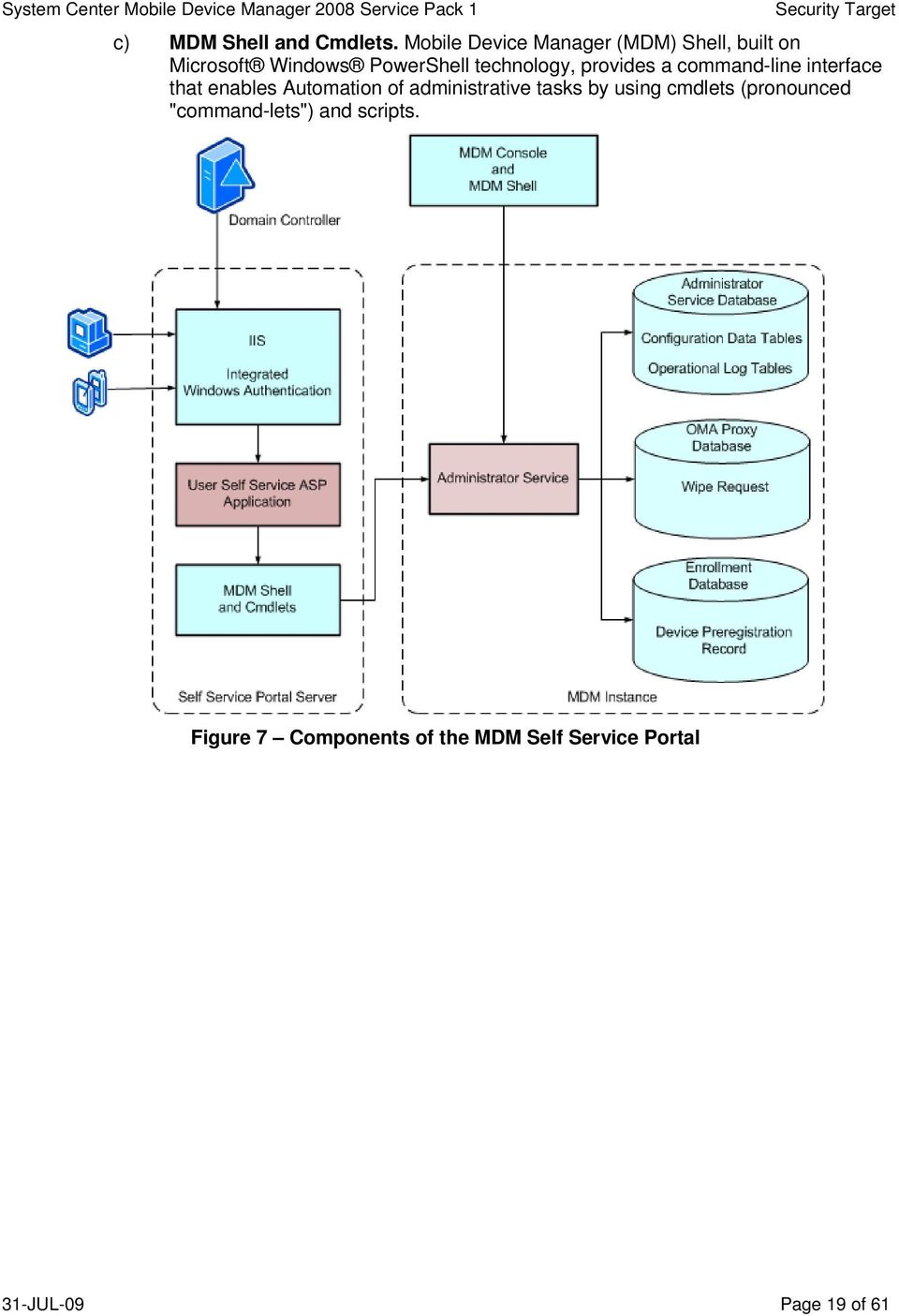
18 f) MDM Gateway Central Management (GCM). Sends configuration, alerts and device block list information to the MDM Gateway Server. The GCM is the only Device Manager component that communicates with the Gateway Server. g) MDM PIN reset service. The MDM Device Management Server also provides a PIN reset drover to communicate with the MDM Self Service Portal and enable the capability for authentication reset for Mobile Users. Figure 6 Components of the MDM Device Management Server MDM Self-Service Portal 30 As illustrated in Figure 7, the following components comprise the MDM Self-Service Portal: a) Integrated Windows Authentication. MDM Self Service Portal uses Windows Integrated Authentication in Internet Information Services (IIS) to help provide strong user authentication. Windows Integrated Authentication results in either NTLM or Kerberos authentication and is dependent on the client and server computer configurations. b) User Self Service Portal ASP Application. ASP.NET pages provide the web site user interface (UI) on the computer on which you install MDM Self Service Portal. IIS authenticates the user based on the Windows domain credentials for that user. Administrators can manage the Web site functionality and services by using the Portal Administration page. 31-JUL-09 Page 18 of 61
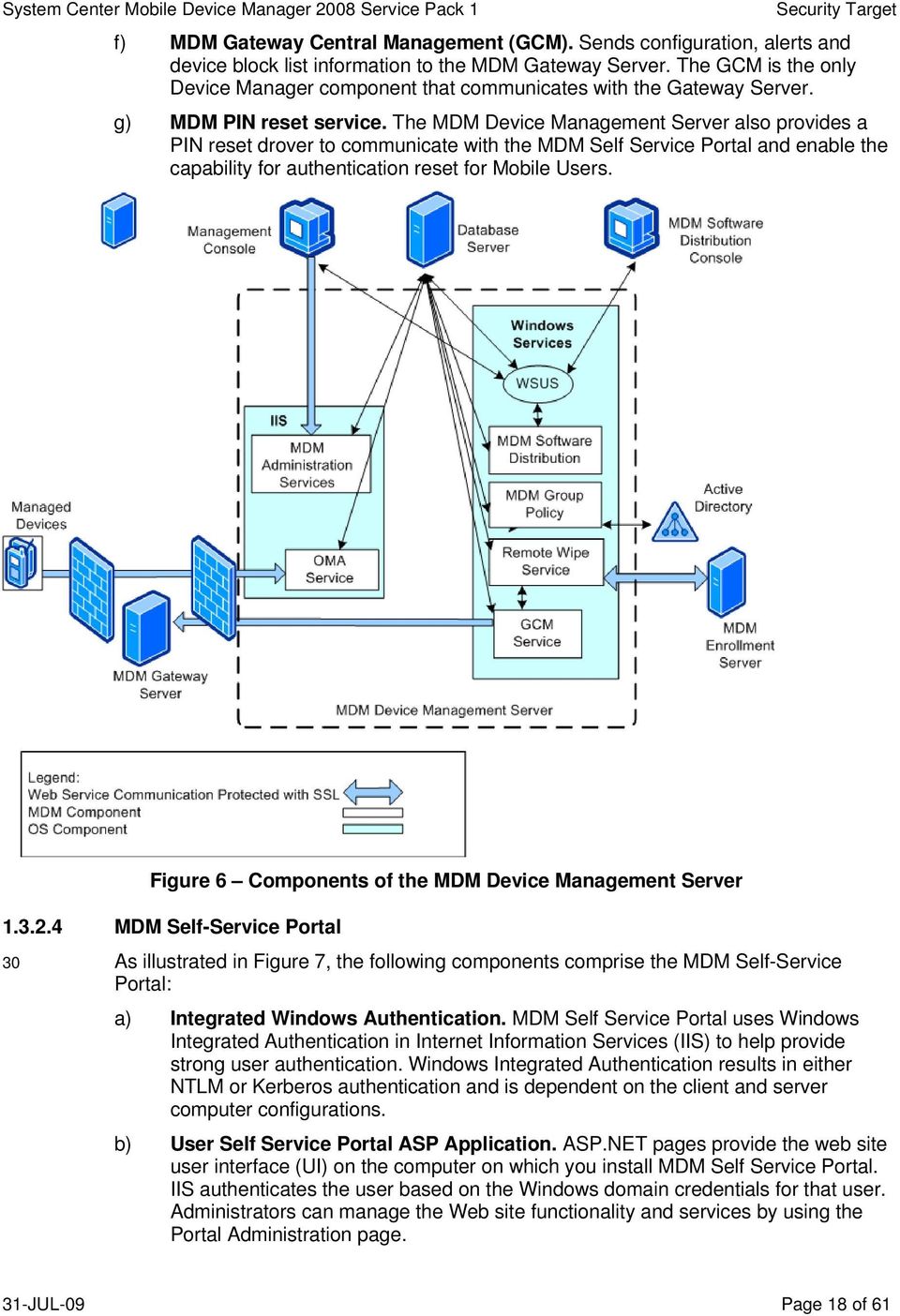
19 c) MDM Shell and Cmdlets. Mobile Device Manager (MDM) Shell, built on Microsoft Windows PowerShell technology, provides a command-line interface that enables Automation of administrative tasks by using cmdlets (pronounced "command-lets") and scripts. Figure 7 Components of the MDM Self Service Portal 31-JUL-09 Page 19 of 61
20 2 Conformance claim (ASE_CCL) 2.1 CC conformance claims 31 The ST and TOE are conformant to version 3.1 (Revision 2) of the Common Criteria for Information Technology Security Evaluation. 32 CC conformance claims include the following: a) Part 2 conformant. Conformant with the Common Criteria for Information Technology Security Evaluation Part 2: Security functional requirements, Version 3.1 (Revision 2), September 2007, CCMB b) Part 3 conformant, EAL4 augmented. Conformant with Common Criteria for Information Technology Security Evaluation Part 3: Security assurance requirements, Version 3.1 (Revision 2), September 2007, CCMB Evaluation is EAL4 augmented with ALC_FLR JUL-09 Page 20 of 61
21 3 Security problem definition (ASE_SPD) 3.1 Overview 33 This section describes the nature of the security problem that the TOE is designed to address. The security problem is described through any threats to the assets that the TOE will be providing protection, relevant organizational security policies, and any assumptions about security aspects of the operational environment. 3.2 Threats Table 3 Threats Identifier T.ENROLLMENT T.ENT_ACCESS T.DEVICE_CONFIG T.DEVICE_ACCESS T.DEVICE_MAINTAIN T.APP_INSTALL&EXE CUTE T.DEVICE_STATUS T.DEVICE_TRUST Threat statement An attacker may enroll as a managed Windows Mobile device to establish an enterprise trust relationship, allowing unauthorized access to enterprise applications, data and services. An attacker may gain physical access to a managed Windows Mobile device and use the established trust relationship to gain access to enterprise applications, data and services. An attacker may gain physical access to a managed Windows Mobile device and gain unauthorized access to locally stored user data. An attacker may gain physical access to an unlocked managed Windows Mobile device and gain unauthorized access to locally stored user data. A Mobile User may locally configure a managed Windows Mobile device that weakens the security posture of the device potentially enabling an attacker (who obtains the device) to access locally stored user data and/or use the established trust relationship to access TOE facilitated enterprise applications, data and services. A Mobile User may install and execute malicious code on a managed Windows Mobile device, resulting in the compromise of the device and potential compromise of TOE facilitated enterprise applications, data and services. An Administrator may be unable to determine the current configuration and status of a managed Windows Mobile device, introducing uncertainty as to whether the Windows Mobile device is compliant with enterprise security policies. This potential non-compliance may be exploited by an attacker to gain unauthorized access to the Windows Mobile device. An attacker may masquerade as a managed Windows Mobile device and access enterprise applications, data and services facilitated by the TOE. 31-JUL-09 Page 21 of 61
22 Identifier T.COMMS_PERIM T.CTRL_ACCESS T.COMMS_TOE Threat statement An attacker may compromise the confidentiality or integrity of SCMDM_SP1 configuration, commands or user or enterprise data being transmitted between the Windows Mobile device and the enterprise by monitoring or altering communications traffic. An Administrator may perform unauthorized tasks associated with managing Windows Mobile devices. An attacker may masquerade as one of the physically detached components of the TOE and attempt to compromise the integrity of TSF, using the access to perform unauthorized device management tasks. 3.3 Organization Security Policies Table 4 Organization Security Policies Identifier P.SELF_SERVICE OSP statement Enterprise users of Windows Mobile devices must be capable of performing self management of device authentication in a secure manner. 3.4 Assumptions Table 5 Assumptions Identifier A.IT_AUTH A.IT_CERT A.IT_CHANNEL A.ENTERPRISE Assumption statement The IT environment will provide a mechanism for authenticating Mobile Users when accessing enterprise applications, data and services. The IT environment will provide certificate services for the TOE and line of business servers to support certificate provisioning and secure channel establishment with managed Windows Mobile devices. The IT environment will provide the client-side of a secure channel between the MDM Gateway Server and the managed Windows Mobile device. The MDM Device Management Server, MDM Enrollment Server, Domain Controller, Database Server, Certificate Services, Windows Server Updates Services and Administration Console are located within the enterprise boundary (company domain) and are protected from unauthorized logical and physical access. 31-JUL-09 Page 22 of 61
23 Identifier A.PERIMETER A.ADMIN Assumption statement The MDM Gateway Server and Web Publishing Server are located within the perimeter network and are protected from unauthorized physical access. These servers are also protected from unauthorized logical access, however are considered more prone to compromise than servers that reside within the company domain (as assumed in A.ENTERPRISE) as they reside in a perimeter environment that is exposed to the Internet. Administrators are not careless, willfully negligent, or hostile, and will follow and abide by the instructions provided by administrator documentation. 31-JUL-09 Page 23 of 61
24 4 Security objectives (ASE_OBJ) 4.1 Overview 34 The security objectives are concise statements of the TOE s response to the security problem. Some objectives are to be achieved through the security functionality of the TOE and some elements of the problem will be addressed through the establishment of a secure environment in which the TOE must operate. 4.2 Security objectives for the TOE Table 6 Security objectives for the TOE Identifier O.ENROLLMENT O.ENT_ACCESS O.DEVICE_CONFIG O.DEVICE_ACCESS O.DEVICE_MAINTAIN O.APP_INSTALL&EXE CUTE O.DEVICE_STATUS O.DEVICE_TRUST O.COMMS_PERIM O.CTRL_ACCESS Objective statement The TOE shall provide the capability for securely enrolling a Windows Mobile device and associating a Mobile User with that device. The TOE shall provide the capability for blocking managed Windows Mobile devices that may be considered compromised or lost. The TOE shall provide the capability for configuring security related settings for Windows Mobile devices. The TOE shall provide the capability for issuing a command to a managed Windows Mobile device so that the device performs a hardreset and makes all user data inaccessible. The TOE shall restrict the ability for Mobile Users to modify security related configuration settings. The TOE shall provide the capability of blocking the installation and execution of applications or executable code on managed Windows Mobile devices. The TOE shall provide the Administrator with the capability to determine the current configuration status of a managed Windows Mobile device. The TOE shall provide the capability to securely authenticate managed Windows Mobile devices, and only once authenticated, permit data exchange. The TOE shall provide the capability for establishing a secure communications channel between itself and a managed Windows Mobile device. The TOE shall provide the capability for controlling access of Administrators to specific device management tasks depending on their allocated role. 31-JUL-09 Page 24 of 61
25 Identifier O.COMMS_TOE O.SELF_SERVICE Objective statement The TOE shall provide the capability for establishing a trusted communications path between physically separate TOE components. The TOE shall provide enterprise users of Windows Mobile devices with the capability of resetting device authentication only after they have successfully authenticated within their enterprise environment. 4.3 Security objectives for the operational environment Table 7 Security objectives for the operational environment Identifier OE.IT_AUTH OE.IT_CERT OE.CHANNEL OE.PERIMETER OE.ENTERPRISE OE.ADMIN Objective statement The IT environment must provide a mechanism for authenticating Mobile Users when accessing enterprise applications and services. The IT environment must provide certificate services for the TOE to support secure channel establishment with managed Windows Mobile devices. The operational environment must provide the server-side of a secure channel between the MDM Gateway Server and a managed Windows Mobile device. The Administrator shall ensure that the MDM Gateway Server is located within a DMZ network and is protected from unauthorized logical and physical access. The Administrator shall ensure that the MDM Device Management Server, MDM Enrollment Server, Domain Controller, Database Server, Certificate Services, Windows Server Updates Services and Administration Console are all located within the enterprise boundary and are protected from unauthorized logical and physical access. The Administrator shall not be careless, willfully negligent, or hostile, and shall follow and abide by the instructions provided by the administrator documentation. 31-JUL-09 Page 25 of 61
26 4.4 Security objectives rationale Security objectives for the TOE Table 8 Mapping of TOE security objectives to threats and OSPs Threats and Policies Objective Justification T.ENROLLMENT O.ENROLLMENT This objective addresses the threat of an unauthorized enrollment by a Windows Mobile device by implementing mechanisms that provide an authenticated and secure enrollment process. T.ENT_ACCESS O.ENT_ACCESS This objective addresses the threat of an attacker gaining access to enterprise resources through a compromised Windows Mobile device by implementing a mechanism to block compromised devices. T.DEVICE_CONFIG O.DEVICE_CONFIG This objective addresses the threat of an attacker gaining access to information stored on the Windows Mobile device by protecting the device with security mechanisms configured by an Administrator using the TOE. T.DEVICE_ACCESS O.DEVICE_ACCESS This objective addresses the threat of an attacker gaining access stored locally on a Windows Mobile device by being able to issue a remote command to wipe all locally stored data. T.DEVICE_MAINTAIN O.DEVICE_MAINTAIN This objective addresses the threat of a Mobile User configuring a device insecurely by being able to restrict the ability for a Mobile User to modify security related settings. T.APP_INSTALL& EXECUTE O.APP_INSTALL& EXECUTE This objective addresses the threat of a Mobile User installing and executing unauthorized applications and software by implementing an application control capability that can be applied to a managed Windows Mobile device. T.DEVICE_STATUS O.DEVICE_STATUS This objective addresses the threat of an administrator not being able to confirm current device status by implementing a capability for reviewing Windows Mobile device inventory data. 31-JUL-09 Page 26 of 61
27 Threats and Policies Objective Justification T.DEVICE_TRUST O.DEVICE_TRUST This objective addresses the threat of an attacker masquerading as a managed Windows Mobile device by implementing a trusted communications channel between the managed device and the TOE. T.COMMS_ENT O.COMMS_ENT This objective addresses the threat of SCMDM_SP1, user or enterprise data being compromised when being communicated between a managed device and the TOE by implementing a Mobile VPN solution. T.CTRL_ACCESS O.CTRL_ACCESS This objective addresses the threat of an authorized administrator performing unauthorized management tasks provided by the TOE by implementing role-based access control mechanisms. T.COMMS_TOE O.COMMS_TOE This objective addresses the threat of communications between physically separate parts of the TOE being compromised or a device/system masquerading as a component of the TOE by implementing authenticated and encrypted communications channels. T.COMMS_PERIM O.COMMS_PERIM This objective addresses the threat of an attacker attempting to monitor or alter communications traffic by establishing a secure communications channel between itself and a managed Windows Mobile device. P.SELF_SERVICE O.SELF_SERVICE This objective addresses the organization security policy that requires authorized user of Mobile Devices to be capable of resetting device authentication data in a secure manner without the involvement of the enterprise. 31-JUL-09 Page 27 of 61
28 Security objectives for the operational environment Table 9 Mapping of security objectives for the operational environment Assumptions Objectives Justification A.IT_AUTH OE.IT_AUTH This objective for the IT environment upholds the assumption that the environment will provide authentication mechanisms for Mobile Users accessing enterprise resources. A.IT_CERT OE.IT_CERT This objective for the IT environment upholds the assumption that the environment will provide certificate services to support the establishment of authenticated and secure communications between the Windows Mobile devices, the TOE and line of business servers. A.IT_CHANNEL OE.IT_CHANNEL This objective for the IT environment upholds the assumption that the environment will provide the client-side of a secure channel. A.PERIMETER OE.PERIMETER This objective for the operational environment upholds the assumption that the components of the TOE that are required to interface directly with managed Windows Mobile devices are physically protected and located within the perimeter network boundary. A.ENTERPRISE OE.ENTERPRISE This objective for the operational environment upholds the assumption that the components of the TOE are physically protected and located within the enterprise network boundary. A.ADMIN OE.ADMIN This objective for the operational environment upholds the assumption that administration personnel can be trusted. 31-JUL-09 Page 28 of 61
29 5 Security requirements 5.1 Overview 36 This section defines the security requirements satisfied by the TOE. Each requirement has been extracted from version 3.1 of the Common Criteria, part 2 providing functional requirements and part 3 providing assurance requirements. 37 Table 10 describes the approved operations for SFRs and the document conventions that are used within this ST to depict their application: Table 10 Operations on security requirements Operation Assignment Selection Refinement Iteration Description The assignment operation provides the ability to specify an identified parameter within a requirement. Assignments are depicted using bolded text and are surrounded by square brackets as follows [assignment]. The selection operation allows the specification of one or more items from a list. Selections are depicted using bold italics text and are surrounded by square brackets as follows [selection]. The refinement operation allows the addition of extra detail to a requirement. Refinements are indicated using bolded text, for additions, and strikethrough, for deletions. The iteration operation allows a component to be used more than once with varying operations. Iterations are depicted by placing a letter at the end of the component identifier as follows FDP_IFF.1a and FDP_IFF.1b. 5.2 Security functional requirements Overview 38 This section contains the security functional components from part 2 of the Common Criteria with the operations completed. Table 11 provides a summary of the security functional requirements selected for the TOE. Table 11 Summary of TOE Security Functional Requirements Identifier FIA_ATD.1 FIA_SOS.2 FIA_UID.2 FIA_UAU.2 Title User attribute definition TSF generation of secrets User identification before any action User authentication before any action 31-JUL-09 Page 29 of 61
30 Identifier FIA_UAU.4 FDP_IFC.1 FDP_IFF.1 FMT_MSA.3 FMT_MSA.1a FMT_MSA.1b FTA_TSE.1 FTP_ITC.1 FPT_TDC.1 FPT_ITC.1 FPT_ITI.1 FMT_SMR.1 FPT_ITT.2 FMT_SMF.1 FMT_MOF.1a FMT_MOF.1b FMT_MOF.1c FMT_MOF.1d FMT_MOF.1e FMT_MOF.1f Title Single-use authentication mechanisms Subset information flow control (Device Block SFP) Simple security attributes (Device Block SFP) Static attribute initialisation (Device Block SFP) Management of security attributes (Device Block SFP) Management of security attributes (Device Block SFP) TOE session establishment (Device block) Inter-TSF trusted channel Inter-TSF basic TSF data consistency Inter-TSF confidentiality during transmission Inter-TSF detection of modification Security roles TSF data transfer separation Specification of management functions Management of security functions behaviour (Role Management) Management of security functions behaviour (Mobile VPN) Management of security functions behaviour (Device Management) Management of security functions behaviour (Device Inventory) Management of security functions behaviour (Recovery PIN) Management of security functions behaviour (Self Service) 31-JUL-09 Page 30 of 61
31 FIA_ATD.1 User attribute definition Hierarchical to: FIA_ATD.1.1 Dependencies: Notes: No components. The TSF shall maintain the following list of security attributes belonging to individual Mobile Users: [ a) Enrollment Identifier, b) Enrollment Password, c) MDM Enrollment Server URL, d) Device Name, e) Organizational Unit, and f) Mobile User Identifier]. No dependencies. None FIA_SOS.2 TSF generation of secrets Hierarchical to: None. FIA_SOS.2.1 The TSF shall provide a mechanism to generate secrets that meet [ a) contains both alpha and numeric characters, and b) has 8 characters]. FIA_SOS.2.2 Dependencies: Notes: The TSF shall be able to enforce the use of TSF generated secrets for [Mobile Device Enrollment]. No dependencies. None FIA_UID.2 User identification before any action Hierarchical to: FIA_UID.2.1 Dependencies: Notes: FIA_UID.1 Timing of identification. The TSF shall require each user to be successfully identified before allowing any other TSF-mediated actions on behalf of the user. No dependencies. None. 31-JUL-09 Page 31 of 61
32 FIA_UAU.2 User authentication before any action Hierarchical to: FIA_UAU.2.1 Dependencies: Notes: FIA_UAU.1 Timing of authentication The TSF shall require each user to be successfully authenticated before allowing any other TSF-mediated actions on behalf of that user. FIA_UID.2 User identification before any action (Used in place of FIA_UID.1) The TOE performs Mobile User authentication during enrollment through the use of the password created by the administrator during pre-enrollment. The operational environment performs authentication for administrators, however the TOE ensures that the administrator is authorized (through checking the administrator s membership of the correct domain group associated with the administrative role) FIA_UAU.4 Single-use authentication mechanisms Hierarchical to: FIA_UAU.4.1 Dependencies: Notes: No other components. The TSF shall prevent reuse of authentication data related to [Mobile Device Enrollment]. No dependencies. None FDP_IFC.1 Subset information flow control (Device Block SFP) Hierarchical to: No other components FDP_IFC.1.1 The TSF shall enforce the [Device Block SFP] on [ a) Subject: i. Mobile Device. b) Information: i. Enterprise Data. c) Operation: i. Access Enterprise Data]. Dependencies: Notes: FDP_IFF.1 Simple security attributes None. 31-JUL-09 Page 32 of 61
33 FDP_IFF.1 Simple security attributes (Device Block SFP) Hierarchical to: FDP_IFF.1.1 FDP_IFF.1.2 FDP_IFF.1.3 FDP_IFF.1.4 FDP_IFF.1.5 Dependencies: Notes: None. The TSF shall enforce the [Device Block SFP] based on the following types of subject and information security attributes: [ a) Subject: i. Mobile Device a. Device ID b) Information: i. Enterprise Data. The TSF shall permit an information flow between a controlled subject and controlled information via a controlled operation if the following rules hold: [ a) the mobile device is managed by the TOE and has been successfully enrolled, b) the mobile device has been authenticated and a Mobile VPN established with the MDM Gateway Server, The TSF shall enforce the additional Device Block SFP rules [None]. The TSF shall explicitly authorise an information flow based on the following rules: [None]. The TSF shall explicitly deny an information flow based on the following rules: [ a) If the Device Identifier is contained within the Device Block list then the managed device will not be permitted to establish a Mobile VPN session and all information flow to the enterprise will be denied]. FDP_IFC.1 Subset information flow control FMT_MSA.3 Static attribute initialisation None. 31-JUL-09 Page 33 of 61
34 FMT_MSA.3 Static attribute behaviour (Device Block SFP) Hierarchical to: FMT_MSA.3.1 FMT_MSA.3.2 Dependencies: Notes: No other components. The TSF shall enforce the [Device Block SFP] to provide [permissive] default values for security attributes that are used to enforce the SFP. The TSF shall allow the [no roles] to specify alternative initial values to override the default values when an object or information is created. FMT_MSA.1 Management of security attributes FMT_SMR.1 Security roles None FMT_MSA.1a Management of security attributes (Device Block SFP) Hierarchical to: FMT_MSA.1a.1 Dependencies: Notes: No other components. The TSF shall enforce the [Device Block SFP] to restrict the ability to [modify] the security attributes [the Device Identifiers (contained within the Device Blocklist)] to [the Device Administrator or Device Support roles]. [FDP_ACC.1 Subset access control, or FDP_IFC.1 Subset information flow control] FMT_SMR.1 Security roles FMT_SMF.1 Specification of Management Functions None FMT_MSA.1b Management of security attributes (Device Block SFP) Hierarchical to: FMT_MSA.1b.1 Dependencies: Notes: No other components. The TSF shall enforce the [Device Block SFP] to restrict the ability to [query] the security attributes [the Device Identifiers (contained within the Device Blocklist)] to [the Server Administrator, Device Administrator, Device Support, or Helpdesk Operator roles]. [FDP_ACC.1 Subset access control, or FDP_IFC.1 Subset information flow control] FMT_SMR.1 Security roles FMT_SMF.1 Specification of Management Functions None. 31-JUL-09 Page 34 of 61
35 FTA_TSE.1 TOE session establishment (Device block) Hierarchical to: FTA_TSE.1.1 Dependencies: Notes: No other components. The TSF shall be able to deny session establishment based on [the device ID existing on the Blocked Device List]. No dependencies. The Administrator can prevent a compromised managed Windows Mobile device from establishing a connection through the MDM Gateway Server by blocking the device. A device is blocked when it is added to the blocked device list FTP_ITC.1 Inter-TSF trusted channel Hierarchical to: FTP_ITC.1.1 FTP_ITC.1.2 No other components. The TSF shall provide a communication channel between itself and another a remote trusted IT product that is logically distinct from other communication channels and provides assured identification of its end points and protection of the channel data from modification or disclosure. The TSF shall permit [the remote trusted IT product] to initiate communication via the trusted channel. FTP_ITC.1.3 The TSF shall initiate communication via the trusted channel for [ a) establishing or maintaining Mobile VPN capability, b) requesting device inventory data, c) sending device security policy, d) sending device configuration data, and e) sending the current application control data, f) issuing a remote wipe command, g) distributing software and updates h) retrieving the reset PIN]. Dependencies: Notes: No dependencies. None. 31-JUL-09 Page 35 of 61
36 FPT_TDC.1 Inter-TSF basic TSF data consistency Hierarchical to: No other components. FPT_TDC.1.1 The TSF shall provide the capability to consistently interpret [ a) device inventory data, b) device security policy, c) device configuration data, d) the remote wipe command, and e) software distribution data] when shared between the TSF and another trusted IT product. FPT_TDC.1.2 The TSF shall use [SyncML Device Management Protocol, Version Approved Version 12-Dec-03, Open Mobile Alliance] when interpreting the TSF data from another trusted IT product. Dependencies: Notes: No dependencies. None FPT_ITC.1 Inter-TSF confidentiality during transmission Hierarchical to: FPT_ITC.1.1 Dependencies: Notes: No other components. The TSF shall protect all TSF data transmitted from the TSF to another trusted IT product from unauthorised disclosure during transmission. No dependencies. None FPT_ITI.1 Inter-TSF detection of modification Hierarchical to: FPT_ITI.1.1 FPT_ITI.1.2 Not other component. The TSF shall provide the capability to detect modification of all TSF data during transmission between the TSF and another trusted IT product within the following metric: [SHA-2, as specified by Federal Information Processing Standard (FIPS) Publication 180-1, Secure Hash Algorithm, August 2002]. The TSF shall provide the capability to verify the integrity of all TSF data transmitted between the TSF and another trusted IT product and perform [ignore the TSF data, and request the originating trusted product to send the TSF data again] if modifications are detected. 31-JUL-09 Page 36 of 61
37 Dependencies: Notes: No dependencies. None FMT_SMR.1 Security roles Hierarchical to: No other components. FMT_SMR.1.1 The TSF shall maintain the roles [ a) Device Administrator (DeviceAdministrators), b) Device Support (DeviceSupport), c) Helpdesk Operator (HelpdeskOperator), d) Server Administrator (ServerAdministrators), e) Enrollment Servers (EnrollmentServers), f) Device Management Servers (DeviceManagementServices) g) Instance Authorized Users (InstanceAuthorizedUsers), h) Self Service Servers (SelfServiceServers), i) Managed Devices (ManagedDevices), j) Security Administrator (SecurityAdmins), and k) Read Only Users (ReadOnlyUsers)]. FMT_SMR.1.2 Dependencies: Notes: The TSF shall be able to associate users with roles. FIA_UID.2 User identification before any action SCMDM_SP1 uses role-based access control as a method for controlling the management functions of authorized administrators of the TOE. SCMDM_SP1 SP1 provides additional authorization roles to ensure that MDM components communicating (servers, devices, tools, etc) with other MDM components are from the same MDM instance FPT_ITT.2 TSF data transfer separation Hierarchical to: FPT_ITT.2.1 FPT_ITT.2.2 Dependencies: Notes: FPT_ITT.1 Basic internal TSF data transfer protection The TSF shall protect TSF data from [disclosure and modification] when it is transmitted between separate parts of the TOE. The TSF shall separate user data from TSF data when such data is transmitted between separate parts of the TOE. No dependencies. None. 31-JUL-09 Page 37 of 61
38 FMT_SMF.1 Specification of management functions Hierarchical to: FMT_SMF.1.1 Dependencies: Notes: No other components. The TSF shall be capable of performing the following security management functions: [ a) Manage the Mobile VPN capability. b) Retrieve and display device inventory. c) Create and apply device security policy. d) Facilitate secure enterprise access. e) Issue the remote wipe command. f) Manage software distribution. g) Create and apply the device Blocklist. h) Manage device enrollment. i) Manage SCMDM_SP1 server roles. j) Manage SCMDM_SP1 administrator roles. k) Retrieve the Recovery PIN. l) Manage the Self Service capability]. No dependencies. SCMDM_SP1 SP1 includes additional capability that provides a self-service portal for implementing a PIN reset feature (Authentication Reset). The purpose of this feature is to allow a legitimate user to access their device if they forget the PIN by providing a onetime* PIN (Recovery PIN or RPIN) that allows them to access the device and reset their PIN FMT_MOF.1a Management of security functions behaviour (Role Management) Hierarchical to: No other components. FMT_MOF.1a.1 The TSF shall restrict the ability to [modify the behavior of] the functions [ a) Manage SCMDM_SP1 server roles, and b) Manage SCMDM_SP1 administrator roles] to [Server Administrator (ServerAdministrators)]. Dependencies: Notes: FMT_SMR.1 Security roles FMT_SMF.1 Specification of Management Functions None. 31-JUL-09 Page 38 of 61
39 FMT_MOF.1b Management of security functions behaviour (Mobile VPN) Hierarchical to: No other components. FMT_MOF.1b.1 The TSF shall restrict the ability to [modify the behaviour of] the functions [ a) Manage the Mobile VPN capability] to [Server Administrator (ServerAdministrators)]. Dependencies: Notes: FMT_SMR.1 Security roles FMT_SMF.1 Specification of Management Functions None FMT_MOF.1c Management of security functions behaviour (Device Inventory Management) Hierarchical to: No other components. FMT_MOF.1c.1 The TSF shall restrict the ability to [modify the behaviour of] the functions [ a) Create and apply device security policy. b) Issue the remote wipe command. c) Manage software distribution. d) Manage device enrollment.] to [Server Administrator (ServerAdministrators) and Device Administrator (DeviceAdministrators)]. Dependencies: Notes: FMT_SMR.1 Security roles FMT_SMF.1 Specification of Management Functions None FMT_MOF.1d Management of security functions behaviour (Device Inventory) Hierarchical to: No other components. FMT_MOF.1d.1 The TSF shall restrict the ability to [modify the behaviour of] the functions [ a) Retrieve and display device inventory.] to [Device Support (DeviceSupport)]. Dependencies: FMT_SMR.1 Security roles FMT_SMF.1 Specification of Management Functions 31-JUL-09 Page 39 of 61
40 Notes: None FMT_MOF.1e Management of security functions behaviour (Recovery PIN) Hierarchical to: FMT_MOF.1e.1 Dependencies: Notes: No other components. The TSF shall restrict the ability to [enable] the functions [retrieve recovery PIN] to [Instance Authorized Users (InstanceAuthorizedUsers), Device Administrator (DeviceAdministrators) and Device Support (DeviceSupport)]. FMT_SMR.1 Security roles FMT_SMF.1 Specification of Management Functions The intention of this requirement is to permit authorized users to retrieve their own recovery PIN. In addition, the requirement identifies that administrators and support roles are permitted to manage this function FMT_MOF.1f Management of security functions behaviour (Self Service) Hierarchical to: FMT_MOF.1f.1 Dependencies: Notes: No other components. The TSF shall restrict the ability to [determine the behaviour of, disable, enable, modify the behaviour of] the functions [Self Service] to [Device Administrator (DeviceAdministrators) and Device Support (DeviceSupport)]. FMT_SMR.1 Security roles FMT_SMF.1 Specification of Management Functions None. 31-JUL-09 Page 40 of 61
41 5.3 Security assurance requirements 46 The assurance package for the evaluation is Evaluation Assurance Level 4 (EAL4), augmented by the Life cycle support component that provides basic flaw remediation (ALC_FLR.3). 47 Complete details of all assurance components are located in part 3 of the Common Criteria. Table 12 below provides a summary of the TOE security assurance requirements for this evaluation. Table 12 Summary of security assurance requirements Assurance class ADV: Development Assurance components ADV_ARC.1 Security architecture description ADV_FSP.4 Complete functional specification ADV_IMP.1 Implementation representation of the TSF ADV_TDS.3 Basic modular design AGD: Guidance documents AGD_OPE.1 Operational user guidance AGD_PRE.1 Preparative procedures ALC: Life-cycle support ALC_CMC.4 Production support, acceptance procedures and automation ALC_CMS.4 Problem tracking CM coverage ALC_DEL.1 Delivery procedures ALC_DVS.1 Identification of security measures ALC_FLR.3 Systematic flaw remediation ALC_LCD.1 Developer defined life-cycle model ALC_TAT.1 Well-defined development tools ASE: evaluation ASE_CCL.1 Conformance claims ASE_ECD.1 Extended components definition ASE_INT.1 ST introduction ASE_OBJ.2 Security objectives ASE_REQ.2 Derived security requirements ASE_SPD.1 Security problem definition 31-JUL-09 Page 41 of 61
42 Assurance class Assurance components ASE_TSS.1 TOE summary specification ATE: Tests ATE_COV.2 Analysis of coverage ATE_DPT.2 Testing: security enforcing modules ATE_FUN.1 Functional testing ATE_IND.2 Independent testing sample AVA: Vulnerability assessment AVA_VAN.3 Focused vulnerability analysis 5.4 Security requirements rationale Dependency analysis Table 13 Dependency demonstration SFR Dependency Inclusion FIA_ATD.1 FIA_SOS.2 FIA_UID.2 None None None FIA_UAU.2 FIA_UID.1 Timing of identification FIA_UID.2 FIA_UAU.4 None FDP_IFC.1 FDP_IFF.1 Simple security attributes FDP_IFF.1 FDP_IFF.1 FMT_MSA.3 FMT_MSA.1a c FTA_TSE.1 FTP_ITC.1 FDP_IFC.1 Subset information flow control FMT_MSA.3 Static attribute initialization FMT_MSA.1 Management of security attributes FMT_SMR.1 Security roles [FDP_ACC.1 Subset access control, or FDP_IFC.1 Subset information flow control] FMT_SMR.1 Security roles FMT_SMF.1 Specification of Management Functions None None FDP_IFC.1 FMT_MSA.3 FMT_MSA.1 FMT_SMR.1 FDP_IFC.1 FMT_SMR.1 FMT_SMF.1 31-JUL-09 Page 42 of 61
43 SFR Dependency Inclusion FPT_TDC.1 FPT_ITC.1 FPT_ITI.1 None None None FMT_SMR.1 FIA_UID.1 Timing of identification FIA_UID.2 FPT_ITT.2 FMT_SMF.1 FMT_MOF.1a, b, c, d, e and f. None None FMT_SMR.1 Security roles FMT_SMF.1 Specification of Management Functions FMT_SMR.1 FMT_SMF SFR rationale 48 The below table provides the mapping between the security objectives and the SFRs used to satisfy the objectives. Following the table is a subsequent description of the security objectives and how they are met by the mapped SFRs. Table 14 Mapping TOE SFRs to objectives Objective O.ENROLLMENT O.DEVICE_MAINTAIN O.ENT_ACCESS O.DEVICE_ACCESS SFRs FIA_ATD.1 FIA_SOS.2 FIA_UID.2 FIA_UAU.2 FIA_UAU.4 FMT_SMF.1 FDP_IFC.1 FDP_IFF.1 FIA_UID.2 FIA_UAU.2 FMT_MSA.3 FMT_MSA.1a FMT_MSA.1b FTA_TSE.1 FMT_SMF.1 31-JUL-09 Page 43 of 61
44 Objective O.DEVICE_CONFIG O.APP_INSTALL&EXECUTE O.DEVICE_STATUS O.DEVICE_TRUST O.COMMS_PERIM O.CTRL_ACCESS O.COMMS_TOE O.SELF_SERVICE SFRs FMT_SMF.1 FMT_SMF.1 FMT_SMF.1 FTP_ITC.1 FPT_TDC.1 FPT_ITC.1 FPT_ITI.1 FIA_UID.2 FIA_UAU.2 FMT_SMR.1 FMT_MOF.1a FMT_MOF.1b FMT_MOF.1c FMT_MOF.1d FPT_ITT.2 FMT_SMR.1 FMT_MOF.1e FMT_MOF.1f O.ENROLLMENT 49 The TOE shall provide the capability for securely enrolling a Windows Mobile device and associating a Mobile User with that device. 50 Pre-enrollment is undertaken (prior to enrollment) in order for the administrator to define or generate user attributes [FIA_ATD.1], of note are the enrollment identifier and enrollment password [FIA_SOS.2] required for enrollment of the device. Identification and authentication of the Mobile User using these attributes is required before the TOE permits any other actions [FIA_UID.2 and FIA_UAU.2]. Once the Mobile User has been enrolled, reuse of the enrollment credentials is not permitted [FIA_UAU.4] O.ENT_ACCESS 51 The TOE shall provide the capability for blocking managed Windows Mobile devices that may be considered compromised or lost. 52 Accessing enterprise information is permitted only if the Windows Mobile device is managed and subsequently identified and authenticated by the TOE [FDP_IFF.1, FIA_UID.2 and FIA_UAU.2]. If the device has been added to the device block list, it will not be permitted to establish a connection with the TOE, and subsequently will not be 31-JUL-09 Page 44 of 61
45 able to access enterprise information [FDP_IFF.1, FDP_IFC.1 and FTA_TSE.1]. The device block list is initially empty [FMT_MSA.3] until such time as an administrator that has been granted the required security role adds a device [FMT_MSA.1a]. Other security roles are permitted to query the device block list [FMT_MSA.1b] O.DEVICE_CONFIG 53 The TOE shall provide the capability for configuring security related settings for Windows Mobile devices. 54 Administrators added to the correct security roles are permitted to create and apply a security policy to the Windows Mobile device that sets specific security configuration settings [FMT_SMF.1] O.DEVICE_ACCESS 55 The TOE shall provide the capability for issuing a command to a managed Windows Mobile device so that the device performs a hard-reset and makes all user data inaccessible. 56 Administrators added to the correct security roles are able to require a wipe of a register Windows Mobile device [FMT_SMF.1] O.DEVICE_MAINTAIN 57 The TOE shall restrict the ability for Mobile Users to modify security related configuration settings. 58 Administrators added to the correct security roles are able to create and apply a specific security policy to a Windows Mobile device, configuring security settings which are unable to be modified by the Mobile User [FMT_SMF.1] O.APP_INSTALL&EXECUTE 59 The TOE shall provide the capability of blocking the installation and execution of applications or executable code on managed Windows Mobile devices managed. 60 Administrators added to the correct security roles are able to create and apply a specific security policy to a Windows Mobile device, configuring security settings which block the ability for applications or executable code to be either installed or executed on the Windows Mobile device [FMT_SMF.1] O.DEVICE_STATUS 61 The TOE shall provide the Administrator with the capability to determine the current configuration status of a managed Windows Mobile device. 62 Administrators added to the correct security roles are able to view the device inventory of individual managed Windows Mobile devices [FMT_SMF.1] O.DEVICE_TRUST 63 The TOE shall provide the capability to securely authenticate managed Windows Mobile devices, and only once authenticated permit data exchange. 64 The TOE uses mutual certificate based authentication to establish a secure connection with the managed Windows Mobile device, and then use this channel to perform data exchange [FTP_ITC.1]. The TOE is capable of interpreting data received from the managed Windows Mobile device regarding device inventory, security policy, 31-JUL-09 Page 45 of 61
46 configuration, wipe command execution and software distribution [FPT_TDC.1] so that it can be consistently interpreted and acted upon by the TOE and administrators O.COMMS_PERIM 65 The TOE shall provide the capability for establishing a secure communications channel between itself and a managed Windows Mobile device. 66 The TOE exposes an accessible point for managed Windows Mobile devices to connect to and establish a secure connection (an IPsec VPN) with the TOE [FPT_ITC.1]. Data sent to the TOE from a managed Windows Mobile device is interrogated to ensure that it has not been modified in transit (using the secure hashing algorithm SHA-2). If such modification is detected, the TOE requests a resend of the data from the Windows Mobile device [FPT_ITI.1] O.CTRL_ACCESS 67 The TOE shall provide the capability for controlling access of Administrators to specific device management tasks depending on their allocated role. 68 The TOE provides for a number of different security roles that are able to perform various administrative tasks in the configuration and operation of the TOE [FMT_SMR.1] once the administrator has been successfully identified [FIA_UID.2] and authenticated [FIA_UAU.2]. Three such roles, the Server Administrator, Device Administrator and Device Support roles have the ability to perform tasks to configure the TOE [FMT_MOF.1a, FMT_MOF.1b, FMT_MOF.1c and FMT_MOF.1d] O.COMMS_TOE 69 The TOE shall provide the capability for establishing a trusted communications path between physically separate TOE components. 70 The TOE requests the establishment of HTTPS connections to TOE components that reside on a different SCMDM_SP1 server by connecting to an Internet Information Services (IIS) website hosted on the target SCMDM_SP1 server [FPT_ITT.2]. The HTTPS protocol provides protection for unauthorized disclosure and modification of data sent between SCMDM_SP1 servers O.SELF_SERVICE 71 The TOE shall provide the capability for allowing a Windows Mobile user to conduct authentication recovery services after successfully authenticating with their enterprise credentials. 72 The TOE implements the MDM Self Service Portal, a web-based interface that can be configured to permit Windows Mobile users manage their Windows Mobile powered devices. On this portal, based on settings the administrator configures, users can enroll their Windows Mobile powered devices, monitor enrollment status, and wipe managed devices that they no longer want or that are no longer in their possession. Windows Mobile users are also permitted to retrieve an authentication reset password or PIN. [FMT_MOF.1e and FMT_MOF.1f] SAR rationale 73 This ST contains the assurance requirements from the CC EAL4 assurance package augmented with ALC_FLR.3. Augmentation was chosen to provide the added assurance that is provided by defining a systematic approach to flaw remediation. 31-JUL-09 Page 46 of 61
47 74 This ST is based on good rigorous commercial development practices and has been developed for a generalized environment for a TOE that is generally available and does not require modification to meet the security needs of the environment specified in this ST. 75 The EAL chosen is based on the statement of the security environment (threats, organizational policies, assumptions) and the security objectives defined in this ST. The sufficiency of the EAL chosen is justified based on those aspects of the environment that have impact upon the assurance needed in the TOE. 76 The dependency analysis provided at Table 13 and the analyses provided in Table 14 demonstrate that the IT security functions work together to satisfy the stated security functionality of the TOE. 77 The implementation of SFR dependencies demonstrates mutual support between security requirements, and therefore, the security functions and mechanisms that implement them. 31-JUL-09 Page 47 of 61
48 6 TOE summary specification (ASE_TSS) 6.1 Overview 78 This chapter provides the TOE summary specification, a high-level definition of the security functions claimed to meet the functional and assurance requirements. 79 The TOE security functions include the following: a) Device security management. The TOE provides Administrators with the capability to enroll and manage Windows Mobile devices. b) Device configuration management. The TOE provides Administrators with the capability to review the configuration of Windows Mobile devices and distribute software to the devices. c) Mobile VPN capability. The TOE implements standards-based communications so that Mobile Users can securely access the enterprise environment. d) SCMDM_SP1 Management. The TOE controls access so that only authorized Administrators can perform device management functions and ensures that all communication between MDM components is secure. 6.2 Device security management Device enrollment 80 Before a Windows Mobile device can connect to the MDM Gateway Server using Mobile VPN, it must first establish itself as a known and authenticated object in the Active Directory Domain Service and obtain a valid machine certificate. MDM Enrollment Server creates an Active Directory Domain Service computer account for the device, and requests a machine certificate from enterprise certificate services, then issues the certificate to the Windows Mobile device. MDM Enrollment Server also links the computer account to the Active Directory account for the user. MDM Enrollment Server then creates a link between the certificate and the device object in the Active Directory Domain Service. 81 By design, the enrollment password is for one-time use only and has a limited lifetime (the default is eight hours). If the enrollment process fails, the password is valid until it is either used successfully or it expires. After expiration, the administrator must generate a new enrollment request and communicate the password to the user. 82 The following enrollment steps show how a Windows Mobile device can authenticate to MDM Gateway Server and become an MDM-managed device: a) The administrator uses a wizard to create a new device enrollment request. b) This process generates a one-time enrollment password that the administrator shares with the user of the device in a secure manner. c) The user starts an enrollment wizard on the device and provides the address that the wizard will use to connect to MDM Enrollment Server. d) If the enrollment process cannot discover the address for MDM Enrollment Server, it prompts the user for the URL. 31-JUL-09 Page 48 of 61
49 e) The enrollment wizard on the Windows Mobile device contacts MDM Enrollment Server and requests the Enterprise Trust Root Certificate. f) The enrollment wizard authenticates the server response by verifying that the returned data was derived from the one-time enrollment password and the Enterprise Trust Root Certificate. g) The enrollment wizard generates a certificate request and sends it to MDM Enrollment Server together with a hash that is generated from the one-time enrollment password and the certificate request. h) MDM Enrollment Server creates an Active Directory Domain Service computer account for the device, and the device certificate is issued based on the certificate request received from the device. MDM Enrollment Server also links the computer account to the Active Directory account for that user. i) The machine certificate is returned to the device, completing the process. j) The device disconnects from MDM Enrollment Server and prompts the user to reset the device Managing security policies 83 Over 130 individual policy items exist that can be configured to govern the operation of the Windows Mobile device and the Mobile User accessing the device. The policies govern the security and functionality of the Windows Mobile device. Following are each of the policies that can be configured and applied via SCMDM_SP1. 84 Device Policies: a) Password Policies 1. Require password 2. Password type 3. Password timeout 4. Number of passwords remembered 5. Password expiration 6. Minimum password length 7. Wipe device after failed attempts 8. Code word frequency 9. Code word 10. Block user reset of authentication on the device b) Platform Lockdown 1. Turn off POP and IMAP Messaging 2. Turn off SMS and MMS messaging 3. Turn off removable storage 4. Turn off camera 5. Turn off wireless LAN 6. Turn off Infrared 7. Turn off Bluetooth 31-JUL-09 Page 49 of 61
50 8. Allowed Bluetooth profiles 9. Block Remote API access to ActiveSync c) Application Disable 1. Turn off blocked application notification 2. Blocked application notification message 3. Block applications in-rom 4. Allow specified unsigned applications to run as privileged 5. Allow specified unsigned applications to run as normal d) Security Policies 1. Remove unmanaged SPC certificates 2. Remove unmanaged privileged certificates 3. Remove unmanaged normal certificates 4. Remove unmanaged Root certificates 5. Remove unmanaged intermediate certificates 6. Remove manager role permission from user 7. Block unsigned.cab file installation 8. Block unsigned theme installation 9. Block unsigned applications from running on devices 10. Turn off user prompts on unsigned files e) File Encryption 1. Turn on device encryption 2. Specify device encryption file list 3. Exclude files from device encryption 4. Turn on storage card encryption f) Device Management 1. Configure the Windows Update for Windows Mobile Service 2. Configure device management when roaming 3. Management session reset reminder timeout g) Mobile VPN Settings 1. Mobile VPN name 2. Mobile VPN gateway name 3. Corporate proxy server name for internet access 4. Allow user to turn off Mobile VPN 5. Always connected when roaming 6. Time interval between keepalive packets 7. Allow AES data encryption algorithm 31-JUL-09 Page 50 of 61
51 8. Allow Triple DES data encryption algorithm 9. Allow Diffie Hellman group Allow Diffie Hellman group Allow Diffie Hellman group 14 h) Software Distribution 1. Enable client-side targeting 85 User Policies: a) ActiveSync 1. Set message format (HTML or Plain Text) 2. Maximum age filter allowed 3. Set maximum size limit for plain text 4. Set maximum size limit for HTML 5. Set age limit for calendar items 6. Set maximum attachment size allowed 7. Block synchronization when roaming 8. Turn off Desktop PIM Sync 9. Server name 10. Peak days 11. Peak start time 12. Peak end time 13. Synchronization frequency during peak times 14. Synchronization frequency during off-peak times b) Messaging SMIME policies 1. Require message signing 2. Require message encryption 3. Set signing algorithm 4. Encryption algorithm 5. Negotiate encryption algorithm 6. Allow soft certificates c) PIN Reset Service 1. Retrieve the device recovery password 2. Update the device recovery password 3. Update device recovery password encryption key 31-JUL-09 Page 51 of 61
52 6.2.3 Managing device block 86 A compromised managed Windows Mobile device can be prevented from establishing a connection through to the MDM Gateway Server by blocking the device. A device is blocked when an administrator adds it to the blocked device list. 87 A blocked device cannot establish a virtual private network (VPN) connection with MDM Gateway Server until the device is removed from the block list, if the device is enrolled with a new certificate Performing remote device wipe 88 The remote wipe service provides the ability for an administrator to immediately wipe data from a Windows Mobile device. Upon the issue of a wipe request, an alert is issued to the device (via Mobile VPN) requesting it to establish an OMA DM connection with the MDM Device Management server, at which point the wipe is issued, executed and confirmation sent back to the Device Management server. If the device is not currently connected to the Mobile VPN, the alert is cached and sent to the device the next time that it connects. 89 The remote wipe service communicates with a domain controller to remove the Active Directory Domain Service object for the device. It will also communicate with the Certification Authority to revoke the certificate that the device was using. The command also ensures that the MDM Gateway server and databases are updated so that the device will not be able to connect to the system using its previous credentials. The device can go through the enrollment process again if it needs to re-join the managed environment Retrieve recovery PIN 90 If you forget your Windows Mobile device password and password reset is enabled for MDM 2008 SP1, you can reset your device password by using a recovery password. If the MDM 2008 SP1 administrator has enabled the password reset feature for MDM 2008 SP1 Self Service Portal, you can use the portal to request a recovery password from MDM 2008 SP1. You then enter the recovery password on your device to create a new password and access the device. 6.3 Device configuration management Software Distribution 91 SCMDM_SP1 uses WSUS to allow applications to be distributed to managed devices. Additionally, SCMDM_SP1 works with WSUS to check for and push application packages to managed devices. The Device Management server regularly checks with WSUS for newly published software packages, evaluating all the managed devices against the applicability rules of the packages and approval information. Using this information, the Device Management server determines which packages are applicable to each device and creates the required OMA DM commands in the database. When a device connects, it will automatically download and install the packages offered to it by the Device Management server. 92 The following steps summarizes how MDM software distribution issues software packages to a managed Windows Mobile device: a) At a scheduled connection time, the device connects to the OMA service on MDM Device Management Server by using MDM Gateway Server. An SSL session 31-JUL-09 Page 52 of 61
53 establishes between the device and the OMA service by using an OMA DM session. b) MDM Device Management Server obtains the OMA DM commands for the device from the database. c) MDM Device Management Server offers the applicable software packages to the device. d) The device downloads and automatically installs the software packages. e) The device reports the result of the software package installation back to MDM Device Management Server. f) MDM Device Management Server updates the inventory information for the device in its SQL database Managing device inventory 93 SCMDM_SP1 uses a SQL based reporting infrastructure to provide administrators with vital information about the specific Windows Mobile devices in the organization. When the device is authenticated with the Device Management server, critical information is collected about the device. For example, the administrator has access to a broad range of information, including the following: a) Operating system and version, b) Device model, make, ID and language, c) Hardware ID, d) Device hardware specifications, and storage information, e) Certificates installed, f) Applications installed, g) User settings, h) Security policy settings, and i) Device settings. 94 SCMDM_SP1 regularly retrieves a standard set of device inventory information on a predefined schedule; however administrators have the ability to create custom inventory tasks operating on specific schedules and obtaining and reporting specific device inventory information. 6.4 Mobile VPN capability Implementing IPsec capability 95 After a device successfully finishes the enrollment process, it uses its Mobile VPN client to connect to the MDM Gateway Server. The Mobile VPN client uses IPsec to authenticate and encrypt data passed between the devices and MDM Gateway Server. After authentication, devices can be managed over Mobile VPN the user of the Windows Mobile device can access (permitted) enterprise resources in a controlled manner. 96 The Windows Mobile device must create an IPsec tunnel to MDM Gateway Server to access the internal resources of your organization. The following steps show how the VPN tunnel is created: 31-JUL-09 Page 53 of 61
54 a) The device begins an Internet Key Exchange version 2 (IKEv2) connection request by using the Mobile VPN client software that is included in Windows Mobile 6.1. b) MDM Gateway Server receives the connection request, starts an IKEv2 or IKEv2 Mobility and Multi-homing (MOBIKE) negotiation with the devices. c) During this negotiation: 1. To authenticate the device, MDM Gateway Server verifies with the certification authority that the machine certificate of the device is valid. 2. The device verifies that the machine certificate for MDM Gateway Server is valid and trusted. 3. The device and MDM Gateway Server negotiate the Mobile VPN connection parameters. 4. If these checks completed successfully, the device and server have authenticated themselves. d) The device then requests or renews a virtual IP address from MDM Gateway Server. The server first checks that this is the only connection that it has with the device (only one connection per device is allowed), and then issues an IP address from the available Mobile VPN address pool configured during MDM Gateway Server Setup. If previously connected to MDM Gateway Server, the device can request the same virtual IP address previously assigned. MDM Gateway Server will assign it if it is available. e) The device uses the IP address received from the server as the virtual IP address for the IPsec connection. After the IP address is assigned and the connection parameters negotiation is complete, an IPsec-encrypted tunnel can be set up between the device and server. f) This IPsec connection forwards all traffic through the IPsec tunnel to and from the device. 97 MDM Gateway Server now manages all network traffic from the device and provides an endpoint for the Mobile VPN tunnel. MDM Gateway Server can now route traffic from the device to your company network, or forward traffic toward a configured network proxy service, or directly to the Internet, depending on the configuration defined by the network administrator Facilitating secure enterprise access 98 Devices connected to the enterprise using the Mobile VPN can connect to line of business servers internal to the company domain if permitted by SCMDM_SP1 and network administrators. 99 There are several methods that SCMDM_SP1 can route traffic to internal LOB traffic: a) Direct access by using NetBIOS name: The LOB application that is running on the managed Windows Mobile device sends a request to the NetBIOS name of an LOB service that resides within the company internal or perimeter network. The managed device transmits this message through the virtual private network (VPN) tunnel. Based on the local routing table, MDM Gateway Server forwards the message to the next router which then sends it to the server that hosts the LOB service. This is also known as a network hop. b) Direct access by defining networks or domains that map to the company network: During the provisioning process, you can use Group Policy settings to 31-JUL-09 Page 54 of 61
55 configure the list of company-internal destinations on the managed device. After the company network destinations are configured on the managed device, the LOB application that is running on the device sends a request to an LOB service that resides within the company internal or perimeter network. This LOB service destination is listed in the company network list. Network traffic then moves from the managed device through the VPN tunnel, bypassing the provisioned proxy. Based on the local Windows-based operating system routing table, MDM Gateway Server forwards this message to the next network hop. c) Proxy access (Web proxy traffic): In this case, when the Mobile VPN connected, a proxy was configured for network access. The LOB application that is running on the managed device sends a request to an LOB service that resides within the company internal or perimeter network. The destination URL is a fully qualified domain name (FQDN) or an IP address. The managed device sends the request to the provisioned proxy through the VPN tunnel. MDM Gateway Server queries the local Windows-based operating system routing table for the proxy location. The proxy receives this message, applies the proxy policy, changes its source IP address, and then sends it back to its destination LOB service. d) Direct access: In this case, when the Mobile VPN connected, no proxy was configured for network access. The LOB application that is running on the managed device sends a request to an LOB service that resides within the company internal or perimeter network. The destination URL is a fully qualified domain name (FQDN) or an IP address. The managed device sends the request to MDM Gateway Server directly. MDM Gateway Server queries the local Windows-based operating system routing table for the LOB service location and then sends the request to the destination LOB service. 6.5 SCMDM_SP1 Management Implementing role-based access control 100 The TOE implements the following roles and restricts the associated tasks to these roles: a) Device Administrator: 1. Remove a wipe request for the specified managed Windows Mobile device if the wipe request is yet unprocessed. 2. Add a compromised managed Windows Mobile device to the blocked device table. 3. Configure the properties of the wipe service. 4. Create a new device inventory collection task. 5. Create a new managed device enrollment request. 6. Create a new wipe request that deletes all content on the targeted managed device. 7. Remove a managed device from the Blocked Device Table. 8. Remove a pending enrollment request for a managed device. 9. Remove a wipe request for the specified managed device if the wipe request is yet unprocessed. 10. Remove operational log entries from the Enrollment service database. 31-JUL-09 Page 55 of 61
56 11. Remove the specified device inventory collection task from the task list on the server. 12. Resume all device inventory collection tasks that were suspended by using the Disable-MDMInventory cmdlet. 13. Return information about devices that SCMDM_SP1 manages. 14. Return information about the current set of managed blocked devices. 15. Return operational log entries from the Enrollment service database. 16. Return pending managed device enrollment requests. 17. Return status information for the specified managed device. 18. Return the collection of servers in SCMDM_SP Return the complete set of collected inventory data for the specified managed device. 20. Return the complete set of transaction information for the specified managed device from the server operations log file. 21. Return the current configuration of the Enrollment service. 22. Return the current configuration of the Group Policy service. 23. Return the current configuration of the wipe service. 24. Return the current global device management configuration. 25. Return the currently active device inventory collection tasks. 26. Return the global virtual private network (VPN) settings shared among all computers that are running MDM Gateway Server. 27. Return the unprocessed wipe requests for the specified managed device. 28. Set all device inventory collection settings to their default values. 29. Set the collection frequency for a device inventory collection item. 30. Return the current configuration of MDM software distribution service. 31. Set the configuration of MDM software distribution service. 32. Set the configuration of the Group Policy service. 33. Set the global device management configuration values. 34. Suspend all currently active device inventory collection tasks. 35. Update the current configuration of the Enrollment service by using the provided values. 36. Update the global VPN settings shared among all computers that are running MDM Gateway Server. 37. Update the Resultant Set of Policy (RsoP) held by the server for a given device. b) Device Support: 1. Remove a wipe request for the specified managed Windows Mobile device if the wipe request is yet unprocessed. 2. Add a compromised managed device to the blocked device table. 31-JUL-09 Page 56 of 61
57 3. Create a new managed device enrollment request. 4. Create a new wipe request that deletes all content on the targeted managed device. 5. Remove a managed device from the Blocked Device Table. 6. Remove a pending enrollment request for a managed device. 7. Remove a wipe request for the specified managed device if the wipe request is yet unprocessed. 8. Return information about devices that SCMDM_SP1 manages. 9. Return information about the current set of managed devices that are blocked 10. Return operational log entries from the Enrollment service database. 11. Return pending managed device enrollment requests. 12. Return status information for the specified managed device. 13. Return the collection of servers in SCMDM_SP Return the complete set of collected inventory data for the specified managed device. 15. Return the complete set of transaction information for the specified managed device from the server operations log file. 16. Return the current configuration of the Enrollment service. 17. Return the current configuration of the Group Policy service. 18. Return the current configuration of MDM software distribution service. 19. Return the current configuration of the wipe service. 20. Return the current gateway-specific settings and the last known configuration status. 21. Return the current global device management configuration. 22. Return the currently active device inventory collection tasks. 23. Return the global VPN settings shared among all computers that are running MDM Gateway Server. 24. Return the unprocessed wipe requests for the specified managed device. 25. Update the RsoP held by the server for a given device. c) Helpdesk Operator: 1. Create a new managed device enrollment request. 2. Remove a pending enrollment request for a managed device. 3. Return information about devices that SCMDM_SP1 manages. 4. Return information about the current set of managed devices that are blocked. 5. Return operational log entries from the Enrollment service database. 6. Return pending managed device enrollment requests. 7. Return status information for the specified managed device. 31-JUL-09 Page 57 of 61
58 8. Return the collection of servers in SCMDM_SP1. 9. Return the complete set of collected inventory data for the specified managed device. 10. Return the complete set of transaction information for the specified managed device from the server operations log file. 11. Return the current configuration of the Enrollment service. 12. Return the current configuration of the Group Policy service. 13. Return the current configuration of MDM software distribution service. 14. Return the current configuration of the wipe service. 15. Return the current gateway-specific settings and the last known configuration status. 16. Return the current global device management configuration. 17. Return the currently active device inventory collection tasks. 18. Return the global VPN settings shared among all computers that are running MDM Gateway Server. 19. Return the unprocessed wipe requests for the specified managed device. 20. Update the RsoP held by the server for a given device. d) Server Administrator: 1. Add a new computer that is running MDM Gateway Server to SCMDM_SP1. 2. Configure the properties of the wipe service. 3. Disable Windows Preprocessor (WPP) logging for one or more components. 4. Enable WPP logging for one or more components. 5. Remove MDM Gateway Server and all corresponding properties from SCMDM_SP1. 6. Return information about devices that SCMDM_SP1 manages. 7. Return information about the current set of managed devices that are blocked. 8. Return operational log entries from the Enrollment service database. 9. Return pending managed device enrollment requests. 10. Return status information for the specified managed device. 11. Return the collection of servers in SCMDM_SP Return the complete set of collected inventory data for the specified managed device. 13. Return the complete set of transaction information for the specified managed device from the server operations log file. 14. Return the current configuration of the Enrollment service. 15. Return the current configuration of the Group Policy service. 16. Return the current configuration of the wipe service. 31-JUL-09 Page 58 of 61
59 17. Return the current gateway-specific settings and the last known configuration status. 18. Return the current global device management configuration. 19. Return the currently active device inventory collection tasks. 20. Return the global VPN settings shared among all computers that are running MDM Gateway Server. 21. Return the unprocessed wipe requests for the specified managed device. 22. Set the configuration of the Group Policy service. 23. Return the current configuration of MDM software distribution service. 24. Set the configuration of MDM software distribution service. 25. Set the global device management configuration values. 26. Start the VPN service on the specified MDM Gateway Server. 27. Stop the VPN service on the specified MDM Gateway Server. 28. Update the current configuration of the Enrollment service by using the provided values. 29. Update the current settings for the specified MDM Gateway Server. 30. Update the global VPN settings shared among all computers that are running MDM Gateway Server. 31. Update the RsoP held by the server for a given device. e) Enrollment Servers 1. Return information about the current set of managed devices that are blocked. f) Device Management Servers 1. Add a compromised managed Windows Mobile powered device to the blocked device table Transferring data internally securely 101 Communications between the three TOE server components (MDM Device Management server, MDM Gateway server and MDM Enrollment server) are protected from unauthorized eavesdropping and modification through the use of authentication and encryption controls. 102 Server certificates issued by a Certificate Authority (CA) within the enterprise environment are installed on the individual servers and websites and are used for authentication between servers, and subsequent encryption using SSL/TLS of all data transmitted between the TOE components. 31-JUL-09 Page 59 of 61
60 6.6 SFR Implementation 103 The following table provides a mapping between each of the TOE security functions and the security functional requirements claimed. Table 15 TOE Function Mapping to SFRs TOE Security Function Device enrollment Device enrollment Device enrollment Implementing role-based access control Device enrollment Implementing IPsec capability Implementing role-based access control Device enrollment Managing device block Device enrollment Managing device block Implementing IPsec capability Managing device block Managing device block Managing device block Managing device block Implementing IPsec capability Implementing IPsec capability Managing device inventory Managing security policies Software distribution Performing remote device wipe Managing device inventory Managing security policies SFR Satisfied FIA_ATD.1 FIA_SOS.2 FIA_UID.2 FIA_UAU.2 FIA_UAU.4 FDP_IFC.1 FDP_IFF.1 FMT_MSA.3 FMT_MSA.1a FMT_MSA.1b FTA_TSE.1 FTP_ITC.1 FPT_TDC.1 31-JUL-09 Page 60 of 61
61 TOE Security Function Software distribution Performing remote device wipe Transferring data internally securely Implementing IPsec capability Implementing role-based access control Transferring data internally securely Implementing IPsec capability Managing device inventory Managing security policies Facilitating secure line of business access Performing remote device wipe Software distribution Managing device block Device enrollment Implementing role-based access control Implementing role-based access control Implementing role-based access control Implementing role-based access control Implementing role-based access control Implementing role-based access control Implementing role-based access control SFR Satisfied FPT_ITC.1 FPT_ITI.1 FMT_SMR.1 FPT_ITT.2 FMT_SMF.1 FMT_MOF.1a FMT_MOF.1b FMT_MOF.1c FMT_MOF.1d FMT_MOF.1e FMT_MOF.1f 31-JUL-09 Page 61 of 61
EAL4+ Security Target
 EAL4+ Security Target Common Criteria: EAL4 augmented with ALC_FLR.3 Version 1.0 21-DEC-10 Document management Document identification Document ID Document title Release authority E14_EAL4_ASE Microsoft
A Technical White Paper
 A Technical White Paper An Introduction for Technical Audiences Abstract This white paper provides an overview of Microsoft System Center Mobile Device Manager 2008, an end-to-end solution for provisioning,
Windows Mobile 6.5 Security Target
 EAL4 augmented with ALC_FLR.1 Version 1.0 January 2010 The information contained in this document represents the current view of Microsoft Corporation on the issues discussed as of the date of publication.
Mobile Device Management A Functional Overview
 Mobile Device Management A Functional Overview Gopal Tatte #1, Dr. G. R. Bamnote #2 1# ME 1 st Yr. Department of Computer Science and Engineering, Sant Gadge Baba Amravati University Prof Ram Meghe Institute
Mobile Billing System Security Target
 Mobile Billing System Security Target Common Criteria: EAL1 Version 1.2 25 MAY 11 Document management Document identification Document ID Document title Product version IDV_EAL1_ASE IDOTTV Mobile Billing
JMCS Northern Light Video Conferencing System Security Target
 JMCS Northern Light Video Conferencing System Security Target Common Criteria: EAL2 Version 1.2 22 FEB 12 Document management Document identification Document ID Document title Product version NLVC_ST_EAL2
Active Directory Federation Services 2.0
 Active Directory Federation Services 2.0 Security Target Common Criteria: EAL4 augmented with ALC_FLR.3 Version 1.0 23-MAR-12 Document history Version Date Description 0.1 10-MAY-11 Initial draft for review.
Forefront Identity Manager (FIM) 2010
 Forefront Identity Manager (FIM) 2010 Security Target Common Criteria: EAL4 augmented with ALC_FLR.3 Version 1.0 24-MAR-2012 Document history Version Date Description 0.1 28-APR-11 Initial draft for review.
Marimba Client and Server Management from BMC Software Release 6.0.3
 Marimba Client and Server Management from BMC Software Release 6.0.3 Version 2.3.0 4 June, 2007 Prepared by: BMC Software, Inc. 2101 City West Blvd. Houston, Texas 77042 TABLE OF CONTENTS 1. Introduction...
Common Criteria Security Target For XenApp 6.0 for Windows Server 2008 R2 Platinum Edition
 Common Criteria Security Target For XenApp 6.0 for Windows Server 2008 R2 Platinum Edition Version 1-0 7 February 2011 2011 Citrix Systems, Inc. All rights reserved. Summary of Amendments Version 1-0 7
Security Target. McAfee Enterprise Mobility Management 12.0. Document Version 1.16
 Security Target McAfee Enterprise Mobility Management 12.0 Document Version 1.16 September 17, 2014 Prepared For: Prepared By: McAfee, Inc. 2821 Mission College Blvd. Santa Clara, CA 95054 Primasec Ltd
Ensuring the security of your mobile business intelligence
 IBM Software Business Analytics Cognos Business Intelligence Ensuring the security of your mobile business intelligence 2 Ensuring the security of your mobile business intelligence Contents 2 Executive
DIGIPASS Authentication for GajShield GS Series
 DIGIPASS Authentication for GajShield GS Series With Vasco VACMAN Middleware 3.0 2008 VASCO Data Security. All rights reserved. Page 1 of 1 Integration Guideline Disclaimer Disclaimer of Warranties and
Microsoft Windows Server System White Paper
 Introduction to Network Access Protection Microsoft Corporation Published: June 2004, Updated: May 2006 Abstract Network Access Protection, a platform for Microsoft Windows Server "Longhorn" (now in beta
Extended Package for Mobile Device Management Agents
 Extended Package for Mobile Device Management Agents 31 December 2014 Version 2.0 REVISION HISTORY Version Date Description 1.0 21 October 2013 Initial Release 1.1 7 February 2014 Typographical changes
DIGIPASS Authentication for Citrix Access Gateway VPN Connections
 DIGIPASS Authentication for Citrix Access Gateway VPN Connections With VASCO Digipass Pack for Citrix 2006 VASCO Data Security. All rights reserved. Page 1 of 31 Integration Guideline Disclaimer Disclaimer
BlackBerry Enterprise Service 10. Secure Work Space for ios and Android Version: 10.1.1. Security Note
 BlackBerry Enterprise Service 10 Secure Work Space for ios and Android Version: 10.1.1 Security Note Published: 2013-06-21 SWD-20130621110651069 Contents 1 About this guide...4 2 What is BlackBerry Enterprise
CA Mobile Device Management 2014 Q1 Getting Started
 CA Mobile Device Management 2014 Q1 Getting Started This Documentation, which includes embedded help systems and electronically distributed materials, (hereinafter referred to as the Documentation ) is
Enterprise Mobility Management Migration Migrating from Legacy EMM to an epo Managed EMM Environment. Paul Luetje Enterprise Solutions Architect
 Enterprise Mobility Management Migration Migrating from Legacy EMM to an epo Managed EMM Environment Paul Luetje Enterprise Solutions Architect Table of Contents Welcome... 3 Purpose of this document...
SCADA SYSTEMS AND SECURITY WHITEPAPER
 SCADA SYSTEMS AND SECURITY WHITEPAPER Abstract: This paper discusses some of the options available to companies concerned with the threat of cyber attack on their critical infrastructure, who as part of
Firewall Protection Profile V2.0 2008. 4. 24
 Firewall Protection Profile V2.0 2008. 4. 24 (This page left blank on purpose for double-side printing) Protection Profile Title Firewall Protection Profile for Government Evaluation Criteria Version This
Sophos Mobile Control Technical guide
 Sophos Mobile Control Technical guide Product version: 2 Document date: December 2011 Contents 1. About Sophos Mobile Control... 3 2. Integration... 4 3. Architecture... 6 4. Workflow... 12 5. Directory
Architecture and Data Flow Overview. BlackBerry Enterprise Service 10 721-08877-123 Version: 10.2. Quick Reference
 Architecture and Data Flow Overview BlackBerry Enterprise Service 10 721-08877-123 Version: Quick Reference Published: 2013-11-28 SWD-20131128130321045 Contents Key components of BlackBerry Enterprise
Advanced Configuration Steps
 Advanced Configuration Steps After you have downloaded a trial, you can perform the following from the Setup menu in the MaaS360 portal: Configure additional services Configure device enrollment settings
SECURITY TARGET FOR CENTRIFY SUITE VERSION 2013.2
 SECURITY TARGET FOR CENTRIFY SUITE VERSION 2013.2 Document No. 1769-000-D0007 Version: v0.89, 12 September 2013 Prepared for: Centrify Corporation 785 N. Mary Avenue, Suite 200 Sunnyvale, California USA,
Microsoft Forefront UAG 2010 Common Criteria Evaluation Security Target Microsoft Forefront Unified Access Gateway Team
 Microsoft Forefront UAG 2010 Common Criteria Evaluation Security Target Microsoft Forefront Unified Access Gateway Team Author: Microsoft Corp. Version: 1.0 Last Saved: 2011-03-10 File Name: MS_UAG_ST_1.0.docx
Mobile Device Management Version 8. Last updated: 17-10-14
 Mobile Device Management Version 8 Last updated: 17-10-14 Copyright 2013, 2X Ltd. http://www.2x.com E mail: [email protected] Information in this document is subject to change without notice. Companies names
Endpoint Security VPN for Mac
 Security VPN for Mac E75 Release Notes 8 April 2012 Classification: [Protected] 2012 Check Point Software Technologies Ltd. All rights reserved. This product and related documentation are protected by
Microsoft Lync Server 2010
 Microsoft Lync Server 2010 Scale to a Load Balanced Enterprise Edition Pool with WebMux Walkthrough Published: March. 2012 For the most up to date version of the Scale to a Load Balanced Enterprise Edition
Security Target. McAfee Enterprise Mobility Management 9.7. Document Version 0.9. July 5, 2012
 Security Target McAfee Enterprise Mobility Management 9.7 Document Version 0.9 July 5, 2012 Document Version 0.9 McAfee Page 1 of 39 Prepared For: Prepared By: McAfee, Inc. 2821 Mission College Blvd. Santa
How to Install Microsoft Mobile Information Server 2002 Server ActiveSync. Joey Masterson
 How to Install Microsoft Mobile Information Server 2002 Server ActiveSync Joey Masterson How to Install Microsoft Mobile Information Server 2002 Server ActiveSync Joey Masterson Copyright Information
DameWare Server. Administrator Guide
 DameWare Server Administrator Guide About DameWare Contact Information Team Contact Information Sales 1.866.270.1449 General Support Technical Support Customer Service User Forums http://www.dameware.com/customers.aspx
Firewall Protection Profile
 samhällsskydd och beredskap 1 (38) ROS-ISÄK Ronny Janse 010-2404426 [email protected] Firewall Protection Profile samhällsskydd och beredskap 2 (38) Innehållsförteckning 1. Introduction... 4 1.1 PP reference...
ipad in Business Security
 ipad in Business Security Device protection Strong passcodes Passcode expiration Passcode reuse history Maximum failed attempts Over-the-air passcode enforcement Progressive passcode timeout Data security
Deploying iphone and ipad Security Overview
 Deploying iphone and ipad Security Overview ios, the operating system at the core of iphone and ipad, is built upon layers of security. This enables iphone and ipad to securely access corporate services
CA CA, Inc. Identity Manager 12.5 Identity Manager r12.1 Security Target
 CA CA, Inc. Identity Manager 12.5 Identity Manager r12.1 Security Target Version 2.0 June Version 21, 2010 0.6 December 29, 2008 Prepared for: Prepared CA for: 100 Staples CA, Inc. Drive Framingham, 100
F5 and Microsoft Exchange Security Solutions
 F5 PARTNERSHIP SOLUTION GUIDE F5 and Microsoft Exchange Security Solutions Deploying a service-oriented perimeter for Microsoft Exchange WHAT'S INSIDE Pre-Authentication Mobile Device Security Web Application
Security Considerations for DirectAccess Deployments. Whitepaper
 Security Considerations for DirectAccess Deployments Whitepaper February 2015 This white paper discusses security planning for DirectAccess deployment. Introduction DirectAccess represents a paradigm shift
Low Assurance Protection Profile for a VPN gateway
 LAPP VPN gateway Low Assurance Protection Profile for a VPN gateway Version: 1.4 Date: 29/04/2005 Filename: lapp4_14 Product: VPN gateway Sponsor: SRC Security Research & Consulting GmbH, Graurheindorfer
MBAM Self-Help Portals
 MBAM Self-Help Portals Authoring a self-help portal workflow for BitLocker Recovery Using Microsoft BitLocker Administration and Monitoring (MBAM) Technical White Paper Published: September 2011 Priyaa
Kaspersky Lab Mobile Device Management Deployment Guide
 Kaspersky Lab Mobile Device Management Deployment Guide Introduction With the release of Kaspersky Security Center 10.0 a new functionality has been implemented which allows centralized management of mobile
Ensuring the security of your mobile business intelligence
 IBM Software Business Analytics Cognos Business Intelligence Ensuring the security of your mobile business intelligence 2 Ensuring the security of your mobile business intelligence Contents 2 Executive
iphone in Business Security Overview
 iphone in Business Security Overview iphone can securely access corporate services and protect data on the device. It provides strong encryption for data in transmission, proven authentication methods
Security Target. Symantec TM Network Access Control Version 12.1.2. Document Version 0.12. February 14, 2013
 Security Target Symantec TM Network Access Control Version 12.1.2 Document Version 0.12 February 14, 2013 Document Version 0.12 Symantec Page 1 of 39 Prepared For: Prepared By: Symantec Corporation 350
Lync for Mac 2011 Deployment Guide
 2011 Deployment Guide Getting Started Information in this document, including URL and other Internet Web site references, is subject to change without notice. Content in this document represents the current
EPASSPORT WITH BASIC ACCESS CONTROL AND ACTIVE AUTHENTICATION
 COMMON CRITERIA PROTECTION PROFILE EPASSPORT WITH BASIC ACCESS CONTROL AND ACTIVE AUTHENTICATION Draft Version 1.0 TURKISH STANDARDS INSTITUTION TABLE OF CONTENTS Common Criteria Protection Profile...
SharePoint 2013 Logical Architecture
 SharePoint 2013 Logical Architecture This document is provided "as-is". Information and views expressed in this document, including URL and other Internet Web site references, may change without notice.
Common Criteria Security Target For 1E Power and Patch Management Pack
 Intelligent Windows Management Common Criteria Security Target For 1E Power and Patch Management Pack 30 September 2009 Document Version 1-0 1E Limited. All Rights reserved. Summary of Amendments Version
Security Target. Symantec Data Loss Prevention 11.1.1. Document Version 1.0. January 23, 2012
 Security Target Symantec Data Loss Prevention 11.1.1 Document Version 1.0 January 23, 2012 Document Version 1.0 Symantec Corporation Page 1 of 40 Prepared For: Prepared By: Symantec Corporation 350 Ellis
Enterasys Networks, Inc. Netsight/Network Access Control v3.2.2. Security Target
 Enterasys Networks, Inc. Netsight/Network Access Control v3.2.2 Security Target Evaluation Assurance Level: EAL2+ Document Version: 0.7 Prepared for: Prepared by: Enterasys Networks, Inc. Corsec Security,
Windows Firewall with Advanced Security. Design Guide and Deployment Guide. Abstract
 Windows Firewall with Advanced Security Design Guide and Deployment Guide Microsoft Corporation Published: October 2008 Author: Dave Bishop Editor: Allyson Adley Reviewers: Bilal Aijazi, Boyd Benson, Shalaka
Windows Least Privilege Management and Beyond
 CENTRIFY WHITE PAPER Windows Least Privilege Management and Beyond Abstract Devising an enterprise-wide privilege access scheme for Windows systems is complex (for example, each Window system object has
Certification Report
 Certification Report EAL 3+ Evaluation of Rapid7 Nexpose Vulnerability Management and Penetration Testing System V5.1 Issued by: Communications Security Establishment Canada Certification Body Canadian
Security Guide. BlackBerry Enterprise Service 12. for ios, Android, and Windows Phone. Version 12.0
 Security Guide BlackBerry Enterprise Service 12 for ios, Android, and Windows Phone Version 12.0 Published: 2015-02-06 SWD-20150206130210406 Contents About this guide... 6 What is BES12?... 7 Key features
End User Devices Security Guidance: Apple ios 8
 GOV.UK Guidance End User Devices Security Guidance: Apple ios 8 Published Contents 1. Changes since previous guidance 2. Usage scenario 3. Summary of platform security 4. How the platform can best satisfy
U.S. Government Protection Profile for Application-level Firewall In Basic Robustness Environments
 U.S. Government Protection Profile for Application-level Firewall In Basic Robustness Environments Information Assurance Directorate Version 1.1 July 25, 2007 Forward This Protection Profile US Government
Zenprise Device Manager 6.1.5
 Zenprise Device Manager 6.1.5 CLIENT GUIDE Rev 6.1.50 Introduction 2 ZENPRISE DEVICE MANAGER 6.1 CLIENT GUIDE 2011 Zenprise, Inc. All rights reserved. This manual, as well as the software described in
MCSE 2003. Core exams (Networking) One Client OS Exam. Core Exams (6 Exams Required)
 MCSE 2003 Microsoft Certified Systems Engineer (MCSE) candidates on the Microsoft Windows Server 2003 track are required to satisfy the following requirements: Core Exams (6 Exams Required) Four networking
When enterprise mobility strategies are discussed, security is usually one of the first topics
 Acronis 2002-2014 Introduction When enterprise mobility strategies are discussed, security is usually one of the first topics on the table. So it should come as no surprise that Acronis Access Advanced
Trustwave DbProtect Version 6.4.3 Security Target
 Trustwave DbProtect Version 6.4.3 Security Target Version 1.8 July 21, 2015 Trustwave 70 West Madison Street Suite 1050 Chicago, IL 60602 Prepared By: Common Criteria Consulting LLC 15804 Laughlin Lane
RSA Authentication Manager 8.1 Help Desk Administrator s Guide. Revision 1
 RSA Authentication Manager 8.1 Help Desk Administrator s Guide Revision 1 Contact Information Go to the RSA corporate website for regional Customer Support telephone and fax numbers: www.emc.com/domains/rsa/index.htm
An Overview of Samsung KNOX Active Directory and Group Policy Features
 C E N T R I F Y W H I T E P A P E R. N O V E M B E R 2013 An Overview of Samsung KNOX Active Directory and Group Policy Features Abstract Samsung KNOX is a set of business-focused enhancements to the Android
DATA SECURITY 1/12. Copyright Nokia Corporation 2002. All rights reserved. Ver. 1.0
 DATA SECURITY 1/12 Copyright Nokia Corporation 2002. All rights reserved. Ver. 1.0 Contents 1. INTRODUCTION... 3 2. REMOTE ACCESS ARCHITECTURES... 3 2.1 DIAL-UP MODEM ACCESS... 3 2.2 SECURE INTERNET ACCESS
1. What are the System Requirements for using the MaaS360 for Exchange ActiveSync solution?
 MaaS360 FAQs This guide is meant to help answer some of the initial frequently asked questions businesses ask as they try to figure out the who, what, when, why and how of managing their smartphone devices,
FEATURE COMPARISON BETWEEN WINDOWS SERVER UPDATE SERVICES AND SHAVLIK HFNETCHKPRO
 FEATURE COMPARISON BETWEEN WINDOWS SERVER UPDATE SERVICES AND SHAVLIK HFNETCHKPRO Copyright 2005 Shavlik Technologies. All rights reserved. No part of this document may be reproduced or retransmitted in
Deployment of IEEE 802.1X for Wired Networks Using Microsoft Windows
 Operating System Deployment of IEEE 802.1X for Wired Networks Using Microsoft Windows Microsoft Corporation Published: October 2003 Updated: October 2005 Abstract This article describes how to deploy IEEE
Copyright 2013, 3CX Ltd. http://www.3cx.com E-mail: [email protected]
 Manual Copyright 2013, 3CX Ltd. http://www.3cx.com E-mail: [email protected] Information in this document is subject to change without notice. Companies names and data used in examples herein are fictitious
DIGIPASS KEY series and smart card series for Juniper SSL VPN Authentication
 DIGIPASS KEY series and smart card series for Juniper SSL VPN Authentication Certificate Based 2010 Integration VASCO Data Security. Guideline All rights reserved. Page 1 of 31 Disclaimer Disclaimer of
March 2012 www.tufin.com
 SecureTrack Supporting Compliance with PCI DSS 2.0 March 2012 www.tufin.com Table of Contents Introduction... 3 The Importance of Network Security Operations... 3 Supporting PCI DSS with Automated Solutions...
Using MobileIron Sentry for Control and Visibility into ActiveSync Devices
 Smart about Smartphones Vol. 4 Using MobileIron Sentry for Control and Visibility into ActiveSync Devices Introduction With the rising popularity of Apple ios, Android, Windows Mobile and Symbian devices
How to Secure a Groove Manager Web Site
 How to Secure a Groove Manager Web Site Information in this document, including URL and other Internet Web site references, is subject to change without notice. Unless otherwise noted, the companies, organizations,
BlackBerry 10.3 Work and Personal Corporate
 GOV.UK Guidance BlackBerry 10.3 Work and Personal Corporate Published Contents 1. Usage scenario 2. Summary of platform security 3. How the platform can best satisfy the security recommendations 4. Network
BlackBerry Enterprise Server for Microsoft Exchange Version: 5.0 Service Pack: 2. Feature and Technical Overview
 BlackBerry Enterprise Server for Microsoft Exchange Version: 5.0 Service Pack: 2 Feature and Technical Overview Published: 2010-06-16 SWDT305802-1108946-0615123042-001 Contents 1 Overview: BlackBerry Enterprise
Deploy Remote Desktop Gateway on the AWS Cloud
 Deploy Remote Desktop Gateway on the AWS Cloud Mike Pfeiffer April 2014 Last updated: May 2015 (revisions) Table of Contents Abstract... 3 Before You Get Started... 3 Three Ways to Use this Guide... 4
Achieving PCI-Compliance through Cyberoam
 White paper Achieving PCI-Compliance through Cyberoam The Payment Card Industry (PCI) Data Security Standard (DSS) aims to assure cardholders that their card details are safe and secure when their debit
Windows Remote Access
 Windows Remote Access A newsletter for IT Professionals Education Sector Updates Issue 1 I. Background of Remote Desktop for Windows Remote Desktop Protocol (RDP) is a proprietary protocol developed by
Feature and Technical
 BlackBerry Enterprise Server for Microsoft Exchange Version: 5.0 Service Pack: 4 Feature and Technical Overview Published: 2013-11-07 SWD-20131107160132924 Contents 1 Document revision history...6 2 What's
Question Name C 1.1 Do all users and administrators have a unique ID and password? Yes
 Category Question Name Question Text C 1.1 Do all users and administrators have a unique ID and password? C 1.1.1 Passwords are required to have ( # of ) characters: 5 or less 6-7 8-9 Answer 10 or more
Common Criteria Security Target
 Common Criteria Security Target for Citrix XenDesktop 5.6 Platinum edition Version 1-1 16 November 2012 2012 Citrix Systems, Inc. All rights reserved Summary of Amendments Version Date Notes 1-1 16 November
Application Firewall Overview. Published: February 2007 For the latest information, please see http://www.microsoft.com/iag
 Application Firewall Overview Published: February 2007 For the latest information, please see http://www.microsoft.com/iag Contents IAG Application Firewall: An Overview... 1 Features and Benefits... 2
BMC Real End User Experience Monitoring and Analytics 2.5. Security Target
 BMC Real End User Experience Monitoring and Analytics 2.5 Security Target Version 0.07 5 March 2015 Copyright 2015 BMC Software, Inc. All rights reserved. BMC, BMC Software, and the BMC Software logo
McAfee Firewall Enterprise v8.2.0 and McAfee Firewall Enterprise Control Center v5.2.0 Security Target
 v8.2.0 and McAfee Firewall Enterprise Control Center v5.2.0 10 January 2012 Version 1.1 Prepared By: Primasec Ltd For McAfee Inc 2340 Energy Park Drive St. Paul, MN 55108 USA Contents 1 Introduction...
IBM Security Access Manager for Enterprise Single Sign-On Version 8.2 with IMS Server Interim Fix 4 and AccessAgent Fix Pack 22 Security Target
 IBM Security Access Manager for Enterprise Single Sign-On Version 8.2 with IMS Server Interim Fix 4 and AccessAgent Fix Pack 22 Security Target Version: Status: Last Update: 1.19 Released 2014-03-05 Trademarks
Certification Report
 Certification Report EAL 3+ Evaluation of RSA envision platform v4.0 SP 1 Issued by: Communications Security Establishment Canada Certification Body Canadian Common Criteria Evaluation and Certification
McAfee Firewall Enterprise v7.0.1.02 Security Target
 McAfee Firewall Enterprise v7.0.1.02 Security Target 8 Nov 2010 Version 1.3 Prepared By: Primasec Ltd For McAfee Inc 2340 Energy Park Drive St. Paul, MN 55108 USA McAfee Inc. Page 1 of 60 Contents 1 Introduction...
OVERVIEW. DIGIPASS Authentication for Office 365
 OVERVIEW DIGIPASS for Office 365 Disclaimer Disclaimer of Warranties and Limitation of Liabilities All information contained in this document is provided 'as is'; VASCO Data Security assumes no responsibility
EMC Corporation Data Domain Operating System Version 5.2.1.0. Security Target. Evaluation Assurance Level (EAL): EAL2+ Document Version: 0.
 EMC Corporation Data Domain Operating System Version 5.2.1.0 Security Target Evaluation Assurance Level (EAL): EAL2+ Document Version: 0.11 Prepared for: Prepared by: EMC Corporation 176 South Street Hopkinton,
Installing Windows Rights Management Services with Service Pack 2 Step-by- Step Guide
 Installing Windows Rights Management Services with Service Pack 2 Step-by- Step Guide Microsoft Corporation Published: October 2006 Author: Brian Lich Editor: Carolyn Eller Abstract This step-by-step guide
RSA Authentication Manager 8.1 Help Desk Administrator s Guide
 RSA Authentication Manager 8.1 Help Desk Administrator s Guide Contact Information Go to the RSA corporate website for regional Customer Support telephone and fax numbers: www.emc.com/domains/rsa/index.htm
RSA SecurID Ready Implementation Guide
 RSA SecurID Ready Implementation Guide Partner Information Last Modified: December 18, 2006 Product Information Partner Name Microsoft Web Site http://www.microsoft.com/isaserver Product Name Internet
WICKSoft Mobile Documents for the BlackBerry Security white paper mobile document access for the Enterprise
 WICKSoft Mobile Documents for the BlackBerry Security white paper mobile document access for the Enterprise WICKSoft Corporation http://www.wicksoft.com Copyright WICKSoft 2007. WICKSoft Mobile Documents
SECURITY TARGET FOR FORTIANALYZER V4.0 MR3 CENTRALIZED REPORTING
 SECURITY TARGET FOR FORTIANALYZER V4.0 MR3 CENTRALIZED REPORTING Document No. 1735-005-D0001 Version: 1.0, 3 June 2014 Prepared for: Fortinet, Incorporated 326 Moodie Drive Ottawa, Ontario Canada, K2H
Configuration Guide. BlackBerry Enterprise Service 12. Version 12.0
 Configuration Guide BlackBerry Enterprise Service 12 Version 12.0 Published: 2014-12-19 SWD-20141219132902639 Contents Introduction... 7 About this guide...7 What is BES12?...7 Key features of BES12...