
Best practice of Rendering CDA in a Cross Enterprise Document Sharing Environment
|
|
|
- Julie Patterson
- 8 years ago
- Views:
Transcription
1 en70 Original Article Best practice of Rendering CDA in a Cross Enterprise Document Sharing Environment Stefan Sabutsch 1,2, Peter Seifter 1,3 1 HL7 Austria, Austria 2 ELGA GmbH, Austria 3 FH Joanneum GmbH, University of Applied Sciences, Austria Abstract While much has been written about the clinical document architecture and the challenges on semantic interoperability, the modelling of content and the implementation, little attention has been paid to the representation of the medical payload in CDA documents and its implications on usability and accessibility. The authors compare different methods to display CDA documents in a cross enterprise environment on the example of the Austrian national patient health record system. Strategies and decisions as well as technological approach and security implications are presented. Finally, a combination of PDF/A-3 and attached CDA document is proposed as a best practice method for future implementations. Keywords Clinical Document Architecture; Rendering; XSLT Stylesheet; User-centric design; Eye tracking; Formatting Objects Processor; PDF/A-3 formatter Correspondence to: Stefan Sabutsch HL7 Austria Address: Eggenberger Allee 11, 8020 Graz, Austria [email protected] EJBI 2016; 12(1):en70-en76 received: April 19, 2016 accepted: May 3, 2016 published: May 20, Introduction One of the most important requirements of the CDA standard is that a CDA document has to be humanreadable via any common standard web browser. The clinical content of a CDA document is encoded via XML, formatting is possible with a reduced set of a HTML-like markup language [6]. A web browser will show the human readable part of CDA (the so called narrative block) without any formatting and line breaks. The CDA document can be displayed as formatted HTML document if a stylesheet is used which enables an XSL Transformation (XSLT). XSLT stands for XSL Transformations, which converts the XML input in HTML output while the original input file remains unchanged. A standard web browser may act as an XSLT processor and as a renderer for the result HTML output, if the document is associated with an XML stylesheet. The name and path to the stylesheet may be indicated in the XML-header of the CDA file, so that the web browser can render the document automatically. Health Level Seven International issued CDA Rel. 2 with a basic XSLT stylesheet (named CDA.xsl). Every standard conformant CDA document shall be displayed in a technically correct way with this instruction set, but only part of the administrative data in the CDA header is rendered. One of the main characteristics of CDA is, that it does not mandate a specific stylesheet to be used. Therefore, many different views on one document are possible and all CDA documents may be viewed with one stylesheet. A stylesheet must not add relevant information not present in the CDA document. If an additional different stylesheet were used, this information would be
2 Sabutsch S., Seifter P. Best practice of Rendering CDA in a Cross Enterprise Document Sharing Environment en71 lost. A stylesheet must not be based on the machine readable content of the CDA document either as using the entries as a source for the stylesheet may lead to misinterpretation of the content [10]. However, the creator of a CDA document cannot be certain on how the document will be rendered by other recipients. An electronic signature of a CDA document is also possible and limited to the XML content unless no additional mechanisms are used [1]. It is interesting to note that there exist only a handful of publications dealing in detail with the presentation of CDA documents [2, 11, 3]. The same is true for C-CDA that is used in the USA. As many clinicians are frustrated with the usability of C-CDA, HL7 International and the Office of the National Coordinator for Health Information Technology (ONC) launched a rendering tool challenge for C-CDA in 2016 [4]. 1.1 ELGA National health record system ELGA, the Austrian national patient health record 1, was put in operation in December ELGA allows a cross domain exchange of health data between all authorized Austrian health care providers via IHE XDS/XCA profiles. In the first phase, four distinct document classes physician and nurse discharge letters, laboratory and radiology reports can be shared. The format for the documents is restricted to CDA Rel. 2. All files are required by law to conform to the nationally harmonized HL7 CDA implementation guidelines for proper use in ELGA. ELGA provides secure and reliable access to health data for any patient visiting a Health Care Provider (HCP). The data may be imported into the local electronic health record system (EHRS, e.g. general health practitioner or hospital clinical information system) where documents must be rendered. This implies that every EHRS has to deal with displaying ELGA documents, thus entailing the opportunity to adjust the appearance to the local graphical user interface and corporate design. To facilitate the use of CDA documents for health IT system vendors, it was decided to provide stylesheets by ELGA. It quickly became apparent that the expectations of clinicians could not be met with the original stylesheet issued with the standard CDA Rel. 2. Consequently the stylesheet for the four document classes should be tailored to the specific requirements of the Austrian clinicians and should meet their demands for usability and accessibility. On the other hand it is allowed to implement any other type of displaying CDA documents in specific information systems. At the beginning of the project methods to display CDA documents in a distributed multi-stakeholder environment on different IT systems were evaluated User-centered design approach The deliverables of the different ELGA working groups from the years have been adopted for the design of the stylesheet. The working groups consist of public, relevant stakeholders who were invited by the ELGA GmbH to send delegates. For the four different document classes Physician Discharge Letter, Nurse Discharge Letter, Laboratory Report and Radiology Report separate working groups were appointed to guarantee transparent and consensus-based decisions. Experts of the working groups were interviewed to determine which administrative data is important in their daily work routine and must be visible at first sight and what information can be made visible by scrolling down and up and clicking onto the document. The individual experts generated a recommendation about the relevance, sequence and positioning of the administrative data. On the basis of this recommendation a team of usability experts was able to draw up a vertical design prototype which was submitted to the Expert Group for approval. The usability of the draft was tested with test persons in a usability laboratory. Video-based eye trackers were used to get a better understanding of detecting the most relevant information, to increase operability and to avoid high complexity or distraction. Additionally, it was verified whether specific content could be realized correctly and interpreted by individual subjects. With the findings from the usability testing, the draft design prototype was revised and was used as a template for the implementation of the stylesheet. The ELGA reference stylesheet itself was implemented in software by external software companies. 3 Transformation of CDA documents in a multi- stakeholder environment First, methods to display CDA documents in a distributed multi-stakeholder environment with different ITsystems were evaluated as to their feasibility and security. The development of a proprietary CDA viewer application for a rendering documents without the use of a web browser was not considered. Through literature search and analysis of state-of-the-art procedures we figured out five approaches to transform CDA documents: 1. Global stylesheet (available at a central location) Every CDA document defines an absolute path to the corresponding stylesheet with public access via internet. The advantage of this method is that only a web browser with internet connection is necessary to represent a CDA document. At the same time this method includes a significant security risk because it enables the execution of codes. Unfortu-
3 en72 Sabutsch S., Seifter P. Best practice of Rendering CDA in a Cross Enterprise Document Sharing Environment nately, this method violates the same-origin policy in the web application security model, and thus ultimately represents a cross-site scripting, which is blocked in standard web browsers by default for security reasons. A reconfiguration of all browsers in the environment of ELGA is hardly feasible. Standard web browsers are blocking cross site scripting for security reasons. This option would require changing all security levels of all browsers involved which would be a task for service desks. 2. Local stylesheet (and providing a generic stylesheet) The transformation process is provided via a local stylesheet. Every CDA document includes a relative path to a reference stylesheet. If the file is defined without a path, then the stylesheet has to be in the same folder as the CDA document. A generic stylesheet could be available for download and the user has to make sure that this (or another) stylesheet matches the local path relative to the CDA document. As long as the reference stylesheet can be downloaded from a trusted source in a secure manner, this method has the disadvantage that the distribution of new versions of the stylesheet can only be carried out by implementing organizational measures. The source of the stylesheet cannot be sure how the document is presented at the recipient. 3. Packaging CDA documents with a stylesheet Another method is that a CDA document and the stylesheet will be delivered as one bundled package. As long as that CDA document is displayed with the attached stylesheet, the document is rendered as intended by the sender. The advantage of this method would be that for every document a customized style sheet can be provided. A disadvantage, however, is that the recipient eventually has to deal with a variety of stylesheets. 4. Self Displaying CDA A (CSS) stylesheet can be embedded in the CDA document in a way that the file can be rendered without an external stylesheet [5]. This solution could solve all problems as the rendering would happen automatically. HL7 International launched a project in 2010 to create a CSS stylesheet that would enable CDA documents to be displayed in a web browser without transformation. The main idea was to include a CSS stylesheet within a CDA document to enable the displaying of the content without the use of additional resources. It did not interfere with the ability to preferably display a CDA document with a locally defined stylesheet. However, the task could not be solved due to some technical problems, for instance embedded content could not be displayed with CSS. Thus, the project was withdrawn in 2012 without relevant results [8]. 5. PDF/A-3 with embedded CDA This method delivers the document as a PDF file and embeds the CDA file into the PDF file. The adopted standard PDF/A-3 (ISO ) which is based on PDF 1.7 (ISO : 2008) has supported this variant since 2012 [9]. PDF is widely accepted as a standard document in the world of web. PDF documents can be displayed reliably, archived and viewed, printed and electronically signed in an easy way. Viewers are available free of charge. Therefore PDF is widely accepted as a standard document in the world of web. Major browsers (e.g. Firefox, Chrome) can show PDF files directly, and for other browsers (e.g. Safari) plugins usually exist. Semantic interoperability can be supplemented by embedding CDA documents in PDF files. This method has already been proposed on the website of HL7 Germany [7]. 4 Implementation of a CDA reference style sheet for ELGA The decision in favor of the preferred solution PDF/A-3 with embedded CDA was taken in At that time, PDF/A-3 was not yet available, and the Self displaying CDA was still far away from a sufficiently stable and functional implementation. The idea of a central stylesheet was dropped because of the security problems. Packaging of CDA documents with stylesheets appeared to be too complex and did not fit into the strict XDSbased architecture of ELGA. Therefore it was decided to publish an ELGA stylesheet as a template for further development. At the beginning it was discussed whether the definition of a customized stylesheet for each document class in order to present the specific content is the best approach. For example, laboratory findings heavily differ in their tabular structure from other text-based documents such as discharge letters. However, it was decided that for all the documents a generic stylesheet should be used to ensure a uniform appearance of all CDA documents. Additionally with a distinctive design (recognition factor) a fast orientation within the structured document can be ensured. Built on the results of the working groups the following design decisions were taken: Only the narrative block of a CDA document is rendered (no level 2 and 3 content) A table of contents of the most important metadata and sections will be prefixed Important meta data precede the clinical content, less important information can be folded or be placed at the end of the document Title, date, version
4 Sabutsch S., Seifter P. Best practice of Rendering CDA in a Cross Enterprise Document Sharing Environment en73 Patient name, date of birth, social security number, procurator/trustee/legal guardian Encounter Author, receiver (if indicated) Other metadata is put at the end or can be unfolded No sorting, ordering or filter functionality in the clinical content to avoid the risk to misinterpret the information of the document by any sequence of sections In practice there is no guarantee that the section texts are filled in correctly and associated (e.g. allergies or diagnoses are in the wrong sections) Embedded multimedia files are allowed (ELGA accepts only a few multimedia formats: PDF, JPG, PNG, GIF, MPEG, MP3) Simple print function (similar to the on-screen display) Specific markups - in everyday clinical practice, it is helpful to highlight texts with colors. Pathological laboratory values, for example, are not typed in bold only, but also use red color to distinguish them from normal values. Color highlighting may be made only in blue (red is not perceived by many people) exclusively. Blue can be seen by color-blind people as grey. Typography: Usage of a legible on-screen sans serif font (Arial, sans-serif) that is supported by all major browsers and font size of text body with 100% so the text is displayed in the size defined by the user. Limited line width on modern monitors the browser window can be very broad, the eye finds it harder to jump back to the next line in wide rows harder. Therefore, the line width was fixed to 900 pixels. Ragged alignment, bigger line spacing (compared to printed documents) Section text is indented after the heading. Jumping between paragraphs is easier for the eye. Tables are always represented in the same width as the body text. Column width of tables: CDA documents allow the use of tables, but do not allow the user to define the column width. Therefore the project-specific markups, which have been developed for ELGA, can be used in reference stylesheet. Table rows with alternating background color Interactive elements (e.g. to fold out) always have a hover function (i.e. change the appearance when the mouse is being passed over it) Exclusive use of a small set of colors according to accessibility criteria. Colors have to be clearly visible and distinguishable in printed form: black, grey, blue, yellow, bright yellow Display embedded images and other multimedia files automatically Translation of coded values and NullFlavors in the metadata through translation tables inside the stylesheet regardless of the display name (e.g. translate LOINC code to text, translate NullFlavors for birth date UNK to unknown date of birth ) Usage of HTML 4.0 for strictly conforming XHTML 1.0 documents and UTF-8 Stability against non-conforming content in the narrative block Robustness against maliciously composed documents Of course some limitations have to be accepted: While the default browser is capable of directly displaying Base64 embedded JPG and GIF images, other media types can only be displayed if they have been previously decoded. This functionality cannot be implemented by an XSLT stylesheet. A Base64 decoder servlet must be available in the local working environment. ELGA provides a base servlet available for download. If the decoder is missing, an appropriate error message is displayed in the output document. CDA with unstructured body can only show the information of the header. The PDF file has to be opened by the user with one mouse click. Figure 1 shows an example CDA document using the reference stylesheet. 4.1 Transformation process for printing and long-term archiving Due to the different possibilities of monitor screens and paper the requirements to print CDA documents differ from the screen-oriented representation: Printable representation similar to the HTML output (as much as possible) Headers and footers with serial numbering Printing document and PDF Attachments Scaling the graphics and page limitation Placeholder for multimedia files (audio, video) with a notice File format supporting long-term archiving (PDF/A)
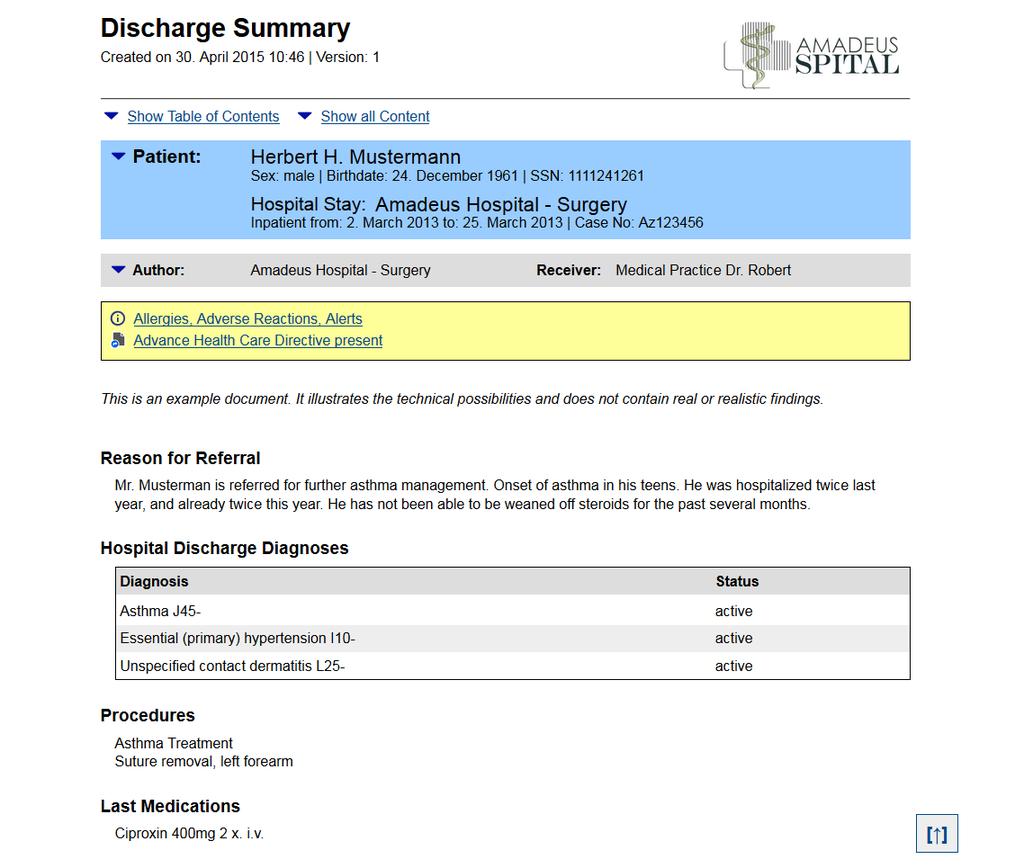
5 en74 Sabutsch S., Seifter P. Best practice of Rendering CDA in a Cross Enterprise Document Sharing Environment Tagged PDF (requirement by accessibility) Option to show the interactive HTML folded information Embedding of the original CDA document (PDF/A- 3) Hyphenation, paragraph settings to automatically prevent widows and orphans These requirements are made possible by the use of XSL-FO (Extensible Stylesheet Language Formatting Objects) and a corresponding FOP (Formatting Objects Processor) from the Apache project. XSL-FO was designed for paged media and the concept of pages is an integral part of XSL-FO structure. It is capable of a great deal of expressiveness. Tables, lists, side floats, and a variety of other features are available. [12] The software executable, called CDA2PDF converter, cannot be directly executed in the browser, therefore a servlet container is required. The conversion of a ELGA CDA document to PDF format looks similar to the HTML browser-based document (see figure 2). Noteworthy is the page footer with the additional file name and the information about the creation of the PDF file placed on the left side. Not visible are the folded information blocks, which are placed on the last page, because they are hidden behind interactive HTML elements. 5 Conclusion and Discussion 5.1 Security Considerations Although the injection of malicious code (e.g. Javascript) can be inhibited in the stylesheet, the multimedia content is also a potential security risk. This cannot be blocked by the stylesheet itself. If the media type (PDF, MPEG) is approved in principle the content cannot be checked by the stylesheet. In the ELGA environment firewalls were built that block both malicious code in multimedia attachments as well as in not well-formed or non-conforming XML data. In addition a schema validation and validation of correct PDF/A file format in the attachments will be carried out in the near future. 5.2 Electronic Signature In a PDF/A file content and presentation are not separated, so a PDF/A document can easily be signed electronically. In comparison, the electronic signature of a CDA document is fundamentally flawed and is not provided in the CDA standard. This kind of signature would also include the representation (i.e. the stylesheet). If only the CDA document is signed, and not the XSLT stylesheet, an inconsistent presentation of CDA document may occur. The principle of implementing the electronic Figure 1: Reference stylesheet
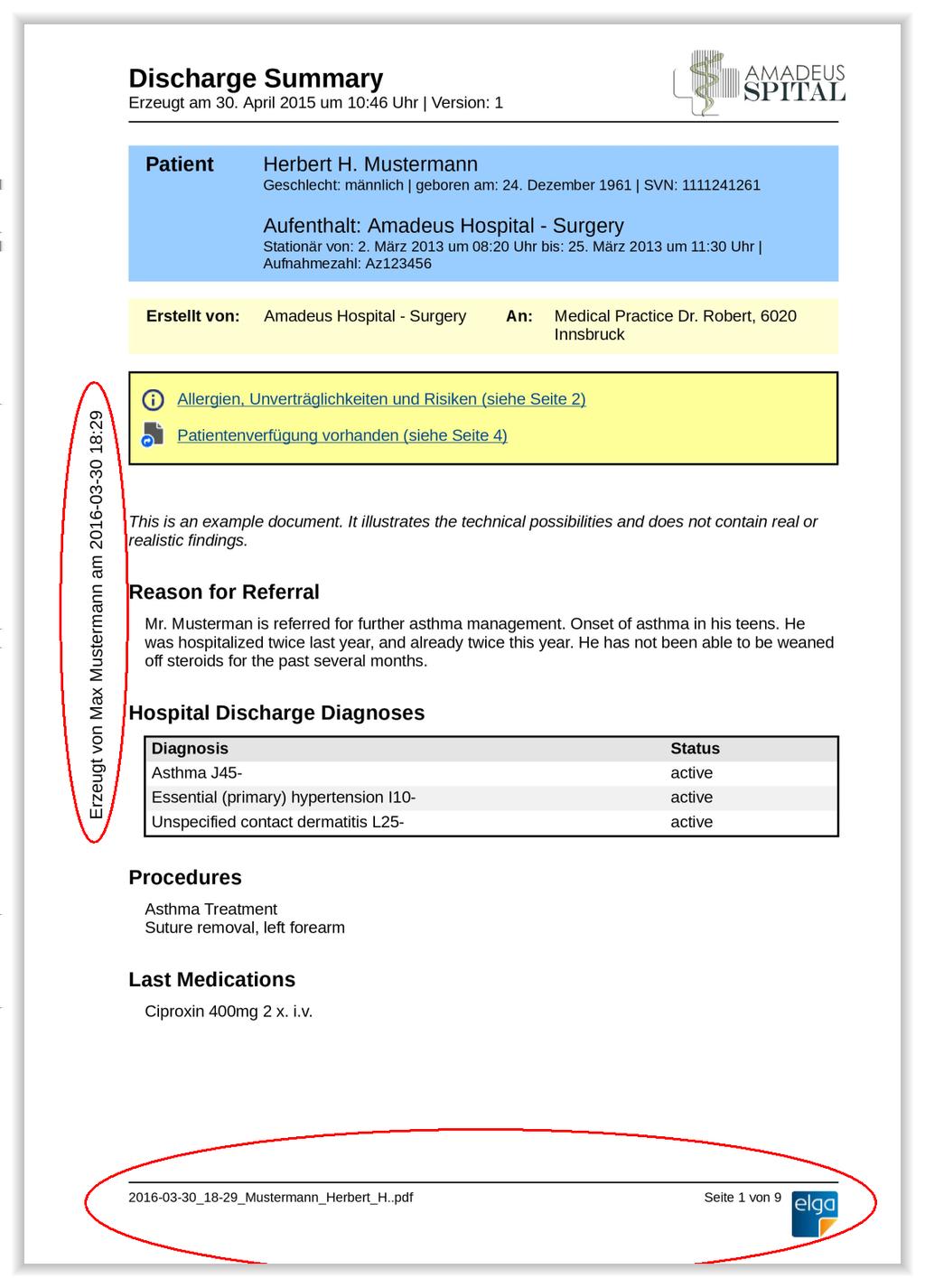
6 Sabutsch S., Seifter P. Best practice of Rendering CDA in a Cross Enterprise Document Sharing Environment en75 signature for CDA documents should include the clinical data and also the representation part. In the ELGA ecosystem an electronic signature for CDA documents is not intended and is not necessary. Although an electronic signature can be applied to the original documents in the individual EHRS, the exchange format CDA only contains an indication that the original document has been signed. However, the ELGA infrastructure ensures that only identified and authorized HCP can register documents. At the same time the immutability ( file fixity ) is ensured by hash values (document and registry entry) in the document registry. 5.3 Best practice solution From these considerations and the experience gained from the ELGA project we propose a best practice solution for future similar projects. PDF/A-3 files including an attached CDA document should be used for the exchange of documents. The PDF/A-3 files shall be generated via a common XSL-FO converter from a CDA document as input file. The resulting PDF file may easily be electronically signed, exchanged, displayed and archived. By attaching the origi- Figure 2: CDA document in PDF format
7 en76 Sabutsch S., Seifter P. Best practice of Rendering CDA in a Cross Enterprise Document Sharing Environment nal CDA document all features of the CDA standard, in particular semantic interoperability, will be preserved. CDA is essential from the point of view of semantic interoperability. CDA documents contain the relevant information for the document management and potentially machine-readable clinical content. PDF/A offers clear advantages in terms of immutability of the representation and long-term archiving, widespread tools for the representation and an electronic signature. PDF/A-3 files including a CDA document as an attachment combines the best of both worlds. To ensure that PDF/A-3 files are generated correctly with a uniform appearance, an appropriate converter CDA2PDF can be provided which generates a corresponding pdf output file from a CDA document. The feasibility of the converter has been proven in ELGA and the converter uses the ELGA web portal to produce clinical documents for all Austrian citizens. 6 Acknowledgements The authors are indebted to their colleagues from SDOs such as HL7 for open minded and kind cooperation and valuable support. References [1] Ärztekammer Nordrhein Elektronischer Arztbrief (XML- Signaturspezifikation, Schema, Beispiele) [Internet] [cited 2016 Feb 03]; Available from: [2] Bludau HB., Wolff A., Hochlehnert AJ. Presenting XML-based medical discharge letters according to CDA. Methods Inf Med. 2003;42:552 6 [3] Burgsteiner H., Kleinoscheg G., Hussa M. An CDA implementation guide about cardiopulmonary exercise testing (CPET) results. European Journal for Biomedical Informatics. 2012;8(4):16-23 [4] Health Level Seven, Inc. C-CDA c Rendering Tool Challenge [Internet] [cited 2016 Feb 03]; Available from: [5] W3C Cascading Style Sheets Level 2 Revision 1 (CSS 2.1) Specification [Internet] [cited 2016 Feb 03]; Available from: [6] Health Level Seven, Inc. (2005) HL7 Clinical Document Architecture, Release 2.0 HL7 c Version 3 Standard. [7] Health Level Seven, Deutschland e.v. IG:CDA und PDF/A3 [Internet] [cited 2016 Feb 03]; Available from: und PDF/A3 [8] Health Level Seven, Inc. C-CDA c Self Displaying CDA [Internet] [cited 2016 Feb 04]; Available from: Displaying CDA [9] ISO :2012 Document management Electronic document file format for long-term preservation Part 3: Use of ISO with support for embedded files (PDF/A-3) [10] Spronk R, Grieve G Common issues found in implementations of the HL7 Clinical Document Architecture (CDA) [Internet] [cited 2016 Feb 03]; Available from: en HL7 CDA common issues error.htm [11] Wolf KH., Schirmer S., Marschollek M., Haux R. Representing Sensor Data Using the HL7 CDA Personal Healthcare Monitoring Report Draft. Stud Health Technol Inform. 2009;150: [12] W3C Extensible Stylesheet Language (XSL) Version 1.1 [Internet] [cited 2016 Feb 03]; Available from:
We automatically generate the HTML for this as seen below. Provide the above components for the teaser.txt file.
 Creative Specs Gmail Sponsored Promotions Overview The GSP creative asset will be a ZIP folder, containing four components: 1. Teaser text file 2. Teaser logo image 3. HTML file with the fully expanded
Fast track to HTML & CSS 101 (Web Design)
 Fast track to HTML & CSS 101 (Web Design) Level: Introduction Duration: 5 Days Time: 9:30 AM - 4:30 PM Cost: 997.00 Overview Fast Track your HTML and CSS Skills HTML and CSS are the very fundamentals of
Email Marketing. Best Practices
 Email Marketing Best Practices Introduction Within email marketing, creative design serves two very important functions. First, properly composed email creative ensure proper rendering and deliverability
Lesson Review Answers
 Lesson Review Answers-1 Lesson Review Answers Lesson 1 Review 1. User-friendly Web page interfaces, such as a pleasing layout and easy navigation, are considered what type of issues? Front-end issues.
Creating Web Pages with Microsoft FrontPage
 Creating Web Pages with Microsoft FrontPage 1. Page Properties 1.1 Basic page information Choose File Properties. Type the name of the Title of the page, for example Template. And then click OK. Short
Web Development. Owen Sacco. ICS2205/ICS2230 Web Intelligence
 Web Development Owen Sacco ICS2205/ICS2230 Web Intelligence Introduction Client-Side scripting involves using programming technologies to build web pages and applications that are run on the client (i.e.
HL7 Clinical Document Architecture (CDA)
 HL7 Clinical Document Architecture (CDA) and its Sciphox implementation in Germany Dr. Kai U. Heitmann M.D. University of Cologne (Germany) Institute for Medical Statistics, Informatics und Epidemiology
01/42. Lecture notes. html and css
 web design and applications Web Design and Applications involve the standards for building and Rendering Web pages, including HTML, CSS, SVG, Ajax, and other technologies for Web Applications ( WebApps
Virtual Exhibit 5.0 requires that you have PastPerfect version 5.0 or higher with the MultiMedia and Virtual Exhibit Upgrades.
 28 VIRTUAL EXHIBIT Virtual Exhibit (VE) is the instant Web exhibit creation tool for PastPerfect Museum Software. Virtual Exhibit converts selected collection records and images from PastPerfect to HTML
Internet Technologies_1. Doc. Ing. František Huňka, CSc.
 1 Internet Technologies_1 Doc. Ing. František Huňka, CSc. Outline of the Course 2 Internet and www history. Markup languages. Software tools. HTTP protocol. Basic architecture of the web systems. XHTML
HTML5 Data Visualization and Manipulation Tool Colorado School of Mines Field Session Summer 2013
 HTML5 Data Visualization and Manipulation Tool Colorado School of Mines Field Session Summer 2013 Riley Moses Bri Fidder Jon Lewis Introduction & Product Vision BIMShift is a company that provides all
Web Portal User Guide. Version 6.0
 Web Portal User Guide Version 6.0 2013 Pitney Bowes Software Inc. All rights reserved. This document may contain confidential and proprietary information belonging to Pitney Bowes Inc. and/or its subsidiaries
Saving work in the CMS... 2. Edit an existing page... 2. Create a new page... 4. Create a side bar section... 4
 CMS Editor How-To Saving work in the CMS... 2 Edit an existing page... 2 Create a new page... 4 Create a side bar section... 4 Upload an image and add to your page... 5 Add an existing image to a Page...
Citrix StoreFront. Customizing the Receiver for Web User Interface. 2012 Citrix. All rights reserved.
 Citrix StoreFront Customizing the Receiver for Web User Interface 2012 Citrix. All rights reserved. Customizing the Receiver for Web User Interface Introduction Receiver for Web provides a simple mechanism
Web Design Foundations (2015-16)
 Course Description Web Design Foundations is a course that prepares students with work-related web design skills for advancement into postsecondary education and industry. The course is intended to develop
The ELGA initiative: A plan for implementing a nationwide electronic health records system in Austria
 The ELGA initiative: A plan for implementing a nationwide electronic health records system in Austria Georg Duftschmid, Wolfgang Dorda, Walter Gall Core Unit of Medical Statistics and Informatics Section
Graphic Design Basics. Shannon B. Neely. Pacific Northwest National Laboratory Graphics and Multimedia Design Group
 Graphic Design Basics Shannon B. Neely Pacific Northwest National Laboratory Graphics and Multimedia Design Group The Design Grid What is a Design Grid? A series of horizontal and vertical lines that evenly
Madison Area Technical College. MATC Web Style Guide
 Madison Area Technical College MATC Web Style Guide July 27, 2005 Table of Contents Topic Page Introduction/Purpose 3 Overview 4 Requests for Adding Content to the Web Server 3 The MATC Public Web Template
The Continuity of Care Document. Changing the Landscape of Healthcare Information Exchange
 The Continuity of Care Document Changing the Landscape of Healthcare Information Exchange 1 Electronic Clinical Document Exchange Prior to the approval of the Continuity of Care Document (CCD) as an ANSI
Voluntary Product Accessibility Template Blackboard Learn Release 9.1 April 2014 (Published April 30, 2014)
 Voluntary Product Accessibility Template Blackboard Learn Release 9.1 April 2014 (Published April 30, 2014) Contents: Introduction Key Improvements VPAT Section 1194.21: Software Applications and Operating
NHS Education for Scotland Knowledge Services Design and Development Framework
 NHS Education for Scotland Knowledge Services Design and Development Framework In support of Invitation to Tender: Technical Development of Technical Development of a Platform supporting Communication,
San Joaquin County Office of Education Career & Technical Education Web Design ~ Course Outline CBEDS#: 4601
 Web Design Course Outline I II 1 Course Content 5 5 Student Evaluation Employment Opportunities 2 XHTML 10 10 Creating an HTML Document Formatting Text with HTML Adding Graphics with Multimedia Using forms
Web Development I & II*
 Web Development I & II* Career Cluster Information Technology Course Code 10161 Prerequisite(s) Computer Applications Introduction to Information Technology (recommended) Computer Information Technology
HTML5 for ETDs. Virginia Polytechnic Institute and State University CS 4624. May 8 th, 2010. Sung Hee Park. Dr. Edward Fox.
 HTML5 for ETDs Virginia Polytechnic Institute and State University CS 4624 May 8 th, 2010 Sung Hee Park Dr. Edward Fox Nicholas Lynberg Philip McElmurray Jesse Racer Page 1 Table of Contents Executive
SRCSB General Web Development Policy Guidelines Jun. 2010
 This document outlines the conventions that must be followed when composing and publishing HTML documents on the Santa Rosa District Schools World Wide Web server. In most cases, these conventions also
PDF Forms Advantages and application possibilities of electronic forms in PDF format
 White Paper PDF Forms Advantages and application possibilities of electronic forms in PDF format Copyright 2002-2009 soft Xpansion GmbH & Co. KG White Paper PDF Forms 1 Table of Contents Usage of Forms...
SUBJECT CODE : 4074 PERIODS/WEEK : 4 PERIODS/ SEMESTER : 72 CREDIT : 4 TIME SCHEDULE UNIT TOPIC PERIODS 1. INTERNET FUNDAMENTALS & HTML Test 1
 SUBJECT TITLE : WEB TECHNOLOGY SUBJECT CODE : 4074 PERIODS/WEEK : 4 PERIODS/ SEMESTER : 72 CREDIT : 4 TIME SCHEDULE UNIT TOPIC PERIODS 1. INTERNET FUNDAMENTALS & HTML Test 1 16 02 2. CSS & JAVASCRIPT Test
PaperlessPrinter. Version 3.0. User s Manual
 Version 3.0 User s Manual The User s Manual is Copyright 2003 RAREFIND ENGINEERING INNOVATIONS All Rights Reserved. 1 of 77 Table of Contents 1. 2. 3. 4. 5. Overview...3 Introduction...3 Installation...4
WEB DEVELOPMENT IA & IB (893 & 894)
 DESCRIPTION Web Development is a course designed to guide students in a project-based environment in the development of up-to-date concepts and skills that are used in the development of today s websites.
HTML TIPS FOR DESIGNING
 This is the first column. Look at me, I m the second column.
Appendix H: Cascading Style Sheets (CSS)
 Appendix H: Cascading Style Sheets (CSS) Cascading Style Sheets offer Web designers two key advantages in managing complex Web sites: Separation of content and design. CSS gives developers the best of
Basics of Accessible Design
 Basics of Accessible Design Font Consider using a sans serif type font such as Arial or Veranda. The sans serif fonts are easier for people with reading disorders and visual impairments to read. This document
Standards Development. PROS 14/00x Specification 3: Long term preservation formats
 Standards Development PROS 14/00x Specification 3: Long term preservation formats 1 2 Copyright Statement State of Victoria 2014 3 4 5 6 7 8 9 10 11 12 13 14 15 16 17 18 19 20 21 22 This work is licensed
Server-Based PDF Creation: Basics
 White Paper Server-Based PDF Creation: Basics Copyright 2002-2009 soft Xpansion GmbH & Co. KG White Paper Server-Based PDF Creation: Basics 1 Table of Contents PDF Format... 2 Description... 2 Advantages
Basic tutorial for Dreamweaver CS5
 Basic tutorial for Dreamweaver CS5 Creating a New Website: When you first open up Dreamweaver, a welcome screen introduces the user to some basic options to start creating websites. If you re going to
Lesson 1 Quiz. 3. The Internet is which type of medium? a. Passive b. Broadcast c. One-to-one d. Electronic print
 Lesson 1 Quiz 1. Which technology trend in Web development can be defined as a group of XMLbased technologies that enable computers using different operating systems and software to easily exchange information
GUIDE TO CODE KILLER RESPONSIVE EMAILS
 GUIDE TO CODE KILLER RESPONSIVE EMAILS THAT WILL MAKE YOUR EMAILS BEAUTIFUL 3 Create flawless emails with the proper use of HTML, CSS, and Media Queries. But this is only possible if you keep attention
Web Design for Programmers. Brian Hogan NAPCS Slides and content 2008 Brian P. Hogan Do not reproduce in any form without permission
 Web Design for Programmers Brian Hogan NAPCS Slides and content 2008 Brian P. Hogan Do not reproduce in any form without permission Quick Disclaimers This is a crash course! Many topics are simplified
Table of Contents Recommendation Summary... 3 Introduction... 4 Formatting Recommendations... 5 Creative:... 7 Deliverability & Infrastructure:...
 Table of Contents Recommendation Summary... 3 Technical:... 3 Creative:... 3 Introduction... 4 Formatting Recommendations... 5 JavaScript:... 5 Forms:... 5 Background Tags and Colors:... 5 Html Text:...
Web Testing. Main Concepts of Web Testing. Software Quality Assurance Telerik Software Academy http://academy.telerik.com
 Web Testing Main Concepts of Web Testing Software Quality Assurance Telerik Software Academy http://academy.telerik.com The Lectors Snejina Lazarova Product Manager Business Services Team Dimo Mitev QA
Contents. Downloading the Data Files... 2. Centering Page Elements... 6
 Creating a Web Page Using HTML Part 1: Creating the Basic Structure of the Web Site INFORMATION TECHNOLOGY SERVICES California State University, Los Angeles Version 2.0 Winter 2010 Contents Introduction...
EUROPEAN COMPUTER DRIVING LICENCE / INTERNATIONAL COMPUTER DRIVING LICENCE WEB EDITING
 EUROPEAN COMPUTER DRIVING LICENCE / INTERNATIONAL COMPUTER DRIVING LICENCE WEB EDITING The European Computer Driving Licence Foundation Ltd. Portview House Thorncastle Street Dublin 4 Ireland Tel: + 353
Universal Design and Ethical Practices for Designing. Bryan Ayres, M.Ed., ATP, Director Technology & Curriculum Access Center Easter Seals Arkansas
 Universal Design and Ethical Practices for Designing i Accessible Web Environments Bryan Ayres, M.Ed., ATP, Director Technology & Curriculum Access Center Easter Seals Arkansas Contact information Technology
Style Guide Provided courtesy of Innovative Emergency Management Inc.
 Style Guide 1. Introduction Louisiana.gov is an enterprise approach for state agencies to work together to provide citizen-centric digital government services and information. Key to achieving this goal
3. Add and delete a cover page...7 Add a cover page... 7 Delete a cover page... 7
 Microsoft Word: Advanced Features for Publication, Collaboration, and Instruction For your MAC (Word 2011) Presented by: Karen Gray ([email protected]) Word Help: http://mac2.microsoft.com/help/office/14/en-
Contents. Launching FrontPage... 3. Working with the FrontPage Interface... 3 View Options... 4 The Folders List... 5 The Page View Frame...
 Using Microsoft Office 2003 Introduction to FrontPage Handout INFORMATION TECHNOLOGY SERVICES California State University, Los Angeles Version 1.0 Fall 2005 Contents Launching FrontPage... 3 Working with
Preservation Handbook
 Preservation Handbook [Binary Text / Word Processor Documents] Author Rowan Wilson and Martin Wynne Version Draft V3 Date 22 / 08 / 05 Change History Revised by MW 22.8.05; 2.12.05; 7.3.06 Page 1 of 7
Chapter 10: Multimedia and the Web
 Understanding Computers Today and Tomorrow 12 th Edition Chapter 10: Multimedia and the Web Learning Objectives Define Web-based multimedia and list some advantages and disadvantages of using multimedia.
Kentico CMS, 2011 Kentico Software. Contents. Mobile Development using Kentico CMS 6 2 Exploring the Mobile Environment 1
 Contents Mobile Development using Kentico CMS 6 2 Exploring the Mobile Environment 1 Time for action - Viewing the mobile sample site 2 What just happened 4 Time for Action - Mobile device redirection
Dreamweaver. Introduction to Editing Web Pages
 Dreamweaver Introduction to Editing Web Pages WORKSHOP DESCRIPTION... 1 Overview 1 Prerequisites 1 Objectives 1 INTRODUCTION TO DREAMWEAVER... 1 Document Window 3 Toolbar 3 Insert Panel 4 Properties Panel
Perfect PDF 8 Premium
 Perfect PDF 8 Premium Test results ( gut Good, sehr gut very good) refer to versions 7, 6 and 5 of Perfect PDF. Professionally create, convert, edit and view PDF, PDF/A and XPS files Perfect PDF 8 Premium
Adobe Acrobat 6.0 Professional
 Adobe Acrobat 6.0 Professional Manual Adobe Acrobat 6.0 Professional Manual Purpose The will teach you to create, edit, save, and print PDF files. You will also learn some of Adobe s collaborative functions,
VAST EMAIL. How to Register and Login to Your Vast Email Account. Selecting email address and password
 VAST EMAIL How to Register and Login to Your Vast Email Account Selecting email address and password To choose your Vast Internet email address and password, as well as register your account from your
PDF Primer PDF. White Paper
 White Paper PDF Primer PDF What is PDF and what is it good for? How does PDF manage content? How is a PDF file structured? What are its capabilities? What are its limitations? Version: 1.0 Date: October
Mastering the JangoMail EditLive HTML Editor
 JangoMail Tutorial Mastering the JangoMail EditLive HTML Editor With JangoMail, you have the option to use our built-in WYSIWYG HTML Editors to compose and send your message. Note: Please disable any pop
The Essential Guide to HTML Email Design
 The Essential Guide to HTML Email Design Index Introduction... 3 Layout... 4 Best Practice HTML Email Example... 5 Images... 6 CSS (Cascading Style Sheets)... 7 Animation and Scripting... 8 How Spam Filters
JISIS and Web Technologies
 27 November 2012 Status: Draft Author: Jean-Claude Dauphin JISIS and Web Technologies I. Introduction This document does aspire to explain how J-ISIS is related to Web technologies and how to use J-ISIS
Converting Prospects to Purchasers.
 Email Template Guide LASSO EMAIL TEMPLATE EDITOR... 2 ABOUT LASSO EMAIL TEMPLATE EDITOR... 2 CREATING AN EMAIL TEMPLATE... 2 ACCESSING EMAIL TEMPLATES... 2 ADDING AN EMAIL TEMPLATE FOLDER... 3 BASIC PRINCIPLES
Xtreeme Search Engine Studio Help. 2007 Xtreeme
 Xtreeme Search Engine Studio Help 2007 Xtreeme I Search Engine Studio Help Table of Contents Part I Introduction 2 Part II Requirements 4 Part III Features 7 Part IV Quick Start Tutorials 9 1 Steps to
Test Generator. Creating Tests
 Test Generator Creating Tests Table of Contents# Cognero Overview... 1 Cognero Basic Terminology... 2 Logging On to Cognero... 3 Test Generator Organization... 4 Question Sets Versus Tests... 4 Editing
BI 4.1 Quick Start Guide
 BI 4.1 Quick Start Guide BI 4.1 Quick Start Guide... 1 Introduction... 4 Logging in... 4 Home Screen... 5 Documents... 6 Preferences... 8 Setting Up Preferences to Display Public Folders... 10 Web Intelligence...
Manage. Help Documentation. This document was auto-created from web content and is subject to change at any time. Copyright (c) 2016 SmarterTools Inc.
 Help Documentation This document was auto-created from web content and is subject to change at any time. Copyright (c) 2016 SmarterTools Inc. Manage Email Users An email user account represents a person's
Adobe Acrobat 9 Pro Accessibility Guide: Creating Accessible PDF from Microsoft Word
 Adobe Acrobat 9 Pro Accessibility Guide: Creating Accessible PDF from Microsoft Word Adobe, the Adobe logo, Acrobat, Acrobat Connect, the Adobe PDF logo, Creative Suite, LiveCycle, and Reader are either
Introduction to XHTML. 2010, Robert K. Moniot 1
 Chapter 4 Introduction to XHTML 2010, Robert K. Moniot 1 OBJECTIVES In this chapter, you will learn: Characteristics of XHTML vs. older HTML. How to write XHTML to create web pages: Controlling document
Tibiscus University, Timişoara
 PDF/A standard for long term archiving Ramona Vasilescu Tibiscus University, Timişoara ABSTRACT. PDF/A is defined by ISO 19005-1 as a file format based on PDF format. The standard provides a mechanism
Website Search Engine Optimization (SEO) Evaluation XXXXXXX
 Website Search Engine Optimization (SEO) Evaluation For XXXXXXX July 22, 2008 Introduction This report provides recommendations that can be implemented on XXXXX s website to improve acquisition from search
Dreamweaver CS4 Day 2 Creating a Website using Div Tags, CSS, and Templates
 Dreamweaver CS4 Day 2 Creating a Website using Div Tags, CSS, and Templates What is a DIV tag? First, let s recall that HTML is a markup language. Markup provides structure and order to a page. For example,
MadCap Software. Import Guide. Flare 11
 MadCap Software Import Guide Flare 11 Copyright 2015 MadCap Software. All rights reserved. Information in this document is subject to change without notice. The software described in this document is furnished
10CS73:Web Programming
 10CS73:Web Programming Question Bank Fundamentals of Web: 1.What is WWW? 2. What are domain names? Explain domain name conversion with diagram 3.What are the difference between web browser and web server
Developers Guide. Designs and Layouts HOW TO IMPLEMENT WEBSITE DESIGNS IN DYNAMICWEB. Version: 1.3 2013.10.04 English
 Developers Guide Designs and Layouts HOW TO IMPLEMENT WEBSITE DESIGNS IN DYNAMICWEB Version: 1.3 2013.10.04 English Designs and Layouts, How to implement website designs in Dynamicweb LEGAL INFORMATION
IBM Unica emessage Version 8 Release 6 February 13, 2015. User's Guide
 IBM Unica emessage Version 8 Release 6 February 13, 2015 User's Guide Note Before using this information and the product it supports, read the information in Notices on page 403. This edition applies to
This document will describe how you can create your own, fully responsive. drag and drop email template to use in the email creator.
 1 Introduction This document will describe how you can create your own, fully responsive drag and drop email template to use in the email creator. It includes ready-made HTML code that will allow you to
White Paper Using PHP Site Assistant to create sites for mobile devices
 White Paper Using PHP Site Assistant to create sites for mobile devices Overview In the last few years, a major shift has occurred in the number and capabilities of mobile devices. Improvements in processor
Chapter 19: XML. Working with XML. About XML
 504 Chapter 19: XML Adobe InDesign CS3 is one of many applications that can produce and use XML. After you tag content in an InDesign file, you save and export the file as XML so that it can be repurposed
GLOB@L LIBRARIES - BULGARIA PROGRAM. Terms of Reference
 GLOB@L LIBRARIES - BULGARIA PROGRAM Terms of Reference Position: Web Design Consultant (WDC) Timeframe: Up to 6 months based on interim outcomes I. BACKGROUND INFORMATION The Glob@l Libraries Bulgaria
Taleo Enterprise. Career Section Branding Definition. Version 7.5
 Taleo Enterprise Career Section Branding Definition Version 7.5 March 2010 Confidential Information It shall be agreed by the recipient of the document (hereafter referred to as the other party ) that
Basics of HTML (some repetition) Cascading Style Sheets (some repetition) Web Design
 Basics of HTML (some repetition) Cascading Style Sheets (some repetition) Web Design Contents HTML Quiz Design CSS basics CSS examples CV update What, why, who? Before you start to create a site, it s
Composing a New Email Message
 Composing and Sending Email Zimbra V 7.2 2012-2013 School Year Composing a New Email Message Cc and Bcc Addresses Using HTML Editor Using Spell Check Adding an Attachment Attachment File Types Supported
Google Docs Basics Website: http://etc.usf.edu/te/
 Website: http://etc.usf.edu/te/ Google Docs is a free web-based office suite that allows you to store documents online so you can access them from any computer with an internet connection. With Google
An overview of designing HTML emails for Hotmail, Yahoo, Outlook, Lotus Notes and AOL
 An Emailcenter briefing: Can your customers read your email newsletters? An overview of designing HTML emails for Hotmail, Yahoo, Outlook, Lotus Notes and AOL November, 2004 Emailcenter research has shown
Joomla! template Blendvision v 1.0 Customization Manual
 Joomla! template Blendvision v 1.0 Customization Manual Blendvision template requires Helix II system plugin installed and enabled Download from: http://www.joomshaper.com/joomla-templates/helix-ii Don
Web Foundations Series Internet Business Associate
 Web Foundations Series Internet Business Associate Internet Business Associate prepares students to work effectively in today's business environment. In this course, you will learn about the tasks involved
CompuScholar, Inc. Alignment to Tennessee Web Design Foundations Standards
 CompuScholar, Inc. Alignment to Tennessee Web Design Foundations Standards Tennessee Course Details: Course Name: Primary Career Cluster: Course Code: Credit: Grade Level: Teacher Resources: Web Design
Metadata in Microsoft Office and in PDF Documents Types, Export, Display and Removal
 White Paper Metadata in Microsoft Office and in PDF Documents Types, Export, Display and Removal Copyright 2002-2009 soft Xpansion GmbH & Co. KG White Paper Metadata in PDF Files 1 Contents Term Definitions
38 Essential Website Redesign Terms You Need to Know
 38 Essential Website Redesign Terms You Need to Know Every industry has its buzzwords, and web design is no different. If your head is spinning from seemingly endless jargon, or if you re getting ready
HSU Accessibility Checkpoints Explained
 HSU Accessibility Checkpoints Explained Sources: http://bobby.watchfire.com/bobby/html/en/index.jsp EASI Barrier-free Web Design Workshop (version 4) Paciello, Michael G. WEB Accessibility for People with
WEB CONTENT MANAGEMENT PATTERNS
 WEB CONTENT MANAGEMENT PATTERNS By YOAB GORFU RENEL SMITH ABE GUERRA KAY ODEYEMI May 2006 Version Date: 23-Apr-06-06:04 PM - 1 - Story TABLE OF CONTENTS Pattern: Separate it. How do you ensure the site
Increasing Productivity and Collaboration with Google Docs. Charina Ong Educational Technologist [email protected]
 Increasing Productivity and Collaboration with Google Docs [email protected] Table of Contents About the Workshop... i Workshop Objectives... i Session Prerequisites... i Google Apps... 1 Creating
Logi Ad Hoc Reporting System Administration Guide
 Logi Ad Hoc Reporting System Administration Guide Version 11.2 Last Updated: March 2014 Page 2 Table of Contents INTRODUCTION... 4 Target Audience... 4 Application Architecture... 5 Document Overview...
126.47. Web Design (One Credit), Beginning with School Year 2012-2013.
 126.47. Web Design (One Credit), Beginning with School Year 2012-2013. (a) General requirements. Students shall be awarded one credit for successful completion of this course. This course is recommended
ELFRING FONTS UPC BAR CODES
 ELFRING FONTS UPC BAR CODES This package includes five UPC-A and five UPC-E bar code fonts in both TrueType and PostScript formats, a Windows utility, BarUPC, which helps you make bar codes, and Visual
Create a Google Site in DonsApp
 Create a Google Site in DonsApp 1 Google Web Site Interactive. Constructivist. Collaborative. Communities. WHAT IS GOOGLE SITE? With one single click, you can create a website without any knowledge of
Guidelines for the LSS for NemID interaction design and user selection
 Guidelines for the LSS for NemID interaction design and user selection Table of contents 1 The purpose and audience of the document... 3 2 Introduction... 4 3 Recommendations... 5 3.1 Visual appearance...