
DIGIPASS Authentication for Imprivata
|
|
|
- Adelia Arnold
- 9 years ago
- Views:
Transcription
1 DIGIPASS Authentication for Imprivata With VASCO VACMAN Controller integrated 2007 Whitepaper VASCO Data Security. All rights reserved. Page 1 of 21
2 Disclaimer Disclaimer of Warranties and Limitations of Liabilities This Report is provided on an 'as is' basis, without any other warranties, or conditions. No part of this publication may be reproduced, stored in a retrieval system, or transmitted, in any form or by any means, electronic, mechanical, photocopying, recording, or otherwise, without the prior written permission of VASCO Data Security. Trademarks DIGIPASS & VACMAN are registered trademarks of VASCO Data Security. All trademarks or trade names are the property of their respective owners. VASCO reserves the right to make changes to specifications at any time and without notice. The information furnished by VASCO in this document is believed to be accurate and reliable. However, VASCO may not be held liable for its use, nor for infringement of patents or other rights of third parties resulting from its use. Copyright 2007 VASCO Data Security. All rights reserved VASCO Data Security. All rights reserved. Page 2 of 21
3 Table of Contents DIGIPASS Authentication for Imprivata... 1 Disclaimer... 2 Table of Contents Overview Solution LAN RADIUS ESSO Imprivata configuration Policies DIGIPASS/DPX User assignment Imprivata test LAN Logon Response Only Challenge/Response Static password Self-Assignment PIN Unlocking Features Authentication Management Single Sign-On Physical Logical About VASCO Data Security About Imprivata VASCO Data Security. All rights reserved. Page 3 of 21
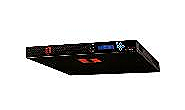
4 1 Overview The purpose of this document is to demonstrate how to use an Imprivata appliance in combination with a DIGIPASS. We will show you how to import a DPX file and how to assign a DIGIPASS to a user. 2 Solution Active Directory Imprivata Client VPN VACMAN Middleware = Internal Authentication with VACMAN Controller integrated in the Imprivata = RADIUS Authentication with VACMAN Controller integrated in the Imprivata = RADIUS Authentication to VACMAN Middleware / Back-End authentication to AD = Import users from AD 2.1 LAN The regular way of working with the Imprivata appliance is LAN authentication on a client computer. The Imprivata appliance has a VACMAN Controller integrated, so it can handle authentication requests on its own. It also has the possibility to synchronize it s user database with the Active Directory in your network. 2.2 RADIUS The Imprivata appliance can act as a RADIUS client and server at the same time. Clients can request a RADIUS authentication to the Imprivata appliance or validate requests for instance coming from a VPN server. On the other hand, the Imprivata appliance can also act as a RADIUS proxy and transfer RADIUS requests to another RADIUS server. 2.3 ESSO The Enterprise Single Sign-On (ESSO) feature enables users to use the already specified credentials to authenticate themselves to different kind of client activities. (Applications, websites, ) 2007 VASCO Data Security. All rights reserved. Page 4 of 21
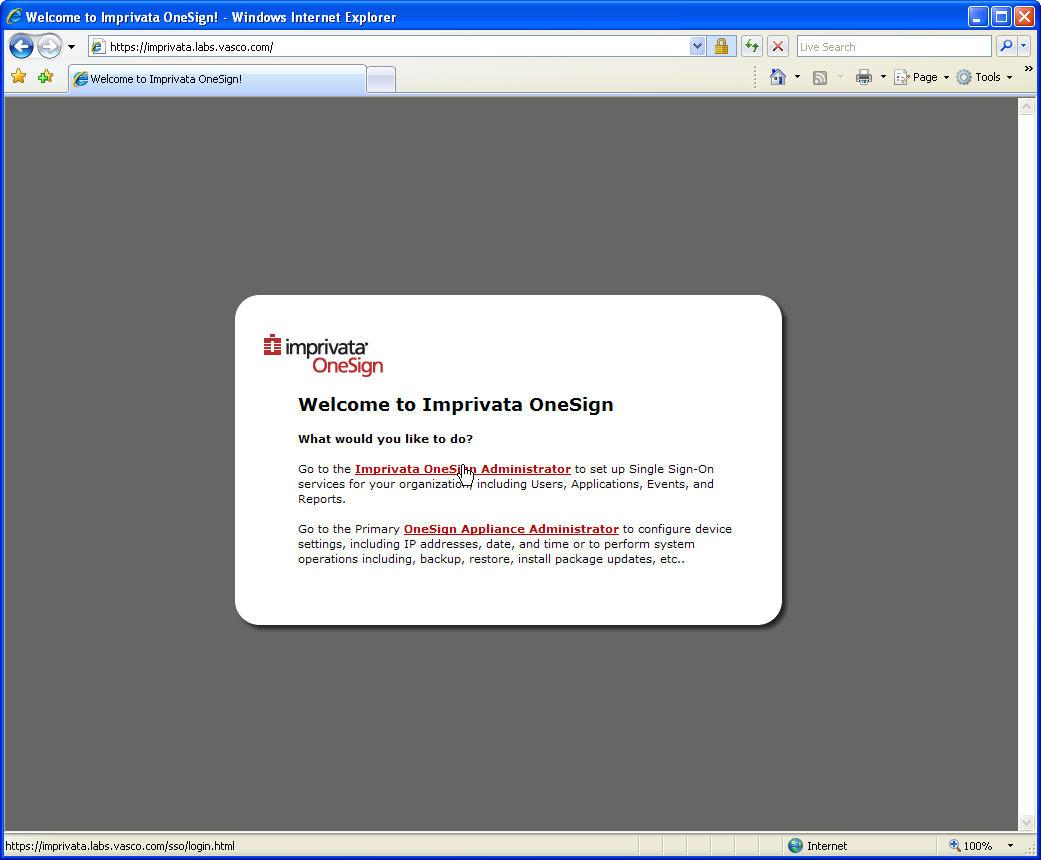
5 3 Imprivata configuration Browse to the configuration page of the Imprivata appliance: Through the Imprivata OneSign Administrator we are able to perform all required configuration changes. Figure 1: Imprivata configuration (1) Use a OneSign administrative user to authenticate with the OneSign Administrator. These accounts were chosen when installing the OneSign application for the first time. Figure 2 Imprivata configuration (2) 2007 VASCO Data Security. All rights reserved. Page 5 of 21
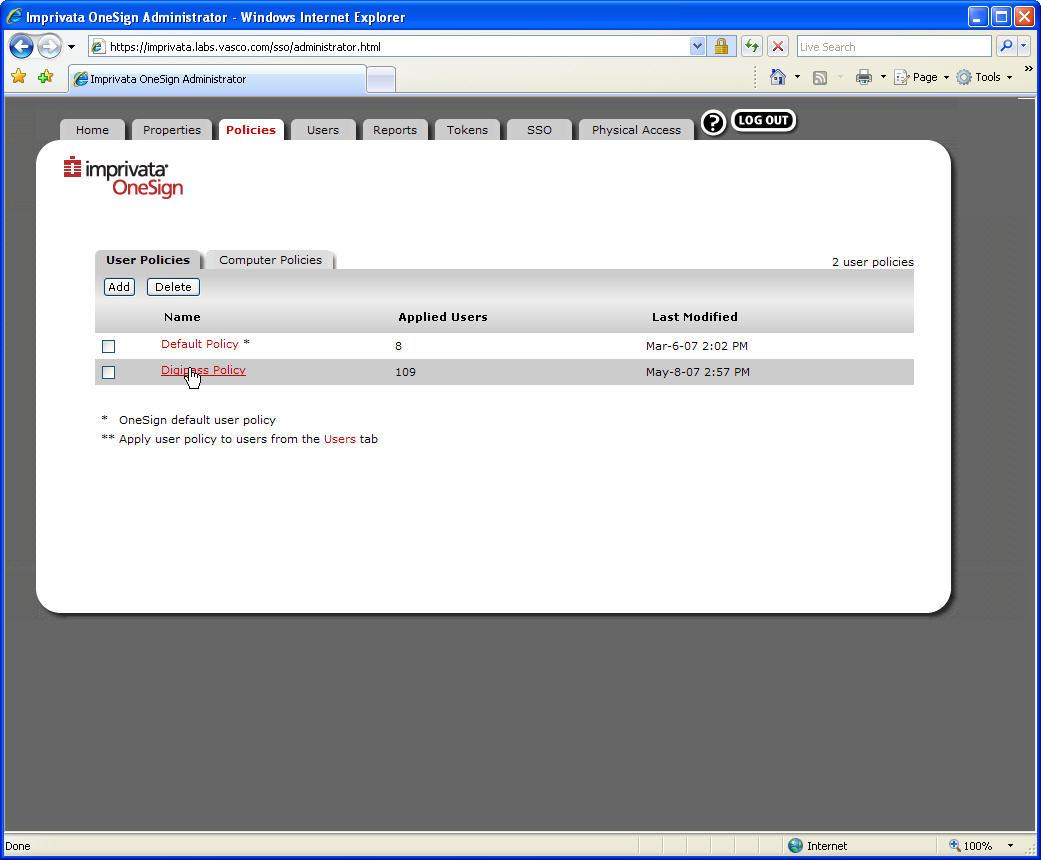
6 3.1 Policies Add or Change a policy to allow only access to users who will use a DIGIPASS to authenticate. Click the Add button to create a new policy, or click a policy to change the settings from an existing policy. Figure 3: Policies (1) 2007 VASCO Data Security. All rights reserved. Page 6 of 21
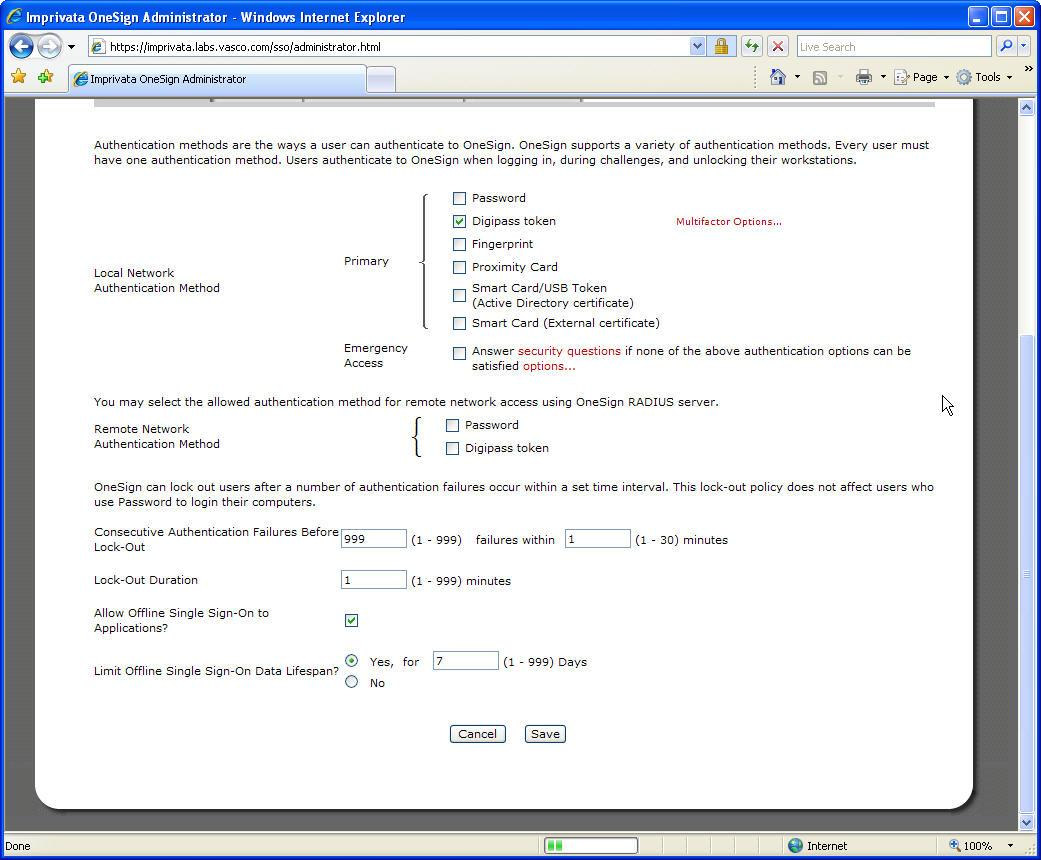
7 The Local Network Authentication Method can be found under the authentication tab in the page. Make sure only Digipass token is selected here. You could, if preferred, enable the Emergency Access. This allows the users to answer some security questions and be granted access afterwards in case they forget or lost their DIGIPASS. Figure 4: Policies (2) At the bottom of the same page, you can find different lockout parameters when authentication has failed. Figure 5: Policies (3) 2007 VASCO Data Security. All rights reserved. Page 7 of 21
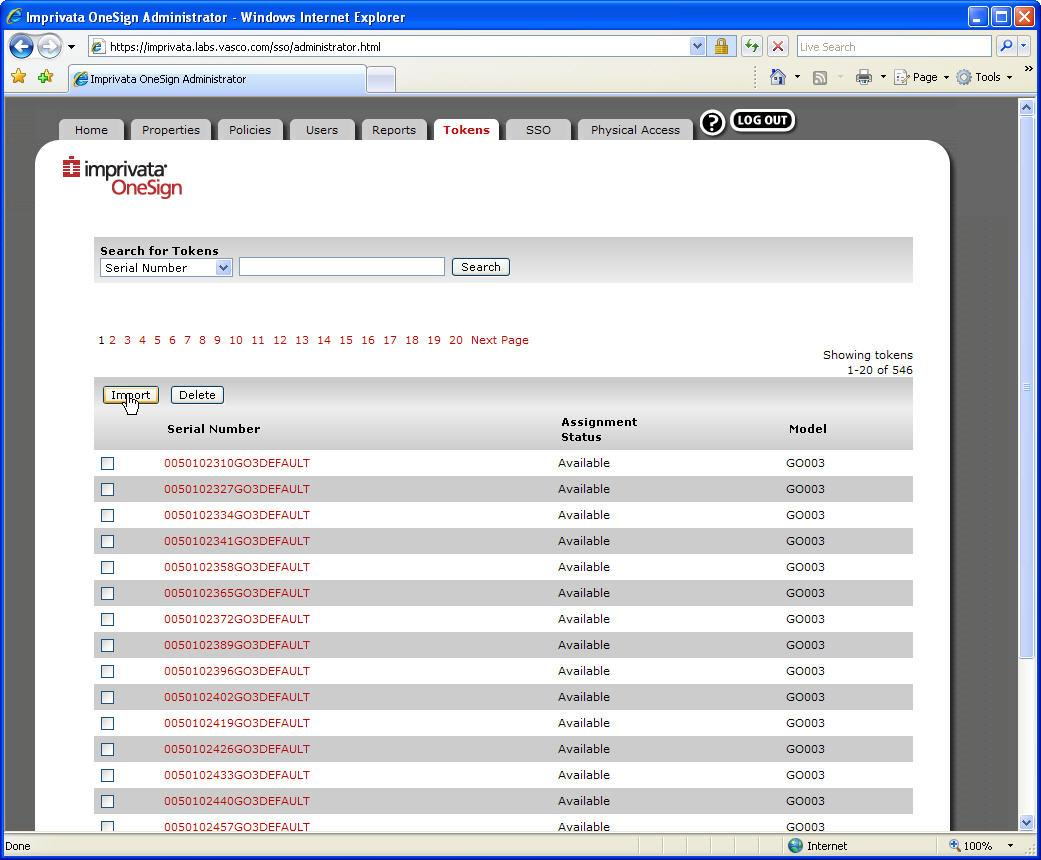
8 3.2 DIGIPASS/DPX In case you would like to use the internal validation method for the DIGIPASS, you will have to upload your DPX file and enter the transportation key. Using this method, you will eliminate the need to install an external DIGIPASS validation tool (VACMAN Controller, VACMAN Middleware, ). To insert a DPX file on the Imprivata appliance, go to the Tokens tab and click the Import button. Figure 6: DIGIPASS/DPX (1) 2007 VASCO Data Security. All rights reserved. Page 8 of 21

9 Fill in the DPX transport key in the shipping code field. Select Yes or No if there is only one application in your DPX file. (If you don t know, select Yes, you will receive a message box with the values of more than one application is found.) Click Browse to select your DPX file and afterwards click Upload. Figure 7: DIGIPASS/DPX (2) The following message boxes show you what kind of errors you could receive. The first one is when you entered the wrong transport key or shipping code. Figure 8: DIGIPASS/DPX (3) The second one is when there is more than one application found in the DPX file while you selected YES in the previous step. In this box you can see the applications that it found, so you can easily choose the correct application to import. Figure 9: DIGIPASS/DPX (4) 2007 VASCO Data Security. All rights reserved. Page 9 of 21
10 When the DPX file is successfully imported, you will see how many DIGIPASS were added to database. Figure 10: DIGIPASS/DPX (5) 2007 VASCO Data Security. All rights reserved. Page 10 of 21

11 3.3 User assignment To assign a DIGIPASS to a user, you first have to select the desired DIGIPASS. Search for your desired DIGIPASS or select one from the list. Click on the DIGIPASS Serial Number to see the details. Figure 11: User assignment (1) If the Assignment Status is Available, you can click the Change Status button. Here you select the Assign Token to User option. Fill in the username and select the correct domain. Click OK to save the changes. Figure 12: User assignment (2) 2007 VASCO Data Security. All rights reserved. Page 11 of 21
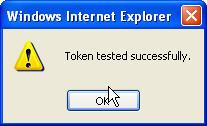
12 You will now see that the user is assigned to this DIGIPASS. To see if everything works correct, you can enter a One Time Password (OTP) in the bottom of the page in the Test One-Time Password field and click the Test button. Figure 13: User assignment (3) You will receive a successful test message if the OTP is validated correctly for this DIGIPASS. Figure 14: User assignment (4) 2007 VASCO Data Security. All rights reserved. Page 12 of 21

13 4 Imprivata test 4.1 LAN Logon Response Only Once the Imprivata software is installed on the client machine, you will see an extra option field in the logon screen of the client. The Username and Domain remain unchanged and have to be filled in like before. Only if you select the ID Token option in the OneSign Logon field, the password field will change to Passcode :. Here you have to fill in a One Time Password (OTP) generated by the DIGIPASS assigned to your username. Figure 15: LAN Logon Response Only You will be granted access to your client when the OTP is validated on the Imprivata appliance VASCO Data Security. All rights reserved. Page 13 of 21

14 4.1.2 Challenge/Response When you want to make use of a challenge/response DIGIPASS, you enter your credentials like before. This means, enter your Username, Password and Domain. Make sure you selected ID Token in the OneSign Logon box. Figure 16: LAN Logon Challenge/Response (1) Afterwards, you will be shown a Challenge code, which you will have to enter on your DIGIPASS (with numeric keypad) to calculate the Response code. Figure 17: LAN Logon Challenge/Response (2) You will be granted access to your client once the Response code is validated on the Imprivata appliance VASCO Data Security. All rights reserved. Page 14 of 21

15 4.1.3 Static password Once your DIGIPASS is assigned to your account, you can no longer use your static password to get access to your client. Figure 18: Static password (1) If you try, you will receive the following alert message. Figure 19: Static password (2) 2007 VASCO Data Security. All rights reserved. Page 15 of 21

16 4.2 Self-Assignment Once the Imprivata software is installed on a client machine, you will be prompted to specify your Digipass token serial as long as there is no DIGIPASS assigned to the user that was logged on to Windows. To self-assign a DIGIPASS, enter the DIGIPASS token serial, which you can find on the back of the DIGIPASS. Generate an OTP with the same DIGIPASS and enter it in the Passcode field. By doing this, the software instantly knows if the correct DIGIPASS was specified by the user. The next time you logon with this username, you will have to use your DIGIPASS. Figure 20: Self-Assignment 2007 VASCO Data Security. All rights reserved. Page 16 of 21
17 4.3 PIN Unlocking In the DIGIPASS family there exist some models with a numeric keypad. These models may be protected with a user PIN. After entering 3 wrong user PIN s, the DIGIPASS will be locked. If a DIGIPASS gets locked, there will appear an unlock code on the screen. The Imprivata appliance has a built-in function to unlock a DIGIPASS. Go to the details of that specific DIGIPASS. At the bottom of the page, you will find an unlock function for a locked DIGIPASS. Enter the code that is shown on the screen of the locked DIGIPASS and click the Generate Unlock PIN button. Figure 21: PIN Unlocking (1) 2007 VASCO Data Security. All rights reserved. Page 17 of 21
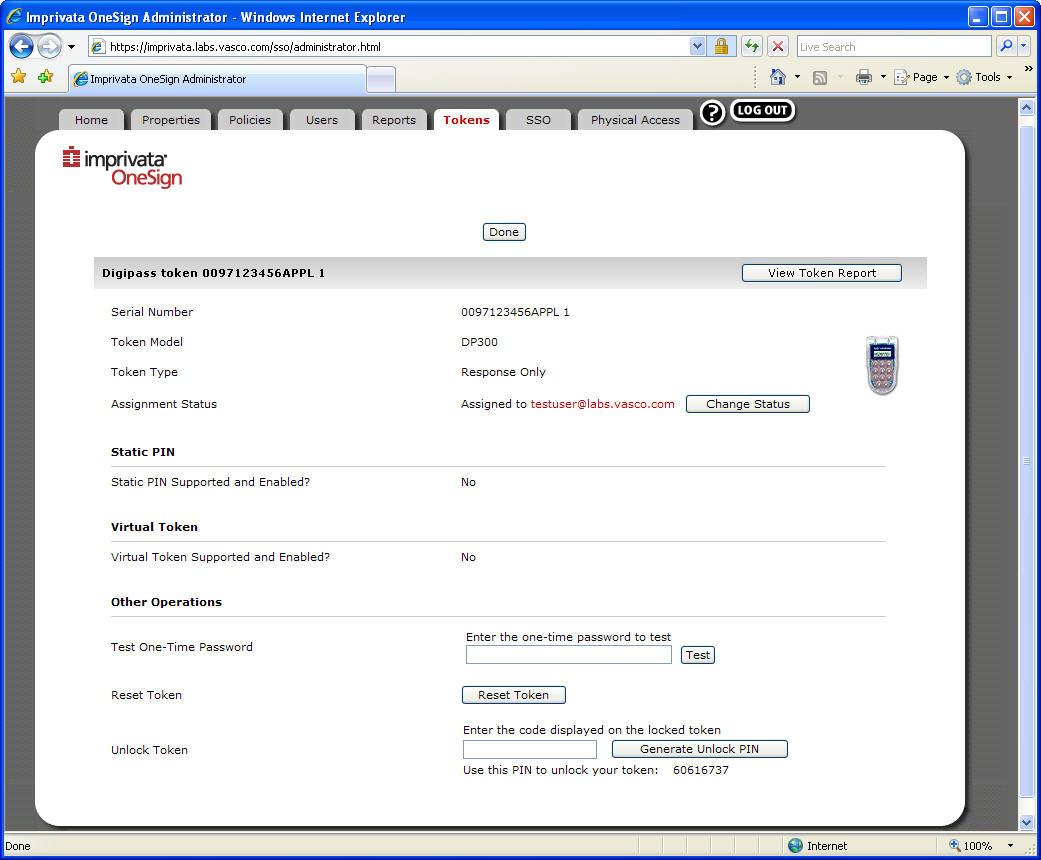
18 You unlock the DIGIPASS by entering the unlock PIN on your DIGIPASS. The user is then allowed to choose a new PIN code, which has to be confirmed by entering the PIN a second time. Figure 22: PIN Unlocking (2) 2007 VASCO Data Security. All rights reserved. Page 18 of 21
19 5 Features 5.1 Authentication Management Appliance-based Easy to Use, Easy to Manage Tightly Integrated Two-Factor Authentication Upgrade to Single Sign-On and/or Physical Logical 5.2 Single Sign-On Automate Application Password Changes Self-Service Password Management Broad Support for Strong Authentication Application Profile Generator (APG) Point-and-Click instead of expensive scripting Monitoring and Reporting Provisioning Support OneSign Extension Objects Roaming Desktops, Drive-Mapping, and More 5.3 Physical & Logical Access Maps identities between physical access systems and IT directories to enable one converged policy for allowing or denying network access based on a user s: Physical location, organizational role, and/or employee status Includes both local and remote network access Provides integrated and centralized user access monitoring and reporting in order to better demonstrate regulatory compliance Who is accessing what, from where and when? Enables a single point for Instant User Lockout from access to both buildings and IT networks Eliminates latency between badge revocation and IT de-provisioning Non-intrusive, interoperable with companies existing physical access system infrastructure Maximizes existing security investments Building access card agnostic, works with all current and future card types 2007 VASCO Data Security. All rights reserved. Page 19 of 21
20 6 About Imprivata Today, the Imprivata OneSign platform offers distinct license modules to address specific enterprise needs: The power of Imprivata OneSign is that it s ALL in the box. Regardless of your initial start point, you can seamlessly enable additional capabilities as your needs evolve - all with a simple license key. Imprivata OneSign is shipped as a hardware appliance pair - there is nothing else to buy, install or maintain. OneSign s scalable web service-based architecture and built-in failover for system reliability gets you up and running quickly and easily, without the complexity and costs associated with buying, implementing, and managing independent and non-integrated alternatives. Imprivata continues to deliver on its vision of delivering breakthrough appliance-based authentication and access management solutions that provide out-of-the-box functionality and ease-of-use to our customers and partners worldwide. More information: VASCO Data Security. All rights reserved. Page 20 of 21
21 7 About VASCO Data Security VASCO designs, develops, markets and supports patented Strong User Authentication products for e-business and e-commerce. VASCO s User Authentication software is carried by the end user on its DIGIPASS products which are small calculator hardware devices, or in a software format on mobile phones, other portable devices, and PC s. At the server side, VASCO s VACMAN products guarantee that only the designated DIGIPASS user gets access to the application. VASCO s target markets are the applications and their several hundred million users that utilize fixed password as security. VASCO s time-based system generates a one-time password that changes with every use, and is virtually impossible to hack or break. VASCO designs, develops, markets and supports patented user authentication products for the financial world, remote access, e-business and e-commerce. VASCO s user authentication software is delivered via its DIGIPASS hardware and software security products. With over 25 million DIGIPASS products sold and delivered, VASCO has established itself as a world-leader for strong User Authentication with over 500 international financial institutions and almost 3000 blue-chip corporations and governments located in more than 100 countries VASCO Data Security. All rights reserved. Page 21 of 21
DIGIPASS Authentication for Citrix Access Gateway VPN Connections
 DIGIPASS Authentication for Citrix Access Gateway VPN Connections With VASCO Digipass Pack for Citrix 2006 VASCO Data Security. All rights reserved. Page 1 of 31 Integration Guideline Disclaimer Disclaimer
DIGIPASS KEY series and smart card series for Juniper SSL VPN Authentication
 DIGIPASS KEY series and smart card series for Juniper SSL VPN Authentication Certificate Based 2010 Integration VASCO Data Security. Guideline All rights reserved. Page 1 of 31 Disclaimer Disclaimer of
DIGIPASS Authentication for GajShield GS Series
 DIGIPASS Authentication for GajShield GS Series With Vasco VACMAN Middleware 3.0 2008 VASCO Data Security. All rights reserved. Page 1 of 1 Integration Guideline Disclaimer Disclaimer of Warranties and
DIGIPASS Authentication for Cisco ASA 5500 Series
 DIGIPASS Authentication for Cisco ASA 5500 Series With IDENTIKEY Server 2010 Integration VASCO Data Security. Guideline All rights reserved. Page 1 of 20 Disclaimer Disclaimer of Warranties and Limitations
DIGIPASS Authentication for Check Point Connectra
 DIGIPASS Authentication for Check Point Connectra With IDENTIKEY Server 2009 Integration VASCO Data Security. Guideline All rights reserved. Page 1 of 21 Disclaimer Disclaimer of Warranties and Limitations
INTEGRATION GUIDE. DIGIPASS Authentication for F5 FirePass
 INTEGRATION GUIDE DIGIPASS Authentication for F5 FirePass Disclaimer Disclaimer of Warranties and Limitation of Liabilities All information contained in this document is provided 'as is'; VASCO Data Security
DIGIPASS Authentication for Sonicwall Aventail SSL VPN
 DIGIPASS Authentication for Sonicwall Aventail SSL VPN With VASCO IDENTIKEY Server 3.0 Integration Guideline 2009 Vasco Data Security. All rights reserved. PAGE 1 OF 52 Disclaimer Disclaimer of Warranties
DIGIPASS Authentication for SonicWALL SSL-VPN
 DIGIPASS Authentication for SonicWALL SSL-VPN With VACMAN Middleware 3.0 2006 VASCO Data Security. All rights reserved. Page 1 of 53 Integration Guideline Disclaimer Disclaimer of Warranties and Limitations
INTEGRATION GUIDE. General Radius Config
 INTEGRATION GUIDE General Radius Config Disclaimer Disclaimer of Warranties and Limitation of Liabilities All information contained in this document is provided 'as is'; VASCO Data Security assumes no
DIGIPASS Authentication for Check Point Security Gateways
 DIGIPASS Authentication for Check Point Security Gateways With IDENTIKEY Server 2009 Integration VASCO Data Security. Guideline All rights reserved. Page 1 of 38 Disclaimer Disclaimer of Warranties and
DIGIPASS Authentication for Microsoft ISA 2006 Single Sign-On for Outlook Web Access
 DIGIPASS Authentication for Microsoft ISA 2006 Single Sign-On for Outlook Web Access With IDENTIKEY Server / Axsguard IDENTIFIER Integration Guidelines Disclaimer Disclaimer of Warranties and Limitations
MIGRATION GUIDE. Authentication Server
 MIGRATION GUIDE RSA Authentication Manager to IDENTIKEY Authentication Server Disclaimer Disclaimer of Warranties and Limitation of Liabilities All information contained in this document is provided 'as
DIGIPASS Authentication for Juniper ScreenOS
 DIGIPASS Authentication for Juniper ScreenOS With Vasco VACMAN Middleware 3.0 2007 Integration VASCO Data Security. Guideline All rights reserved. Page 1 of 53 Disclaimer Disclaimer of Warranties and Limitations
Digipass Plug-In for IAS. IAS Plug-In IAS. Microsoft's Internet Authentication Service. Getting Started
 Digipass Plug-In for IAS IAS Plug-In IAS Microsoft's Internet Authentication Service Getting Started Disclaimer of Warranties and Limitations of Liabilities Disclaimer of Warranties and Limitations of
INTEGRATION GUIDE. DIGIPASS Authentication for Office 365 using IDENTIKEY Authentication Server with Basic Web Filter
 INTEGRATION GUIDE DIGIPASS Authentication for Office 365 using IDENTIKEY Authentication Server with Basic Web Filter Disclaimer Disclaimer of Warranties and Limitation of Liabilities All information contained
Identikey Server Getting Started Guide 3.1
 Identikey Server Getting Started Guide 3.1 Disclaimer of Warranties and Limitations of Liabilities Disclaimer of Warranties and Limitations of Liabilities The Product is provided on an 'as is' basis, without
INTEGRATION GUIDE. DIGIPASS Authentication for Juniper SSL-VPN
 INTEGRATION GUIDE DIGIPASS Authentication for Juniper SSL-VPN Disclaimer Disclaimer of Warranties and Limitation of Liabilities All information contained in this document is provided 'as is'; VASCO Data
INTEGRATION GUIDE. DIGIPASS Authentication for Microsoft Exchange ActiveSync 2007
 INTEGRATION GUIDE DIGIPASS Authentication for Microsoft Exchange ActiveSync 2007 Disclaimer Disclaimer of Warranties and Limitation of Liabilities All information contained in this document is provided
INTEGRATION GUIDE. IDENTIKEY Federation Server for Juniper SSL-VPN
 INTEGRATION GUIDE IDENTIKEY Federation Server for Juniper SSL-VPN Disclaimer Disclaimer of Warranties and Limitation of Liabilities All information contained in this document is provided 'as is'; VASCO
DIGIPASS Authentication for Windows Logon Getting Started Guide 1.1
 DIGIPASS Authentication for Windows Logon Getting Started Guide 1.1 Disclaimer of Warranties and Limitations of Liabilities The Product is provided on an 'as is' basis, without any other warranties, or
INTEGRATION GUIDE. DIGIPASS Authentication for Cisco ASA 5505
 INTEGRATION GUIDE DIGIPASS Authentication for Cisco ASA 5505 Disclaimer DIGIPASS Authentication for Cisco ASA5505 Disclaimer of Warranties and Limitation of Liabilities All information contained in this
INTEGRATION GUIDE. DIGIPASS Authentication for Citrix NetScaler (with AGEE)
 INTEGRATION GUIDE DIGIPASS Authentication for Citrix NetScaler (with AGEE) Disclaimer Disclaimer of Warranties and Limitation of Liabilities All information contained in this document is provided 'as is';
Check Point FDE integration with Digipass Key devices
 INTEGRATION GUIDE Check Point FDE integration with Digipass Key devices 1 VASCO Data Security Disclaimer Disclaimer of Warranties and Limitation of Liabilities All information contained in this document
DIGIPASS Pack for Citrix on WI 4.5 does not detect a login attempt. Creation date: 28/02/2008 Last Review: 04/03/2008 Revision number: 2
 DIGIPASS Pack for Citrix on WI 4.5 does not detect a login attempt. Creation date: 28/02/2008 Last Review: 04/03/2008 Revision number: 2 Document type: How To Security status: EXTERNAL Summary This document
Digipass for Citrix VM3.0: troubleshooting guide. Creation date: 11/07/2007 Last Review: 30/11/2007 Revision number: 2
 Digipass for Citrix VM3.0: troubleshooting guide Creation date: 11/07/2007 Last Review: 30/11/2007 Revision number: 2 Document type: Whitepaper Security status: EXTERNAL Summary This document describes
DIGIPASS Authentication for Windows Logon Product Guide 1.1
 DIGIPASS Authentication for Windows Logon Product Guide 1.1 Disclaimer of Warranties and Limitations of Liabilities The Product is provided on an 'as is' basis, without any other warranties, or conditions,
INTEGRATION GUIDE. DIGIPASS Authentication for Google Apps using IDENTIKEY Federation Server
 INTEGRATION GUIDE DIGIPASS Authentication for Google Apps using IDENTIKEY Federation Server Disclaimer Disclaimer of Warranties and Limitation of Liabilities All information contained in this document
INTEGRATION GUIDE. DIGIPASS Authentication for VMware Horizon Workspace
 INTEGRATION GUIDE DIGIPASS Authentication for VMware Horizon Workspace Disclaimer Disclaimer of Warranties and Limitation of Liabilities All information contained in this document is provided 'as is';
Creation date: 09/05/2007 Last Review: 31/01/2008 Revision number: 3
 Middleware 3.0 troubleshooting Creation date: 09/05/2007 Last Review: 31/01/2008 Revision number: 3 Document type: Whitepaper Security status: EXTERNAL Summary This document explains how to troubleshoot
Implementation Guide for. Juniper SSL VPN SSO with OWA. with. BlackShield ID
 Implementation Guide for Juniper SSL VPN SSO with OWA with BlackShield ID Copyright 2009 CRYPTOCard Inc. http:// www.cryptocard.com Copyright Copyright 2009, CRYPTOCard All Rights Reserved. No part of
BlackShield ID Agent for Remote Web Workplace
 Agent for Remote Web Workplace 2010 CRYPTOCard Corp. All rights reserved. http:// www.cryptocard.com Copyright Copyright 2010, CRYPTOCard All Rights Reserved. No part of this publication may be reproduced,
Two-Factor Authentication
 Two-Factor Authentication This document describes SonicWALL s implementation of two-factor authentication for SonicWALL SSL-VPN appliances. This document contains the following sections: Feature Overview
How To Set Up Chime For A Coworker On Windows 7.1.2 (Windows) With A Windows 7 (Windows 7) On A Windows 8.1 (Windows 8) With An Ipad (Windows).Net (Windows Xp
 INSTALLATION GUIDE July 2015 Copyright and Disclaimer This document, as well as the software described in it, is furnished under license of the Instant Technologies Software Evaluation Agreement and may
IDENTIKEY Appliance Administrator Guide 3.3.5.0 3.6.8
 IDENTIKEY Appliance Administrator Guide 3.3.5.0 3.6.8 Disclaimer of Warranties and Limitations of Liabilities Legal Notices Copyright 2008 2015 VASCO Data Security, Inc., VASCO Data Security International
Digipass Plug-In for IAS. IAS Plug-In IAS. Microsoft's Internet Authentication Service. Installation Guide
 Digipass Plug-In for IAS IAS Plug-In IAS Microsoft's Internet Authentication Service Installation Guide Disclaimer of Warranties and Limitations of Liabilities Disclaimer of Warranties and Limitations
DIGIPASS as a Service. Google Apps Integration
 DIGIPASS as a Service Google Apps Integration April 2011 Table of Contents 1. Introduction 1.1. Audience and Purpose of this Document 1.2. Available Guides 1.3. What is DIGIPASS as a Service? 1.4. About
HOTPin Integration Guide: DirectAccess
 1 HOTPin Integration Guide: DirectAccess Disclaimer Disclaimer of Warranties and Limitation of Liabilities All information contained in this document is provided 'as is'; Celestix assumes no responsibility
OVERVIEW. DIGIPASS Authentication for Office 365
 OVERVIEW DIGIPASS for Office 365 Disclaimer Disclaimer of Warranties and Limitation of Liabilities All information contained in this document is provided 'as is'; VASCO Data Security assumes no responsibility
HOTPin Integration Guide: Microsoft Office 365 with Active Directory Federated Services
 HOTPin Integration Guide: Microsoft Office 365 with Active Directory Federated Services Disclaimer Disclaimer of Warranties and Limitation of Liabilities All information contained in this document is provided
Chapter 1, OneSign Authentication Methods Chapter 2, Two-Factor Authentication in OneSign Chapter 3, Emergency Access Privileges
 OneSign Authentication Management Guide Imprivata OneSign Authentication Management comes in a non-intrusive, easy-toimplement appliance that requires no modifications to your network. Users can use strong
Implementation Guide for protecting
 Implementation Guide for protecting Remote Web Workplace (RWW) Outlook Web Access (OWA) 2003 SharePoint 2003 IIS Web Sites with BlackShield ID Copyright 2010 CRYPTOCard Inc. http:// www.cryptocard.com
BlackShield ID Agent for Terminal Services Web and Remote Desktop Web
 Agent for Terminal Services Web and Remote Desktop Web 2010 CRYPTOCard Corp. All rights reserved. http:// www.cryptocard.com Copyright Copyright 2010, CRYPTOCard All Rights Reserved. No part of this publication
DIGIPASS CertiID. Getting Started 3.1.0
 DIGIPASS CertiID Getting Started 3.1.0 Disclaimer Disclaimer of Warranties and Limitations of Liabilities The Product is provided on an 'as is' basis, without any other warranties, or conditions, express
INTEGRATION GUIDE. DIGIPASS Authentication for Salesforce using IDENTIKEY Federation Server
 INTEGRATION GUIDE DIGIPASS Authentication for Salesforce using IDENTIKEY Federation Server Disclaimer Disclaimer of Warranties and Limitation of Liabilities All information contained in this document is
Cisco ASA. Implementation Guide. (Version 5.4) Copyright 2011 Deepnet Security Limited. Copyright 2011, Deepnet Security. All Rights Reserved.
 Cisco ASA Implementation Guide (Version 5.4) Copyright 2011 Deepnet Security Limited Copyright 2011, Deepnet Security. All Rights Reserved. Page 1 Trademarks Deepnet Unified Authentication, MobileID, QuickID,
RSA Authentication Manager 8.1 Help Desk Administrator s Guide. Revision 1
 RSA Authentication Manager 8.1 Help Desk Administrator s Guide Revision 1 Contact Information Go to the RSA corporate website for regional Customer Support telephone and fax numbers: www.emc.com/domains/rsa/index.htm
How do I Install and Configure MS Remote Desktop for the Haas Terminal Server on my Mac?
 Enterprise Computing & Service Management How do I Install and Configure MS Remote Desktop for the Haas Terminal Server on my Mac? In order to connect remotely to a PC computer from your Mac, we recommend
RSA Authentication Manager 8.1 Help Desk Administrator s Guide
 RSA Authentication Manager 8.1 Help Desk Administrator s Guide Contact Information Go to the RSA corporate website for regional Customer Support telephone and fax numbers: www.emc.com/domains/rsa/index.htm
Citrix Systems, Inc.
 Citrix Password Manager Quick Deployment Guide Install and Use Password Manager on Presentation Server in Under Two Hours Citrix Systems, Inc. Notice The information in this publication is subject to change
Strong Authentication for Juniper Networks SSL VPN
 Strong Authentication for Juniper Networks SSL VPN with Powerful Authentication Management for Service Providers and Enterprises Authentication Service Delivery Made EASY Copyright Copyright 2011. CRYPTOCard
IDENTIKEY Server Product Guide 3.0 3.1
 IDENTIKEY Server Product Guide 3.0 3.1 Disclaimer of Warranties and Limitations of Liabilities Disclaimer of Warranties and Limitations of Liabilities The Product is provided on an 'as is' basis, without
Strong Authentication for Microsoft SharePoint
 Strong Authentication for Microsoft SharePoint with Powerful Authentication Management for Service Providers and Enterprises Authentication Service Delivery Made EASY Copyright Copyright 2011. CRYPTOCard
Agent Configuration Guide
 SafeNet Authentication Service Agent Configuration Guide SAS Agent for Microsoft Internet Information Services (IIS) Technical Manual Template Release 1.0, PN: 000-000000-000, Rev. A, March 2013, Copyright
Digipass Plug-In for IAS troubleshooting guide. Creation date: 15/03/2007 Last Review: 24/09/2007 Revision number: 3
 Digipass Plug-In for IAS troubleshooting guide. Creation date: 15/03/2007 Last Review: 24/09/2007 Revision number: 3 Document type: Whitepaper Security status: EXTERNAL Summary This document explains how
Strong Authentication for Microsoft TS Web / RD Web
 Strong Authentication for Microsoft TS Web / RD Web with Powerful Authentication Management for Service Providers and Enterprises Authentication Service Delivery Made EASY Copyright Copyright 2011. CRYPTOCard
Identikey Server Windows Installation Guide 3.1
 Identikey Server Windows Installation Guide 3.1 Disclaimer of Warranties and Limitations of Liabilities Disclaimer of Warranties and Limitations of Liabilities The Product is provided on an 'as is' basis,
How do I Install and Configure MS Remote Desktop for the Haas Terminal Server on my Mac?
 How do I Install and Configure MS Remote Desktop for the Haas Terminal Server on my Mac? In order to connect remotely to a PC computer from your Mac, we recommend the MS Remote Desktop for Mac client.
Oracle Enterprise Single Sign-on Technical Guide An Oracle White Paper June 2009
 Oracle Enterprise Single Sign-on Technical Guide An Oracle White Paper June 2009 EXECUTIVE OVERVIEW Enterprises these days generally have Microsoft Windows desktop users accessing diverse enterprise applications
Advanced Configuration Steps
 Advanced Configuration Steps After you have downloaded a trial, you can perform the following from the Setup menu in the MaaS360 portal: Configure additional services Configure device enrollment settings
Strong Authentication for Juniper Networks
 Strong Authentication for Juniper Networks SSL VPN SSO and OWA with Powerful Authentication Management for Service Providers and Enterprises Authentication Service Delivery Made EASY Copyright Copyright
Integration Guide. SafeNet Authentication Client. Using SAC CBA for Check Point Security Gateway
 SafeNet Authentication Client Integration Guide Technical Manual Template Release 1.0, PN: 000-000000-000, Rev. A, March 2013, Copyright 2013 SafeNet, Inc. All rights reserved. 1 Document Information Document
Tranform Multi-Factor Authentication from "Something You Have" to "Something You Already Have"
 Tranform Multi-Factor Authentication from "Something You Have" to "Something You Already Have" DIGIPASS Embedded Solutions White Paper DIGIPASS Embedded Solutions White Paper Page 1 of 14 2009 VASCO Data
Configuring the Watchguard Edge for RADIUS authentication
 Watchguard Edge and the CRYPTOCard CRYPTO-MAS hosted RADIUS authentication service Mark Slater 6 th December 2008 Problem Watchguard introduced RADIUS authentication into their Edge range of firewall appliances
Identikey Server Product Guide 3.0 3.1
 Identikey Server Product Guide 3.0 3.1 Disclaimer of Warranties and Limitations of Liabilities Disclaimer of Warranties and Limitations of Liabilities The Product is provided on an 'as is' basis, without
Quick Install Guide - Safe AutoLogon For First-time Users - Installing and Running the Software. Published: February 2013 Software version: 5.
 Quick Install Guide - Safe AutoLogon For First-time Users - Installing and Running the Software Published: February 2013 Software version: 5.0 Contents Introduction... 1 Safe AutoLogon solution... 2 Installation
Windows Server Update Services 3.0 SP2 Step By Step Guide
 Windows Server Update Services 3.0 SP2 Step By Step Guide Microsoft Corporation Author: Anita Taylor Editor: Theresa Haynie Abstract This guide provides detailed instructions for installing Windows Server
Configuration Guide. SafeNet Authentication Service. SAS Agent for Microsoft Internet Information Services (IIS)
 SafeNet Authentication Service Configuration Guide Technical Manual Template Release 1.0, PN: 000-000000-000, Rev. A, March 2013, Copyright 2013 SafeNet, Inc. All rights reserved. 1 Document Information
DriveLock and Windows 8
 Why alone is not enough CenterTools Software GmbH 2013 Copyright Information in this document, including URL and other Internet Web site references, is subject to change without notice. Unless otherwise
IDENTIKEY Server Windows Installation Guide 3.2
 IDENTIKEY Server Windows Installation Guide 3.2 Disclaimer of Warranties and Limitations of Liabilities Disclaimer of Warranties and Limitations of Liabilities The Product is provided on an 'as is' basis,
I n s t a lla t io n G u id e
 Modify these field values (right-click and select Fields) to change text throughout the document: NOTE: Diagrams may appear or disappear depending on these field settings so BE CAREFUL adding and removing
Integration Guide. SafeNet Authentication Service. Using SAS as an Identity Provider for Tableau Server
 SafeNet Authentication Service Integration Guide Technical Manual Template Release 1.0, PN: 000-000000-000, Rev. A, March 2013, Copyright 2013 SafeNet, Inc. All rights reserved. 1 Document Information
Strong Authentication: Enabling Efficiency and Maximizing Security in Your Microsoft Environment
 Strong Authentication: Enabling Efficiency and Maximizing Security in Your Microsoft Environment IIIIII Best Practices www.gemalto.com IIIIII Table of Contents Strong Authentication and Cybercrime... 1
Millbeck Communications. Secure Remote Access Service. Internet VPN Access to N3. VPN Client Set Up Guide Version 6.0
 Millbeck Communications Secure Remote Access Service Internet VPN Access to N3 VPN Client Set Up Guide Version 6.0 COPYRIGHT NOTICE Copyright 2013 Millbeck Communications Ltd. All Rights Reserved. Introduction
Configuration Guide. SafeNet Authentication Service. SAS Agent for Microsoft Outlook Web Access 1.06
 SafeNet Authentication Service Configuration Guide 1.06 Technical Manual Template Release 1.0, PN: 000-000000-000, Rev. A, March 2013, Copyright 2013 SafeNet, Inc. All rights reserved. 1 Document Information
A brief on Two-Factor Authentication
 Application Note A brief on Two-Factor Authentication Summary This document provides a technology brief on two-factor authentication and how it is used on Netgear SSL312, VPN Firewall, and other UTM products.
RSA Authentication Manager 7.1 Basic Exercises
 RSA Authentication Manager 7.1 Basic Exercises Contact Information Go to the RSA corporate web site for regional Customer Support telephone and fax numbers: www.rsa.com Trademarks RSA and the RSA logo
Strong Authentication for Cisco ASA 5500 Series
 Strong Authentication for Cisco ASA 5500 Series with Powerful Authentication Management for Service Providers and Enterprises Authentication Service Delivery Made EASY Copyright Copyright 2011. CRYPTOCard
Integration Guide. SafeNet Authentication Service. SAS Using RADIUS Protocol with Microsoft DirectAccess
 SafeNet Authentication Service Integration Guide SAS Using RADIUS Protocol with Microsoft DirectAccess Technical Manual Template Release 1.0, PN: 000-000000-000, Rev. A, March 2013, Copyright 2013 SafeNet,
Centrify-Enabled Samba
 CENTRIFY CORP. Centrify-Enabled Samba DECEMBER 2009 The easy-to-manage enterprise solution for Active Directory-enabled Samba file sharing ABSTRACT Samba is one of the most popular open source technologies
Hyper-V Installation Guide. Version 8.0.0
 Hyper-V Installation Guide Version 8.0.0 Table of Contents 1. Introduction... 1 1.1. About this Document... 1 1.2. Documentation and Training... 1 1.3. About the AXS GUARD... 1 1.3.1. Introduction... 1
Dell One Identity Cloud Access Manager 8.0.1 - How to Configure for SSO to SAP NetWeaver using SAML 2.0
 Dell One Identity Cloud Access Manager 8.0.1 - How to Configure for SSO to SAP NetWeaver using SAML 2.0 May 2015 About this guide Prerequisites and requirements NetWeaver configuration Legal notices About
User Guide. SafeNet MobilePASS for Windows Phone
 SafeNet MobilePASS for Windows Phone User Guide Technical Manual Template Release 1.0, PN: 000-000000-000, Rev. A, March 2013, Copyright 2013 SafeNet, Inc. All rights reserved. 1 Document Information Product
RSA Authentication Agent 7.2 for Microsoft Windows Installation and Administration Guide
 RSA Authentication Agent 7.2 for Microsoft Windows Installation and Administration Guide Contact Information Go to the RSA corporate web site for regional Customer Support telephone and fax numbers: www.rsa.com
High Availability Setup Guide
 High Availability Setup Guide Version: 9.0 Released: March 2015 Companion Guides: The UniPrint Infinity Administrator s Guide, Cluster Guide and Mobile Setup Guide can be found online for your convenience
Integration Guide. SafeNet Authentication Service. VMWare View 5.1
 SafeNet Authentication Service Integration Guide Technical Manual Template Release 1.0, PN: 000-000000-000, Rev. A, March 2013, Copyright 2013 SafeNet, Inc. All rights reserved. 1 Document Information
Integration Guide. SafeNet Authentication Service. Using SAS as an Identity Provider for Salesforce
 SafeNet Authentication Service Integration Guide Technical Manual Template Release 1.0, PN: 000-000000-000, Rev. A, March 2013, Copyright 2013 SafeNet, Inc. All rights reserved. 1 Document Information
Welcome Guide for MP-1 Token for Microsoft Windows
 Welcome Guide for MP-1 Token for Microsoft Windows Protecting Your On-line Identity Authentication Service Delivery Made EASY Copyright 2012 SafeNet, Inc. All rights reserved. All attempts have been made
axsguard Gatekeeper Internet Redundancy How To v1.2
 axsguard Gatekeeper Internet Redundancy How To v1.2 axsguard Gatekeeper Internet Redundancy How To v1.2 Legal Notice VASCO Products VASCO data Security, Inc. and/or VASCO data Security International GmbH
5 Day Imprivata Certification Course Agenda
 Class time consists of a break in the morning and afternoon as well as an allotted time for lunch. Lengths of breaks are at the discretion of the instructor based on the time to cover material. 5 Day Imprivata
Sophos SafeGuard Disk Encryption, Sophos SafeGuard Easy Demo guide
 Sophos SafeGuard Disk Encryption, Sophos SafeGuard Easy Demo guide Product version: 5.60 Document date: April 2011 Contents 1 Introduction...3 2 Requirements...5 3 The demo configuration package...6 4
BlackShield Authentication Service
 BlackShield Authentication Service Guide for Users of CRYPTOCard MP-1 Software Tokens on Smart Phones Protecting Your On-line Identity Authentication Service Delivery Made EASY Copyright Copyright 2011.
SafeNet Cisco AnyConnect Client. Configuration Guide
 SafeNet Cisco AnyConnect Client Configuration Guide All information herein is either public information or is the property of and owned solely by Gemalto NV. and/or its subsidiaries who shall have and
Creating IBM Cognos Controller Databases using Microsoft SQL Server
 Guideline Creating IBM Cognos Controller Databases using Microsoft SQL Product(s): IBM Cognos Controller 8.1 or higher Area of Interest: Financial Management 2 Copyright Copyright 2008 Cognos ULC (formerly
Endpoint Security VPN for Windows 32-bit/64-bit
 Endpoint Security VPN for Windows 32-bit/64-bit E75.20 User Guide 13 September 2011 2011 Check Point Software Technologies Ltd. All rights reserved. This product and related documentation are protected
NETWRIX IDENTITY MANAGEMENT SUITE
 NETWRIX IDENTITY MANAGEMENT SUITE FEATURES AND REQUIREMENTS Product Version: 3.3 February 2013. Legal Notice The information in this publication is furnished for information use only, and does not constitute
Accessing Derbyshire County Council s Outlook Web Access (OWA) Service. Smart Phone App version
 Accessing Derbyshire County Council s Outlook Web Access (OWA) Service Smart Phone App version Contents About this guide... 2 Before accessing Outlook Web Access... 3 Accessing Outlook Web Access (OWA)
PANO MANAGER CONNECTOR FOR SCVMM& HYPER-V
 PANO MANAGER CONNECTOR FOR SCVMM& HYPER-V Version 6.0.8 Published: DEC-2013 Updated: 24 MAR 2014 2005-2014 Propalms Ltd. All rights reserved. The information contained in this document represents the current
IDENTIKEY Server Windows Installation Guide 3.1
 IDENTIKEY Server Windows Installation Guide 3.1 Disclaimer of Warranties and Limitations of Liabilities Disclaimer of Warranties and Limitations of Liabilities The Product is provided on an 'as is' basis,