
PUBLIC SAP HANA Cloud Platform Mobile Services
|
|
|
- Lawrence Quinn
- 10 years ago
- Views:
Transcription
1 1.3 Document Version: PUBLIC SAP HANA Cloud Platform Mobile Services
2 Content What's New Getting Started with Setting up an Developer Account....7 Setting up an Customer Account Administrator Overview Logging and Tracing Overview Application Usage Reporting Overview Offline Applications Overview Discovery Services Overview User Interface Push Overview Application Administration Security Administration Troubleshooting: Common Issues REST API Application Development Overview Set Up the Development Environment Configure Applications in Mobile Services Cockpit Application Development using REST API Reference Migration Migrating to Glossary: SAP SE or an SAP affiliate company. All rights reserved. Content

3 1 SAP HANA Cloud Platform Mobile Services SAP HANA Cloud Platform is an open, standards-based cloud platform that enables simple mobile application development, configuration, and management. 1.1 What's New New features and feature enhancements in SAP HANA Cloud Platform mobile services. Feature Type of Change Description Capability-based Push Support New SAP HANA Cloud Platform mobile services and SAP Mobile Platform now provide capability-based push support. This enables you to send push notifications to devices with a particular capability, rather than to individual applications. Changes include: A new form factor flag identifies the device type. This flag is sent from the device to the platform via the application connection during onboard registration. A new Capability API for pushing notifications to all application connections that match a certain capability name. If a device uses a wildcard for the capability name, the platform uses the form factor to help direct the notification (otherwise, the form factor is ignored). Documented in: SAP HANA Cloud Platform Mobile Services > Administrator. See Push Overview. SAP HANA Cloud Platform Mobile Services > REST API Application Development Overview. See: 2015 SAP SE or an SAP affiliate company. All rights reserved. 3

4 Feature Type of Change Description Push API Notification Scenarios in the Application Development using REST API section. Push-to-Capability Scenario also in the Application Development using REST API section. Create Application Connection with Capability Handling in the Reference section. Capability handling for application connections New Registration services have been updated to support capability handling and the form factor. Documented in: SAP HANA Cloud Platform Mobile Services > Reference. See the Create Application Connection with Capability topic group. Actionable push support for ios New The ios actionable push feature pushes notifications to users, and enables them to take action without changing focus. SAP HANA Cloud Platform mobile services support includes: New headers The headers provide non-sap gateway notification (X-SMP-APNS-CATEGORY, X-SMP-APNS-CONTENT-AVAILABLE), and SAP gateway notification (X-SAP- POKE-CATEGORY, X-SAP-POKE- CONTENT_AVAILABLE). New parameters The Category and Content-Available parameters are customparameters elements: "apns.category" and "apns.content-available". Actionable push notifications can be sent through SAP HANA Cloud Platform mobile services and SAP Mobile Platform directly, or via Push Hub. Documented in: SAP HANA Cloud Platform Mobile Services > REST API Application Development Overview. See topics: Push API Notification Scenarios, Notification Data Sent Through HTTP Headers, SAP Gateway Notification Support SAP SE or an SAP affiliate company. All rights reserved.

5 Feature Type of Change Description HCP SCIM and HCPms SCIM support for Basic Authentication CSV file download for usage analytics OAuth security configuration support New New New You can configure SAP HANA Cloud Platform SCIM and SAP HANA Cloud Platform mobile services SCIM to connect and manage user identities in external cloud or on-premise applications. Documented in: SAP HANA Cloud Platform Mobile Services > Administrator > Security Administration >Application Authentication >Configuring Basic Authentication. See topics: Configuring SAP HANA Cloud Platform SCIM Specification, Configuring SAP HANA Cloud Platform mobile services SCIM Specification. You can download a CSV file that contains usage analytics data. You can import the file to Lumira, Excel, and so on. Documented in: Administrator > Application Administration > Managing and Monitoring Applications > Reporting Usage Statistics You can now authenticate hybrid applications using the OAuth protocol, which uses. OAuth access tokens as credentials. Documented in: Administrator > Security Administration > Application Authentication > Configuring OAuth Authentication Same-origin policy New You can now allow or disallow cross-origin resource access in your application by enabling or disabling the same-origin policy in the Mobile Services Cockpit. Documented in: Administrator > Application Administration > Configuring Application > Defining Applications. REST API Application Development Overview > Reference > CORS-Enabled Browser-Based Applications. Supported Browsers An overview of supported browsers SAP SE or an SAP affiliate company. All rights reserved. 5

6 Note Mac OS on Mac OS, Safari is supported in version 5.1 or higher. Windows Touch is supported as of Windows 8. Multiple browsers cannot share the Cross-Site Request Forgery (CSRF) token. Ensure that only one browser tab or window is performing create, read, update, and delete (CRUD) operations. If the Mobile Services Cockpit session times out and displays a blank screen, refresh or restart the browser. Table 1: Browser Supported Prerequisites Internet Explorer Version 11 or higher Before you start the browser, ensure that the process iexplorer.exe does not exist in Task Manager, or, Open a new Internet Explorer browser window to log in and perform create, read, update, and delete operations. Mozilla Firefox Latest version and Extended Support Release. Before you start the browser, ensure that the process firefox.exe does not exist in Task Manager. Google Chrome Latest version Before you start the browser, ensure that the process chrome.exe does not exist in Task Manager, or, Safari No NA Opera No NA Use private browsing (incognito window) or use the Chrome - Wrench (tools) menu. For a complete list of SAP UI5 supported browsers, see helpdata/en/91/f079dc6f4d1014b6dd926db0e91070/content.htm. 1.2 Getting Started with SAP HANA Cloud Platform Mobile Services SAP HANA Cloud Platform mobile services offers authentication, secure on-boarding, native push notifications, and reporting capabilities for enterprise mobile applications. Mobile Services Cockpit provides a SAP SE or an SAP affiliate company. All rights reserved.

7 single comprehensive Web administration and monitoring portal for configuring and managing mobile applications Setting up an SAP HANA Cloud Platform Mobile Services Developer Account A developer account allows you to explore the basic SAP HANA Cloud Platform mobile services functionality. Access is open to everyone. The developer account is also called as trial account. Context For information about how to register and create a developer account, see Signing Up for a Developer Account. Procedure 1. Log in to 2. Subscribe your account to HTML5 application. a. Select Subscriptions from navigation pane. b. Select New Subscription. Select Application Name: hcpmsadmin and Provider Account: sapmobile. c. Click Save. 3. Assign the new or existing role to the predefined HanaMobileAdmin permission of your HTML5 application subscription. To assign the new or existing role: a. Select hcpmsadmin application. The Application Permissions section lists all permissions defined for the selected application. b. Choose Edit. c. To assign the role to the HanaMobileAdmin permission, select the appropriate role from the drop down. Save your entries. By default AccountDeveloper role is assigned in trial landscape and should be able to access Mobile Services Cockpit. 4. Assign custom roles to individual users and groups: a. Enter the Roles section. b. Select the role you want to manage assignments for. c. To assign a new user or group, choose Assign for the Users or Groups section respectively. d. Enter the user or group name. e. Save the changes. 5. Subscribed your account to JAVA application and assign roles. a. In the navigation area for the cockpit, choose Services SAP SE or an SAP affiliate company. All rights reserved. 7
8 b. Select, select Enable. c. To assign administrator role for performing all administrative operations in Mobile Services Cockpit, choose Configure Roles icon, select Administrator, and assign a user ID (SCN user name) to it. To assign notification user role for sending push notifications to the applications using Rest services, choose Configure Roles icon, select Notification User, and assign a user ID (SCN user name) to it. Note For more information on sending push notifications using REST API, see Native Push Notification for a Back End in REST API Application Development. To assign read-only administrator privileges for viewing all administrative operation in Mobile Services Cockpit, select Helpdesk and assign user ID to it. Note Helpdesk operator interacts with SAP HANA Cloud Platform mobile services to review system information and determine root cause of the reported problems. 6. For application connections such as onboarding, use base URL: <scn_username>trial.hanatrial.ondemand.com/ 7. For Mobile Services Cockpit, use base URLs: <scn_username>trial.dispatcher.hanatrial.ondemand.com/. The application URL for Mobile Services Cockpit can also be accessed from HTML5 Subscription Dashboard > Active Version Setting up an SAP HANA Cloud Platform Mobile Services Customer Account A customer account allows you to host productive, business-critical applications with 24x7 support using SAP HANA Cloud Platform mobile services. A customer account is also called as productive account. Prerequisites To explore and use the powerful capabilities of Mobile Services Cockpit, ensure: You have purchased the license for SAP HANA Cloud Platform mobile services and received an notification that the SAP HANA Cloud Platform mobile services has been configured for your account. SAP has performed below mentioned settings to enable SAP HANA Cloud Platform mobile services for your account: Subscribed your account to HTML5 Application Name: mobile available under Provider Account: hanamobileprod. Subscribed your account to JAVA Application Name: mobilejava available under Provider Account: hanamobileprod SAP SE or an SAP affiliate company. All rights reserved.


9 Enabled Principal Propagation property under Trust > Local Service Provider. A single user within your organization is assigned with super administrator rights. Super administrator has full access to SAP HANA Cloud Platform Cockpit and the subscription of Mobile Services Cockpit into your organization's HANA Cloud Platform account. Being a super administrator of your organization, you need to perform the following steps for the initial setup of Mobile Services Cockpit to integrate it into your internal landscape. Note Do not change any settings mentioned above configured by the SAP. Procedure 1. Log in to SAP HANA Cloud Platform Cockpit. Select Services in the left navigation pane. Ensure that Mobile Services Cockpit is enabled for your account. 2. Select > Overview. Assign the required privileges to the users to access Mobile Services Cockpit: a. For Java application subscription: 1. Under Service Configuration, select Configure > Roles. 2. Select Administrator and assign a user ID to it. b. For HTML5 application subscription: By default AccountAdministrator role is mapped to HanaMobileAdmin permission of your HTML5 application subscription and user should be added as Administrator member to your account. 1. In the HANA Cloud Platform Cockpit pane, select Member and add new user as Administrator. If you do not wish to add Mobile Services Cockpit user as Administrator to your account, skip to the next step. 2. Assign the new or existing role to the predefined HanaMobileAdmin permission of your HTML5 application subscription. To assign the new or existing role: 1. Select mobile HTML5 subscription. The Application Permissions section lists all permissions defined for the selected application. 2. (Optional) To create a new role: 1. Go to Roles. 2. Select New Role... and assign role name SAP SE or an SAP affiliate company. All rights reserved. 9

10 3. Choose the new role name and select Save. 4. Select the new role name and choose Assign... and assign user ID to it. 5. Select Overview. 3. Choose Edit under Application Permissions. 4. To assign the role to the HanaMobileAdmin permission, select the newly created or existing role from the drop down. Save your entries. 3. To assign notification user role for sending push notifications to the applications using Rest services, go to the SAP HANA Cloud Platform mobile services Java application subscription, select Notification User in Roles and assign a user ID to it. Note For more information on sending push notifications using REST API, see Native Push Notification for a Back End in REST API Application Development. To assign read-only administrator privileges for viewing all administrative operation in Mobile Services Cockpit, select Helpdesk and assign user ID to it. Note Helpdesk operator interacts with SAP HANA Cloud Platform mobile services to review system information and determine root cause of the reported problems. 4. For application connections such as onboarding, use one of the following base URLs: if your account is in hana.ondemand.com host. if your account is in us1.hana.ondemand.com host. if your account is in ap1.hana.ondemand.com host. 5. For Mobile Services Cockpit, use any one of the following URLs: if your account is in hana.ondemand.com host. if your account is in us1.hana.ondemand.com host. if your account is in ap1.hana.ondemand.com host. 6. (Optional) To access the on-premise back end, install and configure Cloud connector. See Installing the Cloud Connector Note In Mobile Services Cockpit, ensure that on-premise HTTPS back-end connections are specified as HTTP when you configure them using the virtual host address. The communication from the cloud to your on-premise cloud connector is secured. The communication from cloud connector to your backend still uses standard HTTPS security SAP SE or an SAP affiliate company. All rights reserved.

11 a. In Cloud connector make sure you have whitelisted necessary back-end service URLs. Every onpremise URL that is configured in Mobile Services Cockpit, such as application endpoints or the security configuration, must be whitelisted in Cloud connector. See Configuring Access Control (HTTP). b. Generate a system certificate and import it in the Cloud connector. See Installation of a System Certificate for Mutual Authentication. 7. Select the Mobile Services Cockpit URL provided in step Create an application in Mobile Services Cockpit. See Configuring Applications in Administrator. 9. Use the REST client to test application configuration. See REST API Application Development Overview. 1.3 Administrator Administrators interact with SAP HANA Cloud Platform mobile services to ensure the production environment works efficiently. Administrator tasks fall into two main categories: Application administration for configuring applications for deploying to users and monitoring application in the user community. Security administration for determining the HANA Cloud Platform security features used for mobile applications. Overview [page 13] SAP HANA Cloud Platform mobile services provides services to mobile applications, such as application analytics, app resources, onboarding, HTTP/HTTPS configuration and so on. Logging and Tracing Overview [page 14] SAP HANA Cloud Platform mobile services provide supportability through logs and traces that enable administrators, developers, and support professionals to troubleshoot application issues. All logs use a common format and are stored in the server database. All log entries for a particular business or application flow (such as an OData request or a registration) are correlated across the client and server stack, providing an end-to-end flow, which helps identify the source of an application problem. Application Usage Reporting Overview [page 14] 2015 SAP SE or an SAP affiliate company. All rights reserved. 11

12 You can collect standard usage information for applications, and view reports based on information logged by clients and uploaded to the server. Offline Applications Overview [page 15] Offline support enables client applications to access back-end data without establishing a connection to the back end. Discovery Services Overview [page 17] The SAP Discovery Service provides the configuration information necessary for a user to enroll a device with SAP Mobile Secure. This service enhances the user onboarding process by letting you distribute initial configuration data to mobile apps. User Interface [page 18] Frequently used icons in Mobile Services Cockpit. Push Overview [page 18] Use the push feature to push updates from the back-end data source to applications that are running on mobile devices. The back-end can also push notifications to apps that provide a certain capability or have a specific form factor, rather than to particular applications. Application Administration [page 19] Use Mobile Services Cockpit and other tools to manage and monitor native, hybrid, and Web mobile applications. Managing includes defining and configuring applications; monitoring applications and application usage; viewing statistics and logs; checking system health; and troubleshooting problems. Security Administration [page 73] The security landscape for SAP HANA Cloud Platform mobile services includes application authentication, transport and session security, and data protection and privacy. Troubleshooting: Common Issues [page 82] Overview of common issues. Related Information Application Administration [page 19] Security Administration [page 73] SAP SE or an SAP affiliate company. All rights reserved.
![Discovery Services Overview [page 17] The SAP Discovery Service provides the configuration information necessary for a user to enroll a device with SAP Mobile Secure.](/docs-images/40/3635179/images/page_12.jpg "This service enhances the user onboarding process by letting you distribute initial configuration data to mobile apps. User Interface [page 18] Frequently used icons in Mobile Services Cockpit.")
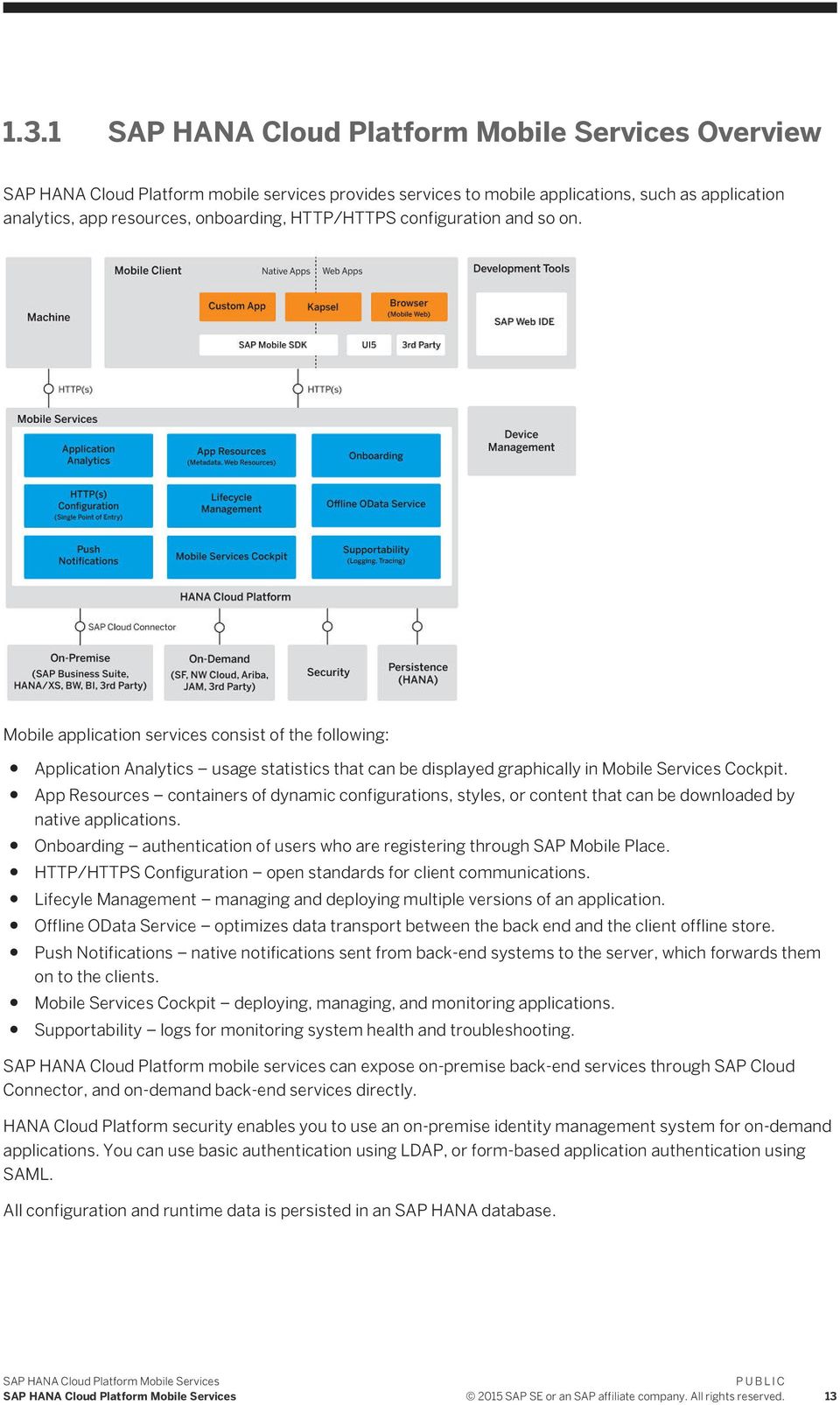
13 1.3.1 Overview SAP HANA Cloud Platform mobile services provides services to mobile applications, such as application analytics, app resources, onboarding, HTTP/HTTPS configuration and so on. Mobile application services consist of the following: Application Analytics usage statistics that can be displayed graphically in Mobile Services Cockpit. App Resources containers of dynamic configurations, styles, or content that can be downloaded by native applications. Onboarding authentication of users who are registering through SAP Mobile Place. HTTP/HTTPS Configuration open standards for client communications. Lifecyle Management managing and deploying multiple versions of an application. Offline OData Service optimizes data transport between the back end and the client offline store. Push Notifications native notifications sent from back-end systems to the server, which forwards them on to the clients. Mobile Services Cockpit deploying, managing, and monitoring applications. Supportability logs for monitoring system health and troubleshooting. SAP HANA Cloud Platform mobile services can expose on-premise back-end services through SAP Cloud Connector, and on-demand back-end services directly. HANA Cloud Platform security enables you to use an on-premise identity management system for on-demand applications. You can use basic authentication using LDAP, or form-based application authentication using SAML. All configuration and runtime data is persisted in an SAP HANA database SAP SE or an SAP affiliate company. All rights reserved. 13
14 1.3.2 Logging and Tracing Overview SAP HANA Cloud Platform mobile services provide supportability through logs and traces that enable administrators, developers, and support professionals to troubleshoot application issues. All logs use a common format and are stored in the server database. All log entries for a particular business or application flow (such as an OData request or a registration) are correlated across the client and server stack, providing an end-to-end flow, which helps identify the source of an application problem. System logs collect log messages that allow administrators and support professionals to identify problem areas. Developers can identify code problems by capturing debug level log messages. You can control the amount of information that is captured by setting the log level for individual logging components.application tracing captures additional business data for a request (such as message data, HTTP headers, and URIs), which you can use to troubleshoot application problems. The business data captured in application traces is determined by the application developer. Enable tracing for individual logging components on an as-needed basis. Logs and traces are automatically synchronized with the server when an application is launched or switched to foreground or background on the client. Related Information Setting Log Levels [page 66] Enabling Application Traces [page 67] Viewing Logs and Traces [page 69] Application Usage Reporting Overview You can collect standard usage information for applications, and view reports based on information logged by clients and uploaded to the server. All records collected from the device are tagged with the following attributes: Application: application bundle ID and version Device and operating system: operating system platform, platform version and device model name User sessions: an instance of application running in the foreground The administrator has complete control over the usage reports upload in the SAP HANA Cloud Platform mobile services, and can view reports and carry out necessary operations. Enable Usage Collection for an Application The administrator can configure the uploaded records in the server remotely using Mobile Services Cockpit and optimize them using WiFi. This process minimizes the impact of usage collection on the end user's cellular data plan SAP SE or an SAP affiliate company. All rights reserved.
15 Enable Application-Specific Columns in the Database The administrator can enable developer-defined usage report collection in Mobile Services Cockpit, and enable or disable the creation of application specific columns in the database on per-application basis. The application developer must include a reporting library where a standard set of information is captured for every application. If developers have developed custom information to be logged, you can collect that information as well. Set the Maximum Threshold for Storing Records The administrator can set the maximum number of client records to be stored on devices. On exceeding this limit, data is uploaded over cellular data. Related Information Enabling Usage Report Policy [page 32] Reporting Usage Statistics [page 64] Offline Applications Overview Offline support enables client applications to access back-end data without establishing a connection to the back end. You might want to run applications offline to: Improve performance by accessing offline data instead of sending data requests to SAP HANA Cloud Platform mobile services. Enable users to continue to use applications when there is intermittent network coverage. Support business processes that must be executed by a user while the application is offline. To work offline, an application must initialize an offline store, which stores data that the application can access when it is offline. SAP HANA Cloud Platform mobile services provides an Offline OData Service that moves data between the back end and the client offline store SAP SE or an SAP affiliate company. All rights reserved. 15
16 SAP HANA Cloud Platform mobile services retrieves data from an OData producer that is running in a back end, and from that data creates an inital database on the client. On an ongoing basis, SAP HANA Cloud Platform mobile services updates the client database based on changes, or deltas, that have been made to the data on the back end. Deltas between the back-end data and the client data are identified either by the back end or by SAP HANA Cloud Platform mobile services. You can configure offline applications to optimize offline performance by defining: Column indexes for the client database Common user data to cache on the server to reduce the amount of data that needs to be synchronized with the back end. When an application is offline, it accesses data from the offline store. Any updates that are made while the client is offline are stored locally and become pending updates for the back end. When the client comes back online, SAP HANA Cloud Platform mobile services updates the back end by processing the pending updates. Related Information Configuring Offline Settings for Applications [page 28] SAP SE or an SAP affiliate company. All rights reserved.

17 1.3.5 Discovery Services Overview The SAP Discovery Service provides the configuration information necessary for a user to enroll a device with SAP Mobile Secure. This service enhances the user onboarding process by letting you distribute initial configuration data to mobile apps. Ensure that the application developer has added the Discovery Service to the application, a procedure that is documented in SAP Mobile Platform SDK > Native OData Application Development > XXX Applications > Developing with MAF Logon for XXX > Onboarding with SAP Mobile Place. Note 'XXX' refers to the platform name, such as, ios, Android, or Windows. After the Discovery Service is added to the application, use the Mobile Services Cockpit to publish application configurations to the SAP Discovery Service, on which mobile applications can find their connection settings. Related Information Enabling Applications to Discover Configurations [page 46] 2015 SAP SE or an SAP affiliate company. All rights reserved. 17

18 1.3.6 User Interface Frequently used icons in Mobile Services Cockpit. Table 2: Icon Purpose Description New Add a new item, for example, an application. Sort Home Sort applications based on a criteria, for example, Registration ID. Go to the Mobile Services Cockpit home screen. Log out Log out of the application Push Overview Use the push feature to push updates from the back-end data source to applications that are running on mobile devices. The back-end can also push notifications to apps that provide a certain capability or have a specific form factor, rather than to particular applications. You can use SAP Mobile Platform or SAP HANA Cloud Platform mobile services to manage push for individual applications that use native notifications, or you can use SAP HANA Cloud Platform mobile services push hub to manage push for applications that are distributed via a public applications store and used by many enterprise users. Developers enable native push notification in the application code, and link the certificate with the mobile application at build time. Users download the application from a market place, such as Apple Store, Google Play, or similar service, and, when a change occurs in the back end, a push notification is sent to mobile applications on devices with push enabled. Push Notification For native mobile applications, SAP Mobile Platform or SAP HANA Cloud Platform mobile services manages the certificates, tokens, and push notifications for individual applications. When changes occur, the back end sends push notifications to mobile applications on devices that are push enabled. Push Hub For mobile applications that are distributed via a public app store and used by many different enterprise customers, SAP HANA Cloud Platform mobile services push hub manages push notifications for multiple applications SAP SE or an SAP affiliate company. All rights reserved.

19 Capabilities-based Push Support Capabilities-based push enables a back-end to trigger a push to applications that provide a certain capability. Developers configure application connections to handle capabilities using the REST API (see REST API Application Development). Devices send capability type information during registration or update. SAP HANA Cloud Platform mobile services maintains the mapping between capabilities and applications. Device-type (form factor) Support Devices send device type information to the server during registration. Device types are categorized into groups using the form factor property. The client can use any non-empty string for the device type (case insensitive), such as SmartPhone, phone, Watch, desktop, and so forth. Configuration of Capabilities Application capabilities are part of the central application connection configuration. Similar to how the administrator controls some device capabilities from the server through feature policies, users control some application capabilities from the device. Device capabilities are controlled by the application and sent to the server. The capabilities are exchanged between the mobile app as part of the registration and settings exchange. Through that mechanism, the mobile app can also override default capabilities. This gives users more control, enabling them to turn off certain capabilities for a mobile app instance, which translates into turning off native push notifications for a certain action into a particular application. Push can still be offered, but at the capability level, rather than individual application level. Actionable Push With ios 8, Apple supports actionable push notifications. The push API offered with SAP Mobile Platform and HANA Cloud Platform mobile services has been enhanced to support this feature. Using the API, the back end provides the capability for back ends to send the push 'category' through the platform to the device. This change applies to ios only; for Android actionable push is fully controlled on the device by the app Application Administration Use Mobile Services Cockpit and other tools to manage and monitor native, hybrid, and Web mobile applications. Managing includes defining and configuring applications; monitoring applications and application usage; viewing statistics and logs; checking system health; and troubleshooting problems. Native (online and offline), hybrid (Kapsel - offline), and Web applications are developed using a variety of tools and methods. SAP tools facilitate the development of mobile apps, with modularized methods for 2015 SAP SE or an SAP affiliate company. All rights reserved. 19

20 downloading, logging on, push notification, and error reporting. During the development process, a unique application identifier is generated for each application, and the application is deployed to an application download site or to SAP HANA Cloud Platform mobile services. Web applications are running on-premise, but securely exposed through SAP Mobile Platform or SAP HANA Cloud Platform mobile services. The administrator creates an application definition in Mobile Services Cockpit, which includes the unique application identifier, plus the connection to its back-end data source in the production system, the security configuration, and application-specific entries. The administrator provisions applications to devices through native application stores, through enterprise Web site downloads, or through Afaria. When a user logs in to an application (or accesses the application as an anonymous user), the application+user+device combination is registered in Mobile Services Cockpit. This registration enables you to manage and monitor device applications in the field using Mobile Services Cockpit, and to take advantage of individual and aggregate usage statistics. Configuring Applications [page 20] Create an application definition that enables you to manage the application using Mobile Services Cockpit. The application definition includes a unique application identifier, connections to the back-end data source, and optionally, other application-specific settings. Enabling Applications to Discover Configurations [page 46] Using Mobile Services Cockpit, you can publish application configurations to the SAP Discovery Service, on which mobile applications can find their connection settings. You can update or delete published configurations at any time. Managing and Monitoring Applications [page 49] Use Mobile Services Cockpit to manage applications, registrations, users, back-end connections to the data source; view application usage statistics; and manage and view application reports Configuring Applications Create an application definition that enables you to manage the application using Mobile Services Cockpit. The application definition includes a unique application identifier, connections to the back-end data source, and optionally, other application-specific settings. To configure an application, provide a back-end URL. Other settings are optional. Defining Applications [page 21] Create a new native, hybrid, or Web application definition, which enables you to use Mobile Services Cockpit to manage the application. Defining Back-End Connections [page 23] Define a back-end connection for the selected application (native, hybrid, or Web). Configuring Offline Settings for Applications [page 28] (Does not apply to Web applications) Define offline settings for the selected application. Offline support enables client applications to access back-end data without a connection. When offline, applications access data from an offline store on the client. SAP HANA Cloud Platform mobile services moves data between the back end and the client offline store. Defining Client Policies [page 29] (Does not apply to Web applications) Set policies related to client password and log management for a particular application on a device SAP SE or an SAP affiliate company. All rights reserved.

21 Defining Push Notifications [page 33] (Does not apply to Web applications) Configure push-related settings for the selected application. Uploading Client Resources [page 37] Upload client resources, or resource bundles, for the selected application. Resource bundles are containers used by applications to download dynamic configurations, styles, or content from the SAP HANA Cloud Platform mobile services. The administrator can modify the client resource bundle settings in Mobile Services Cockpit. Defining Application-Specific Settings [page 38] (Hybrid apps only, optional) Configure application-specific settings for the selected application, using Mobile Services Cockpit, configuration files, or other tools. Saving Application Settings [page 45] Save application settings Defining Applications Create a new native, hybrid, or Web application definition, which enables you to use Mobile Services Cockpit to manage the application. Procedure 1. In Mobile Services Cockpit, select Applications, and click. 2. Enter: 2015 SAP SE or an SAP affiliate company. All rights reserved. 21
22 Table 3: Field Application ID Value Unique identifier for the application, in reverse-domain notation. This is the application or bundled identifier that is assigned or generated by the application developer. The administrator uses the Application ID to register the application with SAP HANA Cloud Platform mobile services, and the client application code uses the Application ID when sending requests to the server, reverse-domain notation for the object MyApp.sap.com is com.sap.myapp, for example. The Application ID: Must be unique Must start with an alphabetic character Can contain only alphanumeric characters, underscores, and periods Cannot include spaces Can be up to 64 characters long Note You cannot use these case-sensitive keywords as application identifiers: Admin, AdminData, Push, smp_cloud, resource, test-resources, resources, Scheduler, odata, applications, Connections, public, lcm. Formatting guidelines: SAP recommends that application IDs contain a minimum of two periods. For example: com.sap.mobile.app1. Application IDs cannot start with a period. Application IDs cannot include two consecutive periods. Version Name Type Displays the read-only version that is set by the application developer. The name: Can contain only alphanumeric characters, spaces, underscores, and periods Can be up to 80 characters long Application type: Native native applications, including Android, BlackBerry, ios, Windows Mobile 8, and Windows 8. Hybrid Kapsel container-based applications. Web application running on SAP Mobile Platform, and securely exposed on SAP HANA Cloud Platform mobile services. Description Vendor (Optional) The description: Can contain alphanumeric characters Can contain most special characters, except percent signs (%) and ampersands (&) Can be up to 255 characters long (Optional) The vendor name: Can contain only alphanumeric characters, spaces, underscores, and periods Can be up to 255 characters long SAP SE or an SAP affiliate company. All rights reserved.
23 Field Security Configuration Same-Origin Policy Value Change this value only if you require something other than the default. None (default) anonymous authentication. No authentication challenge is sent; requests are processed anonymously. Form SAML-based SSO authentication. Basic HTTP-Basic (user name and password) authentication. Certificate X.509 certificate authentication. OAuth access token-based authentication. Prevent or allow your application to be accessed by cross-origin resources, while creating or updating application. By default, same-origin policy is set as enable. Enable if enabled, accessing cross-origin resources is forbidden. Disable if disabled, accessing cross-origin resources is allowed. Note In case of legacy applications, by default same-origin policy is set as disable to allow cross-origin access. 3. Click Save. Note Application-related options, such as Back End, Client Policies, Push, and so on, appear in Mobile Services Cockpit only after an application has been successfully created Defining Back-End Connections Define a back-end connection for the selected application (native, hybrid, or Web). Context A back-end connection is a connection to the data source, also called the enterprise information system (EIS). SAP HANA Cloud Platform mobile services supports one primary endpoint per application ID. However, an administrator can create multiple secondary endpoints for other services used by the application; SAP HANA Cloud Platform mobile services treats these additional endpoints as proxy connections. For applications that access a Web service containing relative URLs, add the relative paths to enable SAP HANA Cloud Platform mobile services to handle requests correctly SAP SE or an SAP affiliate company. All rights reserved. 23
24 Procedure 1. Create a new application. 2. Select Back End, and enter: Field Back-End URL Value The URL (back-end connection, or service document) the application uses to access business data on the back-end system or service. The service document URL is the document destination you assign to the service. The URL must include a trailing slash to avoid triggering a redirection of the URL, and losing important HTTP header details. This is especially important when configuring the application with security, such as SSOToken and Certificates, and when Rewrite URL is enabled. Examples: help/abc/app1/opg/sdata/testflight/ <tenantname>.hana.ondemand.com/sap/opu/odata/rmtsample/ Proxy Type Select either: Internet HTTP destinations use Internet proxy. Back-end systems are in the public domain and accessible to everyone. For example, OnPremise back-end systems are behind a firewalls and HTTP destinations use SAP HANA cloud connector to connect to these systems. Note If the proxy type is Internet, the back-end URL can be either a gateway or a cloud connector URL; if the proxy type is OnPremise, the back-end URL must be a cloud connector URL. Authentication Type SAP HANA Cloud Platform uses the HTTPS protocol to integrate into the existing security landscape without disruption. Select one of these authentication types: Principal Propagation allows destinations to forward the identity of on-demand users to the Cloud connector, and then to the back-end of the relevant on-premise system. An ondemand user need not provide his or her identity for each connection to an on-premise system via the same Cloud connector. Note Proxy Type must be OnPremise; otherwise, the destination cannot be saved. No Authentication back ends do not require credentials for authentication. Your destination is provided direct access to the relevant on-premise service. SAPAssertionSSO configure the back-end system to accept SAP assertion tickets that are signed by a trusted x.509 key pair SAP SE or an SAP affiliate company. All rights reserved.
25 Field Value Basic Authentication enter user name and password credentials to authenticate. Client Certification Authentication prepare a client certificate and have it signed by a SAP HANA Cloud Platform mobile services certification authority (CA). The client certificate must be trusted by back-end systems. Note Proxy type must be Internet, the back-end URL must use HTTPS, and you must provide both keystore and truststore parameters. Maximum Connections Rewrite Mode The number of back-end connections that are available for connection pooling for this application. The larger the pool, the larger the number of possible parallel connections to this specific connection. For primary endpoints, the default range is connections. Factors to consider when resetting this property: The expected number of concurrent users of the application. The load that is acceptable to the back-end system. The load that the underlying hardware and network can handle. Increase the maximum number of connections only if SAP HANA Cloud Platform mobile services hardware can support the additional parallel connections, and if the underlying hardware and network infrastructure can handle it. Select one of: Rewrite URL on HANA Mobile Server in request and response messages, SAP HANA Cloud Platform mobile services replaces all back-end URLs with the server URL. The Rewrite URL format for Web type applications <ApplicationID>. Rewrite URL on Backend the back end rewrites the URLs. SAP HANA Cloud Platform mobile services forwards its host name and port to the back end as an HTTP header, and the back end creates the URL to retrieve back-end entities. To expose the full URL to clients, the server passes the endpoint in an X-SMP-ENDPOINTNAME header. For example: Back-end URL FINCUSTFACTSHEET/ URL exposed to clients FINCUSTFACTSHEET/ URL format for Web type applications of Backend>?X-SMP-APPID=<ApplicationID>. For example: FioriLaunchpad.html?X-SMP-APPID=xxxxxBE. Note When you switch the rewrite mode configuration to or from "Rewrite URL on Backend" in the Mobile Services Cockpit, it is required that the application developer is aware of the change. He/she should accordingly change the base URL of the application in case of online and offline mobile application scenarios SAP SE or an SAP affiliate company. All rights reserved. 25
26 Field Value If the rewrite mode is selected as "Rewrite URL on Backend", the base path of the URL must correspond to the path of the backend URL. In other rewrite modes, the base path must contain the Application ID (as shown above in the example). It is recommended that you do not change the rewrite mode arbitrarily, without reconfiguring the mobile application information. Depending on the configuration of other applications configured in your account, it might not be possible to detect from the browser URL which exact application is targetted. Therefore it is always recommended you append the application ID as a URL parameter to the start URL when opening an application in a browser: APPID=<appid>. For example: APPID=webapp. In the case where the URL needs other query parameters, you can simply append it to the end of the URL: other=parameter&needed=true&x-smp-appid=webapp" Via HCP HTML5 App: If selected, the host name is sent to the back end in the HTTP header <X- FORWARDED-FOR>. If not selected, the host name is sent to the back end in the standard HTTP header "Host". Note When the SAP HANA Cloud Platform mobile services sends a request to fetch data from the back end, an HTTP header includes host information. This mechanism causes failures when connecting via a HTML5 application hosted on HANA Cloud Platform. In case of failures, select Via HCP HTML5 App. The request host is then sent in the x-forwarded-for header, which is used by HTML5 applications, and sent as the host header to a back end. Web type applications: For transparent onboarding of Web type applications that are using the Rewrite URL on Backend option, use the URL parameter X-SMP-APPID to specify the requested Web Application. Keep in mind: You can specify any application using the X-SMP-APPID parameter. If the parameter is used without an existing application, no application is used. If the parameter is used without an existing Web application, no application is used. If the parameter is used for an application without a valid endpoint for the called path, no application is used. No Rewriting request and response messages are not modified; SAP HANA Cloud Platform mobile services passes messages directly between clients and the back end. The URL format for Web type applications <ApplicationID> SAP SE or an SAP affiliate company. All rights reserved.
27 Field Value Note To enable applications using an external back end to run offline, you must select one of the rewrite options. Relative Paths If an application requires data from a back end that uses relative URLs, you must configure those relative URL patterns in Mobile Services Cockpit. SAP HANA Cloud Platform mobile services rewrites the relative URLs to include the Connection ID (connection name), enabling access to the back-end data. For example, a Web service application requests an HTML page named abc.html, which contains the relative URLs /sap/bc and /sap/public/bc in its src or href tags. When a request is made, SAP HANA Cloud Platform mobile services rewrites the relative URLs contained in the response, so that subsequent requests (to these relative URLs in the response) can be processed correctly. For example, if "webapp" is the connection name and the response contains the relative URLs /sap/bc,/sap/public/bc; SAP HANA Cloud Platform mobile services rewrites these relative URLS to /webapp/sap/bc,/ webapp/sap/public/bc. Without the relative URLs, the request cannot be processed. To add relative paths, you can either enter one relative URL per table row (for example, /sap/bc in one row, and /sap/public/bc in another); or you can enter a comma-delimited list of relative URLs in one table row (for example, /sap/bc,/sap/ public/bc), and the URLs are redistributed to separate rows after you Save. Note To use the Relative Path option, you must select Rewrite URL in HANA Mobile Server option in Rewrite Mode. Keystore Location Keystore Password User Name Password Use Default JDK Truststore (For mutual SSL authentication) If the back-end URL begins with HTTPS and the proxy type is Internet, either: Select a certificate from the list, or Click Upload and Delete Certificates, and select a certificate to upload. (For mutual SSL authentication) A valid password for the keystore you selected. (Optional) The user name to access the back-end system. (Required if you set the user name) The password to access the back end. To validate remote HTTPS certificates, select to use the default JDK truststore certificate. 3. (Optional) Under Back-End Connections, view additional connections, or add new connections. a. To add back-end connections (secondary endpoints) in the server, select New. b. Enter values for the new back-end connection, using the values shown above. c. Select Save. The new back-end connection is added to the list. You can maintain the list of server-level back-end connections (including all the connections in SAP HANA Cloud Platform mobile services), and of application-specific back-end connections. Application-specific back-end connections are the secondary connections that are enabled for an application; by default, no 2015 SAP SE or an SAP affiliate company. All rights reserved. 27
28 secondary connections are enabled. You must explicitly enable additional back-end connections for an application. Users who are registered to an application can access only these back-end connections. If a user attempts to access a back-end connection (request-response) that is not enabled for an application, a 403, Forbidden, error is thrown. 4. Select Application-specific Connections to show the back-end connections that are enabled for the application. Select Server-level Connections to show all available connections for the server. Select additional connections for the application to enable them. Note You can authenticate multiple back ends using various authentication provider options in the backend security profile. If the back-end system issues a 302 Redirect or "307 Redirect" response, which means it is redirecting the request to a different URL, then you must also add the target URL to the list of application-specific connections Configuring Offline Settings for Applications (Does not apply to Web applications) Define offline settings for the selected application. Offline support enables client applications to access back-end data without a connection. When offline, applications access data from an offline store on the client. SAP HANA Cloud Platform mobile services moves data between the back end and the client offline store. Context The back-end connection settings determine how SAP HANA Cloud Platform mobile services create the initial offline store database on the client, and how it processes requests for updates from the back end. Define offline back-end connection settings for an application by importing a configuration (.ini) file that has been prepared by a developer. You cannot update the settings using Mobile Services Cockpit. To adjust any settings, remove the current configuration, update the configuration file, and then reimport the file. Before updating this file, confer with a developer. See the Development documentation in the Native Data Application Development section: ios Developing ios Offline OData Applications Android Developing Android Offline OData Applications. Windows Developing Windows Offline OData Applications Procedure 1. From the Mobile Services Cockpit, select Applications, select the application to configure, then click Configure SAP SE or an SAP affiliate company. All rights reserved.
29 2. Select OFFLINE CONFIGURATION. 3. Click Import then browse to select a configuration file. Only INI type files can be imported. When you import settings, the state of the offline configuration changes to Configured. 4. (Optional) Select from these options: Defining Requests to view SAP HANA Cloud Platform mobile services process requests from the back end. 5. Click Save. Client Indexes to view indexes created on the offline store database. Detailed Settings to view the application configuration settings. To remove the current configuration to reimport a new configuration, select the corresponding check box and click Remove. The configuration state changes to Not Configured. Results When the application goes offline for the first time, the offline store is created on the client Defining Client Policies (Does not apply to Web applications) Set policies related to client password and log management for a particular application on a device Defining Client Password Policy Define the client password policy used to unlock the DataVault, for the selected application. Application developers must add code to enforce the policy to the DataVault used by the application. An administrator enters the application password policy used to unlock the DataVault during application initialization. Context The client password policy applies only to the application password that unlocks the DataVault during application initialization; it has nothing to do with SAP HANA Cloud Platform mobile services security profiles, or the back-end security systems with which they integrate. Password policies for back-end security systems are administered by customer information technology departments using native security administration tools SAP SE or an SAP affiliate company. All rights reserved. 29
30 Procedure 1. From Mobile Services Cockpit, select Applications Configure Client Policies. 2. Under Client Password Policy, select Enable Password Policy. 3. Enter: Table 4: Property Default Description Expiration Days 0 The number of days a password remains valid. The default value, 0, means the password never expires. Minimum Length 8 The minimum password length. Retry Limit 20 The number of retries allowed when entering an incorrect password. After this number of retries, the client is locked out, the DataVault and all its contents are permanently deleted, the application is unusable, and encrypted application data is inaccessible. Minimum Unique Characters 0 The minimum number of unique characters required in the password. Lock Timeout 0 The number of seconds the DataVault remains unlocked within an application, before the user must reenter his or her default password to continue using the application (similar to a screen-saver feature). Password Properties See below Required password policies. Default Password Allowed Disabled Indicates whether a default password can be generated by the DataVault; from the user's point of view this policy turns off the password. Has Digits Disabled Indicates whether the password must include digits. Has Lower Disabled Indicates whether the password must include lowercase letters. Has Upper Disabled Indicates whether the password must include uppercase letters. Has Special Disabled Indicates whether the password can include special characters SAP SE or an SAP affiliate company. All rights reserved.
31 Enabling Client Logs Policy Enable the client logs policy to upload client logs to the database. Context The log policies you define here apply to all application registrations. You can override these settings for a specific registration. Procedure 1. From Mobile Services Cockpit, select Application > Configure > Client Policies. 2. Under Client Log Policy, enable Log Upload. 3. Select the log level in Log Type. Table 5: Logging Levels Log Level Path Debug Info Warn Error Fatal Description For tracing execution flow. Used, for example, in the context of entering and leaving a method, looping, and branching operations. (Not applicable to the offline logging component.) For debugging purposes, includes extensive and low-level information. Informational text, used mostly for echoing what has been performed. The application can recover from the anomaly, and fulfill the task, but requires attention from the developer or operator. The application can recover from the error, but cannot fulfill the task due to the error. The application cannot recover from the error, and the severe situation causes fatal termination. 4. Select the time period after which logs are deleted from the database. Log files exist for 7 days from the date of creation in the database. 5. Click Save SAP SE or an SAP affiliate company. All rights reserved. 31
32 Enabling Usage Report Policy Enable application specific usage statistics settings and upload the reports in the SAP HANA Cloud Platform mobile services from the device. Procedure 1. From Mobile Services Cockpit, select Applications > Configure > Client Policies. 2. Under Usage Report Policy, a. Select Enable Usage Report Upload, to enable the server to accept records for an application. b. Select Enable Usage Report Upload to view developer defined usage information. c. Enter the time period after which reports are uploaded to the SAP HANA Cloud Platform mobile services. Results You can view usage information in the Reporting tab Defining Feature Restriction Policies Feature Restriction Policy enables you to allow and restrict specific features for an application. Set these policies from the Mobile Services Cockpit. You can add, allow, restrict, edit or delete features. Context When you configure a hybrid app from the cockpit, available feature plugins appear on the Client Policy screen. Feature plugins are typically JavaScript APIs that provide access to the native APIs of the mobile device (implemented as Apache Cordova plugins, for example, Camera, Calendar, and Push). You can restrict certain features from users. Procedure 1. From Mobile Services Cockpit, select Applications Configure Client Policies. 2. Under Feature Restriction Policies, view the current status of feature restrictions SAP SE or an SAP affiliate company. All rights reserved.
33 Table 6: Column Plugin ID Allowed Description A list of feature plugins that are available with the application, such as Camera, Calendar, and Push. Unique identifier for the application. Indicates whether the feature is allowed or restricted. To allow a feature for the application, select the row and enable the YES toggle button. To restrict a feature for the application, select a row and disable the YES toggle button. 3. (Optional) Click Add to associate a new feature with the application. In the Add Feature Restriction Policy window, enter: Table 7: Field Name Plugin Plugin Name Description JavaScript Module ID Allowed Description A unique feature name. A list of feature plugins that are available with the application, such as Camera, Calendar, and Push. Plugin name Feature plugin descriptions, such as Cordova Camera Plugin, Cordova Contacts Plugin, and SAP Push Plugin. A list of all JavaScript modules used by this plugin. Unique identifier for the application. Indicates whether the feature is allowed or restricted. By default, features are allowed. 4. (Optional) Select a row to edit the feature restriction policy. 5. (Optional) Select a row and click Delete to remove a feature from the application Defining Push Notifications (Does not apply to Web applications) Configure push-related settings for the selected application. The push listener service provided with SAP HANA Cloud Platform mobile services allows back-end systems to send native notifications to devices. Application developers must enable push notification code in applications SAP SE or an SAP affiliate company. All rights reserved. 33
34 Push Hub Notifications Configure and manage push notifications for the application through the HANA Cloud Platform push hub. Use push hub to manage push for applications that are distributed via a public applications store and used by many enterprise users. Context Enabling the push hub to manage push notifications disables the fields that manage push notifications by platform type. Procedure 1. In Mobile Services Cockpit, select Application > Configure Push. 2. Under Push, select Enable Using Push Hub to use the push hub to manage push notifications from a central location. 3. Configure push hub settings for the application. Entries are required unless stated otherwise. Property Use HTTP Proxy URL Application Username Password Description (Optional) Whether to use a preconfigured HTTP proxy to send push hub notifications. Push Hub URL. (Optional) A display name for the application. By default, the application ID is used, for example, com.sap.today. The user name to connect to the push hub URL. The user password to connect to the push hub URL. 4. Click Save SAP SE or an SAP affiliate company. All rights reserved.
35 Android Push Notifications To enable client applications to receive Google Cloud Messaging (GCM) notifications, configure Android push notifications for the selected application. Procedure 1. From Mobile Services Cockpit, select Application > Configure Push. 2. Under Android, enter the access key for API key. This is the access key you obtained for your Google API project ( ). 3. Enter a value for Sender ID. This is the project identifier Apple Push Notifications To enable client applications to receive APNS notifications, configure Apple push notifications for the selected application. Procedure 1. From Mobile Services Cockpit, select Application > Configure Push. 2. Under Apple, select None if you do not want to configure APNS push notification. 3. Select Sandbox to configure APNS in a development and testing environment, or Production to configure APNS in a production environment. a. Click Browse to navigate to the certificate file. b. Select the file, and click Open. c. Enter a valid password BlackBerry Push Notifications To enable client applications to receive BES/BIS notifications, configure BlackBerry push notifications for the selected application. Prerequisites If you intend to use push synchronization with BlackBerry devices, enable push synchronization in the BlackBerry server, using the BlackBerry server documentation SAP SE or an SAP affiliate company. All rights reserved. 35
36 Procedure 1. From Mobile Services Cockpit, select Application > Configure Push. 2. Under Blackberry, select the push type. Select None if you do not want to configure Blackberry push notification. Select BES to configure Blackberry Enterprise Server (BES) native notification properties. Table 8: Property Server URL Username Password Description Address in the form or <IP_address>:<port_Number>/pap. (Optional) User who is accessing the URL. User password to connect to the URL. If you set a user name, you are required to also enter a password. Select BIS to configure Blackberry Internet Server (BIS). Table 9: Property Server URL Listener Port Application ID Password Description Address in the form cp<xxxx>.pushapi.eval.blackberry.com/mss/ PD_<pushRequest> The push listener port for BIS notifications The unique identifier assigned to the registered push application service The configuration property provided by BlackBerry for BIS push Windows Push Notifications To enable the back-end servers connected with SAP HANA Cloud Platform mobile services to send toast, tile, badge, and raw updates to Windows desktop and tablet application users, configure Windows push notifications for the selected application. Procedure 1. From Mobile Services Cockpit, select Application > Configure Push. 2. Under Windows, enter the application credentials, which are provided by the application developer SAP SE or an SAP affiliate company. All rights reserved.
37 Table 10: Property Package SID Client Secret Description Package security identifier Client secret information 3. (Optional) Configure push notifications for each device type supported Windows Phone Push Notifications To enable the back-end servers connected with SAP HANA Cloud Platform mobile services to send toast, tile, badge, and raw updates to Windows phone users running mobile applications, configure Microsoft push notification services (MPNS) for the selected application. Context Note Only unauthenticated push notification is supported; authenticated push notification for MPNS is not supported. Procedure 1. From Mobile Services Cockpit, select Application > Configure Push. 2. Under MPNS, select Enable MPNS HTTP Push to send HTTP push notifications to the device. 3. (Optional) Configure push notifications for each device type supported Uploading Client Resources Upload client resources, or resource bundles, for the selected application. Resource bundles are containers used by applications to download dynamic configurations, styles, or content from the SAP HANA Cloud Platform mobile services. The administrator can modify the client resource bundle settings in Mobile Services Cockpit. Context Keep in mind these resource bundle guidelines: 2015 SAP SE or an SAP affiliate company. All rights reserved. 37
38 Supportability Size Default resource bundle URL for the default resource bundle URL to access other resource bundles the resource bundle can be of any type (.pdf,.xls,.xml, or any other extension), with no restrictions. the resource bundle can be of any size, with no restrictions. For best performance, a maximum of 1MB is recommended. For sizes above that, work with the application developer on any performance issues. the first resource bundle that is uploaded is considered to be the default. After that, you can upload additional versions of the bundle, but only one can be the default. You can delete obsolete resource bundle versions. base url}/bundles/<applicationname>/ base url}/bundles/<applicationname>/ <BundleName>:<BundleVersion> Procedure 1. From Mobile Services Cockpit, select Applications > Configure Client Resources. 2. Under Client Resources, enter values. a. Enter the customization client resource name. b. Enter the customization client resource bundle version. c. Click Browse to upload the client resource. Select the file to be uploaded, and confirm. 3. Under Existing Client Resource Bundles, select the resource bundle and click Save to make it the default Defining Application-Specific Settings (Hybrid apps only, optional) Configure application-specific settings for the selected application, using Mobile Services Cockpit, configuration files, or other tools Uploading and Deploying Hybrid Apps If the selected hybrid app uses the AppUpdate plugin, activate the new version from this screen. If the hybrid app does not use the AppUpdate plugin, the application-specific settings are not applicable. Prerequisites A hybrid app package that: SAP SE or an SAP affiliate company. All rights reserved.
39 Contains the contents of the application's www folder and the config.xml project file, with a separate folder in the archive for each mobile platform (android/www and/or ios/www in all lowercase). The format structure for hybrid apps is: - android - config.xml - www - ios Is compressed into a standard.zip file for upload. Procedure 1. In Mobile Services Cockpit, select Applications Configure App Specific Settings. 2. To import a new application or update an existing application version, click Upload Kapsel. a. In the dialog, navigate to the directory. b. Select the hybrid app package, and confirm. New version information appears for the uploaded Kapsel app for each mobile platform. You cannot change this information. Table 11: Property Description Required Kapsel Version Identifies the Kapsel SDK version used to develop the Kapsel app, for example, Note This version attribute is informational only, and is not used by SAP HANA Cloud Platform mobile services to determine whether device clients should receive the Web application update SAP SE or an SAP affiliate company. All rights reserved. 39
40 Property State Description State of the Kapsel application version: New a newly uploaded version. Staged in testing. A user who is defined as a tester can download and test applications. See Managing Registrations and Users [page 51]. Once testing is complete, an administrator can promote a version to the Current state, so it becomes active. If testing fails, the administrator can change the state back to New. Current the version that is currently active. To move an application version between states: Table 12: Beginning State Action Ending State New Click Stage Staged New Click Deploy Current Staged Click Remove New Staged Click Deploy Current Note Each platform can have an unlimited number of versions in the New state, but only one version in the Staged state, and one version in the Current state. Development Version Description Owner Revision Identifies the internal development version used to develop the Kapsel app. Describes the Kapsel app. The user who uploaded the Kapsel app. Identifies the production version revision. A revision number is assigned to a newly uploaded Kapsel app,and incremented when a new version is uploaded.. Note When the Kapsel app is deployed, the revision number is incremented. 3. To deploy applications, select the checkbox for each application you want to deploy, and click Deploy. Deployed Kapsel app information appears as the current version, and the revision number is incremented. For device-application users: If a Kapsel app with the default version (revision = 0) connects to the server, the server downloads the full Kapsel app. If a Kapsel app with a version (revision = 1 or higher) connects to the server, the server calculates the difference between the user's version and the new version, and downloads a patch containing only the required changes. If the application implements the AppUpdate plugin, the server checks for updates when the application starts or resumes. If the developer has made changes, AppUpdate detects them using the www folder content (the HTML-based content), and not with native plugins or changes made outside of SAP SE or an SAP affiliate company. All rights reserved.
41 that folder. For changes made outside the www folder, the developer must post a new copy of the app to the application download site, or use Afaria to push the new app to all users. 4. To remove application versions that have been imported, but not yet deployed, select the checkbox for each application you want to remove, and click Remove Managing Application Versions Using REST APIs You can automate application version management by integrating it into your application build or application artifact management processes: use REST APIs to deploy, promote, delete, and view information for application versions. Note You must use a secure port and the HTTPS protocol to make REST API calls.. See your client documentation for details about how to submit a request over HTTPS to satisfy the server's security requirements Deploying Hybrid Apps Using the REST API Deploy a new or updated hybrid app to SAP HANA Cloud Platform mobile services using the POST application REST API. Note You cannot deploy a hybrid app for a specific platform: everything in the Kapsel application file is deployed. Once the application is deployed, you can promote or delete hybrid apps for specific platforms as needed. To attach a Kapsel application file as a parameter in a REST client, use the curl command line tool. After an application is deployed, it is considered to be a new version. You can activate it by promoting it to the current version, which allows users to download patches and upgrade the application on their devices. Syntax Send a POST request to the following URI: Note To authenticate, specify the user name and password in each request SAP SE or an SAP affiliate company. All rights reserved. 41
42 Returns A response with information about the new and current version of the application. For example: {"newversion": {"requiredkapselversion":"1.5", "developmentversion":"1.2.5", "description":"an update for the sample app.", "revision":-1}, "currentversion": {"requiredkapselversion":"1.5", "developmentversion":"1.2.4", "description":"a sample app.", "revision":2} } If successful, a 201 status code is returned; otherwise, an HTTP failure code and an error message are returned. Example This example uses the curl command line tool and the --cacert flag. Your client may require you to pass other arguments or set specific configuration options. curl --user <user>:<password> --cacert <your-server.pem> --X DELETE -i localhost:8083/admin/kapsel/jaxrs/kapselapp/mytestappid Promoting Hybrid Apps Using the REST API Promote a new hybrid app to make it the current version of the application using the PUT application REST API. Only administrators can run this API; developers cannot. Promote a hybrid app for a specific platform or for all platforms. Note To authenticate, specify the user name and password in each request. Syntax To promote a hybrid app for all platforms, send a PUT request to the following URI: SAP SE or an SAP affiliate company. All rights reserved.
43 To promote a hybrid app for a specific platform, send a PUT request to the following URI:: where <action> is one of: stage unstage promotepending promotestage After the application is promoted, users can upgrade the application on their devices. Returns If successful, a 201 status code is returned; otherwise, an HTTP failure code and an error message are returned. Example This example uses the curl command line tool and the --cacert flag. Your client may require you to pass other arguments or set specific configuration options. curl --user <user>:<password> --cacert <your-server.pem> --X DELETE -i localhost:8083/admin/kapsel/jaxrs/kapselapp/mytestappid Retrieving Hybrid App Details Using the REST API Retrieve details about a new or current version of a hybrid app using the GET application REST API. Syntax Send a GET request to the following URI: Note To authenticate, specify the user name and password in each request SAP SE or an SAP affiliate company. All rights reserved. 43
44 Returns If successful, a 201 status code is returned; otherwise, an HTTP failure code and an error message are returned. Example This example uses the curl command line tool and the --cacert flag. Your client may require you to pass other arguments or set specific configuration options. curl --user <user>:<password> --cacert <your-server.pem> --X DELETE -i localhost:8083/admin/kapsel/jaxrs/kapselapp/mytestappid Deleting Hybrid Apps Using the REST API Delete a hybrid app using the DELETE application REST API. Developers can delete only the applications they created. Delete a hybrid app from a specific platform or from all platforms. Note To authenticate, specify the user name and password in each request. Syntax To delete a hybrid app from all platforms, send a DELETE request to the following URL: To delete a hybrid app from a specific platform, send a DELETE request to the following URL: To delete applications they created, developers can: 1. Add the X-HTTP-METHOD=DELETE parameter to the request header. 2. Format the request body as this JSON string: [{"platform": "android","revisions":[1,2,3]}, {"platform": "ios","revisions":[4,5,16]}] [{"platform": "android","revisions":[2]},{"platform": "ios"}] [{"platform": "android"}] SAP SE or an SAP affiliate company. All rights reserved.
45 3. Send a POST request to the following URL: Returns If successful, a 201 status code is returned; otherwise, an HTTP failure code and an error message are returned. Example This example uses the curl command line tool and the --cacert flag. Your client may require you to pass other arguments or set specific configuration options. curl --user <user>:<password> --cacert <your-server.pem> --X DELETE -i localhost:8083/admin/kapsel/jaxrs/kapselapp/mytestappid Saving Application Settings Save application settings. Procedure 1. Enter values in all mandatory fields and any additional configuration settings, then click Save. 2. Select Application About, and verify the application settings. If successful, the application status is Consistent. 3. If you configure settings for the selected application on multiple tabs, click Save on each tab; otherwise, you lose your changes. After an application has registered users, a new Overview tab appears, which provides application usage information SAP SE or an SAP affiliate company. All rights reserved. 45
46 Enabling Applications to Discover Configurations Using Mobile Services Cockpit, you can publish application configurations to the SAP Discovery Service, on which mobile applications can find their connection settings. You can update or delete published configurations at any time. Prerequisites The HANA system administrator requests that an SAP Mobile Secure, cloud edition application service provider builds discovery capabilities into cloud applications, eliminating the need to manually configure applications, and speeding application adoption. You receive an with the application service provider account details. 1. Activating a Provider [page 46] Activate the SAP Mobile Secure, cloud edition application service provider for your account. 2. Adding a Domain [page 47] Add a domain for the application service provider. 3. Sharing the Domain [page 48] Share a domain with other application service providers. 4. Publishing Application Configuration [page 49] Publish a configuration on SAP Mobile Place Activating a Provider Activate the SAP Mobile Secure, cloud edition application service provider for your account. Prerequisites To use the Application Configuration Discovery Service, ensure that you: Request this service by creating an incident using the Service Market place on component MOB-SEC-ASP. Enter the customer ID, HCP account name, S-User ID, and a technical contact address into the ticket. For example: Table 13: Field Description Customer ID SAP SE or an SAP affiliate company. All rights reserved.
47 Field HCP account name S-ID Description s trial s Note The information required to activate the service with your HANA cloud platform account is sent to the address mentioned in the ticket. Procedure 1. From the home page, click Discovery Service. 2. To activate the provider, click Add. Verify that you have the system generated with the provider ID and activation token open, so you can copy/paste it into the presented form. 3. Enter the provider ID and activation key, and click Save. You can add more domains for this provider. Task overview: Enabling Applications to Discover Configurations [page 46] Next task: Adding a Domain [page 47] Adding a Domain Add a domain for the application service provider. Procedure 1. Click. 2. Enter the domain and description. 3. Click Save. If the domain is valid, it appears in the domains table. 4. (Optional) To delete a domain, select the configure icon that corresponds to the domain, and click Delete. Task overview: Enabling Applications to Discover Configurations [page 46] 2015 SAP SE or an SAP affiliate company. All rights reserved. 47
48 Previous task: Activating a Provider [page 46] Next task: Sharing the Domain [page 48] Sharing the Domain Share a domain with other application service providers. Prerequisites To share a domain, the current provider must own the domain. Note Each domain has a unique owner. Procedure 1. Click the configure icon that corresponds to the domain, and click Share. 2. Enter the provider ID with which you want to share the domain, and click Save. The domain appears as a shared provider. 3. (Optional) Stop sharing domains with other providers: a. Click link in the Shared column. b. Select the providers to stop sharing, and click Unshare. Task overview: Enabling Applications to Discover Configurations [page 46] Previous task: Adding a Domain [page 47] Next task: Publishing Application Configuration [page 49] SAP SE or an SAP affiliate company. All rights reserved.
49 Publishing Application Configuration Publish a configuration on SAP Mobile Place. Procedure 1. To publish a configuration on SAP Mobile Place, click Publish. 2. (Optional) To remove a configuration from SAP Mobile Place, click Unpublish. The application configuration is removed from SAP Mobile Place, and Configuration Published is set to No. Task overview: Enabling Applications to Discover Configurations [page 46] Previous task: Sharing the Domain [page 48] Managing and Monitoring Applications Use Mobile Services Cockpit to manage applications, registrations, users, back-end connections to the data source; view application usage statistics; and manage and view application reports Managing Applications Manage multiple native, hybrid and web applications from a single location. You can add, edit, or delete applications; and ping a selected application for back-end connection and view usage statistics. View information for an application, or retrieve a filtered subset of applications. From the list of applications, you can drill down to see application ID and application registration details; and a sequential log of request execution details. Procedure 1. From the Mobile Services Cockpit, select Applications. Note You can view the info, registration and usage details for the selected application. 2. Select INFO tab, to view the application details. 3. Select REGISTRATIONS tab, to view more details about application registrations. The Applications Registrations screen appears if there are valid registrations SAP SE or an SAP affiliate company. All rights reserved. 49
50 4. Select USAGE tab, to view the usage statistics for the application. Select the appropriate Usage option and view the reports based on the filter criteria: Select Registrations (By Time), to view the number of active registrations during a time period. Select Registrations (By Device Type), to view the registered device types, for example, Android, BlackBerry, and ios. Select Users, to view the number of active users for the selected application. Select Requests, to view the number of requests during a time period. Select Response Time, to view response time in milliseconds, per day. Response time is reported for SAP HANA Cloud Platform mobile services, authentication, and the back end. 5. Select TIME FRAME, to select the registration time period, including Today, Yesterday, Last 7 Days, Last 4 Weeks, Last 3 Months, and Last 12 Months. 6. You can choose the appropriate icons in the top right corner to view the graphical or tabular presentation of the statistics summary based on the selected usage criteria Editing an Application Edit an existing application from the application list. Procedure 1. In Mobile Services Cockpit, select Applications. 2. Select an existing application. You can use the Search field to find an application based on Application Name, Application ID, or by Vendor Name. 3. Click Configure. 4. Select a tab, and make changes. 5. Save your changes Deleting an Application Delete the application from the application list. Procedure 1. In Mobile Services Cockpit, select Applications. 2. Select the application to be deleted. You can use the Search field to find an application based on Application Name, Application ID, or by Vendor Name SAP SE or an SAP affiliate company. All rights reserved.
51 3. Click Delete. 4. Click OK to confirm. Note Once the application has been deleted, users cannot use it. All existing logs and traces are deleted and cannot be retrieved Pinging a Back-end Connection Test that back-end connections (one primary and mulitple secondary endpoints) are reachable for the selected application. Procedure 1. From Mobile Services Cockpit, select Applications. 2. Select the application. 3. Click Ping to view the back-end connection status. Table 14: Ping Result Field Connection Name Backend URL Ping Result Description Back-end connection name Endpoint URL Current state of the back-end connection Table 15: Status Descriptions Message Ping Successful <Error code: Error message> Description The back end is reachable. The back end is not reachable. 4. Click OK Managing Registrations and Users Manage multiple native, hybrid, and Web application registrations from a single location. Registrations are associated with an authenticated or an anonymous user on one or more devices. View information for all application registrations, or retrieve a filtered subset of registrations. From the list of registrations, you can drill down to see application and user details. For hybrid applications, if the developer has implemented Logger code in the application, you can drill down to upload and view client logs. You can also delete registrations SAP SE or an SAP affiliate company. All rights reserved. 51
52 Context When a user logs in from a device, or is logged in anonymously by a client application, he or she is authenticated on SAP HANA Cloud Platform mobile services using the security configuration of the application. If authentication is successful, SAP HANA Cloud Platform mobile services generates a registration identifier for the application+user+device combination, and creates a record in the SAP HANA Cloud Platform mobile services database, indicating that that application on the device can consume data and services of SAP HANA Cloud Platform mobile services. Note Customers subscribe to mobile services based on user count, and bandwidth between SAP HANA Cloud Platform mobile services and devices. SAP measures the user count and bandwidth annually, and notifies the technical contact if licensed resources have been exceeded. SAP HANA Cloud Platform mobile services send the registration identifier to the device application. For all subsequent requests, such as accessing data in the back-end data source, the device client sends the registration ID to SAP HANA Cloud Platform mobile services. Procedure 1. From Mobile Services Cockpit, select Registrations and Users to view application connections. Table 16: Field User Name Registration ID Application ID Value User name of the registered application. Unique identifier provided by the client application or systemgenerated application registration ID. Unique identifier for the application. SAP recommends that you use reverse-domain notation; for example, com.sap.*. This is the application or bundle identifier that the application developer assigns or generates during application development. The administrator uses the Application ID to register the application to SAP HANA Cloud Platform mobile services, and the client application code uses the Application ID when sending requests to the server. Application Type Device Type Last Connection/Registration Time Indicates the type of application, such as native, hybrid, or Web application. The parameter value, such as Android and iphone, sent by the device during registration/onboarding. "Unknown" indicates that the device type cannot be detected. The date, time, and time zone the application was registered, in the format MMM DD YYYY HH:MM:SS TZ SAP SE or an SAP affiliate company. All rights reserved.
53 Field Is Tester Value Select Yes to specify that the user is a tester; otherwise, select No. You cannot change this value for native applications. The default value is No. Users who are defined as testers can test Kapsel apps that are in the staged state. See Uploading and Deploying Hybrid Apps [page 38]. Client Log Settings If client logging is enabled for the application and data is available, click to upload the client log to the server. 2. (Optional) Select the following filtering options to view a subset of application registrations: Application Type Application ID Device Type Number of Entries Note By default, the filter is set to All for Application Type, Application ID, and Device Type; and the Number of Entries to (200). 3. (Optional) Enter a user name to search for a specific entry. 4. Click, to sort applications based on User Name, Registration ID, Application Type, Device Type, and so on. The column head indicates the current sort selection, for example, User Name data sorted in ascending order:. 5. Set the date and time frame details to view registration and user details Deleting Registrations and Users Delete single or multiple entries. Each entry includes registration ID, application ID, device type and user name. Context The ability to delete registrations is useful for deleting orphaned registrations, which can occur when a user is no longer using an application on a device, or has obtained a new mobile device, that requires its own registration. The feature can also be useful for clearing a registration while troubleshooting configuration issues. Once the registration is deleted, the user must reregister the application to be able to use it on the device SAP SE or an SAP affiliate company. All rights reserved. 53
54 Procedure 1. From Mobile Services Cockpit, select Registrations and Users. 2. Select the registrations, and click Delete Managing Feature Restriction Policies Manage a list of feature restriction policies that apply to all applications from a central location. Feature examples include camera, printer, and push. You can add, allow, restrict, edit or delete features, and apply changes to existing hybrid applications. Context Administrators can manage a list of feature restriction policies for all applications from a central location. Each of the centrally maintained feature restriction policies work as a template. An updated template is automatically applied to new hybrid applications, and can be manually applied to existing ones. Note You can override the feature template for individual applications. Procedure 1. From the Mobile Services Cockpit, select Feature Restriction Policies. 2. View the current status of feature restrictions. Table 17: Column Plugin ID Allowed Description A list of feature plugins that are available with the application, such as Camera, Calendar, and Push. Unique identifier for the application. Indicates whether the feature is allowed or restricted. To allow a feature for the application, select the row and enable the YES toggle button. To restrict a feature for the application, select a row and disable the YES toggle button. 3. (Optional) Select to add a new feature restriction policy. In the Add Feature Restriction Policy window, enter: SAP SE or an SAP affiliate company. All rights reserved.
55 Table 18: Field Name Plugin Plugin Name Description JavaScript Module ID Allowed Description A unique feature name. A list of feature plugins that are available with the application, such as Camera, Calendar, and Push. Plugin name Feature plugin descriptions, such as Cordova Camera Plugin, Cordova Contacts Plugin, and SAP Push Plugin. A list of all JavaScript modules used by this plugin. Unique identifier for the application. Indicates whether the feature is allowed or restricted. By default, features are allowed. 4. (Optional) Select a row to edit the feature restriction policy. 5. (Optional) Select a row and click Delete to delete a feature restriction. You can also select multiple rows for deletion. 6. (Optional) Click Update Apps and select the existing hybrid applications, to apply the new or changed feature restriction policy Exporting and Importing Application Configurations The ability to import and export application configurations enables you to copy a configuration from one environment to another. For example, you can export an application configuration from the testing environment, and import it to the production environment Exporting an Application Configuration Export an application configuration ZIP file to your local system, retaining many of its settings. You can use the export feature to create a back-up of the application configuration, and as a prerequisite for importing the application configuration to SAP HANA Cloud Platform mobile services. Prerequisites Before exporting an application to your local system, ensure that the application status is consistent (marked in green) SAP SE or an SAP affiliate company. All rights reserved. 55
56 Context Only the current version of an application is exported; "new" versions are not exported. Procedure 1. In Mobile Services Cockpit, click Applications. 2. Select the application, and click Export. 3. Select the configuration to be exported. 4. Click Export. The application configuration file downloads as <<appname>>.zip to the default location, which is specified in the browser. The <<appname>>.zip file contains a Common subfolder and the *.smpconfig file, with all the application information. Passwords are not exported.. Note If you have a system directory that is shared by all the SAP HANA Cloud Platform mobile services servers in your landscape, you can export your application configuration to the shared directory to make it available to all the other SAP HANA Cloud Platform mobile services systems without having to manually move or send the Zip file Importing an Application Configuration Import an application configuration from one SAP HANA Cloud Platform mobile services environment to another. Many configuration settings are retained, but you must reconfigure some application settings for the target server environment. Prerequisites Before importing an application ZIP file, verify that it is available on the SAP HANA Cloud Platform mobile services network. Context You cannot define or update an application configuration during import. The application is mapped to one of the three types of security configurations FORM, BASIC, or NONE and can be reused after importing SAP SE or an SAP affiliate company. All rights reserved.
57 If the back-end configuration or mandatory passwords are missing, the application is marked as inconsistent, which means it is not ready for use. Importing an application configuration does not necessarily make it ready for use. Administrators must review the imported application, and possibly make adjustments to make it ready to use. For hybrid apps that use the AppUpdate plugin, you must manage the application version using Applications App Spec Setting. Procedure 1. From Mobile Services Cockpit, click Applications. 2. Click Import. 3. Enter a file location. Click Browse, select the application configuration ZIP file, and click Import. If you make changes to an exported ZIP file, you cannot import it. You cannot import an application with the same ID as an existing application; you see the error message Application already exists. You must enable the option to overwrite an existing application. Passwords such as those for APNS, BES, and anonymous user settings, are not imported, so the application is marked inconsistent. If any resource bundles were exported, they are uploaded during import. Upon completion of a successful import, you see an Application Created message. 4. Configure the application for the target server environment Managing Connections Manage multiple back-end connections for native, hybrid, and Web applications from a single location. You can define, edit, and delete back-end connections; test a connection using ping, and filter connections based on connection name and endpoint. Procedure 1. From Mobile Services Cockpit, select Configure Back-end Connections on the Home screen to view application connections. Table 19: Field Connection Name Endpoint Value Identifies the back-end connection by name. The back-end connection URL, or the service document URL. 2. (Optional) Use filtering and sorting options to display a subset of the registration results. In Filter By, select Connection Name, and enter a name to search for a specific entry SAP SE or an SAP affiliate company. All rights reserved. 57
58 3. (Optional) Select a Connection Name to view more details about a specific back-end connection Creating a Back-End Connection Define a new back-end connection to a data source or service for a native, hybrid, or Web application. Procedure 1. From the Mobile Services Cockpit, select the Connections, and click Enter: Field Connection Name Back-End URL Value Application name, which can contain: Only alphanumeric characters, spaces, underscores, and periods. Up to 80 characters. The URL (back-end connection, or service document) the application uses to access business data on the back-end system or service. The service document URL is the document destination you assign to the service. The URL must include a trailing slash to avoid triggering a redirection of the URL, and losing important HTTP header details. This is especially important when configuring the application with security, such as SSOToken and Certificates, and when Rewrite URL is enabled. Examples: help/abc/app1/opg/sdata/testflight/ <tenantname>.hana.ondemand.com/sap/opu/odata/rmtsample/ Authentication Type SAP HANA Cloud Platform uses the HTTPS protocol to integrate into the existing security landscape without disruption. Select one of these authentication types: Principal Propagation allows destinations to forward the identity of on-demand users to the Cloud connector, and then to the back-end of the relevant on-premise system. An on-demand user need not provide his or her identity for each connection to an onpremise system via the same Cloud connector. Note Proxy Type must be OnPremise; otherwise, the destination cannot be saved SAP SE or an SAP affiliate company. All rights reserved.
59 Field Value No Authentication back ends do not require credentials for authentication. Your destination is provided direct access to the relevant on-premise service. SAPAssertionSSO configure the back-end system to accept SAP assertion tickets that are signed by a trusted x.509 key pair. Basic Authentication enter user name and password credentials to authenticate. Client Certification Authentication prepare a client certificate and have it signed by a SAP HANA Cloud Platform mobile services certification authority (CA). The client certificate must be trusted by back-end systems. Note Proxy type must be Internet, the back-end URL must use HTTPS, and you must provide both keystore and truststore parameters. Certificate Alias If the back-end system requires mutual SSL authentication, enter the certificate alias name of the private key and technical user certificate defined in HANA Cloud Platform. See Transport Security [page 80] Otherwise, leave the property blank. Keystore Location Keystore Password User Name Password Issuer SID Issuer Client Recipient SID Recipient Client Certificate (For mutual SSL authentication) If the back-end URL begins with HTTPS and the proxy type is Internet, either: Select a certificate from the list, or Click Upload and Delete Certificates, and select a certificate to upload. (For mutual SSL authentication) A valid password for the keystore you selected. (Optional) The user name to access the back-end system. (Required if you set the user name) The password to access the back end. (Required for SAPAssertionSSO authentication type) System ID; must be trusted by the back-end system. Used to sign generated SAP assertion tickets that represent authenticated users to a back-end system; typically, SAP back-end systems expect these to use the Digital Signature Algorithm (DSA). (Required for SAPAssertionSSO authentication type) Client ID; must be trusted by the back-end system. Used to sign generated SAP assertion tickets that represent authenticated users to a back-end system; typically, SAP back-end systems expect these to use the DSA. (Required for SAPAssertionSSO authentication type) System ID of the back-end system. Used to sign generated SAP assertion tickets that represent authenticated users to a backend system; typically, SAP back-end systems expect these to use the DSA. (Required for SAPAssertionSSO authentication type) Client ID of the back-end system. Used to sign generated SAP assertion tickets that represent authenticated users to a backend system; typically, SAP back-end systems expect these to use the DSA. (Required for SAPAssertionSSO authentication type) Base64 encoded certificate that is trusted by the SAP system. Used to sign generated SAP assertion tickets that represent authenticated users to a back-end system; typically, SAP back-end systems expect these to use the DSA SAP SE or an SAP affiliate company. All rights reserved. 59
60 Field Signing Key Maximum Connections Value (Required for SAPAssertionSSO authentication type) Base64 encoded signing/private key that is trusted by the SAP system. Used to sign generated SAP assertion tickets that represent authenticated users to a back-end system; typically, SAP back-end systems expect these to use the DSA. The number of back-end connections that are available for connection pooling for this application. The larger the pool, the larger the number of possible parallel connections to this specific connection. For primary endpoints, the default range is connections. Factors to consider when resetting this property: The expected number of concurrent users of the application. The load that is acceptable to the back-end system. The load that the underlying hardware and network can handle. Increase the maximum number of connections only if SAP HANA Cloud Platform mobile services hardware can support the additional parallel connections, and if the underlying hardware and network infrastructure can handle it. Rewrite Mode Select one of: Rewrite URL on HANA Mobile Server in request and response messages, SAP HANA Cloud Platform mobile services replaces all back-end URLs with the server URL. The Rewrite URL format for Web type applications <ApplicationID>. Rewrite URL on Backend the back end rewrites the URLs. SAP HANA Cloud Platform mobile services forwards its host name and port to the back end as an HTTP header, and the back end creates the URL to retrieve back-end entities. To expose the full URL to clients, the server passes the endpoint in an X-SMP-ENDPOINTNAME header. For example: Back-end URL FINCUSTFACTSHEET/ URL exposed to clients FINCUSTFACTSHEET/ URL format for Web type applications of Backend>?X-SMP-APPID=<ApplicationID>. For example: FioriLaunchpad.html?X-SMP-APPID=xxxxxBE. Note When you switch the rewrite mode configuration to or from "Rewrite URL on Backend" in the Mobile Services Cockpit, it is required that the application developer is aware of the change. He/she should accordingly change the base URL of the application in case of online and offline mobile application scenarios. If the rewrite mode is selected as "Rewrite URL on Backend", the base path of the URL must correspond to the path of the backend URL. In other rewrite modes, the base path must contain the Application ID (as shown above in the example). It is recommended that you do not change the rewrite mode arbitrarily, without reconfiguring the mobile application information SAP SE or an SAP affiliate company. All rights reserved.
61 Field Value Depending on the configuration of other applications configured in your account, it might not be possible to detect from the browser URL which exact application is targetted. Therefore it is always recommended you append the application ID as a URL parameter to the start URL when opening an application in a browser: SMP-APPID=<appid>. For example: SMP-APPID=webapp. In the case where the URL needs other query parameters, you can simply append it to the end of the URL: other=parameter&needed=true&x-smp-appid=webapp" Via HCP HTML5 App: If selected, the host name is sent to the back end in the HTTP header <X- FORWARDED-FOR>. If not selected, the host name is sent to the back end in the standard HTTP header "Host". Note When the SAP HANA Cloud Platform mobile services sends a request to fetch data from the back end, an HTTP header includes host information. This mechanism causes failures when connecting via a HTML5 application hosted on HANA Cloud Platform. In case of failures, select Via HCP HTML5 App. The request host is then sent in the x-forwarded-for header, which is used by HTML5 applications, and sent as the host header to a back end. Web type applications: For transparent onboarding of Web type applications that are using the Rewrite URL on Backend option, use the URL parameter X-SMP-APPID to specify the requested Web Application. Keep in mind: You can specify any application using the X-SMP-APPID parameter. If the parameter is used without an existing application, no application is used. If the parameter is used without an existing Web application, no application is used. If the parameter is used for an application without a valid endpoint for the called path, no application is used. No Rewriting request and response messages are not modified; SAP HANA Cloud Platform mobile services passes messages directly between clients and the back end. The URL format for Web type applications <ApplicationID> Note To enable applications using an external back end to run offline, you must select one of the rewrite options SAP SE or an SAP affiliate company. All rights reserved. 61
62 Field Relative Paths Value If an application requires data from a back end that uses relative URLs, you must configure those relative URL patterns in Mobile Services Cockpit. SAP HANA Cloud Platform mobile services rewrites the relative URLs to include the Connection ID (connection name), enabling access to the back-end data. For example, a Web service application requests an HTML page named abc.html, which contains the relative URLs /sap/bc and /sap/ public/bc in its src or href tags. When a request is made, SAP HANA Cloud Platform mobile services rewrites the relative URLs contained in the response, so that subsequent requests (to these relative URLs in the response) can be processed correctly. For example, if "webapp" is the connection name and the response contains the relative URLs /sap/bc,/sap/public/bc; SAP HANA Cloud Platform mobile services rewrites these relative URLS to /webapp/sap/bc,/ webapp/sap/public/bc. Without the relative URLs, the request cannot be processed. To add relative paths, you can either enter one relative URL per table row (for example, /sap/bc in one row, and /sap/public/bc in another); or you can enter a comma-delimited list of relative URLs in one table row (for example, /sap/bc,/sap/ public/bc), and the URLs are redistributed to separate rows after you Save. Note To use the Relative Path option, you must select Rewrite URL in HANA Mobile Server option in Rewrite Mode. Proxy Type Select either: Internet HTTP destinations use Internet proxy. Back-end systems are in the public domain and accessible to everyone. For example, OnPremise back-end systems are behind a firewalls and HTTP destinations use SAP HANA cloud connector to connect to these systems. Note If the proxy type is Internet, the back-end URL can be either a gateway or a cloud connector URL; if the proxy type is OnPremise, the back-end URL must be a cloud connector URL. Use Default JDK Truststore Truststore Location To validate remote HTTPS certificates, select to use the default JDK truststore certificate. To validate remote HTTPS certificates using a certificate other than the default, click Upload and Delete Certificates, and upload a keystore with a trusted certificate. 3. Click Save SAP SE or an SAP affiliate company. All rights reserved.
63 Editing a Back-End Connection Modify settings for an existing back-end connection. Context Note To prevent momentary inconsistencies, SAP recommends that you modify back-end connection configurations when few users are active. Users can use the connection without inconsistencies as soon you save the changes. Procedure 1. From the Mobile Services Cockpit, select Connections, and select the application connection to edit. 2. Click Edit. 3. In the Edit Connection window, edit the connection details as required. 4. Click Save Pinging a Back-End Connection Test whether a back-end connection is accessible. Procedure 1. From Mobile Services Cockpit, select Connections. 2. Select the connection. 3. Click Ping to view the back-end connection status. Table 20: Ping Result Field Connection Name Backend URL Ping Result Description Back-end connection name Endpoint URL Current state of the back-end connection 2015 SAP SE or an SAP affiliate company. All rights reserved. 63
64 Table 21: Status Descriptions Message Ping Successful <Error code: Error message> Description The back-end connection is accessible. The back-end connection is not accessible. 4. Click OK Deleting a Back-End Connection You can delete a back-end connection only if it is not mapped to an application. Procedure 1. In Mobile Services Cockpit, select Connections, and select the back-end connection to delete. 2. Click Delete, and OK to confirm Reporting Usage Statistics View aggregated usage statistics for single or multiple native, hybrid, and Web applications from a single location. The usage information is shown in a graphic form that, provides a summary of registrations and requests for the applications, and the response time for SAP HANA Cloud Platform mobile services and the back-end connection. You can also download a CSV file that contains usage analytics data. You can import this file to Lumira, Excel, and so on. You can view aggregated usage statistics for a subset of applications, which can be a powerful research and monitoring tool. Prerequisites The application must: Be defined. Be enabled to collect usage information. Have registered users, for registration information to appear. Context Usage statistics are aggregated in real time SAP SE or an SAP affiliate company. All rights reserved.
65 Procedure 1. From Mobile Services Cockpit, click Reporting. 2. Under Client Upload Data, you can download the CSV file: 1. Select the date and time range. 2. Select Download. 3. Under Server Log Data, select Application ID and Vendor to filter usage reports specific to the application and vendor. By default, the filter is set to (All) application IDs and vendors. 4. Select the appropriate Usage option and view the reports based on the filter criteria: Registrations (By Time) to view the number of active registrations during a time period. Registrations (By Device Type) to view the registered device types, for example, Android, BlackBerry, and ios. Users (By Applications) to view the number of active users per application. Requests to view the number of requests during a time period. Response Time to view response time, in milliseconds, per day. Response time is reported for SAP HANA Cloud Platform mobile services, authentication, and the back end. 5. Select the time period for gathering and displaying the statistics report: Today, Yesterday, Last 7 Days, Last 4 Weeks, Last 3 Months, or Last 12 Months. To view a summary based on your selected criteria in either graphical or tabular form, select the appropriate icon in the top-right corner Managing Application Logs and Traces Set the verbosity for application and component logging, and the purge schedule for log and trace files. View all application logs or the subset of your choosing, and drill down to view detailed log and trace information if available SAP SE or an SAP affiliate company. All rights reserved. 65
66 Setting Log Levels You can change the logging level for one or more logging components. In a troubleshooting situation, you may want to increase the log level to capture more details. Context Note Logging detailed information consumes more system resources, so SAP recommends that you change the log level only when you suspect a serious problem, or are testing a theory. In most situations, logging errors and warnings is sufficient. Procedure 1. From Mobile Services Cockpit, select Logs, then select Log Settings. 2. Under Server Log Configuration, for each component, select a log level. Table 22: System Logging Components Component Connectivity Foundation Hybrid Application Management Description Logs system messages that are related to all HTTP connections made by the server. Logs system messages for core SAP HANA Cloud Platform mobile services functionality. Logs system messages that relate to managing hybrid apps through the Management Cockpit or API, and client interactions for requesting and downloading updated hybrid apps JAVAXS Offline Other Logs system messages that relate to Mobile Services Cockpitservices and services called by a client, such as onboarding and hybrid app lifecycle management. Logs system messages that are related to the offline OData service. Controls all other loggers not covered here. This is implemented by having a single logger named ROOT in this component, setting the level of the root logger affects any logger that does not fall under one of the loggers have been assigned a level explicitly SAP SE or an SAP affiliate company. All rights reserved.
67 Component Proxy Push Statistics XS2JAVA XS Description Logs system messages that are related to any clientback end interactions using SAP HANA Cloud Platform mobile services as a proxy (for example, OData requests). Logs system messages that are related to push actions. Logs system messages that are related to usage statistics. Logs system messages that are related to services such as encrypting values, pinging a destination, storing destination service connection information, and compressing/decompressing zip files. Logs system messages that are related to registration and administration services. Table 23: Logging Levels Log Level Path (All) Debug Info Warn Error Fatal Description For tracing execution flow. Used, for example, in the context of entering and leaving a method, looping, and branching operations. (Not applicable to the Offline logging component.) For debugging purposes, includes extensive and low-level information. Informational text, used mostly for echoing what has been performed. The application can recover from the anomaly, and fulfill the task, but requires attention from the developer or operator. The application can recover from the error, but cannot fulfill the task due to the error. The application cannot recover from the error, and the severe situation causes fatal termination Enabling Application Traces Enable application traces for selected SAP HANA Cloud Platform mobile services logging components. Application tracing captures additional business data for a request (such as message data, HTTP headers, and URIs), which you can use to troubleshoot application problems. The business data captured in application traces is determined by the application developer. Enable tracing for individual logging components on an asneeded basis SAP SE or an SAP affiliate company. All rights reserved. 67
68 Context Note Enabling traces can impact server performance. Enable traces only when required for debugging or user support. Procedure 1. From Mobile Services Cockpit, select Logs, then select Log Settings. 2. Under Server Log Configuration, for each logging component, enable tracing as required. Table 24: System Logging Components Component Connectivity Foundation Hybrid Application Management Description Logs system messages that are related to all HTTP connections made by the server. Logs system messages for core SAP HANA Cloud Platform mobile services functionality. Logs system messages that relate to managing hybrid apps through the Management Cockpit or API, and client interactions for requesting and downloading updated hybrid apps JAVAXS Offline Other Proxy Push Statistics XS2JAVA Logs system messages that relate to Mobile Services Cockpitservices and services called by a client, such as onboarding and hybrid app lifecycle management. Logs system messages that are related to the offline OData service. Controls all other loggers not covered here. This is implemented by having a single logger named ROOT in this component, setting the level of the root logger affects any logger that does not fall under one of the loggers have been assigned a level explicitly Logs system messages that are related to any clientback end interactions using SAP HANA Cloud Platform mobile services as a proxy (for example, OData requests). Logs system messages that are related to push actions. Logs system messages that are related to usage statistics. Logs system messages that are related to services such as encrypting values, pinging a destination, storing destination service connection information, and compressing/decompressing zip files SAP SE or an SAP affiliate company. All rights reserved.
69 Component XS Description Logs system messages that are related to registration and administration services Viewing Logs and Traces View log and trace information to troubleshoot application problems, Use search criteria to find the log records and trace statements needed to diagnose a problem. Depending on what information is being captured, log and trace information can include entries from client logs, server logs, and application traces. Procedure 1. From Mobile Services Cockpit, select Logs, then select Logs and Traces. 2. Enter log search criteria: For Application ID, select an application to view only logs or traces specific to that application, or select All. For Status, select a logging level to view only log messages and trace information of a specific level, or select All. Table 25: Logging Levels Log Level Path (All) Debug Info Warn Error Fatal Description For tracing execution flow. Used, for example, in the context of entering and leaving a method, looping, and branching operations. (Not applicable to the Offline logging component.) For debugging purposes, includes extensive and low-level information. Informational text, used mostly for echoing what has been performed. The application can recover from the anomaly, and fulfill the task, but requires attention from the developer or operator. The application can recover from the error, but cannot fulfill the task due to the error. The application cannot recover from the error, and the severe situation causes fatal termination. For Type, select a request type to view only log messages or trace information for that type of request, or select All. For Component, select a server logging component to view only log messages and trace information specific to that component, or select All SAP SE or an SAP affiliate company. All rights reserved. 69
70 Table 26: System Logging Components Component Connectivity Foundation Hybrid Application Management Description Logs system messages that are related to all HTTP connections made by the server. Logs system messages for core SAP HANA Cloud Platform mobile services functionality. Logs system messages that relate to managing hybrid apps through the Management Cockpit or API, and client interactions for requesting and downloading updated hybrid apps JAVAXS Offline Other Proxy Push Statistics XS2JAVA XS Logs system messages that relate to Mobile Services Cockpitservices and services called by a client, such as onboarding and hybrid app lifecycle management. Logs system messages that are related to the offline OData service. Controls all other loggers not covered here. This is implemented by having a single logger named ROOT in this component, setting the level of the root logger affects any logger that does not fall under one of the loggers have been assigned a level explicitly Logs system messages that are related to any clientback end interactions using SAP HANA Cloud Platform mobile services as a proxy (for example, OData requests). Logs system messages that are related to push actions. Logs system messages that are related to usage statistics. Logs system messages that are related to services such as encrypting values, pinging a destination, storing destination service connection information, and compressing/decompressing zip files. Logs system messages that are related to registration and administration services. For No. of Entries, select the maximum number of log entries to appear. Limiting the number of entries improves performance. In the From and To fields, indicate a start and stop range and click OK. For User Name, enter the name of a user to view log messages and trace information for requests initiated by only that user. Logging information is based on your search criteria. Table 27: Column Registration ID Description The unique connection identifier that makes the request to the server SAP SE or an SAP affiliate company. All rights reserved.
71 Column User Name Created Time Type Application ID Status Log Trace Description The name of the user associated with the application ID. The time and date stamp for the log entry. The log type, such as application settings, deregistration, and so forth. Unique identifier for the application, in reverse domain notation. This is the application or bundled identifier that the application developer assigns or generates during application development. The Application ID is used for registration and client requests. Log entry status, typically Pass or Fail. The link to detailed log and trace information associated with the execution request. 3. (Optional) Select one or more rows and click Download to download a text version of the log file to the Downloads directory. 4. (Optional) Click the View Trace icon to view log messages and trace information. The Trace Logs Details window appears with log messages and trace information Purging Logs and Traces Schedule when to purge log and trace files. You can also purge log and trace files immediately. Context By default, logs are purged daily. Procedure 1. From Mobile Services Cockpit, select Logs, then select Log Settings. Note You can purge logs automatically (as per selected schedule) using Auto Purge option or immediately using the Purge Now option. 2. Under Log and Trace Purge, set the log purge schedule and delete the existing logs. a. Select the day(s) of the week to purge logs. b. Select the time of day to purge logs. c. Select the number of days (1 30) to retain the server logs (error and success). d. Select the number of days (1 30) to retain the client logs (error and success) SAP SE or an SAP affiliate company. All rights reserved. 71
72 e. Select the number of days (1 30) to retain the traces (error and success). f. (Optional) Click Purge Now to purge the logs immediately. This deletes existing logs and traces from the database, keeping only the logs as specified in the settings SAP Licensing Auditing The SAP License Audit feature in SAP HANA Cloud Platform mobile services enables you to generate an SAP Audit measurement file in accordance with the SAP License Auditing process. The SAP License Audit feature measures the total number of users registered with SAP HANA Cloud Platform mobile services, and the response traffic bytes to registered users. The results generate the SAP Audit XML file, which you can send to SAP according to the instructions in your SAP License Audit notice Generating and Sharing the SAP Audit Measurement File Use Mobile Services Cockpit to generate the SAP Audit XML file that you can send to SAP for uploading to the SAP Global Auditing License Service. Procedure 1. In Mobile Services Cockpit, select Reporting License and Auditing. 2. Click SAP Auditing Export. 3. You can open the downloaded.xml file, or save it to your local hard drive. 4. When you are ready to share the measurement results, send the file to SAP as instructed in your SAP License Audit notice. Note For information about uploading the audit measurement file to SAP Global Auditing License Service, see: SAP SE or an SAP affiliate company. All rights reserved.
73 SAP Application Users Tracked with SAP License Audit Overview Review a list of application users that are tracked with the Global License Auditing Service. These application users are identities that are registered with SAP HANA Cloud Platform mobile services during automatic onboarding, or when a user is manually registered by an administrator. Note Application users for applications created with SAP HANA Cloud Platform mobile services1.1<.x> or earlier are not included in the audit measurement results. ID CH01 CH02 Unit HANA Cloud Platform Mobile Service User HANA Cloud Platform Mobile Service Outbound Traffic Security Administration The security landscape for SAP HANA Cloud Platform mobile services includes application authentication, transport and session security, and data protection and privacy. Application Authentication [page 73] Configure the application specific authentication methods to verify and validate the identity of users. Transport and Session Security [page 80] All HANA Cloud Platform services, including mobile services and applications that connect to SAP HANA Cloud Platform mobile services use HTTPS, which ensures that communication channels use encrypted connections. Data Protection and Privacy [page 81] Personal data is not tracked or stored by SAP HANA Cloud Platform mobile services however, it does track data that is related to mobile services and setup details Application Authentication Configure the application specific authentication methods to verify and validate the identity of users. SAP HANA Cloud Platform mobile services uses the same identity provider (IdP) configuration as HANA Cloud Platform for Form/SAML authentication. To change the default IdP configuration, see Using an IdP Different from the Default in ID Federation with the Corporate Identity Provider, help/frameset.htm?dc618538d d97dcd123c24.html. Once you configure the IdP on HANA Cloud Platform, select any one of the following authentication methods for your application SAP SE or an SAP affiliate company. All rights reserved. 73
74 Table 28: Authentication Support Matrix Security Configuration Security Back Ends Supported None. No authentication challenges are performed by the application. No authentication (anonymous access, no challenge) Technical user and password (basic challenge) Technical user certificate (x.509 challenge) Basic No authentication (anonymous access, no challenge) Technical user and password (basic challenge) Technical user certificate (x.509 challenge) Form. Uses SAML 2.0, which is also provided by HANA Cloud Platform. By default, HANA Cloud Platform uses SAP ID service to authenticate users against SAP user accounts and SCN accounts. Each subscriber can customize an IdP configuration with their own SAML 2.0 provider with the HANA Cloud Platform cockpit. Form/SAML2.0 configuration is global at the account/subscription level. In other words, all applications that are configured with Form authentication use the same IdP. No authentication (anonymous access, no challenge) Technical user and password (basic challenge) Technical user certificate (x.509 challenge) User identity (principal propagation) Certificate. Enables SAP HANA Cloud Platform mobile services to authenticate users with client certificates. By default, SAP HANA Cloud Platform mobile services do not request client certificates during authentication. To support client certificates, the Java application must be bound to an additional URL that requests client certificates. OAuth. Defines an open protocol for secure authorization of applications through a standard method. You can use SAP ID service as the authorization server, and this security configuration is supported only for hybrid applications. No authentication (anonymous access, no challenge) Technical user and password (basic challenge) Technical user certificate (x.509 challenge) User identity (principal propagation) No authentication (anonymous access, no challenge) Technical user and password (basic challenge) Technical user certificate (x.509 challenge) Parent topic: Security Administration [page 73] Related Information Transport and Session Security [page 80] Data Protection and Privacy [page 81] SAP SE or an SAP affiliate company. All rights reserved.
75 Configuring the None Authentication Method Configure application user authentication so that no authentication challenges are sent; consequently, all application requests are processed anonymously. Simply set the security configuration to None when you define the application in Mobile Services Cockpit. Context Anonymous access is the simplest authentication method to implement; however, it does not meet the stringency requirements for external user use. Reserve anonymous access for applications that do not access sensitive corporate systems. Procedure 1. In Mobile Services Cockpit, select Applications, and click. 2. For Security Configuration, choose None Configuring Basic Authentication Configure SAP HANA Cloud Platform mobile services to validate users against an on-premise IdP or the default SAP ID service. You can use: Basic authentication against the SAP ID service (Optional) HCP SCIM (HANA Cloud Platform System for Cross-domain Identity Management) or SAP HANA Cloud Platform mobile services SCIM specifications HCP SCIM and SAP HANA Cloud Platform mobile services SCIM allow you to connect and manage user identities in external cloud or on-premise applications. Note You can configure either HCP SCIM or SAP HANA Cloud Platform mobile services SCIM on the global account SAP SE or an SAP affiliate company. All rights reserved. 75
76 Configuring the Default Identity Provider Configure SAP HANA Cloud Platform mobile services to validate users against the SAP ID service. Procedure 1. In Mobile Services Cockpit, select Account Configuration. 2. Select Default Identity Provider as the SCIM type. 3. Click Save Configuring the SAP HANA Cloud Platform SCIM Specification Configure SAP HANA Cloud Platform mobile services to validate users for an on-premise IdP with SAP HANA Cloud Platform SCIM specification. Procedure 1. In Mobile Services Cockpit, select Account Configuration. 2. Select HCP SCIM as the SCIM type. 3. Under SCIM Destination, enter the following details: Field URL Description Enter the SCIM destination URL. See: Proxy Type Select Internet or OnPremise 4. Select the authentication type. If you select Basic Authentication, enter User Name and Password. 5. Click Save SAP SE or an SAP affiliate company. All rights reserved.
77 Configuring SAP HANA Cloud Platform mobile services SCIM Specification Configure SAP HANA Cloud Platform mobile services to validate users against an on premise IdP or the default SAP ID service with SAP HANA Cloud Platform mobile services SCIM against a remote HTTP URL. Procedure 1. In Mobile Services Cockpit, select Account Configuration. 2. Select HCPms SCIM as the SCIM type. 3. Under Default Authentication Destination, enter the following details: Field URL Proxy Type Description Enter the default basic authentication URL. Select Internet or OnPremise 4. Click Save. 5. (Optional) Configure SAP HANA Cloud Platform mobile services application specific SCIM. a. In Mobile Services Cockpit, select Applications. b. Select an application and click Configure. c. Under Security Configuration, select Basic. d. (Optional): Select Override Global HCPms SCIM Configuration. e. Under HCPms SCIM Configuration, enter the following details: Field Description URL Proxy Type Enter the application specific basic authentication URL Select Internet or OnPremise See, d4771d e75b309918e4.html 2015 SAP SE or an SAP affiliate company. All rights reserved. 77
78 Configuring Form Authentication with Native SAML Providers Form authentication uses SAML 2.0 authentication provided by HANA Cloud Platform. Context By default, HANA Cloud Platform uses SAP ID service to authenticate users against SAP user accounts and SCN accounts. The HANA Cloud Operator configures the native Form/SAML 2.0 at the account level. All applications configured with Form authentication use this native provider. However, each subscriber can further customize an identity provider (IdP) configuration with their own on-premise SAML 2.0 provider in the HANA Cloud Platform cockpit. Procedure 1. To use an on-premise SAML provider, follow these instructions in the HANA Cloud Platform documentation: dc618538d d97dcd123c24.html. If you are using the native IdP, continue to step In Mobile Services Cockpit: a. Select Applications, and click. b. For Security Configuration, choose Form Configuring X.509 Client Authentication Enable SAP HANA Cloud Platform mobile services to authenticate clients by challenging and validating client certificates. Context To enable client certificate authentication, install appropriate trusted CA certificates in the HANA Cloud Platform infrastructure SAP SE or an SAP affiliate company. All rights reserved.
79 Procedure 1. Connect the mobile device to <hcpms-subscription>.cert.hana.ondemand.com domain for client certificate authentication. See Enabling Client Certificate Authentication, help.hana.ondemand.com/help/frameset.htm?0d7cf63b75a94f a2d38db41.html. By default, the HANA Cloud Platform load balancer trusts all the CAs listed in the Trusted Certificate Authorities for Inbound SSL Connections topic. See, frameset.htm?fe957070f9f7447cb886eb65e6a0543e.html. If you want to use your own root CA, see Configuring Custom Domains in 77cf0e6cd32e496c9cc8eeac4bedde94.html#loio77cf0e6cd32e496c9cc8eeac4bedde Create a Java keystore with the name hcpms_trusted_ca for your trusted CA certificate. For example, run: keytool -import -trustcacerts -alias sapsso -file SSO_CA.cer -keystore hcpms_trusted_ca.jks 3. Upload the keystore in the subscriber account. For example, run: Production account: neo.sh upload-keystore --account <ConsumerAccountName> --application hanamobileprod:mobilejava --user <UserID> --location./ hcpms_trusted_ca.jks --host hana.ondemand.com Trial account: neo.sh upload-keystore --account <ConsumerAccountName> --application sapmobile:hcpms --user <UserID> --location./hcpms_trusted_ca.jks --host hanatrial.ondemand.com Configuring OAuth Authentication OAuth protocol can be used to authenticate users, it is based on granting access without sharing the credentials explicitly. It uses access tokens as credentials. Context OAuth is an open protocol that allows secure authorization of applications using a simple and standard method. Currently, OAuth can be used for hybrid applications only when SAP ID service is used as the authorization server. Procedure 1. In Mobile Services Cockpit, select Applications, and select SAP SE or an SAP affiliate company. All rights reserved. 79
80 2. For Security Configuration, select OAuth. 3. Under OAuth Settings enter: Table 29: Field Client ID Token Lifetime Refresh Token Lifetime Authorization Endpoint Token Endpoint End-User UI Description An auto-generated random ID, it identifies the application client to the authorization server. To regenerate the Client ID, select Regenerate ID You can specify the no of days, hours or minutes for which the access token is valid. You can specify the no of days, hours or minutes for which the refresh token is valid. Authenticates the user and provides an authorization code. It is a fixed URL that is automatically retrieved from the server side. Exchanges the authorization code obtained from the authorization endpoint with an access token. It is a fixed URL that is automatically retrieved from the server side. Manages the issued access token. It is a fixed URL that is automatically retrieved from the server. 4. Click Save Transport and Session Security All HANA Cloud Platform services, including mobile services and applications that connect to SAP HANA Cloud Platform mobile services use HTTPS, which ensures that communication channels use encrypted connections. Follow these recommendations: All destination URLs should use SSL encryption on the HTTPS protocol, even when the applications access on-premise services through the SAP cloud connector (SCC). Recommendation Test SSL connections at an early stage of application development; implementing HTTPS can cause some issues which should be identified and addressed as early as possible. For Internet destinations, additionally enable mutual authentication with a technical user. You must then configure a certificate alias in SAP HANA Cloud Platform mobile services back-end configuration. For increased session security, enable client session cookies on HANA Cloud Platform. Then, once the user is authenticated, the subsequent request contains a cookie that can be executed on HANA without requiring the user to log in again, (as long as the session is still valid). Session validity makes the session cookies sensitive and less prone to malicious use SAP SE or an SAP affiliate company. All rights reserved.
81 Parent topic: Security Administration [page 73] Related Information Application Authentication [page 73] Data Protection and Privacy [page 81] Defining Back-End Connections [page 23] Data Protection and Privacy Personal data is not tracked or stored by SAP HANA Cloud Platform mobile services however, it does track data that is related to mobile services and setup details. Specific mobile services and setup details typically include: Tenant-specific platform configuration data is stored in your proprietary HANA database. Application client logs and usage reports are maintained with SAP HANA Cloud Platform mobile services. However, no sensitive data is stored. If a developer programmatically alters the data model, any personrelated data that is tracked or used must comply with the data protection rules of its target countries. This includes authentication, authorization, and encryption details. Tenants are required to not just secure this data, but also log all access to the person-related data. Applications you create may also store sensitive application data is stored in an offline data store. You must set the client password policy used to unlock the data store at application initialization stage. See Defining the Client Password Policy [page 29]. Developers should also encrypt the contents of the offline data store by using the storeencryptionkey method. Then when the store is used for the first time, it is automatically encrypted. Parent topic: Security Administration [page 73] Related Information Application Authentication [page 73] Transport and Session Security [page 80] 2015 SAP SE or an SAP affiliate company. All rights reserved. 81
82 Troubleshooting: Common Issues Overview of common issues. Offline Applications Cannot Connect to Back-End Problem: If the back-end server does not support ClientCertificate authentication, offline applications cannot connect. Workaround: For offline applications, do not specify the keystore location. 1.4 HCPms Variables: General Product Guidelines: Product and Component Naming spreadsheet is located here: added cloud-product-name and onpremise-product-name for references that MUST specifically call that out. General references should still be to product-name, if possible. In SMP 3.0, there is no concept of "Runtime" Variable definition value company-tm-name company-name product-tm-name product-name product-short-name onpremise-product-name cloud-product-name sdk-name server-name Translates in output to SAP SAP SAP HANA Cloud Platform mobile services SAP HANA Cloud Platform mobile services SAP HANA Cloud Platform mobile services SAP Mobile Platform SAP Mobile Platform, enterprise edition, cloud version SAP Mobile Platform SDK SAP HANA Cloud Platform mobile services hosted-relay-service-name SAP Hosted Relay Service hosted-relay-server-name tooling-app-builder admin-tooling-name cloud-admin-tooling-name hcp-admin-tooling-name SAP Hosted Relay Server AppBuilder Mobile Services Cockpit SAP Mobile Platform, enterprise edition, cloud version - Administration and Monitoring SAP HANA Cloud Platform Cockpit SAP SE or an SAP affiliate company. All rights reserved.
83 Variable definition value PIH-product-tm-name PIH-product-name PIH-product-short-name HCP-product-name Translates in output to SAP HANA Productivity Integration Hub SAP HANA Productivity Integration Hub Productivity Integration Hub SAP HANA Cloud Platform 1.5 REST API Application Development Overview The REST Services, distributed as part of the SAP HANA Cloud Platform mobile services, enables standard HTTP client applications running in any platform to leverage mobile platform for security and push features. Build client applications using third-party developer tools (JavaScript framework and helper libraries), native client libraries, or the libraries provided by the platform OData SDK (ios and Android platforms only). The mobile platform enables you to manage and monitor the applications, and provides support for native push notification: Apple Push Notification service (APNS), BlackBerry Internet/Enterprise Service (BIS/BES), Google Cloud Messaging (GCM), Windows Notification Service (WNS), or Microsoft Push Notification Service (MPNS). Application developer should first register the application connection using REST client and provide the device information, such as device type, password capability, and so on. Once registered, an application can retrieve and update the application connection settings through the REST API. You can enable or disable the push notification only after registering. Note You can delete an application connection using the REST API, as long as the application is not in use. Any data that is stored in the custom string of the application connection properties is lost. During initialization, a client application can download resources (such as metadata files, multimedia files, and so on.), using the resource bundles service. After downloading resources, the application can access ODatacompatible data sources through the proxy service, and receive native push notifications triggered by the gateway if push properties are configured and enabled. This development approach supports: Registration (creating an application connection) Authentication Native push notification Usage reporting Cloud solutions do not have a Product Availability Matrix (PAM). For more information about cloud solution product versions contact SAP representative SAP SE or an SAP affiliate company. All rights reserved. 83
84 1.5.1 Set Up the Development Environment REST API applications are server-based API applications, and support mobile application development across multiple platforms, including Google Android, Apple ios, BlackBerry, and Microsoft Windows For detailed information about supported devices and device operating systems, see service.sap.com/pam Configure Applications in Mobile Services Cockpit Configure an application definition that enables you to manage and monitor the applications using Mobile Services Cockpit. Defining Applications [page 21] Create a new native, hybrid, or Web application definition, which enables you to use Mobile Services Cockpit to manage the application. Defining Back-End Connections [page 23] Define a back-end connection for the selected application (native, hybrid, or Web). Configuring Form Authentication with Native SAML Providers [page 78] Form authentication uses SAML 2.0 authentication provided by HANA Cloud Platform. Defining Push Notifications [page 92] Configure push-related settings for the selected application. Uploading Client Resources [page 37] Upload client resources, or resource bundles, for the selected application. Resource bundles are containers used by applications to download dynamic configurations, styles, or content from the SAP HANA Cloud Platform mobile services. The administrator can modify the client resource bundle settings in Mobile Services Cockpit. Enabling Client Logs Policy [page 31] Enable the client logs policy to upload client logs to the database. Managing Feature Restriction Policies [page 54] Manage a list of feature restriction policies that apply to all applications from a central location. Feature examples include camera, printer, and push. You can add, allow, restrict, edit or delete features, and apply changes to existing hybrid applications SAP SE or an SAP affiliate company. All rights reserved.
85 Defining Applications Create a new native, hybrid, or Web application definition, which enables you to use Mobile Services Cockpit to manage the application. Procedure 1. In Mobile Services Cockpit, select Applications, and click. 2. Enter: Table 30: Field Application ID Value Unique identifier for the application, in reverse-domain notation. This is the application or bundled identifier that is assigned or generated by the application developer. The administrator uses the Application ID to register the application with SAP HANA Cloud Platform mobile services, and the client application code uses the Application ID when sending requests to the server, reverse-domain notation for the object MyApp.sap.com is com.sap.myapp, for example. The Application ID: Must be unique Must start with an alphabetic character Can contain only alphanumeric characters, underscores, and periods Cannot include spaces Can be up to 64 characters long Note You cannot use these case-sensitive keywords as application identifiers: Admin, AdminData, Push, smp_cloud, resource, test-resources, resources, Scheduler, odata, applications, Connections, public, lcm. Formatting guidelines: SAP recommends that application IDs contain a minimum of two periods. For example: com.sap.mobile.app1. Application IDs cannot start with a period. Application IDs cannot include two consecutive periods. Version Name Displays the read-only version that is set by the application developer. The name: Can contain only alphanumeric characters, spaces, underscores, and periods Can be up to 80 characters long 2015 SAP SE or an SAP affiliate company. All rights reserved. 85
86 Field Type Value Application type: Native native applications, including Android, BlackBerry, ios, Windows Mobile 8, and Windows 8. Hybrid Kapsel container-based applications. Web application running on SAP Mobile Platform, and securely exposed on SAP HANA Cloud Platform mobile services. Description Vendor Security Configuration Same-Origin Policy (Optional) The description: Can contain alphanumeric characters Can contain most special characters, except percent signs (%) and ampersands (&) Can be up to 255 characters long (Optional) The vendor name: Can contain only alphanumeric characters, spaces, underscores, and periods Can be up to 255 characters long Change this value only if you require something other than the default. None (default) anonymous authentication. No authentication challenge is sent; requests are processed anonymously. Form SAML-based SSO authentication. Basic HTTP-Basic (user name and password) authentication. Certificate X.509 certificate authentication. OAuth access token-based authentication. Prevent or allow your application to be accessed by cross-origin resources, while creating or updating application. By default, same-origin policy is set as enable. Enable if enabled, accessing cross-origin resources is forbidden. Disable if disabled, accessing cross-origin resources is allowed. Note In case of legacy applications, by default same-origin policy is set as disable to allow cross-origin access. 3. Click Save. Note Application-related options, such as Back End, Client Policies, Push, and so on, appear in Mobile Services Cockpit only after an application has been successfully created SAP SE or an SAP affiliate company. All rights reserved.
87 Defining Back-End Connections Define a back-end connection for the selected application (native, hybrid, or Web). Context A back-end connection is a connection to the data source, also called the enterprise information system (EIS). SAP HANA Cloud Platform mobile services supports one primary endpoint per application ID. However, an administrator can create multiple secondary endpoints for other services used by the application; SAP HANA Cloud Platform mobile services treats these additional endpoints as proxy connections. For applications that access a Web service containing relative URLs, add the relative paths to enable SAP HANA Cloud Platform mobile services to handle requests correctly. Procedure 1. Create a new application. 2. Select Back End, and enter: Field Back-End URL Value The URL (back-end connection, or service document) the application uses to access business data on the back-end system or service. The service document URL is the document destination you assign to the service. The URL must include a trailing slash to avoid triggering a redirection of the URL, and losing important HTTP header details. This is especially important when configuring the application with security, such as SSOToken and Certificates, and when Rewrite URL is enabled. Examples: help/abc/app1/opg/sdata/testflight/ <tenantname>.hana.ondemand.com/sap/opu/odata/rmtsample/ Proxy Type Select either: Internet HTTP destinations use Internet proxy. Back-end systems are in the public domain and accessible to everyone. For example, OnPremise back-end systems are behind a firewalls and HTTP destinations use SAP HANA cloud connector to connect to these systems SAP SE or an SAP affiliate company. All rights reserved. 87
88 Field Value Note If the proxy type is Internet, the back-end URL can be either a gateway or a cloud connector URL; if the proxy type is OnPremise, the back-end URL must be a cloud connector URL. Authentication Type SAP HANA Cloud Platform uses the HTTPS protocol to integrate into the existing security landscape without disruption. Select one of these authentication types: Principal Propagation allows destinations to forward the identity of on-demand users to the Cloud connector, and then to the back-end of the relevant on-premise system. An ondemand user need not provide his or her identity for each connection to an on-premise system via the same Cloud connector. Note Proxy Type must be OnPremise; otherwise, the destination cannot be saved. No Authentication back ends do not require credentials for authentication. Your destination is provided direct access to the relevant on-premise service. SAPAssertionSSO configure the back-end system to accept SAP assertion tickets that are signed by a trusted x.509 key pair. Basic Authentication enter user name and password credentials to authenticate. Client Certification Authentication prepare a client certificate and have it signed by a SAP HANA Cloud Platform mobile services certification authority (CA). The client certificate must be trusted by back-end systems. Note Proxy type must be Internet, the back-end URL must use HTTPS, and you must provide both keystore and truststore parameters. Maximum Connections Rewrite Mode The number of back-end connections that are available for connection pooling for this application. The larger the pool, the larger the number of possible parallel connections to this specific connection. For primary endpoints, the default range is connections. Factors to consider when resetting this property: The expected number of concurrent users of the application. The load that is acceptable to the back-end system. The load that the underlying hardware and network can handle. Increase the maximum number of connections only if SAP HANA Cloud Platform mobile services hardware can support the additional parallel connections, and if the underlying hardware and network infrastructure can handle it. Select one of: Rewrite URL on HANA Mobile Server in request and response messages, SAP HANA Cloud Platform mobile services replaces all back-end URLs with the server URL. The Rewrite URL format for Web type applications <ApplicationID> SAP SE or an SAP affiliate company. All rights reserved.
89 Field Value Rewrite URL on Backend the back end rewrites the URLs. SAP HANA Cloud Platform mobile services forwards its host name and port to the back end as an HTTP header, and the back end creates the URL to retrieve back-end entities. To expose the full URL to clients, the server passes the endpoint in an X-SMP-ENDPOINTNAME header. For example: Back-end URL FINCUSTFACTSHEET/ URL exposed to clients FINCUSTFACTSHEET/ URL format for Web type applications of Backend>?X-SMP-APPID=<ApplicationID>. For example: FioriLaunchpad.html?X-SMP-APPID=xxxxxBE. Note When you switch the rewrite mode configuration to or from "Rewrite URL on Backend" in the Mobile Services Cockpit, it is required that the application developer is aware of the change. He/she should accordingly change the base URL of the application in case of online and offline mobile application scenarios. If the rewrite mode is selected as "Rewrite URL on Backend", the base path of the URL must correspond to the path of the backend URL. In other rewrite modes, the base path must contain the Application ID (as shown above in the example). It is recommended that you do not change the rewrite mode arbitrarily, without reconfiguring the mobile application information. Depending on the configuration of other applications configured in your account, it might not be possible to detect from the browser URL which exact application is targetted. Therefore it is always recommended you append the application ID as a URL parameter to the start URL when opening an application in a browser: APPID=<appid>. For example: APPID=webapp. In the case where the URL needs other query parameters, you can simply append it to the end of the URL: other=parameter&needed=true&x-smp-appid=webapp" Via HCP HTML5 App: If selected, the host name is sent to the back end in the HTTP header <X- FORWARDED-FOR>. If not selected, the host name is sent to the back end in the standard HTTP header "Host" SAP SE or an SAP affiliate company. All rights reserved. 89
90 Field Value Note When the SAP HANA Cloud Platform mobile services sends a request to fetch data from the back end, an HTTP header includes host information. This mechanism causes failures when connecting via a HTML5 application hosted on HANA Cloud Platform. In case of failures, select Via HCP HTML5 App. The request host is then sent in the x-forwarded-for header, which is used by HTML5 applications, and sent as the host header to a back end. Web type applications: For transparent onboarding of Web type applications that are using the Rewrite URL on Backend option, use the URL parameter X-SMP-APPID to specify the requested Web Application. Keep in mind: You can specify any application using the X-SMP-APPID parameter. If the parameter is used without an existing application, no application is used. If the parameter is used without an existing Web application, no application is used. If the parameter is used for an application without a valid endpoint for the called path, no application is used. No Rewriting request and response messages are not modified; SAP HANA Cloud Platform mobile services passes messages directly between clients and the back end. The URL format for Web type applications <ApplicationID> Note To enable applications using an external back end to run offline, you must select one of the rewrite options. Relative Paths If an application requires data from a back end that uses relative URLs, you must configure those relative URL patterns in Mobile Services Cockpit. SAP HANA Cloud Platform mobile services rewrites the relative URLs to include the Connection ID (connection name), enabling access to the back-end data. For example, a Web service application requests an HTML page named abc.html, which contains the relative URLs /sap/bc and /sap/public/bc in its src or href tags. When a request is made, SAP HANA Cloud Platform mobile services rewrites the relative URLs contained in the response, so that subsequent requests (to these relative URLs in the response) can be processed correctly. For example, if "webapp" is the connection name and the response contains the relative URLs /sap/bc,/sap/public/bc; SAP HANA Cloud Platform mobile services rewrites these relative URLS to /webapp/sap/bc,/ webapp/sap/public/bc. Without the relative URLs, the request cannot be processed. To add relative paths, you can either enter one relative URL per table row (for example, /sap/bc in one row, and /sap/public/bc in another); or you can enter a comma-delimited list of relative URLs in one table row (for example, /sap/bc,/sap/ public/bc), and the URLs are redistributed to separate rows after you Save SAP SE or an SAP affiliate company. All rights reserved.
91 Field Value Note To use the Relative Path option, you must select Rewrite URL in HANA Mobile Server option in Rewrite Mode. Keystore Location Keystore Password User Name Password Use Default JDK Truststore (For mutual SSL authentication) If the back-end URL begins with HTTPS and the proxy type is Internet, either: Select a certificate from the list, or Click Upload and Delete Certificates, and select a certificate to upload. (For mutual SSL authentication) A valid password for the keystore you selected. (Optional) The user name to access the back-end system. (Required if you set the user name) The password to access the back end. To validate remote HTTPS certificates, select to use the default JDK truststore certificate. 3. (Optional) Under Back-End Connections, view additional connections, or add new connections. a. To add back-end connections (secondary endpoints) in the server, select New. b. Enter values for the new back-end connection, using the values shown above. c. Select Save. The new back-end connection is added to the list. You can maintain the list of server-level back-end connections (including all the connections in SAP HANA Cloud Platform mobile services), and of application-specific back-end connections. Application-specific back-end connections are the secondary connections that are enabled for an application; by default, no secondary connections are enabled. You must explicitly enable additional back-end connections for an application. Users who are registered to an application can access only these back-end connections. If a user attempts to access a back-end connection (request-response) that is not enabled for an application, a 403, Forbidden, error is thrown. 4. Select Application-specific Connections to show the back-end connections that are enabled for the application. Select Server-level Connections to show all available connections for the server. Select additional connections for the application to enable them. Note You can authenticate multiple back ends using various authentication provider options in the backend security profile. If the back-end system issues a 302 Redirect or "307 Redirect" response, which means it is redirecting the request to a different URL, then you must also add the target URL to the list of application-specific connections SAP SE or an SAP affiliate company. All rights reserved. 91
92 Configuring Form Authentication with Native SAML Providers Form authentication uses SAML 2.0 authentication provided by HANA Cloud Platform. Context By default, HANA Cloud Platform uses SAP ID service to authenticate users against SAP user accounts and SCN accounts. The HANA Cloud Operator configures the native Form/SAML 2.0 at the account level. All applications configured with Form authentication use this native provider. However, each subscriber can further customize an identity provider (IdP) configuration with their own on-premise SAML 2.0 provider in the HANA Cloud Platform cockpit. Procedure 1. To use an on-premise SAML provider, follow these instructions in the HANA Cloud Platform documentation: dc618538d d97dcd123c24.html. If you are using the native IdP, continue to step In Mobile Services Cockpit: a. Select Applications, and click. b. For Security Configuration, choose Form Defining Push Notifications Configure push-related settings for the selected application. The push listener service provided with the server allows back-end systems to send native notifications to devices. Application developers must enable push notification code in applications to use this option. Android Push Notifications [page 35] To enable client applications to receive Google Cloud Messaging (GCM) notifications, configure Android push notifications for the selected application. Apple Push Notifications [page 35] To enable client applications to receive APNS notifications, configure Apple push notifications for the selected application. BlackBerry Push Notifications [page 35] To enable client applications to receive BES/BIS notifications, configure BlackBerry push notifications for the selected application. Windows Push Notifications [page 36] SAP SE or an SAP affiliate company. All rights reserved.
93 To enable the back-end servers connected with SAP HANA Cloud Platform mobile services to send toast, tile, badge, and raw updates to Windows desktop and tablet application users, configure Windows push notifications for the selected application. Windows Phone Push Notifications [page 37] To enable the back-end servers connected with SAP HANA Cloud Platform mobile services to send toast, tile, badge, and raw updates to Windows phone users running mobile applications, configure Microsoft push notification services (MPNS) for the selected application Android Push Notifications To enable client applications to receive Google Cloud Messaging (GCM) notifications, configure Android push notifications for the selected application. Procedure 1. From Mobile Services Cockpit, select Application > Configure Push. 2. Under Android, enter the access key for API key. This is the access key you obtained for your Google API project ( ). 3. Enter a value for Sender ID. This is the project identifier Apple Push Notifications To enable client applications to receive APNS notifications, configure Apple push notifications for the selected application. Procedure 1. From Mobile Services Cockpit, select Application > Configure Push. 2. Under Apple, select None if you do not want to configure APNS push notification. 3. Select Sandbox to configure APNS in a development and testing environment, or Production to configure APNS in a production environment. a. Click Browse to navigate to the certificate file. b. Select the file, and click Open. c. Enter a valid password SAP SE or an SAP affiliate company. All rights reserved. 93
94 BlackBerry Push Notifications To enable client applications to receive BES/BIS notifications, configure BlackBerry push notifications for the selected application. Prerequisites If you intend to use push synchronization with BlackBerry devices, enable push synchronization in the BlackBerry server, using the BlackBerry server documentation. Procedure 1. From Mobile Services Cockpit, select Application > Configure Push. 2. Under Blackberry, select the push type. Select None if you do not want to configure Blackberry push notification. Select BES to configure Blackberry Enterprise Server (BES) native notification properties. Table 31: Property Server URL Username Password Description Address in the form or <IP_address>:<port_Number>/pap. (Optional) User who is accessing the URL. User password to connect to the URL. If you set a user name, you are required to also enter a password. Select BIS to configure Blackberry Internet Server (BIS). Table 32: Property Server URL Listener Port Application ID Password Description Address in the form cp<xxxx>.pushapi.eval.blackberry.com/mss/ PD_<pushRequest> The push listener port for BIS notifications The unique identifier assigned to the registered push application service The configuration property provided by BlackBerry for BIS push SAP SE or an SAP affiliate company. All rights reserved.
95 Windows Push Notifications To enable the back-end servers connected with SAP HANA Cloud Platform mobile services to send toast, tile, badge, and raw updates to Windows desktop and tablet application users, configure Windows push notifications for the selected application. Procedure 1. From Mobile Services Cockpit, select Application > Configure Push. 2. Under Windows, enter the application credentials, which are provided by the application developer. Table 33: Property Package SID Client Secret Description Package security identifier Client secret information 3. (Optional) Configure push notifications for each device type supported Windows Phone Push Notifications To enable the back-end servers connected with SAP HANA Cloud Platform mobile services to send toast, tile, badge, and raw updates to Windows phone users running mobile applications, configure Microsoft push notification services (MPNS) for the selected application. Context Note Only unauthenticated push notification is supported; authenticated push notification for MPNS is not supported. Procedure 1. From Mobile Services Cockpit, select Application > Configure Push. 2. Under MPNS, select Enable MPNS HTTP Push to send HTTP push notifications to the device. 3. (Optional) Configure push notifications for each device type supported SAP SE or an SAP affiliate company. All rights reserved. 95
96 Uploading Client Resources Upload client resources, or resource bundles, for the selected application. Resource bundles are containers used by applications to download dynamic configurations, styles, or content from the SAP HANA Cloud Platform mobile services. The administrator can modify the client resource bundle settings in Mobile Services Cockpit. Context Keep in mind these resource bundle guidelines: Supportability Size Default resource bundle URL for the default resource bundle URL to access other resource bundles the resource bundle can be of any type (.pdf,.xls,.xml, or any other extension), with no restrictions. the resource bundle can be of any size, with no restrictions. For best performance, a maximum of 1MB is recommended. For sizes above that, work with the application developer on any performance issues. the first resource bundle that is uploaded is considered to be the default. After that, you can upload additional versions of the bundle, but only one can be the default. You can delete obsolete resource bundle versions. base url}/bundles/<applicationname>/ base url}/bundles/<applicationname>/ <BundleName>:<BundleVersion> Procedure 1. From Mobile Services Cockpit, select Applications > Configure Client Resources. 2. Under Client Resources, enter values. a. Enter the customization client resource name. b. Enter the customization client resource bundle version. c. Click Browse to upload the client resource. Select the file to be uploaded, and confirm. 3. Under Existing Client Resource Bundles, select the resource bundle and click Save to make it the default SAP SE or an SAP affiliate company. All rights reserved.
97 Enabling Client Logs Policy Enable the client logs policy to upload client logs to the database. Context The log policies you define here apply to all application registrations. You can override these settings for a specific registration. Procedure 1. From Mobile Services Cockpit, select Application > Configure > Client Policies. 2. Under Client Log Policy, enable Log Upload. 3. Select the log level in Log Type. Table 34: Logging Levels Log Level Path Debug Info Warn Error Fatal Description For tracing execution flow. Used, for example, in the context of entering and leaving a method, looping, and branching operations. (Not applicable to the offline logging component.) For debugging purposes, includes extensive and low-level information. Informational text, used mostly for echoing what has been performed. The application can recover from the anomaly, and fulfill the task, but requires attention from the developer or operator. The application can recover from the error, but cannot fulfill the task due to the error. The application cannot recover from the error, and the severe situation causes fatal termination. 4. Select the time period after which logs are deleted from the database. Log files exist for 7 days from the date of creation in the database. 5. Click Save SAP SE or an SAP affiliate company. All rights reserved. 97
98 Managing Feature Restriction Policies Manage a list of feature restriction policies that apply to all applications from a central location. Feature examples include camera, printer, and push. You can add, allow, restrict, edit or delete features, and apply changes to existing hybrid applications. Context Administrators can manage a list of feature restriction policies for all applications from a central location. Each of the centrally maintained feature restriction policies work as a template. An updated template is automatically applied to new hybrid applications, and can be manually applied to existing ones. Note You can override the feature template for individual applications. Procedure 1. From the Mobile Services Cockpit, select Feature Restriction Policies. 2. View the current status of feature restrictions. Table 35: Column Plugin ID Allowed Description A list of feature plugins that are available with the application, such as Camera, Calendar, and Push. Unique identifier for the application. Indicates whether the feature is allowed or restricted. To allow a feature for the application, select the row and enable the YES toggle button. To restrict a feature for the application, select a row and disable the YES toggle button. 3. (Optional) Select to add a new feature restriction policy. In the Add Feature Restriction Policy window, enter: Table 36: Field Name Plugin Plugin Name Description A unique feature name. A list of feature plugins that are available with the application, such as Camera, Calendar, and Push. Plugin name SAP SE or an SAP affiliate company. All rights reserved.
99 Field Description JavaScript Module ID Allowed Description Feature plugin descriptions, such as Cordova Camera Plugin, Cordova Contacts Plugin, and SAP Push Plugin. A list of all JavaScript modules used by this plugin. Unique identifier for the application. Indicates whether the feature is allowed or restricted. By default, features are allowed. 4. (Optional) Select a row to edit the feature restriction policy. 5. (Optional) Select a row and click Delete to delete a feature restriction. You can also select multiple rows for deletion. 6. (Optional) Click Update Apps and select the existing hybrid applications, to apply the new or changed feature restriction policy Application Development using REST API To access SAP HANA Cloud Platform mobile services REST services, develop your HTTP client application to use the REST Services API. Authentication Requests [page 100] For all requests that require authentication, send the authentication information to SAP HANA Cloud Platform mobile services. The credentials, which you provide in the header, depend on the type of security configuration. Create Application Connection [page 100] You must explicitly register an application connection with mobile platform. Create Application Connection with Capability Handling [page 101] Starting with version HCPms 1.3 of the connection service, clients can manage form factors and capabilities in the application connections. Manage Application Settings [page 101] Application settings describe the application connection details such as application ID, security configuration, and customization resource. Native Push Notification for a Back End [page 101] The mobile platform uses the native notification mechanisms provided by individual device platforms such as APNS, GCM, BIS/BES, WNS, and MPNS to send notifications. Back-end systems use the Push REST service to notify the mobile platform about any notification messages it sends to devices. Registering Clients for Native Push Notifications [page 119] Enable native push notifications, and register your application to receive push notifications. Service Document [page 125] Get the service document for the application connection SAP SE or an SAP affiliate company. All rights reserved. 99
100 Authentication Requests For all requests that require authentication, send the authentication information to SAP HANA Cloud Platform mobile services. The credentials, which you provide in the header, depend on the type of security configuration. Basic authentication The user name and password should be valid for the specified authentication URL. HTTP Header Name: Authorization HTTP Header Value: Basic <base64 encoded form of username:password> SAP SSO authentication The user name and password should be valid for the specified ticket-issuing system URL. HTTP Header Name: Authorization HTTP Header Value: Basic <base64 encoded form of username:password> External token-based SSO (client acquires SSO token) HTTP Header Name: <value provided for 'Client HTTP Values To Send' in the security configuration> HTTP Header Value: actual SMSESSION token Network-edge token-based SSO (SAP HANA Cloud Platform mobile services acquires SSO token) The user name and password should be valid for the specified ticket-issuing system (SiteMinder server) URL. HTTP Header Name: Authorization HTTP Header Value: Basic <base64 encoded form of username:password> Certificate authentication Prepare a client certificate and get it signed by the certification authority (CA) certificate of the server. The client certificate should be trusted by SAP gateway or any other EIS. You can then use the certificate to register the client and perform the request-response with the server Create Application Connection You must explicitly register an application connection with mobile platform. You can specify customized application properties for client requests. Provide the application connection ID, X-SMP-APPCID, using an explicit request header or a cookie. If the connection ID is missing, mobile platform generates a universally unique ID (UUID), which is communicated to the device through the response header and cookie X-SMP-APPCID. Related Information Create Application Connection [page 135] SAP SE or an SAP affiliate company. All rights reserved.
101 Create Application Connection with Capability Handling Starting with version HCPms 1.3 of the connection service, clients can manage form factors and capabilities in the application connections. During registration, the device sends its form factor (such as smartphone or tablet), and the client can send a certain capability name [such as purchaseorder-display, or a wildcard (*) in case the device has all the capabilities]. When the device user adds or removes a capability, the application connection is updated. Related Information Push API Notification Scenarios [page 104] Push-to-Capability Scenario [page 112] Create Application Connection with Capability Handling [page 137] Manage Application Settings Application settings describe the application connection details such as application ID, security configuration, and customization resource Native Push Notification for a Back End The mobile platform uses the native notification mechanisms provided by individual device platforms such as APNS, GCM, BIS/BES, WNS, and MPNS to send notifications. Back-end systems use the Push REST service to notify the mobile platform about any notification messages it sends to devices. Request URL: base URL>/restnotification/<registration ID> HTTP Method: POST 2015 SAP SE or an SAP affiliate company. All rights reserved. 101
102 Request Parameters Table 37: Parameter Type Description restnotification Mandatory Received from the proxy push endpoint. registration ID Mandatory Is sent to the device when a user registers and connects to the application from the device. You can also send notification data using URL arguments. Notification Data Sent Using Push API [page 103] A push message appears as a notification on a device, informing the user of an action he or she must take. In order to send push notifications to an application, you must have Notification User privilage assigned to your user ID. Notification Data Sent Through HTTP Headers [page 114] Notification data can be sent by the back end as generic HTTP headers or as device platform-specific HTTP headers. SAP Gateway Notification Support [page 115] There are no specific handling requirements for sending notifications on the SAP gateway side. SAP HANA Cloud Platform mobile services sends notifications using gateway-specific headers. Notification Sent in URL Format [page 117] Notification data can also be sent by using the REST client, using URL arguments as part of the mobile platform push endpoint, or as the delivery address URL. Related Information Notification Sent in URL Format [page 117] Notification Data Sent Using Push API [page 103] SAP SE or an SAP affiliate company. All rights reserved.
103 Notification Data Sent Using Push API A push message appears as a notification on a device, informing the user of an action he or she must take. In order to send push notifications to an application, you must have Notification User privilage assigned to your user ID. Configuring Authentication Provider Settings in Mobile Services Cockpit (SAP HANA Cloud Platform) By default, HANA Cloud Platform uses SAP Cloud ID service to authenticate users against SAP user accounts. Assign the Notification User role to the SAP user ID to be able to send the push notification to the device. 1. Open the SAP HANA Cloud Platform Cockpit 2. Select Services. 3. Under, select Roles. 4. Select the Notification User role and assign user ID to the role. Note In HANA Cloud Platform mobile Services, an unauthenticated user is referred as a public user rather than as a nosec_identity user as in the on-premise version of the server. Testing Notification Service You can use any REST tool, such as Advanced Rest Client or Postman, available from the Google Chrome Web store for testing. The restnotification API sends native push notifications to the applications. This RESTful service provides more flexibility for sending push messages than existing interfaces that are based on HTTP headers or URL parameters. Earlier push interfaces required that you send messages to a registration ID. The restnotification interface also sends the message to a specific user or to all users of a specific application. The restnotification API sends messages to multiple recipients. The messages are queued in the server and sent out asynchronously. Request URL: http[s]://<hmc base URL>/restnotification/<resource> HTTP Method: GET Push API Notification Scenarios [page 104] 2015 SAP SE or an SAP affiliate company. All rights reserved. 103
104 Send push notifications to devices that are registered to an application. Push-to-Capability Scenario [page 112] The push-to capability scenario is a push notification variation. This scenario enables you to push notifications to applications with certain capabilities rather than to individual applications. Related Information Native Push Notification for a Back End [page 101] Push API Notification Scenarios Send push notifications to devices that are registered to an application. Request URL: base URL>/restnotification/application/<applicationId> Request Parameters Table 38: Parameter Type Description applicationid Mandatory ID that uniquely identifies an application. Request Body Example > POST /restnotification/application/ HTTP/1.1 > Authorization: Basic chvzadpzzwnyzxq= > User-Agent: curl/ > Host: localhost:8080 > Accept: */* > Content-Type: application/json;charset=utf-8 > Content-Length: 127 > { "alert": "alertval", "badge": 1, "data": "testdata", "sound": "soundval" } < HTTP/ Created < Content-Length: 0 < Date: Mon, 05 May :29:38 GMT < Server: SAP In this scenario, a status code 201 indicates that the server accepts the push notification request. The server forwards these requests to the external push service such as GCM, BES, BIS, APNS, WNS and so on. The status code does not indicate that the server has successfully delivered the notification to the devices SAP SE or an SAP affiliate company. All rights reserved.
105 Other possible HTTP status codes, you may encounter: Response Other possible HTTP status codes, you may encounter: Table 39: Code Description 400 Bad Request The request is invalid. Verify the request body. 401 Forbidden The user who issued the request does not have the required privileges. Ensure that the user is assigned to the Notification User role. 403 Authentication required No or incorrect credentials provided. Enter the correct credentials. Users and Devices To send push notification to all the devices registered to a particular user, use: URL: http[s]://<hmc base URL>/restnotification/application/<applicationId>/user/ <userid> Request Body Example > POST /restnotification/application/ /user/timmitester HTTP/1.1 > Authorization: Basic chvzadpzzwnyzxq= > User-Agent: curl/ > Host: localhost:8080 > Accept: */* > Content-Type: application/json;charset=utf-8 > Content-Length: 127 > { "alert": "alertval", "badge": 1, "data": "testdata", "sound": "soundval" } < HTTP/ Created < Set-Cookie: X-SMP-SESSIDSSO=C05E58BE3CFC685ABB945D53C2AF14FD; Path=/; HttpOnly < Set-Cookie: X-SMP- SESSID=4CC5BC2943E5D3A9B5D924888FC28CB060034F A66B9F C; Path=/; HttpOnly < Content-Length: 0 < Date: Mon, 05 May :32:35 GMT < Server: SAP 2015 SAP SE or an SAP affiliate company. All rights reserved. 105
106 Registration ID To send push notification to a device by using an application registration ID, use: URL: http[s]://<hmc base URL>/restnotification/registration/ <applicationregistrationid> Request Body Example > POST /restnotification/registration/9f847e b6e840d657 HTTP/1.1 > Authorization: Basic chvzadpzzwnyzxq= > User-Agent: curl/ > Host: localhost:8080 > Accept: */* > Content-Type: application/json;charset=utf-8 > Content-Length: 127 > { "alert": "alertval", "badge": 1, "data": "testdata", "sound": "soundval" } < HTTP/ Created < Set-Cookie: X-SMP-SESSIDSSO=D541E AB304F506D13C0C3F1D0; Path=/; HttpOnly < Set-Cookie: X-SMP- SESSID=FDB39F9BAE8A6E1AD A58E094A14B8FDFB8289CC70E51B77A284C50736; Path=/; HttpOnly < Content-Length: 0 < Date: Mon, 05 May :36:15 GMT < Server: SAP Users per application To send push notification to all the users of an application, use: URL: http[s]://<hmc base URL>/restnotification/application/<applicationId>/user Request Body Example POST /restnotification/application/ /user HTTP/1.1 > Authorization: Basic chvzadpzzwnyzxq= > User-Agent: curl/ > Host: localhost:8080 > Accept: */* > Content-Type: application/json;charset=utf-8 > Content-Length: 277 > { "notification": { "alert": "alertval", "badge": 1, "data": "testdata", "sound": "soundval" }, "users": [ "timmitester", "user1", "user2" ] } SAP SE or an SAP affiliate company. All rights reserved.
107 < HTTP/ Created < Set-Cookie: X-SMP-SESSIDSSO=9AD06173C8AB9FC05FD6AA8DC55BB9AE; Path=/; HttpOnly < Set-Cookie: X-SMP- SESSID=DFB2D2AC4EBAA EB7C5A0C90870BD4B8F3A3DC19A5FD984673EB1BD646; Path=/; HttpOnly < Content-Length: 0 < Date: Mon, 05 May :38:32 GMT < Server: SAP Registration list To send push notifications to a list of registrations, use: URL: http[s]://<hmc base URL>/restnotification/registration/ Request Body Example POST /restnotification/registration HTTP/1.1 > Authorization: Basic chvzadpzzwnyzxq= > User-Agent: curl/ > Host: localhost:8080 > Accept: */* > Content-Type: application/json;charset=utf-8 > Content-Length: 466 > { "notification": { "alert": "alertval", "badge": 1, "data": "testdata", "sound": "soundval" }, "registrations": [ "3078e166-f dbc-1d192afe18d8", "9f847e b6e840d657", "4d1ccdf9-058a-42cf-a625-c4ed ", "f05dc905-b859-45fa-afdc-da3b630d2b48", "282be e-40fb-b376-25bed5e13606" ] } < HTTP/ Created < Set-Cookie: X-SMP-SESSIDSSO=BCA5FCB41DD7F451410E3E8BB59E8F7A; Path=/; HttpOnly < Set-Cookie: X-SMP- SESSID=2AC74022B258178ED3A88E4B2FA10AB41093F53C3D0A77976FE6FE076F1E3CC2; Path=/; HttpOnly < Content-Length: 0 < Date: Mon, 05 May :41:52 GMT < Server: SAP Capability Use capability to identify device capabilities. This enables you to push notifications to applications with specific capabilities rather than to individual applications. To send push notifications to applications that support specific capabilities use: URL: http[s]://<hmc base URL>/restnotification/capability/<capabilityName>/ Capability supports two modes: 2015 SAP SE or an SAP affiliate company. All rights reserved. 107
108 Wildcard (*): the device has all capabilities. When a push notification is sent, the device form factor must match. For example, Jean registers a device with a wildcard capability capabilityname: * and form factor: tablet, and Jake registers with capabilityname: * and form factor: phone. When the notification capability: 'purchaseorder-display' and form factor: phone is pushed to both users, only Jake gets the notification. Jean does not get the notification, because the form factor does not match. Match capability name only: the device has a certain capability name. When a push notification is sent, the notification must match the capability, and the form factor is ignored. For example, Yijie registers a device with a specific capability name capability: 'purchaseorderdisplay' and form factor: phone. When a notification is pushed to capability: 'purchaseorder-display' and formfactor: tablet, Yijie receives the notification because the capability matches. The form factor formfactor: tablet is ignored. Note You can use CapabilityName either as a wildcard (*), or as specific strings, but not as a string + wildcard (*), such as purchase*. For example, if you set CapabilityName=purchase* using the REST client, and then send a notification to purchaseorder-display, the device does not get the notification. Request Body Example POST HTTP/1.1 > Accept: application/json > Authorization: Basic chvsadpzzwnyzxq= > { "notification": { "data": "{\"NotificationId\":\"005056AB5B8D1ED4B99CC017A78D2429\",\"Text\": \"You have a new purchase order for approval\",\"navigationtargetobject\": \"purchaseorder\",\"navigationtargetaction\": \"display\",\"navigationtargetparam \":[{\"Key\": \"ID\",\"Value\":\"4711"}],"Actions\":[{\"ActionId\": \"approve\", \"ActionText\":\"Approve\",\"BulkActionText\":\"Approve all\",\"nature\": \"POSITIVE\"},{\"ActionId\": \"reject\",\"actiontext\":\"reject\", \"BulkActionText\":\"Reject all\",\"nature\":\"negative\"}],\"notificationtypeid \":\"purchaseorder\"}", "alert": "You have a new purchase order for approval", "sound": "beep", "customparameters": { "apns.category": "INVITE_CATEGORY" } }, "users": [{ "badge": 3, "formfactor": [ "tablet", "smartphone" ], "user": "john" }, { "badge": 2, "formfactor": [ "smartphone" ], "user": "jane" }] > } < HTTP/ Created < Content-Type: application/json SAP SE or an SAP affiliate company. All rights reserved.
109 Response Body > { "status": { "value": "OK", "code": 0 }, "results": [ { "status": { "value": "OK", "code": 0 }, "registrationid": "00783d2a d0-bc3b-1aae " }, { "status": { "value": "OK", "code": 0 }, "registrationid": "3403fdc4-9ecb-48e5-8e11-b2ac99ab0e90" } ] } Customize Push Notification Types Use customparameters to override the value for a particular notification type. Customize push notification types-alert, badge, data, and sound in the payload by prefixing with: apns bbbis bbbes gcm mpns wns HTTP Method: POST Example: Push to all users to the application with application ID "XYZ". Issue a POST method on: > POST /restnotification/application/xyz HTTP/1.1 > Authorization: Basic chvzadpzzwnyzxq= > User-Agent: curl/ > Host: localhost:8080 > Accept: */* > Content-Type: application/json;charset=utf-8 > { "alert": "alertval", "badge": 1, "data": "testdata", "sound": "soundval" } Example: To reset or override the value of the notification type parameter - sound in your Android device, you can use the customparameters to override the value of the sound parameter: > { 2015 SAP SE or an SAP affiliate company. All rights reserved. 109
110 "alert": "alertval", "badge": 1, "customparameters": { "gcm.sound": "soundforgcm" }, "data": "testdata", "sound": "soundval" } Category (APNS) Use category for "actionable" APNS push notifications. These notifications can be sent through SAP Mobile Platform and SAP HANA Cloud Platform mobile services directly, or through Push Hub. Example: REST(ful) pushpush request containing a JSON payload. The category is a sub-element of the customparameters element called "apns.category". Issue a POST method on: > POST /restnotification/registration/<applicationid> HTTP/1.1 > Accept-Encoding: gzip,deflate > Content-Type: application/json > Authorization: Basic chvzadpzzwnyzxq= > Content-Length: 117 > Host: localhost:8080 > Connection: Keep-Alive > User-Agent: Apache-HttpClient/4.1.1 (java 1.5) > { "alert": "PushAlert", "data": "pushtest", "customparameters": {"apns.category":"soapuicategory" } } Example: non-sap Gateway notification. Include the header "X-SMP-APNS-CATEGORY". Issue a POST method on: > POST /Notification/<applicationId> HTTP/1.1 > Accept-Encoding: gzip,deflate > Content-Type: application/xml > Authorization: Basic chvzadpzzwnyzxq= > X-SMP-APNS-CATEGORY: SoapUICategory > X-SMP-APNS-DATA: pushtest > Content-Length: 0 > Host: localhost:8080 > Connection: Keep-Alive > User-Agent: Apache-HttpClient/4.1.1 (java 1.5) Example: SAP Gateway notification Include the header "X-SAP-POKE-CATEGORY". Issue a POST method on: > POST /Notification/<applicationId> HTTP/1.1 > Accept-Encoding: gzip,deflate > Content-Type: application/xml > Authorization: Basic chvzadpzzwnyzxq= > X-SAP-POKE-DATA: pushtest > X-SAP-POKE-CATEGORY: SoapUICategory > Content-Length: 0 > Host: localhost:8080 > Connection: Keep-Alive > User-Agent: Apache-HttpClient/4.1.1 (java 1.5) SAP SE or an SAP affiliate company. All rights reserved.
111 Example: URL parameter encoded. Append the parameter "category=" to the request URL. Issue a POST method on: > POST /Notification/<<applicationId>>? alert=pushalert&data=pushtest&category=soapuicategory HTTP/1.1 > Accept-Encoding: gzip,deflate > Content-Type: application/xml > Authorization: Basic chvzadpzzwnyzxq= > Content-Length: 0 > Host: localhost:8080 > Connection: Keep-Alive > User-Agent: Apache-HttpClient/4.1.1 (java 1.5) Content Available (APNS) Use contentavailable for "actionable" APNS push notifications, which enable users to take action without changing focus. These notifications can be sent through SAP Mobile Platform and SAP HANA Cloud Platform mobile services directly, or through Push Hub. Example: REST(ful) pushpush request containing a JSON payload. The content-available field is a subelement of the customparameters element called "apns.contentavailable", and is of type "boolean". Issue a POST method on: > POST /restnotification/registration/<<applicationid>> HTTP/1.1 > Accept-Encoding: gzip,deflate > Content-Type: application/json > Authorization: Basic chvzadpzzwnyzxq= > Content-Length: 146 > Host: localhost:8080 > Connection: Keep-Alive > User-Agent: Apache-HttpClient/4.1.1 (java 1.5) > { "data": "pushtest", "customparameters": {"apns.contentavailable":"true" } } Example: non-sap Gateway notification. Include the header "X-SMP-APNS-CONTENT-AVAILABLE". Issue a POST method on: > POST /Notification/<<applicationId>> HTTP/1.1 > Accept-Encoding: gzip,deflate > Content-Type: application/xml > Authorization: Basic chvzadpzzwnyzxq= > X-SMP-APNS-CONTENT-AVAILABLE: true > X-SMP-APNS-DATA: pushtest > Content-Length: 0 > Host: localhost:8080 > Connection: Keep-Alive > User-Agent: Apache-HttpClient/4.1.1 (java 1.5) Example: SAP Gateway notification Include the header "X-SAP-POKE-CONTENT_AVAILABLE". Issue a POST method on: > POST /Notification/<<applicationId>> HTTP/1.1 > Accept-Encoding: gzip,deflate > Content-Type: application/xml > Authorization: Basic chvzadpzzwnyzxq= 2015 SAP SE or an SAP affiliate company. All rights reserved. 111
112 > X-SAP-POKE-DATA: pushtest > X-SAP-POKE-CONTENT_AVAILABLE: true > Content-Length: 0 > Host: localhost:8080 > Connection: Keep-Alive > User-Agent: Apache-HttpClient/4.1.1 (java 1.5) Example: URL parameter encoded. Append the parameter "Content_Available=" to the request URL. Issue a POST method on: > POST /Notification/<<applicationId>>? alert=pushalert&data=pushtest&content_available=true HTTP/1.1 > Accept-Encoding: gzip,deflate > Content-Type: application/xml > Authorization: Basic chvzadpzzwnyzxq= > Content-Length: 0 > Host: localhost:8080 > Connection: Keep-Alive > User-Agent: Apache-HttpClient/4.1.1 (java 1.5) Related Information Push-to-Capability Scenario [page 112] Create Application Connection with Capability Handling [page 137] Create Application Connection with Capability Handling [page 101] Push-to-Capability Scenario The push-to capability scenario is a push notification variation. This scenario enables you to push notifications to applications with certain capabilities rather than to individual applications. Applications provide capability information, such as 'purchaseorder-display', when they register an application connection. The platform uses the capability information to push notifications to the device. Usage Two modes are supported: Wildcard (*): the device has all capabilities; notifications must match the device's form factor. Match capability name only: the device has a certain capability name; notifications must match the capability, and the form factor is ignored. Wildcard (*) A wildcard indicates that the device has all capabilities. When someone sends a notification to a certain capability name, then the device form factor must match. For example, Jean registers a device with a wildcard capability capabilityname: * and form factor: tablet, and Jake registers with capabilityname: * and form factor: phone. When the notification SAP SE or an SAP affiliate company. All rights reserved.
113 capability: 'purchaseorder-display' and form factor: phone is pushed to both users, only Jake gets the notification. Jean does not get the notification, because the form factor does not match. POST URL: purchaseorder-display Payload: { "notification": { "data": "{\"NotificationId\":\"005056AB5B8D1ED4B99CC017A78D2429\",\"Text\": \"You have a new purchase order for approval\",\"navigationtargetobject\": \"purchaseorder\",\"navigationtargetaction\": \"display\",\"navigationtargetparam \":[{\"Key\": \"ID\",\"Value\":\"4711\"}],\"Actions\":[{\"ActionId\": \"approve \",\"ActionText\":\"Approve\",\"BulkActionText\":\"Approve all\",\"nature\": \"POSITIVE\"},{\"ActionId\": \"reject\",\"actiontext\":\"reject\", \"BulkActionText\":\"Reject all\",\"nature\":\"negative\"}],\"notificationtypeid \":\"purchaseorder\"}", "alert": "You have a new purchase order for approval", "customparameters": { "apns.category": "action" } }, "users": [{ "badge": 3, "formfactor": ["tablet"], "user": "jean" }, { "badge": 3, "formfactor": ["phone"], "user": "jake" } ] } Match Capability Name Only A specific capability name indicates that the notification must match the capability, and that the form factor is ignored. For example, Yijie registers a device with a specific capability name capability: 'purchaseorderdisplay' and form factor: phone. When a notification is pushed to capability: 'purchaseorderdisplay' and formfactor: tablet, Yijie receives the notification because the capability matches. The form factor formfactor: tablet is ignored. Note You can use CapabilityName either as a wildcard (*), or as specific strings, but not as a string + wildcard (*), such as purchase*. For example, if you set CapabilityName=purchase* using the REST client, and then send a notification to purchaseorder-display, the device does not get the notification. Related Information Push API Notification Scenarios [page 104] Create Application Connection with Capability Handling [page 137] Create Application Connection with Capability Handling [page 101] 2015 SAP SE or an SAP affiliate company. All rights reserved. 113
114 Notification Data Sent Through HTTP Headers Notification data can be sent by the back end as generic HTTP headers or as device platform-specific HTTP headers. Request URL: base URL>/Notification/<registration ID> Note The URL mentioned here is deprecated and may be removed in a future release. SAP recommends that you use the URLs provided in Notification Data Sent Using Push API. Applications built on platform and later should adopt the header format X-SMP-XXX. To maintain backward compatibility, applications built in earlier versions can continue to use the header format X- SUP-XXX. However, X-SUP-XXX headers will be removed in future releases. Generic header The generic HTTP header is used in the HTTP request to send any notification type such as APNS, GCM, BlackBerry, or WNS. Header format for notification data in platform and later: <X-SMP-DATA> APNS-specific headers Use these APNS-specific HTTP headers to send APNS notifications via SAP HANA Cloud Platform mobile services: Table 40: Header Structure (SAP HANA Cloud Platform mobile services and later) <X-SMP-APNS-ALERT> <X-SMP-APNS-ALERT-BODY> <X-SMP-APNS-ALERT-ACTION-LOC- KEY> <X-SMP-APNS-ALERT-LOC-KEY> <X-SMP-APNS-ALERT-LOC-ARGS> Consists of A JSON document. You can use this header or other individual headers listed in this table. Text of the alert message. If a string is specified, this header shows an alert with two buttons: Close and View. ios uses the string as a key to get a localized string for the correct button title instead of View. If the value is null, the system shows an alert. Click OK to dismiss the alert. Key to an alert-message string in a Localizable.strings file for the current localization. Variable string values to appear in place of the format specifiers in loc-key SAP SE or an SAP affiliate company. All rights reserved.
115 Header Structure (SAP HANA Cloud Platform mobile services and later) <X-SMP-APNS-ALERT-LAUNCH- IMAGE> <X-SMP-APNS-BADGE> <X-SMP-APNS-SOUND> <X-SMP-APNS-DATA> <X-SMP-APNS-CATEGORY> <X-SMP-APNS-CONTENT- AVAILABLE> Consists of File name of an image file in the application bundle. It may include the extension. Used as the launch image when you tap the action button or move the action slider. If this property is not specified, the system uses on of the following: The previous snapshot The image identified by the UILaunchImageFile key in the Info.plist file of the application The Default.png. Number that appears as the badge on the application icon. Name of the sound file in the application bundle. Custom payload data values. These values must use the JSON-structured and primitive types, such as dictionary (object), array, string, number, and boolean. Identifies a category that is used to specify notification actions, such as contacts, or messages. Indicates whether the user can take action. GCM-specific headers Use these GCM-specific HTTP headers to send GCM notifications: Table 41: Header Structure (SAP HANA Cloud Platform mobile services and later) <X-SMP-GCM-COLLAPSEKEY > <X-SMP-GCM-DATA> <X-SMP-GCM-DELAYWHILEIDLE> <X-SMP-GCM-TIMETOLIVE> Consists of An arbitrary string (such as "Updates Available") that collapses a group of like messages when the device is offline, so that only the last message is sent to the client. Payload data, expressed as parameters prefixed with data and suffixed as the key. (Optional) Represented as 1 or true for true, any other value for false, which is the default value. Number of seconds that the message remains available on GCM storage if the device is offline SAP Gateway Notification Support There are no specific handling requirements for sending notifications on the SAP gateway side. SAP HANA Cloud Platform mobile services sends notifications using gateway-specific headers. The SAP HANA Cloud Platform mobile services identifies the device type, and based on the device type, converts the gateway notification headers into the third-party notification context data for APNS, GCM or BES/BIS,WNS, and MPNS SAP SE or an SAP affiliate company. All rights reserved. 115
116 Note Non-SAP gateway back ends also use the headers listed below to send generic notifications; the back ends are unaware of the device platform. Table 42: SAP gateway-specific headers that are handled by the SAP HANA Cloud Platform mobile services for sending notifications Structure Header <x-sap-poke-title> <x-sap-poke-entriesofinterest> <x-sap-poke-data> Consists of Text of the alert message. Number that appears as the badge on the application icon. Custom payload data values. These values must use the JSON structured and primitive types such as dictionary (object), array, string, number, and boolean. APNS SAP HANA Cloud Platform mobile services converts the gateway notification headers into APNS notifications: Table 43: Structure Header <x-sap-poke-title> <x-sap-poke-entriesofinterest> <x-sap-poke-data> <x-sap-poke-category> <x-sap-poke-content_available> Consists of Text of the alert message. Number that appears as the badge on the application icon. Custom payload data values. These values must use the JSON structured and primitive types such as dictionary (object), array, string, number, and boolean. Identifies a category that is used to specify notification actions, such as contacts, or messages. Indicates that the user can take action. GCM SAP HANA Cloud Platform mobile services converts the gateway notification headers into GCM notifications: Table 44: Header Structure <x-sap-poke-title> <x-sap-poke-data> Consists of An arbitrary string (such as "Updates Available") collapses a group of like messages when the device is offline, so that only the last message is sent to the client. Payload data. Size should not exceed 4KB. BIS/BES SAP SE or an SAP affiliate company. All rights reserved.
117 SAP HANA Cloud Platform mobile services converts the gateway notification headers into BIS/BES notifications: Table 45: Structure Header <x-sap-poke-data> Consists of BES/BIS notification data WNS SAP HANA Cloud Platform mobile services converts the gateway notification headers into WNS notifications: Table 46: Structure Header <x-sap-poke-title> <x-sap-poke-entriesofinterest> <x-sap-poke-data> Consists of Text of the alert message to be shown on the Tile and Toast notifications Number that appears as the badge on the application icon Custom payload data to be sent to the device as a raw notification Notification Sent in URL Format Notification data can also be sent by using the REST client, using URL arguments as part of the mobile platform push endpoint, or as the delivery address URL. Request URL: http[s]://<host:port>/notification/<application connection ID>? alert=<alert>&badge=<badge>&sound=<sound>&data=<data in text format>&category=<category_name>&content_available<true/false> URL: base URL>/Notification/<application connection ID>? alert=<alert>&badge=<badge>&sound=<sound>&data=<data in text format>&category=<category_name>&content_available<true/false> All URL arguments (zero to many) are optional. The arguments are converted into device-type specific notifications as explained: APNS Table 47: Parameters alert Description Text of the alert message SAP SE or an SAP affiliate company. All rights reserved. 117
118 Parameters badge sound data category content_available Description Number that appears as the badge on the application icon. Name of the sound file in application bundle. Custom payload data values. These values must use the JSON-structured and primitive types, such as dictionary (object), array, string, number, and boolean. Identifies a category that is used to specify notification actions, such as contacts, or messages. Indicates whether the user can take action. GCM Table 48: Parameters alert data Description An arbitrary string (such as "Updates Available") that collapses a group of like messages when the device is offline, so that only the last message is sent to the client Payload data, expressed as parameters prefixed with data and suffixed as the key BIS/BES Table 49: Parameters data alert badge Description Notification data Text of the alert message Number that appears as the badge on the application icon WNS Table 50: Parameters alert badge data Description The text of the alert message to be sent as a Tile notification Number that appears as the badge on the application icon Payload data to be sent MPNS (Notification for Windows Phone) Table 51: Parameters alert Description The text of the alert message to be sent as a Tile notification SAP SE or an SAP affiliate company. All rights reserved.
119 Parameters badge data Description Number that appears as the badge on the application icon Payload data to be sent Based on the data send either in headers or in the URL, corresponding notification is sent to the device: Table 52: Header Notification Tile Notification Toast Notification Raw Notification Alert Yes Yes No Badge Yes No No Data No No Yes Related Information Native Push Notification for a Back End [page 101] Registering Clients for Native Push Notifications Enable native push notifications, and register your application to receive push notifications. Prerequisites Configure the registration ID. Configure the application to send push notifications. Registering Android Clients [page 120] Register and enable your Android device clients to receive push notifications. Registering BlackBerry Clients [page 121] Register and enable your BlackBerry device clients to receive push notifications. Registering ios Clients [page 122] Register and enable your ios device clients to receive push notifications. Registering Windows 8 Desktop and Tablet Clients [page 123] Register and enable your Windows 8 (desktop and tablet) devices to receive push notifications. Registering Windows Phone 8 Clients [page 124] Register and enable your Windows Phone 8 to receive push notifications SAP SE or an SAP affiliate company. All rights reserved. 119
120 Registering Android Clients Register and enable your Android device clients to receive push notifications. Prerequisites (Administrator)In the cockpit, configure the application for push notification by specifying the sender ID and API key. During application connection and registration, specify the device type. Include X-SMP-APPCID and Authorization headers in the HTTP header. Procedure 1. If AndroidGcmPushEnabled is enabled, the sender ID is sent in the response. On successful client onboarding, the response indicates the GCM push is enabled. 2. If GCM is enabled and the sender ID is available, the client uses that sender ID to register itself with GCM and get its unique GCM registration ID. 3. Use the POST method in the URL, along with the registration ID: version>}/{appid}/connections/ ('{appcid}') Method : POST HTTP Headers "Content-Type" = "application/atom+xml" and "X-HTTP-METHOD" = "MERGE" Body: <entry xmlns=" xmlns:m=" schemas.microsoft.com/ado/2007/08/dataservices/metadata" xmlns:d=" schemas.microsoft.com/ado/2007/08/dataservices"> <content type="application/xml"> <m:properties> <d:androidgcmregistrationid>{gcm registration ID}</ d:androidgcmregistrationid> </m:properties> </content> </entry> SAP SE or an SAP affiliate company. All rights reserved.
121 Registering BlackBerry Clients Register and enable your BlackBerry device clients to receive push notifications. Prerequisites To configure push notifications for BIS, import a BIS certificate into the smp_keystore.jks and keystore files in the server configuration folder. (Administrator)In the cockpit, configure the application for push notification. During application connection and registration, specify the device type. Include X-SMP-APPCID and Authorization headers in the HTTP header. Procedure Enable push notifications in the application: a. Update the application connection settings with the BES/BIS registration ID. a. In your application, set the BlackberryPushListenerPort and BlackberryDevicePin properties. version>}/{appid}/connections/ ('{appcid}') Method : POST HTTP Headers "Content-Type" = "application/atom+xml" and "X-HTTP-METHOD" = "MERGE" Body: Http payload to update the blackberry (BES) device PIN and push port <?xml version="1.0" encoding="utf-8"?> <entry xmlns=" xmlns:d=" schemas.microsoft.com/ado/2007/08/dataservices" xmlns:m=" schemas.microsoft.com/ado/2007/08/dataservices/metadata"> <m:properties> <d:blackberrydevicepin> </d:blackberrydevicepin> <d:blackberrybeslistenerport><xxxx></d:blackberrybeslistenerport> </m:properties> </content> </entry> Body: Http payload to update the blackberry (BIS) device PIN and push port: <?xml version="1.0" encoding="utf-8"?> <entry xmlns=" xmlns:d=" schemas.microsoft.com/ado/2007/08/dataservices" xmlns:m=" schemas.microsoft.com/ado/2007/08/dataservices/metadata"> <m:properties> <d:blackberrypushenabled>true</d:blackberrypushenabled> <d:blackberrydevicepin> </d:blackberrydevicepin> <d:blackberrypushappid></d:blackberrypushappid> <d:blackberrypushbaseurl> </d:blackberrypushbaseurl> <d:blackberrypushlistenerport><xxxx></d:blackberrypushlistenerport> </m:properties> </content> </entry> 2015 SAP SE or an SAP affiliate company. All rights reserved. 121
122 Registering ios Clients Register and enable your ios device clients to receive push notifications. Prerequisites (Administrator)In the cockpit, configure the application for push notification. During application connection and registration, specify the device type. Procedure Enable push notifications in the application: a. To receive the device token, implement the application:didregisterforremotenotificationswithdevicetoken method in your application delegate. b. Update the ApnsDeviceToken and DeviceType properties via a POST request. The HTTP header must include the X-SMP-APPCID and Authorization headers. version>}/{appid}/ Connections/('{appcid}') Method : POST HTTP Headers : "Content-Type" = "application/atom+xml" and "X-HTTP-METHOD" = "MERGE" Body: <?xml version='1.0' encoding='utf-8'?> <entry xmlns=" xmlns:m=" schemas.microsoft.com/ado/2007/08/dataservices/metadata" xmlns:d=" xml:base=" <id> URL}/odata/applications/{<service version>}/ e2etest/connections(' f-45e0-8acc-b7d73d501682')</id> <content type="application/xml"> <m:properties> <d:apnsdevicetoken>{apns device token received by the application from APNS}</d:ApnsDeviceToken> <d:devicetype>iphone</d:devicetype> </m:properties> </content> </entry> SAP SE or an SAP affiliate company. All rights reserved.
123 Registering Windows 8 Desktop and Tablet Clients Register and enable your Windows 8 (desktop and tablet) devices to receive push notifications. Prerequisites (Administrator)In the cockpit, configure the application for push notification. During application connection and registration, specify the device type. Include X-SMP-APPCID and Authorization headers in the HTTP header. Procedure 1. To obtain the channel URI, register the application with WNS. See Push notification overview (Windows Store apps) on the Windows Dev Center Web site. 2. Check the value that is returned from WnsPushEnable during registration, and if the value is true, continue with either the WNS or notification registration processing. Set the WnsChannelURI value that is received from the application. 3. Update the application connection settings with the registration ID: version>}/{appid}/connections/ ('{appcid}') Method : POST HTTP Headers "Content-Type" = "application/atom+xml" and "X-HTTP-METHOD" = "MERGE" Body: <entry xmlns=" xmlns:m=" schemas.microsoft.com/ado/2007/08/dataservices/metadata" xmlns:d=" schemas.microsoft.com/ado/2007/08/dataservices"> <content type="application/xml"> <m:properties> <d:wnschanneluri>{wns Channel URI}</d:WnsChannelURI> </m:properties> </content> </entry> 2015 SAP SE or an SAP affiliate company. All rights reserved. 123
124 Registering Windows Phone 8 Clients Register and enable your Windows Phone 8 to receive push notifications. Prerequisites (Administrator)In the cockpit, configure the application for push notification. During application connection and registration, specify the device type. Include X-SMP-APPCID and Authorization headers in the HTTP header. Procedure 1. In the cockpit, configure push notification. Specify the device type during application connection and registration, and ensure that the HTTP header includes the X-SMP-APPCID and Authorization headers. 2. To obtain the channel URI, register the application with the Microsoft Push Notification Service (MPNS). See Push notifications for Windows Phone on the Windows Phone Dev Center Web site. 3. Check the value of MpnsPushEnable that is returned during registration, and if the value is true, continue with either the MPNS or notification registration processing. Set the MpnsChannelURI value that is received from the application. 4. Using the ApplicationConnection ID (<appcid>) that is returned from the mobile platform registration call (in either the X-SMP-APPCID HTTP header or the ApplicationConnectionId property), update the MpnsChannelURI property for the application connection using the Channel URI returned by the application: version>}/{appid}/connections/ ('{appcid}') Method : POST HTTP Headers "Content-Type" = "application/atom+xml" and "X-HTTP-METHOD" = "MERGE" Body: <entry xmlns=" xmlns:m=" schemas.microsoft.com/ado/2007/08/dataservices/metadata" xmlns:d=" schemas.microsoft.com/ado/2007/08/dataservices"> <content type="application/xml"> <m:properties> <d:mpnschanneluri>{mpns Channel URI}</d:MpnsChannelURI> </m:properties> </content> </entry> SAP SE or an SAP affiliate company. All rights reserved.
125 Service Document Get the service document for the application connection. Usage Retrieving the service document allows the client to discover the capabilities and locations of the available collections. Request URL: base URL>/odata/applications/<service version>/<appid> HTTP Method: GET Request Parameters Table 53: Parameter Type Description <appid> Mandatory ID that uniquely identifies an application <service version> Mandatory v1 onwards Request Header Example GET /odata/applications/v1/com.sap.myapp HTTP/1.1 Host: smpserver:8080 Authorization: Basic REVWMDAwMTppbml0aWFs Response Body Example <?xml version='1.0' encoding='utf-8'?> <service xmlns=" xml:base=" xmlns:atom=" xmlns:app=" <workspace> <atom:title>default</atom:title> <collection href="connections"> <atom:title>connections</atom:title> <collection href="endpoints"> <atom:title>endpoints</atom:title> </collection> </workspace> </service> 2015 SAP SE or an SAP affiliate company. All rights reserved. 125
126 Response Table 54: Code Description 200 OK Returns service document Reference Describes REST API resources. HTTP Headers and Cookies [page 127] Use HTTP headers and cookies to retrieve application connection information. Application Connection Properties [page 127] Describes application connection properties, and indicates whether the properties are read-only or nullable from the HTTP client. Supported Onboarding Services [page 130] Lists the general naming conventions of the services supported for registration and onboarding purposes. Proxy Responses [page 132] Proxy responses include all the cookies and headers from the proxied back end. Application Connections [page 132] Methods for creating, updating, or reading application connections. Error Codes and Message Formats [page 149] The server returns different formats for error codes and messages according to different "Accept" values in request headers. Authenticate Applications Using SAML 2.0 [page 149] Initiate a REST service call to create SAML 2.0 assertion for authenticating the application security configuration. Retrieve Customization Resource Bundles [page 157] To retrieve a customization resource bundle, issue a GET method. Downloading Application Resource Bundles [page 158] Download application resource bundles. Accessing Services Through Proxy URLs [page 158] To access a back end or Internet-based service, use a proxy URL that supports read, create, update, delete, merge and patch. Feature Restriction Policies [page 160] REST API methods for managing feature restriction policies for an application. You can get, update, or remove features enabled through the Java API, isenabled(). Any enabled feature can be disabled by the administrator through the cockpit, providing additional control. Upload Logs and Traces [page 163] Upload client logs and Business Transaction XML (BTX) files for analysis. CORS-Enabled Browser-Based Applications [page 165] SAP SE or an SAP affiliate company. All rights reserved.
127 Cross-Origin Resource Sharing (CORS) allows scripts from one domain to make requests to another domain HTTP Headers and Cookies Use HTTP headers and cookies to retrieve application connection information. Note In the current platform versions, applications should adopt the header format X-SMP-XXX. To maintain backward compatibility, applications built in earlier versions can continue to use the header format X-SUP- XXX. However, these headers will be removed from future releases, and you should update your applications to use the X-SMP-XXX header format Application Connection Properties Describes application connection properties, and indicates whether the properties are read-only or nullable from the HTTP client. Note If you attempt to modify a read-only property, the client application throws the following exception: HTTP The property "XXX" cannot be updated by a client application. Onboarding Version 1 or Later Table 55: Application Connection Properties: Uncategorized Property Name Type Read-only? Is Nullable? ETag String Yes No ApplicationConnectionId String Yes No Table 56: Application Connection Properties: Android Push Property Name Type Read-only? Is Nullable? AndroidGcmPushEnabled Boolean No No AndroidGcmRegistrationId String No Yes AndroidGcmSenderId String Yes Yes 2015 SAP SE or an SAP affiliate company. All rights reserved. 127
128 Table 57: Application Connection Properties: Apple Push Property Name Type Read-only? Is Nullable? ApnsPushEnable Boolean No No ApnsDeviceToken String No Yes Table 58: Application Connection Properties: Application Settings Property Name Type Read-only? Is Nullable? CustomizationBundleId String Yes Yes ApplicationVersion String No Yes ClientSdkVersion String No Yes Table 59: Application Connection Properties: BlackBerry Push Property Name Type Read-only? Is Nullable? BlackberryPushEnabled Boolean No No BlackberryDevicePin String No Yes BlackberryBESListenerPort Int32 No No Table 60: Application Connection Properties: Windows Push Property Name Type Read-only? Is Nullable? WnsChannelURI String No Yes WnsPushEnable Boolean No No Table 61: Application Connection Properties: MPNS Push Property Name Type Read-only? Is Nullable? MpnsChannelURI String No Yes MpnsPushEnable Boolean No No Table 62: Application Connection Properties: Capabilities Property Name Type Read-only? Is Nullable? CapabilitiesPasswordPolicy Boolean No No Table 63: Application Connection Properties: Custom Settings Property Name Type Read-only? Is Nullable? CustomCustom1 String No Yes CustomCustom2 String No Yes CustomCustom3 String No Yes CustomCustom4 String No Yes Table 64: Application Connection Properties: Device Information Property Name Type Read-only? Is Nullable? DeviceModel String No Yes DeviceType String No Yes SAP SE or an SAP affiliate company. All rights reserved.
129 Property Name Type Read-only? Is Nullable? DeviceSubType String No Yes DevicePhoneNumber String No Yes DeviceIMSI String No Yes Table 65: Application Connection Properties: Password Policy Property Name Type Read-only? Is Nullable? PasswordPolicyEnabled Boolean Yes No Boolean Yes No PasswordPolicyMinLength Int32 Yes No PasswordPolicyDefaultPasswordAllowed PasswordPolicyDigitRequired PasswordPolicyUpperRequired PasswordPolicyLowerRequired PasswordPolicySpecialRequired PasswordPolicyExpiresInN Days PasswordPolicyMinUnique Chars Boolean Yes No Boolean Yes No Boolean Yes No Boolean Yes No Int32 Yes No Int32 Yes No PasswordPolicyLockTimeout Int32 Yes No PasswordPolicyRetryLimit Int32 Yes No Table 66: Application Connection Properties: Proxy Property Name Type Read-only? Is Nullable? ProxyApplicationEndpoint String Yes Yes ProxyPushEndpoint String Yes Yes Table 67: Application Connection Properties: Usage Property Name Type Read-only? Is Nullable? MaxConnectionWaitTime ForClientUsage EnableAppSpecificClientUsageKeys Int32 Yes Yes Boolean Yes Yes Table 68: Application Connection Properties: Log Property Name Type Read-only? Is Nullable? UploadLogs Boolean Yes Yes LogEntryExpiry Int32 Yes Yes 2015 SAP SE or an SAP affiliate company. All rights reserved. 129
130 Table 69: Application Connection Properties Property Name Type Read-only? Is Nullable? E2ETraceLevel String Yes Yes PublishedToMobilePlace Boolean Yes Yes FeatureVectorPolicyAllEnabled Boolean Yes Yes Onboarding Version 3 or Later Table 70: Application Connection Properties: Capability Property Name Type Read-only? Is Nullable? Category String Yes No CapabilityName String Yes No ApplicationConnectionId String Yes No CapabilityValue String Yes Yes Table 71: Application Connection Property: Form Property Name Type Read-only? Is Nullable? FormFactor String Yes No Supported Onboarding Services Lists the general naming conventions of the services supported for registration and onboarding purposes. Whenever there is a change in the functionality newer version of onboarding services change in order to exchange data back and forth between client and server. Supported onboarding services to handle the requests which is OData compliant are: Onboarding Service Versions Impact v1 Initial version of the onboarding service. This service deviates from the standard OData compliant service in the sense that HTTP PUT requests can be used to change the individual properties, while parameters which are not included in the request remain same. When sending the complete entity payload, it however replaces the entity as expected. The service also includes a PATCH service, which must be accessed by tunnelling the request as a POST request with the header X-HTTP-METHOD: MERGE SAP SE or an SAP affiliate company. All rights reserved.
131 Onboarding Service Versions Impact Example PATCH request*: POST/<someentity> X-HTTP-METHOD:MERGE {"key":"value"} This request updates the key field of the entity. Note Further more, the feature vector field is modelled as a collection of complex types which is not a valid ODATA v2 construct. ODATA client libraries parsing the service metadata may report an error with v1 version of the service. v2 Introduced changes in the semantics of the OData to ensure ODATA compliance. The PUT operation now updates/deletes any fields from the entity, if they are not included in the request payload. Clients must use a PATCH operation as described in the v1 service. Additionally, with v2 version, you can use the PATCH HTTP verb, instead of tunnelling it with the special header in an HTTP POST request. Example POST request*: POST/<someentity> X-HTTP-METHOD:MERGE{"key":"value"} Or, Sample PATCH request: PATCH/<someentity> X-HTTP-METHOD:MERGE{"key":"value"} The feature vector in v2 is now modelled as an entity and referenced in this way from other entities. The metatadata of the v2 service should be parsable by ODATA client libraries". For more information, see Feature Restriction Policies. v3 latest Introduced the device capabilities. For more information, see Create Application Connection with Capability Handling. Always refers to the latest version of the onboarding service SAP SE or an SAP affiliate company. All rights reserved. 131
132 Onboarding Service Versions Impact Note The behaviour of this service could change anytime if an updated version of the onboarding service is included in the server version. It is recommended to build your clients against a fixed server URL with a constant version. Note * Indicates a sample request and not all the headers are shown here. Related Information Feature Restriction Policies [page 160] Proxy Responses Proxy responses include all the cookies and headers from the proxied back end Application Connections Methods for creating, updating, or reading application connections. Note Application connection service is implemented as an OData service and therefore follows OData standards. Metadata [page 133] Get the metadata document, which includes the metadata for the application connection settings and proxy endpoints. Retrieve Changed Settings and Connections Metadata [page 134] You can retrieve only the changed settings and connections metadata. Create Application Connection [page 135] Create an application connection and initially set the application connection settings. Create Application Connection with Capability Handling [page 137] Enable the client to manage form factor and capabilities in the application connection SAP SE or an SAP affiliate company. All rights reserved.
133 Get Application Settings [page 143] Retrieve application settings for the application connection. Get Proxy Endpoints [page 144] Get all proxy endpoints for the application connection. Get Proxy Endpoint by Endpoint Name [page 145] Get a specific endpoint by specifying the endpoint name. Get Application Property Settings [page 146] Get the specific property value for a property from the application settings. Update Application Settings [page 147] Update the application settings with the properties in the request. Delete Application Connection [page 148] Delete an application connection Metadata Get the metadata document, which includes the metadata for the application connection settings and proxy endpoints. Usage Metadata documents are based on the OData standard and are required to implement application connection services. Request URL: base URL>/odata/applications/<service version>/<appid>/$metadata HTTP Method: GET Request Parameters Table 72: Parameter Type Description <appid> Mandatory ID that uniquely identifies an application <service version> Mandatory v1 onwards Request Header Example GET /odata/applications/v1/com.sap.myapp/$metadata HTTP/1.1 Host: smpserver:8080 Connection: Keep-Alive 2015 SAP SE or an SAP affiliate company. All rights reserved. 133
134 User-Agent: Apache-HttpClient/4.1.3 (java 1.5) Authorization: Basic REVWMDAwMTppbml0aWFs Request Body Example <?xml version="1.0" encoding="utf-8"?> <edmx:edmx Version="1.0" xmlns:edmx=" edmx" xmlns:smp=" m:dataserviceversion="2.0" xmlns:m=" dataservices/metadata"><schema Namespace="applications" xmlns=" schemas.microsoft.com/ado/2008/09/edm"> <EntityType Name="Endpoint"> <Key> <PropertyRef Name="EndpointName"></PropertyRef></Key> </EntityType> <EntityType Name="Connection"> <Key> <PropertyRef Name="ApplicationConnectionId"></PropertyRef></Key> <Property Name="ETag" Type="Edm.String" Nullable="false" sup:readonly="true"></property> <Property Name="ApplicationConnectionId" Type="Edm.String" Nullable="false" sup:readonly="true"></property> <Property Name="AndroidGcmPushEnabled" Type="Edm.Boolean" Nullable="false" sup:readonly="false"></property> <Property Name="AndroidGcmRegistrationId" Type="Edm.String" Nullable="true" sup:readonly="false"></property> <Property Name="AndroidGcmSenderId" Type="Edm.String" Nullable="true" sup:readonly="true"></property> </EntityType> <EntityContainer Name="Container" m:isdefaultentitycontainer="true"> <EntitySet Name="Connections" EntityType="applications.Connection"> </EntitySet> </EntityContainer> </Schema> </edmx:dataservices> </edmx:edmx> Response Table 73: Code Description 200 OK Returns service document Retrieve Changed Settings and Connections Metadata You can retrieve only the changed settings and connections metadata. To retrieve changed application settings information, issue a GET request to this URL: URL: base URL>/odata/applications/<service version>/<appid>/ Connections( <appcid> )?If-None-Match= ${ETag} HTTP Method: GET SAP SE or an SAP affiliate company. All rights reserved.
135 Table 74: Parameter Type Description <appid> Mandatory ID that uniquely identifies an application <service version> Mandatory v1 onwards The ${ETag} part of the URL is a version identifier that is included in the response of the GET method. If the ETag value of the current application settings is the same as the value in the request, a status code 304 without a response body is returned to the client to indicate that there are no application setting changes Create Application Connection Create an application connection and initially set the application connection settings. Usage All application connection settings are optional, the minimal body contains no properties at all. Mobile platform populates default values as needed. Request URL: base URL>/odata/applications/<service version>/<appid>/connections HTTP Method: POST Request Parameters Table 75: Parameter Type Description <appid> Mandatory ID that uniquely identifies an application Note If an application is configured for anonymous access in the cockpit, the registration is successful even if there are no credentials, or incorrect ones, in the authorization header SAP SE or an SAP affiliate company. All rights reserved. 135
136 Parameter Type Description <host:port> Mandatory Host name should match the domain registered with mobile platform. If the requested domain name does not match, a default domain is used. <service version> Mandatory v1 onwards Request Body Example <?xml version='1.0' encoding='utf-8'?> <entry xmlns=" xmlns:d=" xmlns:m=" <title type="text"/> <updated> t02:23:29z</updated> <author> <name/> </author> <category term="applications.connection" scheme=" schemas.microsoft.com/ado/2007/08/dataservices/scheme"/> <content type="application/xml"> <m:properties> <d:devicetype>iphone</d:devicetype> <d:devicemodel m:null="true" /> <d:apnsdevicetoken m:null="false">18aa4813fb9e bfedadcdd a42599f3c9e2bf14f990f2d9f096</ d:apnsdevicetoken> </m:properties> </content> </entry> Response Table 76: Code Description 201 Created New application connection settings are included in the response body. Related Information Create Application Connection [page 100] CORS-Enabled Browser-Based Applications [page 165] Feature Restriction Policies [page 160] SAP SE or an SAP affiliate company. All rights reserved.
137 Create Application Connection with Capability Handling Enable the client to manage form factor and capabilities in the application connection. The device sends its form factor (such as smartphone or tablet), and capabilities [such as purchaseorderdisplay, or a wildcard (*) in case the device has all the capabilities] during registration, or when the application connection is updated. You can request a list of capabilities from the device. When the device user adds or removes a capability, the application connection is updated. Create Capabilites upon Registration [page 137] Store the device's form factor and its capabilities when the device is registered. Create Capabilities upon Update [page 139] Update an existing application connection, using a POST method. List Capabilities on a Device [page 140] Obtain a list of all the capabilities of a device. Delete Capabilities [page 142] Delete an application capability, for example, a user may elect to remove the capability to receive an e- mail notification. The server is notified of this change to the application connection. Related Information Push API Notification Scenarios [page 104] Push-to-Capability Scenario [page 112] Create Application Connection with Capability Handling [page 101] Feature Restriction Policies [page 160] Create Capabilites upon Registration Store the device's form factor and its capabilities when the device is registered. Request URL: base URL>/odata/applications/<service version>/<appid>/connections HTTP Method POST Request Parameters 2015 SAP SE or an SAP affiliate company. All rights reserved. 137
138 Table 77: Parameter Type Description <appid> Mandatory ID that uniquely identifies an application <service version> Mandatory v3 onwards Request Example POST TESTAPP81d1e7af59f84f78a342ead3ad2a22a4/Connections Content-Type: application/atom+xml Authorization: Basic UDE5NDA3MDMyNDU6U2VjcmV0MTI= <?xml version='1.0' encoding='utf-8'?> <entry xmlns=" xmlns:d=" xmlns:m=" <link rel=" type="application/atom+xml;type=feed" title="capability"> <m:inline> <feed> <entry> <content type="application/xml"> <m:properties> <d:category>push</d:category> <d:capabilityname>purchaseorder-display</d:capabilityname> </m:properties> </content> </entry> </feed> </m:inline> </link> <content type="application/xml"> <m:properties> <d:formfactor>smartphone</d:formfactor> <d:devicetype>iphone</d:devicetype> </m:properties> </content> </entry> Response Example HTTP/ Created set-cookie: X-SMP-SESSID=14DBBA390DC7598A482B567006E AB966D86E E BF9; Path=/; HttpOnly set-cookie: JTENANTSESSIONID_hmtenant1=1Xurlcqv8KCcWVylL1T5UflsgqmyTg1L35zLjTnmEps%3D; Path=/; HttpOnly set-cookie: X-SUP-APPCID=bd d-417e-b6fc-08f089d503f7; Expires=Wed, 11-Jul :57:16 GMT; Path=/ set-cookie: X-SMP-APPCID=bd d-417e-b6fc-08f089d503f7; Expires=Wed, 11-Jul :57:16 GMT; Path=/ dataserviceversion: 1.0 date: Thu, 16 Jul :57:16 GMT location: TESTAPP81d1e7af59f84f78a342ead3ad2a22a4/Connections('bd d-417eb6fc-08f089d503f7') content-type: application/atom+xml;charset=utf-8 server: SAP <entry xml:base=" TESTAPP81d1e7af59f84f78a342ead3ad2a22a4/" xmlns=" xmlns:m=" xmlns:d=" SAP SE or an SAP affiliate company. All rights reserved.
139 <id> TESTAPP81d1e7af59f84f78a342ead3ad2a22a4/Connections('bd d-417eb6fc-08f089d503f7')</id> <title type="text"/> <updated> t10:57:16z</updated> <author> <name/> </author> <link rel="edit" title="connection" href="connections('bd d-417eb6fc-08f089d503f7')"/> <link rel=" type="application/atom+xml;type=feed" title="capability" href="connections('bd d-417e-b6fc-08f089d503f7')/capability"> <m:inline/> </link> <link rel=" FeatureVectorPolicy" type="application/atom+xml;type=feed" title="featurevectorpolicy" href="connections('bd d-417e-b6fc-08f089d503f7')/featurevectorpolicy"> <m:inline/> </link> <category term="applications.connection" scheme=" <content type="application/xml"> <m:properties> <!-- [...] --> <d:devicetype>iphone</d:devicetype> <!-- [...] --> <d:formfactor>smartphone</d:formfactor> </m:properties> </content> </entry> Response Table 78: Code Description 200 OK The application connection has been created Create Capabilities upon Update Update an existing application connection, using a POST method. Usage Update the form factor and capabilities when they are changed on the device (update app.connection) SAP SE or an SAP affiliate company. All rights reserved. 139
140 Request URL: base URL>/odata/applications/<service version>/<appid>/ Connections(<registrationId>) HTTP Method POST Request Example POST HTTP Post with a header: X-HTTP-METHOD:MERGE /odata/applications/latest/<appid>/connections(<registrationid>) Response Table 79: Code Description 200 OK The existing application connection has been updated List Capabilities on a Device Obtain a list of all the capabilities of a device. Request URL: base URL>/odata/applications/<service version>/<appid>/ Connections(<registrationId>)/Capability HTTP Method GET Request Parameters Table 80: Parameter Type Description <appid> Mandatory ID that uniquely identifies an application <registrationid> Mandatory The connection ID of the application instance that is interacting with the service <service version> Mandatory v3 onwards Request Example GET SAP SE or an SAP affiliate company. All rights reserved.
141 TESTAPPd890b4182e5b42238c89e743e /Connections('350a85d5-916c b6- a cdcd')/capability HTTP/1.1 Authorization: Basic UDE5NDA3MDMyNDU6U2VjcmV0MTI= X-SMP-APPCID: 350a85d5-916c b6-a cdcd Response Example <feed xml:base=" TESTAPPd890b4182e5b42238c89e743e /" xmlns=" xmlns:m=" xmlns:d=" <title type="text">capabilities</title> <id> TESTAPPd890b4182e5b42238c89e743e /Connections('350a85d5-916c b6- a cdcd')/capability</id> <updated> t13:16:51z</updated> <link rel="self" title="capabilities" href="capabilities"/> <entry> <id> TESTAPPd890b4182e5b42238c89e743e / Capabilities(ApplicationConnectionId='350a85d5-916c b6- a cdcd',capabilityname='purchaseorder-display',category='push')</id> <title type="text"/> <updated> t13:16:51z</updated> <author> <name/> </author> <link rel="edit" title="capability" href="capabilities(applicationconnectionid='350a85d5-916c b6- a cdcd',capabilityname='purchaseorder-display',category='push')"/> <category term="applications.capability" scheme=" schemas.microsoft.com/ado/2007/08/dataservices/scheme"/> <content type="application/xml"> <m:properties> <d:category>push</d:category> <d:capabilityname>purchaseorder-display</d:capabilityname> <d:applicationconnectionid>350a85d5-916c b6-a cdcd</ d:applicationconnectionid> <d:capabilityvalue>example</d:capabilityvalue> </m:properties> </content> </entry> </feed> Response Table 81: Code Description 200 OK The list of capabilities has been created SAP SE or an SAP affiliate company. All rights reserved. 141
142 Delete Capabilities Delete an application capability, for example, a user may elect to remove the capability to receive an notification. The server is notified of this change to the application connection. Request URL: base URL>/odata/applications/<service version>/<appid>/ Capabilities(ApplicationConnectionId='<registrationID>',CapabilityName='<capability _name>',category='<capability_category>') HTTP Method DELETE Request Parameters Table 82: Parameter Type Description <appid> Mandatory ID that uniquely identifies an application registrationid Mandatory The connection ID of the application instance that is interacting with the service <capability_name> <capability_category> Mandatory Mandatory The capability name used in the application, such as "purchaseorder-display". The capability category, such as "push". <service version> Mandatory v3 onwards Request Example DELETE TESTAPPea4a626ffccc4ef98dbf27da343132aa/ Capabilities(ApplicationConnectionId='784b1fb8-4da5-4c87- a2b5-282bb ',capabilityname='purchaseorder-display',category='push') Authorization: Basic UDE5NDA3MDMyNDU6U2VjcmV0MTI= X-SMP-APPCID: 784b1fb8-4da5-4c87-a2b5-282bb Response Table 83: Code Description 200 OK The capability was removed from the application connection SAP SE or an SAP affiliate company. All rights reserved.
143 Get Application Settings Retrieve application settings for the application connection. Usage You can retrieve application settings by either explicitly specifying the application connection ID, or by having the application connection ID determined from the call context (that is, from either the X-SMP-APPCID cookie or X-SMP-APPCID HTTP header, if specified). On the first call, you can simplify your client application code by having the application connection ID determined from the call context. Request URL: base URL>/odata/applications/<service version>/<appid>/ Connections( <appcid> ) HTTP Method: GET Request Parameters Table 84: Parameter Type Description <appid> Mandatory ID that uniquely identifies an application <appcid> Mandatory The connection ID of the application instance interacting with the service <service version> Mandatory v1 onwards Request Header Example GET /odata/applications/v1/com.sap.myapp/connections('b6d50e93- bcaa-439d a3cb56771') HTTP/1.1 Cookie: X-SMP-APPCID=<XXXX>; X-SMP-SESSID=<XXXX> Host: smpserver:8080 Connection: Keep-Alive User-Agent: Apache-HttpClient/4.1.3 (java 1.5) Authorization: Basic <XXXX> 2015 SAP SE or an SAP affiliate company. All rights reserved. 143
144 Response Table 85: Code Description 200 OK Returns service document Response Body Example <?xml version="1.0" encoding="utf-8"?> -<entry xml:base=" xmlns:d=" xmlns:m=" xmlns=" <id> Connections<XXXX></id> <title type="text"/> <category scheme=" term="applications.connection"/> <content type="application/xml"> <m:properties> <d:etag> :44:43.0</d:ETag><d:ApplicationConnectionId>xxxx</ d:applicationconnectionid> <d:androidgcmpushenabled m:type="edm.boolean">false</d:androidgcmpushenabled> <d:androidgcmregistrationid m:null="true"/><d:androidgcmsenderid/> <d:apnspushenable m:type="edm.boolean">true</d:apnspushenable> <d:apnsdevicetoken m:null="true"/> <d:mpnspushenable m:type="edm.boolean">true</d:mpnspushenable> <d:proxyapplicationendpoint> iwfnd/rmtsampleflight/</d:proxyapplicationendpoint> <d:proxypushendpoint> <d:uploadlogs>false</d:uploadlogs> <d:wnschanneluri m:null="true"/> <d:wnspushenable m:type="edm.boolean">false</d:wnspushenable> </m:properties> </content> </entry> Get Proxy Endpoints Get all proxy endpoints for the application connection. Request URL: base URL>/odata/applications/<service version>/<appid>/endpoints HTTP Method: GET Request Parameters SAP SE or an SAP affiliate company. All rights reserved.
145 Table 86: Parameter Type Description <appid> Mandatory ID that uniquely identifies an application <service version> Mandatory v1 onwards Request Header Example GET /odata/applications/v1/com.sap.myapp/endpoints HTTP/1.1 Host: smpserver:8080 X-SMP-APPCID=9dffe5e a a2e0c751d Response Table 87: Code Description 200 OK Returns service document Get Proxy Endpoint by Endpoint Name Get a specific endpoint by specifying the endpoint name. Request URL: base URL>/odata/applications/<service version>/<appid>/ Endpoints( <endpoint> HTTP Method: GET Request Parameters Table 88: Parameter Type Description <appid> Mandatory ID that uniquely identifies an application <endpoint> Mandatory The proxy endpoint name <service version> Mandatory v1 onwards Request Header Example GET /odata/applications/v1/com.sap.myapp/endpoints('endpoint1') HTTP/1.1 Host: smpserver:8080 X-SMP-APPCID=9dffe5e a a2e0c751d 2015 SAP SE or an SAP affiliate company. All rights reserved. 145
146 Response Table 89: Code Description not found Client tries to retrieve an endpoint that does not exist bad request Client tries to fetch invalid property name 200 OK OData response for endpoint-related information, which contains a remote URL and endpoint names and verifies whether anonymous access is allowed or not Get Application Property Settings Get the specific property value for a property from the application settings. Request URL: base URL>/odata/applications/<service version>/<appid>/connections ( <registrationid> )/<property-name> HTTP Method: GET Request Parameters Table 90: Parameter Type Description <appid> Mandatory ID that uniquely identifies an application <registrationid> Mandatory The registration ID of the application instance that is interacting with the service <property-name> Mandatory The property name can be appended to the URL to retrieve the value of a specific property <service version> Mandatory v1 onwards Request Header Example GET /odata/applications/v1/com.sap.myapp/connections('b6d50e93- bcaa-439d a3cb56771')/devicetype HTTP/1.1 Cookie: X-SMP-APPCID=b6d50e93-bcaa-439d a3cb56771; X-SMP- SESSID=97ts80gwhxkc Host: smpserver:8080 Connection: Keep-Alive User-Agent: Apache-HttpClient/4.1.3 (java 1.5) Authorization: Basic REVWMDAwMTppbml0aWFs SAP SE or an SAP affiliate company. All rights reserved.
147 Response Table 91: Code Description 200 OK Returns service document Update Application Settings Update the application settings with the properties in the request. Table 92: Usage Information Condition For Service Versions Use HTTP Operation Properties To replace an entity v1 onwards PUT Add complete entity in the payload To patch individual property within an entity v1 onwards POST Add header X-HTTP- METHOD: MERGE and enter the properties to patch in the payload v2 onwards PATCH Add header X-HTTP- METHOD: MERGE and enter the properties to patch in the payload Request URL: base URL>/[public/]odata/applications/<service version>/<appid>/ Connections( <registrationid>':<version>] HTTP Method: PUT Request Parameters Table 93: Parameter Type Description <appid> Mandatory The application ID that uniquely identifies the application <registrationid> Mandatory The registrationid of the application instance that is interacting with the service <service version> Mandatory v1 onwards Request Header Example PUT /odata/applications/v1/com.sap.myapp/connections('<xxxx>') HTTP/ SAP SE or an SAP affiliate company. All rights reserved. 147
148 Cookie: X-SMP-APPCID=<XXXX>; X-SMP-SESSID=<XXXX> Content-Length: 4744 Content-Type: application/atom+xml; charset=utf-8 Host: smpserver:8080 Authorization: Basic <XXXX> Response Table 94: Code Description 200 No response body 404 Not explicitly registered the client Delete Application Connection Delete an application connection. Request URL: base URL>/odata/applications/<service version>/<appid>/ Connections( <appcid> ) HTTP Method: HTTP DELETE Request Parameters Table 95: Parameter Type Description <appid> Mandatory ID that uniquely identifies an application <appcid> Mandatory The connection ID of the application instance interacting with the service <service version> Mandatory v1 onwards Request Header Example DELETE /odata/applications/v1/com.sap.myapp/connections('b6d50e93- bcaa-439d a3cb56771') HTTP/1.1 Cookie: X-SMP-APPCID=<XXXX>; X-SMP-SESSID=<XXXX> Host: smpserver:8080 Connection: Keep-Alive User-Agent: Apache-HttpClient/4.1.3 (java 1.5) Authorization: Basic <XXXX> SAP SE or an SAP affiliate company. All rights reserved.
149 Response Table 96: Code Description 200 OK Returns service document 404 Explicity not registered client Error Codes and Message Formats The server returns different formats for error codes and messages according to different "Accept" values in request headers. Table 97: Accept Header and Data Format Type and Format XML Accept Header Values application/xml, application/xhtml+xml, application/atom+xml Sample Response Body <html><head><title>"message string"</title</ head><body><h1>"error code" - "error string".</ h1>"<p><b>message string</b> <u>error string</u></ p><p><b>description</b> <u>error message</u></ p><h3>"text string"</h3></body></html> JSON application/json, text/json { "error": {"code": "403", "message": {"lang": "en-us", "value": "some specific error text string" } } } TEXT text/html, text/plain "some specific error text string" Note If the Accept header does not include any of these data types, the response body is null Authenticate Applications Using SAML 2.0 Initiate a REST service call to create SAML 2.0 assertion for authenticating the application security configuration. Usage When an application initially connects to the server, a session is established. If the application is set up to be secured by SAML 2.0 authentication, the server responds with the header com.sap.cloud.security.login:login-request and SAML 2.0 authentication for the security configuration needs to take place in the application SAP SE or an SAP affiliate company. All rights reserved. 149
150 Note This mechanism is also followed for any session that has not been authenticated, or has expired. SAML 2.0 uses the HTTP redirect binding or HTTP POST to return the header response to the application. In this implemented, the server uses HTTP POST method to send the response SAP SE or an SAP affiliate company. All rights reserved.
151 Figure 1: SAML authentication flow diagram Request Issue an HTTP request to the server. If the server responds, the header indicates that SAML 2.0 authentication is required. URL: http[s]://<hmc base URL>/SAMLAuthLauncher 2015 SAP SE or an SAP affiliate company. All rights reserved. 151
152 HTTP Method: GET Request Parameters None Request Body Example 1. When an application is initially launched, it sends a request that establishes a connection with the server. If the application is secured by SAML 2.0 authentication, the server sends a response containing these elements: Response Header: Name: com.sap.cloud.security.login Value: login-request Cookie X-SMP-SESSID Status Code: HTTP-OK 200 Ensure that the response header contains the name and value com.sap.cloud.security.login: login-request, which indicates that SAML 2.0 authentication is required. If the response header is not returned, authentication does not take place. HTTP request header: Content-Type: application/atom+xml Accept: */* Accept-Encoding: gzip, deflate Accept-Language: en-us,en;q=0.8,hu;q=0.6 Cookie: X-SMP- SESSID=72A4EEC7691ADBDA59E9413D4CFD2D2CF57D3546AA9F62C118825A600BFC43B0; BIGipServermobileciathanamobile.neo.ondemand.com=! xcgddpuqeuv1sobscbjh1an1kz1u+bom3eqsdvnz IvSV6zbwwrS/ooK9sHCEpNgUB162n//M99zCPTA= HTTP response headers: Access-Control-Allow-Origin: chrome-extension:// hgmloofddffdnphfgcellkdfbfbjeloo Access-Control-Allow-Credentials: true Set-Cookie: X-SMP- SESSID=D02CA63A6F411F52261C267F51610DB37A5A2C38EB3BFF3CEDE757E9ED8B5A13; Path=/; Secure; HttpOnly P3P: CP="IDC DSP COR ADM DEVi TAIi PSA PSD IVAi IVDi CONi HIS OUR IND CNT" com.sap.cloud.security.login: login-request Content-Type: text/html;charset=utf-8 Transfer-Encoding: chunked Content-Encoding: gzip Vary: Accept-Encoding Date: Mon, 19 Jan :18:57 GMT Server: SAP Request body: <?xml version='1.0' encoding='utf-8'?> <entry xmlns=" xmlns:d=" xmlns:m=" <title type="text"/> <updated> t02:23:29z</updated> <author> <name/> </author> <category term="applications.connection" scheme=" schemas.microsoft.com/ado/ 2007/08/dataservices/scheme"/> SAP SE or an SAP affiliate company. All rights reserved.
153 <content type="application/xml"> <m:properties> <d:devicetype>ipad</d:devicetype> <d:devicemodel m:null="true" /> </m:properties> </content> </entry> Status 200 OK 2. When the response is received, the application starts the authentication process, using the web view. The web view must use the X-SMP-SESSID cookie to start authentication for the security configuration. /*Now that you have received com.sap.cloud.security.login: login-request response header and SAML2 JavaScript redirect in the response body. You need to start SAML2 authorization to obtain SAML2 related cookies. Note that the X-SMP-SESSID cookie received from the first response is carried over to the authorization request. This request should be executed in a web view/web browser in order for the JavaScript redirect to be executed. */ Issue a GET method on the request URL: GET Request headers: Accept:text/html,application/xhtml+xml,application/xml;q=0.9,image/webp,*/ *;q=0.8 Accept-Encoding:gzip, deflate, sdch Accept-Language:en-US,en;q=0.8,hu;q=0.6 Cache-Control:max-age=0 Connection:keep-alive Cookie:oucrszoqvbmoviudlsofnanai=Had%2BMvTnHp9VrB%2B9siiLHIhzGmPfNyvv %2F1bWOIVFEE1W4OBECO%2BNAkl4eYparug6I71WnQxbEobzb5f1YsWSSSBcXoA9r %2FXX2H2%2FH5%2FkcmNtbo6UY%2B%2F5sVyHMj; BIGipServermobileciathanamobile.neo.ondemand.com=! xcgddpuqeuv1sobscbjh1an1kz1u+bom3eqsdvnzivsv6zbwwrs/ook9shcepngub162n// M99zCPTA=; oucrsrqpnyggsdmvesujqwydp=zb08ta %2FNOFNibwHJQROe5jIcc7nzA7j6XUpjoFEgrarFwiNsrpV7%2F; ; X-SMP- SESSID=7EDE2B43E CE199F3086FCAC4E81AC74CC165281E585BD2B3B33ACEB60; JTENANTSESSIONID_x054703e3=01BnwXsxrtk8F4u%2F9ckW3n7ZWKeMsG8RbSg0j1m0zjE%3D Host:mobileciathanamobile-x054703e3.neo.ondemand.com Referer: User-Agent:Mozilla/5.0 (Windows NT 6.3; WOW64) AppleWebKit/ (KHTML, like Gecko) Chrome/ Safari/ Response headers: Connection:Keep-Alive Content-Encoding:gzip Content-Length:166 Date:Mon, 19 Jan :32:30 GMT Location: SAMLAuthLauncher?finishEndpointParam=someUnusedValue Server:SAP Vary:Accept-Encoding Request Payload: N/A Status 302 Found Response: N/A 3. To complete SAML 2.0 authentication, the following operation takes place automatically: 1. The web view is redirected to the SAML 2.0 identity provider sign-on login URL SAP SE or an SAP affiliate company. All rights reserved. 153
154 2. After successful login, the web view is redirected to the SAML 2.0 assertion to check the response from the identity provider at: <host:port>/saml/sso 3. The SAML assertion checks the response and creates an authenticated session for the application. The web view is redirected to: <host:port>/samlauthlauncher?finishendpointparam=someunusedvalue /*After successful authentication on the IDP, you are redirected to the SAMLAuthLauncher endpoint of the SMP server. */ Issue a POST method on the request URL: POST Request header: Accept:text/html,application/xhtml+xml,application/xml;q=0.9,image/webp,*/ *;q=0.8 Accept-Encoding:gzip, deflate Accept-Language:en-US,en;q=0.8,hu;q=0.6 Cache-Control:max-age=0 Connection:keep-alive Content-Length:6332 Content-Type:application/x-www-form-urlencoded Cookie:oucrszoqvbmoviudlsofnanai=Had%2BMvTnHp9VrB%2B9siiLHIhzGmPfNyvv %2F1bW Host:mobileciathanamobile-x054703e3.neo.ondemand.com Origin: Referer: User-Agent:Mozilla/5.0 (Windows NT 6.3; WOW64) AppleWebKit/ (KHTML, like Gecko) Chrome/ Safari/ Response headers: Connection:Keep-Alive Content-Encoding:gzip Content-Length:141 Date:Mon, 19 Jan :32:30 GMT Location: SAMLAuthLauncher P3P:CP="IDC DSP COR ADM DEVi TAIi PSA PSD IVAi IVDi CONi HIS OUR IND CNT" Server:SAP Set-Cookie:X-SMP- SESSID=7EDE2B43E CE199F3086FCAC4E81AC74CC165281E585BD2B3B33ACEB60; Path=/; Secure; HttpOnly Set-Cookie:oucrsszczkurrnvejlfdzyiel_anchor=0; Max-Age=0; Expires=Thu, 01- Jan :00:10 GMT Set-Cookie:oucrsszczkurrnvejlfdzyiel=0; Max-Age=0; Expires=Thu, 01- Jan :00:10 GMT; Domain=.ondemand.com; Path=/; Secure; HttpOnly Set-Cookie:JTENANTSESSIONID_x054703e3=01BnwXsxrtk8F4u %2F9ckW3n7ZWKeMsG8RbSg0j1m0zjE%3D; Domain=.ondemand.com; Path=/; Secure; HttpOnly Vary:Accept-Encoding Request payload: SAMLResponse:XXX RelayState:oucrsszczkurrnvejlfdzyiel Status 302 Found Response: N/A SAP SE or an SAP affiliate company. All rights reserved.
155 4. After the web view is redirected, close the view, then invoke the original REST service call by using the authenticated session (cookie) from the web view. Request: /*Lastly, the server executes a redirect to the same base url and adds query params to signal the clients that the SAML2 flow has finished successfully.*/ Issue a GET method on the request URL: GET finishendpointparam=someunusedvalue Request headers: Accept:text/html,application/xhtml+xml,application/xml;q=0.9,image/webp,*/ *;q=0.8 Accept-Encoding:gzip, deflate, sdch Accept-Language:en-US,en;q=0.8,hu;q=0.6 Cache-Control:max-age=0 Connection:keep-alive Cookie:oucrszoqvbmoviudlsofnanai=Had%2BMvTnHp9VrB%2B9siiLHIhzGmPfNyvv %2F1bWOIVFEE1W4OBE Host:mobileciathanamobile-x054703e3.neo.ondemand.com Referer: User-Agent:Mozilla/5.0 (Windows NT 6.3; WOW64) AppleWebKit/ (KHTML, like Gecko) Chrome/ Safari/ Response headers: Content-Length:0 Date:Mon, 19 Jan :32:30 GMT Server:SAP Response: N/A Re-send the registration request. Request: POST latest/com.sap.maf.test_saml2/connections Request headers: Content-Type: application/atom+xml Cookie: oucrszoqvbmoviudlsofnanai=had%2bmvtnhp9vrb%2b9siilhihzgmpfnyvv %2F1bWOIVFEE1W 4OBECO%2BNAkl4eYparug6I71WnQxbEobzb5f1YsWSSSBcXoA9r%2FXX2H2%2FH5%2FkcmNtbo6UY%2B X-SMP-SESSID=7EDE2B43E CE199F3086FCAC4E81AC74CC165281E585BD2B3B33ACEB60; Response headers: Set-Cookie: X-SMP-APPCID=b46df728-c5d8-4c03-a175-71f7a496280e; Content-Type: application/atom+xml;charset=utf-8 Response: <?xml version="1.0" encoding="utf-8"?><entry xmlns=" xmlns:m=" xmlns:d=" xml:base=" applications/latest/com.sap.maf.test_saml2/"> 2015 SAP SE or an SAP affiliate company. All rights reserved. 155
156 <id> latest/com.sap.maf.test_saml2/connections('b46df728-c5d8-4c03- a175-71f7a496280e')</id> <title type="text"></title><updated> t08:44:20z</ updated><author><name></name></author> <link rel="edit" title="connection" href="connections('b46df728-c5d8-4c03- a175-71f7a496280e')"></link> <category term="applications.connection" scheme=" schemas.microsoft.com/ado/2007/08/dataservices/scheme"></category> <content type="application/xml"><m:properties><d:etag> :44:20.0</ d:etag> <d:applicationconnectionid>b46df728-c5d8-4c03-a175-71f7a496280e</ d:applicationconnectionid> <d:androidgcmpushenabled m:type="edm.boolean">false</d:androidgcmpushenabled> <d:androidgcmregistrationid m:null="true"></ d:androidgcmregistrationid><d:androidgcmsenderid></d:androidgcmsenderid> <d:apnspushenable m:type="edm.boolean">false</ d:apnspushenable><d:apnsdevicetoken m:null="true"></ d:apnsdevicetoken><d:applicationversion>1.0</d:applicationversion> <d:blackberrypushenabled m:type="edm.boolean">false</ d:blackberrypushenabled><d:blackberrydevicepin m:null="true"></ d:blackberrydevicepin> <d:blackberrybeslistenerport m:type="edm.int32">0</ d:blackberrybeslistenerport><d:blackberrypushappid m:null="true"></ d:blackberrypushappid> <d:blackberrypushbaseurl m:null="true"></ d:blackberrypushbaseurl><d:blackberrypushlistenerport m:type="edm.int32">0</ d:blackberrypushlistenerport> <d:blackberrylistenertype m:type="edm.int32">0</ d:blackberrylistenertype><d:collectclientusagereports m:type="edm.boolean">true</ d:collectclientusagereports> <d:connectionloglevel>none</d:connectionloglevel><d:customizationbundleid m:null="true"></d:customizationbundleid> <d:customcustom1></d:customcustom1><d:customcustom2></ d:customcustom2><d:customcustom3></d:customcustom3><d:customcustom4></ d:customcustom4> <d:devicemodel m:null="true"></d:devicemodel><d:devicetype>ipad</ d:devicetype><d:devicesubtype m:null="true"></d:devicesubtype> <d:devicephonenumber m:null="true"></d:devicephonenumber><d:deviceimsi m:null="true"></d:deviceimsi><d:e2etracelevel>low</d:e2etracelevel> <d:enableappspecificclientusagekeys m:type="edm.boolean">false</ d:enableappspecificclientusagekeys> <d:featurevectorpolicyallenabled m:type="edm.boolean">true</ d:featurevectorpolicyallenabled> <d:logentryexpiry m:type="edm.int32">7</ d:logentryexpiry><d:maxconnectionwaittimeforclientusage m:type="edm.boolean">false</d:maxconnectionwaittimeforclientusage> <d:mpnschanneluri m:null="true"></d:mpnschanneluri><d:mpnspushenable m:type="edm.boolean">false</d:mpnspushenable> <d:passwordpolicyenabled m:type="edm.boolean">false</ d:passwordpolicyenabled><d:passwordpolicydefaultpasswordallowed m:type="edm.boolean">false</d:passwordpolicydefaultpasswordallowed> <d:passwordpolicyminlength m:type="edm.int32">8</ d:passwordpolicyminlength><d:passwordpolicydigitrequired m:type="edm.boolean">false</d:passwordpolicydigitrequired> <d:passwordpolicyupperrequired m:type="edm.boolean">false</ d:passwordpolicyupperrequired><d:passwordpolicylowerrequired m:type="edm.boolean">false</d:passwordpolicylowerrequired> <d:passwordpolicyspecialrequired m:type="edm.boolean">false</ d:passwordpolicyspecialrequired><d:passwordpolicyexpiresinndays m:type="edm.int32">0</d:passwordpolicyexpiresinndays> <d:passwordpolicyminuniquechars m:type="edm.int32">0</ d:passwordpolicyminuniquechars><d:passwordpolicylocktimeout m:type="edm.int32">0</d:passwordpolicylocktimeout> <d:passwordpolicyretrylimit m:type="edm.int32">20</ d:passwordpolicyretrylimit><d:proxyapplicationendpoint> vmw3815.wdf.sap.corp:44309/sap/opu/odata/gbhcm/leaverequest/</ d:proxyapplicationendpoint> SAP SE or an SAP affiliate company. All rights reserved.
157 <d:proxypushendpoint m:null="true"></ d:proxypushendpoint><d:publishedtomobileplace m:type="edm.boolean">false</ d:publishedtomobileplace> <d:uploadlogs m:type="edm.boolean">true</d:uploadlogs><d:wnschanneluri m:null="true"></d:wnschanneluri> <d:wnspushenable m:type="edm.boolean">false</ d:wnspushenable><d:featurevectorpolicy m:type="bag(applications.featurevectorpolicy)"></d:featurevectorpolicy> </m:properties></content></entry> Note At any point when the SAML2 session is invalid, or the binding cookies on the client side expire, you must encounter SAML2 form response Retrieve Customization Resource Bundles To retrieve a customization resource bundle, issue a GET method. Usage Application developers can customize and retrieve resource bundles. Request URL: base URL>/bundles/<appid>/ [<resourcebundlename>:<resourcebundleversion>] HTTP Method: GET If the values of <resourcebundlename> and <resourcebundleversion> are specified in the URL, the resource bundle is returned in the response body as a stream; otherwise, the resource bundle that is bound to the application is returned. The resource-bundle extension is in the response header X-BUNDLE-EXTENSION. If the resource bundle is not found in mobile platform, error code 404 is returned. You cannot issue other HTTP methods (PUT/POST/DELETE) at the above URL SAP SE or an SAP affiliate company. All rights reserved. 157
158 Downloading Application Resource Bundles Download application resource bundles. Request URL: base URL>/bundles/<appid>/[<resourceBundleName>:<Version>] HTTP Method: GET Request Parameters Table 98: Parameter Type Description appid Mandatory ID that uniquely identifies an application resourcebundlename Optional Returns the resource bundle Version Optional Returns version of the resource bundle Request Body Example GET /bundles/com.sap.myapp/myapp:1.0 HTTP/1.1 Cookie: X-SMP-APPCID=<XXXX>; X-SMP-SESSID=<XXXX> Host: smpserver:8080 Authorization: Basic <XXXX> Response Table 99: Code Description 200 OK Returns resource bundle content 404 Not Found Resource bundle is not found Accessing Services Through Proxy URLs To access a back end or Internet-based service, use a proxy URL that supports read, create, update, delete, merge and patch. Note Verify that all the URLs to be proxied are whitelisted SAP SE or an SAP affiliate company. All rights reserved.
159 Usage You can specify the customized application properties for client requests. Provide the application connection ID (X-SMP-APPCID) by using an explicit request header or a cookie. HTTP Operations Table 100: HTTP Method Request URL Description GET base URL>/ [public/]/ {connectionname}/ [<Collection>] Retrieve data from the back end through the mobile platform. POST base URL>/ [public/]/ {connectionname}/ [<Collection>] Requests the server to accept the data in the request message body. PUT base URL>/ [public/]/ {connectionname}/ [<Collection>]/ ( <EntryID> ) Update an entry in the back end. DELETE base URL>/ {connectionname}/ [<Collection>]/ ( <EntryID> ) Delete an entry from the back end. MERGE base URL>/ [public/]/ {connectionname}/ [Collection]/( <EntryID> ) Incrementally updates without replacing all the content of an entry. PATCH base URL>/ [public/]/ {connectionname}/ [Collection]/( <EntryID> ) Performs partial updates without replacing all the content of an entry. A PATCH request updates only the properties indicated in the request body. The pattern of the URL path depends on the rewrite mode configured for the backend connection. For information on rewrite modes, see Creating a Back-End Connection [page 58] SAP SE or an SAP affiliate company. All rights reserved. 159
160 Note If an application is configured for anonymous access, the request-response is made using the same user credentials provided in the "Allow anonymous connections" field for defining the back-end connection in the cockpit. Request Header Example X-SMP-APPCID : <Application connection Id received in the response of the onboarding xml> Content-Type : application/atom+xml X-Requested-With : XMLHttpRequest Authorisation : <Base 64 encoded value of Authorization> Response Table 101: HTTP Method Code Description GET 200 Returns data from back end POST 201 Returns when server accepts the data PUT 204 Returns on successful update of entry in the back end DELETE 204 Returns on successful deletion of entry in the back end Note No information is returned from a DELETE request. MERGE PATCH 204 Returns on successful merge of entry in the back end 204 Returns on successful merge of entry in the back end Feature Restriction Policies REST API methods for managing feature restriction policies for an application. You can get, update, or remove features enabled through the Java API, isenabled(). Any enabled feature can be disabled by the administrator through the cockpit, providing additional control. Get Feature Restriction Policy [page 161] Get the feature restriction (or vector) policy for an application. Update Feature Restriction Policy [page 162] Update the feature restriction (or vector) policy for an application. Remove Feature Restriction Policy [page 162] Remove a feature (or vector) restriction policy from an application SAP SE or an SAP affiliate company. All rights reserved.
161 Related Information Supported Onboarding Services [page 130] Create Application Connection with Capability Handling [page 137] Create Application Connection [page 135] Get Feature Restriction Policy Get the feature restriction (or vector) policy for an application. Request URL:http[s]://<HMC base URL>Admin/FeatureVectorPolicy/<appid> HTTP Method: GET Request Parameters Table 102: Parameter Type Description appid Mandatory ID that uniquely identifies an application. Request Header Example Content-Type: application/json Authorization: Basic <admin credentials> Request Body Example GET Response [ { "applicationid": "<appid>", "appversion": "1.0", "name": "Barcode", "displayname": "Barcode Scanner", "id": "org.apache.cordova.barcode", "version": "3.0", "description": "Plugin to scan product barcode", "jsmodule": "navigator.barcode", "whitelist": "*", "lastupdated": }, { "applicationid": "<appid>", "appversion": "1.0", "name": "Camera", "displayname": "Camera", "id": "org.apache.cordova.camera", "version": "3.1", "description": "Camera feature to click or read photos from the device", "jsmodule": "navigator.camera", "whitelist": "*", "lastupdated": } ] 2015 SAP SE or an SAP affiliate company. All rights reserved. 161
162 Update Feature Restriction Policy Update the feature restriction (or vector) policy for an application. Request URL: http[s]://<host:port>/admin/featurevectorpolicy/<appid> HTTP Method: PUT Request Parameters Table 103: Parameter Type Description appid Mandatory ID that uniquely identifies an application. Request Header Example Content-Type: application/json Authorization: Basic <admin credentials> Response Response example: [{"applicationid":"<appid>","appversion":"1.0","name":"accelerometer","displaynam e":"accelerometer","id":"org.apache.cordova.accelerometer","version":"3.0","descr iption":"plugin for accelerometer","jsmodule":"navigator.accelerometer","whitelist":"*"}] Remove Feature Restriction Policy Remove a feature (or vector) restriction policy from an application. Request URL: http[s]://<host:port>/admin/featurevectorpolicy/<appid> HTTP Method: DELETE Request Parameters SAP SE or an SAP affiliate company. All rights reserved.
163 Table 104: Parameter Type Description appid Mandatory ID that uniquely identifies an application. Request Header Example Content-Type: application/json Authorization: Basic <admin credentials> Request Body Example DELETE Response [{"applicationid":"<appid>","appversion":"1.0","name":"accelerometer","displaynam e":"accelerometer","id":"org.apache.cordova.accelerometer","version":"3.0","descr iption":"plugin for accelerometer","jsmodule":"navigator.accelerometer","whitelist":"*"}] Upload Logs and Traces Upload client logs and Business Transaction XML (BTX) files for analysis. Usage SAP HANA Cloud Platform mobile services provides a generic REST service for uploading client log files, BTX, and other trace files to the database. In the cockpit, the administrator enables log upload settings for application connections to view the logs and traces from the cockpit. Upload Client Logs [page 164] Invoke a request to upload client logs to the database. Upload BTX Files for End-to-End Tracing [page 165] Upload Business Transaction XML (BTX) files, which contain end-to-end tracing information, to the server SAP SE or an SAP affiliate company. All rights reserved. 163
164 Upload Client Logs Invoke a request to upload client logs to the database. Request URL: http[s]://<host:port>/clientlogs/ URL: base URL>/clientlogs/ HTTP Method: POST Request Header Example Authorization: Basic c21wqwrtaw46cznwqwrtaw4= X-SMP-APPCID: 21e60dab-ed94-4e2d-acf6-38e4b8bd8a1d Content-Type: multipart/form-data Request Body Example #Date time#time zone#severity#source#http or Error code#dc component#guid#correlationid#application#location#user#rootcontext#transaction#me ssage# # :16:08:637#+2:00#FATAL#com.sap.example.server # #000FFE93#com.sap.app.finfactsheet#com.sap.example.class#MyUser# 38fe6ce dc96dd000ffe93a2aa#38fe6ce dc96dd000ffe93b1cc #a really fatal server error occurred, unfortunately# Response Table 105: Code Description 400 Bad request Missing registration ID, any content type other than multipart form-data 401 Unauthorized Authentication failure 403 Forbidden Missing X-SMP-APPCID header 405 Method Not Allowed Any operation other than POST SAP SE or an SAP affiliate company. All rights reserved.
165 Upload BTX Files for End-to-End Tracing Upload Business Transaction XML (BTX) files, which contain end-to-end tracing information, to the server. Usage Upon receiving the client request, server parses the multipart form request to gather the BTX content sent by the client, and sends this content to the SAP Solution Manager in another multipart request. Request URL: base URL>/btx// HTTP Method: POST Request Header Example X-SMP-APPCID: XXX Content-Type: multipart/form-data Response Table 106: Code Description 400 Bad request Missing registration ID, any content type other than multipart form-data 401 Unauthorized Authentication failure 403 Forbidden Missing X-SMP-APPCID header 405 Method Not Allowed Any operation other than POST CORS-Enabled Browser-Based Applications Cross-Origin Resource Sharing (CORS) allows scripts from one domain to make requests to another domain. A cross-domain request is when a browser-based application, such as a JavaScript or jquery application, sends a request to a domain other than the one in which it is hosted. All valid CORS requests are accompanied by an origin header, which is added automatically by the browser. The platform can handle all CORS requests. In an HTTP OPTIONS request, mobile platform adds these headers to the response: 2015 SAP SE or an SAP affiliate company. All rights reserved. 165
166 Access-Control-Allow- Methods Access-Control-Allow- Headers Access-Control-Max- Age based on the request URL: POST for onboarding URL GET, PUT, DELETE for application settings URL GET for resource bundle URL Value of Access-Control-Request-Method header for all other URLs Access-Control-Request-Headers header value as specified in request. the time period for which the browser caches the results of the HTTP OPTIONS request is, by default, 3600 seconds. Browser Restrictions with CORS Internet Explorer versions 9 and earlier do not support CORS-enabled browser-based applications. Safari supports Document Object Model (DOM) parsing with restrictions. Same-origin Policy Support With the support of same-origin policy, now a web browser permits scripts contained in a web page to access data in an another web page. Only condition here is, both the web pages should have the same origin. An origin is defined as a combination of URI scheme, hostname, and port number. This policy prevents a malicious script on one page from obtaining access to sensitive data on another web page through that web page's Document Object Model (DOM). Administrator enables same-origin policy for the application in the Mobile Services Cockpit. When the sameorigin policy is enabled, the application resources such as application settings, resource bundles, proxy connections, and so on do not permit cross-origin access anymore. Note By default, the same-origin policy is enabled in Mobile Services Cockpit. Related Information Create Application Connection [page 135] SAP SE or an SAP affiliate company. All rights reserved.
167 1.6 Migration You can manually migrate, with minimal disruption, applications that are running on SAP Mobile Platform to SAP HANA Cloud Platform mobile services. Migration Scenario A completely seamless migration is impossible, due to the fundamental differences in the environment between SAP Mobile Platform and SAP HANA Cloud Platform mobile services. A migration affects both the local architecture and the user experience. The following table describes the source and corresponding target landscape for a SAP Mobile Platform application. Table 107: Pre-Migration Landscape Post-Migration Landscape (SAP HANA Cloud Platform mobile services) SAP HANA Cloud Connector SAP Mobile Platform 3.x installed SAP NetWeaver Gateway provides OData services for the mobile application to be migrated (on-premise) Mobile Application is a hybrid application for ios, Win 8.1, and for Android using the Mobile Application Framework (MAF) Logon plugin. Authentication of mobile users is based on basic HTTP against the SAP NetWeaver Gateway system on-premise and external OData services. SAP HANA Cloud Platform mobile services installed SAP NetWeaver Gateway provides OData services for the mobile application to be migrated (on-premise) Mobile Application is a hybrid application for ios, Win 8.1, and for Android using the MAF logon plugin. Authentication of mobile users is based on basic HTTP against the SAP NetWeaver Gateway system on-premise Migration is not possible for: Agentry-based applications Mobiliser-based applications Mobile applications that require custom OSGi bundles (in this scenario you must migrate the bundle code base to the HANA Cloud Platform application services). This involves migration of the bundle code base to the HANA Cloud Platform application serviec. Applications that are based on mobile business object (MBO) technology Applications that use customosgi authentication modules Short Message Service (SMS) based applications 2015 SAP SE or an SAP affiliate company. All rights reserved. 167
168 1.6.1 Migrating to SAP HANA Cloud Platform Mobile Services Manually migrate an SAP Mobile Platform application to the SAP HANA Cloud Platform mobile services. Procedure 1. Collect the required information for migrating from the source system: Back-end service URL Back-end authentication service URL Application ID URL rewrite options Proxy type Authentication option Client password policy Client log policy Push settings Client resources Application-specific settings 2. Install SAP HANA Cloud Connector. See Installing the Cloud Connector. 3. On the Access Control in cloud connector, whitelist the necessary backend service URLs. Choose OnPremise as the proxy type to use an internal OData URL Choose Internet as the proxy type to use an Internet OData Service URL See Configuring the Cloud Connector for HTTP 4. In SAP HANA Cloud Platform mobile services., create an application. See Configuring Applications 5. (Optional if you use your mobile app for testing) Test the application configuration with REST client. See REST API Application Development Overview. Ensure that the initial server configuration is complete and working. 6. Migrate the client application to the latest SAP Mobile SDK. See SAP Mobile Platform SDK in SAP Mobile Platform. 7. Check the network connectivity settings of the device. 8. Use corporate WiFi to connect to SAP Mobile Platform. 9. Configure and enable WiFi with Internet access to connect to SAP HANA Cloud Platform mobile services. 10. Before onboarding the client application on the device, verify that the Mobile Services Cockpit is reachable. 11. For applications with offline features, check the proxy setting in the client app source code. Note For example, if the offline store cannot open or has a network error during runtime for ODataOfflineStoreOption object in the following format: MyODataOfflineStoreOptions.extraStreamParms="proxy_host=myproxy;proxy_port=8080''; SAP SE or an SAP affiliate company. All rights reserved.
169 12. Run a complete regression test. Note Already enrolled apps will not automatically be registered to HCPms and that apps needs to re-register with the new HCPms server URL 1.7 Glossary: Defines terms and components for SAP HANA Cloud Platform mobile services. anonymous user Apple Push Notification Service (APNS) application user back end certificate client application client resources connection data vault deploy device application discovery service A user who can access the system without providing identification. A free service provided by Apple for devices running ios. Pushes notifications from a provider to a device, which means applications need not operate as active listeners for those notifications. A distinct set of identities (identified or anonymous) that has been in contact with the system by using an application. In Mobile Services Cockpit, an application user is the distinct list of names under which a user has been identified to the system. An application user may also be a user (identified or anonymous) that has been associated with an application ID. A system that provides a data source, such as a database or Web service. A digital security mechanism that is attached to an electronic message that verifies the identity of a specific user. In SAP HANA Cloud Platform mobile services, the software that runs on a smart phone, tablet computer, or other mobile device. See mobile application. Also known as resource bundles. Containers used by applications to download dynamic configurations, styles, or content from the cloud. Configuration details and credentials that are required to connect to a database, Web service, or other back end. Provides encrypted storage of occasionally used, small pieces of data from multiple operational systems. To upload a computer program or development unit from a development state to a server, moving it from a packaged or assembled form to an operational working state that can be consumed. SAP HANA Cloud Platform mobile services can then make the unit accessible to users via a client application that is installed on a mobile device. A software application that runs on a mobile device. See mobile application. Provides the configuration information necessary for a user to enroll a device with SAP Mobile Secure. Allows you to distribute initial configuration data to mobile apps to enhance the user onboarding process SAP SE or an SAP affiliate company. All rights reserved. 169
170 export Google Cloud Messaging (GCM) hybrid application keystore Lightweight Directory Access Protocol (LDAP) mobile application (mobile app) Mobile Services Cockpit monitoring MPNS (Microsoft Push Notification Service for Windows Phone) OData (Open Data Protocol) OData proxy onboarding SAML (Security Assertion Markup Language) The movement of mobile objects from a system so they can be imported into another system. Typically performed by the SAP HANA Cloud Platform mobile services administrator. A free service offered by Google for sending messages to Android devices. Requires an API key to allow SAP HANA Cloud Platform mobile services to send push notifications over GCM. An application developed using Web technologies, such as HTML5 and JavaScript, that runs within a native application on the device. The container provides the Web application with access to native device capabilities through an exposed JavaScript API. The location in which encryption keys, digital certificates, and other credentials in either encrypted or unencrypted keystore file types are stored for SAP HANA Cloud Platform mobile services runtime components. See truststore. An application protocol for accessing, querying, and modifying data in distributed directory services. A software application designed to run on smart phones, tablet computers, and other mobile devices. A Web-based interface in SAP HANA Cloud Platform mobile services for creating and administering mobile applications, registering users, creating and maintaining connections, and performing administration tasks related to reporting, logging, and onboarding. A SAP HANA Cloud Platform mobile services feature that allows administrators to identify areas of weakness or periods of high activity in a particular area, as well as overall system health. Use for system diagnostics or for troubleshooting. A free service that enables you to send push notification messages to Windows Phone 7+ and Windows Phone 8.0 apps. Provides standard create, read, update, and delete (CRUD) access to a data source via a web site. OData is similar to JDBC and ODBC, although not limited to SQL databases. A connection to the mobile server that funnels OData service rquests through the platform, giving administrators and developers more control by forcing only whitelisted endpoints to be accessible from the application. Also restricts who is able to access the endpoint, based on security mechanisms that are built into the platform. The enterprise-level activation of an authentic device, a user, and an application entity as a combination in SAP HANA Cloud Platform mobile services. An XML-based open standard data format for exchanging authentication and authorization data between an identity provider and a service provider SAP SE or an SAP affiliate company. All rights reserved.
171 Same-origin Policy SAP Fiori SAP HANA Cloud Platform SAP Mobile Place SAP Mobile Secure schedule System for Crossdomain Identity Management (SCIM) security configuration single sign-on (SSO) truststore Windows Push Notification Service (WNS) Same-origin policy allows a web browser to permit scripts contained in a web page to access data in an another web page. The user experience (UX) for SAP software; represents a personalized, responsive, and simple user experience across devices and deployment options. Platform as a Service (PaaS) offering from SAP; enables customers and developers to build, extend, and run applications on SAP HANA in the cloud. An SAP mobile application management offering that is a brandable, localizable, and secure enterprise app store, making it easy for companies to push their mobile apps to employees, business partners, and consumers. A cloud-based SAP Enterprise Mobility Management (EMM) offering. The definition of a task (such as the collection of a set of statistics) and the time interval during which the task must execute using SAP HANA Cloud Platform mobile services. An open standard that connects SAP HANA Cloud Platform mobile services to a back-end authentication user store. The mechanism within SAP HANA Cloud Platform that enforces application authentication and authorization. The security configuration points the platform to an underlying user store (a repository, such as Active Directory or an LDAP server) to perform authentication and authorization services. A credential-based authentication mechanism for accessing multiple, but independent, software systems using a single logon. The location in which certificate authority (CA) signing certificates are stored. See keystore. A free service that enables third-party developers to send toast, tile, badge, and raw updates from their own cloud service to Windows Store apps. All modern UI apps can receive notifications via WNS, but not traditional desktop applications. See MPNS for information about push notification service to Windows Phone SAP SE or an SAP affiliate company. All rights reserved. 171
172 Important Disclaimers and Legal Information Coding Samples Any software coding and/or code lines / strings ("Code") included in this documentation are only examples and are not intended to be used in a productive system environment. The Code is only intended to better explain and visualize the syntax and phrasing rules of certain coding. SAP does not warrant the correctness and completeness of the Code given herein, and SAP shall not be liable for errors or damages caused by the usage of the Code, unless damages were caused by SAP intentionally or by SAP's gross negligence. Accessibility The information contained in the SAP documentation represents SAP's current view of accessibility criteria as of the date of publication; it is in no way intended to be a binding guideline on how to ensure accessibility of software products. SAP in particular disclaims any liability in relation to this document. This disclaimer, however, does not apply in cases of wilful misconduct or gross negligence of SAP. Furthermore, this document does not result in any direct or indirect contractual obligations of SAP. Gender-Neutral Language As far as possible, SAP documentation is gender neutral. Depending on the context, the reader is addressed directly with "you", or a gender-neutral noun (such as "sales person" or "working days") is used. If when referring to members of both sexes, however, the third-person singular cannot be avoided or a gender-neutral noun does not exist, SAP reserves the right to use the masculine form of the noun and pronoun. This is to ensure that the documentation remains comprehensible. Internet Hyperlinks The SAP documentation may contain hyperlinks to the Internet. These hyperlinks are intended to serve as a hint about where to find related information. SAP does not warrant the availability and correctness of this related information or the ability of this information to serve a particular purpose. SAP shall not be liable for any damages caused by the use of related information unless damages have been caused by SAP's gross negligence or willful misconduct. All links are categorized for transparency (see: SAP SE or an SAP affiliate company. All rights reserved. Important Disclaimers and Legal Information
173 Important Disclaimers and Legal Information 2015 SAP SE or an SAP affiliate company. All rights reserved. 173
174 SAP SE or an SAP affiliate company. All rights reserved. No part of this publication may be reproduced or transmitted in any form or for any purpose without the express permission of SAP SE or an SAP affiliate company. The information contained herein may be changed without prior notice. Some software products marketed by SAP SE and its distributors contain proprietary software components of other software vendors. National product specifications may vary. These materials are provided by SAP SE or an SAP affiliate company for informational purposes only, without representation or warranty of any kind, and SAP or its affiliated companies shall not be liable for errors or omissions with respect to the materials. The only warranties for SAP or SAP affiliate company products and services are those that are set forth in the express warranty statements accompanying such products and services, if any. Nothing herein should be construed as constituting an additional warranty. SAP and other SAP products and services mentioned herein as well as their respective logos are trademarks or registered trademarks of SAP SE (or an SAP affiliate company) in Germany and other countries. All other product and service names mentioned are the trademarks of their respective companies. Please see index.epx for additional trademark information and notices.
Configuration Guide. BES12 Cloud
 Configuration Guide BES12 Cloud Published: 2016-04-08 SWD-20160408113328879 Contents About this guide... 6 Getting started... 7 Configuring BES12 for the first time...7 Administrator permissions you need
Developer Guide: REST API Applications. SAP Mobile Platform 2.3 SP03
 Developer Guide: REST API Applications SAP Mobile Platform 2.3 SP03 DOCUMENT ID: DC01926-01-0233-01 LAST REVISED: September 2013 Copyright 2013 by Sybase, Inc. All rights reserved. This publication pertains
Installing and Configuring vcloud Connector
 Installing and Configuring vcloud Connector vcloud Connector 2.7.0 This document supports the version of each product listed and supports all subsequent versions until the document is replaced by a new
Sophos Mobile Control SaaS startup guide. Product version: 6
 Sophos Mobile Control SaaS startup guide Product version: 6 Document date: January 2016 Contents 1 About this guide...4 2 About Sophos Mobile Control...5 3 What are the key steps?...7 4 Change your password...8
AVG Business SSO Partner Getting Started Guide
 AVG Business SSO Partner Getting Started Guide Table of Contents Overview... 2 Getting Started... 3 Web and OS requirements... 3 Supported web and device browsers... 3 Initial Login... 4 Navigation in
SAP Mobile - Webinar Series SAP Mobile Platform 3.0 Security Concepts and Features
 SAP Mobile - Webinar Series SAP Mobile Platform 3.0 Security Concepts and Features Dirk Olderdissen Solution Expert, Regional Presales EMEA SAP Brought to you by the Customer Experience Group 2014 SAP
Sophos Mobile Control Installation guide. Product version: 3.5
 Sophos Mobile Control Installation guide Product version: 3.5 Document date: July 2013 Contents 1 Introduction...3 2 The Sophos Mobile Control server...4 3 Set up Sophos Mobile Control...10 4 External
SAP Cloud Identity Service Document Version: 1.0 2014-09-01. SAP Cloud Identity Service
 Document Version: 1.0 2014-09-01 Content 1....4 1.1 Release s....4 1.2 Product Overview....8 Product Details.... 9 Supported Browser Versions....10 Supported Languages....12 1.3 Getting Started....13 1.4
Sophos Mobile Control Installation guide. Product version: 3.6
 Sophos Mobile Control Installation guide Product version: 3.6 Document date: November 2013 Contents 1 Introduction...3 2 The Sophos Mobile Control server...5 3 Set up Sophos Mobile Control...11 4 External
Sophos Mobile Control Startup guide. Product version: 3
 Sophos Mobile Control Startup guide Product version: 3 Document date: January 2013 Contents 1 About this guide...3 2 What are the key steps?...5 3 Log in as a super administrator...6 4 Activate Sophos
Product Manual. MDM On Premise Installation Version 8.1. Last Updated: 06/07/15
 Product Manual MDM On Premise Installation Version 8.1 Last Updated: 06/07/15 Parallels IP Holdings GmbH Vordergasse 59 8200 Schaffhausen Switzerland Tel: + 41 52 632 0411 Fax: + 41 52 672 2010 www.parallels.com
Sophos Mobile Control Startup guide. Product version: 3.5
 Sophos Mobile Control Startup guide Product version: 3.5 Document date: July 2013 Contents 1 About this guide...3 2 What are the key steps?...5 3 Log in as a super administrator...6 4 Activate Sophos Mobile
How To Integrate An Ipm With Airwatch With Big Ip On A Server With A Network (F5) On A Network With A Pb (Fiv) On An Ip Server On A Cloud (Fv) On Your Computer Or Ip
 F5 Networks, Inc. F5 Recommended Practices for BIG-IP and AirWatch MDM Integration Contents Introduction 4 Purpose 5 Requirements 6 Prerequisites 6 AirWatch 6 F5 BIG-IP 6 Network Topology 7 Big-IP Configuration
Sophos Mobile Control Installation guide. Product version: 3
 Sophos Mobile Control Installation guide Product version: 3 Document date: January 2013 Contents 1 Introduction...3 2 The Sophos Mobile Control server...4 3 Set up Sophos Mobile Control...16 4 External
CUSTOMER Android for Work Quick Start Guide
 Mobile Secure Cloud Edition Document Version: 1.0 2016-01-25 CUSTOMER Content 1 Introduction to Android for Work.... 3 2 Prerequisites....4 3 Setting up Android for Work (Afaria)....5 4 Setting up Android
Introduction to Directory Services
 Introduction to Directory Services Overview This document explains how AirWatch integrates with your organization's existing directory service such as Active Directory, Lotus Domino and Novell e-directory
Sophos Mobile Control Installation guide
 Sophos Mobile Control Installation guide Product version: 2.5 Document date: July 2012 Contents 1 Introduction... 3 2 The Sophos Mobile Control server... 4 3 Set up Sophos Mobile Control... 13 4 Running
SAP NetWeaver Fiori. For more information, see "Creating and enabling a trusted provider for Centrify" on page 108-10.
 Chapter 108 Configuring SAP NetWeaver Fiori The following is an overview of the steps required to configure the SAP NetWeaver Fiori Web application for single sign-on (SSO) via SAML. SAP NetWeaver Fiori
Mobile Device Management Version 8. Last updated: 17-10-14
 Mobile Device Management Version 8 Last updated: 17-10-14 Copyright 2013, 2X Ltd. http://www.2x.com E mail: [email protected] Information in this document is subject to change without notice. Companies names
Advanced Configuration Steps
 Advanced Configuration Steps After you have downloaded a trial, you can perform the following from the Setup menu in the MaaS360 portal: Configure additional services Configure device enrollment settings
Configuration Guide BES12. Version 12.3
 Configuration Guide BES12 Version 12.3 Published: 2016-01-19 SWD-20160119132230232 Contents About this guide... 7 Getting started... 8 Configuring BES12 for the first time...8 Configuration tasks for managing
Sophos Mobile Control Administrator guide. Product version: 3.6
 Sophos Mobile Control Administrator guide Product version: 3.6 Document date: November 2013 Contents 1 About Sophos Mobile Control...4 2 About the Sophos Mobile Control web console...7 3 Key steps for
Preparing for GO!Enterprise MDM On-Demand Service
 Preparing for GO!Enterprise MDM On-Demand Service This guide provides information on...... An overview of GO!Enterprise MDM... Preparing your environment for GO!Enterprise MDM On-Demand... Firewall rules
Configuration Guide BES12. Version 12.2
 Configuration Guide BES12 Version 12.2 Published: 2015-07-07 SWD-20150630131852557 Contents About this guide... 8 Getting started... 9 Administrator permissions you need to configure BES12... 9 Obtaining
SAP NetWeaver AS Java
 Chapter 75 Configuring SAP NetWeaver AS Java SAP NetWeaver Application Server ("AS") Java (Stack) is one of the two installation options of SAP NetWeaver AS. The other option is the ABAP Stack, which is
Sophos Mobile Control Administrator guide. Product version: 3
 Sophos Mobile Control Administrator guide Product version: 3 Document date: January 2013 Contents 1 About Sophos Mobile Control...4 2 About the Sophos Mobile Control web console...7 3 Key steps for managing
Administration Guide. BlackBerry Enterprise Service 12. Version 12.0
 Administration Guide BlackBerry Enterprise Service 12 Version 12.0 Published: 2015-01-16 SWD-20150116150104141 Contents Introduction... 9 About this guide...10 What is BES12?...11 Key features of BES12...
Introduction to the EIS Guide
 Introduction to the EIS Guide The AirWatch Enterprise Integration Service (EIS) provides organizations the ability to securely integrate with back-end enterprise systems from either the AirWatch SaaS environment
Google Cloud Print Administrator Configuration Guide
 Google Cloud Print Administrator Configuration Guide 1 December, 2014 Advanced Customer Technologies Ricoh AMERICAS Holdings, Inc. Table of Contents Scope and Purpose... 4 Overview... 4 System Requirements...
http://docs.trendmicro.com
 Trend Micro Incorporated reserves the right to make changes to this document and to the products described herein without notice. Before installing and using the product, please review the readme files,
Configuration Guide. BlackBerry Enterprise Service 12. Version 12.0
 Configuration Guide BlackBerry Enterprise Service 12 Version 12.0 Published: 2014-12-19 SWD-20141219132902639 Contents Introduction... 7 About this guide...7 What is BES12?...7 Key features of BES12...
System Administration Training Guide. S100 Installation and Site Management
 System Administration Training Guide S100 Installation and Site Management Table of contents System Requirements for Acumatica ERP 4.2... 5 Learning Objects:... 5 Web Browser... 5 Server Software... 5
Administering Jive for Outlook
 Administering Jive for Outlook TOC 2 Contents Administering Jive for Outlook...3 System Requirements...3 Installing the Plugin... 3 Installing the Plugin... 3 Client Installation... 4 Resetting the Binaries...4
VMware Identity Manager Administration
 VMware Identity Manager Administration VMware Identity Manager 2.4 This document supports the version of each product listed and supports all subsequent versions until the document is replaced by a new
Interworks. Interworks Cloud Platform Installation Guide
 Interworks Interworks Cloud Platform Installation Guide Published: March, 2014 This document contains information proprietary to Interworks and its receipt or possession does not convey any rights to reproduce,
SAP Mobile Platform rapid-deployment solution
 SAP Mobile Platform rapid-deployment solution V6.30 Customer Contents Overview Scope Deployment of SAP Mobile Platform Network, Security and Push of SAP Mobile Platform Operational Maintenance of SAP Mobile
Implementation Guide SAP NetWeaver Identity Management Identity Provider
 Implementation Guide SAP NetWeaver Identity Management Identity Provider Target Audience Technology Consultants System Administrators PUBLIC Document version: 1.10 2011-07-18 Document History CAUTION Before
Licensing Guide BES12. Version 12.1
 Licensing Guide BES12 Version 12.1 Published: 2015-04-02 SWD-20150402115554403 Contents Introduction... 5 About this guide...5 What is BES12?...5 Key features of BES12... 5 About licensing...7 Steps to
Configuration Guide BES12. Version 12.1
 Configuration Guide BES12 Version 12.1 Published: 2015-04-22 SWD-20150422113638568 Contents Introduction... 7 About this guide...7 What is BES12?...7 Key features of BES12... 8 Product documentation...
PingFederate. Windows Live Cloud Identity Connector. User Guide. Version 1.0
 Windows Live Cloud Identity Connector Version 1.0 User Guide 2011 Ping Identity Corporation. All rights reserved. Windows Live Cloud Identity Connector User Guide Version 1.0 April, 2011 Ping Identity
McAfee Cloud Single Sign On
 Setup Guide Revision B McAfee Cloud Single Sign On COPYRIGHT Copyright 2013 McAfee, Inc. Do not copy without permission. TRADEMARK ATTRIBUTIONS McAfee, the McAfee logo, McAfee Active Protection, McAfee
WatchDox Administrator's Guide. Application Version 3.7.5
 Application Version 3.7.5 Confidentiality This document contains confidential material that is proprietary WatchDox. The information and ideas herein may not be disclosed to any unauthorized individuals
Administering Jive Mobile Apps
 Administering Jive Mobile Apps Contents 2 Contents Administering Jive Mobile Apps...3 Configuring Jive for Android and ios... 3 Native Apps and Push Notifications...4 Custom App Wrapping for ios... 5 Native
Cloud Services MDM. Overview & Setup Admin Guide
 Cloud Services MDM Overview & Setup Admin Guide 10/27/2014 CONTENTS Systems Overview... 2 Solution Overview... 2 System Requirements... 3 Admin Console Overview... 4 Logging into the Admin Console... 4
Copyright 2013, 3CX Ltd. http://www.3cx.com E-mail: [email protected]
 Manual Copyright 2013, 3CX Ltd. http://www.3cx.com E-mail: [email protected] Information in this document is subject to change without notice. Companies names and data used in examples herein are fictitious
MaaS360 Mobile Enterprise Gateway
 MaaS360 Mobile Enterprise Gateway Administrator Guide Copyright 2013 Fiberlink Communications Corporation. All rights reserved. Information in this document is subject to change without notice. The software
Security Guide. BlackBerry Enterprise Service 12. for ios, Android, and Windows Phone. Version 12.0
 Security Guide BlackBerry Enterprise Service 12 for ios, Android, and Windows Phone Version 12.0 Published: 2015-02-06 SWD-20150206130210406 Contents About this guide... 6 What is BES12?... 7 Key features
Introduction to Mobile Access Gateway Installation
 Introduction to Mobile Access Gateway Installation This document describes the installation process for the Mobile Access Gateway (MAG), which is an enterprise integration component that provides a secure
Getting Started Guide: Getting the most out of your Windows Intune cloud
 Getting Started Guide: Getting the most out of your Windows Intune cloud service Contents Overview... 3 Which Configuration is Right for You?... 3 To Sign up or Sign in?... 4 Getting Started with the Windows
MaaS360 Mobile Enterprise Gateway
 MaaS360 Mobile Enterprise Gateway Administrator Guide Copyright 2014 Fiberlink, an IBM Company. All rights reserved. Information in this document is subject to change without notice. The software described
Vodafone Secure Device Manager Administration User Guide
 Vodafone Secure Device Manager Administration User Guide Vodafone New Zealand Limited. Correct as of September 2014. Do business better Contents Introduction 3 Help 4 How to find help in the Vodafone Secure
Setting Up Resources in VMware Identity Manager
 Setting Up Resources in VMware Identity Manager VMware Identity Manager 2.4 This document supports the version of each product listed and supports all subsequent versions until the document is replaced
BlackBerry Enterprise Service 10. Version: 10.2. Configuration Guide
 BlackBerry Enterprise Service 10 Version: 10.2 Configuration Guide Published: 2015-02-27 SWD-20150227164548686 Contents 1 Introduction...7 About this guide...8 What is BlackBerry Enterprise Service 10?...9
Copyright Pivotal Software Inc, 2013-2015 1 of 10
 Table of Contents Table of Contents Getting Started with Pivotal Single Sign-On Adding Users to a Single Sign-On Service Plan Administering Pivotal Single Sign-On Choosing an Application Type 1 2 5 7 10
Tutorial: BlackBerry Object API Application Development. Sybase Unwired Platform 2.2 SP04
 Tutorial: BlackBerry Object API Application Development Sybase Unwired Platform 2.2 SP04 DOCUMENT ID: DC01214-01-0224-01 LAST REVISED: May 2013 Copyright 2013 by Sybase, Inc. All rights reserved. This
VMware vcenter Log Insight Getting Started Guide
 VMware vcenter Log Insight Getting Started Guide vcenter Log Insight 1.5 This document supports the version of each product listed and supports all subsequent versions until the document is replaced by
Okta/Dropbox Active Directory Integration Guide
 Okta/Dropbox Active Directory Integration Guide Okta Inc. 301 Brannan Street, 3rd Floor San Francisco CA, 94107 [email protected] 1-888- 722-7871 1 Table of Contents 1 Okta Directory Integration Edition for
BlackBerry Enterprise Service 10. Universal Device Service Version: 10.2. Administration Guide
 BlackBerry Enterprise Service 10 Universal Service Version: 10.2 Administration Guide Published: 2015-02-24 SWD-20150223125016631 Contents 1 Introduction...9 About this guide...10 What is BlackBerry
http://docs.trendmicro.com
 Trend Micro Incorporated reserves the right to make changes to this document and to the products described herein without notice. Before installing and using the product, please review the readme files,
Eucalyptus 3.4.2 User Console Guide
 Eucalyptus 3.4.2 User Console Guide 2014-02-23 Eucalyptus Systems Eucalyptus Contents 2 Contents User Console Overview...4 Install the Eucalyptus User Console...5 Install on Centos / RHEL 6.3...5 Configure
Integrating VMware Horizon Workspace and VMware Horizon View TECHNICAL WHITE PAPER
 Integrating VMware Horizon Workspace and VMware Horizon View TECHNICAL WHITE PAPER Table of Contents Introduction.... 3 Requirements.... 3 Horizon Workspace Components.... 3 SAML 2.0 Standard.... 3 Authentication
Introduction to the Secure Email Gateway (SEG)
 Introduction to the Secure Email Gateway (SEG) Overview The Secure Email Gateway (SEG) Proxy server is a separate server installed in-line with your existing email server to proxy all email traffic going
SAS Visual Analytics 7.2 for SAS Cloud: Quick-Start Guide
 SAS Visual Analytics 7.2 for SAS Cloud: Quick-Start Guide Introduction This quick-start guide covers tasks that account administrators need to perform to set up SAS Visual Statistics and SAS Visual Analytics
CounterACT Plugin Configuration Guide for ForeScout Mobile Integration Module MaaS360 Version 1.0.1. ForeScout Mobile
 CounterACT Plugin Configuration Guide for ForeScout Mobile Integration Module Version 1.0.1 ForeScout Mobile Table of Contents About the Integration... 3 ForeScout MDM... 3 Additional Documentation...
Architecture and Data Flow Overview. BlackBerry Enterprise Service 10 721-08877-123 Version: 10.2. Quick Reference
 Architecture and Data Flow Overview BlackBerry Enterprise Service 10 721-08877-123 Version: Quick Reference Published: 2013-11-28 SWD-20131128130321045 Contents Key components of BlackBerry Enterprise
Connected Data. Connected Data requirements for SSO
 Chapter 40 Configuring Connected Data The following is an overview of the steps required to configure the Connected Data Web application for single sign-on (SSO) via SAML. Connected Data offers both IdP-initiated
OnCommand Performance Manager 1.1
 OnCommand Performance Manager 1.1 Installation and Setup Guide For Red Hat Enterprise Linux NetApp, Inc. 495 East Java Drive Sunnyvale, CA 94089 U.S. Telephone: +1 (408) 822-6000 Fax: +1 (408) 822-4501
Adeptia Suite 6.2. Application Services Guide. Release Date October 16, 2014
 Adeptia Suite 6.2 Application Services Guide Release Date October 16, 2014 343 West Erie, Suite 440 Chicago, IL 60654, USA Phone: (312) 229-1727 x111 Fax: (312) 229-1736 Document Information DOCUMENT INFORMATION
SAP Mobile Platform 3.0 Overview. Jeff Gebo Customer Experience Group June 10th, 2014
 SAP Mobile Platform 3.0 Overview Jeff Gebo Customer Experience Group June 10th, 2014 Legal Disclaimer The information in this presentation is confidential and proprietary to SAP and may not be disclosed
Administrator. SAP Mobile Platform 3.0 SP02
 Administrator SAP Mobile Platform 3.0 SP02 DOCUMENT ID: DC01994-01-0302-01 LAST REVISED: February 2014 Copyright 2014 by SAP AG or an SAP affiliate company. All rights reserved. No part of this publication
Kaseya 2. User Guide. Version 1.0
 Kaseya 2 Mobile Device Management User Guide Version 1.0 March 12, 2012 About Kaseya Kaseya is a global provider of IT automation software for IT Solution Providers and Public and Private Sector IT organizations.
Introduction to the AirWatch Browser Guide
 Introduction to the AirWatch Browser Guide The AirWatch Browser application provides a safe, accessible and manageable alternative to Internet browsing using native device browsers. The AirWatch Browser
Configuring. Moodle. Chapter 82
 Chapter 82 Configuring Moodle The following is an overview of the steps required to configure the Moodle Web application for single sign-on (SSO) via SAML. Moodle offers SP-initiated SAML SSO only. 1 Prepare
Salesforce Files Connect Implementation Guide
 Salesforce Files Connect Implementation Guide Salesforce, Winter 16 @salesforcedocs Last updated: December 10, 2015 Copyright 2000 2015 salesforce.com, inc. All rights reserved. Salesforce is a registered
Discovery Education Integration for Higher Ed. Administrator Guide. Version 1.0 for Blackboard Learn 9.1 SP10+
 Discovery Education Integration for Higher Ed Administrator Guide Version 1.0 for Blackboard Learn 9.1 SP10+ 20 12 Blackboar d Inc. Pro pri etar y and C onfident ial Publication Date: April, 2014 Revision
HarePoint Workflow Extensions for Office 365. Quick Start Guide
 HarePoint Workflow Extensions for Office 365 Quick Start Guide Product version 0.91 November 09, 2015 ( This Page Intentionally Left Blank ) HarePoint.Com Table of Contents 2 Table of Contents Table of
SAS Visual Analytics 7.1 for SAS Cloud. Quick-Start Guide
 SAS Visual Analytics 7.1 for SAS Cloud Quick-Start Guide The correct bibliographic citation for this manual is as follows: SAS Institute Inc. 2014. SAS Visual Analytics 7.1 for SAS Cloud: Quick-Start Guide.
VMware vcenter Operations Manager Administration Guide
 VMware vcenter Operations Manager Administration Guide Custom User Interface vcenter Operations Manager 5.6 This document supports the version of each product listed and supports all subsequent versions
Integrating Cisco ISE with GO!Enterprise MDM Quick Start
 Integrating Cisco ISE with GO!Enterprise MDM Quick Start GO!Enterprise MDM Version 3.x Overview 1 Table of Contents Overview 3 Getting GO!Enterprise MDM Ready for ISE 5 Grant ISE Access to the GO!Enterprise
GO!Enterprise MDM Device Application User Guide Installation and Configuration for Android with TouchDown
 GO!Enterprise MDM Device Application User Guide Installation and Configuration for Android with TouchDown GO!Enterprise MDM for Android, Version 3.x GO!Enterprise MDM for Android with TouchDown 1 Table
GO!Enterprise MDM Device Application User Guide Installation and Configuration for Android
 GO!Enterprise MDM Device Application User Guide Installation and Configuration for Android GO!Enterprise MDM for Android, Version 3.x GO!Enterprise MDM for Android 1 Table of Contents GO!Enterprise MDM
Use Enterprise SSO as the Credential Server for Protected Sites
 Webthority HOW TO Use Enterprise SSO as the Credential Server for Protected Sites This document describes how to integrate Webthority with Enterprise SSO version 8.0.2 or 8.0.3. Webthority can be configured
Net 2. NetApp Electronic Library. User Guide for Net 2 Client Version 6.0a
 Net 2 NetApp Electronic Library User Guide for Net 2 Client Version 6.0a Table of Contents 1 INTRODUCTION AND KEY FEATURES... 3 SOME OF THE KEY FEATURES INCLUDE:... 3 INSTALLATION PREREQUISITES:... 3 2
Flexible Identity Federation
 Flexible Identity Federation Quick start guide version 1.0.1 Publication history Date Description Revision 2015.09.23 initial release 1.0.0 2015.12.11 minor updates 1.0.1 Copyright Orange Business Services
Workday Mobile Security FAQ
 Workday Mobile Security FAQ Workday Mobile Security FAQ Contents The Workday Approach 2 Authentication 3 Session 3 Mobile Device Management (MDM) 3 Workday Applications 4 Web 4 Transport Security 5 Privacy
DreamFactory on Microsoft SQL Azure
 DreamFactory on Microsoft SQL Azure Account Setup and Installation Guide For general information about the Azure platform, go to http://www.microsoft.com/windowsazure/. For general information about the
Managing Identities and Admin Access
 CHAPTER 4 This chapter describes how Cisco Identity Services Engine (ISE) manages its network identities and access to its resources using role-based access control policies, permissions, and settings.
NSi Mobile Installation Guide. Version 6.2
 NSi Mobile Installation Guide Version 6.2 Revision History Version Date 1.0 October 2, 2012 2.0 September 18, 2013 2 CONTENTS TABLE OF CONTENTS PREFACE... 5 Purpose of this Document... 5 Version Compatibility...
Developer Guide: REST API Applications. SAP Mobile Platform 2.3
 Developer Guide: REST API Applications SAP Mobile Platform 2.3 DOCUMENT ID: DC01926-01-0230-01 LAST REVISED: February 2013 Copyright 2013 by Sybase, Inc. All rights reserved. This publication pertains
M86 Web Filter USER GUIDE for M86 Mobile Security Client. Software Version: 5.0.00 Document Version: 02.01.12
 M86 Web Filter USER GUIDE for M86 Mobile Security Client Software Version: 5.0.00 Document Version: 02.01.12 M86 WEB FILTER USER GUIDE FOR M86 MOBILE SECURITY CLIENT 2012 M86 Security All rights reserved.
Administration Guide. WatchDox Server. Version 4.8.0
 Administration Guide WatchDox Server Version 4.8.0 Published: 2015-11-01 SWD-20151101091846278 Contents Introduction... 7 Getting started... 11 Signing in to WatchDox... 11 Signing in with username and
VMware vcenter Operations Manager Enterprise Administration Guide
 VMware vcenter Operations Manager Enterprise Administration Guide vcenter Operations Manager Enterprise 5.0 This document supports the version of each product listed and supports all subsequent versions
BlackBerry Enterprise Server for Microsoft Exchange Version: 5.0 Service Pack: 2. Feature and Technical Overview
 BlackBerry Enterprise Server for Microsoft Exchange Version: 5.0 Service Pack: 2 Feature and Technical Overview Published: 2010-06-16 SWDT305802-1108946-0615123042-001 Contents 1 Overview: BlackBerry Enterprise
Google Apps Deployment Guide
 CENTRIFY DEPLOYMENT GUIDE Google Apps Deployment Guide Abstract Centrify provides mobile device management and single sign-on services that you can trust and count on as a critical component of your corporate
Sophos Mobile Control as a Service Startup guide. Product version: 3.5
 Sophos Mobile Control as a Service Startup guide Product version: 3.5 Document date: August 2013 Contents 1 About this guide...3 2 What are the key steps?...4 3 First login...5 4 Change your administrator
New Features for Sybase Mobile SDK and Runtime. Sybase Unwired Platform 2.1 ESD #2
 New Features for Sybase Mobile SDK and Runtime Sybase Unwired Platform 2.1 ESD #2 DOCUMENT ID: DC60009-01-0212-02 LAST REVISED: March 2012 Copyright 2012 by Sybase, Inc. All rights reserved. This publication
Citrix StoreFront 2.0
 White Paper Citrix StoreFront 2.0 Citrix StoreFront 2.0 Proof of Concept Implementation Guide www.citrix.com Contents Contents... 2 Introduction... 3 Architecture... 4 Installation and Configuration...
Introduction to the Mobile Access Gateway
 Introduction to the Mobile Access Gateway This document provides an overview of the AirWatch Mobile Access Gateway (MAG) architecture and security and explains how to enable MAG functionality in the AirWatch