
Car Security Installation Guide
|
|
|
- Magnus Arnold
- 10 years ago
- Views:
Transcription
1 Hz Hz Security System Difficulty Level: Difficult Tools and Supplies Needed: Average Installation Time: 5-10 Hours In This Guide: Vehicle security system installation requires knowledge of vehicle electrical systems, electronic components (such as relays, diodes and resistors), and data interface modules. This guide provides important information on how to prepare for a security system installation, general installation and connections steps, and helpful resources to guide you through the process. Wire Cutters (Crimpers) Wire Strippers Butt Crimp Connectors Utility Knife Cordless Drill w/ Drill Bits or Step Drill Bit Phillips Screwdriver or Allen Wrenches Panel Removal Tools Sockets or Open End Wrenches 12.6 OFF V V V A COM Digital Multimeter (DMM) A A V V 10A CATII FUSED 100V Cordless Soldering Iron Zip Ties Electrical Tape Important This content has not been verified by Amazon for accuracy, completeness, or otherwise. Consult your vehicle s owner s manual and the product s manual before attempting an installation. Contact the product s manufacturer or consult a Mobile Electronics Certified Professional installer if you are uncertain about how to properly install your product. Amazon attempts to be as accurate as possible, however, because of the number of vehicles and products available to consumers, it is not possible to provide detailed installation steps that apply universally to all vehicles and products. Amazon does not warrant that product descriptions or other content of this site is accurate, complete, reliable, current, or error-free. Further, Amazon disclaims any warranties, express or implied, as further set forth in the Conditions of Use for Amazon.com. Product Owner s Manual Installation Manual(s) 1 2 Before You Begin Read all instructions carefully Disconnect the negative battery cable Protect interior surfaces Note: Additional accessories such as wiring harness adapters, data interface modules, transponder interface modules, external sensors, and entry point switches may be required to complete the installation and are available for purchase on Amazon.com. 3 Blue Painter s Tape (protects dash surfaces) Towel (protects console) Page 1

2 Security System Architecture What You Need To Know There are two types of security system installations. One requires direct wire-to-wire connections and additional components, such as relays, diodes, and resistors, to interface with the vehicle s electrical system. The second type of installation uses a data interface module that connects to and interfaces with the vehicle s on-board computer control network. Control Unit Security System Security System Input and Output Wires Direct Wire-to-Wire Connection This installation method involves direct wire-to-wire connections between a security system s wire harness and the vehicle s wiring. Direct wire-to-wire connection is commonly used in vehicles without on-board engine and body control computers (typically vehicles manufactured pre-1980s). Still, some security system input and output wiring configurations are not compatible with all vehicles and may require additional electronic components. Factory Wiring Soldered Direct Wire-to-Wire Connection Example Factory Wiring Crimped Direct Wire-to-Wire Connection Example Security System Input or Output Wire The security system inputs control the triggers that respond to events, such as a door opening or ignition system activating. The security system outputs control how the security system responds to triggers, such as sounding the siren, flashing the parking lights, engaging a starter interrupt, or activating the power door locks. Input wiring is typically more straightforward to connect than output wiring because it only needs to match the vehicle s circuit polarity (+12 volts or chassis ground). The outputs of a vehicle security system must provide the same polarity and electrical current to activate the vehicle s circuits. Examples of this include the power door locks circuit and parking lights circuit, which security systems often control. Page 2

3 Security System Architecture What You Need To Know (Continued) Using Relays, Diodes, and Resistors When the security system s wire harness and the vehicle wiring are not configured for a direct wire-to-wire connection, electrical components such as diodes, relays, and resistors may be required. Relays A relay serves as an electrical intermediary between the vehicle s circuits and the security system s input or output, which allows it to change the electrical polarity of a given function from positive (+) to negative (-) or vice versa. Relays also provide the ability to increase current capacity. For example, a 300mA output combined with a relay can safely provide up to 20 amps of current. As an example, a security system may provide a positive (+) 12 volt output for a given function, like the parking lights, but the vehicle circuit may use a switched chassis ground to complete the circuit path, instead of switching +12 volts. In order to make the parking lights flash on/off, the +12 volt positive security system output needs to be switched in electrical polarity from positive to negative. Common Installation Parts SPDT (Bosch Type) Automotive Relay Diodes These devices are used to isolate circuits from electrical connections to other circuits, and direct electrical current to flow in only one direction. Diodes allow multiple vehicle circuits to feed into a single security system wire without connecting all the vehicle circuits together. As an example, a diode on each door trigger wire is used to ensure that each doors courtesy light is unaffected (not turned on) when other doors are open. Silicon Diode (1N4001 1amp is commonly used) Resistors These devices limit current and, thus, reduce voltage. They are used to take a +12 volt positive or chassis ground signal and reduce the voltage delivered to the vehicle circuit. This is often required for +9, +7 and +5 volt vehicle circuits that are commonly used in year model 2000 and newer computer equipped vehicles. As an example, a resistor is typically used for low voltage circuits, such as when +5 volts, instead of +12 volts, is required to turn on parking lights or trigger door locks. Carbon Film 1/2 Watt Resistor (values of resistance vary by application) Keep in mind that installing relays, diodes, and resistors requires advanced knowledge in electronics. These components are available for purchase on Amazon.com. Page 3

4 Security System Architecture What You Need To Know (Continued) Data Interface Modules For vehicles with on-board computers and communication networks, aftermarket security system manufacturers offer devices called data interface modules. These devices talk to the vehicle s communication network and process input triggers and output commands between the security system and the vehicle. Using a data interface module can simplify an otherwise complex installation; however, this method requires a vehicle-specific data interface module that connects to the vehicle s on-board computer network wires. With the exception of the main security system power and chassis ground, this approach eliminates the requirement for direct wireto-wire connections to the vehicle. Still, some input or output functionality may not operate through a data interface module. If the data interface module does not recognize certain vehicle data (or there is an unexplained electronic conflict), hard wiring the circuit with a direct wire-to-wire connection from the security system to the vehicle may be necessary. This may be required for a door trigger input or ignition input. Data Interface Module Examples Data interface modules are vehicle specific and apply only to vehicles with on-board computers. Data interface modules are often used in vehicles with Controller Area Network (CAN) data bus systems; this includes most 2008 or newer cars and light trucks sold in the US. However, data interface modules do not operate with every vehicle, including some with on-board computers. Factory Data Network Wiring When to Consider Professional Installation: Before attempting any DIY security system installation, assess your comfort level disassembling vehicle interior panels, reading vehiclewiring schematics, and testing electrical circuits with a Digital Multimeter (DMM). Also ensure you have the recommended tools for the job. Many independent retail installation shops welcome jobs with products purchased on Amazon.com. Always look for a Mobile Electronics Certified Professional (MECP) installation technician to handle your most challenging installation needs. Security System Data Interface Module Data + Data - Security System Input and Output Wires Vehicle Data Network Page 4

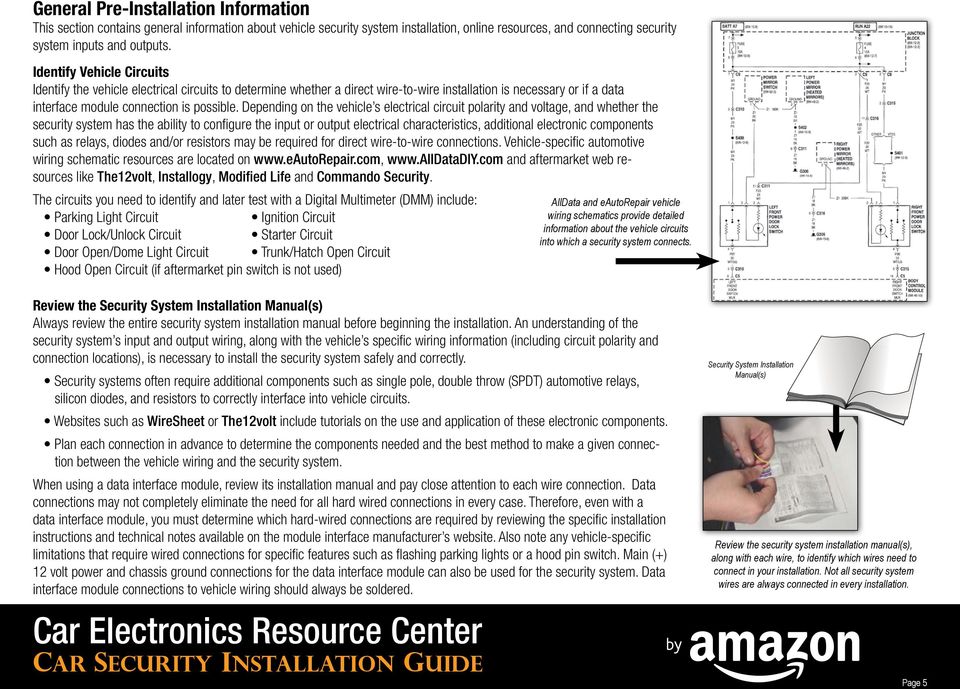
5 General Pre-Installation Information This section contains general information about vehicle security system installation, online resources, and connecting security system inputs and outputs. Identify Vehicle Circuits Identify the vehicle electrical circuits to determine whether a direct wire-to-wire installation is necessary or if a data interface module connection is possible. Depending on the vehicle s electrical circuit polarity and voltage, and whether the security system has the ability to configure the input or output electrical characteristics, additional electronic components such as relays, diodes and/or resistors may be required for direct wire-to-wire connections. Vehicle-specific automotive wiring schematic resources are located on and aftermarket web resources like The12volt, Installogy, Modified Life and Commando Security. The circuits you need to identify and later test with a Digital Multimeter (DMM) include: Parking Light Circuit Ignition Circuit Door Lock/Unlock Circuit Starter Circuit Door Open/Dome Light Circuit Trunk/Hatch Open Circuit Hood Open Circuit (if aftermarket pin switch is not used) AllData and eautorepair vehicle wiring schematics provide detailed information about the vehicle circuits into which a security system connects. Review the Security System Installation Manual(s) Always review the entire security system installation manual before beginning the installation. An understanding of the security system s input and output wiring, along with the vehicle s specific wiring information (including circuit polarity and connection locations), is necessary to install the security system safely and correctly. Security systems often require additional components such as single pole, double throw (SPDT) automotive relays, silicon diodes, and resistors to correctly interface into vehicle circuits. Websites such as WireSheet or The12volt include tutorials on the use and application of these electronic components. Plan each connection in advance to determine the components needed and the best method to make a given connection between the vehicle wiring and the security system. When using a data interface module, review its installation manual and pay close attention to each wire connection. Data connections may not completely eliminate the need for all hard wired connections in every case. Therefore, even with a data interface module, you must determine which hard-wired connections are required by reviewing the specific installation instructions and technical notes available on the module interface manufacturer s website. Also note any vehicle-specific limitations that require wired connections for specific features such as flashing parking lights or a hood pin switch. Main (+) 12 volt power and chassis ground connections for the data interface module can also be used for the security system. Data interface module connections to vehicle wiring should always be soldered. Security System Installation Manual(s) Review the security system installation manual(s), along with each wire, to identify which wires need to connect in your installation. Not all security system wires are always connected in every installation. Page 5
6 Security System Inputs Always refer to the security system s installation manual to determine the electrical polarity (positive or negative) of an input, as well as whether it is configurable to the vehicle wiring. Power and Chassis Ground All security systems rely on a secure, constant +12 volt power and chassis ground connection. Power connections should be made at the battery or at the large-gauge wired input to the factory fuse/relay panel, usually found under the hood near the battery. Chassis ground connections should be made to a solid metal part of the car body, rather than in the dash area. This ensures a good electrical connection. The kick panel area is often a good ground area because of its proximity to the security system control unit, which is often installed under the driver s side dash area. Ignition Power Security systems require +12 volt ignition power that is switched by the vehicle s key. This lets the security system know when the car is on and being started (or attempting to be started). When the security system is armed, this becomes a trigger point for the alarm. This must be a true ignition source, not an accessory power source like that used for in-dash receiver installations. The difference is that a true ignition source stays powered while the engine is cranking, whereas an accessory source loses power while the engine is cranking. The true ignition source is an important input for detecting hot wiring or other car theft methods that bypass starting the car with a key. Security systems are usually configured to only accept a positive polarity ignition input. Some systems allow configuration of negative polarity ignition inputs. Ignition power is active in the ON and START key positions Ignition power is usually found in larger gauge wiring in the area of the key switch Vehicle Entry Points - Doors The door trigger inputs of a security system connect to the same door pin switch circuit(s) that trigger interior lighting. A pin switch is an electrical device that uses a plunger that moves in and out to complete or break an electrical circuit. Depending on the vehicle, there may be a single connection available that electrically connects with all doors or each door may require its own connection. Since the security system only provides one door trigger input, when multiple doors are individually wired, diodes must be used on each connection to isolate each circuit from the other doors. This individual door trigger circuit is found in vehicles with door ajar indicators and information messages, or courtesy lighting for the specific zones that activate when a specific door is opened. The security system is generally configurable to accept positive or negative polarity door triggers. If diodes are required for each door pin switch connection, use Silicon Diodes, part number 1N4001 with a 1amp capacity Factory door pin switches are usually located in the door jambs or at the ends of the dash Vehicles with isolated door pin switches often have a dash indicator or DOOR OPEN message for each individual door Page 6

7 Security System Inputs (Continued) Vehicle Entry Points - Trunk/Hatch The trunk/hatch trigger is easily connected to courtesy lighting that illuminates when the trunk or hatch is open. The trunk/hatch circuit should be a separate circuit that does not trigger other interior lighting. An aftermarket pin switch can be added if the vehicle lacks trunk lighting or an isolated switch. The security system is usually preset to accept only negative polarity trunk/ hatch triggers. A trunk courtesy light or indicator in the dash area confirms the presence of a factory trunk switch Vehicle Entry Points - Hood It is often easier to install an aftermarket pin switch to monitor the hood, even if a factory hood pin switch is present. Standard pin switches are typically included with the security system for this reason. Weather-resistant and sealed pin switches are ideal for this application and are available on Amazon.com. The pin switch attaches to a metal part of the vehicle where the hood closes, such as the radiator core support, and provides a negative trigger to the security system when the hood is opened. The security system is usually preset to accept only negative polarity hood pin switch triggers, so the connection is direct and requires no additional electronic components or modules if an aftermarket pin switch is used. Sensors These devices use electronic components with solid state logic circuitry to detect a specific action such as an impact to the vehicle (utilizing a piezo-electric transducer) or the sound of breaking glass (utilizing an interior-mounted microphone). Based on stimulus, such as impact to the vehicle, the logic circuitry determines if the sensitivity threshold is exceeded and, if so, sends a trigger to the security system. Regardless of sensor type, the wired connections are similar. The sensor has at least three wires to connect. Those wires include +12 volt power, chassis ground, a negative trigger, and (in some cases) a warning trigger for smaller disturbances not intended to trigger the full alarm cycle. Many sensors come pre-wired with plug in connectors that attach to the main security system control unit and do not require additional connections. Some security systems have basic impact sensors built in to the main control unit and do not require additional wire connections. Angled and Straight Pin Switch Examples Angled Bracket for Straight Pin Switch Impact Sensor with pre-warning trigger and plug in harness Review the Car Security Basics Buying Guide for details about the function of each sensor type and their intended uses. Page 7

8 Security System Outputs Always refer to the security system s installation manual to determine the electrical polarity (positive or negative) of the output, as well as whether it is configurable to suit the vehicle wiring. In cases where direct wire-to-wire connections are used, the output must also support adequate current to supply the circuit. Flashing Parking Lights Flashing the parking lights is a visual deterrent when the alarm is activated, but it is also a visual indicator of receiving (and responding to) remote control commands from the vehicle owner. This is a convenient way to confirm the armed or disarmed status of the security system without having to check the LED status indicator inside the vehicle. Door Lock/Unlock Most security systems can be wired to control power door locks. If the vehicle lacks power door locks, they can be added using retrofit power door lock kits available for purchase on Amazon.com. The headlight switch area is usually the location where the security system s flashing parking light output (or relay) connects Vehicle parking light circuits can be positive or negative polarity. In year 2000 and newer models, it may be a low voltage +5 volts DC circuit, instead of +12 volts DC. Low voltage lighting trigger circuits are common in vehicles with automatic headlamps that turn on when it is dark. Security systems are usually configurable to output positive or negative polarity flashing parking light commands. Low voltage car circuits may require one or more resistors to drop the security system s output voltage to match the vehicle s circuit operational voltage. Some security systems allow high current outputs (up to 10a) for direct connection to +12 volt triggered parking light circuits. Power door locks can be added to a vehicle with complete retrofit kits, including vehicles with newer cable driven locks as shown in this example Vehicle power door lock circuits can be positive or negative polarity, reverse rest at ground polarity, or (in year 2000 and newer models) may use low voltage +5 volts DC for lock and +3 volts DC for unlock on the same wire, instead of +12 volts DC on separate lock and unlock wires. Low voltage door lock trigger circuits are common in vehicles with factory remote keyless entry and push button ignition systems. Security systems are usually configurable to output positive or negative polarity door lock/unlock commands. Positive switching and reverse polarity circuits often require relays because the current requirement exceeds the security system outputs. Low voltage circuits require resistors (possibly one or more SPDT relays). Page 8

9 Security System Outputs (Continued) Starter Interrupt This function prevents the vehicle from being started. This usually requires you to cut a specific wire near the vehicle s ignition switch which triggers the starter circuit when the key is turned to the START position. Connecting a relay (either on-board the security system or externally mounted) to the cut wires enables or disables the circuit operation, and becomes the gateway to control the circuit of this feature. When the security system is sounding, the starter is disabled to prevent hot wiring. Vehicle starter circuits can be positive or negative polarity. Most often they are positive polarity. In year 2000 and newer models, starter circuits may be low voltage such as +5 volts DC, instead of +12 volts DC, or a dedicated starter wire may be absent (such as in certain push button ignition vehicles). Refer to the vehicle s wiring diagram to determine which wire controls the starter circuit. In some manual transmission vehicles, the security system manufacturer may suggest interrupting the clutch switch, if no dedicated starter wire is present. Any starter interrupt connections to vehicle wiring should be soldered. Follow the specific security system installation instructions for connection of a starter interrupt relay. Siren, LED, and Valet Switch The siren should install under the hood facing downward so it does not collect water. The security system provides a positive or negative output to power the siren. The siren has two wires. One connects to the output of the system; the other connects to the opposite polarity of the output (see below): If the system provides a positive siren output, connect to the positive siren wire. The remaining siren wire must connect to chassis ground. If the system provides a negative siren output, connect to the negative siren wire. The remaining siren wire must connect to the same source of +12 volts as the main security system power. The LED status indicator light is a theft-deterrent feature that confirms the armed/disarmed status of the security system. The LED can be built into an extended range antenna that attaches to the windshield or it can stand-alone by mounting it through a small hole drilled in a dash panel. The LED should be visible from both sides of the vehicle. A stand-alone LED has two wires and usually has a specific plug-in connector to the security system control unit for straightforward connection. Follow the specific security system installation instructions for mounting and connecting the LED. Many systems include a valet switch that, when combined with the use of the ignition key, temporarily bypasses the security system. Install the valet switch within reach of the driver s left hand, while seated. If the valet switch is built into an extended range RF antenna, additional wired connections are not needed. Security System Siren LED indicators should be mounted in switch blanks or other panels that can be replaced Valet switch location under the left of driver s side dash Page 9

10 Beginning the Installation Prepare Security System Wire Harness Follow these instructions to prepare the wiring harness for the security system: 1) Place the security system control unit on a workbench or stable surface. 2) Plug all wiring harnesses into the control unit, except sensors with pre-terminated plug-in connections. 3) Separate the wires into groups based on where the wires will be routed and the location of the control unit (typically under the driver s side dash). Common examples of wire groups are: a. Wires routed under the hood siren, main +12 volt power, hood pin switch b. Wires routed to the ignition switch harness area primary ignition and starter interrupt c. Wires routed to the kick panel area flashing lights, door pin trigger(s), door lock/unlock, chassis ground for the security system d. Wires routed to the trunk trunk pin switch, possibly other door triggers (such as side doors in a van or isolated doors in a 4 door vehicle) 4) Every six inches, tape or zip tie the wires together to keep the wiring organized. You can wrap wires in a group with electrical tape to completely hide the wire colors and give them a factory-like appearance. 5) The wire length supplied with the security system is typically sufficient to make connections in and around the dash area where the control unit is installed. For wiring extending into the engine compartment or the rear of the vehicle, security system harness wires can be extended by soldering or crimping extra wire, 18 AWG or larger (available on Amazon.com), as needed. The length required can be estimated with a measuring tape between the dash area and the final connection point of the extended wire(s). Separate wires into groups that route to specific areas where they will connect to vehicle wiring Additional wiring needs depend on the specific security system but may include: LED (generally placed in the center of the dash area) Valet Switch (generally placed under the dash near the driver s side kick panel) Extended Range RF Antenna (generally placed on the windshield, if present) External Sensors (refer to the sensor installation manual for suggested placement and wiring) Page 10

11 Beginning the Installation (Continued) Disassembly Guidelines Observe these guidelines when removing panels under the dash, kick panels, door sill panels, A-pillar windshield trim and/or trim panels on the dashboard: Clear and unobstructed access to the area under the dash (below the steering wheel) is required to make most connections. This often requires removal of plastic or leather cosmetic panels, as well as metal sub-dash structural panels. Always use a plastic pry tool to remove panels. Wedge the pry tool into the panel seam and gently pry to release the panel clip(s). Do not use screwdrivers to pry off plastic or upholstered panels. This will scratch or gouge the panels. If there are multiple panels that interlock, determine which panel is underneath, or on top, or if the panels are fit together with hidden clips. Look for seams between panels where one panel ends and another begins. This may require disassembly of one or more surrounding panels before you can remove the main dash panel(s). Look for hidden hardware behind switch panels, ashtrays, or in A/C vents. When prying the panel off, be aware of any panel areas that are still attached. There may be hidden screws in place. After removal, use plastic storage bags or containers to keep all hardware organized. Plastic pry tools allow safe removal of clipped in dash panels required to gain access to the driver s side under dash area To locate basic disassembly information on your specific vehicle, visit Many vehicle service manuals with disassembly information, such as Haynes or Chilton, are available on Amazon.com. You may need to remove cosmetic (plastic) and structural (metal) panels under the dash to view and connect to vehicle wiring. Vehicle service manuals such as those produced by Haynes and Chilton provide many disassembly procedures for areas of the vehicle where security system components are installed and connected Page 11

12 Installation Security system installation typically involves mounting the main control unit, routing the wire harness to various locations, and making the requisite connections. At some of those connection points, an additional component such as a pin switch, siren, fuse holder, or specific electronic component (relay, resistor or diode) may need to be installed to complete the task. Place Security System Control Unit Once the lower dash area is disassembled, place the security system control unit under the dash and secure it to existing wiring harnesses or non-moving parts with zip ties. Ensure that the control unit and wiring harness are not in the way of moving parts, such as the steering column, brake, or clutch pedal. Placing the Security System control unit and using zip ties to secure to factory wires under the driver s side dash area Route Wires to Connection Points Route the grouped wires to the appropriate locations to make the necessary connections to the vehicle. Zip tie all wires neatly every six inches, and avoid any moving parts or heat sources on wire routing paths. For wiring routed into the engine compartment: 1) Pass the wire group from the interior through an existing rubber grommet by making a small incision with a utility knife along the unused part of the existing grommet (cut away from factory wires). a. Use a scrap length of wire or an unfolded wire hanger as a pull-through tool when routing wires from the interior into the engine compartment. b. Temporarily attach the wires to the pull-through tool with electrical tape. Once the wires have been pulled through the grommet, remove the excess electrical tape. 2) If a suitable hole does not exist, you will need to drill a hole in the vehicle s firewall to route the wire group from the interior into the engine compartment. Check for obstructions on both sides of the firewall BEFORE drilling. After drilling, place a plastic snap grommet or rubber grommet in the newly cut hole to protect the wire insulation from any sharp metal edges. 3) After routing the wires into the engine compartment, ensure the hole is well sealed with silicone sealant or water-resistant material. Note: Cut off the excess length from the end of the zip tie after mounting Interior factory grommet side before wires pass through These examples show the factory grommet, where wires pass from the interior into the engine compartment, as a path for running your security system wires under the hood Engine compartment side after wires pass through Page 12

13 Installation (Continued) Connect Wiring to Vehicle or Device Once the grouped wiring is routed to each location, connect individual wires to the appropriate device (such as an added pin switch, the siren, or main power wire s fuse holder) or required electronic component (such as a relay, resistor, or diode), if not a direct wire-to-wire connection. Then, connect the device or component to vehicle wiring. Follow the security system manufacturer s specific instructions for each wired connection, including vehicle-specific requirements for added relays, resistors, and/or diodes. Data interface modules require minimal connections to vehicle wiring. The most important wired connections are to the vehicle s data wires, usually located at the vehicle s On Board Diagnostics (OBD-II) plug connector. The data interface module installation instructions indicate the exact connection point of data wires. Solder these connections to ensure long-term reliability. Use these guidelines when making security system connections that tap in to the vehicle s wiring: Soldered wiretap connections: 1) Strip 1/2 to 3/4 of insulation from the security system s wire end. 2) Strip a 1/2 section of insulation from the middle of the vehicle wire. Do not cut the wire. 3) Separate the copper strands on two sides of the vehicle wire, creating an opening through which the security system s wire can be inserted. 4) Insert the security system s wire into the vehicle Soldered Connection wire opening. 5) Wrap the end of the security system wire around the exposed vehicle wire. 6) Solder this connection. 7) Use electrical tape to cover the connection when complete. Connect Main Power For +12 volt constant power wiring, connect directly to the battery or under hood fuse panel power feed. This ensures adequate current supply for the security system. Leave the main power fuse out until the system is ready to program and test. Connect Chassis Ground Chassis grounding can be connected to vehicle sheet metal in or around the driver s kick panel area. Attach security system, sensor, and data module wires to the same ground point. Avoid using factory ground points for these connections. If soldering the wiretap connection is not possible, cut the factory wires and crimp them back together with the security system s wire using a butt connector. To crimp the wires together, twist the bare copper wires so they can be inserted into the butt connector. Position the butt connector in the appropriate gauge setting of the crimper jaws, then use the crimper to squeeze both sides of the butt connector (halfway between the middle and the end) to secure the wire. Main power connects at the battery with a fuseholder to protect the wire The kick panel area is a typical chassis ground location and where other input and/or output connections are made Crimped Connection Page 13

14 Programming and Testing When all connections are complete, insert the fuse in the main power wire. Have the remote key fobs close at hand as some systems power up in alarm sounding mode. Press the disarm (or unlock) button to disarm the system and prepare for programming. Most security systems have numerous programming steps, and the installation manual provides essential information on the following: Duration of siren sounding Active or Passive (self) arming Learning multiple transmitters (also called pairing transmitters ) Electrical polarity of inputs and/or outputs Pulse duration of outputs to mimic factory electronics (such as double pulse unlock) Programming the System Many security systems require programming to configure the input and output wiring s electrical behavior with vehicle wiring connections. This allows the system to operate properly. Main power and ground connections, as well as ignition power and a valet (or programming ) switch, must be connected because entering the programming sequence often involves turning the ignition and pressing or holding a programming button (either the valet switch in the vehicle or a designated remote transmitter button) with a specific sequence or time duration. Read and follow the specific instructions provided by the manufacturer s installation manual to complete this step. Enter the programming mode and complete the programming of the system according to manufacturer instructions. Page 14

15 Programming and Testing (Continued) Testing the System Once programming is complete, the security system is ready to test. Many systems have a testing or diagnostic mode that allow you to test the security system s inputs without arming and triggering the alarm for each entry point and sensor. Review the security system user s manual to determine if this capability exists. The default method of testing a security system involves testing each trigger point in real time and checking that responses, such as the siren and lights flashing, function as intended. 1) Doors Arm the system and open each door one at a time. If power door locks are connected and lock upon arming, you may need to manually unlock the door with the key to open the door. As each door opens, the alarm should sound. 2) Hood Sit in the vehicle, arm the system, and open the hood with the hood release lever. The alarm should sound. 3) Hatch or Trunk Arm the system and open the trunk or hatch. Like the doors, this may require the key to first manually unlock the entry point. The alarm should sound. 4) Impact Sensor Arm the system. The impact sensor should respond to a hit on the vehicle s windshield. Use the heel of the hand or the side of a closed fist on a window rather than a body panel. Adjust sensors to respond to appropriate impact levels to avoid frequently or unintentionally triggering the alarm. 5) Output Responses Ensure that when the alarm is sounding the siren works as intended and parking lights flash (if connected). 6) Power Door Lock/Unlock Ensure that if power door locks are connected, the doors lock and unlock along with arm/disarm commands. 7) Test Auxiliary Disarm Mode The valet switch can often function as a secondary method of disarming with the ignition key. This is useful if the remote transmitter batteries die. Follow the manufacturer s instructions to test this function as the alarm is sounding. Review the security system user s manual for any additional features or functions specific to your system and test them to verify correct operation. Reassembly Reassemble any parts of the vehicle removed during the security system installation. Verify that all wiring is tied down securely with zip ties and routed away from moving parts or heat sources. Wherever possible, camouflage under-dash and under-hood wiring with split loom tubing for a more factory-like appearance. Split loom tubing hides multi-colored wires and provides a more factory-like appearance to a security system installation Add split loom tubing to all wires run under the hood Page 15

Back-Up Camera Installation Guide
 Hz Hz In This Guide: Back-up camera installation requires connecting power wiring to the existing reverse lighting circuit and adding a chassis ground, as well as routing a video signal cable to the front
INSTALLATION MANUAL 3RP / 5RP 4-BUTTON SERIES VEHICLE SECURITY SYSTEMS
 3RP / 5RP 4-BUTTON SERIES VEHICLE SECURITY SYSTEMS INSTALLATION MANUAL Before you begin the installation Read the INSTRUCTIONS! Always use a multi-meter when verifying vehicle wiring. Before mounting the
1R / 4-BUTTON SERIES
 Button 1 1R / 4-BUTTON SERIES VEHICLE SECURITY SYSTEM Standard Features: Two 4-Button Remote Transmitters Status indicator (LED) Valet / override switch Multi-tone siren Dual stage impact detector Remote
Multi Function, User Configurable Remote Vehicle Security System with 4 Button Replaceable Membrane Remote Transmitter
 MODEL PRO-9744 INSTALLATION MANUAL Multi Function, User Configurable Remote Vehicle Security System with 4 Button Replaceable Membrane Remote Transmitter This System Allows The Transmitter Buttons To Be
PRO PLM Installation Instructions
 PRO PLM Installation Instructions PROFESSIONAL INSTALLATION STRONGLY RECOMMENDED Installation Precautions: Roll down window to avoid locking keys in vehicle during installation Avoid mounting components
INSTALLATION GUIDE OWNER S GUIDE
 INSTALLATION GUIDE OWNER S GUIDE KEYLESS ENTRY MODELS KE100 / KE150 / 1702 CONTENTS System Features... 1 System Components... 1 Technical Assistance... 1 Before You Begin... 1 Precautions... 1-2 Making
i ChatterBox! Motorcycle Security
 i Before you Start the Installation * Please read this manual to become familiar with the requirements necessary to complete the installation. * Use a high quality multi-meter to test all wires before
KEYLESS ENTRY UPGRADE SECURITY SYSTEM for 2004 TOYOTA HIGHLANDER
 KEYLESS ENTRY UPGRADE SECURITY SYSTEM for 2004 TOYOTA HIGHLANDER DEALER SERVICE AND INSTALLATION MANUAL KIT NO. 00016-30915 Contents PARTS LIST... 2 PARTS ILLUSTRATIONS... 2 VEHICLE PREPARATION... 3 INSTALLING
Vehicle Alarm System With Channel 2 Auxiliary Output Installation Instructions
 Model PRO 9842 Installation Manual Vehicle Alarm System With Channel 2 Auxiliary Output Installation Instructions This Unit Is Intended For Installation In Vehicles With 12 Volt Negative Ground Electrical
Installation Instructions
 Installation Instructions for EVS II Security and Keyless Entry Systems Note: It is recommended that this installation take place prior to rustproofing. The individual delivering the vehicle should review
INSTALLATION GUIDE OWNER S GUIDE
 INSTALLATION GUIDE OWNER S GUIDE SECURITY SYSTEM PRO-SERIES 5002 CONTENTS System Features... 1-2 System Components... 2 Technical Assistance... 2 Before You Begin... 2 Precautions... 2-3 Making Connections...
WIRING HARNESS FOR AS635P4. BLUE PLUG RED, BLUE, BLACK, WHITE - Plug in dual stage sensor harness
 WIRING HARNESS FOR AS635P4 ANTENNA NOT USED 5 PIN WHITE PLUG 2 PIN WHITE PLUG GREEN - PARKING BRAKE INPUT (-) BLUE - NOT USED 3 PIN BLUE PLUG RED, BLUE, BLACK, WHITE - Plug in dual stage sensor harness
2003/2004/2005 TOYOTA COROLLA
 2003/2004/2005 TOYOTA COROLLA KEYLESS ENTRY UPGRADE SECURITY SYSTEM INSTALLATION INSTRUCTIONS KIT NO. 00016-30120 SPECIAL NOTE: Installation Sequences After TMS and Safety mandated preparatory steps have
Security and Remote Start Installation Guide for models: CA 6150 CA 6550
 PROFESSIONAL SERIES Security and Remote Start Installation Guide for models: CA 6150 CA 6550 2009 Audiovox Electronics Corporation. All rights reserved. 1 Table of Contents Before You Begin... 4 Wire Connection
SP-100 REMOTE CONTROL ALARM SYSTEM INSTALLATION & OPERATING INSTRUCTIONS INTRODUCTION
 SP-100 REMOTE CONTROL ALARM SYSTEM INSTALLATION & OPERATING INSTRUCTIONS INTRODUCTION CONGRATULATIONS on your choice of a Security Plus Remote Alarm System by Crimestopper Security Products Inc. This booklet
INSTALLATION GUIDE. www.security.soundstream.com FCC ID NOTICE
 AL.1 AUTO SECURITY SYSTEM INSTALLATION GUIDE www.security.soundstream.com FCC ID NOTICE This device complies with Part 15 of the FCC rules. Operation is subject to the following conditions: 1. This device
INSTALLATION INSTRUCTIONS
 INSTALLATION INSTRUCTIONS Accessory Application Publications No. AII 26327 2004 S2000 Issue Date OCT 2004 PARTS LIST Security System: P/N 08E51-S84-100 Attachment Kit: P/N 08E55-S2A-101 2 Remote controls
VEHICLE THEFT/SECURITY SYSTEM
 PL VEHICLE THEFT/SECURITY SYSTEM 8Q - 1 VEHICLE THEFT/SECURITY SYSTEM TABLE OF CONTENTS page DESCRIPTION AND OPERATION INTRODUCTION...1 VEHICLE THEFT/SECURITY SYSTEM (VTSS)... 1 (SKIS)... 2 SENTRY KEY
535T Window Automation System
 535T Window Automation System Installation Guide NOTE: This product is intended for installation by a professional installer only! Any attempt to install this product by any person other than a trained
WARNING! REQUIRED TOOLS & SUPPLIES: HIGH VOLTAGE
 INSTRUCTIONS Product: GEM Electric Motorcars Models: All Subject: Instructions for installing Stereo Accessory Estimated Completion Time:.75 Hours Parts: See Page # 7 REQUIRED TOOLS & SUPPLIES: (1) 3/8
2004 Directed Electronics, Inc. Vista, CA N426V 07-04
 350HV Installation Guide NOTE: This product is intended for installation by a professional installer only! Any attempt to install this product by any person other than a trained professional may result
A&A CORVETTE PERFORMANCE C6 BOOST & FUEL GAUGE INSTALLATION INSTRUCTIONS
 A&A CORVETTE PERFORMANCE C6 BOOST & FUEL GAUGE INSTALLATION INSTRUCTIONS 1. Check your gauges before you take them out of the packaging to make sure they are at 0 (zero) psi for both boost and fuel pressure.
How To Control A Car Alarm On A Car With A Remote Control System
 MODEL CA100 REMOTE CONTROL AUTO ALARM SYSTEM INSTALLATION & OPERATION INSTRUCTIONS WIRING DIAGRAM Black Antenna Wire 6 Pin 6 Pin Mini Connector Valet Switch Blue LED Indicator Blue Wire: (-) 200mA Unlock
Part Number: 250-1859
 General Applicability 2010 Honda Insight 07- Kia Optima / Forte / Rondo/ 10- Sedona / 12 Soul 10- Hyundai Tucson / Elantra Touring ETC 2012 Accent / Elantra/ Genesis Recommended Tools Safety Tools Gloves,
Button 1 Button 2. Button 3 Button 4. Programmed Remote Transmitter. Button Function Condition
 WWW.STELLAR.COM ST9000 SECURITY SYSTEM Button Function Condition 1 a. Arm and lock doors b. Car finder with sound c. Temporary stop alarm from sounding d. Remote lock doors 1 for 2 sec. Panic Anytime a.
ELECTRONICS G H I J K L M
 ELECTRONICS TM LASER INSTALLATION INSTRUCTIONS PARTS KIT Parts Kit includes the following: A- (1) Universal Mounting Bracket A B- (1) Red L.E.D. Laser Alert Light C- (1) Piezo Beeper w/ O Ring Tape D-
Remote Access System Installation
 2011-2013 Explorer Remote Access Remote Access System Installation CONTENTS VEHICLE PREPARATION Hood Switch Wire Harness Installation Hood Switch Installation RMST Module Installation RMU Module Installation
The Child Reminder System Installation Manual
 The Child Reminder System Installation Manual Revised June, 2006 Detailed installation information can be found at www.childreminder.com. Get through your installation quickly and easily by calling 1-888-330-6786
SKYPATROL TT8750. Installer GUIDE. SKYPATROL highly recommends that a certified professional technician install the unit into your asset.
 SKYPATROL TT8750 Installer GUIDE SKYPATROL highly recommends that a certified professional technician install the unit into your asset. BE SURE TO REGISTER YOUR DEVICE ON LINE PRIOR TO HAVING IT INSTALLED
INSTALLATION INSTRUCTIONS
 INSTALLATION INSTRUCTIONS Accessory Application Publications No. AII23628 2003 PILOT Issue Date MAY 2002 PARTS LIST Security System Kit (sold separately): P/N 08E51-S84-100 2 Remote controls Attachment
Model AM2. Installation Guide
 Model AM2 Installation Guide NOTE: This product is intended for installation by a professional installer only! Any attempt to install this product by any person other than a trained professional may result
Standard WIRED Installation Guide
 Standard WIRED Installation Guide Version 1.0.1 1 Installing the STANDARD WIRED DEVICE The installation of the STANDARD WIRED DEVICE and its antennas can have a major impact on the STANDARD WIRED DEVICE
INSTALLATION MANUAL VEHICLE SECURITY SYSTEM CE-SS200
 INSTALLATION MANUAL VEHICLE SECURITY SYSTEM CE-SS200 FUSION CULTURE TABLE OF CONTENTS There s no point doing something if no one notices. We ve always believed the way to make things happen is by getting
INSTALLATION INSTRUCTIONS
 Rear Vision System Tailgate Handle Camera Mirror Display 2004-2014 Ford F-150 and 2008-2015 Ford Super Duty (Kit part numbers 9002-9521) Kit Contents: Mirror Tailgate Handle with camera and harness Interior
VEHICLE THEFT/SECURITY SYSTEMS
 DN VEHICLE THEFT/SECURITY SYSTEMS 8Q - 1 VEHICLE THEFT/SECURITY SYSTEMS TABLE OF CONTENTS page GENERAL INFORMATION INTRODUCTION...1 VEHICLE THEFT SECURITY SYSTEM....1 ENABLING...1 ARMING...1 DISARMING...2
Power Window/Power Lock Installation. To begin with you will need all the parts listed below:
 Power Window/Power Lock Installation To begin with you will need all the parts listed below: From Donor Fiero: Fiero power window regulators Power window motors (Generic GM type part) -motors are riveted
Installation instructions, accessories - Handsfree for cellular phone, system B, entry level
 XC90 Section Group Weight(Kg/Pounds) Year Month 3 39 0.5/1.1 2006 07 XC90 2003, XC90 2004 IMG-249663 Page 1 of 18 Required tools A0000162 A0000163 IMG-239664 M0000232 IMG-253123 IMG-252223 Page 2 of 18
VEHICLE SECURITY SYSTEM G25/G20
 VEHICLE SECURITY SYSTEM G25/G20 Limited Lifetime Warranty This vehicle security system is warranted to the original purchaser, to be free from defects in material and workmanship. The manufacturer will
0 Copyright 1997 Subaru of America, Inc.
 0 Copyright 1997 Subaru of America, Inc. All rights reserved. This book may not be reproduced in whole or in part without the express written permission of Subaru of America, Inc. Subaru of America, Inc.
VEHICLE SECURITY SYSTEM Optional Remote Start Module and 2-way Transmitter Instructions Included
 VEHICLE SECURITY SYSTEM Optional Remote Start Module and 2-way Transmitter Instructions Included STANDARD FEATURES Some of the system s standard features include: 4-button remote transmitter LED Status
PATENTED: www.voxxintl.com/company/patents
 Model APS-997C Installation Manual 2 Way LCD Vehicle Security and Table Of Contents: Remote Start System Before You Begin Page 2 Wire Harnesses Quick View Page 3 and 4 Installation Of The Major Components
Car Alarm Series 2 B 2 Buttons
 Car Alarm Series 2 B 2 Buttons G22 SE (External - Shock Sensor) Version 3 Software 67 Plus www.geniuscaralarm.com 21 CAR ALARM GENIUS Series 2B 2 Buttons - G22 Se (External Shock Sensor) Module controlled
Networkfleet 3500 Product Line Installation Guide
 Networkfleet 3500 Product Line Installation Guide Light/Medium Duty (L3500) Heavy Duty (H3500) Universal (U3500) www.networkcar.com/fleet Customer Care: (866) 227-7323 [email protected] Table
BMW Parts and Accessories Installation Instructions
 BMW Parts and Accessories Installation Instructions Retrofit Anti-theft Alarm System (DWA) series-identical retrofit for BMW 5 Series saloon and touring (E 9, E 9/) left-hand drive F 9 005 W Installation
REMOTE TRANSMITTER LAYOUT
 Full Featured Keyless Entry System with Optional Starter Defeat and Passive Immobilize Feature SYSTEM MANUA STANDARD FEATURES Some of the system s standard features include: Two 4-button remote transmitters
PATENTED: www.voxxintl.com/company/patents
 Model PRO9776C Installation Manual Vehicle Security System Table Of Contents: with Remote Start Before You Begin Page 2 Wire Harnesses Quick View Page 3-4 Installation of the Major Components Page 5 Wiring
TOYOTA TACOMA 2008- HANDS FREE BLU LOGIC Preparation
 TOYOTA TACOMA 2008- HANDS FREE BLU LOGIC Preparation Part #: PT923-00112 Conflicts: JBL Audio, Factory Navigation NOTE: Part number of this accessory may not be the same as the part number shown. Kit Contents:
I Click on a link tab to jump to that page. Cover Page
 & nstall Publication, Duplication, or Retransmission Of This Document Not Expressly Authorized n Writing By The nstall Doctor s Prohibited. Protected By U.S. Copyright Laws. 1997,1998,1999,2000. Factory
INSTALLATION AND OPERATING INSTRUCTIONS For Model GL1 Gate Locks
 Securitron Magnalock Corp. www.securitron.com ASSA ABLOY, the global leader Tel 800.624.5625 [email protected] in door opening solutions INSTALLATION AND OPERATING INSTRUCTIONS For Model GL1 Gate
Instrument panel. Volkswagen Touareg - Instrument panel. Special tools, testers and auxiliary items required. Release lever T10039
 Volkswagen Touareg - Instrument panel Page 1 / 14 70-1 Instrument panel Tools Special tools, testers and auxiliary items required Release lever T10039 Instrument panel, removing and installing Removing
INSTALLATION INSTRUCTIONS
 INSTALLATION INSTRUCTIONS Accessory Application Publications No. All 24393 ACCORD (DX, LX) SYSTEM 2-AND 4-DOOR Issue Date AUG 2002 PARTS LIST Security System Attachment (LX): P/N 08E55-SDA-100A Unit panel
e-ask electronic Access Security Keyless-entry
 e-ask electronic Access Security Keyless-entry e-fob Keyless-entry entry System Full-Function Function Installation Manual FCC ID: TV2EFOB1 (UM20 ~ 22793-02) Table of Contents Introduction... 1 e-fob Operation
GENUINE PARTS INSTALLATION INSTRUCTIONS
 GENUINE PARTS INSTALLATION INSTRUCTIONS DESCRIPTION: Illuminated Kick Plate APPLICATION: Rogue (2011) PART NUMBER: 999G6 GX010 KIT CONTENTS: Item A B C G H QTY 1 1 1 D 1 E 1 F 3 15 6 Description Kick Plate,
OPERATING INSTRUCTIONS SECURITY SYSTEM KIT NO.: 08E51-EP4-101. 2004 American Honda Motor Co., Inc. - All Rights Reserved. 1
 OPERATING INSTRUCTIONS SECURITY SYSTEM KIT NO.: 8E5-EP4-24 American Honda Motor Co., Inc. - All Rights Reserved. Contents Introduction... 3 Emergency Disarming During Alarming... 4 During the Entry Delay
ANTI-THEFT SYSTEM. 1995 Volvo 850 DESCRIPTION & OPERATION BASIC ALARM. 1995-96 ACCESSORIES & EQUIPMENT Volvo Anti-Theft Systems
 ANTI-THEFT SYSTEM 1995 Volvo 850 1995-96 ACCESSORIES & EQUIPMENT Volvo Anti-Theft Systems 850 DESCRIPTION & OPERATION WARNING: Deactivate air bag system before performing any service operation. For 1995
INSTALLATION INSTRUCTIONS
 Rear Vision System Aftermarket and Factory 5.0, 8.4 and 6.1 MyGig Touch Screen Display (Factory Display requires Chrysler/Dodge dealer to activate) 2009 Current* Dodge Ram (Kit part number 1009-6503) *NOTE:
Fitting/Installation Guide - UNIVERSAL
 ATTENTION: This wiring information is being provided free of charge and on an as is basis, without any representation or warranty. It is your responsibility to verify any circuit before interfacing with
TRANSMISSION REMOTE STARTER WITH VIRTUAL TACH SYSTEM DEUI2-BUTTON MANUAL / AUTOMATIC (AS PRG-1000 COMPATIBLE) CT-3271. Installation Guide
 DEUI2-BUTTON MANUAL / AUTOMATIC TRANSMISSION REMOTE STARTER WITH VIRTUAL TACH SYSTEM (AS PRG-1000 COMPATIBLE) CT-3271 Installation Guide Notice The manufacturer will accept no responsibility for any electrical
WIRE, TERMINAL AND CONNECTOR REPAIR CONDUCTORS
 CONDUCTORS Conductors are needed to complete the path for electrical current to flow from the power source to the working devices and back to the power source. Special wiring is needed for battery cables
ILISC515-A Shift Interlock (Manual Lift Door) 2015 Ford Transit, 3.7L and 3.5L
 An ISO 9001:2008 Registered Company ILISC515-A Shift Interlock (Manual Lift Door) 2015 Ford Transit, 3.7L and 3.5L Introduction The ILISC515-A is a microprocessor driven system for controlling wheelchair
MODELS 7007 Gorilla Cycle Alarm 7017 Gorilla Cycle Alarm with 2-way pager system 1017 2-way pager system
 MODELS 7007 Gorilla Cycle Alarm 7017 Gorilla Cycle Alarm with 2-way pager system 1017 2-way pager system Remote Control Motorcycle Alarm System Installation & Operation Instructions Sistema de Alarma de
VS Commodore LPG installation utilising an LPG Memcal and Apexus Quick-kit.
 VS Commodore LPG installation utilising an LPG Memcal and Apexus Quick-kit. Description of the components and operation LPG/Petrol changeover switch The LPG change-over switch is mounted in the instrument
Mazda CX7 2007-09 99-7508
 INSTALLATION INSTRUCTIONS FOR PART 99-7508 APPLICATIONS Mazda CX7 2007-09 99-7508 KIT FEATURES DIN Radio Provision with Pocket ISO Mount Radio Provision with Pocket Double DIN Mount Radio Provision Stacked
AL-1650-EDPB AL-1750-EDPB AL-1850-EDPB AL-1950-EDPB AL-2050-EDPB
 AL-1650-EDPB AL-1750-EDPB AL-1850-EDPB AL-1950-EDPB AL-2050-EDPB Deluxe Security & Remote Start System Installation Guide July 11, 2012 Temporary cover. Color cover is in a separate file. Installation
by Myles H. Kitchen M.H. KITCHEN & ASSOCIATES www.auto-electronic.com (2002 X5 4.4 owner) March 2, 2004
 INSTALLING THE TEKONSHA PRODIGY ELECTRIC TRAILER BRAKE CONTROL IN THE BMW X5 by Myles H. Kitchen M.H. KITCHEN & ASSOCIATES www.auto-electronic.com (2002 X5 4.4 owner) March 2, 2004 INTRODUCTION The 2000
CA-125 Owner's Manual
 Remote Vehicle Control System CA-125 Owner's Manual Vehicle Security System With Remote Keyless Entry IMPORTANT NOTE: The operation of the Security and Convenience System as described in this manual is
PUSH BUTTON START INSTALLATION MANUAL
 PUSH BUTTON START INSTALLATION MANUAL ALTHOUGH THIS PRODUCT HAS BEEN THOROUGHLY TESTED KPIERSON TECHNOLOGIES ASSUMES NO RESPONSIBILITY FOR ANY DAMAGE THAT MAY RESULT BY THE INSTALLATION OF THIS PRODUCT.
AM1 Security System installation guide
 AM1 Security System installation guide 2005 Directed Electronics, Inc. Vista, CA N427A 01-05 NOTE: This product is intended for installation by a professional installer only! Any attempt to install this
MODELS 8007 Gorilla Cycle Alarm 8017 Gorilla Cycle Alarm with 2-way pager system 1018 2-way pager system
 MODELS 8007 Gorilla Cycle Alarm 8017 Gorilla Cycle Alarm with 2-way pager system 1018 2-way pager system Remote Control Motorcycle Alarm System Installation & Operation Instructions Sistema de Alarma de
INSTALLATION AND SERVICING OF YOUR FLEET COMPLETE SYSTEM CLIENT SELF-INSTALL AGREEMENT. 1 800 220 0779 fleetcomplete.com v. 06.15
 INSTALLATION AND SERVICING OF YOUR FLEET COMPLETE SYSTEM CLIENT SELF-INSTALL AGREEMENT 1 800 220 0779 fleetcomplete.com v. 06.15 SELF-INSTALL AGREEMENT INTRODUCTION We, at Fleet Complete ( FC ), wish to
VEHICLE SECURITY SYSTEM. Car Alarm System With Command Confirmation
 VEHICLE SECURITY SYSTEM Car Alarm System With Command Confirmation About Your System Congratulations on your purchase of this state-of-the-art vehicle security system. With proper installation this system
GPS Vehicle Tracking Beacon Installation Best Practices Guide
 GPS Vehicle Tracking Beacon Installation Best Practices Guide Preface There are three primary aspects to the installation of a vehicle tracking beacon; power connections, antenna installations, and mechanical
For a simple splice connection look at figure 21. This basic type of splice can be used almost exclusively when hooking up your wiring.
 Page 1 of 10 IMPORTANT: Before starting installation, please be sure that all items which were supplied with the kit are accounted for. Note: These instructions are to be used in conjunction with the instructions
Installation of Rear View Camera in a 1995 Roadtrek 190 Popular
 Installation Instructions: 1995 Roadtrek Rear View Camera Page 1 Installation of Rear View Camera in a 1995 Roadtrek 190 Popular Introduction. In the fall of 2010 we investigated rear view cameras for
INSTRUCTIONS FOR THE INSTALLATION AND OPERATION OF ACTIVATOR II
 INSTRUCTIONS FOR THE INSTALLATION AND OPERATION OF ACTIVATOR II ELECTRONIC TRAILER BRAKE CONTROL 5500 FOR 2, 4, 6 & 8 BRAKE SYSTEMS IMPORTANT: READ AND FOLLOW THESE INSTRUCTIONS CAREFULLY. KEEP THESE INSTRUCTIONS
RECOMMENDED TOOLS PERSONAL & VEHICLE PROTECTION SAFETY GLASSES
 PART NUMBER: 250-9612 GENERAL APPLICABILITY THIS CRUISE WAS TESTED AND VERIFIED ON: FORD FOCUS SE & S MODELS (AT/MT) FORD TRANSIT ALL MODELS RECOMMENDED TOOLS PERSONAL & VEHICLE PROTECTION SAFETY GLASSES
- power windows - alarm system - electric door mirror control - door warning light - central locking - seat memory
 Door Wiring Harness Plug Connections Binder -, Electrics Vehicle Type: (86) Model Year: 7 (V) Concern: Door wiring harness plug connections X11 / X12. Information: The rubber boot for the door connector
INSTALLATION GUIDE OWNER S GUIDE
 INSTALLATION GUIDE OWNER S GUIDE TALKING ALARM MODEL 3001 CONTENTS System Features... 1 Technical Assistance... 1 Wiring Instructions... 2 Installation Instructions... 3 Operating Instructions... 4-5 Technical
P150SC15. Designed for 2015 Ford F150 Super-Cab and Super-Crew vehicles without Sony System. 2015 Stillwater Designs P150SC15-A2-20150813
 P150SC15 Designed for 2015 Ford F150 Super-Cab and Super-Crew vehicles without Sony System Subwoofer Assembly Amplifier Assembly Amplifier Harness 2015 Stillwater Designs P150SC15-A2-20150813 M6 Bolt M6
Owner s Guide. ca6554
 PROFESSIONAL SERIES Owner s Guide For Models: ca6554 Deluxe Vehicle Security and Remote Start System with 2 Way Confirming LCD Remote Control IMPORTANT NOTE: The operation of the Security and Convenience
TOYOTA PRIUS 2010- HANDS FREE BLU LOGIC Preparation
 TOYOTA PRIUS 2010- HANDS FREE BLU LOGIC Preparation Part #: PT923-00111 Conflicts: JBL Audio, Factory Navigation NOTE: Part number of this accessory may not be the same as the part number shown. Kit Contents:
CA 1050 Owner s Guide
 PROFESSIONAL SERIES CA 1050 Owner s Guide Vehicle Security and Keyless Entry System IMPORTANT NOTE: The operation of the Security and Convenience System as described in this manual is applicable to most
CM705B - Universal Expander Module CM707B - Plug On Zone Expander Security Systems
 CM705B - Universal Expander Module CM707B - Plug On Zone Expander Security Systems EN Security System CM705B CM705B - Universal Expander Module The CM705B universal expander provides a cost effective way
LMU-5000. Hardware and Installation Guide
 LMU-5000 Hardware and Installation Guide Plan The Installation Verify Power, Ground and Ignition. Be sure to check each source (power, ground and ignition) to ensure that the proper signaling exists. This
TOYOTA Tundra 2007 - BACK-UP CAMERA SYSTEM Preparation
 Preparation Part Number(s): PT233-34070, PT923-35070-11, PT923-35070-43 NOTE: Part number of this accessory may not be the same as part number shown. Back Up Monitor Kit Contents PT923-35070-11 / PT923-35070-43
RS-1301DP/1303DP/1304DP 1-WAY SYSTEM RS-1300DP ADD-ON MODULE DP SERIES (Data Port)
 RS-1301DP/1303DP/1304DP 1-WAY SYSTEM RS-1300DP ADD-ON MODULE DP SERIES (Data Port) OPERATING INSTRUCTIONS **IMPORTANT NOTES:- FOR RS-1300DP MODEL ONLY** RS-1300DP Model is an add-on/expansion unit, without
MS4000/MS4000U Mini-Siren
 MAN MS4000 INSTALL REV: 1/26/01 255331B INSTALLATION AND OPERATING INSTRUCTIONS MS4000/MS4000U Mini-Siren i Section Title Page I General Description...... 1 II Specifications... 2 III Safety Message To
INSTRUCTION MANUAL FOR. Remote Control Car Alarm with Impact Sensor, Mini-Battery Backup Siren & Engine Immobiliser
 INSTRUCTION MANUAL FOR Remote Control Car Alarm with Impact Sensor, Mini-Battery Backup Siren & Engine Immobiliser A.C.N 001 621 610 SYDNEY / AUSTRALIA Build Date: TO ARM/DISARM ALARM The alarm is activated
ADDING AN ELECTRIC AUXILIARY FAN TO RADIATOR STACK ON 03 ALPINE COACH
 ADDING AN ELECTRIC AUXILIARY FAN TO RADIATOR STACK ON 03 ALPINE COACH The original design of the 03 Alpine Coaches (and perhaps other years as well) did not include any kind of engine fan engage mechanism
ODYSSEY. Security System Owner s Manual. Kit No. 08E51-SHJ-100 08E55-SHJ-100. 2004 American Honda Motor Co., Inc. - All Rights Reserved.
 Kit No. 08E5-SHJ-00 08E55-SHJ-00 Security System Owner s Manual ODYSSEY 004 American Honda Motor Co., Inc. - All Rights Reserved. Contents Introduction... 3 Emergency Disarming During the Panic Alarm Activation...
INSTALLATION INSTRUCTIONS
 INSTALLATION INSTRUCTIONS Accessory Application Publications No. ACCORD All 30209 2-AND 4-DOOR SYSTEM (VP, LX, SE) Issue Date AUG 2005 PARTS LIST Security System Attachment: P/N 08E55-SDA-100A Unit panel
4.3-inch Back-Up Camera
 TM 4.-inch Back-Up Camera Model No.: PKC0BU4 Owner s Manual and Warranty Information Read these instructions completely before using this product. Retain this Owner s Manual for future reference. INTRODUCTION
Chevy Equinox 2010-2015 / GMC Terrain 2010-2014 (with monochrome display) 99-3307G
 INSTALLATION INSTRUCTIONS FOR PART 99-3307G Chevy Equinox 2010-2015 / GMC Terrain 2010-2014 (with monochrome display) 99-3307G KIT FEATURES ISO DIN radio provision with pocket ISO DDIN radio provision
K9 Heat Alarm Owners Manual HA-1520
 K9 Heat Alarm Owners Manual HA-1520 Your K9 Heat Alarm is a state of the art product designed and developed by ACEK9.COM a division of Radiotronics, Inc. It is a unique blend of positive features taken
u-traq autopro GPS Vehicle Tracking System Product # 1020-PRO User s Guide Installation and Operating Instructions
 u-traq autopro GPS Vehicle Tracking System Product # 1020-PRO User s Guide Installation and Operating Instructions Table of Contents Before Installing 2 GPS Fundamentals 3 Checking the Contents of the
General Tips for Installation of mobridge into Porsche Vehicles
 General Tips for Installation of mobridge into Porsche Vehicles Disclaimer: the information herein is provided as a convenient as-is reference only. The information herein is not guaranteed to be accurate
ASTRA 4000RS/1000RS-DBP G55 SERIES VEHICLE SECURITY SYSTEM WITH REMOTE START PRODUCT MANUAL
 ASTRA 4000RS/1000RS-DBP G55 SERIES VEHICLE SECURITY SYSTEM WITH REMOTE START PRODUCT MANUAL Limited Lifetime Warranty This vehicle security system is warranted to the original purchaser, to be free from
u-traq autopro GPS Vehicle Tracking System Product # 1020-PRO User s Guide Installation and Operating Instructions
 u-traq autopro GPS Vehicle Tracking System Product # 1020-PRO User s Guide Installation and Operating Instructions Before Installing Table of Contents Before Installing 2 GPS Fundamentals 3 Checking the
TOYOTA TUNDRA 2015 Billet Grille w/led DRL
 TOYOTA TUNDRA 2015 Billet Grille w/led DRL Part Number: 00016-34088 Accessory Code: BG3000 Conflicts Models 1794 and Platinum Kit Contents Item # Quantity Reqd. Description 1 2 LED DRL 2 1 Driver Box 3