
The ergonomics of microscope work
|
|
|
- Aldous Sanders
- 9 years ago
- Views:
Transcription
1 A. Méndez-Vilas and J. Díaz (Eds.) The ergonomics of microscope work J. Sillanpää 1 and M. Nyberg 1 1 Finnish Institute of Occupational Health, P.O. Box 486, FI Tampere, Finland By nature, work with microscopes demands precision and the ability to concentrate over long periods of time, and it requires the worker to maintain static work postures that strains the musculoskeletal system. Ergonomics has a special status with respect to the development and improvement of microscope work. This section presents means with which to develop and improve microscope work, and it provides an ergonomic guide for this type of work. Keywords microscope work; ergonomics; musculoskeletal system 1. Introduction By nature, work with microscopes demands precision and the ability to concentrate over long periods of time. In their work, microscopists often have to maintain static work postures that strain the musculoskeletal system. In addition to the load on the musculoskeletal system, microscope work causes eye strain, which, in turn, is related to muscular strain. Microscopists experience a significant number of musculoskeletal symptoms. In some studies, low-back pain, neck pain, and tension headaches have been reported by as high as 80% of microscopists [1, 2]. Electromyographic (EMG) examinations of microscopists have revealed that, after 4 hours of work with a microscope, muscle strain in the neck and shoulder region and in the back is 25% 65% greater than at the beginning of the work [3]. It has been shown that EMG examinations can efficiently assess the success of ergonomic actions [4, 5]. The box below presents a short description of the principles and use of EMG measurements. Brief description of the principles and use of EMG measurements Measures the electric activity of muscles Electrodes are glued to the skin covering the muscle The weak voltage (microvolts, µv) between two electrodes is measured, and the result is comparable to muscle activity The measurement is recorded, and the results are processed by a computer The results can used to assess a person s performance in relation to different conditions (work method, work equipment, furniture) In an article on microscope work in the electronic industry, Helander et al. [7] recommended, for example, more efficient product design, the replacement of microscopes by projected images, better ergonomic design of microscope workstations and microscopes, training of microscope users and work rotation, as well as the restriction of continuous work, as means with which to develop and improve microscope work. In the next section, case examples are used to illustrate how microscope work can be improved. 2. Case examples 2.1 Head support (forehead) Looking through a microscope requires keeping the head in the same exact position for long periods. This prerequisite especially strains the neck muscles, especially if the ocular angle is great. One possibility is to attach a head support to the microscope. The support helps the head to remain in the proper position and therefore lessens the strain in the neck muscles. In one workplace, an experiment was carried out with a new microscope table and a head support fastened to a microscope as a means of stabilizing the position of the head (the eyes directed towards the ocular aperture). The microscopist alternated 10 times between working at her old workstation, then at a new table without a head support and finally at the new table while using a head support (Fig. 1), working at each station for a period of 1 minute each time. Between each test period there was a 1-minute rest period. The task was planned so that the microscopist worked only with the microscope during each work period. EMG signals were recorded from muscles in the neck shoulder region and the back during the experiment. The use of the new table improved the microscopist s work posture with FORMATEX
2 Microscopy: Science, Technology, Applications and Education A. Méndez-Vilas and J. Díaz (Eds.) respect to the back, upper extremities, and the neck. The result was clearly evident from the decrease in muscle activity. In addition, the use of the head support lessened the muscle activity even more (Fig. 2). The improvement in the microscopist s work posture that was found in the test indicates that the use of the new table and the headrest would have a positive effect on the musculoskeletal symptoms of microscopists. Fig. 1 A microscope equipped with a head support µv New Table New Table with Support 15.0 Old Table Neck-Shoulder Back Fig. 2 Muscular activity (µv) in the neck shoulder region and in the back during the use of the new table, the new table and a head support attached to the microscope, and the old table FORMATEX 2010

3 A. Méndez-Vilas and J. Díaz (Eds.) 2.2 Good sitting posture, chair adjustments and variation in posture Sitting for long periods in the same position tires the back and shoulders. Maintaining the same posture requires static muscle work that weakens blood circulation, muscle oxygenation, and muscle function. A poor sitting posture can cause muscles to ache. It is important to sit with good support and at the same time be as relaxed as possible in the sitting position used. It is also important to take breaks regularly to stretch one s legs by walking around. In other words, when one works sitting one should take one s breaks standing. Chairs that permit versatile adjustment make it possible for the worker to find a work posture that is both good and healthy Good sitting posture Criteria for a good sitting posture follow: The sitting height should allow the feet to be firmly on the floor. The back support should be slanted backwards (about ), the back position being almost relaxed, so that the muscle activity and the pressure on the intervertebral discs are decreased. With respect to the lower back, the posture of the spine should be nearly the same as in a standing position. Supporting the arms on the arm supports of the chair or on the table lessens the activity of the back muscles and decreases the pressure on the vertebra. A sitting surface that is slanted downward (5 30 ), helps the worker to maintain the natural curvature of the back. In work with a microscope, using a posture that is slightly slanted backwards helps reduce back strain. A backwardleaning posture is possible if a high-backed chair with a neck support is used (Fig. 3) and the inclination of the microscope can be adjusted (or the ocular angle of the microscope is adjustable). Microscope work could also be done standing (Fig. 4). As an alternative, work in a standing position efficiently interrupts the detrimental effects of sitting work. Standing work could possibly be used as an alternative for short microscope tasks if the microscope base is adaptable, the table is adjustable, and the working height is adjusted properly. It should be possible to adjust the height of the table sufficiently ( mm). A straight symmetric position is the best work posture. When standing, the microscopist has a stable position, when the centre of gravity of his or her body is above the area outlined by the feet. In this manner, the line of the centre of gravity travels down to the centre point of the supporting area, and maintaining one s balance is easy. Fig. 3 Using a microscope while sitting. Fig. 4 Using a microscope while standing. FORMATEX

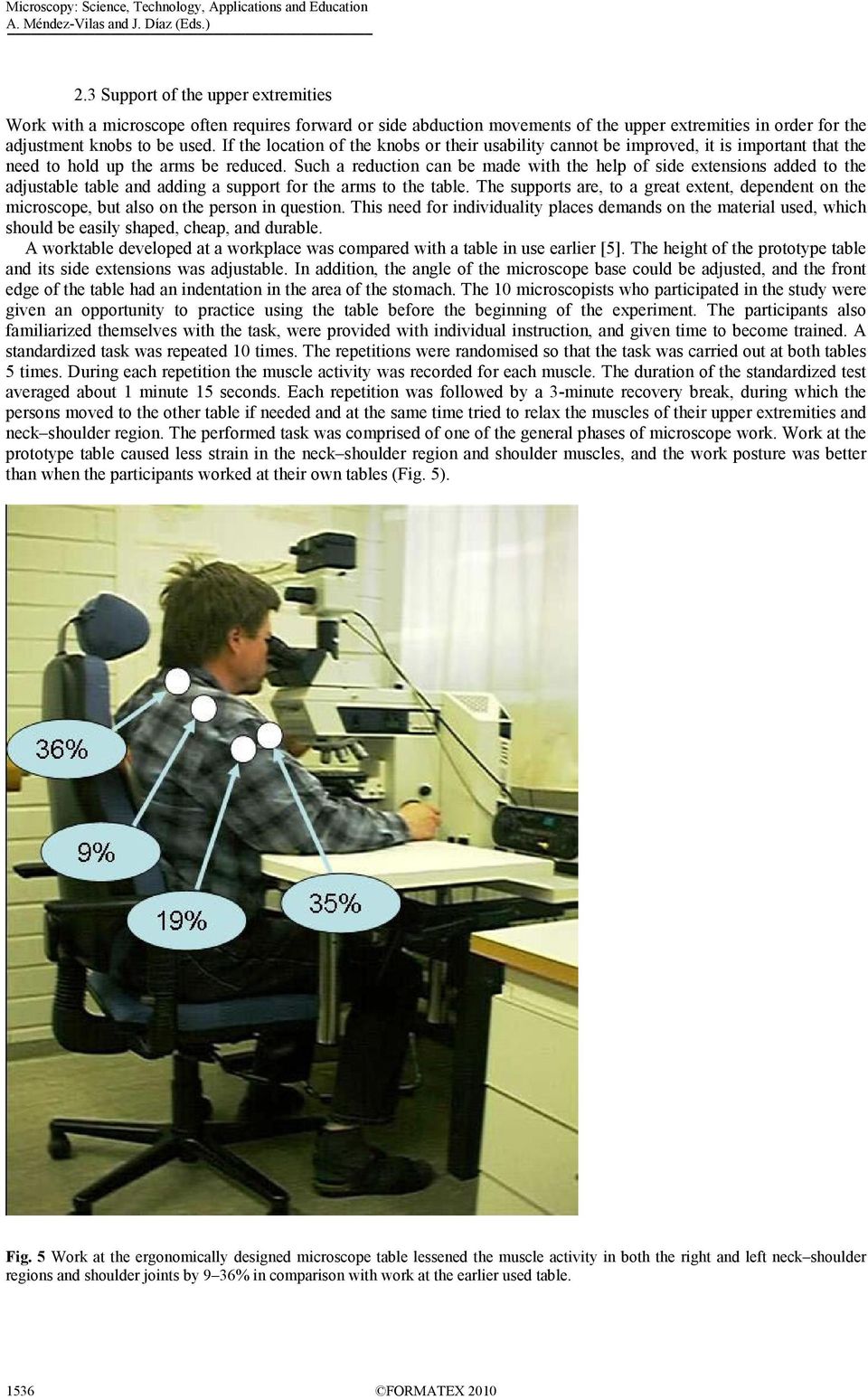
4 A. Méndez-Vilas and J. Díaz (Eds.) 2.3 Support of the upper extremities Work with a microscope often requires forward or side abduction movements of the upper extremities in order for the adjustment knobs to be used. If the location of the knobs or their usability cannot be improved, it is important that the need to hold up the arms be reduced. Such a reduction can be made with the help of side extensions added to the adjustable table and adding a support for the arms to the table. The supports are, to a great extent, dependent on the microscope, but also on the person in question. This need for individuality places demands on the material used, which should be easily shaped, cheap, and durable. A worktable developed at a workplace was compared with a table in use earlier [5]. The height of the prototype table and its side extensions was adjustable. In addition, the angle of the microscope base could be adjusted, and the front edge of the table had an indentation in the area of the stomach. The 10 microscopists who participated in the study were given an opportunity to practice using the table before the beginning of the experiment. The participants also familiarized themselves with the task, were provided with individual instruction, and given time to become trained. A standardized task was repeated 10 times. The repetitions were randomised so that the task was carried out at both tables 5 times. During each repetition the muscle activity was recorded for each muscle. The duration of the standardized test averaged about 1 minute 15 seconds. Each repetition was followed by a 3-minute recovery break, during which the persons moved to the other table if needed and at the same time tried to relax the muscles of their upper extremities and neck shoulder region. The performed task was comprised of one of the general phases of microscope work. Work at the prototype table caused less strain in the neck shoulder region and shoulder muscles, and the work posture was better than when the participants worked at their own tables (Fig. 5). Fig. 5 Work at the ergonomically designed microscope table lessened the muscle activity in both the right and left neck shoulder regions and shoulder joints by 9 36% in comparison with work at the earlier used table FORMATEX 2010
5 A. Méndez-Vilas and J. Díaz (Eds.) 2.3.1Characteristics of a good microscope table The results of the experiment with the microscope table indicate that a good table should have the following characteristics: firmness adjustable height sufficient space on both sides of the microscope free foot room designed so that the front edge makes sitting near the microscope easy and so that there is space to support the upper extremities possibility to slant the microscope. 3. Ergonomic guidelines for microscope work With regard to the load on the musculoskeletal system, the ergonomics of the workstation are very significant. The following set of ergonomic guidelines has been devised on the basis of several projects involving microscope work. In order to benefit from ergonomic principles, not only the furniture and equipment should be given special consideration, but also their use and adjustability. The contents of the following table form an ergonomic guide to help a worker find a posture with a suitable degree of strain. Table 1 An ergonomic guide for microscope work. Ergonomic guide for microscope work 1. Adjust the sitting height: Place both feet completely and firmly on the floor or on the footrest and adjust the height of the chair so that there is some space between the legs and the seat of the chair. 2. Adjust the back support of the chair: First adjust the height of the back of the chair so that it supports the curvature of the lower back; then adjust the position of the back in the forward backward direction so that the depth of the seat is suitable for the length of your upper legs and so that your back is against the back of the chair during your work with the microscope. 3. Choose the proper distance from the table: Sit at a distance from the table (benefiting from the possible stomach indention in the front edge of the table) that makes it possible to avoid a forward slanting work posture (back) and you can support your upper extremities on the table. 4. Adjust the height of the microscope table or the microscope: Adjust the microscope to a height at which you can look through the ocular aperture with your head as straight upward as possible but using a relaxed position and supporting your back on the back of your chair. 5. Adjust the height of the side extensions of the table: Adjust the height of the side extensions of the table to a height that, when the focus control and preparation transfer mechanism are used, the upper extremity in use can be supported on the surface and the shoulders relax. If the table does not have adjustable side extensions, use arm supports. In microscope work the wheels of the chair should either be locked or otherwise difficult to move. If you have a chair with a high back and a neck support try using a backward slanting work posture. In this manner, you can benefit from the stomach indention in front edge of the table and from the fine adjustment of the table, the height of the microscope and the ocular angle. The sitting distance depends on whether or not you use a forward slanting posture or a backward slanting posture. Try and listen to what your body tells you. With respect to the position of your head and relaxed vision, the adjustment of the ocular angle is important. A good result can be achieved using the adjustments of the microscope or, if none are available, by slanting the microscope. Support of the upper extremities in microscope work is important. The best support is obtained if your elbow and wrist supports have been specifically measured and designed to fit you. Try a temporary solution and then have your own supports made. FORMATEX

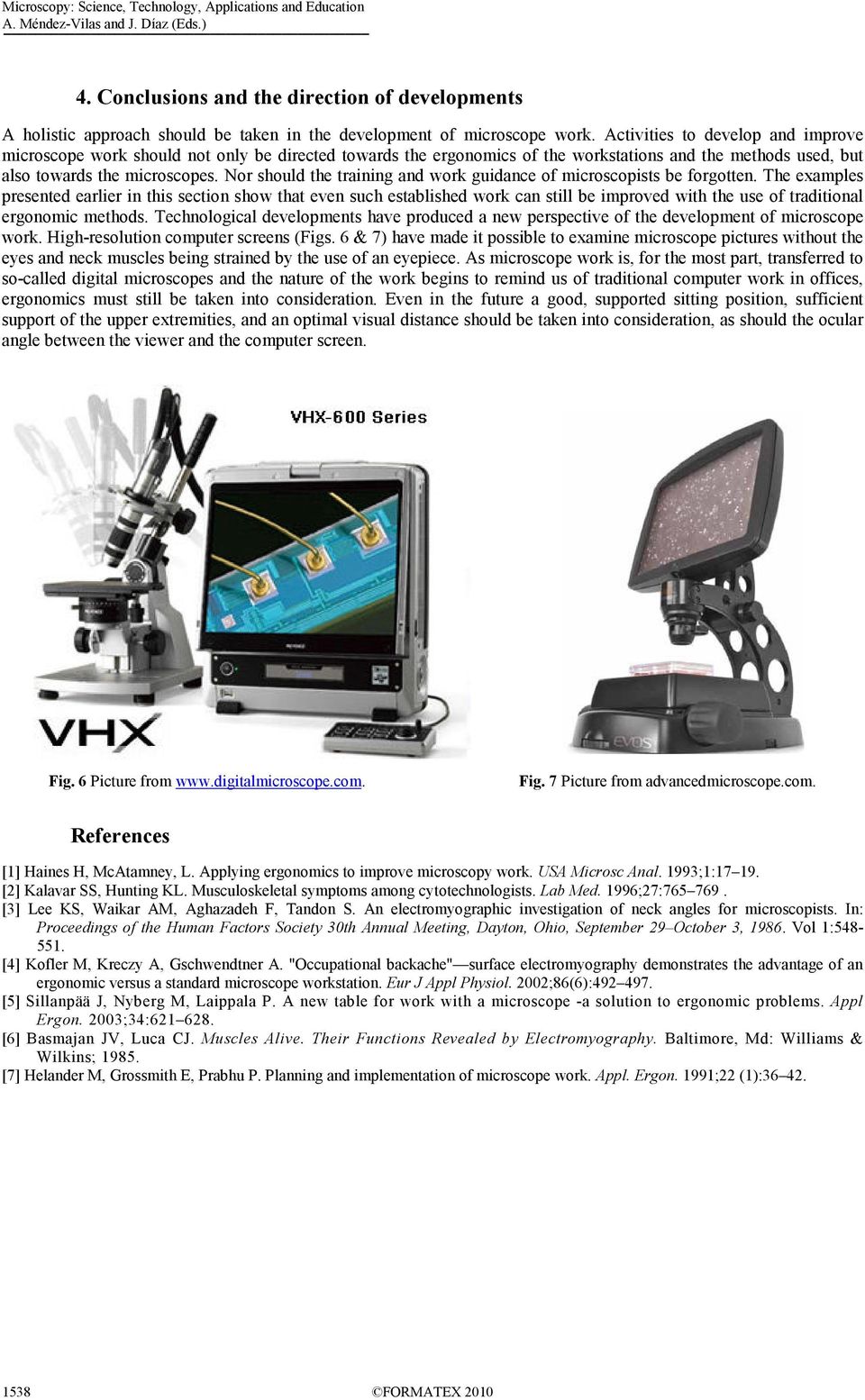
6 A. Méndez-Vilas and J. Díaz (Eds.) 4. Conclusions and the direction of developments A holistic approach should be taken in the development of microscope work. Activities to develop and improve microscope work should not only be directed towards the ergonomics of the workstations and the methods used, but also towards the microscopes. Nor should the training and work guidance of microscopists be forgotten. The examples presented earlier in this section show that even such established work can still be improved with the use of traditional ergonomic methods. Technological developments have produced a new perspective of the development of microscope work. High-resolution computer screens (Figs. 6 & 7) have made it possible to examine microscope pictures without the eyes and neck muscles being strained by the use of an eyepiece. As microscope work is, for the most part, transferred to so-called digital microscopes and the nature of the work begins to remind us of traditional computer work in offices, ergonomics must still be taken into consideration. Even in the future a good, supported sitting position, sufficient support of the upper extremities, and an optimal visual distance should be taken into consideration, as should the ocular angle between the viewer and the computer screen. Fig. 6 Picture from Fig. 7 Picture from advancedmicroscope.com. References [1] Haines H, McAtamney, L. Applying ergonomics to improve microscopy work. USA Microsc Anal. 1993;1: [2] Kalavar SS, Hunting KL. Musculoskeletal symptoms among cytotechnologists. Lab Med. 1996;27: [3] Lee KS, Waikar AM, Aghazadeh F, Tandon S. An electromyographic investigation of neck angles for microscopists. In: Proceedings of the Human Factors Society 30th Annual Meeting, Dayton, Ohio, September 29 October 3, Vol 1: [4] Kofler M, Kreczy A, Gschwendtner A. "Occupational backache" surface electromyography demonstrates the advantage of an ergonomic versus a standard microscope workstation. Eur J Appl Physiol. 2002;86(6): [5] Sillanpää J, Nyberg M, Laippala P. A new table for work with a microscope -a solution to ergonomic problems. Appl Ergon. 2003;34: [6] Basmajan JV, Luca CJ. Muscles Alive. Their Functions Revealed by Electromyography. Baltimore, Md: Williams & Wilkins; [7] Helander M, Grossmith E, Prabhu P. Planning and implementation of microscope work. Appl. Ergon. 1991;22 (1): FORMATEX 2010
Preventing Overuse Injuries at Work
 Preventing Overuse Injuries at Work The Optimal Office Work Station Use an adjustable chair with good lumbar support. Keep your feet flat on a supportive surface (floor or foot rest). Your knees should
STANDARD OPERATING PROCEDURES (SOP) FOR COMPUTER WORK, DESK TOP
 STANDARD OPERATING PROCEDURES (SOP) FOR COMPUTER WORK, DESK TOP General Guidelines-Best Practices: The following guidelines are applicable to office workers who sit at a desk and/or work on computers.
A Simple Guide to Health Risk Assessment Office Environment Series OE 5/2003
 A Simple Guide to Health Risk Assessment Office Environment Series OE 5/2003 Occupational Safety and Health Branch Labour Department Occupational Safety and Health Council Contents Introduction 1 Office
Proper Workstation Setup
 Proper Workstation Setup A Step by Step Guide to help you organize your workstation and reduce the risk of injury Step 1 Review Work Habits Working in a stationary position for long periods will increase
ERGONOMICS. University at Albany Office of Environmental Health and Safety 2010
 ERGONOMICS University at Albany Office of Environmental Health and Safety 2010 WHAT IS ERGONOMICS? From the Greek: ergon work and nomoi natural laws Defined by Webster as: Biotechnology WHAT IS ERGONOMICS?
Texas Department of Insurance. Office Ergonomics. Provided by. Division of Workers Compensation HS03-003C (03-09)
 Texas Department of Insurance Office Ergonomics Provided by Division of Workers Compensation HS03-003C (03-09) Contents Introduction 1 The Ergonomic Checklist 1 Sharp Edge Hazards 1 Equipment Adjustability
A Guide to Work with Computers
 A Guide to Work with Computers This guide is prepared by the Occupational Safety and Health Branch, Labour Department This edition May 2010 This guide is issued free of charge and can be obtained from
HEADACHES, NECK & EYE FATIGUE. Deep tissue massage. Regular upper body stretches. Consult Optometrist/Ophthalmologist
 HEADACHES, NECK & EYE FATIGUE Headaches Vision concerns Itchy and irritated eyes Overall Neck Pain Muscular tension See NECK PAIN and VISION CONCERNS below Need corrective lenses or new prescription Inadequate
A guide for employees
 A guide for employees This booklet has been developed as a guide to assist in the prevention of muscular discomfort and strain that can sometimes be associated with computer use. The information provided
Mike s Top Ten Tips for Reducing Back Pain
 Mike s Top Ten Tips for Reducing Back Pain The following article explains ways of preventing, reducing or eliminating back pain. I have found them to be very useful to myself, my clients and my patients.
Beware! your mouse can bite your hand!
 Beware! your mouse can bite your hand! Pradnya R. Malandkar K. Munshi When a typical form of work is extensively performed repeatedly over a large time span (years) it causes R.S.I. (Repetitive Stress
EGOSCUE CLINIC PAIN/POSTURE STRETCHES 1. Standing Arm Circles: Helps Restore Upper Body Strength
 EGOSCUE CLINIC PAIN/POSTURE STRETCHES 1. Standing Arm Circles: Helps Restore Upper Body Strength Two sets of 40 repetitions each. Stand with your feet pointed straight and hip-width apart. Place your fingertips
Do you sit at a desk all day? Does your 9 to 5 leave no time for structured exercise..?
 Do you sit at a desk all day? Does your 9 to 5 leave no time for structured exercise..? Staying healthy at work is easier than you might think: Try building the following desk based exercises into your
A Stretch-Break Program for Your Workplace! www.healthyworkplaceweek.ca
 www.healthyworkplaceweek.ca A Stretch-Break Program for Your Workplace! Why is stretching at work important? Sitting at a desk or computer; or standing at your work station for extended periods of time
Exercises for older people
 Exercise for older people Exercises for older people Sitting Getting started If you ve not done much physical activity for a while, you may want to get the all-clear from a GP before starting. For the
Take a few minutes for yourself and incorporate some Office Yoga into your daily routine.
 OFFICE YOGA Working in an office or at a computer for prolonged periods of time can put strain on the neck, shoulder and back muscles which in turn can lead to tension and stiffness. This tension can cause
X-Plain Neck Exercises Reference Summary
 X-Plain Neck Exercises Reference Summary Introduction Exercising your neck can make it stronger, more flexible and reduce neck pain that is caused by stress and fatigue. This reference summary describes
Ergonomics and Repetitive Strain Injury
 Ergonomics and Repetitive Strain Injury Desk Research conducted by StrategyOne for Microsoft April 2008 Ergonomics and Repetitive Strain Injury What is RSI? Repetitive Strain Injury, commonly known as
SETTING UP THE COMPUTER WORKSTATION TO FIT YOU
 SETTING UP THE COMPUTER WORKSTATION TO FIT YOU TABLE OF CONTENTS Adjusting Your Chair...1 Adjusting an Adjustable Working Surface...2 Adjusting a Non-adjustable Working Surface...3 Adjusting Your Keyboard...3
Workplace Job Accommodations Solutions for Effective Return to Work
 Workplace Job Accommodations Solutions for Effective Return to Work Workplace Job Accommodations Solutions for Effective Return to Work Published by 102 275 Broadway Winnipeg, MB R3C 4M6 www.mflohc.mb.ca
APPENDIX A. Sets = the completion of one consecutive grouping of repetitions of an exercise.
 Exercise Instruction Sheet Instructions: APPENDIX A Exercises are to be performed 3 times per week. Allow one rest day between each exercise day. You may divide the exercises into groups and perform them
Loss Prevention Reference Note. Adjusting the Computer Workstation. Glare Viewing Distance. Line of Sight Neck Posture Arm Posture Back Posture
 Loss Prevention Reference Note Adjusting the Computer Workstation Line of Sight Neck Posture Arm Posture Back Posture Adjustability Glare Viewing Distance Work Surfaces Mouse Position Leg Space Leg Support
ERGONOMICS AND MUSCULOSKELETAL INJURY (MSI) Preventing Injuries by Design
 ERGONOMICS AND MUSCULOSKELETAL INJURY (MSI) Preventing Injuries by Design ERGONOMICS and Musculoskeletal injury (MSI) Some of the tasks we perform at work, such as lifting, reaching and repeating the same
Computer Workstation Ergonomic Self Evaluation
 Computer Workstation Ergonomic Self Evaluation Use this guidance to perform a preliminary evaluation of your workstation, and make any adjustments that are necessary to achieve a correct neutral posture.
Do s and Don ts with Low Back Pain
 Do s and Don ts with Low Back Pain Sitting Sit as little as possible and then only for short periods. Place a supportive towel roll at the belt line of the back especially when sitting in a car. When getting
Fact sheet Exercises for older adults undergoing rehabilitation
 Fact sheet Exercises for older adults undergoing rehabilitation Flexibility refers to the amount of movement possible around a joint and is necessary for normal activities of daily living such as stretching,
Yes No Correction Date. Seated Position Do you know how to adjust your chair? Is your chair adjusted for support & comfort?
 UC Davis Health System - Computer Workstation Self Evaluation Assessment Date: Employee Name: Employee ID#: Department: Supervisor: Union Affiliation: Date of Hire (if new hire) Reason for Assessment (circle
Designed for comfort and built to last.
 Designed for comfort and built to last. Inter IKEA Systems B.V. 2015 Whether we work in an office or at home, many of us spend the majority of the day at a desk. A comfortable workspace is therefore essential
Introduction. Basis and preliminary investigations
 RSI prevention by changing computer input devices - Study by TU Darmstadt investigates the pen tablet as an ergonomic alternative to the computer mouse - Introduction Users of computer work stations often
HELPFUL HINTS FOR A HEALTHY BACK
 HELPFUL HINTS FOR A HEALTHY BACK 1. Standing and Walking For correct posture, balance your head above your shoulders, eyes straight ahead, everything else falls into place. Try to point toes straight ahead
Trunk Strengthening and Muscle and Coordination Exercises for Lower Limb Amputees
 Trunk Strengthening and Muscle and Coordination Exercises for Lower Limb Amputees Part One: Trunk Strengthening Trunk Extension Needed: Sturdy chair or stool, Theraband, and a Theraball if necessary. Sit
Computer Related Symptoms: A Major Problem for College Students
 1 Peper, E., & Gibney, K, H. (1999). Computer related symptoms: A major problem for college students. Proceedings of the Thirteenth Annual Meeting of the Association for Applied Psychophysiology and Biofeedback.
General Guidelines. Neck Stretch: Side. Neck Stretch: Forward. Shoulder Rolls. Side Stretch
 Stretching Exercises General Guidelines Perform stretching exercises at least 2 3 days per week and preferably more Hold each stretch for 15 20 seconds Relax and breathe normally Stretching is most effective
Passive Range of Motion Exercises
 Exercise and ALS The physical or occupational therapist will make recommendations for exercise based upon each patient s specific needs and abilities. Strengthening exercises are not generally recommended
ToThePOINT. Best Practices WORKER SAFETY. A Critical Factor in Workplace Safety. Understand Musculoskeletal Disorders LOSS CONTROL SERVICES
 ToThePOINT Best Practices LOSS CONTROL SERVICES Office Ergonomics A Critical Factor in Workplace Safety WORKER SAFETY The fastest growing category of workplace injury is a group of conditions called Musculoskeletal
SHOULDER PULL DOWNS. To learn efficient use of the shoulder blades and arms while maintaining a neutral spine position.
 SHOULDER INTRODUCT ION Welcome to your shoulder exercise program The exercises in the program are designed to improve your shoulder mobility, posture and the control of the muscles in your neck and shoulder
ROSA Rapid Office Strain Assessment. Michael Sonne, MHK, CK. [email protected]
 ROSA Rapid Office Strain Assessment Michael Sonne, MHK, CK. [email protected] Rapid Office Strain Assessment ROSA is a picture based posture checklist designed to quantify exposure to risk factors in
Health & Safety. Display Screen Equipment (DSE)
 Health & Safety Display Screen Equipment (DSE) Information Pack for: Users Information prepared by: County Health and Safety Unit (CHSU) Reference: SAF_DSE_D002(Users)(Issue2).doc Page 1 of 16 Date: 27/07/2005
ERGONOMICS. Improve your ergonomic intelligence by avoiding these issues: Awkward postures Repetitive tasks Forceful exertions Lifting heavy objects
 ERGONOMICS The goal of ergonomics is to reduce your exposure to work hazards. A hazard is defined as a physical factor within your work environment that can harm your body. Ergonomic hazards include working
COMPUTER WORKSTATION ERGONOMICS
 COMPUTER WORKSTATION ERGONOMICS Keeping the workplace safe Table of Contents Introduction.. 2 Office Ergonomics Process at UCDHS.. 3 Completing / Conducting the Self Workstation Evaluation.. 4 Computer
COMMON OVERUSE INJURIES ATTRIBUTED TO CYCLING, AND WAYS TO MINIMIZE THESE INJURIES
 COMMON OVERUSE INJURIES ATTRIBUTED TO CYCLING, AND WAYS TO MINIMIZE THESE INJURIES Listed are a few of the most common overuse injuries associated with cycling long distances. 1. Cervical and upper back
Cervical Exercise: How important is it? What can be done? The Backbone of Spine Treatment. North American Spine Society Public Education Series
 Cervical Exercise: The Backbone of Spine Treatment How important is it? What can be done? North American Spine Society Public Education Series Important: If you have had an accident that started your neck
Ergonomics for Schoolchildren and Young Workers
 Ergonomics for Schoolchildren and Young Workers Schoolchildren and Backpacks Schoolchildren everywhere are being asked to carry more and more weight around on their backs. There are many reasons why children
Stretching in the Office
 Stretching in the Office Legs: Quads, Hamstrings, IT band, Hip flexors, Gluts, Calves Quads: Standing @ desk maintaining upright posture, grab one leg @ a time by foot or ankle and bring it towards backside
Range of Motion. A guide for you after spinal cord injury. Spinal Cord Injury Rehabilitation Program
 Range of Motion A guide for you after spinal cord injury Spinal Cord Injury Rehabilitation Program This booklet has been written by the health care providers who provide care to people who have a spinal
How To Stretch Your Body
 Exercise Module A New Leaf Choices for Healthy Living University of North Carolina at Chapel Hill 2007 Center for Health Promotion and Disease Prevention Physical Activity Exercises for Keeping Active
Ergonomics for Grade School Students Using Laptop Computers
 The Proceeding of the XVI Annual International Occupational Ergonomics and Safety Conference ʹ22 Ergonomics for Grade School Students Using Laptop Computers Margo FRASER* Ergonomics Consultant, Calgary,
Exercises for Growing Taller
 1 Exercises for Growing Taller A Mini-Guide By Rodney Williams Copyright and Legal Notice 2 Published by: Copyright 2011. All Rights Reserved. No part of this publication may be reproduced or transmitted
HealthStream Regulatory Script
 HealthStream Regulatory Script Back Safety Version: May 2007 Lesson 1: Introduction Lesson 2: Back Injury Lesson 3: Spinal Anatomy and Physiology Lesson 4: Safe Operation of the Spine Lesson 5: Preventive
For Deep Pressure Massage
 T H E R A C A N E O W N E R S M A N U A L For Deep Pressure Massage Thera Cane is a self massager used to apply pressure to sore muscles. The unique design of the Thera Cane lets you apply deep pressure
Injuries from lifting, loading, pulling or pushing can happen to anyone in any industry. It is important to be aware of the risks in your workplace.
 Workplace safety: lifting One of the biggest concerns in the workplace is lifting and loading. When you lift something, the load on your spine increases and your spine can only bear so much before it is
elearning at Ramsay Online Orientation Program Guide Version 2.0 Please email any elearning questions to [email protected].
 elearning at Ramsay Online Orientation Program Guide Version 2.0 Please email any elearning questions to [email protected] Table of contents Introduction to elearning... 3 Ergonomics... 3
Operating Instructions
 Operating Instructions Table of Contents IMPORTANT INFORMATION 1-2 1 The backrack TM 3-6 Introduction 3 What does it do? 4 How do I use it? 5 How often should I use it? 6 2 Getting On 7-10 3 Basic Exercises
Approachproach to Office Ergonomics
 Office Ergonomics A Practical Approachproach to Office Ergonomics ErgoSystems Consulting Group, Inc. Minneapolis, MN Voice: 952-401-9296 Web: www.ergosystemsconsulting.com Welcome to ErgoSystems! Who sits
Manual Handling- The Whole Story!
 Manual Handling- The Whole Story! For Responsible Managers and Assessors Course Notes Mark Mallen Group Health and Safety Manager July 2005 Course Content 1 What is Manual Handling? 2 What s the Problem?
Qigong. Ba Duan Jin. The Eight Pieces of Brocade
 Qigong Ba Duan Jin The Eight Pieces of Brocade by Col and g Hamilton Yiheyuan Martial Arts Contents Page Introduction 2 Preparation 2 1. Hold up the Sky 3 2. The Archer 4 3. Join Heaven and Earth 5 4a.
Low Back Pain Exercises Interactive Video Series Transcript July 2013
 Introduction Low Back Pain Exercises Interactive Video Series Transcript July 2013 ** Note: If an exercise causes an increase in your pain, stop the exercise.** [Music introduction; Dr. John Sheehan onscreen]
Avoid The Dreaded Back Injury by Proper Lifting Techniques
 Avoid The Dreaded Back Injury by Proper Lifting Techniques If you ve ever strained your back while lifting something, you ll know the importance of lifting safely. Agenda Introduction About the Back The
Physical & Occupational Therapy
 In this section you will find our recommendations for exercises and everyday activities around your home. We hope that by following our guidelines your healing process will go faster and there will be
Guidance for Manual Handling of Gas Cylinder
 Guidance for Manual Handling of Gas Cylinder The Manual Handling Operations Regulations 1992 (updated 1998) came into force in January 1993. The purpose of the regulations is to reduce the risk of injury
Cardiac Rehab Program: Stretching Exercises
 Cardiac Rehab Program: Stretching Exercises Walk around the room, step side to side, ride a bike or walk on a treadmill for at least 5 minutes to warm up before doing these stretches. Stretch warm muscles
Injury Prevention for the Back and Neck
 Injury Prevention for the Back and Neck www.csmr.org We have created this brochure to provide you with information regarding: Common Causes of Back and Neck Injuries and Pain Tips for Avoiding Neck and
Range of Motion Exercises
 Range of Motion Exercises Range of motion (ROM) exercises are done to preserve flexibility and mobility of the joints on which they are performed. These exercises reduce stiffness and will prevent or at
The ergonomics of tablet use in business applications
 The ergonomics of tablet use in business applications An Ergonomic Solutions white paper by Melanie Swann MSc(Hons), Grad IOSH For more information and contact details, please go to ergonomic-solutions.net
Schoolbags. How heavy is too heavy? ** No one should carry more than 25 lb. Weight (lb.) 60 5 60-75 10 100 15 125 18 150 20 200 or more 25**
 Schoolbags How heavy is too heavy? Person s Weight (lb.) Maximum Backpack Weight (lb.) 60 5 60-75 10 100 15 125 18 150 20 200 or more 25** ** No one should carry more than 25 lb. Ergonomics for Schoolchildren
Work & Pregnancy Do Mix...
 Work & Pregnancy Do Mix... www.beststart.org PREGNANT AND WORKING Most women continue to work during their pregnancy, whether they work from home, or travel to a workplace. If you are pregnant or planning
A proper warm-up is important before any athletic performance with the goal of preparing the athlete both mentally and physically for exercise and
 A proper warm-up is important before any athletic performance with the goal of preparing the athlete both mentally and physically for exercise and competition. A warm-up is designed to prepare an athlete
Rotator Cuff and Shoulder Conditioning Program. Purpose of Program
 Prepared for: Prepared by: OrthoInfo Purpose of Program After an injury or surgery, an exercise conditioning program will help you return to daily activities and enjoy a more active, healthy lifestyle.
Why Back Safety is Important
 Back Safety Why Back Safety is Important Back injuries are considered by OSHA (the Occupational Safety and Health Administration) as the nation's #1 workplace safety problem. Back Injuries are often: Very
Fact Sheet: Occupational Overuse Syndrome (OOS)
 Fact Sheet: Occupational Overuse Syndrome (OOS) What is OOS? Occupational Overuse Syndrome (OOS) is the term given to a range of conditions characterised by discomfort or persistent pain in muscles, tendons
Back Safety and Lifting
 Back Safety and Lifting Structure of the Back: Spine The spine is the part of the back that supports the trunk and head. It protects the spinal cord as well as giving flexibility to the body. Vertebrae
Safe Lifting/ Back Safety Training. Environmental Health and Safety
 Safe Lifting/ Back Safety Training Environmental Health and Safety Why Back Safety is Important Back injuries are considered by OSHA the nation s #1 workplace safety problem Back injuries are often: Very
YOUR COMPUTER WORKSTATION AND YOUR OFFICE ENVIRONMENT
 WORKPLACE ERGONOMICS Your Guide to Health and Comfort at Work YOUR COMPUTER WORKSTATION AND YOUR OFFICE ENVIRONMENT CAN YOU ANSWER THESE SELF-HELP QUESTIONS? How do you adjust your chair for good posture
Back Injury Prevention. Back Injury. Prevention. Division of Workers Compensation HS01-023B0 (02-14)
 Back Injury Prevention Division of Workers Compensation HS01-023B0 (02-14) Table of Content Learn To Prevent Back Injury 3 Exercise To Strengthen Your Back and Reduce Stress 3 Lose Excess Weight 3 Maintain
Standard Operating Procedure for Handling an Inanimate Load
 Standard Operating Procedure for Handling an Inanimate Load Moving and handling an inanimate load/s is a key part of the working day for most employees. Moving inanimate loads can take place in many different
Ergonomics in the Workplace
 Ergonomics in the Workplace Ergonomics in the Workplace 1 Introduction The purpose of this short guide is to provide information to the reader on the subject of Ergonomics. It also provides guidance on
Switch Assessment and Planning Framework for Individuals with Physical Disabilities
 Guidance Notes Pre- assessment: It is important to gather together appropriate information before the assessment to inform on possible starting points for the assessment. The Pre-Assessment Form should
Workstation and Work Area Ergonomics
 Workstation and Work Area Ergonomics If you answer "yes" to one of the following questions, you need to read further. Do you spend hours working on a computer, either at work or home? Does your computer
ADVICE FOR PATIENTS WITH NECK PAIN
 ADVICE FOR PATIENTS WITH NECK PAIN Patient Information Leaflet Physiotherapy Department (Information sheet code SHOT/SHOA) A SMOKING FREE ENVIRONMENT WAHT-TH-007-1 - Version 1.2 Dear Patient This advice
MINDING OUR BODIES. Healthy Eating and Physical Activity for Mental Health
 MINDING OUR BODIES Healthy Eating and Physical Activity for Mental Health Facilitators Guide: Background Information (note: tell participants to consult with their doctor before starting to exercise) What
Hip Conditioning Program. Purpose of Program
 Prepared for: Prepared by: OrthoInfo Purpose of Program After an injury or surgery, an exercise conditioning program will help you return to daily activities and enjoy a more active, healthy lifestyle.
Carpal Tunnel Pain. STRETCH YOUR: 1) Wrist Flexors 2) Wrist Extensors 3) Wrist Decompression 4) Neck (see other chapters for more examples)
 Carpal Tunnel Pain STRETCH YOUR: 1) Wrist Flexors 2) Wrist Extensors 3) Wrist Decompression 4) Neck (see other chapters for more examples) wrist flexors wrist extensors carpal tunnel Athletic Edge - www.athleticedge.biz
Keep fit at the workplace! A simple training programme for more exercise at the workplace.
 Keep fit at the workplace! A simple training programme for more exercise at the workplace. INTRODUCTION Dear Readers, Keeping your body in one position, such as sitting or standing for a long time, results
HUR Rehab Line H E A L T H & F I T N E S S E Q U I P M E N T
 H E A L T H & F I T N E S S E Q U I P M E N T HUR Rehab Line HUR naturally different Contents HUR naturally different HUR SmartCard 1 HUR Rehab Line key to rehabilitation 2 SmartCard FCM Rehab Line computerized
Basic Training Exercise Book
 Basic Training Exercise Book Basic Training Exercise Book Instructions The exercises are designed to challenge the major muscles groups every day, approximately every 2 to 3 hours., for a total of 6 times
Physical & Occupational Therapy
 In this section you will find our recommendations for exercises and everyday activities around your home. We hope that by following our guidelines your healing process will go faster and there will be
Exercise 1: Knee to Chest. Exercise 2: Pelvic Tilt. Exercise 3: Hip Rolling. Starting Position: Lie on your back on a table or firm surface.
 Exercise 1: Knee to Chest Starting Position: Lie on your back on a table or firm surface. Action: Clasp your hands behind the thigh and pull it towards your chest. Keep the opposite leg flat on the surface
SAMPLE WORKOUT Full Body
 SAMPLE WORKOUT Full Body Perform each exercise: 30 secs each x 2 rounds or 2-3 sets of 8-12 reps Monday & Wednesday or Tuesday & Thursday Standing Squat Muscles: glutes (butt), quadriceps (thigh) Stand
Motor Vehicle Collision Form
 Patients Name: Date: / / 1) Please choose the date of the MVC: / / 2) Please the time of the MVC: : am / pm 3) Please enter the number of vehicles involved in the MVC: 1 2 3 4 5 6 7 8 9 4) In dollars,
LIFTING AND BACK SAFETY TRAINING LESSON PLAN
 LIFTING AND BACK SAFETY TRAINING LESSON PLAN Topic: Back Safety and Proper Lifting Techniques This presentation is designed to assist trainers conducting Lifting and Back Safety training for workers. Back
he American Physical Therapy Association would like to share a secret with you. It can help you do more with less effort breathe easier feel great.
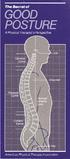 The Secret... T he American Physical Therapy Association would like to share a secret with you. It can help you do more with less effort breathe easier feel great. The secret is about good posture, which
Self-Range of Motion Exercises for Shoulders, Arms, Wrists, Fingers
 Self-Range of Motion Exercises for Shoulders, Arms, Wrists, Fingers These exercises will help keep your muscles strong and mobile, and your joints flexible. Other benefits of these exercises include: C
Labour Protect Your Back!
 Building Fair and Productive Workplaces Labour Protect Your Back! LT-006-07-07 Also available: Protect Your Lungs! / Protégez vos poumons! LT-168-10-05 Protect Your Skin! / Protégez votre peau! LT-158-09-05
How to Get and Keep a Healthy Back. Amy Eisenson, B.S. Exercise Physiologist
 How to Get and Keep a Healthy Back Amy Eisenson, B.S. Exercise Physiologist Lesson Objectives Statistics of Back Pain Anatomy of the Spine Causes of Back Pain Four Work Factors Core Muscles Connection