
POCKET COLORIMETER II ANALYSIS SYSTEMS
|
|
|
- Susanna Jordan
- 9 years ago
- Views:
Transcription
1 POCKET COLORIMETER II ANALYSIS SYSTEMS INSTRUCTION MANUAL Aluminum Manganese High Range Nitrate Dissolved Oxygen Hach Company, All rights reserved. Printed in the U.S.A. te/dk 12/06 4ed

2 Important Note This manual is intended for use with the following Pocket Colorimeter II instruments: Aluminum Cat. No Manganese Cat. No Nitrate Cat. No Dissolved Oxygen Cat. No The Pocket Colorimeter II instruments listed above are not interchangeable. 1 2

3 Table of Contents Safety Precautions Laboratory Safety Use of Hazard Information Precautionary Labels Specifications Instrument Keys and Display Instrument Cap Cord Aluminum Measuring Hints Sampling and Storage Accuracy Check Method Performance Spec Secondary Standards for Instrument Verification Interferences Summary of Method Replacement Parts
4 Table of Contents, continued Oxygen, Dissolved, HR Measuring Hints Sampling and Storage Accuracy Check Method Performance Spec Secondary Standards for Instrument Verification Standard Calibration Adjust Method Interferences Summary of Method Replacement Parts Manganese, HR Measuring Hints Sampling and Storage Accuracy Check Method Performance Standard Calibration Adjust Interferences Summary of Method Nitrate, HR

5 1 5 Table of Contents, continued Measuring Hints Sampling and Storage Accuracy Check Method Performance Standard Calibration Adjust Spec Secondary Standards for Instrument Verification Interferences Summary of Method Replacement Parts Instrument Operation Key Functions Menu Selections Switching Ranges Setting the Time Recalling Stored Measurements Battery Installation Error Codes Error Messages Standard Calibration Adjust

6 Table of Contents, continued User-Entered Calibration Overview Calibration Procedure Using Prepared Standards Entering a Predetermined Calibration Curve Editing a User-entered or Factory Calibration Curve Exiting the Calibration Routine Deleting Calibration Points Retrieving the Factory Calibration Maximum/Minimum Displayed Value Certification How to Order Repair Service Warranty
7 Safety Precautions Please read this entire manual before unpacking, setting up, or operating this instrument. Pay particular attention to all danger and caution statements. Failure to do so could result in serious injury to the operator or damage to the equipment. To ensure the protection provided by this equipment is not impaired, do not use or install this equipment in any manner other than that which is specified in this manual. Laboratory Safety As part of good laboratory practice, please familiarize yourself with the reagents used in these procedures. Read all product labels and the material safety data sheets (MSDS) before using them. It is always good practice to wear safety glasses when handling chemicals. Follow instructions carefully. Rinse thoroughly if contact occurs. If you have questions about reagents or procedures, please contact the manufacturer or distributor. Use of Hazard Information If multiple hazards exist, this manual will use the signal word (Danger, Caution, Note) corresponding to the greatest hazard. 1 7
8 Safety Precautions, continued DANGER Indicates a potentially or imminently hazardous situation which, if not avoided, could result in death or serious injury. CAUTION Indicates a potentially hazardous situation that may result in minor or moderate injury. NOTE Information that requires special emphasis. Precautionary Labels Please pay particular attention to labels and tags attached to the instrument. Personal injury or damage to the instrument could occur if not observed. This symbol, if noted on the instrument, references the instruction manual for operational and/or safety information. 1 8

9 Specifications Lamp: Light emitting diode (LED) Detector: Silicon photodiode Photometric precision: ± Abs Filter bandwidth: 15 nm Wavelength: 528 nm Absorbance range: Abs Dimensions: 3.2 x 6.1 x 15.2 cm (1.25 x 2.4 x 6 inches) Weight: 0.2 kg (0.43 lb) Sample cells: 25 mm (10 ml), AccuVac Ampuls Operating conditions: 0 to 50 C (32 to 122 F); 0 to 90% relative humidity (noncondensing) Power supply: Four AAA alkaline batteries; approximate life is 2000 tests* * Backlight usage will decrease battery life. 1 9

10 1 10

11 OPERATION DANGER Handling chemical samples, standards, and reagents can be dangerous. Review the necessary Material Safety Data Sheets and become familiar with all safety procedures before handling any chemicals. DANGER La manipulation des échantillons chimiques, étalons et réactifs peut être dangereuse. Lire les Fiches de Données de Sécurité des Produits (FDSP) et se familiariser avec toutes les procédures de sécurité avant de manipuler tous les produits chimiques. PELIGRO La manipulación de muestras químicas, estándares y reactivos puede ser peligrosa. Revise las fichas de seguridad de materiales y familiarícese con los procedimientos de seguridad antes de manipular productos químicos. GEFAHR Das Arbeiten mit chemischen Proben, Standards und Reagenzien ist mit Gefahren verbunden. Es wird dem Benutzer dieser Produkte empfohlen, sich vor der Arbeit mit sicheren Verfahrensweisen und dem richtigen Gebrauch der Chemikalien vertraut zu machen und alle entsprechenden Materialsicherheitsdatenblätter aufmerksam zu lesen. PERIGO A manipulação de amostras, padrões e reagentes químicos pode ser perigosa. Reveja a folha dos dados de segurança do material e familiarize-se com todos os procedimentos de segurança antes de manipular quaisquer produtos químicos. PERICOLO La manipolazione di campioni, standard e reattivi chimici può essere pericolosa. La preghiamo di prendere conoscenza delle Schede Techniche necessarie legate alla Sicurezza dei Materiali e di abituarsi con tutte le procedure di sicurezza prima di manipolare ogni prodotto chimico. 1 11

12 1 12
13 Instrument Keys and Display Item Description 1 POWER/BACKLIGHT Key 2 ZERO/SCROLL Key 3 MENU Key 4 Numeric Display 5 Range Indicator 6 Range Indicator 7 Menu Indicator 8 Calibration Adjusted Indicator 9 Battery Low Indicator 10 READ/ENTER Key 1 13

14 Instrument Cap Cord The instrument cap for the Pocket Colorimeter II doubles as a light shield. Accurate measurements cannot be obtained unless the sample or blank is covered with the cap. Use the instrument cap cord to secure the cap to the body of the colorimeter and prevent loss of the cap. See Figure 1 on page Loop the instrument cap cord through the ring on the cap. 2. Remove the battery compartment cover. Press the knotted end of the cord into the hole indicated by the arrow. 3. Slide the cord into the slot on the battery compartment cover. Snap the cover into place. 1 14
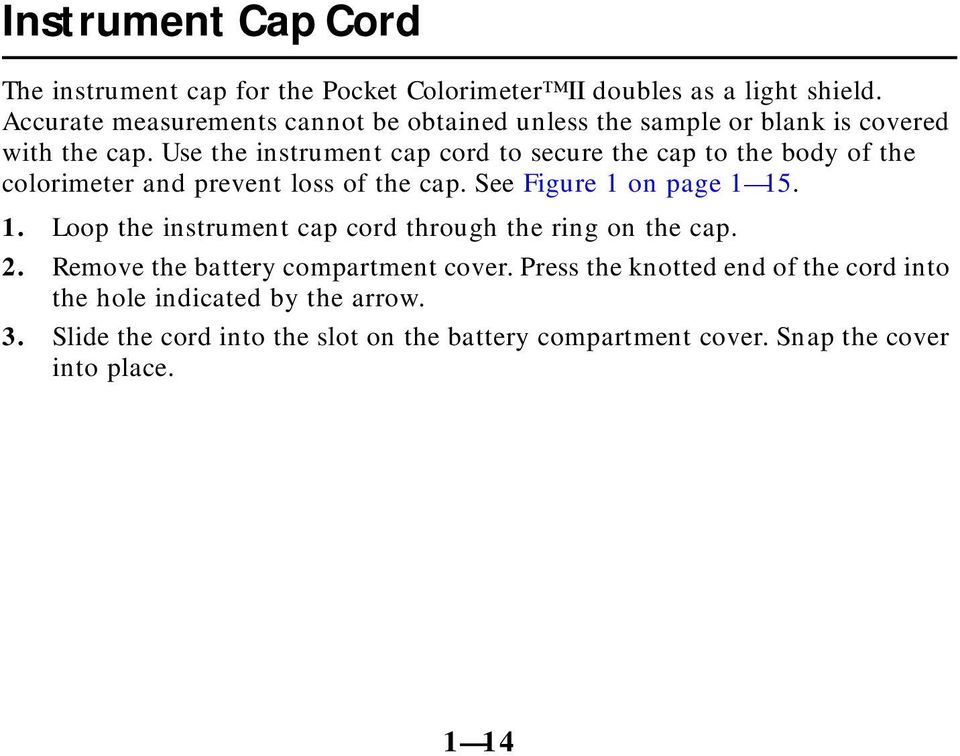
15 Instrument Cap Cord, continued Figure 1 Attaching the Instrument Cap Cord 1 15

16 1 16

17 Aluminum (0.02 to 0.80 mg/l Al) For water and wastewater Method 8012 Aluminon Method* Measuring Hints If samples cannot be analyzed immediately, see Sampling and Storage on page 1 22 Rinse glassware with 1:1 Hydrochloric Acid and deionized water before use to avoid errors due to contaminants absorbed in the glass. The sample temperature must be between C (68 77 F) for accurate results. Total aluminum determination requires a prior digestion, especially of particulate matter is present. See Sampling and Storage on page Note: The Pocket Colorimeter II is designed to measure solutions contained in sample cells. DO NOT dip the meter in the sample or pour the sample directly into the cell holder. * Adapted from Standard Methods for the Examination of Water and Wastewater. 1 17
18 Aluminum, continued 1. Fill a 50-mL graduated mixing cylinder to the 50-mL mark with sample. Note: For proof of accuracy, use a 0.4 mg/l aluminum standard solution in place of the sample. See page 36 for preparation instructions. 2. Add the contents of one Ascorbic Acid Powder Pillow. Stopper. Invert several times to dissolve powder Add the contents of one AluVer 3 Aluminum Reagent Powder Pillow. Stopper. Invert repeatedly for one minute to dissolve. Note: A red-orange color will develop if aluminum is present. Note: Inconsistent results will be obtained if any powder is undissolved.

19 Aluminum, continued 4. Fill a clean 10-mL sample cell with at least 10 ml of mixture (the prepared sample). Cap the cell. 5. Pour an additional volume of mixture into a clean 50-mL beaker, so that exactly 25 ml remains in the graduated mixing cylinder. Note: If too much mixture is poured out, fill the graduated mixing cylinder up to the 25- ml mark with the mixture in the beaker. 6. Add the contents of one Bleaching 3 Reagent Powder Pillow to the 25 ml remaining in the graduated mixing cylinder. Stopper. Vigorously shake for 30 seconds. Note: This solution should turn a light to medium orange upon bleaching. It will not become colorless. 1 19

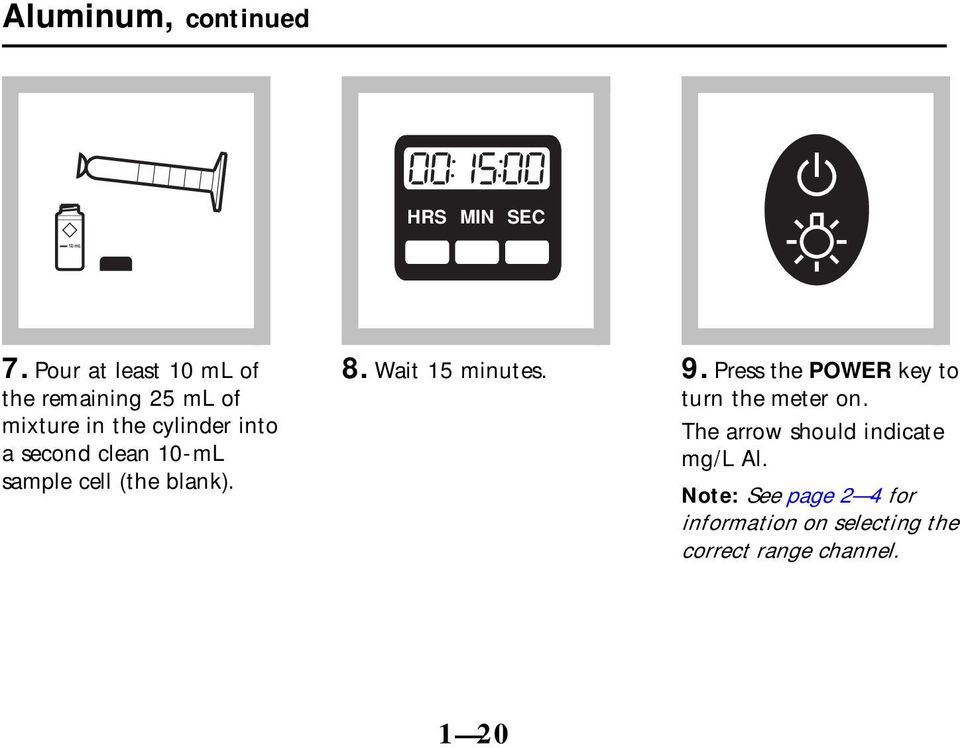
20 Aluminum, continued HRS MIN SEC 7. Pour at least 10 ml of the remaining 25 ml of mixture in the cylinder into a second clean 10-mL sample cell (the blank). 8. Wait 15 minutes. 9. Press the POWER key to turn the meter on. The arrow should indicate mg/l Al. Note: See page 2 4 for information on selecting the correct range channel. 1 20
21 Aluminum, continued 10. Remove the meter cap. Within 5 minutes after the 15-minute reaction period, place the blank in the cell holder with the diamond mark facing the keypad. Cover the cell with the instrument cap. Note: Wipe excess liquid and finger prints off sample cells. 11. Press ZERO/SCROLL. The display will show then Remove the blank from the cell holder. 12. Remove the meter cap. Place the prepared sample into the cell holder with the diamond mark facing the keypad. Cover the cell with the instrument cap. Note: Wipe excess liquid and finger prints off sample cells. 1 21
22 Aluminum, continued 13. Press READ/ENTER. The instrument will show followed by the results in mg/l aluminum. Sampling and Storage Collect sample in clean plastic or glass bottles. For storage, adjust the ph to 2 or less with nitric acid (about 1.5 ml per liter). Preserved samples can be stored up to six months at room temperature. Adjust the ph to between 3.5 and 4.5 with 5.0 N 1 22
23 Aluminum, continued Sodium Hydroxide before analysis. Correct the test result for volume additions using the following equation: final sample volume (ml) test result (mg/l) = correct sample concentration (mg/l) initial sample volume (ml) See Section 1 of the Hach Water Analysis Handbook for further information concerning total aluminum digestions. Accuracy Check Standard Additions Method a. Snap the neck off an Aluminum Standard Solution Voluette Ampule, 50 mg/l Al. b. Use a TenSette pipet to add 0.1 ml, 0.2 ml, and 0.3 ml of standard, respectively, to three 50-mL samples. Mix each thoroughly. c. Analyze each sample as directed in the procedure. The aluminum concentration should increase 0.1 mg/l for each 0.1 ml of standard added. 1 23
24 Aluminum, continued Standard Solution Method Prepare a 0.4 mg/l aluminum standard solution following step 1 through step 3 in Preparing the Aluminum Calibration Standard Solution. Analyze this solution following the procedure gives a result close to 0.40 mg/l. Preparing the Aluminum Calibration Standard Solution 1. Snap the neck off an Aluminum Standard Solution Voluette Ampule, 50 mg/l as Al. 2. Use a TenSette pipet to add 0.4 ml of aluminum standard from the Voluette ampule into a 50-mL graduated cylinder to prepare a 0.4 mg/l standard. Alternatively, the following formula may be used to determine the preparation of a different concentration standard using the same initial 50 mg/l standard and final 50 ml sample volume: volume of initial standard used (ml) = final sample concentration (mg/l) 3. Using deionized water, dilute the 0.4 ml (or other volume of standard calculated in step 2) of aluminum standard to the 50 ml mark. Mix thoroughly. This is the aluminum standard working solution (for best results, prepare this solution daily). 1 24
25 1 25 Aluminum, continued Note: More accurate results may be achieved using volumetric glassware to prepare standards. Using class A pipets, transfer five times the volume of initial 50 mg/l Al standard calculated in step 2 to a 250-mL volumetric flask. Dilute to the mark and mix thoroughly. 4. Use the aluminum reagents to produce color in the prepared standard solution following step 1 through step 8 of the procedure beginning on page Method Performance Typical Precision (95% Confidence Interval): 0.40 ± 0.02 mg/l Al Estimated Detection Limit: EDL = 0.01 mg/l Al Spec Secondary Standards for Instrument Verification Note: Due to improvements in the optical system of the Pocket Colorimeter II, the tolerance ranges and values on the Certificate of Analysis of previously purchased Spec standards may no longer be valid. Obtain a new set of standards, or use the Pocket Colorimeter II to assign new values to existing standards.
26 Aluminum, continued Spec Secondary Standards are available to quickly check the repeatability of the Pocket Colorimeter II instrument. After initial measurements for the Spec standards are collected, the standards can be re-checked as often as desired to ensure the instrument is working consistently. The standards do not ensure reagent quality nor do they ensure the accuracy of the test results. Analysis of real standard solutions using the kit reagents is required to verify the accuracy of the entire Pocket Colorimeter system. The Spec Standards should NEVER be used to calibrate the instrument. The certificate of analysis lists the expected value and tolerance for each Spec Standard. Note: Before proceeding, make sure the instrument is in the low range (LR). See Switching Ranges on page 2 4. Using the Spec Standards 1. Place the colorless Spec blank into the cell holder with the alignment mark facing the keypad. Tightly cover the cell with the instrument cap. 2. Press ZERO. The display will show Place the STD 1 cell into the cell holder. Tightly cover the cell with the instrument cap. 1 26
27 Aluminum, continued 4. Press READ/ENTER. Record the concentration measurement. 5. Repeat steps 3 4 with cells labeled STD 2 and STD Compare these measurements with previous measurements to verify the instrument is performing consistently. (If these are the first measurements, record them for comparison with later measurements.) Note: If the instrument is user-calibrated, initial standard measurements of the Spec Standards will need to be performed again for the user calibration. Interferences The following do not interfere up to the indicated concentrations. Interfering Substance Concentration at Which Substance Interferes Alkalinity 1000 mg/l as CaCO 3 Acidity 300 mg/l as CaCO 3 Iron 20 mg/l Phosphate 50 mg/l 1 27
28 Aluminum, continued Interferences from higher alkalinity concentrations can be eliminated by the following pretreatment: 1. Add one drop of m-nitrophenol Indicator Solution to the sample in step 1 of the procedure. A yellow color indicates excessive alkalinity. 2. If the sample is yellow, add one drop of Sulfuric Acid Standard Solution, 5.25 N. Stopper the cylinder. Invert to mix. If the yellow color persists, repeat until the sample changes to colorless. Continue with the test. Polyphosphate interferes at all levels, causing negative errors. Before running the test polyphosphate must not be present. Acidity interferes at greater than 300 mg/l as CaCO 3. Samples with acidity in greater concentrations must be treated as follows: 1. Add one drop of m-nitrophenol Indicator Solution to the sample in step Add one drop of Sodium Hydroxide Standard Solution, 5.0 N. Stopper the cylinder. Invert to mix. Repeat as often as necessary until the color changes from colorless to yellow. 3. Add one drop of Sulfuric Acid Standard Solution, 5.25 N, to change the solution from yellow back to colorless. Continue with the test. 1 28
29 Aluminum, continued Calcium does not interfere. Fluoride interferes at all levels by complexing with aluminum. The actual aluminum concentration can be determined using the Figure 1 on page 1 30 when the fluoride concentration is known. To use the fluoride interference graph: 1. Select the vertical grid line along the top of the graph that represents the aluminum reading obtained in step 13 of the procedure. 2. Locate the point of the line intersecting with the horizontal grid line that indicates how much fluoride is present in the sample. 3. Extrapolate the true aluminum concentration by following the curved lines on either side of the intersect point down to the true aluminum concentration. For example, if the aluminum test result was 0.7 mg/l Al and the fluoride present in the sample was 1 mg/l F, the point where the 0.7 grid line intersects with the 1 mg/l F grid line falls between the 1.2 and 1.3 mg/l Al curves. In this case the true aluminum content would be 1.27 mg/l. 1 29
30 Aluminum, continued Figure 1 Fluoride Interference Graph mg/l Al 3 + (Reading from Pocket Colorimeter Instrument) Fluoride in Sample TRUE ALUMINUM CONCENTRATION
31 Summary of Method Aluminum, continued Aluminon indicator combines with aluminum in the sample to form a red-orange color. The intensity of color is proportional to the aluminum concentration. Ascorbic acid is added to remove iron interference. AluVer 3 Aluminum Reagent, packaged in powder form, shows exceptional stability and is applicable for fresh water samples. Replacement Parts Required Reagents Description Unit Cat.No. Aluminum Reagent Set Tests Includes: (1) AluVer 3 Aluminum Reagent Powder Pillows, 100/pkg (1) Ascorbic Acid Powder Pillows, 100/pkg (1) Bleaching 3 Reagent Powder Pillows, 100/pkg 1 31
32 Aluminum, continued Required Apparatus Description Unit Cat.No. Beaker, polypropylene, 50 ml...each Cylinder, graduated mixing, 50 ml...each Optional Reagents Aluminum Standard Solution, 100 mg/l ml Aluminum Standard Solution, 50 mg/l, 10 ml Voluette Ampules... 16/pkg Hydrochloric Acid Solution, 6 N (1:1) ml m-nitrophenol Indicator Solution, 10 g/l ml Nitric Acid, ACS ml Nitric Acid Solution, 1: ml Sodium Hydroxide Standard Solution, 5.0 N ml Sodium Hydroxide Standard Solution, 5.0 N...59 ml Spec Aluminum Secondary Standards...each Sulfuric Acid Standard Solution, 5.25 N ml Water, deionized...4 liters
33 1 33 Aluminum, continued Optional Apparatus Description Unit Cat.No. ph Indicator Paper, 1 to 11 ph... 5 rolls/pkg sension 1 Basic Portable ph Meter, with electrode... each Pipet Filler, safety bulb... each Pipet, serological, 2 ml... each Pipet, TenSette, 0.1 to 1.0 ml... each Pipet Tips, for TenSette Pipet...50/pkg Pipet, volumetric, Class A, 0.50 ml... each Pipet, volumetric, Class A, 1.00 ml... each Pipet, volumetric, Class A, 2.00 ml... each Pipet, volumetric, Class A, 3.00 ml... each Pipet, volumetric, Class A, 4.00 ml... each Thermometer, -10 to 110 C... each Timer, 3-channel... each Replacement Parts Batteries, alkaline... 4/pkg Instrument Cap/light shield... each Instruction Manual... each Sample Cells, 10 ml, with caps... 6/pkg
34 1 34
35 Oxygen, Dissolved, HR (0.2 to 10.0 mg/l O 2 ) For water and wastewater HRDO Method Measuring Hints Method 8166 Samples must be analyzed immediately and cannot be preserved for later analysis. See Sampling and Storage on page Avoid sample manipulation that could either expose the sample to contamination from atmospheric oxygen or cause oxygen to be lost from the sample. See Sampling and Storage on page The optional AccuVac Snapper Kit can facilitate testing by providing controlled ampule filling. Note: The Pocket Colorimeter II is designed to measure solutions contained in sample cells. DO NOT dip the meter in the sample or pour the sample directly into the cell holder. 1 35
36 Oxygen, Dissolved, HR, continued 1. Fill a blue ampule cap with sample. Fill a 10-mL sample cell with sample (blank). Cap. 2. Fill a high range dissolved oxygen AccuVac Ampul with sample (the prepared sample). Keep the tip immersed until the ampule fills completely. 3. Without turning the ampule upright, immediately place the ampule cap securely over the tip of the ampule. Shake for approximately 30 seconds. Note: A small amount of undissolved reagent does not influence test results. The cap prevents contamination with atmospheric oxygen. 1 36
37 Oxygen, Dissolved, HR, continued HRS MIN SEC 4. Wait 2 minutes. Note: The two-minute reaction period enables oxygen, which was degassed during aspiration, to redissolve and react. 5. At the end of the 2-minute period, shake the ampule for 30 seconds. Note: Wipe excess liquid and fingerprints off the sample cell. 6. Press the POWER key to turn the meter on. The arrow should indicate the mg/l O 2 channel. Note: See page 2 4 for information on selecting the correct range or channel. 1 37
38 Oxygen, Dissolved, HR, continued 7. Remove the meter cap. Place the blank in the cell holder with the diamond mark facing the keypad. Cover the cell with the instrument cap. 8. Press ZERO/SCROLL. The display will show then 0.0. Remove the blank from the cell holder. 9. Wipe the AccuVac Ampul dry and insert it into the cell holder. Wait approximately 30 seconds for any air bubbles to dissipate from the light path. 1 38
39 Oxygen, Dissolved, HR, continued 10. Cover the ampule with the instrument cap. 11. Press READ/ENTER. The instrument will show followed by the results in mg/l dissolved oxygen. 1 39
40 Oxygen, Dissolved, HR, continued Sampling and Storage The primary consideration in sampling with the high range dissolved oxygen AccuVac Ampul is preventing the sample from being contaminated with atmospheric oxygen. This is accomplished by capping the ampule with the ampule cap after filling the ampule and before reading the concentration. If the ampule is securely capped, the cap should protect the sample from contamination for several hours. The absorbance will decrease approximately 3% during the first hour and will not change significantly afterwards. Sampling and sample handling are important in obtaining meaningful results. The dissolved oxygen content of water changes with depth, turbulence, temperature, sludge deposits, light, microbial action, mixing, travel time, and other factors. A single dissolved oxygen test rarely reflects the accurate over-all condition of a body of water. Several samples taken at different times, locations, and depths are recommended for most reliable results. A dissolved oxygen sampler for AccuVac Ampuls is available for taking samples of different depths, see Optional Apparatus on page Samples should be tested immediately after collection, although only a small error results if the reacted sample is measured several hours after color development. 1 40
41 Accuracy Check Oxygen, Dissolved, HR, continued Standard solutions for dissolved oxygen are difficult and time-consuming to prepare. Lack of attention to detail can result in errors that can occur during standards preparation. The manufacturer prepares the calibration curve under rigorous analytical laboratory conditions and recommends using the factory calibration. A user calibration or user-prepared dissolved oxygen standard may be required by a regulatory official or agency. Two options are available on the Pocket Colorimeter II to meet this requirement. A dissolved oxygen standard may be prepared and used to validate the calibration curve using the Standard Calibration Adjust feature (see Standard Calibration Adjust on page 2 13). The concentration of the prepared standard must be determined with an alternate instrument such as a spectrophotometer or colorimeter or by using another alternate method such as titration or dissolved oxygen meter. The concentration of the dissolved oxygen standard must be between 4.0 and 9.0 mg/l dissolved oxygen.in addition, a user-generated calibration curve can be made and programmed into the Pocket Colorimeter II. See User-Entered Calibration on page
42 Oxygen, Dissolved, HR, continued Method Performance Typical Precision (95% CI): 7.4 ± 0.2 mg/l O 2 Estimated Detection Limit: EDL = 0.2 mg/l O 2 Spec Secondary Standards for Instrument Verification Note: Due to improvements in the optical system of the Pocket Colorimeter II, the tolerance ranges and values on the Certificate of Analysis of previously purchased Spec standards may no longer be valid. Obtain a new set of standards, or use the Pocket Colorimeter II to assign new values to existing standards. Spec Secondary Standards are available to quickly check the repeatability of the Pocket Colorimeter II instrument. After initial measurements for the Spec standards are collected, the standards can be re-checked as often as desired to ensure the instrument is working consistently. The standards do not ensure reagent quality nor do they ensure the accuracy of the test results. Analysis of real standard solutions using the kit reagents is required to verify the accuracy of the entire Pocket Colorimeter system. The Spec Standards 1 42
43 Oxygen, Dissolved, HR, continued should NEVER be used to calibrate the instrument. The Certificate of Analysis lists the expected value and tolerance for each Spec Standard. Note: Before proceeding, make sure the instrument is in the mg/l O 2 range. See Switching Ranges on page 2 4. Using the Spec Standards 1. Place the colorless Spec blank into the cell holder with the alignment mark facing the keypad. Tightly cover the cell with the instrument cap. 2. Press ZERO. The display will show Place the STD 1 cell into the cell holder. Tightly cover the cell with the instrument cap. 4. Press READ/ENTER. Record the concentration measurement. 5. Repeat steps 3 4 with cells labeled STD 2 and STD Compare these measurements with previous measurements to verify the instrument is performing consistently. (If these are the first measurements, record them for comparison with later measurements.) 1 43
44 Oxygen, Dissolved, HR, continued Note: If the instrument is user-calibrated, initial standard measurements of the Spec Standards will need to be performed again for the user calibration. Standard Calibration Adjust Method To perform a standard calibration adjust, see Standard Calibration Adjust on page Interferences The following do not interfere at a level of 10 mg/l: Cr 3+, Mn 2+, Fe 2+, Ni 2+, Cu 2+ and NO 2. These ions normally occur in concentrations of less than 10 mg/l in the environment. Magnesium is commonly present in seawater and causes a negative interference. If the sample contains more than 50% seawater, the oxygen concentration obtained by this method will be 25% less than the true oxygen concentration. If the sample contains less than 50% seawater, the interference will be less than 5%. 1 44
45 Summary of Method Oxygen, Dissolved, HR, continued The High Range Dissolved Oxygen AccuVac Ampul contains reagent vacuum sealed in a 14-mL ampule. When the AccuVac Ampul is opened in a sample containing dissolved oxygen, it forms a yellow color which turns purple. The purple color development is proportional to the concentration of dissolved oxygen. Replacement Parts Required Reagents Description Unit Cat.No. High Range Dissolved Oxygen Reagent AccuVac Ampuls, with 2 reusable ampule caps... 25/pkg Required Apparatus Beaker, 50 ml... each H Caps, ampule, blue...25/pkg Optional Reagents Spec Secondary Standards, Dissolved Oxygen... each
46 Oxygen, Dissolved, HR, continued Optional Apparatus AccuVac Snapper Kit...each Caps for 10-mL sample cells... 12/pkg Dissolved Oxygen Sampler for AccuVac Ampuls...each Replacement Parts Description Unit Cat.No. Batteries, alkaline, AAA...4/pkg Instrument Cap/light shield...each Instrument Manual...each Sample Cells, 10-mL with screw caps...6/pkg
47 Manganese, HR (0.2 to 20.0 mg/l Mn) For water and wastewater Method 8034 Periodate Oxidation Method*, USEPA approved for reporting (digestion required)** Measuring Hints Determine a reagent blank for each new lot of reagent. Note: The Pocket Colorimeter II is designed to measure solutions contained in sample cells. DO NOT dip the meter in the sample or pour the sample directly into the cell holder. * Adapted from Standard Methods for the Examination of Water and Wastewater. ** Federal Register, 44 (116) (June 14, 1979). 1 47
48 Manganese, HR, continued 1. Fill a 10-mL sample cell to the 10-mL line with sample. 2. Add the contents of one buffer powder pillow, citrate type, to the sample cell (the prepared sample). Cap the cell and shake gently to mix. 3. Add the contents of one sodium periodate powder pillow to the sample cell. Cap the cell and shake gently to mix. Note: A violet color will form if manganese is present. 1 48
49 Manganese, HR, continued HRS MIN SEC 4. Wait 2 minutes Note: Continue with step 5 while the timer is running. 5. Fill a 10-mL cell to the 10-mL line with sample (the blank). Cap the cell. 6. Press the POWER key to turn the meter on. The arrow should indicate mg/l Mn. Note: See page 2 4 for information on selecting the correct range channel. 1 49
50 Manganese, HR, continued 7. Remove the meter cap. Place the blank in the cell holder with the diamond mark facing the keypad. Cover the cell with the instrument cap. Note: Wipe excess liquid and finger prints off sample cells. Note: 8. Press ZERO/SCROLL. The display will show then 0.0. Remove the blank from the cell holder. 9. Remove the meter cap. After the 2-minute wait, place the prepared sample into the cell holder with the diamond mark facing the keypad. Cover the cell with the instrument cap. Note: Wipe excess liquid and finger prints off sample cells. 1 50
51 Manganese, HR, continued Table 1 To convert reading from To Multiply by mg/l Mn mg/l MnO mg/l Mn mg/l KMnO Press READ/ENTER. The instrument will show followed by the results in mg/l manganese Note: To convert results to other units, use the conversion table (Table 1). Sampling and Storage Collect samples in acid-washed plastic bottles. Manganese may be lost by absorption to glass container walls. Adjust the ph to 2 or less with nitric acid (about 2 ml per liter). Preserved samples may be stored up to six months at room 1 51
52 Manganese, HR, continued temperature. Adjust the ph to between 4 and 5 with 5.0 N sodium hydroxide before analysis. Do not exceed ph 5, as the manganese may be lost as a precipitate. Correct the test results for volume additions. Accuracy Check Standard Additions Method 1. Snap the neck off a manganese standard solution Voluette ampule, 25 mg/l Mn. 2. Use the Tensette pipet to add 0.2, 0.4, and 0.6 ml of standard to three 10-mL water samples. Mix thoroughly. 3. Analyze each sample as described above. The manganese concentration should increase approximately 0.5, 1.0, and 1.4 mg/l for the 0.2, 0.4, and 0.6 ml added, respectively. Standard Solution Method Prepare a 10.0 mg/l manganese standard solution by pipetting 10.0 ml of manganese standard solution, 1000 mg/l Mn, into a 1000-mL volumetric flask. Dilute to the mark with deionized water. Prepare daily. Perform the procedure as described with the prepared standard. 1 52
53 Manganese, HR, continued Multi-parameter standards that simulate typical high range metals concentrations found in water are available to confirm test results. See Optional Reagents on page Method Performance Typical Precision (95% CI): 10.0 ± 0.2 mg/l Mn Estimated Detection Limit: EDL = 0.2 mg/l Mn Standard Calibration Adjust To perform a standard calibration adjustment using the 10.0 mg/l manganese standard, or using an alternative concentration, see Standard Calibration Adjust on page
54 Manganese, HR, continued Interferences The following may interfere when present in concentrations exceeding those listed below: Interfering Substance Calcium Chloride Iron Magnesium Highly buffered samples or extreme sample ph may exceed the buffering capacity of the reagents and require sample pretreatment. Summary of Method Concentration 700 mg/l 70,000 mg/l 5 mg/l 100,000 mg/l Manganese in the sample is oxidized to the purple permanganate state by sodium periodate, after buffering the sample with citrate. The purple color is directly proportional to the manganese concentration. If only dissolved manganese is to be determined, filter the sample before acid addition. 1 54
55 1 55 Manganese, HR, continued Required Reagents Description Unit Cat. No. Manganese Reagent Set, Periodate Oxidation Method, 10 ml sample... each Includes: (1) Citrate Buffer Powder Pillow, 100/pkg (1) Sodium Periodate Powder Pillow, 100/pkg Required Apparatus Sample Cells, 10 ml, with cap... 6/pkg Optional Reagents Hydrochloric Acid Solution, 1:1, 6.0 N ml Manganese Standard Solution, 1000 mg/l Mn ml Manganese Standard Solution, Voluette Ampule, 250 mg/l Mn, 10 ml...16/pkg Nitric Acid, ACS ml Nitric Acid Solution, 1: ml Sodium Hydroxide Solution, 5 N ml MDB Water, deionized...4 L
56 Manganese, HR, continued Optional Apparatus Description Unit Cat. No. Dropper, plastic, 0.5- and 1.0-mL marks... 20/pkg Flask, Erlenmeyer, 250-mL...each Flask, volumetric, 1000-mL, Class A...each ph Indicator Paper, 1 to 11 ph...5 rolls/pkg Pipet, serological, 1-mL...each Pipet, serological, 5-mL...each Pipet, TenSette 0.1- to 1.0-mL...each Pipet Tips, for TenSette Pipet... 50/pkg Pipet, volumetric, 10.0 ml, Class A...each Pipet Filler, Safety Bulb...each Replacement Parts Batteries, alkaline...4/pkg Instrument cap/light shield...each Instruction manual...each
57 Nitrate, HR (0.4 to 30.0 mg/l NO 3 N) For water, wastewater, and seawater* Cadmium Reduction Method Measuring Hints Method 8039 For more accurate results, determine a reagent blank value for each new lot of reagent. Follow the procedure using deionized water in place of the sample. Subtract the reagent blank value from the final results or perform a reagent blank adjust. A deposit of unoxidized metal will remain after the NitraVer 5 dissolves. The deposit will not affect results. This method is technique-sensitive. Shaking time and technique influence color development. For most accurate results, make successive tests on a 10-mg/L Nitrate Nitrogen Standard solution. Adjust shaking time and technique to obtain the correct result. * For seawater, a manual calibration is required; see Interferences on page
58 Nitrate, HR, continued Wipe the outside of sample cells before each insertion into the instrument cell holder. Use a damp towel followed by a dry one to remove fingerprints or other marks. Rinse the sample cell immediately after use to remove all cadmium particles. Prepared samples will contain cadmium and must be disposed of according to Federal, State, and local hazardous waste regulations. Note: The Pocket Colorimeter II is designed to measure solutions contained in sample cells. DO NOT dip the meter in the sample or pour the sample directly into the cell holder. 1 58
59 Nitrate, HR, continued Using Powder Pillows 1. Fill a 10-mL sample cell to the 10-mL line with sample. 2. Add the contents of one NitraVer Reagent Powder Pillow (the prepared sample). Cap the cell. 3. Shake the sample cell vigorously for one minute. Note: Inverting time and technique influence color development. For best results perform a user-entered calibration 1 59
60 Nitrate, HR, continued HRS MIN SEC 4. Let the cell sit undisturbed for 5 minutes. Note: An amber color will develop if nitrate-nitrogen is present. 5. Fill a second 10-mL cell to the 10-mL line with untreated sample (the blank). Cap the cell. 6. Press the POWER key to turn the meter on. The arrow should indicate Channel 1. Note: See page 2 4 for information on selecting the correct range channel. 1 60
61 Nitrate, HR, continued 7. Remove the meter cap. Place the blank in the cell holder with the diamond mark facing the keypad. Cover the cell with the instrument cap. Note: Wipe liquid off sample cells or damage to the instrument could occur. 8. Press ZERO/SCROLL. The display will show then 0.0. Remove the blank from the cell holder. 9. Remove the meter cap. Place the prepared sample into the cell holder with the diamond mark facing the keypad. Cover the cell with the meter cap. Note: Wipe excess liquid and finger prints off sample cells. 1 61
62 Nitrate, HR, continued 10. Press READ/ENTER. The instrument will show followed by the results in mg/l nitrate as nitrogen. Subtract the reagent blank from the reading to obtain the mg/l nitrate value. Note: Rinse the sample cell immediately after use to remove metal particles. Note: To convert results to mg/l nitrate (NO 3 ), multiply by
63 Nitrate, HR, continued Using AccuVac Ampuls 1. Press the POWER key to turn on the meter. The arrow in the display should indicate Channel 2. Note: See page 2 4 for information on selecting the correct range channel. 2. Fill a 10-mL sample cell to the 10-mL line with sample (the blank). Cap. Collect at least 40 ml of sample in a 50-mL beaker. Note: Samples must be analyzed immediately and cannot be preserved for later analysis. 3. Remove the instrument cap. Place the blank in the cell holder, with the diamond mark facing the keypad. Cover the cell with the instrument cap. Note: Wipe liquid and finger prints off of sample cells. 1 63
64 Nitrate, HR, continued 4. Press ZERO/SCROLL. The display will show then 0.0. Remove the blank. 5. Fill a NitraVer 5 Reagent AccuVac Ampule with sample. Note: Keep the tip immersed until the ampule fills completely. 6. Repeatedly invert the ampule for one minute. Wipe off any liquid or fingerprints. Note: Accuracy is not affected by undissolved powder. 1 64
65 Nitrate, HR, continued 7. Let the ampule sit undisturbed for 5 minutes. Note: An amber color will develop if nitrate-nitrogen is present. Note: Wipe liquid off the AccuVac Ampul. 8. Insert the ampule into the cell holder. 9. Cover the ampule with the instrument cap. 1 65
66 Nitrate, HR, continued 10. Press READ/ENTER. The instrument will show followed by the results in mg/l nitrate as nitrogen. Subtract the reagent blank from the reading to obtain the mg/l nitrate value. Note: To convert results to mg/l nitrate (NO 3 ), multiply by
67 Sampling and Storage Nitrate, HR, continued Collect samples in clean plastic or glass bottles. Store at 4 C (39 F) or lower if the samples will be analyzed within 48 hours. Before analysis, warm the sample to room temperature, then neutralize the sample with 5.0 N Sodium Hydroxide Standard Solution. Correct the test results for volume addition. For longer storage periods (up to 14 days), adjust the sample ph to 2 or less with ACS Sulfuric Acid (about 2 ml per liter of sample). Sample refrigeration is still required. Do not use mercury compounds as preservatives. Accuracy Check Standard Additions Method PermaChem Powder Pillows a. Snap the neck off a High Range Nitrate-Nitrogen Standard Voluette Ampule, 500 mg/l NO 3 N. b. Use a TenSette Pipet to ad 0.1, 0.2, and 0.3 ml of standard to three 10-mL aliquots of the sample to be analyzed. Mix thoroughly. c. Analyze each aliquot as described above. The nitrate-nitrogen concentration should increase 5.0 mg/l for each 0.1 ml of standard added. 1 67
68 Nitrate, HR, continued Standard Additions Method AccuVac Ampules a. Fill three 50-mL graduated mixing cylinders with 50-mL of sample. b. Use a TenSette Pipet to add 0.2, 0.4, and 0.6 ml of a 1000-mg/L Nitrate-Nitrogen Standard Solution to each cylinder. Stopper and invert to mix. c. Analyze each sample as described using the AccuVac method. The nitrate-nitrogen concentrations should increase 4.0 mg/l for each 0.2 ml of standard added. Standard Solution Method Use a 10.0-mg/L Nitrate-Nitrogen Standard Solution in place of the sample. Perform the procedure. Multi-parameter standards that simulate typical wastewater concentrations without dilution are available to confirm test results. See Optional Reagents on page
69 Method Performance Typical Precision (95% Confidence Interval): 10.0 ± 0.8 mg/l NO 3 N (AccuVacs) 10.0 ± 3.0 mg/l NO 3 N (Powder Pillows) Estimated Detection Limit: EDL = 0.4 mg/l NO 3 N Standard Calibration Adjust Nitrate, HR, continued To perform a standard calibration adjustment using the 10.0 mg/l nitrate-nitrogen standard, or using an alternative concentration, see Standard Calibration Adjust on page 2 13 Spec Secondary Standards for Instrument Verification Note: Due to improvements in the optical system of the Pocket Colorimeter II, the tolerance ranges and values on the Certificate of Analysis of previously purchased Spec standards may no longer be valid. Obtain a new set of standards, or use the Pocket Colorimeter II to assign new values to existing standards. 1 69
70 Nitrate, HR, continued Spec Secondary Standards are available to quickly check the repeatability of the Pocket Colorimeter II instrument. After initial measurements for the Spec standards are collected, the standards can be re-checked as often as desired to ensure the instrument is working consistently. The standards do not ensure reagent quality nor do they ensure the accuracy of the test results. Analysis of real standard solutions using the kit reagents is required to verify the accuracy of the entire Pocket Colorimeter system. The Spec Standards should NEVER be used to calibrate the instrument. The certificate of analysis lists the expected value and tolerance for each Spec Standard. Note: Before proceeding, make sure the instrument is in the correct range. See Switching Ranges on page 2 4. Using the Spec Standards 1. Place the colorless Spec blank into the cell holder with the alignment mark facing the keypad. Tightly cover the cell with the instrument cap. 2. Press ZERO. The display will show Place the STD 1 cell into the cell holder. Tightly cover the cell with the instrument cap. 1 70
71 1 71 Nitrate, HR, continued 4. Press READ/ENTER. Record the concentration measurement. 5. Repeat steps 3 4 with cells labeled STD 2 and STD Compare these measurements with previous measurements to verify the instrument is performing consistently. (If these are the first measurements, record them for comparison with later measurements.) Note: If the instrument is user-calibrated, initial standard measurements of the Spec Standards will need to be performed again for the user calibration. Interferences This method measures the nitrate and nitrite present in the sample. Nitrite is normally not present in significant amounts in surface waters. Strong oxidizing and reducing substances will interfere. Ferric iron causes high results and must be absent. Chloride concentrations above 100 mg/l will cause low results. The test may be used at high chloride levels (seawater), but a calibration must be performed using a 10-mg/L Nitrate-Nitrogen Standard with the same chloride concentration as samples. Highly buffered samples or extreme sample ph may exceed the buffering capacity of the reagents and require sample pretreatment.
72 Nitrate, HR, continued Summary of Method Cadmium reduces nitrate in the sample to nitrite. The nitrite ion reacts at the sample ph with sulfanilic acid to form an intermediate diazonium salt. This salt couples to gentisic acid to form an amber-colored product. See the Hach Water Analysis Handbook for more information. Replacement Parts Required Reagents Description Unit Cat. No. NitraVer 5 Nitrate Reagent Powder Pillows, 10 ml...100/pkg OR NitraVer 5 Nitrate Reagent AccuVac Ampules... 25/pkg Optional Reagents Nitrate-Nitrogen Standard Solution, 10 mg/l NO 3 N ml Nitrate-Nitrogen Standard Solution Voluette Ampules, 500 mg/l NO 3 N, 10 ml... 16/pkg Sodium Hydroxide Standard Solution, 5.0 N...50 ml SCDB
73 Nitrate, HR, continued Optional Reagents, continued Description Unit Cat. No. Standards, mixed parameter, ammonia nitrate, phosphate, COD, sulfate, TOC ml Sulfuric Acid, ACS ml Water, deionized...4 L Optional Apparatus Droppers, plastic, 0.5- and 1.0-mL marks...20/pkg ph Indicator Paper, 1 to 11 ph... 5 rolls/pkg Pipet, serological, 2-mL... each Pipet, TenSette, 0.1- to 1.0-mL... each Pipet Tips, for TenSette Pipet...50/pkg Pipet, volumetric, Class A, 1.0-mL... each Pipet Filler, safety bulb... each Sample Cells, 10-mL with screw caps... 6/pkg Replacement Parts Batteries, alkaline, AAA... 4/pkg Instrument Cap/light shield... each Instruction Manual... each
74 1 74
75 Section 2 Instrument Manual 2 1
76 2 2
77 Instrument Operation Key Functions Key Description Function POWER ZERO/SCROLL READ/ENTER On/Off/Backlight To turn on the backlight, turn on the instrument, then press and hold the power key until the backlight turns on. Press and hold again to turn off the backlight. This key functions the same in all instrument modes and ranges. In measurement mode, sets the instrument to zero. In menu mode, scrolls through menu options. Also scrolls numbers when entering or editing a value. In measurement mode, initiates sample measurement. In menu mode, selects a menu option. When entering numbers, moves one space to the right and executes the function when the entry is complete. 2 3
78 Instrument Operation, continued Key Description Function MENU Menu Selections Press the MENU key to access the menu selections. Switching Ranges 1. Press the MENU key. The display will show SEL. A flashing arrow indicates the current range. 2. Press the READ/ENTER key to toggle between ranges. 3. Press MENU again to accept and exit back to the measurement screen. Setting the Time Enter/Exit the menu mode Press and hold for approximately 5 seconds to enter user-entered method mode. 1. Press the MENU key, then press the ZERO/SCROLL key until the display shows a time in the 00:00 format. 2 4
79 Instrument Operation, continued 2. Press READ/ENTER. The digit to be edited will flash. 3. Use the ZERO/SCROLL key to change the entry, then press READ/ENTER to accept and advance to the next digit. The time is entered in 24-hour format. Recalling Stored Measurements 1. Press the MENU key, then press the ZERO/SCROLL key until the display shows RCL. The instrument automatically stores the last 10 measurements. 2. In RCL, press READ/ENTER to recall the stored measurements, beginning with the most recent measurement taken. The meter stores the measurement number as 01 (most recent) through 10 (oldest), the time the measurement was taken, and the measurement value. The ZERO/SCROLL key allows for selection of a specific measurement by number. The READ/ENTER key scrolls through all stored data points. 2 5
80 Instrument Operation, continued Battery Installation Figure 1 on page 2 7 provides an exploded view of battery installation. 1. Unhook the latch and remove the battery compartment cover. The polarities are shown on the battery holder. 2. Place the four batteries provided with the instrument in the holder as indicated and replace the battery compartment cover. The display will show the software version number (e.g., P 1.6 ) after correct battery installation. When replacing discharged batteries, always replace the complete set of four alkaline batteries. Rechargeable batteries are not recommended and cannot be recharged in the instrument. Note: The Low Battery icon will appear on the display when the batteries have 10% battery life remaining. The battery icon will flash when the batteries are too low to complete measurements. See Instrument Keys and Display on page
81 Instrument Operation, continued Figure 1 Battery Installation 2 7
82 2 8
83 Error Codes When the instrument cannot perform the function initiated by the operator, an error message will appear in the display. Refer to the appropriate message information below to determine what the problem is and how it can be corrected. Resolve error messages in the order that they appear on the display. Service Centers are listed in page Error Messages 1. E-0 No Zero (User mode) Error occurs when trying to read a standard in the user calibration mode before setting the meter to zero. Zero the instrument on an appropriate blank. 2. E-1 Ambient Light Error There is too much light present to take a valid measurement. Verify instrument cap is correctly seated. If the problem persists, contact a Service Center (page 2 37). 2 9
84 Error Codes, continued 3. E-2 LED Error The LED (light source) is out of regulation. Replace batteries. Verify LED lights up (inside the cell holder) when the READ/ENTER or ZERO/SCROLL key is pressed. If the problem persists, contact a Service Center (page 2 37). Note: When an E-1 or E-2 error occurs on a measurement, the display will show _.. (The decimal place is determined by the chemistry.) If the E-1 or E-2 error occurs while zeroing the meter, the meter will require the user to re-zero. 4. E-3 Standard Adjust Error The value obtained on the prepared standard exceeds the adjustment limits allowed for the standard concentration, or the concentration of the standard is outside the concentration range allowed for standard calibration adjust. Prepare the standard and rerun according to the procedure. Prepare a standard at or near the recommended concentrations given in the procedure. Verify that the concentration of the standard has been entered correctly. 2 10
85 Error Codes, continued If the problem persists, contact a Service Center (page 2 37). 5. E-6 Abs Error (User mode) Indicates that the absorbance value is invalid, or indicates an attempt to make a curve with less than two points. Enter or measure the absorbance value again. If the problem persists, contact a Service Center (page 2 37). 6. E-7 Standard Value Error (User mode) Standard concentration is equal to another standard concentration that is already entered. Enter the correct standard concentration. If the problem persists, contact a Service Center (page 2 37). 7. E-9 Flash Error The meter is unable to save data. If the problem persists, contact a Service Center (page 2 37). 2 11
86 Error Codes, continued 8. Underrange flashing number below stated test range Verify instrument cap is correctly seated. Check zero by measuring a blank. If error recurs, re-zero the instrument. If the problem persists, contact a Service Center (page 2 37). Note: See Maximum/Minimum Displayed Value on page 2 26 for more information. 9. Overrange flashing number above stated test range Note: Flashing value will be 10% over the upper test limit. Check for light blockage. Dilute and retest sample. Note: See Maximum/Minimum Displayed Value on page 2 26 for more information. 2 12
87 Standard Calibration Adjust The Pocket Colorimeter II instrument is factory-calibrated and ready for use without user calibration. Use of the factory calibration is recommended unless the user is required to generate a calibration. The Standard Calibration Adjust can be used to meet regulatory requirements. This feature allows the factory default calibration curve to be adjusted with a known standard. Use the standard described in the procedure. 1. Place a blank in the meter (in measurement mode). Press ZERO/SCROLL. 2. Place the reacted standard in the meter. Press READ/ENTER. 3. Press MENU, then press ZERO/SCROLL until the display shows SCA. 4. Press READ/ENTER to display the standard calibration adjust value. 5. Press READ/ENTER to adjust the curve to the displayed value. The meter will return to the measurement mode and the Calibration Adjusted icon will appear in the display window. If an alternate concentration is used, or if a standard concentration is not given: 6. Repeat steps
88 Standard Calibration Adjust, continued 7. Press ZERO/SCROLL to access the Edit function, then press READ/ENTER to begin editing. The digit to be edited will flash. Use the ZERO/SCROLL key to change the entry, then press READ/ENTER to accept and advance to the next digit. When the last digit is entered, press READ/ENTER and the meter will adjust the curve to the value entered. The meter will return to measurement mode and the Calibration Adjusted icon will appear in the display window. To turn off Standard Calibration Adjust (SCA): 1. Press MENU. 2. Press ZERO/SCROLL until SCA appears in the display. 3. Press READ/ENTER, then press ZERO/SCROLL until Off appears in the display. 4. Press READ/ENTER to turn off SCA. Note: Perform another standard calibration adjust to turn SCA on again. Note: For meters with factory-calibrated ranges or methods, Standard Calibration Adjust (SCA) will be disabled when a user-entered method is programmed into the meter. To turn SCA back on, restore the meter to factory default calibration. See Retrieving the Factory Calibration on page
89 User-Entered Calibration Overview The Pocket Colorimeter II will accept a user-prepared calibration curve. The curve can extend from 0 to 2.5 absorbance. A user-prepared calibration curve may be entered into any channel that does not contain a factory-programmed curve. These channels are labeled abs on instruments having a single factory calibration or are labeled 1 and 2 on the uncalibrated single wavelength instruments. Any chemistry that can be run at the instrument wavelength may be user-entered in these channels. Using prepared standard solutions that cover the range of interest, the meter generates a calibration curve by calculating the straight-line segments between each standard entered. A calibration curve may be entered using the keypad. Factory-entered calibration curves may also be recalculated or adjusted using the same procedure. To enter the user-entered calibration mode, press the MENU key and hold it down until the display shows USER (about 5 seconds), followed by CAL. Press ZERO/SCROLL to scroll through the options. Note: If the meter does not display USER followed by CAL after pressing the MENU key, the factory calibration cannot be modified on this channel. 2 15
90 User-Entered Calibration, continued CAL Used to enter and edit standard values and measure absorbance values, or review the existing calibration. Edit Used to enter and edit standard values and absorbance values with the keypad or review the existing calibration. Used to enter a predetermined calibration curve. dfl Used to return the instrument back to the default factory calibration. User-entered calibrations are stored upon exit from the calibration or edit modes. Note: To return to factory settings, following the instructions in Retrieving the Factory Calibration on page If the instrument is shut off or loses power during data entry, all edits will be lost. Automatic shut-off in user-entered calibration entry mode is 60 minutes. CAL and Edit Submenus In CAL mode, standard values are entered and absorbance values are measured. In Edit mode, standard and absorbance values are entered. To select CAL from the User menu, press READ/ENTER. To select Edit from the User menu, press ZERO/SCROLL and READ/ENTER. 2 16
91 User-Entered Calibration, continued Once in the CAL or Edit option, press the READ/ENTER key to navigate through each option. Note: Press ZERO/SCROLL to quickly scroll through each option. Calibration Procedure Using Prepared Standards Note: Deionized water or a reagent blank can be used to zero during the calibration procedure. Calibrations generated with deionized water as the zero will give less accurate results if the reagent blank is significantly more turbid or colored than deionized water. Use the deionized water or the reagent blank as the zero concentration point (S0) in the following calibration procedure. 1. Turn on the instrument and select the range to be calibrated. An arrow at the top of the display will point to the selected range. To change ranges, press the MENU key, then use the READ/ENTER key to toggle between ranges 1 and 2. Press MENU again to return to measurement mode. 2. Follow the procedure for the chemical method to be calibrated. Prepare a reagent blank (if needed) and a standard solution. Allow the color to develop fully. 2 17
92 User-Entered Calibration, continued 3. Insert the reagent blank or deionized water into the meter and cover with the cap. Press the ZERO/SCROLL key. The meter will display , followed by This initializes (zeroes) the meter. 4. Press the MENU key and hold it down until the display shows USER, followed by CAL. Press READ/ENTER to enter the calibration mode. 5. In factory-calibrated meters, S0 will appear in the display. Note: When recalibrating a factory-calibrated meter or range, RES (resolution) cannot be changed. 6. In uncalibrated meters or meters with ranges labeled Abs, RES will appear. Press ZERO/SCROLL to review the current resolution (decimal placement). Press ZERO/SCROLL again to accept the current resolution. To change the resolution, press READ/ENTER, then ZERO/SCROLL to change the resolution. Press READ/ENTER to accept the new resolution. S0 will appear on the display. 7. Press the READ/ENTER key again, then enter the blank value. Note: Press the READ/ENTER key to move from digit to digit. Use the ZERO/SCROLL key to change the number. 8. After completing entry of the blank value, press the READ/ENTER key. The display will show A
93 User-Entered Calibration, continued 9. Insert the reagent blank or deionized water into the cell holder. Cover the blank with the instrument cap. 10. Press the READ/ENTER key. The meter will measure and display the absorbance value for S Remove the sample blank. Press the ZERO/SCROLL key. S1 will appear. Press the READ/ENTER key, then enter the first standard value. Note: Press the READ/ENTER key to move from digit to digit. Use the ZERO/SCROLL key to change the number. 12. After completing entry of the first standard value, press the READ/ENTER key. The display will show A Insert the first reacted standard solution into the cell holder. Cover the prepared standard with the instrument cap. 14. Press the READ/ENTER key. The meter will measure and display the absorbance value for S The calibration is complete with two points. If additional standards are required, press ZERO/SCROLL until Add appears on the display. Repeat steps to enter additional standards. 2 19
94 User-Entered Calibration, continued 16. Press the MENU key twice to exit and accept the changes. The instrument will use this calibration to determine the displayed concentration of future sample measurements. Entering a Predetermined Calibration Curve Note: Entering a predetermined calibration curve requires at least two data pairs. Each data pair requires a concentration value and the absorbance value for the given concentration. Up to 10 data pairs may be entered. This procedure uses the Edit mode. 1. Turn on the instrument and select the range to be calibrated. An arrow at the top of the display will point to the selected range. To change ranges, press the MENU key, then use the READ/ENTER key to toggle between ranges 1 and 2. Press MENU again to return to measurement mode. 2. Press the MENU key and hold it down until the display shows USER, followed by CAL. Press ZERO/SCROLL to scroll to EDIT. Press READ/ENTER. 3. In uncalibrated meters or in Abs range, RES will appear. Press ZERO/SCROLL. To change the resolution (decimal placement), press READ/ENTER. Press ZERO/SCROLL to select the new resolution, then press READ/ENTER to accept. S0 will appear on the display. 2 20
95 User-Entered Calibration, continued 4. Enter the concentration value and absorbance value of the first data pair (S0, A0). 5. To enter the S0 value, press READ/ENTER. Use the ZERO/SCROLL key to select the numerical value, then press the READ/ENTER key to accept the entry and advance to the next decimal place. Repeat this sequence until the S0 concentration value is entered. 6. After editing the S0 value, press READ/ENTER to accept. A0 will appear on the display. 7. To enter the absorbance value for S0, press the READ/ENTER key to go to entry mode. Use the ZERO/SCROLL key to select the numerical value, then press the READ/ENTER key to accept the entry and advance to the next decimal place. Repeat this sequence until the absorbance value for S0 is entered. 8. After entering A0, press READ/ENTER to accept. S1 will appear on the display. 9. Repeat steps 5 through 8 for each standard value and absorbance value pair in the calibration curve Note: After A1 is entered, Add will appear in the display. If additional data pairs are to be entered, press READ/ENTER and continue with step
96 User-Entered Calibration, continued 10. When all the calibration data has been entered, press MENU twice to return to the measurement mode. Editing a User-entered or Factory Calibration Curve 1. Press the MENU key and hold it down until the display shows USER, followed by CAL. Press ZERO/SCROLL until EDIT appears. Note: If the meter does not display USER followed by CAL after pressing the MENU key, the factory calibration cannot be modified on this channel. 2. Press the READ/ENTER key to enter Edit mode. In factory-calibrated meters, S0 will appear in the display. Note: When editing a factory-calibrated meter or range, RES (resolution) cannot be changed. Note: When RES or S0 appears in the display, press ZERO/SCROLL to quickly scroll to the data to be edited. 3. In uncalibrated meters or in Abs range, RES will appear. Press ZERO/SCROLL to review the current resolution. Press ZERO/SCROLL again to accept the displayed resolution. To change the resolution (decimal placement), press READ/ENTER. Press ZERO/SCROLL to select the new resolution, then press READ/ENTER to accept. S0 will appear on the display. 2 22
97 User-Entered Calibration, continued 4. Press READ/ENTER. The current concentration value for S0 will appear on the display. 5. To edit the S0 value, press READ/ENTER. Use the ZERO/SCROLL key to select the numerical value, then press the READ/ENTER key to accept the entry and advance to the next decimal place. Repeat this sequence until the S0 concentration value is entered. 6. After editing the S0 value, press READ/ENTER to accept. A0 will appear on the display. 7. To edit the absorbance value for S0, press the READ/ENTER key to go to entry mode. Use the ZERO/SCROLL key to select the numerical value, then press the READ/ENTER key to accept the entry and advance to the next decimal place. Repeat this sequence until the absorbance value for S0 is entered. 8. After editing A0, press READ/ENTER to accept. S1 will appear on the display. 9. Repeat steps 4 through 8 for each standard value and absorbance value pair in the calibration curve. 10. When all calibration data has been reviewed or edited, ADD will appear in the display. 2 23
98 User-Entered Calibration, continued 11. Press READ/ENTER to add more calibration points, or press MENU twice to return to the measurement mode. Note: When a factory calibration curve has been edited, the calibration adjust icon will appear in the display. Exiting the Calibration Routine Exit the calibration routine by pressing the MENU key to return to measurement mode. The instrument uses the last completed user-entered calibration or the factory calibration if no user-entered calibration has been completed. Deleting Calibration Points 1. Select the range containing user-entered calibration points. See Switching Ranges on page Press and hold the MENU key until USER, then CAL appears. Press READ/ENTER. Note: Calibration points can also be deleted in Edit mode. 3. Press ZERO/SCROLL to select the point to delete (e.g., S0 or S1 or S2). Press READ/ENTER. 2 24
99 User-Entered Calibration, continued 4. The left digit will flash. Press ZERO/SCROLL until del appears. ( del will appear after the numeral 9.) 5. Press READ/ENTER to delete. Repeat for all points to be deleted. Note: The minimum number of valid points is two. For example, if five points have been entered, three can be deleted using this feature. 6. Press MENU to return to the measurement mode. Retrieving the Factory Calibration 1. Select the range to restore factory default calibration. See Switching Ranges on page Press and hold the MENU key until USER, then CAL appears. Note: If the meter does not display USER followed by CAL after pressing the MENU key, the factory calibration cannot be modified on this channel. 3. Press the ZERO/SCROLL key to find dfl. 4. Press the READ/ENTER key to select dfl and restore the instrument to the factory default calibration. 2 25
100 User-Entered Calibration, continued Note: For meters with factory-calibrated ranges or methods, Standard Calibration Adjust (SCA) will be disabled when a user-entered method is programmed into the meter. To turn SCA back on, restore the meter to factory default calibration. Maximum/Minimum Displayed Value In meters with absorbance (Abs) ranges, the maximum displayed value and minimum displayed value is related to the value of the standards entered in a user calibration. Measurements that exceed the minimum or maximum standards entered in the user calibration will return a flashing number indicating underrange or overrange. See Error Codes (page 2 12) for more information. Example 1 For a calibration with the following standards: S0=0.000 S1=1.000 Maximum Displayed Value Minimum Displayed Value
101 Example 2 For a calibration with the following standards: S0=1.00 S1=2.00 S2=4.00 Maximum Displayed Value 4.00 Minimum Displayed Value 1.00 User-Entered Calibration, continued For Hach-calibrated programs, the maximum and minimum displayed values always equal the factory-calibrated values and cannot be changed. 2 27
102 2 28
103 Certification Hach Company certifies this instrument was tested thoroughly, inspected, and found to meet its published specifications when it was shipped from the factory. The Pocket Colorimeter II instrument has been tested and is certified as indicated to the following instrumentation standards: EMC Immunity: Per 89/ 336/ EEC EMC: EN 61326: 1998 (Electrical Equipment for measurement, control and laboratory use EMC requirements). Supporting test records by Hach Company, certified compliance by Hach Company. Standard(s) include: IEC : 1995 (EN : 1995) Electro-Static Discharge Immunity (Criteria B) IEC : 1995 (EN : 1996) Radiated RF Electro- Magnetic Field Immunity (Criteria A) Additional Immunity Standard(s) include: ENV 50204: 1996 Radiated Electromagnetic Field from Digital Telephones 2 29
104 Certification, continued (Criteria A) Radio Frequency Emissions: Per 89/ 336/ EEC EMC: EN 61326: 1998 (Electrical Equipment for measurement, control and laboratory use EMC requirements) Class B emission limits. Supporting test records from Hach EMC Test Facility, certified compliance by Hach Company. Additional Radio Frequency Emissions Standard(s) include: EN (CISPR 22), Class B emissions limits. Canadian Interference-causing Equipment Regulation, IECS-003, Class A: Supporting test records from Hach EMC Test Facility, certified compliance by Hach Company. This Class A digital apparatus meets all requirements of the Canadian Interference-causing Equipment Regulations. Cet appareil numérique de la classe A respecte toutes les exigences du Règlement sur le matériel brouilleur du Canada. FCC Part 15, Class A Limits: Supporting test records from Hach EMC Test Facility, certified compliance by Hach Company. 2 30
105 Certification, continued This device complies with Part 15 of the FCC Rules. Operation is subject to the following two conditions: (1) This device may not cause harmful interference, and (2) This device must accept any interference received, including interference that may cause undesired operation. Changes or modifications to this unit not expressly approved by the party responsible for compliance could void the user's authority to operate the equipment. This equipment has been tested and found to comply with the limits for a Class A digital device, pursuant to Part 15 of the FCC Rules. These limits are designed to provide reasonable protection against harmful interference when the equipment is operated in a commercial environment. This equipment generates, uses, and can radiate radio frequency energy and, if not installed and used in accordance with the instruction manual, may cause harmful interference to radio communications. Operation of this equipment in a residential area is likely to cause harmful interference, in which case the user will be required to correct the interference at his own expense. The following techniques of reducing the interference problems are applied easily. 2 31
106 Certification, continued 1. Remove power from the Pocket Colorimeter instrument by removing one of its batteries to verify that it is or is not the source of the interference. 2. Move the Pocket Colorimeter instrument away from the device receiving the interference. 3. Reposition the receiving antenna for the device receiving the interference. 4. Try combinations of the above. 2 32
107 GENERAL INFORMATION At Hach Company, customer service is an important part of every product we make. With that in mind, we have compiled the following information for your convenience. 2 33
108 2 34
109 How to Order By Telephone: By Mail: 6:30 a.m. to 5:00 p.m. MST Hach Company Monday through Friday P.O. Box 389 (800) 227-HACH ( ) Loveland, Colorado U.S.A. By FAX: For order information by (970) (Hach Loveland) Information Required: Hach account number (if available) Purchase order number Billing address Catalog number Shipping address Brief description or model number Your name and phone number Quantity 2 35
110 How to Order, continued Technical and Customer Service (USA only) Hach Technical and Customer Service Department personnel are eager to answer questions about our products and their use and to take your orders. Specialists in analytical methods, they are happy to put their talents to work for you. Call or International Customers Hach maintains a worldwide network of dealers and distributors. To locate the representative nearest you, send to intl@hach. com or call (970) In Canada Hach Instrument Service Centre, Winnipeg, Manitoba, Canada Telephone: (204) ; (800) FAX: (204)
111 Repair Service Authorization must be obtained from Hach Company before sending any items for repair. Please contact the Hach Service Center serving your location. In the United States: Canada: Hach Company Hach Sales & Service Canada Ltd. 100 Dayton Avenue 1313 Border Street, Unit 34 Ames, Iowa Winnipeg, Manitoba R3H 0X4 (800) (USA only) (800) (Canada only) FAX: (515) Telephone: (204) FAX: (204) Latin America, Caribbean, Africa, Europe, the Middle East, Far East, Indian Subcontinent: or Mediterranean Africa: Hach Company World Headquarters HACH Company, c/o P.O. Box 389 Dr. Bruno Lange GmbH & CO. KG Loveland, Colorado U.S.A. Willstätterstr. 11 Telephone: (970) Düsseldorf, Germany FAX: (970) Telephone: +49/(0)211/ com. FAX: +49/(0)211/
112 Warranty Hach Company warrants this product to the original purchaser against any defects that are due to faulty material or workmanship for a period of two years from date of shipment. In the event that a defect is discovered during the warranty period, Hach Company agrees that, at its option, it will repair or replace the defective product or refund the purchase price, excluding original shipping and handling charges. Any product repaired or replaced under this warranty will be warranted only for the remainder of the original product warranty period. This warranty does not apply to consumable products such as chemical reagents; or consumable components of a product, such as, but not limited to, lamps and tubing. Contact Hach Company or your distributor to initiate warranty support. Products may not be returned without authorization from Hach Company. 2 38
113 Warranty, continued Limitations This warranty does not cover: damage caused by acts of God, natural disaster, labor unrest, acts of war (declared or undeclared), terrorism, civil strife or acts of any governmental jurisdiction damage caused by misuse, neglect, accident or improper application or installation damage caused by any repair or attempted repair not authorized by Hach Company any product not used in accordance with the instructions furnished by Hach Company freight charges to return merchandise to Hach Company freight charges on expedited or express shipment of warranted parts or product travel fees associated with on-site warranty repair 2 39
114 Warranty, continued This warranty contains the sole express warranty made by Hach Company in connection with its products. All implied warranties, including without limitation, the warranties of merchantability and fitness for a particular purpose, are expressly disclaimed. Some states within the United States do not allow the disclaimer of implied warranties and if this is true in your state the above limitation may not apply to you. This warranty gives you specific rights, and you may also have other rights that vary from state to state. This warranty constitutes the final, complete, and exclusive statement of warranty terms and no person is authorized to make any other warranties or representations on behalf of Hach Company. Limitation of Remedies The remedies of repair, replacement or refund of purchase price as stated above are the exclusive remedies for the breach of this warranty. On the basis of strict liability or under any other legal theory, in no event shall Hach Company be liable for any incidental or consequential damages of any kind for breach of warranty or negligence. 2 40
Cadmium Reduction Method Method 8039 0.3 to 30.0 mg/l NO 3 N (HR) Powder Pillows or AccuVac Ampuls
 Nitrate DOC316.53.01066 Cadmium Reduction Method Method 8039 0.3 to 30.0 mg/l NO 3 N (HR) Powder Pillows or AccuVac Ampuls Scope and application: For water, wastewater and seawater. Test preparation Instrument-specific
USEPA 1 FerroVer Method 2 Method 8008 0.02 to 3.00 mg/l Fe Powder Pillows or AccuVac Ampuls
 Iron, Total DOC316.53.01053 USEPA 1 FerroVer Method 2 Method 8008 0.02 to 3.00 mg/l Fe Powder Pillows or AccuVac Ampuls Scope and application: For water, wastewater and seawater; digestion is required
Phosphorus, Reactive (Orthophosphate)
 Phosphorus, Reactive (Orthophosphate) DOC316.53.01113 Amino Acid Method 1 Method 8178 0.23 to 30.00 mg/l PO 4 Reagent Solution Scope and application: For water, wastewater and seawater. 1 Adapted from
Method 8155 NITROGEN, AMMONIA (0 to 0.50 mg/l NH 3 -N) For water, wastewater, seawater
 Method 8155 NITROGEN, AMMONIA (0 to 0.50 mg/l NH 3 -N) For water, wastewater, seawater Salicylate Method * 1. Enter the stored program number for ammonia nitrogen (NH 3 -N). 2. Press: 64 ENTER The display
FerroVer Method 1 Method 10249 0.1 to 3.0, 1.0 to 30.0 and 10.0 to 300.0 mg/l Fe Powder Pillows
 Iron, Total DOC316.53.01314 FerroVer Method 1 Method 10249 0.1 to 3.0, 1.0 to 30.0 and 10.0 to 300.0 mg/l Fe Powder Pillows Scope and application: For oil and gas field waters; digestion is required for
LZV585 (B) The 1-cm path is aligned with the arrow on the adapter. 5940506
 Chlorine, Total DOC316.53.01029 USEPA DPD Method 1 Method 10070 0.1 to 10.0 mg/l Cl 2 (HR) Powder Pillows Scope and application: For testing higher levels of total chlorine (free and combined) in drinking
DR/4000 PROCEDURE. CHLORINE, Free
 DR/4000 PROCEDURE CHLORINE, Free Method 10069 DPD method* UHR (0.1 10.0 mg/l as Cl 2 ) Scope and Application: For testing higher levels of free chlorine (hypochlorous acid and hypochlorite ion) in drinking
Chlorine, Total. DPD Method 1 Method 10101 0.09 to 5.00 mg/l Cl 2 Test 'N Tube Vials. Test preparation. Instrument-specific information
 Chlorine, Total DOC316.53.01028 DPD Method 1 Method 10101 0.09 to 5.00 mg/l Cl 2 Test 'N Tube Vials Scope and application: For testing higher levels of total (free plus combined) chlorine in drinking water,
Esterification Method 1 Method 8196 27 to 2800 mg/l (as acetic acid) Reagent Solution
 Volatile Acids DOC316.53.01144 Esterification Method 1 Method 8196 27 to 2800 mg/l (as acetic acid) Reagent Solution Scope and application: For digestor sludges. 1 Adapted from The Analyst, 87, 949 (1962).
Quaternary Ammonium Compounds DOC316.53.01128
 Quaternary Ammonium Compounds DOC316.53.01128 Direct Binary Complex Method Method 8337 0.2 to 5.0 mg/l as CTAB (cetyl-trimethylammonium bromide) Powder Pillows Scope and application: For cooling tower
Dimethylglyoxime Method Method 10220 0.1 to 6.0 mg/l Ni TNTplus 856
 Nickel DOC316.53.01065 Dimethylglyoxime Method Method 10220 0.1 to 6.0 mg/l Ni TNTplus 856 Scope and application: For water and wastewater. Test preparation Instrument-specific information Table 1 shows
Color, True and Apparent
 Color, True and Apparent DOC316.53.01037 Platinum-Cobalt Standard Method 1, 2, 3 Method 8025 15 to 500 color units Scope and application: For water, wastewater and seawater; equivalent to NCASI method
Color, True and Apparent
 Color, True and Apparent DOC316.53.01037 Platinum-Cobalt Standard Method 1, 2, 3 Method 8025 15 to 500 color units 5 to 500 color units (low range technique) Scope and application: For water, wastewater
Nitrogen, Ammonia. Known Addition ISE Method 1 Method 10002 Minimum of 0.8 mg/l NH 3 N. Ammonia ISE. Test preparation. Instrument-specific table
 Nitrogen, Ammonia DOC316.53.01234 Known Addition ISE Method 1 Method 10002 Minimum of 0.8 mg/l NH 3 N Scope and application: For wastewater 2. Ammonia ISE 1 Adapted from the Standard Methods for the Examination
Pocket Colorimeter II
 DOC022.53.80451 Pocket Colorimeter II User Manual 04/2014, Edition 1 Table of Contents Section 1 Specifications...3 Section 2 General information...5 2.1 Safety information...5 2.1.1 Use of hazard information...5
Scope and application: For testing residual corrosion inhibitors (oxygen scavengers) in boiler feed water or condensate
 Oxygen Scavengers DOC316.53.01105 Iron Reduction Method Method 8140 3 to 450 µg/l DEHA; 5 to 600 µg/l carbohydrazide; 9 to 1000 µg/l hydroquinone; 13 to 1500 µg/l iso-ascorbic acid (ISA); 15 to 1000 µg/l
Direct ISE Method Method 8359 10 to 1000 mg/l Na + Sodium ISE
 Sodium DOC316.53.01240 Direct ISE Method Method 8359 10 to 1000 mg/l Na + Sodium ISE Scope and application: For drinking water and process water. Test preparation Instrument-specific information This procedure
Lead Testing and On Site Calibration for Water Testing Detection Range: 2 100ppb
 Document: AND Lead 100 7 2013 Lead Testing and On Site Calibration for Water Testing Detection Range: 2 100ppb July, 2013 Edition 1 ANDalyze, Inc., 2012. All rights reserved. Printed in USA. Table of Contents
Determining the Quantity of Iron in a Vitamin Tablet. Evaluation copy
 Determining the Quantity of Iron in a Vitamin Tablet Computer 34 As biochemical research becomes more sophisticated, we are learning more about the role of metallic elements in the human body. For example,
An Introduction to Standards and Quality Control for the Laboratory Barbara Martin
 An Introduction to Standards and Quality Control for the Laboratory Barbara Martin Hach Company, 2002. All rights reserved. Lit. No. 2426 eac/rb 8/02 1ed In memory of Clifford C. Hach (1919-1990) inventor,
OXIDATION-REDUCTION TITRATIONS-Permanganometry
 Experiment No. Date OXIDATION-REDUCTION TITRATIONS-Permanganometry INTRODUCTION Potassium permanganate, KMnO 4, is probably the most widely used of all volumetric oxidizing agents. It is a powerful oxidant
Standard Operating Procedure for Total Kjeldahl Nitrogen (Lachat Method)
 Standard Operating Procedure for Total Kjeldahl Nitrogen (Lachat Method) Grace Analytical Lab 536 South Clark Street 10th Floor Chicago, IL 60605 April 15, 1994 Revision 2 Standard Operating Procedure
USEPA Electrode Method Method 8156
 ph DOC316.53.01245 USEPA Electrode Method Method 8156 Scope and application: For drinking water 1, wastewater 2 and process water. 1 Based on Standard Method 4500-H+B, ASTM Method D1293-95 and USEPA Method
Environmental Water Testing: Surface Water, Groundwater, Hard Water, Wastewater, & Seawater
 Document: AND Sol Env 08 2013 Environmental Water Testing: Surface Water, Groundwater, Hard Water, Wastewater, & Seawater Matrix specific sample preparation and testing methods for environmental waters
Determining the Free Chlorine Content of Swimming Pool Water. HOCl H + + OCl. Evaluation copy
 Determining the Free Chlorine Content of Swimming Pool Water Computer 33 Physicians in the nineteenth century used chlorine water as a disinfectant. Upon the discovery that certain diseases were transmitted
The Determination of an Equilibrium Constant
 The Determination of an Equilibrium Constant Computer 10 Chemical reactions occur to reach a state of equilibrium. The equilibrium state can be characterized by quantitatively defining its equilibrium
5.0 EXPERIMENT ON DETERMINATION OF TOTAL HARDNESS
 5.0 EXPERIMENT ON DETERMINATION OF TOTAL HARDNESS Sl. No. Contents Preamble 5.1 Aim 5.2 Introduction 5.2.1 Environmental Significance 5.3 Principle 5.4 Materials Required 5.4.1 Apparatus Required 5.4.2
Experiment 12- Classification of Matter Experiment
 Experiment 12- Classification of Matter Experiment Matter can be classified into two groups: mixtures and pure substances. Mixtures are the most common form of matter and consist of mixtures of pure substances.
Experiment 13H THE REACTION OF RED FOOD COLOR WITH BLEACH 1
 Experiment 13H FV 1/25/2011(2-run) THE REACTION OF RED FOOD COLOR WITH BLEACH 1 PROBLEM: Determine the rate law for the chemical reaction between FD&C Red Dye #3 and sodium hypochlorite. LEARNING OBJECTIVES:
EXPERIMENT 5. Molecular Absorption Spectroscopy: Determination of Iron With 1,10-Phenanthroline
 EXPERIMENT 5 Molecular Absorption Spectroscopy: Determination of Iron With 1,10-Phenanthroline UNKNOWN Submit a clean, labeled 100-mL volumetric flask to the instructor so that your unknown iron solution
Direct Measurement Method Method 8157 0 to 20.0 mg/l (or 0 to 200% saturation) O 2 Clark-type Amperometric Sensor
 Oxygen, Dissolved DOC316.53.01241 Direct Measurement Method Method 8157 0 to 20.0 mg/l (or 0 to 200% saturation) O 2 Clark-type Amperometric Sensor Scope and application: For water, wastewater and process
Acid Base Titrations
 Acid Base Titrations Introduction A common question chemists have to answer is how much of something is present in a sample or a product. If the product contains an acid or base, this question is usually
Mixtures and Pure Substances
 Unit 2 Mixtures and Pure Substances Matter can be classified into two groups: mixtures and pure substances. Mixtures are the most common form of matter and consist of mixtures of pure substances. They
4.0 EXPERIMENT ON DETERMINATION OF CHLORIDES
 4.0 EXPERIMENT ON DETERMINATION OF CHLORIDES Sl. No. Contents Preamble 4.1 Aim 4.2 Introduction 4.2.1 Environmental Significance 4.3 Principle 4.4 Materials Required 4.4.1 Apparatus Required 4.4.2 Chemicals
Measuring ph in Water or CaCl2 Using a ph Meter. Compiled by Darren Murray, June 30, 2011 TABLE OF CONTENTS OVERVIEW 3
 Measuring ph in Water or CaCl2 Using a ph Meter Compiled by Darren Murray, June 30, 2011 TABLE OF CONTENTS OVERVIEW 3 PREPARING THE ph METER FOR USE (Calibration and Buffer Solutions) 4 When is Calibration
Absorbance Spectrophotometry: Analysis of FD&C Red Food Dye #40
 Absorbance Spectrophotometry: Analysis of FD&C Red Food Dye #40 Note: there is a second document that goes with this one! 2046 - Absorbance Spectrophotometry - Calibration Curve Procedure. The second document
Determination of the Mass Percentage of Copper in a Penny. Introduction
 Determination of the Mass Percentage of Copper in a Penny Introduction This experiment will cost you one penny ($0.01). The penny must be minted after 1983. Any penny will do; for best results the penny
Chapter 16: Tests for ions and gases
 The position of hydrogen in the reactivity series Hydrogen, although not a metal, is included in the reactivity series because it, like metals, can be displaced from aqueous solution, only this time the
Recovery of Elemental Copper from Copper (II) Nitrate
 Recovery of Elemental Copper from Copper (II) Nitrate Objectives: Challenge: Students should be able to - recognize evidence(s) of a chemical change - convert word equations into formula equations - perform
Calcium Analysis by EDTA Titration
 Calcium Analysis by EDTA Titration ne of the factors that establish the quality of a water supply is its degree of hardness. The hardness of water is defined in terms of its content of calcium and magnesium
Thermo Scientific Orion AQUAfast Powder and Tablet Reagent Chemistry User Guide
 Thermo Scientific Orion AQUAfast Powder and Tablet Reagent Chemistry User Guide for use with AquaMate 7000 Vis and AquaMate 8000 UV-Vis Spectrophotometers 2012 Thermo Fisher Scientific Inc. All rights
Neutralizing an Acid and a Base
 Balancing Act Teacher Information Objectives In this activity, students neutralize a base with an acid. Students determine the point of neutralization of an acid mixed with a base while they: Recognize
Phosphates (ortho- and total)
 INTRODUCTION Phosphates (ortho- and total) Phosphorus is an essential nutrient for all aquatic plants and algae. Only a very small amount is needed, however, so an excess of phosphorus can easily occur.
Simulation of the determination of lead azide content in waste water from explosives manufacture
 Simulation of the determination of lead azide content in waste water from explosives manufacture Lead azide ranks in the category of intensive explosives, which may, even in an insignificant amount, initiate
In this experiment, we will use three properties to identify a liquid substance: solubility, density and boiling point..
 Identification of a Substance by Physical Properties 2009 by David A. Katz. All rights reserved. Permission for academic use provided the original copyright is included Every substance has a unique set
Experiment 2 Kinetics II Concentration-Time Relationships and Activation Energy
 2-1 Experiment 2 Kinetics II Concentration-Time Relationships and Activation Energy Introduction: The kinetics of a decomposition reaction involving hydroxide ion and crystal violet, an organic dye used
Determination of Citric Acid in Powdered Drink Mixes
 Determination of Citric Acid in Powdered Drink Mixes Citric acid and its salts (sodium citrate and potassium citrate) are found in many foods, drinks, pharmaceuticals, shampoos, and cosmetics. The tartness
Syllabus OC18 Use litmus or a universal indicator to test a variety of solutions, and classify these as acidic, basic or neutral
 Chemistry: 9. Acids and Bases Please remember to photocopy 4 pages onto one sheet by going A3 A4 and using back to back on the photocopier Syllabus OC18 Use litmus or a universal indicator to test a variety
1.4 This method is capable of measuring DO in the range of 0.20 to 20 mg/l.
 Luminescence Measurement of Dissolved Oxygen in Water and Wastewater and for Use in the Determination of BOD 5 and cbod 5 Revision 1.2 October 2011 1. Scope and Application 1.1 This method is for the measurement
Experiment 8 - Double Displacement Reactions
 Experiment 8 - Double Displacement Reactions A double displacement reaction involves two ionic compounds that are dissolved in water. In a double displacement reaction, it appears as though the ions are
Solutions and Dilutions
 Learning Objectives Students should be able to: Content Design a procedure for making a particular solution and assess the advantages of different approaches. Choose the appropriate glassware to ensure
ACID-BASE TITRATIONS: DETERMINATION OF CARBONATE BY TITRATION WITH HYDROCHLORIC ACID BACKGROUND
 #3. Acid - Base Titrations 27 EXPERIMENT 3. ACID-BASE TITRATIONS: DETERMINATION OF CARBONATE BY TITRATION WITH HYDROCHLORIC ACID BACKGROUND Carbonate Equilibria In this experiment a solution of hydrochloric
The Molar Mass of a Gas
 The Molar Mass of a Gas Goals The purpose of this experiment is to determine the number of grams per mole of a gas by measuring the pressure, volume, temperature, and mass of a sample. Terms to Know Molar
Using the Spectrophotometer
 Using the Spectrophotometer Introduction In this exercise, you will learn the basic principals of spectrophotometry and and serial dilution and their practical application. You will need these skills to
Solubility Product Constants
 Solubility Product Constants PURPOSE To measure the solubility product constant (K sp ) of copper (II) iodate, Cu(IO 3 ) 2. GOALS 1 To measure the molar solubility of a sparingly soluble salt in water.
Chemistry 112 Laboratory Experiment 6: The Reaction of Aluminum and Zinc with Hydrochloric Acid
 Chemistry 112 Laboratory Experiment 6: The Reaction of Aluminum and Zinc with Hydrochloric Acid Introduction Many metals react with acids to form hydrogen gas. In this experiment, you will use the reactions
A Volumetric Analysis (Redox Titration) of Hypochlorite in Bleach
 CHEM 311L Quantitative Analysis Laboratory Revision 2.3 A Volumetric Analysis (Redox Titration) of Hypochlorite in Bleach In this laboratory exercise, we will determine the concentration of the active
NITRIC OXIDE and NITROGEN DIOXIDE 6014
 NITRIC OXIDE and NITROGEN DIOXIDE 6014 NO MW: 30.01 CAS: 10102-43-9 RTECS: QX0525000 46.01 10102-44-0 QW9800000 METHOD: 6014, Issue 1 EVALUATION: FULL Issue 1: 15 August 1994 OSHA : 25 ppm NO; C 1 ppm
15. Acid-Base Titration. Discover the concentration of an unknown acid solution using acid-base titration.
 S HIFT INTO NEUTRAL 15. Acid-Base Titration Shift into Neutral Student Instruction Sheet Challenge Discover the concentration of an unknown acid solution using acid-base titration. Equipment and Materials
Appendix C. Vernier Tutorial
 C-1. Vernier Tutorial Introduction: In this lab course, you will collect, analyze and interpret data. The purpose of this tutorial is to teach you how to use the Vernier System to collect and transfer
ANALYSIS OF FOOD AND NATURAL PRODUCTS LABORATORY EXERCISE
 ANALYSIS OF FOOD AND NATURAL PRODUCTS LABORATORY EXERCISE Determination of total nitrogen in food and crude protein calculation (Kjeldahl method) Responsible person: Assoc.Prof. Ing.Kateřina Riddellová,
DYES AND DYEING 2003 by David A. Katz. All rights reserved. Permission for classroom use provided original copyright is included.
 DYES AND DYEING 2003 by David A. Katz. All rights reserved. Permission for classroom use provided original copyright is included. Dyeing of textiles has been practiced for thousands of years with the first
Reaction Stoichiometry and the Formation of a Metal Ion Complex
 Reaction Stoichiometry and the Formation of a Metal Ion Complex Objectives The objectives of this laboratory are as follows: To use the method of continuous variation to determine the reaction stoichiometry
PROCEDURE COVERSHEET. Document Section: CHEMISTRY Author: JOANNE WONG Date Authored: JAN 2011. In Use Date: 2/1/2011 Discontinued Date:
 PROCEDURE COVERSHEET Procedure Title: ph (Urine, Body Fluid, Platelet Samples) Document Section: CHEMISTRY Author: JOANNE WONG Date Authored: JAN 2011 Laboratory Director: TED KURTZ, MD (PARNASSUS & CHINA
Phosphorus, colorimetry, phosphomolybdate, automated-segmented flow
 Phosphorus, colorimetry, phosphomolybdate, automated-segmented flow Parameter and code: Phosphorus, total-in-bottom-material, dry weight, I-6600-88 (mg/kg as P): 00668 1. Application This method is used
Phenolphthalein-NaOH Kinetics
 Phenolphthalein-NaOH Kinetics Phenolphthalein is one of the most common acid-base indicators used to determine the end point in acid-base titrations. It is also the active ingredient in some laxatives.
Determination of calcium by Standardized EDTA Solution
 Determination of calcium by Standardized EDTA Solution Introduction The classic method of determining calcium and other suitable cations is titration with a standardized solution of ethylenediaminetetraacetic
Instruction Manual HI 96800 Refractometer for Refractive Index and Brix Measurements
 Instruction Manual HI 96800 Refractometer for Refractive Index and Brix Measurements www.hannainst.com 1 Dear Customer, Thank you for choosing a Hanna Instruments product. Please read this instruction
18 Conductometric Titration
 Lab Activity 18 CONDUCTOMETRIC TITRATION LAB ACTIVITY 18 Conductometric Titration Background Titration is the a method of determining the concentration of an unknown solution (the analyte) by reacting
Chemistry 119: Experiment 7. Potentiometric Titration of Ascorbic Acid in Vitamin C Tablets
 Chemistry 119: Experiment 7 Potentiometric Titration of Ascorbic Acid in Vitamin C Tablets Vitamin C is another name for ascorbic acid (C 6 H 8 O 6, see below ), a weak acid that can be determined by titration
NANYANG TECHNOLOGICAL UNIVERSITY. School of Civil and Environmental Engineering. CV2701: Laboratory 2A. Laboratory Manual. For
 NANYANG TECHNOLOGICAL UNIVERSITY School of Civil and Environmental Engineering CV2701: Laboratory 2A Laboratory Manual For Experiment Lab 2A-6(ENV) Wastewater Quality Analysis Location : Environment Laboratory,
EXPERIMENT 11 UV/VIS Spectroscopy and Spectrophotometry: Spectrophotometric Analysis of Potassium Permanganate Solutions.
 EXPERIMENT 11 UV/VIS Spectroscopy and Spectrophotometry: Spectrophotometric Analysis of Potassium Permanganate Solutions. Outcomes After completing this experiment, the student should be able to: 1. Prepare
Lab #11: Determination of a Chemical Equilibrium Constant
 Lab #11: Determination of a Chemical Equilibrium Constant Objectives: 1. Determine the equilibrium constant of the formation of the thiocyanatoiron (III) ions. 2. Understand the application of using a
Chem 1B Saddleback College Dr. White 1. Experiment 8 Titration Curve for a Monoprotic Acid
 Chem 1B Saddleback College Dr. White 1 Experiment 8 Titration Curve for a Monoprotic Acid Objectives To learn the difference between titration curves involving a strong acid with a strong base and a weak
Colorimetric Determination of Iron in Vitamin Tablets
 Cautions: 6 M hydrochloric acid is corrosive. Purpose: To colorimetrically determine the mass of iron present in commercial vitamin tablets using a prepared calibration curve. Introduction: Iron is considered
MASSACHUSETTS INSTITUTE OF TECHNOLOGY Department of Chemistry 5.310 Laboratory Chemistry THE POTENTIOMETRIC TITRATION OF AN ACID MIXTURE 1
 MASSACHUSETTS INSTITUTE OF TECHNOLOGY Department of Chemistry 5.310 Laboratory Chemistry EXPERIMENT #5 THE POTENTIOMETRIC TITRATION OF AN ACID MIXTURE 1 I. PURPOSE OF THE EXPERIMENT In this experiment
Coordination Compounds with Copper (II) Prelab (Week 2)
 Coordination Compounds with Copper (II) Prelab (Week 2) Name Total /10 SHOW ALL WORK NO WORK = NO CREDIT 1. What is the purpose of this experiment? 2. Write the generic chemical formula for the coordination
To determine the equivalence points of two titrations from plots of ph versus ml of titrant added.
 Titration Curves PURPOSE To determine the equivalence points of two titrations from plots of ph versus ml of titrant added. GOALS 1 To gain experience performing acid-base titrations with a ph meter. 2
6 H2O + 6 CO 2 (g) + energy
 AEROBIC RESPIRATION LAB DO 2.CALC From Biology with Calculators, Vernier Software & Technology, 2000. INTRODUCTION Aerobic cellular respiration is the process of converting the chemical energy of organic
Appendix D lists the Field Services Standard Operating Procedures. Appendix E lists the Biological Monitoring Standard Operating Procedures.
 Page 16 of 87 3.3 Sample Collection, Storage and Preservation Figure 3 details required containers, sample volumes, preservation techniques, and holding times for proper sample collection. A discussion
XI. Methods of Analysis DETERMINATION OF POTASSIUM CARBONATE CALCULATIONS REAGENTS PROCEDURE
 XI. NOTE: An automatic titrator may be utilized for ease of analysis, especially if this test is performed often. Contact Technical Service for further information concerning automatic titration. Methods
CHEM 161: Beer s Law and Analysis of a Sports Drink
 CHEM 161: Beer s Law and Analysis of a Sports Drink Introduction Although sunlight appears white, it contains a spectrum of colors. A rainbow actually shows this range of colors in visible light: violet,
FAJANS DETERMINATION OF CHLORIDE
 EXPERIMENT 3 FAJANS DETERMINATION OF CHLORIDE Silver chloride is very insoluble in water. Addition of AgNO 3 to a solution containing chloride ions results in formation of a finely divided white precipitate
Introduction 1 The system 1 The meter 2 The display 3 The mode 3 The measurement 4 Coding the meter 4 How to obtain a drop of blood 6 Application of
 Introduction 1 The system 1 The meter 2 The display 3 The mode 3 The measurement 4 Coding the meter 4 How to obtain a drop of blood 6 Application of the blood 7 Procedure to test glucose 7 Procedure to
Preparation of frequently used solutions
 Preparation of frequently used solutions Content 1. Diluting Concentrated Acids (Last Login: 08/08/2009) 2. Indicators (Last Login: 27/07/2009) 3. Standard Buffer Solutions (Last Login: 27/07/2009) 4.
Experiment 3 Limiting Reactants
 3-1 Experiment 3 Limiting Reactants Introduction: Most chemical reactions require two or more reactants. Typically, one of the reactants is used up before the other, at which time the reaction stops. The
Enzyme Action: Testing Catalase Activity
 Enzyme Action: Testing Catalase Activity Experiment 6A Many organisms can decompose hydrogen peroxide (H 2 O 2 ) enzymatically. Enzymes are globular proteins, responsible for most of the chemical activities
Petri Dish Electrolysis Electrolysis Reactions
 elearning 2009 Introduction Petri Dish Electrolysis Electrolysis Reactions Publication No. 95008 Electrolysis is defined as the decomposition of a substance by means of an electric current. When an electric
Dissolving of sodium hydroxide generates heat. Take care in handling the dilution container.
 TITRATION: STANDARDIZATION OF A BASE AND ANALYSIS OF STOMACH ANTACID TABLETS 2009, 1996, 1973 by David A. Katz. All rights reserved. Reproduction permitted for education use provided original copyright
THE ACTIVITY OF LACTASE
 THE ACTIVITY OF LACTASE Lab VIS-8 From Juniata College Science in Motion Enzymes are protein molecules which act to catalyze the chemical reactions in living things. These chemical reactions make up the
Measurement by Ion Selective Electrodes
 Measurement by Ion Selective Electrodes Adrian Vazquez May 8, 2012 Why Use Ion Selective Electrodes? Responsive over a wide concentration range Not affected by color or turbidity of sample Rugged and durable
COMMON LABORATORY APPARATUS
 COMMON LABORATORY APPARATUS Beakers are useful as a reaction container or to hold liquid or solid samples. They are also used to catch liquids from titrations and filtrates from filtering operations. Bunsen
Physical Properties of a Pure Substance, Water
 Physical Properties of a Pure Substance, Water The chemical and physical properties of a substance characterize it as a unique substance, and the determination of these properties can often allow one to
CONDUCTIVITY SENSOR. Description D0382. Figure 1. The Conductivity Sensor
 CONDUCTIVITY SENSOR Description D0382 Figure 1. The Conductivity Sensor Short Description The Conductivity Sensor can be used to measure either solution conductivity or total ion concentration of aqueous
Calibration of Volumetric Glassware
 CHEM 311L Quantitative Analysis Laboratory Revision 2.3 Calibration of Volumetric Glassware In this laboratory exercise, we will calibrate the three types of glassware typically used by an analytical chemist;
Total Water Hardness
 Test 14 INTRODUCTION When water passes through or over deposits such as limestone, the levels of Ca 2+, Mg 2+, and HCO Ð 3 ions present in the water can greatly increase and Hard-Water Cations cause the
Relative Humidity Calibration Kit
 Revised 6.8.12 Relative Humidity Calibration Kit For Calibrating All RH Measuring Kestrel Meters Model Numbers 3000, 3500, 4000, 4200, 4250, 4300, 4400, 4500 2011 Nielsen-Kellerman Co. While the calibration
Juice Titration. Background. Acid/Base Titration
 Juice Titration Background Acids in Juice Juice contains both citric and ascorbic acids. Citric acid is used as a natural preservative and provides a sour taste. Ascorbic acid is a water-soluble vitamin
Chem 131A: Absorbance of Riboflavin
 Chem 131A: Absorbance of Riboflavin Purpose: The purpose of this experiment is to: 1) Familiarize the student with the use of the HP 8452 diode array spectrophotometer, 2) examine the limitations of the