
Installation, use and programming manual
|
|
|
- Vincent Stone
- 9 years ago
- Views:
Transcription
1 Installation, use and programming manual Comfort Control Panel E 3 systems control device

2

3

4 Revision: 12/2008 Code: D-LBR514 This booklet is authored and printed by Robur S.p.A; any form of even partial reproduction of this manual is forbidden. The original is archived at the premises of Robur S.p.A. Any use of the manual other than for consultation purposes must be authorized in advance by Robur S.p.A. The rights of the rightful owners of the registered trademarks included in this publication are protected. With the aim of continuously improving the quality of its products, Robur S.p.A. reserves the right to modify the data and contents of this manual without prior notice.

5 INTRODUCTION PREFACE The present "Comfort Control Manual (Installation and Applications)" describes the parameters, their configuration and a number of example systems using Comfort Control equipment. This manual assumes that the reader is familiar with Robur products and with the information given in the manuals for the products to which it refers. This manual is specifically intended for: designers for the design of systems using Robur series E 3 modulating units controlled by Siemens Comfort Control equipment; electrical installation technicians for the correct installation of control and monitoring equipment and devices; installation technicians and Robur Technical Assistance Centres (TAC) for their correct configuration. The descriptions given in this manual refer to: the RVS61 controller the Siemens AVS37 interface Robur series E 3 units the Comfort Control Interface (CCI). Summary The manual is divided into 9 sections and 5 annexes. References For requirements other than those illustrated in this manual, the user may have to configure the Comfort Control differently. Should this be necessary, refer to the following documentation: Comfort Control Panel - User Manual (D-LBR 523) (user s version); Comfort Control Interface [CCI] (D-LBR 526) (installation and service technician s version) Installation, user and maintenance manuals for series E 3 (installation and service technician s version) Ed. 12/2008 I

6 Comfort Control Manual (Installation and Applications) The icons present in the margins of the manual have the following meanings: Danger warning WARNING note Start operating procedure Reference to another part of the manual or other manual Table 1 Descriptive icons II Ed. 12/2008

7 INDEX Summary PREFACE I SECTION 1 GENERAL INFORMATION... 3 SECTION 2 ASSEMBLY AND INSTALLATION AVS37 CONTROL UNIT EXTERNAL AMBIENT SENSOR QAC ROOM UNIT QAA ROOM UNIT QAA RADIO COMPONENTS RADIO MODULE AVS ROOM UNIT QAA RADIO CONNECTION AVS EXTERNAL RADIO SENSOR RADIO RELAY AVS EXPANSION MODULE SECTION 3 ELECTRICAL CONNECTIONS ROOM UNIT CONNECTION TEMPERATURE SENSOR CONNECTION WATER CIRCULATION PUMP CONNECTION HEATING/CONDITIONING CIRCUIT PUMP 1 CONNECTION DIAGRAM HEATING CIRCUIT PUMP 2 CONNECTION DIAGRAM HEATING CIRCUIT PUMP CONNECTION DIAGRAM PUMP MIXER/DIVERTER VALVE CONNECTION DIVERTER VALVES Y28 AND PUMP PY28 CONNECTION DIAGRAM DIVERTER VALVES Q3 CONNECTION DIAGRAM OUT AND K6 OUT MIXER VALVES Y1/Y2 AND Y5/Y6 CONNECTION DIAGRAM ROBUR BOILER ENABLE SIGNAL SCHEMATIC SECTION 4 VALVE CONNECTIONS SIEMENS DIVERTER VALVES CONNECTION SIEMENS MIXER VALVE CONNECTION VALVE ACTUATOR ORIENTATION DIAGRAM SECTION 5 COMMISSIONING PREREQUISITES OPERATING TEST RVS61 CONTROLLER SECTION 6 SYSTEM BLOCKS DESCRIPTION OF PARTS OF THE SYSTEM BASE BLOCK (BP) ROBUR BLOCK E BLOCK PC (PASSIVE COOLING) BLOCK DHW BLOCK B BLOCK C1/C2 (MIX1/MIX2 CIRCUIT) BLOCK CP (PUMP CIRCUIT) Ed. 12/2008 1

8 Comfort Control Manual (Installation and Applications) BLOCK RU (ROOM UNIT) SECTION 7 CONFIGURATION BP - BASIC SYSTEM CONFIGURATION E 3 - ROBUR MACHINE CONFIGURATION PC BLOCK SCHEMATIC DHW BLOCK CONFIGURATION B - BOILER CONFIGURATION FOR HEATING/DHW INTEGRATION TO HEAT PUMP HEATING AND COOLING CIRCUIT CONFIGURATION CONFIGURATION OF ROOM UNITS (RU) AND CONTROL UNITS FOR HEATING AND CONDITIONING CIRCUITS SECTION 8 EXAMPLE INSTALLATIONS SYSTEM EXAMPLE PLUMBING DIAGRAM WIRING DIAGRAM UNIT BOARD CONFIGURATION COMFORT CONTROL CONFIGURATION SYSTEM COMPONENTS CONFIGURATION OF THE COMFORT CONTROL INTERFACE [CCI] (D-LBR 526) ID: SYSTEM EXAMPLE PLUMBING DIAGRAM WIRING DIAGRAM UNIT BOARD CONFIGURATION COMFORT CONTROL CONFIGURATION SYSTEM COMPONENTS CONFIGURATION OF THE COMFORT CONTROL INTERFACE [CCI] (D-LBR 526) ID: SECTION 9 OTHER POSSIBLE SETTINGS APPENDIX A - LEGEND AND TECHNICAL DATA APPENDIX B - OOTHER USEFUL OEM PARAMETERS APPENDIX C - PARAMETERS OF USE IN TESTING THE SYSTEM: APPENDIX D - TABLE OF ERROR CODES APPENDIX E - ROBUR BASIC CONFIGURATIONS TABLE Ed. 12/2008

9 GENERAL INFORMATION SECTION 1 GENERAL INFORMATION In a system which includes series E 3 equipment, controlled by the Comfort Control system, a system such as that shown in Figure 1 is possible. Comfort Control schematic Figure 1 Comfort Control system components Ed. 12/2008 3

10 Comfort Control Manual (Installation and Applications) Electrical panel Figure 2 Comfort Control Panel (CCP) layout 4 Ed. 12/2008

11 GENERAL INFORMATION CCP wiring diagram Figure 3 Comfort Control Panel (CCP) wiring diagram Ed. 12/2008 5

12 Comfort Control Manual (Installation and Applications) 6 Ed. 12/2008

13 ASSEMBLY AND INSTALLATION SECTION 2 ASSEMBLY AND INSTALLATION This section explains how the equipment is to be assembled and installed. Before proceeding with the installation, make sure that the equipment is disconnected from the electrical power supply. Electrical connections to the main power circuit and low voltage circuit must be separate (the Robur CCP has 2 different routings for the two separate circuits). The cabling must be done in safety class II, so that the sensor and power cables may not be routed in the same duct. A single sensor may not be used for more than one input. The CCP and its accessory equipment may be powered up only on completion of the installation. Failure to observe this precaution can short circuit the equipment. The CCP may not be exposed to water. The ambient and operating temperature range is 0 to 50 C Connection to main power supply Install_Tab_01 Use Terminal Type of connector L 230 V AC phase L AGP4S.03E/109 Ground N Neutral N E9 E10 EX1 EX2 EX3 EX4 EX5 EX6 EX7 E11 K1 N Q3 N Low pressure Not used High pressure (DHW with heat pump load interruption) EX1 multifunction input Not used EX2 multifunction input Not used EX3 multifunction input Not used EX4 multifunction input Not used EX5 multifunction input Not used EX6 multifunction input Not used EX7 multifunction input Not used Overload protection 1 Not used Level 1 compressor (Heat pump ON) Neutral Ground DHW load pump / diverter valve Neutral Ground Q2 Heating circuit pump 1 Y1 Heating circuit mixer valve 1 open N Neutral Ground K P Q H S T AGP4S.02J/109 AGP8S.07A/109 AGP8S.02E/109 AGP8S.03A/109 AGP8S.03B/109 AGP8S.04B/109 Y2 Heating circuit mixer valve 1 close N Neutral U AGP8S.03C/109 Ed. 12/2008 7

14 Comfort Control Manual (Installation and Applications) Q8 K19 N Use Terminal Type of connector Ground Source pump (not used) Fan (No used) Neutral Ground Q9 Condensing pump (not used) QX1 Multifunction output 1 N Neutral Ground QX2 Multifunction output 2 N Neutral Ground QX3 Multifunction output 3 N Neutral Ground QX4 Multifunction output 4 QX5 Multifunction output 5 N Neutral Ground QX6 Multifunction output 6 Table 2 RVS61 output connections V W X Y Z AGP8S.03D/109 AGP8S.04E/109 AGP8S.03E/109 AGP8S.03G/109 AGP8S.04C/109 8 Ed. 12/2008

15 ASSEMBLY AND INSTALLATION Safe low voltage (SELV/PELV) connections DB MB CL+ CL- CL+ CL- CL+ CL- Install_Tab_02 Use Terminal Type of connector Service tool LPB LPB - Service tool BSB BSB - Radio module AVS X60 - Additional module AVS X50 AVS82.490/109 Service unit (HMI) X30 AVS82.491/109 LPB data bus LPB ground a AGP4S.02H/109 Room unit 3 data bus Room unit 3 ground b AGP4S.02A/109 Room unit 2 data bus Room unit 2 ground b AGP4S.02 A /109 Room unit 1 data bus Room unit 1 ground b AGP4S.03D/109 G+ Optional lighting power H1 Digital input H1 / V M Ground H3 B81 M B3 M B9 M B21 M B1 M B71 M B91 M B84 B92 M BX1 M BX2 M BX3 M BX4 M BX5 M UX M Table 3 Digital input H3 / V Hot gas temperature sensor 1 (not used) Ground DHW temperature sensor Ground External temperature sensor Ground Heat pump delivery temperature sensor (not used) Ground HC1 delivery temperature sensor Ground Heat pump return temperature sensor Ground Source delivery temperature sensor Ground Evaporation temperature sensor Source return temperature sensor Ground Multifunction input 1 sensor Ground Multifunction input 2 sensor Ground Multifunction input 3 sensor Ground Multifunction input 4 sensor Ground Multifunction input 5 sensor Ground UX analogue multifunction output Ground RVS61 input connections e f h k n P q r s t u w x y z AGP4S.03G/109 AGP4S.02B/109 AGP4S.02C/109 AGP4S.02D/109 AGP4S.02F/109 AGP4S.02G/109 AGP4S.02K/109 AGP4S.02L/109 AGP4S.02S/109 AGP4S.02M/109 AGP4S.02N/109 AGP4S.02P/109 AGP4S.02R/109 AGP4S.02T/109 AGP4S.02U/109 Ed. 12/2008 9

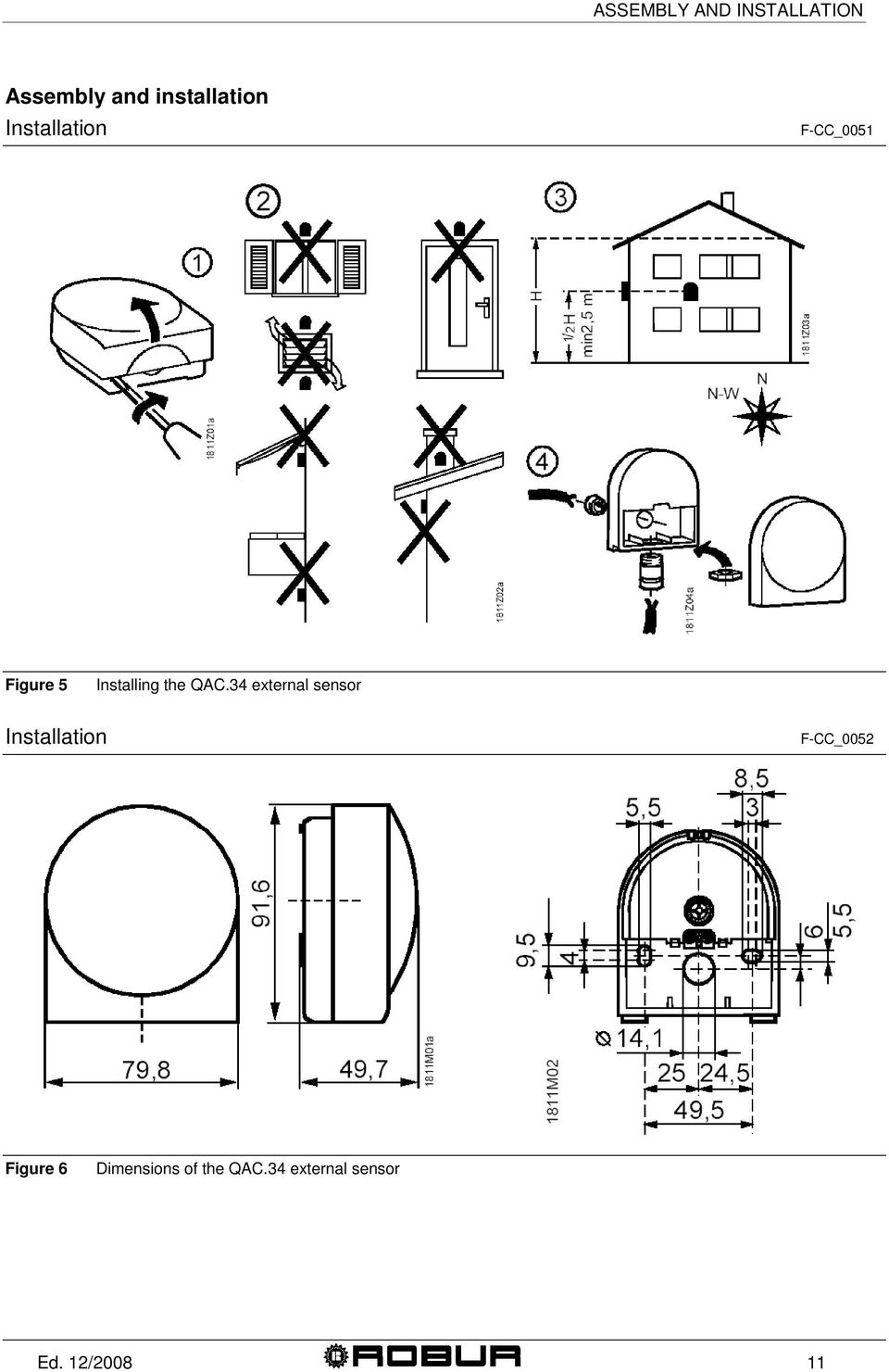
16 Comfort Control Manual (Installation and Applications) 2.1 AVS37 control unit Installation Figure 4 Installation method The AVS controller is already installed in the Robur panel (CCP) and connected to terminal X30 of the base unit via cable AVS82.491/109 (code Robur E-CVO246). As regards its use, refer to Comfort Control Panel - User Manual (D-LBR 523). 2.2 External ambient sensor QAC34 The external sensor is essential to the operation of the Comfort Control system. If this sensor is not connected to the RVS61 controller, the system does not operate. The sensor is used to acquire the external temperature and, for small extensions, accounts for sunlight, wind chill and the temperature of the wall to which it is mounted. Technical characteristics Type reference QAC34/101 Table 4 Sensing element NTC1000 Ω at 25 C Measurement range C QAC34/101 sensor characteristics * QAC34/101 AT C Tolerance K* Time constant (min) Weight (g) ± Packing size 48 pieces individually packed in multipacks Copper cable mm² /cable dia. Mm Perm. cable length (m) 1.5 / Ed. 12/2008

17 ASSEMBLY AND INSTALLATION Assembly and installation Installation F-CC_0051 Figure 5 Installing the QAC.34 external sensor Installation F-CC_0052 Figure 6 Dimensions of the QAC.34 external sensor Ed. 12/
18 Comfort Control Manual (Installation and Applications) 2.3 Room unit QAA55 Location Figure 7 Installation position of the QAA55 room unit. The room unit must be located in a reference room, generally the living room, bearing in mind the following factors: the room unit must be mounted 1.5 metres above the floor, in an area which enables the sensor to measure the ambient temperature as accurately as possible; hence, out of the way of draughts, direct sunlight and other heat sources. If wall mounted, sufficient space must be provided above the unit for installation and removal. Installation The room unit, once removed from its base, is no longer powered up and hence is not operational. Figure 8 Installation of the QAA55 room unit. The room unit may not be installed in areas exposed to water and humidity. 12 Ed. 12/2008

19 ASSEMBLY AND INSTALLATION Electrical connections Figure 9 Connection of the QAA55 room unit. Terminal Name QAA55 1 CL+ BSB data T_CC_0024 Table 5 2 CL- BSB ground QAA55 room unit connections. Compare the connection diagram with paragraph 3.1 Room unit connection a pagina 27. Dimensions and drilling template Figure 10 QAA55 room unit drilling holes. As regards its use, refer to Comfort Control Panel - User Manual (D-LBR 523). Ed. 12/

20 Comfort Control Manual (Installation and Applications) 2.4 Room unit QAA75 Location Figure 11 Installation position of the QAA75 room unit. The room unit must be located in a reference room, generally the living room, bearing in mind the following factors: the room unit must be mounted 1.5 metres above the floor, in an area which enables the sensor to measure the ambient temperature as accurately as possible; hence, out of the way of draughts, direct sunlight and other heat sources. If wall mounted, sufficient space must be provided above the unit for installation and removal. Installation The room unit, once removed from its base, is no longer powered up and hence is not operational. Figure 12 Installation of the QAA75 room unit. 14 Ed. 12/2008

21 ASSEMBLY AND INSTALLATION The room unit may not be installed in areas exposed to water and humidity. Electrical connections Terminal Name QAA75 1 CL+ BSB data 2 CL- BSB ground 3 G+ Power 12 V AC Table 6 QAA75/78 room unit connections. Compare the connection diagram with paragraph 3.1 Room unit connection a pagina 27 Dimensions and drilling template Figure 13 QAA75 room unit drilling holes. As regards its use, refer to Comfort Control Panel - User Manual (D-LBR 523). 2.5 Radio components The radio components must be installed so as to be as free as possible from interference, as follows: Away from electrical cabling, strong magnetic fields and equipment such as PC s, TV s, microwave ovens, etc. Away from large metal, glass and special concrete structures The distance from the transmitter may not exceed 30 metres or two storeys. Ed. 12/
22 Comfort Control Manual (Installation and Applications) Radio module AVS71 The radio module expands our product range by offering the possibility of wireless communications. With the radio module, system components such as the room unit can transmit their data wirelessly. Installation Led Button Figure 14 Installation of the AVS71 radio module. Do not install the radio module inside a metal housing (e.g., inside the heat pump enclosure). Electrical connections The cable must be connected to regulator terminal X60. Before making the connection, make sure the base unit is not powered up. 16 Ed. 12/2008
23 ASSEMBLY AND INSTALLATION Dimensions and drilling template Figure 15 AVS71 radio module drilling holes Room unit QAA78 Location Figure 16 Installation position of the QAA78 room unit. The room unit must be located in a reference room, generally the living room, bearing in mind the following factors: Ed. 12/
24 Comfort Control Manual (Installation and Applications) the room unit must be mounted 1.5 metres above the floor, in an area which enables the sensor to measure the ambient temperature as accurately as possible; hence, out of the way of draughts, direct sunlight and other heat sources. If wall mounted, sufficient space must be provided above the unit for installation and removal. The room unit, once removed from its base, is no longer powered up and hence is not operational. Installation with base Figure 17 Installation of the QAA78 room unit. 18 Ed. 12/2008
25 ASSEMBLY AND INSTALLATION Installation without base Figure 18 Installation of the QAA78 room unit. The room unit may not be installed in areas exposed to water and humidity. The room unit is powered by three 1.5 V AA batteries (LR06). Dimensions and drilling template Figure 19 QAA78 room unit drilling holes. Ed. 12/
26 Comfort Control Manual (Installation and Applications) Radio connection Before proceeding with the installation, connect the components to the radio module, so that after assembly, all system components are easily traceable. The essential condition for the wireless connection is that all components must receive the signal, in other words, the radio module must be correctly connected to the base unit and the batteries fitted in the room unit. 1. Press the radio module button for at least 8 seconds, until its led starts flashing quickly. 2. To enter the programming phase, press the OK button on the room unit. 3. Hold down the Info button for at least 3 seconds, then select initial activation with the programming knob and press OK. 4. Select the Radio menu and press OK. 5. Select line 120. Press OK to confirm. 6. Turn the knob to YES and press OK. The unit will now search for the wireless connection. 7. T The display shows the connection strength as a percentage. This can take from 2 to 120 seconds. 8. Once the connection has been established, the message Unit ready displays and the led stops flashing. Radio connection test Run the test to check the quality of the wireless connection. The test can be interrupted at any time by pressing ESC. While the radio connection can be initiated on the heat pump itself, the test must be run in the area in which the room unit is to be installed. Select the page Radio on the room unit (as explained above in steps 2 to 4) and activate Test mode on the line Test mode (line 121). During the test, the numbers on the left show the number of data packets sent, while those on the left show those received. The test stops after 24 packets and is considered passed if at least 50% of the packets have been sent and received successfully. If the test fails, find another location for the room unit or use radio relay AVS Ed. 12/2008
27 ASSEMBLY AND INSTALLATION AVS external radio sensor The transmitter must be installed inside the building It must be installed to enable easy replacement of its batteries. Installation Figure 20 Installing the external radio sensor. Connection C D A B Legend: A: Batteries B: To remove the batteries C: Button D: Led Figure 21 Installing the external radio sensor. Ed. 12/
28 Comfort Control Manual (Installation and Applications) The units must be connected via a two wire (exchangeable) cable. Power is supplied by two 1.5 V AAA batteries (LR03). Radio connection 1. Press the radio module button for at least 8 seconds, until its led starts flashing quickly. 2. Press the external radio sensor transmitter button for at least 8 seconds, until its led starts flashing quickly. 3. The connection has been established when the radio module led stops flashing. 4. Now press the button on the external radio sensor transmitter button briefly until the led stops flashing. Test: Run the test to check the quality of the wireless connection. The test can be interrupted at any time by pressing ESC. While the radio connection can be initiated on the heat pump itself, the test must be run in the area in which the room unit is to be installed. 1. Press button C Figure 21 on the external radio sensor transmitter for at most 8 seconds, until the led starts flashing slowly. 2. If radio communications are active, the radio module led lashes briefly at 10 second intervals. 3. Now press the button on the external radio sensor transmitter button briefly until the led stops flashing. 22 Ed. 12/2008
29 ASSEMBLY AND INSTALLATION Dimensions and drilling template Figure 22 External radio sensor drilling holes Radio relay AVS To establish the radio connection, the device must be powered up temporarily before installation. The relay must be installed inside the building. Installation Figure 23 Installing the radio relay. Ed. 12/
30 Comfort Control Manual (Installation and Applications) Connections The consignment includes a power supply kit. The wires are interchangeable. Radio connections See Radio connection a pagina 22. Dimensions and drilling template Figure 24 Radio relay drilling holes. 24 Ed. 12/2008
31 ASSEMBLY AND INSTALLATION 2.6 Expansion module The system can handle up to 2 expansions, which configure and control 2 heating circuits as follows: Heating circuit 2 (HC2) configured on expansion n. 2. Pump heating circuit (HCP) configured on expansion n. 1. Refer to the dipswitch positions shown in Figure 25 for the settings of expansion modules 1 and 2. Expansion module I/O = Module 1 = Module 2 Figure 25 Identification of modules 1 and 2 Ed. 12/
32 Comfort Control Manual (Installation and Applications) Connection to main power supply Table 7 Use Terminal Type of connector L 230 V AC phase L Ground AGP4S.03E/109 N Neutral N QX21 Open mixer valve N Neutral Ground T AGP8S.04B/109 QX22 Close mixer valve N Neutral Ground S AGP8S.03B/109 QX23 Heating circuit pump AVS75 expansion module output connections. Safe very low voltage connections Use Terminal Type of connector X30 Controller / Heat pump control panel AVS82.491/109 BX21 Open mixer valve M Ground BX22 Open mixer valve M Ground H2 DC digital input V M Ground Table 8 AVS75 expansion module input connections n n n AGP4S.02F/109 AGP4S.02F/109 AGP4S.02F/ Ed. 12/2008
33 ELECTRICAL CONNECTIONS SECTION 3 ELECTRICAL CONNECTIONS 3.1 Room unit connection Room unit connection diagram Figure 26 Example of backlighting connection on room unit (QAA75.. with backlighting) Backlighting (detail A in Figure 26) is only available on QAA75 units. Ed. 12/
34 Comfort Control Manual (Installation and Applications) 3.2 Temperature sensor connection Temperature sensor connection diagram Figure 27 Example connection of temperature sensor connection to RVS 61 and expansion module AVS Ed. 12/2008
35 ELECTRICAL CONNECTIONS 3.3 Water circulation pump connection Heating/conditioning circuit pump 1 connection diagram Figure 28 Direct or externally relayed connection to heating/conditioning circuit pump on RVS61. Ed. 12/
36 Comfort Control Manual (Installation and Applications) Heating circuit pump 2 connection diagram Figure 29 Direct or externally relayed connection to heating circuit 2 pump on expansion module n Ed. 12/2008
37 ELECTRICAL CONNECTIONS Heating circuit pump connection diagram Pump Figure 30 Direct or externally relayed connection to heating circuit P pump on expansion module n.1. Ed. 12/
38 Comfort Control Manual (Installation and Applications) 3.4 Mixer/diverter valve connection Diverter valves Y28 and pump PY28 connection diagram Blue Brown Black Blue Brown Black Blue Brown Black Blue Brown Black Figure 31 Direct and relayed connection of diverter valves Y28 and pump PY28 32 Ed. 12/2008
39 ELECTRICAL CONNECTIONS Diverter valves Q3 connection diagram OUT and K6 OUT Blue Brown Black Blue Brown Black Blue Brown Black Figure 32 Diverter valves Q3 connection OUT and K6 OUT directly from PLC Ed. 12/
40 Comfort Control Manual (Installation and Applications) Mixer valves Y1/Y2 and Y5/Y6 connection diagram Figure 33 Mixer valves Y1/Y2 (circuit C1) and Y5/Y6 (circuit C2) connection 34 Ed. 12/2008
41 ELECTRICAL CONNECTIONS Robur boiler enable signal schematic Boiler enable signal (voltage free contact) Figure 34 Heating/DHW supplementary boiler On/Off signal connection. Ed. 12/
42 Comfort Control Manual (Installation and Applications) 36 Ed. 12/2008
43 VALVE CONNECTIONS SECTION 4 VALVE CONNECTIONS 4.1 Siemens diverter valves connection Figure 35 Location of diverter/mixer valves in system Ed. 12/
44 Comfort Control Manual (Installation and Applications) The Siemens diverter valve body is marked with B and AB reversed from the normal markings. Thus the common way is marked B, as shown in the schematics given below. When mounting the valve, make sure to mount it in the orientation shown in the figures given below. The following figures give the connections for each type of valve installed. Failure to observe these indications can compromise the initial activation of the system. Contact Robur in case of doubt. Diverter valve Q3 connection diagram out (if DHW block present) Heating delivery 5 Delivery DHW A AB B Delivery E3 (hot side) Figure 36 Description of direction of flow of valve n. 5 shown in Figure 35. Diverter valves K6 connection diagram out (if B and DHW blocks present) Heating delivery 1 2 Delivery DHW A AB A AB B Heating return B DHW return Boiler delivery Boiler return Figure 37 Description of direction of flow of valves n.1 and 2 shown in Figure Ed. 12/2008
45 VALVE CONNECTIONS Diverter valves Y28 connection diagram (if PC block is present) 3 4 Delivery to well / acquifer PC exchanger inlet A AB A AB Delivery E3 / output Q3 (A) B Pump Y28 delivery B Heating delivery to service Delivery E3 (cold side) Figure 38 Description of direction of flow of valves n.3 and 4 shown in Figure 35. Installing the Siemens I/SBC28.2 actuator 1. Rotate the valve rod (detail 1) so that the point of the arrow is opposite the side of the valve body (detail 3) marked with A, B and AB. (see Figure 39). 2. Remove the actuator bushing (I/SBSC28.2) and fit it to the rod (detail 1 of Figure 39). 3. Press the release button and set the actuator pointer to Close (see Figure 40). 4. Fit the actuator to the valve body (detail 3) and secure it to its bracket (detail 2) (see Figure 39). If for any reason it is not possible to mount the actuator, rotate the bracket (detail 2 of Figure 39) through 90. Ed. 12/
46 Comfort Control Manual (Installation and Applications) I/SBC28.2 actuator installation diagram A AB B A B AB Figure 39 Actuator mounting diagram. Detail 1: valve actuator control rod. Detail 2: actuator bracket. Detail 3: valve body (plane view). I/SBC28.2 actuator Close pointer Release button Open Figure 40 Description of actuator: The pointer indicates and controls the position of the actuator in Figure 39, the release button is used for moving the pointer by hand. 40 Ed. 12/2008
47 VALVE CONNECTIONS DIVERTER VALVE TECHNICAL DATA VALVE BODY Operating pressure PN16 FOR HOT WATER AT 90 C. PN 2 0 FOR COLD WATER Fluid temperature WATER 0 C 90 C Angle of rotation 90 VALVE ACTUATOR Electrical power I/SBC V AC, + 10% - 15% Frequency 50 HZ SUPPLY Peak consumption 4 VA Stroke time (open/close) 90 FOR 1¼ AND 180 FOR 1½ AND 2 Auxiliary contact rating 250V 3A (RESISTIVE) Admitted ambient temperature DURING OPERATION: C SHIPPING AND STORAGE: C Admitted ambient humidity CLASS G, DIN40040 Degree of protection IP 54 cable (with auxiliary contact) 6 x 1 mm 2, length 0.8 m Weight 0.45 KG Diverter valves internal electrical connection (Q3 out, K6 out, Y28) Legend: Brown: line Black: Connect to controller output terminal powered: valve open not powered: valve closed Blue: neutral Red-green: limit switch contacts (not used) 3A - 250V AC GYellow-green: Ground Figure 41 Description of diverter valves actuator connections For the connection to the Comfort Control unit, refer to SECTION 3. During installation, follow the actuator installation instructions illustrated in Figure 44 on page 43. Ed. 12/
48 Comfort Control Manual (Installation and Applications) 4.2 Siemens mixer valve connection Mixer valves Y1/Y2 and Y5/Y6 (heating circuits C1/C2) connection diagram C1/C2 Delivery manifold Delivery to service A AB B Recirculation Figure 42 Description of direction of flow of mixer valves Installing the Siemens actuator 1. Turn the actuator knob counterclockwise (the servomotor will resist this), until the indicator is on the position 0 notch 2. Fit the actuator to the valve body and secure it with the locknut. VALVE BODY MIXER VALVE TECHNICAL DATA Operating pressure Class PN Average temperature REFERENCE DIN4747 / DIN3158 IN RANGE C PN16 EN1333 WATER 1 C 120 C VALVE ACTUATOR Electrical power 230V AC, ± 15% Frequency 50/60 HZ Peak consumption 2.5 VA Stroke time (open/close) 150 AT 50 HZ Auxiliary contact rating 250V 6A (RESISTIVE); 2.5A (INDUCTIVE) Admitted ambient temperature DURING OPERATION AND STORAGE: C SHIPPING: C Admitted ambient humidity DURING OPERATION AND STORAGE: 5 95% SHIPPING: < 95% Degree of protection IP 54 Weight 0.5 KG 42 Ed. 12/2008
49 VALVE CONNECTIONS Mixer valves internal electrical connection (C1, C2) Figure 43 Description of mixer valves actuator connections For the connection to the Comfort Control unit, refer to SECTION 3 a pagina Valve actuator orientation diagram The figure shown below indicates the orientation of the actuator for Siemens mixer and diverter valves. Figure 44 Description of orientation of Siemens valve actuator Ed. 12/
50 Comfort Control Manual (Installation and Applications) 44 Ed. 12/2008
51 COMMISSIONING SECTION 5 COMMISSIONING This section explains how to quickly and easily program the RVS 61, expansion modules and room units. These simple settings facilitate quick commissioning. The various tunings depend on the user s level of access to the various menus. 5.1 Prerequisites To commission the devices cited in this manual, observe the following instructions: correct installation, proper electrical hookup and, in case of radio connections, proper wireless connection between all auxiliary equipment. Set all parameters regarding the system, in line with the actual solution, as instructed in Section 7. To set the parameters, proceed as follows: 1. Enter the AVS37 control unit programming mode by pressing OK. 2. Hold down the Info button for at least 3 seconds, then select the operating level (Commissioning technician, installation technician, etc) Installation technician with the programming knob. 3. Press the OK button. 4. Rotate the knob and select the menu containing the parameter to be modified. 5. Press the OK button. 6. Select the desired parameter. 7. Press the OK button. 8. Modify the value of the parameter and confirm with OK. At this point one may: 9. Rotate the knob to modify other parameters in the same section 10. Press ESC to return to the previous menu level; press ESC again to return to the main screen Run the operating test as described in paragraph 5.2 Operating test a pagina 46. Reset the attenuated external temperature: ( User diagnostics menu, parameter 8703: Attenuated external temperature ). If a parameter is selected by mistake, that should not actually be changed, press ESC to void the operation. In this way the changes made are not saved. If no interaction takes place for a period of 8 minutes, the device automatically returns to the main screen. Ed. 12/
52 Comfort Control Manual (Installation and Applications) Certain operating rows may be hidden and this may depend on the type of device used, its configuration and the user's access level (final user, first operation technician, installation technician etc.). You will find below the instructions to set the language used to visualize the settings on the display. 1. Move into the Siemens interface: the display is as shown in Figure 45. Display visualization Operating page shown on the display: Ambient temperature If this is not the standard initial display press the ESC button. Rotate the knob to modify the parameter. Figure 45 The display shows the temperature in the room If the display shows anything different, press the ESC key 2. Press the OK button. 3. use the knob to select the string Control Unit. 4. Press the OK button. 5. The row number appears in the top right hand corner, then rotate the knob and take position on the row corresponding to the parameter to be changed No. 20 (Language). 6. Press the OK button the parameter to be changed begins to flash (in the low right hand corner the possible options are shown) 7. Change the parameter by rotating the knob. 8. Press the OK key to confirm the selected language. 9. Press ESC to return to the main screen. 5.2 Operating test To facilitate commissioning and the identification of any errors, the controller can test its own inputs and outputs. Select the Test input/output menu and display all available parameters. Parameter 7700 is used to force the inputs and outputs, while the others in the Test input/output menu are read only. 46 Ed. 12/2008
53 COMMISSIONING If errors are detected during the test, refer to APPENDIX d - TABLE OF ERROR CODES - on page 151. The parameter 6820: Reset log deletes the last ten errors, along with the corresponding operational values and setpoints, as well as the status of the output relays. Parameter 8070: Delete log deletes the last ten status messages and status codes, along with the corresponding operational values and setpoints, as well as the status of the output relays. The Status menu can be used to check the operational status of the system. 5.3 RVS61 controller The RVS controller is equipped with a led (see Figure 46) to indicate its operational status LED off: No power LED on: Ready for operation LED flashing: Local faults Figure 46 - Status LED. Ed. 12/
54 Comfort Control Manual (Installation and Applications) 48 Ed. 12/2008
55 SYSTEM BLOCKS SECTION 6 SYSTEM BLOCKS This section, intended for designers, hydraulic and electrical installation technicians and Robur TAC, details the system components. We show below a system including all its configurable blocks: BP, Robur E 3, PC, DHW, B, C1, C2, CP, RU. Figure 47 Example system block schematic Ed. 12/
56 Comfort Control Manual (Installation and Applications) 6.1 DESCRIPTION OF PARTS OF THE SYSTEM To facilitate comprehension, each system which employs the Comfort Control system can be divided into blocks. The blocks are as follows: Base block (BP) the base block (BP) is composed of (see Figure 48): 8: storage tanks (buffers) for the primary heating/conditioning circuit water sensor B9: external ambient temperature. The external ambient temperature, with the climatic curves and internal ambient temperature (if the RU is present), determines the setpoint for E 3. sensor B4: storage tank top section temperature sensor B41: storage tank bottom section temperature sensor J4: delivery temperature for control of unit E 3 sensor B10: delivery temperature for control of boiler sensor B71: heat pump return temperature Base block schematic Figure 48 Basic system components 50 Ed. 12/2008
57 SYSTEM BLOCKS It is important that the temperature sensors not be influenced by external parameters, hence make sure to use dielectric paste in the sensor housings to isolate them and provide good weather protection (rain, condensate, etc.). Compare Figure 47 to check the positions of the components of block BP in the system Robur block E 3 E 3 A (see Figure 49 to the left): Robur air/water heat pump E 3 GS/WS (see Figure 49 to the right): Robur water/water heat pump 14, 19, 20: variable capacity pump (controlled by unit E 3 ) 17, 23: impurities filter 18, 24: deaerator sensor B91: source delivery temperature, substituted by fixed resistance (equal to 22kΩ) Robur unit block diagram Figure 49 Components E 3 It is possible to have up to three E 3 units of the same type on a single system. It is important that the temperature sensors not be influenced by external parameters, hence make sure to use dielectric paste in the sensor housings to isolate them and provide good weather protection (rain, condensate, etc.). Compare Figure 47 to check the positions of the components of block Robur E 3 in the system. Ed. 12/
58 Comfort Control Manual (Installation and Applications) Block PC (Passive cooling) Passive cooling is provided by the water drawn from the geothermal probes/wells to cool the services (C1 only) with using the E 3 equipment. Passive cooling components (see Figure 50) valves Y28: passive cooling diverter valves. Valves used with E 3 GS or E 3 WS. pump Y28: passive cooling pump. Pump used with E 3 GS or E 3 WS. PC block schematic Figure 50 Passive Cooling components Compare Figure 47 to check the positions of the components of block PC in the system. 52 Ed. 12/2008
59 SYSTEM BLOCKS Block DHW The DHW block is composed of (see Figure 51): 7: DHW storage sensor B3: DHW tank temperature (upper) sensor B31: DHW tank temperature (lower) The temperatures (B3 and B31) determine the ON/OFF status of the E 3 units and the boiler (only during DHW charging). Sensor B31 is given in the Robur schematics but is optional, whereas B3 is obligatory if DHW service is required. valve Q3 OUT : DHW charging diverter valve (connected to PLC) DHW block schematic Figure 51 DHW components It is important that the temperature sensors not be influenced by external parameters, hence make sure to use dielectric paste in the sensor housings to isolate them and provide good weather protection (rain, condensate, etc.). Compare Figure 47 to check the positions of the components of block DHW in the system. Ed. 12/
60 Comfort Control Manual (Installation and Applications) Block B Block B is composed of (see Figure 52): AY: boiler valve K6 OUT : heating/dhw integration diverter valve (connected to PLC) Diverter valves K6 OUT are installed only if blocks B and DHW are present in the system Q2 OUT : boiler ON/OFF signal (connected to PLC) 27: impurities filter 28: deaerator The water pump is a constant capacity unit (controlled by the boiler). Block B schematic Figure 52 Heating/DHW supplementary boiler components. Compare Figure 47 to check the positions of the components of block B in the system. 54 Ed. 12/2008
61 SYSTEM BLOCKS Block C1/C2 (mix1/mix2 circuit) Block C1/C2 is composed of (see Figure 53): valve Y1/Y2: mix 1 circuit (C1) mixer valve valve Y5/Y6: mix 2 circuit (C2) mixer valve pump Q2: mix 1 circuit (C1) pump pump Q6: mix 2 circuit (C2) pump (expansion module 2) Sensor B1: heating/cooling mix circuit 1 delivery temperature sensor (controls mixer valve Y1/Y2) Sensor B12: heating mix circuit 2 delivery temperature sensor (controls mixer valve Y5/Y6) Circuit C2 does not provide cooling service. Block C1/C2 schematic Figure 53 Mix 1 and 2 circuit components It is important that the temperature sensors not be influenced by external parameters, hence make sure to use dielectric paste in the sensor housings to isolate them and provide good weather protection (rain, condensate, etc.). Compare Figure 47 to check the positions of the components of block C1/C2 in the system. Ed. 12/
62 Comfort Control Manual (Installation and Applications) Block CP (pump circuit) Block CP is composed of (see Figure 54): pump Q20: pump only circuit pump (CP) (expansion module 1) Circuit CP does not provide cooling service. Pump Q20 can run intermittently (ON/OFF) to restore the correct heating water temperature, depending on the temperature measured by sensor B10. Block CP schematic Figure 54 Pump circuit components Compare Figure 47 to check the positions of the components of block CP in the system. 56 Ed. 12/2008
63 SYSTEM BLOCKS Block RU (room unit) Block RU is composed of (see Figure 55): RU1: room unit 1 If present, room unit RU1, located in a reference area served by heating circuit C1, provides information to the climatic curve of circuit C1 to determine the C1 water delivery temperature setpoint, which is maintained by mixer valve Y1/Y2. This setpoint is also required from the heat generator. RU2: room unit 2 If present, room unit RU2, located in a reference area served by heating circuit C2, provides information to the climatic curve of circuit C2 to determine the C2 water delivery temperature setpoint, which is maintained by mixer valve Y5/Y6. This setpoint is also required from the heat generator. RUP: room unit P If present, room unit RUP, located in a reference area served by heating circuit CP, provides information to the climatic curve of circuit CP to determine the CP water delivery temperature setpoint. This setpoint is also required from the heat generator. The room units are not necessary parts of the system; if a given circuit is not equipped with a room unit, its water temperature is controlled only by the external temperature and the climatic curve; When several heating circuits require a setpoint for the heat generator, the RVS61 controller polls the E 3 units for the highest value among those requested. Block RU schematic Figure 55 Room unit Compare Figure 47 to check the positions of the components of block RU in the system. Ed. 12/
64 Comfort Control Manual (Installation and Applications) All system solutions can be obtained by adding a number of the following modules to the basic BP system: Robur block E 3 : Robur units Block DHW : Domestic Hot Water (DHW) Block B : heating/dhw integration boiler Block C1 : heating/cooling circuit 1 Block C2 : heating circuit 2 Block CP : heating circuit CP Block RU1 : heating/cooling circuit 1 room unit Block RU2 : heating circuit 2 room unit Block RUP : heating circuit CP room unit The complete configuration of each block described above is given in SECTION 7 Configuration a pagina Ed. 12/2008
65 CONFIGURATION SECTION 7 CONFIGURATION This paragraph deals with modifications to the Robur default settings (see Table - 10 Robur basic configurations table - a pagina 155), to satisfy special installation requirements (should the type of machine and system make it necessary to modify the defaults). All settings can be made on both the AVS37 controller and on the QAA75/QAA78 room units if present, except for the RU Block settings, which can only be done on the QAA75/QAA78 units. All base block (BP) sensors must be connected to the RVS61 for the system to operate properly. Without these sensors the system will not operate. The parameters given in this section are those used to implement the various system blocks and control them. For systems which use different configurations, consult the Siemens documentation (systems implemented otherwise than indicated by Robur are not supported). Whenever the text makes reference to the boiler, note that the latter can be replaced by an electric heating element. The configuration of the various blocks can be summarised as follows: Pre-setting (Robur default). Manual modification of individual parameters to satisfy special system requirements (specific inputs/outputs, etc.). Selection of supplementary functions and precise adjustment using the functions of the various individual parameters (setting heating circuit/s, timer, etc.). IMPORTANT Shut off and restore power (~230V) after modifying parameters. The units are factory configured by Robur. The installation and commissioning technicians have a number of parameters to configure to meet the system s specific requirements, which vary from case to case. The configured system schematic is the result of the default settings and the connected sensors, as well as of the settings done on-site by the installation technician (activation of the various system blocks). The sensors contained in the system schematic must be connected properly to ensure that the sensor auto-detect function does not detect a different system schematic. A number of different functions are available for the heating circuit, some of which can be selected for each individual heating circuit. Ed. 12/
66 Comfort Control Manual (Installation and Applications) The operating rows of the heating circuit pump are visible when a multi-function output is set as the heating circuit pump. The parameters listed in this section must be changed from their factory settings. For each parameter we include a brief description which explains the value to be assigned for varying system requirements. As for the electrical connections to the inputs and outputs of the devices and their settings (depending on the actual installation), refer to SECTION 3 Electrical connections a pagina BP - BASIC SYSTEM CONFIGURATION Inputs: DEVICE: POSITION: NAME OF SENSOR: TYPE OF SENSOR: RVS61 B9 - M B9 EXTERNAL SENSOR (NTC 1K) RVS61 B71 - M B71 WATER SENSOR (NTC 10K) RVS61 B91 - M B91 RESISTANCE (22 KΩ) RVS61 B92/B84 - M B92 RESISTANCE (22 KΩ) RVS61 BX1 - M B4 WATER SENSOR (NTC 10K) RVS61 BX2 - M B41 WATER SENSOR (NTC 10K) RVS61 BX3 - M B10 WATER SENSOR (NTC 10K) RVS61 H3 - M* H3 N.O. CONTACT AVS75 H2 - M* H2 N.O. CONTACT RVS61 E10 - N* E10 N.O. CONTACT RVS61 EX1 - N* EX1 N.C. CONTACT * Input already cabled to Robur panel. 60 Ed. 12/2008
67 CONFIGURATION Outputs: DEVICE: POSITION: NAME OF OUTPUT: TYPE OF OUTPUT: RVS61 K1 - N* K1 N.O. RELAY ~230V RVS61 UX(+) - M(-)* UX ANALOGUE MULTIFUNCTION OUTPUT * Output already cabled to Robur panel. If you believe the Robur default settings to have been modified, check that the values in the Siemens RVS61 controller coincide with the values given in Table - 10 Robur basic configurations table - a pagina 155, which is the point of departure when adding new blocks. The base block parameters given in Table - 10 Robur basic configurations table - a pagina 155 are the default settings in the RVS61/196 unit, if they have not been overwritten using parameter If you wish to return to the default settings, use parameter 6205: Restore defaults. This is ONLY possible if the parameters have not been overwritten using parameter Parameter 6205: Restore defaults, enables you to restore the default values of the parameters. The following menus are not affected by this function: Date and Time, Operator Chapter, RF, and all daily programs, as well as the number of hours of operation and the various counters. Parameter 6204: Store parameters, the current settings can be stored as new defaults. The following menus are not affected by this function: Date and Time, Operator Chapter, RF, and all daily programs, as well as the number of hours of operation and the various counters. Parameter 6204 overwrites the defaults and they can no longer be restored! Parameters useful for regulating the system Base system configuration : The base configuration includes use of the storage tank and hence sensors B4 and B41 to turn the heat/cooling source ON/OFF (passive cooling is not provided in the base configuration; see paragraph Base block (BP) on page 50). Heating: Parameters 4722: Temp diff buffer/hc (default 2 C, range -20 C to +20 C) and 4721: Auto generation lock (default 0 C, range 0 C to +20 C), define in combination the means of activation/deactivation of the heat generator as a function of the temperatures measured by sensors B4 and B41 located in the buffer. When B4 and B41 > Setpoint_heat , that is when both temperature values exceed the heating setpoint requested plus the sum of the values of the two parameters, he heat generator is switched off; it is switched on when B4 and B41 < Setpoint_heat C, in other words, when both temperature Ed. 12/
68 Comfort Control Manual (Installation and Applications) values drop below the heating setpoint plus the value of parameter 4722 minus 1 C (see Figure 56 a pagina 63). It follows that: the sum of the values of parameters 4722 and 4721 defines the point at which the heat generator is switched off (see Figure 56 a pagina 63) and: if increased, it makes it less likely that the heat pump will be switched off due to pressure drops; on the other hand, it enables the delivery temperature to exceed the requirements of the services, so that excessive increases must be avoided. If decremented, the opposite considerations apply. As a point of departure, the sum of the values should be > 0 and equal to a few degrees only (2-3 C). The value of parameter C defines the di fferential between switching on and off (see Figure 56 a pagina 63) and: if increased, it results in longer heat pump activation/deactivation cycles, which means greater efficiency; on the other hand, it permits larger oscillations of the delivery temperature, which impacts the quality of the service provided. If decremented, the opposite considerations apply. As a point of departure, the value of parameter 4721 should be 0-1 C. Passive cooling: Parameters 4723: Temp diff buffer/hc (default 0 C, range -20 C to +20 C) and 4721: Auto generation lock (default 0 C, range 0 C to +2 0 C), define in combination the means of activation/deactivation of cold source water pumping as a function of the temperatures measured by sensors B4 and B41 located in the buffer. When B4 and B41 < Setpoint_cond (see Figure 57 a pagina 63), in other words, when both temperature values drop below the cooling setpoint plus the value of parameter 4723 minus the value of parameter 4721, pumping is deactivated; it is reactivated when B4 and B41 > Setpoint_cond C, in other words, when both temperature values rise above the cooling setpoint plus the value of parameter 4723 plus 1 C (see Figure 57 a pagina 63). It follows that: the difference (sum of the parameters 4732 < 0) between the values of parameters 4723 and 4721 defines the pumping deactivation point (see Figure 57 a pagina 63) and: If increased, enables the delivery temperature to drop below the point required by the services; and excessive increase must be avoided to prevent formation of condensation. To prevent problems associated with the formation of condensation, compare also parameters 923, 924, 946, 947, 948 and 950. If decremented, the opposite considerations apply. As a point of departure, the sum of the values should be = 0 or slightly negative (-2-0 C). The value of parameter C defines the di fferential between switching on and off (see Figure 57 a pagina 63) and: If increased, it results in longer pumping activation/deactivation cycles which reduces the number of activations (this is important for some types of pump); on the other hand, it permits larger oscillations of the delivery temperature, which impacts the quality of the service provided. 62 Ed. 12/2008
69 CONFIGURATION If decremented, the opposite considerations apply. As a point of departure, the value of parameter 4721 should be 0-1 C. heat source OFF C heat source ON 4722 Setpoint_heat Figure 56 Use of sensors B4 and B41 to turn the heat source ON/OFF Setpoint_cond C cooling source ON 4721 cooling source OFF Figure 57 Use of sensors B4 and B41 to turn the cooling source ON/OFF Ed. 12/
70 Comfort Control Manual (Installation and Applications) 7.2 E 3 - ROBUR MACHINE CONFIGURATION a) With one and two E 3 units in the system: Inputs for use in addition to those in Table - 10 Robur basic configurations table - a pagina 155: The E 3 -A, E 3 -WS without passive cooling and E 3 -GS without passive cooling do not require other inputs than those used in Table - 10 Robur basic configurations table - a pagina 155. The E 3 -WS, E 3 -GS with passive cooling, require a hygrostat/hygrometer connection: DEVICE: POSITION: NAME OF SENSOR: TYPE OF SENSOR: RVS61 H1 - M HYGROSTAT / HYGROMETER HYGROSTAT NC-NO HYGROMETER 0-10V See parameters 946 to 950 in paragraph Heating and cooling circuit configuration - a pagina 81 for the use of the hygrostat and hygrometer. Outputs for use in addition to those in Table - 10 Robur basic configurations table - a pagina 155: The E 3 -WS and E 3 -GS do not require other outputs than those used in Table - 10 Robur basic configurations table - a pagina 155. The E 3 -A require you to add Y22 among the outputs listed in Table - 10 Robur basic configurations table - a pagina 155. DEVICE: POSITION: NAME OF OUTPUT: TYPE OF OUTPUT: RVS61 QX5 - N* Y22 N.O. RELAY ~230V * Output already cabled to Robur panel. For all machines (E 3 -WS, E 3 -GS and E 3 -A) configure the parameters as indicated in the table given below. 64 Ed. 12/2008
71 CONFIGURATION MENU: PARAMETER: VALUE: CONFIGURATION 5800: HEAT SOURCE/THERMAL SOURCE CONFIGURATION 5807: COOLING SERVICE AIR IF E 3 -A WATER IF E 3 -WS. GLYCOLATED WATER IF E 3 -GS. OFF IF E 3 -A, E 3 -WS WITHOUT PASSIVE COOLING OR E 3 -GS WITHOUT PASSIVE COOLING. 4-PIPE SYSTEM IF E 3 -WS OR E 3 -GS WITH PASSIVE COOLING. CONFIGURATION 5895: RELAY OUTPUT QX5 CONFIGURATION 5950*: FUNCTION INPUT H1 NONE IF E 3 -WS OR E 3 -GS. Y22 IF E 3 -A. RELATIVE HUMIDITY 10V IF E 3 -A, E 3 - WS OR E 3 -GS WITH HYGROMETER**. DEWPOINT MONITOR OR FLOW TEMP SETP INCR HYGRO IF E 3 -WS OR E 3 -GS WITH HYGROSTAT**. * Leave parameter 5950 set to its default: Relative humidity 10V, if the hygrostat or hygrometer are not being used. ** See parameters 946 to 950 in the chapter Heating and cooling circuit configuration for the use of the hygrostat and hygrometer. On completion of the system block configuration procedure, shut off and restore the ~230V power supply. b) With three E 3 units in the system: Inputs for use in addition to those in Table - 10 Robur basic configurations table - a pagina 155: The E 3 -A, E 3 -WS without passive cooling and E 3 -GS without passive cooling, can use input H1 (for the hygrometer intable - 10 Robur basic configurations table - a pagina 155) as an alarm input: DEVICE: POSITION: NAME OF SENSOR: TYPE OF SENSOR: RVS61 H1 - M* H1 N.O. CONTACT *Cabling to be installed in the Robur panel using an electrical cable from terminal H3 (of the RVS61) connected to terminal H1 (of the RVS61). The E 3 -WS and E 3 -GS with passive cooling, require a hygrostat/hygrometer connection: Ed. 12/
72 Comfort Control Manual (Installation and Applications) DEVICE: POSITION: NAME OF SENSOR: RVS61 H1 - M HYGROSTAT / HYGROMETER TYPE OF SENSOR: HYGROSTAT NC-NO HYGROMETER 0-10V See parameters 946 to 950 in paragraph Heating and cooling circuit configuration - a pagina 81 for the use of the hygrostat and hygrometer. Outputs for use in addition to those in Table - 10 Robur basic configurations table - a pagina 155: The E 3 -WS and E 3 -GS do not require other outputs than those used in Table - 10 Robur basic configurations table - a pagina 155. The E 3 -A require you to add Y22 among the outputs listed in Table - 10 Robur basic configurations table - a pagina 155: DEVICE: POSITION: NAME OF OUTPUT: TYPE OF OUTPUT: RVS61 QX5 - N* Y22 N.O. RELAY ~230V * Output already cabled to Robur panel. For all machines (E 3 -WS, E 3 -GS and E 3 -A) configure the parameters as indicated in the table given below. 66 Ed. 12/2008
73 CONFIGURATION MENU: PARAMETER: VALUE: CONFIGURATION 5800: HEAT SOURCE/THERMAL SOURCE CONFIGURATION 5807: COOLING SERVICE AIR IF E 3 -A WATER IF E 3 -WS. GLYCOLATED WATER IF E 3 -GS. OFF IF E 3 -A, E 3 -WS WITHOUT PASSIVE COOLING OR E 3 -GS WITHOUT PASSIVE COOLING. 4-PIPE SYSTEM IF E 3 -WS OR E 3 -GS WITH PASSIVE COOLING. CONFIGURATION 5895: RELAY OUTPUT QX5 CONFIGURATION 5950: FUNCTION INPUT H1 NONE IF E 3 -WS OR E 3 -GS. Y22 IF E 3 -A. ALARM/ERROR MESSAGE IF E 3 -A, E 3 -WS WITHOUT COOLING OR E 3 -GS WITHOUT COOLING. RELATIVE HUMIDITY 10V IF E 3 -WS OR E 3 -GS WITH HYGROMETER**. DEWPOINT MONITOR OR FLOW TEMP SETP INCR HYGRO IF E 3 -WS OR E 3 -GS WITH HYGROSTAT**. ** See parameters 946 to 950 in the chapter Heating and cooling circuit configuration for the use of the hygrostat and hygrometer. On completion of the system block configuration procedure, shut off and restore the ~230V power supply. Special functions when using ROBUR heat pumps 1. Parameter 7119: Economy (default: Locked ; possible values: Locked or Released ), in intermediate seasons the need for heat can be provided by more ecological sources, such as the sun or wood. Conventional heat generators, such as heat pumps and boilers, can then be locked out. Locked impedes activation of the Economy function. Released enables activation of the Economy function. 2. Parameter (to be added to user manual) 7120: Economy Mode (default: Off ; possible values: Off or On ), if Economy mode is active ( 7119 = Released ) the user can activate/deactivate the heat pump or boiler. 3. Parameter (to be added to user manual) 7141: Emergency operation (default: Off ; possible values: Off or On ), if the heat pump should not function correctly, emergency operation may be activated manually. Emergency operation runs the system with the boiler (normally used for supplementary heating service, or for recharging the DHW); while the heat pumps stay off. When set to Off, emergency operation is off. When set to On, emergency operation is on. 4. Parameter 7142: Type of functioning of emergency operation (default: Automatic ; possible values: Manual or Automatic ), if the heat pump should not function Ed. 12/
74 Comfort Control Manual (Installation and Applications) correctly, Type of functioning of emergency operation may be activated. Type of functioning of emergency operation runs the system with the boiler (normally used for supplementary heating service, or for recharging the DHW); while the heat pumps stay off. When set to Manual, the Type of functioning of emergency operation can be turned on and off only manually, using the parameter Emergency operation ( 7141 ). When set to Automatic the Type of functioning of emergency operation turns on automatically whenever all the heat pumps are malfunctioning. It turns off again once the problem has been resolved; if necessary, reset the system. When all the heat pumps malfunction, error code 134: General HP malfunction displays. 7.3 PC BLOCK SCHEMATIC Inputs for use in addition to those in Table - 10 Robur basic configurations table a pagina 155: The E 3 do not require other inputs than those used in Table - 10 Robur basic configurations table - a pagina 155. The E 3 -WS and E 3 -GS with passive cooling require you to add Y28 among the outputs listed in Table - 10 Robur basic configurations table - a pagina 155: DEVICE: POSITION: NAME OF OUTPUT: TYPE OF OUTPUT: RVS61 QX6 - N Y28 N.O. RELAY ~230V For all machines (E 3 -WS, E 3 -GS and E 3 -A) configure the parameters as indicated in the table given below. MENU: PARAMETER: VALUE: CONFIGURATION 5896: RELAY OUTPUT QX6 NONE IF E 3 -A, E 3 -WS WITHOUT PASSIVE COOLING, E 3 -GS WITHOUT PASSIVE COOLING. Y28 IF E 3 -WS, E 3 -GS WITH PASSIVE COOLING. On completion of the system block configuration procedure, shut off and restore the ~230V power supply. 68 Ed. 12/2008
75 CONFIGURATION 7.4 DHW BLOCK CONFIGURATION Inputs for use in addition to those in Table - 10 Robur basic configurations table - a pagina 155: DEVICE: POSITION: NAME OF SENSOR: TYPE OF SENSOR: RVS61 B3 - M B3 WATER SENSOR (NTC 10K) RVS61 BX4 - M B31 B31 WATER SENSOR (NTC 10K) IF SENSOR B31 IS PRESENT. NONE IF B31 SENSOR NOT PRESENT. Sensor B31 is given in the Robur schematics but is optional, whereas B3 is obligatory if DHW service is required. ParagraphParameters useful for regulating the system DHW block a pagina 70 gives the effects of using sensor B31. Outputs Q3 and Q3 OUT are to be used in addition to those listed in Table - 10 Robur basic configurations table - a pagina 155: DEVICE: POSITION: NAME OF OUTPUT: TYPE OF OUTPUT: PLC Q3 Q3 OUT N.O. CONTACT RVS61 Q3 - N* Q3 N.O. RELAY ~230V * Output already cabled to Robur panel. Add 5022 and 5933 among the parameters listed in Table - 10 Robur basic configurations table - a pagina 155: MENU: PARAMETER: VALUE: DHW STORAGE TANK 5022: TYPE OF FILLING. WITH B3/B31 IF SENSORS B3 AND B31 ARE USED FOR FILLING DHW WITH THE HEAT PUMP. WITH B3 IF ONLY SENSOR B3 IS USED FOR FILLING DHW WITH THE HEAT PUMP. CONFIGURATION 5933: SENSOR INPUT BX4 B31 IF SENSOR B31 IS PRESENT. NONE IF B31 SENSOR NOT PRESENT. On completion of the system block configuration procedure, shut off and restore the ~230V power supply. Ed. 12/
76 Comfort Control Manual (Installation and Applications) Parameters useful for regulating the system DHW block : The configuration of the DHW block provides for the use of sensors B3 and B31* to switch the heat pump ON/OFF (for recharging DHW) and the legionella function (see point 1). Supplementation by the boiler (if configured) to recharge DHW and for the legionella function uses only sensor B3 (see point 1), and is activated after use of the heat pump. The integration boiler is used to provide higher temperatures than those available with the heat pump alone. Since the nominal or reduced DHW service (see points below) has greater priority than heating and the heat source is used exclusively for DHW or heating (except for when recharging DHW with the boiler), when he heat source is requested for DHW the heat source is used exclusively for that service and not for heating (except for when charging DHW with the boiler). * Sensor B31 is optional. 1. Parameter 5022: Type of charging (default: With B3/B31 ; possible values: With B3, With B3/B31 and With B3, legio B3/B31 ), determines whether, for DHW charging and the legionella function of the heat pump, only sensor B3 or both sensors are to be used. With B3/B31 (default), enables using both the sensors B3 and B31 for charging DHW and for the legionella function with the heat pump. Supplementation by the boiler (if configured) to recharge DHW and for the legionella function uses only sensor B3 even when 5022 is set to With B3/B31. The above configuration can be used only if the legionella function is deactivated or is done only with the heat pump (see parameters 1640, 1645 ). If the tank has more than two sumps for housing the sensors B3 and B31, it is good practice to use those indicated in the figure below, so that B3 is not towards the upper part of the tank. This makes for more efficient DHW charging. B3 B31 With B3 enables using sensor B3 and for charging DHW and for the legionella function, with both the heat pump and the boiler. This configuration must be used if the legionella function is provided by the heat pump and boiler (see parameter 1640 ). If the tank has more than two sumps for housing the sensors, it is good practice to avoid using the sump located towards the upper part of the tank. This makes for more efficient DHW charging. 70 Ed. 12/2008
77 CONFIGURATION B3 With B3, legio B3/B31 This configuration MAY NOT be used. 2. Parameter 1610: Nominal setpoint (default 50 C, range: from the value set in the parameter Reduced setpoint (parameter 1612 ) to the value set in the parameter Maximum nominal setpoint TWWmax (parameter 1614 )). During operation in Comfort mode, DHW recharging with the heat pump terminates (OFF) when B3 and B31 > During operation in Comfort mode, boiler integration (if configured) for DHW recharging terminates (OFF) when B3 > (See point 1). 3. Parameter 1612: Reduced setpoint (default 40 C, range: from 8 C to the value set in the parameter Nominal setpoint (parameter 1610 ). During operation in Reduced mode, DHW recharging with the heat pump terminates (OFF) when B3 and B31 > During operation in Reduced mode, boiler integration (if configured) for DHW recharging terminates (OFF) when B3 > (See point 1). 4. Parameter 1614: Maximum nominal setpoint TWWMax (default 65 C, range: 8 C to 80 C). DHW reduced setpoint DHW nominal setpoint Maximum DHW nominal setpoint 5. Parameter 1620: Release (default: 24h/day ; possible values: 24h/day, time programs HCs, time programs ), varies the DHW setpoint with the following parameters. Ed. 12/
78 Comfort Control Manual (Installation and Applications) 24h/day : The temperature of the domestic hot water is controlled by the nominal setpoint (point 2), independently of the time program. Set 1620: Release to 24h/day to ensure that the heat source can always be used for DHW at the Nominal setpoint (if requested by the service), but heating service may be compromised. To balance the use of the heat source for heating and DHW, use parameter 5030: Charging time limitation. Time programs HCs : the DHW setpoint is switched according to the Time programs (see Comfort Control Panel - User Manual (D-LBR 523) and note below) between the Nominal setpoint (point 2) and the Reduced setpoint (point 3). The start of ignition for each phase is brought forward by one hour each time. The Time programs HCs shown in the following figure is obtained by overlaying the time programs for heating circuits C1, C2 and C3 (if present). Set 1620: Release to Time programs HCs to ensure that, when operating with Comfort heating mode, the heat source can always be used for DHW at the Nominal setpoint (if requested by the service), but heating service may be compromised. To balance the use of the heat source for heating and DHW, use parameter 5030: Charging time limitation. Refer to Comfort Control Panel - User Manual (D-LBR 523) for how to set the heating time programs. Time program 4 / DHW : The DHW setpoint is switched according to Time program 4 between the Nominal setpoint (point 2) and the Reduced setpoint (point 3). Set 1620: Release to Time program 4 / DHW, opposed to the heating time programs, to recharge the DHW buffer when the request for heating is Reduced setpoint, so that the stored DHW can then be used when the 72 Ed. 12/2008
79 CONFIGURATION requirement for heating is maximum (e.g.: comfort heating time program from 6:00 to 22:00, nominal DHW program from 0:00 to 5:00 and setpoint: Nominal TWWN = 65 C, Reduced TWWR = 30 C). Refer to Comfort Control Panel - User Manual (D-LBR 523) for how to set the timings for Time program 4 / DHW. 6. Parameter 5030: Charging time limitation (default 240 min, range: from deactivated (---) to 600 min), sets the maximum DHW charging time. If the nominal setpoint TWWN (point 2) or reduced setpoint TWWR (point 3) have not been reached within the time set in this parameter, DHW recharging with heat pump is suspended for a time equal to the value of parameter 5030, and the heat pump is used only for heating the building. The time during which the heat pump is dedicated to recharging DHW or heating is equal to the value given in parameter So long as the heating and DHW requests obtain, the heat source is dedicated to recharging DHW or heating service. These two services will alternate according to the time setting of parameter 5030 : The time set in parameter 5030 depends on the building s thermal inertia: it can be increased if the building has a high thermal inertia, since it has greater thermal autonomy, so that DHW can be used for a pronged period of time, without significantly affecting the ambient temperature. o The time set in parameter 5030 depends: o on how much energy can be stored in the DHW buffer, energy which must be released for heating service. 7. Parameter 5020 : Flow setpoint boost (DHW charging boost) (default 0 C, range: 0 C to 30 C), increases the temperature of the wate r delivered by the heat pump (setpoint ) both in Comfort mode and in Reduced mode. The hot water produced by the heat source heats up the water contained in a heat exchanger coil (see Figure 51 a pagina 53), so to enable the water in the DHW buffer to reach the requested setpoint (see parameters 1610: Nominal setpoint TWWN or 1612: Reduced setpoint TWWR ) the temperature in the exchanger coil must be increased. Parameter 5020 must be increased if the surface of the DHW buffer coil is small (e.g.: DHW boiler buffer is used instead of a DHW heat pump buffer ), or gets dirty or its heat exchanger performance is degraded in any way (e.g.: scale, glycolated water, etc). 8. Parameter 5024: Switching differential (default 0 C, range: 0 C to 20 C), introduces hysteresis into the heat pump activation conditions for DHW charging in both Comfort mode and in Reduced mode. The heat pump is activated (ON) for DHW charging: a. if B3 and B31 < in Comfort mode with parameter 5022 = With B3/B31 (default value, see point 1). b. if B3 and B31 < in Reduced mode with parameter 5022 = With B3/B31 (default value, see point 1). Ed. 12/
80 Comfort Control Manual (Installation and Applications) 9. Parameter 5060: El imm heater optg mode (DHW integration boiler) (default: Substitute ; possible values: Substitute, DHW enable and Time program 4 ). Parameter 5060 determines the use of the boiler for recharging DHW. Substitute ; The boiler is used only if the heat pump is not able to completely recharge the DHW. If the boiler cuts in to recharge DHW, the Siemens controller stores the top DHW temperature (sensor B3) at which the boiler has cut in. The boiler trip temperature is stored in parameter 7093: Curr DHW charg temp HP. DHW charging with the boiler is interrupted and the heat pump restored if the top DHW temperature (sensor B3) drops below the value stored in 7093 minus the Switching differential (parameter 5024 ). If the DHW boiler trips at a water temperature below that stored in parameter 7092: DHW charg temp HP min the symbol displays along with the maintenance message 12: Insufficient HP charge temp (this can occur when the value stored in 7093 is less than the value in 7092 ). With 5060 = Substitute, parameter 1620 is used to control the boiler during DHW recharging, while Always : During the course of the year the DHW is always charged only using the boiler. To control the boiler during DHW charging with 5060 = Always, only parameter 5061 is used if 5061 = 24h/day or 5061 = Time program 4, while both parameters 1620 and 5061 are used if 5061 = DHW release. Summer : When all connected heating circuits are switched to summer mode, the boiler provides DHW recharging from the next day onwards. The DHW is charged by the heat pump again when at least one of the heating circuits is switched to heating mode. With 5060 = Summer : When all connected heating circuits are switched to summer mode, the system operates in a similar way to when 5060 = Always. When at least one of the connected heating circuits is switched to heating mode, the system operates in a similar way to when 5060 = Substitute. 10. Parameter 5061: Electric immersion heater: release (DHW integration boiler) (default: 24h/day ; possible values: 24h/day, DHW release and Time program 4 ). 74 Ed. 12/2008
81 CONFIGURATION 24h/Day: The boiler runs continuously, independently of the time programs (of DHW parameter 1620 or the heating circuit programs). Example: Figure 58 Release 24h/day. The symbol represents the boiler s operation. The symbol represents the DHW program (parameter 1620 ). DHW release: The boiler switches according to DHW activation (parameter 1620 ). Example: Figure 59 Time program DHW The symbol represents the boiler s operation. The symbol represents the DHW program (parameter 1620 ). Time program 4 / DHW: The reference program for boiler operation is time program 4/DHW of the local controller. Example Figure 60 Time program 4/DHW. The symbol represents the boiler s operation. The boiler is only switched on if enabled by parameter 5060: El imm heater optg mode. Ed. 12/
82 Comfort Control Manual (Installation and Applications) 11. Parameter 1630: Charging priority (default: Absolute ; possible values: Absolute, Shifting, None, MC shifting, PC absolute ), when heat is required both for the rooms and for DHW, the DHW priority function ensures that heat pump power is prioritised for DHW. Absolute : The direct and mixed circuits remain locked until DHW production has terminated. Shifting : If the power of the heat generator is not sufficient, heating of the direct and mixed circuits is limited by complete heating of DHW. None : Room and DHW heating occur at the same time. If the boiler is relatively small and the circuits are mixed, it may happen that the DHW setpoint is not reached, especially when the rooms are requiring a considerable amount of heating power. MC shifting, PC absolute : The direct circuit remains locked until the DHW storage tank has reached the requested setpoint. If the heat pump power is in sufficient, the mixed circuit is also locked. Robur systems are set to Absolute. 12. Parameter 1640 : Legionella function. Parameter 1640 serves to: deactivate the legionella function if set to Off (default), or activate it Periodically or on a Fixed weekday. 13. Parameter 1641 : Legionella funct periodically. If 1640 is set to Periodically, parameter 1641 determines the period in terms of days at which the legionella function is run. (see local legislation regarding legionella prevention). 14. Parameter 1642 : Legionella funct weekday. If 1640 is set to Fixed weekday, parameter 1642 determines which day of the week the legionella function is run. (see local legislation regarding legionella prevention). 15. Parameter 1644 : Legionella funct time sets the time of day at which the legionella function is run. This is usually set to a time of day during which the system is less used. 16. Parameter 1645 : Legionella funct setpoint ; The heat pump legionella function is interrupted if B3 and B31 > 1645 when 5022 = With B3/B31 (default). Boiler integration to the legionella function (if so configured) is interrupted when only B3 > 1645 (see point 1). If the legionella function is run only by the heat pump (no boiler), use a Legionella funct setpoint compatible with the heat exchange properties of the DHW coil, so as to avoid a situation in which the setpoint specified in 1645 is never reached. In any case, even during the legionella cycle, the Charging time limitation setting (parameter 5030) applies. 17. Parameter 1646 = Legionella funct duration ; the time that must expire uninterruptedly with: B3 and B31 > 1645 to conclude the legionella cycle if parameter 5022 = With B3/B31 (default, see point 1). 76 Ed. 12/2008
83 CONFIGURATION B3 > 1645 to conclude the cycle if parameter 5022 = With B3 (see point 1). Connection pump Q4 acts as the DHW tank circulation pump. Circulation pump Q4 is programmed with parameter 1660: Circulating pump release. The circulating pump cycling and Circulation setpoint can be set in parameters 1661 and Parameter 1660: Circulating pump release (default: DHW release ; possible values: Time program 3/HCP, DHW release, Time program 4/DHW, Time program 5 ). Pump Q4 is activated when: parameter 1660 is set to DHW release and DHW charging is on. Parameter 1660 is set as Time program 3/HCP and Time program 3/HCP is in an ON period (see parameters 540 to 556 ). Parameter 1660 is set as Time program 4/DHW and Time program 4/DHW is in an ON period (see parameters 560 to 576 ). Parameter 1660 is set as Time program 5 and Time program 5 is in an ON period (see parameters 600 to 616 ). 19. Parameter 1661: Circulating pump cycling (default: Off ; possible values: Off or On ). Pump Q4: is off when parameter 1660 is set to Off. is run for 10 minutes and stopped for twenty minutes when parameter 1660 is set to On. To use the circulating pump, set relay output QX23 of the AVS75 module1 as Recirculating pump Q4 (or use another available output if necessary). 20. Parameter 1663: Circulation setpoint (default: 45 C; range: 8 to 80 C), sets the activation temperature for pump Q4 when the legionella function is running. If sensor B39 is installed in the DHW pipe, the controller monitors its value throughout the duration of the legionella function and activates pump Q4 when the temperature measured by B39 exceeds the Circulation setpoint. Ed. 12/
84 Comfort Control Manual (Installation and Applications) 7.5 B - BOILER CONFIGURATION FOR HEATING/DHW INTEGRATION TO HEAT PUMP There is no need to configure inputs in addition to those in Table - 10 Robur basic configurations table - a pagina 155. The outputs to be used in addition to those in Table - 10 Robur basic configurations table - a pagina 155 are Q2 OUT, K25, K26 and Q1 PLC (boiler ON signal from PLC to CCI). The remaining outputs K6 OUT and K6 are used only if the system includes blocks B and DHW (the K6 OUT diverter valves deviate the boiler delivery towards the heating or DHW circuits): DEVICE: POSITION: NAME OF SENSOR: TYPE OF SENSOR: PLC Q2 Q2 PLC (BOILER ENABLE) N.O. CONTACT PLC Q4 K6 OUT N.O. CONTACT RVS61 QX1 - N* K25 N.O. RELAY ~230V RVS61 QX2 - N* K26 N.O. RELAY ~230V PLC Q1* Q1 PLC (CCI BOILER ENABLE) N.O. CONTACT RVS61 QX3 - N* K6 N.O. RELAY ~230V * Output already cabled to Robur panel. Add the following parameters to those listed in Table - 10 Robur basic configurations table - a pagina 155. MENU: PARAMETER: VALUE: DHW STORAGE TANK 5060: EL IMM HEATER OPTG MODE SUBSTITUTE IF E 3 -A, E 3 -WS OR E 3 -GS. CONFIGURATION 5890: RELAY OUTPUT QX1 K25 CONFIGURATION 5891: RELAY OUTPUT QX2 K26 CONFIGURATION 5892: RELAY OUTPUT QX3 K6 IF DHW BLOCK PRESENT. NONE IF DHW BLOCK NOT PRESENT. On completion of the system block configuration procedure, shut off and restore the ~230V power supply. 78 Ed. 12/2008
85 CONFIGURATION Parameters useful for regulating the part of the system with boiler for heating integration to heat pump : Sensor B10 is used to turn the boiler ON/OFF. 1. Parameter 2881: Locking time electric* flow (default 30 min, range: 0 to 255 min.); specifies the boiler activation delay from the time the heat pump/s is/are switched on. Parameter 2881 determines the minimum time that must pass between starting the heat pump and running the boiler for supplementary DHW production. Parameter 2881 accounts for the heat pumps initial inertia, thus avoiding unnecessary boiler activation cycles. The counter for this delay is reset when the heat pump is switched off. If the delay set in 2881 is too long, it may happen that the boiler is activated too late, thus compromising service (a lack of power delivery for a given period if time). If it is too short, the boiler may be activated before the heat pump reaches full power, thus compromising the overall efficiency of the system. 2. Parameter 2882: Release integr electric* flow (default 25 C min., range: 0 to 500 C min.); affects the activation (ON) point of the boiler on the heating function. Parameter 2882 balances activation of the boiler for supplementary heating to the heat pump, when the power requested by the services is greater than the overall power delivered by the heat pump. On expiry of the delay set in 2881, if the temperature measured by sensor B10 is less than the setpoint_heat of the heat pump minus 1 C (B10 < setpoint_heat - 1 C), the controller calcula tes the integral of the difference between the temperature measured by sensor B10 and setpoint_heat of the heat pump minus 1 C (area between B10 and setpoint_heat - 1 C ): when the integral reaches the value set in 2882 the boiler is used for supplementary heating. Parameter 2882 : the higher the value of the parameter the less likely the boiler is to be used. If this value is too high, service is compromised since the manifold temperature drops too far (or for too long) before the boiler is switched on. Reducing the value too far, on the other hand, increases the potential for undesirable activations of the boiler with E 3 loads less than 100% in the presence of load increases which result in a temporary drop in temperature. This also worsens the management of boiler activations, by reducing the cycle period and yielding over-frequent activations. 3. Parameter 2883: Reset integr electric* flow (default 2 C min., range: 0 to 500 C min.); affects the deactivation (OFF) point of the boiler on the heating function. It is advisable not to modify the default value. Ed. 12/
86 Comfort Control Manual (Installation and Applications) Setpoint_heat + 1 Setpoint_heat 2883 B10 Setpoint_heat K1 Boiler (C2 PLC) t Figure 61 Supplementary heating boiler activation graph. 4. Parameter 2884: Release el* flow below OT (default C (disabled), range: -30 to +30 C); the boiler (immersion heater*) is made ava ilable only when the external temperature is less than the temperature set in the parameter. * THE SIEMENS - ALBATROS CONTROLLER USES THE WORD ELECTRIC ( EL FOR SHORT) BECAUSE IT ASSUMES THE USE OF ELECTRIC HEATERS FOR SUPPLEMENTARY HEATING SERVICES. THE ELECTRIC IMMERSION HEATERS ENVISAGED BY SIEMENS HAVE BEEN REPLACED BY GAS BOILERS. 80 Ed. 12/2008
87 CONFIGURATION 7.6 HEATING AND COOLING CIRCUIT CONFIGURATION Circuits C1 and C2 are mixed by three way valves Y1/Y2 and Y5/Y6. The CP circuit, on the other hand, is direct. Circuit C1 is the only one which provides both heating and passive cooling (using the water taken from the cold geothermal well to condition the services connected to C1 rather than the E 3 units). Circuits C1 and C2 are normally used for low and medium temperature applications: floor heating and fan-coils. The CP circuit, on the other hand, is normally used for high temperature applications: radiators. a) Heating/cooling circuit 1 C1 : Inputs to be used in addition to those in Table - 10 Robur basic configurations table - a pagina 155. DEVICE: POSITION: NAME OF SENSOR: TYPE OF SENSOR: RVS61 B1 - M B1 WATER SENSOR (NTC 10K) Outputs to be used in addition to those in Table - 10 Robur basic configurations table - a pagina 155. DEVICE: POSITION: NAME OF OUTPUT: TYPE OF OUTPUT: RVS61 Y1 - N Y1 MIXER VALVE ~230V C1 RVS61 Y2 - N Y2 MIXER VALVE ~230V C1 RVS61 Q2 - N Q2 CIRCUIT C1 PUMP The connection diagrams are given in SECTION 3 Electrical connections a pagina 27. Add the following parameters to those listed in Table - 10 Robur basic configurations table - a pagina 155. Ed. 12/
88 Comfort Control Manual (Installation and Applications) MENU: PARAMETER: VALUE: CONFIGURATION 5710: HEATING CIRCUIT 1 CONFIGURATION 5711: COOLING CIRCUIT 1 ON TO ACTIVATE HEATING IN C1. OFF TO DEACTIVATE HEATING IN C1. OFF IF E 3 -A, IF E 3 -WS WITHOUT PASSIVE COOLING, E 3 -GS WITHOUT PASSIVE COOLING. 2-PIPE SYSTEM IF E 3 -WS, E 3 -GS WITH PASSIVE COOLING On completion of the system block configuration procedure, shut off and restore the ~230V power supply. b) Heating circuit 2 C2 : Inputs to be used in addition to those in Table - 10 Robur basic configurations table - a pagina 155. DEVICE: POSITION: NAME OF SENSOR: TYPE OF SENSOR: AVS75 MODULE 2 BX21 - M B12 WATER SENSOR (NTC 10K) Outputs to be used in addition to those in Table - 10 Robur basic configurations table - a pagina 155. DEVICE: POSITION: NAME OF OUTPUT: TYPE OF OUTPUT: AVS75 MODULE 2 QX21 - N Y5 MIXER VALVE ~230V C2 AVS75 MODULE 2 QX22 - N Y6 MIXER VALVE ~230V C2 AVS75 MODULE 2 Q6 - N Q6 CIRCUIT C2 PUMP The connection diagrams are given in SECTION 3 Electrical connections a pagina 27. Add the following parameters to those listed in Table - 10 Robur basic configurations table - a pagina Ed. 12/2008
89 CONFIGURATION MENU: PARAMETER: VALUE: CONFIGURATION 6021: EXPANSION MODULE FUNCTION 2 HEATING CIRCUIT 2 CONFIGURATION 5715: HEATING CIRCUIT 2 ON On completion of the system block configuration procedure, shut off and restore the ~230V power supply. c) Heating circuit P CP : There is no need to configure inputs in addition to those in Table - 10 Robur basic configurations table - a pagina 155. Outputs to be used in addition to those in Table - 10 Robur basic configurations table - a pagina 155. DEVICE: POSITION: NAME OF OUTPUT: TYPE OF OUTPUT: AVS75 MODULE 1 QX21 - N Q20 CIRCUIT CP PUMP Add the following parameters to those listed in Table - 10 Robur basic configurations table - a pagina 155: MENU: PARAMETER: VALUE: CONFIGURATION 6030: RELAY OUTPUT QX21 Q20 The connection diagrams are given in SECTION 3 Electrical connections a pagina 27. On completion of the system block configuration procedure, shut off and restore the ~230V power supply. Parameters useful for regulating the system Heating circuits configuration : 1. Parameters 700, 901, 1000 and 1300: Heating mode or Operating mode : Set circuits C1, C2 and CP to operate in Automatic, Comfort, Reduced or Protection modes. Refer to Comfort Control Panel - User Manual (D-LBR 523) for these settings. Parameter 700 sets the operating mode of circuit C1 in heating. Parameter 901 sets the operating mode of circuit C1 in conditioning. In conditioning, circuit C1 can only operate in the Automatic or Off modes. Parameter 1000 sets the operating mode of circuit C2 (heating only circuit). Ed. 12/
90 Comfort Control Manual (Installation and Applications) Parameter 1300 sets the operating mode of circuit CP (heating only circuit). Parameters 700 and 1000 can be set only with the Control unit or Room unit keys (see paragraph 7.7 Configuration of Room Units (RU) and Control Units for heating and conditioning circuits a pagina 106). Parameter 901 can be set via the menus or with the keys mentioned above, when the system is in cooling mode. 2. Parameters 710, 902, 1010 and 1310: Comfort setpoint (TRK) : Set the ambient temperature desired by the users served by circuits C1, C2 and CP in Comfort mode Refer to Comfort Control Panel - User Manual (D-LBR 523) for these settings. Parameter 710 sets the Comfort setpoint of circuit C1 in heating. Parameter 902 sets the Comfort setpoint of circuit C1 in conditioning. Parameter 1010 sets the Comfort setpoint of circuit C2 (heating only circuit). Parameter 1310 sets the Comfort setpoint of circuit CP (heating only circuit). These parameters can also be set by turning the Control unit or Room unit knobs (see paragraph 7.7 Configuration of Room Units (RU) and Control Units for heating and conditioning circuits a pagina 106). 3. Parameters 712, 1012 and 1312: Reduced setpoint (TRR) : Set the ambient temperature desired by the users served by circuits C1, C2 and CP in Reduced mode Refer to Comfort Control Panel - User Manual (D-LBR 523) for these settings. Parameter 712 sets the Reduced setpoint of circuit C1 in heating. Parameter 1012 sets the Reduced setpoint of circuit C2. Parameter 1312 sets the Reduced setpoint of circuit CP. There is no Reduced setpoint for cooling service. 4. Parameters 714, 1014 and 1314: Frost protection setpoint (TRF) : Set the ambient temperature desired by the users served by circuits C1, C2 and CP in Protection mode Refer to Comfort Control Panel - User Manual (D-LBR 523) for these settings. Parameter 714 sets the Frost protection setpoint of circuit C1 in heating. 84 Ed. 12/2008
91 CONFIGURATION Parameter 1014 sets the Frost protection setpoint of circuit C2 (heating only circuit). Parameter 1314 sets the Frost protection setpoint of circuit CP (heating only circuit). 5. Parameters 716, 1016 and 1316: Comfort setpoint maximum (TRKmax) (default 35 C, range: from the value set in Comfort setpoin t to 35 C), limit the value which can be set in parameter Comfort setpoint (TRK). 716 limits the value which can be set in parameter 710: Comfort setpoint for circuit C limits the value which can be set in parameter 1010: Comfort setpoint for circuit C limits the value which can be set in parameter 1310: Comfort setpoint for circuit CP. Maximum Comfort setpoint Comfort setpoint Reduced setpoint Frost protection setpoint 6. Parameters 720, 1020 and 1320: heating curve slope : Set the slope of the Heating curve for circuits C1, C2 and CP: Parameter 720 sets the slope of the heating curve for circuit C1 in heating. Parameter 1020 sets the slope of the heating curve for circuit C2 in heating. Parameter 1320 sets the slope of the heating curve for circuit CP in heating. The heating curve of each circuit is a function of the external temperature (sensor B9) and setpoint temperature (see points 2, 3 and 4) of the heated rooms (circuits C1, C2 and CP), which determines the temperature requested of the water to satisfy the services in the respective circuits (see Figure 62 a pagina 86). Ed. 12/
92 Comfort Control Manual (Installation and Applications) Heating curve T delivery [ C] circuit Ambient setpoint 20 C T external ambient [ C] Figure 62 Heating curve graph. The figure shows a family of heating curves with various slopes (0.25 to 4). Each curve characterised by its slope, represents the delivery v. the external ambient temperature, when the required setpoint is 20 C. For each circuit used (C1 or C2 or CP), the characteristic slope to be set in the respective parameters ( 720, 1020, 1320 ) depends on the type of system connected: o For floor heating, use low slopes. o For fan-coil heating, use intermediate slopes. o For radiator heating, use high slopes. After entering the characteristic slopes in the parameters ( 720, 1020, 1320 ) you can fine tune the circuit in question: o Increase the slope (a higher value of the parameter) if in the rooms served by the circuit (C1, C2 or CP), the temperature is lower when the external temperature is lower. o Decrease the slope (a lower value of the parameter) if in the rooms served by the circuit (C1, C2 or CP), the temperature is higher when the external temperature is lower. 7. Parameters 721, 1021 and 1321: heating curve displacement ; this uniformly modifies the room temperature across the entire range of the external temperature. calibrate the heating curve displacement after having calibrated the slope (see point 5): Move the heating curve to the left (a higher value of the parameter) if in the rooms served by the circuit the temperature is always lower than the setpoint. Move the heating curve to the right (a lower value of the parameter) if in the rooms served by the circuit the temperature is always higher than the setpoint. 86 Ed. 12/2008
93 CONFIGURATION 8. Parameters 741, 1041 and 1341: Flow temp setpoint max : sets the maximum delivery setpoint (upper limit) required by heating circuits C1, C2 and CP: Parameter 741 sets the Flow temp setpoint max of circuit C1 in heating. Parameter 1041 sets the Flow temp setpoint max of circuit C2 in heating. Parameter 1341 sets the Flow temp setpoint max of circuit CP in heating. Setting these parameters prevents eh heating circuits overheating, by setting an upper limit to the heating curves. These parameters are especially important when there is a maximum temperature limit for the heating circuit in question, for example, with floor heating systems. 9. Parameters 740, 1040 and 1340: Flow temp setpoint min : sets the minimum delivery setpoint (lower limit) required by heating circuits C1, C2 and CP: Parameter 740 sets the Flow temp setpoint min of circuit C1 in heating. Parameter 1040 sets the Flow temp setpoint min of circuit C2 in heating. Parameter 1340 sets the Flow temp setpoint min of circuit CP in heating. If the delivery temperature setpoint for the heating circuit reaches its limit and the power requirements increases or decreases, the maximum and minimum limits are not exceeded (see Figure 63 a pagina 88). Ed. 12/
94 Comfort Control Manual (Installation and Applications) Delivery temperature limit diagram Current flow temperature setpoint Max flow temperature setpoint Min flow temperature setpoint Figure 63 Description of delivery water temperature limits 10. Parameters 730, 1030 and 1330: Summer/winter switch limit is used to turn the heating on and off during the course of the year, depending on the external temperature. The Summer/winter switch limit can be set with parameters: 730 for C for C for CP. In Automatic mode the system comes on and goes off automatically, without any manual intervention on behalf of the user. By modifying the parameter the time period will be reduced or extended. Increase: The winter function is brought forward The Summer function is postponed Reduction: The winter function is postponed The Summer function is brought forward The function is not operational in Comfort mode. 88 Ed. 12/2008
95 CONFIGURATION Summer / winter switch diagram SWHG - Summer / winter switch limit TAged - Attenuated external temperature T - Temperature t - Days Figure 64 Example of summer/winter switch 11. Parameters 732, 1032 and 1332: 24-hour heating limit, activates/deactivates heating throughout the day, depending on the external temperature. This parameter is mainly used during the intermediate seasons (spring/autumn), to enable the system to respond more rapidly to temperature changes. The 24-hour heating limit (differential) can be set with parameters: Example: 732 for C for C for CP. Row number Comfort setpoint (TRw) 24-hour heating limit (THG, Parameter 732/1032/1332) External temperature (TRw-THG) heating off Value 22 C -3 C >= 19 C Row number Switching differential (fixed) Heating activation temperature Value -1 C <= 18 C 12. Parameters 760, 1060 and 1360: Room temperature limitation, switches off the pump (Q2, Q6, Q20) of the heating circuit (C1, C2, CP): Circuit C1 pump (Q2) is switched off if the room temperature (TRx) is greater than the room setpoint C1 (TRw) plus the differential (SRD) specified in parameter 760. Circuit C2 pump (Q6) is switched off if the room temperature (TRx) is greater than the room setpoint C2 (TRw) plus the differential (SRD) specified in parameter Ed. 12/
96 Comfort Control Manual (Installation and Applications) Circuit CP pump (Q20) is switched off if the room temperature (TRx) is greater than the room setpoint CP (TRw) plus the differential (SRD) specified in parameter The heating circuit pump is switched on again when the room temperature drops below the room setpoint once more. Circuit pump operation diagram Current room temperature Room temperature setpoint Room switching differential Pump Time of day Figure 65 Example of pump operation depending on the internal room temperature setting The room temperature limit is not considered if pure climate compensation is active, that is without room sensors or ambient feedback (750, 1050, 1350, see 7.7 Configuration of Room Units (RU) and Control Units for heating and conditioning circuits a pagina 106) deactivated (---). 13. Parameters 770, 1070 and 1370: boost heating, are used to reach a new setpoint more quickly, when moving from the reduced to the comfort setpoint. This reduces the heating operation time. During boost heating : room setpoint C1 is increased (DTRSA) by the value given in parameter 770. room setpoint C2 is increased (DTRSA) by the value given in parameter room setpoint CP is increased (DTRSA) by the value given in parameter The higher the value, the less time is required to reach the comfort setpoint. 90 Ed. 12/2008
RVS41.813 RVS61.843 AVS75.. AVS37.. QAA75.. QAA78.. QAA55.. Albatros2 Heat pump controller User manual. Siemens Switzerland Ltd HVAC Products
 Albatros2 Heat pump controller User manual Edition 2.0 Controller series A CE1U2355en_02 3. Juli 2008 RVS41.813 RVS61.843 AVS75.. AVS37.. QAA75.. QAA78.. QAA55.. Siemens Switzerland Ltd HVAC Products 2/235
RDJ10RF/SET. Wireless room temperature controller with 24-hour time switch and LCD. Programmable, for heating systems
 3 072 RDJ10RF RCR10/433 Wireless room temperature controller with 24-hour time switch and LCD Programmable, for heating systems RDJ10RF/SET Operating modes: Automatic, Comfort, Energy Saving, and Frost
RRV934. Multi-controller. Synco living
 s 2 709 Synco living Multi-controller RRV934 RF-based multi-controller For precontrol of up to 2 room groups For control of ventilation plant with up to 3 stages RF communication based on KNX standard
RVS43.345 AVS75... AVS37... QAA75... QAA78... QAA55... Albatros 2 Boiler controller User Manual. Edition 1.0 Controller series B CE1U2354en02
 s Albatros 2 Boiler controller User Manual RVS43.345 AVS75... AVS37... QAA75... QAA78... QAA55... Edition 1.0 Controller series B CE1U2354en02 14.01.2011 Building Technologies Siemens Switzerland Ltd Industry
Alpha Climatic Programmable Modulating Boiler Energy Manager. Installation and User Instructions
 Alpha Climatic Programmable Modulating Boiler Energy Manager Part No 3.022144 (Hard Wired) Part No 3.022143 (Radio Frequency) Installation and User Instructions 1. Description The Alpha Climatic energy
HERZ-Thermal Actuators
 HERZ-Thermal Actuators Data Sheet 7708-7990, Issue 1011 Dimensions in mm 1 7710 00 1 7710 01 1 7711 18 1 7710 80 1 7710 81 1 7711 80 1 7711 81 1 7990 00 1 7980 00 1 7708 11 1 7708 10 1 7708 23 1 7709 01
Drayton Digistat +2RF/+3RF
 /+3RF Programmable Room Thermostat Wireless Model: RF700/22090 Model: RF701/22092 Power Supply: Battery - Thermostat Mains - Digistat SCR Invensys Controls Europe Customer Service Tel: 0845 130 5522 Customer
RVL470. Heating Controller. Building Technologies HVAC Products. Series B
 2 522 Heating Controller Series B RVL470 Multifunctional heating controller for use in residential and non-residential buildings; suitable for weather-dependent flow temperature control of heating zones
01-3 0000-00 6810-20 AIR CONDITIONING SYSTEM 1. FFH SPECIFICATION AIR CONDITIONING SYSTEM RODIUS 2004.09
 0000-00 01-3 6810-20 1. FFH SPECIFICATION 01-4 0000-00 2. SYSTEM LAYOUT AND COMPONENTS 0000-00 01-5 01-6 0000-00 3. FFH GENERAL INFORMATION The system is to increase the coolant temperature quickly by
543-0032-00, 943-0032-00. User s Manual
 543-0032-00, 943-0032-00 User s Manual 1 Comfort Alert Diagnostics Faster Service And Improved Accuracy The Comfort Alert diagnostics module is a breakthrough innovation for troubleshooting heat pump and
Vroom Hardware manual ver. 1.00 Code 114VROOHWE00. Vroom CANBUS USER INTERFACE WITH LCD GRAPHIC DISPLAY AND WITH TEMPERATURE AND HUMIDITY SENSOR
 Vroom CANBUS USER INTERFACE WITH LCD GRAPHIC DISPLAY AND WITH TEMPERATURE AND HUMIDITY SENSOR ENGLISH HARDWARE MANUAL ver. 1.00 CODE 114VROOHWE00 page 1 of 22 Important Important Read these instructions
R22. K Control. Indoor Unit. Nomenclature. Compatibility PL H 3 G K H B. Unit style Heat Pump Horse Power
 R22. K Control. Indoor Unit. Nomenclature. PL H 3 G K H B Compatibility Unit style Heat Pump Horse Power Control Boost Heaters R22. K Control. Outdoor Unit. Nomenclature. PU H 3 Y K A Compatibility Outdoor
40.3. Control Relays and Timers
 .3 Contents EASY500/700/800 Intelligent Relays........ EASY/MFD Expansion Modules............ MFD Intelligent Relays................... EASY/MFD Communication Modules....... EASY/MFD Power Supplies, Accessories
contents Leading the way in intelligent automation INELS Wireless? Why Click Accessories Complete control
 Wireless Control Systems Accessories Leading the way in intelligent automation contents Range Overview Typical Installations Transmitters Combined Modules Accessories Programming Switching & Dimmer Functions
Programmable Room Thermostat 7 Day (5-2 Day) Models: 22083 / 22087 Power Supply: Battery / Mains
 Drayton Programmable Room Thermostat 7 Day (5-2 Day) Models: 22083 / 22087 Power Supply: Battery / Mains Invensys Controls Europe Technical Helpline: +44 (0) 845 130 7722 www.draytoncontrols.co.uk Installation
SERVICE MANUAL FOR 12 VDC WALL THERMOSTAT AIR CONDITIONING SYSTEMS ROOF TOP UNITS ONLY
 RV Products Division SERVICE MANUAL FOR 12 VDC WALL THERMOSTAT AIR CONDITIONING SYSTEMS ROOF TOP UNITS ONLY Airxcel, Inc. RV Products Division P.O. Box 4020 Wichita, KS 67204 1976A376 (1-11) TABLE OF CONTENTS
User Manual. Air-conditioner Controller SB-DN-HVAC (MAC01.331) www.hdlautomation.com
 Air-conditioner Controller SB-DN-HVAC (MAC01.331) www.hdlautomation.com Document updates: Version Data Description V1.0 2015.05.25 Finish new document HVAC Controller User Manual INDEX 1. Overview...1
4.3-inch Back-Up Camera
 TM 4.-inch Back-Up Camera Model No.: PKC0BU4 Owner s Manual and Warranty Information Read these instructions completely before using this product. Retain this Owner s Manual for future reference. INTRODUCTION
SERVICE MANUAL FOR 6535 SERIES TWO TON HIGH EFFICIENCY PACKAGED HEAT PUMPS
 SERVICE MANUAL FOR 6535 SERIES TWO TON HIGH EFFICIENCY PACKAGED HEAT PUMPS TABLE OF CONTENTS 1. Warnings...2 2. Accessibility Of Appliance...3 3. Unit Dimensions And Specifications...3 4. Unit Specifications
SERVICE MANUAL 12VDC WALL THERMOSTAT AIR CONDITIONING SYSTEMS ROOFTOP UNITS ONLY
 SERVICE MANUAL 12VDC WALL THERMOSTAT AIR CONDITIONING SYSTEMS ROOFTOP UNITS ONLY! WARNING - SHOCK HAZARD! TO PREVENT THE POSSIBILITY OF SEVERE PERSONAL INJURY, DEATH, OR EQUIPMENT DAMAGE DUE TO ELECTRICAL
OZW30. Central Unit SYNERGYR
 2 841 SYNERGYR Central Unit OZW30 Collects billing data from the apartments. Generates an image of each apartment's heat consumption and makes it available for readout. Acts on room temperature control
MP-4000 Alarm List (Software version 2.4.3 or later)
 Service Bulletin SUBJECT: MP4000 Alarm s BULLETIN: C 100 DATE: June 19, 2013 ALARM LIST Where it is possible the alarm number is kept the same as for MP-3000. MP-3000 holds alarm number from 0 to 127.
COMPUTHERM Q7 Programmable, digital room thermostat. Operating Instructions
 COMPUTHERM Q7 Programmable, digital room thermostat Operating Instructions GENERAL DESCRIPTION OF THE THERMOSTAT The COMPUTHERM Q7 type switched-mode room thermostat is suitable to regulate the overwhelming
Heating Controller. Building Technologies HVAC Products
 2 474 Heating Controller RVP300 Multifunctional heating controller for use in residential and non-residential buildings; suitable for weather-dependent flow temperature control of heating zones with or
Applied Electronics. Commercial Dimming System UPDATE NOTICE
 REV. A Applied Electronics Commercial Dimming System UPDATE NOTICE This notice is to inform the end user of an additional feature added to this DP12/2400 dimming unit. This unit has been outfitted with
Portal Software GSM-PRO Run LED displays module activity Com LED displays activity on the GSM network GSM-PRO
 GSM-PRO GSM-PRO perfect for communication CONTA-CLIP s GSM-PRO module offers a remote control and maintenance solution which allows you to monitor and control decentralized facilities. The GSM-PRO module
Duct Humidity Transmitter
 SDC-H Duct Humidity Transmitter Features Replaceable sensor element Humidity measurement for air ducts Minimum and maximum value memory 0 0V, 0 0mA or 0V, 4 0mA measuring signals selectable with jumpers
CM702 PROGRAMMABLE THERMOSTAT FEATURES PRODUCT SPECIFICATION SHEET
 CM702 PROGRAMMABLE THERMOSTAT FEATURES Attractive slim, modern styling makes it ideal for location in any type of home. 24-hour heating program. Up to 4 daily independent time and temperature level changes
T7079A,B Solid State Remote Temperature Controllers
 T7079A,B Solid State Remote Temperature Controllers FEATURES PRODUCT DATA Switch selection of heat or cool mode. Temperature sensing up to 400 feet. Does not require field calibration. 0K NTC temperature
BlueSolar Pro Remote Panel For BlueSolar PWM-Pro charge controllers 12/24V 5, 10, 20, 30A Article number SCC900300000
 Manual EN BlueSolar Pro Remote Panel For BlueSolar PWM-Pro charge controllers 12/24V 5, 10, 20, 30A Article number SCC900300000 Contents EN 1.Important safety instructions... 2 2. Installation... 2 3.Product
ABB i-bus EIB Logic Module LM/S 1.1
 Product Manual ABB i-bus EIB Logic Module LM/S 1.1 Intelligent Installation System Contents page 1 General... 3 1.1 About this manual... 3 1.2 Product and functional overview... 3 2 Device technology...
SEZ220. Signal Converter. Synco 200. With preprogrammed standard applications Freely programmable Menu-driven operation. Use
 s 5 146 Synco 200 Signal Converter SEZ220 With preprogrammed standard applications Freely programmable enu-driven operation Use The signal converter is for use in HVAC plant to provide minimum / maximum
mecotron Safety relay ESTOP-2 For emergency stop monitoring
 E0006 000824 Safety relay E-2 For emergency stop monitoring Description The safety module E-2 for emergency stop monitoring is used for safety breaking one or more circuits and is designed to be incorporated
RF 1. Contents: Connecting diagram. Detailed information:
 Contents: Introduction UFH-ZONE-R UFH-EXTRAZONE -R Connection of a thermostat (UFH-THERM-R) o Joining of a thermostat with UFH-ZONE-R or UFH-EXTRAZONE-R Connection of a digital thermostat (UFH-THERM -RD)
User manual. Solid (FR 98,),
 User manual Solid (FR 98,), If these instructions are not followed during installation and service, Thermia Värme ABliability according to the applicable warranty is not binding. Thermia Värme AB retains
MAKING MODERN LIVING POSSIBLE. living connect. Installation and User Guide. Danfoss Heating Solutions
 MAKING MODERN LIVING POSSIBLE living connect Installation and User Guide Danfoss Heating Solutions 2 living connect Thank you for buying a Danfoss product Danfoss Heating Solutions 3 Contents 1. System
NC-12 Modbus Application
 NC-12 Modbus Application NC-12 1 Table of Contents 1 Table of Contents... 2 2 Glossary... 3 SCADA...3 3 NC-12 Modbus in general... 3 4 Entire system... 4 4.1 PFC to PC connection alternatives...4 4.1.1
MILLENIUM INSTALLATION MANUAL NTR 735 A. Simple Automation Control Module (MAS)
 MILLENIUM Table of contents 1. INTRODUCTION 1 2. HARDWARE DESCRIPTION 2 3. INSTALLATION 5 4. CONNECTION 6 5. USER SAFETY AND PROTECTION OF EQUIPMENT 8 1. Introduction The MILLENIUM series has been designed
ABB i-bus KNX Fan Coil Controller FC/S 1.1
 Product manual ABB i-bus KNX Fan Coil Controller FC/S 1.1 Intelligent Installation Systems Contents Page 1 Introduction... 2 2 Device technology... 3 3 Application and planning 3.1 Heating, ventilation
ELECTRIC CENTRAL HEATING FLOW BOILER
 ELECTRIC CENTRAL HEATING FLOW BOILER EKCO.T Used product can t be treated as general communal waste. Disassembled appliance has to be delivered to the collection point of electrical and electronic equipment
FAQs. Conserve package. Gateway... 2 Range Extender... 3 Smart Plug... 3 Thermostat... 4 Website... 7 App and Mobile Devices... 7
 FAQs Conserve package Gateway... 2 Range Extender... 3 Smart Plug... 3 Thermostat... 4 Website... 7 App and Mobile Devices... 7 FAQs Gateway Can I have someone install my system for me? If you are concerned
ST Series POWER SUPPLIES USER INSTRUCTIONS
 Introduction These instructions detail the installation and operation requirements for the ST20 & ST35 power supplies. These have been designed for operation in RV s providing a DC power system, with optional
Circuit Breakers. NRC Series. NRC Series. 900 www.idec.com
 Switches & Pilot Lights Display Lights NRC series circuit breakers offer circuit protection which is far superior to using fuses in applications containing relay circuits, motor circuits, heater circuits,
Owner s Manual AWM910 JENSEN AWM910 COMPACT DISC PLAYER RADIO CD COMPACT MUSIC SYSTEM MUTE AUX BAND AUX IN PUSH PUSH PWR VOL ALARM T/F AUD SPK A SPK B
 AWM910 Owner s Manual COMPACT DISC PLAYER PUSH 1 2 3 4 5 6 RPT SCAN RDM H M PUSH PWR VOL ALARM SET ON/OFF EQ T/F AUD RADIO CD COMPACT MUSIC SYSTEM MUTE AUX BAND CD AUX IN A B A+B JENSEN AWM910 Thank You!
Split Controller. User Manual SM-SS-F 2009/01/04
 Split Controller SM-SS-F User Manual 2009/01/04 Table of contents 1. Parts illustration.... 1 2. Electrical technical data...... 2 3. Electrical connection...3 4. Assemble parts...4 4.1 Assemble the fixed
B/S/H/ Error codes and service programmes PH
 1 ERROR CODES AND APPLIANCE MESSAGES... 3 1.1 Complete overview of all error codes (in order)... 3 Automatic switch-off... 3 Display is dark and any individual LEDs are lit... 3 E 005... 3 E 011... 3 E
Sensi TM. Wi-Fi Programmable Thermostat MANUAL OPERATION. Version: March 2016 2016 Emerson Electric Co. All rights reserved.
 Sensi TM Wi-Fi Programmable Thermostat MANUAL OPERATION Version: March 2016 2016 Emerson Electric Co. All rights reserved. Contents MANUAL OPERATION GUIDE Buttons and Icons 3 Basic Functionality 4 Manual
Modular I/O System Analog and Digital Interface Modules
 OPERATING INSTRUCTIONS Modular I/O System Analog and Digital Interface Modules Installation Operation Maintenance Document Information Document ID Title: Operating Instructions Modular I/O System Part
Back-UPS Pro 1300/1500 Installation and Operation
 Back-UPS Pro 1300/1500 Installation and Operation Inventory Safety Do not install the Back-UPS in direct sunlight, in excessive heat, humidity, or in contact with fluids. Connect the battery bu059a bu058a
LMS The modular management system for condensing boilers. Control Products & Systems OEM. Answers for infrastructure.
 LMS The modular management system for condensing boilers Control Products & Systems OEM Answers for infrastructure. LMS advanced electronics and proven software At times of dwindling resources, rising
SYSTEM 45. C R H Electronics Design
 SYSTEM 45 C R H Electronics Design SYSTEM 45 All in one modular 4 axis CNC drive board By C R Harding Specifications Main PCB & Input PCB Available with up to 4 Axis X, Y, Z, & A outputs. Independent 25
Data sheet GIOD.1 Input/output module with CAN bus. ERP no.: 5204183. www.guentner.de. Data sheet GIOD.1 V_3.0
 Data sheet GIOD.1 Input/output module with CAN bus ERP no.: 5204183 www.guentner.de Page 2 / 10 Contents 1 GIOD.1... 3 1.1 Functional description...3 1.2 Connections... 5 1.3 Electrical properties of...
Operational Overview and Controls Guide. Two or Three Pump IronHeart Lite with Variable Frequency Drives
 DOCUMENT: ECSEQ6-0 EFFECTIVE: 09/23/10 SUPERSEDES: Operational Overview and Controls Guide Two or Three Pump IronHeart Lite with Variable Frequency Drives 6700 Best Friend Road. Norcross, GA 30071. (770)
Wireless Thermostats 230v and Battery Operated Instruction Manual
 Wireless Thermostats 230v and Battery Operated Instruction Manual For models: JGSTATW2W JGSTATW2B JGSTATW1W JGSTATW1B Contents Box contents: Wireless Thermostats 230v and Battery Operated Instruction Manual
PRODUCTIVITY THROUGH INNOVATION 600 CONTROL DIRECT DRIVE TECHNICAL/OPERATION MANUAL
 Rev. D PRODUCTIVITY THROUGH INNOVATION 600 CONTROL DIRECT DRIVE TECHNICAL/OPERATION MANUAL 10 BORIGHT AVENUE, KENILWORTH NEW JERSEY 07033 TELEPHONE: 800-524-0273 FAX: 908-686-9317 TABLE OF CONTENTS Page
QFP910. Water detector. Building Technologies. CE1N2732en 2016-03-01. Synco living
 2 732 Synco living Water detector QFP910 Wireless radio sensor to record water puddles RF communication based on KNX standard (868 MHz unidirectional) Battery operation with standard 1.5 V batteries Use
PCS0100en 02.2008. Persy Control Services B.V. Netherlands
 P-Bus Gateway PBGW2.128 Universal gateway between the P-bus protocol and open standard protocols. The variety of available electrical interfaces on the gateway offers a wide range of possibilities for
DUAL SENSING DIGITAL THERMOSTAT PRODUCT INSTRUCTIONS. Construction Automotive Industry
 DUAL SENSING DIGITAL THERMOSTAT PRODUCT INSTRUCTIONS www.rehau.com Construction Automotive Industry SCOPE This guide gives instruction regarding REHAU Programmable Digital Thermostat installation and operation.
1 General information
 1 General information 1.1 About this manual This manual describes the installation, function and operation of an integrated solar control system, which is suitable for split pressurized solar heating system.
WHOLESALE DIRECT INC. 5620 WEST 65TH STREET
 Auto Pump V 200 100 0 100 Max Rating Vehicle mount compressor ensures truck air brake system is properly pressurized for immediate dispatch from station Pressure switch regulated operation automatically
User manual. 086U6297 Rev. 9 EN
 User manual Atria Atria Duo Atria Duo Optimum Atria Optimum Comfort Diplomat Diplomat Duo Diplomat Duo Optimum Diplomat Duo Optimum G2 Diplomat Optimum Diplomat Optimum G2 086U6297 Rev. 9 EN Thermia Värme
Model 201 Wiegand Touchpad Reader Installation Guide
 Model 201 Wiegand Touchpad Reader Installation Guide P/N 460353001C 15AUG11 2011 UTC Fire & Security. All rights reserved. This document may not be copied in whole or in part or otherwise reproduced without
LGAC-KNX PROGRAMMING MANUAL. Integrations V1.0 TECHNICAL SUPPORT. Tel (+34) 985 113 339 [email protected]
 Integrations LGAC-KNX V1.0 PROGRAMMING MANUAL Parque Tecnológico de Asturias, Parcela 50, 33428 Llanera Asturias - Spain Tel (+34) 985 118 859 Fax (+34) 984 283 560 [email protected] www.ingeniumsl.com
ST815 Illumination Sensor with LCD
 ST815 Illumination Sensor with LCD The Illumination Sensor with LCD (refer to as Illumination Sensor hereafter) is a Z-Wave TM enabled device which is fully compatible with any Z-Wave TM enabled network.
SYSTEM 4C. C R H Electronics Design
 SYSTEM 4C C R H Electronics Design SYSTEM 4C All in one modular 4 axis CNC drive board By C R Harding Specifications Main PCB & Input PCB Available with up to 4 Axis X, Y, Z, A outputs. Independent 25
G-100/200 Operation & Installation
 G-100/200 Operation & Installation 2 Contents 7 Installation 15 Getting Started 16 GPS Mode Setup 18 Wheel Sensor Mode Setup 20 Fuel Calibration 23 Basic Operation 24 Telemetery Screen 27 Entering a Distance
EBDSPIR-PRM, EBDSPIR-PRM-IP
 Product Guide EBDSPIR-PRM, EBDSPIR-PRM-IP Ceiling PIR presence/absence detector Overview The EBDSPIR-PRM PIR (passive infrared) presence detector provides automatic control of lighting loads with optional
Model: 616-146v2 Quick Setup Guide DC: 071015 Atomic Projection Alarm with Indoor and Outdoor Temperature
 Model: 616-146v2 Quick Setup Guide DC: 071015 Atomic Projection Alarm with Indoor and Outdoor Temperature Snooze/Backlight BUTTONS Time, Alarm with Snooze, & Calendar Projection Arm Rotates 180 Indoor/Outdoor
Manual & Technical Documentation V1.1
 Manual & Technical Documentation V1.1 tado Smart Thermostat tado Extension Kit ENGLISH Content Product Packages Compatibility Intelligence & Security Functions Smart Thermostat Usage Menu Structure Special
Air conditioning, electrical testing
 just a test. Air conditioning, electrical testing 01-253 Wire and component test using VAG1598 A test box Special tools and equipment VAG 1598 A test box and VAG 1598/11 adapter cable and VAG 1598/12 VAG1526
USER INSTRUCTIONS FOR GET PORTABLE 12k BTU AIR CONDITIONER MODEL No. GPACU12HR
 USER INSTRUCTIONS FOR GET PORTABLE 12k BTU AIR CONDITIONER MODEL No. GPACU12HR CONTENTS Introduction Safety Notes Identification of parts Installation instructions Operation instructions Maintenance Troubleshooting
HEAT MONITORING AND CONTROL INSTRUMENTS FOR TRANSFORMERS MB 103 TEMPERATURE CONTROL UNIT PT 100 TEMPERATURE SENSOR
 HEAT MONITORING AND CONTROL INSTRUMENTS FOR TRANSFORMERS MB 103 TEMPERATURE CONTROL UNIT PT 100 TEMPERATURE SENSOR 2 MB 103 TRANSFORMER TEMPERATURE CONTROL UNIT WITH CONTROL SIGNAL Recent approval of new
TC-9102 Series Surface Mount Temperature Controllers
 TC-9102 Series Surface Mount Temperature Controllers General Description & Applications The TC-9102 Series Temperature Controller offers a versatile solution for a wide variety of applications that may
e-4 AWT07MLED 7 Q TFT LCD MONITOR (LED Backlighted) USER MANUAL
 Thank you for purchasing our product. Please read this User s Manual before using the product. Change without Notice AWT07MLED 7 Q TFT LCD MONITOR (LED Backlighted) USER MANUAL e-4 SAFETY PRECAUTIONS Federal
PK-01. Standalone door control module. SATEL sp. z o.o. ul. Schuberta 79 80-172 Gdańsk POLAND tel. + 48 58 320 94 00
 Standalone door control module PK-01 Firmware version 1.00 pk-01_en 06/12 SATEL sp. z o.o. ul. Schuberta 79 80-172 Gdańsk POLAND tel. + 48 58 320 94 00 [email protected] www.satel.eu WARNINGS Read carefully
Wireless 7 Day Programmable Room Thermostat
 Wireless 7 Day Programmable Room Thermostat Cat. No. TRT037 Transmitter Receiver Operating & Installation Instructions What is a programmable room thermostat? an explanation for householders A programmable
GSM Alarm System User Manual
 GSM Alarm System User Manual For a better understanding of this product, please read this user manual thoroughly before using it. Quick Guider After getting this alarm system, you need to do the following
Thermostat with display
 H/LN4691-0 674 59-64170 Thermostat with display RA00118AA_I-01PC-13W39 www.homesystems-legrandgroup.com Thermostat with display Contents Thermostat with display 1 Introduction 4 1.1 Warnings and recommendations
KRONOS GA11 WEEKLY-PROGRAMMING DIGITAL CHRONOTHERMOSTAT FOR THE REMOTE CONTROL OF HOT AIR GENERATORS THROUGH BRAHMA INTERFACE BOARD APPLICATION
 KRONOS GA11 WEEKLY-PROGRAMMING DIGITAL CHRONOTHERMOSTAT FOR THE REMOTE CONTROL OF HOT AIR GENERATORS THROUGH BRAHMA INTERFACE BOARD APPLICATION The digital chronothermostat Brahma Kronos series integrates
New GSM Alarm System. User s Manual. Profile For a better understanding of this product, please read this user manual thoroughly before using it.
 New GSM Alarm System User s Manual Profile For a better understanding of this product, please read this user manual thoroughly before using it. Chapter 1. Features Chapter 2. Alarm Host Introduction Chapter
USER MANUAL WARNING! CONTENTS MODEL 1 SPECIFICATIONS READ ALL INSTRUCTIONS BEFORE PROCEEDING. Non-Programmable Single Stage Heat/Cool Thermostat
 Builder MODEL 1010 Series Non-Programmable Single Stage Heat/Cool Thermostat USER MANUAL Compatible with low voltage single stage gas, oil or electric heating or cooling systems, including single stage
TYXIA. *2702178_Rev.1* Installation and User Guide. Wireless receiver. TYXIA RF 642-1 channel
 Installation and User Guide TYXIA Wireless receiver TYXIA RF 642-1 channel DELTA DORE Bonnemain - 35270 COMBOURG - France E-mail : [email protected] Unit compliant with the requirements of directives:
ENGLISH INSTRUCTION & INSTALLATION MANUAL DUCTLESS MINI SPLIT AIR CONDITIONING SYSTEMS
 ENGLISH INSTRUCTION & INSTALLATION MANUAL DUCTLESS MINI SPLIT AIR CONDITIONING SYSTEMS Céliera Corporation. All rights reserved. Unauthorized duplication, reproduction prohibited. CONTENTS SAFETY PRECAUTIONS...
Point of View Mobii 10 Tegra Tablet. Notice... 2
 TABLE OF CONTENTS Notice... 2 1.0 Preface... 2 2.0 Getting to know the basics... 4 3.0 How to Start... 7 3.1 Home Shell... 7 3.1.1 Home Shell > Widgets (Search RSS Weather)... 8 3.1.2 Home Shell > Widgets,
INSTALLER S & OWNER S MANUAL
 INSTALLER S & OWNER S MANUAL HVAC INSTALLER: PLEASE LEAVE MANUAL FOR HOMEOWNER DEH 3000 DEH 3000 Part No. 4028539 Dehumidifier & Ventilation System Controller P.O. Box 8680 Madison, WI 53708 TOLL-FREE
QFP910. Water detector. Building Technologies. CE1N2732en. Synco living
 2 732 Synco living Water detector QFP910 Wireless radio sensor to record water puddles RF communication based on KNX standard (868 MHz unidirectional) Battery operation with standard 1.5 V batteries Use
Technical Manual. FAN COIL CONTROLLER COOLING or HEATING ANALOG or PWM Art. 119914 631001A
 COOLING or HEATING ANALOG or PWM Art. 119914 631001A TOTAL AUTOMATION GENERAL TRADING CO. LLC SUITE NO.506, LE SOLARIUM OFFICE TOWER, SILICON OASIS, DUBAI. UAE. Tel. +971 4 392 6860, Fax. +971 4 392 6850
IO-RM3 3-Stage Relay Module
 Page 1 of 6 IO-RM3 3-Stage Relay Module Features: Benefits: Link selectable modes binary, heat/cool, staged or sequenced On/Off/Auto links for ease of commissioning DIN Rail mounting Fault finding LED
Voltage Regulator SPAU 341 C. Product Guide
 Issued: July 1998 Status: Updated Version: D/25.04.2006 Data subject to change without notice Features Comprehensive voltage regulation for power transformers with on-load tapchangers in distribution substations
Installer Guide smart connect
 Installer Guide smart connect TM 7330 Wireless Remote Humidity Sensor Please read all instructions before proceeding. The wireless remote humidity sensor monitors the humidity passing through the return
SX460. Generator Automatic Voltage Regulator Operation Manual
 SX460 Generator Automatic Voltage Regulator Operation Manual Self Excited Automatic Voltage Regulator Compatible with Newage SX460* * Use for reference purpose only and not a genuine Newage product. 1.
INSTALLATION & SERVICE MANUAL. Display Panel
 INSTALLATION & SERVICE MANUAL Display Panel The PowerLine EMS TM is a specialized power distribution and energy management system intended to be used in recreational vehicles. The Control Module is housed
Installation and User Guide
 Installation and User Guide 458-UNI8 8-Channel Universal Dimmer Module Introduction The 458/UNI8 is an 8-channel universal, digital transistor, dimmer module. Each channel s mode can be selected for either
Drayton Digistat +2RF
 Drayton Digistat +2RF T Programmable Room Thermostat Wireless 24 Hour Model: RF700/22090 Power Supply: Battery - Thermostat Mains - Digistat SCR Invensys Controls Europe Customer Service Tel: 0845 130
LG Air Conditioning Multi F(DX) Fault Codes Sheet. Multi Split Units
 Multi Split Units If there is a fault on any LG Multi unit, an Error mark is indicated on the display window of the indoor unit, wired-remote controller, and LED s of outdoor unit control board. A two
Art.S001-S002 SOLAR MODULE WITH DELIVERY AND RETURN CONNECTIONS
 Art.S001-S002 SOLAR MODULE WITH DELIVERY AND RETURN CONNECTIONS Technical Information sheet 0001/07/Rev01 ENG FUNCTION Series S001 and S002 circulation units are applied to the primary circuit of solar
HVAC-32A. Operation Manual. Specifications. Digital Multistage Air Conditioning Controller with inbuilt Outside Air Economy function
 Specifications Supply Voltage 240VAC @ 0.07Amps or 24VAC @ 0.380Amps Relays 240V @ 12A max (resistive) / Comp1,2,3, Aux Ht, Rv O/B) Fuses (Equipment) 15 Amps Maximum 3AG Control Range Minus 10 to 50C Control
Antenna Splitter ASA 1. Instruction manual
 Antenna Splitter ASA 1 Instruction manual Contents Important safety instructions... 2 The ASA 1 active antenna splitter... 4 Delivery includes... 4 Operating elements... 5 Putting the ASA 1 into operation...
Operating Manual for the Electronic Built-in Interval Timer. Micro II (Countdown Timer)
 Operating Manual for the Electronic Built-in Interval Timer Micro II (Countdown Timer) Note: This document has been designed for our OEM customers. They can use it as supporting material when creating
WIRELESS STATUS MONITOR
 INSTALLATION INSTRUCTIONS WIRELESS STATUS MONITOR (WSM or AUWSM) The most current version of this document is available for download at: http://www.ir-swa.com P/N: M053-032-D Schlage 245 W. Roosevelt Road,