
CAMPUS WIRELESS UPGRADE
|
|
|
- Asher Rodgers
- 10 years ago
- Views:
Transcription
1 CAMPUS WIRELESS UPGRADE Capital Project Proposal Active Minds Changing Lives

2 INFRASTRUCTURE Higher Education Project Proposal Biennium Campus Wireless Upgrade Western Washington University Institution Western Washington University Project Title Campus Wireless Upgrade Project Location (City) Bellingham 1. Problem Statement The Campus Wireless Upgrade will provide ubiquitous wireless access throughout all academic and administrative buildings and selected outdoor coverage in many campus areas. The upgrade will affect the following systems: Wireless Coverage In the years past WWU has only been able to provide wireless on a very small and sporadic scale mainly funded by the Student Technology Fee (a limited, student approved fee) that has focused on student gathering places. Some departments have funded their own Wireless access points for administrative use. The result has been spotty coverage and frustrated students and faculty. While there may be some wireless in most buildings it is very inadequate for the number of devices and throughput required for many areas. Currently our wireless capability amounts to 20% of our actual need. That 20% is spread out over campus, which severely limits many areas with inadequate density and coverage resulting in dropped or slow connections and lost productivity. Wireless Capacity Wireless coverage is important but as important is the capacity of the wireless network to make connections and provide the bandwidth needed for data. This is especially critical in classrooms and areas like the Library. A new standard called AC is being ratified to allow increased bandwidth to wireless access points. In order to prepare us for this standard and avoid the costly retrofitting cabling inside of building walls, we will need to provide two Ethernet cables for each access point installed. While this requires some additional labor at the initial time of installation, it would be a huge cost and disruption to users to provide the additional cabling in the future. This new standard also requires additional switches to be installed in each of WWU s telecom closets in order to accommodate the additional ports required. (See Appendix B). Wireless coverage and capacity is no less important to our emergency responders in response to fires, active shooters, seismic events, and traffic issues. Responders depend on an ability to send and receive more and more information as fast as possible via portable devices to inform the public and themselves of conditions on the ground and to develop strategic responses. Additionally, our ability to manage facilities development and operations is becoming more dependent upon mobile devices to perform project management during construction in the field, monitor energy systems for maximizing energy savings, and address utility systems operations. Supporting students with disabilities is critical to our mission. More and more solutions that improve their daily experiences relate to portable devices and systems. Back-end connectivity There are two parts to this project: the wireless hardware and the back-end wiring to each wireless access point as described above. Office of Financial Management 1
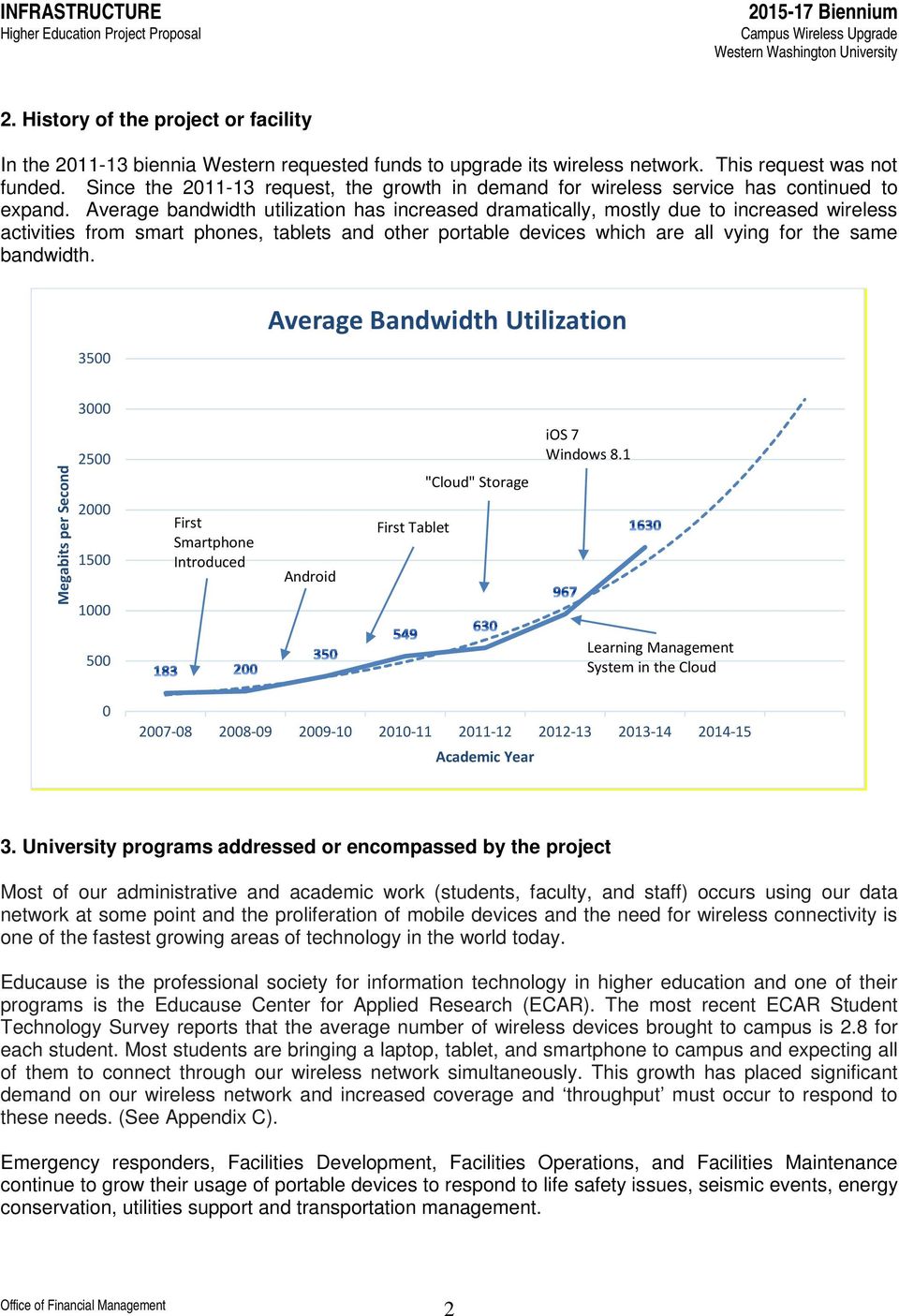
3 INFRASTRUCTURE Higher Education Project Proposal Biennium Campus Wireless Upgrade Western Washington University 2. History of the project or facility In the biennia Western requested funds to upgrade its wireless network. This request was not funded. Since the request, the growth in demand for wireless service has continued to expand. Average bandwidth utilization has increased dramatically, mostly due to increased wireless activities from smart phones, tablets and other portable devices which are all vying for the same bandwidth Average Bandwidth Utilization 3000 Megabits per Second First Smartphone Introduced Android First Tablet "Cloud" Storage ios 7 Windows Learning Management System in the Cloud Academic Year 3. University programs addressed or encompassed by the project Most of our administrative and academic work (students, faculty, and staff) occurs using our data network at some point and the proliferation of mobile devices and the need for wireless connectivity is one of the fastest growing areas of technology in the world today. Educause is the professional society for information technology in higher education and one of their programs is the Educause Center for Applied Research (ECAR). The most recent ECAR Student Technology Survey reports that the average number of wireless devices brought to campus is 2.8 for each student. Most students are bringing a laptop, tablet, and smartphone to campus and expecting all of them to connect through our wireless network simultaneously. This growth has placed significant demand on our wireless network and increased coverage and throughput must occur to respond to these needs. (See Appendix C). Emergency responders, Facilities Development, Facilities Operations, and Facilities Maintenance continue to grow their usage of portable devices to respond to life safety issues, seismic events, energy conservation, utilities support and transportation management. Office of Financial Management 2
4 INFRASTRUCTURE Higher Education Project Proposal Biennium Campus Wireless Upgrade Western Washington University Western is also in the process of revising its access control system. In order to provide access control where hard wiring is either impractical or cost prohibitive, wireless access devices will be utilized. Potential uses include not only external or internal doors on academic buildings but also student residential areas and parking lot gates. 4. Significant Health, Safety, and Code Issues: a. There are significant life safety and seismic event response issues since our emergency notification system relies upon and our website as vectors for emergency information. Most students, faculty, and staff connect their mobile devices to the wireless network when they are on campus. University owned and personal Wi-Fi enabled portable telephones used by first responders can connect to our PBX, VOIP system, and systems. Ubiquitous wireless coverage assures they are able to receive the notifications and access information throughout campus. A campus risk analysis was completed in 2014 with recommendations for campus emergency notifications. A critical part of the campus notification system relies on a functioning IT system. (Appendix information is not provided due to confidentiality requirements related to this type of study). We are currently revising our Facility Management System which will require mobile access by Facility personnel including work assignment and time recording. Western would also like to install energy and resource tracking meters as part of its efficiency program. An expanded wireless network simplifies remote meter locations. Significant productivity gains would be made with this capability which will not be possible without a ubiquitous wireless network. University Police also rely upon wireless access for some of their data collection and distribution. Our emergency response teams are also able to utilize wireless for communication including transmission of pictures. A portion of our Access Control system will utilize wireless connectivity for door control. This has significant security impact for sensitive areas where wired access control cannot be accomplished. b. The new equipment and installation will be compliant with current standard network protocols, and regulatory standards for network equipment safety, electromagnetic compatibility (EMC), and TIA/EIA telecommunications building wiring standards. Applicable current industry standards include IEEE a, b, g, n, ac; Wi-Fi Alliance Certified products; applicable TIA/EIA wireless standards, and FCC Wireless Communication Standards. 5. Evidence of increased repairs and/or service interruption: Significant service interruption occurs as a wireless device moves in and out of limited coverage areas. Not only is the connection broken but often the device must be logged back into the network. This results in wasted time and employee or student frustration. This is critical when emergency responders are relying on wireless connectivity. In a classroom setting, wireless access may function when only a few students are accessing a local antenna but with increasing number of students trying to access service, it will become too slow or may drop, losing an educational opportunity. A modern wireless network would result in a seamless transfer of the wireless signal as people, including first responders Office of Financial Management 3
5 INFRASTRUCTURE Higher Education Project Proposal Biennium Campus Wireless Upgrade Western Washington University moved about campus. More wireless access point in high density areas such as classrooms would provide a better experience with less interference and bandwidth reduction for large numbers of students (including those with disabilities). 6. Impact on Institutional Operations without the Infrastructure Project: Without a capable and stable wireless network, significant inefficiencies will occur with business processes and access to academic resources. Lack of an effective wireless network could also affect our ability to attract and retain students due to their inability to connect to the university s website and access academic resources such as our learning management system and research data. As discussed in the Educause study of Undergraduate Students and IT, students continue to use technology, and in particular mobile technology, in their everyday experience. (See Appendix C) Because our current wireless network is not adequate, non-institutional wireless devices are sometimes attached to our network. These rogue devices are often not compatible with our network, offer unsecured access, and cause RF interference with nearby legitimate access points, and result in data security breaches or network outages Currently employees need to spend time looking for rogue access points to shut them down. With a ubiquitous network the need for individuals to add these rogue access points would significantly decrease. We estimate a minimum time savings of four hours per week for our network technicians. 7. Reasonable Estimate: A professional estimator, The Wool-Zee Company, Inc., assisted in development of the project budget. (See Appendix D).. 8. Engineering Study: The project scope was developed through analysis with university IT technicians and a comprehensive engineering study was performed by Bill Diephuis, P.E. RCDD, K-Engineers, of Lynden, WA. This study identified the need for 1,500 wireless access points to provide full campus wireless coverage. The existing wireless system only includes 400 access points. (See Appendix E). 9. Supports Facilities Plan: a. Campus/Facilities Master Plan With the growth of wireless devices, and their importance to the academic mission and facilities management, the campus wireless network is fast becoming as important as any other utility system on campus. An important part of the campus master plan is assuring that utility services are available to support the mission of the university. (See Appendix F). Additionally, wireless systems installation is standard in any of our new or significantly renovated facilities. Wireless options are continuing to grow for facilities project management, operations and maintenance systems. b. Ongoing academic and/or research program The Campus Wireless Upgrade project supports progress towards all of Western s strategic goals. The wireless network is becoming fundamental to our work and success. As mentioned earlier, students are bringing multiple devices to campus with the expectation of connectivity to Office of Financial Management 4

6 INFRASTRUCTURE Biennium Higher Education Project Proposal Campus Wireless Upgrade Western Washington University their academic resources anytime, anywhere. A ubiquitous robust wireless network is crucial to faculty and student success, safety and satisfaction. 10. Resource Efficiency and Sustainability: Energy efficiency is an important aspect of Western s culture. Western as an institution purchases 100% green electrical power. The replacement wireless antennas proposed for the Wireless Upgrade project will be more efficient than those being replaced. The procurement process that will be utilized will assure new equipment meets State of Washington energy efficiency goals and guidelines. Installation of antennas is much more efficient in providing access to large numbers of student, faculty, and staff than individual hard wired data jacks. Office of Financial Management 5

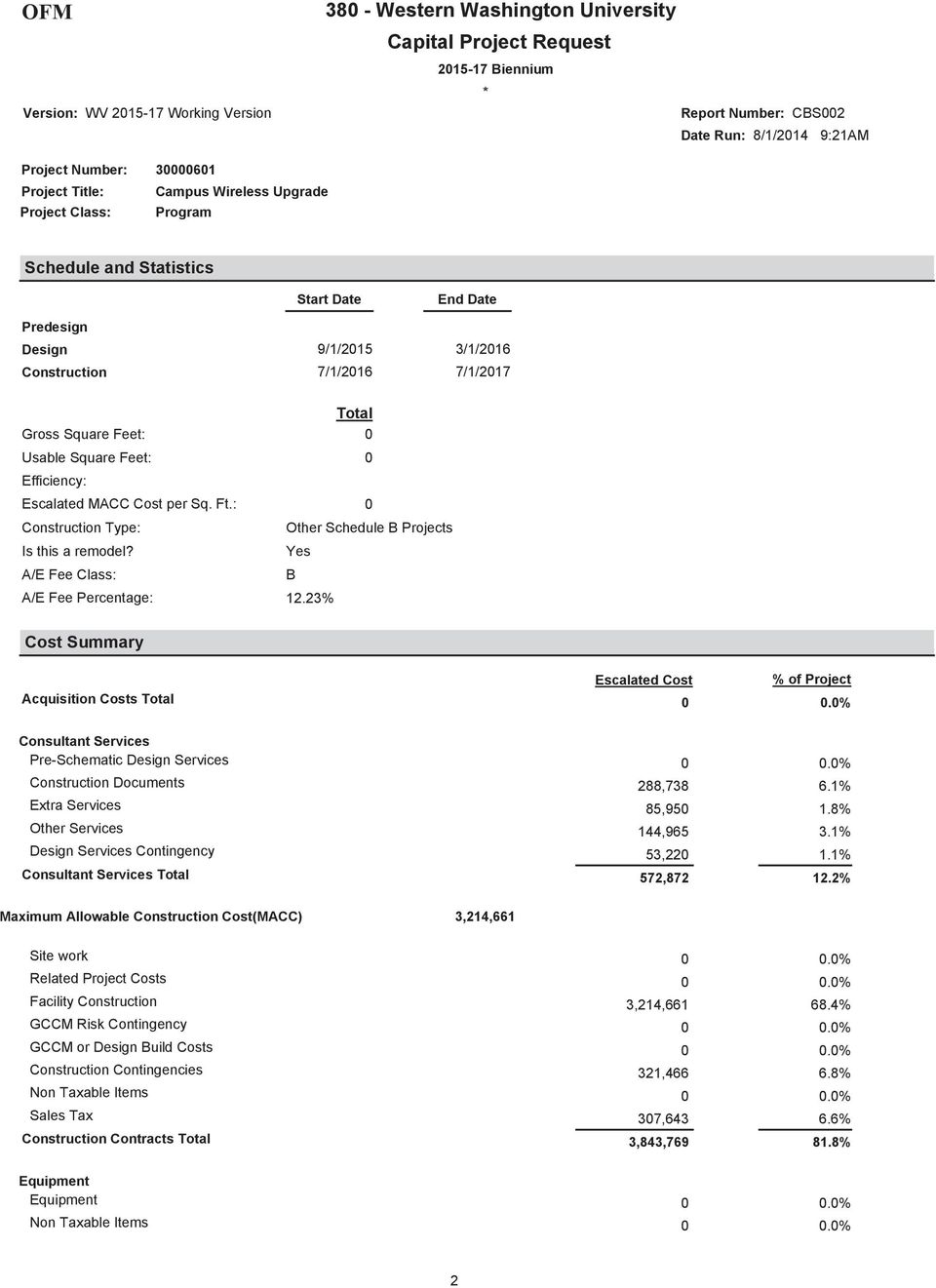
7 INFRASTRUCTURE Higher Education Project Proposal Biennium Campus Wireless Upgrade Western Washington University Campus Wireless Upgrade Appendix Contents A. Office of Financial Management reports (CBS002 and CBS003) B. Technical White Paper ac: The Fifth Generation of Wi-Fi C. ECAR Study of Undergraduate Students and Information Technology, 2013 Educause Center for Analysis and Research. D. The Wool-Zee Company Inc., Cost Estimate E. K-Engineers Engineering Study/Campus Wireless Request for Information F. WWU Institutional Master Plan Office of Financial Management 6

8 Appendix A

9

10
11

12
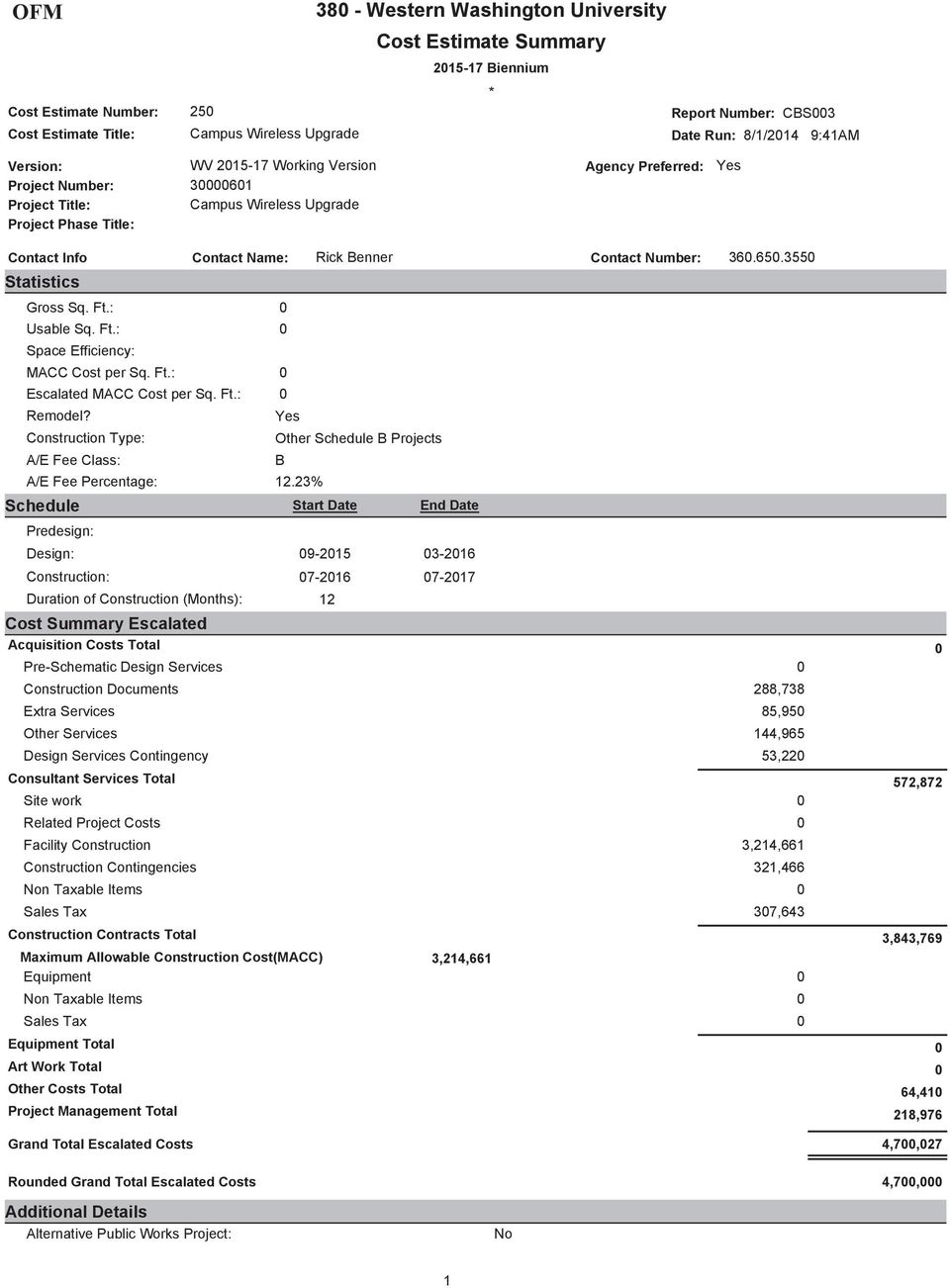
13

14

15
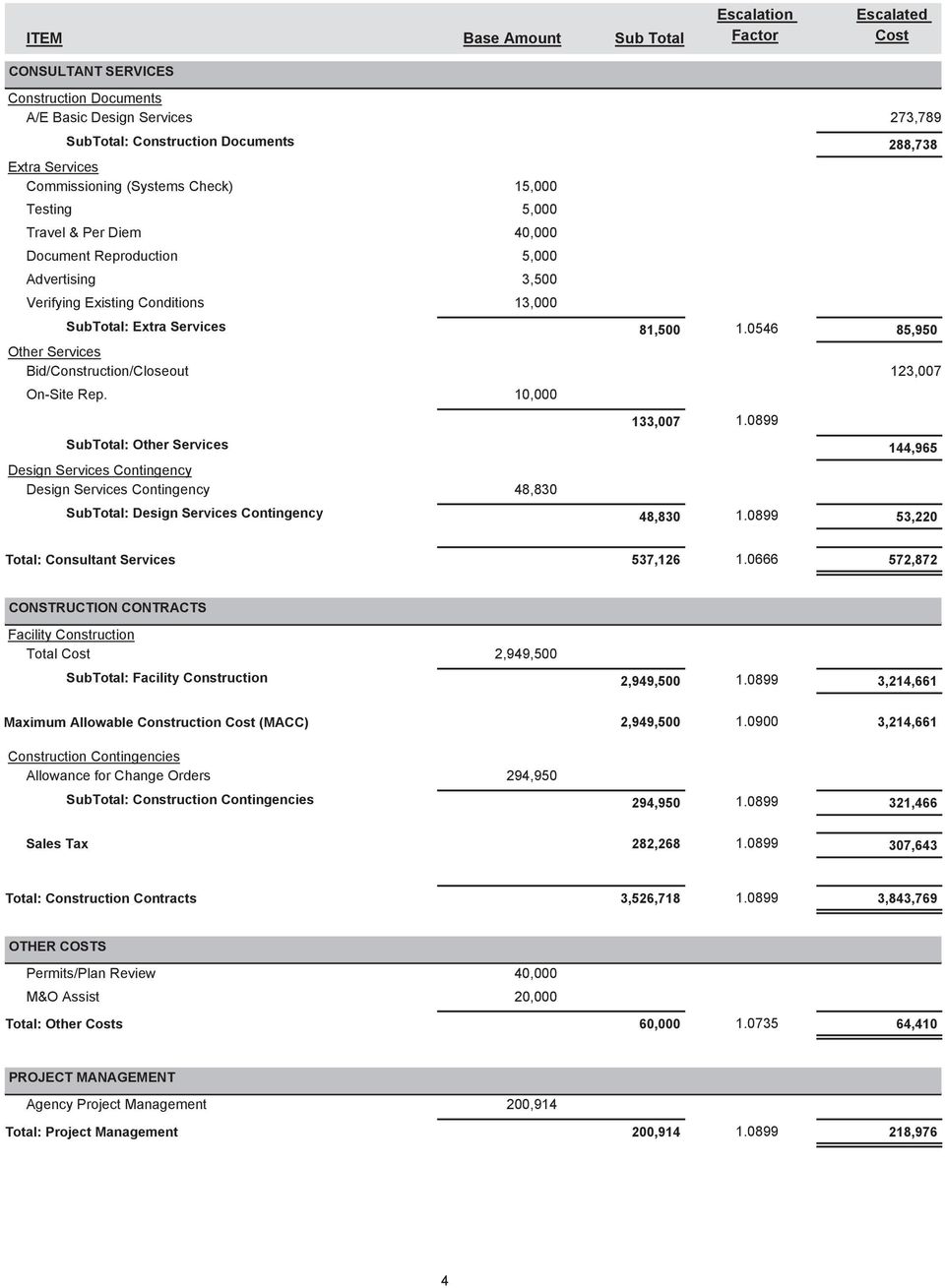
16 Appendix B

17 White Paper ac: The Fifth Generation of Wi-Fi Technical White Paper August, Cisco and/or its affiliates. All rights reserved. This document is Cisco Public Information. Page 1 of 25

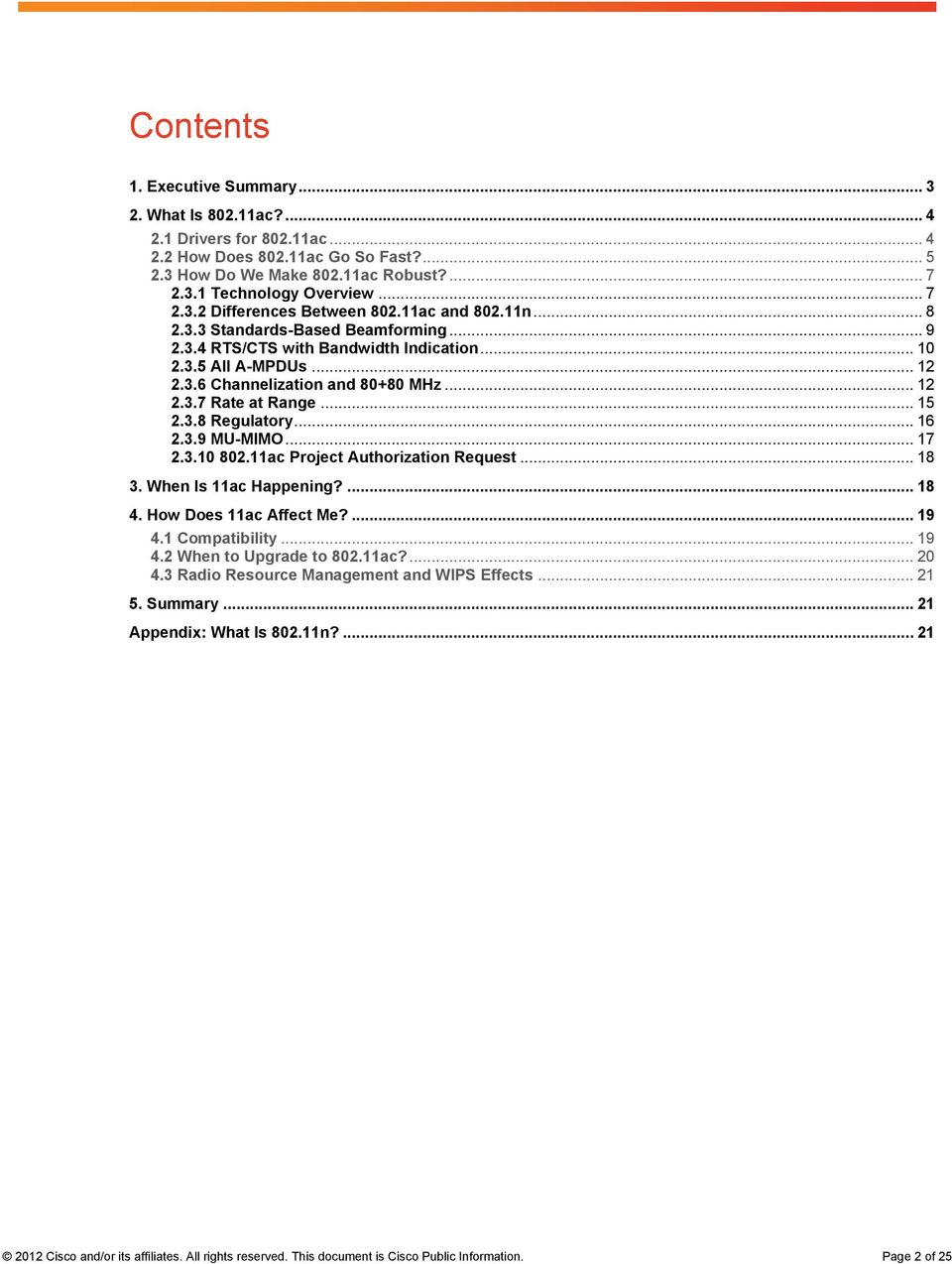
18 Contents 1. Executive Summary What Is ac? Drivers for ac How Does ac Go So Fast? How Do We Make ac Robust? Technology Overview Differences Between ac and n Standards-Based Beamforming RTS/CTS with Bandwidth Indication All A-MPDUs Channelization and MHz Rate at Range Regulatory MU-MIMO ac Project Authorization Request When Is 11ac Happening? How Does 11ac Affect Me? Compatibility When to Upgrade to ac? Radio Resource Management and WIPS Effects Summary Appendix: What Is n? Cisco and/or its affiliates. All rights reserved. This document is Cisco Public Information. Page 2 of 25
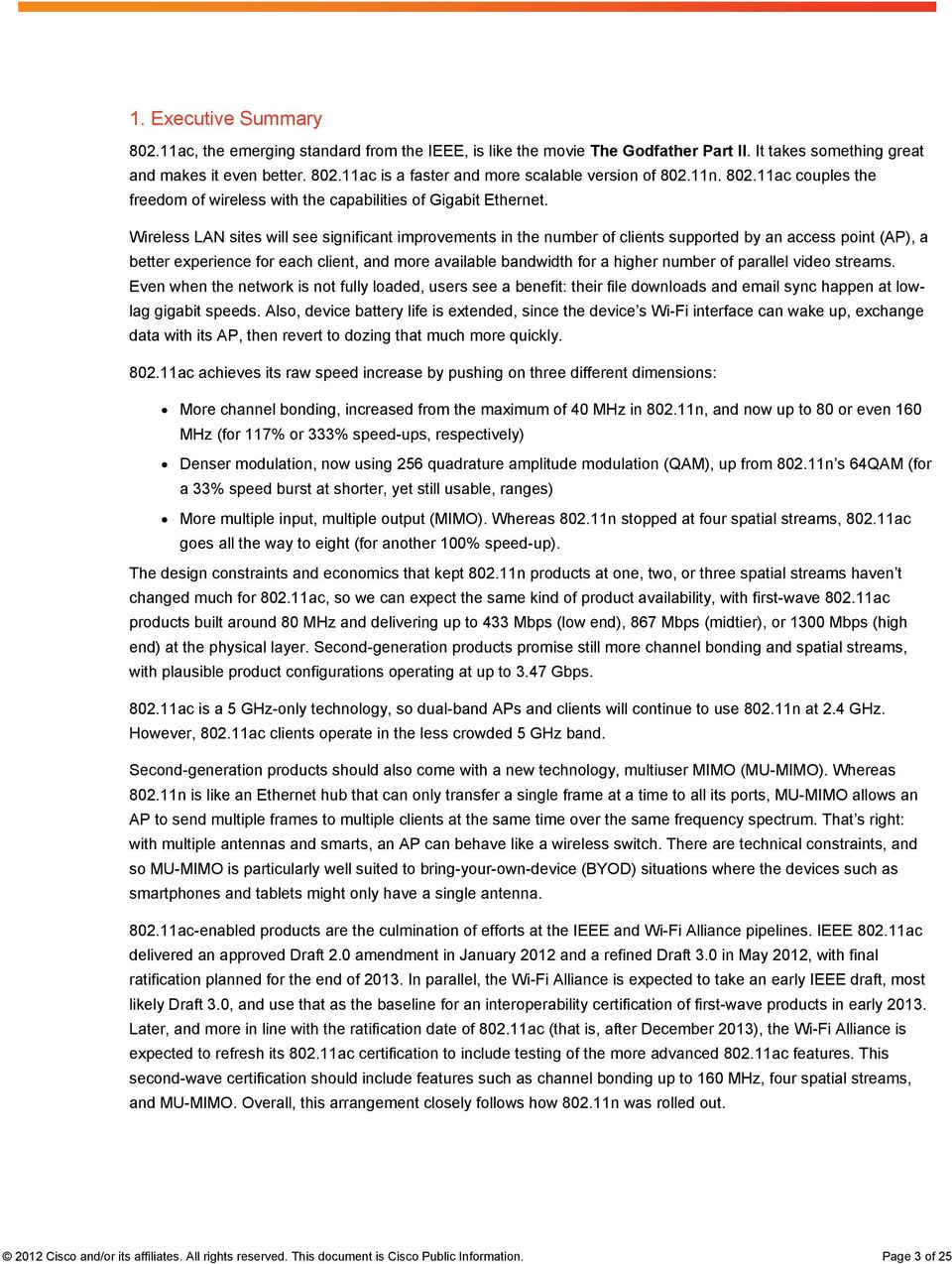
19 1. Executive Summary ac, the emerging standard from the IEEE, is like the movie The Godfather Part II. It takes something great and makes it even better ac is a faster and more scalable version of n ac couples the freedom of wireless with the capabilities of Gigabit Ethernet. Wireless LAN sites will see significant improvements in the number of clients supported by an access point (AP), a better experience for each client, and more available bandwidth for a higher number of parallel video streams. Even when the network is not fully loaded, users see a benefit: their file downloads and sync happen at lowlag gigabit speeds. Also, device battery life is extended, since the device s Wi-Fi interface can wake up, exchange data with its AP, then revert to dozing that much more quickly ac achieves its raw speed increase by pushing on three different dimensions: More channel bonding, increased from the maximum of 40 MHz in n, and now up to 80 or even 160 MHz (for 117% or 333% speed-ups, respectively) Denser modulation, now using 256 quadrature amplitude modulation (QAM), up from n s 64QAM (for a 33% speed burst at shorter, yet still usable, ranges) More multiple input, multiple output (MIMO). Whereas n stopped at four spatial streams, ac goes all the way to eight (for another 100% speed-up). The design constraints and economics that kept n products at one, two, or three spatial streams haven t changed much for ac, so we can expect the same kind of product availability, with first-wave ac products built around 80 MHz and delivering up to 433 Mbps (low end), 867 Mbps (midtier), or 1300 Mbps (high end) at the physical layer. Second-generation products promise still more channel bonding and spatial streams, with plausible product configurations operating at up to 3.47 Gbps ac is a 5 GHz-only technology, so dual-band APs and clients will continue to use n at 2.4 GHz. However, ac clients operate in the less crowded 5 GHz band. Second-generation products should also come with a new technology, multiuser MIMO (MU-MIMO). Whereas n is like an Ethernet hub that can only transfer a single frame at a time to all its ports, MU-MIMO allows an AP to send multiple frames to multiple clients at the same time over the same frequency spectrum. That s right: with multiple antennas and smarts, an AP can behave like a wireless switch. There are technical constraints, and so MU-MIMO is particularly well suited to bring-your-own-device (BYOD) situations where the devices such as smartphones and tablets might only have a single antenna ac-enabled products are the culmination of efforts at the IEEE and Wi-Fi Alliance pipelines. IEEE ac delivered an approved Draft 2.0 amendment in January 2012 and a refined Draft 3.0 in May 2012, with final ratification planned for the end of In parallel, the Wi-Fi Alliance is expected to take an early IEEE draft, most likely Draft 3.0, and use that as the baseline for an interoperability certification of first-wave products in early Later, and more in line with the ratification date of ac (that is, after December 2013), the Wi-Fi Alliance is expected to refresh its ac certification to include testing of the more advanced ac features. This second-wave certification should include features such as channel bonding up to 160 MHz, four spatial streams, and MU-MIMO. Overall, this arrangement closely follows how n was rolled out Cisco and/or its affiliates. All rights reserved. This document is Cisco Public Information. Page 3 of 25
20 Enterprise networks considering an investment in infrastructure Wi-Fi have two excellent choices: (1) buy n APs, since they deliver a remarkable level of performance, they are available today, and n is widely deployed in client products, or (2) wait for ac APs and their state-of-the-art performance. Then there is option (3), which avoids the wait: invest in a modular n AP such as the Cisco Aironet 3600 Access Point that is readily field-upgradable to ac. Meanwhile, consumer-grade products might be launched earlier, in 2012, but before Wi-Fi Alliance certification is available. However, we strongly recommend that all enterprises wait for products that are certified by the Wi-Fi Alliance as interoperable (that is, in 2013) ac, when it arrives, has a few new effects on existing a/11n deployments even if the deployment is not upgraded to ac immediately: (1) the wider channel bandwidths of neighboring APs require updates to radio resource measurement, or RRM (and in particular the dynamic channel assignment algorithm), and (2) a/11n wireless intrusion protection systems (WIPS) can continue to decode most managements frames such as beacon and probe request/response frames (that are invariably sent in a format) but do not have visibility in data sent in the new ac packet format. One thing not to worry about is compatibility ac is designed in a deep way to coexist efficiently with existing a/n devices, with strong carrier sense, a single new preamble that appears to be a valid a preamble to a/n devices, and extensions to request-to-send/clear-to-send (RTS/CTS) to help avoid collisions with users operating on slightly different channels. 2. What Is ac? First, ac is an evolution of n. If you want to learn more about n, jump to the appendix. If you are already familiar with the channel bonding, MIMO, and aggregation introduced by n and you don t need a refresher, then read on. 2.1 Drivers for ac ac is an evolutionary improvement to n. One of the goals of ac is to deliver higher levels of performance that are commensurate with Gigabit Ethernet networking: Seemingly instantaneous data transfer experience A pipe fat enough that delivering high quality of experience (QoE) is straightforward In the consumer space, the target is multiple channels of high-definition content delivered to all areas of the house. The enterprise has different challenges: Delivering network with enterprise-class speeds and latencies High-density environments with scores of clients per AP Which are exacerbated by the BYOD trend such that one employee might carry two or even three devices and have them consuming network resources all at once The increased adoption of video streaming ac is about delivering an outstanding experience to each and every client served by an AP, even under demanding loads. Meanwhile is integral to hugely broad range of devices, and some of them are highly cost, power, or volume constrained. One antenna is routine for these devices, yet ac must still deliver peak efficiency Cisco and/or its affiliates. All rights reserved. This document is Cisco Public Information. Page 4 of 25
21 The one thing that ac has in its favor is the evolutionary improvement to silicon technology over the past half-dozen years: channel bandwidths can be wider, constellations can be denser, and APs can integrate more functionality. Figure 1. How ac Accelerates n 2.2 How Does ac Go So Fast? Wireless speed is the product of three factors: channel bandwidth, constellation density, and number of spatial streams ac pushes hard on the boundaries on each of these, as shown in Figure 1. For the mathematically inclined, the physical layer speed of ac is calculated according to Table 1. For instance, an 80 MHz transmission sent at 256QAM with three spatial streams and a short guard interval delivers /6 8 bits/3.6 μs = 1300 Mbps. Table 1. Calculating the Speed of n and ac PHY Bandwidth (as Number of Data Subcarriers) Number of Spatial Streams Data Bits per Subcarrier Time per OFDM Symbol 11n or 11ac 56 (20 MHz) 1 to 4 Up to 5/6 log 2 (64) = μs (short guard interval) 108 (40 MHz) 4 μs (long guard interval) 11ac only 234 (80 MHz) 5 to 8 Up to 5/6 log 2 (256) (160 MHz) = PHY Data Rate (bps) Immediately we see that increasing the channel bandwidth to 80 MHz yields a 2.16 times speed-up, and 160 MHz offers a further doubling. Nothing is for free: it does consume more spectrum, and each time we re splitting the same transmit power over twice as many subcarriers, so the speed doubles, but the range for that doubled speed is slightly reduced (for an overall win). Going from 64QAM to 256QAM also helps, by another 8/6 = 1.33 times. Being closer together, the constellation points are more sensitive to noise, so 256QAM helps most at shorter range where 64QAM is already reliable. Still, 256QAM doesn t require more spectrum or more antennas than 64QAM Cisco and/or its affiliates. All rights reserved. This document is Cisco Public Information. Page 5 of 25
22 Then the speed is directly proportional to the number of spatial streams. More spatial streams require more antennas, RF connectors, and RF chains at transmitter and receiver. The antennas should be spaced 1/3 wavelength (3/4 ) or more apart, and the additional RF chains consume additional power. This drives many mobile devices to limit the number of antennas to one, two, or three. Collectively, these three speed-ups are significant. From Figure 2 and Table 2, the minimum allowed ac product is 4.4 faster than the corresponding n product, and the midtier and high-end wave 1 products are nearly 3 faster, reaching up to 1.3 Gbps PHY data rates. Actual throughput will be a function of MAC efficiency (rarely better than 70%) and the device capabilities at each end of the link. Figure 2. Evolution of Cisco APs with Physical Layer Amendments Table 2. Important Data Rates of a, 11n, and 11ac Nominal Configuration a Bandwidth (MHz) Number of Spatial Streams Constellation Size and Rate Guard Interval PHY Data Rate (Mbps) All QAMr3/4 Long n Min QAMr5/6 Long Low-end product (2.4 GHz only+) QAMr5/6 Short Midtier product QAMr5/6 Short Max product QAMr5/6 Short Throughput (Mbps)* 2012 Cisco and/or its affiliates. All rights reserved. This document is Cisco Public Information. Page 6 of 25
23 Nominal Configuration Bandwidth (MHz) Number of Spatial Streams Constellation Size and Rate Guard Interval PHY Data Rate (Mbps) Throughput (Mbps)* Amendment max QAMr5/6 Short ac wave 1 Min QAMr5/6 Long Low-end product QAMr5/6 Short Midtier product QAMr5/6 Short High-end product QAMr5/6 Short MHz amendment max QAMr5/6 Short ac wave 2 Low-end product QAMr5/6 Short Midtier product QAMr5/6 Short High-end product QAMr5/6 Short Ultra-high-end product QAMr5/6 Short Amendment max QAMr5/6 Short *Assuming a 70% efficient MAC, except for a, which lacks aggregation. + Assuming 40 MHz is not available due to the presence of other APs. 2.3 How Do We Make ac Robust? The sticker on the box that shows maximum data rate doesn t help us much in the real world, where devices have to contend with interference from non devices, preexisting APs that might only use 20 or 40 MHz, multipath fading, few antennas on mobile devices, weak signals at range, and so forth. What makes the raw speed of ac so valuable are the extensions that help to deliver reliable throughput under realistic conditions Technology Overview By design, ac is intended to operate only in the 5 GHz band, as shown in Table 3. This avoids much of the interference at 2.4 GHz, including Bluetooth headsets and microwave ovens, and provides a strong incentive for users to upgrade their mobile devices (and hotspot APs) to be dual band so that the 5 GHz band is more universally usable. This choice also streamlines the IEEE process by avoiding the possibility of contention between and proponents. And there is barely 80 MHz of bandwidth at 2.4 GHz anyway. As we ve already seen, introduces higher order modulation, up to 256QAM; additional channel bonding, up to 80 or 160 MHz; and more spatial streams, up to eight. There is an alternative way to send a 160 MHz signal, known as MHz, discussed later (see section 2.3.6) ac continues some of the more valuable features of n, including the option of short guard interval (for a 10% speed bump) and incrementally better rate at range using the advanced low-density parity check (LDPC) forward error-correcting codes. These LDPC codes are designed to be an evolutionary extension of the n LDPC codes, so implementers can readily extend their current hardware designs. Various space time block codes (STBCs) are allowed as options, but (1) this list is trimmed from the overrich set defined by n, and (2) STBC is largely made redundant by beamforming n defined the core STBC modes of 2 1 and 4 2 and also 3 2 and 4 3 as extension modes, but the extension modes offered little gain for their additional complexity and have not made it to products. Indeed, only the most basic mode, 2 1, has been certified by the Wi-Fi Alliance. With this experience, ac only defines the core 2 1, 4 2, 6 3, and 8 4 STBC modes, but again only 2 1 is expected to make it to products: if you had an AP with four antennas, why would you be satisfied with 4 2 STBC when you could - and should - be using beamforming? 2012 Cisco and/or its affiliates. All rights reserved. This document is Cisco Public Information. Page 7 of 25
24 What ac also gets right is to define a single way of performing channel sounding for beamforming: so-called explicit compressed feedback. Although optional, if an implementer wants to offer the benefits of standards-based beamforming, there is no choice but to select that single mechanism, which can then be tested for interoperability. Table 3. Primary Ingredients of ac Parameter ac D3.0 Spectrum Likely Wave 1 Wi-Fi Alliance Certification ac (Later Draft) Potential Wave 2 Wi-Fi Alliance Certification 5 GHz (varied support by regulatory domain; nearly 600 MHz in the United States) Bandwidth Mandatory: 20, 40, and 80 MHz Mandatory: 20, 40, and 80 MHz Modulation Mandatory: BPSK, QPSK, 16QAM, 64QAM Optional: 256QAM Number of spatial streams Mandatory: 2 (non mobile APs*), 1 (others) Forward error correction Optional: up to 3 spatial streams Mandatory: BCC Optional: LDPC Optional: 160 and MHz Mandatory: 2 (non mobile APs*), 1 (others) Optional: up to 4 spatial streams ac Complete Amendment <6 GHz excluding 2.4 GHz Mandatory: 1 Optional: 2-8 STBC Optional: 2 1 AP to client Optional: 2 1, 4 2, 6 3, 8 4 Short guard interval Sounding (a single interoperable protocol) CTS in response to RTS with bandwidth indication RTS with bandwidth indication Aggregation Optional Optional Mandatory Optional Mandatory: TX and RX of A-MPDU Optional: RX A-MPDU of A-MSDU MU-MIMO - Optional *Additional requirement introduced by the Wi-Fi Alliance. Mandatory: TX and RX of A- MPDU TBD: RX A-MPDU of A-MSDU A-MDPU, A-MDPU of A- MSDU Because of the wider channel bandwidths of ac, it is much more likely that an 80 MHz AP will overlap with another 20 or 40 MHz AP - and similarly an 80 or 160 MHz AP - or even several of them, all potentially on different channels. To enable reliable operation amid this complexity, ac mandates extensions to the RTS/CTS mechanism, stronger clear-channel assessment (CCA) requirements, and new primary channel selection rules. See section ac also introduces a valuable new technology called multiuser MIMO. This is challenging to get right, so is deferred until the second wave of ac products and is optional. More on this later in section Differences Between ac and n ac has avoided the battles of n and instead has focused on extending the tremendous advances made in n to deliver the next generation of speed and robustness. For instance, n pioneered aggregation through the selective use of A-MPDU, A-MSDU, and A-MPDU of A- MSDU (see Appendix) ac actually requires every ac transmission to be sent as an A-MPDU aggregate. This is due in part because of the intrinsic efficiency of A-MPDU and for some other reasons too (see section 2.3.5) Cisco and/or its affiliates. All rights reserved. This document is Cisco Public Information. Page 8 of 25
25 In a further example, ac extends the n channel access mechanism: virtual carrier sense and backoff occur on a single 20 MHz primary channel; then CCA is used for the remaining 20 MHz subchannels immediately before transmitting on them. Given the power of A-MPDU and the n channel access mechanism, ac actually didn t need to innovate much in the MAC. Indeed, extensions to the RTS/CTS mechanism are the only new mandatory MAC feature n does include many options with reduced value ac takes a very pragmatic approach to them. If a useless option is used and affects a third-party device, then typically ac forbids an ac device (operating in ac mode) from using the option. If a useless option has not been used in n products or only affects the devices that activate the option, then the feature is not updated for ac but is instead left to die. For instance, there is no ac version of the n greenfield preamble format ac only defines one preamble format, which, to legacy a/11n devices, will look safely like an a preamble followed by a payload with a bad CRC. This means that legacy devices don t try to transmit over the top of the ac transmission, nor do they attempt to send a bad payload up the stack n introduced a reduced interframe spacing, which reduces overheads between consecutive transmissions, but experience has shown that A-MDPU solves much the same problem, but even more efficiently ac devices operating in ac mode are not permitted to transmit RIFS (as of Draft 3.0) n features that are not updated for 11ac (or explicitly forbidden for ac devices operating in ac mode) include all the n sounding options, including extension LTFs, the calibration procedure, antenna selection, PCO, LSIG TXOP protection, unequal modulation, 4 3 and 3 2 STBC modes, MCS32, and dual CTS protection. If you don t know these terms, then no problem, because almost certainly you ll never need to know them Standards-Based Beamforming Any device (with multiple antennas) can beamform to any other device at any time. What ac adds is the opportunity for the receiver to help the beamforming transmitter to do a better job of beamforming. This is called sounding, and it enables the beamformer to precisely steer its transmitted energy toward the receiver ac defines a single, though optional, protocol for one ac device to sound other ac devices. The protocol selected closely follows the n explicit compressed feedback protocol, as follows. A device, typically an AP, sends a VHT Null Data Packet (NDP) Announcement frame. Its only purpose is to contain the address of the AP and of the target recipients. The VHT NDP Announcement frame is immediately followed by a VHT Null Data Packet (VHT NDP) intended for those target recipients. Each intended recipient measures the RF channel from AP to itself using the preamble of the VHT NDP and compresses the channel. The first intended recipient responds with the compressed channel information in a VHT Compressed Beamforming frame immediately, and other recipients respond when they are polled by the AP. The VHT NDP Announcement frame, the VHT NDP, and the VHT Compressed Beamforming frame are all similar to features in n. However, because of some subtle differences, the ac sounding is not backward compatible with n devices Cisco and/or its affiliates. All rights reserved. This document is Cisco Public Information. Page 9 of 25
26 Also, to support this new MU-MIMO feature (see section 2.3.9), the channel feedback can contain an extra level of detail. Explicit compressed feedback (ECFB) is known to provide the most precise estimate of the channel that takes into account all the imperfections at transmitter and receiver. However, ECFB comes with a lot of overhead: the VHT NDP Announcement frame, the VHT NDP itself, and the frame carrying the compressed feedback. For an AP with four antennas, the compressed feedback varies from 180 to 1800 bytes, depending on the number of client antennas and level of compression. Sounding just one singleantenna 80 MHz client takes about 250 microseconds. When devices can transmit at 433 Mbps, this is expensive, since that same time could have instead been used to send an extra 13,000 bytes. And so technologies that solve the problem of sounding without depending on client assistance (such as Cisco s family of ClientLink technologies) continue to add genuine value. They (1) still help legacy a/n clients, (2) still help those ac clients that do not support ac sounding, (3) still help clients at 2.4 GHz, and (4) can avoid the overhead of standards-based explicit sounding when it is not actually necessary RTS/CTS with Bandwidth Indication An ac AP operating on 80 MHz (or 160 MHz and so on) should still be capable of allowing a or n clients to associate. Thus beacons are sent on one 20 MHz channel, known as the primary channel, within that 80 MHz. The AP and all clients associated to the AP receive and process every transmission that overlaps this primary channel and extract virtual carrier sense from the frames they can decode. However, the AP could be nearby other uncoordinated APs. Those APs could be preexisting a or n APs, and their primary channels could be any 20 MHz within the 80 MHz of the ac AP. Then the different APs and their associated clients have a different virtual carrier sense, so can transmit at different times on the different subchannels, including overlapping times. With the wide ac channel bandwidths, this scenario becomes much more likely than with n Cisco and/or its affiliates. All rights reserved. This document is Cisco Public Information. Page 10 of 25
27 Figure 3. RTS/CTS Enhanced with Bandwidth Signalling For this reason, ac defines an enhanced RTS/CTS protocol. RTS/CTS can be used to find when channel bandwidth is clear and how much, around both the initiator and the responder, as shown in Figure 3. First, when an ac device sends an RTS, (1) this initiating device has to verify that the 80 MHz channel is clear in its vicinity, (2) the RTS is normally sent in an a PPDU format, and (3) the basic a transmission, which is 20 MHz wide, is replicated another three times to fill the 80 MHz (or another seven times to fill 160 MHz). Then every nearby device, regardless of whether it is an a/n/ac device, receives an RTS that the device can understand on its primary channel. And every device that hears the RTS has its virtual carrier sense set to busy (see Figure 3(a)). To make the protocol robust, the replication bandwidth of the RTS is reported inside the a PPDU 1. 1 Since the a PPDU format doesn t contain a bandwidth indication, ac has to play some tricks to maintain backward compatibility. The bandwidth indication is encoded in the scrambling sequence, and also the individual/group bit in the transmitter MAC address in the RTS frame is changed from individual to group." This last change will be visible in sniffer traces Cisco and/or its affiliates. All rights reserved. This document is Cisco Public Information. Page 11 of 25
28 Second, before the device addressed by the replicated RTS responds with a CTS, the recipient device checks to see if there is anyone transmitting near itself, on its primary channel or on any other 20 MHz within the 80 MHz. If a portion of the bandwidth is in use nearby, then the recipient only responds with a CTS on the available and usable 20 MHz subchannels and also reports the bandwidth of the replicated CTS inside the CTS s PPDU. Here usable subchannels means the subchannels on which the initiating device is allowed to send something, such as a 20, 40, or 80 MHz (but not 60 MHz) transmission. This is shown in Figure 3(b). Third, the CTS is sent, like the RTS, in an a PPDU format, replicated in 20 MHz chunks across the available and useful bandwidth. Again every nearby device receives a CTS that the device can understand on its primary channel. There are other variations on this protocol, for when the initiator is incapable of switching to a narrower bandwidth on the fly and so forth, but the previous description captures the essence of the enhancement: the recipient can say these subchannels are busy - don t use them All A-MPDUs defines that every PPDU transmission is an A-MPDU, yet the A-MPDU might only contain a single MPDU. Why? The short answer is that it s complicated. Long answer: There are three reasons: (1) In a/n, the duration of the transmission is set by the number of octets and the data rate for the transmission. But for a maximum-length 5.5 ms transmission at 6.93 Gbps, there could be over 4 million bytes, and this takes 23 bits to represent. These bits would be sent at the lowest MCS rate at the start of every ac transmission and so practically would add 4 μs each time. Instead, the length of an ac transmission is constrained to be a multiple of the number of data bits per OFDM symbol, and then only the number of OFDM symbols needs to be signaled. Moreover, the number of (assumed to be) 4 μs-long OFDM symbols is already implicitly available in the legacy portion of the preamble, so this signaling comes almost for free. 2 Then we need a way to completely fill even the last OFDM symbol with data. A-MDPU makes this easy: send the data as MDPUs within MDPU subframes in an A-MDPU, then pad the A-MDPU with enough null MDPU subframes to fill up the last OFDM symbol. (2) This same padding mechanism will come in handy for the new MU- MIMO feature. (3) A-MDPU is in general a good idea to increase reliability for long payloads Channelization and MHz ac adopts a keep-it-simple approach to channelization. Adjacent 20 MHz subchannels are grouped into pairs to make 40 MHz channels, adjacent 40 MHz subchannels are grouped into pairs to make 80 MHz channels, and adjacent 80 MHz subchannels are grouped into pairs to make the optional 160 MHz channels, as shown in Figure 4. A BSS (that is, AP plus clients) uses the different bandwidths for different purposes, but the usage is principally governed by the capabilities of the clients. 2 Just a single bit is needed to disambiguate the number of actual OFDM symbols present if the transmission instead uses the short guard interval and the OFDM symbols are actually 3.6 μs long Cisco and/or its affiliates. All rights reserved. This document is Cisco Public Information. Page 12 of 25
29 Figure ac Channelization (United States) We see that in the United States, there are 20 to MHz channels, 8 to MHz channels, 4 to 6 80 MHz channels, and 1 or MHz channels. These numbers are ranges because of the evolving regulatory issues surrounding the different spectrum noted in Figure 4. What if most clients at a deployment are still n clients with 40 MHz maximum? Does deploying ac APs mean fewer channels and more interference? As you would expect from an IEEE standard, the answer is a resounding no. It is entirely allowed for two 80 MHz ac APs to select the same 80 MHz channel bandwidth but one AP to put its primary 20 MHz channel within the lower 40 MHz and the other AP to put its primary 20 MHz channel within the upper 40 MHz. What this means is that n clients associated to the first AP can transmit 20 or 40 MHz as usual, at the same time as n clients associated to the second AP can transmit 20 or 40 MHz in parallel. What is new in ac is the ability for any ac client that sees that the whole 80 MHz as available to invoke a very high-speed mode and to transmit across the whole 80 MHz. This is shown in Figure Cisco and/or its affiliates. All rights reserved. This document is Cisco Public Information. Page 13 of 25
30 Figure 5. Example of Parallel Transmissions with Two BSSs on the Same 80 MHz but with Different Primary 20-MHz Subchannels The ability to have overlapped APs but different primary channels is made possible by: The enhanced secondary CCA thresholds mandated by ac, which are up to 13 db more stringent than the secondary channel CCA thresholds defined by n The addition of a bandwidth indication to the RTS/CTS exchange (see section 2.3.4) Over time, clients will transition from n to ac, so that 80 MHz is used more and more. In this environment APs should change to align their primary 20 MHz channels. The capability of 80 MHz channels is markedly increased over narrower bandwidths. And this offers a lot of value in many typical scenarios: a few clients transferring a lot of traffic associated to a 40 MHz AP are speed limited to n s 300 or 450 Mbps. This is true even if the APs on the adjacent 40 MHz are all lightly loaded. With the wider channel, more clients get to transfer their data more quickly. and they can complete their transmissions that much sooner. Overall, less battery energy is consumed, and other clients don t have as long to wait (for better QoS). This discussion all comes under the umbrella of statistical multiplexing, where more multiplexing is more efficient for bursty traffic. Since the number of 160 MHz channels is tiny, 160 MHz is unsuited to typical enterprise use. In the home, every 160 MHz channel is subject to difficult radar detection regulatory requirements. Thus ac also introduces a noncontiguous MHz mode. As can easily be imagined from the name, it is the 160 MHz waveform, but transmitted in two separate 80 MHz frequency segments, where each 80 MHz segment can lie on any allowed 80 MHz channel. To make this feasible, it is still a time-division-duplex system, in that APs and clients only ever transmit on or receive on 80+80; they are never expected to transmit on one 80 MHz segment and receive on the second 80 MHz segment. In lightly and moderately used spectrum, this appears to provide vastly more flexibility to avoid interference, as shown in Figure MHz has 13 options versus the two options for 160 MHz (ignoring regulatory issues). Unfortunately, an MHz device is much more complicated than a 160 MHz device, since the MHz device needs twice as many RF chains. A device might operate either as a two-spatial stream 80 MHz device or as a one-spatial stream MHz device. In this case, MHz allows the use of more spectrum but only uses that spectrum half as efficiently Cisco and/or its affiliates. All rights reserved. This document is Cisco Public Information. Page 14 of 25
31 Figure 6. Channel Options for 160 MHz and MHz Neither 160 MHz nor MHz are recommended for typical enterprises given the currently available spectrum. From Figure 4, RRM becomes a much more complicated task. It must: Avoid channels with radar (if present). Uniformly spread the channel bandwidth used by each AP and preferably spread the AP s primary 20 MHz channel too. Tend to avoid a channel that overlaps with other 20, 40, 80, 160, or MHz APs nearby. Within an 80 MHz channel bandwidth (for example), decide whether to align primary 20 MHz channels with other APs or deliberately not to align primary channels. This is not a clear-cut choice: If the primary channels are aligned, then virtual carrier sense works completely, yet all 20/40 MHz traffic (including broadcast, multicast, and data traffic to a/n devices) is sent in series. During these times, 40 or 60 MHz of bandwidth is unused. Still, if the clients are predominantly ac, then this is generally the best approach in terms of throughput and airtime fairness. Conversely, if one AP s primary channel is assigned to the lower 40 MHz and another AP s channel is assigned to the upper 80 MHz, then 20/40 MHz traffic can be parallelized (as per Figure 5). If clients are predominantly a/802.11n, then this is the better choice. And when the whole 80 MHz is free, as measured by physical carrier sense and/or RTS/CTS with bandwidth indication, then 80 MHz communication between ac devices is still allowed. Certainly it is difficult to get the most out of ac without coordination of AP channel assignment, typically under the aegis of an effective centralized RRM algorithm Rate at Range As well as offering higher speeds, ac also delivers greater robustness than a or n. Consider that, to deliver 450 Mbps, n has to use 3 spatial streams maxed out at the sensitive 64QAM constellation, and with little multipath immunity: short guard interval and very little coding gain (a rate 5/6 code, so 2012 Cisco and/or its affiliates. All rights reserved. This document is Cisco Public Information. Page 15 of 25
32 20% allocated to redundancy). Yet, by going from 40 to 80 MHz, ac achieves 530 Mbps using only a long guard interval, 16QAM, and rate-3/4 coding (that is, 33% redundancy). We see this improvement in Figure 7, where 80 MHz links offer higher data rates close in and farther out. In wave 1, different product configurations offer different benefits, but all are a marked step up from n. Meanwhile wave 2, and especially 160 MHz, offers still greater speeds. However, this improvement is not immediately useful, especially in the enterprise, due to the very limited number of 160 MHz channels that are available. Figure 7. Simulation of Rate at Range for ac Regulatory Regulatory considerations and ac intersect in five respects: In some regulatory domains, new rules are needed for devices to transmit 80, 160, and/or MHz waveforms at all: Effective March 2012, >40 MHz operation is allowed in the United States, the European Union, Australia, New Zealand, Brazil, and South Africa, and no obstacle is expected in multiple other countries. A few countries might only allow 80 MHz or ac operation after it is ratified by IEEE. In some regulatory domains, new tests are needed for devices that 160 and/or MHz waveforms across adjacent subbands where the present rules allow this (for example, , 5.25, and 5.35 GHz). In some regulatory domains, new rules are needed to allow the transmission of waveforms across adjacent subbands where the rules presently don t allow this (for example, below and above GHz, also known as channel 144) ac devices (and other unlicensed devices) suffer from reduced access to spectrum containing time domain weather radars in and around GHz. Due to the wider bandwidth of ac, there are strong market desires to open up new spectrum, for instance, in the GHz band (which enables two new 80 MHz channels and one new 160 MHz channel): 2012 Cisco and/or its affiliates. All rights reserved. This document is Cisco Public Information. Page 16 of 25
33 See, for instance, U.S. Act of Congress HR 3630, which empowers the NTIA to study opening up this band to unlicensed use. Due to the fact that regulations around the world are continually evolving, it is difficult to comment on this topic in detail in this white paper MU-MIMO With n, a device can transmit multiple spatial streams at once, but only directed to a single address. For individually addressed frames, this means that only a single device (or user) gets data at a time. We call this single-user MIMO (SU-MIMO). With the advent of ac, a new technology is defined, called multi-user multiple input, multiple output (MU-MIMO). Here an AP is able to use its antenna resources to transmit multiple frames to different clients, all at the same time and over the same frequency spectrum. If n is like a hub, then ac can be thought of as a wireless switch (on the downlink). However, MU-MIMO is a challenging technology to implement correctly and won t be available in the first wave of AP products. And even when available, MU-MIMO does come with caveats. Figure 8 shows one piece of the puzzle. To send data to user 1, the AP forms a strong beam toward user 1, shown as the top-right lobe of the blue curve. At the same time the AP minimizes the energy for user 1 in the direction of user 2 and user 3. This is called null steering and is shown as the blue notches. And at the same time, the AP is also sending data to user 2 and forms a beam toward user 2 and forms notches toward users 1 and 3, as shown by the red curve. Then the yellow curve shows a similar beam toward user 3 and nulls toward users 1 and 2. In this way, each of users 1, 2, and 3 receives a strong copy of the desired data that is only slightly degraded by interference from data for the other users. Figure 8. MU-MIMO Using Combination of Beamforming and Null Steering to Multiple Clients in Parallel 2012 Cisco and/or its affiliates. All rights reserved. This document is Cisco Public Information. Page 17 of 25
34 For all this to work properly, especially the deep nulls, the AP has to know the wireless channel from itself to all of the users very accurately. And since the channel changes over time, the AP has to keep measuring the channel, which adds overhead. Some APs might use the higher overhead ac sounding protocol only, but the greatest benefit of MU-MIMO comes if the AP can minimize the number of explicit sounding exchanges, such as with the ClientLink mechanisms. Meanwhile, the client is receiving its desired signal distorted by some interference from the signals intended for other users. This interference makes the highest constellations such as 256QAM infeasible within an MU-MIMO transmission. In summary, MU-MIMO allows an AP to deliver appreciably more data to its associated clients, especially for small form-factor clients (often BYOD clients) that are limited to a single antenna. If the AP is transmitting to two or three clients, the effective speed increase varies from a factor of unity 3 (no speed increase) up to a factor of two or three times, according to wireless channel conditions ac Project Authorization Request The ac project authorization request (PAR) that kicked off ac includes some throughput numbers: 500 Mbps single-user throughput and 1 Gbps multiuser throughput. These numbers are requirements on the ac amendment (that is, the document), not on individual products. The amendment defines that the minimum product allowed to call itself ac can operate at 290 Mbps single user and not support multiuser at all. 3. When Is 11ac Happening? ac is being aggressively standardized, as shown in Figure 9. A mature Draft 3.0 was completed in May 2012, at over 300 pages. It is estimated that the Wi-Fi Alliance will use this draft as the basis for an initial wave 1 certification in early ac products might be released ahead of the certification date, but these are typically consumer-grade products targeting the back-to-school or Christmas markets and don t come with Wi-Fi Alliance testing of interoperability. Enterprise customers are strongly advised to wait until products certified by the Wi-Fi Alliance become available. IEEE will continue to refine the ac amendment based on a continuous improvement process driven by the industry experts. This process creates a sequence of drafts and culminates in the publication of the ratified version. This process is anticipated to complete by the end of In parallel, the Wi-Fi Alliance is expected to develop a wave 2 certification that encompasses a wider range of ac features, such as four spatial streams, 160 MHz operation, and MU-MIMO. The launch date of this is likely to be loosely aligned with the ratification of IEEE ac, as shown in Figure 9. 3 If the speed-up factor drops below unity, the AP uses SU-MIMO instead Cisco and/or its affiliates. All rights reserved. This document is Cisco Public Information. Page 18 of 25
35 Figure 9. Timeline for ac Standardization and Certification 4. How Does 11ac Affect Me? 4.1 Compatibility One effect not to worry about is compatibility ac is carefully designed to be maximally forward and backward compatible with a/n devices. In fact, the ac design is even simpler and more thorough than n compatibility with a devices, as shown in Table 4. An ac device must support all the mandatory modes of a and n. So an ac AP can communicate with a and n clients using a or n formatted packets. For this purpose it is as if the AP were an n AP. Similarly, an ac client can communicate with an a or n AP using a or n packets. Therefore, the emergence of ac clients will not cause issues with existing infrastructure. Table 4. Compatibility and Coexistence of a, n, and ac Devices Receiver Role Transmitter Receiver a n ac Intended recipient a n device drops down to a PPDUs ac device drops down to a PPDUs n n device drops down to n PPDUs ac 2012 Cisco and/or its affiliates. All rights reserved. This document is Cisco Public Information. Page 19 of 25
36 Receiver Role Third-party recipient Transmitter Receiver a n ac a For transmitted HT_MM PPDUs, the third party waits for the packet length as indicated in the legacy portion of the preamble, then an extra EIFS (so no collisions) HT_GF PPDUs, preamble should only be transmitted if preceded by MAC protection (for example, RTS/CTS or CTS-to-self) sent using a format PPDUs (so no collisions) The third party waits for the packet length indicated in the legacy portion of the preamble, then an extra EIFS (so no collisions) n The third party waits for the packet length indicated in the legacy portion of the preamble, then an extra EIFS (so no collisions) ac Furthermore, the preamble of the ac formatted packet is identical to an a formatted packet, so the CCA mechanism kicks in for third-party both a and n devices. As soon as these third-party devices see the ac preamble, they know the duration of the packet and know not to transmit during that time. Also, since the packet is typically followed by an Ack or Block Ack frame sent in an a frame, the third-party devices can correctly receive the Ack or Block Ack and then can continue to try to transmit as usual. In the worst case, a third-party device hears the ac frame but is out of range of the transmitter of the Ack or Block Ack. But even here the third party must wait for an extended duration (called EIFS) to allow time for the Ack or Block Ack to be transmitted without fear of collision. Because of this preamble-level compatibility, there is no need for ac devices to precede their ac transmissions by CTS-to-self or RTS/CTS. The kinds of inefficiencies associated with sending g packets in the presence of b devices are completely avoided at 5 GHz. 4.2 When to Upgrade to ac? IT administrators are in the fortunate position to be able to pick between two great technologies: (1) n with A-MPDU, MIMO, beamforming, and speeds from 65 to 450 Mbps within 40 MHz, and (2) ac with A-MPDU, MIMO, beamforming, and speeds from 290 to 1300 Mbps within 80 MHz n is available today and is sufficient for a lot of customer use cases ac is the future of wireless LANs, but Wi-Fi-certified ac APs are not yet available ac can provide full HD video at range to multiple users, higher client density, greater QoS, and higher power savings from getting on and off the network that much more quickly. Most IT administrators deploy new APs at the same time as they fit out a building or retrofit a space. For these, we recommend installing n APs today, because of the sheer value of n. Further, for investment protection, it is most desirable to install modular APs that are readily field-upgradable to ac. As ac APs become available, these users should automatically start installing ac APs since the incremental value of ac exceeds any reasonable price differential. Also, IT administrators typically upgrade their APs on a three-, four-, or five-year schedule. These IT administrators should continue to upgrade their APs on schedule, since the capability of today s APs significantly exceeds the capabilities of previous generations of APs. Until ac APs become available, we do recommend that modular n APs be installed, so as to provide an upgrade path to ac Cisco and/or its affiliates. All rights reserved. This document is Cisco Public Information. Page 20 of 25
37 4.3 Radio Resource Management and WIPS Effects a/11n deployments not upgraded to ac still have to consider the effect of ac introduced by neighbors in the normal way and the additional exploits available to attackers ac affects RRM since overlapped devices can now transmit over 80 or even 160 MHz. With a software upgrade, it is possible for existing RRM systems to detect the presence of ac APs from the new ac fields in beacon frames and extract the affected bandwidth. With this knowledge, the RRM system can mitigate the effect from nearby ac APs. The RRM system has to work harder since (1) a single overlapped ac AP affects a wider bandwidth, and (2) the effect on any 20 MHz subchannel depends on whether or not the primary 20 MHz subchannels of the in-network and overlapped APs are aligned (see section 2.3.6). Users should verify that their APs are capable of using all the available channels, even those subject to radar detection (DFS) requirements. (Many consumer-grade and some enterprise-grade APs are not certified by regulators to operate on DFS channels. This is unfortunate since in the United States, for example, 63% of 20 MHz channels are DFS channels.) In general, the wireless intrusion protection system of an a/11n deployment can detect and mitigate many attacks by ac devices, particularly when considering naïve attackers. This is because the ac device communicates using a/11n format packets when communicating with a/11n devices, and ac devices invariably continue to transmit beacons, probe requests, and probe responses at a rates. However, packets sent using ac format cannot be decoded by a/n devices. The recommended countermeasure against such attacks is to provide a sprinkling of ac APs operating full-time WIPS (for example, one ac WIPS AP for five or six serving a/n APs) or a full upgrade of all APs. 5. Summary ac is an exciting new step for wireless LANs that will be embraced by the industry starting late 2012 (consumer) and from early 2013 (enterprise) ac is an improved version of n offering higher speeds over wider bandwidths ac is worth having when it is available, and especially when the client mix converges to being dominated by ac devices. In the meantime, n offers many of the same technologies, albeit at lower speeds, and is available today. IT administrators looking to invest in wireless LANs in the near term should strongly consider n APs that are field upgradable to ac. Appendix: What Is n? n was a major advance over a n introduced several major Medium Access Control (MAC) sublayer and Physical (PHY) layer advances, namely: Multiple input, multiple output (MIMO). MIMO brings with it a host of benefits: Greater speed without an increase in spectrum consumption using spatial multiplexing (SM). SM splits up the data into pieces and sends each piece along parallel spatial channels in a fraction of the time that it would take to send the same data serially. Without SM, n maxes out at 150 Mbps. With SM, 300 and 450 Mbps are available as long as both transmitter and receiver have at least two and three antennas (and RF chains), respectively Cisco and/or its affiliates. All rights reserved. This document is Cisco Public Information. Page 21 of 25
38 Greater uplink reliability. Due to multipath, an AP with four antennas receives four copies of a client s signal. Each copy is distorted (constructively or destructively) in four very different ways, so the likelihood that all copies are destructively faded all at the same time is very low. Thus the MIMO equalizer within the receiver can gather all these copies, cleverly combine them, and achieve greater reliability, delivering more predictable data rates and fewer retries. Of course an AP with fewer antennas can t do as well, particularly when the number of spatial streams climbs up toward the number of receive antennas. Greater downlink reliability (maybe). Here n offers beamforming (with outstanding benefits), space time block coding (useful benefits but inferior to beamforming), and cyclic delay diversity (with very modest benefits). Yet n offers many incompatible flavors of beamforming, each involving client assistance, and the industry has never put its weight behind any one of them. Thus beamforming is only practically available from techniques that don t expect assistance from the client such as Cisco ClientLink. Beamforming is particularly valuable due to the vulnerability of low-antenna count devices to destructive fading. This is all described in much greater detail in a companion white paper. Channel bonding. By doubling the channel bandwidth from 20 to 40 MHz, a single transmission can carry twice as much data in the same time. Actually, the gain is slightly more than two times since the guard band between the two traditional 20 MHz channels can be used as well. Aggregation. If the PHY is the engine of a car that generates great power, the MAC is like the car transmission, which is responsible for efficiently delivering the power to the wheels. Before n, each a data frame comes with various overheads such as the preamble for the frame, often an acknowledgement frame, and any time gaps between and around these transmissions. When the data size gets smaller than this overhead, then speeding up the data payload doesn t increase the effective speed by that much. The MAC is throwing away the power Cisco and/or its affiliates. All rights reserved. This document is Cisco Public Information. Page 22 of 25
39 Figure 10. Forms of Aggregation Introduced by n n addressed this concern using two aggregation techniques: the intuitively named A-MSDU and A- MPDU, which can also be combined together, as in A-MPDU of A-MSDU. With aggregation, the data is packed together in a single unit that is sent with one preamble and acknowledged in one transmission. A- MSDU aggregates MSDUs (for example, LLC+IP+TCP+data) at the top of the MAC transmission path, so an individual MSDU in an A-MSDU lacks a MAC header/footer, such as a sequence number or frame check sequence. This is good for efficiency yet makes retries at the individual MSDU level impossible. Meanwhile, A-MPDU aggregates MPDUs at the bottom of the MAC, so each MPDU in an A-MDPU contains its own MAC header. Efficiency is not quite as good, especially for short MSDUs, but if a packet fails to get through the wireless link - for example, from a single isolated bit error - then the other MDPUs can still be received correctly, and only the erroneous packet needs to be retried. This is shown in Figure Cisco and/or its affiliates. All rights reserved. This document is Cisco Public Information. Page 23 of 25
40 Channel access for 40 MHz. Perhaps the fundamental reason for the success of is that anyone can install an AP or use a client, regardless of what other devices are already nearby, and mostly it all just works. This comes from a MAC design goal that channel access be reasonably efficient and fair to all, regardless of number of devices, distance to AP, device capability, and so forth - put succinctly as your packet is as important as my packet. We see the efficiency goal in the range of MAC techniques to reduce collisions, such as physical carrier sense (don t transmit if you hear a lot of energy) and virtual carrier sense (don t transmit while someone told you they d be transmitting or receiving). We see the fairness goal in that each device is only permitted to transmit after meeting the same carrier sense and collision avoidance requirements. However, 40 MHz brings real challenges to both collision avoidance and fairness since it is either costprohibitive or impossible to maintain accurate physical carrier sense and virtual carrier sense on two 20 MHz subchannels in parallel. Instead a primary 20 MHz channel is defined with the usual tight requirements on carrier sense and collision avoidance, augmented by a degraded physical carrier sense on the secondary 20 MHz. When a device wants to transmit, it performs channel access in the usual way 4 - all on the primary 20 MHz subchannel. Also, immediately before the device can transmit a 40 MHz packet, the device inspects the physical carrier sense state of the secondary channel for a short duration to make sure that the secondary channel is clear too. If clear, the 20 MHz packet is sent; otherwise the device can either (1) transmit a 20 MHz packet on the primary 20 MHz channel or (2) back off again, then recheck if the full 40 MHz is clear. Remarkably, this simple scheme is reasonably fair, and option (1) is reasonably efficient. Still, in some topologies, devices on the secondary 20 MHz are treated unfairly with respect to the 40 MHz devices, and so n has additional channel selection rules to try to avoid this scenario in the first place. These rules work pretty well given the large number of 40 MHz channels available at 5 GHz n was notorious in the standards community for its slow progress. There were three causes: (1) The process that n chose to select the winning proposal invited contention. (2) n was loved to near-death, in that many experts wanted to help and to contribute their technology. It took a long time to work through the contention by adopting many optional modes and then a long time to refine all the optional modes. (3) Operation of systems at 2.4 GHz using 40 MHz channel widths in the proximity of systems (such as Bluetooth) raised concerns among parts of the community. 4 That is, the device checks carrier sense and, if the channel is busy, waits until it is clear, randomly backs off a number of slots, and waits while it counts off those slots Cisco and/or its affiliates. All rights reserved. This document is Cisco Public Information. Page 24 of 25
41 Printed in USA C / Cisco and/or its affiliates. All rights reserved. This document is Cisco Public Information. Page 25 of 25
42 Appendix C
43
44
45
46
47
48
49 Appendix D
50
51 WWU Capital Project Request Budget Estimates This is an Opinion of Probable Cost DATE: 12-Mar-14 A/ E: RMC Architects BY: K Engineers, Inc. SPECIFICS: Intermediate Capital Project Project Estimates UNIT & EXTEND COST Item # Description Quantity Units Unit Cost Extended TOTALS Campus Wireless Upgrade 1 Access Point Devices 1,100 EA 1, $1,210,000 $1,210,000 2 Access Points Installation 1,100 EA $192,500 $192,500 3 Access Point Licenses 500 EA $5,000 $5,000 4 CAT6 wiring (installed) 1,100 EA $495,000 $495,000 5 Network Switch ports 1,100 EA $275,000 $275,000 SUBTOTAL (Electrical contractor) $2,177,500 Commentary: Campus has 400 existing radios existing which would remain. Reported that existing radios provide approximately 20% of adequate coverage University has 1500 licenses for up to 1500 devices. An additional 500 licenses are included. Based on Cisco 3702 AP's Existing management software is adequate Page 1
52 Appendix E
53 ENGINEERS, INC. 208 Third Street, Lynden, WA ELECTRICAL ENGINEERING Tel (360) Fax (360) July 10, 2014 Western Washington University Facilities Development and Capital Budget Bellingham, WA Mr. Ed Simpson Re: Campus Wireless Upgrade Study Introduction: The purpose of this study is to provide an engineering analysis and report regarding the implementation of a comprehensive wireless network upgrade for the academic buildings at Western Washington University campus. Existing Conditions: There are 43 existing academic buildings on and off campus that are considered in this study. The buildings are a variety of ages, sizes and building construction and are used in a variety of ways, including office space, classrooms, labs, utility space, common areas, food service, gymnasiums, etc. Existing wireless coverage across campus is inadequate to serve the current desired usage by the occupants of the buildings. WWU Telecom department reports that there are approximately 400 existing radios across campus and these radios cover approximately 20% of the building areas. Wireless handheld devices are becoming ubiquitous and therefore wireless networking is critically important for the current and future needs of the occupants of the buildings across campus. Calculation Methodology: In order to achieve full wireless network coverage across campus, access points will need to be added. The current standard access point device that is used by WWU Telecom is a Cisco AIR-3702 radio, which is a dual radio, controller based system. The radios are powered by Power over Ethernet technology and receive power from the switches in the telecom room.
54 ENGINEERS, INC. 208 Third Street, Lynden, WA ELECTRICAL ENGINEERING Tel (360) Fax (360) In determining the quantity of radios that will be required for full campus coverage, one must determine the amount of building area that each access point can adequately cover. Access points are limited spatially (distance from the access point) and, more importantly, by quantity of users. When the quantity of users on an access point increases, the speed of throughput decreases. Therefore, in higher density areas of buildings (classrooms, labs, common areas, etc) there will need to be higher quantity of access points. In lower density areas of buildings (offices, gyms, utility spaces, etc.) the quantity of access points can be less. Each access point should not serve more than users concurrently, according to the manufacturer s recommendations. In the schedule below, each of the buildings was approximately evaluated based on the type of occupancy and assigned an approximate square footage that could reasonably be covered by a single access point. It was assumed that, on average, a building will have an actual occupancy of approximately one person per 50 square feet. This method was used to estimate the total quantity of access points that would be needed for full coverage, however a complete site survey of each building will be necessary during the design phase of work to determine the actual quantity and location of devices that will be required. This estimate indicates that approximately 1400 total access points will be required, however, it would be prudent to allow for an additional 100 devices to accommodate site variances that are found during design. Therefore, the total quantity of 1,500 access points, less the existing 400 access points gives a total of 1,100 new access points will be required. ACCESS POINT QUANTITY CALCULATION PER SQUARE FOOT METHOD Building Common Name Building Code Gross Square Footage Coverage Area Per Access Point Quantity of Access Points ART ANNEX AA 15, ADMINISTRATIVE SERVICES BUILDING AC 30, ARNTZEN HALL AH 98, ACADEMIC INSTRUCTION CENTER AI 130, ALUMNI HOUSE AL 2, BIOLOGY GREENHOUSE BG 2, BOND HALL BH 91, BIOLOGY BUILDING BI 81, CANADA HOUSE CA 5,
55 ENGINEERS, INC. 208 Third Street, Lynden, WA ELECTRICAL ENGINEERING Tel (360) Fax (360) CHEMISTRY BUILDING CB 77, COMMUNICATIONS FACILITY CF 131, COLLEGE HALL CH 32, COMMISSARY CM 37, CAMPUS SERVICES FACILITY CS 34, CARVER GYMNASIUM CV 110, EDENS HALL EH 63, ENVIRONMENTAL STUDIES CENTER ES 111, ROSS ENGINEERING TECHNOLOGY ET 77, FAIRHAVEN COLLEGE FA 51, FINE ARTS BUILDING FI 59, FRASER HALL (LECTURE HALLS) FR 13, HAGGARD HALL HH 107, HIGH STREET HALL HS 9, HUMANITIES HU 33, L LW SHANNON POINT MARINE LAB MC 12, SHANNON POINT MARINE EDUCATION ME 11, MILLER HALL MH 133, MARSHALLING YARD MY 4, OLD MAIN OM 145, PERFORMING ARTS CENTER PA 128, PARKS HALL PH 56, PHYSICAL PLANT PP 24, SHANNON POINT COMMONS BUILDING SC 2, SMATE HALL SL 40, SHANNON POINT MODULAR SM 3, STEAM PLANT SP 13, STUDENT RECREATION CENTER SV 98, VIKING UNION VU 65, WILSON LIBRARY WL 141, Total 2,291, Cost Estimate: The following cost estimate includes new access point devices, access point licenses, and the required wiring infrastructure to those devices. (Note that the University owns access point licenses currently and that only 500 additional licenses would be required) It also includes new PoE networks switches in the telecom rooms in order to serve the access points. Installation and configuration of the system by a vendor is included. Campus network core systems will also need to be upgraded with new wireless controllers in order to manage the new access points.
56
57 CAMPUS WIRELESS Western Washington University
58 Table of Contents Summary WLAN Site Surveys Network Switches Wireless Product Cabling and WAP Installation Services Scope of Services Diagrams
59
60
61
62
63
64
65 Scope of Services
66 o o o o
67 o o o o o
68 o o o
69 Appendix F
70
71
72
IEEE802.11ac: The Next Evolution of Wi-Fi TM Standards
 QUALCOMM, Incorporated May 2012 QUALCOMM is a registered trademark of QUALCOMM Incorporated in the United States and may be registered in other Countries. Other product and brand names may be trademarks
Top Six Considerations
 Top Six Considerations for Upgrading to table of contents + Section I: Introduction Understanding...2 + Section II: Uses Cases for... 3 + Section III: Top 6 considerations for...5 + Section IV: Conclusion...
IEEE 802.11ac in Service Provider Wi-Fi Deployments: Consider More Than Speed
 White Paper IEEE 802.11ac in Service Provider Wi-Fi Deployments: Consider More Than Speed 2015 Cisco and/or its affiliates. All rights reserved. This document is Cisco Public Information. Page 1 of 6 Contents
Whitepaper. 802.11n The Next Generation in Wireless Technology
 Whitepaper 802.11n The Next Generation in Wireless Technology Introduction Wireless technology continues to evolve and add value with its inherent characteristics. First came 802.11, then a & b, followed
Attenuation (amplitude of the wave loses strength thereby the signal power) Refraction Reflection Shadowing Scattering Diffraction
 Wireless Physical Layer Q1. Is it possible to transmit a digital signal, e.g., coded as square wave as used inside a computer, using radio transmission without any loss? Why? It is not possible to transmit
Planning for 802.11ac Adoption with Ekahau Site Survey 6.0
 Planning for 802.11ac Adoption with Ekahau Site Survey 6.0 1 P a g e w w w. e k a h a u. c o m / e s s Introduction to 802.11ac The emerging next generation Wi-Fi standard IEEE 802.11ac aims to break the
Understanding the IEEE 802.11ac Wi Fi Standard Preparing for the next gen of WLAN
 WHITEPAPER Understanding the IEEE 802.11ac Wi Fi Standard Preparing for the next gen of WLAN July 2013 Author: Richard Watson Contributors: Dennis Huang, Manish Rai Table of Contents Executive summary...
IEEE 802.11n Enterprise Class Wireless LAN?
 Introduction Over the last decade Wi-Fi has advanced from a technology offering a maximum 2Mbps over-theair data rate, to 11Mbps and now to 54Mbps. The technology has been improved to include additions
GTER 26 tudo o que você. quer saber sobre 802.11n
 GTER 26 tudo o que você (não) quer saber sobre 802.11n Luiz Eduardo Dos Santos CISSP CWNE CEH GISP GCIH Sr. Systems & Security Engineer Americas hello agenda evolution of wi-fi what makes 11n what actually
Cloud-based Wireless LAN for Enterprise, SMB, IT Service Providers and Carriers. Product Highlights. Relay2 Enterprise Access Point RA100 Datasheet
 Cloud-based Wireless LAN for Enterprise, SMB, IT Service Providers and Carriers The Relay2 Smart Access Point (RA100) is an enterprise-class access point designed for deployment in high-density environments
HUAWEI Enterprise AP Series 802.11ac Brochure
 Enterprise AP Series 802.11ac Brochure 01 Enterprise AP Series 802.11ac Brochure 1 Overview Release of 802.11ac standards has driven wireless technologies to the era of GE Wi-Fi. Enterprise Wi-Fi networks
What is 802.11? Why are standards important?
 What is 802.11? The 802.11 standards are a group of evolving specifications defined by the Institute of Electrical and Electronic Engineers (IEEE). Commonly referred to as Wi Fi the 802.11 standards define
WLAN 802.11ac Technology White Paper HUAWEI TECHNOLOGIES CO., LTD. Issue V1.0. Date 2014-04-23
 WLAN 802.11ac Technology White Paper Issue V1.0 Date 2014-04-23 HUAWEI TECHNOLOGIES CO., LTD. 2014. All rights reserved. No part of this document may be reproduced or transmitted in any form or by any
Qualcomm Atheros, Inc. 802.11ac MU-MIMO: Bridging the MIMO Gap in Wi-Fi
 Qualcomm Atheros, Inc. 802.11ac MU-MIMO: Bridging the MIMO Gap in Wi-Fi January, 2015 Qualcomm Atheros, Inc. Not to be used, copied, reproduced, or modified in whole or in part, nor its contents revealed
Wi-Fi CERTIFIED n: Longer-Range, Faster-Throughput, Multimedia-Grade Wi-Fi Networks
 Wi-Fi CERTIFIED n: Longer-Range, Faster-Throughput, Multimedia-Grade Wi-Fi Networks September 2009 The following document and the information contained herein regarding Wi-Fi Alliance programs and expected
Wireless Ethernet LAN (WLAN) General 802.11a/802.11b/802.11g FAQ
 Wireless Ethernet LAN (WLAN) General 802.11a/802.11b/802.11g FAQ Q: What is a Wireless LAN (WLAN)? Q: What are the benefits of using a WLAN instead of a wired network connection? Q: Are Intel WLAN products
Lecture 17: 802.11 Wireless Networking"
 Lecture 17: 802.11 Wireless Networking" CSE 222A: Computer Communication Networks Alex C. Snoeren Thanks: Lili Qiu, Nitin Vaidya Lecture 17 Overview" Project discussion Intro to 802.11 WiFi Jigsaw discussion
Wi-Fi Capacity Analysis for 802.11ac and 802.11n: Theory & Practice
 Wi-Fi Capacity Analysis for 802.11ac and 802.11n: Theory & Practice By Timo Vanhatupa, Ph.D. Senior Research Scientist at Ekahau Contents Introduction Why capacity matters with Wi-Fi... 3 Part 1: Modeling
802.11ac: The next Wi-Fi generation Gigabit Speed Wi-Fi
 802.11ac: The next Wi-Fi generation Gigabit Speed Wi-Fi Alexandre Vecchietti Airties Wireless Networks Executive summary Why do we need faster Wi-Fi? The 5th generation of Wi-Fi is here, knocking at our
Whitepaper. Next Generation Gigabit WiFi - 802.11ac
 Whitepaper Next Generation Gigabit WiFi - 802.11ac Next Generation Gigabit WiFi - 802. 11ac The first WiFi-enabled devices were introduced in 1997. For the first time, we were liberated from a physical
Main Ways to Enhance Throughput
 802.11n Sanna Puha Contents 1. Introduction 2. Ways to Enhance Throughput 3. MIMO operation 4. Structure of Operating Channel 5. MIMO Transmission Modes 6. Modulation Rates 7. Physical Transmission, PLCP:
LTE-Advanced Carrier Aggregation Optimization
 Nokia Networks LTE-Advanced Carrier Aggregation Optimization Nokia Networks white paper LTE-Advanced Carrier Aggregation Optimization Contents Introduction 3 Carrier Aggregation in live networks 4 Multi-band
Understanding and Optimizing 802.11n
 Understanding and Optimizing 802.11n Buffalo Technology July 2011 Brian Verenkoff Director of Marketing and Business Development Introduction: Wireless networks have always been difficult to implement
LTE, WLAN, BLUETOOTHB
 LTE, WLAN, BLUETOOTHB AND Aditya K. Jagannatham FUTURE Indian Institute of Technology Kanpur Commonwealth of Learning Vancouver 4G LTE LTE (Long Term Evolution) is the 4G wireless cellular standard developed
ZyXEL Smart Antenna - The solution to Wi-Fi challenges
 ZyXEL Smart Antenna - The solution to Wi-Fi challenges White Paper Edition 1, Apr/2015 2 0 1 5 Z y X E L C o m m u n i c a t i o n s C o r p o r a t i o n, A l l R i g h t s R e s e r v e d. Executive
Optimizing Wireless Networks.
 from the makers of inssider Optimizing Wireless Networks. Over the past few years, MetaGeek has created tools to help users optimize their wireless networks. MetaGeek s tools help visualize the physical
Discussion Paper Category 6 vs Category 5e Cabling Systems and Implications for Voice over IP Networks
 Discussion Paper Category 6 vs Category 5e Cabling Systems and Implications for Voice over IP Networks By Galen Udell Belden CDT Networking 2006 Category 6 vs Category 5e Cabling Systems and Implications
Chapter 3: Spread Spectrum Technologies
 Chapter 3: Spread Spectrum Technologies Overview Comprehend the differences between, and explain the different types of spread spectrum technologies and how they relate to the IEEE 802.11 standard's PHY
Wireless Technologies for the 450 MHz band
 Wireless Technologies for the 450 MHz band By CDG 450 Connectivity Special Interest Group (450 SIG) September 2013 1. Introduction Fast uptake of Machine- to Machine (M2M) applications and an installed
communication over wireless link handling mobile user who changes point of attachment to network
 Wireless Networks Background: # wireless (mobile) phone subscribers now exceeds # wired phone subscribers! computer nets: laptops, palmtops, PDAs, Internet-enabled phone promise anytime untethered Internet
Real-Time Spectrum Analysis for Troubleshooting 802.11n/ac WLAN Devices
 Real-Time Spectrum Analysis for Troubleshooting 802.11n/ac WLAN Devices Application Brief 802.11 WLAN devices operate in the license-exempt 2.4 GHz ISM and 5 GHz UNII bands, where they must share spectrum
HIPAA Security Considerations for Broadband Fixed Wireless Access Systems White Paper
 HIPAA Security Considerations for Broadband Fixed Wireless Access Systems White Paper Rev 1.0 HIPAA Security Considerations for Broadband Fixed Wireless Access Systems This white paper will investigate
WHITE PAPER. WEP Cloaking for Legacy Encryption Protection
 WHITE PAPER WEP Cloaking for Legacy TM Encryption Protection Introduction Wired Equivalent Privacy (WEP) is the encryption protocol defined in the original IEEE 802.11 standard for Wireless Local Area
Document ID: 108184. Contents. Introduction. Prerequisites. Requirements. Components Used. Related Products. Conventions. 802.
 Products & Services Configure 802.11n on the WLC Document ID: 108184 Contents Introduction Prerequisites Requirements Components Used Related Products Conventions 802.11n - An Overview How Does 802.11n
VOICE OVER WI-FI CAPACITY PLANNING
 VOICE OVER WI-FI CAPACITY PLANNING Version 1.0 Copyright 2003 Table of Contents Introduction...3 Wi-Fi RF Technology Options...3 Spectrum Availability and Non-Overlapping Wi-Fi Channels...4 Limited
Hot Issues in Wireless Broadband Networking
 Hot Issues in Wireless Broadband Networking Raj Jain Washington University in Saint Louis Saint Louis, MO 63131 [email protected] These slides are available on-line at: http://www.cse.wustl.edu/~jain/talks/oe06.htm
Product Specifications
 Data Sheet Cisco Aironet 1850 Series Access Points Product Overview Ideal for small and medium-sized networks, the Cisco Aironet 1850 Series delivers industry-leading performance for enterprise and service
High-Density Wi-Fi. Application Note
 High-Density Wi-Fi Application Note Table of Contents Background... 3 Description... 3 Theory of Operation... 3 Application Examples... Tips and Recommendations... 7 2 Background One of the biggest challenges
Wireless Broadband Access
 Wireless Broadband Access (Brought to you by RMRoberts.com) Mobile wireless broadband is a term used to describe wireless connections based on mobile phone technology. Broadband is an electronics term
CSE331: Introduction to Networks and Security. Lecture 6 Fall 2006
 CSE331: Introduction to Networks and Security Lecture 6 Fall 2006 Open Systems Interconnection (OSI) End Host Application Reference model not actual implementation. Transmits messages (e.g. FTP or HTTP)
Delivering 4x4 MIMO for LTE Mobile Devices. March 2014. SkyCross Dual imat 4x4 MIMO Technology for LTE. Introduction
 Delivering 4x4 MIMO for LTE Mobile Devices SkyCross Dual imat 4x4 MIMO Technology for LTE March 2014 Introduction With the rise of low-cost smartphones on the horizon, creating differentiation by leveraging
CWNA Instructor Led Course Outline
 CWNA Instructor Led Course Outline Enterprise Wi-Fi Administration, Outline v7.0 Introduction The Enterprise Wireless LAN Administration 7.1 course (which prepares students for the CWNA-106 exam), whether
Key Features. Multiple Operation Modes ENH500 can operate into four different modes with Access Point, Client Bridge, Client Router and WDS Mode.
 802.11a/n Long Range Wireless Outdoor CPE Key Features IEEE 802.11 a/n compliant Up to 300Mbps (5GHz) 24V Proprietary PoE support Waterproof Housing IP65 rated AP/CB/CR/WDS Modes 4 SSIDs support + VLAN
Consistent Application delivery for the All Wireless Enterprise.
 WhitePaper Wireless Without Compromise: Consistent Application delivery for the All Wireless Enterprise. Wireless Without Compromise:...1 Executive Summary...3 802.11n Overview...4 Status of IEEE 802.11n
Cisco Wireless Portfolio
 Cisco Wireless Portfolio Access Points Cisco Aironet 3600 Series Access Points with CleanAir Technology Cisco Aironet 3600 Series Access Points with Cisco CleanAir technology are the first 802.11n access
Next Generation Gigabit WiFi 802.11ac
 Next Generation Gigabit WiFi 802.11ac WHITE PAPER NEXT GENERATION GIGABIT WIFI - 802.11AC The first WiFi-enabled devices were introduced in 1997. For the first time, we were liberated from a physical Internet
LTE BACKHAUL REQUIREMENTS: A REALITY CHECK
 By: Peter Croy, Sr. Network Architect, Aviat Networks INTRODUCTION LTE mobile broadband technology is now being launched across the world with more than 140 service providers committed to implement it
EAP9550 11N Wall Mount Access Point / WDS AP / Universal Repeater
 EAP9550 is a powerful and multi-functioned 11n Access Point and it can act three modes AP/WDS/Universal Repeater. Smoke detector appearance will minimize visibility. So this model can work properly at
Demystifying Wireless for Real-World Measurement Applications
 Proceedings of the IMAC-XXVIII February 1 4, 2010, Jacksonville, Florida USA 2010 Society for Experimental Mechanics Inc. Demystifying Wireless for Real-World Measurement Applications Kurt Veggeberg, Business,
How To Make A Multi-User Communication Efficient
 Multiple Access Techniques PROF. MICHAEL TSAI 2011/12/8 Multiple Access Scheme Allow many users to share simultaneously a finite amount of radio spectrum Need to be done without severe degradation of the
Wireless Network Standard and Guidelines
 Wireless Network Standard and Guidelines Purpose The standard and guidelines listed in this document will ensure the uniformity of wireless network access points and provide guidance for monitoring, maintaining
12. INDOOR INSTALLATION
 12. INDOOR INSTALLATION 1. Introduction Previous editions of this book have focused on wide-area outdoor wireless as a means of connecting communities with each other and to the Internet. However, with
Lab Exercise 802.11. Objective. Requirements. Step 1: Fetch a Trace
 Lab Exercise 802.11 Objective To explore the physical layer, link layer, and management functions of 802.11. It is widely used to wireless connect mobile devices to the Internet, and covered in 4.4 of
DOCSIS 3.1. High Level Overview at NANOG 59. Karthik Sundaresan, Lead Architect. Oct 09, 2013. Cable Television Laboratories, Inc.
 DOCSIS 3.1 High Level Overview at NANOG 59 Karthik Sundaresan, Lead Architect Oct 09, 2013 Key Objectives PHY & MAC layer choices Evolution of the DOCSIS network architecture Summary Slide 2 DOCSIS is
White Paper. D-Link International Tel: (65) 6774 6233, Fax: (65) 6774 6322. E-mail: [email protected]; Web: http://www.dlink-intl.
 Introduction to Voice over Wireless LAN (VoWLAN) White Paper D-Link International Tel: (65) 6774 6233, Fax: (65) 6774 6322. Introduction Voice over Wireless LAN (VoWLAN) is a technology involving the use
CS263: Wireless Communications and Sensor Networks
 CS263: Wireless Communications and Sensor Networks Matt Welsh Lecture 4: Medium Access Control October 5, 2004 2004 Matt Welsh Harvard University 1 Today's Lecture Medium Access Control Schemes: FDMA TDMA
Expert Reference Series of White Papers. Wireless Bandwidth Not Necessarily as Advertised 1-800-COURSES. www.globalknowledge.com
 Expert Reference Series of White Papers Wireless Bandwidth Not Necessarily as Advertised 1-800-COURSES www.globalknowledge.com Wireless Bandwidth Not Necessarily as Advertised Ted Rohling, Global Knowledge
App coverage. ericsson White paper Uen 284 23-3212 Rev B August 2015
 ericsson White paper Uen 284 23-3212 Rev B August 2015 App coverage effectively relating network performance to user experience Mobile broadband networks, smart devices and apps bring significant benefits
Fixed, nomadic, portable and mobile applications for 802.16-2004 and 802.16e WiMAX networks
 Fixed, nomadic, portable and mobile applications for 802.16-2004 and 802.16e WiMAX networks November 2005 Prepared by Senza Fili Consulting on behalf of the WIMAX Forum Executive Summary The WiMAX Forum
Omni Antenna vs. Directional Antenna
 Omni Antenna vs. Directional Antenna Document ID: 82068 Contents Introduction Prerequisites Requirements Components Used Conventions Basic Definitions and Antenna Concepts Indoor Effects Omni Antenna Pros
Best Practices for High Density Wireless Network Design In Education and Small/Medium Businesses
 Best Practices for High Density Wireless Network Design In Education and Small/Medium Businesses White Paper Table of Contents Executive Summary 3 Introduction 3 Determining Access Point Throughput 4 Establishing
High Speed Ethernet. Dr. Sanjay P. Ahuja, Ph.D. Professor School of Computing, UNF
 High Speed Ethernet Dr. Sanjay P. Ahuja, Ph.D. Professor School of Computing, UNF Hubs and Switches Hubs and Switches Shared Medium Hub The total capacity in the shared medium hub configuration (figure
LTE Evolution for Cellular IoT Ericsson & NSN
 LTE Evolution for Cellular IoT Ericsson & NSN LTE Evolution for Cellular IoT Overview and introduction White Paper on M2M is geared towards low cost M2M applications Utility (electricity/gas/water) metering
Frequency Hopping Spread Spectrum (FHSS) vs. Direct Sequence Spread Spectrum (DSSS) in Broadband Wireless Access (BWA) and Wireless LAN (WLAN)
 FHSS vs. DSSS page 1 of 16 Frequency Hopping Spread Spectrum (FHSS) vs. Direct Sequence Spread Spectrum (DSSS) in Broadband Wireless Access (BWA) and Wireless LAN (WLAN) by Sorin M. SCHWARTZ Scope In 1997
500M Powerline Pass-Through Ethernet Bridge
 500M Powerline Pass-Through Ethernet Bridge Key Features IEEE Compliant HomePlug AV & LA Designed for high-definition multimedia streaming Data rate up to 500Mbps and distance up to 300 Meters over existing
Express Forwarding : A Distributed QoS MAC Protocol for Wireless Mesh
 Express Forwarding : A Distributed QoS MAC Protocol for Wireless Mesh, Ph.D. [email protected] Mesh 2008, Cap Esterel, France 1 Abstract Abundant hidden node collisions and correlated channel access
Wireless Network Policy
 Wireless Network Policy Purpose Guide the deployment and integrity of wireless networking on the Kettering University campus to ensure reliable, compatible, and secure operation Protect the security of
Keysight Technologies Solutions for WLAN 802.11ac Manufacturing Test
 Keysight Technologies Solutions for WLAN 802.11ac Manufacturing Test Application Note Testing 802.11ac Client and Infrastructure Devices Using a Fast, Flexible and Cost-Effective Calibration and Non-Signaling
HomePlug AV2 Technology
 HomePlug AV2 Technology Raising the Bar for Sustained High-Throughput Performance and Interoperability for Multi-stream Networking Using Existing Powerline Wiring in the Home. Copyright 2013, HomePlug
Wireless LANs vs. Wireless WANs
 White Paper Wireless LANs vs. Wireless WANs White Paper 2130273 Revision 1.0 Date 2002 November 18 Subject Supported Products Comparing Wireless LANs and Wireless WANs Wireless data cards and modules,
Local Area Networks transmission system private speedy and secure kilometres shared transmission medium hardware & software
 Local Area What s a LAN? A transmission system, usually private owned, very speedy and secure, covering a geographical area in the range of kilometres, comprising a shared transmission medium and a set
EPL 657 Wireless Networks
 EPL 657 Wireless Networks Some fundamentals: Multiplexing / Multiple Access / Duplex Infrastructure vs Infrastructureless Panayiotis Kolios Recall: The big picture... Modulations: some basics 2 Multiplexing
Voice services over Adaptive Multi-user Orthogonal Sub channels An Insight
 TEC Voice services over Adaptive Multi-user Orthogonal Sub channels An Insight HP 4/15/2013 A powerful software upgrade leverages quaternary modulation and MIMO techniques to improve network efficiency
Cisco Unified Access Technology Overview: Converged Access
 White Paper Cisco Unified Access Technology Overview: Converged Access Introduction Today, less than 1 percent of things in the physical world are network connected. In the near future the growth of the
NSN White paper February 2014. Nokia Solutions and Networks Smart Scheduler
 NSN White paper February 2014 Nokia Solutions and Networks Smart Scheduler CONTENTS 1. Introduction 3 2. Smart Scheduler Features and Benefits 4 3. Smart Scheduler wit Explicit Multi-Cell Coordination
Spring 2014. Final Project Report
 ENSC 427: COMMUNICATIONNETWORKS Spring 2014 Final Project Report Evaluation and Comparison of WiMAX (802.16a) and Wi-Fi (802.11a) http://www.sfu.ca/~tlan/ensc427webpage.html Group #11 Tian Lan [email protected]
The Evolution of 3G CDMA Wireless Networks. David W. Paranchych IEEE CVT Luncheon January 21, 2003
 The Evolution of 3G CDMA Wireless Networks David W. Paranchych IEEE CVT Luncheon January 21, 2003 Outline Past: cdma2000 1xRTT Present: 1xEV-DO What is it? How does it work? How well does it work? What
Pointers on using the 5GHz WiFi bands
 Pointers on using the 5GHz WiFi bands Legalities In the UK, there are two main types of radio devices that use the 5GHz frequency bands. The most common are those devices that conform to the 11a standard.
Guide for wireless environments
 Sanako Study Guide for wireless environments 1 Contents Sanako Study... 1 Guide for wireless environments... 1 What will you find in this guide?... 3 General... 3 Disclaimer... 3 Requirements in brief...
Wi-Fi Why Now? Exploring New Wireless Technologies for Industrial Applications
 Wi-Fi Why Now? Exploring New Wireless Technologies for Industrial Applications Patrick McCurdy Product Marketing Manager Phoenix Contact Inc. [email protected] Ira Sharp Product Specialist Phoenix
Testing WLAN Devices According to IEEE 802.11 Standards. Application Note
 Testing WLAN Devices According to IEEE 802.11 Standards Application Note Table of Contents The Evolution of 802.11... 4 Frequency Channels and Frame Structures... 5 Frame structure: 802.11a... 5 Frame
IEEE 802.11ac: What Does it Mean for Test?
 WHITEPAPER IEEE 802.11ac: What Does it Mean for Test? 2013 LitePoint, A Teradyne Company. All rights reserved. Table of Contents Introduction to 802.11ac... 2 802.11ac: Overview... 3 Market Forecast...
LoRaWAN. What is it? A technical overview of LoRa and LoRaWAN. Technical Marketing Workgroup 1.0
 LoRaWAN What is it? A technical overview of LoRa and LoRaWAN Technical Marketing Workgroup 1.0 November 2015 TABLE OF CONTENTS 1. INTRODUCTION... 3 What is LoRa?... 3 Long Range (LoRa )... 3 2. Where does
802.11ac Wi-Fi Fundamentals Eric Johnson March 2014
 802.11ac Wi-Fi Fundamentals Eric Johnson March 2014 Agenda 11ac Standards Physical Layer Overview 11ac Data Rates Radio Realities Transmitters Receivers Antennas 11ac Beamforming 11ac Products 2 802.11ac
Gigabit Ethernet. Abstract. 1. Introduction. 2. Benefits of Gigabit Ethernet
 Table of Contents Abstract... 2 1. Introduction... 2 2. Benefits of Gigabit Ethernet... 2 2.1 Easy Migration to Higher Performance Levels... 3 2.2 Decreased Overall Costs Over Time... 3 2.3 Supports for
LoRa FAQs. www.semtech.com 1 of 4 Semtech. Semtech Corporation LoRa FAQ
 LoRa FAQs 1.) What is LoRa Modulation? LoRa (Long Range) is a modulation technique that provides significantly longer range than competing technologies. The modulation is based on spread-spectrum techniques
The Next Wave in WiFi. 5.3Gbps WiFi Speeds. Industry s First Active Antennas. Fastest Tri-Band WiFi Router. Dynamic Quality of Service (QoS)
 Nighthawk 8 AC5300 Smart WiFi Router The Next Wave in WiFi 5.3Gbps WiFi Speeds Industry s First Active Antennas The Nighthawk 8 AC5300 Smart WiFi Router is the next wave in WiFi. Tri-Band WiFi and Quad
Implementing Digital Wireless Systems. And an FCC update
 Implementing Digital Wireless Systems And an FCC update Spectrum Repacking Here We Go Again: The FCC is reallocating 600 MHz Frequencies for Wireless Mics 30-45 MHz (8-m HF) 174-250 MHz (VHF) 450-960 MHz
The cost and performance benefits of 80 GHz links compared to short-haul 18-38 GHz licensed frequency band products
 The cost and performance benefits of 80 GHz links compared to short-haul 18-38 GHz licensed frequency band products Page 1 of 9 Introduction As service providers and private network operators seek cost
Motorola Wireless Broadband. Point-to-Multipoint (PMP) Access Network Solutions
 Motorola Wireless Broadband Point-to-Multipoint (PMP) Access Network Solutions Motorola Technology is as Simple as it is Powerful Motorola Wireless Broadband Point-to-Multipoint (PMP) solutions are streamlined,
Maximizing Range and Battery Life in Low-Cost Wireless Networks
 Maximizing Range and Battery Life in Low-Cost Wireless Networks The proliferation of cost-effective wireless technology has led to the rise of entirely new types of networks across a wide range of applications
Wireless Networks. Reading: Sec5on 2.8. COS 461: Computer Networks Spring 2011. Mike Freedman
 1 Wireless Networks Reading: Sec5on 2.8 COS 461: Computer Networks Spring 2011 Mike Freedman hep://www.cs.princeton.edu/courses/archive/spring11/cos461/ 2 Widespread Deployment Worldwide cellular subscribers
EETS 8316 Wireless Networks Fall 2013
 EETS 8316 Wireless Networks Fall 2013 Lecture: WiFi Discovery, Powersave, and Beaconing http://lyle.smu.edu/~skangude/eets8316.html Shantanu Kangude [email protected] Discovery and Beaconing Discovery?
Technology White Paper Capacity Constrained Smart Grid Design
 Capacity Constrained Smart Grid Design Smart Devices Smart Networks Smart Planning EDX Wireless Tel: +1-541-345-0019 I Fax: +1-541-345-8145 I [email protected] I www.edx.com Mark Chapman and Greg Leon EDX Wireless