
The Developer Highway Code What this handbook includes: Who should read this handbook: Paul Maher.
|
|
|
- Randolf Harmon
- 10 years ago
- Views:
Transcription
1 Application Security

2 THE DEVELOPER HIGHWAY CODE

3 Introduction Welcome to the Highway Code: The drive for safer coding! To build software that meets your security objectives, you must integrate security activities into your software development lifecycle. This handbook is a quick reference for developers that summarises the key security engineering activities that should be an integral part of software development processes. These security engineering activities have been developed by Microsoft patterns & practices to build on, refine and extend core lifecycle activities with a set of security-specific activities. This handbook provides a snapshot view of the steps necessary to perform each activity, references for additional reading about each activity, and a comprehensive set of security checklists that you can use as job aids while developing your software. Audience This handbook provides security activity guidance, checklists and question lists for application architects and software developers who want to improve the security of the applications that they develop. Software developers are the primary audience, but the security engineering activities that this handbook summarises are designed to be used by team members from many different disciplines, including business analysts, architects, developers, testers, security analysts and administrators. The handbook is task-based and is centered on key security activities that you should perform at the various stages of the application lifecycle. The question lists and checklists in Part II of the handbook are job aids and quick reference sheets that software developers should use when designing and implementing solutions. 1

4 Contents Part I: Securing Engineering 4 This part presents an overview of key security engineering activities that should be an integral part of your application development lifecycle. Module 1: Integrating Security into the Lifecycle 5 Module 2: Security Objectives 7 Module 3: Web Application Security Design Guidelines 9 Module 4: Threat Modelling 13 Module 5: Security Architecture and Design Review 15 Module 6: Security Code Review 17 Module 7: Security Deployment Review 19 Cont... 2

5 Part II: lists and Question Lists 22 This part includes question lists and checklists to help you design, build and deploy software that meets your security objectives..net Framework 1.1 lists 23 list: Web Application Architecture and Design 24 Security list:.net Framework Security list: ADO.NET Security list: ASP.NET Security list: Enterprise Services (.NET Framework 1.1) 60 Security list: Remoting (.NET Framework 1.1) 64 Security list: Web Services (.NET Framework 1.1) 68 Security list: Network Security 73 Security list: Web Server (IIS 5.1) 76 Security list: Database Server (SQL Server 2000) 85.NET Framework 2.0 lists 93 Security list: ASP.NET version Security list:.net Framework version Security list: ADO.NET NET Framework 3.0 lists 119 Security list: Windows Communication Foundation 120 Native Code lists 132 Security list: Native Code Security 133 Question Lists for Conducting Security Code Reviews 135.NET Framework 2.0 Question List 136 ASP.NET 2.0 Question List 138 Part III: What s New for Security in the 143 Microsoft.NET Framework 2.0 This part summarises the new and enhanced security features in the Microsoft.NET Framework version 2.0 and Microsoft Visual Studio.NET Part IV: Microsoft Patterns & Practices 153 Security Resources 3

6 Part I Securing Engineering This part presents an overview of key security engineering activities that should be an integral part of your application development lifecycle. Module 1: Integrating Security into the Lifecycle Module 2: Security Objectives Module 3: Web Application Security Design Guidelines Module 4: Threat Modelling Module 5: Security Architecture and Design Review Module 6: Security Code Review Module 7: Security Deployment Review 4
7 Module 1: Integrating Security into the Lifecycle Summary To meet your application security objectives, you must integrate security into your application development lifecycle. You can do so by including specific security-related activities in your current software engineering processes. These activities include identifying security objectives, applying secure design guidelines, patterns & principles, creating threat models, conducting architecture and design reviews for security, performing regular code reviews for security, testing for security and conducting deployment reviews to ensure secure configuration. For more information, see Lifecycle Integration Core Security Planning Requirements and Analysis Architecture and Design Development Testing Deployment Maintenance Functional Requirements Non Functional Requirements Technology Requirements Design Guidelines Architecture and Design Review Unit Tests Code Review Daily Builds Integration Testing System Testing Deployment Review Security Objectives Security Design Guidelines Threat Modelling Security Architecture and Design Review Security Code Review Security Testing Security Deployment Review 5

8 Security Activities Activity Security Objectives Security Design Guidelines Threat Modelling Security Architecture and Design Review Security Code Review Security Testing Security Deployment Review Define security objectives and requirements at the start of the lifecycle. Security objectives are goals and constraints that affect the confidentiality, integrity and availability of your data and application. Use proven design practices, patterns and principles during design. Organise design patterns and practices into common categories to focus on those areas where security mistakes are most often made. Use threat modelling to understand and identify the threats and vulnerabilities relevant to your application. Analyse the architecture and design of your application from a security perspective. Examine deployment, infrastructure and the approach taken across each tier of your application. Inspect code to identify security vulnerabilities. Perform the activity continuously during the development and test phases. Use a risk-based approach and use the output from the threat modelling activity to help establish the scope of your testing activities and define your test plans. Review deployment configuration to ensure that weak or inappropriate configuration settings do not introduce security vulnerabilities. Conflict error 6
9 Module 2: Security Objectives Summary Security objectives and requirements should be defined early in the application development process. Security objectives are goals and constraints that affect the confidentiality, integrity and availability of your data and application. If you do not know what the objectives are for your application then it is difficult to be successful with any other security activity. You use security objectives to filter the set of design guidelines that are applicable, guide threat modelling activities, determine the scope and guide the process of architecture and design reviews, help set code review objectives, guide security test planning and execution, and guide deployment reviews. Types of Security Objectives Security objectives are unique for each application. However, a set of common categories of objectives that you can use to jump-start the identification process is shown in the following table. 7
10 Objective Category Tangible Assets to Protect Intangible Assets to Protect Compliance Requirements Quality of Service Requirements Questions to Ask Are there user accounts and passwords to protect? Is there confidential user information (such as credit card numbers) that needs to be protected? Is there sensitive intellectual property that needs to be protected? Can this system be used as a conduit to access other corporate assets that need to be protected? Are there corporate values that could be compromised by an attack on this system? Is there potential for an attack that may be embarrassing, although not otherwise damaging? Are there corporate security policies that must be adhered to? Is there security legislation you must comply with? Is there privacy legislation you must comply with? Are there standards you must adhere to? Are there constraints forced upon you by your deployment environment? Are there specific availability requirements you must meet? Are there specific performance requirements you must meet? PMissing probe 8
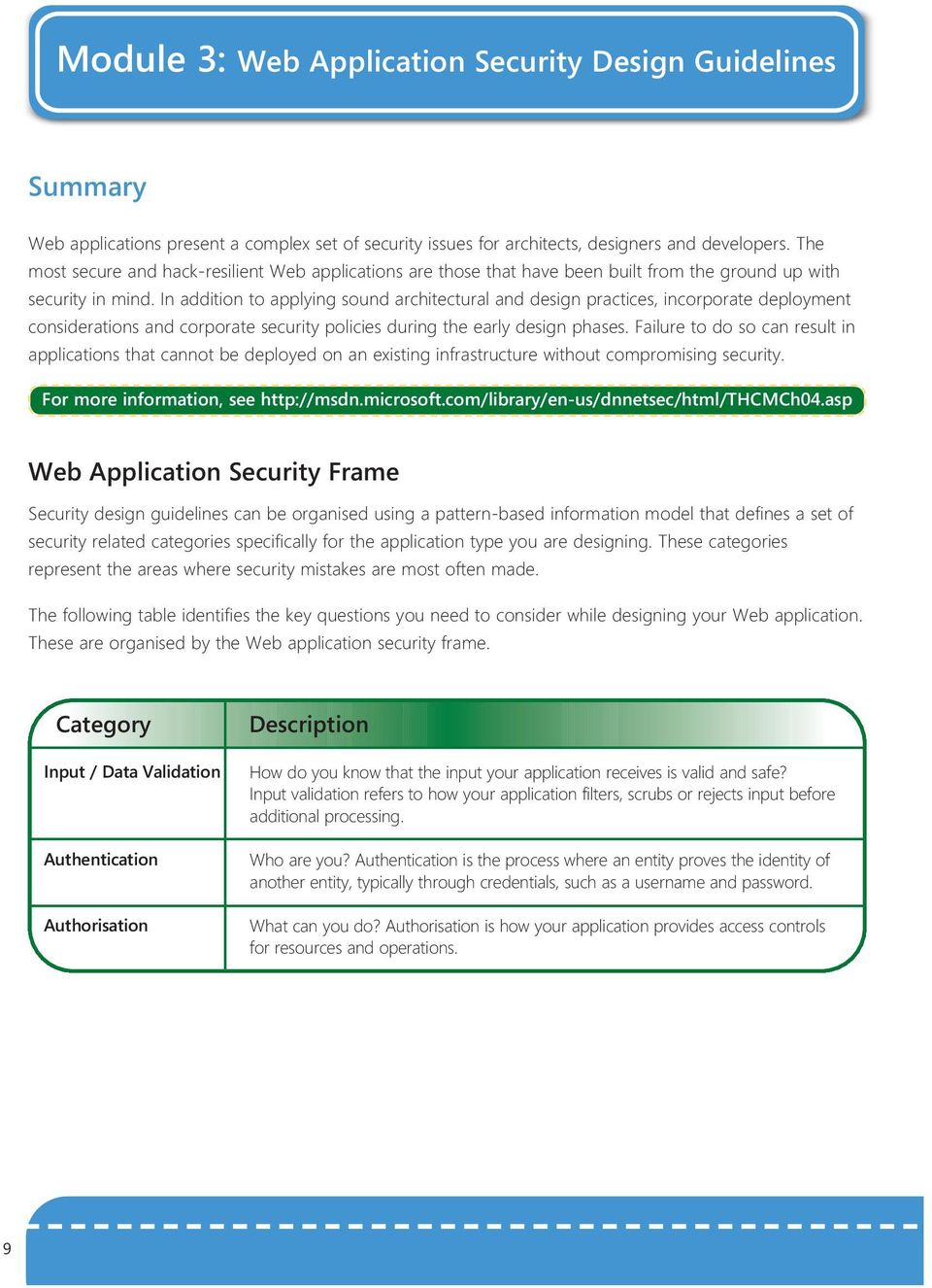
11 Module 3: Web Application Security Design Guidelines Summary Web applications present a complex set of security issues for architects, designers and developers. The most secure and hack-resilient Web applications are those that have been built from the ground up with security in mind. In addition to applying sound architectural and design practices, incorporate deployment considerations and corporate security policies during the early design phases. Failure to do so can result in applications that cannot be deployed on an existing infrastructure without compromising security. For more information, see Web Application Security Frame Security design guidelines can be organised using a pattern-based information model that defines a set of security related categories specifically for the application type you are designing. These categories represent the areas where security mistakes are most often made. The following table identifies the key questions you need to consider while designing your Web application. These are organised by the Web application security frame. Category Input / Data Validation Authentication Authorisation How do you know that the input your application receives is valid and safe? Input validation refers to how your application filters, scrubs or rejects input before additional processing. Who are you? Authentication is the process where an entity proves the identity of another entity, typically through credentials, such as a username and password. What can you do? Authorisation is how your application provides access controls for resources and operations. 9
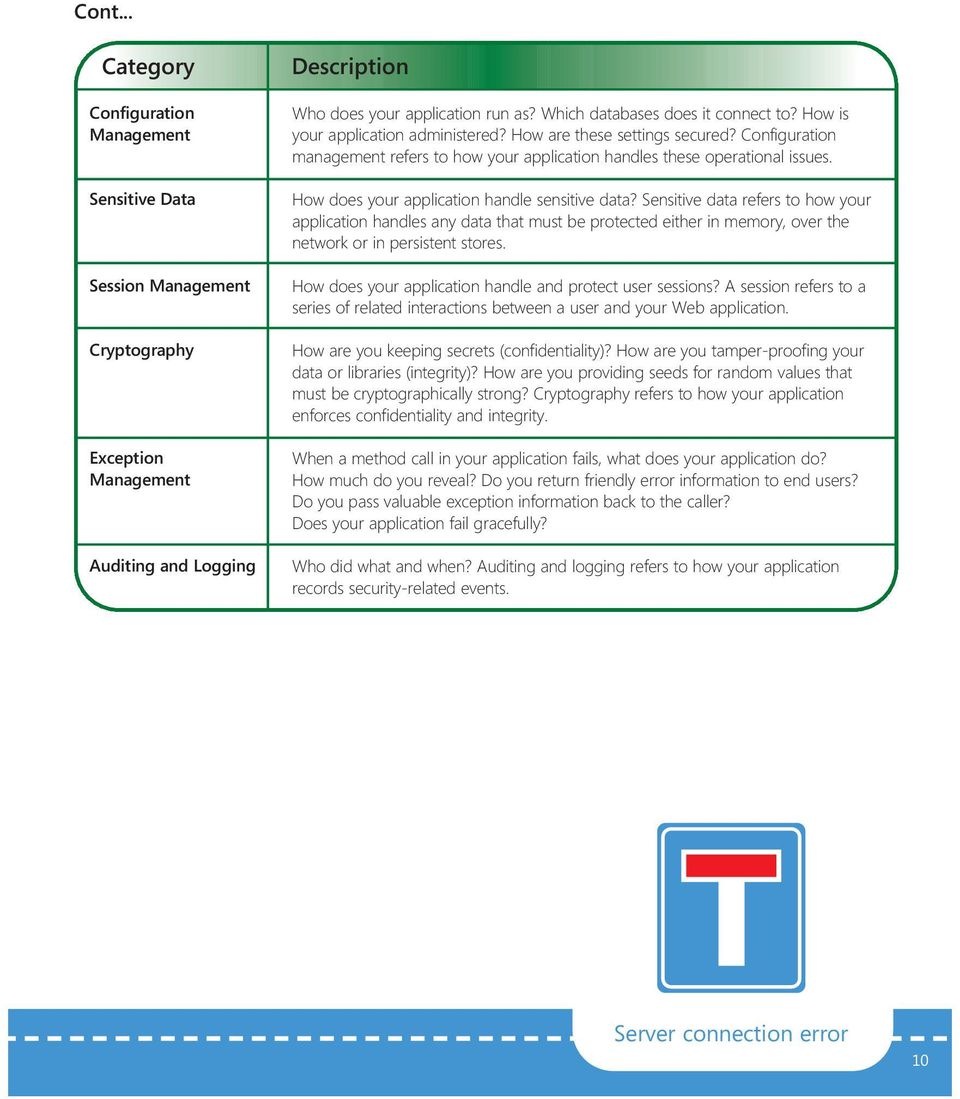
12 Cont... Category Configuration Management Sensitive Data Session Management Cryptography Exception Management Auditing and Logging Who does your application run as? Which databases does it connect to? How is your application administered? How are these settings secured? Configuration management refers to how your application handles these operational issues. How does your application handle sensitive data? Sensitive data refers to how your application handles any data that must be protected either in memory, over the network or in persistent stores. How does your application handle and protect user sessions? A session refers to a series of related interactions between a user and your Web application. How are you keeping secrets (confidentiality)? How are you tamper-proofing your data or libraries (integrity)? How are you providing seeds for random values that must be cryptographically strong? Cryptography refers to how your application enforces confidentiality and integrity. When a method call in your application fails, what does your application do? How much do you reveal? Do you return friendly error information to end users? Do you pass valuable exception information back to the caller? Does your application fail gracefully? Who did what and when? Auditing and logging refers to how your application records security-related events. Server connection error 10
13 Top Web Application Security Issues Authenticating users Preventing parameter manipulation Providing secure configuration Handling exceptions Protecting sensitive data Web Server Application Server Database Server Browser Firewall Web Application Applications Database Protecting sensitive data Preventing Validating input session hijacking and cookie replay attacks Authorising users Auditing and logging activity and transactions Authenticating and authorising upstream identities Encrypting or hashing sensitive data Security Design Guidelines Summary Category Input / Data Validation Authentication Authorisation Guidelines Do not trust input including form fields, cookies, query strings, HTTP headers Consider centralised input validation Do not rely on client-side validation Be careful with canonicalisation issues Constrain, reject and sanitise input Validate for type, length, format and range Partition site by anonymous, identified and authenticated area Use strong passwords Support password expiry periods and account disablement Do not store credentials (use one-way hashes with salt) Encrypt communication channels to protect authentication tokens Pass forms authentication cookies only over HTTPS connections Use least privileged accounts Consider authorisation granularity Enforce separation of privileges Restrict user access to system-level resources 11

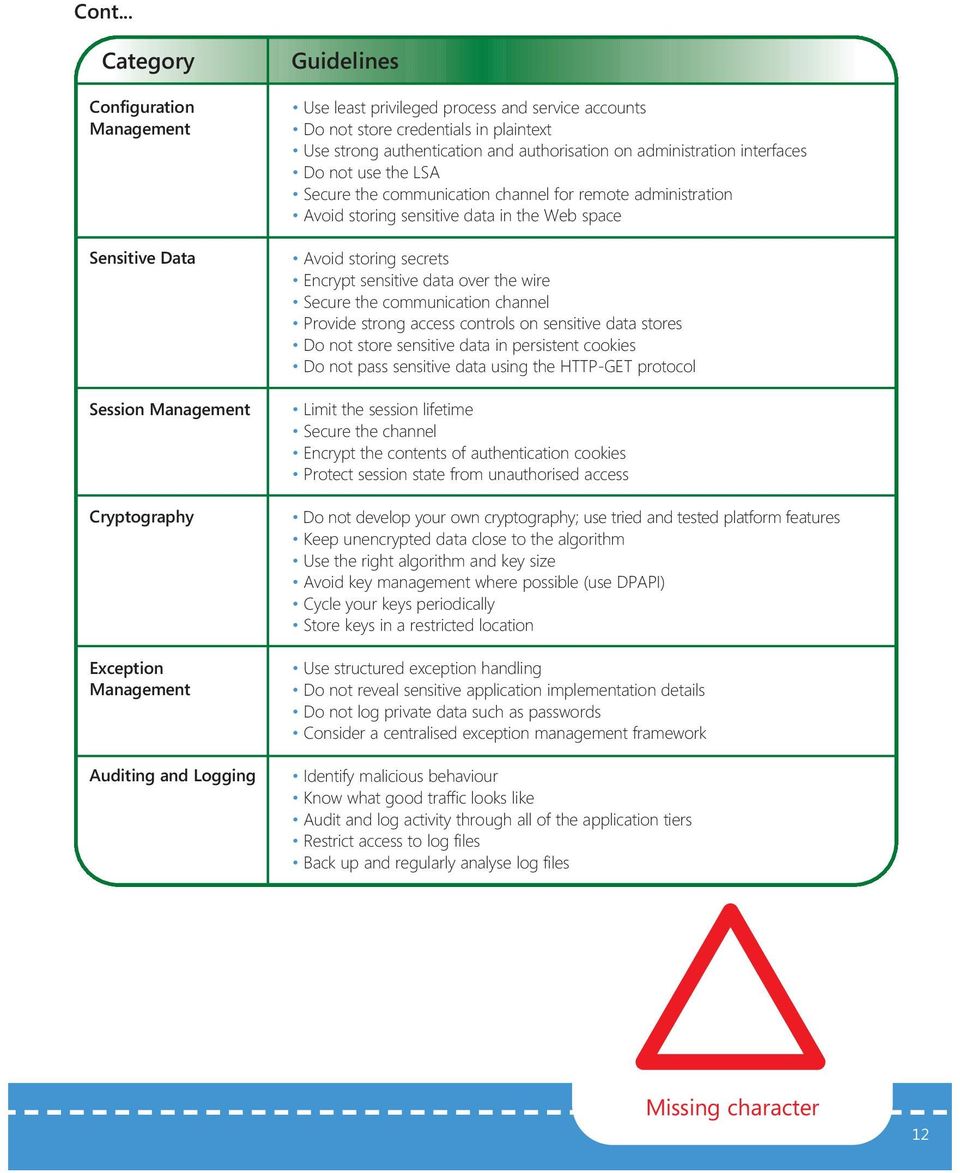
14 Cont... Category Configuration Management Sensitive Data Session Management Cryptography Exception Management Auditing and Logging Guidelines Use least privileged process and service accounts Do not store credentials in plaintext Use strong authentication and authorisation on administration interfaces Do not use the LSA Secure the communication channel for remote administration Avoid storing sensitive data in the Web space Avoid storing secrets Encrypt sensitive data over the wire Secure the communication channel Provide strong access controls on sensitive data stores Do not store sensitive data in persistent cookies Do not pass sensitive data using the HTTP-GET protocol Limit the session lifetime Secure the channel Encrypt the contents of authentication cookies Protect session state from unauthorised access Do not develop your own cryptography; use tried and tested platform features Keep unencrypted data close to the algorithm Use the right algorithm and key size Avoid key management where possible (use DPAPI) Cycle your keys periodically Store keys in a restricted location Use structured exception handling Do not reveal sensitive application implementation details Do not log private data such as passwords Consider a centralised exception management framework Identify malicious behaviour Know what good traffic looks like Audit and log activity through all of the application tiers Restrict access to log files Back up and regularly analyse log files Missing character 12
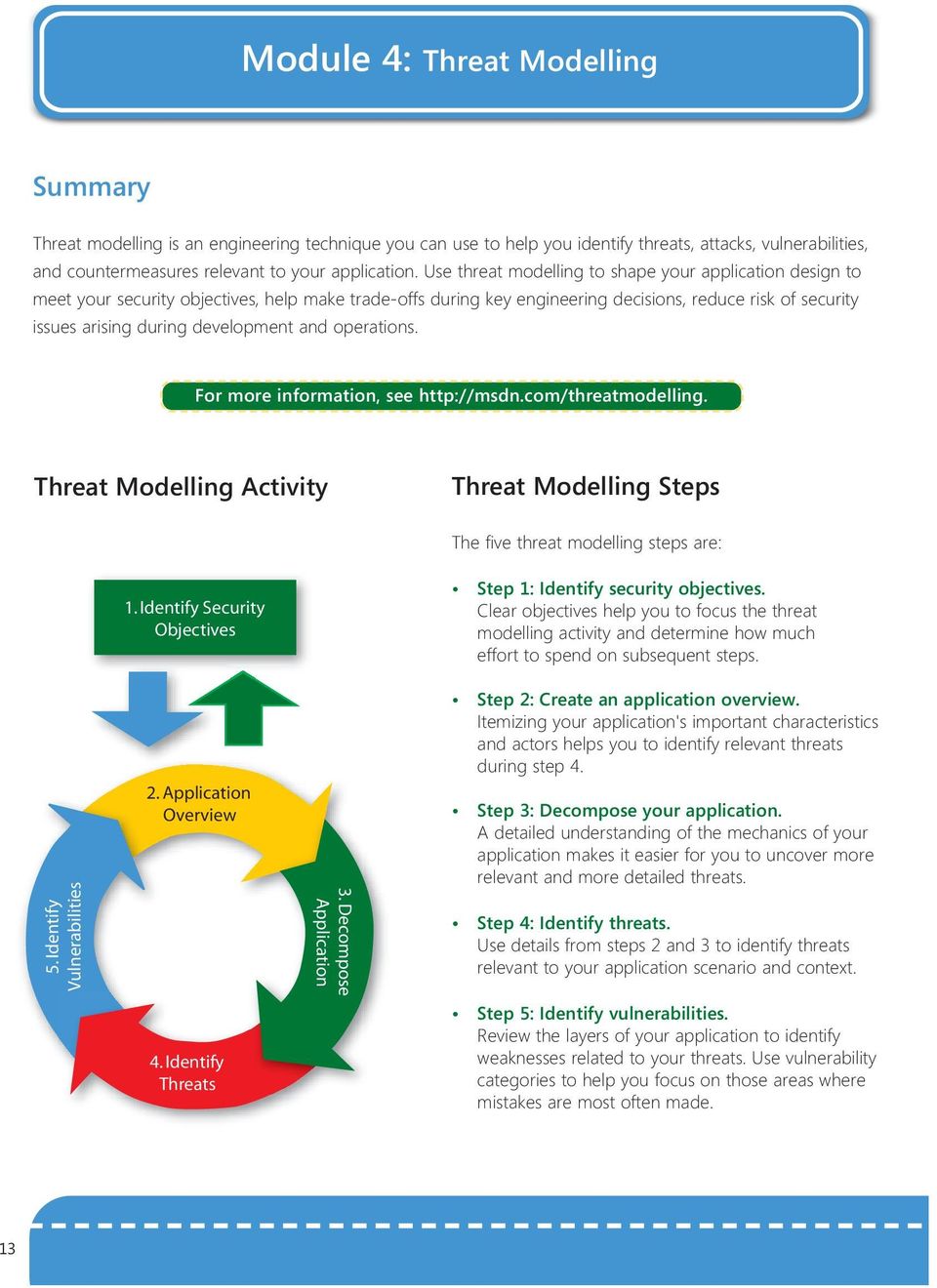
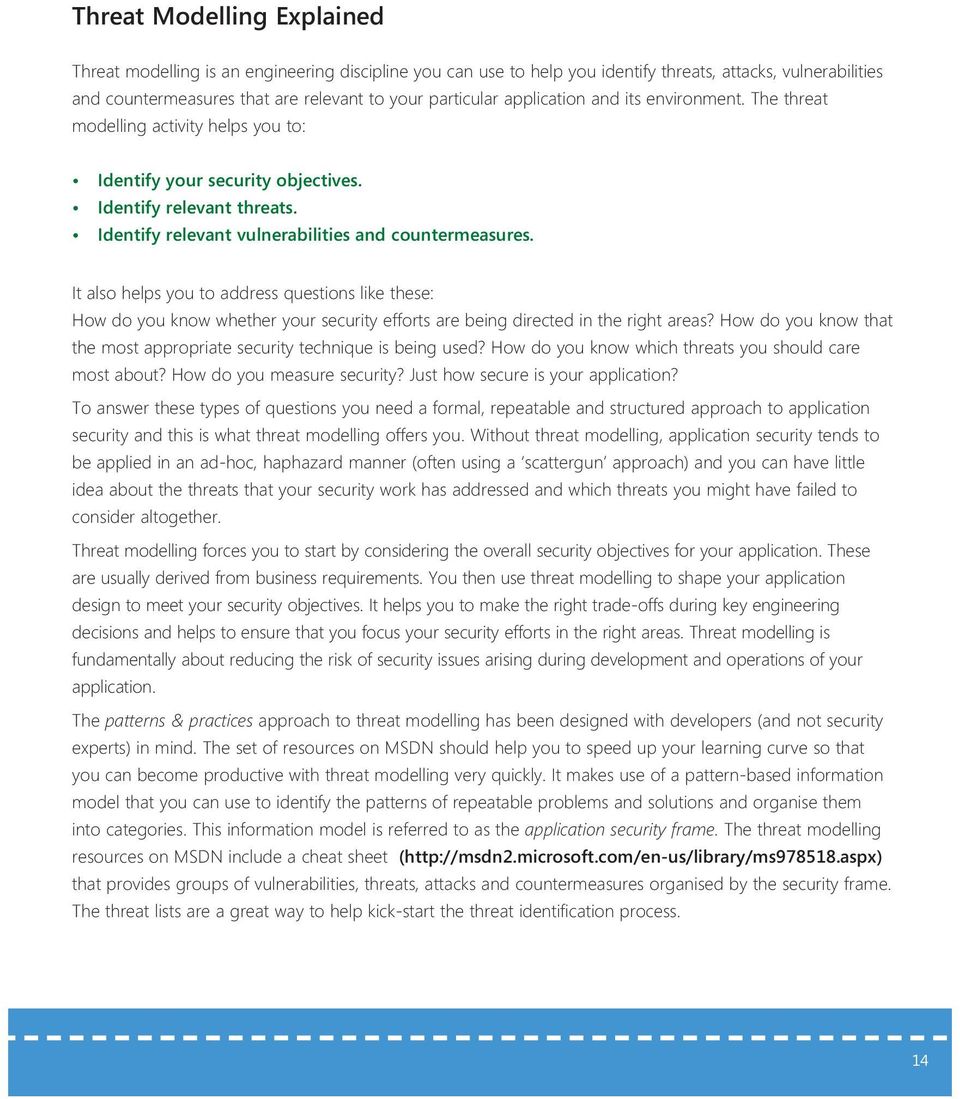
15 Module 4: Threat Modelling Summary Threat modelling is an engineering technique you can use to help you identify threats, attacks, vulnerabilities, and countermeasures relevant to your application. Use threat modelling to shape your application design to meet your security objectives, help make trade-offs during key engineering decisions, reduce risk of security issues arising during development and operations. For more information, see Threat Modelling Activity Threat Modelling Steps The five threat modelling steps are: 5. Identify Vulnerabilities 1. Identify Security Objectives 2. Application Overview 4. Identify Threats 3. Decompose Application Step 1: Identify security objectives. Clear objectives help you to focus the threat modelling activity and determine how much effort to spend on subsequent steps. Step 2: Create an application overview. Itemizing your application's important characteristics and actors helps you to identify relevant threats during step 4. Step 3: Decompose your application. A detailed understanding of the mechanics of your application makes it easier for you to uncover more relevant and more detailed threats. Step 4: Identify threats. Use details from steps 2 and 3 to identify threats relevant to your application scenario and context. Step 5: Identify vulnerabilities. Review the layers of your application to identify weaknesses related to your threats. Use vulnerability categories to help you focus on those areas where mistakes are most often made. 13
16 Threat Modelling Explained Threat modelling is an engineering discipline you can use to help you identify threats, attacks, vulnerabilities and countermeasures that are relevant to your particular application and its environment. The threat modelling activity helps you to: Identify your security objectives. Identify relevant threats. Identify relevant vulnerabilities and countermeasures. It also helps you to address questions like these: How do you know whether your security efforts are being directed in the right areas? How do you know that the most appropriate security technique is being used? How do you know which threats you should care most about? How do you measure security? Just how secure is your application? To answer these types of questions you need a formal, repeatable and structured approach to application security and this is what threat modelling offers you. Without threat modelling, application security tends to be applied in an ad-hoc, haphazard manner (often using a scattergun approach) and you can have little idea about the threats that your security work has addressed and which threats you might have failed to consider altogether. Threat modelling forces you to start by considering the overall security objectives for your application. These are usually derived from business requirements. You then use threat modelling to shape your application design to meet your security objectives. It helps you to make the right trade-offs during key engineering decisions and helps to ensure that you focus your security efforts in the right areas. Threat modelling is fundamentally about reducing the risk of security issues arising during development and operations of your application. The patterns & practices approach to threat modelling has been designed with developers (and not security experts) in mind. The set of resources on MSDN should help you to speed up your learning curve so that you can become productive with threat modelling very quickly. It makes use of a pattern-based information model that you can use to identify the patterns of repeatable problems and solutions and organise them into categories. This information model is referred to as the application security frame. The threat modelling resources on MSDN include a cheat sheet ( that provides groups of vulnerabilities, threats, attacks and countermeasures organised by the security frame. The threat lists are a great way to help kick-start the threat identification process. 14
17 Module 5: Security Architecture and Design Review Summary The architecture and design review process analyses the architecture and design from a security perspective. If you have just completed the design, the design documentation can help you with this process. Regardless of how comprehensive your design documentation is, you must be able to decompose your application and be able to identify key items, including trust boundaries, data flow, entry points and privileged code. You must also know the physical deployment configuration of your application. Pay attention to the design approaches you have adopted for those areas that most commonly exhibit vulnerabilities. For more information, see Security Architecture and Design Review Overview Application Deployment and Infrastructure Host Network 2. Layer by Layer Presentation Business Security Frame Data Input / Data Validation Authentication Authorisation Configuration Mgmt Session Management Cryptography Exception Management Auditing and Logging Sensitive Data 15
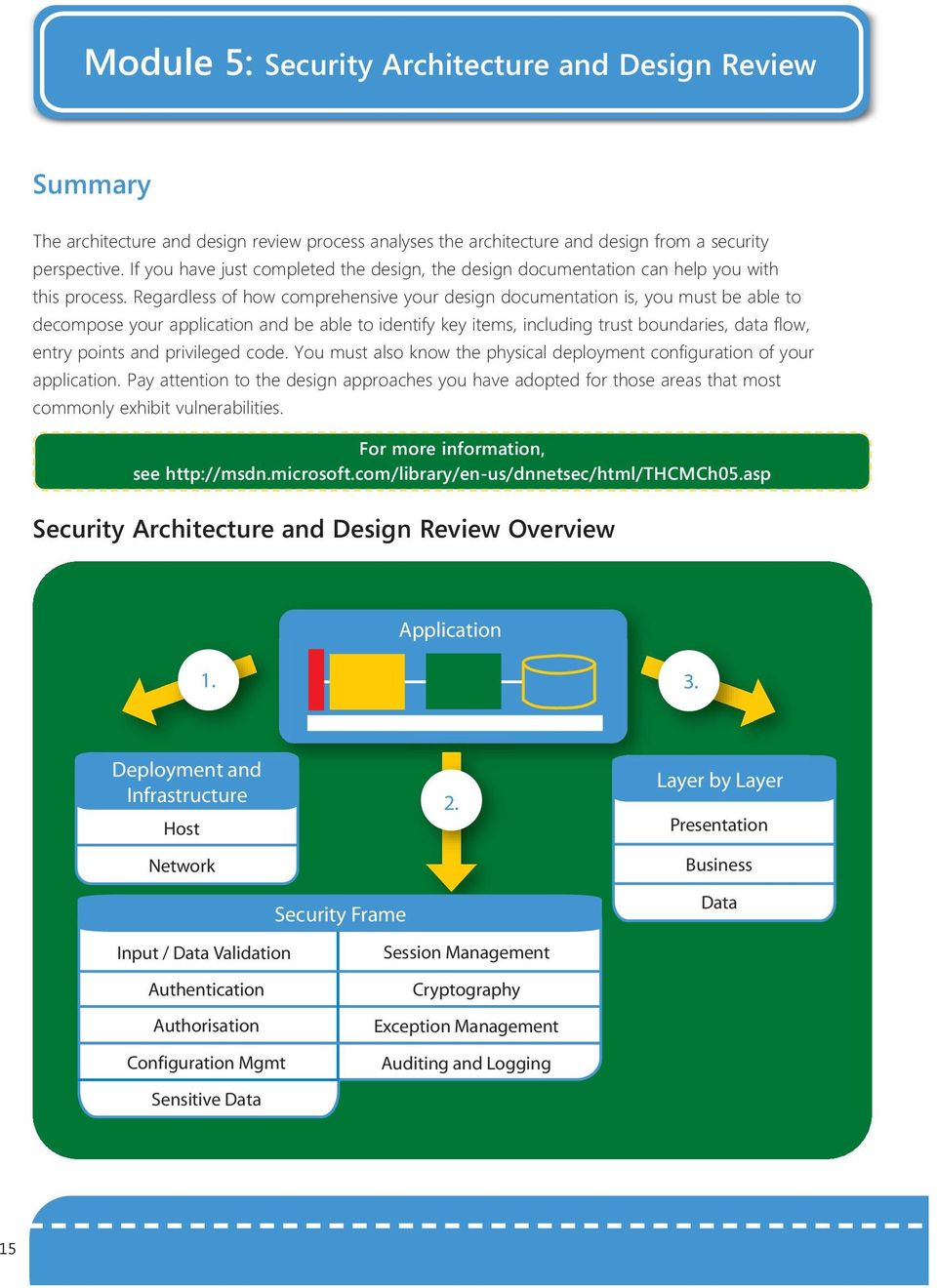
18 Techniques Use a question driven approach to expose the highest risk design decisions and use the security frame to dive into areas that reveal common mistakes. The following techniques can help to guide your approach when reviewing the architecture and design of your application: 1. Deployment and infrastructure. Review the design of your application in relation to the target deployment environment and the associated security policies. Consider the restrictions imposed by the underlying infrastructure-layer security. 2. Security frame. Review the approach to critical areas in your application, including authentication, authorisation, input/data validation, exception management and other areas. Use the application vulnerability categories, defined by the security frame, as a roadmap and to make sure that you do not miss any key areas during the review. 3. Layer by layer analysis. Walk through the logical layers of your application and examine the security of ASP.NET Web pages and controls, Web services, serviced components, Microsoft.NET Remoting, data access code and others. Use checklists to help you perform architecture and design reviews while evaluating the security of your applications. The checklist should help you explore the high level design and architecture decisions that have been made for your application. You should evolve your checklists to include custom checks based on the unique aspects of your application s architecture. Lightning coder 16
19 Module 6: Security Code Review Summary Security code review is an effective mechanism for uncovering security bugs before testing or deployment begins. Performing code reviews helps you reduce the number of implementation errors in an application before it is deployed to a test team or to a customer. While design bugs are the most expensive to fix, implementation bugs are the most common. For more information, see Security Code Review Activity 1. Identify Security Code Review Objectives 2. Perform Preliminary Scan 4. Review for Security Issues Unique to the Architecture 3. Review Code for Security Issues 17

20 Code Review Steps The four code review steps are: Step 1: Identify security code review objectives. Establish goals and constraints for the review. Step 2: Perform a preliminary scan. Use static analysis to find an initial set of bugs and improve your understanding of where bugs are most likely to be discovered during further review. Step 3: Review the code for security issues. Review the code thoroughly to find security vulnerabilities that are common to many applications. You can use the results of step 2 to focus your analysis. Step 4: Review for security issues unique to the architecture. Complete a final analysis that focuses on bugs that relate to the unique architecture of your application. This step is most important if you have implemented a custom security mechanism or any feature designed specifically to mitigate a known security threat. Question Lists Using a question-driven approach can help with the review process. Question lists to help you review.net code and ASP.NET Web application code are provided in Part II, lists and Question Lists on page hours coding need a coffee 18

21 Module 7: Security Deployment Review Summary A security deployment review is an activity that can be used to ensure that configuration and deployment problems are discovered before they can result in an application vulnerability. Even the most securely designed and implemented application can be compromised by an error during deployment, leaving it open to attack. When you review your security deployment, you can organise the precautions you must take and the settings you must configure into categories. By using configuration categories, you can systematically review the entire application, or pick a particular category and complete specific steps. For more information, see Server Security Categories Operating System Shares Services Accounts Auditing and Logging Files and Directories Registry Patches and Updates Network Protocols Ports 19
22 Server Security Categories Explained Category Patches and Updates Accounts Auditing and Logging Files and Directories Ports Protocols Registry Services Shares Practices Patching and updating your server software is a critical first step. Enforce strong password policies. Audit your accounts and remove any you do not need. Configure accounts with least privilege. Use auditing and alerts to detect logon failures for identifying intruders, attacks in progress, and evidence of attacks that have occurred. Configure auditing for your server. Secure all files and directories with restricted permissions that only allow access to necessary accounts. Use auditing to allow you to detect when suspicious or unauthorised activity occurs. Services that run on the server listen to specific ports so that they can respond to incoming requests. Audit the ports on your server regularly to ensure that a service that is not secured or that is unnecessary is not active on your server. Avoid using protocols that are inherently insecure. If you cannot avoid using these protocols, take the appropriate measures to provide secure authentication and communication. Protect access to the registry. Apply restricted Microsoft Windows access control lists (ACLs) and block remote registry administration. If the service is necessary, secure and maintain the service. Consider monitoring any service to ensure availability. If your service software is not secure, but you need the service, try to find a secure alternative. Remove all unnecessary file shares. Secure any remaining shares with restricted permissions. Warning unstable coding ahead 20
23 Techniques Use the following techniques when conducting a deployment review: 1. Use server security categories. Use server security categories to help make security deployment reviews systematic and repeatable. 2. Break down your deployment review. You can use the categories to break down your application deployment for further analysis and to help identify vulnerabilities. 3. Review systematically. By using categories, you can systematically go through the deployment review process from start to finish or pick a particular category for further analysis. 21
24 Part II lists and Question Lists This part includes question lists and checklists to help you design, build and deploy software that meets your security objectives..net Framework 1.1 lists list: Web Application Architecture and Design Security list:.net Framework 1.1 Security list: ADO.NET 1.1 Security list: ASP.NET 1.1 Security list: Enterprise Services (.NET Framework 1.1) Security list: Remoting (.NET Framework 1.1) Security list: Web Services (.NET Framework 1.1) Security list: Network Security Security list: Web Server (IIS 5.1) Security list: Database Server (SQL Server 2000).NET Framework 2.0 lists Security list: ASP.NET version 2.0 Security list:.net Framework version 2.0 Security list: ADO.NET 2.0.NET Framework 3.0 lists Security list: Windows Communication Foundation Native Code lists Security list: Native Code Security Question Lists for Conducting Security Code Reviews.NET Framework 2.0 Question List ASP.NET 2.0 Question List 22
25 .NET Framework 1.1 lists list: Web Application Architecture and Design 23
26 list: Web Application Architecture and Design How To Use This Module This checklist is a companion to Chapter 4 Design Guidlines for Secure Web Applications and Chapter 5, Architecture and Design Review for Security from Improving Web Application Security: Threats and Countermeasures on MSDN at - use it to help you perform architecture and design reviews to evaluate the security of your Web applications and to implement the design guidelines in Chapter 4. This checklist should evolve based on the experience you gain from performing reviews. You might also want to perform custom checks that are based on a specific aspect of your architecture or design to ensure that your development environment is catered for by the design. Deployment and Infrastructure Considerations The design identifies, understands and accommodates the company security policy. Restrictions imposed by infrastructure security (including available services, protocols and firewall restrictions) are identified. The design recognises and accommodates restrictions imposed by hosting environments (including application isolation requirements). The target environment code-access-security trust level is known. The design identifies the deployment infrastructure requirements and the deployment configuration of the application. Domain structures, remote application servers and database servers are identified. The design identifies clustering requirements. The design identifies the application configuration maintenance points (such as what needs to be configured and what tools are available for an IDC admin). Secure communication features provided by the platform and the application are known. The design addresses Web farm considerations (including session state management, machine specific encryption keys, Secure Sockets Layer (SSL), certificate deployment issues and roaming profiles). The design identifies the Certificate Authority (CA) to be used by the site to support SSL. The design addresses the required scalability and performance criteria. 24
27 Application Architecture and Design Considerations Input Validation All entry points and trust boundaries are identified by the design. Input validation is applied whenever input is received from outside the current trust boundary. The design assumes that user input is malicious. Centralised input validation is used where appropriate. The input validation strategy that the application adopted is modular and consistent. The validation approach is to constrain, reject and then sanitise input. (Looking for known, valid and safe input is much easier than looking for known malicious or dangerous input.) Data is validated for type, length, format and range. The design addresses potential canonicalisation issues. Input filenames and file paths are avoided where possible. The design addresses potential SQL injection issues. The design addresses potential cross-site scripting issues. The design does not rely on client-side validation. The design applies defence in-depth to the input validation strategy by providing input validation across tiers. Output that contains input is encoded using HtmlEncode and UrlEncode. 25
28 Authentication Application trust boundaries are identified by the design. The design identifies the identities that are used to access resources across the trust boundaries. The design partitions the Web site into public and restricted areas using separate folders. The design identifies service account requirements. The design identifies secure storage of credentials that are accepted from users. The design identifies the mechanisms to protect the credentials over the wire (SSL, IPSec, encryption and so on). Account management policies are taken into consideration by the design. The design ensures that minimum error information is returned in the event of authentication failure. The identity that is used to authenticate with the database is identified by the design. If SQL authentication is used, credentials are adequately secured over the wire (SSL or IPSec) and in storage (DPAPI). The design adopts a policy of using least-privileged accounts. Password digests (with salt) are stored in the user store for verification. Strong passwords are used. Authentication tickets (cookies) are not transmitted over non-encrypted connections. Conflict error 26
29 Authorisation The role design offers sufficient separation of privileges (the design considers authorisation granularity). Multiple gatekeepers are used for defence in-depth. The application's login is restricted in the database to access-specific stored procedures. The application's login does not have permissions to access tables directly. Access to system level resources is restricted. The design identifies code access security requirements. Privileged resources and privileged operations are identified. All identities that are used by the application are identified and the resources accessed by each identity are known. Configuration Management Administration interfaces are secured (strong authentication and authorisation is used). Remote administration channels are secured. Configuration stores are secured. Configuration secrets are not held in plaintext in configuration files. Administrator privileges are separated based on roles (for example, site content developer or system administrator). Least-privileged process accounts and service accounts are used. 27
30 Sensitive Data Secrets are not stored unless necessary. (Alternative methods have been explored at design time.) Secrets are not stored in code. Database connections, passwords, keys or other secrets are not stored in plaintext. The design identifies the methodology to store secrets securely. (Appropriate algorithms and key sizes are used for encryption. It is preferable that DPAPI is used to store configuration data to avoid key management.) Sensitive data is not logged in clear text by the application. The design identifies protection mechanisms for sensitive data that is sent over the network. Sensitive data is not stored in persistent cookies. Sensitive data is not transmitted with the GET protocol. Session Management SSL is used to protect authentication cookies. The contents of authentication cookies is encrypted. Session lifetime is limited. Session state is protected from unauthorised access. Session identifiers are not passed in query strings. PMissing probe 28
31 Cryptography Platform-level cryptography is used and it has no custom implementations. The design identifies the correct cryptographic algorithm (and key size) for the application's data encryption requirements. The methodology to secure the encryption keys is identified. The design identifies the key recycle policy for the application. Encryption keys are secured. DPAPI is used where possible to avoid key management issues. Keys are periodically recycled. Parameter Manipulation All input parameters are validated (including form fields, query strings, cookies and HTTP headers). Cookies with sensitive data are encrypted. Sensitive data is not passed in query strings or form fields. HTTP header information is not relied on to make security decisions. View state is protected using MACs. 29
32 Exception Management The design outlines a standardised approach to structured exception handling across the application. Application exception handling minimises the information disclosure in case of an exception. The design identifies generic error messages that are returned to the client. Application errors are logged to the error log. Private data (for example, passwords) is not logged. Auditing and Logging The design identifies the level of auditing and logging necessary for the application and identifies the key parameters to be logged and audited. The design considers how to flow caller identity across multiple tiers (at the operating system or application level) for auditing. The design identifies the storage, security and analysis of the application log files. Server connection error 30
33 31 Security list:.net Framework 1.1
34 Security list:.net Framework 1.1 How To Use This Module This checklist is a companion to Chapter 7, Building Secure Assemblies and Chapter 8, Code Access Security in Practice from Improving Web Application Security: Threats and Countermeasures on MSDN at use it to help you implement a security review for managed code in your ASP.NET 1.1 Web application, or as a quick evaluation snapshot of the corresponding chapters. Use this checklist as you develop your managed code. You should expand and evolve this security checklist by adding managed code practices that you discover during software development. General Code Review Guidelines Potential threats are clearly documented. (Threats are dependent upon the specific scenario and assembly type.) Code is developed based on.net Framework coding guidelines and secure coding guidelines at cpgenref/html/cpconnetframeworkdesignguidelines.asp The FXCop analysis tool is run on assemblies and security warnings are addressed. Managed Code Review Guidelines Assembly-Level s Assemblies have a strong name. (Dynamically generated ASP.NET Web page assemblies cannot currently have a strong name.) You have considered delay signing as a way to protect and restrict the private key that is used in the strong name and signing process. Assemblies include declarative security attributes (with SecurityAction.RequestMinimum) to specify minimum permission requirements. Highly privileged assemblies are separated from lower privileged assemblies. If the assembly is to be used in a partial-trust environment (for example, it is called from a partial-trust Web application), then privileged code is sandboxed in a separate assembly. 32
35 Class-Level s Class and member visibility is restricted. The most restrictive access modifier is used (private where possible). Non-base classes are sealed if they contain security secrets (like passwords) accessible through protected APIs or if they contain many virtual members that cannot be sealed and the type is not really designed for third-party extensibility. Input from outside the current trust boundary is validated. Input data is constrained and validated for type, length, format and range. Code implements declarative checks where virtual internal methods are used. Access to public classes and methods are restricted with principal permission demands (where appropriate). Fields are private. When necessary, field values are exposed by using read/write or read-only public properties. Read-only properties are used where possible. Types returned from methods that are not designed to be created independently contain private default constructors. Unsealed public types do not have internal virtual members. Use of event handlers is thoroughly reviewed. Static constructors are private. 33
36 Cryptography Code uses platform-provided cryptography and does not use custom implementations. Random keys are generated by using RNGCryptoServiceProvider (and not the Random class). PasswordDeriveBytes is used for password-based encryption. DPAPI is used to encrypt configuration secrets to avoid the key management issue. The appropriate key sizes are used for the chosen algorithm, or, if they are not, the reasons are identified and understood. Keys are not held in code. Access to persisted keys is restricted. Keys are cycled periodically. Exported private keys are protected. Secrets Secrets are not hard coded. Plaintext secrets are not stored in configuration files. Plaintext secrets are not stored in memory for extended periods of time. Missing character 34
37 Exception Management Code uses exception handling. You catch only the exceptions that you know about. Exception details are logged on the server to assist in diagnosing problems. The information that is returned to the end user is limited and safe. Code that uses exception filters is not sensitive to filter execution sequence (filter runs before finally block). Code fails early to avoid unnecessary processing that consumes resources. Exception conditions do not allow a user to bypass security checks to run privileged code. Delegates Delegates are not accepted from untrusted sources. If code does accept a delegate from untrusted code, it constrains the delegate before calling it by using security permissions with SecurityAction.PermitOnly. Permissions are not asserted before calling a delegate. 35
38 Serialisation Serialisation is restricted to privileged code. Sensitive data is not serialised. Field data from serialised data streams is validated. ISerializable.GetObjectData implementation is protected with an identity permission demand in scenarios where you want to restrict which code can serialise the object. Threading Results of security checks are not cached. Impersonation tokens are considered when new threads are created (any existing thread token is not passed to the new thread). Threads are synchronised in static class constructors for multi-threaded application code. Object implementation code is designed and built to be thread safe. Threads are synchronised in static class constructors. Reflection Caller cannot influence dynamically generated code (for example, by passing assembly and type names as input arguments). Code demands permission for user authorisation where assemblies are loaded dynamically.! Late home again = unhappy girlfriend 36
39 Unmanaged Code Access Input and output strings that are passed between managed and unmanaged code are constrained and validated. Array bounds are checked. File path lengths are checked and do not exceed MAX_PATH. Unmanaged code is compiled with the /GS switch. Use of dangerous APIs by unmanaged code is closely inspected. These include LogonUser, RevertToSelf, CreateThread, Network APIs and Sockets APIs. Naming conventions (safe, native, unsafe) are applied to unmanaged APIs. Assemblies that call unmanaged code specify unmanaged permission requirements using declarative security (SecurityAction.RequestMinimum). Unmanaged API calls are sandboxed and isolated in a wrapper assembly. Use of SuppressUnmanagedCodeSecurityAttribute is thoroughly reviewed and additional security checks are implemented. Types are not annotated with SuppressUnmanagedCodeSecurityAttribute. (This attribute is used on specific P/Invoke method declarations instead.) Calling code is appropriately authorised using a full stack walk Demand (using either a.net Framework permission or custom permission). Unmanaged types or handles are never exposed to partially trusted code. Pointers are private fields. Methods that use IntPtr fields in a type that has a finaliser, call GC.KeepAlive(object). 37
40 Resource Access Considerations File I/O No security decisions are made based on filenames. Input file paths and filenames are well formed. Environment variables are not used to construct file paths. File access is constrained to the context of the application (by using a restricted FileIOPermission). Assembly file I/O requirements are specified using declarative security attributes (with SecurityAction.RequestMinimum). Event Log Event log access code is constrained using EventLogPermission. This particularly applies if your event logging code could be called by untrusted callers. Event sources are created at installation time (or the account used to run the code that writes to the event log must be allowed to create event sources by configuring an appropriate ACL in the registry). Security-sensitive data, such as passwords, is not written to the event log. Lightning coder 38
41 Registry Sensitive data, such as database connection strings or credentials, is encrypted prior to storage in the registry. Keys are restricted. If a key beneath HKEY_CURRENT_MACHINE is used, the key is configured with a restricted ACL. Alternatively, HKEY_CURRENT_USER is used. Registry access is constrained by using RegistryPermission. This applies especially if your registry access code could be called by untrusted callers. Environment Variables Code that accesses environment variables is restricted with EnvironmentPermission. This applies especially if your code can be called by untrusted code. Environment permission requirements are declared by using declarative security attributes with SecurityAction.RequestMinimum. 39
42 Code Access Security Considerations If an entry is preceded by an asterisk (*), it indicates that the checks are performed by the FXCop analysis tool. For more information about FXCop security checks, see Assemblies marked with AllowPartiallyTrustedCallersAttribute (APTCA) do not expose objects from non-aptca assemblies. Code that only supports full-trust callers is strong named or explicitly demands the full-trust permission set. All uses of Assert are thoroughly reviewed. All calls to Assert are matched with a corresponding call to RevertAssert. *The Assert window is as small as possible. *Asserts are proceded with a full permission demand. *Use of Deny or PermitOnly is thoroughly reviewed. All uses of LinkDemand are thoroughly reviewed. (Why is a LinkDemand and not a full Demand used?) LinkDemands within Interface declarations are matched by LinkDemands on the method implementation. *Unsecured members do not call members protected by a LinkDemand. Permissions are not demanded for resources accessed through the.net Framework classes. Access to custom resources (through unmanaged code) is protected with custom code access permissions. Access to cached data is protected with appropriate permission demands. If LinkDemands are used on structures, the structures contain explicitly defined constructors. 12 hours coding need a coffee 40
43 Cont... *Methods which override other methods that are protected with LinkDemands also issue the same LinkDemand. *LinkDemands on types are not used to protect access to fields inside those types. *Partially trusted methods call only other partially trusted methods. *Partially trusted types extend only other partially trusted types. *Members that call late bound members have declarative security checks. *Method-level declarative security does not mistakenly override class-level security checks. Use of the following potentially dangerous permissions is thoroughly reviewed: SecurityPermission Unmanaged Code SkipVerification ControlEvidence ControlPolicy SerialisationFormatter ControlPrincipal ControlThread ReflectionPermission MemberAccess Code identity permission demands are used to authorise calling code in scenarios where you know in advance the range of possible callers (for example, you want to limit calling code to a specific application). Permission demands of the.net Framework are not duplicated. Inheritance is restricted with SecurityAction.InheritanceDemand in scenarios where you want to limit which code can derive from your code. 41
44 Security list: ADO.NET
45 Security list: ADO.NET 1.1 How To Use This Module This checklist is a companion to Chapter 14, Building Secure Data Access and Chapter 16, Securing Your Database Server from Improving Web Application Security: Threats and Countermeasures on MSDN at use it to help you build secure data access, or as a quick evaluation snapshot of the corresponding chapters. This checklist should evolve with secure data access practices that you discover during software development. SQL Injection s Input passed to data access methods that originate outside the current trust boundary is constrained. Sanitisation of input is only used as a defence in-depth measure. Stored procedures that accept parameters are used by data access code. If stored procedures are not used, type safe SQL parameters are used to construct SQL commands. Least-privileged accounts are used to connect to the database. Authentication Windows authentication is used to connect to the database. Strong passwords are used and enforced. If SQL Server authentication is used, the credentials are secured over the network by using IPSec or SSL, or by installing a database server certificate. If SQL Server authentication is used, connection strings are encrypted by using DPAPI and are stored in a secure location. Application connects using a least-privileged account. The sa account or other privileged accounts that are members of the sysadmin or db_owner roles are not used for application logins. 43
46 Authorisation Calling users are restricted using declarative or imperative principal permission checks (normally performed by business logic). Calling code is restricted using identity permission demands in scenarios where you know and want to limit the calling code. Application login is restricted in the database and can only execute selected stored procedures. Application's login has no direct table access. Configuration Management Windows authentication is used to avoid credential management. Connection strings are encrypted and encrypted data is stored securely, for example, in a restricted registry key. OLE DB connection strings do not contain Persist Security Info="true" or "yes". UDL files are secured with restricted ACLs. Warning unstable coding ahead 44
47 Sensitive Data Sensitive data is encrypted in the database using strong symmetric encryption (for example, 3DES). Symmetric encryption keys are backed up and encrypted with DPAPI and stored in a restricted registry key. Sensitive data is secured over the network by using SSL or IPSec. Passwords are not stored in custom user store databases. Password hashes are stored with salt values instead. Exception Management ADO.NET exceptions are trapped and logged. Database connections and other limited resources are released in case of exception or completion of operation. ASP.NET is configured with a generic error page using the <customerrors> element. Deployment Considerations Firewall restrictions ensure that only the SQL Server listening port is available on the database server. A method for maintaining encrypted database connection strings is defined. The application is configured to use a least-privileged database login. SQL Server auditing is configured. Failed login attempts are logged at minimum. Data privacy and integrity over the network is provided with IPSec or SSL. 45
48 Security list: ASP.NET
49 Security list: ASP.NET 1.1 How To Use This Module This checklist is a companion to Chapter 10, Building Secure ASP.NET Pages and Controls Chapter 19, Securing Your ASP.NET Application and Web Services and Chapter 20, Hosting Multiple Web Applications from Improving Web Application Security: Threats and Countermeasures on MSDN at use it to help you secure an ASP.NET application and also as a snapshot of the corresponding chapters. You should expand and evolve this security checklist by adding additional practices that you discover during software development. Design Considerations Security decisions should not rely on client-side validations; they are made on the server side. The Web site is partitioned into public access areas and restricted areas that require authentication access. Navigation between these areas should not flow sensitive credentials information. The identities used to access remote resources from ASP.NET Web applications are clearly identified. Mechanisms have been identified to secure credentials, authentication tickets, and other sensitive information over network and in persistent stores. A secure approach to exception management is identified. The application fails securely in the event of exceptions. The site has granular authorisation checks for pages and directories. Web controls, user controls and resource access code are all partitioned in their own assemblies for granular security. 47
50 Application Categories Considerations Input Validation User input is validated for type, length, format and range. Input is checked for known valid and safe data and then for malicious, dangerous data. String form field input is validated using regular expressions (for example, by the RegularExpressionValidator control). Regular HTML controls, query strings, cookies and other forms of input are validated using the Regex class and/or your custom validation code. The RequiredFieldValidator control is used where data must be entered. Range checks in server controls are checked by RangeValidator controls. Free form input is sanitised to clean malicious data. Input filenames are well formed and are verifiably valid within the application context. Output that includes input is encoded with HtmlEncode and UrlEncode. MapPath restricts cross-application mapping where appropriate. Character encoding is set by the server (ISO is recommended). The ASP.NET version 1.1 validaterequest option is enabled. URLScan is installed on the Web server. The HttpOnly cookie option is used for defence in-depth to help prevent cross-site scripting (this applies to Internet Explorer 6.1 or later). SQL parameters are used in data access code to validate length and type of data and to help prevent SQL injection. Conflict error 48
51 Authentication Site is partitioned to restricted areas and public areas. Absolute URLs are used for navigation where the site is partitioned with secure and non-secure folders. Secure Sockets Layer (SSL) is used to protect credentials and authentication cookies. The slidingexpiration attribute is set to "false" and limited authentication cookie time-outs are used where the cookie is not protected by using SSL. The forms authentication cookie is restricted to HTTPS connections by using the requiressl attribute or the Secure cookie property. The authentication cookie is encrypted and integrity checked (protection="all"). Authentication cookies are not persisted. Application cookies have unique path/name combinations. Personalisation cookies are separate from authentication cookies. Passwords are not stored directly in the user store; password digests with salt are stored instead. The impersonation credentials (if using a fixed identity) are encrypted in the configuration file by using Aspnet_setreg.exe. Strong password policies are implemented for authentication. The <credentials> element is not used inside <forms> element for forms authentication (use it for testing only). 49
52 Authorisation URL authorisation is used for page and directory access control. File authorisation is used with Windows authentication. Principal permission demands are used to secure access to classes and members. Explicit role checks are used if fine-grained authorisation is required. Configuration Management Configuration file retrieval is blocked by using HttpForbiddenHandler. A least-privileged account is used to run ASP.NET. Custom account credentials (if used) are encrypted on the <processmodel> element by using Aspnet_setreg.exe. To enforce machine-wide policy, Web.config settings are locked by using allowoveride="false" in Machine.config. PMissing probe 50
53 Sensitive Data SSL is used to protect sensitive data on the wire. Sensitive data is not passed across pages; it is maintained using server-side state management. Sensitive data is not stored in cookies, hidden form fields or query strings. Output caching for pages that contain sensitive data is turned off. Plaintext passwords are avoided in Web.config and Machine.config files. (Aspnet_setreg.exe is used to encrypt credentials.) Session Management The session cookie is protected using SSL on all pages that require authenticated access. The session state service is disabled if not used. The session state service (if used) runs using a least-privileged account. Windows authentication is used to connect to Microsoft SQL Server state database. Access to state data in the SQL Server is restricted. Connection strings are encrypted by using Aspnet_setreg.exe. The communication channel to state store is encrypted (IPSec or SSL). 51
54 Parameter Manipulation View state is protected using message authentication codes (MACs). Query strings with server secrets are hashed. All input parameters are validated. Page.ViewStateUserKey is used to counter one-click attacks. Exception Management Structured exception handling is used. Exception details are logged on the server. Generic error pages with harmless messages are returned to the client. Page-level or application-level error handlers are implemented. The application distinguishes between errors and exception conditions. Auditing and Logging The ASP.NET process is configured to allow new event sources to be created at runtime, or application event sources to be created at installation time. Server connection error 52
55 Configuration File Settings <trace/> Tracing is not enabled on the production servers. <trace enabled="false"> <globalization> Request and response encoding is appropriately configured. <httpruntime> maxrequestlength is configured to prevent users from uploading very large files (optional). <compilation> Debug compiles are not enabled on the production servers by setting debug="false"<compilation debug="false".../> <pages> If the application does not use view state, enableviewstate is set to false. <pages enableviewstate="false".../> If the application uses view state, enableviewstate is set to true and enableviewstatemac is set to true" to detect view state tampering. <pages enableviewstate="true" enableviewstatemac="true" /> <customerrors> Custom error pages are returned to the client and detailed exception details are prevented from being returned by setting mode="on". <customerrors mode="on" /> A generic error page is specified by the defaultredirect attribute. <customerrors mode="on" defaultredirect="/apperrorpage.htm" /> <authentication> The authentication mode is appropriately configured to support application requirements. To enforce the use of a specific authentication type, a <location> element with allowoverride="false" is used. <location path="" allowoverride="false"> <system.web> <authentication mode="windows" /> </system.web> </location> 53
56 Cont... <forms> The Web site is partitioned for public and restricted access. The Forms authentication configuration is secure: <forms loginurl="restricted\login.aspx" protection="all" requiressl="true" timeout="10" name="appnamecookie" path="/formsauth" slidingexpiration="true" /> The authentication cookie is encrypted and integrity checked (protection). SSL is required for authentication cookie (requiressl). Sliding expiration is set to false if SSL is not used (slidingexpiration). The session lifetime is restricted (time-out). Cookie names and paths are unique (name and path). The <credentials> element is not used. <identity> Impersonation identities (if used) are encrypted in the registry by using Aspnet_setreg.exe: <identity impersonate="true" username="registry:hklm\software\yourapp\ identity\aspnet_setreg,username" password="registry:hklm\software\yourapp\ identity\aspnet_setreg,password"/> <authorisation> Correct format of role names is verified. Missing character 54
57 Cont... <machinekey> If multiple ASP.NET Web applications are deployed on the same Web server, the IsolateApps setting is used to ensure that a separate key is generated for each Web application. <machinekey validationkey="autogenerate,isolateapps" decryptionkey="autogenerate,isolateapps" validation="sha1" /> If the ASP. NET Web application is running in a Web farm, specific machine keys are used and these keys are copied across all servers in the farm. If the view state is enabled, the validation attribute is set to "SHA1". The validation attribute is set to "3DES" if the Forms authentication cookie is to be encrypted for the application. <sessionstate> If mode="stateserver", then credentials are stored in an encrypted form in the registry by using Aspnet_setreg.exe. If mode="sqlserver", then Windows authentication is used to connect to the state store database and credentials are stored in an encrypted form in the registry by using Aspnet_setreg.exe. <httphandlers> Unused file types are mapped to HttpForbiddenHandler to prevent files from being retrieved over HTTP. For example: <add verb="*" path="*.rem" type="system.web.httpforbiddenhandler"/> 55
58 Cont... <processmodel> A least-privileged account like ASPNET is used to run the ASP.NET process. <processmodel username="machine" password="autogenerate" The system account is not used to run the ASP.NET process. The Act as part of the operating system privilege is not granted to the process account. Credentials for custom accounts are encrypted by using Aspnet_setreg.exe <processmodel username="registry:hklm\software\my_secure_app\ processmodel\aspnet_setreg,username" password="registry:hklm\software\my_secure_app\ processmodel\aspnet_setreg,password".../> If the application uses Enterprise Services, comauthenticationlevel and comimpersonationlevel are configured appropriately. Call level authentication is set at minimum to ensure that all method calls can be authenticated by the remote application. PktPrivacy is used to encrypt and tamper-proof the data across the wire in the absence of infrastructure channel security (IPSec). PktIntegrity is used for tamper-proofing with no encryption (eavesdroppers with network monitors can see your data). <webservices> Unused protocols are disabled. Automatic generation of Web Services Language (WSDL) is disabled (optional).! Late home again = unhappy girlfriend 56
59 Web Farm Considerations Session state. To avoid server affinity, the ASP.NET session state is maintained out of process in the ASP.NET SQL Server state database or in the out-of-process state service that runs on a remote machine. Encryption and verification. The keys used to encrypt and verify Forms authentication cookies and view state are the same across all servers in a Web farm. DPAPI. DPAPI cannot be used with the machine key to encrypt common data that needs to be accessed by all servers in the farm. To encrypt shared data on a remote server, use an alternative implementation, such as 3DES. Hosting Multiple Applications Applications have distinct machine keys. Use IsolateApps on <machinekey> or use per application <machinekey> elements. <machinekey validationkey="autogenerate,isolateapps" decryptionkey="autogenerate,isolateapps"... /> Unique path/name combinations for Forms authentication cookies are enabled for each application. Multiple processes (IIS 6.0 application pools) are used for application isolation on Microsoft Windows Server Multiple anonymous user accounts (and impersonation) are used for application isolation on Windows Common machine keys are enabled on all servers in a Web farm. Separate machine keys for each application are used when hosting multiple applications on a single server. Code access security trust levels are used for process isolation and to restrict access to system resources (requires.net Framework version 1.1). 57
60 ACLs and Permissions Temporary ASP.NET files %windir%\microsoft.net\framework\{version}temporary ASP.NET Files ASP.NET process account and impersonated identities: Full Control Temporary directory (%temp%) ASP.NET process account: Full Control.NET Framework directory %windir%\microsoft.net\framework\{version} ASP.NET process account and impersonated identities: Read and Execute List Folder Contents.NET Framework configuration directory %windir%\microsoft.net\framework\{version}\config ASP.NET process account and impersonated Identities: Read and Execute List Folder Contents Read Web site root C:\inetpub\wwwroot or the path that the default Web site points to ASP.NET process account: Full Control System root directory %windir%\system32 ASP.NET process account: Read Lightning coder 58
61 Cont... Global assembly cache %windir%\assembly Process account and impersonated identities: Read Content directory C:\inetpub\wwwroot\YourWebApp Process account: Read and Execute List Folder Contents Read Note: With.NET Framework version 1.0, all parent directories from the content directory to the file system root directory also require the above permissions. Parent directories include: C:\ C:\inetpub\ C:\inetpub\wwwroot\ Application Bin Directory IIS Web permissions are configured. Bin directory does not have Read, Write or Directory browsing permissions. Execute permissions are set to None. Authentication settings are removed (so that all access is denied). 59
62 Security list: Enterprise Services (.NET Framework 1.1) 60
63 Security list: Enterprise Services (.NET Framework 1.1) How To Use This Module This checklist is a companion to Chapter 11, Building Secure Serviced Components and Chapter 17, Securing Your Application Server from Improving Web Application Security: Threats and Countermeasures at use it to help you secure Enterprise Services and the server it runs on, or as a quick evaluation snapshot of the corresponding chapters. Developer s Use the following checks if you build serviced components. Authentication Call-level authentication is used at minimum to prevent anonymous access. Serviced component assemblies include: [assembly: ApplicationAccessControl (Authentication = AuthenticationOption.Call)] Authorisation Role-based security is enabled. Serviced component assemblies include: [assembly: ApplicationAccessControl(true)] Component-level access checks are enabled to support component-level, interface-level and method-level role checks. Serviced component assemblies include: [assembly: ApplicationAccessControl(AccesssLevel= AccesssLevelOption.ApplicationComponent)] Component-level access checks are enforced for all serviced components. Classes are annotated with: [ComponentAccessControl(true)] To support method-level security, the [SecurityMethod] attribute is used on classes or method implementations, or the [SecurityRole] attribute is used on method implementations. 61
64 Configuration Management Server applications are configured to run with least-privileged accounts. Server applications only run using the interactive user account during development. Object constructor strings do not contain plaintext secrets. Sensitive Data In the absence of IPSec encryption, RPC encryption is used to secure sensitive data over the network in the absence of an IPSec infrastructure. Serviced component assemblies that use RPC encryption include: [assembly: ApplicationAccessControl (Authentication = AuthenticationOption.Privacy)] Auditing and Logging User transactions are logged to an event log. The audit record includes original caller identity from SecurityCallContext.OriginalCaller. 12 hours coding need a coffee 62
65 Deployment Considerations Port ranges are defined if you use dynamic port range allocation OR static endpoint mapping is configured. Secrets are not stored in object constructor strings. Secrets such as database connection strings are encrypted prior to storage. The server application run-as account is configured as a least-privileged account. Impersonation The impersonation level is configured correctly. For ASP.NET clients, the impersonation level is configured in Machine.config on the <processmodel> element. For Enterprise Services client applications, the level is configured in the COM+ catalog. Serviced component assemblies define the required impersonation level by using the ApplicationAccessControl attribute as shown below: [assembly: ApplicationAccessControl (ImpersonationLevel=ImpersonationLevelOption.Identify)] Administrator list Latest COM+ updates and patches are installed. Object constructor strings do not contain plaintext secrets. COM+ administration components are restricted. Impersonation level that is set for the application is correct. Server applications are configured to run with a least-privileged account. Server applications do not run using the identity of the interactively logged on user. DTC service is disabled if it is not required. 63
66 Security list: Remoting (.NET Framework 1.1) 64
67 Security list: Remoting (.NET Framework 1.1) How To Use This Module This checklist is a companion to Chapter 13, Building Secure Remoted Components from Improving Web Application Security: Threats and Countermeasures at use it to help you build secure components that use the Microsoft.NET remoting technology and as a snapshot of the corresponding chapter. Design Considerations Remote components are not exposed to the Internet. The ASP.NET host and HttpChannel are used to take advantage of Internet Information Services (IIS) and ASP.NET security features. TcpChannel (if used) is only used in trusted server scenarios. TcpChannel (if used) is used in conjunction with custom authentication and authorisation solutions. Input Validation MarshalByRefObj objects from clients are not accepted without validating the source of the object. The risk of serialisation attacks are mitigated by setting the typefilterlevel attribute programmatically or in the application's Web.config file. All field items that are retrieved from serialised data streams are validated as they are created on the server side. 65
68 Authentication Anonymous authentication is disabled in IIS. ASP.NET is configured for Windows authentication. Client credentials are configured at the client through the proxy object. Authentication connection sharing is used to improve performance. Clients are forced to authenticate on each call (unsafeauthenticatedconnectionsharing is set to "false"). connectiongroupname is specified to prevent unwanted reuse of authentication connections. Plaintext credentials are not passed over the network. IPrincipal objects passed from the client are not trusted. Authorisation IPSec is used for machine-level access control. File authorisation is enabled for user access control. Users are authorised with principal-based role checks. Where appropriate, access to remote resources is restricted by setting rejectremoterequest attribute to "true". Warning unstable coding ahead 66
69 Configuration Management Configuration files are locked down and secured for both the client and the server. Generic error messages are sent to the client by setting the mode attribute of the <customerrors> element to "On". Sensitive Data Exchange of sensitive application data is secured by using SSL, IPSec or a custom encryption sink. Exception Management Structured exception handling is used. Exception details are logged (not including private data, such as passwords). Generic error pages with standard, user-friendly messages are returned to the client. Auditing and Logging If ASP.NET is used as the host, IIS auditing features are enabled. If required, a custom channel sink is used to perform logging on the client and the server. 67
70 Security list: Web Services (.NET Framework 1.1) 68
71 Security list: Web Services (.NET Framework 1.1) How To Use This Module This checklist is a companion to Chapter 12, Building Secure Web Services from Improving Web Application Security: Threats and Countermeasures at use it to help you build and secure your ASMX Web services and also as a snapshot of the corresponding chapter. Design Considerations The authentication strategy has been identified. Privacy and integrity requirements of SOAP messages have been considered. Identities that are used for resource access have been identified. Implications of code access security trust levels have been considered. Development Considerations Input Validation Input to Web methods is constrained and validated for type, length, format and range. Input data sanitisation is only performed in addition to constraining input data. XML input data is validated based on an agreed schema. 69
72 Authentication Web services that support restricted operations or provide sensitive data support authentication. If plaintext credentials are passed in SOAP headers, SOAP messages are only passed over encrypted communication channels, for example, using SSL. Basic authentication is only used over an encrypted communication channel. Authentication mechanisms that use SOAP headers are based on Web Services Security (WSS) using the Web Services Enhancements (WSE). Authorisation Web services that support restricted operations or provide sensitive data support authorisation. Where appropriate, access to Web service is restricted using URL authorisation or file authorisation if Windows authentication is used. Where appropriate, access to publicly accessible Web methods is restricted using declarative principle permission demands. Conflict error 70
73 Sensitive Data Sensitive data in Web service SOAP messages is encrypted using XML encryption OR messages are only passed over encrypted communication channels (for example, using SSL). Parameter Manipulation If parameter manipulation is a concern (particularly where messages are routed through multiple intermediary nodes across multiple network links), messages are digitally signed to ensure that they cannot be tampered with. Exception Management Structured exception handling is used when implementing Web services. Exception details are logged (except for private data, such as passwords). SoapExceptions are thrown and returned to the client using the standard <Fault> SOAP element. If application-level exception handling is required a custom SOAP extension is used. Auditing and Logging The Web service logs transactions and key operations. 71
74 Proxy Considerations The endpoint address in Web Services Language (WSDL) is checked for validity. The URL Behavior property of the Web reference is set to dynamic for added flexibility. Administration Considerations Unnecessary Web service protocols, including HTTP GET and HTTP POST, are disabled. The documentation protocol is disabled if you do not want to support the dynamic generation of WSDL. The Web service runs using a least-privileged process account (configured through the <processmodel> element in Machine.config). Custom accounts are encrypted by using Aspnet_setref.exe. Tracing is disabled with: <trace enabled="false" /> Debug compilations are disabled with: <compilation debug="false" explicit="true" defaultlanguage="vb"> PMissing probe 72
75 73 Security list: Network Security
76 Security list: Network Security How To Use This Module This checklist is a companion to Chapter 15, Securing Your Network from Improving Web Application Security: Threats and Countermeasures on MSDN at use it to help secure your network or as a quick evaluation snapshot of the corresponding chapters. This checklist should evolve as you discover steps that help implement your secure network. Router Considerations Latest patches and updates are installed. You subscribed to router vendor's security notification service. Known vulnerable ports are blocked. Ingress and egress filtering is enabled. Incoming and outgoing packets are confirmed as coming from public or internal networks. ICMP traffic is screened from the internal network. Administration interfaces to the router are enumerated and secured. Web-facing administration is disabled. Directed broadcast traffic is not received or forwarded. Unused services are disabled (for example, TFTP). Strong passwords are used. Logging is enabled and audited for unusual traffic or patterns. Large ping packets are screened. Routing Information Protocol (RIP) packets, if used, are blocked at the outermost router. 74
77 Firewall Considerations Latest patches and updates are installed. Effective filters are in place to prevent malicious traffic from entering the perimeter. Unused ports are blocked by default. Unused protocols are blocked by default. IPsec is configured for encrypted communication within the perimeter network. Intrusion detection is enabled at the firewall. Switch Considerations Latest patches and updates are installed. Administrative interfaces are enumerated and secured. Unused administrative interfaces are disabled. Unused services are disabled. Available services are secured. 75
78 Security list: Web Server (IIS 5.1) 76
79 Security list: Web Server (IIS 5.1) How To Use This Module This checklist is a companion to Chapter 16, Securing Your Web Server from Improving Web Application Security: Threats and Countermeasures on MSDN at use it to help implement a secure Web server running IIS 5.1 and ASP.NET version 1.1, or as a quick evaluation snapshot of the corresponding chapter. Patches and Updates MBSA is run on a regular interval to check for latest operating system and components updates. For more information, see /technet/security/tools/tools/mbsahome.asp The latest updates and patches are applied for Windows, IIS server and the.net Framework. (These are tested on development servers prior to deployment on the production servers.) Subscribe to the Microsoft Security Notification Service at treeview/default.asp?url=/technet/security/bulletin/notify.asp IISLockdown IISLockdown has been run on the server. URLScan is installed and configured. 77
80 Services Unnecessary Windows services are disabled. Services are running with least-privileged accounts. FTP, SMTP and NNTP services are disabled if they are not required. Telnet service is disabled. ASP.NET state service is disabled and is not used by your applications. Protocols WebDAV is disabled if not used by the application OR it is secured if it is required. For more information, see Microsoft Knowledge Base article , How To: Create a Secure WebDAV Publishing Directory. TCP/IP stack is hardened. NetBIOS and SMB are disabled (closes ports 137, 138, 139 and 445). Server connection error 78
81 Accounts Unused accounts are removed from the server. Windows Guest account is disabled. Administrator account is renamed and has a strong password. IUSR_MACHINE account is disabled if it is not used by the application. If your applications require anonymous access, a custom least-privileged anonymous account is created. The anonymous account does not have write access to Web content directories and cannot execute command-line tools. ASP.NET process account is configured for least privilege. (This only applies if you are not using the default ASPNET account, which is a least-privileged account.) Strong account and password policies are enforced for the server. Remote logons are restricted. (The "Access this computer from the network" user-right is removed from the Everyone group.) Accounts are not shared among administrators. Null sessions (anonymous logons) are disabled. Approval is required for account delegation. Users and administrators do not share accounts. No more than two accounts exist in the Administrators group. Administrators are required to log on locally OR the remote administration solution is secure. 79
82 Files and Directories Files and directories are contained on NTFS volumes. Web site content is located on a non-system NTFS volume. Log files are located on a non-system NTFS volume and not on the same volume where the Web site content resides. The Everyone group is restricted (no access to \WINNT\system32 or Web directories). Web site root directory has deny write ACE for anonymous Internet accounts. Content directories have deny write ACE for anonymous Internet accounts. Remote IIS administration application is removed (\WINNT\System32\Inetsrv\IISAdmin). Resource kit tools, utilities and SDKs are removed. Sample applications are removed (\WINNT\Help\IISHelp, \Inetpub\IISSamples). Shares All unnecessary shares are removed (including default administration shares). Access to required shares is restricted (the Everyone group does not have access). Administrative shares (C$ and Admin$) are removed if they are not required (Microsoft Management Server (SMS) and Microsoft Operations Manager (MOM) require these shares). Missing character 80
83 Ports Internet-facing interfaces are restricted to port 80 (and 443 if SSL is used). Intranet traffic is encrypted (for example, with SSL) or restricted if you do not have a secure data centre infrastructure. Registry Remote registry access is restricted. SAM is secured (HKLM\System\CurrentControlSet\Control\LSA\NoLMHash). This applies only to standalone servers. Auditing and Logging Failed logon attempts are audited. IIS log files are relocated and secured. Log files are configured with an appropriate size depending on the application security requirement. Log files are regularly archived and analysed. Access to the Metabase.bin file is audited. IIS is configured for W3C Extended log file format auditing. 81
84 Sites and Virtual Directories Web sites are located on a non-system partition. Parent paths setting is disabled. Potentially dangerous virtual directories, including IISSamples, IISAdmin, IISHelp, and Scripts virtual directories are removed. MSADC virtual directory (RDS) is removed or secured. Include directories do not have Read Web permission. Virtual directories that allow anonymous access restrict Write and Execute Web permissions for the anonymous account. There is script source access only on folders that support content authoring. There is write access only on folders that support content authoring and these folder are configured for authentication (and SSL encryption, if required). FrontPage Server Extensions (FPSE) are removed if not used. If they are used, they are updated and access to FPSE is restricted. Script Mappings Extensions not used by the application are mapped to 404.dll (.idq,.htw,.ida,.shtml,.shtm,.stm, idc,.htr,.printer). Unnecessary ASP.NET file type extensions are mapped to HttpForbiddenHandler in Machine.config. Conflict error 82
85 ISAPI Filters Unnecessary or unused ISAPI filters are removed from the server. IIS Metabase Access to the metabase is restricted by using NTFS permissions (%systemroot%\system32\inetsrv\metabase.bin). IIS banner information is restricted (IP address in content location disabled). Server Certificates Certificate date ranges are valid. Certificates are used for their intended purpose (for example, the server certificate is not used for ). The certificate's public key is valid, all the way to a trusted root authority. The certificate has not been revoked. Machine.config Protected resources are mapped to HttpForbiddenHandler. Unused HttpModules are removed. Tracing is disabled. <trace enable="false"/> Debug compiles are turned off. <compilation debug="false" explicit="true" defaultlanguage="vb"> 83
86 Code Access Security Code access security is enabled on the server. All permissions have been removed from the local intranet zone. All permissions have been removed from the Internet zone. Other Points IISLockdown tool has been run on the server. HTTP requests are filtered. URLScan is installed and configured. Remote administration of the server is secured and configured for encryption, low session time-outs and account lockouts. Do s and Don ts Do use a dedicated machine as a Web server. Do physically protect the Web server machine in a secure machine room. Do configure a separate anonymous user account for each application, if you host multiple Web applications. Do not install the IIS server on a domain controller. Do not connect an IIS Server to the Internet until it is fully hardened. Do not allow anyone to locally log on to the machine except for the administrator.! Late home again = unhappy girlfriend 84
87 85 Security list: Database Server (SQL Server 2000)
88 Security list: Database Server (SQL Server 2000) How To Use This Module This checklist is a companion to Chapter 18, Securing Your Database Server from Improving Web Application Security: Threats and Countermeasures on MSDN at use it to help you secure a database server and also as a snapshot of the corresponding chapter. Installation Considerations for Production Servers Upgrade tools, debug symbols, replication support, books online and development tools are not installed on the production server. Microsoft SQL Server is not installed on a domain controller. SQL Server Agent is not installed if it is not being used by any application. SQL Server is installed on a dedicated database server. SQL Server is installed on an NTFS partition. Windows Authentication mode is selected unless SQL Server Authentication is specifically required, in which case Mixed Mode is selected. A strong password is applied for the sa account or any other member of the sysadmin role. (Use strong passwords for all accounts.) The database server is physically secured. Patches and Updates The latest service packs and patches have been applied for SQL Server. (See Post service-pack patches have been applied for SQL Server. 86
89 Services Unnecessary Microsoft Windows services are disabled on the database server. All optional services, including Microsoft Search Service, MSSQLServerADHelper and SQLServerAgent, are disabled if not used by any applications. The Microsoft Distributed Transaction Coordinator (MS DTC) is disabled if it is not being used by any applications. A least-privileged local/domain account is used to run the various SQL Server services, for example, backup and replication. Protocols All protocols except TCP/IP are disabled within SQL Server. this using the Server Network Utility. The TCP/IP stack is hardened on the database server. 87
90 Accounts SQL Server is running using a least-privileged local account (or optionally, a least-privileged domain account if network services are required). Unused accounts are removed from Windows and SQL Server. The Windows guest account is disabled. The administrator account is renamed and has a strong password. Strong password policy is enforced. Remote logons are restricted. Null sessions (anonymous logons) are restricted. Approval is required for account delegation. Shared accounts are not used. Membership of the local administrators group is restricted (ideally, no more than two administration accounts). Files and Directories Restrictive permissions are configured on SQL Server installation directories (per the guide). The Everyone group does not have permission to access SQL Server installation directories. Setup log files are secured. Tools, utilities and SDKs are removed or secured. Sensitive data files are encrypted using EFS. (This is an optional step. If implemented, use EFS only to encrypt MDF files, not LDF log files.) Lightning coder 88
91 Shares All unnecessary shares are removed from the server. Access to required shares is restricted (the Everyone group doesn't have access). Administrative shares (C$ and Admin$) are removed if they are not required (Microsoft Management Server (MS) and Microsoft Operations Manager (MOM) require these shares). Ports Restrict access to all ports on the server except the ports configured for SQL Server and database instances (TCP 1433 and UDP 1434 by default). Named instances are configured to listen on the same port. Port 3389 is secured using IPSec if it is left open for remote Terminal Services administration. The firewall is configured to support DTC traffic (if required by the application). The Hide server option is selected in the Server Network Utility (optional). Registry SQL Server registry keys are secured with restricted permissions. The SAM is secured (standalone servers only). 89
92 Auditing and Logging All failed Windows login attempts are logged. All failed actions are logged across the file system. SQL Server login auditing is enabled. Log files are relocated from the default location and secured with access control lists. Log files are configured with an appropriate size depending on the application security requirement. Where the database contents are highly sensitive or vital, Windows is set to Shut Down mode on overflow of the security logs. SQL Server Security SQL Server authentication is set to Windows only (if supported by the application). The SQL Server audit level is set to Failure or All. SQL Server runs using a least-privileged account. 12 hours coding need a coffee 90
93 SQL Server Logins, Users and Roles A strong sa password is used (for all accounts). SQL Server guest user accounts are removed. BUILTIN\Administrators server login is removed. Permissions are not granted for the public role. Members of sysadmin fixed server role are limited (ideally, no more than two users). Restricted database permissions are granted. Use of built-in roles, such as db_datareader and db_datawriter, are avoided because they provide limited authorisation granularity. Default permissions that are applied to SQL Server objects are not altered. SQL Server Database Objects Sample databases (including Pubs and Northwind) are removed. Stored procedures and extended stored procedures are secured. Access to cmdexec is restricted to members of the sysadmin role. 91
94 Additional Considerations A certificate is installed on the database server to support SSL communication and the automatic encryption of SQL account credentials (optional). NTLM version 2 is enabled by setting LMCompatibilityLevel to 5. Staying Secure Regular backups are performed. Group membership is audited. Audit logs are regularly monitored. Security assessments are regularly performed. Subscribe to the Microsoft Security Notification Service at treeview/default.asp?url=/technet/security/bulletin/notify.asp Warning unstable coding ahead 92
95 .NET Framework 2.0 lists Security list: ASP.NET version
96 Security list: ASP.NET Version 2.0 How To Use This Module This checklist is a companion to Security Guidelines: ASP.NET 2.0 available at use Security Guidelines: ASP.NET 2.0 to browse the ASP.NET 2.0 guidelines and learn what to do, why and how. Use this checklist to help you secure your ASP.NET 2.0 application. You should expand and evolve this security checklist by adding additional practices that you discover during software development. Design Considerations Security decisions should not rely on client-side validations; they are made on the server side. The Web site is partitioned into public access areas and restricted areas that require authentication access. Navigation between these areas should not flow sensitive credentials information. The identities used to access remote resources from ASP.NET Web applications are clearly identified. Mechanisms have been identified to secure credentials, authentication tickets and other sensitive information over network and in persistent stores. A secure approach to exception management is identified. The application fails securely in the event of exceptions. The site has granular authorisation checks for pages and directories. Web controls, user controls and resource access code are all partitioned in their own assemblies for granular security. 94
97 Application Categories Considerations Auditing and Logging Health monitoring is used for logging and auditing events. Application is instrumented for user management events such as authentication success and failures, password resets, password changes and account lockout. Application is instrumented for unusual activity such as multiple login attempts and replayed authentication tickets. Access to significant business logic is instrumented. Access to audit and log files are restricted, with application accounts having write access, administrative accounts having full access and operators have read access. Application and audit events are logged on separate protected server. Events are logged with appropriate levels of information to reconstruct system activity. High volume, per-request events are captured with performance counters. 95
98 Authentication Forms Membership providers are used instead of custom authentication. SSL is used to protect user credentials and authentication cookies. If using SSL is not possible, the SlidingExpiration attribute is set to false and limited authentication cookie time-outs are used. User login information is validated using the Regex class and/or your custom validation code. Hashed password format is specified in provider configuration. Passwords are not stored directly in the user store; password digests with salt are stored instead. Strong passwords policies are enforced. Access to the credential store is limited to application account. Authentication cookies are not persisted. Authentication cookie is encrypted and integrity checked. Authentication cookies are restricted to HTTPS connections only by using the requiressl attribute. Site is partitioned to restricted areas and public areas. Absolute URLs are used for navigation where the site is partitioned with secure and non-secure folders. httponlycookies attribute is set to true on authentication cookie to prevent client side script from accessing the cookie. Unique cookie names and paths are used. Conflict error 96
99 Authentication Windows Windows authentication is used where possible. Strong passwords policies are enforced. Impersonation is used only when original caller's security context is required for downstream tier for auditing or authorisation. LogonUser is not used. Protocol transition is used when multiple identities need to access downstream resources. Authorisation URL authorisation is used for page and directory access control. File authorisation is used with Windows authentication. Appropriate ACLs are configured on Web site files. Role manager, instead of custom code, is used for roles authorisation. Role caching is used if role store lookup is too costly. If role caching is used, authorisation cookie is restricted to HTTPS connections by using the requiressl attribute. If using SSL is not possible, the cookieslidingexpiration attribute is set to false and limited authentication cookie time-outs are used. The authorisation cookie is not persisted on a user s machine by setting the createpersistentcookie attribute to false. Authorisation cookie is protected for tampering and reading information. 97
100 Code Access Security Code access security is used when applications need to be isolated from each other. The chosen trust level does not exceed your application's requirement. If your application needs additional permissions, a custom trust policy is used. Applications are isolated using Medium trust in hosted environments. Attribute allowoverride is set to false in the machine-level Web.config file to ensure developers cannot change the trust level of their application. PMissing probe 98
101 Data Access Connection strings are encrypted in configuration files using the Aspnet_regiis utility and Protected Configuration providers. Connection string information is encrypted using strong encryption (for example, 3DES). Connection to database is used with least-privileged service account. Windows authentication is used when connecting to SQL Server. Trusted service accounts are used to connect to SQL Server. Mirrored local accounts are considered as an alternative if domain accounts cannot be used. Strong passwords are used and enforced. If SQL Server authentication is used, the credentials are secured over the network by using IPSec or SSL, or by installing a database server certificate. Credentials in SQL connection strings are protected in configuration files. RSA Protected Configuration provider is used to protect connection strings in a Web farm environment. Untrusted input passed to data access methods is validated. SQL queries use parameterised stored procedures and type-safe SQL parameters. Dynamic queries that accept user input are used only if stored procedures cannot be used. Exception Management Structured exception handling is used. Generic error pages with harmless messages are returned to the client. Global error handlers are used to catch unhandled exceptions. Set mode attribute in customerrors to On to prevent displaying detailed error messages to the caller. Exception details are logged on the server. 99
102 Input/Data Validation Free form input is sanitised to clean malicious data. Application does not rely only on request validation. All the input is validated for length, range, format and type. Input is checked for known valid and safe data and then for malicious, dangerous data. Input from all the sources, including query strings, cookies and HTML controls, is validated using the Regex class and/or your custom validation code. Application does not rely on only client-side validation. Application avoids filename and path input from user where possible. If input filenames are required, they are well formed and are verifiably valid within the application context. Untrusted output is not directly echoed back to the user. Output that contains untrusted data is encoded with HtmlEncode and UrlEncode. Server connection error 100
103 Impersonation/Delegation Trade-offs associated with use of impersonation are fully understood. Use of LogonUser is avoided where possible. Programmatic impersonation is avoided where possible. Threading issues have been considered if impersonation is used. Impersonation is reverted by using finally blocks. Exceptions while impersonating are not allowed to propagate. Parameter Manipulation Security decisions are not made based on client parameters. All the input parameters are validated for type, length, format and range. Sensitive data is not stored in view state. View state is encrypted if it does contain sensitive data. Page.ViewStateUserKey is used to counter one-click attacks. Query strings with server secrets are hashed. 101
104 Sensitive Data Plaintext passwords are not used in configuration files (Web.config and Machine.config). Sensitive data that is stored in.config files are encrypted using Protected Configuration providers. Platform features are used and custom key management is avoided. Sensitive data is not passed across pages; it is maintained using server-side state management. Sensitive data passed over wire is secured using SSL or IPSec where appropriate. Sensitive data is not cached. Sensitive data is not stored in cookies, hidden form fields or query strings. Output caching for pages that contain sensitive data is turned off. Sensitive data is encrypted in the database. Missing character 102
105 Session Management Application does not rely on client-side state management options. Windows authentication is used to connect to Microsoft SQL Server state database. Session state connection strings are encrypted using protected configuration providers. Out-of-process state service is protected. Access to state data is restricted. SQL Server session state is protected. The session cookie is protected using SSL on all pages that require authenticated access. The session state service is disabled if not used. The session state service (if used) runs using a least-privileged account. The communication channel to state store is encrypted (IPSec or SSL). Session state port is changed from default of
106 Deployment Considerations Least-privileged service account is used for running ASP.NET applications. Configuration sections that contain sensitive data are encrypted using protected configuration providers. Keys are stored in machine-level key store for application on dedicated server or multiple applications that run under the same identity. Keys are stored in user-level key store for applications running in a shared hosting environment. Protected file types are blocked using HttpForbiddenHandler. The same machine keys are used consistently across all servers in a Web farm. Configuration settings are locked by setting allowoverride to false where appropriate to enforce policy settings. Set mode attribute in customerrors to On to prevent displaying detailed error messages to the caller. Communication Security Appropriate mechanism of secure communication (IPSec or SSL) is used, depending on application requirement. For communication between Web browser and Web server, SSL is used when pages need to be encrypted and you need to guarantee that the server to which you send the data is the server that you expect. For communication between servers, IPSec is used when secure server-to-server communication is required. For communication between servers, SSL is used when an application does not trust other applications on a server. Pages that use SSL are optimised.! Late home again = unhappy girlfriend 104
107 105 Security list:.net Framework version 2.0
108 Security list:.net Framework 2.0 How To Use This Module This checklist is a companion to Security Guidelines:.NET Framework 2.0 available at use Security Guidelines:.NET Framework 2.0 to learn about the.net Framework 2.0 guidelines and to learn what you should do, why you should do it and how you can implement each guideline. Use this checklist as you develop your managed code. You should expand and evolve this security checklist by adding managed code practices that you discover during software development. Assembly Design Considerations Target trust environment is identified. Permissions available to partial trust code and APIs that require additional permissions are identified. Design exposes a minimal number of public interfaces to limit the assembly s attack surface. Class Design Considerations To reduce visibility, classes and members use the most restrictive access modifier possible. Base classes that are not intended to be derived from are sealed. Strong naming or code access security is used to restrict code access. Input is not trusted. Input is validated for type, range, format and length. Fields are private. Properties are used to expose fields. Properties are read-only unless write access is specifically required. Where appropriate, private default constructors are used to prevent object instantiation. Static constructors are private. 106
109 Strong Names If required, strong names are used. Strong names are not relied upon to create tamper-proof assemblies. Delay signing is used to reduce the chance of private key compromise or to enable the use of a single public key across a team. In full trust scenarios, StrongNameIdentityPermission is not relied upon to restrict code that can call the assembly. APTCA Except where necessary, APTCA usage is avoided. Assemblies marked with APTCA are subjected to thorough security code review. SecurityTransparent and SecurityCritical attributes are used appropriately. 107
110 Exception Management Structured exception handling is used instead of returning error codes. Sensitive data is not logged. System or sensitive application information is not revealed. Only generic error messages are returned to the end user. Code is not subject to exception filter issues where the filter higher in the call stack executes before code in a finally block. Where appropriate, an exception management system is used. Code fails early to avoid unnecessary processing. File I/O Code avoids untrusted input for filenames and file paths. If filenames must be accepted through input, the names and locations are first validated. Security decisions are not based on user-supplied filenames. Where possible, absolute file paths are used. Where appropriate, file I/O is constrained within the application's context. Lightning coder 108
111 Registry Sensitive data stored in HKEY_LOCAL_MACHINE is protected by ACLs. Sensitive data in the registry is encrypted. Communication Security Transport-level encryption is used to protect secrets over the network. IPSec is used to protect the communication channel between two servers and SSL is used for more granular channel protection for an application. Where appropriate, the System.Net.Security.NegotiateStream class is used for a TCP channel with.net remoting. Event Log Sensitive data is not logged in the event log. Event log data is not exposed to unauthorised users. Data Access Connection strings are not hard coded. Connection strings are stored in configuration files. Connection strings are encrypted if they contain credentials. To prevent SQL injection, input is validated and parameterised stored procedures are used. 109
112 Delegates Delegates are not accepted from untrusted sources. Where appropriate, permissions to the delegate are restricted. Permissions are not asserted before delegate is called. Serialisation The ISerializable interface or the NonSerialized attribute are used to control serialisation of sensitive data. Serialised data streams are validated when they are deserialised. Threading Multi-threaded code does not cache the results of security checks. Impersonation tokens are not lost; they flow to the newly created thread. Static class constructors are synchronised. Dispose methods are synchronised. 12 hours coding need a coffee 110
113 Reflection Full assembly names are used when Activator.CreateInstance loads add-ins. Separate, low-trust application domains are used for assemblies created with user input. Assemblies are not loaded dynamically based on user input for assembly or type names. Untrusted code does not use Reflection.Emit to create dynamic assemblies. Unless required, dynamic assemblies created by Reflection.Emit are not persisted. Assembly.ReflectionOnlyLoadFrom is used only if you need to inspect code. Obfuscation Secrets are not stored in code. Where appropriate, obfuscation is used to make intellectual property theft more difficult. 111
114 Cryptography Platform-provided cryptographic services are used. Custom cryptography algorithms are not used. Appropriate key sizes are used. GenerateKey is used to generate random keys for a managed symmetric cryptographic class. Where appropriate, DPAPI is used to protect secrets and to reduce or eliminate key management. Rfc2898DeriveBytes is used to generate keys for password-based encryption. Keys are not stored in code. Access to persisted keys is restricted (for example with ACLs). Keys are cycled periodically. Exported private keys are protected. Sensitive Data Where appropriate, SecureString is used rather than System.String. Secrets are held in memory for only a limited time. Protected configuration is used to protect sensitive data and secrets in configuration files. Warning unstable coding ahead 112
115 Unmanaged Code Naming conventions are used (safe, native, unsafe) to identify unmanaged APIs. Unmanaged API calls are isolated in a wrapper assembly. String parameters that are passed to native code are constrained and validated to reduce the risk of buffer overrun, integer overflow and other vulnerabilities. Array bounds are validated when an array is used to pass input to a native API. File path lengths are checked when a filename and path are passed to an unmanaged API. Unmanaged code is compiled with the /GS switch to enable stack probes. Unmanaged code is inspected for potentially dangerous APIs. Unmanaged types or handles are not exposed to partially trusted code. The SuppressUnmanagedCode attribute is used only if assembly takes precautions to ensure that malicious code cannot coerce it into performing unwanted operations. Pointers are held in private fields to prevent access violation or attempt to dereference them to gain access to sensitive information. 113
116 Security list: ADO.NET
117 Security list: ADO.NET 2.0 How To Use This Module This checklist is a companion to Security Guidelines: ADO.NET 2.0 available at use Security Guidelines: ADO.NET 2.0 to learn about the ADO.NET 2.0 guidelines and to learn what you should do, why you should do it and how you can implement each guideline. Use this checklist as you develop your data access code. You should expand and evolve this security checklist by adding data access practices that you discover during software development. Input / Data Validation Regular expressions are used to validate input against expected patterns. In ASP.NET applications, ASP.NET validator controls are used to constrain and validate input. The application does not rely only on ASP.NET request validation. All untrusted input is validated inside data access methods. SQL Injection Input data is constrained and sanitised. Data is checked for type, length, format and range. Type-safe SQL parameters are used for data access. Where possible, dynamic queries that accept untrusted input are avoided. With dynamic SQL, character escaping is used to handle special input characters. The application login is restricted and has limited database permissions. 115
118 Configuration and Connection Strings Where possible, Windows authentication is used to avoid placing credentials in connection strings. Aspnet_regiis is used to encrypt credentials stored in connection strings in configuration files. RSA encryption is used to protect credentials stored in connection strings on Web farm servers. In the connection string, the PersistSecurityInfo attribute is not specified or is set to false or no. Where possible, connection strings are not constructed with user input. If user input must be used to build connection strings, the input is validated and ConnectionStringBuilder is used. Where possible, Universal Data Link (UDL) files for OLE DB data sources are avoided. Authentication Where possible, Windows authentication is used to connect to the database. If SQL authentication is used, then strong passwords are used and enforced. If SQL authentication is used, then IPSec or SSL is used to protect credentials on the network. If SQL authentication is used, then Aspnet_regiis is used to encrypt connection strings in configuration files. RSA encryption is used to protect credentials stored in connection strings on Web farm servers. The account used to connect to the database has restricted database permissions. Conflict error 116
119 Authorisation Role checks or declarative or imperative principal permission checks are used to restrict calling users. Where appropriate, the data access library code is designed to restrict the access of calling code. The data access library code uses strong names to constrain partial trust callers. Application-specific data access code is placed in the application's bin directory. The application's database login is restricted in the database and can execute selected stored procedures only. The application login has no direct table access. Exception Management Database connections are closed with using statements or in finally blocks. ADO.NET exceptions are not propagated to users. Only generic exception information is displayed. In ASP.NET applications, a generic error page is used to avoid accidentally returning detailed error information to the client. ADO.NET exception details are logged on the server. Sensitive Data If sensitive data must be stored, then a strong symmetric encryption algorithm such as AES is used to encrypt it. DPAPI is used to protect symmetric encryption keys. Sensitive data is protected with IPSec or SSL on the network. Passwords are stored as irreversible hash values with added salt. Passwords are not stored in clear text or in encrypted format. 117
120 Code Access Security A custom ASP.NET policy is used to access non-sql Server databases from partial trust ASP.NET applications. Extended OleDbPermission syntax is used to restrict database access on hosted servers. StrongNameIdentityPermission is not the only means used to restrict full trust callers. Deployment Considerations Only required ports are opened and firewall restrictions are applied for the application. If credentials are stored in configuration files, they are encrypted. RSA encryption is used on Web farm servers. Database auditing is enabled and failed login attempts are logged. PMissing probe 118
121 .NET Framework 3.0 lists Security list: Windows Communication Foundation 119
122 Security list: Windows Communication Foundation How To Use This Module This module describes some common scenarios for protecting WCF services. Use it to help you configure and protect your WCF services. Scenario: Message-Level Protection and Windows Authentication in a Self-Hosted Intranet Service using the TCP Transport You are building a WCF service for internal use inside an organisation. The WCF service is hosted in its own application, not IIS. Client applications connect to the service by using a TCP connection. Users are all members of a single Windows domain controlled by the organisation. Service Configuration Binding configuration added to the service configuration file based onnettcpbinding. The mode attribute of the security element of the binding configuration is set to Message. The algorithmsuite attribute of the message element is set to an encryption algorithm. The clientcredentialtype attribute of the message element is set to Windows. The binding configuration is specified in the endpoint configuration for the service. A net.tcp address is specified in the Address attribute of the service endpoint configuration. 120
123 Client Configuration Binding configuration added to the client configuration file based on NetTcpBinding. The mode attribute of the security element of the binding configuration is set to Message. The algorithmsuite attribute of the message element is set to the same encryption algorithm specified for the server. The clientcredentialtype attribute of the message element is set to Windows. The binding configuration is specified in the endpoint configuration for the client. The net.tcp address of the service is set in the Address attribute of the endpoint configuration for the client. 121
124 Scenario: Message-Level Protection and Windows Authentication in a Self-Hosted Intranet Service using the HTTP Transport You are building a WCF service for internal use inside an organisation. The WCF service is hosted in its own application, not IIS. Client applications connect to the service by using an HTTP connection. Users are all members of a single Windows domain controlled by the organisation. Service Configuration Binding configuration added to the service configuration file based on WSHttpBinding. The mode attribute of the security element of the binding configuration is set to Message. The algorithmsuite attribute of the message element is set to an encryption algorithm. The clientcredentialtype attribute of the message element is set to Windows. The binding configuration is specified in the endpoint configuration for the service. An http address is specified in the Address attribute of the service endpoint configuration. Client Configuration A binding configuration is added to the client configuration file based onwshttpbinding. The mode attribute of the security element of the binding configuration is set to Message. The algorithmsuite attribute of the message element is set to the same encryption algorithm specified for the server. The clientcredentialtype attribute of the message element is set to Windows. The binding configuration is specified in the endpoint configuration for the client. The http address of the service is set in the Address attribute of the endpoint configuration for the client. Note: The default security mode for the WSHttpBinding binding is Message. The default algorithm suite is Basic256, and the default message client credential type is Windows. If you don't need to change the default algorithm suite, use a default WSHttpBinding binding rather than creating a customised binding configuration. 122
125 Scenario: Transport-Level Protection and Basic Authentication in a Self-Hosted Intranet Service using the HTTPS Transport You are building a WCF service for internal use inside an organisation. The WCF service is hosted in its own application, not IIS. Client applications connect to the service by using an HTTPS connection over SSL. Users are all members of a single Windows domain controlled by the organisation. Service Configuration An SSL certificate is installed in the Personal certificate store for the Local Computer account. The HTTP protocol for the service is configured to accept SSL requests; use the httpcfg set ssl command (Windows Server 2003), or the netsh http add sslcert command (Windows Vista ). A binding configuration is added to the service configuration file based on BasicHttpBinding. The mode attribute of the security element of the binding configuration is set to Transport. The clientcredentialtype attribute of the transport element is set to Basic. The binding configuration is specified in the endpoint configuration for the service. An https address is specified in the Address attribute of the service endpoint configuration. Client Configuration A binding configuration is added to the client configuration file based on BasicHttpBinding. The mode attribute of the security element of the binding configuration is set to Transport. The clientcredentialtype attribute of the transport element is set to Basic. The binding configuration is specified in the endpoint configuration for the client. The https address of the service is specified in the Address attribute of the endpoint configuration for the client. Code is added to populate the ClientCredentials property of the client proxy to provide a valid username and password when connecting to the service. 123
126 Scenario: Transport-Level Protection and UserName Authentication in an Internet Service You are building a WCF service for public use. The WCF service is hosted by using IIS using SSL. Client applications connect to the service by using an HTTPS connection. Users are not members of a single Windows domain, but identify themselves at the message level by providing a username and password. You are using the SQL Role Provider to manage users and roles. Note: The SQL Role provider operates at the message level and uses Forms Authentication to validate users. You can configure SSL to provide transport-level protection, but specify that messages include credentials that identify the user to the service. Service Configuration An SSL certificate is specified in the certificate store for the Local Computer account. Using IIS Manager, an https Web site binding is added to the Web site hosting the Web service, specifying the SSL certificate. Using IIS Manager, the SSL settings for the Web service are configured to require access by using SSL. Using IIS Manager, Anonymous Authentication, and Forms Authentication are enabled. All other authentication mechanisms for the Web service are disabled. A binding configuration is added to the service configuration file based on WSHttpBinding. The mode attribute of the security element of the binding configuration is set to TransportWithMessageCredential. The clientcredentialtype attribute of the message element is set to UserName. The clientcredentialtype attribute of the transport element is set to None. The binding configuration is specified in the endpoint configuration for the service. The ASP.NET Web Site Administration tool is used to define users and roles for the service. The authentication type is set to From the Internet. A service behaviour is added to the service configuration file, and a serviceauthorization element with the principalpermissionmode element set to UseAspNetRoles and the roleprovidername element set to AspNetSqlRoleProvider is also added. A servicecredentials element is added to the service behaviour. A usernameauthentication element is added to the servicecredentials element with the usernamepasswordvalidationmode attribute set to MembershipProvider, and the membershipprovidername attribute set to AspNetSqlMembershipProvider. The behaviour is specified in the service configuration for the service. 124
127 Client Configuration A binding configuration is added to the client configuration file based on WSHttpBinding. The mode attribute of the security element of the binding configuration is set to TransportWithMessageCredential. The clientcredentialtype attribute of the message element is set to UserName. The clientcredentialtype attribute of the transport element is set to None. The binding configuration is specified in the endpoint configuration for the client. The https address of the service is specified in the Address attribute of the endpoint configuration for the client. Code is added to populate the ClientCredentials property of the client proxy to provide a valid username and password when connecting to the service. 125
128 Scenario: Message-Level Protection and Certificate Authentication in an Internet Service You are building a WCF service for public use. The WCF service is hosted by using IIS. Client applications connect to the service by using an HTTP connection. Users are not members of a single Windows domain, but identify themselves by providing a certificate. You are using the SQL Role Provider to manage users and roles. Note: The SQL Role provider operates at the message level and uses Forms Authentication to validate users. Service Configuration Using IIS Manager, Anonymous Authentication, and Forms Authentication is enabled for the Web service. All other authentication mechanisms are disabled for the Web service. A binding configuration is added to the service configuration file based on WSHttpBinding. The mode attribute of the security element of the binding configuration is set to Message. The clientcredentialtype attribute of the message element is set to Certificate. Either: The negotiateservicecredential attribute of the message element is set to false, or The negotiateservicecredential attribute of the message element is set to true and the client certificates are imported into the appropriate certificate store on the service computer. The binding configuration is specified in the endpoint configuration for the service. Using the ASP.NET Web Site Administration tool users and roles are defined for the service. The authentication type is set to From the Internet. A service behaviour is added to the service configuration file, and a serviceauthorization element with the principalpermissionmode element set to UseAspNetRoles is added and the roleprovidername element is set to AspNetSqlRoleProvider. A servicecredentials element is added to the service behaviour. A usernameauthentication element is added to the servicecredentials element with the usernamepasswordvalidationmode attribute set to MembershipProvider, and the membershipprovidername attribute set to AspNetSqlMembershipProvider. A clientcertificate element is added to the servicecredentials element with the certificatevalidationmode attribute of the authentication element set to the appropriate trust level for client certificates. The behaviour is specified in the service configuration for the service. 126
129 Client Configuration The certificate for identifying the user is installed in the certificate store for the user account running the client. A binding configuration is added to the client configuration file based on WSHttpBinding. The mode attribute of the security element of the binding configuration is set to Message. The clientcredentialtype attribute of the message element is set to Certificate, and the negotiateservicecredential attribute is set to the value specified in the service configuration file. The binding configuration is specified in the endpoint configuration for the client. The https address of the service is specified in the Address attribute of the endpoint configuration for the client. Code is added to populate the ClientCredentials property of the client proxy to reference the client certificate when connecting to the service. 127
130 Scenario: Certificate Authentication of an Internet Service You are building a WCF service for public use. The WCF service is hosted by using IIS. Client applications connect to the service by using an HTTP connection. Client applications authenticate the service by using the service certificate. Note: You can combine this scenario with the previous one to implement mutual authentication by using certificates. Service Configuration The certificate for identifying the service is installed in the certificate store for the Local Computer account. Read access is granted to the file holding the certificate to the ASPNET account (Windows Server 2003, XP), or NETWORKSERVICE account (Windows Vista). A binding configuration is added to the service configuration file based on WSHttpBinding. The mode attribute of the security element of the binding configuration is set to Message. A service behaviour is set to the service configuration file. A servicecredentials element is set to the service behaviour. A servicecertificate element is set to the servicecredentials element, and the name and location of the service certificate is specified. The behaviour is specified in the service configuration for the service. Conflict error 128
131 Client Configuration The service certificate is imported into the certificate store for the user account running the client. A binding configuration is added to the client configuration file based on WSHttpBinding. The mode attribute of the security element of the binding configuration is set to Message. An endpoint behaviour is added to the client configuration file. A clientcredentials element is added to the service behaviour. A servicecertificate element is added to the clientcredentials element, and the name and location of the service certificate is specified. The behaviour is specified in the endpoint configuration for the client. The http address of the service is specified in the Address attribute of the endpoint configuration for the client. 129
132 Scenario: Claims-Based Security in an Internet Service You are building a WCF service for public use. The WCF service is hosted by using IIS. Client applications connect to the service by using an HTTP connection. Users identify themselves by providing a security credential that is authenticated by a trusted third-party service. Service Configuration A binding configuration is added to the service configuration file based on WSFederationHttpBinding. The issuedtokentype attribute of the security element of the binding configuration is set to the type of token the service expects to receive from the identity provider. A claimtyperequirements element is added to the security element that specifies the claim types accepted by the service. A certificate for identifying the service is installed in the certificate store for the Local Computer account. A service behaviour is added to the service configuration file. A servicecredentials element is added to the behaviour, and the details of the service certificate are specified. The behaviour is specified in the service configuration for the service. The binding configuration is specified in the endpoint configuration for the service. An http address is specified in the Address attribute of the service endpoint configuration. PMissing probe 130
133 Client Configuration A binding configuration is added to the service configuration file based on WSFederationHttpBinding. (Optional) A claimtyperequirements element is added to the security element that specifies the claim types sent by the client. The issuedtokentype attribute of the security element of the binding configuration is set to the type of token that the client sends to the service. The service certificate is imported into the certificate store for the user account running the client. The binding configuration is specified in the endpoint configuration for the service. An http address is specified in the Address attribute of the service endpoint configuration. An identity element is added to the binding configuration, and the details of the service certificate are specified. 131
134 Native Code lists Security list: Native Code Security 132
135 Security list: Native Code How To Use This Module This is a native code security checklist for C++ developers. Use this checklist as you write and review native C++ code. Compiler /GS buffer security check. The /GS compiler switch is on to detect buffer overruns. For more information see /analyze (Enterprise Code Analysis): The /analyze compiler option is used so that potential security issues such as buffer overrun, un-initialised memory, null pointer dereferencing, and memory leaks are reported. For more information see /RTCs Stack frame run-time error checking: /RTCs (Runtime error check with sub option s) compiler option is used to enable stack frame run-time error checking. For more information see /RTCc Detects assignments that resulted in data loss: /RTCc (Runtime error check with sub option c) compiler option is used to report a data loss due to a value being assigned to a smaller data type. For more information see /RTCu Report variable use without initialisation: /RTCu (Runtime error check with sub option u) compiler option is used to detect when a variable is used without having been initialised. For more information see Libraries Security-Enhanced CRT: Security-enhanced C runtime library functions are used instead of the standard C and C++ functions. For more information see ed Iterators: While using standard C++ library, checked iterators are used to be notified of elements accessed outside the bounds of a container. For more information see Debug Iterator Support: Debug iterator support is used to detect incorrect iterator use. For more information see 133
136 Linker /SAFESEH (Image has Safe Exception Handlers): The /SAFESEH linker option is on to ensure that only legitimate exception handlers are executed. For more information see Miscellaneous Windows Application Verifier: AppVerifier tool is used to identify potential application compatibility, stability and security issues. For more information see UAC: When using Windows Vista, User Account Control is used so that the user accounts have limited privileges. For more information see 12 hours coding need a coffee 134
137 Question Lists Question Lists for Conducting Security Code Reviews 135
138 Question Lists for Conducting Security Code Reviews How To Use The Question Lists Use the question lists to help to conduct an effective code review for security. Each question category presents a set of questions that you can use to determine if your application is susceptible to the listed vulnerabilities. When you use the question lists, keep the following in mind: Use the question lists to help you perform the security review activity described in module 6, Security Code Review. Use the question lists as a starting point while reviewing your code for security issues. Evolve and develop the question lists for the specifics of your own applications and environment. Prioritise questions for review. You may not need to answer all of the questions because some may not be relevant to your application..net Framework 2.0 Question List Use this question list while reviewing managed code written for.net Framework 2.0. Vulnerability Questions Code Access Security Improper use of link demands or asserts Code allows untrusted callers Does the code use link demands or assert calls? Does your code use AllowPartiallyTrustedCallersAttribute? Does the code use potentially dangerous permissions? Does the code give dependencies too much trust? Exception Management Failing to use structured exception handling Revealing too much information to the client Does the code use proper and consistent error checking? Does the application fail securely in the event of exceptions? Do error messages give away too much information? Impersonation Revealing service account credentials to the client Code runs with higher privileges than expected Does the application use hard coded impersonation credentials? Does the code clean up properly when it uses impersonation? 136
139 Vulnerability Questions Sensitive Data Storing secrets in code Storing secrets in clear text Passing sensitive data in clear text over networks Does the code store secrets? Is sensitive data stored in predictable locations? Does the code store secrets? Cryptography Using custom cryptography Using the wrong algorithm or too small a key size Failing to secure encryption keys Using the same key for a prolonged period of time Did the team develop cryptographic algorithms? Does the code use the right algorithm with an adequate key size? Does the code generate random numbers for cryptographic purposes? How does the code manage and store encryption keys? How does the code manage and store encryption keys? Unsafe Code Buffer overrun in unmanaged code or code marked /unsafe Integer overflow in unmanaged code or code marked /unsafe Format string problem in unmanaged code or code marked /unsafe Arrayout-of-bounds in unmanaged code or code marked /unsafe Data truncation in unmanaged code or code marked /unsafe Is the code susceptible to buffer overruns? Is the code susceptible to integer overflows? Is the code susceptible to format string problems? Is the code susceptible to array out-of-bound errors? Is the code susceptible to data truncation errors? Potentially Dangerous Unmanaged APIs A potentially dangerous unmanaged API is called improperly Does the code call potentially dangerous unmanaged APIs? 137
140 Vulnerability Questions Auditing and Logging Sensitive data revealed in logs Does the code log sensitive data? Multi-Threading Race conditions Synchronisation issues Is the code subject to race conditions? Does the code contain static class constructors? Does the code synchronise Dispose methods? ASP.NET 2.0 Question List Use this question list while reviewing managed ASP.NET 2.0 Web application code. Vulnerability Questions SQL Injection Non-validated input used to generate SQL queries Is your application susceptible to SQL injection? Does your code use parameterised stored procedures? Does your code use parameters in SQL statements? Does your code attempt to filter input? Cross-Site Scripting Unvalidated and untrusted input in the Hypertext Markup Language (HTML) output stream Does the code echo user input or URL parameters back to a Web page? Does the code persist user input or URL parameters to a data store that could later be displayed on a Web page? Server connection error 138
141 Vulnerability Questions Input / Data Validation Reliance on client-side validation Use of input filenames, URLs or user names for security decisions Application-only filters for malicious input Does the code rely on client-side validation? Is the code susceptible to canonicalisation attacks? Does the code validate data from all sources? Does the code centralise its approach? Does the code validate URLs? Does the code use MapPath? Authentication Weak passwords Clear text credentials in configuration files Passing clear text credentials over the network Long sessions Mixing personalisation with authentication Does the code enforce strong user management policies? Does the code enforce strong user management policies? Does the code partition the Web site into restricted and public access areas? Does the code use protection="all"? Does the code restrict authentication cookies to HTTPS connections? Does the code use SHA1 for HMAC generation and AES for encryption? Does the code reduce ticket lifetime? Does the code keep personalisation cookies separate from authentication cookies? Does the code use distinct cookie names and paths? Forms Authentication Failure to protect the forms authentication cookie Forms authentication cookies are shared by multiple applications Passwords are stored in a database in clear-text Does the code persist forms authentication cookies? Does the code reduce ticket lifetime? Does the code use protection="all"? Does the code restrict authentication cookies to HTTPS connections? Does the code use SHA1 for HMAC generation and AES for encryption? Does the code keep personalisation cookies separate from authentication cookies? Does the code use distinct cookie names and paths? How does the code store passwords in databases? 139
142 Vulnerability Questions Authorisation Reliance on a single gatekeeper How does the code protect access to restricted pages? How does the code protect access to page classes? Does the code use Server.Transfer? Code Access Security Improper use of link demands or asserts Code allows untrusted callers Does the code use link demands or assert calls? Does the code use AllowPartiallyTrustedCallers Attribute? Does the code use dangerous permissions? Does the code give dependencies too much trust? Exception Management Failing to use structured exception handling Revealing too much information to the client Does the code use proper and consistent error checking? Does the code ensure that the application fails securely if exceptions occur? Do error messages give away too much information? Impersonation Revealing service account credentials to the client Code runs with higher privileges than expected Does the code use hard-coded impersonation credentials? Does the code clean up properly when it uses impersonation? Missing character 140
143 Vulnerability Questions Sensitive Data Storing secrets in code Storing secrets in clear text Passing sensitive data in clear text over networks Does the code store secrets? Is sensitive data stored in predictable locations? Does the code store secrets? Data Access Failing to protect database connection strings Using overly privileged accounts to access SQL Server Does the code use SQL authentication? How does the code store database connection strings? Cryptography Using custom cryptography Using the wrong algorithm or too small a key size Failing to secure encryption keys Using the same key for a prolonged period of time Did the team develop cryptographic algorithms? Does the code use the right algorithm with an adequate key size? Does the code generate random numbers for cryptographic purposes? How does the code manage and store encryption keys? How does the code manage and store encryption keys? 141
144 Vulnerability Questions Unsafe Code Buffer overrun in unmanaged code or code marked /unsafe Integer overflow in unmanaged code or code marked /unsafe Format string problem in unmanaged code or code marked /unsafe Array out-of-bounds in unmanaged code or code marked /unsafe Data truncation in unmanaged code or code marked /unsafe Is the code susceptible to buffer overruns? Is the code susceptible to integer overflows? Is the code susceptible to format string problems? Is the code susceptible to array out-of-bound errors? Is the code susceptible to data truncation errors? Potentially Dangerous Unmanaged APIs A potentially dangerous unmanaged API is called improperly Does the code call potentially dangerous unmanaged APIs? Auditing and Logging Sensitive data revealed in logs Does the code log sensitive data?! Late home again = unhappy girlfriend 142
145 Part III What's New for Security in the Microsoft.NET Framework 2.0 This part summarises the new and enhanced security features in the Microsoft.NET Framework version 2.0 and Microsoft Visual Studio.NET
146 What s New for Security in the Microsoft.NET Framework 2.0 Category and More Information Access Control Programming ACLs You can now use the System.Security. AccessControl namespace to program Access Control Lists (ACLs) and Access Control Entries (ACEs) directly from managed code. For more information, see Active Directory Active Directory Programming The new System.DirectoryServices. ActiveDirectory namespace exposes an object model that you can use to perform tasks with Microsoft Active Directory. For more information, see library/ms aspx ASP.NET Configuration File Encryption Membership You can now encrypt sections of configuration files by using the new protected configuration feature and the Aspnet_regiis.exe utility. Providers for Data Protection Application Programming Interface (DPAPI) and RSA encryption are available. For more information, see How To: Encrypt Configuration Sections in ASP.NET 2.0 Using DPAPI, at en-us/dnpag2/html/paght asp, and How To: Encrypt Configuration Sections in ASP.NET 2.0 Using RSA, at en-us/dnpag2/html/paght asp The new membership feature provides secure credential storage for Web application users. It also provides a membership Application Programming Interface (API) that simplifies the task of validating user credentials when used with forms authentication. Membership providers abstract the underlying store used to maintain user credentials. ASP.NET version 2.0 includes the following providers: ActiveDirectoryMembershipProvider. This uses either an Active Directory or Active Directory Application Mode (ADAM) user store. SqlMembershipProvider. This uses a Microsoft SQL Server user store. For more information, see How To: Use Membership in ASP.NET 2.0 at 144
147 Category Login Controls and More Information New login controls are provided to simplify the creation of forms authentication login and registration pages. These include Login, LoginView, LoginStatus, LoginName, PasswordRecovery, CreateUserWizard and ChangePassword controls. For more information, see ASP.NET Login Controls Overview at Role Management The new role management feature provides protected role storage and an API for managing and checking role membership. The role manager supports a provider model. ASP.NET 2.0 includes the following providers: SqlRoleProvider used with SQL Server role stores WindowsTokenRoleProvider used with Microsoft Windows authentication, which uses Windows groups as roles AuthorisationStoreRoleProvider used with Microsoft Windows Server 2003 Authorisation Manager for managing roles in Active Directory or ADAM For more information, see How To: Use Role Manager in ASP.NET 2.0, at Health Monitoring The new health monitoring feature supports many standard events that you can use to monitor the health of your application. Examples of security related events that are automatically generated include logon failures and successes when using the ASP.NET membership system, attempts to tamper with or reuse forms authentication tickets, and infrastructure events such as disk access failures. You can also create custom events to instrument your application for other security and non-security related notable events. For more information, see How To: Use Health Monitoring in ASP.NET 2.0, at 145
148 Category Access Control URL Authorisation Enhancements machinekey Enhancements Sending and More Information In ASP.NET version 1.1, Uniform Resource Locator (URL) authorisation only applies to file types that are mapped by Internet Information Services (IIS) to the ASP.NET ISAPI extension (Aspnet_isapi.dll). In ASP.NET 2.0 on Windows Server 2003, URL authorisation protects all files in a directory, even files that are not mapped to ASP.NET, such as.html,.gif and.jpg files. The machinekey configuration file element now supports a decryption attribute that specifies the symmetric encryption algorithm used to encrypt and decrypt forms authentication tickets. ASP.NET 2.0 provides support for Advanced Encryption Standard (AES) symmetric encryption, which is used by default, in addition to Data Encryption Standard (DES) and 3DES. For more information, see How To: Configure MachineKey in ASP.NET 2.0, at The System.Net.Mail.SmtpPermission is now available to applications configured to run at high or medium trust. This allows partial trust applications to send . For more information, see system.net.mail.smtppermission.aspx Code Access Security Global Assembly Cache Installation Means Full Trust Full Trust Assemblies Now Satisfy Any Code Access Security Demands DataProtection- Permission Security Transparency Assemblies in the global assembly cache are now always granted full trust, regardless of the local machine security policy. Any fully trusted assembly will now satisfy any demand, including a link demand for an identity permission such as a StrongNameIdentityPermission that the assembly does not satisfy. This new System.Security.Permissions.DataProtectionPermission type is used to control access to DPAPI functionality exposed through DPAPI managed wrapper classes. For more information, see library/system.security.permissions.dataprotectionpermission.aspx You can now mark assemblies with the SecurityTransparent attribute to let the common language runtime (CLR) know that your code will not perform security-sensitive code access security operations, such as asserting permissions or using stack walk modifiers to escalate privileges. If your code or any code that you call attempts such operations, a security exception is generated. This is particularly useful if your code loads third-party plug-ins. 146
149 Category ClickOnce Deployment Simple Sandboxing HostProtection- Attribute PermCalc and More Information The new ClickOnce deployment technology supports sandboxed execution for Windows forms applications. The sandbox in which the application runs is restricted and only has a limited set of code access security permissions. Extensible Markup Language (XML) manifest files specify an application s permission requirements. For more information, see ClickOnce Deployment at In the.net Framework 1.x, to set up a sandboxed application domain for example, to host untrusted code you must create an application domain policy level, create a series of code groups and define the permission sets to be granted to each one. In the.net Framework 2.0, you can use a new overload of the static AppDomain.CreateDomain method to help simplify this process. For more information, see Find Out What's New with Code Access Security in the.net Framework 2.0 at issues/05/11/codeaccesssecurity/default.aspx You can add a HostProtectionAttribute to an application to inform the runtime about any functionality within that may potentially damage the underlying host, the application itself, or threads either within or outside the application. For more information, see system.security.permissions.hostprotectionattribute.aspx PermCalc.exe is a permissions calculator to help you declaratively specify your assembly s permission requirements based on the assemblies that you call. For more information, see ms aspx 147
150 Category and More Information Communication Security SSPI Tcp Channel Security Ipc Channel C++ Safe CRT Libraries The.NET Framework version 2.0 provides new managed wrappers for the Security Service Provider Interface (SSPI) that enable you to implement both client and server-side secure channels by using Kerberos or Secure Sockets Layer (SSL). The TcpChannel class now uses the SSPI to support both encryption and authentication over remoting channels. For more information, see Security in Remoting at The new IpcChannel class is ideal for communication between components on the same computer. The underlying implementation uses named pipes that can be secured with ACLs. The safe CRT libraries are updated versions of the standard C and C++ libraries, including the C Runtime (CRT) Library, Standard C++ Library (SCL), Active Template Library (ATL) and Microsoft Foundation Classes (MFC). The updates are designed to protect applications compiled with Visual C++. They add appropriate buffer checks to functions known to be vulnerable to attack, parameters are validated, and other functions such as strcpy, which are known to be vulnerable to attack, are deprecated. You should use the secure version of a function if it exists. If a new secure function exists, the older, less secure version is marked as deprecated, and the new version has the _s (secure) suffix. For example, use strcpy_s instead of strcpy. Note that the compiler generates a warning if you use a deprecated function. For a list of secure CRT functions, see Security-Enhanced Versions of CRT Functions at /Gs Switch Prefix and Prefast When code compiled with /GS detects a stack-based buffer overrun, the library code terminates it immediately with a minimum of extra code running in the process, thereby reducing the attack surface. The /Gs switch functionality has been further extended in Visual Studio.NET For more information see Write Faster Code with the Modern Language Features of Visual C at Prefix is a defect-detection tool that performs static analysis on code to find errors like memory leaks and other problems. Prefast is a lighter-weight programme analysis tool for detecting defects through the use of static analysis. 148
151 Category and More Information Cryptography XML Encryption XML Digital Signatures PKCS Support Rfc2898DeriveBytes You can use the System.Security.Cryptography.Xml.EncryptedXml class to protect sensitive XML that must be stored on disk. XML encryption is a World Wide Web Consortium (W3C) compliant implementation, so you can exchange encrypted data with other implementations. You can encrypt portions of an XML document with the same or different keys. A number of encryption algorithms are supported, including DES, AES 128, AES 192, AES 256, RSA and X509CertificateEx. For more information, see How To: Encrypt XML Elements with X.509 Certificates at You can use the classes in the System.Security.Cryptography.Xml namespace to sign an XML document or part of an XML document with a digital signature. For more information, see How To: Sign XML Documents with Digital Signatures at The System.Security.Cryptography.Pkcs contains the managed code implementation of the Cryptographic Message Syntax (CMS) and Public-Key Cryptography Standards #7 (PKCS #7) standards. CMS is a superset of PKCS #7. Classes within this namespace support extended certificate manipulation, including the retrieval of certificate properties, certificate validation and chain building. The System.Security.Cryptography.Pkcs namespace exposes a greater range of the Public Key Infrastructure (PKI) APIs that the Windows platform provides. In.NET version 1.1, you could use PasswordDeriveBytes to generate keys from a password..net version 2.0 still supports this for backward compatibility, but you should now use Rfc2898DeriveBytes. The main advantage is that it supports the RSA Password-Based Key Derivation Function version 2 (PBKDF2), which is an improved version of the PBKDF1 standard implementation used by PasswordDeriveBytes. 149
152 Category and More Information Data Access Partial Trust Support Improved Connection String Encryption New Connection String Settings Class Connection String Builder Classes In ADO.NET version 1.1, you could only use the.net Framework Data Provider for SQL Server from partial trust applications, because this provider was the only one that did not demand full trust. In ADO.NET version 2.0, the.net Framework Data Provider for Oracle, the.net Framework Data provider for OLE DB and the.net Framework Data Provider for Open Database Connectivity (ODBC) no longer demand full trust. This enables you to access SQL Server and other databases from partial trust applications. Note, however, that medium-trust ASP.NET policy only grants the SqlClientPermission required by the.net Framework Data Provider for SQL Server. To use the other providers from a partial trust Web application, you need to customise policy and grant the appropriate permission, for example, OleDbPermission, OraclePermission or OdbcPermission. For more information about using OLE DB from partial trust ASP.NET applications, see How To: Use Medium Trust in ASP.NET 2.0 at You can now use protected configuration to encrypt sections of your Machine.config and Web.config files by using either DPAPI or RSA encryption. This is particularly useful for encrypting database connection strings. For more information, see How To: Encrypt Configuration Sections in ASP.NET 2.0 Using DPAPI at en-us/dnpag2/html/paght asp, and How To: Encrypt Configuration Sections in ASP.NET 2.0 Using RSA at en-us/dnpag2/html/paght asp The System.Configuration namespace provides classes for working with information stored in configuration files. You can use the new ConnectionStringSettings class to retrieve connection strings from configuration files. The ConnectionString property contains the connection string value, and the Name property contains the name of the connection string specified in the ConnectionStrings section. The new DbConnectionStringBuilder class provides the base class from which strongly typed connection string builders derive. They enable you to programmatically create syntactically correct connection strings and to parse and rebuild existing connection strings. The following built-in data providers supply strongly typed classes that inherit from System.Data.Common.DbConnectionStringBuilder: System.Data.SqlClient.SqlConnectionStringBuilder, System.Data.OracleClient.OracleConnectionStringBuilder, System.Data.Odbc.OdbcConnectionStringBuilder, System.Data.OleDb.OleDbConnectionStringBuilder. Warning unstable coding ahead 150
153 Category New Abstract Base Class for Database Exceptions Changing Passwords in SQL Server 2005 and More Information The new System.Data.Common.DbException is the base class for all exceptions thrown on behalf of a data source. This abstract class is used as the base class for provider-specific exception class implementations. These include: System.Data.SqlClient.SqlException, System.Data.OleDb.OleDbException, System.Data.OracleClient.OracleException and System.Data.Odbc.OdbcException You can use the new SqlConnection.ChangePassword method to change the SQL Server password for the user indicated in the connection string to the supplied new password. This enables.net Framework applications to change the password of a user account without requiring administrator intervention on Microsoft Windows ServerTM 2003 or later. Diagnostics SecurityException Enhancements The SecurityException class has been enhanced to provide more information in the case of a failed permission request. The new exception object has also been tightly integrated into Visual Studio.NET When a SecurityException is raised during debugging, Visual Studio.NET observes the object's properties and displays context-sensitive help and rich feedback to help you diagnose the issue. Reflection ReflectionOnlyLoad- From The new Assembly.ReflectionOnlyLoadFrom method enables you to load code purely to examine its members. The loaded code is not allowed to run. 151
154 Category and More Information Sensitive Data DPAPI Managed Wrapper SecureString In.NET Framework 1.1, you had to use P/Invoke to access DPAPI functions. In.NET Framework 2.0, you no longer need to use P/Invoke. You can use the new ProtectedData class instead. ProtectedData contains two static methods: Protect and Unprotect. Managed code requires the new DataProtectionPermission to be able to use DPAPI. To use DPAPI to encrypt data in memory, you can use the new ProtectedMemory class. For more information, see How To: Use Data Protection at This new type uses DPAPI to ensure that secrets stored in string form are not exposed to memory or disk-sniffing attacks. For more information, see SecureString Application Sample at Visual Studio.NET Development System Permissions Calculator Sandboxed Debugging for Partial Trust Applications IntelliSense in Zone FxCop Enhancements The permissions calculator checks the security requirements of an application by statically checking for called APIs. A permission set is returned for each library API. The tool outputs an estimate of the minimum set of permissions required to run the application. You can now debug your applications in a sandboxed execution environment with restricted code access security permissions. You can use this feature together with code access security policies to help make the right choice about the APIs that you use in your application. When running in Visual Basic, the IntelliSense in zone feature provides visual feedback to let you know about any APIs that are not available within the current execution zone and hence those that would cause the application to violate security policy. FxCop is now integrated in Visual Studio.NET. The tool now scans managed code for 200 total defects including SQL injection, permissions and pointers. For more information, see Conflict error 152
155 153 Part IV Patterns & Practices Security Resources
156 Patterns & Practices Security Resources Microsoft patterns & practices are Microsoft's recommendations for how to design, develop, deploy and operate architecturally sound applications for the Microsoft application platform. Microsoft patterns & practices contain deep technical guidance and tested source code based on real-world experience. The technical guidance is created, reviewed and approved by Microsoft architects, product teams, consultants, product support engineers and by Microsoft partners and customers. Patterns & practices guidance includes guides available on Microsoft MSDN, as well as guidance available in the form of books; reference implementations that are sample applications designed to illustrate specific patterns and guidance; and Application Blocks, which are reusable components that provide solutions to common development challenges. For more information about patterns & practices, see Application Blocks Application Blocks are a specific form of patterns & practices guidance. They are reusable source-code components designed to demonstrate solutions to common development challenges. You can use them without modification and integrate them directly into your applications, or you can extend and customise them to suit your specific requirements. Full source code is provided together with design documentation that outlines the Application Block's purpose, usage scenarios and architecture. Quick-start tutorials and Software Development Kit (SDK)-style reference documentation is also provided. In most cases, a separate architecture guide is also provided as a companion that presents the architectural or patterns overview. The Application Block implementation exhibits the best practices that are defined by the companion guidance. Application Blocks are built to address specific recurring problem domains common to most enterprise applications, such as data access, logging, exception management, creation of composite user interfaces, cryptography and authorisation. For more information about the range of available application blocks, see 154
157 Enterprise Library Enterprise Library is a collection of reusable and extensible Application Blocks for enterprise Microsoft.NET development. The blocks in Enterprise Library assist in the following scenarios: caching, configuration, cryptography, data access, exception handling, logging and security. A patterns & practices Enterprise Library is available for the Microsoft.NET Framework version 1.1, version 2.0 and version 3.0. For more information about the Enterprise Library for.net 2.0 and 3.0, see c c31718&displaylang=en 155
158 Application Blocks for Security The following patterns & practices security-related Application Blocks are available: Application Block Cryptography Application Block Security Application Block and More Information The Microsoft Enterprise Library Cryptography Application Block simplifies how you incorporate cryptography functionality into your applications. You can use the Application Block in your applications for a variety of tasks, including encrypting information, creating a hash from data and comparing hash values to verify that data has not been altered. For more information, see compcat/default.aspx?pull=/library/en-us/dnpag2/html/crypto1.asp The Microsoft Enterprise Library Security Application Block helps you implement common security-related functionality into your applications. You can use this Application Block in your applications in a variety of situations, such as authenticating and authorising users against a database, retrieving role and profile information and caching user profile information. For more information, see en-us/dnpag2/html/security1.asp Note: For.NET Framework 2.0, much of the functionality that this Application Block provides is now provided by the platform through the new System.Web.Security.Membership class and System.Web.ProFilenamespace. The new Security Application Block for.net Framework 2.0 still includes factories, interfaces and providers for authorisation and security caching. PMissing probe 156
159 Security Guides The following patterns & practices security-related guides are available: Guide Building Secure ASP.NET Applications: Authentication, Authorisation and Secure Communication Improving Web Application Security: Threats and Countermeasures Designing Application-Managed Authorisation Authentication in ASP.NET:.NET Security Guidance Web Service Security and More Information This guide presents a practical, scenario-driven approach to designing and building secure ASP.NET applications for Microsoft Windows 2000 and the.net Framework version 1.0. It focuses on the key elements of authentication, authorisation and secure communication within and across the tiers of distributed.net Web applications. For more information, see en-us/dnnetsec/html/secnetlpmsdn.asp This guide provides a solid foundation for designing, building and configuring secure ASP.NET Web applications. The guide adopts a lifecycle-based approach to security. Whether you have existing applications or are building new ones, you can apply the guidance to help you make sure that your Web applications are hack-resilient. This guide applies to.net Framework 1.1 and Windows For more information, see This guide provides guidelines for designing and coding application-managed authorisation for single- or multi-tier applications that are based on.net. It focuses on common authorisation tasks and scenarios, and it provides information that helps you choose the best approaches and techniques. For more information, see security/default.aspx?pull=/library/en-us/dnbda/html/damaz.asp This document offers guidance to the application architect who is responsible for designing a security model for an ASP.NET Web application. The guide explains the relationship between Internet Information Services (IIS) and ASP.NET from a security standpoint and describes the set of available authentication methods. It also contains procedures that can help you choose the most appropriate authentication method based on your particular application scenario. For more information, see security/default.aspx?pull=/library/en-us/dnbda/html/authaspdotnet.asp Scenarios, Patterns and Implementation Patterns for Web Services Enhancements 3.0. For more information, see en-us/dnpag2/html/wssp.asp 157
160 Reference Implementations for Security The following patterns & practices security-related reference implementations are available: Reference Implementation WS-I Basic Security Profile 1.0 Reference Implementation: Preview Release for the.net Framework version 1.1 and More Information The WS-I Basic Security Profile Reference Implementation is built by using Web Services Enhancements (WSE) 2.0 and the.net Framework 1.1 to illustrate how to build resilient, real-world, secure, interoperable Web services. For more information, see practices/compcat/default.aspx?pull=/library/en-us/ dnpag2/html/mswsibsp.asp Server connection error 158
161
162 2007 Microsoft Corporation. All rights reserved. Microsoft, the Microsoft logo, Active Directory, Visual Studio, Windows, Visual C++, Windows Server, Intellisense, Visual Basic, SQL Server, MSDN and Windows Vista are either registered trademarks or trademarks of the Microsoft Corporation in the United States and/or other countries. Registered Office: Microsoft Limited, Microsoft Campus, Thames Valley Park, Reading, RG6 1WG. Registered in England no VAT no GB Application Security
163 The Developer Highway Code To build software that meets your security objectives, you must integrate security activities into your software development lifecycle. This handbook captures and summarises the key security engineering activities that should be an integral part of your software development processes. These security engineering activities have been developed by Microsoft patterns & practices to build on, refine and extend core lifecycle activities with a set of security-specific activities. These include identifying security objectives, applying design guidelines for security, threat modelling, security architecture and design, security code and security deployment reviews. What this handbook includes: Activity summaries that show you the steps necessary to perform each activity Security checklists that you can use as job aids while developing your software Security questions to ask while performing security code reviews Managed code and native code security checklists Windows Communication Foundation security checklists Other patterns & practices security resources Pointers to additional reading and reference materials Who should read this handbook: Application architects Developers Testers and quality assurance specialists This handbook was compiled by the following people: Paul Maher. Paul is a Technical Evangelist at Microsoft in the UK. He is responsible for driving Microsoft's next generation technologies and leading the UK Application Security initiative. You can contact Paul at [email protected] and view his blog at Alex Mackman. Alex is a Principal Technologist at CM Group Ltd. ( where he creates developer-focused courseware and technical content. Alex has 15 years experience in the software development industry and has designed, created and delivered training and consultancy on many aspects of Windows software development. He has spent the majority of the last four years working with the Microsoft patterns & practices team developing.net application security guidance. You can contact Alex at [email protected] Microsoft Application Security Web site: Microsoft Corporation. All rights reserved. K1406
What is Web Security? Motivation
 [email protected] http://www.brucker.ch/ Information Security ETH Zürich Zürich, Switzerland Information Security Fundamentals March 23, 2004 The End Users View The Server Providers View What is Web
Web Plus Security Features and Recommendations
 Web Plus Security Features and Recommendations (Based on Web Plus Version 3.x) Centers for Disease Control and Prevention National Center for Chronic Disease Prevention and Health Promotion Division of
Christchurch Polytechnic Institute of Technology Information Systems Acquisition, Development and Maintenance Security Standard
 Christchurch Polytechnic Institute of Technology Information Systems Acquisition, Development and Maintenance Security Standard Corporate Policies & Procedures Section 1: General Administration Document
Check list for web developers
 Check list for web developers Requirement Yes No Remarks 1. Input Validation 1.1) Have you done input validation for all the user inputs using white listing and/or sanitization? 1.2) Does the input validation
FINAL DoIT 04.01.2013- v.8 APPLICATION SECURITY PROCEDURE
 Purpose: This procedure identifies what is required to ensure the development of a secure application. Procedure: The five basic areas covered by this document include: Standards for Privacy and Security
Dubai egovernment Operation Hosting Policy
 Dubai egovernment Operation Hosting Policy 1 Dubai egovernment Webhosting Policy Executive Summary Document History Date Version Author(s) Description 03/08/2010 0.1 Farouk Sabry Initial draft for review
Kenna Platform Security. A technical overview of the comprehensive security measures Kenna uses to protect your data
 Kenna Platform Security A technical overview of the comprehensive security measures Kenna uses to protect your data V2.0, JULY 2015 Multiple Layers of Protection Overview Password Salted-Hash Thank you
Application Security Policy
 Purpose This document establishes the corporate policy and standards for ensuring that applications developed or purchased at LandStar Title Agency, Inc meet a minimum acceptable level of security. Policy
The Panoptix Building Efficiency Solution: Ensuring a Secure Delivery of Building Efficiency
 logo The Panoptix Building Efficiency Solution: Ensuring a Secure Delivery of Building Efficiency Understanding the Multiple Levels of Security Built Into the Panoptix Solution Published: October 2011
Criteria for web application security check. Version 2015.1
 Criteria for web application security check Version 2015.1 i Content Introduction... iii ISC- P- 001 ISC- P- 001.1 ISC- P- 001.2 ISC- P- 001.3 ISC- P- 001.4 ISC- P- 001.5 ISC- P- 001.6 ISC- P- 001.7 ISC-
FINAL DoIT 11.03.2015 - v.4 PAYMENT CARD INDUSTRY DATA SECURITY STANDARDS APPLICATION DEVELOPMENT AND MAINTENANCE PROCEDURES
 Purpose: The Department of Information Technology (DoIT) is committed to developing secure applications. DoIT s System Development Methodology (SDM) and Application Development requirements ensure that
Passing PCI Compliance How to Address the Application Security Mandates
 Passing PCI Compliance How to Address the Application Security Mandates The Payment Card Industry Data Security Standards includes several requirements that mandate security at the application layer. These
Sitefinity Security and Best Practices
 Sitefinity Security and Best Practices Table of Contents Overview The Ten Most Critical Web Application Security Risks Injection Cross-Site-Scripting (XSS) Broken Authentication and Session Management
Where every interaction matters.
 Where every interaction matters. Peer 1 Vigilant Web Application Firewall Powered by Alert Logic The Open Web Application Security Project (OWASP) Top Ten Web Security Risks and Countermeasures White Paper
FileCloud Security FAQ
 is currently used by many large organizations including banks, health care organizations, educational institutions and government agencies. Thousands of organizations rely on File- Cloud for their file
Protecting Your Organisation from Targeted Cyber Intrusion
 Protecting Your Organisation from Targeted Cyber Intrusion How the 35 mitigations against targeted cyber intrusion published by Defence Signals Directorate can be implemented on the Microsoft technology
Security IIS Service Lesson 6
 Security IIS Service Lesson 6 Skills Matrix Technology Skill Objective Domain Objective # Configuring Certificates Configure SSL security 3.6 Assigning Standard and Special NTFS Permissions Enabling and
Certified Secure Web Application Secure Development Checklist
 www.certifiedsecure.com [email protected] Tel.: +31 (0)70 310 13 40 Loire 128-A 2491 AJ The Hague The Netherlands About Certified Secure Checklist Certified Secure exists to encourage and fulfill
elearning for Secure Application Development
 elearning for Secure Application Development Curriculum Application Security Awareness Series 1-2 Secure Software Development Series 2-8 Secure Architectures and Threat Modeling Series 9 Application Security
CrashPlan Security SECURITY CONTEXT TECHNOLOGY
 TECHNICAL SPECIFICATIONS CrashPlan Security CrashPlan is a continuous, multi-destination solution engineered to back up mission-critical data whenever and wherever it is created. Because mobile laptops
Thick Client Application Security
 Thick Client Application Security Arindam Mandal ([email protected]) (http://www.paladion.net) January 2005 This paper discusses the critical vulnerabilities and corresponding risks in a two
CMP3002 Advanced Web Technology
 CMP3002 Advanced Web Technology Assignment 1: Web Security Audit A web security audit on a proposed eshop website By Adam Wright Table of Contents Table of Contents... 2 Table of Tables... 2 Introduction...
Database Security Guide
 Institutional and Sector Modernisation Facility ICT Standards Database Security Guide Document number: ISMF-ICT/3.03 - ICT Security/MISP/SD/DBSec Version: 1.10 Project Funded by the European Union 1 Document
ASP.NET MVC Secure Coding 4-Day hands on Course. Course Syllabus
 ASP.NET MVC Secure Coding 4-Day hands on Course Course Syllabus Course description ASP.NET MVC Secure Coding 4-Day hands on Course Secure programming is the best defense against hackers. This multilayered
Is Drupal secure? A high-level perspective on web vulnerabilities, Drupal s solutions, and how to maintain site security
 Is Drupal secure? A high-level perspective on web vulnerabilities, Drupal s solutions, and how to maintain site security Presented 2009-05-29 by David Strauss Thinking Securely Security is a process, not
WEB APPLICATION SECURITY
 WEB APPLICATION SECURITY February 2008 The Government of the Hong Kong Special Administrative Region The contents of this document remain the property of, and may not be reproduced in whole or in part
White Paper Secure Reverse Proxy Server and Web Application Firewall
 White Paper Secure Reverse Proxy Server and Web Application Firewall 2 Contents 3 3 4 4 8 Losing control Online accessibility means vulnerability Regain control with a central access point Strategic security
THREAT MODELLING FOR SQL SERVERS Designing a Secure Database in a Web Application
 THREAT MODELLING FOR SQL SERVERS Designing a Secure Database in a Web Application E.Bertino 1, D.Bruschi 2, S.Franzoni 2, I.Nai-Fovino 2, S.Valtolina 2 1 CERIAS, Purdue University, West Lafayette, IN,
JVA-122. Secure Java Web Development
 JVA-122. Secure Java Web Development Version 7.0 This comprehensive course shows experienced developers of Java EE applications how to secure those applications and to apply best practices with regard
SENSE Security overview 2014
 SENSE Security overview 2014 Abstract... 3 Overview... 4 Installation... 6 Device Control... 7 Enrolment Process... 8 Authentication... 9 Network Protection... 12 Local Storage... 13 Conclusion... 15 2
Security. TestOut Modules 12.6 12.10
 Security TestOut Modules 12.6 12.10 Authentication Authentication is the process of submitting and checking credentials to validate or prove user identity. 1. Username 2. Credentials Password Smart card
Cutting Edge Practices for Secure Software Engineering
 Cutting Edge Practices for Secure Software Engineering Kanchan Hans Amity Institute of Information Technology Amity University, Noida, 201301, India [email protected] Abstract Security has become a high
Developing Secure Web Applications
 Developing Secure Web Applications Elements of this syllabus are subject to change. Key Data Course #: 2300 Number of Days: 3 Format: Instructor-Led Certification Exams: None Certification Track: MCSD
Developing ASP.NET MVC 4 Web Applications
 Course M20486 5 Day(s) 30:00 Hours Developing ASP.NET MVC 4 Web Applications Introduction In this course, students will learn to develop advanced ASP.NET MVC applications using.net Framework 4.5 tools
STRATEGIC POLICY. Information Security Policy Documentation. Network Management Policy. 1. Introduction
 Policy: Title: Status: 1. Introduction ISP-S12 Network Management Policy Revised Information Security Policy Documentation STRATEGIC POLICY 1.1. This information security policy document covers management,
WICKSoft Mobile Documents for the BlackBerry Security white paper mobile document access for the Enterprise
 WICKSoft Mobile Documents for the BlackBerry Security white paper mobile document access for the Enterprise WICKSoft Corporation http://www.wicksoft.com Copyright WICKSoft 2007. WICKSoft Mobile Documents
3. Broken Account and Session Management. 4. Cross-Site Scripting (XSS) Flaws. Web browsers execute code sent from websites. Account Management
 What is an? s Ten Most Critical Web Application Security Vulnerabilities Anthony LAI, CISSP, CISA Chapter Leader (Hong Kong) [email protected] Open Web Application Security Project http://www.owasp.org
BlackBerry Enterprise Service 10. Secure Work Space for ios and Android Version: 10.1.1. Security Note
 BlackBerry Enterprise Service 10 Secure Work Space for ios and Android Version: 10.1.1 Security Note Published: 2013-06-21 SWD-20130621110651069 Contents 1 About this guide...4 2 What is BlackBerry Enterprise
Web Application Security
 Chapter 1 Web Application Security In this chapter: OWASP Top 10..........................................................2 General Principles to Live By.............................................. 4
Using Foundstone CookieDigger to Analyze Web Session Management
 Using Foundstone CookieDigger to Analyze Web Session Management Foundstone Professional Services May 2005 Web Session Management Managing web sessions has become a critical component of secure coding techniques.
Auditing a Web Application. Brad Ruppert. SANS Technology Institute GWAS Presentation 1
 Auditing a Web Application Brad Ruppert SANS Technology Institute GWAS Presentation 1 Objectives Define why application vulnerabilities exist Address Auditing Approach Discuss Information Interfaces Walk
MIGRATIONWIZ SECURITY OVERVIEW
 MIGRATIONWIZ SECURITY OVERVIEW Table of Contents Introduction... 2 Shared Security Approach... 2 Customer Best Practices... 2 Application Security... 4 Database Level Security... 4 Network Security...
External Vulnerability Assessment. -Technical Summary- ABC ORGANIZATION
 External Vulnerability Assessment -Technical Summary- Prepared for: ABC ORGANIZATI On March 9, 2008 Prepared by: AOS Security Solutions 1 of 13 Table of Contents Executive Summary... 3 Discovered Security
E-commerce. Security. Learning objectives. Internet Security Issues: Overview. Managing Risk-1. Managing Risk-2. Computer Security Classifications
 Learning objectives E-commerce Security Threats and Protection Mechanisms. This lecture covers internet security issues and discusses their impact on an e-commerce. Nov 19, 2004 www.dcs.bbk.ac.uk/~gmagoulas/teaching.html
How to break in. Tecniche avanzate di pen testing in ambito Web Application, Internal Network and Social Engineering
 How to break in Tecniche avanzate di pen testing in ambito Web Application, Internal Network and Social Engineering Time Agenda Agenda Item 9:30 10:00 Introduction 10:00 10:45 Web Application Penetration
WebEx Security Overview Security Documentation
 WebEx Security Overview Security Documentation 8/1/2003: WebEx Communications Inc. WebEx Security Overview WebEx Security Overview Introduction WebEx Communications, Inc. provides real-time communication
WHITE PAPER. FortiWeb and the OWASP Top 10 Mitigating the most dangerous application security threats
 WHITE PAPER FortiWeb and the OWASP Top 10 PAGE 2 Introduction The Open Web Application Security project (OWASP) Top Ten provides a powerful awareness document for web application security. The OWASP Top
Web Application Attacks and Countermeasures: Case Studies from Financial Systems
 Web Application Attacks and Countermeasures: Case Studies from Financial Systems Dr. Michael Liu, CISSP, Senior Application Security Consultant, HSBC Inc Overview Information Security Briefing Web Applications
ITDUMPS QUESTION & ANSWER. Accurate study guides, High passing rate! IT dumps provides update free of charge in one year!
 ITDUMPS QUESTION & ANSWER Accurate study guides, High passing rate! IT dumps provides update free of charge in one year! HTTP://WWW.ITDUMPS.COM Exam : 70-549(C++) Title : PRO:Design & Develop Enterprise
Developing ASP.NET MVC 4 Web Applications MOC 20486
 Developing ASP.NET MVC 4 Web Applications MOC 20486 Course Outline Module 1: Exploring ASP.NET MVC 4 The goal of this module is to outline to the students the components of the Microsoft Web Technologies
Data Collection and Analysis: Get End-to-End Security with Cisco Connected Analytics for Network Deployment
 White Paper Data Collection and Analysis: Get End-to-End Security with Cisco Connected Analytics for Network Deployment Cisco Connected Analytics for Network Deployment (CAND) is Cisco hosted, subscription-based
Certified Secure Web Application Security Test Checklist
 www.certifiedsecure.com [email protected] Tel.: +31 (0)70 310 13 40 Loire 128-A 2491 AJ The Hague The Netherlands Certified Secure Checklist About Certified Secure exists to encourage and fulfill
VICTORIA UNIVERSITY OF WELLINGTON Te Whare Wānanga o te Ūpoko o te Ika a Māui
 VICTORIA UNIVERSITY OF WELLINGTON Te Whare Wānanga o te Ūpoko o te Ika a Māui School of Engineering and Computer Science Te Kura Mātai Pūkaha, Pūrorohiko PO Box 600 Wellington New Zealand Tel: +64 4 463
RSA SecurID Ready Implementation Guide
 RSA SecurID Ready Implementation Guide Partner Information Last Modified: December 18, 2006 Product Information Partner Name Microsoft Web Site http://www.microsoft.com/isaserver Product Name Internet
Network Test Labs (NTL) Software Testing Services for igaming
 Network Test Labs (NTL) Software Testing Services for igaming Led by committed, young and dynamic professionals with extensive expertise and experience of independent testing services, Network Test Labs
05.0 Application Development
 Number 5.0 Policy Owner Information Security and Technology Policy Application Development Effective 01/01/2014 Last Revision 12/30/2013 Department of Innovation and Technology 5. Application Development
Chapter 7 Transport-Level Security
 Cryptography and Network Security Chapter 7 Transport-Level Security Lectured by Nguyễn Đức Thái Outline Web Security Issues Security Socket Layer (SSL) Transport Layer Security (TLS) HTTPS Secure Shell
TIBCO Spotfire Web Player 6.0. Installation and Configuration Manual
 TIBCO Spotfire Web Player 6.0 Installation and Configuration Manual Revision date: 12 November 2013 Important Information SOME TIBCO SOFTWARE EMBEDS OR BUNDLES OTHER TIBCO SOFTWARE. USE OF SUCH EMBEDDED
Securing Database Servers. Database security for enterprise information systems and security professionals
 Securing Database Servers Database security for enterprise information systems and security professionals Introduction: Database servers are the foundation of virtually every Electronic Business, Financial,
90% of data breaches are caused by software vulnerabilities.
 90% of data breaches are caused by software vulnerabilities. Get the skills you need to build secure software applications Secure Software Development (SSD) www.ce.ucf.edu/ssd Offered in partnership with
W H IT E P A P E R. Salesforce CRM Security Audit Guide
 W HITEPAPER Salesforce CRM Security Audit Guide Contents Introduction...1 Background...1 Security and Compliance Related Settings...1 Password Settings... 2 Audit and Recommendation... 2 Session Settings...
SharePoint 2013 Logical Architecture
 SharePoint 2013 Logical Architecture This document is provided "as-is". Information and views expressed in this document, including URL and other Internet Web site references, may change without notice.
Web Application Guidelines
 Web Application Guidelines Web applications have become one of the most important topics in the security field. This is for several reasons: It can be simple for anyone to create working code without security
NNT CIS Microsoft SQL Server 2008R2 Database Engine Level 1 Benchmark Report 0514a
 NNT CIS Microsoft SQL Server 2008R2 Database Engine Level 1 Benchmark Report 0514a: WIN- 2LR8M18J6A1 On WIN-2LR8M18J6A1 - By admin for time period 6/10/2014 8:59:44 AM to 6/10/2014 8:59:44 AM NNT CIS Microsoft
Computer Security: Principles and Practice
 Computer Security: Principles and Practice Chapter 24 Windows and Windows Vista Security First Edition by William Stallings and Lawrie Brown Lecture slides by Lawrie Brown Windows and Windows Vista Security
Additional Security Considerations and Controls for Virtual Private Networks
 CYBER SECURITY OPERATIONS CENTRE APRIL 2013 (U) LEGAL NOTICE: THIS PUBLICATION HAS BEEN PRODUCED BY THE DEFENCE SIGNALS DIRECTORATE (DSD), ALSO KNOWN AS THE AUSTRALIAN SIGNALS DIRECTORATE (ASD). ALL REFERENCES
Application Compatibility Best Practices for Remote Desktop Services
 Application Compatibility Best Practices for Remote Desktop Services Introduction Remote Desktop Services in Windows Server 2008 R2 allows Windows Server to be accessed by multiple users concurrently to
Developing ASP.NET MVC 4 Web Applications Course 20486A; 5 Days, Instructor-led
 Developing ASP.NET MVC 4 Web Applications Course 20486A; 5 Days, Instructor-led Course Description In this course, students will learn to develop advanced ASP.NET MVC applications using.net Framework 4.5
Azure Security Notes
 Azure Security Notes Lessons Learned from Exploring Microsoft Azure and the Cloud Security Space J.D. Meier, Principal PM, Microsoft Paul Enfield Acknowledgments Thanks to the following external contributors
Server Security. Contents. Is Rumpus Secure? 2. Use Care When Creating User Accounts 2. Managing Passwords 3. Watch Out For Aliases 4
 Contents Is Rumpus Secure? 2 Use Care When Creating User Accounts 2 Managing Passwords 3 Watch Out For Aliases 4 Deploy A Firewall 5 Minimize Running Applications And Processes 5 Manage Physical Access
Locking down a Hitachi ID Suite server
 Locking down a Hitachi ID Suite server 2016 Hitachi ID Systems, Inc. All rights reserved. Organizations deploying Hitachi ID Identity and Access Management Suite need to understand how to secure its runtime
Xerox DocuShare Security Features. Security White Paper
 Xerox DocuShare Security Features Security White Paper Xerox DocuShare Security Features Businesses are increasingly concerned with protecting the security of their networks. Any application added to a
Chapter 17. Transport-Level Security
 Chapter 17 Transport-Level Security Web Security Considerations The World Wide Web is fundamentally a client/server application running over the Internet and TCP/IP intranets The following characteristics
Essential IT Security Testing
 Essential IT Security Testing Application Security Testing for System Testers By Andrew Muller Director of Ionize Who is this guy? IT Security consultant to the stars Member of OWASP Member of IT-012-04
Web Application Security. Vulnerabilities, Weakness and Countermeasures. Massimo Cotelli CISSP. Secure
 Vulnerabilities, Weakness and Countermeasures Massimo Cotelli CISSP Secure : Goal of This Talk Security awareness purpose Know the Web Application vulnerabilities Understand the impacts and consequences
Legal notices. Legal notices. For legal notices, see http://help.adobe.com/en_us/legalnotices/index.html.
 ADOBE AIR Security Legal notices Legal notices For legal notices, see http://help.adobe.com/en_us/legalnotices/index.html. iii Contents Installing and updating desktop applications...........................................................................
F5 and Microsoft Exchange Security Solutions
 F5 PARTNERSHIP SOLUTION GUIDE F5 and Microsoft Exchange Security Solutions Deploying a service-oriented perimeter for Microsoft Exchange WHAT'S INSIDE Pre-Authentication Mobile Device Security Web Application
An Approach to Threat Modeling in Web Application Security Analysis
 Volume-5, Issue EICA2012-5, February 10, 2012 An Approach to Threat Modeling in Web Application Security Analysis Sreenivasa Rao B Dept. of Computer Science & Engineering CMJ University, Shillong, India
WEB SECURITY CONCERNS THAT WEB VULNERABILITY SCANNING CAN IDENTIFY
 WEB SECURITY CONCERNS THAT WEB VULNERABILITY SCANNING CAN IDENTIFY www.alliancetechpartners.com WEB SECURITY CONCERNS THAT WEB VULNERABILITY SCANNING CAN IDENTIFY More than 70% of all websites have vulnerabilities
Web Application Security Assessment and Vulnerability Mitigation Tests
 White paper BMC Remedy Action Request System 7.6.04 Web Application Security Assessment and Vulnerability Mitigation Tests January 2011 www.bmc.com Contacting BMC Software You can access the BMC Software
Security (II) ISO 7498-2: Security Architecture of OSI Reference Model. Outline. Course Outline: Fundamental Topics. EE5723/EE4723 Spring 2012
 Course Outline: Fundamental Topics System View of Network Security Network Security Model Security Threat Model & Security Services Model Overview of Network Security Security Basis: Cryptography Secret
A Decision Maker s Guide to Securing an IT Infrastructure
 A Decision Maker s Guide to Securing an IT Infrastructure A Rackspace White Paper Spring 2010 Summary With so many malicious attacks taking place now, securing an IT infrastructure is vital. The purpose
Configuring Security Features of Session Recording
 Configuring Security Features of Session Recording Summary This article provides information about the security features of Citrix Session Recording and outlines the process of configuring Session Recording
www.novell.com/documentation Server Installation ZENworks Mobile Management 2.7.x August 2013
 www.novell.com/documentation Server Installation ZENworks Mobile Management 2.7.x August 2013 Legal Notices Novell, Inc., makes no representations or warranties with respect to the contents or use of this
Central Agency for Information Technology
 Central Agency for Information Technology Kuwait National IT Governance Framework Information Security Agenda 1 Manage security policy 2 Information security management system procedure Agenda 3 Manage
Programming with the Microsoft.NET Framework Using Microsoft Visual Studio 2005 (VB)
 Programming with the Microsoft.NET Framework Using Microsoft Visual Studio 2005 (VB) Course Number: 4995 Length: 5 Day(s) Certification Exam There are no exams associated with this course. Course Overview
Multiple Formatter Support for the Logging Application Block
 Multiple Formatter Support for the Logging Application Block Scott Densmore, Naveen Yajaman, Paul Slater, and Andrew Mason Information in this document, including URL and other Internet Web site references,
Columbia University Web Security Standards and Practices. Objective and Scope
 Columbia University Web Security Standards and Practices Objective and Scope Effective Date: January 2011 This Web Security Standards and Practices document establishes a baseline of security related requirements
CPA SECURITY CHARACTERISTIC SECURE VOIP CLIENT
 26579500 CPA SECURITY CHARACTERISTIC SECURE VOIP CLIENT Version 2.0 Crown Copyright 2013 All Rights Reserved UNCLASSIFIED Page 1 About this document This document describes the features, testing and deployment
GFI White Paper PCI-DSS compliance and GFI Software products
 White Paper PCI-DSS compliance and Software products The Payment Card Industry Data Standard () compliance is a set of specific security standards developed by the payment brands* to help promote the adoption
Security Guide. BlackBerry Enterprise Service 12. for ios, Android, and Windows Phone. Version 12.0
 Security Guide BlackBerry Enterprise Service 12 for ios, Android, and Windows Phone Version 12.0 Published: 2015-02-06 SWD-20150206130210406 Contents About this guide... 6 What is BES12?... 7 Key features
Secure Web Applications. The front line defense
 Secure Web Applications The front line defense Agenda Web Application Security Threat Overview Exploiting Web Applications Common Attacks & Preventative techniques Developing Secure Web Applications -Security
Overview of Network Security The need for network security Desirable security properties Common vulnerabilities Security policy designs
 Overview of Network Security The need for network security Desirable security properties Common vulnerabilities Security policy designs Why Network Security? Keep the bad guys out. (1) Closed networks
Application Security Testing. Generic Test Strategy
 Application Security Testing Generic Test Strategy Page 2 of 8 Contents 1 Introduction 3 1.1 Purpose: 3 1.2 Application Security Testing: 3 2 Audience 3 3 Test Strategy guidelines 3 3.1 Authentication