
Benchmarking the accuracy of reverse engineering tools for Java programs: a study of eleven UML tools. Steven Kearney and James F.
|
|
|
- Sybil Dixon
- 10 years ago
- Views:
Transcription
1 National University of Ireland, Maynooth Maynooth, Co. Kildare, Ireland. Department of Computer Science Benchmarking the accuracy of reverse engineering tools for Java programs: a study of eleven UML tools. Steven Kearney and James F. Power Technical Report: NUIM-CS-TR Date: June 6, Key words: Reverse engineering, UML class diagrams, object-oriented software metrics, benchmarking.

2 Benchmarking the accuracy of reverse engineering tools for Java programs: a study of eleven UML tools Steven Kearney and James F. Power Dept. of Computer Science, National University of Ireland, Maynooth June 5, 2007 Abstract Software evolves and changes over time. Too often this metamorphosis in the software is not captured as feature creep, changes in client requirements and an initially complex design can all lead to the loss of design documentation. Many organisations are starting to spend serious time and money at looking into reverse engineering tools to recapture design documentation. Reverse engineering is becoming increasingly important in the software development world today as many organizations are battling to understand and maintain old legacy systems. Today s software engineers have inherited these legacy systems which they may know little about yet have to maintain, extend and improve. The question addressed in this report is: How do Organisations decide which UML CASE tool to use? This report discusses the need for reverse engineering and studies the related work in the area on reverse engineering, XMI and Software Metrics. We present the REM4j tool, an automated tool, for benchmarking UML CASE tools, we then use REM4j to carry out one such evaluation with eleven UML CASE tools. This framework allows us to reach a conclusion as to which is the most accurate and reliable UML CASE tool. Acknowledgements We would like to thank some of the people who helped secure academic licenses for the commercial tools, these include Jürgen Wüst the creator of the powerful SDMetrics tool, which is an essential component of the REM4j framework. Tadas Kaselis of MagicDraw was exceptionally helpful and continually supported this work by expressing a keen interest in its progress. Also thanks to Hannu Haven from Metamill for providing an unlimited academic license. Some of the results in this report were summarised in a paper presented at the Nineteenth International Conference on Software Engineering and Knowledge Engineering (SEKE 2007), Boston, USA, July 9-11,
3 Benchmarking the accuracy of reverse engineering tools for Java programs: a study of eleven UML tools Steven Kearney and James F. Power Dept. of Computer Science, National University of Ireland, Maynooth Contents 1 Introduction 4 2 Background and Related Work Reverse Engineering The Unified Modelling Language (UML) Software Metrics Towards a framework Experimental Setup Initial Research The building of REM4j Exploratory Analysis, finding an Oracle Size Metrics Inheritance Metrics Coupling Metrics Determining Tool Accuracy Why metrics? Control Charts Mean Deviation Mode Analysis of Real World Programs Java Application Selection Metric Capture Results Per Tool Conclusions and Future Work Conclusion Future Work Summary A Metric Results by Application 29 A.1 Results for pmd A.2 Results for pcj A.3 Results for java2d A.4 Results for jolden A.5 Results for xalan A.6 Results for junit A.7 Results for fop A.8 Results for hsqldb A.9 Results for jameleon A.10 Results for antlr A.11 Results for eje
4 1 Introduction Software Development is not always a Green Field process, and software developers often find themselves maintaining old code. UML CASE tools provide the ability to reverse engineer source code. Software developers may find themselves needing to reverse engineer some source code in order to understand its design. Since there are a number of UML CASE tools available, the question many organisations face is: Which one suits our needs best? To answer this question they will need to evaluate all the available tools, measure the results of this evaluation and rank the tools based on the evaluation. This report is not about metrics per se, nor is it an investigation into the reverse engineering Process. This report aims to establish a framework for benchmarking and evaluating UML CASE tools. Many organisations need to use reverse engineering UML CASE tools, and hence they need to know which tools are the most accurate and reliable. This report will establish a framework to determine which UML tools are most reliable and accurate. Later it will utilise the framework by evaluating eleven different UML CASE tools, and rank these tools according to their accuracy. In Section 2 we discuss the problems surrounding software maintenance such as missing or incomplete design documents that can occur over time. Section 2 will also investigate the related work in the fields of reverse engineering, the Unified Modelling Language and Software Metrics. We discuss the need for an automated solution in Section 3 which explains how the process is multifaceted, complex and repetitive. The REM4j tool is explained and a brief example of its use is shown as well as a detailed description of REM4j s constituent parts. For this report 11 UML CASE tools were selected for evaluation, Section 3 lists these tools and provides information about each tool s vendor. An integral part of this evaluation is the use of a Java application for which all its characteristics are known. A class diagram of this application is provided in Section 4, and from here on out is referred to as the Oracle code. Also in Section 4 we detail the selection of the software metrics used in this application, then we examine how accurate each UML CASE tool is at capturing each metric. Finally in Section 4 we rule out metrics that are unsuitable for this evaluation and decide on the final metric set to be used. With the Oracle code we knew before hand exactly what the metric value was for every metric, However, in a real world situation, we will not know these metric values, so in Section 5 we examine three methodologies that allow us to determine if a metric value given by a particular UML CASE tool is accurate. We discuss control charts, mean deviation and mode and how we can apply them to this evaluation in order to judge the accuracy and reliability of the said tools. The three methods are demonstrated by applying them to just one metric. Then in Section 6, we use the three methodologies on all metrics. Section 7 describes the conclusions drawn form the evaluation in Section 6. We state categorically which tool is the most accurate and reliable. Whilst stressing that the metrics chosen for this evaluation may not suit everyone, we now have a fair and trustworthy framework and automation tool which make it easy to swap in and out software metrics. Section 7 also addresses areas of possible future work. We look at how we can extend the framework adding the ability to capture information about correlating metrics as well as future improvements to the REM4j tool. The appendix provides information about the mean, mode and standard deviation of each of the input applications on a per metric basis. It provides extra information on top of that already provided in Section 6. 2 Background and Related Work In this section we look at background and related work in the areas of software metrics, reverse engineering and the Unified Modeling Language. We also discuss related research in the metrics and reverse engineering area. 2.1 Reverse Engineering Software engineering is not always a Green Field process and many organisations are battling to understand and maintain old legacy systems. Software decays with age and it is inevitable that more functionality will have to be added to a software system over time. For example many legacy banking systems were put in place before the internet was born and so never anticipated the need for online ebanking [22]. Today s software engineers have inherited these legacy systems which they know little about and have to maintain, extend and improve. Often legacy systems have an originally convoluted design, obsolete documentation, and the original developers 4

5 may have left the company. Software may have numerous patches and fixes applied over time. It can be an arduous task to understand a legacy system [12, 18]. Reengineering is the examination of a subject system to reconstitute it in a new form and the subsequent implementation of the new form [5]. While this report does not go into depth on reengineering it focuses on a major part of the reengineering process, reverse engineering which is the process of analyzing a subject system with two goals in mind: (1) to identify the system s components and their interrelationships; and, (2) to create representations of the system in another form or at a higher level of abstraction [5, 27, 16, 1]. Reverse engineering is essentially recovering lost information or even information that didn t exist in the first place; this is often referred to as design recovery [2]. The Y2K Bug and introduction of the Euro and the Euro symbol are just two examples of the need to practice reverse engineering and reengineering. However there has been much research carried out that investigates reverse engineering; one of the most noted is RIGI a well known example of a toolset for reverse engineering [26]. Other examples are the Dali Workbench [15], CPPX [8] and Columbus/CAN [10]. Also in recent times a plethora of UML CASE tools have entered the market. There is an abundance of reverse engineering UML tools on the market, both commercial and open source. These tools try to automate the process by taking classes and reengineering them back into UML class diagrams. 2.2 The Unified Modelling Language (UML) The Unified Modelling Language (UML) is an Object Management Group (OMG) standard for modelling software artifacts and is the software industry s standard for specifying, visualising, constructing and documenting artifacts within a software system. So in essence UML is an agreed format for representing a high level design of an application. When UML was first launched there was no standard way to interchange UML models between different UML tools. Hence the OMG s XML Metadata Interchange format (XMI) was born as a vendor independent format for saving, loading and describing UML models. The main purpose of XMI is to enable easy interchange of metadata between modeling tools (based on the OMG UML) and between tools and metadata repositories (OMG MOF based) in distributed heterogeneous environments [13, 25]. Meta-Object Faciltiy (MOF) is another OMG standard; it is used to standardise how models are exported, imported, transformed and rendered into other formats including XMI [11]. As the need for reverse engineering is so strong, an abundance of UML CASE tools capable of reverse engineering have hit the market. As time goes by more and more UML CASE tools add the ability to reverse engineer Java source code. One of the major challenges that reverse engineering tool vendors face is the struggle to keep with continuously evolving UML and XMI versions [17]. XMI versions currently in use are 1.0, 1.1, 1.2, 2.0 and 2.1. The 2.x versions are radically different from the 1.x series. Even though tools support XMI, they may not support radically different versions of XMI. Another issue with XMI is that it allows tool vendors to add their own specific attributes to it, so for instance one tool may use a custom attribute to represent the layout of a diagram. If this XMI was to be opened by a different tool, it would ignore the custom attributes from the previous tool[24, 19, 7]. This report will strive to see if the OMG has been successful, that is whether UML tools from diverse vendors produce the same XMI attributes when given the same Java source code as input. 2.3 Software Metrics You cannot control what you cannot measure. Tom DeMarco, 1982[28]. An organisation developing software applications needs to measure and use metrics to ensure that its software is heading in the right direction, and that its goals are achievable and repeatable. Software metrics are measures to help us make decisions. For example if we were to take the Inner Classes metric and use it against an application, and it was to show that a class had an Inner Classes level of four, that should ring alarm bells. This means the application contains a class which is nested in another class, that class is nested within another class and again that class is nested within another class. Any software architect should be concerned as to why a particular class has such a high nesting level, it suggests a possibly flawed design, it is harder to understand and possibly less reliable. 5

6 The standard reference for object-oriented software metrics is generally accepted to be Chidamber and Kemerer s [4] article which justifies software metrics by applying principles of measurement theory. Also Briand, Debanbu and Melo offer a a comprehensive suite of measures to quantify the level of class coupling during the design of object oriented systems. [3]. Tegarden, Sheetz and Monarchi have questioned the effectiveness of traditional software metrics [23]. Our tool REM4j is the next step in researching reverse engineering and is the centerpiece of our work, it promotes a framework for evaluating UML CASE tools. The REM4j framework does not use metrics in the traditional sense, where typically software metrics are used to discover disease or poor design in a piece of code [21]. In our approach, metrics provide us with a means to collect information about the characteristics of a Java application without having to study the code in depth. These characteristics are important, since if we reverse engineer a Java application we would expect the characteristics exported in the XMI file to be an accurate reflection of the application. The REM4j framework captures the characteristics of a Java application using metrics, for example if an application has 14 variables, we would expect a UML CASE tool to capture this characteristic. If a UML CASE tool reported 12 or 16 variables, the tool would be inaccurate and be reporting erroneous values. REM4j allows us to capture this loss of metadata or indeed the addition of extra data, and using the REM4j framework we can then determine which tools accurately represent the true characteristics of the Java applications. In Section 4, there is a comprehensive listing and explanation of each metric that was deemed to be relevant for this report. The Oracle We chose the term Oracle to describe a piece of Java source code, for which all its characteristics, elements and attributes were known. The Oracle application was designed and written explicitly for this report. In particular, all of the metric values were calculated in advance and the code was constructed to have as many different metric scenarios as was feasible. With the Oracle code we have a metric value that is always right, this means we can categorically state if a UML CASE tool is accurate or erroneous. Unlike the rest of the Java applications where we have to determine by analysis if a tool is accurate or not, is it apparent with the Oracle. The Oracle is important in that it will highlight UML CASE tools that fail to capture a particular metric, if a particular tool returns a metric value of 0 for the Oracle application, we can state that that tool is inaccurate, it is failing to capture information. 2.4 Towards a framework This report is not about metrics per se, nor is it an in-depth investigation into the reverse engineering process. This report is providing a framework that will allow anyone test the accuracy of any UML CASE tool with any Java application s source code. While David Cooper et al. studied the inaccuracies that occur from forward engineering vs. reverse engineering, they stopped short at evaluation the reliability of the tool to export XMI [6]. Juanjuan Jiang and Tarja Systä explored the differences in exchange formats between UML CASE tools, they investigated if UML CASE tools delivered on the OMG ideal of interchangeable XMI files, they stopped short of automating the process [14]. REM4j is the next step in researching reverse engineering as it builds upon sound research previously carried out. There is a wealth of information exploring the virtues of software metrics, how UML CASE tools interact and reliability of reverse engineering. However there is a distinct lack of an automated tool that will answer this question, Which UML CASE tools are most accurate at design recovery?. REM4j is unique in that it can automate the reverse engineering, Metric capture and evaluation of metrics, so to provide the end user with the answer they desire, Which tool is best for my circumstances? 3 Experimental Setup In this section we discuss tool evaluation, we discuss the UML CASE tools that have been selected for evaluation. We then investigate what an Oracle application is and how to utilise it in the evaluation. Finally, we present an overview of REM4j and its constituent parts. 6
![Tegarden, Sheetz and Monarchi have questioned the effectiveness of traditional software metrics [23].](/docs-images/41/1009471/images/page_6.jpg "Our tool REM4j is the next step in researching reverse engineering and is the centerpiece of our work, it promotes a framework for evaluating UML CASE tools.")
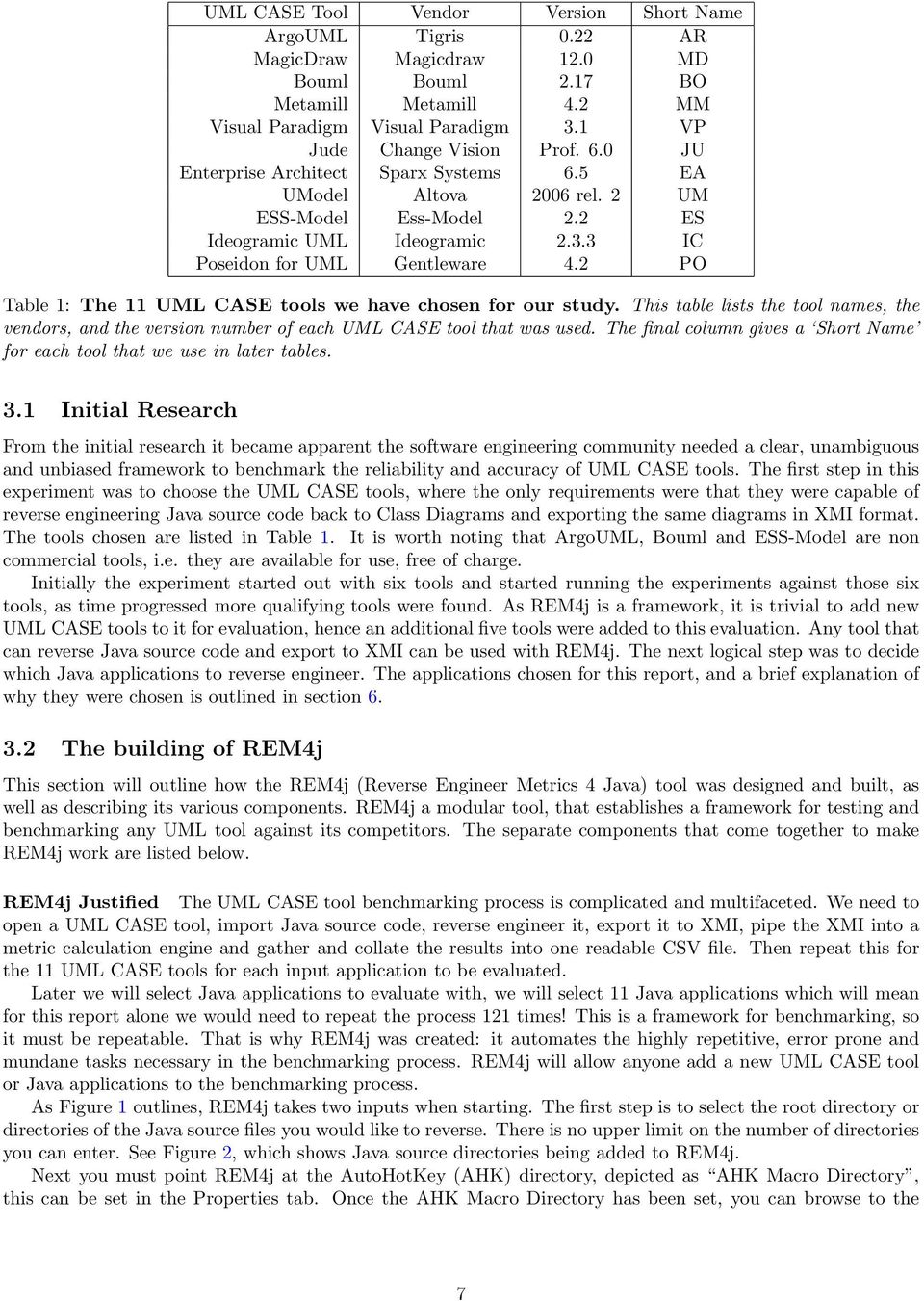
7 UML CASE Tool Vendor Version Short Name ArgoUML Tigris 0.22 AR MagicDraw Magicdraw 12.0 MD Bouml Bouml 2.17 BO Metamill Metamill 4.2 MM Visual Paradigm Visual Paradigm 3.1 VP Jude Change Vision Prof. 6.0 JU Enterprise Architect Sparx Systems 6.5 EA UModel Altova 2006 rel. 2 UM ESS-Model Ess-Model 2.2 ES Ideogramic UML Ideogramic IC Poseidon for UML Gentleware 4.2 PO Table 1: The 11 UML CASE tools we have chosen for our study. This table lists the tool names, the vendors, and the version number of each UML CASE tool that was used. The final column gives a Short Name for each tool that we use in later tables. 3.1 Initial Research From the initial research it became apparent the software engineering community needed a clear, unambiguous and unbiased framework to benchmark the reliability and accuracy of UML CASE tools. The first step in this experiment was to choose the UML CASE tools, where the only requirements were that they were capable of reverse engineering Java source code back to Class Diagrams and exporting the same diagrams in XMI format. The tools chosen are listed in Table 1. It is worth noting that ArgoUML, Bouml and ESS-Model are non commercial tools, i.e. they are available for use, free of charge. Initially the experiment started out with six tools and started running the experiments against those six tools, as time progressed more qualifying tools were found. As REM4j is a framework, it is trivial to add new UML CASE tools to it for evaluation, hence an additional five tools were added to this evaluation. Any tool that can reverse Java source code and export to XMI can be used with REM4j. The next logical step was to decide which Java applications to reverse engineer. The applications chosen for this report, and a brief explanation of why they were chosen is outlined in section The building of REM4j This section will outline how the REM4j (Reverse Engineer Metrics 4 Java) tool was designed and built, as well as describing its various components. REM4j a modular tool, that establishes a framework for testing and benchmarking any UML tool against its competitors. The separate components that come together to make REM4j work are listed below. REM4j Justified The UML CASE tool benchmarking process is complicated and multifaceted. We need to open a UML CASE tool, import Java source code, reverse engineer it, export it to XMI, pipe the XMI into a metric calculation engine and gather and collate the results into one readable CSV file. Then repeat this for the 11 UML CASE tools for each input application to be evaluated. Later we will select Java applications to evaluate with, we will select 11 Java applications which will mean for this report alone we would need to repeat the process 121 times! This is a framework for benchmarking, so it must be repeatable. That is why REM4j was created: it automates the highly repetitive, error prone and mundane tasks necessary in the benchmarking process. REM4j will allow anyone add a new UML CASE tool or Java applications to the benchmarking process. As Figure 1 outlines, REM4j takes two inputs when starting. The first step is to select the root directory or directories of the Java source files you would like to reverse. There is no upper limit on the number of directories you can enter. See Figure 2, which shows Java source directories being added to REM4j. Next you must point REM4j at the AutoHotKey (AHK) directory, depicted as AHK Macro Directory, this can be set in the Properties tab. Once the AHK Macro Directory has been set, you can browse to the 7

8 Figure 1: The work-flow of our REM4j framework.the main components are the Java source directory which holds the Java programs to be reverse engineered, and the UML CASE tool under examination. Auxiliary components include the AutoHotKey (AHK) macro tool and the SDMetrics metric calculation engine. Finally, the results of the metrics tool, stored as a CSV file, are depicted at the bottom of the figure. Select UML Tools tab. REM4j will now scan the AHK Macro Directory of available UML tools. In order for a UML tool to be available it must have an associated AHK Macro script in the AHK Macro Directory. Figure 2 shows The Select UML Tools tab, this tab allows you to select which tools you wish to benchmark. At this point REM4j now enters the loop section shown in Figure 1. If for example three source code directories are selected and then three UML tools are selected the loop would execute nine times, each source code directory would be reverse engineered and exported to XMI then piped into the metric calculation engine tool where the metric calculations would be extracted and returned to REM4j and the loop starts again. When the REM4j automation tool has finished executing it generates a Master CSV File, this can be further manipulated by REM4j or you can open it in another application if you choose to do so. Another feature of REM4j is the ability to produce charts and graphs to help visualise the results. Figure 4 shows a sample screen shot of the REM4j Charting functionality. REM4j works in a very modular approach and the user can choose to run parts of the test or run the whole test from beginning to end. REM4j utilises a number of open-source applications that are freely available, over time these tools may be updated or replaced with different tools. Since it is built in a modular fashion it can also evolve over time. The next three sections discuss the tools encapsulated in REM4j. SDMetrics The SDMetrics tool is a powerful commercial application that is capable of analysing XMI and computing metrics based on that XMI. One of the failings of OMG s XMI standards is that there are so many of them, with XMI standards ranging from 1.0 to 2.1, and different tool vendors supporting different versions, It was not fair to compare like for like in the XMI files. That is why SDMetrics was chosen for the metric calculation engine. SDMetrics is available under commercial and academic licence from Figure 5 shows the SD metrics work-flow diagram, giving the main files used by the tool. As well as the XMI source file for the reverse engineered program, and the CSV metrics output, there are three additional files used: The Meta-model definition file defines what SDMetrics knows about the meta classes, their attributes and relationships, it maps the OMG UML meta-model to a simplified meta-model for SDMetrics. 8


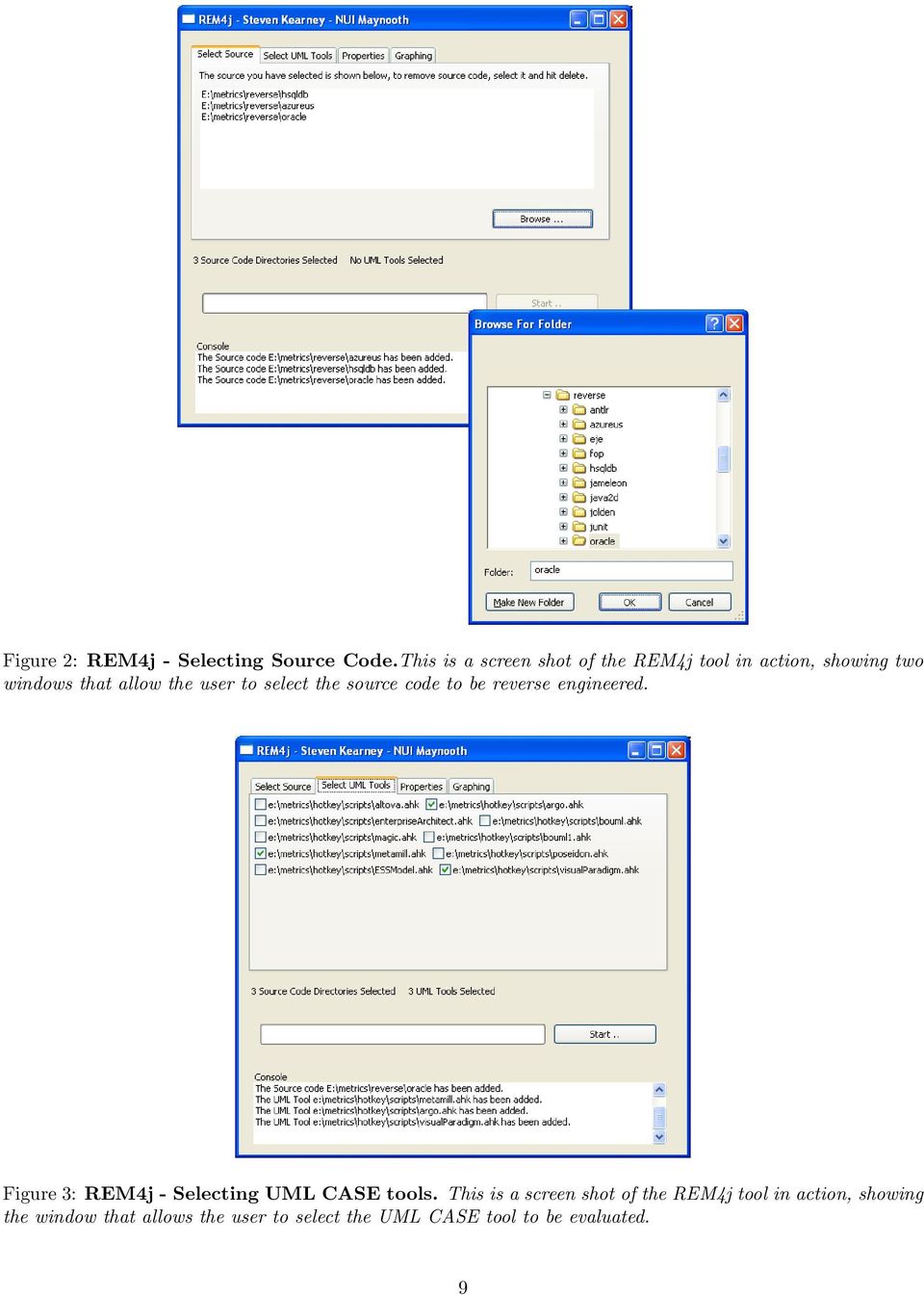
9 Figure 2: REM4j - Selecting Source Code.This is a screen shot of the REM4j tool in action, showing two windows that allow the user to select the source code to be reverse engineered. Figure 3: REM4j - Selecting UML CASE tools. This is a screen shot of the REM4j tool in action, showing the window that allows the user to select the UML CASE tool to be evaluated. 9

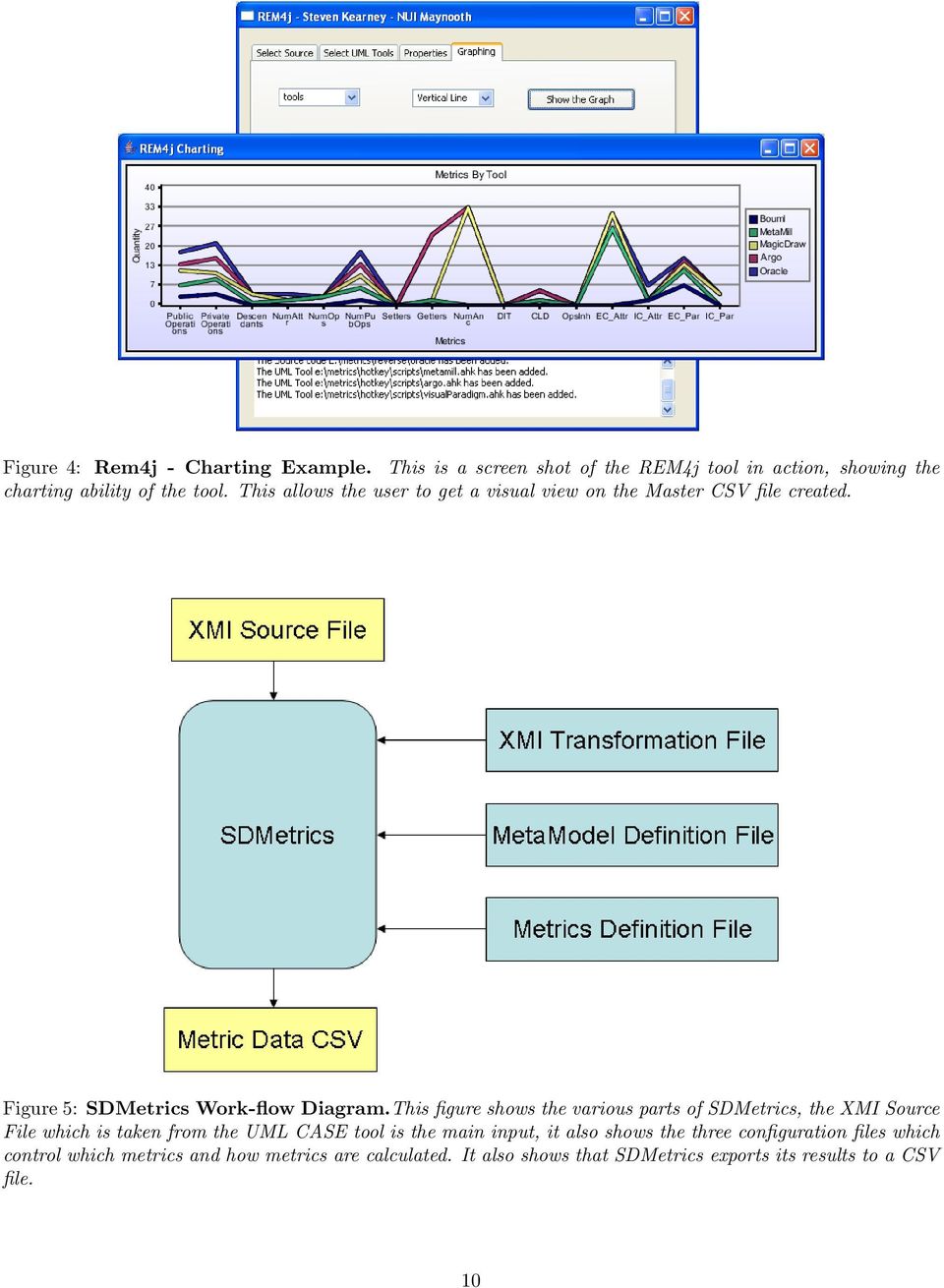
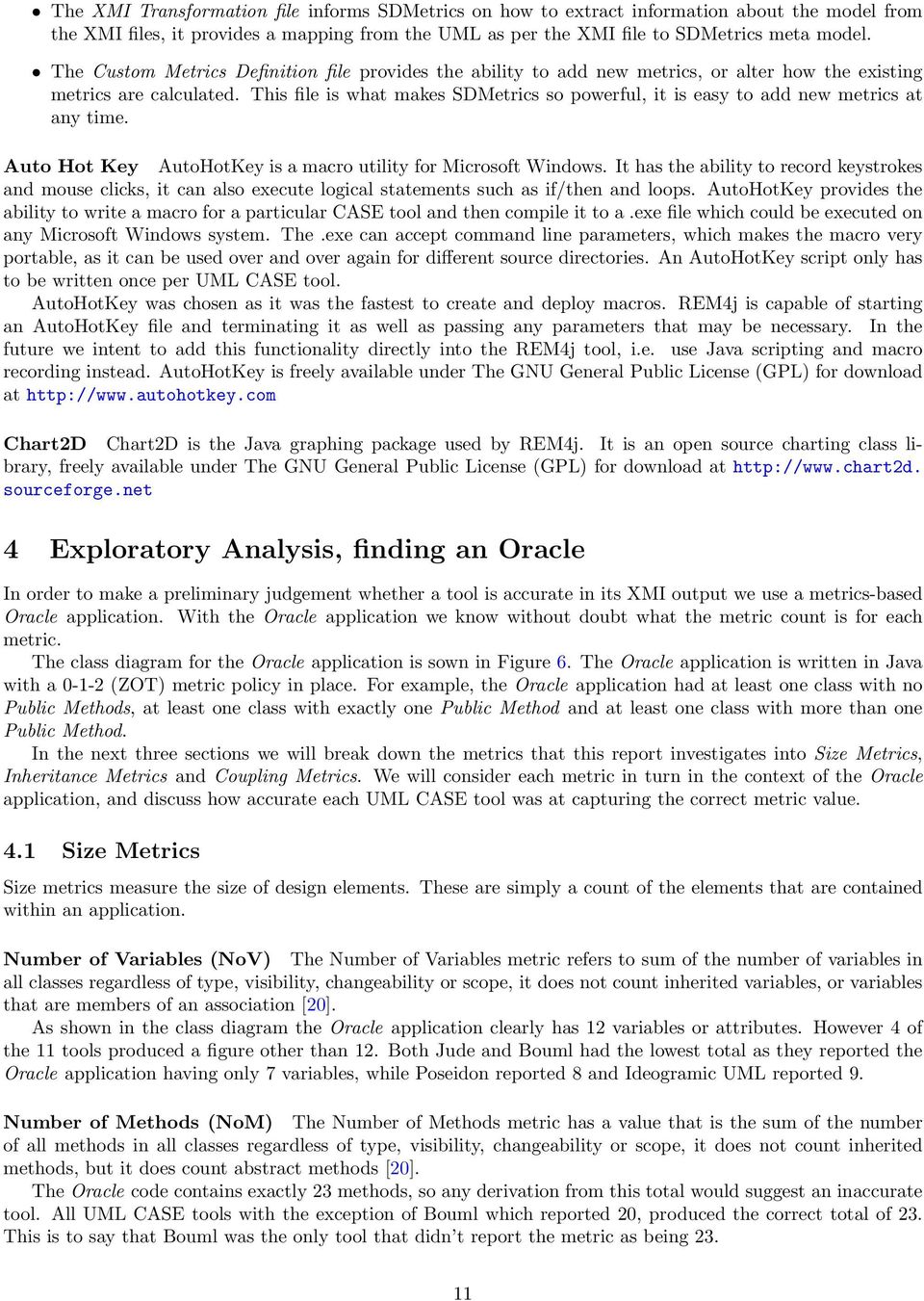
10 Figure 4: Rem4j - Charting Example. This is a screen shot of the REM4j tool in action, showing the charting ability of the tool. This allows the user to get a visual view on the Master CSV file created. Figure 5: SDMetrics Work-flow Diagram.This figure shows the various parts of SDMetrics, the XMI Source File which is taken from the UML CASE tool is the main input, it also shows the three configuration files which control which metrics and how metrics are calculated. It also shows that SDMetrics exports its results to a CSV file. 10
11 The XMI Transformation file informs SDMetrics on how to extract information about the model from the XMI files, it provides a mapping from the UML as per the XMI file to SDMetrics meta model. The Custom Metrics Definition file provides the ability to add new metrics, or alter how the existing metrics are calculated. This file is what makes SDMetrics so powerful, it is easy to add new metrics at any time. Auto Hot Key AutoHotKey is a macro utility for Microsoft Windows. It has the ability to record keystrokes and mouse clicks, it can also execute logical statements such as if/then and loops. AutoHotKey provides the ability to write a macro for a particular CASE tool and then compile it to a.exe file which could be executed on any Microsoft Windows system. The.exe can accept command line parameters, which makes the macro very portable, as it can be used over and over again for different source directories. An AutoHotKey script only has to be written once per UML CASE tool. AutoHotKey was chosen as it was the fastest to create and deploy macros. REM4j is capable of starting an AutoHotKey file and terminating it as well as passing any parameters that may be necessary. In the future we intent to add this functionality directly into the REM4j tool, i.e. use Java scripting and macro recording instead. AutoHotKey is freely available under The GNU General Public License (GPL) for download at Chart2D Chart2D is the Java graphing package used by REM4j. It is an open source charting class library, freely available under The GNU General Public License (GPL) for download at sourceforge.net 4 Exploratory Analysis, finding an Oracle In order to make a preliminary judgement whether a tool is accurate in its XMI output we use a metrics-based Oracle application. With the Oracle application we know without doubt what the metric count is for each metric. The class diagram for the Oracle application is sown in Figure 6. The Oracle application is written in Java with a (ZOT) metric policy in place. For example, the Oracle application had at least one class with no Public Methods, at least one class with exactly one Public Method and at least one class with more than one Public Method. In the next three sections we will break down the metrics that this report investigates into Size Metrics, Inheritance Metrics and Coupling Metrics. We will consider each metric in turn in the context of the Oracle application, and discuss how accurate each UML CASE tool was at capturing the correct metric value. 4.1 Size Metrics Size metrics measure the size of design elements. These are simply a count of the elements that are contained within an application. Number of Variables (NoV) The Number of Variables metric refers to sum of the number of variables in all classes regardless of type, visibility, changeability or scope, it does not count inherited variables, or variables that are members of an association [20]. As shown in the class diagram the Oracle application clearly has 12 variables or attributes. However 4 of the 11 tools produced a figure other than 12. Both Jude and Bouml had the lowest total as they reported the Oracle application having only 7 variables, while Poseidon reported 8 and Ideogramic UML reported 9. Number of Methods (NoM) The Number of Methods metric has a value that is the sum of the number of all methods in all classes regardless of type, visibility, changeability or scope, it does not count inherited methods, but it does count abstract methods [20]. The Oracle code contains exactly 23 methods, so any derivation from this total would suggest an inaccurate tool. All UML CASE tools with the exception of Bouml which reported 20, produced the correct total of 23. This is to say that Bouml was the only tool that didn t report the metric as being
12 Figure 6: Oracle Class Diagram. This is a Class Diagram showing the 11 classes of the Oracle application, it also shows the variables and methods of the application. Overlapping classes are inner classes. Dotted lines represent an implements relationship. A solid line represents an extends relationship. 12
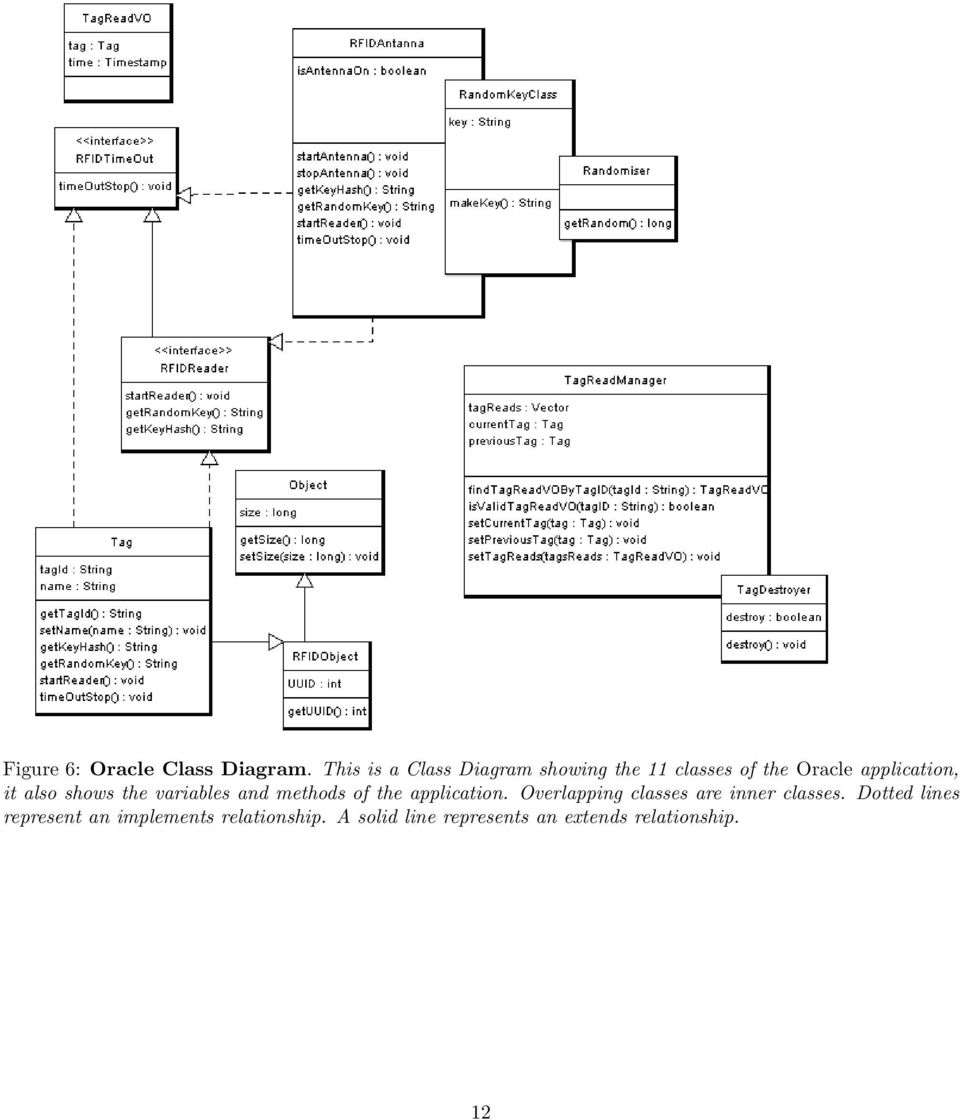
13 Number of Public Methods (NoPM) The Number of Public Methods metric has a value which is the sum of the number of methods in all classes that have public visibility [20]. This metric is similar to Number of Methods except that it only counts methods that are public, so this metric should never be greater than the Number of Methods metric. The Oracle application was written with exactly 20 public methods, all of the tools agreed with this total except one, Bouml, which reported 18. This is not surprising as Bouml only reported a total of 20 methods when there was actually 23 methods in the application. When we combine this metric with Number of Methods we can see that Bouml is under reporting the number of methods regardless of visibility. Number of Setters (NoS) The Number of Setters metric counts any Method that begins with set, this may yield inaccurate results as methods like settlebalance may also be counted [29]. However as this problem will occur in all tools, it negates the problem as all tools are equally effected, so this metrics is still useful for evaluating the UML tools. The Oracle application contains five methods that begin with set. For this metric all tools agreed and all tools produced a metric value of 5. Number of Getters (NoG) This metric counts any Method that begins with get, is or has, this metric may yield inaccurate results for methods like isolatetag [29]. As with the Number of Setters metric, this issue affects all tools equally and does not impact on the reliability of this metric. This metric operates in a similar fashion to Number of Setters, the Oracle application contains 9 methods that either begin with get, is or has and all tools agree with the metric value being 9. Inner Classes (IC) This metric will return the total number of inner classes nested within an application. The Oracle application contains the class RFIDAntenna which has an inner class RandomKeyClass which in turn has an inner class Randomiser. So the nesting count for Randomiser is 0, the count for RandomKeyClass is 1, as it contains one inner class and the count for RFIDAntenna is 2 as it contains a class that contains a class. The Oracle application also has one other class containing an inner class. So the Inner Classes metric count for the Oracle application is 4. Ideogramic UML, Bouml, Enterprise Architect and ESSModel all reported 0 Inner Classes, while MagicDraw UML Reported 7, these tools are incorrect. ArgoUML, Metamill, Poseidon, Visual Paradigm and Jude reported the correct number of Inner Classes, 4. Total Number of Classes This is a count of the total amount of classes that the UML CASE tool exported in its XMI document. The class diagram clearly shows 11 classes however none of the UML CASE tools reported this total, they all reported totals of between 9 and 53. This error has most likely occurred due to the fact that different tools treat imported packages differently, such as the java.util.string class, while not part of the Oracle application it is used by it. Some tools count classes like the java.util.string class in the Total Number of Classes metric, Thus making the metric unreliable. The Total Number of Classes metric will not be evaluated further. Size Metrics Summary As we know the correct value for all the size metrics, we can state if the tools passed or failed. As table 2 shows Argo UML, Metamill and Visual Paradigm were the only tools to be correct on all evaluated metrics. The table displays the actual metric value, if a tool reported an incorrect value, the difference between the reported and the correct value is displayed. 4.2 Inheritance Metrics Inheritance metrics deal with polymorphism, depth and width of the inheritance tree, the number of ancestors or descendants of a class. 13

14 UML Size Metrics Tool NoV NoM NoPM NoS NoG IC ToC AR MD BO MM VP JU EA UM ES IC PO Actual Table 2: Size Metrics Results. This table shows, for each UML CASE tool, the difference between the actual expected value and the value calculated for the Oracle application. The actual correct value for each metric is shown in the last row. Interfaces Implemented (II) The total number of Interfaces that are implemented within an application. A single class may implement several interfaces. The Oracle application contains two interfaces, both of these interfaces are implemented by RFIDAntenna and Tag. As both interfaces are implemented twice, the total number of interfaces implemented in the Oracle application is 4. Ideogramic, ArgoUML, Jude, Metamill and Bouml returned 0 as the metric value, all other tools agreed and returned 4. Number of Children (NoC) This is a measurement of how many classes are going to inherit methods of the parent class, its the number of immediate subclasses subordinated to a class in the class hierarchy [4]. In the Oracle application, two classes, Object and RFIDObject are extended by another class, RFIDObject extends Object and Tag extends RFIDObject. The value of this metric for the Oracle application is 2. All of the UML CASE tools agreed that it was 2, with the one exception of Enterprise Architect, which stated that it was 3. Inheritance Tree (IT) This metric represents the sum of the ancestors or descendants of each class within the application. The Oracle application has two instances where a class has a inheritance depth of greater than 0, this is the Tag class which has a depth of 2 and the RFIDObject class which has a depth of 1. The total Inheritance Tree metric value is 3. With the exception of Enterprise Architect which reported 4, all tools agreed on 3 being the correct metric value. Class to Leaf Depth (CLD) With this metric we take a look at the longest path from a class to a leaf in the inheritance hierarchy. For example the Object class has a depth of 2 in order to reach its longest leaf the Tag class. Whereas the RFIDObject has a depth of 1 to reach its most far away leaf. These Class to Leaf Depth metrics are then summed for each class in the application giving a metric value of 3. All of the UML CASE tools agreed that the Class to Leaf Depth was 3 with one exception again, the Enterprise Architect tool. Methods Inherited (MI) This metric is the sum of the number of methods inherited by each class. This is calculated as the sum of Number of Methods taken over all ancestor classes of the class [20, 29]. The RFIDObject class in the Oracle application extends the Object class, therefore it inherits the two methods in the Object class. The Tag class extends the RFIDObject class, so it inherits the one method in the RFIDObject class and it also inherits the two methods from the Object class. The Methods Inherited metric value is 5. All of the tools reported a value of 5. 14

15 UML Inheritance Metrics Tool II NoC IT CtLD MI VI AR MD BO MM VP JU EA UM ES IC PO Actual Table 3: Inheritance Metrics Results. This table shows the actual expected value for each of the six inheritance metrics. It then shows, for each UML CASE tool, the difference between the expected value and the value calculated for the Oracle application. Variables Inherited (VI) This is the sum of the number of variables each class in the application has inherited. It works in much the same manner as Methods Inherited. The Oracle application produces a metric value of 3. All the UML CASE tools agree on this total. Inheritance Metrics Summary As the table, 3 shows, the UML CASE tools were in agreement most of the time, with the exception of Enterprise Architect, which frequently over rated the metric value by Coupling Metrics Coupling metrics are used to investigate how the different elements in an application are connected. Associated Elements in the same scope This metric counts all associations including plain, aggregate, composite and bidirectional associations that are in the same scope or namespace as the class itself. i.e. associations within the same package. Only Jude, Poseidon and Ideogramic UML produced a total other than 0. They did agree that the total is 4, which is correct. However as only three tools able to capture this metric, it will not be used for further evaluations of the UML CASE tools reliability. Associated Elements in the same scope branch For a class that is defined in a package, pack, this metric will only count model elements that are in pack itself, in packages that pack contains and in packages contained by pack. Like Associated Elements in the same scope only Jude, Poseidon and Ideogramic UML produced a total other than 0. The correct total is 4 and Jude, Poseidon and Ideogramic UML reported 4. External Class Use as Type The External Class Use as Type metric represents the number of attributes in other classes that have this class as their type. This metric will not be evaluated as the diverse tools differ on how to calculate it. For example in the application is it correct to count the number of times the java.util.string class is used as a Type? The java.util.string class is not part of our Oracle application, however it is used eleven times. As there is no definitively right or wrong way to calculate the use of the java.util.string class this metric won t be evaluated further. In order to use this metric, we would need to need to break this evaluation down into a per class not per application evaluation. 15

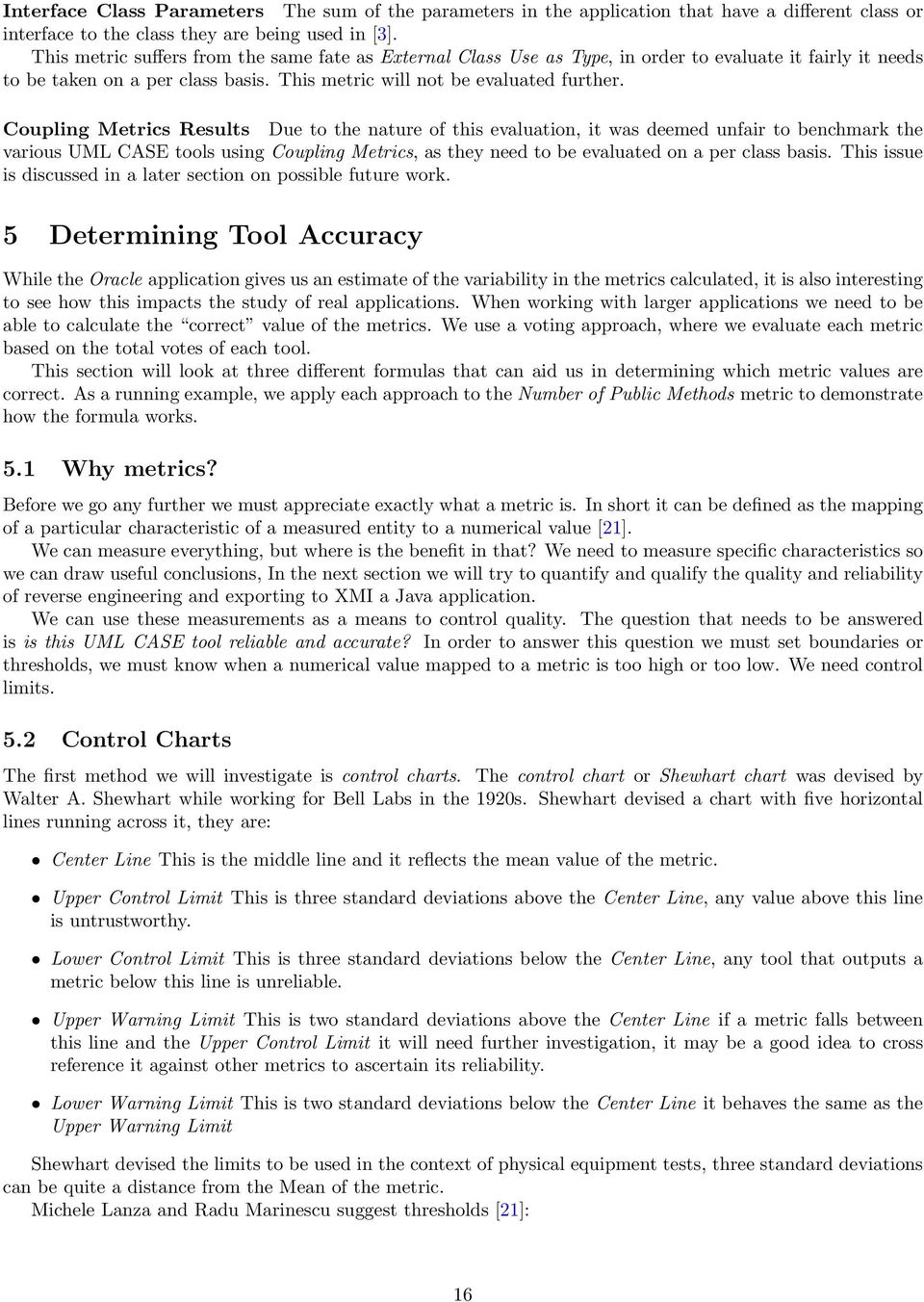
16 Interface Class Parameters The sum of the parameters in the application that have a different class or interface to the class they are being used in [3]. This metric suffers from the same fate as External Class Use as Type, in order to evaluate it fairly it needs to be taken on a per class basis. This metric will not be evaluated further. Coupling Metrics Results Due to the nature of this evaluation, it was deemed unfair to benchmark the various UML CASE tools using Coupling Metrics, as they need to be evaluated on a per class basis. This issue is discussed in a later section on possible future work. 5 Determining Tool Accuracy While the Oracle application gives us an estimate of the variability in the metrics calculated, it is also interesting to see how this impacts the study of real applications. When working with larger applications we need to be able to calculate the correct value of the metrics. We use a voting approach, where we evaluate each metric based on the total votes of each tool. This section will look at three different formulas that can aid us in determining which metric values are correct. As a running example, we apply each approach to the Number of Public Methods metric to demonstrate how the formula works. 5.1 Why metrics? Before we go any further we must appreciate exactly what a metric is. In short it can be defined as the mapping of a particular characteristic of a measured entity to a numerical value [21]. We can measure everything, but where is the benefit in that? We need to measure specific characteristics so we can draw useful conclusions, In the next section we will try to quantify and qualify the quality and reliability of reverse engineering and exporting to XMI a Java application. We can use these measurements as a means to control quality. The question that needs to be answered is is this UML CASE tool reliable and accurate? In order to answer this question we must set boundaries or thresholds, we must know when a numerical value mapped to a metric is too high or too low. We need control limits. 5.2 Control Charts The first method we will investigate is control charts. The control chart or Shewhart chart was devised by Walter A. Shewhart while working for Bell Labs in the 1920s. Shewhart devised a chart with five horizontal lines running across it, they are: Center Line This is the middle line and it reflects the mean value of the metric. Upper Control Limit This is three standard deviations above the Center Line, any value above this line is untrustworthy. Lower Control Limit This is three standard deviations below the Center Line, any tool that outputs a metric below this line is unreliable. Upper Warning Limit This is two standard deviations above the Center Line if a metric falls between this line and the Upper Control Limit it will need further investigation, it may be a good idea to cross reference it against other metrics to ascertain its reliability. Lower Warning Limit This is two standard deviations below the Center Line it behaves the same as the Upper Warning Limit Shewhart devised the limits to be used in the context of physical equipment tests, three standard deviations can be quite a distance from the Mean of the metric. Michele Lanza and Radu Marinescu suggest thresholds [21]: 16
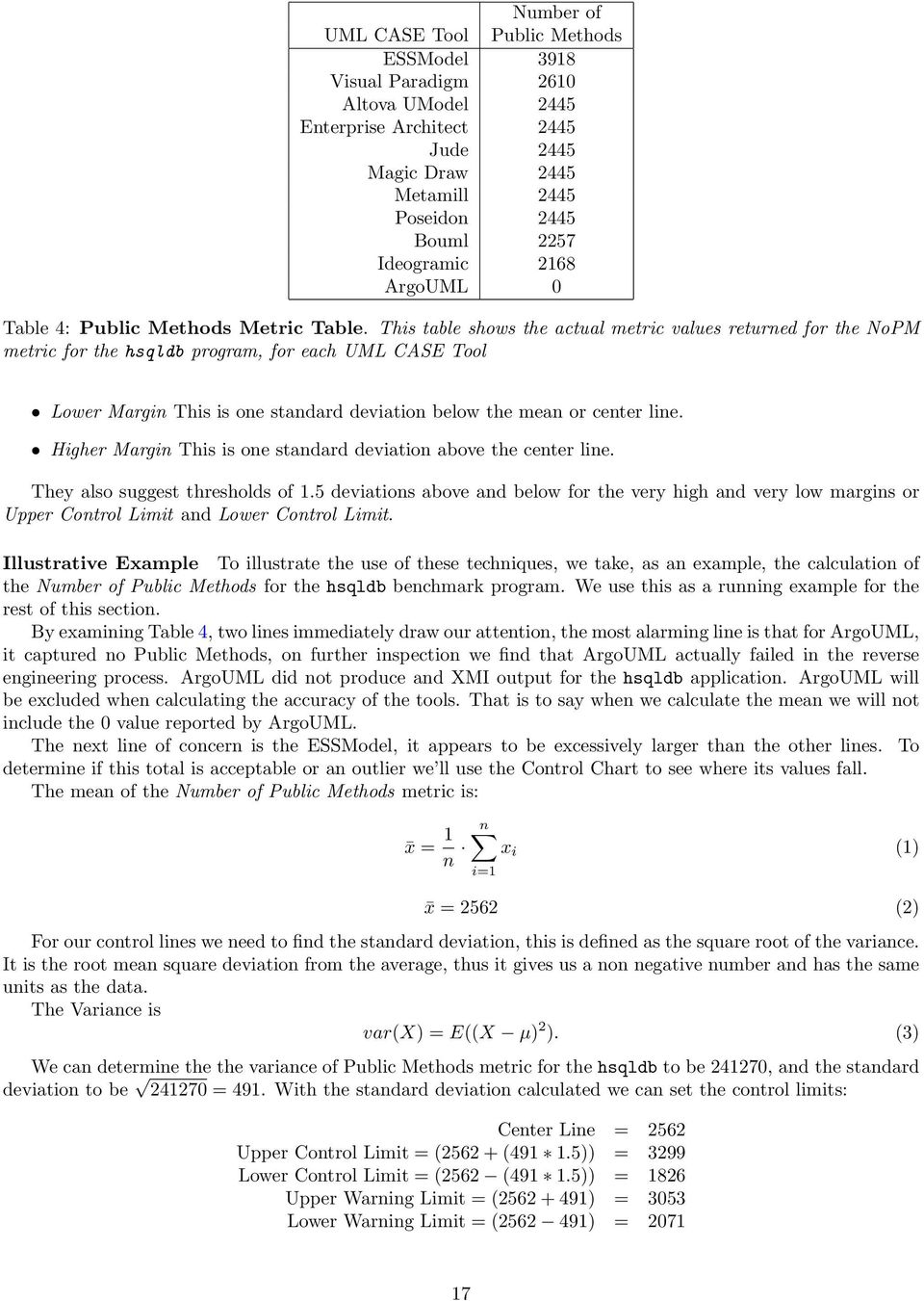
17 Number of UML CASE Tool Public Methods ESSModel 3918 Visual Paradigm 2610 Altova UModel 2445 Enterprise Architect 2445 Jude 2445 Magic Draw 2445 Metamill 2445 Poseidon 2445 Bouml 2257 Ideogramic 2168 ArgoUML 0 Table 4: Public Methods Metric Table. This table shows the actual metric values returned for the NoPM metric for the hsqldb program, for each UML CASE Tool Lower Margin This is one standard deviation below the mean or center line. Higher Margin This is one standard deviation above the center line. They also suggest thresholds of 1.5 deviations above and below for the very high and very low margins or Upper Control Limit and Lower Control Limit. Illustrative Example To illustrate the use of these techniques, we take, as an example, the calculation of the Number of Public Methods for the hsqldb benchmark program. We use this as a running example for the rest of this section. By examining Table 4, two lines immediately draw our attention, the most alarming line is that for ArgoUML, it captured no Public Methods, on further inspection we find that ArgoUML actually failed in the reverse engineering process. ArgoUML did not produce and XMI output for the hsqldb application. ArgoUML will be excluded when calculating the accuracy of the tools. That is to say when we calculate the mean we will not include the 0 value reported by ArgoUML. The next line of concern is the ESSModel, it appears to be excessively larger than the other lines. To determine if this total is acceptable or an outlier we ll use the Control Chart to see where its values fall. The mean of the Number of Public Methods metric is: x = 1 n n x i (1) i=1 x = 2562 (2) For our control lines we need to find the standard deviation, this is defined as the square root of the variance. It is the root mean square deviation from the average, thus it gives us a non negative number and has the same units as the data. The Variance is var(x) = E((X µ) 2 ). (3) We can determine the the variance of Public Methods metric for the hsqldb to be , and the standard deviation to be = 491. With the standard deviation calculated we can set the control limits: Center Line = 2562 Upper Control Limit = ( ( )) = 3299 Lower Control Limit = (2562 ( )) = 1826 Upper Warning Limit = ( ) = 3053 Lower Warning Limit = ( ) =
18 Figure 7: hsqldb - Control Chart. Deep blue and red signifies the Lower and Upper Control Limits respectively. Light blue and orange signify the upper and lower warning limits respectively. The black line plots the metric value for each tool If any metric falls above the Upper Control Limit or below the Lower Control Limit, we can rule it out and state that it is an outlier and doesn t accurately reflect the true metric value. If the metric value falls between an Upper Control Limit and an Upper Warning Limit or falls between a Lower Control Limit and a Lower Warning Limit, we will tentatively accept the metric, however further investigation to rule it an outlier may be required. Figure 7 contains a chart that plots the value of the Number of Public Methods metric for each of the reverse engineering tools, when applied to the hsqldb benchmark program. The black line plots the metric value for each tool; the two blue lines below it plot the lower warning and control limits, and the two lines above it plot the upper warning and control limits. From this chart, we can see that all reverse engineering tools calculate a value for the metric that is within all limits, apart from ESSModel, whose calculated metric value exceeded both the upper warning and upper control limit for the hsqldb application. 5.3 Mean Deviation Another statistical analysis tool that can be used to check the correctness of the reported metric value is mean deviation, this is a measure of dispersion that gives the average absolute difference (i.e. it ignores - minus signs) between each individual tools metric and the mean. It is sometimes referred to as the average deviation. The mean deviation is calculated as follows: md = 1 n n x i x (4) i=1 With the mean deviation calculated we can see how many tools produced a metric that is greater than the mean deviation above or below the mean. Two vertical lines have been applied to Figure 8, the lines represent one mean deviation above and one mean deviation below the mean value, which is 281. Figure 8 clearly shows that the ESSModel tool produced a metric value that is above one mean deviation from the mean. In fact the ESSModel s metric is nearly 5 mean deviations away from the mean. 18

19 Figure 8: hsqldb - Mean Deviation Chart. This chart shows two red lines that signify one mean deviation above and below the mean. The black line plots the metric value for each tool. 5.4 Mode So far we have looked at the Mean, Standard Deviation and Mean Deviation to decide how accurate the UML CASE tools are, another statistical tool we have at our disposal is Mode, this is the value that occurs most often, it has the largest frequency. The purpose of XMI is to provide a standard for interoperability, that is to allow XMI files to be transferred between different UML tools, so it is reasonable to expect that tools should produce the same metric count. Therefore the mode may prove to be interesting. We can see that six out of ten UML CASE tools output 2445 as the Number of Public Methods metric, with a further 3 being within one standard deviation and one mean deviation. It is a reasonable assumption that 2445 is in fact the correct metric count. The other three tools were tentatively accepted as being correct while the ESSModel tools metric value is an outlier and its results are unreliable. 6 Analysis of Real World Programs In this section we discuss the Java applications chosen and investigate each tool s effectiveness at reporting each metric for all the applications. 6.1 Java Application Selection When selecting Java applications to use in this evaluation, diverse applications were sought as well as random applications. When selecting these tools, much inspiration was drawn from the DaCapo Benchmarks [9], available at antlr, ANother Tool for Language Recognition, was chose from the DaCapo benchmark suite, it parses one or more grammar files and generates a parser and lexical analyzer for each. fop, Formatting Objects Processor, it is a Java application that reads a formatting object tree and renders the resulting pages to a specified output, typically a PDF. Again it was chosen from the DaCapo benchmark suite. 19

20 UML Test Suite Applications Tool eje antlr jam hsqldb fop junit jolden java2d xalan pmd pcj % P AR P P P F P P P P P P F 81.8 MD P P P P P P P P P P P 100 BO P P P P P P P P F P F 81.8 MM P P P P P P P P P P P 100 VP P P P P P P P P P P P 100 JU P P P P P P P P F P P 90.9 EA P F P P P P P P P P F 81.8 UM P P P P P P F P P P P 90.9 ES P P P P P P P P P P P 100 IC P P P P P P P P P F P 90.9 PO P P P P P P P P P P F 90.9 % P Table 5: Pass/Fail results for each tool.this table lists the test suite applications in the top row and the UML tools down the leftmost column. Each cell records either P for pass or F for fail, indicating whether or not the UML tool exported valid XMI for this test suite program. hsqldb, is a database written purely in Java, it also forms part of the DaCapo suite. pmd, is a Java application than scans through Java source code and analyzes it for potential problems, it is part of the DaCapo Benchmark suite. xalan is an XSLT processor for transforming XML documents into HTML, text, or other XML document types. It was selected from the DaCapo Benchmark suite. junit is a well known and trusted simple framework to write repeatable tests. It is available on sourceforge.net jolden is a benchmark test application written in Java. pcj, Primitive Collections for Java, is a set of collection classes for primitive data types in Java. It was randomly selected from sourceforge.net jameleon is an automated test framework written in Java, it was also selected from sourceforge.net Azureus implements the BitTorrent protocol using java language, at the time of running this experiment it was to most popular download on sourceforge.net eje, Everyone s Java Editor, is a simple editor for the Java programming language, it was randomly selected from sourceforge.net java2d is a java 2d graphics package, it was selected from the SPECjvm98 benchmark suite. We can refer to these Java applications collectively as the test suite from now on. 6.2 Metric Capture Table 5 summarises the pass/fail results for each tool when run over the test suite. The top row in Table 5 lists the 11 benchmark programs (test suite), and the leftmost column lists the 11 reverse engineering tools under study. Each cell records either P for pass or F for fail, indicating whether or not the reverse engineering tool exported valid XMI for this benchmark program. For example, we can see that the Argo tool, represented by the row labelled AR, exported valid XMI for all benchmark programs other than hsqldb and pcj. The rightmost column in Table 5 summarises the results for each reverse engineering tool, by recording the percentage of benchmark programs that passed. From this column, we can see that 7 of the 11 tools achieved a score of under 100%, failing for at least one benchmark program. The bottom row of Table 5 summarises, for 20

21 each benchmark program, the percentage of the 11 reverse engineering tools that recorded a pass. From this row, we can see that five benchmark programs scored 100% by recording a pass for all tools, but that the pcj program had a particularly poor rate, passing for only 7, or 63.6%, of the tools. MagicDraw UML, Metamill, ESSModel and Visual Paradigm succeeded in reverse engineering every Java application in this evaluation, this however, does not inform us of their accuracy. 6.3 Results Per Tool The following section details the results of each tool. It is useful to cross reference the charts presented in Figures 9 and 10 with the application result tables in the appendix. Figures 9 and 10 contain a set of 11 bar charts, where each bar chart shows the results for a single tool. In each chart, the vertical axis is numbered from 0 up to 11, and each point on this axis represents an application from our test suite. The horizontal axis displays each metric, and the corresponding bar represents the accuracy of the UML CASE tool for this metric. Ror example the leftmost bar in the chart in Figure 9(a) shows the Number of Variables (NoV) metric was captured for 9 applications by the Bouml tool. The bars in the chart are colour coordinated: deep blue represents metric values that are under the control limit deep red shows metric values that are above the control limit light blue representes metric values in the lower warning zone orange represents metric values in the upper warning zone Metric values shaded with deep blue or deep red are considered to be outliers and unreliable. Metric values that are shaded light blue or orange are not outliers, but they may be inaccurate; we can say that these metric values are somewhat reliable. White coloured metrics values are accurate and reliable, and these metrics can be trusted. The larger the white shading in the charts of Figures 9 and 10, the more accurate that tool is. For each UML tool there is thus a maximum of 132 possible opportunities for a white shading (11 applications being evaluated with 12 metrics). Bouml Results In chart in Figure 9(a) we can clearly see that Bouml only reverse engineered and exported valid XMI for 9 out of 11 applications, or approximately 82% of the Java applications. For the 9 applications Bouml did produce an output for, it failed to capture the Inner Classes (IC) and the Interfaces Implemented (II) metric. The chart in Figure 9(a) also shows the trend of Bouml underestimating size metrics, while overestimating Inheritance metrics. The Methods Inherited (MI) metric is the only metric that Bouml produced that was completely accurate, with the Class to Leaf Depth (CLD) being slightly overestimated but acceptable. Out of 132 individual metric values, Bouml captured 64 metrics that were correct or reported 48% of the metric values correctly. If we allow metrics that are in the warning or monitor zones Bouml was correct 76 times or 58%. UModel Results The chart in Figure 9(b) shows that UModel captured metrics for 10 out of 11 applications. That is to say that UModel successfully reverse engineered and exported to XMI 91% of the applications it was evaluated with. The 9(b) chart, shows a lot of white shading, it shows a trend of being correct a large proportion of the time. UModel failed to capture one metric Number of Getters(NoG) for one application. It also shows that none of UModel s metric values were outliers, with only one metric value being in the warning zone. Out of 132 possible correct metric valuations, UModel reported 114 to be correct, or 86% of metric values captured by UModel were correct. If we consider the warning zones to be acceptable we can say that UModel was correct 119 times out of 132, or 90%. 21
22 (a) Bouml (b) Umodel (c) Visual Paradigm (d) Argo UML (e) Metamill (f) Enterprise Architect Figure 9: Results for the first six tools. Each chart in this figure corresponds to the results for a single UML CASE tool. Each of the 12 bars in the chart corresponds to a particular metric, with the total height of the bar reflecting the number of applications (up to 11) for which this tool calculated the corresponding metric. The bars reflect the accuracy of the metric value, and are colour coded as follows: Deep blue = under the control limit Light blue = lower warning zone White = accurate and reliable Orange = upper warning zone Deep red = above the control limit 22
23 (b) ESSModel (c) MagicDraw (d) Poseidon (e) Jude (f) Ideogramic UML Figure 10: Results for the last five tools. Each chart in this figure corresponds to the results for a single UML CASE tool. Each of the 12 bars in the chart corresponds to a particular metric, with the total height of the bar reflecting the number of applications (up to 11) for which this tool calculated the corresponding metric. The bars reflect the accuracy of the metric value, and are colour coded as follows: Deep blue = under the control limit Light blue = lower warning zone White = accurate and reliable Orange = upper warning zone Deep red = above the control limit 23
24 Visual Paradigm Results The chart in Figure 9(c) shows that Visual Paradigm was able to reverse engineer and export valid XMI for all of the Java applications used in this experiment. Visual Paradigm failed to capture metrics for 5 of the Inheritance metrics and reported metric values below the Lower Control Level for 3 Inheritance metrics. The chart appears to show that Visual Paradigm was highly accurate with size metrics but struggled a little with Inheritance metrics. Visual Paradigm correctly reported 119 out of 132 metrics, i.e. it correctly reported 90% of metrics. If we allow warning zones to be considered, Visual Paradigm correctly reported 91% of metrics. ArgoUML Results Studying the chart in Figure 9(d), we can see that ArgoUML failed to reverse 2 of the 11 Java applications, leaving just 9 for further evaluation. Within the 9 applications ArgoUML failed to capture 5 metrics for one application. The chart 9(d) shows that the tool has both under and over estimated many of the metrics, with a clear trend showing, the tool under-estimating the size metrics while over-estimating the inheritance metrics. We deem 80 of ArgoUML s reported metrics to be correct that is ArgoUML was correct for 61% of the cases. If the warning limits were to be accepted we could say that Argo is correct for 73% of the metric values captured. Metamill Results As chart in Figure 9(e) shows Metamill was able to reverse engineer and export to XMI all 11 Java applications. It failed to capture the Interfaces Implemented metric for all the applications, it also failed to capture the Inner Classes (IC) metric for one application. The chart clearly shows mainly white shading, with some deep blue signifying a metric value below the Lower Control Limit. Out of 132 possible metric values, Metamill captured 120, or 91% of the metrics. Metamill has no metric values in the warning zones, and just 2 outside the Control Limits. Metamill captured 118 metrics correctly, that is to say Metamill was correct for 89% of the metric values captured. Enterprise Architect Results If we take a look at Figure 9(f) we can see that Enterprise Architect only succeeded in reverse engineering and exporting XMI for 9 out of the 11 applications. Enterprise Architect also failed to capture Inner Class (IC) and Interfaces Implemented (II) metrics for any of the applications. Investigating the results further, a trend becomes apparent, Enterprise Architect consistently under-estimates all the metrics. Enterprise Architect reported 7 metric values that were outside the Control Limits and will be discarded, When we add this to the 42 metrics that it failed to capture, we can say the Enterprise architect was correct 71 out of 132 times. If we accept warning zone values we can state that Enterprise Architect is correct in 63% of the cases. ESSModel Results As we can see from Figure 10(b), ESSModel captured metrics for all 11 applications, but failed to capture the Inner Classes (IC) metric. ESSModel captured 92% of the available 132 metrics. ESSModel both over and under estimated metrics for a variety of different metrics, there was no noticeable trend. ESSModel reported 109 metric values that were deemed to be correct, this represents 83% of metric values. Another 9 metric values were within the warning zones and if we accept them as correct we can state that ESSModel has correctly reported 118 out of 132 metrics or 89%. MagicDraw Results Investigating the chart in Figure 10(c), we find that MagicDraw captured all metrics for all applications with only one exception, the Inner Classes (IC) metric for one application. We can see that MagicDraw over and under reported the Inner Classes (IC) metric, the majority of the tools struggled to report this correctly, with many tools failing to capture it at all. MagicDraw captured 131 out of 132 metrics, that is a 99% capture rate. We can see that MagicDraw correctly reported 117 metric values, that is to say MagicDraw was correct in 89% of the cases. If the acceptance criteria is widened to include metric values in the warning zone we can say that MagicDraw is correct 95% of the time. Poseidon Results Poseidon failed to reverse engineer and export valid XMI for one of the Java applications as shown in Figure 10(d). Out of the 10 applications it did report metrics for, it failed to capture 2 metrics for one application, so in total Poseidon captured 119 metric values. 24
25 (a) Absolute tool ranking, based on EQUAL UML Tool LCL LWL EQUAL UWL UCL VP (90%) 0 0 MM (89%) 0 0 MD (89%) 9 3 UM (86%) 5 0 ES (83%) 9 1 PO (74%) 5 0 JU (70%) 0 0 AR (60%) 14 2 EA (54%) 0 0 BO (49%) 11 2 IC (17%) 0 0 (b) Tool ranking, allowing warning zones UML LWL+UWL Tool LCL +EQUAL UCL MD (95%) 3 VP (91%) 0 UM (90%) 0 MM (89%) 0 ES (89%) 1 PO (84%) 0 AR 4 97 (73%) 2 JU 5 92 (70%) 0 EA 7 83 (63%) 0 BO (58%) 2 IC (18%) 0 Table 6: Tool Rankings. These tables list the UML CASE tools in the leftmost column. Each column measures the number of metrics falling into a given metric level. The rows are ranked by the values in the middle column, which are also expressed as a percentage of the total possible metric values (132). Figure 10(d) shows that for approximately half the metrics, Poseidon under reported them, with it only over reporting for the Interfaces Implemented (II) metric. Poseidon correctly reported 98 metric values, which equates to 74%, if we accept the warning zones we can include another 13 metrics bring our accuracy level to 84%. Jude Results The chart in Figure 10(e) shows how Jude captured metrics from 9 of the Java applications, it also highlights how Jude failed to capture the Interfaces Implemented (II) metric. Out of the metrics that were captures it appears that Jude was quite accurate, with only 2 metrics reporting values in outside the Control Limits. Jude reported no metrics within the warning zones, so we can state that Jude was 70% accurate. Ideogramic UML Results Ideogramic UML reverse engineered and exported valid XMI for 10 out of 11 of the Java applications, however it failed to capture the Interfaces Implemented and Inner Classes metric. In the majority of metrics Ideogramic UML failed to capture a metric for each tool, in fact it only captured all the metrics values for 33% of the metrics. The chart in Figure 10(f) shows this trend. Ideogramic UML captured 58% or 77 metric values. It captured 23 metrics that were deemed to be correct. Ideogramic UML reported 17% of the metrics correctly. If the scope is widened to include metric values in the warning zones, we add 1 additional metric value and bring the level of correct metrics captured to 18%. 7 Conclusions and Future Work In this section we will present our findings, explaining how we arrived at them. We also discuss areas of possible future work and then rank the UML CASE tools by their accuracy. 7.1 Conclusion Figure 11 sums up our findings on the eleven reverse engineering tools we have studied, and have presented in Figures 9 and 10. However, unlike the previous section where a chart was displayed for every tool showing the results of each individual metric, we have now summed the metric values and show only one chart with all eleven tools. As with charts in the previous Section 6, the higher the proportion of white shading the higher the reliability of the tool. We can see that all tools over reported every metric at some stage, all the tools also under reported at some stage with the exception of UModel, which didn t under report. 25
26 Figure 11: Summary of findings for all tools. In this chart, each bar corresponds to a single UML CASE tool. The vertical axis shows the total number of metric values available for capture (12 metrics 11 applications). The horizontal axis lists the UML tools evaluated. As for Figures 9 and 10, the shading of the bars measures the accuracy of the metric values. Tool Ranking Table 5(a) ranks the tools on their accuracy and reliability, this table excludes metric values in the warning zone. That is to say that this table deems metric values that fall into the Lower Warning Level or Upper Warning Level to be erroneous and only counts metrics that are correct (EQUAL). Table 5(a) shows Visual Paradigm to be the most reliable tool, that is to say the Visual Paradigm tool reported metric values that were accurate 90% of the time. It was closely followed by Metamill, MagicDraw and UModel. The worst performing tool was the Ideogramic UML tool, it reported just 17% of the metric values correctly. Table 5(b), ranks the UML CASE tools, but it includes the warning zones. i.e. it accepts the warning zones as being accurate. This table places MagicDraw in the first row as the most reliable UML CASE tool, being correct 95% of the time. Again Ideogramic fills the bottom row of the table with it only reporting 18% of the metric values correctly. 7.2 Future Work The REM4j framework was designed to be extensible, and there are a number of additions that could usefully be made to the approach. Correlating Metrics There are numerous metrics we can calculate for each application, in future the metrics could be categorised into three groups: Metrics that are only available for design classes, for example the number of diagrams a class occurs, this metric is irrelevant when studying an implementation. Metrics that are only available for implementation classes, an example of this is the lines of code metric. If we re dealing with a UML diagram in which no code has been written yet. Metrics that are available in both design and implementation, take the Number of Methods metric. In both design and implementation it is possible to calculate the Number of Methods. 26
27 In the future, further study is needed on how these different metrics correlate. Do design and implementation metrics correlate? One would also expect their to be a high correlation between the third category of metrics, those that are available in both implementation and design. Per Class not Per Application As we found out REM4j in its current state is somewhat limited at calculating metrics for coupling. This was due to the limitations of examining metrics on a per application rather than a per class basis. Perhaps in the future REM4j should be modified so it can fairly capture the coupling metrics. Tool Scripting Currently REM4j uses the Autohotkey macro facility to automate parts of the reverse engineering process, in the future the ability to do the macro recording should be built into the REM4j tool. 7.3 Summary We have ranked the tools by the metrics we have chosen to evaluate them with, however every organisation is different, to some organisations, size metrics may be of the up most importance, so they may choose to ignore all other metrics. Likewise another organisation may decide to add a completely different suite of metrics, which may yield a different ranking for the tools. By design, REM4j is modular and its easy to add a new metrics suite at any time. We set out to establish not just a tool for automating UML CASE tools, capturing metrics or calculating metrics, but a framework. The REM4j framework facilitates the steps necessary to evaluate a UML CASE tool, against any metric with any Java application. REM4j encapsulates an automated tool that adheres to a sound framework for evaluating a UML CASE tools ability to reverse engineer and export valid XMI. It has benchmarked 11 UML CASE tools and clearly shown which tools are reliable and which are untrustworthy. References [1] L. A. Barowski and J. H. Cross Ii, Extraction and use of class dependency information for Java, Proceedings of the Ninth Working Conference on Reverse Engineering (2002), 309. [2] Ted J. Biggerstaff, Design recovery for maintenance and reuse, Computer 22 (1989), no. 7, [3] Lionel Briand, Prem Devanbu, and Walcelio Melo, An investigation into coupling measures for C++, Proceedings of the 19th international conference on Software engineering (1997), [4] S. R. Chidamber and C. F. Kemerer, A metrics suite for object oriented design, IEEE Trans. Softw. Eng. 20 (1994), no. 6, [5] Elliot J. Chikofsky and James H. Cross II, Reverse engineering and design recovery: A taxonomy, IEEE Softw. 7 (1990), no. 1, [6] David Cooper, Benjamin Khoo, Brian R. von Konsky, and Michael Robey, Java implementation verification using reverse engineering, Proceedings of the 27th Australasian conference on Computer science (2004), [7] Andrea D Ambrogio, A model transformation framework for the automated building of performance models from UML models, Proceedings of the 5th international workshop on Software and performance (2005), [8] Thomas R. Dean, Andrew J. Malton, and Ric Holt, Union schemas as a basis for a C++ extractor, Proceedings of the Eighth Working Conference on Reverse Engineering (2001), 59. [9] Stephen M Blackburn et al., The DaCapo benchmarks: Java benchmarking development and analysis, Proceedings of the 21st annual ACM SIGPLAN conference on Object-oriented programming systems, languages, and applications (2006),
28 [10] R. Ferenc, F. Magyar, Á. Beszédes, Á. Kiss, and M. Tarkiainen., Columbus - tool for reverse engineering large object oriented software systems, 7th Symposium on Programming Languages and Software Tools (2001), [11] Anna Gerber and Kerry Raymond, MOF to EMF: there and back again, Proceedings of the 2003 OOPSLA workshop on eclipse technology exchange (2003), [12] Martin Gogolla and Ralf Kollmann, Re-documentation of Java with UML class diagrams, Proc. 7th Reengineering Forum, Reengineering Week 2000 Zürich (2000), [13] The Object Management Group, Proposal to the OMG OA&DTF RFP 3: Stream-based model interchange format (smif), 1998, pp [14] Juanjuan Jiang and Tarja Systä, Exploring Differences in Exchange Formats - Tool Support and Case Studies, Proceedings of the Seventh European Conference on Software Maintenance and Reengineering (2003), 389. [15] Rick Kazman and S. Jeromy Carriére, Playing detective: Reconstructing software architecture from available evidence, Automated Software Eng. 6 (1999), no. 2, [16] Martin Keschenau, Reverse engineering of UML specifications from Java programs, Companion to the 19th annual ACM SIGPLAN conference on Object-oriented programming systems, languages, and applications (2004), [17] Cris Kobryn, UML 2001: a standardization odyssey, Commun. ACM 42 (1999), no. 10, [18] Ralf Kollmann and Martin Gogolla, Metric-based selective representation of uml diagrams, Proceedings of the Sixth European Conference on Software Maintenance and Reengineering (2002), 89. [19] Yasser Kotb and Takuya Katayama, Consistency checking of UML model diagrams using the XML semantics approach, Special interest tracks and posters of the 14th international conference on World Wide Web (2005), [20] M. Lorenz and J. Kidd, Object-oriented software metrics, Prentice Hall, [21] Radu Marinescu and Michele Lanza, Object-oriented metrics in practice, Springer, [22] Dave Randall and et al., Focus issue on legacy information systems and business process engineering: banking on the old technology: understanding the organisational context of Legacy issues, Commun. AIS 2 (1999), 8. [23] Steven D Sheetz, David E Monarchi, and David Tegarden, Effectiveness of Traditional Software Metrics for Object-Oriented Systems, IEEE (1992), [24] James Skene and Wolfgang Emmerich, Specifications, not meta-models, Proceedings of the 2006 international workshop on Global integrated model management (2006), [25] Perdita Stevens, Small-Scale XMI programming: A revolution in UML tool use?, Automated Software Eng. 10 (2003), no. 1, [26] Margaret-Anne D. Storey, Kenny Wong, and Hausi A. Müller, Rigi: a visualization environment for reverse engineering, Proceedings of the 19th international conference on Software engineering (1997), [27] Andrew Sutton and Jonathan I. Maletic, Mappings for accurately reverse engineering UML class models from C++, Proceedings of the 12th Working Conference on Reverse Engineering (2005), [28] Will Tracz, Book Reviews: The Deadline, A Novel about Project Management, Tom DeMarco, SIGSOFT Softw. Eng. Notes 23 (1998), no. 1, [29] Jürgen Wüst, SDMetrics, 2006, 28
29 A Metric Results by Application The following appendix lists the success of tool for each metric on a per Java application. The following abbreviations are used in the tables representing the results for our analysis: σ = Center Line α = Upper Control Limit β = Lower Control Limit γ = Upper Warning Limit δ = Lower Warning Limit µ = Mean mo = Mode σ% = Standard Deviation as a percentage of the Mean A.1 Results for pmd NoV NoM NoPM NoS NoG IC II NOC IT CLD MI VI µ mo σ% BO β 19.6 β 3.7 β 8.2 β F F 11.4 α β UM AR γ γ 8.0 ES F β MD α PO β β β EA F F 10.0 β 4.9 β 27.2 β VP MM 17.1 β 5.7 β F JU IC A.2 Results for pcj NoV NoM NoPM NoS NoG IC II NOC IT CLD MI VI µ mo σ% VP MM F JU F UM γ ES F 103 γ IC 93.3 β 92.2 β 92.1 β 89.3 β 86.7 β F F 88.8 β 86.3 β 79.9 β 90.5 β 57 β MD γ BO AR PO EA 29
30 A.3 Results for java2d NoV NoM NoPM NoS NoG IC II NOC IT CLD MI VI µ mo σ% VP δ MM F JU F BO 45.2 β 41.0 β 41.2 β 18.7 β 73.7 β F F 56.8 γ 42.4 γ UM γ AR γ ES F γ IC β 28.8 β F F F F F F F MD α γ PO 30.3 δ γ EA F F A.4 Results for jolden NoV NoM NoPM NoS NoG IC II NOC IT CLD MI VI µ mo σ% VP MM F JU F F BO F F 40.4 γ AR F γ ES β F 114 γ γ IC 93.0 δ 98.1 β 97.0 β 92.3 β 84.3 β F F F F F F F MD γ 114 γ γ PO F γ EA F F UM A.5 Results for xalan NoV NoM NoPM NoS NoG IC II NOC IT CLD MI VI σ mo µ% AR 99.4 δ 97.1 β 96.6 β 96.6 β 97.9 β 128 α 89.8 F 99.8 δ 99.0 δ F F MD γ BO MM F VP JU EA 89.2 δ 64.7 δ 68.1 δ 71.8 δ 86.9 β F F 79.8 δ 83.6 δ 74.1 δ 90.4 δ 85.4 δ UM γ ES F 101 γ IC 76.4 δ F F F F F F F PO γ
31 A.6 Results for junit NoV NoM NoPM NoS NoG IC II NOC IT CLD MI VI µ mo σ% VP MM F JU F EA F F BO F F UM AR γ 140 γ 58.1 γ 56.4 γ 41.2 γ 48.7 γ 64.5 γ ES γ F γ IC 88.0 β 88.8 β 88.6 β F 98.3 β F F 90.1 β 92.0 β 85.4 β F F MD γ PO 56.7 δ 55.0 δ 61.1 β 53.5 δ 91.4 β δ A.7 Results for fop NoV NoM NoPM NoS NoG IC II NOC IT CLD MI VI µ mo σ% VP F F F F F 0 0 MM F F JU 28.5 β F F BO F F UM F 120 γ AR F 120 γ IC F F ES F 120 γ MD F 120 γ PO F 120 γ EA F F A.8 Results for hsqldb NoV NoM NoPM NoS NoG IC II NOC IT CLD MI VI µ mo σ% VP MM F JU F BO F F 63.3 γ 51.8 γ 62.1 γ UM γ IC 15.8 β 38.0 β β 35.2 β F F F F F F F ES α F γ MD β γ PO 11.1 δ γ EA F F AR 31
32 A.9 Results for jameleon NoV NoM NoPM NoS NoG IC II NOC IT CLD MI VI µ mo σ% VP β 36.9 β 38.3 β MM F JU 30.4 β F β EA F F 38.1 β 36.5 β 36.7 β BO F F 29.1 γ 41.4 α 26.6 γ UM AR IC β 26.3 β 11.0 β 5.4 β F F β 8.7 ES F MD PO 17.1 δ δ A.10 Results for antlr NoV NoM NoPM NoS NoG IC II NOC IT CLD MI VI µ mo σ% MM F JU F BO F F 13.5 γ 13.5 γ 11.5 γ UM AR ES F IC 48.0 β 53.9 β 56.9 β 29.9 β 31.6 β F F 31.3 β 32.6 β 15.1 β 66.7 β 67.4 β MD β PO VP β EA A.11 Results for eje NoV NoM NoPM NoS NoG IC II NOC IT CLD MI VI µ mo σ% VP β 70.4 β 70.9 β MM F JU 69.5 β F β EA F F 66.5 β 69.2 β 68.4 β BO β 12.6 δ β F F UM AR α 51.0 γ 49.3 γ IC β 32.3 β 13.3 β 8.5 δ F F β 0.3 ES F MD α PO 67.0 β β 32
EVALUATING METRICS AT CLASS AND METHOD LEVEL FOR JAVA PROGRAMS USING KNOWLEDGE BASED SYSTEMS
 EVALUATING METRICS AT CLASS AND METHOD LEVEL FOR JAVA PROGRAMS USING KNOWLEDGE BASED SYSTEMS Umamaheswari E. 1, N. Bhalaji 2 and D. K. Ghosh 3 1 SCSE, VIT Chennai Campus, Chennai, India 2 SSN College of
Using Excel (Microsoft Office 2007 Version) for Graphical Analysis of Data
 Using Excel (Microsoft Office 2007 Version) for Graphical Analysis of Data Introduction In several upcoming labs, a primary goal will be to determine the mathematical relationship between two variable
Baseline Code Analysis Using McCabe IQ
 White Paper Table of Contents What is Baseline Code Analysis?.....2 Importance of Baseline Code Analysis...2 The Objectives of Baseline Code Analysis...4 Best Practices for Baseline Code Analysis...4 Challenges
Deposit Identification Utility and Visualization Tool
 Deposit Identification Utility and Visualization Tool Colorado School of Mines Field Session Summer 2014 David Alexander Jeremy Kerr Luke McPherson Introduction Newmont Mining Corporation was founded in
SelectSurvey.NET Basic Training Class 1
 SelectSurvey.NET Basic Training Class 1 3 Hour Course Updated for v.4.143.001 6/2015 Page 1 of 57 SelectSurvey.NET Basic Training In this video course, students will learn all of the basic functionality
Guide To Creating Academic Posters Using Microsoft PowerPoint 2010
 Guide To Creating Academic Posters Using Microsoft PowerPoint 2010 INFORMATION SERVICES Version 3.0 July 2011 Table of Contents Section 1 - Introduction... 1 Section 2 - Initial Preparation... 2 2.1 Overall
Visualization methods for patent data
 Visualization methods for patent data Treparel 2013 Dr. Anton Heijs (CTO & Founder) Delft, The Netherlands Introduction Treparel can provide advanced visualizations for patent data. This document describes
IBM SPSS Direct Marketing 23
 IBM SPSS Direct Marketing 23 Note Before using this information and the product it supports, read the information in Notices on page 25. Product Information This edition applies to version 23, release
IBM SPSS Direct Marketing 22
 IBM SPSS Direct Marketing 22 Note Before using this information and the product it supports, read the information in Notices on page 25. Product Information This edition applies to version 22, release
2/24/2010 ClassApps.com
 SelectSurvey.NET Training Manual This document is intended to be a simple visual guide for non technical users to help with basic survey creation, management and deployment. 2/24/2010 ClassApps.com Getting
Exploratory data analysis (Chapter 2) Fall 2011
 Exploratory data analysis (Chapter 2) Fall 2011 Data Examples Example 1: Survey Data 1 Data collected from a Stat 371 class in Fall 2005 2 They answered questions about their: gender, major, year in school,
MDA Overview OMG. Enterprise Architect UML 2 Case Tool by Sparx Systems http://www.sparxsystems.com. by Sparx Systems
 OMG MDA Overview by Sparx Systems All material Sparx Systems 2007 Sparx Systems 2007 Page:1 Trademarks Object Management Group, OMG, CORBA, Model Driven Architecture, MDA, Unified Modeling Language, UML,
SECTION 2-1: OVERVIEW SECTION 2-2: FREQUENCY DISTRIBUTIONS
 SECTION 2-1: OVERVIEW Chapter 2 Describing, Exploring and Comparing Data 19 In this chapter, we will use the capabilities of Excel to help us look more carefully at sets of data. We can do this by re-organizing
Intro to Excel spreadsheets
 Intro to Excel spreadsheets What are the objectives of this document? The objectives of document are: 1. Familiarize you with what a spreadsheet is, how it works, and what its capabilities are; 2. Using
Assets, Groups & Networks
 Complete. Simple. Affordable Copyright 2014 AlienVault. All rights reserved. AlienVault, AlienVault Unified Security Management, AlienVault USM, AlienVault Open Threat Exchange, AlienVault OTX, Open Threat
Object Oriented Design
 Object Oriented Design Kenneth M. Anderson Lecture 20 CSCI 5828: Foundations of Software Engineering OO Design 1 Object-Oriented Design Traditional procedural systems separate data and procedures, and
GeoGebra Statistics and Probability
 GeoGebra Statistics and Probability Project Maths Development Team 2013 www.projectmaths.ie Page 1 of 24 Index Activity Topic Page 1 Introduction GeoGebra Statistics 3 2 To calculate the Sum, Mean, Count,
Tutorial 3: Graphics and Exploratory Data Analysis in R Jason Pienaar and Tom Miller
 Tutorial 3: Graphics and Exploratory Data Analysis in R Jason Pienaar and Tom Miller Getting to know the data An important first step before performing any kind of statistical analysis is to familiarize
SAS BI Dashboard 3.1. User s Guide
 SAS BI Dashboard 3.1 User s Guide The correct bibliographic citation for this manual is as follows: SAS Institute Inc. 2007. SAS BI Dashboard 3.1: User s Guide. Cary, NC: SAS Institute Inc. SAS BI Dashboard
The Recipe for Sarbanes-Oxley Compliance using Microsoft s SharePoint 2010 platform
 The Recipe for Sarbanes-Oxley Compliance using Microsoft s SharePoint 2010 platform Technical Discussion David Churchill CEO DraftPoint Inc. The information contained in this document represents the current
Efficient database auditing
 Topicus Fincare Efficient database auditing And entity reversion Dennis Windhouwer Supervised by: Pim van den Broek, Jasper Laagland and Johan te Winkel 9 April 2014 SUMMARY Topicus wants their current
SAS BI Dashboard 4.3. User's Guide. SAS Documentation
 SAS BI Dashboard 4.3 User's Guide SAS Documentation The correct bibliographic citation for this manual is as follows: SAS Institute Inc. 2010. SAS BI Dashboard 4.3: User s Guide. Cary, NC: SAS Institute
Using Microsoft Word. Working With Objects
 Using Microsoft Word Many Word documents will require elements that were created in programs other than Word, such as the picture to the right. Nontext elements in a document are referred to as Objects
Drawing a histogram using Excel
 Drawing a histogram using Excel STEP 1: Examine the data to decide how many class intervals you need and what the class boundaries should be. (In an assignment you may be told what class boundaries to
Importing and Exporting With SPSS for Windows 17 TUT 117
 Information Systems Services Importing and Exporting With TUT 117 Version 2.0 (Nov 2009) Contents 1. Introduction... 3 1.1 Aim of this Document... 3 2. Importing Data from Other Sources... 3 2.1 Reading
WHITE PAPER. Peter Drucker. intentsoft.com 2014, Intentional Software Corporation
 We know now that the source of wealth is something specifically human: knowledge. If we apply knowledge to tasks we already know how to do, we call it productivity. If we apply knowledge to tasks that
Business Insight Report Authoring Getting Started Guide
 Business Insight Report Authoring Getting Started Guide Version: 6.6 Written by: Product Documentation, R&D Date: February 2011 ImageNow and CaptureNow are registered trademarks of Perceptive Software,
Test Run Analysis Interpretation (AI) Made Easy with OpenLoad
 Test Run Analysis Interpretation (AI) Made Easy with OpenLoad OpenDemand Systems, Inc. Abstract / Executive Summary As Web applications and services become more complex, it becomes increasingly difficult
Create Custom Tables in No Time
 SPSS Custom Tables 17.0 Create Custom Tables in No Time Easily analyze and communicate your results with SPSS Custom Tables, an add-on module for the SPSS Statistics product line Share analytical results
Unemployment Insurance Data Validation Operations Guide
 Unemployment Insurance Data Validation Operations Guide ETA Operations Guide 411 U.S. Department of Labor Employment and Training Administration Office of Unemployment Insurance TABLE OF CONTENTS Chapter
HP Operations Smart Plug-in for Virtualization Infrastructure
 HP Operations Smart Plug-in for Virtualization Infrastructure for HP Operations Manager for Windows Software Version: 1.00 Deployment and Reference Guide Document Release Date: October 2008 Software Release
Figure 1. An embedded chart on a worksheet.
 8. Excel Charts and Analysis ToolPak Charts, also known as graphs, have been an integral part of spreadsheets since the early days of Lotus 1-2-3. Charting features have improved significantly over the
A standards-based approach to application integration
 A standards-based approach to application integration An introduction to IBM s WebSphere ESB product Jim MacNair Senior Consulting IT Specialist [email protected] Copyright IBM Corporation 2005. All rights
Excel 2010: Create your first spreadsheet
 Excel 2010: Create your first spreadsheet Goals: After completing this course you will be able to: Create a new spreadsheet. Add, subtract, multiply, and divide in a spreadsheet. Enter and format column
Ansur Test Executive. Users Manual
 Ansur Test Executive Users Manual April 2008 2008 Fluke Corporation, All rights reserved. All product names are trademarks of their respective companies Table of Contents 1 Introducing Ansur... 4 1.1 About
Intellect Platform - The Workflow Engine Basic HelpDesk Troubleticket System - A102
 Intellect Platform - The Workflow Engine Basic HelpDesk Troubleticket System - A102 Interneer, Inc. Updated on 2/22/2012 Created by Erika Keresztyen Fahey 2 Workflow - A102 - Basic HelpDesk Ticketing System
Unleash the Power of e-learning
 Unleash the Power of e-learning Version 1.5 November 2011 Edition 2002-2011 Page2 Table of Contents ADMINISTRATOR MENU... 3 USER ACCOUNTS... 4 CREATING USER ACCOUNTS... 4 MODIFYING USER ACCOUNTS... 7 DELETING
Custom Reporting System User Guide
 Citibank Custom Reporting System User Guide April 2012 Version 8.1.1 Transaction Services Citibank Custom Reporting System User Guide Table of Contents Table of Contents User Guide Overview...2 Subscribe
Using Excel for descriptive statistics
 FACT SHEET Using Excel for descriptive statistics Introduction Biologists no longer routinely plot graphs by hand or rely on calculators to carry out difficult and tedious statistical calculations. These
Heat Map Explorer Getting Started Guide
 You have made a smart decision in choosing Lab Escape s Heat Map Explorer. Over the next 30 minutes this guide will show you how to analyze your data visually. Your investment in learning to leverage heat
Windows Scheduled Task and PowerShell Scheduled Job Management Pack Guide for Operations Manager 2012
 Windows Scheduled Task and PowerShell Scheduled Job Management Pack Guide for Operations Manager 2012 Published: July 2014 Version 1.2.0.500 Copyright 2007 2014 Raphael Burri, All rights reserved Terms
Hierarchical Clustering Analysis
 Hierarchical Clustering Analysis What is Hierarchical Clustering? Hierarchical clustering is used to group similar objects into clusters. In the beginning, each row and/or column is considered a cluster.
BI 4.1 Quick Start Java User s Guide
 BI 4.1 Quick Start Java User s Guide BI 4.1 Quick Start Guide... 1 Introduction... 4 Logging in... 4 Home Screen... 5 Documents... 6 Preferences... 8 Web Intelligence... 12 Create a New Web Intelligence
P6 Analytics Reference Manual
 P6 Analytics Reference Manual Release 3.2 October 2013 Contents Getting Started... 7 About P6 Analytics... 7 Prerequisites to Use Analytics... 8 About Analyses... 9 About... 9 About Dashboards... 10 Logging
Meta-Model specification V2 D602.012
 PROPRIETARY RIGHTS STATEMENT THIS DOCUMENT CONTAINS INFORMATION, WHICH IS PROPRIETARY TO THE CRYSTAL CONSORTIUM. NEITHER THIS DOCUMENT NOR THE INFORMATION CONTAINED HEREIN SHALL BE USED, DUPLICATED OR
pm4dev, 2015 management for development series Project Schedule Management PROJECT MANAGEMENT FOR DEVELOPMENT ORGANIZATIONS
 pm4dev, 2015 management for development series Project Schedule Management PROJECT MANAGEMENT FOR DEVELOPMENT ORGANIZATIONS PROJECT MANAGEMENT FOR DEVELOPMENT ORGANIZATIONS A methodology to manage development
New Generation of Software Development
 New Generation of Software Development Terry Hon University of British Columbia 201-2366 Main Mall Vancouver B.C. V6T 1Z4 [email protected] ABSTRACT In this paper, I present a picture of what software development
Human-Readable BPMN Diagrams
 Human-Readable BPMN Diagrams Refactoring OMG s E-Mail Voting Example Thomas Allweyer V 1.1 1 The E-Mail Voting Process Model The Object Management Group (OMG) has published a useful non-normative document
SOFTWARE TESTING TRAINING COURSES CONTENTS
 SOFTWARE TESTING TRAINING COURSES CONTENTS 1 Unit I Description Objectves Duration Contents Software Testing Fundamentals and Best Practices This training course will give basic understanding on software
Exercise 1: How to Record and Present Your Data Graphically Using Excel Dr. Chris Paradise, edited by Steven J. Price
 Biology 1 Exercise 1: How to Record and Present Your Data Graphically Using Excel Dr. Chris Paradise, edited by Steven J. Price Introduction In this world of high technology and information overload scientists
Plots, Curve-Fitting, and Data Modeling in Microsoft Excel
 Plots, Curve-Fitting, and Data Modeling in Microsoft Excel This handout offers some tips on making nice plots of data collected in your lab experiments, as well as instruction on how to use the built-in
National Frozen Foods Case Study
 National Frozen Foods Case Study Leading global frozen food company uses Altova MapForce to bring their EDI implementation in-house, reducing costs and turn-around time, while increasing overall efficiency
SAP Business Intelligence (BI) Reporting Training for MM. General Navigation. Rick Heckman PASSHE 1/31/2012
 2012 SAP Business Intelligence (BI) Reporting Training for MM General Navigation Rick Heckman PASSHE 1/31/2012 Page 1 Contents Types of MM BI Reports... 4 Portal Access... 5 Variable Entry Screen... 5
Architecture Artifacts Vs Application Development Artifacts
 Architecture Artifacts Vs Application Development Artifacts By John A. Zachman Copyright 2000 Zachman International All of a sudden, I have been encountering a lot of confusion between Enterprise Architecture
Analysis of the Specifics for a Business Rules Engine Based Projects
 Analysis of the Specifics for a Business Rules Engine Based Projects By Dmitri Ilkaev and Dan Meenan Introduction In recent years business rules engines (BRE) have become a key component in almost every
A Tutorial on dynamic networks. By Clement Levallois, Erasmus University Rotterdam
 A Tutorial on dynamic networks By, Erasmus University Rotterdam V 1.0-2013 Bio notes Education in economics, management, history of science (Ph.D.) Since 2008, turned to digital methods for research. data
OPTAC Fleet Viewer. Instruction Manual
 OPTAC Fleet Viewer Instruction Manual Stoneridge Limited Claverhouse Industrial Park Dundee DD4 9UB Help-line Telephone Number: 0870 887 9256 E-Mail: [email protected] Document version 4.0 Part Number:
Novell ZENworks Asset Management 7.5
 Novell ZENworks Asset Management 7.5 w w w. n o v e l l. c o m October 2006 USING THE WEB CONSOLE Table Of Contents Getting Started with ZENworks Asset Management Web Console... 1 How to Get Started...
Data representation and analysis in Excel
 Page 1 Data representation and analysis in Excel Let s Get Started! This course will teach you how to analyze data and make charts in Excel so that the data may be represented in a visual way that reflects
PHP Code Design. The data structure of a relational database can be represented with a Data Model diagram, also called an Entity-Relation diagram.
 PHP Code Design PHP is a server-side, open-source, HTML-embedded scripting language used to drive many of the world s most popular web sites. All major web servers support PHP enabling normal HMTL pages
DataPA OpenAnalytics End User Training
 DataPA OpenAnalytics End User Training DataPA End User Training Lesson 1 Course Overview DataPA Chapter 1 Course Overview Introduction This course covers the skills required to use DataPA OpenAnalytics
SECTION 4 TESTING & QUALITY CONTROL
 Page 1 SECTION 4 TESTING & QUALITY CONTROL TESTING METHODOLOGY & THE TESTING LIFECYCLE The stages of the Testing Life Cycle are: Requirements Analysis, Planning, Test Case Development, Test Environment
Exploratory Spatial Data Analysis
 Exploratory Spatial Data Analysis Part II Dynamically Linked Views 1 Contents Introduction: why to use non-cartographic data displays Display linking by object highlighting Dynamic Query Object classification
Module 4: Data Exploration
 Module 4: Data Exploration Now that you have your data downloaded from the Streams Project database, the detective work can begin! Before computing any advanced statistics, we will first use descriptive
The Real Challenges of Configuration Management
 The Real Challenges of Configuration Management McCabe & Associates Table of Contents The Real Challenges of CM 3 Introduction 3 Parallel Development 3 Maintaining Multiple Releases 3 Rapid Development
COGNOS 8 Business Intelligence
 COGNOS 8 Business Intelligence QUERY STUDIO USER GUIDE Query Studio is the reporting tool for creating simple queries and reports in Cognos 8, the Web-based reporting solution. In Query Studio, you can
Making Visio Diagrams Come Alive with Data
 Making Visio Diagrams Come Alive with Data An Information Commons Workshop Making Visio Diagrams Come Alive with Data Page Workshop Why Add Data to A Diagram? Here are comparisons of a flow chart with
Data Analysis, Statistics, and Probability
 Chapter 6 Data Analysis, Statistics, and Probability Content Strand Description Questions in this content strand assessed students skills in collecting, organizing, reading, representing, and interpreting
SERVICE-ORIENTED MODELING FRAMEWORK (SOMF ) SERVICE-ORIENTED SOFTWARE ARCHITECTURE MODEL LANGUAGE SPECIFICATIONS
 SERVICE-ORIENTED MODELING FRAMEWORK (SOMF ) VERSION 2.1 SERVICE-ORIENTED SOFTWARE ARCHITECTURE MODEL LANGUAGE SPECIFICATIONS 1 TABLE OF CONTENTS INTRODUCTION... 3 About The Service-Oriented Modeling Framework
NATIONAL GENETICS REFERENCE LABORATORY (Manchester)
 NATIONAL GENETICS REFERENCE LABORATORY (Manchester) MLPA analysis spreadsheets User Guide (updated October 2006) INTRODUCTION These spreadsheets are designed to assist with MLPA analysis using the kits
2. Simple Linear Regression
 Research methods - II 3 2. Simple Linear Regression Simple linear regression is a technique in parametric statistics that is commonly used for analyzing mean response of a variable Y which changes according
Rochester Institute of Technology. Oracle Training: Advanced Financial Application Training
 Rochester Institute of Technology Oracle Training: Advanced Financial Application Training Table of Contents Introduction Lesson 1: Lesson 2: Lesson 3: Lesson 4: Creating Journal Entries using Excel Account
SEARCH ENGINE OPTIMISATION
 S E A R C H E N G I N E O P T I M I S AT I O N - PA G E 2 SEARCH ENGINE OPTIMISATION Search Engine Optimisation (SEO) is absolutely essential for small to medium sized business owners who are serious about
Contents. Introduction and System Engineering 1. Introduction 2. Software Process and Methodology 16. System Engineering 53
 Preface xvi Part I Introduction and System Engineering 1 Chapter 1 Introduction 2 1.1 What Is Software Engineering? 2 1.2 Why Software Engineering? 3 1.3 Software Life-Cycle Activities 4 1.3.1 Software
Formulas, Functions and Charts
 Formulas, Functions and Charts :: 167 8 Formulas, Functions and Charts 8.1 INTRODUCTION In this leson you can enter formula and functions and perform mathematical calcualtions. You will also be able to
54 Robinson 3 THE DIFFICULTIES OF VALIDATION
 SIMULATION MODEL VERIFICATION AND VALIDATION: INCREASING THE USERS CONFIDENCE Stewart Robinson Operations and Information Management Group Aston Business School Aston University Birmingham, B4 7ET, UNITED
3 C i t y C e n t e r D r i v e S u i t e 7 0 0 S t. L o u i s, MO 6 3 1 4 1 w w w. k n o w l e d g e l a k e. c o m P a g e 3
 The proposed solution utilizes Microsoft SharePoint as the foundation platform. Microsoft SharePoint is a powerful portal solution that provides a single point of access to people, teams, knowledge, and
NHA. User Guide, Version 1.0. Production Tool
 NHA User Guide, Version 1.0 Production Tool Welcome to the National Health Accounts Production Tool National Health Accounts (NHA) is an internationally standardized methodology that tracks public and
Data exploration with Microsoft Excel: univariate analysis
 Data exploration with Microsoft Excel: univariate analysis Contents 1 Introduction... 1 2 Exploring a variable s frequency distribution... 2 3 Calculating measures of central tendency... 16 4 Calculating
Tutorial for proteome data analysis using the Perseus software platform
 Tutorial for proteome data analysis using the Perseus software platform Laboratory of Mass Spectrometry, LNBio, CNPEM Tutorial version 1.0, January 2014. Note: This tutorial was written based on the information
Refer to the Integration Guides for the Connect solution and the Web Service API for integration instructions and issues.
 Contents 1 Introduction 4 2 Processing Transactions 5 2.1 Transaction Terminology 5 2.2 Using Your Web Browser as a Virtual Point of Sale Machine 6 2.2.1 Processing Sale transactions 6 2.2.2 Selecting
CorHousing. CorHousing provides performance indicator, risk and project management templates for the UK Social Housing sector including:
 CorHousing CorHousing provides performance indicator, risk and project management templates for the UK Social Housing sector including: Corporate, operational and service based scorecards Housemark indicators
Appendix 2.1 Tabular and Graphical Methods Using Excel
 Appendix 2.1 Tabular and Graphical Methods Using Excel 1 Appendix 2.1 Tabular and Graphical Methods Using Excel The instructions in this section begin by describing the entry of data into an Excel spreadsheet.
Intellect Platform - Tables and Templates Basic Document Management System - A101
 Intellect Platform - Tables and Templates Basic Document Management System - A101 Interneer, Inc. 4/12/2010 Created by Erika Keresztyen 2 Tables and Templates - A101 - Basic Document Management System
AMS 7L LAB #2 Spring, 2009. Exploratory Data Analysis
 AMS 7L LAB #2 Spring, 2009 Exploratory Data Analysis Name: Lab Section: Instructions: The TAs/lab assistants are available to help you if you have any questions about this lab exercise. If you have any
WebSphere Business Monitor V7.0 Business space dashboards
 Copyright IBM Corporation 2010 All rights reserved IBM WEBSPHERE BUSINESS MONITOR 7.0 LAB EXERCISE WebSphere Business Monitor V7.0 What this exercise is about... 2 Lab requirements... 2 What you should
JustClust User Manual
 JustClust User Manual Contents 1. Installing JustClust 2. Running JustClust 3. Basic Usage of JustClust 3.1. Creating a Network 3.2. Clustering a Network 3.3. Applying a Layout 3.4. Saving and Loading
Designing portal site structure and page layout using IBM Rational Application Developer V7 Part of a series on portal and portlet development
 Designing portal site structure and page layout using IBM Rational Application Developer V7 Part of a series on portal and portlet development By Kenji Uchida Software Engineer IBM Corporation Level: Intermediate
Query 4. Lesson Objectives 4. Review 5. Smart Query 5. Create a Smart Query 6. Create a Smart Query Definition from an Ad-hoc Query 9
 TABLE OF CONTENTS Query 4 Lesson Objectives 4 Review 5 Smart Query 5 Create a Smart Query 6 Create a Smart Query Definition from an Ad-hoc Query 9 Query Functions and Features 13 Summarize Output Fields
Distributing forms and compiling forms data
 Distributing forms and compiling forms data Recent versions of Acrobat have allowed forms to be created which the end user can fill in with the free Adobe Reader and save what has been entered. The form
Chapter 3 ADDRESS BOOK, CONTACTS, AND DISTRIBUTION LISTS
 Chapter 3 ADDRESS BOOK, CONTACTS, AND DISTRIBUTION LISTS 03Archer.indd 71 8/4/05 9:13:59 AM Address Book 3.1 What Is the Address Book The Address Book in Outlook is actually a collection of address books
Software Development and Testing: A System Dynamics Simulation and Modeling Approach
 Software Development and Testing: A System Dynamics Simulation and Modeling Approach KUMAR SAURABH IBM India Pvt. Ltd. SA-2, Bannerghatta Road, Bangalore. Pin- 560078 INDIA. Email: [email protected],
Copyright EPiServer AB
 Table of Contents 3 Table of Contents ABOUT THIS DOCUMENTATION 4 HOW TO ACCESS EPISERVER HELP SYSTEM 4 EXPECTED KNOWLEDGE 4 ONLINE COMMUNITY ON EPISERVER WORLD 4 COPYRIGHT NOTICE 4 EPISERVER ONLINECENTER
How To Run Statistical Tests in Excel
 How To Run Statistical Tests in Excel Microsoft Excel is your best tool for storing and manipulating data, calculating basic descriptive statistics such as means and standard deviations, and conducting
Computing and Communications Services (CCS) - LimeSurvey Quick Start Guide Version 2.2 1
 LimeSurvey Quick Start Guide: Version 2.2 Computing and Communications Services (CCS) - LimeSurvey Quick Start Guide Version 2.2 1 Table of Contents Contents Table of Contents... 2 Introduction:... 3 1.
So today we shall continue our discussion on the search engines and web crawlers. (Refer Slide Time: 01:02)
 Internet Technology Prof. Indranil Sengupta Department of Computer Science and Engineering Indian Institute of Technology, Kharagpur Lecture No #39 Search Engines and Web Crawler :: Part 2 So today we
Password Memory 6 User s Guide
 C O D E : A E R O T E C H N O L O G I E S Password Memory 6 User s Guide 2007-2015 by code:aero technologies Phone: +1 (321) 285.7447 E-mail: [email protected] Table of Contents Password Memory 6... 1
Dreamweaver and Fireworks MX Integration Brian Hogan
 Dreamweaver and Fireworks MX Integration Brian Hogan This tutorial will take you through the necessary steps to create a template-based web site using Macromedia Dreamweaver and Macromedia Fireworks. The