
PC-ACE Pro32 Certificate of Medical Necessity (CMN)
|
|
|
- Colleen Morgan
- 10 years ago
- Views:
Transcription

1 PC-ACE Pro32 Certificate of Medical Necessity (CMN) This document is intended as a help guide for attaching a CMN to a Durable Medical Equipment (DME) claim entered in the PC-ACE Pro32 software. It is not intended to replace the general help (accessible by the F1 key) or specific item help (accessible by right-clicking or hitting the F2 key on a specific item) functions, or the PC-ACE Pro32 User Manual itself. For assistance with any questions not covered here, please consult these documents. CEDI technical support staff is not trained in medical billing. The information in this document is intended to provide the user with enough information in order to successfully enter claims using medical policy knowledge that the user already has. Please contact the Jurisdiction that will be billed with any medical policy questions. PC-ACE Pro32 was designed for both Institutional (Medicare Part A, or hospital) and Professional (Medicare Part B, or office visits, and Durable Medical Equipment, or DME) billing. Since this is a DME support document, we will not be covering Medicare Part A or Part B functions. Note: Durable Medical Equipment [DME] Information Forms (DIFs) are classified as CMNs in the software and claims format, and are selected the same way. Follow the directions below to attach a CMN or a DIF to a claim using the PC-ACE Pro32 software. If you have any questions, please contact the CEDI Help Desk at [email protected] or at Last Revision: November 30, 2012 P a g e 1 o f 6

2 Attaching a CMN The CMN information will be added to the claim under the Billing Line Items tab. The Billing Line Items tab has multiple sub tabs. Line Item Details sub tab (the first tab on the second row of tabs in the screenshot above): Indicators and Attachments: The small boxes to the right of Units (EP, FP, and AT) are used to indicate a situation or include an attachment. AT is used to indicate a Certificate of Medical Necessity (CMN) on the claim. DME Information Forms (DIFs) are classified as CMNs in the software and claims format, and are selected the same way. A C for CMN Attachment will produce a tab for entering a CMN. This can be entered manually or chosen by right-clicking/using the F2 look up option. The charge line the C is placed on will attach the CMN to only that charge line. If a CMN needs to be attached to multiple charge lines, the C will need to be placed in the corresponding AT fields. The CMN tab will become the fifth tab in the second row under Billing Line Items. Last Revision: November 30, 2012 P a g e 2 o f 6
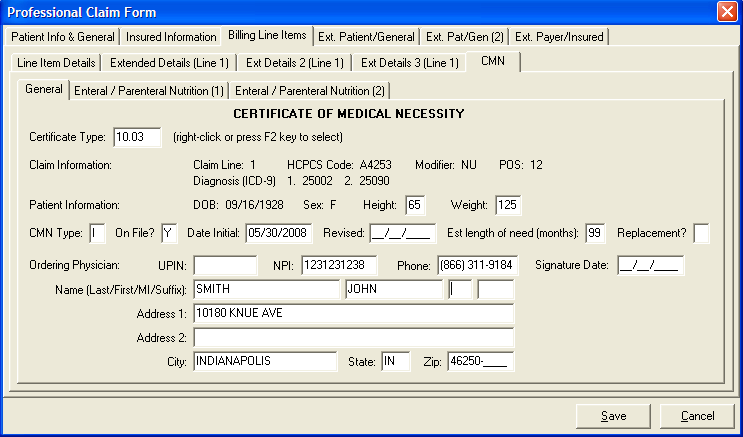
3 CMN tab: The CMN tab is only visible if the AT field on the Line Item Details tab has a value of C entered. General sub-tab: Certificate Type: Right-click or use the F2 lookup feature to select the appropriate CMN from the list. Claim Information: This should be entered for you from the Line Item Details tab. Patient Information: Enter information as appropriate for the CMN selected. CMN Type: Using the right-click or F2 lookup feature, select the CMN type I Initial R Renewed S Revised On File?: Select the appropriate option for the CMN selected. Date Initial/Revised: Enter the date associated with this CMN. Revised date is only entered if the CMN Type is R or S. Est. length of need (months) and Replacement?: Select the appropriate option for the CMN selected. Ordering Physician: Enter information as appropriate for the CMN selected. UPINs are no longer submitted in DME claims and should not be entered. Signature Date: This date corresponds to the date the physician signed the CMN or the date the Supplier signed the DIF. Last Revision: November 30, 2012 P a g e 3 o f 6
4 Additional tabs: The Additional tab(s) are based on the CMN that is being entered in the claim and should be completed in relation to the CMN selected. Note: For electronic Oxygen CMNs where Question 1a) is answered with a value from 56 to 59, or where Question 1b) is answered with a value greater than 88, at least one of the three questions on the Oxygen (2) tab must be answered with a Y for Yes. The claim may have a valid CMN indicating N for No on all three questions If the CMN does not have at least one Y, this claim may need to be billed by paper. Contact the jurisdiction where the claim will be processed in order to verify the claim meets the requirements for paper claims submission. The paper CMN indicates that these questions must be answered only if the value in Question 1b) is equal to 89. The requirements for electronic claims are based on wording in the ANSI Implementation Guide for 4010A1 indicating greater than 88. The requirements for Question 1a) are the same for paper and electronic. Last Revision: November 30, 2012 P a g e 4 o f 6

5 Entering a Narrative: The narrative for a CMN is typically entered on the charge line. Under Billing Line Items, you would select the Ext Details 3 (Line #) for the charge line where the CMN was attached. Under the Line Note (NTE)/File Information (K3) section enter the following information: Type: Enter or select ADD using the right-click or F2 look-up feature to add a Narrative or note to the charge line. Narrative: Enter the note/narrative for the CMN. Last Revision: November 30, 2012 P a g e 5 o f 6

6 Ext. Pat/Gen (2) tab: The Ext. Pat/Gen (2) tab can be used to enter a narrative for a CMN if one is required at the claim level. Note: Contact the Jurisdiction where the claim will be processed for more information if a claim level narrative is needed if you are not sure. Claim Notes(NTE)/File Information (K3) Type: Select CER using the right-click or F2 lookup feature to indicate CMN narrative information. Narrative: Enter the CMN narrative if needed. Last Revision: November 30, 2012 P a g e 6 o f 6
PC-ACE Pro32 Claim Management
 This document is a guide to assist PC-ACE Pro32 users in entering and managing Durable Medical Equipment (DME) claim information. This document includes: Managing Code Lists... 2 Claim Entry... 5 Managing
National Government Services, Inc. Durable Medical Equipment Common Electronic Data Interchange. Vendor and Trading Partner Frequently Asked Questions
 National Government Services, Inc. Durable Medical Equipment Common Electronic Data Interchange Vendor and Trading Partner National Government Services, Inc. was awarded the Durable Medical Equipment (DME)
Oxygen and Oxygen Equipment Coverage and Documentation Checklist
 Medicare Dispensing Order Oxygen and Oxygen Equipment Coverage and Documentation Checklist Oxygen equipment and supplies may be delivered upon receipt of a dispensing. A dispensing order may be verbal
9 Advance Determination of Medicare Coverage
 [ DECEMBER 2009 ] 9 Advance Determination of Medicare Coverage Advance determination of Medicare coverage (ADMC) is a process by which the durable medical equipment Medicare administrative contractor (DME
Chapter 4: Electronic Data Interchange
 Electronic Billing NOTE: ELECTRONIC CLAIM SUBMISSION IS REQUIRED UNDER SECTION 3 OF THE ADMINISTATIVE SIMPLIFICATION COMPLIANCE ACT (ASCA), PUB.L. 107-105, AND THE IMPLEMENTING REGULATION AT 42 CFR 424.32.
Blue Cross Blue Shield of Michigan
 Medicare Plus Blue Home infusion therapy Applies to: Medicare Plus Blue PPO SM Medicare Plus Blue Group PPO SM X Both Home infusion therapy Home infusion therapy is the continuous, slow administration
EZClaim 8 ANSI 837 User Guide
 EZClaim 8 ANSI 837 User Guide Last Updated: March 2012 Copyright 2003 EZClaim Medical Billing Software Electronic Claims Using the ANSI 837 Format User Guide NPI Numbers Billing and Rendering NPI numbers
National Government Services Connex Quick Steps
 National Government Services Connex Quick Steps Table of Contents Table of Contents... 1 Detailed Setup Instructions... 3 Detailed setup instructions for new Connex users are available by going to http://www.ngsmedicare.com
GETTING STARTED WITH EDISS AND TOTAL ONBOARDING (TOB)
 GETTING STARTED WITH EDISS AND TOTAL ONBOARDING (TOB) Table of Contents What is an electronic transaction?...2 What forms will be required for EDISS registration now that TOB is effective for most lines
Preview of the Attestation System for the Medicare Electronic Health Record (EHR) Incentive Program
 Preview of the Attestation System for the Medicare Electronic Health Record (EHR) Incentive Program The Medicare EHR Incentive Program provides incentive payments to eligible professionals, eligible hospitals
HCFA-1500 Form Completion. For the RLISYS NSF Electronic Claims Software. 2 Patient Name Patient s name as Last Name, First Name (Example: Doe, John)
 1 HCFA-1500 Form Completion For the RLISYS NSF Electronic Claims Software 2 Patient Name Patient s name as Last Name, First Name (Example: Doe, John) Do not include a prefix, suffix, or middle initial
Instructions to Complete Ancillary Service Authorization Request For Physical Therapy, Speech Therapy, Occupational Therapy
 Western Oregon Advanced Health, LLC. P.O. Box 1096 Coos Bay, OR 97420 Instructions to Complete Ancillary Service Authorization Request For Physical Therapy, Speech Therapy, Occupational Therapy Provider
Steps to Using Internet-Based PECOS
 Steps to Using Internet-Based PECOS PECOS can be used in lieu of the Medicare enrollment application to: Submit an initial Medicare enrollment application. View or change your enrollment information. Track
How to be Medicare Compliant with Richie Brace devices
 How to be Medicare Compliant with Richie Brace devices Introduction When prescribing and dispensing pre-fabricated and custom Richie Brace products, the practitioner has certain obligations in order to
PC-ACE Pro32. User s Guide. Combined Institutional and Professional version. Rev 07/28/2015 v3.4
 PC-ACE Pro32 User s Guide Combined Institutional and Professional version Rev 07/28/2015 v3.4 Introduction PC-ACE Pro32 is the HIPAA-compliant software package Cahaba Government Benefit Administrators,
Revenue Cycle in Post- Acute Care Deloitte & Touche LLP Victor Shutack, Senior Manager June 2015
 6/9/2015 Revenue Cycle in Post- Acute Care Deloitte & Touche LLP Victor Shutack, Senior Manager June 2015 Discussion topics Changing healthcare environment Understanding the home health care environment
Extracting an S/MIME certificate from a digital signature
 Extracting an S/MIME certificate from a digital signature Instructions for Microsoft Outlook 2007 and 2010 Document User_Instruction_Outlook_Certificate_Handling Status Final Date: 03.06.2012 Version:
Quick Reference Guide for Part B Providers
 Quick Reference Guide for Part B Providers 621_0813_Professional Table of Contents 621_0110 Minimum System Requirements...3 Online Help Feature...3 Getting Started Using PC-ACE PRO 32...4 Submitter Setup...4
DMEPOS Fee Schedule Categories Chapter 5
 Chapter 5 Contents Introduction 1. Inexpensive or Other Routinely Purchased DME (IRP) 2. Items Requiring Frequent and Substantial Servicing 3. Certain Customized Items 4. Other Prosthetic and Orthotic
Florida Medicaid EHR Incentive Program. Eligible Hospitals
 Florida Medicaid EHR Incentive Program Eligible Hospitals What? Health Information Technology Economic and Clinical Health Act aka ARRA aka Stimulus $2 billion for the creation of state level Health Information
Inquiries, Reopenings, & Appeals Chapter 13
 Chapter 13 Contents 1. Telephone Inquiries 2. Written Inquiries 3. mycgs The Jurisdiction C Web Portal 4. Provider Outreach and Education (POE) Department 5. Reopenings for Minor Errors and Omissions 6.
External Breast Prosthesis. 2012 Copyright, CGS Administrators, LLC.
 External Breast Prosthesis 1 Agenda Coverage Criteria Modifier Use Documentation Cert Findings Cert Requirements Jurisdiction C Resources 2 Coverage 3 Coverage Criteria A breast prosthesis can be made
EDI Support Services
 EDI Support Services Billing Purchased Service Claims Electronically Using PC-ACE Pro32 When billing purchased service claims electronically, the following information must be included in the claim: Total
Ottobock Custom Seating Coding and Billing Tips (Effective 11/01/2015)
 Custom Seating Table of Contents PDAC Verification Required for Wheelchair Cushion Codes 2 What is included in E2609 and E2617 (not separately billable) 2 Separately Billable Features that might be ordered
Medicare Program Integrity Manual
 Medicare Program Integrity Manual Chapter 5 Items and Services Having Special DME Review Considerations Table of Contents (Rev. 623, 11-03-15) Transmittals for Chapter 5 5.1 Home Use of DME 5.2 Rules Concerning
EDI Support Services. PC-ACE Pro32 User Guide. Welcome to PC-ACE Pro32. System Requirements. Connectivity Options
 EDI Support Services PC-ACE Pro32 User Guide Welcome to PC-ACE Pro32 The PC-ACE Pro32 Claims Management System, Electronic Data Interchange Support Services (EDISS) free/low-cost billing software, is a
IST 195 Lab 11: MS Access
 Title of lab: Microsoft Access 2010 IST 195 Lab 11: MS Access Learning goal: Databases are collections of information, and database programs are designed to maintain data in structured tables. In this
EDI Support Services
 EDI Support Services Billing Medicare Secondary Payer (MSP) Electronically Using PC-ACE Pro32 For all Medicare Part B Trading Partners What is an MSP Claim? In some situations, another payer or insurer
Medicare Policy Regarding Pressure Reducing Support Surfaces JA1014
 Medicare Policy Regarding Pressure Reducing Support Surfaces JA1014 Note: JA1014 was revised and re-issued in its entirety. Related CR Release Date: N/A Date Job Aid Revised: August 24, 2010 Effective
eadvantage Certificate Enrollment Procedures
 eadvantage Certificate Enrollment Procedures Purpose: Instructions for members to obtain a digital certificate which is a requirement to conduct financial transactions with the Federal Home Loan Bank of
ancillary claims filing requirements: DME claims
 ancillary claims filing requirements: DME claims Presented by: Ian Bautista, Network Manager Ancillary & Specialty Networks Blue Shield of California September 27, 2012 agenda Objectives for this presentation:
Electronic Signature How To Guide
 Electronic Signature How To Guide Internet-based Provider Enrollment, Chain, and Ownership System (PECOS) now allows providers and suppliers to electronically sign Medicare enrollment applications. Utilizing
Accounts Payable. Construction Document
 Accounts Payable Construction Document Accounts Payable 2 Table of Contents Process Model... 3 Return Invoice to Supplier sub process.... 4 Data Model... 5 Parameter Tables... 5 Define Forms... 7 Receive
ORDERING PROCEDURE for Asept Drainage Kit
 ORDERING PROCEDURE for Asept Drainage Kit 1. All patients must submit completed forms listed below to (AMS): Letter of Medical Necessity (To be completed by Physician) Patient Information form Assignment
BlueCross BlueShield of Tennessee Electronic Provider Profile
 Date: Business Name: SECTION 1 PURPOSE FOR PROFILE Please PLACE A CHECK MARK using blue or black ink by the purpose for completing the. The chart below indicates with an X the sections that need to be
ANESTHESIOLOGIST ASSISTANT PROTOCOL INSTRUCTIONS AND INFORMATION
 ANESTHESIOLOGIST ASSISTANT PROTOCOL INSTRUCTIONS AND INFORMATION Always submit pages 2 5 of the Protocol (excluding instruction page) The Anesthesiologist Assistant MUST sign page five. A separate Protocol
Policy Analysis PMD Compliance Manual Mobility Seating and positioning Repairs
 June 2009 Policy Analysis PMD Compliance Manual Mobility Seating and positioning Repairs Basic Principals We learn by going from the specific to the general We apply our learning by going from the general
Publication CM-6 March 2013. Black Lung Medical Benefits: Questions and Answers about the Federal Black Lung Program
 Publication CM-6 March 2013 Black Lung Medical Benefits: Questions and Answers about the Federal Black Lung Program U.S. Department of Labor Office of Workers Compensation Programs Black Lung Medical Benefits:
ACCOUNTS PAYABLE CONSTRUCTION. BizAgi Process Modeler
 ACCOUNTS PAYABLE CONSTRUCTION BizAgi Process Modeler Contents 1. PROCESS MODEL... 3 1.1 RETURN INVOICE TO SUPPLIER SUB PROCESS.... 4 2. DATA MODEL... 5 2.1 PARAMETRIC TABLES... 5 3. DEFINE FORMS... 7 3.1
Jurisdiction C Questions. January 15, 2009. 1. Patient on 02 moved to a new area but has a concentrator from another provider which is
 Jurisdiction C Questions January 15, 2009 Oxygen questions/clarifications 1. Patient on 02 moved to a new area but has a concentrator from another provider which is now broken. The original provider told
Electronic Data Interchange
 West Region Electronic Data Interchange Electronic Data Services 1717 W. Broadway P.O. Box 8128 Madison, WI 53708-8128 www.wpsic.com/edi/edi_home.shtml Table of Contents Getting Started with Electronic
Physician Quality Reporting System (PQRS) Physician Portal
 The American College of Radiology Physician Quality Reporting System (PQRS) Physician Portal User Guide January 29, 2016 American College of Radiology 1891 Preston White Drive Reston, VA 20191-4397 Copyright
PRESENTED BY: Aaron Sorensen, MBA, CPO, LPO O and P Billing Solutions, Inc.
 PRESENTED BY: Aaron Sorensen, MBA, CPO, LPO O and P Billing Solutions, Inc. General Medicare Coverage Guideline General Lower Extremity Prosthetic Policy Coverage Indications and Limitations Section 1833(e)
HIPAA 5010 March 30 th National Call: Provider Testing and Readiness Resource Mailbox Questions and Answers
 HIPAA 5010 March 30 th National Call: Provider Testing and Readiness Resource Mailbox Questions and Answers Background: As mentioned on previous HIPAA 5010 national calls, there is a resource box that
Getting Started With. Internet-based Provider Enrollment, Chain and Ownership System (PECOS) Information for Provider and Supplier Organizations
 Getting Started With Internet-based Provider Enrollment, Chain and Ownership System (PECOS) Information for Provider and Supplier Organizations June 1, 2009 The Centers for Medicare & Medicaid Services
Provider Services Portal (PSP) Enrollment & Functionality Manual Provider Services Portal (PSP) Enrollment & Functionality Manual
 Provider Services Portal (PSP) Enrollment & Functionality Manual 1 Table of Contents PSP Website Home page... 3 PSP Enrollment... 3 E-Authentication Identity Proofing... 3 User Password Security and Protection...
NewMMIS POSC Job Aid: Professional Claims Submission with MassHealth
 This job aid reviews the process of submitting an electronic professional claim in the Provider Online Service Center (POSC). For specific billing information, providers should refer to the relevant Billing
Apollo ACC PCI Registry Export Basics
 Training Apollo ACC PCI Registry Export Basics Barbara O Brien Product Education Trainer Registry Export Assistance Clinical Content Contact the Registry Software Questions LUMEDX Support 1.800.966.0669
Community Health Network of CT, Inc.
 PRPRE0024-0712 Clear Coverage Online Authorizations Outpatient Surgery Community Health Network of CT, Inc. A New Way to Request Authorizations As of July 31, 2012, there are now three options for requesting
Railroad Medicare Palmetto GBA 837 and 835
 Payer ID: RRMCR Palmetto GBA 837 and 835 EDI Enrollment Instructions: Please save this document to your computer. Open the file in the Adobe Reader program and type directly onto the form. Complete the
Instructions for Completing the CMS 1500 Claim Form
 Instructions for Completing the CMS 1500 Claim Form The Center of Medicaid and Medicare Services (CMS) form 1500 must be used to bill SFHP for medical services. The form is used by Physicians and Allied
MTA Course: 10753 Windows Operating System Fundamentals Topic: Understand backup and recovery methods File name: 10753_WindowsOS_SA_6.
 STUDENT ACTIVITY 6.1: UNDERSTAND BACKUP AND RECOVERY METHODS MTA Course: 10753 Windows Operating System Fundamentals Topic: Understand backup and recovery methods File name: 10753_WindowsOS_SA_6.1 Lesson
OVERVIEW DATA SHEET. MedAct Overview Data Sheet
 MedAct Overview Data Sheet MedAct delivers an integrated solution for your HME/DMEPOS that provides end-to-end coverage of all your business needs. From patient intake and purchasing to inventory management,
MEDICARE RECOVERY AUDIT CONTRACTORS AND CMS S ACTIONS TO ADDRESS IMPROPER PAYMENTS, REFERRALS OF POTENTIAL FRAUD, AND PERFORMANCE
 Department of Health and Human Services OFFICE OF INSPECTOR GENERAL MEDICARE RECOVERY AUDIT CONTRACTORS AND CMS S ACTIONS TO ADDRESS IMPROPER PAYMENTS, REFERRALS OF POTENTIAL FRAUD, AND PERFORMANCE Daniel
A. Guide to Medicare Coverage
 A. Guide to Medicare Coverage Who qualifies for Medicare benefits? Individuals 65 years of age or older Individuals under 65 with permanent kidney failure (beginning three months after dialysis begins),
etoken Enterprise For: SSL SSL with etoken
 etoken Enterprise For: SSL SSL with etoken System Requirements Windows 2000 Internet Explorer 5.0 and above Netscape 4.6 and above etoken R2 or Pro key Install etoken RTE Certificates from: (click on the
Frequently Asked Questions (FAQ) NWT Health Care Card Renewal
 Frequently Asked Questions (FAQ) NWT Health Care Card Renewal Q1: Why do I need a Health Care Card? Q2: Why do Health Care Cards expire? Q3: When does my NWT Health Care Card expire? Q4: Where do I get
Chapter 1 Section 11. Claims for Durable Medical Equipment, Prosthetics, Orthotics, And Supplies (DMEPOS)
 General Chapter 1 Section 11 Claims for Durable Medical Equipment, Prosthetics, Orthotics, And Supplies (DMEPOS) Issue Date: December 29, 1982 Authority: 32 CFR 199.4(d)(3)(ii), (d)(3)(iii), (d)(3)(vii),
REGION D MEDICARE GROUP 2 PRESSURE REDUCING SUPPORT SUFACE. Documentation Checklist Local Coverage Determination (LCD)
 REGION D MEDICARE GROUP 2 PRESSURE REDUCING SUPPORT SUFACE Documentation Checklist Local Coverage Determination (LCD) Disclaimer: The ROHO Group gathered these documents from various sources as an educational
Pressure Reducing Support Surfaces - Group 2 (L33642)
 Pressure Reducing Support Surfaces - Group 2 (L33642) Contractor Information Contractor Name Contract Number Contract Type NHIC, Corp. 16003 DME MAC LCD Information LCD ID L33642 Original ICD-9 LCD ID
EDI Support Services
 EDI Support Services Total OnBoarding User Manual for Vendors Table of Contents: Welcome to Total OnBoarding... 1 Web Site Address/Url... 1 Self-Registration... 2 Vendor Summary Page Options... 9 Manage
Generic MetaTrader 4 vs. MetaTrader 4 with MBT ECN/STP Execution
 Generic MetaTrader 4 vs. MetaTrader 4 with MBT ECN/STP Execution MetaTrader 4 is Third Party software written and maintained by a separate company. The software was not designed for ECN/STP execution,
Medicare Attestation Guide
 Medicare Attestation Guide Once you start attesting and you hit the Save & Continue button you may log out at any time and continue your attestation later. All of the information that you will be saved
Annual Performance Appraisal for classified personnel and non teaching professional staff
 COLLEGE OF LIBERAL ARTS The University of Texas at Austin May 31, 2009 for Appraisal Period Ending Amelia Bearheart Name AnnualPerformanceAppraisal forclassifiedpersonnelandnon teachingprofessionalstaff
Reminder: ProviderAccess users no longer receiving paper remittances starting September 1, 2009
 AUGUST 7, 2009 NEVADA Exclusive DME Contract with Bennett Medical Services As a reminder, Anthem Blue Cross and Blue Shield and our subsidiary company, HMO Nevada, have an exclusive agreement with Bennett
Emdeon Claims Provider Information Form *This form is to ensure accuracy in updating the appropriate account
 PAYER ID: SUBMITTER ID: Emdeon Claims Provider Information Form *This form is to ensure accuracy in updating the appropriate account 1 Provider Organization Practice/ Facility Name Provider Name Tax ID
Billing Repetitive Services March 7, 2013 Karen Kroupa, Outreach Analyst
 Billing Repetitive Services March 7, 2013 Karen Kroupa, Outreach Analyst Agenda Defining Repetitive Services Billing Repetitive Services Leave of Absence Non-Repetitive-Services Billing Recurring Services
(EHR) Incentive Program
 REGISTRATION USER GUIDE For EI ig i ble Hospita Is Medicare and Medicaid Electronic Health Record (EHR) Incentive Program December 2014 (12.17.14 ver6) Disclaimer CONTENTS Step 1...Getting started 3 Step
North Carolina Medicaid Electronic Health Record Incentive Program
 North Carolina Medicaid Electronic Health Record Incentive Program Eligible Professional Adopt, Implement, Upgrade Attestation Guide Year 1 Only NC-MIPS 2.0 Issue 1.12 February 24, 2014 The North Carolina
MEMO. Questions and Answers Related to the New Hospice Conditions of Participation {Effective 12/2/08}
 MEMO Questions and Answers Related to the New Hospice Conditions of Participation {Effective 12/2/08} PATIENT RIGHTS 1) Is there any problem with agencies incorporating their agency grievance procedures
POINT OF SALE CASHIER GUIDE
 POINT OF SALE CASHIER GUIDE CONTENTS Document Overview... 3 Basic Navigation... 3 Enter Sales... 4 Customer... 5 Add Product... 9 Collect Payment... 17 Time Clock... 19 Clock In... 19 Clock Out... 20 Price
Type of Facility (As listed on License or Accreditation) Facility Demographics. Legal Business Name (as reported to the IRS):
 Facility Credentialing and Recredentialing Application Please complete each section leaving no blank spaces. Clearly state if information requested is not applicable. Attach additional sheets when necessary.
Self Service Banner (SSB) Finance
 Self Service Banner (SSB) Finance I. Self Service Banner Finance Introduction Self Service Banner is a user friendly Banner interface used to research and extract information from the Banner Finance module.
Intake / Admissions Processes
 Intake / Admissions Processes Now that the elements of providing quality customer service have been reviewed, the intake and admission processes will be covered. Some homecare companies make a distinction