
HP Client Automation software Starter and Standard Editions
|
|
|
- Brook Stewart
- 10 years ago
- Views:
Transcription
1 HP Client Automation software Starter and Standard Editions Data sheet Managing client devices effectively and efficiently is a mission-critical function for today s businesses. However, that challenge is being made more complex by increasingly frequent and varied security threats, more stringent availability and compliance requirements, and a growing mobile and remote workforce. This volume of change, combined with what are often manual processes, can stretch already-thin IT resources to the breaking point. HP Client Automation software automates the management of client devices throughout the complete lifecycle, regardless of their physical location, increasing the IT organization s ability to deal with these issues while at the same reducing cost, time, and risk. Recognizing that no single solution can fit all environments, HP Software offers an edition of HP Client Automation software that fits your environment s size, complexity, and manageability requirements. Starter Edition, available as a free download, is designed to provide customers with key management capabilities for their HP client hardware devices, including: HP PC hardware management HP thin-client management Hardware and software inventory Remote control Seamless upgrade to Standard Edition upon purchasing a license Standard Edition provides key management capabilities for both HP and non-hp client devices, with a focus on quick time-to-value and ease of use. It includes: Software deployment Application usage metering Patch management and compliance Settings migration OS deployment Migration path to Enterprise Edition Enterprise Edition provides a market-leading solution for managing the most complex environments. It includes: Desired-state automation Heterogeneous environment support High scalability Identity-based policy management

2 Meet your client manageability challenges It is important for your IT organization to find an efficient and cost-effective method to keep your PCs operational and protected at all times. Depending on the environment, your requirements may range from focusing on ease-of-use and quick time-to-value, to enabling strategic IT initiatives in support of business transformation for longer-term benefits. HP Client Automation Starter and Standard Editions have been designed from the ground up to provide an affordable, easy-to-use, and quick-to-deploy offering that can solve your pain points immediately. Common features and benefits Ease of deployment Install and deploy the solution quickly through an easy-to-install integrated infrastructure designed for self-deployment. Quick time-to-value Leverage out-of-the-box functionality for common management use cases. Ease of administration Make use of the single, integrated Web-based console for centralized management of your PC environment HP Client Automation Starter Edition The Starter Edition is a free version of the product for managing HP desktops, notebooks, and workstations. It provides hardware and software inventory, remote control, HP alert monitoring, HP BIOS and driver updates, integration with HP Protect Tools, and add-on support for Intel AMT. The Starter Edition also includes hardware and software management capabilities for HP Thin Clients. What s more, it can be seamlessly upgraded to the Standard Edition by purchasing a license and entering the license key in the management console. HP Client Automation Standard Edition The Standard Edition, available for purchase, includes all functionality provided in the Starter Edition and adds operating system deployment and migration, patch management capabilities, software distribution as well as software usage metering. Effective and Efficient Quick and easy installation and integration Provides a single installation program with components pre-configured for increased out-of-the-box capabilities Automatically discovers networked client devices and provides features for quickly importing devices from LDAP-compliant directory services or flat files Utilizes management agents pre-installed on certain HP hardware Enables remote deployment of management agents to end-user devices 2
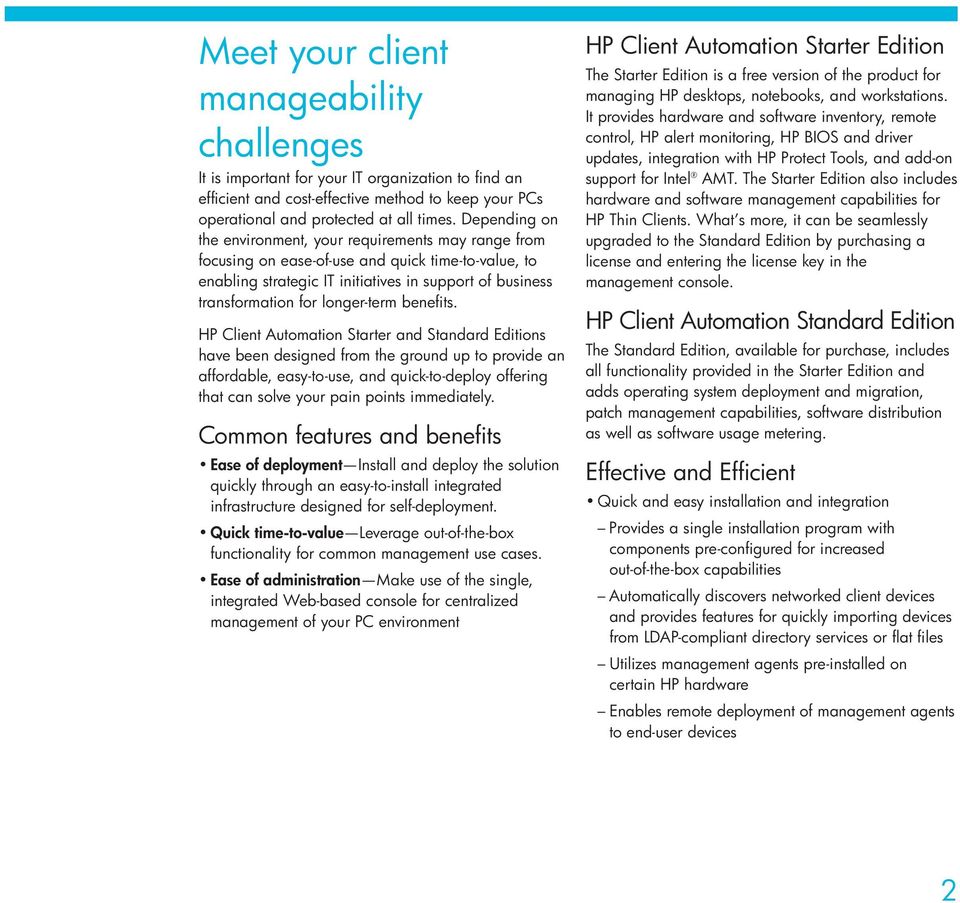
3 Client Automation Starter Client Automation Standard Hardware and software inventory Integrated HP hardware management Integrated HP hardware alerts Remotely control devices Software distribution for HP thin clients only OS security patch management Softpaq management OS image deployment for HP thin clients only User settings migration Software usage metering Distributed infrastructure Seamless upgrade to Client Automation Standard N/A Migration path to Client Automation Enterprise Simplified task management Provides an integrated, Web-based management console to perform all tasks, including managing client hardware, software, and remote operations Offers wizard-driven, step-by-step processes for scheduling deployments of operating systems, patches, software, and operating systems as well as other operations Includes an easy-to-use interface for creating reports, defining dynamic, inventory-based device groups, and configuring the management infrastructure Integrated Web-based reporting Provides built-in reports for inventory and software usage, patch vulnerability assessment, and software/patch distribution operations Provides a point-and-click interface for customizing report data, creating filters, and more Supports context-sensitive reporting for specific device groups Enables easy sharing of live reports between administrators and managers, and multiple export options Support for mobile and remotely connected users Provides checkpoint restart capability for reliable distribution of software and patches to mobile users Improves bandwidth to support deployments to end-user devices using slow and/or intermittent connections Supports users connecting over TCP/IP and VPN connections Comprehensive, accurate and standards-based inventory management Performs discovery and inventory of hardware and software assets Stores collected information in an industry-standard, CIM-compliant database schema Provides a wide range of built-in reports for inventory, software usage, security and operations, and enables administrators to take proactive actions Fully automated operating system deployment and migration Enables machines to be fully deployed from bare metal or migrated to a new operating system without ever needing a deskside visit Retains individual user settings so that the user s system looks and works just as it did prior to the migration Automatically preserves display settings, files, and preferences of all kinds, even across version upgrades Provides options for data security during migrations 3
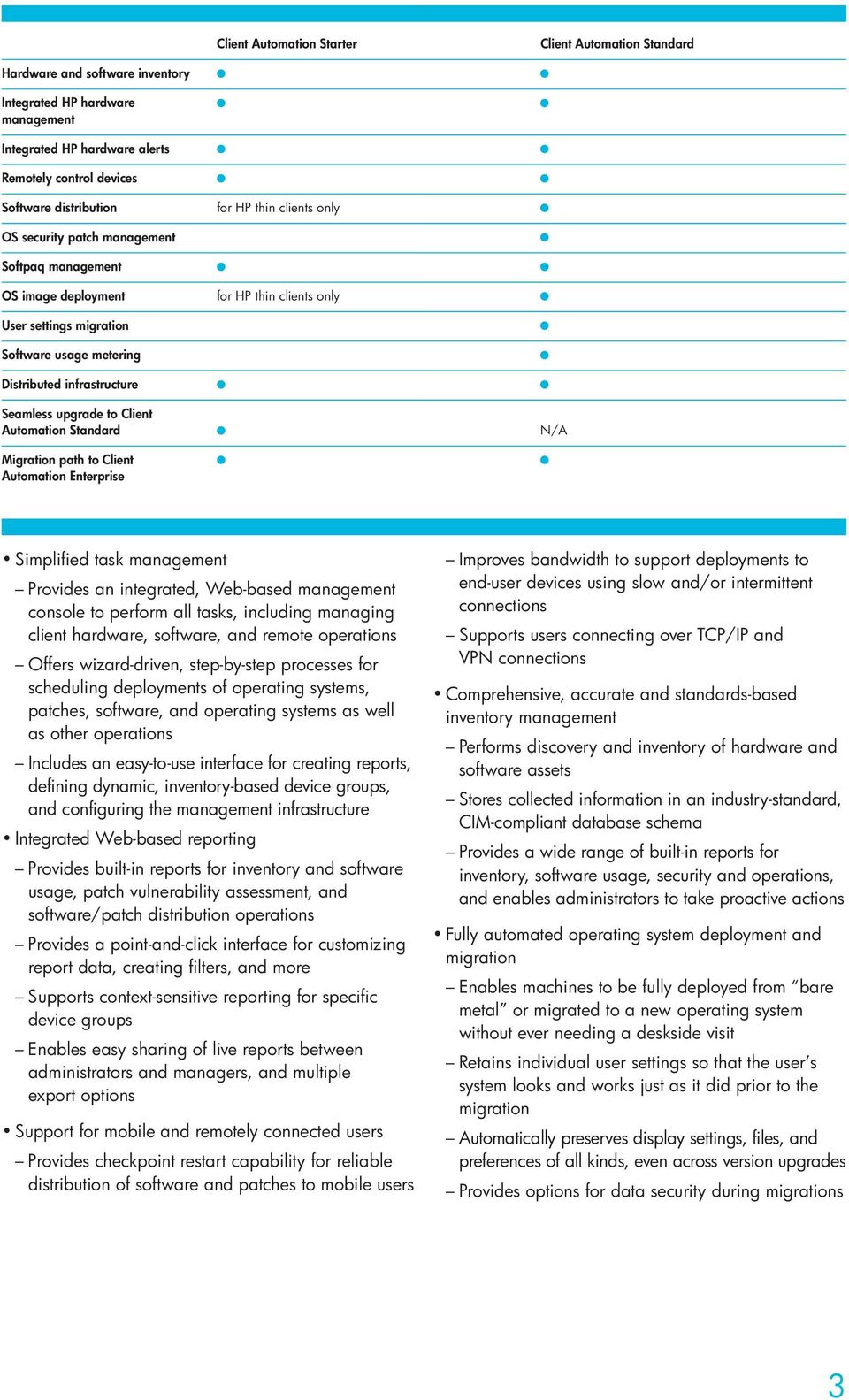
4 Figure 1. HP Client Automation Standard provides your IT administrators with a single integrated console for hardware and software management. It includes patch management capabilities that can automatically acquire HP Softpaqs and Microsoft security patches for deployment. Automated, continuous patch management Performs seamless acquisition and publication of Microsoft Windows patches Enables ongoing detection of vulnerabilities Provides dynamic reporting, showing which machines are non-compliant and at greatest risk Verifies the compliance to assigned patch levels, reducing the risk of accidental removal, deletion, or corruption of patches Automated, flexible software distribution Enables group-driven distribution of applications, content, and updates Performs immediate or scheduled delivery of updates Provides both push and pull deployment options, enabling administrators to automatically deploy required software while offering end users the flexibility to install authorized software on their own schedules Automatically completes assigned jobs to offline machines when network access is detected Supports deployment of MSI applications, HP Softpaqs, self-executing installation programs, and delivery of multiple files and folders Software usage metering Tracks and reports actual software usage, to enable more efficient license deployment, greater licensing compliance, and less painful true-ups with vendors Distinguishes between applications that are actively used versus ones that are idle in the background Flexible collection options to improve data transfer, storage, and reporting Provides obfuscation capabilities for hiding personally identifiable information of end users Remote device management Takes control of problem devices with integrated remote control capabilities for more effective troubleshooting Enables off-hours deployments to powered-down systems through Wake-On-LAN and powerdown/reboot management features Integrated alert monitoring on HP desktops and notebooks Automatically flags disruptive occurrences on HP PCs for administrative action Includes reports to help pinpoint particular issues such as chassis intrusion or hardware component failures 4
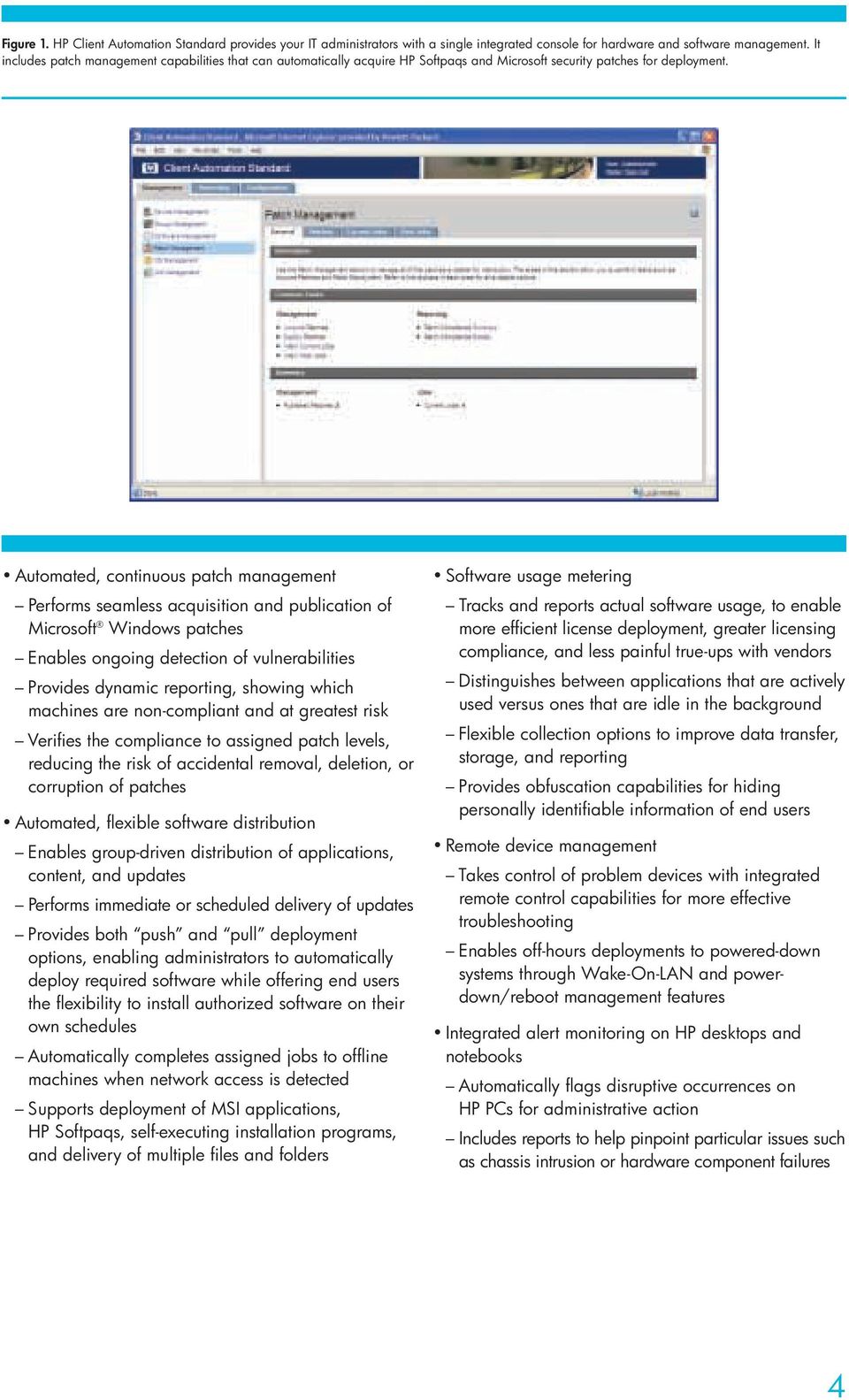
5 Figure 2. HP Client Automation Standard provides IT administrators with detailed device reports, including hardware and software information. Additional information, such as BIOS information, hardware alerts and device graphics are available for HP hardware. Automated driver and BIOS updates on HP desktops and notebooks Compares HP systems to the latest updates available from HP on an ongoing basis to determine whether BIOS or driver updates are necessary Automatically acquires and updates relevant Softpaqs for BIOS, device drivers, and applications Integration with HP ProtectTools Provides remote initialization of embedded TPM chips in HP hardware Provides integration with HP ProtectTools software for security management Integration with HP Software Out-of-Band Management Console Provides support for managing PCs and notebooks equipped with Intel iamt firmware Provides capabilities for remotely managing PCs and notebooks irrespective of the OS or the power state of the machine Deploy a solution that can grow with your changing needs To get a feel for the value that HP Client Automation can deliver for your business, you can start immediately by downloading the free version HP Client Automation Starter Edition. With this package, you can manage your HP client hardware without incurring additional software costs. You can then upgrade the product to take advantage of all the management features within HP Client Automation Standard Edition by purchasing and installing a new license key. This upgrade does not require any additional deployment of the existing management infrastructure or agents. Your existing infrastructure, agents, collected data, and acquired software patches are all preserved in the migration. HP Client Automation Standard Edition provides a migration path to HP Client Automation Enterprise Edition and to the broader, advanced and automated HP Business Service Automation solution for managing enterprise computing devices such as PCs, servers, workstations, storage and network devices on any platform across very large, complex, heterogeneous, and continuously changing IT environments. In addition, 5
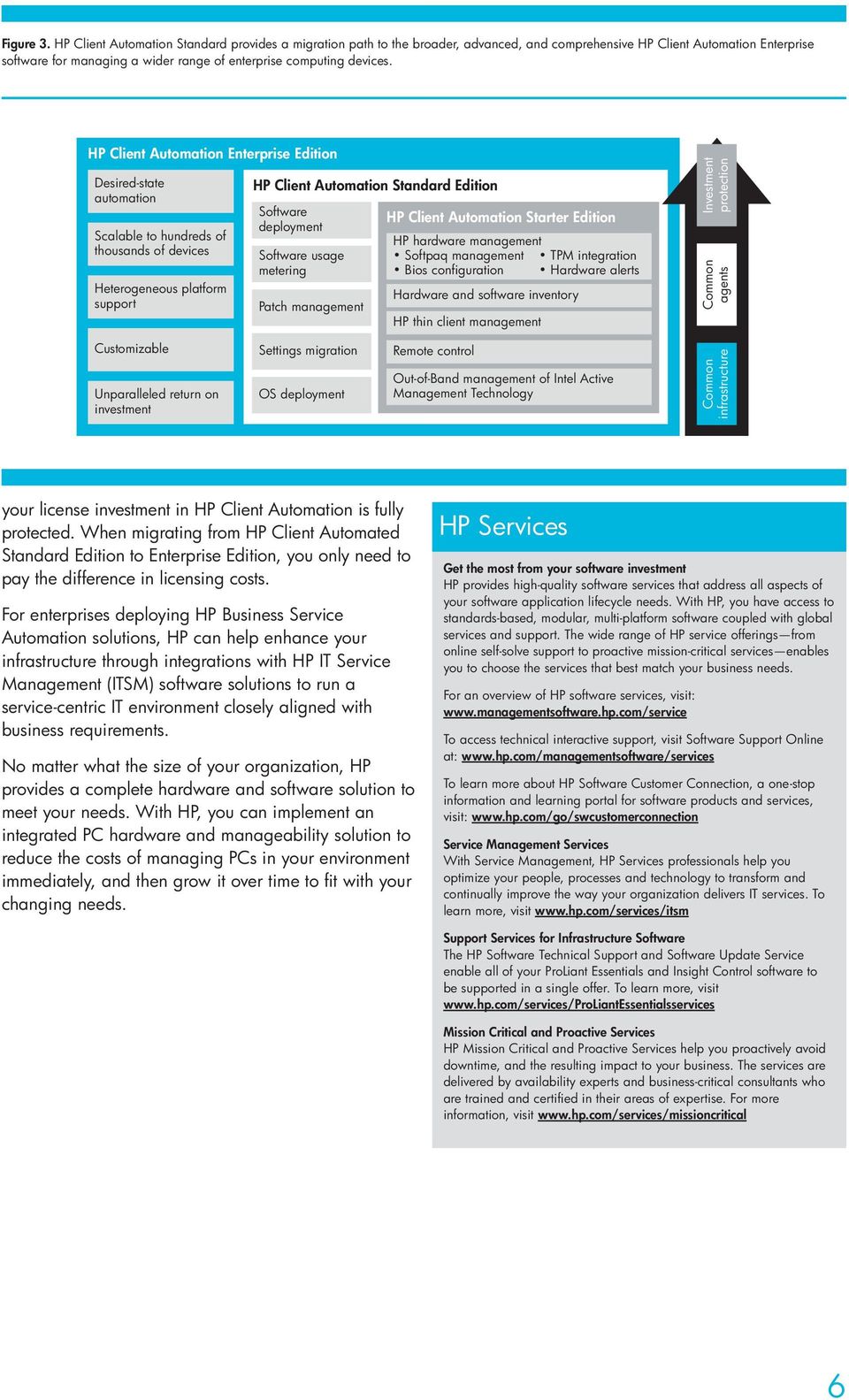
6 Figure 3. HP Client Automation Standard provides a migration path to the broader, advanced, and comprehensive HP Client Automation Enterprise software for managing a wider range of enterprise computing devices. HP Client Automation Enterprise Edition Desired-state automation Scalable to hundreds of thousands of devices Heterogeneous platform support HP Client Automation Standard Edition Software deployment Software usage metering Patch management HP Client Automation Starter Edition HP hardware management Softpaq management TPM integration Bios configuration Hardware alerts Hardware and software inventory HP thin client management Investment protection Common agents Customizable Unparalleled return on investment Settings migration OS deployment Remote control Out-of-Band management of Intel Active Management Technology Common infrastructure your license investment in HP Client Automation is fully protected. When migrating from HP Client Automated Standard Edition to Enterprise Edition, you only need to pay the difference in licensing costs. For enterprises deploying HP Business Service Automation solutions, HP can help enhance your infrastructure through integrations with HP IT Service Management (ITSM) software solutions to run a service-centric IT environment closely aligned with business requirements. No matter what the size of your organization, HP provides a complete hardware and software solution to meet your needs. With HP, you can implement an integrated PC hardware and manageability solution to reduce the costs of managing PCs in your environment immediately, and then grow it over time to fit with your changing needs. HP Services Get the most from your software investment HP provides high-quality software services that address all aspects of your software application lifecycle needs. With HP, you have access to standards-based, modular, multi-platform software coupled with global services and support. The wide range of HP service offerings from online self-solve support to proactive mission-critical services enables you to choose the services that best match your business needs. For an overview of HP software services, visit: To access technical interactive support, visit Software Support Online at: To learn more about HP Software Customer Connection, a one-stop information and learning portal for software products and services, visit: Service Management Services With Service Management, HP Services professionals help you optimize your people, processes and technology to transform and continually improve the way your organization delivers IT services. To learn more, visit Support Services for Infrastructure Software The HP Software Technical Support and Software Update Service enable all of your ProLiant Essentials and Insight Control software to be supported in a single offer. To learn more, visit Mission Critical and Proactive Services HP Mission Critical and Proactive Services help you proactively avoid downtime, and the resulting impact to your business. The services are delivered by availability experts and business-critical consultants who are trained and certified in their areas of expertise. For more information, visit 6
7 A complete solution Comprehensive training HP provides a comprehensive curriculum of HP Software and IT Service Management courses. These offerings provide the training you need to realize the full potential of your HP solutions, increase your network optimization and responsiveness, and achieve better return on your IT investments. Contact information To find an HP Software sales office or reseller near you, visit For more information about HP Client Automation, contact your HP representative or visit With more than 30 years experience meeting complex education challenges worldwide, HP knows how to train. This experience, coupled with unique insights into HP software, positions HP to deliver a better training experience. For more information about these educational courses, visit The smartest way to invest in IT HP Financial Services provides innovative financing and financial asset management programs to help you cost-effectively acquire, manage, and ultimately retire your HP solutions. For more information on these services, contact your HP sales representative or visit 7
8 Technology for better business outcomes Copyright 2008 Hewlett-Packard Development Company, L.P. The information contained herein is subject to change without notice. The only warranties for HP products and services are set forth in the express warranty statements accompanying such products and services. Nothing herein should be construed as constituting an additional warranty. HP shall not be liable for technical or editorial errors or omissions contained herein. To learn more, visit 4AA2-0088ENW, May 2008
HP Client Manager 6.1
 HP Client Manager 6.1 Introduction... 2 New Features in HPCM 6.1... 4 Understanding how HPCM works... 6 Extensive reporting capability... 7 HPCM in operation... 7 Client inventory... 7 Health monitoring...
HP Client Manager 6.2
 HP Client Manager 6.2 Introduction... 2 New Features in HPCM 6.2... 4 Understanding how HPCM works... 5 Extensive reporting capability... 5 HPCM in operation... 6 Client inventory... 6 Health monitoring...
HP Client Management Solutions Overview
 HP Client Management Solutions Overview Table of contents Introduction... 2 HP Client Management Solutions... 2 HP Software Solutions... 2 Microsoft Solutions... 5 HP Management Tools and Technology...
HP OpenView Performance Insight Report Pack for Databases
 HP OpenView Performance Insight Report Pack for Databases Data sheet The Report Pack for Databases provides the insight you need to effectively manage your database management system. Because what you
HP OpenView Smart Plug-in for Microsoft Exchange
 HP OpenView Smart Plug-in for Microsoft Exchange Data sheet Email is no longer just a productivity application - it is a company s lifeline. When email slows down or stops altogether, the business loses
HP OpenView Service Desk Process Insight 2.10 software
 HP OpenView Service Desk Process Insight 2.10 software Data sheet HP OpenView Service Desk Process Insight software provides real-time visibility into the ITIL processes managed by your HP OpenView Service
HP OpenView Smart Plug-in for Active Directory
 HP OpenView Smart Plug-in for Active Directory Data sheet As the primary enterprise directory service in Windows environments, the criticality of monitoring and maintaining Microsoft Active Directory cannot
End-to-end management
 Brochure End-to-end management HP ProLiant servers with Insight Control Make the most of your investments in servers, staff, and facilities The server management challenge Let s face it. Managing servers
HP Service Manager software. The HP next-generation IT Service Management solution is the industry-leading consolidated IT service desk.
 software The HP next-generation IT Service solution is the industry-leading consolidated IT service desk. : setting the standard for IT service management solutions with a robust lifecycle approach to
HP End User Management software. Enables real-time visibility into application performance and availability. Solution brief
 HP End User Management software Enables real-time visibility into application performance and availability Solution brief Figure 1 HP End User Management lets you proactively identify application performance
QuickSpecs. What's New. Models. ProLiant Essentials Server Migration Pack - Physical to ProLiant Edition. Overview
 Overview Upgrading or replacing your existing server? Migration is now an option! Replicate the server you are replacing using the software, the only product of its kind from a server vendor that provides
HP ProLiant Essentials Vulnerability and Patch Management Pack Planning Guide
 HP ProLiant Essentials Vulnerability and Patch Management Pack Planning Guide Product overview... 3 Vulnerability scanning components... 3 Vulnerability fix and patch components... 3 Checklist... 4 Pre-installation
HP OpenView Service Level Manager 5.0 software
 HP OpenView Service Level Manager 5.0 software Data sheet Meet the challenge of running IT as a business with HP OpenView Service Level Manager 5.0. This module of the HP OpenView Service Desk 5.0 a second-generation
HP Server Automation Standard
 Data sheet HP Server Automation Standard Lower-cost edition of HP Server Automation software Benefits Time to value: Instant time to value especially for small-medium deployments Lower initial investment:
MANAGING CLIENTS WITH DELL CLIENT INTEGRATION PACK 3.0 AND MICROSOFT SYSTEM CENTER CONFIGURATION MANAGER 2012
 MANAGING CLIENTS WITH DELL CLIENT INTEGRATION PACK 3.0 AND MICROSOFT SYSTEM CENTER CONFIGURATION MANAGER 2012 With so many workstations and notebooks assigned to employees for work, enterprises seek an
QuickSpecs. HP Device Manager
 OVERVIEW is enterprise-class thin client management software that allows customers to view their thin client assets remotely and to manipulate those thin clients to meet the required business need. To
HP Client Management Solutions Overview
 HP Client Management s Overview Introduction... 3 HP Client Management s... 3 HP Software s... 4 HP Client Configuration... 4 HP Out-of-Band Management Console... 5 HP Configuration Management... 6 Altiris
the limits of your infrastructure. How to get the most out of virtualization
 the limits of your infrastructure. How to get the most out of virtualization Business white paper Table of contents Executive summary...4 The benefits of virtualization?...4 How people and processes add
THE COMPLETE VIEWER FOR MS PROJECT. Deployment White Paper
 THE COMPLETE VIEWER FOR MS PROJECT Seavus DOOEL 2010 2 TABLE OF CONTENTS 1 DEPLOYMENT OPTIONS... 3 1.1 SINGLE USER INSTALLATION... 3 1.2 CONCURRENT USER INSTALLATION... 4 1.3 SINGLE COMPANY KEY INSTALLATION...
HP Operations Agent for NonStop Software Improves the Management of Large and Cross-platform Enterprise Solutions
 HP Operations Agent for NonStop Software Improves the Management of Large and Cross-platform Enterprise Solutions HP Operations Agent for NonStop software manages HP NonStop servers and brings NonStop
Brochure. Update your Windows. HP Technology Services for Microsoft Windows 2003 End of Support (EOS) and Microsoft Migrations
 Brochure Update your Windows HP Technology Services for Microsoft End of Support (EOS) and Microsoft Migrations Stabilize and secure your infrastructure Microsoft will end support for Windows Server 2003/R2
RayManageSoft. infinity. The new generation of Application Lifecycle Management
 The new generation of Application Lifecycle Management RayManageSoft Appliance The new solution for small and medium businesses IT administrators today face many challenges in their desktop and security
HP Insight Diagnostics Online Edition. Featuring Survey Utility and IML Viewer
 Survey Utility HP Industry Standard Servers June 2004 HP Insight Diagnostics Online Edition Technical White Paper Featuring Survey Utility and IML Viewer Table of Contents Abstract Executive Summary 3
Using HP System Software Manager for the mass deployment of software updates to client PCs
 Using HP System Software Manager for the mass deployment of software updates to client PCs Introduction... 2 HP manageability solutions... 2 SSM overview... 3 Software updates... 3 Why not SSM-enabled?...
HP Intelligent Management Center Standard Software Platform
 Data sheet HP Intelligent Management Center Standard Software Platform Key features Highly flexible and scalable deployment Powerful administration control Rich resource management Detailed performance
Building a Common HP Desktop Software Image Using Microsoft Deployment Toolkit (MDT)
 Image Using Microsoft Deployment Toolkit (MDT) Introduction The goal of this document is to guide the IT professional through the process of creating and deploying a common HP Desktop software image utilizing
Dynamic Service Desk. Unified IT Management. Solution Overview
 I T S E R V I C E + I T A S S E T M A N A G E M E N T INFRASTRUCTURE MANAGEMENT Dynamic Service Desk Unified IT Management Achieving business and IT alignment requires having insight into hardware and
HP Thin Client Imaging Tool
 HP Thin Client Imaging Tool Table of Contents: Abstract... 1 Introduction... 1 System Requirements... 1 Software... 1 Hardware... 1 Getting Started... 2 Formatting a USB Flash Device... 3 Unpacking the
QuickSpecs. HP Data Protector software for PCs. Overview
 Overview Introduction is an expansion of HP's high performance backup and recovery software that is designed specifically for notebooks and desktops. This solution ensures the availability of business
HP Service Manager software
 HP Service Manager software The HP next generation IT Service Management solution is the industry leading consolidated IT service desk. Brochure HP Service Manager: Setting the standard for IT Service
HP Insight Control for Microsoft System Center integration overview
 HP Insight Control for Microsoft System Center integration overview Integration note, 2 nd edition Introduction... 3 Integrating Insight Control with System Center... 3 Licensing... 5 Complementary functionality
HP OpenView Smart Plug-in for Microsoft Windows Data sheet
 HP OpenView Smart Plug-in for Microsoft Windows Data sheet HP OpenView Smart Plug-in for Microsoft Windows is the key to managing your Microsoft Windows environment from a service perspective. It works
HP PCM Plus v4 Network Management Software Series
 HP PCM Plus v4 Network Management Software Series Data sheet Product overview HP PCM+ Network Management Software is a Microsoft Windows -based network management platform that enables mapping, network
Red Hat Enterprise Linux solutions from HP and Oracle
 Red Hat Enterprise Linux solutions from HP and Oracle Driven by innovation to improve interoperability and scalability, HP, Red Hat, and Oracle deliver a broad and deep range of Linux offerings to enhance
Managed Desktop Services. End-user workplace management solutions for your distributed-client computing environment. HP Services
 Managed Desktop Services End-user workplace management solutions for your distributed-client computing environment HP Services Managing your distributed-client computing environment If your IT organization
Kaseya IT Automation Framework
 Kaseya Kaseya IT Automation Framework An Integrated solution designed for reducing complexity while increasing productivity for IT Professionals and Managed Service Providers. The powerful, web-based automation
HP Security Solutions for Microsoft
 HP Security Solutions for the Microsoft Environment Achieving a secure adaptive enterprise How secure is your Microsoft environment? Enterprise boundaries are expanding, creating the need for faster, easier
HP Systems Insight Manager and HP OpenView
 HP Systems Insight Manager and HP OpenView Working Better Together to Deliver End-to-End Management, from Hardware Infrastructure to Business Service Availability Executive Summary... 2 Challenges of Managing
QuickSpecs. HP Virtual Desktop Infrastructure with VMware View Overview
 Overview HP Virtual Desktop Infrastructure (VDI) is an end-to-end client virtualization solution based on the best managed and virtualizationready HP ProLiant and BladeSystem servers, HP Storage Works
QuickSpecs. HP Virtual Desktop Infrastructure with VMware Overview
 Overview HP Virtual Desktop Infrastructure (VDI) is an end-to-end client virtualization solution based on the best managed and virtualizationready HP ProLiant and BladeSystem servers, HP Storage Works
HP Client Management Solutions
 HP Client Management Solutions Complete IT lifecycle management solutions that save time and lower operating costs Streamlining and optimizing your IT operations are crucial to significantly reducing the
HP Data Replication Solution Service for 3PAR Virtual Copy
 HP Data Replication Solution Service for 3PAR Virtual Copy HP Care Pack Services Technical data HP Data Replication Solution Service for 3PAR Virtual Copy provides implementation of the HP 3PAR Storage
HP Converged Infrastructure Solutions
 HP Converged Infrastructure Solutions HP Virtual Connect and HP StorageWorks Simple SAN Connection Manager Enterprise Software Solution brief Executive summary Whether it is with VMware vsphere, Microsoft
How To Get A Windows Server 2008 (For Free) From Hplow.Com
 Microsoft Windows Server 2008 is Microsoft's next generation operating system designed to be the most flexible and robust Windows Server operating system to date. Windows Server 2008 provides powerful
HP SiteScope software
 HP SiteScope software When you can see availability and performance, you can improve it. Improve the availability and performance of your IT environment HP SiteScope software helps you to agentlessly monitor
Why you need an Automated Asset Management Solution
 solution white paper Why you need an Automated Asset Management Solution By Nicolas Renard, Support and Professional Services Manager, BMC France Table of Contents 1 OVERVIEW Automated Asset Discovery
HP Data Protector software Zero Downtime Backup and Instant Recovery. Data sheet
 HP Data Protector software Zero Downtime Backup and Instant Recovery Data sheet Business uninterrupted with HP Data Protector Zero Downtime Backup and Instant Recovery software With today s increasing
HP Service Manager. HP s next-generation IT service management solution. Technology for better business outcomes.
 HP Service Manager HP s next-generation IT service management solution Technology for better business outcomes. IT Services Lifecycle in HP Service Manager HP Service Manager: Setting the standard for
HP Windows 7 Onsite Upgrade Service
 HP Windows 7 Onsite Upgrade Service HP Care Pack Services Technical data The Windows 7 Onsite Upgrade Service provides your company with onsite installation, setup, and training for the Microsoft Windows
QuickSpecs. HP PCM Plus v4 Network Management Software Series (Retired) Key features
 Overview (Retired) HP PCM+ Network Management Software is a Microsoft Windows -based network management platform that enables mapping, network and device configuration, and monitoring. HP PCM+ provides
HP Intelligent Management Center Standard Software Platform
 Data sheet HP Intelligent Management Center Standard Software Platform Key features Highly flexible and scalable deployment Powerful administration control Rich resource management Detailed performance
HP-UX 11i software deployment and configuration tools
 HP-UX 11i software deployment and configuration tools Simplifying management of servers in a virtualized environment Introduction... 2 Simplifying management in dynamic, virtualized environments... 2 HP-UX
Quick Start to Evaluating. HP t5630w, HP t5730w, HP gt7720
 Get your thin client Get your running thin client running Right out Right out of of the box the box Quick Start to Evaluating HP Windows Embedded Standard Thin Clients HP t5630w, HP t5730w, HP gt7720 Get
HP E-PCM Plus Network Management Software Series
 Data sheet Product overview HP E-PCM Plus Network Management is a Microsoft Windows -based network management platform that enables mapping, configuration, and monitoring. HP PCM Plus provides security
HP 3PAR storage technologies for desktop virtualization
 Maximize virtual desktop ROI without risking service levels HP 3PAR storage technologies for desktop virtualization Solution brief Desktop virtualization pushes the cost, efficiency, and management benefits
Red Hat Enterprise Linux and management bundle for HP BladeSystem TM
 HP and Red Hat are announcing a specially priced software bundle for customers deploying Red Hat Linux on HP BladeSystem servers. HP will offer Red Hat Enterprise Linux and management bundle that combines
HP Server Integrations with Microsoft System Center Products Support Matrix
 HP Server Integrations with Microsoft System Center Products Support Matrix Part Number 467676-006 June 2010 (Sixth Edition) Copyright, 2010 Hewlett-Packard Development Company, L.P. The information contained
HP ProLiant Storage Server family. Radically simple storage
 HP ProLiant Storage Server family Radically simple storage The HP ProLiant Storage Server family delivers affordable, easy-to-use network attached storage (NAS) solutions that simplify storage management
Dell Client. Take Control of Your Environment. Powered by Intel Core 2 processor with vpro technology
 Dell Client Systems Take Control of Your Environment Powered by Intel Core 2 processor with vpro technology Simplifying IT As IT infrastructures grow, heterogeneous environments expand. Growing infrastructures
Microsoft Windows Intune: Cloud-based solution
 Microsoft Windows Intune: Cloud-based solution So what exactly is Windows Intune? Windows Intune simplifies and helps businesses manage and secure PCs using Windows cloud services and Windows 7. Windows
HP BladeSystem Management Pack version 1.0 for Microsoft System Center Essentials Troubleshooting Assistant
 HP BladeSystem Management Pack version 1.0 for Microsoft System Center Essentials Troubleshooting Assistant Part Number 465399-001 November 2007 (First Edition) Copyright 2007 Hewlett-Packard Development
Solution brief. HP CloudSystem. An integrated and open platform to build and manage cloud services
 Solution brief An integrated and open platform to build and manage cloud services The industry s most complete cloud system for enterprises and service providers Approximately every decade, technology
HP Compaq Business Notebook nc6400 software overview
 Business Notebook nc6400 software overview Abstract... 2 Highlights... 2 Operating systems... 2 Microsoft Windows 2000... 2 Software delivery... 5 HP worldwide website and Download Facility... 5 Software
Securing your IT infrastructure with SOC/NOC collaboration
 Technical white paper Securing your IT infrastructure with SOC/NOC collaboration Universal log management for IT operations Table of contents Executive summary 2 IT operations: Handle IT incidents and
How To Standardize Itil V3.3.5
 Business white paper Standardize your ITSM An HP approach based on best practices Table of contents 3 Introduction 3 Benefits and challenges 5 The HP approach to standardizing ITSM 6 Establish an IT operations
Taming Microsoft Environments with HP SiteScope Exchange and Active Directory Solution Templates
 Taming Microsoft Environments with HP SiteScope Exchange and Active Directory Solution Templates Quick and economical troubleshooting and performance management for Microsoft environments Business white
Remote Support Competitive Overview
 Competitive Brief Remote Support Competitive Overview April 2014 HP Restricted for HP and Channel Partner Internal Use Only Executive Summary HP remote support and HP Insight Online help customers and
HP Hardware Technical Support
 HP Hardware Technical Support HP Technology Services - Contractual Services Technical data HP Hardware Technical Support service provides a remote hardware telephone support service on selected HP and
HP Windows Server 2008R2 OEM licenses are available for purchase from HP or your local authorized reseller.
 Windows Server 2008 R2 builds on the award-winning foundation of Windows Server 2008, expanding existing technology and adding new features to enable organizations to increase the reliability and flexibility
HP Services Global Service Desk with esupport. Innovative technology and business processes that transform IT support for your employees
 HP Services Global Service Desk with esupport Innovative technology and business processes that transform IT support for your employees Positioned in Leaders quadrant in Gartner s 2004 Magic Quadrant for
HP SOA Systinet software
 HP SOA Systinet software Govern the Lifecycle of SOA-based Applications Complete Lifecycle Governance: Accelerate application modernization and gain IT agility through more rapid and consistent SOA adoption
IT INFRASTRUCTURE MANAGEMENT SERVICE ADDING POWER TO YOUR NETWORKS
 IT INFRASTRUCTURE MANAGEMENT SERVICE ADDING POWER TO YOUR NETWORKS IT INFRASTRUCTURE MANAGEMENT SERVICES Nortech Remote management IT security Services provide around clock remote Management, real time
Solution brief. HP solutions for IT service management. Integration, automation, and the power of self-service IT
 Solution brief HP solutions for IT service management Integration, automation, and the power of self-service IT Make IT indispensable to the business. Turn IT staff into efficient, cost-cutting rock stars.
HP Cloud Services Enablement portfolio for communications service providers: Compute Services. Solution brief
 SCALEnow. HP Cloud Services Enablement portfolio for communications service providers: Compute Services Solution brief HP Cloud Services Enablement (HP CSE) for infrastructure as a service (IaaS) enables
QuickSpecs. HP Data Protector Reporter Software Overview. Powerful enterprise reporting with point and click simplicity
 Overview Introduction HP Data Protector software, used by more than 41,000 customers around the world, simplifies application protection in virtual and physical environments through unified recovery and
HP 3PAR Software Installation and Startup Service
 Technical data HP 3PAR Software Installation and Startup Service HP Care Pack Services For smooth startup, HP 3PAR Software Installation and Startup Service provides deployment of your HP 3PAR software,
Table of contents. Matching server virtualization with advanced storage virtualization
 Matching server virtualization with advanced storage virtualization Using HP LeftHand SAN and VMware Infrastructure 3 for improved ease of use, reduced cost and complexity, increased availability, and
Radia Cloud. User Guide. For the Windows operating systems Software Version: 9.10. Document Release Date: June 2014
 Radia Cloud For the Windows operating systems Software Version: 9.10 User Guide Document Release Date: June 2014 Software Release Date: June 2014 Legal Notices Warranty The only warranties for products
HP OpenView Application Readiness Program Data sheet
 HP OpenView Application Readiness Program Data sheet The HP OpenView Application Readiness Program enables implementation partners (HP consulting, value-added resellers and system integrators) to leverage
HP CLOUDSYSTEM. A single platform for private, public, and hybrid clouds. Simply the most complete cloud system for enterprises and service providers
 HP CLOUDSYSTEM A single platform for private, public, and hybrid clouds Simply the most complete cloud system for enterprises and service providers Solution brief It s a fact of life: cloud computing is
HP SCOM Management Packs User Guide
 HP SCOM Management Packs User Guide Abstract This guide describes the HP extensions for Microsoft System Center Operations Manager that are provided as part of HP Insight Control for Microsoft System Center.
HP CLOUDSYSTEM. An integrated platform for private, public, and hybrid clouds
 HP CLOUDSYSTEM An integrated platform for private, public, and hybrid clouds The industry s most complete cloud system for enterprises and service providers Solution brief It s a fact of life: cloud computing
HP Private Cloud Solutions
 HP Private Cloud Solutions Get on the fast track to on-demand shared services delivery Solution brief Quickly moving toward the cloud More and more organizations are realizing the benefits of a dramatically
Directory-enabled Lights-Out Management
 Directory-enabled Lights-Out Management white paper Abstract... 2 Remote management products... 2 Business needs... 3 Customer environment... 3 Benefits... 3 Directory architecture... 4 Overview... 4 Objects...
Gigabit to the edge. HP ProCurve Networking Solutions
 Gigabit to the edge HP ProCurve Networking Solutions Performance to the edge taking high-speed Gigabit to the edge of your network When it comes to your network, the faster you want something, the slower
Implementing Red Hat Enterprise Linux 6 on HP ProLiant servers
 Technical white paper Implementing Red Hat Enterprise Linux 6 on HP ProLiant servers Table of contents Abstract... 2 Introduction to Red Hat Enterprise Linux 6... 2 New features... 2 Recommended ProLiant
HP VMware ESXi 5.0 and Updates Getting Started Guide
 HP VMware ESXi 5.0 and Updates Getting Started Guide Abstract This guide is intended to provide setup information for HP VMware ESXi. HP Part Number: 616896-002 Published: August 2011 Edition: 1 Copyright
Asset. Unicenter Management r11
 Data Sheet Asset Unicenter Management r11 Unicenter Asset Management r11 is a comprehensive solution for proactively managing IT assets in your business environment and provides instant knowledge of what
QuickSpecs. HP Session Allocation Manager Software (SAM v2.3) Overview
 Overview Introduction A key component of the HP Virtual Client Essentials software portfolio, Session Allocation Manager (SAM) administrative software brokers network connections to seamlessly deliver
HP Asset Manager software
 HP Asset Manager software Comply. Optimize. Govern. Companies build value through the delivery of highquality and cost-effective services. IT organizations are at the forefront of making certain these
HP Network Node Manager i software: Upgrade ROI handbook
 Business white paper HP Network Node Manager i software: Upgrade ROI handbook Upgrade your network management tools. Upgrade your bottom line. Table of contents Contents 3 Executive summary 4 Drivers of
QuickSpecs. What's New HP 8GB USB Enterprise Mainstream Flash Media Drive Key Kit. HP Flash Media Kits. Overview
 Overview HP provides several high performance Flash Media kits for customers who require boot from flash solutions. Form factors include USB Key, SD Card and MicroSD Card allowing the flexibility to support
HP ThinShell. Administrator Guide
 HP ThinShell Administrator Guide Copyright 2014 Hewlett-Packard Development Company, L.P. Microsoft and Windows are U.S. registered trademarks of the Microsoft group of companies. Confidential computer