
HP PCM Plus v4 Network Management Software Series
|
|
|
- Melina Franklin
- 10 years ago
- Views:
Transcription
1 HP PCM Plus v4 Network Management Software Series Data sheet Product overview HP PCM+ Network Management Software is a Microsoft Windows -based network management platform that enables mapping, network and device configuration, and monitoring. HP PCM+ provides security and extensibility for small to large networks with remote sites. Network-wide management control allows users to securely add, customize, and restrict network management access. With HP security and wireless solutions, as well as extended third-party support, HP PCM+ offers a single-pane management solution. With remote agent extensibility, the software can manage many remote sites with encrypted communications and firewall traversal. Customers will gain superior return on management, security, choice, and flexibility. Key features Automated network discovery, mapping, monitoring Complete network/device configuration management Network performance monitoring Simplified network troubleshooting and reporting Extensible platform with rich plug-in modules
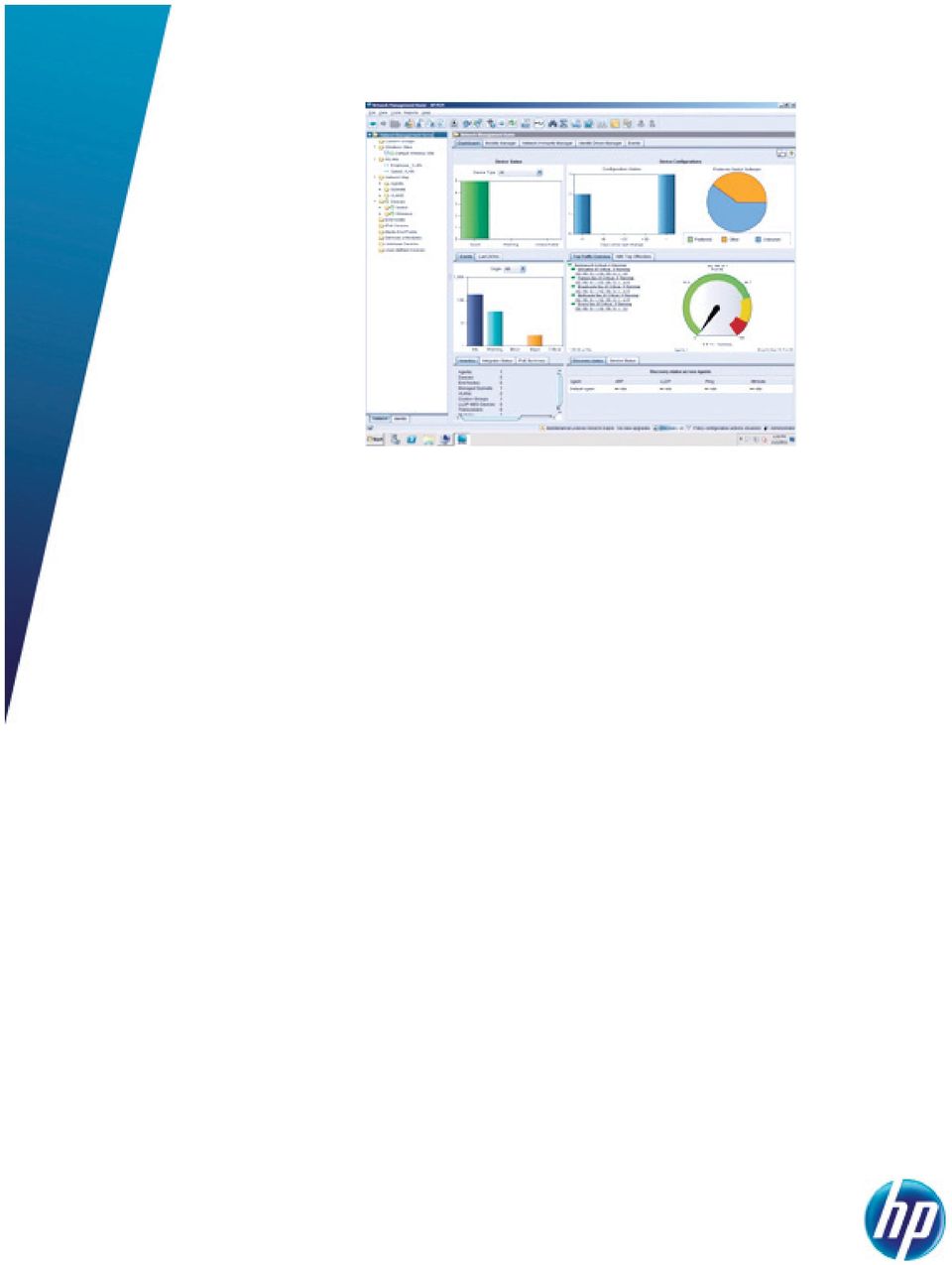
2 Features and benefits Manageability Easy-to-deploy and use network management platform: is easy to install and configure, requires no additional software or service, and often provides valuable network management information in less than 30 minutes; presents dashboards that provide administrators with an intuitive overview of network status and the ability to drill down into the details; utilizes wizards to assist administrators with some of the most common management tasks NEW Web user interface including mobile view: Web-based interface simplifies monitoring from anywhere and improves performance for distributed deployments; a mobile view is available to help ensure that administrators can monitor and troubleshoot from their mobile devices Comprehensive network visibility: provides views of the network using maps or lists of devices; provides views across the network or by subnet, VLAN, or custom group; allows users to annotate maps with port or connection information as well as traffic levels NEW Network services monitoring: provides proactive monitoring and reporting on the network services that businesses rely on (e.g., HTTP, DHCP, DNS, and FTP); provides an instant view of network service availability and response time NEW PoE visualization and monitoring: real-time and historical view of network PoE availability and usage allows administrators to see when PoE is oversubscribed and proactively balance PoE devices across a PoE infrastructure Device configuration monitoring: automatically monitors device configuration changes, providing a complete history of changes with the ability to quickly view what changes were made and when; with the ability to compare configurations across time or devices, PCM+ helps administrators to easily identify configuration issues Device configuration changes: policy-based configuration makes deployment of new devices a snap and can identify devices that do not adhere to policies; PCM+ makes it easy to make configuration changes to one or many devices at the same time Device firmware updates: automatically obtains new device firmware from HP and updates devices, allowing users to download the latest version or choose the desired version for downloading; network administrators can schedule firmware updates on one or more groups of devices via the easy-to-use Firmware Update Wizard Event alerting and analysis: includes event monitoring and filtering capabilities that allow users to view, acknowledge, and sort network events; a summary displays device as well as PCM+ application events and categorizes them by severity, making it easier to identify where bottlenecks or problems exist in the network Network performance monitoring: integrated traffic monitoring delivers detailed network performance views across the entire network with minute-by-minute views of the volume and content of traffic; using the sflow traffic sampling technology embedded in many HP networking devices, PCM+ can provide detailed traffic views of up to 10,000 monitored segments NEW IPv6 aware: identifies devices with IPv6 capabilities and IPv6 configured; is displayed on maps and inventory reports NEW Network troubleshooting: Network analyzer reports: evaluate network configuration and identify real and potential issues based on common misconfigurations Network diagnostic data collection: gathers diagnostic information to assist with troubleshooting network issues; information can be used locally or easily attached to a support case, streamlining the support process Endpoint awareness and VoIP device tracking: a device map view clearly displays which endpoints are directly connected to the device, including phones, cameras, PCs, and authenticated users; provides real-time location and inventory reporting for VoIP phones, including network details such as VLAN assignment, QoS setting, and PoE status User-defined organization: user-defined custom groups allow administrators to create collections based on their unique organization of the network; provides the ability to view, take action, or apply policies across these custom groups Script Wizard: allows customers or service providers to securely extend the PCM+ capabilities with custom scripts; handles device authentication and interactions, making the scripts secure and easier to create 2

3 Security Functional-based profile settings: allow network administrators to create new profiles and associate what type of information is available for those functions, providing more control of network access; profiles can be set at a global or regional level to give fine-grained permissions within the network, delivering more secure access to the network at all support levels RADIUS authentication of network management administrators: can be configured to use the industry-standard RADIUS protocol to authenticate network management administrators; this approach provides simplified and standardized user administration Firewall traversal: remote agents enable management data to securely transverse firewalls via a Secure Sockets Layer (SSL) connection; once the system is connected, all management traffic uses the SSL tunnel to securely traverse the Internet between the PCM+ server and agent, allowing for the full management of devices behind a firewall at the remote site Policy management Policy creation and enforcement: allows you to create policies, set alerts, and take action to enforce network or device policies; network threats, bandwidth, or link problems can be mitigated by proactive policies and can be enforced with alerts and actions Integration HP NNMi integration: Advanced HP networking device management: can be integrated with HP NNMi to provide advanced HP networking device support alongside this industry-leading multivendor management platform, which now provides integrated support for most HP networking devices Distributed deployment: HP PCM+ and NNMi run on separate management servers for increased performance, and coordinate management data and actions via secure communications Configurable Integration Platform (CIP): allows users or service providers to integrate custom devices or actions, and a CIP Wizard makes integration of third-party network devices, user-defined devices, and applications a snap; the CIP Wizard provides an intuitive step-by-step interface for integrating different vendor devices and applications into the PCM+ platform NEW Support for international versions of Windows OS: runs on localized versions of Windows operating systems, including French, Italian, German, Spanish, and Japanese 3

4 HP PCM Plus v4 Network Management Software Series Specifications HP PCM+ v4 Software Platform with 50-device License (J9755A) HP PCM+ v4 Software Platform with Unlimited-device License (J9757A) HP PCM+ network management platform for managing networks with up to 50 devices. The number of managed devices can be increased with the "Additional 100-device license" product HP PCM+ network management platform for managing an unlimited (up to the currently supported limits of the product) number of devices Minimum system hardware Recommended system hardware Recommended software 3.0 GHz Intel Xeon or Intel Core 2 Duo or equivalent 2 GB RAM memory 60 GB storage For HP PCM+ v4 as a standalone application with one agent on the server, assuming a dedicated server 3.0 GHz Intel Xeon or Intel Core 2 Duo or equivalent 2 GB RAM memory 120 GB storage For HP PCM+ v4, assuming a dedicated server with one agent on the server and including HP IDM, MM, and NIM Microsoft Windows Server 2003 Enterprise Edition SP2 (32-bit) Microsoft Windows Server 2008 (32-bit or 64-bit) Standard or Enterprise Edition Microsoft Windows Server 2008 R2 (64-bit) Standard or Enterprise Edition Microsoft Windows 7 (32-bit or 64-bit) Professional or Ultimate Maximum ports simultaneously monitored per server 10,000 10,000 Maximum sflow sampling ports per server Maximum polling ports per server GHz Intel Xeon or Intel Core 2 Quad or equivalent 4 GB RAM memory 100 GB storage For HP PCM+ v4 as a standalone application with one agent on the server, assuming a dedicated server 3.0 GHz Intel Xeon or Intel Core 2 Quad or equivalent 6 GB RAM memory 120 GB storage For HP PCM+ v4, assuming a dedicated server with one agent on the server and including HP IDM, MM, and NIM on the same server Microsoft Windows Server 2003 Enterprise Edition SP2 (32-bit) Microsoft Windows Server 2008 (32-bit or 64-bit) Standard or Enterprise Edition Microsoft Windows Server 2008 R2 (64-bit) Standard or Enterprise Edition Microsoft Windows 7 (32-bit or 64-bit) Professional or Ultimate Browsers Internet Explorer version 7 or later Chrome version 12 or later Firefox version 3 or later Supported platforms VMware ESX v3.5 HP Network Node Manager-i v8.10 VMware ESX v4 Microsoft Hyper-V Features Notes Services Device autodiscovery Topology and mapping Usable troubleshooting data and alerts Device configuration and management Customizable and executable policies across groups Multiple device configuration management and archiving Creation and configuration of VLANs across the network Traffic monitoring and analysis /Pager alerts SNMP trap forwarding OpenView NNM integration Application of policies by user identity Additional processing power may be necessary for extensive traffic monitoring. Some degradation in performance may be expected the greater the number of devices attached to the network. Specifications are subject to change. Supports up to 2,000 devices managed by a single server. For networks with more than 2,000 devices, one or more remote agents are required. For networks with more than 1,500 devices, HP recommends that all agents be remote from the HP PCM server. Systems utilizing VMware are limited to networks with 1,200 or fewer devices. Minimum system requirements for agent: 3.0 GHz Intel Xeon or Intel Core 2 Duo or equivalent, 2 GB of memory, 20 GB of hard disk drive space, and capable of running either Microsoft Windows 7, Microsoft Windows Server 2003, or Microsoft Windows Server Minimum system requirements for client: 3.0 GHz Intel Xeon or Intel Core 2 Duo or equivalent, 2 GB of memory, 20 GB of hard disk drive space, and capable or running either Microsoft Windows 7 or Microsoft Windows Vista. Refer to the HP website at for details on the service-level descriptions and product numbers. For details about services and response times in your area, please contact your local HP sales office. Internet Explorer version 7 or later Chrome version 12 or later Firefox version 3 or later VMware ESX v3.5 HP Network Node Manager-i v8.10 VMware ESX v4 Microsoft Hyper-V Device autodiscovery Topology and mapping Usable troubleshooting data and alerts Device configuration and management Customizable and executable policies across groups Multiple device configuration management and archiving Creation and configuration of VLANs across the network Traffic monitoring and analysis /Pager alerts SNMP trap forwarding OpenView NNM integration Application of policies by user identity Additional processing power may be necessary for extensive traffic monitoring. Some degradation in performance may be expected the greater the number of devices attached to the network. Specifications are subject to change. Supports up to 2,000 devices managed by a single server. For networks with more than 2,000 devices, one or more remote agents are required. For networks with more than 1,200 devices, HP recommends that all agents be remote from the HP server. Systems utilizing VMware are limited to networks with 1,200 or fewer devices. Minimum system requirements for agent: 3.0 GHz Intel Xeon or Intel Core 2 Duo or equivalent, 2 GB of memory, 20 GB of hard disk drive space, and capable of running either Microsoft Windows 7, Microsoft Windows Server 2003, or Microsoft Windows Server Minimum system requirements for client: 3.0 GHz Intel Xeon or Intel Core 2 Duo or equivalent, 2 GB of memory, 20 GB of hard disk drive space, and capable or running either Microsoft Windows 7 or Microsoft Windows Vista. Refer to the HP website at for details on the service-level descriptions and product numbers. For details about services and response times in your area, please contact your local HP sales office. 4

5 HP PCM Plus v4 Network Management Software Series accessories License NEW HP PCM+ v4 additional 100-device License (J9756A) 50 devices (J9758A) 250 devices (J9759A) 550 devices (J9760A) NEW HP PCM+ v4 additional 1-year Maintenance for unlimited devices (J9761A) Software NEW HP PCM+ Mobility Manager v4 Software Module License (J9751A) NEW HP PCM+ Identity Driven Manager v4 Software Module with 500-user License (J9752A) NEW HP PCM+ Identity Driven Manager v4 Software Module with Unlimited-user License (J9753A) To learn more, visit Copyright 2007, Hewlett-Packard Development Company, L.P. The information contained herein is subject to change without notice. The only warranties for HP products and services are set forth in the express warranty statements accompanying such products and services. Nothing herein should be construed as constituting an additional warranty. HP shall not be liable for technical or editorial errors or omissions contained herein. Intel, Intel Core, and Intel Xeon are trademarks of Intel Corporation in the U.S. and other countries. Microsoft, Windows, and Windows Vista are U.S. registered trademarks of Microsoft Corporation. 4AA1-6303ENW, Created October 2007; Updated November 2011, Rev. 5

QuickSpecs. HP PCM Plus v4 Network Management Software Series (Retired) Key features
 Overview (Retired) HP PCM+ Network Management Software is a Microsoft Windows -based network management platform that enables mapping, network and device configuration, and monitoring. HP PCM+ provides
HP E-PCM Plus Network Management Software Series
 Data sheet Product overview HP E-PCM Plus Network Management is a Microsoft Windows -based network management platform that enables mapping, configuration, and monitoring. HP PCM Plus provides security
HP PCM Plus v3 Network Management Software Series Overview
 Overview HP PCM Plus Network Management is a Microsoft Windows -based network management platform that enables mapping, configuration, and monitoring. HP PCM Plus provides security and extensibility for
ProCurve Manager Plus 2.2
 NEW ProCurve Manager Plus 2.2 ProCurve Manager Plus 2.2 is a secure, advanced Windows -based network management platform that allows administrators to configure, update, monitor, and troubleshoot ProCurve
HP Identity Driven Manager Software Series Overview
 Overview HP Identity Driven Manager (IDM), a plug-in to HP PCM+, dynamically provisions network security and performance settings based on user, device, location, time, and endpoint posture. Identity Driven
HP Intelligent Management Center Standard Software Platform
 Data sheet HP Intelligent Management Center Standard Software Platform Key features Highly flexible and scalable deployment Powerful administration control Rich resource management Detailed performance
HP Intelligent Management Center Basic WLAN Manager Software Platform
 Data sheet HP Intelligent Management Center Basic WLAN Manager Software Platform Key features Intuitive, easy-to-use interface Unified wired and wireless network management Range of topology management
HP ProCurve Identity Driven Manager 3.0
 Product overview HP ProCurve Identity Driven Manager (IDM), a plug-in to HP ProCurve Manager Plus, dynamically provisions network security and performance settings based on user, device, location, time,
HP Intelligent Management Center Standard Software Platform
 Data sheet HP Intelligent Management Center Standard Software Platform Key features Highly flexible and scalable deployment Powerful administration control Rich resource management Detailed performance
HP Intelligent Management Center Enterprise Software Platform
 Data sheet HP Intelligent Management Center Enterprise Software Platform Key features Highly flexible, scalable deployment models Powerful administration control Rich resource management Detailed performance
ProCurve Mobility Manager 1.0
 ProCurve Mobility Manager 1.0, a plug-in module for the ProCurve Manager Plus platform, provides a simple yet powerful tool to centrally configure, update, monitor, and troubleshoot ProCurve access points.
HP Intelligent Management Center Enterprise Software. Platform. Key features. Data sheet
 Data sheet HP Intelligent Management Center Enterprise Software Platform Key features Highly flexible and scalable deployment options Powerful administration control Rich resource management Detailed performance
Models HP IMC Smart Connect Edition Virtual Appliance Software E-LTU
 Models HP IMC Smart Connect Edition Virtual Appliance Software E-LTU JG659AAE Key features Identity-based access, advanced device profiling, and real-time traffic quarantining Converged network support
HP Virtual Controller and Virtual Firewall for VMware vsphere 1-proc SW LTU
 HP Virtual Controller and Virtual Firewall for VMware vsphere 1-proc SW LTU Data sheet Product overview The HP TippingPoint Virtual Controller + Virtual Firewall (vcontroller+vfw) extends our leading intrusion
Network Access Control ProCurve and Microsoft NAP Integration
 HP ProCurve Networking Network Access Control ProCurve and Microsoft NAP Integration Abstract...2 Foundation...3 Network Access Control basics...4 ProCurve Identity Driven Manager overview...5 Microsoft
HP Intelligent Management Center User Access Management Software
 Data sheet HP Intelligent Management Center User Access Management Software Key features One central database of users and available services Advanced reporting capabilities Directory of network-attached
ENC Enterprise Network Center. Intuitive, Real-time Monitoring and Management of Distributed Devices. Benefits. Access anytime, anywhere
 Scalability management up to 2,000 devices Network and device auto-discovery Firmware upgrade/backup and device configurations Performance alerts and monitoring ZyXEL switch specialized in RMON management
Samsung device management solutions Manage, monitor and diagnose multiple print devices easily and cost effectively
 Samsung device management solutions Manage, monitor and diagnose multiple print devices easily and cost effectively Proactively identify equipment issues before they become problems. Economically manage,
It is also available as part of the HP IS DVD and the Management DVD/HPSIM install.
 Overview The HP is a web-based interface that consolidates and simplifies the management of individual ProLiant and Integrity servers running Microsoft Windows or Linux operating systems. By aggregating
HP ProCurve Manager Plus
 HP ProCurve Manager Plus Getting Started Guide The all-in-one solution for managing HP ProCurve networks HP ProCurve Manager Plus Getting Started Guide Copyright 2003 Hewlett-Packard Development Company,
How To Manage A Network With An Ipc (Ipc) And Ipc V2 (Ipv) On An Ipa (Ipa) On A Network On An Hp Zl (Ips) And V2 On A Pc (
 Overview Models HP Network Immunity Manager v2 Software with 50-Device License HP Network Immunity Manager v2 100-Device License HP Network Immunity Manager v2 Software with Unlimited-Device License J9161A
SolarWinds Network Performance Monitor powerful network fault & availabilty management
 SolarWinds Network Performance Monitor powerful network fault & availabilty management Fully Functional for 30 Days SolarWinds Network Performance Monitor (NPM) is powerful and affordable network monitoring
HP Systems Insight Manager and HP OpenView
 HP Systems Insight Manager and HP OpenView Working Better Together to Deliver End-to-End Management, from Hardware Infrastructure to Business Service Availability Executive Summary... 2 Challenges of Managing
SolarWinds Network Performance Monitor
 SolarWinds Network Performance Monitor powerful network fault & availabilty management Fully Functional for 30 Days SolarWinds Network Performance Monitor (NPM) makes it easy to quickly detect, diagnose,
Models HP IMC MPLS VPN Software Module with 50-node E-LTU
 Overview Models HP IMC MPLS VPN Software Module with 50-node E-LTU JF410AAE Key features MPLS VPN resource management MPLS VPN monitoring MPLS VPN traffic monitoring MPLS VPN deployment Product overview
HP Server Integrations with Microsoft System Center Products Support Matrix
 HP Server Integrations with Microsoft System Center Products Support Matrix Part Number 467676-006 June 2010 (Sixth Edition) Copyright, 2010 Hewlett-Packard Development Company, L.P. The information contained
HP Client Manager 6.2
 HP Client Manager 6.2 Introduction... 2 New Features in HPCM 6.2... 4 Understanding how HPCM works... 5 Extensive reporting capability... 5 HPCM in operation... 6 Client inventory... 6 Health monitoring...
StruxureWare TM Center Expert. Data
 StruxureWare TM Center Expert Data End to end data center infrastructure management software for monitoring and control of power, cooling, security and energy usage from the building through IT systems
WhatsUp Gold vs. Orion
 Gold vs. Building the network management solution that will work for you is very easy with the Gold family just mix-and-match the Gold plug-ins that you need (WhatsVirtual, WhatsConnected, Flow Monitor,
SolarWinds Network Performance Monitor
 SolarWinds Network Performance Monitor powerful network fault & availabilty management Fully Functional for 30 Days SolarWinds Network Performance Monitor (NPM) makes it easy to quickly detect, diagnose,
ALCATEL-LUCENT OMNIVISTA 2500 NETWORK MANAGEMENT SYSTEM
 ALCATEL-LUCENT OMNIVISTA 2500 NETWORK MANAGEMENT SYSTEM The Alcatel-Lucent OmniVista 2500 Network Management System (NMS) provides cohesive management and network-wide visibility, increasing IT efficiency
SOLARWINDS NETWORK PERFORMANCE MONITOR
 DATASHEET SOLARWINDS NETWORK PERFORMANCE MONITOR Fault, Availability, Performance, and Deep Packet Inspection SolarWinds Network Performance Monitor (NPM) is powerful and affordable network monitoring
HP Client Manager 6.1
 HP Client Manager 6.1 Introduction... 2 New Features in HPCM 6.1... 4 Understanding how HPCM works... 6 Extensive reporting capability... 7 HPCM in operation... 7 Client inventory... 7 Health monitoring...
HP VCX Desktop Communicator Software Series Overview. Models HP VCX Desktop Communicator Software HP VCX Desktop Communicator Outlook Edition Software
 Overview Models HP VCX Desktop Communicator Software HP VCX Desktop Communicator Outlook Edition Software JE435A JE436A Key features Seamless interaction with Microsoft Outlook Multiple SIP-based clients
HP OpenView Performance Insight Report Pack for Databases
 HP OpenView Performance Insight Report Pack for Databases Data sheet The Report Pack for Databases provides the insight you need to effectively manage your database management system. Because what you
HP ProCurve Networking. Networking solutions for small and growing businesses
 HP ProCurve Networking Networking solutions for small and growing businesses Contents A network you can depend on....................................1 Essential network connectivity....................................2
EPICenter Network Management Software
 EPICenter Network Management Software EPICenter management suite from Extreme Networks is a scalable full-featured network management tool that simplifies configuration, troubleshooting and status monitoring
Integrating HP Insight Management WBEM (WMI) Providers for Windows with HP System Insight Manager
 Integrating HP Insight Management WBEM (WMI) Providers for Windows with HP System Insight Manager Integration note, 4 th edition Introduction... 2 Utilizing HP WBEM Providers for Windows... 2 Security...
SapphireIMS 4.0 BSM Feature Specification
 SapphireIMS 4.0 BSM Feature Specification v1.4 All rights reserved. COPYRIGHT NOTICE AND DISCLAIMER No parts of this document may be reproduced in any form without the express written permission of Tecknodreams
Server & Application Monitor
 Server & Application Monitor agentless application & server monitoring SolarWinds Server & Application Monitor provides predictive insight to pinpoint app performance issues. This product contains a rich
Radia Cloud. User Guide. For the Windows operating systems Software Version: 9.10. Document Release Date: June 2014
 Radia Cloud For the Windows operating systems Software Version: 9.10 User Guide Document Release Date: June 2014 Software Release Date: June 2014 Legal Notices Warranty The only warranties for products
HP ATA Networks certification
 Certification guide HP ATA Networks certification Introduction In today s business environment, the lack of skills to execute IT technologies and cloud solutions is a roadblock for many companies trying
EPICenter Network Management Software
 EPICenter Network Management Software EPICenter management suite is a scalable full-featured network management tool that simplifies configuring, troubleshooting and status monitoring of IP-based networks.
Installing and Configuring Windows Server 2012 (20410) H4D00S
 HP Education Services course data sheet Installing and Configuring Windows Server 2012 (20410) H4D00S Course Overview This course is part one of a series of three courses. Through this series you will
Cisco Expressway Series
 Data Sheet Cisco Expressway Series Advanced Collaboration Gateways for Simple and Secure Unified Communications Product Overview Cisco Expressway Series gateways for Cisco Unified Communications Manager
Samsung SmarThru Workflow 2 Digitize your print environment with secure, cost effective document workflow
 Samsung SmarThru Workflow 2 Digitize your print environment with secure, cost effective document workflow Integrate almost any paper or electronic document into a secure digital workflow. Save costs and
QuickSpecs. HP Session Allocation Manager Software (SAM v2.3) Overview
 Overview Introduction A key component of the HP Virtual Client Essentials software portfolio, Session Allocation Manager (SAM) administrative software brokers network connections to seamlessly deliver
Test Equipment Depot - 800.517.8431-99 Washington Street Melrose, MA 02176 - TestEquipmentDepot.com. Application Advisor
 Test Equipment Depot - 800.517.8431-99 Washington Street Melrose, MA 02176 - TestEquipmentDepot.com NetAlly Application Advisor Monitor End User Experience for Local and Remote Users, Distributed Sites
Installing and Configuring vcenter Multi-Hypervisor Manager
 Installing and Configuring vcenter Multi-Hypervisor Manager vcenter Server 5.1 vcenter Multi-Hypervisor Manager 1.1 This document supports the version of each product listed and supports all subsequent
Taming Microsoft Environments with HP SiteScope Exchange and Active Directory Solution Templates
 Taming Microsoft Environments with HP SiteScope Exchange and Active Directory Solution Templates Quick and economical troubleshooting and performance management for Microsoft environments Business white
HP SkyRoom Frequently Asked Questions
 HP SkyRoom Frequently Asked Questions September 2009 Background... 2 Using HP SkyRoom... 3 Why HP SkyRoom?... 4 Product FYI... 4 Background What is HP SkyRoom? HP SkyRoom is a visual collaboration solution
HP OpenView Service Desk Process Insight 2.10 software
 HP OpenView Service Desk Process Insight 2.10 software Data sheet HP OpenView Service Desk Process Insight software provides real-time visibility into the ITIL processes managed by your HP OpenView Service
QuickSpecs. Models HP MSR Open Application Platform (OAP) with VMware vsphere MIM Module
 Models HP MSR Open Application Platform (OAP) with VMware vsphere FIC Module HP MSR Open Application Platform (OAP) with VMware vsphere MIM Module JG533A JG532A Key features Industry-leading VMware vsphere
HP IMC Smart Connect w/wlan Manager Virtual Appliance Software
 Data sheet HP IMC Smart Connect w/wlan Manager Virtual Appliance Software Key features Identity-based access, advanced device profiling, and real-time traffic quarantining Converged network support with
HP UPS Management Module Overview
 Overview The enables you to monitor and manage power environments through comprehensive control of HP UPSs. The can support either a single UPS configuration or provides additional power protection with
ProSAFE Network Management System
 The NETGEAR Management System delivers insight into network elements, including third-party devices. New web-based user interface provides intuitive user experience, making it easier to monitor and administer
USB Secure Management for ProCurve Switches
 ProCurve Networking USB Secure Management for ProCurve Switches Introduction... 2 A simple solution with multiple uses... 2 Staged deployment... 2 Remote deployment or upgrade... 3 Troubleshooting... 3
HP OpenView Smart Plug-in for Microsoft Exchange
 HP OpenView Smart Plug-in for Microsoft Exchange Data sheet Email is no longer just a productivity application - it is a company s lifeline. When email slows down or stops altogether, the business loses
HP OpenView Smart Plug-in for Microsoft Windows Data sheet
 HP OpenView Smart Plug-in for Microsoft Windows Data sheet HP OpenView Smart Plug-in for Microsoft Windows is the key to managing your Microsoft Windows environment from a service perspective. It works
imvision System Manager
 SYSTIMAX Solutions imvision System Manager Infrastructure Management Software www.commscope.com imvision System Manager Vision imvision System Manager can provide a complete view of your physical infrastructure,
QuickSpecs. Overview. Compaq Remote Insight Lights-Out Edition
 Overview M ODELS Remote Insight Lights-Out Edition 157866-001 New Remote Insight Lights-Out Edition provides virtual graphical control using any standard browser to your remote or data centre server, giving
HP Device Manager 4.6
 Technical white paper HP Device Manager 4.6 FTP Server Configuration Table of contents Overview... 2 IIS FTP server configuration... 2 Installing FTP v7.5 for IIS... 2 Creating an FTP site with basic authentication...
Lindenbaum Web Conference
 Product information Lindenbaum Web Conference Lindenbaum Your partner for high-quality conferencing Scalable, secure and easy-to-use web conference Lindenbaum Web Conference is a secure and reliable web
HP Remote Monitoring. How do I acquire it? What types of remote monitoring tools are in use? What is HP Remote Monitoring?
 HP Remote Monitoring HP Remote Monitoring is an efficient, secure means of collecting and reporting usage data from your printing and imaging output environment. What is HP Remote Monitoring? HP Remote
HP Operations Agent for NonStop Software Improves the Management of Large and Cross-platform Enterprise Solutions
 HP Operations Agent for NonStop Software Improves the Management of Large and Cross-platform Enterprise Solutions HP Operations Agent for NonStop software manages HP NonStop servers and brings NonStop
Network Management Deployment Guide
 Smart Business Architecture Borderless Networks for Midsized organizations Network Management Deployment Guide Revision: H1CY10 Cisco Smart Business Architecture Borderless Networks for Midsized organizations
QuickSpecs. HP M220 802.11n Access Point Series. Models HP M220 802.11n WW Access Point. Key features
 Overview HP M220 802.11n Access Point Series Models HP M220 802.11n AM Access Point HP M220 802.11n WW Access Point J9798A J9799A Key features IEEE 802.11a/b/g/n access point Single-radio, dual-band (2.4
HP SCOM Management Packs User Guide
 HP SCOM Management Packs User Guide Abstract This guide describes the HP extensions for Microsoft System Center Operations Manager that are provided as part of HP Insight Control for Microsoft System Center.
HP JETADVANTAGE SECURITY MANAGER
 HP JETADVANTAGE SECURITY MANAGER Release Notes v2.1.4 CONTENTS Overview... 2 Version Information... 2 What s New in Security Manager 2.1.4?... 5 Key Features... 6 Solutions... 6 Supported Operating Systems
HP SiteScope software
 HP SiteScope software When you can see availability and performance, you can improve it. Improve the availability and performance of your IT environment HP SiteScope software helps you to agentlessly monitor
QuickSpecs. Models. Features and benefits Application highlights. HP 7500 SSL VPN Module with 500-user License
 Overview Models JD253A Key features High performance hardware encryption Thin client and browser based access Multiple access authentication methods Remote security status checking Low Running Cost Product
WhatsUpGold. v3.0. WhatsConnected User Guide
 WhatsUpGold v3.0 WhatsConnected User Guide Contents CHAPTER 1 Welcome to WhatsConnected Finding more information and updates... 2 Sending feedback... 3 CHAPTER 2 Installing and Configuring WhatsConnected
Cisco Data Center Network Manager for SAN
 Cisco Data Center Network Manager for SAN Product Overview Modern data centers are becoming increasingly massive and complex. Proliferation of new technologies such as virtualization is adding yet another
FTP Server Configuration
 FTP Server Configuration For HP customers who need to configure an IIS or FileZilla FTP server before using HP Device Manager Technical white paper 2 Copyright 2012 Hewlett-Packard Development Company,
Kaseya IT Automation Framework
 Kaseya Kaseya IT Automation Framework An Integrated solution designed for reducing complexity while increasing productivity for IT Professionals and Managed Service Providers. The powerful, web-based automation
HP ProLiant Essentials Vulnerability and Patch Management Pack Planning Guide
 HP ProLiant Essentials Vulnerability and Patch Management Pack Planning Guide Product overview... 3 Vulnerability scanning components... 3 Vulnerability fix and patch components... 3 Checklist... 4 Pre-installation
How To Set Up A Firewall Enterprise, Multi Firewall Edition And Virtual Firewall
 Quick Start Guide McAfee Firewall Enterprise, Multi-Firewall Edition model S7032 This quick start guide provides high-level instructions for setting up McAfee Firewall Enterprise, Multi-Firewall Edition
QuickSpecs. HP Data Protector software for PCs. Overview
 Overview Introduction is an expansion of HP's high performance backup and recovery software that is designed specifically for notebooks and desktops. This solution ensures the availability of business
HP M220 802.11n Access Point Series
 Data sheet HP M220 802.11n Access Point Series Key features IEEE 802.11a/b/g/n access point Single-radio, dual-band (2.4 GHz or 5 GHz) Simplified wireless LAN administration with clustering technology
BMC Client Management - Technical Specifications. Version 12.0
 BMC Client Management - Technical Specifications Version 12.0 Legal Notices Copyright 1999, 2009 BMC Software, Inc. Copyright 1994-2014 Numara Software, Inc. BMC, BMC Software, and the BMC Software logo
Asta Powerproject Enterprise
 Asta Powerproject Enterprise Overview and System Requirements Guide Asta Development plc Kingston House Goodsons Mews Wellington Street Thame Oxfordshire OX9 3BX United Kingdom Tel: +44 (0)1844 261700
Legal Notices... 2. Introduction... 3
 HP Asset Manager Asset Manager 5.10 Sizing Guide Using the Oracle Database Server, or IBM DB2 Database Server, or Microsoft SQL Server Legal Notices... 2 Introduction... 3 Asset Manager Architecture...
TimePictra Release 10.0
 DATA SHEET Release 100 Next Generation Synchronization System Key Features Web-based multi-tier software architecture Comprehensive FCAPS management functions Software options for advanced FCAPS features
HP Universal CMDB. Software Version: 10.20. Support Matrix
 HP Universal CMDB Software Version: 10.20 Support Matrix Document Release Date: January 2015 Software Release Date: January 2015 Legal Notices Warranty The only warranties for HP products and services
QuickSpecs. HP Data Protector Reporter Software Overview. Powerful enterprise reporting with point and click simplicity
 Overview Introduction HP Data Protector software, used by more than 41,000 customers around the world, simplifies application protection in virtual and physical environments through unified recovery and
Hardware and Software Requirements. Release 7.5.x PowerSchool Student Information System
 Release 7.5.x PowerSchool Student Information System Released October 2012 Document Owner: Documentation Services This edition applies to Release 7.5.x of the PowerSchool software and to all subsequent
HP Server Automation Standard
 Data sheet HP Server Automation Standard Lower-cost edition of HP Server Automation software Benefits Time to value: Instant time to value especially for small-medium deployments Lower initial investment:
HP Operations Smart Plug-in for Virtualization Infrastructure
 HP Operations Smart Plug-in for Virtualization Infrastructure for HP Operations Manager for Windows Software Version: 1.00 Deployment and Reference Guide Document Release Date: October 2008 Software Release
QuickSpecs. Models. HP UPS Management Module. HP UPS Management Module. Overview
 Overview The enables you to monitor and manage power environments through comprehensive control of HP UPSs. The can support either a single UPS configuration or provides additional power protection with
D-View 7 Network Management System
 Product Highlights Comprehensive Management Manage your network effectively with useful tools and features such as Batch Configuration, SNMP, and Flexible command Line Dispatch Hassle-Free Network Management
Virtualization Guide. McAfee Vulnerability Manager Virtualization
 Virtualization Guide McAfee Vulnerability Manager Virtualization COPYRIGHT Copyright 2012 McAfee, Inc. Do not copy without permission. TRADEMARKS McAfee, the McAfee logo, McAfee Active Protection, McAfee
HP Client Automation software Starter and Standard Editions
 HP Client Automation software Starter and Standard Editions Data sheet Managing client devices effectively and efficiently is a mission-critical function for today s businesses. However, that challenge
Q A F 0 3. ger A n A m client dell dell client manager 3.0 FAQ
 DELL CLIENT MANAGER 3.0 FAQ dell client manager 3.0 FAQ Do i need to license dell client manager standard edition? 2 What are the system requirements and prerequisites for installation? 2 When installing
SMS Inventory Tool for HP ProLiant and Integrity Update User Guide
 SMS Inventory Tool for HP ProLiant and Integrity Update User Guide Part Number 391346-003 December 2007 (Third Edition) Copyright 2006, 2007 Hewlett-Packard Development Company, L.P. The information contained
HP E-M110 Access Point Series. Product overview. Key features. Data sheet
 HP E-M110 Access Point Series Data sheet Product overview HP E-M110 Access Point is an entry-level, single IEEE 802.11a/b/g radio device that can be configured to operate as an access point, a wireless
Configuring and Managing Token Ring Switches Using Cisco s Network Management Products
 Configuring and Managing Token Ring Switches Using Cisco s Network Management Products CHAPTER 12 Cisco offers several network management applications that you can use to manage your Catalyst Token Ring
ProCurve Manager Plus 2.1 Network Administrator s Guide. The all-in-one solution for managing ProCurve networks
 ProCurve Manager Plus 2.1 Network Administrator s Guide The all-in-one solution for managing ProCurve networks 2003-2006 Hewlett-Packard Development Company, L.P. The information contained herein is subject
HP NonStop Software Essentials
 Data sheet HP NonStop Software Essentials Simplify NonStop software management Managing software versions on any system can be a complicated task. With the scale that a NonStop system provides, this task