
How To Get A Suncorp Bank Account
|
|
|
- Lynette Wood
- 5 years ago
- Views:
Transcription
1 Suncorp Bank Personal Deposit Accounts Product Information Document This document contains information on Suncorp Bank Personal Deposit Accounts Kids Savings Account, Everyday Basics Account, Everyday Options Account, Everyday Essentials Account, eoptions Account, Cash Management Account and 55 Plus Account and related fees and charges. This document must be read in conjunction with the Terms and Conditions for Suncorp Bank Accounts. Effective Date: 28 March 2015.

2 Index About this Document... 3 Updating Information... 3 Product Features at a Glance... 4 Everyday Options Account... 6 Kids Savings Account... 9 Everyday Basics Account Everyday Essentials Account...10 eoptions Cash Management Account Plus Account flexirates General Information on Interest Eligibility Fees and Charges Handy tips to save on fees Exemptions from Fees and Charges Account Fees Special Requests, Replacements and Other Event Fees Foreign Currency Fees Fees and Charges on Other Suncorp Bank Accounts Access to your Account Risks and Safeguards Important Terms Explained Financial Claims Scheme Suncorp Bank

3 About This Document This document contains information on Suncorp Bank Personal Deposit Accounts Kids Savings Account, Everyday Basics Account, Everyday Essentials Account, eoptions Account, Cash Management Account and 55 Plus Account and related fees and charges. This Document must be read in conjunction with the Terms and Conditions for Suncorp Bank Accounts. The information can help you: decide if any of these products meet your needs; compare these products with other similar products. Effective Date: 28 March These products are issued by Suncorp-Metway Ltd ABN AFSL Updating Information The information contained in this document is current as at the effective date. Information may change from time to time. If there is new information you can find out about it, in one of the following ways: we may send you a notice in writing; we may send you a secure message; in a press ad; from our website at suncorpbank.com.au; or by phoning and asking one of our consultants. Personal Deposit Accounts 3

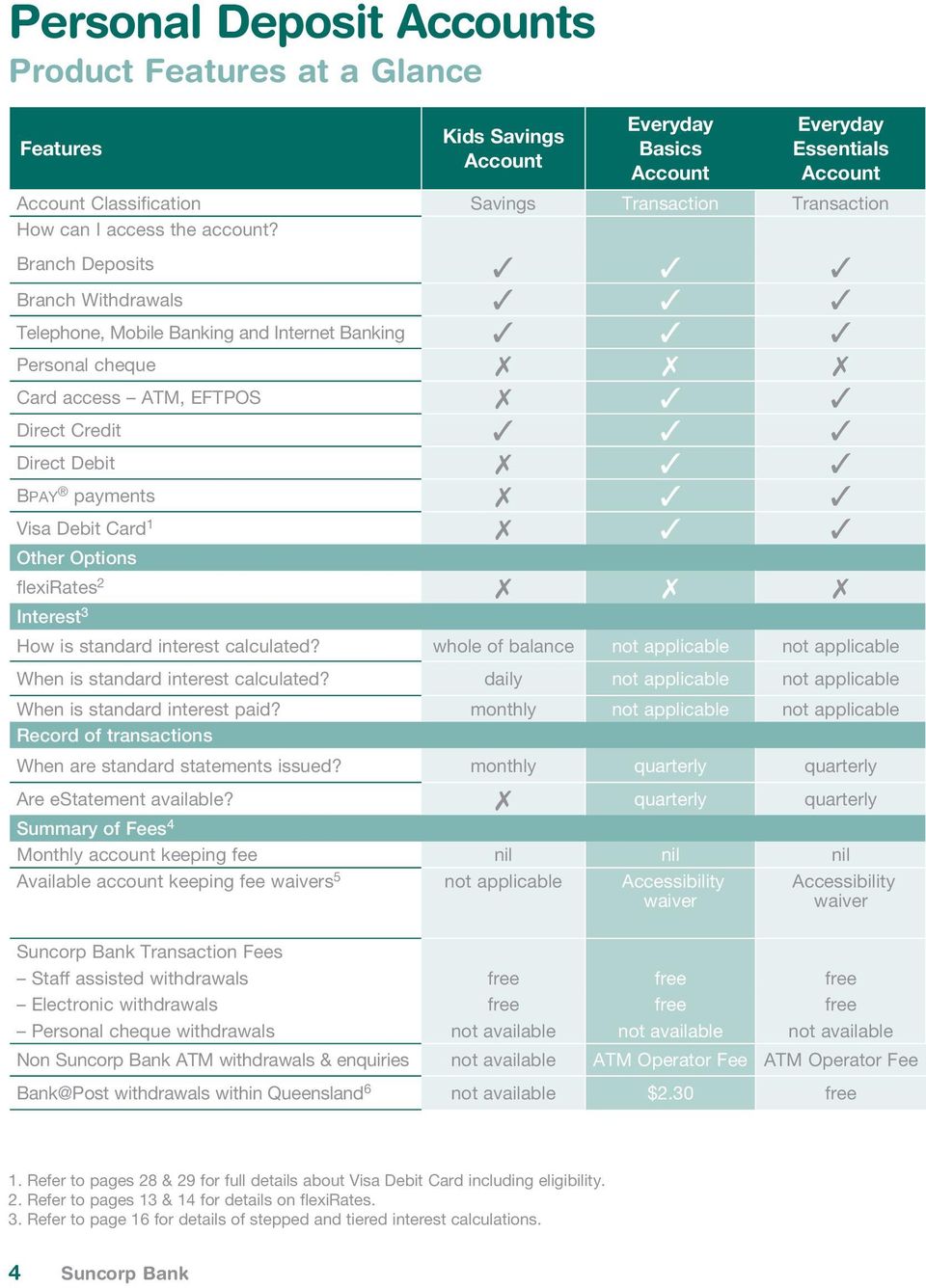
4 Personal Deposit Accounts Product Features at a Glance Features Kids Savings Account Everyday Basics Account Everyday Essentials Account Account Classification Savings Transaction Transaction How can I access the account? Branch Deposits Branch Withdrawals Telephone, Mobile Banking and Internet Banking Personal cheque Card access ATM, EFTPOS Direct Credit Direct Debit Bpay payments Visa Debit Card Other Options flexirates Interest 3 How is standard interest calculated? whole of balance not applicable not applicable When is standard interest calculated? daily not applicable not applicable When is standard interest paid? monthly not applicable not applicable Record of transactions When are standard statements issued? monthly quarterly quarterly Are estatement available? 7 quarterly quarterly Summary of Fees 4 Monthly account keeping fee nil nil nil Available account keeping fee waivers 5 not applicable Accessibility waiver Accessibility waiver Suncorp Bank Transaction Fees Staff assisted withdrawals free free free Electronic withdrawals free free free Personal cheque withdrawals not available not available not available Non Suncorp Bank ATM withdrawals & enquiries not available ATM Operator Fee ATM Operator Fee Bank@Post withdrawals within Queensland 6 not available $2.30 free 1. Refer to pages 28 & 29 for full details about Visa Debit Card including eligibility. 2. Refer to pages 13 & 14 for details on flexirates. 3. Refer to page 16 for details of stepped and tiered interest calculations. 4 Suncorp Bank
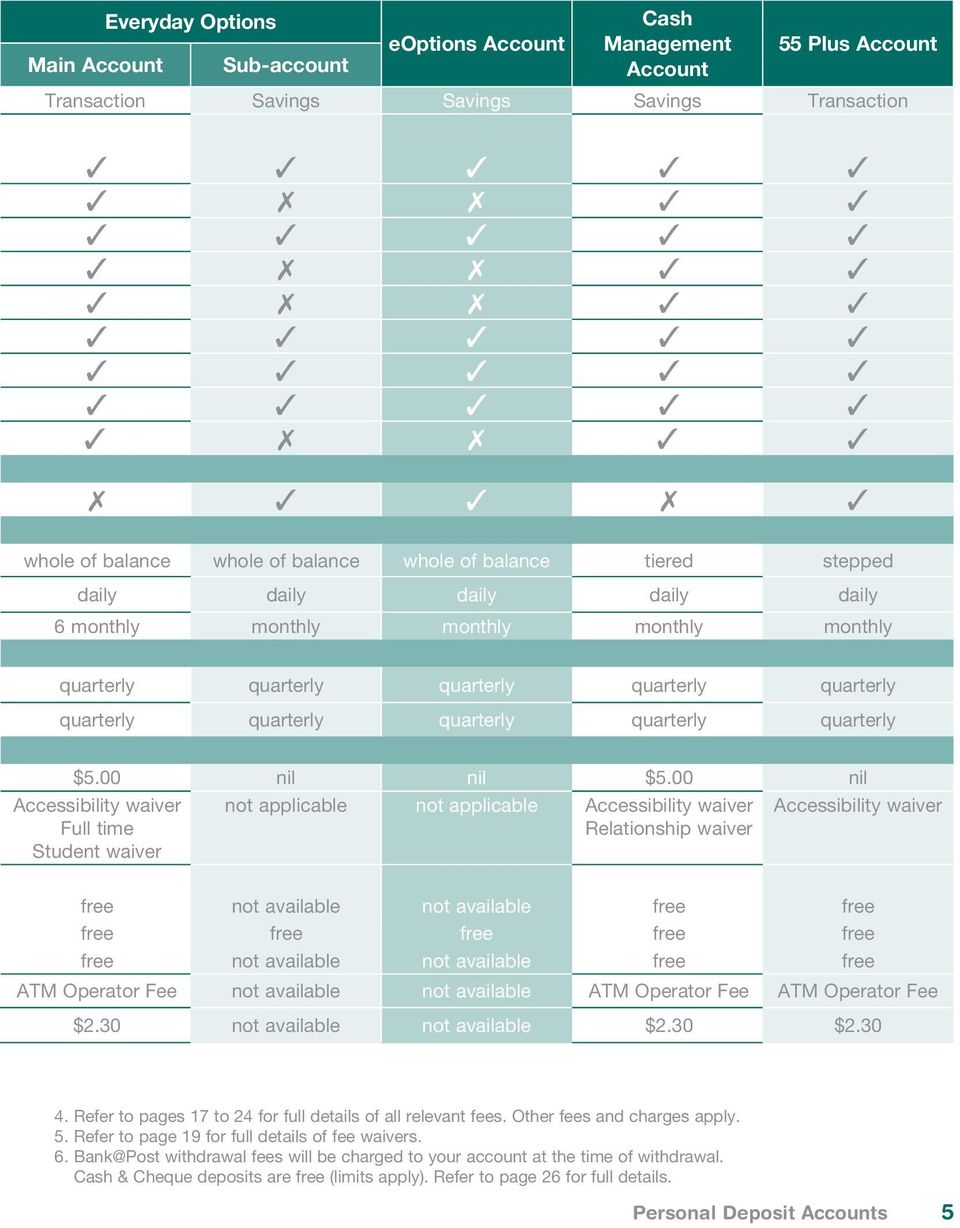
5 Everyday Options Cash eoptions Account Management 55 Plus Account Main Account Sub-account Account Transaction Savings Savings Savings Transaction whole of balance whole of balance whole of balance tiered stepped daily daily daily daily daily 6 monthly monthly monthly monthly monthly quarterly quarterly quarterly quarterly quarterly quarterly quarterly quarterly quarterly quarterly $5.00 nil nil $5.00 nil Accessibility waiver Full time Student waiver not applicable not applicable Accessibility waiver Relationship waiver Accessibility waiver free not available not available free free free free free free free free not available not available free free ATM Operator Fee not available not available ATM Operator Fee ATM Operator Fee $2.30 not available not available $2.30 $ Refer to pages 17 to 24 for full details of all relevant fees. Other fees and charges apply. 5. Refer to page 19 for full details of fee waivers. 6. Bank@Post withdrawal fees will be charged to your account at the time of withdrawal. Cash & Cheque deposits are free (limits apply). Refer to page 26 for full details. Personal Deposit Accounts 5
6 Everyday Options Account Our Everyday Options Account is a day to day banking account with unlimited fee free Suncorp Bank transactions and a choice of access options. Our Everyday Options Account can be operated as a stand-alone account. In addition, it can have up to nine linked savings Sub-accounts which can be used for separating your funds. These Sub-accounts offer a higher standard variable interest rate. Everyday Options Sub-Accounts You cannot operate Sub-accounts on their own. Each Sub-account must be linked to your main Everyday Options Account. Sub-accounts can only be opened in the same name or names as the main Everyday Options Account. Sub-accounts can be accessed via Telephone, Mobile Banking and Internet Banking. You can set up internal and external 1 transfers, BPAY, Direct Debit and Direct Credit transactions and check your account balances and transaction history. You cannot use a card or cheque on a Sub-account. If you want to withdraw cash from a Sub-account, you simply transfer money using Telephone, Mobile Banking or Internet Banking into your main Everyday Options Account, then withdraw it as you would normally. To deposit money into a Sub-account, an electronic credit can be arranged into the account e.g. direct salary credit or Direct Credit transfer. Cash and/or cheques can be deposited into the Sub-account at any Suncorp Bank branch. Each quarter, you will receive one convenient combined statement that shows account balances and transactions for your Everyday Options Account and all your Sub-accounts. You can request statements monthly or six monthly at no additional charge. estatements are available for your Everyday Options Account and your Sub-accounts. For more information on estatements, please refer to the Terms and Conditions. Interest Modes Everyday Options Accounts operate in two modes: credit interest mode which pays a rate of interest on credit balances; OR offset mode which is a 100% home loan offset facility. All Everyday Options Accounts and linked Sub-accounts must operate in the same mode. Credit Interest Mode In credit interest mode, a standard rate of interest is paid on the total of all the credit balances in your accounts, less any flexirate balances. The Sub-account interest rate is different to the rate of interest on the Everyday Options main account. Interest is calculated daily on the end-of-day balances and paid into your Sub-account every month and your main account every six months. 1. External transfers only available via Internet Banking. 6 Suncorp Bank

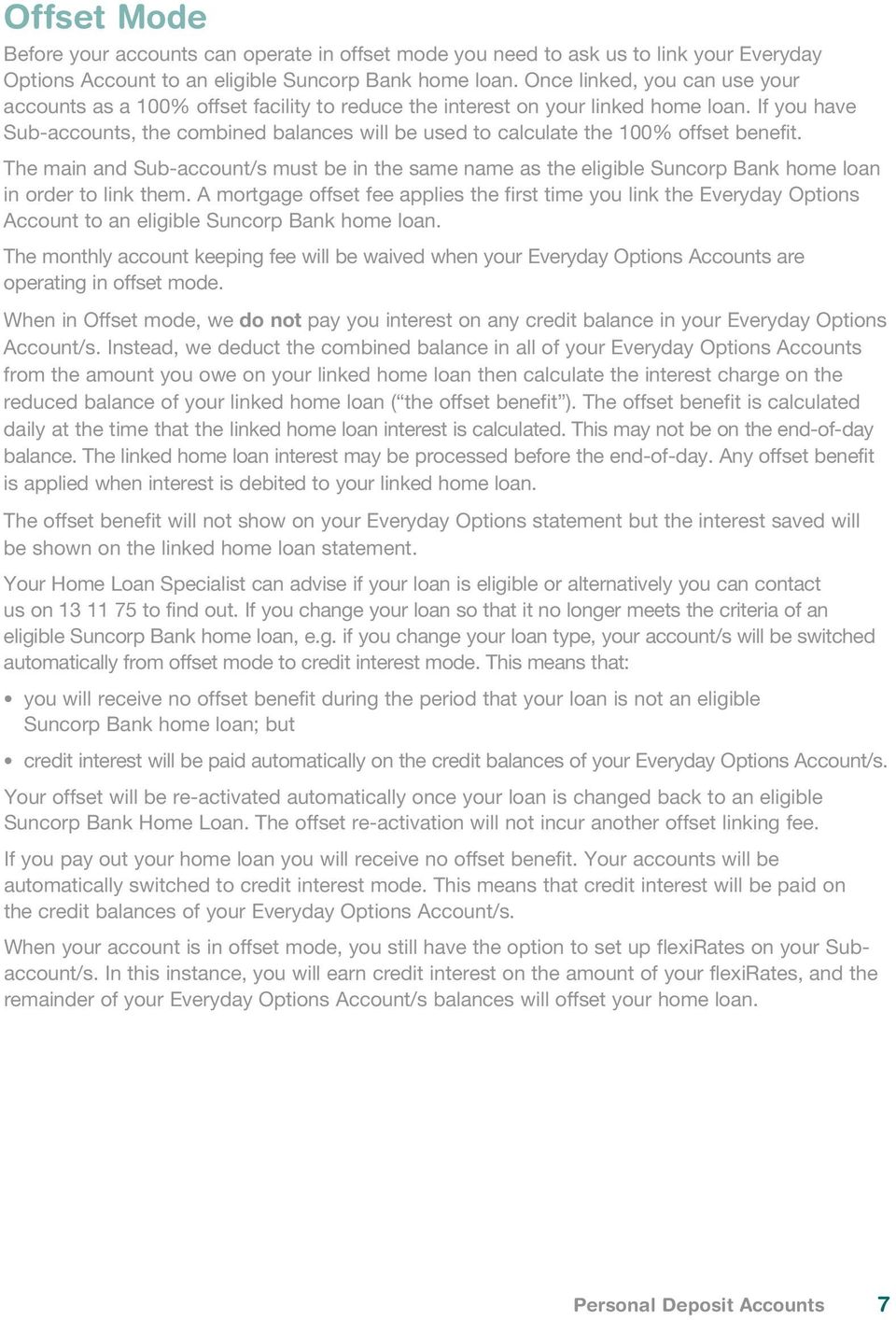
7 Offset Mode Before your accounts can operate in offset mode you need to ask us to link your Everyday Options Account to an eligible Suncorp Bank home loan. Once linked, you can use your accounts as a 100% offset facility to reduce the interest on your linked home loan. If you have Sub-accounts, the combined balances will be used to calculate the 100% offset benefit. The main and Sub-account/s must be in the same name as the eligible Suncorp Bank home loan in order to link them. A mortgage offset fee applies the first time you link the Everyday Options Account to an eligible Suncorp Bank home loan. The monthly account keeping fee will be waived when your Everyday Options Accounts are operating in offset mode. When in Offset mode, we do not pay you interest on any credit balance in your Everyday Options Account/s. Instead, we deduct the combined balance in all of your Everyday Options Accounts from the amount you owe on your linked home loan then calculate the interest charge on the reduced balance of your linked home loan ( the offset benefit ). The offset benefit is calculated daily at the time that the linked home loan interest is calculated. This may not be on the end-of-day balance. The linked home loan interest may be processed before the end-of-day. Any offset benefit is applied when interest is debited to your linked home loan. The offset benefit will not show on your Everyday Options statement but the interest saved will be shown on the linked home loan statement. Your Home Loan Specialist can advise if your loan is eligible or alternatively you can contact us on to find out. If you change your loan so that it no longer meets the criteria of an eligible Suncorp Bank home loan, e.g. if you change your loan type, your account/s will be switched automatically from offset mode to credit interest mode. This means that: you will receive no offset benefit during the period that your loan is not an eligible Suncorp Bank home loan; but credit interest will be paid automatically on the credit balances of your Everyday Options Account/s. Your offset will be re-activated automatically once your loan is changed back to an eligible Suncorp Bank Home Loan. The offset re-activation will not incur another offset linking fee. If you pay out your home loan you will receive no offset benefit. Your accounts will be automatically switched to credit interest mode. This means that credit interest will be paid on the credit balances of your Everyday Options Account/s. When your account is in offset mode, you still have the option to set up flexirates on your Subaccount/s. In this instance, you will earn credit interest on the amount of your flexirates, and the remainder of your Everyday Options Account/s balances will offset your home loan. Personal Deposit Accounts 7
8 Example: The table below illustrates three examples of how credit balances in Everyday Options Accounts operate in offset mode and affect the interest payable on a linked home loan. Balance of Everyday Options Accounts Main Account = $2000 Combined with Sub-accounts = $20,000 Main Account = $2000 Combined with Sub-accounts = $20,000 Main Account = $2000 Combined with Sub-accounts = $20,000 ($8,000 in flexirates) 8 Suncorp Bank Amount of Linked We Will Home Loan $122,000 Use combined account balance of $22,000 to calculate offset benefit Pay you no interest on the $2,000 in the main account Pay you no interest on the $20,000 credit balance in your Sub-account/s Not charge interest on $22,000 of your linked home loan balance Charge interest on the remaining $100,000 of your linked home loan balance. $15,000 Use $15,000 of the $22,000 combined account balance to calculate offset benefit Pay you no interest on any part of the credit balance (including the $7,000 amount by which the balance of your Everyday Options Account/s exceeds the balance in your Linked Home Loan) in your Everyday Options Account/s Not charge interest on the total balance of $15,000 of your linked home loan. $114,000 Use combined account balance of $14,000 to calculate offset benefit ($22,000 total minus $8,000 flexirates) Pay you no interest on the $2,000 in the main account Pay you credit interest on the $8,000 in flexirates Pay you no interest on the $12,000 in credit balance in your Sub-account /s Not charge interest on $14,000 of your linked home loan balance Charge interest on the remaining $100,000 of your linked home loan balance. Everyday Options included in a Home Package Plus An Everyday Options Account is an essential component of the Home Package Plus. If you are paying the Home Package Plus annual package fee, the monthly account keeping fee will be waived on your Everyday Options Account. Participation in the Package is optional and you can cancel your Package by advising us in writing. If you cancel your Package, the standard fees and charges on the Everyday Options Account will apply from the following month. For full terms and conditions on the Home Package Plus refer to the Home Package Plus Terms and Conditions document.

9 Kids Savings Account The Kids Savings Account is a bank account designed for the specific benefit of personal customers under 18 years of age. The account will be opened in the name of the personal customer under the age of 18 years who is referred to as the Child. If the Child is under 12 years of age: A parent/guardian or other adult must give their consent to opening the account; The parent/guardian or other adult will have full access to operate the account. The Child is not permitted to transact on this account. If the child is 12 years of age or older, the account can be opened and operated on by the Child either solely or as a shared account with a parent/guardian or other adult. Funds in the Kids Savings Account are At Call and can be accessed at the branch or via Telephone, Mobile Banking and Internet Banking. Card access, cheque, future dated internal transfers, recurring internal transfers, external transfers, BPAY and Direct Debits are not available on a Kids Savings Account. There is no minimum or maximum balance requirement for the account and there are no monthly account keeping or Suncorp Bank transaction fees. To deposit money into a Kids Savings Account, an electronic credit can be arranged into the account e.g. Direct Credit transfer. Cash and/or cheques can be deposited into the Kids Savings Account at any Suncorp Bank branch. To withdraw money from a Kids Savings Account, transfer money immediately using Telephone, Mobile Banking or Internet Banking into another Suncorp Bank transaction account, then withdraw it as you would normally or access the funds at the branch. Internal future dated and recurring transfers are not available from a Kids Savings Account. Interest is calculated daily on the whole of the credit balance at the end of the day and paid monthly. As a savings account, bonus interest can be earned each month if: at least $20.00 is deposited into the account each month; and no more than one withdrawal (including a transfer of funds to another Suncorp Bank Account or branch withdrawal) is made from the account each month. Statements are issued monthly. You can request statements quarterly or six monthly at no additional charge. On turning 18 years of age, the Child will no longer be eligible to hold a Suncorp Bank Kids Savings Account. At this time, we will convert the Kids Savings Account to an Everyday Basics Account. We will write to you prior to the conversion. Personal Deposit Accounts 9

10 Everyday Basics Account The Everyday Basics Account is a bank account that can be used as an everyday transaction account with no monthly account keeping fees or Suncorp Bank transaction fees. The Everyday Basics Account can be operated as a stand-alone account. There is no minimum balance requirement when you open the account. As an everyday transaction account you can make deposits and withdrawals. Your funds are At Call which means you can access your money at any time our banking facilities are available. Staff can assist you to access your funds at the branch. You can transact electronically through Telephone Banking, Mobile Banking, Internet Banking or using BPAY, Direct Debits and Direct Credits, or by using your card at ATMs and EFTPOS facilities. Statements are issued quarterly. You can request a statement monthly or six monthly at no additional charge. estatements are available for this product. For more information on estatements, please refer to the Terms and Conditions. The Fee waiver available on this account is the Accessibility Waiver. For more information refer to page 19. Everyday Essentials Account The Everyday Essentials Account is a transaction account designed especially for low-income customers or holders of a Pensioner Concession Card, Health Care Card or Commonwealth Seniors Health Card. There is no minimum balance requirement when you open the account and no ongoing monthly account keeping fees or Suncorp Bank transaction fees. As an everyday transaction account you can make deposits and withdrawals. Your funds are At Call which means you can access your money at any time our banking facilities are available. Our staff can assist you to access your funds at a branch. You can transact electronically through Telephone Banking, Mobile Banking, Internet Banking or using BPAY, Direct Debits and Direct Credits, or by using your card at ATMs and EFTPOS facilities. The Everyday Essentials Account has no Payment Honour or Dishonour Fees. Statements are issued quarterly. You can request a statement monthly or six monthly at no additional charge. estatements are available for this product. For more information on estatements, please refer to the Terms and Conditions. The Fee waiver available on this account is the Accessibility Waiver. For more information refer to page Suncorp Bank

11 eoptions The eoptions Account is a high interest, online savings account with no monthly account keeping fees or Suncorp Bank transaction fees. Variable interest (standard interest) is paid on every dollar in your account unless you choose to setup flexirates, which allow you to fix the interest rate applying to a portion of your balance for a set period. If you set up flexirates, the standard rate of interest will be paid on the credit balance of your account less any flexirate balances. There is no minimum balance requirement to open the account or earn interest. eoptions Accounts can be accessed via Telephone, Mobile Banking and Internet Banking. You can set up internal and external transfers, BPAY, Direct Debit and Direct Credit transactions and check your account balances and transaction history. You cannot use a card or cheque on an eoptions Account and you are not able to directly withdraw cash. If you want to access cash from an eoptions Account, you simply transfer money from your eoptions Account using Telephone, Mobile Banking and Internet Banking into your everyday transaction account, then withdraw cash from your everyday transaction account as you would normally. If you want to deposit money into an eoptions Account, you can arrange a Direct Credit into your account eg. salary credit or a direct funds transfer. You can also deposit cash or cheques at any Suncorp Bank branch. Joint eoptions Accounts, opened by two individuals as joint applicants, cannot be setup to require both parties to authorise transactions or provide instructions. Each quarter, you will receive a statement that shows account balances and transactions for your eoptions Account. You can request statements monthly or six monthly at no additional charge. estatements are available for this product. For more information on estatements, please refer to the Terms and Conditions. Cash Management Account Our Cash Management Account is a bank account that allows deposits and withdrawals and offers unlimited fee free Suncorp Bank transactions with card and cheque access. Interest on the account is tiered and is calculated daily on end-of-day credit balances and paid monthly. A monthly account keeping fee applies but this is waived if you are eligible for a Relationship Waiver. For more information refer to page 19. There is no minimum balance requirement when you open the account. Personal Deposit Accounts 11

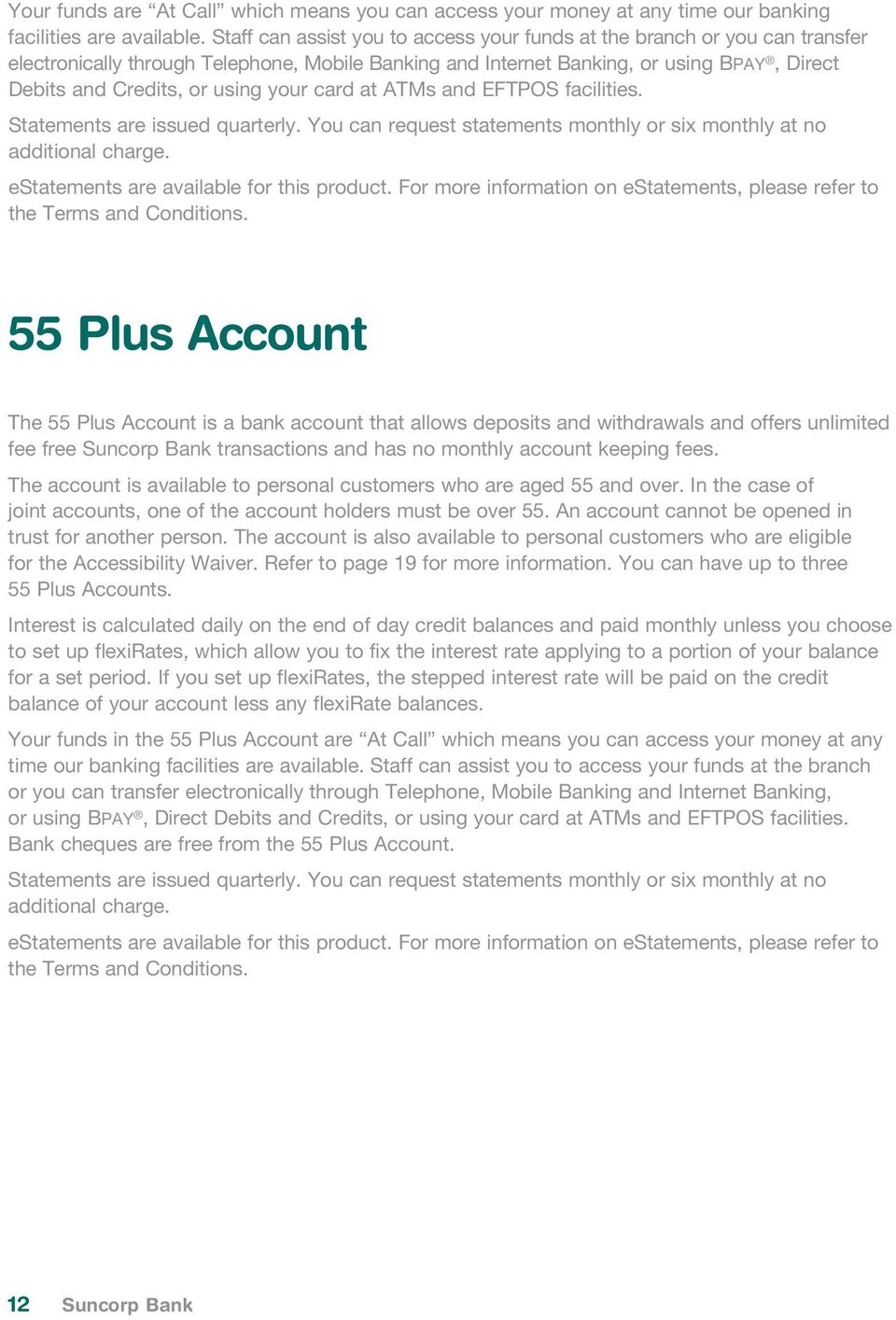
12 Your funds are At Call which means you can access your money at any time our banking facilities are available. Staff can assist you to access your funds at the branch or you can transfer electronically through Telephone, Mobile Banking and Internet Banking, or using BPAY, Direct Debits and Credits, or using your card at ATMs and EFTPOS facilities. Statements are issued quarterly. You can request statements monthly or six monthly at no additional charge. estatements are available for this product. For more information on estatements, please refer to the Terms and Conditions. 55 Plus Account The 55 Plus Account is a bank account that allows deposits and withdrawals and offers unlimited fee free Suncorp Bank transactions and has no monthly account keeping fees. The account is available to personal customers who are aged 55 and over. In the case of joint accounts, one of the account holders must be over 55. An account cannot be opened in trust for another person. The account is also available to personal customers who are eligible for the Accessibility Waiver. Refer to page 19 for more information. You can have up to three 55 Plus Accounts. Interest is calculated daily on the end of day credit balances and paid monthly unless you choose to set up flexirates, which allow you to fix the interest rate applying to a portion of your balance for a set period. If you set up flexirates, the stepped interest rate will be paid on the credit balance of your account less any flexirate balances. Your funds in the 55 Plus Account are At Call which means you can access your money at any time our banking facilities are available. Staff can assist you to access your funds at the branch or you can transfer electronically through Telephone, Mobile Banking and Internet Banking, or using BPAY, Direct Debits and Credits, or using your card at ATMs and EFTPOS facilities. Bank cheques are free from the 55 Plus Account. Statements are issued quarterly. You can request statements monthly or six monthly at no additional charge. estatements are available for this product. For more information on estatements, please refer to the Terms and Conditions. 12 Suncorp Bank
13 flexirates flexirates allow you to fix the interest rate applying to a portion of your balance for a set period of time. flexirate interest is calculated daily and paid when the flexirate period ends. Interest How is flexirate interest calculated? whole of flexirate Balance 1 When is flexirate interest calculated? daily When is flexirate interest paid? flexirate end date 1. Refer to page 15 for full details of How is Interest Calculated? flexirates can only be setup and managed via Suncorp Internet Banking and the Suncorp Bank Mobile Banking App. To setup a flexirate, you nominate the amount you wish to fix, and select a period of time and interest rate from the available options. You can have up to $1 million dollars in a flexirate and there is no minimum amount you need to take advantage of a flexirate. Once setup, you cannot access funds in a flexirate until it is released. flexirate funds remain in your account, but your available balance is reduced by the total amount of your flexirate funds. You will be able to access your flexirate funds the day following your nominated end date. Alternatively, you may choose to automatically renew your flexirate for the same period, subject to this option being available in Internet Banking and the Mobile Banking App for your chosen flexirate period. This option will automatically renew your flexirate for an identical period when your nominated end date is reached. The interest rate you will receive will be the current rate for the applicable flexirate period when the flexirate renews. You can change your renewal instructions via Internet Banking at any time before 7pm EST on the day your flexirate is due to end, subject to system availability. You can have up to fifteen flexirates on an account at any one point in time. All current flexirates will show on your account statement, along with the applicable start and end dates, balances and interest rates. Personal Deposit Accounts 13

14 Early Release of flexirates Subject to our agreement, early release allows you to end your flexirate period before the end date you nominated, enabling you to access your funds. You cannot release a portion of your flexirate balance you can only release the entire flexirate balance. As flexirate interest is calculated for a fixed term, there is an interest adjustment that occurs if the flexirate is released early. You will lose a proportion of the interest earned to the date you release your flexirate. The interest adjustment is made according to the proportion of the term completed as outlined in the table below. The interest adjustment specified in the table is the percentage of the interest earned to date that you will lose in the event we agree to you releasing your flexirate early. The amount of the interest adjustment applied will depend on how early in the term you request to release your funds. The interest adjustment does not impact on your original flexirate balance. It simply reduces the amount of interest you will receive. Proportion of Your flexirate Period Completed Interest Adjustment 0% 25% 80% of the interest earned up to the early release date 26% 50% 60% of the interest earned up to the early release date 51% 75% 40% of the interest earned up to the early release date 76% 100% 20% of the interest earned up to the early release date Example: You have a flexirate of $1,000 invested for a period of 6 months (180 days) at 5.00% per annum. If you release the flexirate after 4 months (120 days), the proportion of the period completed is 67% (120/180 days x 100). From the table above, you can determine that the interest adjustment is 40% of the interest earned to date. Interest earned for 120 days = Principal x Interest Rate per day x Number of days = $1000 x 5.0 x 1 x = $16.44 Interest Adjustment = 40% of $16.44 = $6.58 Interest to be paid = $16.44 $6.58 = $ Suncorp Bank

15 General Information on Interest Current interest rates are not included in this document because they are subject to change. Current interest rates are available: by picking up our current Interest Rate Brochure from your nearest Suncorp Bank branch; or by calling us on ; or by visiting our website suncorpbank.com.au. Changes to the standard rate of interest (variable interest rate) are advertised in the national press on or before the date the interest rate is changed. You can request a change to the destination account for your credit interest on your Suncorp Bank Personal Deposit Accounts. Redirection of credit interest can only be to another Suncorp Bank account. If you choose to redirect your credit interest to a different account, please remember that the interest has been earned on the original account and must be declared by the owner/s of that account. Depending on your personal circumstances you may have to pay income tax on any interest earned. You should seek independent external taxation advice in this regard. How is Interest Calculated? A standard rate of interest (variable interest rate) is paid on the total of all the credit balances in your account, less any flexirate balances. Interest on Suncorp Bank Personal Deposit Accounts is calculated daily on the end of day balances, and paid into your account every month, quarter or six months depending on the product type. If you prefer you can request that no interest is accrued and paid on credit balances in your Everyday Options main account by contacting us. The method of calculating interest depends on the type of account. The different methods are: Whole of balance. Interest is paid on the whole of the credit balance in your account. For example, the Everyday Options Account pays interest on a whole of balance basis. flexirates apply to the nominated portion of your balance for a set period of time which is calculated daily and paid when the flexirate period ends. Whole of flexirates balance applies to the nominated portion of your balance for a set period of time which is calculated daily and paid when the flexirate period ends. Stepped. Interest is based on a number of set dollar ranges, each having an applicable standard interest rate. You are paid interest for that part of your account balance that falls within each range, at the rate applicable to that range. For example, the 55 Plus Account pays interest on a stepped basis. Tiered. Interest is based on a number of set dollar ranges, each having an applicable standard interest rate. When the credit balance exceeds set levels, the interest rate for that tier will apply to the whole account balance. For example, the Cash Management Account pays interest on a tiered basis. Personal Deposit Accounts 15
16 Bonus. Bonus interest is paid on the whole of the credit balance in the account depending on the value and/or number of deposits and withdrawals made during the month. For example, the the Kids Savings Account can pay bonus interest. How is Stepped or Tiered Interest Calculated? The information below provides an example of how stepped and tiered interest for an account with 3 interest tiers is calculated. $0 $1,999 X% $2,000 $24,999 Y% $25,000 + Z% With stepped interest, a customer with a credit balance in their account of $30,000 gets X% interest on the first $1,999 and Y% interest on the amount from $2,000 to $24,999 and Z% interest on the amount from $25,000 to $30,000. With tiered interest, a customer with a credit balance in their account of $30,000 gets Z% interest on the whole balance. Eligibility Suncorp Bank Personal Deposit Accounts can only be opened by individuals as personal customers for personal use. An account may be opened by two individuals as joint applicants. Some accounts are only available to eligible customers. Product Eligibility Kids Savings Account at least one of the account owners must be under the age of 18 Everyday Basics Account the account owners must be 12 years of age or older Everyday Essentials Account the account owners must be 12 years of age or older Everyday Options Account the account owners must be 12 years of age or older eoptions Account the account owners must be 12 years of age or older Cash Management Account the account owners must be 12 years of age or older 55 Plus Account at least one of the account owners must be 55 years of age or over 16 Suncorp Bank
17 Fees and Charges This section contains the Fees and Charges for the following products: Kids Savings Account Everyday Basics Account Everyday Essentials Account Everyday Options Account eoptions Account Cash Management Account 55 Plus Account Personal Deposit Accounts 17

18 Handy tips to save on fees Most Suncorp Bank Deposit Accounts provide an unlimited number of fee free Suncorp Bank transactions. Depending on the way you transact on your account, you may incur other fees. Avoiding bank fees could be easier than you think. The following information provides you with a few simple tips that can help you save on fees and help you get the most from your everyday banking with Suncorp Bank. Fee Payment Honour Fee Applies if we allow a transaction initiated by you to overdraw your account. For example, a personal cheque, Direct Debit payment, Visa debit transaction, in branch withdrawal, EFTPOS or ATM withdrawal etc. Dishonour Fee Cheque, Direct Debit Applies if there are insufficient or unavailable funds in your account to cover a personal cheque or Direct Debit payment and as a result the transaction is unsuccessful. Sweep Failure Fee Applies when a sweep fails due to there being insufficient or unavailable funds in your account for the sweep to occur. ATM Operator Fee Bank Cheque Fee Ways to save on fees Automatic Sweep Set up a Sweep (automatic transfer) between your accounts to maintain a minimum balance and reduce the risk of overdrawing your account or having your payment dishonoured. Sweeps prevent your account from overdrawing when a Direct Debit is made or a cheque is presented provided you have sufficient funds in your nominated account. This service is free for Everyday Options accounts. A fee may apply on other accounts. Telephone, Mobile Banking and Internet Banking Check and manage your account balances using the convenience of Telephone, Mobile Banking and Internet Banking. Suncorp Bank does not charge customers to use Telephone, Mobile Banking and Internet Banking. (A fee is charged for an Internet Banking Security Token). Balance Notification Use this Internet Banking feature to send an alert when your account balance falls below a nominated amount. Simply log onto Internet Banking and click on the view/set balance notification button to initiate your balance reminder. Telephone, Mobile Banking and Internet Banking Check and manage your account balances using the convenience of Telephone, Mobile Banking and Internet Banking. Suncorp Bank does not charge customers to use Telephone, Mobile Banking and Internet Banking. (A fee is charged for an Internet Banking Security Token). Balance Notification Use this Internet Banking feature to send an alert when your account balance falls below a nominated amount. Simply log onto Internet Banking and click on the view/set balance notification button to initiate your balance reminder. Suncorp and Bendigo Bank ATMs Use Suncorp and Bendigo Bank ATMs to make withdrawals and enquiries. Our extensive ATM network, which includes access to Bendigo Bank ATMs, is free to use for many Suncorp Bank transaction products. Cash out at point of sale Many retailers provide Cash out facilities at the point of sale which can save you time and money if you are not near a Suncorp or Bendigo Bank ATM. Withdraw extra cash when you press the savings, cheque or credit button on the EFTPOS terminal when making a purchase. If you have a Chip Enabled Visa Debit card and you press credit, you can get Cash out either when making a purchase, or without making a purchase if the merchant allows it. It s important to remember that the card must be inserted into the terminal and not swiped, and a PIN must be used as Cash out cannot be obtained with a signature External Transfer Transfer money from your Suncorp Bank account to an account at another financial institution. It s a simple alternative and fee free on most Suncorp Bank accounts. 18 Suncorp Bank

19 Fee Bank Cheque Fee (cont) Cash Withdrawal Fee Applies if you make a standalone cash withdrawal at an Australia Post outlet within Queensland. Statement Request Fee Transfer Failure Fee Applies if a transfer payment you have set up from your Suncorp Bank account to another account, fails due to insufficient or unavailable funds in your account. Refer to page 22 for details of these fees. Ways to save on fees Visa Debit and Visa Credit Make your purchases with a Visa Debit or Credit facility. It s cost effective and convenient. Plus you ll have access to Visa s 30 million acceptance locations around the world. (Overseas transactions may attract a fee). You can avoid this fee by combining your cash withdrawal with an EFTPOS payment. Telephone, Mobile Banking and Internet Banking Avoid the cost of copies of statements by accessing statement information through Telephone, Mobile Banking and Internet Banking free of charge, or download estatements directly through Internet Banking. Telephone, Mobile Banking and Internet Banking Check and manage your account balances using the convenience of Telephone, Mobile Banking and Internet Banking. Suncorp Bank does not charge customers to use Telephone, Mobile Banking and Internet Banking. (A fee is charged for an Internet Banking Security Token). Balance Notification Use this Internet Banking feature to send an alert when your account balance falls below a nominated amount. Simply log onto Internet Banking and click on the view/set balance notification button to initiate your balance reminder. Exemptions from Fees and Charges Relationship Waiver Eligibility Applies when the total balance of funds in your Suncorp Bank Personal Deposit Accounts and term deposits is $20,000 or more. In the last week of each month, we will add the value of the funds in your personal deposit accounts and term deposits (excluding credit card accounts, loan accounts and any home loan offset account or facilities) that you have on your own or share with someone else to determine if the total is $20,000 or more. Fees waived Account keeping fee payable during the next month. Applies to: Cash Management Account. Accessibility Waiver Eligibility Applies to customers with a permanent physical, intellectual disability or an impairment that restricts access to Suncorp Bank facilities. In certain circumstances an identification card may be required. To apply, visit a Suncorp Bank branch or call us on Fees waived Account keeping fee. Suncorp Bank transaction fees. ATM Operator fee. Applies to: Everyday Basics Account, Everyday Options Account, Everyday Essentials Account, Cash Management Account. Full Time Student Waiver Eligibility Applies to full time students 18 years or older. Identification card is required. Exemption expires 31 March each year and must be renewed by customer. Fees waived Account keeping fee. Applies to: Everyday Options Account. Personal Deposit Accounts 19

20 Account Fees Kids Savings Account Everyday Basics Account Everyday Essentials Account Monthly account keeping fee nil nil nil Suncorp Bank Transaction Fees Staff assisted withdrawals free free free Electronic withdrawals free free free Personal cheque withdrawals not available not available not available Deposits and Direct Credits free free free Non Suncorp Bank ATM withdrawals & enquiries (all states and territories) not available ATM Operator Fee ATM Operator Fee Bendigo Bank ATM withdrawals and enquiries not available free free withdrawals within Queensland 1 not available $2.30 free 1. Bank@Post withdrawal fees will be charged to your account at the time of withdrawal. Cash & Cheque deposits are free (limits apply). Refer to page 26 for full details. Suncorp Bank Transactions staff assisted withdrawals include withdrawals, transfers and BPAY undertaken with the assistance of a staff member at a Suncorp Bank branch. electronic withdrawals include withdrawals and transfers completed using automated Telephone Banking, Mobile Banking, Internet Banking, Suncorp Bank ATMs, Direct Debit, BPAY, EFTPOS. personal cheque withdrawals. How fees are charged Account keeping fees and transaction fees are debited to your account on the monthly anniversary of the opening date of your account. Special Requests, Replacements and Other Event Fees Fees apply for additional products and services and for international services and foreign currency transactions. Please refer to pages 22 & 23 for more information. 20 Suncorp Bank

21 Main Account Everyday Options Sub-account eoptions Account Cash Management Account 55 Plus Account $5.00 nil nil $5.00 nil free not available not available free free free free free free free free not available not available free free free free free free free ATM Operator Fee not available not available ATM Operator Fee ATM Operator Fee free not applicable not applicable free free $2.30 not available not available $2.30 $2.30 Personal Deposit Accounts 21
22 Special Requests, Replacements and Other Event Fees You can minimise a number of these fees by following our tips in the Handy tips to save on fees page at the start of this section. If you would like to know more about these fees, please refer to Important Terms Explained, Handy tips to save on fees or call us on Unless otherwise stated, fees are charged per item at the time the service is provided or the transaction or event occurs. Wherever practicable, we will advise you of the fee before you proceed with a special request Special Requests, Replacements and Other Event Fees Card replacement $12.00 Visa debit cards emergency overseas card replacement $50.00 Visa debit card cash advance at non-suncorp Bank Institutions $5.00 per $1000 advanced or part thereof Stop payment requests cheques and bank cheques $15.00 Bank cheques purchase (fee does not apply to 55+ Accounts) $8.00 Stop payment request - Direct Debit Nil Bank cheques replacement $25.00 Copy of personal or bank cheque $12.00 Special Answers Suncorp Bank cheques and cheques processed $15.00 via clearing system Special Answers hand delivered to another bank $50.00 Statement requests $3.00 Real Time Gross Settlements (RTGS) outward $35.00 Real Time Gross Settlements (RTGS) inward $2.50 Sweep Fees funds management, insufficient funds, sweep failure $1.50 (fee does not apply to Everyday Options Accounts) Dishonour Fee cheque, Direct Debit $40.00 Payment Honour Fee $40.00 Everyday Basics Account & 55 Plus Account Only Dishonour Fee Cheque, Direct Debit Payment Honour Fee $10.00 $10.00 Transfer Failure Fee $10.00 Internet Banking Security Token $20.00 Mortgage Offset Fee $75.00 Staff Assisted manual transfer (credit payment transferred to another bank) $10.00 per request Trace/recall of funds request cheque, electronic payment $30.00 Record Search/Copy Fee (cheques, records, voucher retrieval $70.00 per hour Request for Audit Certificate $30.00 Interest Certificate (previous financial year) per certificate issued $15.00 Coin Handling (Kids Savings Account excluded) 5% of total coin value 22 Suncorp Bank
23 Foreign Currency Fees Unless otherwise stated fees are charged per item at the time the service is provided or the transaction or event occurs. Foreign Currency Fees Foreign Currency Conversion Fee (Suncorp Bank Visa Debit Cards) (the exchange rate between the transaction currency and the billing currency used for processing foreign currency transactions is a wholesale market rate selected by VISA from within a range of wholesale rates in effect one day prior to the processing date plus the percentage that Suncorp Bank charges for the Foreign Currency Conversion Fee). Foreign Currency Bank Draft issue, trace request, stop payment Applies when you request us to: issue a foreign currency bank draft provide destination details of a payment you have made by bank draft, or place a stop payment on a bank draft we have issued to you. Foreign Currency Notes sold or purchased 3.0% of the converted Australian dollar transaction amount of any foreign currency transaction made or charged to your account. $20.00 $10.00 per order Cashing/Negotiating Non-Suncorp Bank Issued Foreign Currency $10.00 Travellers Cheques Issue & Reload of Multi Currency Cash Passport - Staff Assisted $15.00 Issue of Travellers Cheques 1% of AUD value per currency min $10.00 per currency max $ per currency Telegraphic Transfers sent staff assisted $30.00 Online Telegraphic Transfer sent via Global Payments $20.00 Telegraphic Transfers (staff assisted and via Global Payments) recall, amended, trace request. Dishonour Fee (Foreign Cheque/Travellers Cheques/Bill for Collection) Applies when a foreign currency cheque, bill for collection, draft or travellers cheque we have accepted from you is not paid (dishonoured) by the payer s bank. Generally, this is due to insufficient funds in the payer s account or a stop payment being placed on the cheque. Foreign Currency Cheque Deposit more than $10.00 $10.00 Bill for Collection foreign currency cheque or draft Applies when a foreign currency cheque or draft is sent for collection (payment) of proceeds where the cheque or draft is drawn on a bank other than the country of currency origin. Local Collection foreign currency drawn on Australian bank/agent Applies when a foreign currency cheque or draft is sent for collection (payment) of proceeds where the cheque or draft is drawn on an Australian bank or agent bank located in Australia. $30.00 plus other bank s costs $40.00 per cheque plus other bank s costs $40.00 plus other bank s costs $40.00 plus other bank s costs Personal Deposit Accounts 23
24 Government charges In the future various governments may impose taxes, fees, charges and duties on accounts and transactions to accounts. If this occurs, your account statement will show government taxes, fees, duties and charges as a separate item. Fees and Charges on Other Suncorp Bank Accounts The following are no longer available for new accounts: Everyday Options Unlimited Suncorp Transaction Plan; Everyday Options Electronic Transaction Plan; Everyday Options Staff Assisted Transaction Plan; Everyday Saver Accounts; Passbook Accounts; Investor Accounts; Home Loan Reducer Accounts or Ready Access Accounts. For details of the fees applicable to these accounts please visit a Suncorp Bank branch, call us on or visit our website suncorpbank.com.au for a copy of the Schedule of Fees & Charges for Other Suncorp Bank Accounts. 24 Suncorp Bank
25 Access To Your Account This section contains information regarding Payment Facilities that can be used in association with Suncorp Bank Personal Deposit Accounts Personal Deposit Accounts 25
26 Choosing your Access To apply for access you can either call us on or visit your local Suncorp Bank branch. Our staff will discuss with you what you require to access the facility and the application process. Access Limits To help protect you and your money from theft and fraud the following limits apply: the combined cash daily withdrawal limit for ATMs and EFTPOS cashout withdrawals is $1,000 per day per card; for Mobile Banking and Internet Banking, a combined daily limit of $5,000 will apply for external transfers, Business Payment credit files, BPAY transactions and funds transferred using other Suncorp Account transfer types unless we agree another amount with you. Suncorp Bank Mobile Banking App Transfers over $2000 will require a Security Token. For additional security, we can ask you to use an external transfer password or security access code. Funds transferred to any of your Suncorp Bank Accounts using My Account transfer type (whether you hold this account alone or with others) are not included. If any limit is exceeded, the transaction will be rejected. How can you Access your Account? The access methods listed below are not available for all accounts, please refer to the tables on pages 4 and 5 to see if an access method is available. Automatic Teller Machine (ATM) By using an ATM, you can withdraw or transfer money from your Suncorp Bank account 24 hours a day, 7 days a week (excluding outages for system maintenance) using your Personal Identification Number (PIN) together with your card. You can make a payment to a linked account (e.g. credit card) at a Suncorp Bank ATM using your card. Bendigo ATMs are free to access with your Suncorp Bank card if you would like to make withdrawals or enquiries. Bank@Post The Bank@Post service is designed for customers that live in remote locations where there is limited Suncorp Bank branch access. This service allows you to make deposits, withdraw cash and make EFTPOS purchases from your transaction account at Australia Post outlets. You need to have access to a Suncorp Bank Visa Debit Card or Suncorp Bank Cashcard in order to use this service. You will be able to make: cash deposits of up to $3000 per day cheque deposits of up to five per day withdrawals of up to $1000 cash per day 26 Suncorp Bank
27 Bpay Bpay allows you to pay bills (to billers who have a Bpay Biller number) over the telephone, in the branch, or via Mobile Banking App and Internet Banking by transferring money directly from your Suncorp Bank account. By using Bpay you can: pay your bills 24 hours a day, 7 days a week using Internet, Mobile Banking or Telephone Banking (excluding outages for system maintenance). Direct Credit Transfer A Direct Credit transfer facility allows you to automate a single payment or regular payments from your account. Direct Debit A Direct Debit facility is a debit you authorise for a Direct Debit user to make from your Suncorp Bank account. Electronic Funds Transfer at Point of Sale (EFTPOS) An EFTPOS facility allows you to make point of sale payments directly from your Suncorp Bank account without having to use cash. Internet Banking Internet Banking allows you to access your accounts and conduct a range of banking activities including making payments from a computer connected to the Internet (e.g. at your home or office) without having to visit a branch or ATM. If you are registered for Internet Banking you can: transfer money from your account immediately or schedule a future payment to an account held at Suncorp or another financial institution. A combined daily limit of $5,000 will apply for external transfers, Business Payment, BPAY transactions and funds transferred using other Suncorp Account transfer types, unless we agree another amount with you. Funds transferred to your Suncorp Bank Accounts using My Account transfer type (whether you hold this account alone or with others) will not be included in your daily limit; check your balances and conduct transfers or bill payments 24 hours a day 7 days a week (excluding outages for system Cheques A cheque facility is a payment facility that lets you ask Suncorp Bank to make a payment from an account using a cheque. The payee of the cheque usually has to wait for the cheque to be cleared before they can access the funds. By using a cheque you can: make payments of any amount as no limit applies to the amount of a cheque withdrawal, provided you have sufficient cleared funds in your account; make payments to anyone who will accept payment by cheque; stop payment of a cheque if it is lost or stolen before it is presented to us for payment; trace cheques to verify that a payment has been made. Personal Deposit Accounts 27
28 Telephone Banking Telephone Banking allows you to conduct a range of banking services over the telephone. You can only use Telephone Banking if you have a tone dialling telephone. Your telephone supplier can advise if your telephone is a tone dialling telephone. By using Telephone Banking you can choose: the self select banking service to conduct transfers or bill payments; or an operator-assisted service to make bill payments 24 hours a day, 7 days a week (excluding outages for system maintenance). Mobile Banking Mobile Banking allows you to access your account and conduct a range of banking activities from your mobile device either from our mobile website at m.suncorpbank.com.au or our Mobile Banking App available for ios & Android devices. You may be charged for data usage when using Mobile Banking by your mobile phone service provider. If you are registered for Internet Banking you can use your login details on Mobile Banking to; Check balances, view transaction history and view account details Setup transfers from your account with either immediate, future dated or recurring processing timing. Transfers can be setup between your own accounts ( My Account option ), other Suncorp accounts (i.e. a family member or business) and external accounts at another financial institution. A combined default daily limit of $5,000 will apply for external transfers, Business Payment, BPAY transactions and funds transferred using other Suncorp Account transfer types, unless we agree another amount with you. Mobile Banking App transfers over $2000 will require a Security Token. Funds transferred to your Suncorp Bank Accounts using My Account transfer type (whether you hold this account alone or with others) will not be included in your daily limit; Setup BPAY payments from your account with either immediate, future dated or recurring processing timing. Approve transfers and BPAY payments that require 2 or more parties to sign View and approve Business Payments Credit transactions View BPAY View bill summaries and download a PDF copy of the detailed bill Visa Debit Card What is a Visa Debit Card? A Visa Debit Card is a Visa card that can be attached to most Suncorp Bank Accounts. You can get instant access to available funds in your attached Suncorp Bank Account at ATM s throughout Australia and overseas (where the Visa logo is displayed) by using your Visa Debit Card and PIN. How do I use my Visa Debit Card? You can purchase goods and services using your Visa Debit Card and the payment is debited to your Suncorp Bank account. A Visa Debit Card allows you to purchase goods and services: at an outlet within Australia that has EFTPOS available, by either: selecting the savings or cheque button; selecting the credit button wherever Visa cards are accepted or making a contactless transaction at participating merchants if your card has Visa paywave functionality. 28 Suncorp Bank
29 by using a manual credit card sales voucher and ticking the Visa box; over the telephone or the Internet by providing the card number to the merchant; through your Visa Checkout Digital Wallet at selected merchants; at outlets overseas wherever Visa is accepted. Am I eligible for a Visa Debit Card? A Visa Debit Card will automatically be issued to you when meeting the following criteria: The account being linked to the Visa Debit Card is one of the following account types: Everyday Basics Account Everyday Essential Account Everyday Options Main Account Cash Management Account 55 Plus Account The signing rule on the account is any one to sign The cardholder is 16 years of age or over The account is not a Company/Organisation account Should you not be eligible for a Visa Debit Card and/or prefer not to have a Visa Debit Card then you can be issued with a Cashcard. For more information on a Cashcard please refer to Important Terms Explained within the Product Information Document. What is Verified by Visa Suncorp Bank automatically enrols all Visa Debit cardholders into the Suncorp Bank Verified by Visa (VbV) security service, free of charge. This service provides additional security when you use your Visa debit card to shop at participating VbV online stores (e.g. when you purchase a book online or a holiday). If VbV identifies that a transaction requires further verification, you will be sent a One-Time Passcode by SMS to the mobile phone number you have registered with us. You will need to enter the Passcode into the verification screen to finalise your purchase. If you do not have your mobile number registered with us, you may be provided with an alternative verification method or it may be necessary for you to contact the bank directly. Purchases that are not verified when required will not be authorised and you if you wish to proceed with the purchase you will need to contact us. Important information about using your Visa Debit Card If you use your Visa Debit card to make transactions over the Internet, please make sure that you tell us if you change your mobile number or other personal details such as address or phone number. With a Visa Debit Card when you are paying for goods and services by selecting the credit button at an EFTPOS terminal or providing the card number to a merchant over the telephone or the Internet, you ll be covered by Visa s Zero Liability policy meaning you are protected against unauthorised transactions. If your Visa Debit card has paywave functionality, you can make a Contactless Transaction for purchases less than $100 at merchants who have a Contactless Terminal without having to sign or enter a PIN. For purchases over $100, a PIN or signature is required. Personal Deposit Accounts 29
30 At some outlets you can obtain cash directly from your Suncorp Bank account (known as cash out ) by using your Chip Enabled Visa Debit card and PIN. Simply select the cheque, savings or credit button on the EFTPOS terminal. When you select credit, the card must be inserted into the terminal and not swiped. You may be liable for Visa transactions which cause your account to become overdrawn. As a result interest or fees may be charged to your account. If you have not used your card to access your account in the 6 months prior to its expiry date then, for security reasons, we may not send you a replacement card upon expiry. Visa Checkout Digital Wallet Visa Checkout is a digital wallet that allows you to store your major payment card information (including Visa, MasterCard and American Express) in one online account. This eliminates the need to enter your card information every time you make an online purchase at participating merchants. At the checkout stage, you simply login to your Visa Checkout account, choose the preferred payment card and click pay. Visa Checkout will process the transaction whilst shielding your full card details from the merchant. You no longer need to worry about your card data being at risk when you checkout with Visa Checkout. You can set up to receive customised alerts on all Visa cards linked to your Visa Checkout account. This alert service can help you to monitor your finances and quickly detect fraud or other suspicious activities. You can sign up for a Visa Checkout account through Internet Banking and there is no sign up fee. Other Services Funds Management Sweep A funds management sweep facility allows you to keep a certain balance in a primary account and transfer ( sweep ) excess available funds into a related account. A primary account is the account you nominate to have the excess funds transferred from. Insufficient Funds Sweep An insufficient funds sweep facility allows you to automatically transfer available funds into a nominated primary account from a related account if there are insufficient funds to cover a Direct Debit or personal cheque from your primary account. 30 Suncorp Bank
31 Risks & Safeguards There are a number of risks with using some payment facilities. The following information identifies some of these risks and makes suggestions on how you can avoid them happening to you. You should monitor your accounts and contact Suncorp Bank immediately if there are discrepancies. Risks: an unauthorised transaction occurs on your account; the same transaction is processed more than once; you make an error in setting up a Bpay, transfer, Direct Debit or Direct Credit; a cheque, transfer or Direct Debit fails or overdraws your account because of insufficient funds; your cheque book, cards, Internet Banking Security Token or secret codes are lost or stolen. Your secret codes include your PIN, telephone access code (TAC) Internet Banking password, Mobile Banking App password, Security token code, Customer ID and external transfer password (ETP). Safeguards: don t disclose your secret codes to anyone (orally or in writing). No one from the bank, the police, or a merchant should ask for your secret codes; when selecting secret codes don t use obvious codes such as: your date of birth; consecutive numbers; a series of the same number; a driver s licence number; an alphabetical code that is a recognisable part of your name. memorise your secret codes. Refer to the guidelines for recording secret codes in the Terms and Conditions for Suncorp Accounts, if you need to record your secret codes; cover the numeric PIN pad at the ATM or EFTPOS terminal with your other hand to ensure your PIN is not seen by anyone else; keep your card, cheque books and secret access codes safe. Notify Suncorp Bank immediately if you lose your card or cheque book or you suspect someone knows your secret codes; if you use Telephone, Mobile Banking or Internet Banking take care when entering details on biller codes, payment amounts, account details and check and confirm accuracy before finalising the transaction; when making a payment, record your receipt number on the bill and check against your next account statement; regularly check your account balance to prevent overdrawing; do not pre-sign cheques; don t let anyone swipe your card more than once without giving you a transaction cancelled receipt for all swipes except one; Personal Deposit Accounts 31
32 never access the Mobile Banking or Internet Banking site via an link. Suncorp Bank will never ask you to enter login details via s; maintain up to date virus protection and firewall software on your computer; avoid using Telephone Banking at places which record dialled numbers such as hotels. Instead, use a Suncorp Bank customer service operator to get access; do not pre-program your telephone with account access details i.e. TAC and account number and if you use your Mobile Banking for Telephone Banking, regularly delete recently dialled numbers. Important Terms Explained Some terms used in this Product Features document are defined and explained below and in the Terms and Conditions for Suncorp Accounts. Please refer to the Terms and Conditions for Suncorp Accounts for the relevant definition if the term is not defined below. Where a term used in this document is defined in this document and the Terms and Conditions for Suncorp Accounts, the definition below will apply in relation to the use of the term in this document. In this document, unless the context indicates otherwise, the following terms have the following meanings irrespective on whether or not the first letters of those words are in upper or lower case. In this document singular includes the plural and vice versa. Term account At Call ATM Direct Charging ATM Operator Fee Bank@Post BECS Bendigo Bank ATM enquiry Bendigo Bank ATM withdrawal Meaning any savings account, term deposit or cheque or card account as specified in the Terms and Conditions for Suncorp Accounts. deposits and withdrawals can be made at any time to the bank account. a form of charging for Non-Suncorp or Non-Bendigo / Foreign ATM transactions where an ATM owner / operator and perhaps the card issuer charge the cardholder directly for using a foreign ATM. For example, as a Suncorp Bank customer, if you use another Bank s ATM, then the other bank will charge you for using their ATM. the fee charged for using a Non-Suncorp or Non-Bendigo / Foreign ATM for Withdrawals and Balance Enquiries. This fee is displayed on the ATM screen before you proceed with a transaction and you are prompted to either accept the fee and proceed or cancel the transaction. The ATM Operator Fee may vary depending on the ATM used and is charged to your account immediately. Bank@Post allows you to make deposits, withdraw cash and make EFTPOS purchases from your transaction account at Australia Post outlets the Bulk Electronic Clearing System. This system has the role of managing the conduct of the exchange and settlement of bulk electronic low value transactions. It provides a framework to cover large volumes of individual payments which are batched for delivery between financial institutions. when you use a Bendigo Bank branded ATM to receive balance information on your account. This requires you to input your PIN and to nominate the account you wish to receive an account balance on. when you withdraw money from a Bendigo Bank branded ATM using your card. This requires you to input your PIN and to nominate the account from which you wish to withdraw the funds. 32 Suncorp Bank
33 Term Bpay Cashcard cheque Chip Enabled Visa Debit card Contactless Terminal Contactless Transaction copy of personal or bank cheque Direct Credit Direct Debit EFTPOS eligible Suncorp Bank home loan Electronic withdrawal end-of-day estatement external transfers flexirate Foreign ATM Global Payments interest rate brochure non-suncorp Bank ATM non-suncorp Bank ATM enquiry Meaning Bpay allows you to pay bills (to billers who have a Bpay Biller number) over the telephone or via the Internet by transferring money (making payments) directly from your Suncorp Bank account. Bpay Ltd ABN a card which is linked to an eligible Transaction Account that can be used at locations bearing the EFTPOS logo. A Cashcard is available when you don t meet the criteria for a Visa Debit Card and/or prefer not to have a Visa Debit Card. a written order to us on our cheque form to pay a certain amount of money from your account. a Visa Debit card that has an embedded security microchip a Terminal which can be used to make a Contactless Transaction. a transaction made by holding your Card (which is capable of making a Contactless Transaction) in front of a Contactless Terminal. as the owner of a Suncorp Bank cheque, you can ask us to provide you with a copy of it. an electronic payment made to your account. An example of a Direct Credit is when an employer pays wages into an account electronically. a transaction you authorise in agreement with external Direct Debit users. An example of a Direct Debit user is a health insurance provider deducting monthly payments from your Suncorp Bank account. a fund transfer authorised by you or initiated by you giving instruction through electronic equipment to debit or credit your account. An example of an EFTPOS transaction is a purchase of goods from a retailer using your card. An EFTPOS transaction requires you to input your PIN and to nominate the account from which you wish the funds to be transferred to make the purchase. a Suncorp Bank home loan that we specify can be linked to an Everyday Options Account/s with a 100% home loan offset facility. Includes withdrawals and transfers completed using automated Telephone Banking, Mobile Banking, Internet Banking, Suncorp Bank ATMs, Direct Debit, Bpay, EFTPOS. midnight Brisbane time at the end of the relevant day. online version of paper statements which are viewed through Internet Banking electronic funds transactions (Internet and staff assisted) that you initiate from a Suncorp Bank account to an account at another financial institution that participates in BECS. flexirates allow you to fix the interest rate applying to a portion of your balance for a set period of time. Another Financial Institutions ATM also called a Non-Suncorp Bank ATM. is the system that processes Online Telegraphic Transfers via Internet Banking. the document we publish setting out the interest rates applicable to Suncorp Bank accounts. Another Financial Institutions ATM also called a Foreign ATM. when you use a non-suncorp Bank branded ATM (e.g. ANZ or Westpac) to receive balance information on your account. This requires you to input your PIN and to nominate the account you wish to receive an account balance on. Personal Deposit Accounts 33
34 Term non-suncorp Bank ATM withdrawal Online Telegraphic Transfer personal customer personal deposit account record search/ copy request cheques, records, voucher retrieval RTGS Meaning when you withdraw money from a non-suncorp Bank branded ATM (e.g. ANZ or Westpac) using your card. This requires you to input your PIN and to nominate the account from which you wish to withdraw the funds. is a Telegraphic Transfer sent via Global Payments. a customer who uses a product for personal purposes. Suncorp Bank Kids Savings Account, Everyday Basics Account, Everyday Options Account, eoptions Account, Cash Management Account and 55 Plus Account. you can ask us to provide a copy of a document you have previously given us. For example, a deposit slip, withdrawal slip, transfer slip, account authority form, etc. Real Time Gross Settlements. RTGS means the settlement system established and operated by the Reserve Bank of Australia for Real Time Gross Settlement. a small electronic device which generates a security token code. include withdrawals, transfers and Bpay undertaken with the assistance of a Suncorp Bank staff member at a Suncorp Bank branch. security token Staff assisted withdrawals standard rate the annual interest rates that we publish that apply to personal deposit accounts. of interest Suncorp Bank Suncorp-Metway Ltd ABN Suncorp Bank ATM withdrawal Suncorp Bank customer sweep funds management, insufficient funds Telegraphic Transfer trace/recall of funds request cheque, electronic payment Transaction card Visa Checkout Visa Debit Card Visa Debit cash advance when you withdraw money from a Suncorp Bank branded ATM using your transaction card. This requires you to input your PIN and to nominate the account you wish to withdraw the funds from. a person who holds an account with Suncorp Bank. a sweep is an automatic transfer of available funds between your accounts to either prevent the account overdrawing or to maintain a balance specified by you in your account. means a funds transfer sent electronically to an overseas bank account held with an external financial institution. Destination details of a payment you have made by cheque, electronic transfer or Bpay from your account or attempt to recall a payment you have made by electronic transfer or Bpay. a Cashcard or Visa Debit Card which is linked to an eligible Transaction Account functionality offered by Visa to speed up online shopping by storing Card details in an online Wallet. a card bearing the Visa logo, which is linked to an eligible Transaction Account. The card can be used at any location bearing the Visa or EFTPOS logo. A Visa Debit Card is automatically issued when meeting the criteria for a Visa Debit Card a cash withdrawal using a Visa Debit card and selecting credit at an ATM which displays the Visa symbol. The customer will incur a cash advance fee for performing this transaction. Please refer to the Special Requests, Replacements and Other Event Fees section of this Product Information Document. 34 Suncorp Bank
35 Term Visa paywave we, our, us you, your Meaning functionality as part of a Visa Debit card that allows transactions to be made at participating merchants by holding your Card (which is capable of making a Contactless Transaction) in front of a Contactless Terminal. You do not have to sign or enter a PIN to complete the transaction if the purchase is for less than $100. Suncorp Bank. the person acquiring the product and/or making non-cash payments. Financial Claims Scheme The Financial Claims Scheme under the Banking Act 1959 applies to the deposit accounts you have with us. You may be entitled to a payment under the Financial Claims Scheme in some circumstances. Payments under the Financial Claims Scheme are subject to a limit for each customer. Information about the Financial Claim Scheme can be obtained from the APRA website at and the APRA hotline on Personal Deposit Accounts 35
36 Contact us for more information or to change your details: Call suncorpbank.com.au Mail to GPO Box 1453, Brisbane QLD 4001 Fax /03/15 A
Suncorp Wealth Cash Management Account Product Information Document
 Suncorp Wealth Cash Management Account Product Information Document This document contains information about the Suncorp Wealth Cash Management Account. This document must be read in conjunction with the
Schedule of Fees and Charges for other Suncorp Personal Accounts
 Schedule of Fees and Charges for other Suncorp Personal s Effective Date: 22 November 2014 The following are no longer available for new accounts or for account changes. Fee description Monthly account
Suncorp Bank Business Accounts Product Information Document
 Suncorp Bank Business Accounts Product Information Document This document contains information on Suncorp Bank Business Accounts: Business Everyday Accounts, Business Premium Accounts, Business Saver Accounts,
Lending Fees & Charges
 Lending Fees & Charges Effective Date: 1 July 2015 All credit fees and charges to any credit facilities regulated by the National Credit Code will be set out in the financial table of your credit contract.
Suncorp Wealth Cash Management Account. Product Information Document
 Suncorp Wealth Cash Management Account Product Information Document This document contains information about the Suncorp Wealth Cash Management Account. This document must be read in conjunction with the
Schedule of Fees and Charges for other Suncorp Business Accounts
 Schedule of Fees and Charges for other Suncorp s Effective Date: 22 November 2014 The following are no longer available for new accounts or for account changes. Fee description Monthly account keeping
Lending Fees and Charges for Other Suncorp Bank Home Loans and Packages
 Lending Fees and Charges for Other Suncorp Bank Home Loans and Packages Effective Date: 22 November 2014 The following home loans are no longer available for new loans. Fee or Charge Description Professional
Lending Fees and Charges. Effective from 20 May 2016
 Lending Fees and Charges Effective from 20 May 2016 2 Suncorp Bank About this brochure These fees and charges are applicable at the time of printing and are subject to change. We recommend you confirm
Lending Fees and Charges. Effective from 20 July 2015.
 Lending Fees and Charges Effective from 20 July 2015. About this brochure These fees and charges are applicable at the time of printing and are subject to change. We recommend you confirm that you have
Fees & Charges Deposit Accounts
 Fees & Charges Deposit s Effective Date 6 October 2014 Section A Section B Section C Section D Section E Section F Personal Fees & Charges Business Fees & Charges Other Fees & Charges Government Fees &
RURAL BANK SCHEDULE OF FEES AND CHARGES. Effective date: 1 November 2015
 RURAL BANK SCHEDULE OF FEES AND CHARGES Effective date: 1 November 2015 Rural Bank Schedule of Fees and Charges This booklet forms part of the Rural Bank Accounts Terms and Conditions for the following
Fees & Charges. Effective 1 July 2015
 Effective 1 July 2015 Contains for Personal Transaction and Savings Accounts, Term Investment Accounts, Business Transaction and Savings Accounts, Loans and Access Facilities (including EFT Access Facilities).
SCHEDULE OF FEES AND CHARGES. Effective date: 1 November 2015
 SCHEDULE OF FEES AND CHARGES Effective date: 1 November 2015 Contents This booklet forms part of the Banking s Terms and Conditions for the following products: Everyday Everyday Retirement Gold Cash Management
SUPPLEMENTARY SCHEDULE OF FEES ACCOUNTS AND ACCESS FACILITIES
 Credit Union Australia Limited (ABN 44 087 650 959) SUPPLEMENTARY SCHEDULE OF FEES ACCOUNTS AND ACCESS FACILITIES Prepared 7 January 2016 At CUA, we regularly review our fees to ensure we remain competitive
Personal Banking. Guide to Fees and Charges. July 2015
 Personal Banking Guide to Fees and Charges This booklet forms part of the Terms and Conditions for Deposit Products and the Supplementary Terms and Conditions for Personal Lending and Electronic Banking
QTMB Fees and Charges. Prepared and effective on 13 January 2014
 QTMB Fees and Charges Prepared and effective on 13 January 2014 Introduction At QTMB, you can have as many accounts as you like under the one membership, with the benefits of one statement, one membership
Savings & Investment Accounts. Terms & Conditions Part B: Account & Service Charges
 Savings & Investment Accounts Terms & Conditions Part B: Account & Service Charges 19 October 2015 01 This is Part B of Delphi Bank s Terms and Conditions ( Terms and Conditions ) for Savings and Investment
Online Savings Account Key Features Statement
 Online Savings Account Online Savings Account Key Features Statement newcastlepermanent.com.au Newcastle Permanent Building Society Ltd ACN 087 651 992 Australian Financial Services Licence / Australian
Fees and Charges Schedule
 Fees and Charges Schedule Page 1 Bananacoast Community Credit Union Ltd ABN: 50 087 649 750 AFSL: 241077 Australian Credit Licence Number 241077 Contents Section 1: Our s and charges... 6 Notification
Phone and Internet Banking. Keeping you in touch with your money
 Phone and Internet Banking Keeping you in touch with your money Easy access, flexible banking by phone and internet At Suncorp Bank we offer easy to access Phone, Mobile Phone and Internet Banking, 24
Deposit accounts for personal customers
 Deposit accounts for personal customers (no longer available for sale) Terms and conditions Effective as at 24 October 2014 1 Terms and Conditions This booklet sets out the Terms and Conditions of your
Deposit Accounts for Business Customers. (No longer available for sale) Terms and Conditions.
 Deposit Accounts for Business Customers. (No longer available for sale) Terms and Conditions. Effective as at 01 July 2015 1 Your Bank The advisory services and the banking products you ll find in this
Fees and charges. UniBank is a division of Teachers Mutual Bank Limited
 Fees and charges UniBank is a division of Teachers Mutual Bank Limited Teachers Mutual Bank Limited ABN 30 087 650 459 AFSL/Australian Credit Licence 238981 Contents Introduction 3 Transaction fees 4 Payment
Important Notice to Commonwealth Bank Customers
 Important Notice to Commonwealth Bank Customers Effective, 25 May 2015, the Transaction, Savings and Investment Accounts Terms and Conditions dated 12 March 2014 are amended as follows. Front page and
Deposit accounts for personal and self-managed superannuation fund customers. Terms and conditions
 Deposit accounts for personal and self-managed superannuation fund customers Terms and conditions Effective as at 3 February 2015 Terms and Conditions This booklet sets out the Terms and Conditions of
AMP Bank. Deposit Products Fees and Charges Guide
 Bank Deposit Products Fees and Charges Guide Effective date: 18 August 2014 This guide outlines the fees and charges for Bank deposit products. If you have any questions call Bank on 13 30 30 or speak
Transaction Accounts Fees and Charges
 Transaction Accounts Fees and Charges ANZ BUSINESS BANKING 28.08.2015 For ANZ Business Advantage Accounts, ANZ Business Extra Accounts, ANZ Business Classic Accounts (ii) ANZ Business Extra 50 Accounts
BankSA Transaction, Savings and Investment Accounts. Fees and Charges and how to minimise them.
 BankSA Transaction, Savings and Investment s. Fees and Charges and how to minimise them. Effective Date: 5 December 2015 Important Note: Information in this booklet is current as at the date of this booklet
Schedule of Fees and Charges
 Citibank Accounts Schedule of Fees and Charges Transaction and Savings Accounts Effective 3 March 2014 Schedule of Fees and Charges What is the Schedule of Fees and Charges? This Schedule of Fees and Charges
Guide to. 16-20 Barolin St, PO Box 1063 Bundaberg Queensland 4670
 Guide to Issued by Auswide Bank Ltd ABN 40 087 652 060/Australian Financial Services & Australian Credit Licence 239686 Effective from April 1 2015 P 1300 138 831 F 07 4152 3499 E [email protected]
AMP Bank. Home loan fees and charges guide
 AMP Bank Home loan fees and charges guide Effective date: 17 August 2015 This guide outlines the fees and charges for AMP Bank home loan accounts. For information on fees and charges for our deposit accounts
Fees and Charges Terms and Conditions Personal Bank Accounts Eff ective from March 8 2016 16-20 Barolin St, PO Box 1063
 Fees and Charges This document is part of the Terms and Conditions for ersonal Bank Accounts Issued by Auswide Bank Ltd ABN 40 087 652 060/Australian Financial Services & Australian Credit Licence 239686
Fees and Charges Terms and Conditions Personal Bank Accounts Eff ective from April 1 2015 16-20 Barolin St, PO Box 1063
 Fees and Charges This document is part of the Terms and Conditions for ersonal Bank Accounts Issued by Auswide Bank Ltd ABN 40 087 652 060/Australian Financial Services & Australian Credit Licence 239686
ANZ Personal Banking ACCOUNT FEES AND CHARGES
 ANZ Personal Banking ACCOUNT FEES AND CHARGES 23.02.2015 Thank you for banking with ANZ. We are proud of our products, and believe they are amongst the best in the industry. Many have received industry
At-Call Savings Accounts
 At-Call Savings Accounts Part 1 - At-Call Savings Accounts Product Disclosure Statement (Corporations Act (Cth) 2001) comprises of the following documents Part 1 - Product Disclosure Statement for all
Deposit Accounts for Business Customers
 Deposit Accounts for Business Customers Terms and Conditions. Effective as at 1 July 2015. This booklet contains information on the following Deposit Accounts for Business Customers Currently available
Personal financial services charges - your guide. including small business
 Personal financial services charges - your guide including small business 12 March 2014 Contents About this guide... 2 Important Information... 2 A: PRODUCT RELATED FEES AND CHARGES 1. Savings and Investment
Credit Card Conditions of Use. Credit Guide.
 Credit Card Conditions of Use Credit Guide. Effective Date: September 2015 This document contains the terms and conditions that apply to St.George Bank Business Visa Debit Card cardholders and to all transactions
fees and charges Transaction fees. Rates current as at 22 June 2015
 fees and charges Rates current as at 22 June 2015 These Fees and Charges are current from 22 June 2015 unless otherwise indicated. This Fees and Charges brochure is to be read with our Terms and Conditions
Business Vantage Visa Credit Card. Conditions of Use. Effective Date: 20 May 2016
 Business Vantage Visa Credit Card Conditions of Use 1 Effective Date: 20 May 2016 Business Vantage Visa Conditions of Use Bank of Melbourne This document does not contain all the terms of this agreement
Transactional and Savings Accounts. Combined Product Disclosure Statement and Financial Services Guide
 Transactional and Savings Accounts Combined Product Disclosure Statement and Financial Services Guide Transaction and Savings Accounts Combined Product Disclosure Statement and Financial Services Guide
Investment & Transaction Accounts
 Bankwest Investment & Transaction Accounts Terms and Conditions 25 May 2015 making banking easier Terms and Conditions These Terms and Conditions apply to all Investment and Transaction Accounts with us
Fees and Charges. www.homelend.net.au
 Fees and Charges The fees in this home loan fees and charges brochure may be applicable to HomeLend Home Line, HomeLend Term Loan and HomeLend 100% Offset Home Loan accounts. All information is correct
Personal deposit accounts.
 Papua New Guinea Personal deposit accounts. Features, fees and charges. Effective November 2009 2 Contents Personal accounts 4 Fees 4 Features 4 Transactional Fees 6 Standard banking product charges 8
Amplify Business of Conditions of Use
 Amplify Business Conditions Credit Card of Conditions of Use Effective: 25 September November 2015 2014 This document does not contain all the terms of this agreement or all of the information we are required
Guide to Heritage Credit Card Products
 Guide to Heritage Credit Card Products Effective 1 June 2015 Talk to us today. 2 Guide to Heritage Credit Card Products Contents Introduction... 8 Welcome to Heritage... 8 About this Guide... 8 We re here
Amplify Business Credit Card Conditions of Use.
 Amplify Business Credit Card Conditions of Use. Effective: September 2015 This document does not contain all the terms of this agreement or all of the information we are required to give you before the
Schedule of Fees, Charges and Transaction Account Rebates.
 Schedule of Fees, Charges and Transaction Account Rebates. Terms & Conditions. 20 August 2015 www.bendigobank.com.au Bendigo and Adelaide Bank Limited The Bendigo Centre Bendigo VIC 3550 Telephone 1300
ACCESSING YOUR MONEY OVERSEAS.
 ACCESSING YOUR MONEY OVERSEAS. ACCESSING YOUR MONEY, ANYTIME, ANYWHERE No matter where you re going, you ll need easy, secure access to your money. Travel Money Card A prepaid MasterCard that lets you
Credit Card Conditions of Use. Credit Guide.
 Credit Card Conditions of Use. Credit Guide. Effective Date: 20 May 2016 This document does not contain all the terms of this agreement or all of the information we are required by law to give you before
Fees & Charges. > Savings Accounts > Transaction Accounts > Investment Accounts > Business Accounts > Non-Cash Payment Facilities
 Hume Bank Limited ABN 85 051 868 556 AFSL & Australian Credit Licence No. 244248 Effective 1 January 2016 Fees & Charges > Savings Accounts > Transaction Accounts > Investment Accounts > Business Accounts
Bankwest. Account Access. Conditions of Use 19 May 2015. making banking easier
 Bankwest Account Access Conditions of Use 19 May 2015 making banking easier Product Disclosure Statement If you are opening a Bankwest-branded Investment and Transaction Account with us, or are applying
Essential Information. NAB Business Payments Card.
 Essential Information. NAB Business Payments Card. Contents Your NAB Business Payments Card Facility 3 How your card works 4 Your Facility Billing Account 4 Individual cards 5 Primary Cardholders 5 Other
Institutional Financial Services ( IFS ) and Corporate Product Disclosure Statement ( PDS ) Fees
 Institutional Financial Services ( IFS ) and Corporate Product Disclosure Statement ( PDS ) Fees Version: October 2008 This PDS is part 2 of 2 of the PDS for the following products: ANZ Corporate Transaction
Combined Conditions of Use and Credit Guide
 Combined Conditions of Use and Credit Guide Effective as at 9 November 2014 Introduction Your Credit Card Contract includes this Conditions of Use brochure, the letter which advises both your credit limit
St.George Transaction, Savings and Investment Accounts accounts no longer offered.
 Effective Date: 20 March 2013 St.George Transaction, Savings and Investment Accounts accounts no longer offered. Banking Services Terms and Conditions and General Information This booklet sets out terms
HSBC Visa Debit Card. Making the most of your card. HSBC Customer Service Centre. Go to hsbc.com.au/debit
 HSBC Customer Service Centre Go to hsbc.com.au/debit Call 1300 308 008 from Australia +61 2 9005 8131 from Overseas 24 hours a day, 7 days a week ^Visa Zero Liability subject to investigation of unauthorised
BNZ Advantage Credit Card Terms and Conditions.
 BNZ Advantage Credit Card Terms and Conditions. 1 May 2015 This document contains the terms and conditions that apply to BNZ Advantage credit card accounts operated by you, including the terms and conditions
Macquarie Credit Cards
 Macquarie Credit Cards Conditions Of Use EFFECTIVE NOVEMBER 2015 Important note: This booklet does not contain all the pre-contractual information we are required by law to give you before the agreement
Lite Transaction Account
 Lite Transaction Account Direct Option/Transaction Option Product Schedule bankwest.com.au NB: This Product Schedule is specific to the Lite Transaction Account and/or any facility made available with
Home Package Plus. Terms and Conditions
 Home Package Plus Terms and Conditions Effective Date: 30 October 2015 2 Suncorp Bank Table of Contents 1. About these terms and conditions...4 2. Definitions...4 3. Eligibility for Home Package Plus...5
Terms & Conditions Deposit Accounts
 Terms & Conditions Deposit Accounts Effective Date 6 October 2014 Contents Terms and Conditions 5 Definitions 5 Application of these Terms and Conditions 6 Specific Terms and Conditions Personal Savings
Retail Banking and Wealth Management Fees and Charges. with effect from 1 October 2013
 Retail Banking and Wealth Management Fees and Charges with effect from 1 October 2013 About this guide At HSBC we want to make it easy for you to know what fees and charges apply to the HSBC financial
Transactional and Savings Accounts. Combined Product Disclosure Statement and Financial Services Guide
 Transactional and Savings Accounts Combined Product Disclosure Statement and Financial Services Guide BOQ Specialist Transaction and Savings Accounts (with Overdraft) Combined Product Disclosure Statement
Fees we charge for consumer mortgage lending products
 s we charge for consumer mortgage lending products Effective July 2015 Section 1: Understanding fees and charges When we may charge fees The Commonwealth Bank charges fees for administering your account
Altitude Business Credit Cards
 Altitude Business Credit Cards Conditions of Use Effective 1 July 2014 Your Credit Card Contract includes this Conditions of Use brochure, the letter which advises your credit limit and the precontractual
ANZ Credit Cards CONDITIONS OF USE
 ANZ Credit Cards CONDITIONS OF USE EFFECTIVE 5 OCTOBER 2015 ANZ Credit Cards Conditions of Use These Conditions of Use (as amended from time to time) govern the use of your ANZ Visa card, ANZ Visa Gold
Fees and Charges Effective 17 April 2016
 Effective 17 April 2016 Contents Saving money on your banking...1 Everyday accounts...2 Savings accounts... 3 Term Deposits and Foreign Currency Term Deposits...4 ANZ Freedom Years Package... 4 ANZ Migrant
Conditions of Use and Credit Guide
 Conditions of Use and Credit Guide Important details about your Gem Visa Effective March 2014 The way to pay with 0% interest 6 reasons you ll be saying it s a gem Booklet no. Enjoy 6 months interest free
Business Transaction and Investment Accounts
 Business Transaction and Investment Accounts Terms and Conditions Everyday Business Account Business Management Account Business WebSavings Account Premier Investment Account Farm Management Deposit Accounts
Current Account Conditions and AccounT Information.
 Current Account Conditions and AccounT Information. If you open an account with us it will be with Yorkshire Building Society (trading as Norwich & Peterborough Building Society, Norwich & Peterborough
A guide to fees and charges
 A guide to fees and charges Personal banking fees Effective 22 January 2010 Contents Section 1 Section 2 Section 3 Section 4 Section 5 Transaction and Savings Accounts NAB Transaction and Savings Accounts
global currency card travel card save that could you money overseas smarts Proudly supported by Westpac
 global currency card a travel card save that could you money overseas smarts Proudly supported by Westpac Think local, shop global Introducing the Global Currency Card. It s the re-loadable prepaid Visa
CREDIT CARD. Our terms and conditions for. Your credit card
 CREDIT CARD Our terms and conditions for Your credit card 1 Introduction and Definitions 1.1 Scope These Terms and Conditions are a contract between you and BNZ. They apply to the use of your Card, including
BOQ Specialist Credit Card Conditions of Use
 BOQ Specialist Credit Card Conditions of Use Consumer Credit Only Effective 1 August 2014 IMPORTANT NOTE This document does not contain all the terms of your Credit Contract or all of the pre-contractual
SCHEDULE OF CHARGES HSBC PREMIER, HSBC ADVANCE AND PERSONAL BANKING
 SCHEDULE OF CHARGES HSBC PREMIER, HSBC ADVANCE AND PERSONAL BANKING New schedule of charges is effective 1 January 2015. Applicable to HSBC Bank Egypt only General Conditions: 1- The Bank reserves the
credit card Conditions of Use
 VISA credit card Conditions of Use EFFECTIVE FROM 20 MARCH 2013 a refreshing attitude to banking QUEENSLAND COUNTRY CREDIT UNION VISA CREDIT CARD 1 Contents 1. Introduction 3 2. Additional Cards 3 3. Application
ANZ EFTPOS card and ANZ Visa Debit card
 ANZ EFTPOS card and ANZ Visa Debit card Conditions of Use Where to find things in this document What you need to know about these Conditions of Use...1 How to contact us...1 A glossary of the terms we
Fees we charge for consumer mortgage lending products
 s we charge for consumer mortgage lending products Effective February 2016 Section 1: Understanding fees and charges When we may charge fees The Commonwealth Bank charges fees for administering your account
Investec Credit Card Conditions Of Use
 Investec Credit Card Conditions Of Use Consumer Credit Only Investec Bank (Australia) Limited Abn 55 071 292 594 Effective 1 March 2014 Specialist Bank IMPORTANT NOTE This document does not contain all
ANZ Saving & Transaction Products Product Disclosure Statement
 Containing terms and conditions for: > ANZ Access Advantage > ANZ Access Select > ANZ Access Basic > ANZ Access Deeming > ANZ Passbook Savings > ANZ Progress Saver > ANZ Premium Cash Management Account
Important changes to CUA s General Information, Terms & Conditions Accounts & Access Facilities
 Credit Union Australia Limited (ABN 44 087 650 959) Important changes to CUA s General Information, Terms & Conditions Accounts & Access Facilities New esaver Reward Account and removal of Cash Management
ANZ Commercial Card TERMS AND CONDITIONS 11.2015. ANZ Corporate Card ANZ Visa Purchasing Card ANZ Business One
 ANZ Commercial Card TERMS AND CONDITIONS 11.2015 ANZ Corporate Card ANZ Visa Purchasing Card ANZ Business One Containing Terms and Conditions for: Facility Terms and Conditions Electronic Banking Conditions
How To Get The Best Out Of Your Savings Account
 Important... Savings Accounts Payment Services & Term Deposit Accounts As at 16 April 2010 Supplementary Product Disclosure Statement This PDS is current from 16 April 2010 and includes this document,
Section 1: Introduction
 Contents Section 1: Introduction Section 1: Introduction... 2 Section 2: Fees and Charges... 3 1. Transaction, Savings and Investment Accounts... 3 1.1 Chinese Currency (CNY) Transaction Account... 3 1.2
ANZ PERSONAL BANKING
 ANZ PERSONAL BANKING ACCOUNT FEES AND CHARGES 01.07.2016 Thank you for banking with ANZ. We are proud of our products, and believe they are amongst the best in the industry. Many have received industry
Straight forward fine print. (you don't see that everyday)
 Straight forward fine print (you don't see that everyday) Orange Everyday Terms and Conditions Date: 15 January 2015 Do I really need to read this? Well done, you made it to the first page only 54 to go.