
Technical Configuration Notes
|
|
|
- Jeremy Augustus Morris
- 10 years ago
- Views:
Transcription
1 MITEL SIP CoE Technical Configuration Notes Configure MCD for use with OpenIP SIP Trunking service SIP CoE

2 NOTICE The information contained in this document is believed to be accurate in all respects but is not warranted by Mitel Networks Corporation (MITEL ). The information is subject to change without notice and should not be construed in any way as a commitment by Mitel or any of its affiliates or subsidiaries. Mitel and its affiliates and subsidiaries assume no responsibility for any errors or omissions in this document. Revisions of this document or new editions of it may be issued to incorporate such changes. No part of this document can be reproduced or transmitted in any form or by any means - electronic or mechanical - for any purpose without written permission from Mitel Networks Corporation. TRADEMARKS Mitel is a trademark of Mitel Networks Corporation. Windows and Microsoft are trademarks of Microsoft Corporation. Other product names mentioned in this document may be trademarks of their respective companies and are hereby acknowledged. Mitel Technical Configuration Notes Configure MCD for use with OpenIP SIP Trunking November 10, 2011, , Trademark of Mitel Networks Corporation Copyright 2011, Mitel Networks Corporation All rights reserved ii

3 Table of Contents OVERVIEW... 1 Interop History... 1 Interop Status... 1 Software & Hardware Setup... 1 Tested Features... 2 Device Limitations and Known Issues... 3 Network Topology... 4 CONFIGURATION NOTES ICP Configuration Notes... 5 Network Requirements... 5 Assumptions for the 3300ICP Programming... 5 Licensing and Option Selection SIP Licensing... 6 Class of Service Assignment... 7 Network Elements... 8 Network Element Assignment (Proxy)... 9 Trunk Attributes (trunk service number) SIP Peer Profile SIP Peer Profile Assignment by Incoming DID ARS Digit Modification Plan ARS Routes ARS Digits Dialed T.38 Fax Configuration Mitel Border Gateway Configuration Notes (Optional) iii

4

5 Overview This document provides a reference to Mitel Authorized Solutions providers for configuring the Mitel 3300ICP to connect to OpenIP. The different devices can be configured in various configurations depending on your VoIP solution. This document covers a basic setup with required option setup. Interop History Version Date Reason 1 October 13, 2011 Initial Interop with Mitel 3300ICP (MCD 5.0) and OpenIP SIP trunk Interop Status The Interop of OpenIP trunk line has been given a Certification status. This service provider or trunking device will be included in the SIP CoE Reference Guide. The status OpenIP trunk line achieved is: The most common certification which means OpenIP SIP trunk has been tested and/or validated by the Mitel SIP CoE team. Product support will provide all necessary support related to the interop, but issues unique or specific to the 3rd party will be referred to the 3rd party as appropriate. Software & Hardware Setup This was the test setup to generate a basic SIP call between Open IP trunk line and the 3300ICP. Manufacturer Variant Software Version Mitel 3300ICP MXe Mitel Minet sets: 5340, 5220, Mitel MBG - Teleworker Mitel MBG - Gateway Mitel NuPoint NuPoint voice mail server Asterisk Media Server V1.6 Asterisk/Audiocodes PSTN Gateway V1.6 Asterisk Session Border Controller V1.4 / V1.6

6 Tested Features This is an overview of the features tested during the Interop test cycle and not a detailed view of the test cases. Please see the SIP Trunk Side Interoperability Test Plans ( ) for detailed test cases. Basic Call Feature Feature Description Issues Automatic Call Distribution (ACD) NuPoint Voic Packetization Personal Ring Groups Teleworker Video Making and receiving a call through the OpenIP SIP trunk, call holding, transferring, conferencing, busy calls, long calls durations, variable codec. Making calls to an ACD environment with RAD treatments, Interflow and Overflow call scenarios and DTMF detection. Terminating calls to a NuPoint voic boxes and DTMF detection. Forcing the 3300ICP to stream RTP packets through its E2T card at different intervals, from 10ms to 60ms Receiving calls through OpenIP SIP trunk to a personal ring group. Also moving calls to/from the prime member and group members. Making and receiving a call through Open IP SIP trunk to and from Teleworker extensions. Making and receiving a call through OpenIP SIP trunk with video capable devices. T.38 Faxing Fax transmission with protocol T.38 - No issues found - Issues found, cannot recommend to use - Issues found 2

7 Device Limitations and Known Issues This is a list of problems or not supported features when the OpenIP SIP trunk is connected to Mitel 3300ICP. Feature Basic outbound calls to busy or out-of-service devices Basic outbound calls with incomplete numbers Reliable Provisional Responses Session Timer Codec support Packetization rate Problem Description When Mitel caller makes an outbound call to busy or out-of-service devices through the SIP trunk, the audible "busy/inaccessible" tone is heard almost immediately. However, the corresponding SIP message (486 or 503) arrives from OpenIP only after 30 or 40 seconds. Recommendation: Limited impact to users but could be an issue with applications relying on SIP messaging. Contact OpenIP for further details. When Mitel sends incomplete number to OpenIP, OpenIP firstly responds with ringing tone (for 15 sec). Then it switches to "busy" tone and finally, in 17 seconds, SIP message "503 Service Unavailable" arrives. The correct behavior would be: to send "busy" tone and SIP message "484" to Mitel immediately. Recommendation: Limited impact to users but could be an issue with applications relying on SIP messaging. Contact OpenIP for further details. Currently Reliable Provisional Responses (PRACK) is not supported over OpenIP s SIP trunk. Recommendation: Set Disable Reliable Provisional Responses to Yes in SIP Peer Profile Currently, Session timer is not supported by OpenIP SIP trunk (OpenIP responds with "501 Method Not Implemented"). On inbound calls to Mitel, when Session timer expired and Mitel 3300 sends UPDATE to Open IP Recommendation: In SIP Peer Profile, set Session Timer to 0. Currently, Open IP'SIP trunk supports only one codec - G.711. Recommendation: none. Contact OpenIP for further details. The SIP trunk fully supports only 20ms packets rate. Recommendation: keep packets rate of 20ms in 3300ICP and MBG. Video Video functionality is unavailable over the trunk. Recommendation: none T.38 faxing Fax transmission with protocol T.38 is not supported Recommendation: none

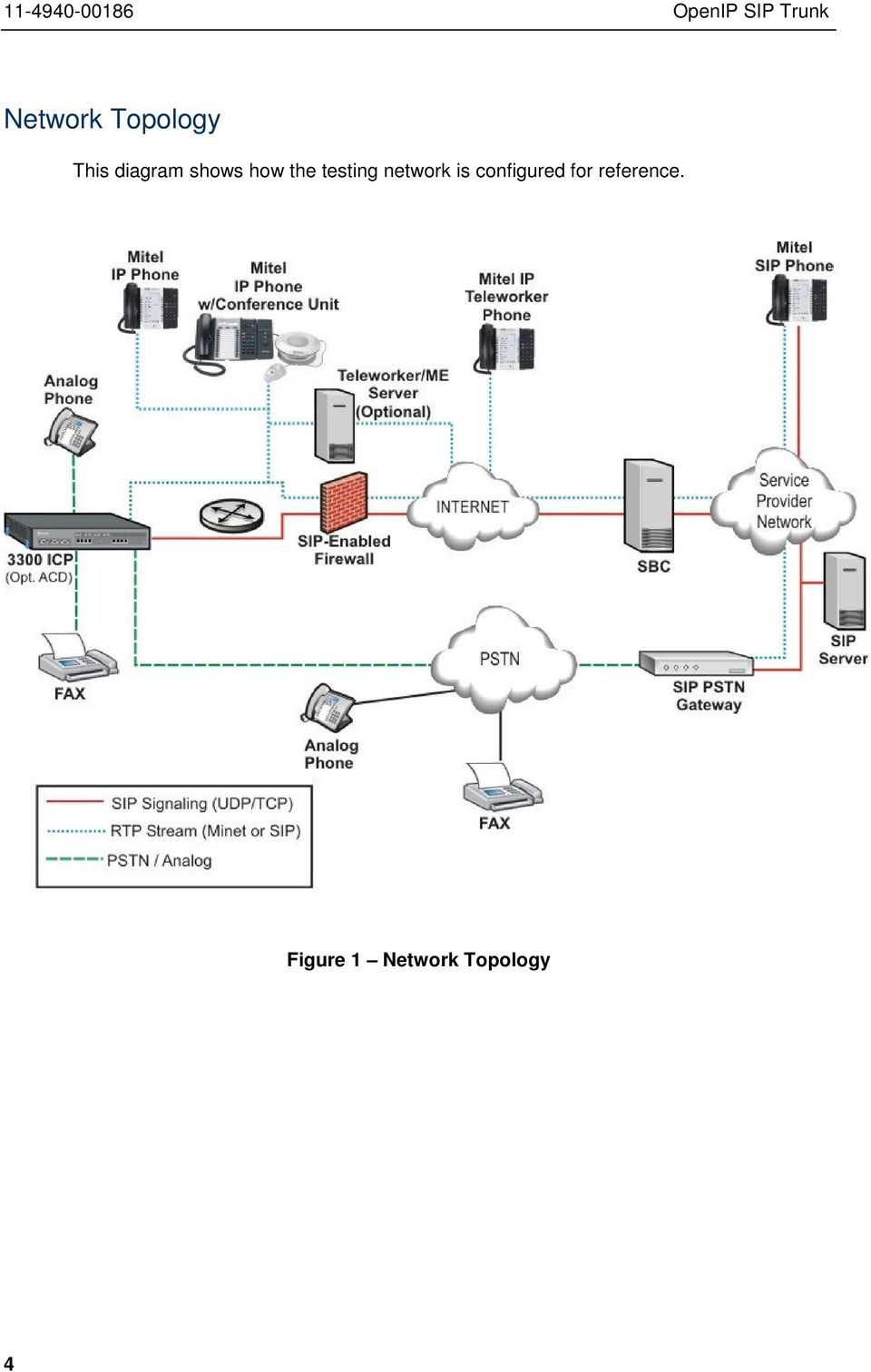
8 Network Topology This diagram shows how the testing network is configured for reference. Figure 1 Network Topology 4
9 Configuration Notes This section is a description of how the SIP Interop was configured. These notes should give a guideline how a device can be configured in a customer environment and how the 3300ICP programming was configured in our test environment. Disclaimer: Although Mitel has attempted to setup the interop testing facility as closely as possible to a customer premise environment, implementation setup could be different onsite. YOU MUST EXERCISE YOUR OWN DUE DILIGENCE IN REVIEWING, planning, implementing, and testing a customer configuration. 3300ICP Configuration Notes The following steps show how to program a 3300 MCD 5.0 to interconnect with the OpenIP. Network Requirements There must be adequate bandwidth to support the voice over IP. As a guide, the Ethernet bandwidth is approx 85 Kb/s per G.711 voice session and 29 Kb/s per G.729 voice session (assumes 20ms packetization). As an example, for 20 simultaneous SIP sessions, the Ethernet bandwidth consumption will be approx 1.7 Mb/s for G.711 and 0.6Mb/s. Almost all Enterprise LAN networks can support this level of traffic without any special engineering. Please refer to the 3300 Engineering guidelines for further information. For high quality voice, the network connectivity must support a voice-quality grade of service (packet loss <1%, jitter < 30ms, one-way delay < 80ms). Assumptions for the 3300ICP Programming The SIP signaling connection uses UDP on Port 5060.

10 Licensing and Option Selection SIP Licensing Ensure that the 3300ICP is equipped with enough SIP trunking licenses for the connection to the OpenIP. This can be verified within the License and Option Selection form. Enter the total number of licenses in the SIP Trunk Licences field. This is the maximum number of SIP trunk sessions that can be configured in the 3300 to be used with all service providers, applications and SIP trunking devices. Figure 2 License and Option Selection form 6

11 Class of Service Assignment The Class of Service Options Assignment form is used to create or edit a Class of Service and specify its options. Classes of Service, identified by Class of Service numbers, are referenced in the Trunk Attributes form for SIP trunks. Many different options may be required for your site deployment, but ensure that Public Network Access via DPNSS Class of Service Option is configured for all devices that make outgoing calls through the SIP trunks in the 3300ICP. Also, under General tab, ensure that the following options are enabled (see Figure 3): Busy Override Security (in Busy Override section) set to Yes Campon Tone Security/FAX Machine (in Fax section) set to Yes Public Network Access via DPNSS (in Trunk section) set to Yes Figure 3 Class of Service form

12 Network Elements Create a network element for a SIP Peer (Open_IP1) as shown in Figure 4. Since this SIP trunk has been authenticated by user name and password, the address of SIP Registrar must be configured in here. Set the transport to UDP and port to Figure 4 Network Element form 8

13 Network Element Assignment (Proxy) In addition, depending on your configuration, a Proxy may need to be configured to route SIP data to the service provider. If you have a Proxy server installed in your network, the 3300ICP will require knowledge of this by programming the Proxy as a network element then referencing this proxy in the SIP Peer Profile form (later in this document). Figure 5 Network Element (Proxy)

14 Trunk Attributes (trunk service number) The Trunk Attributes is defined for Trunk Service Number (32), which will be used to direct incoming calls to an answer point in the 3300ICP. Set the number of Class of Service that was configured in the section above (9). Program the Non-dial In Trunks Answer Point according to the site requirements and what type of service was ordered from your service provider. The figure below shows configuration for incoming DID calls. The 3300ICP will absorb the first 5 digits of the DID number received from the OpenIP SIP Trunk leaving 4 digits for the 3300 to translate and ring the 4-digit extension. For example, the OpenIP SIP Trunk delivers number to the The 3300 will absorb the first 5 digits (97-019) leaving the 3300 to ring extension Extension 0098 must be programmed as a valid dialable number in the 3300ICP. As an alternative way, you can create a System Speed Call number to associate number 0098 with the real telephone extension on 3300ICP. Please refer to the 3300 System Administration documentation for further programming information. Figure 6 Trunk Attributes (trunk service number) 10

15 SIP Peer Profile The recommended connectivity via SIP Trunking does not require additional physical interfaces. IP/Ethernet connectivity is the part of the 3300ICP platform. The SIP Peer Profile should be configured as shown in Figures Under Basic tab (Figure 7): Network Element: The selected SIP Peer Profile needs to be associated with previously created Open_IP1 Network Element. Registration User Name: Enter the registration name provided by OpenIP. Address Type: Select IP Address. Maximum Simultaneous Calls: This entry should be configured to maximum number of SIP trunks provided by OpenIP. Outbound Proxy Server: Select the Network Element previously configured for the Outbound Proxy Server ( MBGTrunk in our test environment). SMDR Tag: If Call Detail Records are required for SIP Trunking, the SMDR Tag should be configured (by default there is no SMDR and this field is left blank). Trunk Service: Enter the trunk service number that was previously configured 32 in this configuration. Authentication Options: Enter the username and password provided by OpenIP. Under Call Routing tab (Figure 8): Leave the default settings intact, as shown. Under Calling Line ID tab (Figure 9): The Default CPN (Calling Party Number) is applied to all outgoing calls unless there is a match in the "Outgoing DID Ranges" of the SIP Peer Profile. You can use the one of DID numbers assigned on the trunk by the provider. If you leave this field blank, the name of anonymous is presented to PSTN callers. CPN Restriction: Set it to No unless you want/need to hide Callers ID from PSTN users. When it is set to Yes, the call will be presented as coming from [email protected].

16 Figure 7 SIP Peer Profile form Under SDP Options tab (Figure 10): Currently (October 2011) video streams are not supported over OpenIP SIP trunk. Set option Allow Peer to Use Multiple Active M-Lines to No. Ensure that RTP Packetization Rate is set to 20ms (OpenIP does not fully support any other rates). 12

17 Figure 8 SIP Peer Profile form (continues) Figure 9 SIP Peer Profile form (continues)

18 Under Signaling and Header Manipulation tab (Figure 11): Since Reliable Provisional Responses are not supported over OpenIP s SIP trunk, we recommend setting Disable Reliable Provisional Responses to Yes. Figure 10 SIP Peer Profile form (continues) 14

19 Figure 11 SIP Peer Profile form (continues) Under Timers tab (Figure 12): Currently (October 2011) OpenIP s SIP trunk does not support Session Timer. On Mitel s inbound calls, when 3300ICP sends UPDATE to OpenIP, the call is being interrupted at OpenIP'side with message "501 Method Not Implemented". So, we recommend setting Session Timer to 0. For Key Press Event and Profile Information tabs, leave the default settings intact. Click Save button (see Figure 12) when SIP Peer Profile configuration is completed.

20 Figure 12 SIP Peer Profile form (continues) 16

21 SIP Peer Profile Assignment by Incoming DID This form is used to associate DID range numbers from OpenIP SIP trunk to a particular SIP Peer profile. The configured here settings help matching the incoming DID numbers with the SIP Peer Profile, especially when call is arriving from anonymous/unknown caller. Enter one or more telephone numbers. The maximum number of digits per telephone number is 26. You can enter a mix of ranges and single numbers (for example, " , "). The entire field width is limited to 60 characters. Use a comma to separate telephone numbers and ranges. Use a dash (-) to indicate a range of telephone numbers. The first and last characters cannot be a comma or a dash. If the numbers do not fit within the 60 characters maximum, you can create a new entry for the same profile. Use a '*'to reduce the number of entries that need to be programmed. This is a type of "prefix identifier", and cannot be used as a range with '-'. For example, the string "11*" would be used to associate a peer with any number in the range from 110 up to the maximum digits per telephone number (In this case, ) Note that the string "11" by itself would not count as a match, as the '*'represents 1 or more digits. Figure 13 SIP Peer Profile Assignment by Incoming DID
22 ARS Digit Modification Plan Ensure that Digit Modification for outgoing calls to OpenIP SIP Trunk absorbs or inject additional digits according to your dialling plan. In our test environment, we will be absorbing 3 digits (as of this test environment, we need to dial 905 to access OpenIP s SIP trunk; thus, digits 905 will be absorbed). Figure 14 ARS Digit Modification form 18
23 ARS Routes Create a route to OpenIP SIP Trunk. In this test environment, the SIP trunk is assigned to Route Number 44. Choose SIP Trunk as a routing medium and choose the SIP Peer Profile and ARS Digit Modification entry created earlier. Figure 15 SIP Trunk Route assignment
24 ARS Digits Dialed ARS initiates the routing of trunk calls when certain digits are dialed from an extension. In this test environment, when a user dials 905, the call will be routed to OpenIP s SIP Trunk (i.e. Route 44). For local calling, 3300 ICP expects 10 digits to be dialed after dialing of 905. Figure 16 ARS Digit Dialed Assignment Optionally, you can add another ARS for international dialing. As in example in Figure 17, 3300 ICP expects 11 digits to be dialed after dialing of to call to North America. 20
25 Figure 17 ARS Digit Dialed Assignment (International dialing. Optional) Using ARS Digits Dialed form, add more numbers to dial for emergency or special services.
26 T.38 Fax Configuration Currently T.38 faxing over OpenIP s SIP trunk is not supported. 22
27 Mitel Border Gateway Configuration Notes (Optional) When configuring Mitel Border Gateway (MBG), you need to identify the working 3300 ICP where to forward SIP messages to and then to configure the SIP trunk. To do this: Login to MBG and click Mitel Border Gateway In right pane, click Configuration tab and then ICPs (see Figure 18 for details) Figure 18 MBG s Configuration page On ICPs page, ensure that the working 3300ICP is configured. If needed, click Add ICP link and add a new Mitel switch. Click Update button To add a new SIP trunk: Click Services tab and then click SIP trunking Click Add a SIP trunk link (see Figure 19)
28 Figure 19 SIP trunking configuration page Enter the SIP trunk s details as shown in Figure 20: Name is the name of the trunk Remote trunk endpoint address the public IP address of the provider s switch or gateway (this address should be given to you by the provider, e.g. OpenIP). Local/Remote RTP framesize (ms) is the packetization rate you want to set on this trunk Disable PRACK Disabling of Reliable Provisional Responses since this feature is not supported by OpenIP. Routing rule one it allows routing of any digits to the selected Mitel 3300ICP The rest of the settings are optional and could be configured if required. Click Save button 24
29 Figure 20 SIP Trunk configuration settings
30 26
MITEL SIP CoE. Technical. Configuration Notes. Configure MCD 6.X for use with babytel SIP trunks. SIP CoE 13-4940-00266
 MITEL SIP CoE Technical Configuration Notes Configure MCD 6.X for use with babytel SIP trunks SIP CoE 13-4940-00266 NOTICE The information contained in this document is believed to be accurate in all respects
MITEL SIP CoE. Technical. Configuration Notes. Configure MCD 4.1 for use with SKYPE SIP Trunking. SIP CoE 10-4940-00120
 MITEL SIP CoE Technical Configuration Notes Configure MCD 4.1 for use with SKYPE SIP Trunking SIP CoE 10-4940-00120 NOTICE The information contained in this document is believed to be accurate in all respects
MITEL SIP CoE Technical. Configuration Note. Configure MCD for use with Thinktel SIP Trunking Service. SIP CoE 12-4940-00197
 MITEL SIP CoE Technical Configuration Note Configure MCD for use with SIP Trunking Service SIP CoE NOTICE The information contained in this document is believed to be accurate in all respects but is not
MITEL SIP CoE. Technical. Configuration Notes. Configure the Mitel 3300 MCD 4.1 for use with Paetec Broadworks Softswitch. SIP CoE 08-4940-00035
 MITEL SIP CoE Technical Configuration Notes Configure the Mitel 3300 MCD 4.1 for use with Broadworks Softswitch SIP CoE 08-4940-00035 NOTICE The information contained in this document is believed to be
MITEL SIP CoE. Technical. Configuration Note. Configure MCD for use with Intelepeer Service provider SIP Trunking. SIP CoE 14-4940-00313
 MITEL SIP CoE Technical Configuration Note Configure MCD for use with Intelepeer Service provider SIP Trunking SIP CoE 14-4940-00313 NOTICE The information contained in this document is believed to be
Technical Configuration Notes
 MITEL SIPCoE Technical Configuration Notes Configure Mitel UC360 SIP Phone and Mitel MCD for use with VidyoWay SIP CoE 13-4940-00228 NOTICE The information contained in this document is believed to be
MITEL SIP CoE. Technical. Configuration Notes. Configure MCD 4.1 SP1 for use with the Lyrix Speech Enabled Auto Attendant
 MITEL SIP CoE Technical Configuration Notes Configure MCD 4.1 SP1 for use with the Lyrix Speech Enabled Auto Attendant NOTICE The information contained in this document is believed to be accurate in all
Technical Configuration Notes
 MITEL SIPCoE Technical Configuration Notes Configure Inn-Phone SIP Phone for use with MCD SIP CoE NOTICE The information contained in this document is believed to be accurate in all respects but is not
Technical Configuration Notes
 MITEL SIPCoE Technical Configuration Notes Configure the MCD 6.0 for use with the Commend SIP Doorphone SIP CoE 13-4940-00251 NOTICE The information contained in this document is believed to be accurate
MITEL SIP CoE. Technical. Configuration Notes. Configure Ascom i62 phones for use with MiVoice Office. SIP CoE 14-4940-00310
 MITEL SIP CoE Technical Configuration Notes Configure Ascom i62 phones for use with MiVoice Office SIP CoE 14-4940-00310 NOTICE The information contained in this document is believed to be accurate in
Mitel- SIP CoE. Technical. Configuration Notes. How to Guide to Configure the Mitel 5000 CP 4.0 R24 for use with Integra Telecom
 Mitel- SIP CoE Technical Configuration Notes How to Guide to Configure the Mitel 5000 CP 4.0 R24 for use with Integra Telecom NOTICE The information contained in this document is believed to be accurate
Technical Configuration Notes
 MITEL SIP CoE Technical Configuration Notes Configure MiVoice Office 250 6.0 SP2 with MBG for use with Time Warner Cable Business Class SIP Trunking service MARCH 2015 SIP COE 15-4940-00364 TECHNICAL CONFIGURATION
SIP Trunking using the EdgeMarc Network Services Gateway and the Mitel 3300 ICP IP-PBX
 June 26th, 2014 SIP Trunking using the EdgeMarc Network Services Gateway and the Mitel 3300 ICP IP-PBX Page 1 of 30 Table of Contents 1 Overview... 3 2 Prerequisites... 3 3 Network Topology... 4 4 Description
Configuring Mitel 3300 for Spitfire SIP Trunks
 Configuring Mitel 3300 for Spitfire SIP Trunks This document is a guideline for configuring Spitfire SIP trunks onto Mitel 3300 and includes the settings required for Inbound DDI routing and Outbound CLI
Application Notes for Avaya IP Office 7.0 Integration with Skype Connect R2.0 Issue 1.0
 Avaya Solution & Interoperability Test Lab Application Notes for Avaya IP Office 7.0 Integration with Skype Connect R2.0 Issue 1.0 Abstract These Application Notes describe the steps to configure an Avaya
Application Notes for Configuring Avaya IP Office 9.0 with HIPCOM SIP Trunk Issue 1.0
 Avaya Solution & Interoperability Test Lab Application Notes for Configuring Avaya IP Office 9.0 with HIPCOM SIP Trunk Issue 1.0 Abstract These Application Notes describe the procedures for configuring
Configuring for Integra Telecom SIP Solutions
 February 2013 Configuring for Integra Telecom SIP Solutions Section Title Page Background 1 Table 1 Software & Firmware Versions Tested 1 Figure 1 Generic IP PBX Test Configuration (with Transparent SIP
SBC 1000 / SBC 2000 Series Configuration Guide (For Microsoft Lync Server 2013)
 Configuration Guide SBC 1000 / SBC 2000 Series Configuration Guide (For Microsoft Lync Server 2013) For use with AT&T s IP Flexible Reach Enhanced Features Service on MIS, MPLS PNT or AT&T VPN Disclaimers
Application Notes for BT Wholesale/HIPCOM SIP Trunk Service and Avaya IP Office 8.0 Issue 1.0
 Avaya Solution & Interoperability Test Lab Application Notes for BT Wholesale/HIPCOM SIP Trunk Service and Avaya IP Office 8.0 Issue 1.0 Abstract These Application Notes describe the procedures for configuring
Configuring Interactive Intelligence ININ IP PBX For tw telecom SIP Trunking service USER GUIDE
 Configuring Interactive Intelligence ININ IP PBX For tw telecom SIP Trunking service USER GUIDE Version 1.0 August 23, 2012 Copyright 2012 by tw telecom inc. All Rights Reserved. This document is the property
How to Configure the Allworx 6x, 24x and 48x for use with Integra Telecom SIP Solutions
 How to Configure the Allworx 6x, 24x and 48x for use with Integra Telecom SIP Solutions Overview: This document provides a reference for configuration of the Allworx 6x IP PBX to connect to Integra Telecom
Application Notes for Configuring Intelepeer SIP Trunking with Avaya IP Office 7.0 - Issue 1.0
 Avaya Solution & Interoperability Test Lab Application Notes for Configuring Intelepeer SIP Trunking with Avaya IP Office 7.0 - Issue 1.0 Abstract These Application Notes describe the procedures for configuring
Application Notes for Configuring Wesley Clover Solutions Trading Platform with Avaya IP Office using SIP Trunks Issue 1.0
 Avaya Solution & Interoperability Test Lab Application Notes for Configuring Wesley Clover Solutions Trading Platform with Avaya IP Office using SIP Trunks Issue 1.0 Abstract These Application Notes contain
Security and the Mitel Teleworker Solution
 Security and the Mitel Teleworker Solution White Paper July 2007 Copyright Copyright 2007 Mitel Networks Corporation. This document is unpublished and the following notice is affixed to protect Mitel Networks
SIP Trunking Quick Reference Document
 SIP Trunking Quick Reference Document Publication Information SAMSUNG TELECOMMUNICATIONS AMERICA reserves the right without prior notice to revise information in this publication for any reason. SAMSUNG
How to Configure the NEC SV8100 for use with Integra Telecom SIP Solutions
 How to Configure the NEC SV8100 for use with Integra Telecom SIP Solutions Overview: This document provides a reference for configuration of the NEC SV8100 IP PBX to connect to Integra Telecom SIP trunks.
Application Notes for Configuring Cablevision Optimum Voice SIP Trunking with Avaya IP Office - Issue 1.1
 Avaya Solution & Interoperability Test Lab Application Notes for Configuring Cablevision Optimum Voice SIP Trunking with Avaya IP Office - Issue 1.1 Abstract These Application Notes describe the procedures
Avaya IP Office 8.1 Configuration Guide
 Avaya IP Office 8.1 Configuration Guide Performed By tekvizion PVS, Inc. Contact: 214-242-5900 www.tekvizion.com Revision: 1.1 Date: 10/14/2013 Copyright 2013 by tekvizion PVS, Inc. All Rights Reserved.
Application Note. IP8000 Conference Phone Configuration Guide. Table of Contents. Overview. Requirements. ST-10010 October 25, 2007
 Application Note ST-10010 October 25, 2007 IP8000 Conference Phone Configuration Guide This application note provides the details on adding the IP8000 conference phone to the ShoreTel IP phone system.
Configuring SIP Trunking and Networking for the NetVanta 7000 Series
 61200796L1-29.4E July 2011 Configuration Guide Configuring for the NetVanta 7000 Series This configuration guide describes the configuration and implementation of Session Initiation Protocol (SIP) trunking
Application Notes Rev. 1.0 Last Updated: February 3, 2015
 SBC 1000/2000 Series Configuration Guide with Cisco Unified Call Manager v8.6 for Level 3 Voice Complete SM Deployments Application Notes Rev. 1.0 Last Updated: February 3, 2015 Contents 1 Document Overview...
How to Configure the Toshiba Strata CIX for use with Integra Telecom SIP Solutions
 How to Configure the Toshiba Strata CIX for use with Integra Telecom SIP Solutions Overview: This document provides a reference for configuration of the Toshiba Strata CIX IP PBX to connect to Integra
Configuring Interoperability between Avaya IP Office and Avaya Business Communication Manager
 Configuring Interoperability between Avaya IP Office and Avaya Business Issue 01.01 Contents 1.0 Introduction... 3 1.1 Supported Features... 3 1.2 Network Diagram... 6 1.3 Supported Phones... 6 1.4 Software
Application Note Configuring the Synapse SB67070 SIP Gateway for Broadvox GO! SIP Trunking
 Configuring the Synapse SB67070 SIP Gateway for Broadvox GO! SIP Trunking 2012 Advanced American Telephones. All Rights Reserved. AT&T and the AT&T logo are trademarks of AT&T Intellectual Property licensed
IP Office Technical Tip
 IP Office Technical Tip Tip no: 188 Release Date: September 27, 2007 Region: GLOBAL Verifying IP Office SIP Trunk Operation IP Office back-to-back SIP Line testing IP Office Release 4.0 supports SIP trunking.
Application Notes Rev. 1.0 Last Updated: January 9, 2015
 SBC 1000/2000 Series Configuration Guide with Cisco Unified Call Manager v9.1 for Level 3 Voice Complete SM SIP Trunk Deployments Application Notes Rev. 1.0 Last Updated: January 9, 2015 Contents 1 Document
Configuration Notes 290
 Configuring Mediatrix 41xx FXS Gateway with the Asterisk IP PBX System June 22, 2011 Proprietary 2011 Media5 Corporation Table of Contents Introduction... 3 About Mediatrix 41xx Series FXS Gateways...
Phone Manager Application Support JANUARY 2015 DOCUMENT RELEASE 4.2 APPLICATION SUPPORT
 Phone Manager Application Support JANUARY 2015 DOCUMENT RELEASE 4.2 APPLICATION SUPPORT ZohoCRM NOTICE The information contained in this document is believed to be accurate in all respects but is not warranted
Phone Manager Application Support JANUARY 2015 DOCUMENT RELEASE 4.2 APPLICATION SUPPORT
 Phone Manager Application Support JANUARY 2015 DOCUMENT RELEASE 4.2 APPLICATION SUPPORT Microsoft Internet Explorer NOTICE The information contained in this document is believed to be accurate in all respects
SIP Trunk Configuration V/IPedge Feature Description 5/22/13
 SIP Trunk Configuration V/IPedge Feature Description 5/22/13 OVERVIEW Session Initiation Protocol (SIP) is an application layer protocol used for establishing sessions in an IP network. SIP trunks allow
Abstract. Avaya Solution & Interoperability Test Lab
 Avaya Solution & Interoperability Test Lab Application Notes for Configuring SIP Trunking between the Verizon Business VoIP Service with IP Trunking and Avaya Communication Manager Branch Edition Issue
Phone Manager Application Support JANUARY 2015 DOCUMENT RELEASE 4.2 APPLICATION SUPPORT
 Phone Manager Application Support JANUARY 2015 DOCUMENT RELEASE 4.2 APPLICATION SUPPORT NetSuite NOTICE The information contained in this document is believed to be accurate in all respects but is not
VOIP-211RS/210RS/220RS/440S. SIP VoIP Router. User s Guide
 VOIP-211RS/210RS/220RS/440S SIP VoIP Router User s Guide Trademarks Contents are subject to revise without prior notice. All trademarks belong to their respective owners. FCC Warning This equipment has
Fonality. Optimum Business Trunking and the Fonality Trixbox Pro IP PBX Standard Edition V4.1.2- p13 Configuration Guide
 Fonality Optimum Business Trunking and the Fonality Trixbox Pro IP PBX Standard Edition V4.1.2- p13 Configuration Guide Fonality Table of Contents 1. Overview 2. SIP Trunk Adaptor Set-up Instructions 3.
Integrating VoIP Phones and IP PBX s with VidyoGateway
 Integrating VoIP Phones and IP PBX s with VidyoGateway Updated February 2011 INDEX: I. ABSTRACT.1 II. III. IV. VIDYOGATEWAY OVERVIEW.. 1 NETWORK TOPOLOGIES AND DEFINITIONS...2 CONNECTING TO VIDYOCONFERENCES
Application Notes for Configuring Broadvox SIPTrunking with Avaya IP Office R9.0 - Issue 1.0
 Avaya Solution & Interoperability Test Lab Application Notes for Configuring Broadvox SIPTrunking with Avaya IP Office R9.0 - Issue 1.0 Abstract These Application Notes describe the procedures for configuring
Connecting with Vonage
 Connecting with Vonage Vonage (http://www.vonage.com/) offers telephone service using the VoIP (Voice over Internet Protocol) standard SIP (Session Initiation Protocol). The service allow users making
Optimum Business SIP Trunk Set-up Guide
 Optimum Business SIP Trunk Set-up Guide For use with IP PBX only. SIPSetup 07.13 FOR USE WITH IP PBX ONLY Important: If your PBX is configured to use a PRI connection, do not use this guide. If you need
Application Notes for Configuring Avaya IP Office 8.1 with Colt VoIP Access service Issue 1.0
 Avaya Solution & Interoperability Test Lab Application Notes for Configuring Avaya IP Office 8.1 with Colt VoIP Access service Issue 1.0 Abstract These Application Notes describe the procedures for configuring
Application Notes for Configuring Broadvox SIP Trunking with Avaya IP Office - Issue 1.0
 Avaya Solution & Interoperability Test Lab Application Notes for Configuring Broadvox SIP Trunking with Avaya IP Office - Issue 1.0 Abstract These Application Notes describe the procedures for configuring
How to Configure the Cisco UC500 for use with Integra Telecom SIP Solutions
 How to Configure the Cisco UC500 for use with Integra Telecom SIP Solutions Overview: This document provides a reference for configuration of the Cisco UC500 IP PBX to connect to Integra Telecom SIP Trunks.
Mediatrix 3000 with Asterisk June 22, 2011
 Mediatrix 3000 with Asterisk June 22, 2011 Proprietary 2011 Media5 Corporation Table of Contents Introduction... 3 Network Topology... 3 Equipment Detail... 3 Configuration of the Fax Extension... 4 Configuration
EarthLink Business SIP Trunking. Switchvox SMB 5.5 & Adtran SIP Proxy Implementation Guide
 EarthLink Business SIP Trunking Switchvox SMB 5.5 & Adtran SIP Proxy Implementation Guide Publication History First Release: Version 1.0 April 20, 2012 CHANGE HISTORY Version Date Change Details Changed
ThinkTel ITSP with Registration Setup Quick Start Guide
 January 13 ThinkTel ITSP with Registration Setup Quick Start Guide Author: Zultys Technical Support This configuration guide was created to assist knowledgeable vendors with configuring the Zultys MX Phone
IP PBX. SD Card Slot. FXO Ports. PBX WAN port. FXO Ports LED, RED means online
 1 IP PBX SD Card Slot FXO Ports PBX LAN port PBX WAN port FXO Ports LED, RED means online 2 Connect the IP PBX to Your LAN Internet PSTN Router Ethernet Switch FXO Ports 3 Access the PBX s WEB GUI The
ADTRAN SBC and Avaya IP Office PBX SIP Trunk Interoperability
 6AOSSG001-42B March 2014 Interoperability Guide ADTRAN SBC and Avaya IP Office PBX SIP Trunk Interoperability This guide describes an example configuration used in testing the interoperability of an ADTRAN
Application Notes for Configuring Yealink T-22 SIP Phones to interoperate with Avaya IP Office - Issue 1.0
 Avaya Solution & Interoperability Test Lab Application Notes for Configuring Yealink T-22 SIP Phones to interoperate with Avaya IP Office - Issue 1.0 Abstract These Application Notes describe the configuration
Configuring Positron s V114 as a VoIP gateway for a 3cx system
 Assumptions: Configuring Positron s V114 as a VoIP gateway for a 3cx system The IP address of the V114 is 192.168.1.2 The IP address of the 3CX PBX System is 192.168.1.110 3CX already has some IP phones
Application Notes for Configuring Broadvox SIP Trunking with Avaya IP Office Release 8.0 Issue 1.0
 Avaya Solution & Interoperability Test Lab Application Notes for Configuring Broadvox SIP Trunking with Avaya IP Office Release 8.0 Issue 1.0 Abstract These Application Notes describe the steps necessary
Link2VoIP SIP Trunk Setup
 DSX Link2VoIP SIP Trunk Setup April 23, 2011 Issue 1.00 NEC Corporation of America 4 Forest Parkway, Shelton, CT 06484 Copyright 2011 NEC Corporation of America 6535 N. State Highway 161 Irving, TX 75039-2402
VoIP Network Configuration Guide
 The owner friendly phone system for small business VoIP Network Configuration Guide Release 7.10 Copyright 2011 Fortinet, Inc. All rights reserved. Fortinet, FortiGate, FortiGuard, FortiCare, FortiManager,
3CX PBX v12.5. SIP Trunking using the Optimum Business Sip Trunk Adaptor and the 3CX PBX v12.5
 SIP Trunking using the Optimum Business Sip Trunk Adaptor and the 3CX PBX v12.5 Table of Contents 1. Overview 3 2. Prerequisites 3 3. PBX Configuration 3 4. Creating Extensions 4 5. VoIP Provider Setup
FortiVoice. Version 7.00 VoIP Configuration Guide
 FortiVoice Version 7.00 VoIP Configuration Guide FortiVoice Version 7.00 VoIP Configuration Guide Revision 2 14 October 2011 Copyright 2011 Fortinet, Inc. All rights reserved. Contents and terms are subject
nexvortex Setup Guide
 nexvortex Setup Guide CISCO UC500 March 2012 Introduction This document is intended only for nexvortex customers and resellers as an aid to setting up the Cisco PBX software to connect to the nexvortex
3CX Guide sip.orbtalk.co.uk
 3CX Guide sip.orbtalk.co.uk Table of Contents 1. Outbound Dialling 2. Inbound Routing 3. Outbound CLI 4. Additional Network Configuration 1. Outbound dialling: The Customer will have been provided with
Tech Bulletin 2012-002. IPitomy AccessLine SIP Provider Configuration
 [email protected] 941.306.2200 Tech Bulletin 2012-002 Description This guide is intended to streamline the installation of AccessLine SIP trunks in the IPitomy IP PBX. In our combined testing we determined
Phone Manager Application Support OCTOBER 2014 DOCUMENT RELEASE 4.1 MICROSOFT DYNAMICS CRM
 Phone Manager Application Support OCTOBER 2014 DOCUMENT RELEASE 4.1 MICROSOFT DYNAMICS CRM Microsoft Dynamics CRM NOTICE The information contained in this document is believed to be accurate in all respects
Phone Manager Application Support OCTOBER 2014 DOCUMENT RELEASE 4.1 SAGE CRM
 Phone Manager Application Support OCTOBER 2014 DOCUMENT RELEASE 4.1 SAGE CRM Sage CRM NOTICE The information contained in this document is believed to be accurate in all respects but is not warranted by
TALKSWITCH VOIP NETWORK TROUBLESHOOTING GUIDE
 TALKSWITCH DOCUMENTATION TALKSWITCH VOIP NETWORK TROUBLESHOOTING GUIDE RELEASE 3.24 CT.TS005.008001 ANSWERS WITH INTELLIGENCE COPYRIGHT INFORMATION TalkSwitch. Copyright 2006. All Rights Reserved. Reproduction,
SIP Trunking using Optimum Business SIP Trunk Adaptor and the Allworx 6x IP PBX 7.1.6.1
 ALLWORX SIP Trunking using Optimum Business SIP Trunk Adaptor and the Allworx 6x IP PBX 7.1.6.1 Goal The purpose of this configuration guide is to describe the steps needed to configure the Allworx 6x
SBC 1000/2000 Configuration Guide with Lync 2013 for Windstream/ LPAETEC SIP Trunk Deployments
 SBC 1000/2000 Configuration Guide with Lync 2013 for Windstream/ LPAETEC SIP Trunk Deployments Application Notes Rev. 1.0 Last Updated: April 10, 2015 Revision Date Revised By Comments 0.1 12/03/2015 Roman
Abstract. Avaya Solution & Interoperability Test Lab
 Avaya Solution & Interoperability Test Lab Application Notes for Configuring IntelePeer SIP Trunking Service with Avaya IP Office R9.0.1 and Avaya Session Border Controller for Enterprise 6.2.1 - Issue
Application Notes for Configuring SIP Trunking between Metaswitch MetaSphere CFS and Avaya IP Office Issue 1.0
 Avaya Solution & Interoperability Test Lab Application Notes for Configuring SIP Trunking between Metaswitch MetaSphere CFS and Avaya IP Office Issue 1.0 Abstract These Application Notes describe the steps
SIP Trunking Service Configuration Guide for Time Warner Cable Business Class
 SIP Trunking Service Configuration Guide for Time Warner Cable Business Class NDA-31669 Issue 1.0 NEC Corporation of America reserves the right to change the specifications, functions, or features at
SIP Trunking Service Configuration Guide for Skype
 SIP Trunking Service Configuration Guide for Skype NDA-31154 Issue 1.0 NEC Corporation of America reserves the right to change the specifications, functions, or features at any time without notice. NEC
SIP Trunking Application Notes V1.3
 SIP Trunking Application Notes V1.3 Publication Information SAMSUNG TELECOMMUNICATIONS AMERICA reserves the right without prior notice to revise information in this publication for any reason. SAMSUNG
Mediatrix 4404 Step by Step Configuration Guide June 22, 2011
 Mediatrix 4404 Step by Step Configuration Guide June 22, 2011 Proprietary 2011 Media5 Corporation Table of Contents First Steps... 3 Identifying your MAC Address... 3 Identifying your Dynamic IP Address...
How To Connect A Phone To An Ip Trunk On A Cell Phone On A Sim Sim Simlia (Vizon) Or Ip Office (Izon) On A Ppl (Telnet) On An Ip Office Softphone On A Vnet (V
 Avaya Solution & Interoperability Test Lab Application Notes for SIP Trunking Using Verizon Business IP Trunk SIP Trunk Service and Avaya IP Office Release 7.0 Issue 1.1 Abstract These Application Notes
Application Notes for Algo 8028 SIP Door Phone with Avaya IP Office - Issue 1.0
 Avaya Solution & Interoperability Test Lab Application Notes for Algo 8028 SIP Door Phone with Avaya IP Office - Issue 1.0 Abstract These Application Notes describe the configuration steps required for
SIP Trunking with Elastix. Configuration Guide for Matrix SETU VTEP
 SIP Trunking with Elastix Configuration Guide for Matrix SETU VTEP Contents Setup Diagram 3 SIP Trunk Configuration in Elastix for SETU VTEP 4 Outgoing Call configuration in Elastix 7 Incoming call configuration
How to Configure the Avaya IP Office 6.1 for use with Integra Telecom SIP Solutions
 How to Configure the Avaya IP Office 6.1 for use with Integra Telecom SIP Solutions Overview This document provides a reference for configuration of the Avaya IP Office to connect to Integra Telecom SIP
ShoreTel & AMTELCO Infinity Console via SIP Trunking (Native)
 Product: ShoreTel AMTELCO Infinity Console I n n o v a t i o n N e t w o r k A p p N o t e IN-15063 Date : October, 2015 System version: ShoreTel 14.2 ShoreTel & AMTELCO Infinity Console via SIP Trunking
Application Notes for configuring Avaya IP Office IP500 R7.0 with 2Ring NetFAX R3.0 Issue 1.0
 Avaya Solution & Interoperability Test Lab Application Notes for configuring Avaya IP Office IP500 R7.0 with 2Ring NetFAX R3.0 Issue 1.0 Abstract These Application Notes describe the configuration steps
Application Notes for Revolabs FLX UC 1000 with Avaya IP Office - Issue 0.1
 Avaya Solution & Interoperability Test Lab Application Notes for Revolabs FLX UC 1000 with Avaya IP Office - Issue 0.1 Abstract These Application Notes describe the configuration steps required to integrate
P160S SIP Phone Quick User Guide
 P160S SIP Phone Quick User Guide Version 2.2 TABLE OF CONTENTS 1.0 INTRODUCTION... 1 2.0 PACKAGE CONTENT... 1 3.0 LIST OF FIGURES... 2 4.0 SUMMARY OF KEY FUNCTIONS... 3 5.0 CONNECTING THE IP PHONE... 4
Multi-Tech FaxFinder IP
 Multi-Tech FaxFinder IP I n n o v a t i o n N e t w o r k A p p N o t e TPP-10324 Date: June, 2011 Product: ShoreTel FaxFinder IP System Version: ShoreTel 11.X Abstract By integrating FaxFinder IP with
VOIP NETWORK CONFIGURATION GUIDE RELEASE 6.10
 TALKSWITCH DOCUMENTATION VOIP NETWORK CONFIGURATION GUIDE RELEASE 6.10 CT.TS005.002606 ANSWERS WITH INTELLIGENCE INTRODUCTION About this guide This guide will help you plan and configure a TalkSwitch system
Siemens OpenScape Voice V7 SIP Connectivity with OpenScape SBC V7. to Integra SIP Service
 Siemens OpenScape Voice V7 SIP Connectivity with OpenScape SBC V7 to Integra SIP Service February 2013 Page 1 of 47 Document History Date Version / Issue Modified by Section(s) Affected High-Level Description
Provisioning and configuring the SIP Spider
 Provisioning and configuring the SIP Spider Administrator Guide Table of Contents 1. Introduction... 3 2. Manual Provisioning... 4 3. Automatic Provisioning... 5 3.1 Concept... 5 3.2 Preparing the configuration
SIP Trunking with Allworx. Configuration Guide for Matrix SETU VoIP Gateways
 SIP Trunking with Allworx Configuration Guide for Matrix SETU VoIP Gateways Disclaimer Matrix Comsec Pvt. Ltd. reserves the right to change, at any time, without prior notice, the product design, specifications,
Connecting with Free IP Call
 Connecting with Free IP Call Free IP Call (http://www.freeipcall.com/) offers telephone service using the VoIP standard SIP. The service allow users making/receiving VoIP calls to/from VoIP telephone numbers
Acano solution. Third Party Call Control Guide. March 2015 76-1055-01-E
 Acano solution Third Party Call Control Guide March 2015 76-1055-01-E Contents Contents 1 Introduction... 3 1.1 How to Use this Guide... 3 1.1.1 Commands... 4 2 Example of Configuring a SIP Trunk to CUCM...
Abstract. Avaya Solution & Interoperability Test Lab
 Avaya Solution & Interoperability Test Lab Application Notes for Configuring Avaya IP Office Release 9.1 and Avaya Session Border Controller for Enterprise Release 6.3 to support Time Warner Cable Business
Application Notes for Biamp AudiaFLEX VoIP-2 with Avaya IP Office Issue 1.0
 Avaya Solution & Interoperability Test Lab Application Notes for Biamp AudiaFLEX VoIP-2 with Avaya IP Office Issue 1.0 Abstract These Application Notes describe the configuration steps required for Biamp
ADTRAN SBC and Cisco Unified Call Manager SIP Trunk Interoperability
 6AOSSG0004-42A April 2013 Interoperability Guide ADTRAN SBC and Cisco Unified Call Manager SIP Trunk Interoperability This guide describes an example configuration used in testing the interoperability
Abstract. Avaya Solution & Interoperability Test Lab
 Avaya Solution & Interoperability Test Lab Application Notes for Configuring SIP Trunking Using Verizon Business IP Contact Center VoIP Inbound and Avaya IP Office Release 8 with Avaya Session Border Controller
Allo PRI Gateway and Elastix Server
 Allo PRI Gateway and Elastix Server Setup Guide http://www.elastix.org 1.0 Setup Diagram Figure 1-1 is a setup diagram for a single Allo PRI Gateway configuration. We re going to configure a SIP Trunk
SIP Trunking Service Configuration Guide for MegaPath
 Notice Note that when converting this document from its original format to a.pdf file, some minor font and format changes may occur. When viewing and printing this document, we cannot guarantee that your