
Sage 200 v4.10 What s New At a Glance
|
|
|
- Leona Glenn
- 10 years ago
- Views:
Transcription
1 Sage Business Partner: IDL Systems Limited Sage 200 v4.10 What s New At a Glance Tel: [email protected] Web: Introducing the Sage 200 Platform The Sage 200 Platform forms the base layer onto which customers can build their Sage 200 solution, it includes: Sage 200 CRM single user, Sage 200 Financials single user and the Sage 200 Integration Manager. The Platform allows a strong financial and commercial system to integrate with a market leading CRM system, providing efficiency and consistency across the business in areas such as customer service, marketing and sales. Sage 200 CRM Overview Sage 200 CRM is an internet-based CRM solution, designed to bring the real benefits of Customer Relationship Management (CRM) to your organisation. It s designed to be easy to use and deploy, affordable and packed with useful features. With Sage 200 CRM, you can quickly analyse, manage and synchronise sales, marketing and customer service activities across all points of contact. Sage 200 WTE Overview The Sage 200 Web Time & Expenses (WTE) module allows Sage 200 Project Accounting users to enter and track their timesheet and expense claims remotely using a web browser. The system can be configured in a number of ways, for example supporting users who enter their timesheets and expenses online (using an internet connection) or through a company intranet. One of the additional benefits of the Sage 200 WTE module is that the user does not require Sage 200 to be installed on their PC to allow the entry of timesheets and expenses. Feature Screen shot Explanation Benefits Enhanced pipeline management: Create Screenshot 1 quotations for prospective or existing customers Quotations for potential or existing customers can be raised within the CRM opportunity area. A Quotation is raised via the CRM interface but stored in Sage 200 Accounts. Once the quote is completed it is visible to both CRM and Sage 200 Accounts users. The CRM user can easily see the quote total in the opportunity to allow for quick and accurate pipeline forecasting. Quotes can use a stock list, free text items, comment lines, and/or additional charges to add an item to a quote. The tight integration between the opportunity and the quotation allows greater visibility and control over the pipeline. The sales person using CRM can produce high quality quotes using the Sage 200 Accounts information. Once the quote has been created the sales person can use the CRM forecasting features in combination with the available Sage 200 Accounts information to quickly and confidently predict their future sales pipeline
2 Amendment of quotations Print quotations Enhanced Opportunity Quotations View Enhanced CRM creation and linking of Sage 200 Accounts Customer records Enhanced Convert Quotation to Sales Order Enhanced Sales Order Entry Enhanced Opportunity Sales Orders View Screenshot 5 Screenshot 8 Screenshot 4 Screenshot 9 Screenshot 10 Screenshot 11 Screenshot 13 Screenshot 14 Existing quotations can be amended within CRM. The CRM Opportunity quote total will be updated with the changes made. Furthermore quotations can be deleted from within the CRM opportunity area with the quote total being updated to remove the value of the deleted quote. Quotations can be viewed and printed within a CRM opportunity. When the quotation is printed, a CRM communication will be added to the Opportunity and Company with the printed document attached. This document will also be attached to the customer in Sage 200 Accounts. A Sage 200 CRM view displays quotations raised against a CRM opportunity. The CRM administrator can manage which users have the ability of using a CRM Company record to create a new Sage 200 Account Customer record or link to an existing one. The CRM user can search the list of existing customers conveniently to prevent duplication of data. Once the CRM record is linked to the Sage 200 Accounts record the CRM user can view highly useful information about the financial status, quotes, and orders. At the point that the customer accepts the quotation, Convert Quotation to Sales Order will complete the sales cycle by updating the order to sage 200 accounts. The value of this order is updated against the opportunity and the quotation and orders totals updated accordingly. Should a quotation not be required this process can be bypassed and a sales order can be raised from within the CRM opportunity or company area. The order details are updated to Sage 200 accounts and the order total within the CRM opportunity area is adjusted. A Sage 200 CRM view displays sales orders raised against a CRM opportunity. The pipeline remains accurate to reflect changes made to quotations as they develop through the sale process. An accurate communications history can be maintained allowing visibility throughout the business. All pipeline opportunities can be seen aiding in the forecasting process The ability to create Sage 200 Accounts Customer information using CRM data removes duplication of effort and data. The CRM users have an accurate, informative view of their customers allowing them to provide better customer service. The sales cycle is managed from start to end with the correct information being updated to the relevant areas. Furthermore the sales order is now visible and can be distributed through the business workflow ensuring customer requirements are met. This system fits with a fast moving sales environment when a quotation may not be required. The progress of an opportunity through the sales process can be viewed and monitored.
3 Enhanced SOP profitability View Order Despatch Status SOP Invoice enquiries Back to back order enquiries Product Purchased History Customer Price Enquiry Screenshot 6 Screenshot 17 Screenshot 18 Screenshot 19 Screenshot 20 Screenshot 21 When entering or amending a Quotation or Sales Order there is an option to view the Order Profit. The user can therefore see the Margin associated with a Quotation or Sales Order. A CRM user can view which order items have been dispatched to the customer. Transactional details associated with a sales order for example, invoice or payment information can be viewed via a customised enquiry with the CRM module. When a purchase order is raised to fulfill a specific sales order the links between these orders can be viewed via an enquiry screen. A CRM user can view the historical products the customer has purchased. Information on customer specific pricing can be viewed from within the CRM module. Profit margins are maintained as users entering quotations or orders have accurate margin information to hand. Customer facing staff can quickly answer enquiries about order status. Customer facing staff can easily retrieve information relevant to a specific order. Accurate customer delivery information can be provided based around supplier lead times. Customer facing staff can discuss with the customer their past purchases in order to make new sales or provide support. Accurate discounted prices relevant to a specific customer can be viewed at the touch of a button. For example, a customer who receives 10% discount for purchasing over x amount would be catered for. Enhanced Sales Ledger Customer Transaction Enquiry New Modules: Screenshot 22 The sales ledger customer enquiry screen can be viewed from within the CRM module. Critical customer information such as credit limit, outstanding balance and transactional information is easily accessible to customer facing personnel. This eliminates credit control enquiries from the field. Sage 200 Web Time and Expenses Screenshot 23 Screenshot 24 The module provides remote Timesheet and Expense entry functionality allowing the user to synchronise employee, payroll, financial, timesheet and expense data Enables field based personnel to submit timesheet and expenses remotely eliminating costly visits to the office for administrative tasks.
4 Screenshot 1. Opportunity Summary. Total Quote and Order Values updated when quotes and order are created or updated. Forecast Value the user can update the sales forecast value using the readily available quote and order information Screenshot 2. My CRM Opportunity pipeline. View your current sales pipeline based on opportunities.

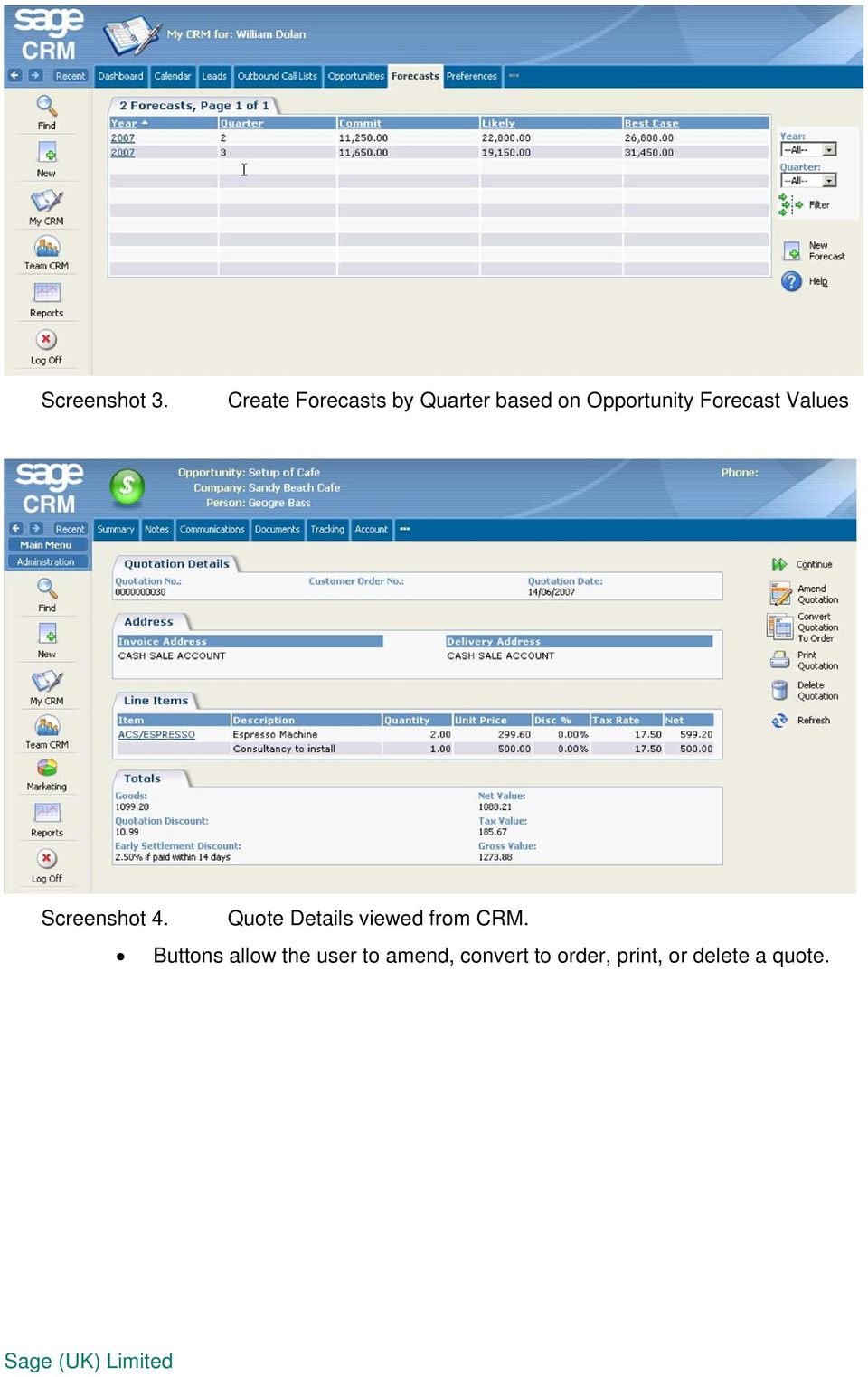
5 Screenshot 3. Create Forecasts by Quarter based on Opportunity Forecast Values Screenshot 4. Quote Details viewed from CRM. Buttons allow the user to amend, convert to order, print, or delete a quote.
6 Screenshot 5. Amend Quote Screen opened from CRM Screenshot 6. View profitability of a quote.

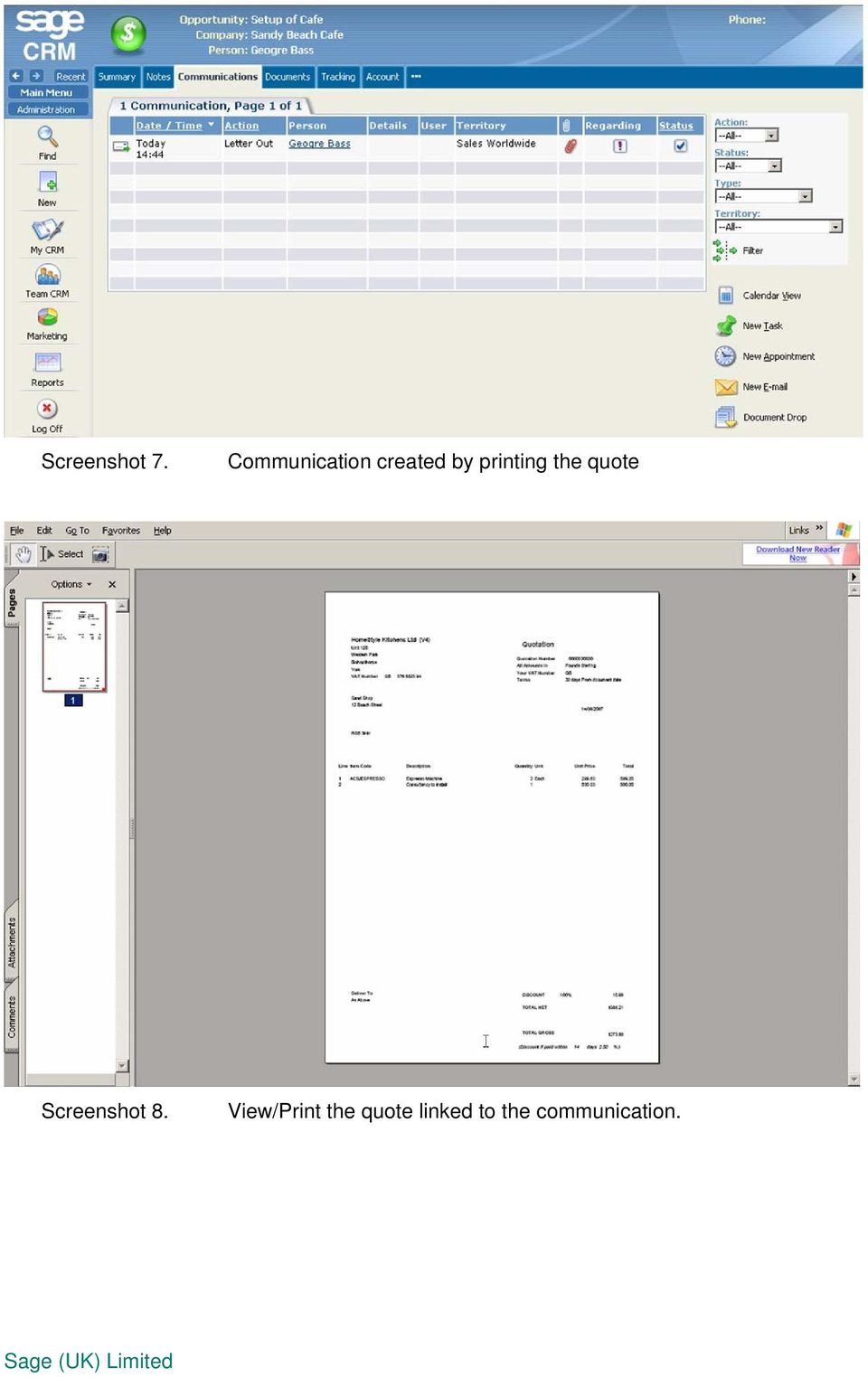
7 Screenshot 7. Communication created by printing the quote Screenshot 8. View/Print the quote linked to the communication.
8 Screenshot 9. Create or link a Customer Account to a CRM Company. Screenshot 10. Search for a customer account with an account reference, an account name, a contact name, address line 1 or a postcode.

9 Screenshot 11. Create a new trading account from CRM Screenshot 12. Account Details - a CRM View of a linked Customer Account

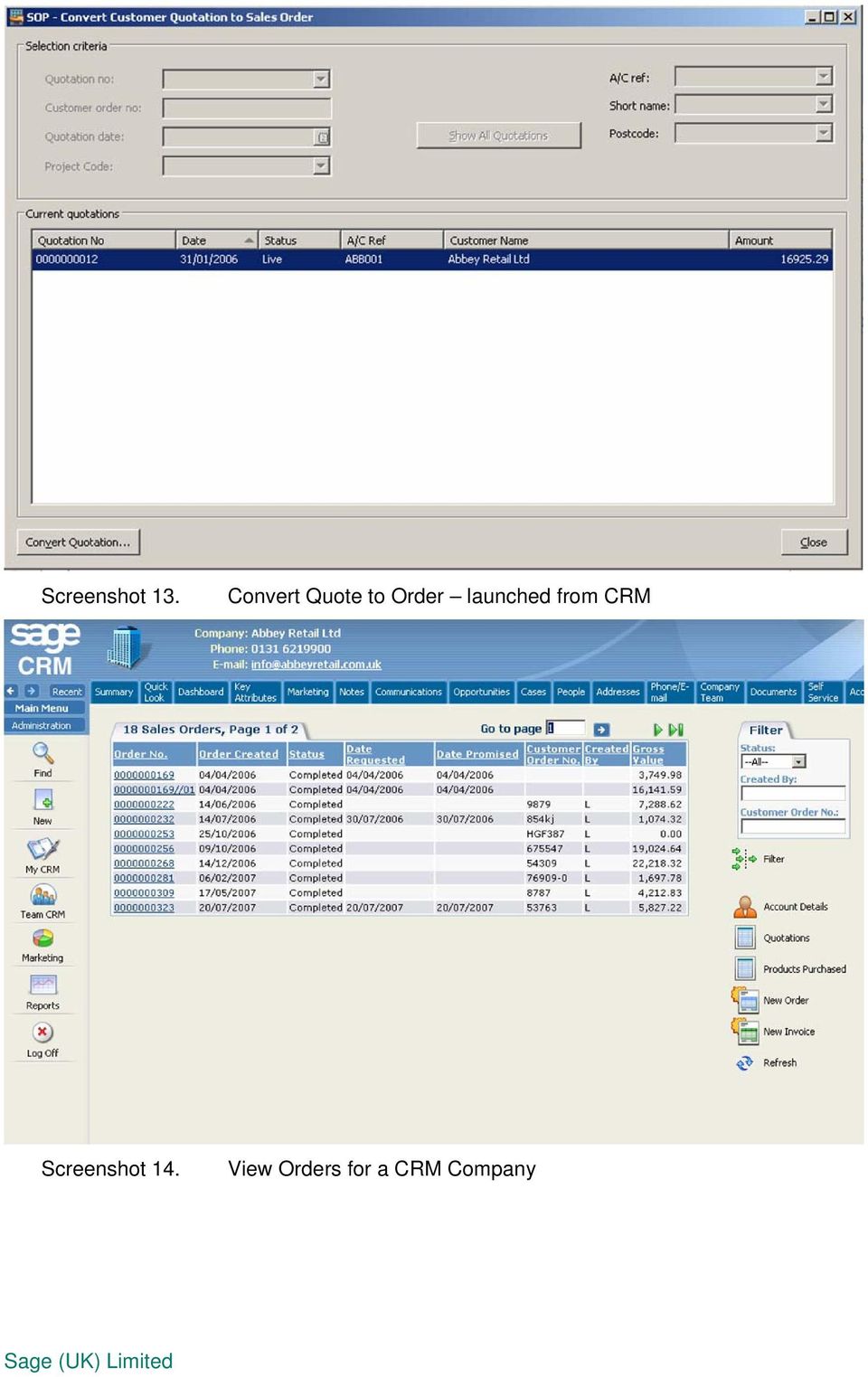
10 Screenshot 13. Convert Quote to Order launched from CRM Screenshot 14. View Orders for a CRM Company
11 Screenshot 15. View Order Details with Order Status Columns Screenshot 16. Order Details with Quantities and Pricing information

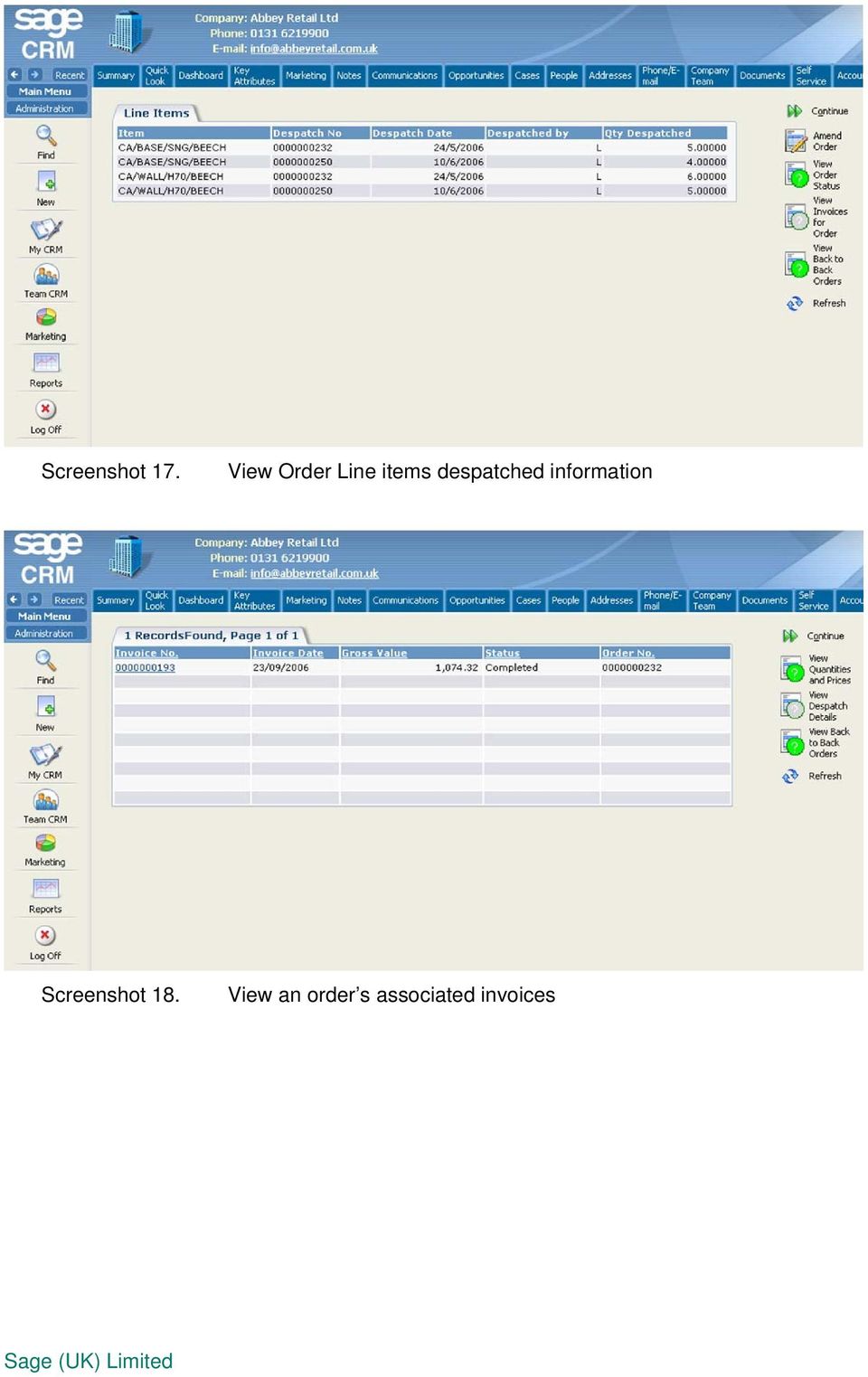
12 Screenshot 17. View Order Line items despatched information Screenshot 18. View an order s associated invoices
13 Screenshot 19. View an Order s associated purchased orders (back to back orders) Screenshot 20. View a CRM Company s Products Purchased

14 Screenshot 21. Open a Customer Price Enquiry from a linked CRM Company. Screenshot 22. Company Open a Customer Transaction Enquiry screen from a linked CRM

15 Screenshot 23 Easy to use timesheet entry screen Screenshot 24 Expenses can be easily submitted by inputting a new expense entry:

Sage 200 v5.10 What s New At a Glance
 Introducing Sage 200 v5.10 Sage 200 v5.10 What s New At a Glance Sage 200 v5.10 sees the release of a number of new features including support for Microsoft Vista (Business and Ultimate Edition) and Microsoft
Data Sheet Starter Pack for Sage 200
 Data Sheet Starter Pack for Sage 200. 10 of our most popular addons free of charge Speed up order processing and information retrieval Create new stock items and customers on the fly Improved purchase
Data Sheet Plus Pack for Sage 200
 Data Sheet Plus Pack for Sage 200 A collection of 75+ addons for Sage 200 Over 75 individual addons to enhance Sage 200 Control Panel allows easy configuration Includes stock code aliasing functionality
Sage MAS 90 and 200. Extended Enterprise Suite S
 Sage MAS 90 and 200 Extended Enterprise Suite S An End-to-End Approach to Business Software At Sage, we ve been supporting businesses like yours with world-class business software for well over a quarter
Sage 200 CRM 2015 Implementation Guide
 Sage 200 CRM 2015 Implementation Guide Copyright statement Sage (UK) Limited and Sage Hibernia Limited, 2015. All rights reserved. If this documentation includes advice or information relating to any matter
A feature-rich web-based workshop system
 A feature-rich web-based workshop system Driving Business Performance Contents 3 Databases and information 4 Workshop management 5 Parts management 6 Tyre sales module 7 Accounting 8 CRM & reporting 8
BusinessMan CRM. Contents. Walkthrough. Computech IT Services Ltd 2011. Tuesday, June 1 st 2014 Technical Document -1015 Version 6.
 Contents. Table of Figures... 2 Businessman Enterprise Overview... 3 System Settings... 3 Human Resources... 4 User Management... 5 Customers... 7 Prospects... 9 Document Management 9 Sales Dashboard...
Sage 200 Manufacturing
 Sage 200 Manufacturing Our extensive customer research shows that customers want suites of integrated software that work together across their business and their processes. With the Sage 200 suite, we
Sage Line 100 - Sage MMS - Sage 200 Version Features
 Sage Line 100 - Sage MMS - Sage 200 Version Features Tel: 020 7831 3050 Email: [email protected] Line 100 v7.6 Last version of the character / DOS based Line 100 system See Module References
Sage 200 Suite An Introduction to Sage 200
 Sage 200 Suite An Introduction to Sage 200 Our extensive customer research shows that customers want suites of integrated software that work together across their business and their processes. With the
Sage CRM Focused Sales Management
 Sage CRM Focused Sales Management Equipping your sales team with the complete customer information and the necessary tools to enable them to do their job effectively is very important. Sage CRM empowers
WTM IT Limited http://wtmit.com. WTM SalesGrow CRM Grow your Sales & Business An Essential CRM Solution delivery quickly and affordably
 WTM SalesGrow CRM Grow your Sales & Business An Essential CRM Solution delivery quickly and affordably SalesGrow CRM WTM SalesGrow CRM helps organizations differentiate their businesses to achieve maximum
Sales Order Processing new features
 Sage 200 Accounts v2009 is supplied with a new help system. The new help system is complemented by a comprehensive search facility across all of the accounting modules. We have provided this Sage 200 v5.1
The power to transform your business
 The power to transform your business Optimus 2020 continues to be the number one choice for litho and packaging printers worldwide. What is the secret of our longevity? Constant research and forward thinking
What s new guide Sage 200 Suite v2011
 What s new guide Sage 200 Suite v2011 What s new guide - Sage 200 Suite v2011 This latest version of the Suite builds on our market led strategy and takes us further on our journey towards our vision of
ecommerce Guide 13 ecommerce Solutions
 ecommerce GUIDE ecommerce Guide Introduction 1. Signing In 2. Registering a Username 3. Home Page and Account Options 4. Product Searches Browsing The Hierachy Standard Search Advanced Search Refine Search
How To Connect Legrand Crm To Myob Exo
 Legrand CRM MYOB EXO Accounting link and transfer of Data Contents 1. Introduction 2. Adding New Accounts Option 3. Get Latest Financial Data Option 4. Updating Address Details Option 5. Viewing Transaction
Prospect module. Quick reference guide. Opmetrix app version 4.10 onwards
 Prospect module Quick reference guide Opmetrix app version 4.10 onwards Contents Introduction... 3 Head office... 4 Business process considerations... 4 Setting up prospects... 5 Prospect transaction types...
Introduction to Customer Relationship Management (CRM) Systems
 Introduction to Customer Relationship Management (CRM) Systems CRM systems give organisations the technology and business processes to easily identify, acquire and retain profitable clients. CRM applications
Training Guide: Customers CRM. Version 001. Training Prerequisite: Basic System Knowledge
 Training Guide: Customers CRM Version 001 Training Prerequisite: Basic System Knowledge Inventory 2 Invoice Ltd 2013 Nimble Business Services Ltd 2013 Customers 01 1 Table of Contents Introduction... 3
Sage One Accounting Benefits and Frequently Asked Questions
 Sage One Accounting Benefits and Frequently Asked Questions Sage One Accounting Benefits No installations Simply log in and start working. You waste no time on installations. No upgrades You will automatically
BUSINESS SYSTEM SOFTWARE
 BUSINESS SYSTEM SOFTWARE For Distribution & Wholesale Engineering Fabrication & Jobbing Service & Repair Preventative Maintenance Manufacturing Custom Product Manufacturing Counter POS SOFTWARE SOLUTIONS
CCM Enterprise Business Management Software - Functional Schema
 CCM Enterprise Business Management Software - Functional Schema Sales Progressing Business Development SALES SALES Products Planning Supplies Supplies Accounting Operations Stock System Administration
Copyright statement. Sage (UK) Limited, 2011. All rights reserved.
 New Features Guide Sage 200 v2011 Copyright statement Sage (UK) Limited, 2011. All rights reserved. If this documentation includes advice or information relating to any matter other than using Sage software,
Purchase Order Processing new features. Order entry Generate list of suggested purchases Print the negotiation reports Amend a suggested order
 Sage 200 Accounts v2009 is supplied with a new help system. The new help system is complemented by a comprehensive search facility across all of the accounting modules. We have provided this Sage 200 v5.1
Dedicated CRM and Project Management technology for IT departments, providers, resellers and telecom companies.
 Dedicated CRM and Project Management technology for IT departments, providers, resellers and telecom companies. Manage Sales, Marketing, Customer Service and Project Management in a single system. D Y
Sage 200 v2011 Issues Fixed Service Pack 7
 Sage 200 v2011 Issues Fixed Service Pack 7 09/02/2015 Sage (UK) Limited, 2015 Page 1 of 37 10/02/2015 Sage (UK) Limited, 2015 Page 2 of 37 Table of Contents Early Settlement Discount Legislation Update...
CRM. Booklet. How to Choose a CRM System
 CRM Booklet How to Choose a CRM System How to Choose a CRM System When it comes to Customer Relationship Management (CRM) it s important to understand all the benefits of an integrated system before beginning
Sage 50 Accounts Professional
 Sage 50 Accounts Professional Manage your day-to-day finances with Sage 50 Accounts Professional. Designed for established small to medium sized businesses, Sage 50 Accounts Professional helps you look
How To Manage A Sales Force Management System
 FS CRM Solution = Customer Relationship Management = After Sales Support = = Marketing = Sales = Customer Service = Inventory = The FS CRM is a cloud hosted on demand solution that caters to all your customer
Accounting & Finance. Guidebook
 Accounting & Finance Guidebook January 2012 TABLE OF CONTENTS Table of Contents... 2 Preface... 6 Getting Started... 8 Accounting... 10 Accounting Welcome... 10 Sales Quotes... 11 New Sales Quote... 11
Introductory Guide Web Purchase Orders for Sage 200
 Introductory Guide Web Purchase Orders for Sage 200 Create POs in Sage 200 via a web interface Multiple concurrent users entering POs into Sage 200 in real time Powerful account/stock search View and print
robust and scaleable software solutions for construction and engineering
 robust and scaleable software solutions for construction and engineering LEVESYS Software presents information clearly and logically, meaning you can always keep track of what s happening across the business.
Build Contacts, Manage Relationships, Get Results
 Build Contacts, Manage Relationships, Get Results ACT! is the world s best selling contact management software with over 120,000 UK registered users. By using Sage ACT!, individuals, small businesses and
We ve organized the information into 3 sections for each App:
 Introduction This guide was created as an informational tool that will assist you with understanding the integration pieces that will sync your ERP with your Salesforce.com CRM. We ve organized the information
Purchase Order Processing
 Purchase Order Processing The Purchase Order Processing system is concerned with the production and management of orders placed with suppliers of materials, plant, etc and the subsequent matching with
Estimating and quoting Fast and easy - Save time
 Estimating and quoting Fast and easy - Save time The flexible setup allows the building of a system, which makes it very easy for the actual users to estimate jobs, using the various building-bricks, or
Sage 300 2014 Product Update 4 Release Notes
 Sage 300 2014 Product Update 4 Release Notes Product Update 4 contains a modified version of one or more Sage 300 program components. It is not a full upgrade or a product replacement. It is valid only
One System. One Solution. Full integration across your entire business.
 One System. One Solution. Full integration across your entire business. Contact your local Pegasus Partner: Pegasus Software, an Infor TM company Orion House, Orion Way Kettering Northamptonshire NN15
Issues Resolved in Sage 200 2015
 Issues Resolved in Sage 200 2015 18/05/2015 Sage (UK) Limited, 2015 Page 1 of 6 Issues Resolved in Sage 200 2015 About this document This document contains additional information for people upgrading to
Integrated hire & rental software solutions
 Integrated hire & rental software solutions Hiremate brochure www.hiremate.co.uk Why choose Hiremate? UK s leading hire management provider Over 30 years experience Manage all aspects of your hire operation
Business System Software
 Business System Software BUSINESS SYSTEM SOFTWARE For Custom Product Manufacturing Engineering Fabrication & Jobbing Food & Chemical Process Industries Distribution & Wholesale Sales, Service & Repair
Getting started with Sage Accounts The online retailers guide
 Getting started with Sage Accounts The online retailers guide Contents Overview... 3 Which Sage Accounts package to use?... 3 Configuring Sage Accounts... 5 Nominal Codes... 5 Departments... 7 Bank Accounts...
Sage 300 ERP 2014 Get more done.
 Sage 300 ERP 2014 Get more done. Get more done by connecting your business, providing a better customer experience, and increasing revenue. New web and mobile functionality: driving better customer experiences
AdvAnced Business MAnAger The NexT GeNeraTioN of accounting software
 Advanced Business Manager The Next Generation of accounting software Overview Advanced Business Manager (ABM) has been designed and developed by accountants to create the next generation of accounting
Sage 200 Manufacturing Datasheet
 Sage 200 Manufacturing Datasheet Sage 200 Manufacturing is a powerful manufacturing solution that enables you to manage your entire supply chain in detail, end to end, giving you the information needed
Brochure. SAP Business One for Manufacturing. Software for Manufacturing Organisations
 Brochure SAP Business One for Manufacturing Software for Manufacturing Organisations SAP Business One for Manufacturing SAP Business One for Manufacturing offers an unparalleled combination of functionality
Sage 50 to Sage 200 Migration Guide. Not just small business. All business. www.sageallbusiness.co.uk
 Sage 50 to Sage 200 Migration Guide Not just small business. All business. www.sageallbusiness.co.uk Introduction This document is intended to be an additional, complimentary guide to the Sage 200 Upgrade
An integrated and preconfigured CRM solution especially designed to help small businesses improve sales, marketing and other key processes.
 An integrated and preconfigured CRM solution especially designed to help small businesses improve sales, marketing and other key processes. Quick and easy to implement and with no upfront costs, Rapid
Manufacturing & Production Control Software
 Manufacturing & Production Control Software Cadlay MRP is an application developed through years of experience in the manufacturing and production industry. The extensive functionality has been designed
Accounts Marketing Sales Project Management Campaigns Invoicing SMS Wiki Calendar Bulk Email Opportunities Quotes Surveys Reports
 Intrabench// is a complete business management, cloud based system. Versatile, fast and secure allowing you to organise your contacts, drive sales, manage productivity, create marketing and keep accounts
New Features in Sage BusinessVision 2013 (version 7.6)
 New Features in Sage BusinessVision 2013 (version 7.6) 2012 Sage Software, Inc. All rights reserved. Sage Software, Sage Software logos, and the Sage Software product and service names mentioned herein
Sage ERP Accpac 6.0A. What's New
 Sage ERP Accpac 6.0A What's New Copyright 2010 Sage Software, Inc. All rights reserved. Sage, the Sage logos, and all Sage ERP Accpac product and service names mentioned herein are registered trademarks
AWARE ENTERPRISE SYSTEM
 AWARE ENTERPRISE SYSTEM The Aware Enterprise System from Aware Business Systems Pty Ltd is a remarkable software package designed for Australian manufacturers and distributors. Designed and developed in
PrintVis is a comprehensive standard ERP/MIS solution for the printing industry
 PrintVis is a comprehensive standard ERP/MIS solution for the printing industry PrintVis is built on, and certified for Microsoft Dynamics NAV (Microsoft Navision). PrintVis will fulfill the most advanced
Sage 300 Retail Management by InfoCentral
 Sage 300 Retail Management by InfoCentral Sage 300 Retail Management by InfoCentral Sage 300 Retail Management is a fully featured Point of Sale Solution that offers tremendous flexibility and enables
Sage 200. More choice, more freedom
 Sage 200 Why choose Sage We ve got the personal touch All businesses are different and change over time. Recognising both these facts helps us shape our software to give you choices. So what makes us different
Unique IP and Microsoft Dynamics NAV Add-ons from UXC Eclipse
 Unique IP and Microsoft Dynamics NAV Add-ons from UXC Eclipse Microsoft Dynamics NAV Microsoft Dynamics NAV is a highly functional system that is easy to use, cost effective to implement and provides a
How to Choose a CRM System
 When it comes to Customer Relationship Management (CRM) it s important to understand all the benefits of an integrated system before beginning your selection process. That s why we created this guide to
ipm IPM PROJECT MANAGEMENT
 ipm IPM PROJECT MANAGEMENT IPM delivers a 360 real-time view of projects, job tasks and operations combined with extensive reporting and back end financial information. Powered by Microsoft Dynamics to
What s new in Sage Evolution Version 6.81
 What s new in Sage Evolution Version 6.81 Sage Sage s continuous investment in research and development ensures that you are kept up-to-date with the latest and most cutting-edge business management software.
Sybiz Third Party Products
 Sybiz Third Party Products This document provides brief, high-level descriptions of products created by third party developers for use with products sold by Sybiz Software Pty Ltd (Sybiz). It is a starting
Sage 300 Construction and Real Estate. Product Overview
 Sage 300 Construction and Real Estate Product Overview Sage 300 Construction and Real Estate Product Overview THE KEYS TO YOUR BUSINESS SUCCESS At Sage, one of our guiding principles is customers for life.
System Overview. ComputerlinkPOS. Software. The Point of Sale specialists exceeding expectations every time. www.computerlink.com.
 www.computerlink.com.au System Overview ComputerlinkPOS Software The Point of Sale specialists exceeding expectations every time Point of Sale Specialists Computerlink Pty Ltd Contents About the Company
Pastel Accounting Business Intelligence Centre
 Get 8 ready-to-use reports that give you immediate insight into and across your business. Delivered in the familiar environment of Microsoft Excel, the reports are fully customisable, and flexible with
Sage 100 ERP 2014 Connect your business.
 Sage 100 ERP 2014 Connect your business. The foundation for connecting your business to provide a better customer experience, increase revenue, and make better business decisions New web and mobile functionality:
OSTENDO MODULES INFORMATION AND SCREENSHOTS
 OSTENDO MODULES INFORMATION AND SCREENSHOTS Prepared for CONTENTS Inventory & Purchasing... 2 MRP & Inventory Replenishment... Error! Bookmark not defined.3 CRM, Call
INTRODUCTION TO SYNTHESYS
 INTRODUCTION TO SYNTHESYS i All rights reserved The contents of this documentation (and other documentation and training materials provided), is the property of Noetica and is strictly confidential. You
See your business in a new way.
 Operations and Distribution Management Brochure See your business in a new way. Realize the future of your business today. See your business in a new way. Realize the future of your business today. Distribution
Pastel Evolution Business Intelligence Centre
 Get 12 ready-to-use reports that give you immediate insight into and across your business. Delivered in the familiar environment of Microsoft Excel, the reports are fully customisable, and flexible with
Sage 300 ERP 2014 Get more done.
 Get more done. Get more done by connecting your business, providing a better customer experience, and increasing revenue. Sage 300 ERP (formerly Sage ERP Accpac) is the foundation for your business to
Project Management the smart way. Engineering & Construction. Timesheet Management QTIME. System. Improve Efficiency with QTIME
 Project Management the smart way Engineering & Construction Timesheet Management QTIME Timesheet Management System Improve Efficiency with QTIME Introducing QTIME For many organizations, not just in Engineering
OpenERP at a Glance. Open Source: OpenERP is committed to Open Source. The software is published under the AGPL licence
 OpenERP at a Glance OpenERP is a comprehensive suite of business applications including Sales, CRM, Chatter, Project management, Warehouse management, Manufacturing, Accounting and Human Resources. Complete
How to Choose a CRM System.
 How to Choose a CRM System. Contents How to Choose a CRM System... 3 Understanding CRM... 4 Getting Started... 5 Understanding the Core Components of CRM... 6 Involve the Right People... 7 Select a System
Focused Sales Management
 Focused Sales Management Make the most of every sales opportunity. directs your sales efforts towards the most profitable, most winnable deals, and helps you make the most of cross-selling and upselling
New Sage 50 Accounts Version differences helping you to...
 New Sage 50 Accounts Version differences helping you to... Get up and running New diary with views by day, week, month Recurring tasks/events Delegate tasks (network versions only) Diary synchronisation
Invu Accounts Payable
 Invu Accounts Payable A fully automated Accounts Payable solution Using invoice capture & data extraction tools our solution can automatically pull information from invoices and other financial documentation
Benefits to you. Account & Contact Management. Sales & Quotations Marketing & Campaigns Customer Service & Support Project & Event Management
 Account & Contact Management Sales & Quotations Marketing & Campaigns Customer Service & Support Project & Event Management Benefits to you Work as a team see a unified view of each customer accessible
Version 1.3.4 User Guide
 Version 1.3.4 User Guide Document Version 1.4 QGate Software Limited D2 Fareham Heights, Standard Way, Fareham Hampshire, PO16 8XT United Kingdom Tel +44 (0)1329 222800 [email protected] www.qgate.co.uk
idelpi Software Quick Install and Basic Configuration Guide
 idelpi Software Quick Install and Basic Configuration Guide (Trial version) This documentation helps you in installing the trial version of idelpi construction software on your computer. Prerequisites
Luther College Student Supervisor procedures for Web Time Entry
 Luther College Student Supervisor procedures for Web Time Entry WTE: my.luther.edu This set of web screens is designed to allow you to approve time sheet information for your student employees on the web.
User Manual Web DataLink for Sage Line 50. Version 1.0.1
 User Manual Web DataLink for Sage Line 50 Version 1.0.1 Table of Contents About this manual...3 Customer support...3 Purpose of the software...3 Installation...6 Settings and Configuration...7 Sage Details...7
MS-8913: Microsoft Dynamics CRM 4.0 Applications. Course Objectives. Required Exam(s) Price. Duration. Methods of Delivery.
 MS-8913: Microsoft Dynamics CRM 4.0 Applications This three-day instructor led course explores the Microsoft Dynamics CRM application from a user's perspective. Application functionality covered in the
Reservation and Customer Relation Management Systems
 Rescompany was founded in 2003 by experienced professionals from the travel, cruise and IT industry with financial support provided by a private fund. Having been involved in travel related software development