
Please direct any questions to me at
|
|
|
- Bennett Collins
- 10 years ago
- Views:
Transcription
1 Linton Hall School 9535 Linton Hall Road Bristow, Virginia Dear Parents, We are pleased to have the opportunity to offer Google Apps for Education (GAFE) to our students at Linton Hall School. GAFE gives us the ability to use exciting cloud-based collaborative tools for learning, and it s a great extension to our classroom and technology curriculum. Each student will be provided a Google login for use with Linton Hall s GAFE domain. It is Linton Hall School s policy that all GAFE student accounts are created within a walled garden, which means the students will not be able to use their Linton Hall School GAFE account to exchange with anyone outside of the lintonhall.edu domain, and it restricts access to certain features (such as Google Talk/chat.) It is also Linton Hall School s policy that only lintonhall.edu accounts will be used for class assignments. Personal gmail (gmail.com) accounts will not be permitted for these projects. This approach allows Linton Hall School to better protect the privacy of our students. The GAFE accounts will allow us to work on web-based projects during the remainder of the school year, and these accounts will also be the students accounts on Chromebooks. Attached, please find a permission slip with Linton Hall School s Responsible Use Procedures (RUP.) The attached form must be completed and signed by both student and parent BEFORE the student will be given their password for Google Apps. Please sign and return the bottom portion, the top portion is for you to keep for future reference. Also attached is a copy of the school s Acceptable Use Policy, as found in the school handbook, for your reference. Thank you, Please direct any questions to me at [email protected]. Becki Ryder Technology Integration Coordinator Attachments: Linton Hall School Responsible Use Procedures Linton Hall School Acceptable Use Policy

2 Linton Hall School 9535 Linton Hall Road Bristow, Virginia LINTON HALL SCHOOL RESPONSIBLE USE PROCEDURES Dear Parent or Guardian: Linton Hall School encourages students to use a variety of technologies to enhance their learning. To ensure the privacy and safety of our students, and to protect data and our resources, we ask parents and students to become familiar with policy and regulations that have been established for technology use in the school. The school s Acceptable Use Policy is available in the Parent Student Handbook. Students must: 1. Respect and protect their own privacy and the privacy of others. a. Use only assigned accounts. b. Keep personal information such as: name, address, phone number, etc., offline. c. Keep passwords secret. d. Have permission to photograph or videotape other individuals and to subsequently post these images or videos to the Internet. 2. Respect and protect the integrity, availability, and security of all electronic resources. a. Observe all network security practices. b. Conserve, protect, and share these resources with other students and Internet users. c. Linton Hall School is not responsible for damages, lost, theft or any cost incurred to personal digital technologies or electronic communication devices. d. Treat digital technologies with care, report any damages, security risks or violations to a teacher or administrator. 3. Respect and protect the copyrighted/intellectual property of others. a. Cite all sources appropriately. b. Follow all copyright laws. c. Use electronic communication devices appropriately to assure academic integrity. 4. Respect and practice the principles of community. a. Communicate only in ways that are kind, responsible, respectful and lawful. b. Use electronic communication devices for schoolwork only. c. Linton Hall School should only be used for school-related and projects. d. Report threatening or offensive materials to a teacher or administrator My child and I have read, discussed and agree to Linton Hall School Responsible Use Procedures. Student Name (print): Google ID: Homeroom Teacher: Student Signature: Parent/Guardian Signature: SIGN AND RETURN TO MRS. RYDER Date: Date: Last edit: 9/3/14

3 Linton Hall School 9535 Linton Hall Road Bristow, Virginia CHROMEBOOK ACCEPTANCE OF RESPONSIBILITY and HOME USE AGREEMENT FOR PARENT/GUARDIAN AND STUDENT I, agree to let (Name of parent or guardian) ( Name of student ) participate in the student Chromebook program at Linton Hall School. Linton Hall School uses technological measures such as filtering to promote internet safety. Filtering limits students ability to access harmful internet sites from our school computers and devices on our networks, but only when this equipment is used in school. I understand that, when used outside of the Linton Hall School building, the Chromebook will not have filtered internet access. I understand that I will be responsible for monitoring my student s Internet access when my student uses the Chromebook at home. My student will be made aware that all aspects of Linton Hall School s Student Responsibilities and Rights as stated in the Parent Student Handbook (which includes the Acceptable Use Policy for Access to Technology) and the attached Chromebook Responsible Use Discussion Guidelines. I will report the damage, loss or theft of the Chromebook immediately to the Linton Hall School Office. I understand that Linton Hall School accepts no responsibility and will not be liable for damage to any home computing device that results from the use of the Chromebook at Linton Hall School. I understand that the purpose of my student use of a Chromebook is to teach the Linton Hall School curriculum, and that uses unrelated to our educational program (including but not limited to personal , downloading of personal games or music, use of social networking sites and installing applications) are prohibited. I understand that Linton Hall School has the right to recall and review the contents of the Chromebook at any time including any personal information that may be stored on or accessible by the device. I agree to review responsible use of a Chromebook with my student. The Technology Staff and Computer Teacher will also review these guidelines with students. / / Parent or Guardian s Signature Date / / Student s Signature Date SIGN AND RETURN TO MRS. RYDER Last edit: 9/3/14

4 Chromebook Responsible Use Discussion Guidelines 1. While at school, the Chromebook will be used only at the discretion and direction of the teacher. 2. The Chromebook should be used only in conjunction with projects relating to the educational programs of Linton Hall School. It may not be used as a personal or social device for the student while at school. 3. When using the Chromebook, it is essential to practice responsible internet citizenship. Responsible internet citizenship is outlined in the Acceptable Use Policy in our school handbook. 4. The Chromebook will not be shared with another student without permission of the instructor. 5. The Chromebook should never be left unattended in the classroom, in the hallway, in the lunchroom, in the gym, or any other public place. 6. The Chromebook should not be used near water, chemicals, or other liquids that could damage its electronic components. 7. When not in use, the Chromebook should always be put in its protective case or charging cart in the classroom. 8. When carried outside, the Chromebook should be protected in such a way that rain, snow, ice, excessive heat and or cold will not damage it. (Not applicable to 5 th grade.) 9. A Chromebook computer is a valuable object and should be treated appropriately. It should not be thrown, dropped or hit. It should not be left on the floor where it can be stepped on or crushed. It should never be placed on the roof or hood of a car, on the sidewalk or street, or treated in any way that may cause it to be crushed, dropped, or damaged. 10. Evidence of abuse that results in permanent Chromebook damage will require replacement by the parent/guardian. The replacement/damage cost is $295 per Chromebook. 11. There is an annual user fee of $100 per student for the use of the Chromebook for the academic year. At the end of the academic year, the Chromebooks will be inspected by the Linton Hall IT Staff. $50 will be refunded if the Chromebook is found to be in normal operable condition. Last edit: 9/3/14
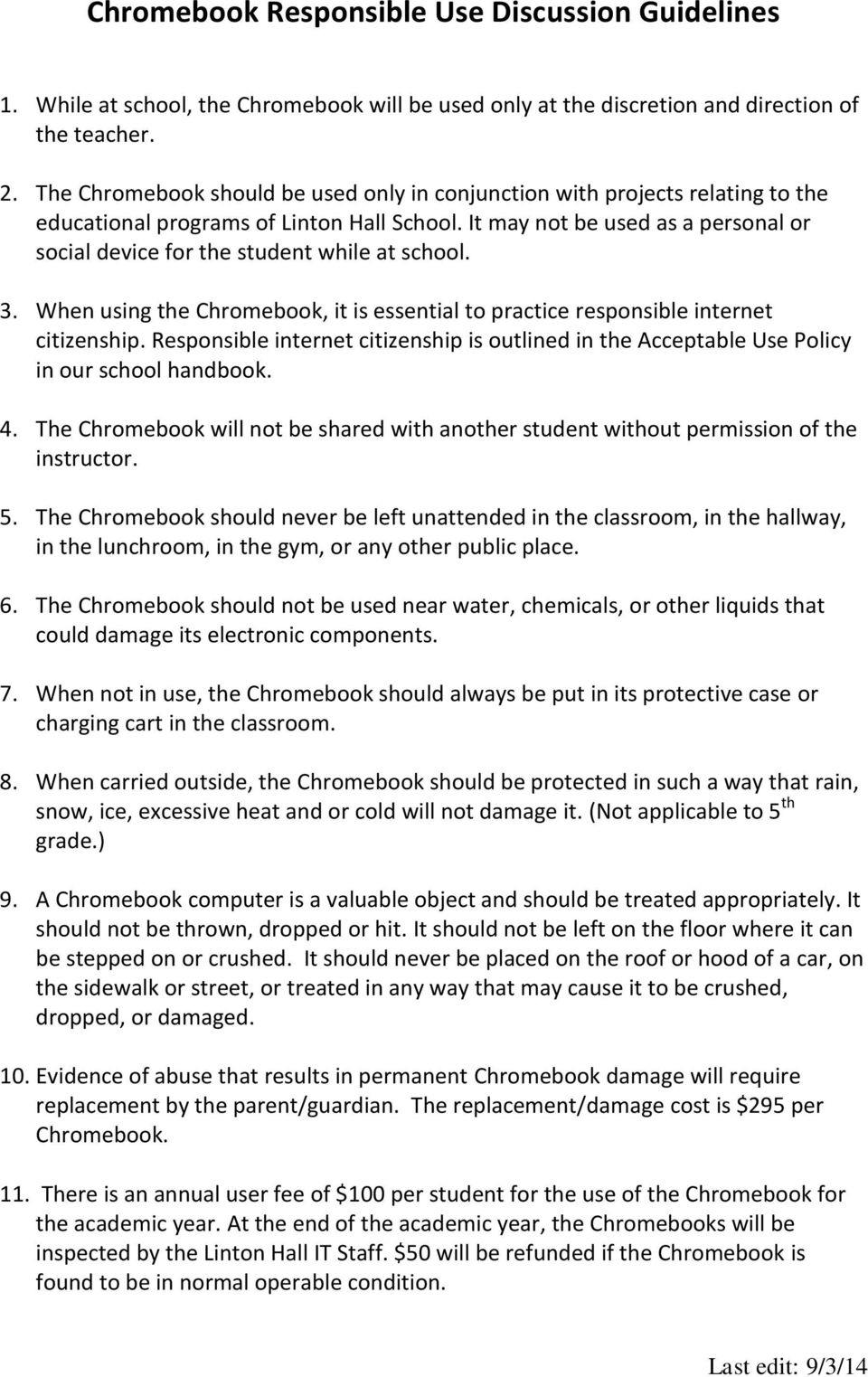
5 General Information and Objectives ACCEPTABLE USE POLICY Linton Hall School Internet access is now available to students and teachers of Linton Hall School. We are very pleased to bring this access to Linton Hall School and believe the Internet offers vast, diverse, and unique resources to both students and teachers. Our goal in providing this service to teachers and students is to promote educational excellence by facilitating resource sharing, innovation, and communication. The Internet is an electronic highway connecting millions of computers and subscribers all over the world and millions of individual subscribers. Students and teachers have access to: Electronic mail communication with people all over the world. Information and news. Public domain and shareware of all types. Discussion groups on a vast range of topics. Educational resources. With access to computers and people all over the world also comes availability of material that may not be considered to be of educational value in the context of the school setting. Linton Hall School has taken available precautions to restrict access to controversial and other materials deemed to be inappropriate. However, on a global network it is impossible to control all materials and an industrious user may discover controversial and inappropriate information. We firmly believe that the valuable information and interaction available on this worldwide network far outweighs the possibility that users may procure material that is not consistent with our educational goals. Internet access is coordinated through a complex association of government agencies and regional and state networks. In addition, the smooth operation of the network relies upon the proper conduct of the end users who must adhere to strict guidelines. These guidelines are provided here so that you are aware of the responsibilities you are about to acquire. In general, this requires efficient, ethical, and legal utilization of the network resources. If a Linton Hall School user violates any of these provisions, his or her access will be terminated and future access could possibly be denied. Terms and Conditions 1. Privileges: The use of the Internet is a privilege, not a right, and inappropriate use will result in a cancellation of those privileges. Each student who receives access will participate in a discussion with a Linton Hall School faculty member pertaining to the proper use of the network. The technology coordinator and teachers will deem what is inappropriate use and their decision is final. The school may deny, revoke, or suspend specific user access.
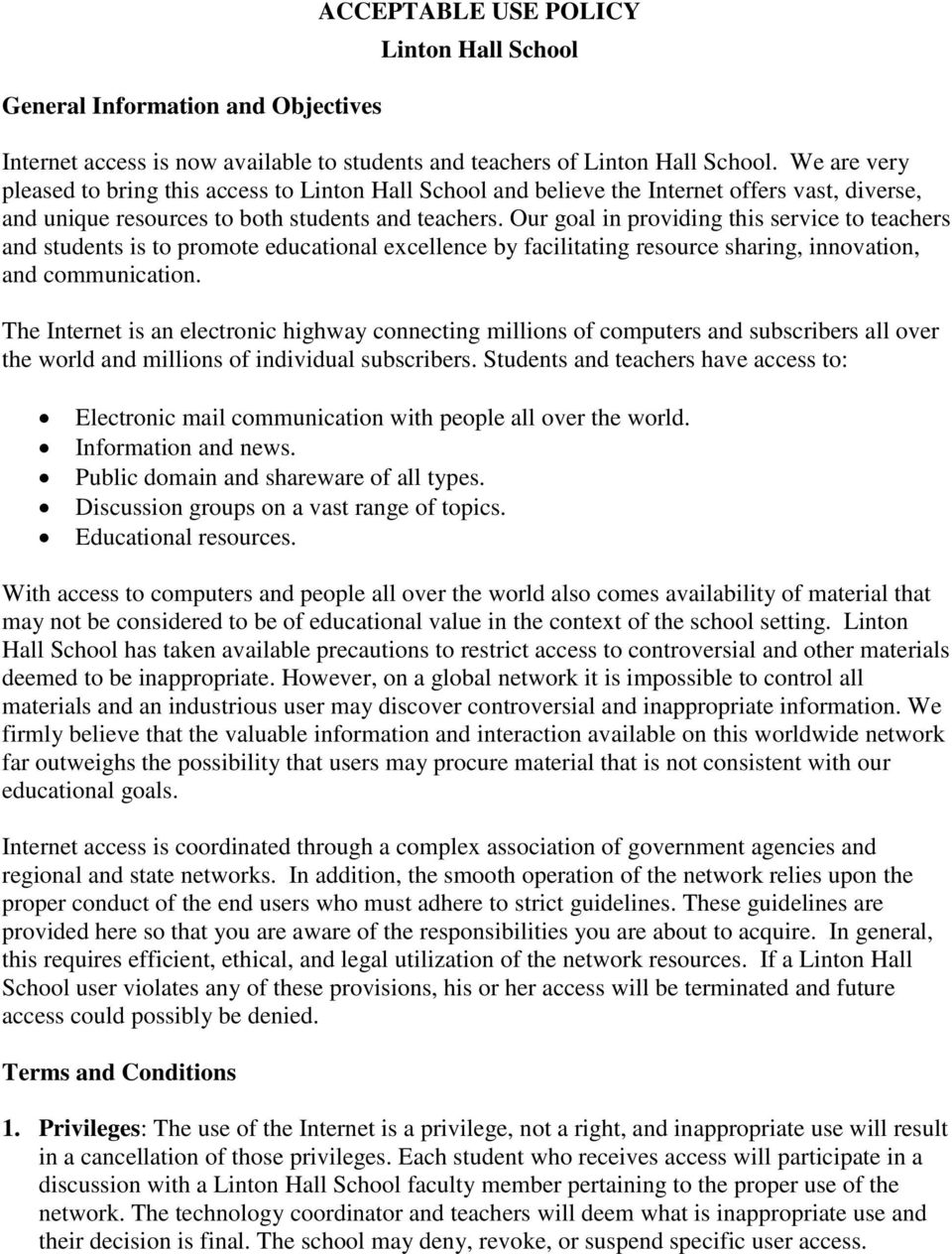
6 2. Netiquette: You are expected to abide by the general accepted rules of network etiquette. These include, but are not limited to, the following: Be polite. Your messages should not be abusive to others. Internet bullying will not be tolerated. Use appropriate language. Do not swear, use vulgarities, or any other language deemed inappropriate. Do not reveal your personal address or phone number. Do not reveal the personal addresses and/or phone numbers of fellow students or colleagues. Illegal activities are strictly forbidden. Note that electronic mail ( ) and other data transmitted utilizing the network is not guaranteed to be private. People who operate the system have access to all mail and other data. Messages or data relating to or in support of illegal activities may be reported to the authorities. Do not use the network in any way that you would disrupt network services for other users. All communications and information accessible via the network should be assumed to be private property. Do not load or attempt to load software or files onto a school computer without the permission of the school s Instructional Technology Resource Teacher or Director of Information Technology. The school prohibits the use of its network and the Internet to intentionally access, view, download, store, transmit or receive any information that contains material which is in violation of any school policy or administrative rule, or any local, state and/or federal laws or regulations. Prohibited material includes, but is not limited to, the following: obscenity or pornography threats material that is intended, or could reasonably be perceived, to be harassing or discriminatory inappropriate use of material that is copyrighted or protected by trade secret material used to further any commercial business, product advertising, virus transmission or political activity material that is potentially disruptive of the learning environment The school reserves the right to monitor and/or review all uses of the school s network and the Internet, and users should not have any expectation of privacy in any information accessed, viewed, downloaded, stored, transmitted or received. 3. Non-Liability: Linton Hall School makes no warranties of any kind, whether expressed or implied, for the service it is providing. Linton Hall School will not be responsible for any damages suffered. This includes loss of data resulting from delays, nondeliveries, misdeliveries, or service interruptions caused by negligence, errors or omissions. Use of any information obtained via Linton Hall School network is at the user's own risk. Linton Hall School will not be
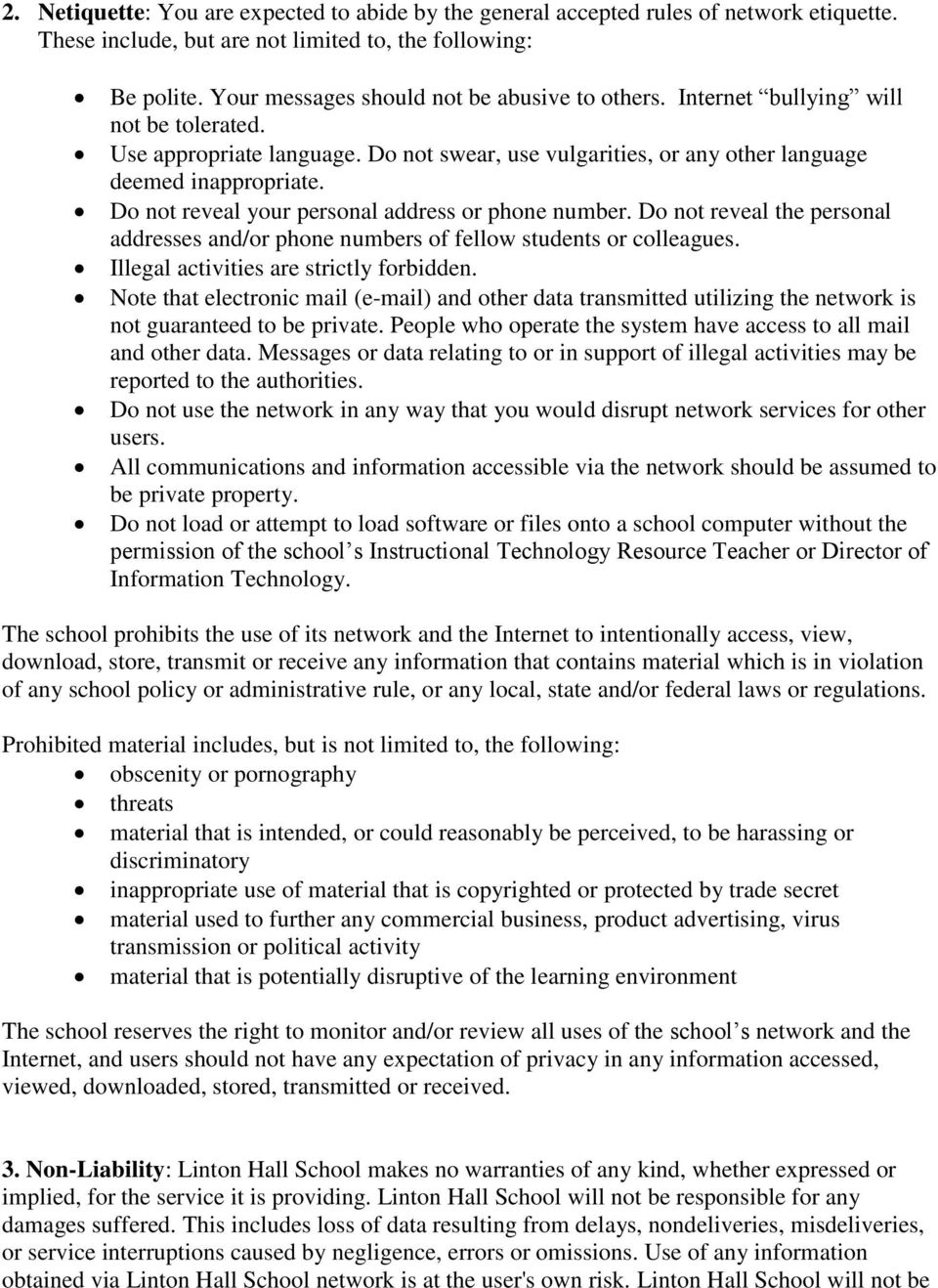
7 liable for students inappropriate use of the district s electronic communication resources or violations of copyright restrictions, students mistakes or negligence, or costs incurred by students. The school will not be responsible for ensuring the accuracy or usability of any information found on the Internet. Because information appears, disappears and changes constantly, it is not possible to predict or control what students may locate. The school makes no guarantees as to the accuracy of information received on the Internet. Although students will be under teacher supervision while on the network, it is not possible to constantly monitor individual students and what they are accessing on the network. Some students might encounter information that is not of educational value. 4. Security: Security on any computer system is a high priority, especially when the system involves many users. If you feel you can identify a security problem on the Internet, you must notify a teacher who will in turn notify the Director of Information Technology. Do not use another individual's account without written permission from that individual. Attempts to login to any computer or Internet resources as a system administrator will result in cancellation of user privileges. Any user identified as a security risk or having a history of problems with other computer systems may be denied access to Internet. 5. Vandalism: Vandalism will result in cancellation of privileges. Vandalism is defined as any malicious attempt to harm or destroy hardware, data of another user, Internet, or any agencies or other networks that are connected to the Linton Hall School network. This includes, but is not limited to, the uploading or creation of computer viruses. 6. Exception of Terms and Conditions: All terms and conditions as stated in this document are applicable to Linton Hall School. These terms and conditions reflect the entire agreement of the parties and supersede all prior oral or written agreements and understandings of the parties.
MEDWAY PUBLIC SCHOOLS Medway, MA. Acceptable Use Policy for School Network, Internet, and Equipment Grades 7-12
 MEDWAY PUBLIC SCHOOLS Medway, MA Policy #21-A Acceptable Use Policy for School Network, Internet, and Equipment Grades 7-12 The District s goal in providing computer network technology and Internet access
RICH TOWNSHIP HIGH SCHOOL Adopted: 7/10/00 DISTRICT 227 Olympia Fields, Illinois
 6.55 Page 1 of 1 INSTRUCTION Acceptable Use Policy Computer equipment, including access to the Internet, is to be used in a responsible, efficient, ethical and legal manner in accordance with the mission
Ceres Unified School District
 Ceres Unified School District TECHNOLOGY USE POLICY Grades K-12 Please read this policy below carefully to be instructed in proper behavior and use regarding the Internet. This policy covers technology
LOUISA MUSCATINE COMMUNITY SCHOOLS POLICY REGARDING APPROPRIATE USE OF COMPUTERS, COMPUTER NETWORK SYSTEMS, AND THE INTERNET
 LOUISA MUSCATINE COMMUNITY SCHOOLS POLICY REGARDING APPROPRIATE USE OF COMPUTERS, COMPUTER NETWORK SYSTEMS, AND THE INTERNET The Board of Directors of the Louisa Muscatine Community School District is
POLICY 4526. Adopted by Board of Education: 4/20/05
 POLICY 4526 COMPUTER NETWORK FOR EDUCATION The Board of Education is committed to optimizing student learning and teaching. The Board considers student access to a computer network, including the Internet,
COMPUTER, NETWORK AND INTERNET USE POLICY
 4526 COMPUTER, NETWORK AND INTERNET USE POLICY The Westhampton Beach Board of Education affirms the district's commitment to preparing students for the future. Students need to be technologically literate
COMPUTER USE IN INSTRUCTION
 COMPUTER USE IN INSTRUCTION 4526 The Board of Education is committed to optimizing student learning and teaching. The Board considers student access to a computer network, including the Internet, to be
COMPUTER NETWORK FOR EDUCATION
 4526 COMPUTER NETWORK FOR EDUCATION The Southern Westchester Board of Cooperative Educational Services (BOCES) considers student access to a computer network, including the Internet, to be a powerful and
Hyde School Student Computer Systems Acceptable Use Policy
 Hyde School Student Computer Systems Acceptable Use Policy A. Hyde School Computer Systems and Internet Access Please read the following carefully before signing this document. This is a legally binding
Reynoldsburg City Schools Computer and Technology Acceptable Use Policy Staff, Volunteers and Students
 Reynoldsburg City Schools Computer and Technology Acceptable Use Policy Staff, Volunteers and Students AUP Sections 1. Acceptable Use 2. Privileges 3. Internet Access 4. Procedures & Caveats 5. Netiquette
POLICY TITLE: Computer and Network Service POLICY NO: 698 PAGE 1 of 6
 POLICY TITLE: Computer and Network Service POLICY NO: 698 PAGE 1 of 6 GENERAL Computer network service through the Internet provides an electronic highway connecting millions of computers around the world.
STUDENT LAPTOP GUIDELINES
 Bellmawr Public Schools STUDENT LAPTOP GUIDELINES Laptop Initiative Guiding Principles Laptops are provided first and foremost to further academic achievement Students are responsible for themselves and
OXFORD COMMUNITY SCHOOLS 10 North Washington Street, Oxford, Michigan 48371 ACCEPTABLE USE POLICY
 OXFORD COMMUNITY SCHOOLS 10 North Washington Street, Oxford, Michigan 48371 ACCEPTABLE USE POLICY 1. Purpose Oxford Community Schools (the District ) recognizes that advancements in technology affect the
Student Network Acceptable Use Policy Lone Jack C-6 School District
 Student Network Acceptable Use Policy The, hereinafter known as LJC6, provides students and staff with a service called the Network. The Network is a computer service, which includes, but is not limited
GUILFORD PUBLIC SCHOOLS ACCEPTABLE USE POLICY
 GUILFORD PUBLIC SCHOOLS ACCEPTABLE USE POLICY Telecommunications is radically changing the way the world accesses information. A computer network, linked to the Internet, an international computer network
Student use of the Internet Systems is governed by this Policy, OCS regulations, policies and guidelines, and applicable law.
 OCS Internet Acceptable Use and Safety Policy for Students The Opportunity Charter School ( OCS or the School ) provides access to OCS s Internet Systems for its students for educational purposes, in conformance
Forrestville Valley School District #221
 Forrestville Valley School District #221 Student Acknowledgment of Receipt of Administrative Procedures for Acceptable Use of the Electronic Network 2015-2016 All use of electronic networks shall be consistent
Newark City Schools Computer Network and Internet Acceptable Use Policy and Agreement
 Newark City Schools Computer Network and Internet Acceptable Use Policy and Agreement The Newark City Schools is pleased to make available access to interconnected computer systems within the district
Newark City Schools Computer Network, Internet And Bring Your Own Device (BYOD) Acceptable Use Policy and Agreement
 Newark City Schools Computer Network, Internet And Bring Your Own Device (BYOD) Acceptable Use Policy and Agreement The Newark City Schools is pleased to make available access to the Internet, and a Bring
EMPLOYEE ACCESS RELEASE AND AUTHORIZATION FORM MCS warehouse form No. 14197
 (Return this page to the Executive Staff member or Principal) MEMPHIS CITY SCHOOLS EMPLOYEE ACCESS RELEASE AND AUTHORIZATION FORM MCS warehouse form No. 14197 As a condition of using the MCS network, I
Mentor Public Schools Board of Education 6.48 Policy Manual page 1 Chapter VI Pupil Personnel STUDENT E-MAIL, INTERNET AND COMPUTER USE
 Policy Manual page 1 STUDENT E-MAIL, INTERNET AND COMPUTER USE Access to the Internet is being offered by Mentor Public Schools through the IT Department. The District is also pleased to provide its students
BROADALBIN-PERTH CENTRAL SCHOOL ADOPTED 1/22/00 3 RD READING AND ADOPTION 5/21/12. Employee Computer Use Agreement. Terms and Conditions
 BOARD OF EDUCATION POLICY ADMINISTRATIVE GUIDELINE 6.6.1A(3) BROADALBIN-PERTH CENTRAL SCHOOL ADOPTED 1/22/00 3 RD READING AND ADOPTION 5/21/12 Employee Computer Use Agreement The district is pleased to
Computer, Network, Internet and Web Page Acceptable Use Policy for the Students of the Springfield Public Schools
 Computer, Network, Internet and Web Page Acceptable Use Policy for the Students of the The computer and information technology resources, which includes World Wide Web access and electronic mail capability,
POLICY SUPPORT OPERATIONS 5042 ACCEPTABLE USE POLICY FOR NETWORK AND INTERNET ACCESS
 I. Overview Network and Internet access is available to students, teachers and staff in the Oneida City School District. The District s goal in providing such services is to promote educational excellence
MARIN COUNTY OFFICE OF EDUCATION. EDUCATIONAL INTERNET ACCOUNT Acceptable Use Agreement TERMS AND CONDITIONS
 MARIN COUNTY OFFICE OF EDUCATION EDUCATIONAL INTERNET ACCOUNT Acceptable Use Agreement TERMS AND CONDITIONS Please read the following carefully before signing this document. INTERNET access is coordinated
Internet Acceptable Use Policy
 1. Overview Quincy College provides Internet access to students, faculty, staff, and administration as part of its educational mission. When the Internet is used appropriately, it can provide a wealth
APPROPRIATE USE OF DIGITAL COMMUNICATIONS AND TECHNOLOGIES POLICY
 REGISTER OF POLICIES, PROCEDURES AND BY-LAWS APPROPRIATE USE OF DIGITAL COMMUNICATIONS AND TECHNOLOGIES POLICY Code: Policy 2.11 Date of Coming into Force: June 27, 2011 Number of Pages: 6 Origin: Education/
Haddon Township School District Acceptable Use of Information and Communication Technology for Students
 Haddon Township School District Acceptable Use of Information and Communication Technology for Students Please read the following carefully before signing the Acceptable Use Policy for Students Agreement.
Valmeyer Community Unit School District #3 Acceptable Use Of Computers and Networks
 Valmeyer Community Unit School District #3 Acceptable Use Of Computers and Networks The Valmeyer Community Unit School District #3 Board of Education supports the use of the Internet and other computer
COMPUTER TECHNOLOGY ACCEPTABLE USE & INTERNET SAFETY
 FILE: IIBG-PC COMPUTER TECHNOLOGY ACCEPTABLE USE & INTERNET SAFETY PITTSYLVANIA COUNTY SCHOOLS recognizes the importance of computer technology in providing a relevant and appropriate education. Our goal
Marion County School District Computer Acceptable Use Policy
 Marion County School District Computer Acceptable Use Policy The Marion County School District (MCSD) offers currently enrolled students, faculty and staff access to the school computer network through
Revised: 6-04, 8-09, 1-12 REGULATION #5420
 Adopted: 9-03 PORTAGE PUBLIC SCHOOLS Revised: 6-04, 8-09, 1-12 REGULATION #5420 SUBJECT: Electronic Communications, Internet Safety & Acceptable Use Agreement All PPS electronic information resources are
51 JS-R STUDENT USE OF INFORMATION TECHNOLOGY RESOURCES
 Page 1 of 5 Purpose This regulation implements Board policy JS by setting forth specific procedures, requirements and restrictions and conditions governing student use of District Information Technology
Treutlen County School System Soperton, GA. Three-Year Technology Plan July 1, 2014-June 30, 2017
 Treutlen County School System Soperton, GA Three-Year Technology Plan July 1, 2014-June 30, 2017 Superintendent Dr. Cheryl Conley Gregory Martin TCSS Three Year Technology Plan 2014-2017 Page 1 of 18 1.
TAUNTON PUBLIC SCHOOLS Internet Acceptable Use and Social Networking Policies and Administrative Procedures
 TAUNTON PUBLIC SCHOOLS Internet Acceptable Use and Social Networking Policies and Administrative Procedures A. INTERNET ACCEPTABLE USE POLICY OF THE TAUNTON PUBLIC SCHOOLS I. Mission Statement: Academic
Descriptor Code: EFE-P
 ADMINISTRATIVE PROCEDURE Descriptor Term: ACCEPTABLE USE OF ELECTRONIC TRANSMISSION CAPABILITIES Descriptor Code: EFE-P Date Issued: October 30, 2003 Date Changed June 26, 2008 September 30, 2009 1. Network
Vail School District Acceptable Use Policy 2015 2016
 Vail School District Acceptable Use Policy 2015 2016 You have a wonderful opportunity before you! You have the opportunity to use the school's technology resources for your education. These resources will
COMPUTER /ONLINE SERVICES (Acceptable Use and Internet Safety)
 COMPUTER /ONLINE SERVICES (Acceptable Use and Internet Safety) The Middletown City School District provides an electronic communications network that allows District-authorized individuals internal access
C H E R O K E E C H R I S TIAN SCHOOLS ( E L E M E N TARY SCHOOL) I N F O R M A TION TECHNOLOGY AND A C C E P TABLE USE POLICY
 C H E R O K E E C H R I S TIAN SCHOOLS ( E L E M E N TARY SCHOOL) I N F O R M A TION TECHNOLOGY AND A C C E P TABLE USE POLICY Cherokee Christian Schools (the School ) provides Information Technology (IT)
INTERNET USE PROCEDURES Almira/Coulee Hartline Cooperative Network Acceptable Use Procedures
 INTERNET USE PROCEDURES Almira/Coulee Hartline Cooperative Network Acceptable Use Procedures Purpose The purpose of the ACH Network Acceptable Use Procedures is to provide the procedures, rules, guidelines,
SOUTH COLONIE 4526.1 INSTRUCTIONAL TECHNOLOGY
 4526.1 INSTRUCTIONAL TECHNOLOGY The Board of Education is committed to the optimization of student learning and teaching. The Board considers a computer network to be a valuable tool for education, and
School Policy Regarding Computer Use, Technology and Internet Access
 School Policy Regarding Computer Use, Technology and Internet Access Please read the following carefully, as it provides information about the responsibilities and expectations regarding use of school
Passwords Students should not share their assigned password, or attempt to discover the school Apple Id.
 Alta Loma Christian School Acceptable Use Policy 1:1 ipad Program Revised January 20, 2014 Alta Loma Christian (ALCS) recognizes that access to technology in school gives students greater opportunities
How To Use The Internet Safely
 Administrative Procedure 140 DISTRICT-WIDE NETWORK AND INTERNET APPROPRIATE USE Background School District No.43 (Coquitlam)'s District-wide network provides data communication links among all District
------------------- COMPUTER NETWORK AGREEMENT FORM
 COMPUTER NETWORK AGREEMENT FORM I (we) have read the guidelines for participating in the Wickliffe District Network and Internet Access program and agree to adhere to all ofthe provisions contained therein.
Code of Virginia, 1950, as amended, Sections 18.2 372, 18.2 374.1:1, 18.2 390, 22.1 70.2, and 22.1 78
 Book Section Title Number Status SCS Policy Manual I INSTRUCTION Acceptable Use of Electronic Network Resources and Internet Safety IIBEA * R Active Legal 18 U.S.C. Sections 1460 and 2256 47 U.S.C. Section
Policy and Procedure for Internet Use Summer Youth Program Johnson County Community College
 Policy and Procedure for Internet Use Summer Youth Program Johnson County Community College This Policy and Procedures for Internet Use booklet has been prepared for Summer Program students with access
Eastwood Local Schools Laptop Policies and Handbook
 Eastwood Local Schools Laptop Policies and Handbook Table of Contents Program Overview - 3 Acceptable Use Policy - 4 Information Technology Resources Responsibilities & Agreement - 7 District Laptop Service
ACCEPTABLE/ RESPONSIBLE USE POLICY IIBE
 ACCEPTABLE/ RESPONSIBLE USE POLICY IIBE The School Board provides technologies, including the internet, to promote educational excellence by facilitating resource sharing, innovation and communication.
- Do not leave open email/network applications unattended. Log off of a computer when it is in an unsecured area and out of your sight.
 STAFF PROCEDURES FOR ACCEPTABLE USE OF EMAIL/NETWORK AND INTERNET The primary purpose of Sycamore Community Schools email/network system is to provide resources to enhance and support educational instruction
AP 417 Information and Communication Services
 AP 417 Information and Communication Services Background Access and use of information and communication services (ICS) are an integral component of the learning and working environment. The ability for
BOARD OF EDUCATION Cherry Hill, New Jersey
 BOARD OF EDUCATION Cherry Hill, New Jersey POLICY 6142.12 ACCEPTABLE USE OF TECHNOLOGY Introduction The Board of Education encourages the use of technology in the classroom as an educational tool and to
Chatham County Schools Network Acceptable Use Policy Agreement Policy and Forms 3225/7320
 ACCEPTABLE USE OF VOICE, VIDEO AND DATA NETWORK Policy Code: 3225/7320 Chatham County Schools offers electronic network access for students, teachers, and staff within the school system. A component of
Quincy Public Schools Information Technology. Acceptable Use Policy for Staff, Students, and Guests
 Quincy Public Schools Information Technology Acceptable Use Policy for Staff, Students, and Guests Revised May 6, 2013 Introduction This Acceptable Use Policy is enacted as of May 2013 by the Quincy School
Pasadena Unified School District (PUSD) Acceptable Use Policy (AUP) for Students
 Pasadena Unified School District (PUSD) Acceptable Use Policy (AUP) for Students The Board of Education recognizes that the Technology, Assessment and Accountability (TAA) Department's resources (computers,
Johnson Creek School District Parent/Student Information Packet
 Johnson Creek School District Parent/Student Information Packet This packet includes Johnson Creek School Board policies as referenced on the Parent/Student Signature Page, as well as, the Johnson Creek
RIVERVIEW SCHOOL DISTRICT
 No. 815 SECTION: OPERATIONS RIVERVIEW SCHOOL DISTRICT TITLE: ADOPTED: June 18, 2012 ACCEPTABLE USE OF INTERNET, COMPUTERS AND NETWORK RESOURCES REVISED: 815. ACCEPTABLE USE OF INTERNET, COMPUTERS AND NETWORK
School Union 69 Acceptable Use Policy for Student Computer and Internet Use
 School Union 69 Acceptable Use Policy for Student Computer and Internet Use The Union 69 School provides computers, networks and Internet access to support the educational mission of the schools and to
Ashland High School Tablet Policy, Procedures, and Information 2012-13
 Ashland High School Tablet Policy, Procedures, and Information 2012-13 The focus of the tablet program at AHS is to provide tools and resources to the 21st Century Learner. Excellence in education requires
DCPS STUDENT SAFETY AND USE POLICY FOR INTERNET AND TECHNOLOGY
 DCPS STUDENT SAFETY AND USE POLICY FOR INTERNET AND TECHNOLOGY Purpose: 1) To establish standards for the acceptable uses of internet and electronic mail (email) services within the computer network maintained
North Clackamas School District 12
 North Clackamas School District 12 Code: IIBGA-AR Revised/Reviewed: 3/06/08; 6/21/12 Orig. Code(s): SP IIBGA Guidelines for the Use of the District s Electronic Communication System Definitions 1. Technology
Dauphin County Technical School
 Dauphin County Technical School Acceptable Use Agreement 2015-2016 General Information The Dauphin County Technical School, more commonly known as DCTS, provides computer equipment, computer services,
Geyserville New Tech Academy Student Technology Acceptable Use Policy
 Geyserville New Tech Academy Student Technology Acceptable Use Policy Overview. The (GUSD) makes a variety of communications and information technologies available to students through computer/network/internet
ipad Acceptable Use Regulation
 ipad Acceptable Use Regulation The Mamaroneck School District has purchased Apple ipads for selected students of the Mamaroneck School District. These students will be issued ipads with predetermined applications
SONOMA CHARTER SCHOOL STUDENT USE OF TECHNOLOGY POLICY
 SONOMA CHARTER SCHOOL STUDENT USE OF TECHNOLOGY POLICY Date Approved: 4/16/2015 New technologies are modifying the way in which information may be accessed, communicated and transferred. Those changes
File: IIBEA ACCEPTABLE COMPUTER SYSTEM USE
 File: IIBEA ACCEPTABLE COMPUTER YTEM UE The chool Board provides a computer system, including the Internet, to promote educational excellence by facilitating resource sharing, innovation and communication.
Wikis: A wiki is a website that allows visitors to add, remove, and edit content online.
 BYOD (Bring Your Own Device) Policy for Teachers and Students Saint Ann School allows students in grades 4 to 8 to use personal electronic devices that meet the requirements listed below and if they have