
How To Restore From A Backup In Sharepoint
|
|
|
- Briana Wells
- 5 years ago
- Views:
Transcription
1 Recovering Microsoft Office SharePoint Server Data Granular search and recovery means time and cost savings. An Altegrity Company

2 2 Introduction 3 Recovering from Data Loss 5 Introducing Ontrack PowerControls for SharePoint 7 Works with Existing Environment and Backup Process 8 Looking Inside Ontrack PowerControls for SharePoint 11 What to Do Next 1 Copyright 2011 Kroll Ontrack Inc. All Rights Reserved. Kroll Ontrack, Ontrack and other Kroll Ontrack brand and product names referred to herein are trademarks or registered trademarks of Kroll Ontrack Inc. and/or its parent company, Kroll Inc., in the United States and/or other countries.
3 Introduction There is no getting around it; to keep their people working, businesses today need to keep them connected. That means the need for collaboration products is growing. As more and more businesses discover the productivity gains to be made by utilizing the information sharing, collaboration, and team discussion aspects of these products, many of them are investing in collaborative data repository tools. These tools keep critical knowledge and information organized and available thereby providing constant and efficient access to it. From the account executive who needs to see a list of clients, to the developer looking for the product specifications, to the manager who must let his team know about a changed milestone on a project s schedule, people need to stay informed. Microsoft Office SharePoint Server is one of the fastest growing collaboration products around today. It allows you to create, store, manage, and share all sorts of information. This paper spotlights the issues SharePoint administrators and IT administrators encounter when trying to recover SharePoint data and reveals a solution. 2
4 Recovering from Data Loss Whether a mistake, a malicious effort, or an act of God, accidents happen and data can be lost. When you lose business-critical information that was stored on your SharePoint server, what options are available to you for recovering that data? You could restore the entire content database from your last backup or snapshot. But do you really want to overwrite everything on your production server when all you need to do is search for and restore a few critical items? How severely would your business be impacted by that? An alternative is to have a spare Microsoft SQL Server available that you could use as a recovery server. That certainly is a solution, but it is an expensive proposition to say the least. And again, why spend the time and energy to restore the entire database when all you actually need to recover is a few items? Example: Bob, an employee at XYZ Corporation and a new SharePoint user, was tasked with moving critical documents from one SharePoint site to another. Unfortunately, when he was entered as a user into SharePoint, he was given permissions beyond what he should have received. Due to this, when he was trying to move the files, he actually deleted them without realizing what he had done. The mistake was not discovered until it was too late to use the Recycle Bin to recover the documents. The only hope was to recover them from a backup. Pam, the SharePoint administrator, spent two days restoring the whole site from the backup to a recovery server, then searching for the documents and moving them back to the production server. The Need for Granular Recovery There are a few ways to recover lost SharePoint data. If items were simply deleted and you are fortunate enough to discover this before the first- and second-stage Recycle Bins in SharePoint are emptied, you can recover the items from a Recycle Bin. However, if you were not that fortunate, you must restore the data from a backup or snapshot of the content database. There are two main ways to do this. One way is to restore the entire backup or snapshot directly to your production server. Going this route eliminates the need, and therefore the expense, of having a recovery server. However, restoring the entire database might take many hours during which time the availability of your SharePoint server could be compromised. You have to consider what impact this will have on your business. In addition, restoring directly to your production server overwrites all of the content currently on it. That is rarely desirable. The other way is to set up a recovery server that mirrors the configuration of the production SharePoint server. You can then restore the whole site to that recovery server. Since you will not be restoring directly to your production server, you eliminate the risks inherent in that. However, servers are costly and the added expense of the necessary hardware seems exorbitant when all you need to do is search for and recover a few crucial items. Additionally, in order for the restore to work, the configuration of the recovery server must be identical to that of the production server. It is time-consuming to set up the recovery server properly and if the production server configuration was not fully documented, you may not be able to get it set up at all. If you do not need to restore the entire site, these options seem like a lot of wasted time and expense. There must be a way that allows you to quickly and easily find and restore a few lost items. Besides the necessity of recovering lost business-critical items, there is another need to consider. As more and more of the teams at your company start using SharePoint to store, manage, and share information; your sites are going to increase in size. You will find yourself restructuring sites with greater frequency. It would be useful to have a tool that allowed you to easily migrate libraries from one site to another existing site or to a whole new site. 3

5 Maintaining the Integrity of the Data One of the nearly unavoidable effects of restoring your SharePoint data using many of the tools available today is that the original metadata may be lost or changed. This happens because the recovered item is created under the name of the person doing the recovery and that is usually the SharePoint administrator. This unintentional changing of the records can cause confusion as the administrator is rarely the original author of the item. The Sarbanes-Oxley Act of 2002 became a U.S. federal law on July 30, It established mandates and requirements that all publicly traded companies must adhere to for financial reporting; this includes requirements on the retention of original records. With so many records being created, edited, and stored in SharePoint, it is now more important than ever to maintain the integrity of an item s metadata (original author, time/date created, time/date last modified, etc.), even through the process of restoring the item from a SharePoint backup. It is imperative that IT staff understand and comply with the regulations pertaining to producing documents and other items as formal records versus simply restoring those items for internal business purposes. Searching for Lost Items Often, looking for a SharePoint item or document that needs to be restored is like finding a needle in a haystack. Do people ever come to you and say that they need to get a document back, but they do not know exactly when it was lost or where it was located in the site; all they may know is part of its title or who wrote it? With so little to go on, where do you even begin? With many of the tools available today, your only option is to restore likely backups or snapshots one at a time to a recovery server and then painstakingly search through each for the errant document. At times, it seems that it would be less labor-intensive for the user to rewrite the document than it is for you to search for it and restore it. But, that is seldom an option. So, you are left with the task of trying to find the impossible. Reasons to maintain the integrity of your SharePoint data: Conform to regulatory requirements such as those in the Sarbanes-Oxley Act of Ensure the item s metadata has not been compromised (in case that becomes important later on). When was it deleted? Where was it located? Who wrote it? What was its title? It would be helpful to have a way to search through several databases using specific criteria such as item type, keyword, author, or created date, to find the items that need to be restored. A search feature such as this would save hours, possibly even days, of valuable time. 4
6 Introducing Ontrack PowerControls Ontrack PowerControls for SharePoint, solves these problems by allowing SharePoint administrators to restore items, such as documents, lists, libraries, folders, attachments, and even entire sites from a previous full backup or snapshot of the content database. It allows you to search across one or more databases. You do not have to fully restore an old backup or snapshot before you can use Ontrack PowerControls for SharePoint because it can search and restore items from an unmounted backup or snapshot of your SharePoint content database. You can search by a variety of criteria, including item type, keywords, subject, date, and specific users to find the items you need to restore. You can even search through the file stream in attachments. All this allows you to get lost data back online quickly to minimize the cost of restoration and the impact on your business. Ontrack PowerControls for SharePoint does not require you to change your current SharePoint environment or your normal backup process the Ontrack PowerControls ExtractWizard can extract SQL data from any SQL Server 2005 or 2008 backup created with Enterprise Manager or SharePoint tools and Site Administrator. Additionally, Ontrack PowerControls ExtractWizard can read the information in your archived backups. All this allows you to restore items from legacy backups as well as from your most recent backup. Ontrack PowerControls for SharePoint solves the problems that SharePoint administrators face in finding and restoring lost SharePoint items. Because it can search through and extract items from content database backups or snapshots and restore the items to the production server or to another location, it saves time and money. It ensures that corporations always have quick, easy access to the SharePoint data in their backups or snapshots, whether needed for internal purposes, legal reasons, or for any other use. Yes, there are other options for recovering lost SharePoint data. However, Ontrack PowerControls provides a much more efficient and cost effective solution than other methods. Major Benefits of Ontrack PowerControls for SharePoint There are five primary ways you can save time and money by using Ontrack PowerControls for SharePoint:» Minimizes the time to restore an individual document, item, list, folder, library or site. Ontrack PowerControls for SharePoint saves you time by making it possible to granularly search for and restore items from a previous full backup or snapshot. Items can be restored individually, giving you flexibility and eliminating the need to perform a full site restoration in order to find the items you need.» Eliminates same site restore constraint. By eliminating the same site restore constraint, Ontrack PowerControls gives you the ability to restore items or sites to the original or alternate SharePoint locations. Ontrack PowerControls allows you to restore directly into your production SharePoint server or directly into a file system. This eliminates the need for an expensive recovery server and the extra steps required to separately import sites back into SharePoint.» Minimizes the time to locate items matching specific criteria. Ontrack 5

7 PowerControls includes an Advanced Find feature that can search across all content databases in an archived SharePoint file, rather than bringing an old backup or snapshot back online for analysis. And you can search by a variety of criteria, including item type, keywords, subject, date, specific users, and file and attachment data.» Maintains data integrity of the SharePoint source and target. Ontrack PowerControls does not change the metadata of the SharePoint source or target. It maintains data integrity by performing read-only operations on the source files. It will not alter data when accessing the target and maintains metadata integrity throughout the restoration process.» Minimizes the costs involved in restoring lost items. Ontrack PowerControls for SharePoint eliminates the need to have an expensive recovery server available. Also, since it can read your existing content database backups, there is no need to purchase proprietary software for creating the backups. Your backup process can remain the way it is today.» Simplifies SharePoint site management and consolidation. As SharePoint sites grow across your organization, the need to restructure, add/remove and consolidate sites increases. Ontrack PowerControls simplifies the process of reorganizing or consolidating sites by allowing you to find and extract individual items or sites and export them to new or alternate sites. Other Benefits Besides the reasons stated above, there are many other benefits to using Ontrack PowerControls for SharePoint.» Easy to use, yet extremely powerful. Imagine being able to quickly search for and restore any item from your backups or snapshots even from archived ones. Ontrack PowerControls ExtractWizard can extract information from your existing native SQL Server 2005 or 2008 backups and also from STSADMIN created farm-level backups. If you are using snapshot technology, simply point Ontrack PowerControls for SharePoint at a previous SQL snapshot.» Search in one or more backups or snapshots. You can look at more than one source database at a time and search through them all at once even through the file stream of attachments to find the items you need to restore. You can even narrow your search by searching in your previous results.» Easy to copy from source to target. When you locate the items in the source backup or snapshot (previewing the items to make sure you have the correct ones), restoring them is as easy as copying and pasting them into the target location. You can even use drag and drop to copy the items! Ontrack PowerControls for SharePoint preserves the directory structure, item settings (such as permissions, alerts, linked objects, properties, and views), and custom item types of the restored items.» Easy to save attachments and versions. If an item you have located has a file attached to it, you can save the attachment to a file system. Also, when restoring an item, you can restore all versions of it, or you can choose one or more specific versions to restore.» Export SharePoint data. You can export individual items, regardless of whether 6
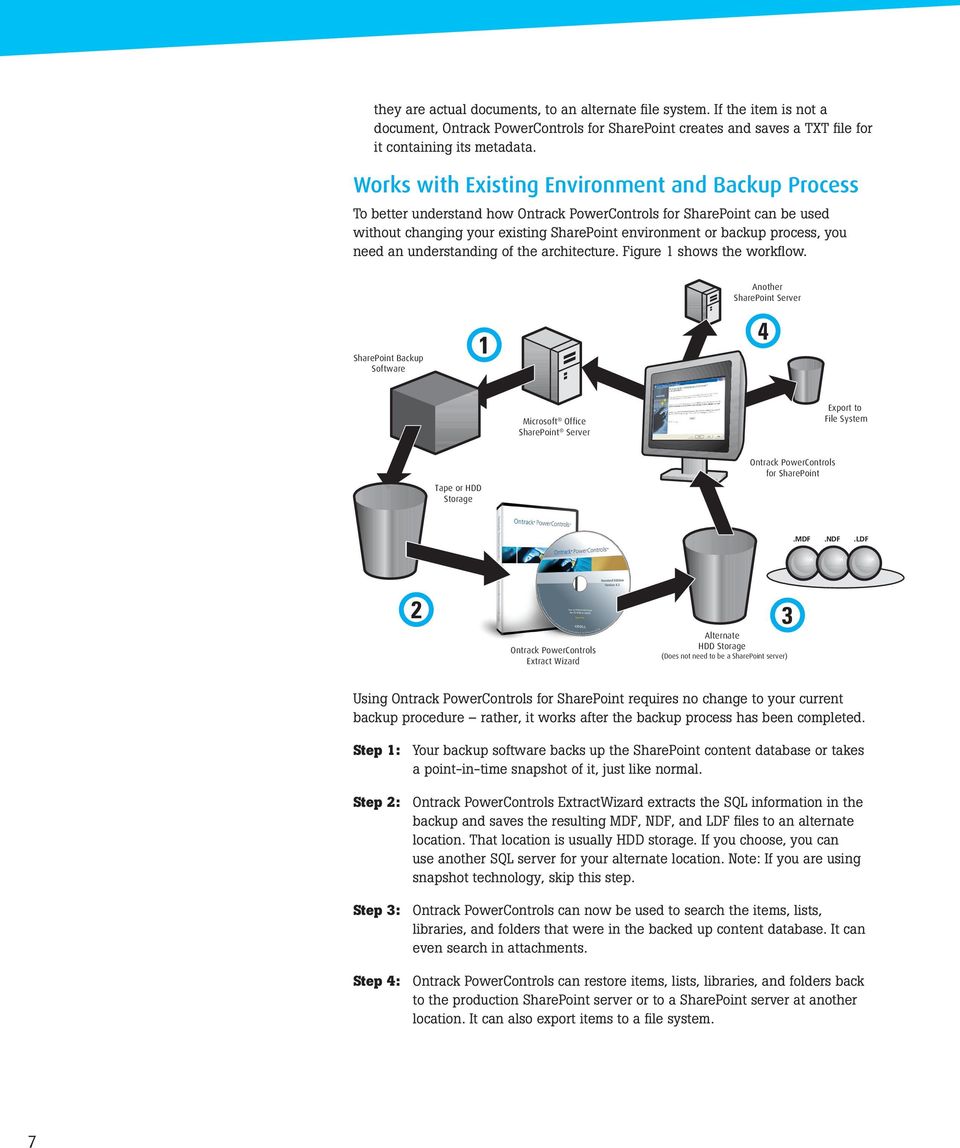
8 they are actual documents, to an alternate file system. If the item is not a document, Ontrack PowerControls for SharePoint creates and saves a TXT file for it containing its metadata. Works with Existing Environment and Backup Process To better understand how Ontrack PowerControls for SharePoint can be used without changing your existing SharePoint environment or backup process, you need an understanding of the architecture. Figure 1 shows the workflow. Another SharePoint Server SharePoint Backup Software 1 4 Microsoft Office SharePoint Server Export to File System Tape or HDD Storage Ontrack PowerControls for SharePoint.MDF.NDF.LDF 2 3 Ontrack PowerControls Extract Wizard Alternate HDD Storage (Does not need to be a SharePoint server) Using Ontrack PowerControls for SharePoint requires no change to your current backup procedure rather, it works after the backup process has been completed. Step 1: Your backup software backs up the SharePoint content database or takes a point-in-time snapshot of it, just like normal. Step 2: Ontrack PowerControls ExtractWizard extracts the SQL information in the backup and saves the resulting MDF, NDF, and LDF files to an alternate location. That location is usually HDD storage. If you choose, you can use another SQL server for your alternate location. Note: If you are using snapshot technology, skip this step. Step 3: Ontrack PowerControls can now be used to search the items, lists, libraries, and folders that were in the backed up content database. It can even search in attachments. Step 4: Ontrack PowerControls can restore items, lists, libraries, and folders back to the production SharePoint server or to a SharePoint server at another location. It can also export items to a file system. 7
9 Looking Inside Ontrack PowerControls for SharePoint Although it is an exceedingly powerful piece of software, Ontrack PowerControls for SharePoint is surprisingly simple to use. When you need to restore one or more SharePoint items, here are some important points to keep in mind:» SharePoint stores information in a SQL Server database and the items, lists, and folders that you would need to recover are stored in content databases.» When you do a backup with a native SharePoint tool, BAK files are created. Ontrack PowerControls ExtractWizard extracts the SQL information from the BAK files and places the resulting MDF, NDF, and LDF files where you want them.» If you are using snapshot technology as part of your backup process, the snapshots contain all the necessary information. Ontrack PowerControls for SharePoint can directly read the snapshot. It is not necessary to extract data using Ontrack PowerControls ExtractWizard.» You can search for and restore items from your last backup or snapshot. There is no need to interrupt the operation of your production SharePoint server. When you have data to restore from a backup, the first thing to do is open Ontrack PowerControls ExtractWizard; this software is included with your Ontrack PowerControls for SharePoint package. Note: If you want to restore data from a snapshot, there is no need to use Ontrack PowerControls ExtractWizard. When you run the Ontrack PowerControls ExtractWizard, you first tell it where the backup you want to use is located. 8
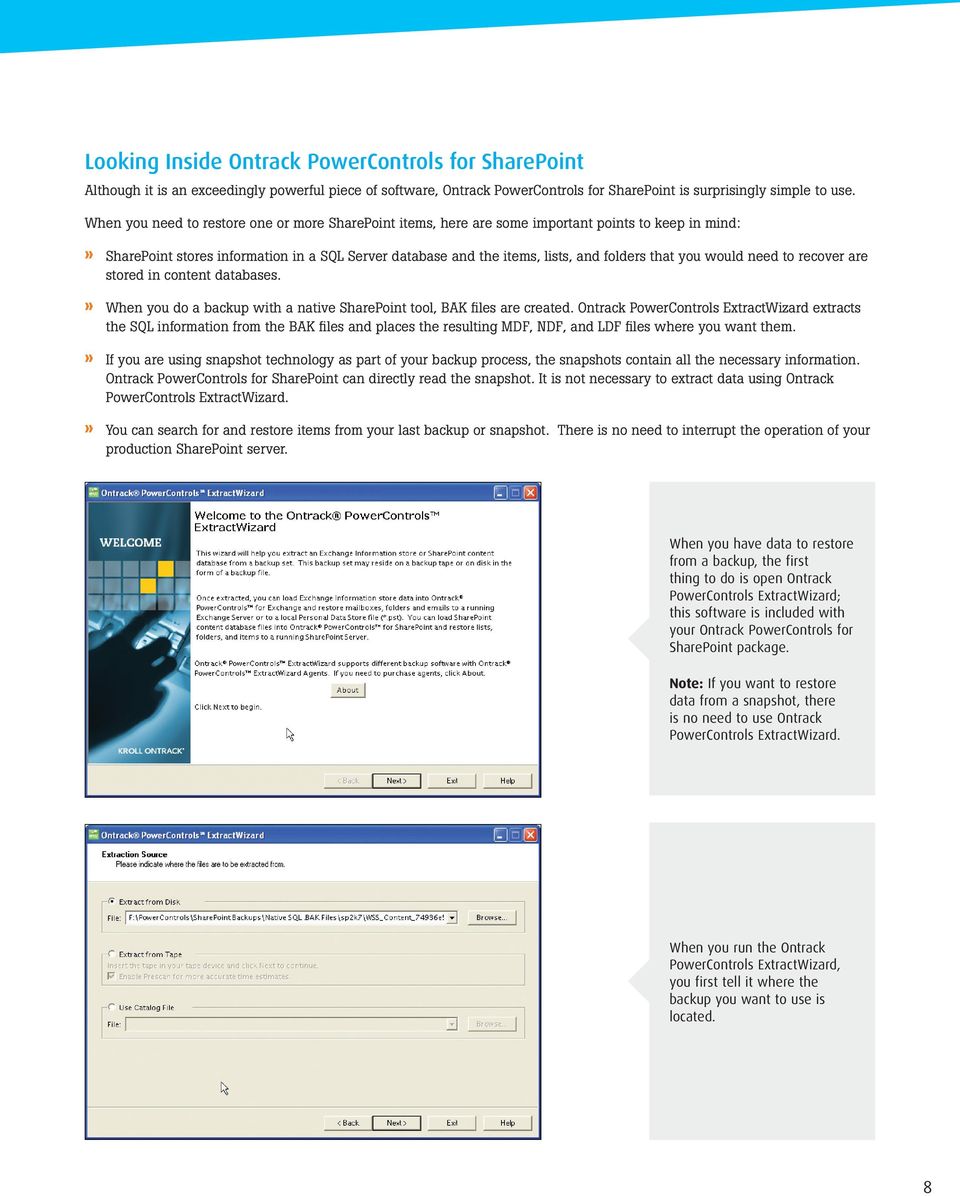
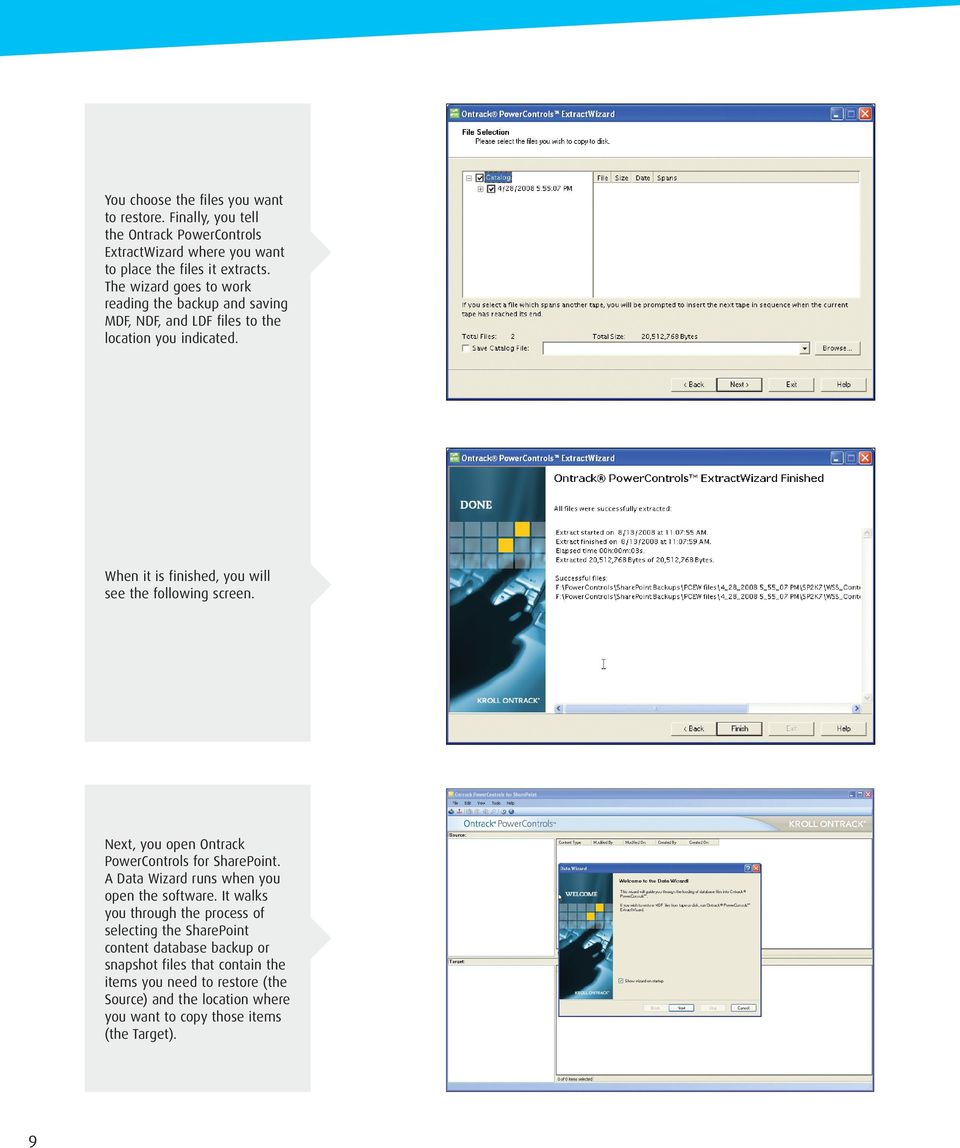
10 You choose the files you want to restore. Finally, you tell the Ontrack PowerControls ExtractWizard where you want to place the files it extracts. The wizard goes to work reading the backup and saving MDF, NDF, and LDF files to the location you indicated. When it is finished, you will see the following screen. Next, you open Ontrack PowerControls for SharePoint. A Data Wizard runs when you open the software. It walks you through the process of selecting the SharePoint content database backup or snapshot files that contain the items you need to restore (the Source) and the location where you want to copy those items (the Target). 9
11 After you open the source files, it is easy to find the specific items and lists you need to restore. Ontrack PowerControls for SharePoint uses a search interface much like the Microsoft Office Outlook Advanced Find dialog box. You can search for specific item types, identify keywords to include or exclude, and indicate what you want the wizard to search in. Ontrack PowerControls for SharePoint also allows you to selectively search by the user (Created By and Modified By) and the dates before or after which the item was created or modified. When you complete your search, Ontrack PowerControls for SharePoint displays all the items and lists that match your search criteria. You can select one item, or any number of items, and drag and drop them to the target folder, or else copy and paste them to the folder. You can also restore an entire list, folder, or library by the same methods. If you need to refine your search even further, Ontrack PowerControls for SharePoint allows you to search only in your previous search results. As Ontrack PowerControls for SharePoint copies the items you chose, you will see a Copy Progress window that reports on the progress and adds additional information. You can print a report that details your action or save it to a text file. 10

12 What to Do Next As we have learned, granular SharePoint data search and recovery can be challenging. Ontrack PowerControls software for SharePoint offers SharePoint Administrators and IT Administrators a time-saving tool. It allows you to quickly and easily find and restore critical items without the undesirable effect of overwriting everything on your production SharePoint server or the costly expense of having a recovery SharePoint server. And, it does this without changing the item s metadata. The best way to experience the benefits of Ontrack PowerControls for SharePoint is to try it out. Once you try it, you will see how quick and easy it is to find and restore SharePoint data. To download a free trial edition of Ontrack PowerControls, visit us at or for more information call us at As mentioned in this paper, whether a mistake, a malicious effort, or an act of God, accidents happen and data may be lost. If you have lost business-critical data, do not panic just use Ontrack PowerControls for SharePoint for your data recovery efforts. You can easily find any item or list in your last backup or snapshot and restore it to your production SharePoint server or to another location. If you find that the SharePoint database or SQL Server files contain severe corruption, you may want to utilize Ontrack Data Recovery, a division of Kroll Ontrack, by calling , or by visiting us at Likewise, if you are faced with a request from the legal department to collect information for a discovery request, Ontrack PowerControls for SharePoint can save you time and money by allowing you to search a backup or snapshot of your SharePoint content database for the items necessary to fulfill that request. The items can then be easily copied to another SQL database for further processing and review. And, all of this is accomplished without altering the source or target files. If you decide that you would like industry leading expert assistance on your electronic evidence data collection, processing, or production matters, contact Kroll Ontrack at , or to learn more about all Kroll Ontrack products and services, visit us at 11

13 12

14 For more information, call or visit us online in the U.S. and Canada Copyright 2011 Kroll Ontrack Inc. All Rights Reserved. Kroll Ontrack, Ontrack and other Kroll Ontrack brand and product names referred to herein are trademarks or registered trademarks of Kroll Ontrack Inc. and/or its parent company, Kroll Inc., in the United States and/or other countries. All other brand and product names are trademarks or registered trademarks of their respective owners. E0611

Recovering Microsoft Office SharePoint Server Data. Granular search and recovery means time and cost savings.
 Recovering Microsoft Office SharePoint Server Data Granular search and recovery means time and cost savings. 2 Introduction 5 Recovering from Data Loss 6 7 Introducing Ontrack PowerControls for SharePoint
Recovering Microsoft Office SharePoint Server Data
 WHITE PAPER ONTRACK POWERCONTROLS Recovering Microsoft Office SharePoint Server Data Granular search and recovery means time and cost savings. FEBRUARY 2015 2 KROLL ONTRACK ONTRACK POWERCONTROLS Table
Email Management in Today s Regulatory Environment
 Email Management in Today s Regulatory Environment An Altegrity Company 1 Why Recovering and Searching Email Archives Is Important 3 Why Recovering and Searching Email Archives Is Difficult 5 How Ontrack
Recovering Microsoft Exchange Server Data
 Recovering Microsoft Exchange Server Data An Altegrity Company 1 Why Recovering and Searching Email Archives Is Important 3 Why Recovering and Searching Email Archives Is Difficult 5 How Ontrack PowerControls
WHITE PAPER ONTRACK POWERCONTROLS. Recovering Microsoft Exchange Server Data
 WHITE PAPER ONTRACK POWERCONTROLS Recovering Microsoft Exchange Server Data MARCH 2015 2 KROLL ONTRACK ONTRACK POWERCONTROLS Table of Contents pg 3 / Why Recovering and Searching Email Archives Is Important
EMC Replication Manager and Kroll Ontrack PowerControls for Granular Recovery of SharePoint Items
 EMC Replication Manager and Kroll Ontrack PowerControls for Granular Recovery of SharePoint Items Applied Technology Abstract This white paper discusses how Kroll Ontrack PowerControls integrates with
MANAGING EMAIL SEARCH, RECOVERY, AND MIGRATION IN EXCHANGE ENVIRONMENTS
 MANAGING EMAIL SEARCH, RECOVERY, AND MIGRATION IN EXCHANGE ENVIRONMENTS CONTENTS Executive Summary... 3 Why are Exchange Backups Difficult?... 4 Why is it Important to Simplify Email Backup, Recovery,
Are Mailboxes Enough?
 Forensically Sound Preservation and Processing of Exchange Databases Microsoft Exchange server is the communication hub for most organizations. Crucial email flows through this database continually, day
Technical Notes. EMC NetWorker Performing Backup and Recovery of SharePoint Server by using NetWorker Module for Microsoft SQL VDI Solution
 EMC NetWorker Performing Backup and Recovery of SharePoint Server by using NetWorker Module for Microsoft SQL VDI Solution Release number 9.0 TECHNICAL NOTES 302-001-760 REV 01 September, 2015 These technical
Managing Email Backup, Recovery, and Migration
 Managing Email Backup, Recovery, and Migration in Exchange Environments Contents Executive Summary... 3 Why are Exchange Backups Difficult?... 4 Why is it Important to Simplify Email Backup, Recovery,
Maximizing Business Continuity and Minimizing Recovery Time Objectives in Windows Server Environments
 Maximizing Business Continuity and Minimizing Recovery Time Objectives in Windows Server Environments StorageCraft Technology Corporation Backup Fast, Recover Faster 2010 StorageCraft Technology Corporation.
Ontrack PowerControls User Guide Version 8.1
 ONTRACK POWERCONTROLS Ontrack PowerControls User Guide Version 8.1 Instructions for operating Ontrack PowerControls in Microsoft SQL Server Environments APRIL 2015 NOTICE TO USERS Ontrack PowerControls
STORAGECRAFT SHADOWPROTECT 5 SERVER/SMALL BUSINESS SERVER
 STORAGECRAFT SHADOWPROTECT 5 SERVER/SMALL BUSINESS SERVER PRODUCT BRIEF 1 THE CHALLENGE OF BUSINESS CONTINUITY Maximizing business continuity while minimizing business disruption can be especially challenging
Disaster Recovery. Maximizing Business Continuity and Minimizing Recovery Time Objectives in Windows Server Environments.
 Disaster Recovery Maximizing Business Continuity and Minimizing Recovery Time Objectives in Windows Server Environments Executive Summary TechAdvisory.org SME Reports sponsored by D-Net is your partner
Ontrack PowerControls User Guide Version 8.0
 ONTRACK POWERCONTROLS Ontrack PowerControls User Guide Version 8.0 Instructions for operating Ontrack PowerControls in Microsoft SQL Server Environments NOVEMBER 2014 NOTICE TO USERS Ontrack PowerControls
Ontrack PowerControls User Guide Version 7.0. Instructions for Operating Ontrack PowerControls ExtractWizard. An Altegrity Company
 Ontrack PowerControls User Guide Version 7.0 Instructions for Operating Ontrack PowerControls ExtractWizard An Altegrity Company NOTICE TO USERS Ontrack PowerControls is a software application that has
Backup and Recovery in Laserfiche 8. White Paper
 Backup and Recovery in Laserfiche 8 White Paper July 2008 The information contained in this document represents the current view of Compulink Management Center, Inc on the issues discussed as of the date
SharePoint Backup and Recovery: Ensuring Complete Protection
 SharePoint Backup and Recovery: Ensuring Complete Protection A Detailed Review Abstract The growing use of Microsoft SharePoint in the market is driving the need for comprehensive solutions for managing
Ontrack PowerControls V7.3 ExtractWizard ReadMe
 Ontrack PowerControls V7.3 ExtractWizard ReadMe Contents About the Free Trial Supported Environments Prerequisites for Ontrack PowerControls ExtractWizard Upgrading Ontrack PowerControls ExtractWizard
Version 6.1. User Guide. Instructions for Operating Ontrack PowerControls in a Microsoft SharePoint Environment
 Version 6.1 User Guide Instructions for Operating Ontrack PowerControls in a Microsoft SharePoint Environment ..... NOTICE TO USERS Ontrack PowerControls is a software application that has been developed,
Solve your PST headaches with or without Archiving
 Solve your PST headaches with or without Archiving Executive Summary The reasons that drive users to create and use PST files are well understood (Mailbox Quotas, the Outlook AutoArchive feature) and the
TECHNICAL NOTES. Technical Notes P/N 300-999-663 REV 01
 TECHNICAL NOTES Protecting Virtual Machine Manager Environments by Using EMC NetWorker Module for Microsoft Applications Release 2.4 SP1 Technical Notes P/N 300-999-663 REV 01 January 30, 2013 These technical
Veritas Backup Exec : Protecting Microsoft SharePoint
 Veritas Backup Exec : Protecting Microsoft SharePoint Who should read this paper Technical White Papers are designed to introduce IT professionals to key technologies and technical concepts that are associated
Dell AppAssure Recovery Assure
 Technology spotlight Dell AppAssure Recovery Assure The key to Microsoft application protection Your Microsoft applications Microsoft Exchange, SQL Server and SharePoint can be the most business-critical
Data Sheet: Archiving Symantec Enterprise Vault for Microsoft Exchange Store, Manage, and Discover Critical Business Information
 Store, Manage, and Discover Critical Business Information Trusted and Proven Email Archiving Symantec Enterprise Vault, the industry leader in email and content archiving, enables companies to store, manage,
SOLUTION GUIDE AND BEST PRACTICES
 SOLUTION GUIDE AND BEST PRACTICES Last Updated December 2012 Solution Overview Combine the best in bare-metal backup with the best in remote backup to offer your customers a complete disaster recovery
Backup and Restore with 3 rd Party Applications
 Backup and Restore with 3 rd Party Applications Contents Introduction...1 Backup Software Capabilities...1 Backing up a Single Autodesk Vault Site...1 Backup Process...1 Restore Process...1 Backing up
Dell Recovery Manager for Exchange 5.6. Product Overview
 Dell Recovery Manager for Exchange 5.6 2014 Dell Inc. ALL RIGHTS RESERVED. This guide contains proprietary information protected by copyright. The software described in this guide is furnished under a
AUTOMATED DATA RETENTION WITH EMC ISILON SMARTLOCK
 White Paper AUTOMATED DATA RETENTION WITH EMC ISILON SMARTLOCK Abstract EMC Isilon SmartLock protects critical data against accidental, malicious or premature deletion or alteration. Whether you need to
Business continuity management for Microsoft SharePoint Server 2010
 Business continuity management for Microsoft SharePoint Server 2010 Microsoft Corporation Published: March 2011 Author: Microsoft Office System and Servers Team ([email protected]) Abstract This book
Technical Notes TECHNICAL NOTES. Release number 8.2 Service Pack 1 302-001-239 REV 01. January, 2015
 EMC NetWorker Module for Microsoft: Exchange Server Granular Level Recovery (GLR) using EMC NetWorker Module for Microsoft with Ontrack PowerControls Release number 8.2 Service Pack 1 TECHNICAL NOTES 302-001-239
126 SW 148 th Street Suite C-100, #105 Seattle, WA 98166 Tel: 877-795-9372 Fax: 866-417-6192 www.seattlepro.com
 SharePoint 2010 Bootcamp This five-day course is designed to equip Systems Administrators, Integrators and Developers with a strong foundation for implementing solutions on Microsoft SharePoint 2010. Attendees
BackupAssist v6 quickstart guide
 Using the new features in BackupAssist v6... 2 VSS application backup (Exchange, SQL, SharePoint)... 2 Backing up VSS applications... 2 Restoring VSS applications... 3 System State backup and restore...
an introduction to networked storage
 an introduction to networked storage How networked storage can simplify your data management The key differences between SAN, DAS, and NAS The business benefits of networked storage Introduction Historical
How To Backup A Database In Navision
 Making Database Backups in Microsoft Business Solutions Navision MAKING DATABASE BACKUPS IN MICROSOFT BUSINESS SOLUTIONS NAVISION DISCLAIMER This material is for informational purposes only. Microsoft
Backup Exec 2014: Protecting Microsoft SharePoint
 TECHNICAL BRIEF: BACKUP EXEC 2014: PROTECTING MICROSOFT SHAREPOINT........................................ Backup Exec 2014: Protecting Microsoft SharePoint Who should read this paper Technical White Papers
Library Recovery Center
 Library Recovery Center Ever since libraries began storing bibliographic information on magnetic disks back in the 70 s, the challenge of creating useful back-ups and preparing for a disaster recovery
When you publish data to a SharePoint site, you first
 SharePoint, maintaining the relationships between them and creating links to them within Access. Here s how the wizard works: 1. Click to select the External Data tab. 2. Click the Move to SharePoint button
IDERA WHITEPAPER. The paper will cover the following ten areas: Monitoring Management. WRITTEN BY Greg Robidoux
 WRITTEN BY Greg Robidoux Top SQL Server Backup Mistakes and How to Avoid Them INTRODUCTION Backing up SQL Server databases is one of the most important tasks DBAs perform in their SQL Server environments
Backups and Maintenance
 Backups and Maintenance Backups and Maintenance Objectives Learn how to create a backup strategy to suit your needs. Learn how to back up a database. Learn how to restore from a backup. Use the Database
Ontrack PowerControls User Guide Version 7.3.1
 ONTRACK POWERCONTROLS Ontrack PowerControls User Guide Version 7.3.1 Instructions for operating Ontrack PowerControls in Microsoft Exchange Server Environments FEBRUARY 2016 NOTICE TO USERS Ontrack PowerControls
Enterprise Content Management with Microsoft SharePoint
 Enterprise Content Management with Microsoft SharePoint Overview of ECM Services and Features in Microsoft Office SharePoint Server 2007 and Windows SharePoint Services 3.0. A KnowledgeLake, Inc. White
The evolution of data archiving
 The evolution of data archiving 1 1 How archiving needs to change for the modern enterprise Today s enterprises are buried by data, and this problem is being exacerbated by the unfettered growth of unstructured
The Disconnect Between Legal and IT Teams
 WHEPAPER The Disconnect Between and Teams Examples of what each side doesn t know #2 in a series of 4 whitepapers. Circulate this document to,, and company management. It can be used to start a dialog,
Data Sheet: Archiving Symantec Enterprise Vault for Microsoft Exchange Store, Manage, and Discover Critical Business Information
 Store, Manage, and Discover Critical Business Information Trusted and proven email archiving Enterprise Vault, the industry leader in email and content archiving, enables companies to store, manage, and
Administration GUIDE. SharePoint Server idataagent. Published On: 11/19/2013 V10 Service Pack 4A Page 1 of 201
 Administration GUIDE SharePoint Server idataagent Published On: 11/19/2013 V10 Service Pack 4A Page 1 of 201 Getting Started - SharePoint Server idataagent Overview Deployment Configuration Decision Table
Working with Versioning. SharePoint Services
 in SharePoint Services Table of Contents INTRODUCTION TO VERSIONING... 1 ABOUT ENABLING AND CONFIGURING VERSIONS FOR A LIST OR LIBRARY... 2 ABOUT MANAGING MAJOR AND MINOR VERSIONS... 2 OTHER SETTINGS THAT
Microsoft SQL Server Guide. Best Practices and Backup Procedures
 Microsoft SQL Server Guide Best Practices and Backup Procedures Constellation HomeBuilder Systems Inc. This document is copyrighted and all rights are reserved. This document may not, in whole or in part,
Spambrella Email Archiving Service Guide Service Guide
 April 4, 2013 Spambrella Email Archiving Service Guide Service Guide Spambrella and/or other noted Spambrella related products contained herein are registered trademarks or trademarks of Spambrella and/or
EMAIL ARCHIVING. What it is, what it isn t, and how it can improve your business operations
 EMAIL ARCHIVING What it is, what it isn t, and how it can improve your business operations OVERVIEW: Why businesses are turning to email archiving As your business grows, communication between you and
How to Prepare for the Upgrade to Microsoft Dynamics CRM 2013 (On-premises)
 How to Prepare for the Upgrade to Microsoft Dynamics CRM 2013 (On-premises) COMPANY: Microsoft Corporation RELEASED: September 2013 VERSION: 1.0 Copyright This document is provided "as-is". Information
Backup Exec 15: Protecting Microsoft Hyper-V
 TECHNICAL BRIEF: BACKUP EXEC 15: PROTECTING MICROSOFT HYPER-V........................................ Backup Exec 15: Protecting Microsoft Hyper-V Who should read this paper Technical White Papers are
BackupAssist v6 quickstart guide
 New features in BackupAssist v6... 2 VSS application backup (Exchange, SQL, SharePoint)... 3 System State backup... 3 Restore files, applications, System State and mailboxes... 4 Fully cloud ready Internet
WHITE PAPER: ENTERPRISE SOLUTIONS. Symantec Backup Exec Continuous Protection Server Continuous Protection for Microsoft SQL Server Databases
 WHITE PAPER: ENTERPRISE SOLUTIONS Symantec Backup Exec Continuous Protection Server Continuous Protection for Microsoft SQL Server Databases White Paper: Enterprise Solutions Symantec Backup Exec Continuous
DocAve 6 SQL Server Data Manager
 DocAve 6 SQL Server Data Manager User Guide Service Pack 6, Cumulative Update 1 Issued December 2015 1 Table of Contents What s New in this Guide... 4 About DocAve SQL Server Data Manager... 5 Complementary
Ontrack PowerControls V7.2 ExtractWizard ReadMe
 Ontrack PowerControls V7.2 ExtractWizard ReadMe Contents About the Free Trial System Requirements Installing Ontrack PowerControls ExtractWizard Uninstalling Ontrack PowerControls ExtractWizard Upgrading
Backing up and restoring HP Systems Insight Manager 6.0 or greater data files in a Windows environment
 Technical white paper Backing up and restoring HP Systems Insight Manager 6.0 or greater data files in a Windows environment Table of contents Abstract 2 Introduction 2 Saving and restoring data files
Enterprise Backup and Restore technology and solutions
 Enterprise Backup and Restore technology and solutions LESSON VII Veselin Petrunov Backup and Restore team / Deep Technical Support HP Bulgaria Global Delivery Hub Global Operations Center November, 2013
Managing PST Files. From Discovery to the Archive. Overview
 Managing PST Files From Discovery to the Archive Overview If you re reading this paper, you probably already realize that the PST files scattered around your network contain messages and attachments which
WHITE PAPER Achieving Continuous Data Protection with a Recycle Bin for File Servers. by Dan Sullivan. Think Faster. Visit us at Condusiv.
 WHITE PAPER Achieving Continuous Data Protection with a Recycle Bin for File Servers by Dan Sullivan 01_20131025 Think Faster. Visit us at Condusiv.com WITH A RECYCLE BIN FOR FILE SERVERS 2 Article 1:
efolder White Paper: 3 Little-Known Risks Associated with Leading Cloud Services
 efolder White Paper: 3 Little-Known Risks Associated with Leading Cloud Services May 2015 Introduction In the last few years, an increasing amount of corporate information has moved to the cloud. Office
CommVault Simpana Archive 8.0 Integration Guide
 CommVault Simpana Archive 8.0 Integration Guide Data Domain, Inc. 2421 Mission College Boulevard, Santa Clara, CA 95054 866-WE-DDUPE; 408-980-4800 Version 1.0, Revision B September 2, 2009 Copyright 2009
Archive Attender. Version 3.2. White Paper. Archive Attender is a member of the Attender Utilities family. www.re-soft.
 Archive Attender Version 3.2 White Paper Archive Attender is a member of the Attender Utilities family Under the copyright laws, neither the documentation nor the software can be copied, photocopied, reproduced,
Symantec Enterprise Vault.cloud Overview
 Fact Sheet: Archiving and ediscovery Introduction The data explosion that has burdened corporations and governments across the globe for the past decade has become increasingly expensive and difficult
Colligo Email Manager 5.1. User Guide
 5.1 User Guide Contents Enterprise Email Management for SharePoint 2010 1 Benefits 1 Key Features 1 Platforms Supported 1 Installing and Activating Colligo Email Manager 2 Managing SharePoint Sites 5 Adding
Administration GUIDE. Exchange Database idataagent. Published On: 11/19/2013 V10 Service Pack 4A Page 1 of 233
 Administration GUIDE Exchange Database idataagent Published On: 11/19/2013 V10 Service Pack 4A Page 1 of 233 User Guide - Exchange Database idataagent Table of Contents Overview Introduction Key Features
Symantec Enterprise Vault and Symantec Enterprise Vault.cloud
 Symantec Enterprise Vault and Symantec Enterprise Vault.cloud Better store, manage, and discover business-critical information Solution Overview: Archiving Introduction The data explosion that has burdened
Kroll Ontrack VMware Forum. Survey and Report
 Kroll Ontrack VMware Forum Survey and Report Contents I. Defining Cloud and Adoption 4 II. Risks 6 III. Challenging Recoveries with Loss 7 IV. Questions to Ask Prior to Engaging in Cloud storage Solutions
eztechdirect Backup Service Features
 eztechdirect Backup Service Features Introduction Portable media is quickly becoming an outdated and expensive method for safeguarding important data, so it is essential to secure critical business assets
IBM Tivoli Storage Manager
 Help maintain business continuity through efficient and effective storage management IBM Tivoli Storage Manager Highlights Increase business continuity by shortening backup and recovery times and maximizing
Protecting Miscrosoft Hyper-V Environments
 Protecting Miscrosoft Hyper-V Environments Who should read this paper Technical White Papers are designed to introduce Veritas partners and end users to key technologies and technical concepts that are
VIPERVAULT STORAGECRAFT SHADOWPROTECT SETUP GUIDE
 VIPERVAULT STORAGECRAFT SHADOWPROTECT SETUP GUIDE Solution Overview Thank you for choosing the ViperVault cloud replication, backup and disaster recovery service. Using this service you can replicate your
Changing the SharePoint Backup Game: How to Backup Multi-Terabyte SharePoint Farms in Minutes
 Changing the SharePoint Backup Game: How to Backup Multi-Terabyte SharePoint Farms in Minutes Trevor Hellebuyck, Chief Technology Officer, Metalogix 2/2013 CONTENTS EXECUTIVE SUMMARY... 2 OUT-OF-THE-BOX
Trends in Application Recovery. Andreas Schwegmann, HP
 Andreas Schwegmann, HP SNIA Legal Notice The material contained in this tutorial is copyrighted by the SNIA unless otherwise noted. Member companies and individual members may use this material in presentations
The Challenges of Administering Active Directory
 The Challenges of Administering Active Directory As Active Directory s role in the enterprise has drastically increased, so has the need to secure the data it stores and to which it enables access. The
TECHNOLOGY OVERVIEW INTRONIS CLOUD BACKUP & RECOVERY
 INTRONIS CLOUD BACKUP & RECOVERY TECHNOLOGY OVERVIEW CONTENTS Introduction 3 Ease-of-Use 3 Simple Installation 3 Automatic Backup 3 Backup Status Dashboard 4 Off-Site Storage 4 Scalability 4 File Restoration
10 Steps to Establishing an Effective Email Retention Policy
 WHITE PAPER: 10 STEPS TO EFFECTIVE EMAIL RETENTION 10 Steps to Establishing an Effective Email Retention Policy JANUARY 2009 Eric Lundgren INFORMATION GOVERNANCE Table of Contents Executive Summary SECTION
Advanced Solutions of Microsoft SharePoint Server 2013 (20332) H6C76S
 HP Education Services course data sheet Advanced Solutions of Microsoft SharePoint Server 2013 (20332) H6C76S Course Description In this class, you will learn how to design, configure, and manage a SharePoint
Version: 1.5 2014 Page 1 of 5
 Version: 1.5 2014 Page 1 of 5 1.0 Overview A backup policy is similar to an insurance policy it provides the last line of defense against data loss and is sometimes the only way to recover from a hardware
Migrate from Exchange Public Folders to Business Productivity Online Standard Suite
 Migrate from Exchange Public Folders to Business Productivity Online Standard Suite White Paper Microsoft Corporation Published: July 2009 Information in this document, including URL and other Internet
How To Use Sharepoint Online On A Pc Or Macbook Or Macsoft Office 365 On A Laptop Or Ipad Or Ipa Or Ipo On A Macbook (For A Laptop) On A Desktop Or Ipro (For An Ipro
 Getting Started with SharePoint Online for Small Business By Robert Crane Computer Information Agency http://www.ciaops.com Terms This Guide from the Computer Information Agency is provided as is. Every
ShadowProtect Granular Recovery for Exchange Migration Scenarios
 ShadowProtect Granular Recovery for Exchange Migration Scenarios StorageCraft Technology Corporation 2010 StorageCraft Technology Corporation. All Rights Reserved. This brochure is for informational purposes
Metalogix SharePoint Backup. Advanced Installation Guide. Publication Date: August 24, 2015
 Metalogix SharePoint Backup Publication Date: August 24, 2015 All Rights Reserved. This software is protected by copyright law and international treaties. Unauthorized reproduction or distribution of this
Mosaic Technology s IT Director s Series: Exchange Data Management: Why Tape, Disk, and Archiving Fall Short
 Mosaic Technology s IT Director s Series: : Why Tape, Disk, and Archiving Fall Short Mosaic Technology Corporation * Salem, NH (603) 898-5966 * Bellevue, WA (425)462-5004 : Why Tape, Disk, and Archiving
Back Up and Restore. Section 11. Introduction. Backup Procedures
 Back Up and Restore Section 11 Introduction Backup Procedures This section provides information on how to back up and restore system data for the purpose of an upgrade. These databases should be part of
Data Sheet: Backup & Recovery Symantec Backup Exec 12.5 for Windows Servers The gold standard in Windows data protection
 The gold standard in Windows data protection Overview Symantec Backup Exec 12.5 delivers market-leading backup and recovery protection from server to desktop, providing complete data protection for the
The Need for PDF Search... 3. Search and Index Overview... 3. IFilter Architecture... 4. Performance and Scalability Are Essential...
 1 Contents The Need for PDF Search... 3 Search and Index Overview... 3 IFilter Architecture... 4 Performance and Scalability Are Essential... 6 Search for PDF Documents with the Fastest PDF IFilter on
Data Loss in a Virtual Environment An Emerging Problem
 Data Loss in a Virtual Environment An Emerging Problem Solutions to successfully meet the requirements of business continuity. An Altegrity Company 2 3 4 5 Introduction Common Virtual Data Loss Scenarios
KEYWORDS InteractX, database, SQL Server, SQL Server Express, backup, maintenance.
 Document Number: File Name: Date: 10/16/2008 Product: InteractX, SQL Server, SQL Server Application Note Associated Project: Related Documents: BackupScript.sql KEYWORDS InteractX, database, SQL Server,
Symantec Enterprise Vault for Microsoft Exchange
 Symantec Enterprise Vault for Microsoft Exchange Store, manage, and discover critical business information Data Sheet: Archiving Trusted and proven email archiving Symantec Enterprise Vault, the industry
Technical Note. Performing Exchange Server Granular Level Recovery by using the EMC Avamar 7.1 Plug-in for Exchange VSS with Ontrack PowerControls
 Performing Exchange Server Granular Level Recovery by using the EMC Avamar 7.1 Plug-in for Exchange VSS with Ontrack PowerControls Technical Note 302-001-437 REV 01 December, 2014 This technical note describes
How to protect, restore and recover SQL 2005 and SQL 2008 Databases
 How to protect, restore and recover SQL 2005 and SQL 2008 Databases Introduction This document discusses steps to set up SQL Server Protection Plans and restore protected databases using our software.