
How To Configure Voice Vlan On An Ip Phone
|
|
|
- Caitlin Cain
- 5 years ago
- Views:
Transcription
1 1

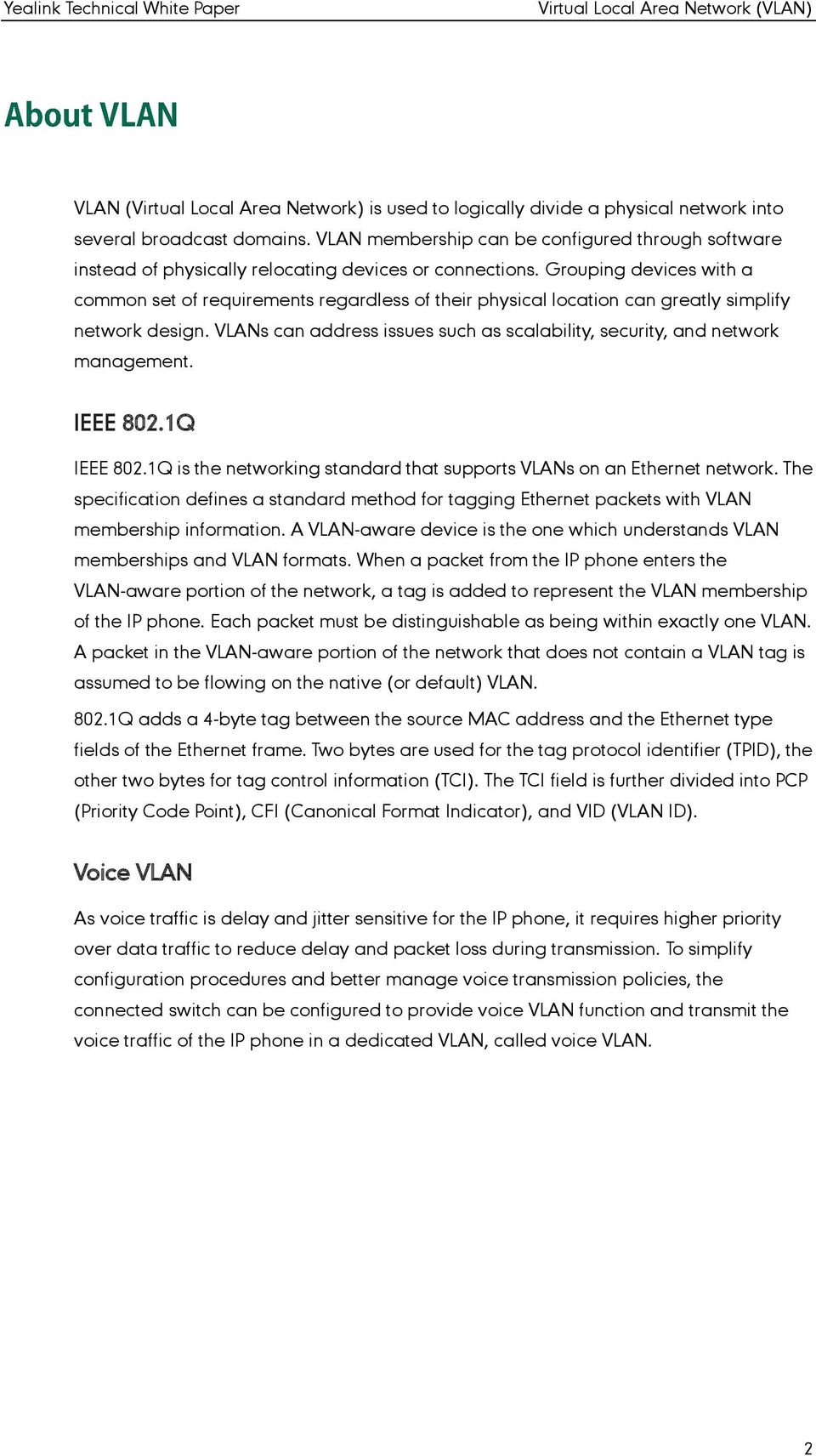
2 VLAN (Virtual Local Area Network) is used to logically divide a physical network into several broadcast domains. VLAN membership can be configured through software instead of physically relocating devices or connections. Grouping devices with a common set of requirements regardless of their physical location can greatly simplify network design. VLANs can address issues such as scalability, security, and network management. IEEE 802.1Q IEEE 802.1Q is the networking standard that supports VLANs on an Ethernet network. The specification defines a standard method for tagging Ethernet packets with VLAN membership information. A VLAN-aware device is the one which understands VLAN memberships and VLAN formats. When a packet from the IP phone enters the VLAN-aware portion of the network, a tag is added to represent the VLAN membership of the IP phone. Each packet must be distinguishable as being within exactly one VLAN. A packet in the VLAN-aware portion of the network that does not contain a VLAN tag is assumed to be flowing on the native (or default) VLAN Q adds a 4-byte tag between the source MAC address and the Ethernet type fields of the Ethernet frame. Two bytes are used for the tag protocol identifier (TPID), the other two bytes for tag control information (TCI). The TCI field is further divided into PCP (Priority Code Point), CFI (Canonical Format Indicator), and VID (VLAN ID). Voice VLAN As voice traffic is delay and jitter sensitive for the IP phone, it requires higher priority over data traffic to reduce delay and packet loss during transmission. To simplify configuration procedures and better manage voice transmission policies, the connected switch can be configured to provide voice VLAN function and transmit the voice traffic of the IP phone in a dedicated VLAN, called voice VLAN. 2
3 Voice VLAN is a special access port feature of the switch which allows IP phones to be automatically configured and easily associated with a logically separate VLAN. This feature provides various benefits, but one particular benefit is that when voice VLAN is enabled on a switch port, this port is also enabled to allow simultaneous access for a PC. This feature allows a PC to be daisy chained to an IP phone and the connection for both PC and IP phone to be trunked through the same physical Ethernet cable. The purpose of VLAN configurations on the IP phone is to insert tag with VLAN information to the packets generated by the IP phone. When VLAN is properly configured for the ports (Internet port and PC port) on the IP phone, the IP phone will tag all packets from these ports with the VLAN ID. The switch receives and forwards the tagged packets to the corresponding VLAN according to the VLAN ID in the tags described in IEEE Std Major Benefits of Using VLANs VLANs offer many benefits that are not found in typical LANs. Major benefits of segregating IP phones into VLAN(s) are listed as below: Performance Enhancements: VLAN is used to minimize the broadcast domain. Creating smaller domain for IP phone can reduce overhead and limit resource utilization. Additionally, less traffic will need to be routed, and the latency added by routers will be reduced. Ease of Administration: Much of the cost associated with network additions and relocations can be saved through the use of VLANs. IP phone can be shifted from one workgroup or department to another without installing new network cabling and reconfiguring hubs or routers. Security: VLANs can be used to create secure user groups and prevent others outside of the broadcast domain from receiving sensitive data of the IP phone. They can also be used to enhance firewall functions and restrict network access for one or more users. By segregating IP phones into VLANs, security filters can be implemented in the network to prevent the IP phones from receiving unnecessary traffic from other devices. This helps prevent disruption due to DoS attacks or 3

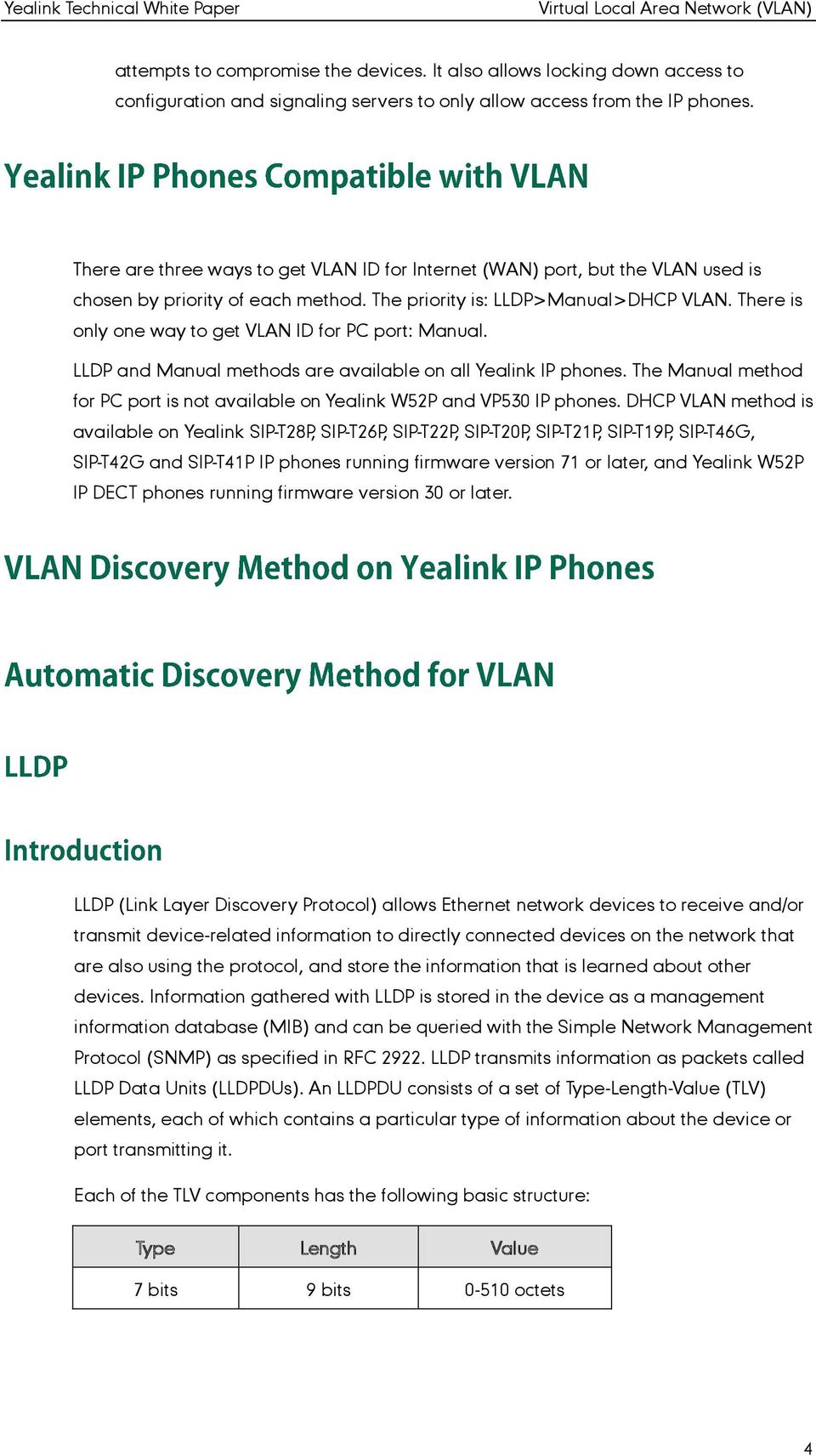
4 attempts to compromise the devices. It also allows locking down access to configuration and signaling servers to only allow access from the IP phones. There are three ways to get VLAN ID for Internet (WAN) port, but the VLAN used is chosen by priority of each method. The priority is: LLDP>Manual>DHCP VLAN. There is only one way to get VLAN ID for PC port: Manual. LLDP and Manual methods are available on all Yealink IP phones. The Manual method for PC port is not available on Yealink W52P and VP530 IP phones. DHCP VLAN method is available on Yealink SIP-T28P, SIP-T26P, SIP-T22P, SIP-T20P, SIP-T21P, SIP-T19P, SIP-T46G, SIP-T42G and SIP-T41P IP phones running firmware version 71 or later, and Yealink W52P IP DECT phones running firmware version 30 or later. LLDP (Link Layer Discovery Protocol) allows Ethernet network devices to receive and/or transmit device-related information to directly connected devices on the network that are also using the protocol, and store the information that is learned about other devices. Information gathered with LLDP is stored in the device as a management information database (MIB) and can be queried with the Simple Network Management Protocol (SNMP) as specified in RFC LLDP transmits information as packets called LLDP Data Units (LLDPDUs). An LLDPDU consists of a set of Type-Length-Value (TLV) elements, each of which contains a particular type of information about the device or port transmitting it. Each of the TLV components has the following basic structure: Type Length Value 7 bits 9 bits octets 4
5 LLDP supports advertising the following TLVs: Mandatory LLDP TLVs: Chassis ID, Port ID, and Time to Live (TTL) are included in an LLDPDU by default. Optional LLDP TLVs: System Name, System Description and so on, the phone sends the optional TLVs along with the mandatory TLVs in an LLDPDU. Organizationally Specific TLVs: MAC/PHY Configuration/Status and Port VLAN ID, which are defined in IEEE Standard and respectively. The LLDP frame ends with a special TLV, named end of LLDPDU in which both the type and length fields are 0. LLDP-MED LLDP-MED (Media Endpoint Discovery) is published by the Telecommunications Industry Association (TIA). It is an extension to LLDP that operates between endpoint devices and network connectivity devices. LLDP-MED specifically provides support for voice over IP (VoIP) applications and provides the following capabilities: Capabilities Discovery allows LLDP-MED endpoints to determine the capabilities that the connected device supports and has enabled. It can be used to indicate whether the connected device is a phone, a switch, a repeater, etc. Voice VLAN Configuration provides a mechanism for a switch to notify a device which VLAN to use, which enables plug and play networking. Power Management provides information related to how the device is powered, power priority, and how much power the device needs. Inventory Management provides a means to manage device and the attributes of the device such as model number, serial number, software revision, etc. Location Identification Discovery provides location information from the switch to the device when placing an emergency call. In addition to the TLVs advertised by LLDP, LLDP-MED also supports advertising the following TLVs: LLDP-MED capabilities TLV Network policy TLV Power management TLV Inventory management TLV Location identification TLV (not supported by IP phones) It should be noted that either LLDP or LLDP-MED but not both can be used at any given time on an interface between two devices. 5

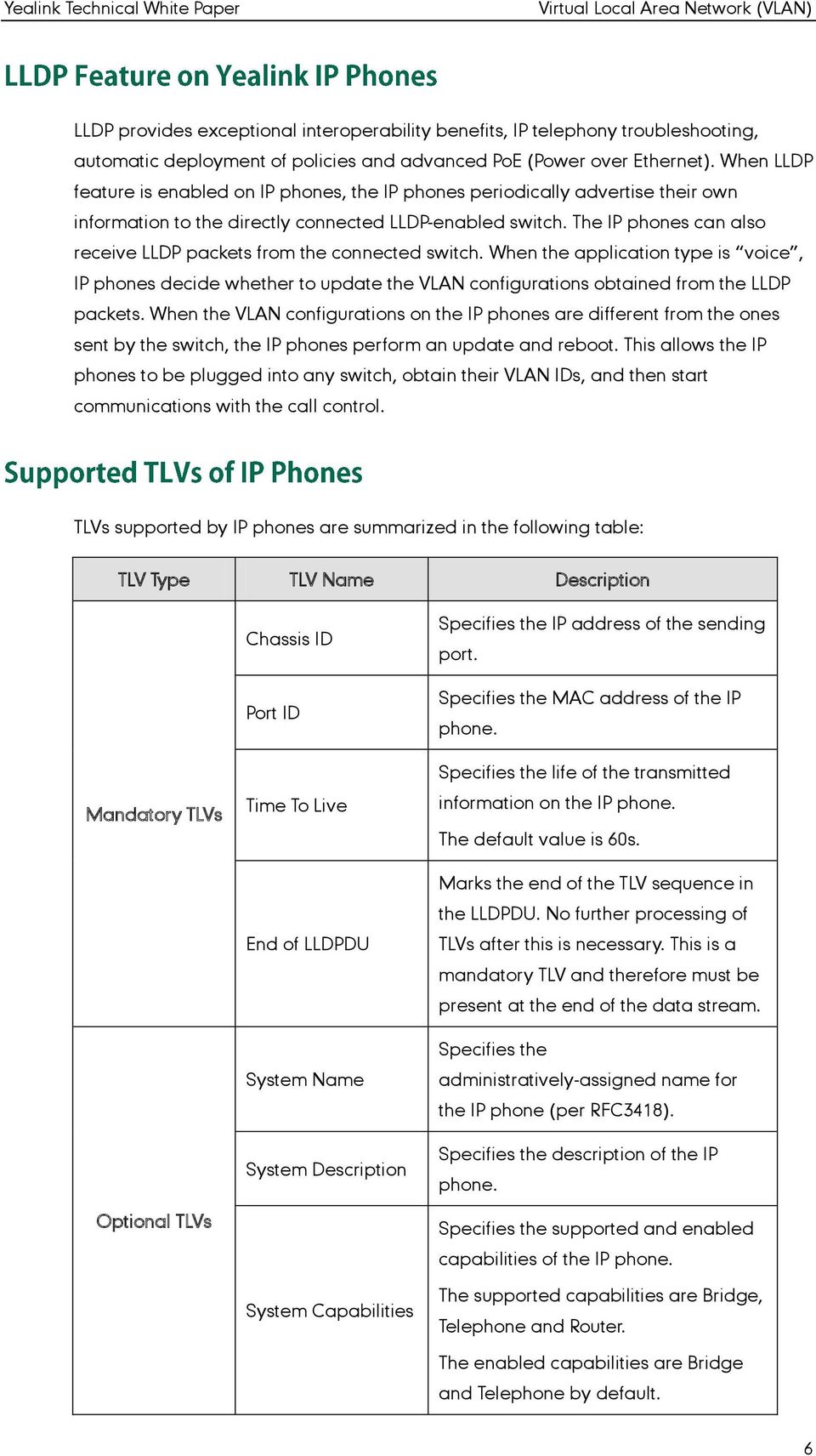
6 LLDP provides exceptional interoperability benefits, IP telephony troubleshooting, automatic deployment of policies and advanced PoE (Power over Ethernet). When LLDP feature is enabled on IP phones, the IP phones periodically advertise their own information to the directly connected LLDP-enabled switch. The IP phones can also receive LLDP packets from the connected switch. When the application type is voice, IP phones decide whether to update the VLAN configurations obtained from the LLDP packets. When the VLAN configurations on the IP phones are different from the ones sent by the switch, the IP phones perform an update and reboot. This allows the IP phones to be plugged into any switch, obtain their VLAN IDs, and then start communications with the call control. TLVs supported by IP phones are summarized in the following table: TLV Type TLV Name Description Mandatory TLVs Optional TLVs Chassis ID Port ID Time To Live End of LLDPDU System Name System Description System Capabilities Specifies the IP address of the sending port. Specifies the MAC address of the IP phone. Specifies the life of the transmitted information on the IP phone. The default value is 60s. Marks the end of the TLV sequence in the LLDPDU. No further processing of TLVs after this is necessary. This is a mandatory TLV and therefore must be present at the end of the data stream. Specifies the administratively-assigned name for the IP phone (per RFC3418). Specifies the description of the IP phone. Specifies the supported and enabled capabilities of the IP phone. The supported capabilities are Bridge, Telephone and Router. The enabled capabilities are Bridge and Telephone by default. 6
7 TLV Type TLV Name Description Port Description Specifies the description of the sending port. The default value is WAN PORT. IEEE Std Organizationally Specific TLV LLDP-MED TLVs MAC/PHY Configuration/Status Media Capabilities Network Policy Extended Power-via-MDI Inventory Hardware Revision Inventory Firmware Revision Inventory Software Revision Inventory Serial Number Inventory Specifies duplex and bit rate settings of the IP phone. The Auto Negotiation is supported and enabled by default. The advertised capabilities of PMD Auto-Negotiation are: 100BASE-TX (full duplex mode) 100BASE-TX (half duplex mode) 10BASE-T (full duplex mode) 10BASE-T (half duplex mode) Specifies the MED device type of the IP phone and the supported LLDP-MED TLV type can be encapsulated in LLDPDU. The supported LLDP-MED TLV types are: LLDP-MED Capabilities Network Policy Extended Power via MDI-PD Inventory Specifies the port VLAN ID, application type, L2 priority and DSCP value. Specifies power type, source, priority and value. Specifies the hardware revision of IP phone. Specifies the firmware revision of IP phone. Specifies the software revision of IP phone. Specifies the serial number of IP phone. Manufacturer name of IP phone. 7

8 TLV Type TLV Name Description Manufacturer Name Inventory Model Name Asset ID Specifies the model name of IP phone. Specifies the asset identifier of IP phone. The default value is asset. LLDP is enabled on IP phones by default. You can configure LLDP via web user interface or using configuration files. You can also configure the sending frequency of LLDP packet. The default sending frequency is 60s. The followings take configurations of a SIP-T28P IP phone running firmware version 71 as examples. To configure LLDP feature via web user interface: 1. Log into the web user interface with the administrator credential. The default administrator user name and password are both admin. 2. Click on Network->Advanced. 3. In the LLDP block, select the desired value from the pull-down list of Active. 4. Enter the desired time (in seconds) in the Packet Interval (1~3600s) field. 5. Click Confirm to accept the change. The web user interface prompts the warning Some settings you changed take effect when you restart your machine! Do you want to reboot now?. 6. Click OK to reboot the IP phone. 8

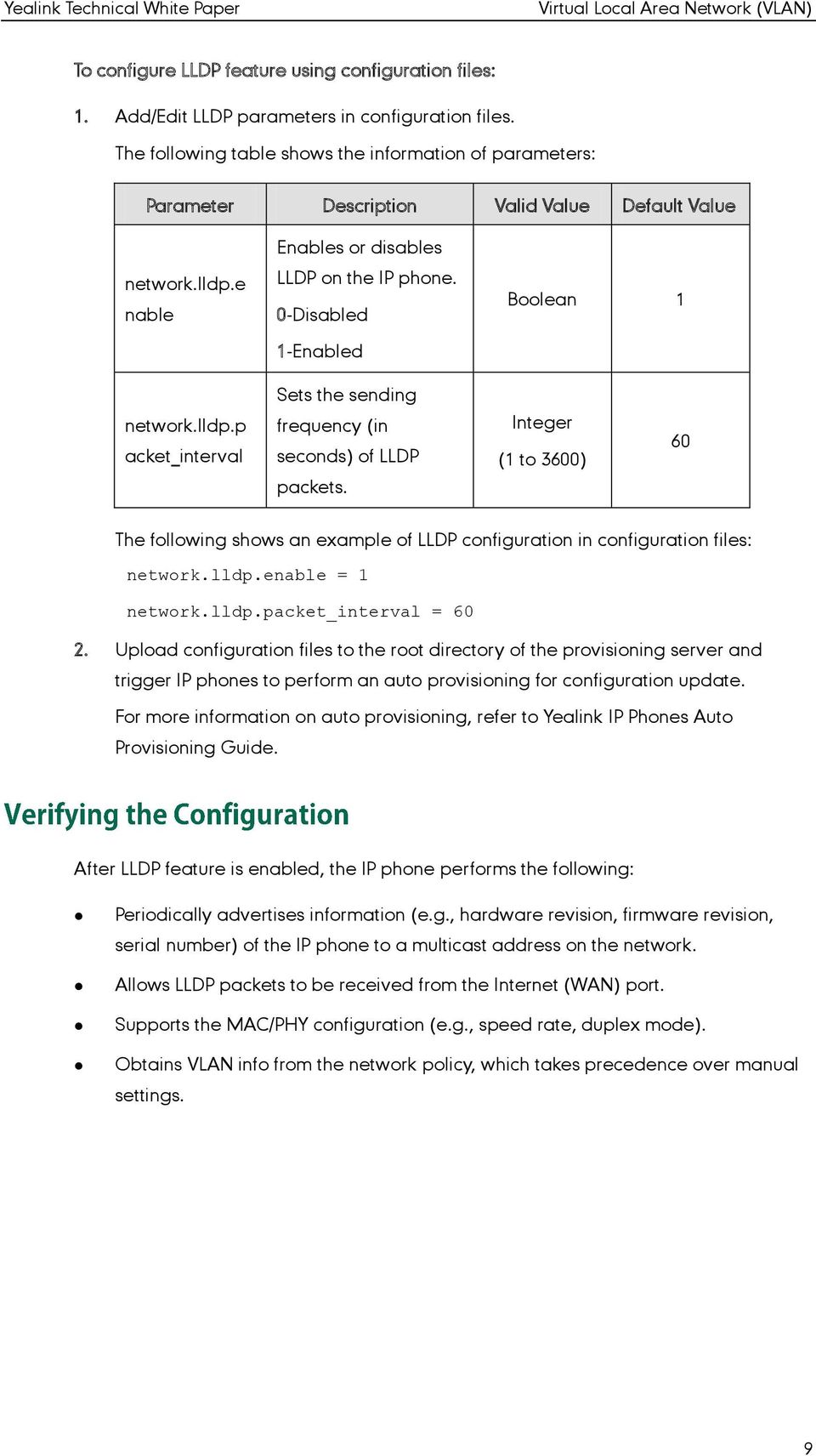
9 To configure LLDP feature using configuration files: 1. Add/Edit LLDP parameters in configuration files. The following table shows the information of parameters: Parameter Description Valid Value Default Value network.lldp.e nable Enables or disables LLDP on the IP phone. 0-Disabled 1-Enabled Boolean 1 Sets the sending network.lldp.p acket_interval frequency (in seconds) of LLDP packets. Integer (1 to 3600) 60 The following shows an example of LLDP configuration in configuration files: network.lldp.enable = 1 network.lldp.packet_interval = Upload configuration files to the root directory of the provisioning server and trigger IP phones to perform an auto provisioning for configuration update. For more information on auto provisioning, refer to Yealink IP Phones Auto Provisioning Guide. After LLDP feature is enabled, the IP phone performs the following: Periodically advertises information (e.g., hardware revision, firmware revision, serial number) of the IP phone to a multicast address on the network. Allows LLDP packets to be received from the Internet (WAN) port. Supports the MAC/PHY configuration (e.g., speed rate, duplex mode). Obtains VLAN info from the network policy, which takes precedence over manual settings. 9
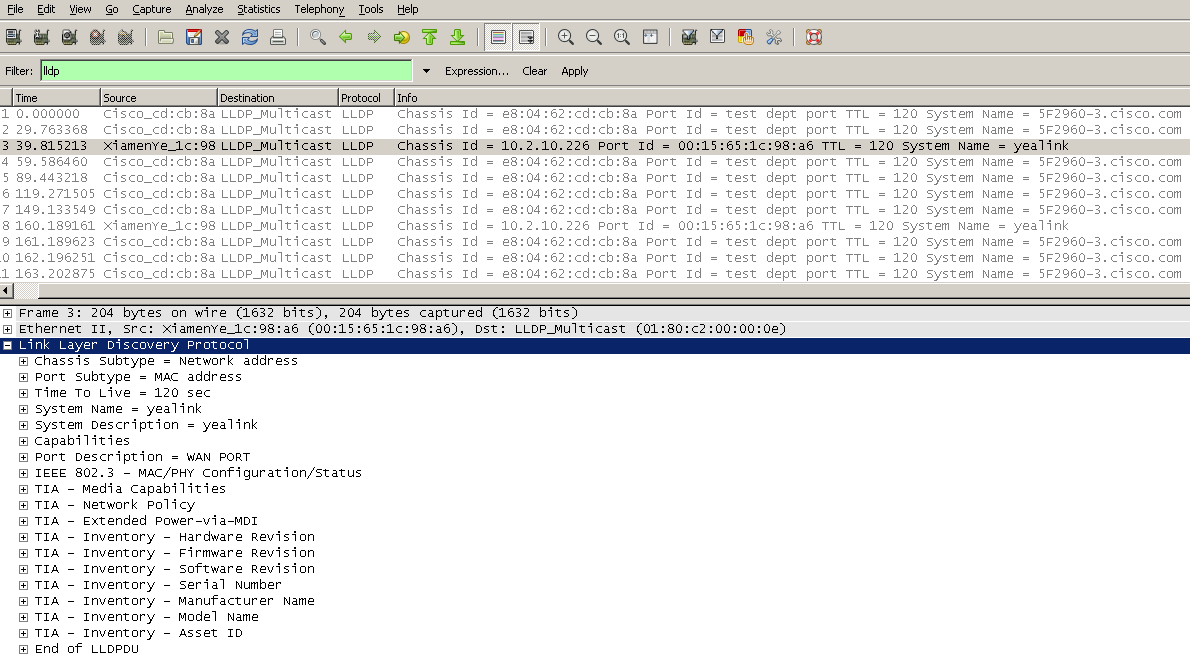
10 The following figure shows the LLDP packets sent and received by the IP phone, each packet contains multiple TLVs. IP phones support VLAN discovery via DHCP. When the VLAN Discovery method is set to DHCP, the IP phone will detect DHCP option for a valid VLAN ID. The predefined option 132 is used to supply the VLAN ID by default. You can customize the DHCP option used to detect the VLAN ID. Before using DHCP VLAN feature on IP phones, you must make sure that the DHCP option on the DHCP server is configured properly. This section provides instructions on how to configure a DHCP option for windows using DHCP Turbo. To configure DHCP option on a DHCP server: 1. Start the DHCP Turbo application. 10


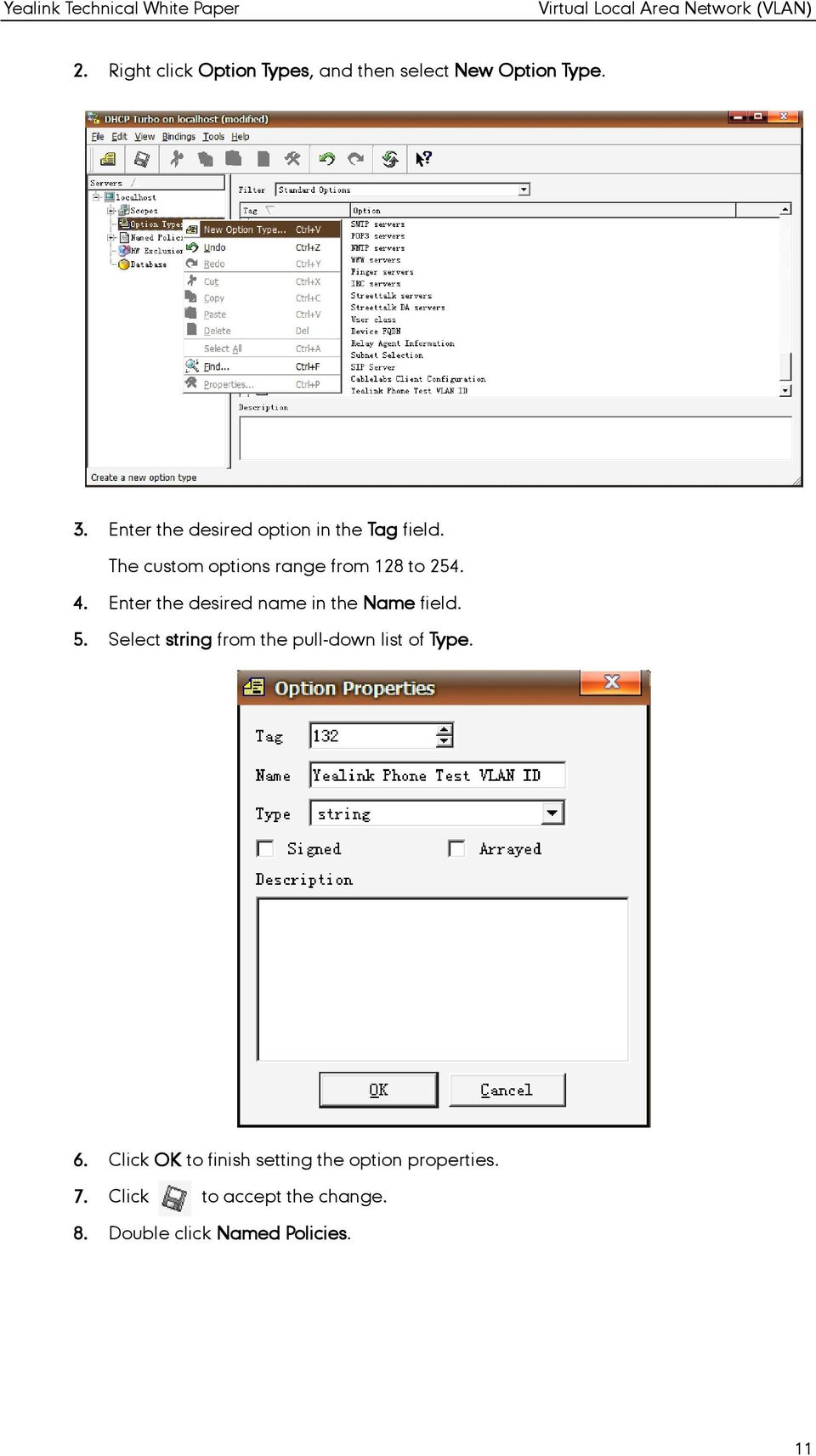
11 2. Right click Option Types, and then select New Option Type. 3. Enter the desired option in the Tag field. The custom options range from 128 to Enter the desired name in the Name field. 5. Select string from the pull-down list of Type. 6. Click OK to finish setting the option properties. 7. Click to accept the change. 8. Double click Named Policies. 11
12 9. Right click Global, and then select New Option. The Option Selector screen displays as below: 10. Scroll down and double click the option created above. 12

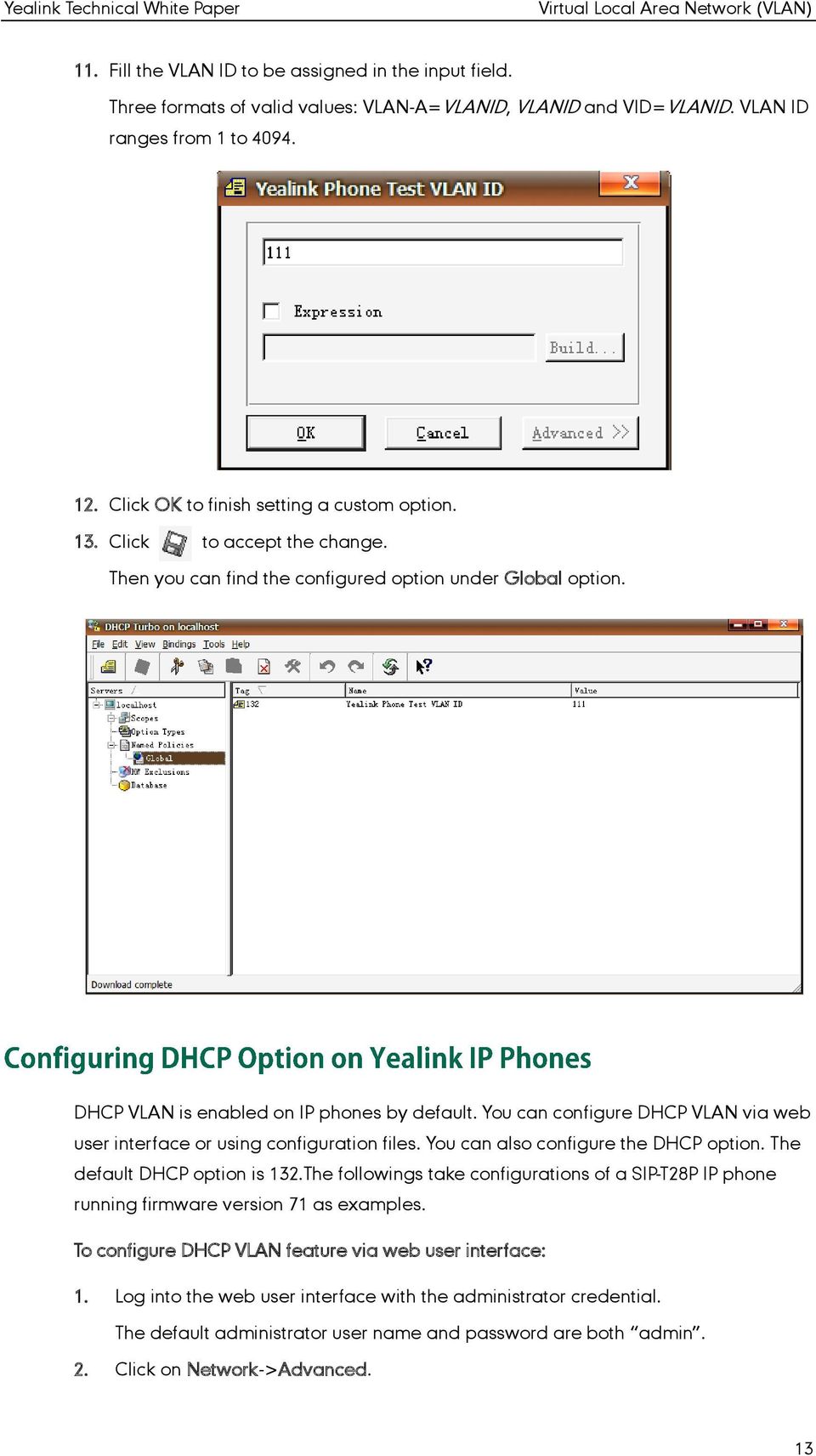
13 11. Fill the VLAN ID to be assigned in the input field. Three formats of valid values: VLAN-A=VLANID, VLANID and VID=VLANID. VLAN ID ranges from 1 to Click OK to finish setting a custom option. 13. Click to accept the change. Then you can find the configured option under Global option. DHCP VLAN is enabled on IP phones by default. You can configure DHCP VLAN via web user interface or using configuration files. You can also configure the DHCP option. The default DHCP option is 132.The followings take configurations of a SIP-T28P IP phone running firmware version 71 as examples. To configure DHCP VLAN feature via web user interface: 1. Log into the web user interface with the administrator credential. The default administrator user name and password are both admin. 2. Click on Network->Advanced. 13
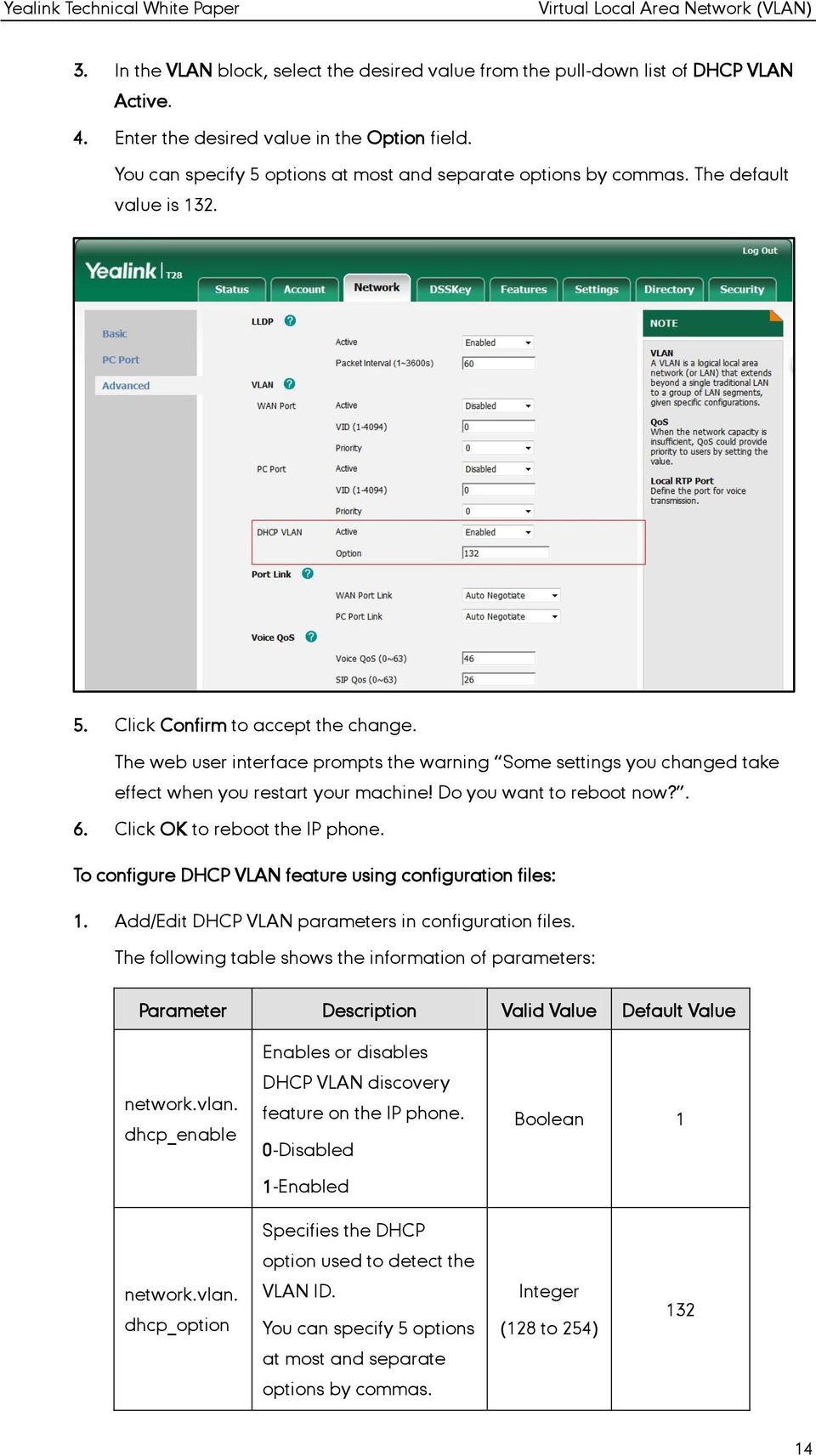
14 3. In the VLAN block, select the desired value from the pull-down list of DHCP VLAN Active. 4. Enter the desired value in the Option field. You can specify 5 options at most and separate options by commas. The default value is Click Confirm to accept the change. The web user interface prompts the warning Some settings you changed take effect when you restart your machine! Do you want to reboot now?. 6. Click OK to reboot the IP phone. To configure DHCP VLAN feature using configuration files: 1. Add/Edit DHCP VLAN parameters in configuration files. The following table shows the information of parameters: Parameter Description Valid Value Default Value network.vlan. dhcp_enable Enables or disables DHCP VLAN discovery feature on the IP phone. 0-Disabled 1-Enabled Boolean 1 Specifies the DHCP option used to detect the network.vlan. dhcp_option VLAN ID. You can specify 5 options Integer (128 to 254) 132 at most and separate options by commas. 14
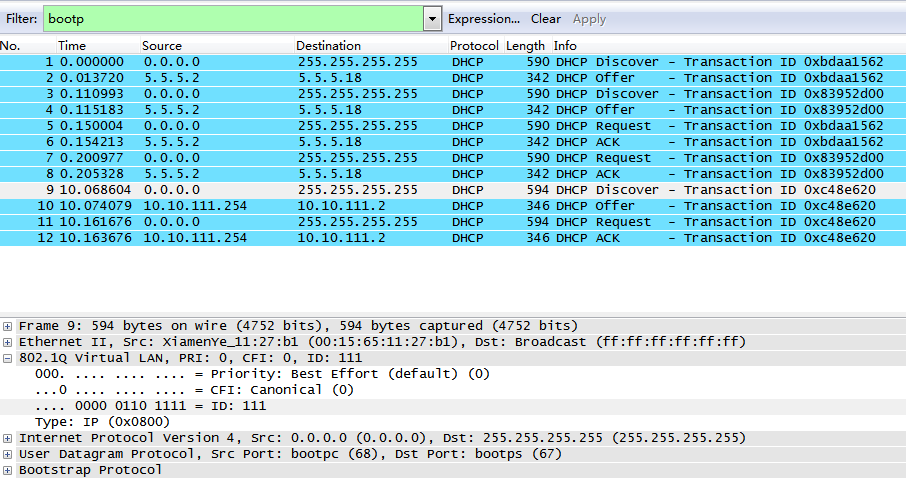
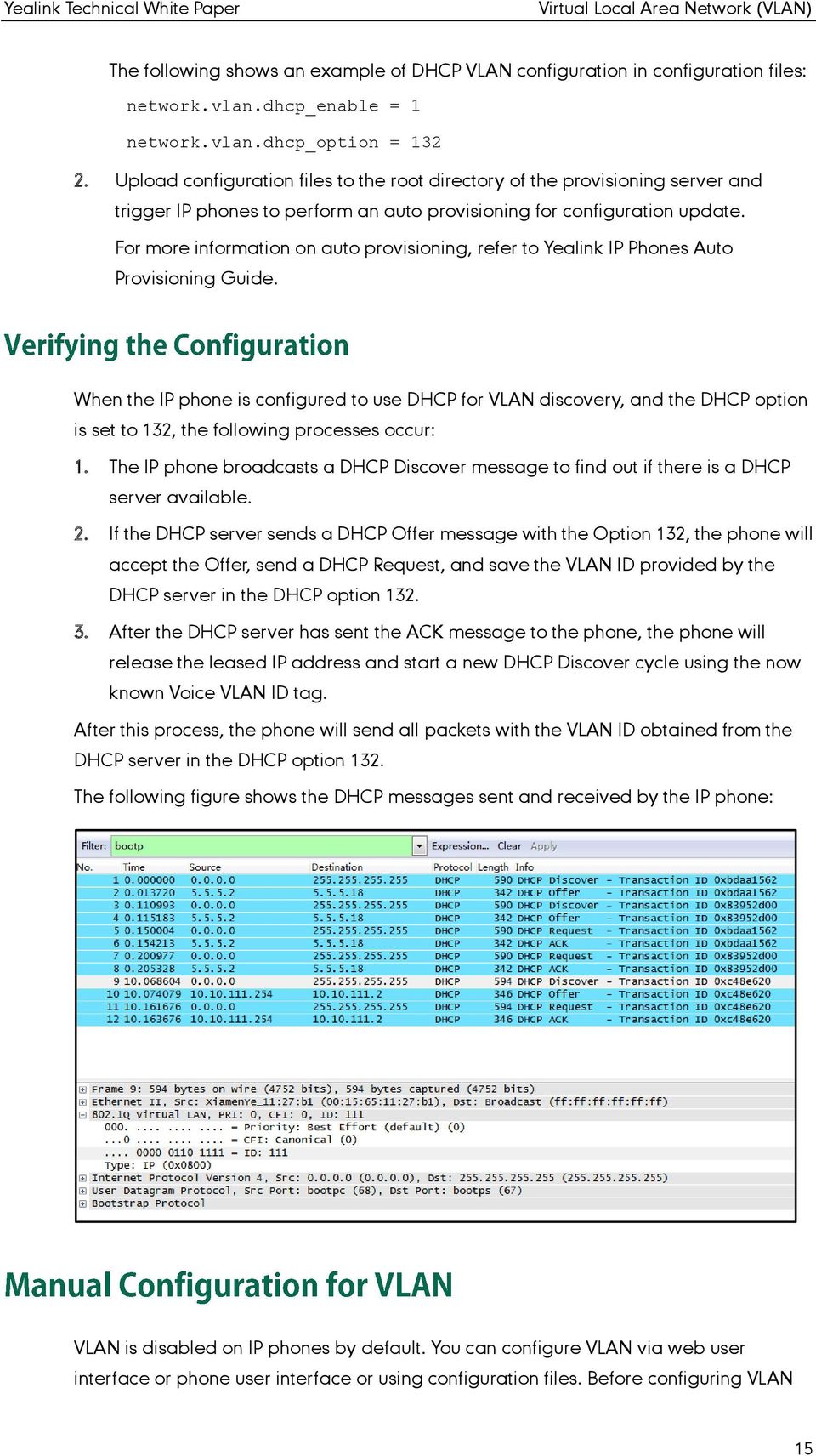
15 The following shows an example of DHCP VLAN configuration in configuration files: network.vlan.dhcp_enable = 1 network.vlan.dhcp_option = Upload configuration files to the root directory of the provisioning server and trigger IP phones to perform an auto provisioning for configuration update. For more information on auto provisioning, refer to Yealink IP Phones Auto Provisioning Guide. When the IP phone is configured to use DHCP for VLAN discovery, and the DHCP option is set to 132, the following processes occur: 1. The IP phone broadcasts a DHCP Discover message to find out if there is a DHCP server available. 2. If the DHCP server sends a DHCP Offer message with the Option 132, the phone will accept the Offer, send a DHCP Request, and save the VLAN ID provided by the DHCP server in the DHCP option After the DHCP server has sent the ACK message to the phone, the phone will release the leased IP address and start a new DHCP Discover cycle using the now known Voice VLAN ID tag. After this process, the phone will send all packets with the VLAN ID obtained from the DHCP server in the DHCP option 132. The following figure shows the DHCP messages sent and received by the IP phone: VLAN is disabled on IP phones by default. You can configure VLAN via web user interface or phone user interface or using configuration files. Before configuring VLAN 15
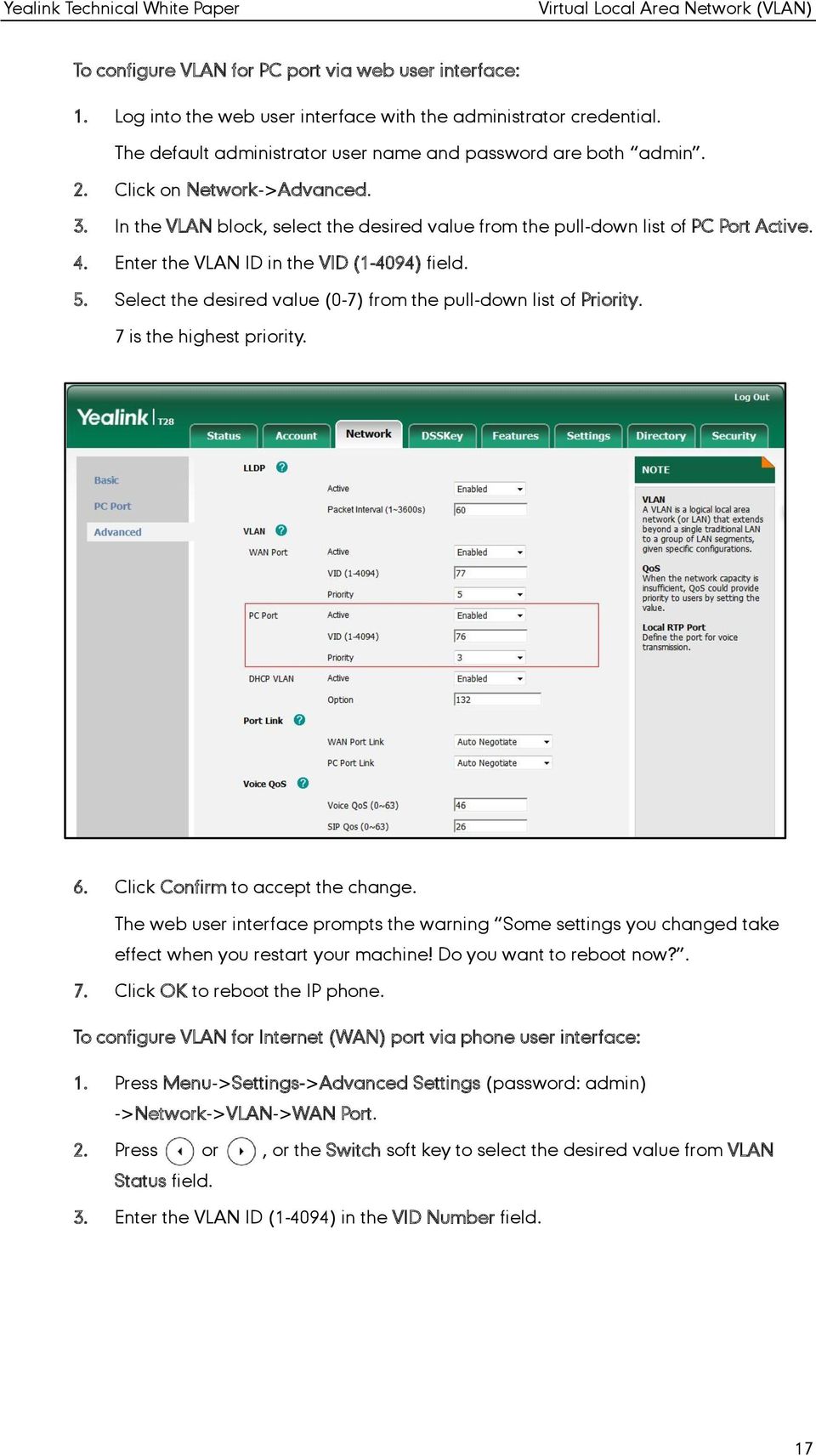
16 on the IP phone, you need to obtain the VLAN ID from your network administrator. When you configure VLAN feature, the most important issue is to confirm the type of the connected port (access, trunk, and hybrid) on the switch. This ensures that the traffics (tagged/untagged) from the IP phones can be transmitted properly. VLAN feature could affect the ability of the IP phones to function in the network. Contact your network administrator for more information before configuration. You can enable or disable VLAN, and set specific VLAN IDs and priorities for the Internet (WAN) port and PC port respectively. The followings take configurations of a SIP-T28P IP phone running firmware version 71 as examples. To configure VLAN for Internet (WAN) port via web user interface: 1. Log into the web user interface with the administrator credential. The default administrator user name and password are both admin. 2. Click on Network->Advanced. 3. In the VLAN block, select the desired value from the pull-down list of WAN Port Active. 4. Enter the VLAN ID in the VID (1-4094) field. 5. Select the desired value (0-7) from the pull-down list of Priority. 7 is the highest priority. 6. Click Confirm to accept the change. The web user interface prompts the warning Some settings you changed take effect when you restart your machine! Do you want to reboot now?. 7. Click OK to reboot the IP phone. 16

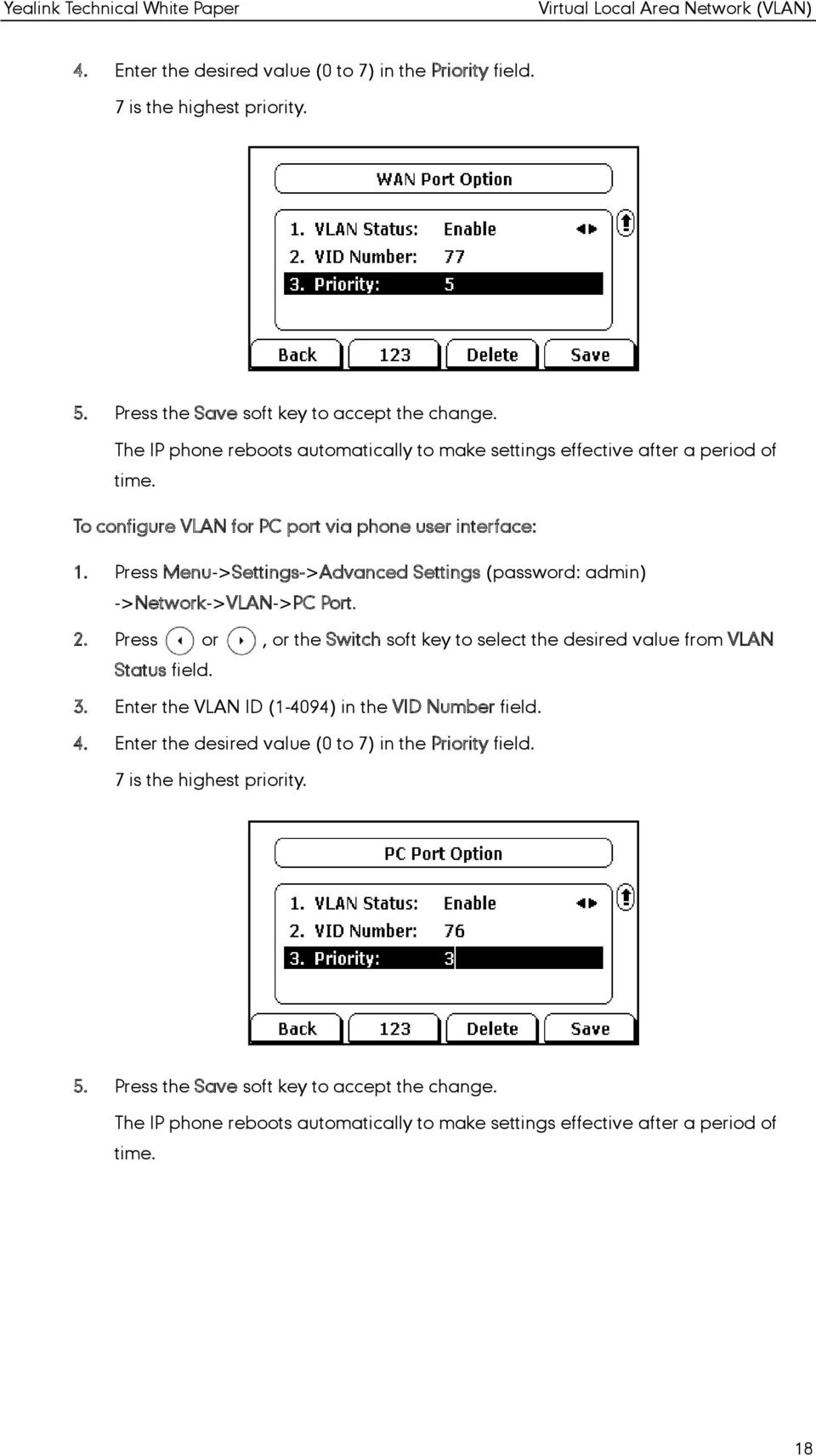
17 To configure VLAN for PC port via web user interface: 1. Log into the web user interface with the administrator credential. The default administrator user name and password are both admin. 2. Click on Network->Advanced. 3. In the VLAN block, select the desired value from the pull-down list of PC Port Active. 4. Enter the VLAN ID in the VID (1-4094) field. 5. Select the desired value (0-7) from the pull-down list of Priority. 7 is the highest priority. 6. Click Confirm to accept the change. The web user interface prompts the warning Some settings you changed take effect when you restart your machine! Do you want to reboot now?. 7. Click OK to reboot the IP phone. To configure VLAN for Internet (WAN) port via phone user interface: 1. Press Menu->Settings->Advanced Settings (password: admin) ->Network->VLAN->WAN Port. 2. Press or, or the Switch soft key to select the desired value from VLAN Status field. 3. Enter the VLAN ID (1-4094) in the VID Number field. 17
18 4. Enter the desired value (0 to 7) in the Priority field. 7 is the highest priority. 5. Press the Save soft key to accept the change. The IP phone reboots automatically to make settings effective after a period of time. To configure VLAN for PC port via phone user interface: 1. Press Menu->Settings->Advanced Settings (password: admin) ->Network->VLAN->PC Port. 2. Press or, or the Switch soft key to select the desired value from VLAN Status field. 3. Enter the VLAN ID (1-4094) in the VID Number field. 4. Enter the desired value (0 to 7) in the Priority field. 7 is the highest priority. 5. Press the Save soft key to accept the change. The IP phone reboots automatically to make settings effective after a period of time. 18
19 To configure VLAN for Internet (WAN) port and PC port using configuration file: 1. Add/Edit VLAN for Internet (WAN) port and PC port parameters in configuration files. The following table shows the information of parameters: Parameter Description Valid Value Default Value network.vlan. internet_port_ enable Enables or disables the IP phone to tag VLAN ID in packets sent from the Internet (WAN) port. 0-Disabled 1-Enabled Boolean 0 network.vlan. internet_port_ vid Configures the VLAN ID that associates with the particular VLAN. Integer (1 to 4094) 1 network.vlan. internet_port_ priority Specifies the priority used for transmitting VLAN packets. Integer (0 to 7) 0 network.vlan. pc_port_ena ble Enables or disables the IP phone to tag VLAN ID in packets sent from the PC port. 0-Disabled 1-Enabled Boolean 0 network.vlan. pc_port_vid Configures the VLAN ID that associates with the particular VLAN. Integer (1 to 4094) 1 network.vlan. pc_port_priori ty Specifies the priority used for transmitting VLAN packets. Integer (0 to 7) 0 The following shows an example of VLAN configuration in configuration files: network.vlan.internet_port_enable = 1 network.vlan.internet_port_vid = 77 network.vlan.internet_port_priority = 2 network.vlan.pc_port_enable = 1 network.vlan.pc_port_vid = 76 network.vlan.pc_port_priority = 3 19

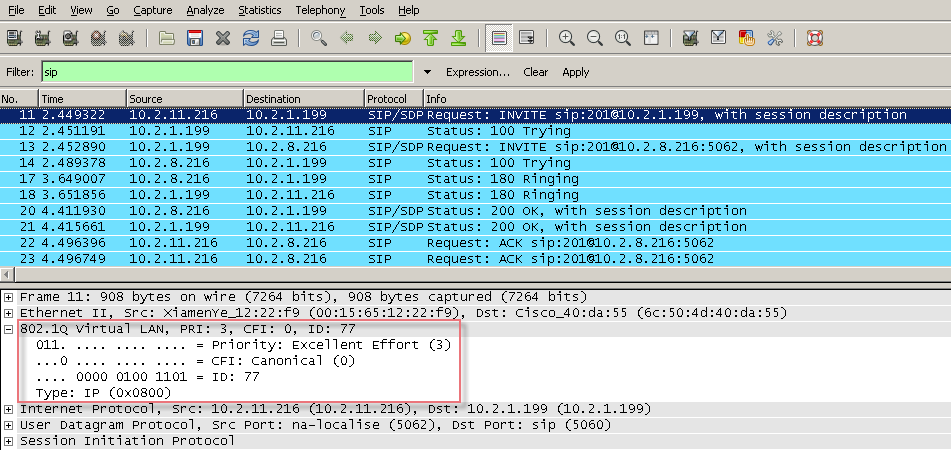
20 2. Upload configuration files to the root directory of the provisioning server and trigger IP phones to perform an auto provisioning for configuration update. For more information on auto provisioning, refer to Yealink IP Phones Auto Provisioning Guide. The IP phone reboots after VLAN feature has been enabled. After starting up, the IP phone will be assigned with a subnet address defined for VLAN 77. The following figure shows the VLAN ID sent and received by the IP phone: IEEE (Institute of Electrical and Electronics Engineers) a professional association headquartered in New York City that is dedicated to advancing technological innovation and excellence. TIA (Telecommunications Industry Association) accredited by the American National Standards Institute (ANSI) to develop voluntary, consensus-based industry standards for a wide variety of ICT products. IEEE a working group and a collection of IEEE standards produced by the working group defining the physical layer and data link layer's media access control (MAC) of wired Ethernet. Port-based VLAN a port-based VLAN is a group of ports on a Gigabit Ethernet Switch that form a logical Ethernet segment. Each port of a port-based VLAN can belong to only one VLAN at a time. Port and Protocol-based VLAN initially defined in IEEE 802.1v (currently amended as part of 802.1Q-2003) enables data frame classification and assignment to unique VLANs based on the received data frame type and the protocol information in its payload. TPID (tag protocol identifier) a 16-bit field set to a value of 0x8100 in order to identify the frame as an IEEE 802.1Q-tagged frame. It is used to distinguish the frame from 20

21 untagged frames. PCP (Priority Code Point) a 3-bit field which refers to the IEEE 802.1p priority. It indicates the frame priority level. Values are from 0 (best effort) to 7 (highest); 1 represents the lowest priority. CFI (Canonical Format Indicator) used for compatibility reason between Ethernet type network and Token Ring type network. It is always set to zero for Ethernet switches. If a frame received at an Ethernet port has a CFI set to 1, then that frame should not be forwarded as it is to an untagged port. 21
22 LLDP and LLDP-MED: IEEE 802.3: VLAN: IEEE 802.1q: LLDP on Cisco Switch: e/configuration/guide/swlldp.html We are striving to improve our documentation quality and we appreciate your feedback. your opinions and comments to 22
Network Discovery Protocol LLDP and LLDP- MED
 Network LLDP and LLDP- MED Prof. Vahida Z. Attar College of Engineering, Pune Wellesely Road, Shivajinagar, Pune-411 005. Maharashtra, INDIA Piyush chandwadkar College of Engineering, Pune Wellesely Road,
Network Discovery Protocol LLDP and LLDP- MED
 Network LLDP and LLDP- MED Prof. Vahida Z. Attar College of Engineering, Pune Wellesely Road, Shivajinagar, Pune-411 005. Maharashtra, INDIA Piyush chandwadkar College of Engineering, Pune Wellesely Road,
Abstract. Avaya Solution & Interoperability Test Lab
 Avaya Solution & Interoperability Test Lab Sample Configuration for using Link Layer Discovery Protocol (LLDP) with Cisco Catalyst 4500 or 3750 Switches for VLAN assignment to Avaya 4600 Series IP Telephones
Configuring LLDP, LLDP-MED, and Location Service
 27 CHAPTER Configuring LLDP, LLDP-MED, and Location Service This chapter describes how to configure the Link Layer Discovery Protocol (LLDP), LLDP Media Endpoint Discovery (LLDP-MED), and Location Service
Using Link Layer Discovery Protocol in Multivendor Networks
 Using Link Layer Discovery Protocol in Multivendor Networks Link Layer Discovery Protocol (LLDP), standardized by the IEEE as part of 802.1ab, enables standardized discovery of nodes, which in turn facilitates
802.1X Authentication, Link Layer Discovery Protocol (LLDP), and Avaya IP Telephones
 802.1X Authentication, Link Layer Discovery Protocol (LLDP), and Avaya IP Telephones Abstract The purpose of this document is to discuss 802.1X Authentication and Link Layer Discovery Protocol (LLDP) in
VLANs. Application Note
 VLANs Application Note Table of Contents Background... 3 Benefits... 3 Theory of Operation... 4 IEEE 802.1Q Packet... 4 Frame Size... 5 Supported VLAN Modes... 5 Bridged Mode... 5 Static SSID to Static
VLAN 802.1Q. 1. VLAN Overview. 1. VLAN Overview. 2. VLAN Trunk. 3. Why use VLANs? 4. LAN to LAN communication. 5. Management port
 1. VLAN Overview 2. VLAN Trunk 3. Why use VLANs? 4. LAN to LAN communication 5. Management port 6. Applications 6.1. Application 1 6.2. Application 2 6.3. Application 3 6.4. Application 4 6.5. Application
Management Software. Web Browser User s Guide AT-S106. For the AT-GS950/48 Gigabit Ethernet Smart Switch. Version 1.0.0. 613-001339 Rev.
 Management Software AT-S106 Web Browser User s Guide For the AT-GS950/48 Gigabit Ethernet Smart Switch Version 1.0.0 613-001339 Rev. A Copyright 2010 Allied Telesis, Inc. All rights reserved. No part of
Abstract. Avaya Solution & Interoperability Test Lab
 Avaya Solution & Interoperability Test Lab Sample Configuration for using Link Layer Discovery Protocol (LLDP) with Cisco Catalyst 4500 or 3750 Switches for VLAN Assignment for Avaya 9600 and 1600 Series
This guide provides instructions on how to configure SNMP feature on Yealink IP phones and test SNMP feature using a free SNMP test tool.
 This guide provides instructions on how to configure SNMP feature on Yealink IP phones and test SNMP feature using a free SNMP test tool. The configurations described in this guide take the Yealink SIP-T28P
Optimizing VoIP Applications with Juniper Networks EX3200 and EX4200 Line of Ethernet Switches
 APPLICATION NOTE Deploying IP Telephony with JUNIPER NETWORKS ETHERNET Switches Optimizing Applications with Juniper Networks EX3200 and EX4200 Line of Ethernet Switches Copyright 2009, Juniper Networks,
DEPLOYING IP TELEPHONY WITH EX SERIES ETHERNET SWITCHES
 APPLICATION NOTE DEPLOYING IP TELEPHONY WITH EX SERIES ETHERNET SWITCHES Optimizing Applications with Juniper Networks Access Switches Copyright 2011, Juniper Networks, Inc. 1 Table of Contents Introduction.....................................................................................................3
Interoperability between Avaya IP phones and ProCurve switches
 An HP ProCurve Networking Application Note Interoperability between Avaya IP phones and ProCurve switches Contents 1. Introduction... 3 2. Architecture... 3 3. Checking PoE compatibility... 3 4. Configuring
Deploying IP Telephony with EX-Series Switches
 Application Note Deploying IP Telephony with EX-Series Switches Optimizing VoIP Applications with EX 3200 and EX 4200 Series Ethernet Switches Juniper Networks, Inc. 1194 North Mathilda Avenue Sunnyvale,
AT-S60 Version 1.1.4 Management Software for the AT-8400 Series Switch. Software Release Notes
 AT-S60 Version 1.1.4 Management Software for the AT-8400 Series Switch Supported Platforms Software Release Notes Please read this document before you begin to use the AT-S60 management software. The AT-S60
VLAN for DekTec Network Adapters
 Application Note DT-AN-IP-2 VLAN for DekTec Network Adapters 1. Introduction VLAN (Virtual LAN) is a technology to segment a single physical network into multiple independent virtual networks. The VLANs
ProSafe Plus Switch Utility
 ProSafe Plus Switch Utility User Guide 350 East Plumeria Drive San Jose, CA 95134 USA September 2010 202-10524-03 v1.0 ProSafe Plus Switch Utility User Guide 2010 NETGEAR, Inc. All rights reserved. No
Easy Smart Configuration Utility
 Easy Smart Configuration Utility REV1.1.0 1910010977 CONTENTS Chapter 1 About this Guide...1 1.1 Intended Readers... 1 1.2 Conventions... 1 1.3 Overview of This Guide... 1 Chapter 2 Getting Started...4
Example: Configuring VoIP on an EX Series Switch Without Including 802.1X Authentication
 Example: Configuring VoIP on an EX Series Switch Without Including 802.1X Authentication Requirements You can configure voice over IP (VoIP) on an EX Series switch to support IP telephones. To configure
Virtual LANs. http://www.cis.ohio-state.edu/~jain/cis788-97/ or http://www.netlab.ohio-state.edu/~jain/cis788-97/ Raj Jain
 Virtual LANs Professor of Computer and Information Sciences Please download and print the handouts from: http://www.cis.ohio-state.edu/~jain/cis788-97/ or http://www.netlab.ohio-state.edu/~jain/cis788-97/
MS Series: VolP Deployment Guide
 Solution Guide MS Series: VolP Deployment Guide JULY 2013 How to deploy a distributed VoIP infrastructure with Meraki MS switches. Table of Contents Introduction 3 Getting Started 4 Setting up VoIP using
What is VLAN Routing?
 Application Note #38 February 2004 What is VLAN Routing? This Application Notes relates to the following Dell product(s): 6024 and 6024F 33xx Abstract Virtual LANs (VLANs) offer a method of dividing one
LANs and VLANs A Simplified Tutorial
 Application Note LANs and VLANs A Simplified Tutorial Version 3.0 May 2002 COMPAS ID 90947 Avaya Labs 1 Companion document IP Addressing: A Simplified Tutorial COMPAS ID 92962 2 Introduction As the name
Interoperability between Mitel IP Phones and ProCurve Switches
 An HP ProCurve Networking Application Note Interoperability between Mitel IP Phones and ProCurve Switches Contents 1. Introduction... 3 2. Architecture... 3 3. Configuration... 3 3.1 Check power over Ethernet
Region 10 Videoconference Network (R10VN)
 Region 10 Videoconference Network (R10VN) Network Considerations & Guidelines 1 What Causes A Poor Video Call? There are several factors that can affect a videoconference call. The two biggest culprits
Enabling Multiple Wireless Networks on RV320 VPN Router, WAP321 Wireless-N Access Point, and Sx300 Series Switches
 print email Article ID: 4941 Enabling Multiple Wireless Networks on RV320 VPN Router, WAP321 Wireless-N Access Point, and Sx300 Series Switches Objective In an ever-changing business environment, your
network infrastructure: getting started with VoIP
 hp procurve networking business may 2003 network infrastructure: getting started with VoIP technical brief table of contents introduction 2 network optimization for VoIP 2 bandwidth provisioning 3 end-to-end
Configuring Switch Ports and VLAN Interfaces for the Cisco ASA 5505 Adaptive Security Appliance
 CHAPTER 5 Configuring Switch Ports and VLAN Interfaces for the Cisco ASA 5505 Adaptive Security Appliance This chapter describes how to configure the switch ports and VLAN interfaces of the ASA 5505 adaptive
ProCurve Switch 1700-8 ProCurve Switch 1700-24
 Management and Configuration Guide ProCurve Switch 1700-8 ProCurve Switch 1700-24 www.procurve.com ProCurve Series 1700 Switch Management and Configuration Guide Copyright 2007 Hewlett-Packard Development
GVRP Overview. Overview
 3 GVRP Contents Overview...................................................... 3-2................................................... 3-3 General Operation........................................... 3-4
CCT vs. CCENT Skill Set Comparison
 Operation of IP Data Networks Recognize the purpose and functions of various network devices such as Routers, Switches, Bridges and Hubs Select the components required to meet a given network specification
LLDP-MED and Cisco Discovery Protocol
 White Paper LLDP-MED and Cisco Discovery Protocol DEVICE DISCOVERY PROTOCOLS Device discovery protocols enable directly connected devices to discover information about each other. They advertise information
24 Port Gigabit Ethernet Web Smart Switch. Users Manual
 24 Port Gigabit Ethernet Web Smart Switch Users Manual Content Web Smart Switch Configure login -------------------------------- 2 Configuration System Configuration ---------------------------------------------------
Interoperability between Cisco Unified IP 7900 Series phones and ProCurve switches
 An HP ProCurve Networking Application Note Interoperability between Cisco Unified IP 7900 Series phones and ProCurve switches Contents 1. Introduction... 3 2. Architecture... 3 3. Checking PoE compatibility...
Objectives. The Role of Redundancy in a Switched Network. Layer 2 Loops. Broadcast Storms. More problems with Layer 2 loops
 ITE I Chapter 6 2006 Cisco Systems, Inc. All rights reserved. Cisco Public 1 Objectives Implement Spanning Tree Protocols LAN Switching and Wireless Chapter 5 Explain the role of redundancy in a converged
Chapter 8 Router and Network Management
 Chapter 8 Router and Network Management This chapter describes how to use the network management features of your ProSafe Dual WAN Gigabit Firewall with SSL & IPsec VPN. These features can be found by
Juniper Networks EX Series Ethernet Switches/ Cisco VoIP Interoperability Test Results. September 25, 2009
 Juniper Networks EX Series Ethernet Switches/ Cisco VoIP Interoperability Test Results September 25, 2009 Executive Summary Juniper Networks commissioned Network Test to assess interoperability between
Exhibit n.2: The layers of a hierarchical network
 3. Advanced Secure Network Design 3.1 Introduction You already know that routers are probably the most critical equipment piece in today s networking. Without routers, internetwork communication would
VLAN and QinQ Technology White Paper
 VLAN and QinQ Technology White Paper Issue 1.01 Date 2012-10-30 HUAWEI TECHNOLOGIES CO., LTD. 2012. All rights reserved. No part of this document may be reproduced or transmitted in any form or by any
Information about IP Proprietary Telephones KX-TDA100 KX-TDA200
 Model Hybrid IP-PBX Information about IP Proprietary Telephones KX-TDA100 KX-TDA200 Thank you for purchasing a Panasonic Hybrid IP-PBX. Please read this manual carefully before using this product and save
Chapter 46 Link Layer Discovery Protocol (LLDP)
 Chapter 46 Link Layer Discovery Protocol (LLDP) Introduction...46-3 LLDP Overview...46-3 Type Length Values... 46-4 Transmission and Reception... 46-5 Storing LLDP Information... 46-7 Configuring LLDP...46-9
WSG24POE Switch. User Manual
 WSG24POE Switch User Manual Version: 01/01/2011 Introduction! 4 Product Overview! 4 Specifications! 5 Package Contents! 5 Hardware Description! 6 Physical Dimensions/ Weight! 6 Front Panel! 6 LED Indicators!
Table of Contents... iii. Summary of Changes... v. Introduction... 1. Getting Started... 3
 Table of Contents i Table of Contents Table of Contents... iii Summary of Changes... v Changes for Release 72, Guide Version 72.1... v Changes for Release 71, Guide Version 71.165... v Changes for Release
TotalCloud Phone System
 TotalCloud Phone System Cisco SF 302-08P PoE VLAN Configuration Guide Note: The below information and configuration is for deployment of the Cbeyond managed switch solution using the Cisco 302 8 port Power
ADSL MODEM. User Manual V1.0
 ADSL MODEM User Manual V1.0 CONTENTS 1.OVERVIEW... 3 1.1 ABOUT ADSL... 3 1.2 ABOUT ADSL2/2+... 3 1.3 FEATURES... 3 2 SPECIFICATION... 4 2.1 INTERFACE INTRODUCTION... 4 2.1.1 INDICATOR AND INTERFACE...
DSL-2600U. User Manual V 1.0
 DSL-2600U User Manual V 1.0 CONTENTS 1. OVERVIEW...3 1.1 ABOUT ADSL...3 1.2 ABOUT ADSL2/2+...3 1.3 FEATURES...3 2 SPECIFICATION...4 2.1 INDICATOR AND INTERFACE...4 2.2 HARDWARE CONNECTION...4 2.3 LED STATUS
Chapter 3 Management. Remote Management
 Chapter 3 Management This chapter describes how to use the management features of your ProSafe 802.11a/g Dual Band Wireless Access Point WAG102. To access these features, connect to the WAG102 as described
How To Understand and Configure Your Network for IntraVUE
 How To Understand and Configure Your Network for IntraVUE Summary This document attempts to standardize the methods used to configure Intrauve in situations where there is little or no understanding of
Guide to TCP/IP, Third Edition. Chapter 3: Data Link and Network Layer TCP/IP Protocols
 Guide to TCP/IP, Third Edition Chapter 3: Data Link and Network Layer TCP/IP Protocols Objectives Understand the role that data link protocols, such as SLIP and PPP, play for TCP/IP Distinguish among various
Note: This case study utilizes Packet Tracer. Please see the Chapter 5 Packet Tracer file located in Supplemental Materials.
 Note: This case study utilizes Packet Tracer. Please see the Chapter 5 Packet Tracer file located in Supplemental Materials. CHAPTER 5 OBJECTIVES Configure a router with an initial configuration. Use the
Configuring Switch Ports and VLAN Interfaces for the Cisco ASA 5505 Adaptive Security Appliance
 CHAPTER 4 Configuring Switch Ports and VLAN Interfaces for the Cisco ASA 5505 Adaptive Security Appliance This chapter describes how to configure the switch ports and VLAN interfaces of the ASA 5505 adaptive
Chapter 4 Management. Viewing the Activity Log
 Chapter 4 Management This chapter describes how to use the management features of your NETGEAR WG102 ProSafe 802.11g Wireless Access Point. To get to these features, connect to the WG102 as described in
Overview of Routing between Virtual LANs
 Overview of Routing between Virtual LANs This chapter provides an overview of virtual LANs (VLANs). It describes the encapsulation protocols used for routing between VLANs and provides some basic information
FSM73xx GSM73xx GMS72xxR Shared access to the Internet across Multiple routing VLANs using a Prosafe Firewall
 FSM73xx GSM73xx GMS72xxR Shared access to the Internet across Multiple routing VLANs using a Prosafe Firewall This document describes how to: - Create multiple routing VLANs - Obtain Internet access on
VOIP Guide Using ZyXEL Switch
 VOIP Guide Using ZyXEL Switch 2015/8/10 ZyXEL Communications Corporation Barney Gregorio Overview: This article will contain solutions on how to configure Voice over IP (VOIP). Two methods will be discussed:
- Virtual LANs (VLANs) and VTP -
 1 - Virtual LANs (VLANs) and VTP - Collision vs. Broadcast Domains A collision domain is simply defined as any physical segment where a collision can occur. Hubs can only operate at half-duplex, and thus
ADVANCED NETWORK CONFIGURATION GUIDE
 White Paper ADVANCED NETWORK CONFIGURATION GUIDE CONTENTS Introduction 1 Terminology 1 VLAN configuration 2 NIC Bonding configuration 3 Jumbo frame configuration 4 Other I/O high availability options 4
Implementation of Virtual Local Area Network using network simulator
 1060 Implementation of Virtual Local Area Network using network simulator Sarah Yahia Ali Department of Computer Engineering Techniques, Dijlah University College, Iraq ABSTRACT Large corporate environments,
HARTING Ha-VIS Management Software
 HARTING Ha-VIS Management Software People Power Partnership HARTING Management Software Network Management Automation IT - with mcon Switches from HARTING With the Ha-VIS mcon families, HARTING has expanded
Installation of the On Site Server (OSS)
 Installation of the On Site Server (OSS) rev 1.1 Step #1 - Initial Connection to the OSS Having plugged in power and an ethernet cable in the eth0 interface (see diagram below) you can connect to the unit
V310 Support Note Version 1.0 November, 2011
 1 V310 Support Note Version 1.0 November, 2011 2 Index How to Register V310 to Your SIP server... 3 Register Your V310 through Auto-Provision... 4 Phone Book and Firmware Upgrade... 5 Auto Upgrade... 6
Cisco Certified Network Associate Exam. Operation of IP Data Networks. LAN Switching Technologies. IP addressing (IPv4 / IPv6)
 Cisco Certified Network Associate Exam Exam Number 200-120 CCNA Associated Certifications CCNA Routing and Switching Operation of IP Data Networks Operation of IP Data Networks Recognize the purpose and
JOB READY ASSESSMENT BLUEPRINT COMPUTER NETWORKING FUNDAMENTALS - PILOT. Test Code: 4514 Version: 01
 JOB READY ASSESSMENT BLUEPRINT COMPUTER NETWORKING FUNDAMENTALS - PILOT Test Code: 4514 Version: 01 Specific Competencies and Skills Tested in this Assessment: PC Principles Identify physical and equipment
For additional information, refer to the user guide of Yealink SIP-T2xP IP phones or contact Yealink FAE (Field Application Engineer).
 The following provides information that can assist you in troubleshooting problems with your Yealink SIP-T2xP IP phone. The phone can provide feedback in the form of on-screen error messages, status indicators,
ProSAFE 8-Port and 16-Port Gigabit Click Switch
 ProSAFE 8-Port and 16-Port Gigabit Click Switch Model GSS108E and GSS116E User Manual March 2015 202-11520-01 350 East Plumeria Drive San Jose, CA 95134 USA Support Thank you for selecting NETGEAR products.
Color Screen Phones: SIP-T48G and SIP-T46G with firmware version 73
 This document provides detailed information on how to use ACD (automatic call distribution) feature on Yealink IP phones integrated with Star2Star platform. ACD enables organizations to manage a large
Information about IP Proprietary Telephones KX-TDA50/KX-TDA100 KX-TDA200/KX-TDA600. Hybrid IP-PBX. Model No.
 Information about IP Proprietary Telephones Hybrid IP-PBX Model No. KX-TDA50/KX-TDA100 KX-TDA200/KX-TDA600 Thank you for purchasing a Panasonic Hybrid IP-PBX. Please read this manual carefully before using
ALL8894WMP. User s Manual. 8-Port 10/100/1000Mbps with 4-port PoE. Web Management Switch
 ALL8894WMP 8-Port 10/100/1000Mbps with 4-port PoE Web Management Switch User s Manual Content Content I Introduction..3 Product Overview.3 Web Management Feature.3 Specification..4 Mechanical...4 Performance...5
Thank you for purchasing a Panasonic Pure IP-PBX. Please read this manual carefully before using this product and save this manual for future use.
 IP Networking Guide Model No. Pure IP-PBX KX-NCP500 KX-NCP1000 Thank you for purchasing a Panasonic Pure IP-PBX. Please read this manual carefully before using this product and save this manual for future
8-Port Gigabit managed POE Switch. User s Manual. Version: 2.3
 8-Port Gigabit managed POE Switch User s Manual Version: 2.3 September 9, 2007 1 TABLE OF CONTENT 1.0 INTRODUCTION... 3 1.1 MAIN FEATURES... 3 1.2 START TO MANAGE THIS SWITCH... 5 2.0 WEB MANAGEMENT...
Layer 3 Network + Dedicated Internet Connectivity
 Layer 3 Network + Dedicated Internet Connectivity Client: One of the IT Departments in a Northern State Customer's requirement: The customer wanted to establish CAN connectivity (Campus Area Network) for
IP SAN Best Practices
 IP SAN Best Practices A Dell Technical White Paper PowerVault MD3200i Storage Arrays THIS WHITE PAPER IS FOR INFORMATIONAL PURPOSES ONLY, AND MAY CONTAIN TYPOGRAPHICAL ERRORS AND TECHNICAL INACCURACIES.
ProSafe Plus Switch Utility
 ProSafe Plus Switch Utility User Guide 350 East Plumeria Drive San Jose, CA 95134 USA December 2012 202-10524-05 NETGEAR, Inc. All rights reserved No part of this publication maybe reproduced, transmitted,
Network Best Practices for ShoreTel Connect CLOUD
 AN3269 August 21, 2015 Network Best Practices for ShoreTel Connect CLOUD Description: The purpose of this document is to summarize the requirements for the ShoreTel hosted local customer network environment.
Configure IOS Catalyst Switches to Connect Cisco IP Phones Configuration Example
 Configure IOS Catalyst Switches to Connect Cisco IP Phones Configuration Example Document ID: 69632 Introduction Prerequisites Requirements Components Used Conventions Background Information Configure
Easy Smart Configuration Utility
 Easy Smart Configuration Utility REV1.0.0 1910010939 CONTENTS Chapter 1 About this Guide...3 1.1 Intended Readers... 3 1.2 Conventions... 3 1.3 Overview of This Guide... 3 Chapter 2 Getting Started...6
UIP1868P User Interface Guide
 UIP1868P User Interface Guide (Firmware version 0.13.4 and later) V1.1 Monday, July 8, 2005 Table of Contents Opening the UIP1868P's Configuration Utility... 3 Connecting to Your Broadband Modem... 4 Setting
netis Web Management Switch User's Guide Manual Version:1.1: 2015-03-12-1
 netis Web Management Switch User's Guide Manual Version:1.1: 2015-03-12-1 1 COPYRIGHT & TRADEMARKS Specifications are subject to change without notice. NETIS is a registered trademark of NETCORE Technologies
Link Layer Discovery Protocol
 12 Link Layer Discovery Protocol Contents Overview..................................................... 12-2 LLDP..................................................... 12-2 LLDP Messages............................................
SonicOS Enhanced 5.7.0.2 Release Notes
 SonicOS Contents Platform Compatibility... 1 Key Features... 2 Known Issues... 3 Resolved Issues... 4 Upgrading SonicOS Enhanced Image Procedures... 6 Related Technical Documentation... 11 Platform Compatibility
> Technical Configuration Guide for Microsoft Network Load Balancing. Ethernet Switch and Ethernet Routing Switch Engineering
 Ethernet Switch and Ethernet Routing Switch Engineering > Technical Configuration Guide for Microsoft Network Load Balancing Enterprise Solutions Engineering Document Date: March 9, 2006 Document Version:
Thank you for purchasing a Panasonic Pure IP-PBX. Please read this manual carefully before using this product and save this manual for future use.
 Panasonic Telephone Systems KX-TDE100 KX-TDE200 KX-TDE600 www.voicesonic.com Phone: 877-289-2829 IP Networking Guide Pure IP-PBX Panasonic KX-TDE100, KXTDE100, TDE100, KX-TDE200, KXTDE200, TDE200, KX-TDE600,
Note: these functions are available if service provider supports them.
 Key Feature New Feature Remote Maintenance: phone can be diagnosed and configured by remote. Zero Config: automated provisioning and software upgrading even through firewall/nat. Centralized Management:
Abstract. Avaya Solution & Interoperability Test Lab
 Avaya Solution & Interoperability Test Lab Application Notes for Configuring a Small to Medium Size Business VoIP and Data Network Solution Consisting of HP ProCurve Networking Switches and an Avaya Telephony
16-PORT POWER OVER ETHERNET WEB SMART SWITCH
 16-PORT POWER OVER ETHERNET WEB SMART SWITCH User s Manual (DN-95312) - 0 - Content Web Smart Switch Configure login ---------------------------------- 2 Administrator Authentication Configuration ---------------------------------------------
Network Detector Setup and Configuration
 339 N. Bernardo Avenue, Suite 200 Mountain View, CA 94043 www.airtightnetworks.net MODE SYST RPS MASTR STAT SPEDUPLX STACK 1 2 3 4 5 6 7 8 91 0 11 12 1X 2X 11X 12X 13 14 15 16 1718 19 20 2122 23 24 13X
48 GE PoE-Plus + 2 GE SFP L2 Managed Switch, 375W
 GEP-5070 Version: 1 48 GE PoE-Plus + 2 GE SFP L2 Managed Switch, 375W The LevelOne GEP-5070 is an intelligent L2 Managed Switch with 48 x 1000Base-T PoE-Plus ports and 2 x 100/1000BASE-X SFP (Small Form
3.5 EXTERNAL NETWORK HDD. User s Manual
 3.5 EXTERNAL NETWORK HDD User s Manual Table of Content Before You Use Key Features H/W Installation Illustration of Product LED Definition NETWORK HDD Assembly Setup the Network HDD Home Disk Utility
Management Software. User s Guide AT-S84. For the AT-9000/24 Layer 2 Gigabit Ethernet Switch. Version 1.1. 613-000368 Rev. B
 Management Software AT-S84 User s Guide For the AT-9000/24 Layer 2 Gigabit Ethernet Switch Version 1.1 613-000368 Rev. B Copyright 2006 Allied Telesyn, Inc. All rights reserved. No part of this publication
For additional information, refer to the user guide of Yealink VP530 IP video phone or contact Yealink FAE (Field Application Engineer).
 The following provides information that can assist you in troubleshooting problems with your Yealink VP530 IP video phone. The phone can provide feedback in the form of on-screen error messages, status
Yealink VCS Network Deployment Solution
 Yealink VCS Network Deployment Solution Feb. 2015 V10.15 Yealink Network Deployment Solution Table of Contents Table of Contents... iii Network Requirements Overview... 1 Bandwidth Requirements... 1 Bandwidth
FCC Certifications. CE Mark Warning
 FCC Certifications This Equipment has been tested and found to comply with the limits for a Class A digital device, pursuant to part 15 of the FCC Rules. These limits are designed to provide reasonable
The Trivial Cisco IP Phones Compromise
 Security analysis of the implications of deploying Cisco Systems SIP-based IP Phones model 7960 Ofir Arkin Founder The Sys-Security Group [email protected] http://www.sys-security.com September 2002
Application Notes for Configuring Yealink T-22 SIP Phones to interoperate with Avaya IP Office - Issue 1.0
 Avaya Solution & Interoperability Test Lab Application Notes for Configuring Yealink T-22 SIP Phones to interoperate with Avaya IP Office - Issue 1.0 Abstract These Application Notes describe the configuration
enetworks TM IP Quality of Service B.1 Overview of IP Prioritization
 encor! enetworks TM Version A, March 2008 2010 Encore Networks, Inc. All rights reserved. IP Quality of Service The IP Quality of Service (QoS) feature allows you to assign packets a level of priority
VOICE VLAN SUPPORT IN THE DELL POWERCONNECT 6200
 VOICE VLAN SUPPORT IN THE DELL POWERCONNECT 6200 CONTENTS INTRODUCTION 3 REQUIREMENTS 3 USING VOICE VLAN 3 INTERACTION WITH LLDP-MED 4 VOICE VLAN CONFIGURATION 4 CLI CONFIGURATION 4 WEB CONFIGURATION 8
20 GE PoE-Plus + 4 GE PoE-Plus Combo SFP + 2 GE SFP L2 Managed Switch, 370W
 GEP-2672 Version: 1 20 GE PoE-Plus + 4 GE PoE-Plus Combo SFP + 2 GE SFP L2 Managed Switch, 370W The LevelOne GEP-2672 is a Layer 2 Managed switch with 24 x 1000Base-T PoE-Plus ports associated with 4 x
User Manual 24 Port PoE 10/100/1000M with 4 Combo Gigabit SFP Open Slot Web Smart Switch
 User Manual 24 Port PoE 10/100/1000M with 4 Combo Gigabit SFP Open Slot Web Smart Switch FCC Warning This Equipment has been tested and found to comply with the limits for a Class-A digital device, pursuant
SSVVP SIP School VVoIP Professional Certification
 SSVVP SIP School VVoIP Professional Certification Exam Objectives The SSVVP exam is designed to test your skills and knowledge on the basics of Networking, Voice over IP and Video over IP. Everything that