
Security Requirements for Wireless Networks and their Satisfaction in IEEE b and Bluetooth
|
|
|
- Clarence York
- 10 years ago
- Views:
Transcription
1 Security Requirements for Wireless Networks and their Satisfaction in IEEE b and Bluetooth Henrich C. Poehls Master s Thesis M.Sc. in Information Security Information Security Group Royal Holloway, University of London August 2001 [email protected] Henrich C. Pöhls 1
2 Index 1. Introduction Outline Definitions access control: active threat: ad hoc network: authentication: central management wireless device: confidentiality: fixed wireless device: mobile wireless device: message: packet: passive threat: repudiation: secret: spoofing: unauthorised disclosure: wireless device: (wireless) transmission medium: Threats on wireless networks General assumptions about attackers Data on networks User traffic User related data Management traffic General threats for all networks Unauthorised disclosure (violation of confidentiality) Unauthorised modification of data (violation of integrity) Disturbing network services (violation of availability) Repudiation Threats from the wireless point of view Security threats on wireless networks Security threats on the wireless radio communication link Unauthorised disclosure (violation of confidentiality) Unauthorised modification of data (violation of integrity) Disturbing network services (violation of availability) Repudiation Security threats on the mobile wireless device Unauthorised disclosure (violation of confidentiality) Disturbing network services (violation of availability) Security requirements for wireless networks General scenarios Scenario I: Meeting Room Detailed description Highlighted security aspects Scenario II: Home and Personal Networking Detailed description Highlighted security aspects Scenario III: Mobile Data Entry/Retrieval with Emergency Connectivity Detailed description Highlighted security aspects Scenario IV: Access to services (specific information or the internet) in public places Detailed description Highlighted security aspects Security requirements for wireless networks Requirements on confidentiality protection Requirements on integrity protection Requirements on availability protection...23 Henrich C. Pöhls 2

3 Requirements on authentication Regulatory requirements User requirements Wireless Local Area Networks (IEEE ) Introduction and terminology Standardization and conforming appliances Objectives of the IEEE in general Details covered by the IEEE standard Physical (PHY) Layer of IEEE b Frequencies and Channels of IEEE b Interference with other IEEE b networks Interference with other devices Multiple Access Problem Frequency spreading techniques FHSS DSSS Medium Access Control (MAC) Layer Collision Handling CSMA/CA PCF Hidden Station Problem and RTS/CTS-mechanism Association with access points Power management Power management in infrastructure networks Power management in Ad-Hoc networks Range and Throughput Security Features in IEEE b Algorithm for IEEE security Analysis of RC 4 algorithm WEP mechanism for protection of confidentiality and integrity WEP operation in theory Analysis of confidentiality protection offered by WEP ( WEP in practice ) Analysis of integrity protection offered by WEP ( WEP in practice 2 ) WEP key management Analysis of key management offered by WEP Authentication mechanisms Shared key authentication Shared key authentication in theory Analysis of authentication ( Authentication in practice ) Security of IEEE b Requirement satisfaction the checklist Objective satisfaction of IEEE Suitability of IEEE Scenario I: Meeting Room Scenario II: Home and Personal Networking Scenario III: Mobile Data Entry/Retrieval with Emergency Connectivity Scenario IV: Access to services in public places Personal Area Networks (Bluetooth) Introduction and terminology Objectives of the Bluetooth specification Details covered by the Bluetooth specification Bluetooth Radio specification Frequencies and RF channels of Bluetooth Interference with other Bluetooth piconets Interference with other devices Multiple Access Problem Frequency spreading technique FHSS Definition of a Bluetooth channel RF Channel hopping Transmission of packets Bluetooth Baseband specification Device address...66 Henrich C. Pöhls 3
4 Packet format Access Code fields Header fields Payload field in the Bluetooth packet Synchronous Connection-Oriented (SCO) link Transmission error detection and correction for SCO packets Asynchronous Connection-Less (ACL) link Transmission error detection and correction for ACL packets Connecting to piconets using inquiry and paging procedures States of the Bluetooth link controller Inquiry Procedures Paging Procedure Using and managing connections with LMP and L2CAP LMP Power management Sniff mode Hold mode Park mode L2CAP Range and Throughput Security Features in Bluetooth The algorithms for Bluetooth security SAFER+ based for key creation and authentication Stream cipher for encryption Analysis of the algorithms used Authentication at the link level Challenge-response Authentication function (E 1 ) based on SAFER Failed authentication Repeated authentication attempts Analysis of authentication Key management at the link layer Establish a link key - Pairing Change keys Encryption key creation Analysis of key management Encryption at the link layer Analysis of confidentiality protection of Bluetooth encryption Higher layer security with the Security Manager Connecting to secured services Access control decisions in detail Analysis of the Security Manager Security of Bluetooth Bluetooth as secure as possible Device security parameters Link layer security parameters Security Manager Requirement satisfaction of Bluetooth the checklist Objective satisfaction of Bluetooth Scenarios with Bluetooth Scenario I: Meeting Room Scenario II: Home and Personal Networking Scenario III: Mobile Data Entry/Retrieval with Emergency Connectivity Scenario IV: Access to services in Public Places Conclusion...99 Appendix A Appendix B Appendix C Appendix D References Acronyms and Abbreviations. 109 Henrich C. Pöhls 4
5 1. Introduction Looking at the take off of mobile phones the trend to more mobility cannot be ignored. Looking at the predictions on the markets for wireless network technology the growth potential is big. Wireless connections will allow for a whole new set of applications. This work will take a close look at two different approaches to establish connections over a wireless medium. The first is the IEEE b standard for wireless local area networks (Figure 1.1). The second approach is the Bluetooth specification version1.1 for wireless personal area networks (Figure 1.2). IEEE and Bluetooth are two of the recent developments to satisfy the customer s demand for wireless networks. Figure 1.1. Market growth of wireless LANs [48] Figure 1.2. Bluetooth market in million devices, prediction by Merrill Lynch. Security awareness has risen over the past years; the media coverage of security incidents is high. Warnings about malicious code are for example broadcasted as a part of normal hourly radio news. People are even more concerned with security if it comes to wireless networks. Their reasoning the data is transmitted wireless over the radio link and therefore is available to everyone. Henrich C. Pöhls 5

6 Wireless connections will not only allow a whole set of new applications as promised, but they will also introduce some new threats. Realizing the diversity of threats to wireless networks will allow users to act more security conscious. This work will introduce possible threats that the user should be aware of when especially wireless networks are used. To get a better understanding of how and when wireless technology can be deployed this work will also present four scenarios and together looking back on the threats will elaborate a list security requirements for wireless networks. With these requirements at hand this work will take a close look at first IEEE b and then Bluetooth to see if they also satisfy the demand for secure wireless networks. The goal of this work is not to compare these two quite different wireless networking technologies, but to paint a detailed picture of how they work, in order to understand their limitations in consideration of the security requirements for wireless networks Outline The thesis consists of five main chapters, excluding this introduction and the conclusion. Chapter 2 will establish a general set of terms as different terminology is used by the two standards. In Chapter 3 the security threats for wireless networks will be derived from general threats on wired local area networks. The general threats will be extended to suit the wireless environment and to represent different data types, which will also be defined. After looking at four scenarios showing where wireless technology might be deployable in the near future in Chapter 4, the security requirements for wireless networks are defined and categorized according to the corresponding threats from the previous chapter. With the requirements defined, IEEE b will be introduced, explained and analysed in Chapter 5. The chapter will first explain the functionality of IEEE b s way of using the wireless medium for transmissions, followed by an analysis of the security functions offered. Finally the satisfaction of the security requirements for wireless networks is checked, and the suitability of IEEE b for the use with the different scenarios is reviewed. The same is done in Chapter 6 with the Bluetooth specification. Even though the two technologies are different the Chapters 5 and 6 try to follow a main concept for the explanatory part as well as for the security part. For the explanatory part the physical layers are described first working upwards, trying to provide an understanding for the security part while leaving most of the security functionality aside. The security part tries to condense the security functionality from each of the technologies, even if they are provided at different layers. It will try to explain and analyse the algorithms, the authentication and encryption mechanisms, and key management in an order, which is best suited to allow an easy understanding. References to the threats and requirements established earlier are made as often as possible. Henrich C. Pöhls 6

7 2. Definitions 2.1. access control: The prevention of unauthorised use of a resource, including the prevention of use of a resource in an unauthorised manner. [31] 2.2. active threat: Any threat involving a deliberate unauthorised change to the state of a data processing system. For example modification of messages is an active threat. [2] 2.3. ad hoc network: A network formed only of mobile wireless devices where either all of the mobile wireless devices are in mutual communication range of each other via the wireless medium [26] or are able to assist each other in the process of delivering packets of data to mobile wireless devices which are out of the communication range of the sending mobile wireless device. [47] 2.4. authentication: The active process of checking the claimed identity of a wireless device at a given point in time central management wireless device: A wireless device that is mobile, but does provide centralized services to the network, like coordinating the network, access control, or other management services confidentiality: The property of information that is not made available or disclosed to unauthorised individuals, entities, or process. [26] 2.7. fixed wireless device: A networking device that has wireless device functionality. Additionally a fixed wireless devices can provide access to and from another network, i.e. fixed wired Ethernet, to specific wireless devices within mutual communication range via the wireless medium. The fixed wireless device cannot change its geographic location and is not battery powered. Because the device is fixed it often provides centralized services, such as access control to the wireless network and other management functions mobile wireless device: A wireless device that can change its geographic location and is mostly battery powered message: The higher level s view of data exchanged between for example two applications over the network. It might be transmitted by splitting it in different packets and reassembling it on the receiver s end. For example an is a message from one user to another user packet: The data sequence that is transmitted across the network from one device to another in one piece using the routing functions of the network. Packets can be separated into a header and a payload part. Equivalent the term frame is used by IEEE passive threat: A threat of disclosure of information without changing the state of the system or data. An example of a passive threat is one that could result in the recovery of sensitive information through the unauthorised interception of a data transmission. [2] Henrich C. Pöhls 7
![ad hoc network: A network formed only of mobile wireless devices where either all of the mobile wireless devices are in mutual communication range of each other via the wireless medium [26] or are](/docs-images/42/5319317/images/page_7.jpg "able to assist each other in the process of delivering packets of data to mobile wireless devices which are out of the communication range of the sending mobile wireless device. [47")
8 2.12. repudiation: Denial by one of the entities involved in a communication of having participated in all or part of the communication. [31] secret: A secret is any information, that is not publicly known. The secret could be the data itself, but often it is a shorter key that is used to protect the data by the use of encryption. A secret could be shared between two or more specific devices or users, but it should always be protected from disclosure to unauthorised third parties, like an attacker. A secret can have a value, which is derived from the value of the data or, in cases of keys, the value of the data that is protected by the secret. If the secret is disclosed it looses all its value spoofing: The term spoofing will be used to describe that the attacker is sending packets using a modified source identifier unauthorised disclosure: The process of making information available to unauthorised individuals, entities, or processes. [26] wireless device: A computing device that is able to communicate with other wireless devices, which are in reach, over the wireless medium. The terms IEEE device or Bluetooth device are referring to wireless devices, as defined above, compliant to the different standards (wireless) transmission medium: The medium used for the transmission of data from one physical layer entity to the other. For example wireless networks have a specified frequency band of the radio spectrum as their wireless transmission medium. In comparison wired networks do have their copper cable as the transmission medium. Henrich C. Pöhls 8

9 3. Threats on wireless networks This chapter will establish a set of threats on wireless networks, which will be used to define requirements for wireless networks. The threats on wireless networks can be derived from the threats on existing wired local area networks (LANs), this work will therefore introduce the general threats on LANs, to establish and categorize the basic threats on wireless General assumptions about attackers This work will make the following assumptions on the surrounding area of the wireless network installation and the abilities of potential attackers: The goal of an attacker is not easily identified, it can reach from attempts to disrupt the service (denial of service a violation of availability) to specifically modifying the traffic of a single legitimate user of the wireless service, but what ever the goal, the attacks are always carried out deliberately. Normally it is possible for an attacker to get close enough to wireless devices to be within mutual communication range of the wireless medium, without being detected in person. The attacker knows the algorithms and protocols used, no security by obscurity. The attacker has sufficient skills or it is likely that software tools exist to automate more complicated attacks. A small indication will be given when possible, to indicate the skills or resources required for certain stated attacks. The attacker might also be a legitimate user of a wireless network, but is trying to abuse the wireless infrastructure for unauthorised tasks by exploiting their privileges. Physical protection to wired infrastructure, like fixed wireless devices and cables, can be applied and is normally done when necessary Data on networks Different data that is transmitted over the network might need different levels of protection. To define the needed protection this work will first divide the data travelling across networks into different types. The different types of data are often send across the transmission medium within the same message User traffic User traffic is the data that is transmitted from a user to another user over the network. What information the messages carry is within the users discretion, and therefore privacy issues are often only concerned with user traffic. The user traffic is seen as end-to-end communication, therefore routing information such as source and destination address are not part of the user traffic as far as this work is concerned. It is normally carried in the payload part of packets User related data This is data send across the network which either permanently or temporarily relates to a single user. Unique identifiers such as IEEE 802 MAC addresses are an examples for permanent user related data. An examples for temporary user related data could be a session identifier or an IP address temporarily assign by DHCP. It is normally located in the header of packets as the source field Management traffic Management traffic is the third type of data sent across the network. This data is send to support the networking protocols and is not within the direct control of the user. Certain message headers are often management traffic, as they contain protocol control data that is automatically generated by the protocol used. But there are also messages, which will only contain management traffic in their payload part General threats for all networks Generally security can be seen as the preservation of confidentiality, integrity and availability. Most of the threats for all environments will violate one of the three above. There are also threats that violate more than one, these are only mentioned once where suited best. Additionally the problem of repudiation exists. This chapter will list possible security threats and shortly describe how they are used, trying to classify each threat in the four groups of unauthorised disclosure, unauthorised Henrich C. Pöhls 9

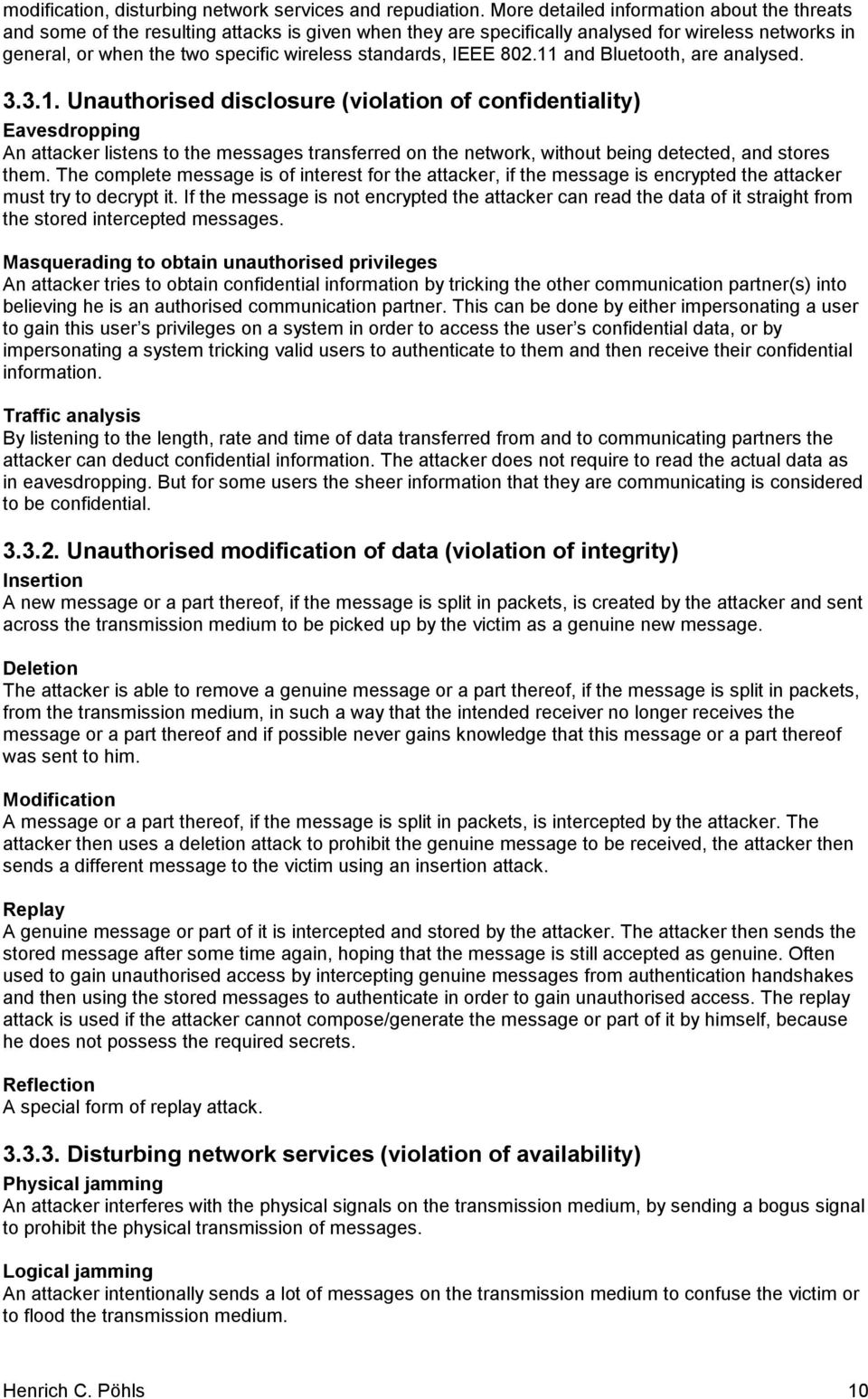
10 modification, disturbing network services and repudiation. More detailed information about the threats and some of the resulting attacks is given when they are specifically analysed for wireless networks in general, or when the two specific wireless standards, IEEE and Bluetooth, are analysed Unauthorised disclosure (violation of confidentiality) Eavesdropping An attacker listens to the messages transferred on the network, without being detected, and stores them. The complete message is of interest for the attacker, if the message is encrypted the attacker must try to decrypt it. If the message is not encrypted the attacker can read the data of it straight from the stored intercepted messages. Masquerading to obtain unauthorised privileges An attacker tries to obtain confidential information by tricking the other communication partner(s) into believing he is an authorised communication partner. This can be done by either impersonating a user to gain this user s privileges on a system in order to access the user s confidential data, or by impersonating a system tricking valid users to authenticate to them and then receive their confidential information. Traffic analysis By listening to the length, rate and time of data transferred from and to communicating partners the attacker can deduct confidential information. The attacker does not require to read the actual data as in eavesdropping. But for some users the sheer information that they are communicating is considered to be confidential Unauthorised modification of data (violation of integrity) Insertion A new message or a part thereof, if the message is split in packets, is created by the attacker and sent across the transmission medium to be picked up by the victim as a genuine new message. Deletion The attacker is able to remove a genuine message or a part thereof, if the message is split in packets, from the transmission medium, in such a way that the intended receiver no longer receives the message or a part thereof and if possible never gains knowledge that this message or a part thereof was sent to him. Modification A message or a part thereof, if the message is split in packets, is intercepted by the attacker. The attacker then uses a deletion attack to prohibit the genuine message to be received, the attacker then sends a different message to the victim using an insertion attack. Replay A genuine message or part of it is intercepted and stored by the attacker. The attacker then sends the stored message after some time again, hoping that the message is still accepted as genuine. Often used to gain unauthorised access by intercepting genuine messages from authentication handshakes and then using the stored messages to authenticate in order to gain unauthorised access. The replay attack is used if the attacker cannot compose/generate the message or part of it by himself, because he does not possess the required secrets. Reflection A special form of replay attack Disturbing network services (violation of availability) Physical jamming An attacker interferes with the physical signals on the transmission medium, by sending a bogus signal to prohibit the physical transmission of messages. Logical jamming An attacker intentionally sends a lot of messages on the transmission medium to confuse the victim or to flood the transmission medium. Henrich C. Pöhls 10
11 Resource exhaustion By sending bogus messages the attacker tries to use resources such as memory, CPU or battery power on the victim s device. The bogus messages are either valid messages, which require some reaction by the victim s device, or they are carefully assembled. Unauthorised access By the unauthorised use of the network itself or services provided by devices on the network an attacker limits the availability of the network or services to the authorised users. The attacker can use the network or provided services, but he cannot read or interfere directly with data sent by other users. Hardware faults The device just ceases operation due to a hardware fault Repudiation Repudiation of sending a message The sender can deny that he sent a particular message, which was received by another party. Because of that problems occur for the receiving party, to rely and act on received messages. Repudiation of receiving a message The receiver of a particular message can deny the reception of that message. The sending party can therefore not rely on messages sent Threats from the wireless point of view The wired network, even if spread over a large area, can still draw some security from the fact that the transmission medium is only accessible if a device is near the actual wire or even only if a device is connected to the wire. The wire therefore can be seen as a closed transmission medium. So physical access control can be deployed around the wires and connected devices that carry sensitive information. The main advantage of wireless networks is the open accessibility of the transmission medium, as the radio links used might penetrate windows and walls and therefore do not require a line of sight to communicate nor visible wires. This especially enhances the threats of unauthorised disclosure and unauthorised modification. Eavesdropping, for example, can be done without the need of a visible connection, so it can be much better hidden. In fact nearly every object within transmission range can contain a potential bugging device. The maximum range of the wireless transmission is specified by the sending power of the network equipment. For the 2.4 GHz frequency band used by IEEE WLAN and Bluetooth the ETSI standard [19] limits the effective radiated power to be less then 100mW (-10 dbw) e.i.r.p. 1 for the use in Europe. The peak power is limited to -20 dbw (10 mw) per MHz e.i.r.p. This allows the IEEE b WLAN to have a transmission range of approximately 160 metres in free areas and a range of 20 metres in a typical office environment, while operating at the highest speed of 11Mbps [43]. Bluetooth is designed to communicate with devices in a shorter range, building so called personal area networks (PANs), therefore the typical maximum distance is 10 metres [7]. The problem is that the actual range of the wireless transmission is never clear cut, and a lot of different physical parameters determine the actual range of the signal. So the wireless network might be reachable from places that where not required to have access to your wireless network, like the public car park in front of your office or your neighbour living in the flat next door. Also to be taken in consideration is, that even if the signal is too low to give a standard conformant device a sufficient reception, a specialised eavesdropping device with a high sensitive antenna might still listen to the wireless network s traffic. To reduce the threat that a message in a wired network travels through the complete network switches are often deployed to gain higher performance and reducing the thread of eavesdropping. In the wireless world the transmission medium is the same for all devices that are communicating with one another, therefore a message in a wireless network will be transmitted over the air link and is picked up by all stations who are not sending. If the sender can transmit adjusting the power of the signal, so 1 e.i.r.p.: equivalent isotropically radiated power Henrich C. Pöhls 11
12 it is just strong enough to reach the intended receiver, unneeded spread of the transmission range can be reduced. This reduces the range were the transmission can be eavesdropped, and also saves battery power. So the only way of protecting against disclosure can be proper encryption, as it is very complicated to apply physical security measures as done to wires to a radio wave. The only physical measures that can be taken are either to constrain physical access to the whole area where the signals can be eavesdropped. Or to confine the area where the signals can be eavesdropped by absorption (like a Farradey cage). These measures in most cases are inappropriate or just cannot be done. The possibility to connect wireless also means that having access to the transmission medium cannot serve as authentication, as it could in a physically secured wired network. As attackers can send messages from anywhere as long as they are in reach the wireless devices have to decide which are genuine and which are not. So to exercise access control the origin of every message has to be authenticated and their integrity should be protected. Denial of service attacks are always hard to prevent, as network protocols are generally designed to allow connectivity, but the fact that wireless devices are mostly battery powered allows for new attacks on the availability of mobile wireless devices. Sending and receiving on the wireless medium consumes power, as battery power is a valuable resource for mobile devices [46] an attacker can send messages to force the wireless device to consume power and so drain the battery until the wireless device is out of power. But not only attacks on the wireless radio communication link should be considered, also the fact that the mobile wireless devices are lost or stolen more easily than fixed wired infrastructure should be taken into account. This consideration has a lot of implications; this work will concentrate on the implications in key management. Basically problems occur if a device is lost and if access to services is bound to this device, new access rules must disable the lost device from further use of services. Another threat introduced by the use of mobile wireless devices is the mobility in itself. The network is made up of the devices that are reachable, but what happens if a device becomes unavailable, because it has been moved or it has a hardware error. This problem occurs only if mobile wireless devices provide services to other users on the network, but in the case of ad hoc networks without a centralized infrastructure this situation is quite likely Security threats on wireless networks As mentioned most of the threats are attacks on the wireless radio link between wireless devices, but also threats to the mobile wireless device itself should be taken in consideration. Therefore this work will differentiate between threats on the wireless radio communication link and threats on the mobile wireless device. To easily reference the threats throughout the paper they are indexed following the same categories as established for the general threats. The threats will also be classified as active or passive threats Security threats on the wireless radio communication link Unauthorised disclosure (violation of confidentiality) T1a Eavesdropping on user traffic An attacker listens to packets transferred on the wireless transmission medium, without being detected, and stores them. The data the attacker is interested in is the user traffic that is transferred in these packets. The user traffic might be encrypted, if not the attacker might be able to read for example the text of a transmitted document. A passive threat, which can be carried out easily when the user data is not encrypted prior to transmission. Detection is not possible if the attacker uses an especially modified wireless device, which will not send any data or management information (like acknowledgements, or beacons), and therefore cannot be seen. T1b Eavesdropping on user related data An attacker listens to packets transferred on the wireless transmission medium, without being detected, and stores them. The packets contain user related data, either transmitted alone or in connection with user traffic. The user related data might be encrypted, if not the attacker is able to read for example the source address from the message header. A passive threat, which can be Henrich C. Pöhls 12

13 exploited easily when user related data that is unnecessary for the routing is not encrypted prior to transmission. This data can be used to track user behaviour and is a privacy problem. Detection is not possible if the attacker uses an especially modified wireless device, which will not send any data or management information (like acknowledgements, or beacons). T1c Eavesdropping on management traffic An attacker listens to packets transferred on the wireless transmission medium, without being detected, and stores them. The data of interest transferred in those packets is management data, either transmitted alone or in connection with user traffic. The management traffic might be encrypted, if not the attacker is able to read for example sequence numbers from the message headers or link management messages. A passive threat, which can be conducted easily when the management data is not encrypted prior to transmission. Detection is not possible if the attacker uses an especially modified wireless device, which will not send any data or management information (like acknowledgements, or beacons). T1d Masquerading as a mobile wireless device to gain unauthorised privileges An attacker pretends to be an authorised mobile wireless device. By doing so it tries to persuade the other communicating wireless devices to accept their communication as if it came from the authorised source. This could lead to unauthorised access to confidential data, or services provided by other wireless devices. It might also be possible to trick other wireless devices to send confidential data to the spoofed device instead of sending it to the genuine device. If no authentication is needed this active threat is already possible if the device identifier can be spoofed. If authentication is in place the attacker needs knowledge of weaknesses in the authentication protocol and must be capable of generating and sending certain handshake messages with a spoofed identifier. T1e Masquerading as a central management wireless device to gain unauthorised privileges An attacker pretends to be a central management wireless device. By doing so he tries to persuade the mobile wireless devices in range to use his services instead of the services provided by the genuine network. This could lead to unauthorised access to confidential data, or services provided by other wireless devices. It is also possible to trick other wireless devices to send confidential data to the spoofed device instead of sending it to the genuine device by falsely changing the routing. An active threat exploiting weaknesses of the authentication mechanisms used, if central management wireless devices are authenticated. If other wireless devices do not authenticate the central management wireless devices, this threat just exploits the possibility to offer a stronger signal, or other means of gaining precedence over the genuine device(s) in the area. It might be needed to spoof the genuine device s identifier to carry out attacks. Some of the resulting attacks lead to high-risk situations. If an attacker successfully manages to masquerade as a central management wireless device some of the following attacks are possible, because he now is in control of the management functions provided: Active user identity catching: The false central management wireless device may send management messages to genuine users to request their identity, if the protocol allows for such messages. Or genuine users might detect the false central management wireless device and try to authenticate to it sending their identity and other authentication data. Man-in-the-middle when using a fixed wireless device to access a wired network: The false fixed wireless device relays all or certain messages sent between any genuine wireless device and the network accessible by the genuine device. The attacker is able to process certain messages before relaying them and to use certain management functions the central management wireless device might provide to gain further access to confidential data. For example manipulating the handshake for the encryption used for a connection might be manipulated in such a way that the encryption is suppressed, allowing for easy eavesdropping. It might be noted that the attacker has to pay the cost that applies for relaying the intercepted messages to the genuine fixed wireless device [41]. T1f Passive traffic analysis By observing the time, rate, length, maybe even source or destination of messages on the wireless transmission medium the attacker can deduct confidential information [20]. The attacker does not require reading the actual data, but for some users the sheer information that they are communicating is considered to be confidential. A passive threat that is nearly always possible and easier to use for Henrich C. Pöhls 13
14 attacks than eavesdropping, as decryption of messages is not needed, only if source address is required and transmitted encrypted. Also privacy issues arise if the attacker can observe a fixed source identifier, which could be traced and associated with a user. T1g Active traffic analysis The attacker sends messages to the wireless network or actively initiates communication sessions. Then by observing the time, rate, length, sources or destinations of messages on the wireless transmission medium the attacker can deduct confidential information [20]. The attacker does not require reading the actual data, but for some users the sheer information that they are communicating is considered to be confidential. An active threat that is possible if the attacker can send messages like s to a wireless network user and it is easier than eavesdropping, as it doesn t require decryption of encrypted messages Unauthorised modification of data (violation of integrity) T2a Insertion of packets An attacker can send packets on the wireless network, which will look like genuine packets of another transmission. The attacker is now able to insert new complete messages or insert new parts into messages, if the message is split over different packets. If a new complete message is created by the attacker this is normally used with spoofing and sent across the wireless network to be picked up by the victim as a genuine new message. Inserting can also be used to add new parts to an existing message; therefore the attacker listens to the transmission and carefully constructs a packet, which will carry a sequence number so that it is reassembled into the existing message send between the communicating parties. Figure 3.1. shows an example, where an attacker sends a packet labelled In that is received by the wireless device B and inserted as part of the message received from device A. An active threat that requires knowledge of the fragmentation methods used by the protocol and relies on weaknesses in the way messages are split and reassembled, and on weaknesses in the authentication of origin. Figure 3.1. Insertion of packet In into an original message consisting of packet 1 and 2 T2b Deletion of packets The attacker is able to remove a genuine message completely or packets thereof, if the message is split in packets, from the wireless network, in such a way that the intended receiver no longer receives the message or the single packet and if possible never gains knowledge that this message or a part thereof was sent to him. This could not be done by deliberately jamming the complete wireless transmission, because this would affect all packets and would easily be detected as a denial of service. This is another active threat. Jamming the signal to cancel out the transmission of a specific packet is a complicated task, requiring very exact timing and a good prediction of when the packet will be transmitted. To delete longer packets that require more airtime could therefore be easier. If a message is split in different packets and the protocol allows for detection of missing packets, the attacker needs to jam only some packets and the protocol will initiate a retransmission of those packets. If the attacker is able to interrupt enough retransmissions of packets the complete message will not be received completely, as some packets were not received correctly. Again the attack is easier if the message needs a lot of packets to be transmitted correctly. Henrich C. Pöhls 14
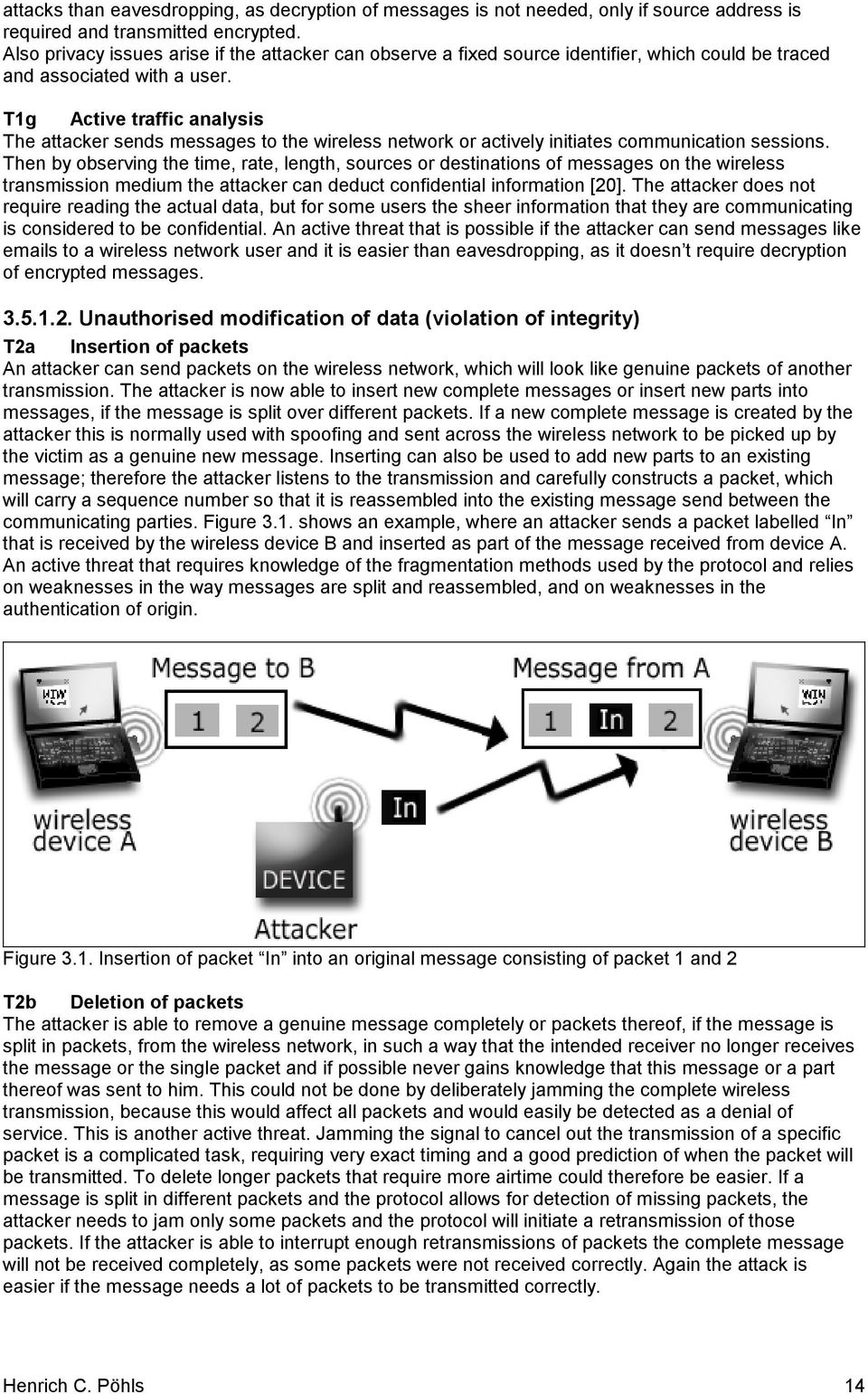
15 T2c Modification of packets in transit A complete message or a packet of the genuine message, if the message is split in packets, is intercepted by the attacker. The attacker then uses the deletion attack to prohibit the genuine message to be received; the attacker then uses the insertion attack to send a changed or forged message to the victim. A combination of the active threats insertion (T2a) and deletion (T2b) and therefore also an active threat. T2d Replay of messages A genuine message or part of it is eavesdropped and stored by the attacker, the attacker then sends the stored message after some time again, hoping that the message is still accepted as genuine. By only replaying a genuine message the attacker does not need to construct the message himself nor do complicated modifications. Therefore it can also be used to conduct attacks, if the data is encrypted or digital signatures are used. An active threat that exploits the absence of freshness mechanisms. T2e Reflection A special form of replay attack, which requires spoofing. An attacker stores the messages received from the victim during a certain protocol handshake. Some of these messages contain authentication information and are normally only sent from the victim to the attacker. The reflection attack now sends (reflects) these messages back to the victim under false name as part of a protocol handshake initiated by the attacker, hoping to use these genuine messages to establish an authenticated connection with the victim under the false name. Figure 3.2 shows an example of a reflection attack on a weak challenge-response authentication. An active threat exploiting weaknesses, like missing recipient or sender information in key dependent parts, in the protocol used. A 1 Challenge from A 2 Challenge from A send from B (spoofed origin) Attacker reflection Masquerades 3 Response from A (generated using A and B s shared secret) as B 4 Response from A send from B (spoofed origin) reflection Figure 3.2. Reflection attack on a weak challenge-response authentication protocol In Figure 3.2. messages 1 and 2 contain exactly the same challenge. And as the response in message 3 did not include any information about the source in the key dependent response, the attacker is able to send this message just back to A. So the response values are the same in message 3 and 4. In the end message 4 will be accepted by A as a valid response from B to message Disturbing network services (violation of availability) T3a Physical jamming An attacker intentionally interferes with the wireless transmission by sending a bogus signal on the frequencies used by the wireless transmission. This disrupts the transmission and disables all wireless devices to communicate any more. An active threat, which requires only knowledge about the frequencies used and the ability to build a sending device. Detection is easy and the use of such jamming devices is likely to violate telecommunication regulations if the signal strength or length is sufficiently high to interrupt the transmission on the wireless medium completely. T3b Logical jamming An attacker intentionally sends messages on the wireless medium to confuse the victim. This could for example be a management message telling the victim s wireless device to disconnect. Or an attacker could simply flood the victim s wireless device with all sorts of incoming traffic. This disables the victim s device to participate further in normal wireless network communication. This active threat allows targeting only specific wireless devices, but it requires weaknesses in the protocols or their implementation (the latter normally discovered later and patched). Henrich C. Pöhls 15

16 T3c General resource exhaustion The attacker tries to use resources such as memory, CPU or network bandwidth on the victim s wireless device. By sending messages to the victim s wireless device the attacker initiates certain reactions that use resources on the victim s device. Possible reactions are: Reservation of memory to store further expected messages CPU intensive calculations Replying with messages Waiting for the reception of more messages from the attacker This active threat often exploits weaknesses in the implementation or the design of session establishment protocols. T3d Battery exhaustion This threat is special to mobile wireless devices as they are battery powered. The attacker tries to trigger responses from the victim s mobile wireless device that consume as much battery power as possible. Still the technological advances of batteries are far behind the advances in battery consuming technology, often demanded by users [46]. One of the actions that requires battery power is the use of the wireless communication. Rather than just flooding a receiving mobile wireless device with valid bogus messages, as suggested in [15], forcing the mobile wireless device to sent messages would consume much more power. Researches carried out on the effects of periodic beaconing on battery life [56] show that the reception of valid beaconing messages does not affect the overall power degradation very much. Sending generally consumes more battery power than receiving, sometimes even twice as much, as can be seen in Appendix A taken from [23]. This active threat cannot be simply eliminated, as it is hard to prevent a mobile wireless device from receiving messages. But it should be mentioned that, if the attack requires a new message to be sent by the attacker each time to trigger the battery consuming response, the attacking wireless device needs a greater power supply than the victim to succeed with a denial of service attack. But of course there are situations where just the reception of a message would change the power consumption of a mobile wireless device drastically. If message reception prevents a mobile wireless device from entering a power saving standby mode, or the reception of a message wakes the mobile wireless device up the attacker could significantly affect the power consumption of this mobile device. Exploitation of this threat can be detected early by looking for abnormal or excessive use of the wireless medium while being in the low-power mode. By detecting an unexpected loss of battery power the attack might be detected too late. T3e Unauthorised access to the wireless network This active threat basically allows the attacker to use the wireless network to send and receive messages without authorization. The attacker decreases the bandwidth available for authorised users, but reading messages sent by other users is not part of this threat. Weaknesses in the authorization mechanisms used allow exploitation of this threat. T3f Unauthorised access to service provided on the wireless network If any services are provided by user s mobile wireless devices or centralised fixed wireless devices, then the attacker gains access to these services. Exploitation of this active threat increases the load on the services limiting the resources available for authorised users, and is possible due to weaknesses in the authentication mechanisms used Repudiation T4a Repudiation of sending a message The sender can deny that he sent a particular message, which was received by another wireless device. This threat imposes problems for the receiving party, to rely and act on received messages. This threat is possible if the protocols and mechanisms used do not cater for non-repudiation if messages are sent across the wireless network. T4b Repudiation of receiving a message The receiver of a particular message can deny the reception of that message. The sending party can therefore not rely on messages sent. This threat is possible if the protocols and mechanisms used do not cater for non-repudiation if messages are received from the wireless network. Henrich C. Pöhls 16
17 Security threats on the mobile wireless device Unauthorised disclosure (violation of confidentiality) T5a Unauthorised access to data stored on the mobile wireless device Attackers are able to gain unauthorised access to data stored on the mobile wireless device. This threat includes unauthorised read access to write-only data (passive threat) and unauthorised write access to read-only data (active threat). An attack is possible if the mobile wireless device operating system s or the hardware s access control mechanisms are not sufficient or undermined by the implementation or use of wireless functionality. An example is allowing to extract data from the mobile wireless device such as keys via management messages. T5b Unauthorised use of a mobile wireless device to access data stored on the network If the mobile wireless device itself or any data stored on it is used to access data on the network in an unauthorised manner. The attacker uses the device as an access token to gain unauthorised access. The device is either misused by their authorised users or stolen by attackers Disturbing network services (violation of availability) T6a Loss of the mobile wireless device The mobile wireless device is stolen, or lost. Therefore it is no longer available to users over the wireless network. T6b Loss of connection due to mobility Because mobile wireless devices are mobile they are able to move out of the transmission range of other wireless devices. They might also move into areas where other wireless devices are communicating. This threat is inherent to the concept of mobile wireless networking as mobility is wanted, but it is a problem to for example the stability of service in an ad hoc network. T6c Hardware fault This work will assume that if a wireless device ceases operation due to a hardware fault, it will completely stop working. Henrich C. Pöhls 17

18 4. Security requirements for wireless networks After having identified the threats in the wireless world that require countermeasures, this chapter will try to establish a set of requirements for wireless networks. It is not possible to conduct a complete threat analysis, as required to identify the risk associated with each threat, as only general assumptions about the value of the data transferred over the wireless network or stored on the mobile wireless devices can be made. Looking at the security threats of third generation mobile telephone systems the risk analysis carried out in [20] identifies threats from the categories masquerading, eavesdropping and subscription fraud as the ones with the highest impact. Subscription fraud is the heavy use of services without the intention to pay [20], having authentication and access control mechanisms would allow to detect heavy use and would allow to prevent further access. Additionally this chapter will introduce scenarios highlighting the different areas in which wireless networks might be used and what they might be used for. From the threats specified in 3.5 and from the scenarios the requirements for a secure wireless network will be specified in this chapter and used later to measure the existing standards looked at in chapter 5 and General scenarios Scenarios will be used as basic examples for the usage of wireless mobile networking. These scenarios will stay the same throughout the work but their realisation might be different and then described in more detail according to the actual standards used. They do not include technical details, this is done on purpose to keep them more general Scenario I: Meeting Room People often meet dynamically for a limited time for example at conferences or business meetings. They all belong to one group but only for the time of the project meeting, exhibition or conference, all carrying laptops or other computing devices. Assuming that the data that is going to be exchanged or transmitted exists in a computerized format, which is the case nowadays, wireless communication can ease the exchange of the data. If the presentations, records, or other information can be exchanged electronically, printing handouts is no longer needed. For presentations it would also be possible to communicate wireless to the beamer, without the need of switching cables every time the speaker changes Detailed description A project meeting held by five departmental managers in a meeting room of an office building. Every manager has his own laptop, acting as a mobile wireless device, which holds sensitive data for the project and other company information available to this manager only, that is not discussed in this meeting. In the meeting room there are two wireless devices a video projector to show presentations and also a fixed wireless device allowing users to connect to the corporate LAN. The data exchanged wireless should be receivable within the meeting room, which means in a range of less than 10 metres without any walls. The video projector is used to display the presentation data from different managers, while all the others are able to download the presentation to their own devices, to save them for later retrieval. Via the corporate network connection the latest information out of different departments can be retrieved by the manager authorised to do so, to immediately adopt discussed changes or make it available for discussion. Henrich C. Pöhls 18
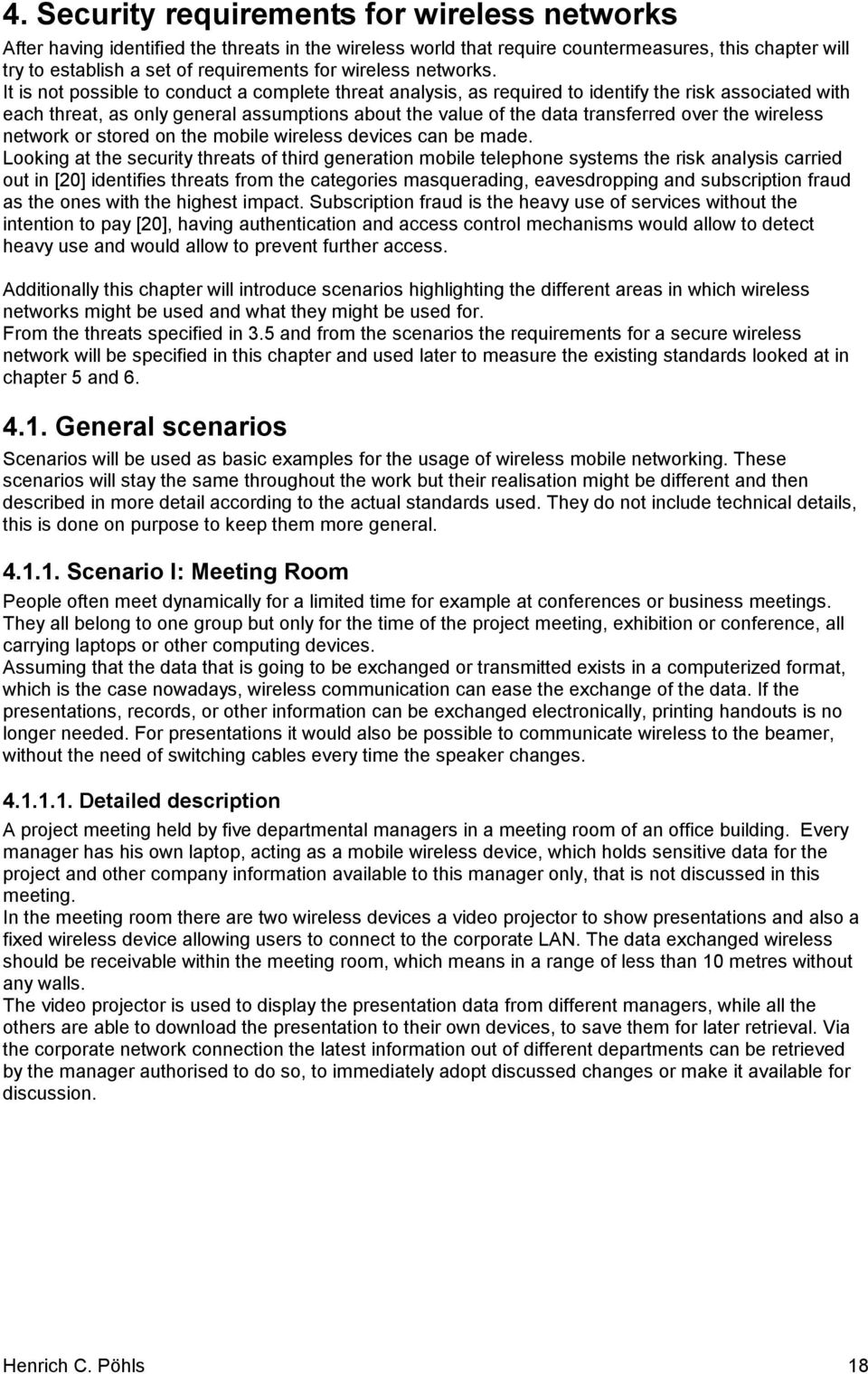
19 Figure 4.1. Scenario I: Meeting Room Highlighted security aspects For such closed group meetings eavesdropping (T1a,b 2 ) is an obvious problem. The wireless communication must keep the information within the closed user group, as a wired connection just between the five laptops would. The data exchanged should also be protected from modification to keep it accurate (T2 3 ). Because the managers all work in the same company, the mobile wireless devices, their laptops, could be managed centrally by the IT department. Therefore trust relations in form of keys or other secrets could be established before the actual meeting takes place. The managers want the use of the wireless network to be easy and do not want to make configuration changes when they take their laptops from their offices to the meetings Scenario II: Home and Personal Networking If the number of wireless devices increases and a significant number of home entertainment devices will offer networking capabilities, wireless communication will enable them to form a wireless network in our homes. A not so futuristic thought is that people can take their office laptops home or students can work with their laptops from home and from university campus using different services and communicating with different devices depending whether they are in their office environment or at home. Wireless communication removes the need of cables to establish connections. It will also remove the need to update information in different devices, so the PDA can know the new phone number that just got updated in the mobile phone, when these two devices establish a link Detailed description A family home equipped with a cable modem connection to the Internet, a printer and one desktop PC with wireless device functionality. These three devices are static in position and are connected through an Ethernet wired infrastructure. Additionally there are four mobile wireless devices: Two laptops, one used equally at home and on university campus, an other one used at work or occasionally at home for private use only. The third device is a cellular phone and the fourth one is a personal digital assistant (PDA). The last two are often used in conjunction for lightweight access to the corporate network via a dial in, forming an ad hoc personal area network, when taken out of the home s network. The two laptops will use the home printer to print and the cable modem connection to access the internet when they are at home, to access the wired infrastructure the Home PC will serve as a fixed wireless device. The 2 Referencing the particular threats T1a and T1bas specified in Referencing all threats listed in so T2a,b,c,d,e Henrich C. Pöhls 19
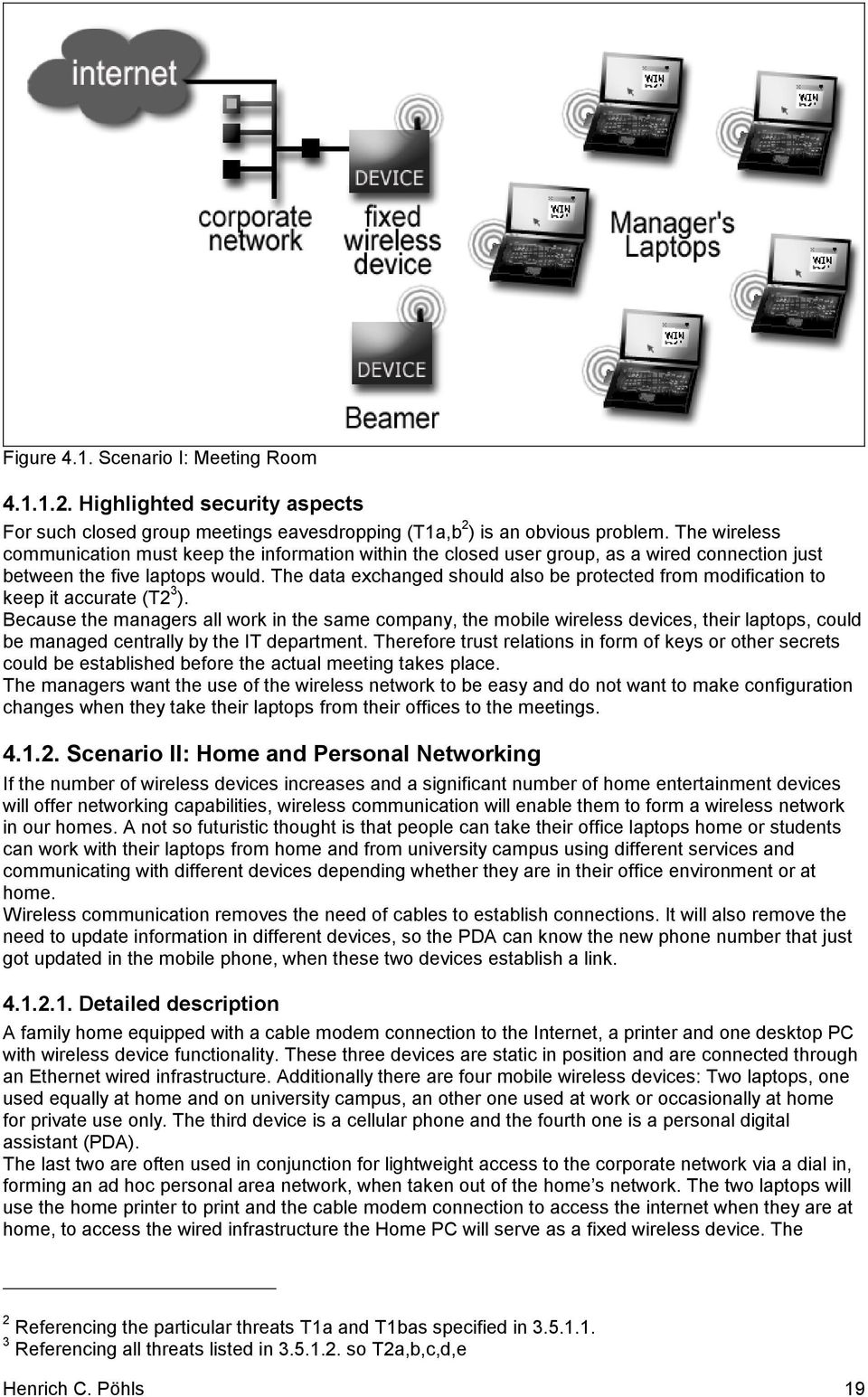
20 different devices are located in separate rooms, but no more then 10 metres away from each other. Figure 4.2. Scenario II: Home and Personal Networking Highlighted security aspects A user would like to communicate with all the devices without the need to reconfigure the laptop, whether he is at home/university or at work, but if a higher security is required for wireless connections to the workplace network, this should still allow the user to connect to his less security demanding home network. Secrets stored for the access to the corporate network shall not be readable and not be overwritten (T5a), as the latter might require reconfiguration for the use at the workplace. Also all the different devices should be able to communicate without any compatibility issues. Even though eavesdropping is not a high-risk threat as no high sensitive data is transmitted, the user would like a minimum security to protect personal information transferred during online shopping or other personal use. The home user also would like to prevent his next door neighbour from using his internet connection (T1d, T3e,f). Also the PDA and the mobile phone should be able to communicate in an ad hoc network when taken on the road. This connection, used to access sensitive company data, should be secured. No attackers should be able to dial into the company network using the users phone (T1d, T3e,f, T5b) Scenario III: Mobile Data Entry/Retrieval with Emergency Connectivity In situations where work routine requires the personnel to be mobile, wireless networks can help to keep information up to date, for example in a hospital. Wireless communication can allow doctors to look at patient information wherever they are, making it possible to update or retrieve data in the sickroom or in the lab. They can use the hospital s printers to print prescriptions and can access the hospital s databases Detailed description The medical staff will be equipped with mobile wireless devices, some kind of PDA. Those devices are the mobile wireless devices, offering wireless access to the hospital s wired network. There are fixed wireless devices, which allow the mobile wireless devices to communicate with the hospital s wired network to access the services. Because of the greater area to be covered, there are several fixed wireless devices. At least one such fixed device should be in reach for any mobile wireless device carried by medical staff. The fixed wireless devices are positioned so that their distance is about 20 meters from each other, to keep their number small. In order to extend the usefulness the mobile wireless devices should be able to communicate even during times of lost infrastructure, allowing them to remain in touch longer and provide information Henrich C. Pöhls 20

21 more quickly if they can cooperate to form an ad hoc network in places not otherwise offering connectivity [47]]{page 10}. If the infrastructure network is lost, scenario III assumes that not all mobile wireless devices are within mutual communication range on the wireless medium. Figure 4.3. Scenario III: Mobile Data Entry / Retrieval with Emergency Connectivity Highlighted security aspects A critical issue in this scenario is the accuracy of the information displayed and that the access to or the change of this information is only done by authorised personnel in an accountable manner. So the threats of unauthorised disclosure (T1a-e, T3f, T5) and unauthorised modification (T2) are of high risk. Additionally it would be an advantage if the network could help to facilitate non-repudiation services (T4). The data should always be accessible within a designed response time, so that loss of connection (T6b) or denial of service (T3) are threats to this wireless networking infrastructure. The requirement of ad hoc connectivity of the mobile wireless devices, if the wired infrastructure is lost is another aspect stressed by this scenario. Hardware faults (T6c) will especially affect the routing, if the mobile wireless devices will form ad hoc networks to overcome the loss of fixed wireless infrastructure. This network consists of a large number of wireless devices, but it is a closed user group, so that trust relationships can be set up centrally. On the other hand, if a single mobile wireless device is compromised or lost (T5, T6a) appropriate actions should be taken to exclude this device from access to the network or data, while not affecting the operation of the other mobile wireless devices Scenario IV: Access to services (specific information or the internet) in public places A lot of business people need their laptops to carry out their work, so it is a necessity to take them on business trips. They normally stay in contact with their companies by accessing the Internet, to receive s or to access the company network. Up to now there were usually depending on telephone connections in hotel rooms, as mobile phones do not offer a sufficient bandwidth. Some airlines, hotels and railway stations started offering wireless internet access [43]{page 12}[58]{page 59}, but you could also think about airports offering wireless access to services such as the internet, or flight information. It might be that users of such services must pay a fee, but it is also possible to think of advertisements sponsoring free services. There might also be different providers of such services, as not only the airport wants to attract customers through the provision of this service, but different restaurants and airlines too. Henrich C. Pöhls 21
22 Detailed description The airport has a range of services to offer, only one of which is Internet access. To span the area dedicated fixed wireless devices are again installed throughout the buildings where access should be provided. The airport has also teamed up with some commercial sponsors who are using advertisements to offer free services. Users can use their laptops, PDAs or mobile phones to connect as mobile wireless devices and use these services while they are moving around within the airport. One of the services provided by the airport network is the access to flight information; the other interesting service is Internet access. The fixed wireless devices are placed to provide full coverage within the airport s buildings. On the airport s premises there are also other providers of wireless access to the Internet, i.e. airlines might provide such services in their VIP lounges. Figure 3.4. Scenario IV: Access to services in public places Highlighted security aspects The first thing to mention in scenario IV is the large number of potential users, even if a particular user does not want to access a certain service, his mobile wireless device might by default try to discover which services are available and therefore connect to a fixed wireless device, once it is switched on. Therefore there are many mobile wireless devices as targets for attackers exploiting all kinds of threats like eavesdropping (T1a,b,c) or modification of traffic (T2). But it makes it also easier for an attacker to set up a bogus fixed wireless device (T1e), as users are not surprised to find different fixed wireless devices in the same area. Also the coexistence of different wireless networks and the overlapping areas of service are interesting issues. Last but not least the users are very likely to move around (T6b) having to roam between different fixed wireless devices within the airport s net of fixed wireless devices. As part of the services are sponsored by ads the ads should be viewed by users, if the service is not available because the wireless network is not reachable (T3) no revenue from the display of ads can be generated, this is even more true if the users can be charged for using the services. If the users are charged for services, unauthorised access to such services (T3e,f) must be prevented and lost mobile wireless devices (T6a) should be prohibited from accessing services to reduce the threat of unauthorised use of services through a stolen mobile wireless device (T5b). Not only for the mobile wireless devices, but also for the fixed wireless devices it should be possible to choose between different vendors, still keeping interoperability. Henrich C. Pöhls 22
23 4.2. Security requirements for wireless networks The security requirements for wireless networks are listed and an indication is given which threats are connected to the requirements. As done for the threats, the requirements are indexed and grouped for easier reference throughout the paper Requirements on confidentiality protection R1a Confidentiality of user traffic It shall be possible to protect the confidentiality of user traffic on the wireless transmission by the use of encryption (T1a,f,g). R1b Confidentiality of user related data It shall be possible to prevent tracking by protecting permanently related data and allow the change temporarily related data at user definable intervals (T1b). R1c Confidentiality of management traffic It shall be possible to protect the confidentiality of management data transmitted wireless by the use of encryption (T1c,e,f,g). R1d User supervision of encryption used It shall be possible for the user to easily view the current level or strength of encryption used for the active communication and to select the minimum level or strength of encryption to be used for certain communications (T1e). R1e Confidentiality of secrets stored on mobile wireless devices Within the protocols defined for handling secrets stored on mobile wireless device for networking purposes, it shall be possible to protect these secrets against unauthorised disclosure (T5a). R1f Range control by transmit power adaptation It shall be possible for wireless devices to adapt the transmit power to limit the range of the signal while just reaching the receiver. This reduces power consumption and limits the range for eavesdropping (T1a,b,c,f,g) Requirements on integrity protection R2a Integrity of user traffic It shall be possible to protect user traffic on the wireless transmission against any undetected unauthorised changes (T2a,b,c). R2b Integrity of user related data It shall not be possible to undetectable modify the user related data (T1d,e, T2a,b,c). R2c Integrity of management traffic It shall be possible to protect the integrity of the management data transmitted wireless (T2a,b,c). R2d Integrity of secrets stored on mobile wireless devices It shall be possible to protect secrets needed for networking stored on a mobile wireless device against unauthorised changes when mechanism defined within the protocols are used (T5a) Requirements on availability protection R3a Minimize logical jamming It shall be possible to minimize the impact of logical jamming by increasing the resources and skills needed on the attacking side (T3b,c,d). R3b Low-Power Mode against battery exhaustion It shall be possible for the mobile wireless device to control their use of power. The users of mobile wireless devices or special application layer software shall be able to detect the power saving state and the use of battery consuming wireless transmission tasks (T3d). Henrich C. Pöhls 23
24 R3c Prevention of access to services from a certain wireless device only (Access Control 1) It shall be possible for a wireless device to prevent the use of services provided (including participation in the network itself) to certain wireless devices (T3e,f, T6a). Proper access control requires origin authentication (R4c,d) and integrity protection (R2a,b,c) [24]. R3d Termination of access to services for a certain wireless device only (Access Control 2) It shall be possible for a wireless device to terminate the access to services (including the network access) provided to certain wireless devices only, without interfering with the provision of services to others (T3e,f, T5b, T6a). Proper access control requires origin authentication (R4c,d) and integrity protection (R2a,b,c) [24]. R3e Signal strength detection It shall be possible for the user of wireless devices or special application layer software to determine the signal strength of wireless signals received by other wireless devices (T1e, T6b) Requirements on authentication R4a Authentication of mobile wireless devices It shall be possible for wireless devices to authenticate mobile wireless devices at the start of and during a communication (T1d, T3e,f, T5b). R4b Authentication of central management wireless devices It shall be possible for wireless devices to authenticate central management wireless devices at the start of and during a communication (T1e, T3e,f) R4c Origin authentication of messages from mobile wireless devices It shall be possible for all wireless devices to authenticate the origin of messages received by wireless transmission from mobile wireless devices (T1d, T2a,b,c,e). Origin authentication requires integrity protection (R2a,b,c). R4d Origin authentication of messages from central management wireless devices It shall be possible for all wireless devices to authenticate the origin of messages received by wireless transmission from central management wireless devices (T1e, T2a,b,c,e). Origin authentication requires integrity protection (R2a,b,c). R4e Freshness of messages It shall be possible to check the freshness of messages received wireless, especially for messages used for authentication (T1d,e, T2d,e, T3d,e). Note: With additional requirements met, origin authentication together with integrity protection can be used to provide non-repudiation services, to counter the threats T4a and T4b. The process and additional requirements are described in ISO part 2 [34] Regulatory requirements R5a Lawful interception If fixed wireless devices are used to access services like voice telephony using voice-over-ip protocols on the wireless transmission this provision can be seen as access provision. Therefore it might be necessary to require the possibility of lawful interception. This work will not look any further into this law related topic. R5b Strength of authentication unrelated to strength of encryption Local regulations might restrict or completely prohibit the use of cryptography for encryption of messages; this shall not have implications used on the cryptographic mechanisms used for authentication. It shall be possible to use shorter keys for the encryption of messages or completely disable it, while not imposing any additional restrictions on the cryptographic mechanisms used for authentication. Henrich C. Pöhls 24
25 User requirements R6a Ease of use and configuration It shall be possible to use especially mobile wireless devices, once configured to do so, in multiple environments. Configuration changes that need to be done shall either be done automatically once configured or they shall be easy enough to be carried out by ordinary users. R6b Vendor interoperability Wireless devices based on the same standard or specification from different vendors or manufacturers shall be compatible and allow secure use and interoperability. Henrich C. Pöhls 25
26 5. Wireless Local Area Networks (IEEE ) 5.1. Introduction and terminology The first wireless network looked at is the IEEE WLAN [26] standard. It standardizes wireless communications for local area networks (LAN) and metropolitan area networks. Being an IEEE standard allows a closer comparison to wired LAN like for example Ethernet (IEEE 802.3) which where used to derive the initial threats on networks in 3.3. The standard allows wireless communications between fixed, mobile or portable stations within a local area. This work will concentrate on the version of the IEEE standard that is used by most of the latest products available. This is the supplement b, allowing a higher speed of up to 11Mbps. This theoretical speed is close to that of the standard Ethernet with 10Mbps and should therefore be suited to serve for most existing applications as the infrastructure moves from a wired to a wireless network. So the IEEE b wireless local area networks standard can be seen as an Ethernet equivalent standard [29]. Basically IEEE allows for two types of wireless networking. The first type of network is formed directly between two or more stations (STA 4 ) being within mutual communication range. This is called an ad hoc network or an independent basic service set (IBSS). An example of two such ad hoc networks is shown in Figure 5.1 taken from the IEEE standard. Figure 5.1. Two basic service sets The oval shape represents the area of coverage. The second type is an infrastructure network. This type of networks allows different clusters of mobile stations to communicate through access points (AP 5 ) with another network, called the distribution system. This enables to extend wireless coverage 4 IEEE equivalent to wireless device. Definition of station (STA): Any device that contains an IEEE conformant medium access control (MAC) and physical layer (PHY) interface to the wireless medium (WM) [26]. 5 IEEE equivalent to fixed wireless device. Definition of access point (AP): Any entity that has station functionality and provides access to the distribution services, via the wireless medium (WM) for associated stations [26]. Henrich C. Pöhls 26
27 beyond the range of physical limitations of a station. It should be stressed that does not define the distribution system (DS 6 ) nor the exact distribution of messages. An infrastructure network allows to connect the two separate basic service sets shown in Figure 5.1 to the same distribution network to inter connect them. This is shown in Figure 5.2. Figure 5.2. Distribution systems and access points 5.2. Standardization and conforming appliances The Institute for Electrical and Electronic Engineers (IEEE) has released the standard in Since then there has been a new release and some additions to the core standard. The latest edition is from 1999, it has also been adopted as ISO The amendments are a [27] and b [28], both also released in The first amendment a deals with changes in the physical layer to support transmissions in the 5 GHz band with higher speeds. The second amendment is b, which extends the physical layer to allow higher speeds, up to 11 Mbps, in the 2.4 GHz band. Most commercial products are conforming to the b standard, as the use of the 2.4 GHz band is license free, as opposed by the 5 GHz one and the speed offered is close to that of most Ethernet based LANs. As only the physical layer is different, most of the assumptions made will also hold true for the general , but this work will concentrate on b only Objectives of the IEEE in general The IEEE standard sets out some objectives. The objectives are listed below allowing to remember them throughout the description of the standard. In the end this work will analyse if the security relevant objectives are met. Objective 1: The obvious objective is to provide wireless connectivity to automatic machinery, equipment, or stations that require rapid deployment, which may be portable or hand-held, or which may be mounted on moving vehicles within a local area [26]{page 1}. 6 IEEE distribution system (DS): A system used to interconnect a set of basic service sets (BSSs) and integrated local area networks (LANs) to create an extended service set (ESS) [26]. Henrich C. Pöhls 27
28 Objective 2: should allow aspects of station mobility (transition) [26]{page 1} considering that mobile stations may often be battery powered [26]{page 9} it will allow power management. Objective 3: Authentication service should provide link-level authentication between stations (STA). IEE authentication is used simply to bring the wireless link up to the assumed physical standards of a wired link. [26]{page 20} Objective 4: To provide a confidentiality functionality for the wireless LAN equivalent to that provided by the physical security attributes inherent to a wired medium [26]{page 61} Details covered by the IEEE standard The IEEE standard defines a physical layer (PHY) and a medium access control (MAC). These two layered structure is typical for most of the standards from the IEEE 802 series [25], i.e. Ethernet 802.3, and Figure 5.3. shows how they fit in the ISO OSI reference model [30]. IEEE allows higher levels to see the wireless LAN just like any other IEEE 802 LAN, i.e. Ethernet (802.3), therefore it handles mobility within the MAC layer. IEEE Logical Link Control IEEE Bridging OSI Layer 2 Data Link IEEE Ethernet IEEE Wireless LAN Layer Medium Access Control Medium Access Control IEEE Ethernet IEEE Wireless LAN OSI Layer 1 Physical Layer Physical Layer Physical Layer Figure 5.3. Positioning of IEEE within 802 series and ISO OSI 5.3. Physical (PHY) Layer of IEEE b As this work will concentrate on IEEE b it will only briefly mention differences to IEEE or IEEE a. The IEEE standard defines four different physical layers which all interface with the medium access control layer. The different physical layers are needed to define the operation on different wireless media. The standard in its first 1997 version contained three physical layers, one for frequency hopping spread spectrum (FHSS), the second one for direct sequence spread spectrum (DSSS), both for the 2.4 GHz band, and a third one for infrared communications. These physical layers all support a connection speed of 1 or 2 Mbps. As these speeds are not sufficient for most applications the two amendments a and b introduced physical layers to support higher data rates a introduces transmissions up to 54 Mbps in the 5 GHz band using orthogonal frequency division multiplexing (OFDM) [27], while b allows using the license free ISM 2.4 GHz band for transmissions up to 11 Mbps using DSSS Frequencies and Channels of IEEE b The standard specifies which frequency bands to use in order to comply with regional and national regulatory requirements, as they were when the standard was published in The operating frequencies of and b are within a license free ISM (Industrial/Scientific/Medical) band; the specified regulatory range for i.e. Europe (except Spain and France) is GHz. The Figure 5.4 shows the frequencies selected for use by IEEE and b according to the regulations in the different regions. The allowed spectrum to use is larger in North America and Europe than in Japan, Spain or France. Lower Limit Upper limit Regulatory range Geography GHz GHz GHz North America GHz GHz GHz Europe (excluding Spain and France) GHz GHz GHz Japan Henrich C. Pöhls 28
29 2.447 GHz GHz GHz Spain GHz GHz GHz France Figure 5.4. Operating frequency range of and b [26] For DSSS used by IEEE and by IEEE b the frequency band is then divided into channels, with a distance between each channel s centre frequency of 5 MHz. Figure 5.5. shows how many channels can be allocated in which regions. The more channels are available, the better overlapping and/or adjacent cells using different channels can operate simultaneously without interference, if the distance between the centre frequencies is at least 25 MHz. [28]{page 42} Regulatory domains Channel Frequency USA Canada Europe Spain France Japan ID (MHz) FCC IC ETSI MKK X X X X X X X X X X X X X X X X X X X X X X X X X X X X X X X X X X X X X X X X X X Figure 5.5. IEEE b High Rate Physical Layer channel frequencies [28] Interference with other IEEE b networks To solve the problem of overlapping or adjacent cells interfering with each other, as introduced in scenarios III and IV, the different wireless networks should use different channels. As mentioned in the IEEE b standard, operation without interference is only possible if the distance between the channel s centre frequencies is at least 25 MHz. With the most number of such channels defined, the regulatory domain of Europe 7 allows to operate three different b WLANs in the same location, without interference. Figure 5.6 shows that channels 1,7 and 13 can operate simultaneously while offering a distance between their centre frequencies of even 30 MHz. A distance of 30 MHz is also recommended for the interference less operation of DSSS in with a maximum of 2 Mbps. [26]{page 216} Figure 5.6. European channel selection non-overlapping [28] If the different networks from scenario IV (chapter ) follow these recommendations for the channel assignment the configuration for IEEE b access points could look like shown in Figure 5.7. The access points for the airport s network are placed to allow full coverage, adjacent access points operate at different channels; the mobile stations 1 and 2 are able to detect and differentiate the different access points. Mobile station 1 can decide if it wants to register, called associate in IEEE , with one of the two airport s access points or with the access point of the other network. At any point a mobile station may be associated with no more than one AP [26]{page 19}. Mobile station 2 7 Excluding France and Spain Henrich C. Pöhls 29
30 can determine which AP offers the better signal strength and associate accordingly while it moves from the range of one airport s AP to another. Figure 5.7. Scenario IV selection of channels Interference with other devices Because the frequency band of 2.4 GHz is license free a lot of devices use this radio frequency to communicate. To allow a lot of equipment to use this frequency band while keeping the interference at a minimum, or at least spread the interference problems even among the users of the ISM band, ETSI has defined regulations. The ETSI standard [19] defines that devices using the ISM band have to use spread spectrum technologies and that their transmitting power is within the following limits. The effective radiated power shall be equal to or less than -10 dbw (100 mw) e.i.r.p. This limit shall apply for any combination of power level and intended antenna assembly. For equipment using FHSS modulation, the power density shall be limited to -10 dbw (100 mw) per 100 khz e.i.r.p. For equipment using other types of modulation, the peak power shall be limited to-20 dbw (10 mw) per MHz e.i.r.p. This work will talk about the different spread spectrum approaches used by IEEE devices in chapter This, of course, has a general effect on the transmission range (see chapter 5.5) of the devices, but allows different devices to use the same radio spectrum. Only having to make sure that in a relatively short range no other devices interfere with a wireless transmission might be manageable task, but if the existence of another wireless transmission (e.g. Bluetooth) is required or appreciated it might be a problem. For example look at scenario II (Figure 4.2), the mobile phone and the PDA might communicate via Bluetooth whilst the home wireless network is operated as an IEEE b network. Interference with Bluetooth Some work has gone into the analysis of interference caused by Bluetooth devices operated in the same area or even very close to the IEEE network. The Bluetooth communication in scenario II indicates a load of 33% of the Bluetooth network, Figure 5.8. shows the reduction of throughput on an IEEE b wireless LAN while different usage levels of a nearby Bluetooth network. Henrich C. Pöhls 30
31 Figure 5.8 : Throughput for DSSS WLAN as a Function of Piconet Utilization (Single BT Interferer) [64] With a Bluetooth network load of 33% a transmission occurs only in every third transmission slot, the calculated reduction of throughput is 19.2% [64], this is derived from the length of transmission for packets on the IEEE b network and in-band of the Bluetooth as can be seen in Figure 5.9. derived from [64] adding the length for an acknowledgement frame. Note: In Bluetooth a dwell period is 625 µsec. Figure 5.9. Probability of collision depending on number of BT slots overlapped, derived from [64] If a mobile station does not receive the small acknowledgement frame, which has a quite high probability of reaching the sender of the original packet without interference, the sender waits for some time and resends it. The time a sender waits before the resend is started is increased with each retransmission; therefore the impact on throughput can be quite significant. Interference with microwave ovens But it is not only other wireless transmissions that interfere with your wireless LAN transmission, one high powered source of interference is a microwave oven acting as a tone jammer as it operates at for example 2450 MHz. To cope better in environments where such a jammers are present, IEEE b recommends using the optional channel agility option [28]. But the channel agility option is only seldom used and it is too slow for avoiding the rapid channel movement of Bluetooth [62]. Tests with a standard home microwave oven have shown that the interference caused by such an oven in normal operation can be significantly. Henrich C. Pöhls 31
32 Figure Test conditions for interference test of IEEE b and standard microwave ovens The following test conditions were used: Standard home use microwave oven (2450 Mhz, 950 Watt) Access point, no WEP enabled, not connected to a wired LAN A laptop with an IEEE b PCMCIA network adapter based on a PRISM chip by Intersil as the only mobile station, measuring the signal strength and All antennas on the same level, centreed in front of the closed door of the microwave oven, distance 10 cm from each other (see Figure 5.10.) Channel 9 is used for the DSSS communication When the microwave oven is turned off link quality and signal strength are reported to be 100% The Intersil PCMCIA driver offered to view the link quality and signal strength of the associated access point in intervals of about two seconds. Figure shows the link quality and the signal strength over the test period of about 60 seconds. With the microwave turned on the link quality drops down to a minimum of 20%. Because the microwave oven only periodically emits radiation in order to heat the food signal strength and link quality are restored to 100% until the next period of microwave oven activity. Figure Signal strength and link quality under interference with microwave oven The interference can be avoided with DSSS by choosing a channel, which is not affected by the microwave oven Multiple Access Problem In a wired network only stations that are physically connected to the wire can try and access the transmission medium. Having radio frequencies as the transmission medium the number of potential users on that medium is much higher. This is even more true if the frequency band used is license free. The multiple access problem is catered for by the IEEE physical (PHY) and medium access control (MAC) layer. On the MAC layer, IEEE conformant wireless LANs use a special variant of time division multiple access (TDMA), called CSMA (see also chapter ). Henrich C. Pöhls 32
33 The only valid assumption on the physical layer about multiple users accessing the transmission medium is that all potential users of the frequency band are obeying the rules set out by ETSI or other regulators. To solve the multiple access problem for wireless LANs on the physical layer the following three mechanism or combinations thereof can be used [43]: TDMA (Time Division Multiplexing), FDMA (Frequency Division Multiple Access) and CDMA (Code Division Multiple Access). IEEE b uses a combined approach on the physical layer. It first uses the direct sequence spread spectrum (DSSS) technique (see chapter ). Only if a DSSS-Sender and a DSSS-Receiver use the same pseudo noise code (PN) they will be able to communicate. This means IEEE b systems use a CDMA to differentiate the wireless LAN communications from other communications taking place in the same frequency spectrum. Secondly different channels are used, as shown in and Figure 5.6, which is a FDMAmechanism, if more than one IEEE system is used within the same area Frequency spreading techniques ETSI and other regulators require the use of spread spectrum technologies to be used when communicating. Spread spectrum technologies use generally a greater range of frequency than actually needed, this allows the transmission to be more reliable as it needs an interference in the whole spreaded signal to totally interrupt the communication. Two different techniques are described within IEEE , frequency hopping spread spectrum (FHSS) and direct sequence spread spectrum (DSSS). Because the second techniques allows higher data rates it is the chosen IEEE b spreading technique, allowing data rates up to 11 Mbps. DSSS also allows for an easier roaming mechanism. This work will therefore only shortly mention FHSS for completeness and because there have been claims of improved security FHSS The allowed frequency band is divided into sending and receiving channels with 1 MHz bandwidth, this means a number of 79 channels is assigned starting at a centre frequency of GHz. These channels are used for transmission only for a short period of time (every 224 µs), then another channel will be used. Which channel will be used next is determined by a defined hopping sequence. The hopping sequences are designed to have a minimum distance of 6 MHz for Europe. If more than one IEEE wireless LAN is used in the same location, collisions occur when two senders are using the same channel. To allow more than one LAN to operate in the same location using FHSS, IEEE grouped them into three different sets. If used in the same location hopping patterns from the same set have hopping sequences, which are designed to interfere as less as possible. A small example analysis of hopping sequences, see Appendix C for details, shows that even if you deliberately choose the timing offsets, you still have only around 3 collisions. If all stations would hop in a synchronized sequence, no collisions would occur. Hopping in a random like sequence through different channels could be seen, and has been unfortunately, as a security feature. Using FHSS, or even DSSS, does not enhance security. For FHSS the IEEE standard published all the hopping sequences and IEEE requires the beacon 8 frame to transmit information about the frequency hopping in each beacon signal sent out [26]. This beacon signal is not protected by the privacy protection mechanism (WEP), as this can be applied only to data frames and some authentication management frames. The field called FH Parameter Set contains the following fields: The Hop Set field identifies the current set of hop patterns ( ). The Hop Pattern field identifies the current pattern within a set of hop patterns ( ). The Hop Index field selects the current index within a pattern ( ). [26]{page 56} This information is given to potential attackers, so FHSS does not serve as a security mechanism. Even if this information could not be obtained by an attacker the hopping sequence can be easily obtained by listening to the different channels and recording the time differences of received beacon 8 A regular transmitted packet, which contains device and control information. Henrich C. Pöhls 33
34 signals. Such an attack does not require much time or computing power and can be considered trivial [65]. So FHSS is purely done to minimize interference with other 2.4 GHz band transmissions and to minimize collisions when operating different IEEE conformant systems within the same area DSSS Direct sequence spread spectrum (DSSS) is the second spread spectrum technique specified for use with IEEE wireless LANs. Because DSSS allows a higher data rate, it is the spreading technique required in IEEE b. Rather than using a channel hopping sequence as a code to spread the signal, as done in FHSS, DSSS systems use a pseudo noise (PN) code to spread the small band signal into a broadband signal (Figure 5.12). Because DSSS has no need to wait to switch channels, it is possible to send data continuously on a broad frequency band encoded with a pseudo noise code, allowing higher data rates. Each of these broadband channels is 22 MHz wide [26], allowing to place three non overlapping channels within the ISM frequency band. The number of channels and the three non-overlapping channels 1,7 and 13 are shown in Figure 5.6 and 5.7. While spreading the signal the intensity of the spreaded signal falls below the noise level, leading to minimal interference. Figure Direct Sequence Spread Spectrum signal [43] The PN code used for 1 and 2 Mbps transmissions is a 11-Chip Barker Code, to allow higher data rates IEEE b uses complementary code keying (CCK). For a 11 Mbps transmission the complementary code is chosen from a set of 64 different defined complementary codes. These are then modulated using Differential Quadrature Phase Shift Keying (DQPSK). The different codes are chosen so that the receiver can easily detect which PN-Code has been used, this allows the receiver to recover 6 bit of the original symbol. To allow 11Mbps to be transmitted a symbol contains 8 bits, for encoding 6 bit are used to choose the complementary code word and the remaining 2 bit are controlling which of the four possible phase shifts are used for the DQPSK modulation. Again the spreading of the signal is done to comply with the regulatory environment and to have a more robust transmission on a wireless medium also used by others. How the spreading technique of DSSS helps to cope with interference, especially with tone jammers, can bee seen in Figure Henrich C. Pöhls 34
35 Figure Original Signal and Jammer before and after dispreading [16] Because a dispreading of a spreaded sequence will not only restore the original signal, but also spread all noise or tone jammers, the jamming signal can easily be filtered out and the signal can be identified correctly. As with FHSS, some vendors still think that using DSSS has a security advantage [18], as the signal can only be decoded correctly if you know all the PN codes that could be used. But this is only the case if the PN Codes would be secret, and they are not, because otherwise there would be no interoperability between different IEEE products. The IEEE b standard defined which CCK to use (Figure 5.14 gives you the formula). It is not secret and therefore it cannot be regarded as a security feature [17]. Figure Formula for the CCK codes for 5.5 Mbps and 11 Mbps [28] Optionally the IEEE b standard allows using PBCC (packet binary convolutional coding) instead of CCK for modulation. Henrich C. Pöhls 35
36 5.4. Medium Access Control (MAC) Layer While the physical layer caters for the transmission of single bits between stations, the medium access control (MAC) layer is concerned with complete packets. The MAC layer is the same for all the different physical layers, allowing higher layers to use wireless functionality regardless of what type of wireless transmission is taking place physically. Looking at other 802 networking protocols one of the main tasks of the MAC layer is to provide collision free access to the communication channel, this is a much more complicated task in the wireless world than it is in wired LANs. Additionally the IEEE MAC layer has to cope with the mobility of stations (roaming) and power saving for the often battery powered devices. The security functionality, which is also provided in the IEEE MAC layer, will be looked at in chapter 5.6 and 5.7. Another important role of the MAC layer is the addressing of stations. IEEE station addresses are normally in the same address space as wired LANs MAC (48 bit) addresses, this makes IEEE addresses compatible with other IEEE 802 network addresses. This is usually the case but the standard does allow them to be different to be totally independent from the distribution system (DS). Figure General MAC frame format [26] Every frame can contain up to four such MAC addresses, as can be seen in Figure The fields address 1 and address 2 normally contain the destination and source of the frame. The sequence control field contains the actual sequence number and information about fragmentation in the fragment number. The sequence number is a modulo 4092 counter (12 bit) that is incremented with each message sent, it stays the same for all fragments of a message or retransmissions. The field FCS contains a 32-bit CRC value computed over the complete MAC Header and the Frame Body to detect transmission errors 9. The generating polynomial used is: x 32 +x 26 +x 22 +x 16 +x 12 + x 11 +x 10 +x 8 +x 7 +x 5 +x 4 +x 2 +x+1 [26] Collision Handling As with all other transmission mediums in the wired world, i.e. the Ethernet twisted pair cable, only one station can send data at a given time. If more than one station sends data it will collide, rendering the data sent by two or more stations unusable for the intended receivers. So collisions should be avoided or suppressed completely. If a station wants to send data, it first checks if the wireless medium is free, by trying to receive. If the wireless medium seems to be free the station starts sending data. This basic rule is known as Carrier Sense Multiple Access (CSMA). Due to wireless transmission, it is not possible to send and receive data at the same time. Therefore it is not possible for a sending station to listen on the wireless medium, if some other station is sending and to abort its own transmission. So a collision cannot be detected (collision detection) while a station is sending the message. The sender never knows if the station has received the message or if it has to be retransmitted due to a collision. This problem is handled by acknowledgements that are sent back by the receiver every time a message is received properly. To avoid that two stations think that the wireless medium is free at the same time, which is still possible with CSMA, IEEE introduces a collision avoidance mechanism (CA), trying to minimize the number of collisions to minimize the retransmission overhead. To enable time critical applications IEEE also specifies a collision free access mechanism, called the Point Coordination Function (PCF), which is described later in CRC codes allow to detect single bit errors and also burst errors. They assume that the data checksummed is randomly distributed [55]. Henrich C. Pöhls 36
37 CSMA/CA Carrier Sense Multiple Access (CSMA) with Collision Avoidance (CA) is split into two parts, the first part is to detect, that the wireless medium is physically free (CSMA), while the second part is to logically ensure that collisions are avoided to maximize the use of the bandwidth. Carrier sense multiple access uses a physical layer function (CCA 10 ) to detect if anything is received on the wireless medium. If nothing is received the station can assume that there are no transmissions and can transmit, but this is only an assumption. More than one station might detect no signal on the wireless medium at the same time, so they both think it is free and both start to send. Another case where CSMA cannot avoid collisions is, if two stations are not in mutual range with each other and therefore cannot detect if the other station is using the wireless medium, this is known as the hidden station problem, which is described in detail in Additionally to listening if the wireless medium is free for sending each station keeps track of the logical use, by updating a timed counter called Network Allocation Vector (NAV 11 ). The NAV tells the station how much time it has to wait before the wireless medium is expected to be free for transmission. The NAV is counted down until it reaches zero, a simplified version of CSMA/CA is shown in Figure A station updates the NAV whenever it receives a message, with the value that is contained in the message header field called Duration/ID. This field among others can be found in every frame header, as shown in Figure The duration information is set by the sending station to reserve the wireless medium for the length of the ongoing transmission. The value for the duration field is the time it takes to transmit the data plus the time it needs to send the acknowledgement back. This allows also for the acknowledgement being able to be sent back, without high likelihood of collision. Figure shows the timeline of a sending, a receiving and a waiting station using NAV. DIFS Station A medium Back- Data Sender busy off Frame Station B Receiver SIFS ACK DIFS DIFS Station C medium Back- Back- Other busy off NAV off Figure Sending a frame utilizing NAV to reserve wireless medium [43] At the beginning Station A and Station C both want to send data and therefore wait until the medium is no longer busy, then waiting a defined amount of time (DIFS) and a randomly selected Back-off time. Assuming that Stations A Back-off time is the shortest, it will find the medium still free and start sending the Data Frame. Station C and other Stations within transmission range now receive the frame header and the duration information calculated by the sender. The NAV is updated by all other stations to reserve the medium for the data sent by Station A and the acknowledgement frame sent by Station B. After Station B has received the Data Frame it waits a shorter specified amount of time (SIFS) and then sends the acknowledgement. If Station C will find the wireless medium still free after waiting another predefined DIFS time period and another random Back-Off time period it will be able to send. 10 IEEE clear channel assessment (CCA) function: That logical function in the physical layer (PHY) that determines the current state of use of the wireless medium (WM). 11 IEEE network allocation vector (NAV): An indicator, maintained by each station, of time periods when transmission onto the wireless medium (WM) will not be initiated by the station whether or not the station s clear channel assessment (CCA) function senses that the WM is busy. Henrich C. Pöhls 37
38 Figure Increase of the contention window specifying the back-off time [26] If Station A does not receive the acknowledgement within a given time it will wait a back-off time, that will increase exponentially with every retry (Figure 5.17.), and then try to resend the data frame. The back-off time is calculated by selecting a random value from the interval [0,CW] and multiplying it with the SlotTime, a physically fixed parameter, which is 20 µsec in IEEE b networks. The time interval that a station waits before the retransmission of a message can therefore increase to a maximum time of µsec. Figure shows an abstraction of this process. Henrich C. Pöhls 38
39 Start (Frame to send) NAV==0? NO YES Is Medium Wait random free? NO back-off time YES Send Frame Wait for ACK * * Only for some frame types acknowledgements are generated. ACK received? NO YES STOP (Frame successfully sent) Figure Basic procedure for sending a frame, translated from [43] PCF The Point Control Function (PCF) provides an optional access mechanism build on the CSMA/CA mechanism. But rather than being a distributed medium access control function like the CSMA/CA, it is a centralised mechanism provided and managed by the access point. The PCF is used if collisions must be avoided and if the waiting time must be more predictable, so it can be used for time critical applications over a IEEE wireless LAN. The PCF allows for so called content free periods (CFP) where it exclusively reserves the wireless medium for the use by one station only. The implementation of this PCF and the CFP mechanism is made optional by the IEEE standard. To reserve the wireless medium even if station not having implemented the optional mechanism, the PCF uses the NAV value to stop other stations from using the wireless medium. To exclusively allow a specific station to send one frame the access point sends a special Data Frame called CF-Poll-Frame to the station granted exclusive sending rights Hidden Station Problem and RTS/CTS-mechanism The CSMA/CA will only work correctly if all the stations are within mutual transmission range. Figure shows an example of how it is possible for two mobile stations to still communicate with an third station, while not receiving any duration information by receiving the other stations message nor being able to detect properly if the wireless medium is free. Henrich C. Pöhls 39
40 Figure Hidden station problem The station STA 2 can still communicate with all the other stations, but problems arise if for example station 1 would like to send and will sense with CSMA/CA that the wireless medium is free, while in the worst case station 3 is already sending, a collision at station 2 will therefore not be prevented by the CSMA/CA. IEEE solves this problem by the use of very short frames called RTS (request to send) and CTS (clear to send). The RTS and CTS frames are very short and contain among other information the duration value that is used to set the NAV accordingly. The station that wants to sent data first obeys all the rules set out by the CSMA/CA, but instead of sending the data frame when allowed, it sends a very short RTS frame to the station that it wants to send the data to. The receiving station will send a CTS frame back, if the wireless medium is free for the duration requested. On receipt of the CTS, the sending station will start to send the actual data. In the example given in Figure station 1 will send a RTS frame, that only station 2 will receive. Station 2 will send a CTS frame back, this will also be picked up by station 3, allowing station 3 to update the NAV value accordingly. Using RTS/CTS-frames allows stations to overcome the effects of the hidden station problem, but it is an overhead, as it has to be transmitted additionally. Every station can decide whether or not to send an RTS frame first; this is usually done above a specified size of data to be transmitted, to provide a trade-off Association with access points In order to transmit user data to the distribution network (i.e. a wired corporate LAN), IEEE devices have to establish an association with an access point within communication range. In ad hoc networks no association has to be formed, as data is only send on the wireless medium from one station to another station within reception range. The association can only be establish after an authentication has taken place, the authentication is described in further detail in chapter A station can be in three different states, as shown in Figure 5.20, depending on what state they are in different types of frames can be exchanged. A station can only be associated with one access point at a time. After authentication was successful the IEEE MAC layer allows to send Class 2 frames, which are: Association Request Association Response Reassociation Request Reassociation Response Disassociation Henrich C. Pöhls 40
41 Only after successful association (State 3) data frames to and from the distribution network (Class 3) can be send or received. Figure Different states of stations and the messages (frames) that can be sent [26] The association request is sent from the station (STA) to the access point (AP), containing the requesting station s address, the access point s address and some additional information about the capabilities and requirements of the station requesting association. Capabilities include the data rates supported and the station could require that the access point can encrypt traffic by WEP. The access point sends an association response message back to the station. The response message indicates success if and only if the station is authenticated and the capabilities and requests of the station can be matched. Otherwise the association response is indicating an error. Only after the access point has received an acknowledgement for the association response frame containing success the access point informs the distribution network about the new mobile station that is now associated (see Figure 5.21.). Henrich C. Pöhls 41
42 Associate.request (STA-Addr., AP-Addr., Capabilities) If Station still falsely thinks it s authenticated, its now deauthenticated for the given reason State 1 Deauthenticate (STA-Address, Reason) Station authenticated NO? YES Capabilities cannot be met for the reason given State 2 Associate.confirm ( not successful, Reason) Associate.confirm ( successful, association ID) Can capabilities NO be met? YES Generate an association ID for the station. Association established State 3 Acknowledge reception of Associate.confirm ( successful ) Association established. Notify distribution system about the new station. Figure Simplified protocol for establishing an association between a station and an access point If the mobile station is on the move the currently established association with one access point can be transferred to another access point with which the new association will be formed. This allows for mobile stations to roam between different access points, allowing the distribution system to always know which access point a particular mobile station is associated with. It should be noticed that the IEEE standard makes no approach to specify how the distribution system does this. Henrich C. Pöhls 42
43 Power management The IEEE standard allows stations to switch into a power saving mode, that does allow less frequent use of the communication hardware. Two modes are possible: awake - the normal, active mode of operation and doze the power saving mode. The procedures are different in ad-hoc and infrastructure networks Power management in infrastructure networks In this case a station indicates any change of power management mode to the access point. If a station has indicated that it is in power-save mode the access point buffers any incoming frames for that station, and sends them only on request. The station has told the access point the interval in which it will check for buffered frames during the association. If the access point has accepted the association it can then determine how long it will hold frames in the buffer before deleting them. The access point s beacon contains a list of all stations the access point has buffered frames for (called traffic indication map, or TIM). So a station in doze or power-save mode listens to selective beacons, not all of them like in active mode. If that station sees that frames are waiting it can request this frames by sending a poll request message (PS-Poll 12 ) to the access point. After sending such a request the station should wait for the reception of the requested data. Only on receipt of such a request the access point will send the buffered frames, waiting for an acknowledgement. Because it is likely that broad- or multi-cast frames for a station in power-save mode will arrive at the access point quite frequently the access point only delays the delivery of such frames for a certain period. The access point will send the broad- or multi-cast frames in specified intervals of multiple beacons after an indication is given in the beacon (so called delivery traffic indication maps, or DTIMs). Figure (derived from [26] ) shows the network activity and the behaviour of the access point with two stations in sleep mode listening to beacons in different intervals. Station A is configured to listen to every DTIM, which the access point has defined to be send at an interval of 3 beacons, so station A knows when to power up the receiver. Station B is not configured to listen to all DTIMs and therefore might not receive all broad- or multi-cast frames. The access point buffers incoming frames and sends broad- or multi-cast frames every 3 beacons. Beacon Beacon Beacon Beacon Beacon Network traffic Access point Broadcast Frame for B Frame for A buffered buffered buffered Broadcast Frame for B Frame for A empty TIM empty B A,B A in DTIM in TIM in TIM DTIM Station A Listening to every DTIM, at least Power up Power up Power up for DTIM for DTIM PS-Poll Station B Not listening to every DTIM Power up Figure Example of different intervals stations in power-safe mode could listen to beacons 12 PS-Poll stands for PowerSave-Poll Henrich C. Pöhls 43
44 If a station is requested to send data it will just power up to send the frames as done normally and await the acknowledgment. After the acknowledgement has been received, the IEEE device will power down again. Power management is done slightly different if a point control function (PCF) is used to allow more time critical applications Power management in Ad-Hoc networks In ad hoc networks a time interval called ATIM-Window is specified after each beacon in which all stations have to be awake. Stations who wish to sent data to stations who are in power save mode will send an indication message called ATIM directly to that station, the station that received an ATIM will then stay awake to receive the intended message. Figure (derived from [26] shows a simple example of three stations who are all in power-save mode, with station A wanting to send a frame to station B. Beacon Beacon Beacon ATIM window ATIM for B Station A Data for B Station B ATIM from A ACK Data from A ACK Power up Power up Stay awake for for ATIM window for ATIM reception Station C Figure Example of power-saving mode in an ad hoc network with 3 stations How a station in an ad hoc network knows the power management state of another station is not defined in the IEEE standard Range and Throughput IEEE devices in Europe are allowed to have a maximum transmission power of 100 mw e.i.r.p. Devices who allow a higher transmission power are required to implement a control function allowing to switch back to 100 mw. The range of an IEEE b wireless LAN depends on the absorption of the surroundings. For example metal or concrete walls have a high absorption rate; this means that in a normal office environment the range of wireless transmission can be as low as 20 metres. Figure 5.24 shows the range in dependence of the data rate used and the environment it is used in. Open environments are open fields and therefore not a realistic environment for today s common use of wireless networks. A larger number of users would install wireless IEEE b LANs in typical office environments or private homes, with massive walls and concrete floors and ceilings this environments would be considered as a rather closed environments. IEEE b data rate Open environment half open environment closed environment 11 Mbps 160 m 30 m 20 m 5,5 Mbps 270 m 70 m 35 m 2 Mbps 400 m 90 m 40 m 1 Mbps 550 m 115 m 50 m Figure Typical range without additional antennas. Taken from [43] Henrich C. Pöhls 44
45 So it is likely that a high rate (11Mbps) IEEE b transmission can only be received in next door rooms or in the rooms above, where exactly the signal can be received in any given installation of an IEEE 802.1b can only be determined by measurements carried out on site. The operation in the 2.4 GHz area makes it possible to penetrate walls and other objects, but because of the frequency used by IEEE b, objects containing water will also absorb the transmitted signal [9]. Water is contained to a high grade in human tissue making humans an obstacle in wireless transmissions. This absorption is noticeable, if for example a user puts his hand over the antenna of an IEEE PCMCIA plugged into a laptop, the signal strength drops about 20%. This makes the optimal placement of antennas in palm sized handheld devices a challenge for the designers of such mobile wireless devices. If a mobile wireless device is in range and uses the wireless medium it takes away bandwidth from other users, because only one can communicating on the channel at a given time. So they have to transmit in turns (organized by the PCF) or wait because they will not find the wireless medium free (CSMA/CA). The maximum data rate is 11Mbps, the actual throughput using common protocols that can be achieved on a wireless LAN is lower. Figure 5.25 shows that the actual data rates achieved using TCP/IP on an IEEE b network can be as low as 230 kbps. For the test the following test environment was used: A laptop with an IEEE b PCMCIA network adapter based on a PRISM chip by Intersil as the only mobile station (Tulip Conceptronic M11) An access point connected directly to a single machine NetIO (version 1.11) [51] to test the throughput Signal strength and Link Quality are reported by the Intersil WLAN tool to be 100% throughout the test 1k packets 2k packets 4k packets 8k packets 16k packets 32k packets WEP 13 disabled WEP 64 bit WEP 128 bit Figure Throughput in kbps of a TCP/IP connection over IEEE b This test carried out for this work only shows the results for the specific product used in all the tests, but other tests under equal circumstances of other products (see Appendix B) show that the throughput is decreasing over longer range. A few manufacturers where able to keep the throughput on a better level, but the highest found was about 600 kbyte/s in short range. To compare it with a standard wired networks the same test has been carried out on a non-loaded 10 Mbps Ethernet, with the result of throughputs of around 1000 kbyte/s even with half duplex connection. This shows that applications based on wireless networks will be slower than in a wired environment. This is important to note, because it means that less bandwidth is available to add security on higher protocol levels Security Features in IEEE b This chapter will introduce the security features that are contained in the IEEE standard, real or perceived, and analyse them. As already mentioned in , DSSS and other frequency spreading techniques only provide additional security if the mathematical functions used to generate the spreaded signal is not publicly known. As this is not the case for IEEE , DSSS is not a security feature, even if vendors still try to advertise this fact. Also the wireless network name, called SSID is not a security feature. It is required to know this name in order to find the network, but it is send in clear in every beacon out into the world. The two main security features of IEEE are encryption of frame payload and authentication based on a shared key. As the authentication mechanism in IEEE is based on the WEP encryption, encryption will be described before the key management. Last but not least the authentication mechanism is looked at. 13 wired equivalent privacy (WEP): IEEE security mechanism for confidentiality and authentication Henrich C. Pöhls 45
46 Algorithm for IEEE security The IEEE security mechanism is called WEP. WEP stands for wired equivalent privacy and it is based on the stream cipher RC 4. RC 4 can be used under a special license agreement from RSA for the implementation of IEEE Ron Rivest developed RC4 for RSA Data Security in As it is a stream cipher it will operate by generating a pseudo random sequence of bits, based on an initial key of variable length used as the seed. This will be XORed with the plain text to create the cipher text. The strength of the stream cipher purely depends on the randomness of the key stream generated. The same initial seed value will allow the recipient to generate the same key sequence and decrypt the cipher text with a simple XOR operation Analysis of RC 4 algorithm Until recently no public cryptanalytic results were available [52]. But in August 2001, shortly before this work was finished, and I already closed the chapter on IEEE , weaknesses in the Key schedule of RC 4 were discovered [21LM]. This work will very shortly introduce the new findings and the results on the security of IEEE b. The attack, described in detail in [21LM], is based on the discovery that a number of keys used for the initial seed of the key stream generator have an undesirable property. The property is that special bit patterns in the initial state generated from weak keys are propagated also to the first output bits of the key stream, with a significantly high probability. This means that bits from the secret key can be determined (or better guessed right with a significant probability) from a number of output bits in the keystream. The time required for this attack only growth linear with an increase in key size, and is therefore still feasible if the key size is increased. Generally being a stream cipher it should be noted that the initial seed and the keystream should be kept secret. Normally the attacker has no or little chance to observe the key stream, the beginning of the key stream is needed for the attack. But due to the way the seed is initialised in WEP, an earlier attack found by researchers at Berkeley University [8], allows to find the key stream as the IV is reused. The resulting attack is shown in detail in the analysis for WEP encryption in Together with some more information on how the latest weakness in RC4 is exploited WEP mechanism for protection of confidentiality and integrity WEP is the main security algorithm of IEEE wireless local area networks. The WEP mechanism is specified as an optional privacy algorithm [26], this means that it is not required to implement WEP to be IEEE compliant. But most of the IEEE devices on the market today have implemented WEP. It is not meant to provide ultimate security but rather to be at least as secure as a wire and protect against casual eavesdropping [26], this target for the WEP mechanism set by the standard should be kept in mind. The privacy protection is not available for all types of messages sent. Only the following frame types can carry a WEP encrypted payload: all frames carrying user data (data frames) authentication management frames Because all the payload of data frames is protected by the confidentiality mechanism the user traffic shall be confidentiality protected (requirement R1a). But it leaves control frames like the CTS or RTS frames (see ), or management frames that are used for the association or reassociation (see ) to access points unencrypted. WEP also only covers the frame body (see Figure 5.15 in 5.4), no other header fields can be encrypted (requirement R1c). By default the WEP mechanism is not used, and all transmission is sent unencrypted. RC4 is a stream cipher algorithm that uses a symmetric key, shared between the communication partners, to generate the key stream that is XORed with either the plaintext to generate the cipher text or vice versa WEP operation in theory The figures 5.25 and 5.26 illustrate the processes for the use of WEP. To send a WEP protected message an initialisation vector is chosen and combined with the secret key in order to be used as the Henrich C. Pöhls 46
47 seed for the RC 4 key sequence generator called WEP PRNG. The seed has a length of 64 bits, the first 24 bits are the IV the remaining 40 bits are the secret key. The WEP PRNG is the critical component of the process [26] as it is the key stream generator that all stream cipher algorithms base their security on, because the XOR can be reversed easily if the Key Sequence is known to attackers. If the same seed value is used, the WEP PRNG will generate the same key sequence. This is wanted in order to decrypt the cipher text correctly at the other end, but it should be noted. The initialisation vector (IV) is transmitted in clear at the beginning of the message allowing for selfsynchronisation. The key sequence depends on the IV and the secret key. The secret key is likely to stay the same over time, so changes in the initialisation vector are an easy way to generate different key sequences. As the messages that are encrypted do not only contain randomly different user data, but often repeating patterns like source addresses and other static or predictable header information, the initialisation vector should be changed frequently. The IEEE standard [26] therefore correctly recommends the use of a different initialisation vector with each new message. Figure WEP encryption process [26] To protect against unauthorised changes of the encrypted plaintext the integrity check value (ICV) is 32 bits long and computed by the CRC-32 algorithm, which was also used to compute the CRC for the frame checksum (FCS). The enciphering process also protects it. This shall allow user traffic to be integrity protected (requirement R2a). On the receiving end the deciphering process takes place as shown in Figure The transmitted IV will be used together with the secret key to decrypt the cipher text and the ICV. The ICV will then be recomputed (ICV ) on the plain text that the deciphering process has generated. If the recomputed integrity check value (ICV ) is not the same with the one received, the message is not passed on. Instead the reception of this message is acknowledged to the sender, to prohibit retransmission and waste of bandwidth. Figure WEP decryption process [26] The security of the encrypted message relies on the time an attacker needs to find the secret key with an exhaustive key search. How the keys are distributed for the initial set-up is beyond the scope of the IEEE standard. Some vendors claim improved security by implementing a non standard version of WEP, often called WEP128. WEP128 implementations extend the key length to 104 bits, while keeping the initialisation vector length at the standard conformant value of 24 bits. Henrich C. Pöhls 47
48 The 40 bit standardised version of the WEP mechanism is then often referred to as WEP64 or 64-bit WEP, because of the 64-bit length of the seed Analysis of confidentiality protection offered by WEP ( WEP in practice ) Due to the attacks on the RC4 stream cipher, which might have been foreseeable, looking back at comments from the CCC in summer 2000 [13], the WEP encryption can be broken. The Berkeley attack [31-Berkeley Draft], described later allows to find especially the first bits of the key stream, as the beginning of protocol traffic is easily predictable. This makes the attack found by L. Fluhrer et al [21LM] easier. The attack was implemented to prove that it was working, and it turned out that by eavesdropping between 5,000,000 and 6,000,000 WEP encrypted packets the secret WEP key can be extracted [54LM]. The source code was not released. About two weeks after the initial attack was published by Fluhrer et. al., source code to mount the described attack was available [2LM]. Brute force against a 40-bit key: Due to now outdated regulatory export restrictions the IEEE standard only sets the key length to 40 bit, this is far to small to withstand brute-force key searches given today s computing power. The extension to 104 bits is a good idea, as a 104-bit key offers enough protection against exhaustive key searches. But because this is not a standardised functionality, equipment from different vendors might not be compatible using 104-bit WEP keys (requirement R6b). Such functionality is also not part of the Wi-Fi test for interoperability carried out by the Wireless Ethernet Compatibility Alliance [32- WIFI Test]. As the standard only requires 40-bit key length IEEE s confidentiality protection is weak due to short key length. Key stream recovery due to IV reuse (or The Berkeley attack ): But even if WEP128 is used, with the use of a stream cipher problems occur if the same key sequence is generated. This is the case if the same initialisation vector is used more than once, because the shared secret key does not change frequently. As the initialisation vector (IV) is only 24 bit long, there is only a limited number of different IVs, chances are that the same IV is used again. Researchers from Berkeley University found it likely for IVs to be reused after half a day when the IV value is incremented after each message. But they also found that some manufacturers implemented the choice of IVs poorly, so that for example one PCMCIA card set the IV to zero every time the card was inserted into the notebook or rebooted. This meant that lower IV values were used far more often; reducing the number of used IVs even more. The attack, described in [31-Berkeley Draft], is possible if the same key sequence is reused and parts of plaintext are known. If C1 = P1 KeySequence and C2 = P2 KeySequence are two intercepted ciphertext messages encrypted under the same key sequence, then the attacker can calculate C1 C2 = (P1 KeySequence) (P2 KeySequence) = P1 P2. So the attacker knows the XOR value of the two plaintexts. To recover both plaintexts from the XOR value, no full knowledge of a plaintext is needed, as realworld plaintexts are redundant, so that for example statistical attacks are possible [31-Berkeley Draft]. So this attacks works if the initialisation vector is reused and parts of the plaintext are known. The initialisation vector is transmitted in clear, so the detection of reuse is very easy by just using a sniffing tool. Such sniffers are available as commercial products also for wireless networks, they will reveal the IV and other unencrypted headers, the screen shot in Figure 5.28 shows part of the output. Henrich C. Pöhls 48
49 Figure Information about a packet sniffed by AiroPeek [61] This illustrates how easy it is to use normal off the shelf IEEE networking cards and commercial software to listen to all the unencrypted information, and also detect IV reuse. The researchers from Berkeley University [8] described a lot of ways to obtain known plaintext, one of them is to send an message to a mobile station that communicates encrypted from the internet. For an attacker it is only a matter of time and effort to find the message in the encrypted traffic. But the attacker does not only learn the plaintext from the attack described above. He also knows the key sequence used, this means that with this knowledge and the assumption that the secret key is not changed the attacker is able to decrypt any messages with the same initialisation vector. The research from Berkeley [8] showed that a full dictionary of all IVs with corresponding key sequences will only require a space of roughly 24 Gbyte, nothing to deter a determined attacker. In the authentication protocol, analysed in , the attacker is even given the plaintext freely by the protocol. The attack was published at the beginning of the year, and was considered to require a high level of sophistication and enough time and money [60], but this work would like to suggest that relying on this fact is dangerous. As the report from Berkeley [8] hints, the efforts required for some of the more sophisticated attacks (like active attacks on the integrity that will be described next) are only required once. Once an attack tool has been written by a more sophisticated attacker it can be reused and, if at all, requires time and disk space, and considering incidents in the past attackers are likely to share such tools on the internet. In April 2001 the CCC [12] suggested that within one year tools will be available to break IEEE s security mechanisms. And this insight proved right. The tool released on 17 th of August 2001 [2LM] requires according to the authors about 100M-1GB of space and can guess the WEP key in a second once enough packets have been captured. The attack might take some time to accumulate the number of packet Analysis of integrity protection offered by WEP ( WEP in practice 2 ) IEEE defines a cyclic redundancy check (CRC) to generate the integrity check value (ICV) before the payload is encrypted. Cyclic redundancy checks were designed to detect transmission errors in nearly random data. The 32 bit CRC used by IEEE is defined for the use in local area networks by ANSI and IEEE standards [21]. IEEE uses the CRC value for integrity protection rather than using ISO/IEC 9797 [32] message authentication codes. Not using the right mechanism for integrity protection allows an attacker to maliciously modify data. Also new developments have shown that the WEP mechanism can be broken. This work will still shortly describe how unauthorised modification can be done even if the attacker does not know the WEP key yet (see [8] for more details). The CRC function (denoted by c) is linear, therefore c(a) c(b) = c(a B). If M is the message, c(m) the CRC checksum and C the corresponding cipher text, the attacker would like to modify the cipher text in such a way that the plain text is modified by the value. Henrich C. Pöhls 49
50 So the goal is to send a modified ciphertext C, so that it decrypts to M = M without detection of modification and without knowledge of the key required for the encryption by the XOR operation with the KeySequence. The cipher text therefore is modified as follows: C = C ( c( ) ). This modified cipher text is decrypted to a different plain text message: C = KeySequence ( M c(m) ) ( c( ) ) = KeySequence ( M c(m) c( ) ) = KeySequence ( M c(m ) ) = KeySequence ( M c(m ) ). D (C ) = KeySequence C = KeySequence KeySequence ( M c(m ) ) = ( M c(m ) ). This shows that because the WEP checksum is a linear function of the message, the attacker can modify any bit in a message M without having to know more than the original ciphertext C and the wanted change. Another problem, also laid out in [8], is that everyone can calculate CRC checksums as it is not key dependent. On its own this would not pose a threat, but as it is possible to reuse the initialisation vector for any messages the following attack is possible: 1) An attacker intercepts two or more messages encrypted under the same IV. 2) The attacker uses the methods described earlier to obtain the plaintext. 3) This gives the attacker the key sequence that corresponds to the IV. 4) The attacker generates his own message. 5) The attacker calculates the CRC for his own message. 6) Encryption can be done using the key sequence retrieved in step 3, still not knowing the secret key, and setting the initialisation vector to the corresponding value. 7) Send the message, it will be decrypted correctly and accepted. 8) To send another message the attacker repeats from step 4. This attack is only possible because another station, such as an access point, must accept messages even if they carry the same IV consecutively. The IEEE standard only advises the use of a different IVs with each different message, so it is advised to monitor the IVs and signal an alert if too many frames carry the same IV in a short period of time to detect such an attack. The integrity checksum is often not included in the encrypted part of the message is making it impossible to detect changes before the decryption process. But as RC4 can be implemented very efficient, deliberately sending false WEP-encrypted messages is not enough for a denial-of-service attack (requirement R3a) [54]. It should be stressed again that WEP only protects the frame body (see Figure 5.15), so that the MACheaders of every frame, also of data frames, like source address are not covered (requirement R2b,c) WEP key management The IEEE standard allows to enable the, by default disabled, use of the WEP mechanism for sending messages. To allow to use the same stations in different configurations the IEEE standard allows four different WEP keys to be stored in a table (requirement R6a), all four are initialised with an all zero key. A default key is chosen from these four, but an error will be generated if encryption is enabled with an all zero key, forcing to choose a key. The standardized length of the keys is 40 bit. A 2-bit field transmitted with each encrypted frame specifies which of the four keys is selected for decryption of a message. A station can also be configured to ignore all unencrypted data received. This means that the user of for example a mobile wireless IEEE device shall be able to disable the association with access points that do not allow encryption (requirement R1d). Henrich C. Pöhls 50
51 Another option of the IEEE standard allows the use of different WEP keys for communicating with different stations. This option is called key mapping. Key mapping allows using the WEP mechanism differently for each transmission depending on the station s MAC address. A key mapping can either specify no encryption or a specific key used for this station. If an entry exists for a station, the options stored in the key mapping take precedence over the default entries, so it would be possible to explicitly disable WEP when communicating with selected stations. IEEE requires the ability to store a minimum number of 10 such mappings, but having more would allow using a different key for each and every different user. Having a separate key for each user stored in the access point would make it possible to disable the use of the access point for a single device any time (requirements R3c and R3d). All the management data is stored in the management information base (MIB), but MIB attributes containing information about WEP keys are externally write-only [26]. This shall protect WEP keys against unauthorised disclosure (requirement R1e) Analysis of key management offered by WEP The problem is that the secret key is used too long compared to the only short time before IVs are recycled, frequent changes of the secret key are not encouraged by the IEEE standard, as no key management, exchange or establishment mechanisms are defined or recommended. To generate a WEP key more easily a lot of implementations generate the key from a phrase or password entered by the user. This is not recommended as it allows using dictionaries for password guessing [54], as the algorithms used to generate the WEP key from the password are often fixed. Also many vendors do not use key mapping to keep a different key for each mobile station. With a requirement of just 10 entries by the IEEE standard this is also not encouraged by the standard. Rather than keeping a different key based on each MAC address they control access to the access point on the basis of a list of allowed MAC addresses [18], this is a far weaker mechanism as no knowledge of a key is required to spoof a MAC address and still a single key for encryption and authentication is shared among all users of the IEEE wireless network. Some flaws have been seen in the implementation of the protection of keys, for the card used for most of the tests carried out for this work, the key management software saved the WEP keys unencrypted in the windows registry (Appendix D). Another incident reported that access points were giving away WEP keys when asked to do so by a query sent via the Simple Network Management Protocol (SNMP), so that the attacker could gain access to the keys used for wireless from the wired side [44]. In a market growing fast like the wireless market such flaws in the implementation are likely to occur, as products are rushed to the market. Hopefully firmware updates and software patches are released and deployed to fix at least those implementation problems Authentication mechanisms IEEE allows authenticating stations and access points using two different mechanisms. The first one is called Open System authentication and is a null authentication algorithm [26]{page 59}. This means that no security is offered and any station (..) may become authenticated [26]{page 59}. Open System authentication cannot be counted as a security functionality, but it shall be noticed that the IEEE standard explicitly advises that the use of open system authentication might violate security assumptions made on higher layers. The second is called Shared Key authentication Shared key authentication This IEEE authentication mechanism is based on the WEP protocol and only if the WEP mechanism is available this authentication scheme can be used. Shared key authentication allows differentiating between stations who do posses knowledge of a shared secret key and those who do not. The shared secret is distributed by means outside the scope of the IEEE standard and no suggestions are made, as it is based on WEP keys. During the authentication protocol a challenge is send to the station initiating the authentication, it will be encrypted using a shared WEP key and sent back. Henrich C. Pöhls 51
52 Authentication Authentication Status Challenge Algorithm number Transaction Code Text Sequence number Figure Authentication frame format and authentication frame fields The goal of the IEEE shared key authentication is simply to bring the wireless link up to the assumed physical standards of a wired link [26]{page 20}. It offers link-level authentication between IEEE STAs 14 [26]{page 20} and the use of higher level network protocols to achieve message origin to message destination authentication (requirements R4c and R4d) or user-to-user authentication is advised by the IEEE standard Shared key authentication in theory The unilateral authentication handshake is done in four frames exchanged between the two stations as can be seen in Figure Each frame carries an authentication transaction sequence number (Seq#), which is increased with every message send. By the authentication transaction sequence number it is possible for a station to ignore responses that are received from authentication handshakes that have been aborted due to a time out. The authentication fields itself do not contain any additional source or destination information. The stations identities are stored in the source and destination address fields (SA and DS) of the standard MAC header (see Figure 5.29). 14 STAs: stations Henrich C. Pöhls 52
53 Station A Station B Station A initiates the authentication by sending an authentication frame to station B. 1 Algorithm Id Seq# Status Challenge Shared Key 1 2 Algorithm Id Seq# Status Challenge Shared Key 2 successful R1 If Station B allows Shared Key authentication it will generate a 128 bit random challenge text (R1), using the WEP pseudo-random number generator. Station A generates message 3 by simply copying the random challenge received and sending the third message WEP encrypted using the secret WEP key is stored for use with Station B (default or mapped). encrypted 3 Algorithm Id Seq# Status Challenge Shared Key 3 R1 4 Algorithm Id Seq# Status Challenge Shared Key 4 successful R1 Station B tries to decrypt the response and compares the results with the challenge sent earlier, if equal the authentication ends successfully. Station B has now authenticated Station A, by checking that it knows the shared secret. Figure Simplified example of a successful shared key authentication handshake in IEEE The key used for encryption of message 3 is the same that would be used for encrypted communication with the station, so it is either a default key or a key from the mapping table. To establish an association with an access point a mobile station would initiate the authentication handshake, and the access point would send the challenge to authenticate the mobile station (requirement R4a). It is important to note that this is not a mutual authentication, the fixed wireless device, the access point, is not authenticated (requirement R4b) Analysis of authentication ( Authentication in practice ) As the WEP mechanism on which IEEE authentication is based has been broken, the authentication mechanism is also no longer secure. But even if the WEP mechanism would not be broken, problems exist. The most obvious problem is that in infrastructure networks with one or more access points these access points are not authenticated (requirement R4b), as only unilateral authentication is achieved. So it is possible to attack an IEEE installation by installing fake access points [54]. Henrich C. Pöhls 53
54 Looking at the messages exchanged during the protocol handshake the first and the last message can be overlooked for security reasons, as they carry no security relevant data. But they allow to abort the handshake if the capabilities or requirements are not met without high resources needed at neither side (requirement R3a). The challenge and encrypted response required for the authentication are send in the messages 2 and 3, this random challenge guarantees for uniqueness and timeliness (requirement R4e). Looking at the ISO standard for entity authentication [33] it also defines a two-pass unilateral authentication mechanism (Figure 5.31) for the use with symmetric encipherment algorithms. 1 Random#1 15 Text1 A 2 Text2 encrypted (Random#1 B Text3) B Figure ISO 9798 example of a two pass unilateral authentication [33] The above ISO authentication protocol includes three security features: 1. Random#1: The challenge nonce, this allows to check for timeliness and therefore freshness (requirement R4e) 2. B: Unique source identifier, to prevent the reflection attack (threat T2e). 3. Text3: An additional random value could be placed in Text3 to prevent known-plaintext attacks. Comparing the authentication protocol defined by IEEE , the IEEE protocol lacks two of the three security features mentioned by the ISO standard. Firstly the IEEE protocol lacks the unique source identifier (labelled B) in the encrypted part of the second message. This protects against reflection attacks (threat T2e). Reflection attacks are not a problem in IEEE authentication of stations towards access points, as the access point will not try to authenticate itself to other wireless devices, as the access points are not authenticated. But it is a problem in ad-hoc networks where stations might use the same unilateral authentication protocol in both directions to establish mutual authentication. With a reflection attack it is only possible to authenticate, if the further communication is encrypted the attacker is not able to read or send data. Secondly and far more problematic the IEEE protocol does not offer protection against knownplaintext attacks. Looking at Figure 5.30 shows that nearly the same content that is transmitted in clear in message 2, and therefore can be known by the attacker, is encrypted and sent in message 3. This means that the attacker knows most of the plaintext, the 128 bit long challenge. The small rest of the WEP encrypted message is also either static or predictable. Because WEP is a stream cipher, known cipher/plain text pairs allow to easily recover the key stream. Given the plaintext (P) and the cipher text (C) the key stream (KS) is: KS = C P. The attacker now knows at least 128 bytes of key stream that is produced by an also known initialisation vector (IV). The IEEE standard advises to avoid using the same key / IV pair for subsequent frames [26]{page 60}, if it was used for authentication. This cannot be accomplished without limiting the number of IVs available for encryption even further. But as the claimant can choose which IV to use for a WEP encryption, the attacker could choose just the one he got the key stream for, from eavesdropping a successful authentication. This would allow 15 denotes a simple concatenation of two strings. Henrich C. Pöhls 54
55 him to encrypt any challenge correctly and authenticate. And it could also be used to send encrypted data, with a length of 128 bits, later on. A second pseudo random value, concatenated with the random challenge, would not make the IEEE authentication message more secure. Because the stream cipher XOR works bitwise, the attacker still knows where the known challenge bits are in the cipher text. It should be noted that this attack does not reveal the secret key, but this greatly allows to use the known key stream bits for the attack described by Fluhrer et. al [21LM] which was described earlier. Also only data frames and the authentication frame are protected by WEP, so the deauthentication message is not protected by encryption. This allows the attacker to send deauthentication notifications, with a spoofed address, forcing the mobile station to re-establish authentication, hoping to obtain even more 128-bit key sequences for different IVs. It should be mentioned that in order to force a station to deauthenticate the message has to come from another station with which it is authenticated. This requires the attacker to use modified IEEE hardware that allows to change the MAC source address of packets arbitrarily, but as [8] pointed out this modifications could be done for cards offering firmware upgrades and the reverse-engineering only needs to be done once. Interestingly for spoofing attacks the IEEE description of a function to reset the MAC MIB attributes allows to specify a locally-administered MAC address to be used instead of the unique, globally-administered MAC address assigned to the station [26]{page 360}. If it would be possible to access this function, allowing to pass a chosen MAC address, an attacker will be able to spoof any address of his choice after restoring the other MIB values to his choice. Finally it should be stressed that the authentication protocol requires integrity protection [33] as the WEP mechanism is used, integrity is not sufficiently protected Security of IEEE b This chapter will look at the fulfilment of the requirements, set in 4.2, and the security objectives set out by the IEEE standard itself. The security mechanisms offered by IEEE can either be used or not. So this work assumes that security is required and so shared key authentication and WEP encryption should be enabled. With these security mechanisms at hand, this chapter will also look if IEEE is suited to be used in the scenarios that were established earlier in this work. Final conclusions are drawn from this analysis later in part 7, after having taken a look at Bluetooth Requirement satisfaction the checklist For requirements that are met by the mechanisms described in the IEEE standard the checklist will have a YES. For requirements that cannot be met the checklist obviously contains a no. But there are requirements, which the mechanisms described in the IEEE standard, could cover. The problem is they either do not provide the required coverage, are not strong enough, have conceptional flaws or have been broken, but they were at least considered. To indicate the fact that the standard thought of a mechanism that, when it would be corrected, improved or used correctly, could offer at least a small step towards the requirement, they will be indicated by the term considered. If the IEEE standard explicitly states that this is beyond the scope of the standard this will be noted by beyond scope. If the requirements must be met to suit a specific application, considered and beyond scope, must be seen as a NO. These requirements must then be implemented in higher layers, for instance using IP version 6 or VPNs for additional confidentiality protection. R1a Confidentiality of user traffic considered The length of WEP keys is not long enough to offer protection against exhaustive key search. Even if longer keys are used, attacks on the WEP encryption mechanism are still possible as RC4 can be broken and the IV is reused. Henrich C. Pöhls 55
56 R1b Confidentiality of user related data no The MAC address of the user is contained in one of the address fields of the header in every packet. As it is in the header, it is not encrypted by WEP. R1c Confidentiality of management traffic no Management fields like sequence numbers or the NAV value are not protected, because the header cannot be protected by WEP. Only for the third message in the authentication handshake the payload can be encrypted by WEP, which is a minimum requirement for an authentication protocol based on symmetric encryption. R1d User supervision of encryption used YES It is possible for the user to allow only encrypted communication and to require the access point to also support encryption otherwise it would not associate. Special drivers or application programs should inform the user if a communication is not possible because the communication partner does not provide encryption, to raise user awareness. R1e Confidentiality of secrets stored on mobile wireless devices YES The IEEE requires the management fields that store secret WEP keys to be write only, so that the secret value remains inside the medium access control layer. R1f Range control by transmit power adaptation no Devices only transmit on a fixed power level. R2a Integrity of user traffic considered The integrity algorithm used to calculate the integrity check value for encrypted packets (ICV) is an unkeyed CRC algorithm and only protects against accidental transmission errors. Insertion and modification of encrypted packets is possible even thought the CRC value is encrypted. No integrity protection is offered by the frame checksum (FCS) computed over the header and the payload by a CRC algorithm. R2b Integrity of user related data no No protection against incidental modification is offered to the MAC address, as the only protection is the unkeyed frame checksum (FCS). R2c Integrity of management traffic no As with user related data no integrity protection is offered to the header fields like sequence number or destination address by the frame checksum (FCS), also only one management frame for authentication can be protected by the ICV included in the encrypted payload, which does not offer sufficient protection (see R2a). R2d Integrity of secrets stored on mobile wireless devices beyond scope The management fields that contain WEP keys can be over written by entities allowed to change the information of the management information base (MIB). This can be done through SNMP, the more secure SNMP version 2 can be used. For IEEE the keys are exchanged, installed or managed by other means outside the scope of the standard. R3a Minimize logical jamming no No indication has been found that the wireless reception protocols are any more likely to use up resources than other wired protocols would. But the problem of unauthorised management and control messages, forcing the station to perform undesirable actions, like deauthenticate is only prevented by the source address. No authentication is required for such delicate management functions, and the MAC address might be spoofed by a one time effort of reverse-engineering. R3b Low-Power Mode against battery exhaustion YES The power management functionality allows the mobile device to enter the doze state. It should be possible to decide for a device if it wants to retrieve stored messages or not. R3c Prevention of access to services from a certain wireless device only considered Access to services can be restricted by requiring authentication to connect to the wireless device providing the service. This restricts access to the device completely, restricting access only to specific Henrich C. Pöhls 56
57 services cannot be accomplished. A shared key can be used as it should prevents all the devices that do not have the shared WEP key from authentication. To remove access allowance to a certain wireless device a new shared key must be distributed to the all wireless devices which still should be allowed. To remove this burden key mapping should be used, using different keys for different wireless devices. But the authentication mechanism is not secure. R3d Termination of access to services for a certain wireless device only considered The wireless device hosting the service must require authentication based on key mapped WEP keys. This allows sending a deauthentication request to the wireless device, terminating the access. The WEP key held in the key-mapping list for just this wireless device will be removed. Other wireless devices access is not affected. This restricts access to the device completely; restricting access only to specific services cannot be accomplished. Again the basis is the authentication mechanism with the described security problems and key mapping is only required with a support of ten entries. R3e Signal strength detection considered This can be done by special drivers, but no intention is found in the standard to provide automated alerting if the signal drops in strength. R4a Authentication of mobile wireless devices considered The authentication mechanism is heavily flawed. As the WEP encryption, it is based on, allows reusing IVs. An attacker can encrypt any random challenge under an old key stream and will be authenticated. A key stream for a given key/iv pair can be easily obtained by eavesdropping a valid authentication handshake as WEP is based on a stream cipher. R4b Authentication of central management wireless devices no Access points are not authenticated in IEEE R4c Origin authentication of messages from mobile wireless devices beyond scope Only link-layer authentication shall be offered, but authentication is the corroboration that the claimed identity is correct only for a given point in time. If wanted integrity protection on the identifier is needed. R4d Origin authentication of messages from central management wireless devices Same as above beyond scope R4e Freshness of messages considered For authentication a 128 bit long random number is sent as a challenge, together with timeouts and the sequence number checking during the authentication process this serves as a freshness mechanism. Normal frames only carry normal sequence numbers which are not confidentiality or integrity protected, and which are predictable as they are incremented. R5a Lawful interception beyond scope R5b Strength of authentication unrelated to strength of encryption YES The IEEE standard defined encryption with a maximum key length of 40 bits, to facilitate export. As the encryption should be allowed in most environments, the only option given is to completely disable the encryption. R6a Ease of use and configuration YES The IEEE standard allows defining up to four different default WEP keys, which could be used to switch between different configurations, without user interaction. R6b Vendor interoperability considered In the standard some points like the communication of access points over the distribution system is not specified, but the work of the WECA [57] shows that wireless devices from a number of vendors can work together. But only IEEE s minimum requirements are tested, key mapping or 104-bit keys for example are not needed for compliance [59]. Henrich C. Pöhls 57
58 Objective satisfaction of IEEE In chapter four objectives were derived from the IEEE standard. This work will concentrate on the latter two as they concern security. So IEEE s objective is, as far as security is concerned, trying to establish a level of security that is equal to that of wired networks. A lot of enhancements to security have been applied to make wired networks secure enough for today s applications. These are normally applied on higher levels, such as IP security in IP version 6. So the approach to achieve a security level, which is not satisfactory, is questionable. Looking at layered security, the lower a security function can be implemented the more information it can protect, as on the n th layer a security function can only protect their payload, so that data from all above layers is transparently protected [31]. This would suggest that instead of forcing additional security mechanisms at higher layers, IEEE should offer as much security as possible at the two layers, avoiding doubling the effort. IEEE describes a protection mechanism called SDE, secure data exchange, in their standard for local area networks (LANs) IEEE [24]. The SDE protocol is located just on top of the medium access control layer, so just on top of the IEEE standard (see Figure 5.32). IEEE-Layers: Logical Link Control Layer (LLC) SDE Medium Access Control Layer (MAC) Figure Position of the SDE in the IEEE 802 layer hierarchy The SDE transparently provides the following services to the LLC: Data confidentiality Connectionless integrity Data origin authentication Access control This is achieved by encryption and calculating an integrity checksum which is encrypted. This operation sounds familiar to the encryption process carried out by IEEE WEP process, but as Figure shows, both encryption and integrity protection are offered for the station ID also. DSAP SSAP CONTROL DATA ENCIPHERED CLEAR PROTECTED DATA PADDING INTEGRITY HEADER HEADER (SDE-SDU) CHECK VALUE ICV-Protected SDE SECURITY STATION PADDING PAD DESIG- ASSOCIATION MDF IDENTIFIER LEN- Henrich C. Pöhls 58
59 NATOR IDENTIFIER GTH Figure Structure of the SDE packet [24] The station identifier is the IEEE 802 MAC address, so SDE protects the MAC address against modification and eavesdropping. Only because of the station ID being protected, data origin authentication and access control can be provided. The above SDE mechanism could, if used with suited algorithms for encryption and ICV-generation and a proper key management, meet more requirements than the IEEE standard (the following could be met by SDE: R1a,b, R2a,b, R3c,d, R4a,b,c,d). Incorporating at least the ideas of the SDE mechanism into the MAC level security mechanisms of IEEE would have allowed the networks build on wireless LANs to offer not only an equal, but a higher security compared to a wired LAN. A wired LAN in itself is not seen to provide any security, a reason why even IEEE themselves specified additional security at higher layers and the wires need protection by physical access control. IEEE specifies security functionality, like encryption and integrity protection, but never aimed to use them to provide a high level of security, so that security functionality has to be repeated using concepts like the SDE in above layers to provide sufficient security Suitability of IEEE Looking at the general scenarios, established in 4.1, a short look is taken at the suitability of IEEE to provide the wireless network for each scenario Scenario I: Meeting Room For the meeting room the fixed wireless device would be an IEEE access point. As the signal is likely to penetrate the walls, doors and windows of the meeting room eavesdropping is a problem. The solution of securing the meeting room by a Faraday s cage is not an option, as the managers also use the IEEE wireless network cards to establish connections at their desks. Allowing the company to maximise the use of the technology they invested in. So protection against eavesdropping is vital. The protections offered by IEEE are not sufficient so the use of a virtual private network (VPN) connection to the company network is highly suggested [8][17LM] for all exchange of data between the managers and for all connections to the corporate network over the wireless medium. To additionally protect against unauthorised use of the internet via the access point, this access also should only be allowed over a VPN connection. If the company already has an existing policy on how to secure any connections to their network over insecure networks (e.g. internet), for which VPNs are often used, the same policy with the same settings can be reused for the access over the wireless network Scenario II: Home and Personal Networking Even the much more relaxed security requirements of the connection between the laptops, the mobile phone, the PDA and the home s PC might not allow to use the security mechanisms offered by IEEE for protection against the eavesdropping of your next door neighbour. As the tools are now available on the Internet. Still encryption and shared key authentication should be used, but based on keys generated randomly. But it is advised to use additional layers of security for the access control to the internet and to monitor the usage of the connection to detect unauthorised usage. Also sensitive data should be secured by higher layer protocols such as SSL or PGP before sending it over any network connection. Different environments can be configured for the two laptops, so they could just switch their default WEP key, to be used at home and at work or university. The second connection that has to be secured is the wireless link between the mobile phone and the PDA. As the connection is assumed to be secured over the telephone link by the security features of GSM security, VPNs are not likely to be in place for the direct dial line. Henrich C. Pöhls 59
60 Especially the access control offered by IEEE is not sufficient to keep attackers from using the mobile phone to initiate calls on their behalf, with the victim getting billed. Even more problematic is the unauthorised use of the mobile phone if the corporate network uses the caller ID for authentication. Additional mechanisms have to be implemented at higher layers to provide secure access control to the dial functionality of the mobile phone. And because the confidentiality protection offered by IEEE has been broken and was never especially strong, encryption has to be applied as an end-to-end protocol between the corporate network and the PDA Scenario III: Mobile Data Entry/Retrieval with Emergency Connectivity The IEEE standard defines how to handle the roaming of mobile wireless device between access points, even access points of different vendors, and would allow to provide signal coverage for the area. But the security functions offered by IEEE cannot meet the requirements of the application. After conducting some tests on where wireless LANs are deployed, the CCC [14] detected that some hospitals actually used IEEE wireless LANs [12] without even enabling the weak security protection offered. So their advice was not to use IEEE or any wireless LAN technology without any additional security measures. Another problem is that even if the additional security would be placed on higher layers, it would be possible to communicate with the wireless devices, causing denial of service attacks. As seen earlier it is possible to masquerade as an IEE access point and issue deauthentication commands, forcing the mobile stations to disconnect. This allows far too easy attacks on the availability in an environment where undisrupted operation is required. Finally the IEEE protocols do not specify how to form ad hoc networks, which allow messages to be sent to stations, which are out of reach of the sender. This would be required for the emergency connectivity Scenario IV: Access to services in public places IEEE would allow coverage of the airport area and allow devices to roam. Careful planning would also allow the placement of access points from other providers whilst keeping the airport s wireless coverage, as shown in Figure 5.7. The bandwidth that could be shared among the number of users is sufficient. For areas where a lot of bandwidth is needed more than one access point could be installed. But the large number of users makes the access control with IEEE problematic. If user have to pay for services they must be authenticated and withdrawing access to single users, and therefore single wireless devices, should be possible. Eavesdropping is not a big issue, as the updated flight tables are not sensitive data. If the users use the wireless network to remotely connect to their corporate network, additional security mechanisms (like VPN) should be in place anyway, as the connection is made over the insecure Internet. But authentication mechanisms have to be applied on higher levels, as the authentication in IEEE is not sufficient for the task of accountability. Denial of service attacks are a problem because revenue is lost, so considering IEEE s weaknesses, problems might arise here. Henrich C. Pöhls 60
61 6. Personal Area Networks (Bluetooth) 6.1. Introduction and terminology The second wireless networking technology this work will look at is Bluetooth Version 1.1. The Bluetooth specification is split into two main parts, volume one contains the core specification [4], volume two contains the so-called profiles [5]. The profiles describe protocols and the use of Bluetooth for different applications, like wireless telephony. Bluetooth is aimed to build a wireless personal area network (wireless PAN) around the user. Personal area networks have an even smaller scope than the local area networks. So the hierarchy would be wide area network (WAN), local area network (LAN) and then personal area network (PAN). Bluetooth is aimed to connect all devices within a radius of 10 meters [7] wireless over a radio link. Bluetooth transceivers, like IEEE b ones, operate in the license free 2.4 GHz ISM 16 band. They have a maximum bit rate of 1 Mbps [4]. The idea of Bluetooth is to run different applications, with the help of different protocol stacks, over the same common Bluetooth data link and physical layer, to replace cables with wireless radio links. To replace the cables used especially between mobile devices, like PDAs, Laptops or mobile phones, Bluetooth units must be small, cheap and consume only little power. Figure 6.1 (derived from [4] and [39]) shows the different Bluetooth protocols that can be used to enable existing applications. The serial cable emulation protocol allows emulating a RS-323 connection over Bluetooth, so that modem commands (AT-commands), or Internet connections will work wire free. OBEX WAP AT-Commands UDP TCP IP PPP Service Discovery Protocol (SDP) Serial Cable Emulation Protocol (RFCOMM) Telephony Control Specification (TCS) Audio Logical Link Control and Adaptation Protocol (L2CAP) HOST CONTROLLER INTERFACE (HCI) Link Manager Protocol (LMP) VOICE Asynchronous Connection-Less (ACL) Synchronous Connection-Oriented (SCO) Baseband 2.4 GHz Bluetooth Radio 16 ISM band: Industrial / Scientific / Medical band Henrich C. Pöhls 61
62 Figure 6.1. Use of different Bluetooth protocols to support different applications The communication networks that are formed by Bluetooth are of ad hoc nature and allow the active communication of up to eight wireless devices. Such a communication network is called a piconet, and is controlled by a dedicated Bluetooth wireless device called master. The master controls the access to the wireless medium. To allow more devices slaves can fall in a so-called parked state. Parked slaves cannot actively use the wireless medium unless activated, but they remain synchronized by listening to the master. If wireless devices are within range of two such piconets, they can participate in both piconets on a time sharing basis and so build a bridge connecting the two piconets. A network of two or more connected piconets is called a scatternet. Connecting two piconets to form a scatternet can be done by a wireless device regardless of its master/slave status. Figure 6.2 shows examples of networks that could be formed. Figure 6.2. Example of the Bluetooth piconets number 2,3 and 4 forming a scatternet Standardization and conforming appliances Bluetooth is a specification written by different companies, the original founding members of the Bluetooth SIG (Special Interest Group) were Ericsson, IBM, Nokia, Toshiba, later followed by 3Com, Henrich C. Pöhls 62
63 Lucent, Microsoft and Motorola. Today a lot of companies have joined, mostly as so called early adopters (2,164 adopters by 15 th of March 2001). At the beginning of August 2001 the Bluetooth website [3] listed 310 products as being Bluetooth qualified, 145 of which were qualified against the latest version 1.1. This includes hardware implementations, software protocol stacks, as well as actual products ready to ship. It should be noticed that Bluetooth is not a standard, it is a specification written by an industry consortium. The IEEE founded a working group on a new standard for wireless personal area networks (wireless PANs) IEEE Work from the Bluetooth special group of interest went into the drafts of IEEE Currently the IEEE working group and the Bluetooth SIG are trying to avoid incompatible developments between an IEEE standard and the Bluetooth specification. This work will focus on Bluetooth specification version 1.1, as it is supported by hard- and software manufacturers as an agreed specification for wireless personal area networks Objectives of the Bluetooth specification Looking at the specification, Bluetooth defines itself as a short-range radio link intended to replace the cable(s) connecting portable and/or fixed electronic devices [4]{page 41}. The following objectives can be derived from the specification: Objective 1: Provide means to replace cable connections between different electronic devices. Objective 2: Bluetooth should be robust and the complexity of the hard- and software should be low. Objective 3: Allow modes of operation that are of low power [4]{page 41} consumption. Objective 4: Provide usage protection and information confidentiality [4]{page 148} Details covered by the Bluetooth specification Other than the IEEE 802 standards which only defines ISO OSI layer 1 and layer 2, the Bluetooth specification touches more protocol layers. It defines a transport protocol called RFCOMM and adopts other higher layer protocols to allow the use of Bluetooth. The different protocols defined in Bluetooth can also be grouped into layers. Four layers could be differentiated by their purpose or the involvement of the Bluetooth SIG in their specification [39], as can be seen in Figure 6.3. Protocol layer Protocols in the stack Bluetooth Core Protocols Baseband, SDP, LMP, L2CAP Cable Replacement Protocols RFCOMM Telephony Control Protocols TCS Binary, AT-commands Adopted Protocols PPP, UDP/TCP/IP, OBEX, WAP, vcard, vcal, IrMC, WAE Figure 6.3. The protocols and layers in the BlueToth protocol stack [39] The Bluetooth Core protocols and the Bluetooth radio have been developed by the Bluetooth SIG and are required to be supported by every Bluetooth compatible device. The cable replacement protocol for example is based on ETSI TS [41-ETSI TS 07.10] but it has been designed to especially suit the Bluetooth environment. The other protocols are higher level protocols, which are build on the Bluetooth transport layer, with less or no involvement of the Bluetooth SIG in their specification. The different layers will be considered as far as they are needed to provide an understanding on how the data will be transmitted and secured over the radio link. So from the foundation of the Bluetooth radio layer, this work will look at the core protocols Baseband, LMP and L2CAP in detail Bluetooth Radio specification The Bluetooth radio enables the physical link between Bluetooth units via the wireless medium. Bluetooth devices on one piconet will transfer data at specified time intervals on specified RF channels, implementing a frequency hopping spread spectrum (FHSS) technique. The channel hopping of the FHSS shall distinguish different piconets, allowing operation in overlapping areas Frequencies and RF channels of Bluetooth Because Bluetooth devices operate in the same license free ISM band of 2.4 GHz as IEEE transceivers, the same regulations are applied. For Europe (except Spain and France) the ETSI [19] allows the frequency range from GHz to GHz to be used (see also Figure 5.4). Bluetooth divides this band into 79 with a distance of 1 Henrich C. Pöhls 63
64 MHz between each channel centre frequency. To comply with additional out-of-band regulations the channel assignment starts at 2402 MHz, leaving a 2 MHz puffer zone at the lower end and 3.5 MHz at the upper end of the spectrum. This channels in the radio spectrum are called RF channels, which will be referred to later when the frequency spreading technique FHSS is introduced Interference with other Bluetooth piconets Bluetooth uses frequency hopping, using one of the 79 RF channels for a maximum time of 3125 µs (5-slot packet see ), but normally hopping to the next channel after 625 µs. Different Bluetooth piconets will use different hopping set, so significant losses of packets are only expected if a lot of piconets will operate in the same area. About 10 piconets should be able operate with minimal impact on each other [63][11] Interference with other devices The general problems mentioned for the ISM frequency band in chapter also apply for Bluetooth devices. But another problem occurs because Bluetooth might be integrated near other radio transmitters or even within the same device. Interference with IEEE b A single DSSS IEEE b channel will occupy 22 of the 79 RF channel frequencies [40]. But other than in IEEE b, which uses the fixed 22 MHz part of the ISM band, Bluetooth hops over the full ISM band. Using a new RF channel approximately for every time slot, so roughly every 625 µsec. As the rest of the 79 channels are not affected by a single IEEE b DSSS transmission, 57 RF channels are free for the use by Bluetooth transmissions. This leaves Bluetooth less vulnerable to the interference of one IEEE b network operating in the same area [40]. Interference with noise from other transmitters But a new problem arises as Bluetooth devices might be integrated inside mobile phones. Even though the frequencies the mobile GSM phones operate in are different from the 2.4 GHz ISM band, they might generate so called wide-band noise [10]. As [10] points out this might require a more careful design. The mobile phone transmits at 1 to 3 watts which is much higher than the transmission and the signal power of the Bluetooth device. So noise occurs, which until now was not considered a problem, as only GSM radio transmission was assumed in the mobile phone. That this problem can be overcome by design is demonstrated by for example Ericsson s R520 mobile GPRS phone with build in Bluetooth Multiple Access Problem Bluetooth solves the multiple access problem on the physical layer by a combination of a code division (CDMA) and a frequency division multiple access (FDMA) mechanism. The Bluetooth specification uses a Gaussian frequency shift keying (GFSK) modulation. This is the same modulation also used as a minimum requirement for IEEE compliant FHSS systems. In this frequency modulation the data is first filtered by an Gaussian filter in the Baseband and then modulated with simple frequency modulations. [26]. This is the CDMA mechanism. The modulation is used for each of the 79 RF Channels. On which of the RF Channels a transmission takes place is selected by the hopping sequence, which is a frequency division multiple access (FDMA) mechanism. On the higher layers the devices participating in the same piconet will transmit in turns, forming a time division multiple access (TDMA) mechanism Frequency spreading technique FHSS As laid out in the regulations require equipment not to block a single frequency on the license free ISM band. Bluetooth uses frequency hopping to avoid cloaking up a frequency and to operate more reliable if small portions of the frequency band are jammed. Henrich C. Pöhls 64
65 Definition of a Bluetooth channel A Bluetooth channel is defined by a specific pseudo-random hoping sequence hopping through the 79 RF channels available for Europe 17. The hoping sequence is derived from the Bluetooth device identifier (the unique address) of the master and should uniquely identify the piconet [4]. All Bluetooth devices in the same piconet must know the hopping sequence and which state in a particular sequence they are RF Channel hopping The normal hop rate is 1600 hops per second, meaning that the RF channel is changed every 625 µs. This is called time slot in the Bluetooth specification. The time slots are numbered cyclic from 0 to So a time slot corresponds to a specific RF channel being used for transmission. In order to allow all devices of the same piconet to hop along in sync, they have to be hop- and timesynchronized. For the time synchronization each Bluetooth device has a free running native clock (CLKN), which will always be on, with a maximum resolution of µs (half of the length of a time slot). This clock has nothing to do with the time of day, but is implemented as a counter with a cycle of about one day. This native clock of every Bluetooth unit is used to derive a synchronized clock for the piconet (CLK), by adding appropriate offsets to the native clock (as shown on Figure 6.4 taken from [4]). With this synchronized clock (CLK) all Bluetooth devices in the same piconet will be able to hop at the same time, the clock value will also be used to calculate the position in the hop sequence to derive the RF channel to be used. Figure 6.4. Derivation of the piconet synchronised clock (CLK) in (a) master or in (b) slave devices [4] As the native clocks might differ, the clock synchronisation has to be updated to avoid time shifts among the members of a piconet. Each time a slave receives a packet it compares the actual receive time with the estimated receive time and adjusts the offset to keep his piconet clock (CLK) in sync. Slaves shall be able to receive a packet correctly and adjust their clock accordingly even if packets are received with a timing mismatch of ± 10 µs. The master does not adjust the clock, as his native clock is the basis for the piconet clock, but also allows for slave packets to arrive with a timing mismatch of ± 10 µs. In the same manner as a Bluetooth device can stay synchronized, potential attackers can too [35], so once again frequency hopping can only be seen as a security feature if the hopping pattern is secret. So even if stated otherwise [6], FHSS could not be seen as a security feature Transmission of packets Master or slave are only allowed to transmit packets in different time slots, the master in even numbered time slots (referred to as master-to-slave). The slaves start their transmission in odd numbered time slots (also called slave-to-master). The start of a packet transmission shall be aligned with the start of a time slot, but the packet transmission might extend over up to five time slots. If such a multi-slot packet is transmitted the RF channel cannot be changed, as this would interrupt the transmission, the RF hop frequency is therefore fixed for each packet. Which RF channel will be used for the transmission is derived from the piconet clock value at the start of the packet. After transmission of a multi-slot packet the next hop channel is derived from the actual piconet clock (CLK), as can be seen in the example in Figure 6.5. Assuming that k is even the device sending the packets 17 except France and Spain Henrich C. Pöhls 65
66 is a master, as it transmits in the even time slots, the frequency of the RF channel used is denoted as f(x), where x is the time slot. Figure 6.5. Transmission of multi-slot packets indicating the frequency used [4] The master controls which slave is allowed to send, as normally a slave is only allowed to send data in a slave-to-master time slot if the packet in the previous master-to-slave time slot was addressed to him Bluetooth Baseband specification The Baseband is layered just above the physical Bluetooth Radio. It allows for the exchange of packets, but before packets can be exchanged a connection has to be established. To uniquely identify devices Bluetooth uses 48bit long addresses conformant with the IEEE 802 MAC addressing scheme. This address is used to derive different values, like the hopping sequence and allows detecting other Bluetooth units. Two ore more Bluetooth devices can establish connections with each other and form piconets. In order for two devices to communicate they must hop along in the same hopping sequence. Bluetooth defines procedures allowing Bluetooth devices to discover each other and synchronize in order to connect and form a piconet. These procedures are described at the end of this chapter. Assuming that two or more Bluetooth devices have already connected and formed a piconet, the Bluetooth Baseband allows for two types of links to be established over the Bluetooth radio, as Figure 6.1 shows: Synchronous Connection-Oriented (SCO) link Asynchronous Connection-Less (ACL) link As in IEEE all the Bluetooth devices in one piconet share the available bandwidth. A SCO link is established between the master and a single slave on the piconet as a point-to-point link. It is maintained by using time slots in agreed intervals for the transmission of SCO packets. This is done to support the transmission of time critical information like a voice stream with a symmetric data rate of 64kb/s [4]. All other slots can be used for ACL packets. An ACL link is a point-to-multipoint link between the master and all slaves of the piconet. ACL packets are usually used for data transfer with a data rate up to kb/s in an asymmetric transfer (with a 57.6 kbps return channel) [4]. This chapter will describe details of the different packets that are transmitted for the different links Device address Bluetooth uses the addressing scheme introduced by the IEEE 802 standards. For IEEE 802 MAC addresses half of the bits of a 48bit MAC address are assigned to identify the hardware manufacturer, to assure uniqueness of the MAC addresses the manufacturer uses the other 24 bits to uniquely identify each produced unit. Henrich C. Pöhls 66
67 A Bluetooth address is 48 bits long and divided into three parts: LAP field: lower address part (24 bits) UAP field: upper address part (8 bits) NAP: non-significant address part (16 bits) Figure 6.6. Assignment of LAP,UAP and NAP for a sample Bluetooth address [4] As can be seen in Figure 6.6 the values of LAP and UAP are the parts were it is most likely to have difference between different Bluetooth units. Therefore these parts of the Bluetooth address are used when device identification information is derived from the device s address. The Bluetooth device address is considered to be unique and stored fixed in each Bluetooth device Packet format Figure 6.7 illustrates the standard packet for all Bluetooth packets. The Payload differs between the different types of packets, according to the information exchanged in it. Sixteen different types of packets have been specified in Bluetooth and are indicated by the 4 bit header field Type. 3 bit 4 bit 1 bit 1 bit 1 bit 8 bit AM_ADDR Type FLOW ARQN SEQN HEC 72 bit 54 bit bit Access Header Payload Code Preamble Sync Word Trailer 4 bit 64 bit 4 bit Figure 6.7. Standard Bluetooth packet format, with access code and header fields shown This work will only shortly describe some of the fields of a Bluetooth packet, for a detailed description of all the header and access code fields see the Bluetooth Core specification [4] Access Code fields Access codes are used to quickly differentiate packets received on the wireless medium during a time slot. They are also used for synchronizing the clock offsets. The preamble and the optional trailer are fixed 4 bit patterns. The sync word is generated to allow easy differentiation between different access codes. The 64-bit value of the Sync Word is derived from the 24-bit LAP (see ) of a Bluetooth device address. This allows serving as unique identifiers. Henrich C. Pöhls 67
68 They are carefully constructed to guarantee a large hamming distance 18 between Sync Words from different LAP and good auto correlation properties. This ensures robustness against transmission errors and allows improving the time synchronization process based on the reception of the Access Code. There are three different types of access codes: Device access code (DAC) Channel access code (CAC) Inquiry access code (IAC) The different access codes are used for different purposes during different modes of operation: DAC Device access codes (DAC) are used for the procedure of paging used to join or establish a piconet. For the device access code the Sync Word is derived from the Bluetooth device address. CAC The Channel access code (CAC) defines the piconet; it is the same for all packets exchanged within the piconet. Channel access codes are used to distinguish packets of the existing piconet from other Bluetooth data received, e.g. other piconets in the same area. The Sync Word is derived from the piconet master s device address. The CAC typically contains the 4 optional trailer bits, because the trailer bits are appended if a header follows, which is typically the case. IAC Finally the Bluetooth specification defines a block of 64 consecutive inquiry access codes. Inquiry access codes are used during the period of discovering services that are available in the Bluetooth piconet while using the inquiry procedures, described later in Bluetooth devices are grouped into different groups sharing common characteristics and are assigned a common specific dedicated IAC (DIAC). To discover all the devices within communication range one common general IAC (GIAC) value is defined, to which all Bluetooth devices will respond during an inquiry scan. Like all access codes, the inquiry access codes are based on 64 LAP values, which means that addresses with this lower address parts (LAP) cannot be used as addresses for Bluetooth devices Header fields The total header consists of 18 bits, to minimize errors the header is transmitted using a forward error correction scheme (FEC) at rate 1/3, which is described later (see ). As a preview this means that the actual transmitted size of the header is 54 bits, as every bit is transmitted three times by FEC1/3. AM_ADDR The first field in the header is the active member address that is used to identify each of the active slaves. This active member address is used in all communication between the slave and the master, no matter if the slave is sending a packet or receiving it. Type The type indicates one of the 16 different packet types. Four control packets are defined the same for each of the two possible physical links used. For the others the type is interpreted differently for SCO and ACL transmitted packets, allowing for 12 different packet types for each link. ARQN Another interesting Flag in the header is the ARQN bit; this bit is used to acknowledge the correct reception of the last packet, by setting the ARQN bit to 1 in the header of the return packet. This means that nearly no bandwidth is used for acknowledgement as the ARQN is piggy-backed [4]{page 52} allowing to acknowledge the last received packet from the same source. HEC To check the integrity of the data transmitted in the header, the header error check (HEC) value is used. This 8-bit CRC value is calculated over the ten header bits. The calculation is done by using an 8-bit linear feedback shift register (LFSR). The initial state is specified based on a Bluetooth address. The process of generating and checking is done using the same initial state and the same LFSR as shown in Figure hamming distance: The number of bit positions in which two code words differ is called their hamming distance [55]. With a hamming distance of d it will require d single-bit errors at the right positions to make the two code words the same, so a high hamming distance avoids access codes to be the same due to bit errors. Henrich C. Pöhls 68
69 Figure 6.8. HEC generation and checking [4] Payload field in the Bluetooth packet The payload data field carries the data that needs to be transmitted. Bluetooth mainly differentiates between voice, data or mixed voice/data payloads. The sub fields available in the payload field differ. For packets containing data (most ACL packets) the payload includes another CRC value Synchronous Connection-Oriented (SCO) link SCO links emulate a circuit-switched connection [4]{page 45} over the wireless medium allowing more time critical data to be exchanged. Bluetooth defines three packets that carry voice data with a transmission speed of 64kb/s and one carrying voice and data over the SCO link. For each of the SCO packets the payload is fixed at 240 bits. In order to achieve this the master reserves a pair of two consecutive time-slots for the use as SCO slots, these SCO slots are reserved for SCO link data and occur at agreed fixed intervals. The master will send SCO packets in master-to-slave time slot at the agreed interval to the slave. The slave the packet is addressed to is then able to respond in the following slave-to-master time slot. The time slot is still reserved for SCO link traffic only; therefore other slaves will not transmit ACL packets to the master in this time slot. This allows Bluetooth to allow the slave to use this slot for transmission even if the slave could not decode the master s previous packet correctly. Slaves are normally only allowed to send in slave-to-master slots if the previous master packet were addressed to them. A master in a piconet can establish a maximum of three such SCO links. Slaves can establish three SCO connections if all of them are with the same master. With different masters a slave can maintain a maximum of two SCO links Transmission error detection and correction for SCO packets For SCO links, the payload does not carry a CRC checksum. The SCO packets are also never retransmitted as this would be too slow and would not allow real time speech transmissions. So there is no gain in detecting errors which cannot be corrected. If all of the 240 payloads bits are used for transmitting voice, 3.75 ms of speech can be carried in each SCO packet [4]. This packet is not protected against any transmission errors. But it only needs to be transmitted every six time slots in order to deliver the required 64 kb/s rate. To shield SCO packets against transmission errors Bluetooth allows to use two different forward error correction (FEC) schemes: 1/3 rate FEC and Henrich C. Pöhls 69
70 2/3 rate FEC. The 1/3 rate simply repeats each bit three times, shown in Figure 6.9. The length of the actual voice data stream carried in a SCO packet is decreased to 1.25 ms. This means that an SCO transmission has to occur three times more often than for unprotected SCO packets, so every two time slots an SCO transmission has to take place. Figure 6.9. The 1/3 rate FEC bit-repetition encoding scheme [4]. For the 2/3 rate a shortened hamming code is used, by using 5 additional bits to safeguard 10 bits. This allows a SCO packet to carry 2.5 ms of speech and therefore only needs a SCO time slot to occur every four time slots. The FEC encoding is done as the last operation before the data is sent on the wireless medium by the Bluetooth radio. The forward error correction schemes are designed to correct single bit errors not burst errors, which are quite likely to occur on wireless transmissions Asynchronous Connection-Less (ACL) link For asynchronous data services ACL packets are used, they can carry user traffic or management traffic and are addressed to a single slave or are broadcast messages that the master sends to all slaves of a piconet. The normal ACL packets will all carry a 16-bit CRC check value. This is a 16 bit CRC that is calculated using the generator polynomial x 16 +x 12 +x 5 +1, which is standardized for 16 bit CRC codes by the ITU/CCITT [21]. The CRC code will allow to detect 19 all single bit errors and a lot of burst errors [55]. The Bluetooth implementation is similar to the one for HEC, this time a 16 bit LFSR is used. This CRC code allows detecting transmission errors to trigger retransmissions, if necessary. There is one special ACL packet type called AUX1, this packet will not be retransmitted and therefore will not carry a CRC code. In order to correct errors Bluetooth also allows to use the forward error correction schemes FEC 1/3 and FEC 2/3, described before in ACL packets do not have to fit in one single time slot, as Figure 6.5 in illustrates, packets can be transmitted over 1, 3 or even 5 time slots. This allows a single ACL packet to carry 341 bytes of data, if it is transmitted over 5 time slots and no FEC is added Transmission error detection and correction for ACL packets The size of the payload for ACL packets differs depending on which forward error correction is used. An ACL packet with a 16-bit checksum and no forward error correction can transmit 28 bytes of management or user data in a packet that will be transmitted in one time slot. The 16 bit CRC value (if present) is checked and if no transmission errors are detected the reception of the packet is acknowledge by setting the ARQN bit (ARQN=ACK) in the header the next time a packet is transmitted to the sender. If the packet had any errors including errors in CRC value the ARQN bit would indicate that by not being set (ARQN=NAK). If the sender does not receive an acknowledgement for an CRC protected ACL packet, because either the initial packet was not received properly or the packet containing the ARQN acknowledgment bit was not received properly, the packet is resend the next time that this is possible. A simplified process can be seen in Figure The data payload is retransmitted, identified as a retransmission by the same sequence number (in the SEQN header field) until an acknowledgement is received or a timeout is exceeded. 19 CRC analysis is based on the assumption that the checksummed data is random. Real data is often not randomly distributed. [55]. Henrich C. Pöhls 70
71 Packet received access code found? True False HEC o.k.? False True False AM_ADDR o.k.? True False True data packet with CRC? True SEQN = SEQN old? False CRC o.k.? False True SEQN old = SEQN Accept Payload Ignore Payload Accept Payload Reject Payload Take previous Acknowledge: Signal error: ARQN value in ARQN = ACK in ARQN = NAK in next transmission next transmission next transmission ready for next transmission Figure Simplified receive protocol determining the ARQN bit. (in accordance to [4]) Henrich C. Pöhls 71
72 It should be noted that these retransmissions occur before the next packet can be sent. This causes delays. If a higher protocol only allows for a certain delay the retransmission scheme can be aborted by a so-called flush operation, at the cost of loosing the packet and the corresponding message Connecting to piconets using inquiry and paging procedures The goal for Bluetooth devices is to communicate with other Bluetooth devices. In order for an application running on one Bluetooth device to talk to another device a new piconet has to be formed or an existing piconet has to be discovered and joined. Then later ACL and SCO links will allow two or more Bluetooth devices to communicate. Initially Bluetooth devices are in a standby state. Using the paging procedure Bluetooth devices can form piconets; the device initiating the page will become the master. The inquiry procedure will allow discovering other Bluetooth units States of the Bluetooth link controller Figure 6.11 shows the different states, were the standby state is the initial state. Figure State diagram of the Bluetooth link controller [4] The states Page Scan and Inquiry Scan are passive states in which the Bluetooth device will listen for requests send to their Bluetooth device address. In the case of paging the successful completion of the slave response state will lead to being a slave connected to a master. The active stages are Page and Inquiry, were the Bluetooth device actually sends requests. Successful completion of the master response state for paging, results in being a master of a newly formed piconet. Henrich C. Pöhls 72
73 Inquiry Procedures The inquire procedure must be used to discover Bluetooth devices in communication range if their device address is unknown. Inquiry State Entering the Inquiry state (see Figure 6.12) a Bluetooth device is able to learn the address and the clock of any Bluetooth device which is in range and which allows discovery by being in the Inquiry Scan state. The inquiring device will continuously send a special packet, the inquiry message, at different RF hopping frequencies. The inquiry message does not contain any information about the inquiring device. After each inquiry message the device listens for an inquiry response message. The frequency hopping sequence used for the inquiry procedure is derived from the general Inquiry Access Code (see ), which is the same regardless of the device s address. The packet contains nothing else than the general Inquiry Access Code (GIAC), which is 68 bits long and known to every Bluetooth device. If the inquiry is for devices with specific capabilities, the inquiry message is the dedicated Inquiry Access Codes (DIACs) for the device capabilities wanted. This is done in such a way that all hop frequencies are covered over a long enough time period to detect all other devices; it at least lasts for s [4]. Inquiry Scan State The Access Codes are carefully constructed (see ) so that it is possible for Bluetooth devices in the inquiry Scan state to easily correlate the received inquiry message against the known GIAC or the DIAC. On detection the Bluetooth device will respond by transmitting the inquiry response message. The inquiry response message contains the Bluetooth address and the native clock (NCLK) and an identifier to which class the responding device belongs. This information can then be used to page the device Paging Procedure This work will describe the paging scheme, which is mandatory only; other paging schemes are defined in the Bluetooth specification [4]. Page State For the paging procedure the Bluetooth device, which enters the page state and will become the master in the new to form piconet. The master must first align the frequency hopping to the new slave, so that packets can be exchanged. The master can derive the frequency hopping sequence the slave will use from the slave s Bluetooth address. If the master has an estimation of the clock of the slave s device the master is able to send using the same position in the hopping sequence, which means using the same RF channel as the slave device. Such a clock estimate could be taken from the inquiry procedure or from previous connections. The master will send the device access code (DAC) of the slave, which is calculated using the slave s Bluetooth address. The problem is that the master does not always have an accurate clock value, even after an inquiry phase, the clock value can only be an estimate value. The master knows the hopping sequence, but they might be hopping out of sync, due to different clocks. If this problem exists the master will send the slave s DAC at a double rate, transmitting and listening on two frequencies in one time slot. This is illustrated in Figure The master selects a group of 16 special hop frequencies, which are grouped around the estimated hop frequency of the slave. If the slave receives such a page packet from a master, and it has the correct DAC for the slave device, it will respond to the master exactly 625 µsec later using the hop channel on which the page packet was received. This allows the master to perfectly receive the slave s response. Additional packets are then sent to accurately synchronize the clock and transmit information about the master s address and the master s clock. Henrich C. Pöhls 73
74 When the clocks have been synchronized the slave s hop sequence is no longer used. The new hop sequence is determined by the master s device address, which the slave device has now learned, and the actual hop channel is selected according to the synchronized piconet clock. A connection has been established, master and slave can now exchange packets, carrying the channel access code (CAC), in the appropriate time slots, as shown in µsec Slave s Hop change of Sequence f(k) f(k+1) f(k+2) hop sequence f(k+2) about differs from master s sequence 625 µsec Master s Hop Sequence f(k+1) f(k+2) f(k) f(k+1) f(k+2) f(k+3) f(k+2) f(k+3) µsec Master sending / listening sending page listening sending page listening at double rate Packet with correct DAC is received! A response is transmitted 625 µsec 625 µsec after reception. Slave Clock differs from master s Using hop channel on which the page msg. was received listening on f(k) listening on f(k+1) listening on f(k+2) sending on f(k+2) Figure A master paging a differently hopping slave by sending page requests at double rate. Page Scan state The Bluetooth device will listen on the hopping channels that correspond to its own address for packets that carry its device access control (DAC) value. This DAC (see ) is uniquely corresponding to the slave s device address and is easily picked up by the slave. Once a slave received such a page packet, it will transmit a page response packet to the master exactly 625 µseconds later. Further packets are received and the slave derives an offset to be used for synchronizing his own native clock (NCLK) with the clock used for communication on this piconet. The slave now also knows the device address of the master. For the new-formed connection the packets will carry the channel access code (CAC), which master and slave can derive from the master s device address, in the packet header. The channel hopping sequence will also be selected according to the master s address, and which hop channel to use at a given time will be determined by the synchronized clocks. Master and slave are now in the connected state and the piconet communication starts with master-toslave time slot Using and managing connections with LMP and L2CAP The different type of packets that can be transmitted using SCO and ACL Baseband links are used to provide services to higher layers. The Link Manager Protocol (LMP) messages are used to set up links and control them. This work will not describe the all the LMP messages in detail. Secondly this chapter will describe the Logic Link Control and Adaptation Protocol (L2CAP). This protocol also uses Baseband ACL packet transmissions to provide upper layers with additional services. As far as security is concerned this protocol allows implementing a security manager, which is described in more details in Henrich C. Pöhls 74
75 LMP The link manager protocol messages establish and manage links. This includes security functions like authentication, key management and encryption. Therefore this chapter will not describe the functions of the LMP further, as the security features are discussed in chapter 6.7. The LMP messages are send as single slot ACL packets. So after the initial LMP sequences which allows establishing link keys and which enables the encryption, all further LMP messages can be encrypted. The Link Manager (LM) also handles power control (see 6.6.) and power management functionality. The LMP will provide the functionality for most of the functions that are specified in the Host Control Interface (HCI) Power management Power management allows Bluetooth devices to refrain from active participation in the piconet. In the Bluetooth specification three power saving modes are differentiated, ordered with the most power consuming first, they are as follows: sniff mode hold mode park mode Power management is controlled by link manager protocol (LMP) messages. Only slaves can enter these three modes, which will be described in turn Sniff mode Being in sniff mode the slave will no longer listen in all master-to-slave time slots for transmissions. Equally to the management of SCO links the master will send packets to the slave only in predefined agreed time slots (called sniff slots). So the slave can save power by not having to listen every time slot. The master and slave not only agree on an interval for those sniff slots, but they can also agree on the number of slots that the slave stays awake. This allows to fine tune the power saving to the application environment. The slave s clock offset will be kept updated by the received messages Hold mode The hold mode will stop the transmission of any ACL packets for a given time. This enables the Bluetooth device to use the Bluetooth radio for operations like inquiries or paging. While in hold mode the Bluetooth device will still power up to receive SCO packets, if it had any SCO links. If not the device can power down. The Bluetooth device also keeps the Active Member address making it possible to rejoin normal piconet communication if the specified hold time is up Park mode In park mode a Bluetooth will no longer be a member of the piconet, so it is no longer known by the active member address. This is the mode that will be used if the device is planning to be absent from the piconet communication. The device will now be known to the master by his parked member address. While a Bluetooth device is in park mode it has to keep his clock offset up to date, to rejoin the piconet easily later. Also the master should be able to reactivate the slave. Therefore the slave listens to defined slots (called beacon slots), by listening it will be able to resynchronise the piconet clock value (CLK) and can be reactivated if the master indicates this by sending the slave park member address. If the slave wants to wake up it will send a special message containing an access request address, which it was given by the master when it entered the park mode L2CAP The Logical Link Control and Adaptation Protocol (L2CAP) provides additional functionality needed by the upper layer protocols with the use of ACL links. It provides the following services: Protocol Multiplexing Segmentation and Reassembly Quality of Service Groups Henrich C. Pöhls 75
76 The maximum size of a L2CAP packet is 64 kilobytes, which means it will facilitate more than one ACL packet to transfer the data. The L2CAP layer receives the application layer requests; it will then establish a channel between two Bluetooth devices by using the LMP. While setting up the channel the L2CAP can check that the requested parameters are met. For example higher layer security can be implemented, so that for each channel establishment the L2CAP will negotiate with the Security Manager before a request is allowed. Even though the L2CAP allows for quality of service parameters, it does not ensure data integrity and it does not perform retransmissions or checksum calculations [4]. The security mechanism are all provided by the lower layers, these and the Security Manager are described in 6.7 in more detail Range and Throughput The Bluetooth specification [4] lists three different classes for the transmission power: Power Class 1: max. 100 mw (20 dbm) Power Class 2: max. 2.5 mw (4 dbm) Power Class 3: max. 1 mw (0 dbm) Devices, which are in power class 1, are required to implement and use power control otherwise power control is optional. Power control allows adjusting the transmission power in equidistant steps. The size of the steps can be in the range from 8 db to 2 db [4]. This is used by the link manager, together with the information of the reception strength, to adjust the power of the sender. The link manager of the receiving device can send requests to decrease or increase the transmission power to keep the reception strength of the signal just on the sufficient level. To build personal area networks a long range is not needed. The targeted range is 10 metres [7] which can be reached by class 1 and class 2 devices. For the Power Class 1 devices there is not much difference in the range from IEEE devices (see 5.5.). For the lowest power class the range is expected to be around 10 cm [49]. Again this is only an estimation, as the range highly depends on the environment. Bluetooth devices of power class 3 are not widely seen on the market and are often marketed under the term of long range Bluetooth. For voice links over SCO the maximum rate is a fixed 64.0 kb/s [4]. For ACL packets different rates are achievable, depending on the packet type. The highest symmetric rate is kb/s, but if the transmission can be asymmetric a maximum of kb/s is possible in one direction while leaving only 57.6 kb/s in the other direction [39-BT Core]. Unfortunately no Bluetooth devices were available for testing the TCP/IP throughput over a Bluetooth link Security Features in Bluetooth As for IEEE the frequency spreading technique, in this case FHSS (6.3.3.), cannot be seen as a security feature. The Bluetooth specification defines security functionality in the Baseband and LMP at the link layer, Additionally a generic access profile [5] describes the use of the protocols in an interoperable way. The generic access profile is defined in the profiles part of the Bluetooth specification [5] and makes use of the security functionality offered by the link layer. Three different security modes are described for a Bluetooth device in the generic access profile: Mode 1: non-secure Mode 2: service level enforced security Mode 3: link level enforced security This work will only look at Mode 2 and 3, as a Bluetooth device in Mode 1 will never use any security functionality. Henrich C. Pöhls 76
77 In Mode 2 a device will initiate security procedures, such as authentication, when ever it is required to carry out a request for a service at the L2CAP level. While a Bluetooth device in Mode 3 will carry out security procedures when a request for a link is made at the LMP level. The general access profile [5] defines different modes regarding the behaviour of a Bluetooth device towards connection establishment. A device can be: Discoverable or Non-Discoverable Connectable or Non-Connectable Pairable or Non-Pairable In Non-Discoverable mode a Bluetooth device does not enter the Inquiry Scan state (see ), so it will not be detectable by other devices, which do not know its Bluetooth address yet. This should prevent the device from forming new piconets with device, which did not knew it before. In Non-Connectable mode the Bluetooth device will not respond to connection attempts, because it never enters the Page Scan state (see ). So even when another device knows the Bluetooth address of the other device it cannot establish a connection, because the non-connectable device will not listen for paging messages. Last but not least the non-pairable mode. If a Bluetooth device is set to be non-pairable it will not enter the pairing procedure described later in This means that the Bluetooth device will not allow establishing new link keys. Bluetooth provides link layer security functionality by using the following four different values: BD_ADDR: The publicly known, but unique 48-bit Bluetooth device address. Authentication key / Link key: A secret user key of 128 bit used for authentication only. Encryption key: A secret user key of a fixed length (8-128 bit depending on the Bluetooth device) used for encryption. RAND: A pseudo-random number of 128-bit lengths. Other than in IEEE the encryption is build upon the authentication, as the encryption key is generated from the authentication key. It is assumed that the key for authentication has a longer lifetime than the key used for encryption, and will be more static in its nature [4]{page 149}. The algorithms used by Bluetooth devices for the security functions are based on SAFER+ [38] and the Summation Generator [52]. For higher level security the Bluetooth Security Architecture [42] defines the Security Manager, allowing to specify and control security differently for different services at the L2CAP level. Starting with the link layer security features and ending with the Security Manager, this chapter will introduce and analyse the Bluetooth security features The algorithms for Bluetooth security SAFER+ based for key creation and authentication SAFER+ is the encryption algorithm that is used to build the keys for the security functionality of Bluetooth. SAFER+ is a modified version of an existing 64-bit block cipher called SAFER-SK128. It was designed for Cylink Corp. by James L. Massey. Bluetooth uses the original SAFER+ function and a modified SAFER+. Henrich C. Pöhls 77
78 For the modified SAFER+ the input for the first round is added to third round s input. So instead of the output of round 2, (input of round 1) + (output of round 2) is used. This modification makes the modified SAFER+ function non-invertible 20 [4] Stream cipher for encryption The stream cipher is used to encrypt packet payload. The pseudo-random key stream generator is based on four linear feedback shift registers (LFSRs), which are combined by a summation logic to generate the key stream. The Summation Combiner Logic, as seen in Figure 6.13, is based on the Summation Generator by Massey and Rueppel [52], which originally combined two LFSRs. The way the 4 LFSRs are initialised determines the key sequence and is the seed. The output is then like in any other stream cipher combined with the plain or cipher text by an XOR operation. Figure The key stream generator: 4 LFSRs combined by a Summation mechanism [4] Analysis of the algorithms used SAFER+ has been submitted for the competition for the new encryption standard AES, but it did not get through to the final round mainly because of its lower speed [50]. SAFER+ is a block cipher algorithm, which takes a 128-bit input and produces a 128-bit output under a 128-bit key. The algorithm is described in detail in the Bluetooth specification [4] and is freely available. According to the creator, SAFER+ is a substitution/linear-transformation cipher and if used with a 128- bit key safe against differential cryptanalysis and eight rounds are recommended [38]. Bluetooth specifies the use of eight SAFER+ rounds. 20 A non-invertible function cannot be used for encryption. Which in this case is why the modifications are made. Henrich C. Pöhls 78
79 Weaknesses have been found in the key schedule for SAFER+ [37], which weaken the strength when used with 256 bit keys, but these attacks are not practical due to their memory and processing requirements. And when used with 128 bit keys SAFER+ seems to have a much better key schedule. The key stream generators based on the Summation Generator have been used since the late 1980s and have weaknesses making them vulnerable to correlation attacks [52]. The function used in Bluetooth is weak against the so-called Ultimate Divide a Conquer attacks [22]. But for Bluetooth this attack is of theoretical nature as it would require O(2 64 ) output bits. The Bluetooth specification correctly points out that the high re-synchronization frequency will disrupt such attacks [4], as Bluetooth reinitialises the key stream generator and will only produce a maximum of 2745 bits [22] Authentication at the link level Bluetooth uses a challenge-response scheme for verifying that the other device also possesses knowledge of a shared secret key. Any Bluetooth device, whether master or slave, can request the other device to authenticate (requirements R4a,b). The authentication procedure is carried out by the Link Manager (LM) layer by sending link manager protocol (LMP) messages. The shared secret is a 128 bit key, because the authentication key is of fundamental importance [4]{page 149} to the Bluetooth link it also referred to as the link key Challenge-response If two Bluetooth units want to establish an authenticated link and both are in possession of a link key, the verifier sends a newly generated random number as challenge to the claimant (requirement R2c). The claimant will then use the authentication function to compute a response to the challenge and send it back to the verifier. This is shown in Figure Device A Device B Authentication function Authentication function ACO ACO Figure Challenge response authentication and the values used [4] To generate the result for the response (SRES) additionally to the random challenge (AU_RAND A ) and the secret link key, the claimants Bluetooth (BD_ADDR B ) address is also used as an input to the authentication function (E 1 ). This is done to remove the possibility of reflection attacks (see also threat T2e). The verifier also computes the authentication function, using the secret link key available in Unit A. If and only if the outcome (SRES ) matches the response from the claimant, the claimant is authenticated. This is an unilateral authentication, Bluetooth device A can authenticate device B using the challengeresponse protocol above. Henrich C. Pöhls 79
80 To perform a mutual authentication the above process is carried out twice, each Bluetooth device being once claimant and once verifier Authentication function (E 1 ) based on SAFER+ The authentication function takes the following values as input: 128 bit random challenge 128 bit secret key 48 bit device address The outputs are two values, as seen in Figure 6.14: 32 bit challenge response (SRES) 96 bit authentication ciphering offset (ACO), later used for encryption key generation The authentication function uses SAFER+ and the modified version to calculate the output from the input Failed authentication If the claimant s response does not match, no link will be established and the verifier s link manager will indicate the failure of authentication. The other failure of authentication occurs if the claimant does not have a link key for the communication with the verifier yet. It cannot compute a sensible response and therefore indicates that it does not have a link key yet. Bluetooth specifies how Bluetooth devices can create a common link key by a procedure called Pairing, which is described later ( ). The link manager can initiate the pairing procedure when an authenticated link is requested, but no link key exists Repeated authentication attempts If an authentication attempt fails, any further authentication attempts by the claimant s Bluetooth device are blocked for a certain time. This blocking time is increased exponentially up to a maximum, with each subsequent failure for authentication from the same Bluetooth device address. And it is decreased exponentially when a successful authentication has taken place. This prohibits an attacker from trying a lot of different keys in a small time. In order to do this, the devices keep a list of these waiting intervals for each device. The Bluetooth specification points out, that the size of this list should be restricted according to the memory size of the Bluetooth unit, to make the system somewhat less vulnerable to denial-of-service attacks [4]{page 169} Analysis of authentication Bluetooth s authentication mechanism offers mutual authentication by repeating the unilateral process in reversed direction (requirement R4a,b). The authentication handshake includes a challenge as a freshness mechanism (requirement R2c) and is also secured against the reflection attack (threat T2e). So compared to the two pass authentication protocol laid out in the ISO standard for entity authentication [33], seen in Figure 5.31 in , two of the three security features are included. The authentication protocol used in Bluetooth still leaves the authentication function open for the possibility of a known-plain text attack, as the attacker can spoof all the input values, except for the secret link key. As the authentication is based on the SAFER+ algorithm it is computationally hard to work out the key [37], even if a cipher/plaintext pair is known. And knowledge of the actual link key is required to authenticate successfully. A far greater problem is, that if the communication is not encrypted the knowledge of the link key is not required to send data (ACL and SCO packets). So as no origin authentication exists for normal messages (requirement R4c,d) an attacker can masquerade as one Bluetooth device after the authentication has taken place. For masquerading the attacker does not even need to change the MAC address of his device, just the Active Member address needs to be correct. But as [36] points out this attack might be detected when the other device is still active, as the Bluetooth device, spoofed or genuine, is only allowed to send in specified time slots. This means that the genuine device will also try to send, which will result in detectable interference. But even if spoofing does not work, just having the attackers Bluetooth device send whenever the genuine device would be allowed is a denial of service attack by interference, an attack might be build Henrich C. Pöhls 80
81 on that if the attacked device gives up and the attacker can take his place, without the communication partner closing the authenticated connection. If this is possible depends on the actual time out settings, which can vary in the implementations. Just taking over authenticated connection will not be so easy if the connection is encrypted, as the encryption key is based on the link key. Therefore a Bluetooth device knows that valid encrypted packets can only be generated by a device in possession of the valid link key (either itself or the authenticated device). If different link keys are established for each combination of two Bluetooth devices this means the attacker cannot generate new messages. But as the integrity of packets is not protected an attacker might replay old messages. Under the assumption that the attacker can spoof other Bluetooth device addresses [11] describes two more possible denial of service attacks. The first one is based on the fact that Bluetooth blocks authentication request by Bluetooth device address, if consecutive authentication errors have occurred, for a time. This allows the attacker to disallow a particular genuine device to authenticate, by previously sending wrong authentication requests to the verifier. Depending on the number of devices for which the verifier keeps a list, a number of devices can be affected. The other attack is that the attacker will respond quicker to the challenge, by just sending a fixed answer, as the genuine device, which has to calculate the correct response. The verifier will take the first result and abort the authentication process, neglecting the later arriving correct response. Therefore the genuine device will be locked out again. For these attacks it should be noted that they require to take place before or while the genuine Bluetooth authenticates. A lot of attacks are based on the absence of proper origin authentication, how complicated the change of the Bluetooth address for spoofing attacks is, depends on the actual implementation of the devices available. Another, more general problem lies in the way the link keys, which the authentication mechanism is build upon, are generated. So this work will look on the key management functions offered by Bluetooth next Key management at the link layer Bluetooth specifies key management functions, which are used to generate new keys and to establish them or to substitute the old keys. All this is done via different LMP messages. As described earlier the authentication mechanism checks if two devices have the same link key. If such a key is not present, the pairing procedure allows to establish such a link key. Other key management functions exist to modify or change existing keys. The keys used for encryption are also generated, please refer to , where encryption is described in detail. Figure 6.15 shows the different types of keys a Bluetooth device could hold and their purpose. Link or Encryption Key Creation Procedure Combination Link key Through Pairing Process, Key normally done once for the first communication. Unit Key Link key Created the first time the device is in operation. Temporary Link key New current link key, for Key already established piconets. Created in the Re-Keying process. Initialisation Link key Used as link key only during Key pairing process. Encryption Encryption Derived from the link key that is Key key currently used bit Figure Creation, length and lifetime of different Bluetooth keys Key Life Time Length (estimated) 128 bit Medium, creation requires PIN input. 128 bit Long, rarely changed. 128 bit Short, only as long as the piconet exists. 128 bit Very Short. Depends on the Link key used for creation. Henrich C. Pöhls 81
82 Establish a link key - Pairing To enable two devices to authenticate they both must have the same link key. The establishment of a shared link key is done in a four-step initialisation procedure: 1. Generation of an initialisation key 2. Generation of a link key 3. Exchange of the generated link key 4. Authentication Step 1: Generation of an initialisation key The initialisation key is used to protect the link key exchange in step 3. It is temporarily and only used during this initialisation. For generation of the initialisation key three values are used: 128 bit random number 48 bit Bluetooth device address variable length number, called PIN The PIN can either be fixed and static, if the Bluetooth device does not have any interface that would allow a user to enter a PIN, or it can be variable, allowing a user to enter an arbitrarily chosen PIN. Entering an arbitrarily chosen variable PIN in both Bluetooth devices is more secure and the Bluetooth specification advises to use this whenever possible. Also devices with fixed keys should allow the user by some means to change the fixed PIN [4] (e.g. little 1-0-switches ). If no PIN is available the PIN is defaulted to value zero. At least one of the two devices must have a variable PIN. The PIN is combined with the device address of the device, which allowed a variable PIN, or with the device address of the device, which received the random number. The device with the fixed PIN always has to generate the random number used. Figure 6.16 shows an example of an initialisation key between two Bluetooth devices. Bluetooth device B does not allow the user to enter a PIN. Bluetooth Device A Bluetooth Device B ( Initiator ) ( fixed PIN ) Generate Random 1 Initialisation: Random Number 1 Must create Random! Initialisation: Generate Random 2 Random Number 2 Accept Initialisation Accepted User enters the same PIN = 1234 Own Address Fixed PIN = 1234 Address of Device A Initialisation Key Generation Function Initialisation Key Generation Function INITIALISATION KEY INITIALISATION KEY Figure Initialisation key generation with a fixed PIN Bluetooth device. Henrich C. Pöhls 82
83 The Initialisation Key Generation Function uses the modified SAFER+ function (see ) to combine the three inputs to form the initialisation key. The Initialisation Key also depends on the Bluetooth device address used. Step 2 & 3: Generation and exchange of a link key The next step generates the link key that should be used whenever the two devices want to authenticate or use encryption. This link key is used only for the communication between the two devices. This means that a device has to have a link key for each device it wants to securely communicate with. As this might be to much for Bluetooth devices with only a very limited amount of memory, the Bluetooth specification allows this device to use their Unit Key as a link key. The Bluetooth device has to store then only the Unit Key, as it might serve as a link key with all other communicating participants. As the link key must be known to both of the two devices it must be agreed on which device uses its Unit Key. If both devices want to use their unit key, the master device will succeed. This is done because the master might have to store keys for other slaves as well. Otherwise the unit requiring the unit key to be used will use their unit key. The unit key will be XORed with the Initialisation Key, to secure against eavesdropping, and then transmitted to the other station. Figure 6.17 illustrates the process for a Unit Key being established because device B indicates that it can only use a Unit Key due to memory limitations. Bluetooth Device A Bluetooth Device B ( Initiator ) ( uses Unit Key ) INITILISATION KEY Combination-Key-Generation: Generate Random Number A 21 Random Number XOR Device B does not support Combination Key generation. Device A recognizes that Device B does not support Combination Key generation. Unit-Key-Generation: Unit Key INITIALISATION KEY Unit Key = LINK KEY INITIALISATION KEY The Link Key will be used instead. XOR Unit Key of Device B = LINK KEY Figure Use of Device B s Unit Key as the new Link Key. If both devices memory capacity allows storing a dedicated link key for the communication between just these two units, the calculation of a Combination Key is requested. 21 Shaded background indicates disguised or encrypted values. Henrich C. Pöhls 83
84 Both units will create a random number and send it securely to the other device. To secure the transmission the random number is XORed with the initialisation key. To generate the new link key the device s own random number and device address are combined and XORed with the combination of the other device s random number and device address. The combination function used to combine the random number and the device address is again based on the modified SAFER+ function (see ). Figure shows the messages that are exchanged if both devices allow to generate a Combination Key as the new Link Key. Bluetooth Device A ( Initiator ) INITILISATION KEY Generate Random Number A Combination-Key-Generation: Random# A Bluetooth Device B INITILISATION KEY Random# A Combination Address of Address of Combination Function Device A Device A Function INITIALISATION KEY Random# B Combination-Key-Generation: Random# B INITILISATION KEY Generate Random Number B Combination Address of Addr. of Combination Function Device B Device B Function Combination-Key Combination-Key = LINK KEY = LINK KEY Figure 6.8. Generation of a Combination Key by the exchange of random numbers. After a link key has been generated and distributed, the Initialisation Key is no longer needed and is discarded. Step 4: Authentication After the new link key is distributed the Bluetooth devices will perform a mutual authentication procedure. This is done as described in and assures the devices that the new link key is correctly established Change keys Bluetooth specifies procedures to change the link key currently used. Either the current link key can be changed permanently, or an additional key can be generated and used as a temporary new link key. Changing the link key permanently The link key can only be changed if the current link key is a combination key, link keys based on unit keys can only be changed by the pairing procedure described before. Henrich C. Pöhls 84
85 If the current link key is a combination key, the initiating Bluetooth device will generate a new 128 bit random number that will be the new link key. This will be transmitted to the other device, protected by a bit wise XOR with the current link key. After the new link key is distributed, the correct distribution will be checked by carrying out a mutual authentication using the new key. The initiating device can be either a master or a slave. The old link key is deleted. This new link key will then be used for all following connections between the two devices. Bluetooth allows this procedure to take place at any time, and recommends changing the link key after every start of new connection between the two devices. This procedure shall improve the security of the system [4]{page 157}. Temporarily change the link key This function can only be carried out by the master, therefore Bluetooth refers to the Temporary Key as the Master Key. The master will generate the new key in a more complicated way. The master generates two random numbers as input for a function based on the modified SAFER+, this is the new Temporary Key. This generation process is chosen to avoid possible problems with degraded randomness due to a poor implementation of the random number generator with in the Bluetooth unit [4]{page 157}. A third random number is created and transmitted to the slave. This random number and the current link key are used to calculate a value, which then is used to protect the new key in transmission. A simplified overview of the messages exchanged and the number generated is provided in Figure The Black Boxes all perform the same function based on the modified SAFER+ algorithm. Master Slave Generate: Random#1, Random#2 Temporary Key : K master Generate: Random# 3 Random#3 Random# 3 Current Current Link Key Link Key Protection for new Link Key: OVL To Unprotect the new Link Key: OVL K master Temporary Key: K master Figure Simplified Temporary Link Key creation and distribution. Again like with all other key establishment, generation or change procedures completing a mutual authentication checks the proper distribution. All the slaves who participated will then use this new link key. This allows to role out a single link key that is then the basis for encryption in a piconet, so all devices in the piconet will be using the same key for encryption and decryption. Henrich C. Pöhls 85
86 It is only temporary and the master can fall back on the previous link key, which was established just for the connection between the master and one slave, at any given time. The Temporary Key will be discarded if the device leaves the piconet Encryption key creation The encryption key is of fixed length; the user or applications cannot change this maximum length, as it is factory preset. But an application (or the user) can define the minimum encryption key length required for that application (requirement R1c). So two Bluetooth devices must negotiate the encryption key length before generating the encryption key. The negotiation process starts with the master sending his highest supported key length as a suggestion to the slave. The slave can then either accept, make a new suggestion, using his highest possible key length or abort the negotiation. The same process is repeated until both Bluetooth devices have found the maximum key length that both devices support and which satisfies the minimum requirements of both applications. If aborted, the Bluetooth link encryption cannot be used. Master (max. Key Length 128 bit) (min. Key Length 40 bit) (Link Key is not a Temporary Key) Slave (max. Key Length 64 bit) (min. Key Length 64 bit) Negotiate Key Length: Encryption Key Size: 128 bit Encryption Key Size: 128 bit is to long, make 64 bit counter suggestion. 64 bit is acceptable. Accepted Key Length: 64 bit Key Length: 64 bit Create Encryption Key: Generate Random #1 Random #1 Random # 1 Link Key ACO Encryption Key Generator Link Key ACO Encryption Key Generator Encryption Key Encryption Key Accepted Accept the new Key. Figure Example of encryption key length negotiation and encryption key generation. If a key length has been negotiated encryption is started by the master by sending a Link Manager (LM) message. The encryption key is calculated using the current link key (128 bit), a random number (128 bit) and a 96 bit Ciphering Offset (COF). Henrich C. Pöhls 86
87 The random number is generated by the master and transmitted to the slave. The Ciphering Offset (COF) is different depending whether the current link key is a Temporary Key (K master ) or not. If the current link key is a Temporary Key, the COF is simply generated from the master s Bluetooth device address, as this is known to all slaves. If the current link key is a Combination Key or a Unit Key the value ACO, which was calculated during the authentication, is used as Ciphering Offset. This value should be different for each master/slave combination. The three values are then fed into the Encryption Key Generation Function, which is based on SAFER+ and the modified SAFER+ and described in detail in the Bluetooth specification [4], to generate a 128-bit value. This value will be shortened to the maximum allowable length and will then be used as the Encryption Key. An example of the values and messages involved can be seen in Figure Analysis of key management Bluetooth uses different keys for different purpose, but the difference in the keys should not lead to the assumption that the keys are independent. The keys depend on each other, as they are either generated from each other, as shown in Figure 6.21, or are used to protect the new key in transit, as shown in Figure R# Combination R# R# R# R# Key PIN Initialisation Temporary Encryption R# Key Key Key Unit Key Link Key Figure Input and dependence for different key generation processes. As described earlier, the initialisation sequence is used to derive a first common key between two devices, but the only secret it is based on is the PIN. The actual Link Key, either a Combination Key, a Unit Key or a Temporary Key is then used to calculate the Encryption Key. The Initialisation Key is then used to protect the generation of the current link key. For the Combination Key the two random numbers are protected in transmission, for the Unit Key based Link Key the transmission of the fixed Unit Key is protected by the Initialisation Key. R# Combination R# R# R# R# Key PIN Initialisation Temporary Encryption R# Key Key Key Unit Key Link Key Figure Keys used for protection of other keys in transit or their generation data. If not all of the random numbers shown in Figure 6.22 are protected this is not a security problem as some of the random numbers are not transmitted at all. For example the Temporary Key is transmitted after generation from two random numbers, and is protected in the transmission by the current Link Key (either Combination or Unit Key). The two random numbers used for generation never leave the master s device. Henrich C. Pöhls 87
88 So any key in Bluetooth depends either directly in its generation or for protective reasons on the Initialisation Key, which is build from a secret PIN. So if an attacker is able to capture the communications from the initialisation sequence onwards the attacker only has to find the right PIN to break the security of all keys. Problems arise from the use of too weak PINs, allowing to guess the PIN, or to brute force it, if it is too short. The brute force attack on the PIN can also be done offline, so that the lock out due to too many failed authentication attempts is circumvented [35]. The attacker does not have to break a 128 bit long encryption key by trying all combinations, if the key was generated from a link key established through pairing with a 4 digit PIN, only or less than 2 14 combinations have to be checked. The Bluetooth specification assumes that a user entered PIN would be relatively short, like four decimal digits, but also points out that for added security longer keys, up to 128 bit, can be used and distributed by higher applications. The PIN only needs to be entered into each device once, it is not like other PINs which need to be remembered. The PIN could be entered into the two devices by just entering one random digit after the other, always once into device A and then into device B. With this procedure the user does not even has to remember any previous digits. So a PIN should be long enough and randomly chosen to protect the pairing phase, after pairing it would be strongly advised to generate and distribute a new permanent link key. As this is a complete 128 bit pseudo random number as described in This work will shortly describe (see ) how a sufficient (128 bit based) link key can be established even if the devices only allow to enter short PINs. This problem is enhanced by the problem that devices might be used in sensitive environments who have no PIN and therefore the default PIN value of zero must be used. Another problem are Unit Keys. As shown in Figure 6.18 and 6.19 the Unit Key is not based on random numbers, it is static and only changed when the Bluetooth device is reset completely. Therefore it can be assumed that a device, which will want to establish it s Unit Key as a Link Key, due to memory limitations, will use it for different initialisation procedures. As both devices must know the Link Key the other device automatically gains knowledge of the device s Unit Key. If an attacker is able to authenticate, or at least perform the first 3 steps of the initialisation procedure with such a device, he is able to learn the Unit Key. As this is the Link Key, that the attacked device also uses for all other connections, the attacker can masquerade as the attacked device, or eavesdrop later encrypted transmissions. The attack is pictured in Figure Initialisation: Link Key = Unit Key Device A (Unit Key) 3 Encrypted transmission with Encryption Key derived from Link Key Device B 1 Initialisation reveals A s Unit Key Attacker Eavesdropping Masquerading Authentication, Inserting Packets, Figure Eavesdropping and masquerading possible if Unit Key used and known to attacker. The attacker can also wait until Device A has ended the connection and authenticate to Device B using A s credentials (the Link Key = Unit Key). This attack shows that using a Unit Key dramatically weakens the security of both Bluetooth devices. So the advice to use Combination Keys preferably for higher security given in the Bluetooth specification [4] should be followed. As a Bluetooth device that allows using another device s Unit Key implicitly trusts all devices that authenticated with that device before. Henrich C. Pöhls 88
89 For example Device B in Figure 6.23 has to rely on Device A that it has not authenticated with any adversary Bluetooth devices before. Which in this case has taken place. Using the Temporary Key, which is shared among all the devices in a piconet, leads to nearly the same assumptions, but as it is not used for authentication, it will only be possible to eavesdrop for the time the piconet uses the Temporary Key Encryption at the link layer Bluetooth defines three different modes of encryption: Mode 0: No Encryption Mode 1: Individually addressed traffic encrypted: This mode is possible for traffic between devices who agreed on an encryption key to use for intercommunication, no broad cast messages are protected Mode 2: Individual addressed traffic and broadcast messages encrypted: This mode requires a Temporary Key to be established in all slaves of the piconet, because a common encryption key among all devices is needed. Mode 0 does not offer any security and will not be discussed. Encryption in mode 1 and 2 is applied to the payload of ACL and SCO packets (requirement R1a). The header with all the fields, as depicted in Figure 6.7 and described in , and the access code field cannot be encrypted (requirement R1b,c). But not only user traffic is carried in the payload of packets, also the management traffic from higher levels, e.g. the Link Manager (LM), is transmitted in the packet payload, and therefore can be encrypted. The stream cipher is used to encrypt packet payload. Each packet s payload is encrypted separately with a new initialised seed, so with a different key stream. Figure shows an overview of the encryption process. From the secret Encryption Key (denoted K c ) and three publicly known values the payload key is generated. The payload key serves as an initialisation seed for the Key Stream Generator. By including the clock value in the initialisation of the key stream generator a different pseudo-random key stream is generated for every packet, as at least the clocks value is different. So no consecutive packet is encrypted under the same key sequence and the key stream generator is re-synchronized very often. The random value (RAND) is send by the master when the encryption is switched on, it is a publicly known value, but it is used to modify the payload key to generate new key streams (z) even if the link key has not changed, and the clock value might be the same. Figure Encryption process of Bluetooth [4] The Key Sequence (z) is then combined with the plain or cipher text by an XOR operation to encrypt or decrypt. Payload CRC generation Encryption FEC encoding Transmission Payload CRC check Decryption FEC decoding Figure Position of Encryption/Decryption process [4] Henrich C. Pöhls 89
90 The encryption is done after the CRC has been calculated over the payload, but before any forward error correction is applied. Figure 6.25 shows the process on the sending and receiving side. It should be noted that the CRC code is not an integrity protection, as it is designed only to protect against transmission errors, not to protect against malicious intended modifications Analysis of confidentiality protection of Bluetooth encryption The key length used for the encryption can be adjusted in 8 bit steps. The maximum key length allowed by the Bluetooth specification is 128 bit. This key length is sufficient to with stand exhaustive key search attacks. In implementations of Bluetooth, each device will have a fixed maximum encryption key length, which might be lower than 128 bits and cannot be changed by the user or application. This is allows Bluetooth to limit encryption strength for example to comply with export controls (requirement R5b). To control which key length is used (requirement R1d), applications set a minimum level, which the key length will not fall below during the key length negotiation. Only the payload of packets can be encrypted, so the address fields of the packet header cannot be encrypted (requirement R1b) It should be mentioned that the security of the encryption key relies on the security of the underlying link key. If and only if the link key is created securely as described in , the encryption key has the full strength of 128 bit or what ever the limit of the device is. The problem of key stream reuse (also see ) also exists for the stream cipher used by Bluetooth. But as the clock value is also used to calculate a new seed, and therefore a new key stream, for each packet. A key stream reuse will occur after approximately one day. The clock value is a 28-bit counter that is incremented every µs, so 2 28 * µs = h. The key stream also depends on a random value, which is exchanged when encryption is enabled. So to prevent encryption under the same key stream more than once, Bluetooth devices do not need to generate a new encryption key, it would be sufficient if they would restart the encryption once a day, to use a new random number. No advice is found on this problem of key stream reuse in the Bluetooth specification [4]. Assuming that connections will be terminated at least once a day, the algorithm is strong enough in the way it is used, but only as good as the link key the encryption key is based on Higher layer security with the Security Manager The Security Manager can be used to enforce security on the service level. Allowing to differently specify which service requires which level of security. It is not part of the initial Bluetooth core or profile specification and is described in [42] as an architecture, which allows service level security, which is, described in the general access protocol in the Bluetooth profile specification [5]. Henrich C. Pöhls 90
91 Figure Position of the Security Manager [42] As Figure 6.26 shows, the security manager is positioned to support application services above the LMP, using already established links. The Device Database allows classifying Bluetooth devices into two different trust levels: trusted device and untrusted device. The services are differentiated in three security levels: Services that require authorisation and authentication Services that require authentication only, no authorisation Services that do not require authorisation or authentication Additionally it is possible to define if access to a service requires the use of encryption Connecting to secured services The Security Manager is only involved when the L2CAP receives a request for an incoming or outgoing connection request for a specified service. So the link has already been established by the lower protocols and might not use any of the link level security functions yet. The steps that are necessary to establish an incoming connection to a service are shown in the example in Figure Henrich C. Pöhls 91
92 Figure Information flow for connection establishment secured by the Security Manager [42] The L2CAP will receive the request from another Bluetooth device to connect to an application (Step 1). The request is only passed to the application (Step 7), if and only if the Security Manager has made a positive access control decision (Step 6). So the L2CAP queries the Security Manager (Step 2) which will retrieve the security level required for the specified service (Step 3) and if the device s trust level is sufficient (Step 4). The Security manager will then issue commands to the lower levels to invoke the necessary link level security functions, authentication and encryption, to achieve the desired link security (Step 5). If the device s trust level is sufficient and the link security has been established access will be granted (Step7) Access control decisions in detail The access control is based on the trust level assigned to the Bluetooth device identified by its device address. Trusted devices are allowed to use services that require authorisation after they are authenticated. If a device is not listed as trusted it can acquire authorisation for this request by user interaction. The user of the Bluetooth device hosting the service can choose whether to allow access once, disallow access, or add the inquiring Bluetooth device to the list of Trusted devices. If the service requires authorisation the device must be listed as trusted in the Device Database, or the Security Manager will ask the user to authorise the request (not shown in 6.27 and 6.28). To make sure that the claimed identity is correct an authentication always takes place before by invoking link level security procedures (Step 5). If only authentication is required the Security Manager will use just the link level security functions to make sure that the device has provided a proof of identity by using the link level authentication procedure. Encryption can be required additionally. Figure 6.28 taken from Bluetooth Security Architecture [42] shows the access checks might look like. Henrich C. Pöhls 92
93 Figure Example Flow Chart for Access Check by the security manager [42] Henrich C. Pöhls 93
94 Analysis of the Security Manager The Bluetooth security manager shows how Bluetooth protocols higher up should facilitate the use of Bluetooth s link level security functions. It adds access control to the functionality of the Bluetooth device enabling the user to allow access to most functions while keeping the access to a specific set of sensitive functions restricted. But proper access control would require origin authentication (requirement R4c) of every packet, this not provided by the link layer and weakens the access control of the security manager. The Security Manager could be enhanced to set the level of trust for devices differently for different services, but this is not further described in [42] Security of Bluetooth Looking at the overall security of Bluetooth and the suitability to use it to securely implement some of the scenarios this chapter will draw the conclusions on Bluetooth s security. As the specification of Bluetooth allows different options for the security mechanism, which do have impacts on their security level, this work will firstly summarize how the security options should be set to increase security. The Bluetooth standard is then checked against the requirements established in 4.2. Then a look is taken at how Bluetooth would be used to implement some of the functions of the scenarios, checking the usability of Bluetooth for each scenario Bluetooth as secure as possible Bluetooth offers flexible security by allowing to use different parameters or different modes. In the following a short summery of the settings, parameters or modes is given, which will achieve the maximum security level possible with Bluetooth Device security parameters Starting with the device features, all the Bluetooth devices shall allow for 128 bit encryption keys. The memory should not limit the device to store Combination Keys for all the different communication links. No Unit Keys shall be allowed. Only devices which allow to adapt the transmission power in small steps depending on the detected signal strength shall be used Link layer security parameters To establish the initial combination keys the pairing procedure is used with randomly chosen PINs. They shall be 128 bit long, or as large as the general key length used for other applications of the same security relevancy. It might be complicated to enter larger PINs but it only has to be done once for each pair of Bluetooth devices during the initialisation phase. If no 128 bit long PINs were used or it is not possible to enter such large PINs the following procedure could be used: The devices that should be paired are broad into a controlled environment. The environment should prevent eavesdropping during the initialisation phase. This can be achieved by a Faraday s cage, which could be in the form of a metal-coated plastic bag [35]. Then a new permanent link key should be generated (see ), as this is based on a 128 bit random number. After this the Bluetooth devices can be removed from the controlled environment. Before any links are established in general the devices should carry out mutual authentication. Additionally encryption will be used to present the knowledge of the right keys to the communication partner in (nearly) every message. Re-authentication should be required in sufficient time intervals, also the encryption should be re-initialised at least once a day to prevent key stream reuse (see ). If devices are reported lost or stolen all devices that possessed Link Keys shall be instructed to remove them. If broadcast messages contain security relevant information a Temporary Key shall be established to allow encryption of all addressed packets and all broadcast messages (Encryption mode 2). This Temporary Key shall be changed frequently to reduce the problem that a lost device still posses the keys required to listen to encrypted traffic. Henrich C. Pöhls 94
95 If broadcast messages do not contain security relevant information then only encryption mode 1 shall be used, as this allows the master to distinguish between the slaves based on different Link Keys. This also means that the slaves cannot communicate directly and the master can check the traffic as it acts as a relay. Regardless of which encryption mode will be used, an encryption key with the length of 128 bits shall be negotiated Security Manager All security relevant services should require authorisation (which includes authentication) and encryption. These settings should apply to incoming and outgoing connections. After the initial pairing procedure the Bluetooth devices shall be set to non-pairable mode. Also they should be set to non-discoverable mode Requirement satisfaction of Bluetooth the checklist As done for IEEE b in 5.7.1, the checklist will have a YES if the requirements are met by the mechanisms described in the Bluetooth specification. For requirements that cannot be met the checklist obviously contains a no. If there are requirements which the mechanisms described in the Bluetooth specification could cover, but they do either not offer complete coverage, are not strong enough, have conceptional flaws or have been broken, but were at least considered, they are indicated by the term considered. This indicates the fact that the Bluetooth specification thought of a mechanism that, when it would be corrected, improved or used correctly, could offer at least a small step towards the requirement. If the Bluetooth standard explicitly states that this is beyond the scope of the specification this will be noted by beyond scope. If the requirements must be met, considered and beyond scope should be seen as no, requiring additional actions on higher layers, to provide additional security. The judgement is made on the assumption that the advice given in is followed. R1a Confidentiality of user traffic YES Bluetooth allows very different ways to establish the link key on which the encryption key is based on. If combination keys are created from sophisticated PINs and or a new random 128 bit link key has been established in a secured environment, the payload encryption is sufficient. As its security relies on a true key length of 128 bit used with a robust algorithm. R1b Confidentiality of user related data no The Bluetooth device s unique base address is freely broadcasted for example during the inquiry procedure. As this is a permanent unique identifier of a personal device, tracking is easy if the device is in discoverable mode. But the device s address is also contained in the Access Code field ( ), which in the case of the master s device address is part of every packet send on a piconet. To use this data for tracking the Bluetooth device must be modified, as the CAC value is normally not made available outside the Baseband for analysis [35]. As the headers are also not encrypted the temporary related data, the AM_ADDR, is also not protected. R1c Confidentiality of management traffic considered Management messages of the LMP are protected by the encryption process just as every other payload is. The headers are never encrypted. R1d User supervision of encryption used YES The devices will not negotiate an encryption key that is below the minimum required key length, which is set by the application. R1e Confidentiality of secrets stored on mobile wireless devices no The host control interface (HCI) allows reading a particular or all link keys that are stored in a Bluetooth device. R1f Range control by transmit power adaptation YES Henrich C. Pöhls 95
96 This is done through LMP messages, which allow controlling the transmission power of a sender (see 6.6.). This is only possible if both Bluetooth devices have implemented power control, which is an optional feature for low power devices. R2a Integrity of user traffic no No integrity protection is offered by the CRC checksums. They can only be protected against transmission errors. R2b Integrity of user related data no No integrity protection for the access code or the header is offered. They are only protected against transmission errors with FEC and HEC. R2c Integrity of management traffic no Management messages are not integrity protected. R2d Integrity of secrets stored on mobile wireless devices no The host control interface (HCI) allows reading and writing the link keys. R3a Minimize logical jamming YES If encryption is enabled on the basis of strong combination keys the encryption can allow to authenticate the origin. As all of the LMP messages are also encrypted, once encryption is enabled, the link control messages are protected. R3b Low-Power Mode against battery exhaustion considered The power management functions offering two quite versatile modes, which leave the slave in control. In the third mode it is required to be woken up by the master, as this functionality is needed to operate the piconet with more than 8 Bluetooth devices in total. R3c Prevention of access to services from a certain wireless device only considered This is possible if combination keys are used, as a different key is stored for each communicating device. Removing that key, while still requiring authentication, will prevent the device to establish a communication. This will disable the access of all services; a distinction on certain allowed services is not possible without modifications of the security manager (see ). Alternatively for services requiring authorisation, the device could be removed from the list of trusted devices in the security manager. This would disable access to all services that require authorisation. R3d Termination of access to services for a certain wireless device only considered The connection with a single device can be terminated at any time, which will force the device to reauthenticate. If the link key is removed this device is no longer able to establish an authenticated connection. Again this disables a single device to access all the services provided. Alternatively the security manager could be used as described in R3c above. R3e Signal strength detection YES The value of the received signal strength signal indicator (RSSI) is available if power control is implemented. Another value is the link quality, which can also be obtained via a HCI request. R4a Authentication of mobile wireless devices YES The quality of the authentication mechanism is based on the quality of the link key. Mutual authentication is possible. R4b Authentication of central management wireless devices YES Same as above. R4c Origin authentication of messages from mobile wireless devices no No key protected integrity check is computed over the source address nor any part of the packet. R4d Origin authentication of messages from central management wireless devices no Same as above. Henrich C. Pöhls 96
97 R4e Freshness of messages considered The authentication mechanism is build upon a 128 bit random number as a challenge. Messages have to be sent in specified time slots, delayed messages are not accepted and as the other genuine device will send in this time slot all an attacker can gain is to jam the one genuine device out. A man-in-the middle attack is only possible if either both devices are willing to become master or both become a slave, as shown in [35]. R5a Lawful interception beyond scope R5b Strength of authentication unrelated to strength of encryption YES The manufacturer is able to choose the maximum length of the encryption key. The authentication key will always be 128 bit long. R6a Ease of use and configuration YES Entering long PIN numbers might be a pain, but the provided key management functions allow to minimize the hassle to change keys, once they are secured. If the Bluetooth device or applications above provide sufficient storage for different link keys, re establishing connections with a number of different devices should not be a problem. R6b Vendor interoperability considered A problem might be that limitations in some devices, for example unit key only based Bluetooth devices. This might not allow vendor compatibility on the highest possible security level Objective satisfaction of Bluetooth Looking at the specification s own objectives as laid out in chapter 6.2.1, the security objectives are provision of usage protection, information confidentiality (objective 3) and low-power consumption (objective 4) in order to replace cables. The most remarkable observation is, that no attempt is made to offer integrity protection. The forward error correction and the CRC values to detect accidental transmission errors allow Bluetooth to be robust (objective 2) but it does not offer integrity protection. The power saving modes allow quite versatile uses. The authentication mechanism and the encryption provided by Bluetooth are sufficient for the targeted environment of close range cable replacements in the personal environment. But as there are security problems it is recommended to still use wires or higher-level security if highly sensitive data is handled. As already shown for IEEE in chapter 5.7.2, Bluetooth also misses the chance to provide origin authentication which would be helpful to build on Scenarios with Bluetooth Not for all the scenarios described in 4.1. Bluetooth might be a choice. But if Bluetooth can be used to perform the networking functions they are described to show how Bluetooth devices should be configured. It should be noted that Bluetooth is designed to establish Personal Area Networks Scenario I: Meeting Room The participants might be different each time a meeting between the managers takes place. Bluetooth can manage this by forming the piconet when all participants are in the room. When needed the fixed wireless devices can be discovered and a connection can be established. To form the network they either use link keys that the IT department has pre established for each pair, or they use sophisticated PINs provided by a higher layer mechanism if the pairing has to be done at the beginning of the meeting. For the access to the company network Bluetooth s authentication mechanism is only used to connect to the fixed wireless device, the authentication for accessing company services is done by higher level protocols as used for the normal wired company network (e.g. user name and password). Mutual authentication and encryption should be used and the access to services, like file access for the exchange of documents between the managers, should be allowed for trusted devices only. When getting back to their office desks, they either rebuild their desk piconet, if they were the master, or they simply rejoin it again. Henrich C. Pöhls 97
98 Scenario II: Home and Personal Networking Communication between the laptops and the home s fixed PC can be established as a piconet, with the home s PC being the master, as he does not become unavailable. The pairing can be done manually even with longer PINs, as there are only four devices. At least the Bluetooth device in the home s PC will need to authenticate the other Bluetooth devices. Additionally encryption should be enabled, mainly to make it harder for an attacker to use authenticated sessions to insert data. Together this shall prevent the neighbour from accessing the Internet or consuming the paper and toner of the printer. Mutual authentication and higher-level security (e.g. SSL, PGP) shall be used when sensitive data (e.g. credit card numbers) are transferred. Compatibility issues are no problem as long as Bluetooth devices from the same specification version (Version 1.1 or Version 1.0) are used. No additional access control to the home PC and the wired network other than that successful Bluetooth authentication shall be needed, the mobile Bluetooth devices can be used as access tokens. As different link keys can be stored it should not be a problem to take the laptop from and to work or university. Looking at the communication between the mobile phone and the PDA when used as a lightweight dial-up, mutual authentication and encryption are required. To allow the piconet at home access to the mobile phone s address book, but not allow them to use the dial-up functionality, service level security could be deployed. The dial-up to the company network shall then only be possible for the authorised and authenticated PDA using encryption. To minimise the risk of a lost or stolen PDA or mobile phone, additional secrets (e.g. user name, password, one time keys) shall be required to access the company network. The Bluetooth devices should not work as the only access tokens to the corporate network Scenario III: Mobile Data Entry/Retrieval with Emergency Connectivity To allow for the higher distance the mobile Bluetooth devices must support the higher sending power modes. For normal operation, with mobile wireless devices moving around a lot, being in range of different fixed wireless devices from time to time, Bluetooth is not suitable. It does not support handover; therefore mobile devices will not be connected for some time. Due to the fact that using a unit key would degrade the security of the Link Keys, every fixed Bluetooth device has to store a different link key for each mobile Bluetooth device. The amount of keys cannot be maintained without higher layer key management, which should be centralized. Because Bluetooth does not offer any integrity protection mechanisms by itself it has to be implemented at higher levels. So the also needed non-repudiation services can also be implemented on a higher level, as no help is offered by Bluetooth s also missing origin-authentication. But Bluetooth will be able to perform the building of a scatternet, in order to provide the ad hoc emergency network. Additional routing protocols for scatternet wide communication must be implemented in each mobile device (see [47] for examples and further information) Scenario IV: Access to services in Public Places The number of devices that actively want to communicate with sufficient bandwidth in one area at the same time might be too high for Bluetooth. Also roaming is not supported. Accountability is also a problem, so that it has to be deployed on an higher area. Bluetooth is not a good choice for this scenario. Henrich C. Pöhls 98
99 7. Conclusion Having seen and analysed two completely different approaches on how to securely transmit data over wireless links, I found one similarity astonishing: They both do not provide origin authentication. Not that origin authentication is a panacea to wireless security, but it would help to prevent the attacks that require spoofing and masquerading and would also allow proper access control mechanisms to be implemented. Having proper access control would allow the network administrator to block unauthorised wireless devices on the lowest level, keeping the wireless medium free for authorised users. I would have accepted that a quite elaborate requirement like the provision of a non-repudiation service is not met, but origin authentication is even beyond the scope of the IEEE standard. And yet both standards claim that they either want to be either a cable replacement (Bluetooth) or on the same security level as a wired network (IEEE ). An analogy to highlight the dilemma: A cable has two ends; being at one end allows to assume that a received message has come from the other end of that wire. In my opinion both wireless networks lack this indirect origin authentication. The IEEE standard, wanting to achieve some properties of the wired medium by encryption and authentication, has not achieved this property. I admit that the indirect origin authentication offered by just a physical connection to the wire is quite weak, a reason why security mechanisms have been applied on higher levels (like SDE or IPsec). And that leads to the second problem of the two approaches, if security mechanisms like authentication and encryption are offered at lower levels their goal should be to provide the user with the highest security which is possible at this layer. Or, especially looking at IEEE , at least the level of security should be clearly specified and targeted towards today s needs. Because trying to offer a level of security which is equal to the perceived security of a wire, which in my opinion offers no security whatsoever towards today s requirements, is window dressing. For a lot of users the security mechanisms included in IEEE networks, which are encryption and authentication, seemed to sound satisfactory, so the thought was that no additional encryption and authentication is needed. But even before RC4 was broken, the wrong use of the stream cipher algorithm in IEEE weakened the security. The latest attack on the RC4 algorithm [21LM] is also a lot easier because of the key stream reuse in IEEE For a true networking standard like IEEE a lot of the security requirements can be met by using existing higher layer protocols and security concepts like VPNs, Firewalls and public key cryptography. And looking at the poor requirement satisfaction even before the new attack, this would have been recommended. For all the IEEE networks that until now have not deployed such additional methods, I would recommend doing so immediately. As the new attack allows to find the secret WEP key by just passive eavesdropping [54LM], IEEE networks without additional security measures are completely unprotected. I expect that attacks in the coming months will reveal that companies are too slow to implement additional security, which in my opinion should have already been in place as a lot of security requirements were not satisfied by IEEE Luckily for the users of IEEE wireless networks there are enough tested solutions to achieve the security requirements on higher levels, and the bandwidth offered by IEEE b allows for some additional overhead. But looking at the cable free desktop environment, not a single protocol, which encrypts the traffic to a printer, is known to me. Especially small applications normally have no additional memory or CPU power to do additional security calculations, so the protection offered by specifications like Bluetooth should be sufficient. Henrich C. Pöhls 99
100 The way wireless security is implemented in Bluetooth highlights another security problem, the more options to choose from, the easier errors are made. The best example is the key generation chain, a user should be educated how to sensibly use the options. And I belief that making users think they have to remember the number entered in both devices during the pairing process by calling it a PIN, does not make it easier. But Bluetooth does offer vital ingredients for a good security solution. In my opinion the key to Bluetooth security is the key management mechanism. If used wisely a good protection can be offered. For example changing the link key ever so often that attacks, even if possible are too slow, or re authenticating throughout ongoing sessions to gain reassurance in the claimed identity of the communication partner. All this could make it a usable and helpful technology for chosen types of application. But looking at the Bluetooth standard I would caution the use of a 100 metre range Bluetooth for a connection to the Internet, it is not a one-size-fits-all solution. Recalling the quite different usage scenarios with their quite different requirements I would like to see subsequent wireless network standards to be more specific and detailed in their objectives, allowing users to judge their suitability for certain applications better. I would also like to see the long missed origin authentication requirement met by upcoming extensions or new standards. Both committees work on security enhancements, so that future versions with improvements can be expected. Further research must also go into providing a secure hardware (see [53] for a concept) and software environment for the use with secure wireless networks, as it is the overall security of a mobile computing device that will enable secure mobile e-commerce. Far to less security requirements are passed by both, IEEE b and Bluetooth to provide a secure wireless network. Henrich C. Pöhls 100
101 Appendix A Difference in power consumption of some Wireless LAN cards taken from [23]. Generally transmission is more power consuming than reception. Manufacturer Power Requirements Transmit Power Output Standby 32 ma 3Com 11 mb/s Wireless Lan Card with xjack Receive 310 ma antenna Transmit 340 ma Addtron AWP-100 Receive 230mA 13 dbm Transmit 350mA Ambicom Wave2Net WL1100 Standby 20 ma dbm Receive 230 ma Transmit 350 ma BreezeCom SA-PCR Pro 11 (802.11) Maximum 360 ma 50 mw Buffalo AirStation Wireless LAN WLI-PCM-L11 Maximum 100 mw Cisco/Aironet 340 (same as Aironet 4800b), Standby <10mA 30 mw 341, 342 or Dell Aironet 4800LT Receive 250mA Transmit 350mA Cisco/Aironet 4800, 4810, 4820 Standby 5mA 100 mw Receive 280mA Transmit 490mA Compaq WL100 Transmit 185mA 100 mw Compaq WL110 Standby 9mA 15 dbm Receive 185 ma Transmit 285mA Intel Pro/Wireless 2011 Typical: Standby 10mA Typical 18 dbm, Minimum 14 Receive 170 ma dbm Transmit 300 ma Max: Standby 25 ma Receive 300 ma Transmit 500 ma Kingston InvisiNet Standby 17 ma Receive 110 ma Transmit 220mA 13 dbm Orinoco/Lucent WaveLAN Standby 9mA 15 dbm Receive 185mA Transmit 285mA Proxim RangeLAN-DS or Receive <250 ma Proxim Harmony b Transmit <350 ma 13 dbm SMC EZ Connect Wireless PC card Standby 20 ma 13 dbm (SMC2632W) Receive 230 ma Transmit 350 ma Symbol Spectrum LA-3020 Receive 375mA 100 or 500 mw Transmit ma Xircom CreditCard Wireless Ethernet Adapter Standby 10 ma (CWE bit, CWE bit) Receive 250 ma Transmit 350 ma Z-Com LAN-Escape XI-300 Standby 17 ma 18 db Receive <250 ma Transmit <350 ma Zoom Telephonics ZoomAir PC Card Standby 17 ma Receive 215 ma Transmit 338mA Henrich C. Pöhls 101
102 Appendix B B.1. TCP/IP throughputs in 2.5m to 45m range TCP/IP throughputs (in kbyte/s) differ from the IEEE b wireless hardware used and the distance of the wireless devices. Test results are taken from [1] and were carried out under the following conditions: Two PCs connected, one wired through a switch to the access port, the other one with a WLAN-Adapter The following environments were tested: metres distance, the access point is in the same room, - 21 metres, the access point is two rooms away and - 45 metres, in a straight corridor of an office building TCP blocksize was 4 kbyte, tested with NetIO [51] under Windows 98 The same manufacturer is used for WLAN-Adapters and access points Product name of access Manufacturer Distance point short (2,5m) middle (21m) long (45m) AirConnect 3CRWE747A-E1 3Com ComPoint CP-W11 Artem AIR-AP340 Cisco Access Point WL400 Compaq Lancom Wireless L11 Elsa Universal Access Point Intermec WavePoint II Lucent Mbps WLAN Access Point NWN (no connection) WAP 2000 Planet MagicLAN AP SWL-3000AP Samsung I-Gate 11M I/LAN AccessPoint Siemens B.2. TCP/IP throughputs of selected IEEE b devices To see the difference between the Tulip Conceptronic 11M wireless LAN kit, used for most of the tests carried out in this work, and one of the best performing wireless LAN systems the Aironet 340 by Cisco Systems, the two results from tests carried out in [45] are shown. The following test conditions were used: Three clients and one access point. The Clients are located in three rooms next to each other with 10 metre distance between the clients. The rooms are connected by standard doors, which are left open throughout the tests. The access point is located in room 1. The Access Point and the PCMCIA Cards are from the same manufacturer Tulip Conceptronic 11M Room 1 (10m) Room 2 (20m) Room 3 (30m) Plain Text WEP WEP Cisco Aironet 340 Room 1 (10m) Room 2 (20m) Room 3 (30m) Plain Text WEP WEP Henrich C. Pöhls 102
103 Appendix C Different FHSS hop sets number 16, 31 and 34 from hopping set 2. They are carefully constructed to prevent two FHSS devices with different hop sets to interfere with another. index seq# 16 seq# 31 seq# and #31 shift 2 16 and 34 shift # # Collison!!! # # # # # # # # # # # # # # # # # # # # # # # # # # # # # # # # # # # # # # # # # # # # Collision!! # # # # # Collision!! # # # # # # # # # # # Collision!! # # Collison!!! # # # # # # # # # # # # # # # # # # # # # # # # # # # # # # # # # # # # # # # # # # # # # # # # # # # Henrich C. Pöhls 103
104 Appendix D The Tulip Conceptronic IEEE software, based on the original PRISM Configuration Utility stored the WEP Key in the Windows registry. The entry is not encrypted and contains the WEP Keys in hexadecimal notation. A short analysis of this problem showed that the actual value of the entry is not used to initialise the card. If the user generates a new key, with the help of the configuration utility, the key is stored in the IEEE card, but also saved in the registry, undermining the write-only property of the MIB. The registry keys are: MyComputer\HKEY_LOCAL_MACHINE\SYSTEM\ControlSet001\Control\Class\{4D36E972-E325-11CBE-BFC BE10318}\0009\DefaultKeys MyComputer\HKEY_LOCAL_MACHINE\SYSTEM\ControlSet001\Control\Class\{4D36E972-E325-11CBE-BFC BE10318}\0010\DefaultKeys MyComputer\HKEY_LOCAL_MACHINE\SYSTEM\ControlSet002\Control\Class\{4D36E972-E325-11CBE-BFC BE10318}\0009\DefaultKeys MyComputer\HKEY_LOCAL_MACHINE\SYSTEM\ControlSet002\Control\Class\{4D36E972-E325-11CBE-BFC BE10318}\0010\DefaultKeys MyComputer\HKEY_LOCAL_MACHINE\SYSTEM\CurrentControlSet\Control\Class\{4D36E972-E325-11CBE-BFC BE10318}\0009\DefaultKeys MyComputer\HKEY_LOCAL_MACHINE\SYSTEM\CurrentControlSet\Control\Class\{4D36E972-E325-11CBE-BFC BE10318}\0010\DefaultKeys Henrich C. Pöhls 104
105 References [1] E. Ahlers, D. Zivadinovic: Datenkuriere 12 WLAN-Systeme fuer schnelle Funknetzwerke in c t issue 22/2000, page [2] ANSI T1 Telecom Glossar (August 2000) [2LM] AirSnot by Blake Hegerle and Jeremy Bruestle Linux sniffing tool that computes a WEP key from sniffed WEP packets 17. August 2001 airsnort.sourceforge.net (August 2001) [3] Bluetooth SIG: Official Website (August 2001) [4] Bluetooth SIG: Specification of the Bluetooth System Volume 1 Core Version (August 2001) [5] Bluetooth SIG: Specification of the Bluetooth System Volume 2 Profiles Version (August 2001) [6] Bluetooth SIG: SIGnal newsletter issue 1 July (August 2000) [7] Bluetooth SIG: SIGnal newsletter issue 2 September (August 2000) [8] Nikita Borisov, Ian Goldberg, David Wagner: Intercepting Mobile Communications: The Insecurity of DRAFT- February (August 2001) Final version now available under: borisov/p180-borisov.pdf (August 2001) [9] Gary Brown: Wireless Devices, Standards, and Microwave Radiation in the Education Environment October 2000 via: (August 2000) [10] Terry Bourk (Silicon Wave): Preventing radio interference with Bluetooth article for (August 2001) [11] Catherina Candolin: Security Issues for Wearable Computing and Bluetooth Technology (August 2001) [12] LM stands for last minute additions, as the resource list was already alphabetically ordered and numbered when the additions were made. Henrich C. Pöhls 105
106 Chaos Computer Club e.v. (CCC): Sicherheitshinweis zu IEEE [...] Version (August 2001) [13] Chaos Computer Club e.v. (CCC): Die Datenschleuder #21 Sommer 2000 Summer 2000 koeln.ccc.de/archiv/datenschleuder/071/ds_71.xp4.pdf (August 2001) [14] Chaos Computer Club e.v. (CCC) Official Website (english language) (August 2001) [15] Alan Chickinsky: Wireless LAN Security Threats IEEE doc: /258 May 15, 2001 [16] Phillip Martin Corbell: Design and validation of an accurate GPS signal and receiver truth model for comparing advanced receiver processing techniques March (August 2001) [17LM] Michelle Delio: Wireless Networks in Big Trouble 20. August 2001 Article for wired.com (August 2001) [17] Peter Dinsmore (NAI wireless): Coping with Risk the next Generation Keynote Session at Infosec Europe 2001 in London (August 2001) [18] ELSA: ELSA LANCOM-Whitepaper via [19] ETSI EN : European Standard (Telecommunications series) Electromagnetic compatibility and Radio spectrum Matters (ERM); Wideband Transmission systems; data transmission equipment operating in the 2,4 GHz ISM band and using spread spectrum modulation techniques; Part 1: Technical characteristics and test conditions Version July 2000 [20] ETSI Technical Specification Universal Mobile Telecommunicatons System (UMTS);3G Security; Security Threats and Requirements (3GPP TS version Release 4) March 2001 [21LM] S. Fluhrer, I. Mantin, A. Shamir: Weaknesses in the key scheduling algorithm of RC4 (August 2001) [21] Gilbert Held: Understanding Data Communications Third Edition John Wiley & Sons October, 2000 [22] Miia Hermelin: Cryptographic properties of the Bluetooth combination generator Master s Thesis University of Technology Helsinki (August 2000) [23] Chris De Herrera: Chris De Herrera's Windows CE Website Version 1.20 Revised 7/22/ (August 2001) [24] IEEE : IEEE Standards for Local and Metropolitan Area Networks: Standard for Interoperable LAN/MAN Security (SILS) 1998 Henrich C. Pöhls 106
107 [25] IEEE Standard 802: Overview and Architecture 1990 [26] IEEE : Wireless LAN Medium Access Control (MAC) and Physical Layer (PHY) specifications 1999 [27] IEEE a: High-speed Physical Layer in the 5 GHz Band - Supplement to IEEE standard , 1999 Edition 1999 [28] IEEE b: Higher-Speed Physical Layer Extension in the 2.4 GHz Band Supplement to ANSI/IEEE Standard , 1999 Edition 1999 [29] Intel White Paper: IEEE b High Rate Wireless Local Area Networks (August 2001) [30] ISO/IEC 7498 part 1: Open Systems Interconnection (OSI) Basic Reference Model 1994 [31] ISO/IEC 7498 part 2: Information processing systems Open Systems Interconnection Basic Reference Model Part 2: Security Architecture [32] ISO/IEC 9797: Information Technology Security techniques Message Authentication Codes (MACs) 1999 [33] ISO/IEC 9798 part 2: Information Technology Security techniques Entity authentication Part 2: Mechanisms using symmetric encipherment algorithms 1998 [34] ISO/IEC part 2: Information technology Security techniques Non-repudiation Part 2: Mechanisms using symmetric techniques 1998 [35] Markus Jakobsson, Susanne Wetzel: Security Weaknesses in Bluetooth [36] Anita Jones et al.: A Case Study of Wireless Personal Area Network Security : Bluetooth Security (August 2001) [37] John Kelsey, Bruce Schneier, David Wagner: Key Schedule Weakness in SAFER (August 2001) [38] James L. Massey: Design and Analysis of Block Ciphers EIDMA Minicourse (June 2001) [39] Riku Mettala: White Paper: Bluetooth Protocol Architecture Version Doc# 1.C.120/1.0 via: (August 2001) [40] Mobilian: Wi-Fi (802.11b) and Bluetooth Simultaneous Operation: Characterizing the Problem via: (August 2001) Henrich C. Pöhls 107
108 [41] Chris Mitchell: The security of the GSM air interface protocol Technical Report RHUL-MA-2001-x 17. July 2001 [42] Thomas Muller: Bluetooth Security Architecture Version 1.0 Bluetooth White Paper DOC# 1.C.116/ via: (August 2001) [43] E. Nett, M. Mock, M. Gergeleit: Das Drahtlose Ethernet Der IEEE Standard: Grundlagen und Anwendung Addison-Wesley - Pearson Education February 2001 [44] neworder contribution by hx: Wired-side SNMP WEP Key Exposure in b Access Points :34 neworder.box.sk (August 2001) [45] P. Oberlechner: LANline Das Magazin fuer Netze, Daten und Telekommunikation issue 3 - March (August 2001) [46] David Orenstein: Power struggle in Business 2.0 issue May (August 2000) [47] Charles E. Perkins: Ad Hoc Networking Addison Wesley February 2001 [48] Phillips Group: Wireless LAN Card Sales seen in [13-NAI infosec2001] [49] palowireless.com Bluetooth resource centre (August 2001) [50] Vincent Rijmen Rijendael and the AES Presentation at RHUL Summer 2001 [51] Kai Uwe Rommel Network Performance Test Programme: NetIO ftp.leo.org/pub/comp/os/os2/leo/systools/netio114.zip (August 2001) [52] Bruce Schneier: Applied Cryptography Second Edition John Wiley & Sons November 1995 [53] I. Sedov, M. Haase, C. Cap, D. Timmermann: Hardware Security Concept for Spontaneous Network Integration of Mobile Devices University of Rostock (August 2001) [54] Dan Simon, Bernard Aboba, Tim Moore: IEEE Security and 802.1X IEEE doc.: IEEE /034r1 March (August 2001) [54LM] Adam Stubblefield, John Ioannidis, Aviel D. Rubin: Using the Fluhrer, Mantin, and Shamir attack to Break WEP 6. August (August 2001) Henrich C. Pöhls 108
109 [55] Andrew S. Tanenbaum: Computer Networks Third Edition Prentice Hall PTR May 1998 [56] C-K. Toh, Vasos Vassiliou: The Effects of Beaconing on the Battery Life of Ad Hoc Mobile Computers in Ad Hoc Networking [47] [57] Wireless Ethernet Compatibility Alliance (WECA) Official WebSite - (August 2001) [58] Wireless Ethernet Compatibility Alliance (WECA): 1st quarter press tour listing Current WayPort/Airwave/MobilStar Wireless Wi-Fi Locations (August 2001) [59] WECA: WiFi System Interoperability Test Plan Version (August 2001) [60] WECA: b Wired Equivalent Privacy (WEP) Security (August 2001) [61] AiroPeek by Wildpackets (August 2001) [62] Windows Hardware Engineering Conference (WinHEC): Wi-Fi (802.11b) and Bluetooth: An Examination of Coexistence Approaches 11. April (August 2001) [63] WinHEC: Windows Wireless Scenarios And Strategies Microsoft Corporation (August 2001) [64] Jim Zyren: Reliability of IEEE Hi Rate DSSS WLANs in a High Density Bluetooth Environment June 8, (August 2001) [65] Jim Zyren, Tim Godfrey, Dennis Eaton: Does Frequency hopping enhance Security? (August 2001) Henrich C. Pöhls 109
110 Acronyms and Abbreviations A B C D E F G ACK ACL ACO AM_ADDR AP ARQN ATIM BSS BD_ADDR CA CAC CCA CCK CD CFP CLK COF CPU CRC CSMA CTS DAC DHCP DIAC DIFS DS DSSS DTIM DQPSK E.I.R.P. ETSI ESS FCS FDMA FEC FHSS GFSK GIAC GSM Acknowledge Asynchronous Connection-Less Authenticated Ciphering Offset Active Member Address Access Point Automatic Repeat request Number Announcement Traffic Indication Map Basic Service Set Bluetooth Device Address Collision Avoidence Channel Access Code Clear Channel Assessment Complementary Code Keying Collision Detection Contention Free Period Clock Ciphering OFset Central Processing Unit Cyclic Redundancy Check Carrier Sense Multiple Access Clear To Send Device Acceess Code Dynamic Host Configuration Protocol Dedicated Inquiry Access Code Distribute (coordination function) InterFrame Space Distribution System Direct Sequence Spread Spectrum Delivery Traffic Indication Map Differential Quadrature Phase Shift Keying Equivalent Isotropically Radiated Power European Telecommunications Standards Institute Extended Service Set Frame Check Sequence Frequency Division Multiple Access Forward Error Correction code Frequency Hopping Spread Spectrum Gaussian Frequency Shift Keying General Inquiry Access Code Global System for Mobile communications Henrich C. Pöhls 110
111 H I J K L M N O P Q HCI HEC IAC IBSS ICV IEEE IP ISM ISO IT L2CAP LAN LAP LFSR LM LMP MAC MIB NAK NAP NAV NCLK OBEX PAN PBCC PC PCF PCMCIA PDA PHY PIN PN PPP PRNG PSTN QoS Host Controller Interface Header Error Check Inquiry Access Code Independent Basic Service Set Integrity Check Value Institute of Electrical and Electronics Engineers Internet Protocol Industrial / Scientific / Medical International Standard Organization Information Technology Logical Link Control and Adaptation Protocol Local Area Network Lower Address Part Linear Feedback Shift Register Link Manager Link Manager Protocol Medium Access Control Layer Management Information Base Negative Acknowledge Non-significant Address Part Network Allocation Vector Native unsynchronized CLocK Object Exchange protocol Personal Area Network Packet Binary Convolutional Coding Personal Computer Point Control Function Personal Computer Memory Card International Association Personal Digital Assistant Physical Layer Personal Identification Number Pseudo Noise Code Point-to-Point Protocol Pseude Random Number Generator Public Switched Telephone Network Quality of Service Henrich C. Pöhls 111
112 R S T U V W X Y Z RSSI RTS SCO SIFS SNMP STA SEQN TCP TCS TDMA TIM UDP VIP WAN WAP WEP WLAN WM Received Signal Strength Indicator Request To Send Synchronous Connection-Orientated Short InterFrame Space Simple Network Management Protocol Station SEQuence Number Transport Control Protocol Telephony Control protocol Specification Time Division Multiple Access Traffic Indication Map User Datagram Protocol Very Important Person Wide Area Network Wireless Application Protocol Wired Equivalent Privacy Wireless Local Area Network Wireless Medium Henrich C. Pöhls 112
IY2760/CS3760: Part 6. IY2760: Part 6
 IY2760/CS3760: Part 6 In this part of the course we give a general introduction to network security. We introduce widely used security-specific concepts and terminology. This discussion is based primarily
Notes on Network Security - Introduction
 Notes on Network Security - Introduction Security comes in all shapes and sizes, ranging from problems with software on a computer, to the integrity of messages and emails being sent on the Internet. Network
WIRELESS SECURITY. Information Security in Systems & Networks Public Development Program. Sanjay Goel University at Albany, SUNY Fall 2006
 WIRELESS SECURITY Information Security in Systems & Networks Public Development Program Sanjay Goel University at Albany, SUNY Fall 2006 1 Wireless LAN Security Learning Objectives Students should be able
Attenuation (amplitude of the wave loses strength thereby the signal power) Refraction Reflection Shadowing Scattering Diffraction
 Wireless Physical Layer Q1. Is it possible to transmit a digital signal, e.g., coded as square wave as used inside a computer, using radio transmission without any loss? Why? It is not possible to transmit
Wireless LAN advantages. Wireless LAN. Wireless LAN disadvantages. Wireless LAN disadvantages WLAN:
 WLAN: Wireless LAN Make use of a wireless transmission medium Tipically restricted in their diameter: buildings, campus, single room etc.. The global goal is to replace office cabling and to introduce
Security in Wireless Local Area Network
 Fourth LACCEI International Latin American and Caribbean Conference for Engineering and Technology (LACCET 2006) Breaking Frontiers and Barriers in Engineering: Education, Research and Practice 21-23 June
INTERNATIONAL JOURNAL OF PURE AND APPLIED RESEARCH IN ENGINEERING AND TECHNOLOGY
 INTERNATIONAL JOURNAL OF PURE AND APPLIED RESEARCH IN ENGINEERING AND TECHNOLOGY A PATH FOR HORIZING YOUR INNOVATIVE WORK AN OVERVIEW OF MOBILE ADHOC NETWORK: INTRUSION DETECTION, TYPES OF ATTACKS AND
How To Write A Transport Layer Protocol For Wireless Networks
 Chapter 9: Transport Layer and Security Protocols for Ad Hoc Wireless Networks Introduction Issues Design Goals Classifications TCP Over Ad Hoc Wireless Networks Other Transport Layer Protocols Security
Chap. 1: Introduction
 Chap. 1: Introduction Introduction Services, Mechanisms, and Attacks The OSI Security Architecture Cryptography 1 1 Introduction Computer Security the generic name for the collection of tools designed
Security in Ad Hoc Network
 Security in Ad Hoc Network Bingwen He Joakim Hägglund Qing Gu Abstract Security in wireless network is becoming more and more important while the using of mobile equipments such as cellular phones or laptops
COSC 472 Network Security
 COSC 472 Network Security Instructor: Dr. Enyue (Annie) Lu Office hours: http://faculty.salisbury.edu/~ealu/schedule.htm Office room: HS114 Email: [email protected] Course information: http://faculty.salisbury.edu/~ealu/cosc472/cosc472.html
SECURITY ASPECTS IN MOBILE AD HOC NETWORK (MANETS)
 SECURITY ASPECTS IN MOBILE AD HOC NETWORK (MANETS) Neha Maurya, ASM S IBMR ABSTRACT: Mobile Ad hoc networks (MANETs) are a new paradigm of wireless network, offering unrestricted mobility without any underlying
Wireless Network Standard and Guidelines
 Wireless Network Standard and Guidelines Purpose The standard and guidelines listed in this document will ensure the uniformity of wireless network access points and provide guidance for monitoring, maintaining
HANDBOOK 8 NETWORK SECURITY Version 1.0
 Australian Communications-Electronic Security Instruction 33 (ACSI 33) Point of Contact: Customer Services Team Phone: 02 6265 0197 Email: [email protected] HANDBOOK 8 NETWORK SECURITY Version 1.0 Objectives
CSE331: Introduction to Networks and Security. Lecture 6 Fall 2006
 CSE331: Introduction to Networks and Security Lecture 6 Fall 2006 Open Systems Interconnection (OSI) End Host Application Reference model not actual implementation. Transmits messages (e.g. FTP or HTTP)
Security (II) ISO 7498-2: Security Architecture of OSI Reference Model. Outline. Course Outline: Fundamental Topics. EE5723/EE4723 Spring 2012
 Course Outline: Fundamental Topics System View of Network Security Network Security Model Security Threat Model & Security Services Model Overview of Network Security Security Basis: Cryptography Secret
SY0-201. system so that an unauthorized individual can take over an authorized session, or to disrupt service to authorized users.
 system so that an unauthorized individual can take over an authorized session, or to disrupt service to authorized users. From a high-level standpoint, attacks on computer systems and networks can be grouped
Advanced Topics in Distributed Systems. Dr. Ayman Abdel-Hamid Computer Science Department Virginia Tech
 Advanced Topics in Distributed Systems Dr. Ayman Abdel-Hamid Computer Science Department Virginia Tech Security Introduction Based on Ch1, Cryptography and Network Security 4 th Ed Security Dr. Ayman Abdel-Hamid,
WLAN Attacks. Wireless LAN Attacks and Protection Tools. (Section 3 contd.) Traffic Analysis. Passive Attacks. War Driving. War Driving contd.
 Wireless LAN Attacks and Protection Tools (Section 3 contd.) WLAN Attacks Passive Attack unauthorised party gains access to a network and does not modify any resources on the network Active Attack unauthorised
All vulnerabilities that exist in conventional wired networks apply and likely easier Theft, tampering of devices
 Wireless Security All vulnerabilities that exist in conventional wired networks apply and likely easier Theft, tampering of devices Portability Tamper-proof devices? Intrusion and interception of poorly
Content Teaching Academy at James Madison University
 Content Teaching Academy at James Madison University 1 2 The Battle Field: Computers, LANs & Internetworks 3 Definitions Computer Security - generic name for the collection of tools designed to protect
An Overview of ZigBee Networks
 An Overview of ZigBee Networks A guide for implementers and security testers Matt Hillman Contents 1. What is ZigBee?... 3 1.1 ZigBee Versions... 3 2. How Does ZigBee Operate?... 3 2.1 The ZigBee Stack...
ITL BULLETIN FOR AUGUST 2012
 ITL BULLETIN FOR AUGUST 2012 SECURITY OF BLUETOOTH SYSTEMS AND DEVICES: UPDATED GUIDE ISSUED BY THE NATIONAL INSTITUTE OF STANDARDS AND TECHNOLOGY (NIST) Shirley Radack, Editor Computer Security Division
12/3/08. Security in Wireless LANs and Mobile Networks. Wireless Magnifies Exposure Vulnerability. Mobility Makes it Difficult to Establish Trust
 Security in Wireless LANs and Mobile Networks Wireless Magnifies Exposure Vulnerability Information going across the wireless link is exposed to anyone within radio range RF may extend beyond a room or
The Basics of Wireless Local Area Networks
 The Basics of Wireless Local Area Networks Andreas Johnsen Student at Mälardalens högskola [email protected] +46 712345678 ABSTRACT This paper is written as a brief education about the basics of
Network Security 網 路 安 全. Lecture 1 February 20, 2012 洪 國 寶
 Network Security 網 路 安 全 Lecture 1 February 20, 2012 洪 國 寶 1 Outline Course information Motivation Introduction to security Basic network concepts Network security models Outline of the course 2 Course
Expert Reference Series of White Papers. Wireless Bandwidth Not Necessarily as Advertised 1-800-COURSES. www.globalknowledge.com
 Expert Reference Series of White Papers Wireless Bandwidth Not Necessarily as Advertised 1-800-COURSES www.globalknowledge.com Wireless Bandwidth Not Necessarily as Advertised Ted Rohling, Global Knowledge
ETSI TS 121 133 V4.0.0 (2001-03)
 TS 121 133 V4.0.0 (2001-03) Technical Specification Universal Mobile Telecommunications System (UMTS); 3G Security; Security Threats and Requirements (3GPP TS 21.133 version 4.0.0 Release 4) 1 TS 121 133
Introduction to Security
 2 Introduction to Security : IT Security Sirindhorn International Institute of Technology Thammasat University Prepared by Steven Gordon on 25 October 2013 its335y13s2l01, Steve/Courses/2013/s2/its335/lectures/intro.tex,
Lecture Objectives. Lecture 8 Mobile Networks: Security in Wireless LANs and Mobile Networks. Agenda. References
 Lecture Objectives Wireless Networks and Mobile Systems Lecture 8 Mobile Networks: Security in Wireless LANs and Mobile Networks Introduce security vulnerabilities and defenses Describe security functions
Network Security. Dr. Ihsan Ullah. Department of Computer Science & IT University of Balochistan, Quetta Pakistan. April 23, 2015
 Network Security Dr. Ihsan Ullah Department of Computer Science & IT University of Balochistan, Quetta Pakistan April 23, 2015 1 / 24 Secure networks Before the advent of modern telecommunication network,
Security Issues with Integrated Smart Buildings
 Security Issues with Integrated Smart Buildings Jim Sinopoli, Managing Principal Smart Buildings, LLC The building automation industry is now at a point where we have legitimate and reasonable concern
Wi-Fi and Bluetooth - Interference Issues
 Wi-Fi and Bluetooth - Interference Issues January 2002 1 Introduction Because both Wi-Fi and Bluetooth wireless technology share spectrum and will often be located in close physical proximity to one another,
Wireless Personal Area Networks (WPANs)
 Wireless Personal Area Networks (WPANs) Bluetooth, ZigBee Contents Introduction to the IEEE 802 specification family Concept of ISM frequency band Comparison between different wireless technologies ( and
PwC. Outline. The case for wireless networking. Access points and network cards. Introduction: OSI layers and 802 structure
 PwC Outline Wireless LAN Security: Attacks and Countermeasures 1. Introduction 2. Problems with 802.11 security 3. Attacks on and risks to Wireless Networks 4. Defending wireless networks ISACA Hong Kong
Denial of Service in Sensor Networks
 Denial of Service in Sensor Networks Authors : From: Anthony D. Wood John A. Stankovic University of Virginia Presented by: Luba Sakharuk Agenda for the DOS in Sensor Networks Abstract Theory and Application
Network Security. Security of Wireless Local Area Networks. Chapter 15. Network Security (WS 2002): 15 Wireless LAN Security 1 Dr.-Ing G.
 Network Security Chapter 15 Security of Wireless Local Area Networks Network Security WS 2002: 15 Wireless LAN Security 1 IEEE 802.11 IEEE 802.11 standardizes medium access control MAC and physical characteristics
Security+ Guide to Network Security Fundamentals, Third Edition. Chapter 6. Wireless Network Security
 Security+ Guide to Network Security Fundamentals, Third Edition Chapter 6 Wireless Network Security Objectives Overview of IEEE 802.11 wireless security Define vulnerabilities of Open System Authentication,
Wireless Security Overview. Ann Geyer Partner, Tunitas Group Chair, Mobile Healthcare Alliance 209-754-9130 [email protected]
 Wireless Security Overview Ann Geyer Partner, Tunitas Group Chair, Mobile Healthcare Alliance 209-754-9130 [email protected] Ground Setting Three Basics Availability Authenticity Confidentiality Challenge
Professur Technische Informatik Prof. Dr. Wolfram Hardt. Network Standards. and Technologies for Wireless Sensor Networks. Karsten Knuth 16.07.
 Network Standards and Technologies for Wireless Sensor Networks Karsten Knuth 16.07.2008 Index 1. Motivation 2. Introduction 3. Bluetooth 4. ZigBee 5. nanonet 6. Roundup 16.07.2008 Network Standards 2
GSM and UMTS security
 2007 Levente Buttyán Why is security more of a concern in wireless? no inherent physical protection physical connections between devices are replaced by logical associations sending and receiving messages
For Your Eyes Only: Protecting Data-in-Motion with Dispersive Virtualized Networks
 For Your Eyes Only: Protecting Data-in-Motion with Dispersive Virtualized Networks Dispersive Technologies software and cloud-based virtualized networks deliver mission-critical communications over the
Lecture 17: 802.11 Wireless Networking"
 Lecture 17: 802.11 Wireless Networking" CSE 222A: Computer Communication Networks Alex C. Snoeren Thanks: Lili Qiu, Nitin Vaidya Lecture 17 Overview" Project discussion Intro to 802.11 WiFi Jigsaw discussion
Lab Exercise 802.11. Objective. Requirements. Step 1: Fetch a Trace
 Lab Exercise 802.11 Objective To explore the physical layer, link layer, and management functions of 802.11. It is widely used to wireless connect mobile devices to the Internet, and covered in 4.4 of
Mobile Security Wireless Mesh Network Security. Sascha Alexander Jopen
 Mobile Security Wireless Mesh Network Security Sascha Alexander Jopen Overview Introduction Wireless Ad-hoc Networks Wireless Mesh Networks Security in Wireless Networks Attacks on Wireless Mesh Networks
Wireless Encryption Protection
 Wireless Encryption Protection We re going to jump around a little here and go to something that I really find interesting, how do you secure yourself when you connect to a router. Now first and foremost
Industrial Communication. Securing Industrial Wireless
 Industrial Communication Whitepaper Securing Industrial Wireless Contents Introduction... 3 Wireless Applications... 4 Potential Threats... 5 Denial of Service... 5 Eavesdropping... 5 Rogue Access Point...
chap18.wireless Network Security
 SeoulTech UCS Lab 2015-1 st chap18.wireless Network Security JeongKyu Lee Email: [email protected] Table of Contents 18.1 Wireless Security 18.2 Mobile Device Security 18.3 IEEE 802.11 Wireless
Network Security. Network Security Hierarchy. CISCO Security Curriculum
 Network Security Network Security Hierarchy Material elaborat dupa: CISCO Security Curriculum Kenny Paterson s Lectures for: M.Sc. in Information Security, Royal Holloway, University of London 1 Objectives
Overview of Network Security The need for network security Desirable security properties Common vulnerabilities Security policy designs
 Overview of Network Security The need for network security Desirable security properties Common vulnerabilities Security policy designs Why Network Security? Keep the bad guys out. (1) Closed networks
TOWARDS STUDYING THE WLAN SECURITY ISSUES SUMMARY
 TOWARDS STUDYING THE WLAN SECURITY ISSUES SUMMARY SUBMITTED TO THE KUMAUN UNIVERSITY, NAINITAL BY MANOJ CHANDRA LOHANI FOR THE AWARD OF THE DEGREE OF DOCTOR OF PHILOSOPHY IN COMPUTER SCIENCE UNDER THE
WHITE PAPER. WEP Cloaking for Legacy Encryption Protection
 WHITE PAPER WEP Cloaking for Legacy TM Encryption Protection Introduction Wired Equivalent Privacy (WEP) is the encryption protocol defined in the original IEEE 802.11 standard for Wireless Local Area
Wireless Sensor Networks Chapter 14: Security in WSNs
 Wireless Sensor Networks Chapter 14: Security in WSNs António Grilo Courtesy: see reading list Goals of this chapter To give an understanding of the security vulnerabilities of Wireless Sensor Networks
Overview. Summary of Key Findings. Tech Note PCI Wireless Guideline
 Overview The following note covers information published in the PCI-DSS Wireless Guideline in July of 2009 by the PCI Wireless Special Interest Group Implementation Team and addresses version 1.2 of the
Wireless Ethernet LAN (WLAN) General 802.11a/802.11b/802.11g FAQ
 Wireless Ethernet LAN (WLAN) General 802.11a/802.11b/802.11g FAQ Q: What is a Wireless LAN (WLAN)? Q: What are the benefits of using a WLAN instead of a wired network connection? Q: Are Intel WLAN products
Wireless Security with Cyberoam
 White paper Cyberoam UTM Wireless Security with Cyberoam Robust, Fault-tolerant security is a must for companies sporting wireless networks. Cyberoam UTM strengthens the existing Wireless Security Architecture
INFORMATION TECHNOLOGY MANAGEMENT COMMITTEE LIVINGSTON, NJ WWW.LIVINGSTONNJ.ORG ITMC TECH TIP ROB COONCE, MARCH 2008
 INFORMATION TECHNOLOGY MANAGEMENT COMMITTEE LIVINGSTON, NJ WWW.LIVINGSTONNJ.ORG What is wireless technology? ITMC TECH TIP ROB COONCE, MARCH 2008 In our world today, this may mean sitting down at a coffee
Problems of Security in Ad Hoc Sensor Network
 Problems of Security in Ad Hoc Sensor Network Petr Hanáček * [email protected] Abstract: The paper deals with a problem of secure communication between autonomous agents that form an ad hoc sensor wireless
Municipal Mesh Network Design
 White Paper Municipal Mesh Network Design Author: Maen Artimy 1 Summary This document provides a wireless mesh network design for the downtown area of the Town of Wolfville, Nova Scotia. This design serves
HIPAA Security Considerations for Broadband Fixed Wireless Access Systems White Paper
 HIPAA Security Considerations for Broadband Fixed Wireless Access Systems White Paper Rev 1.0 HIPAA Security Considerations for Broadband Fixed Wireless Access Systems This white paper will investigate
Wireless Networks. Reading: Sec5on 2.8. COS 461: Computer Networks Spring 2011. Mike Freedman
 1 Wireless Networks Reading: Sec5on 2.8 COS 461: Computer Networks Spring 2011 Mike Freedman hep://www.cs.princeton.edu/courses/archive/spring11/cos461/ 2 Widespread Deployment Worldwide cellular subscribers
Security and Privacy Issues in Wireless Ad Hoc, Mesh, and Sensor Networks
 Advance in Electronic and Electric Engineering. ISSN 2231-1297, Volume 4, Number 4 (2014), pp. 381-388 Research India Publications http://www.ripublication.com/aeee.htm Security and Privacy Issues in Wireless
Mobile Office Security Requirements for the Mobile Office
 Mobile Office Security Requirements for the Mobile Office [email protected] Alcatel SEL AG 20./21.06.2001 Overview Security Concepts in Mobile Networks Applications in Mobile Networks Mobile Terminal used
Final exam review, Fall 2005 FSU (CIS-5357) Network Security
 Final exam review, Fall 2005 FSU (CIS-5357) Network Security Instructor: Breno de Medeiros 1. What is an insertion attack against a NIDS? Answer: An insertion attack against a network intrusion detection
WPAN. Contents. S-72.3240 Wireless Personal, Local, Metropolitan, and Wide Area Networks 1
 Contents Bluetooth (IEEE 802.15.1) Network topology FHSS operation Link delivery services System architecture & protocols Usage models ZigBee (IEEE 802.15.4) Network topology Physical layer operation CSMA/CA
CS5490/6490: Network Security- Lecture Notes - November 9 th 2015
 CS5490/6490: Network Security- Lecture Notes - November 9 th 2015 Wireless LAN security (Reference - Security & Cooperation in Wireless Networks by Buttyan & Hubaux, Cambridge Univ. Press, 2007, Chapter
Overview. Securing TCP/IP. Introduction to TCP/IP (cont d) Introduction to TCP/IP
 Overview Securing TCP/IP Chapter 6 TCP/IP Open Systems Interconnection Model Anatomy of a Packet Internet Protocol Security (IPSec) Web Security (HTTP over TLS, Secure-HTTP) Lecturer: Pei-yih Ting 1 2
A Closer Look at Wireless Intrusion Detection: How to Benefit from a Hybrid Deployment Model
 A Closer Look at Wireless Intrusion Detection: How to Benefit from a Hybrid Deployment Model Table of Contents Introduction 3 Deployment approaches 3 Overlay monitoring 3 Integrated monitoring 4 Hybrid
Part I. Universität Klagenfurt - IWAS Multimedia Kommunikation (VK) M. Euchner; Mai 2001. Siemens AG 2001, ICN M NT
 Part I Contents Part I Introduction to Information Security Definition of Crypto Cryptographic Objectives Security Threats and Attacks The process Security Security Services Cryptography Cryptography (code
ESSENTIALS. Understanding Ethernet Switches and Routers. April 2011 VOLUME 3 ISSUE 1 A TECHNICAL SUPPLEMENT TO CONTROL NETWORK
 VOLUME 3 ISSUE 1 A TECHNICAL SUPPLEMENT TO CONTROL NETWORK Contemporary Control Systems, Inc. Understanding Ethernet Switches and Routers This extended article was based on a two-part article that was
How To Manage An 802.11 Wireless Network At A University
 WIRELESS POLICY 1 INTRODUCTION 1.1 Wireless networking is a fast emerging technology and is set to continue to grow for the foreseeable future. It is recognised that wireless networking could offer benefits
Topics in Network Security
 Topics in Network Security Jem Berkes MASc. ECE, University of Waterloo B.Sc. ECE, University of Manitoba www.berkes.ca February, 2009 Ver. 2 In this presentation Wi-Fi security (802.11) Protecting insecure
Introduction Chapter 1. Uses of Computer Networks
 Introduction Chapter 1 Uses of Computer Networks Network Hardware Network Software Reference Models Example Networks Network Standardization Metric Units Revised: August 2011 Uses of Computer Networks
Wireless Network Policy
 Wireless Network Policy Purpose Guide the deployment and integrity of wireless networking on the Kettering University campus to ensure reliable, compatible, and secure operation Protect the security of
Enterprise A Closer Look at Wireless Intrusion Detection:
 White Paper Enterprise A Closer Look at Wireless Intrusion Detection: How to Benefit from a Hybrid Deployment Model Josh Wright Senior Security Researcher Introduction As wireless enterprise networks become
Security in Near Field Communication (NFC)
 Security in Near Field Communication (NFC) Strengths and Weaknesses Ernst Haselsteiner and Klemens Breitfuß Philips Semiconductors Mikronweg 1, 8101 Gratkorn, Austria [email protected] [email protected]
CHAPTER 1 INTRODUCTION
 21 CHAPTER 1 INTRODUCTION 1.1 PREAMBLE Wireless ad-hoc network is an autonomous system of wireless nodes connected by wireless links. Wireless ad-hoc network provides a communication over the shared wireless
WIRELESS NETWORKING SECURITY
 WIRELESS NETWORKING SECURITY Dec 2010 The Government of the Hong Kong Special Administrative Region The contents of this document remain the property of, and may not be reproduced in whole or in part without
Draft ITU-T Recommendation X.805 (Formerly X.css), Security architecture for systems providing end-to-end communications
 Draft ITU-T Recommendation X.805 (Formerly X.css), architecture for systems providing end-to-end communications Summary This Recommendation defines the general security-related architectural elements that
EPL 657 Wireless Networks
 EPL 657 Wireless Networks Some fundamentals: Multiplexing / Multiple Access / Duplex Infrastructure vs Infrastructureless Panayiotis Kolios Recall: The big picture... Modulations: some basics 2 Multiplexing
Computer Network. Interconnected collection of autonomous computers that are able to exchange information
 Introduction Computer Network. Interconnected collection of autonomous computers that are able to exchange information No master/slave relationship between the computers in the network Data Communications.
WI-FI VS. BLUETOOTH TWO OUTSTANDING RADIO TECHNOLOGIES FOR DEDICATED PAYMENT APPLICATION
 WI-FI VS. BLUETOOTH TWO OUTSTANDING RADIO TECHNOLOGIES FOR DEDICATED PAYMENT APPLICATION Ingenico is often asked: what are the differences between Bluetooth and Wi-Fi technologies, which is the best one,
Wireless Local Area Networking (WLAN) Security Assessment And Countermeasures
 Wireless Local Area Networking (WLAN) Security Assessment And Countermeasures (IEEE 802.11 Wireless Networks) James Burrell Research project submission for the partial fulfillment of the requirements for
Technical Brief. Wireless Intrusion Protection
 Technical Brief Wireless Intrusion Protection Introduction One layer of the multi-layer wireless security solution provided by Aruba Wireless Networks is the ability to lock the air using wireless intrusion
WLAN Security Why Your Firewall, VPN, and IEEE 802.11i Aren t Enough to Protect Your Network
 WLAN Security Why Your Firewall, VPN, and IEEE 802.11i Aren t Enough to Protect Your Network 339 N. Bernardo Avenue, Suite 200 Mountain View, CA 94043 www.airtightnetworks.net Executive Summary Wireless
White Paper A SECURITY GUIDE TO PROTECTING IP PHONE SYSTEMS AGAINST ATTACK. A balancing act
 A SECURITY GUIDE TO PROTECTING IP PHONE SYSTEMS AGAINST ATTACK With organizations rushing to adopt Voice over IP (VoIP) technology to cut costs and integrate applications designed to serve customers better,
Wireless Threats To Corporate Security A Presentation for ISACA UK Northern Chapter
 Wireless Threats To Corporate Security A Presentation for ISACA UK Northern Chapter Introduction Who are we? Matt Moore, Senior Consultant @ PenTest Ltd. Mark Rowe, Technical Director @ PenTest Ltd. What
2. From a control perspective, the PRIMARY objective of classifying information assets is to:
 MIS5206 Week 13 Your Name Date 1. When conducting a penetration test of an organization's internal network, which of the following approaches would BEST enable the conductor of the test to remain undetected
Demystifying Wireless for Real-World Measurement Applications
 Proceedings of the IMAC-XXVIII February 1 4, 2010, Jacksonville, Florida USA 2010 Society for Experimental Mechanics Inc. Demystifying Wireless for Real-World Measurement Applications Kurt Veggeberg, Business,
Chapter 2 Configuring Your Wireless Network and Security Settings
 Chapter 2 Configuring Your Wireless Network and Security Settings This chapter describes how to configure the wireless features of your DG834N RangeMax TM NEXT Wireless ADSL2+ Modem Router. For a wireless
CSMA/CA. Information Networks p. 1
 Information Networks p. 1 CSMA/CA IEEE 802.11 standard for WLAN defines a distributed coordination function (DCF) for sharing access to the medium based on the CSMA/CA protocol Collision detection is not
TL-WN310G 54M Wireless CardBus Adapter
 54M Wireless CardBus Adapter Rev: 1.0.1 1910010042 COPYRIGHT & TRADEMARKS Specifications are subject to change without notice. is a registered trademark of TP-LINK TECHNOLOGIES CO., LTD. Other brands and
Ebonyi State University Abakaliki 2 Department of Computer Science. Our Saviour Institute of Science and Technology 3 Department of Computer Science
 Security Measures taken in Securing Data Transmission on Wireless LAN 1 AGWU C. O., 2 ACHI I. I., AND 3 OKECHUKWU O. 1 Department of Computer Science Ebonyi State University Abakaliki 2 Department of Computer
PCMCIA Wireless LAN Card User s Manual
 PCMCIA Wireless LAN Card User s Manual Rev 1.0 Regulatory compliance FCC Warning This equipment has been tested and found to comply with the limits for a Class B digital device, pursuant to part 15 of