
SEVENTH FRAMEWORK PROGRAMME. Scalable, Secure Storage Biobank. BiobankCloud Security: D3.3, Security Toolset (alpha version) Final
|
|
|
- Leo Oliver
- 10 years ago
- Views:
Transcription
1 Ref. Ares(2015) /03/2015 SEVENTH FRAMEWORK PROGRAMME Scalable, Secure Storage Biobank Grant Agreement Number: BiobankCloud Security: D3.3, Security Toolset (alpha version) Final Version: 1.5 Responsible Partner: Ali Gholami, KTH Date: Page 1 of 31

2 Project and Deliverable Information Sheet Scalable Secure Storage Biobank Project Project Ref. : Project Title: Scalable, Secure Storage Biobank Project Web Site: Deliverable ID: D3.3 Deliverable Nature: Report Deliverable Level: PU Contractual Date of Delivery: 30 / September/ 2014 Actual Date of Delivery: Resubmission EC Project Officer: Saila Rinne Partner Responsible: Ali Gholami, KTH Contributing Partners: KTH & KI & Charité * - The dissemination levels are indicated as follows: PU Public, RE Restricted to other participants, CO Confidential, only for members of the project (including the Commission Services). Document Status Sheet Version Date Description Author/Partner Initial version, TOC Ali Gholami /KTH User administration in LDAP Ali Gholami /KTH Two-factor authentication Ali Gholami /KTH Authorization and conclusions Ali Gholami /KTH General comments Lora Dimitrova/Charité User management GUI Jim Dowling/KTH Final version Ali Gholami/KTH Fixed the reviewers feedback: added the conceptual Ali Gholami/KTH architecture, general workflow execution, deviations from the D3.2 plan Comments on the modified version Lora Dimitrova/Charité Comments on the executive summary, contents, Jim Dowling/KTH structure, and background Comments on the modified version Roxana Merino Martinez/KI Added background section and revised according to Ali Gholami/KTH WP1 and WP6 comments Comments on the final draft Lora Dimitrova/Charité Comments on the Hadoop architecture, preliminary Jim Dowling/KTH, role model, REST authentication and audit system Final version Ali Gholami/KTH Page 2 of 31

3 Contents EXECUTIVE SUMMARY Introduction Background Overview of BiobankCloud Platform Hadoop Normal Mode Hadoop Secure Mode Related Security Projects in Hadoop Apache Rhino Apache Knox Apache Ranger Apache Sentry Kerberos used for authentication and for service-level authentications Identification Security Framework Architecture Conceptual Architecture Workflow Execution Authentication Mobile Two-Factor Authentication Yubikey Authentication Configuring the Yubikey Tokens X509 Certificate Authentication Client REST Authentication Authorization Role-Based Access Control Model Per-Site Access Control Per-Study Access Control Credential Store Auditing Security Related Events Study Management Events User Administration User Administration in LDAP LDAP attributes, object classes and schemas Page 3 of 31

4 8.1.2 LDAP Server Administration Web GUI User Administration Discussion Functional Requirements Technical Requirements and Restrictions Identification Authentication Authorization Auditing Conclusions and Future Work References Page 4 of 31

5 List of Figures Figure 1, BiobankCloud Security Architecture... 8 Figure 2, Hadoop Architecture containing Yarn as Resource Manager... 9 Figure 3, User Registration Form Figure 4, Scanning the QR Code for New Users Figure 5, Conceptual Architecture of the Security Framework Figure 6, Running Workflows in the Platform by a BBC Researcher Figure 7, Login Page for Users Login Figure 8, Two-factor Authentication in the BiobankCloud Figure 9, OTP Generated by the Google Authenticator in an iphone Figure 10, Generated QR Codes for User Registration Figure 11, Inserting Yubikey token for configuration Figure 12, Configuring Yubikey devices through Personalization tool Figure 13, Configuring a Yubikey Token for a New User Figure 14, BiobankCloud Login Page Figure 15, Different Roles in the BiobankCloud Figure 16, MySQL Relational Model to Store User/Role Credentials in the BiobankCloud Figure 17, Adding Members to a Study Figure 18, Changing Roles in a Study List of Tables Table 1, BiobankCloud Actors and Roles [16] Table 2, Access Control Table, Create (C), Read (R), Update (U), Delete (D), Execute (X) Table 3, Study Access Control Table, Create (C), Read (R), Update (U), Delete (D), Execute (X) Table 4, Security Events Audit Trails, Create (C), Read(R), Update (U), Delete (D) Table 5, Study Management Events Audit Trails Page 5 of 31

6 EXECUTIVE SUMMARY This deliverable presents the implementation of the security toolset alpha version, deliverable D3.3 for the BiobankCloud platform. The requirements for this security toolset were established from the regulatory and ethical requirements from WP1, our earlier design deliverable, and feedback from other partners. First, we present the conceptual architecture of the security framework that outlines a security architecture including authentication, authorization, auditing and user management components to provide strong security and compliance with the EU sensitive data protection directive. The authentication component is based on the concept of two-factor authentication that is a user requires two pieces of information to login to the system using smart phones, Yubikey devices and X509 certificates. In this framework, we support a password as the first piece of info, and the second piece of info can be acquired from a smartphone app, Yubikey device or an X509 certificate. We chose these devices as they uniformly provide a pin code as the second factor of authentication and depending on the user preferences, providers of the BiobankCloud will support a flexible number of ways for users to authenticate. The authorization component proposes role-based access control (RBAC) with extra support from the built-in Java Enterprise Edition authorization mechanisms for even more granular access control. The audit component stores for user actions and those actions are visible and searchable from user interfaces. In addition, the user management component enables the administrative users to activate/deactivate and change status of users. In this deliverable we discuss implementation details of various services such as authenticating, authorization and user management. D3.3 provides a security toolset to be tested by the platform users. Additionally, we take into consideration feedback from users and will provide a final release that addresses new project or security requirements. We will also provide documentation and user guides to use the final release of the security toolset. Page 6 of 31

7 1. Introduction This document describes the security toolset implementation for the BiobankCloud project [1] according to the design deliverable alpha version (D3.2) [10]. The ethical and legal requirements of the BiobankCloud have been discussed in [8] and [9]. The deliverable D3.2 proposed a security framework to be implemented as alpha version release. In deliverables D3.1 [2] and D3.2, we identified the platform security requirements and designed the security framework to be implemented in D3.3 as the security toolset alpha version. The main outcomes of D3.1 and D3.2 were to find the trade-offs in the BiobankCloud project and propose a security architecture that secures the storage and processing of genomic data that contains sensitive information. The deliverable D3.3 - security toolset alpha version, delivers the basic functionalities to ensure confidentiality, integrity and non-repudiation of data access in the platform. This enables WP3 to get feedback from the BiobankCloud participants on usability of the platform and enhance the security functionalities to be included in the final toolset release (D3.4). This document outlines the design and implementation of the security toolset including, identification, two-factor authentication, authorization and auditing. It also describes deviations from the planned design in deliverable D3.2 due to non-functional requirements and technical restrictions. This deliverable is structured as follows. Section 2 gives a background on the BiobankCloud platform, in addition to Hadoop in default and secures modes. Section 3 explains the identification scheme that is implanted in the project. Section 4 outlines the architecture of the security framework. Section 5 discusses the authentication approaches for user authentication. Section 6 describes the authorization model. Section 7 describes the auditing system. Section 8 presents the user administration. Section 9 discusses the project requirements and deviations from the D3.2 plan. Section 10 presents the conclusions and future work. 2. Background This section gives an overview of the BiobankCloud platform that runs the Hadoop cluster to perform the analysis of the genomic data. 2.1 Overview of BiobankCloud Platform The BiobankCloud platform provides scalable analysis of the genomic data in terms of storage and computing power. It provides interfaces through the Lab Information Management System (LIMS) for users to upload genomic data and use the BiobankCloud services as shown in Figure 1. Page 7 of 31
![In deliverables D3.1 [2] and D3.2, we identified the platform security requirements and designed the security framework to be implemented in D3.3 as the security toolset alpha version.](/docs-images/43/2781568/images/page_7.jpg "The main outcomes of D3.1 and D3.")
8 Figure 1, BiobankCloud Security Architecture The LIMS receives user tasks and submit them to a Hadoop cluster where Hadoop1 distributed file system (HDFS) have multiple metadata servers, consisting of NameNodes and network database (NDB)2 nodes (that store the actual meta-data). NDB nodes are the nodes that make up MySQL Cluster. The user credentials will be stored in a relational database, LDAP [18] and Kerberos [19] servers. All BiobankCloud services are protected with firewall and therefore only secure connections are allowed to access the platform. User initiates a job submission through the client machine and LIMS process the request for authorized access to the platform. The Hadoop cluster runs the submitted job and will notify the user through the LIMS interfaces. Hadoop is composed of two main components: HDFS and Map Reduce. HDFS is a distributed file system that keeps the metadata in NameNode server as a hierarchical file and directory name space. The NameNode server also stores the DataNodes that keep track of the individual blocks of each file [15], as shown in Figure 2. The NameNode uses remote procedure call (RPC) protocol and read/write to DataNodes using a streaming socket protocol called the data-transfer protocol. MapReduce is another key component of Hadoop framework for processing large amounts of data in parallel using the MapReduce [17]. A user submits a MapReduce job to the JobTracker to be put in the queue. The job will be executed by the compute nodes, as shown in Figure 2. Each compute node contains a TaskTracker that performs map and reduce for each job. 1 Hadoop, 2 MySQL NDB, Page 8 of 31
![The user credentials will be stored in a relational database, LDAP [18] and Kerberos [19] servers.](/docs-images/43/2781568/images/page_8.jpg "All BiobankCloud services are protected with firewall and therefore only secure connections are allowed to access the platform.")
9 Figure 2, Hadoop Architecture containing Yarn as Resource Manager Hadoop has been used by many organizations without demand for strong security [15]. Only few companies have deployed secure Hadoop environments such as Yahoo!. Therefore Hadoop built-in security requires tailoring for different security requirements. Hadoop operates in two modes: normal (non-secure) and secure modes. 2.2 Hadoop Normal Mode Hadoop default configurations are in non-secure mode. The default mode has no authentication enforcement [20]. It relies on client-side libraries to send the credentials from the user machine operating system in context of the protocol [15]. Clusters are usually deployed onto private clouds with restricted access to authorized users. In this model, all users and programmers have similar access rights to all data in HDFS. Any user that submits a job could access any data in the cluster and reads any data belonging to other users. Moreover, MapReduce does not authenticate or authorize submitted tasks. An adversary is able to tamper with the priorities of other Hadoop jobs in order to make his job complete faster or terminate other jobs [29]. Data confidentiality and key management are also missing in the Hadoop default mode. There is no encryption mechanism deployed to keep data confidential in HDFS and MapReduce clusters. For scenarios where confidentiality is a requirement other distribution of Hadoop can solve this issue through encryption. Page 9 of 31

10 2.3 Hadoop Secure Mode Security features of Hadoop consist of authentication, service level authorization and authentication for Web consoles [20]. By configuring Hadoop in secure mode, each user and service require authentication by Kerberos in order to use Hadoop services. Since Hadoop requires a userid string to identify users, a POSIX-compliant username can be used for authentication purposes. This usernames can also be used during authorization to check the access control lists (ACL). Additionally, Hadoop supports the notion of POSIX groups to allow a group of users to access HDFS resources. Authorization checks through ACLs and file permissions are still performed against the client supplied user id. RPC library is used to provide clients secure access to Hadoop services through sending username over simple authentication and security layer (SASL). SASL is built on Kerberos or DIGEST-MD5. In Kerberos mode, users acquire a ticket for authentication using SASL for mutual authentication. DIGEST-MD5 mechanism uses shared symmetric keys for user authentication with servers to avoid overheads of using a key distribution center (KDC) as a third party for authentication. RPC also provides data transmission confidentiality between Hadoop services clients through encryption in contrast to the Web-console that utilized SSL (HTTPS). HDFS services either use RPC connection from the client to the NameNode or block transfer from the client to DataNodes. The RPC connection can be secured via Kerberos authentication or delegation tokens. Delegations tokens are used for simplicity and avoiding user passwords over the network. During block transfer from the client to DataNodes, the block transfer is authenticated using block access tokens. MapReduce utilizes Kerberos authentication over RPC from the client to JobTracker. MapReduce enforces authorized access through usernames since job directory is located under user s home directory. In scenarios, where a job requires accessing multiple home directories in HDFS, user credentials are stored in Map with string keys and binary values. JobTracker is the component that stores user credentials in HDFS system directory. 2.4 Related Security Projects in Hadoop. Recently, many organizations who realized the importance of security in their enterprises decided to add support for different security requirements. In this section we outline several efforts or approaches that aim to enhance Hadoop security Apache Rhino Apache Rhino is an initiative started by Intel at the beginning of 2013, to remarkably enhance the current Hadoop ecosystem security. It aims at providing a framework for Hadoop key management, authorization, audit and logging [21]. Apache Rhino main contributions are as follows: Framework support for encryption and key management A common authorization framework for the Hadoop ecosystem Token based authentication and single sign on Extend HBase support for ACLs to the cell level Improve audit logging Page 10 of 31

11 2.4.2 Apache Knox The Apache Knox (Gateway) provides perimeter security for confidential access to Hadoop clusters through organizational policies within enterprises [27]. Apache Knox enhances the Hadoop security through simplifying users access to the cluster data and job execution. Client interactions are performed through representational state transfer (REST) Web services over HTTP. Apache Knox also aims to provide easy integration with existing identity providers and abstracting Kerberos authentication. This is done through encapsulating Kerberos to eliminate the need for client software or client configuration of Kerberos by clients. In addition, it provides integration with security assertion mark-up language (SAML) [23], open authorization (OAuth) [24] and OpenID [25]. The Gateway dispatches REST/HTTP calls to different components of Hadoop environments Apache Ranger Apache Ranger proposes a framework for data security across the Hadoop platforms to enable enterprises run multiple workloads in a multi-tenant environment [26]. Apache Ranger aims to provide centralized security administration to manage all security related tasks in a central user interface (UI) or using REST APIs. Fine grained authorization for specific operations through a central UI is another goal of Apache Ranger. Support for RBAC and attribute-based access control (ABAC), in addition to centralized auditing services are among the functionalities of this software Apache Sentry Apache Sentry is another effort for securing Hadoop ecosystem through enforcing fine-grained role based authorization for data and metadata located in a Hadoop cluster [28]. Sentry implements a policy provider to define the access control. This is done through defining a single global policy file can be used to control access Kerberos used for authentication and for service-level authentications Kerberos can be used for user authentication in Hadoop secure deployments over SSL. For organizations that require other security solutions not involving Kerberos, this demands setting up a separate authentication system. Hadoop implements SASL/GSSAPI for mutual authentication of users with Kerberos, running processes, and Hadoop services on RPC connections [29]. A secure deployment requires Kerberos settings where each service reads authentication information saved in keytab file with appropriate permission. A keytab is a file that contains pairs of Kerberos principals and encrypted keys. Keytab enable services in Hadoop to use services without being prompted to enter password for authentication. 3. Identification We implemented a portable operating system interface (POSIX)-compliant username scheme containing 8-alphanumeric characters for compatibility with the Hadoop open platform as a service (Hops) [13]. Every time a new user registers using the self-service component, a new username will be generated and stored in the backend credential store. The username scheme is composed of 3 letters that indicate the prefix of the institution name, and the other 5 digits are the user identifiers. For example meb10003 demonstrates a user from the MEB Page 11 of 31

12 institute with id number This scheme provides flexibility of user creation and integration with other institutions in cases where federation is required, in addition to high compatibility with the Hops. The platform also supports the user ORCID identifiers [3] as a replacement for the POSIX-based usernames creation. The identity store keeps mapping of ORCID identifiers and POSIX usernames for any required queries. Figure 3 shows the user registration page for a new user account request. A user opens the registration page and enters the personal and organization information in addition to a plain password. Figure 3, User Registration Form After successful registration of the information a unique username will be created to be sent through the browser as a quick response (QR) 3. The user will scan this code by the mobile device, as shown in Figure 4. Figure 4, Scanning the QR Code for New Users 3 Quick Response Code, Page 12 of 31
![The platform also supports the user ORCID identifiers [3] as a replacement for the POSIX-based usernames creation.](/docs-images/43/2781568/images/page_12.jpg "The identity store keeps mapping of ORCID identifiers and POSIX usernames for any required queries. Figure 3 shows the user registration page for a new user account request.")
13 4. Security Framework Architecture This section outlines the security architecture of the platform to provide confidentiality, integrity and non-repudiation of data access through different components. 4.1 Conceptual Architecture The security toolset is composed of three main layers: client machine, application server, and credential server, as shown in Figure 5. Client Machine: User establishes secure connections through the hypertext transfer protocol secure (HTTPS) 4 to the application server through the client machine. We aim to support three groups of users: mobile users, certificate users and Yubikey users. Application Server: Application server runs the security components to handle authentication, authorization, auditing and user management requests. Credential Server: This layer contains the user credentials such as usernames, passwords, and roles, audit trails that are stored in OpenLDAP 5, MySQL 6 cluster and public-key infrastructure (PKI) key store. Client Browser Client Machine Firewall Authentication User aanagement Authorization Auditing Application Server teople Groups woles Logs Credential Server LDAt aysvl tki Keys Figure 5, Conceptual Architecture of the Security Framework 4 Hypertext Transfer Protocol Secure (HTTPS), 5 OpenLDAP, 6 MySQL, Page 13 of 31

14 4.2 Workflow Execution A typical scenario to authenticate and authorize users in the platform is depicted in Figure 6. The BiobankCloud researcher (BBC Researcher) accesses the platform in following steps: 1. User opens the login page and enters the authentication credentials. 2. Authentication component verifies identity of the user through checking the People credential database. 3. If the user is authenticated, access to platform services for the BBC Researcher will be provided. 4. BBC Researcher runs a workflow in the platform. 5. Authorization component ensures that the BBC Researcher has enough permission to run the workflow. 6. Depending on the permission check: a. If BBC Researcher is not authorized to run the workflow he/she will be denied, b. If BBC Researcher is granted to access the asset he/she will be permitted. 7. Execution engine in the BiobankCloud runs the workflow and access the genomic data store which is located in Hops and presents the results to the BBC Researcher. Figure 6, Running Workflows in the Platform by a BBC Researcher 5. Authentication Requirements of using strong security mechanisms in the BiobankCloud have been discussed in the deliverables D3.1 and D3.2. We aim to support three groups of users: users with smart mobile devices, users with Yubikey tokens and admin users with certificates. The motivation for this categorization stems from the fact that not all researchers use mobile devices for authentication neither they all use Yubikey tokens. Also authentication using certificates ensures more security for admin roles. However, this is not a hard requirement and we will consider integrating certificate authentication in the final release. Page 14 of 31

15 Figure 7, Login Page for Users Login In this project we developed two-factor authentication using time-based one-time password (TOTP) [4] for mobile devices and keyed-hash message authentication code (HMAC)-based one-time password (HOTP) [6] for Yubikey tokens. Users will decide the login method in the login page as shown in Figure 7. The BiobankCloud users supply the one-time password (OTP) in addition to the static passwords which are established during account creating. Figure 8 shows the design of the two-factor authentication system in the application server layer. Figure 8, Two-factor Authentication in the BiobankCloud Mobile two-factor authentication requests are sent to the TOTP validation service while Yubikey authentication requests are sent to the HOTP validations service. Each validation service retrieves the credentials from the credential server. We implemented two credential stores using LDAP and MySQL. The LDAP service provides the user management through command-line, while the MySQL database is used for graphical user interface (GUI) support. The credential server requires implementation of provisioning and synchronization components to keep both LDAP and MySQL synchronized together. 5.1 Mobile Two-Factor Authentication Google Inc. have implemented TOTP (RFC 6238) [4] security tokens in terms of Google Authenticator [5]. As shown in Figure 9, the Google Authenticator generates one-time passwords (six digits) that users must provide in addition to their username and password to log into Google services Page 15 of 31

16 or other sites. The TOTPs are generated in 30 second periods. We support two common mobile devices platforms: ios and Android. However, there might be new platform supports for Goolge Authentication for other mobile devices. Figure 9, OTP Generated by the Google Authenticator in an iphone 5 For mobile authentication, we implemented a customized QR code library that contains usernames and their association information as displayed in Figure 10. Users only require to locate their mobile devices towards the generated QR code by the BiobankCloud and all the account information will be loaded automatically to their devices. The QR codes are presented in portable network graphics (PNG) with the size of 200 * 200 pixels. 5.2 Yubikey Authentication Figure 10, Generated QR Codes for User Registration We implemented the RFC4226 [6] specification to support Yubikey authentication. We also implemented a validation service in the platform to verify the issued OTPs presented by users. A Yubikey token generates the OTPs through a push-button. Generated OTPs are sent as emulated keystrokes via the keyboard input path, thereby allowing the OTPs to be received by any text input field in the authentication page of the platform. Page 16 of 31

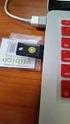
17 To generate an OTP, at first the user inserts the Yubikey into the USB port as shown in Figure 11. The user presses the Yubikey s OTP generation button. The Yubikey generates an encrypted string of characters that are outputted as keystrokes via the keyboard port. This output will be redirected to the OTP field of the authentication page. Figure 11, Inserting Yubikey token for configuration The platform users are required to supply an additional static password and then press the login button to be authenticated. The Yubikey validation service is triggered and it verifies the claimed user credentials presented as a string through the Web. Our validation service converts the received string to a byte string to be decrypted using the same (symmetric) 128-bit AES 7 key. The AES secret will be fetched from the credential stores. Then the string s checksum will be checked and if not valid, the OTP will be rejected. Additional fields will be checked as next step and if not valid, the OTP will be rejected. As next step, the non-volatile counter will be compared with the existing value in the credentials store. If lower than or equal to the stored value, the received OTP will be rejected. If greater than the stored value, the received value is stored and the OTP will be validated. 5.3 Configuring the Yubikey Tokens To configure the Yubikey, personalization GUI software should be installed. The command apt-get install yubikey-personalization-gui installs the required dependencies and it can be invoked as shown in Figure 12. Figure 12, Configuring Yubikey devices through Personalization tool 7 Advanced Encryption Standard, Page 17 of 31

18 The credentials can be written in one of the two configuration slots as shown in Figure 13. We use open authentication (OATH) 8 standard token identifier with 6 bytes length and also HOTP of 6 bytes length. Figure 13, Configuring a Yubikey Token for a New User After selecting the moving factor seed as Randomize, the Write Configuration action should be selected to write the configurations in both a CSV file and the actual Yubikey device. The identity store then can be updated with the following credentials: OATH-HOTP, 9/8/14 2:02 PM, 1, ccccedebbckd,, 5630dd53330b1f81aa40debfbcc75b4b36e170ed, , ,0,1,0,6,996960,0,0,0,0,0 Figure 14 present s the login page for Yubikey two factor authentication, where a user requires to enter username, password and OTP through the Yubikey device. Figure 14, BiobankCloud Login Page 8 OATH, Page 18 of 31

19 5.4 X509 Certificate Authentication The BiobankCloud administrative staff, such as the data controller, is required to login to the platform services using public key certificates. For this purpose, the BiobankCloud services will be identified to the clients through a server certificate and also clients require a valid certificate to communicate with each other. The certificates are stored in the Java key store and obtaining and installing a valid certificate is done through the keytool command in GlassFish v3 [7]. The client distinguished name (DN) is required to be embedded in the web.xml file of the Web application. <login-config> <auth-method>client-cert</auth-method> </login-config> <security-role-mapping> <role-name>contorller</role-name> <principal-name>: CN= Ali Gholami [email protected], O=Kungliga Teknikska Hogskolan,C=SE,DC=TCS,DC=Terena,DC=org </principal-name> </security-role-mapping> The users are then required to import the certificate to their browser when using the platform that is also protected through a password. 5.5 Client REST Authentication The BiobankCloud security architecture provides flexibility to be extended with REST API, to support client authentication. REST authentication is performed against a HTTP server that every operation has a unique URL. The URL contains the following information: Operation: Authentication Operation URL: Parameters: username, password, OTP, mode, uri Output: authentication token After successful authentication, users machine caches the authentication tokens for authorization when accessing the platform services. This includes an authorization operation: Operation: Authorization Operation URL: Parameters: uri, action, authentication token Output: Permitted or denied based on the user s requested action over the resource Page 19 of 31
![The certificates are stored in the Java key store and obtaining and installing a valid certificate is done through the keytool command in GlassFish v3 [7].](/docs-images/43/2781568/images/page_19.jpg "The client distinguished name (DN) is required to be embedded in the web.xml file of the Web application.")
20 6. Authorization This section describes the authorization system in the BiobankCloud project including the role model in Table 1 [16] and study management. Actor Researcher Platform Ethics Board Organization Roles Controller Trusted researcher Guest Administrator Processor Auditor Access committee Auditor Guest Guest Table 1, BiobankCloud Actors and Roles [16]. 6.1 Role-Based Access Control Model Figure 15 shows a high level view of the authorization model containing the BiobankCloud roles. For avoiding the complexity of the legal terminology buy the platform users we map the roles defined in Table 1 as below: BBC Guest: users who create a new account request to be approved. BBC User: users with approved account status that are able to upload genetic data to the platform BBC Admin: users who have created a study and uploaded data to the platform. This group is able to add or remove other researchers to the created studies BBC Researcher (Trusted Researcher): general users of the platform that are trusted to upload new data or use the permitted services. SYS Admin: users with the possibility to provide, entitle or revoke access to other groups. Auditor: users with only read access to audit trails and user activities. Ethics Board: group of users with auditor and BBC researcher roles. Figure 15, Different Roles in the BiobankCloud Page 20 of 31
![Roles [16]. 6.1 Role-Based Access Control Model Figure 15 shows a high level view of the authorization model containing the BiobankCloud roles.](/docs-images/43/2781568/images/page_20.jpg "For avoiding the complexity of the legal terminology buy the platform users we map the roles defined in Table 1 as below: BBC Guest: users who create a new account request to be approved.")
21 We introduce BBC Admin as Controller and SYS Admin as Processor for simplicity and avoiding the legal terminology. This model merges similar roles and actors for usability and simplicity in the implementation. For instance we used the concepts of controller and processor roles to be implemented in BBC Admin and BBC Researcher roles. This model will be tested and finalized in the deliverable D Per-Site Access Control Table 2 shows different roles and related access rights including create, read, update, delete and execute per-site in the platform. Each role, such as SYS Admin, Auditor, Guest Researcher, Trusted Researcher, BBC User, Ethics Board. Each role has different permissions to access audit management, data anonymization service, platform public pages and user administration services. Service Role SYS Admin Auditor Guest Researcher Trusted Researcher Audit Management R R R R Data Anonymization Service X X Platform Public Pages C,R,U,D R R R R R User Administration C,R,U,D R R Table 2, Access Control Table, Create (C), Read (R), Update (U), Delete (D), Execute (X) BBC User Ethics Board 6.3 Per-Study Access Control Table 3 shows different roles and related access rights including create, read, update, delete and execute for study management. Study management functionalities include creating/removing studies, adding and assigning roles to a study as team member, browsing studies, running Cueiform jobs and accessing the Cueiform job results. Role SYS Admin Auditor BBC Trusted BBC Service Admin Researcher User Create Study C,R,U,D Remove Study X C Team Members R R,U,D C,R Browse Studies R,U,D R C,R,U,D R C Cuneiform Jobs C,R,U,D C,R,U,D Cuneiform Job Results R R,U,D R,U,D R Table 3, Study Access Control Table, Create (C), Read (R), Update (U), Delete (D), Execute (X) 6.4 Credential Store To protect the confidentiality of the genomic data and platform services we implanted a relational table Resource, which includes the information about a specific resource such as a directory containing the sample studies. All users are assigned a role when their account is activated. When users upload sample data sets, they can decide which permissions to assign to which users (read, write and execute). This is done in the Permission table. Page 21 of 31
22 User information such as username, , password, registration date are stored in the People table. Group information (group name, group id, description) are kept in the Group table. User permissions to resources are kept in the Role table. Yubikey table stores the Yubikey credentials to authenticate users. Figure 16 shows the important relations that are used for authentication/authorization in the BiobankCloud. This model will be finalized in the deliverable D3.4 to include audit trail relations and enhance any possible missing features. Figure 16, MySQL Relational Model to Store User/Role Credentials in the BiobankCloud 7. Auditing Audit component generates and stores the log events related to security (user management, authentication, authorization, privacy management) and study management, as descried in the following. 7.1 Security Related Events Security related events such as user management, authentication, authorization, privacy management, consent control, profile management and audit management logged and stored in the audit trail Page 22 of 31
23 database. Table 4 shows levels of logging that are required to be collected and stored for each resource. Resource Audit trails User Action Role Timestamp IP address Operating System Browser User Management C,R,U,D Authentication Consent Control C,R,U,D Profile Management C,R,U,D Audit Management C,R,U,D Table 4, Security Events Audit Trails, Create (C), Read(R), Update (U), Delete (D) 7.2 Study Management Events Outcome Study management events are audited in the platform as defined in Table 5. Each service such as study data, team member management, browsing studies, running Cuneiform jobs, study related data, and samples are logged and stored in the audit trail database. Resource Audit trails User Action Role Timestamp Study Data C,R,U,D Team Members C,R,U,D Browse Studies R,D Cuneiform Jobs C,R,U,D Cuneiform Jobs Results R,D Privacy Management C,R,U,D Study info C,R,U Samples C,R,U,D Table 5, Study Management Events Audit Trails 8. User Administration The BiobankCloud user administration service will be built on top of existing local administrations in different institutions and biobanks, and, hence should make no assumption about these systems. This will ensure each BiobankCloud user management system has minimum adaptation and interruption to the local systems, in addition to performing user management locally by each institution. 8.1 User Administration in LDAP To enable access to the BiobankCloud services attributes of the user have to be known by that BiobankCloud. For instance, POSIX attributes such as username, user identifier (UID), group identifier (GID) and the subject name of a X.509 certificate for some users with administrative privileges. We implemented our directory service based on the lightweight directory access protocol (LDAP) for user administration in the BiobankCloud. LDAP provides a suitable protocol for excessive lookups compared to relational databases that are transactional. Page 23 of 31
24 Moreover, LDAP can be used as a protocol for communication and can be integrated with several high availability databases such as the MySQL cluster. The current setup consists of distributed LDAP servers for each BiobankCloud and each platform maintains the user information in a local LDAP server. The LDAP servers host directory entries with suffixes on each platform such as dc=biobankcloud,dc=eu, dc stands for domain component that can be different for each BiobankCloud. The account creation in the BiobankCloud consists of two phases. First a BiobankCloud manager or administrator creates the user account in the LDAP. Second, the provision system updates the execution engine of the BiobankCloud platform (Hadoop cluster) through a provision service. Security of the LDAP server is a major concern, and to ensure confidentiality, integrity and nonrepudiation we use encryption tunnels through transport layer security (TLS) provided by X.509 certificates. Therefore, clients and administrative users will interact authentically using the SASL EXTERNAL mechanism. SASL provides the functionality of mapping certificate subjects to LDAP entries for authorization. To forbid unauthorized access to the LDAP service, a list of authorized servers with their certificate subject (distinguished name) is defined in the LDAP server. Also, we assume the LDAP service runs in a dedicated host with enough security measures that is not accessible to irrelevant programs and processes LDAP attributes, object classes and schemas The attributes that are defined in this section, are defined based on the requirements of WP1 and WP5. However the standard attributes of LDAP were not sufficient to address the BiobankCloud requirements, and hence we defined a schema containing attributes and objectclass definitions, as described in this section. POSIX passwd entry: uid (login name), uidnumber, gidnumber, gecos, homedirectory, login shell. POSIX group: name, gidnumber, members (memberuid). Title: Mr., Mrs., Ms., Miss, Dr., and Prof. Home organisation of the user: bbchomeinstitute. address: mail. Telephone number: telephonenumber. Nationality of user: bbcnationality. Address and telephone number of the BiobankCloud. The Subject Name of the admin s certificate: The subject name (DN) of the admin users. Account status and deactivation reason: bbcdeactivated, bbcdeactreason. Name of the administrator or manager that registered the user: bbcregistrar. Expiration date of the account: shadowexpire with yyymmdd or -1 values. Orcid Identifier: orcidid. Yubikey device identifier: yubikeyid. Yubikey static password: passwordfactor. Group description: Trusted Researcher, Guest Researcher, Data Provider, Auditor, Ethics Board Project Manager: bbcprojectmanager. Resource: bbcprojectresource. Page 24 of 31
25 The actual implementation of the LDAP service, including top level entry of organization, project, group, resource and people. #top level structure entry dn: dc=biobankcloud,dc=eu objectclass: top objectclass: dcobject objectclass: organization o: biobankcloud dc: eu # top level organization entry dn: ou=organization,dc=biobankcloud,dc=eu objectclass: top objectclass: organizationalunit # top level user entry dn: ou=people,dc=biobankcloud,dc=eu ou: People objectclass: top objectclass: organizationalunit # top level group entry dn: ou=group,dc=biobankcloud,dc=eu ou: Group objectclass: top objectclass: organizationalunit # top level group entry dn: ou=project,dc=biobankcloud,dc=eu ou: Project objectclass: top objectclass: organizationalunit # top level resource entry dn: ou=resource,dc=biobankcloud,dc=eu ou: Resource objectclass: top objectclass: organizationalunit # project entry dn: cn=sthlm2,ou=project,dc=biobankcloud,dc=eu cn: STHLM2 bbchomeinstitute: KI bbcprojectendtimestamp: Z bbcprojectstarttimestamp: Z description: STHLM2 gidnumber: memberuid: meb00001 objectclass: top objectclass: posixgroup Page 25 of 31
26 objectclass: bbcproject bbcprojectmanager: meb00001 # user entry dn: uid=meb00001,ou=people,dc=biobankcloud,dc=eu objectclass: top objectclass: person objectclass: organizationalperson objectclass: inetorgperson objectclass: posixaccount objectclass: shadowaccount objectclass: bbcuser cn: Ali Gholami gecos: Ali Gholami givenname: Ali sn: Gholami mail: [email protected] telephonenumber: title: Mr. uid: meb00001 uidnumber: gidnumber: loginshell: /bin/bash shadowexpire: -1 bbcnationality: SE homedirectory: HDFS userpassword: 438ruifneu38ebn23r832.. orcidid: yubikeyid: passwordfactor: 937b0eb8ae06d881b49e5df4bf12d47c bbcdeactivated: FALSE bbcdeactreason: N/A bbchomeinstitute: KI shadowaccount: bbcregistrar: Ali Gholami bbcsubjectdn: CN= Ali Gholami [email protected], O=Kungliga Teknikska Hogskolan,C=SE,DC=TCS,DC=Terena,DC=org bbconline:false lastonline: ,18:34 otpsecret:aes128.. # group entry dn: cn=meb00002,ou=group,dc=biobankcloud,dc=eu objectclass: top objectclass: posixgroup cn: meb00002 gidnumber: description: Trusted Researcher # organization entry dn: ou=ki,ou=organization,dc=biobankcloud,dc=eu objectclass: top objectclass: organizationalunit Page 26 of 31
27 ou: KI telephonenumber: postaladdress: Nobelway 1, , Solna, Stockhlom, Sweden # resource entry dn: rn=audit,ou=resource,dc=biobankcloud,dc=eu objectclass: top objectclass: bbcprojectresource rn: audit LDAP Server Administration We implemented our LDAP service using OpenLDAP on an Ubuntu 12.x platform. To install and configure OpenLDAP you should follow the following instructions or use the chef recipes through Vagrant [30]. To create TLS certificates following instructions are required to be performed: $sudo apt-get install slapd ldap-utils libdb5.1-dev $sudo apt-get install gnutls-bin ssl-cert $sudo sh -c "certtool --generate-privkey > /etc/ssl/private/cakey.pem" $sudo certtool --generate-self-signed --load-privkey /etc/ssl/private/cakey.pem --template /etc/ssl/ca.info -- outfile /etc/ssl/certs/cacert.pem $cd /etc/ldap $sudo certtool --generate-privkey --bits outfile ldapkey.pem $sudo certtool --generate-certificate --load-privkey ldapkey.pem --load-ca-certificate /etc/ssl/certs/cacert.pem -- load-ca-privkey /etc/ssl/private/cakey.pem --template /etc/ssl/ldap01.info --outfile ldapcert.pem $sudo service slapd restart $cat > certinfo.ldif dn: cn=config add: olctlscacertificatefile olctlscacertificatefile: /etc/ldap/ssl/cacert.pem add: olctlscertificatefile olctlscertificatefile: /etc/ldap/ssl/ldapcert.pem add: olctlscertificatekeyfile olctlscertificatekeyfile: /etc/ldap/ssl/ldapkey.pem $sudo ldapmodify -Y EXTERNAL -H ldapi:/// -f certinfo.ldif Check to see if LDAP service is running: Place bbc.schema in the current directory. Convert the schema to a dynamic configuration. $slaptest -f test.conf -F ldap/ This will generate a new schema called {4}bbc.ldif. Replace the below string in the headers: -- dn: cn=bbc,cn=schema,cn=config Page 27 of 31
28 objectclass: olcschemaconfig cn: bbc -- Also remove the lines after structuralobjectclass: olcschemaconfig at the bottom. $sudo ldapadd -Y EXTERNAL -H ldapi:/// -f cn\=\{4\}bbc.ldif To check if schema is added: $sudo ldapsearch -Q -LLL -Y EXTERNAL -H ldapi:/// -b cn=schema,cn=config $sudo ldapadd -x -D cn=admin,dc=biobankcloud,dc=eu -w biobankcloud -f bbc_structure.ldif $sudo ldapadd -x -D cn=admin,dc=biobankcloud,dc=eu -w biobankcloud -f bbc_orgs.ldif $sudo ldapadd -x -D cn=admin,dc=biobankcloud,dc=eu -w biobankcloud -f bbc_group.ldif $sudo ldapadd -x -D cn=admin,dc=biobankcloud,dc=eu -w biobankcloud -f bbc_resource.ldif $sudo ldapadd -x -D cn=admin,dc=biobankcloud,dc=eu -w biobankcloud -f bbc_people.ldif 8.2 Web GUI User Administration The user administration provides the functionality to search team members belonging to study samples through the GUI, as shown in Figure 17. The study owner entitles other members access to the data through the Team tab. Figure 17, Adding Members to a Study A study sample owner has enough privileges to entitle different roles to a team that requires access to that specific data set, as shown in Figure 18. The study owner presses the New Member button and adds/remove/edit new roles to the members. Page 28 of 31
29 Figure 18, Changing Roles in a Study 9. Discussion This section describes the functional requirements of the project defined by WP1 and WP6, in addition to the technical requirements of WP2, which required some changes in the design decisions of the deliverables D3.1 state of the art [2] and D3.2 security toolset design [10]. 9.1 Functional Requirements After clarifying the requirements, we realized the platform will not support command-line due to usability. For this purpose, we abandoned developing or integrating extra components for the OpenLDAP management, i.e. user provisioning or account synchronization with the MySQL backend. We decided to change the identification of users using ORCID ID to the POSIX user names. This was decided to see if users can easily use the POSIX usernames otherwise we would implement user identification using addresses. 9.2 Technical Requirements and Restrictions The BiobankCloud platform uses Hops infrastructure to provision the services. Hops [13] is implemented using Chef [11] extensively to deploy any service in the BiobankCloud infrastructure. Developing Chef software for each of the security components requires substantial developing efforts that is a limiting factor in WP3. We faced this issue with developing Chef programs when integrating the BiobankCloud Open LDAP service into the Hops infrastructure. WP3 aims to provide security at the platform level and to prioritize our goals on this work package we did some changes in the D3.2 (security toolset design) to fulfil the deliverables objectives. Moreover, BiobankCloud uses Oracle Glassfish 3.1 to run the platform using Java EE framework. This is a dependency by other components in the project, i.e. study management or job submission to run the workflows. The application server became a limiting factor because of the compatibility of the following items in addition to the development overhead introduced by Chef: Page 29 of 31
30 9.2.1 Identification In D3.2 we decided to use ORCID ID for user identification instead of . We realized registering new users without an ORCID ID might complicate the registration process. Instead we opted to use the 8-character alphanumeric username and get users feedback on its usability to be finalized in the final toolset. Therefore, if the unique username will not be convenient for users we might reconsider using plain s as username for identification Authentication Glassfish does not support running two authentication methods in one application. Running X509 certificates method authentication for admin role along with another two-factor authentication method using Yubikey and Mobile authentication. For this purpose we may require to consider integrating supplementary Java EE frameworks such as Apache Shiro [12] to solve the problem. We will decide this problem in the final toolset version in the deliverable D Authorization Argus [14] provides a distributed attribute-based authorization system but is not compatible with the existing GUI and Hops infrastructure. To solve this we use the Java authentication and authorization (JAAS) 9, which support native authorization in Java EE Auditing Due to usability and compatibility of MongoDB 10 with the platform we decided to use MySQL NDB instead to store the log files and audit trails. MongoDB with XDAS [31] were decided to collect the audit rails. 10. Conclusions and Future Work This deliverable discusses the conceptual architecture of the BiobankCloud and maps the new requirements of the project to the security toolset alpha version. We described implementation of the security toolset alpha version for the BiobankCloud including two-factor authentication using mobile devices and Yubikey tokens in addition to public key certificates. We also presented user administration tools through OpenLDAP and web GUI. Further we discussed the technical limitations of the project that restrict us to use several components that were designed in D3.2 [10]. We have setup a running instance of the security toolset to be tested by the BiobankCloud participants and users. This enables us to improve the alpha version toolset through getting feedback and improving it. The deliverable security toolset final version (D3.4) due by month 30 will include the final release of the security toolset. In this deliverable we will present the final design, implementation and user guides to use the security toolset. 9 JAAS, 10 MongoDB, Page 30 of 31
31 References [1] BiobankCloud- STREP Proposal, FP7 ICT [2] Ali Gholami, Jim Dowling, Roxana Merino Martinez, Salman Niazi, Lora Dimitrova, Jane Reichel, Michael Hummel, Deliverable D3.1, Security State of the Art, WP3, [3] Open Researcher and Contributor ID (ORCID) Structure, Accessed: [4] Time-based One-Time Password (TOTP), [5] The Google Authenticator, [6] HMAC-Based One-Time Password (HOTP), [7] Sun Java System Web Server 6.1 SP8 Programmer's Guide to Web Applications [8] Jane Reichel, Roxana Merino Martinez, Jan-Eric Litton, BiobankCloud Deliverable, D1.5 v.01, Regulatory and Ethical Requirements for Biobanking Data Storage and Analysis, [9] Jane Reichel, Roxana Merino Martinez, BiobankCloud Model Data Management Policy (MDMP) and some considerations about the user interface, WP1, [10] Ali Gholami, Jim Dowling, Roxana Merino Martinez, Jane Reichel, Lora Dimitrova, Ulf Leser, Security Toolset Design of the Scalable, Secure Storage BiobankCloud. Deliverable D3.2, [11] Chef, Accessed: [12] Apache Shiro, accessed [13] Hadoop Open Platform (Hop), accessed: [14] Argus Authorization Framework, accessed [15] Devaraj Das, Owen O'Malley,Sanjay Radia, Kan Zhang, Adding Security to Apache Hadoop [16] Roxana Merino Martinez, Jane Reichel, Jan-Eric Litton, Deliverable, D1.1, Informatics model specification and ethical guidelines for data protection and data sharing, [17] Jeffrey Dean and Sanjay Ghemawat. MapReduce: Simplified data processing on large clusters. In OSDI, pages , 2004 [18] RFC4510, [19] Jennifer G. Steiner, Clifford Neuman, and Jeffrey I. Schiller. Kerberos: An authentication service for open network systems. In in Usenix Conference Proceedings, pages , 1988 [20] Hadoop Secure Mode, Accessed: [21] Project Rhino, Accessed: [22]Owen O Malley, Kan Zhang, Sanjay Radia, Ram Marti, and Christopher Harrell, Hadoop Security Design, Yahoo!, October 2009 [23] OASIS SAML2 Specification, [24] RFC 6749, The OAuth 2.0 Authorization Framework, [25] OpenID specifications, [26] Apache Ranger, accessed: [27] Apache Knox, accessed: [28] Apache Sentry, Accessed: [29] Hadoop Security Model, Accessed: [30] Vagrant, Accessed: [31] OpenXDAS, accessed: Page 31 of 31
www.biobankcloud.com Jim Dowling KTH Royal Institute of Technology, Stockholm SICS Swedish ICT CSHL Meeting on Biological Data Science, 2014
 www.biobankcloud.com Jim Dowling KTH Royal Institute of Technology, Stockholm SICS Swedish ICT CSHL Meeting on Biological Data Science, 2014 Definition of a Biobank The Biobank concept is defined (by Swedish
CA Performance Center
 CA Performance Center Single Sign-On User Guide 2.4 This Documentation, which includes embedded help systems and electronically distributed materials, (hereinafter referred to as the Documentation ) is
Apache Sentry. Prasad Mujumdar [email protected] [email protected]
 Apache Sentry Prasad Mujumdar [email protected] [email protected] Agenda Various aspects of data security Apache Sentry for authorization Key concepts of Apache Sentry Sentry features Sentry architecture
Using LDAP Authentication in a PowerCenter Domain
 Using LDAP Authentication in a PowerCenter Domain 2008 Informatica Corporation Overview LDAP user accounts can access PowerCenter applications. To provide LDAP user accounts access to the PowerCenter applications,
Introduction to Directory Services
 Introduction to Directory Services Overview This document explains how AirWatch integrates with your organization's existing directory service such as Active Directory, Lotus Domino and Novell e-directory
www.novell.com/documentation Policy Guide Access Manager 3.1 SP5 January 2013
 www.novell.com/documentation Policy Guide Access Manager 3.1 SP5 January 2013 Legal Notices Novell, Inc., makes no representations or warranties with respect to the contents or use of this documentation,
Evaluation of Security in Hadoop
 Evaluation of Security in Hadoop MAHSA TABATABAEI Master s Degree Project Stockholm, Sweden December 22, 2014 XR-EE-LCN 2014:013 A B S T R A C T There are different ways to store and process large amount
User Management / Directory Services using LDAP
 User Management / Directory Services using LDAP Benjamin Wellmann [email protected] May 14, 2010 1 Introduction LDAP or Lightweight Directory Access Protocol is a protocol for querying and modifying data
Introduction to Linux (Authentication Systems, User Accounts, LDAP and NIS) Süha TUNA Res. Assist.
 Introduction to Linux (Authentication Systems, User Accounts, LDAP and NIS) Süha TUNA Res. Assist. Outline 1. What is authentication? a. General Informations 2. Authentication Systems in Linux a. Local
Configuration Guide BES12. Version 12.2
 Configuration Guide BES12 Version 12.2 Published: 2015-07-07 SWD-20150630131852557 Contents About this guide... 8 Getting started... 9 Administrator permissions you need to configure BES12... 9 Obtaining
FileCloud Security FAQ
 is currently used by many large organizations including banks, health care organizations, educational institutions and government agencies. Thousands of organizations rely on File- Cloud for their file
Data Collection and Analysis: Get End-to-End Security with Cisco Connected Analytics for Network Deployment
 White Paper Data Collection and Analysis: Get End-to-End Security with Cisco Connected Analytics for Network Deployment Cisco Connected Analytics for Network Deployment (CAND) is Cisco hosted, subscription-based
BlackBerry Enterprise Service 10. Secure Work Space for ios and Android Version: 10.1.1. Security Note
 BlackBerry Enterprise Service 10 Secure Work Space for ios and Android Version: 10.1.1 Security Note Published: 2013-06-21 SWD-20130621110651069 Contents 1 About this guide...4 2 What is BlackBerry Enterprise
NSi Mobile Installation Guide. Version 6.2
 NSi Mobile Installation Guide Version 6.2 Revision History Version Date 1.0 October 2, 2012 2.0 September 18, 2013 2 CONTENTS TABLE OF CONTENTS PREFACE... 5 Purpose of this Document... 5 Version Compatibility...
OpenHRE Security Architecture. (DRAFT v0.5)
 OpenHRE Security Architecture (DRAFT v0.5) Table of Contents Introduction -----------------------------------------------------------------------------------------------------------------------2 Assumptions----------------------------------------------------------------------------------------------------------------------2
The increasing popularity of mobile devices is rapidly changing how and where we
 Mobile Security BACKGROUND The increasing popularity of mobile devices is rapidly changing how and where we consume business related content. Mobile workforce expectations are forcing organizations to
Configuration Guide BES12. Version 12.1
 Configuration Guide BES12 Version 12.1 Published: 2015-04-22 SWD-20150422113638568 Contents Introduction... 7 About this guide...7 What is BES12?...7 Key features of BES12... 8 Product documentation...
This chapter describes how to use the Junos Pulse Secure Access Service in a SAML single sign-on deployment. It includes the following sections:
 CHAPTER 1 SAML Single Sign-On This chapter describes how to use the Junos Pulse Secure Access Service in a SAML single sign-on deployment. It includes the following sections: Junos Pulse Secure Access
Authentication Integration
 Authentication Integration VoiceThread provides multiple authentication frameworks allowing your organization to choose the optimal method to implement. This document details the various available authentication
Configuration Guide. BlackBerry Enterprise Service 12. Version 12.0
 Configuration Guide BlackBerry Enterprise Service 12 Version 12.0 Published: 2014-12-19 SWD-20141219132902639 Contents Introduction... 7 About this guide...7 What is BES12?...7 Key features of BES12...
Architecture and Data Flow Overview. BlackBerry Enterprise Service 10 721-08877-123 Version: 10.2. Quick Reference
 Architecture and Data Flow Overview BlackBerry Enterprise Service 10 721-08877-123 Version: Quick Reference Published: 2013-11-28 SWD-20131128130321045 Contents Key components of BlackBerry Enterprise
Like what you hear? Tweet it using: #Sec360
 Like what you hear? Tweet it using: #Sec360 HADOOP SECURITY Like what you hear? Tweet it using: #Sec360 HADOOP SECURITY About Robert: School: UW Madison, U St. Thomas Programming: 15 years, C, C++, Java
Configuration Guide. BES12 Cloud
 Configuration Guide BES12 Cloud Published: 2016-04-08 SWD-20160408113328879 Contents About this guide... 6 Getting started... 7 Configuring BES12 for the first time...7 Administrator permissions you need
YubiKey Authentication Module Design Guideline
 YubiKey Authentication Module Design Guideline Yubico Application Note Version 1.0 May 7, 2012 Introduction Disclaimer Yubico is the leading provider of simple, open online identity protection. The company
nexus Hybrid Access Gateway
 Product Sheet nexus Hybrid Access Gateway nexus Hybrid Access Gateway nexus Hybrid Access Gateway uses the inherent simplicity of virtual appliances to create matchless security, even beyond the boundaries
SonicOS Enhanced 3.2 LDAP Integration with Microsoft Active Directory and Novell edirectory Support
 SonicOS Enhanced 3.2 LDAP Integration with Microsoft Active Directory and Novell edirectory Support Document Scope This document describes the integration of SonicOS Enhanced 3.2 with Lightweight Directory
OnCommand Performance Manager 1.1
 OnCommand Performance Manager 1.1 Installation and Setup Guide For Red Hat Enterprise Linux NetApp, Inc. 495 East Java Drive Sunnyvale, CA 94089 U.S. Telephone: +1 (408) 822-6000 Fax: +1 (408) 822-4501
Hadoop Security Design
 Hadoop Security Design Owen O Malley, Kan Zhang, Sanjay Radia, Ram Marti, and Christopher Harrell Yahoo! {owen,kan,sradia,rmari,cnh}@yahoo-inc.com October 2009 Contents 1 Overview 2 1.1 Security risks.............................
Embedded Web Server Security
 Embedded Web Server Security Administrator's Guide September 2014 www.lexmark.com Model(s): C54x, C73x, C746, C748, C792, C925, C950, E260, E360, E46x, T65x, W850, X264, X36x, X46x, X543, X544, X546, X548,
prefer to maintain their own Certification Authority (CA) system simply because they don t trust an external organization to
 If you are looking for more control of your public key infrastructure, try the powerful Dogtag certificate system. BY THORSTEN SCHERF symmetric cryptography provides a powerful and convenient means for
Setup Guide Access Manager 3.2 SP3
 Setup Guide Access Manager 3.2 SP3 August 2014 www.netiq.com/documentation Legal Notice THIS DOCUMENT AND THE SOFTWARE DESCRIBED IN THIS DOCUMENT ARE FURNISHED UNDER AND ARE SUBJECT TO THE TERMS OF A LICENSE
Configuration Guide BES12. Version 12.3
 Configuration Guide BES12 Version 12.3 Published: 2016-01-19 SWD-20160119132230232 Contents About this guide... 7 Getting started... 8 Configuring BES12 for the first time...8 Configuration tasks for managing
WebSpy Vantage Ultimate 2.2 Web Module Administrators Guide
 WebSpy Vantage Ultimate 2.2 Web Module Administrators Guide This document is intended to help you get started using WebSpy Vantage Ultimate and the Web Module. For more detailed information, please see
Security Guide. BlackBerry Enterprise Service 12. for ios, Android, and Windows Phone. Version 12.0
 Security Guide BlackBerry Enterprise Service 12 for ios, Android, and Windows Phone Version 12.0 Published: 2015-02-06 SWD-20150206130210406 Contents About this guide... 6 What is BES12?... 7 Key features
Introduction... 1. Installing and Configuring the LDAP Server... 3. Configuring Yealink IP Phones... 30. Using LDAP Phonebook...
 Introduction... 1 Installing and Configuring the LDAP Server... 3 OpenLDAP... 3 Installing the OpenLDAP Server... 3 Configuring the OpenLDAP Server... 4 Configuring the LDAPExploreTool2... 8 Microsoft
Administration Guide. BlackBerry Enterprise Service 12. Version 12.0
 Administration Guide BlackBerry Enterprise Service 12 Version 12.0 Published: 2015-01-16 SWD-20150116150104141 Contents Introduction... 9 About this guide...10 What is BES12?...11 Key features of BES12...
The following gives an overview of LDAP from a user's perspective.
 LDAP stands for Lightweight Directory Access Protocol, which is a client-server protocol for accessing a directory service. LDAP is a directory service protocol that runs over TCP/IP. The nitty-gritty
Big Data Management and Security
 Big Data Management and Security Audit Concerns and Business Risks Tami Frankenfield Sr. Director, Analytics and Enterprise Data Mercury Insurance What is Big Data? Velocity + Volume + Variety = Value
SonicOS Enhanced 3.2 LDAP Integration with Microsoft Active Directory and Novell edirectory Support
 SonicOS Enhanced 3.2 LDAP Integration with Microsoft Active Directory and Novell edirectory Support Document Scope This document describes the integration of SonicOS Enhanced 3.2 with Lightweight Directory
W H IT E P A P E R. Salesforce CRM Security Audit Guide
 W HITEPAPER Salesforce CRM Security Audit Guide Contents Introduction...1 Background...1 Security and Compliance Related Settings...1 Password Settings... 2 Audit and Recommendation... 2 Session Settings...
DIGIPASS Authentication for Sonicwall Aventail SSL VPN
 DIGIPASS Authentication for Sonicwall Aventail SSL VPN With VASCO IDENTIKEY Server 3.0 Integration Guideline 2009 Vasco Data Security. All rights reserved. PAGE 1 OF 52 Disclaimer Disclaimer of Warranties
NetIQ Advanced Authentication Framework
 NetIQ Advanced Authentication Framework Security Officer Guide Version 5.2.0 1 Table of Contents 1 Table of Contents 2 Introduction 3 About This Document 3 Authenticators Management 4 Card 8 Email OTP
The Top 5 Federated Single Sign-On Scenarios
 The Top 5 Federated Single Sign-On Scenarios Table of Contents Executive Summary... 1 The Solution: Standards-Based Federation... 2 Service Provider Initiated SSO...3 Identity Provider Initiated SSO...3
Embedded Web Server Security
 Embedded Web Server Security Administrator's Guide September 2014 www.lexmark.com Model(s): MS911de, MX910de, MX911, MX912, XM9145, XM9155, XM9165, CS310, CS410, CS510, CX310, CX410, CX510, M1140, M1145,
Secure Your Hadoop Cluster With Apache Sentry (Incubating) Xuefu Zhang Software Engineer, Cloudera April 07, 2014
 1 Secure Your Hadoop Cluster With Apache Sentry (Incubating) Xuefu Zhang Software Engineer, Cloudera April 07, 2014 2 Outline Introduction Hadoop security primer Authentication Authorization Data Protection
External Authentication with Citrix Secure Gateway - Presentation server Authenticating Users Using SecurAccess Server by SecurEnvoy
 External Authentication with Citrix Secure Gateway - Presentation server Authenticating Users Using SecurAccess Server by SecurEnvoy Contact information SecurEnvoy www.securenvoy.com 0845 2600010 1210
DIGIPASS Authentication for GajShield GS Series
 DIGIPASS Authentication for GajShield GS Series With Vasco VACMAN Middleware 3.0 2008 VASCO Data Security. All rights reserved. Page 1 of 1 Integration Guideline Disclaimer Disclaimer of Warranties and
NETWRIX PASSWORD MANAGER
 NETWRIX PASSWORD MANAGER ADMINISTRATOR S GUIDE Product Version: 6.1 February/2012 Legal Notice The information in this publication is furnished for information use only, and does not constitute a commitment
Directory Integration with Okta. An Architectural Overview. Okta Inc. 301 Brannan Street San Francisco, CA 94107. info@okta.
 Directory Integration with Okta An Architectural Overview Okta Inc. 301 Brannan Street San Francisco, CA 94107 [email protected] 1-888-722-7871 Contents 1 User Directories and the Cloud: An Overview 3 Okta
VMware Identity Manager Administration
 VMware Identity Manager Administration VMware Identity Manager 2.4 This document supports the version of each product listed and supports all subsequent versions until the document is replaced by a new
Ciphermail Gateway Web LDAP Authentication Guide
 CIPHERMAIL EMAIL ENCRYPTION Ciphermail Gateway Web LDAP Authentication Guide June 19, 2014, Rev: 5454 Copyright 2008-2014, ciphermail.com. CONTENTS CONTENTS Contents 1 Introduction 3 2 Create an LDAP configuration
Flexible Identity Federation
 Flexible Identity Federation Quick start guide version 1.0.1 Publication history Date Description Revision 2015.09.23 initial release 1.0.0 2015.12.11 minor updates 1.0.1 Copyright Orange Business Services
Administrator Guide. v 11
 Administrator Guide JustSSO is a Single Sign On (SSO) solution specially developed to integrate Google Apps suite to your Directory Service. Product developed by Just Digital v 11 Index Overview... 3 Main
INTEGRATION GUIDE. DIGIPASS Authentication for Google Apps using IDENTIKEY Federation Server
 INTEGRATION GUIDE DIGIPASS Authentication for Google Apps using IDENTIKEY Federation Server Disclaimer Disclaimer of Warranties and Limitation of Liabilities All information contained in this document
Big Data Operations Guide for Cloudera Manager v5.x Hadoop
 Big Data Operations Guide for Cloudera Manager v5.x Hadoop Logging into the Enterprise Cloudera Manager 1. On the server where you have installed 'Cloudera Manager', make sure that the server is running,
Lifecycle Manager Installation and Configuration Guide
 Lifecycle Manager Installation and Configuration Guide vcenter Lifecycle Manager 1.2 This document supports the version of each product listed and supports all subsequent versions until the document is
Setup Guide Access Manager Appliance 3.2 SP3
 Setup Guide Access Manager Appliance 3.2 SP3 August 2014 www.netiq.com/documentation Legal Notice THIS DOCUMENT AND THE SOFTWARE DESCRIBED IN THIS DOCUMENT ARE FURNISHED UNDER AND ARE SUBJECT TO THE TERMS
DB2 - LDAP. To start with configuration of transparent LDAP, you need to configure the LDAP server.
 http://www.tutorialspoint.com/db2/db2_ldap.htm DB2 - LDAP Copyright tutorialspoint.com Introduction LDAP is Lightweight Directory Access Protocol. LDAP is a global directory service, industry-standard
YubiRADIUS Deployment Guide for corporate remote access. How to Guide
 YubiRADIUS Deployment Guide for corporate remote access How to Guide May 15, 2012 Introduction Disclaimer Yubico is the leading provider of simple, open online identity protection. The company s flagship
This chapter describes how to set up and manage VPN service in Mac OS X Server.
 6 Working with VPN Service 6 This chapter describes how to set up and manage VPN service in Mac OS X Server. By configuring a Virtual Private Network (VPN) on your server you can give users a more secure
PrinterOn Print Management Overview
 PrinterOn Print Management Overview Table of Contents 1. PrinterOn and Print Management Overview... 4 1.1. Combined PrinterOn and Print Management Capabilities... 5 1.1.1. Comprehensive Workflow Tracking
Configuring Security Features of Session Recording
 Configuring Security Features of Session Recording Summary This article provides information about the security features of Citrix Session Recording and outlines the process of configuring Session Recording
Securing SAS Web Applications with SiteMinder
 Configuration Guide Securing SAS Web Applications with SiteMinder Audience Two application servers that SAS Web applications can run on are IBM WebSphere Application Server and Oracle WebLogic Server.
Okta/Dropbox Active Directory Integration Guide
 Okta/Dropbox Active Directory Integration Guide Okta Inc. 301 Brannan Street, 3rd Floor San Francisco CA, 94107 [email protected] 1-888- 722-7871 1 Table of Contents 1 Okta Directory Integration Edition for
How to Use Microsoft Active Directory as an LDAP Source with the Oracle ZFS Storage Appliance
 An Oracle Technical White Paper November 2014 How to Use Microsoft Active Directory as an LDAP Source with the Oracle ZFS Storage Appliance Table of Contents Introduction...3 Active Directory LDAP Services...4
Cisco TelePresence Authenticating Cisco VCS Accounts Using LDAP
 Cisco TelePresence Authenticating Cisco VCS Accounts Using LDAP Deployment Guide Cisco VCS X8.1 D14465.06 December 2013 Contents Introduction 3 Process summary 3 LDAP accessible authentication server configuration
Configuring idrac6 for Directory Services
 Configuring idrac6 for Directory Services Instructions for Setting Up idrac6 with Active Directory, Novell, Fedora, OpenDS and OpenLDAP Directory Services. A Dell Technical White Paper Dell Product Group
Mobile Admin Security
 Mobile Admin Security Introduction Mobile Admin is an enterprise-ready IT Management solution that generates significant cost savings by dramatically increasing the responsiveness of IT organizations facing
BlackBerry Enterprise Service 10. Version: 10.2. Configuration Guide
 BlackBerry Enterprise Service 10 Version: 10.2 Configuration Guide Published: 2015-02-27 SWD-20150227164548686 Contents 1 Introduction...7 About this guide...8 What is BlackBerry Enterprise Service 10?...9
USING FEDERATED AUTHENTICATION WITH M-FILES
 M-FILES CORPORATION USING FEDERATED AUTHENTICATION WITH M-FILES VERSION 1.0 Abstract This article provides an overview of federated identity management and an introduction on using federated authentication
CDH installation & Application Test Report
 CDH installation & Application Test Report He Shouchun (SCUID: 00001008350, Email: [email protected]) Chapter 1. Prepare the virtual machine... 2 1.1 Download virtual machine software... 2 1.2 Plan the guest
YubiRADIUS Virtual Appliance. Configuration and Administration Guide Software version: 3.6.0 Document version: 1.0
 YubiRADIUS Virtual Appliance Configuration and Administration Guide Software version: 3.6.0 Document version: 1.0 December 14, 2012 Introduction Disclaimer Yubico is the leading provider of simple, open
McAfee Cloud Identity Manager
 NetSuite Cloud Connector Guide McAfee Cloud Identity Manager version 2.0 or later COPYRIGHT Copyright 2013 McAfee, Inc. All Rights Reserved. No part of this publication may be reproduced, transmitted,
TIBCO Spotfire Platform IT Brief
 Platform IT Brief This IT brief outlines features of the system: Communication security, load balancing and failover, authentication options, and recommended practices for licenses and access. It primarily
Step by Step Guide to implement SMS authentication to F5 Big-IP APM (Access Policy Manager)
 Installation guide for securing the authentication to your F5 Big-IP APM solution with Nordic Edge One Time Password Server, delivering strong authetication via SMS to your mobile phone. 1 Summary This
Configuration Worksheets for Oracle WebCenter Ensemble 10.3
 Configuration Worksheets for Oracle WebCenter Ensemble 10.3 This document contains worksheets for installing and configuring Oracle WebCenter Ensemble 10.3. Print this document and use it to gather the
www.novell.com/documentation Jobs Guide Identity Manager 4.0.1 February 10, 2012
 www.novell.com/documentation Jobs Guide Identity Manager 4.0.1 February 10, 2012 Legal Notices Novell, Inc. makes no representations or warranties with respect to the contents or use of this documentation,
Integrating Kerberos into Apache Hadoop
 Integrating Kerberos into Apache Hadoop Kerberos Conference 2010 Owen O Malley [email protected] Yahoo s Hadoop Team Who am I An architect working on Hadoop full time Mainly focused on MapReduce Tech-lead
A Study of Data Management Technology for Handling Big Data
 Available Online at www.ijcsmc.com International Journal of Computer Science and Mobile Computing A Monthly Journal of Computer Science and Information Technology IJCSMC, Vol. 3, Issue. 9, September 2014,
Cloudera Backup and Disaster Recovery
 Cloudera Backup and Disaster Recovery Important Note: Cloudera Manager 4 and CDH 4 have reached End of Maintenance (EOM) on August 9, 2015. Cloudera will not support or provide patches for any of the Cloudera
GreenRADIUS Virtual Appliance
 GreenRADIUS Virtual Appliance Configuration and Administration Guide Software version: 1.0 Document version: 1.1 September 1, 2014 Introduction Disclaimer Green Rocket Security is aprovider of online and
Using LDAP with Sentry Firmware and Sentry Power Manager (SPM)
 Using LDAP with Sentry Firmware and Sentry Power Manager (SPM) Table of Contents Purpose LDAP Requirements Using LDAP with Sentry Firmware (GUI) Initiate a Sentry GUI Session Configuring LDAP for Active
Security Overview Enterprise-Class Secure Mobile File Sharing
 Security Overview Enterprise-Class Secure Mobile File Sharing Accellion, Inc. 1 Overview 3 End to End Security 4 File Sharing Security Features 5 Storage 7 Encryption 8 Audit Trail 9 Accellion Public Cloud
How To Use Netiq Access Manager 4.0.1.1 (Netiq) On A Pc Or Mac Or Macbook Or Macode (For Pc Or Ipad) On Your Computer Or Ipa (For Mac) On An Ip
 Setup Guide Access Manager 4.0 SP1 May 2014 www.netiq.com/documentation Legal Notice THIS DOCUMENT AND THE SOFTWARE DESCRIBED IN THIS DOCUMENT ARE FURNISHED UNDER AND ARE SUBJECT TO THE TERMS OF A LICENSE
RSA SecurID Ready Implementation Guide
 RSA SecurID Ready Implementation Guide Partner Information Last Modified: December 18, 2006 Product Information Partner Name Microsoft Web Site http://www.microsoft.com/isaserver Product Name Internet
The Integration of LDAP into the Messaging Infrastructure at CERN
 The Integration of LDAP into the Messaging Infrastructure at CERN Ray Jackson CERN / IT-IS Group 29 Nov 2000 16:00 CERN IT Auditorium, bldg. 31, 3-005 A bit about me Technical Student Sep 1997-1998 in
Ciphermail Gateway PDF Encryption Setup Guide
 CIPHERMAIL EMAIL ENCRYPTION Ciphermail Gateway PDF Encryption Setup Guide March 6, 2014, Rev: 5454 Copyright c 2008-2014, ciphermail.com. CONTENTS CONTENTS Contents 1 Introduction 4 2 Portal 4 3 PDF encryption
User Guide. Version R91. English
 AuthAnvil User Guide Version R91 English August 25, 2015 Agreement The purchase and use of all Software and Services is subject to the Agreement as defined in Kaseya s Click-Accept EULATOS as updated from
owncloud Architecture Overview
 owncloud Architecture Overview Time to get control back Employees are using cloud-based services to share sensitive company data with vendors, customers, partners and each other. They are syncing data
SAP Cloud Identity Service Document Version: 1.0 2014-09-01. SAP Cloud Identity Service
 Document Version: 1.0 2014-09-01 Content 1....4 1.1 Release s....4 1.2 Product Overview....8 Product Details.... 9 Supported Browser Versions....10 Supported Languages....12 1.3 Getting Started....13 1.4
2-FACTOR AUTHENTICATION WITH OPENLDAP, OATH-HOTP AND YUBIKEY. Axel Hoffmann
 2-FACTOR AUTHENTICATION WITH OPENLDAP, OATH-HOTP AND YUBIKEY Axel Hoffmann Biography Axel Hoffmann Linux System Administrator 1&1 Mail & Media Dev. & Tech. GmbH [email protected] 2 Introduction Requirements
CA SiteMinder. Directory Configuration - OpenLDAP. r6.0 SP6
 CA SiteMinder Directory Configuration - OpenLDAP r6.0 SP6 This documentation, which includes embedded help systems and electronically distributed materials, (hereinafter referred to as the Documentation
RSA SecurID Software Token 1.3 for iphone and ipad Administrator s Guide
 RSA SecurID Software Token 1.3 for iphone and ipad Administrator s Guide Contact Information See the RSA corporate web site for regional Customer Support telephone and fax numbers: www.rsa.com Trademarks
TIBCO Spotfire Web Player 6.0. Installation and Configuration Manual
 TIBCO Spotfire Web Player 6.0 Installation and Configuration Manual Revision date: 12 November 2013 Important Information SOME TIBCO SOFTWARE EMBEDS OR BUNDLES OTHER TIBCO SOFTWARE. USE OF SUCH EMBEDDED
How to Install and Configure EBF15328 for MapR 4.0.1 or 4.0.2 with MapReduce v1
 How to Install and Configure EBF15328 for MapR 4.0.1 or 4.0.2 with MapReduce v1 1993-2015 Informatica Corporation. No part of this document may be reproduced or transmitted in any form, by any means (electronic,
Technology Primer. OPS Manager, Release 7.4. Integrating Your Directory Server with our Directory Service Solution
 Technology Primer OPS Manager, Release 7.4 Integrating Your Directory Server with our Directory Service Solution The Mitel Integrated Directory Services (IDS) application synchronizes the telephone directory
White Paper. McAfee Cloud Single Sign On Reviewer s Guide
 White Paper McAfee Cloud Single Sign On Reviewer s Guide Table of Contents Introducing McAfee Cloud Single Sign On 3 Use Cases 3 Key Features 3 Provisioning and De-Provisioning 4 Single Sign On and Authentication
docs.hortonworks.com
 docs.hortonworks.com Hortonworks Data Platform: Administering Ambari Copyright 2012-2015 Hortonworks, Inc. Some rights reserved. The Hortonworks Data Platform, powered by Apache Hadoop, is a massively
Configuring Sponsor Authentication
 CHAPTER 4 Sponsors are the people who use Cisco NAC Guest Server to create guest accounts. Sponsor authentication authenticates sponsor users to the Sponsor interface of the Guest Server. There are five
Authentication. Authentication in FortiOS. Single Sign-On (SSO)
 Authentication FortiOS authentication identifies users through a variety of methods and, based on identity, allows or denies network access while applying any required additional security measures. Authentication