
UML for C# Modeling Basics
|
|
|
- Chrystal Parrish
- 9 years ago
- Views:
Transcription
1 UML for C# C# is a modern object-oriented language for application development. In addition to object-oriented constructs, C# supports component-oriented programming with properties, methods and events. UML defines graphical notations for describing and designing object-oriented software systems. It s an open standard controlled by the Object Management Group (OMG). Although UML has many diagram types, we ll focus on class models that show static class structure and relationships. WinA&D is a complete UML modeling tool enriched with C# language specific details used to generate source code. WinTranslator is a reverse engineering tool that scans code to extract design information into WinA&D models. Diagrams created in WinA&D are used to illustrated C# programs represented in the UML notation. This paper assumes a working knowledge of C# and UML. It briefly describes how C# constructs are represented by UML for forward and reverse engineering. Modeling Basics In WinA&D, a class model is drawn from a palette of tools. As each class instance is placed on the diagram, it s named in the Class Properties dialog. Each class has a corresponding dictionary entry of the same name in the data dictionary. Many diagrams within the class model and in other types of diagram documents share data that is stored in the same global data dictionary. For a selected class object on the diagram, the Details button presents the Class Attributes & Operations dialog. This dialog is used to define members of the class. In WinA&D terminology, a class can have Attribute, Operation, Property and Event members. Behind the scenes, WinA&D adds a dictionary entry for each class member with a name of the form Class Attribute, Class.Operation, Class$Property and Class-Event. Each class member has a details dialog for defining language specific information for that class member. WinA&D supports many programming languages for code generation including C#. Depending on which language is currently selected, the Attribute Details, Operation Details, Property Details and Event Details dialog will vary slightly based on specific characteristics of the selected language. WinA&D can concurrently store language specific details for multiple languages for each modeling element. When instances of a class are presented on different diagrams, detailed information is stored once in the global dictionary. WinA&D uses this information to generate source code.

2 Class Model A UML class diagram shows the static class structure of a C# application. Different types of the objects on the class diagram represent C# classes, interfaces, structs and their generic counterparts. Class Objects UML Class Diagram with C# Classes Each class on a diagram is represented as a named box with dashed sections showing a list of class members. Classes are connected with relationship lines. In the diagram above, the Constant, VariableReference and Operation classes inherit from the abstract Expression class. The presentation of a class diagram can vary widely based on user-specified criteria. In the diagram above, class attributes (C# fields) and operations (C# methods) are shown with access, data type and signature details. WinA&D gives the user a lot of flexibility to control how classes are presented. Class members can be shown or hidden based on member type or specific conditions based on access or modifiers on each class member. Members of a class instance on a diagram can show various levels of detail like its access type, data type or arguments. Presentation options can be easily applied across all diagrams, to specific diagrams or to individual instances of a class. Information about classes, class member and C# details are entered into detail dialogs when drawing diagrams and stored in the global dictionary. Instances of the same class can be shown on many diagrams with different presentations.

3 Class and Interface Relationships Interface Objects An interface defines members without implementations providing a contract that can be implemented by classes and structs. An interface looks similar to a class box with the addition of the <<interface>> stereotype at the top. The ITextBox and IListBox interfaces inherit from the IControl interface shown with an open arrowhead on the line pointing at the inherited interface. Unlike classes, in C# an interface can inherit from multiple interfaces as IComboBox does. The EditBox class implements both the IControl and IDataBound interfaces as shown by the dashed line and open arrowheads. Struct Objects A struct can have data and function members similar to a class. A variable of type class stores a reference to an object dynamically allocated on heap. Unlike a class, a struct is a value type that doesn t allocate heap or allow user-specified inheritance. In WinA&D terminology, UsePointClass and UsePointStruct are classes with an fpoints attribute (C# field). The X and Y coordinates for each point in the array can be stored using a class or struct.

4 Similarities Between Class and Struct When PointClass is used, each point and the array itself is stored in a separate class instance dynamically allocated on heap and represented on the diagram as aggregation by reference (hollow diamond on relationship line). When PointStruct is used, only one object for the array itself is instantiated and coordinates are stored in-line in the array. On the diagram, this is represented as aggregation by value (solid diamond on relationship line). C# Delegates and Enums Delegates and enums are type declarations stored in the dictionary and defined using the Data Types dialog. After typing the entry name at the bottom, press the Insert key or click the New button, then use the Code panel to enter the actual C# code of the delegate or enum entry. C# Delegates and Enums

5 Class Member Details After adding objects on a class diagram and merging the diagram to generate corresponding dictionary entries, class members can be added and C# specific details can be defined using the Attribute Details, Operation Details, Property Details and Event Details dialogs. C# Constants & Fields Constants and fields of a C# class are represented as class attributes in WinA&D. Details of an attribute like its data type, access and qualifications (C# modifiers) are entered into the Attribute Details dialog and stored in the dictionary entry for that attribute. C# Constants & Fields The drop down menu on the Data Type field shows a list of primitive data types for C#. That list can be user defined from the Document Defaults dialog of the Dictionary document. The Types button can also be used to select from user defined classes and data structures in the dictionary. The bottom left corner of a class member detail dialog may have Up and Down arrows enabled. Click these arrow icons to navigate between items in a class member list (attributes, operations, etc.) to quickly make editing changes. C# Methods, Constructors, Destructors and Operators Methods, constructors, destructors and operators of a C# class are represented as operations in WinA&D. Details of an operation like its data type, access, arguments and qualifications (C# modifiers) are entered into the Operation Details dialog and stored in the dictionary for that operation.

6 C# Methods, Constructors, Destructors and Operators A C# constructor has the same name as the class itself. A destructor has the same name as the class with the ~ prefix. A C# operator has an alphanumeric operation name and uses the Operator field of the dialog to store its real name like +, -, etc. C# supports overloaded function names. Each overloaded function in C# can have the same name with a different argument list. In the design model, name the operations (C# methods) using the convention MethodName$1, MethodName$2, MethodName$3. WinA&D stores the details of each method like its unique signature in a separate dictionary entry named Class.MethodName$1, Class.MethodName$2, Class.MethodName$3 and during code generation strips off the $ and number from the method name. C# Properties and Indexers Properties and Indexers of a C# class are represented as properties in WinA&D. In the details dialog, set the Property or Indexer radio button. Next assign the data type, access and qualifications (C# modifiers). Use the Get and Set edit field to enter the actual code for getting or setting the property or indexer. When the Indexer radio button is selected, an Arguments edit field is visible in the dialog.

7 C# Properties & Indexers C# Events An Event member enables a class to provide notifications. Other classes can handle the event by assigning an event handler. When a class raises the event, those event handlers get executed to process the event. C# Events

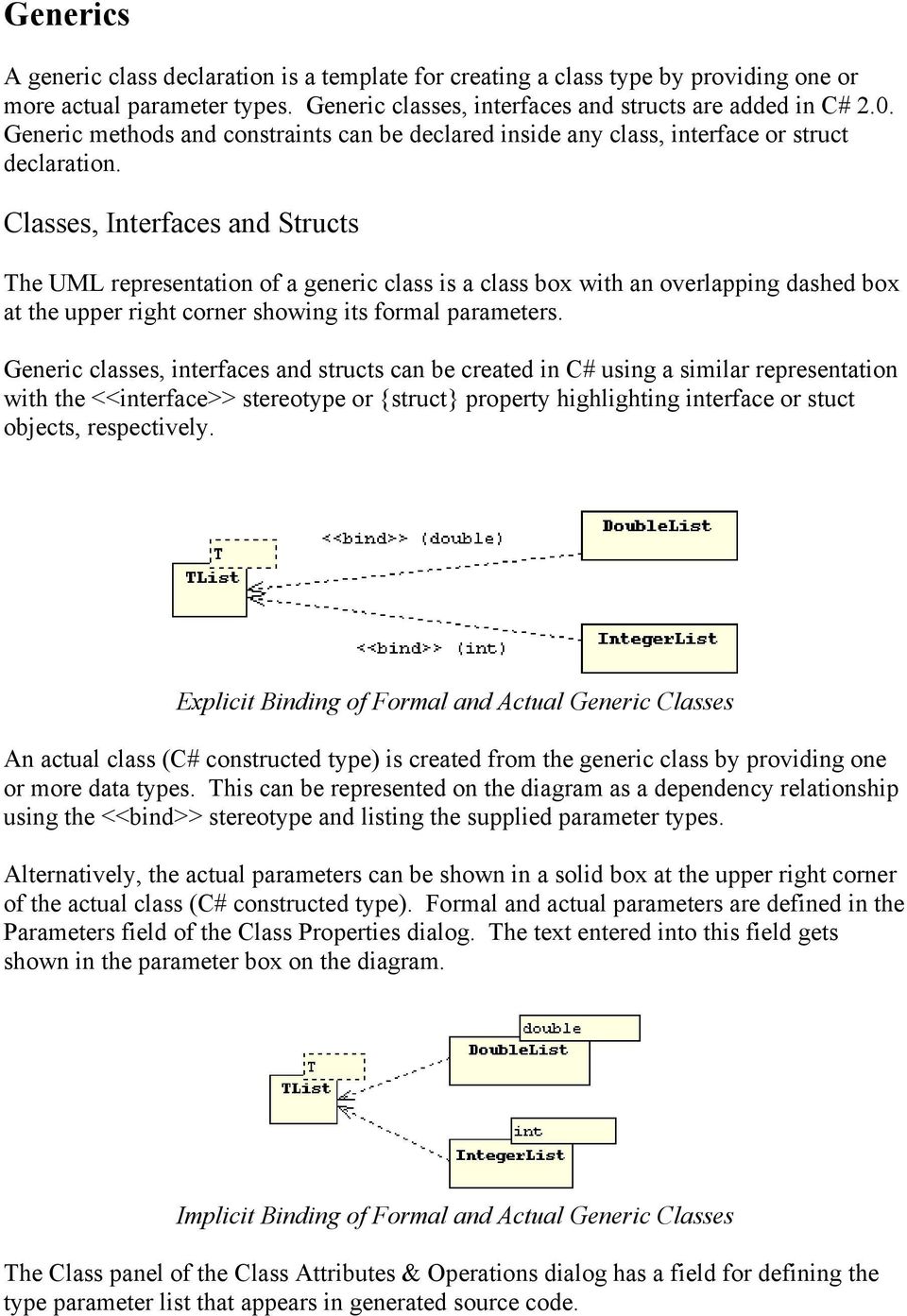
8 Generics A generic class declaration is a template for creating a class type by providing one or more actual parameter types. Generic classes, interfaces and structs are added in C# 2.0. Generic methods and constraints can be declared inside any class, interface or struct declaration. Classes, Interfaces and Structs The UML representation of a generic class is a class box with an overlapping dashed box at the upper right corner showing its formal parameters. Generic classes, interfaces and structs can be created in C# using a similar representation with the <<interface>> stereotype or {struct} property highlighting interface or stuct objects, respectively. Explicit Binding of Formal and Actual Generic Classes An actual class (C# constructed type) is created from the generic class by providing one or more data types. This can be represented on the diagram as a dependency relationship using the <<bind>> stereotype and listing the supplied parameter types. Alternatively, the actual parameters can be shown in a solid box at the upper right corner of the actual class (C# constructed type). Formal and actual parameters are defined in the Parameters field of the Class Properties dialog. The text entered into this field gets shown in the parameter box on the diagram. Implicit Binding of Formal and Actual Generic Classes The Class panel of the Class Attributes & Operations dialog has a field for defining the type parameter list that appears in generated source code.
9 Generic Methods and Constraints The C# 2.0 language adds generic methods and constraints. A generic method has normal parameters plus type parameters that are provided when using the method. If the name of the method itself uses a type parameter, then enter that type parameter in the Generic Parameters field of the C# Operation Details dialog. If the method uses constraints, then click the Method Constraints field and enter each constraint on a separate line of the Method Constraints dialog that is presented. Other C# Constructs C# introduces concepts not directly comparable to constructs in other OO languages. Attributes In C#, programmers can invent new kinds of declarative information called attributes. These attributes are not be confused with the conventional meaning of the term attribute as data or fields of a class. In C# lingo, the term attribute refers to text within brackets that is attached to program entities like classes, interfaces, structs and class members. Within WinA&D, this attribute information is entered into an Attribute Specification field of a detail dialog for a class member. For example, the C# Attribute Details, C# Operation Details, C# Property & Indexer Details and C# Event Details dialogs all have an Attribute Specification field. C# attributes of a class, interface or struct are stored in the External Declarations field on the Class panel of the Class Attributes & Operations dialog. The External Declarations field is visible by selecting Tab 2 at the bottom of the Class panel. During code generation, WinA&D adds this attribute information prior to generated items. Likewise, WinTranslator captures this information from C# code. Partial Types Some types can be defined in multiple parts. In C#, the partial modifier word identifies one of these types which gets merged together at compile time. Within the WinA&D design environment, each class, interface or struct gets a unique name and its own dictionary entry. To support C# partial types, a ~ and number is added to items names. For example, if three partial types collectively define class X, they would be named X~1, X~2 and X~3.

10 During code generation, WinA&D will drop the ~ character and trailing number from the class name and add the partial modifier to the generated code. Likewise, when scanning C# code with WinTranslator to generate UML class diagrams in WinA&D, the same convention is used for partial types. Nested Types A type declared within a class or struct is called a nested type. Nested types are modeled in WinA&D as separate class or struct objects on the diagram. Set the Inner checkbox in the details dialog for the nested object. In the parent object (the enclosing class or struct), add an attribute that references the nested object with the data type of innerclass, innerstruct or innerinterface. UML for Nested C# Class In the UML class diagram shown above, ParentClass is the name of a class containing NestedClass. The name of a nested class is prefixed with the name of its parent class and an underscore. For example, if the parent class in the code is named A and its inner class is named B, then the required name of the inner class in the model is A_B. From the diagram we see that the parent class is dependent on the nested class as shown with the dependency relationship drawn from the parent to the nested class.

11 Namespaces The WinA&D modeling tool has a namespace feature that serves several purposes. Namespaces can partition the models and dictionary information for a large project into different domains like communication, interface, database or control. Many features can be driven by namespace like report generation, import/export and naming conventions. Namespaces are also used to identify the paths to code folders that contain source code associated with a project. The Java language uses the package concept to group related classes into a logical package with a source file for each class in the package physically stored in one folder on disk. When modeling a Java application, each package translates into a WinA&D namespace that identifies both its logical organization and physical folder path of related code files. The C# language uses a namespace construct to logically group classes. Physically, however, the classes in a namespace can be stored in the same file, different files or even different files of different folders. If a program uses 7 C# namespaces and 20 code folders, it may require up to 27 WinA&D namespace definitions to define both the logical and physical organization of the code. The WinA&D namespace definition for a logical C# namespace consists of its name and the Description field which holds the full namespace declaration as illustrated below. The Path and Access fields of the namespace definition are unused. Namespace Name: Namespace Description: Customize wiki.editor.customize Each namespace name is limited to 20 characters and is usually the same as the last dot separated part of a hierarchical C# namespace. In an application with C# namespaces of wiki.editor.customize and wiki.user.customize you could use namespace names of cutomize1 and customize2. The WinA&D namespace definition for a physical folder location is illustrated below. The Description field can be used to document the folder contents or left blank. Namespace Name: Namespace Path: ~Customize c:\wiki\editor\customize By WinA&D convention, the first character is a tilde ~ of a namespace name used solely for identifying a folder path. WinTranslator also uses this convention when generating namespaces from C# code.

12 Code Generation C# code generation in WinA&D uses information from a class model and its associated dictionary entries. The code generation process is similar to that used for C++, Delphi or other object-oriented languages. The resulting code includes a declaration for each class, interface or struct and empty function frames for each method. A checkbox on the customization dialog allows text from the Notes panel of the Operations Details dialog to be inserted into the generated function frame, thus making it easy to include programming comments or source code into the function frames. Customize Code The Generate->Code->Customize command presents a dialog to customize the generated code. Dialog to Customized Generated C# Code The Customize dialog provides some control over what gets generated. For example, you can include a predefined file header at the beginning of each generated code file and automatically insert fields like the current time stamp, user name, organization, etc. Generate Class, Interface and Struct WinA&D has two commands for generating code from a class model, the Batch and Unit Code commands from the Generate->Code submenu. The Unit Code command for a selected class A automatically generates the code file named A.cs and prompts for a folder to store the resulting file. The Batch code command generates code for one or more selected class, interface or struct objects and prompts for a file name and location.

13 Generate Types During design, delegate and enum definitions can be created in the Data Types dialog. During the implementation phase of a project, these type definitions can be output to a code file. Place the insertion point in the code view of a Code or Browse window and choose the Paste->Data Types from Dictionary Entry command from the Option menu. The Code panel of the selected data types will be output to that location in the file. Nested Types To generate code for a parent class or struct and its nested types, first select and generate code for the parent object. A stub will be placed within the code generated for the parent object. Now select the nested object and generate its code with the Unit Code command. The stub will be replaced by code representing the selected nested object. Reverse Engineering WinTranslator is a reverse engineering tool that scans source code and extracts design information to a text file. The reengineering process is fully automated. The user simply clicks the Reengineer Project button to present a step-by-step dialog that identifies the source language (like C#), source code folders and other options. WinTranslator scans the code and outputs a text file of design information. The output from WinTranslator for a C# project consists of a Dictionary.rp file in each code folder referenced by a Dictionary.list file in the designated WinTranslator project folder. Within WinA&D, use the New Project dialog to create a new project with a Dictionary and Class Model document and set the language to C#. Open the generated project documents. From the Dictionary window, import the Dictionary.list file generated by WinTranslator. The project now has a dictionary populated with design information extracted from the source code. WinA&D has options to color dictionary entries based on type or to structure entries hierarchically to more easily identify entries for classes, interfaces, structs and various kinds of class members. From the Class window, use the Generate->Class Model->From Dictionary command to present the Class Model From Dictionary dialog. From this dialog, a class diagram can be generated for each logically related cluster of classes.

14 Summary This paper describes the primary constructs in the C# language and how they are modeled in WinA&D using the UML notation. The model can be used to generate C# code. WinTranslator scans source code to generate a UML model for an existing project. Excel Software Ph [email protected]

PHP Code Design. The data structure of a relational database can be represented with a Data Model diagram, also called an Entity-Relation diagram.
 PHP Code Design PHP is a server-side, open-source, HTML-embedded scripting language used to drive many of the world s most popular web sites. All major web servers support PHP enabling normal HMTL pages
Source Code Translation
 Source Code Translation Everyone who writes computer software eventually faces the requirement of converting a large code base from one programming language to another. That requirement is sometimes driven
UML FOR OBJECTIVE-C. Excel Software www.excelsoftware.com
 UML FOR OBJECTIVE-C Excel Software www.excelsoftware.com Objective-C is a popular programming language for Mac OS X computers. The Unified Modeling Language (UML) is the industry standard notation for
Microsoft Word 2010. Revising Word Documents Using Markup Tools
 Microsoft Word 2010 Revising Word Documents Using Markup Tools Preface Word provides several markup tools that make document collaboration easy. Color coding, highlighting, and the ability maintain multiple
Umbrello UML Modeller Handbook
 2 Contents 1 Introduction 7 2 UML Basics 8 2.1 About UML......................................... 8 2.2 UML Elements........................................ 9 2.2.1 Use Case Diagram.................................
C++ INTERVIEW QUESTIONS
 C++ INTERVIEW QUESTIONS http://www.tutorialspoint.com/cplusplus/cpp_interview_questions.htm Copyright tutorialspoint.com Dear readers, these C++ Interview Questions have been designed specially to get
Lab Manual: Using Rational Rose
 Lab Manual: Using Rational Rose 1. Use Case Diagram Creating actors 1. Right-click on the Use Case View package in the browser to make the shortcut menu visible. 2. Select the New:Actor menu option. A
Moving from CS 61A Scheme to CS 61B Java
 Moving from CS 61A Scheme to CS 61B Java Introduction Java is an object-oriented language. This document describes some of the differences between object-oriented programming in Scheme (which we hope you
Using UML Part One Structural Modeling Diagrams
 UML Tutorials Using UML Part One Structural Modeling Diagrams by Sparx Systems All material Sparx Systems 2007 Sparx Systems 2007 Page 1 Trademarks Object Management Group, OMG, Unified Modeling Language,
Intellect Platform - The Workflow Engine Basic HelpDesk Troubleticket System - A102
 Intellect Platform - The Workflow Engine Basic HelpDesk Troubleticket System - A102 Interneer, Inc. Updated on 2/22/2012 Created by Erika Keresztyen Fahey 2 Workflow - A102 - Basic HelpDesk Ticketing System
Using Rational Rose to Create Object-Oriented Diagrams
 Using Rational Rose to Create Object-Oriented Diagrams This is a brief overview to get students started in using Rational Rose to quickly create object-oriented models and diagrams. It is not by any means
Styles, Tables of Contents, and Tables of Authorities in Microsoft Word 2010
 Styles, Tables of Contents, and Tables of Authorities in Microsoft Word 2010 TABLE OF CONTENTS WHAT IS A STYLE?... 2 VIEWING AVAILABLE STYLES IN THE STYLES GROUP... 2 APPLYING STYLES FROM THE STYLES GROUP...
Suite. How to Use GrandMaster Suite. Exporting with ODBC
 Suite How to Use GrandMaster Suite Exporting with ODBC This page intentionally left blank ODBC Export 3 Table of Contents: HOW TO USE GRANDMASTER SUITE - EXPORTING WITH ODBC...4 OVERVIEW...4 WHAT IS ODBC?...
Anoto pendocuments. User s Guide
 Anoto pendocuments User s Guide Copyright 1997 2009 Anoto AB. All rights reserved. Anoto, Magic Box and the Anoto logotype are trademarks owned by Anoto AB. All other trademarks are the property of their
PC Agent Quick Start. Open the Agent. Autonomy Connected Backup. Version 8.8. Revision 0
 T E C H N I C A L N O T E Autonomy Connected Backup Version 8.8 PC Agent Quick Start Revision 0 Use this document as a quick reference for common Connected Backup PC Agent tasks. If the Agent is not on
Microsoft Word 2011: Create a Table of Contents
 Microsoft Word 2011: Create a Table of Contents Creating a Table of Contents for a document can be updated quickly any time you need to add or remove details for it will update page numbers for you. A
About XML in InDesign
 1 Adobe InDesign 2.0 Extensible Markup Language (XML) is a text file format that lets you reuse content text, table data, and graphics in a variety of applications and media. One advantage of using XML
3. Add and delete a cover page...7 Add a cover page... 7 Delete a cover page... 7
 Microsoft Word: Advanced Features for Publication, Collaboration, and Instruction For your MAC (Word 2011) Presented by: Karen Gray ([email protected]) Word Help: http://mac2.microsoft.com/help/office/14/en-
Quick Start Guide. Highly customizable automated trading Automate your trades according to rules and models you create.
 POWER E*TRADE PRO EXCEL MANAGER Quick Start Guide We are pleased to announce the launch of Excel Manager, an exciting new feature in Power E*TRADE Pro that leverages the flexibility of Microsoft Excel
Introduction to Visio 2003 By Kristin Davis Information Technology Lab School of Information The University of Texas at Austin Summer 2005
 Introduction to Visio 2003 By Kristin Davis Information Technology Lab School of Information The University of Texas at Austin Summer 2005 Introduction This tutorial is designed for people who are new
DbSchema Tutorial with Introduction in MongoDB
 DbSchema Tutorial with Introduction in MongoDB Contents MySql vs MongoDb... 2 Connect to MongoDb... 4 Insert and Query Data... 5 A Schema for MongoDb?... 7 Relational Data Browse... 8 Virtual Relations...
Terms and Definitions for CMS Administrators, Architects, and Developers
 Sitecore CMS 6 Glossary Rev. 081028 Sitecore CMS 6 Glossary Terms and Definitions for CMS Administrators, Architects, and Developers Table of Contents Chapter 1 Introduction... 3 1.1 Glossary... 4 Page
8 CREATING FORM WITH FORM WIZARD AND FORM DESIGNER
 8 CREATING FORM WITH FORM WIZARD AND FORM DESIGNER 8.1 INTRODUCTION Forms are very powerful tool embedded in almost all the Database Management System. It provides the basic means for inputting data for
INTRODUCTION TO OBJECTIVE-C CSCI 4448/5448: OBJECT-ORIENTED ANALYSIS & DESIGN LECTURE 12 09/29/2011
 INTRODUCTION TO OBJECTIVE-C CSCI 4448/5448: OBJECT-ORIENTED ANALYSIS & DESIGN LECTURE 12 09/29/2011 1 Goals of the Lecture Present an introduction to Objective-C 2.0 Coverage of the language will be INCOMPLETE
Adding a File Attachment to a CFS Requisition
 Adding a File Attachment to a CFS Requisition When creating a requisition, there are certain purchases that may require additional documentation. The Attachment feature is used to attach this documentation.
Getting Started Guide. Chapter 14 Customizing LibreOffice
 Getting Started Guide Chapter 14 Customizing LibreOffice Copyright This document is Copyright 2010 2012 by its contributors as listed below. You may distribute it and/or modify it under the terms of either
Integrated Accounting System for Mac OS X
 Integrated Accounting System for Mac OS X Program version: 6.3 110401 2011 HansaWorld Ireland Limited, Dublin, Ireland Preface Standard Accounts is a powerful accounting system for Mac OS X. Text in square
Liferay Portal 4.0 - User Guide. Joseph Shum Alexander Chow
 Liferay Portal 4.0 - User Guide Joseph Shum Alexander Chow Liferay Portal 4.0 - User Guide Joseph Shum Alexander Chow Table of Contents Preface... viii User Administration... 1 Overview... 1 Administration
Form Management Admin Guide
 Form Management Admin Guide Getting around the navigation Model Management (Admin/Technical). Create, edit and manage the basic template of content models. Form Builder - Lets you create properties in
16.4.3 Lab: Data Backup and Recovery in Windows XP
 16.4.3 Lab: Data Backup and Recovery in Windows XP Introduction Print and complete this lab. In this lab, you will back up data. You will also perform a recovery of the data. Recommended Equipment The
Capturing Material. Section 3
 Section 3 Capturing Material Duration: 60 minutes Capturing material is the process of creating media files from video or audio source material. This section describes how to capture material from different
Xcode Project Management Guide. (Legacy)
 Xcode Project Management Guide (Legacy) Contents Introduction 10 Organization of This Document 10 See Also 11 Part I: Project Organization 12 Overview of an Xcode Project 13 Components of an Xcode Project
This Skill Builder demonstrates how to define and place sketched symbols in drawings.
 Sketched Symbols This Skill Builder demonstrates how to define and place sketched symbols in drawings. A sketched symbol is a user-defined symbol. You create sketched symbols in the sketch environment
Contents. Launching FrontPage... 3. Working with the FrontPage Interface... 3 View Options... 4 The Folders List... 5 The Page View Frame...
 Using Microsoft Office 2003 Introduction to FrontPage Handout INFORMATION TECHNOLOGY SERVICES California State University, Los Angeles Version 1.0 Fall 2005 Contents Launching FrontPage... 3 Working with
EET 310 Programming Tools
 Introduction EET 310 Programming Tools LabVIEW Part 1 (LabVIEW Environment) LabVIEW (short for Laboratory Virtual Instrumentation Engineering Workbench) is a graphical programming environment from National
Chapter 19: XML. Working with XML. About XML
 504 Chapter 19: XML Adobe InDesign CS3 is one of many applications that can produce and use XML. After you tag content in an InDesign file, you save and export the file as XML so that it can be repurposed
Auditing UML Models. This booklet explains the Auditing feature of Enterprise Architect. Copyright 1998-2010 Sparx Systems Pty Ltd
 Auditing UML Models Enterprise Architect is an intuitive, flexible and powerful UML analysis and design tool for building robust and maintainable software. This booklet explains the Auditing feature of
This document provides tips on how to use standard Adobe Acrobat tools to add tick marks to scanned tax documents in the form of PDF files.
 Creating Tick Marks with Adobe Acrobat 10/11 in Tax Documents This document provides tips on how to use standard Adobe Acrobat tools to add tick marks to scanned tax documents in the form of PDF files.
The goal with this tutorial is to show how to implement and use the Selenium testing framework.
 APPENDIX B: SELENIUM FRAMEWORK TUTORIAL This appendix is a tutorial about implementing the Selenium framework for black-box testing at user level. It also contains code examples on how to use Selenium.
Object Oriented Programming. Risk Management
 Section V: Object Oriented Programming Risk Management In theory, there is no difference between theory and practice. But, in practice, there is. - Jan van de Snepscheut 427 Chapter 21: Unified Modeling
Kuali Basics. Reference and Training Guide. Kuali Financial System Kuali Enterprise Workflow. Belongs to: Version 20110802
 Kuali Basics Reference and Training Guide Kuali Financial System Kuali Enterprise Workflow Belongs to: Version 20110802 Table of Contents edoc Fundamentals...1 About edoc Routing... 1 What is Ad Hoc Routing?...
LexisNexis CaseMap-WorkSite Plug-In ReadMe
 LexisNexis CaseMap-WorkSite Plug-In ReadMe Version Number 2.0 (Build 1) ReadMe updated March 27, 2007 CONTENTS 1. System Requirements 2. Installing CaseMap-WorkSite Plug-In 3. Uninstalling CaseMap-WorkSite
Content Management System QUICK START GUIDE
 Content Management System QUICK START GUIDE Revised 03/10/11 TABLE OF CONTENTS Pg. 1... Logging In Pg. 2... Navigating to your site folder Pg. 2... The Folder Tree, Site Structure and Wire Frames Explained.
SimLab 3D PDF. Settings
 SimLab 3D PDF Settings 3D PDF Settings PDF Settings dialog enables the user to control the exported 3D PDF file(s), from SimLab Composer and other 3D SimLab plugins. In SimLab Composer the dialog can be
KITES TECHNOLOGY COURSE MODULE (C, C++, DS)
 KITES TECHNOLOGY 360 Degree Solution www.kitestechnology.com/academy.php [email protected] [email protected] Contact: - 8961334776 9433759247 9830639522.NET JAVA WEB DESIGN PHP SQL, PL/SQL
NYS OCFS CMS Manual CHAPTER 1...1-1 CHAPTER 2...2-1 CHAPTER 3...3-1 CHAPTER 4...4-1. Contract Management System
 NYS OCFS CMS Manual C O N T E N T S CHAPTER 1...1-1 Chapter 1: Introduction to the Contract Management System...1-2 Using the Contract Management System... 1-2 Accessing the Contract Management System...
D2L: An introduction to CONTENT University of Wisconsin-Parkside
 D2L: An introduction to CONTENT University of Wisconsin-Parkside FOR FACULTY: What is CONTENT? The Content and Course Builder tools both allow you to organize materials in D2L. Content lets you and your
NorthClark Computing, Inc. Bill of Material and Parts Master Maintenance. Administrator s Guide
 ERP Consulting Web Development Custom Programming Solutions Desktop & Web Applications for Manfact NorthClark Computing, Inc. Bill of Material and Parts Master Maintenance Administrator s Guide Web and
Outlook Web Access (OWA) User Guide
 Outlook Web Access (OWA) User Guide September 2010 TABLE OF CONTENTS TABLE OF CONTENTS... 2 1.0 INTRODUCTION... 4 1.1 OUTLOOK WEB ACCESS SECURITY CONSIDERATIONS... 4 2.0 GETTING STARTED... 5 2.1 LOGGING
F9 Integration Manager
 F9 Integration Manager User Guide for use with QuickBooks This guide outlines the integration steps and processes supported for the purposes of financial reporting with F9 Professional and F9 Integration
Presentations and PowerPoint
 V-1.1 PART V Presentations and PowerPoint V-1.2 Computer Fundamentals V-1.3 LESSON 1 Creating a Presentation After completing this lesson, you will be able to: Start Microsoft PowerPoint. Explore the PowerPoint
Gmail: Signatures, labels, and filters
 Gmail: Signatures, labels, and filters Here s how to set up your email signature, labels to organize your email (similar to folders), and filters to automate what happens to certain types of email. Create
How to Create User-Defined Fields and Tables
 SAP Business One How-To Guide PUBLIC How to Create User-Defined Fields and Tables Applicable Release: SAP Business One 8.8 All Countries English July 2009 Table of Contents Creating User-Defined Fields
DocuSign Quick Start Guide. Using Templates. Overview. Table of Contents
 DocuSign Quick Start Guide Using Templates Overview This guide provides an overview of how to use a template when creating and sending an envelope. Templates help streamline the sending process when you
10.3.1.6 Lab - Data Backup and Recovery in Windows XP
 5.0 10.3.1.6 Lab - Data Backup and Recovery in Windows XP Introduction Print and complete this lab. In this lab, you will back up data. You will also perform a recovery of the data. Recommended Equipment
Accounts Receivable: Importing Remittance Data
 Updated December 2015 Contents...3 Getting Started...3 Configuring the Excel Spreadsheet...3 Importing the Data...5 2015 ECi Software Solutions, Inc. This feature lets you import check remittance information
Introduction to BPMN
 Stephen A. White, IBM Corporation Abstract This paper is intended to provide a high-level overview and introduction to the Business Process Modeling Notation (BPMN). The context and general uses for BPMN
Database Forms and Reports Tutorial
 Database Forms and Reports Tutorial Contents Introduction... 1 What you will learn in this tutorial... 2 Lesson 1: Create First Form Using Wizard... 3 Lesson 2: Design the Second Form... 9 Add Components
File Management Utility User Guide
 File Management Utility User Guide Legal Notes Unauthorized reproduction of all or part of this guide is prohibited. The information in this guide is subject to change without notice. We cannot be held
Custom Reporting System User Guide
 Citibank Custom Reporting System User Guide April 2012 Version 8.1.1 Transaction Services Citibank Custom Reporting System User Guide Table of Contents Table of Contents User Guide Overview...2 Subscribe
USING STUFFIT DELUXE THE STUFFIT START PAGE CREATING ARCHIVES (COMPRESSED FILES)
 USING STUFFIT DELUXE StuffIt Deluxe provides many ways for you to create zipped file or archives. The benefit of using the New Archive Wizard is that it provides a way to access some of the more powerful
ECDL. European Computer Driving Licence. Database Software BCS ITQ Level 1. Syllabus Version 1.0
 ECDL European Computer Driving Licence Database Software BCS ITQ Level 1 Using Microsoft Access 2013 Syllabus Version 1.0 This training, which has been approved by BCS, includes exercise items intended
Microsoft Office. Mail Merge in Microsoft Word
 Microsoft Office Mail Merge in Microsoft Word TABLE OF CONTENTS Microsoft Office... 1 Mail Merge in Microsoft Word... 1 CREATE THE SMS DATAFILE FOR EXPORT... 3 Add A Label Row To The Excel File... 3 Backup
UF Health SharePoint 2010 Introduction to Content Administration
 UF Health SharePoint 2010 Introduction to Content Administration Email: [email protected] Web Page: http://training.health.ufl.edu Last Updated 2/7/2014 Introduction to SharePoint 2010 2.0 Hours
Sitecore InDesign Connector 1.1
 Sitecore Adaptive Print Studio Sitecore InDesign Connector 1.1 - User Manual, October 2, 2012 Sitecore InDesign Connector 1.1 User Manual Creating InDesign Documents with Sitecore CMS User Manual Page
Training Manual. Version 6
 Training Manual TABLE OF CONTENTS A. E-MAIL... 4 A.1 INBOX... 8 A.1.1 Create New Message... 8 A.1.1.1 Add Attachments to an E-mail Message... 11 A.1.1.2 Insert Picture into an E-mail Message... 12 A.1.1.3
Eventia Log Parsing Editor 1.0 Administration Guide
 Eventia Log Parsing Editor 1.0 Administration Guide Revised: November 28, 2007 In This Document Overview page 2 Installation and Supported Platforms page 4 Menus and Main Window page 5 Creating Parsing
Bank Account 1 September 2015
 Chapter 8 Training Notes Bank Account 1 September 2015 BANK ACCOUNTS Bank Accounts, or Bank Records, are typically setup in PrintBoss after the application is installed and provide options to work with
Manual English KOI Desktop App 2.0.x
 Manual English KOI Desktop App 2.0.x KOI Kommunikation, Organisation, Information Comm-Unity EDV GmbH 2010 Contents Introduction... 3 Information on how to use the documentation... 3 System requirements:...
Designing forms for auto field detection in Adobe Acrobat
 Adobe Acrobat 9 Technical White Paper Designing forms for auto field detection in Adobe Acrobat Create electronic forms more easily by using the right elements in your authoring program to take advantage
MICROSOFT OUTLOOK 2011 READ, SEARCH AND PRINT E-MAILS
 MICROSOFT OUTLOOK 2011 READ, SEARCH AND PRINT E-MAILS Lasted Edited: 2012-07-10 1 Find the Inbox... 3 Check for New Mail... 4 Manually check for new messages... 4 Change new incoming e-mail schedule options...
Instructions for Configuring a SAS Metadata Server for Use with JMP Clinical
 Instructions for Configuring a SAS Metadata Server for Use with JMP Clinical These instructions describe the process for configuring a SAS Metadata server to work with JMP Clinical. Before You Configure
Gadget: A Tool for Extracting the Dynamic Structure of Java Programs
 Gadget: A Tool for Extracting the Dynamic Structure of Java Programs Juan Gargiulo and Spiros Mancoridis Department of Mathematics & Computer Science Drexel University Philadelphia, PA, USA e-mail: gjgargiu,smancori
WINDOWS 7 EXPLORE INTERNET EXPLORER 8
 WINDOWS 7 EXPLORE INTERNET EXPLORER 8 Windows 7 Explore Internet Explorer 8 Last Edited: 2012-07-10 1 Explore changes in the UI... 3 Enhance with built-in Search engine... 3 Manage and Organize IE with
OpenIMS 4.2. Document Management Server. User manual
 OpenIMS 4.2 Document Management Server User manual OpenSesame ICT BV Index 1 INTRODUCTION...4 1.1 Client specifications...4 2 INTRODUCTION OPENIMS DMS...5 2.1 Login...5 2.2 Language choice...5 3 OPENIMS
Web Intelligence User Guide
 Web Intelligence User Guide Office of Financial Management - Enterprise Reporting Services 4/11/2011 Table of Contents Chapter 1 - Overview... 1 Purpose... 1 Chapter 2 Logon Procedure... 3 Web Intelligence
Section 4. Mastering Folders
 Section 4 Mastering Folders About This Section Section 3: Working with Receipts introduced you to the Receipts Grid area of the Receipt Organizer window (the lower of the two grids). In the Receipts Grid,
Using Microsoft Word. Working With Objects
 Using Microsoft Word Many Word documents will require elements that were created in programs other than Word, such as the picture to the right. Nontext elements in a document are referred to as Objects
MICROSOFT OFFICE ACCESS 2007 - NEW FEATURES
 MICROSOFT OFFICE 2007 MICROSOFT OFFICE ACCESS 2007 - NEW FEATURES Exploring Access Creating and Working with Tables Finding and Filtering Data Working with Queries and Recordsets Working with Forms Working
Oracle Service Bus Examples and Tutorials
 March 2011 Contents 1 Oracle Service Bus Examples... 2 2 Introduction to the Oracle Service Bus Tutorials... 5 3 Getting Started with the Oracle Service Bus Tutorials... 12 4 Tutorial 1. Routing a Loan
UML Class Diagrams (1.8.7) 9/2/2009
 8 UML Class Diagrams Java programs usually involve multiple classes, and there can be many dependencies among these classes. To fully understand a multiple class program, it is necessary to understand
BLACKBOARD CONTENT COLLECTION FACULTY TRAINING GUIDE
 BLACKBOARD CONTENT COLLECTION FACULTY TRAINING GUIDE Table of Contents About the Guide... 1 Overview... 2 Navigating the Content Collection... 3 Accessing the Content Collection... 3 Content Collection
Introduction to Microsoft Word 2003
 Introduction to Microsoft Word 2003 Sabeera Kulkarni Information Technology Lab School of Information University of Texas at Austin Fall 2004 1. Objective This tutorial is designed for users who are new
Adobe Conversion Settings in Word. Section 508: Why comply?
 It s the right thing to do: Adobe Conversion Settings in Word Section 508: Why comply? 11,400,000 people have visual conditions not correctible by glasses. 6,400,000 new cases of eye disease occur each
Figure 3.5: Exporting SWF Files
 Li kewhatyou see? Buyt hebookat t hefocalbookst or e Fl ash + Af t eref f ect s Chr i sjackson ISBN 9780240810317 Flash Video (FLV) contains only rasterized images, not vector art. FLV files can be output
Glossary of Object Oriented Terms
 Appendix E Glossary of Object Oriented Terms abstract class: A class primarily intended to define an instance, but can not be instantiated without additional methods. abstract data type: An abstraction
USER MANUAL (PRO-CURO LITE, PRO & ENT) [SUPPLIED FOR VERSION 3]
![USER MANUAL (PRO-CURO LITE, PRO & ENT) [SUPPLIED FOR VERSION 3]](/thumbs/39/19325006.jpg "USER MANUAL (PRO-CURO LITE, PRO & ENT) [SUPPLIED FOR VERSION 3]") Pro-curo Software Ltd USER MANUAL (PRO-CURO LITE, PRO & ENT) [SUPPLIED FOR VERSION 3] CONTENTS Everyday use... 3 Logging on... 4 Main Screen... 5 Adding locations... 6 Working with locations... 7 Duplicate...
Pro-curo Software Ltd USER MANUAL (PRO-CURO LITE, PRO & ENT) [SUPPLIED FOR VERSION 3] CONTENTS Everyday use... 3 Logging on... 4 Main Screen... 5 Adding locations... 6 Working with locations... 7 Duplicate...
ACCESS 2007. Importing and Exporting Data Files. Information Technology. MS Access 2007 Users Guide. IT Training & Development (818) 677-1700
 Information Technology MS Access 2007 Users Guide ACCESS 2007 Importing and Exporting Data Files IT Training & Development (818) 677-1700 [email protected] TABLE OF CONTENTS Introduction... 1 Import Excel
Lotus Notes Client Version 8.5 Reference Guide
 Lotus Notes Client Version 8.5 Reference Guide rev. 11/19/2009 1 Lotus Notes Client Version 8.5 Reference Guide Accessing the Lotus Notes Client From your desktop, double click the Lotus Notes icon. Logging
Dreamweaver Tutorials Creating a Web Contact Form
 Dreamweaver Tutorials This tutorial will explain how to create an online contact form. There are two pages involved: the form and the confirmation page. When a user presses the submit button on the form,
AFN-FixedAssets-062502
 062502 2002 Blackbaud, Inc. This publication, or any part thereof, may not be reproduced or transmitted in any form or by any means, electronic, or mechanical, including photocopying, recording, storage
Choose a topic from the left to get help for CmapTools.
 Using CmapTools Create a Cmap Add a Concept Create a Proposition from One Concept Create a Proposition from Existing Concepts Save a Cmap Open a Cmap Create a Folder Drag in Resources Import Resources
Bitrix Site Manager 4.1. User Guide
 Bitrix Site Manager 4.1 User Guide 2 Contents REGISTRATION AND AUTHORISATION...3 SITE SECTIONS...5 Creating a section...6 Changing the section properties...8 SITE PAGES...9 Creating a page...10 Editing
Designing and Implementing Forms 34
 C H A P T E R 34 Designing and Implementing Forms 34 You can add forms to your site to collect information from site visitors; for example, to survey potential customers, conduct credit-card transactions,
How To Make Email Templates More Powerful In Ec.Org
 EMAIL TEMPLATE RESTRUCTURING OVERVIEW This document describes the restructuring of stored email templates in release 6.0, version 2012-01. The primary reason this restructuring was implemented was so that
Java Application Developer Certificate Program Competencies
 Java Application Developer Certificate Program Competencies After completing the following units, you will be able to: Basic Programming Logic Explain the steps involved in the program development cycle
IRA 423/08. Designing the SRT control software: Notes to the UML schemes. Andrea Orlati 1 Simona Righini 2
 Designing the SRT control software: Notes to the UML schemes Andrea Orlati 1 Simona Righini 2 1 - I.N.A.F. Istituto di Radioastronomia. 2 Dip. Astronomia - Università degli Studi di Bologna. Dicembre 2008